Maybe Defender Isn't Enough? - Microsoft Defender Bypass Loader for Red Teams
MDIE (Maybe Defender Isn't Enough?) Loader is a shellcode loader specifically designed for red team operations and research to bypass Microsoft Defender. The goal of this project is to study the detection techniques used by Defender and methods to evade them, demonstrating Defender's limitations. By integrating practically effective evasion techniques from the research, the loader will be developed for use in red team engagements and research. By open-sourcing this project, I hope to raise corporate awareness that relying solely on Defender without EDR in internal networks leaves organizations highly vulnerable to malwares.
This project is designed to be detectable by not concealing the signature of the bypass loader itself. In this way, even if it can bypass a defender in memory, it will be developed to remain detectable through signature detection, ensuring it cannot be exploited in the future.
This document and all associated materials are provided strictly for legitimate security research, education, and authorized antivirus detection capability testing purposes only. The techniques and concepts described herein involve advanced software security, malware analysis, and development methods, and any unauthorized use, reproduction, distribution, or malicious deployment against systems without explicit permission is strictly prohibited.
By accessing and utilizing this material, you acknowledge and agree to comply with all applicable laws and regulations, and to obtain proper authorization before conducting any security testing or research activities.
The author and affiliated parties expressly disclaim all legal liability and responsibility for any misuse, unauthorized actions, or damages arising from the use of this information.
Furthermore, this research was conducted to study current antivirus detection limitations, develop evasion techniques for educational purposes, and enhance cybersecurity expertise. The disclosure of this technology is purely for advancing the security industry and academic research.
Therefore, all risks, legal responsibilities, and consequences resulting from the use or misuse of this document rest solely with the user. The author and related parties are fully indemnified from any direct or indirect damages.
By reading or using this document, you are deemed to have accepted all the above conditions.
The scope of this research is limited to MDAV (Microsoft Defender Antivirus). MDE (Microsoft Defender for Endpoint) is not included, and the scope is restricted to the core Defender product, excluding EDR-related technologies.
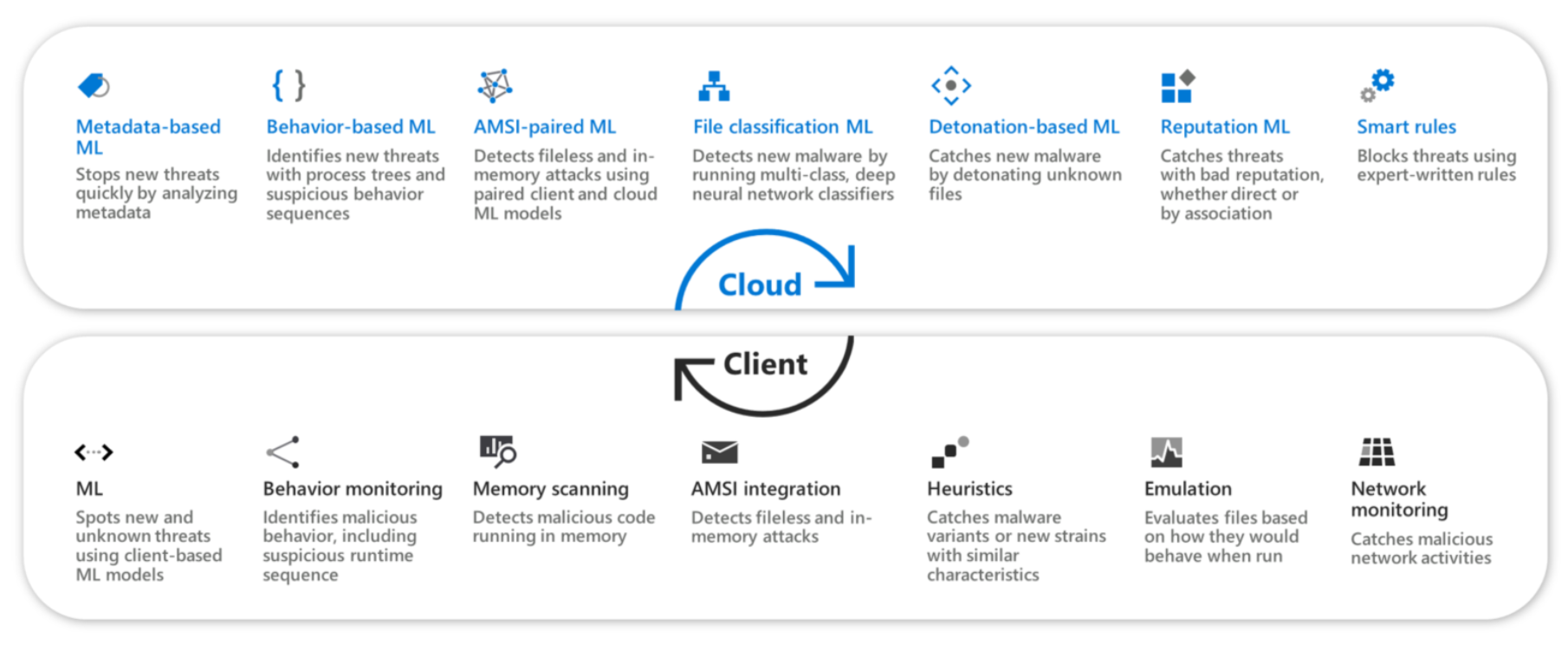
MDE provides a significantly more robust detection system compared to MDAV. It is classified as an EDR (Endpoint Detection and Response) software, not a traditional antivirus solution.
Details: Advanced technologies at the core of Microsoft Defender Antivirus
First, I'll check the official Microsoft Learn documentation to see if there are other detection technologies not found in the Security UI.
Microsoft Learn: Microsoft Defender Antivirus in Windows Overview
Based on the official Microsoft Learn documentation, here are the services for Microsoft Defender:
| Service Type | Service Name | Service Identifier |
|---|---|---|
| MDAV Core Service | MpDefenderCoreService.exe | MdCoreSvc |
| MDAV Service | MsMpEng.exe | WinDefend |
| MDAV Network Realtime Inspection Service | NisSrv.exe | WdNisSvc |
| Microsoft Endpoint DLP Service | MpDlpService.exe | MDDlpSvc |
PS C:\WINDOWS\system32> Get-Service -Name MdCoreSvc,WinDefend,WdNisSvc,MDDlpSvc -ErrorAction SilentlyContinue | Select-Object Name,Status,StartType | Format-Table -AutoSize

Name       Status StartType
----       ------ ---------
MDCoreSvc Running Automatic
WdNisSvc  Running    Manual
WinDefend Running Automatic
In MDAV, the settings related to malware (virus and threat protection) are as follows:
- Real-time protection
- Dev Drive protection
- Cloud-delivered protection
- Tamper protection
| ETW Provider Name | ETW Provider GUID |
|---|---|
| Microsoft-Antimalware-AMFilter | cfeb0608-330e-4410-b00d-56d8da9986e6 |
| Microsoft-Antimalware-Engine | 0a002690-3839-4e3a-b3b6-96d8df868d99 |
| Microsoft-Antimalware-Engine-Instrumentation | 68621c25-df8d-4a6b-aabc-19a22e296a7c |
| Microsoft-Antimalware-NIS | 102aab0a-9d9c-4887-a860-55de33b96595 |
| Microsoft-Antimalware-Protection | e4b70372-261f-4c54-8fa6-a5a7914d73da |
| Microsoft-Antimalware-RTP | 8e92deef-5e17-413b-b927-59b2f06a3cfc |
| Microsoft-Antimalware-Scan-Interface | 2a576b87-09a7-520e-c21a-4942f0271d67 |
| Microsoft-Antimalware-Service | 751ef305-6c6e-4fed-b847-02ef79d26aef |
| Microsoft-Antimalware-UacScan | d37e7910-79c8-57c4-da77-52bb646364cd |
MDAV's ETW-based real-time malicious behavior detection system is difficult to bypass without administrator privileges. However, writing specific events to ETW does not require administrator privileges. By exploiting this, generating an enormous amount of ETW events can partially neutralize MDAV's ETW inspection.
MpDefenderCoreService Reverse Engineering Report
Here are the functions traversed to access the initialization function of MpDefenderCoreService:
entryorwmainCRTStartup_scrt_common_main_sehmainHrExeMainServiceCrtMainCMpServiceCallback::vftableCMpServiceCallback::OnStartUp
Tracking the data named PTR_WdConfigManagerInitialize_140143258 inside the CMpServiceCallback::OnStartUp function revealed various sensors from MpWatchDog such as:
- WdAnomalyDetector
- CMpWdPerfCPUSensor
- CWdServiceCrashSensor
They are sensors belonging to MpWatchDog and are responsible for the overall monitoring of Defender. In particular, sensors like WdAnomalyDetector and others can be considered closer to behavior-based monitoring components. They perform a large volume of monitoring tasks such as HeartBeat checks on the protected target processes (MsMpEng.exe), HeartBeat checks on servers (such as ECS), and more. Additionally, when protected target processes terminate or crash based on behavior (CrashSensor), it appears that they immediately report this and attempt to restore or restart the affected service.
Based on the analysis of those sensors and other MpDefenderCoreService components, the discovered sensors are:
- CrashSensor
- CpuSensor
- MemorySensor
- DiskSensor
These 4 sensors or more in MpDefenderCoreService are responsible for monitoring system resources and stability, specifically targeting the MsMpEng.exe process, as configured through the function MpWatchDog::WdConfigManager::PopulateMonitoredTargets.
In conclusion, MpDefenderCoreService.exe is responsible for the overall stability, performance enhancement, and process protection of Defender, among other functions.
MsMpEng Reverse Engineering Report
The entry point of MsMpEng.exe is closely related to MpDefenderCoreService. First, MsMpEng.exe loads mpsvc.dll via MpCheckPlatformUpdate → LoadMpSvcFrom. Subsequently, it calls ServiceCrtMain from that DLL. This function receives CMpServiceCallback from MpDefenderCoreService and calls CMpServiceCallback::OnStartUp. Through this, MsMpEng.exe ensures that Defender checks for updates upon startup and initializes and coordinates MpDefenderCoreService via the shared mpsvc.dll service framework.
long LoadMpSvcFrom(HMODULE *hmodule,wchar_t *param_2,uint param_3) {
    uVar3 = (ulong)param_2;
    library_obj = (HMODULE)0x0;
    pWCHAR_0x0 = (wchar_t *)0x0;
    lVar1 = CommonUtil::NewSprintfW(
        &pWCHAR_0x0,
        L"%ls\\mpsvc.dll"
    );
    target_library = pWCHAR_0x0;

    ...

    lVar1 = CommonUtil::UtilLoadLibraryEx(
        &library_obj,
        target_library,
        0
    );
    hLibModule = library_obj;

    ...

    // LAB_14000890d:
    *hmodule = hLibModule;
    ...
}- Advanced technologies at the core of Microsoft Defender Antivirus
- Engineering detection around Microsoft Defender
- Microsoft Defender Antivirus full scan considerations and best practices
- AMSI.fail - PowerShell AMSI Disable Script Generator
- Microsoft Defender Antivirus in Windows Overview
- Requirements for Microsoft Defender Antivirus to run in passive mode
- Better know a data source: Antimalware Scan Interface