CoreFreq, a CPU monitoring software with BIOS like functionalities, is designed for the 64-bits Processors of architecture Intel Atom, Core2, Nehalem, SandyBridge and superiors; AMD Families 0Fh, 17h (Zen)
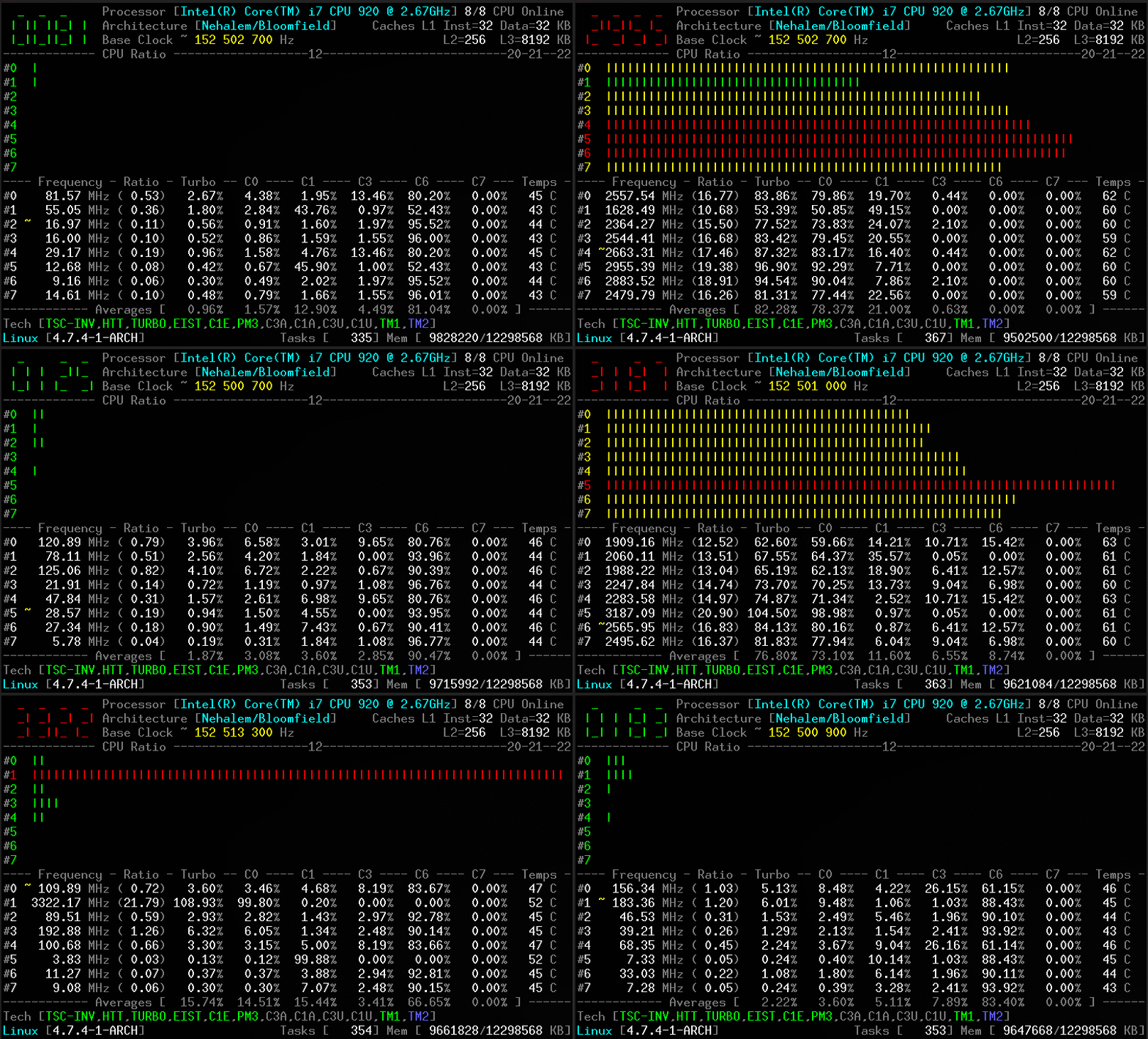
CoreFreq provides a framework to retrieve CPU data with a high degree of precision:
- Core frequencies & ratios; SpeedStep (EIST), Turbo Boost, Hyper-Threading (HTT) and Base Clock
- Performance counters including Time Stamp Counter (TSC), Unhalted Core Cycles (UCC), Unhalted Reference Cycles (URC)
- Number of instructions per cycle or second, IPS, IPC, or CPI
- CPU C-States C0 C1 C3 C6 C7 - C1E - Auto/UnDemotion of C1 C3
- DTS Temperature and Tjunction Max, Thermal Monitoring TM1 TM2 state, Vcore
- Topology map including Caches for boostrap & application CPU
- Processor features, brand & architecture strings
- In progress: Uncore, Memory Controller channels & geometry, DIMM timings,
Stress tools, Power & Energy (RAPL, OSPM, HWP, TDP), Overclocking, cpuidle & cpufreq driver
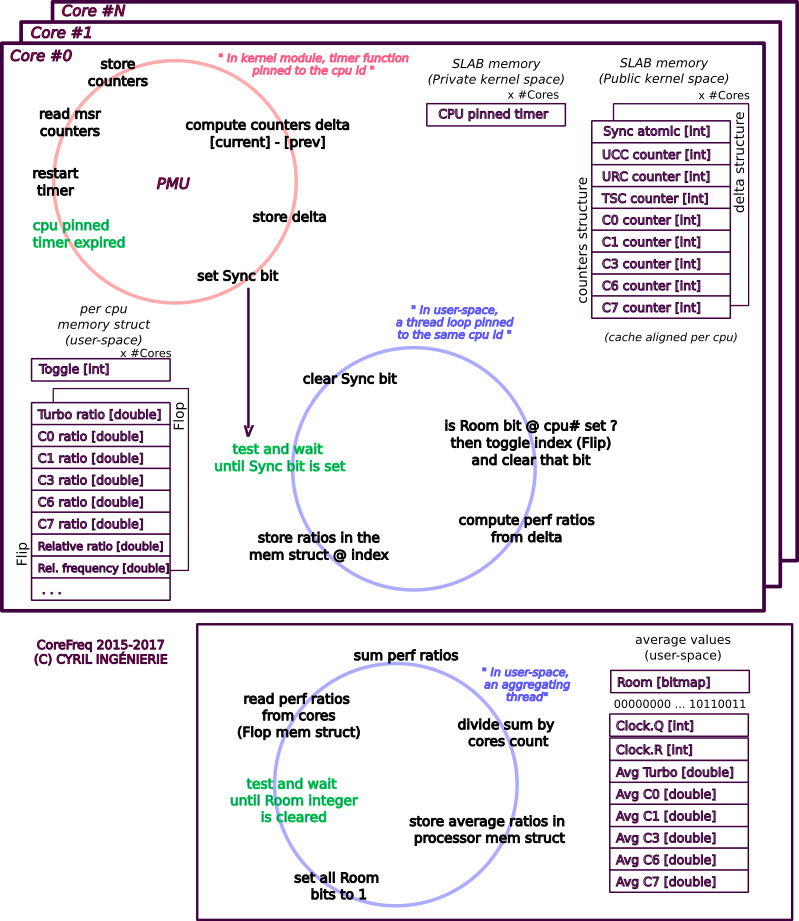
To reach this goal, CoreFreq implements a Linux Kernel module which employs the followings:
- asm code to keep as near as possible the readings of the performance counters;
- per-CPU, implements slab data memory and high-resolution timer;
- compliant with suspend / resume and CPU Hot-Plug;
- a shared memory to protect kernel from the user-space part of the software;
- atomic synchronization of threads to avoid mutexes and deadlock.
a- Intel only: For a better accuracy, disable the Kernel NMI Watchdog
Add the below parameter in the kernel boot loader (Grub, SysLinux) ...
nmi_watchdog=0
... and build with the fixed performance counters
make MSR_CORE_PERF_UC=MSR_CORE_PERF_FIXED_CTR1 MSR_CORE_PERF_URC=MSR_CORE_PERF_FIXED_CTR2
b- AMD and Intel: No Virtualization
VMs don't provide access to the registers that the CoreFreq driver employs :
- Fixed Performance Counters
- Model Specific Registers
- PCI Registers
c- Rendering
The UI renders best with an ASCII 7-Bit console or Xterm with VT100 and ANSI colors support
- The Linux Kernel with a minimum version 3.3
- The GNU C Library
- Software needed:
- GNU C Compiler with GNU extensions
- GNU Make tool
- Header files for building modules for Linux kernel
-
Clone the source code into a working directory.
💲git clone https://github.com/cyring/CoreFreq.git -
Build the programs.
💲cd CoreFreq
💲make
cc -Wall -pthread -c corefreqd.c -o corefreqd.o
cc -Wall -c corefreqm.c -o corefreqm.o
cc corefreqd.c corefreqm.c -o corefreqd -lpthread -lm -lrt
cc -Wall -c corefreq-cli.c -o corefreq-cli.o
cc -Wall -c corefreq-ui.c -o corefreq-ui.o
cc corefreq-cli.c corefreq-ui.c -o corefreq-cli -lm -lrt
make -C /lib/modules/x.y.z/build M=/workdir/CoreFreq modules
make[1]: Entering directory '/usr/lib/modules/x.y.z/build'
  CC [M]  /workdir/CoreFreq/corefreqk.o
  Building modules, stage 2.
  MODPOST 1 modules
  CC      /workdir/CoreFreq/corefreqk.mod.o
  LD [M]  /workdir/CoreFreq/corefreqk.ko
make[1]: Leaving directory '/usr/lib/modules/x.y.z/build'
When installed:
- Load the kernel module, as root.
:hash:
modprobe corefreqk - Start the daemon, as root.
:hash:
systemctl start corefreqd - Start the client, as a user.
:heavy_dollar_sign:
corefreq-cli
When built from source:
- Load the kernel module, as root.
:hash:
insmod corefreqk.ko - Start the daemon, as root.
:hash:
corefreqd - Start the client, as a user (in another terminal or console).
:heavy_dollar_sign:
corefreq-cli
-
Press [CTRL]+[C] to stop the client.
-
Press [CTRL]+[C] to stop the daemon (in foreground) or kill its background job.
-
Unload the kernel module
#️⃣rmmod corefreqk.ko
Download the CoreFreq Live CD from the Wiki

Use lsmod, dmesg or journalctl -k to check if the module is started
CoreFreq: Processor [06_1A] Architecture [Nehalem/Bloomfield] CPU [8/8]
CoreFreq Daemon.  Copyright (C) 2015-2019 CYRIL INGENIERIE

  Processor [Intel(R) Core(TM) i7 CPU 920 @ 2.67GHz]
  Architecture [Nehalem/Bloomfield] 8/8 CPU Online.
Without arguments, the corefreq-cli program displays Top Monitoring
Remark: Drawing will stall if the terminal width is lower than 80 columns, or its height is less than required.

-
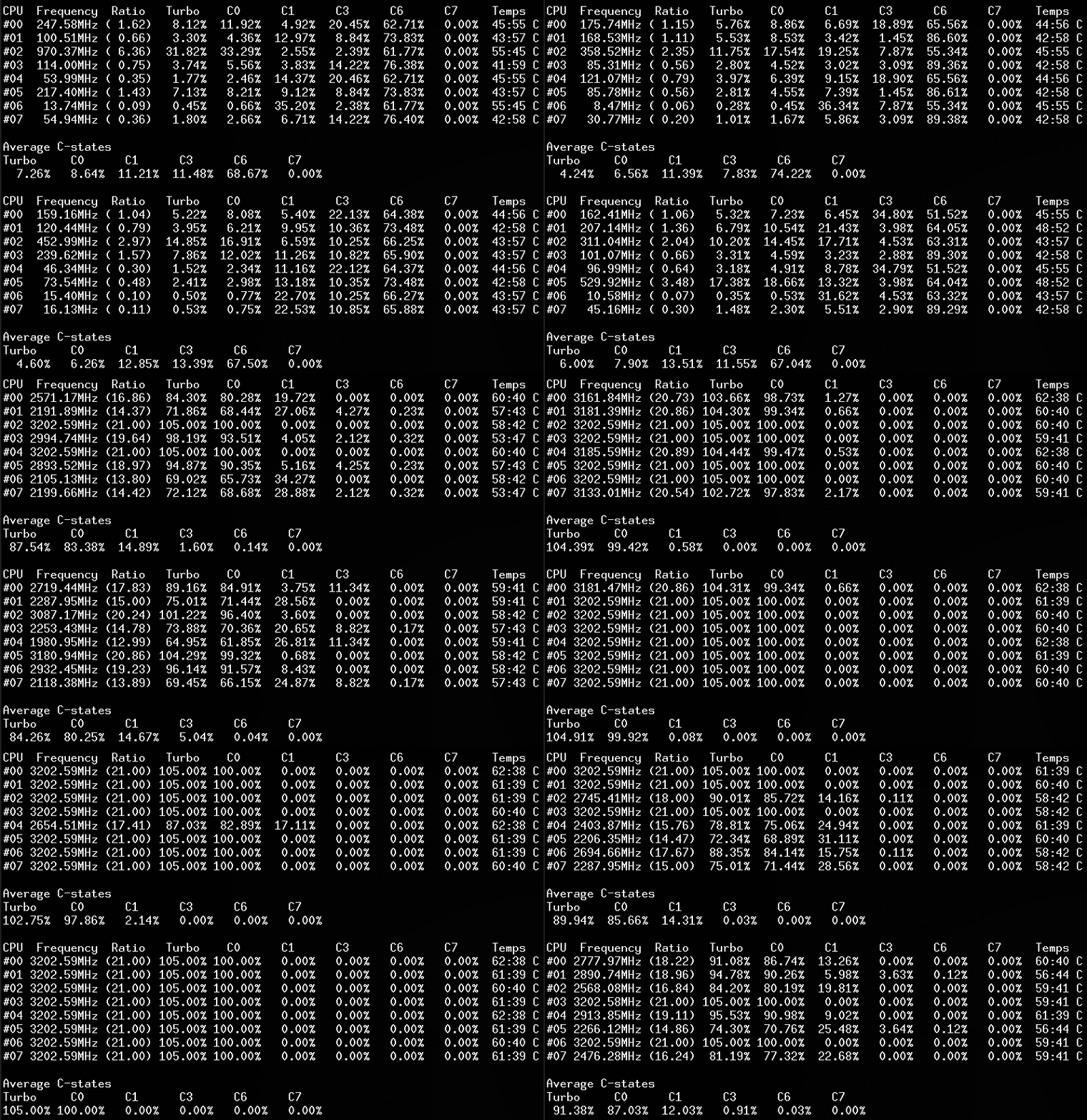
With the option '-c', the client traces counters.
-
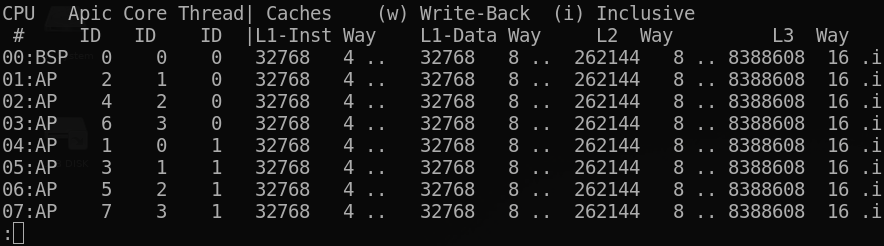
Using option '-m' corefreq-cli shows the CPU topology
-
With the option '-i' corefreq-cli traces the number of instructions per second / cycle
CPU     IPS            IPC            CPI
#00     0.000579/s     0.059728/c    16.742698/i
#01     0.000334/s     0.150569/c     6.641471/i
#02     0.000598/s     0.161326/c     6.198641/i
#03     0.000294/s     0.233535/c     4.282013/i
#04     0.000240/s     0.042931/c    23.293141/i
#05     0.000284/s     0.158661/c     6.302765/i
#06     0.000128/s     0.128031/c     7.810631/i
#07     0.000088/s     0.150406/c     6.648674/i
- Use the option '-s' to show the Processor information (BSP)
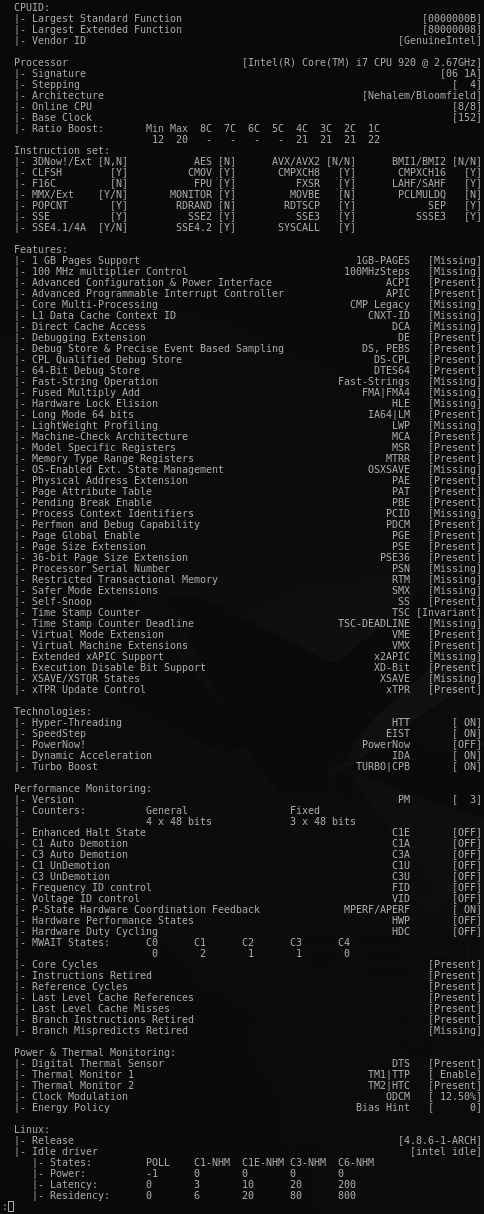
corefreq-git can be installed from the Arch User Repository.
- Installing the DKMS package will pull the Kernel development packages
#️⃣apt-get install dkms - Or, install selectively the development packages prerequisites.
#️⃣apt-get install libpthread-stubs0-dev
- Development packages prerequisites.
#️⃣yum install kernel-devel
#️⃣yum group install "Development Tools"
-
Q: Turbo Technology is activated however CPUs don't reach those frequencies ?
-
Q: The CPU ratio does not go above its minimum value ?
-
Q: The UI shows erratic counters values !
A: In the kernel boot command argument line, disable the NMI Watchdog
nmi_watchdog=0
- Q: The Processor does not enter the C-States ?
A: Check if at least one Idle driver is running.
Accordingly to the Processor specs, provide a max_cstate value in the kernel argument as below.
intel_idle.max_cstate=value
A: CoreFreq can also register itself as a cpuidle driver.
This time, any idle driver will have to be blacklisted in the kernel command line; such as:
modprobe.blacklist=intel_cstate idle=halt intel_idle.max_cstate=0
Start the CoreFreq driver with the Register_CPU_Idle parameter:
insmod corefreqk.ko Register_CPU_Idle=1
-
Q: The CoreFreq UI refreshes itself slowly, with a delay after the actual CPUs usage ?
A: The sampling time to read the counters can be reduced or increased using a CoreFreq module argument:
#️⃣insmod corefreqk.ko SleepInterval=value
where<value>is supplied in milliseconds between a minimum of 100 ms and a maximum of 4500 ms. 1000 ms is the default value. -
Q: The base clock reports a wrong frequency value ?
A: CoreFreq uses various algorithms to estimate the base clock.- The delta of two TimeStamp counters during a defined interval
- The value provided in the Processor brand string divided by the maximum ratio (without Turbo)
- A static value advertised by the manufacturer specs.
- The MSR_FSB_FREQ bits provided with the Core, Core2 and Atom architectures.
The CoreFreq module can be started as follow to ignore the first algorithm (frequency estimation):
#️⃣insmod corefreqk.ko AutoClock=0
Remark: algorithms # 2, 3 and 4 will not return any under/over-clock frequency. -
Q: The CPU temperature is wrong ?
A: CoreFreq employs two msr to calculate the temperature.
MSR_IA32_TEMPERATURE_TARGET - MSR_IA32_THERM_STATUS [DTS]
Remark: if the MSR_IA32_TEMPERATURE_TARGET is not provided by the Processor, a default value of 100 degree Celsius is considered as a target.
-
Q: The menu option "Memory Controller" does not open any window ?
A: Although Uncore and IMC features are under development, they can be activated with the Experimental driver argument:
#️⃣insmod corefreqk.ko Experimental=1 -
Q: The Instructions and PMC0 counters are stuck to zero ?
A: The PCE bit of control register CR4 allows RDPMC in ring 3
#️⃣echo "2" > /sys/devices/cpu/rdpmc
#️⃣insmod corefreqk.ko RDPMC_Enable=1 -
Q: How to solely control the OSPM or the HWP Performance P-States ?
A: Allow CoreFreq to register as a cpufreq driver.
In the Kernel boot command line, blacklist any P-state driver; such as:
modprobe.blacklist=acpi_cpufreq,pcc_cpufreq intel_pstate=disable
Start the CoreFreq driver with the Register_CPU_Freq parameter:
insmod corefreqk.ko Register_CPU_Freq=1
-
Q: The CPU freeze or the System crash.
A: This Processor is not or partially implemented in CoreFreq.
Please open an issue in the CPU support Wiki page. -
Q: What are the parameters of the driver ?
A: Use themodinfocommand to list them:
$ modinfo corefreqk.ko
parm:           ArchID:Force an architecture (ID) (int)
parm:           AutoClock:Auto estimate the clock frequency (int)
parm:           SleepInterval:Timer interval (ms) (uint)
parm:           TickInterval:System requested interval (ms) (uint)
parm:           Experimental:Enable features under development (int)
parm:           ServiceProcessor:Select a CPU to run services with (int)
parm:           RDPMC_Enable:Enable RDPMC bit in CR4 register (ushort)
parm:           NMI_Disable:Disable the NMI Handler (ushort)
parm:           PkgCStateLimit:Package C-State Limit (short)
parm:           IOMWAIT_Enable:I/O MWAIT Redirection Enable (short)
parm:           CStateIORedir:Power Mgmt IO Redirection C-State (short)
parm:           SpeedStep_Enable:Enable SpeedStep (short)
parm:           C1E_Enable:Enable SpeedStep C1E (short)
parm:           TurboBoost_Enable:Enable Turbo Boost (short)
parm:           C3A_Enable:Enable C3 Auto Demotion (short)
parm:           C1A_Enable:Enable C3 Auto Demotion (short)
parm:           C3U_Enable:Enable C3 UnDemotion (short)
parm:           C1U_Enable:Enable C1 UnDemotion (short)
parm:           CC6_Enable:Enable Core C6 State (short)
parm:           PC6_Enable:Enable Package C6 State (short)
parm:           ODCM_Enable:Enable On-Demand Clock Modulation (short)
parm:           ODCM_DutyCycle:ODCM DutyCycle [0-7] | [0-14] (short)
parm:           PowerMGMT_Unlock:Unlock Power Management (short)
parm:           PowerPolicy:Power Policy Preference [0-15] (short)
parm:           PState_FID:P-State Frequency Id (int)
parm:           PState_VID:P-State Voltage Id (int)
parm:           HWP_Enable:Hardware-Controlled Performance States (short)
parm:           HWP_EPP:Energy Performance Preference (short)
parm:           Clear_Events:Clear Thermal and Power Events (uint)
parm:           Register_CPU_Idle:Register the Kernel cpuidle driver (short)
parm:           Register_CPU_Freq:Register the Kernel cpufreq driver (short)