A design experiment in spatial, AI-augmented thinking.
Most AI tools are built around a chat interface: you ask, it answers, you ask again. The interaction is sequential, conversational, and optimised for producing output. nodepad is built around a different premise: that thinking is spatial and associative, and that AI is most useful when it works quietly in the background rather than at the centre of attention.
You add notes. The AI classifies them, finds connections between them, surfaces what you haven't said yet, and occasionally synthesises an emergent insight from the whole canvas. You stay in control of the space. The AI earns its place by being genuinely useful rather than prominent.
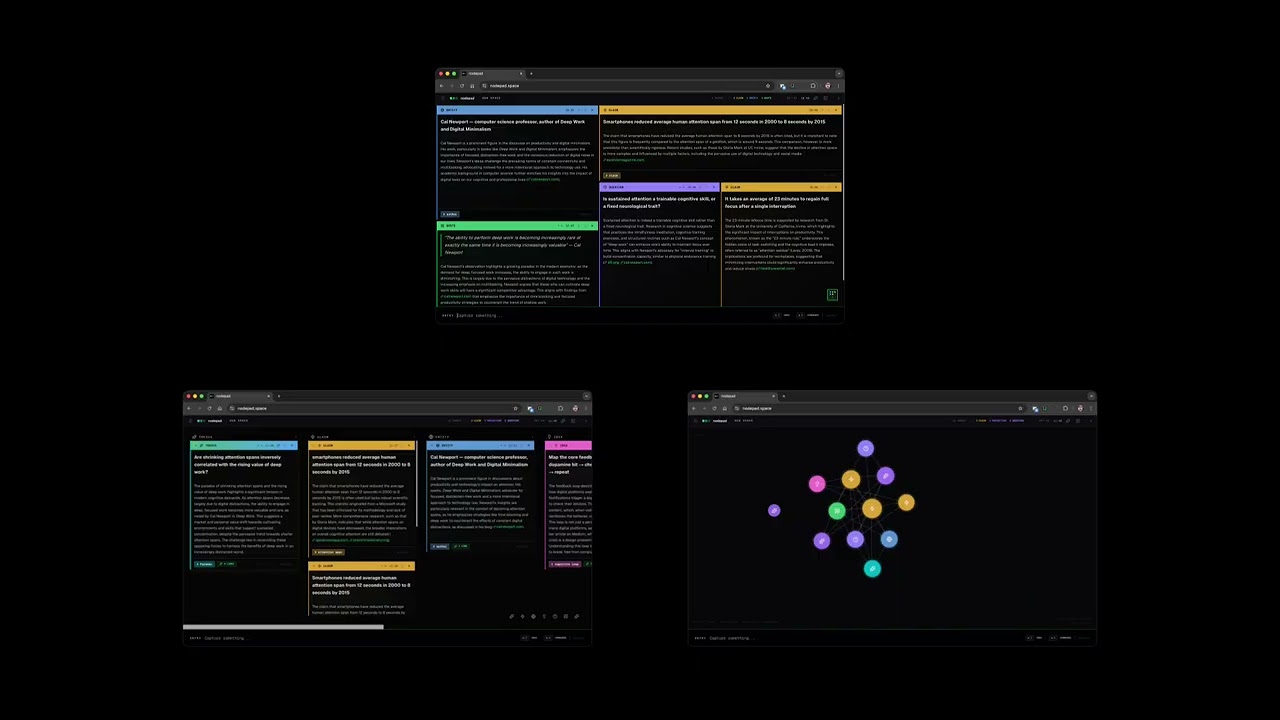
Notes are typed into the input bar and placed onto a spatial canvas. Each note is automatically classified into one of 14 types — claim, question, idea, task, entity, quote, reference, definition, opinion, reflection, narrative, comparison, thesis, general — and enriched with a short annotation that adds something the note doesn't already say.
Connections between notes are inferred from content. When you hover a connection indicator, unrelated notes dim. When enough notes accumulate, a synthesis emerges — a single sentence that bridges the tensions across the canvas. You can solidify it into a thesis note or dismiss it.
Three views: tiling (spatial BSP grid), kanban (grouped by type), graph (force-directed, centrality-radial).
Requirements: a desktop browser and an API key from one of the supported providers.
git clone https://github.com/mskayyali/nodepad.git
cd nodepad
npm install
npm run dev
Open localhost:3000.
Add your API key: click the menu icon (top-left) → Settings → choose your provider → paste your key. The key is stored in your browser's localStorage and goes directly to the AI provider — it never passes through any server.
Enable web grounding (optional): toggle "Web grounding" in Settings to let the AI cite real sources for claims, questions, and references. Supported on OpenRouter :online models and OpenAI search-preview models.
Select provider and model from the sidebar Settings panel. Each provider remembers its key independently — switching providers and back restores your key.
Access to all major models through a single key. Free credits available at openrouter.ai.
| Model | Notes |
|---|---|
openai/gpt-4o |
Default. Strong annotation quality, web grounding. |
anthropic/claude-sonnet-4-5 |
Strong reasoning, complex research. |
google/gemini-2.5-pro |
Long context, web grounding. |
deepseek/deepseek-chat |
Fast, cost-effective. |
mistralai/mistral-small-3.2 |
Lightweight, fast. |
Use your OpenAI API key directly. Web grounding via search-preview models.
| Model | Notes |
|---|---|
gpt-4o |
Strong structured output, web grounding. |
gpt-4o-mini |
Fast, capable, web grounding. |
gpt-4.1 |
Latest GPT-4, improved instruction following. |
o4-mini |
Fast reasoning model. |
GLM models from Zhipu AI. Get a key at z.ai.
| Model | Notes |
|---|---|
glm-4.7 |
Strong reasoning, 200K context. |
glm-5 |
Z.ai flagship model. |
glm-5-turbo |
Fast, community-tested. |
Enter |
Add note |
⌘K |
Command palette (views, navigation, export) |
⌘Z |
Undo |
Escape |
Deselect / close panels |
Double-click any note to edit. Click the type label to reclassify manually.
Everything lives in your browser. No account, no server, no database.
- Notes are persisted to
localStorageundernodepad-projects - A silent rolling backup is written on every change to
nodepad-backup - Export to
.mdor.nodepad(versioned JSON) via⌘K - Import
.nodepadfiles via the sidebar
Next.js · React 19 · TypeScript · Tailwind CSS v4 · D3.js · Framer Motion
Pull requests welcome. Two PRs have already shaped the project:
- PR #1 by @matwate — OpenAI provider support, multi-provider architecture
- PR #2 by @desireco — Z.ai provider, robust JSON parsing for truncated responses
A design experiment by Saleh Kayyali.


