CoreFreq is a CPU monitoring software with BIOS like functionnalities, designed for the 64-bits Processors of architectures Intel Atom, Core2, Nehalem, SandyBridge and superiors; AMD Families 0Fh, 17h (Zen)
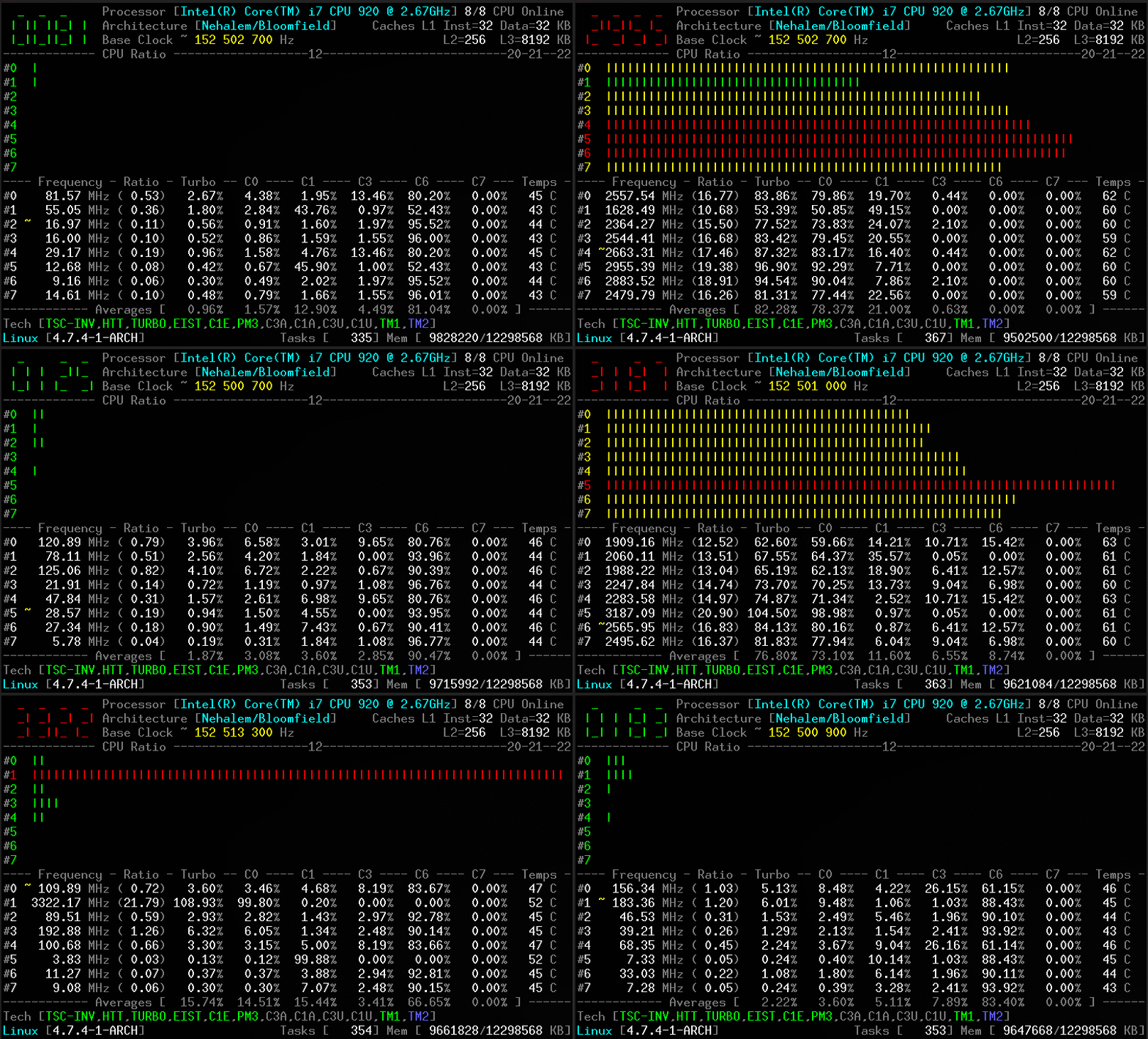
CoreFreq provides a framework to retrieve CPU data with a high degree of precision:
- Core frequencies & ratios; SpeedStep (EIST), Turbo Boost, Hyper-Threading (HTT) and Base Clock
- Performance counters including Time Stamp Counter (TSC), Unhalted Core Cycles (UCC), Unhalted Reference Cycles (URC)
- Number of instructions per cycle or second, IPS, IPC, or CPI
- CPU C-States C0 C1 C3 C6 C7 - C1E - Auto/UnDemotion of C1 C3
- DTS Temperature and Tjunction Max, Thermal Monitoring TM1 TM2 state, Vcore
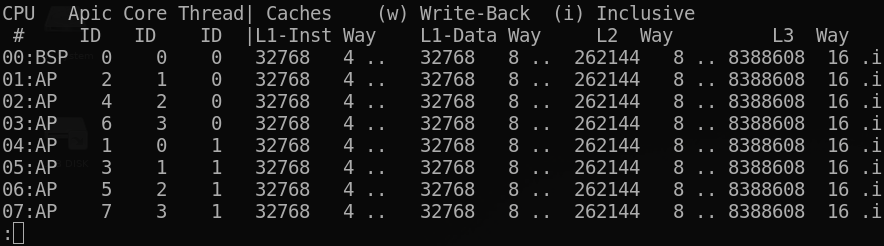
- Topology map including Caches for boostrap & application CPU
- Processor features, brand & architecture strings
- In progress: Uncore, Memory Controller channels & geometry, DIMM timings,
Stress tools, Power & Energy (RAPL, OSPM, HWP, TDP), Overclocking, cpuidle & cpufreq driver
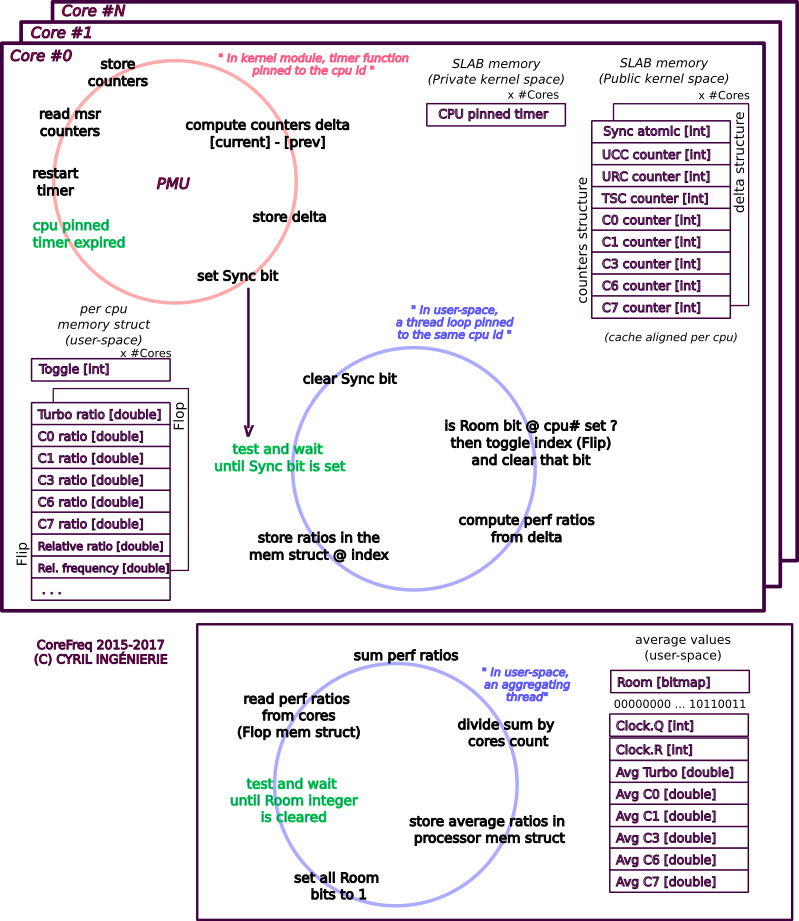
To reach this goal, CoreFreq implements a Linux Kernel module which employs the followings:
- asm code to keep as near as possible the readings of the performance counters;
- per-CPU, implements slab data memory and high-resolution timer;
- compliant with suspend / resume and CPU Hot-Plug;
- a shared memory to protect kernel from the user-space part of the software;
- atomic synchronization of threads to avoid mutexes and deadlock.
a- For a better accuracy, disable the Kernel NMI Watchdog
Add the below parameter in the kernel boot loader (Grub, SysLinux)
The NMI Watchdog and the CoreFreq driver are conflicting on the ownership of the fixed performance counters
nmi_watchdog=0
b- No Virtualization
VMs don't provide access to the registers that the CoreFreq driver employs :
- Fixed Performance Counters
- Model Specific Registers
- PCI Registers
c- Rendering
The UI renders best with an ASCII 7-Bit console or Xterm with VT100 and ANSI colors support
- The Linux Kernel with a minimum version 3.3
- The GNU C Library
- Software needed:
- GNU C Compiler
- GNU Make tool
- Header files for building modules for Linux kernel
-
Clone the source code into a working directory.
💲git clone https://github.com/cyring/CoreFreq.git -
Build the programs.
💲cd CoreFreq
💲make
cc -Wall -pthread -c corefreqd.c -o corefreqd.o
cc -Wall -c corefreqm.c -o corefreqm.o
cc corefreqd.c corefreqm.c -o corefreqd -lpthread -lm -lrt
cc -Wall -c corefreq-cli.c -o corefreq-cli.o
cc -Wall -c corefreq-ui.c -o corefreq-ui.o
cc corefreq-cli.c corefreq-ui.c -o corefreq-cli -lm -lrt
make -C /lib/modules/x.y.z/build M=/workdir/CoreFreq modules
make[1]: Entering directory '/usr/lib/modules/x.y.z/build'
  CC [M]  /workdir/CoreFreq/corefreqk.o
  Building modules, stage 2.
  MODPOST 1 modules
  CC      /workdir/CoreFreq/corefreqk.mod.o
  LD [M]  /workdir/CoreFreq/corefreqk.ko
make[1]: Leaving directory '/usr/lib/modules/x.y.z/build'
When installed:
- Load the kernel module, as root.
:hash:
modprobe corefreqk - Start the daemon, as root.
:hash:
systemctl start corefreqd - Start the client, as a user.
:heavy_dollar_sign:
corefreq-cli
When built from source:
- Load the kernel module, as root.
:hash:
insmod corefreqk.ko - Start the daemon, as root.
:hash:
corefreqd - Start the client, as a user (in another terminal or console).
:heavy_dollar_sign:
corefreq-cli
-
Press [CTRL]+[C] to stop the client.
-
Press [CTRL]+[C] to stop the daemon (in foreground) or kill its background job.
-
Unload the kernel module
#️⃣rmmod corefreqk.ko
Download the CoreFreq Live CD from the Wiki

Use lsmod, dmesg or journalctl -k to check if the module is started
CoreFreq: Processor [06_1A] Architecture [Nehalem/Bloomfield] CPU [8/8]
CoreFreq Daemon.  Copyright (C) 2015-2019 CYRIL INGENIERIE

  Processor [Intel(R) Core(TM) i7 CPU 920 @ 2.67GHz]
  Architecture [Nehalem/Bloomfield] 8/8 CPU Online.
Without arguments, the corefreq-cli program displays Top Monitoring
Remark: Drawing will stall if the terminal width is lower than 80 columns, or its height is less than required.

-
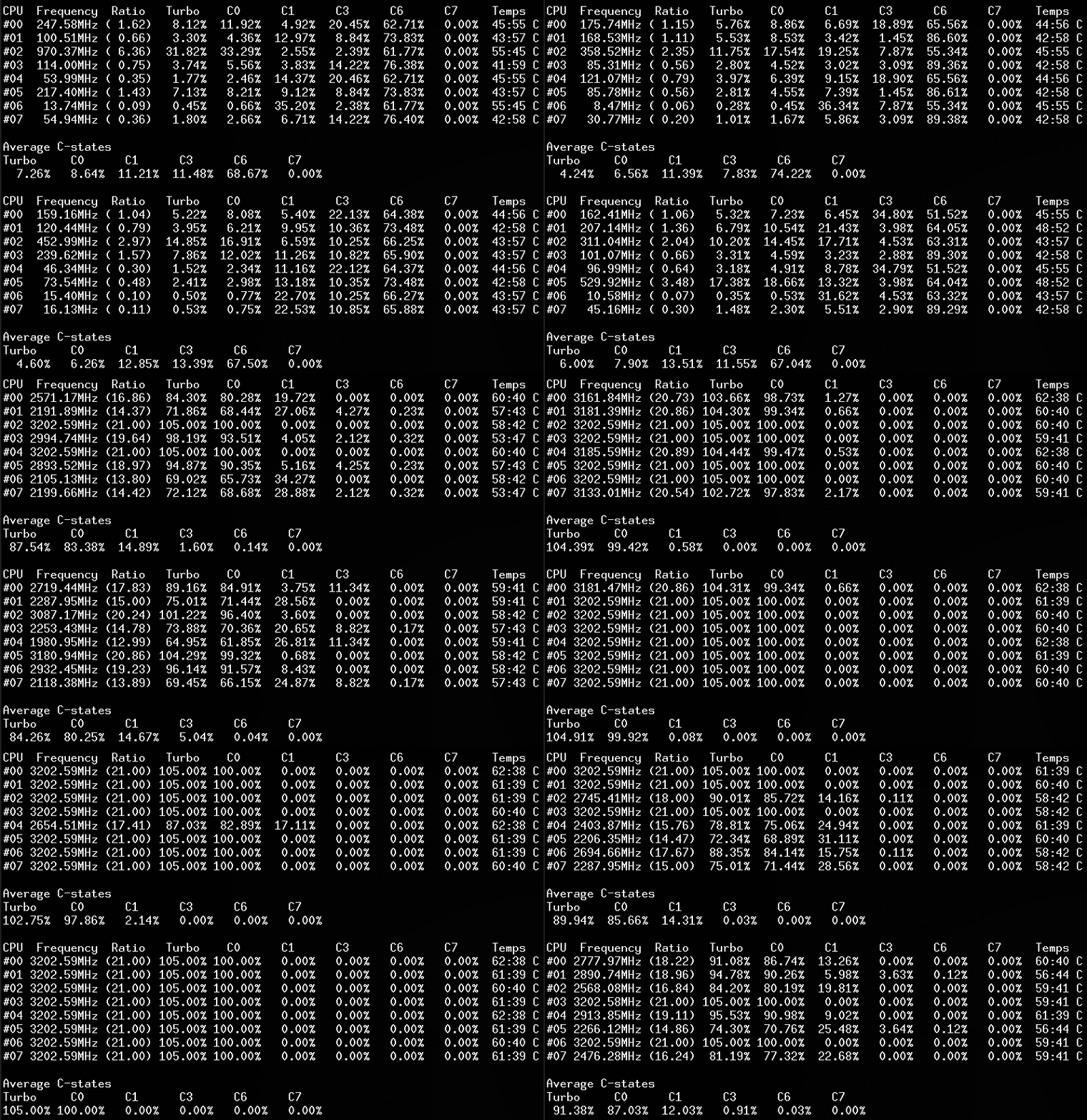
With the option '-c', the client traces counters.
-
Using option '-m' corefreq-cli shows the CPU topology
-
With the option '-i' corefreq-cli traces the number of instructions per second / cycle
CPU     IPS            IPC            CPI
#00     0.000579/s     0.059728/c    16.742698/i
#01     0.000334/s     0.150569/c     6.641471/i
#02     0.000598/s     0.161326/c     6.198641/i
#03     0.000294/s     0.233535/c     4.282013/i
#04     0.000240/s     0.042931/c    23.293141/i
#05     0.000284/s     0.158661/c     6.302765/i
#06     0.000128/s     0.128031/c     7.810631/i
#07     0.000088/s     0.150406/c     6.648674/i
- Use the option '-s' to show the Processor information (BSP)
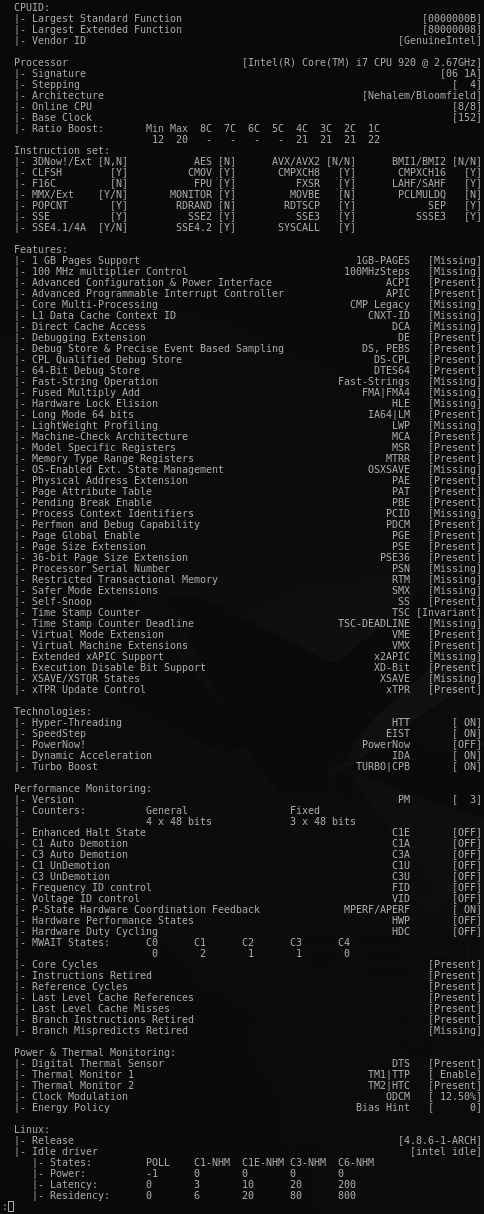
corefreq-git can be installed from the Arch User Repository.
- Development packages prerequisites.
#️⃣apt-get install libpthread-stubs0-dev
- Development packages prerequisites.
#️⃣yum install kernel-devel
#️⃣yum group install "Development Tools"
-
Q: Turbo Technology is activated however CPUs don't reach those frequencies ?
-
Q: The CPU ratio does not go above its minimum value ?
-
Q: The UI shows erratic counters values !
A: In the kernel boot command argument line, disable the NMI Watchdog
nmi_watchdog=0
A: a NMI alternative is proposed in the Makefile to make use of the APERF/MPERF registers
make help	# for instructions usage
make info	# for the current settings
- Q: The Processor does not enter the C-States ?
A: Check if at least one Idle driver is running.
Accordingly to the Processor specs, provide a max_cstate value in the kernel argument as below.
intel_idle.max_cstate=value
A: CoreFreq can also register itself as a cpuidle driver.
This time, any idle driver will have to be blacklisted in the kernel command line; such as:
modprobe.blacklist=intel_cstate idle=halt intel_idle.max_cstate=0
Start the CoreFreq driver with the Register_CPU_Idle parameter:
insmod corefreqk.ko Register_CPU_Idle=1
-
Q: The CoreFreq UI refreshes itself slowly, with a delay after the actual CPUs usage ?
A: The sampling time to read the counters can be reduced or increased using a CoreFreq module argument:
#️⃣insmod corefreqk.ko SleepInterval=value
where<value>is supplied in milliseconds between a minimum of 100 ms and a maximum of 4500 ms. 1000 ms is the default value. -
Q: The base clock reports a wrong frequency value ?
A: CoreFreq uses various algorithms to estimate the base clock.- The delta of two TimeStamp counters during a defined interval
- The value provided in the Processor brand string divided by the maximum ratio (without Turbo)
- A static value advertised by the manufacturer specs.
- The MSR_FSB_FREQ bits provided with the Core, Core2 and Atom architectures.
The CoreFreq module can be started as follow to ignore the first algorithm (frequency estimation):
#️⃣insmod corefreqk.ko AutoClock=0
Remark: algorithms # 2, 3 and 4 will not return any under/over-clock frequency. -
Q: The CPU temperature is wrong ?
A: CoreFreq employs two msr to calculate the temperature.
MSR_IA32_TEMPERATURE_TARGET - MSR_IA32_THERM_STATUS [DTS]
Remark: if the MSR_IA32_TEMPERATURE_TARGET is not provided by the Processor, a default value of 100 degree Celsius is considered as a target.
-
Q: The menu option "Memory Controller" does not open any window ?
A: Although Uncore and IMC features are under development, they can be activated with the Experimental driver argument:
#️⃣insmod corefreqk.ko Experimental=1 -
Q: The Instructions and PMC0 counters are stuck to zero ?
A: The PCE bit of control register CR4 allows RDPMC in ring 3
#️⃣echo "2" > /sys/devices/cpu/rdpmc
#️⃣insmod corefreqk.ko RDPMC_Enable=1 -
Q: How to solely control the OSPM or the HWP Performance P-States ?
A: Allow CoreFreq to register as a cpufreq driver.
In the Kernel boot command line, blacklist any P-state driver; such as:
modprobe.blacklist=acpi_cpufreq,pcc_cpufreq intel_pstate=disable
Start the CoreFreq driver with the Register_CPU_Freq parameter:
insmod corefreqk.ko Register_CPU_Freq=1
-
Q: The CPU freeze or the System crash.
A: This Processor is not or partially implemented in CoreFreq.
Please open an issue in the CPU support Wiki page. -
Q: What are the parameters of the driver ?
A: Use themodinfocommand to list them:
$ modinfo corefreqk.ko
parm:           ArchID:Force an architecture (ID) (int)
parm:           AutoClock:Auto estimate the clock frequency (int)
parm:           SleepInterval:Timer interval (ms) (uint)
parm:           TickInterval:System requested interval (ms) (uint)
parm:           Experimental:Enable features under development (int)
parm:           ServiceProcessor:Select a CPU to run services with (int)
parm:           RDPMC_Enable:Enable RDPMC bit in CR4 register (ushort)
parm:           NMI_Disable:Disable the NMI Handler (ushort)
parm:           PkgCStateLimit:Package C-State Limit (short)
parm:           IOMWAIT_Enable:I/O MWAIT Redirection Enable (short)
parm:           CStateIORedir:Power Mgmt IO Redirection C-State (short)
parm:           SpeedStep_Enable:Enable SpeedStep (short)
parm:           C1E_Enable:Enable SpeedStep C1E (short)
parm:           TurboBoost_Enable:Enable Turbo Boost (short)
parm:           C3A_Enable:Enable C3 Auto Demotion (short)
parm:           C1A_Enable:Enable C3 Auto Demotion (short)
parm:           C3U_Enable:Enable C3 UnDemotion (short)
parm:           C1U_Enable:Enable C1 UnDemotion (short)
parm:           CC6_Enable:Enable Core C6 State (short)
parm:           PC6_Enable:Enable Package C6 State (short)
parm:           ODCM_Enable:Enable On-Demand Clock Modulation (short)
parm:           ODCM_DutyCycle:ODCM DutyCycle [0-7] | [0-14] (short)
parm:           PowerMGMT_Unlock:Unlock Power Management (short)
parm:           PowerPolicy:Power Policy Preference [0-15] (short)
parm:           PState_FID:P-State Frequency Id (int)
parm:           PState_VID:P-State Voltage Id (int)
parm:           HWP_Enable:Hardware-Controlled Performance States (short)
parm:           HWP_EPP:Energy Performance Preference (short)
parm:           Clear_Events:Clear Thermal and Power Events (uint)
parm:           Register_CPU_Idle:Register the Kernel cpuidle driver (short)
parm:           Register_CPU_Freq:Register the Kernel cpufreq driver (short)