GoEPServer is a powerful, modern web-based file server and penetration testing toolkit with an integrated comprehensive reverse shell generator. Built with Go and featuring a sleek, theme-aware web interface.
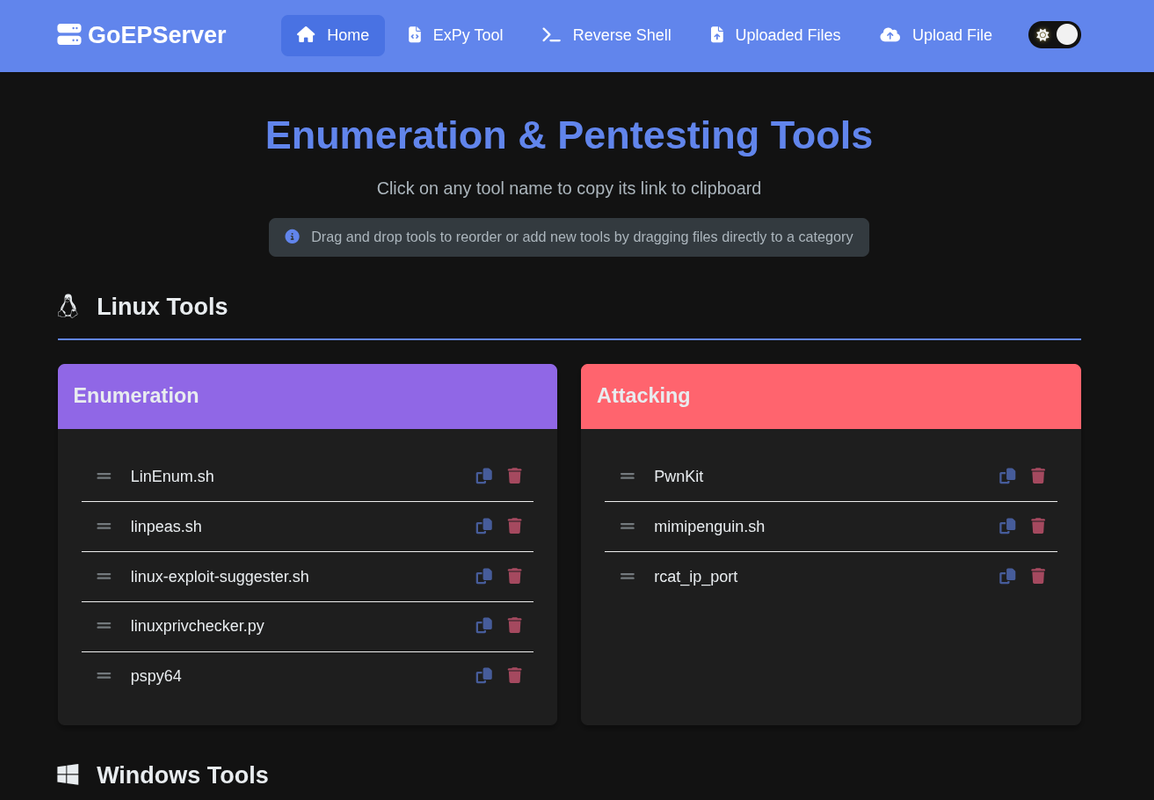
- File Upload/Download: Drag & drop web interface with CLI support
- Tool Management: Organize penetration testing tools by platform and category
- Web Interface: Clean, responsive design with light/dark theme support
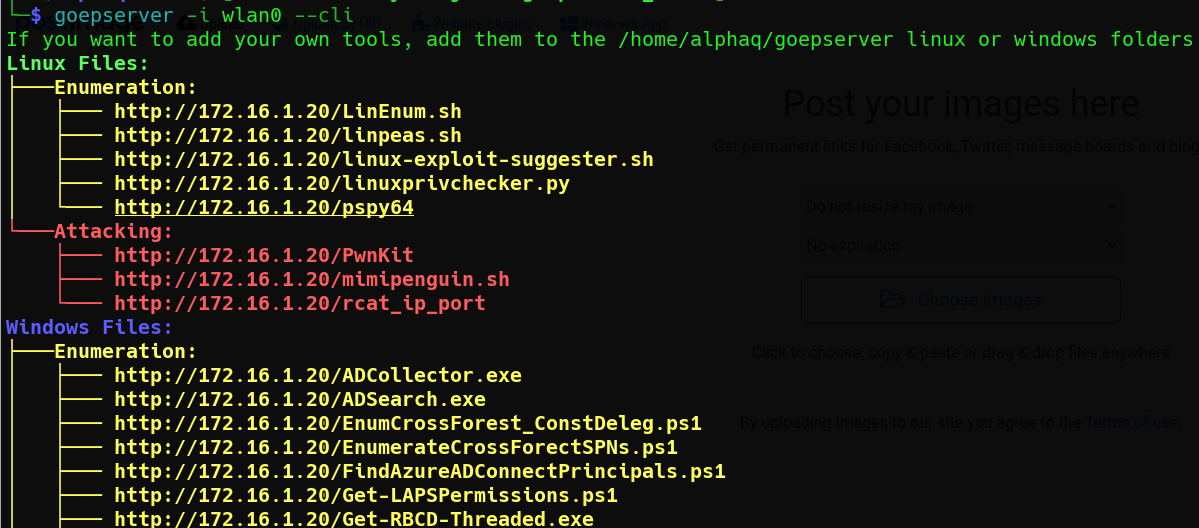
- Command Line Integration: Upload files via curl, PowerShell, or web interface
- Comprehensive Collection: 200+ reverse/bind shells and MSFVenom payloads
- Multiple Categories: Reverse shells, bind shells, MSFVenom, and HoaxShell
- Advanced Features:
- OS filtering (Linux, Windows, macOS)
- Search functionality
- Shell type selection (bash, cmd, powershell, etc.)
- Encoding options (URL, Base64, etc.)
- One-click copy to clipboard
- Syntax highlighting with Prism.js
- Credit to 0dayCTF: Based on the 0dayCTF reverse shell generator
- Theme Support: Automatic light/dark mode with smooth transitions
- Syntax Highlighting: Code blocks with proper language detection
- Expandable Cards: Collapsible shell categories for better organization
- Real-time Updates: Dynamic IP/port detection from browser location
- Standalone Binary: All web assets embedded, no external dependencies
- Cross-Platform: Support for Linux, Windows, and macOS
- Portable: Static linking, works on any system without glibc dependencies
- Lightweight: ~8MB binary size with full functionality
# Download the latest release for your platform
wget https://github.com/jameel3reef/goepserver/releases/latest/download/goepserver-linux-amd64
chmod +x goepserver-linux-amd64
./goepserver-linux-amd64# Clone the repository
git clone https://github.com/jameel3reef/goepserver.git
cd goepserver
# Build standalone binary
./build.sh
# Run the server
./goepserver# Build for all platforms
./build-cross-platform.sh
# Find binaries in dist/ folder
ls -la dist/After building, you can download the tools from the LinWinTools repository or just run the tools.sh script to automatically download and organize the tools:
cd goepserver
./tools.sh- Start the server:
./goepserver - Open browser: Navigate to
http://localhost:80 - Upload files: Use the web interface or drag & drop
- Generate shells: Visit
/reverse-shellfor the payload generator - Theme toggle: Switch between light and dark modes
# Linux/macOS
curl http://localhost:80/upload -F 'f=@yourfile'

# Windows PowerShell
Invoke-RestMethod -Uri http://localhost:80/upload -Method Post -Form @{f=Get-Item -Path "yourfile"}./goepserver -h
Usage:
-p int Port number (default 80)
-i string Interface to bind to (default "lo")
-cli Run in CLI mode- Input Validation: All file uploads and downloads are validated
- Path Traversal Protection: Prevents directory traversal attacks
- Safe File Handling: Secure file operations with proper error handling
- Cross-Platform Compatibility: Works consistently across different operating systems
goepserver/
├── cmd/goepserver/          # Application entry point
│   └── main.go
├── internal/                # Internal packages
│   ├── assets/             # Embedded web assets
│   ├── config/             # Configuration handling
│   ├── server/             # HTTP server and handlers
│   ├── models/             # Data models
│   ├── utils/              # Utility functions
│   └── expy/               # Expy functionality
├── web/                    # Web assets (templates, CSS, JS)
│   ├── templates/          # HTML templates
│   └── static/             # Static assets (CSS, JS, images)
├── build.sh                # Build script for standalone binary
├── build-cross-platform.sh # Cross-platform build script
├── go.mod                  # Go module definition
└── README.md               # This file
# Development build
go build -o goepserver ./cmd/goepserver/

# Production build (optimized)
./build.sh

# Cross-platform build
./build-cross-platform.sh- Edit
web/static/js/reverse-shell.js - Add new shell data to the
shellDataobject - Follow the existing pattern for shell categories
- Bash: Traditional and modern bash reverse shells
- Python: Various Python-based reverse shells
- PHP: Web-based PHP reverse shells
- Ruby: Ruby reverse shell variants
- Perl: Perl-based reverse shells
- Java: Java reverse shell implementations
- C: Compiled C reverse shells
- PowerShell: Windows PowerShell reverse shells
- And many more...
- netcat: Traditional nc bind shells
- Python: Python bind shell variants
- PHP: PHP-based bind shells
- Bash: Bash bind shells
- Linux: ELF executables and shellcode
- Windows: PE executables and shellcode
- macOS: Mach-O executables
- Multi-platform: Cross-platform payloads
- PowerShell: Advanced PowerShell-based shells
- Obfuscated: Encoded and obfuscated variants
- Penetration Testing: Quick payload generation and file serving
- Red Team Operations: Centralized file distribution
- Security Training: Educational reverse shell examples
- CTF Competitions: Rapid payload deployment
- Development: Local file server with modern UI
The server creates the following directories on first run:
$HOME/goepserver/uploads/- Uploaded files storage$HOME/goepserver/linux/enumeration/- Linux enumeration tools$HOME/goepserver/linux/attacking/- Linux attacking tools$HOME/goepserver/windows/enumeration/- Windows enumeration tools$HOME/goepserver/windows/attacking/- Windows attacking tools
| Platform | Architecture | Size |
|---|---|---|
| Linux | amd64 | ~8.6MB |
| Linux | arm64 | ~8.2MB |
| Windows | amd64 | ~8.8MB |
| macOS | amd64 | ~8.6MB |
| macOS | arm64 | ~8.2MB |
- Fork the repository
- Create a feature branch
- Make your changes
- Add tests if applicable
- Submit a pull request
This project is licensed under the MIT License - see the LICENSE file for details.
This tool is for educational and authorized security testing purposes only. Users are responsible for complying with all applicable laws and regulations. The authors are not responsible for any misuse of this software.
For questions or further information, you can reach out to:
- Author: Jameel Abdalla
- Alias: MrAlphaQ
- Linkedin: jameel-abdalla
- YouTube: MrAlphaQ
- Email: mralphaq23@gmail.com
Made with ❤️ By MrAlphaQ for the security community