


Angular data table implementation of google material design.
This component is UNDER DEVELOPMENT.
http://iamisti.github.io/md-data-table/
bower install md-data-table
http://www.google.com/design/spec/components/data-tables.html
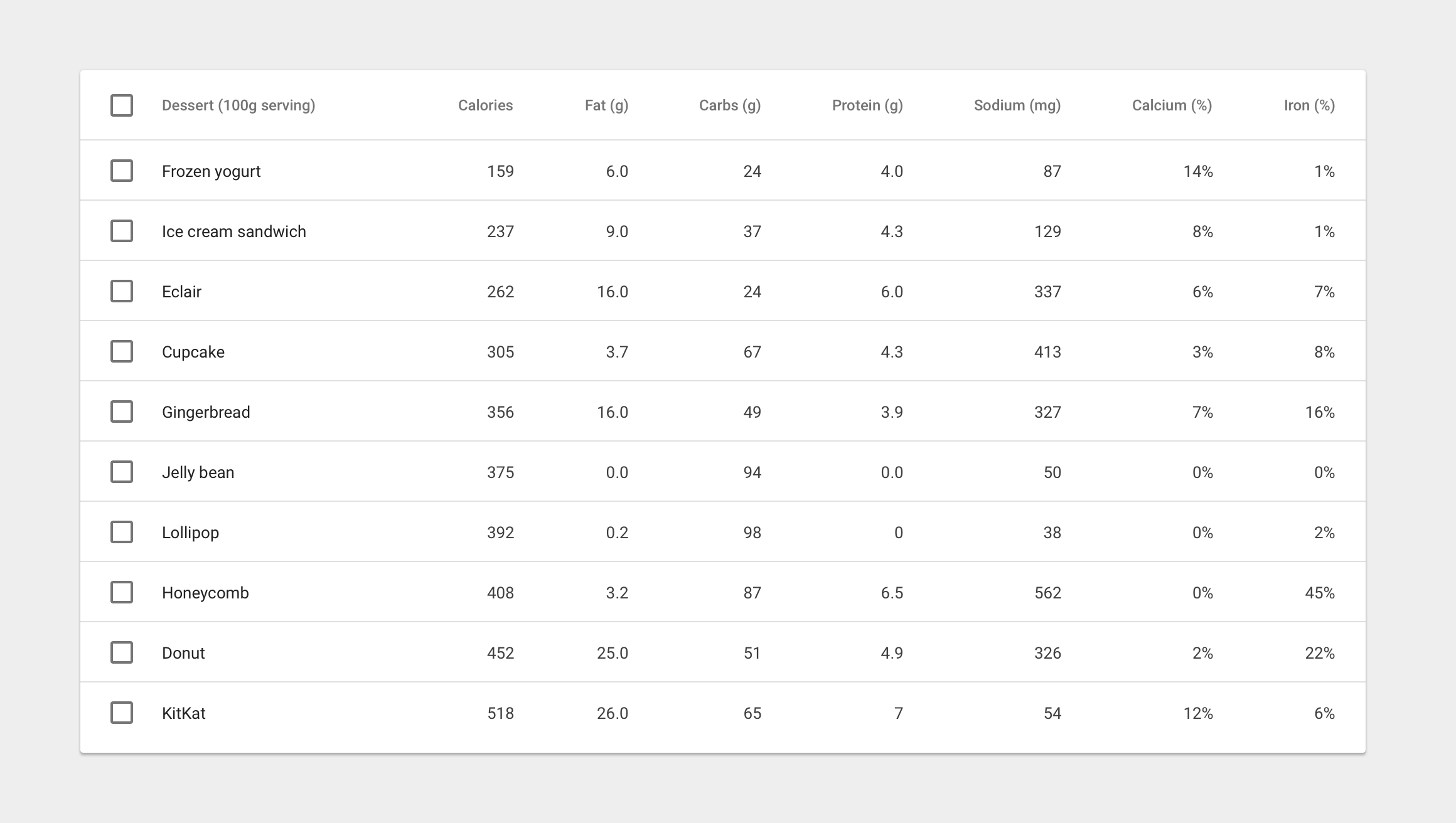
In its simplest form, a data table contains a top row of column names, and rows for data.
| Params | Type | Details |
|---|---|---|
| selectable-rows | Boolean | optional, checkboxes accompany each row if need to select or manipulate data |
| delete-row-callback | Function | optional, callback function when deleting rows. The callback will be called with the array of the deleted row ids. Don't forget to specify table-row-id for md-data-table-row. If you do, it will return the deleted rows data. |
 |
| Params | Type | Details |
|---|---|---|
| sortable-columns | Boolean | optional, if enabled, sort data and display a sorted state in the column header. If the user clicks on a column that is already sorted, reverse the sort order and rotate the sort icon. Use sortable-rows-default attribute directive on a column which intended to be the default sortable column |
 |
| Params | ChildParams | Type | Details |
|---|---|---|---|
| title-overflow-handler | String | optional, Sometimes, column names don’t fit in a container in between columns. There are two options to handle this | |
| (default) truncateColumnNames | - | Shorten the column name and display it in full on hover | |
| useHorizontalScrollingOnTable | - | Display the full column name and enable horizontal scrolling in the table container | |
 |
|||
 |
| Params | ChildParams | Type | Details |
|---|---|---|---|
| table-card | Object | optional, tables can be embedded within a card, with table navigation and data manipulation tools available at the top and bottom. | |
| title | String | The title of the table card | |
| actionIcons | Boolean | Card action icons (header and footer) | |
| visible | Boolean | The visibility of the table card | |
 |
| Params | ChildParams | Type | Details |
|---|---|---|---|
| alternate-headers | String | optional, some table cards may require headers with actions instead of titles. Two possible approaches to this are to display persistent actions, or a contextual header that activates when items are selected | |
| persistentActions | - | Shows persistent action buttons in header | |
| contextual | - | Shows contextual content depending on what has been selected | |
 |
| Params | ChildPArams | Type | Details |
|---|---|---|---|
| align-rule | String | if provided, align the text to the needed direction for the entire column (note, that it aligns the data that belongs to the column) | |
| (default) left | left-align content | ||
| right | right-align content |
| Params | Type | Details |
|---|---|---|
| column-definition | String | if provided, display a tooltip on hover. If sorting is enabled, display a light sort icon upon hover, which indicates that the column is sortable. |
 |
| Params | Type | Details |
|---|---|---|
| table-row-id | String | Integer |
| Params | ChildParams | Type | Details |
|---|---|---|---|
| inline-menu | Array | if provided, users can select from a predefined list of options. In this scenario, a menu component directly embedded in the table | |
 |
|||
 |
| Params | ChildParams | Type | Details |
|---|---|---|---|
| editable-field | String | if provided, provides basic text editing. Include editable fields within a table and denote them using placeholder text(if empty). You can use a simple edit dialog with just a text field, or display a full dialog component on click. | |
| textInput | - | An editable table cell with placeholder text | |
| smallEditDialog | - | A simple, one-field edit dialog on click | |
| largeEditDialog | - | A complex, flexible edit edit dialog on click | |
| editIcon | - | Inline edit icon | |
 |
|||
 |
|||
 |
|||
 |
| Params | ChildParams | Type | Details |
|---|---|---|---|
| sortable-rows-default | - | When sortable-columns is applied to the table, it marks the column as the default sorting column | |
| html-content | Boolean | When the cell content is not a simple value (html content) |
<md-data-table
    selectable-rows="true"
    table-card="{title: Nutrition, actionIcons: true}">

    <md-data-table-header-row>
        <!-- defining column descriptions, align content to the left -->
        <md-data-table-column
            align-rule="left"
            column-definition="The total amount of food energy in the given serving size.">
            Dessert (100g serving)
        </md-data-table-column>

        <!-- in case of inline menu -->
        <md-data-table-column inline-menu="[ {iceCream: 'Ice Cream', pastry: 'Pastry', other: 'Other'} ]">Type</md-data-table-column>

        <!-- inline text editing -->
        <md-data-table-column editable-field="textInput">
            Calories
        </md-data-table-column>

        <!-- in case of sortable columns, we can set the defaultly sortable column -->
        <md-data-table-column sortable-rows-default>
            Fat (g)
        </md-data-table-column>
        <md-data-table-column>Carbs (g)</md-data-table-column>
        <md-data-table-column>Protein (g)</md-data-table-column>
    </md-data-table-header-row>

    <md-data-table-row ng-repeat="nutrition in nutritionList">
        <md-data-table-cell>Frozen Joghurt</md-data-table-cell>
        <md-data-table-cell>159</md-data-table-cell>
        <md-data-table-cell>6</md-data-table-cell>
        <md-data-table-cell>24</md-data-table-cell>
        <md-data-table-cell>4</md-data-table-cell>
        <md-data-table-cell>87</md-data-table-cell>
    </md-data-table-row>

</md-data-table>
- Structure
- Interaction
- Tables within cards