在诸如广告、推荐等系统中,我们往往会涉及过滤、召回和排序等过程。随着系统业务变得复杂,代码的耦合和交错会让项目跌入难以维护的深渊。于是模块化设计是复杂系统的必备基础。这篇文章介绍的业务框架脱胎于线上多人协作开发、高并发的竞价广告系统,在实践中不停被优化,直到易于理解和应用。
在系统中,我们定义一个独立的业务逻辑为一个Handler。 比如过滤“机型”信息的逻辑可以叫做DeviceFilterHandler,排序的逻辑叫SortHandler。 Handler的实现也很简单,只要实现frame.HandlerBaseInterface接口和它对应的方法即可(见github):
package main

import (
	"fmt"
	"ghgroups/frame"
	ghgroupscontext "ghgroups/frame/ghgroups_context"
	"reflect"
)

type ExampleHandler struct {
	frame.HandlerBaseInterface
}

func NewExampleHandler() *ExampleHandler {
	return &ExampleHandler{}
}

// ///////////////////////////////////////////////////////////////////////////////////////////
// ConcreteInterface
func (e *ExampleHandler) Name() string {
	return reflect.TypeOf(*e).Name()
}

// ///////////////////////////////////////////////////////////////////////////////////////////
// HandlerBaseInterface
func (e *ExampleHandler) Handle(*ghgroupscontext.GhGroupsContext) bool {
	fmt.Printf("run %s", e.Name())
	return true
}在系统中,我们要求每个组件都要有名字。这样我们可以在配置文件中指定它在流程中的具体位置。 组件通过继承接口ConcreteInterface,并实现其Name方法来暴露自己的名称。它可以被写死(如上例),也可以通过配置文件来指定(见后续案例)。
type ConcreteInterface interface {
	Name() string
}处理业务逻辑的代码需要在Handle(context *ghgroupscontext.GhGroupsContext) bool中实现的。上例中,我们只让其输出一行文本。 这个方法来源于HandlerBaseInterface接口。
type HandlerBaseInterface interface {
	ConcreteInterface
	Handle(context *ghgroupscontext.GhGroupsContext) bool
}
因为HandlerBaseInterface 继承自ConcreteInterface ,所以我们只要让自己构建的Handler继承自HandlerBaseInterface,并实现相应方法即可。
一般一个复杂的业务不能只有一个Handler,但是为了便于方便讲解,我们看下怎么运行只有一个Handler的框架(见github)。
package main

import (
	"fmt"
	"ghgroups/frame"
	"ghgroups/frame/constructor"
	ghgroupscontext "ghgroups/frame/ghgroups_context"
	"ghgroups/frame/utils"
	"reflect"
)

func main() {
	constructor := utils.BuildConstructor("")
	constructor.Register(reflect.TypeOf(ExampleHandler{}))
	mainProcess := reflect.TypeOf(ExampleHandler{}).Name()
	run(constructor, mainProcess)
}

func run(constructor *constructor.Constructor, mainProcess string) {
	if err := constructor.CreateConcrete(mainProcess); err != nil {
		fmt.Printf("%v", err)
	}
	if someInterfaced, err := constructor.GetConcrete(mainProcess); err != nil {
		fmt.Printf("%v", err)
	} else {
		if mainHandlerGroup, ok := someInterfaced.(frame.HandlerBaseInterface); !ok {
			fmt.Printf("mainHandlerGroup %s is not frame.HandlerBaseInterface", mainProcess)
		} else {
			context := ghgroupscontext.NewGhGroupsContext(nil)
			// context.ShowDuration = true
			mainHandlerGroup.Handle(context)
		}
	}
}
在main函数中,我们需要向对象构建器constructor注册我们写的Handler。然后调用run方法,传入构建器和需要启动的组件名(mainProcess)即可。运行结果如下
ExampleHandler
run ExampleHandler
第一行是框架打印的流程图(目前只有一个),第二行是运行时ExampleHandler的Handle方法的执行结果。
HandlerGroup是一组串行执行的Handler。
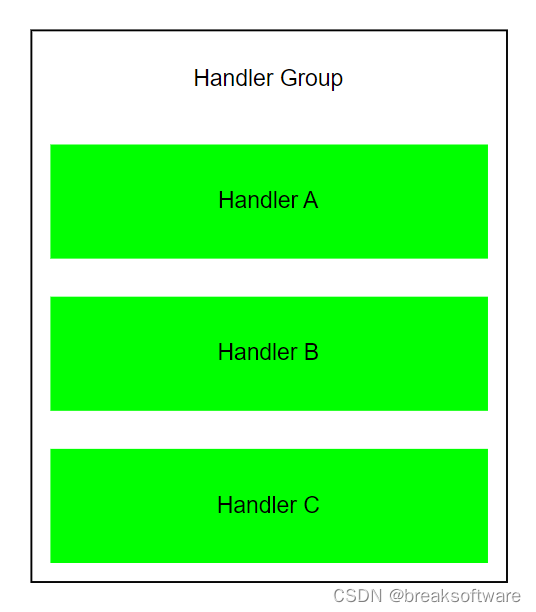
框架底层已经实现好了HandlerGroup的代码,我们只要把每个Handler实现即可(Handler的代码可以前面的例子)。 然后在配置文件中,配置好Handler的执行顺序:
name: handler_group_a
type: HandlerGroup
handlers:
  - ExampleAHandler
- ExampleBHandler部分代码如下(完整见github)
package main

import (
	"fmt"
	"ghgroups/frame"
	"ghgroups/frame/constructor"
	constructorbuilder "ghgroups/frame/constructor_builder"
	"ghgroups/frame/factory"
	ghgroupscontext "ghgroups/frame/ghgroups_context"
	"os"
	"path"
	"reflect"
)

func main() {
	factory := factory.NewFactory()
	factory.Register(reflect.TypeOf(ExampleAHandler{}))
	factory.Register(reflect.TypeOf(ExampleBHandler{}))

	runPath, errGetWd := os.Getwd()
	if errGetWd != nil {
		fmt.Printf("%v", errGetWd)
		return
	}
	concretePath := path.Join(runPath, "conf")
	constructor := constructorbuilder.BuildConstructor(factory, concretePath)
	mainProcess := "handler_group_a"

	run(constructor, mainProcess)
}
这次对象构建器我们需要使用constructorbuilder.BuildConstructor去构建。因为其底层会通过配置文件所在的文件夹路径(concretePath )构建所有的组件。而在此之前,需要告诉构建器还有两个我们自定义的组件(ExampleAHandler和ExampleBHandler)需要注册到系统中。于是我们暴露出对象工厂(factory )用于提前注册。 运行结果如下
handler_group_a
        ExampleAHandler
        ExampleBHandler
run ExampleAHandler
run ExampleBHandler
前三行是配置文件描述的执行流程。后两行是实际执行流程中的输出。
AsyncHandlerGroup是一组并行执行的Handler。
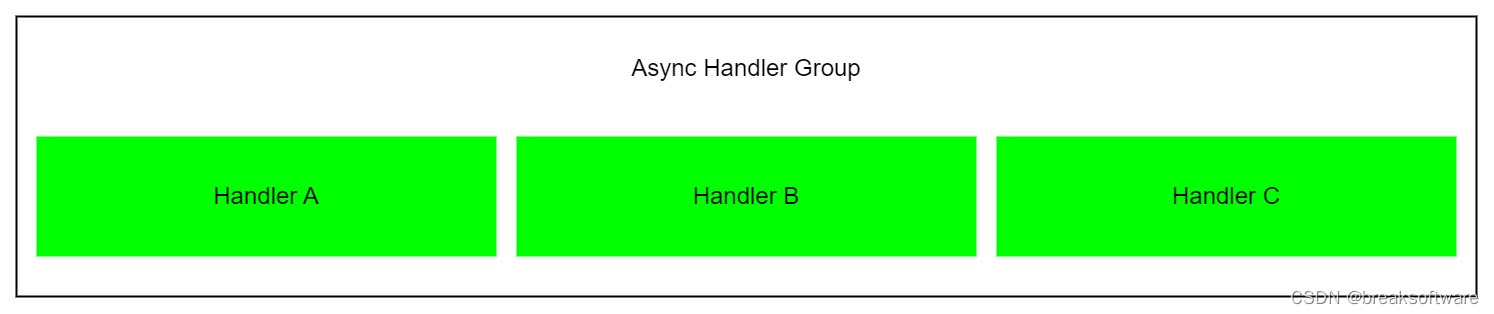
name: async_handler_group_a
type: AsyncHandlerGroup
handlers:
  - ExampleAHandler
- ExampleBHandler使用的代码和HandlerGroup类似,具体见github。 执行结果如下
async_handler_group_a
        ExampleAHandler
        ExampleBHandler
run ExampleBHandler
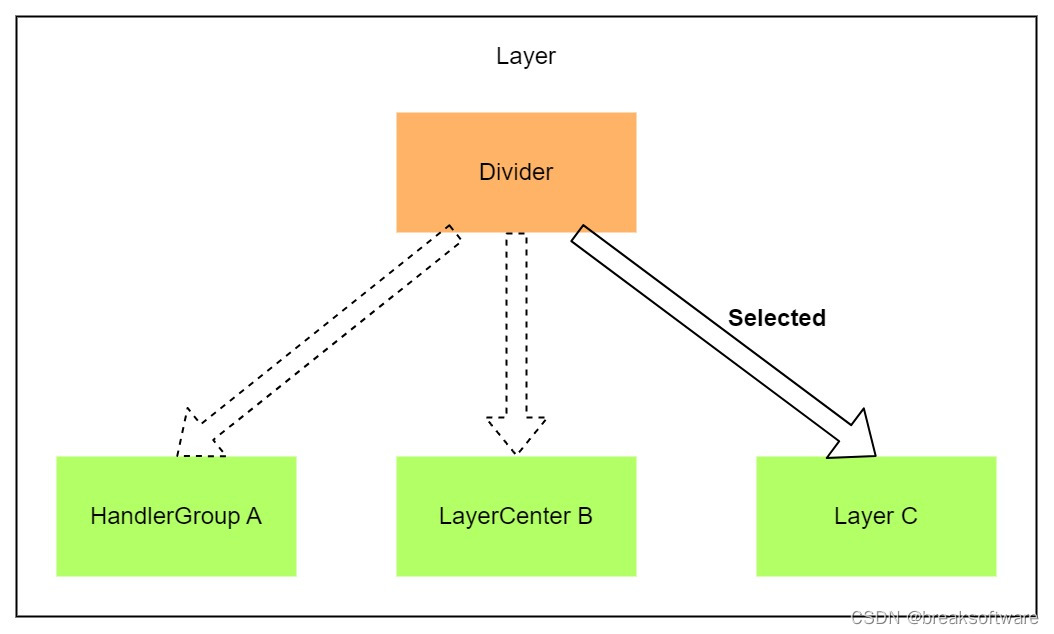
run ExampleAHandlerLayer由两部分组成:Divider和Handler。Handler是一组业务逻辑,Divider用于选择执行哪个Handler。
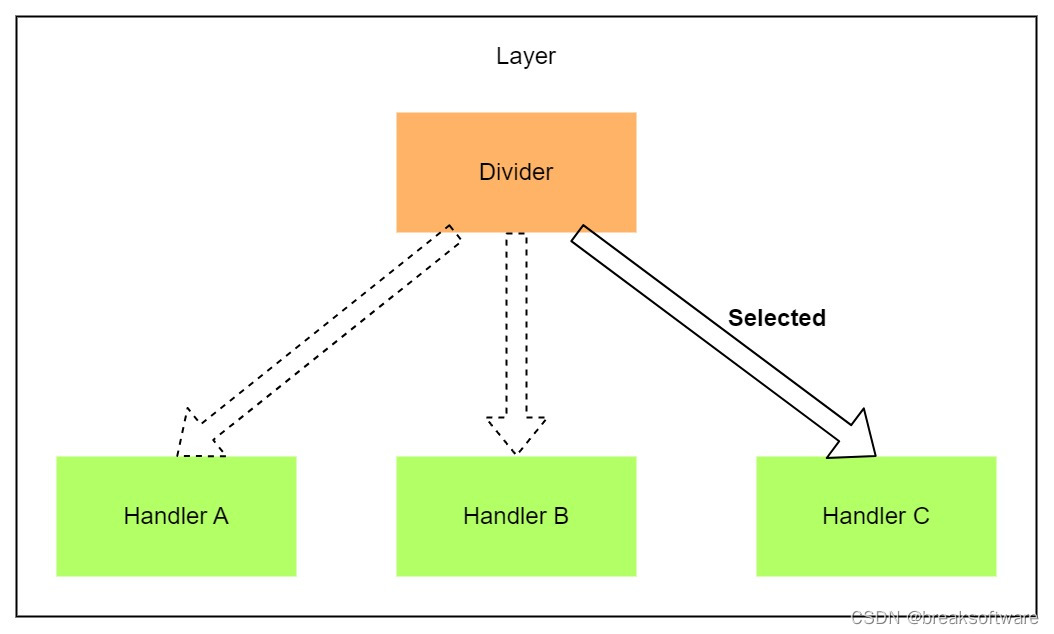
不同于Handler,Divider需要继承和实现DividerBaseInterface接口。
type DividerBaseInterface interface {
	ConcreteInterface
	Select(context *ghgroupscontext.GhGroupsContext) string
}Select方法用于填充业务逻辑,选择该Layer需要执行的Handler的名称。下面是Divider具体实现的一个样例(见github)。
package main

import (
	"ghgroups/frame"
	ghgroupscontext "ghgroups/frame/ghgroups_context"
	"reflect"
)

type ExampleDivider struct {
	frame.DividerBaseInterface
}

func NewExampleDivider() *ExampleDivider {
	return &ExampleDivider{}
}

// ///////////////////////////////////////////////////////////////////////////////////////////
// ConcreteInterface
func (s *ExampleDivider) Name() string {
	return reflect.TypeOf(*s).Name()
}

// ///////////////////////////////////////////////////////////////////////////////////////////
// DividerBaseInterface
func (s *ExampleDivider) Select(context *ghgroupscontext.GhGroupsContext) string {
	return "ExampleBHandler"
}每个Layer都要通过配置文件来描述其组成。相较于HandlerGroup,由于它不会执行所有的Handler,而是要通过Divider来选择执行哪个Handler,于是主要是新增Divider的配置项。
name: layer_a
type: Layer
divider: ExampleDivider
handlers:
  - ExampleAHandler
- ExampleBHandler具体执行的代码见github。我们看下运行结果
layer_a
        ExampleDivider
        ExampleAHandler
        ExampleBHandler
run ExampleBHandler
可以看到它只是执行了Divider选择的ExampleBHandler。
LayerCenter是一组串行执行的Layer的组合。
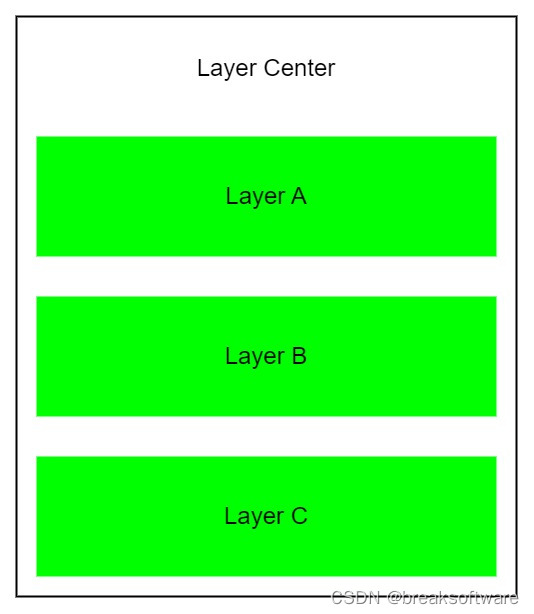
type: LayerCenter
name: layer_center
layers:
  - layer_a
- layer_b具体代码和前面类似,可以见github。 运行结果如下
layer_center
        layer_a
                ExampleADivider
                ExampleA1Handler
                ExampleA2Handler
        layer_b
                ExampleBDivider
                ExampleB1Handler
                ExampleB2Handler
run ExampleA2Handler
run ExampleB1Handler
可以看到每个Layer选择了一个Handler执行。
上述组件下面的子模块又是不同组件,比如LayerCenter的子组件是Layer。如果此时我们希望某个Layer只要执行一个HandlerGroup,还需要设计一个Divider来满足Layer的设计。这样就会导致整个框架非常难以使用。 为了解决这个问题,我们让所有组件(除了Divider)都继承了HandlerBaseInterface。
type HandlerBaseInterface interface {
	ConcreteInterface
	Handle(context *ghgroupscontext.GhGroupsContext) bool
}
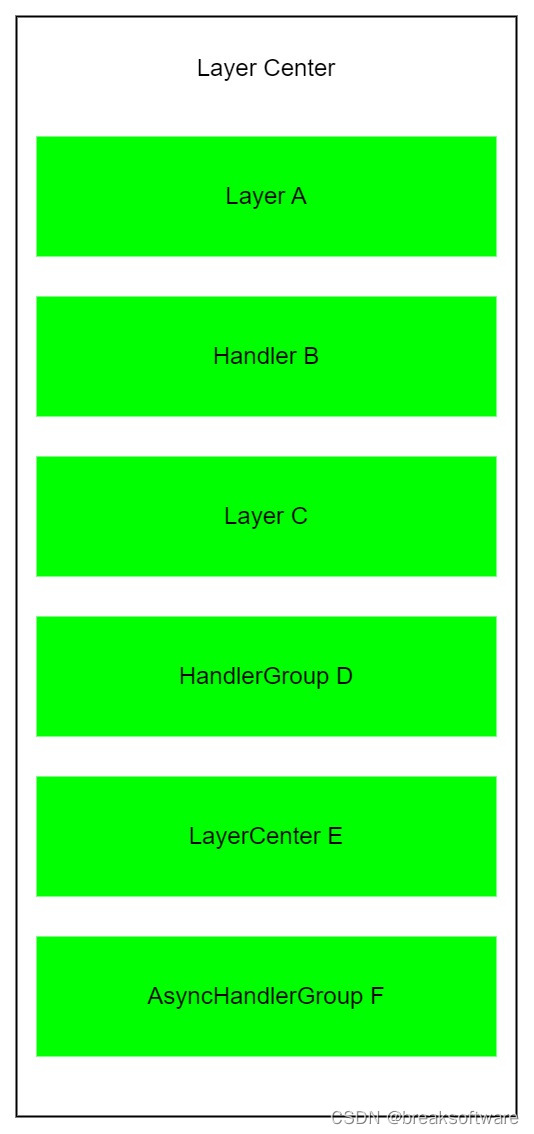
这样我们就可以保证各个组件可以通过统一的接口调用。更进一步,我们在组织它们关系时,Handler、HandlerGroup、AsyncHandlerGroup、Layer和LayerCenter都是等价的,即它们可以相互替换。
举个例子,LayerCenter下每个Layer可以不是Layer,而是上述任何一个组件。
再比如Layer下每个组件,也不必是Handler,也可以上上述任何组件。
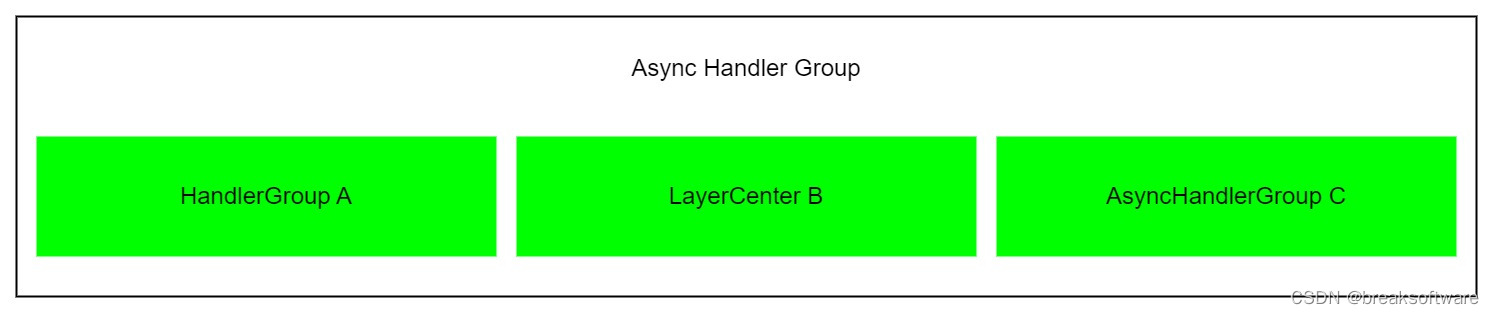
HandlerGroup、AsyncHandlerGroup下也不用是Handler,而是上述其他组件。
正是这种随意组合的特性,让这个框架更加灵活。 在github中,我们展示了几个组合。其中一个配置如下。
# layer_center_main.yaml
type: LayerCenter
name: layer_center_main
layers:
  - layer_c
  - handler_group_e
  - async_handler_group_f
  - layer_g
  - example_layer_center_a
  - ExampleDHandler
运行结果如下:
layer_center_main
        layer_c
                ExampleCDivider
                ExampleC1Handler
                ExampleC2Handler
        handler_group_e
                ExampleE1Handler
                ExampleE2Handler
        async_handler_group_f
                ExampleF1Handler
                ExampleF2Handler
        layer_g
                ExampleGDivider
                ExampleG1Handler
                ExampleG2Handler
        example_layer_center_a
                layer_a
                        ExampleADivider
                        ExampleA1Handler
                        ExampleA2Handler
                layer_b
                        ExampleBDivider
                        ExampleB1Handler
                        ExampleB2Handler
        ExampleDHandler
run ExampleC2Handler
run ExampleE1Handler
run ExampleE2Handler
run ExampleF2Handler
run ExampleF1Handler
run ExampleG1Handler
run ExampleA2Handler
run ExampleB1Handler
run ExampleDHandler
在这个框架中,构建可以分为两部分。一是对象的构建,二是关系的构建。
自动构建是指框架依据配置文件,自行创建出其描述的对象。 在自动构建前,我们需要向对象工厂注册各个自定义的类型。比如example_mix例子中
func main() {
	factory := factory.NewFactory()
	factory.Register(reflect.TypeOf(examplelayera.ExampleA1Handler{}))
	factory.Register(reflect.TypeOf(examplelayera.ExampleA2Handler{}))
	factory.Register(reflect.TypeOf(examplelayera.ExampleADivider{}))
……Factory在底层维护了一个类型名和其反射Type的映射。
func (f *Factory) Register(concreteType reflect.Type) (err error) {
	concreteName := concreteType.Name()
	if _, ok := f.concretesType[concreteName]; !ok {
		f.concretesType[concreteName] = concreteType
	} else {
		err = fmt.Errorf(concreteName + " is already registered.Please modify name.")
		panic(err.Error())
	}
	return nil
}
后续,框架在读取配置文件的过程中,会根据type字段的值构建对象。
func (f *Factory) Create(concreteTypeName string, configure []byte, constructorInterface any) (concrete any, err error) {
	concreteType, ok := f.concretesType[concreteTypeName]
	if !ok {
		err = fmt.Errorf("concrete name not found for %s", concreteTypeName)
		panic(err.Error())
	}

	concrete = reflect.New(concreteType).Interface()
	concreteInterface, ok := concrete.(frame.ConcreteInterface)
	if !ok || concreteInterface == nil {
		err = fmt.Errorf("concrete %s conver to ConcreteInterface error", concreteTypeName)
		panic(err.Error())
	}

	constructorSetterInterface, ok := concrete.(frame.ConstructorSetterInterface)
	if ok && constructorSetterInterface != nil && constructorInterface != nil {
		constructorSetterInterface.SetConstructorInterface(constructorInterface)
	}

	loadConfigFromMemoryInterface, ok := concrete.(frame.LoadConfigFromMemoryInterface)
	if ok && loadConfigFromMemoryInterface != nil {
		err := loadConfigFromMemoryInterface.LoadConfigFromMemory(configure)
		if err != nil {
			err = fmt.Errorf("concrete LoadConfigFromMemory error for %s .error: %v", concreteTypeName, err)
			panic(err.Error())
		}
	}

	loadEnvironmentConfInterface, ok := concrete.(frame.LoadEnvironmentConfInterface)
	if ok && loadEnvironmentConfInterface != nil {
		err := loadEnvironmentConfInterface.LoadEnvironmentConf()
		if err != nil {
			err = fmt.Errorf("concrete LoadEnvironmentConf error for %s .error: %v", concreteTypeName, err)
			panic(err.Error())
		}
	}

	concreteName := concreteInterface.Name()
	if concreteName == "" {
		err = fmt.Errorf("concrete's Name is empty for %s", concreteTypeName)
		panic(err.Error())
	}
	if _, ok := f.concretes[concreteName]; !ok {
		f.concretes[concreteName] = concreteInterface
	} else {
		err = fmt.Errorf("concrete's Name  %s has already been used, type is %s", concreteName, concreteTypeName)
		panic(err.Error())
	}
	return
}
被自动构建的对象会自动保存起来,并通过下面的方法获取
func (f *Factory) Get(concreteName string) (frame.ConcreteInterface, error) {
	if concrete, ok := f.concretes[concreteName]; ok {
		return concrete, nil
	} else {
		return nil, nil
	}
}举个例子,配置文件目录下存在layer_center.yaml文件
# layer_center.yaml
type: LayerCenter
name: layer_center
layers:
  - layer_a
- layer_b构建器会通过Get方法检查名字为layer_center的组件是否存在。如果不存在,就调用Create方法创建type为LayerCenter、名字为layer_center的组件。LayerCenter在创建后会自动读取上述配置,发现其layers下有两个组件layer_a和layer_b。然后会检查这两个组件是否存在。如果不存在,则会在构建器中通过组件名,寻找对应的配置文件——这就要求组件名和其配置名强一致。比如layer_a的配置名为layer_a.yaml,layer_b的配置名为layer_b.yaml。
# layer_a.yaml
name: layer_a
type: Layer
divider: ExampleADivider
handlers:
  - ExampleA1Handler
  - ExampleA2Handler
# layer_b.yaml
name: layer_b
type: Layer
divider: ExampleBDivider
handlers:
- ExampleB1Handler
- ExampleB2Handler这个创建过程通过下面函数实现
func (c *Constructor) createConcreteByObjectName(name string) error {
	confPath, err := c.concreteConfManager.GetConfPath(name)
	if err != nil {
		return err
	}

	data, err := os.ReadFile(confPath)
	if err != nil {
		return err
	}

	var constructorType ConstructorType
	if err := yaml.Unmarshal(data, &constructorType); err != nil {
		return err
	}

	switch constructorType.Type {
	case TypeNameHandler:
		_, err := c.handlerConstructorInterface.GetHandler(name)
		if err != nil {
			return c.handlerConstructorInterface.CreateHandlerWithConfPath(confPath)
		}
	case TypeNameDivider:
		_, err := c.dividerConstructorInterface.GetDivider(name)
		if err != nil {
			return c.dividerConstructorInterface.CreateDividerWithConfPath(confPath)
		}
	case TypeNameLayer:
		_, err := c.layerConstructorInterface.GetLayer(name)
		if err != nil {
			return c.layerConstructorInterface.CreateLayerWithConfPath(confPath)
		}
	case TypeNameLayerCenter:
		_, err := c.layerCenterConstructorInterface.GetLayerCenter(name)
		if err != nil {
			return c.layerCenterConstructorInterface.CreateLayerCenterWithConfPath(confPath)
		}
	case TypeNameHandlerGroup:
		_, err := c.handlerGroupConstructorInterface.GetHandlerGroup(name)
		if err != nil {
			return c.handlerGroupConstructorInterface.CreateHandlerGroupWithConfPath(confPath)
		}
	case TypeNameAsyncHandlerGroup:
		_, err := c.asyncHandlerGroupConstructorInterface.GetAsyncHandlerGroup(name)
		if err != nil {
			return c.asyncHandlerGroupConstructorInterface.CreateAsyncHandlerGroupWithConfPath(confPath)
		}
	default:
		err := c.createConcreteByTypeName(constructorType.Type, data)
		if err != nil {
			return err
		}
		return nil
	}

	return fmt.Errorf("class name  %s not found", name)
}
对于框架自有组件,如LayerCenter、HandlerGroup等,它们会由其构建器构建。对于其他自定义的组件,比如自定义的各种Handler,则通过default逻辑中createConcreteByTypeName实现。
func (c *Constructor) createConcreteByTypeName(name string, data []byte) error {
	if strings.HasSuffix(name, TypeNameAsyncHandlerGroup) {
		_, err := c.asyncHandlerGroupConstructorInterface.GetAsyncHandlerGroup(name)
		if err != nil {
			asyncHandlerGroupInterface, err := c.Create(name, data, c)
			if err != nil {
				return err
			}
			if namedInterface, ok := asyncHandlerGroupInterface.(frame.ConcreteInterface); ok {
				return c.asyncHandlerGroupConstructorInterface.RegisterAsyncHandlerGroup(namedInterface.Name(), asyncHandlerGroupInterface.(frame.AsyncHandlerGroupBaseInterface))
			} else {
				return c.asyncHandlerGroupConstructorInterface.RegisterAsyncHandlerGroup(name, asyncHandlerGroupInterface.(frame.AsyncHandlerGroupBaseInterface))
			}
		}
		return nil
	}
	if strings.HasPrefix(name, TypeNameHandlerGroup) {
		_, err := c.handlerGroupConstructorInterface.GetHandlerGroup(name)
		if err != nil {
			handlerGroupInterface, err := c.Create(name, data, c)
			if err != nil {
				return err
			}
			if namedInterface, ok := handlerGroupInterface.(frame.ConcreteInterface); ok {
				return c.handlerGroupConstructorInterface.RegisterHandlerGroup(namedInterface.Name(), handlerGroupInterface.(frame.HandlerGroupBaseInterface))
			} else {
				return c.handlerGroupConstructorInterface.RegisterHandlerGroup(name, handlerGroupInterface.(frame.HandlerGroupBaseInterface))
			}
		}
		return nil
	}
	if strings.HasSuffix(name, TypeNameDivider) {
		_, err := c.dividerConstructorInterface.GetDivider(name)
		if err != nil {
			dividerInterface, err := c.Create(name, data, c)
			if err != nil {
				return err
			}
			if namedInterface, ok := dividerInterface.(frame.ConcreteInterface); ok {
				return c.dividerConstructorInterface.RegisterDivider(namedInterface.Name(), dividerInterface.(frame.DividerBaseInterface))
			} else {
				return c.dividerConstructorInterface.RegisterDivider(name, dividerInterface.(frame.DividerBaseInterface))
			}
		}
		return nil
	}
	if strings.HasSuffix(name, TypeNameHandler) {
		_, err := c.handlerConstructorInterface.GetHandler(name)
		if err != nil {
			handlerInterface, err := c.Create(name, data, c)
			if err != nil {
				return err
			}
			if namedInterface, ok := handlerInterface.(frame.ConcreteInterface); ok {
				return c.handlerConstructorInterface.RegisterHandler(namedInterface.Name(), handlerInterface.(frame.HandlerBaseInterface))
			} else {
				return c.handlerConstructorInterface.RegisterHandler(name, handlerInterface.(frame.HandlerBaseInterface))
			}
		}
		return nil
	}
	if strings.HasSuffix(name, TypeNameLayer) {
		_, err := c.layerConstructorInterface.GetLayer(name)
		if err != nil {
			layerInterface, err := c.Create(name, data, c)
			if err != nil {
				return err
			}
			if namedInterface, ok := layerInterface.(frame.ConcreteInterface); ok {
				return c.layerConstructorInterface.RegisterLayer(namedInterface.Name(), layerInterface.(frame.LayerBaseInterface))
			} else {
				return c.layerConstructorInterface.RegisterLayer(name, layerInterface.(frame.LayerBaseInterface))
			}
		}
		return nil
	}
	if strings.HasSuffix(name, TypeNameLayerCenter) {
		_, err := c.layerCenterConstructorInterface.GetLayerCenter(name)
		if err != nil {
			layerCenterInterface, err := c.Create(name, data, c)
			if err != nil {
				return err
			}
			if namedInterface, ok := layerCenterInterface.(frame.ConcreteInterface); ok {
				return c.layerCenterConstructorInterface.RegisterLayerCenter(namedInterface.Name(), layerCenterInterface.(frame.LayerCenterBaseInterface))
			} else {
				return c.layerCenterConstructorInterface.RegisterLayerCenter(name, layerCenterInterface.(frame.LayerCenterBaseInterface))
			}
		}
		return nil
	}

	return fmt.Errorf("object name  %s not found", name)
}在底层,我们需要设计一种规则用于标志这个自定义组件是哪个框架基础组件的子类。这儿就引出这个框架的第二个强制性约定——自定义类型的名称需要以框架基础组件名结尾。比如自定义的ExampleA1Handler是以Handler结尾,这样在底层我们就知道将其构造成一个Handler对象。 所有的自动构建,都依赖于配置文件。于是我们设计了ConcreteConfManager来遍历配置文件目录,这个目录在我们创建构建器时传入的。
	……
	runPath, errGetWd := os.Getwd()
	if errGetWd != nil {
		fmt.Printf("%v", errGetWd)
		return
	}
	concretePath := path.Join(runPath, "conf")
	constructor := constructorbuilder.BuildConstructor(factory, concretePath)
	……
然后我们告诉构建器初始组件名,它就会自动像爬虫一样,通过配置文件和之前注册的反射类型,将对象和关系都构建出来。
	……
	mainProcess := "layer_center"

	run(constructor, mainProcess)
}

func run(constructor *constructor.Constructor, mainProcess string) {
	if err := constructor.CreateConcrete(mainProcess); err != nil {
		fmt.Printf("%v", err)
}单一对象是指一个类型只有一个对象。 我们在写业务时,往往需要一个简单的逻辑单元处理一个单一的事情,即在任何场景下,它只需要存在一份——属性一样,且不会改变。 这个时候,对象名变得不太重要。我们只要让其Name方法返回其类型名,而不需要再搞一个配置文件,就能实现自动构建。这种场景占绝大多数。
func (e *ExampleA1Handler) Name() string {
	return reflect.TypeOf(*e).Name()
}有时候,我们希望一个类可以处理一种逻辑,但是其在不同场景下,其属性不一样。这样我们就需要通过配置文件来描述它——描述它不同的名字和对应的属性。比如下面的例子就是从配置文件中读取了名字和其相应属性。
package samplehandler

import (
	"fmt"
	"ghgroups/frame"
	ghgroupscontext "ghgroups/frame/ghgroups_context"

	"gopkg.in/yaml.v2"
)

// 自动构建handler,它会自动从配置文件中读取配置,然后根据配置构建handler
// 因为系统使用名称作为唯一检索键,所以自动构建handler在构建过程中,就要被命名,而名称应该来源于配置文件
// 这就要求配置文件中必须有一个名为name的字段,用于指定handler的名称
// 下面例子中confs配置不是必须的,handler的实现者,需要自行解析配置文件,以确保Name方法返回的名称与配置文件中的name字段一致

type SampleAutoConstructHandlerConf struct {
	Name  string                              `yaml:"name"`
	Confs []SampleAutoConstructHandlerEnvConf `yaml:"confs"`
}

type SampleAutoConstructHandlerEnvConf struct {
	Env         string                                 `yaml:"env"`
	RegionsConf []SampleAutoConstructHandlerRegionConf `yaml:"regions_conf"`
}

type SampleAutoConstructHandlerRegionConf struct {
	Region          string `yaml:"region"`
	AwsRegion       string `yaml:"aws_region"`
	AccessKeyId     string `yaml:"access_key_id"`
	SecretAccessKey string `yaml:"secret_access_key"`
	IntKey          int32  `yaml:"int_key"`
}

type SampleAutoConstructHandler struct {
	frame.HandlerBaseInterface
	frame.LoadConfigFromMemoryInterface
	conf SampleAutoConstructHandlerConf
}

func NewSampleAutoConstructHandler() *SampleAutoConstructHandler {
	return &SampleAutoConstructHandler{}
}

// ///////////////////////////////////////////////////////////////////////////////////////////
// LoadConfigFromMemoryInterface
func (s *SampleAutoConstructHandler) LoadConfigFromMemory(configure []byte) error {
	sampleHandlerConf := new(SampleAutoConstructHandlerConf)
	err := yaml.Unmarshal([]byte(configure), sampleHandlerConf)
	if err != nil {
		return err
	}
	s.conf = *sampleHandlerConf
	return nil
}

// ///////////////////////////////////////////////////////////////////////////////////////////
// ConcreteInterface
func (s *SampleAutoConstructHandler) Name() string {
	return s.conf.Name
}

// ///////////////////////////////////////////////////////////////////////////////////////////
// HandlerBaseInterface
func (s *SampleAutoConstructHandler) Handle(*ghgroupscontext.GhGroupsContext) bool {
	fmt.Sprintln(s.conf.Name)
	return true
}

// ///////////////////////////////////////////////////////////////////////////////////////////
于是我们在不同组件关系中,通过该类型的不同对象名来组织关系,从而实现一套逻辑,不同配置的应用场景。 比如下面的两个配置,描述了同一个类型的不同配置
# sample_handler_a.yaml
type: SampleAutoConstructHandler
name: sample_handler_a
confs:
  - env: Online
    regions_conf:
    - region: us-east-1
      aws_region: us-east-1
      int_key: 1
    - region: us-east-2
      aws_region: us-east-2
# sample_handler_b.yaml
type: SampleAutoConstructHandler
name: sample_handler_b
confs:
- env: Online
regions_conf:
- region: us-east-1
aws_region: us-east-1
int_key: 2
- region: us-east-2
aws_region: us-east-2然后在下面关系中予以区分调用
name: Sample
divider: divider_sample_a
handlers:
  - handler_sample_a
- handler_sample_b如果由于某些原因,自动构建不能满足需求,我们可以手工构建对象。这个时候我们不需要向对象工厂注册其反射(Register),只要手工构建出对象后,调用工厂的注册对象方法(比如RegisterHandler),告诉框架某个名字的组件存在。这样在构建关系时,就会自动识别——这就要求手工构建要在自动构建之前完成,否则框架无法识别它们。
package samplehandler

import (
	"fmt"
	"ghgroups/frame"
	ghgroupscontext "ghgroups/frame/ghgroups_context"
)

// 这是相对简单的handler,它只用实现HandlerInterface两个接口
// 系统使用名称作为唯一检索键,通过构造不同的对象拥有不同的名字,可以在系统中有多个该名字的handler实例,即一个类型(struct)可以有多个该名字的handler实例

type SampleSelfConstructHandlerMulti struct {
	frame.HandlerBaseInterface
	name string
}

func NewSampleSelfConstructHandlerMulti(name string) *SampleSelfConstructHandlerMulti {
	return &SampleSelfConstructHandlerMulti{
		name: name,
	}
}

// ///////////////////////////////////////////////////////////////////////////////////////////
// ConcreteInterface
func (s *SampleSelfConstructHandlerMulti) Name() string {
	return s.name
}

// ///////////////////////////////////////////////////////////////////////////////////////////
// HandlerBaseInterface
func (s *SampleSelfConstructHandlerMulti) Handle(*ghgroupscontext.GhGroupsContext) bool {
	fmt.Sprintln(s.Name())
	return true
}

// ///////////////////////////////////////////////////////////////////////////////////////////
注册代码如下
	……
	constructor := utils.BuildConstructor("")

	sampleSelfConstructHandlerMultiNameA := "sample_self_construct_handler_multi_a"
	sampleSelfConstructHandlerMultiA := NewSampleSelfConstructHandlerMulti(sampleSelfConstructHandlerMultiNameA)
	constructor.RegisterHandler(sampleSelfConstructHandlerMultiA.Name(), sampleSelfConstructHandlerMultiA)

	sampleSelfConstructHandlerMultiNameB := "sample_self_construct_handler_multi_b"
	sampleSelfConstructHandlerMultiB := NewSampleSelfConstructHandlerMulti(sampleSelfConstructHandlerMultiNameB)
	constructor.RegisterHandler(sampleSelfConstructHandlerMultiB.Name(), sampleSelfConstructHandlerMultiB)
……关系的自动构建依赖于配置文件的描述。 每个组件在读取配置文件后,会构建不存在的子组件,并加载其配置。 在这个递归过程中,整个关系网就会被构建起来。 比如LayerCenter的构建过程
func (l *LayerCenter) LoadConfigFromMemory(configure []byte) error {
	var layerCenterConf LayerCenterConf
	err := yaml.Unmarshal(configure, &layerCenterConf)
	if err != nil {
		return err
	}
	l.conf = layerCenterConf
	return l.init()
}

func (l *LayerCenter) init() error {
	for _, layerName := range l.conf.Layers {
		if err := l.constructorInterface.CreateConcrete(layerName); err != nil {
			return err
		}

		if someInterface, err := l.constructorInterface.GetConcrete(layerName); err != nil {
			return err
		} else {
			if layerBaseInterface, ok := someInterface.(frame.LayerBaseInterface); !ok {
				return fmt.Errorf("layer %s is not frame.LayerBaseInterface", layerName)
			} else {
				l.layers = append(l.layers, layerBaseInterface)
			}
		}
	}

	return nil
}
其在底层会创建Layer对象,进而触发Layer子组件的构建
func (l *Layer) LoadConfigFromMemory(configure []byte) error {
	var layerConf LayerConf
	err := yaml.Unmarshal(configure, &layerConf)
	if err != nil {
		return err
	}
	l.conf = layerConf
	return l.init()
}

func (l *Layer) init() error {
	if l.handlers == nil {
		l.handlers = make(map[string]frame.HandlerBaseInterface)
	}
	err := l.initDivider(l.conf.Divider)
	if err != nil {
		return err
	}

	err = l.initHandlers(l.conf.Handlers)
	if err != nil {
		return err
	}
	return nil
}

func (l *Layer) initDivider(dividerName string) error {
	if err := l.constructorInterface.CreateConcrete(dividerName); err != nil {
		return err
	}

	if someInterface, err := l.constructorInterface.GetConcrete(dividerName); err != nil {
		return err
	} else {
		if dividerInterface, ok := someInterface.(frame.DividerBaseInterface); !ok {
			return fmt.Errorf("handler %s is not frame.DividerBaseInterface", dividerName)
		} else {
			err = l.SetDivider(dividerName, dividerInterface)
			if err != nil {
				return err
			}
		}
	}
	return nil
}

func (l *Layer) initHandlers(handlersName []string) error {
	for _, handlerName := range handlersName {

		if err := l.constructorInterface.CreateConcrete(handlerName); err != nil {
			return err
		}

		if someInterface, err := l.constructorInterface.GetConcrete(handlerName); err != nil {
			return err
		} else {
			if handlerInterface, ok := someInterface.(frame.HandlerBaseInterface); !ok {
				return fmt.Errorf("handler %s is not frame.HandlerBaseInterface", handlerName)
			} else {
				err = l.AddHandler(handlerName, handlerInterface)
				if err != nil {
					return err
				}
			}
		}
	}
	return nil
}手工构建是不推荐的形式,因为它可能会让维护成本上升,但是框架仍然支持这种形式。 这儿只是做个简单介绍,如下例子
	constructor := utils.BuildConstructor("")

	layerCenter := NewLayerCenter(constructor)
	testLayer := layer.NewLayer("test_layer", constructor)
	layerCenter.Add(testLayer)
layerCenter通过Add新增了一个Layer。 更多具体例子可以参考源码中的单测文件。