The maptalks.table.js plug-in is mainly used to create a table on the map container, which contains two types, respectively, custom tables and dynamic tables, The former manual editing data, the latter data is bound to a layer.
- Add interactive table for maps.
- Output table screenshot through "map.toDataURL()".
- Support drag and mouse event listener.
<script src="dist/maptalks.table.min.js">or
npm install maptalks-table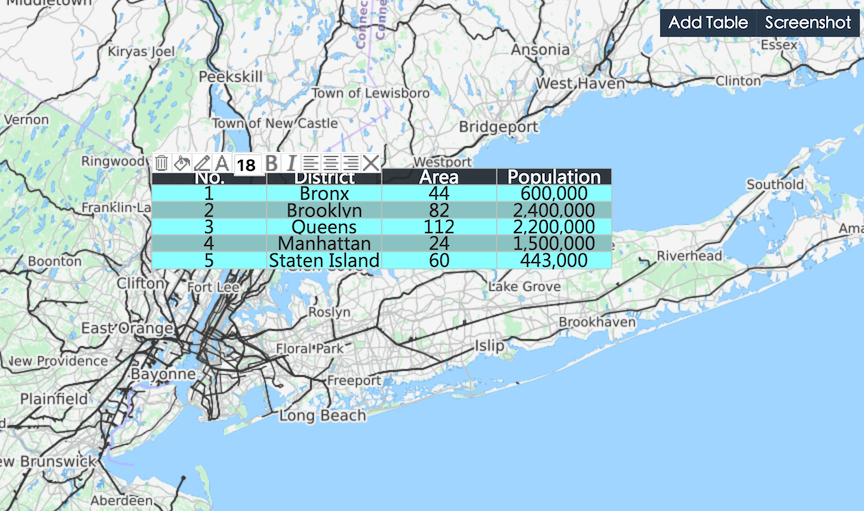
var myTalbe = new maptalks.Table({
    'title': 'title',
    'columns': [
        {header:'Name', dataIndex: 'name', type: 'string'},
        {header:'Birth', dataIndex: 'birth', type: 'data'},
        {header:'Age', dataIndex: 'age', type: 'number'},
        {header:'Marry', dataIndex: 'marry', type: 'boolean', trueText:'Yes', falseText: 'No'}
    ],
    'data': [
        {name:'Tom', birth:'1990-1-1', age: 25, marry: 'true'},
        {name:'Peter', birth:'1985-5-1', age: 30, marry: 'true'},
        {name:'Mary', birth:'2000-6-1', age: 15, marry: 'false'}
    ],
    'headerSymbol' :{
        'lineColor': '#ffffff',
        'fill': '#4e98dd',
        'textFaceName': 'monospace',
        'textSize': 12,
        'textFill': '#ebf2f9',
        'textWrapWidth': 100
    },
    'symbol': {
        'lineColor': '#ffffff',
        'fill': '#4e98dd',
        'textFaceName': 'monospace',
        'textSize': 12,
        'textFill': '#ebf2f9',
        'textWrapWidth': 100
    },
    'position': {
        'x': 121.489935,
        'y': 31.24432
    },
    'width': 300,
    'height': 300,
    'draggable': true,
    'editable': true,
    'header': true,
    'order': true,
    'startNum' : 1,
    'dynamic': false,
    'layerId' : null
});
Create table.
myTable.toJSON();Convert table object to JSON string.
myTable.initByJson(jsonStr);Initialize table from JSON string.
myTable.addTo(layer);Add table to maptalks's layer.
myTable.hide;Hide table.
myTable.show();Display table.
myTable.remove();Remove table from layer.
myTable.setCoordinates({
    'x': 121.489935,
    'y': 31.24432
});
Setting the position where table display.
myTable.setStartNum(6);Setting table start number。
myTable.animate(style, options, callback);Setting table animate show or hide effect.
myTable.getMap();Get this map which table add to.
myTable.getLayer();Get this layer which table add to.
myTable.getCenter();Get table coordinate.
myTable.setTableStyle('markerFill', '#00ff00', true);Change table style.
myTable.addRow(1, {name:'Tom', birth:'1990-1-1', age: 25, marry: 'true'}, true);Add new row.
myTable.addRow(1, {name:'Tom', birth:'1990-1-1', age: 25, marry: 'true'});Update row.
myTable.addRow(1);Remove row.
myTable.addRow(1, 'down');Move row up or down.
myTable.addCol(1, {header:'Name', dataIndex: 'name', type: 'string'}, true);Add new column.
myTable.removeCol(1);Remove column.
myTable.moveCol(1, 'left');Move column left or right.
mouseover mouseout mousedown click dblclick contextmenu hide remove dragstart dragend moving dragging symbolchange edittextstart edittextend orderchanged
myTable.on('click', function(){alert('Your click table')});Monitor table events for event handling.