A physical, 3D tactile React button component with tilt, squish, and real depth.
🔗 Live Demo: https://react-tilt-button.vercel.app/
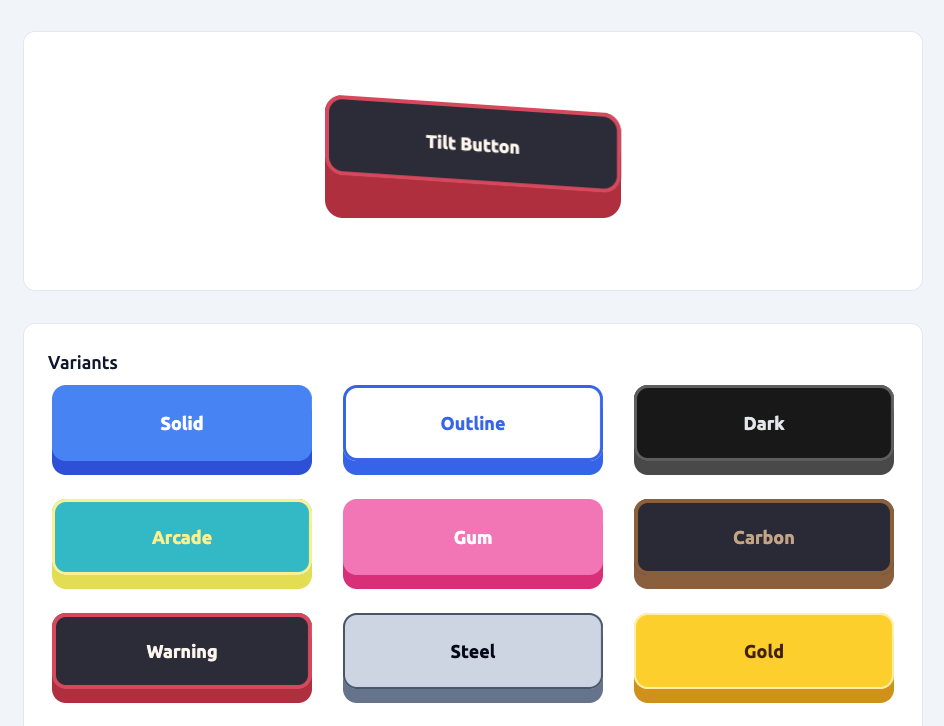
Features:
- Tilts on hover (left / middle / right)
- Squishes on press
- Has a visible “side wall” (depth)
- Enforces physical constraints so it never breaks
- Supports predefined style variants
- Is fully configurable via props
Inspired by react-awesome-button, but implemented as a small, dependency-free component.
npm install react-tilt-buttonimport { TiltButton } from 'react-tilt-button';<TiltButton onClick={() => alert('Clicked!')}>Click me</TiltButton>Variants are predefined visual styles (material / theme presets).
<TiltButton variant="solid">Solid</TiltButton>
<TiltButton variant="outline">Outline</TiltButton>
<TiltButton variant="arcade">Arcade</TiltButton>
<TiltButton variant="carbon">Carbon</TiltButton>
<TiltButton variant="warning">Warning</TiltButton>
You can still override any value manually:
<TiltButton
    variant='solid'
    surfaceColor='#10b981'
>
    Custom Green
</TiltButton>Try it live here:
👉 https://react-tilt-button.vercel.app/
The demo lets you:
- Test all variants
- Change geometry (depth, radius, tilt, etc.)
- See physical constraints in action
- Copy settings for your own usage
<TiltButton
    variant='arcade'
    width={400}
    height={120}
    elevation={20}
    pressInset={10}
    tilt={4}
    radius={14}
    motion={160}
>
    My Button
</TiltButton>The component automatically clamps values:
elevation≤height * 0.3pressInset≤elevationtilt≤elevation / 9radius≤(height - elevation) / 4
So the button:
- Never crashes
- Never inverts
- Never visually breaks
| Prop | Type | Default |
|---|---|---|
children |
ReactNode | — |
onClick |
function | — |
disabled |
boolean | false |
| Prop | Type | Default | Description |
|---|---|---|---|
variant |
string | solid |
Predefined visual style preset |
| Prop | Type | Default | Notes |
|---|---|---|---|
width |
number | string | 260 |
No max |
height |
number | string | 64 |
No max |
elevation |
number | 14 |
Clamped to height * 0.3 |
pressInset |
number | 5 |
Clamped to <= elevation |
tilt |
number | 2 |
Clamped to <= elevation / 9 |
pressTilt |
boolean | true |
When true, the button keeps its skew while pressing |
radius |
number | 14 |
Clamped to <= faceHeight / 4 |
motion |
number (ms) | 160 |
Animation speed |
These override the selected variant.
| Prop |
|---|
surfaceColor |
sideColor |
textColor |
| Prop |
|---|
borderColor |
borderWidth |
The button supports a dynamic specular glare highlight that simulates light reflecting off the surface.
It automatically shifts based on hover position (left / middle / right) and fades out on press.
| Prop | Type | Default | Description |
|---|---|---|---|
glareColor |
string | #ffffff |
Color of the glare highlight |
glareOpacity |
number | 0 |
Intensity of the glare (0 → 1) |
glareWidth |
number | 0 |
Width of glare band (0 → 100, in %) |
<TiltButton
    glareColor='#ffffff'
    glareOpacity={0.12}
    glareWidth={60}
>
    Shiny Button
</TiltButton>| Prop | Description |
|---|---|
className |
Extra classes |
style |
Merged into inline styles |
...props |
Passed to <button> |
- Action fires on mouse release
- Hover is split into left / middle / right zones
- This is a physical UI primitive, not a flat semantic button
All visuals are driven by CSS variables:
--button-raise-level--press-inset--button-hover-pressure--radius--surface-color--side-color--text-color--border-color--border-width--glare-rgb--glare-alpha--glare-width
So you can theme it externally if needed.