






Creating an entire RAG based AI system depends on many different components with each requires it’s own optimization and careful implementation. These components includes:
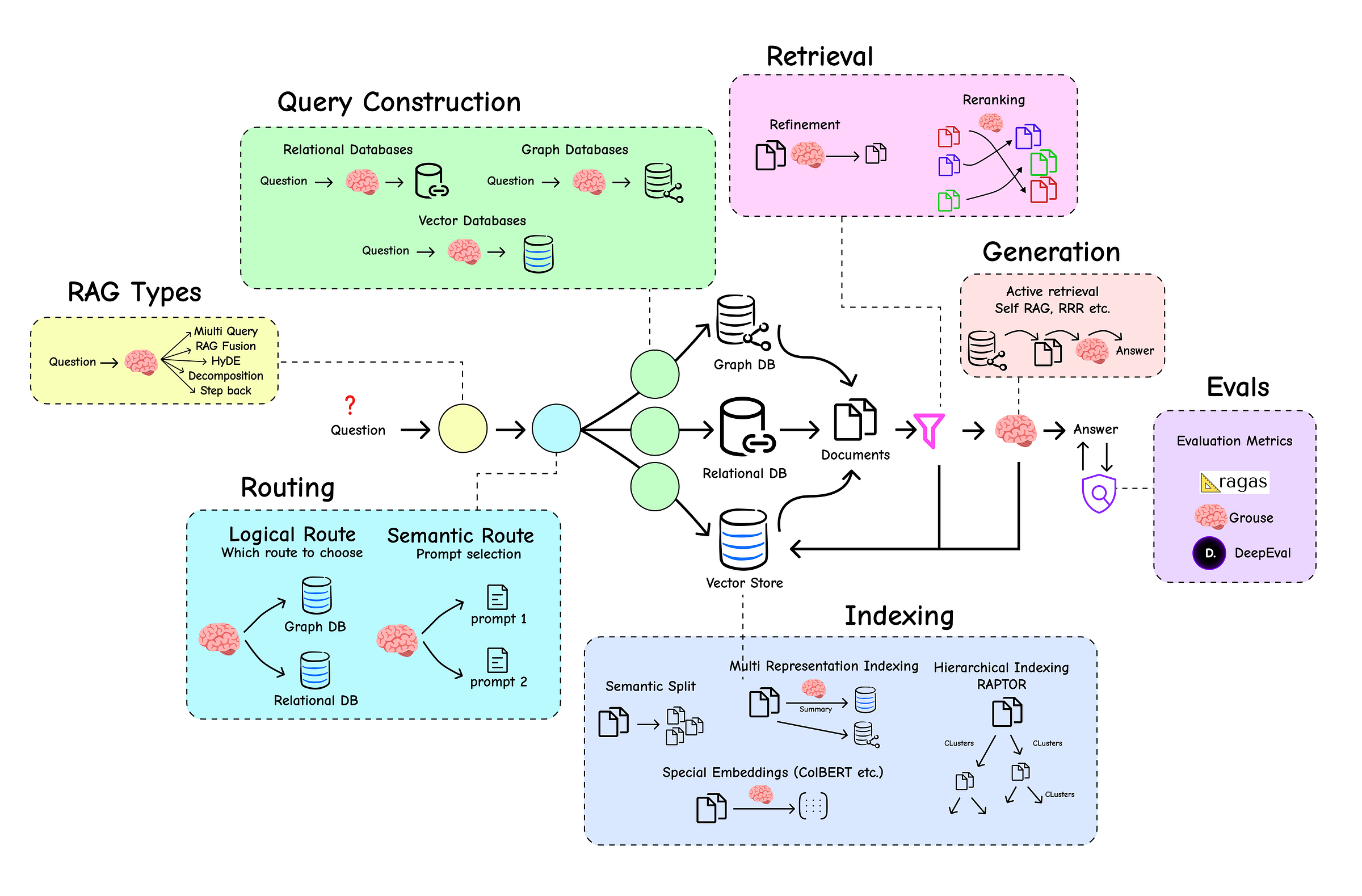
- Query Transformations: Rewriting user questions to be more effective for retrieval.
- Intelligent Routing: Directing a query to the correct data source or a specialized tool.
- Indexing: Creating a multi-layered knowledge base.
- Retrieval and Re-ranking: Filtering noise and prioritizing the most relevant context.
- Self-Correcting Agentic Flows: Building systems that can grade and improve their own work.
- End-to-End Evaluation: Objectively measuring the performance of the entire pipeline.
and much more …
We will learn and code each part of the RAG ecosystem along with visuals for easier understanding, starting from the basics to advanced techniques.
My Table of content is divided into several sections. Take a look.
- Understanding Basic RAG System
- Advanced Query Transformations
- Routing & Query Construction
- Advanced Indexing Strategies
- Advanced Retrieval & Generation
- Manual RAG Evaluation
- Evaluation with Frameworks
- Summarizing Everything
Before we look into the basics of RAG, let’s install core Python libraries commonly used for AI products, such as LangChain and others.
# Installing Required Modules
!pip install langchain langchain_community langchain-openai langchainhub chromadb tiktoken
We can now simply set the environment variables for tracing and other tasks, such as the LLMs API provider we will be using.
import os

# Set LangChain API endpoint and API key for tracing with LangSmith
os.environ['LANGCHAIN_ENDPOINT'] = 'https://api.smith.langchain.com'
os.environ['LANGCHAIN_API_KEY'] = '<your-api-key>'  # Replace with your LangChain API key

# Set OpenAI API key for using OpenAI models
os.environ['OPENAI_API_KEY'] = '<your-api-key>'  # Replace with your OpenAI API key
You can obtain your LangSmith API key from their official documentation to trace our RAG product throughout this blog. For the LLM, we will be using the OpenAI API but as you may already know, LangChain supports a variety of LLM providers as well.
The core RAG pipeline is the foundation of any advanced system, and understanding its components is important. Therefore, before going into the details of advanced components, we first need to understand the core logic of how a RAG system works, but you can skip this section if you are already aware of how RAG system works.
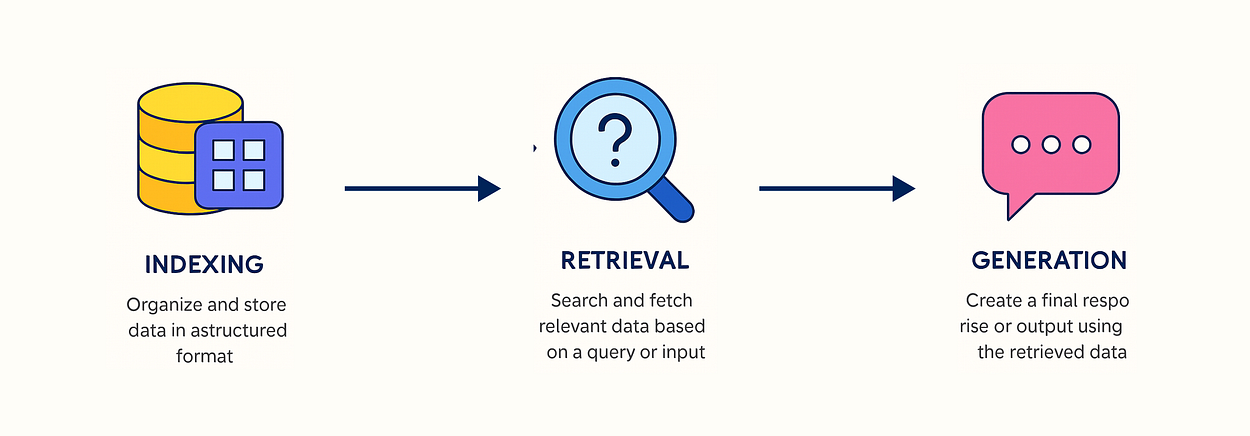
This simplest RAG can be break into three components:
- Indexing: Organize and store data in a structured format to enable efficient searching.
- Retrieval: Search and fetch relevant data based on a query or input.
- Generation: Create a final response or output using the retrieved data.
Let’s build this simple pipeline from the ground up to see how each piece works.
Before our RAG system can answer any questions, it needs knowledge to draw from. For this, we’ll use a WebBaseLoader to pull content directly from Lilian Weng's excellent blog post on LLM-powered agents.
import bs4
from langchain_community.document_loaders import WebBaseLoader

# Initialize a web document loader with specific parsing instructions
loader = WebBaseLoader(
    web_paths=("https://lilianweng.github.io/posts/2023-06-23-agent/",),  # URL of the blog post to load
    bs_kwargs=dict(
        parse_only=bs4.SoupStrainer(
            class_=("post-content", "post-title", "post-header")  # Only parse specified HTML classes
        )
    ),
)

# Load the filtered content from the web page into documents
docs = loader.load()
The bs_kwargs argument helps us target only the relevant HTML tags (post-content, post-title, etc.), cleaning up our data from the start.
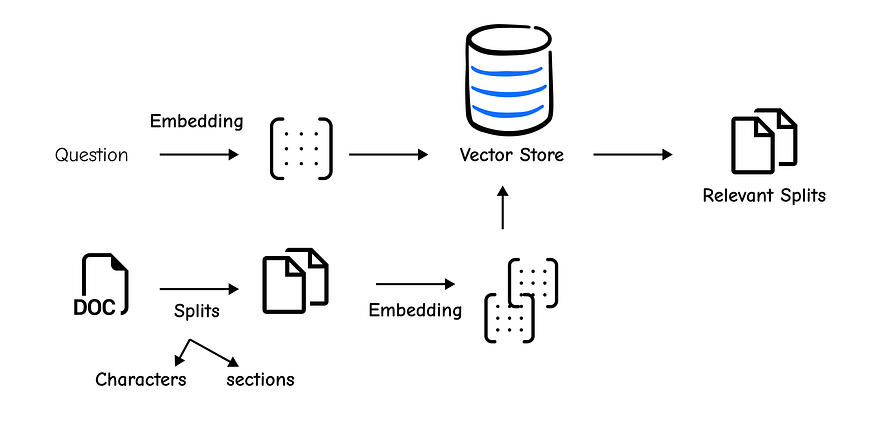
Now that we have the document, we face our first challenge. Feeding a massive document directly into an LLM is inefficient and often impossible due to context window limits.
This is why chunking is a critical step. We need to break the document into smaller, semantically meaningful pieces.
The RecursiveCharacterTextSplitter is the recommended tool for this job because it intelligently tries to keep paragraphs and sentences intact.
from langchain.text_splitter import RecursiveCharacterTextSplitter

# Create a text splitter to divide text into chunks of 1000 characters with 200-character overlap
text_splitter = RecursiveCharacterTextSplitter(chunk_size=1000, chunk_overlap=200)

# Split the loaded documents into smaller chunks
splits = text_splitter.split_documents(docs)
With chunk_size=1000, we are creating chunks of 1000 characters, and chunk_overlap=200 ensures there is some continuity between them, which helps preserve context.
Our text is now split, but it’s still just text. To perform similarity searches, we need to convert these chunks into numerical representations called embeddings. We will then store these embeddings in a vector store, which is a specialized database designed for efficient searching of vectors.
The Chroma vector store and OpenAIEmbeddings make this incredibly simple. The following line handles both embedding and indexing in one go.
from langchain_community.vectorstores import Chroma
from langchain_openai import OpenAIEmbeddings

# Embed the text chunks and store them in a Chroma vector store for similarity search
vectorstore = Chroma.from_documents(
    documents=splits,
    embedding=OpenAIEmbeddings()  # Use OpenAI's embedding model to convert text into vectors
)
With our knowledge indexed, we are now ready to start asking questions.
The vector store is our library, and the retriever is our smart librarian. It takes a user’s query, embeds it, and then fetches the most semantically similar chunks from the vector store.
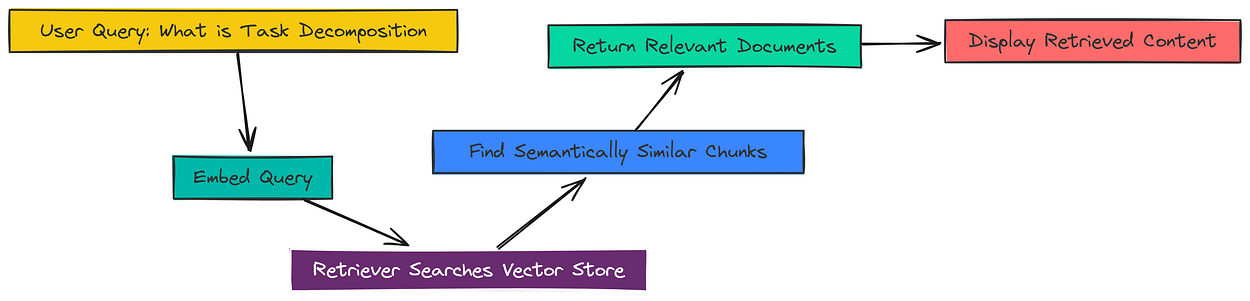
Creating a retriever from our vectorstore is a one-liner.
# Create a retriever from the vector store
retriever = vectorstore.as_retriever()
Let’s test it. We’ll ask a question and see what our retriever finds.
# Retrieve relevant documents for a query
docs = retriever.get_relevant_documents("What is Task Decomposition?")

# Print the content of the first retrieved document
print(docs[0].page_content)
#### OUTPUT ####
Task decomposition can be done (1) by LLM with simple prompting like "Steps for XYZ.", "What are the subgoals for achieving XYZ?", (2) by using task-specific instructions; e.g. "Write a story outline." for writing a novel, or (3) with human inputs.
Tree of Thoughts (Yao et al. 2023) extends CoT by exploring multiple reasoning possibilities at each step. It first decomposes the problem into multiple thought steps and generates multiple thoughts per step, creating a tree structure. The search process can be BFS (breadth-first search) or DFS (depth-first search) with each state evaluated by a classifier (via a prompt) or majority vote.
As you can see, the retriever successfully pulled the most relevant chunk from the blog post that directly discusses “Task decomposition.” This piece of context is exactly what the LLM needs to form an accurate answer.
We have our context, but we need an LLM to read it and formulate a human-friendly answer. This is the “Generation” step in RAG.

First, we need a good prompt template. This instructs the LLM on how to behave. Instead of writing our own, we can pull a pre-optimized one from LangChain Hub.
from langchain import hub

# Pull a pre-made RAG prompt from LangChain Hub
prompt = hub.pull("rlm/rag-prompt")

# printing the prompt
print(prompt)
#### OUTPUT ####
input_variables=['context', 'question'] output_parser=StrOutputParser() partial_variables={} template='You are an assistant for question-answering tasks. Use the following pieces of retrieved context to answer the question. If you don\'t know the answer, just say that you don\'t know. Use three sentences maximum and keep the answer concise.\nQuestion: {question} \nContext: {context} \nAnswer:' template_format='f-string' validate_template=True
Next, we initialize our LLM. We’ll use gpt-3.5-turbo.
from langchain_openai import ChatOpenAI

# Initialize the LLM
llm = ChatOpenAI(model_name="gpt-3.5-turbo", temperature=0)
Now for the final step: chaining everything together. Using the LangChain Expression Language (LCEL), we can pipe the output of one component into the input of the next.
from langchain_core.output_parsers import StrOutputParser
from langchain_core.runnables import RunnablePassthrough

# Helper function to format retrieved documents
def format_docs(docs):
    return "\n\n".join(doc.page_content for doc in docs)

# Define the full RAG chain
rag_chain = (
    {"context": retriever | format_docs, "question": RunnablePassthrough()}
    | prompt
    | llm
    | StrOutputParser()
)
Let’s break down this chain:
{"context": retriever | format_docs, "question": RunnablePassthrough()}: This part runs in parallel. It sends the user's question to theretrieverto get documents, which are then formatted into a single string byformat_docs. Simultaneously,RunnablePassthroughpasses the original question through unchanged.| prompt: The context and question are fed into our prompt template.| llm: The formatted prompt is sent to the LLM.| StrOutputParser(): This cleans up the LLM's output into a simple string.
Now, let’s invoke the entire chain.
# Ask a question using the RAG chain
response = rag_chain.invoke("What is Task Decomposition?")
print(response)
#### OUTPUT ####
Task decomposition is a technique used to break down large tasks into smaller, more manageable subgoals. This can be achieved by using a Large Language Model (LLM) with simple prompts, task-specific instructions, or human inputs. For example, Tree of Thoughts is a method that extends Chain of Thought by exploring multiple reasoning possibilities at each step, decomposing the problem into multiple thought steps and generating multiple thoughts per step in a tree structure.
And there we have it, our RAG pipeline successfully retrieved relevant information about “Task Decomposition” and used it to generate a concise, accurate answer. This simple chain forms the foundation upon which we will build more advanced and powerful capabilities.
So, now that we understand the fundamentals of RAG pipeline. But production systems often reveal the limitations of this basic approach. One of the most common failure points is the user’s query itself.

A query might be too specific, too broad, or use different vocabulary than our source documents, leading to poor retrieval results.
The solution isn’t to blame the user, it’s to make our system smarter. Query Transformation is a set of powerful techniques designed to re-write, expand, or break down the original question to significantly improve retrieval accuracy.
Instead of relying on a single query, we’ll engineer multiple, better-informed queries to cast a wider and more accurate net.
To test these new techniques, we will use the same indexed knowledge base from Basic RAG pipeline section that we have just gone through previously. This ensures we can directly compare the results and see the improvements.
As a quick refresher, here’s how we set up our retriever:
# Load the blog post
loader = WebBaseLoader(
    web_paths=("https://lilianweng.github.io/posts/2023-06-23-agent/",),
    bs_kwargs=dict(
        parse_only=bs4.SoupStrainer(
            class_=("post-content", "post-title", "post-header")
        )
    ),
)
blog_docs = loader.load()

# Split the documents into chunks
text_splitter = RecursiveCharacterTextSplitter.from_tiktoken_encoder(
    chunk_size=300,
    chunk_overlap=50
)
splits = text_splitter.split_documents(blog_docs)

# Index the chunks in a Chroma vector store
vectorstore = Chroma.from_documents(documents=splits,
                                    embedding=OpenAIEmbeddings())

# Create our retriever
retriever = vectorstore.as_retriever()
Now, with our retriever ready, let’s explore our first query transformation technique.
A single user query represents just one perspective. Distance-based similarity search might miss relevant documents that use synonyms or discuss related concepts.
The Multi-Query approach tackles this by using an LLM to generate several different versions of the user’s question, effectively searching from multiple angles.
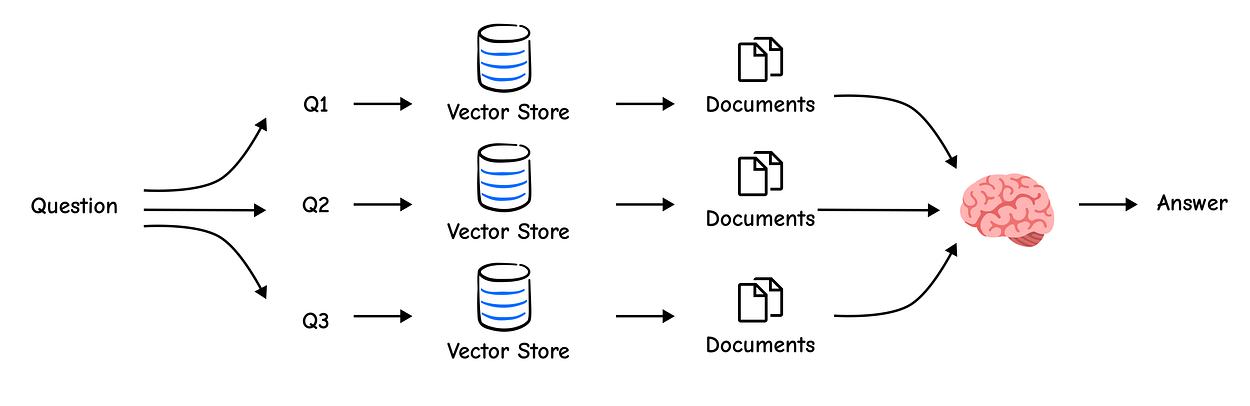
We’ll start by creating a prompt that instructs the LLM to generate these alternative questions.
from langchain.prompts import ChatPromptTemplate

# Prompt for generating multiple queries
template = """You are an AI language model assistant. Your task is to generate five
different versions of the given user question to retrieve relevant documents from a vector
database. By generating multiple perspectives on the user question, your goal is to help
the user overcome some of the limitations of the distance-based similarity search.
Provide these alternative questions separated by newlines. Original question: {question}"""
prompt_perspectives = ChatPromptTemplate.from_template(template)

# Chain to generate the queries
generate_queries = (
    prompt_perspectives
    | ChatOpenAI(temperature=0)
    | StrOutputParser()
    | (lambda x: x.split("\n"))
)
Let’s test this chain and see what kind of queries it generates for our question.
question = "What is task decomposition for LLM agents?"
generated_queries_list = generate_queries.invoke({"question": question})

# Print the generated queries
for i, q in enumerate(generated_queries_list):
    print(f"{i+1}. {q}")
#### OUTPUT ####
1. How can LLM agents break down complex tasks?
2. What is the process of task decomposition in the context of large language model agents?
3. What are the methods for decomposing tasks for LLM-powered agents?
4. Explain the concept of task decomposition as it applies to AI agents using LLMs.
5. In what ways do LLM agents handle task decomposition?
This is excellent. The LLM has rephrased our original question using different keywords like “break down complex tasks”, “methods”, and “process.” Now, we can retrieve documents for all of these queries and combine the results. A simple way to combine them is to take the unique set of all retrieved documents.
from langchain.load import dumps, loads

def get_unique_union(documents: list[list]):
    """ A simple function to get the unique union of retrieved documents """
    # Flatten the list of lists and convert each Document to a string for uniqueness
    flattened_docs = [dumps(doc) for sublist in documents for doc in sublist]
    unique_docs = list(set(flattened_docs))
    return [loads(doc) for doc in unique_docs]

# Build the retrieval chain
retrieval_chain = generate_queries | retriever.map() | get_unique_union

# Invoke the chain and check the number of documents retrieved
docs = retrieval_chain.invoke({"question": question})
print(f"Total unique documents retrieved: {len(docs)}")
#### OUTPUT ####
Total unique documents retrieved: 6
By searching with five different queries, we retrieved a total of 6 unique documents, likely capturing a more comprehensive set of information than a single query would have. Now we can feed this context into our final RAG chain.
from operator import itemgetter

# The final RAG chain
template = """Answer the following question based on this context:

{context}

Question: {question}
"""
prompt = ChatPromptTemplate.from_template(template)
llm = ChatOpenAI(temperature=0)

final_rag_chain = (
    {"context": retrieval_chain, "question": itemgetter("question")}
    | prompt
    | llm
    | StrOutputParser()
)

final_rag_chain.invoke({"question": question})
#### OUTPUT ####
Task decomposition for LLM agents involves breaking down large, complex tasks into smaller, more manageable sub-goals. This allows the agent to work through a problem systematically. Methods for decomposition include using the LLM itself with simple prompts (e.g., "Steps for XYZ."), applying task-specific instructions, or incorporating human inputs to guide the process.
This answer is more robust because it’s based on a wider pool of relevant documents.
Multi-Query is a great start, but simply taking a union of documents treats them all equally. What if one document was ranked highly by three of our queries, while another was a low-ranked result from only one?
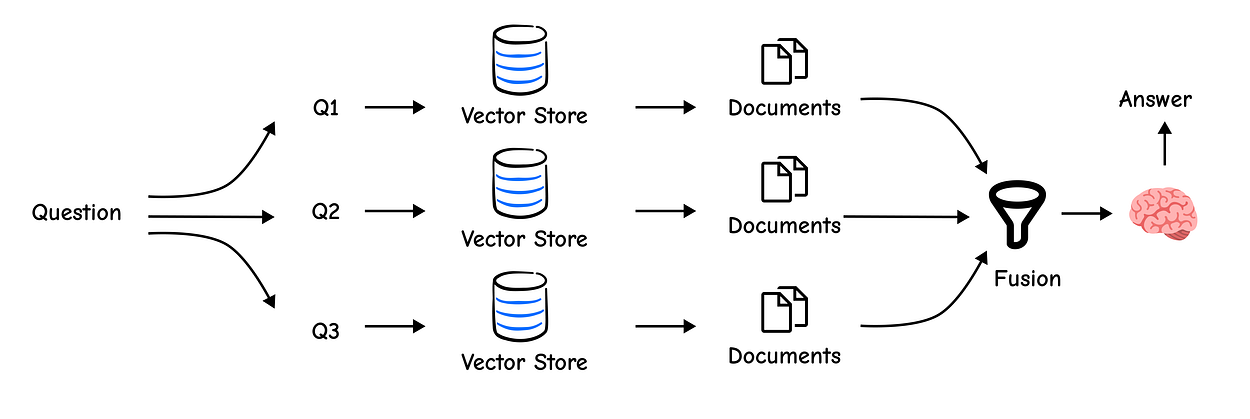
The first is clearly more important. RAG-Fusion improves on Multi-Query by not just fetching documents, but also …
re-ranking them using a technique called Reciprocal Rank Fusion (RRF).
RRF intelligently combines results from multiple searches. It boosts the score of documents that appear consistently high across different result lists, pushing the most relevant content to the top.
The code is very similar, but we’ll swap our get_unique_union function with an RRF implementation.
def reciprocal_rank_fusion(results: list[list], k=60):
    """ Reciprocal Rank Fusion that intelligently combines multiple ranked lists """
    fused_scores = {}

    # Iterate through each list of ranked documents
    for docs in results:
        for rank, doc in enumerate(docs):
            doc_str = dumps(doc)
            if doc_str not in fused_scores:
                fused_scores[doc_str] = 0
            # The core of RRF: documents ranked higher (lower rank value) get a larger score
            fused_scores[doc_str] += 1 / (rank + k)

    # Sort documents by their new fused scores in descending order
    reranked_results = [
        (loads(doc), score)
        for doc, score in sorted(fused_scores.items(), key=lambda x: x[1], reverse=True)
    ]
    return reranked_results
The above function will re-rank the documents after they are fetched through similarity search, but we haven’t initialized it yet so let’s do that now.
# Use a slightly different prompt for RAG-Fusion
template = """You are a helpful assistant that generates multiple search queries based on a single input query. \n
Generate multiple search queries related to: {question} \n
Output (4 queries):"""
prompt_rag_fusion = ChatPromptTemplate.from_template(template)

generate_queries = (
    prompt_rag_fusion
    | ChatOpenAI(temperature=0)
    | StrOutputParser()
    | (lambda x: x.split("\n"))
)

# Build the new retrieval chain with RRF
retrieval_chain_rag_fusion = generate_queries | retriever.map() | reciprocal_rank_fusion
docs = retrieval_chain_rag_fusion.invoke({"question": question})

print(f"Total re-ranked documents retrieved: {len(docs)}")
#### OUTPUT ####
Total re-ranked documents retrieved: 7
The final chain remains the same, but now it receives a more intelligently ranked context. RAG-Fusion is a powerful, low-effort way to increase the quality of your retrieval.
Some questions are too complex to be answered in a single step. For example, “What are the main components of an LLM-powered agent, and how do they interact?” This is really two questions in one.
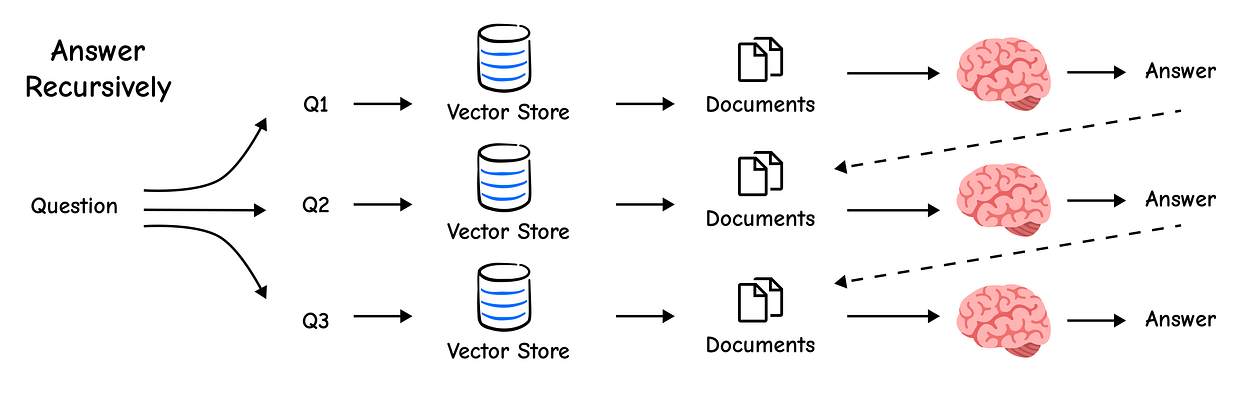
The Decomposition technique uses an LLM to break down a complex query into a set of simpler, self-contained sub-questions. We can then answer each one and synthesize a final answer.
We’ll start with a prompt designed for this purpose.
# Decomposition prompt
template = """You are a helpful assistant that generates multiple sub-questions related to an input question. \n
The goal is to break down the input into a set of sub-problems / sub-questions that can be answers in isolation. \n
Generate multiple search queries related to: {question} \n
Output (3 queries):"""
prompt_decomposition = ChatPromptTemplate.from_template(template)

# Chain to generate sub-questions
generate_queries_decomposition = (
    prompt_decomposition
    | ChatOpenAI(temperature=0)
    | StrOutputParser()
    | (lambda x: x.split("\n"))
)

# Generate and print the sub-questions
question = "What are the main components of an LLM-powered autonomous agent system?"
sub_questions = generate_queries_decomposition.invoke({"question": question})
print(sub_questions)
#### OUTPUT ####
['1. What are the core components of a system that uses a large language model to power an autonomous agent?', '2. How is memory implemented in LLM-powered autonomous agents?', '3. What role does planning and task decomposition play in an autonomous agent system powered by LLMs?']
The LLM successfully decomposed our complex question. Now, we can answer each of these individually and combine the results. One effective method is to answer each sub-question and use the resulting Q&A pairs as context to synthesize a final, comprehensive answer.
# RAG prompt
prompt_rag = hub.pull("rlm/rag-prompt")

# A list to hold the answers to our sub-questions
rag_results = []
for sub_question in sub_questions:
    # Retrieve documents for each sub-question
    retrieved_docs = retriever.get_relevant_documents(sub_question)

    # Use our standard RAG chain to answer the sub-question
    answer = (prompt_rag | llm | StrOutputParser()).invoke({"context": retrieved_docs, "question": sub_question})
    rag_results.append(answer)

def format_qa_pairs(questions, answers):
    """Format Q and A pairs"""
    formatted_string = ""
    for i, (question, answer) in enumerate(zip(questions, answers), start=1):
        formatted_string += f"Question {i}: {question}\nAnswer {i}: {answer}\n\n"
    return formatted_string.strip()

# Format the Q&A pairs into a single context string
context = format_qa_pairs(sub_questions, rag_results)

# Final synthesis prompt
template = """Here is a set of Q+A pairs:

{context}

Use these to synthesize an answer to the original question: {question}
"""
prompt = ChatPromptTemplate.from_template(template)

final_rag_chain = (
    prompt
    | llm
    | StrOutputParser()
)

final_rag_chain.invoke({"context": context, "question": question})
#### OUTPUT ####
An LLM-powered autonomous agent system primarily consists of three core components: planning, memory, and tool use. Planning involves decomposing large tasks into smaller, manageable sub-goals. Memory allows the agent to learn from past actions and retain information, using both short-term and long-term storage. Finally, tool use enables the agent to interact with external environments to gather information and perform actions beyond its inherent capabilities. These components work in concert to allow the agent to reason, plan, and execute complex tasks autonomously.
By breaking the problem down, we constructed a much more detailed and structured answer than we would have otherwise.
Sometimes, a user’s query is too specific, while our documents contain the more general, underlying information needed to answer it.
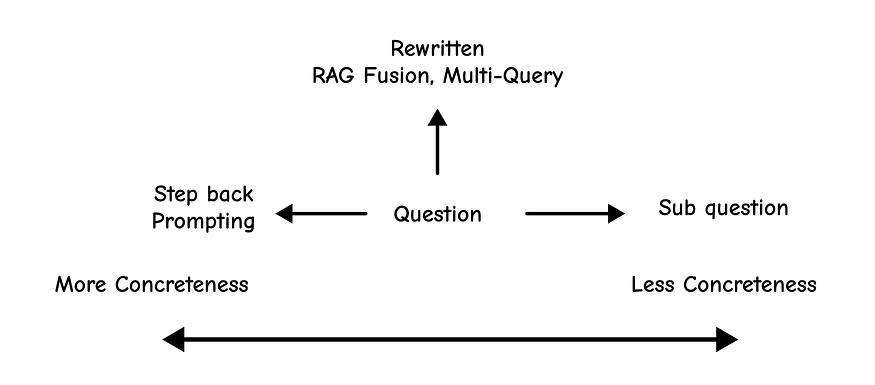
For example, a user might ask, “Could the members of The Police perform lawful arrests?”
A direct search for this might fail. The Step-Back technique uses an LLM to take a “step back” and form a more general question, like “What are the powers and duties of the band The Police?” We then retrieve context for both the specific and general questions, providing a richer context for the final answer.
We can teach the LLM this pattern using few-shot examples.
from langchain_core.prompts import ChatPromptTemplate, FewShotChatMessagePromptTemplate

# Few-shot examples to teach the model how to generate step-back (more generic) questions
examples = [
    {
        "input": "Could the members of The Police perform lawful arrests?",
        "output": "what can the members of The Police do?",
    },
    {
        "input": "Jan Sindel's was born in what country?",
        "output": "what is Jan Sindel's personal history?",
    },
]

# Define how each example is formatted in the prompt
example_prompt = ChatPromptTemplate.from_messages([
    ("human", "{input}"),  # User input
    ("ai", "{output}")     # Model's response
])

# Wrap the few-shot examples into a reusable prompt template
few_shot_prompt = FewShotChatMessagePromptTemplate(
    example_prompt=example_prompt,
    examples=examples,
)

# Full prompt includes system instruction, few-shot examples, and the user question
prompt = ChatPromptTemplate.from_messages([
    ("system",
     "You are an expert at world knowledge. Your task is to step back and paraphrase a question "
     "to a more generic step-back question, which is easier to answer. Here are a few examples:"),
    few_shot_prompt,
    ("user", "{question}"),
])
Now, we can simply define the chain for step back approach, so let’s do that.
# Define a chain to generate step-back questions using the prompt and an OpenAI model
generate_queries_step_back = prompt | ChatOpenAI(temperature=0) | StrOutputParser()

# Run the chain on a specific question
question = "What is task decomposition for LLM agents?"
step_back_question = generate_queries_step_back.invoke({"question": question})

# Output the original and generated step-back question
print(f"Original Question: {question}")
print(f"Step-Back Question: {step_back_question}")
#### OUTPUT ####
Original Question: What is task decomposition for LLM agents?
Step-Back Question: What are the different approaches to task decomposition in software engineering?
This is an important step-back question. It broadens the scope to general software engineering, which will likely pull in foundational documents that can then be combined with the specific context about LLM agents. Now we can build a chain that uses both.
from langchain_core.runnables import RunnableLambda

# Prompt for the final response
response_prompt_template = """You are an expert of world knowledge. I am going to ask you a question. Your response should be comprehensive and not contradicted with the following context if they are relevant. Otherwise, ignore them if they are not relevant.

# Normal Context
{normal_context}

# Step-Back Context
{step_back_context}

# Original Question: {question}
# Answer:"""
response_prompt = ChatPromptTemplate.from_template(response_prompt_template)

# The full chain
chain = (
    {
        # Retrieve context using the normal question
        "normal_context": RunnableLambda(lambda x: x["question"]) | retriever,
        # Retrieve context using the step-back question
        "step_back_context": generate_queries_step_back | retriever,
        # Pass on the original question
        "question": lambda x: x["question"],
    }
    | response_prompt
    | ChatOpenAI(temperature=0)
    | StrOutputParser()
)

response = chain.invoke({"question": question})
This is the output we get, when we run this step back prompt chain with our query.
print(response)#### OUTPUT ####
Task decomposition is a fundamental concept in software engineering where a complex problem is broken down into smaller, more manageable parts. In the context of LLM agents, this principle is applied to enable them to handle large tasks. By decomposing a task into sub-goals, the agent can plan and execute a series of simpler actions. This can be achieved through various methods, such as using the LLM itself to generate a step-by-step plan, following task-specific instructions, or by taking input from a human operator.
This final technique is one of the most clever. The core problem of retrieval is that a user’s query might use different words than the document (the “vocabulary mismatch” problem).
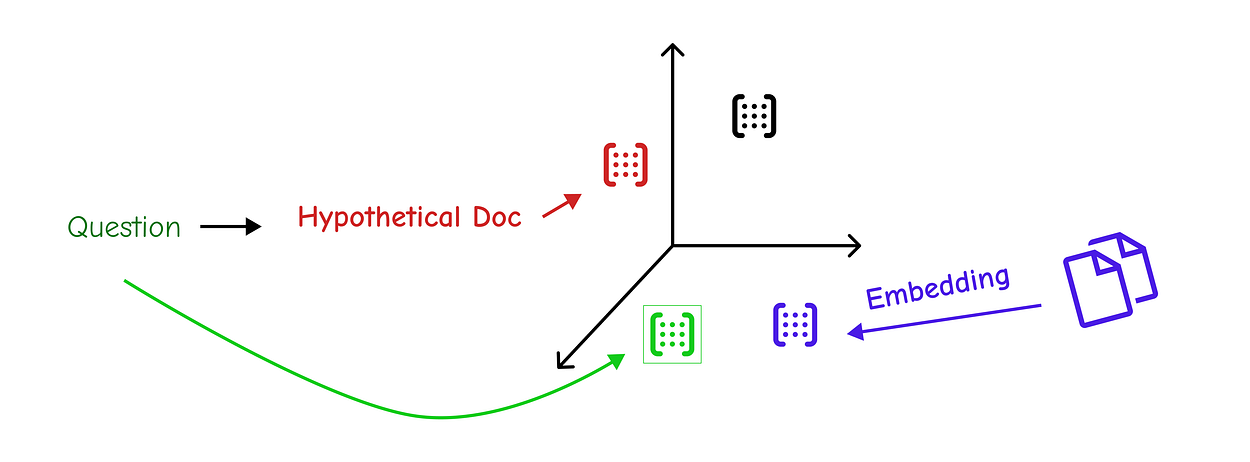
HyDE (Hypothetical Document Embeddings) proposes a radical solution: First, have an LLM generate a hypothetical answer to the question. This fake document, while not factually correct, will be semantically rich and use the kind of language we expect to find in a real answer.
We then embed this hypothetical document and use its embedding to perform the retrieval. The result is that we find real documents that are semantically very similar to an ideal answer.
Let’s start by creating a prompt to generate this hypothetical document.
# HyDE prompt
template = """Please write a scientific paper passage to answer the question
Question: {question}
Passage:"""
prompt_hyde = ChatPromptTemplate.from_template(template)

# Chain to generate the hypothetical document
generate_docs_for_retrieval = (
    prompt_hyde
    | ChatOpenAI(temperature=0)
    | StrOutputParser()
)

# Generate and print the hypothetical document
hypothetical_document = generate_docs_for_retrieval.invoke({"question": question})
print(hypothetical_document)
#### OUTPUT ####
Task decomposition in large language model (LLM) agents refers to the process of breaking down a complex, high-level task into a series of smaller, more manageable sub-tasks. This hierarchical approach is crucial for enabling agents to handle sophisticated goals that require multi-step reasoning and planning. The decomposition can be achieved through several mechanisms, including programmatic scripts, interaction with external tools, or recursive calls to the LLM itself with structured prompts. By dividing the problem space, the agent can focus on solving one sub-problem at a time, using the output of one step as the input for the next, thus creating a coherent and executable workflow.
This passage is a perfect, textbook-style answer. Now, we use its embedding to find real documents.
# Retrieve documents using the HyDE approach
retrieval_chain = generate_docs_for_retrieval | retriever
retrieved_docs = retrieval_chain.invoke({"question": question})

# Use our standard RAG chain to generate the final answer from the retrieved context
response = final_rag_chain.invoke({"context": retrieved_docs, "question": question})
print(response)
#### OUTPUT ####
Task decomposition for LLM agents involves breaking down a larger task into smaller, more manageable subgoals. This can be done using techniques like Chain of Thought (CoT), which prompts the model for step-by-step thinking, or Tree of Thoughts, which explores multiple reasoning paths. The decomposition can be driven by the LLM itself through simple prompting, by using task-specific instructions, or by incorporating human inputs.
By using a hypothetical document as a lure, HyDE helped us zero in on the most relevant chunks in our knowledge base, demonstrating another powerful tool in our RAG toolkit.
Our RAG system is getting smarter, but in a real-world scenario, knowledge isn’t stored in a single, uniform library.
We often have multiple data sources: documentation for different programming languages, internal wikis, public websites, or databases with structured metadata.
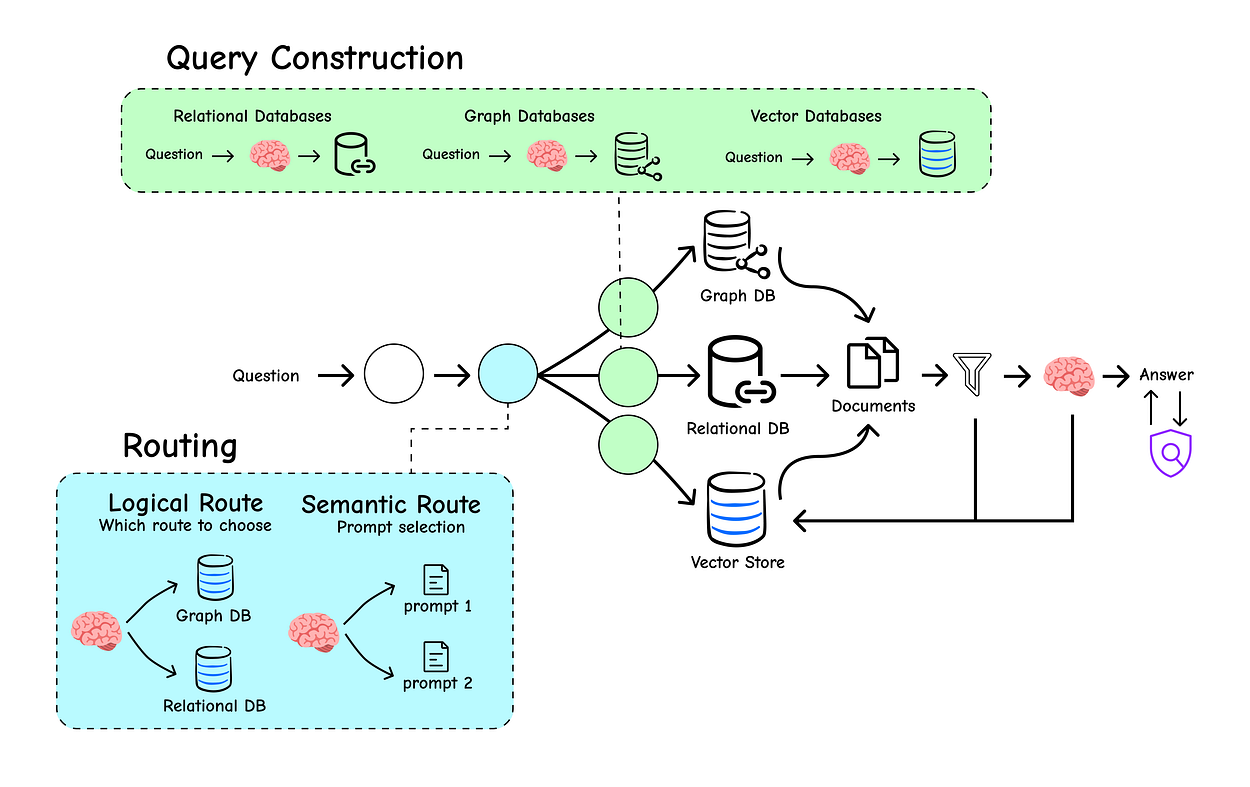
Sending every query to every source is wildly inefficient and can lead to noisy, irrelevant results.
This is where our RAG system needs to evolve from a simple librarian into an intelligent switchboard operator. It needs the ability to first analyze an incoming query and then route it to the correct destination or construct a more precise, structured query for retrieval. This section dives into the techniques that make this possible.
Routing is a classification problem. Given a user’s question, we need to classify it into one of several predefined categories. While traditional ML models can do this, we can leverage the powerful reasoning engine we already have: the LLM itself.

By providing the LLM with a clear schema (a set of possible categories), we can ask it to make the classification decision for us.
We’ll start by defining the “contract” for our LLM’s output using a Pydantic model. This schema explicitly tells the LLM the possible destinations for a query.
from typing import Literal
from langchain_core.pydantic_v1 import BaseModel, Field

# Define the data model for our router's output
class RouteQuery(BaseModel):
    """A data model to route a user query to the most relevant datasource."""

    # The 'datasource' field must be one of the three specified literal strings.
    # This enforces a strict set of choices for the LLM.
    datasource: Literal["python_docs", "js_docs", "golang_docs"] = Field(
        ...,  # The '...' indicates that this field is required.
        description="Given a user question, choose which datasource would be most relevant for answering their question.",
    )
With our schema defined, we can now build the router chain. We’ll use a prompt to give the LLM its instructions and then use the .with_structured_output() method to ensure its response perfectly matches our RouteQuery model.
# Initialize our LLM
llm = ChatOpenAI(model="gpt-3.5-turbo-0125", temperature=0)

# Create a new LLM instance that is "structured" to output our Pydantic model
structured_llm = llm.with_structured_output(RouteQuery)

# The system prompt provides the core instruction for the LLM's task.
system = """You are an expert at routing a user question to the appropriate data source.

Based on the programming language the question is referring to, route it to the relevant data source."""

# The full prompt template combines the system message and the user's question.
prompt = ChatPromptTemplate.from_messages(
    [
        ("system", system),
        ("human", "{question}"),
    ]
)

# Define the complete router chain
router = prompt | structured_llm
Now, let’s test our router. We’ll pass it a question that is clearly about Python and inspect the output.
question = """Why doesn't the following code work:

from langchain_core.prompts import ChatPromptTemplate

prompt = ChatPromptTemplate.from_messages(["human", "speak in {language}"])
prompt.invoke("french")
"""

# Invoke the router and check the result
result = router.invoke({"question": question})

print(result)
#### OUTPUT ####
datasource='python_docs'
The output is an instance of our RouteQuery model, and the LLM has correctly identified python_docs as the appropriate datasource. This structured output is now something we can reliably use in our code to implement branching logic.
def choose_route(result):
    """A function to determine the downstream logic based on the router's output."""
    if "python_docs" in result.datasource.lower():
        # In a real app, this would be a complete RAG chain for Python docs
        return "chain for python_docs"
    elif "js_docs" in result.datasource.lower():
        # This would be the chain for JavaScript docs
        return "chain for js_docs"
    else:
        # And this for Go docs
        return "chain for golang_docs"

# The full chain now includes the routing and branching logic
full_chain = router | RunnableLambda(choose_route)

# Let's run the full chain
final_destination = full_chain.invoke({"question": question})

print(final_destination)
#### OUTPUT ####
chain for python_docs
Our switchboard correctly routed the Python-related query. This approach is incredibly powerful for building multi-source RAG systems.
Logical routing works perfectly when you have clearly defined categories. But what if you want to route based on the style or domain of a question? For example, you might want to answer physics questions with a serious, academic tone and math questions with a step-by-step, pedagogical approach. This is where Semantic Routing comes in.
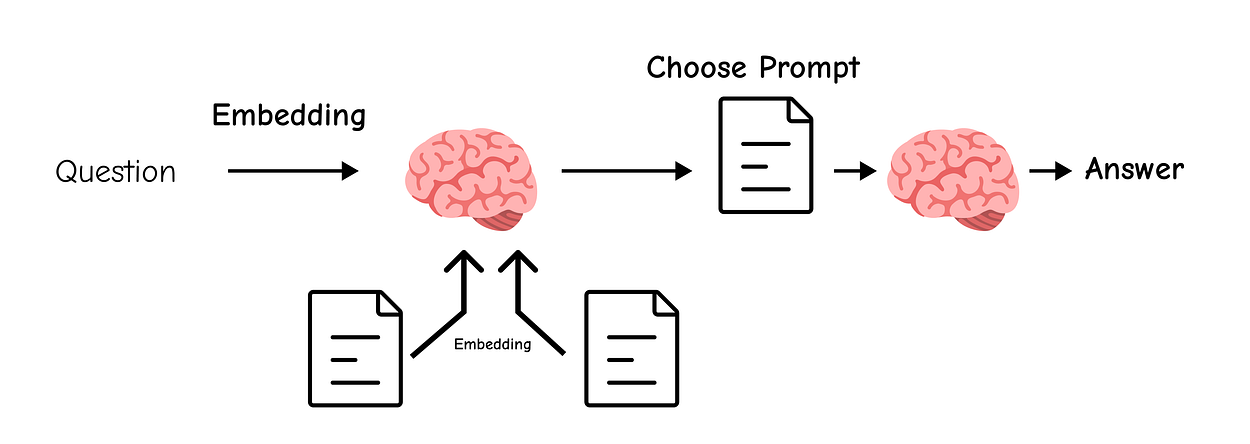
Instead of classifying the query, we define multiple expert prompts.
We then embed the user’s query and each of our prompt templates, and use cosine similarity to find the prompt that is most semantically aligned with the query.
First, let’s define our two expert personas.
# A prompt for a physics expert
physics_template = """You are a very smart physics professor. \
You are great at answering questions about physics in a concise and easy to understand manner. \
When you don't know the answer to a question you admit that you don't know.

Here is a question:
{query}"""

# A prompt for a math expert
math_template = """You are a very good mathematician. You are great at answering math questions. \
You are so good because you are able to break down hard problems into their component parts, \
answer the component parts, and then put them together to answer the broader question.

Here is a question:
{query}"""
Now, we’ll create the routing function that performs the embedding and similarity comparison.
from langchain.utils.math import cosine_similarity

# Initialize the embedding model
embeddings = OpenAIEmbeddings()

# Store our templates and their embeddings for comparison
prompt_templates = [physics_template, math_template]
prompt_embeddings = embeddings.embed_documents(prompt_templates)

def prompt_router(input):
    """A function to route the input query to the most similar prompt template."""
    # 1. Embed the incoming user query
    query_embedding = embeddings.embed_query(input["query"])

    # 2. Compute the cosine similarity between the query and all prompt templates
    similarity = cosine_similarity([query_embedding], prompt_embeddings)[0]

    # 3. Find the index of the most similar prompt
    most_similar_index = similarity.argmax()

    # 4. Select the most similar prompt template
    chosen_prompt = prompt_templates[most_similar_index]

    print(f"DEBUG: Using {'MATH' if most_similar_index == 1 else 'PHYSICS'} template.")

    # 5. Return the chosen prompt object
    return PromptTemplate.from_template(chosen_prompt)
With the routing logic in place, we can build the full chain that dynamically selects the right expert for the job.
# The final chain that combines the router with the LLM
chain = (
    {"query": RunnablePassthrough()}
    | RunnableLambda(prompt_router)  # Dynamically select the prompt
    | ChatOpenAI()
    | StrOutputParser()
)

# Ask a physics question
print(chain.invoke("What's a black hole"))
#### OUTPUT ####
DEBUG: Using PHYSICS template.
A black hole is a region of spacetime where gravity is so strong that nothing—no particles or even electromagnetic radiation such as light—can escape from it. The boundary of no escape is called the event horizon. Although it has a great effect on the fate and circumstances of an object crossing it, it has no locally detectable features. In many ways, a black hole acts as an ideal black body, as it reflects no light.
Perfect. The router correctly identified the question as physics-related and used the physics professor prompt, resulting in a concise and accurate answer. This technique is excellent for creating specialized agents that adapt their persona to the user’s needs.
So far, we’ve focused on retrieving from unstructured text. But most real-world data is semi-structured; it contains valuable metadata like dates, authors, view counts, or categories. A simple vector search can’t leverage this information.
Query Structuring is the technique of converting a natural language question into a structured query that can use these metadata filters for highly precise retrieval.
To illustrate, let’s look at the metadata available from a YouTube video transcript.
from langchain_community.document_loaders import YoutubeLoader

# Load a YouTube transcript to inspect its metadata
docs = YoutubeLoader.from_youtube_url(
    "https://www.youtube.com/watch?v=pbAd8O1Lvm4", add_video_info=True
).load()

# Print the metadata of the first document
print(docs[0].metadata)
#### OUTPUT ####
{'source': 'pbAd8O1Lvm4', 'title': 'Self-reflective RAG with LangGraph: Self-RAG and CRAG', 'description': 'Unknown', 'view_count': 11922, 'thumbnail_url': 'https://i.ytimg.com/vi/pbAd8O1Lvm4/hq720.jpg', 'publish_date': '2024-02-07 00:00:00', 'length': 1058, 'author': 'LangChain'}
This document has rich metadata: view_count, publish_date, length. We want our users to be able to filter on these fields using natural language. To do this, we'll define another Pydantic schema, this time for a structured video search query.
import datetime
from typing import Optional

class TutorialSearch(BaseModel):
    """A data model for searching over a database of tutorial videos."""

    # The main query for a similarity search over the video's transcript.
    content_search: str = Field(..., description="Similarity search query applied to video transcripts.")

    # A more succinct query for searching just the video's title.
    title_search: str = Field(..., description="Alternate version of the content search query to apply to video titles.")

    # Optional metadata filters
    min_view_count: Optional[int] = Field(None, description="Minimum view count filter, inclusive.")
    max_view_count: Optional[int] = Field(None, description="Maximum view count filter, exclusive.")
    earliest_publish_date: Optional[datetime.date] = Field(None, description="Earliest publish date filter, inclusive.")
    latest_publish_date: Optional[datetime.date] = Field(None, description="Latest publish date filter, exclusive.")
    min_length_sec: Optional[int] = Field(None, description="Minimum video length in seconds, inclusive.")
    max_length_sec: Optional[int] = Field(None, description="Maximum video length in seconds, exclusive.")

    def pretty_print(self) -> None:
        """A helper function to print the populated fields of the model."""
        for field in self.__fields__:
            if getattr(self, field) is not None:
                print(f"{field}: {getattr(self, field)}")
This schema is our target. We’ll now create a chain that takes a user question and fills out this model.
# System prompt for the query analyzer
system = """You are an expert at converting user questions into database queries. \
You have access to a database of tutorial videos about a software library for building LLM-powered applications. \
Given a question, return a database query optimized to retrieve the most relevant results.

If there are acronyms or words you are not familiar with, do not try to rephrase them."""

prompt = ChatPromptTemplate.from_messages([("system", system), ("human", "{question}")])
structured_llm = llm.with_structured_output(TutorialSearch)

# The final query analyzer chain
query_analyzer = prompt | structured_llm
Let’s test this with a few different questions to see its power.
# Test 1: A simple query
query_analyzer.invoke({"question": "rag from scratch"}).pretty_print()
#### OUTPUT ####
content_search: rag from scratch
title_search: rag from scratch
As expected, it fills the content and title search fields. Now for a more complex query.
# Test 2: A query with a date filter
query_analyzer.invoke(
    {"question": "videos on chat langchain published in 2023"}
).pretty_print()
#### OUTPUT ####
content_search: chat langchain
title_search: chat langchain 2023
earliest_publish_date: 2023-01-01
latest_publish_date: 2024-01-01
This is brilliant. The LLM correctly interpreted “in 2023” and created a date range filter. Let’s try one more with a time constraint.
# Test 3: A query with a length filter
query_analyzer.invoke(
    {
        "question": "how to use multi-modal models in an agent, only videos under 5 minutes"
    }
).pretty_print()
#### OUTPUT ####
content_search: multi-modal models agent
title_search: multi-modal models agent
max_length_sec: 300
It perfectly converted “under 5 minutes” to max_length_sec: 300. This structured query can now be passed to a vector store that supports metadata filtering, allowing for incredibly precise and efficient retrieval that goes far beyond simple semantic search.
So far, our approach to indexing has been straightforward: split documents into chunks and embed them. This works, but it has a fundamental limitation.
Small, focused chunks are great for retrieval accuracy (they contain less noise), but they often lack the broader context needed for the LLM to generate a comprehensive answer.
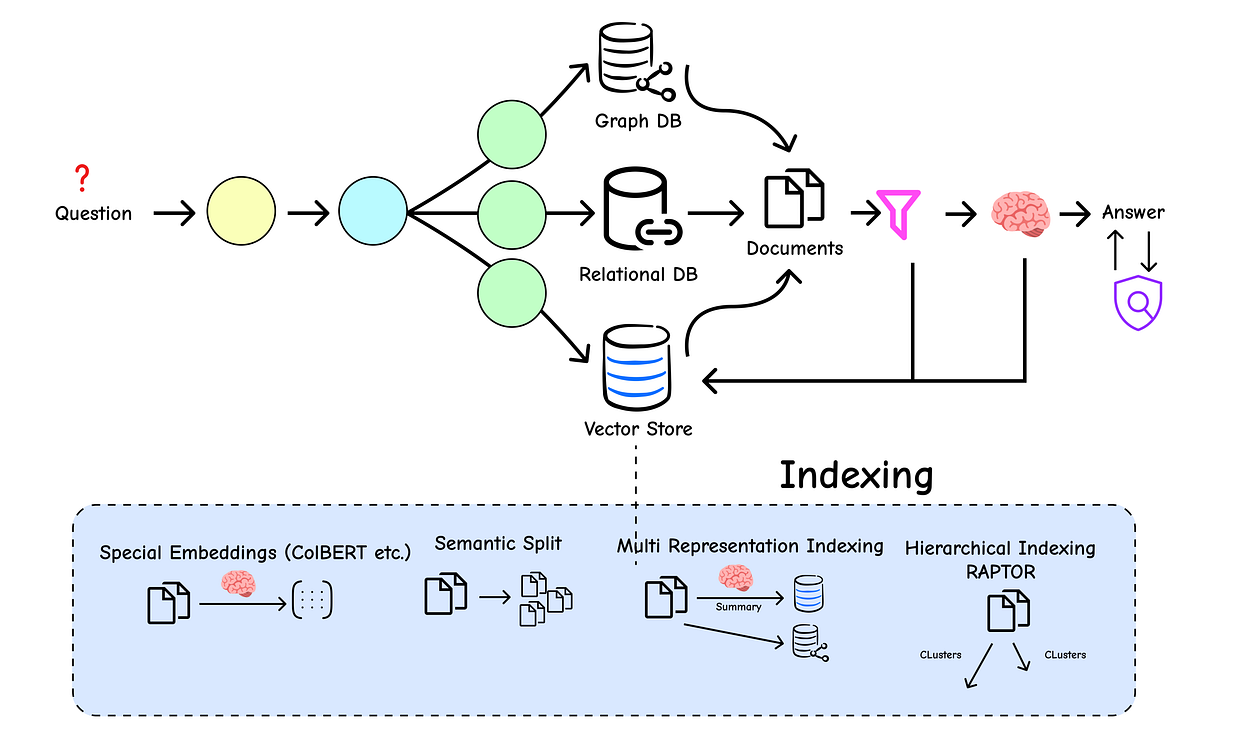
Conversely, large chunks provide great context but perform poorly in retrieval because their core meaning gets diluted.
This is the classic “chunk size” dilemma. How can we get the best of both worlds?
The answer lies in more advanced indexing strategies that separate the document representation used for retrieval from the one used for generation. Let’s dive in.
The core idea of Multi-Representation Indexing is simple but powerful: instead of embedding the full document chunks, we create a smaller, more focused representation of each chunk (like a summary) and embed that instead.

During retrieval, we search over these concise summaries. Once we find the best summary, we use its ID to look up and retrieve the full, original document chunk.
This way, we get the precision of searching over small, dense summaries and the rich context of the larger parent documents for generation.
First, we need to load some documents to work with. We’ll grab two posts from Lilian Weng’s blog.
# Load two different blog posts to create a more diverse knowledge base
loader = WebBaseLoader("https://lilianweng.github.io/posts/2023-06-23-agent/")
docs = loader.load()

loader = WebBaseLoader("https://lilianweng.github.io/posts/2024-02-05-human-data-quality/")
docs.extend(loader.load())

print(f"Loaded {len(docs)} documents.")
#### OUTPUT ####
Loaded 2 documents.
Next, we’ll create a chain to generate a summary for each of these documents.
import uuid

# The chain for generating summaries
summary_chain = (
    # Extract the page_content from the document object
    {"doc": lambda x: x.page_content}
    # Pipe it into a prompt template
    | ChatPromptTemplate.from_template("Summarize the following document:\n\n{doc}")
    # Use an LLM to generate the summary
    | ChatOpenAI(model="gpt-3.5-turbo", max_retries=0)
    # Parse the output into a string
    | StrOutputParser()
)

# Use .batch() to run the summarization in parallel for efficiency
summaries = summary_chain.batch(docs, {"max_concurrency": 5})

# Let's inspect the first summary
print(summaries[0])
#### OUTPUT ####
The document discusses building autonomous agents powered by Large Language Models (LLMs). It outlines the key components of such a system, including planning, memory, and tool use. The author explores challenges like the finite context length of LLMs, the difficulty in long-term planning, and the reliability of natural language interfaces. Case studies like AutoGPT and GPT-Engineer are presented as proof-of-concept examples, and the post concludes with a list of references to relevant research papers.
Now comes the crucial part. We need a MultiVectorRetriever which requires two main components:
- A
vectorstoreto store the embeddings of our summaries. - A
docstore(a simple key-value store) to hold the original, full documents.
from langchain.storage import InMemoryByteStore
from langchain.retrievers.multi_vector import MultiVectorRetriever
from langchain_core.documents import Document

# The vectorstore to index the summary embeddings
vectorstore = Chroma(collection_name="summaries", embedding_function=OpenAIEmbeddings())

# The storage layer for the parent documents
store = InMemoryByteStore()
id_key = "doc_id" # This key will link summaries to their parent documents

# The retriever that orchestrates the whole process
retriever = MultiVectorRetriever(
    vectorstore=vectorstore,
    byte_store=store,
    id_key=id_key,
)

# Generate unique IDs for each of our original documents
doc_ids = [str(uuid.uuid4()) for _ in docs]

# Create new Document objects for the summaries, adding the 'doc_id' to their metadata
summary_docs = [
    Document(page_content=s, metadata={id_key: doc_ids[i]})
    for i, s in enumerate(summaries)
]

# Add the summaries to the vectorstore
retriever.vectorstore.add_documents(summary_docs)

# Add the original documents to the docstore, linking them by the same IDs
retriever.docstore.mset(list(zip(doc_ids, docs)))
Our advanced index is now built. Let’s test the retrieval process. We’ll ask a question about “Memory in agents” and see what happens.
query = "Memory in agents"

# First, let's see what the vectorstore finds by searching the summaries
sub_docs = vectorstore.similarity_search(query, k=1)
print("--- Result from searching summaries ---")
print(sub_docs[0].page_content)
print("\n--- Metadata showing the link to the parent document ---")
print(sub_docs[0].metadata)
#### OUTPUT ####
--- Result from searching summaries ---
The document discusses the concept of building autonomous agents powered by Large Language Models (LLMs) as their core controllers. It covers components such as planning, memory, and tool use, along with case studies and proof-of-concept examples like AutoGPT and GPT-Engineer. Challenges like finite context length, planning difficulties, and reliability of natural language interfaces are also highlighted. The document provides references to related research papers and offers a comprehensive overview of LLM-powered autonomous agents.
--- Metadata showing the link to the parent document ---
{'doc_id': '4b5c6d7e-8f9a-0b1c-2d3e-4f5a6b7c8d9e'}
As you can see, the search found the summary that mentions “memory.” Now, the MultiVectorRetriever will use the doc_id from this summary's metadata to automatically fetch the full parent document from the docstore.
# Let the full retriever do its job
retrieved_docs = retriever.get_relevant_documents(query, n_results=1)

# Print the beginning of the retrieved full document
print("\n--- The full document retrieved by the MultiVectorRetriever ---")
print(retrieved_docs[0].page_content[0:500])
#### OUTPUT ####
--- The full document retrieved by the MultiVectorRetriever ---
LLM Powered Autonomous Agents | Lil'Log
Lil'Log
Posts
Archive
Search
Tags
FAQ
emojisearch.app
LLM Powered Autonomous Agents
Date: June 23, 2023 | Estimated Reading Time: 31 min | Author: Lilian Weng
Table of Contents
Agent System Overview
Component One: Planning
Task Decomposition
Self-Reflection
Component Two: Memory
Types of Memory
Maximum Inner Product Search (MIPS)
This is exactly what we wanted! We searched over concise summaries but got back the complete, context-rich document, solving the chunk size dilemma.
The Theory: RAPTOR (Recursive Abstractive Processing for Tree-Organized Retrieval) takes the multi-representation idea a step further. Instead of just one layer of summaries, RAPTOR builds a multi-level tree of summaries. It starts by clustering small document chunks. It then summarizes each cluster.
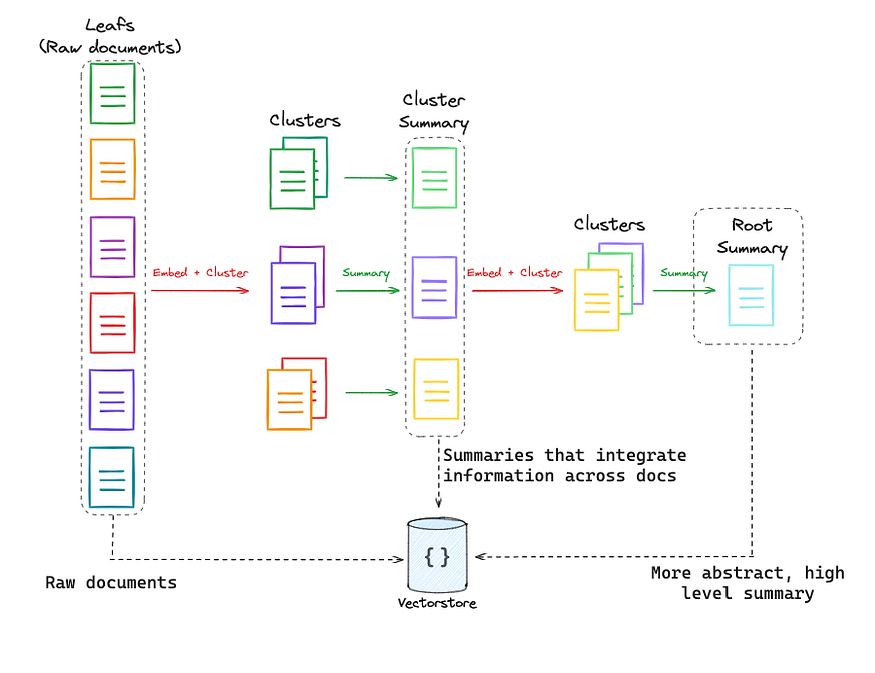
Then, it takes these summaries, clusters them, and summarizes the new clusters. This process repeats, creating a hierarchy of knowledge from fine-grained details to high-level concepts. When you query, you can search at different levels of this tree, allowing for retrieval that can be as specific or as general as needed.
This is a more advanced technique, and while we won’t implement the full algorithm here, you can find a deep dive and complete code in the RAPTOR Cookbook. It represents the cutting edge of structured indexing.
The Theory: Standard embedding models create a single vector for an entire chunk of text (this is called a “bag-of-words” approach). This can lose a lot of nuance.
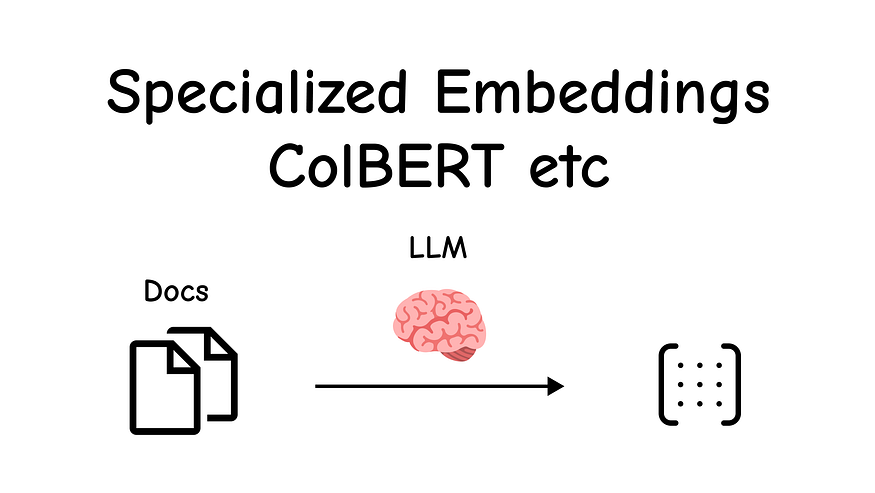
ColBERT (Contextualized Late Interaction over BERT) offers a more granular approach. It generates a separate, context-aware embedding for every single token in the document.
When you make a query, ColBERT also embeds every token in your query. Then, instead of comparing one document vector to one query vector, it finds the maximum similarity between each query token and any document token.
This “late interaction” allows for a much finer-grained understanding of relevance, excelling at keyword-style searches.
We can easily use ColBERT through the RAGatouille library.
# Install the required library
!pip install -U ragatouille
from ragatouille import RAGPretrainedModel
# Load a pre-trained ColBERT model
RAG = RAGPretrainedModel.from_pretrained("colbert-ir/colbertv2.0")Now, let’s index a Wikipedia page using ColBERT’s unique token-level approach.
import requests

def get_wikipedia_page(title: str):
    """A helper function to retrieve content from Wikipedia."""
    # Wikipedia API endpoint and parameters
    URL = "https://en.wikipedia.org/w/api.php"
    params = { "action": "query", "format": "json", "titles": title, "prop": "extracts", "explaintext": True }
    headers = {"User-Agent": "MyRAGApp/1.0"}
    response = requests.get(URL, params=params, headers=headers)
    data = response.json()
    page = next(iter(data["query"]["pages"].values()))
    return page.get("extract")

full_document = get_wikipedia_page("Hayao_Miyazaki")

# Index the document with RAGatouille. It handles the chunking and token-level embedding internally.
RAG.index(
    collection=[full_document],
    index_name="Miyazaki-ColBERT",
    max_document_length=180,
    split_documents=True,
)
The indexing process is more complex, as it’s creating embeddings for every token, but RAGatouille handles it seamlessly. Now, let's search our new index.
# Search the ColBERT index
results = RAG.search(query="What animation studio did Miyazaki found?", k=3)
print(results)
#### OUTPUT ####
[{'content': 'In April 1984, Miyazaki opened his own office in Suginami Ward, naming it Nibariki.\\n\\n\\n=== Studio Ghibli ===\\n\\n\\n==== Early films (1985–1996) ====\\nIn June 1985, Miyazaki, Takahata, Tokuma and Suzuki founded the animation production company Studio Ghibli, with funding from Tokuma Shoten. Studio Ghibli\\'s first film, Laputa: Castle in the Sky (1986)...', 'score': 25.9036, 'rank': 1, 'document_id': '...', 'passage_id': 28},
{'content': 'Hayao Miyazaki (...) is a Japanese animator, filmmaker, and manga artist. A co-founder of Studio Ghibli, he has attained international acclaim as a masterful storyteller...', 'score': 25.5716, 'rank': 2, 'document_id': '...', 'passage_id': 0},
{'content': 'Glen Keane said Miyazaki is a "huge influence" on Walt Disney Animation Studios and has been "part of our heritage" ever since The Rescuers Down Under (1990). The Disney Renaissance era was also prompted by competition with the development of Miyazaki\\'s films...', 'score': 24.8411, 'rank': 3, 'document_id': '...', 'passage_id': 76}]
The top result directly mentions the founding of Studio Ghibli. We can also easily wrap this as a standard LangChain retriever.
# Convert the RAGatouille model into a LangChain-compatible retriever
colbert_retriever = RAG.as_langchain_retriever(k=3)

# Use it like any other retriever
retrieved_docs = colbert_retriever.invoke("What animation studio did Miyazaki found?")
print(retrieved_docs[0].page_content)
#### OUTPUT ####
In April 1984, Miyazaki opened his own office in Suginami Ward, naming it Nibariki.
=== Studio Ghibli ===
==== Early films (1985–1996) ====
In June 1985, Miyazaki, Takahata, Tokuma and Suzuki founded the animation production company Studio Ghibli, with funding from Tokuma Shoten. Studio Ghibli's first film, Laputa: Castle in the Sky (1986), employed the same production crew of Nausicaä. Miyazaki's designs for the film's setting were inspired by Greek architecture and "European urbanistic templates".
ColBERT provides a powerful, fine-grained alternative to traditional vector search, demonstrating that the way we build our library is just as important as how we search it.
We have created a sophisticated RAG system with intelligent routing and advanced indexing. Now, we’ve reached the final mile: retrieval and generation. This is where we ensure the context we feed to the LLM is of the highest possible quality and that the LLM’s final answer is relevant, accurate, and grounded in that context.
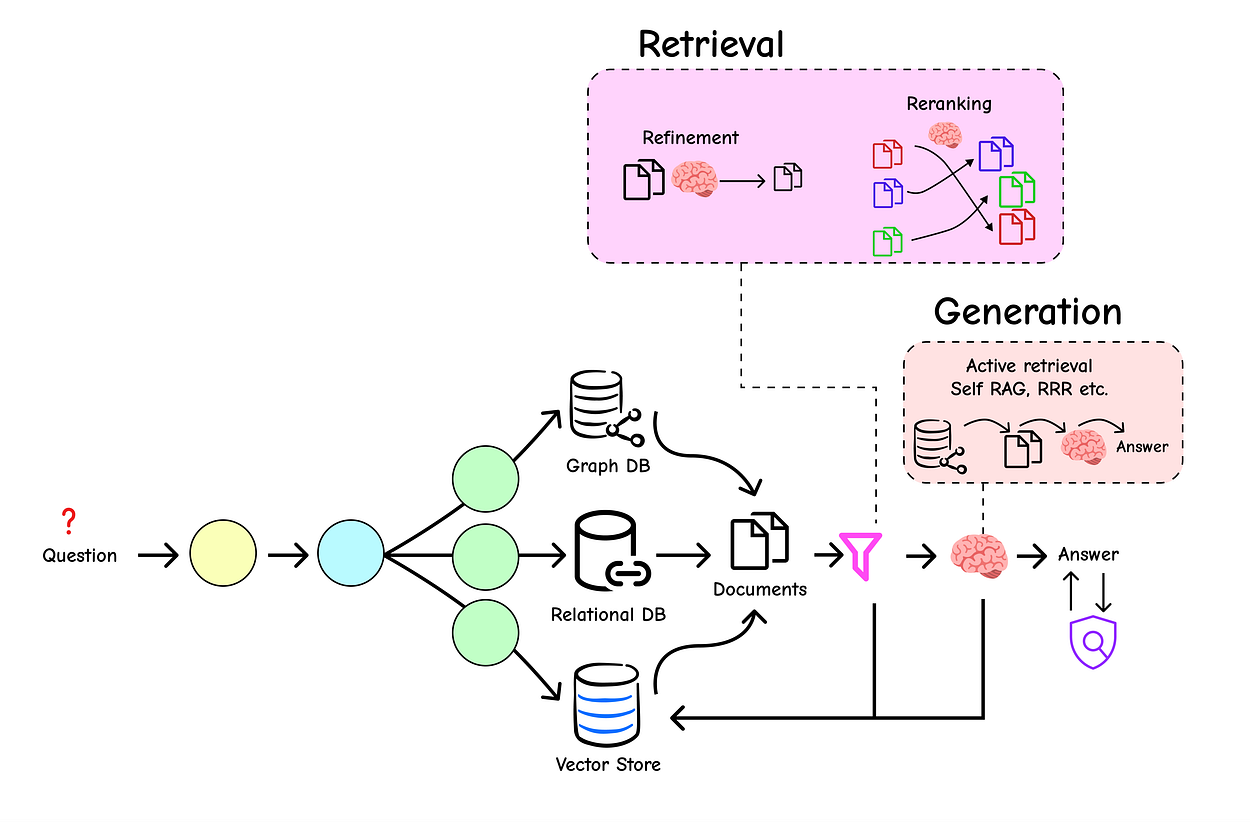
Even with the best indexing, our initial retrieval can still contain noise less relevant documents that slip through. And LLMs, powerful as they are, can sometimes misunderstand context or hallucinate.
This section introduces the advanced techniques that act as the final quality control layer for our pipeline.
Standard retrieval methods give us a ranked list of documents, but this initial ranking isn’t always perfect. Re-ranking is a crucial second-pass step where we take the initial set of retrieved documents and use a more sophisticated (and often more expensive) model to re-order them based on their relevance to the query.

This ensures that the most relevant documents are placed at the very top of the context we provide to the LLM.
We have already seen one powerful re-ranking method: Reciprocal Rank Fusion (RRF) in our RAG-Fusion section. It’s a great, model-free way to combine results. But for an even more powerful approach, we can use a dedicated re-ranking model, like the one provided by Cohere.
Let’s set up a standard retriever first. We’ll use the same blog post from our previous examples.
# You will need to set your COHERE_API_KEY environment variable
# os.environ['COHERE_API_KEY'] = '<your-cohere-api-key>'

# Load, split, and index the document
loader = WebBaseLoader(web_paths=("https://lilianweng.github.io/posts/2023-06-23-agent/",))
blog_docs = loader.load()
text_splitter = RecursiveCharacterTextSplitter.from_tiktoken_encoder(chunk_size=300, chunk_overlap=50)
splits = text_splitter.split_documents(blog_docs)
vectorstore = Chroma.from_documents(documents=splits, embedding=OpenAIEmbeddings())

# First-pass retriever: get the top 10 potentially relevant documents
retriever = vectorstore.as_retriever(search_kwargs={"k": 10})
Now, we introduce the ContextualCompressionRetriever. This special retriever wraps our base retriever and adds a "compressor" step. Here, our compressor will be the CohereRerank model.
It will take the 10 documents from our base retriever and re-order them, returning only the most relevant ones.
# You will need to install cohere: pip install cohere
from langchain.retrievers import ContextualCompressionRetriever
from langchain.retrievers.document_compressors import CohereRerank

# Initialize the Cohere Rerank model
compressor = CohereRerank()

# Create the compression retriever
compression_retriever = ContextualCompressionRetriever(
    base_compressor=compressor,
    base_retriever=retriever
)

# Let's test it with our query
question = "What is task decomposition for LLM agents?"
compressed_docs = compression_retriever.get_relevant_documents(question)

# Print the re-ranked documents
print("--- Re-ranked and Compressed Documents ---")
for doc in compressed_docs:
    print(f"Relevance Score: {doc.metadata['relevance_score']:.4f}")
    print(f"Content: {doc.page_content[:150]}...\n")
#### OUTPUT ####
--- Re-ranked and Compressed Documents ---
Relevance Score: 0.9982
Content: Task decomposition can be done (1) by LLM with simple prompting like "Steps for XYZ.", "What are the subgoals for achieving XYZ?", (2) by using task...
Relevance Score: 0.9851
Content: Tree of Thoughts (Yao et al. 2023) extends CoT by exploring multiple reasoning possibilities at each step. It first decomposes the problem into mult...
Relevance Score: 0.9765
Content: LLM-powered autonomous agents have been an exciting concept. They can be used for task decomposition by prompting, using task-specific instructions, or ...
The output is remarkable. The CohereRerank model has not only re-ordered the documents but has also assigned a relevance_score to each one. We can now be much more confident that the context we pass to the LLM is of the highest quality, directly leading to better, more accurate answers.
What if our RAG system could check its own work before giving an answer? That’s the idea behind self-correcting RAG architectures like CRAG (Corrective RAG) and Self-RAG.
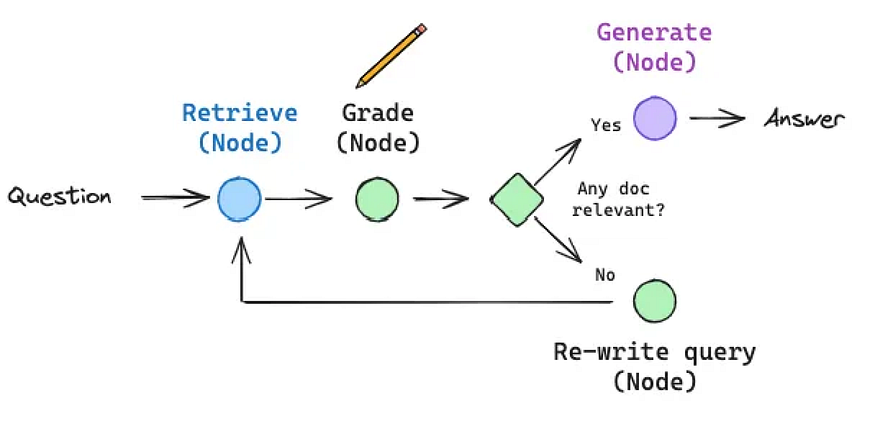
These aren’t just simple chains, they are dynamic graphs (often built with LangGraph) that can reason about the quality of retrieved information and decide on a course of action.
- CRAG: If the retrieved documents are irrelevant or ambiguous for a given query, a CRAG system won’t just pass them to the LLM. Instead, it triggers a new, more robust web search to find better information, corrects the retrieved documents, and then proceeds with generation.
- Self-RAG: This approach takes it a step further. At each step, it uses an LLM to generate “reflection tokens” that critique the process. It grades the retrieved documents for relevance. If they’re not relevant, it retrieves again. Once it has good documents, it generates an answer and then grades that answer for factual consistency, ensuring it’s grounded in the source documents.
These techniques represent the state-of-the-art in building reliable, production-grade RAG. Implementing them from scratch involves building a state machine or graph. While the full implementation is extensive, you can find excellent, detailed walkthroughs here:
These agentic frameworks are the key to moving beyond simple Q&A bots to creating truly robust reasoning engines.
A recurring theme in RAG has been the limited context windows of LLMs. But with the rise of models boasting massive context windows (128k, 200k, or even 1 million tokens), a question arises:
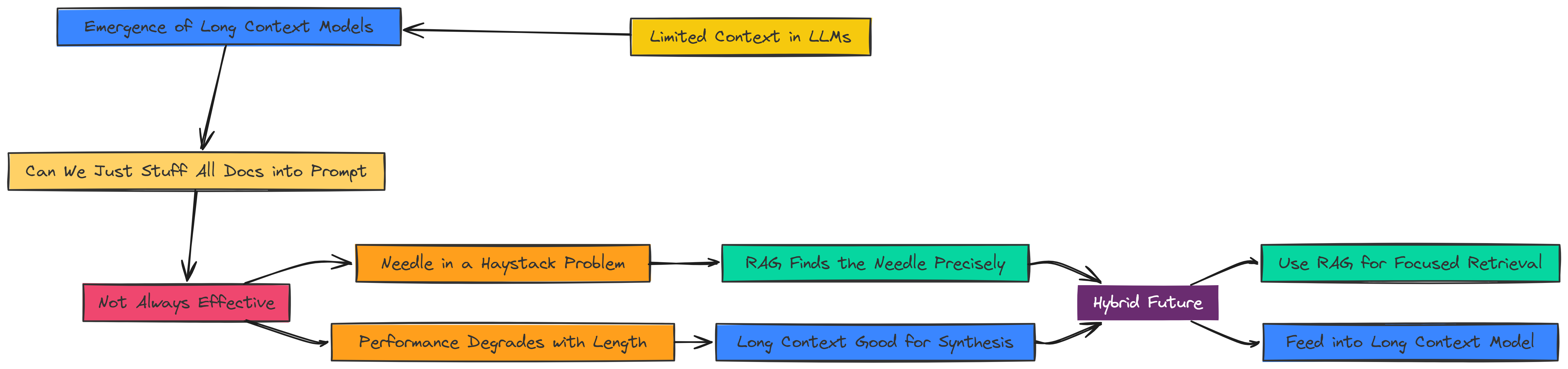
Do we still need RAG? Can we just stuff all our documents into the prompt?
The answer is nuanced. While long context models are incredibly powerful, they are not a silver bullet.
Research has shown that their performance can degrade when the crucial information is buried in the middle of a very long context (the “needle in a haystack” problem).
- RAG Advantage: RAG excels at finding the needle first and presenting only that to the LLM. It’s a precision tool.
- Long Context’s Advantage: Long context models are fantastic for tasks that require synthesizing information from many different parts of a document simultaneously, something RAG might miss.
The future is likely a hybrid approach: using RAG to perform an initial, precise retrieval of the most relevant documents and then feeding this high-quality, pre-filtered context into a long-context model for final synthesis.
For a deep dive into this topic, this presentation is an excellent resource:
- Slides on Long Context: The Impact of Long Context on RAG
We have built an increasingly sophisticated RAG pipeline, layering on advanced techniques for retrieval, indexing, and generation. But a crucial question remains: how do we prove it actually works?
In a production environment, “it seems to work” is not enough. We need objective, repeatable metrics to measure performance, identify weaknesses, and guide improvements.
This is where evaluation comes in. It’s the science of holding our RAG system accountable. In this part, we will explore how to quantitatively measure our system’s quality by building our own evaluators from first principles.
Before we dive into code, let’s define what a “good” RAG response looks like. We can break it down into a few core principles:
- Faithfulness: Does the answer stick strictly to the provided context? A faithful answer does not invent information or use the LLM’s pre-trained knowledge to answer. This is the single most important metric for preventing hallucinations.
- Correctness: Is the answer factually correct when compared to a “ground truth” or reference answer?
- Contextual Relevancy: Was the context we retrieved actually relevant to the user’s question? This evaluates the performance of our retriever, not the generator.
Let’s explore how to measure these, starting with the most transparent method: building the evaluators ourselves.
The best way to understand evaluation is to build it. Using basic LangChain components, we can create custom chains that instruct an LLM to act as an impartial “judge”, grading our RAG system’s output based on criteria we define in a prompt. This gives us maximum control and transparency.
Let’s begin with Correctness. Our goal is to create a chain that compares the generated_answer to a ground_truth answer and returns a score from 0 to 1.
# We'll use a powerful LLM like gpt-4o to act as our "judge" for reliable evaluation.
llm = ChatOpenAI(temperature=0, model_name="gpt-4o", max_tokens=4000)

# Define the output schema for our evaluation score to ensure consistent, structured output.
class ResultScore(BaseModel):
    score: float = Field(..., description="The score of the result, ranging from 0 to 1 where 1 is the best possible score.")

# This prompt template clearly instructs the LLM on how to score the answer's correctness.
correctness_prompt = PromptTemplate(
    input_variables=["question", "ground_truth", "generated_answer"],
    template="""
    Question: {question}
    Ground Truth: {ground_truth}
    Generated Answer: {generated_answer}

    Evaluate the correctness of the generated answer compared to the ground truth.
    Score from 0 to 1, where 1 is perfectly correct and 0 is completely incorrect.

    Score:
    """
)

# We build the evaluation chain by piping the prompt to the LLM with structured output.
correctness_chain = correctness_prompt | llm.with_structured_output(ResultScore)
Now, let’s wrap this in a simple function and test it. What if the ground truth is “Paris and Madrid” but our RAG system only partially answered with “Paris”?
def evaluate_correctness(question, ground_truth, generated_answer):
    """A helper function to run our custom correctness evaluation chain."""
    result = correctness_chain.invoke({
        "question": question,
        "ground_truth": ground_truth,
        "generated_answer": generated_answer
    })
    return result.score

# Test the correctness chain with a partially correct answer.
question = "What is the capital of France and Spain?"
ground_truth = "Paris and Madrid"
generated_answer = "Paris"
score = evaluate_correctness(question, ground_truth, generated_answer)

print(f"Correctness Score: {score}")
#### OUTPUT ####
Correctness Score: 0.5
This is a perfect result. Our judge LLM correctly reasoned that the generated answer was only half-correct and assigned an appropriate score of 0.5.
Next, let’s build an evaluator for Faithfulness. This is arguably more important than correctness for RAG, as it’s our primary defense against hallucination.
Here, the judge LLM must ignore whether the answer is factually correct and only care if the answer can be derived from the given context.
# The prompt template for faithfulness includes several examples (few-shot prompting)
# to make the instructions to the judge LLM crystal clear.
faithfulness_prompt = PromptTemplate(
    input_variables=["question","context", "generated_answer"],
    template="""
    Question: {question}
    Context: {context}
    Generated Answer: {generated_answer}

    Evaluate if the generated answer to the question can be deduced from the context.
    Score of 0 or 1, where 1 is perfectly faithful *AND CAN BE DERIVED FROM THE CONTEXT* and 0 otherwise.
    You don't mind if the answer is correct; all you care about is if the answer can be deduced from the context.

    Example:
    Question: What is the capital of France and Spain?
    Context: Paris is the capital of France and Madrid is the capital of Spain.
    Generated Answer: Paris
    in this case the generated answer is faithful to the context so the score should be *1*.

    Example:
    Question: What is 2+2?
    Context: 4.
    Generated Answer: 4.
    In this case, the context states '4', but it does not provide information to deduce the answer to 'What is 2+2?', so the score should be 0.
    """
)

# Build the faithfulness chain using the same structured LLM.
faithfulness_chain = faithfulness_prompt | llm.with_structured_output(ResultScore)
We’ve provided several examples in the prompt to guide the LLM’s reasoning, especially for tricky edge cases. Let’s test it with the “2+2” example, which is a classic test for faithfulness.
def evaluate_faithfulness(question, context, generated_answer):
    """A helper function to run our custom faithfulness evaluation chain."""
    result = faithfulness_chain.invoke({
        "question": question,
        "context": context,
        "generated_answer": generated_answer
    })
    return result.score

# Test the faithfulness chain. The answer is correct, but is it faithful?
question = "what is 3+3?"
context = "6"
generated_answer = "6"
score = evaluate_faithfulness(question, context, generated_answer)

print(f"Faithfulness Score: {score}")
#### OUTPUT ####
Faithfulness Score: 0.0
This demonstrates the power and precision of a well-defined faithfulness metric. Even though the answer 6 is factually correct, it could not be logically deduced from the provided context “6”.
The context didn’t say 3+3 equals 6. Our system correctly flagged this as an unfaithful answer, which is likely a hallucination where the LLM used its own pre-trained knowledge instead of the provided context.
Building these evaluators from scratch provides deep insight into what we’re measuring. However, it can be time-consuming. In the next part, we’ll see how to achieve the same results more efficiently using specialized evaluation frameworks.
In the previous part, we built our own evaluation chains from scratch. This is a fantastic way to understand the core principles of RAG metrics.
However, for faster and more robust testing, dedicated evaluation frameworks are the way to go.
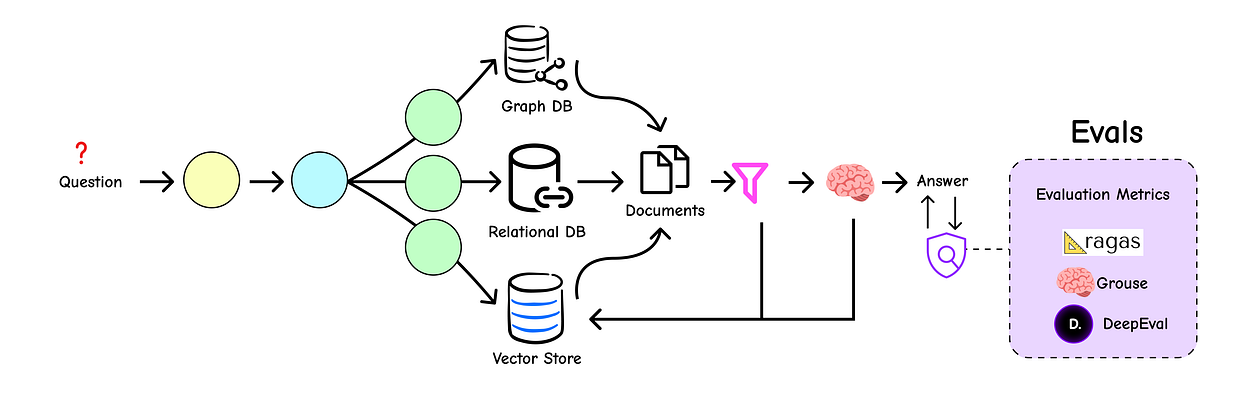
These libraries provide pre-built, fine-tuned metrics that handle the complexity of evaluation for us, allowing us to focus on analyzing the results.
We’ll explore three popular frameworks: deepeval, grouse, and the RAG-specific powerhouse, RAGAS.
deepeval is a powerful, open-source framework designed to make LLM evaluation simple and intuitive. It provides a set of well-defined metrics that can be easily applied to your RAG pipeline's outputs.
The workflow involves creating LLMTestCase objects and measuring them against pre-built metrics like Correctness, Faithfulness, and ContextualRelevancy.
# You will need to install deepeval: pip install deepeval
from deepeval import evaluate
from deepeval.metrics import GEval, FaithfulnessMetric, ContextualRelevancyMetric
from deepeval.test_case import LLMTestCase

# Create test cases
test_case_correctness = LLMTestCase(
    input="What is the capital of Spain?",
    expected_output="Madrid is the capital of Spain.",
    actual_output="MadriD."
)

test_case_faithfulness = LLMTestCase(
    input="what is 3+3?",
    actual_output="6",
    retrieval_context=["6"]
)

# The evaluate() function runs all test cases against all specified metrics
evaluation_results = evaluate(
    test_cases=[test_case_correctness, test_case_faithfulness],
    metrics=[GEval(name="Correctness", model="gpt-4o"), FaithfulnessMetric()]
)

print(evaluation_results)
#### OUTPUT ####
✨ Evaluation Results ✨
-------------------------
Overall Score: 0.50
-------------------------
Metrics Summary:
- Correctness: 1.00
- Faithfulness: 0.00
-------------------------
The aggregated view from deepeval immediately gives us a high-level picture of our system's performance, making it easy to spot areas that need improvement.
grouse is another excellent open-source option, offering a similar suite of metrics but with a unique focus on allowing deep customization of the "judge" prompts. This is useful for fine-tuning evaluation criteria for a specific domain.
# You will need to install grouse: pip install grouse-eval
from grouse import EvaluationSample, GroundedQAEvaluator

evaluator = GroundedQAEvaluator()
unfaithful_sample = EvaluationSample(
    input="Where is the Eiffel Tower located?",
    actual_output="The Eiffel Tower is located at Rue Rabelais in Paris.",
    references=[
        "The Eiffel Tower is a wrought-iron lattice tower on the Champ de Mars in Paris, France",
        "Gustave Eiffel died in his appartment at Rue Rabelais in Paris."
    ]
)

result = evaluator.evaluate(eval_samples=[unfaithful_sample]).evaluations[0]
print(f"Grouse Faithfulness Score (0 or 1): {result.faithfulness.faithfulness}")
#### OUTPUT ####
Grouse Faithfulness Score (0 or 1): 0
Like deepeval, grouse effectively catches subtle errors, providing another robust tool for our evaluation toolkit.
While deepeval and grouse are great general-purpose evaluators, RAGAS (Retrieval-Augmented Generation Assessment) is a framework built specifically for evaluating RAG pipelines. It provides a comprehensive suite of metrics that measure every component of your system, from retriever to generator.
To use RAGAS, we first need to prepare our evaluation data in a specific format. It requires four key pieces of information for each test case:
question: The user's input query.answer: The final answer generated by our RAG system.contexts: The list of documents retrieved by our retriever.ground_truth: The correct, reference answer.
Let’s prepare a sample dataset.
# 1. Prepare the evaluation data
questions = [
    "What is the name of the three-headed dog guarding the Sorcerer's Stone?",
    "Who gave Harry Potter his first broomstick?",
    "Which house did the Sorting Hat initially consider for Harry?",
]

# These would be the answers generated by our RAG pipeline
generated_answers = [
    "The three-headed dog is named Fluffy.",
    "Professor McGonagall gave Harry his first broomstick, a Nimbus 2000.",
    "The Sorting Hat strongly considered putting Harry in Slytherin.",
]

# The ground truth, or "perfect" answers
ground_truth_answers = [
    "Fluffy",
    "Professor McGonagall",
    "Slytherin",
]

# The context retrieved by our RAG system for each question
retrieved_documents = [
    ["A massive, three-headed dog was guarding a trapdoor. Hagrid mentioned its name was Fluffy."],
    ["First years are not allowed brooms, but Professor McGonagall, head of Gryffindor, made an exception for Harry."],
    ["The Sorting Hat muttered in Harry's ear, 'You could be great, you know, it's all here in your head, and Slytherin will help you on the way to greatness...'"],
]
Next, we structure this data using the Hugging Face datasets library, which RAGAS integrates with seamlessly.
# You will need to install ragas and datasets: pip install ragas datasets
from datasets import Dataset

# 2. Structure the data into a Hugging Face Dataset object
data_samples = {
    'question': questions,
    'answer': generated_answers,
    'contexts': retrieved_documents,
    'ground_truth': ground_truth_answers
}

dataset = Dataset.from_dict(data_samples)
Now, we can define our metrics and run the evaluation. RAGAS offers several powerful, RAG-specific metrics out of the box.
from ragas import evaluate
from ragas.metrics import (
    faithfulness,
    answer_relevancy,
    context_recall,
    answer_correctness,
)

# 3. Define the metrics we want to use for evaluation
metrics = [
    faithfulness,       # How factually consistent is the answer with the context? (Prevents hallucination)
    answer_relevancy,   # How relevant is the answer to the question?
    context_recall,     # Did we retrieve all the necessary context to answer the question?
    answer_correctness, # How accurate is the answer compared to the ground truth?
]

# 4. Run the evaluation
result = evaluate(
    dataset=dataset,
    metrics=metrics
)

# 5. Display the results in a clean table format
results_df = result.to_pandas()
print(results_df)| question | answer | contexts | ground_truth | faithfulness | answer_relevancy | context_recall | answer_correctness | |
|---|---|---|---|---|---|---|---|---|
| 0 | What is the name of the three-headed dog... | The three-headed dog is named Fluffy. | [A massive, three-headed dog was guarding... | Fluffy | 1.0 | 0.998 | 1.0 | 1.0 |
| 1 | Who gave Harry Potter his first broomstick? | Professor McGonagall gave Harry his... | [First years are not allowed brooms, but... | Professor McGonagall | 1.0 | 1.0 | 1.0 | 0.954 |
| 2 | Which house did the Sorting Hat initially... | The Sorting Hat strongly considered... | [The Sorting Hat muttered in Harry's ear... | Slytherin | 1.0 | 0.985 | 1.0 | 1.0 |
We can see that our system is highly faithful and retrieves relevant context well (faithfulness and context_recall are perfect). The answers are also highly relevant and correct, with only minor deviations.
RAGAS makes it incredibly easy to run this kind of comprehensive, end-to-end evaluation, giving us the data we need to confidently deploy and improve our RAG applications.
So, let’s sum up what we have done so far on our way to build a production-ready RAG system.
- In Part 1, we built a foundational RAG system from the ground up, covering the three core components: Indexing our data, Retrieving relevant context, and Generating a final answer.
- In Part 2, we moved to Advanced Query Transformations, using techniques like RAG-Fusion, Decomposition, and HyDE to rewrite and expand user questions for far more accurate retrieval.
- In Part 3, we turned our pipeline into an intelligent switchboard, adding Routing to direct queries to the correct data source and Query Structuring to leverage powerful metadata filters.
- In Part 4, we focused on Advanced Indexing, exploring strategies like Multi-Representation Indexing and token-level ColBERT to create a smarter and more efficient knowledge library.
- In Part 5, we polished the final output with Advanced Retrieval techniques like re-ranking to prioritize the best context and introduced agentic, self-correcting concepts like CRAG and Self-RAG.
- Finally, in Parts 6 and 7, we tackled the crucial step of Evaluation. We learned how to measure our system’s performance with key metrics like faithfulness and correctness, both by building evaluators from scratch and by using powerful frameworks like deepeval, grouse, and RAGAS.
In case you enjoy this blog, feel free to follow me on Medium I only write here.