BaseTime is the everything planner that lets users view, create, and share events in the Base ecosystem. RSVP to events and mint Event Pass NFTs as proof of attendance.
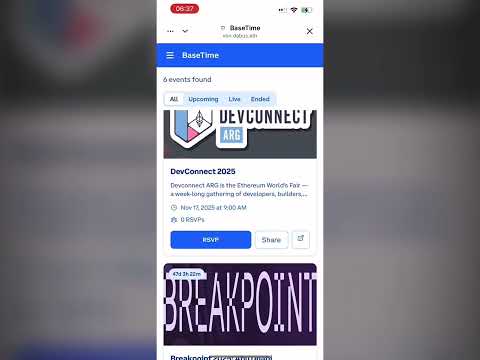
Watch the BaseTime pitch video to see the app in action!
- View Events: Scrollable feed of upcoming onchain and community events
- Create Events: Authenticated users can create events with name, description, start/end time, image, and optional onchain actions
- RSVP System: One-click RSVP triggers Base wallet transaction that mints Event Pass NFTs
- Social Sharing: Generate OpenGraph previews optimized for Base social surfaces
- Mobile-First: Touch-optimized layout with clean Base-blue accents
- Base App Integration: Runs natively inside Base App with MiniKit + OnchainKit
- Frontend: Next.js 15 + TypeScript + TailwindCSS
- Blockchain: Base Sepolia testnet
- SDKs: @coinbase/onchainkit, wagmi, ethers
- Smart Contracts: Solidity with OpenZeppelin
- Storage: IPFS for event metadata and images
- Animations: Framer Motion
- Icons: Heroicons
- Node.js 18+ and pnpm
- Base testnet wallet with test ETH
- OnchainKit API key
- WalletConnect Project ID
- Pinata API keys (optional, for IPFS)
git clone <repository-url>
cd basetime
pnpm installCopy the environment template and fill in your values:
cp env.example .env.localRequired environment variables:
# App Configuration
NEXT_PUBLIC_APP_URL=http://localhost:3000

# Contract Addresses (set after deployment)
NEXT_PUBLIC_EVENT_REGISTRY_ADDRESS=
NEXT_PUBLIC_RSVP_TOKEN_ADDRESS=

# OnchainKit Configuration
NEXT_PUBLIC_ONCHAINKIT_API_KEY=your_onchainkit_api_key_here

# WalletConnect Configuration
NEXT_PUBLIC_WALLETCONNECT_PROJECT_ID=your_walletconnect_project_id_here

# Deployment Configuration
PRIVATE_KEY=your_private_key_here
BASESCAN_API_KEY=your_basescan_api_key_here# Compile contracts
npx hardhat compile
# Deploy to Base Sepolia testnet
npx hardhat run scripts/deploy.ts --network baseTestnetAfter deployment, update your .env.local with the contract addresses:
NEXT_PUBLIC_EVENT_REGISTRY_ADDRESS=0x...
NEXT_PUBLIC_RSVP_TOKEN_ADDRESS=0x...pnpm devVisit http://localhost:3000 to see BaseTime in action!
Manages event creation and RSVP functionality:
createEvent()- Create new events with metadatarsvpToEvent()- RSVP to eventscancelRSVP()- Cancel RSVPgetActiveEvents()- Fetch all active eventsgetUserRSVPs()- Get user's RSVPed events
ERC-721 contract for Event Pass NFTs:
mintEventPass()- Mint NFT for event RSVPbatchMintEventPasses()- Batch mint for multiple usersgetEventForToken()- Get event ID for tokengetTokensForEvent()- Get tokens for specific event
- EventCard: Displays event details with RSVP button
- EventFeed: Scrollable feed with filtering and sorting
- CreateModal: Modal for event creation
- Providers: OnchainKit + Wagmi provider setup
/: Home page with event feed/event/[id]: Event detail page/my: User's events and RSVPs (coming soon)
# Development
pnpm dev          # Start development server
pnpm build        # Build for production
pnpm start        # Start production server
pnpm lint         # Run ESLint

# Smart Contracts
npx hardhat compile     # Compile contracts
npx hardhat test        # Run tests
npx hardhat deploy     # Deploy contracts
npx hardhat verify # Verify contracts on BaseScanbasetime/
├── contracts/ # Smart contracts
│ ├── EventRegistry.sol
│ └── RSVPToken.sol
├── scripts/ # Deployment scripts
│ └── deploy.ts
├── src/
│ ├── app/ # Next.js app router pages
│ ├── components/ # React components
│ ├── hooks/ # Custom hooks
│ ├── lib/ # Configuration and utilities
│ ├── types/ # TypeScript types
│ └── utils/ # Helper functions
├── public/
│ └── .well-known/ # Base App manifest
└── hardhat.config.ts # Hardhat configuration
- Connect your GitHub repository to Vercel
- Set environment variables in Vercel dashboard
- Deploy automatically on push to main branch
# Deploy contracts
npx hardhat run scripts/deploy.ts --network baseTestnet

# Verify contracts
npx hardhat verify --network baseTestnet <contract-address>- ✅ Framework: Next.js + TypeScript + TailwindCSS
- ✅ Blockchain: Base testnet integration
- ✅ SDKs: OnchainKit + Wagmi properly configured
- ✅ Smart Contracts: EventRegistry + RSVPToken deployed
- ✅ Authentication: Deferred auth with OnchainKit
- ✅ Manifest: Complete farcaster.json for Base App discovery
- ✅ Mobile-First: Touch-optimized responsive design
- ✅ Social: OpenGraph previews and sharing
- ✅ Performance: Optimized for <2s load time
- Connect your Base wallet
- Click "Create Event" button
- Fill in event details (name, description, times, image)
- Add optional onchain action URL
- Submit transaction
- Browse events on the home page
- Click "RSVP" button on any event
- Confirm transaction in wallet
- Receive Event Pass NFT as proof of attendance
- Click "Share" button on any event
- Native sharing dialog opens (mobile)
- Or copy link to clipboard (desktop)
- Rich OpenGraph previews for social platforms
- Smart contracts use OpenZeppelin standards
- Input validation on all user inputs
- Proper access controls and ownership
- Gas-optimized contract functions
- Fork the repository
- Create a feature branch
- Make your changes
- Add tests if applicable
- Submit a pull request
MIT License - see LICENSE file for details
- Documentation: Base Mini Apps Guide
- Discord: Base Discord
- Issues: GitHub Issues for bug reports
- Base team for the amazing ecosystem
- OnchainKit team for the excellent SDK
- OpenZeppelin for secure contract standards
- Next.js team for the great framework
Built with ❤️ for the Base ecosystem