1.1 支持FBB指纹模块;
1.2 FBB指纹功能占用了机器唯一的USB口
1.3 FBB指纹开发包兼容机器: u3,u8,新370
1.4 FBB指纹开发包下载地址,请下载指定源码,当中有开发包
由于本机器的高通CPU只支持一个USB口,所以在使用GAA大指纹模块时,需要先调用USB管理类将USB切换到指纹模组,此时USB正常情况下不能用来充电、数据线通信等操作。 在这样的情况下,USB数据线调试不能使用,建议网络adb调试;
网络adb调试推荐Android Studio安装Android Wifi ADB插件;
-
1.添加开发包aar到项目libs目录下
-
2.配置Moudle的build.gradle,参考如下:
...
 android {
     ...
     defaultConfig {
         ...
         targetSdkVersion 22 //身份证功能必须降22,其他无所谓
         ...
     }
     ...
 }
 //2.必须2
 repositories {
     flatDir {
         dirs 'libs'   // aar目录
     }
 }

 dependencies {
     ...
    //FBB大指纹开发包(新固件开发包)
    //FBB FingerPrint SDK
    compile(name: 'fp_fbb_sdk_20190620', ext: 'aar')

    //SerialPort SDK,需要串口管理类中的USB管理类
    compile(name: 'serialport_sdk_20190702', ext: 'aar')

 }
<uses-feature android:name="android.hardware.usb.host"
android:required="true" />

<uses-permission
android:name="android.permission.WRITE_EXTERNAL_STORAGE"/>

<uses-permission android:name="android.permission.READ_EXTERNAL_STORAGE"/>
USB管理类
| USBFingerManager API接口 | 接口说明 |
|---|---|
| USBFingerManager | USB管理类,单例模式 |
| USBFingerManager.getInstance(this) | 获取USB管理类的实例,单例模式 |
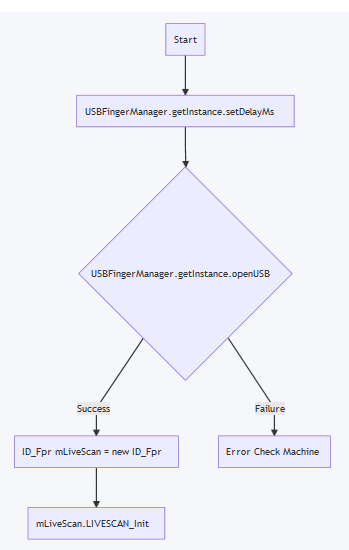
| USBFingerManager.getInstance(this).setDelayMs(ms) | 设置切到指纹模组后延时,默认1000ms |
| USBFingerManager.getInstance(this).openUSB(OnUSBFingerListener()) | 将USB切到指纹模块 |
| USBFingerManager.getInstance(this).closeUSB(); | 将USB切到正常模式 |
OnUSBFingerListener回调接口说明:
-
onOpenUSBFingerSuccess(String device):
切换USB到指纹模组成功,返回当前指纹模组的名称
-
onOpenUSBFingerFailure(String error):
切换USB到指纹模组失败,返回错误码
FBB指纹类
中英文开发包在源码根目录doc路径下。
- 1.FBB big fingerprint development kit description
- 2.Secondary development instructions
- 3.Summary of secondary development issues
1.1 Support FBB fingerprint module;
1.2 FBB fingerprint function occupies the machine's unique USB port
1.3 FBB fingerprint development kit download address
Since the Qualcomm CPU of this machine only supports one USB port, when using the GAA large fingerprint module, it is necessary to first call the USB management class to switch the USB to the fingerprint module. At this time, the USB cannot be used for charging, data line communication, etc. under normal circumstances. operating. In this case, USB data line debugging can not be used, it is recommended to debug the network adb;
Network adb debugging recommended Android Studio to install Android Wifi ADB plugin;
-
1.Add the development package aar to the project libs directory
-
2.Configure Moudle's build.gradle, as follows:
...
 android {
     ...
     defaultConfig {
         ...
         targetSdkVersion 22 //身份证功能必须降22,其他无所谓
         ...
     }
     ...
 }
 //2.必须2
 repositories {
     flatDir {
         dirs 'libs'   // aar目录
     }
 }

 dependencies {
     ...
    //FBB大指纹开发包(新固件开发包)
    //FBB FingerPrint SDK
    compile(name: 'fp_fbb_sdk_20190620', ext: 'aar')

    //SerialPort SDK,need usbmanager class
    compile(name: 'serialport_sdk_20190702', ext: 'aar')
 }
<uses-feature android:name="android.hardware.usb.host"
android:required="true" />

<uses-permission
android:name="android.permission.WRITE_EXTERNAL_STORAGE"/>

<uses-permission android:name="android.permission.READ_EXTERNAL_STORAGE"/>
USB management class
| USBFingerManager API | API Description |
|---|---|
| USBFingerManager | USB management class, singleton mode |
| USBFingerManager.getInstance(this) | Get an instance of the USB management class, singleton mode |
| USBFingerManager.getInstance(this).setDelayMs(ms) | Set the delay after cutting to the fingerprint module, the default is 1000ms |
| USBFingerManager.getInstance(this).openUSB(OnUSBFingerListener()) | Cut USB to fingerprint module |
| USBFingerManager.getInstance(this).closeUSB(); | Cut USB to normal mode |
OnUSBFingerListener Callback interface description:
-
onOpenUSBFingerSuccess(String device):
Switch USB to fingerprint module successfully, return the name of the current fingerprint module
-
onOpenUSBFingerFailure(String error):
Failed to switch USB to fingerprint module, return error code
FBB FingerPrint
The Chinese and English development kits are in the source directory doc path.