###Download Instructions for Chartboost Sample Projects
In this repo, you'll find two Chartboost example integrations: one for iOS games, and one for apps on the Android side. To get started, hit the ZIP button to download the repo:
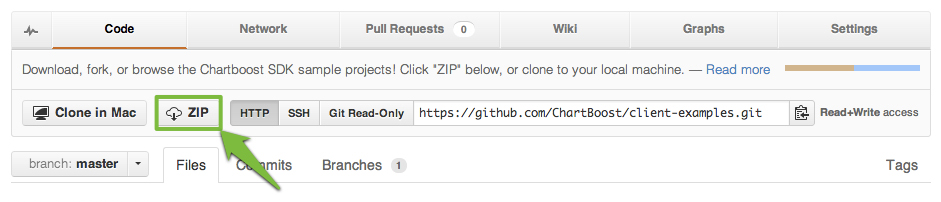
You'll get a folder that includes both platforms' projects; after unzipping, keep the folder you need and discard the other. After that, read on for platform-specific installation instructions.
#####Installing iOS Sample Project in Xcode
- Fire up Xcode and open the iOS folder included in the .ZIP archive
- Navigate to the ExampleAppAppDelegate.m file by expanding the menus shown below:
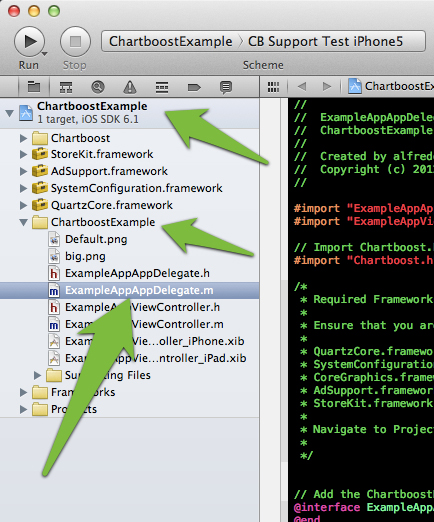
This file contains the Chartboost code you'd add to AppDelegate.m in your own game – you can configure it with your App ID (cb.appId) and App Signature (cb.appSignature) to test the Chartboost integration, independent of your code.
When run in Simulator or on an iOS device, the project can display any interstitials or More Apps pages you've set up (via the Chartboost dashboard) to run in the game; it's a great way to debug problematic campaign logic.
#####Installing Android Sample Project in Eclipse
- Open Eclipse and navigate to File > Import. Highlight Existing Android Code Into Workspace (in the Android folder) and hit Next.
- Click Browse, highlight the Android folder from the .ZIP archive, then click Open and Finish
- Navigate to the ChartboostExampleActivity.java file by expanding the menus shown below:
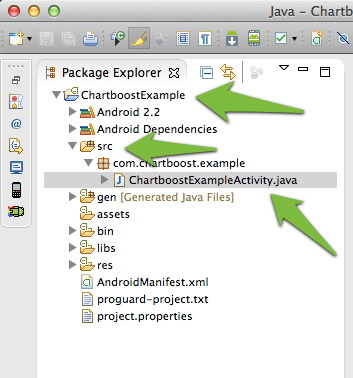
This file contains the Chartboost code you'd add to the file in your own game – you can configure it with your App ID (String appId) and App Signature (String appSignature) to test the Chartboost integration, independent of your code.
When run on an Android device, the project can display any interstitials or More Apps pages you've set up (via the Chartboost dashboard) to run in the game; it's a great way to debug problematic campaign logic.