









Write-Color is a wrapper around Write-Host delivering a lot of additional features for easier color options for native powershell.
Optional Write-ColorEX function provides feature compatibility with Write-Color function with included support for ANSI SGR, ANSI 4-bit color, and ANSI 8-bit color support.
Both functions provide easy manipulation of colors, logging output to file (log) and nice formatting options out of the box.
Write-Color Features:
- Easy manipulation of colors
- Nice formatting options and examples
- Ability to use aliases for a number of parameters
- Efficient fast code
Write-ColorEX Features
- Easy manipulation of colors
- Nice formatting options and examples
- ANSI 4 color support with supported default color names or integers
- ANSI 8 color support with supported default color names or integers
- ANSI SGR Text and Line Styles
- Testing of ANSI support in your console if ANSI coloring or styles used
- Logging output to file with optional parameters for a log path, log timestamps, and log levels
More information for this project at my Evotec website.
If you find this project helpful, please consider supporting its development. Your sponsorship will help the maintainers dedicate more time to maintenance and new feature development for everyone.
It takes a lot of time and effort to create and maintain this project. By becoming a sponsor, you can help ensure that it stays free and accessible to everyone who needs it.
To become a sponsor, you can choose from the following options:
Your sponsorship is completely optional and not required for using this project. We want this project to remain open-source and available for anyone to use for free, regardless of whether they choose to sponsor it or not.
If you work for a company that uses our .NET libraries or PowerShell Modules, please consider asking your manager or marketing team if your company would be interested in supporting this project. Your company's support can help us continue to maintain and improve this project for the benefit of everyone.
Thank you for considering supporting this project!
-
2.0.0 - 2025.05.02
- 💡 Added Write-ColorEX function by MarkusMcNugen (aka AU-Mark)
- 💡 Added ANSI SGR support styles for text segments and whole lines
- 💡 Added ANSI 4-bit color support
- 💡 Added ANSI 8-bit color support
- 💡 Added ANSI to native terminal color mapping
- 💡 Added ANSI support testing and automatic session enable if supported
- 💡 Added additional ANSI 8-bit color family string names
- 💡 Added background color setting of None
- 💡 Modified LogFile parameter to accept a path or filename
- 💡 Added LogPath parameter
- 💡 Added LogLevel parameter
- 💡 Added BlankLine parameter
- 📃 Updated documentation for new function, parameters and changes
- 💡 Added Write-ColorEX function by MarkusMcNugen (aka AU-Mark)
-
1.0.3 - 2025.04.21
- 📃 Improves
HorizontalCenterby AU-Mark
- 📃 Improves
-
1.0.2 - 2025.04.21
- 📃 Added
HorizontalCenterby AU-Mark
- 📃 Added
-
1.0.1 - 2023.04.30
- 🐛 Fixes UTF8 issue when publishing to PowerShell Gallery
-
1.0.0 - 2023.04.23
- 📃 Converted tabs to spaces in code (no difference in output)
- 📃 Updated documentation
- 💡 Added
NoConsoleOutputto allow only writting to file, and skipping console output - 🐛 Removed throwing exceptions when couldn't write to file (
Write-Warningwill be triggered instead)
-
0.87.3 - 2021.04.12
- 💡 Disabled
WhatIffunctionality for Out-File which would prevent logging to file - 💡 Added
LogRetry(2) to provide option to retry logging to file up to X number of times in case issue with saving to file occurs (race condition)
- 💡 Disabled
-
0.87.2 - 2020.07.20
- 📦 Added a space for LogTime and ShowTime
- 📦 Signed module
-
0.87.1 - 2020.06.19
- 🐛 Resolves issue with nuget download (changed version from 0.87 to 0.87.1). As per link it requires version to be longer.
-
0.87.0 - 2020.01.12
- 🐛 Throw errors when can't save to file with LogFile. Before it would use Write-Output which could deliver unpredictable results
Install-Module -Name "PSWriteColor" -Force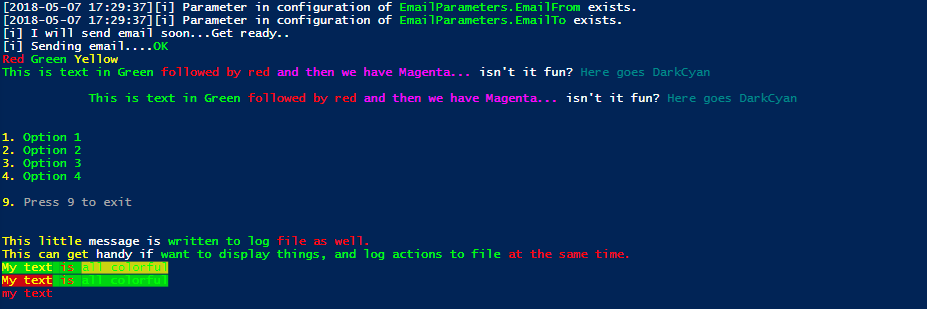
# Example 1
Write-Color "[i] ", "Parameter in configuration of ", "EmailParameters.EmailFrom", " exists." -Color White, White, Green, White -ShowTime
Write-Color "[i] ", "Parameter in configuration of ", "EmailParameters.EmailTo", " exists." -Color White, White, Green, White -ShowTime
# Example 2
Write-Color "[i] ", "I will send email soon...", "Get ready.." -Color White
Write-Color "[i] ", "Sending email...." -Color White, White -NoNewLine
<#
Do Something....
#>
if ($true) {
Write-Color -Text "OK" -Color Green
}# Example 3
Write-Color -Text "Red ", "Green ", "Yellow " -Color Red, Green, Yellow
Write-Color -Text "This is text in Green ",
"followed by red ",
"and then we have Magenta... ",
"isn't it fun? ",
"Here goes DarkCyan" -Color Green, Red, Magenta, White, DarkCyan
Write-Color -Text "This is text in Green ",
"followed by red ",
"and then we have Magenta... ",
"isn't it fun? ",
"Here goes DarkCyan" -Color Green, Red, Magenta, White, DarkCyan -StartTab 3 -LinesBefore 1 -LinesAfter 1
Write-Color "1. ", "Option 1" -Color Yellow, Green
Write-Color "2. ", "Option 2" -Color Yellow, Green
Write-Color "3. ", "Option 3" -Color Yellow, Green
Write-Color "4. ", "Option 4" -Color Yellow, Green
Write-Color "9. ", "Press 9 to exit" -Color Yellow, Gray -LinesBefore 1
Write-Color -LinesBefore 2 -Text "This little ", "message is ", "written to log ", "file as well." `
-Color Yellow, White, Green, Red, Red -LogFile "C:\testing.txt" -TimeFormat "yyyy-MM-dd HH:mm:ss"
Write-Color -Text "This can get ", "handy if ", "want to display things, and log actions to file ", "at the same time." `
-Color Yellow, White, Green, Red, Red -LogFile "C:\testing.txt"# Example 4 with backgrund colors and usage of aliases
Write-Color -T "My text", " is ", "all colorful" -C Yellow, Red, Green -B Green, Green, Yellow
Write-Color -T "My text", " is ", "all colorful" -C Yellow, Red, Green -B Red, Green, Green
# Example 5 with aliases
wc -t "my text" -C Red
Write-Color -Text 'Red ', 'Green ', 'Yellow ' -Color Red,Green,YellowWrite-Color -Text 'This is text in Green ',
'followed by red ',
'and then we have Magenta...',
"isn't it fun?",
'Here goes DarkCyan' -Color Green,Red,Magenta,White,DarkCyanWrite-Color -Text 'This could be a header with a blank line before and blank line after' -Color Cyan -LinesBefore 1 -LinesAfter 1
Write-Color -Text 'This is indented content' -Color White -StartTab 2
Write-Color -Text 'Back to normal indentation' -Color Gray -LinesAfter 1Write-Color -Text 'This text could be a horiztonally centered header' -Color Green -HorizontalCenter -LinesBefore 1 -LinesAfter 1
Write-Color -Text 'Important ', 'Warning' -BackGroundColor DarkRed,DarkRed -HorizontalCenter -BoldWrite-Color -Text 'This text is bold' -Color DarkYellow -Bold
Write-Color -Text 'This text is italicized' -Color Green -Italic
Write-Color -Text 'This text is underlined' -Color Cyan -Underline
Write-Color -Text 'This text blinks' -Color Magenta -Blink
Write-Color -Text 'This text is crossed out' -Color Red -CrossedOut
Write-Color -Text 'This text has a double underline' -Color Blue -DoubleUnderline
Write-Color -Text 'This text has an overline' -Color White -OverlineWrite-Color -Text "This segment is bold", " this one is italic", " this one blinks", " this one is crossed out" -Color Yellow,Cyan,Magenta,Red -Style Bold,Italic,Blink,CrossedOutWrite-Color -Text 'This part is bold and italic', ' and this part is underlined and blinking' -Color DarkYellow,Cyan -Style @('Bold','Italic'),@('Underline','Blink')#ANSI4 color mode with color names. Dark colors are not supported and map to the normal color.
Write-Color -Text 'ANSI4 Light Red ', 'ANSI4 Red ', 'ANSI4 Dark Red' -Color LightRed,Red,DarkRed -ANSI4
Write-Color -Text 'ANSI4 Light Red with Red Background ', 'ANSI4 Red with Light Red Background' -Color LightRed,Red -BackGroundColor DarkRed,LightRed -ANSI4
# ANSI4 color mode with integers
Write-Color -Text 'ANSI4 Light Red ', 'ANSI4 Red ', 'ANSI4 Dark Red' -Color 91,31,31 -ANSI4
Write-Color -Text 'ANSI4 Light Red with Red Background ', 'ANSI4 Red with Light Red Background' -Color 91,31 -BackGroundColor 41,101 -ANSI4# ANSI8 color mode with color names
Write-Color -Text 'ANSI 8 Light Red ', 'ANSI 8 Red ', 'ANSI 8 Dark Red' -Color LightRed,Red,DarkRed -ANSI8
Write-Color -Text 'ANSI 8 Light Red ', 'ANSI 8 Red ', 'ANSI 8 Dark Red' -Color LightRed,Red,DarkRed -BackGroundColor Red,DarkRed,LightRed -ANSI8
# ANSI8 color mode with integers
Write-Color -Text 'ANSI 8 Light Red ', 'ANSI 8 Red ', 'ANSI 8 Dark Red' -Color 9,1,52 -ANSI8
Write-Color -Text 'ANSI 8 Light Red ', 'ANSI 8 Red ', 'ANSI 8 Dark Red' -Color 9,1,52 -BackGroundColor 1,52,9 -ANSI8Write-Color '1. ', 'View System Information '-Color Yellow,Cyan -BackGroundColor Black -StartTab 2
Write-Color '2. ', 'Check Disk Space ' -Color Yellow,Cyan -BackGroundColor Black -StartTab 2
Write-Color '3. ', 'Scan for Updates ' -Color Yellow,Cyan -BackGroundColor Black -StartTab 2
Write-Color '4. ', 'Exit ' -Color Yellow,Cyan -BackGroundColor Black -StartTab 2Write-Color -Text "Enter the number of your choice: " -Color White -NoNewline -LinesBefore 1; $selected = Read-Host
Write-Color -Text "Are you sure you want to select $selected"," (Y/","N","): " -Color White,DarkYellow,Green,DarkYellow -NoNewline; $confirmed = Read-HostWrite-Color '[', 'SUCCESS', '] ' -Color White,Green,White -Style None,Bold,None
Write-Color '[', 'WARNING', '] ' -Color White,Yellow,White -Style None,Bold,None
Write-Color '[', 'ERROR', '] ' -Color White,Red,White -Style None,Bold,None
Write-Color 'Operation completed with ', '1 ', 'success ', '2 ','warnings and ', '1 ', 'error' -Color White,Green,White,Yellow,White,Red,WhiteWrite-Color "+----------------------+" -Color Cyan
Write-Color "$([char]166)", " System Status Report ", "$([char]166)" -Color Cyan,White,Cyan
Write-Color "+----------------------+" -Color Cyan
Write-Color "$([char]166)", " CPU: ", "42% ", "$([char]166)" -Color Cyan,White,Green,Cyan
Write-Color "$([char]166)", " Memory: ", "68% ", "$([char]166)" -Color Cyan,White,Yellow,Cyan
Write-Color "$([char]166)", " Disk: ", "89% ", "$([char]166)" -Color Cyan,White,Red,Cyan
Write-Color "+----------------------+" -Color CyanWrite-Color "|"," ","|" -Color Cyan, Cyan, Cyan -HorizontalCenter -Style None,Overline,None
Write-Color "|", " System Status Report ", "|" -Color Cyan,White,Cyan -HorizontalCenter
Write-Color "|"," ","|" -Color Cyan, Cyan, Cyan -HorizontalCenter -Style None,Underline,None
Write-Color "|", " CPU: ", "42% ", "|" -Color Cyan,White,Green,Cyan -HorizontalCenter
Write-Color "|", " Memory: ", "68% ", "|" -Color Cyan,White,Yellow,Cyan -HorizontalCenter
Write-Color "|", " Disk: ", "89% ", "|" -Color Cyan,White,Red,Cyan -HorizontalCenter
Write-Color " "," "," " -Color Cyan, Cyan, Cyan -HorizontalCenter -Style None,Overline,NoneWrite-Color -Text "Initializing application..." -Color White -ShowTime -LogFile "C:\Temp\Write-Color.log"
Write-Color -Text "Reading configuration..." -Color White -ShowTime -LogFile "Write-Color"
Write-Color -Text "Configuration ", "loaded successfully" -Color White,Green -ShowTime -LogFile "Write-Color.log" -LogTime
Write-Color -Text "Running disk space check" -Color White -ShowTime -LogFile "Write-Color.log" -LogPath "C:\Temp" -LogTime# Note: If you use LogLevel and put the loglevel in the text it will show twice in the recorded log
# This example uses LogLevel parameter and colors the whole line.
Write-Color -Text "Disk space running low" -Color Yellow -ShowTime -LogFile "Write-Color.log" -LogLevel "WARNING" -LogTime
# This example includes the log level in the message instead of the parameter and colors the loglevel only.
Write-Color -Text "[WARNING] ","Disk space running low" -Color Yellow,Grey -ShowTime -LogFile "Write-Color.log" -LogTimeWrite-Color -T "Starting ", "process" -C Gray,Blue -L "Write-Color" -ShowTime
Write-Color -T "Process ", "completed" -C Gray,Green -L "Write-Color.log" -ShowTimeWrite-Color -Text 'Testuję czy się ładnie zapisze, czy będą problemy' -Encoding unicode -LogFile 'C:\temp\testinggg.txt' -Color Red -NoConsoleOutputWrite-Color "+----------------------+" -Color Cyan
Write-Color "$([char]166)", " System Status Report ", "$([char]166)" -Color Cyan,White,Cyan
Write-Color "+----------------------+" -Color Cyan
Write-Color "$([char]166)", " CPU: ", "42% ", "$([char]166)" -Color Cyan,White,Green,Cyan
Write-Color "$([char]166)", " Memory: ", "68% ", "$([char]166)" -Color Cyan,White,Yellow,Cyan
Write-Color "$([char]166)", " Disk: ", "89% ", "$([char]166)" -Color Cyan,White,Red,Cyan
Write-Color "+----------------------+" -Color CyanWrite-Color "|"," ","|" -Color Cyan, Cyan, Cyan -HorizontalCenter -Style None,Overline,None
Write-Color "|", " System Status Report ", "|" -Color Cyan,White,Cyan -HorizontalCenter
Write-Color "|"," ","|" -Color Cyan, Cyan, Cyan -HorizontalCenter -Style None,Underline,None
Write-Color "|", " CPU: ", "42% ", "|" -Color Cyan,White,Green,Cyan -HorizontalCenter
Write-Color "|", " Memory: ", "68% ", "|" -Color Cyan,White,Yellow,Cyan -HorizontalCenter
Write-Color "|", " Disk: ", "89% ", "|" -Color Cyan,White,Red,Cyan -HorizontalCenter
Write-Color " "," "," " -Color Cyan, Cyan, Cyan -HorizontalCenter -Style None,Overline,None