
fcheck 0.9.8  fcheck: ^0.9.8 copied to clipboard
 vteam.com
A CLI tool for analyzing Flutter and Dart code quality, checking project metrics, comment ratios, class organization, hardcoded strings, and source sorting validation.
fcheck #
Fast quality checks for Flutter and Dart. Run one deterministic command to apply 8 core engineering checks (architecture, risky strings, magic numbers, dead code, duplicates, and more) without replacing your existing lint setup.
✨ Why fcheck #
fcheck exists to fill a gap today. The goal is to encourage good engineering practices in the Dart and Flutter ecosystem until these capabilities become first-class in the Flutter SDK.
- Easy wins: actionable checks in a single run
- 8-in-1 quality guardrail: vital engineering best-practice checks in one tool
- Architectural focus: layers, one-class-per-file, sorting
- Risk detection: secrets, hardcoded strings, magic numbers
- Code surface reduction: dead code, duplicate code
- Fast by design: all 8 checks run from a single parse and folder/file traversal, instead of 8 separate tools re-enumerating files and re-parsing code
- Saves time: no third-party service latency; local runs are typically faster than remote calls
- Privacy-first: your code is inspected locally, with no network calls required
- Nice output: JSON and diagrams when you need them
- Deterministic and imperative: predictable results for repeatable quality workflows
- Cost and energy conscious: ideal for routine checks you do not need to offload to expensive AI agents
🛠️ Installation #
# Global (recommended)
dart pub global activate fcheck
fcheck .
# Project-local
dart pub add fcheck -d
dart run fcheck .
🚀 Quick Start #
If you installed project-local, run the same commands with dart run (for example, dart run fcheck --json).
# Analyze current folder
fcheck .

# Analyze a different folder (positional)
fcheck ../my_app

# Analyze a different folder (explicit option)
fcheck --input ../my_app

# CI-friendly output
fcheck --json

# Generate all dependency graph outputs
fcheck --svg --svgfolder --mermaid --plantuml
🧪 Local and CI/CD Workflows #
Use the same tool in both places:
- Local development: run before commit for quick feedback.
- CI/CD pipelines: run on every PR/push for consistent enforcement.
# Local (global install)
fcheck .

# Local (project-local install)
dart run fcheck .
Example GitHub Actions workflow:
name: fcheck
on:
  pull_request:
  push:
    branches: [main]

jobs:
  quality:
    runs-on: ubuntu-latest
    steps:
      - uses: actions/checkout@v4
      - uses: dart-lang/setup-dart@v1
      - run: dart pub global activate fcheck
      - run: dart pub global run fcheck --json > fcheck-report.json
      - uses: actions/upload-artifact@v4
        with:
          name: fcheck-report
          path: fcheck-report.json
For day-to-day engineering guardrails, deterministic static checks are typically faster, cheaper, and lower-energy than repeatedly running AI-agent workflows for the same structural rules.
📈 Example Output #
↓--------------------------------- fCheck 0.9.8 ---------------------------------↓
Input            : /Users/me/my_app
Project          : my_app (version: 1.0.0)
Project Type     : Dart
Folders          : 14
Files            : 57
Dart Files       : 36
Excluded Files   : 19
Lines of Code    : 7,550
Comment Lines    : 1,452
Comment Ratio    : 19%
Localization     : No
Hardcoded Strings: 7 (warning)
Magic Numbers    : 0
Secrets          : 0
Dead Code        : 0
Duplicate Code   : 0
Layers           : 6
Dependencies     : 73
↓····································· Lists ·····································↓
[✓] One class per file check passed.
[!] Hardcoded strings check: 7 found (localization off). Example: fcheck.dart
[✓] Magic numbers check passed.
[✓] Flutter class member sorting passed.
[✓] Secrets scan passed.
[✓] Dead code check passed.
[✓] Duplicate code check passed.
[✓] Layers architecture check passed.
↓································· Output files ·································↓
SVG layers         : /Users/me/my_app/layers.svg
SVG layers (folder): /Users/me/my_app/layers_folders.svg
↑--------------------------- fCheck completed (0.43s) ---------------------------↑
📋 Usage #
Target Folder #
# Current folder (default)
fcheck .

# Positional folder
fcheck ../my_app

# Explicit folder option (wins over positional folder)
fcheck --input ../my_app
Report Controls #
# Output as JSON (machine-readable)
fcheck --json

# Control list output (console only)
# (ignored when --json is used)
fcheck --list none       # summary only
fcheck --list partial    # top 10 per list (default)
fcheck --list full       # full lists
fcheck --list filenames  # unique file names only
For exclusion commands (--exclude, --excluded), see the Exclusions section below.
Visualizations #
fcheck --svg
fcheck --svgfolder
fcheck --mermaid
fcheck --plantuml
Utility Commands #
# Show help
fcheck --help

# Show version
fcheck --version

# Show ignore setup for each analyzer and .fcheck options
fcheck --help-ignore

# Auto-fix sorting issues
# (applies to Flutter member sorting)
fcheck --fix
🙈 Ignore Warnings (Quick Opt-Out) #
You can silence a specific warning with a // ignore: comment on the same line,
or ignore an entire file by placing a directive at the top (before any code).
Need a quick reminder from CLI? Run fcheck --help-ignore.
File-Level Ignore (entire file) #
// ignore: fcheck_hardcoded_strings
// ignore: fcheck_magic_numbers
// ignore: fcheck_secrets
// ignore: fcheck_dead_code
// ignore: fcheck_duplicate_code
// ignore: fcheck_layers
// ignore: fcheck_one_class_per_file
Hardcoded Strings (extra ignores) #
fcheck also respects common analyzer ignore comments used in Flutter projects:
// ignore_for_file: avoid_hardcoded_strings_in_widgets

Text('OK'); // ignore: hardcoded.ok
Text('Title'); // ignore: hardcoded.string
🎯 Quality Checks #
Need to silence a rule? See Ignore Warnings above.
Detailed rule behavior and edge cases are documented in the RULES*.md files.
One Class Per File Rule #
- ✅ Compliant: 1 public class per file (or 2 for StatefulWidget +
State) - ❌ Violation: Too many public classes in one file
- 📚 Details:
RULES.md
Magic Numbers #
- 🔍 Detects: Inline numeric literals that should usually be named constants.
- 🔧 How to fix: Replace literals with descriptive named values.
- 📚 Details:
RULES_MAGIC_NUMBERS.md
Hardcoded Strings #
- ⚠️ Caution/Error: Potential user-facing strings that should be localized.
- 📚 Details:
RULES_HARDCODED_STRINGS.md
Secrets Detection #
- 🔒 Security: Detects API keys, tokens, private keys, and other sensitive patterns.
- 📚 Details:
RULES_SECRETS.md
Dead Code #
- 🧹 Detects: Unused files, classes, functions, and variables.
- 📚 Details:
RULES_DEAD_CODE.md
Duplicate Code #
- 🧬 Detects: Similar executable blocks (functions/methods/constructors) with matching parameter signatures.
- 📏 Threshold: Uses the configured similarity threshold (CLI default: 90%).
- 📦 Size guard: Default minimums are 20 normalized tokens and 10 non-empty body lines.
- 📚 Details:
RULES_DUPLICATE_CODE.md
Member Sorting #
- 🔧 Auto-fix: Reorganizes Flutter class members automatically.
- 📚 Details:
RULES_SORTING.md
Layers #
- 🧭 Detects: Layering and cycle issues in dependency graphs.
- 📈 Outputs: Layer count and dependency count in the report.
- 📚 Details:
RULES_LAYERS.md
🌐 Visualizations #
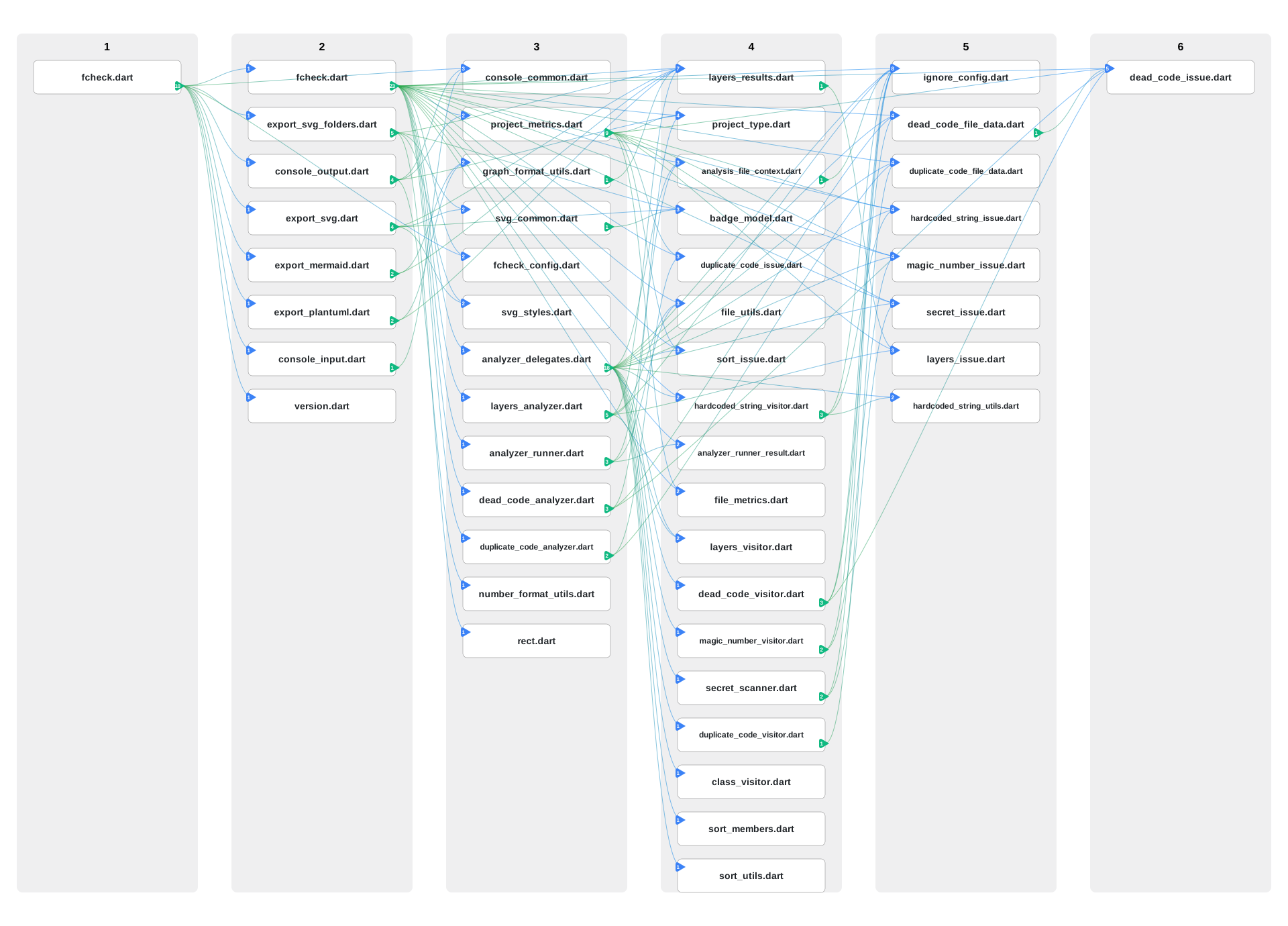
SVG Dependency Graph #
fcheck --svg
Generates layers.svg showing:
- Layered architecture (Layer 1 = entry points)
- File dependencies with directional edges
- Interactive tooltips
Folder-Based Visualization #
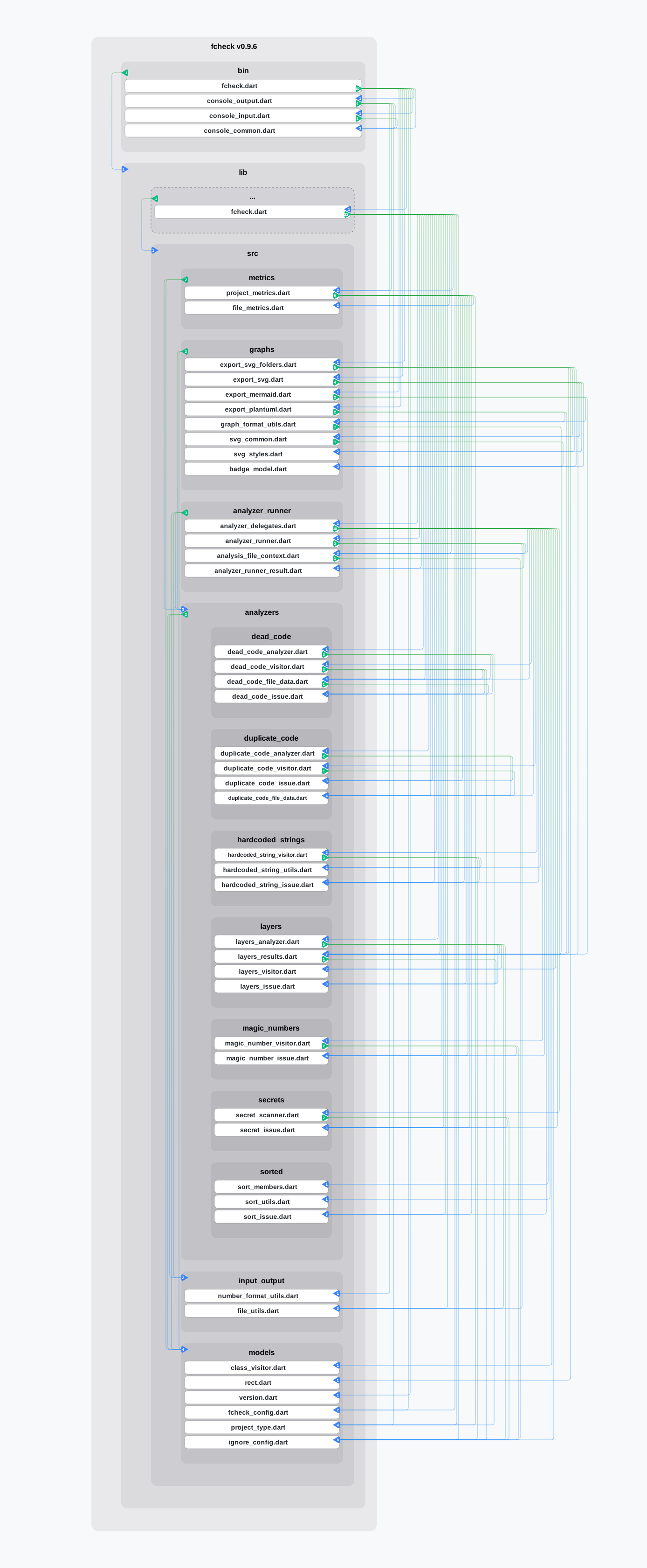
fcheck --svgfolder
- Shows files grouped by folders with dependencies.
Mermaid & PlantUML #
fcheck --mermaid    # Generates layers.mmd
fcheck --plantuml   # Generates layers.puml
🛡️ Exclusions #
Use --exclude to skip custom glob patterns, and --excluded to inspect what was skipped:
# Custom excludes
fcheck --exclude "**/generated/**" --exclude "**/*.g.dart"

# Inspect excluded items
fcheck --excluded
fcheck --excluded --json
Example Output #
Excluded Dart files (18):
  ./test/layers_analyzer_test.dart
  ./test/analyzer_engine_test.dart
  ./example/lib/comments_example.dart
  ./example/lib/subfolder/subclass.dart
  ...

Excluded non-Dart files (1,528):
  ./.DS_Store
  ./.fcheck
  ./example/pubspec.lock
  ./example/layers.svg
  ...

Excluded directories (15):
  ./.git
  ./.dart_tool
  ./test
  ./example
  ./build
  ...
What Gets Excluded #
- Hidden directories (starting with
.), including nested hidden folders - Common project directories:
test/,example/,tool/,.dart_tool/,build/,.git/,ios/,android/,web/,macos/,windows/,linux/ - Generated localization files (
app_localizations_*.dart,app_localization_*.dart), while keepingapp_localizations.dart - Files matching
.fcheckinput.excludeglob patterns - Files matching
--excludeglob patterns - Files in directories that match exclude patterns
📊 Understanding the Output #
Project Statistics #
- Folders: Number of directories
- Files: Total files in project
- Dart Files:
.dartfiles analyzed - Lines of Code: Total lines in Dart files
- Comment Ratio: Documentation percentage
Quality Indicators #
- ✅ All good: No issues found
- ⚠️ Caution: Potential issues (non-blocking)
- ❌ Error: Violations that need attention
- 🔧 Fixable: Issues that can be auto-fixed
🔧 Configuration #
Project Configuration (.fcheck) #
Create .fcheck in the directory passed to --input (or the current directory if --input is not set).
input:
  root: app
  exclude:
    - "**/generated/**"
    - "**/*.g.dart"

analyzers:
  default: on
  disabled:
    - hardcoded_strings
    - source_sorting
input.root is resolved relative to the .fcheck file directory.
analyzers.default accepts both on/off and true/false.
To run in opt-in mode (everything off by default):
analyzers:
  default: off
  enabled:
    - magic_numbers
    - secrets
Supported analyzer names:
one_class_per_filehardcoded_stringsmagic_numberssource_sortinglayerssecretsdead_codeduplicate_code
Duplicate code options can be tuned in .fcheck:
analyzers:
  options:
    duplicate_code:
      similarity_threshold: 0.85 # 0.0..1.0
      min_tokens: 20
      min_non_empty_lines: 10
Configuration precedence:
- Built-in defaults
.fcheck- CLI flags
For excludes, --exclude adds extra patterns on top of .fcheck input.exclude.
Legacy compatibility is still supported:
ignores:
  magic_numbers: true
  hardcoded_strings: true
  layers: true
Per-line and per-file ignore comments are covered in Ignore Warnings above.
🤝 Contributing #
- Fork the repository
- Create a feature branch:
git checkout -b feature-name - Make your changes
- Run
./tool/check.shto ensure quality - Submit a pull request
📋 Requirements #
- Dart SDK >= 3.0.0 < 4.0.0
- Works with any Flutter/Dart project
📄 License #
MIT License - see LICENSE file for details.
Metadata
Publisher
Weekly Downloads
Metadata
A CLI tool for analyzing Flutter and Dart code quality, checking project metrics, comment ratios, class organization, hardcoded strings, and source sorting validation.
Repository (GitHub)
View/report issues
Topics
#analysis #architecture #code-style #lint #validation
Documentation
License
 MIT (license)
Dependencies
analyzer, args, glob, path, yaml

