Save on pre-loved cameras
To see product details, add this item to your cart. You can always remove it later.
Ships from
Amazon
Amazon
Ships from
Amazon
Returns
30-day refund / replacement
This item can be returned in its original condition for a full refund or replacement within 30 days of receipt.
Read full return policy
Packaging
Ships in product packaging
black leaf Ships in product packaging

This item has been tested to certify it can ship safely in its original box or bag to avoid unnecessary packaging. Since 2015, we have reduced the weight of outbound packaging per shipment by 41% on average, that’s over 2 million tons of packaging material.

If you still require Amazon packaging for this item, choose "Ship in Amazon packaging" at checkout. Learn more
Payment
Secure transaction
Your transaction is secure
We work hard to protect your security and privacy. Our payment security system encrypts your information during transmission. We don’t share your credit card details with third-party sellers, and we don’t sell your information to others. Learn more
Added to

Sorry, there was a problem.

There was an error retrieving your Wish Lists. Please try again.

Sorry, there was a problem.

List unavailable.
  • Switchbot Smart Switch Button Pusher (Bluetooth) – Fingerbot for Rocker Switch/One-Way Buttons, App Timer Control, No Wiring, Optional Hub Required for Voice/Remote, White
  • SwitchBot smart switch button pusher - no wiring, wireless app or timer controlSwitchBot US
  • 6 VIDEOS

Switchbot Smart Switch Button Pusher (Bluetooth) – Fingerbot for Rocker Switch/One-Way Buttons, App Timer Control, No Wiring, Optional Hub Required for Voice/Remote, White

4.1 out of 5 stars (27,936)

To see product details, add this item to your cart. You can always remove it later.
FREE Returns
Brief content visible, double tap to read full content.
Full content visible, double tap to read brief content.
Style: Bot White
This item is certified to work with Alexa
WORKS WITH ALEXA
Add voice control by combining with an Alexa device & hub
  • This item
  • +
  • Required
  • +
  • Required
  • =
  • “Alexa, turn on living room lights.”

See Less

Purchase options and add-ons

About this item

  • Make any supported switch “smart” without rewiring — Control rocker switches & one-way buttons from your phone for bedroom lights, fans, or appliances you don’t want to get up to reach — not for toggle/mini switches, touch panels, or stiff/aged buttons.
  • App control + built-in timers that keep running — Set on/off schedules for morning coffee routines or nightly shutoffs — schedules run in the SwitchBot app without needing your phone nearby or a hub once set.
  • Bluetooth control included; Hub adds voice + away control — Use Bluetooth for local control, or add a SwitchBot Hub (sold separately) for remote control + voice control (Alexa/Google Assistant/Siri) and IFTTT — 2.4 GHz Wi-Fi required for hub features.
  • Fast, tool-free install with stronger hold when you prep right — Stick it on in seconds with included adhesive — for best results, mount on clean, dry, smooth surfaces and allow 24 hours for full bonding before heavy use.
  • Choose the right mode for the job — Use Press Mode for button presses; use Switch Mode for pushing/pulling rocker switches (Switch Mode requires an add-on) — plus scenes and ecosystem automation via the SwitchBot app and API.

Frequently bought together

This item: Switchbot Smart Switch Button Pusher (Bluetooth) – Fingerbot for Rocker Switch/One-Way Buttons, App Timer Control, No Wiring, Optional Hub Required for Voice/Remote, White
$24.99
Get it as soon as Sunday, Mar 22
In Stock
Sold by SwitchBot US and ships from Amazon Fulfillment.
Total price: $00
To see our price, add these items to your cart.
Details
Added to Cart
Choose items to buy together.

Product description

The video showcases the product in use.The video guides you through product setup.The video compares multiple products.The video shows the product being unpacked.

Check the compatibility before purchase

Merchant Video

SwitchBot is your simple switch to a smart home. With easy setup, we help you to create a comfortable home with innovative smart home products.

  • Check the compatibility before purchase

Check Compatibility Before Purchase

Bot

Easy to set up

Easy set-up and use

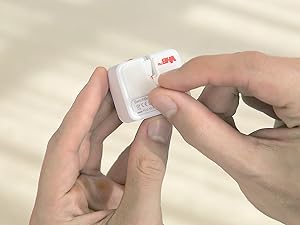
Tear off the 3M sticker

Install in 3 seconds.

Note: Built-in CR2 battery. Before the first use, please remove the plastic battery isolation tab.

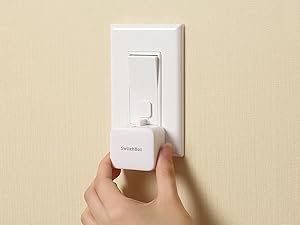
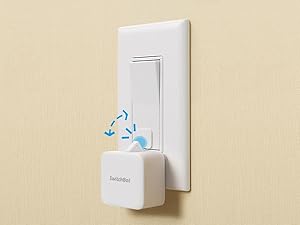
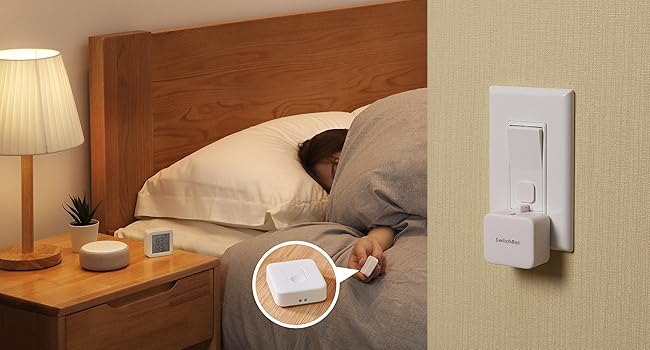
Attach near a rocker or button

Attach near a switch or button

Just tape it next to a button or switch with no tools required.

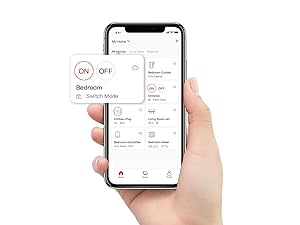
Press the icon in the App

Tag the icon in the App

Turn switch or button ON/OFF in the App.

The arm inside swings

Push or pull

Push by the arm inside and pull by the Add-on.

Note: Please use a regular brand 3V CR2 battery, otherwise the arm may not push and pull.

How do I know if SwitchBot works or not?

SwitchBot Bot

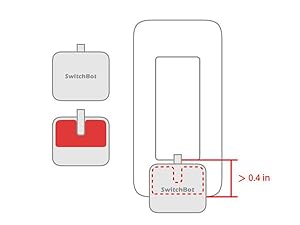
Space for the sticker

Space for the sticker requires more than 1cm (0.4 inches), and better to wait 24 hours after being stuck.

Smart home

When to use add-on

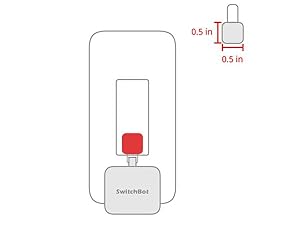
In the case of applying an add-on to a rocker switch, the surface should be clean, flat, and has enough room.

SwitchBot Bot

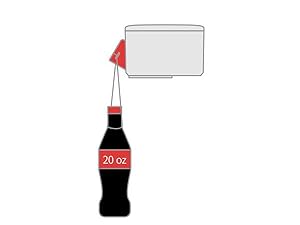
Strong for most

The Bot clicks down with a force strong for most, and still gently for not to break things.

SwitchBot Bot

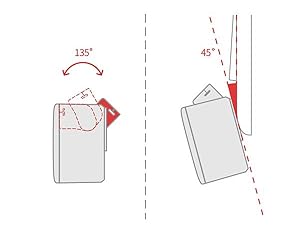
Maximum swing angle

The max swing angle of SwitchBot is 135 degrees. Make sure the Bot is on a surface where the arm could reach the switch or button when pushing down.

More Control Methods(Separate Purchase Required)

1

App Control

By adding the SwitchBot Hub Mini or SwitchBot Hub2 (sold separately), you can control your Bot when you 1000 miles away from home!

SwitchBot Remote (additional purchase)

Remote Control

No need to operate your phone & voice control, just push the SwitchBot Remote(sold separately) button to turn off the light.

Enhanced Control Distance (Pairing within 5m)

1

Enjoy Voice Control with SwitchBot Hub

Just say the words. With a SwitchBot Hub(sold separately), the Bots can be voice-controlled by Alexa, Google Assistant, Siri, and SmartThings. Enjoy the hands-free experience by saying "Alexa, turn off the light", "Hey Google, a cup of coffee please", or "Hey Siri, open the garage door".

1

Now supports HomeKit via Matter

SwitchBot Bot is supported via Matter when using SwitchBot Hub2 (sold separately), which in turn helps make your device supported via HomeKit. Now add SwitchBot Bot to Apple Home for an even better smart home experience.


From the brand

Product information

Technical Details

Operation Mode ‎ON-OFF-ON
Current Rating ‎50 Milliamps
Operating Voltage ‎3 Volts
Contact Type ‎Physical
Connector Type ‎Crimp
Brand ‎SwitchBot
Terminal ‎Screw
Item dimensions L x W x H ‎1.67 x 1.44 x 0.94 inches
Circuit Type ‎1-way
Mounting Type ‎Surface Mount
Actuator Type ‎Push Button
Contact Material ‎Copper, Brass
International Protection Rating ‎Non-waterproof
Number of Positions ‎1
Upper Temperature Rating ‎55 Degrees Celsius
Controller Type ‎Amazon Alexa, Google Assistant, IFTTT
Control Method ‎Voice
Connectivity Protocol ‎Bluetooth
Color ‎Pearl white
Wattage ‎400 watts
Unit Count ‎1.0 Count
Number of Items ‎1
Global Trade Identification Number ‎00860038001703
Manufacturer ‎Wonderlabs
Control Type ‎Full
Compatible Devices ‎Rocker switches, one-way buttons, coffee machines, air conditioners, garage doors
UPC ‎860038001703
Smart Home Compatibility ‎Smart Home Compatible
Part Number ‎SWITCHBOT-S1
Item Weight ‎1.38 ounces
Product Dimensions ‎1.67 x 1.44 x 0.94 inches
Item model number ‎Switchbot S1
Batteries ‎1 Lithium Metal batteries required. (included)
Is Discontinued By Manufacturer ‎No
Style ‎Bot White
Thickness ‎43 Millimeters
Power Source ‎Battery Powered
Voltage ‎3 Volts
Item Package Quantity ‎1
Number Of Pieces ‎1
Included Components ‎Electrical Controls; electronic-component-pushbutton-switches
Batteries Included? ‎Yes
Batteries Required? ‎Yes
Battery Cell Type ‎Lithium Metal
Average Battery Life ‎600 days

Additional Information

ASIN B07B7NXV4R
Customer Reviews
4.1 out of 5 stars (27,936)

4.1 out of 5 stars
Best Sellers Rank
Date First Available March 7, 2018

Warranty & Support

Product Warranty: For warranty information about this product, please click here

Feedback

Switchbot Smart Switch Button Pusher (Bluetooth) – Fingerbot for Rocker Switch/One-Way Buttons, App Timer Control, No Wiring, Optional Hub Required for Voice/Remote, White


Found a lower price? Let us know. Although we can't match every price reported, we'll use your feedback to ensure that our prices remain competitive.

Where did you see a lower price?

Price Availability
/
/
/
/
Please sign in to provide feedback.

Safety and product resources

Safety documents

Top Brand: SwitchBot

Highly Rated
100K+ customers rate items from this brand highly
Trending
50K+ orders for this brand in past 3 months
Low Returns
Customers usually keep items from this brand

Customer reviews

4.1 out of 5 stars
27,936 global ratings

Customers say

Customers find the smart switch button easy to install and use, with a simple phone app interface, and appreciate its ability to automate physically switching on/off buttons. The Bluetooth connectivity receives mixed feedback - while it works well with Google Home, some customers report it doesn't connect to Alexa or Wi-Fi. The functionality and value for money also get mixed reviews, with some finding it reliable and worth the cost, while others consider it completely useless and not worth the price. The stickiness receives mixed feedback, with some praising the adhesive while others report it coming off.
AI Generated from the text of customer reviews

Select to learn more

224 customers mention quality, 187 positive, 37 negative
Customers find the smart switch button pusher to be a fabulous product that works well as a workaround.
...I bought this after seeing a video on social media. It is a great product that really works in my home and really helps with coming home after work...Read more
Works great. Used it to push button on my Glowforge. Great device!Read more
...All and all good product, only a 3 star for now but I am interested to see where this company goes.. I'm sure they will have some cool products in...Read more
Great little device. Use it to randomly tap a keyboard key to keep remote desktop on my PC from signing me out when I get up to stretch....Read more
170 customers mention ease of installation, 149 positive, 21 negative
Customers find the smart switch easy to set up and install, with one customer noting it's very easy to add to their Alexa app.
...These bots are easy to install and work very well with the app. If you buy the hub, you can turn on and off lights with Alexa. 100% recommended.Read more
...It's easy to set up and now I can turn on the cat toy when the kitty's getting a little too excited and needs the distraction....Read more
...off, let me say, the thing looks nice, it's easy to attach, and easy to setup. Or... so I thought. Maddening little bit of garbo, this....Read more
...Very easy to set up (including the app download). Love that you can set a timer as well for one or all seven days of the week. Well done!Read more
148 customers mention ease of use, 131 positive, 17 negative
Customers find the smart switch easy to use, with a simple app interface that makes everything convenient.
Easy to use, app has schedules which work, sticks on (didn't face any issue with 3M etc), overall would love to have more of these all over the house...Read more
...Overall, highly recommend the SwitchBot Bot to anyone looking for a simple and effective solution for smart lighting control....Read more
...The app is easy to use and setup is very simple just turn on Bluetooth on your phone, pull out the tab on the switch bot and boom it connects....Read more
Easy and peace of mind to turn on & off outdoor lights for usRead more
110 customers mention button functionality, 92 positive, 18 negative
Customers appreciate the switch button's functionality, as it can be programmed to turn lights and home appliances on and off automatically.
Great button pusher but has one big drawback for Alexa/Google Home integration...Read more
...with Alexa but now I do not regret because it works fine and I can turn the lights on when I am away from homeRead more
...I use this for my light switch and can easily turn it on and off using the appRead more
...has been very positive, as a renter it's nice to be able to add smart lighting control to lighting fixtures do not have replacement bulbs, namely...Read more
546 customers mention functionality, 374 positive, 172 negative
Customers have mixed experiences with the switchbot's functionality, with some reporting it works well and is reliable, while others find it completely useless and unreliable.
Works great.sticks great. The app was not responding all the time. There were glitches with the app and my experience. But other than that great....Read more
...It was a defective product, possibly aged. I still like this product, works well. Makes things much easier and impresses guests....Read more
...The entire system has been unreliable and frustrating to use. I cannot recommend the SwitchBot to anyone—save yourself the time, money, and headache.Read more
We use this to turn on our coffee machine automatically. It works perfectly. We highly recommend this product. So easy to set up tooRead more
219 customers mention bluetooth connectivity, 96 positive, 123 negative
Customers have mixed experiences with the switch's Bluetooth connectivity: while some report seamless integration with Google Home and Alexa, others mention it only works with Bluetooth and cannot connect to Alexa or Wi-Fi.
Even though they put it in the title and description, this does NOT work with Alexa, Google Home, HomePod, or IFTTT....Read more
...it works with siri shortcuts which if made correctly can work with your homekit scenes and be voice controlled....Read more
...find out after I received two of these two of these that they will not work with Alexa unless you have there hub that cost $50+ ....Read more
...One notable aspect of the Switchbot Bot is its seamless integration with personal computers....Read more
81 customers mention value for money, 39 positive, 42 negative
Customers have mixed opinions about the switch's value for money, with some finding it worth the cost while others consider it not worth the price.
So dissapointed! I bought 3 of these and they were a waste of money. The tape wasn’t sticky and it wouldn’t turn on and off the light....Read more
...and these great folks for coming up with such a great product and a great price....Read more
...These are janky and overpriced and should be considered only as an extreme last resort and hopefully only for occasional usage.Read more
...Worth every pennyRead more
74 customers mention stickiness, 25 positive, 49 negative
Customers have mixed experiences with the switch's adhesion: while some report it sticks tightly to surfaces, others mention it falls off or doesn't adhere to walls properly.
Doesn’t stick...Read more
Easy to use, app has schedules which work, sticks on (didn't face any issue with 3M etc), overall would love to have more of these all over the house...Read more
...on or the little lever comes out, it pushes down so far, it pops itself off the wall.Read more
...Also the little string that goes through the switch comes out easily, I put tape on mine so it doesn’t fall out. Overall very quiet....Read more
SwitchBot pressing buttons inside my R2D2
5 out of 5 stars
SwitchBot pressing buttons inside my R2D2
Bought two of these SwitchBot fingerbots - one of which was included in the combo pack with the SwitchBot Hub Mini required to make hey google or amazon alexa verbal commands via google or alexa smart devices. Got all of this because had two buttons - the main power button & an AC power button - that had to be pushed one after another on a Power Bank inside a starwars HD-R2D2 droid that I did not want to open up all the time when I wanted to turn it on and off. SwitchBot works great & presses quickly when you finally figure out how to get the results that you want. Great with bluetooth connecting to the switchbot app. But for full versatility, also get the SwitchBot Hub Mini to give audio verbal commands. Works great if you then connect to Google because could use my Google Nest Mini to verbally give commands to "Turn On R2D2" and later to "Turn Off R2D2" - where google solved the trick where had to issue two commands in a single command automation to have two separate SwitchBot fingerbots to each separately one after another to first press the power button & then second press the AC button to then power up the AC power adapter plugged into the power bank to "Turn On R2D2". However, when using Alexa on an Amazon Echo, could not combine commands for the two fingerbots to have each specifically press the two different separate buttons in a single alexa command routine because the routine would only activate only one fingerbot to do both presses on only one button. Oh well, gotta do two separate alexa audio commands if using Amazon Alexa. Another minor issue was I had to place each fingerbot at an angle because each button presser did not press deep enough on the buttons - but fortunately there were the extra double-sided 3M mounting tape pieces to help securely tilt/angle each fingerbot to be able to actually press each button. Nonetheless, this is a wonderful worthwhile solution to the problem of how to remotely press buttons inside an enclosed space that you do not want to always open up. Very much worth paying for. And fortunately the battery is replaceable. Thanks So Much to both SwitchBot & Amazon for this remote pushbutton technology.
Thank you for your feedback
Sorry, there was an error
Sorry we couldn't load the review

Top reviews from the United States

  • Reviewed in the United States on January 7, 2026
    Style: Bot WhiteVerified Purchase
    The media could not be loaded.
    Bought two of these SwitchBot fingerbots - one of which was included in the combo pack with the SwitchBot Hub Mini required to make hey google or amazon alexa verbal commands via google or alexa smart devices. Got all of this because had two buttons - the main power button & an AC power button - that had to be pushed one after another on a Power Bank inside a starwars HD-R2D2 droid that I did not want to open up all the time when I wanted to turn it on and off. SwitchBot works great & presses quickly when you finally figure out how to get the results that you want.

    Great with bluetooth connecting to the switchbot app. But for full versatility, also get the SwitchBot Hub Mini to give audio verbal commands. Works great if you then connect to Google because could use my Google Nest Mini to verbally give commands to "Turn On R2D2" and later to "Turn Off R2D2" - where google solved the trick where had to issue two commands in a single command automation to have two separate SwitchBot fingerbots to each separately one after another to first press the power button & then second press the AC button to then power up the AC power adapter plugged into the power bank to "Turn On R2D2".

    However, when using Alexa on an Amazon Echo, could not combine commands for the two fingerbots to have each specifically press the two different separate buttons in a single alexa command routine because the routine would only activate only one fingerbot to do both presses on only one button. Oh well, gotta do two separate alexa audio commands if using Amazon Alexa.

    Another minor issue was I had to place each fingerbot at an angle because each button presser did not press deep enough on the buttons - but fortunately there were the extra double-sided 3M mounting tape pieces to help securely tilt/angle each fingerbot to be able to actually press each button.

    Nonetheless, this is a wonderful worthwhile solution to the problem of how to remotely press buttons inside an enclosed space that you do not want to always open up. Very much worth paying for. And fortunately the battery is replaceable.

    Thanks So Much to both SwitchBot & Amazon for this remote pushbutton technology.
    Customer image
    5.0 out of 5 stars
    SwitchBot pressing buttons inside my R2D2

    Reviewed in the United States on January 7, 2026
    Bought two of these SwitchBot fingerbots - one of which was included in the combo pack with the SwitchBot Hub Mini required to make hey google or amazon alexa verbal commands via google or alexa smart devices. Got all of this because had two buttons - the main power button & an AC power button - that had to be pushed one after another on a Power Bank inside a starwars HD-R2D2 droid that I did not want to open up all the time when I wanted to turn it on and off. SwitchBot works great & presses quickly when you finally figure out how to get the results that you want.

    Great with bluetooth connecting to the switchbot app. But for full versatility, also get the SwitchBot Hub Mini to give audio verbal commands. Works great if you then connect to Google because could use my Google Nest Mini to verbally give commands to "Turn On R2D2" and later to "Turn Off R2D2" - where google solved the trick where had to issue two commands in a single command automation to have two separate SwitchBot fingerbots to each separately one after another to first press the power button & then second press the AC button to then power up the AC power adapter plugged into the power bank to "Turn On R2D2".

    However, when using Alexa on an Amazon Echo, could not combine commands for the two fingerbots to have each specifically press the two different separate buttons in a single alexa command routine because the routine would only activate only one fingerbot to do both presses on only one button. Oh well, gotta do two separate alexa audio commands if using Amazon Alexa.

    Another minor issue was I had to place each fingerbot at an angle because each button presser did not press deep enough on the buttons - but fortunately there were the extra double-sided 3M mounting tape pieces to help securely tilt/angle each fingerbot to be able to actually press each button.

    Nonetheless, this is a wonderful worthwhile solution to the problem of how to remotely press buttons inside an enclosed space that you do not want to always open up. Very much worth paying for. And fortunately the battery is replaceable.

    Thanks So Much to both SwitchBot & Amazon for this remote pushbutton technology.
    Images in this review
    Customer image Customer image Customer image
    5 people found this helpful
    Report
  • Reviewed in the United States on February 18, 2026
    Style: Bot WhiteVerified Purchase
    In my case, I have two Chamberlain garage door openers.On both of them the Wi-Fi board has failed. That board is $159 each on Amazon. For $20 I was able to make an aluminum bracket Mount this above my garage door opener and now I can open both doors from my phone just like I did with that ridiculous myQ Chamberlain software. Switchbot does have a battery, but works perfectly. I spent $45 to save $300!
    Customer image
    5.0 out of 5 stars
    Saved me $140

    Reviewed in the United States on February 18, 2026
    In my case, I have two Chamberlain garage door openers.On both of them the Wi-Fi board has failed. That board is $159 each on Amazon. For $20 I was able to make an aluminum bracket Mount this above my garage door opener and now I can open both doors from my phone just like I did with that ridiculous myQ Chamberlain software. Switchbot does have a battery, but works perfectly. I spent $45 to save $300!
    Images in this review
    Customer image Customer image
    One person found this helpful
    Report
  • Reviewed in the United States on November 4, 2022
    Style: Bot WhiteVerified Purchase
    SwitchBot Smart Switch Button Pusher

    Switchbot has built up an amazing Ecosystem that integrates VERY well with Alexa.

    I have many of their products, and they are an important part of my arsenal for remote monitoring and controlling my home.

    I bought 3 of these switches prior to leaving my primary residence for an extended amount of time. One to control the attic fan, one for a recirculator pump and one for halogen ceiling lights.

    Within 2 months, one switch went offline. By 5 months, another went offline. By the time I came back, only one stayed online for the duration (about 8 months).

    I went out and bought high grade CR2 Lithium batteries (energizer). Popped the hatch and replaced the offline ones. To my pleasant surprise, the switches REMEMBERED MY SETTINGS. Wifi, switch type (press or switch) etc. And the switches came back online. SWEET.

    Installing them can be a lot of trial and error. Thankfully they gave extra adhesive and pads with each switch. I wish they gave more though. It's hard to figure out the proper placement.

    Other than that, I am super happy with this product. It works well. The Switchbot App is super easy to use. They must have done some serious R&D with their whole line of products, because everything simply works.
    Customer image
    4.0 out of 5 stars
    Works Well. Installation a little tricky. For long term remote control, use LITHIUM batteries.

    Reviewed in the United States on November 4, 2022
    SwitchBot Smart Switch Button Pusher

    Switchbot has built up an amazing Ecosystem that integrates VERY well with Alexa.

    I have many of their products, and they are an important part of my arsenal for remote monitoring and controlling my home.

    I bought 3 of these switches prior to leaving my primary residence for an extended amount of time. One to control the attic fan, one for a recirculator pump and one for halogen ceiling lights.

    Within 2 months, one switch went offline. By 5 months, another went offline. By the time I came back, only one stayed online for the duration (about 8 months).

    I went out and bought high grade CR2 Lithium batteries (energizer). Popped the hatch and replaced the offline ones. To my pleasant surprise, the switches REMEMBERED MY SETTINGS. Wifi, switch type (press or switch) etc. And the switches came back online. SWEET.

    Installing them can be a lot of trial and error. Thankfully they gave extra adhesive and pads with each switch. I wish they gave more though. It's hard to figure out the proper placement.

    Other than that, I am super happy with this product. It works well. The Switchbot App is super easy to use. They must have done some serious R&D with their whole line of products, because everything simply works.
    Images in this review
    Customer image Customer image
    13 people found this helpful
    Report
  • Reviewed in the United States on February 22, 2022
    Style: Bot WhiteVerified Purchase
    If you’re like me, you’re thinking: is it REALLY worth $30 to buy this tiny robot when, for free, you could just walk over and push the darn button yourself?

    The answer is YES.

    I bought this for my bedroom light. I was considering installing smart light switches except 1) I’m renting and 2) I know almost nothing about doing work with electricity and wiring and really didn’t want to shock myself. I saw this SwitchBot featured in an Instagram video of products you need and I HAD to get it. A lot of times, I’ll get into bed and leave the light on because I’m “not ready to sleep yet”, which of course changes quickly. The bedroom light is a harsh fluorescent that gives me a headache after too long, and there were a number of times that I would want to shut it off because of the headache but be too exhausted to do so. Then I’d drift off and wake up with a jolt at 3 am, mad at myself for leaving the light on and wasting electricity and making my bill go higher unnecessarily.

    The SwitchBot has fixed that issue. From a press of a button on my phone, I can hear the little robot whirring and the lights cut out.

    It’s so easy to install with the included command strips. I love that it comes with an extra strip so that when I move, I’ll be able to reinstall it at my new home. It was easy to download the app and pair it with your phone, and I had it set up and ready to use within 5 minutes. The app interface is so simple. I liked that it can integrate with your smart home (I have a Google home and Alexa), but I didn’t buy one of the remotes that it needs to connect to the smart home, mostly because it’s just one SwitchBot and I can still easily do it for my phone. If I end up getting more, then I would probably invest in a remote and set it up with my Google home just for an even easier use.

    If you’re on the fence: treat yourself and get it.

    Edit: moved to a new apartment (that sadly doesn’t have the right switch to be used with my beloved SwitchBot), and came back to update that removal was a breeze!
    Customer image
    5.0 out of 5 stars
    Yes, you need it!!

    Reviewed in the United States on February 22, 2022
    If you’re like me, you’re thinking: is it REALLY worth $30 to buy this tiny robot when, for free, you could just walk over and push the darn button yourself?

    The answer is YES.

    I bought this for my bedroom light. I was considering installing smart light switches except 1) I’m renting and 2) I know almost nothing about doing work with electricity and wiring and really didn’t want to shock myself. I saw this SwitchBot featured in an Instagram video of products you need and I HAD to get it. A lot of times, I’ll get into bed and leave the light on because I’m “not ready to sleep yet”, which of course changes quickly. The bedroom light is a harsh fluorescent that gives me a headache after too long, and there were a number of times that I would want to shut it off because of the headache but be too exhausted to do so. Then I’d drift off and wake up with a jolt at 3 am, mad at myself for leaving the light on and wasting electricity and making my bill go higher unnecessarily.

    The SwitchBot has fixed that issue. From a press of a button on my phone, I can hear the little robot whirring and the lights cut out.

    It’s so easy to install with the included command strips. I love that it comes with an extra strip so that when I move, I’ll be able to reinstall it at my new home. It was easy to download the app and pair it with your phone, and I had it set up and ready to use within 5 minutes. The app interface is so simple. I liked that it can integrate with your smart home (I have a Google home and Alexa), but I didn’t buy one of the remotes that it needs to connect to the smart home, mostly because it’s just one SwitchBot and I can still easily do it for my phone. If I end up getting more, then I would probably invest in a remote and set it up with my Google home just for an even easier use.

    If you’re on the fence: treat yourself and get it.

    Edit: moved to a new apartment (that sadly doesn’t have the right switch to be used with my beloved SwitchBot), and came back to update that removal was a breeze!
    Images in this review
    Customer image
    3 people found this helpful
    Report

Top reviews from other countries

Translate all reviews to English
  • SIVABALAN. V
    5.0 out of 5 stars The product is very good but will be incompatible for general Indian houses
    Reviewed in India on September 13, 2024
    Style: Bot WhiteVerified Purchase
    The product is very good and useful, but we need to have a flat surfaced special switch and socket panel to stick the bot, will not be useful for old Indian switch panels.
  • Leonardo gianicolo
    5.0 out of 5 stars Turns a normal wall switch into a smart one (great for rentals) ✅🔘
    Reviewed in the United Kingdom on February 17, 2026
    Style: Bot WhiteVerified Purchase
    I got the SwitchBot Smart Switch Toggle to automate a traditional wall switch without rewiring, and it works exactly as expected. It’s a clever solution if you’re renting, don’t want to change the switch, or just need a quick smart upgrade.

    What I like ✅
    • No wiring required — you can make a regular switch “smart” in minutes 👍
    • App control and timers/schedules are very handy (lights on/off automatically) ⏱️💡
    • Strong button press action for toggling the switch reliably
    • Works well for simple routines like morning lights or bedtime shutoff 🌙
    • With the Hub Mini, it integrates with Alexa/Google Home/IFTTT for voice control and automations 🔗🗣️

    What could be better ⚠️
    • You need a good mounting position: if the switch is stiff or recessed, placement can take a bit of trial and error
    • Looks slightly “gadgety” on the wall (not completely invisible)
    • For voice assistants you must add the Hub Mini (not standalone)

    Bottom line: A practical, renter-friendly way to automate existing switches without an electrician. Perfect for lights, fans, and simple on/off devices ✅✨
    Rating: ⭐⭐⭐⭐⭐
  • the only sky
    5.0 out of 5 stars 2年3ヶ月の寿命でしたが、便利すぎて手放せませんでした。
    Reviewed in Japan on March 12, 2026
    Style: Bot WhiteVerified Purchase
    ファンヒーターのオンオフに使っていました。
    季節が過ぎると電池を外して保管など、大切に使っていました。2年3ヶ月の寿命とするとコスパ的にどうでしょう。
    物理スイッチをスマート化できる唯一無二のデバイスです。
    今回、突然の接続不良と動作停止に見舞われ、電池交換や物理リセットなどあらゆる手を尽くしましたが復旧せず。基板の寿命のようです。
    【良かった点】
    ・アレクサ連携が非常に安定している。
    ・ハブミニがあれば外出先からも操作可能。
    【気になった点】
    ・電池がCR2という特殊なタイプなので予備が必要。
    ・寿命は環境によりますが、我が家では約2年強でした。(冬季のみ使用)
    消耗品と割り切って使う分には、これほど便利なガジェットはありません。
    Customer image
    the only sky
    5.0 out of 5 stars
    2年3ヶ月の寿命でしたが、便利すぎて手放せませんでした。

    Reviewed in Japan on March 12, 2026
    ファンヒーターのオンオフに使っていました。
    季節が過ぎると電池を外して保管など、大切に使っていました。2年3ヶ月の寿命とするとコスパ的にどうでしょう。
    物理スイッチをスマート化できる唯一無二のデバイスです。
    今回、突然の接続不良と動作停止に見舞われ、電池交換や物理リセットなどあらゆる手を尽くしましたが復旧せず。基板の寿命のようです。
    【良かった点】
    ・アレクサ連携が非常に安定している。
    ・ハブミニがあれば外出先からも操作可能。
    【気になった点】
    ・電池がCR2という特殊なタイプなので予備が必要。
    ・寿命は環境によりますが、我が家では約2年強でした。(冬季のみ使用)
    消耗品と割り切って使う分には、これほど便利なガジェットはありません。
    Images in this review
    Customer image
    Report
  • Mikael Ericson
    5.0 out of 5 stars Riktigt bra!
    Reviewed in Sweden on February 1, 2026
    Style: Bot WhiteVerified Purchase
    Väldigt nöjd!
  • Laura
    5.0 out of 5 stars Génial!!!!
    Reviewed in Belgium on October 18, 2025
    Style: Bot WhiteVerified Purchase
    Meilleur achat! Incroyable pour le prix!! Fonctionne parfaitement mais attention, uniquement quand vous êtes à la maison sinon il faut programmer. Ne fonctionne pas si vous n êtes pas sous le même toit et donc le même réseau. Seul bémol mais pour le prix franchement

Product Summary: Switchbot Smart Switch Button Pusher (Bluetooth) – Fingerbot for Rocker Switch/One-Way Buttons, App Timer Control, No Wiring, Optional Hub Required for Voice/Remote, White

From SwitchBot

4.1 out of 5 stars, 27,936 ratings

Customer reviews

Price

No featured offers available

Other sellers

Other sellers

About this Item

  • Make any supported switch “smart” without rewiring — Control rocker switches & one-way buttons from your phone for bedroom lights, fans, or appliances you don’t want to get up to reach — not for toggle/mini switches, touch panels, or stiff/aged buttons.
  • App control + built-in timers that keep running — Set on/off schedules for morning coffee routines or nightly shutoffs — schedules run in the SwitchBot app without needing your phone nearby or a hub once set.
  • Bluetooth control included; Hub adds voice + away control — Use Bluetooth for local control, or add a SwitchBot Hub (sold separately) for remote control + voice control (Alexa/Google Assistant/Siri) and IFTTT — 2.4 GHz Wi-Fi required for hub features.
  • Fast, tool-free install with stronger hold when you prep right — Stick it on in seconds with included adhesive — for best results, mount on clean, dry, smooth surfaces and allow 24 hours for full bonding before heavy use.
  • Choose the right mode for the job — Use Press Mode for button presses; use Switch Mode for pushing/pulling rocker switches (Switch Mode requires an add-on) — plus scenes and ecosystem automation via the SwitchBot app and API.

Product Description

SwitchBot, mechanical rocker light switch or button controller , a simple switch to a smart home, DIY tools, no Hub required, Compatible with Alexa, Google Assistant, IFTTT with a Hub. How it works? Attach near a switch or button. Press the icon in the app. Bingo! The arm inside swings. Stay up late working, sleepy and exhausted? Energize your every morning with fresh brewed coffee, with the help of SwitchBot. How many days till fall? Like walking through soup out here? Turn on AC before walk in the door with SwitchBot. Get relief from the heat the second you get in the office. How to unwind after a bad and stressful day? Worries dissolve completely in hot waters. Prepare in advance with SwitchBot. Forgot to turn off light before bed? Use the SwitchBot App. Or just say: “Alexa, ask SwitchBot to turn off bedroom light.” Control SwitchBot in your preferred way: SwitchBot works independently: mobile phone smart watch build-in timers local control Works better with a SwitchBot Hub: Alexa Google Assistant IFTTT (IF This Then That) remote control DIY by makers: Open Bluetooth API HTTP/HTTPS API (via IFTTT) Note: SwitchBot does not fit to Toggle switch for now.

Options Available

Style

  • Bot 2 packs
  • Bot 3 packs+Hub Mini
  • Bot Black
  • Bot White
  • Bot+Remote
Browse all available options

Important Information

Wattage

400 watts

Bulb Voltage

3 volts

Toy Safety

  1. Our recommended age:
  2. Manufacturer's minimum age:
  3. not_suitable_under_3_years

Product Guidance & Documents

User Manual (PDF)

Feedback

Did you find this product summary feature useful?

Thank you for your feedback
Thank you for your feedback. You selected "Yes, it is useful"
Thank you for your feedback. You selected "No, it is not useful"
Product summary presents key information. Close to see all product details.