
Recently, I was working on a data analysis project that required repeating certain arrays multiple times to create larger datasets for testing. The issue was, I needed to efficiently duplicate arrays without writing repetitive code.
NumPy makes this process easy with several built-in methods. In this article, I’ll cover five simple ways you can use to repeat arrays n times in Python using NumPy (and some alternatives).
So let’s get in!
NumPy Repeat and Why Use It?
NumPy is a useful library for numerical computing in Python that provides high-performance array objects and tools for working with these arrays.
The ability to repeat arrays is particularly useful when:
- Creating test data
- Generating patterns for data visualization
- Expanding smaller datasets for machine learning training
- Building specific data structures for algorithm testing
Read Convert the DataFrame to a NumPy Array Without Index in Python
Method 1: Use NumPy repeat() Function
The most direct way to repeat elements in a NumPy array is by using the repeat() function in Python. This method repeats each element in the array a specified number of times.
import numpy as np

# Create a simple array
original_array = np.array([1, 2, 3, 4, 5])

# Repeat each element 3 times
repeated_array = np.repeat(original_array, 3)

print(repeated_array)
Output:
[1 1 1 2 2 2 3 3 3 4 4 4 5 5 5]I executed the above example code and added the screenshot below.
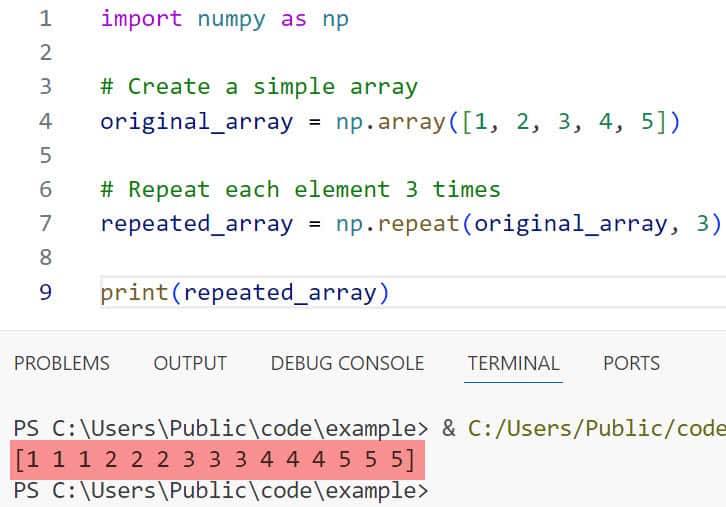
In this example, each element from the original array is repeated 3 times in sequence.
You can also specify different repeat counts for each element:
# Repeat elements with varying counts
varied_repeat = np.repeat(original_array, [1, 2, 3, 2, 1])

print(varied_repeat)
# Output: [1 2 2 3 3 3 4 4 5]
Check out Copy a NumPy Array to the Clipboard through Python
Method 2: Use NumPy tile() Function
Python repeat() duplicates individual elements, the tile() function repeats the entire array as a single unit.
import numpy as np

# Create a simple array
original_array = np.array([1, 2, 3])

# Tile the array 4 times
tiled_array = np.tile(original_array, 4)

print(tiled_array)
Output:
[1 2 3 1 2 3 1 2 3 1 2 3]I executed the above example code and added the screenshot below.

The tile() function is particularly useful when you need to repeat patterns or when working with multi-dimensional arrays:
# Create a 2D array
array_2d = np.array([[1, 2], [3, 4]])

# Tile it 2x3 (2 rows, 3 columns)
tiled_2d = np.tile(array_2d, (2, 3))

print(tiled_2d)
# Output:
# [[1 2 1 2 1 2]
#  [3 4 3 4 3 4]
#  [1 2 1 2 1 2]
#  [3 4 3 4 3 4]]
Read NumPy Divide Array by Scalar in Python
Method 3: Use Python’s Multiplication Operator (*)
For simple cases, Python’s built-in multiplication operator can be used with lists, which can then be converted to NumPy arrays:
import numpy as np

# Create a simple list
original_list = [1, 2, 3]

# Repeat the list using multiplication
repeated_list = original_list * 4

# Convert to NumPy array if needed
repeated_array = np.array(repeated_list)

print(repeated_array)
Output:
[1 2 3 1 2 3 1 2 3 1 2 3]I executed the above example code and added the screenshot below.

This method is concise and easy to remember, but it only works for repeating the entire array (like tile()) and not for individual elements.
Check out np.unit8 in Python
Method 4: Use NumPy concatenate() Function
For more complex repetition patterns, you can use np.concatenate() in Python to join multiple copies of an array:
import numpy as np

# Create a simple array
original_array = np.array([1, 2, 3])

# Repeat 3 times using concatenate
repeated_array = np.concatenate([original_array] * 3)

print(repeated_array)
# Output: [1 2 3 1 2 3 1 2 3]
This approach is flexible and can be used with conditional logic to determine how many repetitions to create.
Read NumPy Unique Function in Python
Method 5: Use NumPy reshape() With Broadcasting
For advanced cases, especially with multi-dimensional arrays, you can combine reshape() with broadcasting:
import numpy as np

# Create an array
original_array = np.array([1, 2, 3])

# Add new axis and broadcast
repeated_array = np.broadcast_to(original_array[:, np.newaxis], (3, 5)).T.flatten()

print(repeated_array)
# Output: [1 1 1 1 1 2 2 2 2 2 3 3 3 3 3]
This method is more complex but gives you precise control over how elements are repeated across dimensions.
Real-World Example: Stock Price Simulation
Let’s use the repetition of an array for a practical example. Say we’re simulating daily stock prices for major US tech companies, and we need to repeat certain patterns:
import numpy as np
import matplotlib.pyplot as plt

# Initial 5-day price pattern for a tech stock (e.g., in USD)
price_pattern = np.array([150.25, 152.75, 151.50, 153.00, 155.25])

# Repeat this pattern for 4 weeks (20 trading days)
extended_prices = np.tile(price_pattern, 4)

# Add some random noise to make it more realistic
noise = np.random.normal(0, 1.5, extended_prices.shape)
realistic_prices = extended_prices + noise

# Plot the simulated stock prices
days = np.arange(1, len(realistic_prices) + 1)
plt.figure(figsize=(12, 6))
plt.plot(days, realistic_prices)
plt.title('Simulated Tech Stock Prices Over 4 Weeks')
plt.xlabel('Trading Day')
plt.ylabel('Price (USD)')
plt.grid(True)
plt.show()
This example demonstrates how repeating arrays can help in creating realistic simulations by duplicating known patterns and then adding variations.
Check out Create a 2D NumPy Array in Python
Performance Considerations
When dealing with large arrays, performance becomes important. Let’s compare the methods:
import numpy as np
import time

# Create a medium-sized array
original = np.arange(1000)

# Test np.repeat
start = time.time()
np.repeat(original, 100)
print(f"np.repeat: {time.time() - start:.6f} seconds")

# Test np.tile
start = time.time()
np.tile(original, 100)
print(f"np.tile: {time.time() - start:.6f} seconds")

# Test list multiplication
start = time.time()
np.array(original.tolist() * 100)
print(f"List multiplication: {time.time() - start:.6f} seconds")

# Test concatenate
start = time.time()
np.concatenate([original] * 100)
print(f"np.concatenate: {time.time() - start:.6f} seconds")
In my experience, np.repeat() and np.tile() are generally the most efficient options for their respective use cases (repeating elements vs. repeating the whole array).
Read NumPy Normalize 0 and 1 in Python
Common Issues with Array Repetition and Solutions
When working with array repetition, watch out for these common issues:
- Memory issues with large arrays: If you’re repeating very large arrays many times, you might run into memory problems. Consider working with smaller chunks or using memory-mapped arrays.
- Confusion between
repeat()andtile(): Remember thatrepeat()duplicates individual elements, whiletile()duplicates the entire array. - Reference vs. copy: When using list multiplication with complex objects, be aware that you’re creating references, not copies:
# This can lead to unexpected behavior with nested objects
nested_list = [[1, 2]] * 3  # Creates [[1, 2], [1, 2], [1, 2]]
nested_list[0][0] = 99      # Changes ALL first elements to 99!
print(nested_list)          # [[99, 2], [99, 2], [99, 2]]

# Solution: Use list comprehension for deep copies
nested_list = [[1, 2] for _ in range(3)]
NumPy generally handles this correctly, but it’s good to be aware of the issue.
I hope you found this article helpful! Array repetition is a fundamental operation in many data processing and analysis tasks, and mastering these techniques will make your code more efficient and readable.
The methods that I have explained in this tutorial use the NumPy repeat() function, use the NumPy tile() Function, use Python’s multiplication Operator (*), use the NumPy concatenate() function, and use NumPy reshape() with broadcasting.
Related tutorials you may like to read:
- AttributeError: ‘numpy.ndarray’ object has no attribute ‘split’ in Python
- np.abs() in Python Numpy
- NumPy Average Filter in Python

I am Bijay Kumar, a Microsoft MVP in SharePoint. Apart from SharePoint, I started working on Python, Machine learning, and artificial intelligence for the last 5 years. During this time I got expertise in various Python libraries also like Tkinter, Pandas, NumPy, Turtle, Django, Matplotlib, Tensorflow, Scipy, Scikit-Learn, etc… for various clients in the United States, Canada, the United Kingdom, Australia, New Zealand, etc. Check out my profile.

