SmartSee Wireless HD Display Adapter WiFi Screen Cast Mirroring Media Streaming Dongle Receiver for Phone/PC/Tablet to HD Display TV Projector
Return this item for free
We offer easy, convenient returns with at least one free return option: no shipping charges. All returns must comply with our returns policy.
Learn more about free returns.- Go to your orders and start the return
- Select your preferred free shipping option
- Drop off and leave!
Purchase options and add-ons
| Brand | SmartSee |
| Connectivity Technology | Wi-Fi |
| Connector Type | HD |
| Special Feature | Airplay, DLNA, Miracast |
| Resolution | 1080p |
| Supported Internet Services | images, Audio, YouTube, Browser |
| Controller Type | Wireless |
| Form Factor | TV Stick |
| Color | Black |
| Model Name | dd5ae1bc-b156-4cbd-83f7-ac6258066b9 |
About this item
- ✅ Cast Small Screen to Large Screen: This HD dongle wirelessly casts your smartphone, tablet or laptop to your hd TV/projector/monitor, no cables needed.
- ✅ All in One, Widely Compatible: Cast Small Screen to Big Screen. Small screen needs to be DLNA / Airplay / Miracast protocol supported. Large Screen needs to be HD equiped such as HD TV, monitor, projector etc. This HD wifi display dongle is compatible with iOS 9 + / Android 5.0 + / Mac / Windows 8.1+ devices. ❤ Note: NOT Compatible with Neflix, Hulu plus, or other HDCP copyright apps.
- ✅ Easy Operation: Pair the wireless display adapter with your phone or tablet or laptop screen to mirror the screen, no driver and APP needed, no messy cables. We do have an EZMira app. No need to download the app unless your Android phone does not support Miracast protocol. One adapter supports all system device, connections are different on different systems, ONLY focus on your own device and connection. Please read the User Manual to the detailed connection.
- ✅ Wide Usage: Can be used for sharing images and videos to TV/Project at home, showcasing a presentation in a meetings or conference or classroom, live broadcast, education, business, ect.
- ✅ Regular OTA Update: We will regularly update the firmware from the cloud server to add features and improve compatibility. Connect this dongle to your wifi and it will be upgraded automatically, keep up with the newest version of your iOS/Android/Windows device anytime.
Check Compatibility
Product description
SmartSee Wireless HD Display Adapter is a device to project your Smart Phones / Tablet PC to another big screen devices with HD interface (such as HDTV, Monitor & Projector, etc) through a WiFi connection.
And, it supports popular Screen Share standards, such as Miracast, DLNA, and Airplay.
For iPhones, the screen mirroring feature is called AirPlay.
For Android, the screen mirroring feature is MiraCast protocol, different Android devices have different names about MiraCast. Such as SmartView on Samsung, Wireless Display, Plug to, Multi-Screen, etc.
Moreover, The WiFi Display Receiver has more features such as streaming video, web surfing, photo viewer, Internet video and more, just to enjoy excellent multi-display sharing.
We’ve all watched YouTube videos on a phone or laptop while the TV sat unused across the room. The TV is bigger, and looks better, but connecting to it sometimes just isn’t worth the hassle. So we make an Wireless display adapter which is designed to solve exactly that problem.
A Wireless Display Adapter allows you to mirror your mobile device's content to any HD screen such as TV screen/projector wirelessly.
Cast small screen to bigger screen.
Wireless Display Adapter - Cast Small Screen to Bigger Screen Wirelessly
SmartSee HD Wireless Display Adapter, 1080P HD Screen Mirroring from iPhone Samsung Android Smartphones Tablets to TV Projector Monitor via HD connection
1. What is a Wireless Display Adapter?
Wireless HD Display Adapter is to small screen to big screen, namely, what you see on your mobile device(smartphone/tablet/windows devices), you can see on a big screen(TV/monitor/projector) via this adapter.
2. Do I need Wireless Display Adapter?
Yes, everywhere.
At home: you can mirror your phone/tablet to your TV, no need to stare at the phone alone, watch TV together and free your hands.
At hotel: Setting the TV or TV box is a little troublesome? Just mirror your mobile device to TV or projector by using this item.
In a meeting room: No need other cables, just connect this item to mirror your tablet pc on your projector wirelessly.
In a classroom: Share your content of courses on big screen wirelessly.
3. How do you use a Wireless Display Adapter?
Pair it to use, no need to download apps.
For iOS Users: Connect it in WiFi list and connect it to your WiFi, then pair it via Airplay to mirror the screen.
For Android Users: Pair it via Miracast to mirror the screen directly. Connected once, screen mirroring directly next time.
Note: Not compatible with the apps that have protocol protection, such as Netflix/ Amazon Video/ HBO go/ Hulu Plus sky go/DIRECTV etc.
Installation of Wireless display adapter
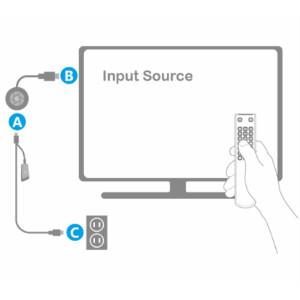
1. Plug MiraScreen dongle into HD port on your TV/projector and switch TV/projector to the right input source.
2. Plug USB cable into an external USB power adapter(power adapter is not inculded).
3. After connection, MiraScreen page shows up on your display now.
Setup/Connection on iOS Devices
Step 1: Pair MiraScreen WiFi with your iOS device.
Step 2: Open a browser and input the ip address: 192.168.203.1 on the very top searching bar, this will open the setting menu, now connect to your WiFi network via Internet.
Step 3: Use Airplay Mirroring to connect to MiraScreen dongle.
Now your iOS device will be casted on your big screen now.
Setup/Connection on Android Devices
Only One Step: Find the Miracast function on your Android device (such as screen mirroring/Miracast/smart view) and connect with the MiraScreen dongle.
Now your Android device will be casted on your big screen now.
Setup/Connection on Windows Devices
Miracast mirroring (available for Windows 8.1 and Windows 10)
Step 1: Press the button on the side of the dongle for switching to Miracast mode.
Step 2: Press short key “Win+P” on your keyboard.
Step 3: Select “Connect to a wireless display”.
Step 4: Select MiraScreen device to connect.
Now your Windows device will be casted on your big screen now.
Wide Usage:
Watch with colleagues in meeting-Mirroring screen to projector, share PPT, mail, documents and other content wirelessly.
Watch with students in classroom-Mirroring screen to big screen, share teaching content wirelessly.
Watch with your family at home-Mirroring screen to TV, share photos, videos, movies wirelessly. Carry it while travelling, share your phone to TV anytime.
Return Notes:
- Returns can be made unconditionally within 30 days.
When returning the goods, please return all the product accessories to the original packaging box, so as not to affect the second sale.
- Rather than returning the product, you prefer to figure out the proper usage?
Get in touch with the SmartSee TEAM.
SmarSee Wirelss Display Adapter is a technical product, it widely supports iOS, Android, Windows devices. Yet iOS, Android, Windows use different wireless protocol, and different protocol results in different connection, namely, connections are different on different devices.
We understand there are thousands different devices, no matter what device you use, only correct connection can reach the point. So once you are not sure about the connection, please check the User Manual. If the User Manual not indicates the connection of your device, please get in touch with SmartSee Team directly, we will tell the exact connection according to your device.
SmartSee Team is always here to support.
Wireless HD Transmitter and Receiver
|
SmartSee Anycast 4K 5G Dual Band Dongle
|
SmartSee 4K HD Wireless Display Adapter
|
SmartSee 4K 5G Dual Band HD Wireless Display Adapter
|
SmartSee Wireless Car Screen Mirroring Box
|
|
|---|---|---|---|---|---|
|
Add to Cart
|
Add to Cart
|
Add to Cart
|
|||
| Customer Reviews |
2.7 out of 5 stars 15
|
3.4 out of 5 stars 102
|
3.5 out of 5 stars 160
|
3.6 out of 5 stars 117
|
3.3 out of 5 stars 120
|
| Support WiFi Connection | No Need WiFi Setting. Support Running in dual band 2.4G and 5G network. | Supports all your wireless networks with Wi-Fi 802.11ac (2.4 GHz/5 GHz) | 2.4GHz | Supports all your wireless networks with Wi-Fi 802.11ac (2.4 GHz/5 GHz) | 2.4GHz |
| Support System | Any HD Source | Android 5.0+, IOS 9.0+, Mac OS 10.0+, Windows 8+ | Android 5.0+, IOS 9.0+, Mac OS 10.0+, Windows 8+ | Android 5.0+, IOS 9.0+, Mac OS 10.0+, Windows 8+ | Android 5.0+, IOS 9.0+, Mac OS 10.0+, Windows 8+ |
| Features Support | No content limit. Support Netflix Prime Video, Sky Go, BT Sport, DIRECTV, HULU, Comcast TV, XFINITY, Vudu, Movistar, HBO and more. | Support Airplay/MiraCast Mirroring/DLNA Streaming/Support Google Home app/Chrome Browser Casting | Support Airplay/MiraCast Mirroring/DLNA Streaming/Support Google Home app/Chrome Browser Casting | Support Airplay/MiraCast Mirroring/DLNA Streaming/Support Google Home app/Chrome Browser Casting | Airplay/MiraCast Mirroring/DLNA Streaming |
Product information
| Connectivity Technology | Wi-Fi |
|---|---|
| Connector Type | HD |
| Other Special Features of the Product | Airplay, DLNA, Miracast |
| Resolution | 1080p |
| Supported Internet Services | images, Audio, YouTube, Browser |
| Controller Type | Wireless |
| Form Factor | TV Stick |
| Compatible Devices | Laptop, Monitor, Television, Tablet, Smartphone |
| Memory Storage Capacity | 16 GB |
| Video Output Resolution | 1080P |
| Video Codec | h.264 |
| Item Dimensions L x W x H | 1.9"L x 1.9"W x 0.7"H |
|---|
Warranty & Support
Feedback
| Brand | SmartSee |
|---|---|
| Model Number | dd5ae1bc-b156-4cbd-83f7-ac6258066b9 |
| Model Name | dd5ae1bc-b156-4cbd-83f7-ac6258066b9 |
| Country of Origin | China |
| Manufacturer | SmartSee |
| Item Type Name | Wireless Screen Mirroring Streaming Adapter |
| Best Sellers Rank |
|
| ASIN | B0CGHMNC72 |
| Customer Reviews |
3.3 out of 5 stars |
| Color | Black |
|---|
From the brand
Wireless HD Display Adappter
Cast Small Screen to Large Screen Wirelessly
-
What problem are we solving?
We solve the limitation of a small screen, we are committed to enabling wireless display technology.
Our wireless display adapter allows you to mirror what’s on your phone’s screen to a bigger screen. Not limited to phone, but also for tablet, laptop, PC to HD TV, projector, monitor, carscreen, etc.
Cast small screen to large screen wirelessly.
Customer reviews
Customer Reviews, including Product Star Ratings help customers to learn more about the product and decide whether it is the right product for them.
To calculate the overall star rating and percentage breakdown by star, we don’t use a simple average. Instead, our system considers things like how recent a review is and if the reviewer bought the item on Amazon. It also analyzed reviews to verify trustworthiness.
Learn more how customers reviews work on AmazonCustomers say
Generated from the text of customer reviewsSelect to learn more
Reviews with images
Works good
Top reviews from the United States
There was a problem filtering reviews. Please reload the page.
- Reviewed in the United States on December 11, 2023I noticed that the quality of this wireless HDMI display adapter felt the same as other brands, but the price was affordable.
It works perfectly, the connection is fast, and the app recognizes the dongle as an external monitor. Good gearbox, fast speed, good sound quality. It does not disconnect during use. Perfect for those on a tight budget.
- Reviewed in the United States on April 16, 2024This thing forces you to use some trash 3rd party app with terrible instructions and invasive advertising. It will not work with the Google home app. I even followed several YouTube videos and nothing worked. Don't waste your time with this thing.
- Reviewed in the United States on December 6, 2023The wireless HDMI display adapter was easy to set up. It was pretty much plug and play and the instructions were easy to follow. The quality of the wireless display is great. I tried games and youtube videos with no problems, smoothness was good and stable.
All in all, I am very happy with this device. It does what it is supposed to do.
-
Reviewed in the United States on February 19, 2026No sirve no se los recomiendo nomas lo compre los devolvi por q trabajo no se los recomiendo no gasten su dinero en eso
- Reviewed in the United States on December 8, 2023This wireless HDMI display adapter did exactly what I was looking for and I can now turn my phone into a non-smart TV. I love playing mobile games on my TV and the low latency ensures a smooth gaming experience. It's a great way to enjoy a more immersive gaming experience. Say goodbye to the limitations of the small screen and immerse yourself in the game on the big screen.
- Reviewed in the United States on December 16, 2023Received the product as promised, setup was not as simple as promised. In addition, the promotional material promised free access, but during the set up offers an app that provides a one week free trial and autimatic billing @49.95 a month afterwards. I was able to connect the Wi-Fi link but never successfully cast from the small screen to the large format screen. Will probably return as this has not been as promised
- Reviewed in the United States on December 29, 2023It works pretty good.
- Reviewed in the United States on November 12, 2023This small device lets me mirror my phone screen on to my television so I don’t have to look at such a small screen. I’m able to show videos to my children and we can all watch together. It’s easy to use and comes with directions. All you have to do is download an app and follow the directions.
This small device lets me mirror my phone screen on to my television so I don’t have to look at such a small screen. I’m able to show videos to my children and we can all watch together. It’s easy to use and comes with directions. All you have to do is download an app and follow the directions.
Images in this review
Top reviews from other countries
-
egyptReviewed in Egypt on November 25, 20255.0 out of 5 stars قيمه مقابل سعر
كنت بستخدم ٠وجل كروم كاست بس باظت و جبت دى
بالنسبه لسعرها وفت بالغرض
-
abduReviewed in Egypt on March 4, 20261.0 out of 5 stars موصلش الاردر
موصلش اصلان وجالي أن انا استلمت ونا لم استلم
-
hossam hassanReviewed in Egypt on November 15, 20255.0 out of 5 stars ممتاز جداً
منتج جداً وممتاز يستاهل التجربه
-
Khaled yaseenReviewed in Egypt on November 23, 20251.0 out of 5 stars منتج ضعيف كثير الاعطال
كثيرة الاعطال
-
Abdelrahman aliReviewed in Egypt on March 3, 20251.0 out of 5 stars Nn
الجهاز واحش اوي و بيقطع و سي و ملهوش اي عوزه او اسخدام نصيحه محدش يشتري محدش يشتري