<?xml version="1.0" encoding="utf-8"?>
<feed xmlns="http://www.w3.org/2005/Atom">
  <title>Keep Coding</title>
  
  <subtitle>苏易北</subtitle>
  <link href="/atom.xml" rel="self"/>
  
  <link href="https://abelsu7.top/"/>
  <updated>2020-08-09T10:26:29.054Z</updated>
  <id>https://abelsu7.top/</id>
  
  <author>
    <name>Abel Su</name>
    
  </author>
  
  <generator uri="http://hexo.io/">Hexo</generator>
  
  <entry>
    <title>Ceph 集群修改 IP 地址</title>
    <link href="https://abelsu7.top/2020/08/09/ceph-monitor-change-ip/"/>
    <id>https://abelsu7.top/2020/08/09/ceph-monitor-change-ip/</id>
    <published>2020-08-09T10:10:15.000Z</published>
    <updated>2020-08-09T10:26:29.054Z</updated>
    
    <content type="html"><![CDATA[<blockquote><p><strong><em>修改 Ceph 集群（主要是<code>monitor</code>）的 IP 地址</em></strong></p></blockquote><figure class="image-bubble">                <div class="img-lightbox">                    <div class="overlay"></div>                    <img src="/2020/08/09/ceph-monitor-change-ip/cover.jpg" alt title>                </div>                <div class="image-caption"></div>            </figure><a id="more"></a><h3 id="1-背景同步"><a href="#1-背景同步" class="headerlink" title="1. 背景同步"></a>1. 背景同步</h3><p>现有 Ceph 集群两台服务器<code>idv-master</code>和<code>idv-node1</code>当前接入的是<code>192.168.140.0/24</code>网段，现在需要<strong>通过网线连接至<code>X</code>机房对应的交换机</strong>，接入<code>192.168.136.0/24</code>网段。两个网段内部都是千兆环境，而互相之间则只有百兆，因此<strong>服务器的 IP 地址需要修改，Ceph Monitor 的 IP 地址也要对应进行修改</strong>。</p><div class="table-container"><table><thead><tr><th style="text-align:center">主机名</th><th style="text-align:center">idv-master</th><th style="text-align:center">idv-node1</th></tr></thead><tbody><tr><td style="text-align:center">Ceph Mon</td><td style="text-align:center">idv-master</td><td style="text-align:center">无</td></tr><tr><td style="text-align:center">原 IP 地址</td><td style="text-align:center">192.168.140.79/24</td><td style="text-align:center">192.168.140.76/24</td></tr><tr><td style="text-align:center">原网关地址</td><td style="text-align:center">192.168.140.254</td><td style="text-align:center">192.168.140.254</td></tr><tr><td style="text-align:center">新 IP 地址</td><td style="text-align:center">192.168.136.51/24</td><td style="text-align:center">192.168.136.47/24</td></tr><tr><td style="text-align:center">新网关地址</td><td style="text-align:center">192.168.136.126</td><td style="text-align:center">192.168.136.126</td></tr></tbody></table></div><p>另外，两台服务器上分别做了网卡的<code>bonding</code>：</p><ul><li><code>idv-master</code>：em1、em2、em3、em4 -&gt; bond0</li><li><code>idv-node1</code>：em1、em2 、em3、em4-&gt; bond0</li></ul><p>因此只需将<code>idv-master</code>的<code>em1</code>、<code>em2</code>、<code>em3</code>、<code>em4</code>和<code>idv-node1</code>的<code>em1</code>、<code>em2</code>、<code>em3</code>、<code>em4</code>这八个网卡通过网线换插到<code>X</code>机房的交换机上，并修改<code>bond0</code>的网络配置信息。</p><h3 id="2-换插网线之前的准备"><a href="#2-换插网线之前的准备" class="headerlink" title="2. 换插网线之前的准备"></a>2. 换插网线之前的准备</h3><blockquote><p><strong>注</strong>：以下所有操作在换插网线之前完成，此时 Ceph 集群应处于<code>HEALTH_OK</code>状态</p></blockquote><h4 id="2-1-修改-ifcfg-bond0"><a href="#2-1-修改-ifcfg-bond0" class="headerlink" title="2.1 修改 ifcfg-bond0"></a>2.1 修改 ifcfg-bond0</h4><p>首先修改两台服务器<code>bond0</code>的配置文件<code>/etc/sysconfig/network-scripts/ifcfg-bond0</code>，在其中额外添加一个<code>192.168.136.0/24</code>网段的 IP 地址：</p><p><code>idv-master</code>的<code>ifcfg-bond0</code>修改如下：</p><pre><code class="lang-bash">DEVICE=bond0TYPE=BondNAME=bond0BOOTPROTO=noneONBOOT=yesDEFROUTE=yesIPV4_FAILURE_FATAL=noIPV6INIT=yesIPV6_AUTOCONF=yesIPV6_DEFROUTE=yesIPV6_FAILURE_FATAL=noIPV6_ADDR_GEN_MODE=stable-privacyIPADDR=192.168.140.79PREFIX=24IPADDR1=192.168.136.51PREFIX1=24GATEWAY=192.168.140.254DNS1=xxx.xxx.xxx.xxxBONDING_MASTER=yesBONDING_OPTS=&quot;mode=6 miimon=100&quot;</code></pre><p><code>idv-node1</code>的<code>ifcfg-bond0</code>修改如下：</p><pre><code class="lang-bash">DEVICE=bond0TYPE=BondNAME=bond0BOOTPROTO=noneONBOOT=yesDEFROUTE=yesIPV4_FAILURE_FATAL=noIPV6INIT=yesIPV6_AUTOCONF=yesIPV6_DEFROUTE=yesIPV6_FAILURE_FATAL=noIPV6_ADDR_GEN_MODE=stable-privacyIPADDR=192.168.140.76PREFIX=24IPADDR1=192.168.136.47PREFIX1=24GATEWAY=192.168.140.254DNS1=xxx.xxx.xxx.xxxBONDING_MASTER=yesBONDING_OPTS=&quot;mode=6 miimon=100&quot;</code></pre><p>之后重启网络，测试两台服务器是否可以通过新的 IP 地址通信：</p><pre><code class="lang-bash">[root@idv-master ~] systemctl restart network[root@idv-master ~] nmclibond0: connected to bond0        &quot;bond0&quot;        bond, 18:66:DA:F3:97:10, sw, mtu 1500        ip4 default, ip6 default        inet4 192.168.136.51/24        inet4 192.168.140.79/24        route4 192.168.140.0/24        route4 192.168.136.0/24        route4 0.0.0.0/0......[root@idv-master ~] ping 192.168.136.47PING 192.168.136.47 (192.168.136.47) 56(84) bytes of data.64 bytes from 192.168.136.47: icmp_seq=1 ttl=64 time=0.204 ms64 bytes from 192.168.136.47: icmp_seq=2 ttl=64 time=0.192 ms64 bytes from 192.168.136.47: icmp_seq=3 ttl=64 time=0.167 ms^C</code></pre><h4 id="2-2-准备-monmap"><a href="#2-2-准备-monmap" class="headerlink" title="2.2 准备 monmap"></a>2.2 准备 monmap</h4><p>进入<code>idv-master</code>的<code>/root/ceph-deploy</code>目录，首先查看当前 Ceph 集群的 monitor 信息：</p><pre><code class="lang-bash">[root@idv-master ~] cd ceph-deploy[root@idv-master ~] ls -hltotal 216K-rw-------. 1 root root  113 Jun 15 18:13 ceph.bootstrap-mds.keyring-rw-------. 1 root root  113 Jun 15 18:13 ceph.bootstrap-mgr.keyring-rw-------. 1 root root  113 Jun 15 18:13 ceph.bootstrap-osd.keyring-rw-------. 1 root root  113 Jun 15 18:13 ceph.bootstrap-rgw.keyring-rw-------. 1 root root  151 Jun 15 18:13 ceph.client.admin.keyring-rw-r--r--  1 root root  320 Jun 19 10:55 ceph.conf-rw-r--r--. 1 root root 188K Jun 16 11:27 ceph-deploy-ceph.log-rw-------. 1 root root   73 Jun 15 18:10 ceph.mon.keyring[root@idv-master ceph-deploy] ceph mon dumpdumped monmap epoch 3epoch 3fsid 37b37488-4f34-4ddd-bd28-ac4a5267c261last_changed 2020-06-15 21:19:38.124439created 2020-06-15 18:13:19.250180min_mon_release 14 (nautilus)0: [v2:192.168.140.79:3300/0,v1:192.168.140.79:6789/0] mon.idv-master</code></pre><p>之后获取当前 Ceph 集群的<code>monmap</code>文件，可通过<code>ceph mon getmap</code>命令从当前集群动态获取（需要集群处于运行状态），或者通过<code>monmaptool</code>根据配置文件<code>ceph.conf</code>静态生成（无需集群处于运行状态）：</p><pre><code class="lang-bash"># 从当前集群动态获取[root@idv-master ceph-deploy] ceph mon getmap -o ./monmap[root@idv-master ceph-deploy] monmaptool --print ./monmapmonmaptool: monmap file ./monmapepoch 3fsid 37b37488-4f34-4ddd-bd28-ac4a5267c261last_changed 2020-06-15 21:19:38.124439created 2020-06-15 18:13:19.250180min_mon_release 14 (nautilus)0: [v2:192.168.140.79:3300/0,v1:192.168.140.79:6789/0] mon.idv-master# 或者根据配置文件 ceph.conf 静态生成[root@idv-master ceph-deploy] monmaptool --create --generate -c ./ceph.conf ./monmap</code></pre><p>获取完<code>monmap</code>之后，接下来需要手动修改 monitor 的 IP 地址及端口。首先删除旧的 monitor，之后添加新的 monitor。此处由于只有<code>idv-master</code>一个 monitor，因此只需对该 monitor 进行操作。当 Ceph 集群中存在多个 monitor 时，需要对所有的 monitor 进行相同的操作。</p><pre><code class="lang-bash"># 删除旧的 monitor[root@idv-master ceph-deploy] monmaptool --rm idv-master ./monmapmonmaptool: monmap file ./monmapmonmaptool: removing idv-mastermonmaptool: writing epoch 3 to ./monmap (0 monitors)# 查看删除后的 monmap，此时已经没有 mon.idv-master[root@idv-master ceph-deploy] monmaptool --print ./monmap monmaptool: monmap file ./monmapepoch 3fsid 37b37488-4f34-4ddd-bd28-ac4a5267c261last_changed 2020-06-15 21:19:38.124439created 2020-06-15 18:13:19.250180min_mon_release 14 (nautilus)# 添加新的 monitor，使用新的 IP 地址[root@idv-master ceph-deploy] monmaptool --add idv-master 192.168.136.51:6789 ./monmapmonmaptool: monmap file ./monmapmonmaptool: writing epoch 3 to ./monmap (1 monitors)# 查看新的 monmap，此时 monitor 的 IP 地址已修改[root@idv-master ceph-deploy] monmaptool --print ./monmap monmaptool: monmap file ./monmapepoch 3fsid 37b37488-4f34-4ddd-bd28-ac4a5267c261last_changed 2020-06-15 21:19:38.124439created 2020-06-15 18:13:19.250180min_mon_release 14 (nautilus)0: v1:192.168.136.51:6789/0 mon.idv-master</code></pre><h4 id="2-3-修改-ceph-conf"><a href="#2-3-修改-ceph-conf" class="headerlink" title="2.3 修改 ceph.conf"></a>2.3 修改 ceph.conf</h4><p>修改<code>ceph.conf</code>中的配置信息，方便在换插网线之后通过<code>ceph-deploy</code>推送到各个节点：</p><pre><code class="lang-bash"># 查看修改前的配置文件[root@idv-master ceph-deploy] cat ./ceph.conf [global]fsid = 37b37488-4f34-4ddd-bd28-ac4a5267c261mon_initial_members = idv-mastermon_host = 192.168.140.79auth_cluster_required = noneauth_service_required = noneauth_client_required = nonepublic_network=192.168.140.0/24cluster_network=192.168.140.0/24mon_clock_drift_allowed = 2[mgr]mgr modules = dashboard# 修改配置文件中的网络信息[root@idv-master ceph-deploy] vim ./ceph.conf# 查看修改后的配置文件[root@idv-master ceph-deploy] cat ./ceph.conf[global]fsid = 37b37488-4f34-4ddd-bd28-ac4a5267c261mon_initial_members = idv-mastermon_host = 192.168.136.51auth_cluster_required = noneauth_service_required = noneauth_client_required = nonepublic_network=192.168.136.0/24cluster_network=192.168.136.0/24mon_clock_drift_allowed = 2[mgr]mgr modules = dashboard</code></pre><h4 id="2-4-修改-etc-hosts"><a href="#2-4-修改-etc-hosts" class="headerlink" title="2.4 修改 /etc/hosts"></a>2.4 修改 /etc/hosts</h4><p>修改两台服务器<code>/etc/hosts</code>文件中的主机名和 IP 地址的对应规则：</p><pre><code class="lang-bash"># 192.168.140.79 idv-master192.168.136.51 idv-master# 192.168.140.76 idv-node1192.168.136.47 idv-node1</code></pre><h4 id="2-5-停止-Ceph-相关服务"><a href="#2-5-停止-Ceph-相关服务" class="headerlink" title="2.5 停止 Ceph 相关服务"></a>2.5 停止 Ceph 相关服务</h4><p>在两台服务器上分别执行以下命令，停止 Ceph 相关服务的运行：</p><pre><code class="lang-bash">systemctl stop ceph.target</code></pre><p>至此换插网线之前的准备工作已经完成，现在可以将网线换插至新的交换机设备。</p><h3 id="3-换插网线之后的恢复"><a href="#3-换插网线之后的恢复" class="headerlink" title="3. 换插网线之后的恢复"></a>3. 换插网线之后的恢复</h3><blockquote><p><strong>注</strong>：以下所有操作在换插网线之前完成</p></blockquote><h4 id="3-1-修改-bond0-网关地址"><a href="#3-1-修改-bond0-网关地址" class="headerlink" title="3.1 修改 bond0 网关地址"></a>3.1 修改 bond0 网关地址</h4><p>换插网线后，首先需要做的就是恢复网络的连通状态。由于<code>bond0</code>已经配置了两个 IP 地址，因此只需要修改<code>bond0</code>中的<code>GATEWAY</code>，并重启网络服务：</p><pre><code class="lang-bash"># 在 idv-master 上执行[root@idv-master ~] sed -i &#39;/GATEWAY/c GATEWAY=192.168.136.126&#39; /etc/sysconfig/network-scripts/ifcfg-bond0[root@idv-master ~] systemctl restart network# 在 idv-node1 上执行[root@idv-node1 ~] sed -i &#39;/GATEWAY/c GATEWAY=192.168.136.126&#39; /etc/sysconfig/network-scripts/ifcfg-bond0[root@idv-node1 ~] systemctl restart network</code></pre><p>之后尝试访问网关地址和外部网络，测试网络的连通状态：</p><pre><code class="lang-bash">[root@idv-master ~] ping idv-node1[root@idv-master ~] ping 192.168.136.126[root@idv-master ~] ping baidu.com</code></pre><h4 id="3-2-推送新的-ceph-conf"><a href="#3-2-推送新的-ceph-conf" class="headerlink" title="3.2 推送新的 ceph.conf"></a>3.2 推送新的 ceph.conf</h4><p>在<code>idv-master</code>的<code>/root/ceph-deploy</code>目录下，使用<code>ceph-deploy</code>将新的配置文件推送至所有节点上：</p><pre><code class="lang-bash">[root@idv-master ceph-deploy] ceph-deploy --overwrite-conf config push idv-master idv-node1</code></pre><h4 id="3-3-将-monmap-注入到集群"><a href="#3-3-将-monmap-注入到集群" class="headerlink" title="3.3 将 monmap 注入到集群"></a>3.3 将 monmap 注入到集群</h4><p>由于本文中只有<code>idv-master</code>一个 monitor，因此只需在<code>idv-master</code>上注入<code>monmap</code>。对于有多个 monitor 的 Ceph 集群，需要在所有的 monitor 节点上进行下列操作：</p><pre><code class="lang-bash">[root@idv-master ceph-deploy] ceph-mon -i idv-master --inject-monmap ./monmap</code></pre><p>修改目录权限：</p><pre><code class="lang-bash">[root@idv-master ceph-deploy] chown ceph:ceph /var/lib/ceph/mon/ceph-idv-master/store.db/*</code></pre><p>之后启动 Ceph 集群，检查集群是否恢复运行：</p><pre><code class="lang-bash"># 在所有节点上启动 Ceph 相关服务[root@idv-master ~] systemctl start ceph.target[root@idv-node1 ~] systemctl start ceph.target# 检查集群是否恢复运行[root@idv-master ~] ceph -s</code></pre><p>修改 Ceph Dashboard 至新的地址：</p><pre><code class="lang-bash">[root@idv-master ceph-deploy] ceph config set mgr mgr/dashboard/server_addr 192.168.136.51[root@idv-master ceph-deploy] systemctl restart ceph-mgr@idv-master.service</code></pre><h3 id="参考资料"><a href="#参考资料" class="headerlink" title="参考资料"></a>参考资料</h3><blockquote><ol><li><a href="https://blog.csdn.net/Z_Stand/article/details/90417312" target="_blank" rel="noopener">Ceph 集群更换 IP（更换 IP 前的防范和更换 IP 后的恢复）- 勤学996 | CSDN</a></li><li><a href="https://blog.csdn.net/baidu_26495369/article/details/89203696" target="_blank" rel="noopener">Ceph 集群更改 IP 地址 - 夜雨狂歌如梦| CSDN</a></li><li><a href="https://blog.csdn.net/Andriy_dangli/article/details/85237516" target="_blank" rel="noopener">Ceph 集群修改 IP 地址 - Andriy_dangli | CSDN</a></li><li><a href="https://blog.csdn.net/Alger_magic/article/details/81175196" target="_blank" rel="noopener">解决 Ceph 集群 Mon 和 OSD 网络变更或者 IP (主要是 mon)变换后，集群不能正常工作问题 - 擎正义之旗 | CSDN</a></li></ol></blockquote><div><strong>🚩推荐阅读</strong>（由<a href="https://github.com/huiwang/hexo-recommended-posts">hexo文章推荐插件</a>驱动）<ul><li><a href="https://abelsu7.top/2020/02/23/deploy-ceph-jewel-on-3-vms/">Linux 下使用 virt-manager 基于虚拟机快速搭建 Ceph 集群</a></li><li><a href="https://abelsu7.top/2020/01/02/configure-qemu-to-support-ceph-rbd/">编译 QEMU 开启对 Ceph RBD 的支持</a></li><li><a href="https://abelsu7.top/2019/11/19/recent-virt-notes/">虚拟化相关资料收集</a></li></ul></div>]]></content>
    
    <summary type="html">
    
      &lt;blockquote&gt;
&lt;p&gt;&lt;strong&gt;&lt;em&gt;修改 Ceph 集群（主要是&lt;code&gt;monitor&lt;/code&gt;）的 IP 地址&lt;/em&gt;&lt;/strong&gt;&lt;/p&gt;
&lt;/blockquote&gt;
&lt;figure class=&quot;image-bubble&quot;&gt;
                &lt;div class=&quot;img-lightbox&quot;&gt;
                    &lt;div class=&quot;overlay&quot;&gt;&lt;/div&gt;
                    &lt;img src=&quot;/2020/08/09/ceph-monitor-change-ip/cover.jpg&quot; alt title&gt;
                &lt;/div&gt;
                &lt;div class=&quot;image-caption&quot;&gt;&lt;/div&gt;
            &lt;/figure&gt;
    
    </summary>
    
      <category term="Ceph" scheme="https://abelsu7.top/categories/Ceph/"/>
    
    
      <category term="Ceph" scheme="https://abelsu7.top/tags/Ceph/"/>
    
  </entry>
  
  <entry>
    <title>Linux 下多个网卡配置 bonding</title>
    <link href="https://abelsu7.top/2020/08/09/linux-bonding-intro/"/>
    <id>https://abelsu7.top/2020/08/09/linux-bonding-intro/</id>
    <published>2020-08-09T10:00:40.000Z</published>
    <updated>2020-08-09T10:07:44.697Z</updated>
    
    <content type="html"><![CDATA[<blockquote><p><strong><em>借助<code>bonding</code>将多个物理网卡创建为单个虚拟逻辑网卡</em></strong></p></blockquote><figure class="image-bubble">                <div class="img-lightbox">                    <div class="overlay"></div>                    <img src="/2020/08/09/linux-bonding-intro/cover.jpg" alt title>                </div>                <div class="image-caption"></div>            </figure><a id="more"></a><h3 id="1-什么是-bonding"><a href="#1-什么是-bonding" class="headerlink" title="1. 什么是 bonding"></a>1. 什么是 bonding</h3><p>网卡<code>bond</code>是通过多张网卡绑定为一个逻辑网卡，实现<strong>本地网卡冗余、带宽扩容和负载均衡</strong>。内核版本<code>2.4.12</code>以上均提供了<code>bonding</code>模块，之前的版本可以通过<code>patch</code>实现。</p><h3 id="2-检查并开启-bonding-模块"><a href="#2-检查并开启-bonding-模块" class="headerlink" title="2. 检查并开启 bonding 模块"></a>2. 检查并开启 bonding 模块</h3><p>首先检查内核是否支持<code>bonding</code>：</p><pre><code class="lang-bash">&gt; cat /etc/redhat-releaseCentOS Linux release 7.8.2003 (Core)&gt; uname -r3.10.0-1127.el7.x86_64&gt; cat /boot/config-3.10.0-1127.el7.x86_64 | grep -i bondingCONFIG_BONDING=m</code></pre><p>可以看到当前内核支持<code>bonding</code>，查看<code>bonding</code>模块信息：</p><pre><code class="lang-bash">&gt; modinfo bonding | lessfilename:       /lib/modules/3.10.0-1127.el7.x86_64/kernel/drivers/net/bonding/bonding.ko.xzauthor:         Thomas Davis, tadavis@lbl.gov and many othersdescription:    Ethernet Channel Bonding Driver, v3.7.1version:        3.7.1license:        GPLalias:          rtnl-link-bondretpoline:      Yrhelversion:    7.8srcversion:     02BB340820F6F1A042A3033depends:        intree:         Yvermagic:       3.10.0-1127.el7.x86_64 SMP mod_unload modversions......</code></pre><p>启用<code>bonding</code>模块，并查看是否加载：</p><pre><code class="lang-bash">&gt; modprobe bonding&gt; lsmod | grep bondingbonding               152979  0</code></pre><h3 id="3-创建-bond0-接口配置文件"><a href="#3-创建-bond0-接口配置文件" class="headerlink" title="3. 创建 bond0 接口配置文件"></a>3. 创建 bond0 接口配置文件</h3><p>Dell PowerEdge R730 服务器拥有四路全双工千兆网口，先查看当前的网络连接与设备：</p><pre><code class="lang-bash">&gt; nmcli c showNAME    UUID                                  TYPE      DEVICE em1     d4d8562f-91e2-4f9f-af48-485d2b0d744f  ethernet  em1    em2     d82f2490-8fa3-49b9-8e40-275bec92d230  ethernet  em2    em3     24c1fdcd-56b2-4d09-ab1b-ab347a73a3ad  ethernet  em3    em4     31a2eadc-2528-4f4f-907e-35a5801090a2  ethernet  --&gt; nmcli d statusDEVICE      TYPE      STATE        CONNECTION em1         ethernet  connected    em1        em2         ethernet  connected    em2        em3         ethernet  connected    em3          em4         ethernet  unavailable  --         bond0       bond      unmanaged    --         lo          loopback  unmanaged    --</code></pre><p>可以看到此时系统中已经创建了<code>bond0</code>设备，因为<code>NetworkManager</code>在<code>/etc/sysconfig/network-scripts/</code>目录下没有找到<code>bond0</code>对应的配置文件<code>ifcfg-bond0</code>，所以当前处于<code>unmanaged</code>状态。</p><p>创建<code>ifcfg-bond0</code>配置文件，并输入以下内容：</p><pre><code class="lang-bash">&gt; vim /etc/sysconfig/network-scripts/ifcfg-bond0&gt; cat /etc/sysconfig/network-scripts/ifcfg-bond0DEVICE=bond0TYPE=BondNAME=bond0BOOTPROTO=noneONBOOT=yesDEFROUTE=yesIPV4_FAILURE_FATAL=noIPV6INIT=yesIPV6_AUTOCONF=yesIPV6_DEFROUTE=yesIPV6_FAILURE_FATAL=noIPV6_ADDR_GEN_MODE=stable-privacyIPADDR=xxx.xxx.xxx.xxxPREFIX=24GATEWAY=xxx.xxx.xxx.xxxDNS1=xxx.xxx.xxx.xxxBONDING_MASTER=yesBONDING_OPTS=&quot;mode=6 miimon=100&quot;</code></pre><p>之后创建<code>em1</code>和<code>em2</code>对应的 Slave 配置文件：</p><pre><code class="lang-bash">&gt; cat /etc/sysconfig/network-scripts/ifcfg-bond-slave-em1TYPE=EthernetNAME=bond-slave-em1DEVICE=em1ONBOOT=yesMASTER=bond0SLAVE=yes&gt; cat /etc/sysconfig/network-scripts/ifcfg-bond-slave-em2TYPE=EthernetNAME=bond-slave-em2DEVICE=em2ONBOOT=yesMASTER=bond0SLAVE=yes</code></pre><p>最后，将<code>ifcfg-em1</code>和<code>ifcfg-em2</code>中的<code>ONBOOT=yes</code>替换为<code>ONBOOT=no</code>：</p><pre><code class="lang-bash">&gt; sed -i &#39;/ONBOOT/c ONBOOT=no&#39;  /etc/sysconfig/network-scripts/ifcfg-em1&gt; sed -i &#39;/ONBOOT/c ONBOOT=no&#39;  /etc/sysconfig/network-scripts/ifcfg-em2</code></pre><p>重启网络服务：</p><pre><code class="lang-bash">&gt; systemctl restart network</code></pre><h3 id="4-检查-bonding-状态"><a href="#4-检查-bonding-状态" class="headerlink" title="4. 检查 bonding 状态"></a>4. 检查 bonding 状态</h3><p>检查当前的<code>bonding</code>状态：</p><pre><code class="lang-bash">[root@idv-node1 ~] cat /proc/net/bonding/bond0 Ethernet Channel Bonding Driver: v3.7.1 (April 27, 2011)Bonding Mode: adaptive load balancingPrimary Slave: NoneCurrently Active Slave: em1MII Status: upMII Polling Interval (ms): 100Up Delay (ms): 0Down Delay (ms): 0Slave Interface: em1MII Status: upSpeed: 1000 MbpsDuplex: fullLink Failure Count: 0Permanent HW addr: 18:66:da:f3:b4:28Slave queue ID: 0Slave Interface: em2MII Status: upSpeed: 1000 MbpsDuplex: fullLink Failure Count: 0Permanent HW addr: 18:66:da:f3:b4:29Slave queue ID: 0</code></pre><p>使用<code>ethtool</code>查看<code>bond0</code>速率，已达到<code>2000Mb/s</code>：</p><pre><code class="lang-bash">[root@idv-node1 ~] ethtool bond0Settings for bond0:        Supported ports: [ ]        Supported link modes:   Not reported        Supported pause frame use: No        Supports auto-negotiation: No        Supported FEC modes: Not reported        Advertised link modes:  Not reported        Advertised pause frame use: No        Advertised auto-negotiation: No        Advertised FEC modes: Not reported        Speed: 2000Mb/s        Duplex: Full        Port: Other        PHYAD: 0        Transceiver: internal        Auto-negotiation: off        Link detected: yes</code></pre><h3 id="参考文章"><a href="#参考文章" class="headerlink" title="参考文章"></a>参考文章</h3><blockquote><ol><li><a href="http://blog.itpub.net/29734436/viewspace-2150902/" target="_blank" rel="noopener">Linux 下双网卡绑定 bond 配置实例详解 - dbasdk | ITPub</a></li><li><a href="https://my.oschina.net/jastme/blog/491095" target="_blank" rel="noopener">linux bond 配置步骤，七种 bond 模式说明 - jastme | 开源中国</a></li><li><a href="https://www.learnitguide.net/2015/07/what-is-bonding-how-to-configure-in-linux.html" target="_blank" rel="noopener">What is Bonding &amp; How to Configure Bonding in Linux | LearnITGuide</a></li></ol></blockquote><div><strong>🚩推荐阅读</strong>（由<a href="https://github.com/huiwang/hexo-recommended-posts">hexo文章推荐插件</a>驱动）<ul><li><a href="https://xugaoxiang.com/2009/10/15/linux双网卡绑定/">linux双网卡绑定</a></li><li><a href="http://xugaoxiang.com/2009/10/15/linux双网卡绑定/">linux双网卡绑定</a></li></ul></div>]]></content>
    
    <summary type="html">
    
      &lt;blockquote&gt;
&lt;p&gt;&lt;strong&gt;&lt;em&gt;借助&lt;code&gt;bonding&lt;/code&gt;将多个物理网卡创建为单个虚拟逻辑网卡&lt;/em&gt;&lt;/strong&gt;&lt;/p&gt;
&lt;/blockquote&gt;
&lt;figure class=&quot;image-bubble&quot;&gt;
                &lt;div class=&quot;img-lightbox&quot;&gt;
                    &lt;div class=&quot;overlay&quot;&gt;&lt;/div&gt;
                    &lt;img src=&quot;/2020/08/09/linux-bonding-intro/cover.jpg&quot; alt title&gt;
                &lt;/div&gt;
                &lt;div class=&quot;image-caption&quot;&gt;&lt;/div&gt;
            &lt;/figure&gt;
    
    </summary>
    
      <category term="云计算" scheme="https://abelsu7.top/categories/%E4%BA%91%E8%AE%A1%E7%AE%97/"/>
    
    
      <category term="bonding" scheme="https://abelsu7.top/tags/bonding/"/>
    
  </entry>
  
  <entry>
    <title>CentOS 7 安装 Open vSwitch</title>
    <link href="https://abelsu7.top/2020/08/09/install-ovs-on-centos7/"/>
    <id>https://abelsu7.top/2020/08/09/install-ovs-on-centos7/</id>
    <published>2020-08-09T08:48:39.000Z</published>
    <updated>2020-08-09T09:48:11.605Z</updated>
    
    <content type="html"><![CDATA[<blockquote><p><strong><em>手动编译安装 <a href="https://www.openvswitch.org/" target="_blank" rel="noopener">Open vSwitch</a></em></strong></p></blockquote><figure class="image-bubble">                <div class="img-lightbox">                    <div class="overlay"></div>                    <img src="/2020/08/09/install-ovs-on-centos7/cover.jpg" alt title>                </div>                <div class="image-caption"></div>            </figure><a id="more"></a><p><strong>OVS</strong> 默认没有提供<code>YUM</code>源，需要<strong>手动获取源码编译安装</strong>。</p><h3 id="1-获取源码"><a href="#1-获取源码" class="headerlink" title="1. 获取源码"></a>1. 获取源码</h3><p>先在 <a href="https://www.openvswitch.org/download/" target="_blank" rel="noopener">这里</a> 找到需要安装的版本，例如<code>openvswitch-2.5.10.tar.gz</code>。</p><p>之后切换至<code>root</code>，安装依赖：</p><pre><code class="lang-bash">[root@my-centos ~] yum -y install wget openssl-devel gcc make python-devel openssl-devel kernel-devel graphviz kernel-debug-devel autoconf automake rpm-build redhat-rpm-config libtool python-twisted-core python-zope-interface PyQt4 desktop-file-utils libcap-ng-devel groff checkpolicy selinux-policy-devel</code></pre><p>新建<code>ovs</code>用户并切换至<code>ovs</code>登录：</p><pre><code class="lang-bash">[root@my-centos ~] adduser ovs[root@my-centos ~] su - ovs[ovs@my-centos ~]</code></pre><p>下载源码并准备编译环境：</p><pre><code class="lang-bash">[ovs@my-centos ~] mkdir -p ~/rpmbuild/SOURCES[ovs@my-centos ~] cd ~/rpmbuild/SOURCES[ovs@my-centos SOURCES] wget http://openvswitch.org/releases/openvswitch-2.5.10.tar.gz[ovs@my-centos SOURCES] tar -zxvf openvswitch-2.5.10.tar.gz</code></pre><h3 id="2-编译源码"><a href="#2-编译源码" class="headerlink" title="2. 编译源码"></a>2. 编译源码</h3><p>以<code>ovs</code>用户身份编译<code>RPM</code>包，之后退出登录：</p><pre><code class="lang-bash">[ovs@my-centos SOURCES] rpmbuild -bb --nocheck openvswitch-2.5.10/rhel/openvswitch-fedora.spec[ovs@my-centos SOURCES] exit</code></pre><h3 id="3-安装-RPM-包"><a href="#3-安装-RPM-包" class="headerlink" title="3. 安装 RPM 包"></a>3. 安装 RPM 包</h3><p>以<code>root</code>身份安装编译好的<code>RPM</code>包：</p><pre><code class="lang-bash">[root@my-centos ~] yum localinstall /home/ovs/rpmbuild/RPMS/x86_64/openvswitch-2.5.10-1.el7.centos.x86_64.rpm -y</code></pre><h3 id="4-验证是否安装，启动服务"><a href="#4-验证是否安装，启动服务" class="headerlink" title="4. 验证是否安装，启动服务"></a>4. 验证是否安装，启动服务</h3><p>检查<code>ovs-vsctl</code>命令是否可用：</p><pre><code class="lang-bash">&gt; ovs-vsctl --versionovs-vsctl (Open vSwitch) 2.5.10Compiled Aug  9 2020 17:29:38DB Schema 7.12.1</code></pre><p><strong>启动服务</strong>，根据需要<strong>设置是否开机自启</strong>：</p><pre><code class="lang-bash"># 启动服务&gt; systemctl start openvswitch.service# 检查服务状态&gt; systemctl status openvswitch.service● openvswitch.service - Open vSwitch   Loaded: loaded (/usr/lib/systemd/system/openvswitch.service; disabled; vendor preset: disabled)   Active: active (exited) since Sun 2020-08-09 17:33:45 CST; 2s ago  Process: 15621 ExecStart=/bin/true (code=exited, status=0/SUCCESS) Main PID: 15621 (code=exited, status=0/SUCCESS)   CGroup: /system.slice/openvswitch.serviceAug 09 17:33:45 VM_0_17_centos systemd[1]: Starting Open vSwitch...Aug 09 17:33:45 VM_0_17_centos systemd[1]: Started Open vSwitch.# 如有需要，设置服务开机自启&gt; systemctl enable openvswitch.service</code></pre><p>最后检查服务是否已经启动：</p><pre><code class="lang-bash">&gt; ovs-vsctl show93415cc9-53b0-44da-a2d7-17e42b4a5ed1    ovs_version: &quot;2.5.10&quot;</code></pre><h3 id="参考文章"><a href="#参考文章" class="headerlink" title="参考文章"></a>参考文章</h3><h4 id="OVS"><a href="#OVS" class="headerlink" title="OVS"></a>OVS</h4><blockquote><ol><li><a href="https://www.jianshu.com/p/4985e3da7725" target="_blank" rel="noopener">CentOS 7 安装 Open vSwitch | 简书</a></li><li><a href="https://github.com/openvswitch/ovs" target="_blank" rel="noopener">OVS - Open vSwitch | Github</a></li><li><a href="https://docs.openvswitch.org/en/latest/" target="_blank" rel="noopener">Open vSwitch Documentation</a></li><li><a href="https://blog.csdn.net/Jmilk/article/details/86989975" target="_blank" rel="noopener">Open vSwitch 架构解析与功能实践 - 范桂飓 | CSDN</a></li><li><a href="https://my.oschina.net/u/1179767/blog/752112" target="_blank" rel="noopener">Open vSwitch 的原理和常用命令 | 开源中国</a></li><li><a href="https://www.jianshu.com/p/9b1fa7b1b705" target="_blank" rel="noopener">Open vSwitch 详解 | 简书</a></li><li><a href="http://www.rendoumi.com/open-vswitchde-ovs-vsctlming-ling-xiang-jie/" target="_blank" rel="noopener">Open vSwitch 的 ovs-vsctl 命令详解 | 八戒</a></li><li><a href="https://jeremy-xu.oschina.io/2016/09/%E7%A0%94%E7%A9%B6open-vswitch/" target="_blank" rel="noopener">研究 Open vSwitch | jeremy 的技术点滴</a></li><li><a href="https://www.sdnlab.com/sdn-guide/14747.html" target="_blank" rel="noopener">OVS 初级教程：使用 Open vSwitch 构建虚拟网络 | SDNLAB</a></li><li><a href="https://opengers.github.io/openstack/openstack-base-use-openvswitch/" target="_blank" rel="noopener">云计算底层技术 - 使用 Open vSwitch | opengers</a></li></ol></blockquote><h4 id="VXLAN"><a href="#VXLAN" class="headerlink" title="VXLAN"></a>VXLAN</h4><blockquote><ol><li><a href="https://cizixs.com/2017/09/28/linux-vxlan/" target="_blank" rel="noopener">Linux 上实现 vxlan 网络 | Cizixs【提到了多播模式下的 VXLAN】</a></li><li><a href="https://cizixs.com/2017/09/25/vxlan-protocol-introduction/" target="_blank" rel="noopener">vxlan 协议原理简介 | Cizixs</a></li><li><a href="https://blogs.vmware.com/vsphere/2013/05/vxlan-series-how-vtep-learns-and-creates-forwarding-table-part-5.html" target="_blank" rel="noopener">VXLAN Series – How VTEP Learns and Creates Forwarding Table – Part 5 | VMware vSphere Blog</a></li><li><a href="https://fuckcloudnative.io/posts/vxlan-protocol-introduction/" target="_blank" rel="noopener">VXLAN 基础教程：VXLAN 协议原理介绍 | 云原生实验室</a></li><li><a href="https://fuckcloudnative.io/posts/vxlan-linux/" target="_blank" rel="noopener">VXLAN 基础教程：在 Linux 上配置 VXLAN 网络 | 云原生实验室</a></li><li><a href="https://forum.huawei.com/enterprise/zh/forum.php?mod=viewthread&amp;tid=334207&amp;page=1" target="_blank" rel="noopener">【华为悦读汇】技术发烧友：认识 VXLAN | 华为企业互动社区</a></li><li><a href="http://luckylau.tech/2017/01/23/什么是vxlan网络/" target="_blank" rel="noopener">什么是vxlan网络 | Luckylau’s Blog【对上面文章的总结】</a></li><li><a href="https://blog.csdn.net/sinat_31828101/article/details/50504656" target="_blank" rel="noopener">VXLAN 技术研究 | CSDN</a></li><li><a href="http://docs.ruckuswireless.com/fastiron/08.0.70/fastiron-08070-l2guide/GUID-DA92A156-D780-4063-BE8B-5F0FAA4BC6EF.html" target="_blank" rel="noopener">VXLAN Gateway Overview</a></li><li><a href="https://www.sdnlab.com/5365.html" target="_blank" rel="noopener">搭建基于 Open vSwitch 的 VxLAN 隧道实验 | SDNLAB</a></li></ol></blockquote><div><strong>🚩推荐阅读</strong>（由<a href="https://github.com/huiwang/hexo-recommended-posts">hexo文章推荐插件</a>驱动）<ul><li><a href="https://abelsu7.top/2019/11/19/recent-virt-notes/">虚拟化相关资料收集</a></li></ul></div>]]></content>
    
    <summary type="html">
    
      &lt;blockquote&gt;
&lt;p&gt;&lt;strong&gt;&lt;em&gt;手动编译安装 &lt;a href=&quot;https://www.openvswitch.org/&quot; target=&quot;_blank&quot; rel=&quot;noopener&quot;&gt;Open vSwitch&lt;/a&gt;&lt;/em&gt;&lt;/strong&gt;&lt;/p&gt;
&lt;/blockquote&gt;
&lt;figure class=&quot;image-bubble&quot;&gt;
                &lt;div class=&quot;img-lightbox&quot;&gt;
                    &lt;div class=&quot;overlay&quot;&gt;&lt;/div&gt;
                    &lt;img src=&quot;/2020/08/09/install-ovs-on-centos7/cover.jpg&quot; alt title&gt;
                &lt;/div&gt;
                &lt;div class=&quot;image-caption&quot;&gt;&lt;/div&gt;
            &lt;/figure&gt;
    
    </summary>
    
      <category term="云计算" scheme="https://abelsu7.top/categories/%E4%BA%91%E8%AE%A1%E7%AE%97/"/>
    
    
      <category term="Open vSwitch" scheme="https://abelsu7.top/tags/Open-vSwitch/"/>
    
      <category term="VXLAN" scheme="https://abelsu7.top/tags/VXLAN/"/>
    
  </entry>
  
  <entry>
    <title>本站文章汇总</title>
    <link href="https://abelsu7.top/2020/06/17/article-list/"/>
    <id>https://abelsu7.top/2020/06/17/article-list/</id>
    <published>2020-06-17T08:09:40.000Z</published>
    <updated>2020-08-09T10:33:23.410Z</updated>
    
    <content type="html"><![CDATA[<blockquote><p><strong><em>所有文章快速导航，定期汇总更新…</em></strong> 💻</p></blockquote><figure class="image-bubble">                <div class="img-lightbox">                    <div class="overlay"></div>                    <img src="/2020/06/17/article-list/cover.jpg" alt title>                </div>                <div class="image-caption"></div>            </figure><a id="more"></a><h3 id="目录"><a href="#目录" class="headerlink" title="目录"></a>目录</h3><ul><li><a href="#1-KVM-虚拟化">1. KVM 虚拟化</a></li><li><a href="#2-Go">2. Go</a></li><li><a href="#3-Linux">3. Linux</a></li></ul><h3 id="1-KVM-虚拟化"><a href="#1-KVM-虚拟化" class="headerlink" title="1. KVM 虚拟化"></a>1. KVM 虚拟化</h3><blockquote><p><strong>分类传送门：</strong>🚀<a href="/categories/KVM/">KVM</a> <img src="/2020/06/17/article-list/kvm.png" height="16">，共计<code>14</code>篇</p></blockquote><h4 id="资料汇总"><a href="#资料汇总" class="headerlink" title="资料汇总"></a>资料汇总</h4><ul><li><a href="/2019/03/28/kvm-review/" target="_blank">KVM 虚拟化相关知识点汇总</a> · <strong><em>2019-03-28</em></strong></li><li><a href="/2019/11/19/recent-virt-notes/" target="_blank">虚拟化相关资料收集</a> · <strong><em>2019-11-19</em></strong></li></ul><h4 id="KVM"><a href="#KVM" class="headerlink" title="KVM"></a>KVM</h4><ul><li><a href="/2019/04/16/kvm-in-action-1/" target="_blank">《KVM 实战》笔记 1：构建 KVM 环境</a> · <strong><em>2019-04-16</em></strong></li><li><a href="/2019/05/30/kvm-in-action-2/" target="_blank">《KVM 实战》笔记 2：KVM 管理工具</a> · <strong><em>2019-05-30</em></strong></li><li><a href="/2019/08/11/kvm-api-overview/" target="_blank">Kernel 2.6.32 中的 KVM API 概述</a> · <strong><em>2019-08-11</em></strong></li><li><a href="/2019/08/26/compile-kvm-module/" target="_blank">单独编译 KVM 内核模块</a> · <strong><em>2019-08-26</em></strong></li></ul><h4 id="QEMU"><a href="#QEMU" class="headerlink" title="QEMU"></a>QEMU</h4><ul><li><a href="/2019/06/04/qemu-src-notes/" target="_blank">QEMU 3.1.0 源码学习</a> · <strong><em>2019-06-04</em></strong></li><li><a href="/2019/07/07/qemu-kvm-live-migration/" target="_blank">QEMU-KVM 热迁移：Live Migration</a> · <strong><em>2019-07-07</em></strong></li><li><a href="/2019/07/07/kvm-memory-virtualization/" target="_blank">QEMU 内存虚拟化源码分析</a> · <strong><em>2019-07-07</em></strong></li><li><a href="/2019/07/07/qemu-nbd/" target="_blank">使用 qemu-nbd 挂载虚拟机镜像</a> · <strong><em>2019-07-07</em></strong></li><li><a href="/2019/08/11/qemu-main-func/" target="_blank">QEMU 1.2.0 入口 main() 函数调用流程分析</a> · <strong><em>2019-08-11</em></strong></li><li><a href="/2020/01/02/configure-qemu-to-support-ceph-rbd/" target="_blank">编译 QEMU 开启对 Ceph RBD 的支持</a> · <strong><em>2020-01-02</em></strong></li></ul><h4 id="virtio"><a href="#virtio" class="headerlink" title="virtio"></a>virtio</h4><ul><li><a href="/2019/09/02/virtio-in-kvm/" target="_blank">半虚拟化 I/O 框架 virtio</a> · <strong><em>2019-09-02</em></strong></li></ul><h3 id="2-Go"><a href="#2-Go" class="headerlink" title="2. Go"></a>2. Go</h3><blockquote><p><strong>分类传送门：</strong>🚀<a href="/categories/Go/">Go</a><img src="/2020/06/17/article-list/golang.svg" width="16">，共计<code>24</code>篇</p></blockquote><h4 id="语言基础"><a href="#语言基础" class="headerlink" title="语言基础"></a>语言基础</h4><ul><li><a href="/2019/01/04/quickgo-notes/" target="_blank">《快学 Go 语言》笔记</a> · <strong><em>2019-01-04</em></strong></li><li><a href="/2019/03/13/core-go-notes/" target="_blank">《Go 语言核心 36 讲》笔记</a> · <strong><em>2019-03-13</em></strong></li><li><a href="/2019/08/18/go-tour-notes/" target="_blank">Go Tour 笔记</a> · <strong><em>2019-08-18</em></strong></li><li><a href="/2019/03/08/go-input-format/" target="_blank">Go 语言几种常见的格式化输入</a> · <strong><em>2019-03-08</em></strong></li></ul><h4 id="标准库"><a href="#标准库" class="headerlink" title="标准库"></a>标准库</h4><ul><li><a href="/2019/03/13/go-testing-demo/" target="_blank">Go 语言测试框架 testing 快速体验</a> · <strong><em>2019-03-13</em></strong></li><li><a href="/2019/10/23/go-exec-shell-command/" target="_blank">Go 语言使用 os/exec 执行 Shell 命令</a> · <strong><em>2019-10-23</em></strong></li><li><a href="/2019/09/20/go-standard-library/" target="_blank">Go 语言标准库学习</a> · <strong><em>2019-09-20</em></strong></li></ul><h4 id="数据结构-amp-算法"><a href="#数据结构-amp-算法" class="headerlink" title="数据结构 &amp; 算法"></a>数据结构 &amp; 算法</h4><ul><li><a href="/2019/03/24/go-algo-and-data-structure/" target="_blank">Go 语言常用算法及数据结构汇总</a> · <strong><em>2019-03-24</em></strong></li><li><a href="/2019/04/02/leetcode-solution-golang/" target="_blank">Leetcode 题解 in Golang（不定期更新）</a> · <strong><em>2019-04-02</em></strong></li></ul><h4 id="并发编程"><a href="#并发编程" class="headerlink" title="并发编程"></a>并发编程</h4><ul><li><a href="/2019/05/06/go-csp-example/" target="_blank">Go 语言 CSP 并发模型编程实例</a> · <strong><em>2019-05-06</em></strong></li></ul><h4 id="Web-开发"><a href="#Web-开发" class="headerlink" title="Web 开发"></a>Web 开发</h4><ul><li><a href="/2019/03/11/go-restful-api-using-gin/" target="_blank">基于 Golang Web 框架 Gin 搭建 RESTful API 服务</a> · <strong><em>2019-03-11</em></strong></li><li><a href="/2019/10/31/go-gin-swagger/" target="_blank">在 Gin 中使用 swaggo 自动生成 RESTful API 文档</a> · <strong><em>2019-10-31</em></strong></li></ul><h4 id="常用框架"><a href="#常用框架" class="headerlink" title="常用框架"></a>常用框架</h4><ul><li><a href="/2019/06/05/gorm-notes/" target="_blank">Golang ORM 框架：GORM</a> · <strong><em>2019-06-05</em></strong></li></ul><h4 id="开发环境"><a href="#开发环境" class="headerlink" title="开发环境"></a>开发环境</h4><ul><li><a href="/2019/06/10/go-in-vscode/" target="_blank">VS Code 配置 Go 开发环境</a> · <strong><em>2019-06-10</em></strong></li><li><a href="/2019/09/06/gopls-guide/" target="_blank">VS Code 中使用 gopls 补全 Go 代码</a> · <strong><em>2019-09-06</em></strong></li></ul><h4 id="代理配置"><a href="#代理配置" class="headerlink" title="代理配置"></a>代理配置</h4><ul><li><a href="/2018/12/28/go-vscode-plugin/" target="_blank">解决 VS Code 中 golang.org 被墙导致的 Go 插件安装失败问题</a> · <strong><em>2018-12-28</em></strong></li><li><a href="/2019/05/22/go-get-using-proxy/" target="_blank">配置终端代理解决 go get 命令国内无法使用</a> · <strong><em>2019-05-22</em></strong></li><li><a href="/2019/06/06/go-module-using-goproxy-io/" target="_blank">Go Modules 配置 GOPROXY</a> · <strong><em>2019-06-06</em></strong></li></ul><h4 id="编译打包"><a href="#编译打包" class="headerlink" title="编译打包"></a>编译打包</h4><ul><li><a href="/2019/10/24/go-cross-compile/" target="_blank">Go 程序的交叉编译、选择性编译</a> · <strong><em>2019-10-24</em></strong></li><li><a href="/2019/10/24/go-build-compress-using-upx/" target="_blank">使用 upx 压缩 go build 打包的可执行文件</a> · <strong><em>2019-10-24</em></strong></li></ul><h4 id="相关工具"><a href="#相关工具" class="headerlink" title="相关工具"></a>相关工具</h4><ul><li><a href="/2019/10/23/go-present-ppt/" target="_blank">Go 语言使用 present 展示 PPT</a> · <strong><em>2019-10-23</em></strong>：</li><li><a href="/2019/11/01/using-gogs-as-git-server/" target="_blank">使用 Gogs 自建 Git 服务</a> · <strong><em>2019-11-01</em></strong>：</li><li><a href="/2019/11/10/gops-intro/" target="_blank">gops：Go 程序查看和诊断分析工具简介</a> · <strong><em>2019-11-10</em></strong>：</li></ul><h3 id="3-Ceph"><a href="#3-Ceph" class="headerlink" title="3. Ceph"></a>3. Ceph</h3><blockquote><p><strong>分类传送门：</strong>🚀<a href="/categories/Ceph/">Ceph</a><img src="/2020/06/17/article-list/ceph.png" width="16">，共计<code>2</code>篇</p></blockquote><ul><li><a href="/2020/02/23/deploy-ceph-jewel-on-3-vms/" target="_blank">Linux 下使用 virt-manager 基于虚拟机快速搭建 Ceph 集群</a> · <strong><em>2020-02-23</em></strong></li><li><a href="/2020/08/09/ceph-monitor-change-ip/" target="_blank">Ceph 集群修改 IP 地址</a> · <strong><em>2020-08-09</em></strong></li></ul><h3 id="4-Linux"><a href="#4-Linux" class="headerlink" title="4. Linux"></a>4. Linux</h3><h4 id="CentOS"><a href="#CentOS" class="headerlink" title="CentOS"></a>CentOS</h4><blockquote><p><strong>分类传送门：</strong>🚀<a href="/categories/CentOS/">CentOS</a><img src="/2020/06/17/article-list/centos.svg" width="16"></p></blockquote><ul><li><a href="/2018/05/09/not-in-the-sudoers-file/" target="_blank">CentOS 执行 sudo 提示 xxx is not in the sudoers file</a> · <strong><em>2018-05-09</em></strong></li></ul><h4 id="Fedora"><a href="#Fedora" class="headerlink" title="Fedora"></a>Fedora</h4><blockquote><p><strong>分类传送门：</strong>🚀<a href="/categories/Fedora/">Fedora</a> <img src="/2020/06/17/article-list/fedora.svg" width="16"></p></blockquote><ul><li><a href="/2019/05/05/fedora-gnome-desktop-icon/" target="_blank">Fedora 30 显示桌面图标</a> · <strong><em>2019-05-05</em></strong></li></ul><div><strong>🚩推荐阅读</strong>（由<a href="https://github.com/huiwang/hexo-recommended-posts">hexo文章推荐插件</a>驱动）<ul><li><a href="https://abelsu7.top/2019/05/29/python-quick-reference/">Python 速查</a></li><li><a href="https://abelsu7.top/2019/05/24/cpp-quick-reference/">C++ 速查</a></li><li><a href="https://abelsu7.top/2018/10/26/java-book-list/">Java 语言推荐书单</a></li><li><a href="https://abelsu7.top/2018/10/25/c-book-list/">C 语言推荐书单</a></li><li><a href="http://hexo.yuanjh.cn/hexo/c068b917/">pythonNumpy元素特定条件查找过滤[博]</a></li><li><a href="http://hexo.yuanjh.cn/hexo/16e1d5a/">python之偏函数[博]</a></li></ul></div>]]></content>
    
    <summary type="html">
    
      &lt;blockquote&gt;
&lt;p&gt;&lt;strong&gt;&lt;em&gt;所有文章快速导航，定期汇总更新…&lt;/em&gt;&lt;/strong&gt; 💻&lt;/p&gt;
&lt;/blockquote&gt;
&lt;figure class=&quot;image-bubble&quot;&gt;
                &lt;div class=&quot;img-lightbox&quot;&gt;
                    &lt;div class=&quot;overlay&quot;&gt;&lt;/div&gt;
                    &lt;img src=&quot;/2020/06/17/article-list/cover.jpg&quot; alt title&gt;
                &lt;/div&gt;
                &lt;div class=&quot;image-caption&quot;&gt;&lt;/div&gt;
            &lt;/figure&gt;
    
    </summary>
    
      <category term="写作" scheme="https://abelsu7.top/categories/%E5%86%99%E4%BD%9C/"/>
    
    
      <category term="编程" scheme="https://abelsu7.top/tags/%E7%BC%96%E7%A8%8B/"/>
    
      <category term="学习" scheme="https://abelsu7.top/tags/%E5%AD%A6%E4%B9%A0/"/>
    
  </entry>
  
  <entry>
    <title>CentOS 7 升级 git 版本</title>
    <link href="https://abelsu7.top/2020/03/05/centos7-update-git-version/"/>
    <id>https://abelsu7.top/2020/03/05/centos7-update-git-version/</id>
    <published>2020-03-05T08:05:13.000Z</published>
    <updated>2020-03-05T08:22:51.571Z</updated>
    
    <content type="html"><![CDATA[<blockquote><p><strong><em>CentOS 7 升级<code>git</code>至最新版本</em></strong></p></blockquote><figure class="image-bubble">                <div class="img-lightbox">                    <div class="overlay"></div>                    <img src="/2020/03/05/centos7-update-git-version/cover.jpg" alt title>                </div>                <div class="image-caption"></div>            </figure><a id="more"></a><p>CentOS 7 自带的<code>git</code>版本为<code>1.8.x</code>太过陈旧，需要手动编译源码升级：</p><pre><code class="lang-bash">&gt; cat /etc/redhat-releaseCentOS Linux release 7.6.1810 (Core)&gt; git --versiongit version 1.8.3.1</code></pre><h3 id="1-安装依赖"><a href="#1-安装依赖" class="headerlink" title="1. 安装依赖"></a>1. 安装依赖</h3><p>安装依赖：</p><pre><code class="lang-bash">&gt; yum install curl-devel expat-devel gettext-devel openssl-devel zlib-devel&gt; yum install gcc perl-ExtUtils-MakeMaker</code></pre><h3 id="2-编译-git-源码"><a href="#2-编译-git-源码" class="headerlink" title="2. 编译 git 源码"></a>2. 编译 git 源码</h3><p>获取最新版的<code>git</code>源码包：</p><pre><code class="lang-bash">&gt; cd /usr/src/&gt; wget https://github.com/git/git/archive/v2.25.1.zip&gt; unzip v2.25.1.zip &amp;&amp; rm v2.25.1.zip&gt; cd git-2.25.1</code></pre><p>先编译，看有无报错：</p><pre><code class="lang-bash">&gt; make prefix=/usr/local/git all</code></pre><p>若编译成功，则先卸载旧版本的<code>git</code>，再安装新版本：</p><pre><code class="lang-bash">&gt; rpm -e --nodeps git&gt; make prefix=/usr/local/git install</code></pre><h3 id="3-创建软链接"><a href="#3-创建软链接" class="headerlink" title="3. 创建软链接"></a>3. 创建软链接</h3><p>创建软链接：</p><pre><code class="lang-bash">&gt; ln -s  /usr/local/git/bin/git /usr/bin/git</code></pre><p>检查版本：</p><pre><code class="lang-bash">&gt; git --versiongit version 2.25.1</code></pre><h3 id="参考文章"><a href="#参考文章" class="headerlink" title="参考文章"></a>参考文章</h3><blockquote><ol><li><a href="https://linuxize.com/post/how-to-install-git-on-centos-7/" target="_blank" rel="noopener">How to Install Git on CentOS 7 | Linuxize</a></li><li><a href="https://ehlxr.me/2016/07/30/CentOS-7-%E5%AE%89%E8%A3%85%E6%9C%80%E6%96%B0%E7%9A%84-Git/" target="_blank" rel="noopener">CentOS 7 安装最新的 Git | Ehlxr’s Blog</a></li></ol></blockquote><div><strong>🚩推荐阅读</strong>（由<a href="https://github.com/huiwang/hexo-recommended-posts">hexo文章推荐插件</a>驱动）<ul><li><a href="https://abelsu7.top/2020/02/23/centos7-disable-yum-autoupdate/">CentOS 7 禁止 Yum 在后台自动下载更新</a></li><li><a href="https://abelsu7.top/2019/11/01/using-gogs-as-git-server/">使用 Gogs 自建 Git 服务</a></li><li><a href="https://abelsu7.top/2019/10/17/centos7-install-nfs/">CentOS 7 安装配置 NFS</a></li><li><a href="https://abelsu7.top/2019/05/22/go-get-using-proxy/">配置终端代理解决 go get 命令国内无法使用</a></li><li><a href="https://cl0u9d.coding-pages.com/2020/07/02/Git-Authentication-failed/">Git : Authentication failed! 认证失败，请确认您输入了正确的账号密码</a></li><li><a href="https://chen-shang.github.io/2019/09/18/ji-zhu-zong-jie/vs-xi-lie/rebase-vs-merge/">git rebase Vs git merge</a></li></ul></div>]]></content>
    
    <summary type="html">
    
      &lt;blockquote&gt;
&lt;p&gt;&lt;strong&gt;&lt;em&gt;CentOS 7 升级&lt;code&gt;git&lt;/code&gt;至最新版本&lt;/em&gt;&lt;/strong&gt;&lt;/p&gt;
&lt;/blockquote&gt;
&lt;figure class=&quot;image-bubble&quot;&gt;
                &lt;div class=&quot;img-lightbox&quot;&gt;
                    &lt;div class=&quot;overlay&quot;&gt;&lt;/div&gt;
                    &lt;img src=&quot;/2020/03/05/centos7-update-git-version/cover.jpg&quot; alt title&gt;
                &lt;/div&gt;
                &lt;div class=&quot;image-caption&quot;&gt;&lt;/div&gt;
            &lt;/figure&gt;
    
    </summary>
    
      <category term="CentOS" scheme="https://abelsu7.top/categories/CentOS/"/>
    
    
      <category term="CentOS" scheme="https://abelsu7.top/tags/CentOS/"/>
    
      <category term="Git" scheme="https://abelsu7.top/tags/Git/"/>
    
  </entry>
  
  <entry>
    <title>使用 vgrename 修改根目录所在 VG 名称的正确姿势</title>
    <link href="https://abelsu7.top/2020/02/29/how-to-use-vgrename/"/>
    <id>https://abelsu7.top/2020/02/29/how-to-use-vgrename/</id>
    <published>2020-02-29T12:55:52.000Z</published>
    <updated>2020-02-29T13:08:14.758Z</updated>
    
    <content type="html"><![CDATA[<blockquote><p><strong><em>记一次车祸现场，参考 <a href="https://www.jianshu.com/p/b725194905c8" target="_blank" rel="noopener">修改根目录所在 VG 名称 | 简书</a></em></strong></p></blockquote><figure class="image-bubble">                <div class="img-lightbox">                    <div class="overlay"></div>                    <img src="/2020/02/29/how-to-use-vgrename/cover.jpg" alt title>                </div>                <div class="image-caption"></div>            </figure><a id="more"></a><h3 id="1-错误示范"><a href="#1-错误示范" class="headerlink" title="1. 错误示范"></a>1. 错误示范</h3><p>最近<strong>对根目录所在 VG 进行了重命名操作</strong>，如下所示，根分区所在 VG 为<code>centos</code>：</p><pre><code class="lang-bash">&gt; pvs  PV         VG     Fmt  Attr PSize    PFree    /dev/sda7  centos lvm2 a--   102.56g      0   /dev/sdb   centos lvm2 a--  &lt;223.57g 584.00m&gt; vgs  VG     #PV #LV #SN Attr   VSize    VFree    centos   2   3   0 wz--n- &lt;326.13g 584.00m&gt; lvs  LV   VG     Attr       LSize   Pool Origin Data%  Meta%  Move Log Cpy%Sync Convert  home centos -wi-ao---- &lt;34.81g                                                      root centos -wi-ao---- 283.00g</code></pre><p>回想起 LVM 有<code>vgrename</code>命令，于是就想当然的进行了如下操作：</p><pre><code class="lang-bash"># 先将 centos 这个 VG 重命名为 centos-new&gt; vgrename centos centos-new# 之后修改 /etc/fstab &gt; grep centos /etc/fstab/dev/mapper/centos-root /                       xfs     defaults        0 0/dev/mapper/centos-home /home                   xfs     defaults        0 0/dev/mapper/centos-swap swap                    swap    defaults        0 0&gt; sed &#39;s/centos/centos-new/g&#39; /etc/fstab | grep centos-new/dev/mapper/centos-new-root /                       xfs     defaults        0 0/dev/mapper/centos-new-home /home                   xfs     defaults        0 0/dev/mapper/centos-new-swap swap                    swap    defaults        0 0</code></pre><p>之后<strong>忘了改</strong><code>grub</code><strong>就直接重启</strong>，于是<code>grub</code><strong>找不到之前的 LV 进不去系统</strong>。。。Fine，作死成功<code>T_T</code></p><blockquote><p><strong>注</strong>：要想进入系统，在<code>grub</code>引导界面按<code>e</code>进行编辑，将 LV 修改为对应的新名称即可，之后再按照下面的流程修改<code>grub</code>配置文件</p></blockquote><h3 id="2-正确姿势"><a href="#2-正确姿势" class="headerlink" title="2. 正确姿势"></a>2. 正确姿势</h3><h4 id="2-1-使用-vgrename-修改-VG-名称"><a href="#2-1-使用-vgrename-修改-VG-名称" class="headerlink" title="2.1 使用 vgrename 修改 VG 名称"></a>2.1 使用 vgrename 修改 VG 名称</h4><pre><code class="lang-bash">&gt; vgs  VG     #PV #LV #SN Attr   VSize    VFree    centos   2   3   0 wz--n- &lt;326.13g 584.00m&gt; vgrename centos centos-new</code></pre><h4 id="2-2-修改-etc-fstab-文件"><a href="#2-2-修改-etc-fstab-文件" class="headerlink" title="2.2 修改 /etc/fstab 文件"></a>2.2 修改 /etc/fstab 文件</h4><pre><code class="lang-bash">&gt; grep centos /etc/fstab/dev/mapper/centos-root /                       xfs     defaults        0 0/dev/mapper/centos-home /home                   xfs     defaults        0 0/dev/mapper/centos-swap swap                    swap    defaults        0 0&gt; sed &#39;s/centos/centos-new/g&#39; /etc/fstab | grep centos-new/dev/mapper/centos-new-root /                       xfs     defaults        0 0/dev/mapper/centos-new-home /home                   xfs     defaults        0 0/dev/mapper/centos-new-swap swap                    swap    defaults        0 0</code></pre><h4 id="2-3-修改-GRUB-CMDLINE-LINUX"><a href="#2-3-修改-GRUB-CMDLINE-LINUX" class="headerlink" title="2.3 修改 GRUB_CMDLINE_LINUX"></a>2.3 修改 GRUB_CMDLINE_LINUX</h4><pre><code class="lang-bash">&gt; vim /etc/default/grubGRUB_TIMEOUT=5GRUB_DISTRIBUTOR=&quot;$(sed &#39;s, release .*$,,g&#39; /etc/system-release)&quot;GRUB_DEFAULT=savedGRUB_DISABLE_SUBMENU=trueGRUB_TERMINAL_OUTPUT=&quot;console&quot;GRUB_CMDLINE_LINUX=&quot;crashkernel=auto rd.lvm.lv=centos/root rd.lvm.lv=centos/swap rhgb quiet&quot;GRUB_DISABLE_RECOVERY=&quot;true&quot;</code></pre><p>修改<code>GRUB_CMDLINE_LINUX</code>：</p><ul><li>将<code>centos/root</code>修改为<code>centos-new/root</code></li><li>将<code>centos/swap</code>修改为<code>centos-new/swap</code></li></ul><h4 id="2-4-重建-grub2-引导文件"><a href="#2-4-重建-grub2-引导文件" class="headerlink" title="2.4 重建 grub2 引导文件"></a>2.4 重建 grub2 引导文件</h4><pre><code class="lang-bash"># For UEFI devices&gt; grub2-mkconfig -o /boot/efi/EFI/centos/grub.cfg# For Legacy devices&gt; grub2-mkconfig -o /boot/grub2/grub.cfg</code></pre><p>重启系统，问题解决。</p><h3 id="参考文章"><a href="#参考文章" class="headerlink" title="参考文章"></a>参考文章</h3><blockquote><ol><li><a href="https://www.jianshu.com/p/b725194905c8" target="_blank" rel="noopener">修改根目录所在 VG 名称 | 简书</a></li></ol></blockquote><div><strong>🚩推荐阅读</strong>（由<a href="https://github.com/huiwang/hexo-recommended-posts">hexo文章推荐插件</a>驱动）<ul><li><a href="https://abelsu7.top/2020/02/23/linux-lvm-tutorial/">Linux 使用 LVM 管理磁盘分区</a></li><li><a href="https://abelsu7.top/2018/04/20/linux-LVM/">Linux LVM 配置</a></li></ul></div>]]></content>
    
    <summary type="html">
    
      &lt;blockquote&gt;
&lt;p&gt;&lt;strong&gt;&lt;em&gt;记一次车祸现场，参考 &lt;a href=&quot;https://www.jianshu.com/p/b725194905c8&quot; target=&quot;_blank&quot; rel=&quot;noopener&quot;&gt;修改根目录所在 VG 名称 | 简书&lt;/a&gt;&lt;/em&gt;&lt;/strong&gt;&lt;/p&gt;
&lt;/blockquote&gt;
&lt;figure class=&quot;image-bubble&quot;&gt;
                &lt;div class=&quot;img-lightbox&quot;&gt;
                    &lt;div class=&quot;overlay&quot;&gt;&lt;/div&gt;
                    &lt;img src=&quot;/2020/02/29/how-to-use-vgrename/cover.jpg&quot; alt title&gt;
                &lt;/div&gt;
                &lt;div class=&quot;image-caption&quot;&gt;&lt;/div&gt;
            &lt;/figure&gt;
    
    </summary>
    
      <category term="Linux" scheme="https://abelsu7.top/categories/Linux/"/>
    
    
      <category term="LVM" scheme="https://abelsu7.top/tags/LVM/"/>
    
  </entry>
  
  <entry>
    <title>Linux 使用 LVM 管理磁盘分区</title>
    <link href="https://abelsu7.top/2020/02/23/linux-lvm-tutorial/"/>
    <id>https://abelsu7.top/2020/02/23/linux-lvm-tutorial/</id>
    <published>2020-02-23T13:18:22.000Z</published>
    <updated>2020-03-05T09:01:17.047Z</updated>
    
    <content type="html"><![CDATA[<blockquote><p><strong><em>LVM (Logical Volume Manager) 使用示例</em></strong></p></blockquote><figure class="image-bubble">                <div class="img-lightbox">                    <div class="overlay"></div>                    <img src="/2020/02/23/linux-lvm-tutorial/cover.png" alt title>                </div>                <div class="image-caption"></div>            </figure><a id="more"></a><p><strong><em>// TODO: 待整理更新…</em></strong></p><h3 id="1-VG-扩容"><a href="#1-VG-扩容" class="headerlink" title="1. VG 扩容"></a>1. VG 扩容</h3><p>例如已有 VG 名为<code>centos</code>，新加的磁盘为<code>/dev/sdb</code>，用来扩容根目录<code>/</code>：</p><p>使用下列命令会自动将整块<code>/dev/sdb</code>创建为一个新的 PV，并将其加入<code>centos</code>以供使用：</p><pre><code class="lang-bash">&gt; vgextend centos /dev/sdb&gt; pvdisplay /dev/sdb  --- Physical volume ---  PV Name               /dev/sdb  VG Name               centos  PV Size               223.57 GiB / not usable &lt;4.59 MiB  Allocatable           yes   PE Size               4.00 MiB  Total PE              57233  Free PE               5266  Allocated PE          51967  PV UUID               d1SdU8-r927-8b0r-Q5qs-zGl9-XhZu-SE8rSw&gt; vgdisplay centos  --- Volume group ---  VG Name               centos  System ID               Format                lvm2  Metadata Areas        2  Metadata Sequence No  12  VG Access             read/write  VG Status             resizable  MAX LV                0  Cur LV                3  Open LV               2  Max PV                0  Cur PV                2  Act PV                2  VG Size               &lt;326.13 GiB  PE Size               4.00 MiB  Total PE              83489  Alloc PE / Size       78223 / &lt;305.56 GiB  Free  PE / Size       5266 / 20.57 GiB  VG UUID               O2IM4T-7sbU-ONuI-maTG-Zrkq-paGl-5f054x</code></pre><h3 id="2-LV-扩容"><a href="#2-LV-扩容" class="headerlink" title="2. LV 扩容"></a>2. LV 扩容</h3><blockquote><p><strong>注</strong>：CentOS 7 <strong>默认文件系统</strong>为 <strong>XFS</strong>, 须使用<code>xfs_growfs</code>替代<code>resize2fs</code></p></blockquote><pre><code class="lang-bash"># 当前有三个 LV, 计划为 root 扩容&gt; lvs centos  LV   VG     Attr       LSize   Pool Origin Data%  Meta%  Move Log Cpy%Sync Convert  home centos -wi-ao---- &lt;34.81g                                                      root centos -wi-ao---- 263.00g                                                      swap centos -wi-a-----   7.75g # 为 root 这个 LV 增加 10G 的空间&gt; lvextend -L +10G /dev/centos/root# CentOS 7 默认文件系统为 XFS, 须使用 xfs_growfs 替代 resize2fs &gt; resize2fs /dev/centos/root</code></pre><h3 id="3-调整-home-可用空间至根分区"><a href="#3-调整-home-可用空间至根分区" class="headerlink" title="3. 调整 /home 可用空间至根分区"></a>3. 调整 /home 可用空间至根分区</h3><blockquote><p>参考 <a href="https://www.cnblogs.com/fefjay/p/6049168.html" target="_blank" rel="noopener">CentOS 6.5 重新调整 /home 和根目录 / 大小 - FEFJay | 博客园</a></p></blockquote><p>查看各分区使用情况：</p><pre><code class="lang-bash">&gt; df -hT -t xfsFilesystem              Type  Size  Used Avail Use% Mounted on/dev/mapper/centos-root xfs   283G  144G  140G  51% //dev/sda6               xfs  1014M  167M  848M  17% /boot/dev/mapper/centos-home xfs    35G  360M   35G   2% /home</code></pre><p>卸载<code>/home</code>目录：</p><pre><code class="lang-bash">&gt; umount /home</code></pre><p>如果提示无法卸载，则是有进程占用<code>/home</code>目录，可使用<code>fuser</code>命令查看并终止占用的进程：</p><pre><code class="lang-bash"># 查看占用 /home 目录的进程&gt; fuser -m /home# 查看占用 /home 目录的进程&gt; fuser -k /home</code></pre><p>调整<code>/home</code>分区大小至<code>30G</code>：</p><pre><code class="lang-bash">&gt; resize2fs -p /dev/mapper/centos-home 30G</code></pre><blockquote><p><strong>注</strong>：<code>xfs</code>是<code>CentOS 7</code>默认的文件系统，只能扩大不能缩小，所以在必须缩小文件系统时，需要利用<code>xfsdump</code>和<code>xfsrestore</code>工具来备份和还原资料。具体参见：<a href="https://blog.csdn.net/ycl146/article/details/78906298" target="_blank" rel="noopener">CentOS 7 调整 XFS 格式的 LVM 大小 | CSDN</a></p></blockquote><p>可能会提示要先运行<code>e2fsck</code>对文件系统进行检查：</p><pre><code class="lang-bash">&gt; e2fsck -f /dev/mapper/centos-home</code></pre><p>之后再重新执行命令：</p><pre><code class="lang-bash">&gt; resize2fs -p /dev/mapper/centos-home 30G</code></pre><p>挂载上<code>/home</code>，查看该目录的空间是否变为<code>30G</code>：</p><pre><code class="lang-bash">&gt; mount /home&gt; df -hT /home</code></pre><p>此时文件系统已经缩减到<code>30G</code>，但<code>centos-home</code>这个<code>Logical Volume</code>的大小还没有进行调整。使用<code>lvreduce</code>命令减少<code>centos-home</code>的空间大小：</p><pre><code class="lang-bash"># 将 centos-home 这个 LV 调整至 30G&gt; lvreduce -L 30G /dev/mapper/centos-home# 以下的语法是相对加减的语法，仅作示例&gt; lvreduce -L +5G /dev/mapper/centos-home&gt; lvreduce -L -5G /dev/mapper/centos-home</code></pre><p>最后把闲置空间增加给<code>centos-root</code>，并生效至文件系统：</p><pre><code class="lang-bash">&gt; lvextend -L +5G /dev/mapper/centos-root&gt; resize2fs -p /dev/mapper/centos-root# 或者 xfs_growfs /dev/centos/root</code></pre><h3 id="参考文章"><a href="#参考文章" class="headerlink" title="参考文章"></a>参考文章</h3><blockquote><ol><li><a href="https://www.cnblogs.com/liwenlongBlog/p/9252540.html" target="_blank" rel="noopener">CentOS 7 中使用 LVM 管理磁盘和挂载磁盘 | 博客园</a></li><li><a href="http://calvinlee.github.io/blog/2012/07/05/use-lvm-to-extends-disk-capacity/" target="_blank" rel="noopener">使用 lvm 管理磁盘分区 | 且听风吟</a></li><li><a href="https://awen.me/post/1877290567.html#" target="_blank" rel="noopener">Linux 使用 lvm 管理磁盘 | 阿文的博客</a></li><li><a href="https://www.centos.bz/2017/12/linux磁盘管理系列三：lvm的使用/" target="_blank" rel="noopener">Linux 磁盘管理系列三：LVM的使用 | Linux 运维日志</a> </li><li><a href="https://www.linuxprobe.com/one-picture-to-learn-lvm.html" target="_blank" rel="noopener">一张图让你学会 LVM | Linux 就该这么学</a></li><li><a href="https://wiki.archlinux.org/index.php/LVM" target="_blank" rel="noopener">LVM - ArchWiki</a></li><li><a href="https://zhuanlan.zhihu.com/p/38226123" target="_blank" rel="noopener">3 分钟看懂 Linux 磁盘划分 | 知乎</a></li><li><a href="https://blog.csdn.net/believe36/article/details/44133889" target="_blank" rel="noopener">Linux 系统 /dev/mapper 目录浅谈 | CSDN</a></li><li><a href="http://xiaqunfeng.cc/2017/07/06/XFS-vs-EXT4/" target="_blank" rel="noopener">XFS vs EXT4 | 夏天的风</a></li><li><a href="https://www.cnblogs.com/fefjay/p/6049168.html" target="_blank" rel="noopener">CentOS 6.5 重新调整 /home 和根目录 / 大小 - FEFJay | 博客园</a></li><li><a href="https://blog.csdn.net/ycl146/article/details/78906298" target="_blank" rel="noopener">CentOS 7 调整 XFS 格式的 LVM 大小 | CSDN</a></li></ol></blockquote><div><strong>🚩推荐阅读</strong>（由<a href="https://github.com/huiwang/hexo-recommended-posts">hexo文章推荐插件</a>驱动）<ul><li><a href="https://abelsu7.top/2020/02/29/how-to-use-vgrename/">使用 vgrename 修改根目录所在 VG 名称的正确姿势</a></li><li><a href="https://abelsu7.top/2018/04/20/linux-LVM/">Linux LVM 配置</a></li></ul></div>]]></content>
    
    <summary type="html">
    
      &lt;blockquote&gt;
&lt;p&gt;&lt;strong&gt;&lt;em&gt;LVM (Logical Volume Manager) 使用示例&lt;/em&gt;&lt;/strong&gt;&lt;/p&gt;
&lt;/blockquote&gt;
&lt;figure class=&quot;image-bubble&quot;&gt;
                &lt;div class=&quot;img-lightbox&quot;&gt;
                    &lt;div class=&quot;overlay&quot;&gt;&lt;/div&gt;
                    &lt;img src=&quot;/2020/02/23/linux-lvm-tutorial/cover.png&quot; alt title&gt;
                &lt;/div&gt;
                &lt;div class=&quot;image-caption&quot;&gt;&lt;/div&gt;
            &lt;/figure&gt;
    
    </summary>
    
      <category term="Linux" scheme="https://abelsu7.top/categories/Linux/"/>
    
    
      <category term="LVM" scheme="https://abelsu7.top/tags/LVM/"/>
    
  </entry>
  
  <entry>
    <title>Linux 下使用 virt-manager 基于虚拟机快速搭建 Ceph 集群</title>
    <link href="https://abelsu7.top/2020/02/23/deploy-ceph-jewel-on-3-vms/"/>
    <id>https://abelsu7.top/2020/02/23/deploy-ceph-jewel-on-3-vms/</id>
    <published>2020-02-23T07:49:19.000Z</published>
    <updated>2020-03-05T08:25:30.559Z</updated>
    
    <content type="html"><![CDATA[<blockquote><p><strong><em>快速搭建 Ceph Jewel<code>(v10.x)</code>虚拟机集群</em></strong></p></blockquote><figure class="image-bubble">                <div class="img-lightbox">                    <div class="overlay"></div>                    <img src="/2020/02/23/deploy-ceph-jewel-on-3-vms/cover.jpg" alt title>                </div>                <div class="image-caption"></div>            </figure><a id="more"></a><h2 id="目录"><a href="#目录" class="headerlink" title="目录"></a>目录</h2><ul><li><a href="#目录">目录</a></li><li><a href="#1-资源准备">1. 资源准备</a></li><li><a href="#2-虚拟机环境搭建">2. 虚拟机环境搭建</a><ul><li><a href="#2-1-创建磁盘镜像">2.1 创建磁盘镜像</a></li><li><a href="#2-2-创建虚拟网络">2.2 创建虚拟网络</a></li><li><a href="#2-3-安装操作系统">2.3 安装操作系统</a></li><li><a href="#2-4-克隆前的准备">2.4 克隆前的准备</a></li><li><a href="#2-5-克隆虚拟机">2.5 克隆虚拟机</a></li></ul></li><li><a href="#3-安装-Ceph-集群">3. 安装 Ceph 集群</a><ul><li><a href="#3-1-安装-ceph-deploy">3.1 安装 ceph-deploy</a></li><li><a href="#3-2-开始部署">3.2 开始部署</a></li><li><a href="#3-3-关闭-cephx-认证-可选">3.3 关闭 cephx 认证 (可选)</a></li><li><a href="#3-4-在宿主机上通过-libvirt-连接-Ceph-集群">3.4 在宿主机上通过 libvirt 连接 Ceph 集群</a></li></ul></li><li><a href="#参考文章">参考文章</a></li></ul><h2 id="1-资源准备"><a href="#1-资源准备" class="headerlink" title="1. 资源准备"></a>1. 资源准备</h2><ol><li>下载 <a href="https://mirrors.aliyun.com/centos/7.7.1908/isos/x86_64/CentOS-7-x86_64-Minimal-1908.iso" target="_blank" rel="noopener">CentOS-7-x86_64-Minimal-1908.iso</a> 镜像，用于<strong>安装虚拟机的操作系统</strong></li><li><strong>磁盘可用空间</strong><code>&gt;=200G</code>(估计值，非必须，满足实际需求即可。例如我只用来存放一个<code>20G</code>的系统镜像，足够使用了)</li></ol><p>我的<strong>本地宿主机环境</strong>如下：</p><pre><code class="lang-bash">&gt; cat /etc/redhat-releaseFedora release 31 (Thirty One)&gt; uname -r5.4.8-200.fc31.x86_64&gt; df -hT /Filesystem              Type  Size  Used Avail Use% Mounted on/dev/mapper/fedora-root ext4  395G  123G  254G  33% /&gt; virt-manager --version2.2.1&gt; free -h              total        used        free      shared  buff/cache   availableMem:           15Gi       2.4Gi        10Gi       434Mi       2.3Gi        12GiSwap:            0B          0B          0B&gt; screenfetch           /:-------------:\          root@ins-7590        :-------------------::        OS: Fedora 31 ThirtyOne      :-----------/shhOHbmp---:\      Kernel: x86_64 Linux 5.4.8-200.fc31.x86_64    /-----------omMMMNNNMMD  ---:     Uptime: 40m   :-----------sMMMMNMNMP.    ---:    Packages: 2237  :-----------:MMMdP-------    ---\   Shell: zsh 5.7.1 ,------------:MMMd--------    ---:   Resolution: 3600x1080 :------------:MMMd-------    .---:   DE: GNOME  :----    oNMMMMMMMMMNho     .----:   WM: GNOME Shell :--     .+shhhMMMmhhy++   .------/   WM Theme:  :-    -------:MMMd--------------:    GTK Theme: Adwaita-dark [GTK2/3] :-   --------/MMMd-------------;     Icon Theme: Adwaita :-    ------/hMMMy------------:      Font: Cantarell 11 :-- :dMNdhhdNMMNo------------;       CPU: Intel Core i7-9750H @ 12x 4.5GHz :---:sdNMMMMNds:------------:        GPU: Mesa DRI Intel(R) UHD Graphics 630 (Coffeelake 3x8 GT2)  :------:://:-------------::          RAM: 2469MiB / 15786MiB :---------------------://</code></pre><h2 id="2-虚拟机环境搭建"><a href="#2-虚拟机环境搭建" class="headerlink" title="2. 虚拟机环境搭建"></a>2. 虚拟机环境搭建</h2><p>计划使用<strong>三台虚拟机</strong>搭建<strong>三节点的 Ceph 集群</strong>：</p><div class="table-container"><table><thead><tr><th style="text-align:center">hostname</th><th style="text-align:center">IP</th><th style="text-align:center">备注</th></tr></thead><tbody><tr><td style="text-align:center">ceph-node1</td><td style="text-align:center">192.168.200.101</td><td style="text-align:center">deploy, 1 mon, 2 osd</td></tr><tr><td style="text-align:center">ceph-node2</td><td style="text-align:center">192.168.200.102</td><td style="text-align:center">1 mon, 2 osd</td></tr><tr><td style="text-align:center">ceph-node3</td><td style="text-align:center">192.168.200.103</td><td style="text-align:center">1 mon, 2 osd</td></tr></tbody></table></div><blockquote><p><strong>注</strong>：<code>ceph-node1</code>同时也作为<code>ceph-deploy</code>的运行节点，为自身及其他节点安装<code>ceph</code></p></blockquote><h3 id="2-1-创建磁盘镜像"><a href="#2-1-创建磁盘镜像" class="headerlink" title="2.1 创建磁盘镜像"></a>2.1 创建磁盘镜像</h3><p>创建一个目录（例如<code>/mnt/ceph/</code>）用来存放三台虚拟机的磁盘镜像：</p><pre><code class="lang-bash">~ &gt; mkdir -p /mnt/ceph~ &gt; cd /mnt/ceph//mnt/ceph &gt; mkdir ceph-node1 ceph-node2 ceph-node3/mnt/ceph &gt; ls -ltotal 12drwxr-xr-x 2 root root 4096 Mar  2 15:23 ceph-node1drwxr-xr-x 2 root root 4096 Mar  2 15:23 ceph-node2drwxr-xr-x 2 root root 4096 Mar  2 15:23 ceph-node3</code></pre><blockquote><p><strong>注</strong>：先准备<code>ceph-node1</code>，其余两台之后可通过<code>virt-clone</code>复制</p></blockquote><p>使用<code>qemu-img</code>命令为<code>ceph-node1</code>创建<strong>一块容量为</strong><code>100G</code><strong>的系统盘</strong>，以及<strong>两块容量各为</strong><code>2T</code><strong>的磁盘</strong>，镜像格式均为<code>qcow2</code>：</p><pre><code class="lang-bash">/mnt/ceph &gt; qemu-img create -f qcow2 ceph-node1/ceph-node1.qcow2 100GFormatting &#39;ceph-node1/ceph-node1.qcow2&#39;, fmt=qcow2 size=107374182400 cluster_size=65536 lazy_refcounts=off refcount_bits=16/mnt/ceph &gt; qemu-img create -f qcow2 ceph-node1/disk-1.qcow2 2TFormatting &#39;ceph-node1/disk-1.qcow2&#39;, fmt=qcow2 size=2199023255552 cluster_size=65536 lazy_refcounts=off refcount_bits=16/mnt/ceph &gt; qemu-img create -f qcow2 ceph-node1/disk-2.qcow2 2TFormatting &#39;ceph-node1/disk-2.qcow2&#39;, fmt=qcow2 size=2199023255552 cluster_size=65536 lazy_refcounts=off refcount_bits=16/mnt/ceph &gt; tree -h.├── [ 4.0K]  ceph-node1│   ├── [ 194K]  ceph-node1.qcow2│   ├── [ 224K]  disk-1.qcow2│   └── [ 224K]  disk-2.qcow2├── [ 4.0K]  ceph-node2└── [ 4.0K]  ceph-node33 directories, 3 files</code></pre><h3 id="2-2-创建虚拟网络"><a href="#2-2-创建虚拟网络" class="headerlink" title="2.2 创建虚拟网络"></a>2.2 创建虚拟网络</h3><p>在<code>virt-manager</code>里<strong>创建虚拟网络</strong><code>ceph-net</code>，模式<code>NAT</code>，转发至本机的上网接口。规划的网段为<code>192.168.200.0/24</code>，DHCP 范围<code>192.168.200.101~254</code>，可自己修改调整：</p><figure class="image-bubble">                <div class="img-lightbox">                    <div class="overlay"></div>                    <img src="https://qiniu.abelsu7.cn/ceph-net.png" alt title>                </div>                <div class="image-caption"></div>            </figure><p><code>ceph-net</code>自动生成的 XML 定义如下：</p><pre><code class="lang-xml">&lt;network&gt;  &lt;name&gt;ceph-net&lt;/name&gt;  &lt;uuid&gt;cc046613-11c4-4db7-a478-ac6d568e69ec&lt;/uuid&gt;  &lt;forward dev=&quot;wlo1&quot; mode=&quot;nat&quot;&gt;    &lt;nat&gt;      &lt;port start=&quot;1024&quot; end=&quot;65535&quot;/&gt;    &lt;/nat&gt;    &lt;interface dev=&quot;wlo1&quot;/&gt;  &lt;/forward&gt;  &lt;bridge name=&quot;virbr1&quot; stp=&quot;on&quot; delay=&quot;0&quot;/&gt;  &lt;mac address=&quot;52:54:00:86:86:e8&quot;/&gt;  &lt;domain name=&quot;ceph-net&quot;/&gt;  &lt;ip address=&quot;192.168.200.1&quot; netmask=&quot;255.255.255.0&quot;&gt;    &lt;dhcp&gt;      &lt;range start=&quot;192.168.200.101&quot; end=&quot;192.168.200.254&quot;/&gt;    &lt;/dhcp&gt;  &lt;/ip&gt;&lt;/network&gt;</code></pre><h3 id="2-3-安装操作系统"><a href="#2-3-安装操作系统" class="headerlink" title="2.3 安装操作系统"></a>2.3 安装操作系统</h3><p>在<code>virt-manager</code>中新建虚拟机：</p><figure class="image-bubble">                <div class="img-lightbox">                    <div class="overlay"></div>                    <img src="https://qiniu.abelsu7.cn/ceph-install-OS-1.png" alt title>                </div>                <div class="image-caption"></div>            </figure><p>选择下载好的<code>CentOS-7-x86_64-Minimal-1908.iso</code>作为系统安装镜像：</p><figure class="image-bubble">                <div class="img-lightbox">                    <div class="overlay"></div>                    <img src="https://qiniu.abelsu7.cn/ceph-install-OS-2.png" alt title>                </div>                <div class="image-caption"></div>            </figure><p>2 核 1G，默认即可：</p><figure class="image-bubble">                <div class="img-lightbox">                    <div class="overlay"></div>                    <img src="https://qiniu.abelsu7.cn/ceph-install-OS-3.png" alt title>                </div>                <div class="image-caption"></div>            </figure><p>选择之前创建好的<code>ceph-node1.qcow2</code>作为系统镜像：</p><figure class="image-bubble">                <div class="img-lightbox">                    <div class="overlay"></div>                    <img src="https://qiniu.abelsu7.cn/ceph-install-OS-4.png" alt title>                </div>                <div class="image-caption"></div>            </figure><p>设置虚拟机名为<code>ceph-node1</code>，网络选择<code>ceph-net</code>，并勾选<code>Customize configuration before install</code>，添加两块 2T 磁盘：</p><figure class="image-bubble">                <div class="img-lightbox">                    <div class="overlay"></div>                    <img src="https://qiniu.abelsu7.cn/ceph-install-OS-5.png" alt title>                </div>                <div class="image-caption"></div>            </figure><p>将<code>disk-1.qcow2</code>和<code>disk-2.qcow2</code>添加为<code>VirtIO Disk</code>：</p><figure class="image-bubble">                <div class="img-lightbox">                    <div class="overlay"></div>                    <img src="https://qiniu.abelsu7.cn/ceph-install-OS-6.png" alt title>                </div>                <div class="image-caption"></div>            </figure><p>最后确认<code>Boot Option</code>中<code>CDROM</code>为第一启动项，即可开始安装：</p><figure class="image-bubble">                <div class="img-lightbox">                    <div class="overlay"></div>                    <img src="https://qiniu.abelsu7.cn/ceph-install-OS-7.png" alt title>                </div>                <div class="image-caption"></div>            </figure><p>之后就进入了熟悉的<code>CentOS</code>安装界面，选择<code>100G</code>的盘作为系统盘，顺便观察两块<code>2T</code>的磁盘是否识别：</p><figure class="image-bubble">                <div class="img-lightbox">                    <div class="overlay"></div>                    <img src="https://qiniu.abelsu7.cn/ceph-install-OS-8.png" alt title>                </div>                <div class="image-caption"></div>            </figure><p>打开网络开关，确认是否已获得动态分配的<code>192.168.200.0/24</code>网段内的 IP 地址，具体的地址之后进入系统可以修改。另外，左下角将主机名修改为<code>ceph-node1</code>并<code>Apply</code></p><figure class="image-bubble">                <div class="img-lightbox">                    <div class="overlay"></div>                    <img src="https://qiniu.abelsu7.cn/ceph-install-OS-9.png" alt title>                </div>                <div class="image-caption"></div>            </figure><p>现在即可开始安装，记得设置<code>root</code>密码。安装完重启进入系统：</p><pre><code class="lang-bash">[root@ceph-node1 ~]$ lsblkNAME                        MAJ:MIN RM  SIZE RO TYPE MOUNTPOINTsr0                          11:0    1 1024M  0 rom  vda                         252:0    0  100G  0 disk ├─vda1                      252:1    0    1G  0 part /boot└─vda2                      252:2    0   99G  0 part   ├─centos_ceph--node1-root 253:0    0   50G  0 lvm  /  ├─centos_ceph--node1-swap 253:1    0    2G  0 lvm  [SWAP]  └─centos_ceph--node1-home 253:2    0   47G  0 lvm  /homevdb                         252:16   0    2T  0 disk vdc                         252:32   0    2T  0 disk</code></pre><h3 id="2-4-克隆前的准备"><a href="#2-4-克隆前的准备" class="headerlink" title="2.4 克隆前的准备"></a>2.4 克隆前的准备</h3><p>之前在安装过程中看到，<code>eth0</code>自动获取了分配的 IP 地址，现在我们需要将<code>eth0</code>的 IP 地址修改为我们计划的<strong>静态 IP 地址</strong>，即<code>192.168.200.101</code>。</p><p><strong>修改网卡的配置文件</strong>：</p><pre><code class="lang-bash">vi /etc/sysconfig/network-scripts/ifcfg-eth0# 修改以下几个配置项BOOTPROTO=&quot;static&quot;IPADDR=192.168.200.101NETMASK=255.255.255.0GATEWAY=192.168.200.1DNS1=192.168.200.1ONBOOT=&quot;yes&quot;</code></pre><p><strong>重启网络</strong>，之后检查一下内网和外网的连通性：</p><pre><code class="lang-bash">[root@ceph-node1 ~]$ systemctl restart network # 重启网络[root@ceph-node1 ~]$ ip addr list eth02: eth0: &lt;BROADCAST,MULTICAST,UP,LOWER_UP&gt; mtu 1500 qdisc pfifo_fast state UP group default qlen 1000    link/ether 52:54:00:32:af:61 brd ff:ff:ff:ff:ff:ff    inet 192.168.200.101/24 brd 192.168.200.255 scope global eth0       valid_lft forever preferred_lft forever    inet6 fe80::5054:ff:fe32:af61/64 scope link        valid_lft forever preferred_lft forever[root@ceph-node1 ~]$ nmclieth0: connected to eth0        &quot;Red Hat Virtio&quot;        ethernet (virtio_net), 52:54:00:32:AF:61, hw, mtu 1500        ip4 default        inet4 192.168.200.101/24        route4 192.168.200.0/24        route4 0.0.0.0/0        inet6 fe80::916d:cd1f:bb97:ca22/64        route6 fe80::/64        route6 ff00::/8lo: unmanaged        &quot;lo&quot;        loopback (unknown), 00:00:00:00:00:00, sw, mtu 65536DNS configuration:        servers: 192.168.200.1        interface: eth0[root@ceph-node1 ~]$ ping 192.168.200.1 # ping 网关[root@ceph-node1 ~]$ ping baidu.com     # ping 外网</code></pre><p>简便起见，关闭<code>firewalld</code>和<code>selinux</code>：</p><pre><code class="lang-bash"># 关闭 firewalld 并禁用[root@ceph-node1 ~]$ systemctl stop firewalld[root@ceph-node1 ~]$ systemctl disable firewalld# 临时关闭 selinux[root@ceph-node1 ~]$ getenforceEnforcing[root@ceph-node1 ~]$ setenforce 0[root@ceph-node1 ~]$ getenforcePermissive# 永久关闭 selinux，重启后生效[root@ceph-node1 ~]$ sed -i &#39;s/SELINUX=.*/SELINUX=disabled/&#39; /etc/selinux/config</code></pre><p>将<code>yum</code>源修改为<a href="https://developer.aliyun.com/mirror/centos" target="_blank" rel="noopener">阿里云</a>的源，并添加<code>ceph</code>的源：</p><pre><code class="lang-bash">[root@ceph-node1 ~]$ yum clean all[root@ceph-node1 ~]$ curl http://mirrors.aliyun.com/repo/Centos-7.repo &gt;/etc/yum.repos.d/CentOS-Base.repo[root@ceph-node1 ~]$ curl http://mirrors.aliyun.com/repo/epel-7.repo &gt;/etc/yum.repos.d/epel.repo[root@ceph-node1 ~]$ sed -i &#39;/aliyuncs/d&#39; /etc/yum.repos.d/CentOS-Base.repo[root@ceph-node1 ~]$ sed -i &#39;/aliyuncs/d&#39; /etc/yum.repos.d/epel.repo[root@ceph-node1 ~]$ vim /etc/yum.repos.d/ceph.repo# 添加以下内容[ceph]name=cephbaseurl=http://mirrors.163.com/ceph/rpm-jewel/el7/x86_64/gpgcheck=0[ceph-noarch]name=cephnoarchbaseurl=http://mirrors.163.com/ceph/rpm-jewel/el7/noarch/gpgcheck=0[root@ceph-node1 ~]$ yum makecache[root@ceph-node1 ~]$ yum repolistLoaded plugins: fastestmirror, prioritiesLoading mirror speeds from cached hostfilerepo id                                                repo name                                                                            statusbase/7/x86_64                                          CentOS-7 - Base - mirrors.aliyun.com                                                 10,097ceph                                                   ceph                                                                                    499ceph-noarch                                            cephnoarch                                                                               16epel/x86_64                                            Extra Packages for Enterprise Linux 7 - x86_64                                       13,196extras/7/x86_64                                        CentOS-7 - Extras - mirrors.aliyun.com                                                  323updates/7/x86_64                                       CentOS-7 - Updates - mirrors.aliyun.com                                               1,478repolist: 25,609</code></pre><p>安装<code>ceph</code>客户端、<code>ntpdate</code>以及其他软件：</p><pre><code class="lang-bash"># 安装 ceph 客户端[root@ceph-node1 ~]$ yum install ceph ceph-radosgw[root@ceph-node1 ~]$ ceph --versionceph version 10.2.11 (e4b061b47f07f583c92a050d9e84b1813a35671e)# 必须安装，借助 ntpdate 同步时间[root@ceph-node1 ~]$ yum install ntp ntpdate ntp-doc # 非必须，方便监控性能数据[root@ceph-node1 ~]$ yum install wget vim htop dstat iftop tmux</code></pre><p>设置开机运行<code>ntpdate</code>自动同步时间：</p><pre><code class="lang-bash">[root@ceph-node1 ~]$ ntpdate ntp.sjtu.edu.cn 2 Mar 09:49:39 ntpdate[1915]: adjust time server 84.16.73.33 offset 0.051449 sec[root@ceph-node1 ~]$ echo ntpdate ntp.sjtu.edu.cn &gt;&gt; /etc/rc.d/rc.local[root@ceph-node1 ~]$ chmod +x /etc/rc.d/rc.local</code></pre><p>添加各节点主机名，生成 SSH 密钥并配置免密登录：</p><pre><code class="lang-bash">[root@ceph-node1 ~]$ echo ceph-node1 &gt;/etc/hostname[root@ceph-node1 ~]$ vim /etc/hosts# 添加以下主机名192.168.200.101 ceph-node1192.168.200.102 ceph-node2192.168.200.103 ceph-node3# 三次回车，生成密钥[root@ceph-node1 ~]$ ssh-keygen# 设置本机免密登录# 由于虚拟机克隆后密钥是同一份# 因此只需执行这一次 ssh-copy-id# 三台虚拟机相互之间均可以免密登录[root@ceph-node1 ~]$ ssh-copy-id root@ceph-node1</code></pre><p>在宿主机上同样添加以上三个节点的主机名，并<code>ssh-copy-id</code>到虚拟机配置免密登录：</p><pre><code class="lang-bash">[root@ceph-host ~]$ vim /etc/hosts# 添加以下主机名192.168.200.101 ceph-node1192.168.200.102 ceph-node2192.168.200.103 ceph-node3[root@ceph-host ~]$ ssh-copy-id root@ceph-node1</code></pre><p>至此虚拟机环境已准备完毕，可以执行<code>shutdown -h now</code>关机，记得在<code>virt-manager</code>里将<code>CDROM</code>移除掉，并确保<code>VirtIO Disk 1</code>为第一启动项。</p><h3 id="2-5-克隆虚拟机"><a href="#2-5-克隆虚拟机" class="headerlink" title="2.5 克隆虚拟机"></a>2.5 克隆虚拟机</h3><p>使用<code>virt-clone</code>命令基于<code>ceph-node1</code>克隆出<code>ceph-node2</code>、<code>ceph-node3</code>另外两台虚拟机，它将<strong>为网卡生成新的 MAC 地址</strong>，并<strong>将镜像复制到指定路径</strong>：</p><pre><code class="lang-bash">&gt; virsh domblklist ceph-node1 Target   Source------------------------------------------------- vda      /mnt/ceph/ceph-node1/ceph-node1.qcow2 vdb      /mnt/ceph/ceph-node1/disk-1.qcow2 vdc      /mnt/ceph/ceph-node1/disk-2.qcow2&gt; virt-clone --original ceph-node1 --name ceph-node2 \--file /mnt/ceph/ceph-node2/ceph-node2.qcow2 \--file /mnt/ceph/ceph-node2/disk-1.qcow2 \--file /mnt/ceph/ceph-node2/disk-2.qcow2&gt; virt-clone --original ceph-node1 --name ceph-node3 \--file /mnt/ceph/ceph-node3/ceph-node3.qcow2 \--file /mnt/ceph/ceph-node3/disk-1.qcow2 \--file /mnt/ceph/ceph-node3/disk-2.qcow2&gt; tree -h /mnt/ceph//mnt/ceph├── [ 4.0K]  ceph-node1│   ├── [ 1.8G]  ceph-node1.qcow2│   ├── [ 224K]  disk-1.qcow2│   └── [ 224K]  disk-2.qcow2├── [ 4.0K]  ceph-node2│   ├── [ 1.8G]  ceph-node2.qcow2│   ├── [ 224K]  disk-1.qcow2│   └── [ 224K]  disk-2.qcow2└── [ 4.0K]  ceph-node3    ├── [ 1.8G]  ceph-node3.qcow2    ├── [ 224K]  disk-1.qcow2    └── [ 224K]  disk-2.qcow23 directories, 9 files&gt; virsh list --all Id   Name                State------------------------------------ -    ceph-node1          shut off -    ceph-node2          shut off -    ceph-node3          shut off</code></pre><p>登录<code>ceph-node2</code>，修改<strong>主机名</strong>及 <strong>IP 地址</strong>：</p><pre><code class="lang-bash"># 修改主机名，下次登录生效[root@ceph-node2 ~]$ hostname ceph-node2[root@ceph-node2 ~]$ echo ceph-node2 &gt; /etc/hostname# 注销重新登录，使新的主机名生效[root@ceph-node2 ~]$ exit # 修改为对应的 IP 地址[root@ceph-node2 ~]$ vim /etc/sysconfig/network-scripts/ifcfg-eth0IPADDR=192.168.200.102# 重启网络[root@ceph-node2 ~]$ systemctl restart network</code></pre><p>登录<code>ceph-node3</code>，进行同样的操作，至此三台虚拟机已经准备完毕。</p><h2 id="3-安装-Ceph-集群"><a href="#3-安装-Ceph-集群" class="headerlink" title="3. 安装 Ceph 集群"></a>3. 安装 Ceph 集群</h2><p>计划使用<strong>三台虚拟机</strong>搭建<strong>三节点的 Ceph 集群</strong>：</p><div class="table-container"><table><thead><tr><th style="text-align:center">hostname</th><th style="text-align:center">IP</th><th style="text-align:center">备注</th></tr></thead><tbody><tr><td style="text-align:center">ceph-node1</td><td style="text-align:center">192.168.200.101</td><td style="text-align:center">deploy, 1 mon, 2 osd</td></tr><tr><td style="text-align:center">ceph-node2</td><td style="text-align:center">192.168.200.102</td><td style="text-align:center">1 mon, 2 osd</td></tr><tr><td style="text-align:center">ceph-node3</td><td style="text-align:center">192.168.200.103</td><td style="text-align:center">1 mon, 2 osd</td></tr></tbody></table></div><p>通过<code>ceph-deploy</code>工具即可很方便的从一个节点（此例中为<code>ceph-node1</code>）部署<code>ceph</code>集群，因此在<code>ceph-node1</code>上执行以下操作：</p><h3 id="3-1-安装-ceph-deploy"><a href="#3-1-安装-ceph-deploy" class="headerlink" title="3.1 安装 ceph-deploy"></a>3.1 安装 ceph-deploy</h3><blockquote><p><strong>注</strong>：以下命令在<code>ceph-node1</code>上执行</p></blockquote><p>安装<code>ceph-deploy</code>：</p><pre><code class="lang-bash">[root@ceph-node1 ~]$ yum info ceph-deployLoaded plugins: fastestmirrorLoading mirror speeds from cached hostfileAvailable PackagesName        : ceph-deployArch        : noarchVersion     : 1.5.39Release     : 0Size        : 284 kRepo        : ceph-noarchSummary     : Admin and deploy tool for CephURL         : http://ceph.com/License     : MITDescription : An easy to use admin tool for deploy ceph storage clusters.[root@ceph-node1 ~]$ yum install ceph-deploy -y[root@ceph-node1 ~]$ ceph-deploy --version1.5.39</code></pre><h3 id="3-2-开始部署"><a href="#3-2-开始部署" class="headerlink" title="3.2 开始部署"></a>3.2 开始部署</h3><blockquote><p><strong>注</strong>：以下命令在<code>ceph-node1</code>上执行</p></blockquote><p>创建部署目录<code>my-cluster</code>：</p><pre><code class="lang-bash">[root@ceph-node1 ~]$ mkdir my-cluster[root@ceph-node1 ~]$ cd my-cluster/# 生成初始配置文件[root@ceph-node1 my-cluster]$ ceph-deploy new ceph-node1 ceph-node2 ceph-node3[root@ceph-node1 my-cluster]$ ls -hltotal 12K-rw-r--r-- 1 root root  203 Mar  2 09:18 ceph.conf-rw-r--r-- 1 root root 3.0K Mar  2 09:18 ceph-deploy-ceph.log-rw------- 1 root root   73 Mar  2 09:18 ceph.mon.keyring[root@ceph-node1 my-cluster]$ cat ceph.conf[global]fsid = 86537cd8-270c-480d-b549-1f352de6c907mon_initial_members = ceph-node1, ceph-node2, ceph-node3mon_host = 192.168.200.101,192.168.200.102,192.168.200.103auth_cluster_required = cephxauth_service_required = cephxauth_client_required = cephx</code></pre><blockquote><p><strong>注</strong>：在任何时候当你<strong>陷入困境</strong>并希望<strong>从头开始</strong>部署时，就执行以下命令以<strong>清空</strong><code>ceph</code><strong>的</strong><code>package</code>，并<strong>擦除各节点的数据和配置</strong>：</p></blockquote><pre><code class="lang-bash">[root@ceph-node1 my-cluster]$ ceph-deploy purge ceph-node1 ceph-node2 ceph-node3[root@ceph-node1 my-cluster]$ ceph-deploy purgedata ceph-node1 ceph-node2 ceph-node3[root@ceph-node1 my-cluster]$ ceph-deploy forgetkeys[root@ceph-node1 my-cluster]$ rm ceph.*</code></pre><p>根据此前的 IP 配置向<code>ceph.conf</code>中添加<code>public_network</code>，并稍微增大<code>mon</code>之间的时差允许范围(默认为<code>0.05s</code>，现改为<code>2s</code>)：</p><pre><code class="lang-bash">[root@ceph-node1 my-cluster]$ echo public_network=192.168.200.0/24 &gt;&gt; ceph.conf[root@ceph-node1 my-cluster]$ echo mon_clock_drift_allowed = 2 &gt;&gt; ceph.conf[root@ceph-node1 my-cluster]$ cat ceph.conf [global]fsid = 86537cd8-270c-480d-b549-1f352de6c907mon_initial_members = ceph-node1, ceph-node2, ceph-node3mon_host = 192.168.200.101,192.168.200.102,192.168.200.103auth_cluster_required = cephxauth_service_required = cephxauth_client_required = cephxpublic_network=192.168.200.0/24mon_clock_drift_allowed = 2</code></pre><p>开始部署<code>monitor</code>：</p><pre><code class="lang-bash">[root@ceph-node1 my-cluster]$ ceph-deploy mon create-initial</code></pre><p>查看集群状态，此时<code>health</code>为<code>HEALTH_ERR</code>是因为还没有部署<code>osd</code>：</p><pre><code class="lang-bash">[root@ceph-node1 my-cluster]$ ceph -s    cluster 86537cd8-270c-480d-b549-1f352de6c907     health HEALTH_ERR            no osds     monmap e2: 3 mons at {ceph-node1=192.168.200.101:6789/0,ceph-node2=192.168.200.102:6789/0,ceph-node3=192.168.200.103:6789/0}            election epoch 6, quorum 0,1,2 ceph-node1,ceph-node2,ceph-node3     osdmap e1: 0 osds: 0 up, 0 in            flags sortbitwise,require_jewel_osds      pgmap v2: 64 pgs, 1 pools, 0 bytes data, 0 objects            0 kB used, 0 kB / 0 kB avail                  64 creating</code></pre><p>开始部署<code>osd</code>：</p><pre><code class="lang-bash">[root@ceph-node1 my-cluster]$ ceph-deploy --overwrite-conf osd prepare \ceph-node1:/dev/vdb ceph-node1:/dev/vdc \ceph-node2:/dev/vdb ceph-node2:/dev/vdc \ceph-node3:/dev/vdb ceph-node3:/dev/vdc --zap-disk[root@ceph-node1 my-cluster]$ ceph-deploy --overwrite-conf osd activate \ceph-node1:/dev/vdb1 ceph-node1:/dev/vdc1 \ceph-node2:/dev/vdb1 ceph-node2:/dev/vdc1 \ceph-node3:/dev/vdb1 ceph-node3:/dev/vdc1</code></pre><p>查看集群状态：</p><pre><code class="lang-bash">[root@ceph-node1 my-cluster]$ ceph -s   cluster 86537cd8-270c-480d-b549-1f352de6c907     health HEALTH_OK     monmap e2: 3 mons at {ceph-node1=192.168.200.101:6789/0,ceph-node2=192.168.200.102:6789/0,ceph-node3=192.168.200.103:6789/0}            election epoch 6, quorum 0,1,2 ceph-node1,ceph-node2,ceph-node3     osdmap e30: 6 osds: 6 up, 6 in            flags sortbitwise,require_jewel_osds      pgmap v72: 64 pgs, 1 pools, 0 bytes data, 0 objects            646 MB used, 12251 GB / 12252 GB avail                  64 active+clean</code></pre><p>至此，集群部署完成。</p><h3 id="3-3-关闭-cephx-认证-可选"><a href="#3-3-关闭-cephx-认证-可选" class="headerlink" title="3.3 关闭 cephx 认证 (可选)"></a>3.3 关闭 cephx 认证 (可选)</h3><p>首先在<code>ceph-node1</code>上修改<code>my-cluster</code>目录下的<code>ceph.conf</code>：</p><pre><code class="lang-bash">[root@ceph-node1 my-cluster]$ vim ceph.conf# 将 cephx 全部改为 noneauth_cluster_required = noneauth_service_required = noneauth_client_required = none</code></pre><p>之后通过<code>ceph-deploy</code>将该配置文件推送到三个节点上：</p><pre><code class="lang-bash">[root@ceph-node1 my-cluster]$ ceph-deploy --overwrite-conf config push ceph-node1 ceph-node2 ceph-node3</code></pre><p>最后分别在三个节点上重启<code>mon</code>和<code>osd</code>：</p><pre><code class="lang-bash"># ceph-node1[root@ceph-node1 ~]$ systemctl restart ceph-mon.target[root@ceph-node1 ~]$ systemctl restart ceph-osd.target# ceph-node2[root@ceph-node2 ~]$ systemctl restart ceph-mon.target[root@ceph-node2 ~]$ systemctl restart ceph-osd.target# ceph-node3[root@ceph-node3 ~]$ systemctl restart ceph-mon.target[root@ceph-node3 ~]$ systemctl restart ceph-osd.target</code></pre><p>稍后可观察到集群恢复：</p><pre><code class="lang-bash">[root@ceph-node1 ~]$ ceph -s   cluster 86537cd8-270c-480d-b549-1f352de6c907     health HEALTH_OK     monmap e2: 3 mons at {ceph-node1=192.168.200.101:6789/0,ceph-node2=192.168.200.102:6789/0,ceph-node3=192.168.200.103:6789/0}            election epoch 12, quorum 0,1,2 ceph-node1,ceph-node2,ceph-node3     osdmap e42: 6 osds: 6 up, 6 in            flags sortbitwise,require_jewel_osds      pgmap v98: 64 pgs, 1 pools, 0 bytes data, 0 objects            647 MB used, 12251 GB / 12252 GB avail                  64 active+clean[root@ceph-node1 ~]$ ceph osd treeID WEIGHT   TYPE NAME           UP/DOWN REWEIGHT PRIMARY-AFFINITY -1 11.96457 root default                                          -2  3.98819     host ceph-node1                                    0  1.99409         osd.0            up  1.00000          1.00000  5  1.99409         osd.5            up  1.00000          1.00000 -3  3.98819     host ceph-node2                                    1  1.99409         osd.1            up  1.00000          1.00000  2  1.99409         osd.2            up  1.00000          1.00000 -4  3.98819     host ceph-node3                                    3  1.99409         osd.3            up  1.00000          1.00000  4  1.99409         osd.4            up  1.00000          1.00000</code></pre><h3 id="3-4-在宿主机上通过-libvirt-连接-Ceph-集群"><a href="#3-4-在宿主机上通过-libvirt-连接-Ceph-集群" class="headerlink" title="3.4 在宿主机上通过 libvirt 连接 Ceph 集群"></a>3.4 在宿主机上通过 libvirt 连接 Ceph 集群</h3><p>首先回到宿主机，安装<code>ceph</code>客户端：</p><pre><code class="lang-bash">[root@ceph-host ~]$ yum install ceph ceph-radosgw</code></pre><p>之后创建<code>/mnt/ceph/rbd-pool.xml</code>：</p><pre><code class="lang-xml">&lt;pool type=&#39;rbd&#39;&gt;  &lt;name&gt;rbd&lt;/name&gt;  &lt;source&gt;    &lt;host name=&#39;ceph-node1&#39; port=&#39;6789&#39;/&gt;    &lt;name&gt;rbd&lt;/name&gt;  &lt;/source&gt;&lt;/pool&gt;</code></pre><p>定义<code>rbd</code>存储池并启动：</p><pre><code class="lang-bash">[root@ceph-host ~]$ virsh pool-create /mnt/ceph/rbd-pool.xmlPool rbd defined from /mnt/ceph/rbd-pool.xml[root@ceph-host ~]$ virsh pool-start rbdPool rbd started[root@ceph-host ~]$ virsh pool-info rbdName:           rbdUUID:           0e3115e5-87c8-41c6-979b-3b8277deef78State:          runningPersistent:     yesAutostart:      noCapacity:       11.96 TiBAllocation:     1.32 KiBAvailable:      11.96 TiB[root@ceph-host ~]$ virsh pool-dumpxml rbd&lt;pool type=&#39;rbd&#39;&gt;  &lt;name&gt;rbd&lt;/name&gt;  &lt;uuid&gt;0e3115e5-87c8-41c6-979b-3b8277deef78&lt;/uuid&gt;  &lt;capacity unit=&#39;bytes&#39;&gt;13155494166528&lt;/capacity&gt;  &lt;allocation unit=&#39;bytes&#39;&gt;1349&lt;/allocation&gt;  &lt;available unit=&#39;bytes&#39;&gt;13154814738432&lt;/available&gt;  &lt;source&gt;    &lt;host name=&#39;ceph-node1&#39; port=&#39;6789&#39;/&gt;    &lt;name&gt;rbd&lt;/name&gt;  &lt;/source&gt;&lt;/pool&gt;</code></pre><p>使用<code>qemu-img</code>尝试创建一个<code>rbd</code>镜像：</p><pre><code class="lang-bash">[root@ceph-host ~]$ qemu-img create -f rbd rbd:rbd/test-from-host 10GFormatting &#39;rbd:rbd/test-from-host&#39;, fmt=rbd size=10737418240[root@ceph-host ~]$ qemu-img info rbd:rbd/test-from-hostimage: json:{&quot;driver&quot;: &quot;raw&quot;, &quot;file&quot;: {&quot;pool&quot;: &quot;rbd&quot;, &quot;image&quot;: &quot;test-from-host&quot;, &quot;driver&quot;: &quot;rbd&quot;}}file format: rawvirtual size: 10 GiB (10737418240 bytes)disk size: unavailablecluster_size: 4194304</code></pre><p>使用<code>rbd</code>命令与<code>virsh</code>查看该镜像：</p><pre><code class="lang-bash">[root@ceph-host ~]$ rbd lstest-from-host[root@ceph-host ~]$ rbd duNAME           PROVISIONED USEDtest-from-host      10 GiB  0 B[root@ceph-host ~]$ virsh vol-list rbd Name             Path-------------------------------------- test-from-host   rbd/test-from-host[root@ceph-host ~]$ virsh vol-info rbd/test-from-hostName:           test-from-hostType:           networkCapacity:       10.00 GiBAllocation:     10.00 GiB[root@ceph-host ~]$ virsh vol-dumpxml rbd/test-from-host&lt;volume type=&#39;network&#39;&gt;  &lt;name&gt;test-from-host&lt;/name&gt;  &lt;key&gt;rbd/test-from-host&lt;/key&gt;  &lt;source&gt;  &lt;/source&gt;  &lt;capacity unit=&#39;bytes&#39;&gt;10737418240&lt;/capacity&gt;  &lt;allocation unit=&#39;bytes&#39;&gt;10737418240&lt;/allocation&gt;  &lt;target&gt;    &lt;path&gt;rbd/test-from-host&lt;/path&gt;    &lt;format type=&#39;raw&#39;/&gt;  &lt;/target&gt;&lt;/volume&gt;</code></pre><p>宿主机若要关机，关闭三台虚拟机即可。宿主机开机后，再重新启动三台虚拟机，集群会自动恢复至<code>HEALTH_OK</code>状态。</p><h2 id="参考文章"><a href="#参考文章" class="headerlink" title="参考文章"></a>参考文章</h2><h3 id="徐小胖’blog"><a href="#徐小胖’blog" class="headerlink" title="徐小胖’blog"></a>徐小胖’blog</h3><blockquote><ol><li><a href="http://www.xuxiaopang.com/2020/10/09/list/" target="_blank" rel="noopener">Ceph 文章清单 | 徐小胖’blog</a></li><li><a href="http://xuxiaopang.com/2016/09/29/build-vm/" target="_blank" rel="noopener">Ceph 环境准备 - 虚拟机搭建 | 徐小胖’blog</a></li><li><a href="http://xuxiaopang.com/2016/10/09/ceph-quick-install-el7-jewel/" target="_blank" rel="noopener">Ceph 快速部署 (CentOS7+Jewel) | 徐小胖’blog</a></li><li><a href="http://xuxiaopang.com/2016/10/10/ceph-full-install-el7-jewel/" target="_blank" rel="noopener">Ceph 部署完整版 (el7+jewel) | 徐小胖’blog</a></li><li><a href="http://xuxiaopang.com/2016/10/11/ceph-single-node-installation-el7-hammer/" target="_blank" rel="noopener">一分钟部署单节点 Ceph (el7+hammer) | 徐小胖’blog</a></li></ol></blockquote><h3 id="蚂蚁金服左杨"><a href="#蚂蚁金服左杨" class="headerlink" title="蚂蚁金服左杨"></a>蚂蚁金服左杨</h3><blockquote><ol><li><a href="https://www.zuoyangblog.com/post/Ceph_introduction.html" target="_blank" rel="noopener">第一篇：Ceph 简介 | zuoyang’s blog</a></li><li><a href="https://www.zuoyangblog.com/post/ceph-enviroment-set.html" target="_blank" rel="noopener">第二篇：Ceph 集群环境准备 | zuoyang’s blog</a></li><li><a href="https://www.zuoyangblog.com/post/manual-deploy-ceph.html" target="_blank" rel="noopener">第三篇：手动部署 Ceph 集群 | zuoyang’s blog</a></li><li><a href="https://www.zuoyangblog.com/post/create-cephfs.html" target="_blank" rel="noopener">第四篇：创建 cephfs 服务 | zuoyang’s blog</a></li></ol></blockquote><h3 id="执假以为真-CSDN"><a href="#执假以为真-CSDN" class="headerlink" title="执假以为真 - CSDN"></a>执假以为真 - CSDN</h3><blockquote><ol><li><a href="https://blog.csdn.net/nirendao/article/details/79357549" target="_blank" rel="noopener">使用 ceph-deploy 安装 Ceph 12.x（序言）| CSDN</a></li><li><a href="https://blog.csdn.net/nirendao/article/details/79357823" target="_blank" rel="noopener">使用 ceph-deploy 安装 Ceph 12.x（一） 创建虚拟机环境 | CSDN</a></li><li><a href="https://blog.csdn.net/nirendao/article/details/79357962" target="_blank" rel="noopener">使用 ceph-deploy 安装 Ceph 12.x（二） 安装前的准备工作 | CSDN</a></li><li><a href="https://blog.csdn.net/nirendao/article/details/79359767" target="_blank" rel="noopener">使用 ceph-deploy 安装 Ceph 12.x（三） 安装 Ceph 集群 | CSDN</a></li><li><a href="https://blog.csdn.net/nirendao/article/details/79360177" target="_blank" rel="noopener">使用 ceph-deploy 安装 Ceph 12.x（四） 块设备和对象存储 | CSDN</a></li></ol></blockquote><h3 id="运维教程"><a href="#运维教程" class="headerlink" title="运维教程"></a>运维教程</h3><blockquote><ol><li><a href="https://lihaijing.gitbooks.io/ceph-handbook/content/" target="_blank" rel="noopener">Ceph 运维手册 - 李海静 | GitBook</a></li></ol></blockquote><div><strong>🚩推荐阅读</strong>（由<a href="https://github.com/huiwang/hexo-recommended-posts">hexo文章推荐插件</a>驱动）<ul><li><a href="https://abelsu7.top/2020/08/09/ceph-monitor-change-ip/">Ceph 集群修改 IP 地址</a></li><li><a href="https://abelsu7.top/2020/01/02/configure-qemu-to-support-ceph-rbd/">编译 QEMU 开启对 Ceph RBD 的支持</a></li><li><a href="https://abelsu7.top/2019/11/19/recent-virt-notes/">虚拟化相关资料收集</a></li><li><a href="https://abelsu7.top/2019/05/30/kvm-in-action-2/">《KVM 实战》笔记 2：KVM 管理工具</a></li></ul></div>]]></content>
    
    <summary type="html">
    
      &lt;blockquote&gt;
&lt;p&gt;&lt;strong&gt;&lt;em&gt;快速搭建 Ceph Jewel&lt;code&gt;(v10.x)&lt;/code&gt;虚拟机集群&lt;/em&gt;&lt;/strong&gt;&lt;/p&gt;
&lt;/blockquote&gt;
&lt;figure class=&quot;image-bubble&quot;&gt;
                &lt;div class=&quot;img-lightbox&quot;&gt;
                    &lt;div class=&quot;overlay&quot;&gt;&lt;/div&gt;
                    &lt;img src=&quot;/2020/02/23/deploy-ceph-jewel-on-3-vms/cover.jpg&quot; alt title&gt;
                &lt;/div&gt;
                &lt;div class=&quot;image-caption&quot;&gt;&lt;/div&gt;
            &lt;/figure&gt;
    
    </summary>
    
      <category term="Ceph" scheme="https://abelsu7.top/categories/Ceph/"/>
    
    
      <category term="Ceph" scheme="https://abelsu7.top/tags/Ceph/"/>
    
      <category term="virt-manager" scheme="https://abelsu7.top/tags/virt-manager/"/>
    
  </entry>
  
  <entry>
    <title>CentOS 7 禁止 Yum 在后台自动下载更新</title>
    <link href="https://abelsu7.top/2020/02/23/centos7-disable-yum-autoupdate/"/>
    <id>https://abelsu7.top/2020/02/23/centos7-disable-yum-autoupdate/</id>
    <published>2020-02-23T07:09:24.000Z</published>
    <updated>2020-02-23T07:26:02.031Z</updated>
    
    <content type="html"><![CDATA[<blockquote><p><strong><em>配置<code>yum-cron</code>禁止<code>Yum</code>在后台自动下载更新</em></strong></p></blockquote><figure class="image-bubble">                <div class="img-lightbox">                    <div class="overlay"></div>                    <img src="/2020/02/23/centos7-disable-yum-autoupdate/cover.jpg" alt title>                </div>                <div class="image-caption"></div>            </figure><a id="more"></a><p>新安装 CentOS 7 后，<code>Yum</code><strong>自动下载更新默认是开启状态</strong>，需要借助<code>yum-cron</code>将其关闭，否则后台会定期产生下行流量。</p><h3 id="1-安装-yum-cron"><a href="#1-安装-yum-cron" class="headerlink" title="1. 安装 yum-cron"></a>1. 安装 yum-cron</h3><p>首先安装<code>yum-cron</code>包：</p><pre><code class="lang-bash">&gt; yum install -y yum-cron&gt; yum info yum-cronLoaded plugins: fastestmirror, langpacksLoading mirror speeds from cached hostfile * epel: nrt.edge.kernel.org * rpmforge: mirror.fairway.ne.jpInstalled PackagesName        : yum-cronArch        : noarchVersion     : 3.4.3Release     : 163.el7.centosSize        : 51 kRepo        : installedFrom repo   : baseSummary     : Files needed to run yum updates as a cron jobURL         : http://yum.baseurl.org/License     : GPLv2+Description : These are the files needed to run yum updates as a cron job.            : Install this package if you want auto yum updates nightly via            : cron.</code></pre><h3 id="2-修改-yum-cron-conf"><a href="#2-修改-yum-cron-conf" class="headerlink" title="2. 修改 yum-cron.conf"></a>2. 修改 yum-cron.conf</h3><p>编辑<code>/etc/yum/yum-cron.conf</code>文件，将<code>update_messages</code>和<code>download_updates</code>均修改为<code>no</code>：</p><pre><code class="lang-bash">&gt; vim /etc/yum/yum-cron.conf......# Whether a message should be emitted when updates are available,# were downloaded, or applied.update_messages = no# Whether updates should be downloaded when they are available.download_updates = no......</code></pre><h3 id="3-重启服务"><a href="#3-重启服务" class="headerlink" title="3. 重启服务"></a>3. 重启服务</h3><p>重启<code>yum-cron</code>服务：</p><pre><code class="lang-bash">systemctl enable yum-cronsystemctl restart yum-cron</code></pre><h3 id="参考文章"><a href="#参考文章" class="headerlink" title="参考文章"></a>参考文章</h3><blockquote><ol><li><a href="https://www.cnblogs.com/fengxiaoyao/p/11156573.html" target="_blank" rel="noopener">关闭 CentOS yum 的自动更新 - 刀狂剑痴叶小钗 | 博客园</a></li><li><a href="https://www.linuxidc.com/Linux/2017-11/148805.htm" target="_blank" rel="noopener">CentOS 7 系统关闭 yum 自动下载更新 | Linux 公社</a></li></ol></blockquote><div><strong>🚩推荐阅读</strong>（由<a href="https://github.com/huiwang/hexo-recommended-posts">hexo文章推荐插件</a>驱动）<ul><li><a href="https://abelsu7.top/2020/03/05/centos7-update-git-version/">CentOS 7 升级 git 版本</a></li><li><a href="https://abelsu7.top/2019/10/17/centos7-install-nfs/">CentOS 7 安装配置 NFS</a></li><li><a href="https://abelsu7.top/2019/04/28/centos7-tracker-hight-cpu-percent/">解决 CentOS 7 tracker CPU 占用率 100%</a></li><li><a href="https://abelsu7.top/2019/04/16/centos7-install-and-configure-vnc/">CentOS 7 安装配置 VNC</a></li><li><a href="http://www.borgor.cn/2019-07-25/81eae861.html">在CentOS上使用certbot为nginx添加https证书</a></li><li><a href="http://www.borgor.cn/2019-07-25/29fa0dd5.html">从零开始搭建CentOS+Python+nodejs开发环境</a></li></ul></div>]]></content>
    
    <summary type="html">
    
      &lt;blockquote&gt;
&lt;p&gt;&lt;strong&gt;&lt;em&gt;配置&lt;code&gt;yum-cron&lt;/code&gt;禁止&lt;code&gt;Yum&lt;/code&gt;在后台自动下载更新&lt;/em&gt;&lt;/strong&gt;&lt;/p&gt;
&lt;/blockquote&gt;
&lt;figure class=&quot;image-bubble&quot;&gt;
                &lt;div class=&quot;img-lightbox&quot;&gt;
                    &lt;div class=&quot;overlay&quot;&gt;&lt;/div&gt;
                    &lt;img src=&quot;/2020/02/23/centos7-disable-yum-autoupdate/cover.jpg&quot; alt title&gt;
                &lt;/div&gt;
                &lt;div class=&quot;image-caption&quot;&gt;&lt;/div&gt;
            &lt;/figure&gt;
    
    </summary>
    
      <category term="CentOS" scheme="https://abelsu7.top/categories/CentOS/"/>
    
    
      <category term="CentOS" scheme="https://abelsu7.top/tags/CentOS/"/>
    
      <category term="Yum" scheme="https://abelsu7.top/tags/Yum/"/>
    
  </entry>
  
  <entry>
    <title>使用 Nginx 部署 Vue 项目</title>
    <link href="https://abelsu7.top/2020/01/15/vue-deploy-on-nginx/"/>
    <id>https://abelsu7.top/2020/01/15/vue-deploy-on-nginx/</id>
    <published>2020-01-15T09:35:01.000Z</published>
    <updated>2020-01-15T10:34:28.358Z</updated>
    
    <content type="html"><![CDATA[<blockquote><p><strong><em>将 Vue 项目快速部署至 Nginx 访问</em></strong></p></blockquote><figure class="image-bubble">                <div class="img-lightbox">                    <div class="overlay"></div>                    <img src="/2020/01/15/vue-deploy-on-nginx/cover.jpg" alt title>                </div>                <div class="image-caption"></div>            </figure><a id="more"></a><h3 id="1-安装-Nginx"><a href="#1-安装-Nginx" class="headerlink" title="1. 安装 Nginx"></a>1. 安装 Nginx</h3><p>以<code>CentOS 7</code>为例：</p><pre><code class="lang-bash"># 安装 epel 库，若已安装则跳过&gt; sudo yum install epel-release# 安装 nginx&gt; sudo yum install nginx&gt; sudo yum info nginxLoaded plugins: fastestmirror, langpacksLoading mirror speeds from cached hostfile * epel: mirrors.njupt.edu.cnInstalled PackagesName        : nginxArch        : x86_64Epoch       : 1Version     : 1.16.1Release     : 1.el7Size        : 1.6 MRepo        : installedFrom repo   : epelSummary     : A high performance web server and reverse proxy serverURL         : http://nginx.org/License     : BSDDescription : Nginx is a web server and a reverse proxy server for HTTP, SMTP, POP3 and            : IMAP protocols, with a strong focus on high concurrency, performance and            : low memory usage.&gt; rpm -qa | grep nginxnginx-mod-mail-1.16.1-1.el7.x86_64nginx-1.16.1-1.el7.x86_64nginx-mod-http-image-filter-1.16.1-1.el7.x86_64nginx-all-modules-1.16.1-1.el7.noarchnginx-mod-stream-1.16.1-1.el7.x86_64nginx-mod-http-perl-1.16.1-1.el7.x86_64nginx-filesystem-1.16.1-1.el7.noarchnginx-mod-http-xslt-filter-1.16.1-1.el7.x86_64</code></pre><p><strong>启动服务</strong>并<strong>设置开机自启</strong>（如果需要）：</p><pre><code class="lang-bash">&gt; sudo systemctl start nginx  # 启动 nginx 服务&gt; sudo systemctl enable nginx # 设置开机自启</code></pre><ul><li>网页目录：<code>/usr/share/nginx/</code></li><li>配置文件：<code>/etc/nginx/</code></li></ul><h3 id="2-复制-dist-目录"><a href="#2-复制-dist-目录" class="headerlink" title="2. 复制 dist 目录"></a>2. 复制 dist 目录</h3><blockquote><p>一般在 Vue 项目中，执行<code>npm run build</code>或其他类似命令，会生成<code>dist</code>目录，即为我们需要部署的 Web 项目文件</p></blockquote><p>首先在 Vue 项目的<strong>根目录</strong>下进行<strong>构建</strong>：</p><pre><code class="lang-bash">idv-web&gt; pwd/home/idv-webidv-web&gt; yarn run build # 或 npm run build 等类似命令idv-web&gt; ls hltotal 536K-rw-r--r--    1 root root   53 Jan  7 17:28 babel.config.jsdrwxr-xr-x    2 root root   22 Jan  7 17:28 builddrwxr-xr-x    3 root root   57 Jan 12 17:40 dist # dist 目录即为需要部署的文件-rw-r--r--    1 root root  766 Jan  7 17:28 jest.config.js-rw-r--r--    1 root root  137 Jan  7 17:28 jsconfig.json-rw-r--r--    1 root root 1.1K Jan  7 17:28 LICENSEdrwxr-xr-x    2 root root   75 Jan 10 10:34 mockdrwxr-xr-x 1050 root root  32K Jan  7 17:30 node_modules-rw-r--r--    1 root root 2.0K Jan  7 17:28 package.json-rw-r--r--    1 root root  197 Jan  7 17:28 postcss.config.jsdrwxr-xr-x    2 root root   43 Jan  7 17:28 public-rw-r--r--    1 root root 3.2K Jan  7 17:28 README-en.md-rw-r--r--    1 root root 7.1K Jan  7 17:28 README.mddrwxr-xr-x   13 root root  230 Jan  7 20:56 srcdrwxr-xr-x    3 root root   18 Jan  7 17:28 tests-rw-r--r--    1 root root 4.3K Jan  7 22:29 vue.config.js-rw-r--r--    1 root root 434K Jan  7 17:30 yarn.lock</code></pre><p>之后<strong>将</strong><code>dist</code><strong>目录复制到</strong><code>nginx</code><strong>的网页目录下</strong>：</p><pre><code class="lang-bash">idv-web&gt; cp -r ./dist /usr/share/nginx/idv-webidv-web&gt; cd /usr/share/nginx/nginx&gt; ls -hltotal 0drwxr-xr-x 3 root root 136 Jan 15 11:27 htmldrwxr-xr-x 3 root root  57 Jan 15 11:30 idv-webdrwxr-xr-x 2 root root 143 Jan 15 11:27 modules</code></pre><h3 id="3-添加配置文件"><a href="#3-添加配置文件" class="headerlink" title="3. 添加配置文件"></a>3. 添加配置文件</h3><p><strong>Nginx 的配置文件</strong>位于<code>/etc/nginx</code>目录下：</p><pre><code class="lang-bash">&gt; cd /etc/nginx/nginx&gt; ls -hltotal 68Kdrwxr-xr-x 2 root root   26 Jan 15 17:19 conf.ddrwxr-xr-x 2 root root    6 Oct  3 13:15 default.d-rw-r--r-- 1 root root 1.1K Oct  3 13:15 fastcgi.conf-rw-r--r-- 1 root root 1.1K Oct  3 13:15 fastcgi.conf.default-rw-r--r-- 1 root root 1007 Oct  3 13:15 fastcgi_params-rw-r--r-- 1 root root 1007 Oct  3 13:15 fastcgi_params.default-rw-r--r-- 1 root root 2.8K Oct  3 13:15 koi-utf-rw-r--r-- 1 root root 2.2K Oct  3 13:15 koi-win-rw-r--r-- 1 root root 5.2K Oct  3 13:15 mime.types-rw-r--r-- 1 root root 5.2K Oct  3 13:15 mime.types.default-rw-r--r-- 1 root root 2.5K Oct  3 13:15 nginx.conf-rw-r--r-- 1 root root 2.6K Oct  3 13:15 nginx.conf.default-rw-r--r-- 1 root root  636 Oct  3 13:15 scgi_params-rw-r--r-- 1 root root  636 Oct  3 13:15 scgi_params.default-rw-r--r-- 1 root root  664 Oct  3 13:15 uwsgi_params-rw-r--r-- 1 root root  664 Oct  3 13:15 uwsgi_params.default-rw-r--r-- 1 root root 3.6K Oct  3 13:15 win-utf</code></pre><p><strong>主配置文件</strong>为<code>nginx.conf</code>，内容如下：</p><pre><code class="language-bash"># For more information on configuration, see:#   * Official English Documentation: http://nginx.org/en/docs/#   * Official Russian Documentation: http://nginx.org/ru/docs/user nginx;worker_processes auto;error_log /var/log/nginx/error.log;pid /run/nginx.pid;# Load dynamic modules. See /usr/share/doc/nginx/README.dynamic.include /usr/share/nginx/modules/*.conf;events {    worker_connections 1024;}http {    log_format  main  '$remote_addr - $remote_user [$time_local] "$request" '                      '$status $body_bytes_sent "$http_referer" '                      '"$http_user_agent" "$http_x_forwarded_for"';    access_log  /var/log/nginx/access.log  main;    sendfile            on;    tcp_nopush          on;    tcp_nodelay         on;    keepalive_timeout   65;    types_hash_max_size 2048;    include             /etc/nginx/mime.types;    default_type        application/octet-stream;    # Load modular configuration files from the /etc/nginx/conf.d directory.    # See http://nginx.org/en/docs/ngx_core_module.html#include    # for more information.    <mark>include /etc/nginx/conf.d/*.conf;</mark>    server {        listen       80 default_server;        listen       [::]:80 default_server;        server_name  _;        root         /usr/share/nginx/html;        # Load configuration files for the default server block.        <mark>include /etc/nginx/default.d/*.conf;</mark>        location / {        }        error_page 404 /404.html;            location = /40x.html {        }        error_page 500 502 503 504 /50x.html;            location = /50x.html {        }    }    # 省略部分配置}</code></pre><p>可以看到：</p><ul><li>每个<code>server</code>节点对应一个网站目录</li><li>主配置文件会导入<code>conf.d</code>目录下的子配置文件</li><li>每个<code>server</code>节点又会导入<code>default.d</code>目录下的配置</li></ul><p>这样一来，只需在<code>conf.d</code>目录下添加网站配置即可：</p><blockquote><p><strong>注意</strong>：尽量避免使用 <strong>Chrome</strong> 中默认的<strong>非安全端口</strong>，参见 <a href="https://blog.csdn.net/testcs_dn/article/details/39186225" target="_blank" rel="noopener">Chrome 错误代码：ERR_UNSAFE_PORT | CSDN</a></p></blockquote><pre><code class="lang-bash">nginx&gt; pwd/etc/nginxnginx&gt; ls conf.d/idv-web.confnginx&gt; cat conf.d/idv-web.confserver {    listen 4000; # 绑定的端口    server_name localhost;    root /usr/share/idv-web; # 网站对应的根目录    index index.html;    location / {        root /usr/share/nginx/idv-web;        try_files $uri $uri/ @router;        # 需要指向下面的 @router,否则 Vue 的路由在 Nginx 中刷新会报 404        index index.html;         }    # 对应上面的 @router    # 主要原因是路由的路径资源并不是一个真实的路径, 所以无法找到具体的文件    # 因此需要 rewrite 到 index.html 中，然后交给路由进行处理    location @router {        rewrite ^.*$ /index.html last;    }   }</code></pre><h3 id="4-重新加载-Nginx"><a href="#4-重新加载-Nginx" class="headerlink" title="4. 重新加载 Nginx"></a>4. 重新加载 Nginx</h3><p><strong>重新加载 Nginx 的配置文件</strong> (无需重启<code>nginx</code>服务)：</p><pre><code class="lang-bash">&gt; nginx -s reload</code></pre><p>即可通过<code>http://&lt;SERVER_IP&gt;:&lt;PORT&gt;</code>访问项目首页。</p><h3 id="参考文章"><a href="#参考文章" class="headerlink" title="参考文章"></a>参考文章</h3><blockquote><ol><li><a href="https://juejin.im/post/5c850ff7e51d453a5b0224e3" target="_blank" rel="noopener">Nginx 部署 Vue 项目方法总结 - l大俊 | 掘金</a></li><li><a href="https://blog.csdn.net/zjq_1314520/article/details/80031815" target="_blank" rel="noopener">如何在 Nginx 下部署 Vue 项目 - 片刻清夏 | CSDN</a></li><li><a href="http://asing1elife.com/vue/nginx/tomcat/2019/05/31/使用-Nginx-部署-Vue-项目/" target="_blank" rel="noopener">使用 Nginx 部署 Vue 项目 | asing1elife’s blog</a></li><li><a href="https://blog.csdn.net/testcs_dn/article/details/39186225" target="_blank" rel="noopener">Chrome 错误代码：ERR_UNSAFE_PORT | CSDN</a></li></ol></blockquote><div><strong>🚩推荐阅读</strong>（由<a href="https://github.com/huiwang/hexo-recommended-posts">hexo文章推荐插件</a>驱动）<ul><li><a href="https://abelsu7.top/2019/11/20/vue-notes/">Vue.js 学习笔记</a></li><li><a href="https://abelsu7.top/2018/09/06/install-seafile-with-nginx-on-ubuntu-1604/">【译】在 Ubuntu 16.04上安装 Seafile 并配置 Nginx</a></li><li><a href="wangbei98.github.io/2020/05/28/Vue-使用echarts-stat画图/">Vue-使用echarts-stat画图</a></li><li><a href="wangbei98.github.io/2020/05/28/Vue-使用echarts画图/">Vue-使用echarts画图</a></li></ul></div>]]></content>
    
    <summary type="html">
    
      &lt;blockquote&gt;
&lt;p&gt;&lt;strong&gt;&lt;em&gt;将 Vue 项目快速部署至 Nginx 访问&lt;/em&gt;&lt;/strong&gt;&lt;/p&gt;
&lt;/blockquote&gt;
&lt;figure class=&quot;image-bubble&quot;&gt;
                &lt;div class=&quot;img-lightbox&quot;&gt;
                    &lt;div class=&quot;overlay&quot;&gt;&lt;/div&gt;
                    &lt;img src=&quot;/2020/01/15/vue-deploy-on-nginx/cover.jpg&quot; alt title&gt;
                &lt;/div&gt;
                &lt;div class=&quot;image-caption&quot;&gt;&lt;/div&gt;
            &lt;/figure&gt;
    
    </summary>
    
      <category term="前端" scheme="https://abelsu7.top/categories/%E5%89%8D%E7%AB%AF/"/>
    
    
      <category term="Nginx" scheme="https://abelsu7.top/tags/Nginx/"/>
    
      <category term="Vue" scheme="https://abelsu7.top/tags/Vue/"/>
    
  </entry>
  
  <entry>
    <title>Hexo 博客迁移至腾讯云 COS</title>
    <link href="https://abelsu7.top/2020/01/13/hexo-deploy-on-cos/"/>
    <id>https://abelsu7.top/2020/01/13/hexo-deploy-on-cos/</id>
    <published>2020-01-13T06:59:59.000Z</published>
    <updated>2020-01-13T13:12:26.388Z</updated>
    
    <content type="html"><![CDATA[<blockquote><p><strong><em>在 <a href="https://cloud.tencent.com/product/cos" target="_blank" rel="noopener">腾讯云 COS</a> 上部署 Hexo 博客，绑定自定义域名并开启 CDN 加速</em></strong></p></blockquote><figure class="image-bubble">                <div class="img-lightbox">                    <div class="overlay"></div>                    <img src="/2020/01/13/hexo-deploy-on-cos/cover.jpg" alt title>                </div>                <div class="image-caption"></div>            </figure><a id="more"></a><h3 id="1-背景"><a href="#1-背景" class="headerlink" title="1. 背景"></a>1. 背景</h3><p>// TODO: TO be updated…</p><h3 id="参考文章"><a href="#参考文章" class="headerlink" title="参考文章"></a>参考文章</h3><h4 id="相关网站"><a href="#相关网站" class="headerlink" title="相关网站"></a>相关网站</h4><blockquote><ol><li><a href="https://cloud.tencent.com/product/cos" target="_blank" rel="noopener">对象存储 COS | 腾讯云</a></li><li><a href="https://github.com/sdlzhd/hexo-deployer-cos" target="_blank" rel="noopener">hexo-deployer-cos | Github</a></li></ol></blockquote><h4 id="一些资料"><a href="#一些资料" class="headerlink" title="一些资料"></a>一些资料</h4><blockquote><ol><li><a href="https://juejin.im/post/5c9f4f61f265da30933fc1ee" target="_blank" rel="noopener">Hexo 博客迁移之旅(Coding 到腾讯云 COS)+Travis CI 持续集成 - 蓝胖纸FE | 掘金</a></li><li><a href="https://segmentfault.com/a/1190000018752657" target="_blank" rel="noopener">Hexo 博客迁移之旅(Coding 到腾讯云 COS)+Travis CI 持续集成 | SegmentFault</a></li><li><a href="https://www.xinliling.com/2019/02/13/hexo-to-own-server/" target="_blank" rel="noopener">将 Hexo 博客从 Github 和 Coding 迁移至自己买的腾讯云服务器 | 美好时光小站</a></li><li><a href="https://antarx.com/2018/05/11/hexossl/" target="_blank" rel="noopener">博客迁移腾讯云小记 | Gawainx’s Blog</a></li><li><a href="https://blog.csdn.net/StaunchKai/article/details/82878928" target="_blank" rel="noopener">Hexo 博客部署到腾讯云服务器全流程 | CSDN</a></li></ol></blockquote><h4 id="HTTPS"><a href="#HTTPS" class="headerlink" title="HTTPS"></a>HTTPS</h4><blockquote><ol><li><a href="https://xuyanxin.top/2019/06/01/Hexo博客申请SSL证书升级HTTPS/" target="_blank" rel="noopener">Hexo 博客申请 SSL 证书升级 HTTPS | 零幺</a></li><li><a href="https://blog.csdn.net/StaunchKai/article/details/82901437" target="_blank" rel="noopener">Hexo 博客开启 https (SSL 证书) | CSDN</a></li></ol></blockquote><h4 id="Hexo-404-页面"><a href="#Hexo-404-页面" class="headerlink" title="Hexo 404 页面"></a>Hexo 404 页面</h4><blockquote><ol><li><a href="https://zejinwang.com/2019/06/25/Hexo-框架下404页面的设置/" target="_blank" rel="noopener">Hexo 框架下 404 页面的设置 | Wang’s Blog</a></li><li><a href="https://leyar.me/create-404-page/" target="_blank" rel="noopener">为 Hexo 博客添加 404 页面 | Leyar’s Notebook</a></li><li><a href="https://moxfive.xyz/2015/10/16/hexo-404-page/" target="_blank" rel="noopener">在 Hexo 中创建匹配主题的 404 页面 | MOxFive’s Blog</a></li></ol></blockquote><div><strong>🚩推荐阅读</strong>（由<a href="https://github.com/huiwang/hexo-recommended-posts">hexo文章推荐插件</a>驱动）<ul><li><a href="https://abelsu7.top/2019/02/28/hexo-pin-top/">Hexo 实现自定义文章置顶</a></li><li><a href="https://abelsu7.top/2018/10/29/hexo-mathjax/">在 Hexo 中使用 MathJax 渲染数学公式</a></li><li><a href="https://abelsu7.top/2018/09/13/valine-with-hexo/">利用 Valine 搭建 Hexo 无后端评论系统</a></li><li><a href="https://abelsu7.top/2018/03/15/rss-encoding-error/">解决 RSS 报错：Input is not proper UTF-8, indicate encoding</a></li><li><a href="https://lihua-official.github.io/posts/4a17b156/">Hello World</a></li><li><a href="http://localhost/article/teach/3531563306.html">Hexo 通过ftp自动发布文章</a></li></ul></div>]]></content>
    
    <summary type="html">
    
      &lt;blockquote&gt;
&lt;p&gt;&lt;strong&gt;&lt;em&gt;在 &lt;a href=&quot;https://cloud.tencent.com/product/cos&quot; target=&quot;_blank&quot; rel=&quot;noopener&quot;&gt;腾讯云 COS&lt;/a&gt; 上部署 Hexo 博客，绑定自定义域名并开启 CDN 加速&lt;/em&gt;&lt;/strong&gt;&lt;/p&gt;
&lt;/blockquote&gt;
&lt;figure class=&quot;image-bubble&quot;&gt;
                &lt;div class=&quot;img-lightbox&quot;&gt;
                    &lt;div class=&quot;overlay&quot;&gt;&lt;/div&gt;
                    &lt;img src=&quot;/2020/01/13/hexo-deploy-on-cos/cover.jpg&quot; alt title&gt;
                &lt;/div&gt;
                &lt;div class=&quot;image-caption&quot;&gt;&lt;/div&gt;
            &lt;/figure&gt;
    
    </summary>
    
      <category term="云计算" scheme="https://abelsu7.top/categories/%E4%BA%91%E8%AE%A1%E7%AE%97/"/>
    
    
      <category term="Hexo" scheme="https://abelsu7.top/tags/Hexo/"/>
    
      <category term="腾讯云" scheme="https://abelsu7.top/tags/%E8%85%BE%E8%AE%AF%E4%BA%91/"/>
    
  </entry>
  
  <entry>
    <title>编译 QEMU 开启对 Ceph RBD 的支持</title>
    <link href="https://abelsu7.top/2020/01/02/configure-qemu-to-support-ceph-rbd/"/>
    <id>https://abelsu7.top/2020/01/02/configure-qemu-to-support-ceph-rbd/</id>
    <published>2020-01-02T03:25:05.000Z</published>
    <updated>2020-01-14T13:39:00.803Z</updated>
    
    <content type="html"><![CDATA[<blockquote><p><strong><em>手动编译 QEMU 源码，开启对 Ceph RBD 的支持。QEMU 版本 4.0.50</em></strong></p></blockquote><figure class="image-bubble">                <div class="img-lightbox">                    <div class="overlay"></div>                    <img src="/2020/01/02/configure-qemu-to-support-ceph-rbd/cover.png" alt title>                </div>                <div class="image-caption"></div>            </figure><a id="more"></a><h3 id="1-问题描述"><a href="#1-问题描述" class="headerlink" title="1. 问题描述"></a>1. 问题描述</h3><p>最近尝试使用 <a href="https://ceph.io/" target="_blank" rel="noopener">Ceph</a> 作为 KVM 虚拟机的镜像存储方案，已经搭建好了三节点的 Ceph 集群。</p><p>先是在本地使用<code>virsh</code>定义了名为<code>rbd</code>的 Ceph 存储池：</p><blockquote><p><strong>注意</strong>：为了简便起见，暂时关闭了<code>cephx</code>认证。生产环境请务必启用</p></blockquote><pre><code class="lang-bash">&gt; virsh pool-dumpxml rbd&lt;pool type=&#39;rbd&#39;&gt;  &lt;name&gt;rbd&lt;/name&gt;  &lt;uuid&gt;908261b9-942e-4d7d-9fb5-66a170a27afb&lt;/uuid&gt;  &lt;capacity unit=&#39;bytes&#39;&gt;1607391510528&lt;/capacity&gt;  &lt;allocation unit=&#39;bytes&#39;&gt;9669956428&lt;/allocation&gt;  &lt;available unit=&#39;bytes&#39;&gt;1575195836416&lt;/available&gt;  &lt;source&gt;    &lt;host name=&#39;ceph-master&#39; port=&#39;6789&#39;/&gt;    &lt;name&gt;rbd&lt;/name&gt;  &lt;/source&gt;&lt;/pool&gt;&gt; virsh vol-list rbd Name                 Path                                    ------------------------------------------------------------------------------ centos7              rbd/centos7                              win10-base           rbd/win10-base                           win7                 rbd/win7</code></pre><p>使用<code>virt-install</code>生成虚拟机的 XML 配置文件：</p><pre><code class="lang-bash">&gt; virt-install --name ceph-test \    --machine pc --cpu host-model,disable=vmx \    --vcpus 2 --memory 2048 \    --disk vol=rbd/win10-base \    --disk device=cdrom,bus=ide,path=/mnt/kvm-idv/iso/win10-1809-x64.iso \    --boot cdrom --print-xml &gt; ceph-test.xml</code></pre><p><code>ceph-test.xml</code>内容如下：</p><pre><code class="lang-xml">&lt;domain type=&quot;kvm&quot;&gt;  &lt;name&gt;ceph-test&lt;/name&gt;  &lt;uuid&gt;238bd909-04da-42cc-9e0c-11841b58d470&lt;/uuid&gt;  &lt;memory&gt;2097152&lt;/memory&gt;  &lt;currentMemory&gt;2097152&lt;/currentMemory&gt;  &lt;vcpu&gt;2&lt;/vcpu&gt;  &lt;os&gt;    &lt;type arch=&quot;x86_64&quot; machine=&quot;pc&quot;&gt;hvm&lt;/type&gt;    &lt;boot dev=&quot;cdrom&quot;/&gt;  &lt;/os&gt;  &lt;features&gt;    &lt;acpi/&gt;    &lt;apic/&gt;    &lt;vmport state=&quot;off&quot;/&gt;  &lt;/features&gt;  &lt;cpu mode=&quot;host-model&quot;&gt;    &lt;feature policy=&quot;disable&quot; name=&quot;vmx&quot;/&gt;  &lt;/cpu&gt;  &lt;clock offset=&quot;utc&quot;&gt;    &lt;timer name=&quot;rtc&quot; tickpolicy=&quot;catchup&quot;/&gt;    &lt;timer name=&quot;pit&quot; tickpolicy=&quot;delay&quot;/&gt;    &lt;timer name=&quot;hpet&quot; present=&quot;no&quot;/&gt;  &lt;/clock&gt;  &lt;pm&gt;    &lt;suspend-to-mem enabled=&quot;no&quot;/&gt;    &lt;suspend-to-disk enabled=&quot;no&quot;/&gt;  &lt;/pm&gt;  &lt;devices&gt;    &lt;emulator&gt;/usr/bin/kvm-spice&lt;/emulator&gt;    &lt;disk type=&quot;network&quot; device=&quot;disk&quot;&gt;      &lt;driver name=&quot;qemu&quot; type=&quot;raw&quot;/&gt;      &lt;source protocol=&quot;rbd&quot; name=&quot;rbd/win10-base&quot;&gt;        &lt;host name=&quot;ceph-master&quot; port=&quot;6789&quot;/&gt;      &lt;/source&gt;      &lt;target dev=&quot;hda&quot; bus=&quot;ide&quot;/&gt;    &lt;/disk&gt;    &lt;disk type=&quot;file&quot; device=&quot;cdrom&quot;&gt;      &lt;driver name=&quot;qemu&quot; type=&quot;raw&quot;/&gt;      &lt;source file=&quot;/mnt/kvm-idv/iso/win10-1809-x64.iso&quot;/&gt;      &lt;target dev=&quot;hdb&quot; bus=&quot;ide&quot;/&gt;      &lt;readonly/&gt;    &lt;/disk&gt;    &lt;controller type=&quot;usb&quot; index=&quot;0&quot; model=&quot;ich9-ehci1&quot;/&gt;    &lt;controller type=&quot;usb&quot; index=&quot;0&quot; model=&quot;ich9-uhci1&quot;&gt;      &lt;master startport=&quot;0&quot;/&gt;    &lt;/controller&gt;    &lt;controller type=&quot;usb&quot; index=&quot;0&quot; model=&quot;ich9-uhci2&quot;&gt;      &lt;master startport=&quot;2&quot;/&gt;    &lt;/controller&gt;    &lt;controller type=&quot;usb&quot; index=&quot;0&quot; model=&quot;ich9-uhci3&quot;&gt;      &lt;master startport=&quot;4&quot;/&gt;    &lt;/controller&gt;    &lt;interface type=&quot;network&quot;&gt;      &lt;source network=&quot;default&quot;/&gt;      &lt;mac address=&quot;52:54:00:c0:63:ee&quot;/&gt;    &lt;/interface&gt;    &lt;graphics type=&quot;spice&quot; port=&quot;-1&quot; tlsPort=&quot;-1&quot; autoport=&quot;yes&quot;&gt;      &lt;image compression=&quot;off&quot;/&gt;    &lt;/graphics&gt;    &lt;console type=&quot;pty&quot;/&gt;    &lt;channel type=&quot;spicevmc&quot;&gt;      &lt;target type=&quot;virtio&quot; name=&quot;com.redhat.spice.0&quot;/&gt;    &lt;/channel&gt;    &lt;sound model=&quot;ich6&quot;/&gt;    &lt;video&gt;      &lt;model type=&quot;qxl&quot;/&gt;    &lt;/video&gt;    &lt;redirdev bus=&quot;usb&quot; type=&quot;spicevmc&quot;/&gt;    &lt;redirdev bus=&quot;usb&quot; type=&quot;spicevmc&quot;/&gt;  &lt;/devices&gt;&lt;/domain&gt;</code></pre><p>然而在启动虚拟机时出现了问题：</p><pre><code class="lang-bash">&gt; virsh define ./ceph-test.xmlDomain ceph-test defined from ./ceph-test.xml&gt; virsh start ceph-testerror: Failed to start domain ceph-testerror: internal error: process exited while connecting to monitor: 2020-01-02T06:58:54.789212Z qemu-system-x86_64: -drive file=rbd:rbd/win10-base:auth_supported=none:mon_host=ceph-master\:6789,format=raw,if=none,id=drive-ide0-0-0: Unknown protocol &#39;rbd&#39;</code></pre><p>报错信息提示 QEMU 不支持<code>rbd</code>协议，突然想起来这台机器上的 QEMU 是自己手动编译的，推测是<strong>编译的时候并未开启对 Ceph RBD 的支持</strong>。检查一下果然：</p><pre><code class="lang-bash">&gt; qemu-system-x86_64 --versionQEMU emulator version 4.0.50 (v4.0.0-142-ge0fb2c3d89-dirty)Copyright (c) 2003-2019 Fabrice Bellard and the QEMU Project developers&gt; qemu-img -h | grep &#39;Supported formats&#39;Supported formats: blkdebug blklogwrites blkreplay blkverify bochs cloop copy-on-read dmg file ftp ftps host_cdrom host_device http https luks nbd null-aio null-co nvme parallels qcow qcow2 qed quorum raw replication sheepdog throttle vdi vhdx vmdk vpc vvfat</code></pre><p>并没有<code>rbd</code>的身影。没办法，只好重新编译一下了。</p><h3 id="2-配置时启用-RBD"><a href="#2-配置时启用-RBD" class="headerlink" title="2. 配置时启用 RBD"></a>2. 配置时启用 RBD</h3><blockquote><p><strong>注意</strong>：</p><ol><li>关于如何<strong>从源码编译安装 QEMU</strong>，请参考之前的文章：<a href="https://abelsu7.top/2019/04/16/kvm-in-action-1/#4-%E7%BC%96%E8%AF%91%E5%92%8C%E5%AE%89%E8%A3%85-QEMU">编译和安装 QEMU</a></li><li>本文仅<strong>添加对 Ceph RBD 的支持</strong></li></ol></blockquote><p>进入 QEMU 源码目录（此处版本为<code>4.0.50</code>）：</p><pre><code class="lang-bash">&gt; ./configure --help | grep rbd  rbd             rados block device (rbd)</code></pre><p>上次配置时使用的参数如下：</p><pre><code class="lang-bash">&gt; ./configure --prefix=/usr \    --enable-kvm          \    --enable-libusb       \    --enable-usb-redir    \    --enable-debug        \    --enable-debug-info   \    --enable-curl         \    --enable-sdl          \    --enable-vhost-net    \    --enable-spice        \    --enable-vnc          \    --enable-opengl       \    --enable-gtk          \    --target-list=x86_64-softmmu</code></pre><p>只需添加<code>--enable-rbd</code>，即：</p><pre><code class="lang-bash">&gt; ./configure --prefix=/usr \    --enable-kvm          \    --enable-libusb       \    --enable-usb-redir    \    --enable-debug        \    --enable-debug-info   \    --enable-curl         \    --enable-sdl          \    --enable-vhost-net    \    --enable-spice        \    --enable-vnc          \    --enable-opengl       \    --enable-gtk          \    --enable-rbd          \    --target-list=x86_64-softmmu</code></pre><p><strong>配置前还需安装一些依赖包，可根据错误提示自行搜索安装</strong>。例如 Ubuntu 需要安装下面三个包：</p><pre><code class="lang-bash">&gt; apt install libcephfs-dev librados-dev librbd-dev</code></pre><p>配置完成后检查一下：</p><pre><code class="lang-bash">&gt; cat ./config-host.mak | grep -i rbdCONFIG_RBD=mRBD_CFLAGS=RBD_LIBS=-lrbd -lrados</code></pre><p>可以看到已经开启了对 Ceph RBD 的支持。</p><h3 id="3-编译安装-QEMU"><a href="#3-编译安装-QEMU" class="headerlink" title="3. 编译安装 QEMU"></a>3. 编译安装 QEMU</h3><pre><code class="lang-bash"># 编译 QEMU# 本机共 8 核，故开启 16 线程&gt; make -j 16# 验证此时 qemu-img 是否支持 rbd&gt; ./qemu-img -h | grep rbd# 安装 QEMU&gt; make install</code></pre><p>之后即可正常启动使用 Ceph RBD 的虚拟机，问题解决。</p><h3 id="参考资料"><a href="#参考资料" class="headerlink" title="参考资料"></a>参考资料</h3><h4 id="相关文章"><a href="#相关文章" class="headerlink" title="相关文章"></a>相关文章</h4><blockquote><ol><li><a href="http://docs.ceph.org.cn/rbd/libvirt/" target="_blank" rel="noopener">通过 libvirt 使用 Ceph RBD | Ceph Documentation</a></li><li><a href="http://ceph.docs.ld80.cn/rbd/qemu-rbd/" target="_blank" rel="noopener">QEMU 与块设备 | Ceph Documentation</a></li><li><a href="https://amito.me/2018/Using-Ceph-RBD-as-A-Backend-for-QEMU-KVM-Instances/" target="_blank" rel="noopener">使用 Ceph 作为 QEMU KVM 虚拟机的存储 - 冬日の草原</a></li><li><a href="https://int32bit.me/2016/10/25/OpenStack使用Ceph存储后端创建虚拟机快照原理剖析/" target="_blank" rel="noopener">OpenStack 使用 Ceph 存储后端创建虚拟机快照原理剖析 | int32bit’s Blog</a></li><li><a href="https://int32bit.me/2017/11/23/OpenStack使用Ceph存储-Ceph到底做了什么/" target="_blank" rel="noopener">OpenStack 使用 Ceph 存储，Ceph 到底做了什么? | int32bit’s Blog</a></li><li><a href="https://www.li-rui.top/2018/09/20/ceph/libvirt%E4%BD%BF%E7%94%A8%E5%A4%9A%E4%B8%AAceph%E9%9B%86%E7%BE%A4/" target="_blank" rel="noopener">libvirt 使用多个 Ceph 集群 | 李睿的博客</a></li><li><a href="https://www.xiaobo.li/?p=1063" target="_blank" rel="noopener">CentOS KVM + Ceph | 李小波</a></li><li><a href="https://jeremy-xu.oschina.io/2016/08/初识ceph/" target="_blank" rel="noopener">初始 Ceph | jeremy 的技术点滴</a></li><li><a href="https://opengers.github.io/ceph/virt-install-create-vm-use-rbd-pool/" target="_blank" rel="noopener">virt-install 工具安装基于 rbd 磁盘的虚拟机 | opengers</a></li><li><a href="https://wangsen.site/post/qemu3-e4-bd-bf-e7-94-a8ceph-e6-9d-a5-e5-ad-98-e5-82-a8qemu-e9-95-9c-e5-83-8f/" target="_blank" rel="noopener">QEMU3 - 使用 Ceph 来存储 QEMU 镜像 | 三木的博客</a></li><li><a href="https://cloud.tencent.com/developer/article/1039368" target="_blank" rel="noopener">使用 Ceph 来存储 QEMU 镜像 | 腾讯云+社区</a></li><li><a href="https://blog.csdn.net/zzq900503/article/details/80722375" target="_blank" rel="noopener">Ceph 常用命令 | CSDN</a></li><li><a href="https://blog.51cto.com/zhanguo1110/1543032" target="_blank" rel="noopener">Ceph 运维常用指令 | 51CTO</a></li><li><a href="https://www.linuxidc.com/Linux/2017-08/146127.htm" target="_blank" rel="noopener">OpenStack 对接 Ceph 时的错误 | Linux 公社</a></li><li><a href="https://blog.51cto.com/driver2ice/2121678" target="_blank" rel="noopener">KVM + Ceph RBD 快照创建问题 | 51CTO</a></li><li><a href="https://mp.weixin.qq.com/s/cgPrpUo05LFU2Q3bQWSxOw" target="_blank" rel="noopener">SOSP19’ Ceph 的十年经验总结：文件系统是否适合做分布式文件系统的后端 | Ceph 开源社区</a></li><li><a href="https://blog.51cto.com/3646344/2146240" target="_blank" rel="noopener">通过 libvirt 使用 Ceph 块设备 | 51CTO</a></li><li><a href="https://www.cnblogs.com/luohaixian/p/8087591.html" target="_blank" rel="noopener">Ceph 基础知识和基础架构认识 | 博客园</a></li><li><a href="http://www.zphj1987.com/2015/11/16/验证rbd的缓存是否开启/" target="_blank" rel="noopener">验证 RBD 的缓存是否开启 | 磨渣</a></li><li><a href="https://www.cnblogs.com/breezey/p/11080532.html" target="_blank" rel="noopener">管理 Ceph 缓存池 | 博客园</a></li><li><a href="http://www.sohu.com/a/294795438_494939" target="_blank" rel="noopener">Ceph 的正确玩法之 SSD 作为 HDD 的缓存池 | 华云数据</a></li></ol></blockquote><h4 id="学习资源"><a href="#学习资源" class="headerlink" title="学习资源"></a>学习资源</h4><blockquote><ol><li><a href="https://github.com/lihaijing/ceph-handbook" target="_blank" rel="noopener">Ceph 运维手册 by 李海静 | Github</a></li><li><a href="https://lihaijing.gitbooks.io/ceph-handbook/content/" target="_blank" rel="noopener">Ceph 运维手册 by 李海静 | GitBook!</a></li><li><a href="http://www.xuxiaopang.com/2020/10/09/list/" target="_blank" rel="noopener">文章清单 by 徐小胖’s Blog | 虚拟机搭建部署 Ceph、大话 Ceph 之 PG/RBD/CRUSH</a></li><li><a href="http://www.xuxiaopang.com/2016/11/11/doc-ceph-table/" target="_blank" rel="noopener">Ceph 常用表格汇总 | 徐小胖’s Blog</a></li><li><a href="https://www.sebastien-han.fr/blog/2012/06/10/introducing-ceph-to-openstack/" target="_blank" rel="noopener">Introducing Ceph to OpenStack | Sébastien Han</a></li></ol></blockquote><div><strong>🚩推荐阅读</strong>（由<a href="https://github.com/huiwang/hexo-recommended-posts">hexo文章推荐插件</a>驱动）<ul><li><a href="https://abelsu7.top/2020/08/09/ceph-monitor-change-ip/">Ceph 集群修改 IP 地址</a></li><li><a href="https://abelsu7.top/2020/02/23/deploy-ceph-jewel-on-3-vms/">Linux 下使用 virt-manager 基于虚拟机快速搭建 Ceph 集群</a></li><li><a href="https://abelsu7.top/2019/11/19/recent-virt-notes/">虚拟化相关资料收集</a></li><li><a href="https://abelsu7.top/2019/09/02/virtio-in-kvm/">半虚拟化 I/O 框架 virtio</a></li><li><a href="http://www.borgor.cn/2017-10-23/16f315c1.html">迁移 VMware 虚拟机到 KVM</a></li><li><a href="https://zsnmwy.net/47278.html">微星B350M 虚拟化开启 AMD-V</a></li></ul></div>]]></content>
    
    <summary type="html">
    
      &lt;blockquote&gt;
&lt;p&gt;&lt;strong&gt;&lt;em&gt;手动编译 QEMU 源码，开启对 Ceph RBD 的支持。QEMU 版本 4.0.50&lt;/em&gt;&lt;/strong&gt;&lt;/p&gt;
&lt;/blockquote&gt;
&lt;figure class=&quot;image-bubble&quot;&gt;
                &lt;div class=&quot;img-lightbox&quot;&gt;
                    &lt;div class=&quot;overlay&quot;&gt;&lt;/div&gt;
                    &lt;img src=&quot;/2020/01/02/configure-qemu-to-support-ceph-rbd/cover.png&quot; alt title&gt;
                &lt;/div&gt;
                &lt;div class=&quot;image-caption&quot;&gt;&lt;/div&gt;
            &lt;/figure&gt;
    
    </summary>
    
      <category term="KVM" scheme="https://abelsu7.top/categories/KVM/"/>
    
    
      <category term="Ceph" scheme="https://abelsu7.top/tags/Ceph/"/>
    
      <category term="KVM" scheme="https://abelsu7.top/tags/KVM/"/>
    
      <category term="虚拟化" scheme="https://abelsu7.top/tags/%E8%99%9A%E6%8B%9F%E5%8C%96/"/>
    
      <category term="QEMU" scheme="https://abelsu7.top/tags/QEMU/"/>
    
  </entry>
  
  <entry>
    <title>Vue.js 学习笔记</title>
    <link href="https://abelsu7.top/2019/11/20/vue-notes/"/>
    <id>https://abelsu7.top/2019/11/20/vue-notes/</id>
    <published>2019-11-20T02:22:12.000Z</published>
    <updated>2020-01-13T14:38:52.532Z</updated>
    
    <content type="html"><![CDATA[<blockquote><p><strong><em><img src="/2019/11/20/vue-notes/vue.svg"><a href="https://cn.vuejs.org/" target="_blank" rel="noopener">Vue.js：渐进式 JavaScript 框架</a>，相关资料整理</em></strong></p></blockquote><figure class="image-bubble">                <div class="img-lightbox">                    <div class="overlay"></div>                    <img src="/2019/11/20/vue-notes/cover.png" alt title>                </div>                <div class="image-caption"></div>            </figure><a id="more"></a><p><strong><em>// TODO: To be updated…</em></strong></p><h3 id="1-使用-vue-cli-构建新项目"><a href="#1-使用-vue-cli-构建新项目" class="headerlink" title="1. 使用 vue-cli 构建新项目"></a>1. 使用 vue-cli 构建新项目</h3><h4 id="1-1-安装-vue-cli"><a href="#1-1-安装-vue-cli" class="headerlink" title="1.1 安装 vue-cli"></a>1.1 安装 vue-cli</h4><p>安装<code>vue-cli</code>：</p><pre><code class="lang-bash"># 安装 Vue CLI&gt; npm install -g @vue/cli# 或者使用 yarn&gt; npm i -g yarn&gt; yarn global add @vue/cli# 验证 Node.js 与 vue-cli 版本&gt; node -vv12.13.0&gt; npm -v6.13.0&gt; vue -V@vue/cli 4.0.5&gt; vueUsage: vue &lt;command&gt; [options]                                                                                                                                                  uOptions:  -V, --version                              output the version number  -h, --help                                 output usage informationCommands:  create [options] &lt;app-name&gt;                create a new project powered by vue-cli-service  add [options] &lt;plugin&gt; [pluginOptions]     install a plugin and invoke its generator in an already created project  invoke [options] &lt;plugin&gt; [pluginOptions]  invoke the generator of a plugin in an already created project  inspect [options] [paths...]               inspect the webpack config in a project with vue-cli-service  serve [options] [entry]                    serve a .js or .vue file in development mode with zero config  build [options] [entry]                    build a .js or .vue file in production mode with zero config  ui [options]                               start and open the vue-cli ui  init [options] &lt;template&gt; &lt;app-name&gt;       generate a project from a remote template (legacy API, requires @vue/cli-init)  config [options] [value]                   inspect and modify the config  outdated [options]                         (experimental) check for outdated vue cli service / plugins  upgrade [options] [plugin-name]            (experimental) upgrade vue cli service / plugins  info                                       print debugging information about your environment  Run vue &lt;command&gt; --help for detailed usage of given command.</code></pre><h4 id="1-2-构建新项目"><a href="#1-2-构建新项目" class="headerlink" title="1.2 构建新项目"></a>1.2 构建新项目</h4><p>构建一个<strong>新项目</strong>：</p><pre><code class="lang-bash">&gt; vue create my-project</code></pre><p>或者使用<strong>可视化界面</strong>：</p><pre><code class="lang-bash">&gt; vue ui</code></pre><h4 id="1-3-目录结构"><a href="#1-3-目录结构" class="headerlink" title="1.3 目录结构"></a>1.3 目录结构</h4><p><code>vue-cli</code>脚手架生成的<strong>项目目录结构</strong>大致如下所示：</p><pre><code class="lang-js">├── node_modules     # 项目依赖包目录├── public│   ├── favicon.ico  # ico 图标│   └── index.html   # 首页模板|├── src │   ├── assets/      # 样式图片目录│   ├── components/  # 组件目录│   ├── views/       # 页面目录│   ├── App.vue      # 父组件│   ├── main.js      # 入口文件│   ├── router.js    # 路由配置文件│   └── store.js     # vuex 状态管理文件|├── .gitignore       # git 忽略文件├── .postcssrc.js    # postcss 配置文件├── babel.config.js  # babel 配置文件├── package.json     # 包管理文件└── yarn.lock        # yarn 依赖信息文件</code></pre><blockquote><p>下图摘自 <img src="/2019/11/20/vue-notes/juejin.png" width="16"><a href="https://juejin.im/book/5b23a5aef265da59716fda09/section/5b23a5aef265da59622aa69d" target="_blank" rel="noopener">Vue 项目构建与开发入门 - 劳卜 | 掘金小册</a><img src="/2019/11/20/vue-notes/star.svg">：</p></blockquote><figure class="image-bubble">                <div class="img-lightbox">                    <div class="overlay"></div>                    <img src="https://qiniu.abelsu7.cn/20191121201240.png" alt title>                </div>                <div class="image-caption"></div>            </figure><h3 id="2-包管理工具与配置项"><a href="#2-包管理工具与配置项" class="headerlink" title="2. 包管理工具与配置项"></a>2. 包管理工具与配置项</h3><h4 id="2-1-npm-与-package-json"><a href="#2-1-npm-与-package-json" class="headerlink" title="2.1 npm 与 package.json"></a>2.1 npm 与 package.json</h4><ul><li><a href="https://www.npmjs.com/" target="_blank" rel="noopener">npm</a> 是 <strong>Node Package Manager</strong> 的缩写</li><li>也是目前世界上最大的<strong>开源库生态系统</strong></li></ul><p><strong>包管理文件</strong><code>package.json</code>的内容大致如下：</p><blockquote><p>详细的<code>package.json</code>文件配置项可以参考：<img src="/2019/11/20/vue-notes/npm.png"><a href="https://docs.npmjs.com/files/package.json" target="_blank" rel="noopener">npm-package.json | npm Documentaion</a></p></blockquote><pre><code class="lang-json">{    &quot;name&quot;: &quot;my-project&quot;,     &quot;version&quot;: &quot;0.1.0&quot;,     &quot;private&quot;: true,     &quot;scripts&quot;: {        &quot;serve&quot;: &quot;vue-cli-service serve&quot;,        &quot;build&quot;: &quot;vue-cli-service build&quot;,        &quot;lint&quot;: &quot;vue-cli-service lint&quot;    },    &quot;dependencies&quot;: {        &quot;vue&quot;: &quot;^2.5.16&quot;,        &quot;vue-router&quot;: &quot;^3.0.1&quot;,        &quot;vuex&quot;: &quot;^3.0.1&quot;    },    &quot;devDependencies&quot;: {        &quot;@vue/cli-plugin-babel&quot;: &quot;^3.0.0-beta.15&quot;,        &quot;@vue/cli-service&quot;: &quot;^3.0.0-beta.15&quot;,        &quot;less&quot;: &quot;^3.0.4&quot;,        &quot;less-loader&quot;: &quot;^4.1.0&quot;,        &quot;vue-template-compiler&quot;: &quot;^2.5.16&quot;    },    &quot;browserslist&quot;: [        &quot;&gt; 1%&quot;,        &quot;last 2 versions&quot;,        &quot;not ie &lt;= 8&quot;    ]}</code></pre><h4 id="2-2-npm-常用命令"><a href="#2-2-npm-常用命令" class="headerlink" title="2.2 npm 常用命令"></a>2.2 npm 常用命令</h4><p>在项目的构建和开发阶段，常用的<code>npm</code>命令有：</p><pre><code class="lang-bash"># 生成 package.json 文件（需要手动选择配置）npm init# 生成 package.json 文件（使用默认配置）npm init -y# 一键安装 package.json 下的依赖包npm i# 在项目中安装包名为 xxx 的依赖包npm i xxx# 在项目中安装包名为 xxx 的依赖包（配置在 dependencies 下）npm i xxx --save# 在项目中安装包名为 xxx 的依赖包（配置在 devDependencies 下）npm i xxx --save-dev# 全局安装包名为 xxx 的依赖包npm i -g xxx# 运行 package.json 中 scripts 下的命令npm run xxx</code></pre><p>比较陌生但实用的有：</p><pre><code class="lang-bash"># 打开 xxx 包的主页npm home xxx# 打开 xxx 包的代码仓库npm repo xxx# 将当前模块发布到 npmjs.com，需要先登录npm publish</code></pre><h4 id="2-3-yarn-常用命令"><a href="#2-3-yarn-常用命令" class="headerlink" title="2.3 yarn 常用命令"></a>2.3 yarn 常用命令</h4><blockquote><p><img src="/2019/11/20/vue-notes/yarn.ico" width="16"><a href="https://yarnpkg.com/zh-Hans/" target="_blank" rel="noopener">yarn</a> 是由 <strong>Facebook</strong> 推出并开源的<strong>包管理工具</strong>，具有<strong>速度快、安全性高、可靠性强</strong>等优势</p></blockquote><p><code>yarn</code>的常用命令如下：</p><pre><code class="lang-bash"># 生成 package.json 文件（需要手动选择配置）yarn init# 生成 package.json 文件（使用默认配置）yarn init -y# 一键安装 package.json 下的依赖包yarn# 在项目中安装包名为 xxx 的依赖包（配置在 dependencies 下）,同时 yarn.lock 也会被更新yarn add xxx# 在项目中安装包名为 xxx 的依赖包（配置在配置在 devDependencies 下）,同时 yarn.lock 也会被更新yarn add xxx --dev# 全局安装包名为 xxx 的依yarn global add xxx# 运行 package.json 中 scripts 下的命令yarn xxx# 查看 yarn 配置项yarn config list</code></pre><p>比较陌生但实用的有：</p><pre><code class="lang-bash"># 列出 xxx 包的版本信息yarn outdated xxx# 验证当前项目 package.json 里的依赖版本和 yarn 的 lock 文件是否匹配yarn check# 将当前模块发布到 npmjs.com，需要先登录yarn publish</code></pre><h4 id="2-4-第三方插件配置"><a href="#2-4-第三方插件配置" class="headerlink" title="2.4 第三方插件配置"></a>2.4 第三方插件配置</h4><p>例如在<code>package.json</code>中的<code>browserslist</code>配置项，其主要作用是在不同的前端工具之间<strong>共享目标浏览器和 Node.js 版本</strong>：</p><pre><code class="lang-json">&quot;browserslist&quot;: [    &quot;&gt; 1%&quot;,            // 表示包含所有使用率 &gt; 1% 的浏览器    &quot;last 2 versions&quot;, // 表示包含浏览器最新的两个版本    &quot;not ie &lt;= 8&quot;      // 表示不包含 ie8 及以下版本]</code></pre><p>也可以单独写在<code>.browserslistrc</code>文件中：</p><pre><code class="lang-bash"># Browsers that we support &gt; 1%last 2 versionsnot ie &lt;= 8</code></pre><p>或者在项目终端运行如下命令查看：</p><pre><code class="lang-bash">&gt; npx browserslistand_chr 78and_ff 68and_qq 1.2and_uc 12.12android 76baidu 7.12bb 10bb 7chrome 78chrome 77chrome 76edge 18edge 17firefox 70firefox 69ie 11ie 10ie_mob 11ie_mob 10ios_saf 13.0-13.2ios_saf 12.2-12.4kaios 2.5op_mini allop_mob 46op_mob 12.1opera 64opera 63safari 13safari 12.1samsung 10.1samsung 9.2</code></pre><h4 id="2-5-vue-cli-包安装"><a href="#2-5-vue-cli-包安装" class="headerlink" title="2.5 vue-cli 包安装"></a>2.5 vue-cli 包安装</h4><p>除了使用<code>npm</code>和<code>yarn</code>命令对包进行安装和配置之外，<code>vue-cli</code>从<code>3.0</code>版本开始还提供了<strong>专属的</strong><code>vue add</code><strong>命令</strong>：</p><ul><li>该命令安装的包是以<code>@vue/cli-plugin</code>或者<code>vue-cli-plugin</code>开头的包</li><li>即只能<strong>安装 Vue 集成的包</strong></li></ul><pre><code class="lang-bash"># vue-cli 会将 eslint 解析为 @vue/cli-plugin-eslintvue add eslint</code></pre><blockquote><p><strong>注意</strong>：不同于<code>npm</code>或<code>yarn</code>的安装，<code>vue add</code>不仅会将包安装到项目中，还会<strong>改变项目的代码或文件结构</strong></p></blockquote><p>另外<code>vue add</code>中还有两个特例：</p><pre><code class="lang-bash"># 安装 vue-routervue add router# 安装 vuexvue add vuex</code></pre><p>这两个命令会直接安装<code>vue-router</code>和<code>vuex</code>并改变你的代码结构，使你的项目集成这两个配置。</p><h3 id="3-Webpack"><a href="#3-Webpack" class="headerlink" title="3. Webpack"></a>3. Webpack</h3><h4 id="3-1-与-vue-cli-2-x-的差异"><a href="#3-1-与-vue-cli-2-x-的差异" class="headerlink" title="3.1 与 vue-cli 2.x 的差异"></a>3.1 与 vue-cli 2.x 的差异</h4><p><code>vue-cli 3.x</code>提供了一种开箱即用的模式，无需配置<code>webpack</code>即可运行项目。并且还提供了一个<code>vue.config.js</code>文件来满足开发者对其封装的<code>webpack</code>默认配置的修改：</p><figure class="image-bubble">                <div class="img-lightbox">                    <div class="overlay"></div>                    <img src="https://qiniu.abelsu7.cn/20191122173803.png" alt title>                </div>                <div class="image-caption"></div>            </figure><p><strong><em>// TODO: To be updated…</em></strong></p><hr><h3 id="参考资料"><a href="#参考资料" class="headerlink" title="参考资料"></a>参考资料</h3><h4 id="1-JavaScript"><a href="#1-JavaScript" class="headerlink" title="1. JavaScript"></a>1. JavaScript</h4><ul><li><a href="https://www.liaoxuefeng.com/wiki/1022910821149312" target="_blank" rel="noopener">JavaScript 全栈教程 | 廖雪峰</a></li><li><a href="https://wangdoc.com/javascript/index.html" target="_blank" rel="noopener">JavaScript 教程 | 网道</a></li><li><a href="http://es6.ruanyifeng.com/" target="_blank" rel="noopener">ECMAScript 6 入门 | 阮一峰</a></li></ul><h4 id="2-Node-js"><a href="#2-Node-js" class="headerlink" title="2. Node.js"></a>2. Node.js</h4><h5 id="教程"><a href="#教程" class="headerlink" title="教程"></a>教程</h5><ul><li><a href="https://nodejs.org/zh-cn/docs/guides/" target="_blank" rel="noopener">官方指南 | Node.js</a></li><li><a href="https://www.runoob.com/nodejs/nodejs-tutorial.html" target="_blank" rel="noopener">Node.js 教程 | 菜鸟教程</a></li><li><img src="/2019/11/20/vue-notes/star.svg"><a href="https://nqdeng.github.io/7-days-nodejs/" target="_blank" rel="noopener">七天学会 Node.js</a></li></ul><h5 id="npm"><a href="#npm" class="headerlink" title="npm"></a>npm</h5><ul><li><a href="https://npm.taobao.org" target="_blank" rel="noopener">淘宝 NPM 镜像</a></li><li><a href="https://blog.csdn.net/quuqu/article/details/64121812" target="_blank" rel="noopener">npm 太慢，淘宝 npm 镜像使用方法 | CSDN</a></li></ul><h5 id="axios"><a href="#axios" class="headerlink" title="axios"></a>axios</h5><ul><li><img src="/2019/11/20/vue-notes/github.svg"><a href="https://github.com/axios/axios" target="_blank" rel="noopener">axios - Promise based HTTP client for the browser and node.js | Github</a></li><li><img src="/2019/11/20/vue-notes/vue.svg" width="16"><a href="https://cn.vuejs.org/v2/cookbook/using-axios-to-consume-apis.html" target="_blank" rel="noopener">使用 axios 访问 API | Vue.js</a></li><li><img src="/2019/11/20/vue-notes/juejin.png" width="16"><a href="https://juejin.im/post/5c2b82b1518825314b0c113c" target="_blank" rel="noopener">axios 库从使用入门到进阶 - jonnyshao | 掘金</a></li><li><a href="https://coderlt.coding.me/2017/03/21/axios-api-md/" target="_blank" rel="noopener">axios 的基本使用 | Aitter’s Blog</a></li></ul><h4 id="3-Vue"><a href="#3-Vue" class="headerlink" title="3. Vue"></a>3. Vue</h4><h5 id="官方文档"><a href="#官方文档" class="headerlink" title="官方文档"></a>官方文档</h5><ul><li><img src="/2019/11/20/vue-notes/vue.svg"><a href="https://cn.vuejs.org/" target="_blank" rel="noopener">Vue.js：渐进式 JavaScript 框架</a></li><li><img src="/2019/11/20/vue-notes/vue.svg"><a href="https://cli.vuejs.org/zh/" target="_blank" rel="noopener">vue-cli - Vue.js 开发的标准工具</a></li></ul><h5 id="开发教程"><a href="#开发教程" class="headerlink" title="开发教程"></a>开发教程</h5><ul><li><img src="/2019/11/20/vue-notes/juejin.png" width="16"><a href="https://juejin.im/book/5b23a5aef265da59716fda09/section/5b23a5aef265da59622aa69d" target="_blank" rel="noopener">Vue 项目构建与开发入门 - 劳卜 | 掘金小册</a><img src="/2019/11/20/vue-notes/star.svg"></li><li><a href="https://jiongks.name/blog/just-vue/" target="_blank" rel="noopener">Vue + webpack 项目实践 | 囧克斯</a></li></ul><h5 id="开源项目"><a href="#开源项目" class="headerlink" title="开源项目"></a>开源项目</h5><ul><li><a href="https://panjiachen.github.io/vue-element-admin-site/zh/" target="_blank" rel="noopener">vue-element-admin</a></li><li><a href="https://github.com/PanJiaChen/vue-admin-template" target="_blank" rel="noopener">vue-admin-template | Github</a></li><li><a href="https://github.com/PanJiaChen/electron-vue-admin" target="_blank" rel="noopener">electron-vue-admin | Github</a></li></ul><h5 id="MVVM"><a href="#MVVM" class="headerlink" title="MVVM"></a>MVVM</h5><ul><li><a href="https://draveness.me/mvx" target="_blank" rel="noopener">浅谈 MVC、MVP 和 MVVM 架构模式 | Draveness</a></li><li><a href="https://www.ruanyifeng.com/blog/2015/02/mvcmvp_mvvm.html" target="_blank" rel="noopener">MVC，MVP 和 MVVM 的图示 | 阮一峰</a></li></ul><h5 id="ESLint"><a href="#ESLint" class="headerlink" title="ESLint"></a>ESLint</h5><ul><li><img src="/2019/11/20/vue-notes/github.svg"><a href="https://github.com/vuejs/vue-cli/tree/dev/packages/%40vue/cli-plugin-eslint" target="_blank" rel="noopener">@vue/cli-plugin-eslint | Github</a></li><li><img src="/2019/11/20/vue-notes/star.svg"><a href="https://juejin.im/post/5bab946cf265da0ae92a75ca" target="_blank" rel="noopener">深入浅出 eslint —— 关于我学习 eslint 的心得 | 掘金</a></li><li><a href="https://tech.meituan.com/2019/08/01/eslint-application-practice-in-medium-and-large-teams.html" target="_blank" rel="noopener">ESLint 在中大型团队的应用实践 | 美团技术团队</a></li></ul><h5 id="使用-Iconfont"><a href="#使用-Iconfont" class="headerlink" title="使用 Iconfont"></a>使用 Iconfont</h5><ul><li><a href="https://www.iconfont.cn/home/index" target="_blank" rel="noopener">Iconfont - 阿里巴巴矢量图标库</a></li><li><a href="https://blog.csdn.net/qq_32113629/article/details/79740949" target="_blank" rel="noopener">Vue、Element-ui项目中如何使用Iconfont(阿里图标库) | CSDN</a></li><li><a href="https://juejin.im/post/5b08d46751882538bc7775e0" target="_blank" rel="noopener">如何在 Vue 项目中使用阿里的 Iconfont | 掘金</a></li><li><a href="https://juejin.im/post/5d25bca351882557d44c8a85" target="_blank" rel="noopener">Vue 项目中引入 Iconfont | 掘金</a></li></ul><h5 id="Vue-js-Go"><a href="#Vue-js-Go" class="headerlink" title="Vue.js + Go"></a>Vue.js + Go</h5><ul><li><a href="https://xuchao918.github.io/2019/07/09/Go-Vue-js开发Web应用/" target="_blank" rel="noopener">Go + Vue.js 开发 Web 应用 | 起风了</a></li><li><a href="https://www.jianshu.com/p/405472fc2848" target="_blank" rel="noopener">使用 Golang 的 Gin 框架和 Vue 编写 Web 应用 | 简书</a></li></ul><h5 id="Vue-js-Element-ui"><a href="#Vue-js-Element-ui" class="headerlink" title="Vue.js + Element-ui"></a>Vue.js + Element-ui</h5><ul><li><a href="https://blog.csdn.net/vbirdbest/article/details/84871336" target="_blank" rel="noopener">Vue.js (一)：Vue.js + element-ui 扫盲 | CSDN</a></li></ul><h4 id="4-UI-框架"><a href="#4-UI-框架" class="headerlink" title="4. UI 框架"></a>4. UI 框架</h4><ul><li><a href="https://devias.io/blog/top-5-react-ui-component-libraries-frameworks" target="_blank" rel="noopener">Top 5 React Frameworks / UI Component Libraries for 2019</a></li><li><a href="https://www.codeinwp.com/blog/react-ui-component-libraries-frameworks/" target="_blank" rel="noopener">20+ Best React UI Component Libraries / Frameworks for 2019 | codeinwp</a></li><li><img src="/2019/11/20/vue-notes/star.svg"><a href="https://blog.fundebug.com/2018/04/13/best-ui-framework/" target="_blank" rel="noopener">Vue、React、Angular 最佳 UI 框架 | FunDebug</a></li><li><a href="https://my.oschina.net/editorial-story/blog/897707" target="_blank" rel="noopener">构建 React.js 应用的十佳 UI 框架 | 开源中国</a></li></ul><h5 id="Vue"><a href="#Vue" class="headerlink" title="Vue"></a>Vue</h5><ul><li><img src="/2019/11/20/vue-notes/element.ico" width="16"><a href="https://element.eleme.cn/#/zh-CN" target="_blank" rel="noopener">Element - 饿了么出品</a><img src="/2019/11/20/vue-notes/star.svg"></li><li><img src="/2019/11/20/vue-notes/github.svg" width="16"><a href="https://github.com/ElementUI/element-starter" target="_blank" rel="noopener">element-starter - A starter kit for Element UI generated by vue-cli</a></li><li><img src="/2019/11/20/vue-notes/iview.ico" width="16"><a href="https://www.iviewui.com/" target="_blank" rel="noopener">iView - View UI</a></li></ul><h5 id="React"><a href="#React" class="headerlink" title="React"></a>React</h5><ul><li><img src="/2019/11/20/vue-notes/ant.png" width="16"><a href="https://ant.design/index-cn" target="_blank" rel="noopener">Ant Design - 阿里出品</a><img src="/2019/11/20/vue-notes/star.svg"></li><li><img src="/2019/11/20/vue-notes/materialui.ico" width="16"><a href="https://material-ui.com/zh/" target="_blank" rel="noopener">Material-UI：当下流行的 React UI 框架</a></li></ul><h5 id="ECharts"><a href="#ECharts" class="headerlink" title="ECharts"></a>ECharts</h5><ul><li><a href="https://github.com/ecomfe/vue-echarts/blob/master/README.zh_CN.md" target="_blank" rel="noopener">vue-echarts - ECharts 的 Vue.js 组件 | Github</a></li><li><a href="https://ecomfe.github.io/vue-echarts/demo/" target="_blank" rel="noopener">Vue-ECharts Demo</a></li><li><a href="https://juejin.im/post/5c0f6c6ae51d451ac27c4532" target="_blank" rel="noopener">如何在 Vue 项目中使用 echarts | 掘金</a></li><li><a href="https://segmentfault.com/a/1190000015453413" target="_blank" rel="noopener">在 Vue 中使用 echarts 的两种方式 | SegmengtFault</a></li></ul><h4 id="5-Element-ui"><a href="#5-Element-ui" class="headerlink" title="5. Element-ui"></a>5. Element-ui</h4><h5 id="跨域访问"><a href="#跨域访问" class="headerlink" title="跨域访问"></a>跨域访问</h5><ul><li><a href="https://segmentfault.com/q/1010000007665348" target="_blank" rel="noopener">axios 可以解决跨域访问的问题吗？| SegmentFault</a></li><li><a href="https://www.jianshu.com/p/07610eac2468" target="_blank" rel="noopener">vue axios 请求出错 No ‘Access-Control-Allow-Origin’ header is present on the requested resource | 简书</a></li></ul><h5 id="table-布尔值的回填"><a href="#table-布尔值的回填" class="headerlink" title="table 布尔值的回填"></a>table 布尔值的回填</h5><p>先在<code>&lt;el-table-column&gt;</code>中指定<code>:formatter</code>：</p><pre><code class="lang-html">&lt;el-table :data=&quot;rows&quot; ref=&quot;datagrid&quot; border=&quot;true&quot; highlight-current-row=&quot;true&quot; style=&quot;width: 100%&quot;&gt;    &lt;el-table-column prop=&quot;tableId&quot;         label=&quot;表id&quot;         :show-overflow-tooltip=&quot;true&quot;&gt;    &lt;/el-table-column&gt;    &lt;el-table-column prop=&quot;pk&quot;         label=&quot;是否为主键&quot;         :formatter=&quot;formatBoolean&quot; :show-overflow-tooltip=&quot;true&quot;&gt;    &lt;/el-table-column&gt;    &lt;/el-table&gt;</code></pre><p>之后在<code>methods</code>中添加<code>formatBoolean</code>：</p><pre><code class="lang-js">// 布尔值格式化：cellValue为后台返回的值formatBoolean: function (row, column, cellValue) {    var ret = &#39;&#39;;   //你想在页面展示的值    if (cellValue) {        ret = &quot;是&quot;; //根据自己的需求设定    } else {        ret = &quot;否&quot;;    }    return ret;},</code></pre><blockquote><p>参见 <a href="https://blog.csdn.net/csdn_jy/article/details/89381393" target="_blank" rel="noopener">Element-ui 中 Table 表中 el-table-column 列数据的布尔值回填 | CSDN</a></p></blockquote><h5 id="table-表格内容格式化"><a href="#table-表格内容格式化" class="headerlink" title="table 表格内容格式化"></a>table 表格内容格式化</h5><p>设置<code>formatter</code>或<code>filter</code>，参见：</p><blockquote><ul><li><a href="https://segmentfault.com/a/1190000019487405" target="_blank" rel="noopener">Vue 项目功能实现：Element UI 表格内容格式化方案 | SegmentFault</a></li><li><a href="https://www.jianshu.com/p/d39af7af8b19" target="_blank" rel="noopener">vue 中使用 element table，表格参数格式化 formatter | 简书</a></li><li><a href="https://blog.csdn.net/x_lord/article/details/70225481" target="_blank" rel="noopener">vue 2.0 的 Element UI 的表格 table 列时间戳格式化 | CSDN</a></li></ul></blockquote><h5 id="table-表格筛选"><a href="#table-表格筛选" class="headerlink" title="table 表格筛选"></a>table 表格筛选</h5><p>坑在于<code>&lt;el-table-column&gt;</code>要加<code>prop</code>和<code>column-key</code>，参见：</p><blockquote><ul><li><a href="https://element.eleme.cn/#/zh-CN/component/table#shai-xuan" target="_blank" rel="noopener">筛选 - Table 表格 | Element</a></li><li><a href="https://blog.csdn.net/weixin_36222440/article/details/81215424" target="_blank" rel="noopener">使用 element-ui table 组件的筛选功能的一个小坑 | CSDN</a></li><li><a href="https://blog.csdn.net/liangxhblog/article/details/80513030" target="_blank" rel="noopener">element 框架中表格的筛选功能使用说明 | CSDN</a></li></ul></blockquote><h5 id="table-多选"><a href="#table-多选" class="headerlink" title="table 多选"></a>table 多选</h5><p>先手动添加一个<code>&lt;el-table-column&gt;</code>，并设置其<code>type</code>属性为<code>selection</code>：</p><pre><code class="lang-html">&lt;el-table-column type=&quot;selection&quot; width=&quot;55&quot; /&gt;</code></pre><p>添加一个<code>&lt;el-button&gt;</code>，方便清除所有选择：</p><pre><code class="lang-html">&lt;el-button type=&quot;primary&quot; @click=&quot;toggleSelection()&quot;&gt;取消选择&lt;/el-button&gt;</code></pre><p>最后在<code>methods</code>中实现<code>toggleSelection()</code>：</p><pre><code class="lang-javascript">toggleSelection(rows) {  let selectedRows = this.$refs.userTable.store.states.selection;  selectedRows.forEach(row =&gt; {    console.log(&quot;id: &quot;, row.id, &quot; name: &quot;, row.name);  });  if (rows) {    rows.forEach(row =&gt; {      this.$refs.userTable.toggleRowSelection(row);    });  } else {    this.$refs.userTable.clearSelection();  }}</code></pre><p><strong>多选的行数据</strong>这样获取：</p><pre><code class="lang-javascript">let selectedRows = this.$refs.userTable.store.states.selection;</code></pre><blockquote><p>参见：</p><ul><li><a href="https://element.eleme.cn/#/zh-CN/component/table#duo-xuan" target="_blank" rel="noopener">多选 - 组件 | Element</a></li><li><a href="https://juejin.im/post/5d5030e4e51d4561e224a2fb" target="_blank" rel="noopener">Element UI 表格点击选中行/取消选中 快捷多选 以及快捷连续多选，高亮选中行 - Lozvoe | 掘金</a></li><li><a href="https://blog.csdn.net/qq_34825875/article/details/79757770" target="_blank" rel="noopener">解决 vue 中多选 table 中的数据，将选中的多个数组中的 key 值提交给后端，提交完成后清除勾选框 - Felery | CSDN</a></li></ul></blockquote><h5 id="table-表格分页"><a href="#table-表格分页" class="headerlink" title="table 表格分页"></a>table 表格分页</h5><ul><li><a href="https://www.cnblogs.com/dreamsqin/p/9341230.html" target="_blank" rel="noopener">Element-ui(el-table、el-pagination)实现表格分页 | 博客园</a></li><li><a href="https://juejin.im/post/5a6941dc518825732258e321" target="_blank" rel="noopener">Vue2.5 结合 Element UI 之 Table 和 Pagination 组件实现分页 | 掘金</a></li></ul><h5 id="button-动态设置禁用"><a href="#button-动态设置禁用" class="headerlink" title="button 动态设置禁用"></a>button 动态设置禁用</h5><p>设置<code>&lt;el-button&gt;</code>的<code>:disabled</code>：</p><blockquote><p>参见 <a href="https://segmentfault.com/q/1010000012438199/a-1020000012440710" target="_blank" rel="noopener">vue element 表格如何动态设置按钮禁用状态？|SegmentFault</a></p></blockquote><pre><code class="lang-html">&lt;template slot-scope=&quot;scope&quot;&gt;  //这里需要注意一下    &lt;el-button type=&quot;primary&quot;         :disabled=&quot;scope.row.state == &#39;已完成&#39;&quot;         size=&quot;small&quot;         @click=&quot;dialogFormVisible = true&quot;&gt;        操作    &lt;/el-button&gt;&lt;/template&gt;</code></pre><h5 id="msgbox-的关闭"><a href="#msgbox-的关闭" class="headerlink" title="msgbox 的关闭"></a>msgbox 的关闭</h5><p>调用<code>done()</code>关闭：</p><blockquote><p>参见 <a href="https://segmentfault.com/q/1010000015359340" target="_blank" rel="noopener">如何关闭 element-ui 中的 $msgbox | SegmentFault</a></p></blockquote><pre><code class="lang-javascript">this.$msgbox({  title: &#39;用户下线&#39;,  message: &#39;是否下线当前用户？&#39;,  showCancelButton: true,  confirmButtonText: &#39;确定&#39;,  cancelButtonText: &#39;取消&#39;,  beforeClose: (action, instance, done) =&gt; {    if (action === &#39;confirm&#39;) {      done()    } else {      done()    }  }}).then(() =&gt; {  const axiosIns = axios.create({    baseURL: &#39;http://localhost:8080/api/v1&#39;,    timeout: 3000  })  axiosIns    .delete(`login/${this.list[index].id}`)    .then(res =&gt; {      console.log(res)    })    .catch(err =&gt; {      console.error(err)    })  this.list[index].online = false  this.$message({    message: `用户 ${this.list[index].id} 已下线`,    type: &#39;success&#39;,    duration: 2000,    showClose: true  })})</code></pre><h5 id="Excel-表格"><a href="#Excel-表格" class="headerlink" title="Excel 表格"></a>Excel 表格</h5><p>参见：</p><blockquote><ul><li><a href="https://blog.csdn.net/romeo12334/article/details/88871274" target="_blank" rel="noopener">vue项目中导入excel文件（使用element-ui）| CSDN</a></li><li><a href="https://segmentfault.com/a/1190000018993619" target="_blank" rel="noopener">Vue + Element 前端导入导出 Excel | SegmentFault</a></li><li><a href="https://qxiaomay.github.io/2018/07/13/vue前端导入并解析excel表格操作指南/" target="_blank" rel="noopener">vue 中使用 xlsx 导入 excel 文件并解析 json 数据 | MAYMAY</a></li><li><a href="https://www.jianshu.com/p/c1ff63d8b49f" target="_blank" rel="noopener">利用 js-xlsx 在 vue 中与 element-ui 结合实现 excel 前端导入 | 简书</a></li><li><a href="https://www.jianshu.com/p/d824b5cc36de" target="_blank" rel="noopener">vue(Element ui) 结合 xlsx 模块实现前端解析 excel 文件 | 简书</a></li><li><a href="https://panjiachen.github.io/vue-element-admin-site/zh/feature/component/excel.html" target="_blank" rel="noopener">Excel | vue-element-admin</a></li></ul></blockquote><h4 id="6-相关文章"><a href="#6-相关文章" class="headerlink" title="6. 相关文章"></a>6. 相关文章</h4><blockquote><ol><li><a href="https://www.bootcss.com/" target="_blank" rel="noopener">Bootstrap 中文网</a></li><li><a href="https://www.cnblogs.com/fly_dragon/p/8669057.html" target="_blank" rel="noopener">前端面试题：JS 中的 let 和 var 的区别 | 博客园</a></li><li><a href="https://www.csdn.net/article/1970-01-01/2825439" target="_blank" rel="noopener">Vue.js：轻量高效的前端组件化方案 - 尤雨溪 | CSDN</a></li><li><a href="http://www.ruanyifeng.com/blog/2019/09/curl-reference.html" target="_blank" rel="noopener">curl 的用法指南 | 阮一峰</a></li></ol></blockquote><div><strong>🚩推荐阅读</strong>（由<a href="https://github.com/huiwang/hexo-recommended-posts">hexo文章推荐插件</a>驱动）<ul><li><a href="https://abelsu7.top/2020/01/15/vue-deploy-on-nginx/">使用 Nginx 部署 Vue 项目</a></li><li><a href="https://abelsu7.top/2018/09/19/js-get-dom-height-and-width/">JavaScript获取网页滚动距离及DOM元素宽高属性</a></li><li><a href="https://abelsu7.top/2018/03/19/wordcloud2/">HTML5 词云 wordcloud2.js 初体验</a></li><li><a href="https://blog.zengjianqi.com/2020/06/c94f2b12">物联网云平台设计</a></li><li><a href="wangbei98.github.io/2020/05/28/Vue-使用echarts-stat画图/">Vue-使用echarts-stat画图</a></li></ul></div>]]></content>
    
    <summary type="html">
    
      &lt;blockquote&gt;
&lt;p&gt;&lt;strong&gt;&lt;em&gt;&lt;img src=&quot;/2019/11/20/vue-notes/vue.svg&quot;&gt;&lt;a href=&quot;https://cn.vuejs.org/&quot; target=&quot;_blank&quot; rel=&quot;noopener&quot;&gt;Vue.js：渐进式 JavaScript 框架&lt;/a&gt;，相关资料整理&lt;/em&gt;&lt;/strong&gt;&lt;/p&gt;
&lt;/blockquote&gt;
&lt;figure class=&quot;image-bubble&quot;&gt;
                &lt;div class=&quot;img-lightbox&quot;&gt;
                    &lt;div class=&quot;overlay&quot;&gt;&lt;/div&gt;
                    &lt;img src=&quot;/2019/11/20/vue-notes/cover.png&quot; alt title&gt;
                &lt;/div&gt;
                &lt;div class=&quot;image-caption&quot;&gt;&lt;/div&gt;
            &lt;/figure&gt;
    
    </summary>
    
      <category term="前端" scheme="https://abelsu7.top/categories/%E5%89%8D%E7%AB%AF/"/>
    
    
      <category term="JavaScript" scheme="https://abelsu7.top/tags/JavaScript/"/>
    
      <category term="Vue" scheme="https://abelsu7.top/tags/Vue/"/>
    
      <category term="Node.js" scheme="https://abelsu7.top/tags/Node-js/"/>
    
      <category term="Element-ui" scheme="https://abelsu7.top/tags/Element-ui/"/>
    
  </entry>
  
  <entry>
    <title>虚拟化相关资料收集</title>
    <link href="https://abelsu7.top/2019/11/19/recent-virt-notes/"/>
    <id>https://abelsu7.top/2019/11/19/recent-virt-notes/</id>
    <published>2019-11-19T09:37:20.000Z</published>
    <updated>2020-02-23T15:30:32.211Z</updated>
    
    <content type="html"><![CDATA[<blockquote><p><strong><em>近期整理备忘，待更新…</em></strong></p></blockquote><figure class="image-bubble">                <div class="img-lightbox">                    <div class="overlay"></div>                    <img src="/2019/11/19/recent-virt-notes/cover.jpg" alt title>                </div>                <div class="image-caption"></div>            </figure><a id="more"></a><h3 id="1-Ceph"><a href="#1-Ceph" class="headerlink" title="1. Ceph"></a>1. Ceph</h3><blockquote><ol><li><a href="http://docs.ceph.org.cn/rbd/libvirt/" target="_blank" rel="noopener">通过 libvirt 使用 Ceph RBD | Ceph Documentation</a></li><li><a href="https://amito.me/2018/Using-Ceph-RBD-as-A-Backend-for-QEMU-KVM-Instances/" target="_blank" rel="noopener">使用 Ceph 作为 QEMU KVM 虚拟机的存储 - 冬日の草原</a></li><li><a href="https://int32bit.me/2016/10/25/OpenStack使用Ceph存储后端创建虚拟机快照原理剖析/" target="_blank" rel="noopener">OpenStack 使用 Ceph 存储后端创建虚拟机快照原理剖析 | int32bit’s Blog</a></li><li><a href="https://int32bit.me/2017/11/23/OpenStack使用Ceph存储-Ceph到底做了什么/" target="_blank" rel="noopener">OpenStack 使用 Ceph 存储，Ceph 到底做了什么? | int32bit’s Blog</a></li><li><a href="https://www.li-rui.top/2018/09/20/ceph/libvirt%E4%BD%BF%E7%94%A8%E5%A4%9A%E4%B8%AAceph%E9%9B%86%E7%BE%A4/" target="_blank" rel="noopener">libvirt 使用多个 Ceph 集群 | 李睿的博客</a></li><li><a href="https://www.xiaobo.li/?p=1063" target="_blank" rel="noopener">CentOS KVM + Ceph | 李小波</a></li><li><a href="https://jeremy-xu.oschina.io/2016/08/初识ceph/" target="_blank" rel="noopener">初始 Ceph | jeremy 的技术点滴</a></li><li><a href="https://opengers.github.io/ceph/virt-install-create-vm-use-rbd-pool/" target="_blank" rel="noopener">virt-install 工具安装基于 rbd 磁盘的虚拟机 | opengers</a></li></ol></blockquote><h3 id="2-Open-vSwitch"><a href="#2-Open-vSwitch" class="headerlink" title="2. Open vSwitch"></a>2. Open vSwitch</h3><h4 id="官方文档"><a href="#官方文档" class="headerlink" title="官方文档"></a>官方文档</h4><blockquote><ol><li><a href="https://github.com/openvswitch/ovs" target="_blank" rel="noopener">OVS - Open vSwitch | Github</a></li><li><a href="https://docs.openvswitch.org/en/latest/" target="_blank" rel="noopener">Open vSwitch Documentation</a></li></ol></blockquote><h4 id="OVS"><a href="#OVS" class="headerlink" title="OVS"></a>OVS</h4><blockquote><ol><li><a href="https://opengers.github.io/openstack/openstack-base-use-openvswitch/" target="_blank" rel="noopener">云计算底层技术 - 使用 Open vSwitch | opengers</a></li><li><a href="http://fishcried.com/2016-02-09/openvswitch-ops-guide/" target="_blank" rel="noopener">Open vSwitch 使用指南：OVS 常用操作总结 | Fishcried</a></li><li><a href="https://blog.csdn.net/Jmilk/article/details/86989975" target="_blank" rel="noopener">Open vSwitch 架构解析与功能实践 - 范桂飓 | CSDN</a></li><li><a href="https://my.oschina.net/u/1179767/blog/752112" target="_blank" rel="noopener">Open vSwitch 的原理和常用命令 | 开源中国</a></li><li><a href="https://www.jianshu.com/p/9b1fa7b1b705" target="_blank" rel="noopener">Open vSwitch 详解 | 简书</a></li><li><a href="http://www.rendoumi.com/open-vswitchde-ovs-vsctlming-ling-xiang-jie/" target="_blank" rel="noopener">Open vSwitch 的 ovs-vsctl 命令详解 | 八戒</a></li><li><a href="https://jeremy-xu.oschina.io/2016/09/研究open-vswitch/" target="_blank" rel="noopener">研究 Open vSwitch | jeremy 的技术点滴</a></li><li><a href="https://cloud.tencent.com/developer/article/1120185" target="_blank" rel="noopener">研究 Open vSwitch | 腾讯云+社区</a></li><li><a href="https://www.sdnlab.com/sdn-guide/14747.html" target="_blank" rel="noopener">OVS 初级教程：使用 Open vSwitch 构建虚拟网络 | SDNLAB</a></li><li><a href="https://opengers.github.io/openstack/openstack-base-use-openvswitch/" target="_blank" rel="noopener">云计算底层技术 - 使用 Open vSwitch | opengers</a></li><li><a href="http://www.ishenping.com/ArtInfo/4031574.html" target="_blank" rel="noopener">VM 跨主机通信 OVS 配置 | 神评网</a></li><li><a href="https://www.cnblogs.com/CasonChan/p/4604871.html" target="_blank" rel="noopener">整合 Open vSwitch 与 DNSmasq 为虚拟机提供 DHCP 功能 | 博客园</a></li><li><a href="https://blog.csdn.net/lineuman/article/details/51841797" target="_blank" rel="noopener">整合 Open vSwitch 与 DNSmasq 为虚拟机提供 DHCP 功能 | CSDN</a></li></ol></blockquote><h4 id="VXLAN"><a href="#VXLAN" class="headerlink" title="VXLAN"></a>VXLAN</h4><blockquote><ol><li><a href="https://www.sdnlab.com/5365.html" target="_blank" rel="noopener">搭建基于 Open vSwitch 的 VxLAN 隧道实验 | SDNLAB</a></li><li><a href="http://www.ishenping.com/ArtInfo/2517004.html" target="_blank" rel="noopener">OVS 那些事儿之 VXLAN 隧道协议 | 神评网</a></li><li><a href="http://www.ishenping.com/ArtInfo/4456099.html" target="_blank" rel="noopener">GRE 和 VXLAN | 神评网</a></li><li><a href="https://cizixs.com/2017/09/28/linux-vxlan/" target="_blank" rel="noopener">Linux 上实现 vxlan 网络 | Cizixs</a></li><li><a href="https://virtual.51cto.com/art/201810/585653.htm" target="_blank" rel="noopener">干网络工程的你弄清楚VLAN和VXLAN的区别了吗？| 51CTO</a></li></ol></blockquote><h3 id="3-Sheepdog"><a href="#3-Sheepdog" class="headerlink" title="3. Sheepdog"></a>3. Sheepdog</h3><blockquote><ol><li><a href="http://sheepdog.github.io/sheepdog/" target="_blank" rel="noopener">Sheepdog Project</a></li><li><a href="https://www.aikaiyuan.com/9818.html" target="_blank" rel="noopener">Sheepdog 安装和使用管理 | 爱开源</a></li><li><a href="http://www.ssdfans.com/blog/2017/08/03/%e6%8c%82%e7%be%8a%e5%a4%b4%e5%8d%96%e7%8b%97%e8%82%89%e6%96%87%e4%bb%b6%e7%b3%bb%e7%bb%9f%e5%88%b0%e5%ba%95%e5%8d%96%e7%9a%84%e6%98%af%e5%95%a5%ef%bc%9f/" target="_blank" rel="noopener">挂羊头卖狗肉文件系统到底卖的是啥？| SSDFans</a></li><li><a href="https://www.oschina.net/question/1183114_118535?sort=default" target="_blank" rel="noopener">Sheepdog 性能 | 开源中国</a></li><li><a href="http://harlon.org/2018/07/02/sheepdog-dog/" target="_blank" rel="noopener">Sheepdog 之 dog 源码解析 | Harlon’s Blog</a></li><li><a href="http://www.361way.com/sheepdog-summary/3802.html" target="_blank" rel="noopener">分布式存储系统 sheepdog 概述 | 运维之路</a></li><li><a href="https://my.oschina.net/u/989893/blog/113749" target="_blank" rel="noopener">Sheepdog 与 KVM | 开源中国</a></li><li><a href="https://segmentfault.com/q/1010000009515261" target="_blank" rel="noopener">QEMU 从 sheepdog 启动虚拟机的性能非常慢？| SegmentFault</a></li></ol></blockquote><h3 id="4-Ansible"><a href="#4-Ansible" class="headerlink" title="4. Ansible"></a>4. Ansible</h3><blockquote><ol><li><a href="http://fishcried.com/2016-09-05/ansible-quick-guide/" target="_blank" rel="noopener">Ansible(一) Try it | Fishcried</a></li><li><a href="http://fishcried.com/2016-09-05/ansible-inventory/" target="_blank" rel="noopener">Ansible(二) 主机管理 | Fishcried</a></li><li><a href="http://fishcried.com/2016-09-05/ansible-configs/" target="_blank" rel="noopener">Ansible(三) 命令行与配置文件 | Fishcried</a></li><li><a href="http://fishcried.com/2016-09-14/ansible-playbooks/" target="_blank" rel="noopener">Ansible(四) 使用Ansible Playbooks | Fishcried</a></li><li><a href="http://fishcried.com/2016-09-05/ansible-roles/" target="_blank" rel="noopener">Ansible(五) 编写Ansible Role | Fishcried</a></li><li><a href="http://fishcried.com/2016-09-05/ansible-common-modules/" target="_blank" rel="noopener">Ansible(六) 常用模块 | Fishcried</a></li></ol></blockquote><h3 id="5-虚拟化博客"><a href="#5-虚拟化博客" class="headerlink" title="5. 虚拟化博客"></a>5. 虚拟化博客</h3><blockquote><ol><li><a href="http://oenhan.com/" target="_blank" rel="noopener">OenHan</a></li><li><a href="https://blog.csdn.net/leoufung" target="_blank" rel="noopener">leoufung - 六六哥的博客 | CSDN</a></li><li><a href="http://www.hanbaoying.com" target="_blank" rel="noopener">hanbaoying | 随便写写</a></li><li><a href="https://int32bit.me" target="_blank" rel="noopener">int32bit’s Blog</a></li><li><a href="https://amito.me/" target="_blank" rel="noopener">冬日の草原</a></li><li><a href="http://fishcried.com" target="_blank" rel="noopener">Fishcried - 枯鱼</a></li><li><a href="https://www.cnblogs.com/sammyliu/" target="_blank" rel="noopener">世民谈云计算 | 博客园</a></li><li><a href="http://www.chenshake.com" target="_blank" rel="noopener">陈沙克日志</a></li><li><a href="http://ssdxiao.github.io/" target="_blank" rel="noopener">任思绪在这里飞</a></li><li><a href="https://jeremy-xu.oschina.io" target="_blank" rel="noopener">jeremy 的技术点滴</a></li><li><a href="https://opengers.github.io" target="_blank" rel="noopener">opengers</a></li><li><a href="http://www.rendoumi.com" target="_blank" rel="noopener">八戒</a></li><li><a href="https://www.sdnlab.com" target="_blank" rel="noopener">SDNLAB | 专注网络创新技术</a></li><li><a href="https://cizixs.com" target="_blank" rel="noopener">Cizixs | 蚂蚁金服后端，云计算/容器/网络/分布式</a></li><li><a href="https://wangsen.site" target="_blank" rel="noopener">三木的博客 | IBM 工程师，西邮</a></li><li><a href="http://www.zphj1987.com" target="_blank" rel="noopener">磨渣 | Linux 系统工程师，很多 Ceph 的文章</a></li><li><a href="http://www.xuxiaopang.com" target="_blank" rel="noopener">徐小胖’s Blog</a></li><li><a href="https://awen.me/about/" target="_blank" rel="noopener">阿文的博客 | 网易杭研云计算技术部，云计算技术工程师</a></li></ol></blockquote><h3 id="6-文章收集"><a href="#6-文章收集" class="headerlink" title="6. 文章收集"></a>6. 文章收集</h3><h4 id="分布式存储"><a href="#分布式存储" class="headerlink" title="分布式存储"></a>分布式存储</h4><blockquote><ol><li><a href="https://tech.meituan.com/2016/03/11/block-store.html" target="_blank" rel="noopener">分布式块存储系统 Ursa 的设计与实现 | 美团技术团队</a></li><li><a href="http://harlon.org/2018/06/10/iscsi-hig-available/" target="_blank" rel="noopener">iSCSI 高可用性研究 | Harlon’s Blog</a></li><li><a href="http://harlon.org/2018/06/09/distributedsystemconsistency/" target="_blank" rel="noopener">分布式一致性算法综述 | Harlon’s Blog</a></li><li><a href="https://jeremy-xu.oschina.io/2016/07/初识glusterfs/" target="_blank" rel="noopener">初识 glusterfs | jeremy 的技术点滴</a></li></ol></blockquote><h4 id="KVM-虚拟化"><a href="#KVM-虚拟化" class="headerlink" title="KVM 虚拟化"></a>KVM 虚拟化</h4><blockquote><ol><li><a href="https://access.redhat.com/documentation/zh-cn/red_hat_enterprise_linux/7/html-single/virtualization_tuning_and_optimization_guide/index" target="_blank" rel="noopener">【重要】虚拟化调试和优化指南 | Red Hat</a></li><li><a href="https://jeremy-xu.oschina.io/2016/09/快速创建kvm虚拟机/" target="_blank" rel="noopener">快速创建 KVM 虚拟机 | jeremy 的技术点滴</a></li><li><a href="https://int32bit.me/2019/03/18/基于Ironic实现X86裸机自动化装机实践与优化/" target="_blank" rel="noopener">基于 OpenStack Ironic 实现 x86 裸机自动化装机实践与优化 | int32bit’s Blog</a></li><li><a href="https://int32bit.me/2019/06/24/如何探测虚拟环境是物理机-虚拟机还是容器/" target="_blank" rel="noopener">如何探测虚拟化环境是物理机、虚拟机还是容器？| int32bit’s Blog</a></li><li><a href="http://fishcried.com/2014-11-06/kvm中开启嵌套虚拟化/" target="_blank" rel="noopener">KVM 中开启嵌套虚拟化 | Fishcried</a></li><li><a href="http://ssdxiao.github.io/linux/2016/04/14/power-manage.html" target="_blank" rel="noopener">VM 电源管理 Xen 和 KVM 比较 | 任思绪在这里飞</a></li><li><a href="https://jeremy-xu.oschina.io/2016/08/试用webvirtmgr/" target="_blank" rel="noopener">试用 WebVirtMgr | jeremy 的技术点滴</a></li><li><a href="http://www.ishenping.com/ArtInfo/4426736.html" target="_blank" rel="noopener">云平台核心架构设计要点 | 神评网</a></li><li><a href="https://opengers.github.io/virtualization/kvm-guest-clock-timezone/" target="_blank" rel="noopener">KVM 虚拟化环境中的时区设置 | opengers</a></li><li><a href="https://opengers.github.io/virtualization/kvm-nested-virtualization/" target="_blank" rel="noopener">KVM 虚拟化之嵌套虚拟化 Nested | opengers</a></li><li><a href="https://opengers.github.io/virtualization/kvm-online-add-device/" target="_blank" rel="noopener">KVM 在线添加硬件 | opengers</a></li><li><a href="https://cloud.tencent.com/developer/article/1474987" target="_blank" rel="noopener">虚拟化 iothread 特性 | 腾讯云+社区</a></li><li><a href="https://opengers.github.io/openstack/openstack-instance-disk-resize-and-convert/" target="_blank" rel="noopener">OpenStack 底层技术 - 实例磁盘扩容及格式转换 | opengers</a></li></ol></blockquote><h4 id="virsh-libvirt"><a href="#virsh-libvirt" class="headerlink" title="virsh + libvirt"></a>virsh + libvirt</h4><blockquote><ol><li><a href="https://blog.programster.org/kvm-cheatsheet" target="_blank" rel="noopener">KVM Cheatsheet - 常用 virsh 命令整理 | Programster’s Blog</a></li><li><a href="https://www.chenyudong.com/archives/libvirt-connect-to-libvirtd-with-tcp-qemu.html" target="_blank" rel="noopener">virsh 使用 qemu+tcp 访问远程 libvirtd | 陈煜东的博客</a></li><li><a href="http://yansu.org/15774357261512.html" target="_blank" rel="noopener">Linux 下开启 Libvirtd 的 tcp 监控 | 闫肃的博客</a></li><li><a href="https://blog.51cto.com/foxhound/2051024" target="_blank" rel="noopener">基于 sasl 认证配置 libvirt | 51CTO</a></li><li><a href="https://cloud.tencent.com/developer/article/1010316" target="_blank" rel="noopener">virsh 管理 KVM 虚拟机认证和加密 | 腾讯云+社区</a></li><li><a href="https://libvirt.org/formatnetwork.html" target="_blank" rel="noopener">Network XML format | Libvirt Docs</a></li></ol></blockquote><h4 id="virt-install"><a href="#virt-install" class="headerlink" title="virt-install"></a>virt-install</h4><pre><code class="lang-bash">&gt; osinfo-query os</code></pre><blockquote><ol><li><a href="https://virt-manager.org" target="_blank" rel="noopener">virt-manager Home Page | 可下载 virt-manager 源码</a></li><li><a href="http://www.361way.com/virt-install/2721.html" target="_blank" rel="noopener">KVM 虚拟化之 virt-install | 运维之路</a></li><li><a href="https://opengers.github.io/ceph/virt-install-create-vm-use-rbd-pool/" target="_blank" rel="noopener">virt-install 工具安装基于 RBD 磁盘的虚拟机 | opengers</a></li><li><a href="http://thomasmullaly.com/2014/11/16/the-list-of-os-variants-in-kvm/" target="_blank" rel="noopener">The List of Os Variants in KVM | Thomas Mullaly</a></li></ol></blockquote><h4 id="virtio"><a href="#virtio" class="headerlink" title="virtio"></a>virtio</h4><blockquote><ol><li><a href="http://ssdxiao.github.io/%E8%99%9A%E6%8B%9F%E5%8C%96/2016/07/14/virtio-gpu-introduction.html" target="_blank" rel="noopener">virtio-gpu 介绍 | 任思绪在这里飞</a></li><li><a href="http://ssdxiao.github.io/linux/2017/03/20/Virtio-Balloon.html" target="_blank" rel="noopener">Virtio-Balloon 超详细分析 | 任思绪在这里飞</a></li><li><a href="http://ssdxiao.github.io/linux/2016/03/28/virtio-work-flow-1.html" target="_blank" rel="noopener">virtio 的工作流程 —— qemu 中 virtio-backend 初始化(1) | 任思绪在这里飞</a></li><li><a href="http://ssdxiao.github.io/linux/2016/04/13/virtio-work-flow-2.html" target="_blank" rel="noopener">virtio 的工作流程 —— kernel 中 virtio-pci 初始化(2) | 任思绪在这里飞</a></li></ol></blockquote><h4 id="QEMU"><a href="#QEMU" class="headerlink" title="QEMU"></a>QEMU</h4><blockquote><ol><li><a href="https://opengers.github.io/virtualization/kvm-libvirt-qemu-1/" target="_blank" rel="noopener">kvm libvirt qemu实践系列(一)-kvm介绍 | opengers</a></li><li><a href="https://opengers.github.io/virtualization/kvm-libvirt-qemu-2/" target="_blank" rel="noopener">kvm libvirt qemu实践系列(二)-虚拟机管理 | opengers</a></li><li><a href="https://opengers.github.io/virtualization/kvm-libvirt-qemu-3/" target="_blank" rel="noopener">kvm libvirt qemu实践系列(三)-虚拟机xml文件使用 | opengers</a></li><li><a href="https://opengers.github.io/virtualization/kvm-libvirt-qemu-4/" target="_blank" rel="noopener">kvm libvirt qemu实践系列(四)-kvm虚拟机在线调整配置 | opengers</a></li><li><a href="https://opengers.github.io/virtualization/kvm-libvirt-qemu-5/" target="_blank" rel="noopener">kvm libvirt qemu实践系列(五)-虚拟机快照链 | opengers</a></li><li><a href="http://ssdxiao.github.io/%E8%99%9A%E6%8B%9F%E5%8C%96/2015/10/22/qemu-vnc-init.html" target="_blank" rel="noopener">QEMU 中 VNC 流程详解+代码分析 | 任思绪在这里飞</a></li><li><a href="https://wangsen.site/?p=16" target="_blank" rel="noopener">QEMU 2: 参数解析 | 三木的博客</a></li><li><a href="https://www.qemu.org/2017/11/22/haxm-usage-windows/" target="_blank" rel="noopener">Accelerating QEMU on Windows with HAXM | QEMU</a></li><li><a href="https://github.com/intel/haxm" target="_blank" rel="noopener">Intel Hardware Accelerated Execution Manager (HAXM) | Github</a></li></ol></blockquote><h4 id="SPICE"><a href="#SPICE" class="headerlink" title="SPICE"></a>SPICE</h4><blockquote><ol><li><a href="https://opengers.github.io/virtualization/spice-kvm-usbredir-qxl-1/" target="_blank" rel="noopener">SPICE 在 KVM 虚拟机中的应用(一) | opengers</a></li><li><a href="https://opengers.github.io/virtualization/spice-kvm-usbredir-qxl-2/" target="_blank" rel="noopener">SPICE 在 KVM 虚拟机中的应用(二) | opengers</a></li><li><a href="https://opengers.github.io/virtualization/spice-kvm-usbredir-qxl-3/" target="_blank" rel="noopener">SPICE 在 KVM 虚拟机中的应用(三) | opengers</a></li><li><a href="https://songtianyi.info/pages/vdi/004-vdi.html" target="_blank" rel="noopener">虚拟桌面传输协议 | 宋天毅</a></li><li><a href="https://my.oschina.net/jaakan/blog/820242" target="_blank" rel="noopener">在 KVM 虚拟机中使用 SPICE 系列之一 (连接,同步剪贴板,鼠标等) | 开源中国</a></li><li><a href="https://blog.51cto.com/huanghai/1717127" target="_blank" rel="noopener">在 KVM 虚拟机中使用 SPICE | 51CTO</a></li></ol></blockquote><h4 id="NFV"><a href="#NFV" class="headerlink" title="NFV"></a>NFV</h4><blockquote><ol><li><a href="http://ssdxiao.github.io/linux/2017/08/23/Docker-Pktgen.html" target="_blank" rel="noopener">NFV 场景：DPDK-PKtgen 进行网络测试 | 任思绪在这里飞</a></li><li><a href="http://ssdxiao.github.io/linux/2017/05/27/NFV-KVM-realtime.html" target="_blank" rel="noopener">NFV 场景下优化KVM —— 低时延 | 任思绪在这里飞</a></li></ol></blockquote><h4 id="内核"><a href="#内核" class="headerlink" title="内核"></a>内核</h4><blockquote><ol><li><a href="http://ssdxiao.github.io/linux/2015/12/10/kprobe-example.html" target="_blank" rel="noopener">kprobe 使用实例 | 任思绪在这里飞</a></li></ol></blockquote><h4 id="Github"><a href="#Github" class="headerlink" title="Github"></a>Github</h4><blockquote><ol><li><a href="https://github.com/retspen/webvirtcloud" target="_blank" rel="noopener">webvirtcloud - retspen | Github</a></li><li><a href="https://github.com/retspen/webvirtmgr" target="_blank" rel="noopener">webvirtmgr - retspen (停止维护) | Github</a></li></ol></blockquote><h4 id="其他"><a href="#其他" class="headerlink" title="其他"></a>其他</h4><blockquote><ol><li><a href="http://harlon.org/2018/05/22/operatorpool/" target="_blank" rel="noopener">线程池、进程池与内存池 | Harlon’s Blog</a></li></ol></blockquote><div><strong>🚩推荐阅读</strong>（由<a href="https://github.com/huiwang/hexo-recommended-posts">hexo文章推荐插件</a>驱动）<ul><li><a href="https://abelsu7.top/2020/08/09/ceph-monitor-change-ip/">Ceph 集群修改 IP 地址</a></li><li><a href="https://abelsu7.top/2020/08/09/install-ovs-on-centos7/">CentOS 7 安装 Open vSwitch</a></li><li><a href="https://abelsu7.top/2020/02/23/deploy-ceph-jewel-on-3-vms/">Linux 下使用 virt-manager 基于虚拟机快速搭建 Ceph 集群</a></li><li><a href="https://abelsu7.top/2020/01/02/configure-qemu-to-support-ceph-rbd/">编译 QEMU 开启对 Ceph RBD 的支持</a></li><li><a href="http://www.borgor.cn/2017-10-23/16f315c1.html">迁移 VMware 虚拟机到 KVM</a></li></ul></div>]]></content>
    
    <summary type="html">
    
      &lt;blockquote&gt;
&lt;p&gt;&lt;strong&gt;&lt;em&gt;近期整理备忘，待更新…&lt;/em&gt;&lt;/strong&gt;&lt;/p&gt;
&lt;/blockquote&gt;
&lt;figure class=&quot;image-bubble&quot;&gt;
                &lt;div class=&quot;img-lightbox&quot;&gt;
                    &lt;div class=&quot;overlay&quot;&gt;&lt;/div&gt;
                    &lt;img src=&quot;/2019/11/19/recent-virt-notes/cover.jpg&quot; alt title&gt;
                &lt;/div&gt;
                &lt;div class=&quot;image-caption&quot;&gt;&lt;/div&gt;
            &lt;/figure&gt;
    
    </summary>
    
      <category term="KVM" scheme="https://abelsu7.top/categories/KVM/"/>
    
    
      <category term="Ceph" scheme="https://abelsu7.top/tags/Ceph/"/>
    
      <category term="KVM" scheme="https://abelsu7.top/tags/KVM/"/>
    
      <category term="Open vSwitch" scheme="https://abelsu7.top/tags/Open-vSwitch/"/>
    
      <category term="Sheepdog" scheme="https://abelsu7.top/tags/Sheepdog/"/>
    
  </entry>
  
  <entry>
    <title>gops：Go 程序查看和诊断分析工具简介</title>
    <link href="https://abelsu7.top/2019/11/10/gops-intro/"/>
    <id>https://abelsu7.top/2019/11/10/gops-intro/</id>
    <published>2019-11-10T08:37:45.000Z</published>
    <updated>2019-11-10T08:55:23.337Z</updated>
    
    <content type="html"><![CDATA[<blockquote><p><strong><em><a href="https://github.com/google/gops" target="_blank" rel="noopener">gops</a> 相关资料整理，待更新…</em></strong></p></blockquote><figure class="image-bubble">                <div class="img-lightbox">                    <div class="overlay"></div>                    <img src="/2019/11/10/gops-intro/cover.png" alt title>                </div>                <div class="image-caption"></div>            </figure><a id="more"></a><p><strong><em>// TODO: To be updated…</em></strong></p><h3 id="参考文章"><a href="#参考文章" class="headerlink" title="参考文章"></a>参考文章</h3><blockquote><ol><li><a href="https://github.com/google/gops" target="_blank" rel="noopener">gops - A tool to list and diagnose Go processes currently running on your system | Github</a></li><li><a href="https://shockerli.net/post/golang-tool-gops/" target="_blank" rel="noopener">gops - Go 程序诊断分析工具 | 格物</a></li><li><a href="https://github.com/liyiheng/blog-gen/blob/master/content/post/gops.md" target="_blank" rel="noopener">gops - liyiheng | Github</a></li><li><a href="https://blog.wolfogre.com/posts/mechanism-of-gops/" target="_blank" rel="noopener">gops 工作原理 | WOLFOGRE’S BLOG</a></li><li><a href="https://phpor.net/blog/post/6760" target="_blank" rel="noopener">gops 工作原理 - PHPor的Blog</a></li><li><a href="https://www.cnblogs.com/snowInPluto/p/7785651.html" target="_blank" rel="noopener">gops - Go语言程序查看和诊断工具 - alfred_zhong | 博客园</a></li></ol></blockquote><div><strong>🚩推荐阅读</strong>（由<a href="https://github.com/huiwang/hexo-recommended-posts">hexo文章推荐插件</a>驱动）<ul><li><a href="https://abelsu7.top/2019/11/01/using-gogs-as-git-server/">使用 Gogs 自建 Git 服务</a></li><li><a href="https://abelsu7.top/2019/10/31/go-gin-swagger/">在 Gin 中使用 swaggo 自动生成 RESTful API 文档</a></li><li><a href="https://abelsu7.top/2019/10/24/go-build-compress-using-upx/">使用 upx 压缩 go build 打包的可执行文件</a></li><li><a href="https://abelsu7.top/2019/10/24/go-cross-compile/">Go 程序的交叉编译、选择性编译</a></li><li><a href="chunlife.top/2020/04/09/服务器文件分片合并下载/">服务器文件分片合并下载</a></li><li><a href="chunlife.top/2020/04/01/json-tag-中的inline属性/">json tag 中的inline属性</a></li></ul></div>]]></content>
    
    <summary type="html">
    
      &lt;blockquote&gt;
&lt;p&gt;&lt;strong&gt;&lt;em&gt;&lt;a href=&quot;https://github.com/google/gops&quot; target=&quot;_blank&quot; rel=&quot;noopener&quot;&gt;gops&lt;/a&gt; 相关资料整理，待更新…&lt;/em&gt;&lt;/strong&gt;&lt;/p&gt;
&lt;/blockquote&gt;
&lt;figure class=&quot;image-bubble&quot;&gt;
                &lt;div class=&quot;img-lightbox&quot;&gt;
                    &lt;div class=&quot;overlay&quot;&gt;&lt;/div&gt;
                    &lt;img src=&quot;/2019/11/10/gops-intro/cover.png&quot; alt title&gt;
                &lt;/div&gt;
                &lt;div class=&quot;image-caption&quot;&gt;&lt;/div&gt;
            &lt;/figure&gt;
    
    </summary>
    
      <category term="Go" scheme="https://abelsu7.top/categories/Go/"/>
    
    
      <category term="Go" scheme="https://abelsu7.top/tags/Go/"/>
    
      <category term="gops" scheme="https://abelsu7.top/tags/gops/"/>
    
  </entry>
  
  <entry>
    <title>使用 Gogs 自建 Git 服务</title>
    <link href="https://abelsu7.top/2019/11/01/using-gogs-as-git-server/"/>
    <id>https://abelsu7.top/2019/11/01/using-gogs-as-git-server/</id>
    <published>2019-11-01T07:50:04.000Z</published>
    <updated>2019-11-10T08:30:43.529Z</updated>
    
    <content type="html"><![CDATA[<blockquote><p><strong><em><img src="/2019/11/01/using-gogs-as-git-server/gogs.png" width="16"><a href="https://gogs.io" target="_blank" rel="noopener">Gogs</a>：一款极易搭建的自助 Git 服务, by <img src="/2019/11/01/using-gogs-as-git-server/github.svg" width="16"><a href="https://github.com/unknwon" target="_blank" rel="noopener">Unknwon@Github</a></em></strong></p></blockquote><figure class="image-bubble">                <div class="img-lightbox">                    <div class="overlay"></div>                    <img src="/2019/11/01/using-gogs-as-git-server/cover.png" alt title>                </div>                <div class="image-caption"></div>            </figure><a id="more"></a><blockquote><p>本文基于<code>Gogs 0.11.91.0811</code></p></blockquote><h3 id="1-环境要求"><a href="#1-环境要求" class="headerlink" title="1. 环境要求"></a>1. 环境要求</h3><ul><li><strong>数据库</strong>：支持 <a href="http://dev.mysql.com/" target="_blank" rel="noopener">MySQL</a><code>&gt;=5.7</code>(InnoDB 引擎)、<a href="http://www.postgresql.org/" target="_blank" rel="noopener">PostgreSQL</a>、<a href="https://en.wikipedia.org/wiki/Microsoft_SQL_Server" target="_blank" rel="noopener">MSSQL</a>、<a href="https://github.com/pingcap/tidb" target="_blank" rel="noopener">TiDB</a></li><li><strong>Git</strong>：客户端和服务端均需版本<code>&gt;=1.8.3</code></li><li><strong>SSH 服务器</strong>：<ul><li>如果选择在 Windows 系统使用内置的 SSH 服务器，请确保添加<code>ssh-keygen</code>到<code>%PATH%</code>环境变量中</li><li>Windows 系统推荐使用 <a href="http://docs.oracle.com/cd/E24628_01/install.121/e22624/preinstall_req_cygwin_ssh.htm" target="_blank" rel="noopener">Cygwin OpenSSH</a> 或 <a href="https://www.itefix.net/copssh" target="_blank" rel="noopener">Copssh</a></li><li>Windows 系统请确保<code>Bash</code>是默认的 Shell 程序，而不是<code>PowerShell</code></li></ul></li></ul><h3 id="2-新建用户"><a href="#2-新建用户" class="headerlink" title="2. 新建用户"></a>2. 新建用户</h3><p><strong>Gogs 默认以</strong><code>git</code><strong>用户运行</strong>，首先以<code>root</code>身份<strong>新建用户</strong><code>git</code>并为其<strong>设置密码</strong>：</p><pre><code class="lang-bash">&gt; sudo adduser git&gt; sudo passwd git</code></pre><p>之后<strong>切换至</strong><code>git</code><strong>用户</strong>，在<code>/home/git/</code>目录下<strong>创建</strong><code>.ssh</code><strong>目录</strong>：</p><pre><code class="lang-bash">&gt; su git # 切换至 git 用户&gt; cd /home/git//home/git &gt; mkdir .ssh # 创建 .ssh 目录/home/git &gt; ls -aldrwx------  6 git  git  154 Nov  1 22:58 .drwxr-xr-x. 6 root root  58 Nov  1 18:35 ..-rw-------  1 git  git  146 Nov  1 22:50 .bash_history-rw-r--r--  1 git  git   18 Apr 11  2018 .bash_logout-rw-r--r--  1 git  git  193 Apr 11  2018 .bash_profile-rw-r--r--  1 git  git  231 Apr 11  2018 .bashrcdrwxrwxr-x  3 git  git   18 Nov  1 18:36 .cachedrwxrwxr-x  3 git  git   18 Nov  1 18:36 .configdrwxr-xr-x  4 git  git   39 Nov 13  2018 .mozilladrwxrwxr-x  2 git  git    6 Nov  1 22:58 .ssh-rw-r--r--  1 git  git  658 Oct 31  2018 .zshrc</code></pre><blockquote><p><strong>注</strong>：之后的操作全部以<code>git</code>用户进行操作</p></blockquote><h3 id="3-二进制安装"><a href="#3-二进制安装" class="headerlink" title="3. 二进制安装"></a>3. 二进制安装</h3><blockquote><p>Gogs 支持<strong>二进制</strong>、<strong>源码</strong>、<strong>包管理</strong>、<strong>Docker</strong>、<strong>Vagrant</strong>、基于 K8s 的 <strong>Helm Charts</strong> 等多种安装方式</p></blockquote><p>从 <strong>Gogs</strong> 的<code>Releases</code>页面下载<code>linux_amd64zip</code>，之后解压：</p><pre><code class="lang-bash">/home/git &gt; wget https://github.com/gogs/gogs/releases/download/v0.11.91/linux_amd64.zip/home/git &gt; unzip linux_amd64.zip/home/git &gt; cd gogs/home/git/gogs &gt; ls -hltotal 55M-rwxr-xr-x  1 git git  55M Aug 12 10:26 gogs-rw-r--r--  1 git git 1.1K Jun  5  2018 LICENSEdrwxr-xr-x  8 git git  101 Aug 12 10:26 public-rw-r--r--  1 git git 8.4K Aug 12 10:25 README.md-rw-r--r--  1 git git 5.5K Aug 12 10:25 README_ZH.mddrwxr-xr-x  7 git git  195 Aug 12 10:26 scriptsdrwxr-xr-x 11 git git  174 Aug 12 10:26 templates/home/git/gogs &gt; pwd/home/git/gogs</code></pre><h3 id="4-自定义配置文件"><a href="#4-自定义配置文件" class="headerlink" title="4. 自定义配置文件"></a>4. 自定义配置文件</h3><blockquote><p>Gogs 的<strong>默认配置文件</strong>位于源码中的<code>conf/app.ini</code>，该文件从<code>v0.6.0</code>版本开始被<strong>嵌入到二进制中</strong></p></blockquote><p>为了使自定义配置能覆盖原有的默认配置，需要在<code>gogs</code>目录下<strong>手动创建自定义配置文件</strong><code>custom/conf/app.ini</code>，在该文件中修改相应选项的值即可：</p><pre><code class="lang-bash">/home/git/gogs &gt; mkdir -p custom/conf/home/git/gogs &gt; vim custom/conf/app.ini</code></pre><blockquote><p>参见<strong>官方文档</strong>：<img src="/2019/11/01/using-gogs-as-git-server/gogs.png" width="16"><a href="https://gogs.io/docs/installation/configuration_and_run" target="_blank" rel="noopener">配置与运行 - Gogs</a></p></blockquote><p>例如<strong>自定义仓库根目录、数据库配置</strong>：</p><pre><code class="lang-bash">[repository]ROOT = /home/gogs-repos[database]USER = adminPASSWD = ******</code></pre><p>这样可以<strong>保护自定义配置不被破坏</strong>：</p><ul><li>从<strong>二进制安装</strong>的用户，可以<strong>直接替换二进制</strong>及其它文件而不至于重新编写自定义配置</li><li>从<strong>源码安装</strong>的用户，可以<strong>避免</strong>由于版本管理系统导致的<strong>文件修改冲突</strong></li></ul><h3 id="5-创建数据库及用户"><a href="#5-创建数据库及用户" class="headerlink" title="5. 创建数据库及用户"></a>5. 创建数据库及用户</h3><p>首先建立好数据库<code>gogs</code>，文件<code>scripts/mysql.sql</code>是<strong>数据库的初始化 SQL 语句</strong>：</p><pre><code class="lang-sql">SET GLOBAL innodb_file_per_table = ON,           innodb_file_format = Barracuda,           innodb_large_prefix = ON;DROP DATABASE IF EXISTS gogs;CREATE DATABASE IF NOT EXISTS gogs CHARACTER SET utf8mb4 COLLATE utf8mb4_general_ci;</code></pre><p>执行下列命令即可<strong>初始化</strong><code>gogs</code><strong>数据库</strong>：</p><pre><code class="lang-bash">mysql -u root -p &lt; scripts/mysql.sql</code></pre><p>此外还需要登录 MySQL <strong>创建新用户</strong><code>gogs</code>，并<strong>将数据库</strong><code>gogs</code><strong>的所有权限都赋予该用户</strong>：</p><pre><code class="lang-sql">mysql&gt; CREATE USER &#39;gogs&#39;@&#39;localhost&#39; identified by &#39;YOUR_PASSWORD&#39;;mysql&gt; GRANT ALL PRIVILEGES ON gogs.* to &#39;gogs&#39;@&#39;localhost&#39;;mysql&gt; FLUSH PRIVILEGES;</code></pre><p>如需更新密码：</p><pre><code class="lang-sql">mysql&gt; ALTER USER &#39;gogs&#39;@&#39;localhost&#39; identified by &#39;NEW_PASSWORD&#39;;</code></pre><h3 id="6-运行-Gogs"><a href="#6-运行-Gogs" class="headerlink" title="6. 运行 Gogs"></a>6. 运行 Gogs</h3><p><code>./gogs web</code><strong>前台运行</strong>：</p><pre><code class="lang-bash">/home/gogs &gt; ./gogs web2019/11/01 17:48:31 [TRACE] Custom path: /home/gogs/custom2019/11/01 17:48:31 [TRACE] Log path: /home/gogs/log2019/11/01 17:48:31 [TRACE] Log Mode: Console (Trace)2019/11/01 17:48:31 [ INFO] Gogs 0.11.91.08112019/11/01 17:48:31 [ INFO] Cache Service Enabled2019/11/01 17:48:31 [ INFO] Session Service Enabled2019/11/01 17:48:31 [ INFO] SQLite3 Supported2019/11/01 17:48:31 [ INFO] Run Mode: Development2019/11/01 17:48:31 [ INFO] Listen: http://0.0.0.0:3000...</code></pre><p>或者<code>nohup ./gogs web &gt; gogs.out 2&gt;&amp;1 &amp;</code><strong>后台运行</strong>：</p><pre><code class="lang-bash"># 后台运行 gogs，stderr 重定向至 stdout，stdout 重定向至 gogs.out/home/gogs $ nohup ./gogs web &gt; gogs.out 2&gt;&amp;1 &amp;[1] 8346/home/gogs $ jobs -l # 查看后台任务[1]  + 8346 running    nohup ./gogs web &gt; gogs.out 2&gt;&amp;1/home/gogs $ cat gogs.out # 查看 gogs 在 gogs.out 中的输出nohup: ignoring input2019/11/01 18:01:33 [TRACE] Custom path: /home/gogs/custom2019/11/01 18:01:33 [TRACE] Log path: /home/gogs/log2019/11/01 18:01:33 [TRACE] Log Mode: Console (Trace)2019/11/01 18:01:33 [ INFO] Gogs 0.11.91.08112019/11/01 18:01:33 [ INFO] Cache Service Enabled2019/11/01 18:01:33 [ INFO] Session Service Enabled2019/11/01 18:01:33 [ INFO] SQLite3 Supported2019/11/01 18:01:33 [ INFO] Run Mode: Development2019/11/01 18:01:33 [ INFO] Listen: http://0.0.0.0:3000/home/gogs $ fg %1 # 切至前台运行[1]  + 8346 running    nohup ./gogs web &gt; gogs.out 2&gt;&amp;1^Z                 # 暂停并放入后台[1]  + 8346 suspended  nohup ./gogs web &gt; gogs.out 2&gt;&amp;1/home/gogs $ jobs -l[1]  + 8346 suspended  nohup ./gogs web &gt; gogs.out 2&gt;&amp;1/home/gogs $ bg %1 # 后台继续运行[1]  + 8346 continued  nohup ./gogs web &gt; gogs.out 2&gt;&amp;1/home/gogs $ jobs -l[1]  + 8346 running    nohup ./gogs web &gt; gogs.out 2&gt;&amp;1</code></pre><blockquote><p><strong>参见</strong>：</p><ol><li><a href="http://kuanghy.github.io/2016/12/31/linux-bg-process" target="_blank" rel="noopener">Linux 后台运行程序 | Huoty’s Blog</a></li><li><a href="http://1987.name/284.html" target="_blank" rel="noopener">Linux 系统上执行任务在前台和后台之间的转换 | Running</a></li><li><a href="https://blog.csdn.net/u012787436/article/details/39722583" target="_blank" rel="noopener">Linux 后台进程管理以及 ctrl+z（挂起）、ctrl+c（中断）、ctrl+\（退出）和 ctrl+d（EOF）的区别 | CSDN</a></li><li><a href="https://www.cnblogs.com/allenblogs/archive/2011/05/19/2051136.html" target="_blank" rel="noopener">Linux 的 nohup 命令的用法 - 和白月黑羽学 Python | 博客园</a></li></ol></blockquote><p>最后访问<code>http://localhost:3000/install</code>，即可根据提示进行安装配置：</p><figure class="image-bubble">                <div class="img-lightbox">                    <div class="overlay"></div>                    <img src="https://qiniu.abelsu7.cn/20191101182546.png" alt title>                </div>                <div class="image-caption"></div>            </figure><p><strong><em>// TODO: To be updated…</em></strong></p><h3 id="参考文章"><a href="#参考文章" class="headerlink" title="参考文章"></a>参考文章</h3><blockquote><ol><li><a href="https://gogs.io" target="_blank" rel="noopener">Gogs: 一款极易搭建的自助 Git 服务</a></li><li><a href="https://juejin.im/post/5be42b6cf265da611d662616" target="_blank" rel="noopener">初体验之开源 Git 服务 Gogs - 寒露君 | 掘金</a></li><li><a href="https://blog.mynook.info/post/host-your-own-git-server-using-gogs/" target="_blank" rel="noopener">使用 Gogs 搭建自己的 Git 服务器 | My Nook</a></li></ol></blockquote><div><strong>🚩推荐阅读</strong>（由<a href="https://github.com/huiwang/hexo-recommended-posts">hexo文章推荐插件</a>驱动）<ul><li><a href="https://abelsu7.top/2020/03/05/centos7-update-git-version/">CentOS 7 升级 git 版本</a></li><li><a href="https://abelsu7.top/2019/11/10/gops-intro/">gops：Go 程序查看和诊断分析工具简介</a></li><li><a href="https://abelsu7.top/2019/10/31/go-gin-swagger/">在 Gin 中使用 swaggo 自动生成 RESTful API 文档</a></li><li><a href="https://abelsu7.top/2019/10/24/go-build-compress-using-upx/">使用 upx 压缩 go build 打包的可执行文件</a></li><li><a href="https://cl0u9d.coding-pages.com/2020/07/02/Git-Authentication-failed/">Git : Authentication failed! 认证失败，请确认您输入了正确的账号密码</a></li><li><a href="chunlife.top/2020/04/09/服务器文件分片合并下载/">服务器文件分片合并下载</a></li></ul></div>]]></content>
    
    <summary type="html">
    
      &lt;blockquote&gt;
&lt;p&gt;&lt;strong&gt;&lt;em&gt;&lt;img src=&quot;/2019/11/01/using-gogs-as-git-server/gogs.png&quot; width=&quot;16&quot;&gt;&lt;a href=&quot;https://gogs.io&quot; target=&quot;_blank&quot; rel=&quot;noopener&quot;&gt;Gogs&lt;/a&gt;：一款极易搭建的自助 Git 服务, by &lt;img src=&quot;/2019/11/01/using-gogs-as-git-server/github.svg&quot; width=&quot;16&quot;&gt;&lt;a href=&quot;https://github.com/unknwon&quot; target=&quot;_blank&quot; rel=&quot;noopener&quot;&gt;Unknwon@Github&lt;/a&gt;&lt;/em&gt;&lt;/strong&gt;&lt;/p&gt;
&lt;/blockquote&gt;
&lt;figure class=&quot;image-bubble&quot;&gt;
                &lt;div class=&quot;img-lightbox&quot;&gt;
                    &lt;div class=&quot;overlay&quot;&gt;&lt;/div&gt;
                    &lt;img src=&quot;/2019/11/01/using-gogs-as-git-server/cover.png&quot; alt title&gt;
                &lt;/div&gt;
                &lt;div class=&quot;image-caption&quot;&gt;&lt;/div&gt;
            &lt;/figure&gt;
    
    </summary>
    
      <category term="Go" scheme="https://abelsu7.top/categories/Go/"/>
    
    
      <category term="Git" scheme="https://abelsu7.top/tags/Git/"/>
    
      <category term="Go" scheme="https://abelsu7.top/tags/Go/"/>
    
      <category term="Gogs" scheme="https://abelsu7.top/tags/Gogs/"/>
    
  </entry>
  
  <entry>
    <title>在 Gin 中使用 swaggo 自动生成 RESTful API 文档</title>
    <link href="https://abelsu7.top/2019/10/31/go-gin-swagger/"/>
    <id>https://abelsu7.top/2019/10/31/go-gin-swagger/</id>
    <published>2019-10-31T03:37:30.000Z</published>
    <updated>2019-11-10T09:17:40.595Z</updated>
    
    <content type="html"><![CDATA[<blockquote><p><strong><em><a href="https://github.com/swaggo/swag" target="_blank" rel="noopener">swaggo</a>: Automatically generate RESTful API documentation with <a href="https://swagger.io" target="_blank" rel="noopener">Swagger</a> 2.0 for Go.</em></strong></p></blockquote><figure class="image-bubble">                <div class="img-lightbox">                    <div class="overlay"></div>                    <img src="/2019/10/31/go-gin-swagger/cover.jpg" alt title>                </div>                <div class="image-caption"></div>            </figure><a id="more"></a><p><strong><em>// TODO: To be updated…</em></strong></p><h3 id="目录"><a href="#目录" class="headerlink" title="目录"></a>目录</h3><blockquote><p><strong><em>待更新</em></strong></p></blockquote><figure class="image-bubble">                <div class="img-lightbox">                    <div class="overlay"></div>                    <img src="/2019/10/31/go-gin-swagger/swaggo.png" alt title>                </div>                <div class="image-caption"></div>            </figure><h3 id="1-快速开始"><a href="#1-快速开始" class="headerlink" title="1. 快速开始"></a>1. 快速开始</h3><p>下载<code>swaggo</code>：</p><pre><code class="lang-bash">&gt; go get -u github.com/swaggo/swag/cmd/swag</code></pre><h3 id="2-swag-cli"><a href="#2-swag-cli" class="headerlink" title="2. swag cli"></a>2. swag cli</h3><pre><code class="lang-bash">&gt; swag init -hNAME:   swag init - Create docs.goUSAGE:   swag init [command options] [arguments...]OPTIONS:   --generalInfo value, -g value       Go file path in which &#39;swagger general API Info&#39; is written (default: &quot;main.go&quot;)   --dir value, -d value               Directory you want to parse (default: &quot;./&quot;)   --propertyStrategy value, -p value  Property Naming Strategy like snakecase,camelcase,pascalcase (default: &quot;camelcase&quot;)   --output value, -o value            Output directory for all the generated files(swagger.json, swagger.yaml and doc.go) (default: &quot;./docs&quot;)   --parseVendor                       Parse go files in &#39;vendor&#39; folder, disabled by default   --parseDependency                   Parse go files in outside dependency folder, disabled by default</code></pre><p><strong><em>// TODO: To be updated…</em></strong></p><h3 id="参考文章"><a href="#参考文章" class="headerlink" title="参考文章"></a>参考文章</h3><h4 id="Github-项目"><a href="#Github-项目" class="headerlink" title="Github 项目"></a>Github 项目</h4><blockquote><ol><li><a href="https://github.com/swaggo/swag" target="_blank" rel="noopener">swaggo/swag - Automatically generate RESTful API documentation with Swagger 2.0 for Go | Github</a></li><li><a href="https://github.com/swaggo/gin-swagger" target="_blank" rel="noopener">swaggo/gin-swagger - gin middleware to automatically generate RESTful API documentation with Swagger 2.0 | Github</a></li><li><a href="https://swagger.io" target="_blank" rel="noopener">Swagger - API Development for Everyone</a></li></ol></blockquote><h4 id="Gin-amp-RESTful-API"><a href="#Gin-amp-RESTful-API" class="headerlink" title="Gin &amp; RESTful API"></a>Gin &amp; RESTful API</h4><blockquote><ol><li><a href="https://juejin.im/book/5b0778756fb9a07aa632301e" target="_blank" rel="noopener">《基于 Go 语言构建企业级的 RESTful API 服务》| 掘金小册</a></li><li><a href="https://learnku.com/golang/t/24598" target="_blank" rel="noopener">教程：使用 go 的 gin 和 gorm 框架来构建 RESTful API 微服务 | LearnKu</a></li><li><a href="https://medium.com/@thedevsaddam/build-restful-api-service-in-golang-using-gin-gonic-framework-85b1a6e176f3" target="_blank" rel="noopener">Build RESTful API service in golang using gin-gonic framework | Medium</a></li><li><a href="https://blog.yumaojun.net/2017/10/03/restful-vs-soap/" target="_blank" rel="noopener">对比 RESTful 与 SOAP，深入理解 RESTful | 紫川秀的博客</a></li><li><a href="https://blog.yumaojun.net/2017/01/06/rest-api-design/" target="_blank" rel="noopener">RESTful API 设计规范 | 紫川秀的博客</a></li><li><a href="https://www.yoytang.com/go-gin-doc.html#数据绑定" target="_blank" rel="noopener">Gin - 高性能 Golang Web 框架的介绍和使用 | 代码成诗</a></li></ol></blockquote><h4 id="swaggo-教程"><a href="#swaggo-教程" class="headerlink" title="swaggo 教程"></a>swaggo 教程</h4><blockquote><ol><li><a href="https://blog.yumaojun.net/2017/01/05/api-design-swagger/" target="_blank" rel="noopener">如何使用 swagger 设计出漂亮的 RESTful API | 紫川秀的博客</a></li><li><a href="https://razeencheng.com/post/go-swagger.html" target="_blank" rel="noopener">Go 学习笔记 (六) - 使用 swaggo 自动生成 Restful API 文档 | Razeen’s Blog</a></li><li><a href="https://segmentfault.com/a/1190000013808421" target="_blank" rel="noopener">Gin 实践 连载八：为它加上 Swagger - 煎鱼 | SegmentFault</a></li><li><a href="https://book.eddycjy.com/golang/gin/swagger.html" target="_blank" rel="noopener">3.8 为它加上 Swagger - 跟煎鱼学 Go | GitBook</a></li></ol></blockquote><h4 id="doc-json-重定向至-about-blank"><a href="#doc-json-重定向至-about-blank" class="headerlink" title="doc.json 重定向至 about:blank"></a>doc.json 重定向至 about:blank</h4><blockquote><ol><li><a href="https://github.com/swaggo/swag/issues/194" target="_blank" rel="noopener">doc.json link redirecting to blank page #194 - swaggo/swag | Github</a></li></ol></blockquote><h4 id="validator-结构字段验证"><a href="#validator-结构字段验证" class="headerlink" title="validator 结构字段验证"></a>validator 结构字段验证</h4><blockquote><ol><li><a href="https://godoc.org/gopkg.in/go-playground/validator.v9" target="_blank" rel="noopener">package validator | GoDoc</a></li><li><a href="https://chai2010.gitbooks.io/advanced-go-programming-book/content/ch5-web/ch5-04-validator.html" target="_blank" rel="noopener">5.4 validator 请求校验 - Go 语言高级编程 | GitBook</a></li><li><a href="https://blog.xizhibei.me/2019/01/27/golang-cgo/" target="_blank" rel="noopener">Golang 中的跨语言调用 - 习之北 | 须臾之学</a></li><li><a href="https://www.cnblogs.com/zhzhlong/p/10033234.html" target="_blank" rel="noopener">结构字段验证 - validator.v9 | 博客园</a></li><li><a href="https://medium.com/@thedevsaddam/an-easy-way-to-validate-go-request-c15182fd11b1" target="_blank" rel="noopener">An easy way to validate Go request | Medium.com</a></li><li><a href="https://juejin.im/post/5d3933cef265da1bc64c07a5" target="_blank" rel="noopener">Gin 框架 - 数据绑定和验证 | 掘金</a></li><li><a href="http://jalan.space/2019/04/06/2019/go-gin-validate/" target="_blank" rel="noopener">Gin 框架构建 RESTFul API 之请求参数验证 | 忘归</a></li></ol></blockquote><h4 id="binding-请求绑定"><a href="#binding-请求绑定" class="headerlink" title="binding 请求绑定"></a>binding 请求绑定</h4><blockquote><ol><li><a href="https://github.com/gin-gonic/gin/issues/737" target="_blank" rel="noopener">BindJSON validation failed for a required integer field that has zero value - gin | Github</a></li><li><a href="https://github.com/gin-gonic/gin/issues/690" target="_blank" rel="noopener">bug:c.BindJSON(&amp;req) - gin | Github</a></li><li><a href="https://github.com/gin-gonic/gin/issues/659" target="_blank" rel="noopener">Binding JSON having fields with empty string generates validation error - gin | Github</a></li><li><a href="https://github.com/gin-gonic/gin/issues/611" target="_blank" rel="noopener">Binding failed on int required field when value is 0 - gin | Github</a></li><li><a href="https://github.com/gin-gonic/gin/issues/491" target="_blank" rel="noopener">Bind validation bug with int zero value - gin | Github</a></li><li><a href="https://gin-gonic.com/zh-cn/docs/examples/binding-and-validation/" target="_blank" rel="noopener">模型绑定和验证 | Gin Web Framework</a></li><li><a href="https://github.com/gin-gonic/gin#model-binding-and-validation" target="_blank" rel="noopener">Model binding and validation - gin-gonic/gin | Github</a></li></ol></blockquote><h4 id="Gin-路由冲突"><a href="#Gin-路由冲突" class="headerlink" title="Gin 路由冲突"></a>Gin 路由冲突</h4><blockquote><ol><li><a href="https://jingwei.link/2018/10/28/gin-radix-tree-router.html" target="_blank" rel="noopener">Gin 的基数树路由局限及最佳实践 | 敬维</a></li><li><a href="https://chai2010.gitbooks.io/advanced-go-programming-book/content/ch5-web/ch5-02-router.html" target="_blank" rel="noopener">5.2 router 请求路由 - 《Go 语言高级编程》| GitBook</a></li></ol></blockquote><h4 id="Shell-命令获取-IP-地址"><a href="#Shell-命令获取-IP-地址" class="headerlink" title="Shell 命令获取 IP 地址"></a>Shell 命令获取 IP 地址</h4><blockquote><ol><li><a href="https://blog.csdn.net/xuedingkai/article/details/80135391" target="_blank" rel="noopener">Shell 获取 IPv4 和 IPv6 地址的命令 | CSDN</a></li><li><a href="https://www.iteye.com/blog/bijian1013-2358792" target="_blank" rel="noopener">Shell 脚本中获取本机 IP 地址的三个方法 | ITeye</a></li><li><a href="https://blog.csdn.net/FungLeo/article/details/76588993" target="_blank" rel="noopener">Shell 命令行获取本机 IP，grep 的练习 | CSDN</a></li><li><a href="https://blog.csdn.net/xiaoyi23000/article/details/78777608" target="_blank" rel="noopener">Linux 地址提示符和获取本机 IP Shell 命令 | CSDN</a></li></ol></blockquote><div><strong>🚩推荐阅读</strong>（由<a href="https://github.com/huiwang/hexo-recommended-posts">hexo文章推荐插件</a>驱动）<ul><li><a href="https://abelsu7.top/2019/11/10/gops-intro/">gops：Go 程序查看和诊断分析工具简介</a></li><li><a href="https://abelsu7.top/2019/11/01/using-gogs-as-git-server/">使用 Gogs 自建 Git 服务</a></li><li><a href="https://abelsu7.top/2019/10/24/go-build-compress-using-upx/">使用 upx 压缩 go build 打包的可执行文件</a></li><li><a href="https://abelsu7.top/2019/10/24/go-cross-compile/">Go 程序的交叉编译、选择性编译</a></li><li><a href="chunlife.top/2020/04/09/服务器文件分片合并下载/">服务器文件分片合并下载</a></li><li><a href="chunlife.top/2020/04/01/json-tag-中的inline属性/">json tag 中的inline属性</a></li></ul></div>]]></content>
    
    <summary type="html">
    
      &lt;blockquote&gt;
&lt;p&gt;&lt;strong&gt;&lt;em&gt;&lt;a href=&quot;https://github.com/swaggo/swag&quot; target=&quot;_blank&quot; rel=&quot;noopener&quot;&gt;swaggo&lt;/a&gt;: Automatically generate RESTful API documentation with &lt;a href=&quot;https://swagger.io&quot; target=&quot;_blank&quot; rel=&quot;noopener&quot;&gt;Swagger&lt;/a&gt; 2.0 for Go.&lt;/em&gt;&lt;/strong&gt;&lt;/p&gt;
&lt;/blockquote&gt;
&lt;figure class=&quot;image-bubble&quot;&gt;
                &lt;div class=&quot;img-lightbox&quot;&gt;
                    &lt;div class=&quot;overlay&quot;&gt;&lt;/div&gt;
                    &lt;img src=&quot;/2019/10/31/go-gin-swagger/cover.jpg&quot; alt title&gt;
                &lt;/div&gt;
                &lt;div class=&quot;image-caption&quot;&gt;&lt;/div&gt;
            &lt;/figure&gt;
    
    </summary>
    
      <category term="Go" scheme="https://abelsu7.top/categories/Go/"/>
    
    
      <category term="Go" scheme="https://abelsu7.top/tags/Go/"/>
    
      <category term="Gin" scheme="https://abelsu7.top/tags/Gin/"/>
    
      <category term="RESTful" scheme="https://abelsu7.top/tags/RESTful/"/>
    
      <category term="Web 开发" scheme="https://abelsu7.top/tags/Web-%E5%BC%80%E5%8F%91/"/>
    
      <category term="Swagger" scheme="https://abelsu7.top/tags/Swagger/"/>
    
  </entry>
  
  <entry>
    <title>使用 upx 压缩 go build 打包的可执行文件</title>
    <link href="https://abelsu7.top/2019/10/24/go-build-compress-using-upx/"/>
    <id>https://abelsu7.top/2019/10/24/go-build-compress-using-upx/</id>
    <published>2019-10-24T15:24:04.000Z</published>
    <updated>2019-10-25T09:40:43.202Z</updated>
    
    <content type="html"><![CDATA[<blockquote><p><strong><em>节约空间，能省一点是一点</em></strong></p></blockquote><figure class="image-bubble">                <div class="img-lightbox">                    <div class="overlay"></div>                    <img src="/2019/10/24/go-build-compress-using-upx/cover.png" alt title>                </div>                <div class="image-caption"></div>            </figure><a id="more"></a><p><code>go build</code>使用的是<strong>静态编译</strong>，会将程序的依赖一起打包，这样一来编译得到的<strong>可执行文件可以直接在目标平台运行</strong>，无需运行环境（例如 JRE）或动态链接库（例如 DLL）的支持。</p><p>虽然 Go 的静态编译很方便，但也存在一个问题：<strong>打包生成的可执行文件体积较大</strong>，毕竟相关的依赖都被打包进来了。今天就来尝试一下压缩 Go 编译得到的可执行文件的体积。</p><h3 id="1-添加-ldflags-参数"><a href="#1-添加-ldflags-参数" class="headerlink" title="1. 添加 -ldflags 参数"></a>1. 添加 -ldflags 参数</h3><p>在程序编译的时候可以加上<code>-ldflags &quot;-s -w&quot;</code>参数来优化编译，原理是通过<strong>去除部分链接和调试等信息来减小编译生成的可执行程序体积</strong>，具体参数如下：</p><ul><li><code>-a</code>：强制<strong>编译所有依赖包</strong></li><li><code>-s</code>：<strong>去掉符号表信息</strong>，不过<code>panic</code>的时候<code>stace trace</code>就<strong>没有任何文件名/行号信息</strong>了</li><li><code>-w</code>：<strong>去掉</strong><code>DWARF</code><strong>调试信息</strong>，不过得到的程序就<strong>不能使用</strong><code>gdb</code><strong>进行调试</strong>了</li></ul><blockquote><p><strong>注</strong>：不建议<code>-w</code>和<code>-s</code>同时使用</p></blockquote><h3 id="2-编译优化示例"><a href="#2-编译优化示例" class="headerlink" title="2. 编译优化示例"></a>2. 编译优化示例</h3><p><strong>未添加编译参数</strong>，<code>main.exe</code>原体积约为<code>19.6M</code>：</p><pre><code class="lang-bash">&gt; go build main.go # 直接编译&gt; ls -al main.exe # 约为 19.6M-rwxr-xr-x 1 abelsu7 197609 20556800 10月 25 15:52 main.exe*</code></pre><p><strong>添加</strong><code>-w</code><strong>参数</strong>，去掉调试信息，体积减小至约<code>15.8M</code>：</p><pre><code class="lang-bash">&gt; go build -ldflags &quot;-w&quot; main.go # 添加 -w，去掉调试信息&gt; ls -al main.exe # 约为 15.8M-rwxr-xr-x 1 abelsu7 197609 16569344 10月 25 15:54 main.exe*</code></pre><p><strong>添加</strong><code>-s</code><strong>参数</strong>，去掉符号表，体积减小至约<code>14.7M</code>：</p><pre><code class="lang-bash">&gt; go build -ldflags &quot;-s&quot; main.go # 添加 -s，去掉符号表&gt; ls -al main.exe # 约为 14.7M-rwxr-xr-x 1 abelsu7 197609 15397888 10月 25 15:59 main.exe*</code></pre><p><strong>同时添加</strong><code>-w -s</code><strong>参数</strong>，体积同样约为<code>14.7M</code>：</p><pre><code class="lang-bash">&gt; go build -ldflags &quot;-w -s&quot; main.go # 同时添加 -w -s&gt; ls -al main.exe # 同样约为 14.7M-rwxr-xr-x 1 abelsu7 197609 15397888 10月 25 16:04 main.exe*</code></pre><blockquote><ul><li>可以看到<strong>添加</strong><code>-s</code><strong>参数时</strong>，<strong>可执行文件体积减小最多</strong></li><li>若对符号表无需求，<code>-ldflags</code><strong>直接添加</strong><code>&quot;-s&quot;</code>即可</li></ul></blockquote><h3 id="3-使用-upx"><a href="#3-使用-upx" class="headerlink" title="3. 使用 upx"></a>3. 使用 upx</h3><p><a href="https://github.com/upx/upx" target="_blank" rel="noopener">UPX - the Ultimate Packer for eXecutables</a> 是一款开源的<strong>可执行文件压缩程序</strong>，可以压缩常见平台下的可执行程序包。</p><h4 id="3-1-安装-upx"><a href="#3-1-安装-upx" class="headerlink" title="3.1 安装 upx"></a>3.1 安装 upx</h4><blockquote><p>在 <a href="https://github.com/upx/upx/releases" target="_blank" rel="noopener">Releases</a> 页面下载对应平台的<code>upx</code>，MacOS 和 Linux 可以直接安装发行版：</p></blockquote><pre><code class="lang-bash"># For MacOS&gt; brew install upx# For CentOS/Fedora/RHEL&gt; yum install upx&gt; yum info upxInstalled PackagesName        : upxArch        : x86_64Version     : 3.95Release     : 4.el7Size        : 1.8 MRepo        : installedFrom repo   : epelSummary     : Ultimate Packer for eXecutablesURL         : http://upx.sourceforge.net/License     : GPLv2+ and Public DomainDescription : UPX is a free, portable, extendable, high-performance executable            : packer for several different executable formats. It achieves an            : excellent compression ratio and offers very fast decompression. Your            : executables suffer no memory overhead or other drawbacks.</code></pre><h4 id="3-2-直接编译后压缩"><a href="#3-2-直接编译后压缩" class="headerlink" title="3.2 直接编译后压缩"></a>3.2 直接编译后压缩</h4><p>直接<code>go build</code>后压缩，<code>main.exe</code>体积从<code>19.6M</code>压缩至<code>9.1M</code>，为原体积的<code>46.48%</code>：</p><pre><code class="lang-bash">&gt; go build main.go&gt; ls -al main.exe # 约为 19.6M-rwxr-xr-x 1 abelsu7 197609 20556800 10月 25 16:32 main.exe*&gt; upx main.exe # 压缩至原体积的 46.48%                       Ultimate Packer for eXecutables                          Copyright (C) 1996 - 2018UPX 3.95w       Markus Oberhumer, Laszlo Molnar &amp; John Reiser   Aug 26th 2018        File size         Ratio      Format      Name   --------------------   ------   -----------   -----------  20556800 -&gt;   9554944   46.48%    win64/pe     main.exePacked 1 file.&gt; ls -al main.exe # 约为 9.1M-rwxr-xr-x 1 abelsu7 197609 9554944 10月 25 16:32 main.exe*</code></pre><h4 id="3-3-编译优化后压缩"><a href="#3-3-编译优化后压缩" class="headerlink" title="3.3 编译优化后压缩"></a>3.3 编译优化后压缩</h4><p>添加<code>-ldflags &quot;-s&quot;</code>后压缩，<code>main.exe</code>体积从<code>14.7M</code>压缩至<code>4.8M</code>，为原体积的<code>32.42%</code>：</p><pre><code class="lang-bash">&gt; go build -ldflags &quot;-s&quot; main.go&gt; ls -al main.exe # 约为 14.7M-rwxr-xr-x 1 abelsu7 197609 15397888 10月 25 16:38 main.exe*&gt; upx main.exe # 压缩至原体积的 32.42%                       Ultimate Packer for eXecutables                          Copyright (C) 1996 - 2018UPX 3.95w       Markus Oberhumer, Laszlo Molnar &amp; John Reiser   Aug 26th 2018        File size         Ratio      Format      Name   --------------------   ------   -----------   -----------  15397888 -&gt;   4992512   32.42%    win64/pe     main.exePacked 1 file.&gt; ls -al main.exe # 约为 4.8M-rwxr-xr-x 1 abelsu7 197609 4992512 10月 25 16:38 main.exe*</code></pre><blockquote><p>最终经过<code>-ldflags</code><strong>编译优化</strong>和<code>upx</code><strong>压缩</strong>，<code>main.exe</code>体积从<code>19.6M</code>压缩至<code>4.8M</code>，<strong>约为原体积的</strong><code>24.5%</code>，效果还是很明显的</p></blockquote><h4 id="3-4-交叉编译后压缩"><a href="#3-4-交叉编译后压缩" class="headerlink" title="3.4 交叉编译后压缩"></a>3.4 交叉编译后压缩</h4><p>另外，<code>upx</code>不仅可以压缩当前主机平台的可执行程序，只要是支持的平台都可以进行压缩。因此可以<strong>先在本机进行交叉编译</strong>，之后使用上述方法<strong>压缩可执行程序</strong>，最后<strong>再将可执行程序传至目标平台运行</strong>。</p><blockquote><p>关于<strong>交叉编译</strong>，可以参考上一篇文章：<a href="https://abelsu7.top/2019/10/24/go-cross-compile/">Go 程序的交叉编译、选择性编译 | 苏易北</a></p></blockquote><p>以在<code>windows/amd64</code>下交叉编译<code>linux/amd64</code>为例，<code>main</code>体积从<code>19.9M</code>压缩至<code>4.8M</code>，约为原体积的<code>24.2%</code>，压缩比例大致相同：</p><pre><code class="lang-bash"># 设置交叉编译环境变量&gt; set GOOS=Linux&gt; set GOARCH=amd64&gt; set CGO_ENABLED=0# 直接交叉编译&gt; go build main.go&gt; ls -al main # 约为 19.9M-rw-r--r-- 1 abelsu7 197609 20837787 10月 25 16:51 main# 开启编译优化，去掉符号表&gt; go build -ldflags &quot;-s&quot; main.go&gt; ls -al main # 约为 14.7M-rw-r--r-- 1 abelsu7 197609 15464736 10月 25 16:51 main&gt; upx main # 压缩至原体积的 32.60%                       Ultimate Packer for eXecutables                          Copyright (C) 1996 - 2018UPX 3.95w       Markus Oberhumer, Laszlo Molnar &amp; John Reiser   Aug 26th 2018        File size         Ratio      Format      Name   --------------------   ------   -----------   -----------  15464736 -&gt;   5041696   32.60%   linux/amd64   mainPacked 1 file.&gt; ls -al main # 约为 4.8M-rw-r--r-- 1 abelsu7 197609 5041696 10月 25 16:51 main</code></pre><h4 id="3-5-upx-的压缩选项"><a href="#3-5-upx-的压缩选项" class="headerlink" title="3.5 upx 的压缩选项"></a>3.5 upx 的压缩选项</h4><p>下面是<code>upx</code>的一些<strong>常用参数</strong>：</p><ul><li><code>-o</code>：指定输出的<strong>文件名</strong></li><li><code>-k</code>：保留<strong>备份原文件</strong></li><li><code>-1</code>：<strong>最快压缩</strong>，共<code>1-9</code>九个级别</li><li><code>-9</code>：<strong>最优压缩</strong>，与上面对应</li><li><code>-d</code>：<strong>解压缩</strong><code>decompress</code>，恢复原体积</li><li><code>-l</code>：<strong>显示压缩文件的详情</strong>，例如<code>upx -l main.exe</code></li><li><code>-t</code>：<strong>测试压缩文件</strong>，例如<code>upx -t main.exe</code></li><li><code>-q</code>：<strong>静默压缩</strong><code>be quiet</code></li><li><code>-v</code>：<strong>显示压缩细节</strong><code>be verbose</code></li><li><code>-f</code>：<strong>强制压缩</strong></li><li><code>-V</code>：显示<strong>版本号</strong></li><li><code>-h</code>：显示<strong>帮助信息</strong></li><li><code>--brute</code>：尝试<strong>所有可用的压缩方法</strong>，<code>slow</code></li><li><code>--ultra-brute</code>：比楼上更极端，<code>very slow</code></li></ul><h3 id="参考文章"><a href="#参考文章" class="headerlink" title="参考文章"></a>参考文章</h3><blockquote><ol><li><a href="https://researchlab.github.io/2016/10/23/go-build-small-exec/" target="_blank" rel="noopener">Go 编译生成更小的执行程序 | 一线攻城狮</a></li><li><a href="https://www.jianshu.com/p/cd3c766b893c" target="_blank" rel="noopener">压缩 go build 打包的可执行文件：3.4MB-&gt;897K | 简书</a></li><li><a href="https://github.com/upx/upx" target="_blank" rel="noopener">upx - the Ultimate Packer for eXecutables | Github</a></li></ol></blockquote><div><strong>🚩推荐阅读</strong>（由<a href="https://github.com/huiwang/hexo-recommended-posts">hexo文章推荐插件</a>驱动）<ul><li><a href="https://abelsu7.top/2019/11/10/gops-intro/">gops：Go 程序查看和诊断分析工具简介</a></li><li><a href="https://abelsu7.top/2019/11/01/using-gogs-as-git-server/">使用 Gogs 自建 Git 服务</a></li><li><a href="https://abelsu7.top/2019/10/31/go-gin-swagger/">在 Gin 中使用 swaggo 自动生成 RESTful API 文档</a></li><li><a href="https://abelsu7.top/2019/10/24/go-cross-compile/">Go 程序的交叉编译、选择性编译</a></li><li><a href="chunlife.top/2020/04/09/服务器文件分片合并下载/">服务器文件分片合并下载</a></li><li><a href="chunlife.top/2020/04/01/json-tag-中的inline属性/">json tag 中的inline属性</a></li></ul></div>]]></content>
    
    <summary type="html">
    
      &lt;blockquote&gt;
&lt;p&gt;&lt;strong&gt;&lt;em&gt;节约空间，能省一点是一点&lt;/em&gt;&lt;/strong&gt;&lt;/p&gt;
&lt;/blockquote&gt;
&lt;figure class=&quot;image-bubble&quot;&gt;
                &lt;div class=&quot;img-lightbox&quot;&gt;
                    &lt;div class=&quot;overlay&quot;&gt;&lt;/div&gt;
                    &lt;img src=&quot;/2019/10/24/go-build-compress-using-upx/cover.png&quot; alt title&gt;
                &lt;/div&gt;
                &lt;div class=&quot;image-caption&quot;&gt;&lt;/div&gt;
            &lt;/figure&gt;
    
    </summary>
    
      <category term="Go" scheme="https://abelsu7.top/categories/Go/"/>
    
    
      <category term="Go" scheme="https://abelsu7.top/tags/Go/"/>
    
      <category term="upx" scheme="https://abelsu7.top/tags/upx/"/>
    
  </entry>
  
  <entry>
    <title>Go 程序的交叉编译、选择性编译</title>
    <link href="https://abelsu7.top/2019/10/24/go-cross-compile/"/>
    <id>https://abelsu7.top/2019/10/24/go-cross-compile/</id>
    <published>2019-10-24T08:44:37.000Z</published>
    <updated>2019-10-31T10:14:38.020Z</updated>
    
    <content type="html"><![CDATA[<blockquote><p><strong><em>在 Windows、Linux、MacOS 下交叉编译 Golang</em></strong></p></blockquote><figure class="image-bubble">                <div class="img-lightbox">                    <div class="overlay"></div>                    <img src="/2019/10/24/go-cross-compile/cover.png" alt title>                </div>                <div class="image-caption"></div>            </figure><a id="more"></a><h3 id="目录"><a href="#目录" class="headerlink" title="目录"></a>目录</h3><ul><li><a href="#目录">目录</a></li><li><a href="#1-查看当前-Go-版本支持的编译平台">1. 查看当前 Go 版本支持的编译平台</a></li><li><a href="#2-设置环境变量并交叉编译">2. 设置环境变量并交叉编译</a><ul><li><a href="#2-1-Windows">2.1 Windows</a></li><li><a href="#2-2-Linux">2.2 Linux</a></li><li><a href="#2-3-MacOS">2.3 MacOS</a></li></ul></li><li><a href="#3-选择性编译">3. 选择性编译</a><ul><li><a href="#3-1-构建标记：build-tag">3.1 构建标记：build tag</a></li><li><a href="#3-2-文件后缀：-GOOS-go">3.2 文件后缀：_$GOOS.go</a></li></ul></li><li><a href="#4-示例程序">4. 示例程序</a></li><li><a href="#参考文章">参考文章</a></li></ul><p>从<code>Golang 1.5</code>开始，<strong>交叉编译</strong>变得非常便捷：</p><ul><li>对于<strong>没有使用</strong><code>CGO</code><strong>的程序</strong>，只需设置<code>GOOS</code>、<code>GOARCH</code>、<code>CGO_ENABLED</code>这几个环境变量，即可直接利用编译器自带的<strong>跨平台特性</strong>实现跨平台编译</li><li>对于<strong>使用</strong><code>CGO</code><strong>的程序</strong>，大部分情况下可以通过配置<code>CC</code>环境变量使用<strong>自行准备的交叉编译工具</strong>进行编译</li></ul><blockquote><p>关于使用<code>CGO</code>情况下的交叉编译，参见 <a href="https://holmesian.org/golang-cross-compile" target="_blank" rel="noopener">交叉编译 Go 程序 | Holmesian Blog</a></p></blockquote><h3 id="1-查看当前-Go-版本支持的编译平台"><a href="#1-查看当前-Go-版本支持的编译平台" class="headerlink" title="1. 查看当前 Go 版本支持的编译平台"></a>1. 查看当前 Go 版本支持的编译平台</h3><pre><code class="lang-bash">&gt; go versiongo version go1.13 windows/amd64&gt; go tool dist listaix/ppc64android/386android/amd64android/armandroid/arm64darwin/386   # Mac i386darwin/amd64 # Mac amd64darwin/armdarwin/arm64dragonfly/amd64freebsd/386freebsd/amd64freebsd/armillumos/amd64js/wasmlinux/386   # Linux i386 linux/amd64 # Linux amd64linux/armlinux/arm64linux/mipslinux/mips64linux/mips64lelinux/mipslelinux/ppc64linux/ppc64lelinux/s390xnacl/386nacl/amd64p32nacl/armnetbsd/386netbsd/amd64netbsd/armnetbsd/arm64openbsd/386openbsd/amd64openbsd/armopenbsd/arm64plan9/386plan9/amd64plan9/armsolaris/amd64windows/386   # Windows i386windows/amd64 # Windows amd64windows/arm&gt; go envset GOHOSTARCH=amd64 # 本机的架构set GOHOSTOS=windows # 本机的系统set GOARCH=amd64     # 目标平台的架构，交叉编译时需要设置set GOOS=windows     # 目标平台的系统，交叉编译时需要设置set CGO_ENABLED=0    # 是否启用 CGO...</code></pre><p>最常用的大概是<code>x86</code>和<code>amd64</code>架构：</p><ul><li><code>darwin/386</code>：对应 <strong>Mac x86</strong></li><li><code>darwin/amd64</code>：对应 <strong>Mac amd64</strong></li><li><code>linux/386</code>：对应 <strong>Linux x86</strong></li><li><code>linux/amd64</code>：对应 <strong>Linux amd64</strong></li><li><code>Windows/386</code>：对应 <strong>Windows x86</strong></li><li><code>Windows/amd64</code>：对应 <strong>Windows amd64</strong></li></ul><h3 id="2-设置环境变量并交叉编译"><a href="#2-设置环境变量并交叉编译" class="headerlink" title="2. 设置环境变量并交叉编译"></a>2. 设置环境变量并交叉编译</h3><h4 id="2-1-Windows"><a href="#2-1-Windows" class="headerlink" title="2.1 Windows"></a>2.1 Windows</h4><p>在 <strong>Windows</strong> 下编译 <strong>MacOS</strong> 和 <strong>Linux</strong> 的 <strong>64 位</strong>程序：</p><pre><code class="lang-bash"># For MacOS/amd64set CGO_ENABLED=0set GOOS=darwinset GOARCH=amd64go build main.go# For Linux/amd64set CGO_ENABLED=0set GOOS=linuxset GOARCH=amd64go build main.go</code></pre><h4 id="2-2-Linux"><a href="#2-2-Linux" class="headerlink" title="2.2 Linux"></a>2.2 Linux</h4><p>在 <strong>Linux</strong> 下编译 <strong>MacOS</strong> 和 <strong>Windows</strong> 的 <strong>64 位</strong>程序：</p><pre><code class="lang-bash"># For MacOS/amd64CGO_ENABLED=0 GOOS=darwin GOARCH=amd64 go build main.go# For Windows/amd64CGO_ENABLED=0 GOOS=windows GOARCH=amd64 go build main.go</code></pre><h4 id="2-3-MacOS"><a href="#2-3-MacOS" class="headerlink" title="2.3 MacOS"></a>2.3 MacOS</h4><p>在 <strong>MacOS</strong> 下编译 <strong>Windows</strong> 和 <strong>Linux</strong> 的 <strong>64 位</strong>程序：</p><pre><code class="lang-bash"># For Windows/amd64CGO_ENABLED=0 GOOS=windows GOARCH=amd64 go build main.go# For Linux/amd64CGO_ENABLED=0 GOOS=linux GOARCH=amd64 go build main.go</code></pre><h3 id="3-选择性编译"><a href="#3-选择性编译" class="headerlink" title="3. 选择性编译"></a>3. 选择性编译</h3><p>虽然 Golang 可以跨平台编译，但<strong>系统之间的差异性仍然存在</strong>。有些时候我们会直接调用操作系统函数，<strong>不同操作系统下的库可能会有不同的实现</strong>，比如<code>syscall</code>库。</p><p>命令<code>go build</code>没有内置<code>#define</code>或者预处理器之类的处理平台相关的代码取舍，而是采用 <strong>Tag 标记</strong>和<strong>文件后缀</strong>的方式实现<strong>选择性编译</strong>。</p><h4 id="3-1-构建标记：build-tag"><a href="#3-1-构建标记：build-tag" class="headerlink" title="3.1 构建标记：build tag"></a>3.1 构建标记：build tag</h4><p>为了实现<strong>根据不同的目标平台编译对应的源文件</strong>，需要在<strong>文件顶部</strong>添加<strong>构建标记</strong><code>build tag</code>：</p><pre><code class="lang-go">// +build</code></pre><p>标记遵循以下规则：</p><ol><li>A build tag is evaluated as the <strong>OR</strong> of <strong>space</strong>-separated options</li><li>Each option evaluates as the <strong>AND</strong> of its <strong>comma</strong>-separated terms</li><li>Each term is an alphanumeric word or, preceded by <strong>!</strong>, its <strong>negation</strong></li></ol><p>简单翻译一下：</p><ol><li><strong>空格</strong><code> </code>为<strong>或</strong></li><li><strong>逗号</strong><code>,</code>为<strong>且</strong></li><li><strong>叹号</strong><code>!</code>为<strong>非</strong></li></ol><p>例如：</p><pre><code class="lang-go">// +build A,B !C,D// (A &amp;&amp; B) || ((!C) &amp;&amp; D)</code></pre><p>再例如：</p><pre><code class="lang-go">// +build !windows,386//此文件在非 Windows 操作系统，且为 x86 处理器时编译</code></pre><p><strong>构建标记</strong>必须出现在<strong>文件顶部</strong>，可以有多个<code>build tag</code>，之间是<code>AND</code>的关系：</p><pre><code class="lang-go">// +build linux darwin// +build 386</code></pre><p>另外需要注意<code>build tag</code>和<code>package xxx</code>语句之间需要有<strong>空行分隔</strong>，也就是：</p><pre><code class="lang-go">// +build linux darwin// +build 386package mypkg</code></pre><h4 id="3-2-文件后缀：-GOOS-go"><a href="#3-2-文件后缀：-GOOS-go" class="headerlink" title="3.2 文件后缀：_$GOOS.go"></a>3.2 文件后缀：_$GOOS.go</h4><p>以<code>_$GOOS.go</code>为后缀的文件<strong>只在此平台上编译</strong>，其他平台上编译时就<strong>当此文件不存在</strong>，完整的后缀如：</p><pre><code class="lang-go">_$GOOS_$GOARCH.go</code></pre><p>例如：</p><ul><li><code>syscall_linux_amd64.go</code>：只在 <strong>Linux/amd64</strong> 下编译</li><li><code>syscall_windows_386.go</code>：只在 <strong>Windows/i386</strong> 下编译</li><li><code>syscall_windows.go</code>：只在 <strong>Windows</strong> 下编译</li></ul><h3 id="4-示例程序"><a href="#4-示例程序" class="headerlink" title="4. 示例程序"></a>4. 示例程序</h3><pre><code class="lang-go">package mainimport (    &quot;fmt&quot;    &quot;runtime&quot;)func main() {    fmt.Printf(&quot;OS: %s\nArchitecture: %s\n&quot;, runtime.GOOS, runtime.GOARCH)}</code></pre><p><strong>Windows/amd64</strong> 下为 <strong>Windows/amd64</strong> 与 <strong>Linux/amd64</strong> 编译：</p><pre><code class="lang-bash"># For Windows/amd64&gt; go build cross.go# For Linux/amd64&gt; set CGO_ENABLED=0&gt; set GOOS=linux&gt; set GOARCH=amd64&gt; go build cross.go# Cmder&gt; ls -hltotal 3.0M-rw-r--r-- 1 abelsu7 197609 1014K 10月 24 17:26 cross-rwxr-xr-x 1 abelsu7 197609  2.0M 10月 24 17:15 cross.exe*-rw-r--r-- 1 abelsu7 197609   140 10月 24 17:12 cross.go-rw-r--r-- 1 abelsu7 197609   198 10月 23 17:58 go.mod-rw-r--r-- 1 abelsu7 197609  1.5K 10月 23 17:57 go.sum-rw-r--r-- 1 abelsu7 197609  1.9K 10月 24 15:48 main.go</code></pre><p><strong>Windows</strong> 下运行：</p><pre><code class="lang-bash">&gt; .\cross.exeOS: windowsArchitecture: amd64</code></pre><p><strong>WSL</strong> 下运行：</p><pre><code class="lang-bash">&gt; ./crossOS: linuxArchitecture: amd64</code></pre><h3 id="参考文章"><a href="#参考文章" class="headerlink" title="参考文章"></a>参考文章</h3><blockquote><ol><li><a href="https://holmesian.org/golang-cross-compile" target="_blank" rel="noopener">交叉编译 Go 程序 | Holmesian Blog</a></li><li><a href="https://colobu.com/2015/09/28/go-cross-compiling/" target="_blank" rel="noopener">交叉编译 Go 程序 | 鸟窝</a></li><li><a href="https://blog.csdn.net/dengming0922/article/details/82217929" target="_blank" rel="noopener">Golang 交叉编译与选择性编译 | CSDN</a></li><li><a href="https://blog.csdn.net/panshiqu/article/details/53788067" target="_blank" rel="noopener">Golang 在 Mac、Linux、Windows 下如何交叉编译 | CSDN</a></li><li><a href="https://blog.csdn.net/Three_dog/article/details/94640507" target="_blank" rel="noopener">Golang 交叉编译中的那些坑 | CSDN</a></li><li><a href="https://dave.cheney.net/tag/cross-compilation" target="_blank" rel="noopener">Cross compilation with Go 1,5 | Dave Cheney</a></li><li><a href="https://github.com/golang/go/wiki/WindowsCrossCompiling" target="_blank" rel="noopener">Building windows go programs on linux - golang/go | Github</a></li><li><a href="https://medium.com/@georgeok/cross-compile-in-go-golang-9f0d1261ee26" target="_blank" rel="noopener">Cross Compile in Go (Golang) | Medium.com</a></li><li><a href="https://hackaday.com/2019/09/04/tinygo-brings-go-to-arduino/" target="_blank" rel="noopener">TinyGo Brings Go To Arduino | Hackaday</a></li><li><a href="https://www.e-tinkers.com/2019/06/better-way-to-install-golang-go-on-raspberry-pi/" target="_blank" rel="noopener">Better way to install Golang (Go) on Raspberry Pi | E-Tinkers</a></li><li><a href="https://golangcookbook.com/chapters/running/cross-compiling/" target="_blank" rel="noopener">Recipe: Cross Compliling | The Go Cookbook</a></li><li><a href="https://segmentfault.com/a/1190000013989448" target="_blank" rel="noopener">Gin 实践 番外：Golang 交叉编译 - 煎鱼 | SegmentFault</a></li><li><a href="https://segmentfault.com/a/1190000016154678" target="_blank" rel="noopener">Gin 实践 番外：请入门 Makefile - 煎鱼 | SegmentFault</a></li></ol></blockquote><div><strong>🚩推荐阅读</strong>（由<a href="https://github.com/huiwang/hexo-recommended-posts">hexo文章推荐插件</a>驱动）<ul><li><a href="https://abelsu7.top/2019/11/10/gops-intro/">gops：Go 程序查看和诊断分析工具简介</a></li><li><a href="https://abelsu7.top/2019/11/01/using-gogs-as-git-server/">使用 Gogs 自建 Git 服务</a></li><li><a href="https://abelsu7.top/2019/10/31/go-gin-swagger/">在 Gin 中使用 swaggo 自动生成 RESTful API 文档</a></li><li><a href="https://abelsu7.top/2019/10/24/go-build-compress-using-upx/">使用 upx 压缩 go build 打包的可执行文件</a></li><li><a href="chunlife.top/2020/04/09/服务器文件分片合并下载/">服务器文件分片合并下载</a></li><li><a href="chunlife.top/2020/04/01/json-tag-中的inline属性/">json tag 中的inline属性</a></li></ul></div>]]></content>
    
    <summary type="html">
    
      &lt;blockquote&gt;
&lt;p&gt;&lt;strong&gt;&lt;em&gt;在 Windows、Linux、MacOS 下交叉编译 Golang&lt;/em&gt;&lt;/strong&gt;&lt;/p&gt;
&lt;/blockquote&gt;
&lt;figure class=&quot;image-bubble&quot;&gt;
                &lt;div class=&quot;img-lightbox&quot;&gt;
                    &lt;div class=&quot;overlay&quot;&gt;&lt;/div&gt;
                    &lt;img src=&quot;/2019/10/24/go-cross-compile/cover.png&quot; alt title&gt;
                &lt;/div&gt;
                &lt;div class=&quot;image-caption&quot;&gt;&lt;/div&gt;
            &lt;/figure&gt;
    
    </summary>
    
      <category term="Go" scheme="https://abelsu7.top/categories/Go/"/>
    
    
      <category term="Go" scheme="https://abelsu7.top/tags/Go/"/>
    
      <category term="交叉编译" scheme="https://abelsu7.top/tags/%E4%BA%A4%E5%8F%89%E7%BC%96%E8%AF%91/"/>
    
  </entry>
  
  <entry>
    <title>Go 语言使用 present 展示 PPT</title>
    <link href="https://abelsu7.top/2019/10/23/go-present-ppt/"/>
    <id>https://abelsu7.top/2019/10/23/go-present-ppt/</id>
    <published>2019-10-23T13:25:51.000Z</published>
    <updated>2019-10-24T11:08:37.072Z</updated>
    
    <content type="html"><![CDATA[<blockquote><p><strong><em>参考 <a href="https://zhuanlan.zhihu.com/p/51396376" target="_blank" rel="noopener">写给程序员看的”幻灯片“制作教程 - 谢伟 | 知乎</a></em></strong></p></blockquote><figure class="image-bubble">                <div class="img-lightbox">                    <div class="overlay"></div>                    <img src="/2019/10/23/go-present-ppt/cover.jpg" alt title>                </div>                <div class="image-caption"></div>            </figure><a id="more"></a><p><strong><em>// TODO: To be updated…</em></strong></p><h3 id="1-下载安装-present-包"><a href="#1-下载安装-present-包" class="headerlink" title="1. 下载安装 present 包"></a>1. 下载安装 present 包</h3><p>下载安装<code>present</code>：</p><pre><code class="lang-bash">&gt; go get -u -v golang.org/x/tools/cmd/present</code></pre><p>演示文档目录下执行命令：</p><pre><code class="lang-bash">&gt; present</code></pre><p>访问<code>http://127.0.0.1:3999</code></p><h3 id="2-slide-文件语法"><a href="#2-slide-文件语法" class="headerlink" title="2. .slide 文件语法"></a>2. .slide 文件语法</h3><blockquote><p><strong><em>等我有时间就回来更新！</em></strong><code>flag++</code></p></blockquote><h3 id="参考文章"><a href="#参考文章" class="headerlink" title="参考文章"></a>参考文章</h3><blockquote><ol><li><a href="https://zhuanlan.zhihu.com/p/51396376" target="_blank" rel="noopener">写给程序员看的”幻灯片“制作教程 - 谢伟 | 知乎</a></li><li><a href="https://go-talks.appspot.com/github.com/wuxiaoxiaoshen/Gopher-By-Example/talks/slide/2018-12-02.slide#1" target="_blank" rel="noopener">写给程序员看的演示教程：Slide 分享演示 - 谢伟</a></li><li><a href="https://godoc.org/golang.org/x/tools/present" target="_blank" rel="noopener">package present | GoDoc</a></li><li><a href="https://github.com/golang/tools" target="_blank" rel="noopener">tools - Go Tools mirror | Github</a></li><li><a href="https://github.com/visit1985/mdp" target="_blank" rel="noopener">mdp - 终端下基于 Markdown 的 PPT 展示工具 | Github</a></li></ol></blockquote><div><strong>🚩推荐阅读</strong>（由<a href="https://github.com/huiwang/hexo-recommended-posts">hexo文章推荐插件</a>驱动）<ul><li><a href="https://abelsu7.top/2019/11/10/gops-intro/">gops：Go 程序查看和诊断分析工具简介</a></li><li><a href="https://abelsu7.top/2019/11/01/using-gogs-as-git-server/">使用 Gogs 自建 Git 服务</a></li><li><a href="https://abelsu7.top/2019/10/31/go-gin-swagger/">在 Gin 中使用 swaggo 自动生成 RESTful API 文档</a></li><li><a href="https://abelsu7.top/2019/10/24/go-build-compress-using-upx/">使用 upx 压缩 go build 打包的可执行文件</a></li><li><a href="chunlife.top/2020/04/09/服务器文件分片合并下载/">服务器文件分片合并下载</a></li><li><a href="chunlife.top/2020/04/01/json-tag-中的inline属性/">json tag 中的inline属性</a></li></ul></div>]]></content>
    
    <summary type="html">
    
      &lt;blockquote&gt;
&lt;p&gt;&lt;strong&gt;&lt;em&gt;参考 &lt;a href=&quot;https://zhuanlan.zhihu.com/p/51396376&quot; target=&quot;_blank&quot; rel=&quot;noopener&quot;&gt;写给程序员看的”幻灯片“制作教程 - 谢伟 | 知乎&lt;/a&gt;&lt;/em&gt;&lt;/strong&gt;&lt;/p&gt;
&lt;/blockquote&gt;
&lt;figure class=&quot;image-bubble&quot;&gt;
                &lt;div class=&quot;img-lightbox&quot;&gt;
                    &lt;div class=&quot;overlay&quot;&gt;&lt;/div&gt;
                    &lt;img src=&quot;/2019/10/23/go-present-ppt/cover.jpg&quot; alt title&gt;
                &lt;/div&gt;
                &lt;div class=&quot;image-caption&quot;&gt;&lt;/div&gt;
            &lt;/figure&gt;
    
    </summary>
    
      <category term="Go" scheme="https://abelsu7.top/categories/Go/"/>
    
    
      <category term="Go" scheme="https://abelsu7.top/tags/Go/"/>
    
      <category term="PPT" scheme="https://abelsu7.top/tags/PPT/"/>
    
  </entry>
  
  <entry>
    <title>Go 语言使用 os/exec 执行 Shell 命令</title>
    <link href="https://abelsu7.top/2019/10/23/go-exec-shell-command/"/>
    <id>https://abelsu7.top/2019/10/23/go-exec-shell-command/</id>
    <published>2019-10-23T13:08:45.000Z</published>
    <updated>2019-10-24T14:47:03.294Z</updated>
    
    <content type="html"><![CDATA[<blockquote><p><strong><em>使用 Golang 执行 Shell 命令的各种姿势</em></strong></p></blockquote><figure class="image-bubble">                <div class="img-lightbox">                    <div class="overlay"></div>                    <img src="/2019/10/23/go-exec-shell-command/cover.jpg" alt title>                </div>                <div class="image-caption"></div>            </figure><a id="more"></a><p><strong><em>// TODO: To be updated…</em></strong></p><h3 id="1-os-exec"><a href="#1-os-exec" class="headerlink" title="1. os/exec"></a>1. os/exec</h3><h4 id="1-1-只执行命令，不要输出结果"><a href="#1-1-只执行命令，不要输出结果" class="headerlink" title="1.1 只执行命令，不要输出结果"></a>1.1 只执行命令，不要输出结果</h4><p>执行命令可以使用<code>Run()</code>或者<code>Start()</code>方法，<code>Run()</code>是阻塞的执行，<code>Start()</code>是非阻塞的执行：</p><pre><code class="lang-go">package mainimport (    &quot;fmt&quot;    &quot;os/exec&quot;)func main() {    command := exec.Command(&quot;ping&quot;,&quot;www.baidu.com&quot;)    err := command.Run() // 阻塞执行    if err != nil{        fmt.Println(err.Error())    }}</code></pre><h3 id="2-go-sh"><a href="#2-go-sh" class="headerlink" title="2. go-sh"></a>2. go-sh</h3><ul><li><a href="https://github.com/codeskyblue/go-sh" target="_blank" rel="noopener">go-sh - 替代 os/exec 执行命令 | Github</a></li></ul><h3 id="3-ssh-远程执行命令"><a href="#3-ssh-远程执行命令" class="headerlink" title="3. ssh 远程执行命令"></a>3. ssh 远程执行命令</h3><p><strong><em>// TODO: To be updated…</em></strong></p><ul><li><a href="https://mojotv.cn/2019/05/22/golang-ssh-session" target="_blank" rel="noopener">golang-ssh-01: 执行远程命令 | MojoTech</a></li><li><a href="https://blog.csdn.net/dirk2014/article/details/53700435" target="_blank" rel="noopener">Golang 远程执行命令 | CSDN</a></li><li><a href="https://www.bbsmax.com/A/D854nBvQzE/" target="_blank" rel="noopener">Go 执行远程 ssh 命令 | bbsmax</a></li><li><a href="https://www.teakki.com/p/57df64ceda84a0c453381566" target="_blank" rel="noopener">如何使用 Go 语言实现远程执行命令 | TeaKKi</a></li><li><a href="https://github.com/andesli/gossh" target="_blank" rel="noopener">gossh - 极简的 ssh 管理工具，支持多台主机、远程执行命令、传递文件 | Github</a></li><li><a href="https://github.com/andesli/gossh/blob/master/docs/example.md" target="_blank" rel="noopener">gossh 使用示例 | Github</a></li><li><a href="https://blog.csdn.net/hittata/article/details/82657103" target="_blank" rel="noopener">Linux 自动化远程管理工具 gossh 开源了 - 李文塔 | CSDN</a></li></ul><h3 id="参考文章"><a href="#参考文章" class="headerlink" title="参考文章"></a>参考文章</h3><h4 id="相关的库"><a href="#相关的库" class="headerlink" title="相关的库"></a>相关的库</h4><blockquote><ol><li><a href="https://github.com/codeskyblue/go-sh" target="_blank" rel="noopener">go-sh - 替代 os/exec 执行命令 | Github</a></li><li><a href="https://github.com/mitchellh/go-homedir" target="_blank" rel="noopener">go-homedir - 替代 os/user 获取 home 目录，支持交叉编译 | Github</a></li><li><a href="https://github.com/andesli/gossh" target="_blank" rel="noopener">gossh - 极简的 ssh 管理工具，支持多台主机、远程执行命令、传递文件 | Github</a></li></ol></blockquote><h4 id="文章教程"><a href="#文章教程" class="headerlink" title="文章教程"></a>文章教程</h4><blockquote><ol><li><a href="https://www.yangyanxing.com/article/exec_command_in_go.html" target="_blank" rel="noopener">Go 语言中执行命令的几种方式 | 杨彦星</a></li><li><a href="https://www.jianshu.com/p/9787e30552ce" target="_blank" rel="noopener">Golang exec 命令执行 | 简书</a></li><li><a href="https://www.jianshu.com/p/151e06833c9a" target="_blank" rel="noopener">Golang os/exec 执行外部命令 | 简书</a></li><li><a href="http://www.01happy.com/golang-os-exec/" target="_blank" rel="noopener">Golang 执行系统命令 os/exec | 01happy</a></li><li><a href="https://razeencheng.com/post/breaking-all-the-rules-using-go-to-call-windows-api.html" target="_blank" rel="noopener">如何用 Go 调用 Windows API | Razeen’s Blog</a></li><li><a href="https://razeencheng.com/post/simple-use-go-exec-command.html" target="_blank" rel="noopener">Go 学习笔记 (八) - 使用 os/exec 执行命令 | Razeen’s Blog</a></li><li><a href="https://colobu.com/2017/06/19/advanced-command-execution-in-Go-with-os-exec/#%E7%AE%A1%E9%81%93" target="_blank" rel="noopener">[译]使用 os/exec 执行命令 | 鸟窝</a></li><li><a href="https://mojotv.cn/2019/05/22/golang-ssh-session" target="_blank" rel="noopener">golang-ssh-01: 执行远程命令 | MojoTech</a></li><li><a href="https://blog.csdn.net/dirk2014/article/details/53700435" target="_blank" rel="noopener">Golang 远程执行命令 | CSDN</a></li><li><a href="https://www.bbsmax.com/A/D854nBvQzE/" target="_blank" rel="noopener">Go 执行远程 ssh 命令 | bbsmax</a></li><li><a href="https://www.teakki.com/p/57df64ceda84a0c453381566" target="_blank" rel="noopener">如何使用 Go 语言实现远程执行命令 | TeaKKi</a></li></ol></blockquote><h4 id="其他暂存"><a href="#其他暂存" class="headerlink" title="其他暂存"></a>其他暂存</h4><blockquote><ol><li><a href="https://razeencheng.com/post/go-swagger.html" target="_blank" rel="noopener">Go 学习笔记 (六) - 使用 swaggo 自动生成 Restful API 文档 | Razeen’s Blog</a></li><li><a href="https://www.yangyanxing.com/article/file_path_in_go.html" target="_blank" rel="noopener">Go 语言中关于文件路径的使用总结 | 杨彦星</a></li><li><a href="https://www.yangyanxing.com/article/func_viriadic_in_go.html" target="_blank" rel="noopener">Go 语言中函数使用不定参数问题 | 杨彦星</a></li><li><a href="https://studygolang.com/articles/11965" target="_blank" rel="noopener">Go 语言“可变参数函数”终极指南 | Go 语言中文网</a></li><li><a href="https://blog.coding.net/blog/Upgrade1011" target="_blank" rel="noopener">CODING 代码多仓库实践 | CODING 博客</a></li></ol></blockquote><h4 id="GitLab"><a href="#GitLab" class="headerlink" title="GitLab"></a>GitLab</h4><blockquote><ol><li><a href="https://blog.csdn.net/Abysscarry/article/details/79402695" target="_blank" rel="noopener">Centos7 搭建 GitLab 服务器并配置项目全过程 | CSDN</a></li><li><a href="https://segmentfault.com/a/1190000011632220" target="_blank" rel="noopener">搭建 GitLab 服务 | SegmentFault</a></li></ol></blockquote><div><strong>🚩推荐阅读</strong>（由<a href="https://github.com/huiwang/hexo-recommended-posts">hexo文章推荐插件</a>驱动）<ul><li><a href="https://abelsu7.top/2019/11/10/gops-intro/">gops：Go 程序查看和诊断分析工具简介</a></li><li><a href="https://abelsu7.top/2019/11/01/using-gogs-as-git-server/">使用 Gogs 自建 Git 服务</a></li><li><a href="https://abelsu7.top/2019/10/31/go-gin-swagger/">在 Gin 中使用 swaggo 自动生成 RESTful API 文档</a></li><li><a href="https://abelsu7.top/2019/10/24/go-build-compress-using-upx/">使用 upx 压缩 go build 打包的可执行文件</a></li><li><a href="chunlife.top/2020/04/09/服务器文件分片合并下载/">服务器文件分片合并下载</a></li><li><a href="chunlife.top/2020/04/01/json-tag-中的inline属性/">json tag 中的inline属性</a></li></ul></div>]]></content>
    
    <summary type="html">
    
      &lt;blockquote&gt;
&lt;p&gt;&lt;strong&gt;&lt;em&gt;使用 Golang 执行 Shell 命令的各种姿势&lt;/em&gt;&lt;/strong&gt;&lt;/p&gt;
&lt;/blockquote&gt;
&lt;figure class=&quot;image-bubble&quot;&gt;
                &lt;div class=&quot;img-lightbox&quot;&gt;
                    &lt;div class=&quot;overlay&quot;&gt;&lt;/div&gt;
                    &lt;img src=&quot;/2019/10/23/go-exec-shell-command/cover.jpg&quot; alt title&gt;
                &lt;/div&gt;
                &lt;div class=&quot;image-caption&quot;&gt;&lt;/div&gt;
            &lt;/figure&gt;
    
    </summary>
    
      <category term="Go" scheme="https://abelsu7.top/categories/Go/"/>
    
    
      <category term="Shell" scheme="https://abelsu7.top/tags/Shell/"/>
    
      <category term="SSH" scheme="https://abelsu7.top/tags/SSH/"/>
    
      <category term="Go" scheme="https://abelsu7.top/tags/Go/"/>
    
  </entry>
  
  <entry>
    <title>CentOS 7 安装配置 NFS</title>
    <link href="https://abelsu7.top/2019/10/17/centos7-install-nfs/"/>
    <id>https://abelsu7.top/2019/10/17/centos7-install-nfs/</id>
    <published>2019-10-17T13:50:59.000Z</published>
    <updated>2020-01-14T08:37:06.317Z</updated>
    
    <content type="html"><![CDATA[<blockquote><p><strong><em>参考 <a href="https://qizhanming.com/blog/2018/08/08/how-to-install-nfs-on-centos-7" target="_blank" rel="noopener">CentOS 7 下 yum 安装和配置 NFS | Zhanming’s blog</a>，补充整理部分内容</em></strong></p></blockquote><figure class="image-bubble">                <div class="img-lightbox">                    <div class="overlay"></div>                    <img src="/2019/10/17/centos7-install-nfs/cover.jpg" alt title>                </div>                <div class="image-caption"></div>            </figure><a id="more"></a><h3 id="1-环境说明"><a href="#1-环境说明" class="headerlink" title="1. 环境说明"></a>1. 环境说明</h3><p>本文中的服务器环境如下：</p><div class="table-container"><table><thead><tr><th style="text-align:center">Role</th><th style="text-align:center">Hostname</th><th style="text-align:center">OS</th></tr></thead><tbody><tr><td style="text-align:center"><strong>NFS 服务端</strong></td><td style="text-align:center"><code>centos-2</code></td><td style="text-align:center">CentOS 7.5</td></tr><tr><td style="text-align:center"><strong>NFS 客户端</strong></td><td style="text-align:center"><code>abelsu7-ubuntu</code></td><td style="text-align:center">Ubuntu 18.04</td></tr></tbody></table></div><blockquote><p><strong>注</strong>：为简略起见，以下命令均以<code>root</code>身份运行，省略<code>sudo</code></p></blockquote><h3 id="2-NFS-服务端"><a href="#2-NFS-服务端" class="headerlink" title="2. NFS 服务端"></a>2. NFS 服务端</h3><h4 id="2-1-安装-nfs-utils"><a href="#2-1-安装-nfs-utils" class="headerlink" title="2.1 安装 nfs-utils"></a>2.1 安装 nfs-utils</h4><blockquote><p><strong>注</strong>：对应的 <strong>Apt</strong> 包为<code>nfs-kernel-server</code>和<code>nfs-common</code></p></blockquote><pre><code class="lang-bash">&gt; yum info nfs-utilsAvailable PackagesName        : nfs-utilsArch        : x86_64Epoch       : 1Version     : 1.3.0Release     : 0.65.el7Size        : 412 kRepo        : base/7/x86_64Summary     : NFS utilities and supporting clients and daemons for the kernel NFS serverURL         : http://sourceforge.net/projects/nfsLicense     : MIT and GPLv2 and GPLv2+ and BSDDescription : The nfs-utils package provides a daemon for the kernel NFS server and            : related tools, which provides a much higher level of performance than the            : traditional Linux NFS server used by most users.            :             : This package also contains the showmount program.  Showmount queries the            : mount daemon on a remote host for information about the NFS (Network File            : System) server on the remote host.  For example, showmount can display the            : clients which are mounted on that host.            :             : This package also contains the mount.nfs and umount.nfs program.&gt; yum install nfs-utils# rpcbind 作为依赖会自动安装</code></pre><h4 id="2-2-配置并启动服务"><a href="#2-2-配置并启动服务" class="headerlink" title="2.2 配置并启动服务"></a>2.2 配置并启动服务</h4><p>允许<code>rpcbind.service</code>、<code>nfs.service</code><strong>开机自启</strong>：</p><pre><code class="lang-bash"># 允许服务开机自启&gt; systemctl enable rpcbind&gt; systemctl enable nfs</code></pre><p>启动相关服务：</p><pre><code class="lang-bash"># 启动相关服务&gt; systemctl start rpcbind&gt; systemctl start nfs</code></pre><p><strong>防火墙</strong>允许服务通过：</p><pre><code class="lang-bash"># 防火墙允许服务通过&gt; firewall-cmd --zone=public --permanent --add-service={rpc-bind,mountd,nfs}success&gt; firewall-cmd --reloadsuccess</code></pre><h4 id="2-3-配置共享目录"><a href="#2-3-配置共享目录" class="headerlink" title="2.3 配置共享目录"></a>2.3 配置共享目录</h4><p>例如需要共享的目录为<code>/mnt/kvm/</code>：</p><pre><code class="lang-bash"># 创建 /mnt/kvm 并修改权限&gt; cd /mnt/mnt &gt; mkdir kvm/mnt &gt; chmod 755 kvm# 验证目录权限/mnt &gt; ls -ltotal 0drwxr-xr-x 2 root root 59 Oct 17 17:49 kvm</code></pre><p>之后修改<code>/etc/exports</code>，将<code>/mnt/kvm/</code>添加进去：</p><pre><code class="lang-bash">&gt; cat /etc/exports# 1. 只允许 abelsu7-ubuntu 访问/mnt/kvm/ abelsu7-ubuntu(rw,sync,no_root_squash,no_all_squash)# 2. 根据 IP 地址范围限制访问/mnt/kvm/ 192.168.0.0/24(rw,sync,no_root_squash,no_all_squash)# 3. 使用 * 表示访问不加限制/mnt/kvm/ *(rw,sync,no_root_squash,no_all_squash)</code></pre><p>关于<code>/etc/exports</code>中的<strong>参数含义</strong>：</p><ul><li><code>/mnt/kvm/</code>：需要<strong>共享的目录</strong></li><li><code>192.168.0.0/24</code>：<strong>客户端 IP 范围</strong>，<code>*</code>表示无限制</li><li><code>rw</code>：<strong>权限设置</strong>，可读可写</li><li><code>sync</code>：<strong>同步共享目录</strong></li><li><code>no_root_squash</code>：可以使用<code>root</code><strong>授权</strong></li><li><code>no_all_squash</code>：可以使用<strong>普通用户授权</strong></li></ul><p>保存之后，重启<code>nfs</code>服务：</p><pre><code class="lang-bash">&gt; systemctl restart nfs</code></pre><h4 id="2-4-查看共享目录列表"><a href="#2-4-查看共享目录列表" class="headerlink" title="2.4 查看共享目录列表"></a>2.4 查看共享目录列表</h4><p>在<code>centos-2</code>本地查看：</p><pre><code class="lang-bash">&gt; showmount -e localhostExport list for localhost:/mnt/kvm abelsu7-ubuntu</code></pre><h3 id="3-NFS-客户端"><a href="#3-NFS-客户端" class="headerlink" title="3. NFS 客户端"></a>3. NFS 客户端</h3><h4 id="3-1-安装-nfs-utils"><a href="#3-1-安装-nfs-utils" class="headerlink" title="3.1 安装 nfs-utils"></a>3.1 安装 nfs-utils</h4><pre><code class="lang-bash"># CentOS/Fedora, etc.&gt; yum install nfs-utils# Ubuntu/Debian, etc.&gt; apt install nfs-common</code></pre><h4 id="3-2-配置并启动服务"><a href="#3-2-配置并启动服务" class="headerlink" title="3.2 配置并启动服务"></a>3.2 配置并启动服务</h4><p>设置<code>rpcbind</code>服务<strong>开机启动</strong>：</p><pre><code class="lang-bash">&gt; systemctl enable rpcbind</code></pre><p>启动<code>rpcbind</code>：</p><pre><code class="lang-bash">&gt; systemctl start rpcbind</code></pre><blockquote><p>客户端<strong>不需要打开防火墙</strong>，也<strong>不需要开启 NFS 服务</strong></p></blockquote><h4 id="3-3-挂载共享目录"><a href="#3-3-挂载共享目录" class="headerlink" title="3.3 挂载共享目录"></a>3.3 挂载共享目录</h4><p>先查看<strong>服务端的共享目录</strong>：</p><pre><code class="lang-bash">&gt; showmount -e centos-2Export list for centos-2:/mnt/kvm abelsu7-ubuntu</code></pre><p>在客户端<strong>创建并挂载对应目录</strong>：</p><pre><code class="lang-bash">&gt; mkdir -p /mnt/kvm&gt; mount -t nfs centos-2:/mnt/kvm /mnt/kvm</code></pre><p>最后检查一下是否挂载成功：</p><pre><code class="lang-bash">&gt; df -hT /mnt/kvmFilesystem         Type  Size  Used  Avail  Use%  Mounted oncentos-2:/mnt/kvm  nfs4  500G  119G   382G   24%  /mnt/kvm&gt; mount | grep /mnt/kvmcentos-2:/mnt/kvm on /mnt/kvm type nfs4 (rw,relatime,vers=4.2,rsize=1048576,wsize=1048576,namlen=255,hard,proto=tcp,timeo=600,retrans=2,sec=sys,clientaddr=222.xxx.xxx.xxx,local_lock=none,addr=116.xxx.xxx.xxx)</code></pre><h4 id="3-4-配置自动挂载"><a href="#3-4-配置自动挂载" class="headerlink" title="3.4 配置自动挂载"></a>3.4 配置自动挂载</h4><p>在客户端编辑<code>/etc/fstab</code>：</p><pre><code class="lang-bash"># /etc/fstab: static file system information.## Use &#39;blkid&#39; to print the universally unique identifier for a# device; this may be used with UUID= as a more robust way to name devices# that works even if disks are added and removed. See fstab(5).## &lt;file system&gt;                            &lt;mount point&gt;  &lt;type&gt;  &lt;options&gt;       &lt;dump&gt;  &lt;pass&gt;# / was on /dev/sda8 during installationUUID=26d36e85-367a-4200-87fb-0505c5837078  /              ext4    errors=remount-ro    0       1# /boot/efi was on /dev/sda1 during installationUUID=000E-274F                             /boot/efi      vfat    umask=0077           0       1# swap was on /dev/sda9 during installation# UUID=ee4da9a3-0288-4f8e-a86e-ab8ac3faa6bc  none           swap    sw                   0       0# For nfscentos-2:/mnt/kvm                          /mnt/kvm       nfs     defaults             0       0</code></pre><p>最后重新加载<code>systemctl</code>，即可实现重启后自动挂载：</p><pre><code class="lang-bash">&gt; systemctl daemon-reload&gt; mount | grep /mnt/kvmcentos-2:/mnt/kvm on /mnt/kvm type nfs4 (rw,relatime,vers=4.2,rsize=1048576,wsize=1048576,namlen=255,hard,proto=tcp,timeo=600,retrans=2,sec=sys,clientaddr=222.xxx.xxx.xxx,local_lock=none,addr=116.xxx.xxx.xxx)</code></pre><h3 id="4-NFS-读写速度测试"><a href="#4-NFS-读写速度测试" class="headerlink" title="4. NFS 读写速度测试"></a>4. NFS 读写速度测试</h3><blockquote><p>待更新…</p></blockquote><pre><code class="lang-bash">&gt; time dd if=/dev/zero of=/mnt/kvm-lun/test-nfs-speed bs=8k count=1024&gt; time dd if=/mnt/kvm-lun/test-nfs-speed of=/dev/null bs=8k count=1024</code></pre><h3 id="参考文章"><a href="#参考文章" class="headerlink" title="参考文章"></a>参考文章</h3><h4 id="NFS-安装与配置"><a href="#NFS-安装与配置" class="headerlink" title="NFS 安装与配置"></a>NFS 安装与配置</h4><blockquote><ol><li><a href="https://qizhanming.com/blog/2018/08/08/how-to-install-nfs-on-centos-7" target="_blank" rel="noopener">CentOS 7 下 yum 安装和配置 NFS | Zhanming’s blog</a></li><li><a href="https://wiki.archlinux.org/index.php/NFS_%28简体中文%29" target="_blank" rel="noopener">NFS | ArchLinux</a></li><li><a href="https://wiki.jikexueyuan.com/project/linux/nfs.html" target="_blank" rel="noopener">NFS 服务配置 | 极客学院</a></li><li><a href="http://cn.linux.vbird.org/linux_server/0330nfs.php" target="_blank" rel="noopener">NFS 服务器 | 鸟哥的私房菜</a></li><li><a href="https://wooyun.js.org/drops/NFS%E9%85%8D%E7%BD%AE%E4%B8%8D%E5%BD%93%E9%82%A3%E4%BA%9B%E4%BA%8B.html" target="_blank" rel="noopener">NFS 配置不当那些事 | Blood_Zero</a></li><li><a href="https://www.centos.bz/2017/07/centos7-1-install-nfs/" target="_blank" rel="noopener">CentOS 7.1 安装配置 NFS 共享文件系统 | Linux 运维日志</a></li><li><a href="https://blog.csdn.net/gys_20153235/article/details/80516560" target="_blank" rel="noopener">Ubuntu 18.04 下安装 NFS 详细步骤 | CSDN</a></li><li><a href="https://blog.csdn.net/qq_36357820/article/details/78488077" target="_blank" rel="noopener">NFS /etc/exports 参数解释 | CSDN</a></li><li><a href="https://www.cnblogs.com/pengdonglin137/p/3283316.html" target="_blank" rel="noopener">常用 NFS mount 选项介绍 | 博客园</a></li></ol></blockquote><h4 id="dd-读写速度测试"><a href="#dd-读写速度测试" class="headerlink" title="dd 读写速度测试"></a>dd 读写速度测试</h4><blockquote><ol><li><a href="https://blog.csdn.net/mao0514/article/details/83926559" target="_blank" rel="noopener">测试 nfs 文件读写速度 | CSDN</a></li><li><a href="https://blog.csdn.net/fireroll/article/details/13770567" target="_blank" rel="noopener">NFS 使用详解之三：NFS 传输速度优化 | CSDN</a></li></ol></blockquote><h4 id="cp-命令显示进度"><a href="#cp-命令显示进度" class="headerlink" title="cp 命令显示进度"></a>cp 命令显示进度</h4><blockquote><ol><li><a href="https://xvcat.com/post/903" target="_blank" rel="noopener">使用 rsync 命令取代 cp 拷贝，可显示进度 | ReMember</a></li><li><a href="http://web.exiang.org/blog/user1/3/2240.html" target="_blank" rel="noopener">Ubuntu 下的拷贝 cp 命令无进度条或进度显示的解决 | 梦翔天空</a></li><li><a href="https://blog.csdn.net/dongsheng186/article/details/46651319" target="_blank" rel="noopener">Linux 中 cp 文件或目录时如何显示进度? | CSDN</a></li><li><a href="https://linux.cn/article-4741-1.html" target="_blank" rel="noopener">一个可以显示 Linux 命令运行进度的工具：Coreutils Viewer (cv) | Linux 中国</a></li><li><a href="https://linuxtoy.org/archives/cv.html" target="_blank" rel="noopener">cv: 显示 cp、mv 等命令的进度 | LinuxToy</a></li><li><a href="https://github.com/Xfennec/progress" target="_blank" rel="noopener">progress - Linux tool to show progress for cp, mv, dd, … (formerly known as cv) | Github</a></li></ol></blockquote><h4 id="NFS-性能优化"><a href="#NFS-性能优化" class="headerlink" title="NFS 性能优化"></a>NFS 性能优化</h4><blockquote><ol><li><a href="http://www.voidcn.com/article/p-osacdwta-bub.html" target="_blank" rel="noopener">KVM NFS 磁盘性能不佳 | 程序园</a></li><li><a href="https://blog.csdn.net/freedom8531/article/details/43793517" target="_blank" rel="noopener">NFS 性能优化手册 | CSDN</a></li><li><a href="https://my.oschina.net/linjiezang/blog/827712" target="_blank" rel="noopener">NFS 读写块大小分析 | 开源中国</a></li></ol></blockquote><div><strong>🚩推荐阅读</strong>（由<a href="https://github.com/huiwang/hexo-recommended-posts">hexo文章推荐插件</a>驱动）<ul><li><a href="https://abelsu7.top/2020/03/05/centos7-update-git-version/">CentOS 7 升级 git 版本</a></li><li><a href="https://abelsu7.top/2020/02/23/centos7-disable-yum-autoupdate/">CentOS 7 禁止 Yum 在后台自动下载更新</a></li><li><a href="https://abelsu7.top/2019/08/26/most-used-commands-to-diagnose-linux/">Linux 系统常用监控命令</a></li><li><a href="https://abelsu7.top/2019/07/07/modify-ls-command-dir-color/">Linux 终端修改 ls 命令目录显示颜色</a></li><li><a href="http://dyingdown.github.io/2020/01/29/Mount-mechanical-hard-disk-on-Linux/">How to mount mechanical hard disk on Linux</a></li><li><a href="https://lyonger.cn/article/websocket的几种测试方式/">websocket的几种测试方式</a></li></ul></div>]]></content>
    
    <summary type="html">
    
      &lt;blockquote&gt;
&lt;p&gt;&lt;strong&gt;&lt;em&gt;参考 &lt;a href=&quot;https://qizhanming.com/blog/2018/08/08/how-to-install-nfs-on-centos-7&quot; target=&quot;_blank&quot; rel=&quot;noopener&quot;&gt;CentOS 7 下 yum 安装和配置 NFS | Zhanming’s blog&lt;/a&gt;，补充整理部分内容&lt;/em&gt;&lt;/strong&gt;&lt;/p&gt;
&lt;/blockquote&gt;
&lt;figure class=&quot;image-bubble&quot;&gt;
                &lt;div class=&quot;img-lightbox&quot;&gt;
                    &lt;div class=&quot;overlay&quot;&gt;&lt;/div&gt;
                    &lt;img src=&quot;/2019/10/17/centos7-install-nfs/cover.jpg&quot; alt title&gt;
                &lt;/div&gt;
                &lt;div class=&quot;image-caption&quot;&gt;&lt;/div&gt;
            &lt;/figure&gt;
    
    </summary>
    
      <category term="CentOS" scheme="https://abelsu7.top/categories/CentOS/"/>
    
    
      <category term="Linux" scheme="https://abelsu7.top/tags/Linux/"/>
    
      <category term="CentOS" scheme="https://abelsu7.top/tags/CentOS/"/>
    
      <category term="Yum" scheme="https://abelsu7.top/tags/Yum/"/>
    
      <category term="NFS" scheme="https://abelsu7.top/tags/NFS/"/>
    
      <category term="Apt" scheme="https://abelsu7.top/tags/Apt/"/>
    
  </entry>
  
  <entry>
    <title>Mock API Server 初体验</title>
    <link href="https://abelsu7.top/2019/10/10/mock-api-intro/"/>
    <id>https://abelsu7.top/2019/10/10/mock-api-intro/</id>
    <published>2019-10-10T13:16:57.000Z</published>
    <updated>2019-10-10T14:08:04.771Z</updated>
    
    <content type="html"><![CDATA[<blockquote><p><strong><em>前后端分离，Mock Server 初体验</em></strong></p></blockquote><figure class="image-bubble">                <div class="img-lightbox">                    <div class="overlay"></div>                    <img src="/2019/10/10/mock-api-intro/cover.jpg" alt title>                </div>                <div class="image-caption"></div>            </figure><a id="more"></a><p><strong><em>To be updated…</em></strong></p><h3 id="参考资料"><a href="#参考资料" class="headerlink" title="参考资料"></a>参考资料</h3><h4 id="在线-Mock-Server"><a href="#在线-Mock-Server" class="headerlink" title="在线 Mock Server"></a>在线 Mock Server</h4><blockquote><ol><li><a href="http://rap2.taobao.org/account/login" target="_blank" rel="noopener">RAP2 - Smart API manage tool</a></li><li><a href="https://easy-mock.com/" target="_blank" rel="noopener">Easy Mock - 可视化、快速生成模拟数据</a></li></ol></blockquote><h4 id="REST-API"><a href="#REST-API" class="headerlink" title="REST API"></a>REST API</h4><blockquote><ol><li>postman</li><li><a href="https://chrome.google.com/webstore/detail/restlet-client-rest-api-t/aejoelaoggembcahagimdiliamlcdmfm?hl=zh-CN" target="_blank" rel="noopener">Restlet Client - REST API Testing</a></li><li>Swagger</li></ol></blockquote><h4 id="开源项目"><a href="#开源项目" class="headerlink" title="开源项目"></a>开源项目</h4><blockquote><ol><li><a href="http://mockjs.com" target="_blank" rel="noopener">Mock.js | 生成随机数据，拦截 Ajax 请求</a></li><li><a href="https://github.com/thx/rap2-delos" target="_blank" rel="noopener">rap2-delos - 阿里妈妈前端团队出品的开源接口管理工具 RAP 第二代 | Github</a></li><li><a href="https://github.com/easy-mock/easy-mock" target="_blank" rel="noopener">easy-mock | Github</a></li></ol></blockquote><h4 id="相关文章"><a href="#相关文章" class="headerlink" title="相关文章"></a>相关文章</h4><blockquote><ol><li><a href="https://juejin.im/post/5c0a34f3e51d451dd867951c" target="_blank" rel="noopener">如何优雅的使用 Mock Server | 掘金</a></li><li><a href="https://segmentfault.com/a/1190000016915831" target="_blank" rel="noopener">浅谈 easy-mock 最好的备胎没有之一 | SegmentFault</a></li><li><a href="https://juejin.im/post/58ff1fae61ff4b0066792f6e" target="_blank" rel="noopener">活儿好又性感的在线 Mock 平台 - Easy Mock | 掘金</a></li><li><a href="https://tech.meituan.com/2015/10/19/mock-server-in-action.html" target="_blank" rel="noopener">Mock Server 实践 | 美团技术团队</a></li><li><a href="https://www.zhihu.com/question/35436669" target="_blank" rel="noopener">你是如何构建 Web 前端 Mock Serve 的？| 知乎</a></li><li><a href="https://mp.weixin.qq.com/s/8hFeOPHSye1UUlfekmlP1w" target="_blank" rel="noopener">为什么前后端分离了，你比从前更痛苦？| 开源中国</a></li></ol></blockquote><div><strong>🚩推荐阅读</strong>（由<a href="https://github.com/huiwang/hexo-recommended-posts">hexo文章推荐插件</a>驱动）<ul><li><a href="https://abelsu7.top/2019/10/31/go-gin-swagger/">在 Gin 中使用 swaggo 自动生成 RESTful API 文档</a></li><li><a href="https://abelsu7.top/2019/08/18/go-tour-notes/">Go Tour 笔记</a></li><li><a href="https://abelsu7.top/2019/08/15/go-web-programming/">Go Web 编程笔记</a></li><li><a href="https://abelsu7.top/2019/03/11/go-restful-api-using-gin/">基于 Golang Web 框架 Gin 搭建 RESTful API 服务</a></li><li><a href="http://localhost:4000/posts/4236649/">通过动态Controller实现从WCF到Web API的迁移.</a></li><li><a href="http://localhost:4000/posts/380519286/">声明式RESTful客户端WebApiClient在项目中的应用</a></li></ul></div>]]></content>
    
    <summary type="html">
    
      &lt;blockquote&gt;
&lt;p&gt;&lt;strong&gt;&lt;em&gt;前后端分离，Mock Server 初体验&lt;/em&gt;&lt;/strong&gt;&lt;/p&gt;
&lt;/blockquote&gt;
&lt;figure class=&quot;image-bubble&quot;&gt;
                &lt;div class=&quot;img-lightbox&quot;&gt;
                    &lt;div class=&quot;overlay&quot;&gt;&lt;/div&gt;
                    &lt;img src=&quot;/2019/10/10/mock-api-intro/cover.jpg&quot; alt title&gt;
                &lt;/div&gt;
                &lt;div class=&quot;image-caption&quot;&gt;&lt;/div&gt;
            &lt;/figure&gt;
    
    </summary>
    
      <category term="前端" scheme="https://abelsu7.top/categories/%E5%89%8D%E7%AB%AF/"/>
    
    
      <category term="RESTful" scheme="https://abelsu7.top/tags/RESTful/"/>
    
      <category term="Web 开发" scheme="https://abelsu7.top/tags/Web-%E5%BC%80%E5%8F%91/"/>
    
      <category term="Mock" scheme="https://abelsu7.top/tags/Mock/"/>
    
  </entry>
  
  <entry>
    <title>微服务编排与容器调度</title>
    <link href="https://abelsu7.top/2019/09/25/micro-service-orchestration-and-container-schedule/"/>
    <id>https://abelsu7.top/2019/09/25/micro-service-orchestration-and-container-schedule/</id>
    <published>2019-09-25T14:03:52.000Z</published>
    <updated>2019-10-20T09:28:03.737Z</updated>
    
    <content type="html"><![CDATA[<blockquote><p><strong><em>相关资料整理，更新中…</em></strong></p></blockquote><figure class="image-bubble">                <div class="img-lightbox">                    <div class="overlay"></div>                    <img src="/2019/09/25/micro-service-orchestration-and-container-schedule/cover.png" alt title>                </div>                <div class="image-caption"></div>            </figure><a id="more"></a><h2 id="目录"><a href="#目录" class="headerlink" title="目录"></a>目录</h2><ul><li><a href="#目录">目录</a></li><li><a href="#1-微服务需要编排吗？">1. 微服务需要编排吗？</a><ul><li><a href="#1-1-什么是微服务">1.1 什么是微服务</a></li><li><a href="#1-2-编制与编排">1.2 编制与编排</a></li></ul></li><li><a href="#2-微服务编排的流程">2. 微服务编排的流程</a><ul><li><a href="#2-1-图形化的编排">2.1 图形化的编排</a></li><li><a href="#2-2-编排的模型">2.2 编排的模型</a></li><li><a href="#2-3-服务雪崩、降级与熔断">2.3 服务雪崩、降级与熔断</a></li><li><a href="#2-4-服务参数的适配">2.4 服务参数的适配</a></li></ul></li><li><a href="#3-微服务基础架构">3. 微服务基础架构</a><ul><li><a href="#3-1-核心模块">3.1 核心模块</a></li><li><a href="#3-2-微服务架构总体技术体系">3.2 微服务架构总体技术体系</a></li><li><a href="#3-3-微服务-vs-K8s">3.3 微服务 vs K8s</a></li></ul></li><li><a href="#4-企业案例">4. 企业案例</a><ul><li><a href="#4-1-网易公有云容器平台">4.1 网易公有云容器平台</a><ul><li><a href="#1-通过优化-Scheduler-解决并行调度的问题">1. 通过优化 Scheduler 解决并行调度的问题</a></li><li><a href="#2-通过优化-Controller-加快新任务的调度速度">2. 通过优化 Controller 加快新任务的调度速度</a></li></ul></li><li><a href="#4-2-网易云轻舟微服务">4.2 网易云轻舟微服务</a><ul><li><a href="#1-产品全景">1. 产品全景</a></li><li><a href="#2-产品功能">2. 产品功能</a></li></ul></li><li><a href="#4-3-新浪微博混合云-DCP">4.3 新浪微博混合云 DCP</a><ul><li><a href="#1-容器编排">1. 容器编排</a></li><li><a href="#2-容器编排需要解决的问题">2. 容器编排需要解决的问题</a></li><li><a href="#3-分层的编排">3. 分层的编排</a></li><li><a href="#4-微博混合云-DCP-架构设计">4. 微博混合云 DCP 架构设计</a></li><li><a href="#5-DCP-的功能模块">5. DCP 的功能模块</a></li></ul></li></ul></li><li><a href="#参考文章">参考文章</a></li></ul><h2 id="1-微服务需要编排吗？"><a href="#1-微服务需要编排吗？" class="headerlink" title="1. 微服务需要编排吗？"></a>1. 微服务需要编排吗？</h2><h3 id="1-1-什么是微服务"><a href="#1-1-什么是微服务" class="headerlink" title="1.1 什么是微服务"></a>1.1 什么是微服务</h3><figure class="image-bubble">                <div class="img-lightbox">                    <div class="overlay"></div>                    <img src="https://qiniu.abelsu7.cn/Richardson-microservices-part1-1_monolithic-architecture.png" alt title>                </div>                <div class="image-caption"></div>            </figure><ul><li>一个微服务一般完成某个特定的功能，比如订单管理、客户管理等等</li><li>每一个微服务都有自己的业务逻辑和适配器</li><li>一些微服务还会发布 API 给其他微服务和应用客户端使用</li></ul><figure class="image-bubble">                <div class="img-lightbox">                    <div class="overlay"></div>                    <img src="https://qiniu.abelsu7.cn/Richardson-microservices-part1-2_microservices-architecture.png" alt title>                </div>                <div class="image-caption"></div>            </figure><h3 id="1-2-编制与编排"><a href="#1-2-编制与编排" class="headerlink" title="1.2 编制与编排"></a>1.2 编制与编排</h3><p><strong><em>编制(Orchestration)：</em></strong></p><ul><li>面向可执行的流程</li><li>通过一个可执行的流程来协同内部及外部的服务交互</li><li>通过中心流程来控制总体的目标、涉及的操作、服务调用顺序</li></ul><p><strong><em>编排(Choreography)：</em></strong></p><ul><li>面向合作</li><li>通过消息的交互序列来控制各个部分资源的交互</li><li>参与交互的资源都是对等的，没有集中的控制</li></ul><p><strong><em>编排(Choreography)的难点：</em></strong></p><ul><li>编排难调试</li><li>由于没有预定义流程，所以很难事前保证流程正确性，基本靠事后分析数据来判断</li><li>业务流程的维护比较困难</li></ul><h2 id="2-微服务编排的流程"><a href="#2-微服务编排的流程" class="headerlink" title="2. 微服务编排的流程"></a>2. 微服务编排的流程</h2><h3 id="2-1-图形化的编排"><a href="#2-1-图形化的编排" class="headerlink" title="2.1 图形化的编排"></a>2.1 图形化的编排</h3><figure class="image-bubble">                <div class="img-lightbox">                    <div class="overlay"></div>                    <img src="https://qiniu.abelsu7.cn/micro-service-flowchart.jpg" alt title>                </div>                <div class="image-caption"></div>            </figure><ul><li>采用图形化的编排，可以屏蔽代码细节处理，让整个流程一目了然</li><li>原子服务可以提供 REST 接口或者监听事件，可以通过流程编排这些原子服务来实现一个新的复杂服务</li></ul><h3 id="2-2-编排的模型"><a href="#2-2-编排的模型" class="headerlink" title="2.2 编排的模型"></a>2.2 编排的模型</h3><figure class="image-bubble">                <div class="img-lightbox">                    <div class="overlay"></div>                    <img src="https://qiniu.abelsu7.cn/orchestration-model.jpg" alt title>                </div>                <div class="image-caption"></div>            </figure><p>编排的模型包括：</p><ul><li><strong>活动模型</strong>：赋值、invoke(调用)、空</li><li><strong>控制模型</strong>：顺序、分支、循环、异常抛出、异常捕获、并行</li></ul><p>编排框架还提供了例如本地调用、REST 调用、同步/异步调用等活动，从而在使用上更加方便。</p><h3 id="2-3-服务雪崩、降级与熔断"><a href="#2-3-服务雪崩、降级与熔断" class="headerlink" title="2.3 服务雪崩、降级与熔断"></a>2.3 服务雪崩、降级与熔断</h3><figure class="image-bubble">                <div class="img-lightbox">                    <div class="overlay"></div>                    <img src="https://qiniu.abelsu7.cn/xuebengxiaoying.png" alt="雪崩效应" title>                </div>                <div class="image-caption">雪崩效应</div>            </figure><p>在调用的时候我们知道有同步和异步的区别：</p><ul><li>同步实现起来比较简单</li><li>但是在多级级联编排的时候要避免因为某个服务的不可用导致雪崩效应</li><li>一般可以通过设置合理的超时时间限流和服务熔断策略来避免</li></ul><figure class="image-bubble">                <div class="img-lightbox">                    <div class="overlay"></div>                    <img src="https://qiniu.abelsu7.cn/fuwu-rongduan.png" alt title>                </div>                <div class="image-caption"></div>            </figure><p>当<code>Service A</code>调用<code>Service B</code>，失败次数达到一定阈值时，<code>Service A</code>就不会再去调用<code>Service B</code>，而是降级去执行本地的方法。</p><h3 id="2-4-服务参数的适配"><a href="#2-4-服务参数的适配" class="headerlink" title="2.4 服务参数的适配"></a>2.4 服务参数的适配</h3><figure class="image-bubble">                <div class="img-lightbox">                    <div class="overlay"></div>                    <img src="https://qiniu.abelsu7.cn/shipei.jpg" alt title>                </div>                <div class="image-caption"></div>            </figure><ul><li>流程编排完成之后，我们还需要给每个被编的服务提供正确的参数，是一个适配的过程</li><li>一个编排服务 (abcd) 由 a、b、c、d 服务编排而成</li><li>每个服务都会有自己的出参入参</li><li>适配的过程就是从上下文中给入参赋值以及将出参的结果写入到上下文中</li></ul><figure class="image-bubble">                <div class="img-lightbox">                    <div class="overlay"></div>                    <img src="https://qiniu.abelsu7.cn/context.jpg" alt title>                </div>                <div class="image-caption"></div>            </figure><ul><li>编排服务执行到不同阶段，组成上下文的模型也是不一样的</li><li>从最初服务的开始执行的时候，上下文中只有系统级的参数和入参（请求报文）</li><li>到执行完一个被编服务后上下问就会增加这个被编服务的出参（响应报文）</li><li>执行上下文是一个不断增大的过程</li><li>适配不仅仅存在与编排服务的入参和被编服务的入参之间，还存在于被编服务和在其之前的服务出参之间</li></ul><h2 id="3-微服务基础架构"><a href="#3-微服务基础架构" class="headerlink" title="3. 微服务基础架构"></a>3. 微服务基础架构</h2><h3 id="3-1-核心模块"><a href="#3-1-核心模块" class="headerlink" title="3.1 核心模块"></a>3.1 核心模块</h3><figure class="image-bubble">                <div class="img-lightbox">                    <div class="overlay"></div>                    <img src="https://qiniu.abelsu7.cn/3581-1518281425958.png" alt title>                </div>                <div class="image-caption"></div>            </figure><p>微服务基础架构的核心模块包括：</p><ul><li>服务框架</li><li>运行时支撑服务</li><li>后台服务</li><li>服务安全</li><li>服务容错</li><li>服务监控</li><li>服务部署平台</li></ul><h3 id="3-2-微服务架构总体技术体系"><a href="#3-2-微服务架构总体技术体系" class="headerlink" title="3.2 微服务架构总体技术体系"></a>3.2 微服务架构总体技术体系</h3><figure class="image-bubble">                <div class="img-lightbox">                    <div class="overlay"></div>                    <img src="https://qiniu.abelsu7.cn/2852-1518281425019.png" alt title>                </div>                <div class="image-caption"></div>            </figure><h3 id="3-3-微服务-vs-K8s"><a href="#3-3-微服务-vs-K8s" class="headerlink" title="3.3 微服务 vs K8s"></a>3.3 微服务 vs K8s</h3><figure class="image-bubble">                <div class="img-lightbox">                    <div class="overlay"></div>                    <img src="https://qiniu.abelsu7.cn/00704eQkgy1frlc9gw4y0j30u00bm122.jpg" alt title>                </div>                <div class="image-caption"></div>            </figure><ul><li>在微服务设计的十个要点中，我们会发现 Kubernetes 都能够有相应的组件和概念，提供相应的支持</li><li>其中最后的一块拼图就是服务发现，与熔断限流降级</li></ul><h2 id="4-企业案例"><a href="#4-企业案例" class="headerlink" title="4. 企业案例"></a>4. 企业案例</h2><h3 id="4-1-网易公有云容器平台"><a href="#4-1-网易公有云容器平台" class="headerlink" title="4.1 网易公有云容器平台"></a>4.1 网易公有云容器平台</h3><figure class="image-bubble">                <div class="img-lightbox">                    <div class="overlay"></div>                    <img src="https://qiniu.abelsu7.cn/163-caas.jpg" alt title>                </div>                <div class="image-caption"></div>            </figure><p>K8s 的架构本身就是微服务，支持定制化与横向扩展：</p><figure class="image-bubble">                <div class="img-lightbox">                    <div class="overlay"></div>                    <img src="https://qiniu.abelsu7.cn/163-caas-1.jpg" alt title>                </div>                <div class="image-caption"></div>            </figure><p>在 K8s 中几乎所有的组件都是无状态化的，状态都保存在统一的 etcd 里，扩展性很好，组件之间异步完成自己的任务，将结果放在 etcd 里面，互相不耦合：</p><figure class="image-bubble">                <div class="img-lightbox">                    <div class="overlay"></div>                    <img src="https://qiniu.abelsu7.cn/163-caas-2.jpg" alt title>                </div>                <div class="image-caption"></div>            </figure><p>网易云对容器创建流程进行了定制化。由于大促和非大促期间，节点的数目相差比较大，因而不能采用事先全部创建好节点的方式，这样会造成资源的浪费，因而中间添加了网易云自己的模块 Controller 和 IaaS 的管理层，使得当创建容器资源不足的时候，动态调用 IaaS 的接口，动态的创建资源。这一切对于客户端和 kubelet 无感知：</p><figure class="image-bubble">                <div class="img-lightbox">                    <div class="overlay"></div>                    <img src="https://qiniu.abelsu7.cn/163-caas-3.jpg" alt title>                </div>                <div class="image-caption"></div>            </figure><p>K8s 的每个组件都可进行独立的优化，互不影响：</p><figure class="image-bubble">                <div class="img-lightbox">                    <div class="overlay"></div>                    <img src="https://qiniu.abelsu7.cn/163-caas-4.jpg" alt title>                </div>                <div class="image-caption"></div>            </figure><h4 id="1-通过优化-Scheduler-解决并行调度的问题"><a href="#1-通过优化-Scheduler-解决并行调度的问题" class="headerlink" title="1. 通过优化 Scheduler 解决并行调度的问题"></a>1. 通过优化 Scheduler 解决并行调度的问题</h4><figure class="image-bubble">                <div class="img-lightbox">                    <div class="overlay"></div>                    <img src="https://qiniu.abelsu7.cn/20190925114802.png" alt title>                </div>                <div class="image-caption"></div>            </figure><ul><li>大的资源池的调度也是一个很大的问题，因为同样一个资源只能被一个任务使用</li><li>如果并行调度，则存在两个并行的调度器同时认为某个资源空闲，于是同时将两个任务调度到同一台机器的竞争情况</li><li>为了租户隔离，不同租户之间是不共享虚拟机的，这样不同的组合是可以参考 Mesos 机制进行并行调度的。每个租户仅在属于自己的有限节点中进行调度，大大提高了调度策略的并发性</li><li>并且通过预过滤无空闲资源的 Node，调整 predicate 算法进行预过滤，进一步减少调度规模</li></ul><h4 id="2-通过优化-Controller-加快新任务的调度速度"><a href="#2-通过优化-Controller-加快新任务的调度速度" class="headerlink" title="2. 通过优化 Controller 加快新任务的调度速度"></a>2. 通过优化 Controller 加快新任务的调度速度</h4><figure class="image-bubble">                <div class="img-lightbox">                    <div class="overlay"></div>                    <img src="https://qiniu.abelsu7.cn/20190925114844.png" alt title>                </div>                <div class="image-caption"></div>            </figure><ul><li>K8s 采用的是微服务常使用的基于事件的编程模型</li><li>但基于事件模型的一个缺点是，总是通过 delta 进行事件触发，过了一段时间，就不知道是否同步了，因而需要周期性地 Resync 一下，保证全量的同步之后，然后再进行增量的事件处理</li><li>然而问题来了，当 Resync 时，正好遇到一个新容器的创建，则所有的事件在一个队列里面，拖慢了新创建容器的速度</li><li>通过保持多个队列，并且队列的优先级 ADD 优于 Update 优于 Delete 优于 Sync，保证相应的实时性</li></ul><h3 id="4-2-网易云轻舟微服务"><a href="#4-2-网易云轻舟微服务" class="headerlink" title="4.2 网易云轻舟微服务"></a>4.2 网易云轻舟微服务</h3><h4 id="1-产品全景"><a href="#1-产品全景" class="headerlink" title="1. 产品全景"></a>1. 产品全景</h4><figure class="image-bubble">                <div class="img-lightbox">                    <div class="overlay"></div>                    <img src="https://qiniu.abelsu7.cn/163yun-qingzhou.png" alt title>                </div>                <div class="image-caption"></div>            </figure><h4 id="2-产品功能"><a href="#2-产品功能" class="headerlink" title="2. 产品功能"></a>2. 产品功能</h4><figure class="image-bubble">                <div class="img-lightbox">                    <div class="overlay"></div>                    <img src="https://qiniu.abelsu7.cn/20190925115839.png" alt title>                </div>                <div class="image-caption"></div>            </figure><h3 id="4-3-新浪微博混合云-DCP"><a href="#4-3-新浪微博混合云-DCP" class="headerlink" title="4.3 新浪微博混合云 DCP"></a>4.3 新浪微博混合云 DCP</h3><h4 id="1-容器编排"><a href="#1-容器编排" class="headerlink" title="1. 容器编排"></a>1. 容器编排</h4><figure class="image-bubble">                <div class="img-lightbox">                    <div class="overlay"></div>                    <img src="https://qiniu.abelsu7.cn/container-orchestration.png" alt title>                </div>                <div class="image-caption"></div>            </figure><ul><li>容器编排是跨主机去管理多个集群 Container 的一种行为，随着 Docker 的发展，生态圈越来越完善，比较常见的 Kubernetes，Mesos + Mathon，甚至 DCOS 等都属于此类范畴</li><li>容量编排是为了将资源利用率最大化，同时均衡系统因容错需要不断变化的需求</li></ul><h4 id="2-容器编排需要解决的问题"><a href="#2-容器编排需要解决的问题" class="headerlink" title="2. 容器编排需要解决的问题"></a>2. 容器编排需要解决的问题</h4><ol><li>服务定义：一般以 IP + port 唯一标识一个服务，这里端口的分配与管理会成为重点</li><li>资源管理：一个服务要运行，需要相应的资源，一般是 CPU/MEM/DISK/NET 等，怎么获取到这些资源，并合理分配是资源管理需要关注的部分，一般采用池化处理（资源池）。这也是编排的核心</li><li>容器调度：有了资源，怎么合理的选择资源节点，采取什么策略，怎么做容错处理等等，这些是容器调度需要关注的</li><li>服务检测：服务在起来后，要对外提供，需要验证其正确性，这里一般会做端口及业务检测</li><li>服务发现：验证通过的服务，如果真正对外提供服务，需要引入流量，也就是自动挂到 LB 上，这也是一种 WEB 类的服务发现</li></ol><h4 id="3-分层的编排"><a href="#3-分层的编排" class="headerlink" title="3. 分层的编排"></a>3. 分层的编排</h4><p>新浪混合云系统 DCP 在设计之初遇到了一个很明显的问题：很难用单一的 IaaS，PaaS 或 CaaS 去定义我们的场景：</p><ul><li>于是选择了混合云的模式</li><li>系统采用分层设计的方法去适应业务场景</li></ul><p>不同的层是存在不同的编排方法的：</p><ul><li>IaaS 的编排核心重点在计算资源</li><li>PaaS 的编排核心在于应用</li><li>CaaS 的编排核心在于容器即服务</li></ul><p>对于新浪混合云 DCP，主要有以下两大方面：</p><ul><li>服务的编排：重在弹性，比如扩容，缩容，容器迁移，容错处理，服务发现等</li><li>资源的编排：重在资源，对于私有云主要是物理机的管理与分配；对于公有云主要是标准化的 VM</li></ul><h4 id="4-微博混合云-DCP-架构设计"><a href="#4-微博混合云-DCP-架构设计" class="headerlink" title="4. 微博混合云 DCP 架构设计"></a>4. 微博混合云 DCP 架构设计</h4><figure class="image-bubble">                <div class="img-lightbox">                    <div class="overlay"></div>                    <img src="https://qiniu.abelsu7.cn/dcp-arch.png" alt title>                </div>                <div class="image-caption"></div>            </figure><p>微博目前开发的 DCP 主要包含三层：</p><ul><li>资源管理层：分为内网主机和阿里云 ECS，目标是对上层业务提供统一、不可变的基础环境</li><li>容器调度层：根据资源区调度并启动容器，提供各种原子性的操作，例如基于任务模式的容器起、停、删、重启、服务注册、服务反注册、服务检测等等</li><li>业务编排层：基于调度层的 API，去串起整个业务的常见操作，比如服务部署、扩容、缩容、容器迁移等等</li></ul><h4 id="5-DCP-的功能模块"><a href="#5-DCP-的功能模块" class="headerlink" title="5. DCP 的功能模块"></a>5. DCP 的功能模块</h4><figure class="image-bubble">                <div class="img-lightbox">                    <div class="overlay"></div>                    <img src="https://qiniu.abelsu7.cn/dcp-func.png" alt title>                </div>                <div class="image-caption"></div>            </figure><h2 id="参考文章"><a href="#参考文章" class="headerlink" title="参考文章"></a>参考文章</h2><h3 id="相关资料"><a href="#相关资料" class="headerlink" title="相关资料"></a>相关资料</h3><blockquote><ol><li><a href="https://juejin.im/entry/59eed426f265da432e5b30cb" target="_blank" rel="noopener">微服务编排之道 | 掘金</a></li><li><a href="https://www.jianshu.com/p/54e2e223dbac" target="_blank" rel="noopener">微服务核心研究之编排 | 简书</a></li><li><a href="https://zhuanlan.zhihu.com/p/36062500" target="_blank" rel="noopener">编排的艺术：K8S 中的容器编排和应用编排 - Kuberneteschina | 知乎专栏</a></li><li><a href="https://www.neohope.org/2017/02/16/几种常见的微服务编排模式/" target="_blank" rel="noopener">几种常见的微服务编排模式 | Neohope’s Blog</a></li><li><a href="https://cloud.tencent.com/developer/article/1004400" target="_blank" rel="noopener">kubernetes 容器编排系统介绍 | 腾讯云+社区</a></li><li><a href="https://blog.csdn.net/peterwanghao/article/details/80679436" target="_blank" rel="noopener">容器编排的作用和要实现的内容 | CSDN</a></li><li><a href="https://blog.csdn.net/horsefoot/article/details/51577402" target="_blank" rel="noopener">从 kubernetes 看如何设计超大规模资源调度系统 | CSDN</a></li><li><a href="https://www.kubernetes.org.cn/757.html?spm=a2c4e.10696291.0.0.147619a4k8lb8h" target="_blank" rel="noopener">编排管理成容器云关键 Kubernetes（K8s）和Swarm对比分析 | kubernetes 中文社区</a></li><li><a href="https://www.ibm.com/developerworks/cn/cloud/library/cl-cloud-orchestration-technologies-trs/index.html" target="_blank" rel="noopener">云编排技术：探索您的选择 | IBM Developer</a></li><li><a href="https://medium.com/netflix-techblog/netflix-conductor-a-microservices-orchestrator-2e8d4771bf40" target="_blank" rel="noopener">Netflix Conductor: A microservices orchestrator | Medium.com</a></li><li><a href="https://blog.51cto.com/12462495/1929181" target="_blank" rel="noopener">Kubernetes 容器编排的三大支柱 | 51CTO</a></li><li><a href="https://cloud.tencent.com/developer/article/1450308" target="_blank" rel="noopener">深入 kubernetes 调度之原理分析 | 腾讯云+社区</a></li><li><a href="https://mp.weixin.qq.com/s/tjl037nFtXwFxALNzO60Vg" target="_blank" rel="noopener">混合云编排工具 Terraform 简介 | int32bit</a></li></ol></blockquote><h3 id="网易云"><a href="#网易云" class="headerlink" title="网易云"></a>网易云</h3><div><strong>🚩推荐阅读</strong>（由<a href="https://github.com/huiwang/hexo-recommended-posts">hexo文章推荐插件</a>驱动）<ul><li><a href="https://abelsu7.top/2019/09/18/micro-service-notes/">微服务学习资料汇总</a></li><li><a href="https://abelsu7.top/2019/03/19/recent-review/">近期复习合集</a></li><li><a href="https://abelsu7.top/2019/03/18/k8s-quick-guides/">Kubernetes 实践简明指南</a></li><li><a href="https://abelsu7.top/2019/03/14/docker-quick-guides/">Docker 实践简明指南</a></li><li><a href="http://localhost:4000/posts/4159187524/">WSL下Docker使用踩坑小记</a></li><li><a href="http://localhost:4000/posts/3995512051/">基于Docker构建.NET持续集成环境</a></li></ul></div>]]></content>
    
    <summary type="html">
    
      &lt;blockquote&gt;
&lt;p&gt;&lt;strong&gt;&lt;em&gt;相关资料整理，更新中…&lt;/em&gt;&lt;/strong&gt;&lt;/p&gt;
&lt;/blockquote&gt;
&lt;figure class=&quot;image-bubble&quot;&gt;
                &lt;div class=&quot;img-lightbox&quot;&gt;
                    &lt;div class=&quot;overlay&quot;&gt;&lt;/div&gt;
                    &lt;img src=&quot;/2019/09/25/micro-service-orchestration-and-container-schedule/cover.png&quot; alt title&gt;
                &lt;/div&gt;
                &lt;div class=&quot;image-caption&quot;&gt;&lt;/div&gt;
            &lt;/figure&gt;
    
    </summary>
    
      <category term="微服务" scheme="https://abelsu7.top/categories/%E5%BE%AE%E6%9C%8D%E5%8A%A1/"/>
    
    
      <category term="容器" scheme="https://abelsu7.top/tags/%E5%AE%B9%E5%99%A8/"/>
    
      <category term="Docker" scheme="https://abelsu7.top/tags/Docker/"/>
    
      <category term="Kubernetes" scheme="https://abelsu7.top/tags/Kubernetes/"/>
    
      <category term="微服务" scheme="https://abelsu7.top/tags/%E5%BE%AE%E6%9C%8D%E5%8A%A1/"/>
    
  </entry>
  
  <entry>
    <title>Go 语言标准库学习</title>
    <link href="https://abelsu7.top/2019/09/20/go-standard-library/"/>
    <id>https://abelsu7.top/2019/09/20/go-standard-library/</id>
    <published>2019-09-20T02:20:56.000Z</published>
    <updated>2020-01-13T07:48:08.471Z</updated>
    
    <content type="html"><![CDATA[<blockquote><p><strong><em>打开 Golang 开发的百宝箱，更新中…</em></strong></p></blockquote><figure class="image-bubble">                <div class="img-lightbox">                    <div class="overlay"></div>                    <img src="/2019/09/20/go-standard-library/cover.jpg" alt title>                </div>                <div class="image-caption"></div>            </figure><a id="more"></a><blockquote><p><strong>强烈推荐：</strong></p><ul><li><a href="https://books.studygolang.com/The-Golang-Standard-Library-by-Example/" target="_blank" rel="noopener">《Go语言标准库》The Golang Standard Library by Example | GitBook</a></li><li><a href="https://github.com/polaris1119/The-Golang-Standard-Library-by-Example" target="_blank" rel="noopener">The-Golang-Standard-Library-by-Example - Golang 标准库 | Github</a></li></ul></blockquote><h3 id="1-fmt"><a href="#1-fmt" class="headerlink" title="1. fmt"></a>1. fmt</h3><blockquote><p>参见 <a href="https://github.com/astaxie/gopkg/tree/master/fmt" target="_blank" rel="noopener">fmt 包函数列表 - gopkg| Github</a></p></blockquote><pre><code class="lang-go">// Print/Sprint/Fprintfunc index(w http.ResponseWriter, r *http.Request) {    fmt.Println(&quot;Inside handler: index&quot;)    name := fmt.Sprintf(&quot;%s&quot;, &quot;abel&quot;)    fmt.Fprintf(w, &quot;Hello %s!\n&quot;, name)}</code></pre><h3 id="2-strings"><a href="#2-strings" class="headerlink" title="2. strings"></a>2. strings</h3><blockquote><p>参见 <a href="https://github.com/polaris1119/The-Golang-Standard-Library-by-Example/blob/master/chapter02/02.1.md" target="_blank" rel="noopener">2.1 strings — 字符串操作 | The-Golang-Standard-Library-by-Example</a></p></blockquote><pre><code class="lang-go">// 字符串分割array := strings.Split(s, &quot;,&quot;)// 字符串清理func stringsClean(value string) string {    newReplacer := strings.NewReplacer(&quot;\n&quot;, &quot; &quot;,&quot;\t&quot;, &quot; &quot;)    newValue := newReplacer.Replace(value)    return strings.TrimSpace(newValue)}</code></pre><h3 id="3-sort"><a href="#3-sort" class="headerlink" title="3. sort"></a>3. sort</h3><pre><code class="lang-go">// 数组排序sort.Slice(prev, func(i, j int) bool {    return prev[i] &gt; prev[j]})</code></pre><h3 id="4-ioutil"><a href="#4-ioutil" class="headerlink" title="4. ioutil"></a>4. ioutil</h3><ul><li><a href="https://blog.csdn.net/wangshubo1989/article/details/74777112" target="_blank" rel="noopener">golang 中读写文件的几种方式 | CSDN</a></li><li><a href="https://blog.csdn.net/wangshubo1989/article/details/69395568" target="_blank" rel="noopener">Go 语言学习之 ioutil 包 (The way to go) | CSDN</a></li><li><a href="https://blog.csdn.net/wangshubo1989/article/details/70597835" target="_blank" rel="noopener">Go 语言学习之 os 包中文件相关的操作 (The way to go) | CSDN</a></li></ul><h3 id="5-sync"><a href="#5-sync" class="headerlink" title="5. sync"></a>5. sync</h3><ul><li><a href="https://tyloafer.github.io/posts/61660/" target="_blank" rel="noopener">Sync.Pool 浅析 | TY·Loafer</a></li></ul><h3 id="6-encoding-xml"><a href="#6-encoding-xml" class="headerlink" title="6. encoding/xml"></a>6. encoding/xml</h3><ul><li><a href="https://segmentfault.com/a/1190000016932102" target="_blank" rel="noopener">Go 基础学习记录之如何解析并生成 XML | SegmentFault</a></li></ul><hr><h3 id="例-1：读取整行输入"><a href="#例-1：读取整行输入" class="headerlink" title="例 1：读取整行输入"></a>例 1：读取整行输入</h3><pre><code class="lang-go">package mainimport (    &quot;bufio&quot;    &quot;fmt&quot;    &quot;os&quot;    &quot;strings&quot;)func main() {    r := bufio.NewReader(os.Stdin)    line, _, err := r.ReadLine()    if err != nil {        fmt.Printf(&quot;error happend: %s\n&quot;, err)    }    s := string(line)    s = strings.TrimFunc(s, func(r rune) bool {        if r == &#39;[&#39; || r == &#39;]&#39; {            return true        }        return false    })    fmt.Println(s)    array := strings.Split(s, &quot;, &quot;)    fmt.Println(array)}------[1, 2, 3, 4, 5]1, 2, 3, 4, 5[1 2 3 4 5]</code></pre><h3 id="参考文章"><a href="#参考文章" class="headerlink" title="参考文章"></a>参考文章</h3><blockquote><ol><li><a href="https://github.com/wuxiaoxiaoshen/Gopher-By-Example" target="_blank" rel="noopener">Go 上手指南 - 谢伟 | Github</a></li><li><a href="https://zhuanlan.zhihu.com/p/65613337" target="_blank" rel="noopener">对比学习：Golang VS Python3 | 知乎</a></li><li><a href="https://draveness.me/golang/" target="_blank" rel="noopener">浅谈 Go 语言实现原理 - Draveness | GitBook</a></li></ol></blockquote><h4 id="1-知乎专栏"><a href="#1-知乎专栏" class="headerlink" title="1. 知乎专栏"></a>1. 知乎专栏</h4><blockquote><p>推荐一个知乎专栏作者：<a href="https://www.zhihu.com/people/wu-xiao-shen-16" target="_blank" rel="noopener">谢伟</a>，知乎专栏<a href="https://zhuanlan.zhihu.com/c_185086376" target="_blank" rel="noopener">『Gopher』- Go 上手指南</a></p></blockquote><ul><li><a href="https://zhuanlan.zhihu.com/p/48171845" target="_blank" rel="noopener">Go 内置库第一季：strings - 谢伟 | 知乎</a></li><li><a href="https://zhuanlan.zhihu.com/p/48267436" target="_blank" rel="noopener">Go 内置库第一季：strconv - 谢伟 | 知乎</a></li><li><a href="https://zhuanlan.zhihu.com/p/48535925" target="_blank" rel="noopener">Go 内置库第一季：reflect - 谢伟 | 知乎</a></li><li><a href="https://zhuanlan.zhihu.com/p/48753969" target="_blank" rel="noopener">Go 内置库第一季：json - 谢伟 | 知乎</a></li><li><a href="https://zhuanlan.zhihu.com/p/48993595" target="_blank" rel="noopener">Go 内置库第一季：error - 谢伟 | 知乎</a></li><li><a href="https://zhuanlan.zhihu.com/p/49638425" target="_blank" rel="noopener">Go 内置库第一季：time - 谢伟 | 知乎</a></li><li><a href="https://zhuanlan.zhihu.com/p/50453972" target="_blank" rel="noopener">Go 内置库第一季：net/url - 谢伟 | 知乎</a></li><li><a href="https://golangtc.com/t/5136f43d320b522742000004" target="_blank" rel="noopener">请教：FieldsFunc 函数的用法 | Golang 中国</a></li><li><a href="https://itimetraveler.github.io/2016/09/07/【Go语言】基本类型排序和%20slice%20排序/" target="_blank" rel="noopener">【Go语言】基本类型排序和 slice 排序 | iTimeTraveler</a></li></ul><blockquote><p>其他不错的文章：</p></blockquote><ul><li><a href="https://zhuanlan.zhihu.com/p/70051432" target="_blank" rel="noopener">Go Web 教程 - 谢伟 | 知乎</a></li><li><a href="https://zhuanlan.zhihu.com/p/75894765" target="_blank" rel="noopener">Go GraphQL 教程 - 谢伟 | 知乎</a></li><li><a href="https://zhuanlan.zhihu.com/p/55975116" target="_blank" rel="noopener">Go 与 Error 的前世今生 - 谢伟 | 知乎</a></li><li><a href="https://zhuanlan.zhihu.com/p/51195816" target="_blank" rel="noopener">自己构建节假日 API - 谢伟 | 知乎</a></li><li><a href="https://zhuanlan.zhihu.com/p/55798977" target="_blank" rel="noopener">打造一款 emoji 表情库 - 谢伟 | 知乎</a></li><li><a href="https://zhuanlan.zhihu.com/p/51396376" target="_blank" rel="noopener">写给程序员看的“幻灯片”制作教程 - 谢伟 | 知乎</a></li></ul><h4 id="2-51CTO"><a href="#2-51CTO" class="headerlink" title="2. 51CTO"></a>2. 51CTO</h4><ul><li><a href="https://blog.51cto.com/9291927/2138691" target="_blank" rel="noopener">Go 语言开发学习教程 - 天山老妖S | 51CTO</a></li><li><a href="https://blog.51cto.com/9291927/2294270" target="_blank" rel="noopener">Go 语言常用标准库一 - 天山老妖S | 51CTO</a></li><li><a href="https://blog.51cto.com/9291927/2294279" target="_blank" rel="noopener">Go 语言常用标准库二 - 天山老妖S | 51CTO</a></li><li><a href="https://blog.51cto.com/9291927/2343533" target="_blank" rel="noopener">Go 语言常用标准库三 - 天山老妖S | 51CTO</a></li><li><a href="https://blog.51cto.com/9291927/2343535" target="_blank" rel="noopener">Go 语言常用标准库四 - 天山老妖S | 51CTO</a></li><li><a href="https://blog.51cto.com/9291927/2344665" target="_blank" rel="noopener">Go 语言常用标准库五 - 天山老妖S | 51CTO</a></li><li><a href="https://blog.51cto.com/9291927/2344741" target="_blank" rel="noopener">Go 语言常用标准库六 - 天山老妖S | 51CTO</a></li><li><a href="https://blog.51cto.com/9291927/2344802" target="_blank" rel="noopener">Go 语言 MySQL 数据库操作 - 天山老妖S | 51CTO</a></li><li><a href="https://blog.51cto.com/9291927/2344747" target="_blank" rel="noopener">Go 语言 database/sql 接口 - 天山老妖S | 51CTO</a></li></ul><h4 id="3-标准库相关"><a href="#3-标准库相关" class="headerlink" title="3. 标准库相关"></a>3. 标准库相关</h4><ul><li><a href="https://books.studygolang.com/The-Golang-Standard-Library-by-Example/" target="_blank" rel="noopener">《Go语言标准库》The Golang Standard Library by Example | GitBook</a></li><li><a href="https://github.com/polaris1119/The-Golang-Standard-Library-by-Example" target="_blank" rel="noopener">The-Golang-Standard-Library-by-Example - Golang 标准库 | Github</a></li><li><a href="https://github.com/astaxie/gopkg" target="_blank" rel="noopener">gopkg - astaxie | Github</a></li><li><a href="https://www.huweihuang.com/article/golang/golang-packages/#%E6%8E%A8%E8%8D%90%E6%96%87%E7%AB%A0" target="_blank" rel="noopener">Golang 常用包 | 胡伟煌</a></li><li><a href="https://blog.csdn.net/mrbuffoon/article/details/85070408" target="_blank" rel="noopener">Go 常用标准包介绍 - Mr_buffoon | CSDN</a></li><li><a href="https://tonybai.com/2012/09/08/a-brief-tour-of-go-standard-library/" target="_blank" rel="noopener">Go 语言标准库概览 | Tony Bai</a></li></ul><h4 id="4-Github-项目"><a href="#4-Github-项目" class="headerlink" title="4. Github 项目"></a>4. Github 项目</h4><ul><li><a href="https://github.com/GopherCoder/cos-storager" target="_blank" rel="noopener">cos-storager - Go 开发的免费图床 | Github</a></li><li><a href="https://github.com/hwholiday/learning_tools" target="_blank" rel="noopener">learning_tools - Go 实用工具类 | Github</a></li><li><a href="https://github.com/jroimartin/gocui" target="_blank" rel="noopener">gocui - Minimalist Go package aimed at creating Console User Interfaces | Github</a></li><li><a href="https://github.com/liyue201/lazyredis" target="_blank" rel="noopener">lazyredis - 基于 gocui 实现的 redis 命令行客户端 | Github</a></li></ul><h4 id="5-设计模式"><a href="#5-设计模式" class="headerlink" title="5. 设计模式"></a>5. 设计模式</h4><ul><li><a href="https://github.com/sevenelevenlee/go-patterns" target="_blank" rel="noopener">go-patterns - Golang 设计模式 | Github</a></li><li><a href="https://github.com/senghoo/golang-design-pattern" target="_blank" rel="noopener">golang-design-pattern - 设计模式 Golang 实现 | Github</a></li></ul><h4 id="6-开发常用库"><a href="#6-开发常用库" class="headerlink" title="6. 开发常用库"></a>6. 开发常用库</h4><ul><li><a href="https://swagger.io" target="_blank" rel="noopener">Swagger - API Development for Everyone</a></li><li><a href="https://segmentfault.com/a/1190000020377098#articleHeader3" target="_blank" rel="noopener">聊一聊 Go 的那些处理命令行参数和配置文件的库 | SegmentFault</a></li></ul><div><strong>🚩推荐阅读</strong>（由<a href="https://github.com/huiwang/hexo-recommended-posts">hexo文章推荐插件</a>驱动）<ul><li><a href="https://abelsu7.top/2019/11/10/gops-intro/">gops：Go 程序查看和诊断分析工具简介</a></li><li><a href="https://abelsu7.top/2019/11/01/using-gogs-as-git-server/">使用 Gogs 自建 Git 服务</a></li><li><a href="https://abelsu7.top/2019/10/31/go-gin-swagger/">在 Gin 中使用 swaggo 自动生成 RESTful API 文档</a></li><li><a href="https://abelsu7.top/2019/10/24/go-build-compress-using-upx/">使用 upx 压缩 go build 打包的可执行文件</a></li><li><a href="chunlife.top/2020/04/09/服务器文件分片合并下载/">服务器文件分片合并下载</a></li><li><a href="chunlife.top/2020/04/01/json-tag-中的inline属性/">json tag 中的inline属性</a></li></ul></div>]]></content>
    
    <summary type="html">
    
      &lt;blockquote&gt;
&lt;p&gt;&lt;strong&gt;&lt;em&gt;打开 Golang 开发的百宝箱，更新中…&lt;/em&gt;&lt;/strong&gt;&lt;/p&gt;
&lt;/blockquote&gt;
&lt;figure class=&quot;image-bubble&quot;&gt;
                &lt;div class=&quot;img-lightbox&quot;&gt;
                    &lt;div class=&quot;overlay&quot;&gt;&lt;/div&gt;
                    &lt;img src=&quot;/2019/09/20/go-standard-library/cover.jpg&quot; alt title&gt;
                &lt;/div&gt;
                &lt;div class=&quot;image-caption&quot;&gt;&lt;/div&gt;
            &lt;/figure&gt;
    
    </summary>
    
      <category term="Go" scheme="https://abelsu7.top/categories/Go/"/>
    
    
      <category term="Go" scheme="https://abelsu7.top/tags/Go/"/>
    
      <category term="标准库" scheme="https://abelsu7.top/tags/%E6%A0%87%E5%87%86%E5%BA%93/"/>
    
  </entry>
  
  <entry>
    <title>微服务学习资料汇总</title>
    <link href="https://abelsu7.top/2019/09/18/micro-service-notes/"/>
    <id>https://abelsu7.top/2019/09/18/micro-service-notes/</id>
    <published>2019-09-18T04:35:24.000Z</published>
    <updated>2019-10-20T09:35:20.955Z</updated>
    
    <content type="html"><![CDATA[<blockquote><p><strong><em>相关资料整理，更新中…</em></strong></p></blockquote><figure class="image-bubble">                <div class="img-lightbox">                    <div class="overlay"></div>                    <img src="/2019/09/18/micro-service-notes/cover.png" alt title>                </div>                <div class="image-caption"></div>            </figure><a id="more"></a><h3 id="目录"><a href="#目录" class="headerlink" title="目录"></a>目录</h3><ul><li><a href="#目录">目录</a></li><li><a href="#1-精选文章">1. 精选文章</a></li><li><a href="#2-Kubernetes">2. Kubernetes</a><ul><li><a href="#2-1-K8s-各组件之间的网络通信协议">2.1 K8s 各组件之间的网络通信协议</a></li><li><a href="#2-2-K8s-架构图">2.2 K8s 架构图</a></li></ul></li><li><a href="#3-微服务">3. 微服务</a><ul><li><a href="#3-1-微服务简介">3.1 微服务简介</a></li><li><a href="#3-2-微服务架构">3.2 微服务架构</a></li><li><a href="#3-3-参考文章">3.3 参考文章</a></li></ul></li><li><a href="#4-Service-Mesh">4. Service Mesh</a><ul><li><a href="#4-1-微服务-vs-K8s">4.1 微服务 vs K8s</a></li><li><a href="#4-2-Service-Mesh-简介">4.2 Service Mesh 简介</a></li><li><a href="#4-3-参考文章">4.3 参考文章</a></li></ul></li><li><a href="#5-编排调度">5. 编排调度</a><ul><li><a href="#5-1-Apache-Mesos">5.1 Apache Mesos</a></li><li><a href="#5-2-K8s">5.2 K8s</a></li><li><a href="#5-3-服务雪崩、降级与熔断">5.3 服务雪崩、降级与熔断</a></li></ul></li><li><a href="#6-企业分享">6. 企业分享</a></li><li><a href="#7-企业案例">7. 企业案例</a><ul><li><a href="#7-1-网易云轻舟微服务">7.1 网易云轻舟微服务</a></li><li><a href="#7-2-腾讯云微服务平台-TSF">7.2 腾讯云微服务平台 TSF</a></li><li><a href="#7-3-华为云微服务引擎-CSE">7.3 华为云微服务引擎 CSE</a></li></ul></li><li><a href="#8-相关论文">8. 相关论文</a></li><li><a href="#9-其他参考资料">9. 其他参考资料</a></li></ul><h3 id="1-精选文章"><a href="#1-精选文章" class="headerlink" title="1. 精选文章"></a>1. 精选文章</h3><ul><li><a href="https://mp.weixin.qq.com/s/GOrFL7hGuzXGiO83qfy9pA" target="_blank" rel="noopener">轻量级微服务架构及其最佳实践 | DevOps时代</a></li><li><a href="http://www.jintiankansha.me/t/k8sjs4l2Bi" target="_blank" rel="noopener">为什么 kubernetes 天然适合微服务 | 网易云</a></li><li><a href="https://mp.weixin.qq.com/s/3QtukcDRvyuzIaGpYs7pGg" target="_blank" rel="noopener">为什么 kubernetes 天然适合微服务 | 网易云基础服务</a></li><li><a href="https://zhuanlan.zhihu.com/p/60657997" target="_blank" rel="noopener">Kubernetes 如何打赢容器之战？| 阿里云栖社区</a></li><li><a href="https://www.rowkey.me/blog/2019/05/30/msa/" target="_blank" rel="noopener">微服务杂谈 | 后端技术杂谈</a></li><li><a href="https://juejin.im/entry/59eed426f265da432e5b30cb" target="_blank" rel="noopener">微服务编排之道 | 掘金</a></li><li><a href="https://zhuanlan.zhihu.com/p/36062500" target="_blank" rel="noopener">编排的艺术：K8S 中的容器编排和应用编排 - Kuberneteschina | 知乎专栏</a></li><li><a href="https://www.jianshu.com/p/54e2e223dbac" target="_blank" rel="noopener">微服务核心研究之编排 | 简书</a></li><li><a href="https://www.infoq.cn/article/container-layout-design-and-practice" target="_blank" rel="noopener">新浪微博混合云架构实践挑战之容器编排设计与实践 | InfoQ</a></li><li><a href="https://blog.qiniu.com/archives/4887" target="_blank" rel="noopener">容器 SDN 技术与微服务架构实践 | 七牛云</a></li><li><a href="https://www.infoq.cn/article/micro-service-technology-stack" target="_blank" rel="noopener">微服务架构技术栈选型手册 - 杨波 | InfoQ</a></li><li><a href="https://static.geekbang.org/PDF-修改版-极客时间-图片-杨波-微服务架构.pdf" target="_blank" rel="noopener">《微服务架构核心20讲 》PPT - 杨波 | 极客时间</a></li><li><a href="https://mp.weixin.qq.com/s/3eenTonWL7_aubNrfEC3HA" target="_blank" rel="noopener">最全的微服务知识科普 | Docker</a></li><li><a href="https://mp.weixin.qq.com/s/EJwi6BRAVRwu-aGP5aZDsw" target="_blank" rel="noopener">容器、容器云与Kubernetes技术漫谈 | K8S中文社区</a></li><li><a href="https://www.servicemesher.com/blog/deepin-service-mesh-tech-details/" target="_blank" rel="noopener">深入解读 Service Mesh 背后的技术细节 - 刘超 | ServiceMesher</a></li></ul><h3 id="2-Kubernetes"><a href="#2-Kubernetes" class="headerlink" title="2. Kubernetes"></a>2. Kubernetes</h3><figure class="image-bubble">                <div class="img-lightbox">                    <div class="overlay"></div>                    <img src="https://qiniu.abelsu7.cn/kubernetes-diagram-902x416.png" alt="kubernetes-diagram-902x416.png" title>                </div>                <div class="image-caption">kubernetes-diagram-902x416.png</div>            </figure><blockquote><p><a href="https://zhuanlan.zhihu.com/p/29232090" target="_blank" rel="noopener">Kubernetes 是什么？ - Linux 中国 | 知乎</a></p></blockquote><figure class="image-bubble">                <div class="img-lightbox">                    <div class="overlay"></div>                    <img src="https://qiniu.abelsu7.cn/kubernetes-diagram-2-824x437.png" alt title>                </div>                <div class="image-caption"></div>            </figure><ul><li><a href="https://mp.weixin.qq.com/s/3QtukcDRvyuzIaGpYs7pGg" target="_blank" rel="noopener">为什么 kubernetes 天然适合微服务 | 网易云基础服务</a></li><li><a href="https://mp.weixin.qq.com/s?__biz=MzA4OTMxODQwNA==&amp;mid=2650979463&amp;idx=1&amp;sn=a78fc29e05c239b28aa1d0e49442916f&amp;chksm=8beaa9ecbc9d20fa76dafefbfa1c56b1e53f4ee48c7605f0c6ac19bb14cb524e150903bb9fc6&amp;scene=21#wechat_redirect" target="_blank" rel="noopener">容器平台选型的十大模式：Docker、DC/OS、K8S 谁与当先？| 网易云基础服务</a></li><li><a href="https://zhuanlan.zhihu.com/p/60657997" target="_blank" rel="noopener">Kubernetes 如何打赢容器之战？| 阿里云栖社区</a></li><li><a href="https://kubernetes.io/blog/2018/07/18/11-ways-not-to-get-hacked/" target="_blank" rel="noopener">11 Ways (Not) to Get Hacked | kubernetes.io</a></li><li><a href="https://kubernetes.io/docs/concepts/overview/what-is-kubernetes/" target="_blank" rel="noopener">What is Kubernetes | kubernetes.io</a></li><li><a href="https://zhaohuabing.com/post/2019-06-25-kubecon-cncf-oss-2019/" target="_blank" rel="noopener">2019 KubeCon + ClondNativeCon + Open Source Summit有感 | 赵化冰</a></li><li><a href="https://mp.weixin.qq.com/s?__biz=MzU5MTg0MDI3NA==&amp;mid=2247484201&amp;idx=1&amp;sn=d8f277ff15f258eee0cd9f79d373a543&amp;chksm=fe299654c95e1f42f764779e0f5f1991b06736ebb843184fd8942e1cf882be5af13ebc8b8fa0&amp;scene=21#wechat_redirect" target="_blank" rel="noopener">Kubernetes 架构学习笔记 | kubernetes中文社区</a></li><li><a href="https://mp.weixin.qq.com/s?__biz=MzU5MTg0MDI3NA==&amp;mid=2247484579&amp;idx=1&amp;sn=d12f2503f1d3716b04774ee1e90abd8c&amp;chksm=fe2991dec95e18c8f356ca4dc35ea055b3b3e7ad700b54953d6ef88064232736f1ce302f5f2b&amp;mpshare=1&amp;scene=24&amp;srcid=&amp;sharer_sharetime=1568864168204&amp;sharer_shareid=69698090ba0773774ede0b7b27c5fd3e#rd" target="_blank" rel="noopener">kubernetes 常用命令总结 | kubernetes中文社区</a></li><li><a href="https://mp.weixin.qq.com/s?__biz=MzU5MTg0MDI3NA==&amp;mid=2247484587&amp;idx=1&amp;sn=0f129e2c4847172e1f8b6d38402e8d46&amp;chksm=fe2991d6c95e18c0fb3989c162fdee76ce1a3089874c94787fab9787184aef358427cb75bc28&amp;mpshare=1&amp;scene=24&amp;srcid=&amp;sharer_sharetime=1568864186868&amp;sharer_shareid=69698090ba0773774ede0b7b27c5fd3e#rd" target="_blank" rel="noopener">在 Kubernetes 中，如何动态配置本地存储？ | kubernetes中文社区</a></li><li><a href="https://zhuanlan.zhihu.com/p/65461031" target="_blank" rel="noopener">外部访问 kubernetes 的三种模式 - kubernetes 社区 | 知乎</a></li><li><a href="https://mp.weixin.qq.com/s/OW7zvGhPgGAnBuo4A_SXFw" target="_blank" rel="noopener">从零入门 K8s：人人都能看懂 Pod 与容器设计模式 | 阿里巴巴云原生</a></li><li><a href="https://cloud.tencent.com/developer/article/1361203" target="_blank" rel="noopener">Kubernetes vs Docker Swarm：完整的比较指南 | 腾讯云+社区</a></li><li><a href="https://juejin.im/entry/587c0c841b69e6006befe550" target="_blank" rel="noopener">Kubernetes：过去、现在与未来 | 掘金</a></li></ul><h4 id="2-1-K8s-各组件之间的网络通信协议"><a href="#2-1-K8s-各组件之间的网络通信协议" class="headerlink" title="2.1 K8s 各组件之间的网络通信协议"></a>2.1 K8s 各组件之间的网络通信协议</h4><figure class="image-bubble">                <div class="img-lightbox">                    <div class="overlay"></div>                    <img src="https://qiniu.abelsu7.cn/kubernetes-control-plane.png" alt title>                </div>                <div class="image-caption"></div>            </figure><h4 id="2-2-K8s-架构图"><a href="#2-2-K8s-架构图" class="headerlink" title="2.2 K8s 架构图"></a>2.2 K8s 架构图</h4><blockquote><p>参考 <a href="https://www.kubernetes.org.cn/kubernetes设计架构" target="_blank" rel="noopener">Kubernetes 设计架构 | kubernetes 中文社区</a></p></blockquote><figure class="image-bubble">                <div class="img-lightbox">                    <div class="overlay"></div>                    <img src="https://qiniu.abelsu7.cn/1678d73cccde86ab.png" alt title>                </div>                <div class="image-caption"></div>            </figure><h3 id="3-微服务"><a href="#3-微服务" class="headerlink" title="3. 微服务"></a>3. 微服务</h3><h4 id="3-1-微服务简介"><a href="#3-1-微服务简介" class="headerlink" title="3.1 微服务简介"></a>3.1 微服务简介</h4><ul><li><a href="https://www.rowkey.me/blog/2019/05/30/msa/" target="_blank" rel="noopener">微服务杂谈 | 后端技术杂谈</a></li><li><a href="https://mp.weixin.qq.com/s?__biz=MzU5MTg0MDI3NA==&amp;mid=2247484571&amp;idx=1&amp;sn=e3d4dabccfd0ee0fc213f5bf79b63c65&amp;chksm=fe2991e6c95e18f006c8b89a9ff0020085a3f774bb6609193ff698ba48e1aa6f671cc98f77b1&amp;mpshare=1&amp;scene=24&amp;srcid=&amp;sharer_sharetime=1568864161900&amp;sharer_shareid=69698090ba0773774ede0b7b27c5fd3e#rd" target="_blank" rel="noopener">微服务杂谈 | kubernetes中文社区</a></li><li><a href="https://yq.aliyun.com/articles/2764" target="_blank" rel="noopener">微服务（Microservice）那点事 | 阿里云栖社区</a></li><li><a href="http://dockone.io/article/394" target="_blank" rel="noopener">微服务实战（一）：微服务架构的优势与不足 | DockOne.io</a></li><li><a href="https://zhaohuabing.com/2018/03/29/what-is-service-mesh-and-istio/" target="_blank" rel="noopener">谈谈微服务架构中的基础设施：Service Mesh 与 Istio | 赵化冰</a></li><li><a href="https://youzhixueyuan.com/micro-service-technology-architecture.html" target="_blank" rel="noopener">阿里P8架构师谈：微服务技术架构、监控、Docker、服务治理等体系 | 优知学院</a></li></ul><h4 id="3-2-微服务架构"><a href="#3-2-微服务架构" class="headerlink" title="3.2 微服务架构"></a>3.2 微服务架构</h4><blockquote><p>参考资料：</p></blockquote><ul><li><a href="https://www.infoq.cn/article/micro-service-technology-stack" target="_blank" rel="noopener">微服务架构技术栈选型手册 - 杨波 | InfoQ</a></li><li><a href="https://static.geekbang.org/PDF-修改版-极客时间-图片-杨波-微服务架构.pdf" target="_blank" rel="noopener">《微服务架构核心20讲 》PPT - 杨波 | 极客时间</a></li><li><a href="https://cloud.tencent.com/developer/article/1391169" target="_blank" rel="noopener">微服务架构本质论 | 腾讯云+社区</a></li><li><a href="https://juejin.im/post/5c0ba2bef265da614d08fefe" target="_blank" rel="noopener">微服务核心架构梳理 | 掘金</a></li><li><a href="https://www.cnblogs.com/imyalost/p/6792724.html" target="_blank" rel="noopener">微服务架构 | cnblogs</a></li><li><a href="http://dockone.io/article/3687" target="_blank" rel="noopener">一篇文章快速理解微服务架构 | dockone.io</a></li><li><a href="http://dockone.io/article/394" target="_blank" rel="noopener">微服务架构的优势与不足 | dockone.io</a></li><li><a href="https://yq.aliyun.com/articles/2764" target="_blank" rel="noopener">微服务（Microservice）那点事 | 阿里云栖社区</a></li><li><a href="http://blog.didispace.com/tags/微服务/" target="_blank" rel="noopener">微服务相关文章 | 程序猿 DD</a></li></ul><p>大部分公司在使用的微服务技术架构体系示意图：</p><figure class="image-bubble">                <div class="img-lightbox">                    <div class="overlay"></div>                    <img src="https://qiniu.abelsu7.cn/1678d75eadde3ac8.png" alt title>                </div>                <div class="image-caption"></div>            </figure><h5 id="一、核心模块"><a href="#一、核心模块" class="headerlink" title="一、核心模块"></a>一、核心模块</h5><figure class="image-bubble">                <div class="img-lightbox">                    <div class="overlay"></div>                    <img src="https://qiniu.abelsu7.cn/3581-1518281425958.png" alt title>                </div>                <div class="image-caption"></div>            </figure><p>微服务基础架构的核心模块包括：</p><ul><li>服务框架</li><li>运行时支撑服务</li><li>后台服务</li><li>服务安全</li><li>服务容错</li><li>服务监控</li><li>服务部署平台</li></ul><h5 id="二、技术体系"><a href="#二、技术体系" class="headerlink" title="二、技术体系"></a>二、技术体系</h5><figure class="image-bubble">                <div class="img-lightbox">                    <div class="overlay"></div>                    <img src="https://qiniu.abelsu7.cn/2852-1518281425019.png" alt title>                </div>                <div class="image-caption"></div>            </figure><p>其中粉红色标注的模块是和微服务关系最密切的模块</p><h5 id="三、服务框架选型"><a href="#三、服务框架选型" class="headerlink" title="三、服务框架选型"></a>三、服务框架选型</h5><ul><li>Sping Boot、Spring Cloud：可认为是一种 RESTful 框架，序列化协议采用基于文本的 JSON，通讯协议一般基于 HTTP</li><li>Apache Dubbo：本质上是一套基于 Java 的 RPC 框架，主要面向 Java 技术栈</li><li>Motan ：新浪微博开源，功能与 Dubbo 类似，可以认为是一个轻量裁剪版的 Dubbo</li></ul><h5 id="四、运行时支撑服务选型"><a href="#四、运行时支撑服务选型" class="headerlink" title="四、运行时支撑服务选型"></a>四、运行时支撑服务选型</h5><blockquote><p><strong><em>待更新…</em></strong></p></blockquote><h4 id="3-3-参考文章"><a href="#3-3-参考文章" class="headerlink" title="3.3 参考文章"></a>3.3 参考文章</h4><ul><li><a href="https://www.infoq.cn/article/micro-service-architecture-from-zero" target="_blank" rel="noopener">Re：从 0 开始的微服务架构：（一）重识微服务架构 - 苏槐 | InfoQ</a></li><li><a href="https://www.infoq.cn/article/micro-service-architecture-from-zero-part02" target="_blank" rel="noopener">Re：从 0 开始的微服务架构：（二）如何快速体验微服务架构？- 苏槐 | InfoQ</a></li><li><a href="https://www.infoq.cn/article/micro-service-architecture-from-zero-part03" target="_blank" rel="noopener">Re：从 0 开始的微服务架构：（三）微服务架构 API 的开发与治理 - 苏槐 | InfoQ</a></li><li><a href="https://www.infoq.cn/article/micro-service-architecture-from-zero-part04" target="_blank" rel="noopener">Re：从 0 开始的微服务架构：（四）如何保障微服务架构下的数据一致性 - 苏槐 | InfoQ</a></li><li><a href="https://www.infoq.cn/article/micro-service-architecture-from-zero-part05" target="_blank" rel="noopener">Re：从 0 开始的微服务架构：（五）代码给你，看如何用 Docker 支撑微服务 - 苏槐 | InfoQ</a></li><li><a href="https://mp.weixin.qq.com/s/wgOHelRYpxhtAh2PH0TU2g" target="_blank" rel="noopener">微服务的 4 个设计原则和 19 个解决方案 | EAWorld</a></li><li><a href="https://mp.weixin.qq.com/s/LaI8K-Z7RTGPYiE_-NC-MA" target="_blank" rel="noopener">微服务化的十个设计要点 - 刘超 | 架构师社区</a></li><li><a href="https://mp.weixin.qq.com/s/Ei37OIxOT2jrUWPWWirEBg" target="_blank" rel="noopener">亿级规模的高可用微服务系统，如何轻松设计？| 51CTO技术栈</a></li><li><a href="https://mp.weixin.qq.com/s/B3szLMqBguO45P1xHYJfqQ" target="_blank" rel="noopener">大规模微服务单元化与高可用设计 | 刘超的通俗云计算</a></li><li><a href="https://mp.weixin.qq.com/s/GOrFL7hGuzXGiO83qfy9pA" target="_blank" rel="noopener">轻量级微服务架构及其最佳实践 | DevOps时代</a></li></ul><h3 id="4-Service-Mesh"><a href="#4-Service-Mesh" class="headerlink" title="4. Service Mesh"></a>4. Service Mesh</h3><blockquote><p>参见 <a href="https://www.servicemesher.com/blog/deepin-service-mesh-tech-details/" target="_blank" rel="noopener">深入解读 Service Mesh 背后的技术细节 - 刘超 | ServiceMesher</a></p></blockquote><h4 id="4-1-微服务-vs-K8s"><a href="#4-1-微服务-vs-K8s" class="headerlink" title="4.1 微服务 vs K8s"></a>4.1 微服务 vs K8s</h4><figure class="image-bubble">                <div class="img-lightbox">                    <div class="overlay"></div>                    <img src="https://qiniu.abelsu7.cn/00704eQkgy1frlc9gw4y0j30u00bm122.jpg" alt title>                </div>                <div class="image-caption"></div>            </figure><div class="table-container"><table><thead><tr><th>微服务设计</th><th>Kubernetes 功能</th></tr></thead><tbody><tr><td>1. API 网关</td><td>Ingress</td></tr><tr><td>2. 无状态化，区分有状态化和无状态的应用</td><td>无状态对应 Deployment，有状态对应 StatefulSet</td></tr><tr><td>3. 数据库的横向扩展</td><td>headless service 指向 PaaS 服务，或者 StatefulSet 部署</td></tr><tr><td>4. 缓存</td><td>headless service 指向 PaaS 服务，或者 StatefulSet 部署</td></tr><tr><td>5. 服务拆分和服务发现</td><td>Service</td></tr><tr><td>6. 服务编排与弹性伸缩</td><td>Deployment 的 Replicas</td></tr><tr><td>7. 统一配置中心</td><td>ConfigMap</td></tr><tr><td>8. 统一日志中心</td><td>DaemonSet 部署日志 Agent</td></tr><tr><td>9. 熔断、限流、降级</td><td>Service Mesh</td></tr><tr><td>10. 全方位的监控（智能管控？）</td><td>Cadvisor, DaemonSet 部署监控 Agent</td></tr></tbody></table></div><p>在我们微服务设计的十个要点中，我们会发现Kubernetes都能够有相应的组件和概念，提供相应的支持。</p><p>其中最后的一块拼图就是<strong>服务发现</strong>，与<strong>熔断限流降级</strong>。</p><p>众所周知，Kubernetes 的服务发现是通过<code>Service</code>来实现的，服务之间的转发是通过<code>kube-proxy</code>下发 iptables 规则来实现的，这个只能实现最基本的服务发现和转发能力，不能满足高并发应用下的高级的服务特性，比较 SpringCloud 和 Dubbo 有一定的差距，于是 Service Mesh 诞生了，他期望<strong>将熔断，限流，降级等特性，从应用层，下沉到基础设施层去实现</strong>，从而使得 Kubernetes 和容器全面接管微服务。</p><blockquote><p><strong><em>待更新…</em></strong></p></blockquote><h4 id="4-2-Service-Mesh-简介"><a href="#4-2-Service-Mesh-简介" class="headerlink" title="4.2 Service Mesh 简介"></a>4.2 Service Mesh 简介</h4><blockquote><p>参见 <a href="https://mp.weixin.qq.com/s/lXZPsgpdMv99q0OoCZwsNw" target="_blank" rel="noopener">微服务架构之「 下一代微服务 Service Mesh 」| 不止思考</a></p></blockquote><h5 id="一、什么是-Service-Mesh"><a href="#一、什么是-Service-Mesh" class="headerlink" title="一、什么是 Service Mesh"></a>一、什么是 Service Mesh</h5><p><code>Service Mesh</code>中文名称为<strong>服务网格</strong>，因为它的部署图看起来就像一个网格：</p><figure class="image-bubble">                <div class="img-lightbox">                    <div class="overlay"></div>                    <img src="https://qiniu.abelsu7.cn/service-mesh.jpg" alt title>                </div>                <div class="image-caption"></div>            </figure><blockquote><p>图中的绿色小块可以理解为<strong>微服务应用</strong>，蓝色小块可以理解为 Service Mesh 的<strong>轻量级网络代理</strong></p></blockquote><p>简单来说：<code>Service Mesh</code>就是一个<strong>基础设施层</strong>，它是用于<strong>处理微服务中服务与服务之间通信</strong>的一种技术。</p><p>有了 Service Mesh 之后，在微服务框架中，服务与服务之间的通信就是靠这些网络代理模块来保障。</p><h5 id="二、为什么需要-Service-Mesh"><a href="#二、为什么需要-Service-Mesh" class="headerlink" title="二、为什么需要 Service Mesh"></a>二、为什么需要 Service Mesh</h5><p>在传统的微服务架构中，随着业务越来越复杂，拆分的服务实例也越来越多，那么<strong>各个服务之间的依赖就变成了非常复杂的网络拓扑结构</strong>，类似下图：</p><figure class="image-bubble">                <div class="img-lightbox">                    <div class="overlay"></div>                    <img src="https://qiniu.abelsu7.cn/traditional-microsvc-network.jpg" alt title>                </div>                <div class="image-caption"></div>            </figure><p>在如此复杂的分布式部署架构下，微服务中<strong>服务依赖调用</strong>和<strong>数据传输</strong>所面临的问题也成倍增加，<strong>极大的提高了服务治理的难度</strong>。</p><p>同时，由于容器化技术的成熟和规模化，微服务都会采用容器化，并朝着云原生应用的方向发展。而传统的微服务架构中，虽然也有服务治理的组件，但是这些组件大多需要在应用代码里进行集成，并不符合云原生的思想。因此，急需一个<strong>标准化、能高效部署和运维的微服务体系方案</strong>。</p><p>因此，Service Mesh 就应运而生了——其目的就是用来<strong>解决微服务架构中服务间可靠调用、服务治理等问题</strong>。</p><h5 id="三、Service-Mesh-的原理与应用"><a href="#三、Service-Mesh-的原理与应用" class="headerlink" title="三、Service Mesh 的原理与应用"></a>三、Service Mesh 的原理与应用</h5><p>Service Mesh 由两个核心模块组成，<code>SideCar</code>和<code>Control Plane</code>：</p><figure class="image-bubble">                <div class="img-lightbox">                    <div class="overlay"></div>                    <img src="https://qiniu.abelsu7.cn/service-mesh-core-module.jpg" alt title>                </div>                <div class="image-caption"></div>            </figure><p><strong><em>1. Sidecar：</em></strong></p><p><code>Sidecar</code>即上面提到的与服务部署在一起的<strong>轻量级网络代理</strong>，它的作用就是实现服务框架的各项功能，这样就可以<strong>让服务 (Service A 或 B) 回归业务本质</strong>。</p><blockquote><p>传统的微服务架构中，各种服务框架的功能 (例如服务发现、负载均衡、限流熔断等) 的代码逻辑或多或少都需要耦合到服务实例的代码中，给服务实例增加了很多业务无关的代码，也提升了复杂度</p></blockquote><p>有了<code>Sidecar</code>之后，<strong>服务节点只做业务逻辑自身的功能</strong>，服务之间的调用交给了<code>Sidecar</code>，由<code>Sidecar</code>去<strong>注册服务</strong>、去做<strong>服务发现</strong>、去做<strong>请求路由</strong>、去实现<strong>熔断限流</strong>、去做<strong>日志统计</strong>。</p><p>在这种新的微服务架构中，所有的<code>Sidecar</code>组合在一起，就是一个服务网格了。不过，这个大型的服务网格并不是完全自治的，它还需要一个<strong>统一的控制节点</strong>，也就是<code>Control Plane</code>。</p><p><strong><em>2. Control Plane：</em></strong></p><figure class="image-bubble">                <div class="img-lightbox">                    <div class="overlay"></div>                    <img src="https://qiniu.abelsu7.cn/service-mesh-control-plane.jpg" alt title>                </div>                <div class="image-caption"></div>            </figure><p><code>Control Plane</code>是用来从全局的角度控制<code>Sidecar</code>的。例如它负责所有<code>Sidecar</code>的注册，并存储一个<strong>统一的路由表</strong>，帮助各个<code>Sidecar</code>进行<strong>负载均衡</strong>和<strong>请求调度</strong>。</p><p>此外，<code>Control Plane</code>还会收集所有<code>Sidecar</code>的<strong>监控信息</strong>和<strong>日志数据</strong>，<strong>相当于</strong><code>Service Mesh</code><strong>架构的大脑</strong>。<code>Control Plane</code>控制着<code>Sidecar</code>来实现<strong>服务治理</strong>的各项功能。</p><h4 id="4-3-参考文章"><a href="#4-3-参考文章" class="headerlink" title="4.3 参考文章"></a>4.3 参考文章</h4><ul><li><a href="https://www.servicemesher.com/blog/deepin-service-mesh-tech-details/" target="_blank" rel="noopener">深入解读 Service Mesh 背后的技术细节 - 刘超 | ServiceMesher</a></li><li><a href="https://www.servicemesher.com/blog/service-mesh-rebuild-microservice-market/" target="_blank" rel="noopener">Service Mesh：重塑微服务市场 - 敖小剑 | ServiceMesher</a></li><li><a href="https://www.servicemesher.com/blog/istio-service-mesh-tutorial/" target="_blank" rel="noopener">Istio Service Mesh 教程 - 宋净超 | ServiceMesher</a></li><li><a href="https://mp.weixin.qq.com/s/lXZPsgpdMv99q0OoCZwsNw" target="_blank" rel="noopener">微服务架构之「 下一代微服务 Service Mesh 」| 不止思考</a></li></ul><h3 id="5-编排调度"><a href="#5-编排调度" class="headerlink" title="5. 编排调度"></a>5. 编排调度</h3><ul><li><a href="https://juejin.im/entry/59eed426f265da432e5b30cb" target="_blank" rel="noopener">微服务编排之道 | 掘金</a></li><li><a href="https://www.jianshu.com/p/54e2e223dbac" target="_blank" rel="noopener">微服务核心研究之编排 | 简书</a></li><li><a href="https://zhuanlan.zhihu.com/p/36062500" target="_blank" rel="noopener">编排的艺术：K8S 中的容器编排和应用编排 - Kuberneteschina | 知乎专栏</a></li><li><a href="https://www.neohope.org/2017/02/16/几种常见的微服务编排模式/" target="_blank" rel="noopener">几种常见的微服务编排模式 | Neohope’s Blog</a></li><li><a href="https://cloud.tencent.com/developer/article/1004400" target="_blank" rel="noopener">kubernetes 容器编排系统介绍 | 腾讯云+社区</a></li><li><a href="https://blog.csdn.net/peterwanghao/article/details/80679436" target="_blank" rel="noopener">容器编排的作用和要实现的内容 | CSDN</a></li><li><a href="https://blog.csdn.net/horsefoot/article/details/51577402" target="_blank" rel="noopener">从 kubernetes 看如何设计超大规模资源调度系统 | CSDN</a></li><li><a href="https://www.kubernetes.org.cn/757.html?spm=a2c4e.10696291.0.0.147619a4k8lb8h" target="_blank" rel="noopener">编排管理成容器云关键 Kubernetes（K8s）和Swarm对比分析 | kubernetes 中文社区</a></li><li><a href="https://www.ibm.com/developerworks/cn/cloud/library/cl-cloud-orchestration-technologies-trs/index.html" target="_blank" rel="noopener">云编排技术：探索您的选择 | IBM Developer</a></li><li><a href="https://medium.com/netflix-techblog/netflix-conductor-a-microservices-orchestrator-2e8d4771bf40" target="_blank" rel="noopener">Netflix Conductor: A microservices orchestrator | Medium.com</a></li></ul><h4 id="5-1-Apache-Mesos"><a href="#5-1-Apache-Mesos" class="headerlink" title="5.1 Apache Mesos"></a>5.1 Apache Mesos</h4><p>Mesos 基于 master/slave 架构，框架决定如何利用资源，master 负责管理机器，slave 会定期的将机器情况报告给 master，master再将信息给框架。</p><figure class="image-bubble">                <div class="img-lightbox">                    <div class="overlay"></div>                    <img src="https://qiniu.abelsu7.cn/1678d780632d088f.png" alt title>                </div>                <div class="image-caption"></div>            </figure><h4 id="5-2-K8s"><a href="#5-2-K8s" class="headerlink" title="5.2 K8s"></a>5.2 K8s</h4><blockquote><p>可参考 <a href="https://www.kubernetes.org.cn/kubernetes设计架构" target="_blank" rel="noopener">Kubernetes 设计架构 | kubernetes 中文社区</a></p></blockquote><figure class="image-bubble">                <div class="img-lightbox">                    <div class="overlay"></div>                    <img src="https://qiniu.abelsu7.cn/1678d73cccde86ab.png" alt title>                </div>                <div class="image-caption"></div>            </figure><h4 id="5-3-服务雪崩、降级与熔断"><a href="#5-3-服务雪崩、降级与熔断" class="headerlink" title="5.3 服务雪崩、降级与熔断"></a>5.3 服务雪崩、降级与熔断</h4><ul><li><a href="https://www.cnblogs.com/rjzheng/p/10340176.html" target="_blank" rel="noopener">谈谈服务雪崩、降级与熔断 | 博客园</a></li><li><a href="https://yq.aliyun.com/articles/7443" target="_blank" rel="noopener">微服务熔断与隔离 | 阿里云栖社区</a></li><li><a href="https://juejin.im/post/5ad05373518825619d4d2f00" target="_blank" rel="noopener">漫画：什么是服务熔断？- 程序员小灰 | 掘金</a></li></ul><h3 id="6-企业分享"><a href="#6-企业分享" class="headerlink" title="6. 企业分享"></a>6. 企业分享</h3><ul><li><a href="https://www.infoq.cn/article/weibo-DCP1/" target="_blank" rel="noopener">新浪微博混合云架构实践挑战之概述篇 | InfoQ</a></li><li><a href="https://www.infoq.cn/article/sina-weibo-cloud-architecture-non-variable-infrastructure/" target="_blank" rel="noopener">新浪微博混合云架构实践挑战之不可变基础设施 | InfoQ</a></li><li><a href="https://www.infoq.cn/article/sina-weibo-hybrid-cloud-architecture/" target="_blank" rel="noopener">新浪微博混合云架构实践挑战之镜像分发实战 | InfoQ</a></li><li><a href="https://www.infoq.cn/article/container-layout-design-and-practice" target="_blank" rel="noopener">新浪微博混合云架构实践挑战之容器编排设计与实践 | InfoQ</a></li><li><a href="https://mp.weixin.qq.com/s?__biz=MzIzNjUxMzk2NQ==&amp;mid=2247489056&amp;idx=1&amp;sn=8047d8317367590e8a50a7316d9ea47b&amp;chksm=e8d7e9e2dfa060f425884a13cc2e88513d3d216b3553c8e06034f3898756efe6d0ff492de9ec&amp;scene=27#wechat_redirect" target="_blank" rel="noopener">新浪微博混合云，容器编排设计与实践 | 高效开发运维</a></li><li><a href="https://my.oschina.net/u/1777263/blog/827661" target="_blank" rel="noopener">来自京东、唯品会对微服务编排、API网关、持续集成的实践分享（上）| 开源中国</a></li><li><a href="https://my.oschina.net/u/1777263/blog/833103" target="_blank" rel="noopener">来自京东、宅急送对微服务编排、API网关、持续集成的实践分享（下）</a></li><li><a href="https://blog.qiniu.com/archives/4887" target="_blank" rel="noopener">容器 SDN 技术与微服务架构实践 | 七牛云</a></li><li><a href="https://www.infoq.cn/article/sdn-stories-distributed-practice" target="_blank" rel="noopener">万台规模下的 SDN 控制器集群部署实践 - H3C | InfoQ</a></li><li><a href="https://static001.geekbang.org/con/30/pdf/1679353362/file/AS深圳2018-《华为容器在Kubernetes上的技术实践之路》-黄毽.pdf" target="_blank" rel="noopener">华为容器在K8S上的技术实践之路 - 黄毽 | InfoQ</a></li><li><a href="https://archsummit.infoq.cn/2018/shenzhen/schedule" target="_blank" rel="noopener">ArchSummit 2018 会议 PPT</a></li><li><a href="https://mp.weixin.qq.com/s/JQ0PPAsO6qiAW-q-rI-Bsg" target="_blank" rel="noopener">蚂蚁金服大规模微服务架构下的 Service Mesh 探索之路 | 蚂蚁金服科技</a></li><li><a href="https://mp.weixin.qq.com/s/Pr7J546caebAQJkdf3NByA" target="_blank" rel="noopener">爱奇艺视频后台从”单兵作战”到”团队协作”的微服务实践 | 爱奇艺技术产品团队</a></li><li><a href="https://mp.weixin.qq.com/s/cRYYqx6zEo5icmVi1vvZZg" target="_blank" rel="noopener">Service Mesh 在有赞的实践与发展 | 有赞coder</a></li></ul><h3 id="7-企业案例"><a href="#7-企业案例" class="headerlink" title="7. 企业案例"></a>7. 企业案例</h3><h4 id="7-1-网易云轻舟微服务"><a href="#7-1-网易云轻舟微服务" class="headerlink" title="7.1 网易云轻舟微服务"></a>7.1 网易云轻舟微服务</h4><blockquote><p>官网地址：<a href="https://www.163yun.com/product-nsf" target="_blank" rel="noopener">轻舟微服务 | 网易云</a></p></blockquote><h5 id="一、产品介绍"><a href="#一、产品介绍" class="headerlink" title="一、产品介绍"></a>一、产品介绍</h5><p><strong>轻舟微服务</strong>是围绕应用和微服务打造的一站式 <strong>PaaS 平台</strong>，帮助用户快速实现<strong>易接入、易运维</strong>的<strong>微服务解决方案</strong>。为致力于数字化转型的企业提供中台服务治理，帮助企业实现建立生态统一标准，优化管理能力及自动化能力。</p><h5 id="二、产品全景"><a href="#二、产品全景" class="headerlink" title="二、产品全景"></a>二、产品全景</h5><figure class="image-bubble">                <div class="img-lightbox">                    <div class="overlay"></div>                    <img src="https://qiniu.abelsu7.cn/163yun-qingzhou.png" alt title>                </div>                <div class="image-caption"></div>            </figure><h5 id="三、产品优势"><a href="#三、产品优势" class="headerlink" title="三、产品优势"></a>三、产品优势</h5><p><strong>基于开源、兼容开源：</strong></p><ul><li>全面兼容 <strong>Spring Cloud</strong> 和 <strong>Dubbo</strong> 框架</li><li>基于 <strong>Kubernetes</strong> 的容器调度与编排</li><li>支持已有服务框架的<strong>平滑迁移</strong></li></ul><p><strong>低成本、易接入：</strong></p><ul><li>支持<strong>代码零改动</strong>接入微服务框架</li><li>非侵入式探针，支持<strong>应用拓扑可视化</strong></li><li>支持统一的<strong>平台认证&amp;权限管控</strong></li></ul><p><strong>智能运维&amp;立体化监控：</strong></p><ul><li><strong>实时监控</strong>，精准掌控服务健康状况</li><li><strong>服务拓扑，调用链跟踪</strong>可视化呈现</li><li>多维度<strong>关联分析</strong>，预防系统级故障</li></ul><h5 id="四、产品功能"><a href="#四、产品功能" class="headerlink" title="四、产品功能"></a>四、产品功能</h5><p><strong>微服务治理框架：</strong></p><ul><li>服务注册/发现</li><li>服务治理</li><li>服务鉴权</li><li>动态配置管理</li><li>服务拓扑</li></ul><p><strong>智能 API 网关：</strong></p><ul><li>API 发布管理</li><li>API 鉴权</li><li>流量控制</li><li>降级&amp;熔断</li><li>API 测试</li></ul><p><strong>分布式事务：</strong></p><ul><li>跨服务事务</li><li>跨数据源事务</li><li>混合事务</li><li>事务状态监控</li><li>异常事务处理</li></ul><p><strong>容器应用管理服务：</strong></p><ul><li>应用部署</li><li>弹性扩容</li><li>高效混合云管理</li><li>安全保障</li><li>性能监控</li></ul><p><strong>DevOps：</strong></p><ul><li>流水线管理</li><li>打通应用开发工具链：代码、构建、测试、镜像构建、发布、配置、监控</li></ul><p><strong>AIOps：</strong></p><ul><li>分布式调用链跟踪/查询</li><li>指标异常检测</li><li>告警关联分析</li><li>故障根因分析</li></ul><h4 id="7-2-腾讯云微服务平台-TSF"><a href="#7-2-腾讯云微服务平台-TSF" class="headerlink" title="7.2 腾讯云微服务平台 TSF"></a>7.2 腾讯云微服务平台 TSF</h4><blockquote><p>官网地址：<a href="https://cloud.tencent.com/product/tsf" target="_blank" rel="noopener">腾讯微服务平台 TSF | 腾讯云</a></p></blockquote><h5 id="一、产品介绍-1"><a href="#一、产品介绍-1" class="headerlink" title="一、产品介绍"></a>一、产品介绍</h5><p><strong>腾讯微服务平台</strong>（Tencent Service Framework，<strong>TSF</strong>）是一个围绕应用和微服务的 <strong>PaaS 平台</strong>，提供一站式<strong>应用全生命周期管理能力</strong>和<strong>数据化运营支持</strong>，提供多维度应用和服务的<strong>监控数据</strong>，助力<strong>服务性能优化</strong>。提供基于 <strong>Spring Cloud</strong> 和 <strong>Service Mesh</strong> 两种微服务架构的商业化支持。</p><h5 id="二、产品特性"><a href="#二、产品特性" class="headerlink" title="二、产品特性"></a>二、产品特性</h5><p><strong>拥抱开源社区：</strong></p><ul><li>拥抱 <strong>Spring Cloud</strong> 和 <strong>Istio</strong> 开源社区，提供<strong>高可用、可扩展、灵活</strong>的微服务技术中台商业版支持</li><li>支持<strong>异构系统平滑迁移</strong>到 TSF 上，降低用户迁移到微服务的时间和人力成本</li></ul><p><strong>应用全生命周期管理：</strong></p><ul><li>提供从创建应用到运行应用的<strong>全生命周期管理</strong>，支持<strong>创建、部署、回滚、扩容、下线、启动和停止应用</strong></li><li>提供<strong>虚拟机</strong>和<strong>容器</strong>两种部署方式，满足不同客户的使用需求</li></ul><p><strong>细粒度服务治理：</strong></p><ul><li>提供<strong>服务</strong>和 <strong>API</strong> 级别的<strong>服务治理能力</strong></li><li>支持控制台上配置<strong>服务路由、服务限流、服务鉴权</strong>规则</li><li>支持<strong>分布式配置管理</strong></li></ul><p><strong>分布式事务：</strong></p><ul><li>集成了<strong>分布式事务能力</strong></li><li>支持 TCC 模式分布式事务管理功能，解决<strong>跨数据库</strong>和<strong>跨服务</strong>的事务问题</li></ul><p><strong>灵活运维：</strong></p><ul><li>支持<strong>日志服务、调用链、服务依赖拓扑图</strong></li><li>支持基于监控的<strong>弹性伸缩功能</strong></li></ul><h5 id="三、应用场景"><a href="#三、应用场景" class="headerlink" title="三、应用场景"></a>三、应用场景</h5><p><strong>构建分布式系统：</strong></p><p>金融业务往往有严格合规性要求，用户能够将业务部署在专用宿主机的云服务器上，在<strong>资源共享</strong>的同时保证与其他用户的<strong>子机物理隔离</strong>，满足<strong>敏感业务数据保护、磁盘消磁需求</strong>。</p><figure class="image-bubble">                <div class="img-lightbox">                    <div class="overlay"></div>                    <img src="https://qiniu.abelsu7.cn/20190923213022.png" alt title>                </div>                <div class="image-caption"></div>            </figure><p><strong>应用发布和管理：</strong></p><p>相对于传统的应用发布需要运维人员登录到每一台服务器进行发布和部署，TSF 针对<strong>分布式系统的应用发布和管理</strong>，提供了简单易用的<strong>可视化控制台</strong>。用户通过控制台可以发布应用，包括<strong>创建、部署、启动应用</strong>，也支持<strong>查看应用的部署状态</strong>。除此之外，用户可以<strong>通过控制台管理应用</strong>，包括<strong>回滚应用、扩容、缩容和删除应用</strong>。</p><figure class="image-bubble">                <div class="img-lightbox">                    <div class="overlay"></div>                    <img src="https://qiniu.abelsu7.cn/20190923213206.png" alt title>                </div>                <div class="image-caption"></div>            </figure><p><strong>服务治理：</strong></p><p>支持<strong>服务级别</strong>和 <strong>API 级别</strong>的服务治理能力，包括<strong>服务路由、服务限流、服务鉴权功能</strong>。服务路由功能支持<strong>将请求按权重路由到不同版本的服务上</strong>。</p><figure class="image-bubble">                <div class="img-lightbox">                    <div class="overlay"></div>                    <img src="https://qiniu.abelsu7.cn/20190923213624.png" alt title>                </div>                <div class="image-caption"></div>            </figure><h4 id="7-3-华为云微服务引擎-CSE"><a href="#7-3-华为云微服务引擎-CSE" class="headerlink" title="7.3 华为云微服务引擎 CSE"></a>7.3 华为云微服务引擎 CSE</h4><blockquote><p>官网地址：<a href="https://www.huaweicloud.com/product/cse.html" target="_blank" rel="noopener">微服务引擎 CSE | 华为云</a></p></blockquote><h5 id="一、产品介绍-2"><a href="#一、产品介绍-2" class="headerlink" title="一、产品介绍"></a>一、产品介绍</h5><p><strong>微服务引擎</strong>（Cloud Service Engine）提供<strong>高性能微服务框架</strong>和一站式<strong>服务注册、服务治理、动态配置</strong>和<strong>分布式事务管理控制台</strong>，帮助用户实现<strong>微服务应用的快速开发</strong>和<strong>高可用运维</strong>；支持 <strong>ServiceComb</strong>、<strong>Spring Cloud</strong> 和 <strong>Service Mesh</strong> 运行环境。</p><h5 id="二、功能描述"><a href="#二、功能描述" class="headerlink" title="二、功能描述"></a>二、功能描述</h5><p><strong>微服务开发框架：</strong></p><ul><li>打包了<strong>微服务注册、发现、通信和治理</strong>等基础能力</li><li>支持 <strong>REST</strong> 和 <strong>RPC</strong> 协议</li></ul><p><strong>微服务治理中心：</strong></p><ul><li>提供微服务<strong>负载均衡、限流、降级、熔断、容错</strong>等治理能力</li></ul><p><strong>微服务安全管控：</strong></p><ul><li>提供<strong>认证鉴权、黑白名单</strong>等能力保障微服务访问安全</li></ul><p><strong>微服务灰度发布：</strong></p><ul><li>支持按<strong>权重</strong>和<strong>接口参数</strong>（例如用户群组或用户所属区域等等）<strong>定义微服务灰度发布规则</strong></li></ul><p><strong>分布式事务管理：</strong></p><ul><li>提供<strong>最终一致性（TCC）</strong>和<strong>强一致性（WSAT）</strong>事务管理框架</li></ul><p><strong>非侵入式接入：</strong></p><ul><li>提供 <strong>Service Mesh</strong> 服务</li><li>可实现<strong>非侵入式接入已有微服务</strong></li></ul><p><strong>统一配置中心：</strong></p><ul><li>支持<strong>微服务配置项</strong>的<strong>发布、变更和通知</strong></li></ul><p><strong>微服务仪表盘：</strong></p><ul><li>提供<strong>微服务实例</strong>和接口级<strong>吞吐量、时延和成功率</strong>的实时<strong>监控仪表盘</strong></li></ul><h5 id="三、应用场景-1"><a href="#三、应用场景-1" class="headerlink" title="三、应用场景"></a>三、应用场景</h5><p><strong>微服务应用高可用运维：</strong></p><figure class="image-bubble">                <div class="img-lightbox">                    <div class="overlay"></div>                    <img src="https://qiniu.abelsu7.cn/20190923214006.png" alt title>                </div>                <div class="image-caption"></div>            </figure><ul><li>低门槛：<strong>通用治理能力沉淀到框架</strong>，开发人员只需聚焦业务</li><li>简单易用：提供 GUI <strong>一站式治理控制台</strong></li><li>准实时：运行状态<strong>实时监控</strong>，配置下发<strong>实时生效</strong></li></ul><p><strong>多语言微服务解决方案：</strong></p><figure class="image-bubble">                <div class="img-lightbox">                    <div class="overlay"></div>                    <img src="https://qiniu.abelsu7.cn/20190923214041.png" alt title>                </div>                <div class="image-caption"></div>            </figure><ul><li><strong>多语言接入</strong>：支持 JAVA、GO、.NET、Node.js、PHP、Python 等等</li><li><strong>高性能低时延</strong>：提供高性能 REST/RPC 协议微服务框架</li><li><strong>开源开放</strong>：微服务核心框架 ServiceComb 已在 Apache 开源</li></ul><p><strong>开源框架微服务应用接入与管理：</strong></p><figure class="image-bubble">                <div class="img-lightbox">                    <div class="overlay"></div>                    <img src="https://qiniu.abelsu7.cn/20190923215021.png" alt title>                </div>                <div class="image-caption"></div>            </figure><ul><li><strong>零成本迁移</strong>：Spring Cloud/Dubbo 应用零修改接入</li><li><strong>兼容主流开源生态</strong>：兼容 Spring Cloud 主流开源社区，与业界生态能力互通</li><li><strong>非侵入解决方案</strong>：提供商业版 Service Mesh</li></ul><h3 id="8-相关论文"><a href="#8-相关论文" class="headerlink" title="8. 相关论文"></a>8. 相关论文</h3><ul><li><a href="http://cjc.ict.ac.cn/quanwenjiansuo/2011-2/whm.pdf" target="_blank" rel="noopener">软件服务的在线演化 - 国防科大计算机学院 | 计算机学报</a></li><li><a href="http://www.wanfangdata.com.cn/details/detail.do?_type=conference&amp;id=7636319" target="_blank" rel="noopener">需求驱动的服务动态自适应与演化方法的研究与实现 | 清华大学软件学院</a></li><li><a href="http://cdmd.cnki.com.cn/Article/CDMD-10337-1019829660.htm" target="_blank" rel="noopener">需求驱动的微服务应用自适应演化框架研究与实现 | 浙江工业大学</a></li><li><a href="http://xueshu.baidu.com/usercenter/paper/show?paperid=1f6102q0k16e0e50qt4t04q0su373983&amp;site=xueshu_se&amp;hitarticle=1" target="_blank" rel="noopener">基于容器云的微服务系统 | 联通软件研究院</a></li><li><a href="http://xueshu.baidu.com/usercenter/paper/show?paperid=51600f52555d6701c80ab4806a1cd051&amp;site=xueshu_se&amp;hitarticle=1&amp;sc_from=scut" target="_blank" rel="noopener">面向 Docker 的微服务部署策略研究 | 厦门大学</a></li><li><a href="https://kns.cnki.net/KCMS/detail/detail.aspx?dbcode=CJFQ&amp;dbname=CJFDPREP&amp;filename=JSJK201908005&amp;uid=WEEvREdxOWJmbC9oM1NjYkZCbDdrdVRVQ2g5Kyt0M21zZmFLc01PZ3VVTnQ=$R1yZ0H6jyaa0en3RxVUd8df-oHi7XMMDo7mtKT6mSmEvTuk11l2gFA!!&amp;v=MTE4MjhIOWpNcDQ5RllZUjhlWDFMdXhZUzdEaDFUM3FUcldNMUZyQ1VSTE9mYnVSdEZ5RGxVNzNPTHo3QlpiRzQ=" target="_blank" rel="noopener">微服务环境下容器编排可视化实践研究 | 北方工业大学</a></li><li><a href="http://xueshu.baidu.com/usercenter/paper/show?paperid=27ec15477c5c7878968c8feddefd6ea5&amp;site=xueshu_se" target="_blank" rel="noopener">云计算环境下基于QoS的服务自适应演化研究 | 东华理工大学</a></li><li><a href="http://xueshu.baidu.com/usercenter/paper/show?paperid=167c78c625852fb8e0ccbd5886e5f198&amp;site=xueshu_se" target="_blank" rel="noopener">基于环境感知的云服务自适应演化研究 | 东华理工大学</a></li><li><a href="http://www.infocomm-journal.com/dxkx/CN/10.11959/j.issn.1000-0801.2019095" target="_blank" rel="noopener">人工智能在网络编排系统中的应用 | 北京邮电大学网络与交换技术国家重点实验室</a></li></ul><h3 id="9-参考资料"><a href="#9-参考资料" class="headerlink" title="9. 参考资料"></a>9. 参考资料</h3><h4 id="开源框架"><a href="#开源框架" class="headerlink" title="开源框架"></a>开源框架</h4><blockquote><ol><li><a href="http://servicecomb.apache.org/cn/" target="_blank" rel="noopener">Apache ServiceComb - 支持多语言的一站式开源微服务解决方案</a></li><li><a href="https://github.com/go-chassis/go-chassis" target="_blank" rel="noopener">go-chassis | Github</a></li><li><a href="https://docs.go-chassis.com" target="_blank" rel="noopener">go-chassis’s Documentation</a></li><li><a href="https://www.infoq.cn/article/ServiceComb-Go-chassis-micro-service" target="_blank" rel="noopener">使用 ServiceComb go-chassis 构建微服务 | InfoQ</a></li><li><a href="https://github.com/go-chassis/go-bmi" target="_blank" rel="noopener">go-chassis/go-bmi | Github</a></li><li><a href="https://juejin.im/post/5c1db06c5188256d98330d88" target="_blank" rel="noopener">使用 go-chassis 管理 RESTful API 文档 | 掘金</a></li><li><a href="https://gitbook.cn/books/5d52a37347def07cd27a5696/index.html" target="_blank" rel="noopener">ServiceComb 服务网格与微服务开发框架融合实践 - 田晓亮 | GitChat</a></li><li><a href="https://mp.weixin.qq.com/s/ibKis-e8m1X39BPK2zIj5w" target="_blank" rel="noopener">华为开源项目 ServiceComb 快速入门 - 李达港 | IT大咖说</a></li></ol></blockquote><h4 id="相关文章"><a href="#相关文章" class="headerlink" title="相关文章"></a>相关文章</h4><blockquote><ol><li><a href="https://mp.weixin.qq.com/s/XmlmN2h7cCguJc6spBoD7w" target="_blank" rel="noopener">推荐 30 个用于微服务的顶级工具 | 高效开发运维</a></li><li><a href="https://github.com/DocsHome/microservices" target="_blank" rel="noopener">《微服务：从设计到部署》 | Github</a></li></ol></blockquote><div><strong>🚩推荐阅读</strong>（由<a href="https://github.com/huiwang/hexo-recommended-posts">hexo文章推荐插件</a>驱动）<ul><li><a href="https://abelsu7.top/2019/09/25/micro-service-orchestration-and-container-schedule/">微服务编排与容器调度</a></li><li><a href="https://abelsu7.top/2019/03/19/recent-review/">近期复习合集</a></li><li><a href="https://abelsu7.top/2019/03/18/k8s-quick-guides/">Kubernetes 实践简明指南</a></li><li><a href="https://abelsu7.top/2019/03/14/docker-quick-guides/">Docker 实践简明指南</a></li><li><a href="http://localhost:4000/posts/4159187524/">WSL下Docker使用踩坑小记</a></li><li><a href="http://localhost:4000/posts/3995512051/">基于Docker构建.NET持续集成环境</a></li></ul></div>]]></content>
    
    <summary type="html">
    
      &lt;blockquote&gt;
&lt;p&gt;&lt;strong&gt;&lt;em&gt;相关资料整理，更新中…&lt;/em&gt;&lt;/strong&gt;&lt;/p&gt;
&lt;/blockquote&gt;
&lt;figure class=&quot;image-bubble&quot;&gt;
                &lt;div class=&quot;img-lightbox&quot;&gt;
                    &lt;div class=&quot;overlay&quot;&gt;&lt;/div&gt;
                    &lt;img src=&quot;/2019/09/18/micro-service-notes/cover.png&quot; alt title&gt;
                &lt;/div&gt;
                &lt;div class=&quot;image-caption&quot;&gt;&lt;/div&gt;
            &lt;/figure&gt;
    
    </summary>
    
      <category term="微服务" scheme="https://abelsu7.top/categories/%E5%BE%AE%E6%9C%8D%E5%8A%A1/"/>
    
    
      <category term="容器" scheme="https://abelsu7.top/tags/%E5%AE%B9%E5%99%A8/"/>
    
      <category term="Docker" scheme="https://abelsu7.top/tags/Docker/"/>
    
      <category term="Kubernetes" scheme="https://abelsu7.top/tags/Kubernetes/"/>
    
      <category term="微服务" scheme="https://abelsu7.top/tags/%E5%BE%AE%E6%9C%8D%E5%8A%A1/"/>
    
  </entry>
  
  <entry>
    <title>VS Code 中使用 gopls 补全 Go 代码</title>
    <link href="https://abelsu7.top/2019/09/06/gopls-guide/"/>
    <id>https://abelsu7.top/2019/09/06/gopls-guide/</id>
    <published>2019-09-06T02:41:59.000Z</published>
    <updated>2019-11-01T03:44:55.400Z</updated>
    
    <content type="html"><![CDATA[<blockquote><p><strong><em>Go, please</em></strong></p></blockquote><figure class="image-bubble">                <div class="img-lightbox">                    <div class="overlay"></div>                    <img src="/2019/09/06/gopls-guide/cover.jpg" alt title>                </div>                <div class="image-caption"></div>            </figure><a id="more"></a><h3 id="1-背景"><a href="#1-背景" class="headerlink" title="1. 背景"></a>1. 背景</h3><p>折腾 <a href="https://code.visualstudio.com/" target="_blank" rel="noopener">VS Code</a> 写 Go 的朋友都有这种体会，VS Code 的 <a href="https://marketplace.visualstudio.com/items?itemName=ms-vscode.Go" target="_blank" rel="noopener">Go 插件</a>体验上还是输给 <a href="https://www.jetbrains.com/go/" target="_blank" rel="noopener">GoLand</a> 不少，尤其是代码补全和提示，<code>GOPATH</code>没配置好或者项目路径在<code>GOPATH</code>之外就基本残废。</p><p>但是我还是坚持用 VS Code，毕竟人家开源，又有微软爸爸背书，相比 GoLand 更加轻量，快捷键用的也更顺手，其实最主要还是<del>没钱</del> QAQ。</p><h3 id="2-gopls"><a href="#2-gopls" class="headerlink" title="2. gopls"></a>2. gopls</h3><p><a href="https://github.com/golang/go/wiki/gopls" target="_blank" rel="noopener">gopls</a> 实现了 VS Code 的 <strong>Language Server Protocol (LSP)</strong>，发音为<code>go please</code>。</p><p>Go Team 目前正在积极维护<code>gopls</code>，有望成为之后 VS Code Go 插件的默认补全工具，但目前还是有很多小问题，例如下面这个<code>Known issue</code>：</p><ul><li>Cursor resets to the beginning or end of file on format: <a href="https://github.com/golang/go/issues/31937" target="_blank" rel="noopener">#31937</a>.</li></ul><p>相似的问题还有下面这个：</p><ul><li>Cursor flies to top of file on save and text flashes: <a href="https://github.com/microsoft/vscode-go/issues/2728" target="_blank" rel="noopener">#2728</a></li></ul><p>只在 Windows 环境下出现，因为 <strong>Windows 默认的换行符是</strong><code>CRLF</code>，而目前<code>gopls</code><strong>的格式化只支持</strong><code>LF</code><strong>换行</strong>。</p><blockquote><p>Windows 可以设置<code>&quot;files.eol&quot;: &quot;\n&quot;</code>暂时规避一下，评论里提到之后会解决这个问题</p></blockquote><p>目前已知的 <a href="https://github.com/golang/tools/blob/master/gopls/doc/status.md#known-issues" target="_blank" rel="noopener">Known issues</a>：</p><ol><li><strong>Cursor resets to the beginning</strong> or end of file on format: <a href="https://github.com/golang/go/issues/31937" target="_blank" rel="noopener">#31937</a></li><li>Editing multiple modules in one editor window: <a href="https://github.com/golang/go/issues/32394" target="_blank" rel="noopener">#32394</a></li><li>Language features <strong>do not work with cgo</strong>: <a href="https://github.com/golang/go/issues/32898" target="_blank" rel="noopener">#32898</a></li><li>Does not work with <strong>build tags</strong>: <a href="https://github.com/golang/go/issues/29202" target="_blank" rel="noopener">#29202</a></li><li><strong>Find references and rename</strong> only work <strong>in a single package</strong>: <a href="https://github.com/golang/go/issues/32869" target="_blank" rel="noopener">#32869</a>, <a href="https://github.com/golang/go/issues/32877" target="_blank" rel="noopener">#32877</a></li><li>Completion does not work well after <strong>go or defer statements</strong>: <a href="https://github.com/golang/go/issues/29313" target="_blank" rel="noopener">#29313</a></li><li><strong>Changes in files outside of the editor</strong> are not yet tracked: <a href="https://github.com/golang/go/issues/31553" target="_blank" rel="noopener">#31553</a></li></ol><blockquote><p>期待 Go Team 早日解决🍻</p></blockquote><h3 id="3-VS-Code-相关设置"><a href="#3-VS-Code-相关设置" class="headerlink" title="3. VS Code 相关设置"></a>3. VS Code 相关设置</h3><blockquote><p>参见 <a href="https://github.com/golang/tools/blob/master/gopls/doc/settings.md" target="_blank" rel="noopener">gopls Settings - golang/tools | Github</a></p></blockquote><pre><code class="lang-json">&quot;go.useLanguageServer&quot;: true,&quot;[go]&quot;: {    &quot;editor.snippetSuggestions&quot;: &quot;none&quot;,    &quot;editor.formatOnSave&quot;: true,    &quot;editor.codeActionsOnSave&quot;: {        &quot;source.organizeImports&quot;: true    }},&quot;gopls&quot;: {    &quot;completeUnimported&quot;: true,    &quot;usePlaceholders&quot;: true,    &quot;completionDocumentation&quot;: true,    &quot;hoverKind&quot;: &quot;SynopsisDocumentation&quot; // No/Synopsis/Full, default Synopsis},&quot;files.eol&quot;: &quot;\n&quot;, // formatting only supports LF line endings</code></pre><p>此外还有一些<code>ExperimentalFeatures</code>：</p><pre><code class="lang-json">&quot;go.languageServerExperimentalFeatures&quot;: {    &quot;format&quot;: true,    &quot;autoComplete&quot;: true,    &quot;rename&quot;: true,    &quot;goToDefinition&quot;: true,    &quot;hover&quot;: true,    &quot;signatureHelp&quot;: true,    &quot;goToTypeDefinition&quot;: true,    &quot;goToImplementation&quot;: true,    &quot;documentSymbols&quot;: true,    &quot;workspaceSymbols&quot;: true,    &quot;findReferences&quot;: true,    &quot;diagnostics&quot;: false},</code></pre><p>最后提供一份自用的 <strong>VS Code 用户设置</strong>，仅供参考：<a href="https://notes.abelsu7.top/#/keys/keys-vscode?id=%e7%94%a8%e6%88%b7%e8%ae%be%e7%bd%ae" target="_blank" rel="noopener">用户设置 - VS Code | Coding-Notes</a></p><h3 id="参考文章"><a href="#参考文章" class="headerlink" title="参考文章"></a>参考文章</h3><h4 id="gopls"><a href="#gopls" class="headerlink" title="gopls"></a>gopls</h4><blockquote><ol><li><a href="https://github.com/golang/tools/blob/master/gopls/README.md" target="_blank" rel="noopener">gopls documentation - golang/tools | Github</a></li><li><a href="https://github.com/golang/go/issues/31937" target="_blank" rel="noopener">x/tools/gopls: formatting resets cursor after save with CRLF line endings - golang/go | Github</a></li><li><a href="https://github.com/microsoft/vscode-go/issues/2728" target="_blank" rel="noopener">Cursor flies to top of file on save and text flashes - microsoft/vscode-go | Github</a></li><li><a href="https://fullstack.love/achieve/21" target="_blank" rel="noopener">gopls - 及时的代码补全 | arbent</a></li><li><a href="https://segmentfault.com/a/1190000020276833" target="_blank" rel="noopener">在 VS Code 中使用 gopls | SegmentFault</a></li><li><a href="https://maiyang.me/post/2018-09-14-tips-vscode/" target="_blank" rel="noopener">VS Code 中的代码自动补全和自动导入包 | 茶歇驿站</a></li><li><a href="http://bbsah.com/thread-74270.htm" target="_blank" rel="noopener">VSCode 写 Golang，请切换到 Google 官方语言服务器 gopls，有质的提升 | 论坛爱好者</a></li></ol></blockquote><h4 id="goproxy"><a href="#goproxy" class="headerlink" title="goproxy"></a>goproxy</h4><blockquote><ol><li><a href="https://goproxy.io/zh/" target="_blank" rel="noopener">goproxy.io</a></li><li><a href="https://github.com/goproxy/goproxy.cn/blob/master/README.zh-CN.md" target="_blank" rel="noopener">goproxy.cn</a></li></ol></blockquote><h4 id="Go-extension"><a href="#Go-extension" class="headerlink" title="Go extension"></a>Go extension</h4><blockquote><ol><li><a href="https://github.com/Microsoft/vscode-go/wiki/Go-tools-that-the-Go-extension-depends-on" target="_blank" rel="noopener">Go tools that the Go extension depends on - microsoft/vscode-go | Github</a></li><li><a href="https://juejin.im/post/5cf217845188256b8b59e8f4#heading-0" target="_blank" rel="noopener">Visual Studio Code Go 插件文档翻译 | 掘金</a></li></ol></blockquote><h4 id="Go-mod"><a href="#Go-mod" class="headerlink" title="Go mod"></a>Go mod</h4><blockquote><ol><li><a href="https://juejin.im/post/5c8e503a6fb9a070d878184a" target="_blank" rel="noopener">go mod 使用 | 掘金</a></li><li><a href="https://ysicing.me/posts/go-mod-vscode/" target="_blank" rel="noopener">VSCode 配置 Go 环境及 Go mod 使用 | 方缘之道</a></li><li><a href="https://zhuanlan.zhihu.com/p/59687626" target="_blank" rel="noopener">开始使用 Go Module - isLishude | 知乎</a></li><li><a href="https://objcoding.com/2018/09/13/go-modules/" target="_blank" rel="noopener">Go Modules 详解 | 后端进阶</a></li><li><a href="https://mp.weixin.qq.com/s/VvlBXyvJ_PaLl5lwao-AUQ" target="_blank" rel="noopener">Go Modules 不完全教程 | Golang 成神之路</a></li><li><a href="https://zhuanlan.zhihu.com/p/82109036" target="_blank" rel="noopener">Go Modules 不完全教程 - Golang Inside | 知乎专栏</a></li><li><a href="http://blog.ipalfish.com/?p=443" target="_blank" rel="noopener">Go Module 使用实践及问题解决 | banyu</a></li></ol></blockquote><div><strong>🚩推荐阅读</strong>（由<a href="https://github.com/huiwang/hexo-recommended-posts">hexo文章推荐插件</a>驱动）<ul><li><a href="https://abelsu7.top/2019/11/10/gops-intro/">gops：Go 程序查看和诊断分析工具简介</a></li><li><a href="https://abelsu7.top/2019/11/01/using-gogs-as-git-server/">使用 Gogs 自建 Git 服务</a></li><li><a href="https://abelsu7.top/2019/10/31/go-gin-swagger/">在 Gin 中使用 swaggo 自动生成 RESTful API 文档</a></li><li><a href="https://abelsu7.top/2019/10/24/go-build-compress-using-upx/">使用 upx 压缩 go build 打包的可执行文件</a></li><li><a href="chunlife.top/2020/04/09/服务器文件分片合并下载/">服务器文件分片合并下载</a></li><li><a href="chunlife.top/2020/04/01/json-tag-中的inline属性/">json tag 中的inline属性</a></li></ul></div>]]></content>
    
    <summary type="html">
    
      &lt;blockquote&gt;
&lt;p&gt;&lt;strong&gt;&lt;em&gt;Go, please&lt;/em&gt;&lt;/strong&gt;&lt;/p&gt;
&lt;/blockquote&gt;
&lt;figure class=&quot;image-bubble&quot;&gt;
                &lt;div class=&quot;img-lightbox&quot;&gt;
                    &lt;div class=&quot;overlay&quot;&gt;&lt;/div&gt;
                    &lt;img src=&quot;/2019/09/06/gopls-guide/cover.jpg&quot; alt title&gt;
                &lt;/div&gt;
                &lt;div class=&quot;image-caption&quot;&gt;&lt;/div&gt;
            &lt;/figure&gt;
    
    </summary>
    
      <category term="Go" scheme="https://abelsu7.top/categories/Go/"/>
    
    
      <category term="Go" scheme="https://abelsu7.top/tags/Go/"/>
    
      <category term="VS Code" scheme="https://abelsu7.top/tags/VS-Code/"/>
    
      <category term="gopls" scheme="https://abelsu7.top/tags/gopls/"/>
    
  </entry>
  
  <entry>
    <title>半虚拟化 I/O 框架 virtio</title>
    <link href="https://abelsu7.top/2019/09/02/virtio-in-kvm/"/>
    <id>https://abelsu7.top/2019/09/02/virtio-in-kvm/</id>
    <published>2019-09-02T03:05:18.000Z</published>
    <updated>2019-11-19T13:34:08.676Z</updated>
    
    <content type="html"><![CDATA[<blockquote><p><strong><em>virtio 框架学习，更新中…</em></strong></p></blockquote><figure class="image-bubble">                <div class="img-lightbox">                    <div class="overlay"></div>                    <img src="/2019/09/02/virtio-in-kvm/cover.png" alt title>                </div>                <div class="image-caption"></div>            </figure><a id="more"></a><h3 id="1-virtio-概述"><a href="#1-virtio-概述" class="headerlink" title="1. virtio 概述"></a>1. virtio 概述</h3><p><strong>KVM</strong> 是必须依赖<strong>硬件虚拟化技术</strong>辅助（例如 Intel VT-x、AMD-V）的 Hypervisor：</p><ul><li><strong>CPU</strong>：有 <strong>VMX root</strong> 和 <strong>non-root 模式</strong>的支持，其运行效率是比较高的</li><li><strong>内存</strong>：有 <strong>Intel EPT/AMD NPT</strong> 的支持，内存虚拟化的效率也比较高</li><li><strong>I/O</strong>：KVM 客户机的 I/O 操作需要<code>VM-Exit</code>到用户态由 QEMU 进行模拟。传统的方式是使用纯软件的方式来模拟 I/O 设备，效率并不高</li></ul><blockquote><p>为了解决 I/O 虚拟化效率低下的问题，可以在客户机中使用<strong>半虚拟化驱动</strong>（Paravirtualized Drivers，PV Drivers）来提高客户机的 I/O 性能。目前，KVM 中实现半虚拟化驱动的方式就是采用了<code>virtio</code>这个 Linux 下的设备驱动标准框架。</p></blockquote><p><strong>virtio</strong> 是 Linux 平台下一种 <strong>I/O 半虚拟化框架</strong>，由澳大利亚程序员 Rusty Russell 开发。他当时的目的是支持自己的虚拟化解决方案 Lguest，而在 KVM 中也广泛使用了 Virtio 作为半虚拟化 I/O 框架。</p><h3 id="2-软件方式模拟-I-O-设备"><a href="#2-软件方式模拟-I-O-设备" class="headerlink" title="2. 软件方式模拟 I/O 设备"></a>2. 软件方式模拟 I/O 设备</h3><h4 id="2-1-基本原理"><a href="#2-1-基本原理" class="headerlink" title="2.1 基本原理"></a>2.1 基本原理</h4><p>下图是 QEMU 以<strong>纯软件方式模拟 I/O 设备</strong>的示意图：</p><figure class="image-bubble">                <div class="img-lightbox">                    <div class="overlay"></div>                    <img src="/2019/09/02/virtio-in-kvm/qemu-soft-io.jpg" alt title>                </div>                <div class="image-caption"></div>            </figure><ul><li>当 Guest 中的设备驱动程序<strong>发起 I/O 操作请求</strong>时，KVM 模块中的 <strong>I/O Trap Code 会拦截这次 I/O 请求</strong>，经过处理后将本次 I/O 请求的信息存放到 <strong>I/O sharing page</strong> 中，并通知用户空间的 QEMU</li><li>QEMU 从 I/O sharing page 中获得 I/O 操作的具体信息后，交由<strong>硬件模拟代码（QEMU I/O Emulation Code）</strong>来模拟本次 I/O 操作</li><li>模拟代码负责<strong>和实际的设备驱动进行交互，模拟此次 I/O 操作</strong>，获取返回结果并将其放回 I/O Sharing Page 中</li><li>最后，KVM 中的 I/O Trap Code 负责读取 I/O Sharing Page 中的操作结果，并<strong>将结果返回到客户机中</strong></li></ul><p>需要注意的是：</p><ul><li><strong>客户机</strong>作为一个QEMU 进程，在<strong>等待 I/O 时也可能被阻塞</strong></li><li>当<strong>客户机通过 DMA 方式访问大块 I/O</strong> 时，QEMU 不会把 I/O 操作结果放到 I/O 共享页中，而是通过<strong>内存映射</strong>的方式将结果直接写进客户机的内存中，然后通过 KVM 模块告诉客户机 DMA 操作已经完成</li></ul><h4 id="2-2-优缺点"><a href="#2-2-优缺点" class="headerlink" title="2.2 优缺点"></a>2.2 优缺点</h4><ul><li>优点：可以通过软件模拟出各类硬件设备，而<strong>无需修改客户机操作系统</strong></li><li>缺点：每次 <strong>I/O 操作的路径较长</strong>，有较多的<code>VM-Entry</code>、<code>VM-Exit</code>发生，需要<strong>多次上下文切换</strong>，也需要<strong>多次数据复制</strong>，因此性能较差</li></ul><h3 id="3-半虚拟化-I-O-框架-virtio"><a href="#3-半虚拟化-I-O-框架-virtio" class="headerlink" title="3. 半虚拟化 I/O 框架 virtio"></a>3. 半虚拟化 I/O 框架 virtio</h3><h4 id="3-1-基本原理"><a href="#3-1-基本原理" class="headerlink" title="3.1 基本原理"></a>3.1 基本原理</h4><figure class="image-bubble">                <div class="img-lightbox">                    <div class="overlay"></div>                    <img src="/2019/09/02/virtio-in-kvm/virtio-overview.jpg" alt title>                </div>                <div class="image-caption"></div>            </figure><p>如图所示，virtio 分为了<strong>前端驱动</strong>和<strong>后端驱动</strong>：</p><ul><li><strong>前端驱动 frontend</strong>：如<code>virtio_blk</code>、<code>virtio_net</code>等，是在客户机中存在的<strong>驱动程序模块</strong></li><li><strong>后端驱动 backend</strong>：在 QEMU 中实现</li></ul><p>在前后端驱动之间，还定义了两层来支持客户机和 QEMU 之间的通信：</p><ul><li><strong>virtio 层</strong>：<strong>虚拟队列接口</strong>，它在概念上将前端驱动程序附加到后端处理程序。<strong><em>一个前端驱动程序可以使用 0 个或多个队列</em></strong>，具体数量取决于需求</li></ul><blockquote><p>例如：<code>virtio_net</code>网络驱动程序使用<strong>两个虚拟队列（接收/发送）</strong>，而<code>virtio_blk</code>驱动仅使用<strong>一个虚拟队列</strong>。<br>虚拟队列实际上被实现为客户机操作系统和 Hypervisor 之间的衔接点，但它可以通过任意方式实现，前提是客户机操作系统和 virtio 后端程序都遵循一定的标准，以相互匹配的方式实现它。</p></blockquote><ul><li><strong>virtio-ring 层</strong>：实现了<strong>环形缓冲区（ring buffer）</strong>，用于保存前端驱动和后端处理程序执行的信息，并且它可以<strong>一次性保存前端驱动的多次 I/O 请求，再交由后端驱动批量处理</strong>，最后实际调用宿主机中的设备驱动来完成物理层面上的 I/O 操作。</li></ul><blockquote><p>这样做就可以根据约定实现<strong>批量处理</strong>而不是客户机中每次 I/O 请求都需要处理一次，从而<strong>提高了客户机与 Hypervisor 之间信息交换的效率</strong></p></blockquote><h4 id="3-2-优缺点"><a href="#3-2-优缺点" class="headerlink" title="3.2 优缺点"></a>3.2 优缺点</h4><ul><li>优点：可获得很好的 I/O 性能，接近 Native。所以在使用 KVM 时，如果宿主机和客户机都支持 Virtio，一般都推荐使用 Virtio 以达到更高的 I/O 性能</li><li>缺点：必须在客户机中安装前端驱动，且按照 Virtio 的规定格式进行数据传输</li></ul><h3 id="4-virtio-的架构"><a href="#4-virtio-的架构" class="headerlink" title="4. virtio 的架构"></a>4. virtio 的架构</h3><p><strong>virtio</strong> 是半虚拟化的解决方案，是<strong>半虚拟化 Hypervisor</strong> 的一组<strong>通用 I/O 设备的抽象</strong>。它提供了一套上层应用与各 Hypervisor 虚拟化设备（KVM、Xen、VMware 等）之间的通信框架和编程接口，减少了跨平台所带来的兼容性问题。<strong>客户机需要知道自己运行在虚拟化环境中</strong>，进而根据 Virtio 标准和 Hypervisor 协作，从而提高 I/O 性能。</p><figure class="image-bubble">                <div class="img-lightbox">                    <div class="overlay"></div>                    <img src="/2019/09/02/virtio-in-kvm/architecture.gif" alt title>                </div>                <div class="image-caption"></div>            </figure><ul><li><strong>前端驱动</strong>：Frontend Driver，是位于<strong>客户机内核</strong>中的<strong>驱动程序模块</strong></li><li><strong>后端驱动</strong>：Backend Driver，在<strong>宿主机用户空间</strong>的 <strong>QEMU</strong> 中实现</li></ul><blockquote><p>virtio 是半虚拟化驱动框架，可以提供接近 Native 的 I/O 性能，但是客户机中必须安装特定的 virtio 驱动，并按照 virtio 的规定格式进行数据传输</p></blockquote><h4 id="4-1-版本要求"><a href="#4-1-版本要求" class="headerlink" title="4.1 版本要求"></a>4.1 版本要求</h4><p><code>Kernel &gt;= 2.6.25</code>的内核都支持 virtio。由于 virtio 的后端处理程序是在位于用户空间中的 QEMU 中实现的，所以<strong>宿主机只需要比较新的内核即可</strong>，不需要特别编译 virtio 相关驱动。而<strong>客户机需要有特定 virtio 驱动程序的支持</strong>，以便客户机处理 I/O 操作请求时调用前端驱动。</p><p><strong>客户机内核</strong>中关于 virtio 的部分配置如下：</p><pre><code class="lang-bash"># 需要启用的选项CONFIG_VIRTIO_PCI=mCONFIG_VIRTIO_BALLOON=mCONFIG_VIRTIO_BLK=mCONFIG_VIRTIO_NET=mCONFIG_VIRTIO=mCONFIG_VIRTIO_RING=y# 其他相关的选项CONFIG_VIRTIO_VSOCKETS=mCONFIG_VIRTIO_VSOCKETS_COMMON=mCONFIG_SCSI_VIRTIO=mCONFIG_VIRTIO_CONSOLE=mCONFIG_HW_RANDOM_VIRTIO=mCONFIG_DRM_VIRTIO_GPU=mCONFIG_VIRTIO_PCI_LEGACY=yCONFIG_VIRTIO_INPUT=m# CONFIG_VIRTIO_MMIO is not set# 在子机中查看 VIRTIO 相关内核模块&gt; lsmod | grep virtiovirtio_balloon         18015  0 virtio_net             28063  0 virtio_blk             18166  2 virtio_pci             22934  0 virtio_ring            22746  4 virtio_blk,virtio_net,virtio_pci,virtio_balloonvirtio                 14959  4 virtio_blk,virtio_net,virtio_pci,virtio_balloon</code></pre><h4 id="4-2-层次结构"><a href="#4-2-层次结构" class="headerlink" title="4.2 层次结构"></a>4.2 层次结构</h4><figure class="image-bubble">                <div class="img-lightbox">                    <div class="overlay"></div>                    <img src="/2019/09/02/virtio-in-kvm/virtio-layer.png" alt title>                </div>                <div class="image-caption"></div>            </figure><p>如图所示，virtio 大致分为三个层次：<strong>前端驱动</strong>（位于客户机）、<strong>后端驱动</strong>（位于 QEMU）以及中间的<strong>传输层</strong>。</p><p>每一个 virtio 设备（块设备、网卡等）在系统层面看来，都是一个 <strong>PCI 设备</strong>。这些设备之间有共性部分，也有差异部分。</p><p><strong>共性部分</strong>：</p><ol><li>都需要<strong>挂接相应的 buffer 队列操作 virtqueue_ops</strong></li><li>都需要<strong>申请若干个 buffer 队列</strong>，当执行 I/O 输出时，需要<strong>向队列写入数据</strong></li><li>都需要<strong>执行 pci_iomap 将设备配置寄存器区间映射到内存区间</strong></li><li>都需要<strong>设置中断处理</strong></li><li>等中断来了，都需要<strong>从队列读出数据</strong>，并<strong>通知客户机系统，数据已入队</strong></li></ol><p><strong>差异部分</strong>：</p><ul><li>与设备相关联的系统、业务、队列中<strong>写入的数据含义各不相同</strong></li><li>例如，网卡在内核中是一个<code>net_device</code>，与协议栈系统关联起来。同时，向队列中写入什么数据、数据的含义如何，各个设备也不相同。队列中来了什么数据，是什么含义，如何处理，各个设备也不相同</li></ul><blockquote><p>如果每个 virtio 设备都完整的实现自己的功能，就会造成不必要的代码冗余。针对这个问题，virtio 又设计了<code>virtio_pci</code>模块，以处理所有 virtio 设备的共性部分。这样一来<strong>所有的 virtio 设备在系统看来都是一个 PCI 设备，其设备驱动都是</strong><code>virtio_pci</code></p></blockquote><p>但是，<code>virtio_pci</code>并不能完整的驱动任何一个设备。因此，<code>virtio_pci</code>在调用<code>probe()</code>接管每一个设备时，会<strong>根据其</strong><code>virtio_device_id</code><strong>来识别出具体是哪一种设备</strong>，然后相应的<strong>向内核注册一个 virtio 类型的设备</strong>。</p><p>在注册设备之前，<code>virtio_pci</code>驱动已经为该设备做了许多<strong>共性操作</strong>，同时还为该设备提供了各种操作的<strong>适配接口</strong>，这些都通过<code>virtio_config_ops</code>来适配。</p><h4 id="4-3-前端代码层次结构"><a href="#4-3-前端代码层次结构" class="headerlink" title="4.3 前端代码层次结构"></a>4.3 前端代码层次结构</h4><h5 id="相关源码文件"><a href="#相关源码文件" class="headerlink" title="相关源码文件"></a>相关源码文件</h5><p><code>Kernel 3.10.0</code>中关于 virito 的<strong>重要源码文件</strong>如下：</p><pre><code class="lang-c">drivers/block/virtio_blk.cdrivers/char/hw_random/virtio_rng.cdrivers/char/virtio_console.cdrivers/net/virtio_net.cdrivers/scsi/virtio_scsi.cdrivers/virtio/virtio_balloon.cdrivers/virtio/virtio_mmio.cdrivers/virtio/virtio_pci.cdrivers/virtio/virtio_ring.cdrivers/virtio/virtio.cinclude/linux/virtio_caif.hinclude/linux/virtio_config.hinclude/linux/virtio_console.hinclude/linux/virtio_mmio.hinclude/linux/virtio_ring.hinclude/linux/virtio_scsi.hinclude/linux/virtio.hinclude/linux/vring.hinclude/uapi/linux/virtio_9p.hinclude/uapi/linux/virtio_balloon.hinclude/uapi/linux/virtio_blk.hinclude/uapi/linux/virtio_config.hinclude/uapi/linux/virtio_console.hinclude/uapi/linux/virtio_ids.hinclude/uapi/linux/virtio_net.hinclude/uapi/linux/virtio_pci.hinclude/uapi/linux/virtio_ring.hinclude/uapi/linux/virtio_rng.htools/virtio/linux/virtio_config.htools/virtio/linux/virtio_ring.htools/virtio/linux/virtio.htools/virtio/linux/vring.htools/virtio/vitrio_test.ctools/virtio/vringh_test.clinux-3.10 ├─ drivers |   ├─ block |   |   └─ virtio_blk.c |   | |   ├─ char |   |   ├─ hw_random |   |   |   └─ virtio_rng.c |   |   | |   |   └─ virtio_console.c |   | |   ├─ net |   |   └─ virtio_net.c |   | |   ├─ scsi |   |   └─ virtio_scsi.c |   |    |   └─ virtio |       ├─ virtio_balloon.c |       ├─ virtio_mmio.c |       ├─ virtio_pci.c |       ├─ virtio_ring.c |       └─ virtio.c  | ├─ include |   ├─ linux |   |   ├─ virtio_caif.h |   |   ├─ virtio_config.h |   |   ├─ virtio_console.h |   |   ├─ virtio_mmio.h |   |   ├─ virtio_ring.h |   |   ├─ virtio_scsi.h |   |   ├─ virtio.h |   |   └─ vring.h |   | |   └─ uapi |       └─ linux |           ├─ virtio_9p.h |           ├─ virtio_balloon.h |           ├─ virtio_blk.h |           ├─ virtio_config.h |           ├─ virtio_console.h |           ├─ virtio_ids.h |           ├─ virtio_net.h |           ├─ virtio_pci.h     |           ├─ virtio_ring.h |           └─ virtio_rng.h | └─ tools     └─ virtio         ├─ linux         |   ├─ virtio_config.h         |   ├─ virtio_ring.h         |   ├─ virtio.h         |   └─ vring.h         |         ├─ virtio_test.c         └─ vringh_test.c</code></pre><h5 id="类结构层次"><a href="#类结构层次" class="headerlink" title="类结构层次"></a>类结构层次</h5><p>在 <strong>virtio 前端驱动</strong>即<strong>客户机内核</strong>中，virtio 的<strong>类层次结构</strong>如下图所示：</p><figure class="image-bubble">                <div class="img-lightbox">                    <div class="overlay"></div>                    <img src="/2019/09/02/virtio-in-kvm/virtio-data-structure.gif" alt title>                </div>                <div class="image-caption"></div>            </figure><h5 id="virtio-driver"><a href="#virtio-driver" class="headerlink" title="virtio_driver"></a>virtio_driver</h5><p>最顶级的是<code>virtio_driver</code>，在客户机 OS 中表示<strong>前端驱动程序</strong>，在<code>include/linux/virtio.h</code>中定义：</p><pre><code class="lang-c">/** * virtio_driver - operations for a virtio I/O driver * @driver: underlying device driver (populate name and owner). * @id_table: the ids serviced by this driver. * @feature_table: an array of feature numbers supported by this driver. * @feature_table_size: number of entries in the feature table array. * @probe: the function to call when a device is found.  Returns 0 or -errno. * @remove: the function to call when a device is removed. * @config_changed: optional function to call when the device configuration *    changes; may be called in interrupt context. */struct virtio_driver {    struct device_driver driver;    const struct virtio_device_id *id_table;    const unsigned int *feature_table;    unsigned int feature_table_size;    int (*probe)(struct virtio_device *dev);    void (*scan)(struct virtio_device *dev);    void (*remove)(struct virtio_device *dev);    void (*config_changed)(struct virtio_device *dev);#ifdef CONFIG_PM    int (*freeze)(struct virtio_device *dev);    int (*restore)(struct virtio_device *dev);#endif};</code></pre><h5 id="virtio-device-id"><a href="#virtio-device-id" class="headerlink" title="virtio_device_id"></a>virtio_device_id</h5><p>每个 virtio 设备都有其对应的<code>virtio_device_id</code>，该结构体在<code>include/linux/mod_devicetable.h</code>中定义：</p><pre><code class="lang-c">struct virtio_device_id {    __u32 device;    __u32 vendor;};#define VIRTIO_DEV_ANY_ID    0xffffffff</code></pre><h5 id="virtio-device"><a href="#virtio-device" class="headerlink" title="virtio_device"></a>virtio_device</h5><p>与驱动程序匹配的设备由<code>virtio_device</code>封装，它表示<strong>在客户机 OS 中的设备</strong>，在<code>include/linux/virtio.h</code>中定义：</p><pre><code class="lang-c">/** * virtio_device - representation of a device using virtio * @index: unique position on the virtio bus * @dev: underlying device. * @id: the device type identification (used to match it with a driver). * @config: the configuration ops for this device. * @vringh_config: configuration ops for host vrings. * @vqs: the list of virtqueues for this device. * @features: the features supported by both driver and device. * @priv: private pointer for the driver&#39;s use. */struct virtio_device {    int index;    struct device dev;    struct virtio_device_id id;    const struct virtio_config_ops *config;    const struct vringh_config_ops *vringh_config;    struct list_head vqs;    /* Note that this is a Linux set_bit-style bitmap. */    unsigned long features[1];    void *priv;};</code></pre><h5 id="virtio-config-ops"><a href="#virtio-config-ops" class="headerlink" title="virtio_config_ops"></a>virtio_config_ops</h5><p>每一个<code>virtio_device</code>都有一个<code>virtio_config_ops</code>类型的指针<code>*config</code>，它定义了<strong>配置 virtio 设备的操作</strong>，该结构体在<code>include/linux/virtio_config.h</code>中定义：</p><pre><code class="lang-c">/** * virtio_config_ops - operations for configuring a virtio device * @get: read the value of a configuration field * @set: write the value of a configuration field * @get_status: read the status byte * @set_status: write the status byte * @reset: reset the device * @find_vqs: find virtqueues and instantiate them. * @del_vqs: free virtqueues found by find_vqs(). * @get_features: get the array of feature bits for this device. * @finalize_features: confirm what device features we&#39;ll be using. * @bus_name: return the bus name associated with the device * @set_vq_affinity: set the affinity for a virtqueue. */struct virtio_config_ops {    void (*get)(struct virtio_device *vdev, unsigned offset,            void *buf, unsigned len);    void (*set)(struct virtio_device *vdev, unsigned offset,            const void *buf, unsigned len);    u8 (*get_status)(struct virtio_device *vdev);    void (*set_status)(struct virtio_device *vdev, u8 status);    void (*reset)(struct virtio_device *vdev);    int (*find_vqs)(struct virtio_device *, unsigned nvqs,            struct virtqueue *vqs[],            vq_callback_t *callbacks[],            const char *names[]);    void (*del_vqs)(struct virtio_device *);    u32 (*get_features)(struct virtio_device *vdev);    void (*finalize_features)(struct virtio_device *vdev);    const char *(*bus_name)(struct virtio_device *vdev);    int (*set_vq_affinity)(struct virtqueue *vq, int cpu);};</code></pre><h5 id="virtqueue"><a href="#virtqueue" class="headerlink" title="virtqueue"></a>virtqueue</h5><p>每一个<code>virtqueue</code>包含了对应的<code>virtio_device</code>以及对应的<strong>队列操作回调函数</strong>，它在<code>include/linux/virtio.h</code>中定义：</p><pre><code class="lang-c">/** * virtqueue - a queue to register buffers for sending or receiving. * @list: the chain of virtqueues for this device * @callback: the function to call when buffers are consumed (can be NULL). * @name: the name of this virtqueue (mainly for debugging) * @vdev: the virtio device this queue was created for. * @priv: a pointer for the virtqueue implementation to use. * @index: the zero-based ordinal number for this queue. * @num_free: number of elements we expect to be able to fit. * * A note on @num_free: with indirect buffers, each buffer needs one * element in the queue, otherwise a buffer will need one element per * sg element. */struct virtqueue {    struct list_head list;    void (*callback)(struct virtqueue *vq);    const char *name;    struct virtio_device *vdev;    unsigned int index;    unsigned int num_free;    void *priv;};</code></pre><h3 id="5-相关数据结构"><a href="#5-相关数据结构" class="headerlink" title="5. 相关数据结构"></a>5. 相关数据结构</h3><h4 id="5-1-前端-Kernel"><a href="#5-1-前端-Kernel" class="headerlink" title="5.1 前端 Kernel"></a>5.1 前端 Kernel</h4><h5 id="virtio-driver-1"><a href="#virtio-driver-1" class="headerlink" title="virtio_driver"></a>virtio_driver</h5><p>在<code>include/linux/virtio.h</code>中定义：</p><pre><code class="lang-c">/** * virtio_driver - operations for a virtio I/O driver * @driver: underlying device driver (populate name and owner). * @id_table: the ids serviced by this driver. * @feature_table: an array of feature numbers supported by this driver. * @feature_table_size: number of entries in the feature table array. * @probe: the function to call when a device is found.  Returns 0 or -errno. * @remove: the function to call when a device is removed. * @config_changed: optional function to call when the device configuration *    changes; may be called in interrupt context. */struct virtio_driver {    struct device_driver driver;    const struct virtio_device_id *id_table;    const unsigned int *feature_table;    unsigned int feature_table_size;    int (*probe)(struct virtio_device *dev);    void (*scan)(struct virtio_device *dev);    void (*remove)(struct virtio_device *dev);    void (*config_changed)(struct virtio_device *dev);#ifdef CONFIG_PM    int (*freeze)(struct virtio_device *dev);    int (*restore)(struct virtio_device *dev);#endif};</code></pre><p>这里的<code>virtio_device_id</code>有两个字段：</p><pre><code class="lang-c">struct virtio_device_id {    __u32 device;    __u32 vendor;};#define VIRTIO_DEV_ANY_ID    0xffffffff</code></pre><h5 id="virtio-device-1"><a href="#virtio-device-1" class="headerlink" title="virtio_device"></a>virtio_device</h5><p>在<code>include/linux/virtio.h</code>中定义：</p><pre><code class="lang-c">/** * virtio_device - representation of a device using virtio * @index: unique position on the virtio bus * @dev: underlying device. * @id: the device type identification (used to match it with a driver). * @config: the configuration ops for this device. * @vringh_config: configuration ops for host vrings. * @vqs: the list of virtqueues for this device. * @features: the features supported by both driver and device. * @priv: private pointer for the driver&#39;s use. */struct virtio_device {    int index;    struct device dev;    struct virtio_device_id id;    const struct virtio_config_ops *config;    const struct vringh_config_ops *vringh_config;    struct list_head vqs;    /* Note that this is a Linux set_bit-style bitmap. */    unsigned long features[1];    void *priv;};</code></pre><h5 id="virtio-config-ops-1"><a href="#virtio-config-ops-1" class="headerlink" title="virtio_config_ops"></a>virtio_config_ops</h5><p>在<code>include/linux/virtio_config.h</code>中定义：</p><pre><code class="lang-c">/** * virtio_config_ops - operations for configuring a virtio device * @get: read the value of a configuration field *    vdev: the virtio_device *    offset: the offset of the configuration field *    buf: the buffer to write the field value into. *    len: the length of the buffer * @set: write the value of a configuration field *    vdev: the virtio_device *    offset: the offset of the configuration field *    buf: the buffer to read the field value from. *    len: the length of the buffer * @get_status: read the status byte *    vdev: the virtio_device *    Returns the status byte * @set_status: write the status byte *    vdev: the virtio_device *    status: the new status byte * @reset: reset the device *    vdev: the virtio device *    After this, status and feature negotiation must be done again *    Device must not be reset from its vq/config callbacks, or in *    parallel with being added/removed. * @find_vqs: find virtqueues and instantiate them. *    vdev: the virtio_device *    nvqs: the number of virtqueues to find *    vqs: on success, includes new virtqueues *    callbacks: array of callbacks, for each virtqueue *        include a NULL entry for vqs that do not need a callback *    names: array of virtqueue names (mainly for debugging) *        include a NULL entry for vqs unused by driver *    Returns 0 on success or error status * @del_vqs: free virtqueues found by find_vqs(). * @get_features: get the array of feature bits for this device. *    vdev: the virtio_device *    Returns the first 32 feature bits (all we currently need). * @finalize_features: confirm what device features we&#39;ll be using. *    vdev: the virtio_device *    This gives the final feature bits for the device: it can change *    the dev-&gt;feature bits if it wants. * @bus_name: return the bus name associated with the device *    vdev: the virtio_device *      This returns a pointer to the bus name a la pci_name from which *      the caller can then copy. * @set_vq_affinity: set the affinity for a virtqueue. */typedef void vq_callback_t(struct virtqueue *);struct virtio_config_ops {    void (*get)(struct virtio_device *vdev, unsigned offset,            void *buf, unsigned len);    void (*set)(struct virtio_device *vdev, unsigned offset,            const void *buf, unsigned len);    u8 (*get_status)(struct virtio_device *vdev);    void (*set_status)(struct virtio_device *vdev, u8 status);    void (*reset)(struct virtio_device *vdev);    int (*find_vqs)(struct virtio_device *, unsigned nvqs,            struct virtqueue *vqs[],            vq_callback_t *callbacks[],            const char *names[]);    void (*del_vqs)(struct virtio_device *);    u32 (*get_features)(struct virtio_device *vdev);    void (*finalize_features)(struct virtio_device *vdev);    const char *(*bus_name)(struct virtio_device *vdev);    int (*set_vq_affinity)(struct virtqueue *vq, int cpu);};</code></pre><h5 id="virtqueue-1"><a href="#virtqueue-1" class="headerlink" title="virtqueue"></a>virtqueue</h5><p>在<code>include/linux/virtio.h</code>中定义：</p><pre><code class="lang-c">/** * virtqueue - a queue to register buffers for sending or receiving. * @list: the chain of virtqueues for this device * @callback: the function to call when buffers are consumed (can be NULL). * @name: the name of this virtqueue (mainly for debugging) * @vdev: the virtio device this queue was created for. * @priv: a pointer for the virtqueue implementation to use. * @index: the zero-based ordinal number for this queue. * @num_free: number of elements we expect to be able to fit. * * A note on @num_free: with indirect buffers, each buffer needs one * element in the queue, otherwise a buffer will need one element per * sg element. */struct virtqueue {    struct list_head list;    void (*callback)(struct virtqueue *vq);    const char *name;    struct virtio_device *vdev;    unsigned int index;    unsigned int num_free;    void *priv;};</code></pre><h4 id="5-2-后端-QEMU"><a href="#5-2-后端-QEMU" class="headerlink" title="5.2 后端 QEMU"></a>5.2 后端 QEMU</h4><h5 id="VirtQueue"><a href="#VirtQueue" class="headerlink" title="VirtQueue"></a>VirtQueue</h5><p>在<code>hw/virtio/virtio.c</code>中定义：</p><pre><code class="lang-c">struct VirtQueue{    VRing vring;    /* Next head to pop */    uint16_t last_avail_idx;    /* Last avail_idx read from VQ. */    uint16_t shadow_avail_idx;    uint16_t used_idx;    /* Last used index value we have sjjignalled on */    uint16_t signalled_used;    /* Last used index value we have signalled on */    bool signalled_used_valid;    /* Notification enabled? */    bool notification;    uint16_t queue_index;    int inuse;    uint16_t vector;    void (*handle_output)(VirtIODevice *vdev, VirtQueue *vq);    void (*handle_aio_output)(VirtIODevice *vdev, VirtQueue *vq);    VirtIODevice *vdev;    EventNotifier guest_notifier;    EventNotifier host_notifier;    QLIST_ENTRY(VirtQueue) node;};</code></pre><h5 id="VRing"><a href="#VRing" class="headerlink" title="VRing"></a>VRing</h5><p>在<code>hw/virtio/virtio.c</code>中定义：</p><pre><code class="lang-c">typedef struct VRing{    unsigned int num;    unsigned int num_default;    unsigned int align;    hwaddr desc;    hwaddr avail;    hwaddr used;} VRing;</code></pre><p><strong><em>未完待续…</em></strong></p><h3 id="参考文章"><a href="#参考文章" class="headerlink" title="参考文章"></a>参考文章</h3><h4 id="相关博客"><a href="#相关博客" class="headerlink" title="相关博客"></a>相关博客</h4><blockquote><ol><li><a href="http://smilejay.com/2012/11/virtio-overview/" target="_blank" rel="noopener">Virtio 概述和基本原理（KVM 半虚拟化驱动）| 笑遍世界</a></li><li><a href="https://www.ibm.com/developerworks/cn/linux/l-virtio/" target="_blank" rel="noopener">Virtio：针对 Linux 的 I/O 虚拟化框架 | IBM Developer</a></li><li><a href="https://my.oschina.net/davehe/blog/130124" target="_blank" rel="noopener">virtio 基本原理 (kvm 半虚拟化驱动) | 开源中国</a></li><li><a href="https://cloud.tencent.com/developer/article/1087117" target="_blank" rel="noopener">说一说虚拟化绕不开的 io 半虚拟化 | 腾讯云加社区</a></li><li><a href="http://oenhan.com/virtio-vring" target="_blank" rel="noopener">Virtio Vring 工作机制分析 | OenHan</a></li><li><a href="http://oenhan.com/kvm-virtio-block-src" target="_blank" rel="noopener">KVM Virtio Block 源代码分析 | OenHan</a></li><li><a href="https://blog.csdn.net/leoufung/article/details/48781135" target="_blank" rel="noopener">vring的创建(基于kernel 3.10, qemu2.0.0) - leoufung| CSDN</a></li><li><a href="https://blog.csdn.net/leoufung/article/details/48781141" target="_blank" rel="noopener">QEMU 通过virtio接收报文处理流程（QEMU2.0.0）- leoufung | CSDN</a></li><li><a href="https://blog.csdn.net/leoufung/article/details/52955535" target="_blank" rel="noopener">VIRTIO 的 vring 收发队列创建流程 - leoufung | CSDN</a></li><li><a href="https://blog.csdn.net/leoufung/article/details/53584970" target="_blank" rel="noopener">VIRTIO 中的前后端配合限速分析 - leoufung | CSDN</a></li><li><a href="http://www.hanbaoying.com/2017/08/30/virtio-blk-io-path.html" target="_blank" rel="noopener">virtio 路径 | 随便写写</a></li></ol></blockquote><h4 id="官方文档"><a href="#官方文档" class="headerlink" title="官方文档"></a>官方文档</h4><blockquote><ol><li><a href="http://www.linux-kvm.org/page/Virtio" target="_blank" rel="noopener">Virtio | KVM Documents</a></li><li><a href="https://ozlabs.org/~rusty/virtio-spec/virtio-paper.pdf" target="_blank" rel="noopener">virtio: Towards a De-Facto Standard For Virtual I/O Devices - Rusty Russell | PDF</a></li><li><a href="https://www.linux-kvm.org/images/f/f9/2012-forum-virtio-blk-performance-improvement.pdf" target="_blank" rel="noopener">Virtio-blk Performance Improvement | KVM Forum 2012</a></li></ol></blockquote><h4 id="太初有道-博客园"><a href="#太初有道-博客园" class="headerlink" title="太初有道 - 博客园"></a>太初有道 - 博客园</h4><blockquote><ol><li><a href="https://www.cnblogs.com/ck1020/p/6044134.html" target="_blank" rel="noopener">Virtio 前端驱动详解 - 太初有道 | cnblogs</a></li><li><a href="https://www.cnblogs.com/ck1020/p/5939777.html" target="_blank" rel="noopener">Virtio 后端驱动详解 - 太初有道 | cnblogs</a></li><li><a href="https://www.cnblogs.com/ck1020/p/6066007.html" target="_blank" rel="noopener">Virtio 前后端 notify 机制详解 - 太初有道 | cnblogs</a></li><li><a href="https://www.cnblogs.com/ck1020/p/6043054.html" target="_blank" rel="noopener">intel EPT 机制详解 - 太初有道 | cnblogs</a></li><li><a href="https://www.cnblogs.com/ck1020/p/6920765.html" target="_blank" rel="noopener">KVM 中 EPT 逆向映射机制分析 - 太初有道 | cnblogs</a></li><li><a href="https://www.cnblogs.com/ck1020/p/6753206.html" target="_blank" rel="noopener">QEMU 进程页表和 EPT 的同步问题 - 太初有道 | cnblogs</a></li><li><a href="https://www.cnblogs.com/ck1020/p/7840470.html" target="_blank" rel="noopener">KVM vCPU 线程调度问题的讨论 - 太初有道 | cnblogs</a></li><li><a href="https://www.cnblogs.com/ck1020/p/7204769.html" target="_blank" rel="noopener">virtio 之 vhost 工作原理简析 - 太初有道 | cnblogs</a></li><li><a href="https://www.cnblogs.com/ck1020/p/5942703.html" target="_blank" rel="noopener">PCI 设备详解一 - 太初有道 | cnblogs</a></li></ol></blockquote><h4 id="Lauren-的博客"><a href="#Lauren-的博客" class="headerlink" title="Lauren 的博客"></a>Lauren 的博客</h4><blockquote><ol><li><a href="http://lihanlu.cn/virtio-introduction/" target="_blank" rel="noopener">Virtio 原理简介 | Lauren’s blog</a></li><li><a href="http://lihanlu.cn/virtio-net-xmit/" target="_blank" rel="noopener">Virtio 网络发包过程分析 | Lauren’s blog</a></li><li><a href="http://lihanlu.cn/virtio-frontend-kick/" target="_blank" rel="noopener">virtio 前端通知机制分析 | Lauren’s blog</a></li><li><a href="http://lihanlu.cn/spinlock/" target="_blank" rel="noopener">也说自旋锁 | Lauren’s blog</a></li><li><a href="http://lihanlu.cn/qspinlock/" target="_blank" rel="noopener">也说自旋锁2 —— qspinlock | Lauren’s blog</a></li></ol></blockquote><h4 id="其他不错的"><a href="#其他不错的" class="headerlink" title="其他不错的"></a>其他不错的</h4><blockquote><ol><li><a href="https://blog.csdn.net/scaleqiao/article/details/45938369" target="_blank" rel="noopener">Virtio 学习笔记（一）：简介 - 瞧见风 | CSDN</a></li><li><a href="https://cloud.tencent.com/document/product/213/9929" target="_blank" rel="noopener">Linux 系统检查 virtio 驱动 | 腾讯云文档中心</a></li><li><a href="https://www.cnblogs.com/chendb/p/9528872.html" target="_blank" rel="noopener">Virtio 基本概念和设备操作 - Db_Chen | cnblogs</a></li><li><a href="https://www.cnblogs.com/super-sos/p/9044154.html" target="_blank" rel="noopener">virtio 简介 - supersos | cnblogs</a></li><li><a href="https://www.cnblogs.com/snake-hand/p/3181631.html" target="_blank" rel="noopener">KVM 地址翻译流程及 EPT 页表的建立过程 - 小C爱学习 | cnblogs</a></li></ol></blockquote><h4 id="团子的小窝"><a href="#团子的小窝" class="headerlink" title="团子的小窝"></a>团子的小窝</h4><blockquote><ol><li><a href="http://kodango.com/cpu-topology?replytocom=181842#respond" target="_blank" rel="noopener">NUMA 与 SMP | 团子的小窝</a></li><li><a href="http://kodango.com/article-series" target="_blank" rel="noopener">系列连载文章 | 团子的小窝</a></li></ol></blockquote><h4 id="QEMU"><a href="#QEMU" class="headerlink" title="QEMU"></a>QEMU</h4><blockquote><ol><li><a href="https://blog.csdn.net/scaleqiao/article/details/50787340" target="_blank" rel="noopener">QEMU/KVM 中的 tracing 工具 - 瞧见风 | CSDN</a></li><li><a href="http://lihanlu.cn/qemu-net/" target="_blank" rel="noopener">QEMU 网络虚拟化分析 | Lauren’s blog</a></li><li><a href="http://lihanlu.cn/qemu-gdb-kernel/" target="_blank" rel="noopener">利用 QEMU GDB 调试 Kernel | Lauren’s blog</a></li></ol></blockquote><h4 id="Linux-云计算网络"><a href="#Linux-云计算网络" class="headerlink" title="Linux 云计算网络"></a>Linux 云计算网络</h4><blockquote><ol><li><a href="https://www.cnblogs.com/bakari/p/8309638.html" target="_blank" rel="noopener">Virtio 简介 | Linux 云计算网络</a></li><li><a href="https://mp.weixin.qq.com/s/TLDlTSaGM3MNYBc8wrLq0g" target="_blank" rel="noopener">Linux 网络基础知识划重点版（上）| Linux 云计算网络</a></li><li><a href="https://mp.weixin.qq.com/s/BHmryqFP1av4HCuPwiFR4Q" target="_blank" rel="noopener">Linux 网络基础知识划重点版（下）| Linux 云计算网络</a></li><li><a href="https://mp.weixin.qq.com/s?__biz=MzI1OTY2MzMxOQ==&amp;mid=2247486316&amp;idx=1&amp;sn=46dd5f66446b510b8aa8388bb929e2ba&amp;chksm=ea743fd4dd03b6c2b6a4be69deb2b71e8bb87467667dc6573f0f2cca76c35f8a2680ac97563b&amp;scene=21#wechat_redirect" target="_blank" rel="noopener">50 个你必须掌握的 Kubernetes 面试题 | Linux 云计算网络</a></li></ol></blockquote><h4 id="王子阳-中科院信息工程研究所"><a href="#王子阳-中科院信息工程研究所" class="headerlink" title="王子阳 - 中科院信息工程研究所"></a>王子阳 - 中科院信息工程研究所</h4><blockquote><ol><li><a href="http://juniorprincewang.github.io/2018/03/01/virtio%E5%AD%A6%E4%B9%A0/#" target="_blank" rel="noopener">virtio 学习 | 王子阳</a></li><li><a href="http://juniorprincewang.github.io/2019/08/22/%E6%B5%AE%E7%82%B9%E6%95%B0%E6%8B%BE%E9%81%97/#" target="_blank" rel="noopener">浮点数拾遗 | 王子阳</a></li></ol></blockquote><div><strong>🚩推荐阅读</strong>（由<a href="https://github.com/huiwang/hexo-recommended-posts">hexo文章推荐插件</a>驱动）<ul><li><a href="https://abelsu7.top/2020/01/02/configure-qemu-to-support-ceph-rbd/">编译 QEMU 开启对 Ceph RBD 的支持</a></li><li><a href="https://abelsu7.top/2019/11/19/recent-virt-notes/">虚拟化相关资料收集</a></li><li><a href="https://abelsu7.top/2019/08/26/compile-kvm-module/">单独编译 KVM 内核模块</a></li><li><a href="https://abelsu7.top/2019/08/11/kvm-api-overview/">Kernel 2.6.32 中的 KVM API 概述</a></li><li><a href="http://www.borgor.cn/2017-10-23/16f315c1.html">迁移 VMware 虚拟机到 KVM</a></li><li><a href="https://zsnmwy.net/47278.html">微星B350M 虚拟化开启 AMD-V</a></li></ul></div>]]></content>
    
    <summary type="html">
    
      &lt;blockquote&gt;
&lt;p&gt;&lt;strong&gt;&lt;em&gt;virtio 框架学习，更新中…&lt;/em&gt;&lt;/strong&gt;&lt;/p&gt;
&lt;/blockquote&gt;
&lt;figure class=&quot;image-bubble&quot;&gt;
                &lt;div class=&quot;img-lightbox&quot;&gt;
                    &lt;div class=&quot;overlay&quot;&gt;&lt;/div&gt;
                    &lt;img src=&quot;/2019/09/02/virtio-in-kvm/cover.png&quot; alt title&gt;
                &lt;/div&gt;
                &lt;div class=&quot;image-caption&quot;&gt;&lt;/div&gt;
            &lt;/figure&gt;
    
    </summary>
    
      <category term="KVM" scheme="https://abelsu7.top/categories/KVM/"/>
    
    
      <category term="KVM" scheme="https://abelsu7.top/tags/KVM/"/>
    
      <category term="虚拟化" scheme="https://abelsu7.top/tags/%E8%99%9A%E6%8B%9F%E5%8C%96/"/>
    
      <category term="QEMU" scheme="https://abelsu7.top/tags/QEMU/"/>
    
      <category term="virtio" scheme="https://abelsu7.top/tags/virtio/"/>
    
  </entry>
  
  <entry>
    <title>Linux 系统常用监控命令</title>
    <link href="https://abelsu7.top/2019/08/26/most-used-commands-to-diagnose-linux/"/>
    <id>https://abelsu7.top/2019/08/26/most-used-commands-to-diagnose-linux/</id>
    <published>2019-08-26T10:10:33.000Z</published>
    <updated>2020-03-05T07:28:06.825Z</updated>
    
    <content type="html"><![CDATA[<blockquote><p><strong><em>Linux 系统常用监控命令总结</em></strong></p></blockquote><figure class="image-bubble">                <div class="img-lightbox">                    <div class="overlay"></div>                    <img src="/2019/08/26/most-used-commands-to-diagnose-linux/cover.jpeg" alt title>                </div>                <div class="image-caption"></div>            </figure><a id="more"></a><p><strong><em>To be updated…</em></strong></p><blockquote><p>排查 Linux 问题方法以及常用命令</p></blockquote><h3 id="1-CPU"><a href="#1-CPU" class="headerlink" title="1. CPU"></a>1. CPU</h3><pre><code class="lang-bash">cat /proc/cpuinfo# 物理 CPU 个数cat /proc/cpuinfo | grep &#39;physical id&#39; | sort | uniq | wc -l# 每个 CPU 核心数cat /proc/cpuinfo | grep &#39;core id&#39; | sort | uniq | wc -l# 逻辑 CPUcat /proc/cpuinfo | grep &#39;processor&#39; | sort | uniq | wc -l# mpstatmpstatmpstat 2 10</code></pre><h4 id="1-1-steal-time"><a href="#1-1-steal-time" class="headerlink" title="1.1 steal time"></a>1.1 steal time</h4><ul><li><a href="https://blog.csdn.net/jessysong/article/details/73571878" target="_blank" rel="noopener">理解 CPU steal time - Jessysong | CSDN</a></li><li><a href="https://www.cnblogs.com/menkeyi/p/6732020.html" target="_blank" rel="noopener">理解 CPU steal time | MKY-技术驿站</a></li><li><a href="https://zhuanlan.zhihu.com/p/33293033" target="_blank" rel="noopener">谁偷走了我的云主机 CPU 时间：理解 CPU Steal Time | 知乎</a></li></ul><h3 id="2-内存"><a href="#2-内存" class="headerlink" title="2. 内存"></a>2. 内存</h3><pre><code class="lang-bash">cat /proc/meminfofree -gtdf -hTdu -csh ./*</code></pre><p>操作系统 IPC 共享内存/队列：</p><pre><code class="lang-bash">ipcs #(shmems, queues, semaphores)</code></pre><p>平时我们经常需要监控内存的使用状态，常用的命令有<code>free</code>、<code>vmstat</code>、<code>top</code>、<code>dstat -m</code>等。</p><h4 id="2-1-free"><a href="#2-1-free" class="headerlink" title="2.1 free"></a>2.1 free</h4><p>推荐阅读： </p><ol><li><a href="https://cizixs.com/2015/10/01/linux-memory-management-through-free/" target="_blank" rel="noopener">通过 free 命令理解 Linux 内存管理 | Cizixs</a></li><li><a href="https://www.cnblogs.com/chenpingzhao/p/5161844.html" target="_blank" rel="noopener">free 命令中 cached 和 buffers 的区别 - 踏雪无痕 | 博客园</a></li></ol><pre><code class="lang-bash">&gt; free -h             total       used       free     shared    buffers     cachedMem:          7.7G       6.2G       1.5G        17M        33M       184M-/+ buffers/cache:       6.0G       1.7GSwap:          24G       581M        23G</code></pre><h5 id="各行数据含义"><a href="#各行数据含义" class="headerlink" title="各行数据含义"></a>各行数据含义</h5><p>第一行<code>Mem</code>：</p><ul><li><code>total</code>：内存总数<code>7.7G</code>，<strong>物理内存大小</strong>，就是机器实际的内存</li><li><code>used</code>：<strong>已使用内存</strong><code>6.2G</code>，这个值包括了<code>cached</code>和应用程序实际使用的内存</li><li><code>free</code>：<strong>空闲的内存</strong><code>1.5G</code>，未被使用的内存大小</li><li><code>shared</code>：<strong>共享内存</strong>的大小，<code>17M</code></li><li><code>buffers</code>：被<strong>缓冲区</strong>占用的内存大小，<code>33M</code></li><li><code>cached</code>：被<strong>缓存</strong>占用的内存大小，<code>184M</code></li></ul><p>其中有：</p><pre><code class="lang-c">total = used + free</code></pre><p>第二行<code>-/+ buffers/cache</code>，代表<strong>应用程序实际使用的内存</strong>：</p><ul><li>前一个值表示<code>used - buffers/cached</code>，表示<strong>应用程序实际使用的内存</strong></li><li>后一个值表示<code>free + buffers/cached</code>，表示<strong>理论上都可以被使用的内存</strong></li></ul><blockquote><p>可以看到，这两个值加起来也是<code>total</code></p></blockquote><p>第三行<code>swap</code>，代表<strong>交换分区的使用情况</strong>：总量、使用的和未使用的</p><h5 id="缓存-cache"><a href="#缓存-cache" class="headerlink" title="缓存 cache"></a>缓存 cache</h5><p><code>cache</code><strong>代表缓存</strong>，当系统<strong>读取文件</strong>时，会先<strong>把数据从硬盘读到内存里</strong>，因为硬盘比内存慢很多，所以这个过程会很耗时。</p><p>为了提高效率，Linux 会把读进来的文件<strong>在内存中缓存下来</strong>（局部性原理），即使程序结束，cache 也不会被自动释放。因此，当有程序进行大量的读文件操作时，就会发现内存使用率升高了。</p><p>当其他程序需要使用内存时，Linux 会根据自己的缓存策略（例如 LRU）将这些没人使用的 cache 释放掉，给其他程序使用，当然也可以手动释放缓存：</p><pre><code class="lang-bash">echo 1 &gt; /proc/sys/vm/drop_caches</code></pre><h5 id="缓冲区-buffer"><a href="#缓冲区-buffer" class="headerlink" title="缓冲区 buffer"></a>缓冲区 buffer</h5><p>考虑<strong>内存写文件到硬盘</strong>的场景，因为硬盘太慢了，如果内存要等待数据写完了之后才继续后面的操作，效率会非常低，也会影响程序的运行速度，所以就有了<strong>缓冲区</strong><code>buffer</code>。</p><p>当内存需要写数据到硬盘中时会先放到 buffer 里面，内存很快把数据写到 buffer 中，可以继续其他工作，而硬盘可以在后台慢慢读出 buffer 中的数据并保存起来，这样就提高了读写的效率。</p><blockquote><p>例如把电脑中的文件拷贝到 U 盘时，如果文件特别大，有时会出现这样的情况：明明看到文件已经拷贝完，但系统还是会提示 U 盘正在使用中。这就是 buffer 的原因：拷贝程序虽然已经把数据放到 buffer 中，但是还没有全部写入到 U 盘中</p></blockquote><p>同样的，可以使用<code>sync</code>命令来手动<code>flush buffer</code>中的内容：</p><pre><code class="lang-bash">&gt; sync --helpUsage: sync [OPTION] [FILE]...Synchronize cached writes to persistent storageIf one or more files are specified, sync only them,or their containing file systems.  -d, --data             sync only file data, no unneeded metadata  -f, --file-system      sync the file systems that contain the files      --help     display this help and exit      --version  output version information and exitGNU coreutils online help: &lt;http://www.gnu.org/software/coreutils/&gt;Full documentation at: &lt;http://www.gnu.org/software/coreutils/sync&gt;or available locally via: info &#39;(coreutils) sync invocation&#39;</code></pre><h5 id="交换分区-swap"><a href="#交换分区-swap" class="headerlink" title="交换分区 swap"></a>交换分区 swap</h5><p><strong>交换分区</strong><code>swap</code>是实现虚拟内存的重要概念。<code>swap</code>就是把硬盘上的一部分空间当作内存来使用，正在运行的程序会使用物理内存，把未使用的内存放到硬盘，叫做<code>swap out</code>。而把硬盘交换分区中的内存重新放到物理内存中，叫做<code>swap in</code>。</p><p>交换分区可以在逻辑上扩大内存空间，但是也会拖慢系统速度，因为硬盘的读写速度很慢。Linux 系统会将不经常使用的内存放到交换分区中。</p><h5 id="cache-和-buffer-的区别"><a href="#cache-和-buffer-的区别" class="headerlink" title="cache 和 buffer 的区别"></a>cache 和 buffer 的区别</h5><ul><li><code>cache</code>：作为<code>page cache</code>的内存，是<strong>文件系统的缓存</strong>，在文件层面上的数据会缓存到<code>page cache</code>中</li><li><code>buffer</code>：作为<code>buffer cache</code>的内存，是<strong>磁盘块的缓存</strong>，直接对磁盘进行操作的数据会缓存到 buffer cache 中</li></ul><p>简单来说：<code>page cache</code><strong>用来缓存文件数据</strong>，<code>buffer cache</code><strong>用来缓存磁盘数据</strong>。在有文件系统的情况下，对文件操作，那么数据会缓存到<code>page cache</code>中。如果直接采用<code>dd</code>等工具对磁盘进行读写，那么数据会缓存到<code>buffer cache</code>中。</p><h4 id="2-2-vmstat"><a href="#2-2-vmstat" class="headerlink" title="2.2 vmstat"></a>2.2 vmstat</h4><p><strong>vmstat (Virtual Memory Statics，虚拟内存统计)</strong> 是对系统的整体情况进行统计，包括<strong>内核进程、虚拟内存、磁盘、中断</strong>和 <strong>CPU 活动</strong>的统计信息：</p><pre><code class="lang-bash">&gt; vmstat --helpUsage: vmstat [options] [delay [count]]Options: -a, --active           active/inactive memory -f, --forks            number of forks since boot -m, --slabs            slabinfo -n, --one-header       do not redisplay header -s, --stats            event counter statistics -d, --disk             disk statistics -D, --disk-sum         summarize disk statistics -p, --partition &lt;dev&gt;  partition specific statistics -S, --unit &lt;char&gt;      define display unit -w, --wide             wide output -t, --timestamp        show timestamp -h, --help     display this help and exit -V, --version  output version information and exitFor more details see vmstat(8).&gt; vmstat -SM 1 100 # 1 表示刷新间隔(秒)，100 表示打印次数，单位 MBprocs -----------memory---------- ---swap-- -----io---- -system-- ------cpu----- r  b   swpd   free   buff  cache   si   so    bi    bo   in   cs us sy id wa st 1  0      0    470    188   1154    0    0     0     4    3    0  0  0 99  0  0 0  0      0    470    188   1154    0    0     0     0  112  231  1  1 98  0  0 0  0      0    470    188   1154    0    0     0     0   91  176  0  0 100  0  0 0  0      0    470    188   1154    0    0     0     0  118  229  1  0 99  0  0 0  0      0    470    188   1154    0    0     0     0   78  156  0  0 100  0  0 0  0      0    470    188   1154    0    0     0    64   84  186  0  1 97  2  0</code></pre><h5 id="procs"><a href="#procs" class="headerlink" title="procs"></a>procs</h5><ul><li><code>r</code>列：表示<strong>运行和等待 CPU 时间片的进程数</strong>，这个值如果长期大于 CPU 个数，就说明 CPU 资源不足，可以考虑增加 CPU</li><li><code>b</code>列：表示<strong>在等待资源的进程数</strong>，例如正在等待 I/O 或者内存交换</li></ul><h5 id="memory"><a href="#memory" class="headerlink" title="memory"></a>memory</h5><ul><li><code>swpn</code>列：表示<strong>切换到交换分区的内存大小</strong>，如果<code>swpd</code>的值不为 0 或者比较大，且<code>si</code>、<code>so</code>的值长期为 0，那么这种情况暂时不会影响系统性能</li><li><code>free</code>列：当前<strong>空闲的物理内存大小</strong></li><li><code>buff</code>列：表示<code>buffers cache</code><strong>的内存大小</strong>，一般对<strong>块设备的读写</strong>才需要缓冲</li><li><code>cache</code>列：表示<code>page cache</code><strong>的内存大小</strong>，一般作为<strong>文件系统的缓存</strong>，频繁访问的文件都会被 cached。如果 cache 值比较大，就说明 cached 文件数量较多。如果此时 I/O 中的<code>bi</code>比较小，就说明文件系统效率比较好</li></ul><h5 id="swap"><a href="#swap" class="headerlink" title="swap"></a>swap</h5><ul><li><code>si</code>列：表示<code>swap in</code>，即内存由交换分区放入物理内存中</li><li><code>so</code>列：表示<code>swap out</code>，即将未使用的内存放到硬盘的交换分区中</li></ul><h5 id="io"><a href="#io" class="headerlink" title="io"></a>io</h5><ul><li><code>bi</code>列：表示从块设备读取的数据总量，即读磁盘，单位<code>KB/s</code></li><li><code>bo</code>列：表示写入块设备的数据总量，即写磁盘，单位<code>KB/s</code></li></ul><blockquote><p>这里设置的<code>bi+bo</code>参考值为<code>1000</code>，如果超过<code>1000</code>，且<code>wa</code>值比较大，则表示系统磁盘 I/O 性能瓶颈</p></blockquote><h5 id="system"><a href="#system" class="headerlink" title="system"></a>system</h5><ul><li><code>in</code>列：表示在某一时间间隔中观察到的每秒设备中断数</li><li><code>cs</code>列：表示每秒产生的上下文切换次数</li></ul><blockquote><p>上面这两个值越大，内核消耗的 CPU 时间就越多</p></blockquote><h5 id="cpu"><a href="#cpu" class="headerlink" title="cpu"></a>cpu</h5><ul><li><code>us</code>列：表示用户进程消耗 CPU 的时间百分比。<code>us</code>值比较高时，说明用户进程消耗的 CPU 时间多，如果长期大于 50%，可以考虑优化程序</li><li><code>sy</code>列：表示内核进程消耗 CPU 的时间百分比。<code>sy</code>值比较高时，说明内核消耗的 CPU 时间多，如果<code>us+sy</code>超过 80%，就说明 CPU 资源存在不足</li><li><code>id</code>列：表示 CPU 处在空闲状态的时间百分比</li><li><code>wa</code>列：表示 I/O Wait 所占 CPU 的时间百分比。<code>wa</code>值越高，说明 I/O Wait 越严重。如果<code>wa</code>值超过 20%，说明 I/O Wait 严重</li><li><code>st</code>列：表示 CPU Steal Time，针对虚拟机</li></ul><h3 id="3-网络"><a href="#3-网络" class="headerlink" title="3. 网络"></a>3. 网络</h3><h4 id="3-1-接口"><a href="#3-1-接口" class="headerlink" title="3.1 接口"></a>3.1 接口</h4><pre><code class="lang-bash">ifconfigiftopethtool</code></pre><h4 id="3-2-端口"><a href="#3-2-端口" class="headerlink" title="3.2 端口"></a>3.2 端口</h4><pre><code class="lang-bash"># 端口netstat -ntlp # TCPnetstat -nulp # UDPnetstat -nxlp # UNIXnetstat -nalp # 不仅展示监听端口，还展示其他阶段的连接lsof -p &lt;PID&gt; -Plsof -i :5900sar -n DEV 1  # 网络流量ssss -s</code></pre><h4 id="3-3-tcpdump"><a href="#3-3-tcpdump" class="headerlink" title="3.3 tcpdump"></a>3.3 tcpdump</h4><pre><code class="lang-bash">sudo tcpdump -i any udp port 20112 and ip[0x1f:02]=0x4e91 -XNnvvvsudo tcpdump -i any -XNnvvvsudo tcpdump -i any udp -XNnvvvsudo tcpdump -i any udp port 20112 -XNnvvvsudo tcpdump -i any udp port 20112 and ip[0x1f:02]=0x4e91 -XNnvvv</code></pre><h4 id="3-4-nethogs"><a href="#3-4-nethogs" class="headerlink" title="3.4 nethogs"></a>3.4 nethogs</h4><blockquote><p>监控<strong>各进程的网络流量</strong></p></blockquote><pre><code class="lang-bash">nethogs</code></pre><h3 id="4-I-O-性能"><a href="#4-I-O-性能" class="headerlink" title="4. I/O 性能"></a>4. I/O 性能</h3><pre><code class="lang-bash">iotopiostatiostat -kx 2vmstat -SMvmstat 2 10dstatdstat --top-io --top-bio</code></pre><h3 id="5-进程"><a href="#5-进程" class="headerlink" title="5. 进程"></a>5. 进程</h3><pre><code class="lang-bash">toptop -Hhtopps auxfps -eLf # 展示线程ls /proc/&lt;PID&gt;/task</code></pre><h4 id="5-1-top"><a href="#5-1-top" class="headerlink" title="5.1 top"></a>5.1 top</h4><p>例如最常用的<code>top</code>命令：</p><pre><code class="lang-bash">Help for Interactive Commands - procps version 3.2.8Window 1:Def: Cumulative mode Off.  System: Delay 3.0 secs; Secure mode Off.  Z,B       Global: &#39;Z&#39; change color mappings; &#39;B&#39; disable/enable bold  l,t,m     Toggle Summaries: &#39;l&#39; load avg; &#39;t&#39; task/cpu stats; &#39;m&#39; mem info  1,I       Toggle SMP view: &#39;1&#39; single/separate states; &#39;I&#39; Irix/Solaris mode  f,o     . Fields/Columns: &#39;f&#39; add or remove; &#39;o&#39; change display order  F or O  . Select sort field  &lt;,&gt;     . Move sort field: &#39;&lt;&#39; next col left; &#39;&gt;&#39; next col right  R,H     . Toggle: &#39;R&#39; normal/reverse sort; &#39;H&#39; show threads  c,i,S   . Toggle: &#39;c&#39; cmd name/line; &#39;i&#39; idle tasks; &#39;S&#39; cumulative time  x,y     . Toggle highlights: &#39;x&#39; sort field; &#39;y&#39; running tasks  z,b     . Toggle: &#39;z&#39; color/mono; &#39;b&#39; bold/reverse (only if &#39;x&#39; or &#39;y&#39;)  u       . Show specific user only  n or #  . Set maximum tasks displayed  k,r       Manipulate tasks: &#39;k&#39; kill; &#39;r&#39; renice  d or s    Set update interval  W         Write configuration file  q         Quit          ( commands shown with &#39;.&#39; require a visible task display window ) Press &#39;h&#39; or &#39;?&#39; for help with Windows,any other key to continue</code></pre><ul><li><code>1</code>: 显示各个 CPU 的使用情况</li><li><code>c</code>: 显示进程完整路径</li><li><code>H</code>: 显示线程</li><li><code>P</code>: 排序 - CPU 使用率</li><li><code>M</code>: 排序 - 内存使用率</li><li><code>R</code>: 倒序</li><li><code>Z</code>: Change color mappings</li><li><code>B</code>: Disable/enable bold</li><li><code>l</code>: Toggle load avg</li><li><code>t</code>: Toggle task/cpu stats</li><li><code>m</code>: Toggle mem info</li></ul><pre><code class="lang-bash">us - Time spent in user spacesy - Time spent in kernel spaceni - Time spent running niced user processes (User defined priority)id - Time spent in idle operationswa - Time spent on waiting on IO peripherals (eg. disk)hi - Time spent handling hardware interrupt routines. (Whenever a peripheral unit want attention form the CPU, it literally pulls a line, to signal the CPU to service it)si - Time spent handling software interrupt routines. (a piece of code, calls an interrupt routine...)st - Time spent on involuntary waits by virtual cpu while hypervisor is servicing another processor (stolen from a virtual machine)</code></pre><h4 id="5-2-lsof"><a href="#5-2-lsof" class="headerlink" title="5.2 lsof"></a>5.2 lsof</h4><pre><code class="lang-bash">lsof -P -p 123</code></pre><h3 id="6-性能测试"><a href="#6-性能测试" class="headerlink" title="6. 性能测试"></a>6. 性能测试</h3><pre><code class="lang-bash">stress --cpu 8 \       --io 4  \       --vm 2  \       --vm-bytes 128M \       --timeout 60s</code></pre><p><code>time</code>命令</p><h3 id="7-用户"><a href="#7-用户" class="headerlink" title="7. 用户"></a>7. 用户</h3><pre><code class="lang-bash">wwhoami</code></pre><h3 id="8-系统状态"><a href="#8-系统状态" class="headerlink" title="8. 系统状态"></a>8. 系统状态</h3><pre><code class="lang-bash">uptimehtopvmstatmpstatdstat</code></pre><h3 id="9-硬件设备"><a href="#9-硬件设备" class="headerlink" title="9. 硬件设备"></a>9. 硬件设备</h3><pre><code class="lang-bash">lspcilscpulsblklsblk -fm # 显示文件系统、权限lshw -c displaydmidecode</code></pre><h3 id="10-文件系统"><a href="#10-文件系统" class="headerlink" title="10. 文件系统"></a>10. 文件系统</h3><pre><code class="lang-bash"># 挂载mountumountcat /etc/fstab# LVMpvdisplaypvslvdisplaylvsvgdisplayvgsdf -hTlsof</code></pre><h3 id="11-内核、中断"><a href="#11-内核、中断" class="headerlink" title="11. 内核、中断"></a>11. 内核、中断</h3><pre><code class="lang-bash">cat /proc/modulessysctl -a | grep ...cat /proc/interrupts</code></pre><h3 id="12-系统日志、内核日志"><a href="#12-系统日志、内核日志" class="headerlink" title="12. 系统日志、内核日志"></a>12. 系统日志、内核日志</h3><pre><code class="lang-bash">dmesgless /var/log/messagesless /var/log/secureless /var/log/auth</code></pre><h3 id="13-cron-定时任务"><a href="#13-cron-定时任务" class="headerlink" title="13. cron 定时任务"></a>13. cron 定时任务</h3><pre><code class="lang-bash">crontab -lcrontab -l -u nobody # 查看所有用户的cronsudo find /var/spool/cron/ | sudo xargs cat</code></pre><h3 id="14-调试工具"><a href="#14-调试工具" class="headerlink" title="14. 调试工具"></a>14. 调试工具</h3><h4 id="14-1-perf"><a href="#14-1-perf" class="headerlink" title="14.1 perf"></a>14.1 perf</h4><h4 id="14-2-strace"><a href="#14-2-strace" class="headerlink" title="14.2 strace"></a>14.2 strace</h4><p><code>strace</code>命令用于<strong>打印系统调用、信号</strong>：</p><pre><code class="lang-bash">strace -pstrace -p 5191 -fstrace -e trace=signal -p 5191-e trace=open-e trace=file-e trace=process-e trace=network-e trace=signal-e trace=ipc-e trace=desc-e trace=memory</code></pre><h4 id="14-3-ltrace"><a href="#14-3-ltrace" class="headerlink" title="14.3 ltrace"></a>14.3 ltrace</h4><p><code>ltrace</code>命令用于打印动态链接库访问：</p><pre><code class="lang-bash">ltrace -p &lt;PID&gt;ltrace -S # syscall</code></pre><h3 id="15-场景案例"><a href="#15-场景案例" class="headerlink" title="15. 场景案例"></a>15. 场景案例</h3><h4 id="场景-1：连上服务器之后"><a href="#场景-1：连上服务器之后" class="headerlink" title="场景 1：连上服务器之后"></a>场景 1：连上服务器之后</h4><pre><code class="lang-bash">w       # 显示当前登录的用户、登录 IP、正在执行的进程等last    # 看看最近谁登录了服务器、服务器重启时间uptime  # 开机时间、登录用户、平均负载history # 查看历史命令</code></pre><h4 id="场景-2：-proc-目录有哪些信息"><a href="#场景-2：-proc-目录有哪些信息" class="headerlink" title="场景 2：/proc 目录有哪些信息"></a>场景 2：/proc 目录有哪些信息</h4><pre><code class="lang-bash">cat /proc/...cgroupscmdlinecpuinfocryptodevicesdiskstatsfilesystemsiomemioportskallsymsmeminfomodulespartitionsuptimeversionvmstat</code></pre><h4 id="场景-3：后台执行命令"><a href="#场景-3：后台执行命令" class="headerlink" title="场景 3：后台执行命令"></a>场景 3：后台执行命令</h4><pre><code class="lang-bash">nohup &lt;command&gt; &amp;&gt;[some.log] &amp;</code></pre><h3 id="一些命令"><a href="#一些命令" class="headerlink" title="一些命令"></a>一些命令</h3><pre><code class="lang-bash"># 综合tophtop glancesdstat &amp; sarmpstat# 性能分析perf# 进程pspstree -ppgreppkillpidofCtrl+z &amp; jobs &amp; fg# 网络ipifconfigdigpingtracerouteiftop pingtop nloadnetstatvnstatslurmscptcpdump# 磁盘 I/Oiotop iostat# 虚拟机virt-top# 用户wwhoami# 运行时间uptime# 磁盘dudflsblk# 权限chownchmod# 服务systemctl list-unit-files# 定位findlocate# 性能测试time</code></pre><h3 id="部分资源"><a href="#部分资源" class="headerlink" title="部分资源"></a>部分资源</h3><ul><li><a href="https://mp.weixin.qq.com/s/AJaIhFWx9RBVXLW3sCkTSg" target="_blank" rel="noopener">学习 Linux 命令，看这篇 2w 多字的命令详解就够了 | Java3y</a></li><li><a href="https://blog.einverne.info/categories" target="_blank" rel="noopener">每天学习一个命令 | Verne in Github</a></li><li><a href="https://mp.weixin.qq.com/s/63D5TU99wczt-ocnJ6TUxw" target="_blank" rel="noopener">10 分钟教你如何划重点 —— Systemd 最全攻略 | 阿里智能运维</a></li><li><a href="https://10.linuxstory.net/command-line-tools-to-monitor-linux-performance/" target="_blank" rel="noopener">20 个命令行工具监控 Linux 系统性能 | Linux Story</a></li><li><a href="https://blog.51cto.com/11060853/2112772" target="_blank" rel="noopener">vmstat 命令查看虚拟内存 | 51CTO</a></li><li><a href="https://github.com/grafana/grafana" target="_blank" rel="noopener">Grafana | Github</a></li><li><a href="https://coolshell.cn/articles/7829.html" target="_blank" rel="noopener">28 个 UNIX/Linux 的命令行神器 | 酷壳 CoolShell</a></li><li><a href="http://www.chenshake.com/centos-7%E6%9F%A5%E7%9C%8B%E7%BD%91%E7%BB%9C%E5%B8%A6%E5%AE%BD%E4%BD%BF%E7%94%A8%E6%83%85%E5%86%B5/" target="_blank" rel="noopener">CentOS 7 查看网络带宽使用情况 | 陈沙克日志</a></li><li><a href="https://mp.weixin.qq.com/s/5HpRa__Swn-qSyewXLpxPA" target="_blank" rel="noopener">【必看】Linux 问题故障定位，看这一篇就够了 | 民工哥技术之路</a></li><li><a href="https://www.cnblogs.com/ghj1976/p/5611220.html" target="_blank" rel="noopener">Load Average 的含义 | 博客园</a></li><li><a href="http://www.cpper.cn/2017/06/04/linux/perf/" target="_blank" rel="noopener">Linux 性能调优工具 perf 的使用 | cpper</a></li><li><a href="https://mp.weixin.qq.com/s/7hPQrLhsVlo9Gs7GMElXDA" target="_blank" rel="noopener">10 个非常赞的 Linux 网络监控工具 | Python 网络爬虫与数据挖掘</a></li></ul><h3 id="参考文章"><a href="#参考文章" class="headerlink" title="参考文章"></a>参考文章</h3><blockquote><ol><li><a href="https://songlee24.github.io/2015/09/05/linux-monitor-tools/" target="_blank" rel="noopener">常用 Linux 系统监控命令 | 神奕的博客</a></li><li><a href="https://linuxtools-rst.readthedocs.io/zh_CN/latest/#" target="_blank" rel="noopener">Linux 工具快速教程 | Linux Tools Quick Tutorial</a></li><li><a href="https://zorro.gitbooks.io/poor-zorro-s-linux-book/content/" target="_blank" rel="noopener">穷佐罗的 Linux 书 | GitBook</a></li><li><a href="http://www.brendangregg.com/" target="_blank" rel="noopener">Brendan D. Gregg</a></li><li><a href="http://www.brendangregg.com/bpf-performance-tools-book.html" target="_blank" rel="noopener">BPF Performance Tools | Brendan D. Gregg</a></li><li><a href="http://www.brendangregg.com/sysperfbook.html" target="_blank" rel="noopener">Systems Performance: Enterprise and the Cloud | Brendan D. Gregg</a></li><li><a href="https://www.thegeekdiary.com/how-to-use-strace-and-ltrace-commands-in-linux/" target="_blank" rel="noopener">How to use strace and ltrace commands in Linx | The Geek Diary</a></li><li><a href="http://devo.ps/blog/troubleshooting-5minutes-on-a-yet-unknown-box/" target="_blank" rel="noopener">First 5 Minutes Troubleshooting A Server | devo.ps</a></li><li><a href="https://www.linux.com/blog/first-5-commands-when-i-connect-linux-server" target="_blank" rel="noopener">First 5 Commands When I Connect on a Linux Server | Linux.com</a></li><li><a href="https://medium.com/netflix-techblog/linux-performance-analysis-in-60-000-milliseconds-accc10403c55" target="_blank" rel="noopener">Linux Performance Analysis in 60,000 Milliseconds | The Netfilx Tech Blog</a></li><li><a href="http://cgi.di.uoa.gr/~ad/k22/k22-lab-notes4.pdf" target="_blank" rel="noopener">【PPT】Shared Memory Segments and POSIX Semaphores</a></li><li><a href="https://cizixs.com/2015/10/01/linux-memory-management-through-free/" target="_blank" rel="noopener">通过 free 命令理解 Linux 内存管理 | Cizixs</a></li><li><a href="https://www.cnblogs.com/chenpingzhao/p/5161844.html" target="_blank" rel="noopener">free 命令中 cached 和 buffers 的区别 - 踏雪无痕 | 博客园</a></li><li><a href="https://blog.csdn.net/wisgood/article/details/17316663" target="_blank" rel="noopener">Linux du 命令和 df 命令区别 | CSDN</a></li><li><a href="https://blog.csdn.net/qingfengxulai/article/details/80855057" target="_blank" rel="noopener">du 和 df 文件大小不一致问题排查 | CSDN</a></li><li><a href="https://www.cnblogs.com/kongzhongqijing/articles/4313133.html" target="_blank" rel="noopener">Linux CPU 资源高、内存高分析 - milkty | 博客园</a></li></ol></blockquote><h3 id="复习文章"><a href="#复习文章" class="headerlink" title="复习文章"></a>复习文章</h3><ul><li><a href="https://songlee24.github.io/2015/09/05/linux-monitor-tools/" target="_blank" rel="noopener">常用 Linux 系统监控命令 | 神奕的博客</a></li><li><a href="https://www.kawabangga.com/posts/3561" target="_blank" rel="noopener">Linux 文件系统 inode 介绍 | 卡瓦邦噶</a></li><li><a href="http://www.ruanyifeng.com/blog/2011/12/inode.html" target="_blank" rel="noopener">理解 inode | 阮一峰</a></li><li><a href="https://segmentfault.com/a/1190000009724931" target="_blank" rel="noopener">文件描述符（File Descriptor）简介 | SegmentFault</a></li><li><a href="https://arthurchiao.github.io/blog/system-call-definitive-guide-zh/" target="_blank" rel="noopener">[译] Linux 系统调用权威指南 | ArthurChiao’s Blog</a></li><li><a href="https://www.nowcoder.com/discuss/58936?type=post&amp;order=time&amp;pos=&amp;page=1" target="_blank" rel="noopener">运维岗秋招之路 | 牛客</a></li><li><a href="https://www.nowcoder.com/discuss/37940?type=post&amp;order=time&amp;pos=&amp;page=1" target="_blank" rel="noopener">运维岗位的面试问题 | 牛客</a></li><li><a href="https://www.kawabangga.com/posts/3636" target="_blank" rel="noopener">Linux 进程的生命周期 | 卡瓦邦噶</a></li><li><a href="https://mp.weixin.qq.com/s/63D5TU99wczt-ocnJ6TUxw" target="_blank" rel="noopener">10 分钟教你如何划重点 —— Systemd 最全攻略 | 阿里智能运维</a></li><li><a href="https://www.cnblogs.com/yaoxiaowen/p/7805661.html#!comments" target="_blank" rel="noopener">什么是内存(一)：存储器层次结构 - eleven_yw | 博客园</a></li><li><a href="https://www.cnblogs.com/yaoxiaowen/p/7805964.html" target="_blank" rel="noopener">什么是内存(二)：虚拟内存 - eleven_yw | 博客园</a></li><li><a href="https://www.cnblogs.com/yaoxiaowen/p/7470460.html" target="_blank" rel="noopener">关于跨平台的一些认识 - eleven_yw | 博客园</a></li><li><a href="https://blog.csdn.net/lkforce/article/details/79308906" target="_blank" rel="noopener">计算机网络的各种基本概念总结（七层模型，TCP，HTTP，socket，RPC等）| CSDN</a></li><li><a href="https://juejin.im/post/59a0472f5188251240632f92" target="_blank" rel="noopener">网络七层模型与四层模型区别 | 掘金</a></li></ul><h3 id="系统负载"><a href="#系统负载" class="headerlink" title="系统负载"></a>系统负载</h3><ul><li><a href="https://lotabout.me/2018/how-system-load-is-calculated/" target="_blank" rel="noopener">理解系统负载 | 三点水</a></li><li><a href="http://www.ruanyifeng.com/blog/2011/07/linux_load_average_explained.html" target="_blank" rel="noopener">理解 Linux 系统负荷 | 阮一峰</a></li><li><a href="http://progrom.cn/2017/10/14/the-meaning-and-calculation-of-load-average/" target="_blank" rel="noopener">Linux系统中负载（Load Average）的含义与计算方法 | 尽人事，听天命</a></li></ul><p>关于<code>load average</code>的几点总结：</p><ol><li>系统负载统计的是运行和等待运行的进程/线程数</li><li>Linux 下是<code>5s</code>一采样并计算移动平均</li><li>一分钟指数移动平均用到了不止近一分钟的采样数据</li><li>有<code>n</code>核，满载的负载就是<code>n</code></li></ol><h3 id="调试工具"><a href="#调试工具" class="headerlink" title="调试工具"></a>调试工具</h3><ul><li><a href="https://linuxtools-rst.readthedocs.io/zh_CN/latest/index.html" target="_blank" rel="noopener">【干货】Linux 工具快速教程 | Linux Tools Quick Tutorial</a></li><li><a href="https://riboseyim.gitbooks.io/linux-perf-master/content/" target="_blank" rel="noopener">The Linux Perf Master | Ribose Yim</a></li><li><a href="https://zorro.gitbooks.io/poor-zorro-s-linux-book/content/" target="_blank" rel="noopener">穷佐罗的 Linux 书 | GitBook</a></li><li><a href="http://walkerdu.com/2018/09/13/perf-event/" target="_blank" rel="noopener">性能分析利器之 perf 浅析 - WalkerTalking</a></li><li><a href="https://www.cnblogs.com/arnoldlu/p/6241297.html" target="_blank" rel="noopener">系统级性能分析工具 perf 的介绍与使用 - Arnold Lu | cnblogs</a></li><li><a href="https://zhuanlan.zhihu.com/p/22194920" target="_blank" rel="noopener">在 Linux 下做性能分析 3：perf | 知乎专栏 - 软件架构设计</a></li><li><a href="https://zhuanlan.zhihu.com/p/22417252" target="_blank" rel="noopener">Linux 性能优化 9：KVM 环境 | 知乎专栏 - 软件架构设计</a></li><li><a href="https://blog.csdn.net/wallwind/article/details/50393546" target="_blank" rel="noopener">使用 gprof 对程序的性能分析（集合贴）| CSDN</a></li><li><a href="https://www.ibm.com/developerworks/cn/linux/l-gnuprof.html" target="_blank" rel="noopener">使用 GNU profiler 来提高代码运行速度 | IBM Developer</a></li><li><a href="https://colobu.com/2019/07/16/a-tcpdump-tutorial-with-examples/" target="_blank" rel="noopener">[译] tcpdump 示例教程 | 鸟窝</a></li><li><a href="https://www.ibm.com/developerworks/cn/linux/l-tsl/index.html" target="_blank" rel="noopener">使用 truss、strace 或 ltrace 诊断软件的”疑难杂症” | IBM Developer</a></li><li><a href="http://lzz5235.github.io/2013/11/22/ltrace-strace-ftrace.html" target="_blank" rel="noopener">调试工具 ltrace strace ftrace 的使用 | JasonLe</a></li><li><a href="https://liujingwen.wordpress.com/2010/08/17/%E4%BD%BF%E7%94%A8ltrace%E8%B7%9F%E8%B8%AA%E5%BA%93%E5%87%BD%E6%95%B0%E8%B0%83%E7%94%A8/" target="_blank" rel="noopener">使用 ltrace 跟踪库函数调用 | Liujingwen’s Blog</a></li><li><a href="https://arthurchiao.github.io/blog/system-call-definitive-guide-zh/" target="_blank" rel="noopener">[译] Linux 系统调用权威指南 | ARTHURCHIAO’S BLOG</a></li><li><a href="https://arthurchiao.github.io/blog/how-does-strace-work-zh/" target="_blank" rel="noopener">[译] strace 是如何工作的 | ARTHURCHIAO’S BLOG</a></li><li><a href="https://arthurchiao.github.io/blog/how-does-ltrace-work-zh/" target="_blank" rel="noopener">[译] ltrace 是如何工作的 | ARTHURCHIAO’S BLOG</a></li><li><a href="https://arthurchiao.github.io/blog/tcpdump-practice-zh/" target="_blank" rel="noopener">tcpdump/wireshark 抓包及分析 | ARTHURCHIAO’S BLOG</a></li></ul><h3 id="iperf"><a href="#iperf" class="headerlink" title="iperf"></a>iperf</h3><ul><li><a href="https://qhh.me/2019/07/02/使用-iperf-测试-Linux-服务器带宽/" target="_blank" rel="noopener">使用 iperf 测试 Linux 服务器带宽 | The Spectre</a></li></ul><div><strong>🚩推荐阅读</strong>（由<a href="https://github.com/huiwang/hexo-recommended-posts">hexo文章推荐插件</a>驱动）<ul><li><a href="https://abelsu7.top/2019/10/17/centos7-install-nfs/">CentOS 7 安装配置 NFS</a></li><li><a href="https://abelsu7.top/2019/07/07/modify-ls-command-dir-color/">Linux 终端修改 ls 命令目录显示颜色</a></li><li><a href="https://abelsu7.top/2019/07/07/perf-quick-guides/">Linux 下使用 Perf 分析系统性能</a></li><li><a href="https://abelsu7.top/2019/06/10/linux-shell-examples/">Linux Shell 编程速查</a></li><li><a href="http://dyingdown.github.io/2020/01/29/Mount-mechanical-hard-disk-on-Linux/">How to mount mechanical hard disk on Linux</a></li><li><a href="https://lyonger.cn/article/websocket的几种测试方式/">websocket的几种测试方式</a></li></ul></div>]]></content>
    
    <summary type="html">
    
      &lt;blockquote&gt;
&lt;p&gt;&lt;strong&gt;&lt;em&gt;Linux 系统常用监控命令总结&lt;/em&gt;&lt;/strong&gt;&lt;/p&gt;
&lt;/blockquote&gt;
&lt;figure class=&quot;image-bubble&quot;&gt;
                &lt;div class=&quot;img-lightbox&quot;&gt;
                    &lt;div class=&quot;overlay&quot;&gt;&lt;/div&gt;
                    &lt;img src=&quot;/2019/08/26/most-used-commands-to-diagnose-linux/cover.jpeg&quot; alt title&gt;
                &lt;/div&gt;
                &lt;div class=&quot;image-caption&quot;&gt;&lt;/div&gt;
            &lt;/figure&gt;
    
    </summary>
    
      <category term="Linux" scheme="https://abelsu7.top/categories/Linux/"/>
    
    
      <category term="Linux" scheme="https://abelsu7.top/tags/Linux/"/>
    
      <category term="运维" scheme="https://abelsu7.top/tags/%E8%BF%90%E7%BB%B4/"/>
    
      <category term="监控命令" scheme="https://abelsu7.top/tags/%E7%9B%91%E6%8E%A7%E5%91%BD%E4%BB%A4/"/>
    
  </entry>
  
  <entry>
    <title>单独编译 KVM 内核模块</title>
    <link href="https://abelsu7.top/2019/08/26/compile-kvm-module/"/>
    <id>https://abelsu7.top/2019/08/26/compile-kvm-module/</id>
    <published>2019-08-26T07:39:51.000Z</published>
    <updated>2019-09-01T13:04:11.042Z</updated>
    
    <content type="html"><![CDATA[<blockquote><p><strong><em>摘自 <a href="https://blog.csdn.net/llwszjj/article/details/44945473" target="_blank" rel="noopener">单独编译 KVM 模块 - llwszjj | CSDN</a></em></strong></p></blockquote><figure class="image-bubble">                <div class="img-lightbox">                    <div class="overlay"></div>                    <img src="/2019/08/26/compile-kvm-module/cover.jpg" alt title>                </div>                <div class="image-caption"></div>            </figure><a id="more"></a><p><strong><em>To be updated…</em></strong></p><h3 id="相关命令"><a href="#相关命令" class="headerlink" title="相关命令"></a>相关命令</h3><pre><code class="lang-bash"># 进入 KVM 代码目录cd /root/kernel-src/kvm-2.6.32/arch/x86/kvm# 开始编译 make -C /lib/modules/`uname -r`/build M=`pwd` cleanmake -C /lib/modules/`uname -r`/build M=`pwd` modules# 拷贝编译结果出来，并使用cp *.ko /root/kvm/tools/modules/cd /root/kvm/tools/modules/# 卸载旧版本模块modprobe -r kvm_intelmodprobe -r kvm# 安装新版本模块modprobe irqbypassinsmod kvm.koinsmod kvm-intel.ko</code></pre><h3 id="参考文章"><a href="#参考文章" class="headerlink" title="参考文章"></a>参考文章</h3><blockquote><ol><li><a href="https://blog.csdn.net/leoufung/article/details/52470790" target="_blank" rel="noopener">单独编译 KVM 模块的方法(进行调试) - leoufung | CSDN</a></li><li><a href="https://blog.csdn.net/llwszjj/article/details/44945473" target="_blank" rel="noopener">单独编译 KVM 模块 - llwszjj | CSDN</a></li><li><a href="http://blog.chinaunix.net/uid-23390992-id-3300514.html" target="_blank" rel="noopener">单独编译某个内核模块 - ChinaUnix</a></li></ol></blockquote><div><strong>🚩推荐阅读</strong>（由<a href="https://github.com/huiwang/hexo-recommended-posts">hexo文章推荐插件</a>驱动）<ul><li><a href="https://abelsu7.top/2020/01/02/configure-qemu-to-support-ceph-rbd/">编译 QEMU 开启对 Ceph RBD 的支持</a></li><li><a href="https://abelsu7.top/2019/11/19/recent-virt-notes/">虚拟化相关资料收集</a></li><li><a href="https://abelsu7.top/2019/09/02/virtio-in-kvm/">半虚拟化 I/O 框架 virtio</a></li><li><a href="https://abelsu7.top/2019/08/11/kvm-api-overview/">Kernel 2.6.32 中的 KVM API 概述</a></li><li><a href="http://www.borgor.cn/2017-10-23/16f315c1.html">迁移 VMware 虚拟机到 KVM</a></li><li><a href="https://zsnmwy.net/47278.html">微星B350M 虚拟化开启 AMD-V</a></li></ul></div>]]></content>
    
    <summary type="html">
    
      &lt;blockquote&gt;
&lt;p&gt;&lt;strong&gt;&lt;em&gt;摘自 &lt;a href=&quot;https://blog.csdn.net/llwszjj/article/details/44945473&quot; target=&quot;_blank&quot; rel=&quot;noopener&quot;&gt;单独编译 KVM 模块 - llwszjj | CSDN&lt;/a&gt;&lt;/em&gt;&lt;/strong&gt;&lt;/p&gt;
&lt;/blockquote&gt;
&lt;figure class=&quot;image-bubble&quot;&gt;
                &lt;div class=&quot;img-lightbox&quot;&gt;
                    &lt;div class=&quot;overlay&quot;&gt;&lt;/div&gt;
                    &lt;img src=&quot;/2019/08/26/compile-kvm-module/cover.jpg&quot; alt title&gt;
                &lt;/div&gt;
                &lt;div class=&quot;image-caption&quot;&gt;&lt;/div&gt;
            &lt;/figure&gt;
    
    </summary>
    
      <category term="KVM" scheme="https://abelsu7.top/categories/KVM/"/>
    
    
      <category term="KVM" scheme="https://abelsu7.top/tags/KVM/"/>
    
      <category term="虚拟化" scheme="https://abelsu7.top/tags/%E8%99%9A%E6%8B%9F%E5%8C%96/"/>
    
      <category term="内核" scheme="https://abelsu7.top/tags/%E5%86%85%E6%A0%B8/"/>
    
  </entry>
  
  <entry>
    <title>Go Tour 笔记</title>
    <link href="https://abelsu7.top/2019/08/18/go-tour-notes/"/>
    <id>https://abelsu7.top/2019/08/18/go-tour-notes/</id>
    <published>2019-08-18T09:46:57.000Z</published>
    <updated>2019-10-10T13:20:54.173Z</updated>
    
    <content type="html"><![CDATA[<blockquote><p><strong><em>摘自 <a href="https://tour.go-zh.org/welcome/1" target="_blank" rel="noopener">Go 语言之旅</a></em></strong></p></blockquote><figure class="image-bubble">                <div class="img-lightbox">                    <div class="overlay"></div>                    <img src="/2019/08/18/go-tour-notes/cover.png" alt title>                </div>                <div class="image-caption"></div>            </figure><a id="more"></a><h2 id="目录"><a href="#目录" class="headerlink" title="目录"></a>目录</h2><ul><li><a href="#目录">目录</a></li><li><a href="#1-包、变量和函数">1. 包、变量和函数</a><ul><li><a href="#1-1-包">1.1 包</a></li><li><a href="#1-2-导入">1.2 导入</a></li><li><a href="#1-3-导出名">1.3 导出名</a></li><li><a href="#1-4-函数">1.4 函数</a></li><li><a href="#1-5-基本类型">1.5 基本类型</a></li><li><a href="#1-6-零值">1.6 零值</a></li><li><a href="#1-7-类型转换">1.7 类型转换</a></li><li><a href="#1-8-类型推导">1.8 类型推导</a></li><li><a href="#1-9-常量">1.9 常量</a></li><li><a href="#1-10-数值常量">1.10 数值常量</a></li></ul></li><li><a href="#2-流程控制语句">2. 流程控制语句</a><ul><li><a href="#2-1-for-循环">2.1 for 循环</a></li><li><a href="#2-2-if-else-语句">2.2 if else 语句</a></li><li><a href="#2-3-switch-分支">2.3 switch 分支</a></li><li><a href="#2-4-defer-栈">2.4 defer 栈</a></li></ul></li><li><a href="#3-struct、slice、map">3. struct、slice、map</a><ul><li><a href="#3-1-指针">3.1 指针</a></li><li><a href="#3-2-结构体">3.2 结构体</a></li><li><a href="#3-3-数组">3.3 数组</a></li><li><a href="#3-4-切片">3.4 切片</a></li><li><a href="#3-5-Range">3.5 Range</a></li><li><a href="#3-6-映射">3.6 映射</a></li><li><a href="#3-7-函数值">3.7 函数值</a></li><li><a href="#3-8-函数的闭包">3.8 函数的闭包</a></li></ul></li><li><a href="#4-方法和接口">4. 方法和接口</a><ul><li><a href="#4-1-方法">4.1 方法</a></li><li><a href="#4-2-接口">4.2 接口</a></li><li><a href="#4-3-类型断言">4.3 类型断言</a></li><li><a href="#4-4-类型选择">4.4 类型选择</a></li><li><a href="#4-5-Stringer">4.5 Stringer</a></li><li><a href="#4-6-错误">4.6 错误</a></li><li><a href="#4-7-Reader">4.7 Reader</a></li><li><a href="#4-8-图像">4.8 图像</a></li></ul></li><li><a href="#5-并发">5. 并发</a><ul><li><a href="#5-1-协程-goroutine">5.1 协程 goroutine</a></li><li><a href="#5-2-通道-channel">5.2 通道 channel</a></li><li><a href="#5-3-带缓冲的通道">5.3 带缓冲的通道</a></li><li><a href="#5-4-range-和-close">5.4 range 和 close</a></li><li><a href="#5-5-select-语句">5.5 select 语句</a></li><li><a href="#5-6-sync-Mutex">5.6 sync.Mutex</a></li></ul></li><li><a href="#6-常用代码">6. 常用代码</a><ul><li><a href="#6-1-标准库">6.1 标准库</a></li><li><a href="#6-2-内建函数">6.2 内建函数</a></li></ul></li><li><a href="#7-练习解答">7. 练习解答</a><ul><li><a href="#7-1-循环与函数：牛顿法求平方根">7.1 循环与函数：牛顿法求平方根</a></li><li><a href="#7-2-切片：图像灰度值">7.2 切片：图像灰度值</a></li><li><a href="#7-3-映射：单词统计">7.3 映射：单词统计</a></li><li><a href="#7-4-闭包：斐波那契数列">7.4 闭包：斐波那契数列</a></li><li><a href="#7-5-Stringer">7.5 Stringer</a></li><li><a href="#7-6-错误">7.6 错误</a></li><li><a href="#7-7-Reader">7.7 Reader</a></li><li><a href="#7-8-rot13Reader">7.8 rot13Reader</a></li><li><a href="#7-9-图像">7.9 图像</a></li><li><a href="#7-10-等价二叉查找树">7.10 等价二叉查找树</a></li><li><a href="#7-11-Web-爬虫">7.11 Web 爬虫</a></li></ul></li><li><a href="#8-参考文章">8. 参考文章</a><ul><li><a href="#官方文档">官方文档</a></li><li><a href="#Go-Blog">Go Blog</a></li><li><a href="#Go-Tour-题解">Go Tour 题解</a></li><li><a href="#标准库">标准库</a></li><li><a href="#51CTO-上的一个系列教程">51CTO 上的一个系列教程</a></li><li><a href="#演讲-PPT">演讲 PPT</a></li><li><a href="#Web-编程">Web 编程</a></li></ul></li></ul><h2 id="1-包、变量和函数"><a href="#1-包、变量和函数" class="headerlink" title="1. 包、变量和函数"></a>1. 包、变量和函数</h2><h3 id="1-1-包"><a href="#1-1-包" class="headerlink" title="1.1 包"></a>1.1 包</h3><ul><li>每个 Go 程序都是由包构成的</li><li>程序从<code>main</code>包开始运行</li><li>包名与导入路径的最后一个元素一致</li></ul><h3 id="1-2-导入"><a href="#1-2-导入" class="headerlink" title="1.2 导入"></a>1.2 导入</h3><pre><code class="lang-go">import (    // 标准库    &quot;fmt&quot;    &quot;math&quot;    // 本地包    &quot;apiserver/model&quot;    &quot;apiserver/log&quot;    // 外部包    &quot;github.com/spf13/viper&quot;)</code></pre><h3 id="1-3-导出名"><a href="#1-3-导出名" class="headerlink" title="1.3 导出名"></a>1.3 导出名</h3><p>导出名以<strong>大写字母</strong>开头：</p><pre><code class="lang-go">package mainimport (    &quot;fmt&quot;    &quot;math&quot;)func main() {    fmt.Println(math.Pi)}------3.141592653589793</code></pre><h3 id="1-4-函数"><a href="#1-4-函数" class="headerlink" title="1.4 函数"></a>1.4 函数</h3><p>函数可以有多个返回值：</p><pre><code class="lang-go">package mainimport &quot;fmt&quot;func swap(x, y string) (string, string) {    return y, x}func main() {    a, b := swap(&quot;Hello&quot;, &quot;world&quot;)    fmt.Println(a, b)}------world Hello</code></pre><p>也可以分别为返回值命名：</p><pre><code class="lang-go">package mainimport &quot;fmt&quot;func split(sum int) (x, y int) {    x = sum * 4 / 9    y = sum - x    return}func main() {    fmt.Println(split(26))}------11 15</code></pre><h3 id="1-5-基本类型"><a href="#1-5-基本类型" class="headerlink" title="1.5 基本类型"></a>1.5 基本类型</h3><p>Go 语言的基本类型如下：</p><pre><code class="lang-go">boolstringint  int8  int16  int32  int64uint uint8 uint16 uint32 uint64 uintptrbyte // uint8 的别名rune // int32 的别名, 表示一个 Unicode 码点float32 float64complex64 complex128</code></pre><p>测试一下：</p><pre><code class="lang-go">package mainimport (    &quot;fmt&quot;    &quot;math/cmplx&quot;)var (    ToBe   bool       = false    MaxInt uint64     = 1&lt;&lt;64 - 1    z      complex128 = cmplx.Sqrt(-5 + 12i))func main() {    fmt.Printf(&quot;Type: %T Value: %v\n&quot;, ToBe, ToBe)    fmt.Printf(&quot;Type: %T Value: %v\n&quot;, MaxInt, MaxInt)    fmt.Printf(&quot;Type: %T Value: %v\n&quot;, z, z)}------Type: bool Value: falseType: uint64 Value: 18446744073709551615Type: complex128 Value: (2+3i)</code></pre><h3 id="1-6-零值"><a href="#1-6-零值" class="headerlink" title="1.6 零值"></a>1.6 零值</h3><ul><li>数值：<code>0</code></li><li>布尔：<code>false</code></li><li>字符串：<code>&quot;&quot;</code></li></ul><pre><code class="lang-go">package mainimport &quot;fmt&quot;func main() {    var i int    var f float64    var b bool    var s string    fmt.Printf(&quot;%v %v %v %q\n&quot;, i, f, b, s)}------0 0 false &quot;&quot;</code></pre><h3 id="1-7-类型转换"><a href="#1-7-类型转换" class="headerlink" title="1.7 类型转换"></a>1.7 类型转换</h3><p>表达式<code>T(v)</code>将值<code>v</code>转换为类型<code>T</code>：</p><pre><code class="lang-go">package mainimport (    &quot;fmt&quot;    &quot;math&quot;)func main() {    var x, y int = 3, 4    var f float64 = math.Sqrt(float64(x*x + y*y))    var z uint = uint(f)    fmt.Println(x, y, z)}------3 4 5</code></pre><h3 id="1-8-类型推导"><a href="#1-8-类型推导" class="headerlink" title="1.8 类型推导"></a>1.8 类型推导</h3><pre><code class="lang-go">package mainimport &quot;fmt&quot;func main() {    v1 := 42    fmt.Printf(&quot;v1 is of type %T\n&quot;, v1)    v2 := 3.1415926    fmt.Printf(&quot;v2 is of type %T\n&quot;, v2)    v3 := 0.867 + 0.5i    fmt.Printf(&quot;v3 is of type %T\n&quot;, v3)}------v1 is of type intv2 is of type float64v3 is of type complex128</code></pre><h3 id="1-9-常量"><a href="#1-9-常量" class="headerlink" title="1.9 常量"></a>1.9 常量</h3><p>常量使用<code>const</code>关键字声明，可以是字符、字符、布尔值或数值，且不能用<code>:=</code>语法声明：</p><pre><code class="lang-go">package mainimport &quot;fmt&quot;const Pi = 3.14func main() {    const World = &quot;世界&quot;    fmt.Println(&quot;Hello&quot;, World)    fmt.Println(&quot;Happy&quot;, Pi, &quot;Day&quot;)    const Truth = true    fmt.Println(&quot;Go rules?&quot;, Truth)}------Hello 世界Happy 3.14 DayGo rules? true</code></pre><h3 id="1-10-数值常量"><a href="#1-10-数值常量" class="headerlink" title="1.10 数值常量"></a>1.10 数值常量</h3><p>数值常量是高精度的值，一个未指定类型的常量由上下文来决定其类型：</p><pre><code class="lang-go">package mainimport &quot;fmt&quot;const (    // 将 1 左移 100 位来创建一个非常大的数字    // 即这个数的二进制是 1 后面跟着 100 个 0    Big = 1 &lt;&lt; 100    // 再往右移 99 位，即 Small = 1 &lt;&lt; 1，或者说 Small = 2    Small = Big &gt;&gt; 99)func needInt(x int) int {     return x * 10 + 1 }func needFloat(x float64) float64 {    return x * 0.1}func main() {    fmt.Println(needInt(Small))    fmt.Println(needFloat(Small))    fmt.Println(needFloat(Big))}------210.21.2676506002282295e+29</code></pre><h2 id="2-流程控制语句"><a href="#2-流程控制语句" class="headerlink" title="2. 流程控制语句"></a>2. 流程控制语句</h2><h3 id="2-1-for-循环"><a href="#2-1-for-循环" class="headerlink" title="2.1 for 循环"></a>2.1 for 循环</h3><pre><code class="lang-go">for i := 0; i &lt; 10; i++ {    sum += i}</code></pre><p>省略初始语句及后置语句，可用作<code>while</code>：</p><pre><code class="lang-go">for sum &lt; 1000 {    sum += sum}</code></pre><p>无限循环：</p><pre><code class="lang-go">for {    // do something}</code></pre><h3 id="2-2-if-else-语句"><a href="#2-2-if-else-语句" class="headerlink" title="2.2 if else 语句"></a>2.2 if else 语句</h3><pre><code class="lang-go">if v := math.Pow(x, n); v &lt;lim {    return v} else {    fmt.Printf(&quot;%g &gt;= %g\n&quot;, v, lim)}return lim</code></pre><h3 id="2-3-switch-分支"><a href="#2-3-switch-分支" class="headerlink" title="2.3 switch 分支"></a>2.3 switch 分支</h3><p><code>switch</code>的<code>case</code>语句从上到下顺次执行，直到匹配成功时停止：</p><pre><code class="lang-go">package mainimport (    &quot;fmt&quot;    &quot;runtime&quot;)func main() {    fmt.Print(&quot;Go runs on &quot;)    switch os := runtime.GOOS; os {    case &quot;windows&quot;:        fmt.Println(&quot;Windows.&quot;)    case &quot;darwin&quot;:        fmt.Println(&quot;OS X.&quot;)    case &quot;linux&quot;:        fmt.Println(&quot;Linux.&quot;)    default:        fmt.Printf(&quot;%s.\n&quot;, os)    }}</code></pre><p>没有条件的<code>switch</code>同<code>switch true</code>一样，可以将一长串的<code>if-else</code>写得更清晰：</p><pre><code class="lang-go">package mainimport (    &quot;fmt&quot;    &quot;time&quot;)func main() {    t := time.Now()    switch {    case t.Hour() &lt; 12:        fmt.Println(&quot;Good morning!&quot;)    case t.Hour() &lt; 17:        fmt.Println(&quot;Good afternoon!&quot;)    default:        fmt.Println(&quot;Good evening!&quot;)    }}</code></pre><h3 id="2-4-defer-栈"><a href="#2-4-defer-栈" class="headerlink" title="2.4 defer 栈"></a>2.4 defer 栈</h3><p><code>defer</code>语句会将函数<strong>推迟到外层函数返回之后执行</strong>：</p><blockquote><p>推迟调用的函数其<strong>参数会立即求值</strong>，但直到外层函数返回之前，该函数都不会被调用</p></blockquote><pre><code class="lang-go">package mainimport &quot;fmt&quot;func main() {    defer fmt.Println(&quot;world&quot;)    fmt.Println(&quot;Hello&quot;)}------Helloworld</code></pre><p>推迟的函数调用会被<strong>压入栈中</strong>。当外层函数返回时，被推迟的函数会按照<strong>后进先出</strong>的顺序调用：</p><pre><code class="lang-go">package mainimport &quot;fmt&quot;func main() {    fmt.Println(&quot;counting&quot;)    for i := 0; i &lt; 10; i++ {        defer fmt.Println(i)    }    fmt.Println(&quot;done&quot;)}------countingdone9876543210</code></pre><blockquote><p>更多内容参见 <a href="https://blog.go-zh.org/defer-panic-and-recover" target="_blank" rel="noopener">Defer, Panic, and Recover | The Go Blog</a></p></blockquote><h2 id="3-struct、slice、map"><a href="#3-struct、slice、map" class="headerlink" title="3. struct、slice、map"></a>3. struct、slice、map</h2><h3 id="3-1-指针"><a href="#3-1-指针" class="headerlink" title="3.1 指针"></a>3.1 指针</h3><p>指针保存了值的内存地址，类型<code>*T</code>是指向<code>T</code>类型值的指针，其零值为<code>nil</code>：</p><pre><code class="lang-go">var p *intfmt.Println(p)------0xc000062070&lt;nil&gt;</code></pre><p>与 C 不同，<strong>Go 没有指针运算</strong>。</p><pre><code class="lang-go">package mainimport &quot;fmt&quot;func main() {    i, j := 42, 2701    p := &amp;i         // 指向 i    fmt.Println(*p) // 通过指针读取 i 的值    *p = 21         // 通过指针设置 i 的值    fmt.Println(i)  // 查看 i 的值    p = &amp;j         // 指向    *p = *p / 37   // 通过指针对 j 进行除法运算    fmt.Println(j) // 查看 j 的值    fmt.Print(p)   // 查看 j 的地址}------4221730xc000062070</code></pre><h3 id="3-2-结构体"><a href="#3-2-结构体" class="headerlink" title="3.2 结构体"></a>3.2 结构体</h3><p>一个结构体<code>struct</code>就是一组字段<code>field</code>。当有一个指向结构体的指针<code>p</code>时，Go 允许使用隐式间接引用，直接通过<code>p.X</code>访问其字段：</p><pre><code class="lang-go">package mainimport &quot;fmt&quot;type Vertex struct {    X int    Y int}func main() {    v := Vertex{        X: 1,        Y: 2,    }    p := &amp;v    p.X = 1e9    fmt.Println(v)}------{1000000000 2}</code></pre><p>结构体文法通过直接列出字段的值来新分配一个结构体，使用<code>Name:</code>语法可以仅列出部分字段，特殊的前缀<code>&amp;</code>返回一个指向结构体的指针：</p><pre><code class="lang-go">package mainimport &quot;fmt&quot;type Vertex struct {    X int    Y int}var (    v1 = Vertex{1, 2}    v2 = Vertex{        X: 1,        Y: 6,    }    v3 = Vertex{}    p  = &amp;Vertex{1, 2})func main() {    fmt.Println(v1, p, v2, v3)}------{1 2} &amp;{1 2} {1 6} {0 0}</code></pre><h3 id="3-3-数组"><a href="#3-3-数组" class="headerlink" title="3.3 数组"></a>3.3 数组</h3><p>类型<code>[n]T</code>是独立的类型：</p><pre><code class="lang-go">var a [10]int</code></pre><p>即<strong>数组的长度是其类型的一部分</strong>，因此数组不能改变大小。</p><pre><code class="lang-go">package mainimport &quot;fmt&quot;func main() {    var a [2]string    a[0] = &quot;Hello&quot;    a[1] = &quot;World&quot;    fmt.Println(a[0], a[1])    fmt.Println(a)    primes := [6]int{2, 3, 5, 7, 11, 13}    fmt.Println(primes)}------Hello World[Hello World][2 3 5 7 11 13]</code></pre><h3 id="3-4-切片"><a href="#3-4-切片" class="headerlink" title="3.4 切片"></a>3.4 切片</h3><p>每个数组的大小都是固定的，而切片则为数组元素提供动态大小的灵活视角。</p><p>类型<code>[]T</code>表示一个元素类型为<code>T</code>的切片，通过上界和下界来界定：</p><pre><code class="lang-go">a[low:high]</code></pre><p>这是一个<strong>左开右闭</strong>区间，两个下标均可以省略：</p><pre><code class="lang-go">package mainimport &quot;fmt&quot;func main() {    primes := [6]int{2, 3, 5, 7, 11, 13}    fmt.Println(primes, len(primes), cap(primes))    var s1 = primes[1:4]    fmt.Println(s1, len(s1), cap(s1))    var s2 = primes[:]    fmt.Println(s2, len(s2), cap(s2))}------[2 3 5 7 11 13] 6 6[3 5 7] 3 5[2 3 5 7 11 13] 6 6</code></pre><blockquote><p><strong>切片</strong>就像<strong>数组的引用</strong></p></blockquote><ul><li>切片并不存储任何数据，它只是<strong>描述了底层数组中的一段</strong></li><li>更改切片的元素会<strong>修改其底层数组中对应的元素</strong></li><li>与它<strong>共享底层数组</strong>的切片都会<strong>观测到这些修改</strong></li></ul><pre><code class="lang-go">package mainimport &quot;fmt&quot;func main() {    names := [4]string{        &quot;John&quot;,        &quot;Paul&quot;,        &quot;George&quot;,        &quot;Ringo&quot;,    }    fmt.Println(&quot;The original array:&quot;, names)    a := names[0:2]    b := names[1:3]    fmt.Println(&quot;\nSlice a:&quot;, a)    fmt.Println(&quot;Slice b:&quot;, b)    b[0] = &quot;XXX&quot;    fmt.Println(&quot;\nNow slice a:&quot;, a)    fmt.Println(&quot;Now slice b:&quot;, b)    fmt.Println(&quot;\nThe modified array:&quot;, names)}------The original array: [John Paul George Ringo]Slice a: [John Paul]Slice b: [Paul George]Now slice a: [John XXX]Now slice b: [XXX George]The modified array: [John XXX George Ringo]</code></pre><h4 id="切片文法"><a href="#切片文法" class="headerlink" title="切片文法"></a>切片文法</h4><p>切片文法类似于没有长度的数组文法：</p><pre><code class="lang-go">package mainimport &quot;fmt&quot;func main() {    q := []int{2, 3, 5, 7, 11, 13}    fmt.Println(q)    r := []bool{true, false, true, true, false, true}    fmt.Println(r)    s := []struct {        i int        b bool    }{        {2, true},        {3, false},        {5, true},        {7, true},        {11, false},        {13, true},    }    fmt.Println(s)}------[2 3 5 7 11 13][true false true true false true][{2 true} {3 false} {5 true} {7 true} {11 false} {13 true}]</code></pre><h4 id="默认行为"><a href="#默认行为" class="headerlink" title="默认行为"></a>默认行为</h4><p>切片下界默认值为<code>0</code>，上界则是该切片的长度。</p><pre><code class="lang-go">package mainimport (    &quot;fmt&quot;    &quot;unsafe&quot;)func main() {    s := []int{2, 3, 5, 7, 11, 13}    fmt.Println(&quot; s:&quot;, s)    s1 := s[1:4]    fmt.Println(&quot;s1:  &quot;, s1)    s2 := s1[:2]    fmt.Println(&quot;s2:  &quot;, s2)    s3 := s2[1:]    fmt.Println(&quot;s3:    &quot;, s3)    s3[0] = 0    fmt.Println(&quot;\nSizeof int on a 64-bit machine:&quot;, unsafe.Sizeof(s[0]))    fmt.Println(&quot;\ns[0] location:&quot;, &amp;s[0])    fmt.Println(&quot;s[1] location:&quot;, &amp;s[1])    fmt.Println(&quot;s[2] location:&quot;, &amp;s[2])    fmt.Println(&quot;s[3] location:&quot;, &amp;s[3])}------ s: [2 3 5 7 11 13]s1:   [3 5 7]s2:   [3 5]s3:     [5]Sizeof int on a 64-bit machine: 8s[0] location: 0xc00008c030s[1] location: 0xc00008c038s[2] location: 0xc00008c040s[3] location: 0xc00008c048</code></pre><h4 id="长度和容量"><a href="#长度和容量" class="headerlink" title="长度和容量"></a>长度和容量</h4><p>切片拥有<strong>长度</strong>和<strong>容量</strong>：</p><ul><li>长度就是它所<strong>包含的元素个数</strong></li><li>容量是从它的第一个元素开始数，到其底层数组元素末尾的个数</li></ul><pre><code class="lang-go">package mainimport &quot;fmt&quot;func main() {    s := []int{2, 3, 5, 7, 11, 13}    printSlice(s)    // 截取切片使其长度为 0    s = s[:0]    printSlice(s)    // 拓展其长度    s = s[:4]    printSlice(s)    // 舍弃前两个值    s = s[2:]    printSlice(s)}func printSlice(s []int) {    fmt.Printf(&quot;len=%d cap=%d %v\n&quot;, len(s), cap(s), s)}------len=6 cap=6 [2 3 5 7 11 13]len=0 cap=6 []len=4 cap=6 [2 3 5 7]len=2 cap=4 [5 7]</code></pre><h4 id="nil-切片"><a href="#nil-切片" class="headerlink" title="nil 切片"></a>nil 切片</h4><p>切片的零值是<code>nil</code>，长度和容量均为<code>0</code>且没有底层数组：</p><pre><code class="lang-go">package mainimport &quot;fmt&quot;func main() {    var s []int    fmt.Println(s, len(s), cap(s))    if s == nil {        fmt.Println(&quot;nil!&quot;)    }}------[] 0 0nil!</code></pre><h4 id="使用-make-创建切片"><a href="#使用-make-创建切片" class="headerlink" title="使用 make 创建切片"></a>使用 make 创建切片</h4><p>切片可以用内建函数<code>make</code>来创建，<code>make</code>函数会分配一个元素为零值的数组并返回一个引用它的切片：</p><pre><code class="lang-go">package mainimport &quot;fmt&quot;func main() {    a := make([]int, 5)    printSlice(&quot;a&quot;, a)    b := make([]int, 0, 5)    printSlice(&quot;b&quot;, b)    c := b[:2]    printSlice(&quot;c&quot;, c)    d := c[2:5]    printSlice(&quot;d&quot;, d)}func printSlice(s string, x []int) {    fmt.Printf(&quot;%s len=%d cap=%d %v\n&quot;,        s, len(x), cap(x), x)}------a len=5 cap=5 [0 0 0 0 0]b len=0 cap=5 []c len=2 cap=5 [0 0]d len=3 cap=3 [0 0 0]</code></pre><h4 id="切片的切片"><a href="#切片的切片" class="headerlink" title="切片的切片"></a>切片的切片</h4><p>切片可以包含切片，类似二维切片的概念：</p><pre><code class="lang-go">package mainimport (    &quot;fmt&quot;    &quot;strings&quot;)func main() {    board := [][]string{        []string{&quot;_&quot;, &quot;_&quot;, &quot;_&quot;},        []string{&quot;_&quot;, &quot;_&quot;, &quot;_&quot;},        []string{&quot;_&quot;, &quot;_&quot;, &quot;_&quot;},    }    board[0][0] = &quot;X&quot;    board[2][2] = &quot;O&quot;    board[1][2] = &quot;X&quot;    board[1][0] = &quot;O&quot;    board[0][2] = &quot;X&quot;    for i := 0; i &lt; len(board); i++ {        fmt.Printf(&quot;%s\n&quot;, strings.Join(board[i], &quot; &quot;))    }}------X _ XO _ X_ _ O</code></pre><h4 id="append-追加切片元素"><a href="#append-追加切片元素" class="headerlink" title="append 追加切片元素"></a>append 追加切片元素</h4><blockquote><p>参见 <a href="https://blog.go-zh.org/go-slices-usage-and-internals" target="_blank" rel="noopener">Go 切片：用法和本质 | Go Blog</a></p></blockquote><p>Go 提供了内建的<code>append()</code>函数，用于向切片追加新元素：</p><pre><code class="lang-go">package mainimport &quot;fmt&quot;func main() {    var s []int    printSlice(s)    // 向切片添加一个 0    s = append(s, 0)    printSlice(s)    // 这个切片会按需增长    s = append(s, 1)    printSlice(s)    // 可以一次性添加多个元素    s = append(s, 2, 3, 4)    printSlice(s)}func printSlice(s []int) {    fmt.Printf(&quot;len=%d cap=%d %v\n&quot;, len(s), cap(s), s)}------len=0 cap=0 []len=1 cap=2 [0]len=2 cap=2 [0 1]len=5 cap=8 [0 1 2 3 4]// go1.12.6 windows/amd64:len=5 cap=6 [0 1 2 3 4]</code></pre><blockquote><p>当切片长度不超过<code>1024</code>时，每次扩容为原切片长度的两倍（有待考证）</p></blockquote><h3 id="3-5-Range"><a href="#3-5-Range" class="headerlink" title="3.5 Range"></a>3.5 Range</h3><p><code>for</code>循环的<code>range</code>形式可遍历切片<code>slice</code>或映射<code>map</code>：</p><pre><code class="lang-go">package mainimport &quot;fmt&quot;var pow = []int{1, 2, 4, 8, 16, 32, 64, 128}func main() {    for i, v := range pow {        fmt.Printf(&quot;2^%d = %d\n&quot;, i, v)    }}------2^0 = 12^1 = 22^2 = 42^3 = 82^4 = 162^5 = 322^6 = 642^7 = 128</code></pre><p>当使用<code>for range</code>遍历时，每次迭代都会返回两个值：</p><ul><li>前者<code>i</code>为当前元素的<strong>下标</strong></li><li>后者<code>v</code>为该下标<strong>对应元素</strong>的一份<strong>副本</strong></li></ul><blockquote><p>因此，通过下标<code>s[i]</code>取值比直接通过<code>v</code>效率更高</p></blockquote><p>可以将下标或值赋予<code>_</code>表示忽略：</p><pre><code class="lang-go">for i, _ := range powfor _, value := range pow</code></pre><p>若只需要索引，忽略第二个变量即可：</p><pre><code class="lang-go">for i := range pow</code></pre><h3 id="3-6-映射"><a href="#3-6-映射" class="headerlink" title="3.6 映射"></a>3.6 映射</h3><p>映射<code>map</code>将键映射到值。映射的文法与结构体相似，不过必须有键名：</p><pre><code class="lang-go">package mainimport &quot;fmt&quot;type Vertex struct {    Lat, Long float64}var m = map[string]Vertex{    &quot;Bell Labs&quot;: Vertex{        40.68433, -74.39967,    },    &quot;Google&quot;: Vertex{        37.42202, -122.08408,    },}func main() {    fmt.Println(m)}------map[Bell Labs:{40.68433 -74.39967} Google:{37.42202 -122.08408}]</code></pre><h4 id="映射的文法"><a href="#映射的文法" class="headerlink" title="映射的文法"></a>映射的文法</h4><p>可以直接省略顶级类型的类型名：</p><pre><code class="lang-go">var m = map[string]Vertex{    &quot;Bell Labs&quot;: {40.68433, -74.39967},    &quot;Google&quot;:    {37.42202, -122.08408},}</code></pre><h4 id="修改映射"><a href="#修改映射" class="headerlink" title="修改映射"></a>修改映射</h4><p>当从映射中读取某个不存在的键时，结果是映射的元素类型的零值。</p><pre><code class="lang-go">// 插入或修改元素m[key] = elem// 删除元素delete(m, key)// 通过双赋值检测某个键是否存在elem, ok := m[key]</code></pre><h3 id="3-7-函数值"><a href="#3-7-函数值" class="headerlink" title="3.7 函数值"></a>3.7 函数值</h3><p>函数也是值，可以向其他值一样传递。</p><p>函数值可以用作函数的参数或返回值：</p><pre><code class="lang-go">package mainimport (    &quot;fmt&quot;    &quot;math&quot;)func compute(fn func(float64, float64) float64) float64 {    return fn(3, 4)}func main() {    hypot := func(x, y float64) float64 {        return math.Sqrt(x*x + y*y)    }    fmt.Println(hypot(5, 12))    fmt.Println(compute(hypot))    fmt.Println(compute(math.Pow))}------13581</code></pre><h3 id="3-8-函数的闭包"><a href="#3-8-函数的闭包" class="headerlink" title="3.8 函数的闭包"></a>3.8 函数的闭包</h3><p>Go 的函数可以是一个闭包<code>clojure</code>。</p><p><strong>闭包</strong>是一个<strong>函数值</strong>，它<strong>引用了其函数体之外的变量</strong>。该函数可以访问并赋予其引用的变量的值，换句话说，该函数被这些变量“绑定”在一起。</p><p>例如，函数<code>adder()</code>返回一个闭包，每个闭包都被绑定在其各自的<code>sum</code>变量上：</p><pre><code class="lang-go">package mainimport &quot;fmt&quot;func adder() func(int) int {    sum := 0    return func(x int) int {        sum += x        return sum    }}func main() {    pos, neg := adder(), adder()    for i := 0; i &lt; 10; i++ {        fmt.Println(            pos(i),            neg(-2*i),        )    }}------0 01 -23 -66 -1210 -2015 -3021 -4228 -5636 -7245 -90</code></pre><h2 id="4-方法和接口"><a href="#4-方法和接口" class="headerlink" title="4. 方法和接口"></a>4. 方法和接口</h2><h3 id="4-1-方法"><a href="#4-1-方法" class="headerlink" title="4.1 方法"></a>4.1 方法</h3><p>Go 没有类，不过可以<strong>为结构体类型定义方法</strong>。</p><p>方法就是一类带特殊的<strong>接收者参数</strong>的函数，接收者位于<code>func</code><strong>关键字和方法名之间</strong>：</p><pre><code class="lang-go">package mainimport (    &quot;fmt&quot;    &quot;math&quot;)type Vertex struct {    X, Y float64}func (v Vertex) Abs() float64 {    return math.Sqrt(v.X*v.X + v.Y*v.Y)}func main() {    v := Vertex{3, 4}    fmt.Println(v.Abs())}------5</code></pre><p>也可以为非结构体类型声明方法，例如在下面的例子中看到了一个带<code>Abs()</code>方法的数值类型<code>MyFloat</code>：</p><pre><code class="lang-go">package mainimport (    &quot;fmt&quot;    &quot;math&quot;)type MyFloat float64func (f MyFloat) Abs() float64 {    if f &lt; 0 {        return float64(-f)    }    return float64(f)}func main() {    f := MyFloat(-math.Sqrt2)    fmt.Println(f.Abs())}------1.4142135623730951</code></pre><p>需要注意：</p><ul><li>接收者（例如<code>MyFloat</code>）的<strong>类型定义</strong>和<strong>方法声明</strong>必须在<strong>同一包内</strong></li><li>不能为内建类型声明方法</li></ul><h4 id="指针接收者"><a href="#指针接收者" class="headerlink" title="指针接收者"></a>指针接收者</h4><p>可以为<strong>指针接收者</strong>声明方法，这意味着<strong>方法内部可以修改接收者指向的值</strong>：</p><pre><code class="lang-go">package mainimport (    &quot;fmt&quot;    &quot;math&quot;)type Vertex struct {    X, Y float64}func (v Vertex) Abs() float64 {    return math.Sqrt(v.X*v.X + v.Y*v.Y)}func (v *Vertex) Scale(f float64) {    v.X *= f    v.Y *= f}func main() {    v := Vertex{3, 4}    v.Scale(10)    fmt.Println(v.Abs())}------50</code></pre><h4 id="方法与指针重定向"><a href="#方法与指针重定向" class="headerlink" title="方法与指针重定向"></a>方法与指针重定向</h4><p>带指针参数的函数必须接受一个指针：</p><pre><code class="lang-go">var v VertexScaleFunc(v, 5)  // 编译错误！ScaleFunc(&amp;v, 5) // OK</code></pre><p>而<strong>以指针为接收者的方法</strong>被调用时，<strong>接收者既能为值又能为指针</strong>：</p><pre><code class="lang-go">var v Vertexv.Scale(5)  // OKp := &amp;vp.Scale(10) // OK</code></pre><p>这是因为 Go 会对语句做以下翻译：</p><pre><code class="lang-go">v.Scale(5)// 以上语句解释为：(&amp;v).Scale(5)</code></pre><p>同样的，<strong>以值为接收者的方法</strong>被调用时，<strong>接收者既能为值又能为指针</strong>：</p><pre><code class="lang-go">var v Vertexfmt.Println(v.Abs()) // OKp := &amp;vfmt.Println(p.Abs()) // OK</code></pre><p>同样会做以下翻译：</p><pre><code class="lang-go">p.Abs()// 以上语句翻译为(*p).Abs()</code></pre><h4 id="选择值或指针作为接收者"><a href="#选择值或指针作为接收者" class="headerlink" title="选择值或指针作为接收者"></a>选择值或指针作为接收者</h4><blockquote><p>通常来说，所有给定类型的方法都应该有值或指针接收者，但<strong>不应该二者混用</strong></p></blockquote><p>使用<strong>指针接收者</strong>的原因有二：</p><ol><li>方法能够<strong>修改其接收者指向的值</strong></li><li>可以<strong>避免在每次调用方法时复制该值</strong>。若值的类型为<strong>大型结构体</strong>时，这样做会<strong>更加高效</strong></li></ol><p>例如在下面的示例中，<code>Scale()</code>和<code>Abs()</code>接收者的类型均为<code>*Vertex</code>，即便<code>Abs()</code>并不需要修改其接收者：</p><pre><code class="lang-go">package mainimport (    &quot;fmt&quot;    &quot;math&quot;)type Vertex struct {    X, Y float64}func (v *Vertex) Scale(f float64) {    v.X = v.X * f    v.Y = v.Y * f}func (v *Vertex) Abs() float64 {    return math.Sqrt(v.X*v.X + v.Y*v.Y)}func main() {    v := &amp;Vertex{3, 4}    fmt.Printf(&quot;Before scaling: %+v, Abs: %v\n&quot;, v, v.Abs())    v.Scale(5)    fmt.Printf(&quot;After scaling: %+v, Abs: %v\n&quot;, v, v.Abs())}------Before scaling: &amp;{X:3 Y:4}, Abs: 5After scaling: &amp;{X:15 Y:20}, Abs: 25</code></pre><h3 id="4-2-接口"><a href="#4-2-接口" class="headerlink" title="4.2 接口"></a>4.2 接口</h3><p><strong>接口类型</strong>是由一组<strong>方法签名</strong>定义的<strong>集合</strong>，接口类型的变量可以保存任何实现了这些方法的值：</p><pre><code class="lang-go">package mainimport (    &quot;fmt&quot;    &quot;math&quot;)type Abser interface {    Abs() float64}func main() {    var a Abser    f := MyFloat(-math.Sqrt2)    v := Vertex{3, 4}    a = f // a MyFloat 实现了 Abser    fmt.Println(a.Abs())    a = &amp;v // a *Vertex 实现了 Abser    fmt.Println(a.Abs())}type MyFloat float64func (f MyFloat) Abs() float64 {    if f &lt; 0 {        return float64(-f)    }    return float64(f)}type Vertex struct {    X, Y float64}func (v *Vertex) Abs() float64 {    return math.Sqrt(v.X*v.X + v.Y*v.Y)}------1.41421356237309515</code></pre><h4 id="接口的隐式实现"><a href="#接口的隐式实现" class="headerlink" title="接口的隐式实现"></a>接口的隐式实现</h4><p>在 Go 中，<strong>接口是隐式实现的</strong>，即类型通过实现一个接口的所有方法来实现该接口。</p><p>既然无需专门显式声明，也就没有<code>implements</code>关键字。</p><h4 id="接口值"><a href="#接口值" class="headerlink" title="接口值"></a>接口值</h4><ul><li><strong>接口也是值</strong>，可以像其他值一样传递</li><li><strong>接口值</strong>可以用作<strong>函数的参数或返回值</strong></li><li>在内部，接口值可以看做<strong>包含值和具体类型的元组</strong>：<code>(value, type)</code></li><li>接口值保存了一个具体底层类型的具体值</li><li>接口值调用方法时会执行其底层类型的同名方法</li></ul><pre><code class="lang-go">package mainimport (    &quot;fmt&quot;    &quot;math&quot;)type I interface {    M()}type T struct {    S string}func (t *T) M() {    fmt.Println(t.S)}type F float64func (f F) M() {    fmt.Println(f)}func main() {    var i I    i = &amp;T{&quot;Hello&quot;}    describe(i)    i.M()    i = F(math.Pi)    describe(i)    i.M()}func describe(i I) {    fmt.Printf(&quot;(%v, %T)\n&quot;, i, i)}------(&amp;{Hello}, *main.T)Hello(3.141592653589793, main.F)3.141592653589793</code></pre><h4 id="底层值为-nil-的接口值"><a href="#底层值为-nil-的接口值" class="headerlink" title="底层值为 nil 的接口值"></a>底层值为 nil 的接口值</h4><p>即便接口内的具体值为<code>nil</code>，方法仍然会被<code>nil</code>接收者调用：</p><pre><code class="lang-go">package mainimport &quot;fmt&quot;type I interface {    M()}type T struct {    S string}func (t *T) M() {    if t == nil {        fmt.Println(&quot;&lt;nil&gt;&quot;)        return    }    fmt.Println(t.S)}func main() {    var i I    var t *T    i = t    describe(i)    i.M()    i = &amp;T{&quot;hello&quot;}    describe(i)    i.M()}func describe(i I) {    fmt.Printf(&quot;(%v, %T)\n&quot;, i, i)}------(&lt;nil&gt;, *main.T)&lt;nil&gt;(&amp;{hello}, *main.T)hello</code></pre><blockquote><p>注意：保存了<code>nil</code>具体值的接口，其自身并不为<code>nil</code></p></blockquote><h4 id="nil-接口值"><a href="#nil-接口值" class="headerlink" title="nil 接口值"></a>nil 接口值</h4><ul><li><code>nil</code>接口值既不保存值也不保存具体类型</li><li>为<code>nil</code>接口调用方法会产生<strong>运行时错误</strong></li></ul><pre><code class="lang-go">package mainimport &quot;fmt&quot;type I interface {    M()}func main() {    var i I    describe(i)    i.M()}func describe(i I) {    fmt.Printf(&quot;(%v, %T)\n&quot;, i, i)}------(&lt;nil&gt;, &lt;nil&gt;)panic: runtime error: invalid memory address or nil pointer dereference[signal SIGSEGV: segmentation violation code=0xffffffff addr=0x0 pc=0xd9864]goroutine 1 [running]:main.main()    /tmp/sandbox062767685/prog.go:12 +0x84</code></pre><h4 id="空接口"><a href="#空接口" class="headerlink" title="空接口"></a>空接口</h4><p>指定了<strong>零个方法</strong>的接口值被称为<strong>空接口</strong>：</p><pre><code class="lang-go">interface{}</code></pre><ul><li>空接口可以用来保存任何类型的值，因为每个类型都至少实现了零个方法</li><li>空接口被用来处理未知类型的值</li></ul><pre><code class="lang-go">package mainimport &quot;fmt&quot;func main() {    var i interface{}    describe(i)    i = 42    describe(i)    i = &quot;hello&quot;    describe(i)}func describe(i interface{}) {    fmt.Printf(&quot;(%v, %T)\n&quot;, i, i)}------(&lt;nil&gt;, &lt;nil&gt;)(42, int)(hello, string)</code></pre><h3 id="4-3-类型断言"><a href="#4-3-类型断言" class="headerlink" title="4.3 类型断言"></a>4.3 类型断言</h3><p><strong>类型断言</strong>提供了访问接口值底层具体值的方式：</p><pre><code class="lang-go">t, ok := i.(T)</code></pre><ul><li>若<code>i</code>保存了一个<code>T</code>，那么<code>t</code>将会是其底层值，而<code>ok</code>为<code>true</code></li><li>否则，<code>ok</code>将为<code>false</code>，而<code>t</code>将为<code>T</code>类型的零值，程序并不会产生<code>panic</code></li></ul><pre><code class="lang-go">package mainimport &quot;fmt&quot;func main() {    var i interface{} = &quot;hello&quot;    s := i.(string)    fmt.Println(s)    s, ok := i.(string)    fmt.Println(s, ok)    f, ok := i.(float64)    fmt.Println(f, ok)    f = i.(float64) // 报错(panic)    fmt.Println(f)}------hellohello true0 falsepanic: interface conversion: interface {} is string, not float64goroutine 1 [running]:main.main()    /tmp/sandbox590758285/prog.go:17 +0x220</code></pre><h3 id="4-4-类型选择"><a href="#4-4-类型选择" class="headerlink" title="4.4 类型选择"></a>4.4 类型选择</h3><p><strong>类型选择</strong>是一种按顺序从几个类型断言中选择分支的结构：</p><pre><code class="lang-go">package mainimport &quot;fmt&quot;func do(i interface{}) {    switch v := i.(type) {    case int:        fmt.Printf(&quot;Twice %v is %v\n&quot;, v, v*2)    case string:        fmt.Printf(&quot;%q is %v bytes long\n&quot;, v, len(v))    default:        fmt.Printf(&quot;I don&#39;t know about type %T!\n&quot;, v)    }}func main() {    do(21)    do(&quot;hello&quot;)    do(true)}------Twice 21 is 42&quot;hello&quot; is 5 bytes longI don&#39;t know about type bool!</code></pre><h3 id="4-5-Stringer"><a href="#4-5-Stringer" class="headerlink" title="4.5 Stringer"></a>4.5 Stringer</h3><p><code>fmt</code>包中定义的<code>Stringer</code>接口是最普遍的接口之一：</p><pre><code class="lang-go">type Stringer interface {    String() string}</code></pre><p>因此只要实现了<code>String()</code>方法，就可以打印结构体的信息：</p><pre><code class="lang-go">package mainimport &quot;fmt&quot;type Person struct {    Name string    Age  int}func (p Person) String() string {    return fmt.Sprintf(&quot;%v (%v years)&quot;, p.Name, p.Age)}func main() {    a := Person{&quot;Arthur Dent&quot;, 42}    z := Person{&quot;Zaphod Beeblebrox&quot;, 9001}    fmt.Println(a, z)}------Arthur Dent (42 years) Zaphod Beeblebrox (9001 years)</code></pre><h3 id="4-6-错误"><a href="#4-6-错误" class="headerlink" title="4.6 错误"></a>4.6 错误</h3><p>Go 程序使用<code>error</code>值来表示错误状态。与<code>fmt.Stringer</code>类似，<code>error</code>类型也是一个内建接口：</p><pre><code class="lang-go">type error interface {    Error() string}</code></pre><p>通常函数会返回一个<code>error</code>值，调用它的代码应当判断这个错误是否等于<code>nil</code>来进行错误处理：</p><pre><code class="lang-go">package mainimport (    &quot;fmt&quot;    &quot;time&quot;)type MyError struct {    When time.Time    What string}func (e *MyError) Error() string {    return fmt.Sprintf(&quot;at %v, %s&quot;, e.When, e.What)}func run() error {    return &amp;MyError{        time.Now(),        &quot;it didn&#39;t work&quot;,    }}func main() {    if err := run(); err != nil {        fmt.Println(err)    }}------at 2019-08-18 12:53:38.540727 +0800 CST m=+0.002985501, it didn&#39;t work</code></pre><h3 id="4-7-Reader"><a href="#4-7-Reader" class="headerlink" title="4.7 Reader"></a>4.7 Reader</h3><p><code>io</code>包指定了<code>io.Reader</code>接口，它表示从数据流的末尾进行读取。</p><p><code>io.Reader</code>接口有一个<code>Read</code>方法：</p><pre><code class="lang-go">func (T) Read(b []byte) (n int, err error)</code></pre><p>该方法用数据填充给定的字节切片，并返回填充的字节数和错误值。在遇到数据流的结尾时，会返回一个<code>io.EOF</code>错误：</p><pre><code class="lang-go">package mainimport (    &quot;fmt&quot;    &quot;io&quot;    &quot;strings&quot;)func main() {    r := strings.NewReader(&quot;Hello, Reader!&quot;)    b := make([]byte, 8)    for {        n, err := r.Read(b)        fmt.Printf(&quot;n = %v err = %v b = %v\n&quot;, n, err, b)        fmt.Printf(&quot;b[:n] = %q\n&quot;, b[:n])        if err == io.EOF {            break        }    }}------n = 8 err = &lt;nil&gt; b = [72 101 108 108 111 44 32 82]b[:n] = &quot;Hello, R&quot;n = 6 err = &lt;nil&gt; b = [101 97 100 101 114 33 32 82]b[:n] = &quot;eader!&quot;n = 0 err = EOF b = [101 97 100 101 114 33 32 82]b[:n] = &quot;&quot;</code></pre><h3 id="4-8-图像"><a href="#4-8-图像" class="headerlink" title="4.8 图像"></a>4.8 图像</h3><p><code>image</code>包定义了<code>Image</code>接口：</p><pre><code class="lang-go">package imagetype Image interface {    ColorModel() color.Model    Bounds() Rectangle    At(x, y int) color.Color}</code></pre><p>这些接口和类型由<code>image/color</code>包定义：</p><pre><code class="lang-go">package mainimport (    &quot;fmt&quot;    &quot;image&quot;)func main() {    m := image.NewRGBA(image.Rect(0, 0, 100, 100))    fmt.Println(m.Bounds())    fmt.Println(m.At(0, 0).RGBA())}------(0,0)-(100,100)0 0 0 0</code></pre><h2 id="5-并发"><a href="#5-并发" class="headerlink" title="5. 并发"></a>5. 并发</h2><h3 id="5-1-协程-goroutine"><a href="#5-1-协程-goroutine" class="headerlink" title="5.1 协程 goroutine"></a>5.1 协程 goroutine</h3><p>Go 程<code>goroutine</code>是由 Go 运行时管理的轻量级线程：</p><pre><code class="lang-go">go f(x, y, z)</code></pre><p>上面的语句会启动一个新的 Go 程并执行：</p><pre><code class="lang-go">f(x, y, z)</code></pre><ul><li><code>f, x, y, z</code>的<strong>求值</strong>发生在<strong>当前 Go 程中</strong></li><li><code>f</code>的<strong>执行</strong>发生在<strong>新的 Go 程中</strong></li></ul><pre><code class="lang-go">package mainimport (    &quot;fmt&quot;    &quot;time&quot;)func say(s string) {    for i := 0; i &lt; 5; i++ {        time.Sleep(100 * time.Millisecond)        fmt.Println(s)    }}func main() {    go say(&quot;world&quot;)    say(&quot;hello&quot;)}------helloworldworldhelloworldhelloworldhellohello</code></pre><p>Go 程在相同的地址空间中运行，因此在访问共享的内存时必须进行同步。<code>sync</code>包提供了这种能力，不过也可以利用其它方式实现。</p><h3 id="5-2-通道-channel"><a href="#5-2-通道-channel" class="headerlink" title="5.2 通道 channel"></a>5.2 通道 channel</h3><p>信道<code>channel</code>是<strong>带有类型的管道</strong>，可以通过它使用信道操作符<code>&lt;-</code>来发送或者接收值：</p><pre><code class="lang-go">ch &lt;- v    // 将 v 发送至信道 chv := &lt;-ch  // 从 ch 接收值并赋予 v</code></pre><p>根据箭头在信道的方向，<strong>左读右写</strong>。</p><p>和映射与切片一样，信道在使用前必须创建：</p><pre><code class="lang-go">ch := make(chan int)</code></pre><p>默认情况下是阻塞的，这使得 Go 程序可以在没有显式的锁或竞态变量的情况下进行同步：</p><pre><code class="lang-go">package mainimport &quot;fmt&quot;func sum(s []int, c chan int) {    sum := 0    for i := range s {        sum += s[i]    }    c &lt;- sum // 将和送入 c}func main() {    s := []int{7, 2, 8, -9, 4, 0}    c := make(chan int)    go sum(s[:len(s)/2], c)    go sum(s[len(s)/2:], c)    x, y := &lt;-c, &lt;-c // 从 c 中接收    fmt.Println(x, y, x+y)}-------5 17 12</code></pre><h3 id="5-3-带缓冲的通道"><a href="#5-3-带缓冲的通道" class="headerlink" title="5.3 带缓冲的通道"></a>5.3 带缓冲的通道</h3><p>信道可以是<strong>带缓冲的</strong>：</p><pre><code class="lang-go">ch := make(chan int, 100)</code></pre><p>仅当信道的缓冲区填满后，向其发送数据时才会阻塞。当缓冲区为空时，接收方会阻塞。</p><h3 id="5-4-range-和-close"><a href="#5-4-range-和-close" class="headerlink" title="5.4 range 和 close"></a>5.4 range 和 close</h3><p>发送者可<strong>通过</strong><code>close</code><strong>关闭一个信道</strong>来表示<strong>没有需要发送的值了</strong>。</p><p>接收者可通过以下语句判断信道是否已被关闭：</p><pre><code class="lang-go">v, ok := &lt;-ch // 关闭时 v 为默认零值，ok 为 false</code></pre><p>循环<code>for i := range c</code>会不断从信道接收值，直到它被关闭：</p><pre><code class="lang-go">package mainimport (    &quot;fmt&quot;)func fibonacci(n int, c chan int) {    x, y := 0, 1    for i := 0; i &lt; n; i++ {        c &lt;- x        x, y = y, x+y    }    close(c)}func main() {    c := make(chan int, 10)    go fibonacci(cap(c), c)    for i := range c {        fmt.Println(i)    }    v, ok := &lt;-c    fmt.Println(v, ok)}------01123581321340 false</code></pre><ul><li>只有<strong>发送者才能关闭信道</strong>，而接收者不能</li><li><strong>向一个已经关闭的信道发送数据</strong>会引发<code>panic</code></li><li><strong>重复关闭信道</strong>会引发<code>panic</code></li><li>信道与文件不同，通常情况下无需关闭，只有在<strong>必须告诉接收者不再有需要发送的值时</strong>才有必要关闭，例如<strong>终止一个</strong><code>range</code><strong>循环</strong></li></ul><h3 id="5-5-select-语句"><a href="#5-5-select-语句" class="headerlink" title="5.5 select 语句"></a>5.5 select 语句</h3><p><code>select</code>语句使一个 Go 程可以等待多个通信操作。</p><p><code>select</code>会阻塞到某个分支可以继续执行为止，这时就会执行该分支。当多个分支都准备好时，会随机选择一个执行：</p><pre><code class="lang-go">package mainimport &quot;fmt&quot;func fibonacci(c, quit chan int) {    x, y := 0, 1    for {        select {        case c &lt;- x:            x, y = y, x+y        case &lt;-quit:            fmt.Println(&quot;quit&quot;)            return        }    }}func main() {    c := make(chan int)    quit := make(chan int)    go func() {        for i := 0; i &lt; 10; i++ {            fmt.Println(&lt;-c)        }        quit &lt;- 0    }()    fibonacci(c, quit)}------0112358132134quit</code></pre><p>当<code>select</code>中的其他分支都没有准备好时，<code>default</code>分支就会执行：</p><pre><code class="lang-go">select {case i := &lt;-c:    // 使用 idefault:    // 从 c 中接收会阻塞时执行}</code></pre><p>为了在尝试发送或者接收时不发生阻塞，可使用<code>default</code>分支：</p><pre><code class="lang-go">package mainimport (    &quot;fmt&quot;    &quot;time&quot;)func main() {    tick := time.Tick(100 * time.Millisecond)    boom := time.After(500 * time.Millisecond)    for {        select {        case &lt;-tick:            fmt.Println(&quot;tick.&quot;)        case &lt;-boom:            fmt.Println(&quot;BOOM!&quot;)        default:            fmt.Println(&quot;    .&quot;)            time.Sleep(50 * time.Millisecond)        }    }}------    .    .tick.    .    .tick.    .    .tick.    .    .tick.    .    .BOOM!</code></pre><h3 id="5-6-sync-Mutex"><a href="#5-6-sync-Mutex" class="headerlink" title="5.6 sync.Mutex"></a>5.6 sync.Mutex</h3><p>Go 标准库中提供了<code>sync.Mutex</code>互斥锁类型及其两个方法：<code>Lock()</code>、<code>Unlock()</code>：</p><pre><code class="lang-go">package mainimport (    &quot;fmt&quot;    &quot;sync&quot;    &quot;time&quot;)// SafeCounter 的并发使用是安全的type SafeCounter struct {    v   map[string]int    mux sync.Mutex}// Inc 增加给定 key 的计数器的值func (c *SafeCounter) Inc(key string) {    c.mux.Lock()    c.v[key]++    c.mux.Unlock()}// Value 返回给定 key 的计数器的当前值func (c *SafeCounter) Value(key string) int {    c.mux.Lock()    defer c.mux.Unlock()    return c.v[key]}func main() {    c := SafeCounter{        v: make(map[string]int),    }    for i := 0; i &lt; 1000; i++ {        go c.Inc(&quot;somekey&quot;)    }    time.Sleep(time.Second)    fmt.Println(c.Value(&quot;somekey&quot;))}------1000</code></pre><ul><li>可以通过在代码前调用<code>Lock()</code>方法、在代码后调用<code>Unlock()</code>方法来保证一段代码的互斥执行</li><li>也可以用<code>defer</code>语句来保证互斥锁一定会被解锁</li></ul><h2 id="6-常用代码"><a href="#6-常用代码" class="headerlink" title="6. 常用代码"></a>6. 常用代码</h2><h3 id="6-1-标准库"><a href="#6-1-标准库" class="headerlink" title="6.1 标准库"></a>6.1 标准库</h3><pre><code class="lang-go">// fmtfmt.Errorf(&quot;%s&quot;, &quot;db connect fail&quot;)// io// mathmath.Pi// sync// stringsstrings.Join(board[i], &quot; &quot;)fileds := strings.Fileds(s)// strconv// net/http// net/url// log// types// json// xml// randfmt.Println(&quot;My favorite number is&quot;, rand.Intn(10)) %d 整型 %s 字符串 %f 浮点数 %T 类型 %v 值，例如 {3 4}%+v 域+值，例如 {X:3 Y:4} %q 带引号的字符串, &quot;s&quot;// timetime.Now()time.Now().Hour()time.Sleep(time.Second)// unsafeunsafe.Sizeof()// runtimeruntime.GOOSruntime.GOARCHruntime.Version()fmt.Println(runtime.GOMAXPROCS(0))// errorserrors.New()// os.Open()</code></pre><h3 id="6-2-内建函数"><a href="#6-2-内建函数" class="headerlink" title="6.2 内建函数"></a>6.2 内建函数</h3><pre><code class="lang-go">make([]int, 4, 8)// 切片 slicelen()cap()append()copy()// 映射 mapdelete(m, key)// 内建接口type error interface {    Error()}type Stringer interface {    String() string}// 通道for i := range chclose(ch)</code></pre><h2 id="7-练习解答"><a href="#7-练习解答" class="headerlink" title="7. 练习解答"></a>7. 练习解答</h2><blockquote><p>参见 <a href="https://blog.csdn.net/vinson0526/article/details/52279076" target="_blank" rel="noopener">Golang 官方指导练习 - 掠雪墨影 | CSDN</a></p></blockquote><h3 id="7-1-循环与函数：牛顿法求平方根"><a href="#7-1-循环与函数：牛顿法求平方根" class="headerlink" title="7.1 循环与函数：牛顿法求平方根"></a>7.1 循环与函数：牛顿法求平方根</h3><pre><code class="lang-go">package mainimport (    &quot;fmt&quot;    &quot;math&quot;)func sqrt(x float64) float64 {    z := float64(1)    for {        y := z - (z*z-x)/(2*z)        if math.Abs(y-z) &lt; 1e-10 {            return y        }        z = y    }}func main() {    fmt.Println(sqrt(2))    fmt.Println(math.Sqrt(2))}------1.41421356237309511.4142135623730951</code></pre><h3 id="7-2-切片：图像灰度值"><a href="#7-2-切片：图像灰度值" class="headerlink" title="7.2 切片：图像灰度值"></a>7.2 切片：图像灰度值</h3><pre><code class="lang-go">package mainimport (    &quot;golang.org/x/tour/pic&quot;)func Pic(dx, dy int) [][]uint8 {    ret := make([][]uint8, dy)    for x := 0; x &lt; dy; x++ {        ret[x] = make([]uint8, dx)        for y := 0; y &lt; dx; y++ {            ret[x][y] = uint8(x ^ y)            // ret[x][y] = uint8((x + y) / 2)            // ret[x][y] = uint8(x * y)            // ret[x][y] = uint8(float64(x) * math.Log(float64(y)))            // ret[x][y] = uint8(x % (y + 1))        }    }    return ret}func main() {    pic.Show(Pic)}</code></pre><h3 id="7-3-映射：单词统计"><a href="#7-3-映射：单词统计" class="headerlink" title="7.3 映射：单词统计"></a>7.3 映射：单词统计</h3><pre><code class="lang-go">package mainimport (    &quot;strings&quot;    &quot;golang.org/x/tour/wc&quot;)func WordCount(s string) map[string]int {    count := make(map[string]int)    for _, word := range strings.Fields(s) {        count[word]++    }    return count}func main() {    wc.Test(WordCount)}</code></pre><h3 id="7-4-闭包：斐波那契数列"><a href="#7-4-闭包：斐波那契数列" class="headerlink" title="7.4 闭包：斐波那契数列"></a>7.4 闭包：斐波那契数列</h3><pre><code class="lang-go">package mainimport &quot;fmt&quot;// 返回一个“返回int的函数”func fibonacci() func() int {    one := 0    two := 1    return func() int {        three := one + two        one = two        two = three        return three    }}func main() {    f := fibonacci()    for i := 0; i &lt; 10; i++ {        fmt.Println(f())    }}------123581321345589</code></pre><h3 id="7-5-Stringer"><a href="#7-5-Stringer" class="headerlink" title="7.5 Stringer"></a>7.5 Stringer</h3><pre><code class="lang-go">package mainimport &quot;fmt&quot;type IPAddr [4]bytefunc (ip IPAddr) String() string {    return fmt.Sprintf(&quot;%v.%v.%v.%v&quot;, ip[0], ip[1], ip[2], ip[3])}func main() {    hosts := map[string]IPAddr{        &quot;loopback&quot;:  {127, 0, 0, 1},        &quot;googleDNS&quot;: {8, 8, 8, 8},    }    for name, ip := range hosts {        fmt.Printf(&quot;%v: %v\n&quot;, name, ip)    }}------loopback: 127.0.0.1googleDNS: 8.8.8.8</code></pre><h3 id="7-6-错误"><a href="#7-6-错误" class="headerlink" title="7.6 错误"></a>7.6 错误</h3><pre><code class="lang-go">package mainimport (    &quot;fmt&quot;    &quot;math&quot;)type ErrNegativeSqrt float64func (e ErrNegativeSqrt) Error() string {    return fmt.Sprintf(&quot;cannot Sqrt negative number: %v&quot;, float64(e))}func sqrt(x float64) (float64, error) {    if x &lt; 0 {        return 0, ErrNegativeSqrt(x)    }    z := float64(1)    for {        y := z - (z*z-x)/(2*z)        if math.Abs(y-z) &lt; 1e-10 {            return y, nil        }        z = y    }}func main() {    fmt.Println(sqrt(2))    fmt.Println(sqrt(-2))}------1.4142135623730951 &lt;nil&gt;0 cannot Sqrt negative number: -2</code></pre><h3 id="7-7-Reader"><a href="#7-7-Reader" class="headerlink" title="7.7 Reader"></a>7.7 Reader</h3><pre><code class="lang-go">package mainimport (    &quot;strings&quot;    &quot;golang.org/x/tour/reader&quot;)type MyReader struct{}func (MyReader) Read(b []byte) (int, error) {    r := strings.NewReader(&quot;A&quot;)    n, err := r.Read(b)    return n, err}func main() {    reader.Validate(MyReader{})}</code></pre><h3 id="7-8-rot13Reader"><a href="#7-8-rot13Reader" class="headerlink" title="7.8 rot13Reader"></a>7.8 rot13Reader</h3><pre><code class="lang-go">package mainimport (    &quot;io&quot;    &quot;os&quot;    &quot;strings&quot;)type rot13Reader struct {    r io.Reader}func (self rot13Reader) Read(buf []byte) (int, error) {    length, err := self.r.Read(buf)    if err != nil {        return length, err    }    for i := 0; i &lt; length; i++ {        v := buf[i]        switch {        case &#39;a&#39; &lt;= v &amp;&amp; v &lt;= &#39;m&#39;:            fallthrough        case &#39;A&#39; &lt;= v &amp;&amp; v &lt;= &#39;M&#39;:            buf[i] = v + 13        case &#39;n&#39; &lt;= v &amp;&amp; v &lt;= &#39;z&#39;:            fallthrough        case &#39;N&#39; &lt;= v &amp;&amp; v &lt;= &#39;Z&#39;:            buf[i] = v - 13        }    }    return length, nil}func main() {    s := strings.NewReader(&quot;Lbh penpxrq gur pbqr!&quot;)    r := rot13Reader{s}    io.Copy(os.Stdout, &amp;r)}------You cracked the code!</code></pre><h3 id="7-9-图像"><a href="#7-9-图像" class="headerlink" title="7.9 图像"></a>7.9 图像</h3><pre><code class="lang-go">package mainimport (    &quot;image&quot;    &quot;image/color&quot;    &quot;golang.org/x/tour/pic&quot;)type Image struct {    w int    h int}func (self Image) ColorModel() color.Model {    return color.RGBAModel}func (self Image) Bounds() image.Rectangle {    return image.Rect(0, 0, self.w, self.h)}func (self Image) At(x, y int) color.Color {    r := (uint8)((float64)(x) / (float64)(self.w) * 255.0)    g := (uint8)((float64)(y) / (float64)(self.h) * 255.0)    b := (uint8)((float64)(x*y) / (float64)(self.w*self.h) * 255.0)    return color.RGBA{r, g, b, 255}}func main() {    m := Image{255, 255}    pic.ShowImage(m)}</code></pre><h3 id="7-10-等价二叉查找树"><a href="#7-10-等价二叉查找树" class="headerlink" title="7.10 等价二叉查找树"></a>7.10 等价二叉查找树</h3><pre><code class="lang-go">package mainimport (    &quot;fmt&quot;    &quot;golang.org/x/tour/tree&quot;)// Walk 步进 tree t 将所有的值从 tree 发送到 channel ch。func Walk(t *tree.Tree, ch chan int) {    if t == nil {        return    }    Walk(t.Left, ch)    ch &lt;- t.Value    Walk(t.Right, ch)}// Same 检测树 t1 和 t2 是否含有相同的值。func Same(t1, t2 *tree.Tree) bool {    ch1 := make(chan int)    ch2 := make(chan int)    go Walk(t1, ch1)    go Walk(t2, ch2)    for i := 0; i &lt; 10; i++ {        x, y := &lt;-ch1, &lt;-ch2        fmt.Println(x, y)        if x != y {            return false        }    }    return true}func main() {    fmt.Println(Same(tree.New(1), tree.New(1)))}------1 12 23 34 45 56 67 78 89 910 10true</code></pre><h3 id="7-11-Web-爬虫"><a href="#7-11-Web-爬虫" class="headerlink" title="7.11 Web 爬虫"></a>7.11 Web 爬虫</h3><pre><code class="lang-go">package mainimport (    &quot;fmt&quot;    &quot;sync&quot;)type Fetcher interface {    // Fetch 返回 URL 的 body 内容，并且将在这个页面上找到的 URL 放到一个 slice 中。    Fetch(url string) (body string, urls []string, err error)}// Crawl 使用 fetcher 从某个 URL 开始递归的爬取页面，直到达到最大深度。func Crawl(url string, depth int, fetcher Fetcher, crawled Crawled, out chan string, end chan bool) {    // TODO: 并行的抓取 URL。    // TODO: 不重复抓取页面。    // 下面并没有实现上面两种情况：    if depth &lt;= 0 {        end &lt;- true        return    }    crawled.mux.Lock()    if _, ok := crawled.crawled[url]; ok {        crawled.mux.Unlock()        end &lt;- true        return    }    crawled.crawled[url] = 1    crawled.mux.Unlock()    _, urls, err := fetcher.Fetch(url)    if err != nil {        fmt.Println(err)        end &lt;- true        return    }    out &lt;- url    //fmt.Println(&quot;found: &quot;, url, body)    for _, u := range urls {        go Crawl(u, depth-1, fetcher, crawled, out, end)    }    for i := 0; i &lt; len(urls); i++ {        &lt;-end    }    end &lt;- true    return}type Crawled struct {    crawled map[string]int    mux     sync.Mutex}func main() {    crawled := Crawled{make(map[string]int), sync.Mutex{}}    out := make(chan string)    end := make(chan bool)    go Crawl(&quot;http://golang.org/&quot;, 4, fetcher, crawled, out, end)    for {        select {        case url := &lt;-out:            fmt.Println(&quot;found: &quot;, url)        case &lt;-end:            return        }    }}// fakeFetcher 是返回若干结果的 Fetcher。type fakeFetcher map[string]*fakeResulttype fakeResult struct {    body string    urls []string}func (f fakeFetcher) Fetch(url string) (string, []string, error) {    if res, ok := f[url]; ok {        return res.body, res.urls, nil    }    return &quot;&quot;, nil, fmt.Errorf(&quot;not found: %s&quot;, url)}// fetcher 是填充后的 fakeFetcher。var fetcher = fakeFetcher{    &quot;http://golang.org/&quot;: &amp;fakeResult{        &quot;The Go Programming Language&quot;,        []string{            &quot;http://golang.org/pkg/&quot;,            &quot;http://golang.org/cmd/&quot;,        },    },    &quot;http://golang.org/pkg/&quot;: &amp;fakeResult{        &quot;Packages&quot;,        []string{            &quot;http://golang.org/&quot;,            &quot;http://golang.org/cmd/&quot;,            &quot;http://golang.org/pkg/fmt/&quot;,            &quot;http://golang.org/pkg/os/&quot;,        },    },    &quot;http://golang.org/pkg/fmt/&quot;: &amp;fakeResult{        &quot;Package fmt&quot;,        []string{            &quot;http://golang.org/&quot;,            &quot;http://golang.org/pkg/&quot;,        },    },    &quot;http://golang.org/pkg/os/&quot;: &amp;fakeResult{        &quot;Package os&quot;,        []string{            &quot;http://golang.org/&quot;,            &quot;http://golang.org/pkg/&quot;,        },    },}------found:  http://golang.org/found:  http://golang.org/pkg/found:  http://golang.org/pkg/os/found:  http://golang.org/pkg/fmt/not found: http://golang.org/cmd/</code></pre><h2 id="8-参考文章"><a href="#8-参考文章" class="headerlink" title="8. 参考文章"></a>8. 参考文章</h2><h3 id="官方文档"><a href="#官方文档" class="headerlink" title="官方文档"></a>官方文档</h3><ul><li><a href="https://tour.go-zh.org/welcome/1" target="_blank" rel="noopener">Go Tour | Golang.org</a></li><li><a href="https://github.com/golang/go/wiki" target="_blank" rel="noopener">Go Wiki | Github</a></li><li><a href="https://go-zh.org/doc/effective_go.html" target="_blank" rel="noopener">实效 Go 编程 | Golang.org</a></li><li><a href="https://golang.org/doc/effective_go.html" target="_blank" rel="noopener">Effective Go | Golang.org</a></li><li><a href="https://go-zh.org/pkg/builtin/" target="_blank" rel="noopener">Package builtin - 内建函数 | Golang.org</a></li><li><a href="https://go-zh.org/pkg/" target="_blank" rel="noopener">Packages - 标准库 | Golang.org</a></li><li><a href="https://godoc.org" target="_blank" rel="noopener">GoDoc | Search for Go Packages</a></li></ul><h3 id="Go-Blog"><a href="#Go-Blog" class="headerlink" title="Go Blog"></a>Go Blog</h3><ul><li><a href="https://blog.go-zh.org/defer-panic-and-recover" target="_blank" rel="noopener">Defer, Panic, and Recover | Go Blog</a></li><li><a href="https://blog.go-zh.org/go-slices-usage-and-internals" target="_blank" rel="noopener">Go 切片：用法和本质 | Go Blog</a></li></ul><h3 id="Go-Tour-题解"><a href="#Go-Tour-题解" class="headerlink" title="Go Tour 题解"></a>Go Tour 题解</h3><ul><li><a href="https://blog.csdn.net/vinson0526/article/details/52279076" target="_blank" rel="noopener">Golang 官方指导练习 - 掠雪墨影 | CSDN</a></li><li><a href="http://www.ruanyifeng.com/blog/2009/08/learning_javascript_closures.html" target="_blank" rel="noopener">学习 Javascript 闭包 (Closure) | 阮一峰</a></li></ul><h3 id="Go-标准库"><a href="#Go-标准库" class="headerlink" title="Go 标准库"></a>Go 标准库</h3><ul><li><a href="https://github.com/astaxie/gopkg" target="_blank" rel="noopener">gopkg - astaxie | Github</a></li><li><a href="https://www.huweihuang.com/article/golang/golang-packages/#%E6%8E%A8%E8%8D%90%E6%96%87%E7%AB%A0" target="_blank" rel="noopener">Golang 常用包 | 胡伟煌</a></li><li><a href="https://blog.csdn.net/mrbuffoon/article/details/85070408" target="_blank" rel="noopener">Go 常用标准包介绍 - Mr_buffoon | CSDN</a></li><li><a href="https://tonybai.com/2012/09/08/a-brief-tour-of-go-standard-library/" target="_blank" rel="noopener">Go 语言标准库概览 | Tony Bai</a></li></ul><blockquote><p>推荐一个知乎专栏作者：<a href="https://www.zhihu.com/people/wu-xiao-shen-16" target="_blank" rel="noopener">谢伟</a>，知乎专栏<a href="https://zhuanlan.zhihu.com/c_185086376" target="_blank" rel="noopener">『Gopher』- Go 上手指南</a></p></blockquote><ul><li><a href="https://zhuanlan.zhihu.com/p/48171845" target="_blank" rel="noopener">Go 内置库第一季：strings - 谢伟 | 知乎</a></li><li><a href="https://zhuanlan.zhihu.com/p/48267436" target="_blank" rel="noopener">Go 内置库第一季：strconv - 谢伟 | 知乎</a></li><li><a href="https://zhuanlan.zhihu.com/p/48535925" target="_blank" rel="noopener">Go 内置库第一季：reflect - 谢伟 | 知乎</a></li><li><a href="https://zhuanlan.zhihu.com/p/48753969" target="_blank" rel="noopener">Go 内置库第一季：json - 谢伟 | 知乎</a></li><li><a href="https://zhuanlan.zhihu.com/p/48993595" target="_blank" rel="noopener">Go 内置库第一季：error - 谢伟 | 知乎</a></li><li><a href="https://zhuanlan.zhihu.com/p/49638425" target="_blank" rel="noopener">Go 内置库第一季：time - 谢伟 | 知乎</a></li><li><a href="https://zhuanlan.zhihu.com/p/50453972" target="_blank" rel="noopener">Go 内置库第一季：net/url - 谢伟 | 知乎</a></li><li><a href="https://golangtc.com/t/5136f43d320b522742000004" target="_blank" rel="noopener">请教：FieldsFunc 函数的用法 | Golang 中国</a></li><li><a href="https://itimetraveler.github.io/2016/09/07/【Go语言】基本类型排序和%20slice%20排序/" target="_blank" rel="noopener">【Go语言】基本类型排序和 slice 排序 | iTimeTraveler</a></li></ul><blockquote><p>其他不错的文章：</p></blockquote><ul><li><a href="https://zhuanlan.zhihu.com/p/70051432" target="_blank" rel="noopener">Go Web 教程 - 谢伟 | 知乎</a></li><li><a href="https://zhuanlan.zhihu.com/p/75894765" target="_blank" rel="noopener">Go GraphQL 教程 - 谢伟 | 知乎</a></li><li><a href="https://zhuanlan.zhihu.com/p/55975116" target="_blank" rel="noopener">Go 与 Error 的前世今生 - 谢伟 | 知乎</a></li><li><a href="https://zhuanlan.zhihu.com/p/51195816" target="_blank" rel="noopener">自己构建节假日 API - 谢伟 | 知乎</a></li><li><a href="https://zhuanlan.zhihu.com/p/55798977" target="_blank" rel="noopener">打造一款 emoji 表情库 - 谢伟 | 知乎</a></li></ul><h3 id="51CTO-上的一个系列教程"><a href="#51CTO-上的一个系列教程" class="headerlink" title="51CTO 上的一个系列教程"></a>51CTO 上的一个系列教程</h3><ul><li><a href="https://blog.51cto.com/9291927/2138691" target="_blank" rel="noopener">Go 语言开发学习教程 - 天山老妖S | 51CTO</a></li><li><a href="https://blog.51cto.com/9291927/2294270" target="_blank" rel="noopener">Go 语言常用标准库一 - 天山老妖S | 51CTO</a></li><li><a href="https://blog.51cto.com/9291927/2294279" target="_blank" rel="noopener">Go 语言常用标准库二 - 天山老妖S | 51CTO</a></li><li><a href="https://blog.51cto.com/9291927/2343533" target="_blank" rel="noopener">Go 语言常用标准库三 - 天山老妖S | 51CTO</a></li><li><a href="https://blog.51cto.com/9291927/2343535" target="_blank" rel="noopener">Go 语言常用标准库四 - 天山老妖S | 51CTO</a></li><li><a href="https://blog.51cto.com/9291927/2344665" target="_blank" rel="noopener">Go 语言常用标准库五 - 天山老妖S | 51CTO</a></li><li><a href="https://blog.51cto.com/9291927/2344741" target="_blank" rel="noopener">Go 语言常用标准库六 - 天山老妖S | 51CTO</a></li><li><a href="https://blog.51cto.com/9291927/2344802" target="_blank" rel="noopener">Go 语言 MySQL 数据库操作 - 天山老妖S | 51CTO</a></li><li><a href="https://blog.51cto.com/9291927/2344747" target="_blank" rel="noopener">Go 语言 database/sql 接口 - 天山老妖S | 51CTO</a></li></ul><h3 id="设计模式"><a href="#设计模式" class="headerlink" title="设计模式"></a>设计模式</h3><ul><li><a href="https://github.com/sevenelevenlee/go-patterns" target="_blank" rel="noopener">go-patterns - Golang 设计模式 | Github</a></li></ul><h3 id="演讲-PPT"><a href="#演讲-PPT" class="headerlink" title="演讲 PPT"></a>演讲 PPT</h3><ul><li><a href="https://talks.go-zh.org/2012/simple.slide#1" target="_blank" rel="noopener">Go: a simple programming environment - Andrew Gerrand | Google</a></li><li><a href="https://talks.go-zh.org/2012/concurrency.slide#1" target="_blank" rel="noopener">Go Concurrency Patterns - Rob Pike | Google</a></li></ul><h3 id="Web-编程"><a href="#Web-编程" class="headerlink" title="Web 编程"></a>Web 编程</h3><ul><li><a href="https://github.com/astaxie/build-web-application-with-golang" target="_blank" rel="noopener">build-web-application-with-golang - astaxie | Github</a></li><li><a href="https://go-zh.org/doc/articles/wiki/" target="_blank" rel="noopener">Writing Web Applications | golang.org</a></li><li><a href="https://beego.me/" target="_blank" rel="noopener">Beego Framework</a></li><li><a href="https://developer.okta.com/blog/2018/10/23/build-a-single-page-app-with-go-and-vue" target="_blank" rel="noopener">Build a Single-Page App with Go and Vue | okta</a></li><li><a href="https://github.com/tdewolff/go-vue-template" target="_blank" rel="noopener">Go Vue Template - tdewolff | Github</a></li></ul><h3 id="开源图书"><a href="#开源图书" class="headerlink" title="开源图书"></a>开源图书</h3><ul><li><a href="https://github.com/chai2010/go2-book" target="_blank" rel="noopener">go2-book - Go 2 编程指南 | Github</a></li><li><a href="https://github.com/feixiao/advanced-go-programming-book" target="_blank" rel="noopener">advanced-go-programming-book - Go 语言高级编程 | Github</a></li></ul><h3 id="博客框架"><a href="#博客框架" class="headerlink" title="博客框架"></a>博客框架</h3><ul><li><a href="https://github.com/louyan/go-vue-blog" target="_blank" rel="noopener">go-vue-blog - beego + vue 前后端分离个人博客 | Github</a></li><li><a href="https://github.com/1920853199/go-blog" target="_blank" rel="noopener">go-blog - go 版个人博客 | Github</a></li></ul><h3 id="游戏"><a href="#游戏" class="headerlink" title="游戏"></a>游戏</h3><ul><li><a href="https://cloud.tencent.com/developer/labs/lab/10480" target="_blank" rel="noopener">Ubuntu 搭建《太鼓达人》在线模拟器 Taiko Web | 腾讯云开发者实验室</a></li><li><a href="https://dev.tencent.com/u/purerosefallen/p/taiko-web/git" target="_blank" rel="noopener">taiko-web - Taiko Web mirror on Tencent | 腾讯云开发者平台</a></li><li><a href="https://sausheong.github.io/posts/cross-platform-games-with-go/" target="_blank" rel="noopener">Create a simple cross-platform desktop game with Go - sausheong’s space</a></li><li><a href="https://sausheong.github.io/posts/space-invaders-with-go/" target="_blank" rel="noopener">Writing Space Invaders with Go - sausheong’s space</a></li></ul><div><strong>🚩推荐阅读</strong>（由<a href="https://github.com/huiwang/hexo-recommended-posts">hexo文章推荐插件</a>驱动）<ul><li><a href="https://abelsu7.top/2019/11/10/gops-intro/">gops：Go 程序查看和诊断分析工具简介</a></li><li><a href="https://abelsu7.top/2019/11/01/using-gogs-as-git-server/">使用 Gogs 自建 Git 服务</a></li><li><a href="https://abelsu7.top/2019/10/31/go-gin-swagger/">在 Gin 中使用 swaggo 自动生成 RESTful API 文档</a></li><li><a href="https://abelsu7.top/2019/10/24/go-build-compress-using-upx/">使用 upx 压缩 go build 打包的可执行文件</a></li><li><a href="chunlife.top/2020/04/09/服务器文件分片合并下载/">服务器文件分片合并下载</a></li><li><a href="chunlife.top/2020/04/01/json-tag-中的inline属性/">json tag 中的inline属性</a></li></ul></div>]]></content>
    
    <summary type="html">
    
      &lt;blockquote&gt;
&lt;p&gt;&lt;strong&gt;&lt;em&gt;摘自 &lt;a href=&quot;https://tour.go-zh.org/welcome/1&quot; target=&quot;_blank&quot; rel=&quot;noopener&quot;&gt;Go 语言之旅&lt;/a&gt;&lt;/em&gt;&lt;/strong&gt;&lt;/p&gt;
&lt;/blockquote&gt;
&lt;figure class=&quot;image-bubble&quot;&gt;
                &lt;div class=&quot;img-lightbox&quot;&gt;
                    &lt;div class=&quot;overlay&quot;&gt;&lt;/div&gt;
                    &lt;img src=&quot;/2019/08/18/go-tour-notes/cover.png&quot; alt title&gt;
                &lt;/div&gt;
                &lt;div class=&quot;image-caption&quot;&gt;&lt;/div&gt;
            &lt;/figure&gt;
    
    </summary>
    
      <category term="Go" scheme="https://abelsu7.top/categories/Go/"/>
    
    
      <category term="Go" scheme="https://abelsu7.top/tags/Go/"/>
    
      <category term="Web 开发" scheme="https://abelsu7.top/tags/Web-%E5%BC%80%E5%8F%91/"/>
    
  </entry>
  
  <entry>
    <title>Go Web 编程笔记</title>
    <link href="https://abelsu7.top/2019/08/15/go-web-programming/"/>
    <id>https://abelsu7.top/2019/08/15/go-web-programming/</id>
    <published>2019-08-15T07:16:25.000Z</published>
    <updated>2019-10-24T15:20:01.010Z</updated>
    
    <content type="html"><![CDATA[<blockquote><p><strong><em>Go Web Programming Notes. To Be Updated…</em></strong></p></blockquote><figure class="image-bubble">                <div class="img-lightbox">                    <div class="overlay"></div>                    <img src="/2019/08/15/go-web-programming/cover.png" alt title>                </div>                <div class="image-caption"></div>            </figure><a id="more"></a><h3 id="1-快速开始"><a href="#1-快速开始" class="headerlink" title="1. 快速开始"></a>1. 快速开始</h3><pre><code class="lang-go">package mainimport (    &quot;fmt&quot;    &quot;net/http&quot;)func handler(writer http.ResponseWriter, request *http.Request) {    fmt.Fprintf(writer, &quot;Hello Web, %s!&quot;, request.URL.Path[1:])}func main() {    http.HandleFunc(&quot;/&quot;, handler)    http.ListenAndServe(&quot;:8080&quot;, nil)}</code></pre><p>HTTP 请求的 URL 格式：</p><pre><code class="lang-bash">http://&lt;servername&gt;/&lt;handlername&gt;?&lt;parameters&gt;</code></pre><h3 id="2-HttpRouter"><a href="#2-HttpRouter" class="headerlink" title="2. HttpRouter"></a>2. HttpRouter</h3><p>相关参考：</p><ul><li><a href="https://learnku.com/docs/build-web-application-with-golang/083-rest/3205" target="_blank" rel="noopener">08.3. REST - Go Web 编程 | Learnku</a></li><li><a href="https://github.com/julienschmidt/httprouter" target="_blank" rel="noopener">httprouter - julienschmidt | Github</a></li><li><a href="https://github.com/astaxie/build-web-application-with-golang/blob/master/zh/preface.md" target="_blank" rel="noopener">build-web-application-with-golang - astaxie | Github</a></li></ul><pre><code class="lang-go">package mainimport (    &quot;fmt&quot;    &quot;log&quot;    &quot;net/http&quot;    &quot;github.com/julienschmidt/httprouter&quot;)func Index(w http.ResponseWriter, r *http.Request, _ httprouter.Params) {    fmt.Fprint(w, &quot;Welcome!\n&quot;)}func Hello(w http.ResponseWriter, r *http.Request, ps httprouter.Params) {    fmt.Fprintf(w, &quot;hello %s!\n&quot;, ps.ByName(&quot;name&quot;))}func getUser(w http.ResponseWriter, r *http.Request, ps httprouter.Params) {    uid := ps.ByName(&quot;uid&quot;)    fmt.Fprintf(w, &quot;you are get user %s&quot;, uid)}func modifyUser(w http.ResponseWriter, r *http.Request, ps httprouter.Params) {    uid := ps.ByName(&quot;uid&quot;)    fmt.Fprintf(w, &quot;you are modify user %s&quot;, uid)}func deleteUser(w http.ResponseWriter, r *http.Request, ps httprouter.Params) {    uid := ps.ByName(&quot;uid&quot;)    fmt.Fprintf(w, &quot;you are delete user %s&quot;, uid)}func addUser(w http.ResponseWriter, r *http.Request, ps httprouter.Params) {    uid := ps.ByName(&quot;uid&quot;)    fmt.Fprintf(w, &quot;you are add user %s&quot;, uid)}func main() {    router := httprouter.New()    router.GET(&quot;/&quot;, Index)    router.GET(&quot;/hello/:name&quot;, Hello)    router.GET(&quot;/user/:uid&quot;, getUser)    router.POST(&quot;/adduser/:uid&quot;, addUser)    router.DELETE(&quot;/deluser/:uid&quot;, deleteUser)    router.PUT(&quot;/moduser/:uid&quot;, modifyUser)    log.Fatal(http.ListenAndServe(&quot;:8080&quot;, router))}</code></pre><h3 id="3-http-包建立-Web-服务器"><a href="#3-http-包建立-Web-服务器" class="headerlink" title="3. http 包建立 Web 服务器"></a>3. http 包建立 Web 服务器</h3><blockquote><p>参见 <a href="https://github.com/astaxie/build-web-application-with-golang/blob/master/zh/03.2.md" target="_blank" rel="noopener">3.2 Go 搭建一个 Web 服务器 - build-web-application-with-golang | Github</a></p></blockquote><pre><code class="lang-go">package mainimport (    &quot;fmt&quot;    &quot;log&quot;    &quot;net/http&quot;    &quot;strings&quot;)func sayHelloName(w http.ResponseWriter, r *http.Request) {    r.ParseForm()    fmt.Println(r.Form)             // 解析参数，默认是不会解析的    fmt.Println(&quot;path&quot;, r.URL.Path) // 在服务器端打印    fmt.Println(&quot;scheme&quot;, r.URL.Scheme)    fmt.Println(r.Form[&quot;url_long&quot;])    for k, v := range r.Form {        fmt.Println(&quot;key:&quot;, k)        fmt.Println(&quot;val:&quot;, strings.Join(v, &quot;&quot;))    }    fmt.Fprintf(w, &quot;Hello Abel!&quot;) // 写入到 Response 中}func main() {    http.HandleFunc(&quot;/&quot;, sayHelloName)           // 设置访问的路由    log.Fatal(http.ListenAndServe(&quot;:8080&quot;, nil)) // 设置监听的端口}</code></pre><p><code>GET</code>请求：</p><pre><code class="lang-http">GET http://localhost:8080?url_long=111&amp;url_long=222 HTTP/1.1</code></pre><p>响应：</p><pre><code class="lang-http">HTTP/1.1 200 OKDate: Mon, 02 Sep 2019 10:24:36 GMTContent-Length: 11Content-Type: text/plain; charset=utf-8Connection: closeHello Abel!</code></pre><p>服务端输出：</p><pre><code class="lang-bash">&gt; go run main.gomap[url_long:[111 222]]path /scheme[111 222]key: url_longval: 111222</code></pre><h3 id="4-Go-如何使得-Web-工作"><a href="#4-Go-如何使得-Web-工作" class="headerlink" title="4. Go 如何使得 Web 工作"></a>4. Go 如何使得 Web 工作</h3><h4 id="4-1-基本概念"><a href="#4-1-基本概念" class="headerlink" title="4.1 基本概念"></a>4.1 基本概念</h4><p>先理清几个基本概念：</p><ul><li><strong>Request</strong>：用户请求的信息，用来<strong>解析用户的请求信息</strong>，包括<code>POST</code>、<code>GET</code>、<code>Cookie</code>、<code>URL</code>等信息 </li><li><strong>Response</strong>：服务器需要<strong>反馈给客户端的信息</strong></li><li><strong>Conn</strong>：用户每次的<strong>请求连接</strong></li><li><strong>Handler</strong>：处理请求和生成返回信息的<strong>处理逻辑</strong></li></ul><p>下图是 Go 实现 Web 服务的工作模式流程图：</p><figure class="image-bubble">                <div class="img-lightbox">                    <div class="overlay"></div>                    <img src="3.3.http.png" alt title>                </div>                <div class="image-caption"></div>            </figure><h4 id="4-2-HTTP-包的执行流程"><a href="#4-2-HTTP-包的执行流程" class="headerlink" title="4.2 HTTP 包的执行流程"></a>4.2 HTTP 包的执行流程</h4><p>HTTP 包的执行流程：</p><ol><li>创建<code>Listen Socket</code>，<strong>监听指定端口</strong>，等待客户端请求的到来</li><li><code>Listen Socket</code>接收客户端的请求，得到<code>Client Socket</code>，接下来<strong>通过</strong><code>Client Socket</code><strong>与客户端通信</strong></li><li>处理客户端的请求，首先从<code>Client Socket</code><strong>读取 HTTP 请求的协议头</strong>，如果是<code>POST</code>方法，还可能要<strong>读取客户端提交的数据</strong>，然后交给相应的<code>handler</code><strong>处理请求</strong>。处理完毕后，<code>handler</code>会<strong>准备好客户端需要的数据</strong>，通过<code>Client Socket</code>写给客户端</li></ol><p>对于上述过程，要想了解 Go 是如何让 Web 运行起来的，需要搞清楚以下三点：</p><ul><li>如何<strong>监听端口</strong>？</li><li>如何<strong>接收客户端请求</strong>？</li><li>如何<strong>分配 handler</strong>？</li></ul><h4 id="4-3-如何监听端口？"><a href="#4-3-如何监听端口？" class="headerlink" title="4.3 如何监听端口？"></a>4.3 如何监听端口？</h4><blockquote><p><strong>Go Version</strong>: <code>1.12.6</code></p></blockquote><p>在之前的代码中可以看到，监听端口的实现是在<code>http.ListenAndServe()</code>函数中：</p><pre><code class="lang-go">http.ListenAndServe(&quot;:8080&quot;, nil)</code></pre><p>该函数首先会初始化一个<code>Server</code>对象，之后调用该对象的同名方法：</p><pre><code class="lang-go">// ListenAndServe listens on the TCP network address addr and then calls// Serve with handler to handle requests on incoming connections.// Accepted connections are configured to enable TCP keep-alives.//// The handler is typically nil, in which case the DefaultServeMux is used.//// ListenAndServe always returns a non-nil error.func ListenAndServe(addr string, handler Handler) error {    server := &amp;Server{Addr: addr, Handler: handler}    return server.ListenAndServe()}</code></pre><p><code>Server</code>结构体的<code>ListenAndServe()</code>方法又调用了<code>net.Listen(&quot;tcp&quot;, addr)</code>，也就是底层用 <strong>TCP 协议</strong>搭建了一个服务，开始监听指定的端口：</p><pre><code class="lang-go">// ListenAndServe listens on the TCP network address srv.Addr and then// calls Serve to handle requests on incoming connections.// Accepted connections are configured to enable TCP keep-alives.//// If srv.Addr is blank, &quot;:http&quot; is used.//// ListenAndServe always returns a non-nil error. After Shutdown or Close,// the returned error is ErrServerClosed.func (srv *Server) ListenAndServe() error {    if srv.shuttingDown() {        return ErrServerClosed    }    addr := srv.Addr    if addr == &quot;&quot; {        addr = &quot;:http&quot;    }    ln, err := net.Listen(&quot;tcp&quot;, addr) // 监听指定的端口    if err != nil {        return err    }    // 接收并处理客户端的请求    return srv.Serve(tcpKeepAliveListener{ln.(*net.TCPListener)})}</code></pre><h4 id="4-4-如何接收客户端请求？"><a href="#4-4-如何接收客户端请求？" class="headerlink" title="4.4 如何接收客户端请求？"></a>4.4 如何接收客户端请求？</h4><p>监听端口之后，上述代码最后又调用了<code>srv.Serve(tcpKeepAliveListener{ln.(*net.TCPListener)})</code>作为返回值，该函数的作用就是<strong>接收并处理客户端的请求信息</strong>。该函数的具体实现如下：</p><pre><code class="lang-go">// Serve accepts incoming connections on the Listener l, creating a// new service goroutine for each. The service goroutines read requests and// then call srv.Handler to reply to them.//// HTTP/2 support is only enabled if the Listener returns *tls.Conn// connections and they were configured with &quot;h2&quot; in the TLS// Config.NextProtos.//// Serve always returns a non-nil error and closes l.// After Shutdown or Close, the returned error is ErrServerClosed.func (srv *Server) Serve(l net.Listener) error {    // 省略部分代码    for {        rw, e := l.Accept() // 1. 接收客户端请求        if e != nil {            select {            case &lt;-srv.getDoneChan():                return ErrServerClosed            default:            }            if ne, ok := e.(net.Error); ok &amp;&amp; ne.Temporary() {                if tempDelay == 0 {                    tempDelay = 5 * time.Millisecond                } else {                    tempDelay *= 2                }                if max := 1 * time.Second; tempDelay &gt; max {                    tempDelay = max                }                srv.logf(&quot;http: Accept error: %v; retrying in %v&quot;, e, tempDelay)                time.Sleep(tempDelay)                continue            }            return e        }        tempDelay = 0        c := srv.newConn(rw) // 2. 创建一个新的 Conn        c.setState(c.rwc, StateNew) // before Serve can return        go c.serve(ctx)      // 3. 为每个连接单独开一个 goroutine    }}</code></pre><p>省略部分代码，重点关注其中的<code>for{}</code>循环：</p><ol><li><code>l.Accept()</code>：<strong>接收请求</strong>，并处理可能出现的错误</li><li><code>srv.newConn(rw)</code>：<strong>创建一个新的连接</strong><code>Conn</code></li><li><code>go c.serve(ctx)</code>：<strong>为新连接单独开一个</strong><code>goroutine</code>，把请求的数据当作参数扔给这个<code>Conn</code>去服务</li></ol><h4 id="4-5-如何分配-handler？"><a href="#4-5-如何分配-handler？" class="headerlink" title="4.5 如何分配 handler？"></a>4.5 如何分配 handler？</h4><p>那么如何具体分配到相应的函数来处理请求呢？可以看到，在上面的代码中，<strong>最后实际调用</strong><code>go c.serve(ctx)</code><strong>处理请求</strong>，该函数的实现代码较长，仅截取重要语句如下：</p><pre><code class="lang-go">// Serve a new connection.func (c *conn) serve(ctx context.Context) {    // 省略部分代码    for {        // 1. 解析请求，获取 ResponseWriter 及 Request        w, err := c.readRequest(ctx)         // 省略部分代码        // HTTP cannot have multiple simultaneous active requests.[*]        // Until the server replies to this request, it can&#39;t read another,        // so we might as well run the handler in this goroutine.        // [*] Not strictly true: HTTP pipelining. We could let them all process        // in parallel even if their responses need to be serialized.        // But we&#39;re not going to implement HTTP pipelining because it        // was never deployed in the wild and the answer is HTTP/2.        // 2. 进一步处理请求        serverHandler{c.server}.ServeHTTP(w, w.req)     }    // 省略部分代码}</code></pre><ol><li><code>c.readRequest(ctx)</code>：<strong>解析请求</strong>，获取对应的<code>ResponseWriter</code>及<code>Request</code></li><li><code>serverHandler.ServeHTTP(w, w.req)</code>：进一步<strong>处理请求</strong></li></ol><p>结构体<code>serverHandler</code>的<code>ServeHTTP()</code>方法具体实现如下：</p><pre><code class="lang-go">func (sh serverHandler) ServeHTTP(rw ResponseWriter, req *Request) {    // 1. 获取 Server 对应的 Handler    handler := sh.srv.Handler    // 2. 若对应的 Handler 为 nil，则使用 DefaultServeMux    if handler == nil {        handler = DefaultServeMux    }    if req.RequestURI == &quot;*&quot; &amp;&amp; req.Method == &quot;OPTIONS&quot; {        handler = globalOptionsHandler{}    }    // 3. 调用相应的函数处理请求    handler.ServeHTTP(rw, req)}</code></pre><p>首先<strong>通过</strong><code>handler := sh.srv.Handler</code><strong>获取对应的</strong><code>Handler</code>，也就是最开始调用<code>ListenAndServe()</code>时传入的第二个参数。实际上<code>Handler</code>是一个<strong>接口类型</strong>，只定义了一个方法<code>ServeHTTP()</code>：</p><pre><code class="lang-go">type Handler interface {    ServeHTTP(ResponseWriter, *Request)}</code></pre><p>例如之前传入的参数是<code>nil</code>，就会使用默认的<code>DefaultServeMux</code>。该变量是一个<strong>路由器</strong>（或者说，<strong>HTTP 请求多路复用器</strong>），用来<strong>匹配 URL 并跳转到其相应的 handle 函数</strong>，它在 Go 源码的<code>server.go</code>中定义：</p><pre><code class="lang-go">// ServeMux is an HTTP request multiplexer.// It matches the URL of each incoming request against a list of registered// patterns and calls the handler for the pattern that// most closely matches the URL.//// Patterns name fixed, rooted paths, like &quot;/favicon.ico&quot;,// or rooted subtrees, like &quot;/images/&quot; (note the trailing slash).// Longer patterns take precedence over shorter ones, so that// if there are handlers registered for both &quot;/images/&quot;// and &quot;/images/thumbnails/&quot;, the latter handler will be// called for paths beginning &quot;/images/thumbnails/&quot; and the// former will receive requests for any other paths in the// &quot;/images/&quot; subtree.//// Note that since a pattern ending in a slash names a rooted subtree,// the pattern &quot;/&quot; matches all paths not matched by other registered// patterns, not just the URL with Path == &quot;/&quot;.//// If a subtree has been registered and a request is received naming the// subtree root without its trailing slash, ServeMux redirects that// request to the subtree root (adding the trailing slash). This behavior can// be overridden with a separate registration for the path without// the trailing slash. For example, registering &quot;/images/&quot; causes ServeMux// to redirect a request for &quot;/images&quot; to &quot;/images/&quot;, unless &quot;/images&quot; has// been registered separately.//// Patterns may optionally begin with a host name, restricting matches to// URLs on that host only. Host-specific patterns take precedence over// general patterns, so that a handler might register for the two patterns// &quot;/codesearch&quot; and &quot;codesearch.google.com/&quot; without also taking over// requests for &quot;http://www.google.com/&quot;.//// ServeMux also takes care of sanitizing the URL request path and the Host// header, stripping the port number and redirecting any request containing . or// .. elements or repeated slashes to an equivalent, cleaner URL.type ServeMux struct {    mu    sync.RWMutex    m     map[string]muxEntry    es    []muxEntry // slice of entries sorted from longest to shortest.    hosts bool       // whether any patterns contain hostnames}type muxEntry struct {    h       Handler    pattern string}// NewServeMux allocates and returns a new ServeMux.func NewServeMux() *ServeMux { return new(ServeMux) }// DefaultServeMux is the default ServeMux used by Serve.var DefaultServeMux = &amp;defaultServeMuxvar defaultServeMux ServeMux</code></pre><p>最开始在<code>main()</code>函数中调用<code>http.HandleFunc(&quot;/&quot;, sayHelloName)</code>时，就<strong>注册了请求</strong><code>/</code><strong>的路由规则</strong>：</p><pre><code class="lang-go">func main() {    http.HandleFunc(&quot;/&quot;, sayHelloName)           // 设置访问的路由    log.Fatal(http.ListenAndServe(&quot;:8080&quot;, nil)) // 设置监听的端口}// HandleFunc registers the handler function for the given pattern// in the DefaultServeMux.// The documentation for ServeMux explains how patterns are matched.func HandleFunc(pattern string, handler func(ResponseWriter, *Request)) {    DefaultServeMux.HandleFunc(pattern, handler)}</code></pre><p>这样一来当请求的 URI 为<code>/</code>时，路由就会跳转到<code>/</code>对应的<code>Handler</code>，也就是<code>sayHelloName()</code>本身，最后<strong>把结果写入 Response 并反馈给客户端</strong>。</p><h4 id="4-6-HTTP-连接的处理流程"><a href="#4-6-HTTP-连接的处理流程" class="headerlink" title="4.6 HTTP 连接的处理流程"></a>4.6 HTTP 连接的处理流程</h4><p>一个 HTTP 连接的处理流程示意图如下：</p><figure class="image-bubble">                <div class="img-lightbox">                    <div class="overlay"></div>                    <img src="/2019/08/15/go-web-programming/3.3.illustrator.png" alt title>                </div>                <div class="image-caption"></div>            </figure><h3 id="5-Go-的-http-包详解"><a href="#5-Go-的-http-包详解" class="headerlink" title="5. Go 的 http 包详解"></a>5. Go 的 http 包详解</h3><blockquote><p>参见 <a href="https://github.com/astaxie/build-web-application-with-golang/blob/master/zh/03.4.md" target="_blank" rel="noopener">3.4 Go 的 http 包详解 - build-web-application-with-golang | Github</a></p></blockquote><p>Go 的<code>http</code>包有两个核心功能：<strong>Conn</strong>、<strong>ServeMux</strong>。</p><h4 id="5-1-Conn-的-goroutine"><a href="#5-1-Conn-的-goroutine" class="headerlink" title="5.1 Conn 的 goroutine"></a>5.1 Conn 的 goroutine</h4><p>与其他一些语言编写的 HTTP 服务器不同，Go 为了实现高并发和高性能，<strong>使用了</strong><code>goroutine</code><strong>来处理</strong><code>Conn</code><strong>的读写事件</strong>，这样<strong>每个请求都能保持独立，相互不会阻塞</strong>，可以高效的响应网络事件，这是 Go 高效的保证。</p><p>Go 在等待客户端请求的<code>Serve()</code>函数里是这样写的：</p><pre><code class="lang-go">func (srv *Server) Serve(l net.Listener) error {    // 省略部分代码    for {        rw, e := l.Accept()        // 省略错误处理        c := srv.newConn(rw)        c.setState(c.rwc, StateNew) // before Serve can return        go c.serve(ctx)    }}</code></pre><p>可以看到客户端的每次请求都会创建一个<code>Conn</code>，函数<code>newConn()</code>在<code>server.go</code>中的实现如下：</p><pre><code class="lang-go">// Create new connection from rwc.func (srv *Server) newConn(rwc net.Conn) *conn {    c := &amp;conn{        server: srv,        rwc:    rwc,    }    if debugServerConnections {        c.rwc = newLoggingConn(&quot;server&quot;, c.rwc)    }    return c}</code></pre><p>可以看到<code>Conn</code>实际上在<code>net</code>包中定义，是一个接口类型，在<code>net.go</code>中的定义如下：</p><pre><code class="lang-go">// Conn is a generic stream-oriented network connection.//// Multiple goroutines may invoke methods on a Conn simultaneously.type Conn interface {    Read(b []byte) (n int, err error)    Write(b []byte) (n int, err error)    Close() error    LocalAddr() Addr    RemoteAddr() Addr    SetDeadline(t time.Time) error    SetReadDeadline(t time.Time) error    SetWriteDeadline(t time.Time) error}</code></pre><blockquote><p><strong>客户端的每次请求都会创建一个</strong><code>Conn</code>，这个<code>Conn</code>里面保存了该次请求的信息，然后再传递到对应的<code>handler</code>，该<code>handler</code>中便可以读取到相应的 Header 信息，这样就<strong>保证了每个请求的独立性</strong></p></blockquote><h4 id="5-2-ServeMux-的自定义"><a href="#5-2-ServeMux-的自定义" class="headerlink" title="5.2 ServeMux 的自定义"></a>5.2 ServeMux 的自定义</h4><p>之前调用<code>http.ListenAndServe(&quot;:8080&quot;, nil)</code>时，实际上内部时调用了<code>http</code>包默认的路由器<code>DefaultServeMux</code>，通过路由器把本次请求的信息传递到了后端的处理函数，它是一个<code>ServeMux</code>类型的变量：</p><pre><code class="lang-go">// DefaultServeMux is the default ServeMux used by Serve.var DefaultServeMux = &amp;defaultServeMuxvar defaultServeMux ServeMux</code></pre><p>结构体<code>ServeMux</code>就是 Go 中的路由器，它在<code>server.go</code>中的定义如下：</p><pre><code class="lang-go">type ServeMux struct {    // 锁，由于请求涉及到并发处理，因此这里需要一个锁机制    mu    sync.RWMutex    // 路由规则，一个路由表达式 string 对应一个 muxEntry 实体    m     map[string]muxEntry    es    []muxEntry // slice of entries sorted from longest to shortest.    // 是否在任意的规则中带有 host 信息    hosts bool       // whether any patterns contain hostnames}type muxEntry struct {    h       Handler // 路由表达式对应哪个 handler    pattern string  // 路径匹配字符串}type Handler interface {    ServeHTTP(ResponseWriter, *Request) // 路由实现器}</code></pre><p><code>Handler</code>是一个接口，但是之前示例代码中的<code>sayHelloName()</code>函数并没有实现<code>ServeHTTP()</code>这个方法，为什么能作为 Handler 添加到路由器中呢？</p><p>这是因为在<code>http</code>包中还定义了一个类型<code>HandlerFunc</code>，回顾一下之前设置访问路由的语句：</p><pre><code class="lang-go">http.HandleFunc(&quot;/&quot;, sayHelloName)</code></pre><p>这里我们调用了<code>HandleFunc()</code>将<code>sayHelloName()</code>设置为<code>&quot;/&quot;</code>路由对应的<code>Handler</code>，而<code>HandleFunc()</code>实际进行的操作如下：</p><pre><code class="lang-go">// HandleFunc registers the handler function for the given pattern.func (mux *ServeMux) HandleFunc(pattern string, handler func(ResponseWriter, *Request)) {    if handler == nil {        panic(&quot;http: nil handler&quot;)    }    mux.Handle(pattern, HandlerFunc(handler))}</code></pre><p>可以看到这里将<code>handler</code>转换为了<code>HandlerFunc</code>，而它默认实现了<code>ServeHTTP()</code>方法，即我们调用了<code>HandlerFunc(f)</code>，将<code>f</code>强制类型转换为<code>HandlerFunc</code>类型，这样<code>f</code>就拥有了<code>ServeHTTP()</code>方法：</p><blockquote><p>这也是<strong>适配器模式</strong>在 Go 中的应用</p></blockquote><pre><code class="lang-go">// The HandlerFunc type is an adapter to allow the use of// ordinary functions as HTTP handlers. If f is a function// with the appropriate signature, HandlerFunc(f) is a// Handler that calls f.type HandlerFunc func(ResponseWriter, *Request)// ServeHTTP calls f(w, r).func (f HandlerFunc) ServeHTTP(w ResponseWriter, r *Request) {    f(w, r)}</code></pre><p>路由器里存储好了相应的路由规则，那么具体的请求又是怎样分发的呢？实际上，默认的路由器<code>ServeMux</code>实现了<code>ServeHTTP()</code>方法：</p><pre><code class="lang-go">// ServeHTTP dispatches the request to the handler whose// pattern most closely matches the request URL.func (mux *ServeMux) ServeHTTP(w ResponseWriter, r *Request) {    if r.RequestURI == &quot;*&quot; {        if r.ProtoAtLeast(1, 1) {            w.Header().Set(&quot;Connection&quot;, &quot;close&quot;)        }        w.WriteHeader(StatusBadRequest)        return    }    h, _ := mux.Handler(r)    h.ServeHTTP(w, r)}</code></pre><p>如上所示，路由器接收到请求之后，如果是<code>*</code>则关闭连接，否则会调用<code>mux.Handler(r)</code>返回对应设置路由的处理 handler，然后执行<code>h.ServeHTTP(w, r)</code>，也就是调用对应路由的 handler 的<code>ServeHTTP</code>接口。</p><p>继续来看<code>mux.Handler(r)</code>是如何处理的：</p><pre><code class="lang-go">func (mux *ServeMux) Handler(r *Request) (h Handler, pattern string) {    // CONNECT requests are not canonicalized.    if r.Method == &quot;CONNECT&quot; {        // If r.URL.Path is /tree and its handler is not registered,        // the /tree -&gt; /tree/ redirect applies to CONNECT requests        // but the path canonicalization does not.        if u, ok := mux.redirectToPathSlash(r.URL.Host, r.URL.Path, r.URL); ok {            return RedirectHandler(u.String(), StatusMovedPermanently), u.Path        }        return mux.handler(r.Host, r.URL.Path)    }    // 省略部分代码    return mux.handler(host, r.URL.Path)}// handler is the main implementation of Handler.// The path is known to be in canonical form, except for CONNECT methods.func (mux *ServeMux) handler(host, path string) (h Handler, pattern string) {    mux.mu.RLock()    defer mux.mu.RUnlock()    // Host-specific pattern takes precedence over generic ones    if mux.hosts {        h, pattern = mux.match(host + path)    }    if h == nil {        h, pattern = mux.match(path)    }    if h == nil {        h, pattern = NotFoundHandler(), &quot;&quot;    }    return}</code></pre><p>可以看到在<code>mux.handler()</code>中是调用<code>mux.match()</code>进行匹配的，函数定义如下：</p><pre><code class="lang-go">// Find a handler on a handler map given a path string.// Most-specific (longest) pattern wins.func (mux *ServeMux) match(path string) (h Handler, pattern string) {    // Check for exact match first.    v, ok := mux.m[path]    if ok {        return v.h, v.pattern    }    // Check for longest valid match.  mux.es contains all patterns    // that end in / sorted from longest to shortest.    for _, e := range mux.es {        if strings.HasPrefix(path, e.pattern) {            return e.h, e.pattern        }    }    return nil, &quot;&quot;}</code></pre><p>这样一来就清楚了，在<code>match()</code>方法中，会根据<code>mux.m[path]</code>获取请求路径对应的<code>muxEntry</code>，返回<code>muxEntry</code>中保存的<code>Handler</code>以及<code>pattern</code>字符串，最后调用<code>Handler</code>的<code>ServeHTTP()</code>方法就可以执行相应的函数了。</p><h4 id="5-3-外部实现自定义路由"><a href="#5-3-外部实现自定义路由" class="headerlink" title="5.3 外部实现自定义路由"></a>5.3 外部实现自定义路由</h4><p>通过上面的介绍，我们大致了解了 Go 的整个路由过程。除了<strong>默认路由器</strong><code>DefaultServeMux</code>，Go 同时也支持<strong>外部实现的路由器</strong>。</p><p><code>http.ListenAndServe()</code>方法的第二个参数就是用来<strong>配置外部路由器</strong>的，它是一个<code>Handler</code>接口，即<strong>外部路由器只要实现了</strong><code>Handler</code><strong>接口的</strong><code>ServeHTTP()</code><strong>方法</strong>，就可以在自己实现的路由器的<code>ServeHTTP()</code>中<strong>实现自定义路由功能</strong>。</p><p>如下所示，实现一个简单的<strong>外部路由器</strong><code>MyMux</code>：</p><pre><code class="lang-go">package mainimport (    &quot;fmt&quot;    &quot;net/http&quot;)type MyMux struct {}func (p *MyMux) ServeHTTP(w http.ResponseWriter, r *http.Request) {    if r.URL.Path == &quot;/&quot; {        sayHelloName(w, r)        return    }    http.NotFound(w, r)    return}func sayHelloName(w http.ResponseWriter, r *http.Request) {    fmt.Fprintf(w, &quot;Hello My Router!&quot;)}func main() {    mux := &amp;MyMux{}    http.ListenAndServe(&quot;:8080&quot;, mux)}</code></pre><p>请求报文：</p><pre><code class="lang-http">GET http://localhost:8080 HTTP/1.1</code></pre><p>响应报文：</p><pre><code class="lang-http">HTTP/1.1 200 OKDate: Tue, 03 Sep 2019 02:57:42 GMTContent-Length: 16Content-Type: text/plain; charset=utf-8Connection: closeHello My Router!</code></pre><h4 id="5-4-Go-代码的执行流程"><a href="#5-4-Go-代码的执行流程" class="headerlink" title="5.4 Go 代码的执行流程"></a>5.4 Go 代码的执行流程</h4><blockquote><p><strong>Go Version</strong>: <code>1.12.6</code></p></blockquote><p>分析完<code>http</code>包后，现在梳理一下代码的执行过程。例如下面这段代码：</p><pre><code class="lang-go">package mainimport (    &quot;fmt&quot;    &quot;net/http&quot;)func index(w http.ResponseWriter, r *http.Request) {    fmt.Fprintf(w, &quot;Hello %s!\n&quot;, r.URL.Path[1:])}func main() {    http.HandleFunc(&quot;/&quot;, index)    http.ListenAndServe(&quot;:8080&quot;, nil)}</code></pre><p><strong>首先调用</strong><code>http.HandleFunc()</code>：</p><pre><code class="lang-go">http.HandleFunc(&quot;/&quot;, index) └─ DefaultServeMux.HandleFunc(pattern, handler)  // 若 handler 为 nil，则触发 panic     └─ mux.Handle(pattern, HandlerFunc(handler)) // 注册路由</code></pre><ol><li>调用<code>DefaultServeMux.HandleFunc()</code></li><li>调用<code>DefaultServeMux.Handle()</code>，<strong>注册请求路径所对应的 handler</strong></li><li>在<code>DefaultServeMux</code>的<code>map[string]muxEntry</code>中<strong>增加对应的 handler 和路由规则</strong></li></ol><p><strong>之后调用</strong><code>http.ListenAndServe(&quot;:8080&quot;, nil)</code>：</p><pre><code class="lang-go">http.ListenAndServe(&quot;:8080&quot;, nil) ├─ server := &amp;Server{Addr: addr, Handler: handler} └─ server.ListenAndServe()     ├─ net.Listen(&quot;tcp&quot;, addr)     └─ srv.Serve(tcpKeepAliveListener{ln.(*net.TCPListener)})         ├─ l.Accept()         ├─ c := srv.newConn(rw)         └─ go c.serve(ctx)             ├─ w, err := c.readRequest(ctx)             └─ serverHandler{c.server}.ServeHTTP(w, w.req)                 ├─ handler := sh.srv.Handler // nil 则为 DefaultServeMux                 └─ handler.ServeHTTP(rw, req)                     ├─ h, _ := mux.Handler(r)                     └─ h.ServeHTTP(w, r)</code></pre><ol><li>实例化<code>Server</code></li><li>调用<code>server.ListenAndServe()</code></li><li>调用<code>net.Listen(&quot;tcp&quot;, addr)</code><strong>监听端口</strong>，即<code>Listen</code></li><li>调用<code>srv.Serve()</code><strong>处理请求</strong>，即<code>Serve</code></li><li>在<code>Serve()</code>中启动一个 <strong>for 循环</strong>，在循环中调用<code>Accept()</code><strong>接收请求</strong></li><li>为每个请求实例化一个<code>Conn</code>，开启一个 <strong>goroutine</strong> 并调用<code>go c.serve(ctx)</code>，<strong>为这个请求进行服务</strong></li><li>调用<code>c.readRequest(ctx)</code><strong>读取每个请求内容</strong></li><li><strong>判断 handler 是否为空</strong>，如果为<code>nil</code>则设为<code>DefaultServeMux</code></li><li>调用<code>handler.ServeHTTP(rw, req)</code>，上面的例子中就进入到<code>DefaultServeMux.ServeHTTP(rw, req)</code></li><li><strong>根据 Request 选择 handler</strong>，并进入到这个 handler 的<code>ServeHTTP()</code>中</li></ol><p>选择 handler：</p><ul><li>循环遍历<code>ServeMux</code>的<code>muxEntry</code>，判断是否有路由能满足这个 Request</li><li>如果有路由满足，则调用这个路由 handler 的<code>ServeHTTP()</code></li><li>如果没有路由满足，则调用<code>NotFoundHandler</code>的<code>ServeHTTP()</code></li></ul><h3 id="6-表单"><a href="#6-表单" class="headerlink" title="6. 表单"></a>6. 表单</h3><h4 id="6-1-处理表单的输入"><a href="#6-1-处理表单的输入" class="headerlink" title="6.1 处理表单的输入"></a>6.1 处理表单的输入</h4><p>例如下面的表单<code>login.gtpl</code>：</p><pre><code class="lang-html">&lt;html&gt;&lt;head&gt;    &lt;title&gt;&lt;/title&gt;&lt;/head&gt;&lt;body&gt;    &lt;form action=&quot;/login&quot; method=&quot;post&quot;&gt;        用户名:&lt;input type=&quot;text&quot; name=&quot;username&quot;&gt;        密码:&lt;input type=&quot;password&quot; name=&quot;password&quot;&gt;        &lt;input type=&quot;submit&quot; value=&quot;登录&quot;&gt;    &lt;/form&gt;&lt;/body&gt;&lt;/html&gt;</code></pre><p>处理表单：</p><pre><code class="lang-go">package mainimport (    &quot;fmt&quot;    &quot;html/template&quot;    &quot;log&quot;    &quot;net/http&quot;    &quot;strings&quot;)func sayHelloName(w http.ResponseWriter, r *http.Request) {    r.ParseForm() // 解析 URL 传递的参数，对于 POST 则解析 Request Body    // 注意：如果没有调用 ParseForm 方法，下面无法获取表单的数据    log.Println(&quot;Inside sayHelloName&quot;)    fmt.Printf(&quot;Form:\t%v\n&quot;, r.Form)    fmt.Printf(&quot;path:\t%s\n&quot;, r.URL.Path)    fmt.Printf(&quot;scheme:\t%s\n&quot;, r.URL.Scheme)    fmt.Println(r.Form[&quot;url_long&quot;])    for k, v := range r.Form {        fmt.Println(&quot;key:&quot;, k)        fmt.Println(&quot;val:&quot;, strings.Join(v, &quot;&quot;))    }    fmt.Fprintf(w, &quot;Hello abel!\n&quot;)}func login(w http.ResponseWriter, r *http.Request) {    fmt.Println(&quot;method:&quot;, r.Method) // 获取请求的方法    if r.Method == &quot;GET&quot; {        t, _ := template.ParseFiles(&quot;login.gtpl&quot;)        log.Println(t.Execute(w, nil))    } else {        // 请求的是登录数据，那么执行登录的逻辑判断        r.ParseForm()        fmt.Println(&quot;username:&quot;, r.Form[&quot;username&quot;])        fmt.Println(&quot;password:&quot;, r.Form[&quot;password&quot;])    }}func main() {    http.HandleFunc(&quot;/&quot;, sayHelloName)    http.HandleFunc(&quot;/login&quot;, login)    log.Fatal(http.ListenAndServe(&quot;:8080&quot;, nil))}</code></pre><p><code>request.Form</code>是一个<code>url.Values</code>类型，里面存储了<code>key=value</code>的信息：</p><pre><code class="lang-go">package mainimport (    &quot;fmt&quot;    &quot;net/url&quot;)func main() {    v := url.Values{}    v.Set(&quot;name&quot;, &quot;abel&quot;)    v.Add(&quot;friend&quot;, &quot;arjen&quot;)    v.Add(&quot;friend&quot;, &quot;frank&quot;)    fmt.Println(v.Encode())    fmt.Println(v.Get(&quot;name&quot;))    fmt.Println(v.Get(&quot;friend&quot;))    fmt.Println(v[&quot;friend&quot;])}------friend=arjen&amp;friend=frank&amp;name=abelabelarjen[arjen frank]</code></pre><h3 id="7-访问数据库"><a href="#7-访问数据库" class="headerlink" title="7. 访问数据库"></a>7. 访问数据库</h3><h3 id="8-Session-和数据存储"><a href="#8-Session-和数据存储" class="headerlink" title="8. Session 和数据存储"></a>8. Session 和数据存储</h3><h3 id="9-文本文件处理"><a href="#9-文本文件处理" class="headerlink" title="9. 文本文件处理"></a>9. 文本文件处理</h3><h4 id="9-1-XML-处理"><a href="#9-1-XML-处理" class="headerlink" title="9.1 XML 处理"></a>9.1 XML 处理</h4><h3 id="参考资料"><a href="#参考资料" class="headerlink" title="参考资料"></a>参考资料</h3><h4 id="文章教程"><a href="#文章教程" class="headerlink" title="文章教程"></a>文章教程</h4><blockquote><ol><li><a href="https://github.com/sausheong/gwp" target="_blank" rel="noopener">Go Web Programming - sausheong | Github</a></li><li><a href="https://learnku.com/docs/build-web-application-with-golang/083-rest/3205" target="_blank" rel="noopener">08.3. REST - Go Web 编程 | Learnku</a></li><li><a href="https://github.com/julienschmidt/httprouter" target="_blank" rel="noopener">httprouter - julienschmidt | Github</a></li><li><a href="https://github.com/astaxie/build-web-application-with-golang/blob/master/zh/preface.md" target="_blank" rel="noopener">build-web-application-with-golang - astaxie | Github</a></li><li><a href="https://blog.ruanbekker.com/blog/2018/11/21/golang-building-a-basic-web-server-in-go/" target="_blank" rel="noopener">Golang: Building a Basic Web Server in Go | Ruan Bekker’s Blog</a></li><li><a href="https://github.com/golang-standards/project-layout" target="_blank" rel="noopener">project-layout - Standard Go Project Layout | Github</a></li><li><a href="https://github.com/Alikhll/golang-developer-roadmap" target="_blank" rel="noopener">Go Developer Roadmap - Go 开发者路线图 | Github</a></li><li><a href="https://colobu.com/2019/08/21/decorator-pattern-pipeline-pattern-and-go-web-middlewares/" target="_blank" rel="noopener">明白了，原来 Go Web 框架中的中间件都是这样实现的 | 鸟窝</a></li><li><a href="https://coolshell.cn/articles/17929.html" target="_blank" rel="noopener">Go 语言的修饰器编程 | 酷壳 CoolShell</a></li><li><a href="https://learnku.com/golang/t/24598" target="_blank" rel="noopener">教程：使用 go 的 gin 和 gorm 框架来构建 RESTful API 微服务 | LearnKu</a></li><li><a href="https://medium.com/@thedevsaddam/build-restful-api-service-in-golang-using-gin-gonic-framework-85b1a6e176f3" target="_blank" rel="noopener">Build RESTful API service in golang using gin-gonic framework | Medium</a></li></ol></blockquote><h4 id="RESTful"><a href="#RESTful" class="headerlink" title="RESTful"></a>RESTful</h4><ul><li><a href="http://www.ruanyifeng.com/blog/2014/05/restful_api.html" target="_blank" rel="noopener">RESTful API 设计指南 | 阮一峰</a></li><li><a href="http://www.ruanyifeng.com/blog/2018/10/restful-api-best-practices.html" target="_blank" rel="noopener">RESTful API 最佳实践 | 阮一峰</a></li><li><a href="https://i6448038.github.io/2017/06/28/rest-接口规范/" target="_blank" rel="noopener">RESTful API 规范 | RyuGou</a></li><li><a href="https://mp.weixin.qq.com/s/kETBS8e5TU0OOJ76yPoKlg" target="_blank" rel="noopener">如何给老婆解释什么是Restful | Java3y</a></li><li><a href="https://blog.yumaojun.net/2017/10/03/restful-vs-soap/" target="_blank" rel="noopener">对比 RESTful 与 SOAP，深入理解 RESTful | 紫川秀的博客</a></li><li><a href="https://blog.yumaojun.net/2017/01/06/rest-api-design/" target="_blank" rel="noopener">RESTful API 设计规范 | 紫川秀的博客</a></li><li><a href="https://blog.yumaojun.net/2017/01/05/api-design-swagger/" target="_blank" rel="noopener">如何使用 swagger 设计出漂亮的 RESTful API | 紫川秀的博客</a></li><li><a href="https://razeencheng.com/post/go-swagger.html" target="_blank" rel="noopener">Go 学习笔记 (六) - 使用 swaggo 自动生成 Restful API 文档 | Razeen’s Blog</a></li></ul><h4 id="Mock-API"><a href="#Mock-API" class="headerlink" title="Mock API"></a>Mock API</h4><ul><li><a href="http://rap2.taobao.org" target="_blank" rel="noopener">RAP2 - Smart API manage tool</a></li></ul><h4 id="RPC"><a href="#RPC" class="headerlink" title="RPC"></a>RPC</h4><ul><li><a href="http://lday.me/2017/10/22/0015_How_we_use_gRPC_to_build_a_client_server_system_in_Go/" target="_blank" rel="noopener">我们如何在 Go 中使用 gRPC 构建 C/S 结构系统 | lday</a></li></ul><h4 id="数据加密"><a href="#数据加密" class="headerlink" title="数据加密"></a>数据加密</h4><ul><li><a href="https://blog.yumaojun.net/2017/02/19/go-crypto/" target="_blank" rel="noopener">密码学简介与 Golang 的加密库 Crypto 的使用 | 紫川秀的博客</a></li><li><a href="https://learnku.com/docs/build-web-application-with-golang/096-encryption-and-decryption-of-data/3214" target="_blank" rel="noopener">加密和解密数据 - Go Web 编程 | LearnKu</a></li><li><a href="https://studygolang.com/articles/10134" target="_blank" rel="noopener">常见的加密算法 | Go 语言中文网</a></li><li><a href="https://blog.csdn.net/wade3015/article/details/84454836" target="_blank" rel="noopener">Golang 常用加密解密算法总结 (AES、DES、RSA、Sha1MD5) | CSDN</a></li></ul><h4 id="Go-Web-框架"><a href="#Go-Web-框架" class="headerlink" title="Go Web 框架"></a>Go Web 框架</h4><blockquote><ol><li><a href="https://studygolang.com/articles/11897?fr=sidebar" target="_blank" rel="noopener">6 款最棒的 Go 语言 Web 框架简介 | Go 语言中文网</a></li></ol></blockquote><h4 id="Vue-Element"><a href="#Vue-Element" class="headerlink" title="Vue + Element"></a>Vue + Element</h4><blockquote><ol><li><a href="https://panjiachen.github.io/vue-element-admin-site/zh/" target="_blank" rel="noopener">vue-element-admin | A magical vue admin</a></li><li><a href="https://github.com/PanJiaChen/vue-element-admin" target="_blank" rel="noopener">vue-element-admin - PanJiaChen | Github</a></li><li><a href="https://github.com/PanJiaChen/electron-vue-admin" target="_blank" rel="noopener">electron-vue-admin - PanJiaChen | Github</a></li><li><a href="https://github.com/PanJiaChen/vue-admin-template" target="_blank" rel="noopener">vue-admin-template - PanJiaChen | Github</a></li><li><a href="https://github.com/ElemeFE/element" target="_blank" rel="noopener">element - A Vue.js 2.0 UI Toolkit for Web | Github</a></li><li><a href="https://github.com/ElementUI/element-starter" target="_blank" rel="noopener">element-starter - ElementUI | Github</a></li><li><a href="https://element.eleme.io/#/zh-CN/component/installation" target="_blank" rel="noopener">Element 开发指南</a></li></ol></blockquote><h4 id="Go-Vue"><a href="#Go-Vue" class="headerlink" title="Go + Vue"></a>Go + Vue</h4><blockquote><ol><li><a href="https://xuchao918.github.io/2019/07/09/Go-Vue-js%E5%BC%80%E5%8F%91Web%E5%BA%94%E7%94%A8/" target="_blank" rel="noopener">Go + Vue.js 开发 Web 应用 | 起风了</a></li><li><a href="https://studygolang.com/articles/16617" target="_blank" rel="noopener">使用 Golang 的 Gin 框架和 vue 编写 web 应用 | Go 语言中文网</a></li><li><a href="https://github.com/tdewolff/go-vue-template" target="_blank" rel="noopener">Go Vue Template - tdewolff | Github</a></li><li><a href="https://github.com/mikemintang/gonews" target="_blank" rel="noopener">GoNews - 基于 go+vue 实现的 golang 每日新闻可视化浏览检索平台 | Github</a></li><li><a href="https://github.com/mattn/go-vue-example" target="_blank" rel="noopener">go-vue-example - Example App using Go, Vue.js, Element, Axios | Github</a></li></ol></blockquote><h4 id="Electron"><a href="#Electron" class="headerlink" title="Electron"></a>Electron</h4><blockquote><ol><li><a href="https://github.com/asticode/go-astilectron" target="_blank" rel="noopener">go-astilelectron - Build cross platform GUI apps with GO and HTML/JS/CSS (powered by Electron) | Github</a></li></ol></blockquote><h4 id="Koa"><a href="#Koa" class="headerlink" title="Koa"></a>Koa</h4><blockquote><ol><li><a href="https://koa.bootcss.com/" target="_blank" rel="noopener">Koa - 基于 Node.js 平台的下一代 web 开发框架</a></li><li><a href="https://chenshenhai.github.io/koa2-note/" target="_blank" rel="noopener">Koa2 进阶学习笔记 | Gitbook</a></li><li><a href="http://www.ruanyifeng.com/blog/2017/08/koa.html" target="_blank" rel="noopener">Koa 框架教程 | 阮一峰</a></li></ol></blockquote><h4 id="Express"><a href="#Express" class="headerlink" title="Express"></a>Express</h4><blockquote><ol><li><a href="https://expressjs.com/" target="_blank" rel="noopener">Express | Fast, unopinionated, minimalist web framework for Node.js</a></li></ol></blockquote><h4 id="其他"><a href="#其他" class="headerlink" title="其他"></a>其他</h4><blockquote><ol><li><a href="https://idoubi.cc/2019/08/11/vscode-dev-go/" target="_blank" rel="noopener">「分分钟上手 VS Code」打造 Go 开发环境 | 艾逗笔</a></li><li><a href="http://kodango.com/article-series" target="_blank" rel="noopener">连载文章 | 团子的小窝</a></li><li><a href="https://truewebartisans.com/posts/2019/05/native-macos-app-on-golang-and-react/" target="_blank" rel="noopener">Creating a native macOS app on Golang and React.js with full code protection | TrueWebArtisans</a></li></ol></blockquote><div><strong>🚩推荐阅读</strong>（由<a href="https://github.com/huiwang/hexo-recommended-posts">hexo文章推荐插件</a>驱动）<ul><li><a href="https://abelsu7.top/2019/11/10/gops-intro/">gops：Go 程序查看和诊断分析工具简介</a></li><li><a href="https://abelsu7.top/2019/11/01/using-gogs-as-git-server/">使用 Gogs 自建 Git 服务</a></li><li><a href="https://abelsu7.top/2019/10/31/go-gin-swagger/">在 Gin 中使用 swaggo 自动生成 RESTful API 文档</a></li><li><a href="https://abelsu7.top/2019/10/24/go-build-compress-using-upx/">使用 upx 压缩 go build 打包的可执行文件</a></li><li><a href="chunlife.top/2020/04/09/服务器文件分片合并下载/">服务器文件分片合并下载</a></li><li><a href="chunlife.top/2020/04/01/json-tag-中的inline属性/">json tag 中的inline属性</a></li></ul></div>]]></content>
    
    <summary type="html">
    
      &lt;blockquote&gt;
&lt;p&gt;&lt;strong&gt;&lt;em&gt;Go Web Programming Notes. To Be Updated…&lt;/em&gt;&lt;/strong&gt;&lt;/p&gt;
&lt;/blockquote&gt;
&lt;figure class=&quot;image-bubble&quot;&gt;
                &lt;div class=&quot;img-lightbox&quot;&gt;
                    &lt;div class=&quot;overlay&quot;&gt;&lt;/div&gt;
                    &lt;img src=&quot;/2019/08/15/go-web-programming/cover.png&quot; alt title&gt;
                &lt;/div&gt;
                &lt;div class=&quot;image-caption&quot;&gt;&lt;/div&gt;
            &lt;/figure&gt;
    
    </summary>
    
      <category term="Go" scheme="https://abelsu7.top/categories/Go/"/>
    
    
      <category term="Go" scheme="https://abelsu7.top/tags/Go/"/>
    
      <category term="Web 开发" scheme="https://abelsu7.top/tags/Web-%E5%BC%80%E5%8F%91/"/>
    
  </entry>
  
  <entry>
    <title>Kernel 2.6.32 中的 KVM API 概述</title>
    <link href="https://abelsu7.top/2019/08/11/kvm-api-overview/"/>
    <id>https://abelsu7.top/2019/08/11/kvm-api-overview/</id>
    <published>2019-08-11T07:26:48.000Z</published>
    <updated>2019-09-01T13:04:11.422Z</updated>
    
    <content type="html"><![CDATA[<blockquote><p><strong><em>KVM API 概述，基于 <a href="https://elixir.bootlin.com/linux/v2.6.32.35/source/Documentation/kvm/api.txt" target="_blank" rel="noopener">Kernel 2.6.32</a></em></strong></p></blockquote><figure class="image-bubble">                <div class="img-lightbox">                    <div class="overlay"></div>                    <img src="/2019/08/11/kvm-api-overview/cover.jpeg" alt title>                </div>                <div class="image-caption"></div>            </figure><a id="more"></a><h2 id="目录"><a href="#目录" class="headerlink" title="目录"></a>目录</h2><ul><li><a href="#目录">目录</a></li><li><a href="#1-字符设备-dev-kvm">1. 字符设备 /dev/kvm</a></li><li><a href="#2-KVM-API-功能分类">2. KVM API 功能分类</a></li><li><a href="#3-KVM-API-操作流程">3. KVM API 操作流程</a></li><li><a href="#4-KVM-API-概览">4. KVM API 概览</a><ul><li><a href="#4-1-System-ioctl">4.1 System ioctl</a></li><li><a href="#4-2-VM-ioctl">4.2 VM ioctl</a></li><li><a href="#4-3-vCPU-ioctl">4.3 vCPU ioctl</a></li></ul></li><li><a href="#5-API-简单使用示例">5. API 简单使用示例</a></li><li><a href="#参考文章">参考文章</a></li></ul><h2 id="1-字符设备-dev-kvm"><a href="#1-字符设备-dev-kvm" class="headerlink" title="1. 字符设备 /dev/kvm"></a>1. 字符设备 /dev/kvm</h2><p>KVM 的 API 是通过<code>/dev/kvm</code>这个字符设备进行访问的：</p><pre><code class="lang-bash">&gt; ls /dev/kvm -lcrw-rw---- 1 root root 10, 232 Jul 29 16:24 /dev/kvm</code></pre><p><code>/dev/kvm</code>作为 Linux 的一个标准字符型设备，可以使用常见的系统调用如<code>open()</code>、<code>close()</code>、<code>ioctl()</code>等指令进行操作。不过在 KVM 字符型设备的实现函数中，并没有包含<code>write()</code>、<code>read()</code>等操作，因此<strong>所有对 KVM 的操作都是通过</strong><code>ioctl()</code><strong>发送相应的控制字实现的</strong>。</p><blockquote><p>内核源码中的<code>Documentation/kvm/api.txt</code>是 KVM API 的说明文档，可以点击 <a href="https://elixir.bootlin.com/linux/v2.6.32.35/source/Documentation/kvm/api.txt" target="_blank" rel="noopener">这里</a> 查看</p></blockquote><h2 id="2-KVM-API-功能分类"><a href="#2-KVM-API-功能分类" class="headerlink" title="2. KVM API 功能分类"></a>2. KVM API 功能分类</h2><p>根据 API 所提供的功能，又可将其分为以下三类：</p><ul><li><code>System ioctl</code>：<strong>系统指令</strong>，针对 KVM 的全局性参数设置，例如通过<code>KVM_CREATE_VM</code>创建虚拟机</li><li><code>VM ioctl</code>：<strong>虚拟机指令</strong>，针对指定的 VM 进行控制，例如创建 vCPU、设置虚拟机内存。需要在创建 VM 的进程中调用 VM 指令，以确保进程安全</li><li><code>vCPU ioctl</code>：<strong>vCPU 指令</strong>，针对指定的 vCPU 进行参数设置，例如寄存器读写、中断控制。需要在创建 vCPU 的线程中调用 vCPU 指令，以确保线程安全</li></ul><h2 id="3-KVM-API-操作流程"><a href="#3-KVM-API-操作流程" class="headerlink" title="3. KVM API 操作流程"></a>3. KVM API 操作流程</h2><p>通常情况下，对于 KVM API 的操作是从打开<code>/dev/kvm</code>设备文件开始的：</p><ol><li>使用<code>open</code>系统调用打开<code>/dev/kvm</code>设备文件后，会获得一个文件描述符<code>fd</code>，然后再通过<code>ioctl</code>发送相应的控制字进行之后的操作</li><li>调用<code>KVM_CREATE_VM</code>指令将创建一个虚拟机并返回该虚拟机对应的<code>fd</code>。然后再根据返回的<code>fd</code>对该虚拟机进行控制</li><li>调用<code>KVM_CREATE_VCPU</code>指令将创建一个 vCPU，并返回该 vCPU 对应的<code>fd</code></li><li>循环调用<code>KVM_RUN</code>，运行 vCPU，启动虚拟机</li></ol><p>需要注意的是，通过<code>fork()</code>调用创建的子进程将继承父进程的文件描述符<code>fd</code>，从而实现多进程访问。而在 KVM API 的内部实现中，并没有针对这种情况进行保护。因此<code>api.txt</code>文档也有提示：VM 指令需要在创建该 VM 的进程中调用，vCPU 指令也需要在创建 vCPU 的线程中调用。</p><p>上述流程的伪代码示例如下所示：</p><pre><code class="lang-c">open(&quot;/dev/kvm&quot;)ioctl(KVM_CREATE_VM) // 创建 VMioctl(KVM_CREATE_VCPU) // 为 VM 创建 vCPUfor (;;) {    ioctl(KVM_RUN) // 运行 vCPU，启动 VM    switch (exit_reason) { // 捕捉 VM-EXIT 原因进行处理        case KVM_EXIT_IO: /* ... */        case KVM_EXIT_HLT: /* ... */    }}</code></pre><h2 id="4-KVM-API-概览"><a href="#4-KVM-API-概览" class="headerlink" title="4. KVM API 概览"></a>4. KVM API 概览</h2><h3 id="4-1-System-ioctl"><a href="#4-1-System-ioctl" class="headerlink" title="4.1 System ioctl"></a>4.1 System ioctl</h3><p>System ioctls 用于<strong>控制 KVM 全局的运行环境及参数设置</strong>，例如创建虚拟机、检查扩展支持。</p><p>通过<code>kvm_main.c</code>中的<code>kvm_dev_ioctl()</code>进行处理，与架构相关的指令（例如 x86）则通过<code>x86.c</code>中的<code>kvm_arch_dev_ioctl()</code>进行处理。</p><p>主要指令字如下所示：</p><div class="table-container"><table><thead><tr><th style="text-align:left">指令字</th><th style="text-align:left">功能说明</th><th style="text-align:left">返回值</th></tr></thead><tbody><tr><td style="text-align:left">KVM_GET_API_VERSION</td><td style="text-align:left">查询当前 KVM API 版本</td><td style="text-align:left">当前版本为 12</td></tr><tr><td style="text-align:left"><strong>KVM_CREATE_VM</strong></td><td style="text-align:left">创建 KVM 虚拟机</td><td style="text-align:left">返回创建的 KVM 虚拟机 fd</td></tr><tr><td style="text-align:left">KVM_GET_MSR_INDEX_LIST</td><td style="text-align:left">获得 MSR 索引列表</td><td style="text-align:left">返回 kvm_msr_list 类型的链表 msr_list</td></tr><tr><td style="text-align:left">KVM_CHECK_EXTENSION</td><td style="text-align:left">检查扩展支持情况</td><td style="text-align:left">返回 0 则不支持，非 0 则支持</td></tr><tr><td style="text-align:left">KVM_GET_VCPU_MMAP_SIZE</td><td style="text-align:left">返回<code>ioctl(KVM_RUN)</code>与用户空间共享内存区域大小</td><td style="text-align:left">mmap 区域大小，单位 bytes</td></tr></tbody></table></div><p>其中最重要的是<code>KVM_CREATE_VM</code>。通过该指令字，KVM 将返回一个文件描述符<code>fd</code>，指向内核空间中新创建的 KVM 虚拟机。</p><h3 id="4-2-VM-ioctl"><a href="#4-2-VM-ioctl" class="headerlink" title="4.2 VM ioctl"></a>4.2 VM ioctl</h3><p>VM ioctl 用于<strong>对虚拟机进行控制</strong>，例如内存、vCPU、中断、时钟。</p><p>通过<code>kvm_main.c</code>中的<code>kvm_vm_ioctl()</code>进行处理，与架构相关的指令（例如 x86）则通过<code>x86.c</code>中的<code>kvm_arch_vm_ioctl()</code>进行处理。</p><p>主要指令字如下所示：</p><div class="table-container"><table><thead><tr><th style="text-align:left">指令字</th><th style="text-align:left">功能说明</th><th style="text-align:left">返回值</th></tr></thead><tbody><tr><td style="text-align:left"><strong>KVM_CREATE_VCPU</strong></td><td style="text-align:left">为已经创建好的 VM 添加 vCPU</td><td style="text-align:left">成功则返回 vCPU fd，失败 -1</td></tr><tr><td style="text-align:left"><strong>KVM_SET_MEMORY_REGION</strong></td><td style="text-align:left">添加或修改 VM 的内存</td><td style="text-align:left">成功 0，失败 -1</td></tr><tr><td style="text-align:left"><strong>KVM_SET_USER_MEMORY_REGION</strong></td><td style="text-align:left"><code>api.txt</code>中推荐替代<code>KVM_SET_MEMORY_REGION</code>的新 API</td><td style="text-align:left">成功 0，失败为负</td></tr><tr><td style="text-align:left"><strong>KVM_GET_DIRTY_LOG</strong></td><td style="text-align:left">返回上次调用后给定 memory slot 的脏页位图</td><td style="text-align:left">成功 0，失败 -1</td></tr><tr><td style="text-align:left">KVM_SET_MEMORY_ALIAS</td><td style="text-align:left">定义<code>kvm_memory_alias</code></td><td style="text-align:left">成功 0，失败 -1</td></tr><tr><td style="text-align:left">KVM_CREATE_IRQCHIP</td><td style="text-align:left">创建一个虚拟的 APIC，并且之后创建的 vCPU 都将连接到该 APIC</td><td style="text-align:left">成功 0，失败 -1</td></tr><tr><td style="text-align:left">KVM_IRQ_LINE</td><td style="text-align:left">对给定的虚拟 APIC 触发中断信号</td><td style="text-align:left">成功 0，失败 -1</td></tr><tr><td style="text-align:left">KVM_GET_IRQCHIP</td><td style="text-align:left">读取 APIC 的中断标志信息</td><td style="text-align:left">成功 0，失败 -1</td></tr><tr><td style="text-align:left">KVM_SET_IRQCHIP</td><td style="text-align:left">设置 APIC 的中断标志信息</td><td style="text-align:left">成功 0，失败 -1</td></tr><tr><td style="text-align:left">KVM_GET_CLOCK</td><td style="text-align:left">读取当前 VM kvmclock 中的 timestamp</td><td style="text-align:left">成功 0，失败 -1</td></tr><tr><td style="text-align:left">KVM_SET_CLOCK</td><td style="text-align:left">设置当前 VM kvmclock 中的 timestamp</td><td style="text-align:left">成功 0，失败 -1</td></tr></tbody></table></div><p>VM ioctl 需要借助通过<code>KVM_CREATE_VM</code>返回的 VM fd 进行操作，例如<code>KVM_CREATE_VCPU</code>：</p><pre><code class="lang-c">static long kvm_vm_ioctl(struct file *filp,               unsigned int ioctl, unsigned long arg){    struct kvm *kvm = filp-&gt;private_data; // VM 对应的 kvm 结构体    void __user *argp = (void __user *)arg; // ioctl 入参    int r;    if (kvm-&gt;mm != current-&gt;mm)        return -EIO;    switch (ioctl) {    case KVM_CREATE_VCPU:        r = kvm_vm_ioctl_create_vcpu(kvm, arg); // 需要借助 kvm 创建 vCPU        if (r &lt; 0)            goto out;        break;    /* ... */    }out:    return r;}</code></pre><h3 id="4-3-vCPU-ioctl"><a href="#4-3-vCPU-ioctl" class="headerlink" title="4.3 vCPU ioctl"></a>4.3 vCPU ioctl</h3><p>vCPU ioctl 用于<strong>对具体的 vCPU 进行配置</strong>，例如执行 vCPU 指令，设置寄存器、中断等。</p><p>通过<code>kvm_main.c</code>中的<code>kvm_vcpu_ioctl()</code>进行处理，与架构相关的指令（例如 x86）则通过<code>x86.c</code>中的<code>kvm_arch_vcpu_ioctl()</code>进行处理。</p><p>主要指令字如下所示：</p><div class="table-container"><table><thead><tr><th>指令字</th><th>功能说明</th><th>返回值</th></tr></thead><tbody><tr><td><strong>KVM_RUN</strong></td><td>运行 vCPU</td><td>成功 0，失败 -1</td></tr><tr><td>KVM_GET_REGS</td><td>获取通用寄存器信息</td><td>成功 0，失败 -1</td></tr><tr><td>KVM_SET_REGS</td><td>设置通用寄存器信息</td><td>成功 0，失败 -1</td></tr><tr><td>KVM_GET_SREGS</td><td>获取特殊寄存器信息</td><td>成功 0，失败 -1</td></tr><tr><td>KVM_SET_SREGS</td><td>设置特殊寄存器信息</td><td>成功 0，失败 -1</td></tr><tr><td>KVM_TRANSLATE</td><td>将 GVA 翻译为 GPA</td><td>成功 0，失败 -1</td></tr><tr><td>KVM_INTERRUPT</td><td>通过插入一个中断向量，在 vCPU 上产生中断（当 APIC 无效时）</td><td>成功 0，失败 -1</td></tr><tr><td>KVM_DEBUG_GUEST</td><td>开启 Guest OS 的调试模式</td><td>成功 0，失败 -1</td></tr><tr><td>KVM_GET_MSRS</td><td>获取 MSR 寄存器信息</td><td>成功 0，失败 -1</td></tr><tr><td>KVM_SET_MSRS</td><td>设置 MSR 寄存器信息</td><td>成功 0，失败 -1</td></tr><tr><td>KVM_SET_CPUID</td><td>设置 vCPU 的 CPUID 信息</td><td>成功 0，失败 -1</td></tr><tr><td>KVM_SET_SIGNAL_MASK</td><td>设置 vCPU 的中断信号屏蔽</td><td>成功 0，失败 -1</td></tr><tr><td>KVM_GET_FPU</td><td>获取浮点寄存器信息</td><td>成功 0，失败 -1</td></tr><tr><td>KVM_SET_FPU</td><td>设置浮点寄存器信息</td><td>成功 0，失败 -1</td></tr></tbody></table></div><p>其中最重要的指令是<code>KVM_RUN</code>。在通过<code>KVM_CREATE_CPU</code>为虚拟机创建 vCPU，并取得 vCPU 对应的 fd 后，就可以调用<code>KVM_RUN</code>启动虚拟机：</p><pre><code class="lang-c">static long kvm_vcpu_ioctl(struct file *filp,               unsigned int ioctl, unsigned long arg){    struct kvm_vcpu *vcpu = filp-&gt;private_data;    void __user *argp = (void __user *)arg;    int r;    /* ... */    switch (ioctl) {    case KVM_RUN: // 运行 vCPU        r = -EINVAL;        if (arg)            goto out;        r = kvm_arch_vcpu_ioctl_run(vcpu, vcpu-&gt;run); // 实际的执行函数        break;    /* ... */    }out:    kfree(fpu);    kfree(kvm_sregs);    return r;}</code></pre><p>可以看到调用<code>kvm_arch_vcpu_ioctl_run()</code>时传递了两个参数：<code>vcpu</code>即为当前的 vCPU，而<code>vcpu-&gt;run</code>则指向一个<code>kvm_run</code>结构体（省略部分字段）：</p><pre><code class="lang-c">/* for KVM_RUN, returned by mmap(vcpu_fd, offset=0) */struct kvm_run {    /* in */    __u8 request_interrupt_window;    __u8 padding1[7];    /* out */    __u32 exit_reason;    __u8 ready_for_interrupt_injection;    __u8 if_flag;    __u8 padding2[2];    /* in (pre_kvm_run), out (post_kvm_run) */    __u64 cr8;    __u64 apic_base;    union {        /* KVM_EXIT_UNKNOWN */        struct {            __u64 hardware_exit_reason;        } hw;        /* KVM_EXIT_FAIL_ENTRY */        struct {            __u64 hardware_entry_failure_reason;        } fail_entry;        /* KVM_EXIT_EXCEPTION */        struct {            __u32 exception;            __u32 error_code;        } ex;        /* KVM_EXIT_IO */        struct {#define KVM_EXIT_IO_IN  0#define KVM_EXIT_IO_OUT 1            __u8 direction;            __u8 size; /* bytes */            __u16 port;            __u32 count;            __u64 data_offset; /* relative to kvm_run start */        } io;        struct {            struct kvm_debug_exit_arch arch;        } debug;        /* KVM_EXIT_MMIO */        struct {            __u64 phys_addr;            __u8  data[8];            __u32 len;            __u8  is_write;        } mmio;        /* ... */    };};</code></pre><p><code>kvm_run</code>定义在<code>include/linux/kvm.h</code>中，通过读取该结构体可以了解 KVM 内部的运行状态，可以类比为计算机芯片中的寄存器组。</p><h2 id="5-API-简单使用示例"><a href="#5-API-简单使用示例" class="headerlink" title="5. API 简单使用示例"></a>5. API 简单使用示例</h2><pre><code class="lang-c">#include &lt;stdio.h&gt;#include &lt;stdlib.h&gt;#include &lt;sys/types.h&gt;#include &lt;sys/stat.h&gt;#include &lt;sys/ioctl.h&gt;#include &lt;fcntl.h&gt;#include &lt;unistd.h&gt;#include &lt;linux/kvm.h&gt;#define KVM_FILE &quot;/dev/kvm&quot;int main(){    int dev;    int ret;    dev = open(KVM_FILE, O_RDWR|O_NDELAY);    ret = ioctl(dev, KVM_GET_API_VERSION, 0);        printf(&quot;----KVM API version is %d----\n&quot;, ret);    ret = ioctl(dev, KVM_CHECK_EXTENSION, KVM_CAP_NR_VCPUS);    printf(&quot;----KVM supports MAX_VCPUS per guest(VM) is %d----\n&quot;, ret);    ret = ioctl(dev, KVM_CHECK_EXTENSION, KVM_CAP_NR_MEMSLOTS);    printf(&quot;----KVM supports MEMORY_SLOTS per guset(VM) is %d----\n&quot;, ret);    ret = ioctl(dev, KVM_CHECK_EXTENSION, KVM_CAP_IOMMU);    if(ret != 0)        printf(&quot;----KVM supports IOMMU (i.e. Intel VT-d or AMD IOMMU).----\n&quot;);    else        printf(&quot;----KVM doesn&#39;t support IOMMU (i.e. Intel VT-d or AMD IOMMU).----\n&quot;);    return 0;}</code></pre><p>编译运行：</p><pre><code class="lang-bash">&gt; vim kvm-api-test.c&gt; gcc kvm-api-test.c -o kvm-api-test&gt; ./kvm-api-test----KVM API version is 12--------KVM supports MAX_VCPUS per guest(VM) is 160--------KVM supports MEMORY_SLOTS per guset(VM) is 32--------KVM doesn&#39;t support IOMMU (i.e. Intel VT-d or AMD IOMMU).----</code></pre><h2 id="参考文章"><a href="#参考文章" class="headerlink" title="参考文章"></a>参考文章</h2><blockquote><ol><li><a href="https://elixir.bootlin.com/linux/v2.6.32.35/source/Documentation/kvm/api.txt" target="_blank" rel="noopener">Documentation/kvm/api.txt | Kernel 2.6.32.35</a> </li><li><a href="http://oenhan.com/kvm-src-2-vm-run" target="_blank" rel="noopener">KVM 源代码分析 2：虚拟机的创建与运行 | OenHan</a></li><li><a href="http://oenhan.com/kvm-src-3-cpu" target="_blank" rel="noopener">KVM 源代码分析 3：CPU 虚拟化 | OenHan</a></li><li><a href="http://smilejay.com/2013/03/use-kvm-api/" target="_blank" rel="noopener">KVM API 使用实例 - 任永杰 | 笑遍世界</a></li></ol></blockquote><div><strong>🚩推荐阅读</strong>（由<a href="https://github.com/huiwang/hexo-recommended-posts">hexo文章推荐插件</a>驱动）<ul><li><a href="https://abelsu7.top/2020/01/02/configure-qemu-to-support-ceph-rbd/">编译 QEMU 开启对 Ceph RBD 的支持</a></li><li><a href="https://abelsu7.top/2019/11/19/recent-virt-notes/">虚拟化相关资料收集</a></li><li><a href="https://abelsu7.top/2019/09/02/virtio-in-kvm/">半虚拟化 I/O 框架 virtio</a></li><li><a href="https://abelsu7.top/2019/08/26/compile-kvm-module/">单独编译 KVM 内核模块</a></li><li><a href="http://www.borgor.cn/2017-10-23/16f315c1.html">迁移 VMware 虚拟机到 KVM</a></li><li><a href="https://zsnmwy.net/47278.html">微星B350M 虚拟化开启 AMD-V</a></li></ul></div>]]></content>
    
    <summary type="html">
    
      &lt;blockquote&gt;
&lt;p&gt;&lt;strong&gt;&lt;em&gt;KVM API 概述，基于 &lt;a href=&quot;https://elixir.bootlin.com/linux/v2.6.32.35/source/Documentation/kvm/api.txt&quot; target=&quot;_blank&quot; rel=&quot;noopener&quot;&gt;Kernel 2.6.32&lt;/a&gt;&lt;/em&gt;&lt;/strong&gt;&lt;/p&gt;
&lt;/blockquote&gt;
&lt;figure class=&quot;image-bubble&quot;&gt;
                &lt;div class=&quot;img-lightbox&quot;&gt;
                    &lt;div class=&quot;overlay&quot;&gt;&lt;/div&gt;
                    &lt;img src=&quot;/2019/08/11/kvm-api-overview/cover.jpeg&quot; alt title&gt;
                &lt;/div&gt;
                &lt;div class=&quot;image-caption&quot;&gt;&lt;/div&gt;
            &lt;/figure&gt;
    
    </summary>
    
      <category term="KVM" scheme="https://abelsu7.top/categories/KVM/"/>
    
    
      <category term="KVM" scheme="https://abelsu7.top/tags/KVM/"/>
    
      <category term="虚拟化" scheme="https://abelsu7.top/tags/%E8%99%9A%E6%8B%9F%E5%8C%96/"/>
    
      <category term="内核" scheme="https://abelsu7.top/tags/%E5%86%85%E6%A0%B8/"/>
    
  </entry>
  
  <entry>
    <title>QEMU 1.2.0 入口 main() 函数调用流程分析</title>
    <link href="https://abelsu7.top/2019/08/11/qemu-main-func/"/>
    <id>https://abelsu7.top/2019/08/11/qemu-main-func/</id>
    <published>2019-08-11T07:10:31.000Z</published>
    <updated>2019-09-01T13:04:11.618Z</updated>
    
    <content type="html"><![CDATA[<blockquote><p><strong><em>QEMU 源码<code>vl.c</code>中的<code>main()</code>函数调用流程分析，基于<code>1.2.0</code>版本</em></strong></p></blockquote><figure class="image-bubble">                <div class="img-lightbox">                    <div class="overlay"></div>                    <img src="/2019/08/11/qemu-main-func/cover.png" alt title>                </div>                <div class="image-caption"></div>            </figure><a id="more"></a><h2 id="目录"><a href="#目录" class="headerlink" title="目录"></a>目录</h2><ul><li><a href="#目录">目录</a></li><li><a href="#1-main-函数的关键点">1. main() 函数的关键点</a></li><li><a href="#2-main-函数调用流程图">2. main() 函数调用流程图</a></li><li><a href="#3-pstack-打印堆栈">3. pstack 打印堆栈</a></li></ul><h2 id="1-main-函数的关键点"><a href="#1-main-函数的关键点" class="headerlink" title="1. main() 函数的关键点"></a>1. main() 函数的关键点</h2><p>KVM 虚拟化由用户空间的 QEMU 和内核中的 KVM 模块配合完成，QEMU 通过<code>ioctl()</code>向<code>/dev/kvm</code>发送指令字，对虚拟机进行操作。配合流程如下：</p><figure class="image-bubble">                <div class="img-lightbox">                    <div class="overlay"></div>                    <img src="/2019/08/11/qemu-main-func/qemu_create_kvm.png" alt title>                </div>                <div class="image-caption"></div>            </figure><p>QEMU 的入口<code>main()</code>函数位于<code>vl.c</code>中，重点关注以下几点：</p><ol><li>何处创建 KVM 虚拟机并获取 fd？</li><li>虚拟机 CPU、内存在何处进行初始化？</li><li>vCPU 子线程在何处创建，如何运行？</li><li>热迁移的 handlers 在何处注册？</li><li>主线程如何监听事件？</li></ol><h2 id="2-main-函数调用流程图"><a href="#2-main-函数调用流程图" class="headerlink" title="2. main() 函数调用流程图"></a>2. main() 函数调用流程图</h2><p>在以上几点做了详细的调用流程展开，其他函数不再深入，部分函数省略，整个<code>main()</code>函数的处理逻辑如下图所示：</p><figure class="image-bubble">                <div class="img-lightbox">                    <div class="overlay"></div>                    <img src="/2019/08/11/qemu-main-func/qemu-main-func.png" alt title>                </div>                <div class="image-caption"></div>            </figure><pre><code class="lang-c">int main() ├─ atexit(qemu_run_exit_notifiers)          // 注册 QEMU 的退出处理函数 ├─ module_call_init(MODULE_INIT_QOM)        // 初始化 QOM ├─ runstate_init() ├─ init_clocks()                            // 初始化时钟源 ├─ module_call_init(MODULE_INIT_MACHINE) ├─ switch(popt-&gt;index) case QEMU_OPTION_XXX // 解析 QEMU 参数 ├─ socket_init() ├─ os_daemonize() ├─ configure_accelerator()                  // 启用 KVM 加速支持 |   └─ kvm_init()                           // 【1】创建 KVM 虚拟机并获取对应的 fd |       ├─ kvm_ioctl(KVM_GET_API_VERSION)   // 检查 KVM API 版本 |       ├─ kvm_ioctl(KVM_CREATE_VM)         // 创建虚拟机，并获取 vmfd |       ├─ kvm_arch_init() |       └─ memory_listener_register(&amp;kvm_memory_listener) // 注册 kvm_memory_listener | ├─ qemu_init_cpu_loop()                     // 初始化 vCPU 线程竞争的锁 ├─ qemu_init_main_loop() |   └─ main_loop_init() | ├─ qemu_spice_init()                        // 初始化 SPICE ├─ cpu_exec_init_all()                      // 【2】初始化虚拟机的地址空间，主要是 QEMU 侧的内存布局 |   ├─ memory_map_init()                    // 初始化 MemoryRegion 及其对应的 FlatView |   |   ├─ memory_region_init()             // 初始化 system_memory/io 这两个全局 MemoryRegion |   |   ├─ set_system_memory_map()          // address_space_memory-&gt;root = system_memory |   |   |   └─ memory_region_update_topology()      // 为 MemoryRegion 生成 FlatView |   |   |       └─ address_space_update_topology()  // as-&gt;current_map = new_view |   |   |           ├─ generate_memory_topology()   // 将 MemoryRegion 的拓扑结构渲染为 FlatRange 数组 |   |   |           |   ├─ flatview_init(&amp;view) |   |   |           |   ├─ render_memory_region(&amp;view, mr, ...) // 根据 mr 生成 view |   |   |           |   └─ flatview_simplify(&amp;view) // 合并相邻的 FlatRange |   |   |           | |   |   |           ├─ address_space_update_topology_pass() |   |   |           |   └─ kvm_region_add()        // region_add 对应的回调实现 |   |   |           |       └─ kvm_set_phys_mem()  // 根据传入的 section 填充 KVMSlot |   |   |           |           └─ kvm_set_user_memory_region() // 将 QEMU 侧的内存布局注册到 KVM 中 |   |   |           |               └─ kvm_ioctl(KVM_SET_USER_MEMORY_REGION) |   |   |           | |   |   |           └─ address_space_update_ioeventfds()    |   |   | |   |   └─ memory_listener_register() // 注册 core_memory_listener、io_memory_listener |   |       └─ listener_add_address_space() |   | |   └─ io_mem_init()                  // 初始化 I/O MemoryRegion |       └─ memory_region_init_io()    // ram/rom/unassigned/notdirty/subpage-ram/watch |           └─ memory_region_init() |  ├─ bdrv_init_with_whitelist() ├─ blk_mig_init() |   └─ register_savevm_live(&quot;block&quot;, &amp;savevm_block_handlers, ...) // 注册块设备热迁移的处理函数 |                              ├─ register_savevm_live(&quot;ram&quot;, &amp;savevm_ram_handlers, ...)         // 注册内存热迁移的处理函数 ├─ select_vgahw(vga_model) // 选择 VGA 显卡设备，std/cirrus/vmware/xenfb/qxl/none ├─ select_watchdog(watchdog) ├─ qdev_machine_init() ├─ machine-&gt;init()         // QEMU 1.2.0 默认的 QEMUMachine 为 pc_machine_v1_2 |   └─ pc_init_pci() |       └─ pc_init1() |           ├─ pc_cpus_init(cpu_model) // 【3】CPU 初始化，根据 smp_cpus 参数创建对应数量的 vCPU 子线程 |           |   └─ pc_new_cpu(cpu_model) |           |       └─ cpu_x86_init(cpu_model) |           |           └─ x86_cpu_realize() |           |               └─ qemu_init_vcpu() |           |                   └─ qemu_kvm_start_vcpu() |           |                       └─ qemu_thread_create() // 顺序创建 vCPU 子线程，失败会阻塞 |           |                           └─ qemu_kvm_cpu_thread_fn() |           |                               ├─ kvm_init_vcpu() |           |                               |   ├─ kvm_ioctl(KVM_CREATE_VCPU) // 获取 vCPU 对应的 fd |           |                               |   └─ kvm_arch_init_vcpu() |           |                               | |           |                               ├─ qemu_kvm_init_cpu_signals() |           |                               ├─ kvm_cpu_exec() |           |                               |   └─ kvm_vcpu_ioctl(KVM_RUN) // 运行 vCPU |           |                               |       └─ kvm_arch_vcpu_ioctl_run() // 进入内核，由 KVM 处理 |           |                               |           └─ __vcpu_run()            |           |                               |               └─ vcpu_enter_guest() |           |                               |                   └─ kvm_mmu_reload() |           |                               |                       └─ kvm_mmu_load() // spin_lock(&amp;vcpu-&gt;kvm-&gt;mmu_lock) |           |                               |   |           |                               └─ qemu_kvm_wait_io_event() |           | |           ├─ kvmclock_create() |           ├─ pc_memory_init() // 【4】内存初始化，从 QEMU 进程的地址空间中进行实际的内存分配 |           |   ├─ memory_region_init_ram() // 创建 pc.ram, pc.rom 并分配内存 |           |   |   ├─ memory_region_init() |           |   |   └─ qemu_ram_alloc() |           |   |       └─ qemu_ram_alloc_from_ptr() |           |   | |           |   ├─ vmstate_register_ram_global() // 将 MR 的 name 写入 RAMBlock 的 idstr |           |   |   └─ vmstate_register_ram() |           |   |       └─ qemu_ram_set_idstr() |           |   | |           |   ├─ memory_region_init_alias()    // 初始化 ram_below_4g, ram_above_4g |           |   └─ memory_region_add_subregion() // 在 system_memory 中添加 subregions |           |       └─ memory_region_add_subregion_common() |           |           └─ memory_region_update_topology() // 为 MemoryRegion 生成 FlatView |           |               └─ address_space_update_topology() // as-&gt;current_map = new_view    |           |                   ├─ generate_memory_topology()  // 将 MemoryRegion 的拓扑结构渲染为 FlatRange 数组 |           |                   |   ├─ flatview_init(&amp;view) |           |                   |   ├─ render_memory_region(&amp;view, mr, ...) // 根据 mr 生成 view |           |                   |   └─ flatview_simplify(&amp;view) // 合并相邻的 FlatRange |           |                   | |           |                   ├─ address_space_update_topology_pass() |           |                   |   └─ kvm_region_add()        // region_add 对应的回调实现 |           |                   |       └─ kvm_set_phys_mem()  // 根据传入的 section 填充 KVMSlot |           |                   |           └─ kvm_set_user_memory_region() // 将 QEMU 侧的内存布局注册到 KVM 中 |           |                   |               └─ kvm_ioctl(KVM_SET_USER_MEMORY_REGION) |           |                   | |           |                   └─ address_space_update_ioeventfds()   |           | |           ├─ i440fx_init() |           ├─ ioapic_init(gsi_state) |           ├─ pc_vga_init() |           ├─ pc_basic_device_init() |           ├─ pci_piix3_ide_init() |           ├─ audio_init() |           ├─ pc_cmos_init() |           └─ pc_pci_device_init() |  ├─ cpu_synchronize_all_post_init() ├─ set_numa_modes()   // 设置 NUMA ├─ vnc_display_init() // 初始化 VNC ├─ qemu_spice_display_init() ├─ qemu_run_machine_init_done_notifiers() ├─ os_setup_post() ├─ resume_all_vcpus() ├─ main_loop() // 【5】主线程开启循环，监听事件 |   └─ main_loop_wait() |       └─ os_host_main_loop_wait() |           └─ select() |    ├─ bdrv_close_all() ├─ pause_all_vcpus() ├─ net_cleanup() └─ res_free()</code></pre><p>大致流程如下图所示（图源自网络），对应 VMX 模式下 root 和 non-root 模式的概念：</p><ul><li>左边蓝色部分即为<strong>根模式</strong>下的 <strong>Ring 3</strong>，即为用户空间中的 <strong>QEMU</strong>，通过循环调用<code>ioctl(KVM_RUN)</code>进入内核运行 vCPU，并处理 I/O 请求</li><li>中间橙色部分即为<strong>根模式</strong>下的 <strong>Ring 0</strong>，即为内核空间中的 <strong>KVM</strong>，通过<code>VM-Entry</code>进入非根模式，运行 Guest OS，并处理<code>VM-Exit</code>。如果能在内核处理，则处理后再次通过<code>VM-Entry</code>进入 Guest OS；如果不能处理（例如 I/O 请求），则退出到用户空间，由 QEMU 进行处理</li><li>右边紫色部分即为<strong>非根模式</strong>，<strong>Guest OS</strong> 运行在非根模式下的 <strong>Ring 0</strong>，所有的敏感指令都被重新定义，以便产生相应的 EXIT_REASON 交给 KVM 处理。<strong>Guest OS 中的进程</strong>则运行在非根模式下的 <strong>Ring 3</strong></li></ul><figure class="image-bubble">                <div class="img-lightbox">                    <div class="overlay"></div>                    <img src="/2019/08/11/qemu-main-func/main-function.jpg" alt title>                </div>                <div class="image-caption"></div>            </figure><h2 id="3-pstack-打印堆栈"><a href="#3-pstack-打印堆栈" class="headerlink" title="3. pstack 打印堆栈"></a>3. pstack 打印堆栈</h2><p>通过<code>virsh</code>启动一台 32 核 CPU 的虚拟机，使用<code>pstack</code>打印堆栈验证一下：</p><pre><code class="lang-bash">&gt; pstack $(pidof qemu-system-x86_64)...(省略重复的堆栈)Thread 6 (Thread 0x7fdcd4dfa700 (LWP 37340)):#0  0x00007fdd46002307 in ioctl () from /lib64/libc.so.6#1  0x00000000005e4bcb in kvm_vcpu_ioctl ()#2  0x00000000005e57d8 in kvm_cpu_exec ()#3  0x00000000005a2601 in qemu_kvm_cpu_thread_fn ()#4  0x00007fdd462d8893 in start_thread () from /lib64/libpthread.so.0#5  0x00007fdd46009bfd in clone () from /lib64/libc.so.6Thread 5 (Thread 0x7fdcbbfff700 (LWP 37341)):#0  0x00007fdd46002307 in ioctl () from /lib64/libc.so.6#1  0x00000000005e4bcb in kvm_vcpu_ioctl ()#2  0x00000000005e57d8 in kvm_cpu_exec ()#3  0x00000000005a2601 in qemu_kvm_cpu_thread_fn ()#4  0x00007fdd462d8893 in start_thread () from /lib64/libpthread.so.0#5  0x00007fdd46009bfd in clone () from /lib64/libc.so.6Thread 4 (Thread 0x7fdcbb5fe700 (LWP 37342)):#0  0x00007fdd46002307 in ioctl () from /lib64/libc.so.6#1  0x00000000005e4bcb in kvm_vcpu_ioctl ()#2  0x00000000005e57d8 in kvm_cpu_exec ()#3  0x00000000005a2601 in qemu_kvm_cpu_thread_fn ()#4  0x00007fdd462d8893 in start_thread () from /lib64/libpthread.so.0#5  0x00007fdd46009bfd in clone () from /lib64/libc.so.6Thread 3 (Thread 0x7fdcbabfd700 (LWP 37343)):#0  0x00007fdd46002307 in ioctl () from /lib64/libc.so.6#1  0x00000000005e4bcb in kvm_vcpu_ioctl ()#2  0x00000000005e57d8 in kvm_cpu_exec ()#3  0x00000000005a2601 in qemu_kvm_cpu_thread_fn ()#4  0x00007fdd462d8893 in start_thread () from /lib64/libpthread.so.0#5  0x00007fdd46009bfd in clone () from /lib64/libc.so.6Thread 2 (Thread 0x7fc4a73fd700 (LWP 37451)):#0  0x00007fdd462dc115 in pthread_cond_wait@@GLIBC_2.3.2 () from /lib64/libpthread.so.0#1  0x0000000000568781 in qemu_cond_wait ()#2  0x00000000005952c3 in vnc_worker_thread_loop ()#3  0x0000000000595778 in vnc_worker_thread ()#4  0x00007fdd462d8893 in start_thread () from /lib64/libpthread.so.0#5  0x00007fdd46009bfd in clone () from /lib64/libc.so.6Thread 1 (Thread 0x7fdd47cce700 (LWP 37247)):#0  0x00007fdd460029f3 in select () from /lib64/libc.so.6#1  0x000000000053b325 in main_loop_wait ()#2  0x0000000000536ef4 in main ()</code></pre><div><strong>🚩推荐阅读</strong>（由<a href="https://github.com/huiwang/hexo-recommended-posts">hexo文章推荐插件</a>驱动）<ul><li><a href="https://abelsu7.top/2020/01/02/configure-qemu-to-support-ceph-rbd/">编译 QEMU 开启对 Ceph RBD 的支持</a></li><li><a href="https://abelsu7.top/2019/11/19/recent-virt-notes/">虚拟化相关资料收集</a></li><li><a href="https://abelsu7.top/2019/09/02/virtio-in-kvm/">半虚拟化 I/O 框架 virtio</a></li><li><a href="https://abelsu7.top/2019/08/26/compile-kvm-module/">单独编译 KVM 内核模块</a></li><li><a href="http://www.borgor.cn/2017-10-23/16f315c1.html">迁移 VMware 虚拟机到 KVM</a></li><li><a href="https://zsnmwy.net/47278.html">微星B350M 虚拟化开启 AMD-V</a></li></ul></div>]]></content>
    
    <summary type="html">
    
      &lt;blockquote&gt;
&lt;p&gt;&lt;strong&gt;&lt;em&gt;QEMU 源码&lt;code&gt;vl.c&lt;/code&gt;中的&lt;code&gt;main()&lt;/code&gt;函数调用流程分析，基于&lt;code&gt;1.2.0&lt;/code&gt;版本&lt;/em&gt;&lt;/strong&gt;&lt;/p&gt;
&lt;/blockquote&gt;
&lt;figure class=&quot;image-bubble&quot;&gt;
                &lt;div class=&quot;img-lightbox&quot;&gt;
                    &lt;div class=&quot;overlay&quot;&gt;&lt;/div&gt;
                    &lt;img src=&quot;/2019/08/11/qemu-main-func/cover.png&quot; alt title&gt;
                &lt;/div&gt;
                &lt;div class=&quot;image-caption&quot;&gt;&lt;/div&gt;
            &lt;/figure&gt;
    
    </summary>
    
      <category term="KVM" scheme="https://abelsu7.top/categories/KVM/"/>
    
    
      <category term="KVM" scheme="https://abelsu7.top/tags/KVM/"/>
    
      <category term="虚拟化" scheme="https://abelsu7.top/tags/%E8%99%9A%E6%8B%9F%E5%8C%96/"/>
    
      <category term="QEMU" scheme="https://abelsu7.top/tags/QEMU/"/>
    
  </entry>
  
  <entry>
    <title>2020 届互联网秋季校园招聘汇总 (2019年秋)</title>
    <link href="https://abelsu7.top/2019/07/28/2019-autumn-offer/"/>
    <id>https://abelsu7.top/2019/07/28/2019-autumn-offer/</id>
    <published>2019-07-28T08:20:48.000Z</published>
    <updated>2019-11-10T09:21:52.858Z</updated>
    
    <content type="html"><![CDATA[<blockquote><p><strong><em>2019-09-22 更新</em></strong></p></blockquote><figure class="image-bubble">                <div class="img-lightbox">                    <div class="overlay"></div>                    <img src="/2019/07/28/2019-autumn-offer/cover.jpg" alt title>                </div>                <div class="image-caption"></div>            </figure><a id="more"></a><h3 id="笔试-面试日历"><a href="#笔试-面试日历" class="headerlink" title="笔试/面试日历"></a>笔试/面试日历</h3><ul><li><img src="/2019/07/28/2019-autumn-offer/niuke.png" width="16"><a href="https://www.nowcoder.com/school/calendar" target="_blank" rel="noopener">校园招聘笔试日历 | 牛客</a></li><li><img src="/2019/07/28/2019-autumn-offer/acm.ico" width="16"><a href="https://www.acmcoder.com/job/index!findByTime" target="_blank" rel="noopener">校园招聘在线笔试排期 | 赛码</a></li></ul><div class="table-container"><table><thead><tr><th style="text-align:center">公司</th><th style="text-align:center">日期</th><th style="text-align:center">时间</th><th style="text-align:center">平台</th></tr></thead><tbody><tr><td style="text-align:center"><img src="/2019/07/28/2019-autumn-offer/baidu.ico" width="16"><del><strong>百度</strong></del></td><td style="text-align:center"><del>9.17 (周二)</del></td><td style="text-align:center"><del>19:00-21:00</del></td><td style="text-align:center"><img src="/2019/07/28/2019-autumn-offer/acm.ico" width="16"><del>赛码</del></td></tr><tr><td style="text-align:center"><img src="/2019/07/28/2019-autumn-offer/meituan.ico" width="16"><del><strong>美团</strong></del></td><td style="text-align:center"><del>9.18 (周三)</del></td><td style="text-align:center"><del>15:00-17:00</del></td><td style="text-align:center"><img src="/2019/07/28/2019-autumn-offer/acm.ico" width="16"><del>赛码</del></td></tr><tr><td style="text-align:center"><img src="/2019/07/28/2019-autumn-offer/sangfor.png" width="16"><del><strong>深信服</strong></del></td><td style="text-align:center"></td><td style="text-align:center"><del>16:00-18:00</del></td><td style="text-align:center"><img src="/2019/07/28/2019-autumn-offer/niuke.png" width="16"><del>牛客</del></td></tr><tr><td style="text-align:center"><img src="/2019/07/28/2019-autumn-offer/ctyun.ico" width="16"><del><strong>电信云</strong></del></td><td style="text-align:center"></td><td style="text-align:center"><del>20:30-22:30</del></td><td style="text-align:center"><img src="/2019/07/28/2019-autumn-offer/niuke.png" width="16"><del>牛客</del></td></tr><tr><td style="text-align:center"><img src="/2019/07/28/2019-autumn-offer/webank.png" width="16"><del><strong>微众</strong></del></td><td style="text-align:center"><del>9.19 (周四)</del></td><td style="text-align:center"><del>16:00-18:00</del></td><td style="text-align:center"><img src="/2019/07/28/2019-autumn-offer/acm.ico" width="16"><del>赛码</del></td></tr><tr><td style="text-align:center"><img src="/2019/07/28/2019-autumn-offer/didi.ico" width="16"><del>滴滴</del></td><td style="text-align:center"></td><td style="text-align:center"><del>19:00-20:40</del></td><td style="text-align:center"><img src="/2019/07/28/2019-autumn-offer/acm.ico" width="16"><del>赛码</del></td></tr><tr><td style="text-align:center"><img src="/2019/07/28/2019-autumn-offer/qq.svg"><del><strong>腾讯</strong></del></td><td style="text-align:center"><del>9.20 (周五)</del></td><td style="text-align:center"><del>20:00-22:00</del></td><td style="text-align:center"><img src="/2019/07/28/2019-autumn-offer/niuke.png" width="16"><del>牛客</del></td></tr><tr><td style="text-align:center"><img src="/2019/07/28/2019-autumn-offer/huawei.ico"><del><strong>华为</strong></del></td><td style="text-align:center"><del>9.21 (周六)</del></td><td style="text-align:center"><del>13:00 面试</del></td><td style="text-align:center"><del>天河区酒店</del></td></tr><tr><td style="text-align:center"><img src="/2019/07/28/2019-autumn-offer/bytedance.ico" width="16"><del><strong>字节跳动</strong></del></td><td style="text-align:center"><del>9.22 (周日)</del></td><td style="text-align:center"><del>8:00-10:00</del></td><td style="text-align:center"><img src="/2019/07/28/2019-autumn-offer/niuke.png" width="16"><del>牛客</del></td></tr><tr><td style="text-align:center"><img src="/2019/07/28/2019-autumn-offer/cmb.svg" width="16"><strong>招银网络科技</strong></td><td style="text-align:center"><strong>9.24 (周二)</strong></td><td style="text-align:center"><strong>15:00-?</strong></td><td style="text-align:center">待定</td></tr><tr><td style="text-align:center"><img src="/2019/07/28/2019-autumn-offer/ctyun.ico" width="16"><strong>电信云计算</strong></td><td style="text-align:center"><strong>9.25/26 (周三)</strong></td><td style="text-align:center"><strong>面试</strong></td><td style="text-align:center">待定</td></tr></tbody></table></div><h3 id="待投递"><a href="#待投递" class="headerlink" title="待投递"></a>待投递</h3><div class="table-container"><table><thead><tr><th style="text-align:center">校招官网</th><th style="text-align:center">微信</th><th style="text-align:center">时间</th></tr></thead><tbody><tr><td style="text-align:center"><img src="/2019/07/28/2019-autumn-offer/pingan.png"><a href="http://campus.pingan.com/tech" target="_blank" rel="noopener">平安科技</a><img src="/2019/07/28/2019-autumn-offer/star.svg"></td><td style="text-align:center"><img src="/2019/07/28/2019-autumn-offer/wechat.svg"><a href="https://mp.weixin.qq.com/s/L7yqx4lXjptWdCfVDqx1Hg" target="_blank" rel="noopener">平安科技招聘</a></td><td style="text-align:center">10.9 网申截止，<img src="/2019/07/28/2019-autumn-offer/wechat.svg"><a href="https://mp.weixin.qq.com/s/FTgfMJ3uIQwlRvutBYZ96A" target="_blank" rel="noopener">Q&amp;A</a></td></tr><tr><td style="text-align:center"><img src="/2019/07/28/2019-autumn-offer/jd.ico" width="16"><a href="http://campus.jd.com/home" target="_blank" rel="noopener">京东</a></td><td style="text-align:center"><img src="/2019/07/28/2019-autumn-offer/wechat.svg"><a href="https://mp.weixin.qq.com/s/JEaEyIBlh_UANq-5Jc8mog" target="_blank" rel="noopener">京东招聘</a></td><td style="text-align:center"><img src="/2019/07/28/2019-autumn-offer/wechat.svg"><a href="https://mp.weixin.qq.com/s/K4iBCTfXKLg9G5nAK-1YsA" target="_blank" rel="noopener">京东数科</a>，<img src="/2019/07/28/2019-autumn-offer/wechat.svg"><a href="https://mp.weixin.qq.com/s/bjx-qV9msK3h6buoDvivOQ" target="_blank" rel="noopener">Q&amp;A</a></td></tr><tr><td style="text-align:center"><img src="/2019/07/28/2019-autumn-offer/digitalgd.ico" width="16"><a href="http://digitalgd.wintalent.net/wt/Digitalgd/web/index" target="_blank" rel="noopener">数字广东</a></td><td style="text-align:center"><img src="/2019/07/28/2019-autumn-offer/wechat.svg"><a href="https://mp.weixin.qq.com/s/GHUNYgQWFphc0PSuLhanXw" target="_blank" rel="noopener">数字广东招聘</a></td><td style="text-align:center"><img src="/2019/07/28/2019-autumn-offer/niuke.png" width="16"><a href="https://www.nowcoder.com/discuss/254458?type=7" target="_blank" rel="noopener">内推 1</a>，<img src="/2019/07/28/2019-autumn-offer/niuke.png" width="16"><a href="https://www.nowcoder.com/discuss/253855?type=7" target="_blank" rel="noopener">内推 2</a></td></tr></tbody></table></div><ul><li><a href="https://mp.weixin.qq.com/s/NjHjB8bZgQDxxp6NE-hVuQ" target="_blank" rel="noopener">中国移动南方基地</a></li><li><a href="https://mp.weixin.qq.com/s/Qd8GYWntea-QH0lxRLhOaQ" target="_blank" rel="noopener">广发银行研发中心</a></li><li><a href="http://evp.51job.com/2019/tywl/" target="_blank" rel="noopener">中国电信天翼物联</a></li></ul><h3 id="其他"><a href="#其他" class="headerlink" title="其他"></a>其他</h3><ul><li><img src="/2019/07/28/2019-autumn-offer/wechat.svg" width="16"><a href="https://mp.weixin.qq.com/s/Ci73LovQAJUH-xwq-GK-uw" target="_blank" rel="noopener">运维与基础架构部招聘专题 | 网易游戏互娱校园招聘</a></li><li><img src="/2019/07/28/2019-autumn-offer/wechat.svg" width="16"><a href="https://mp.weixin.qq.com/s/54e3-jDMM9rIeNWrUfJLHg" target="_blank" rel="noopener">网申投递指南：竞聘成功率提升30倍的秘籍找到啦！| 网易游戏互娱校园招聘</a></li><li><img src="/2019/07/28/2019-autumn-offer/wechat.svg" width="16"><a href="https://mp.weixin.qq.com/s/ccWqJwiDdYzZgYsuxrr2Mg" target="_blank" rel="noopener">阿里云智能2020届毕业生招聘正式启动 | 阿里智能运维</a></li><li><img src="/2019/07/28/2019-autumn-offer/wechat.svg" width="16"><a href="https://mp.weixin.qq.com/s/IT4u2AFp07OYajy-pfFQew" target="_blank" rel="noopener">字节跳动2020秋招进行中，大量研发笔试题流出 | 字节跳动招聘</a></li><li><img src="/2019/07/28/2019-autumn-offer/star.svg" width="16"><a href="https://shimo.im/sheets/XCs8gCPxfZ8p7AMV" target="_blank" rel="noopener">【华为 Cloud BU】寻找顶尖学生-华工 | 石墨文档</a></li><li><img src="/2019/07/28/2019-autumn-offer/wechat.svg" width="16"><a href="https://mp.weixin.qq.com/s/YBPXn1wY21cJsLGTfynOGg" target="_blank" rel="noopener">『校招』大揭秘|这些岗位有大量的招聘需求！| 京东招聘</a></li><li><a href="https://www.nowcoder.com/discuss/231155?type=0&amp;order=3&amp;pos=27&amp;page=0" target="_blank" rel="noopener">平安科技 2020 秋招内推 | 牛客</a></li><li><a href="https://www.nowcoder.com/discuss/233622?type=7" target="_blank" rel="noopener">【哔哩哔哩】2020 届校招内推 | 牛客</a></li><li><a href="https://www.nowcoder.com/discuss/233002?type=0&amp;order=0&amp;pos=19&amp;page=3" target="_blank" rel="noopener">小米内推 | 牛客</a></li><li><a href="https://mp.weixin.qq.com/s/LwSH201fgq1ORETC26KL9Q" target="_blank" rel="noopener">华为Cloud &amp; AI（Cloud BU）2020届校园招聘启动啦~ | CloudAI招聘</a></li><li><a href="https://www.nowcoder.com/discuss/235125?type=0&amp;order=0&amp;pos=9&amp;page=3" target="_blank" rel="noopener">【美团内推】赶紧上车，老铁！| 牛客</a></li><li><a href="https://www.nowcoder.com/discuss/233781" target="_blank" rel="noopener">金山云内推免笔试优先筛选不与网申冲突～技术产品运营大量hc | 牛客</a></li><li><a href="https://app.mokahr.com/campus_apply/kingsoft/2249#/jobs?page=1&amp;_k=jh9b3e" target="_blank" rel="noopener">金山云校招岗位</a></li><li><a href="http://campus.51job.com/ksyun2020/p1.html" target="_blank" rel="noopener">金山云 2020 校园招聘 | 51Job</a></li><li><a href="https://www.nowcoder.com/discuss/260956?type=7" target="_blank" rel="noopener">拼多多校招正式批内推（最后一批 只可内推技术岗）| 牛客</a></li><li><a href="https://www.nowcoder.com/discuss/231732?type=0&amp;order=0&amp;pos=14&amp;page=24" target="_blank" rel="noopener">平安科技2020年校招Q&amp;A，内推码：【PJN7MK】| 牛客</a></li><li><a href="https://www.nowcoder.com/discuss/260515?type=0&amp;order=0&amp;pos=27&amp;page=1" target="_blank" rel="noopener">【陌陌内推】🔥免笔试直通面试！倒计时开始（回帖成功率更高）| 牛客</a></li><li><a href="https://www.nowcoder.com/discuss/224801?type=7" target="_blank" rel="noopener">🚄有赞2020年校招内推开始了✈️程序员小哥哥帮你内推 | 牛客</a></li></ul><h3 id="已投递"><a href="#已投递" class="headerlink" title="已投递"></a>已投递</h3><div class="table-container"><table><thead><tr><th style="text-align:center">校招官网</th><th style="text-align:center">微信</th><th style="text-align:center">时间</th></tr></thead><tbody><tr><td style="text-align:center"><img src="/2019/07/28/2019-autumn-offer/qq.svg"><a href="https://join.qq.com/index.php" target="_blank" rel="noopener">腾讯</a><img src="/2019/07/28/2019-autumn-offer/star.svg"></td><td style="text-align:center"><img src="/2019/07/28/2019-autumn-offer/wechat.svg"><a href="https://mp.weixin.qq.com/s/NiBx4tbT6DZ1Nk69ivewOw" target="_blank" rel="noopener">腾讯招聘</a></td><td style="text-align:center">9.15 简历截止</td></tr><tr><td style="text-align:center"><img src="/2019/07/28/2019-autumn-offer/alibaba.svg"><a href="https://campus.alibaba.com/index.htm" target="_blank" rel="noopener">阿里</a><img src="/2019/07/28/2019-autumn-offer/star.svg"></td><td style="text-align:center"><img src="/2019/07/28/2019-autumn-offer/wechat.svg"><a href="https://mp.weixin.qq.com/s/12RtFSocsyIwZiTd3EHe8A" target="_blank" rel="noopener">阿里技术栈</a></td><td style="text-align:center">9.12 简历截止，<img src="/2019/07/28/2019-autumn-offer/wechat.svg"><a href="https://mp.weixin.qq.com/s/QkdxbVQ5yhF3SuoejrS7Kg" target="_blank" rel="noopener">Q&amp;A</a></td></tr><tr><td style="text-align:center"><img src="/2019/07/28/2019-autumn-offer/bytedance.ico" width="16"><a href="https://job.bytedance.com/campus/position?summary=873&amp;city=45,128&amp;q1=&amp;position_type=" target="_blank" rel="noopener">字节跳动</a><img src="/2019/07/28/2019-autumn-offer/star.svg"></td><td style="text-align:center"><img src="/2019/07/28/2019-autumn-offer/wechat.svg"><a href="https://mp.weixin.qq.com/s/UxEGSY-pdeKv8IgHoTr3nw" target="_blank" rel="noopener">字节跳动招聘</a></td><td style="text-align:center">9.22 笔试，<img src="/2019/07/28/2019-autumn-offer/wechat.svg"><a href="https://mp.weixin.qq.com/s/SPlueyyqhjqBZWANlcnN0w" target="_blank" rel="noopener">Q&amp;A</a></td></tr><tr><td style="text-align:center"><img src="/2019/07/28/2019-autumn-offer/huawei.ico"><a href="http://career.huawei.com/reccampportal/campus4_index.html#campus4/content.html" target="_blank" rel="noopener">华为</a><img src="/2019/07/28/2019-autumn-offer/star.svg"></td><td style="text-align:center"><img src="/2019/07/28/2019-autumn-offer/wechat.svg"><a href="https://mp.weixin.qq.com/s/8u0Ez2IebV5W8Um3uO1syA" target="_blank" rel="noopener">华为招聘</a></td><td style="text-align:center">已投递</td></tr><tr><td style="text-align:center"><img src="/2019/07/28/2019-autumn-offer/baidu.ico" width="16"><a href="https://talent.baidu.com/external/baidu/campus.html#/campus" target="_blank" rel="noopener">百度</a></td><td style="text-align:center"><img src="/2019/07/28/2019-autumn-offer/wechat.svg"><a href="https://mp.weixin.qq.com/s/0pGzvq1352QfbxAWELrzsQ" target="_blank" rel="noopener">百度招聘</a></td><td style="text-align:center">9.17 19:00 笔试，<img src="/2019/07/28/2019-autumn-offer/wechat.svg"><a href="https://mp.weixin.qq.com/s/tN9v7GuT2U_WD6w-4cAtiw" target="_blank" rel="noopener">Q&amp;A</a></td></tr><tr><td style="text-align:center"><img src="/2019/07/28/2019-autumn-offer/ctyun.ico" width="16"><a href="http://campus.51job.com/chinatelecomecloud2020/index.html" target="_blank" rel="noopener">电信云计算</a><img src="/2019/07/28/2019-autumn-offer/star.svg"></td><td style="text-align:center"><img src="/2019/07/28/2019-autumn-offer/wechat.svg"><a href="http://neitui.chinatelecom.51job.com/indexcompany.php?openid=oBL7LwVL76mRKsmdJ_A0kl-KrcvE&amp;coid=5543411&amp;jid=115951942" target="_blank" rel="noopener">电信云计算校招内推</a></td><td style="text-align:center">9.25/26 广州面试，<img src="/2019/07/28/2019-autumn-offer/niuke.png" width="16"><a href="https://www.nowcoder.com/discuss/227013" target="_blank" rel="noopener">牛客内推</a></td></tr><tr><td style="text-align:center"><img src="/2019/07/28/2019-autumn-offer/163-game.png"><a href="http://op.campus.163.com/index.html" target="_blank" rel="noopener">网易游戏</a></td><td style="text-align:center"><img src="/2019/07/28/2019-autumn-offer/wechat.svg"><a href="https://mp.weixin.qq.com/s/VOut2P9RbSnIDUzSBcUA2Q" target="_blank" rel="noopener">网易游戏综合招聘</a></td><td style="text-align:center">9.19 网申截止，<img src="/2019/07/28/2019-autumn-offer/wechat.svg"><a href="https://mp.weixin.qq.com/s/vE-y-mycWv0qGgqUImukeg" target="_blank" rel="noopener">Q&amp;A</a></td></tr><tr><td style="text-align:center"><img src="/2019/07/28/2019-autumn-offer/163-game.png"><a href="http://game.campus.163.com/index.html" target="_blank" rel="noopener">网易游戏-互娱</a><img src="/2019/07/28/2019-autumn-offer/star.svg"></td><td style="text-align:center"><img src="/2019/07/28/2019-autumn-offer/wechat.svg"><a href="https://mp.weixin.qq.com/s/NOzUftnps2hS4M_SdXRECw" target="_blank" rel="noopener">网易游戏互娱校园招聘</a></td><td style="text-align:center">9.19 内推截止</td></tr><tr><td style="text-align:center"><img src="/2019/07/28/2019-autumn-offer/163-game.png"><a href="https://campus.163.com/app/hy/lh" target="_blank" rel="noopener">网易游戏-雷火</a></td><td style="text-align:center"><img src="/2019/07/28/2019-autumn-offer/wechat.svg"><a href="https://mp.weixin.qq.com/s/y7MCG0i6MXyzd2Qbw_7oDQ" target="_blank" rel="noopener">网易游戏雷火伏羲招聘</a></td><td style="text-align:center">9.12 网申截止，<img src="/2019/07/28/2019-autumn-offer/wechat.svg"><a href="https://mp.weixin.qq.com/s/mYaDFan7v7eqCQ8jn03oZw" target="_blank" rel="noopener">Q&amp;A</a></td></tr><tr><td style="text-align:center"><img src="/2019/07/28/2019-autumn-offer/didi.ico" width="16"><a href="http://campus.didichuxing.com/campus" target="_blank" rel="noopener">滴滴</a></td><td style="text-align:center"><img src="/2019/07/28/2019-autumn-offer/wechat.svg"><a href="https://mp.weixin.qq.com/s/9m1_IIKJBNe1ACUL9hKs6g" target="_blank" rel="noopener">滴滴出行校园招聘</a></td><td style="text-align:center">9.15 网申截止，<img src="/2019/07/28/2019-autumn-offer/wechat.svg"><a href="https://mp.weixin.qq.com/s/0xrYqyhPjzMcDMj894tTCg" target="_blank" rel="noopener">Q&amp;A</a></td></tr><tr><td style="text-align:center"><img src="/2019/07/28/2019-autumn-offer/meituan.ico" width="16"><a href="https://campus.meituan.com" target="_blank" rel="noopener">美团点评</a></td><td style="text-align:center"><img src="/2019/07/28/2019-autumn-offer/wechat.svg"><a href="https://mp.weixin.qq.com/s/v4krJp0mXLrwELzmBbgFZA" target="_blank" rel="noopener">美团点评招聘</a></td><td style="text-align:center">9.18 15:00 笔试，<img src="/2019/07/28/2019-autumn-offer/wechat.svg"><a href="https://mp.weixin.qq.com/s/nSqPqtSHZo-cMPQ-08lJdA" target="_blank" rel="noopener">笔试攻略</a></td></tr><tr><td style="text-align:center"><img src="/2019/07/28/2019-autumn-offer/sangfor.png" width="16"><a href="http://hr.sangfor.com/campus/index.html" target="_blank" rel="noopener">深信服</a></td><td style="text-align:center"><img src="/2019/07/28/2019-autumn-offer/wechat.svg"><a href="https://mp.weixin.qq.com/s/cm4eSfkuio5pyZ9XlX3UOg" target="_blank" rel="noopener">深信服招聘</a></td><td style="text-align:center">9.18 笔试，<img src="/2019/07/28/2019-autumn-offer/wechat.svg"><a href="https://mp.weixin.qq.com/s/C-UhZYIE4dvmhTWvwEgp3g" target="_blank" rel="noopener">岗位描述</a></td></tr><tr><td style="text-align:center"><img src="/2019/07/28/2019-autumn-offer/webank.png" width="16"><a href="https://webank.cheng95.com/positions/campus_recruitment?channel=1&amp;project_id=4" target="_blank" rel="noopener">微众银行</a></td><td style="text-align:center"><img src="/2019/07/28/2019-autumn-offer/wechat.svg"><a href="https://mp.weixin.qq.com/s/FbPrjGKzSteZkvtVHQgE_A" target="_blank" rel="noopener">WeBank招聘</a></td><td style="text-align:center">9.18 网申截止，9.19 笔试</td></tr><tr><td style="text-align:center"><img src="/2019/07/28/2019-autumn-offer/cmb.svg"><a href="https://cmbntjob.cmbchina.com/pages/career.html" target="_blank" rel="noopener">招银网络科技</a><img src="/2019/07/28/2019-autumn-offer/star.svg"></td><td style="text-align:center"><img src="/2019/07/28/2019-autumn-offer/wechat.svg"><a href="https://mp.weixin.qq.com/s/kJ-V30o1_s-U5DqJHlDPgA" target="_blank" rel="noopener">招银网络科技</a></td><td style="text-align:center">9.23 网申截止</td></tr></tbody></table></div><h3 id="已结束"><a href="#已结束" class="headerlink" title="已结束"></a>已结束</h3><div class="table-container"><table><thead><tr><th style="text-align:center">校招官网</th><th style="text-align:center">微信</th><th style="text-align:center">时间</th></tr></thead><tbody><tr><td style="text-align:center"><img src="/2019/07/28/2019-autumn-offer/netease.ico"><a href="https://campus.163.com/app/index" target="_blank" rel="noopener">网易互联网</a><img src="/2019/07/28/2019-autumn-offer/star.svg"></td><td style="text-align:center"><img src="/2019/07/28/2019-autumn-offer/wechat.svg"><a href="https://mp.weixin.qq.com/s/OS8_oQHnn81A0a85rYXpbA" target="_blank" rel="noopener">网易招聘</a></td><td style="text-align:center"><del>已结束</del></td></tr><tr><td style="text-align:center"><img src="/2019/07/28/2019-autumn-offer/youdao.ico"><a href="http://hr.youdao.com/" target="_blank" rel="noopener">网易有道</a></td><td style="text-align:center"><img src="/2019/07/28/2019-autumn-offer/wechat.svg"><a href="https://mp.weixin.qq.com/s/_Xio-ZvOtHx0grSljhKgAw" target="_blank" rel="noopener">有道招聘</a></td><td style="text-align:center">9.17 网申截止，<del>已结束</del></td></tr><tr><td style="text-align:center"><img src="/2019/07/28/2019-autumn-offer/bilibili.ico" width="16/"><a href="https://campus.bilibili.com/activity-campus2019.html" target="_blank" rel="noopener">哔哩哔哩</a><img src="/2019/07/28/2019-autumn-offer/star.svg"></td><td style="text-align:center"><img src="/2019/07/28/2019-autumn-offer/wechat.svg"><a href="https://mp.weixin.qq.com/s/2UDmwgMMmDSayoL9tgkieA" target="_blank" rel="noopener">哔哩哔哩招聘</a></td><td style="text-align:center"><del>已结束</del></td></tr><tr><td style="text-align:center"><img src="/2019/07/28/2019-autumn-offer/dji.ico" width="16/"><a href="https://we.dji.com/zh-CN/campus" target="_blank" rel="noopener">DJI大疆</a></td><td style="text-align:center"><img src="/2019/07/28/2019-autumn-offer/wechat.svg"><a href="https://mp.weixin.qq.com/s/vb5MrzjXZ-lmgpv-OD6vPw" target="_blank" rel="noopener">DJI大疆招聘</a></td><td style="text-align:center"><del>已结束</del></td></tr><tr><td style="text-align:center"><img src="/2019/07/28/2019-autumn-offer/xiaomi.png"><a href="http://campus.hr.xiaomi.com" target="_blank" rel="noopener">小米</a></td><td style="text-align:center"><img src="/2019/07/28/2019-autumn-offer/wechat.svg"><a href="https://mp.weixin.qq.com/s/C8bQCE61IPsBHY-S1_nrkQ" target="_blank" rel="noopener">小米招聘</a></td><td style="text-align:center"><del>9.11 笔试</del>，<img src="/2019/07/28/2019-autumn-offer/wechat.svg"><a href="https://mp.weixin.qq.com/s/8bxSDv9ZG3_ATjEpigPwng" target="_blank" rel="noopener">笔试指南</a></td></tr><tr><td style="text-align:center"><img src="/2019/07/28/2019-autumn-offer/sf.svg"><a href="http://campus.sf-tech.com.cn" target="_blank" rel="noopener">顺丰科技</a></td><td style="text-align:center"><img src="/2019/07/28/2019-autumn-offer/wechat.svg"><a href="https://mp.weixin.qq.com/s/h-UPUTY98pvhA3yU3JkcrA" target="_blank" rel="noopener">顺丰科技招聘</a></td><td style="text-align:center"><del>已结束</del></td></tr><tr><td style="text-align:center"><img src="/2019/07/28/2019-autumn-offer/360.png" width="16"><a href="http://hr.360.cn" target="_blank" rel="noopener">360</a></td><td style="text-align:center"><img src="/2019/07/28/2019-autumn-offer/wechat.svg"><a href="https://mp.weixin.qq.com/s/tpsrYiFfoAtGfIaTU5rBUA" target="_blank" rel="noopener">360招聘</a></td><td style="text-align:center"><del>已结束</del></td></tr></tbody></table></div><h3 id="笔试题-面经"><a href="#笔试题-面经" class="headerlink" title="笔试题/面经"></a>笔试题/面经</h3><h4 id="重点复习"><a href="#重点复习" class="headerlink" title="重点复习"></a>重点复习</h4><h5 id="1-排序算法"><a href="#1-排序算法" class="headerlink" title="1. 排序算法"></a>1. 排序算法</h5><p>常用排序算法<strong>复杂度</strong>及<strong>稳定性</strong>：</p><blockquote><p>参见 <a href="https://mp.weixin.qq.com/s/vn3KiV-ez79FmbZ36SX9lg" target="_blank" rel="noopener">十大经典排序算法动画与解析，看我就够了 | 五分钟学算法</a></p></blockquote><figure class="image-bubble">                <div class="img-lightbox">                    <div class="overlay"></div>                    <img src="/2019/07/28/2019-autumn-offer/sort-algo.jpg" alt title>                </div>                <div class="image-caption"></div>            </figure><p><strong><em>关于时间复杂度：</em></strong></p><ul><li><code>O(n^2)</code>：各类简单排序，包括<strong>直接插入、直接选择、冒泡排序</strong></li><li><code>O(nlogn)</code>：<strong>快速排序、堆排序、归并排序</strong></li></ul><p><strong><em>关于稳定性：</em></strong></p><ul><li><strong>稳定</strong>的排序算法：<strong>冒泡、插入、归并、基数</strong></li><li><strong>不稳定</strong>的排序算法：<strong>选择、快速、希尔、堆</strong></li></ul><h5 id="2-TCP-三握四挥"><a href="#2-TCP-三握四挥" class="headerlink" title="2. TCP 三握四挥"></a>2. TCP 三握四挥</h5><p>TCP 三次握手、四次挥手：</p><blockquote><p>参见：</p><ol><li><a href="/2019/03/06/network-protocol-4-tcp/">网络协议笔记 4：传输层之 TCP 协议 | 苏易北</a></li><li><a href="https://mp.weixin.qq.com/s/l1lIUqZ-q5l-G0D21Zlb-w" target="_blank" rel="noopener">“三次握手，四次挥手”你真的懂吗？| 码农桃花源</a></li><li><a href="https://coolshell.cn/articles/11564.html" target="_blank" rel="noopener">TCP 的那些事儿（上）| 酷壳 CoolShell</a></li><li><a href="https://coolshell.cn/articles/11609.html" target="_blank" rel="noopener">TCP 的那些事儿（下）| 酷壳 CoolShell</a></li></ol></blockquote><ul><li><a href="https://mp.weixin.qq.com/s/l1lIUqZ-q5l-G0D21Zlb-w" target="_blank" rel="noopener">“三次握手，四次挥手”你真的懂吗？| 码农桃花源</a></li><li><a href="https://colobu.com/2019/07/16/a-tcpdump-tutorial-with-examples/" target="_blank" rel="noopener">tcpdump 示例教程 | 鸟窝</a></li><li><a href="https://mp.weixin.qq.com/s/usCiitzA2fb6qXMhilZFrQ" target="_blank" rel="noopener">感受一把面试官通过一道题目引出的关于 TCP 的 5 个连环炮！| 石杉的架构笔记</a></li><li><a href="https://coolshell.cn/articles/11564.html" target="_blank" rel="noopener">TCP 的那些事儿（上）| 酷壳 CoolShell</a></li><li><a href="https://coolshell.cn/articles/11609.html" target="_blank" rel="noopener">TCP 的那些事儿（下）| 酷壳 CoolShell</a></li><li><a href="https://mp.weixin.qq.com/s/Unk4dqWYLuRq1mQiQWjHWA" target="_blank" rel="noopener">TCP 是什么？面试时必须知道吗？| Gitchat</a></li><li><a href="https://www.jianshu.com/p/97e5d7e73ba0" target="_blank" rel="noopener">TCP 拥塞控制 | 简书</a></li><li><a href="https://www.zhihu.com/question/39244840" target="_blank" rel="noopener">TCP 对往返时延 RTT 的定义 | 知乎</a></li><li><a href="http://www.woowen.com/网络/2016/01/15/TCP/" target="_blank" rel="noopener">TCP | Woowen</a></li></ul><figure class="image-bubble">                <div class="img-lightbox">                    <div class="overlay"></div>                    <img src="/2019/07/28/2019-autumn-offer/tcp-header.png" alt="TCP 头格式" title>                </div>                <div class="image-caption">TCP 头格式</div>            </figure><ul><li>TCP 的包是没有 IP 地址的，那是 IP 层上的事。但是有<strong>源端口</strong><code>src_port</code>和<strong>目标端口</strong><code>dst_port</code></li><li>一个 TCP 连接需要四个元组<code>(src_ip, src_port, dst_ip, dst_port)</code>来表示是同一个连接</li><li><code>Sequence Number</code>：包的序号<code>seq</code>，<strong>用来解决网络包乱序 (reordering) 的问题</strong></li><li><code>Acknowledgement Number</code>：就是<code>ACK</code>，表示确认收到了包，<strong>用来解决丢包的问题</strong></li><li><code>Window</code>：又叫<code>Advertised-Window</code>，也就是著名的<strong>滑动窗口 (Sliding Window)</strong>，<strong>用于解决流量控制问题</strong></li></ul><figure class="image-bubble">                <div class="img-lightbox">                    <div class="overlay"></div>                    <img src="/2019/07/28/2019-autumn-offer/tcpfsm.png" alt="TCP 状态机" title>                </div>                <div class="image-caption">TCP 状态机</div>            </figure><figure class="image-bubble">                <div class="img-lightbox">                    <div class="overlay"></div>                    <img src="/2019/07/28/2019-autumn-offer/tcp-open-close.jpg" alt="TCP 三次握手与四次挥手" title>                </div>                <div class="image-caption">TCP 三次握手与四次挥手</div>            </figure><p><strong><em>对于建立连接的三次挥手：</em></strong></p><ul><li>主要是<strong>初始化</strong><code>Sequence Number</code><strong>的值</strong>。通信的双方要互相通知对方自己的初始<code>Sequence Number</code>，缩写为<code>ISN</code>即<code>Initial Sequence Number</code>，所以叫<code>SYN</code>，全称<code>Synchronize Sequence Numbers</code>。这个号要作为以后数据通信的序号，以保证应用层接收到的数据不会因为网络上的传输问题而乱序 (TCP 会用这个序号来拼接数据)</li><li><strong>确保双方都能明确自己和对方的收、发能力是正常的</strong> (TCP 连接是全双工的)</li></ul><p><strong><em>对于断开连接的四次挥手：</em></strong></p><ul><li>其实仔细看是两次，因为 TCP 是全双工的，所以<strong>发送方和接收方都需要</strong><code>FIN</code><strong>和</strong><code>ACK</code>。当有一方要关闭连接时，会发送指令告知对方，我要关闭连接了，这时对方会返回一个<code>ACK</code>。此时一个方向的连接关闭，但是另一个方向仍然可以继续传输数据，等到发送完所有的数据后，会发送一个<code>FIN</code>来关闭此方向上的连接，最后由接收方发送<code>ACK</code>确认关闭连接</li><li>需要注意的是：接收到<code>FIN</code>报文的一方只能回复一个<code>ACK</code>，是无法马上返回给对方一个<code>FIN</code>报文段的，因为<strong>是否结束数据传输由上层的应用层控制</strong></li></ul><p><strong><em>为什么关闭时需要四次挥手？</em></strong></p><ul><li>当<code>Server</code>端收到<code>Client</code>端的<code>SYN</code>连接请求报文后，可以直接发送<code>SYN+ACK</code>报文，其中<code>ACK</code>报文是用来应答的，<code>SYN</code>报文是用来同步的</li><li>但是关闭连接时，<strong>当</strong><code>Server</code><strong>端收到</strong><code>FIN</code><strong>报文时，很可能并不会立即关闭</strong><code>Socket</code></li><li>所以只能<strong>先回复一个</strong><code>ACK</code><strong>报文</strong>，告诉<code>Client</code>端，你发的<code>FIN</code>报文我收到了，<strong>等到我</strong><code>Server</code><strong>端所有的报文都发送完了，才能发送</strong><code>FIN</code><strong>报文</strong></li><li>因此<code>Server</code>端的<code>ACK</code>和<code>FIN</code>不能一起发送，故需要<strong>四次挥手</strong></li></ul><p><strong><em>为什么不能用两次握手进行连接？</em></strong></p><figure class="image-bubble">                <div class="img-lightbox">                    <div class="overlay"></div>                    <img src="https://qiniu.abelsu7.cn/tcp-three-shake.jpg" alt title>                </div>                <div class="image-caption"></div>            </figure><ul><li>主要是为了<strong>防止已失效的连接请求报文段突然又传到了<code>B</code></strong>，避免产生错误</li><li>现假定一种异常情况，即<code>A</code><strong>发出的第一个连接请求报文段并没有丢失，而是在某些网络节点长时间滞留了</strong>，以致延误到连接释放后的某个时间才到达<code>B</code>。本来这是一个早已失效的报文段。但<code>B</code>受到此失效的连接请求报文段后，就误以为是<code>A</code>又发出一次新的连接请求，于是就向<code>A</code>发出确认报文段，同意建立连接。<strong>假定不采用第三次报文握手，那么只要</strong><code>B</code><strong>发出确认，新的连接就建立了</strong></li><li>由于现在<code>A</code>并没有发出建立连接的请求，因此不会理睬<code>B</code>的确认，也不会向<code>B</code>发送数据，<strong>但</strong><code>B</code><strong>却以为新的运输连接已经建立了，并一直等待</strong><code>A</code><strong>发来的数据</strong>。<code>B</code>的许多资源就这样白白浪费了</li><li>采用三次握手连接，可以防止上述现象的发生。例如在刚才的异常情况下，<code>A</code>不会向<code>B</code>的确认发出确认，<code>B</code>由于收不到确认，就知道<code>A</code>并没有要求建立连接，于是<code>B</code>就不会再建立连接</li></ul><p><strong><em>为什么 TIME_WAIT 状态需要 2MSL？</em></strong></p><ul><li><strong>保证</strong><code>Client</code><strong>发送的最后一个</strong><code>ACK</code><strong>报文段能够到达</strong><code>Server</code>：<code>Server</code>如果没有收到<code>ACK</code>，将不断重复发送<code>FIN</code>，所以<code>Client</code>不能立即关闭，它必须确认<code>Server</code>接收到了该<code>ACK</code></li><li><strong>防止已失效连接的请求报文段出现在本次连接中</strong>：<code>A</code>在发送完最后一个<code>ACK</code>报文段后，再经过<code>2MSL</code>时间，就可以使本连接持续时间内所产生的所有报文段都从网络中消失，这样就可以使下一个新的连接中不会出现旧连接中的请求报文段</li></ul><h5 id="3-I-O-多路复用"><a href="#3-I-O-多路复用" class="headerlink" title="3. I/O 多路复用"></a>3. I/O 多路复用</h5><p>I/O 多路复用：select、poll、epoll：</p><blockquote><p>参见 <a href="https://www.jianshu.com/p/dfd940e7fca2" target="_blank" rel="noopener">聊聊 IO 多路复用之 select、poll、epoll 详解 | 简书</a></p></blockquote><ul><li><a href="https://www.jianshu.com/p/dfd940e7fca2" target="_blank" rel="noopener">聊聊 IO 多路复用之 select、poll、epoll 详解 | 简书</a></li><li><a href="https://www.jianshu.com/p/486b0965c296" target="_blank" rel="noopener">聊聊 Linux 五种 I/O 模型 | 简书</a></li><li><a href="https://www.jianshu.com/p/aed6067eeac9" target="_blank" rel="noopener">聊聊同步、异步、阻塞与非阻塞 | 简书</a></li><li><a href="https://zhuanlan.zhihu.com/p/64771809" target="_blank" rel="noopener">epoll 和 select | 软件架构设计 - 知乎专栏</a></li><li><a href="https://raw.githubusercontent.com/lijie/kernel-doc/master/comment/eventpoll.c" target="_blank" rel="noopener">epoll 重要源码注释 - lijie | Github</a></li><li><a href="https://mp.weixin.qq.com/s/MzrhaWMwrFxKT7YZvd68jw" target="_blank" rel="noopener">epoll 的本质是什么？| 开源中国</a></li><li><a href="https://www.cnblogs.com/fnlingnzb-learner/p/5835573.html" target="_blank" rel="noopener">【必看】epoll使用详解（精髓）| 博客园</a></li><li><a href="https://blog.csdn.net/shenya1314/article/details/73691088" target="_blank" rel="noopener">高并发网络编程之 epoll 详解 | CSDN</a></li><li><a href="https://blog.csdn.net/u011671986/article/details/79449853" target="_blank" rel="noopener">我读过的最好的 epoll 讲解 | CSDN</a></li><li><a href="https://www.cnblogs.com/Anker/p/3265058.html" target="_blank" rel="noopener">select、poll、epoll之间的区别总结 | 博客园</a></li><li><a href="https://www.cnblogs.com/jeakeven/p/5435916.html" target="_blank" rel="noopener">IO多路复用之select、poll、epoll详解 | 博客园</a></li><li><a href="https://www.cnblogs.com/yutongqing/p/6624613.html" target="_blank" rel="noopener">linux中的select和epoll模型 | 博客园</a></li></ul><h5 id="4-IPC-通信"><a href="#4-IPC-通信" class="headerlink" title="4. IPC 通信"></a>4. IPC 通信</h5><p>Linux IPC 通信方式：</p><ul><li><a href="https://mp.weixin.qq.com/s/3k-K3rk24dpI7YHn4ZMogA" target="_blank" rel="noopener">Linux 下的进程间通信：共享存储 | Linux 中国</a></li><li><a href="https://mp.weixin.qq.com/s/s3sTJWzBrnpoKjSbRIsn8w" target="_blank" rel="noopener">Linux 下的进程间通信：使用管道和消息队列 | Linux 中国</a></li><li><a href="https://mp.weixin.qq.com/s/ZNFhmDrSXamVxOIlSEvKug" target="_blank" rel="noopener">Linux 下的进程间通信：套接字和信号 | Linux 中国</a></li><li><a href="https://www.jb51.net/article/118285.htm" target="_blank" rel="noopener">Linux 共享内存实现机制的详解 | 脚本之家</a></li><li><a href="https://www.ibm.com/developerworks/cn/linux/l-ipc/" target="_blank" rel="noopener">深刻理解 Linux 进程间通信（IPC）| IBM Developer</a></li><li><a href="https://blog.csdn.net/Yyingc/article/details/72942865" target="_blank" rel="noopener">详解共享内存以及所有进程间通信的特点 | CSDN</a></li></ul><h5 id="5-进程-线程"><a href="#5-进程-线程" class="headerlink" title="5. 进程/线程"></a>5. 进程/线程</h5><ul><li>Linux 进程状态</li><li><a href="https://blog.csdn.net/mxsgoden/article/details/8821936" target="_blank" rel="noopener">进程和线程的区别 | CSDN</a></li></ul><h5 id="6-grep-sed-awk"><a href="#6-grep-sed-awk" class="headerlink" title="6. grep/sed/awk"></a>6. grep/sed/awk</h5><ul><li><a href="https://segmentfault.com/a/1190000015885994" target="_blank" rel="noopener">Linux 三大利器 grep，sed，awk | SegmentFault</a></li></ul><h5 id="7-Shell-相关"><a href="#7-Shell-相关" class="headerlink" title="7. Shell 相关"></a>7. Shell 相关</h5><h5 id="8-KVM"><a href="#8-KVM" class="headerlink" title="8. KVM"></a>8. KVM</h5><h5 id="9-Docker"><a href="#9-Docker" class="headerlink" title="9. Docker"></a>9. Docker</h5><h5 id="10-K8s"><a href="#10-K8s" class="headerlink" title="10. K8s"></a>10. K8s</h5><ul><li><a href="https://zhuanlan.zhihu.com/p/74560934" target="_blank" rel="noopener">50 个你必须了解的 Kubernetes 面试问题 - 进击的云计算 | 知乎专栏</a></li></ul><h5 id="11-Go"><a href="#11-Go" class="headerlink" title="11. Go"></a>11. Go</h5><ul><li><a href="https://www.jianshu.com/p/33b6585b5351" target="_blank" rel="noopener">Go 重建二叉树 | 简书</a></li></ul><pre><code class="lang-go">package mainimport (    &quot;fmt&quot;)type Node struct {    value int    left  *Node    right *Node}func main() {    preOrder := []int{1, 2, 4, 7, 3, 5, 6, 8}    inOrder := []int{4, 7, 2, 1, 5, 3, 8, 6}    tree := constructBTree(preOrder, inOrder)    preCatTree(tree)    inCatTree(tree)}// 重建二叉树func constructBTree(preOrder, inOrder []int) *Node {    l := len(preOrder)    if l == 0 {        return nil    }    root := &amp;Node{        value: preOrder[0],    }    if l == 1 {        return root    }    leftLen, rightLen := 0, 0    for _, v := range inOrder {        if v == root.value {            break        }        leftLen++    }    rightLen = l - leftLen - 1    if leftLen &gt; 0 {        fmt.Println(&quot;左子树&quot;, preOrder[1:leftLen+1], inOrder[0:leftLen])        root.left = constructBTree(preOrder[1:leftLen+1], inOrder[0:leftLen])    }    if rightLen &gt; 0 {        fmt.Println(&quot;右子树&quot;, preOrder[leftLen+1:], inOrder[leftLen+1:])        root.right = constructBTree(preOrder[leftLen+1:], inOrder[leftLen+1:])    }    return root}func preCatTree(t *Node) {    fmt.Println(t.value)    if t.left != nil {        preCatTree(t.left)    }    if t.right != nil {        preCatTree(t.right)    }}func inCatTree(t *Node) {    if t.left != nil {        inCatTree(t.left)    }    fmt.Println(t.value)    if t.right != nil {        inCatTree(t.right)    }}</code></pre><ul><li><a href="https://annatarhe.github.io/2016/12/22/btree-search.html" target="_blank" rel="noopener">Go 语言实现二叉树遍历 | AnnatarHe</a></li><li><a href="https://zhuanlan.zhihu.com/p/33462152" target="_blank" rel="noopener">Go 中的锁 | 知乎专栏</a></li><li><a href="https://allenwind.github.io/2017/09/17/Go实现LRU算法/" target="_blank" rel="noopener">Go 实现 LRU 算法 | LittleFeng</a></li><li><a href="https://segmentfault.com/a/1190000014479050" target="_blank" rel="noopener">go 实现 LRU cache | SegmentFault</a></li><li><a href="https://github.com/siddontang/go/blob/master/cache/lru_cache.go" target="_blank" rel="noopener">lru_cache.go | Github</a></li><li>waitGroup 的使用</li><li>如何在waitGroup 的协程中实现一个协程失败，所有协程立刻终止</li><li>channel 与 goroutine</li><li><a href="https://blog.csdn.net/cj_286/article/details/79538505" target="_blank" rel="noopener">go 等待一组协程结束的实现方式 | CSDN</a></li><li><a href="https://blog.csdn.net/m0_37579159/article/details/79257397" target="_blank" rel="noopener">golang 让协程优雅退出 | CSDN</a></li><li><a href="https://blog.csdn.net/wangshubo1989/article/details/74777112" target="_blank" rel="noopener">golang 中读写文件的几种方式 | CSDN</a></li><li><a href="https://blog.csdn.net/wangshubo1989/article/details/69395568" target="_blank" rel="noopener">Go 语言学习之 ioutil 包 (The way to go) | CSDN</a></li><li><a href="https://blog.csdn.net/wangshubo1989/article/details/70597835" target="_blank" rel="noopener">Go 语言学习之 os 包中文件相关的操作 (The way to go) | CSDN</a></li><li><a href="https://tyloafer.github.io/posts/13860/" target="_blank" rel="noopener">深入理解 Go - 垃圾回收机制 | TY·Loafer</a></li></ul><h5 id="12-算法"><a href="#12-算法" class="headerlink" title="12. 算法"></a>12. 算法</h5><ul><li><a href="https://github.com/Jay54520/Learn-Algorithms-With-Go" target="_blank" rel="noopener">Learn-Algorithms-With-Go - 使用 Golang 以测试驱动（TDD）的方式编写《剑指Offer》中的算法题 | Github</a></li><li><a href="https://github.com/MisterBooo/LeetCodeAnimation" target="_blank" rel="noopener">LeetCodeAnimation - 程序员小吴 | Github</a></li><li><a href="https://cxyxiaowu.com" target="_blank" rel="noopener">程序员小吴的博客</a></li><li>反转链表</li></ul><h5 id="13-数据库"><a href="#13-数据库" class="headerlink" title="13. 数据库"></a>13. 数据库</h5><ul><li><a href="https://tyloafer.github.io/posts/51443/" target="_blank" rel="noopener">MyISAM 与 InnoDB 性能测试对比 | TY·Loafer</a></li><li><a href="https://mp.weixin.qq.com/s/s3lIknBHEaMYBxmI6AhHuA" target="_blank" rel="noopener">『浅入浅出』MySQL 和 InnoDB | 真没什么逻辑</a></li><li><a href="https://draveness.me/mysql-transaction" target="_blank" rel="noopener">『浅入深出』MySQL 中事务的实现 | Draveness.me</a></li><li><a href="https://i6448038.github.io/2019/02/23/mysql-lock/" target="_blank" rel="noopener">秒懂 InnoDB 的锁 | RyuGou</a></li><li><a href="http://imysql.cn/2012/09/21/mysql-faq-setup-innodb-quickly.html" target="_blank" rel="noopener">MySQL FAQ 系列 — 新手必看：一步到位之InnoDB | 老叶茶馆</a></li></ul><h5 id="14-常见面试题"><a href="#14-常见面试题" class="headerlink" title="14. 常见面试题"></a>14. 常见面试题</h5><ul><li>【重要】访问 URL 的具体过程</li><li>数据库 事务 隔离级别</li><li>Go、C 读写文件</li><li><a href="https://zhuanlan.zhihu.com/p/73094284" target="_blank" rel="noopener">如何用九条命令在一分钟内检查 Linux 服务器性能？| 知乎</a></li><li><a href="https://mp.weixin.qq.com/s/osSYgYDsHHdhNcctYssybw" target="_blank" rel="noopener">HTTP 协议理解及服务端与客户端的设计实现 | Web开发</a></li></ul><h5 id="15-计算机网络"><a href="#15-计算机网络" class="headerlink" title="15. 计算机网络"></a>15. 计算机网络</h5><blockquote><p>参见 <a href="https://mp.weixin.qq.com/s/Gy4ElItSvBoeQnN4YbMPGQ" target="_blank" rel="noopener">42 道计算机网络面试高频题+答案 | Linux云计算网络</a></p></blockquote><figure class="image-bubble">                <div class="img-lightbox">                    <div class="overlay"></div>                    <img src="https://qiniu.abelsu7.cn/network-layer.jpg" alt title>                </div>                <div class="image-caption"></div>            </figure><ul><li><a href="https://mp.weixin.qq.com/s/Gy4ElItSvBoeQnN4YbMPGQ" target="_blank" rel="noopener">42 道计算机网络面试高频题+答案 | Linux云计算网络</a></li><li><a href="https://mp.weixin.qq.com/s/pcEqNDJNjGrCMoIOgrwlLw" target="_blank" rel="noopener">TCP 协议的常见面试题 | Linux云计算网络</a></li></ul><h4 id="基础知识"><a href="#基础知识" class="headerlink" title="基础知识"></a>基础知识</h4><ul><li><a href="https://cyc2018.github.io/CS-Notes/#/README" target="_blank" rel="noopener">CS-Notes - cyc2018 | Github</a></li><li><a href="https://github.com/frank-lam/fullstack-tutorial" target="_blank" rel="noopener">fullstack-tutorial - frank-lam | Github</a></li></ul><h4 id="面经汇总"><a href="#面经汇总" class="headerlink" title="面经汇总"></a>面经汇总</h4><ul><li><a href="https://github.com/StabilityMan/StabilityGuide" target="_blank" rel="noopener">StabilityGuide - 稳定性领域知识库 | Github</a></li><li><a href="https://www.nowcoder.com/discuss/210743?type=2" target="_blank" rel="noopener">Golang 工程师历年企业笔试真题汇总 | 牛客</a></li><li><a href="https://www.nowcoder.com/discuss/211162?type=post&amp;order=create&amp;pos=&amp;page=0" target="_blank" rel="noopener">运维工程师历年企业笔试真题汇总 | 牛客</a></li><li><a href="https://www.nowcoder.com/discuss/167127?type=post&amp;order=create&amp;pos=&amp;page=1" target="_blank" rel="noopener">网易游戏一面 基础架构方向 | 牛客</a></li><li><a href="https://www.nowcoder.com/discuss/142474?type=post&amp;order=create&amp;pos=&amp;page=1" target="_blank" rel="noopener">秋招总结（运维）| 牛客</a></li><li><a href="https://www.nowcoder.com/discuss/50625?type=post&amp;order=create&amp;pos=&amp;page=1" target="_blank" rel="noopener">秋招基本结束，关于运维的面经 | 牛客</a></li><li><a href="https://www.nowcoder.com/discuss/291549?type=2" target="_blank" rel="noopener">发喜气，字节跳动一面 二面面经，已拿 offer | 牛客</a></li><li><a href="https://www.nowcoder.com/discuss/210897" target="_blank" rel="noopener">字节跳动面筋（EE后台开发）| 牛客</a></li></ul><h4 id="电信云笔试-牛客"><a href="#电信云笔试-牛客" class="headerlink" title="电信云笔试 - 牛客"></a>电信云笔试 - 牛客</h4><p>1.落单的数：</p><pre><code class="lang-go">package mainimport (    &quot;fmt&quot;)func main() {    n := 0    ans := 0    cur := 0    fmt.Scan(&amp;n)    for i := 0; i &lt; n; i++ {        fmt.Scan(&amp;cur)        ans ^= cur    }    fmt.Println(ans)}------71 2 2 1 3 4 34</code></pre><p>2.同构字符串：</p><pre><code class="lang-go">package mainimport (    &quot;fmt&quot;    &quot;strings&quot;)func main() {    var s, s1, s2 string    fmt.Scan(&amp;s)    split := strings.Split(s, &quot;;&quot;)    s1, s2 = split[0], split[1]    len1 := len(s1)    len2 := len(s2)    if len1 != len2 {        fmt.Println(&quot;False&quot;)        return    } else if len1 == 1 {        fmt.Println(&quot;True&quot;)        return    }    record := make(map[byte]byte)    for i := 0; i &lt; len1; i++ {        if record[s1[i]] == s2[i] {            continue        } else if record[s1[i]] == 0 {            record[s1[i]] = s2[i]        } else {            fmt.Println(&quot;False&quot;)            return        }    }    fmt.Println(&quot;True&quot;)    return}------ababa;ststsTrue</code></pre><p>3.最大连续子序列的和：</p><pre><code class="lang-go">package mainimport (    &quot;fmt&quot;)func main() {    array := make([]int, 0)    var a int    var ch byte    fmt.Scan(&amp;ch)    for {        n, err := fmt.Scanf(&quot;%d&quot;, &amp;a)        if n == 0 {            break        }        if err != nil {            fmt.Println(err)            break        }        array = append(array, a)    }    fmt.Println(search(array))}func search(a []int) int {    l := len(a)    curSum := 0    maxSum := 0    for i := 0; i &lt; l; i++ {        curSum = 0        for j := i; j &lt; l; j++ {            curSum += a[j]            if curSum &gt; maxSum {                maxSum = curSum            }        }    }    return maxSum}------[2, 4, -2, 5, -6]9</code></pre><h4 id="字节跳动-牛客"><a href="#字节跳动-牛客" class="headerlink" title="字节跳动 - 牛客"></a>字节跳动 - 牛客</h4><p>1.距离最近的厕所：</p><pre><code class="lang-go">package mainimport (    &quot;fmt&quot;)var (    n     int    s     string    wcDis [1000000]int)const (    maxDistance int = 1000001)// 离最近厕所的距离，O代表有厕所，保证至少有一个厕所//// [Input]// 9// XXOXOOXXX//// [Output]// 2 1 0 1 0 0 1 2 3func main() {    fmt.Scan(&amp;n)    fmt.Scan(&amp;s)    for i := 0; i &lt; 1000000; i++ {        wcDis[i] = maxDistance    }    for i := 0; i &lt; n; i++ {        findWC(i)    }}func findWC(cur int) {    if s[cur] == &#39;O&#39; {        wcDis[cur] = 0        fmt.Printf(&quot;%d &quot;, 0)        return    }    curDis := min(searchLeft(cur), searchRight(cur))    wcDis[cur] = curDis    fmt.Printf(&quot;%d &quot;, curDis)}func min(a, b int) int {    if a &lt; b {        return a    }    return b}func searchLeft(cur int) int {    if cur == 0 {        return maxDistance    }    if s[cur-1] == &#39;O&#39; {        return 1    }    return wcDis[cur-1] + 1}func searchRight(cur int) int {    disRight := 0    for i := cur + 1; i &lt; n; i++ {        disRight++        if s[i] == &#39;O&#39; {            return disRight        }    }    return maxDistance}------9XXOXOOXXX2 1 0 1 0 0 1 2 3</code></pre><p>2.考试跳过的题目：</p><pre><code class="lang-go">package mainimport (    &quot;fmt&quot;    &quot;sort&quot;)// 第一行: 测试用例个数// 第二行: n, m, 分别代表题目总数、时间总数// 输出: 至少要跳过前面的几道题//// [Input]// 2// 5 5// 1 2 3 4 5// 4 4// 4 3 2 1//// [Output]// 0 0 1 2 4// 0 1 2 2func main() {    var total int    fmt.Scan(&amp;total)    for i := 0; i &lt; total; i++ {        solve()    }}func solve() {    var n, m int    fmt.Scan(&amp;n, &amp;m)    questions := make([]int, n)    for i := 0; i &lt; n; i++ {        fmt.Scan(&amp;questions[i])    }    var curSum = 0    for i := 0; i &lt; n-1; i++ {        curSum += questions[i]        printAns(questions, i, curSum, n, m)        fmt.Print(&quot; &quot;)    }    curSum += questions[n-1]    printAns(questions, n-1, curSum, n, m)    fmt.Println()}func printAns(questions []int, curPos, curSum, n, m int) {    if curSum &lt;= m {        fmt.Print(0)        return    }    prev := make([]int, curPos)    copy(prev, questions[0:curPos])    sort.Slice(prev, func(i, j int) bool {        return prev[i] &gt; prev[j]    })    var curGiveup = 0    for i := 0; i &lt; curPos; i++ {        curSum -= prev[i]        curGiveup++        if curSum &lt;= m {            fmt.Print(curGiveup)            return        }    }}------25 51 2 3 4 54 44 3 2 10 0 1 2 40 1 2 2</code></pre><div><strong>🚩推荐阅读</strong>（由<a href="https://github.com/huiwang/hexo-recommended-posts">hexo文章推荐插件</a>驱动）<ul><li><a href="https://abelsu7.top/2019/03/19/recent-review/">近期复习合集</a></li><li><a href="https://abelsu7.top/2019/02/16/2019-spring-offer/">2020 届互联网春招实习汇总 (2019年春)</a></li><li><a href="https://abelsu7.top/2018/03/27/linux-shell-interview/">Linux Shell 脚本面试25问</a></li><li><a href="https://thelighter.github.io/2020/02/15/flask-backend/">flask后端redis、MySQL等面试题</a></li><li><a href="chunlife.top/2019/09/17/面试题-网络搜集-四/">面试题(网络搜集)四</a></li></ul></div>]]></content>
    
    <summary type="html">
    
      &lt;blockquote&gt;
&lt;p&gt;&lt;strong&gt;&lt;em&gt;2019-09-22 更新&lt;/em&gt;&lt;/strong&gt;&lt;/p&gt;
&lt;/blockquote&gt;
&lt;figure class=&quot;image-bubble&quot;&gt;
                &lt;div class=&quot;img-lightbox&quot;&gt;
                    &lt;div class=&quot;overlay&quot;&gt;&lt;/div&gt;
                    &lt;img src=&quot;/2019/07/28/2019-autumn-offer/cover.jpg&quot; alt title&gt;
                &lt;/div&gt;
                &lt;div class=&quot;image-caption&quot;&gt;&lt;/div&gt;
            &lt;/figure&gt;
    
    </summary>
    
      <category term="代码之外" scheme="https://abelsu7.top/categories/%E4%BB%A3%E7%A0%81%E4%B9%8B%E5%A4%96/"/>
    
    
      <category term="秋招" scheme="https://abelsu7.top/tags/%E7%A7%8B%E6%8B%9B/"/>
    
      <category term="面试" scheme="https://abelsu7.top/tags/%E9%9D%A2%E8%AF%95/"/>
    
  </entry>
  
  <entry>
    <title>VS Code 使用 Settings Sync 插件同步设置</title>
    <link href="https://abelsu7.top/2019/07/21/vscode-settings-sync/"/>
    <id>https://abelsu7.top/2019/07/21/vscode-settings-sync/</id>
    <published>2019-07-21T08:59:46.000Z</published>
    <updated>2019-09-01T13:04:11.766Z</updated>
    
    <content type="html"><![CDATA[<blockquote><p><strong><em>Sync once, enjoy everywhere!</em></strong></p></blockquote><figure class="image-bubble">                <div class="img-lightbox">                    <div class="overlay"></div>                    <img src="/2019/07/21/vscode-settings-sync/cover.png" alt title>                </div>                <div class="image-caption"></div>            </figure><a id="more"></a><p>To be updated…</p><h3 id="参考文章"><a href="#参考文章" class="headerlink" title="参考文章"></a>参考文章</h3><blockquote><ol><li><a href="https://segmentfault.com/a/1190000010648319" target="_blank" rel="noopener">如何使用 VS Code 的 Settings Sync 插件 | SegmentFault</a></li><li><a href="https://juejin.im/post/5b9b5a6f6fb9a05d22728e36" target="_blank" rel="noopener">三分钟教你同步 Visual Studio Code 设置 | 掘金</a></li></ol></blockquote><div><strong>🚩推荐阅读</strong>（由<a href="https://github.com/huiwang/hexo-recommended-posts">hexo文章推荐插件</a>驱动）<ul><li><a href="https://abelsu7.top/2019/09/06/gopls-guide/">VS Code 中使用 gopls 补全 Go 代码</a></li><li><a href="https://abelsu7.top/2019/07/16/reading-kernel-src-in-vscode-with-gnu-global/">使用 GNU Global 在 VS Code 中阅读内核源码</a></li><li><a href="https://abelsu7.top/2019/06/10/go-in-vscode/">VS Code 配置 Go 开发环境</a></li><li><a href="https://abelsu7.top/2018/12/28/go-vscode-plugin/">解决 VS Code 中 golang.org 被墙导致的 Go 插件安装失败问题</a></li></ul></div>]]></content>
    
    <summary type="html">
    
      &lt;blockquote&gt;
&lt;p&gt;&lt;strong&gt;&lt;em&gt;Sync once, enjoy everywhere!&lt;/em&gt;&lt;/strong&gt;&lt;/p&gt;
&lt;/blockquote&gt;
&lt;figure class=&quot;image-bubble&quot;&gt;
                &lt;div class=&quot;img-lightbox&quot;&gt;
                    &lt;div class=&quot;overlay&quot;&gt;&lt;/div&gt;
                    &lt;img src=&quot;/2019/07/21/vscode-settings-sync/cover.png&quot; alt title&gt;
                &lt;/div&gt;
                &lt;div class=&quot;image-caption&quot;&gt;&lt;/div&gt;
            &lt;/figure&gt;
    
    </summary>
    
      <category term="工具软件" scheme="https://abelsu7.top/categories/%E5%B7%A5%E5%85%B7%E8%BD%AF%E4%BB%B6/"/>
    
    
      <category term="VS Code" scheme="https://abelsu7.top/tags/VS-Code/"/>
    
  </entry>
  
  <entry>
    <title>使用 GNU Global 在 VS Code 中阅读内核源码</title>
    <link href="https://abelsu7.top/2019/07/16/reading-kernel-src-in-vscode-with-gnu-global/"/>
    <id>https://abelsu7.top/2019/07/16/reading-kernel-src-in-vscode-with-gnu-global/</id>
    <published>2019-07-16T03:35:03.000Z</published>
    <updated>2020-01-13T03:43:05.534Z</updated>
    
    <content type="html"><![CDATA[<blockquote><p><strong><em>Farewell, Source Insight!</em></strong></p></blockquote><figure class="image-bubble">                <div class="img-lightbox">                    <div class="overlay"></div>                    <img src="/2019/07/16/reading-kernel-src-in-vscode-with-gnu-global/cover.jpeg" alt title>                </div>                <div class="image-caption"></div>            </figure><a id="more"></a><p>更新中…</p><h3 id="参考文章"><a href="#参考文章" class="headerlink" title="参考文章"></a>参考文章</h3><blockquote><ol><li><a href="http://adoxa.altervista.org/global/" target="_blank" rel="noopener">GNU Global</a></li><li><a href="https://blog.jaycetyle.com/2018/10/vscode-gnu-global/" target="_blank" rel="noopener">VS Code + GNU Global - 打造 Trace Linux Kernel 環境 | Jayce’s Shared Memory</a></li><li><a href="https://cloud.tencent.com/developer/news/3178" target="_blank" rel="noopener">Visual Studio Code + GNU Global打造代码编辑神器 | 腾讯云+社区</a></li><li><a href="https://blog.csdn.net/gatieme/article/details/78819740" target="_blank" rel="noopener">Ubuntu 安裝 GNU Global(gtags) 阅读Linux内核源码 | CSDN</a></li><li><a href="http://www.zdfans.com/html/18590.html" target="_blank" rel="noopener">Source Insight 4.0</a></li><li><a href="https://www.cnblogs.com/ningskyer/articles/4038501.html" target="_blank" rel="noopener">Source Insight 使用方法逆天整理 | cnblogs</a></li><li><a href="https://blog.csdn.net/u011604775/article/details/81698062" target="_blank" rel="noopener">Source Insight 4.0 破解和使用 | CSDN</a></li><li><a href="https://www.cnblogs.com/bluestorm/archive/2012/10/28/2743792.html" target="_blank" rel="noopener">Source Insight 常用设置和快捷键大全 | cnblogs</a></li><li><a href="https://jekton.github.io/2018/05/11/how-to-read-android-source-code/" target="_blank" rel="noopener">如何使用 Visual Studio Code 阅读 Android 源码 | 程序员虾饺</a></li><li><a href="https://github.com/bootlin/elixir" target="_blank" rel="noopener">bootlin/elixir - The Elixir Cross Referencer | Github</a></li><li><a href="https://zhuanlan.zhihu.com/p/96685579" target="_blank" rel="noopener">开源免费的源码阅读神器 Sourcetrail | 知乎</a></li><li><a href="https://www.sourcetrail.com" target="_blank" rel="noopener">Sourcetrail - 开源跨平台的源码浏览器</a></li></ol></blockquote><div><strong>🚩推荐阅读</strong>（由<a href="https://github.com/huiwang/hexo-recommended-posts">hexo文章推荐插件</a>驱动）<ul><li><a href="https://abelsu7.top/2019/09/06/gopls-guide/">VS Code 中使用 gopls 补全 Go 代码</a></li><li><a href="https://abelsu7.top/2019/08/26/compile-kvm-module/">单独编译 KVM 内核模块</a></li><li><a href="https://abelsu7.top/2019/08/11/kvm-api-overview/">Kernel 2.6.32 中的 KVM API 概述</a></li><li><a href="https://abelsu7.top/2019/07/21/vscode-settings-sync/">VS Code 使用 Settings Sync 插件同步设置</a></li><li><a href="https://jarrychen.xyz/archives/c2a5fdc5.html">堆排序</a></li><li><a href="https://jarrychen.xyz/archives/efa8ef13.html">归并排序(递归)</a></li></ul></div>]]></content>
    
    <summary type="html">
    
      &lt;blockquote&gt;
&lt;p&gt;&lt;strong&gt;&lt;em&gt;Farewell, Source Insight!&lt;/em&gt;&lt;/strong&gt;&lt;/p&gt;
&lt;/blockquote&gt;
&lt;figure class=&quot;image-bubble&quot;&gt;
                &lt;div class=&quot;img-lightbox&quot;&gt;
                    &lt;div class=&quot;overlay&quot;&gt;&lt;/div&gt;
                    &lt;img src=&quot;/2019/07/16/reading-kernel-src-in-vscode-with-gnu-global/cover.jpeg&quot; alt title&gt;
                &lt;/div&gt;
                &lt;div class=&quot;image-caption&quot;&gt;&lt;/div&gt;
            &lt;/figure&gt;
    
    </summary>
    
      <category term="C/C++" scheme="https://abelsu7.top/categories/C-C/"/>
    
    
      <category term="C" scheme="https://abelsu7.top/tags/C/"/>
    
      <category term="内核" scheme="https://abelsu7.top/tags/%E5%86%85%E6%A0%B8/"/>
    
      <category term="VS Code" scheme="https://abelsu7.top/tags/VS-Code/"/>
    
      <category term="阅读源码" scheme="https://abelsu7.top/tags/%E9%98%85%E8%AF%BB%E6%BA%90%E7%A0%81/"/>
    
  </entry>
  
  <entry>
    <title>Linux 终端修改 ls 命令目录显示颜色</title>
    <link href="https://abelsu7.top/2019/07/07/modify-ls-command-dir-color/"/>
    <id>https://abelsu7.top/2019/07/07/modify-ls-command-dir-color/</id>
    <published>2019-07-07T14:35:57.000Z</published>
    <updated>2020-01-02T03:23:09.211Z</updated>
    
    <content type="html"><![CDATA[<blockquote><p><strong><em>保护眼睛，猿猿有责</em></strong></p></blockquote><figure class="image-bubble">                <div class="img-lightbox">                    <div class="overlay"></div>                    <img src="/2019/07/07/modify-ls-command-dir-color/cover.jpg" alt title>                </div>                <div class="image-caption"></div>            </figure><a id="more"></a><p>在<code>.bashrc</code>或<code>.zshrc</code>中添加：</p><pre><code class="lang-bash">export LS_COLORS=${LS_COLORS}:&#39;di=01;37;44&#39;</code></pre><p>之后<code>source ~/.bashrc</code>，即可在当前终端生效。</p><h3 id="参考文章"><a href="#参考文章" class="headerlink" title="参考文章"></a>参考文章</h3><blockquote><ol><li><a href="https://www.jianshu.com/p/537b9d7d11b7" target="_blank" rel="noopener">ls 修改文件夹蓝色 | 简书</a></li><li><a href="https://blog.csdn.net/administratorgy/article/details/52702362" target="_blank" rel="noopener">Linux 下 ls 命令结果中文件夹颜色（蓝色）的改变方法 | CSDN</a></li></ol></blockquote><div><strong>🚩推荐阅读</strong>（由<a href="https://github.com/huiwang/hexo-recommended-posts">hexo文章推荐插件</a>驱动）<ul><li><a href="https://abelsu7.top/2019/10/17/centos7-install-nfs/">CentOS 7 安装配置 NFS</a></li><li><a href="https://abelsu7.top/2019/08/26/most-used-commands-to-diagnose-linux/">Linux 系统常用监控命令</a></li><li><a href="https://abelsu7.top/2019/07/07/perf-quick-guides/">Linux 下使用 Perf 分析系统性能</a></li><li><a href="https://abelsu7.top/2019/07/07/shell-io-redirection/">Shell 输入/输出重定向：1>/dev/null、2>&1</a></li><li><a href="http://dyingdown.github.io/2020/01/29/Mount-mechanical-hard-disk-on-Linux/">How to mount mechanical hard disk on Linux</a></li><li><a href="https://lyonger.cn/article/websocket的几种测试方式/">websocket的几种测试方式</a></li></ul></div>]]></content>
    
    <summary type="html">
    
      &lt;blockquote&gt;
&lt;p&gt;&lt;strong&gt;&lt;em&gt;保护眼睛，猿猿有责&lt;/em&gt;&lt;/strong&gt;&lt;/p&gt;
&lt;/blockquote&gt;
&lt;figure class=&quot;image-bubble&quot;&gt;
                &lt;div class=&quot;img-lightbox&quot;&gt;
                    &lt;div class=&quot;overlay&quot;&gt;&lt;/div&gt;
                    &lt;img src=&quot;/2019/07/07/modify-ls-command-dir-color/cover.jpg&quot; alt title&gt;
                &lt;/div&gt;
                &lt;div class=&quot;image-caption&quot;&gt;&lt;/div&gt;
            &lt;/figure&gt;
    
    </summary>
    
      <category term="Linux" scheme="https://abelsu7.top/categories/Linux/"/>
    
    
      <category term="Linux" scheme="https://abelsu7.top/tags/Linux/"/>
    
      <category term="终端" scheme="https://abelsu7.top/tags/%E7%BB%88%E7%AB%AF/"/>
    
  </entry>
  
  <entry>
    <title>使用 qemu-nbd 挂载虚拟机镜像</title>
    <link href="https://abelsu7.top/2019/07/07/qemu-nbd/"/>
    <id>https://abelsu7.top/2019/07/07/qemu-nbd/</id>
    <published>2019-07-07T14:29:30.000Z</published>
    <updated>2019-10-13T09:53:34.735Z</updated>
    
    <content type="html"><![CDATA[<blockquote><p><strong><em>摘自 <a href="https://blog.csdn.net/cnyyx/article/details/33732709" target="_blank" rel="noopener">通过 qemu-nbd 方式挂载 qcow2 镜像格式 | CSDN</a></em></strong></p></blockquote><figure class="image-bubble">                <div class="img-lightbox">                    <div class="overlay"></div>                    <img src="/2019/07/07/qemu-nbd/cover.jpg" alt title>                </div>                <div class="image-caption"></div>            </figure><a id="more"></a><p><strong><em>更新中…</em></strong></p><h3 id="参考文章"><a href="#参考文章" class="headerlink" title="参考文章"></a>参考文章</h3><blockquote><ol><li><a href="https://blog.csdn.net/cnyyx/article/details/33732709" target="_blank" rel="noopener">通过 qemu-nbd 方式挂载 qcow2 镜像格式 | CSDN</a></li><li><a href="https://blog.csdn.net/shendl/article/details/5798333" target="_blank" rel="noopener">用 qemu-nbd 实现 mount 虚拟硬盘到 Host 上的功能 | CSDN</a></li><li><a href="https://www.cnblogs.com/doscho/p/7112916.html" target="_blank" rel="noopener">Linux NBD &amp; qemu-nbd | 博客园</a></li><li><a href="http://www.mamicode.com/info-detail-2317046.html" target="_blank" rel="noopener">qemu-nbd 方式挂载 qcow2 镜像 | 码迷</a></li></ol></blockquote><div><strong>🚩推荐阅读</strong>（由<a href="https://github.com/huiwang/hexo-recommended-posts">hexo文章推荐插件</a>驱动）<ul><li><a href="https://abelsu7.top/2020/01/02/configure-qemu-to-support-ceph-rbd/">编译 QEMU 开启对 Ceph RBD 的支持</a></li><li><a href="https://abelsu7.top/2019/11/19/recent-virt-notes/">虚拟化相关资料收集</a></li><li><a href="https://abelsu7.top/2019/09/02/virtio-in-kvm/">半虚拟化 I/O 框架 virtio</a></li><li><a href="https://abelsu7.top/2019/08/26/compile-kvm-module/">单独编译 KVM 内核模块</a></li><li><a href="http://www.borgor.cn/2017-10-23/16f315c1.html">迁移 VMware 虚拟机到 KVM</a></li></ul></div>]]></content>
    
    <summary type="html">
    
      &lt;blockquote&gt;
&lt;p&gt;&lt;strong&gt;&lt;em&gt;摘自 &lt;a href=&quot;https://blog.csdn.net/cnyyx/article/details/33732709&quot; target=&quot;_blank&quot; rel=&quot;noopener&quot;&gt;通过 qemu-nbd 方式挂载 qcow2 镜像格式 | CSDN&lt;/a&gt;&lt;/em&gt;&lt;/strong&gt;&lt;/p&gt;
&lt;/blockquote&gt;
&lt;figure class=&quot;image-bubble&quot;&gt;
                &lt;div class=&quot;img-lightbox&quot;&gt;
                    &lt;div class=&quot;overlay&quot;&gt;&lt;/div&gt;
                    &lt;img src=&quot;/2019/07/07/qemu-nbd/cover.jpg&quot; alt title&gt;
                &lt;/div&gt;
                &lt;div class=&quot;image-caption&quot;&gt;&lt;/div&gt;
            &lt;/figure&gt;
    
    </summary>
    
      <category term="KVM" scheme="https://abelsu7.top/categories/KVM/"/>
    
    
      <category term="KVM" scheme="https://abelsu7.top/tags/KVM/"/>
    
      <category term="QEMU" scheme="https://abelsu7.top/tags/QEMU/"/>
    
      <category term="NBD" scheme="https://abelsu7.top/tags/NBD/"/>
    
  </entry>
  
  <entry>
    <title>QEMU 内存虚拟化源码分析</title>
    <link href="https://abelsu7.top/2019/07/07/kvm-memory-virtualization/"/>
    <id>https://abelsu7.top/2019/07/07/kvm-memory-virtualization/</id>
    <published>2019-07-07T13:34:40.000Z</published>
    <updated>2019-11-05T03:29:36.795Z</updated>
    
    <content type="html"><![CDATA[<blockquote><p><strong><em>基于 <a href="https://elixir.bootlin.com/qemu/v1.2.0/source" target="_blank" rel="noopener">QEMU 1.2.0</a>、<a href="https://elixir.bootlin.com/linux/v2.6.32/source/arch" target="_blank" rel="noopener">Kernel 2.6.32</a></em></strong></p></blockquote><figure class="image-bubble">                <div class="img-lightbox">                    <div class="overlay"></div>                    <img src="/2019/07/07/kvm-memory-virtualization/cover.jpg" alt title>                </div>                <div class="image-caption"></div>            </figure><a id="more"></a><h2 id="1-内存虚拟化概述"><a href="#1-内存虚拟化概述" class="headerlink" title="1. 内存虚拟化概述"></a>1. 内存虚拟化概述</h2><h3 id="1-1-Overview"><a href="#1-1-Overview" class="headerlink" title="1.1 Overview"></a>1.1 Overview</h3><p>QEMU-KVM 的内存虚拟化是由 QEMU 和 KVM 二者共同实现的，其本质上是一个<strong>将 Guest 虚拟内存转换成 Host 物理内存</strong>的过程。概括来看，主要有以下几点：</p><ul><li>Guest 启动时，由 QEMU 从它的进程地址空间申请内存并分配给 Guest 使用，即<strong>内存的申请是在用户空间完成的</strong></li><li>通过 KVM 提供的 API，QEMU 将 Guest 内存的地址信息传递并注册到 KVM 中维护，即<strong>内存的管理是由内核空间的 KVM 实现的</strong></li><li>整个转换过程涉及 <strong>GVA、GPA、HVA、HPA</strong> 四种地址，<strong>Guest 的物理地址空间从 QEMU 的虚拟地址空间中分配</strong></li><li>内存虚拟化的关键在于<strong>维护 GPA 到 HVA 的映射关系</strong>，Guest 使用的依然是 Host 的物理内存</li></ul><h3 id="1-2-传统的地址转换"><a href="#1-2-传统的地址转换" class="headerlink" title="1.2 传统的地址转换"></a>1.2 传统的地址转换</h3><p>64 位 CPU 上支持 48 位的虚拟地址寻址空间，和 52 位的物理地址寻址空间。Linux 采用 4 级页表机制将<strong>虚拟地址（VA）</strong>转换成<strong>物理地址（PA）</strong>，先从页表的基地址寄存器<code>CR3</code>中读取页表的起始地址，然后加上页号得到对应的页表项，从中取出页的物理地址，加上偏移量就得到 PA。</p><figure class="image-bubble">                <div class="img-lightbox">                    <div class="overlay"></div>                    <img src="/2019/07/07/kvm-memory-virtualization/page-table.png" alt title>                </div>                <div class="image-caption"></div>            </figure><h3 id="1-3-QEMU-的内存结构"><a href="#1-3-QEMU-的内存结构" class="headerlink" title="1.3 QEMU 的内存结构"></a>1.3 QEMU 的内存结构</h3><p>QEMU 利用<code>mmap</code><strong>系统调用</strong>，在进程的虚拟地址空间中<strong>申请连续大小的空间，作为 Guest 的物理内存</strong>。</p><p>QEMU 作为 Host 上的一个进程运行，Guest 的每个 vCPU 都是 QEMU 进程的一个子线程。而 <strong>Guest 实际使用的仍是 Host 上的物理内存</strong>，因此对于 Guest 而言，在进行内存寻址时需要完成以下地址转换过程：</p><pre><code class="lang-c">  Guest虚拟内存地址(GVA)          |    Guest线性地址           |   Guest物理地址(GPA)          |             Guest   ------------------          |             Host    Host虚拟地址(HVA)          |      Host线性地址          |    Host物理地址(HPA)</code></pre><p>其中，虚拟地址到线性地址的转换过程可以省略，因此 KVM 的内存寻址主要涉及以下四种地址的转换：</p><pre><code class="lang-c">  Guest虚拟内存地址(GVA)          |   Guest物理地址(GPA)          |             Guest  ------------------          |             Host    Host虚拟地址(HVA)          |    Host物理地址(HPA)</code></pre><p>其中，<code>GVA-&gt;GPA</code>的映射由 Guest OS 维护，<code>HVA-&gt;HPA</code>的映射由 Host OS 维护，因此<strong>需要一种机制，来维护</strong><code>GPA-&gt;HVA</code><strong>之间的映射关系</strong>。</p><figure class="image-bubble">                <div class="img-lightbox">                    <div class="overlay"></div>                    <img src="/2019/07/07/kvm-memory-virtualization/gva-to-hva.png" alt title>                </div>                <div class="image-caption"></div>            </figure><p>常用的实现有<code>SPT(Shadow Page Table)</code>和<code>EPT/NPT</code>，前者通过软件维护影子页表，后者通过硬件特性实现二级映射。</p><h4 id="1-3-1-影子页表"><a href="#1-3-1-影子页表" class="headerlink" title="1.3.1 影子页表"></a>1.3.1 影子页表</h4><p>KVM 通过维护记录<code>GVA-&gt;HPA</code>的<strong>影子页表 SPT</strong>，减少了地址转换带来的开销，可以<strong>直接将 GVA 转换为 HPA</strong>。</p><p>在软件虚拟化的内存转换中，GVA 到 GPA 的转换通过查询 CR3 寄存器来完成，CR3 中保存了 Guest 的页表基地址，然后载入 MMU 中进行地址转换。</p><p>在加入了 SPT 技术后，当 Guest 访问 CR3 时，KVM 会捕获到这个操作<code>EXIT_REASON_CR_ACCESS</code>，之后 KVM 会载入特殊的 CR3 和影子页表，欺骗 Guest 这就是真实的 CR3。之后就和传统的访问内存方式一致，当需要访问物理内存的时候，只会经过一层影子页表的转换。</p><figure class="image-bubble">                <div class="img-lightbox">                    <div class="overlay"></div>                    <img src="/2019/07/07/kvm-memory-virtualization/spt.jpg" alt title>                </div>                <div class="image-caption"></div>            </figure><p><strong>影子页表由 KVM 维护</strong>，实际上就是一个 <strong>Guest 页表到 Host 页表的映射</strong>。KVM 会将 Guest 的页表设置为只读，当 Guest OS 对页表进行修改时就会触发 Page Fault，VM-EXIT 到 KVM，之后 KVM 会对 GVA 对应的页表项进行访问权限检查，结合错误码进行判断：</p><ul><li>如果是 Guest OS 引起的，则将该异常注入回去，Guest OS 将调用自己的缺页处理函数，申请一个 Page，并将 Page 的 GPA 填充到上级页表项中</li><li>如果是 Guest OS 的页表和 SPT 不一致引起的，则同步 SPT，根据 Guest 页表和 mmap 映射找到 GPA 到 HVA 的映射关系，然后在 SPT 中增加/更新<code>GVA-HPA</code>表项</li></ul><p>当 Guest 切换进程时，会把带切换进程的页表基址载入到 Guest 的 CR3 中，导致 VM-EXIT 到 KVM 中。KVM 再通过哈希表找到对应的 SPT，然后加载到机器的 CR3 中。</p><p>影子页表的引入，减少了<code>GVA-&gt;HPA</code>的转换开销，但是缺点在于<strong>需要为 Guest 的每个进程都维护一个影子页表</strong>，这将带来很大的内存开销。同时<strong>影子页表的建立是很耗时的</strong>，如果 Guest 的进程过多，将导致影子页表频繁切换。因此 Intel 和 AMD 在此基础上提供了基于硬件的虚拟化技术。</p><h4 id="1-3-2-EPT-硬件加速"><a href="#1-3-2-EPT-硬件加速" class="headerlink" title="1.3.2 EPT 硬件加速"></a>1.3.2 EPT 硬件加速</h4><figure class="image-bubble">                <div class="img-lightbox">                    <div class="overlay"></div>                    <img src="/2019/07/07/kvm-memory-virtualization/ept.jpg" alt title>                </div>                <div class="image-caption"></div>            </figure><p>Intel EPT 技术引入了 <strong>EPT（Extended Page Table）</strong>和 <strong>EPTP（EPT base pointer）</strong>的概念。<strong>EPT</strong> 中维护着 <strong>GPA 到 HPA 的映射</strong>，而 <strong>EPTP</strong> 负责<strong>指向 EPT</strong>。</p><p>在 Guest OS 运行时，Guest 对应的 EPT 地址被加载到 EPTP，而 Guest OS 当前运行的进程页表基址被加载到 CR3。于是在进行地址转换时，首先通过 CR3 指向的页表实现 GVA 到 GPA 的转换，再通过 EPTP 指向的 EPT 完成 GPA 到 HPA 的转换。当发生 EPT Page Fault 时，需要 VM-EXIT 到 KVM，更新 EPT。</p><ul><li>优点：<strong>Guest 的缺页在 Guest OS 内部处理，不会 VM-EXIT 到 KVM 中</strong>。地址转化基本由硬件（MMU）查页表来完成，大大提升了效率，且<strong>只需为 Guest 维护一份 EPT 页表</strong>，减少内存的开销</li><li>缺点：两级页表查询，只能寄望于 <strong>TLB 命中</strong></li></ul><h3 id="1-4-QEMU-的主要工作"><a href="#1-4-QEMU-的主要工作" class="headerlink" title="1.4 QEMU 的主要工作"></a>1.4 QEMU 的主要工作</h3><p>内存虚拟化的目的就是让虚拟机能够无缝的访问内存。有了 Intel EPT 的支持后，CPU 在 VMX non-root 状态时进行内存访问会再做一次 EPT 转换。在这个过程中，QEMU 会负责以下内容：</p><ol><li>首先需要从自己的进程地址空间中申请内存用于 Guest</li><li>需要将上一步中申请到的内存的虚拟地址（HVA）和 Guest 的物理地址之间的映射关系传递给 KVM，即<code>GPA-&gt;HVA</code></li><li>需要组织一系列的数据结构来管理虚拟内存空间，并在内存拓扑结构更改时将最新的内存信息同步至 KVM 中</li></ol><h3 id="1-5-QEMU-和-KVM-的工作分界"><a href="#1-5-QEMU-和-KVM-的工作分界" class="headerlink" title="1.5 QEMU 和 KVM 的工作分界"></a>1.5 QEMU 和 KVM 的工作分界</h3><p>QEMU 和 KVM 之间是通过 KVM 提供的<code>ioctl()</code>接口进行交互的。在内核的<code>kvm_vm_ioctl()</code>中，<strong>设置虚拟机内存</strong>的系统调用为<code>KVM_SET_USER_MEMORY_REGION</code>：</p><pre><code class="lang-c">static long kvm_vm_ioctl(struct file *filp,               unsigned int ioctl, unsigned long arg){    /* ... */    case KVM_SET_USER_MEMORY_REGION: { // 在 KVM 中注册用户空间传入的内存信息        struct kvm_userspace_memory_region kvm_userspace_mem;        r = -EFAULT;         // 将传入的数据结构复制到内核空间        if (copy_from_user(&amp;kvm_userspace_mem, argp, sizeof kvm_userspace_mem))            goto out;         // 实际进行处理的函数        r = kvm_vm_ioctl_set_memory_region(kvm, &amp;kvm_userspace_mem, 1);        if (r)            goto out;        break;    }    /* ... */}</code></pre><p>可以看到这里需要传递的参数类型为<code>kvm_userspace_memory_region</code>：</p><pre><code class="lang-c">/* for KVM_SET_USER_MEMORY_REGION */struct kvm_userspace_memory_region {    __u32 slot;            // slot 编号    __u32 flags;           // 标志位，例如是否追踪脏页、是否可用等    __u64 guest_phys_addr; // Guest 物理地址，即 GPA    __u64 memory_size;     // 内存大小，单位 bytes    __u64 userspace_addr;  // 从 QEMU 进程地址空间中分配内存的起始地址，即 HVA};</code></pre><p><code>KVM_SET_USER_MEMORY_REGION</code>这个 ioctl 主要目的就是设置<code>GPA-&gt;HVA</code>的映射关系，KVM 会继续调用<code>kvm_vm_ioctl_set_memory_region()</code>，在内核空间维护并管理 Guest 的内存。</p><h2 id="2-相关数据结构"><a href="#2-相关数据结构" class="headerlink" title="2. 相关数据结构"></a>2. 相关数据结构</h2><h3 id="2-1-AddressSpace"><a href="#2-1-AddressSpace" class="headerlink" title="2.1 AddressSpace"></a>2.1 AddressSpace</h3><h4 id="2-1-1-结构体定义"><a href="#2-1-1-结构体定义" class="headerlink" title="2.1.1 结构体定义"></a>2.1.1 结构体定义</h4><p>QEMU 用 AddressSpace 结构体表示 Guest 中 CPU/设备看到的内存，类似于物理机中<strong>地址空间</strong>的概念，但在这里表示的是 Guest 的一段地址空间，如内存地址空间<code>address_space_memory</code>、I/O 地址空间<code>address_space_io</code>，它在 QEMU 源码<code>memory.c</code>中定义：</p><pre><code class="lang-c">/* A system address space - I/O, memory, etc. */struct AddressSpace {    MemoryRegion *root;   // 根级 MemoryRegion    FlatView current_map; // 对应的平面展开视图 FlatView    int ioeventfd_nb;    MemoryRegionIoeventfd *ioeventfds;};</code></pre><p>每个 AddressSpace 一般包含一系列的 MemoryRegion：<code>root</code>指针指向根级 MemoryRegion，而<code>root</code>可能有自己的若干个 subregions，于是形成<strong>树状结构</strong>。这些 MemoryRegion 通过树连接起来，树的根即为 AddressSpace 的<code>root</code>域。</p><h4 id="2-1-2-全局变量"><a href="#2-1-2-全局变量" class="headerlink" title="2.1.2 全局变量"></a>2.1.2 全局变量</h4><p>另外，QEMU 中有两个全局的静态 AddressSpace，在<code>memory.c</code>中定义：</p><pre><code class="lang-c">static AddressSpace address_space_memory; // 内存地址空间static AddressSpace address_space_io;     // I/O 地址空间</code></pre><p>其<code>root</code>域分别指向之后会提到的两个 MemoryRegion 类型变量：<code>system_memory</code>、<code>system_io</code>。</p><h3 id="2-2-MemoryRegion"><a href="#2-2-MemoryRegion" class="headerlink" title="2.2 MemoryRegion"></a>2.2 MemoryRegion</h3><h4 id="2-2-1-结构体定义"><a href="#2-2-1-结构体定义" class="headerlink" title="2.2.1 结构体定义"></a>2.2.1 结构体定义</h4><p>MemoryRegion 表示在 Guest Memory Layout 中的一段<strong>内存区域</strong>，它是联系 GPA 和 RAMBlocks（描述真实内存）之间的桥梁，在<code>memory.h</code>中定义：</p><pre><code class="lang-c">struct MemoryRegion {    /* All fields are private - violators will be prosecuted */    const MemoryRegionOps *ops;      // 回调函数集合    void *opaque;    MemoryRegion *parent;            // 父 MemoryRegion 指针    Int128 size;                     // 该区域内存的大小    target_phys_addr_t addr;         // 在 Address Space 中的地址，即 HVA    void (*destructor)(MemoryRegion *mr);    ram_addr_t ram_addr;             // MemoryRegion 的起始地址，即 GPA    bool subpage;    bool terminates;    bool readable;    bool ram;                        // 是否表示 RAM    bool readonly; /* For RAM regions */    bool enabled;                    // 是否已经通知 KVM 使用这段内存    bool rom_device;    bool warning_printed; /* For reservations */    MemoryRegion *alias;             // 是否为 MemoryRegion alias    target_phys_addr_t alias_offset; // 若为 alias，在原 MemoryRegion 中的 offset    unsigned priority;    bool may_overlap;    QTAILQ_HEAD(subregions, MemoryRegion) subregions; // 子区域链表头    QTAILQ_ENTRY(MemoryRegion) subregions_link;       // 子区域链表节点    QTAILQ_HEAD(coalesced_ranges, CoalescedMemoryRange) coalesced;    const char *name;       // MemoryRegion 的名字，调试时使用    uint8_t dirty_log_mask; // 表示哪一种 dirty map 被使用，共分三种    unsigned ioeventfd_nb;    MemoryRegionIoeventfd *ioeventfds;};</code></pre><h4 id="2-2-2-全局变量"><a href="#2-2-2-全局变量" class="headerlink" title="2.2.2 全局变量"></a>2.2.2 全局变量</h4><p>在 QEMU 的<code>exec.c</code>中也定义了两个静态的 MemoryRegion 指针变量：</p><pre><code class="lang-c">static MemoryRegion *system_memory; // 内存 MemoryRegion，对应 address_space_memorystatic MemoryRegion *system_io;     // I/O MemoryRegion，对应 address_space_io</code></pre><p>与两个全局 AddressSpace 对应，即 AddressSpace 的<code>root</code>域指向这两个 MemoryRegion。</p><h4 id="2-2-3-MemoryRegion-的类型"><a href="#2-2-3-MemoryRegion-的类型" class="headerlink" title="2.2.3 MemoryRegion 的类型"></a>2.2.3 MemoryRegion 的类型</h4><p>MemoryRegion 有多种类型，可以表示一段 RAM、ROM、MMIO、alias。</p><p>若为 alias 则表示一个 MemoryRegion 的部分区域，例如 QEMU 会为<code>pc.ram</code>这个表示 RAM 的 MemoryRegion 添加两个 alias：<code>ram-below-4g</code>和<code>ram-above-4g</code>，之后会看到具体的代码实例。</p><p>另外，MemoryRegion 也可以表示一个 container，这就表示它只是其他若干个 MemoryRegion 的容器</p><p>那么要如何创建不同类型的 MemoryRegion 呢？在 QEMU 中实际上是通过调用不同的初始化函数区分的。根据不同的初始化函数及其功能，可以将 MemoryRegion 划分为以下三种类型：</p><ul><li><strong>根级 MemoryRegion</strong>：直接通过<code>memory_region_init</code>初始化，没有自己的内存，用于管理 subregion，例如<code>system_memory</code>：</li></ul><pre><code class="lang-c">void memory_region_init(MemoryRegion *mr,                        const char *name,                        uint64_t size){    mr-&gt;ops = NULL;    mr-&gt;parent = NULL;    mr-&gt;size = int128_make64(size);    if (size == UINT64_MAX) {        mr-&gt;size = int128_2_64();    }    mr-&gt;addr = 0;    mr-&gt;subpage = false;    mr-&gt;enabled = true;    mr-&gt;terminates = false; // 非实体 MemoryRegion，搜索时会继续前往其 subregions    mr-&gt;ram = false;        // 根级 MemoryRegion 不分配内存    mr-&gt;readable = true;    mr-&gt;readonly = false;    mr-&gt;rom_device = false;    mr-&gt;destructor = memory_region_destructor_none;    mr-&gt;priority = 0;    mr-&gt;may_overlap = false;    mr-&gt;alias = NULL;    QTAILQ_INIT(&amp;mr-&gt;subregions);    memset(&amp;mr-&gt;subregions_link, 0, sizeof mr-&gt;subregions_link);    QTAILQ_INIT(&amp;mr-&gt;coalesced);    mr-&gt;name = g_strdup(name);    mr-&gt;dirty_log_mask = 0;    mr-&gt;ioeventfd_nb = 0;    mr-&gt;ioeventfds = NULL;}</code></pre><p>可以看到<code>mr-&gt;addr</code>被设置为 0，而<code>mr-&gt;ram_addr</code>则并没有初始化。</p><ul><li><strong>实体 MemoryRegion</strong>：通过<code>memory_region_init_ram()</code>初始化，有自己的内存（从 QEMU 进程地址空间中分配），大小为<code>size</code>，例如<code>ram_memory</code>、<code>pci_memory</code>：</li></ul><pre><code class="lang-c">void *pc_memory_init(MemoryRegion *system_memory,                    const char *kernel_filename,                    const char *kernel_cmdline,                    const char *initrd_filename,                    ram_addr_t below_4g_mem_size,                    ram_addr_t above_4g_mem_size,                    MemoryRegion *rom_memory,                    MemoryRegion **ram_memory){    MemoryRegion *ram, *option_rom_mr;    /* ...*/    /* Allocate RAM.  We allocate it as a single memory region and use     * aliases to address portions of it, mostly for backwards compatibility     * with older qemus that used qemu_ram_alloc().     */    ram = g_malloc(sizeof(*ram));    // 调用 memory_region_init_ram 对 ram_memory 进行初始化    memory_region_init_ram(ram, &quot;pc.ram&quot;, below_4g_mem_size + above_4g_mem_size);    vmstate_register_ram_global(ram);    *ram_memory = ram;    /* ... */}</code></pre><pre><code class="lang-c">void memory_region_init_ram(MemoryRegion *mr,                            const char *name,                            uint64_t size){    memory_region_init(mr, name, size);    mr-&gt;ram = true;    mr-&gt;terminates = true;    mr-&gt;destructor = memory_region_destructor_ram;    mr-&gt;ram_addr = qemu_ram_alloc(size, mr);}</code></pre><p>可以看到这里是先调用了<code>memory_region_init()</code>，之后设置 RAM 属性，并继续调用<code>qemu_ram_alloc()</code>分配内存。</p><ul><li><strong>别名 MemoryRegion</strong>：通过<code>memory_region_init_alias()</code> 初始化，没有自己的内存，表示实体 MemoryRegion 的一部分。通过 alias 成员指向实体 MemoryRegion，<code>alias_offset</code>为在实体 MemoryRegion 中的偏移量，例如<code>ram_below_4g</code>、<code>ram_above_4g</code>：</li></ul><pre><code class="lang-c">void *pc_memory_init(MemoryRegion *system_memory,                    const char *kernel_filename,                    const char *kernel_cmdline,                    const char *initrd_filename,                    ram_addr_t below_4g_mem_size,                    ram_addr_t above_4g_mem_size,                    MemoryRegion *rom_memory,                    MemoryRegion **ram_memory){    MemoryRegion *ram_below_4g, *ram_above_4g;    /* ... */    ram_below_4g = g_malloc(sizeof(*ram_below_4g));    // 调用 memory_region_init_alias 对 ram_below_4g 进行初始化    memory_region_init_alias(ram_below_4g, &quot;ram-below-4g&quot;, ram, 0, below_4g_mem_size);    /* ... */}</code></pre><pre><code class="lang-c">void memory_region_init_alias(MemoryRegion *mr,                              const char *name,                              MemoryRegion *orig,                              target_phys_addr_t offset,                              uint64_t size){    memory_region_init(mr, name, size);    mr-&gt;alias = orig; // 指向实体 MemoryRegion    mr-&gt;alias_offset = offset;}</code></pre><h3 id="2-3-RAMBlock"><a href="#2-3-RAMBlock" class="headerlink" title="2.3 RAMBlock"></a>2.3 RAMBlock</h3><h4 id="2-3-1-结构体定义"><a href="#2-3-1-结构体定义" class="headerlink" title="2.3.1 结构体定义"></a>2.3.1 结构体定义</h4><p>MemoryRegion 用来描述一段逻辑层面上的内存区域，而<strong>记录实际分配的内存地址信息</strong>的结构体则是 <strong>RAMBlock</strong>，在<code>cpu-all.h</code>中定义：</p><pre><code class="lang-c">typedef struct RAMBlock {    struct MemoryRegion *mr;    // 唯一对应的 MemoryRegion    uint8_t *host;              // RAMBlock 关联的内存，即 HVA    ram_addr_t offset;          // RAMBlock 在 VM 物理内存中的偏移量，即 GPA    ram_addr_t length;          // RAMBlock 的长度    uint32_t flags;    char idstr[256];            // RAMBlock 的 id    QLIST_ENTRY(RAMBlock) next; // 指向下一个 RAMBlock#if defined(__linux__) &amp;&amp; !defined(TARGET_S390X)    int fd;#endif} RAMBlock;</code></pre><p>可以看到在 RAMBlock 中<code>host</code>和<code>offset</code>域分别对应了 HVA 和 GPA，因此也可以说 <strong>RAMBlock 中存储了</strong><code>GPA-&gt;HVA</code><strong>的映射关系</strong>，另外每一个 RAMBlock 都会指向其所属的 MemoryRegion。</p><h4 id="2-3-2-全局变量-ram-list"><a href="#2-3-2-全局变量-ram-list" class="headerlink" title="2.3.2 全局变量 ram_list"></a>2.3.2 全局变量 ram_list</h4><p>QEMU 在<code>cpu-all.h</code>中定义了一个全局变量<code>ram_list</code>，以<strong>链表</strong>的形式维护了所有的 RAMBlock：</p><pre><code class="lang-c">typedef struct RAMList {    uint8_t *phys_dirty;    QLIST_HEAD(, RAMBlock) blocks;    uint64_t dirty_pages;} RAMList;extern RAMList ram_list;</code></pre><p>每一个新分配的 RAMBlock 都会被插入到<code>ram_list</code>的头部。如需查找地址所对应的 RAMBlock，则需要遍历<code>ram_list</code>，当目标地址落在当前 RAMBlock 的地址区间时，该 RAMBlock 即为查找目标。</p><figure class="image-bubble">                <div class="img-lightbox">                    <div class="overlay"></div>                    <img src="/2019/07/07/kvm-memory-virtualization/ram_list.jpg" alt title>                </div>                <div class="image-caption"></div>            </figure><h4 id="2-3-3-AS、MR、RAMBlock-之间的关系"><a href="#2-3-3-AS、MR、RAMBlock-之间的关系" class="headerlink" title="2.3.3 AS、MR、RAMBlock 之间的关系"></a>2.3.3 AS、MR、RAMBlock 之间的关系</h4><p>AddressSpace、MemoryRegion、RAMBlock 之间的关系如下所示：</p><figure class="image-bubble">                <div class="img-lightbox">                    <div class="overlay"></div>                    <img src="/2019/07/07/kvm-memory-virtualization/as-mr-ramblock.png" alt title>                </div>                <div class="image-caption"></div>            </figure><p>可以看到 AddressSpace 的<code>root</code>域指向根级 MemoryRegion，AddressSpace 是由<code>root</code>域指向的 MemoryRegion 及其子树共同表示的。<strong>MemoryRegion 作为一个逻辑层面的内存区域，还需借助分布在其中的 RAMBlock 来存储真实的地址映射关系</strong>。</p><p>下图是我根据自己的理解绘制的三者之间的关系图：</p><figure class="image-bubble">                <div class="img-lightbox">                    <div class="overlay"></div>                    <img src="/2019/07/07/kvm-memory-virtualization/memory-map.jpg" alt title>                </div>                <div class="image-caption"></div>            </figure><p>如图所示，以<code>address_space_memory</code>为例，其<code>root</code>域对应的 MemoryRegion 为<code>system_memory</code>。<code>system_memory</code>的 subregions 为两个 alias MemoryRegion：<code>ram_below_4g</code>、<code>ram_above_4g</code>，均指向<code>pc.ram</code>这个实体 MemoryRegion。<code>pc.ram</code>的内存实际上通过 RAMBlock 分配，其<code>addr</code>与<code>ram_addr</code>域分别对应了 RAMBlock 的 HVA、GPA。QEMU 从自己的进程地址空间中为该 RAMBlock 分配内存后，将其<code>mr</code>域指向<code>pc.ram</code>，至此就完成了 QEMU 侧的内存分配。</p><h3 id="2-4-FlatView"><a href="#2-4-FlatView" class="headerlink" title="2.4 FlatView"></a>2.4 FlatView</h3><p><strong>AddressSpace 的</strong><code>root</code><strong>域及其子树共同构成了 Guest 的物理地址空间</strong>，但这些都是在 QEMU 侧定义的。要传入 KVM 进行设置时，复杂的树状结构是不利于内核进行处理的，因此需要将其转换为一个“平坦”的地址模型，也就是一个从零开始、只包含地址信息的数据结构，这在 QEMU 中通过 <strong>FlatView</strong> 来表示。每个 AddressSpace 都有一个与之对应的 FlatView 指针<code>current_map</code>，表示其对应的<strong>平面展开视图</strong>。</p><h4 id="2-4-1-结构体定义"><a href="#2-4-1-结构体定义" class="headerlink" title="2.4.1 结构体定义"></a>2.4.1 结构体定义</h4><p>FlatView 在<code>memory.c</code>中定义：</p><pre><code class="lang-c">/* Flattened global view of current active memory hierarchy.  Kept in sorted * order. */struct FlatView {    FlatRange *ranges;     // 对应的 FlatRange 数组    unsigned nr;           // FlatRange 的数目    unsigned nr_allocated; // 当前数组的项数};</code></pre><p>其中，<code>ranges</code>是一个数组，记录了 FlatView 下所有的 FlatRange。</p><h4 id="2-4-2-FlatRange"><a href="#2-4-2-FlatRange" class="headerlink" title="2.4.2 FlatRange"></a>2.4.2 FlatRange</h4><p>在 FlatView 中，<strong>FlatRange</strong> 表示在 FlatView 中的一段<strong>内存范围</strong>，同样在<code>memory.c</code>中定义：</p><pre><code class="lang-c">/* Range of memory in the global map.  Addresses are absolute. */struct FlatRange {    MemoryRegion *mr;                    // 指向所属的 MemoryRegion    target_phys_addr_t offset_in_region; // 在全局 MemoryRegion 中的 offset，对应 GPA    AddrRange addr;                      // 代表的地址区间，对应 HVA    uint8_t dirty_log_mask;    bool readable;    bool readonly;};</code></pre><p>每个 FlatRange 对应一段虚拟机物理地址区间，各个 FlatRange 不会重叠，<strong>按照地址的顺序保存在数组中</strong>，具体的地址范围由一个 <strong>AddrRange</strong> 结构来描述：</p><pre><code class="lang-c">/* * AddrRange 用于表示 FlatRange 的起始地址及大小 */struct AddrRange {    Int128 start;    Int128 size;};</code></pre><h3 id="2-5-MemoryRegionSection"><a href="#2-5-MemoryRegionSection" class="headerlink" title="2.5 MemoryRegionSection"></a>2.5 MemoryRegionSection</h3><h4 id="2-5-1-结构体定义"><a href="#2-5-1-结构体定义" class="headerlink" title="2.5.1 结构体定义"></a>2.5.1 结构体定义</h4><p>在 QEMU 中，还有几个起到中介作用的结构体，<strong>MemoryRegionSection</strong> 就是其中之一。</p><p>之前介绍的 FlatRange 代表一个物理地址空间的片段，偏向于描述在 Host 侧即 AddressSpace 中的分布，而 MemoryRegionSection 则代表在 Guest 侧即 <strong>MemoryRegion 中的片段</strong>。MemoryRegionSection 在<code>memory.h</code>中定义：</p><pre><code class="lang-c">/** * MemoryRegionSection: describes a fragment of a #MemoryRegion * * @mr: the region, or %NULL if empty * @address_space: the address space the region is mapped in * @offset_within_region: the beginning of the section, relative to @mr&#39;s start * @size: the size of the section; will not exceed @mr&#39;s boundaries * @offset_within_address_space: the address of the first byte of the section *     relative to the region&#39;s address space * @readonly: writes to this section are ignored */struct MemoryRegionSection {    MemoryRegion *mr;                               // 所属的 MemoryRegion    MemoryRegion *address_space;                    // 关联的 AddressSpace    target_phys_addr_t offset_within_region;        // 在 MemoryRegion 内部的 offset    uint64_t size;                                  // Section 的大小    target_phys_addr_t offset_within_address_space; // 在 AddressSpace 内部的 offset    bool readonly;                                  // 是否为只读};</code></pre><ul><li><code>offset_within_region</code>：在所属 MemoryRegion 中的 offset。一个 AddressSpace 可能由多个 MemoryRegion 组成，因此该 offset 是局部的</li><li><code>offset_within_address_space</code>：在所属 AddressSpace 中的 offset，它是全局的</li></ul><h4 id="2-5-2-和其他数据结构之间的关系"><a href="#2-5-2-和其他数据结构之间的关系" class="headerlink" title="2.5.2 和其他数据结构之间的关系"></a>2.5.2 和其他数据结构之间的关系</h4><figure class="image-bubble">                <div class="img-lightbox">                    <div class="overlay"></div>                    <img src="/2019/07/07/kvm-memory-virtualization/flat-view.png" alt title>                </div>                <div class="image-caption"></div>            </figure><ul><li>AddressSpace 的<code>root</code>指向对应的根级 MemoryRegion，<code>current_map</code>指向<code>root</code>通过<code>generate_memory_topology()</code>生成的 FlatView</li><li>FlatView 中的<code>ranges</code>数组表示该 MemoryRegion 所表示的 Guest 地址区间，并按照地址的顺序进行排列</li><li>MemoryRegionSection 由<code>ranges</code>数组中的 FlatRange 对应生成，作为注册到 KVM 中的基本单位</li></ul><h3 id="2-6-KVM-相关"><a href="#2-6-KVM-相关" class="headerlink" title="2.6 KVM 相关"></a>2.6 KVM 相关</h3><p>QEMU 在用户空间申请内存后，需要将内存信息通过一系列系统调用传入内核空间的 KVM，由 KVM 侧进行管理，因此 QEMU 侧也定义了一些用于向 KVM 传递参数的结构体。</p><h4 id="2-6-1-KVMSlot"><a href="#2-6-1-KVMSlot" class="headerlink" title="2.6.1 KVMSlot"></a>2.6.1 KVMSlot</h4><p>在<code>kvm-all.c</code>中定义，是 <strong>KVM 中内存管理的基本单位</strong>：</p><pre><code class="lang-c">typedef struct KVMSlot{    target_phys_addr_t start_addr; // Guest 物理地址，GPA    ram_addr_t memory_size;        // 内存大小    void *ram; // QEMU 用户空间地址，HVA    int slot;  // Slot 编号    int flags; // 标志位，例如是否追踪脏页、是否可用等} KVMSlot;</code></pre><p><strong>KVMSlot</strong> 类似于<strong>内存插槽</strong>的概念，在 KVMState 的定义中可以看到，<strong>最多支持 32 个 KVMSlot</strong>：</p><pre><code class="lang-c">struct KVMState{    KVMSlot slots[32]; // 最多支持 32 个 KVMSlot    /* ... */}KVMState *kvm_state;</code></pre><h4 id="2-6-2-kvm-userspace-memory-region"><a href="#2-6-2-kvm-userspace-memory-region" class="headerlink" title="2.6.2 kvm_userspace_memory_region"></a>2.6.2 kvm_userspace_memory_region</h4><p>调用<code>ioctl(KVM_SET_USER_MEMORY_REGION)</code>时需要向 KVM 传递的参数，在<code>kvm.h</code>中定义</p><pre><code class="lang-c">/* for KVM_SET_USER_MEMORY_REGION */struct kvm_userspace_memory_region {    __u32 slot;            // slot 编号    __u32 flags;           // 标志位，例如是否追踪脏页、是否可用等    __u64 guest_phys_addr; // Guest 物理地址，GPA    __u64 memory_size;     // 内存大小，bytes    __u64 userspace_addr;  // 从 QEMU 进程空间分配的起始地址，HVA};</code></pre><h3 id="2-7-MemoryListener"><a href="#2-7-MemoryListener" class="headerlink" title="2.7 MemoryListener"></a>2.7 MemoryListener</h3><h4 id="2-7-1-结构体定义"><a href="#2-7-1-结构体定义" class="headerlink" title="2.7.1 结构体定义"></a>2.7.1 结构体定义</h4><p>为了<strong>监控虚拟机的物理地址访问</strong>，对于每一个 AddressSpace，都会有一个 MemoryListener 与之对应。每当物理映射<code>GPA-&gt;HVA</code>发生改变时，就会回调这些函数。<strong>MemoryListener</strong> 是对一些事件的<strong>回调函数合集</strong>，在<code>memory.h</code>中定义：</p><pre><code class="lang-c">/** * MemoryListener: callbacks structure for updates to the physical memory map * * Allows a component to adjust to changes in the guest-visible memory map. * Use with memory_listener_register() and memory_listener_unregister(). */struct MemoryListener {    void (*begin)(MemoryListener *listener);    void (*commit)(MemoryListener *listener);    void (*region_add)(MemoryListener *listener, MemoryRegionSection *section);    void (*region_del)(MemoryListener *listener, MemoryRegionSection *section);    void (*region_nop)(MemoryListener *listener, MemoryRegionSection *section);    void (*log_start)(MemoryListener *listener, MemoryRegionSection *section);    void (*log_stop)(MemoryListener *listener, MemoryRegionSection *section);    void (*log_sync)(MemoryListener *listener, MemoryRegionSection *section);    void (*log_global_start)(MemoryListener *listener);    void (*log_global_stop)(MemoryListener *listener);    void (*eventfd_add)(MemoryListener *listener, MemoryRegionSection *section,                        bool match_data, uint64_t data, EventNotifier *e);    void (*eventfd_del)(MemoryListener *listener, MemoryRegionSection *section,                        bool match_data, uint64_t data, EventNotifier *e);    /* Lower = earlier (during add), later (during del) */    unsigned priority;    MemoryRegion *address_space_filter;    QTAILQ_ENTRY(MemoryListener) link;};</code></pre><h4 id="2-7-2-全局变量-memory-listeners"><a href="#2-7-2-全局变量-memory-listeners" class="headerlink" title="2.7.2 全局变量 memory_listeners"></a>2.7.2 全局变量 memory_listeners</h4><p>所有的 MemoryListener 都会挂在全局变量<code>memory_listeners</code>链表上，在<code>memory.c</code>中定义：</p><pre><code class="lang-c">static QTAILQ_HEAD(memory_listeners, MemoryListener) memory_listeners    = QTAILQ_HEAD_INITIALIZER(memory_listeners);</code></pre><p>在<code>memory.c</code>中枚举了 ListenerDireciton：</p><pre><code class="lang-c">enum ListenerDirection { Forward, Reverse };</code></pre><p>另外，<code>system_memory</code>、<code>system_io</code>这两个全局 MemoryRegion 分别注册了<code>core_memory_listener</code>和<code>io_memory_listener</code>，在<code>exec.c</code>中定义：</p><pre><code class="lang-c">// 对应 system_memory 这个 MemoryRegionstatic MemoryListener core_memory_listener = {    .begin = core_begin,    .commit = core_commit,    .region_add = core_region_add,    .region_del = core_region_del,    .region_nop = core_region_nop,    .log_start = core_log_start,    .log_stop = core_log_stop,    .log_sync = core_log_sync,    .log_global_start = core_log_global_start,    .log_global_stop = core_log_global_stop,    .eventfd_add = core_eventfd_add,    .eventfd_del = core_eventfd_del,    .priority = 0,};// 对应 system_io 这个 MemoryRegionstatic MemoryListener io_memory_listener = {    .begin = io_begin,    .commit = io_commit,    .region_add = io_region_add,    .region_del = io_region_del,    .region_nop = io_region_nop,    .log_start = io_log_start,    .log_stop = io_log_stop,    .log_sync = io_log_sync,    .log_global_start = io_log_global_start,    .log_global_stop = io_log_global_stop,    .eventfd_add = io_eventfd_add,    .eventfd_del = io_eventfd_del,    .priority = 0,};</code></pre><p>除此之外，QEMU 还在全局注册了<code>kvm_memory_listener</code>，在<code>kvm-all.c</code>中定义，用于<strong>将 QEMU 侧内存拓扑结构的改动同步更新至 KVM 中</strong>：</p><pre><code class="lang-c">// 同时监听 system_memory、system_iostatic MemoryListener kvm_memory_listener = {    .begin = kvm_begin,    .commit = kvm_commit,    .region_add = kvm_region_add,    .region_del = kvm_region_del,    .region_nop = kvm_region_nop,    .log_start = kvm_log_start,    .log_stop = kvm_log_stop,    .log_sync = kvm_log_sync,    .log_global_start = kvm_log_global_start,    .log_global_stop = kvm_log_global_stop,    .eventfd_add = kvm_eventfd_add,    .eventfd_del = kvm_eventfd_del,    .priority = 10,};</code></pre><h3 id="2-8-重要数据结构总览"><a href="#2-8-重要数据结构总览" class="headerlink" title="2.8 重要数据结构总览"></a>2.8 重要数据结构总览</h3><h4 id="2-8-1-数据结构及其含义总览"><a href="#2-8-1-数据结构及其含义总览" class="headerlink" title="2.8.1 数据结构及其含义总览"></a>2.8.1 数据结构及其含义总览</h4><div class="table-container"><table><thead><tr><th style="text-align:center">结构体名</th><th style="text-align:center">定义</th><th style="text-align:center">说明</th></tr></thead><tbody><tr><td style="text-align:center">AddressSpace</td><td style="text-align:center">memory.c</td><td style="text-align:center">VM 能看到的一段地址空间，偏向 Host 侧</td></tr><tr><td style="text-align:center">MemoryRegion</td><td style="text-align:center">memory.h</td><td style="text-align:center">地址空间中一段逻辑层面的内存区域，偏向 Guest 侧</td></tr><tr><td style="text-align:center">RAMBlock</td><td style="text-align:center">cpu-all.h</td><td style="text-align:center">记录实际分配的内存地址信息，存储了<code>GPA-&gt;HVA</code>的映射关系</td></tr><tr><td style="text-align:center">FlatView</td><td style="text-align:center">memory.c</td><td style="text-align:center">MemoryRegion 对应的平面展开视图，包含一个 FlatRange 类型的 ranges 数组</td></tr><tr><td style="text-align:center">FlatRange</td><td style="text-align:center">memory.c</td><td style="text-align:center">对应一段虚拟机物理地址区间，各个 FlatRange 不会重叠，按照地址的顺序保存在数组中</td></tr><tr><td style="text-align:center">MemoryRegionSection</td><td style="text-align:center">memory.h</td><td style="text-align:center">表示 MemoryRegion 中的片段</td></tr><tr><td style="text-align:center">MemoryListener</td><td style="text-align:center">memory.h</td><td style="text-align:center">回调函数集合</td></tr><tr><td style="text-align:center">KVMSlot</td><td style="text-align:center">kvm-all.c</td><td style="text-align:center">KVM 中内存管理的基本单位，表示一个内存插槽</td></tr><tr><td style="text-align:center">kvm_userspace_memory_region</td><td style="text-align:center">kvm.h</td><td style="text-align:center">调用<code>ioctl(KVM_SET_USER_MEMORY_REGION)</code>时需要向 KVM 传递的参数</td></tr></tbody></table></div><h4 id="2-8-2-全局变量总览"><a href="#2-8-2-全局变量总览" class="headerlink" title="2.8.2 全局变量总览"></a>2.8.2 全局变量总览</h4><ul><li>两个 static AddressSpace，在<code>memory.c</code>中定义：</li></ul><pre><code class="lang-c">static AddressSpace address_space_memory; // 内存地址空间，对应 system_memorystatic AddressSpace address_space_io;     // I/O 地址空间，对应 system_io</code></pre><ul><li>两个 static MemoryRegion 指针，在<code>exec.c</code>中定义：</li></ul><pre><code class="lang-c">static MemoryRegion *system_memory; // 用于管理内存 subregion 的根级 MemoryRegionstatic MemoryRegion *system_io;     // 用于管理 I/O subregion 的根级 MemoryRegion</code></pre><ul><li>一个 RAMList，在<code>exec.c</code>中定义：</li></ul><pre><code class="lang-c">RAMList ram_list = { .blocks = QLIST_HEAD_INITIALIZER(ram_list.blocks) }; // 用于管理全局的 RAMBlock</code></pre><ul><li>一个 MemoryListener 全局链表，在<code>memory.c</code>中定义</li></ul><pre><code class="lang-c">static QTAILQ_HEAD(memory_listeners, MemoryListener) memory_listeners    = QTAILQ_HEAD_INITIALIZER(memory_listeners);</code></pre><ul><li>三个 MemoryListener，在<code>exec.c</code>和<code>kvm-all.c</code>中定义：</li></ul><pre><code class="lang-c">// 对应 system_memory 这个 MemoryRegionstatic MemoryListener core_memory_listener = {    .begin = core_begin,    .commit = core_commit,    .region_add = core_region_add,    .region_del = core_region_del,    .region_nop = core_region_nop,    .log_start = core_log_start,    .log_stop = core_log_stop,    .log_sync = core_log_sync,    .log_global_start = core_log_global_start,    .log_global_stop = core_log_global_stop,    .eventfd_add = core_eventfd_add,    .eventfd_del = core_eventfd_del,    .priority = 0,};// 对应 system_io 这个 MemoryRegionstatic MemoryListener io_memory_listener = {    .begin = io_begin,    .commit = io_commit,    .region_add = io_region_add,    .region_del = io_region_del,    .region_nop = io_region_nop,    .log_start = io_log_start,    .log_stop = io_log_stop,    .log_sync = io_log_sync,    .log_global_start = io_log_global_start,    .log_global_stop = io_log_global_stop,    .eventfd_add = io_eventfd_add,    .eventfd_del = io_eventfd_del,    .priority = 0,};// 在全局注册，同时监听 system_memory、system_iostatic MemoryListener kvm_memory_listener = {    .begin = kvm_begin,    .commit = kvm_commit,    .region_add = kvm_region_add,    .region_del = kvm_region_del,    .region_nop = kvm_region_nop,    .log_start = kvm_log_start,    .log_stop = kvm_log_stop,    .log_sync = kvm_log_sync,    .log_global_start = kvm_log_global_start,    .log_global_stop = kvm_log_global_stop,    .eventfd_add = kvm_eventfd_add,    .eventfd_del = kvm_eventfd_del,    .priority = 10,};</code></pre><h2 id="3-具体实现机制"><a href="#3-具体实现机制" class="headerlink" title="3. 具体实现机制"></a>3. 具体实现机制</h2><p><strong>QEMU 的内存申请流程</strong>大致可分为三个部分：<strong>回调函数的注册、AddressSpace 的初始化、实际内存的分配</strong>。下面将根据在<code>vl.c</code>的<code>main()</code>函数中的调用顺序分别介绍。</p><h3 id="3-1-回调函数的注册"><a href="#3-1-回调函数的注册" class="headerlink" title="3.1 回调函数的注册"></a>3.1 回调函数的注册</h3><figure class="image-bubble">                <div class="img-lightbox">                    <div class="overlay"></div>                    <img src="/2019/07/07/kvm-memory-virtualization/mermaid-1.png" alt title>                </div>                <div class="image-caption"></div>            </figure><pre><code class="lang-c">int main()  └─ static int configure_accelerator()       └─ int kvm_init()                                     // 初始化 KVM            ├─ int kvm_ioctl(KVM_CREATE_VM)                  // 创建 VM            ├─ int kvm_arch_init()                           // 针对不同的架构进行初始化            └─ void memory_listener_register()               // 注册 kvm_memory_listener                 └─ static void listener_add_address_space() // 调用 region_add 回调                      └─ static void kvm_region_add()        // region_add 对应的回调实现                           └─ static void kvm_set_phys_mem() // 根据传入的 section 填充 KVMSlot                                └─ static int kvm_set_user_memory_region()                                     └─ int ioctl(KVM_SET_USER_MEMORY_REGION)</code></pre><p>进入<code>configure_accelerator()</code>后，QEMU 会先调用<code>configure_accelerator()</code>设置 KVM 的加速支持，之后进入<code>kvm_init()</code>。该函数主要完成对 KVM 的初始化，包括一些常规检查如 CPU 个数、KVM 版本等，之后通过<code>kvm_ioctl(KVM_CREATE_VM)</code>与内核交互，创建 KVM 虚拟机。在<code>kvm_init()</code>的最后，会调用<code>memory_listener_register()</code>注册<code>kvm_memory_listener</code>：</p><pre><code class="lang-c">int kvm_init(void){    /* ... */    s-&gt;vmfd = kvm_ioctl(s, KVM_CREATE_VM, 0); // 创建 VM    /* ... */    ret = kvm_arch_init(s); // 针对不同的架构进行初始化    if (ret &lt; 0) {        goto err;    }    /* ... */    memory_listener_register(&amp;kvm_memory_listener, NULL); // 注册回调函数    /* ... */}</code></pre><p>该注册函数本身并不复杂，结合备注来看：</p><pre><code class="lang-c">void memory_listener_register(MemoryListener *listener, MemoryRegion *filter){    MemoryListener *other = NULL;    listener-&gt;address_space_filter = filter;    /* 若 memory_listeners 为空或当前 listener 的优先级大于最后一个 listener 的优先级，则直接在末尾插入 */    if (QTAILQ_EMPTY(&amp;memory_listeners)        || listener-&gt;priority &gt;= QTAILQ_LAST(&amp;memory_listeners,                                             memory_listeners)-&gt;priority) {        QTAILQ_INSERT_TAIL(&amp;memory_listeners, listener, link);    } else {        /* 遍历链表，按照优先级升序排列 */        QTAILQ_FOREACH(other, &amp;memory_listeners, link) {            if (listener-&gt;priority &lt; other-&gt;priority) {                break;            }        }        /* 插入 listener */        QTAILQ_INSERT_BEFORE(other, listener, link);    }    /* 对于以下 AddressSpace，设置其对应的 listener */    listener_add_address_space(listener, &amp;address_space_memory);    listener_add_address_space(listener, &amp;address_space_io);}</code></pre><p>最后的<code>listener_add_address_space()</code>主要是将<code>listener</code>注册到其对应的 AddressSpace 上，并根据 AddressSpace 对应的 FlatRange 数组，生成 MemoryRegionSection，并注册到 KVM 中：</p><pre><code class="lang-c">static void listener_add_address_space(MemoryListener *listener,                                       AddressSpace *as){    FlatRange *fr;    /* 若非注册的 AddressSpace，直接返回 */    if (listener-&gt;address_space_filter        &amp;&amp; listener-&gt;address_space_filter != as-&gt;root) {        return;    }    /* 开启内存脏页记录 */    if (global_dirty_log) {        listener-&gt;log_global_start(listener);    }    /* 遍历 AddressSpace 对应的 FlatRange 数组，并将其转换成 MemoryRegionSection */    FOR_EACH_FLAT_RANGE(fr, &amp;as-&gt;current_map) {        MemoryRegionSection section = {            .mr = fr-&gt;mr,            .address_space = as-&gt;root,            .offset_within_region = fr-&gt;offset_in_region,            .size = int128_get64(fr-&gt;addr.size),            .offset_within_address_space = int128_get64(fr-&gt;addr.start),            .readonly = fr-&gt;readonly,        };        /* 将 section 所代表的内存区域注册到 KVM 中 */        listener-&gt;region_add(listener, &amp;section);    }}</code></pre><p>由于此时 AddressSapce 尚未初始化，所以此处的循环为空，仅是在全局注册了<code>kvm_memory_listener</code>。最后调用了<code>kvm_memory_listener-&gt;region_add()</code>，对应的实现是<code>kvm_region_add()</code>，该函数最终会通过<code>ioctl(KVM_SET_USER_MEMORY_REGION)</code>，<strong>将 QEMU 侧申请的内存信息传入 KVM 进行注册</strong>，这里的流程会在下一部分进行分析。</p><h3 id="3-2-AddressSpace-的初始化"><a href="#3-2-AddressSpace-的初始化" class="headerlink" title="3.2 AddressSpace 的初始化"></a>3.2 AddressSpace 的初始化</h3><figure class="image-bubble">                <div class="img-lightbox">                    <div class="overlay"></div>                    <img src="/2019/07/07/kvm-memory-virtualization/mermaid-2.png" alt title>                </div>                <div class="image-caption"></div>            </figure><pre><code class="lang-c">int main()  └─ void cpu_exec_init_all()       ├─ static void memory_map_init()       |    ├─ void memory_region_init()    // 初始化 system_memory/io 这两个全局 MemoryRegion       |    ├─ void set_system_memory_map() // address_space_memory-&gt;root = system_memory       |    |    └─ static void memory_region_update_topology()        // 为 MemoryRegion 生成 FlatView       |    |         └─ static void address_space_update_topology()   // as-&gt;current_map = new_view       |    |              └─ static void address_space_update_topology_pass()       |    |                   └─ static void kvm_region_add()        // region_add 对应的回调实现       |    |                        └─ static void kvm_set_phys_mem() // 根据传入的 section 填充 KVMSlot       |    |                             └─ static int kvm_set_user_memory_region()       |    |                                  └─ int ioctl(KVM_SET_USER_MEMORY_REGION)       |    |       |    └─ void memory_listener_register() // 注册对应的 MemoryListener       |         └─ static void listener_add_address_space()       |       └─ static void io_mem_init()            └─ void memory_region_init_io() // ram/rom/unassigned/notdirty/subpage-ram/watch                 └─ void memory_region_init()</code></pre><p>第一部分在全局注册了<code>kvm_memory_listener</code>，但由于 AddressSpace 尚未初始化，实际上并未向 KVM 中注册任何实际的内存信息。QEMU 在<code>main()</code>函数中会继续调用<code>cpu_exec_init_all()</code>对 AddressSpace 进行初始化，该函数实际上是对两个 init 函数的封装调用：</p><pre><code class="lang-c">void cpu_exec_init_all(void){#if !defined(CONFIG_USER_ONLY)    memory_map_init(); // 初始化两个全局 AddressSpace，以及对应的 MemoryRegion、FlatView    io_mem_init();     // 初始化六个I/O MemoryRegion#endif}</code></pre><p>先来看<code>memory_map_init()</code>，主要用来初始化两个全局的系统地址空间<code>system_memory</code>、<code>system_io</code>：</p><pre><code class="lang-c">static void memory_map_init(void){    system_memory = g_malloc(sizeof(*system_memory));    memory_region_init(system_memory, &quot;system&quot;, INT64_MAX); // 1. 初始化 system_memory    set_system_memory_map(system_memory); // 2. 设置 address_space_memory 关联 system_memory 及其对应的 FlatView    system_io = g_malloc(sizeof(*system_io));    memory_region_init(system_io, &quot;io&quot;, 65536); // 1. 初始化 system_io    set_system_io_map(system_io);         // 2. 设置 address_space_io 关联 system_io 及其对应的 FlatView    memory_listener_register(&amp;core_memory_listener, system_memory); // 3. 注册 core_memory_listener    memory_listener_register(&amp;io_memory_listener, system_io);       // 3. 注册 io_memory_listener}</code></pre><p>这样一来就完成了以下对应关系：</p><pre><code class="lang-c">AddressSpace              address_space_memory      address_space_io                                ↓                       ↓MemoryRegion              system_memory             system_io                                ↑                       ↑MemoryRegionListener      core_memory_listener      io_memory_listener</code></pre><div class="table-container"><table><thead><tr><th style="text-align:center">AddressSpace</th><th style="text-align:center">对应的 MemoryRegion</th><th style="text-align:center">对应的 MemoryRegionListener</th></tr></thead><tbody><tr><td style="text-align:center">address_space_memory</td><td style="text-align:center">system_memory</td><td style="text-align:center">core_memory_listener</td></tr><tr><td style="text-align:center">address_space_io</td><td style="text-align:center">system_io</td><td style="text-align:center">io_memory_listener</td></tr></tbody></table></div><p><code>memory_region_init</code>主要是初始化<code>system_memory</code>的各个字段，这里比较重要的是<code>set_system_memory_map()</code>，先设置 AddressSpace 对应的 MemoryRegion，之后根据<code>system_memory</code>更新<code>address_space_memory</code>对应的 FlatView：</p><pre><code class="lang-c">void set_system_memory_map(MemoryRegion *mr){    address_space_memory.root = mr; // 将 address_space_memory 的 root 域指向 system_memory    memory_region_update_topology(NULL); // 根据 system_memory 更新 address_space_memory 对应的 FlatView}</code></pre><p>而<code>memory_region_update_topology()</code>则会继续调用<code>address_space_update_topology()</code>，生成 AddressSpace 对应的 FlatView 视图：</p><pre><code class="lang-c">static void memory_region_update_topology(MemoryRegion *mr){    // 此时仅在全局注册了 kvm_memory_listener，而 kvm_begin() 为空，无实际操作    MEMORY_LISTENER_CALL_GLOBAL(begin, Forward);    if (address_space_memory.root) { // 更新 address_space_memory 的 FlatView        address_space_update_topology(&amp;address_space_memory);    }    if (address_space_io.root) { // 更新 address_space_io 的 FlatView        address_space_update_topology(&amp;address_space_io);    }    // 此时仅在全局注册了 kvm_memory_listener，而 kvm_commit() 为空，无实际操作    MEMORY_LISTENER_CALL_GLOBAL(commit, Forward);    memory_region_update_pending = false;}</code></pre><p><code>address_space_update_topology()</code>会先调用<code>generate_memory_topology()</code>生成<code>system_memory</code>更新后的视图<code>new_view</code>，再将<code>address_space_memory</code>的<code>current_map</code>指向这个<code>new_view</code>，最后销毁<code>old_view</code>：</p><pre><code class="lang-c">static void address_space_update_topology(AddressSpace *as){    FlatView old_view = as-&gt;current_map;    FlatView new_view = generate_memory_topology(as-&gt;root); // 根据 system_memory 生成 new_view    // 入参 adding 为 false 时将调用 kvm_region_del()    address_space_update_topology_pass(as, old_view, new_view, false);    // 入参 adding 为 true 时将调用 kvm_region_add()    address_space_update_topology_pass(as, old_view, new_view, true);    as-&gt;current_map = new_view; // 指向 new_view    flatview_destroy(&amp;old_view); // 销毁 old_view    address_space_update_ioeventfds(as);}</code></pre><p>在<code>address_space_update_topology_pass()</code>的最后，会调用<code>MEMORY_LISTENER_UPDATE_REGION</code>这个宏，触发<code>region_add</code>对应的回调函数<code>kvm_region_add()</code>：</p><pre><code class="lang-c">static void address_space_update_topology_pass(AddressSpace *as,                                               FlatView old_view,                                               FlatView new_view,                                               bool adding){    unsigned iold, inew;    FlatRange *frold, *frnew;    /* Generate a symmetric difference of the old and new memory maps.     * Kill ranges in the old map, and instantiate ranges in the new map.     */    /* ... */        } else {            /* In new */            if (adding) {                MEMORY_LISTENER_UPDATE_REGION(frnew, as, Forward, region_add);            }            ++inew;        }    }}</code></pre><p>这个宏在<code>memory.c</code>中定义，会将 FlatView 中的 FlatRange 转换为 MemoryRegionSection，作为入参传递给<code>kvm_region_add()</code>：</p><pre><code class="lang-c">#define MEMORY_LISTENER_UPDATE_REGION(fr, as, dir, callback)            \    MEMORY_LISTENER_CALL(callback, dir, (&amp;(MemoryRegionSection) {       \        .mr = (fr)-&gt;mr,                                                 \        .address_space = (as)-&gt;root,                                    \        .offset_within_region = (fr)-&gt;offset_in_region,                 \        .size = int128_get64((fr)-&gt;addr.size),                          \        .offset_within_address_space = int128_get64((fr)-&gt;addr.start),  \        .readonly = (fr)-&gt;readonly,                                     \              }))</code></pre><p>而<code>kvm_region_add()</code>实际上是对<code>kvm_set_phys_mem()</code>的封装调用。该函数比较复杂，会根据传入的<code>section</code>填充 KVMSlot，再传递给<code>kvm_set_user_memory_region()</code>：</p><pre><code class="lang-c">static int kvm_set_user_memory_region(KVMState *s, KVMSlot *slot){    struct kvm_userspace_memory_region mem;    mem.slot = slot-&gt;slot; // 根据 KVMSlot 填充 kvm_userspace_memory_region    mem.guest_phys_addr = slot-&gt;start_addr;    mem.memory_size = slot-&gt;memory_size;    mem.userspace_addr = (unsigned long)slot-&gt;ram;    mem.flags = slot-&gt;flags;    if (s-&gt;migration_log) {        mem.flags |= KVM_MEM_LOG_DIRTY_PAGES;    }    return kvm_vm_ioctl(s, KVM_SET_USER_MEMORY_REGION, &amp;mem);}</code></pre><p>可以看到这里又将 KVMSlot 转换为 kvm_userspace_memory_region，作为<code>ioctl()</code>的参数，交给内核中的 KVM 进行内存的注册。至此 QEMU 侧负责管理内存的数据结构均已完成初始化，可以参考下面的图片了解各数据结构之间的对应关系：</p><figure class="image-bubble">                <div class="img-lightbox">                    <div class="overlay"></div>                    <img src="/2019/07/07/kvm-memory-virtualization/flat-view.png" alt title>                </div>                <div class="image-caption"></div>            </figure><p>最后简单看下<code>io_mem_init()</code>，调用<code>memory_region_init_io()</code>对六个 I/O MemoryRegion 进行初始化：</p><pre><code class="lang-c">static void io_mem_init(void){    memory_region_init_io(&amp;io_mem_ram, &amp;error_mem_ops, NULL, &quot;ram&quot;, UINT64_MAX);    memory_region_init_io(&amp;io_mem_rom, &amp;rom_mem_ops, NULL, &quot;rom&quot;, UINT64_MAX);    memory_region_init_io(&amp;io_mem_unassigned, &amp;unassigned_mem_ops, NULL, &quot;unassigned&quot;, UINT64_MAX);    memory_region_init_io(&amp;io_mem_notdirty, &amp;notdirty_mem_ops, NULL, &quot;notdirty&quot;, UINT64_MAX);    memory_region_init_io(&amp;io_mem_subpage_ram, &amp;subpage_ram_ops, NULL, &quot;subpage-ram&quot;, UINT64_MAX);    memory_region_init_io(&amp;io_mem_watch, &amp;watch_mem_ops, NULL, &quot;watch&quot;, UINT64_MAX);}</code></pre><ul><li>io_mem_ram，名为 “ram”</li><li>io_mem_rom，名为 “rom”</li><li>io_mem_unassigned，名为 “unassigned”</li><li>io_mem_notdirty，名为 “notdirty”</li><li>io_mem_subpage_ram，名为 “subpage-ram”</li><li>io_mem_warch，名为 “watch”</li></ul><p>而<code>memory_region_init_io()</code>则会先调用<code>memory_region_init()</code>对上述六个 MemoryRegion 进行初始化，之后设置一些字段的值：</p><pre><code class="lang-c">void memory_region_init_io(MemoryRegion *mr,                           const MemoryRegionOps *ops,                           void *opaque,                           const char *name,                           uint64_t size){    memory_region_init(mr, name, size);    mr-&gt;ops = ops;    mr-&gt;opaque = opaque;    mr-&gt;terminates = true; // 表示为实体类型的 MemoryRegion    mr-&gt;destructor = memory_region_destructor_iomem;    mr-&gt;ram_addr = ~(ram_addr_t)0;}</code></pre><h3 id="3-3-实际内存的分配"><a href="#3-3-实际内存的分配" class="headerlink" title="3.3 实际内存的分配"></a>3.3 实际内存的分配</h3><figure class="image-bubble">                <div class="img-lightbox">                    <div class="overlay"></div>                    <img src="/2019/07/07/kvm-memory-virtualization/mermaid-3.png" alt title>                </div>                <div class="image-caption"></div>            </figure><pre><code class="lang-c">int main()  └─ void machine-&gt;init(ram_size, ...)       └─ static void pc_init_pci(ram_size, ...) // 初始化虚拟机            └─ static void pc_init1(system_memory, system_io, ram_size, ...)                 ├─ void memory_region_init(pci_memory, &quot;pci&quot;, ...) // pci_memory, rom_memory                 └─ void pc_memory_init() // 初始化内存，分配实际的物理内存地址                      ├─ void memory_region_init_ram() // 创建 pc.ram, pc.rom 并分配内存                      |    ├─ void memory_region_init()                      |    └─ ram_addr_t qemu_ram_alloc()                      |         └─ ram_addr_t qemu_ram_alloc_from_ptr()                      |                      ├─ void vmstate_register_ram_global() // 将 MR 的 name 写入 RAMBlock 的 idstr                      |    └─ void vmstate_register_ram()                      |         └─ void qemu_ram_set_idstr()                      |                      ├─ void memory_region_init_alias()    // 初始化 ram_below_4g, ram_above_4g                      └─ void memory_region_add_subregion() // 在 system_memory 中添加 subregions                           └─ static void memory_region_add_subregion_common()                                └─ static void memory_region_update_topology() // 为 MemoryRegion 生成 FlatView                                     └─ static void address_space_update_topology() // as-&gt;current_map = new_view                                          └─ static void address_space_update_topology_pass()                                               └─ static void kvm_region_add() // region_add 对应的回调实现                                                    └─ static void kvm_set_phys_mem() // 根据传入的 section 填充 KVMSlot                                                         └─ static int kvm_set_user_memory_region()                                                              └─ int ioctl(KVM_SET_USER_MEMORY_REGION)</code></pre><p>之前的回调函数注册、AddressSpace 的初始化，实际上均没有对应的物理内存。顺着<code>main()</code>函数往下走，会来到<code>pc_init_pci()</code>这个函数。</p><p>函数<code>pc_init_pci()</code>负责在 QEMU 中初始化虚拟机，内存的虚拟化也是在这里完成的。调用<code>machine-&gt;init()</code>时传入了<code>ram_size</code>参数，表示申请内存的大小，一步步传递给了<code>pc_init1()</code>。</p><p>在<code>pc_init1()</code>中，先将<code>ram_size</code>分为<code>above_4g_mem_size</code>、<code>below_4g_mem_size</code>，之后调用<code>pc_memory_init()</code>对内存进行初始化：</p><pre><code class="lang-c">void *pc_memory_init(MemoryRegion *system_memory,                    const char *kernel_filename,                    const char *kernel_cmdline,                    const char *initrd_filename,                    ram_addr_t below_4g_mem_size,                    ram_addr_t above_4g_mem_size,                    MemoryRegion *rom_memory,                    MemoryRegion **ram_memory){    MemoryRegion *ram, *option_rom_mr;         // 两个实体 MR: pc.ram, pc.rom    MemoryRegion *ram_below_4g, *ram_above_4g; // 两个别名 MR: ram_below_4g, ram_above_4g    /* Allocate RAM.  We allocate it as a single memory region and use     * aliases to address portions of it, mostly for backwards compatibility     * with older qemus that used qemu_ram_alloc().     */    ram = g_malloc(sizeof(*ram)); // 创建 ram    // 分配具体的内存（实际上会创建一个 RAMBlock 并将其 offset 值写入 ram.ram_addr，对应 GPA）    memory_region_init_ram(ram, &quot;pc.ram&quot;, below_4g_mem_size + above_4g_mem_size);    // 将 MR 的 name 写入 RAMBlock 的 idstr    vmstate_register_ram_global(ram);    *ram_memory = ram;    // 创建 ram_below_4g 表示 4G 以下的内存    ram_below_4g = g_malloc(sizeof(*ram_below_4g));    memory_region_init_alias(ram_below_4g, &quot;ram-below-4g&quot;, ram, 0, below_4g_mem_size);    // 将 ram_below_4g 挂在 system_memory 下    memory_region_add_subregion(system_memory, 0, ram_below_4g);    if (above_4g_mem_size &gt; 0) {        ram_above_4g = g_malloc(sizeof(*ram_above_4g));        memory_region_init_alias(ram_above_4g, &quot;ram-above-4g&quot;, ram, below_4g_mem_size, above_4g_mem_size);        memory_region_add_subregion(system_memory, 0x100000000ULL, ram_above_4g);    }    /* ... */}</code></pre><p>这里的重点在于<code>memory_region_init_ram()</code>，它通过<code>qemu_ram_alloc()</code>获取<code>ram</code>这个 MemoryRegion 对应的 RAMBlock 的<code>offset</code>，并存入<code>ram.ram_addr</code>，这样就可以在<code>ram_list</code>中根据该字段查找 MR 对应的 RAMBlock：</p><pre><code class="lang-c">void memory_region_init_ram(MemoryRegion *mr, const char *name, uint64_t size){    memory_region_init(mr, name, size); // 填充字段，初始化默认值    mr-&gt;ram = true; // 表示为 RAM    mr-&gt;terminates = true; // 表示为实体 MemoryRegion    mr-&gt;destructor = memory_region_destructor_ram;    mr-&gt;ram_addr = qemu_ram_alloc(size, mr); // 这里保存 RAMBlock 的 offset，即 GPA}</code></pre><p>而<code>qemu_ram_alloc()</code>最终会调用<code>qemu_ram_alloc_from_ptr()</code>，<strong>创建一个对应大小 RAMBlock 并分配内存，返回对应的 GPA 地址存入</strong><code>mr-&gt;ram_addr</code><strong>中</strong>：</p><pre><code class="lang-c">ram_addr_t qemu_ram_alloc_from_ptr(ram_addr_t size, void *host,                                   MemoryRegion *mr){    RAMBlock *new_block; // 创建一个 RAMBlock    size = TARGET_PAGE_ALIGN(size); // 页对齐    new_block = g_malloc0(sizeof(*new_block)); // 初始化 new_block    new_block-&gt;mr = mr; // 将 new_block-&gt; 指向入参的 MemoryRegion    new_block-&gt;offset = find_ram_offset(size); // 从 ram_list 中的 RAMBlock 之间找到一段可以满足 size 需求的 gap，并返回起始地址的 offset，对应 GPA    if (host) { // 新建的 RAMBlock host 字段为空，跳过        new_block-&gt;host = host;        new_block-&gt;flags |= RAM_PREALLOC_MASK;    } else {        if (mem_path) { // 未指定 mem_path#if defined (__linux__) &amp;&amp; !defined(TARGET_S390X)            new_block-&gt;host = file_ram_alloc(new_block, size, mem_path);            if (!new_block-&gt;host) {                new_block-&gt;host = qemu_vmalloc(size);                qemu_madvise(new_block-&gt;host, size, QEMU_MADV_MERGEABLE);            }#else            fprintf(stderr, &quot;-mem-path option unsupported\n&quot;);            exit(1);#endif        } else {            if (xen_enabled()) {                xen_ram_alloc(new_block-&gt;offset, size, mr);            } else if (kvm_enabled()) { // 从这里继续                /* some s390/kvm configurations have special constraints */                new_block-&gt;host = kvm_vmalloc(size); // 实际上还是调用 qemu_vmalloc(size)            } else {                new_block-&gt;host = qemu_vmalloc(size); // 从 QEMU 的线性空间中分配 size 大小的内存，返回 HVA            }            qemu_madvise(new_block-&gt;host, size, QEMU_MADV_MERGEABLE);        }    }    new_block-&gt;length = size; // 将 length 设置为 size    QLIST_INSERT_HEAD(&amp;ram_list.blocks, new_block, next); // 将该 RAMBlock 插入 ram_list 头部    ram_list.phys_dirty = g_realloc(ram_list.phys_dirty, // 重新分配 ram_list.phys_dirty 的内存空间                                       last_ram_offset() &gt;&gt; TARGET_PAGE_BITS);    memset(ram_list.phys_dirty + (new_block-&gt;offset &gt;&gt; TARGET_PAGE_BITS),           0, size &gt;&gt; TARGET_PAGE_BITS);    cpu_physical_memory_set_dirty_range(new_block-&gt;offset, size, 0xff); // 对该 RAMBlock 对应的内存标记为 dirty    qemu_ram_setup_dump(new_block-&gt;host, size);    if (kvm_enabled())        kvm_setup_guest_memory(new_block-&gt;host, size);    return new_block-&gt;offset;}</code></pre><p>这样一来<code>ram</code>对应的 RAMBlock 中就分配好了 GPA 和 HVA，就可以<strong>将内存信息同步至 KVM 侧</strong>了。</p><p>最后回到<code>pc_memory_init()</code>中，在分配完实际内存后，会先调用<code>memory_region_init_alias()</code>初始化<code>ram_below_4g</code>、<code>ram_above_4g</code>这两个 alias，之后调用<code>memory_region_add_subregion()</code>将这两个 alias 指向<code>ram</code>这个实体 MemoryRegion。该函数最终会触发<code>kvm_region_add()</code>回调，将实际的内存信息传入 KVM 注册。该过程如下图所示，与之前分析的流程相同，此处不再赘述。</p><figure class="image-bubble">                <div class="img-lightbox">                    <div class="overlay"></div>                    <img src="/2019/07/07/kvm-memory-virtualization/mermaid-4.png" alt title>                </div>                <div class="image-caption"></div>            </figure><h2 id="4-总结一下"><a href="#4-总结一下" class="headerlink" title="4. 总结一下"></a>4. 总结一下</h2><h3 id="4-1-QEMU-侧"><a href="#4-1-QEMU-侧" class="headerlink" title="4.1 QEMU 侧"></a>4.1 QEMU 侧</h3><ul><li>创建一系列 MemoryRegion，分别表示 Guest 中的 RAM、ROM 等区域。MemoryRegion 之间通过 alias 或 subregions 的方式维护相互之间的关系，从而进一步细化区域的定义</li><li>对于一个实体 MemoryRegion（非 alias），在初始化内存的过程中 QEMU 会创建它所对应的 RAMBlock。该 RAMBlock 通过调用<code>qemu_ram_alloc_from_ptr()</code>从 QEMU 的进程地址空间中以 mmap 的方式分配内存，并负责维护该 MemoryRegion 对应内存的起始 GPA/HVA/size 等相关信息</li><li>AddressSpace 表示 Guest 的物理地址空间。如果 AddressSpace 中的 MemoryRegion 发生变化，则注册的 listener 会被触发，将所属的 MemoryRegion 树展开生成一维的 FlatView，比较 FlatRange 是否发生了变化。如果是则调用相应的方法对 MemoryRegionSection 进行检查，更新 QEMU 中的 KVMSlot，同时填充<code>kvm_userspace_memory_region</code>结构体，作为<code>ioctl()</code>的参数更新 KVM 中的<code>kvm_memory_slot</code></li></ul><h3 id="4-2-KVM-侧"><a href="#4-2-KVM-侧" class="headerlink" title="4.2 KVM 侧"></a>4.2 KVM 侧</h3><ul><li>当 QEMU 通过<code>ioctl()</code>创建 vcpu 时，调用<code>kvm_mmu_create()</code>初始化 MMU 相关信息</li><li>当 KVM 要进入 Guest 前，<code>vcpu_enter_guest()=&gt;kvm_mmu_reload()</code>会将根级页表地址加载到 VMCS，让 Guest 使用该页表</li><li>当发生 EPT Violation 时，VM-EXIT 到 KVM 中。如果是缺页，则根据 GPA 算出 gfn，再根据 gfn 找到对应的 KVMSlot，从中得到对应的 HVA。然后根据 HVA 算出对应的 pfn，确保该 Page 位于内存中。填好缺失的页之后，需要更新 EPT，完善其中缺少的页表项，逐层补全页表</li></ul><h2 id="参考文章"><a href="#参考文章" class="headerlink" title="参考文章"></a>参考文章</h2><h3 id="干货"><a href="#干货" class="headerlink" title="干货"></a>干货</h3><ul><li><a href="https://www.anquanke.com/post/id/86412" target="_blank" rel="noopener">【系列分享】QEMU 内存虚拟化源码分析 | 安全客</a></li><li><a href="https://www.binss.me/blog/qemu-note-of-memory/#sidebar" target="_blank" rel="noopener">QEMU学习笔记——内存 | BinSite</a></li><li><a href="https://www.cnblogs.com/ck1020/p/6729224.html" target="_blank" rel="noopener">QEMU-KVM 内存虚拟化 1 | cnblogs</a></li><li><a href="https://www.cnblogs.com/ck1020/p/6738116.html" target="_blank" rel="noopener">QEMU-KVM 内存虚拟化 2 | cnblogs</a></li><li><a href="https://www.cnblogs.com/beixiaobei/p/10608293.html" target="_blank" rel="noopener">QEMU 中的内存管理 - 前进的code | cnblogs</a></li><li><a href="https://www.cnblogs.com/Bozh/p/5777077.html" target="_blank" rel="noopener">KVM 虚拟化原理探究（4）— 内存虚拟化 | cnblogs</a></li><li><a href="https://www.oipapio.com/cn/article-8819489" target="_blank" rel="noopener">QEMU 内存管理之生成 FlatView 内存拓扑模型过程分析（基于QEMU 2.0.0）- eric_liufeng</a></li><li><a href="http://juniorprincewang.github.io/2018/07/20/qemu内存虚拟化/" target="_blank" rel="noopener">QEMU-KVM 内存虚拟化 | 王子阳</a></li><li><a href="https://www.cnblogs.com/wuchanming/p/4732604.html" target="_blank" rel="noopener">QEMU 对虚拟机的地址空间管理 - Jessica 要努力了 | cnblogs</a></li><li><a href="http://abcdxyzk.github.io/blog/2015/07/28/kvm-pic/" target="_blank" rel="noopener">QEMU-KVM 部分流程/源代码分析（多图）| kk Blog</a></li><li><a href="https://www.ibm.com/developerworks/community/blogs/5144904d-5d75-45ed-9d2b-cf1754ee936a/entry/20160921?lang=en" target="_blank" rel="noopener">QEMU 深入浅出: Guest物理内存管理 | IBM 中国 Linux 与虚拟化实验室</a></li></ul><h3 id="阿里云-Bozh"><a href="#阿里云-Bozh" class="headerlink" title="阿里云 Bozh"></a>阿里云 Bozh</h3><blockquote><p><strong>目录</strong>：<a href="https://www.cnblogs.com/Bozh/p/5788431.html" target="_blank" rel="noopener">KVM 虚拟化原理探究 —— 目录 | 博客园</a></p></blockquote><ol><li><a href="https://www.cnblogs.com/Bozh/p/5750495.html" target="_blank" rel="noopener">KVM 虚拟化原理探究(1) —— Overview | 博客园</a></li><li><a href="https://www.cnblogs.com/Bozh/p/5753379.html" target="_blank" rel="noopener">KVM 虚拟化原理探究(2) —— QEMU 启动过程 | 博客园</a></li><li><a href="https://www.cnblogs.com/Bozh/p/5757274.html" target="_blank" rel="noopener">KVM 虚拟化原理探究(3) —— CPU 虚拟化 | 博客园</a></li><li><a href="https://www.cnblogs.com/Bozh/p/5777077.html" target="_blank" rel="noopener">KVM 虚拟化原理探究(4) —— 内存虚拟化 | 博客园</a></li><li><a href="https://www.cnblogs.com/Bozh/p/5788364.html" target="_blank" rel="noopener">KVM 虚拟化原理探究(5) —— 网络 I/O 虚拟化 | 博客园</a></li><li><a href="https://www.cnblogs.com/Bozh/p/5788402.html" target="_blank" rel="noopener">KVM 虚拟化原理探究(6) —— 块设备 I/O 虚拟化 | 博客园</a></li></ol><h3 id="太初有道"><a href="#太初有道" class="headerlink" title="太初有道"></a>太初有道</h3><blockquote><p><strong>目录</strong>：<a href="https://www.cnblogs.com/ck1020/category/884534.html" target="_blank" rel="noopener">KVM 虚拟化技术 - 太初有道 | 博客园</a></p></blockquote><ul><li><a href="https://www.cnblogs.com/ck1020/p/6043054.html" target="_blank" rel="noopener">intel EPT 机制详解 - 太初有道 | 博客园</a></li><li><a href="https://www.cnblogs.com/ck1020/p/6920765.html" target="_blank" rel="noopener">KVM 中 EPT 逆向映射机制分析 - 太初有道 | 博客园</a></li><li><a href="https://www.cnblogs.com/ck1020/p/6753206.html" target="_blank" rel="noopener">QEMU 进程页表和 EPT 的同步问题 - 太初有道 | 博客园</a></li><li><a href="https://www.cnblogs.com/ck1020/p/6729224.html" target="_blank" rel="noopener">QEMU-KVM 内存虚拟化 1 - 太初有道 | 博客园</a></li><li><a href="https://www.cnblogs.com/ck1020/p/6738116.html" target="_blank" rel="noopener">QEMU-KVM 内存虚拟化 2 - 太初有道 | 博客园</a></li><li><a href="https://www.cnblogs.com/ck1020/p/6770272.html" target="_blank" rel="noopener">Linux 下的 KSM 内存共享机制分析 - 太初有道 | 博客园</a></li><li><a href="https://www.cnblogs.com/ck1020/p/7424922.html" target="_blank" rel="noopener">KVM 中断虚拟化浅析 - 太初有道 | 博客园</a></li><li><a href="https://www.cnblogs.com/ck1020/p/7840470.html" target="_blank" rel="noopener">KVM vCPU 线程调度问题的讨论 - 太初有道| 博客园</a></li></ul><h3 id="OenHan"><a href="#OenHan" class="headerlink" title="OenHan"></a>OenHan</h3><h4 id="KVM-虚拟化"><a href="#KVM-虚拟化" class="headerlink" title="KVM 虚拟化"></a>KVM 虚拟化</h4><ul><li><a href="http://oenhan.com/kvm-src-1" target="_blank" rel="noopener">KVM 源代码分析 1: 基本工作原理 | OenHan</a></li><li><a href="http://oenhan.com/kvm-src-2-vm-run" target="_blank" rel="noopener">KVM 源代码分析 2: 虚拟机的创建与运行 | OenHan</a></li><li><a href="http://oenhan.com/kvm-src-3-cpu" target="_blank" rel="noopener">KVM 源代码分析 3: CPU 虚拟化 | OenHan</a></li><li><a href="http://oenhan.com/kvm-src-4-mem" target="_blank" rel="noopener">KVM 源代码分析 4: 内存虚拟化 | OenHan</a></li><li><a href="http://oenhan.com/kvm-src-5-io-pio" target="_blank" rel="noopener">KVM 源代码分析 5: I/O 虚拟化之 PIO | OenHan</a></li><li><a href="http://oenhan.com/qemu-memory-struct" target="_blank" rel="noopener">QEMU 下的内存结构 MemoryRegion 和 AddressSpace | OenHan</a></li><li><a href="http://oenhan.com/kvm-pv-kvmclock-tsc" target="_blank" rel="noopener">KVM CLOCK 时钟虚拟化源代码分析 | OenHan</a></li><li><a href="http://oenhan.com/kvm-free-mmu-page" target="_blank" rel="noopener">KVM MMU Page 释放机制 | OenHan</a></li></ul><h4 id="其他"><a href="#其他" class="headerlink" title="其他"></a>其他</h4><ul><li><a href="http://oenhan.com/topic" target="_blank" rel="noopener">TOPIC | OenHan</a></li><li><a href="http://oenhan.com/cpu-affinity" target="_blank" rel="noopener">CPU 亲和性的使用与机制 | OenHan</a></li><li><a href="http://oenhan.com/cgroup-src-1" target="_blank" rel="noopener">CGROUP 源码分析 1: 基本概念与框架 | OenHan</a></li><li><a href="http://oenhan.com/kernel-program-exec" target="_blank" rel="noopener">从一次内存泄露看程序在内核中的执行过程 | OenHan</a></li><li><a href="http://oenhan.com/linux-cache-writeback" target="_blank" rel="noopener">Linux 缓存写回机制 | OenHan</a></li></ul><h3 id="leoufung"><a href="#leoufung" class="headerlink" title="leoufung"></a>leoufung</h3><ul><li><a href="https://blog.csdn.net/leoufung/article/details/48781209" target="_blank" rel="noopener">QEMU内存管理之生成 FlatView 内存拓扑模型过程分析（基于QEMU2.0.0）| CSDN</a></li><li><a href="https://blog.csdn.net/leoufung/article/details/48781203" target="_blank" rel="noopener">QEMU 内存管理之 FlatView 模型（QEMU2.0.0）| CSDN</a></li><li><a href="https://blog.csdn.net/leoufung/article/details/52667307" target="_blank" rel="noopener">kvm_mmu_get_page 函数解析 | CSDN</a></li><li><a href="https://blog.csdn.net/leoufung/article/details/52638357" target="_blank" rel="noopener">tdp_page_fault 函数解析之 level, gfn 变量的含义 | CSDN</a></li><li><a href="https://blog.csdn.net/leoufung/article/details/49024149" target="_blank" rel="noopener">QEMU 中通过 GPA 得到对应 HVA 的方法 | CSDN</a></li><li><a href="https://blog.csdn.net/leoufung/article/details/48781123" target="_blank" rel="noopener">kvm_mmu_page 结构和用法解析（基于Kernel3.10.0）| CSDN</a></li><li><a href="https://blog.csdn.net/leoufung/article/details/48781185" target="_blank" rel="noopener">通过 KVM_SET_USER_MEMORY_REGION 操作虚拟机内存（Kernel 3.10.0 &amp; qemu 2.0.0）| CSDN</a></li><li><a href="https://blog.csdn.net/leoufung/article/details/48781197" target="_blank" rel="noopener">QEMU 的 AddrRange 地址空间对象模型算法总结(QEMU2.0.0) | CSDN</a></li><li><a href="https://blog.csdn.net/leoufung/article/details/48781203" target="_blank" rel="noopener">QEMU 内存管理之 FlatView 模型（QEMU2.0.0）| CSDN</a></li><li><a href="https://blog.csdn.net/leoufung/article/details/48781205" target="_blank" rel="noopener">MemoryRegion 模型原理，以及同 FlatView 模型的关系(QEMU2.0.0) | CSDN</a></li><li><a href="https://blog.csdn.net/leoufung/article/details/48781207" target="_blank" rel="noopener">如何查看系统中都注册了哪些 MemoryRegion (QEMU2.0.0) | CSDN</a></li><li><a href="https://blog.csdn.net/leoufung/article/details/49155193" target="_blank" rel="noopener">QEMU 中关于 CPU 初始化的重要函数调用栈 | CSDN</a></li><li><a href="https://blog.csdn.net/leoufung/article/details/49175151" target="_blank" rel="noopener">如何调试 QEMU | CSDN</a></li><li><a href="https://blog.csdn.net/leoufung/article/details/52470790" target="_blank" rel="noopener">单独编译 KVM 模块的方法(进行调试) | CSDN</a></li><li><a href="https://blog.csdn.net/leoufung/article/details/52485114" target="_blank" rel="noopener">kvm 代码中 vcpu_vmx、vcpu、vmcs、cpu 的关系 | CSDN</a></li></ul><h3 id="论文-and-PPT"><a href="#论文-and-PPT" class="headerlink" title="论文 and PPT"></a>论文 and PPT</h3><ul><li><a href="http://events17.linuxfoundation.org/sites/events/files/slides/Guangrong-fast-write-protection.pdf" target="_blank" rel="noopener">Fast Write Protection - 肖光荣 | PDF</a></li><li><a href="https://www.linux-kvm.org/images/c/c8/KvmForum2008%24kdf2008_21.pdf" target="_blank" rel="noopener">Nested paging hardware and software - KVM Forum 2018 | PDF</a></li><li><a href="http://vglab.cse.iitd.ac.in/~sbansal/csl862-virt/readings/p26-bhargava.pdf" target="_blank" rel="noopener">Accelerating Two-Dimensional Page Walks for Virtualized Systems | PDF</a></li></ul><h3 id="intel-白皮书"><a href="#intel-白皮书" class="headerlink" title="intel 白皮书"></a>intel 白皮书</h3><ul><li><a href="https://software.intel.com/sites/default/files/managed/39/c5/325462-sdm-vol-1-2abcd-3abcd.pdf" target="_blank" rel="noopener">Intel 64 and IA-32 Architectures Software Developer’s Manual | PDF</a></li><li><a href="https://software.intel.com/sites/default/files/managed/2b/80/5-level_paging_white_paper.pdf" target="_blank" rel="noopener">5-Level Paging and 5-Level EPT | PDF</a></li><li><a href="https://www.intel.com/content/dam/www/public/us/en/documents/white-papers/page-modification-logging-vmm-white-paper.pdf" target="_blank" rel="noopener">Page Modification Logging for Virtual Machine Monitor White Paper | PDF</a></li><li><a href="https://www.jianshu.com/p/8d19b485617e" target="_blank" rel="noopener">Intel 64 架构 5 级分页和 5 级 EPT 白皮书 | 简书</a></li></ul><h3 id="EPT-amp-MMU"><a href="#EPT-amp-MMU" class="headerlink" title="EPT &amp; MMU"></a>EPT &amp; MMU</h3><ul><li><a href="http://sec-lbx.tk/2016/06/27/kvm%E5%86%85%E5%AD%98%E8%99%9A%E6%8B%9F%E5%8C%96/" target="_blank" rel="noopener">EPT 缺页异常源码分析 | Benxi Liu</a></li><li><a href="http://sec-lbx.tk/2016/06/15/Intel%20VT-x:EPT%E8%A7%A3%E8%AF%BB/" target="_blank" rel="noopener">VT-x/EPT 解读 | Benxi Liu</a></li><li><a href="http://sec-lbx.tk/2017/07/30/%E8%AF%A6%E8%A7%A3%E4%B8%AD%E6%96%AD%E8%99%9A%E6%8B%9F%E5%8C%96/" target="_blank" rel="noopener">关于中断虚拟化 | Benxi Liu</a></li><li><a href="http://www.luo666.com/?p=35" target="_blank" rel="noopener">梳理一下 EPT 表项的建立 | GeekBen</a></li><li><a href="https://blog.csdn.net/Lux_Veritas/article/details/9284635" target="_blank" rel="noopener">KVM 地址翻译流程及 EPT 页表的建立过程 | CSDN</a></li><li><a href="https://blog.csdn.net/leoufung/article/details/52638357" target="_blank" rel="noopener">tdp_page_fault 函数解析之 level，gfn 变量的含义 | CSDN</a></li><li><a href="https://kvm.vger.kernel.narkive.com/8CNlP9QP/ept-page-fault-procedure" target="_blank" rel="noopener">EPT Page Fault Procedure</a></li><li><a href="http://ningfxkvm.blogspot.com/2015/11/kvmept-exception.html" target="_blank" rel="noopener">KVM 中的 EPT Exception | Blogger</a></li><li><a href="https://zhoujianshi.github.io/articles/2019/KVM%E5%86%85%E5%AD%98%E8%AE%BF%E9%97%AE%E9%87%87%E6%A0%B7%EF%BC%88%E4%B8%80%EF%BC%89%E2%80%94%E2%80%94%E6%89%A9%E5%B1%95%E9%A1%B5%E8%A1%A8EPT%E7%9A%84%E7%BB%93%E6%9E%84/index.html" target="_blank" rel="noopener">KVM 内存访问采样（一）—— 扩展页表 EPT 的结构 | 周语馨</a></li><li><a href="https://www.cnblogs.com/scu-cjx/p/6878568.html" target="_blank" rel="noopener">KVM 的 EPT 机制 | 博客园</a></li><li><a href="https://kvm.vger.kernel.narkive.com/8CNlP9QP/ept-page-fault-procedure" target="_blank" rel="noopener">EPT page fault procedure | KVM Mailing List</a></li><li><a href="https://www.jianshu.com/p/114c69af7337" target="_blank" rel="noopener">科普 VT、EPT | 简书</a></li><li><a href="http://www.linux-kvm.org/page/Memory" target="_blank" rel="noopener">Memory | KVM Documents</a></li><li><a href="https://www.kernel.org/doc/Documentation/virtual/kvm/mmu.txt" target="_blank" rel="noopener">mmu.txt | KVM </a></li><li><a href="https://blog.csdn.net/xelatex_kvm/article/details/17685123" target="_blank" rel="noopener">KVM MMU EPT 内存管理 | CSDN</a></li><li><a href="https://blog.csdn.net/zhuriyuxiao/article/details/8814595" target="_blank" rel="noopener">qemu-kvm 内存虚拟化 - ept | CSDN</a></li><li><a href="https://www.xuejiayuan.net/blog/99e416562c7d4212b399c6fc1990ec82" target="_blank" rel="noopener">KVM MMU EPT 内存管理 | 学佳园</a></li></ul><h3 id="Patchwork"><a href="#Patchwork" class="headerlink" title="Patchwork"></a>Patchwork</h3><h4 id="常用网站"><a href="#常用网站" class="headerlink" title="常用网站"></a>常用网站</h4><ul><li><a href="https://patchwork.kernel.org/project/kvm/list/" target="_blank" rel="noopener">KVM development | Patchwork</a></li><li><a href="https://patchwork.kernel.org/project/qemu-devel/list/" target="_blank" rel="noopener">QEMU patches | Patchwork</a></li><li><a href="https://elixir.bootlin.com/linux/latest/source" target="_blank" rel="noopener">Bootlin - Elixir Cross Reference | 在线阅读 Kernel、QEMU 源码</a></li><li><a href="https://rpmfind.net/" target="_blank" rel="noopener">rpmfind | 用来找 rpm 包</a></li><li><a href="https://rpmfind.net/linux/RPM/centos/7.6.1810/x86_64/Packages/kernel-3.10.0-957.el7.x86_64.html" target="_blank" rel="noopener">kernel-3.10.0-957.el7 RPM for x86_64 | rpmfind</a></li><li><a href="https://git.kernel.org/pub/scm/virt/kvm/kvm.git/commit/?h=dirty-ring-buffer&amp;id=8d19462882d3ad12238755956d9154f3732f78bf" target="_blank" rel="noopener">KVM: x86: implement ring-based dirty memory tracking | kvm.git</a></li></ul><h4 id="肖光荣-Fast-Write-Protect-v1"><a href="#肖光荣-Fast-Write-Protect-v1" class="headerlink" title="肖光荣 Fast Write Protect-v1"></a>肖光荣 Fast Write Protect-v1</h4><ul><li><a href="https://patchwork.kernel.org/patch/9709351/" target="_blank" rel="noopener">[0/7] KVM: MMU: fast write protect | Patchwork</a></li><li><a href="https://patchwork.kernel.org/patch/9709359/" target="_blank" rel="noopener">[1/7] KVM: MMU: correct the behavior of mmu_spte_update_no_track | Patchwork</a></li><li><a href="https://patchwork.kernel.org/patch/9709353/" target="_blank" rel="noopener">[2/7] KVM: MMU: introduce possible_writable_spte_bitmap | Patchwork</a></li><li><a href="https://patchwork.kernel.org/patch/9709391/" target="_blank" rel="noopener">[3/7] KVM: MMU: introduce kvm_mmu_write_protect_all_pages | Patchwork</a></li><li><a href="https://patchwork.kernel.org/patch/9709363/" target="_blank" rel="noopener">[4/7] KVM: MMU: enable KVM_WRITE_PROTECT_ALL_MEM | Patchwork</a></li><li><a href="https://patchwork.kernel.org/patch/9709369/" target="_blank" rel="noopener">[5/7] KVM: MMU: allow dirty log without write protect | Patchwork</a></li><li><a href="https://patchwork.kernel.org/patch/9709367/" target="_blank" rel="noopener">[6/7] KVM: MMU: clarify fast_pf_fix_direct_spte | Patchwork</a></li><li><a href="https://patchwork.kernel.org/patch/9709365/" target="_blank" rel="noopener">[7/7] KVM: MMU: stop using mmu_spte_get_lockless under mmu-lock | Patchwork</a></li></ul><h4 id="肖光荣-Fast-Write-Protect-v2"><a href="#肖光荣-Fast-Write-Protect-v2" class="headerlink" title="肖光荣 Fast Write Protect-v2"></a>肖光荣 Fast Write Protect-v2</h4><ul><li><a href="https://patchwork.kernel.org/patch/9798939/" target="_blank" rel="noopener">[v2,0/7] KVM: MMU: fast write protect | Patchwork | Patchwork</a></li><li><a href="https://patchwork.kernel.org/patch/9798937/" target="_blank" rel="noopener">[v2,1/7] KVM: MMU: correct the behavior of mmu_spte_update_no_track | Patchwork</a></li><li><a href="https://patchwork.kernel.org/patch/9798927/" target="_blank" rel="noopener">[v2,2/7] KVM: MMU: introduce possible_writable_spte_bitmap | Patchwork</a></li><li><a href="https://patchwork.kernel.org/patch/9798907/" target="_blank" rel="noopener">[v2,3/7] KVM: MMU: introduce kvm_mmu_write_protect_all_pages | Patchwork</a></li><li><a href="https://patchwork.kernel.org/patch/9798921/" target="_blank" rel="noopener">[v2,4/7] KVM: MMU: enable KVM_WRITE_PROTECT_ALL_MEM | Patchwork</a></li><li><a href="https://patchwork.kernel.org/patch/9798925/" target="_blank" rel="noopener">[v2,5/7] KVM: MMU: allow dirty log without write protect | Patchwork</a></li><li><a href="https://patchwork.kernel.org/patch/9798915/" target="_blank" rel="noopener">[v2,6/7] KVM: MMU: clarify fast_pf_fix_direct_spte | Patchwork</a></li><li><a href="https://patchwork.kernel.org/patch/9798905/" target="_blank" rel="noopener">[v2,7/7] KVM: MMU: stop using mmu_spte_get_lockless under mmu-lock | Patchwork</a></li></ul><h4 id="Mailing-List"><a href="#Mailing-List" class="headerlink" title="Mailing List"></a>Mailing List</h4><ul><li><a href="https://lkml.org/lkml/2017/6/20/274" target="_blank" rel="noopener">[PATCH v2 0/7] KVM: MMU: fast write protect | LKML</a></li><li><a href="https://lists.gnu.org/archive/html/qemu-devel/2017-05/msg00582.html" target="_blank" rel="noopener">Re: [Qemu-devel] [PATCH 0/7] KVM: MMU: fast write protect | gnu.org</a></li></ul><h4 id="patch-教程"><a href="#patch-教程" class="headerlink" title="patch 教程"></a>patch 教程</h4><ul><li><a href="https://onestraw.github.io/linux/apply-patch-to-linux-kernel/" target="_blank" rel="noopener">如何给 Linux 内核打补丁 | 一根稻草</a></li><li><a href="https://orzfly.com/html/diff-and-patch-and-windows.html" target="_blank" rel="noopener">diff 和 patch 的入门（及 Windows 下的用法）| orzfly.com</a></li><li><a href="http://linux-wiki.cn/wiki/zh-hans/%E8%A1%A5%E4%B8%81%28patch%29%E7%9A%84%E5%88%B6%E4%BD%9C%E4%B8%8E%E5%BA%94%E7%94%A8" target="_blank" rel="noopener">补丁(patch)的制作与应用 | Linux-Wiki.cn</a></li><li><a href="https://blog.csdn.net/pashanhu6402/article/details/51849354" target="_blank" rel="noopener">Linux 内核补丁与 patch/diff 使用详解 | CSDN</a></li></ul><h4 id="升级内核"><a href="#升级内核" class="headerlink" title="升级内核"></a>升级内核</h4><ul><li><a href="https://wsgzao.github.io/post/linux-kernel-update/#" target="_blank" rel="noopener">Linux kernel 内核升级和降级的方法实践 | Hello Dog</a></li><li><a href="https://jasonhzy.github.io/2019/02/05/linux-kernel-version/" target="_blank" rel="noopener">Linux 内核版本介绍与查询 | Jason Website</a></li></ul><h3 id="内存虚拟化基础"><a href="#内存虚拟化基础" class="headerlink" title="内存虚拟化基础"></a>内存虚拟化基础</h3><h4 id="地址空间"><a href="#地址空间" class="headerlink" title="地址空间"></a>地址空间</h4><ul><li><a href="https://blog.csdn.net/leves1989/article/details/3305402" target="_blank" rel="noopener">操作系统 内存地址（逻辑地址、线性地址、物理地址）概念 | CSDN</a></li><li><a href="https://blog.csdn.net/macrossdzh/article/details/5954763" target="_blank" rel="noopener">物理地址、虚拟地址（线性地址）、逻辑地址以及MMU的知识 | CSDN</a></li><li><a href="https://blog.csdn.net/radianceblau/article/details/81608729" target="_blank" rel="noopener">PCIe 的内存地址空间、I/O 地址空间和配置地址空间 | CSDN</a></li><li><a href="https://www.zhihu.com/question/29918252" target="_blank" rel="noopener">Linux 线性地址，逻辑地址和虚拟地址的关系？| 知乎</a></li><li><a href="https://blog.csdn.net/u014379540/article/details/52502470" target="_blank" rel="noopener">Linux 中的物理地址、虚拟地址、总线地址的区别 | CSDN</a></li><li><a href="https://blog.csdn.net/zyboy2000/article/details/52003160" target="_blank" rel="noopener">物理地址和总线地址的区别 | CSDN</a></li></ul><h4 id="mmap"><a href="#mmap" class="headerlink" title="mmap"></a>mmap</h4><ul><li><a href="https://www.cnblogs.com/huxiao-tee/p/4660352.html" target="_blank" rel="noopener">认真分析 mmap：是什么 为什么 怎么用 | cnblogs</a></li></ul><h3 id="QEMU-部分"><a href="#QEMU-部分" class="headerlink" title="QEMU 部分"></a>QEMU 部分</h3><ul><li><a href="https://www.anquanke.com/post/id/86412" target="_blank" rel="noopener">【干货！】【系列分享】QEMU内存虚拟化源码分析 | 安全客</a></li><li><a href="http://juniorprincewang.github.io/2018/07/20/qemu%E5%86%85%E5%AD%98%E8%99%9A%E6%8B%9F%E5%8C%96/" target="_blank" rel="noopener">QEMU-KVM 内存虚拟化 | 王子阳</a></li><li><a href="https://www.binss.me/blog/qemu-note-of-memory/" target="_blank" rel="noopener">QEMU 学习笔记 —— 内存 | BinSite</a></li><li><a href="https://www.cnblogs.com/beixiaobei/p/10608293.html" target="_blank" rel="noopener">QEMU 中的内存管理 - 前进的code| cnblogs</a></li><li><a href="https://www.cnblogs.com/wuchanming/p/4732604.html" target="_blank" rel="noopener">QEMU 对虚拟机的地址空间管理 - Jessica 要努力了 | cnblogs</a></li><li><a href="https://www.oipapio.com/cn/article-8819489" target="_blank" rel="noopener">QEMU 内存管理之生成 FlatView 内存拓扑模型过程分析（基于 QEMU 2.0.0）| leoufung</a></li><li><a href="https://blog.csdn.net/Shirleylinyuer/article/details/83592286" target="_blank" rel="noopener">Qemu 内存管理代码分析 1：qemu (tag: v3.0.0-rc1) 命令行配置 guest ram 及 machine_class_init 的 QOM 调用 | CSDN</a></li><li><a href="https://blog.csdn.net/Shirleylinyuer/article/details/83592614" target="_blank" rel="noopener">Qemu 内存管理主要结构体分析 2：MemoryRegion/AddressSpace/FlatView | CSDN</a></li><li><a href="https://blog.csdn.net/Shirleylinyuer/article/details/83592758" target="_blank" rel="noopener">Qemu 内存管理代码分析 3：guest ram 的初始化及分配 | CSDN</a></li><li><a href="http://abcdxyzk.github.io/blog/2015/07/28/kvm-pic/" target="_blank" rel="noopener">qemu-kvm 部分流程/源代码分析（多图）| kk Blog</a></li><li><a href="https://www.ibm.com/developerworks/community/blogs/5144904d-5d75-45ed-9d2b-cf1754ee936a/entry/20160921?lang=en" target="_blank" rel="noopener">QEMU深入浅出: guest物理内存管理 | IBM 中国 Linux 与虚拟化实验室</a></li><li><a href="https://yq.aliyun.com/articles/296913?spm=a2c4e.11153940.0.0.266a2889oNXlFM&amp;type=2" target="_blank" rel="noopener">QEMU 对虚机的地址空间管理 | 阿里云栖社区</a></li><li><a href="https://cloud.tencent.com/info/80c1ef1f14b108c6cc87e0e24429c0e8.html" target="_blank" rel="noopener">QEMU 内存管理 | 腾讯云+社区</a></li><li><a href="https://blog.csdn.net/u011364612/article/details/51345110" target="_blank" rel="noopener">QEMU 中的内存管理介绍 | CSDN</a></li></ul><h3 id="KVM-部分"><a href="#KVM-部分" class="headerlink" title="KVM 部分"></a>KVM 部分</h3><ul><li><a href="http://liujunming.top/2017/06/26/KVM%E5%88%9D%E5%A7%8B%E5%8C%96%E8%BF%87%E7%A8%8B/" target="_blank" rel="noopener">KVM 初始化过程 | liujunming.top</a></li><li><a href="http://liujunming.top/2017/06/27/KVM%E5%86%85%E6%A0%B8%E6%A8%A1%E5%9D%97%E9%87%8D%E8%A6%81%E7%9A%84%E6%95%B0%E6%8D%AE%E7%BB%93%E6%9E%84/" target="_blank" rel="noopener">KVM 内核模块重要的数据结构 | liujunming.top</a></li><li><a href="https://www.ibm.com/developerworks/cn/linux/l-cn-kvm-mem/index.html" target="_blank" rel="noopener">KVM 内存虚拟化及其实现 | IBM Developer</a></li><li><a href="https://nieyong.github.io/wiki_cpu/CPU%E4%BD%93%E7%B3%BB%E6%9E%B6%E6%9E%84-MMU.html" target="_blank" rel="noopener">CPU 体系架构 - MMU | NieNet</a></li><li><a href="https://www.cnblogs.com/linhaostudy/p/7771437.html" target="_blank" rel="noopener">TLB 和 MMU 的区别 | 博客园</a></li><li><a href="https://blog.csdn.net/hit_shaoqi/article/details/75633512" target="_blank" rel="noopener">MMU 和 Cache 详解（TLB 机制）| CSDN</a></li><li><a href="https://www.binss.me/blog/An-overview-of-the-virtualization-of-x86/" target="_blank" rel="noopener">x86 虚拟化概述 | BinSite</a></li></ul><h3 id="其他-1"><a href="#其他-1" class="headerlink" title="其他"></a>其他</h3><blockquote><ol><li><a href="https://www.cnblogs.com/gcczhongduan/p/5044785.html" target="_blank" rel="noopener">KVM，QEMU 核心分析 | 博客园</a></li><li><a href="https://cloud.tencent.com/developer/article/1138790" target="_blank" rel="noopener">内存虚拟化到底是咋整的？- 腾讯云 TStack | 腾讯云+社区</a></li><li><a href="https://www.kernelnote.com/entry/kvmguestswap" target="_blank" rel="noopener">从kvm场景下guest访问的内存被swap出去之后说起 | kernelnote</a></li><li><a href="https://www.kernelnote.com/entry/linuxcpu-loadcpu" target="_blank" rel="noopener">linux 下 cpu load 和 cpu 使用率的关系 | kernelnote</a></li><li><a href="https://www.kernelnote.com/entry/linux" target="_blank" rel="noopener">关于linux下进程栈的研究 | kernelnote</a></li><li><a href="https://www.kernelnote.com/entry/hypercall" target="_blank" rel="noopener">虚拟化环境中的hypercall介绍 | kernelnote</a></li><li><a href="https://www.kernelnote.com/entry/linux-ksm-merge" target="_blank" rel="noopener">linux ksm 内存 merge机制研究 | kernelnote</a></li><li><a href="https://remimin.github.io/2018/09/10/kvm-vmx/" target="_blank" rel="noopener">KVM 虚拟化之 VM Exit/Entry | Min’s Blog</a></li><li><a href="http://blog.vmsplice.net/2016/01/qemu-internals-how-guest-physical-ram.html" target="_blank" rel="noopener">QEMU Internals: How guest physical RAM works | Stefan Hajnoczi</a></li><li><a href="https://blog.stgolabs.net/2012/03/kvm-virtual-x86-mmu-setup.html" target="_blank" rel="noopener">kvm: virtual x86 mmu setup | Davidlohr Bueso</a></li><li><a href="https://www.cnblogs.com/ck1020/p/7795242.html" target="_blank" rel="noopener">GDB 调试 QEMU 源码记录 - 太初有道 | cnblogs</a></li><li><a href="https://github.com/xuliker/kde/issues/17" target="_blank" rel="noopener">SIG@QEMU-KVM - kernel-dev-environment | Github </a></li><li><a href="https://mp.weixin.qq.com/s?__biz=MzIwMzYwMjkzOQ==&amp;mid=2247484572&amp;idx=1&amp;sn=d85fbc5069ec144bdd325b65097ce8ed&amp;chksm=96cdaa08a1ba231e1e1b5ed3a5bd28e74c05e4c038aaeb70f077b7680ddbc29133a856d209f6&amp;mpshare=1&amp;scene=23&amp;srcid=10299joM7LwUdxTxw1gNV4Mo#rd" target="_blank" rel="noopener">向大家汇报，我们连续第二年登上KVM全球开源贡献榜 | 腾讯开源</a></li></ol></blockquote><div><strong>🚩推荐阅读</strong>（由<a href="https://github.com/huiwang/hexo-recommended-posts">hexo文章推荐插件</a>驱动）<ul><li><a href="https://abelsu7.top/2020/01/02/configure-qemu-to-support-ceph-rbd/">编译 QEMU 开启对 Ceph RBD 的支持</a></li><li><a href="https://abelsu7.top/2019/11/19/recent-virt-notes/">虚拟化相关资料收集</a></li><li><a href="https://abelsu7.top/2019/09/02/virtio-in-kvm/">半虚拟化 I/O 框架 virtio</a></li><li><a href="https://abelsu7.top/2019/08/26/compile-kvm-module/">单独编译 KVM 内核模块</a></li><li><a href="http://www.borgor.cn/2017-10-23/16f315c1.html">迁移 VMware 虚拟机到 KVM</a></li><li><a href="https://zsnmwy.net/47278.html">微星B350M 虚拟化开启 AMD-V</a></li></ul></div>]]></content>
    
    <summary type="html">
    
      &lt;blockquote&gt;
&lt;p&gt;&lt;strong&gt;&lt;em&gt;基于 &lt;a href=&quot;https://elixir.bootlin.com/qemu/v1.2.0/source&quot; target=&quot;_blank&quot; rel=&quot;noopener&quot;&gt;QEMU 1.2.0&lt;/a&gt;、&lt;a href=&quot;https://elixir.bootlin.com/linux/v2.6.32/source/arch&quot; target=&quot;_blank&quot; rel=&quot;noopener&quot;&gt;Kernel 2.6.32&lt;/a&gt;&lt;/em&gt;&lt;/strong&gt;&lt;/p&gt;
&lt;/blockquote&gt;
&lt;figure class=&quot;image-bubble&quot;&gt;
                &lt;div class=&quot;img-lightbox&quot;&gt;
                    &lt;div class=&quot;overlay&quot;&gt;&lt;/div&gt;
                    &lt;img src=&quot;/2019/07/07/kvm-memory-virtualization/cover.jpg&quot; alt title&gt;
                &lt;/div&gt;
                &lt;div class=&quot;image-caption&quot;&gt;&lt;/div&gt;
            &lt;/figure&gt;
    
    </summary>
    
      <category term="KVM" scheme="https://abelsu7.top/categories/KVM/"/>
    
    
      <category term="KVM" scheme="https://abelsu7.top/tags/KVM/"/>
    
      <category term="虚拟化" scheme="https://abelsu7.top/tags/%E8%99%9A%E6%8B%9F%E5%8C%96/"/>
    
      <category term="QEMU" scheme="https://abelsu7.top/tags/QEMU/"/>
    
  </entry>
  
  <entry>
    <title>Linux 下使用 Perf 分析系统性能</title>
    <link href="https://abelsu7.top/2019/07/07/perf-quick-guides/"/>
    <id>https://abelsu7.top/2019/07/07/perf-quick-guides/</id>
    <published>2019-07-07T09:46:39.000Z</published>
    <updated>2019-09-01T13:04:11.607Z</updated>
    
    <content type="html"><![CDATA[<blockquote><p><strong><em>Perf 使用速查</em></strong></p></blockquote><figure class="image-bubble">                <div class="img-lightbox">                    <div class="overlay"></div>                    <img src="/2019/07/07/perf-quick-guides/perf-top.png" alt title>                </div>                <div class="image-caption"></div>            </figure><a id="more"></a><p><strong><em>更新中…</em></strong></p><blockquote><p>记得更新：<a href="https://blog.51cto.com/xiao987334176/1910715" target="_blank" rel="noopener">linux 终端报 Message from syslogd | 51CTO</a></p></blockquote><h3 id="不错的文章"><a href="#不错的文章" class="headerlink" title="不错的文章"></a>不错的文章</h3><ul><li><a href="http://walkerdu.com/2018/12/04/cpu_utilization_rate/" target="_blank" rel="noopener">性能压测过程中关于 CPU 使用率的思考 | WalkerTalking</a></li><li><a href="http://walkerdu.com/2018/09/13/perf-event/" target="_blank" rel="noopener">性能分析利器之 perf 浅析 | WalkerTalking</a></li></ul><h3 id="内核符号表"><a href="#内核符号表" class="headerlink" title="内核符号表"></a>内核符号表</h3><ul><li><a href="https://yq.aliyun.com/articles/53679" target="_blank" rel="noopener">Linux 内核符号表 kallsyms 简介 | 阿里云栖社区</a></li><li><a href="https://blog.csdn.net/hunanchenxingyu/article/details/8467606" target="_blank" rel="noopener">Linux 内核符号表 kallsyms | CSDN</a></li></ul><h3 id="常用工具"><a href="#常用工具" class="headerlink" title="常用工具"></a>常用工具</h3><ul><li><a href="https://www.vpsee.com/2014/09/linux-performance-tools/" target="_blank" rel="noopener">Linux 性能监控、测试、优化工具 | vpsee</a></li><li><a href="http://www.brendangregg.com/linuxperf.html" target="_blank" rel="noopener">Linux Performance | Brendan Gregg</a></li></ul><h3 id="火焰图-FlameGraph"><a href="#火焰图-FlameGraph" class="headerlink" title="火焰图 FlameGraph"></a>火焰图 FlameGraph</h3><blockquote><p>参见 <a href="https://www.cnblogs.com/happyliu/p/6142929.html" target="_blank" rel="noopener">perf+火焰图分析程序性能 | 博客园</a></p></blockquote><pre><code class="lang-bash"># 1. Ctrl-C 结束执行后，生成采样数据 perf.data&gt; perf record -g -e cpu-cycles -p $(pidof qemu-system-x86_64)# 2. 使用 perf script 对 perf.data 进行解析&gt; perf script -i perf.data &amp;&gt; perf.unfold# 3. 将 perf.unfold 中的符号进行折叠&gt; ./stackcollapse-perf.pl perf.unfold &amp;&gt; perf.folded# 4. 最后生成 SVG 火焰图&gt; ./flamegraph.pl perf.folded &gt; perf.svg</code></pre><h3 id="参考文章"><a href="#参考文章" class="headerlink" title="参考文章"></a>参考文章</h3><blockquote><ol><li><a href="https://zhuanlan.zhihu.com/p/25182124" target="_blank" rel="noopener">电子书：《Linux Perf Master》- RiboseYim | 知乎</a></li><li><a href="https://legacy.gitbook.com/book/riboseyim/linux-perf-master/details" target="_blank" rel="noopener">The Linux Perf Master | GitBook</a></li><li><a href="https://opensource.com/article/18/7/fun-perf-and-python" target="_blank" rel="noopener">How to analyze your system with perf and Python | opensource.com</a></li><li><a href="http://wiki.csie.ncku.edu.tw/embedded/perf-tutorial" target="_blank" rel="noopener">Linux 效能分析工具: Perf | 成大資工 Wiki</a></li><li><a href="https://linuxtools-rst.readthedocs.io/zh_CN/latest/advance/02_program_debug.html#strace" target="_blank" rel="noopener">2. 程序调试 | Linux Tools Quick Tutorial</a></li><li><a href="https://linuxtools-rst.readthedocs.io/zh_CN/latest/tool/pstack.html" target="_blank" rel="noopener">5. pstack 跟踪进程栈 | Linux Tools Quick Tutorial</a></li><li><a href="https://zhoubofsy.github.io/2018/12/14/linux/perf-tools/" target="_blank" rel="noopener">perf-tools | Bolog</a></li><li><a href="https://yq.aliyun.com/articles/65255" target="_blank" rel="noopener">Linux 性能诊断 perf 使用指南 | 阿里云栖社区</a></li><li><a href="http://oliveryang.net/2017/04/linux-perf-sched/" target="_blank" rel="noopener">Linux perf sched Summary | Oliver Yang</a></li><li><a href="https://zhuanlan.zhihu.com/p/22417252" target="_blank" rel="noopener">Linux 性能优化 9：KVM 环境 | 知乎</a></li><li><a href="http://landcareweb.com/questions/33910/liao-jie-linux-perfbao-gao-shu-chu" target="_blank" rel="noopener">了解 Linux Perf 报告输出</a></li><li><a href="http://www.ttlsa.com/linux-command/winner-versatile-strace/" target="_blank" rel="noopener">运维利器万能的 strace | 运维生存时间</a></li><li><a href="https://ywnz.com/linux/perf/" target="_blank" rel="noopener">Perf 命令 | 云网牛站</a></li><li><a href="https://www.cnblogs.com/arnoldlu/p/6241297.html" target="_blank" rel="noopener">系统级性能分析工具 perf 的介绍与使用 | 博客园</a></li><li><a href="https://github.com/brendangregg/FlameGraph" target="_blank" rel="noopener">brendangregg/FlameGraph | Github</a></li><li><a href="https://www.cnblogs.com/happyliu/p/6142929.html" target="_blank" rel="noopener">perf+火焰图分析程序性能 | 博客园</a></li><li><a href="https://yq.aliyun.com/articles/131443" target="_blank" rel="noopener">Linux下的内核测试工具 —— perf使用简介 | 阿里云栖社区</a></li><li><a href="https://www.hanbaoying.com/2017/06/29/kvm-analysis.html" target="_blank" rel="noopener">KVM 分析工具 | hanbaoying</a></li><li><a href="https://blog.csdn.net/zoomdy/article/details/50563680" target="_blank" rel="noopener">objdump 反汇编用法示例 | CSDN</a></li></ol></blockquote><div><strong>🚩推荐阅读</strong>（由<a href="https://github.com/huiwang/hexo-recommended-posts">hexo文章推荐插件</a>驱动）<ul><li><a href="https://abelsu7.top/2019/10/17/centos7-install-nfs/">CentOS 7 安装配置 NFS</a></li><li><a href="https://abelsu7.top/2019/08/26/most-used-commands-to-diagnose-linux/">Linux 系统常用监控命令</a></li><li><a href="https://abelsu7.top/2019/07/07/modify-ls-command-dir-color/">Linux 终端修改 ls 命令目录显示颜色</a></li><li><a href="https://abelsu7.top/2019/06/10/linux-shell-examples/">Linux Shell 编程速查</a></li><li><a href="http://dyingdown.github.io/2020/01/29/Mount-mechanical-hard-disk-on-Linux/">How to mount mechanical hard disk on Linux</a></li><li><a href="https://lyonger.cn/article/websocket的几种测试方式/">websocket的几种测试方式</a></li></ul></div>]]></content>
    
    <summary type="html">
    
      &lt;blockquote&gt;
&lt;p&gt;&lt;strong&gt;&lt;em&gt;Perf 使用速查&lt;/em&gt;&lt;/strong&gt;&lt;/p&gt;
&lt;/blockquote&gt;
&lt;figure class=&quot;image-bubble&quot;&gt;
                &lt;div class=&quot;img-lightbox&quot;&gt;
                    &lt;div class=&quot;overlay&quot;&gt;&lt;/div&gt;
                    &lt;img src=&quot;/2019/07/07/perf-quick-guides/perf-top.png&quot; alt title&gt;
                &lt;/div&gt;
                &lt;div class=&quot;image-caption&quot;&gt;&lt;/div&gt;
            &lt;/figure&gt;
    
    </summary>
    
      <category term="Linux" scheme="https://abelsu7.top/categories/Linux/"/>
    
    
      <category term="Linux" scheme="https://abelsu7.top/tags/Linux/"/>
    
      <category term="Perf" scheme="https://abelsu7.top/tags/Perf/"/>
    
      <category term="性能分析" scheme="https://abelsu7.top/tags/%E6%80%A7%E8%83%BD%E5%88%86%E6%9E%90/"/>
    
  </entry>
  
  <entry>
    <title>Shell 输入/输出重定向：1&gt;/dev/null、2&gt;&amp;1</title>
    <link href="https://abelsu7.top/2019/07/07/shell-io-redirection/"/>
    <id>https://abelsu7.top/2019/07/07/shell-io-redirection/</id>
    <published>2019-07-07T09:28:30.000Z</published>
    <updated>2019-09-01T13:04:11.671Z</updated>
    
    <content type="html"><![CDATA[<blockquote><p><strong><em>理解 Shell 命令中 1&gt;/dev/null、2&gt;&amp;1 的含义</em></strong></p></blockquote><figure class="image-bubble">                <div class="img-lightbox">                    <div class="overlay"></div>                    <img src="/2019/07/07/shell-io-redirection/cover.jpg" alt title>                </div>                <div class="image-caption"></div>            </figure><a id="more"></a><p><strong><em>更新中…</em></strong></p><h3 id="参考文章"><a href="#参考文章" class="headerlink" title="参考文章"></a>参考文章</h3><blockquote><ol><li><a href="https://www.runoob.com/linux/linux-shell-io-redirections.html" target="_blank" rel="noopener">Shell 输入/输出重定向 | 菜鸟教程</a></li><li><a href="https://yanbin.blog/linux-input-output-redirection/" target="_blank" rel="noopener">Linux 输入输出重定向, &amp;&gt;file, 2&gt;&amp;1, 1&gt;&amp;2 等 | 隔夜黄莺 Yanbin Blog</a></li><li><a href="https://www.jianshu.com/p/7ad21d9b28f0" target="_blank" rel="noopener">shell 重定向输出(1&gt;&amp;2 2&gt;&amp;1 &amp;&gt;file &gt;&amp;file) | 简书</a></li><li><a href="https://blog.csdn.net/ithomer/article/details/9288353" target="_blank" rel="noopener">Linux Shell 1&gt;/dev/null 2&gt;&amp;1 含义 | CSDN</a></li><li><a href="https://blog.csdn.net/u011630575/article/details/52151995" target="_blank" rel="noopener">Shell重定向 ＆&gt;file、2&gt;&amp;1、1&gt;&amp;2 、/dev/null的区别 | CSDN</a></li><li><a href="https://mp.weixin.qq.com/s/x0m8a1ytL3zNhk_4tNUPCw" target="_blank" rel="noopener">如何理解 Linux shell中“2&gt;&amp;1”？| 编程珠玑</a></li></ol></blockquote><div><strong>🚩推荐阅读</strong>（由<a href="https://github.com/huiwang/hexo-recommended-posts">hexo文章推荐插件</a>驱动）<ul><li><a href="https://abelsu7.top/2019/10/23/go-exec-shell-command/">Go 语言使用 os/exec 执行 Shell 命令</a></li><li><a href="https://abelsu7.top/2019/07/07/modify-ls-command-dir-color/">Linux 终端修改 ls 命令目录显示颜色</a></li><li><a href="https://abelsu7.top/2019/07/03/windows-fluent-terminal/">Fluent Terminal：Windows 下的炫酷终端</a></li><li><a href="https://abelsu7.top/2019/06/13/windows-powershell-beautify/">Windows 10 终端 PowerShell 外观美化</a></li><li><a href="https://chen-shang.github.io/2019/09/19/ji-zhu-zong-jie/linux/shell-dang-xin-for-xun-huan-zhong-de-bian-liang-zuo-yong-yu/">Shell当心for循环中的变量作用域</a></li><li><a href="chunlife.top/2019/03/22/Go执行shell命令之copy/">Go执行shell命令之copy命令</a></li></ul></div>]]></content>
    
    <summary type="html">
    
      &lt;blockquote&gt;
&lt;p&gt;&lt;strong&gt;&lt;em&gt;理解 Shell 命令中 1&amp;gt;/dev/null、2&amp;gt;&amp;amp;1 的含义&lt;/em&gt;&lt;/strong&gt;&lt;/p&gt;
&lt;/blockquote&gt;
&lt;figure class=&quot;image-bubble&quot;&gt;
                &lt;div class=&quot;img-lightbox&quot;&gt;
                    &lt;div class=&quot;overlay&quot;&gt;&lt;/div&gt;
                    &lt;img src=&quot;/2019/07/07/shell-io-redirection/cover.jpg&quot; alt title&gt;
                &lt;/div&gt;
                &lt;div class=&quot;image-caption&quot;&gt;&lt;/div&gt;
            &lt;/figure&gt;
    
    </summary>
    
      <category term="Shell" scheme="https://abelsu7.top/categories/Shell/"/>
    
    
      <category term="Shell" scheme="https://abelsu7.top/tags/Shell/"/>
    
      <category term="终端" scheme="https://abelsu7.top/tags/%E7%BB%88%E7%AB%AF/"/>
    
  </entry>
  
  <entry>
    <title>QEMU-KVM 热迁移：Live Migration</title>
    <link href="https://abelsu7.top/2019/07/07/qemu-kvm-live-migration/"/>
    <id>https://abelsu7.top/2019/07/07/qemu-kvm-live-migration/</id>
    <published>2019-07-07T07:29:55.000Z</published>
    <updated>2019-10-31T08:15:29.454Z</updated>
    
    <content type="html"><![CDATA[<blockquote><p><strong><em>QEMU-KVM 热迁移原理及相关源码分析</em></strong></p></blockquote><figure class="image-bubble">                <div class="img-lightbox">                    <div class="overlay"></div>                    <img src="/2019/07/07/qemu-kvm-live-migration/seaside.jpg" alt title>                </div>                <div class="image-caption"></div>            </figure><a id="more"></a><p><strong><em>// TODO: To be updated…</em></strong></p><h3 id="OenHan-的文章列表"><a href="#OenHan-的文章列表" class="headerlink" title="OenHan 的文章列表"></a>OenHan 的文章列表</h3><h4 id="KVM-虚拟化"><a href="#KVM-虚拟化" class="headerlink" title="KVM 虚拟化"></a>KVM 虚拟化</h4><ul><li><a href="http://oenhan.com/kvm-src-1" target="_blank" rel="noopener">KVM源代码分析1: 基本工作原理 | OenHan</a></li><li><a href="http://oenhan.com/kvm-src-2-vm-run" target="_blank" rel="noopener">KVM源代码分析2: 虚拟机的创建与运行 | OenHan</a></li><li><a href="http://oenhan.com/kvm-src-3-cpu" target="_blank" rel="noopener">KVM源代码分析3: CPU虚拟化 | OenHan</a></li><li><a href="http://oenhan.com/kvm-src-4-mem" target="_blank" rel="noopener">KVM源代码分析4: 内存虚拟化 | OenHan</a></li><li><a href="http://oenhan.com/kvm-src-5-io-pio" target="_blank" rel="noopener">KVM源代码分析5: IO虚拟化之PIO | OenHan</a></li><li><a href="http://oenhan.com/kvm-pv-kvmclock-tsc" target="_blank" rel="noopener">KVMCLOCK时钟虚拟化源代码分析 | OenHan</a></li><li><a href="http://oenhan.com/kvm-free-mmu-page" target="_blank" rel="noopener">KVM MMU Page 释放机制 | OenHan</a></li></ul><h4 id="其他"><a href="#其他" class="headerlink" title="其他"></a>其他</h4><ul><li><a href="http://oenhan.com/topic" target="_blank" rel="noopener">TOPIC | OenHan</a></li><li><a href="http://oenhan.com/cpu-affinity" target="_blank" rel="noopener">CPU 亲和性的使用与机制 | OenHan</a></li><li><a href="http://oenhan.com/cgroup-src-1" target="_blank" rel="noopener">CGROUP 源码分析 1: 基本概念与框架 | OenHan</a></li><li><a href="http://oenhan.com/kernel-program-exec" target="_blank" rel="noopener">从一次内存泄露看程序在内核中的执行过程 | OenHan</a></li><li><a href="http://oenhan.com/linux-cache-writeback" target="_blank" rel="noopener">LINUX 缓存写回机制 | OenHan</a></li></ul><h3 id="KVM-迁移原理简介"><a href="#KVM-迁移原理简介" class="headerlink" title="KVM 迁移原理简介"></a>KVM 迁移原理简介</h3><ul><li><a href="http://cshuo.top/2016/09/10/live_migration/" target="_blank" rel="noopener">VM 热迁移详解 | Blog Cshuo</a></li><li><a href="https://www.ibm.com/developerworks/cn/linux/l-cn-mgrtvm1/" target="_blank" rel="noopener">虚拟机迁移技术漫谈 - 第一部分 | IBM Developer</a></li><li><a href="http://blog.chinaunix.net/uid-14528823-id-4412985.html" target="_blank" rel="noopener">kernel 3.10 代码分析—KVM相关—虚拟机创建 | ChinaUnix</a></li><li><a href="http://www.linux-kvm.org/page/Migration" target="_blank" rel="noopener">Migration | KVM Docs</a></li><li><a href="https://en.wikipedia.org/wiki/Live_migration#Post-copy_memory_migration" target="_blank" rel="noopener">Live Migration | Wikipedia</a></li><li><a href="https://developers.redhat.com/blog/2015/03/24/live-migrating-qemu-kvm-virtual-machines/" target="_blank" rel="noopener">Live Migrating QEMU-KVM Virtual Machines | Red Hat Developer</a></li></ul><h3 id="迁移算法"><a href="#迁移算法" class="headerlink" title="迁移算法"></a>迁移算法</h3><ul><li><a href="https://wiki.qemu.org/Features/PostCopyLiveMigration" target="_blank" rel="noopener">Features/PostCopyLiveMigration | QEMU</a></li><li><a href="https://blog.csdn.net/llwszjj/article/details/44830053" target="_blank" rel="noopener">KVM 的预拷贝在线迁移过程 | CSDN</a></li><li><a href="https://blog.zhaw.ch/icclab/post-copy-live-migration-in-qemu/" target="_blank" rel="noopener">Post-copy live migration in QEMU | Zurich University</a></li><li><a href="https://blog.csdn.net/Jmilk/article/details/88721288" target="_blank" rel="noopener">Libvirt Live Migration 与 Pre-Copy 实现原理 | CSDN</a></li></ul><h3 id="相关论文"><a href="#相关论文" class="headerlink" title="相关论文"></a>相关论文</h3><ul><li><a href="https://dl.acm.org/citation.cfm?id=1251223" target="_blank" rel="noopener">Live migration of virtual machines | ACM</a></li><li><a href="https://dl.acm.org/citation.cfm?id=1618528" target="_blank" rel="noopener">Post-copy live migration of virtual machines | ACM</a></li><li><a href="https://www.lfasiallc.com/wp-content/uploads/2017/11/Better-Live-Migration-on-KVM_QEMU_Guangrong-Xiao.pdf" target="_blank" rel="noopener">Better Live Migration - 腾讯云肖光荣 | PDF</a></li><li><a href="https://www.linux-kvm.org/images/6/66/2012-forum-live-migration.pdf" target="_blank" rel="noopener">Live Migration: Even faster, now with a dedicated thread! - redhat | KVM Forum 2012</a></li><li><a href="https://wiki.linuxfoundation.org/_media/realtime/events/rt-summit2016/kvm_rik-van-riel.pdf" target="_blank" rel="noopener">Real-time KVM from the ground up - redhat | LinuxCon NA 2016</a></li><li><a href="https://pdfs.semanticscholar.org/f93a/33630f09e03d7b6fe8963b107e0d1342edef.pdf" target="_blank" rel="noopener">iMIG: Toward an Adaptive Live Migration Method for KVM Virtual Machines | PDF</a></li><li><a href="http://citeseerx.ist.psu.edu/viewdoc/download?doi=10.1.1.402.2198&amp;rep=rep1&amp;type=pdf" target="_blank" rel="noopener">Comparative Study of Live Virtual Machine Migration Techniques in Cloud | PDF</a></li><li><a href="http://events17.linuxfoundation.org/sites/events/files/slides/kvm%20live%20migraion%20optimization-kvm%20forum%202015.pdf" target="_blank" rel="noopener">KVM Live Migration Optimization | PDF</a></li></ul><h3 id="PPT"><a href="#PPT" class="headerlink" title="PPT"></a>PPT</h3><ul><li><a href="http://citeseerx.ist.psu.edu/viewdoc/download?doi=10.1.1.402.2198&amp;rep=rep1&amp;type=pdf" target="_blank" rel="noopener">Comparative Study of Live Virtual Machine Migration Techniques in Cloud | PDF</a></li><li><a href="http://events17.linuxfoundation.org/sites/events/files/slides/kvm%20live%20migraion%20optimization-kvm%20forum%202015.pdf" target="_blank" rel="noopener">KVM Live Migration Optimization | PDF</a></li><li><a href="https://events.static.linuxfound.org/sites/events/files/slides/CloudOpen-Japan-2015.pdf" target="_blank" rel="noopener">Enhanced Live Migration For Intensive Memory Loads | LinuxCon Japan 2015</a></li><li><a href="https://www.linux-kvm.org/images/c/c7/KvmForum2008%24kdf2008_11.pdf" target="_blank" rel="noopener">Extending KVM with new Intel Virtualization technology | Kvm Forum 2008</a></li><li><a href="http://qemu.rocks/jtc-kvm2016/#/print-never" target="_blank" rel="noopener">QEMU Coroutines, Exposed | Red Hat</a></li></ul><h3 id="QEMU-迁移源码分析"><a href="#QEMU-迁移源码分析" class="headerlink" title="QEMU 迁移源码分析"></a>QEMU 迁移源码分析</h3><ul><li><a href="https://blog.csdn.net/wan_hust/article/details/25805431" target="_blank" rel="noopener">qemu-kvm-1.1.0 源码中关于迁移的代码分析 | CSDN</a></li><li><a href="https://blog.csdn.net/sdulibh/article/details/51839410" target="_blank" rel="noopener">qemu-kvm 部分流程/源代码分析（很详细的流程图） | CSDN</a></li><li><a href="http://terenceli.github.io/%E6%8A%80%E6%9C%AF/2018/03/01/qemu-live-migration" target="_blank" rel="noopener">qemu 热迁移简介 | 不忘初心，方得始终</a></li><li><a href="https://www.hanbaoying.com/2017/04/07/qemu-hot-migration.html" target="_blank" rel="noopener">QEMU 迁移代码分析 | 随便写写</a></li><li><a href="https://blog.csdn.net/wangwei222/article/details/81234504" target="_blank" rel="noopener">KVM/QEMU 2.3.0 虚拟机动态迁移分析（一）| CSDN</a></li><li><a href="http://oenhan.com/qemu-monitor-savevm-loadvm" target="_blank" rel="noopener">QEMU MONITOR SAVEVM LOADVM 源代码分析 | OenHan</a></li><li><a href="http://ssdxiao.github.io/%E8%99%9A%E6%8B%9F%E5%8C%96/2015/09/07/qemu-hot-migration.html" target="_blank" rel="noopener">走读 qemu 代码热迁移流程 | 任思绪在这里飞</a></li><li><a href="https://blog.csdn.net/mrbuffoon/article/details/54948532" target="_blank" rel="noopener">KVM 迁移中脏页位图机制源码分析 | CSDN</a></li></ul><h3 id="QEMU-迁移实践"><a href="#QEMU-迁移实践" class="headerlink" title="QEMU 迁移实践"></a>QEMU 迁移实践</h3><ul><li><a href="https://blog.csdn.net/yadehuiyin/article/details/80897515" target="_blank" rel="noopener">通过qemu monitor 来测试 qemu live migration (1) | CSDN/yadeihuiyin</a></li><li><a href="https://blog.csdn.net/yadehuiyin/article/details/80908296" target="_blank" rel="noopener">通过qemu monitor 来测试 qemu live migration (2) | CSDN/yadeihuiyin</a></li><li><a href="https://blog.csdn.net/yadehuiyin/article/details/80910018" target="_blank" rel="noopener">通过qemu monitor 来测试 qemu live migration (3) | CSDN/yadeihuiyin</a></li><li><a href="https://www.cnblogs.com/sammyliu/p/4572287.html" target="_blank" rel="noopener">KVM 介绍（8）：使用 libvirt 迁移 QEMU/KVM 虚机和 Nova 虚机 | 世民谈云计算</a></li><li><a href="https://blog.csdn.net/taiyang1987912/article/details/47973479" target="_blank" rel="noopener">KVM 虚拟机静态和动态迁移 | CSDN</a></li></ul><h3 id="QEMU-热迁移优化"><a href="#QEMU-热迁移优化" class="headerlink" title="QEMU 热迁移优化"></a>QEMU 热迁移优化</h3><ul><li><a href="https://blog.csdn.net/yadehuiyin/article/details/81010018" target="_blank" rel="noopener">qemu live migration 优化 1（compress and xbzrle）| CSDN/yadeihuiyin</a></li><li><a href="https://blog.csdn.net/yadehuiyin/article/details/81382060" target="_blank" rel="noopener">qemu live migration 优化 2（post-copy and x-multifd）| CSDN/yadeihuiyin</a></li><li><a href="https://blog.csdn.net/yadehuiyin/article/details/81449186" target="_blank" rel="noopener">qemu live migration 优化 3（ auto-converge）| CSDN/yadeihuiyin</a></li><li><a href="https://blog.csdn.net/leoufung/article/details/51281633" target="_blank" rel="noopener">QEMU-KVM 中的多线程压缩迁移技术 - leoufung | CSDN</a></li></ul><h3 id="操作系统相关资料"><a href="#操作系统相关资料" class="headerlink" title="操作系统相关资料"></a>操作系统相关资料</h3><ul><li><a href="https://www.bottomupcs.com/" target="_blank" rel="noopener">Computer Science from the Bottom Up</a></li><li><a href="http://wiki.0xffffff.org/" target="_blank" rel="noopener">x86 架构操作系统内核的实现 | hurley25</a></li><li><a href="http://www.ruanyifeng.com/blog/2013/02/booting.html" target="_blank" rel="noopener">计算机是如何启动的？| 阮一峰</a></li></ul><h3 id="调试-Debug"><a href="#调试-Debug" class="headerlink" title="调试 Debug"></a>调试 Debug</h3><ul><li><a href="https://wiki.qemu.org/Features/Migration/Troubleshooting" target="_blank" rel="noopener">Features/Migration/Troubleshooting | QEMU Wiki</a></li><li><a href="https://wiki.qemu.org/Documentation/Debugging" target="_blank" rel="noopener">Documentation/Debugging | QEMU</a></li><li><a href="http://www.unknownroad.com/rtfm/gdbtut/" target="_blank" rel="noopener">gdb Debugger Tutorial</a></li><li><a href="https://blog.csdn.net/yadehuiyin/article/details/80799267" target="_blank" rel="noopener">使用 gdb debug libvirt 心得 | CSDN/yadeihuiyin</a></li><li><a href="https://bugs.launchpad.net/ubuntu/+source/qemu/+bug/1826051" target="_blank" rel="noopener">VMs go to 100% CPU after live migration from Trusty to Bionic | Ubuntu qemu package</a></li><li><a href="https://unix.stackexchange.com/questions/296636/100-cpu-utilisation-and-hang-after-virsh-migrate" target="_blank" rel="noopener">100% CPU utilisation and hang after virsh migrate | Unix &amp; Linux</a></li><li><a href="https://www.server24.eu/private-cloud/complete-live-migration-vms-high-load/" target="_blank" rel="noopener">Complete Live Migration of VMs with High Load | Server24</a></li><li><a href="https://bugzilla.redhat.com/show_bug.cgi?id=596028" target="_blank" rel="noopener">qemu-kvm stuck at 100% cpu after live migration with spice,then guest time goes very fast | Red Hat Bugzilla</a></li></ul><h3 id="压测工具"><a href="#压测工具" class="headerlink" title="压测工具"></a>压测工具</h3><ul><li><a href="https://devin.com/lookbusy/" target="_blank" rel="noopener">lookbusy - a synthetic load generator</a></li></ul><h3 id="CPU-Steal-time"><a href="#CPU-Steal-time" class="headerlink" title="CPU Steal time"></a>CPU Steal time</h3><ul><li><a href="http://oenhan.com/kvm-steal-time" target="_blank" rel="noopener">KVM 下 STEAL_TIME 源代码分析 | OenHan</a></li><li><a href="https://blog.csdn.net/jessysong/article/details/73571878" target="_blank" rel="noopener">理解 CPU steal time | CSDN</a></li><li><a href="https://zhuanlan.zhihu.com/p/33293033" target="_blank" rel="noopener">谁偷走了我的云主机 CPU 时间：理解 CPU Steal Time | 知乎</a></li><li><a href="https://www.cnblogs.com/menkeyi/p/6732020.html" target="_blank" rel="noopener">理解 CPU steal time | 博客园</a></li><li><a href="https://www.sohu.com/a/156011165_610730" target="_blank" rel="noopener">CPU到底在忙啥？CPU利用率的正确计算方法 | 搜狐科技</a></li><li><a href="https://scoutapm.com/blog/understanding-cpu-steal-time-when-should-you-be-worried" target="_blank" rel="noopener">Understanding CPU Steal Time - when should you be worried?</a></li><li><a href="https://www.cloudsigma.com/understanding-cpu-steal-time-in-the-cloud/" target="_blank" rel="noopener">Are We Stealing from You? Understanding CPU Steal Time in the Cloud</a></li></ul><h3 id="CPU-State"><a href="#CPU-State" class="headerlink" title="CPU State"></a>CPU State</h3><ul><li><a href="http://blog.sina.com.cn/s/blog_51f0be1b0102xg03.html" target="_blank" rel="noopener">CPU C-States 省电模式 | 新浪博客</a></li><li><a href="https://blog.csdn.net/drshenlei/article/details/4265101" target="_blank" rel="noopener">CPU 的运行环、特权级与保护 | CSDN</a></li></ul><h3 id="VMCS"><a href="#VMCS" class="headerlink" title="VMCS"></a>VMCS</h3><ul><li><a href="https://zhuanlan.zhihu.com/p/49257842" target="_blank" rel="noopener">VMX(2) — VMCS理解 - 河马虚拟化 | 知乎</a></li></ul><h3 id="如何阅读内核源码"><a href="#如何阅读内核源码" class="headerlink" title="如何阅读内核源码"></a>如何阅读内核源码</h3><ul><li><a href="https://elixir.bootlin.com/linux/latest/source" target="_blank" rel="noopener">Bootlin - 在线阅读内核源码 | Elixir Cross Referencer</a></li><li><a href="https://www.zhihu.com/question/22573737" target="_blank" rel="noopener">如何阅读 Linux 内核源码 | 知乎</a></li><li><a href="https://blog.csdn.net/lz710117239/article/details/80723428" target="_blank" rel="noopener">Linux 内核源码阅读（一）从何处阅读源码 | CSDN</a></li><li><a href="https://blog.csdn.net/hzqnju/article/details/17549513" target="_blank" rel="noopener">献给新手，如何阅读 Linux 源码(转) | CSDN</a></li></ul><h3 id="KVM-关于-Fast-Write-Protect-的-Patch"><a href="#KVM-关于-Fast-Write-Protect-的-Patch" class="headerlink" title="KVM 关于 Fast Write Protect 的 Patch"></a>KVM 关于 Fast Write Protect 的 Patch</h3><ul><li><a href="https://lkml.org/lkml/2017/5/3/142" target="_blank" rel="noopener">[PATCH 0/7] KVM: MMU: fast write protect | LKML</a></li><li><a href="http://patchwork.ozlabs.org/patch/757954/" target="_blank" rel="noopener">[5/7] KVM: MMU: allow dirty log without write protect | Patchwork - QEMU Development</a></li></ul><h3 id="dirty-pages-脏页同步"><a href="#dirty-pages-脏页同步" class="headerlink" title="dirty pages 脏页同步"></a>dirty pages 脏页同步</h3><ul><li><a href="https://terenceli.github.io/%E6%8A%80%E6%9C%AF/2018/08/11/dirty-pages-tracking-in-migration" target="_blank" rel="noopener">qemu/kvm dirty pages tracking in migration | 不忘初心，方得始终</a></li><li><a href="https://frankjkl.github.io/2019/04/07/QemuKVM-Qemu%E5%90%8C%E6%AD%A5KVM%E8%84%8F%E9%A1%B5%E4%BD%8D%E5%9B%BE/#64%E4%BD%8D%E5%AF%B9%E9%BD%90%E7%9A%84%E6%83%85%E5%86%B5%E4%B8%8B" target="_blank" rel="noopener">KVM 同步脏页位图到 QEMU | tobyjiang</a></li><li><a href="https://blog.csdn.net/mrbuffoon/article/details/53611611" target="_blank" rel="noopener">KVM 异常处理流程源码简要分析 - Mr_buffoon | CSDN</a></li><li><a href="https://blog.csdn.net/mrbuffoon/article/details/54948532" target="_blank" rel="noopener">KVM 迁移中脏页位图机制源码分析 - Mr_buffoon | CSDN</a></li></ul><h3 id="参考文章"><a href="#参考文章" class="headerlink" title="参考文章"></a>参考文章</h3><blockquote><ol><li><a href="https://zhhuabj.github.io/2018/03/09/Libvirt%E6%94%AF%E6%8C%81%E7%9A%84%E4%B8%89%E7%A7%8DCPU%E6%A8%A1%E5%BC%8F%E4%B8%8E%E7%83%AD%E8%BF%81%E7%A7%BB-by-Joshua/" target="_blank" rel="noopener">Libvirt支持的三种CPU模式与热迁移(by Joshua)</a></li><li><a href="https://blog.csdn.net/quqi99/article/details/79495428" target="_blank" rel="noopener">Libvirt支持的三种CPU模式与热迁移(by Joshua) | CSDN</a></li><li><a href="https://zhuanlan.zhihu.com/p/27562993" target="_blank" rel="noopener">虚拟化在线迁移优化实践（二）：KVM虚拟化跨机迁移优化指南 | UCloud 云计算</a></li><li><a href="https://huataihuang.gitbooks.io/cloud-atlas/virtual/kvm/startup/in_action/live_migration_kvm_vm_in_action.html" target="_blank" rel="noopener">Linux KVM 在线迁移实战 | Cloud Atlas</a></li><li><a href="https://legacy.gitbook.com/book/huataihuang/cloud-atlas/details" target="_blank" rel="noopener">huataihuang/Cloud Atlas Draft | GitBook</a></li><li><a href="https://github.com/huataihuang/cloud-atlas-draft" target="_blank" rel="noopener">huataihuang/Cloud Atlas Draft | Github</a></li><li><a href="https://www.infoq.cn/article/2017/11/tengxun-KVM-patch-Cloud" target="_blank" rel="noopener">热迁移、RTC 计时与安全加固…腾讯云 KVM 性能优化实践验谈 | InfoQ</a></li><li><a href="https://cloud.tencent.com/developer/article/1006367" target="_blank" rel="noopener">热迁移、RTC 计时与安全增强…腾讯云 KVM 性能优化实践经验谈 | 腾讯云+社区</a></li><li><a href="https://blog.csdn.net/jasonLee_lijiaqi/article/details/79611293" target="_blank" rel="noopener">内存管理之：页和页框&amp;地址变换结构 | CSDN</a></li><li><a href="https://www.icode9.com/content-4-266351.html" target="_blank" rel="noopener">KVM 虚拟迁移 | ICode9</a></li><li><a href="https://blog.didiyun.com/index.php/2019/03/07/qemu-multifd/" target="_blank" rel="noopener">浅析 QEMU 热迁移特性 - Multifd | 滴滴云</a></li><li><a href="https://blog.didiyun.com/index.php/2018/12/05/qemu-bitmap/" target="_blank" rel="noopener">QEMU 中 Bitmap 的应用 | 滴滴云</a></li><li><a href="http://m.qudong.com/pcarticle/336809" target="_blank" rel="noopener">美团云“零感知”在线迁移解决方案 | 驱动中国</a></li><li><a href="https://patchwork.ozlabs.org/patch/222131/" target="_blank" rel="noopener">docs: Fix generating qemu-doc.html with texinfo 5 | QEMU Development</a></li><li><a href="https://stackoverflow.com/questions/30728390/errors-in-makefile-for-qemu-0-14-1-in-ubuntu-15-04-64-bit" target="_blank" rel="noopener">Errors in makefile for qemu 0.14.1 in ubuntu 15.04 64 bit | StackOverflow</a></li><li><a href="https://www.codetd.com/article/2621736" target="_blank" rel="noopener">Windows 虚拟机对应的 QEMU 进程 CPU 占有率 116% | 代码天地</a></li></ol></blockquote><div><strong>🚩推荐阅读</strong>（由<a href="https://github.com/huiwang/hexo-recommended-posts">hexo文章推荐插件</a>驱动）<ul><li><a href="https://abelsu7.top/2020/01/02/configure-qemu-to-support-ceph-rbd/">编译 QEMU 开启对 Ceph RBD 的支持</a></li><li><a href="https://abelsu7.top/2019/11/19/recent-virt-notes/">虚拟化相关资料收集</a></li><li><a href="https://abelsu7.top/2019/09/02/virtio-in-kvm/">半虚拟化 I/O 框架 virtio</a></li><li><a href="https://abelsu7.top/2019/08/26/compile-kvm-module/">单独编译 KVM 内核模块</a></li><li><a href="http://www.borgor.cn/2017-10-23/16f315c1.html">迁移 VMware 虚拟机到 KVM</a></li><li><a href="https://zsnmwy.net/47278.html">微星B350M 虚拟化开启 AMD-V</a></li></ul></div>]]></content>
    
    <summary type="html">
    
      &lt;blockquote&gt;
&lt;p&gt;&lt;strong&gt;&lt;em&gt;QEMU-KVM 热迁移原理及相关源码分析&lt;/em&gt;&lt;/strong&gt;&lt;/p&gt;
&lt;/blockquote&gt;
&lt;figure class=&quot;image-bubble&quot;&gt;
                &lt;div class=&quot;img-lightbox&quot;&gt;
                    &lt;div class=&quot;overlay&quot;&gt;&lt;/div&gt;
                    &lt;img src=&quot;/2019/07/07/qemu-kvm-live-migration/seaside.jpg&quot; alt title&gt;
                &lt;/div&gt;
                &lt;div class=&quot;image-caption&quot;&gt;&lt;/div&gt;
            &lt;/figure&gt;
    
    </summary>
    
      <category term="KVM" scheme="https://abelsu7.top/categories/KVM/"/>
    
    
      <category term="KVM" scheme="https://abelsu7.top/tags/KVM/"/>
    
      <category term="虚拟化" scheme="https://abelsu7.top/tags/%E8%99%9A%E6%8B%9F%E5%8C%96/"/>
    
      <category term="QEMU" scheme="https://abelsu7.top/tags/QEMU/"/>
    
      <category term="热迁移" scheme="https://abelsu7.top/tags/%E7%83%AD%E8%BF%81%E7%A7%BB/"/>
    
  </entry>
  
  <entry>
    <title>Fluent Terminal：Windows 下的炫酷终端</title>
    <link href="https://abelsu7.top/2019/07/03/windows-fluent-terminal/"/>
    <id>https://abelsu7.top/2019/07/03/windows-fluent-terminal/</id>
    <published>2019-07-03T03:43:40.000Z</published>
    <updated>2020-01-13T13:17:49.286Z</updated>
    
    <content type="html"><![CDATA[<blockquote><p><strong><em>A Terminal Emulator based on UWP and web technologies.</em></strong></p></blockquote><figure class="image-bubble">                <div class="img-lightbox">                    <div class="overlay"></div>                    <img src="/2019/07/03/windows-fluent-terminal/cover.jpg" alt title>                </div>                <div class="image-caption"></div>            </figure><a id="more"></a><h3 id="1-Fluent-Terminal-简介"><a href="#1-Fluent-Terminal-简介" class="headerlink" title="1. Fluent Terminal 简介"></a>1. Fluent Terminal 简介</h3><figure class="image-bubble">                <div class="img-lightbox">                    <div class="overlay"></div>                    <img src="/2019/07/03/windows-fluent-terminal/intro.jpg" alt title>                </div>                <div class="image-caption"></div>            </figure><ul><li><strong>支持</strong><code>PowerShell</code>、<code>CMD</code>、<code>WSL</code>或其他<strong>自定义终端</strong></li><li>Built-in support for <strong>SSH</strong></li><li><strong>多标签、多窗口</strong></li><li>便捷的<strong>主题与外观配置</strong></li><li>支持<strong>导入/导出主题</strong></li><li>支持<strong>导入</strong><code>iTerm</code><strong>主题</strong></li><li><strong>全屏模式</strong></li><li><code>Ctrl-F</code><strong>搜索</strong></li><li>支持<strong>快捷键编辑</strong></li><li>支持<strong>配置</strong><code>shell profiles</code></li></ul><h3 id="2-安装-Fluent-Terminal"><a href="#2-安装-Fluent-Terminal" class="headerlink" title="2. 安装 Fluent Terminal"></a>2. 安装 Fluent Terminal</h3><blockquote><p>注：需要更新至<code>Windows 10 Fall Creators Update</code><br>参考 <a href="https://github.com/felixse/FluentTerminal#how-to-install-as-an-end-user" target="_blank" rel="noopener">How to install(as an end-user)</a></p></blockquote><p>首先安装 <a href="https://chocolatey.org/install" target="_blank" rel="noopener">Chocolatey</a>，<strong>以管理员身份运行</strong><code>cmd.exe</code>，运行以下命令：</p><pre><code class="lang-powershell">@&quot;%SystemRoot%\System32\WindowsPowerShell\v1.0\powershell.exe&quot; -NoProfile -InputFormat None -ExecutionPolicy Bypass -Command &quot;iex ((New-Object System.Net.WebClient).DownloadString(&#39;https://chocolatey.org/install.ps1&#39;))&quot; &amp;&amp; SET &quot;PATH=%PATH%;%ALLUSERSPROFILE%\chocolatey\bin&quot;</code></pre><p>安装完成后，使用<code>choco -v</code>命令<strong>验证</strong><code>Chocolatey</code><strong>是否已正确安装</strong>：</p><pre><code class="lang-powershell">PS C:\Users\abel1&gt; choco -v0.10.15PS C:\Users\abel1&gt; choco list -lChocolatey v0.10.15chocolatey 0.10.15fluent-terminal 0.4.1.0PowerShell 5.1.14409.201808113 packages installed.</code></pre><p>之后<strong>使用</strong><code>choco</code><strong>安装</strong><code>fluent-terminal</code>：</p><pre><code class="lang-powershell">PS C:\Users\abel1&gt; choco install fluent-terminal</code></pre><h3 id="3-常用快捷键"><a href="#3-常用快捷键" class="headerlink" title="3. 常用快捷键"></a>3. 常用快捷键</h3><div class="table-container"><table><thead><tr><th style="text-align:center"><strong>Function</strong></th><th style="text-align:center"><strong>Key</strong></th></tr></thead><tbody><tr><td style="text-align:center">Tab 向前</td><td style="text-align:center"><code>Ctrl-Tab</code></td></tr><tr><td style="text-align:center">Tab 向后</td><td style="text-align:center"><code>Ctrl-Shift-Tab</code></td></tr><tr><td style="text-align:center">新建 Tab</td><td style="text-align:center"><code>Ctrl-T</code></td></tr><tr><td style="text-align:center">选择 Profile 新建 Tab</td><td style="text-align:center"><code>Ctrl-Shift-T</code></td></tr><tr><td style="text-align:center">更改 Tab 标题</td><td style="text-align:center"><code>Ctrl-Shift-R</code></td></tr><tr><td style="text-align:center">关闭 Tab</td><td style="text-align:center"><code>Ctrl-W</code></td></tr><tr><td style="text-align:center">新建 Window</td><td style="text-align:center"><code>Ctrl-N</code></td></tr><tr><td style="text-align:center">选择 Profile 新建 Window</td><td style="text-align:center"><code>Ctrl-Shift-N</code></td></tr><tr><td style="text-align:center">打开 Settings</td><td style="text-align:center"><code>Ctrl-,</code></td></tr><tr><td style="text-align:center">复制</td><td style="text-align:center"><code>Ctrl-Shift-C</code></td></tr><tr><td style="text-align:center">粘贴</td><td style="text-align:center"><code>Ctrl-Shift-V</code></td></tr><tr><td style="text-align:center">搜索</td><td style="text-align:center"><code>Ctrl-F</code></td></tr><tr><td style="text-align:center">全屏</td><td style="text-align:center"><code>Alt-Enter</code></td></tr><tr><td style="text-align:center">全选</td><td style="text-align:center"><code>Ctrl-A</code></td></tr><tr><td style="text-align:center">快速切换 Tab</td><td style="text-align:center"><code>Ctrl-1~9</code></td></tr></tbody></table></div><h3 id="4-效果图"><a href="#4-效果图" class="headerlink" title="4. 效果图"></a>4. 效果图</h3><figure class="image-bubble">                <div class="img-lightbox">                    <div class="overlay"></div>                    <img src="/2019/07/03/windows-fluent-terminal/fluent-terminal-with-tmux.png" alt title>                </div>                <div class="image-caption"></div>            </figure><h3 id="参考文章"><a href="#参考文章" class="headerlink" title="参考文章"></a>参考文章</h3><blockquote><ol><li><a href="https://github.com/felixse/FluentTerminal" target="_blank" rel="noopener">felixse/FluentTerminal | Github</a></li><li><a href="https://github.com/KittyKatt/screenFetch" target="_blank" rel="noopener">screenFetch - The Bash Screenshot Information Tool | Github</a></li><li><a href="https://chocolatey.org/" target="_blank" rel="noopener">Chocolatey - The package manager for Windows</a></li><li><a href="https://hyper.is" target="_blank" rel="noopener">Hyper | 又一款跨平台的终端模拟器</a></li></ol></blockquote><div><strong>🚩推荐阅读</strong>（由<a href="https://github.com/huiwang/hexo-recommended-posts">hexo文章推荐插件</a>驱动）<ul><li><a href="https://abelsu7.top/2019/07/07/modify-ls-command-dir-color/">Linux 终端修改 ls 命令目录显示颜色</a></li><li><a href="https://abelsu7.top/2019/07/07/shell-io-redirection/">Shell 输入/输出重定向：1>/dev/null、2>&1</a></li><li><a href="https://abelsu7.top/2019/06/13/windows-powershell-beautify/">Windows 10 终端 PowerShell 外观美化</a></li><li><a href="https://abelsu7.top/2019/06/10/tools-for-monitor-cpu-temp/">几款监控 CPU 温度的软件推荐</a></li><li><a href="chunlife.top/2020/04/15/Axure-RP-各类元件库/">Axure RP 各类元件库</a></li><li><a href="https://lyonger.cn/article/Windows下常用命令/">Windows下常用命令</a></li></ul></div>]]></content>
    
    <summary type="html">
    
      &lt;blockquote&gt;
&lt;p&gt;&lt;strong&gt;&lt;em&gt;A Terminal Emulator based on UWP and web technologies.&lt;/em&gt;&lt;/strong&gt;&lt;/p&gt;
&lt;/blockquote&gt;
&lt;figure class=&quot;image-bubble&quot;&gt;
                &lt;div class=&quot;img-lightbox&quot;&gt;
                    &lt;div class=&quot;overlay&quot;&gt;&lt;/div&gt;
                    &lt;img src=&quot;/2019/07/03/windows-fluent-terminal/cover.jpg&quot; alt title&gt;
                &lt;/div&gt;
                &lt;div class=&quot;image-caption&quot;&gt;&lt;/div&gt;
            &lt;/figure&gt;
    
    </summary>
    
      <category term="工具软件" scheme="https://abelsu7.top/categories/%E5%B7%A5%E5%85%B7%E8%BD%AF%E4%BB%B6/"/>
    
    
      <category term="终端" scheme="https://abelsu7.top/tags/%E7%BB%88%E7%AB%AF/"/>
    
      <category term="Windows" scheme="https://abelsu7.top/tags/Windows/"/>
    
      <category term="Fluent Terminal" scheme="https://abelsu7.top/tags/Fluent-Terminal/"/>
    
      <category term="PowerShell" scheme="https://abelsu7.top/tags/PowerShell/"/>
    
  </entry>
  
  <entry>
    <title>Chrome 插件 Vimium：键盘党的胜利</title>
    <link href="https://abelsu7.top/2019/06/13/chrome-extension-vimium/"/>
    <id>https://abelsu7.top/2019/06/13/chrome-extension-vimium/</id>
    <published>2019-06-13T14:22:21.000Z</published>
    <updated>2019-09-01T13:04:11.035Z</updated>
    
    <content type="html"><![CDATA[<blockquote><p><strong>插件地址</strong>：<a href="https://chrome.google.com/webstore/detail/vimium/dbepggeogbaibhgnhhndojpepiihcmeb" target="_blank" rel="noopener">Vimium | Chrome Web Store</a></p></blockquote><figure class="image-bubble">                <div class="img-lightbox">                    <div class="overlay"></div>                    <img src="/2019/06/13/chrome-extension-vimium/vimium.png" alt title>                </div>                <div class="image-caption"></div>            </figure><a id="more"></a><h3 id="1-常用快捷键"><a href="#1-常用快捷键" class="headerlink" title="1. 常用快捷键"></a>1. 常用快捷键</h3><blockquote><p><strong>查看帮助按</strong><code>?</code></p></blockquote><figure class="image-bubble">                <div class="img-lightbox">                    <div class="overlay"></div>                    <img src="/2019/06/13/chrome-extension-vimium/vimium-shortcuts.png" alt title>                </div>                <div class="image-caption"></div>            </figure><h3 id="2-页面导航"><a href="#2-页面导航" class="headerlink" title="2. 页面导航"></a>2. 页面导航</h3><h4 id="2-1-滚屏-翻页"><a href="#2-1-滚屏-翻页" class="headerlink" title="2.1 滚屏/翻页"></a>2.1 滚屏/翻页</h4><div class="table-container"><table><thead><tr><th style="text-align:center">Vimium</th><th style="text-align:center">Function</th><th style="text-align:center">Chrome</th></tr></thead><tbody><tr><td style="text-align:center"><code>j</code></td><td style="text-align:center">向下滚动</td><td style="text-align:center"><code>↓</code></td></tr><tr><td style="text-align:center"><code>k</code></td><td style="text-align:center">向上滚动</td><td style="text-align:center"><code>↑</code></td></tr><tr><td style="text-align:center"><code>h</code></td><td style="text-align:center">向左滚动</td><td style="text-align:center"><code>←</code></td></tr><tr><td style="text-align:center"><code>l</code></td><td style="text-align:center">向右滚动</td><td style="text-align:center"><code>→</code></td></tr><tr><td style="text-align:center"><code>d</code></td><td style="text-align:center">向下翻页</td><td style="text-align:center"><code>PageDown</code></td></tr><tr><td style="text-align:center"><code>u</code></td><td style="text-align:center">向上翻页</td><td style="text-align:center"><code>PageUp</code></td></tr></tbody></table></div><h4 id="2-2-Home-End"><a href="#2-2-Home-End" class="headerlink" title="2.2 Home/End"></a>2.2 Home/End</h4><div class="table-container"><table><thead><tr><th style="text-align:center">Vimium</th><th style="text-align:center">Function</th><th style="text-align:center">Chrome</th></tr></thead><tbody><tr><td style="text-align:center"><code>gg</code></td><td style="text-align:center">前往页面顶部</td><td style="text-align:center"><code>Ctrl+Home</code></td></tr><tr><td style="text-align:center"><code>G</code></td><td style="text-align:center">前往页面底部</td><td style="text-align:center"><code>Ctrl+End</code></td></tr></tbody></table></div><h4 id="2-3-刷新-查看源码"><a href="#2-3-刷新-查看源码" class="headerlink" title="2.3 刷新/查看源码"></a>2.3 刷新/查看源码</h4><div class="table-container"><table><thead><tr><th style="text-align:center">Vimium</th><th style="text-align:center">Function</th><th style="text-align:center">Chrome</th></tr></thead><tbody><tr><td style="text-align:center"><code>r</code></td><td style="text-align:center">刷新页面</td><td style="text-align:center"><code>Ctrl+R</code></td></tr><tr><td style="text-align:center"><code>gs</code></td><td style="text-align:center">查看页面源码</td><td style="text-align:center"><code>Ctrl+U</code></td></tr></tbody></table></div><h4 id="2-4-URL-复制粘贴"><a href="#2-4-URL-复制粘贴" class="headerlink" title="2.4 URL 复制粘贴"></a>2.4 URL 复制粘贴</h4><div class="table-container"><table><thead><tr><th style="text-align:center">Vimium</th><th style="text-align:center">Function</th></tr></thead><tbody><tr><td style="text-align:center"><code>yy</code></td><td style="text-align:center">复制当前页面地址</td></tr><tr><td style="text-align:center"><code>yf</code></td><td style="text-align:center">复制某一链接地址</td></tr><tr><td style="text-align:center"><code>p</code></td><td style="text-align:center">在当前标签页中打开复制的 URL</td></tr><tr><td style="text-align:center"><code>P</code></td><td style="text-align:center">在新标签页中打开复制的 URL</td></tr><tr><td style="text-align:center"><code>i</code></td><td style="text-align:center">进入 <code>insert mode</code>，使用网站默认的快捷键</td></tr></tbody></table></div><h4 id="2-5-打开链接-书签-历史"><a href="#2-5-打开链接-书签-历史" class="headerlink" title="2.5 打开链接/书签/历史"></a>2.5 打开链接/书签/历史</h4><div class="table-container"><table><thead><tr><th style="text-align:center">Vimium</th><th style="text-align:center">Function</th></tr></thead><tbody><tr><td style="text-align:center"><code>f</code></td><td style="text-align:center">在当前标签页打开链接</td></tr><tr><td style="text-align:center"><code>F</code></td><td style="text-align:center">在新标签页打开链接</td></tr><tr><td style="text-align:center"><code>o</code></td><td style="text-align:center">在当前标签页打开 URL/书签/历史</td></tr><tr><td style="text-align:center"><code>O</code></td><td style="text-align:center">在新标签页打开 URL/书签/历史</td></tr><tr><td style="text-align:center"><code>T</code></td><td style="text-align:center">搜索已打开的标签页</td></tr><tr><td style="text-align:center"><code>b</code></td><td style="text-align:center">在当前标签页打开书签</td></tr><tr><td style="text-align:center"><code>B</code></td><td style="text-align:center">在新标签页打开书签</td></tr></tbody></table></div><h4 id="2-6-切换-Frame"><a href="#2-6-切换-Frame" class="headerlink" title="2.6 切换 Frame"></a>2.6 切换 Frame</h4><div class="table-container"><table><thead><tr><th style="text-align:center">Vimium</th><th style="text-align:center">Function</th></tr></thead><tbody><tr><td style="text-align:center"><code>gf</code></td><td style="text-align:center">切换 Frame</td></tr></tbody></table></div><h3 id="3-查找"><a href="#3-查找" class="headerlink" title="3. 查找"></a>3. 查找</h3><div class="table-container"><table><thead><tr><th style="text-align:center">Vimium</th><th style="text-align:center">Function</th><th style="text-align:center">Chrome</th></tr></thead><tbody><tr><td style="text-align:center"><code>/</code></td><td style="text-align:center">进入 <code>find mode</code></td><td style="text-align:center"><code>Ctrl+F</code></td></tr><tr><td style="text-align:center"><code>n</code></td><td style="text-align:center">下一个匹配</td><td style="text-align:center"><code>Enter</code></td></tr><tr><td style="text-align:center"><code>N</code></td><td style="text-align:center">上一个匹配</td><td style="text-align:center"><code>Shift+Enter</code></td></tr></tbody></table></div><h3 id="4-前进后退"><a href="#4-前进后退" class="headerlink" title="4. 前进后退"></a>4. 前进后退</h3><div class="table-container"><table><thead><tr><th style="text-align:center">Vimium</th><th style="text-align:center">Function</th><th style="text-align:center">Chrome</th></tr></thead><tbody><tr><td style="text-align:center"><code>H</code></td><td style="text-align:center">后退</td><td style="text-align:center"><code>Alt ←</code></td></tr><tr><td style="text-align:center"><code>L</code></td><td style="text-align:center">前进</td><td style="text-align:center"><code>Alt →</code></td></tr></tbody></table></div><h3 id="5-标签页"><a href="#5-标签页" class="headerlink" title="5. 标签页"></a>5. 标签页</h3><div class="table-container"><table><thead><tr><th style="text-align:center">Vimium</th><th style="text-align:center">Function</th><th style="text-align:center">Chrome</th></tr></thead><tbody><tr><td style="text-align:center"><code>K</code>，<code>gt</code></td><td style="text-align:center">前往右侧 Tab</td><td style="text-align:center"><code>Ctrl+PageDown</code></td></tr><tr><td style="text-align:center"><code>J</code>，<code>gT</code></td><td style="text-align:center">前往左侧 Tab</td><td style="text-align:center"><code>Ctrl+PageUp</code></td></tr><tr><td style="text-align:center"><code>g0</code></td><td style="text-align:center">第一个 Tab</td><td style="text-align:center"><code>Ctrl+1</code></td></tr><tr><td style="text-align:center"><code>g$</code></td><td style="text-align:center">最后一个 Tab</td><td style="text-align:center"></td></tr><tr><td style="text-align:center"><code>t</code></td><td style="text-align:center">新建 Tab</td><td style="text-align:center"><code>Ctrl+T</code></td></tr><tr><td style="text-align:center"><code>yt</code></td><td style="text-align:center">在新 Tab 中打开当前 Tab</td><td style="text-align:center"></td></tr><tr><td style="text-align:center"><code>Alt+P</code></td><td style="text-align:center">固定当前 Tab</td><td style="text-align:center"></td></tr><tr><td style="text-align:center"><code>Alt+M</code></td><td style="text-align:center">静音当前 Tab</td><td style="text-align:center"></td></tr><tr><td style="text-align:center"><code>x</code></td><td style="text-align:center">关闭当前 Tab</td><td style="text-align:center"><code>Ctrl+W</code></td></tr><tr><td style="text-align:center"><code>X</code></td><td style="text-align:center">重新打开关闭的 Tab</td><td style="text-align:center"><code>Ctrl+Shift+T</code></td></tr></tbody></table></div><h3 id="参考文章"><a href="#参考文章" class="headerlink" title="参考文章"></a>参考文章</h3><blockquote><ol><li><a href="https://sspai.com/post/27723" target="_blank" rel="noopener">让你用 Chrome 上网快到想哭：Vimium | 少数派</a></li><li><a href="https://www.jianshu.com/p/849d6b21e02e" target="_blank" rel="noopener">15 分钟入门 Chrome 神器 Vimium | 简书</a></li><li><a href="https://github.com/philc/vimium" target="_blank" rel="noopener">vimium | Github</a></li><li><a href="https://chrome.google.com/webstore/detail/vimium/dbepggeogbaibhgnhhndojpepiihcmeb" target="_blank" rel="noopener">Vimium | Chrome Web Store</a></li><li><a href="https://www.zhihu.com/question/20330632" target="_blank" rel="noopener">Vimium 下的 insert mode 有什么用？怎么用？| 知乎</a></li></ol></blockquote><div><strong>🚩推荐阅读</strong>（由<a href="https://github.com/huiwang/hexo-recommended-posts">hexo文章推荐插件</a>驱动）<ul><li><a href="https://abelsu7.top/2019/05/21/terminal-ide-using-zsh-nvim-tmux/">Oh My Zsh/NeoVim/Tmux 打造终端 IDE</a></li><li><a href="https://abelsu7.top/2019/04/18/vim-quick-guide/">Vim 入坑不完全指北</a></li><li><a href="https://hiberabyss.github.io/2018/02/02/vim-iptables/">直接在 vim 里编辑 iptables 规则</a></li><li><a href="https://hiberabyss.github.io/2017/11/30/vim-remote-copy/">「VIM」 从远程机器复制文件内容到本机剪贴板</a></li></ul></div>]]></content>
    
    <summary type="html">
    
      &lt;blockquote&gt;
&lt;p&gt;&lt;strong&gt;插件地址&lt;/strong&gt;：&lt;a href=&quot;https://chrome.google.com/webstore/detail/vimium/dbepggeogbaibhgnhhndojpepiihcmeb&quot; target=&quot;_blank&quot; rel=&quot;noopener&quot;&gt;Vimium | Chrome Web Store&lt;/a&gt;&lt;/p&gt;
&lt;/blockquote&gt;
&lt;figure class=&quot;image-bubble&quot;&gt;
                &lt;div class=&quot;img-lightbox&quot;&gt;
                    &lt;div class=&quot;overlay&quot;&gt;&lt;/div&gt;
                    &lt;img src=&quot;/2019/06/13/chrome-extension-vimium/vimium.png&quot; alt title&gt;
                &lt;/div&gt;
                &lt;div class=&quot;image-caption&quot;&gt;&lt;/div&gt;
            &lt;/figure&gt;
    
    </summary>
    
      <category term="工具软件" scheme="https://abelsu7.top/categories/%E5%B7%A5%E5%85%B7%E8%BD%AF%E4%BB%B6/"/>
    
    
      <category term="Chrome" scheme="https://abelsu7.top/tags/Chrome/"/>
    
      <category term="Vimium" scheme="https://abelsu7.top/tags/Vimium/"/>
    
      <category term="Vim" scheme="https://abelsu7.top/tags/Vim/"/>
    
  </entry>
  
  <entry>
    <title>Windows 10 终端 PowerShell 外观美化</title>
    <link href="https://abelsu7.top/2019/06/13/windows-powershell-beautify/"/>
    <id>https://abelsu7.top/2019/06/13/windows-powershell-beautify/</id>
    <published>2019-06-13T12:21:30.000Z</published>
    <updated>2019-09-16T14:51:07.808Z</updated>
    
    <content type="html"><![CDATA[<blockquote><p><strong><em>摘自 <a href="https://sspai.com/post/52868" target="_blank" rel="noopener">告别 Windows 终端的难看难用，从改造 PowerShell 的外观开始 | 少数派</a></em></strong></p></blockquote><figure class="image-bubble">                <div class="img-lightbox">                    <div class="overlay"></div>                    <img src="/2019/06/13/windows-powershell-beautify/cover.png" alt title>                </div>                <div class="image-caption"></div>            </figure><a id="more"></a><p><strong><em>待更新…</em></strong></p><p>配置文件路径：</p><pre><code class="lang-powershell">C:\Users\abelsu7\Documents\WindowsPowerShell\Microsoft.PowerShell_profile.ps1</code></pre><p>主要看这两篇：</p><ul><li><a href="https://blog.walterlv.com/post/beautify-powershell-like-zsh.html" target="_blank" rel="noopener">将美化进行到底，把 PowerShell 做成 oh-my-zsh 的样子 | walterlv 吕毅</a></li><li><a href="https://ppundsh.github.io/posts/ad6e/" target="_blank" rel="noopener">PowerShell 美化：oh my posh | Flymia</a></li></ul><h3 id="参考文章"><a href="#参考文章" class="headerlink" title="参考文章"></a>参考文章</h3><blockquote><ol><li><a href="https://sspai.com/post/52868" target="_blank" rel="noopener">告别 Windows 终端的难看难用，从改造 PowerShell 的外观开始 | 少数派</a></li><li><a href="https://sspai.com/post/52907" target="_blank" rel="noopener">5 个 PowerShell 主题，让你的 Windows 终端更好看 | 少数派</a></li><li><a href="https://www.zhihu.com/question/38752831" target="_blank" rel="noopener">为什么 Windows 的终端（如命令提示符、PowerShell）都这么丑？| 知乎</a></li><li><a href="https://blog.walterlv.com/post/beautify-powershell-like-zsh.html" target="_blank" rel="noopener">将美化进行到底，把 PowerShell 做成 oh-my-zsh 的样子 | walterlv 吕毅</a></li><li><a href="https://ppundsh.github.io/posts/ad6e/" target="_blank" rel="noopener">PowerShell 美化：oh my posh | Flymia</a></li><li><a href="https://github.com/JanDeDobbeleer/oh-my-posh" target="_blank" rel="noopener">oh-my-posh | Github</a></li><li><a href="https://github.com/be5invis/Sarasa-Gothic" target="_blank" rel="noopener">Sarasa Gothic / 更纱黑体 | Github</a></li><li><a href="https://github.com/felixse/FluentTerminal" target="_blank" rel="noopener">FluentTerminal | Github</a></li><li><a href="https://chocolatey.org/" target="_blank" rel="noopener">Chocolatey | The package manager for Windows</a></li></ol></blockquote><div><strong>🚩推荐阅读</strong>（由<a href="https://github.com/huiwang/hexo-recommended-posts">hexo文章推荐插件</a>驱动）<ul><li><a href="https://abelsu7.top/2019/07/07/modify-ls-command-dir-color/">Linux 终端修改 ls 命令目录显示颜色</a></li><li><a href="https://abelsu7.top/2019/07/07/shell-io-redirection/">Shell 输入/输出重定向：1>/dev/null、2>&1</a></li><li><a href="https://abelsu7.top/2019/07/03/windows-fluent-terminal/">Fluent Terminal：Windows 下的炫酷终端</a></li><li><a href="https://abelsu7.top/2019/06/10/tools-for-monitor-cpu-temp/">几款监控 CPU 温度的软件推荐</a></li><li><a href="chunlife.top/2020/04/15/Axure-RP-各类元件库/">Axure RP 各类元件库</a></li><li><a href="https://lyonger.cn/article/Windows下常用命令/">Windows下常用命令</a></li></ul></div>]]></content>
    
    <summary type="html">
    
      &lt;blockquote&gt;
&lt;p&gt;&lt;strong&gt;&lt;em&gt;摘自 &lt;a href=&quot;https://sspai.com/post/52868&quot; target=&quot;_blank&quot; rel=&quot;noopener&quot;&gt;告别 Windows 终端的难看难用，从改造 PowerShell 的外观开始 | 少数派&lt;/a&gt;&lt;/em&gt;&lt;/strong&gt;&lt;/p&gt;
&lt;/blockquote&gt;
&lt;figure class=&quot;image-bubble&quot;&gt;
                &lt;div class=&quot;img-lightbox&quot;&gt;
                    &lt;div class=&quot;overlay&quot;&gt;&lt;/div&gt;
                    &lt;img src=&quot;/2019/06/13/windows-powershell-beautify/cover.png&quot; alt title&gt;
                &lt;/div&gt;
                &lt;div class=&quot;image-caption&quot;&gt;&lt;/div&gt;
            &lt;/figure&gt;
    
    </summary>
    
      <category term="工具软件" scheme="https://abelsu7.top/categories/%E5%B7%A5%E5%85%B7%E8%BD%AF%E4%BB%B6/"/>
    
    
      <category term="终端" scheme="https://abelsu7.top/tags/%E7%BB%88%E7%AB%AF/"/>
    
      <category term="Windows" scheme="https://abelsu7.top/tags/Windows/"/>
    
      <category term="PowerShell" scheme="https://abelsu7.top/tags/PowerShell/"/>
    
      <category term="oh-my-posh" scheme="https://abelsu7.top/tags/oh-my-posh/"/>
    
  </entry>
  
  <entry>
    <title>Linux Shell 编程速查</title>
    <link href="https://abelsu7.top/2019/06/10/linux-shell-examples/"/>
    <id>https://abelsu7.top/2019/06/10/linux-shell-examples/</id>
    <published>2019-06-10T07:16:16.000Z</published>
    <updated>2019-09-01T13:04:11.508Z</updated>
    
    <content type="html"><![CDATA[<blockquote><p><strong><em>摘自 <a href="https://mp.weixin.qq.com/s/Xhjn2QlGXPPVTyiRj8c46A" target="_blank" rel="noopener">这些必备的 Linux shell知识你都掌握了吗 | Linux 学习</a></em></strong></p></blockquote><figure class="image-bubble">                <div class="img-lightbox">                    <div class="overlay"></div>                    <img src="/2019/06/10/linux-shell-examples/cover.jpg" alt title>                </div>                <div class="image-caption"></div>            </figure><a id="more"></a><h3 id="1-入参和默认变量"><a href="#1-入参和默认变量" class="headerlink" title="1. 入参和默认变量"></a>1. 入参和默认变量</h3><pre><code class="lang-bash">/root/sh-utils/test.sh para1 para2 para3$0                     $1    $2    $3脚本名                 第一个参数   第三个参数</code></pre><ul><li><code>$0</code>：执行的<strong>脚本名</strong></li><li><code>$1</code>：<strong>第一个</strong>参数</li><li><code>$2</code>：<strong>第二个</strong>参数</li><li><code>$#</code>：脚本后面传入的<strong>参数个数</strong></li><li><code>$@</code>：<strong>所有参数</strong>，并且<strong>可以被遍历</strong></li><li><code>$*</code>：<strong>所有参数</strong>，不加引号时与<code>$@</code>相同，具体区别请移步 <a href="#参考文章">参考文章</a></li><li><code>$?</code>：上一条命令的<strong>退出状态</strong></li><li><code>两个$</code>：当前脚本的<strong>进程 ID</strong></li></ul><h3 id="2-变量"><a href="#2-变量" class="headerlink" title="2. 变量"></a>2. 变量</h3><p>使用<code>=</code>给变量<strong>赋值</strong>：</p><pre><code class="lang-shell">para1=&quot;hello world&quot;  # 字符串直接赋给变量 para1</code></pre><blockquote><p><strong>注意</strong>：<code>=</code><strong>两边不能有空格</strong>，等号右边<strong>有空格的字符串</strong>也必须<strong>用引号括起来</strong></p></blockquote><p>使用<code>unset</code><strong>取消变量</strong>：</p><pre><code class="lang-shell">unset para1</code></pre><p><strong>使用变量时</strong>，需要在<strong>变量前添加</strong><code>$</code>，或者<strong>变量名两边添加</strong><code>{}</code>：</p><pre><code class="lang-shell">#!/bin/bashpara1=&quot;hello world&quot;echo &quot;para1 is $para1&quot;echo &quot;para1 is ${para1}!&quot;------para1 is hello worldpara1 is hello world!</code></pre><h3 id="3-命令执行"><a href="#3-命令执行" class="headerlink" title="3. 命令执行"></a>3. 命令执行</h3><pre><code class="lang-shell">#!/bin/bash# save command output into varhostname=`hostname`echo $hostname# call command in stringecho &quot;Current path is $(pwd)&quot;# use double (()) to calculate an expressionecho &quot;36+52=$((36+52))&quot;# command as a stringkernel=&quot;uname -r&quot;    echo &quot;kernel is $($kernel)&quot;# several commands as a stringcmd=&quot;ls;pwd&quot;echo &quot;$(eval $cmd)&quot;------centos-2Current path is /root/GithubProjects/sh-utils36+52=88kernel is 3.10.0-862.14.4.el7.x86_6424-bit-color.shdocker-k8s-images.shexport-http-proxy.shget-wechat-cover.shssr.shstart-goland.shtest.shtmux-tools/root/GithubProjects/sh-utils</code></pre><h3 id="4-条件分支"><a href="#4-条件分支" class="headerlink" title="4. 条件分支"></a>4. 条件分支</h3><h4 id="if-语句"><a href="#if-语句" class="headerlink" title="if 语句"></a>if 语句</h4><p>一般来说，如果<strong>命令成功执行</strong>，则其<strong>返回值为</strong><code>0</code>，因此可通过下面的方式<strong>判断上一条命令的执行结果</strong>：</p><pre><code class="lang-shell">if [ $? -eq 0 ]then    echo &quot;success&quot;elif [ $? -eq 1 ]then    echo &quot;failed,code is 1&quot;else    echo &quot;other code&quot;fi</code></pre><h4 id="case-语句"><a href="#case-语句" class="headerlink" title="case 语句"></a>case 语句</h4><p><code>case</code>语句的使用方法如下：</p><pre><code class="lang-shell">name=&quot;aa&quot;name=&quot;aa&quot;case $name in    &quot;aa&quot;)    echo &quot;name is $name&quot;    ;;    &quot;&quot;)    echo &quot;name is empty&quot;    ;;    &quot;bb&quot;)    echo &quot;name is $name&quot;    ;;    *)    echo &quot;other name&quot;    ;;esac</code></pre><p>需要注意以下几点：</p><ul><li><code>[]</code>前面要有<strong>空格</strong>，里面是<strong>逻辑表达式</strong></li><li><code>if elif</code><strong>后面要跟</strong><code>then</code>，之后才是要执行的语句</li><li>如果想打印上一条命令的执行结果，最好的做法是<strong>将</strong><code>$?</code><strong>赋给一个变量</strong>，因为一旦执行了一条命令，<code>$?</code>的值就可能会变</li><li><code>case</code>语句的每个分支最后以<strong>两个</strong><code>;;</code><strong>结尾</strong>，最后是<code>esac</code></li></ul><h4 id="使用多个条件"><a href="#使用多个条件" class="headerlink" title="使用多个条件"></a>使用多个条件</h4><p>有两种写法：</p><pre><code class="lang-shell">if [ 10 -gt 5 -o 10 -gt 4 ];then        echo &quot;10&gt;5 or 10&gt;4&quot;fi# 或者if [ 10 -gt 5 ] || [ 10 -gt 4 ];then        echo &quot;10&gt;5 or 10&gt;4&quot;fi</code></pre><ul><li><code>-a</code>，同<code>&amp;&amp;</code>，表示<strong>与</strong></li><li><code>-o</code>，同<code>||</code>，表示<strong>或</strong></li><li><code>!</code>，表示<strong>非</strong></li></ul><h4 id="整数判断"><a href="#整数判断" class="headerlink" title="整数判断"></a>整数判断</h4><ul><li><code>-eq</code>：两数是否<strong>相等</strong></li><li><code>-ne</code>：两数是否<strong>不等</strong></li><li><code>-gt</code>：前者是否<strong>大于</strong>后者</li><li><code>-lt</code>：前者是否<strong>小于</strong>后者</li><li><code>-ge</code>：前者是否<strong>大于等于</strong>后者</li><li><code>-le</code>：前者是否<strong>小于等于</strong>后者</li></ul><h4 id="文件目录判断"><a href="#文件目录判断" class="headerlink" title="文件目录判断"></a>文件目录判断</h4><ul><li><code>-f $filename</code>：是否为<strong>文件</strong></li><li><code>-e $filename</code>：是否<strong>存在</strong></li><li><code>-d $filename</code>：是否为<strong>目录</strong></li><li><code>-s $filename</code>：文件<strong>存在且不为空</strong></li><li><code>! -s $filename</code>：文件是否<strong>为空</strong></li></ul><h3 id="5-循环"><a href="#5-循环" class="headerlink" title="5. 循环"></a>5. 循环</h3><h4 id="for-in"><a href="#for-in" class="headerlink" title="for in"></a>for in</h4><p><strong>遍历输出脚本的参数</strong>：</p><pre><code class="lang-shell"># 遍历输出脚本的参数for i in $@; do    echo $idone</code></pre><p>还可以<strong>指定循环变量范围</strong>：</p><pre><code class="lang-shell">for i in {1..5}; do    echo &quot;Welcome $i&quot;done</code></pre><p>在此基础上<strong>指定循环步长</strong>：</p><pre><code class="lang-shell">for i in {5..15..3}; do    echo &quot;number is $i&quot;done</code></pre><h4 id="for-do"><a href="#for-do" class="headerlink" title="for do"></a>for do</h4><pre><code class="lang-shell">for ((i = 0 ; i &lt; 10 ; i++)); do    echo $idone</code></pre><h4 id="while-do"><a href="#while-do" class="headerlink" title="while do"></a>while do</h4><pre><code class="lang-shell">while [ &quot;$ans&quot; != &quot;yes&quot; ]do    read -p &quot;please input yes to exit loop: &quot; ansdone</code></pre><h4 id="until-do"><a href="#until-do" class="headerlink" title="until do"></a>until do</h4><pre><code class="lang-shell">ans=&quot;yes&quot;until [ &quot;$ans&quot; != &quot;yes&quot; ]do    read -p &quot;please input yes to continue loop: &quot; ansdone</code></pre><h3 id="6-函数"><a href="#6-函数" class="headerlink" title="6. 函数"></a>6. 函数</h3><p>函数定义如下：</p><pre><code class="lang-shell">myfunc(){    echo &quot;Hello! $1&quot;}</code></pre><p>或者：</p><pre><code class="lang-shell">function myfunc(){    echo &quot;Hello! $1&quot;}</code></pre><p>函数调用：</p><pre><code class="lang-shell">para1=&quot;abelsu7&quot;myfunc $para1</code></pre><h3 id="7-返回值"><a href="#7-返回值" class="headerlink" title="7. 返回值"></a>7. 返回值</h3><p>通常<strong>函数的</strong><code>return</code><strong>返回值只支持</strong><code>0-255</code>，因此想要获得其他形式的返回值，可以通过下面的方式：</p><pre><code class="lang-shell">function myfunc(){    local myresult=&quot;some value&quot;    echo $myresult}val=$(myfunc) # val 的值为 some value</code></pre><p>通过<code>return</code>的方式适用于<strong>判断函数的执行是否成功</strong>：</p><pre><code class="lang-shell">function myfunc(){    # do something    return 0}if myfunc;then    echo &quot;success&quot;else    echo &quot;failed&quot;fi</code></pre><h3 id="8-注释"><a href="#8-注释" class="headerlink" title="8. 注释"></a>8. 注释</h3><pre><code class="lang-shell">#!/bin/bash# 这是单行注释: &lt;&lt; !注释 1注释 2注释 3!: &#39;注释 1注释 2注释 3&#39;: &lt;&lt; EOF注释 1注释 2注释 3EOF: &lt;&lt; 字符 # 数字或者字符均可注释 1注释 2注释 3字符 # 要与之前的字符相同</code></pre><h3 id="9-日志保存"><a href="#9-日志保存" class="headerlink" title="9. 日志保存"></a>9. 日志保存</h3><p>脚本执行后免不了要<strong>记录日志</strong>，常用的方法是<strong>重定向</strong>。</p><p>方式一，<strong>将标准输出保存到文件中，并在控制台打印标准错误</strong>：</p><pre><code class="lang-bash">./test.sh &gt; log.dat</code></pre><p>方式二，<strong>将标准输出和标准错误都保存到日志文件中</strong>：</p><pre><code class="lang-bash">./test.sh &gt; log.dat 2&gt;&amp;1</code></pre><p>方式三，<strong>保存日志文件的同时，也输出到控制台</strong>：</p><pre><code class="lang-bash">./test.sh |tee log.dat</code></pre><h3 id="10-脚本执行"><a href="#10-脚本执行" class="headerlink" title="10. 脚本执行"></a>10. 脚本执行</h3><pre><code class="lang-bash">./test.sh      # 最常见的执行方式sh test.sh     # 在子进程中执行sh -x test.sh  # 会在终端打印执行的命令，适合调试source test.sh # 在父进程中执行. test.sh      # 不需要赋予执行权限，临时执行</code></pre><h3 id="11-脚本退出码"><a href="#11-脚本退出码" class="headerlink" title="11. 脚本退出码"></a>11. 脚本退出码</h3><p>很多时候我们需要<strong>获取脚本的执行结果</strong>，即<strong>退出状态</strong>。通常<code>0</code>表示<strong>执行成功</strong>，而非<code>0</code>表示<strong>执行失败</strong>。</p><p>为了<strong>获得退出码</strong>，我们需要<strong>使用</strong><code>exit</code>，例如：</p><pre><code class="lang-shell">#!/bin/bashfunction myfun(){    if [ $# -lt 2 ]    then       echo &quot;para num error&quot;       exit 1    fi    echo &quot;ok&quot;    exit 2}if [ $# -lt 1 ]then    echo &quot;para num error&quot;    exit 1fireturnVal=`myfun aa`echo &quot;end shell&quot;exit 0</code></pre><p>这里需要注意的是，使用：</p><pre><code class="lang-shell">returnVal=`myfun aa`</code></pre><p>这样的语句来执行函数，即使函数里面有<code>exit</code>，它也不会退出脚本执行，而只是会退出该函数。这是<strong>因为</strong><code>exit</code><strong>是退出当前进程</strong>，而这种方式执行函数，<strong>相当于</strong><code>fork</code><strong>了一个子进程</strong>，因此不会退出当前脚本。</p><p>所以无论你的函数参数是什么，最后都会打印：</p><pre><code class="lang-bash">./test.sh;echo $?0</code></pre><h3 id="参考文章"><a href="#参考文章" class="headerlink" title="参考文章"></a>参考文章</h3><blockquote><ol><li><a href="https://mp.weixin.qq.com/s/Xhjn2QlGXPPVTyiRj8c46A" target="_blank" rel="noopener">这些必备的 Linux Shell 知识你都掌握了吗 | Linux 学习</a></li><li><a href="https://mp.weixin.qq.com/s/x0m8a1ytL3zNhk_4tNUPCw" target="_blank" rel="noopener">如何理解 Linux shell中“2&gt;&amp;1”？| 编程珠玑</a></li><li><a href="http://c.biancheng.net/view/807.html" target="_blank" rel="noopener">Shell $* 和 $@ 的区别 | C 语言中文网</a></li><li><a href="https://www.cnblogs.com/xuliangwei/p/10585486.html" target="_blank" rel="noopener">Shell $* 与 $@ 的区别 | 博客园</a></li><li><a href="https://blog.csdn.net/miyatang/article/details/8077123" target="_blank" rel="noopener">linux bash shell 中，单引号、 双引号，反引号（``）的区别及各种括号的区别 | CSDN</a></li><li><a href="https://www.cnblogs.com/blackpepper/p/9970691.html" target="_blank" rel="noopener">【Shell】单行注释和多行注释 | 博客园</a></li></ol></blockquote><div><strong>🚩推荐阅读</strong>（由<a href="https://github.com/huiwang/hexo-recommended-posts">hexo文章推荐插件</a>驱动）<ul><li><a href="https://abelsu7.top/2019/10/23/go-exec-shell-command/">Go 语言使用 os/exec 执行 Shell 命令</a></li><li><a href="https://abelsu7.top/2019/10/17/centos7-install-nfs/">CentOS 7 安装配置 NFS</a></li><li><a href="https://abelsu7.top/2019/08/26/most-used-commands-to-diagnose-linux/">Linux 系统常用监控命令</a></li><li><a href="https://abelsu7.top/2019/07/07/modify-ls-command-dir-color/">Linux 终端修改 ls 命令目录显示颜色</a></li><li><a href="http://dyingdown.github.io/2020/01/29/Mount-mechanical-hard-disk-on-Linux/">How to mount mechanical hard disk on Linux</a></li><li><a href="https://lyonger.cn/article/websocket的几种测试方式/">websocket的几种测试方式</a></li></ul></div>]]></content>
    
    <summary type="html">
    
      &lt;blockquote&gt;
&lt;p&gt;&lt;strong&gt;&lt;em&gt;摘自 &lt;a href=&quot;https://mp.weixin.qq.com/s/Xhjn2QlGXPPVTyiRj8c46A&quot; target=&quot;_blank&quot; rel=&quot;noopener&quot;&gt;这些必备的 Linux shell知识你都掌握了吗 | Linux 学习&lt;/a&gt;&lt;/em&gt;&lt;/strong&gt;&lt;/p&gt;
&lt;/blockquote&gt;
&lt;figure class=&quot;image-bubble&quot;&gt;
                &lt;div class=&quot;img-lightbox&quot;&gt;
                    &lt;div class=&quot;overlay&quot;&gt;&lt;/div&gt;
                    &lt;img src=&quot;/2019/06/10/linux-shell-examples/cover.jpg&quot; alt title&gt;
                &lt;/div&gt;
                &lt;div class=&quot;image-caption&quot;&gt;&lt;/div&gt;
            &lt;/figure&gt;
    
    </summary>
    
      <category term="Shell" scheme="https://abelsu7.top/categories/Shell/"/>
    
    
      <category term="Linux" scheme="https://abelsu7.top/tags/Linux/"/>
    
      <category term="Shell" scheme="https://abelsu7.top/tags/Shell/"/>
    
  </entry>
  
  <entry>
    <title>VS Code 配置 Go 开发环境</title>
    <link href="https://abelsu7.top/2019/06/10/go-in-vscode/"/>
    <id>https://abelsu7.top/2019/06/10/go-in-vscode/</id>
    <published>2019-06-10T03:45:03.000Z</published>
    <updated>2019-09-01T13:04:11.254Z</updated>
    
    <content type="html"><![CDATA[<blockquote><p><strong><em>参见 <a href="https://code.visualstudio.com/docs/languages/go" target="_blank" rel="noopener">Go in Visual Studio Code | VS Code</a></em></strong></p></blockquote><figure class="image-bubble">                <div class="img-lightbox">                    <div class="overlay"></div>                    <img src="/2019/06/10/go-in-vscode/cover.png" alt title>                </div>                <div class="image-caption"></div>            </figure><a id="more"></a><h3 id="自动补全"><a href="#自动补全" class="headerlink" title="自动补全"></a>自动补全</h3><ul><li><a href="https://maiyang.me/post/2018-09-14-tips-vscode/" target="_blank" rel="noopener">VS Code 中的代码自动补全和自动导入包 | 茶歇驿站</a></li><li><a href="https://www.cnblogs.com/Dennis-mi/p/8280552.html" target="_blank" rel="noopener">VS Code 的 golang 开发配置之代码提示 | 博客园</a></li><li><a href="https://github.com/stamblerre/gocode" target="_blank" rel="noopener">stamblerre/gocode | Github</a></li></ul><h3 id="GOPATH"><a href="#GOPATH" class="headerlink" title="GOPATH"></a>GOPATH</h3><ul><li><a href="https://github.com/Microsoft/vscode-go/wiki/GOPATH-in-the-VS-Code-Go-extension" target="_blank" rel="noopener">GOPATH in the VS Code Go extension | Github/vscode-go</a></li></ul><h3 id="参考文章"><a href="#参考文章" class="headerlink" title="参考文章"></a>参考文章</h3><blockquote><ol><li><a href="https://code.visualstudio.com/docs/languages/go" target="_blank" rel="noopener">Go in Visual Studio Code | VS Code</a></li><li><a href="https://github.com/Microsoft/vscode-go/wiki/GOPATH-in-the-VS-Code-Go-extension" target="_blank" rel="noopener">GOPATH in the VS Code Go extension | Github/vscode-go</a></li><li><a href="https://maiyang.me/post/2018-09-14-tips-vscode/" target="_blank" rel="noopener">VS Code 中的代码自动补全和自动导入包 | 茶歇驿站</a></li><li><a href="https://www.cnblogs.com/Dennis-mi/p/8280552.html" target="_blank" rel="noopener">VS Code 的 golang 开发配置之代码提示 | 博客园</a></li><li><a href="https://github.com/stamblerre/gocode" target="_blank" rel="noopener">stamblerre/gocode | Github</a></li></ol></blockquote><div><strong>🚩推荐阅读</strong>（由<a href="https://github.com/huiwang/hexo-recommended-posts">hexo文章推荐插件</a>驱动）<ul><li><a href="https://abelsu7.top/2019/11/10/gops-intro/">gops：Go 程序查看和诊断分析工具简介</a></li><li><a href="https://abelsu7.top/2019/11/01/using-gogs-as-git-server/">使用 Gogs 自建 Git 服务</a></li><li><a href="https://abelsu7.top/2019/10/31/go-gin-swagger/">在 Gin 中使用 swaggo 自动生成 RESTful API 文档</a></li><li><a href="https://abelsu7.top/2019/10/24/go-build-compress-using-upx/">使用 upx 压缩 go build 打包的可执行文件</a></li><li><a href="chunlife.top/2020/04/09/服务器文件分片合并下载/">服务器文件分片合并下载</a></li><li><a href="chunlife.top/2020/04/01/json-tag-中的inline属性/">json tag 中的inline属性</a></li></ul></div>]]></content>
    
    <summary type="html">
    
      &lt;blockquote&gt;
&lt;p&gt;&lt;strong&gt;&lt;em&gt;参见 &lt;a href=&quot;https://code.visualstudio.com/docs/languages/go&quot; target=&quot;_blank&quot; rel=&quot;noopener&quot;&gt;Go in Visual Studio Code | VS Code&lt;/a&gt;&lt;/em&gt;&lt;/strong&gt;&lt;/p&gt;
&lt;/blockquote&gt;
&lt;figure class=&quot;image-bubble&quot;&gt;
                &lt;div class=&quot;img-lightbox&quot;&gt;
                    &lt;div class=&quot;overlay&quot;&gt;&lt;/div&gt;
                    &lt;img src=&quot;/2019/06/10/go-in-vscode/cover.png&quot; alt title&gt;
                &lt;/div&gt;
                &lt;div class=&quot;image-caption&quot;&gt;&lt;/div&gt;
            &lt;/figure&gt;
    
    </summary>
    
      <category term="Go" scheme="https://abelsu7.top/categories/Go/"/>
    
    
      <category term="Go" scheme="https://abelsu7.top/tags/Go/"/>
    
      <category term="VS Code" scheme="https://abelsu7.top/tags/VS-Code/"/>
    
  </entry>
  
  <entry>
    <title>几款监控 CPU 温度的软件推荐</title>
    <link href="https://abelsu7.top/2019/06/10/tools-for-monitor-cpu-temp/"/>
    <id>https://abelsu7.top/2019/06/10/tools-for-monitor-cpu-temp/</id>
    <published>2019-06-10T03:06:25.000Z</published>
    <updated>2019-09-01T13:04:11.708Z</updated>
    
    <content type="html"><![CDATA[<blockquote><p><strong><em>摘自 <a href="https://www.howtogeek.com/howto/windows-vista/ever-wonder-what-temperature-your-cpu-is-running-at/" target="_blank" rel="noopener">How to Monitor Your Computer’s CPU Temperature | How-To Geek</a></em></strong></p></blockquote><figure class="image-bubble">                <div class="img-lightbox">                    <div class="overlay"></div>                    <img src="/2019/06/10/tools-for-monitor-cpu-temp/cover.png" alt title>                </div>                <div class="image-caption"></div>            </figure><a id="more"></a><h3 id="1-Core-Temp"><a href="#1-Core-Temp" class="headerlink" title="1. Core Temp"></a>1. Core Temp</h3><blockquote><p>传送门 <a href="http://www.alcpu.com/CoreTemp/" target="_blank" rel="noopener">Core Temp</a></p></blockquote><figure class="image-bubble">                <div class="img-lightbox">                    <div class="overlay"></div>                    <img src="/2019/06/10/tools-for-monitor-cpu-temp/core-temp.png" alt="Core Temp" title>                </div>                <div class="image-caption">Core Temp</div>            </figure><h3 id="2-HWMonitor"><a href="#2-HWMonitor" class="headerlink" title="2. HWMonitor"></a>2. HWMonitor</h3><blockquote><p>传送门 <a href="http://www.cpuid.com/softwares/hwmonitor.html" target="_blank" rel="noopener">HWMonitor</a></p></blockquote><figure class="image-bubble">                <div class="img-lightbox">                    <div class="overlay"></div>                    <img src="/2019/06/10/tools-for-monitor-cpu-temp/hwmonitor.png" alt="HWMonitor" title>                </div>                <div class="image-caption">HWMonitor</div>            </figure><h3 id="3-Linux"><a href="#3-Linux" class="headerlink" title="3. Linux"></a>3. Linux</h3><ul><li>lm_sensors：<code>sensors</code>命令</li><li>xsensors</li><li>s-tui</li></ul><h3 id="参考文章"><a href="#参考文章" class="headerlink" title="参考文章"></a>参考文章</h3><blockquote><ol><li><a href="https://www.howtogeek.com/howto/windows-vista/ever-wonder-what-temperature-your-cpu-is-running-at/" target="_blank" rel="noopener">How to Monitor Your Computer’s CPU Temperature | How-To Geek</a></li><li><a href="http://www.alcpu.com/CoreTemp/" target="_blank" rel="noopener">Core Temp</a></li><li><a href="http://www.cpuid.com/softwares/hwmonitor.html" target="_blank" rel="noopener">HWMonitor</a></li></ol></blockquote><div><strong>🚩推荐阅读</strong>（由<a href="https://github.com/huiwang/hexo-recommended-posts">hexo文章推荐插件</a>驱动）<ul><li><a href="https://abelsu7.top/2019/07/03/windows-fluent-terminal/">Fluent Terminal：Windows 下的炫酷终端</a></li><li><a href="https://abelsu7.top/2019/06/13/windows-powershell-beautify/">Windows 10 终端 PowerShell 外观美化</a></li><li><a href="https://abelsu7.top/2019/04/30/win10-completely-remove-bluetooth-device/">Windows 10 彻底删除已配对的蓝牙设备</a></li><li><a href="https://abelsu7.top/2018/05/11/aria2/">开源下载工具aria2使用教程</a></li><li><a href="chunlife.top/2020/04/15/Axure-RP-各类元件库/">Axure RP 各类元件库</a></li><li><a href="https://lyonger.cn/article/Windows下常用命令/">Windows下常用命令</a></li></ul></div>]]></content>
    
    <summary type="html">
    
      &lt;blockquote&gt;
&lt;p&gt;&lt;strong&gt;&lt;em&gt;摘自 &lt;a href=&quot;https://www.howtogeek.com/howto/windows-vista/ever-wonder-what-temperature-your-cpu-is-running-at/&quot; target=&quot;_blank&quot; rel=&quot;noopener&quot;&gt;How to Monitor Your Computer’s CPU Temperature | How-To Geek&lt;/a&gt;&lt;/em&gt;&lt;/strong&gt;&lt;/p&gt;
&lt;/blockquote&gt;
&lt;figure class=&quot;image-bubble&quot;&gt;
                &lt;div class=&quot;img-lightbox&quot;&gt;
                    &lt;div class=&quot;overlay&quot;&gt;&lt;/div&gt;
                    &lt;img src=&quot;/2019/06/10/tools-for-monitor-cpu-temp/cover.png&quot; alt title&gt;
                &lt;/div&gt;
                &lt;div class=&quot;image-caption&quot;&gt;&lt;/div&gt;
            &lt;/figure&gt;
    
    </summary>
    
      <category term="工具软件" scheme="https://abelsu7.top/categories/%E5%B7%A5%E5%85%B7%E8%BD%AF%E4%BB%B6/"/>
    
    
      <category term="Windows" scheme="https://abelsu7.top/tags/Windows/"/>
    
  </entry>
  
  <entry>
    <title>Go Modules 配置 GOPROXY</title>
    <link href="https://abelsu7.top/2019/06/06/go-module-using-goproxy-io/"/>
    <id>https://abelsu7.top/2019/06/06/go-module-using-goproxy-io/</id>
    <published>2019-06-06T08:12:06.000Z</published>
    <updated>2019-11-01T07:55:14.996Z</updated>
    
    <content type="html"><![CDATA[<blockquote><p><strong><em><a href="https://goproxy.io" target="_blank" rel="noopener">goproxy.io</a> is a global proxy for Go Modules.</em></strong></p></blockquote><figure class="image-bubble">                <div class="img-lightbox">                    <div class="overlay"></div>                    <img src="/2019/06/06/go-module-using-goproxy-io/cover.png" alt title>                </div>                <div class="image-caption"></div>            </figure><a id="more"></a><h3 id="1-Linux-MacOS"><a href="#1-Linux-MacOS" class="headerlink" title="1. Linux/MacOS"></a>1. Linux/MacOS</h3><pre><code class="lang-bash"># Enable the go modules featureexport GO111MODULE=on# Set the GOPROXY environment variableexport GOPROXY=https://goproxy.io</code></pre><h3 id="2-Windows"><a href="#2-Windows" class="headerlink" title="2. Windows"></a>2. Windows</h3><pre><code class="lang-powershell"># Enable the go modules feature$env:GO111MODULE=&quot;on&quot;# Set the GOPROXY environment variable$env:GOPROXY=&quot;https://goproxy.io&quot;</code></pre><h3 id="3-go-1-13"><a href="#3-go-1-13" class="headerlink" title="3. go 1.13+"></a>3. go 1.13+</h3><pre><code class="lang-bash">go env -w GOPROXY=https://goproxy.io,direct# Set environment variable allow bypassing the proxy for selected modulesgo env -w GOPRIVATE=*.corp.example.com</code></pre><h3 id="参考文章"><a href="#参考文章" class="headerlink" title="参考文章"></a>参考文章</h3><h4 id="goproxy"><a href="#goproxy" class="headerlink" title="goproxy"></a>goproxy</h4><blockquote><ol><li><a href="https://goproxy.io/zh/" target="_blank" rel="noopener">goproxy.io</a></li><li><a href="https://github.com/goproxy/goproxy.cn/blob/master/README.zh-CN.md" target="_blank" rel="noopener">goproxy.cn</a></li></ol></blockquote><h4 id="Go-Mod"><a href="#Go-Mod" class="headerlink" title="Go Mod"></a>Go Mod</h4><blockquote><ol><li><a href="https://blog.golang.org/using-go-modules" target="_blank" rel="noopener">Using Go Modules | The Go Blog</a></li><li><a href="https://blog.golang.org/migrating-to-go-modules" target="_blank" rel="noopener">Migrating to Go Modules | The Go Blog</a></li><li><a href="https://zhuanlan.zhihu.com/p/60703832" target="_blank" rel="noopener">拜拜了，GOPATH 君！新版本 Golang 的包管理入门教程 | 知乎</a></li><li><a href="https://mp.weixin.qq.com/s/tPHwXflo_XZe1b6tSdlfuQ" target="_blank" rel="noopener">Go module 机制下升级 major 版本号的实践 | TonyBai</a></li><li><a href="https://ysicing.me/posts/go-mod-vscode/" target="_blank" rel="noopener">VSCode 配置 Go 环境及 Go mod 使用 | YSICING</a></li><li><a href="https://juejin.im/post/5c8e503a6fb9a070d878184a" target="_blank" rel="noopener">go mod 使用 | 掘金</a></li><li><a href="https://ysicing.me/posts/go-mod-vscode/" target="_blank" rel="noopener">VSCode 配置 Go 环境及 Go mod 使用 | 方缘之道</a></li><li><a href="https://zhuanlan.zhihu.com/p/59687626" target="_blank" rel="noopener">开始使用 Go Module - isLishude | 知乎</a></li><li><a href="https://objcoding.com/2018/09/13/go-modules/" target="_blank" rel="noopener">Go Modules 详解 | 后端进阶</a></li><li><a href="https://mp.weixin.qq.com/s/VvlBXyvJ_PaLl5lwao-AUQ" target="_blank" rel="noopener">Go Modules 不完全教程 | Golang 成神之路</a></li><li><a href="https://zhuanlan.zhihu.com/p/82109036" target="_blank" rel="noopener">Go Modules 不完全教程 - Golang Inside | 知乎专栏</a></li><li><a href="http://blog.ipalfish.com/?p=443" target="_blank" rel="noopener">Go Module 使用实践及问题解决 | banyu</a></li><li><a href="https://xuanwo.io/2019/05/27/go-modules/" target="_blank" rel="noopener">【干货】Go Modules 内部分享 | Xuanwo’s Blog</a></li></ol></blockquote><div><strong>🚩推荐阅读</strong>（由<a href="https://github.com/huiwang/hexo-recommended-posts">hexo文章推荐插件</a>驱动）<ul><li><a href="https://abelsu7.top/2019/11/10/gops-intro/">gops：Go 程序查看和诊断分析工具简介</a></li><li><a href="https://abelsu7.top/2019/11/01/using-gogs-as-git-server/">使用 Gogs 自建 Git 服务</a></li><li><a href="https://abelsu7.top/2019/10/31/go-gin-swagger/">在 Gin 中使用 swaggo 自动生成 RESTful API 文档</a></li><li><a href="https://abelsu7.top/2019/10/24/go-build-compress-using-upx/">使用 upx 压缩 go build 打包的可执行文件</a></li><li><a href="chunlife.top/2020/04/09/服务器文件分片合并下载/">服务器文件分片合并下载</a></li><li><a href="chunlife.top/2020/04/01/json-tag-中的inline属性/">json tag 中的inline属性</a></li></ul></div>]]></content>
    
    <summary type="html">
    
      &lt;blockquote&gt;
&lt;p&gt;&lt;strong&gt;&lt;em&gt;&lt;a href=&quot;https://goproxy.io&quot; target=&quot;_blank&quot; rel=&quot;noopener&quot;&gt;goproxy.io&lt;/a&gt; is a global proxy for Go Modules.&lt;/em&gt;&lt;/strong&gt;&lt;/p&gt;
&lt;/blockquote&gt;
&lt;figure class=&quot;image-bubble&quot;&gt;
                &lt;div class=&quot;img-lightbox&quot;&gt;
                    &lt;div class=&quot;overlay&quot;&gt;&lt;/div&gt;
                    &lt;img src=&quot;/2019/06/06/go-module-using-goproxy-io/cover.png&quot; alt title&gt;
                &lt;/div&gt;
                &lt;div class=&quot;image-caption&quot;&gt;&lt;/div&gt;
            &lt;/figure&gt;
    
    </summary>
    
      <category term="Go" scheme="https://abelsu7.top/categories/Go/"/>
    
    
      <category term="Go" scheme="https://abelsu7.top/tags/Go/"/>
    
      <category term="Go Modules" scheme="https://abelsu7.top/tags/Go-Modules/"/>
    
      <category term="GOPROXY" scheme="https://abelsu7.top/tags/GOPROXY/"/>
    
  </entry>
  
  <entry>
    <title>Golang ORM 框架：GORM</title>
    <link href="https://abelsu7.top/2019/06/05/gorm-notes/"/>
    <id>https://abelsu7.top/2019/06/05/gorm-notes/</id>
    <published>2019-06-05T01:36:50.000Z</published>
    <updated>2019-10-31T10:08:26.827Z</updated>
    
    <content type="html"><![CDATA[<blockquote><p><strong><em><a href="https://gorm.io" target="_blank" rel="noopener">GORM</a> is a fantastic ORM library for Golang.</em></strong></p></blockquote><figure class="image-bubble">                <div class="img-lightbox">                    <div class="overlay"></div>                    <img src="/2019/06/05/gorm-notes/gorm.png" alt title>                </div>                <div class="image-caption"></div>            </figure><a id="more"></a><p><strong><em>// TODO: To be updated…</em></strong></p><h3 id="目录"><a href="#目录" class="headerlink" title="目录"></a>目录</h3><h3 id="1-快速开始"><a href="#1-快速开始" class="headerlink" title="1. 快速开始"></a>1. 快速开始</h3><h4 id="1-1-GORM-概述"><a href="#1-1-GORM-概述" class="headerlink" title="1.1 GORM 概述"></a>1.1 GORM 概述</h4><ul><li>全功能 ORM（几乎）</li><li>关联（包含一个/包含多个/属于/多对多/多态）</li><li>Callbacks（在创建/保存/更新/删除/查找之前或之后）</li><li>预加载</li><li>事务</li><li>复合主键</li><li>SQL Builder</li><li>数据库自动迁移</li><li>自定义日志</li><li>可扩展性，可基于 GORM 回调编写插件</li><li>每个功能都有测试</li><li>开发人员友好</li></ul><h4 id="1-2-安装"><a href="#1-2-安装" class="headerlink" title="1.2 安装"></a>1.2 安装</h4><pre><code class="lang-bash">&gt; go get -u github.com/jinzhu/gorm</code></pre><h4 id="1-3-快速体验"><a href="#1-3-快速体验" class="headerlink" title="1.3 快速体验"></a>1.3 快速体验</h4><p>以<code>MySQL</code>为例：</p><pre><code class="lang-go">package mainimport (    &quot;fmt&quot;    &quot;github.com/jinzhu/gorm&quot;    _ &quot;github.com/jinzhu/gorm/dialects/mysql&quot;)type Product struct {    gorm.Model    Code  string    Price uint}func main() {    // 初始化 MySQL 连接    config := fmt.Sprintf(&quot;%s:%s@tcp(%s)/%s?charset=utf8&amp;parseTime=%t&amp;loc=%s&quot;,        &quot;your_username&quot;,        &quot;your_password&quot;,        &quot;host:port&quot;,        &quot;database&quot;,        true,        &quot;Local&quot;)    db, err := gorm.Open(&quot;mysql&quot;, config)    if err != nil {        panic(&quot;Failed to connect database&quot;)    }    defer db.Close()    // Migrate the schema    db.AutoMigrate(&amp;Product{})    // 创建    db.Create(&amp;Product{        Code:  &quot;L1212&quot;,        Price: 1000,    })    // 读取    var product Product    db.First(&amp;product, 1)                   // 查询 ID 为 1 的 Product    db.First(&amp;product, &quot;code = ?&quot;, &quot;L1212&quot;) // 查询 code 为 L1212 的 Product    // 更新 - 更新 product 的 price 为 2000    db.Model(&amp;product).Update(&quot;price&quot;, 2000)    // 删除 - 删除 product    db.Delete(&amp;product)}</code></pre><h3 id="2-数据库"><a href="#2-数据库" class="headerlink" title="2. 数据库"></a>2. 数据库</h3><h4 id="2-1-连接数据库"><a href="#2-1-连接数据库" class="headerlink" title="2.1 连接数据库"></a>2.1 连接数据库</h4><p>首先需要<strong>导入目标数据库的驱动程序</strong>。例如：</p><pre><code class="lang-go">import _ &quot;github.com/go-sql-driver/mysql&quot;</code></pre><p>为了方便记住导入路径，<code>GORM</code><strong>包装了一些驱动</strong>：</p><pre><code class="lang-go">import _ &quot;github.com/jinzhu/gorm/dialects/mysql&quot;// import _ &quot;github.com/jinzhu/gorm/dialects/postgres&quot;// import _ &quot;github.com/jinzhu/gorm/dialects/sqlite&quot;// import _ &quot;github.com/jinzhu/gorm/dialects/mssql&quot;</code></pre><h5 id="MySQL"><a href="#MySQL" class="headerlink" title="MySQL"></a>MySQL</h5><p><strong>注意</strong>：为了处理<code>time.Time</code>，需要包括<code>parseTime</code>作为参数。<a href="https://github.com/go-sql-driver/mysql#parameters" target="_blank" rel="noopener">更多支持的参数</a></p><pre><code class="lang-go">import (    &quot;github.com/jinzhu/gorm&quot;    _ &quot;github.com/jinzhu/gorm/dialects/mysql&quot;)func main() {    db, err := gorm.Open(&quot;mysql&quot;, &quot;user:password@/dbname?charset=utf8&amp;parseTime=True&amp;loc=Local&quot;)    defer db.Close()}</code></pre><p>也可以参照之前的形式来写：</p><pre><code class="lang-go">// 初始化 MySQL 连接config := fmt.Sprintf(&quot;%s:%s@tcp(%s)/%s?charset=utf8&amp;parseTime=%t&amp;loc=%s&quot;,    &quot;your_username&quot;,    &quot;your_password&quot;,    &quot;host:port&quot;,    &quot;database&quot;,    true,    &quot;Local&quot;)db, err := gorm.Open(&quot;mysql&quot;, config)if err != nil {    panic(&quot;Failed to connect database&quot;)}defer db.Close()</code></pre><h5 id="PostgreSQL"><a href="#PostgreSQL" class="headerlink" title="PostgreSQL"></a>PostgreSQL</h5><pre><code class="lang-go">import (    &quot;github.com/jinzhu/gorm&quot;    _ &quot;github.com/jinzhu/gorm/dialects/postgres&quot;)func main() {    db, err := gorm.Open(&quot;postgres&quot;, &quot;host=myhost user=gorm dbname=gorm sslmode=disable password=mypassword&quot;)    defer db.Close()}</code></pre><h5 id="SQLite3"><a href="#SQLite3" class="headerlink" title="SQLite3"></a>SQLite3</h5><pre><code class="lang-go">import (    &quot;github.com/jinzhu/gorm&quot;    _ &quot;github.com/jinzhu/gorm/dialects/sqlite&quot;)func main() {    db, err := gorm.Open(&quot;sqlite3&quot;, &quot;/tmp/gorm.db&quot;)    defer db.Close()}</code></pre><h4 id="2-2-迁移-Migrate"><a href="#2-2-迁移-Migrate" class="headerlink" title="2.2 迁移 Migrate"></a>2.2 迁移 Migrate</h4><p><strong>自动迁移（Auto Migrate）</strong>模式将自动保持更新到最新。</p><blockquote><p><strong>注意</strong>：自动迁移仅仅会<strong>创建表以及缺少的列和索引</strong>，并<strong>不会改变现有列的类型或删除未使用的列</strong>，以保护数据</p></blockquote><pre><code class="lang-go">db.AutoMigrate(&amp;User{})db.AutoMigrate(&amp;User{}, &amp;Product{}, &amp;Order{})// 创建表时添加表后缀db.Set(&quot;gorm:table_options&quot;, &quot;ENGINE=InnoDB&quot;).AutoMigrate(&amp;Product{})</code></pre><h4 id="2-3-检查表是否存在"><a href="#2-3-检查表是否存在" class="headerlink" title="2.3 检查表是否存在"></a>2.3 检查表是否存在</h4><pre><code class="lang-go">// 检查模型`User`对应的表是否存在db.HasTable(&amp;User{})// 检查表`users`是否存在db.HasTable(&quot;users&quot;)</code></pre><h4 id="2-4-创建表"><a href="#2-4-创建表" class="headerlink" title="2.4 创建表"></a>2.4 创建表</h4><pre><code class="lang-go">// 为模型`User`创建表db.CreateTable(&amp;User{})// 创建表`users`时将&quot;ENGINE=InnoDB&quot;附加到SQL语句db.Set(&quot;gorm:table_options&quot;, &quot;ENGINE=InnoDB&quot;).CreateTable(&amp;User{})</code></pre><h4 id="2-5-删除表"><a href="#2-5-删除表" class="headerlink" title="2.5 删除表"></a>2.5 删除表</h4><pre><code class="lang-go">// 删除模型`User`的表db.DropTable(&amp;User{})// 删除表`users`db.DropTable(&quot;users&quot;)// 删除模型`User`的表和表`products`db.DropTableIfExists(&amp;User{}, &quot;products&quot;)</code></pre><h4 id="2-6-修改列"><a href="#2-6-修改列" class="headerlink" title="2.6 修改列"></a>2.6 修改列</h4><pre><code class="lang-go">// 修改模型`User`的description列的数据类型为`text`db.Model(&amp;User{}).ModifyColumn(&quot;description&quot;, &quot;text&quot;)</code></pre><h4 id="2-7-删除列"><a href="#2-7-删除列" class="headerlink" title="2.7 删除列"></a>2.7 删除列</h4><pre><code class="lang-go">// 删除模型`User`的description列db.Model(&amp;User{}).DropColumn(&quot;description&quot;)</code></pre><h4 id="2-8-添加外键"><a href="#2-8-添加外键" class="headerlink" title="2.8 添加外键"></a>2.8 添加外键</h4><pre><code class="lang-go">// 添加外键// 1st param : 外键字段// 2nd param : 外键表(字段)// 3rd param : ONDELETE// 4th param : ONUPDATEdb.Model(&amp;Product{}).AddForeignKey(&quot;city_id&quot;, &quot;cities(id)&quot;, &quot;RESTRICT&quot;, &quot;RESTRICT&quot;)</code></pre><h4 id="2-9-索引"><a href="#2-9-索引" class="headerlink" title="2.9 索引"></a>2.9 索引</h4><pre><code class="lang-go">// 为`name`列添加索引`idx_user_name`db.Model(&amp;User{}).AddIndex(&quot;idx_user_name&quot;, &quot;name&quot;)// 为`name`, `age`列添加索引`idx_user_name_age`db.Model(&amp;User{}).AddIndex(&quot;idx_user_name_age&quot;, &quot;name&quot;, &quot;age&quot;)// 添加唯一索引db.Model(&amp;User{}).AddUniqueIndex(&quot;idx_user_name&quot;, &quot;name&quot;)// 为多列添加唯一索引db.Model(&amp;User{}).AddUniqueIndex(&quot;idx_user_name_age&quot;, &quot;name&quot;, &quot;age&quot;)// 删除索引db.Model(&amp;User{}).RemoveIndex(&quot;idx_user_name&quot;)</code></pre><h3 id="3-模型"><a href="#3-模型" class="headerlink" title="3. 模型"></a>3. 模型</h3><h4 id="3-1-模型定义"><a href="#3-1-模型定义" class="headerlink" title="3.1 模型定义"></a>3.1 模型定义</h4><pre><code class="lang-go">package modelimport (    &quot;database/sql&quot;    &quot;time&quot;    &quot;github.com/jinzhu/gorm&quot;)type User struct {    gorm.Model    Birthday time.Time    Age      int    Name     string `gorm:&quot;size:255&quot;`       // string 长度默认为 255    Num      int    `gorm:&quot;AUTO_INCREMENT&quot;` // 自增    CreditCard CreditCard // One-To-One (拥有一个 - CreditCard 表的 UserID 作外键)    Emails     []Email    // One-To-Many (拥有多个 - Email 表的 UserID 作外键)    BillingAddress   Address // One-To-One (属于 - 本表的 BillingAddressID 作外键)    BillingAddressID sql.NullInt64    ShippingAddress   Address // One-To-One (属于 - 本表的 ShippingAddressID 作外键)    ShippingAddressId int    IgnoreMe  int        `gorm:&quot;-&quot;`                         // 忽略这个字段    Languages []Language `gorm:&quot;many2many:user_languages；&quot;` // Many-To-Many , `user_languages` 是连接表}type Email struct {    ID         int    UserID     int    `gorm:&quot;index&quot;`                          // 外键 (属于), tag `index` 是为该列创建索引    Email      string `gorm:&quot;type:varchar(100);unique_index&quot;` // `type` 设置 sql 类型，`unique_index` 为该列设置唯一索引    Subscribed bool}type Address struct {    ID       int    Address1 string         `gorm:&quot;not null;unique&quot;` // 设置该字段非空且唯一    Address2 string         `gorm:&quot;type:varchar(100);unique&quot;`    Post     sql.NullString `gorm:&quot;not null&quot;`}type Language struct {    ID   int    Name string `gorm:&quot;index:idx_name_code&quot;` // 创建索引并命名，如果找到其他相同名称的索引则创建组合索引    Code string `gorm:&quot;index:idx_name_code&quot;` // `unique_index` also works}type CreditCard struct {    gorm.Model    UserID uint    Number string}</code></pre><h4 id="3-2-约定"><a href="#3-2-约定" class="headerlink" title="3.2 约定"></a>3.2 约定</h4><h5 id="gorm-Model-结构体"><a href="#gorm-Model-结构体" class="headerlink" title="gorm.Model 结构体"></a>gorm.Model 结构体</h5><p><strong>基本模型定义</strong><code>gorm.Model</code>，包括字段<code>ID</code>、<code>CreatedAt</code>、<code>UpdatedAt</code>、<code>DeletedAt</code>。</p><blockquote><p><code>gorm.Model</code>在<code>gorm</code>目录下的<code>model.go</code>中定义：</p></blockquote><pre><code class="lang-go">// Model base model definition, including fields `ID`, `CreatedAt`, `UpdatedAt`, `DeletedAt`, which could be embedded in your models//    type User struct {//      gorm.Model//    }type Model struct {    ID        uint `gorm:&quot;primary_key&quot;`    CreatedAt time.Time    UpdatedAt time.Time    DeletedAt *time.Time `sql:&quot;index&quot;`}</code></pre><p>可以将它<strong>嵌入你的模型</strong>，或者<strong>只写需要的字段</strong>：</p><pre><code class="lang-go">// 添加字段 `ID`，`CreatedAt`，`UpdatedAt`，`DeletedAt`type User struct {    gorm.Model    Name string}// 只需要字段 `ID`，`CreatedAt`type User struct {    ID        uint    CreatedAt time.Time    Name      string}</code></pre><h5 id="表名是结构体名的复数"><a href="#表名是结构体名的复数" class="headerlink" title="表名是结构体名的复数"></a>表名是结构体名的复数</h5><pre><code class="lang-go">type User struct {} // 默认表名是 `users`// 设置 User 的表名为 `profiles`func (User) TableName() string {    return &quot;profiles&quot;}func (u User) TableName() string {    if u.Role == &quot;admin&quot; {        return &quot;admin_users&quot;    } else {        return &quot;users&quot;    }}// 全局禁用表名负数db.SingularTable(true) // 如果设置为 true,`User` 的默认表名为 `user`，使用 `TableName` 设置的表名不受影响</code></pre><h5 id="更改默认表名"><a href="#更改默认表名" class="headerlink" title="更改默认表名"></a>更改默认表名</h5><p>可以通过<strong>定义</strong><code>DefaultTableNameHandler</code><strong>对默认表名应用任何规则</strong>：</p><pre><code class="lang-go">gorm.DefaultTableNameHandler = func (db *gorm.DB, defaultTableName string) string  {    return &quot;prefix_&quot; + defaultTableName;}</code></pre><h5 id="列名是字段名的蛇形小写"><a href="#列名是字段名的蛇形小写" class="headerlink" title="列名是字段名的蛇形小写"></a>列名是字段名的蛇形小写</h5><pre><code class="lang-go">type User struct {    ID        uint      // 列名为 `id`    Name      string    // 列名为 `name`    Birthday  time.Time // 列名为 `birthday`    CreatedAt time.Time // 列名为 `created_at`}// 重设列名type Animal struct {    AnimalID int64     `gorm:&quot;column:beast_id&quot;`         // 设置列名为 `beast_id`    Birthday time.Time `gorm:&quot;column:day_of_the_beast&quot;` // 设置列名为 `day_of_the_beast`    Age      int64     `gorm:&quot;column:age_of_the_beast&quot;` // 设置列名为 `age_of_the_beast`}</code></pre><h5 id="字段-ID-为默认主键"><a href="#字段-ID-为默认主键" class="headerlink" title="字段 ID 为默认主键"></a>字段 ID 为默认主键</h5><pre><code class="lang-go">type User struct {    ID   uint // 字段 `ID` 为默认主键    Name string}// 使用 tag `primary_key` 来设置主键type Animal struct {    AnimalID int64 `gorm:&quot;primary_key&quot;` // 设置 AnimalID 为主键    Name     string    Age      int64}</code></pre><h5 id="字段-CreatedAt-存储创建时间"><a href="#字段-CreatedAt-存储创建时间" class="headerlink" title="字段 CreatedAt 存储创建时间"></a>字段 CreatedAt 存储创建时间</h5><p><strong>创建具有</strong><code>CreatedAt</code><strong>字段的记录</strong>将被<strong>设置为当前时间</strong>：</p><pre><code class="lang-go">db.Create(&amp;user) // 将会设置 `CreatedAt` 为当前时间// 使用 `Update` 来更改它的值db.Model(&amp;user).Update(&quot;created_at&quot;, time.Now())</code></pre><h5 id="字段-UpdatedAt-存储修改时间"><a href="#字段-UpdatedAt-存储修改时间" class="headerlink" title="字段 UpdatedAt 存储修改时间"></a>字段 UpdatedAt 存储修改时间</h5><p><strong>保存具有</strong><code>UpdatedAt</code><strong>字段的记录</strong>将被<strong>设置为当前时间</strong>：</p><pre><code class="lang-go">db.Save(&amp;user) // 将会设置 `UpdatedAt` 为当前时间db.Model(&amp;user).Update(&quot;name&quot;, &quot;jinzhu&quot;) // 将会设置 `UpdatedAt` 为当前时间</code></pre><h5 id="字段-DeletedAt-用于存储删除时间"><a href="#字段-DeletedAt-用于存储删除时间" class="headerlink" title="字段 DeletedAt 用于存储删除时间"></a>字段 DeletedAt 用于存储删除时间</h5><blockquote><p>删除具有<code>DeletedAt</code>字段的记录时，<strong>记录本身不会从数据库中删除</strong>，只是<strong>将字段</strong><code>DeletedAt</code><strong>设置为当前时间</strong>，并且该记录<strong>在查询时无法被找到</strong>，即<a href="http://gorm.book.jasperxu.com/crud.html#15-%E5%88%A0%E9%99%A4%E8%BD%AF%E5%88%A0%E9%99%A4-" target="_blank" rel="noopener">软删除</a>。</p></blockquote><h4 id="3-3-关联"><a href="#3-3-关联" class="headerlink" title="3.3 关联"></a>3.3 关联</h4><h5 id="Belongs-To"><a href="#Belongs-To" class="headerlink" title="Belongs To"></a>Belongs To</h5><blockquote><p>A <code>belongs to</code> association sets up a <strong>one-to-one</strong> connection with another model, such that each instance of the declaring model “belongs to” one instance of the other model.</p></blockquote><p>例如，如果您的应用程序包含用户和配置文件，并且可以将每个配置文件分配给一个用户：</p><pre><code class="lang-go">type User struct {    gorm.Model    Name string}// `Profile` belongs to `User`, `UserID` is the foreign keytype Profile struct {    gorm.Model    UserID int    User   User    Name   string}</code></pre><h3 id="4-Code-Snippets"><a href="#4-Code-Snippets" class="headerlink" title="4. Code Snippets"></a>4. Code Snippets</h3><pre><code class="lang-go">// Enable Logger, show detailed logdb.LogMode(true)// Disable Logger, don&#39;t show any logdb.LogMode(false)// Debug a single operation, show detailed log for this operationdb.Debug().Where(&quot;name = ?&quot;, &quot;jinzhu&quot;).First(&amp;User{})</code></pre><h3 id="5-高级用法"><a href="#5-高级用法" class="headerlink" title="5. 高级用法"></a>5. 高级用法</h3><blockquote><p>参见 <a href="https://jasperxu.github.io/gorm-zh/advanced.html" target="_blank" rel="noopener">1.6. 高级用法 · GORM 中文文档</a></p></blockquote><h4 id="5-1-错误处理"><a href="#5-1-错误处理" class="headerlink" title="5.1 错误处理"></a>5.1 错误处理</h4><p>执行任何操作后，如果发生任何错误，GORM 会将其设置为<code>*DB</code>的<code>Error</code>字段：</p><pre><code class="lang-go">if err := db.Where(&quot;name = ?&quot;, &quot;jinzhu&quot;).First(&amp;user).Error; err != nil {    // 错误处理...}// 如果有多个错误发生，用`GetErrors`获取所有的错误，它返回`[]error`db.First(&amp;user).Limit(10).Find(&amp;users).GetErrors()// 检查是否返回 RecordNotFound 错误db.Where(&quot;name = ?&quot;, &quot;hello world&quot;).First(&amp;user).RecordNotFound()if db.Model(&amp;user).Related(&amp;credit_card).RecordNotFound() {    // 没有信用卡被发现处理...}</code></pre><h4 id="5-2-事务"><a href="#5-2-事务" class="headerlink" title="5.2 事务"></a>5.2 事务</h4><p>要在事务中执行一组操作，一般流程如下：</p><pre><code class="lang-go">// 开始事务tx := db.Begin()// 在事务中做一些数据库操作（从这一点使用&#39;tx&#39;，而不是&#39;db&#39;）tx.Create(...)// ...// 发生错误时回滚事务tx.Rollback()// 或提交事务tx.Commit()</code></pre><p>一个具体的例子：</p><pre><code class="lang-go">func CreateAnimals(db *gorm.DB) err {  tx := db.Begin()  // 注意，一旦你在一个事务中，使用tx作为数据库句柄  if err := tx.Create(&amp;Animal{Name: &quot;Giraffe&quot;}).Error; err != nil {     tx.Rollback()     return err  }  if err := tx.Create(&amp;Animal{Name: &quot;Lion&quot;}).Error; err != nil {     tx.Rollback()     return err  }  tx.Commit()  return nil}</code></pre><h4 id="5-3-SQL-构建"><a href="#5-3-SQL-构建" class="headerlink" title="5.3 SQL 构建"></a>5.3 SQL 构建</h4><h5 id="执行原生-SQL"><a href="#执行原生-SQL" class="headerlink" title="执行原生 SQL"></a>执行原生 SQL</h5><pre><code class="lang-go">db.Exec(&quot;DROP TABLE users;&quot;)db.Exec(&quot;UPDATE orders SET shipped_at=? WHERE id IN (?)&quot;, time.Now, []int64{11,22,33})// Scantype Result struct {    Name string    Age  int}var result Resultdb.Raw(&quot;SELECT name, age FROM users WHERE name = ?&quot;, 3).Scan(&amp;result)</code></pre><h5 id="sql-Row-amp-sql-Rows"><a href="#sql-Row-amp-sql-Rows" class="headerlink" title="sql.Row &amp; sql.Rows"></a>sql.Row &amp; sql.Rows</h5><p>获取查询结果为<code>*sql.Row</code>或<code>*sql.Rows</code>：</p><pre><code class="lang-go">row := db.Table(&quot;users&quot;).Where(&quot;name = ?&quot;, &quot;jinzhu&quot;).Select(&quot;name, age&quot;).Row() // (*sql.Row)row.Scan(&amp;name, &amp;age)rows, err := db.Model(&amp;User{}).Where(&quot;name = ?&quot;, &quot;jinzhu&quot;).Select(&quot;name, age, email&quot;).Rows() // (*sql.Rows, error)defer rows.Close()for rows.Next() {    ...    rows.Scan(&amp;name, &amp;age, &amp;email)    ...}// Raw SQLrows, err := db.Raw(&quot;select name, age, email from users where name = ?&quot;, &quot;jinzhu&quot;).Rows() // (*sql.Rows, error)defer rows.Close()for rows.Next() {    ...    rows.Scan(&amp;name, &amp;age, &amp;email)    ...}</code></pre><h5 id="迭代中使用-sql-Rows-的-Scan"><a href="#迭代中使用-sql-Rows-的-Scan" class="headerlink" title="迭代中使用 sql.Rows 的 Scan"></a>迭代中使用 sql.Rows 的 Scan</h5><pre><code class="lang-go">rows, err := db.Model(&amp;User{}).Where(&quot;name = ?&quot;, &quot;jinzhu&quot;).Select(&quot;name, age, email&quot;).Rows() // (*sql.Rows, error)defer rows.Close()for rows.Next() {  var user User  db.ScanRows(rows, &amp;user)  // do something}</code></pre><h4 id="5-4-通用数据库接口-sql-DB"><a href="#5-4-通用数据库接口-sql-DB" class="headerlink" title="5.4 通用数据库接口 sql.DB"></a>5.4 通用数据库接口 sql.DB</h4><p>从<code>*gorm.DB</code>连接获取通用数据库接口<code>*sql.DB</code>：</p><pre><code class="lang-go">// 获取通用数据库对象`*sql.DB`以使用其函数db.DB()// Pingdb.DB().Ping()</code></pre><p>设置<strong>连接池</strong>：</p><pre><code class="lang-go">db.DB().SetMaxIdleConns(10)db.DB().SetMaxOpenConns(100)</code></pre><h4 id="5-5-复合主键"><a href="#5-5-复合主键" class="headerlink" title="5.5 复合主键"></a>5.5 复合主键</h4><p>将<strong>多个字段</strong>设置为主键以启用<strong>复合主键</strong>：</p><pre><code class="lang-go">type Product struct {    ID           string `gorm:&quot;primary_key&quot;`    LanguageCode string `gorm:&quot;primary_key&quot;`}</code></pre><h4 id="5-6-日志"><a href="#5-6-日志" class="headerlink" title="5.6 日志"></a>5.6 日志</h4><p>Gorm 有内置的日志记录器支持，默认情况下，它会打印发生的错误：</p><pre><code class="lang-go">// 启用Logger，显示详细日志db.LogMode(true)// 禁用日志记录器，不显示任何日志db.LogMode(false)// 调试单个操作，显示此操作的详细日志db.Debug().Where(&quot;name = ?&quot;, &quot;jinzhu&quot;).First(&amp;User{})</code></pre><p>也可以<strong>自定义</strong><code>Logger</code>：</p><pre><code class="lang-go">db.SetLogger(gorm.Logger{revel.TRACE})db.SetLogger(log.New(os.Stdout, &quot;\r\n&quot;, 0))</code></pre><blockquote><p><strong><em>参见： </em></strong></p><ol><li><a href="http://gorm.io/zh_CN/docs/logger.html" target="_blank" rel="noopener">Logger | GORM 文档</a></li><li><a href="https://learnku.com/docs/gorm/2018/logger/3805" target="_blank" rel="noopener">自定义 Logger - GORM 中文文档 | LearnKu</a></li></ol></blockquote><p><strong><em>// TODO: To be updated…</em></strong></p><h3 id="参考文章"><a href="#参考文章" class="headerlink" title="参考文章"></a>参考文章</h3><blockquote><ol><li><a href="https://gorm.io" target="_blank" rel="noopener">gorm.io</a></li><li><a href="https://gorm.io/docs/" target="_blank" rel="noopener">GORM Guides | gorm.io</a></li><li><a href="https://gorm.io/zh_CN/docs/" target="_blank" rel="noopener">GORM Guides 中文版 | gorm.io</a></li><li><a href="https://godoc.org" target="_blank" rel="noopener">GoDoc | Search for Go Packages</a></li><li><a href="https://learnku.com/docs/gorm/2018" target="_blank" rel="noopener">GORM 中文文档 | LearnKu</a></li><li><a href="http://gorm.book.jasperxu.com/" target="_blank" rel="noopener">GORM 中文文档 | GitBook</a></li><li><a href="https://www.cnblogs.com/kissdodog/p/3344929.html" target="_blank" rel="noopener">逻辑数据库设计 - 多态关联 | 博客园</a></li><li><a href="http://gorm.io/zh_CN/docs/logger.html" target="_blank" rel="noopener">Logger | GORM 文档</a></li><li><a href="https://learnku.com/docs/gorm/2018/logger/3805" target="_blank" rel="noopener">自定义 Logger - GORM 中文文档 | LearnKu</a></li></ol></blockquote><div><strong>🚩推荐阅读</strong>（由<a href="https://github.com/huiwang/hexo-recommended-posts">hexo文章推荐插件</a>驱动）<ul><li><a href="https://abelsu7.top/2019/11/10/gops-intro/">gops：Go 程序查看和诊断分析工具简介</a></li><li><a href="https://abelsu7.top/2019/11/01/using-gogs-as-git-server/">使用 Gogs 自建 Git 服务</a></li><li><a href="https://abelsu7.top/2019/10/31/go-gin-swagger/">在 Gin 中使用 swaggo 自动生成 RESTful API 文档</a></li><li><a href="https://abelsu7.top/2019/10/24/go-build-compress-using-upx/">使用 upx 压缩 go build 打包的可执行文件</a></li><li><a href="https://chzarles.gitee.io/2020/04/28/数据库/mysql事务操作实践-1/">mysql事务操作实践(1)</a></li><li><a href="chunlife.top/2020/04/09/服务器文件分片合并下载/">服务器文件分片合并下载</a></li></ul></div>]]></content>
    
    <summary type="html">
    
      &lt;blockquote&gt;
&lt;p&gt;&lt;strong&gt;&lt;em&gt;&lt;a href=&quot;https://gorm.io&quot; target=&quot;_blank&quot; rel=&quot;noopener&quot;&gt;GORM&lt;/a&gt; is a fantastic ORM library for Golang.&lt;/em&gt;&lt;/strong&gt;&lt;/p&gt;
&lt;/blockquote&gt;
&lt;figure class=&quot;image-bubble&quot;&gt;
                &lt;div class=&quot;img-lightbox&quot;&gt;
                    &lt;div class=&quot;overlay&quot;&gt;&lt;/div&gt;
                    &lt;img src=&quot;/2019/06/05/gorm-notes/gorm.png&quot; alt title&gt;
                &lt;/div&gt;
                &lt;div class=&quot;image-caption&quot;&gt;&lt;/div&gt;
            &lt;/figure&gt;
    
    </summary>
    
      <category term="Go" scheme="https://abelsu7.top/categories/Go/"/>
    
    
      <category term="Go" scheme="https://abelsu7.top/tags/Go/"/>
    
      <category term="数据库" scheme="https://abelsu7.top/tags/%E6%95%B0%E6%8D%AE%E5%BA%93/"/>
    
      <category term="GORM" scheme="https://abelsu7.top/tags/GORM/"/>
    
      <category term="SQL" scheme="https://abelsu7.top/tags/SQL/"/>
    
  </entry>
  
  <entry>
    <title>QEMU 3.1.0 源码学习</title>
    <link href="https://abelsu7.top/2019/06/04/qemu-src-notes/"/>
    <id>https://abelsu7.top/2019/06/04/qemu-src-notes/</id>
    <published>2019-06-04T12:39:44.000Z</published>
    <updated>2019-09-01T13:04:11.627Z</updated>
    
    <content type="html"><![CDATA[<blockquote><p><strong><em>QEMU 3.1.0 源码学习，更新中…</em></strong></p></blockquote><figure class="image-bubble">                <div class="img-lightbox">                    <div class="overlay"></div>                    <img src="/2019/06/04/qemu-src-notes/cover.png" alt title>                </div>                <div class="image-caption"></div>            </figure><a id="more"></a><p><strong><em>To be updated…</em></strong></p><h3 id="目录"><a href="#目录" class="headerlink" title="目录"></a>目录</h3><ul><li><a href="#目录">目录</a></li><li><a href="#1-QEMU-迁移">1. QEMU 迁移</a><ul><li><a href="#11-Migration">1.1 Migration</a></li><li><a href="#12-Transports">1.2 Transports</a></li><li><a href="#13-Common-infrastructure">1.3 Common infrastructure</a></li><li><a href="#14-Saving-the-state-of-one-device">1.4 Saving the state of one device</a></li></ul></li><li><a href="#2-QEMU-Detailed-Study">2. QEMU Detailed Study</a><ul><li><a href="#2-1-源码基本结构">2.1 源码基本结构</a></li><li><a href="#2-2-main-流程分析">2.2 main 流程分析</a></li></ul></li><li><a href="#参考文章">参考文章</a></li></ul><h3 id="1-QEMU-迁移"><a href="#1-QEMU-迁移" class="headerlink" title="1. QEMU 迁移"></a>1. QEMU 迁移</h3><blockquote><p>摘自<code>qemu-3.1.0/docs/devel/migration.rst</code></p></blockquote><h4 id="1-1-Migration"><a href="#1-1-Migration" class="headerlink" title="1.1 Migration"></a>1.1 Migration</h4><p>QEMU 中关于<strong>保存/恢复正在运行客户机的状态</strong>的代码，有两个相对应的操作：</p><ul><li><code>Saving the state</code></li><li><code>Restoring a guest</code></li></ul><p>因此，QEMU 需要在<strong>目的宿主机</strong>上以<strong>相同的参数</strong>启动客户机，并且<strong>客户机所拥有的设备需要与迁移前保存时所拥有的设备保持一致</strong>。</p><p>当我们可以<strong>保存/恢复客户机</strong>之后，还需要另一项功能，即<strong>迁移</strong><code>Migration</code>：</p><blockquote><p>迁移意味着<strong>源宿主机上运行的 QEMU 可以被迁移至目标宿主机继续运行</strong></p></blockquote><p>而 <strong>KVM 虚拟机的迁移</strong>又可分为以下两种：</p><ul><li><strong>静态迁移</strong><code>static migration</code>，又称<strong>冷迁移</strong><code>cold migration</code></li><li><strong>动态迁移</strong><code>live migration</code>，又称<strong>热迁移</strong><code>hot migration</code></li></ul><p>其中<strong>动态迁移</strong>值得更多关注，因为<strong>运行中的客户机有很多的状态</strong>（例如<code>RAM</code>），而动态迁移可以<strong>保证客户机在保持运行的情况下，将这些状态一并迁移至目标宿主机</strong>。</p><p>当然，客户机并不是真的一直处于运行态。<strong>当客户机所有的相关数据都已迁移至目标宿主机后，源宿主机上的客户机就会停止运行</strong>。而在目标宿主机上的客户机重新运行之前，还会有一段<strong>停机时间</strong><code>service down-time</code>，通常情况下为<strong>几百毫秒以内</strong>。</p><h4 id="1-2-Transports"><a href="#1-2-Transports" class="headerlink" title="1.2 Transports"></a>1.2 Transports</h4><p><strong>迁移的数据流</strong>一般都是<strong>字节流</strong><code>byte stream</code>，可以通过常见的协议进行传递：</p><ul><li><code>tcp migration</code>：使用 <strong>TCP 套接字</strong><code>TCP Sockets</code>完成迁移</li><li><code>unix migration</code>：使用 <strong>UNIX 套接字</strong><code>UNIX Sockets</code>完成迁移</li><li><code>exec migration</code>：使用<strong>进程的标准输入/输出</strong><code>stdin/stdout</code>完成迁移</li><li><code>fd migration</code>：使用传递给 QEMU 的<strong>文件描述符</strong><code>fd</code>完成迁移，并且 QEMU 不需要关心这个<code>fd</code>是如何打开的</li></ul><blockquote><p>In addition, support is included for migration using <code>RDMA</code>, which transports the page data using <code>RDMA</code>, where the <strong>hardware takes care of transporting the pages</strong>, and the <strong>load on the CPU is much lower</strong>. While the internals of <code>RDMA</code> migration are a bit different, this isn’t really visible outside the RAM migration code.</p></blockquote><p>所有的迁移协议使用相同的<code>infrastructure</code>来保存/恢复虚拟机的设备。</p><h4 id="1-3-Common-infrastructure"><a href="#1-3-Common-infrastructure" class="headerlink" title="1.3 Common infrastructure"></a>1.3 Common infrastructure</h4><p>持有<strong>迁移数据流</strong>的<strong>文件、套接字</strong><code>sockets</code><strong>、文件描述符</strong><code>fd</code>都抽象在<code>migration/qemu-file.h</code>中的<code>QEMUFile</code><strong>结构体</strong>中。</p><p><strong>结构体</strong><code>QEMUFile</code>在<code>qemu-file.c</code>中的定义如下：</p><pre><code class="lang-c">#define IOV_MAX 1024 /* 定义在 include/qemu/osdep.h 中 */...#define IO_BUF_SIZE 32768#define MAX_IOV_SIZE MIN(IOV_MAX, 64)struct QEMUFile {    const QEMUFileOps *ops;    const QEMUFileHooks *hooks;    void *opaque;    int64_t bytes_xfer;    int64_t xfer_limit;    int64_t pos; /* start of buffer when writing, end of buffer                    when reading */    int buf_index;    int buf_size; /* 0 when writing */    uint8_t buf[IO_BUF_SIZE];    DECLARE_BITMAP(may_free, MAX_IOV_SIZE);    struct iovec iov[MAX_IOV_SIZE];    unsigned int iovcnt;    int last_error;};</code></pre><p><strong>结构体</strong><code>QIOChannel</code>在<code>include/io/channel.h</code>中的定义如下：</p><pre><code class="lang-c">/** * QIOChannel: * * The QIOChannel defines the core API for a generic I/O channel * class hierarchy. It is inspired by GIOChannel, but has the * following differences * *  - Use QOM to properly support arbitrary subclassing *  - Support use of iovecs for efficient I/O with multiple blocks *  - None of the character set translation, binary data exclusively *  - Direct support for QEMU Error object reporting *  - File descriptor passing * * This base class is abstract so cannot be instantiated. There * will be subclasses for dealing with sockets, files, and higher * level protocols such as TLS, WebSocket, etc. */struct QIOChannel {    Object parent;    unsigned int features; /* bitmask of QIOChannelFeatures */    char *name;    AioContext *ctx;    Coroutine *read_coroutine;    Coroutine *write_coroutine;#ifdef _WIN32    HANDLE event; /* For use with GSource on Win32 */#endif};</code></pre><blockquote><p>大多数情况下，<code>QEMUFile</code>都和<code>QIOChannel</code>的<code>subtype</code>相互关联，例如<code>QIOChannelTLS</code>、<code>QIOChannelFile</code>、<code>QIOChannelSocket</code></p></blockquote><h4 id="1-4-Saving-the-state-of-one-device"><a href="#1-4-Saving-the-state-of-one-device" class="headerlink" title="1.4 Saving the state of one device"></a>1.4 Saving the state of one device</h4><p>对于大多数的设备，只需要调用一次<code>common infrastructure</code>即可，这些被称为<code>non-iterative devices</code>。这些设备的数据<strong>在</strong><code>precopy migration</code><strong>预拷贝迁移阶段的最后被传送</strong>，此时<strong>虚拟机的 CPU 处于暂停状态</strong>。</p><p>而对于<code>iterative devices</code>，<strong>包含的数据量很大</strong>，例如内存<code>RAM</code>或<code>large tables</code>。</p><h5 id="General-advice-for-device-developers"><a href="#General-advice-for-device-developers" class="headerlink" title="General advice for device developers"></a>General advice for device developers</h5><blockquote><p><strong><em>略</em></strong></p></blockquote><h5 id="VMState"><a href="#VMState" class="headerlink" title="VMState"></a>VMState</h5><p>大部分的<strong>设备数据</strong>可以<strong>使用</strong><code>include/migration/vmstate.h</code><strong>中的</strong><code>VMSTATE</code><strong>宏定义来描述</strong>。</p><p>结构体<code>VMStateDescription</code>在<code>include/migration/vmstate.h</code>中定义如下：</p><pre><code class="lang-c">struct VMStateDescription {    const char *name;    int unmigratable;    int version_id;    int minimum_version_id;    int minimum_version_id_old;    MigrationPriority priority;    LoadStateHandler *load_state_old;    int (*pre_load)(void *opaque);    int (*post_load)(void *opaque, int version_id);    int (*pre_save)(void *opaque);    bool (*needed)(void *opaque);    const VMStateField *fields;    const VMStateDescription **subsections;};</code></pre><p>而在<code>hw/input/pckbd.c</code>中，<code>vmstate_kdb</code>定义如下：</p><pre><code class="lang-c">static const VMStateDescription vmstate_kbd = {    .name = &quot;pckbd&quot;,    .version_id = 3,    .minimum_version_id = 3,    .post_load = kbd_post_load,    .fields = (VMStateField[]) {        VMSTATE_UINT8(write_cmd, KBDState),        VMSTATE_UINT8(status, KBDState),        VMSTATE_UINT8(mode, KBDState),        VMSTATE_UINT8(pending, KBDState),        VMSTATE_END_OF_LIST()    },    .subsections = (const VMStateDescription*[]) {        &amp;vmstate_kbd_outport,        NULL    }};</code></pre><h5 id="Legacy-way"><a href="#Legacy-way" class="headerlink" title="Legacy way"></a>Legacy way</h5><p>与<code>VMState</code>相对应的是 QEMU 早期的实现方式：每个被迁移的设备需要<strong>注册两个函数</strong>，一个用来<strong>保存状态</strong>，另一个用来<strong>恢复状态</strong>。</p><p>函数<code>register_savevm_live</code>在<code>migration/savevm.c</code>中的定义如下：</p><pre><code class="lang-c">/* TODO: Individual devices generally have very little idea about the rest   of the system, so instance_id should be removed/replaced.   Meanwhile pass -1 as instance_id if you do not already have a clearly   distinguishing id for all instances of your device class. */int register_savevm_live(DeviceState *dev,                         const char *idstr,                         int instance_id,                         int version_id,                         SaveVMHandlers *ops,                         void *opaque){    SaveStateEntry *se;    se = g_new0(SaveStateEntry, 1);    se-&gt;version_id = version_id;    se-&gt;section_id = savevm_state.global_section_id++;    se-&gt;ops = ops;    se-&gt;opaque = opaque;    se-&gt;vmsd = NULL;    /* if this is a live_savem then set is_ram */    if (ops-&gt;save_setup != NULL) {        se-&gt;is_ram = 1;    }    if (dev) {        char *id = qdev_get_dev_path(dev);        if (id) {            if (snprintf(se-&gt;idstr, sizeof(se-&gt;idstr), &quot;%s/&quot;, id) &gt;=                sizeof(se-&gt;idstr)) {                error_report(&quot;Path too long for VMState (%s)&quot;, id);                g_free(id);                g_free(se);                return -1;            }            g_free(id);            se-&gt;compat = g_new0(CompatEntry, 1);            pstrcpy(se-&gt;compat-&gt;idstr, sizeof(se-&gt;compat-&gt;idstr), idstr);            se-&gt;compat-&gt;instance_id = instance_id == -1 ?                         calculate_compat_instance_id(idstr) : instance_id;            instance_id = -1;        }    }    pstrcat(se-&gt;idstr, sizeof(se-&gt;idstr), idstr);    if (instance_id == -1) {        se-&gt;instance_id = calculate_new_instance_id(se-&gt;idstr);    } else {        se-&gt;instance_id = instance_id;    }    assert(!se-&gt;compat || se-&gt;instance_id == 0);    savevm_state_handler_insert(se);    return 0;}</code></pre><p>而<code>ops</code>是一个指向<code>SaveVMHanlers</code>的指针对象，结构体<code>SaveVMHandlers</code>在<code>include/migration/register.h</code>中的定义如下：</p><pre><code class="lang-c">typedef struct SaveVMHandlers {    /* This runs inside the iothread lock.  */    SaveStateHandler *save_state;    void (*save_cleanup)(void *opaque);    int (*save_live_complete_postcopy)(QEMUFile *f, void *opaque);    int (*save_live_complete_precopy)(QEMUFile *f, void *opaque);    /* This runs both outside and inside the iothread lock.  */    bool (*is_active)(void *opaque);    bool (*has_postcopy)(void *opaque);    /* is_active_iterate     * If it is not NULL then qemu_savevm_state_iterate will skip iteration if     * it returns false. For example, it is needed for only-postcopy-states,     * which needs to be handled by qemu_savevm_state_setup and     * qemu_savevm_state_pending, but do not need iterations until not in     * postcopy stage.     */    bool (*is_active_iterate)(void *opaque);    /* This runs outside the iothread lock in the migration case, and     * within the lock in the savevm case.  The callback had better only     * use data that is local to the migration thread or protected     * by other locks.     */    int (*save_live_iterate)(QEMUFile *f, void *opaque);    /* This runs outside the iothread lock!  */    int (*save_setup)(QEMUFile *f, void *opaque);    void (*save_live_pending)(QEMUFile *f, void *opaque,                              uint64_t threshold_size,                              uint64_t *res_precopy_only,                              uint64_t *res_compatible,                              uint64_t *res_postcopy_only);    /* Note for save_live_pending:     * - res_precopy_only is for data which must be migrated in precopy phase     *     or in stopped state, in other words - before target vm start     * - res_compatible is for data which may be migrated in any phase     * - res_postcopy_only is for data which must be migrated in postcopy phase     *     or in stopped state, in other words - after source vm stop     *     * Sum of res_postcopy_only, res_compatible and res_postcopy_only is the     * whole amount of pending data.     */    LoadStateHandler *load_state;    int (*load_setup)(QEMUFile *f, void *opaque);    int (*load_cleanup)(void *opaque);    /* Called when postcopy migration wants to resume from failure */    int (*resume_prepare)(MigrationState *s, void *opaque);} SaveVMHandlers;</code></pre><p>可以看到有以下两个指针对象：</p><pre><code class="lang-c">typedef struct SaveVMHandlers {    /* This runs inside the iothread lock.  */    SaveStateHandler *save_state;    ...    LoadStateHandler *load_state;    ...} SaveVMHandlers;</code></pre><p>而在<code>include/qemu/typedefs.h</code>中：</p><pre><code class="lang-c">typedef void SaveStateHandler(QEMUFile *f, void *opaque);typedef int LoadStateHandler(QEMUFile *f, void *opaque, int version_id);</code></pre><blockquote><p>值得注意的是：<code>load_state</code>需要接收<code>version_id</code>作为参数，以便确认正在接收的状态数据的格式。而<code>save_state</code>不需要<code>version_id</code>参数，因为它总是会保存最新的状态</p></blockquote><p>QEMU 之后应该会逐渐用<code>VMState</code>的方式来替代现有的<code>VMState macros</code>：</p><blockquote><p>Note that because the VMState macros still save the data in a raw format, in many cases it’s possible to replace legacy code with a carefully constructed VMState description that matches the byte layout of the existing code.</p></blockquote><p><strong><em>未完待续…</em></strong></p><h3 id="2-QEMU-Detailed-Study"><a href="#2-QEMU-Detailed-Study" class="headerlink" title="2. QEMU Detailed Study"></a>2. QEMU Detailed Study</h3><blockquote><p>摘自 <a href="https://lists.gnu.org/archive/html/qemu-devel/2011-04/pdfhC5rVdz7U8.pdf" target="_blank" rel="noopener">QEMU Detailed Study | PDF</a></p></blockquote><p>先看一张图：</p><figure class="image-bubble">                <div class="img-lightbox">                    <div class="overlay"></div>                    <img src="/2019/06/04/qemu-src-notes/qemu-overview.png" alt title>                </div>                <div class="image-caption"></div>            </figure><p>QEMU 作为设备模拟器，可以模拟多种处理器架构。其中，<strong>待模拟的架构</strong>称为<code>Target</code>，而 <strong>QEMU 运行的系统环境</strong>称为<code>Host</code>。</p><p>QEMU 中有一个模块叫做<code>Tiny Code Generator</code>，简称<code>TCG</code>，负责<strong>将</strong><code>Target Code</code><strong>动态的翻译为</strong><code>Host Code</code>，也即<code>TCG Target</code>。</p><p>因此我们也可以将<strong>在模拟处理器上运行的代码</strong> (OS + UserTools) 称为<code>Guest Code</code>。<strong>QEMU 的作用</strong>就是<strong>将</strong><code>Guest Code</code><strong>提取出来</strong>，并将其<strong>转换为</strong><code>Host Specific Code</code>。</p><h4 id="2-1-源码基本结构"><a href="#2-1-源码基本结构" class="headerlink" title="2.1 源码基本结构"></a>2.1 源码基本结构</h4><h5 id="启动过程"><a href="#启动过程" class="headerlink" title="启动过程"></a>启动过程</h5><p>QEMU 的启动过程涉及以下几个重要的源文件：</p><ul><li><code>vl.c</code></li><li><code>cpus.c</code></li><li><code>exec.c</code></li><li><code>cpu-exec.c</code></li></ul><p>在<code>vl.c</code>中定义了启动入口<code>main</code>函数，负责根据传入的参数例如<code>RAM</code>、<code>CPU</code>、<code>devices</code>来建立虚拟机的运行环境。CPU 的执行也是从此处开始的。</p><h5 id="硬件设备的模拟"><a href="#硬件设备的模拟" class="headerlink" title="硬件设备的模拟"></a>硬件设备的模拟</h5><p>所有与虚拟硬件设备相关的代码都在<code>hw/</code>目录下。</p><h5 id="Guest-Target-定义"><a href="#Guest-Target-定义" class="headerlink" title="Guest (Target) 定义"></a>Guest (Target) 定义</h5><p>在<code>target/</code>目录下：</p><pre><code class="lang-bash">&gt; pwd/kvm/qemu-src/qemu-3.1.0/target&gt; lltotal 28Kdrwxr-xr-x 2 ibm ibm  269 Dec 12  2018 alphadrwxr-xr-x 2 ibm ibm 4.0K Dec 12  2018 armdrwxr-xr-x 2 ibm ibm  296 Dec 12  2018 crisdrwxr-xr-x 2 ibm ibm  214 Dec 12  2018 hppadrwxr-xr-x 3 ibm ibm 4.0K Dec 12  2018 i386drwxr-xr-x 2 ibm ibm  219 Dec 12  2018 lm32drwxr-xr-x 2 ibm ibm  299 Dec 12  2018 m68kdrwxr-xr-x 2 ibm ibm  210 Dec 12  2018 microblazedrwxr-xr-x 2 ibm ibm 4.0K Dec 12  2018 mipsdrwxr-xr-x 2 ibm ibm  164 Dec 12  2018 moxiedrwxr-xr-x 2 ibm ibm  166 Dec 12  2018 nios2drwxr-xr-x 2 ibm ibm  319 Dec 12  2018 openriscdrwxr-xr-x 3 ibm ibm 4.0K Dec 12  2018 ppcdrwxr-xr-x 2 ibm ibm  243 Dec 12  2018 riscvdrwxr-xr-x 2 ibm ibm 4.0K Dec 12  2018 s390xdrwxr-xr-x 2 ibm ibm  192 Dec 12  2018 sh4drwxr-xr-x 2 ibm ibm 4.0K Dec 12  2018 sparcdrwxr-xr-x 2 ibm ibm  168 Dec 12  2018 tilegxdrwxr-xr-x 2 ibm ibm  223 Dec 12  2018 tricoredrwxr-xr-x 2 ibm ibm  179 Dec 12  2018 unicore32drwxr-xr-x 8 ibm ibm 4.0K Dec 12  2018 xtensa</code></pre><h5 id="Host-TCG-定义"><a href="#Host-TCG-定义" class="headerlink" title="Host (TCG) 定义"></a>Host (TCG) 定义</h5><p>在<code>tcg</code>目录下：</p><pre><code class="lang-bash">&gt; pwd/kvm/qemu-src/qemu-3.1.0/tcg&gt; lltotal 576Kdrwxr-xr-x 2 ibm ibm   74 Dec 12  2018 aarch64drwxr-xr-x 2 ibm ibm   50 Dec 12  2018 armdrwxr-xr-x 2 ibm ibm   74 Dec 12  2018 i386-rw-r--r-- 1 ibm ibm  146 Dec 12  2018 LICENSEdrwxr-xr-x 2 ibm ibm   50 Dec 12  2018 mips-rw-r--r-- 1 ibm ibm  48K Dec 12  2018 optimize.cdrwxr-xr-x 2 ibm ibm   50 Dec 12  2018 ppc-rw-r--r-- 1 ibm ibm  22K Dec 12  2018 READMEdrwxr-xr-x 2 ibm ibm   50 Dec 12  2018 s390drwxr-xr-x 2 ibm ibm   50 Dec 12  2018 sparc-rw-r--r-- 1 ibm ibm 122K Dec 12  2018 tcg.c-rw-r--r-- 1 ibm ibm 1.6K Dec 12  2018 tcg-common.c-rw-r--r-- 1 ibm ibm 1.8K Dec 12  2018 tcg-gvec-desc.h-rw-r--r-- 1 ibm ibm  47K Dec 12  2018 tcg.h-rw-r--r-- 1 ibm ibm 3.0K Dec 12  2018 tcg-ldst.inc.c-rw-r--r-- 1 ibm ibm 2.0K Dec 12  2018 tcg-mo.h-rw-r--r-- 1 ibm ibm  94K Dec 12  2018 tcg-op.c-rw-r--r-- 1 ibm ibm  11K Dec 12  2018 tcg-opc.h-rw-r--r-- 1 ibm ibm  72K Dec 12  2018 tcg-op-gvec.c-rw-r--r-- 1 ibm ibm  15K Dec 12  2018 tcg-op-gvec.h-rw-r--r-- 1 ibm ibm  49K Dec 12  2018 tcg-op.h-rw-r--r-- 1 ibm ibm  11K Dec 12  2018 tcg-op-vec.c-rw-r--r-- 1 ibm ibm 5.2K Dec 12  2018 tcg-pool.inc.cdrwxr-xr-x 2 ibm ibm   64 Dec 12  2018 tci-rw-r--r-- 1 ibm ibm  39K Dec 12  2018 tci.c-rw-r--r-- 1 ibm ibm  394 Dec 12  2018 TODO</code></pre><h5 id="总结一下"><a href="#总结一下" class="headerlink" title="总结一下"></a>总结一下</h5><ol><li><code>/vl.c</code>：包含了<code>main</code>函数，负责启动虚拟机、运行 vCPU。<code>main_loop()</code>也存在于此文件中，虚拟机的转换是在这个循环中进行调用的</li><li><code>/target/i386/translate.c</code>：负责提取<code>Guest Code</code>并将其转换为平台无关的<code>TCG ops</code>。转换过程中的单位元是一个<code>TB</code>即<code>Translation Block</code>，只有当一个<code>TB</code>的转换执行结束后，才会轮到下一个<code>TB</code>。这里是 TCG 的前端</li><li><code>/tcg/tcg.c</code>：TCG 的主要实现代码，这里是 TCG 的后端</li><li><code>/tcg/i386/tcg-target.inc.c</code>：将<code>TCG ops</code>转换为<code>Host Code</code></li><li><code>/accel/tcg/cpu-exec.c</code>：函数<code>int cpu_exec(CPUState *cpu)</code>会调用函数<code>tb_find()</code>在 Code Buffer 中查找下一个 TB，这里的 TB 指的是已经翻译成 Host 相关指令的 TB。如果找到了，就会调用<code>cpu_loop_exec_tb()</code>来在 Host 上执行</li></ol><blockquote><p>QEMU 的作用就是，<strong>提取</strong><code>Guest Code</code>，并将其<strong>转换为</strong><code>Host Code</code></p><p>整个转换过程由两部分组成：</p><p><strong>第一步</strong>由<strong>前端</strong>完成，<code>Target Code</code><strong>的代码块</strong><code>TB</code><strong>被转换成</strong><code>TCG-ops</code>（独立于机器的中间代码）</p><p><strong>第二步</strong>由<strong>后端</strong>完成，利用 <strong>Host 架构对应的</strong><code>TCG</code>，把<strong>由</strong><code>TB</code><strong>生成的</strong><code>TCP-ops</code><strong>转换成</strong><code>Host Code</code></p></blockquote><h4 id="2-2-main-流程分析"><a href="#2-2-main-流程分析" class="headerlink" title="2.2 main 流程分析"></a>2.2 main 流程分析</h4><h5 id="main-…"><a href="#main-…" class="headerlink" title="main(…)"></a>main(…)</h5><p>定义在<code>/vl.c</code>中，函数原型如下：</p><pre><code class="lang-c">int main(int argc, char **argv, char **envp);</code></pre><p>入口<code>main</code>函数，解析传入 QEMU 的命令行参数，并以此初始化 VM，例如内存大小、磁盘大小、启动盘等。</p><h3 id="3-QEMU-2-12-1-热迁移"><a href="#3-QEMU-2-12-1-热迁移" class="headerlink" title="3. QEMU 2.12.1 热迁移"></a>3. QEMU 2.12.1 热迁移</h3><blockquote><p>部分内容参考 <a href="https://developers.redhat.com/blog/2015/03/24/live-migrating-qemu-kvm-virtual-machines/" target="_blank" rel="noopener">Living Migrating QEMU-KVM Virtual Machines | Red Hat Developer</a></p></blockquote><h4 id="3-1-热迁移的用法"><a href="#3-1-热迁移的用法" class="headerlink" title="3.1 热迁移的用法"></a>3.1 热迁移的用法</h4><p>QEMU/KVM 在早期版本中就引入了热迁移的支持。一般来说，<strong>热迁移需要迁移的</strong><code>src</code><strong>和</strong><code>dst</code><strong>可以同时访问虚拟机镜像</strong>。一个简单的例子，在同一台 Host 上将<code>QEMU VM</code>迁移至另一台<code>QEMU VM</code>。</p><p>首先在<code>src</code>启动一台虚拟机<code>vm1</code>：</p><pre><code class="lang-bash">qemu-system-x86_64 --accel kvm -m 2G -smp 2 -hda fedora30.qcow2</code></pre><p>之后在<code>dst</code>以<strong>相同的启动命令</strong>运行另一台虚拟机<code>vm2</code>，<strong>指定相同的镜像文件</strong>，并<strong>添加</strong><code>-incoming</code><strong>参数</strong>：</p><pre><code class="lang-bash">qemu-system-x86_64 --accel kvm -m 2G -smp 2 -hda fedora30.qcow2 -incoming tcp:0:6666</code></pre><p>在<code>vm1</code>中的<code>QEMU monitor</code>中输入以下命令：</p><pre><code class="lang-bash">migrate tcp:localhost:6666</code></pre><p>大概十几秒之后可以看到<code>vm2</code><strong>以</strong><code>vm1</code><strong>暂停之前的状态继续运行</strong>，迁移成功。</p><h4 id="3-2-热迁移的基本原理"><a href="#3-2-热迁移的基本原理" class="headerlink" title="3.2 热迁移的基本原理"></a>3.2 热迁移的基本原理</h4><figure class="image-bubble">                <div class="img-lightbox">                    <div class="overlay"></div>                    <img src="/2019/06/04/qemu-src-notes/qemu-decomposed-svg.png" alt title>                </div>                <div class="image-caption"></div>            </figure><ul><li>现在来看<strong>迁移过程中涉及到的具体数据</strong>。首先我们需要迁移一些<code>Guest</code><strong>的运行现状</strong>——<strong>内存区域</strong>，QEMU 将其视为<code>the entire Guest</code>。不需要翻译任何关于内存区域的内容，这部分会被迁移代码当作一个黑盒<code>Opaque</code>，只需<strong>将这些内容从</strong><code>src</code><strong>发送到</strong><code>dst</code>。这个区域在上图中被标记为灰色</li><li>之后就是左边的区域，表示<code>Devices</code>即<strong>设备状态</strong>，这部分<strong>对</strong><code>Guest</code><strong>来说是可见的</strong>，也即 <strong>QEMU 内部的状态</strong>（因为这些设备由 QEMU 进行模拟并提供给<code>Guest</code>），因此 <strong>QEMU 使用自己的协议发送这部分数据</strong>，其中包含了所有对<code>Guest</code>可见的设备状态</li><li>最后就是右边的部分，<strong>QEMU 本身的状态</strong>也即<code>Host</code>上的 <strong>QEMU 进程状态</strong>（例如通过<code>-smp</code>指定的 CPU 核数、<code>-m</code>指定的内存大小等），这部分由 Host 内核中的 KVM 模块提供，因此<strong>迁移过程不涉及这部分状态</strong>，但需要<strong>在迁移之前确保在</strong><code>src</code><strong>和</strong><code>dst</code><strong>上这部分状态保持一致</strong>，一般以相同的 QEMU 命令行参数启动 QEMU 即可实现</li></ul><h4 id="3-3-热迁移的前提条件"><a href="#3-3-热迁移的前提条件" class="headerlink" title="3.3 热迁移的前提条件"></a>3.3 热迁移的前提条件</h4><p>迁移的<code>src</code>和<code>dst</code>需要满足以下<strong>前提条件</strong>才可实现热迁移：</p><ul><li>使用<strong>共享存储</strong>存储镜像文件，例如<code>NFS</code></li><li>主机<strong>时间同步</strong>（很重要），可通过<code>NTP</code>实现</li><li>主机的<strong>网络配置</strong>必须一致</li><li>主机的<strong>CPU 类型</strong>必须一致</li><li>VM 的<code>machine type</code>（当进行<strong>跨 QEMU 版本的热迁移</strong>时很重要）、<code>RAM</code>大小</li></ul><h4 id="3-4-热迁移的主要阶段"><a href="#3-4-热迁移的主要阶段" class="headerlink" title="3.4 热迁移的主要阶段"></a>3.4 热迁移的主要阶段</h4><p>热迁移主要有以下<strong>三个阶段</strong></p><ul><li><strong>Stage 1</strong>：将<code>Guest</code>的所有<code>RAM</code>标记为<code>dirty</code></li><li><strong>Stage 2</strong>：持续迭代的将所有<code>dirty RAM page</code>发送至<code>dst</code>，直到达到一定的终止条件</li><li><strong>Stage 3</strong>：停止<code>src</code>上的<code>Guest</code>，继续传送剩余的<code>dirty RAM page</code>以及<code>device state</code></li></ul><blockquote><p><strong>阶段一、二</strong>对应上图中的<strong>灰色区域</strong>，<strong>阶段三</strong>对应<strong>灰色区域</strong>和<strong>左边的区域</strong></p></blockquote><p>可以看到热迁移大部分的工作都是在进行<code>RAM</code>传输，尤其是<code>dirty page</code>的传输，所以很多对于热迁移的优化也是针对<code>RAM</code>传输进行优化。</p><blockquote><p><strong>注</strong>：<code>dirty page</code>指的是在迁移过程中产生变化的<code>memory page</code>，内存迁移是先把没有变化的内存传输过去，然后逐渐减小<code>dirty page</code>的大小，最后有短暂的<code>downtime</code>，把剩下的<code>dirty page</code>一并传输过去</p></blockquote><p>之后就可以在<code>dst</code>上继续运行 QEMU 程序了。 </p><blockquote><p><strong>注意</strong>：当从<strong>阶段二向阶段三</strong>过渡时，要做一个很重要的决策，即<code>Guest</code><strong>会在阶段三暂停运行</strong>，所以<strong>在第三阶段要尽可能少的迁移页面</strong>，以减少停机时间</p></blockquote><h4 id="3-5-发送端源码分析"><a href="#3-5-发送端源码分析" class="headerlink" title="3.5 发送端源码分析"></a>3.5 发送端源码分析</h4><p>先来看在<code>QEMU Monitor</code>输入<code>migrate</code>命令后，经过的一些函数：</p><blockquote><p><strong>注意</strong>：除了<code>hmp.c</code>在根目录之外，其他源文件均在<code>migration</code>目录下</p></blockquote><pre><code class="lang-c">void hmp_migrate() /* hmp.c */  -&gt; void qmp_migrate() /* migration.c */    -&gt; void tcp_start_outgoing_migration() /* socket.c */      -&gt; static void socket_start_outgoing_migration() /* socket.c */        -&gt; static void socket_outgoing_migration() /* socket.c */          -&gt; void migration_channel_connect() /* channel.c */            -&gt; QEMUFile *qemu_fopen_channel_output() /* qemu-file-channel.c */            -&gt; void migrate_fd_connect() /* migration.c */              -&gt; static void *migration_thread() /* migration.c */</code></pre><p>在<code>hmp-commands.hx</code>中可以看到<code>migrate</code><strong>命令</strong>对应的<strong>入口函数</strong>为<code>hmp_migrate</code>：</p><pre><code class="lang-haxe">ETEXI    {        .name       = &quot;migrate&quot;,        .args_type  = &quot;detach:-d,blk:-b,inc:-i,resume:-r,uri:s&quot;,        .params     = &quot;[-d] [-b] [-i] [-r] uri&quot;,        .help       = &quot;migrate to URI (using -d to not wait for completion)&quot;              &quot;\n\t\t\t -b for migration without shared storage with&quot;              &quot; full copy of disk\n\t\t\t -i for migration without &quot;              &quot;shared storage with incremental copy of disk &quot;              &quot;(base image shared between src and destination)&quot;                      &quot;\n\t\t\t -r to resume a paused migration&quot;,        .cmd        = hmp_migrate,    },STEXI@item migrate [-d] [-b] [-i] @var{uri}@findex migrateMigrate to @var{uri} (using -d to not wait for completion).    -b for migration with full copy of disk    -i for migration with incremental copy of disk (base image is shared)ETEXI</code></pre><p>函数<code>hmp_migrate</code>在<code>hmp.c</code>中定义：</p><pre><code class="lang-c">void hmp_migrate(Monitor *mon, const QDict *qdict){    /* 省略部分代码 */    qmp_migrate(uri, !!blk, blk, !!inc, inc, false, false, &amp;err);    if (err) {        hmp_handle_error(mon, &amp;err);        return;    }    /* 省略部分代码 */}</code></pre><p>进行迁移逻辑处理的函数跳转到了<code>qmp_migrate</code>，在<code>migration.c</code>中定义：</p><pre><code class="lang-c">void qmp_migrate(const char *uri, bool has_blk, bool blk,                 bool has_inc, bool inc, bool has_detach, bool detach,                 Error **errp){    Error *local_err = NULL;    MigrationState *s = migrate_get_current();    const char *p;    if (migration_is_setup_or_active(s-&gt;state) ||        s-&gt;state == MIGRATION_STATUS_CANCELLING ||        s-&gt;state == MIGRATION_STATUS_COLO) {        error_setg(errp, QERR_MIGRATION_ACTIVE);        return;    }    if (runstate_check(RUN_STATE_INMIGRATE)) {        error_setg(errp, &quot;Guest is waiting for an incoming migration&quot;);        return;    }    if (migration_is_blocked(errp)) {        return;    }    /* 省略部分代码 */    migrate_init(s);    if (strstart(uri, &quot;tcp:&quot;, &amp;p)) {        tcp_start_outgoing_migration(s, p, &amp;local_err);#ifdef CONFIG_RDMA    } else if (strstart(uri, &quot;rdma:&quot;, &amp;p)) {        rdma_start_outgoing_migration(s, p, &amp;local_err);#endif    } else if (strstart(uri, &quot;exec:&quot;, &amp;p)) {        exec_start_outgoing_migration(s, p, &amp;local_err);    } else if (strstart(uri, &quot;unix:&quot;, &amp;p)) {        unix_start_outgoing_migration(s, p, &amp;local_err);    } else if (strstart(uri, &quot;fd:&quot;, &amp;p)) {        fd_start_outgoing_migration(s, p, &amp;local_err);    } else {        error_setg(errp, QERR_INVALID_PARAMETER_VALUE, &quot;uri&quot;,                   &quot;a valid migration protocol&quot;);        migrate_set_state(&amp;s-&gt;state, MIGRATION_STATUS_SETUP,                          MIGRATION_STATUS_FAILED);        block_cleanup_parameters(s);        return;    }    if (local_err) {        migrate_fd_error(s, local_err);        error_propagate(errp, local_err);        return;    }}</code></pre><p>简单说下这个函数：首先通过<code>migrate_get_current()</code>获取当前的<code>MigrationState</code>指针对象，之后检查当前是否已经有迁移进程存在。之后下面的语句：</p><pre><code class="lang-c">if (migration_is_blocked(errp)) {    return;}.../* migration.c 中定义 */bool migration_is_blocked(Error **errp){    if (qemu_savevm_state_blocked(errp)) {        return true;    }    if (migration_blockers) {        error_propagate(errp, error_copy(migration_blockers-&gt;data));        return true;    }    return false;}</code></pre><p>这里通过<code>qemu_savevm_state_blocked()</code>来判断当前虚拟机状态适不适合进行迁移。</p><p>最后直接来说上面函数调用栈最下面的<code>migrate_fd_connect()</code>，通过<code>qemu_thread_create</code>调用<code>migration_thread</code>在<code>src</code>上创建一个<strong>迁移线程</strong>：</p><pre><code class="lang-c">void migrate_fd_connect(MigrationState *s, Error *error_in){    /* 省略之前的语句 */    qemu_thread_create(&amp;s-&gt;thread, &quot;live_migration&quot;, migration_thread, s,                       QEMU_THREAD_JOINABLE);    s-&gt;migration_thread_running = true;}</code></pre><p>而<code>migration_thread</code>同样在<code>migration.c</code>中定义：</p><pre><code class="lang-c">/* * Master migration thread on the source VM. * It drives the migration and pumps the data down the outgoing channel. */static void *migration_thread(void *opaque){    /* 省略部分代码 */    /* 对应 Stage 1 */    qemu_savevm_state_setup(s-&gt;to_dst_file);    /* 省略部分代码 */    while (s-&gt;state == MIGRATION_STATUS_ACTIVE ||           s-&gt;state == MIGRATION_STATUS_POSTCOPY_ACTIVE) {        int64_t current_time;        if (!qemu_file_rate_limit(s-&gt;to_dst_file)) {            /* 对应 Stage 2 */            MigIterateState iter_state = migration_iteration_run(s);            if (iter_state == MIG_ITERATE_SKIP) {                continue;            } else if (iter_state == MIG_ITERATE_BREAK) {                break;            }        }        if (qemu_file_get_error(s-&gt;to_dst_file)) {            if (migration_is_setup_or_active(s-&gt;state)) {                migrate_set_state(&amp;s-&gt;state, s-&gt;state,                                  MIGRATION_STATUS_FAILED);            }            trace_migration_thread_file_err();            break;        }        current_time = qemu_clock_get_ms(QEMU_CLOCK_REALTIME);        migration_update_counters(s, current_time);        if (qemu_file_rate_limit(s-&gt;to_dst_file)) {            /* usleep expects microseconds */            g_usleep((s-&gt;iteration_start_time + BUFFER_DELAY -                      current_time) * 1000);        }    }    trace_migration_thread_after_loop();    /* 对应 Stage 3 */    migration_iteration_finish(s);    rcu_unregister_thread();    return NULL;}</code></pre><p><code>migration_thread</code>主要就是<strong>用来完成热迁移的三个步骤</strong>。</p><p>首先来看<strong>第一个步骤</strong>，<code>qemu_savevm_state_setup</code>将标记所有的<code>RAM</code>为<code>dirty</code>：</p><pre><code class="lang-c">void qemu_savevm_state_setup() /* savevm.c */  -&gt; SaveVMHandlers.save_setup /* block-dirty-bitmap.c */    -&gt; static int dirty_bitmap_save_setup() /* block-dirty-bitmap.c */      -&gt; static int init_dirty_bitmap_migration() /* block-dirty-bitmap.c */      -&gt; static void send_bitmap_start() /* block-dirty-bitmap.c */      -&gt; static void qemu_put_bitmap_flags() /* block-dirty-bitmap.c */</code></pre><p><strong><em>未完待续…</em></strong></p><h3 id="4-KVM-Migration-文档"><a href="#4-KVM-Migration-文档" class="headerlink" title="4. KVM Migration 文档"></a>4. KVM Migration 文档</h3><blockquote><p>参考 <a href="https://www.linux-kvm.org/page/Migration" target="_blank" rel="noopener">Migration | KVM</a></p></blockquote><h4 id="迁移简介"><a href="#迁移简介" class="headerlink" title="迁移简介"></a>迁移简介</h4><p>KVM 目前支持<code>savevm/loadvm</code>即<strong>快照、静态迁移、动态迁移</strong>，可通过快捷键<code>Ctrl+Alt+2</code>调出<code>qemu-monitor</code>，并在其中通过<code>migrate</code>相关命令进行迁移操作。迁移成功完成后，VM 就可以在目标主机上继续运行。</p><blockquote><p>注意：支持在<code>AMD</code>和<code>Intel</code>主机之间进行迁移。通常情况下，64 位的 VM 仅可以被迁移至 64 位的 Host 运行，而 32 位的 VM 则可以迁移至 32 位或 64 位的 Host</p></blockquote><hr><p><strong><em>未完待续…</em></strong></p><h3 id="参考文章"><a href="#参考文章" class="headerlink" title="参考文章"></a>参考文章</h3><blockquote><ol><li><a href="https://www.qemu.org" target="_blank" rel="noopener">QEMU</a></li><li><a href="https://wiki.qemu.org/Documentation" target="_blank" rel="noopener">QEMU Wiki</a></li><li><a href="https://www.linux-kvm.org/page/Main_Page" target="_blank" rel="noopener">KVM</a></li><li><a href="https://git.kernel.org/pub/scm/virt/kvm/kvm.git/" target="_blank" rel="noopener">kvm/kvm.git</a></li><li><a href="https://www.linux-kvm.org/page/Documents" target="_blank" rel="noopener">KVM Documents</a></li><li><a href="https://planet.virt-tools.org" target="_blank" rel="noopener">Virt Tools | Blogging about open source virtualization</a></li><li><a href="https://www.linux-kvm.org/page/Migration" target="_blank" rel="noopener">Migration | KVM</a></li><li><a href="https://lists.gnu.org/archive/html/qemu-devel/2011-04/pdfhC5rVdz7U8.pdf" target="_blank" rel="noopener">QEMU Detailed Study | PDF</a></li><li><a href="https://blog.csdn.net/ayu_ag/article/details/52808349" target="_blank" rel="noopener">QEMU vl.c 源码学习 | CSDN</a></li><li><a href="https://blog.csdn.net/ayu_ag/article/details/52880416" target="_blank" rel="noopener">QEMU 参数解析 | CSDN</a></li><li><a href="https://blog.csdn.net/sdulibh/article/details/51839410" target="_blank" rel="noopener">qemu-kvm 部分流程/源代码分析 | CSDN</a></li><li><a href="https://blog.csdn.net/robinblog/article/details/8876599" target="_blank" rel="noopener">qemu 学习（一）———— qemu 整体流程解读 | CSDN</a></li><li><a href="https://blog.csdn.net/robinblog/article/details/8878767" target="_blank" rel="noopener">qemu 学习（二）———— qemu 中对处理器大小端的设置 | CSDN</a></li><li><a href="https://blog.csdn.net/robinblog/article/details/8879352" target="_blank" rel="noopener">qemu 学习（三）———— qemu 中反汇编操作解析 | CSDN</a></li><li><a href="http://blog.chinaunix.net/uid-26941022-id-3510672.html" target="_blank" rel="noopener">QEMU 源码架构 | ChinaUnix</a></li><li><a href="http://blog.chinaunix.net/uid-8679615-id-5710883.html" target="_blank" rel="noopener">QEMU 源码分析系列(二) | ChinaUnix</a></li><li><a href="https://blog.51cto.com/dangzhiqiang/1752053" target="_blank" rel="noopener">QEMU-KVM 虚机动态迁移原理 | 51CTO</a></li><li><a href="https://zhuanlan.zhihu.com/p/27055555" target="_blank" rel="noopener">虚拟化在线迁移优化实践（一）：KVM虚拟化跨机迁移原理 - UCloud 云计算 | 知乎</a></li><li><a href="http://terenceli.github.io/%E6%8A%80%E6%9C%AF/2018/03/01/qemu-live-migration" target="_blank" rel="noopener">QEMU 热迁移简介 | 不忘初心，方得始终</a></li><li><a href="https://developers.redhat.com/blog/2015/03/24/live-migrating-qemu-kvm-virtual-machines/" target="_blank" rel="noopener">Live Migrating QEMU-KVM Virtual Machines | Red Hat Developer</a></li><li><a href="https://www.hanbaoying.com/2016/05/03/%E8%99%9A%E6%8B%9F%E6%9C%BA%E8%BF%81%E7%A7%BB%E4%B9%8B%E7%83%AD%E8%BF%81%E7%A7%BB%28live_migrate%29.html" target="_blank" rel="noopener">虚拟机迁移之热迁移(live_migrate) | 随便写写</a></li><li><a href="https://www.hanbaoying.com/pages/archive.html" target="_blank" rel="noopener">上面文章博主关于虚拟化的文章列表 | 随便写写</a></li><li><a href="https://www.bbsmax.com/A/GBJrAoWz0e/" target="_blank" rel="noopener">KVM 虚拟机静态和动态迁移 | bbsmax</a></li><li><a href="https://www.cnblogs.com/armlinux/archive/2011/05/10/2390904.html" target="_blank" rel="noopener">虚拟机活迁移揭秘 | 博客园</a></li><li><a href="https://blog.csdn.net/wan_hust/article/details/25805431" target="_blank" rel="noopener">qemu-kvm-1.1.0 源码中关于迁移的代码分析 | CSDN</a></li><li><a href="https://blog.csdn.net/ustc_dylan/article/details/6784876" target="_blank" rel="noopener">QEMU 源码分析系列（一）| CSDN</a></li><li><a href="https://blog.csdn.net/llwszjj/article/details/44805645" target="_blank" rel="noopener">qemu-kvm 虚拟机 live 迁移源代码解读 | CSDN</a></li><li><a href="https://blog.csdn.net/chdhust/article/details/8808731" target="_blank" rel="noopener">QEMU live migration 代码简单剖析 | CSDN</a></li><li><a href="https://blog.csdn.net/chdhust/article/details/8703131" target="_blank" rel="noopener">qemu-kvm savevm/loadvm 流程 | CSDN</a></li><li><a href="https://blog.csdn.net/wangwei222/article/details/81234504" target="_blank" rel="noopener">KVM/QEMU 2.3.0 虚拟机动态迁移分析（一）| CSDN</a></li><li><a href="https://blog.csdn.net/wangwei222/article/details/81263271" target="_blank" rel="noopener">KVM/QEMU 2.3.0 虚拟机动态迁移分析（二）| CSDN</a></li><li><a href="https://blog.csdn.net/wangwei222/article/details/81282442" target="_blank" rel="noopener">KVM/QEMU 2.3.0 虚拟机动态迁移分析（三）| CSDN</a></li><li><a href="https://blog.csdn.net/mrbuffoon/article/details/53606356" target="_blank" rel="noopener">Qemu-KVM 虚拟机初始化及创建过程源码简要分析（一）| CSDN</a></li><li><a href="https://blog.csdn.net/mrbuffoon/article/details/53607038" target="_blank" rel="noopener">Qemu-KVM 虚拟机初始化及创建过程源码简要分析（二）| CSDN</a></li><li><a href="https://blog.csdn.net/llwszjj/article/details/44805645" target="_blank" rel="noopener">qemu-kvm 虚拟机live迁移源代码解读 | CSDN</a></li><li><a href="https://me.csdn.net/u011414616" target="_blank" rel="noopener">北方南方的文章列表 | CSDN</a></li><li><a href="https://www.hanbaoying.com/2017/04/07/qemu-hot-migration.html" target="_blank" rel="noopener">qemu 迁移代码分析 | 随便写写</a></li><li><a href="http://chinaunix.net/uid-25739055-id-4412499.html" target="_blank" rel="noopener">QEMU live migration 代码简单剖析 | ChinaUnix</a></li><li><a href="http://chinaunix.net/uid-25739055-id-4412492.html" target="_blank" rel="noopener">qemu-kvm 虚拟机 live 迁移源代码解读 | ChinaUnix</a></li><li><a href="https://www.cnblogs.com/jusonalien/p/4772618.html" target="_blank" rel="noopener">qemu-kvm 磁盘读写的缓冲(cache)的五种模式 | jusonalien</a></li><li><a href="https://www.cnblogs.com/jusonalien/p/4764798.html" target="_blank" rel="noopener">关于追踪 qemu 源码函数路径的一个方法 | jusonalien</a></li><li><a href="https://blog.csdn.net/stray2b/article/details/81866065" target="_blank" rel="noopener">QEMU main 流程分析 | CSDN</a></li><li><a href="https://blog.csdn.net/heron804/article/details/7392478" target="_blank" rel="noopener">QEMU 翻译块（TB）分析 | CSDN</a></li><li><a href="https://blog.csdn.net/u014022631/article/details/81001263" target="_blank" rel="noopener">我见过最全的剖析 QEMU 原理的文章 | CSDN</a></li></ol></blockquote><div><strong>🚩推荐阅读</strong>（由<a href="https://github.com/huiwang/hexo-recommended-posts">hexo文章推荐插件</a>驱动）<ul><li><a href="https://abelsu7.top/2020/01/02/configure-qemu-to-support-ceph-rbd/">编译 QEMU 开启对 Ceph RBD 的支持</a></li><li><a href="https://abelsu7.top/2019/11/19/recent-virt-notes/">虚拟化相关资料收集</a></li><li><a href="https://abelsu7.top/2019/09/02/virtio-in-kvm/">半虚拟化 I/O 框架 virtio</a></li><li><a href="https://abelsu7.top/2019/08/26/compile-kvm-module/">单独编译 KVM 内核模块</a></li><li><a href="http://www.borgor.cn/2017-10-23/16f315c1.html">迁移 VMware 虚拟机到 KVM</a></li><li><a href="https://zsnmwy.net/47278.html">微星B350M 虚拟化开启 AMD-V</a></li></ul></div>]]></content>
    
    <summary type="html">
    
      &lt;blockquote&gt;
&lt;p&gt;&lt;strong&gt;&lt;em&gt;QEMU 3.1.0 源码学习，更新中…&lt;/em&gt;&lt;/strong&gt;&lt;/p&gt;
&lt;/blockquote&gt;
&lt;figure class=&quot;image-bubble&quot;&gt;
                &lt;div class=&quot;img-lightbox&quot;&gt;
                    &lt;div class=&quot;overlay&quot;&gt;&lt;/div&gt;
                    &lt;img src=&quot;/2019/06/04/qemu-src-notes/cover.png&quot; alt title&gt;
                &lt;/div&gt;
                &lt;div class=&quot;image-caption&quot;&gt;&lt;/div&gt;
            &lt;/figure&gt;
    
    </summary>
    
      <category term="KVM" scheme="https://abelsu7.top/categories/KVM/"/>
    
    
      <category term="KVM" scheme="https://abelsu7.top/tags/KVM/"/>
    
      <category term="虚拟化" scheme="https://abelsu7.top/tags/%E8%99%9A%E6%8B%9F%E5%8C%96/"/>
    
      <category term="QEMU" scheme="https://abelsu7.top/tags/QEMU/"/>
    
      <category term="云计算" scheme="https://abelsu7.top/tags/%E4%BA%91%E8%AE%A1%E7%AE%97/"/>
    
  </entry>
  
  <entry>
    <title>SQL 必知必会</title>
    <link href="https://abelsu7.top/2019/05/31/sql-notes/"/>
    <id>https://abelsu7.top/2019/05/31/sql-notes/</id>
    <published>2019-05-31T01:57:58.000Z</published>
    <updated>2019-09-01T13:04:11.691Z</updated>
    
    <content type="html"><![CDATA[<blockquote><p><strong><em>摘自 <a href="https://book.douban.com/subject/24250054/" target="_blank" rel="noopener">《SQL 必知必会》</a></em></strong></p></blockquote><figure class="image-bubble">                <div class="img-lightbox">                    <div class="overlay"></div>                    <img src="/2019/05/31/sql-notes/sql.jpg" alt title>                </div>                <div class="image-caption"></div>            </figure><a id="more"></a><h3 id="1-了解-SQL"><a href="#1-了解-SQL" class="headerlink" title="1. 了解 SQL"></a>1. 了解 SQL</h3><h4 id="1-1-数据库基础"><a href="#1-1-数据库基础" class="headerlink" title="1.1 数据库基础"></a>1.1 数据库基础</h4><ul><li><strong>数据库</strong><code>database</code>：保存有组织的数据的容器。<strong>数据库软件</strong>通常称为<strong>数据库管理系统</strong><code>DBMS</code></li></ul><blockquote><p>数据库是<strong>通过</strong><code>DBMS</code><strong>创建和操纵的容器</strong></p></blockquote><ul><li><strong>表</strong><code>table</code>：某种<strong>特定类型数据</strong>的<strong>结构化清单</strong></li><li><strong>模式</strong><code>schema</code>：用来描述<strong>数据在表中如何存储</strong>，包含<strong>存储什么样的数据，数据如何分解，各部分信息如何命名</strong>等信息</li></ul><blockquote><p><strong>模式</strong>可以用来<strong>描述数据库中特定的表</strong>，也可以用来<strong>描述整个数据库</strong>（和其中表的关系）</p></blockquote><ul><li><strong>列</strong><code>column</code>：表中的一个<strong>字段</strong>。表由列组成，列存储表中的某部分信息</li><li><strong>数据类型</strong><code>datatype</code>：定义了列可以存储那些数据种类</li><li><strong>行</strong><code>row</code>：表中的一个<strong>记录</strong>。表中的数据是<strong>按行存储的</strong>，每条记录存储在自己的行内</li></ul><blockquote><p>也可称为<strong>数据库记录</strong><code>record</code></p></blockquote><ul><li><strong>主键</strong><code>primary key</code>：<strong>一列（或一组列）</strong>，其值能够<strong>唯一标识表中每一行</strong></li></ul><blockquote><p>表中的任何列只要满足以下条件，都可以作为主键：</p><ol><li>任意一行的<strong>主键值唯一</strong></li><li>主键列<strong>不允许</strong><code>NULL</code><strong>值</strong></li><li>主键列中的值<strong>不允许修改或更新</strong></li><li><strong>主键值不能重用</strong>，即被删除行的主键值不能赋给以后的新行</li></ol></blockquote><h4 id="1-2-什么是-SQL"><a href="#1-2-什么是-SQL" class="headerlink" title="1.2 什么是 SQL"></a>1.2 什么是 SQL</h4><p><strong>SQL</strong> 即<strong>结构化查询语言</strong>（Structured Query Language）。与常见的过程式编程语言相比，SQL 更加类似于一种<strong>声明式语言</strong>。</p><p><strong>标准 SQL</strong> 由 <a href="https://www.ansi.org" target="_blank" rel="noopener">ANSI</a> <strong>标准委员会</strong>管理，从而称为<code>ANSI SQL</code>。<strong>所有主要的 DBMS</strong> ，即使有自己的扩展，<strong>也都支持</strong><code>ANSI SQL</code>。</p><blockquote><p>各个 DBMS 关于 SQL 的实现有自己的名称，例如 Oracle 的<code>PL/SQL</code>、微软的<code>Transact-SQL</code>等</p></blockquote><h4 id="1-3-注释风格"><a href="#1-3-注释风格" class="headerlink" title="1.3 注释风格"></a>1.3 注释风格</h4><p>SQL 支持以下<strong>三种注释风格</strong>：</p><pre><code class="lang-sql"># 注释SELECT *FROM mytable; -- 注释/* 注释 1   注释 2 */</code></pre><h4 id="1-4-样例数据库"><a href="#1-4-样例数据库" class="headerlink" title="1.4 样例数据库"></a>1.4 样例数据库</h4><blockquote><p>摘自 <a href="https://forta.com/books/0672336073/" target="_blank" rel="noopener">Sams Teach Yourself SQL in 10 Minutes (Fourth Edition) | Ben Forta</a></p></blockquote><h5 id="创建数据库"><a href="#创建数据库" class="headerlink" title="创建数据库"></a>创建数据库</h5><p>首先<strong>创建数据库</strong>：</p><pre><code class="lang-sql">CREATE DATABASE sql_10mins;USE sql_10mins;</code></pre><p>之后<strong>创建以下五张样例表</strong>：</p><h5 id="Vendors-表"><a href="#Vendors-表" class="headerlink" title="Vendors 表"></a>Vendors 表</h5><p><code>Vendors</code>表存储<strong>供应商信息</strong>，每个供应商有<strong>唯一的</strong><code>vendor_id</code>作为<strong>主键</strong>，用于<strong>匹配产品与供应商</strong>：</p><pre><code class="lang-sql">-- ---------------------- Create Vendors table-- --------------------CREATE TABLE Vendors(  vend_id      char(10) NOT NULL, -- 供应商 ID，主键  vend_name    char(50) NOT NULL, -- 供应商名  vend_address char(50) NULL, -- 供应商地址  vend_city    char(50) NULL, -- 供应商所在城市  vend_state   char(5)  NULL, -- 供应商所在州  vend_zip     char(10) NULL, -- 供应商邮编  vend_country char(50) NULL  -- 供应商所在国家);</code></pre><h5 id="Products-表"><a href="#Products-表" class="headerlink" title="Products 表"></a>Products 表</h5><p><code>Products</code>表包含<strong>产品目录</strong>，每行一个产品。每个产品有<strong>唯一的</strong><code>prod_id</code>作为<strong>主键</strong>，并借助<code>vend_id</code>作为<strong>外键</strong>与<code>Vendors</code>表相关联：</p><pre><code class="lang-sql">-- ----------------------- Create Products table-- ---------------------CREATE TABLE Products(  prod_id    char(10)      NOT NULL, -- 产品 ID，主键  vend_id    char(10)      NOT NULL, -- 供应商 ID 外键  prod_name  char(255)     NOT NULL, -- 产品名  prod_price decimal(8, 2) NOT NULL, -- 产品价格  prod_desc  text          NULL -- 产品描述);</code></pre><h5 id="Customers-表"><a href="#Customers-表" class="headerlink" title="Customers 表"></a>Customers 表</h5><p><code>Customers</code>表存储所有<strong>顾客信息</strong>。每个顾客有<strong>唯一的</strong><code>cust_id</code>作为<strong>主键</strong>：</p><pre><code class="lang-sql">-- ------------------------ Create Customers table-- ----------------------CREATE TABLE Customers(  cust_id      char(10)  NOT NULL, -- 顾客 ID，主键  cust_name    char(50)  NOT NULL, -- 顾客名  cust_address char(50)  NULL, -- 顾客地址  cust_city    char(50)  NULL, -- 顾客所在城市  cust_state   char(5)   NULL, -- 顾客所在州  cust_zip     char(10)  NULL, -- 顾客邮编  cust_country char(50)  NULL, -- 顾客所在国家  cust_contact char(50)  NULL, -- 顾客联系名  cust_email   char(255) NULL  -- 顾客邮件地址);</code></pre><h5 id="Orders-表"><a href="#Orders-表" class="headerlink" title="Orders 表"></a>Orders 表</h5><p><code>Orders</code>表存储<strong>顾客订单</strong>，每个订单有<strong>唯一的编号</strong><code>order_num</code>作为<strong>主键</strong>，按<code>cust_id</code>作为<strong>外键</strong>关联到<code>Customers</code>表的相应顾客：</p><pre><code class="lang-sql">-- --------------------- Create Orders table-- -------------------CREATE TABLE Orders(  order_num  int      NOT NULL, -- 订单号，主键  order_date datetime NOT NULL, -- 订单日期  cust_id    char(10) NOT NULL  -- 订单顾客 ID，外键);</code></pre><h5 id="OrderItems-表"><a href="#OrderItems-表" class="headerlink" title="OrderItems 表"></a>OrderItems 表</h5><p><code>OrderItems</code>表存储<strong>每个订单中的实际物品</strong>，每个订单的每个物品一行。对于<code>Orders</code>表的每一行，在<code>OrderItems</code>表中有一行或多行。</p><p>每个<code>OrderItem</code>由<strong>订单号</strong><code>order_num</code><strong>加订单物品号</strong><code>order_item</code>作为唯一标识的<strong>主键</strong>，并用<code>order_num</code><strong>作为外键关联到</strong><code>Orders</code><strong>表</strong>。另外，<code>prod_id</code><strong>列也作为外键关联到</strong><code>Products</code><strong>表</strong>：</p><pre><code class="lang-sql">-- ------------------------- Create OrderItems table-- -----------------------CREATE TABLE OrderItems(  order_num  int           NOT NULL, -- 订单号，主键，外键  order_item int           NOT NULL, -- 订单物品号  prod_id    char(10)      NOT NULL, -- 产品 ID，外键  quantity   int           NOT NULL, -- 物品数量  item_price decimal(8, 2) NOT NULL  -- 物品价格);</code></pre><h5 id="添加主键和外键"><a href="#添加主键和外键" class="headerlink" title="添加主键和外键"></a>添加主键和外键</h5><p>刚才只是创建了五张表及其各个字段，现在<strong>添加主键</strong>：</p><pre><code class="lang-sql">-- --------------------- Define primary keys-- -------------------ALTER TABLE Customers  ADD PRIMARY KEY (cust_id);ALTER TABLE OrderItems  ADD PRIMARY KEY (order_num, order_item);ALTER TABLE Orders  ADD PRIMARY KEY (order_num);ALTER TABLE Products  ADD PRIMARY KEY (prod_id);ALTER TABLE Vendors  ADD PRIMARY KEY (vend_id);</code></pre><p>之后<strong>添加外键</strong>：</p><pre><code class="lang-sql">-- --------------------- Define foreign keys-- -------------------ALTER TABLE OrderItems  ADD CONSTRAINT FK_OrderItems_Orders FOREIGN KEY (order_num) REFERENCES Orders (order_num);ALTER TABLE OrderItems  ADD CONSTRAINT FK_OrderItems_Products FOREIGN KEY (prod_id) REFERENCES Products (prod_id);ALTER TABLE Orders  ADD CONSTRAINT FK_Orders_Customers FOREIGN KEY (cust_id) REFERENCES Customers (cust_id);ALTER TABLE Products  ADD CONSTRAINT FK_Products_Vendors FOREIGN KEY (vend_id) REFERENCES Vendors (vend_id);</code></pre><h5 id="ER-图"><a href="#ER-图" class="headerlink" title="ER 图"></a>ER 图</h5><p>样例数据库<code>sql_10mins</code>的<strong>ER 图</strong>如下所示：</p><figure class="image-bubble">                <div class="img-lightbox">                    <div class="overlay"></div>                    <img src="/2019/05/31/sql-notes/tables.png" alt title>                </div>                <div class="image-caption"></div>            </figure><h5 id="插入样例数据"><a href="#插入样例数据" class="headerlink" title="插入样例数据"></a>插入样例数据</h5><p><code>Customers</code>表：</p><pre><code class="lang-sql">-- -------------------------- Populate Customers table-- ------------------------INSERT INTO Customers(cust_id, cust_name, cust_address, cust_city, cust_state, cust_zip, cust_country, cust_contact, cust_email)VALUES(&#39;1000000001&#39;, &#39;Village Toys&#39;, &#39;200 Maple Lane&#39;, &#39;Detroit&#39;, &#39;MI&#39;, &#39;44444&#39;, &#39;USA&#39;, &#39;John Smith&#39;, &#39;sales@villagetoys.com&#39;);INSERT INTO Customers(cust_id, cust_name, cust_address, cust_city, cust_state, cust_zip, cust_country, cust_contact)VALUES(&#39;1000000002&#39;, &#39;Kids Place&#39;, &#39;333 South Lake Drive&#39;, &#39;Columbus&#39;, &#39;OH&#39;, &#39;43333&#39;, &#39;USA&#39;, &#39;Michelle Green&#39;);INSERT INTO Customers(cust_id, cust_name, cust_address, cust_city, cust_state, cust_zip, cust_country, cust_contact, cust_email)VALUES(&#39;1000000003&#39;, &#39;Fun4All&#39;, &#39;1 Sunny Place&#39;, &#39;Muncie&#39;, &#39;IN&#39;, &#39;42222&#39;, &#39;USA&#39;, &#39;Jim Jones&#39;, &#39;jjones@fun4all.com&#39;);INSERT INTO Customers(cust_id, cust_name, cust_address, cust_city, cust_state, cust_zip, cust_country, cust_contact, cust_email)VALUES(&#39;1000000004&#39;, &#39;Fun4All&#39;, &#39;829 Riverside Drive&#39;, &#39;Phoenix&#39;, &#39;AZ&#39;, &#39;88888&#39;, &#39;USA&#39;, &#39;Denise L. Stephens&#39;, &#39;dstephens@fun4all.com&#39;);INSERT INTO Customers(cust_id, cust_name, cust_address, cust_city, cust_state, cust_zip, cust_country, cust_contact)VALUES(&#39;1000000005&#39;, &#39;The Toy Store&#39;, &#39;4545 53rd Street&#39;, &#39;Chicago&#39;, &#39;IL&#39;, &#39;54545&#39;, &#39;USA&#39;, &#39;Kim Howard&#39;);</code></pre><p><code>Vendors</code>表：</p><pre><code class="lang-sql">-- ------------------------ Populate Vendors table-- ----------------------INSERT INTO Vendors(vend_id, vend_name, vend_address, vend_city, vend_state, vend_zip, vend_country)VALUES(&#39;BRS01&#39;,&#39;Bears R Us&#39;,&#39;123 Main Street&#39;,&#39;Bear Town&#39;,&#39;MI&#39;,&#39;44444&#39;, &#39;USA&#39;);INSERT INTO Vendors(vend_id, vend_name, vend_address, vend_city, vend_state, vend_zip, vend_country)VALUES(&#39;BRE02&#39;,&#39;Bear Emporium&#39;,&#39;500 Park Street&#39;,&#39;Anytown&#39;,&#39;OH&#39;,&#39;44333&#39;, &#39;USA&#39;);INSERT INTO Vendors(vend_id, vend_name, vend_address, vend_city, vend_state, vend_zip, vend_country)VALUES(&#39;DLL01&#39;,&#39;Doll House Inc.&#39;,&#39;555 High Street&#39;,&#39;Dollsville&#39;,&#39;CA&#39;,&#39;99999&#39;, &#39;USA&#39;);INSERT INTO Vendors(vend_id, vend_name, vend_address, vend_city, vend_state, vend_zip, vend_country)VALUES(&#39;FRB01&#39;,&#39;Furball Inc.&#39;,&#39;1000 5th Avenue&#39;,&#39;New York&#39;,&#39;NY&#39;,&#39;11111&#39;, &#39;USA&#39;);INSERT INTO Vendors(vend_id, vend_name, vend_address, vend_city, vend_state, vend_zip, vend_country)VALUES(&#39;FNG01&#39;,&#39;Fun and Games&#39;,&#39;42 Galaxy Road&#39;,&#39;London&#39;, NULL,&#39;N16 6PS&#39;, &#39;England&#39;);INSERT INTO Vendors(vend_id, vend_name, vend_address, vend_city, vend_state, vend_zip, vend_country)VALUES(&#39;JTS01&#39;,&#39;Jouets et ours&#39;,&#39;1 Rue Amusement&#39;,&#39;Paris&#39;, NULL,&#39;45678&#39;, &#39;France&#39;);</code></pre><p><code>Products</code>表：</p><pre><code class="lang-sql">-- ------------------------- Populate Products table-- -----------------------INSERT INTO Products (prod_id, vend_id, prod_name, prod_price, prod_desc)VALUES (&#39;BR01&#39;, &#39;BRS01&#39;, &#39;8 inch teddy bear&#39;, 5.99, &#39;8 inch teddy bear, comes with cap and jacket&#39;);INSERT INTO Products (prod_id, vend_id, prod_name, prod_price, prod_desc)VALUES (&#39;BR02&#39;, &#39;BRS01&#39;, &#39;12 inch teddy bear&#39;, 8.99, &#39;12 inch teddy bear, comes with cap and jacket&#39;);INSERT INTO Products (prod_id, vend_id, prod_name, prod_price, prod_desc)VALUES (&#39;BR03&#39;, &#39;BRS01&#39;, &#39;18 inch teddy bear&#39;, 11.99, &#39;18 inch teddy bear, comes with cap and jacket&#39;);INSERT INTO Products (prod_id, vend_id, prod_name, prod_price, prod_desc)VALUES (&#39;BNBG01&#39;, &#39;DLL01&#39;, &#39;Fish bean bag toy&#39;, 3.49, &#39;Fish bean bag toy, complete with bean bag worms with which to feed it&#39;);INSERT INTO Products (prod_id, vend_id, prod_name, prod_price, prod_desc)VALUES (&#39;BNBG02&#39;, &#39;DLL01&#39;, &#39;Bird bean bag toy&#39;, 3.49, &#39;Bird bean bag toy, eggs are not included&#39;);INSERT INTO Products (prod_id, vend_id, prod_name, prod_price, prod_desc)VALUES (&#39;BNBG03&#39;, &#39;DLL01&#39;, &#39;Rabbit bean bag toy&#39;, 3.49, &#39;Rabbit bean bag toy, comes with bean bag carrots&#39;);INSERT INTO Products (prod_id, vend_id, prod_name, prod_price, prod_desc)VALUES (&#39;RGAN01&#39;, &#39;DLL01&#39;, &#39;Raggedy Ann&#39;, 4.99, &#39;18 inch Raggedy Ann doll&#39;);INSERT INTO Products (prod_id, vend_id, prod_name, prod_price, prod_desc)VALUES (&#39;RYL01&#39;, &#39;FNG01&#39;, &#39;King doll&#39;, 9.49, &#39;12 inch king doll with royal garments and crown&#39;);INSERT INTO Products (prod_id, vend_id, prod_name, prod_price, prod_desc)VALUES (&#39;RYL02&#39;, &#39;FNG01&#39;, &#39;Queen doll&#39;, 9.49, &#39;12 inch queen doll with royal garments and crown&#39;);</code></pre><p><code>Orders</code>表：</p><pre><code class="lang-sql">-- ----------------------- Populate Orders table-- ---------------------INSERT INTO Orders (order_num, order_date, cust_id)VALUES (20005, &#39;2012-05-01&#39;, &#39;1000000001&#39;);INSERT INTO Orders (order_num, order_date, cust_id)VALUES (20006, &#39;2012-01-12&#39;, &#39;1000000003&#39;);INSERT INTO Orders (order_num, order_date, cust_id)VALUES (20007, &#39;2012-01-30&#39;, &#39;1000000004&#39;);INSERT INTO Orders (order_num, order_date, cust_id)VALUES (20008, &#39;2012-02-03&#39;, &#39;1000000005&#39;);INSERT INTO Orders (order_num, order_date, cust_id)VALUES (20009, &#39;2012-02-08&#39;, &#39;1000000001&#39;);</code></pre><p><code>OrderItems</code>表：</p><pre><code class="lang-sql">-- --------------------------- Populate OrderItems table-- -------------------------INSERT INTO OrderItems (order_num, order_item, prod_id, quantity, item_price)VALUES (20005, 1, &#39;BR01&#39;, 100, 5.49);INSERT INTO OrderItems (order_num, order_item, prod_id, quantity, item_price)VALUES (20005, 2, &#39;BR03&#39;, 100, 10.99);INSERT INTO OrderItems (order_num, order_item, prod_id, quantity, item_price)VALUES (20006, 1, &#39;BR01&#39;, 20, 5.99);INSERT INTO OrderItems (order_num, order_item, prod_id, quantity, item_price)VALUES (20006, 2, &#39;BR02&#39;, 10, 8.99);INSERT INTO OrderItems (order_num, order_item, prod_id, quantity, item_price)VALUES (20006, 3, &#39;BR03&#39;, 10, 11.99);INSERT INTO OrderItems (order_num, order_item, prod_id, quantity, item_price)VALUES (20007, 1, &#39;BR03&#39;, 50, 11.49);INSERT INTO OrderItems (order_num, order_item, prod_id, quantity, item_price)VALUES (20007, 2, &#39;BNBG01&#39;, 100, 2.99);INSERT INTO OrderItems (order_num, order_item, prod_id, quantity, item_price)VALUES (20007, 3, &#39;BNBG02&#39;, 100, 2.99);INSERT INTO OrderItems (order_num, order_item, prod_id, quantity, item_price)VALUES (20007, 4, &#39;BNBG03&#39;, 100, 2.99);INSERT INTO OrderItems (order_num, order_item, prod_id, quantity, item_price)VALUES (20007, 5, &#39;RGAN01&#39;, 50, 4.49);INSERT INTO OrderItems (order_num, order_item, prod_id, quantity, item_price)VALUES (20008, 1, &#39;RGAN01&#39;, 5, 4.99);INSERT INTO OrderItems (order_num, order_item, prod_id, quantity, item_price)VALUES (20008, 2, &#39;BR03&#39;, 5, 11.99);INSERT INTO OrderItems (order_num, order_item, prod_id, quantity, item_price)VALUES (20008, 3, &#39;BNBG01&#39;, 10, 3.49);INSERT INTO OrderItems (order_num, order_item, prod_id, quantity, item_price)VALUES (20008, 4, &#39;BNBG02&#39;, 10, 3.49);INSERT INTO OrderItems (order_num, order_item, prod_id, quantity, item_price)VALUES (20008, 5, &#39;BNBG03&#39;, 10, 3.49);INSERT INTO OrderItems (order_num, order_item, prod_id, quantity, item_price)VALUES (20009, 1, &#39;BNBG01&#39;, 250, 2.49);INSERT INTO OrderItems (order_num, order_item, prod_id, quantity, item_price)VALUES (20009, 2, &#39;BNBG02&#39;, 250, 2.49);INSERT INTO OrderItems (order_num, order_item, prod_id, quantity, item_price)VALUES (20009, 3, &#39;BNBG03&#39;, 250, 2.49);</code></pre><h5 id="检查数据"><a href="#检查数据" class="headerlink" title="检查数据"></a>检查数据</h5><p><code>Vendors</code>表：</p><pre><code class="lang-sql">mysql&gt; describe Vendors;+--------------+----------+------+-----+---------+-------+| Field        | Type     | Null | Key | Default | Extra |+--------------+----------+------+-----+---------+-------+| vend_id      | char(10) | NO   | PRI | NULL    |       || vend_name    | char(50) | NO   |     | NULL    |       || vend_address | char(50) | YES  |     | NULL    |       || vend_city    | char(50) | YES  |     | NULL    |       || vend_state   | char(5)  | YES  |     | NULL    |       || vend_zip     | char(10) | YES  |     | NULL    |       || vend_country | char(50) | YES  |     | NULL    |       |+--------------+----------+------+-----+---------+-------+7 rows in set (0.00 sec)mysql&gt; select * from Vendors;+---------+-----------------+-----------------+------------+------------+----------+--------------+| vend_id | vend_name       | vend_address    | vend_city  | vend_state | vend_zip | vend_country |+---------+-----------------+-----------------+------------+------------+----------+--------------+| BRE02   | Bear Emporium   | 500 Park Street | Anytown    | OH         | 44333    | USA          || BRS01   | Bears R Us      | 123 Main Street | Bear Town  | MI         | 44444    | USA          || DLL01   | Doll House Inc. | 555 High Street | Dollsville | CA         | 99999    | USA          || FNG01   | Fun and Games   | 42 Galaxy Road  | London     | NULL       | N16 6PS  | England      || FRB01   | Furball Inc.    | 1000 5th Avenue | New York   | NY         | 11111    | USA          || JTS01   | Jouets et ours  | 1 Rue Amusement | Paris      | NULL       | 45678    | France       |+---------+-----------------+-----------------+------------+------------+----------+--------------+6 rows in set (0.00 sec)</code></pre><p><code>Products</code>表：</p><pre><code class="lang-sql">mysql&gt; describe Products;+------------+--------------+------+-----+---------+-------+| Field      | Type         | Null | Key | Default | Extra |+------------+--------------+------+-----+---------+-------+| prod_id    | char(10)     | NO   | PRI | NULL    |       || vend_id    | char(10)     | NO   | MUL | NULL    |       || prod_name  | char(255)    | NO   |     | NULL    |       || prod_price | decimal(8,2) | NO   |     | NULL    |       || prod_desc  | text         | YES  |     | NULL    |       |+------------+--------------+------+-----+---------+-------+5 rows in set (0.00 sec)mysql&gt; select * from Products;+---------+---------+---------------------+------------+-----------------------------------------------------------------------+| prod_id | vend_id | prod_name           | prod_price | prod_desc                                                             |+---------+---------+---------------------+------------+-----------------------------------------------------------------------+| BNBG01  | DLL01   | Fish bean bag toy   |       3.49 | Fish bean bag toy, complete with bean bag worms with which to feed it || BNBG02  | DLL01   | Bird bean bag toy   |       3.49 | Bird bean bag toy, eggs are not included                              || BNBG03  | DLL01   | Rabbit bean bag toy |       3.49 | Rabbit bean bag toy, comes with bean bag carrots                      || BR01    | BRS01   | 8 inch teddy bear   |       5.99 | 8 inch teddy bear, comes with cap and jacket                          || BR02    | BRS01   | 12 inch teddy bear  |       8.99 | 12 inch teddy bear, comes with cap and jacket                         || BR03    | BRS01   | 18 inch teddy bear  |      11.99 | 18 inch teddy bear, comes with cap and jacket                         || RGAN01  | DLL01   | Raggedy Ann         |       4.99 | 18 inch Raggedy Ann doll                                              || RYL01   | FNG01   | King doll           |       9.49 | 12 inch king doll with royal garments and crown                       || RYL02   | FNG01   | Queen doll          |       9.49 | 12 inch queen doll with royal garments and crown                      |+---------+---------+---------------------+------------+-----------------------------------------------------------------------+9 rows in set (0.00 sec)</code></pre><p><code>Customers</code>表：</p><pre><code class="lang-sql">mysql&gt; describe Customers;+--------------+-----------+------+-----+---------+-------+| Field        | Type      | Null | Key | Default | Extra |+--------------+-----------+------+-----+---------+-------+| cust_id      | char(10)  | NO   | PRI | NULL    |       || cust_name    | char(50)  | NO   |     | NULL    |       || cust_address | char(50)  | YES  |     | NULL    |       || cust_city    | char(50)  | YES  |     | NULL    |       || cust_state   | char(5)   | YES  |     | NULL    |       || cust_zip     | char(10)  | YES  |     | NULL    |       || cust_country | char(50)  | YES  |     | NULL    |       || cust_contact | char(50)  | YES  |     | NULL    |       || cust_email   | char(255) | YES  |     | NULL    |       |+--------------+-----------+------+-----+---------+-------+9 rows in set (0.00 sec)mysql&gt; select * from Customers;+------------+---------------+----------------------+-----------+------------+----------+--------------+--------------------+-----------------------+| cust_id    | cust_name     | cust_address         | cust_city | cust_state | cust_zip | cust_country | cust_contact       | cust_email            |+------------+---------------+----------------------+-----------+------------+----------+--------------+--------------------+-----------------------+| 1000000001 | Village Toys  | 200 Maple Lane       | Detroit   | MI         | 44444    | USA          | John Smith         | sales@villagetoys.com || 1000000002 | Kids Place    | 333 South Lake Drive | Columbus  | OH         | 43333    | USA          | Michelle Green     | NULL                  || 1000000003 | Fun4All       | 1 Sunny Place        | Muncie    | IN         | 42222    | USA          | Jim Jones          | jjones@fun4all.com    || 1000000004 | Fun4All       | 829 Riverside Drive  | Phoenix   | AZ         | 88888    | USA          | Denise L. Stephens | dstephens@fun4all.com || 1000000005 | The Toy Store | 4545 53rd Street     | Chicago   | IL         | 54545    | USA          | Kim Howard         | NULL                  |+------------+---------------+----------------------+-----------+------------+----------+--------------+--------------------+-----------------------+5 rows in set (0.00 sec)</code></pre><p><code>Orders</code>表：</p><pre><code class="lang-sql">mysql&gt; describe Orders;+------------+----------+------+-----+---------+-------+| Field      | Type     | Null | Key | Default | Extra |+------------+----------+------+-----+---------+-------+| order_num  | int(11)  | NO   | PRI | NULL    |       || order_date | datetime | NO   |     | NULL    |       || cust_id    | char(10) | NO   | MUL | NULL    |       |+------------+----------+------+-----+---------+-------+3 rows in set (0.00 sec)mysql&gt; select * from Orders;+-----------+---------------------+------------+| order_num | order_date          | cust_id    |+-----------+---------------------+------------+|     20005 | 2012-05-01 00:00:00 | 1000000001 ||     20006 | 2012-01-12 00:00:00 | 1000000003 ||     20007 | 2012-01-30 00:00:00 | 1000000004 ||     20008 | 2012-02-03 00:00:00 | 1000000005 ||     20009 | 2012-02-08 00:00:00 | 1000000001 |+-----------+---------------------+------------+5 rows in set (0.00 sec)</code></pre><p><code>OrderItems</code>表：</p><pre><code class="lang-sql">mysql&gt; describe OrderItems;+------------+--------------+------+-----+---------+-------+| Field      | Type         | Null | Key | Default | Extra |+------------+--------------+------+-----+---------+-------+| order_num  | int(11)      | NO   | PRI | NULL    |       || order_item | int(11)      | NO   | PRI | NULL    |       || prod_id    | char(10)     | NO   | MUL | NULL    |       || quantity   | int(11)      | NO   |     | NULL    |       || item_price | decimal(8,2) | NO   |     | NULL    |       |+------------+--------------+------+-----+---------+-------+5 rows in set (0.00 sec)mysql&gt; select * from OrderItems;+-----------+------------+---------+----------+------------+| order_num | order_item | prod_id | quantity | item_price |+-----------+------------+---------+----------+------------+|     20005 |          1 | BR01    |      100 |       5.49 ||     20005 |          2 | BR03    |      100 |      10.99 ||     20006 |          1 | BR01    |       20 |       5.99 ||     20006 |          2 | BR02    |       10 |       8.99 ||     20006 |          3 | BR03    |       10 |      11.99 ||     20007 |          1 | BR03    |       50 |      11.49 ||     20007 |          2 | BNBG01  |      100 |       2.99 ||     20007 |          3 | BNBG02  |      100 |       2.99 ||     20007 |          4 | BNBG03  |      100 |       2.99 ||     20007 |          5 | RGAN01  |       50 |       4.49 ||     20008 |          1 | RGAN01  |        5 |       4.99 ||     20008 |          2 | BR03    |        5 |      11.99 ||     20008 |          3 | BNBG01  |       10 |       3.49 ||     20008 |          4 | BNBG02  |       10 |       3.49 ||     20008 |          5 | BNBG03  |       10 |       3.49 ||     20009 |          1 | BNBG01  |      250 |       2.49 ||     20009 |          2 | BNBG02  |      250 |       2.49 ||     20009 |          3 | BNBG03  |      250 |       2.49 |+-----------+------------+---------+----------+------------+18 rows in set (0.00 sec)</code></pre><h3 id="2-检索数据"><a href="#2-检索数据" class="headerlink" title="2. 检索数据"></a>2. 检索数据</h3><h4 id="2-1-SELECT"><a href="#2-1-SELECT" class="headerlink" title="2.1 SELECT"></a>2.1 SELECT</h4><pre><code class="lang-sql"># 检索单个列SELECT prod_name FROM Products;# 检索多个列SELECT prod_id, prod_name, prod_price FROM Products;# 检索所有列SELECT *FROM Products;</code></pre><h4 id="2-2-DISTINCT"><a href="#2-2-DISTINCT" class="headerlink" title="2.2 DISTINCT"></a>2.2 DISTINCT</h4><pre><code class="lang-sql">mysql&gt; SELECT vend_id    -&gt; FROM Products;+---------+| vend_id |+---------+| BRS01   || BRS01   || BRS01   || DLL01   || DLL01   || DLL01   || DLL01   || FNG01   || FNG01   |+---------+9 rows in set (0.00 sec)mysql&gt; SELECT DISTINCT vend_id     -&gt; FROM Products;+---------+| vend_id |+---------+| BRS01   || DLL01   || FNG01   |+---------+3 rows in set (0.00 sec)</code></pre><h4 id="2-3-LIMIT-OFFSET"><a href="#2-3-LIMIT-OFFSET" class="headerlink" title="2.3 LIMIT/OFFSET"></a>2.3 LIMIT/OFFSET</h4><pre><code class="lang-sql">mysql&gt; SELECT prod_name     -&gt; FROM Products;+---------------------+| prod_name           |+---------------------+| Fish bean bag toy   || Bird bean bag toy   || Rabbit bean bag toy || 8 inch teddy bear   || 12 inch teddy bear  || 18 inch teddy bear  || Raggedy Ann         || King doll           || Queen doll          |+---------------------+# 返回前 5 行mysql&gt; SELECT prod_name    -&gt; FROM Products    -&gt; LIMIT 5;+---------------------+| prod_name           |+---------------------+| Fish bean bag toy   || Bird bean bag toy   || Rabbit bean bag toy || 8 inch teddy bear   || 12 inch teddy bear  |+---------------------+# 返回从第 3 行 (1+2) 开始，不超过 4 行的数据mysql&gt; SELECT prod_name    -&gt; FROM Products    -&gt; LIMIT 4 OFFSET 2;+---------------------+| prod_name           |+---------------------+| Rabbit bean bag toy || 8 inch teddy bear   || 12 inch teddy bear  || 18 inch teddy bear  |+---------------------+# 返回第 3~6 行mysql&gt; SELECT prod_name    -&gt; FROM Products    -&gt; LIMIT 2, 4;+---------------------+| prod_name           |+---------------------+| Rabbit bean bag toy || 8 inch teddy bear   || 12 inch teddy bear  || 18 inch teddy bear  |+---------------------+4 rows in set (0.00 sec)</code></pre><h3 id="3-排序检索数据"><a href="#3-排序检索数据" class="headerlink" title="3. 排序检索数据"></a>3. 排序检索数据</h3><h4 id="3-1-ORDER-BY"><a href="#3-1-ORDER-BY" class="headerlink" title="3.1 ORDER BY"></a>3.1 ORDER BY</h4><blockquote><p><strong>注意</strong>：确保<code>ORDER BY</code>是<code>SELECT</code>语句中<strong>最后一条子句</strong>，否则会报错</p></blockquote><pre><code class="lang-sql"># 通过选择的列进行排序SELECT prod_nameFROM ProductsORDER BY prod_name;# 通过非选择列进行排序SELECT prod_nameFROM ProductsORDER BY prod_id;# 按多个列排序SELECT prod_id, prod_price, prod_nameFROM ProductsORDER BY prod_price, prod_name;-- 或者ORDER BY 2, 3;</code></pre><h4 id="3-2-DESC-ASC"><a href="#3-2-DESC-ASC" class="headerlink" title="3.2 DESC/ASC"></a>3.2 DESC/ASC</h4><blockquote><p>默认升序<code>ASC</code>，<strong>使用</strong><code>DESC</code><strong>关键字降序排序</strong></p></blockquote><pre><code class="lang-sql">SELECT prod_id, prod_price, prod_nameFROM ProductsORDER BY prod_price DESC, prod_name;</code></pre><h3 id="4-过滤数据"><a href="#4-过滤数据" class="headerlink" title="4. 过滤数据"></a>4. 过滤数据</h3><h4 id="4-1-WHERE"><a href="#4-1-WHERE" class="headerlink" title="4.1 WHERE"></a>4.1 WHERE</h4><pre><code class="lang-sql">mysql&gt; SELECT prod_name, prod_price    -&gt; FROM Products    -&gt; WHERE prod_price = 3.49     -&gt; ORDER BY prod_name;+---------------------+------------+| prod_name           | prod_price |+---------------------+------------+| Bird bean bag toy   |       3.49 || Fish bean bag toy   |       3.49 || Rabbit bean bag toy |       3.49 |+---------------------+------------+</code></pre><h4 id="4-2-WHERE-子句操作符"><a href="#4-2-WHERE-子句操作符" class="headerlink" title="4.2 WHERE 子句操作符"></a>4.2 WHERE 子句操作符</h4><div class="table-container"><table><thead><tr><th style="text-align:center">操作符</th><th style="text-align:center">说明</th></tr></thead><tbody><tr><td style="text-align:center"><code>=</code></td><td style="text-align:center"><strong>等于</strong></td></tr><tr><td style="text-align:center"><code>&lt;&gt;</code></td><td style="text-align:center"><strong>不等于</strong></td></tr><tr><td style="text-align:center"><code>!=</code></td><td style="text-align:center"><strong>不等于</strong></td></tr><tr><td style="text-align:center"><code>&lt;</code></td><td style="text-align:center"><strong>小于</strong></td></tr><tr><td style="text-align:center"><code>&lt;=</code></td><td style="text-align:center"><strong>小于等于</strong></td></tr><tr><td style="text-align:center"><code>!&lt;</code></td><td style="text-align:center"><strong>不小于</strong></td></tr><tr><td style="text-align:center"><code>&gt;</code></td><td style="text-align:center"><strong>大于</strong></td></tr><tr><td style="text-align:center"><code>&gt;=</code></td><td style="text-align:center"><strong>大于等于</strong></td></tr><tr><td style="text-align:center"><code>!&gt;</code></td><td style="text-align:center"><strong>不大于</strong></td></tr><tr><td style="text-align:center"><code>BETWEEN</code></td><td style="text-align:center"><strong>在两个值之间</strong></td></tr><tr><td style="text-align:center"><code>IS NULL</code></td><td style="text-align:center"><strong>为 NULL 值</strong></td></tr></tbody></table></div><pre><code class="lang-sql"># 范围值检查SELECT prod_name, prod_priceFROM ProductsWHERE prod_price BETWEEN 5 AND 10;# 空值检查SELECT cust_nameFROM CustomersWHERE cust_email IS NULL;</code></pre><h3 id="5-高级数据过滤"><a href="#5-高级数据过滤" class="headerlink" title="5. 高级数据过滤"></a>5. 高级数据过滤</h3><h4 id="5-1-AND"><a href="#5-1-AND" class="headerlink" title="5.1 AND"></a>5.1 AND</h4><pre><code class="lang-sql">SELECT prod_id, prod_price, prod_nameFROM ProductsWHERE vend_id = &#39;DLL01&#39;  AND prod_price &lt;= 4;</code></pre><h4 id="5-2-OR"><a href="#5-2-OR" class="headerlink" title="5.2 OR"></a>5.2 OR</h4><p>事实上，许多 DBMS 在<code>OR WHERE</code>子句的<strong>第一个条件得到满足</strong>的情况下，就<strong>不再计算第二个条件</strong>了：</p><pre><code class="lang-sql">SELECT prod_name, prod_priceFROM ProductsWHERE vend_id = &#39;DLL01&#39;   OR vend_id = &#39;BRS01&#39;;</code></pre><h4 id="5-3-AND-和-OR-的优先级"><a href="#5-3-AND-和-OR-的优先级" class="headerlink" title="5.3 AND 和 OR 的优先级"></a>5.3 AND 和 OR 的优先级</h4><p>在 SQL 中，<code>AND</code><strong>的优先级比</strong><code>OR</code><strong>高</strong>，因此<strong>尽量使用圆括号明确分组操作符</strong>：</p><pre><code class="lang-sql">SELECT prod_name, prod_priceFROM ProductsWHERE (vend_id = &#39;DLL01&#39; OR vend_id = &#39;BRS01&#39;)  AND prod_price &gt;= 10;</code></pre><h4 id="5-4-IN"><a href="#5-4-IN" class="headerlink" title="5.4 IN"></a>5.4 IN</h4><p><code>IN</code><strong>操作符</strong>用来<strong>指定条件范围</strong>：</p><pre><code class="lang-sql">SELECT prod_name, prod_priceFROM ProductsWHERE vend_id IN (&#39;DLL01&#39;, &#39;BRS01&#39;)ORDER BY prod_name;</code></pre><h4 id="5-5-NOT"><a href="#5-5-NOT" class="headerlink" title="5.5 NOT"></a>5.5 NOT</h4><p><code>NOT</code><strong>关键字</strong>用来在<code>WHERE</code>子句中<strong>否定其后条件</strong>：</p><pre><code class="lang-sql">SELECT prod_nameFROM ProductsWHERE NOT vend_id = &#39;DLL01&#39;ORDER BY prod_name;</code></pre><p>这与使用<code>&lt;&gt;</code>操作符效果相同：</p><pre><code class="lang-sql">SELECT prod_nameFROM ProductsWHERE vend_id &lt;&gt; &#39;DLL01&#39;ORDER BY prod_name;</code></pre><blockquote><p><strong>MariaDB</strong> 支持<strong>使用</strong><code>NOT</code><strong>否定</strong><code>IN</code>、<code>BETWEEN</code>、<code>EXISTS</code><strong>子句</strong>。大多数 DBMS <strong>允许使用</strong><code>NOT</code><strong>否定任何条件</strong></p></blockquote><h3 id="6-使用通配符进行过滤"><a href="#6-使用通配符进行过滤" class="headerlink" title="6. 使用通配符进行过滤"></a>6. 使用通配符进行过滤</h3><blockquote><p>关于<code>MySQL</code>中<strong>通配符</strong>和<strong>正则表达式</strong>的使用，参见 <a href="https://blog.csdn.net/lilom/article/details/77092744" target="_blank" rel="noopener">MySQL-通配符与正则表达式的使用 | CSDN</a></p></blockquote><h4 id="6-1-百分号（-）通配符"><a href="#6-1-百分号（-）通配符" class="headerlink" title="6.1 百分号（%）通配符"></a>6.1 百分号（%）通配符</h4><p>最常用的<strong>通配符</strong>是百分号<code>%</code>。在搜索串中，<code>%</code>表示<strong>任意字符出现任意次数</strong>：</p><pre><code class="lang-sql">SELECT prod_id, prod_nameFROM ProductsWHERE prod_name LIKE &#39;%bean bag%&#39;;</code></pre><blockquote><p><strong>注意</strong>：通配符<code>%</code>不会匹配<code>NULL</code></p></blockquote><h4 id="6-2-下划线（-）通配符"><a href="#6-2-下划线（-）通配符" class="headerlink" title="6.2 下划线（_）通配符"></a>6.2 下划线（_）通配符</h4><p><strong>下划线</strong><code>_</code><strong>只匹配单个字符</strong>，而不是多个字符：</p><pre><code class="lang-sql">SELECT prod_id, prod_nameFROM ProductsWHERE prod_name LIKE &#39;__ inch teddy bear&#39;;------+---------+--------------------+| prod_id | prod_name          |+---------+--------------------+| BR02    | 12 inch teddy bear || BR03    | 18 inch teddy bear |+---------+--------------------+</code></pre><h4 id="6-3-方括号（-）通配符"><a href="#6-3-方括号（-）通配符" class="headerlink" title="6.3 方括号（[]）通配符"></a>6.3 方括号（[]）通配符</h4><blockquote><p><strong>注意</strong>：仅在<code>Access</code>及<code>SQL Server</code>中有效</p></blockquote><p><strong>方括号通配符</strong><code>[]</code>用来指定一个<strong>字符集</strong>，它会<strong>匹配指定位置上的一个字符</strong>：</p><pre><code class="lang-sql">SELECT cust_contactFROM CustomersWHERE cust_contact LIKE &#39;[JM]%&#39;ORDER BY cust_contact;</code></pre><p>使用<strong>前缀字符</strong><code>^</code>表示<strong>否定</strong>：</p><pre><code class="lang-sql">SELECT cust_contactFROM CustomersWHERE cust_contact LIKE &#39;[^JM]%&#39;ORDER BY cust_contact;</code></pre><p><strong><em>更新中…</em></strong></p><h3 id="参考文章"><a href="#参考文章" class="headerlink" title="参考文章"></a>参考文章</h3><blockquote><ol><li><a href="https://book.douban.com/subject/24250054/" target="_blank" rel="noopener">《SQL 必知必会》</a></li><li><a href="https://forta.com/books/0672336073/" target="_blank" rel="noopener">Sams Teach Yourself SQL in 10 Minutes (Fourth Edition) | Ben Forta</a></li><li><a href="https://blog.csdn.net/lilom/article/details/77092744" target="_blank" rel="noopener">MySQL-通配符与正则表达式的使用 | CSDN</a></li></ol></blockquote><div><strong>🚩推荐阅读</strong>（由<a href="https://github.com/huiwang/hexo-recommended-posts">hexo文章推荐插件</a>驱动）<ul><li><a href="https://abelsu7.top/2019/06/05/gorm-notes/">Golang ORM 框架：GORM</a></li><li><a href="https://abelsu7.top/2019/04/02/leetcode-solution-golang/">Leetcode 题解 in Golang（不定期更新）</a></li><li><a href="https://abelsu7.top/2019/03/20/database-basics/">数据库系统原理笔记</a></li><li><a href="https://chzarles.gitee.io/2020/04/28/数据库/mysql事务操作实践-1/">mysql事务操作实践(1)</a></li><li><a href="https://chzarles.gitee.io/2020/03/21/数据库/范式-转/">范式II(转)</a></li></ul></div>]]></content>
    
    <summary type="html">
    
      &lt;blockquote&gt;
&lt;p&gt;&lt;strong&gt;&lt;em&gt;摘自 &lt;a href=&quot;https://book.douban.com/subject/24250054/&quot; target=&quot;_blank&quot; rel=&quot;noopener&quot;&gt;《SQL 必知必会》&lt;/a&gt;&lt;/em&gt;&lt;/strong&gt;&lt;/p&gt;
&lt;/blockquote&gt;
&lt;figure class=&quot;image-bubble&quot;&gt;
                &lt;div class=&quot;img-lightbox&quot;&gt;
                    &lt;div class=&quot;overlay&quot;&gt;&lt;/div&gt;
                    &lt;img src=&quot;/2019/05/31/sql-notes/sql.jpg&quot; alt title&gt;
                &lt;/div&gt;
                &lt;div class=&quot;image-caption&quot;&gt;&lt;/div&gt;
            &lt;/figure&gt;
    
    </summary>
    
      <category term="数据库" scheme="https://abelsu7.top/categories/%E6%95%B0%E6%8D%AE%E5%BA%93/"/>
    
    
      <category term="数据库" scheme="https://abelsu7.top/tags/%E6%95%B0%E6%8D%AE%E5%BA%93/"/>
    
      <category term="SQL" scheme="https://abelsu7.top/tags/SQL/"/>
    
  </entry>
  
  <entry>
    <title>《KVM 实战》笔记 2：KVM 管理工具</title>
    <link href="https://abelsu7.top/2019/05/30/kvm-in-action-2/"/>
    <id>https://abelsu7.top/2019/05/30/kvm-in-action-2/</id>
    <published>2019-05-30T03:11:46.000Z</published>
    <updated>2019-09-01T13:04:11.429Z</updated>
    
    <content type="html"><![CDATA[<blockquote><p><strong><em>摘自 <a href="https://book.douban.com/subject/30544350/" target="_blank" rel="noopener">《KVM实战：原理、进阶与性能调优》</a></em></strong></p></blockquote><figure class="image-bubble">                <div class="img-lightbox">                    <div class="overlay"></div>                    <img src="/2019/05/30/kvm-in-action-2/cover.jpg" alt="《KVM实战：原理、进阶与性能调优》" title>                </div>                <div class="image-caption">《KVM实战：原理、进阶与性能调优》</div>            </figure><a id="more"></a><h3 id="目录"><a href="#目录" class="headerlink" title="目录"></a>目录</h3><h3 id="1-libvirt"><a href="#1-libvirt" class="headerlink" title="1. libvirt"></a>1. libvirt</h3><h4 id="1-1-libvirt-简介"><a href="#1-1-libvirt-简介" class="headerlink" title="1.1 libvirt 简介"></a>1.1 libvirt 简介</h4><h5 id="什么是-libvirt"><a href="#什么是-libvirt" class="headerlink" title="什么是 libvirt"></a>什么是 libvirt</h5><p><a href="https://libvirt.org" target="_blank" rel="noopener">libvirt</a> 是目前使用最为广泛的<strong>对 KVM 虚拟机进行管理的工具和 API</strong>，主要作为连接<strong>底层 Hypervisor</strong> 和<strong>上层应用程序</strong>的一个<strong>中间适配层</strong>。</p><figure class="image-bubble">                <div class="img-lightbox">                    <div class="overlay"></div>                    <img src="/2019/05/30/kvm-in-action-2/libvirt-2.jpg" alt="libvirt 支持多种 Hypervisor" title>                </div>                <div class="image-caption">libvirt 支持多种 Hypervisor</div>            </figure><h5 id="主要模块"><a href="#主要模块" class="headerlink" title="主要模块"></a>主要模块</h5><p><strong>libvirt</strong> 主要包含<strong>三个模块</strong>：</p><ul><li><strong>守护进程</strong><code>libvirtd</code>：接收并处理 API 请求</li><li><strong>API 库</strong>：可基于此 API 开发管理工具，例如<code>virt-manager</code></li><li><code>virsh</code>是经常会使用到的 <strong>KVM 命令行管理工具</strong></li></ul><h5 id="层次结构"><a href="#层次结构" class="headerlink" title="层次结构"></a>层次结构</h5><figure class="image-bubble">                <div class="img-lightbox">                    <div class="overlay"></div>                    <img src="/2019/05/30/kvm-in-action-2/libvirt-1.png" alt="libvirt 的层次结构" title>                </div>                <div class="image-caption">libvirt 的层次结构</div>            </figure><p><strong>libvirt</strong> 总体上可分为<strong>三个层次</strong>：</p><ul><li><strong>公共接口层</strong>（Public API Layer）</li><li><strong>驱动接口层</strong>（Driver API Layer）</li><li><strong>驱动实现层</strong>（Driver Implementation Layer）</li></ul><h5 id="重要概念"><a href="#重要概念" class="headerlink" title="重要概念"></a>重要概念</h5><p>另外，在<strong>libvirt</strong> 中涉及到以下几个<strong>重要概念</strong>：</p><ul><li><strong>节点</strong><code>Node</code>：是一个<strong>物理机器</strong>，上面可能运行着多个虚拟客户机。<code>Hypervisor</code><strong>和</strong><code>Domain</code><strong>都运行在节点上</strong></li><li><code>Hypervisor</code>：也称<strong>虚拟机监控器（VMM）</strong>，如 KVM、Xen、VMWare、Hyper-V 等，是虚拟化中的一个<strong>底层软件层</strong>，它可以<strong>虚拟化一个节点使其运行多个虚拟客户机</strong></li><li><strong>域</strong><code>Domain</code>：是在<code>Hypervisor</code>上运行的一个<strong>客户机操作系统实例</strong>。域也被称为<strong>实例（instance）</strong>、<strong>客户机操作系统（Guest OS）</strong>或<strong>虚拟机（VM）</strong>，它们都是同一个概念</li></ul><h5 id="管理功能"><a href="#管理功能" class="headerlink" title="管理功能"></a>管理功能</h5><p><strong>libvirt 的管理功能</strong>主要包含以下<strong>五个部分</strong>：</p><ol><li><strong>域的管理</strong>：包括对节点上的域的各个<strong>生命周期</strong>的管理，如启动、停止、暂停、保存、恢复和动态迁移，以及对多种设备类型的<strong>热拔插操作</strong></li><li><strong>远程节点的管理</strong>：只要<strong>物理节点上运行了</strong><code>libvirtd</code><strong>守护进程</strong>，远程的管理程序就可以<strong>连接到该节点进行管理操作</strong>。libvirt 支持多种网络远程传输类型，如 <strong>SSH</strong>、<strong>TCP 套接字</strong>、<strong>Unix domain socket</strong>、<strong>TLS 的加密传输</strong>等。例如，可通过<code>virsh -c qemu+ssh://root@example.com/system</code>连接到<code>example.com</code>上，从而管理其上的域</li><li><strong>存储的管理</strong>：任何运行了<code>libvirtd</code>守护进程的主机，都可以<strong>通过 libvirt 来管理不同类型的存储</strong>，如创建不同格式的客户机镜像、挂载 NFS、查看现有的 LVM 卷组、创建新的 LVM 卷组和逻辑卷、对磁盘设备分区、挂载 iSCSI 共享存储、使用 Ceph 系统支持的 RBD 远程存储等</li><li><strong>网络的管理</strong>：列出现有的网络接口、配置网络接口、创建虚拟网络接口、桥接、VLAN 管理、NAT 网络设置、为客户机分配虚拟网络等</li><li>提供一个<strong>稳定、可靠、高效的 API</strong>，以便可以完成前面的四个管理功能</li></ol><h4 id="1-2-libvirt-的安装与配置"><a href="#1-2-libvirt-的安装与配置" class="headerlink" title="1.2 libvirt 的安装与配置"></a>1.2 libvirt 的安装与配置</h4><h5 id="安装-libvirt"><a href="#安装-libvirt" class="headerlink" title="安装 libvirt"></a>安装 libvirt</h5><p>在<code>CentOS 7.5</code>中，部分 <strong>libvirt 相关的包</strong>如下所示：</p><pre><code class="lang-bash">&gt; yum install libvirt&gt; rpm -qa | grep libvirtlibvirt-daemon-driver-network-4.5.0-10.el7_6.6.x86_64libvirt-daemon-driver-storage-mpath-4.5.0-10.el7_6.6.x86_64libvirt-libs-4.5.0-10.el7_6.6.x86_64libvirt-daemon-config-network-4.5.0-10.el7_6.6.x86_64libvirt-python-4.5.0-1.el7.x86_64libvirt-daemon-driver-storage-rbd-4.5.0-10.el7_6.6.x86_64libvirt-daemon-kvm-4.5.0-10.el7_6.6.x86_64libvirt-gconfig-1.0.0-1.el7.x86_64libvirt-bash-completion-4.5.0-10.el7_6.6.x86_64libvirt-glib-1.0.0-1.el7.x86_64libvirt-daemon-driver-secret-4.5.0-10.el7_6.6.x86_64libvirt-daemon-driver-lxc-4.5.0-10.el7_6.6.x86_64libvirt-daemon-driver-storage-4.5.0-10.el7_6.6.x86_64libvirt-daemon-driver-nwfilter-4.5.0-10.el7_6.6.x86_64libvirt-daemon-driver-storage-gluster-4.5.0-10.el7_6.6.x86_64libvirt-4.5.0-10.el7_6.6.x86_64libvirt-daemon-4.5.0-10.el7_6.6.x86_64libvirt-daemon-driver-storage-iscsi-4.5.0-10.el7_6.6.x86_64libvirt-daemon-driver-interface-4.5.0-10.el7_6.6.x86_64libvirt-daemon-config-nwfilter-4.5.0-10.el7_6.6.x86_64libvirt-daemon-driver-storage-scsi-4.5.0-10.el7_6.6.x86_64libvirt-devel-4.5.0-10.el7_6.6.x86_64libvirt-client-4.5.0-10.el7_6.6.x86_64libvirt-gobject-1.0.0-1.el7.x86_64libvirt-daemon-driver-nodedev-4.5.0-10.el7_6.6.x86_64libvirt-daemon-driver-qemu-4.5.0-10.el7_6.6.x86_64libvirt-daemon-driver-storage-disk-4.5.0-10.el7_6.6.x86_64libvirt-daemon-driver-storage-core-4.5.0-10.el7_6.6.x86_64libvirt-daemon-driver-storage-logical-4.5.0-10.el7_6.6.x86_64</code></pre><h5 id="libvirt-的配置文件"><a href="#libvirt-的配置文件" class="headerlink" title="libvirt 的配置文件"></a>libvirt 的配置文件</h5><p>首先查看<code>libvirtd</code>的使用说明：</p><pre><code class="lang-bash">&gt; libvirtd --helpUsage:  libvirtd [options]Options:  -h | --help            Display program help:  -v | --verbose         Verbose messages.  -d | --daemon          Run as a daemon &amp; write PID file.  -l | --listen          Listen for TCP/IP connections.  -t | --timeout &lt;secs&gt;  Exit after timeout period.  -f | --config &lt;file&gt;   Configuration file.  -V | --version         Display version information.  -p | --pid-file &lt;file&gt; Change name of PID file.libvirt management daemon:  Default paths:    Configuration file (unless overridden by -f):      /etc/libvirt/libvirtd.conf    Sockets:      /var/run/libvirt/libvirt-sock      /var/run/libvirt/libvirt-sock-ro    TLS:      CA certificate:     /etc/pki/CA/cacert.pem      Server certificate: /etc/pki/libvirt/servercert.pem      Server private key: /etc/pki/libvirt/private/serverkey.pem    PID file (unless overridden by -p):      /var/run/libvirtd.pid</code></pre><p>以<code>CentOS 7.5</code>为例，<strong>libvirt 的相关配置文件都在</strong><code>/etc/libvirt/</code><strong>目录中</strong>：</p><pre><code class="lang-bash">/etc/libvirt &gt; ls -hltotal 80K-rw-r--r--  1 root root  450 Mar 14 18:25 libvirt-admin.conf-rw-r--r--  1 root root  547 Mar 14 18:25 libvirt.conf-rw-r--r--  1 root root  17K Mar 14 18:25 libvirtd.conf-rw-r--r--  1 root root 1.2K Mar 14 18:25 lxc.confdrwx------. 2 root root 4.0K Apr 24 16:29 nwfilterdrwx------. 3 root root   55 May 30 11:18 qemu-rw-r--r--  1 root root  30K Mar 14 18:25 qemu.conf-rw-r--r--  1 root root 2.2K Mar 14 18:25 qemu-lockd.confdrwx------. 2 root root    6 Nov 13  2018 secretsdrwxr-xr-x  3 root root  116 Apr 25 09:22 storage-rw-r--r--  1 root root 3.2K Mar 14 18:25 virtlockd.conf-rw-r--r--  1 root root 3.2K Mar 14 18:25 virtlogd.conf/etc/libvirt &gt; cd qemu/etc/libvirt/qemu &gt; ls -hltotal 16Kdrwx------. 3 root root   42 Apr 25 10:23 networks-rw-------  1 root root 4.1K May 30 11:18 win10.xml-rw-------  1 root root 4.5K Apr 25 10:21 win7.xml</code></pre><p>其中几个<strong>重要的配置文件和目录</strong>介绍如下：</p><h6 id="1-etc-libvirt-libvirt-conf"><a href="#1-etc-libvirt-libvirt-conf" class="headerlink" title="(1) /etc/libvirt/libvirt.conf"></a>(1) /etc/libvirt/libvirt.conf</h6><p><code>libvirt.conf</code>文件用于配置<strong>本地默认的</strong><code>URI</code><strong>连接</strong>以及一些<strong>常用</strong><code>libvirt</code><strong>远程连接</strong>的别名：</p><pre><code class="lang-bash">## This can be used to setup URI aliases for frequently# used connection URIs. Aliases may contain only the# characters  a-Z, 0-9, _, -.## Following the &#39;=&#39; may be any valid libvirt connection# URI, including arbitrary parameters#uri_aliases = [#  &quot;hail=qemu+ssh://root@hail.cloud.example.com/system&quot;,#  &quot;sleet=qemu+ssh://root@sleet.cloud.example.com/system&quot;,#]## These can be used in cases when no URI is supplied by the application# (@uri_default also prevents probing of the hypervisor driver).##uri_default = &quot;qemu:///system&quot;uri_aliases = [        &quot;abelsu7-ubuntu=qemu+ssh://root@abelsu7-ubuntu/system&quot;,        &quot;centos-1=qemu+ssh://root@centos-1/system&quot;]</code></pre><p><strong>配置别名</strong>后，即可<strong>使用</strong><code>abelsu7-ubuntu</code><strong>来替代</strong><code>qemu+ssh://root@abelsu7-ubuntu/system</code><strong>远程的</strong><code>libvirt</code><strong>连接</strong>：</p><pre><code class="lang-bash">&gt; systemctl reload libvirtd # 重启 libvirtd&gt; virsh -c abelsu7-ubuntu # 使用别名连接至远程 libvirtWelcome to virsh, the virtualization interactive terminal.Type:  &#39;help&#39; for help with commands       &#39;quit&#39; to quitvirsh # hostnameabelsu7-ubuntuvirsh #</code></pre><p>当然<strong>在代码中也可以使用这个别名</strong>，例如以下 <strong>Go 代码</strong>：</p><pre><code class="lang-go">package mainimport (    libvirt &quot;github.com/libvirt/libvirt-go&quot;)func main() {    // conn, err := libvirt.NewConnect(&quot;qemu+ssh://root@abelsu7-ubuntu/system&quot;)    conn, err := libvirt.NewConnect(&quot;abelsu7-ubuntu&quot;)    ...    ...}</code></pre><h6 id="2-etc-libvirt-libvirtd-conf"><a href="#2-etc-libvirt-libvirtd-conf" class="headerlink" title="(2) /etc/libvirt/libvirtd.conf"></a>(2) /etc/libvirt/libvirtd.conf</h6><p><code>libvirtd.conf</code>是 libvirt 的<strong>守护进程</strong><code>libvirtd</code><strong>的配置文件</strong>，被修改后需要让 libvirtd <strong>重新加载配置文件</strong>或<strong>重启 libvirtd</strong> 才会生效。</p><blockquote><p>在<code>libvirtd.conf</code>中配置了<code>libvirtd</code>启动时的许多设置，包括<strong>是否建立 TCP、UNIX domain socket 等连接方式</strong>及其<strong>最大连接数</strong>，以及这些连接的<strong>认证机制</strong>，<strong>设置</strong><code>libvirtd</code><strong>的日志级别</strong>等</p></blockquote><p>例如修改<code>libvirtd.conf</code>中的以下配置：</p><pre><code class="lang-bash">listen_tls = 0     # 关闭 TLS 安全认证的连接（默认是打开的）listen_tcp = 1     # 打开 TCP 连接（默认是关闭的）tcp_port = &quot;16666&quot; # 设置 TCP 监听的端口unix_sock_dir = &quot;/var/run/libvirt&quot; # 设置 UNIX domain socket 的保存目录auth_tcp = &quot;none&quot;  # TCP 连接不使用认证授权方式</code></pre><blockquote><p>要让 <strong>TCP、TLS</strong> 等连接生效，需要<strong>在启动</strong><code>libvirtd</code><strong>时加上</strong><code>--listen</code><strong>参数</strong></p></blockquote><p>修改完成后，使用<code>systemctl</code>命令<strong>重启</strong><code>libvirtd</code><strong>服务</strong>：</p><pre><code class="language-bash">> systemctl daemon-reload> systemctl restart libvirtd> systemctl status libvirtd● libvirtd.service - Virtualization daemon   Loaded: loaded (/usr/lib/systemd/system/libvirtd.service; enabled; vendor preset: enabled)   Active: active (running) since Mon 2019-06-03 11:08:57 CST; 8s ago     Docs: man:libvirtd(8)           https://libvirt.org Main PID: 12192 (libvirtd)    Tasks: 19 (limit: 32768)   Memory: 13.6M   CGroup: /system.slice/libvirtd.service           ├─ 1827 /usr/sbin/dnsmasq --conf-file=/var/lib/libvirt/dnsmasq/default.conf --leasefile-ro --dhcp-script=/usr/libexec/libvirt_leaseshelper           ├─ 1828 /usr/sbin/dnsmasq --conf-file=/var/lib/libvirt/dnsmasq/default.conf --leasefile-ro --dhcp-script=/usr/libexec/libvirt_leaseshelper           └─12192 /usr/sbin/libvirtd <mark>--listen</mark>Jun 03 11:08:57 centos-2 systemd[1]: Starting Virtualization daemon...Jun 03 11:08:57 centos-2 systemd[1]: Started Virtualization daemon.Jun 03 11:08:57 centos-2 dnsmasq[1827]: read /etc/hosts - 5 addressesJun 03 11:08:57 centos-2 dnsmasq[1827]: read /var/lib/libvirt/dnsmasq/default.addnhosts - 0 addressesJun 03 11:08:57 centos-2 dnsmasq-dhcp[1827]: read /var/lib/libvirt/dnsmasq/default.hostsfile</code></pre><p>可以看到<code>libvirtd</code>的启动命令已经<strong>添加了</strong><code>--listen</code><strong>参数</strong>。测试一下 <strong>TCP 连接</strong>是否可用：</p><pre><code class="language-bash">> virsh -c <mark>qemu+tcp://localhost:16666/system</mark>Welcome to virsh, the virtualization interactive terminal.Type:  'help' for help with commands       'quit' to quitvirsh # exit> ll /var/run/libvirt/total 0drwxr-xr-x 2 root root 100 Jun  3 11:08 networksrwx------ 1 root root   0 Jun  3 11:08 libvirt-admin-socksrwxrwxrwx 1 root root   0 Jun  3 11:08 <mark>libvirt-sock</mark>srwxrwxrwx 1 root root   0 Jun  3 11:08 libvirt-sock-rodrwxr-xr-x 2 root root  40 May 30 11:32 qemusrw-rw-rw- 1 root root   0 May 30 11:19 virtlogd-admin-sockdrwxr-xr-x 2 root root  40 May 29 09:47 lxcdrwxr-xr-x 2 root root  40 May 29 09:47 hostdevmgrdrwx------ 2 root root  40 May 29 09:47 nwfilter-bindingdrwxr-xr-x 2 root root  40 May 29 09:47 storagesrw-rw-rw- 1 root root   0 May 29 09:47 virtlockd-socksrw-rw-rw- 1 root root   0 May 29 09:47 virtlogd-sock</code></pre><h6 id="3-etc-libvirt-qemu-conf"><a href="#3-etc-libvirt-qemu-conf" class="headerlink" title="(3) /etc/libvirt/qemu.conf"></a>(3) /etc/libvirt/qemu.conf</h6><p><code>qemu.conf</code>是 libvirt 对 <a href="qemu.org">QEMU</a> 的驱动配置文件，包括 <strong>VNC、SPICE</strong> 等，以及连接它们时采用的<strong>权限认证方式</strong>的配置，也包括<strong>内存大页、SELinux、Cgroups</strong> 等相关配置。</p><h6 id="4-etc-libvirt-qemu-目录"><a href="#4-etc-libvirt-qemu-目录" class="headerlink" title="(4) /etc/libvirt/qemu 目录"></a>(4) /etc/libvirt/qemu 目录</h6><p>在<code>qemu</code>目录下存放的是使用 QEMU 驱动的<strong>域的配置文件</strong>，查看<code>qemu</code>目录如下：</p><pre><code class="lang-bash">&gt; ls -ltotal 16drwx------. 3 root root   42 Apr 25 10:23 networks-rw-------  1 root root 4165 May 30 11:18 win10.xml-rw-------  1 root root 4560 Apr 25 10:21 win7.xml</code></pre><p>其中包括了两个域的 <strong>XML 配置文件</strong>（<code>win10.xml</code>和<code>win7.xml</code>），这是使用<code>virt-manager</code>工具创建的两个域，默认会将其保存到<code>/etc/libvirt/qemu/</code>目录下。</p><p>另一个<code>networks</code>目录则保存了创建一个域时默认使用的<strong>网络配置</strong>。</p><h5 id="libvirtd-的使用"><a href="#libvirtd-的使用" class="headerlink" title="libvirtd 的使用"></a>libvirtd 的使用</h5><p><code>libvirtd</code>是虚拟化管理系统中<strong>服务端的守护进程</strong>。要想让某个节点能够<strong>利用 libvirt 进行管理</strong>，就需要<strong>在这个节点上运行</strong><code>libvirtd</code><strong>守护进程</strong>，以便让其他上层管理工具可以连接到该节点。</p><p>在<code>RHEL 7.3</code>和<code>CentOS 7.5</code>中，<code>libvirtd</code>是作为一个<strong>服务</strong>配置在系统中的：</p><pre><code class="lang-bash">&gt; systemctl list-unit-files | grep libvirtdlibvirtd.service                              enabled&gt; systemctl is-enabled libvirtdenabled&gt; systemctl is-active libvirtdactive&gt; systemctl status libvirtd● libvirtd.service - Virtualization daemon   Loaded: loaded (/usr/lib/systemd/system/libvirtd.service; enabled; vendor preset: enabled)   Active: active (running) since Mon 2019-06-03 11:08:57 CST; 22h ago     Docs: man:libvirtd(8)           https://libvirt.org Main PID: 12192 (libvirtd)    Tasks: 20 (limit: 32768)   Memory: 23.2M   CGroup: /system.slice/libvirtd.service           ├─ 1827 /usr/sbin/dnsmasq --conf-file=/var/lib/libvirt/dnsmasq/default.conf --leasefile-ro --dhcp-script=/usr/libexec/libvirt_leaseshelper           ├─ 1828 /usr/sbin/dnsmasq --conf-file=/var/lib/libvirt/dnsmasq/default.conf --leasefile-ro --dhcp-script=/usr/libexec/libvirt_leaseshelper           └─12192 /usr/sbin/libvirtd --listenJun 03 17:19:33 centos-2 libvirtd[12192]: 2019-06-03 09:19:33.679+0000: 12195: warning : qemuProcessVerifyHypervFeatures:3936 : host doesn&#39;t support hyper...d&#39; featureJun 03 17:19:33 centos-2 libvirtd[12192]: 2019-06-03 09:19:33.679+0000: 12195: warning : qemuProcessVerifyHypervFeatures:3936 : host doesn&#39;t support hyper...c&#39; featureJun 03 17:19:33 centos-2 libvirtd[12192]: 2019-06-03 09:19:33.679+0000: 12195: warning : qemuProcessVerifyHypervFeatures:3936 : host doesn&#39;t support hyper...s&#39; featureJun 03 17:20:41 centos-2 dnsmasq-dhcp[1827]: DHCPDISCOVER(virbr0) 192.168.122.176 52:54:00:b1:88:3bJun 03 17:20:41 centos-2 dnsmasq-dhcp[1827]: DHCPOFFER(virbr0) 192.168.122.176 52:54:00:b1:88:3bJun 03 17:20:41 centos-2 dnsmasq-dhcp[1827]: DHCPREQUEST(virbr0) 192.168.122.176 52:54:00:b1:88:3bJun 03 17:20:41 centos-2 dnsmasq-dhcp[1827]: DHCPACK(virbr0) 192.168.122.176 52:54:00:b1:88:3b DESKTOP-RKPPR8AJun 03 17:20:46 centos-2 dnsmasq-dhcp[1827]: DHCPREQUEST(virbr0) 192.168.122.176 52:54:00:b1:88:3bJun 03 17:20:46 centos-2 dnsmasq-dhcp[1827]: DHCPACK(virbr0) 192.168.122.176 52:54:00:b1:88:3b DESKTOP-RKPPR8AJun 03 17:31:35 centos-2 libvirtd[12192]: 2019-06-03 09:31:35.081+0000: 12192: error : qemuMonitorIO:718 : internal error: End of file from qemu monitorHint: Some lines were ellipsized, use -l to show in full.</code></pre><ul><li>默认情况下，libvirt 监听一个本地的 <strong>Unix domain socket</strong>，而没有监听基于网络的 <strong>TCP/IP socket</strong>，需要使用<code>-l</code>或者<code>--listen</code>的<strong>命令行参数</strong>来开启对<code>libvirtd.conf</code>配置文件中<code>TCP/IP socket</code>的监听</li><li><code>libvirtd</code>守护进程的启动或停止，并<strong>不会直接影响正在运行中的客户机</strong></li><li><code>libvirtd</code>在启动或重启完成时，只要客户机的 XML 配置文件是存在的，<code>libvirtd</code>就会<strong>自动加载这些客户机的配置，获取它们的信息</strong></li><li>如果客户机<strong>没有基于</strong><code>libvirt</code><strong>格式的 XML 文件来运行</strong>（例如直接通过<code>qemu</code>命令行启动的客户机），<code>libvirtd</code><strong>就不会自动发现它们</strong></li></ul><h5 id="libvirtd-常用的命令行参数"><a href="#libvirtd-常用的命令行参数" class="headerlink" title="libvirtd 常用的命令行参数"></a>libvirtd 常用的命令行参数</h5><p><code>libvirtd</code><strong>常用的命令行参数</strong>如下：</p><ul><li><code>-d</code>或<code>--daemon</code>：作为<strong>守护进程</strong>在<strong>后台运行</strong></li><li><code>-f</code>或<code>--config FILE</code>：指定<strong>配置文件</strong>为<code>FILE</code>，默认为<code>/etc/libvirt/libvirtd.conf</code></li><li><code>-l</code>或<code>--listen</code>：监听配置文件中的 <strong>TCP Socket</strong></li><li><code>-p</code>或<code>--pid-file FILE</code>：将<code>libvirtd</code>进程的 <strong>PID 写入</strong><code>FILE</code><strong>文件中</strong>，默认为<code>/var/run/libvirtd.pid</code></li><li><code>-t</code>或<code>--timeout SECONDS</code>：设置<strong>超时时间</strong>为<code>SECONDS</code>秒</li><li><code>-v</code>或<code>--verbose</code>：调整<strong>日志级别</strong>为<code>Verbose</code></li><li><code>-V</code>或<code>--version</code>：<strong>版本号</strong></li></ul><pre><code class="lang-bash">&gt; libvirtd --helpUsage:  libvirtd [options]Options:  -h | --help            Display program help:  -v | --verbose         Verbose messages.  -d | --daemon          Run as a daemon &amp; write PID file.  -l | --listen          Listen for TCP/IP connections.  -t | --timeout &lt;secs&gt;  Exit after timeout period.  -f | --config &lt;file&gt;   Configuration file.  -V | --version         Display version information.  -p | --pid-file &lt;file&gt; Change name of PID file.libvirt management daemon:  Default paths:    Configuration file (unless overridden by -f):      /etc/libvirt/libvirtd.conf    Sockets:      /var/run/libvirt/libvirt-sock      /var/run/libvirt/libvirt-sock-ro    TLS:      CA certificate:     /etc/pki/CA/cacert.pem      Server certificate: /etc/pki/libvirt/servercert.pem      Server private key: /etc/pki/libvirt/private/serverkey.pem    PID file (unless overridden by -p):      /var/run/libvirtd.pid</code></pre><h4 id="1-3-域的-XML-配置文件"><a href="#1-3-域的-XML-配置文件" class="headerlink" title="1.3 域的 XML 配置文件"></a>1.3 域的 XML 配置文件</h4><h5 id="配置文件格式示例"><a href="#配置文件格式示例" class="headerlink" title="配置文件格式示例"></a>配置文件格式示例</h5><p>在 libvirt 中，<strong>客户机（即域）的配置是采用 XML 格式来描述的</strong>。例如下面是我使用<code>virt-manager</code>创建的客户机配置文件<code>fedora-30.xml</code>：</p><pre><code class="lang-xml">&lt;!--WARNING: THIS IS AN AUTO-GENERATED FILE. CHANGES TO IT ARE LIKELY TO BEOVERWRITTEN AND LOST. Changes to this xml configuration should be made using:  virsh edit fedora-30or other application using the libvirt API.--&gt;&lt;domain type=&#39;kvm&#39;&gt;  &lt;name&gt;fedora-30&lt;/name&gt;  &lt;uuid&gt;70b8f58a-1589-4b83-bfd1-90dfd0cc8a56&lt;/uuid&gt;  &lt;memory unit=&#39;KiB&#39;&gt;16777216&lt;/memory&gt;  &lt;currentMemory unit=&#39;KiB&#39;&gt;16777216&lt;/currentMemory&gt;  &lt;vcpu placement=&#39;static&#39;&gt;4&lt;/vcpu&gt;  &lt;os&gt;    &lt;type arch=&#39;x86_64&#39; machine=&#39;pc-i440fx-2.11&#39;&gt;hvm&lt;/type&gt;    &lt;boot dev=&#39;hd&#39;/&gt;  &lt;/os&gt;  &lt;features&gt;    &lt;acpi/&gt;    &lt;apic/&gt;    &lt;vmport state=&#39;off&#39;/&gt;  &lt;/features&gt;  &lt;cpu mode=&#39;host-model&#39; check=&#39;partial&#39;&gt;    &lt;model fallback=&#39;allow&#39;/&gt;  &lt;/cpu&gt;  &lt;clock offset=&#39;utc&#39;&gt;    &lt;timer name=&#39;rtc&#39; tickpolicy=&#39;catchup&#39;/&gt;    &lt;timer name=&#39;pit&#39; tickpolicy=&#39;delay&#39;/&gt;    &lt;timer name=&#39;hpet&#39; present=&#39;no&#39;/&gt;  &lt;/clock&gt;  &lt;on_poweroff&gt;destroy&lt;/on_poweroff&gt;  &lt;on_reboot&gt;restart&lt;/on_reboot&gt;  &lt;on_crash&gt;destroy&lt;/on_crash&gt;  &lt;pm&gt;    &lt;suspend-to-mem enabled=&#39;no&#39;/&gt;    &lt;suspend-to-disk enabled=&#39;no&#39;/&gt;  &lt;/pm&gt;  &lt;devices&gt;    &lt;emulator&gt;/usr/bin/kvm-spice&lt;/emulator&gt;    &lt;disk type=&#39;file&#39; device=&#39;disk&#39;&gt;      &lt;driver name=&#39;qemu&#39; type=&#39;qcow2&#39;/&gt;      &lt;source file=&#39;/var/lib/libvirt/images/generic.qcow2&#39;/&gt;      &lt;target dev=&#39;hda&#39; bus=&#39;ide&#39;/&gt;      &lt;address type=&#39;drive&#39; controller=&#39;0&#39; bus=&#39;0&#39; target=&#39;0&#39; unit=&#39;0&#39;/&gt;    &lt;/disk&gt;    &lt;disk type=&#39;file&#39; device=&#39;cdrom&#39;&gt;      &lt;driver name=&#39;qemu&#39; type=&#39;raw&#39;/&gt;      &lt;target dev=&#39;hdb&#39; bus=&#39;ide&#39;/&gt;      &lt;readonly/&gt;      &lt;address type=&#39;drive&#39; controller=&#39;0&#39; bus=&#39;0&#39; target=&#39;0&#39; unit=&#39;1&#39;/&gt;    &lt;/disk&gt;    &lt;controller type=&#39;usb&#39; index=&#39;0&#39; model=&#39;ich9-ehci1&#39;&gt;      &lt;address type=&#39;pci&#39; domain=&#39;0x0000&#39; bus=&#39;0x00&#39; slot=&#39;0x05&#39; function=&#39;0x7&#39;/&gt;    &lt;/controller&gt;    &lt;controller type=&#39;usb&#39; index=&#39;0&#39; model=&#39;ich9-uhci1&#39;&gt;      &lt;master startport=&#39;0&#39;/&gt;      &lt;address type=&#39;pci&#39; domain=&#39;0x0000&#39; bus=&#39;0x00&#39; slot=&#39;0x05&#39; function=&#39;0x0&#39; multifunction=&#39;on&#39;/&gt;    &lt;/controller&gt;    &lt;controller type=&#39;usb&#39; index=&#39;0&#39; model=&#39;ich9-uhci2&#39;&gt;      &lt;master startport=&#39;2&#39;/&gt;      &lt;address type=&#39;pci&#39; domain=&#39;0x0000&#39; bus=&#39;0x00&#39; slot=&#39;0x05&#39; function=&#39;0x1&#39;/&gt;    &lt;/controller&gt;    &lt;controller type=&#39;usb&#39; index=&#39;0&#39; model=&#39;ich9-uhci3&#39;&gt;      &lt;master startport=&#39;4&#39;/&gt;      &lt;address type=&#39;pci&#39; domain=&#39;0x0000&#39; bus=&#39;0x00&#39; slot=&#39;0x05&#39; function=&#39;0x2&#39;/&gt;    &lt;/controller&gt;    &lt;controller type=&#39;pci&#39; index=&#39;0&#39; model=&#39;pci-root&#39;/&gt;    &lt;controller type=&#39;ide&#39; index=&#39;0&#39;&gt;      &lt;address type=&#39;pci&#39; domain=&#39;0x0000&#39; bus=&#39;0x00&#39; slot=&#39;0x01&#39; function=&#39;0x1&#39;/&gt;    &lt;/controller&gt;    &lt;controller type=&#39;virtio-serial&#39; index=&#39;0&#39;&gt;      &lt;address type=&#39;pci&#39; domain=&#39;0x0000&#39; bus=&#39;0x00&#39; slot=&#39;0x06&#39; function=&#39;0x0&#39;/&gt;    &lt;/controller&gt;    &lt;interface type=&#39;network&#39;&gt;      &lt;mac address=&#39;52:54:00:36:59:c3&#39;/&gt;      &lt;source network=&#39;default&#39;/&gt;      &lt;model type=&#39;rtl8139&#39;/&gt;      &lt;address type=&#39;pci&#39; domain=&#39;0x0000&#39; bus=&#39;0x00&#39; slot=&#39;0x03&#39; function=&#39;0x0&#39;/&gt;    &lt;/interface&gt;    &lt;serial type=&#39;pty&#39;&gt;      &lt;target type=&#39;isa-serial&#39; port=&#39;0&#39;&gt;        &lt;model name=&#39;isa-serial&#39;/&gt;      &lt;/target&gt;    &lt;/serial&gt;    &lt;console type=&#39;pty&#39;&gt;      &lt;target type=&#39;serial&#39; port=&#39;0&#39;/&gt;    &lt;/console&gt;    &lt;channel type=&#39;spicevmc&#39;&gt;      &lt;target type=&#39;virtio&#39; name=&#39;com.redhat.spice.0&#39;/&gt;      &lt;address type=&#39;virtio-serial&#39; controller=&#39;0&#39; bus=&#39;0&#39; port=&#39;1&#39;/&gt;    &lt;/channel&gt;    &lt;input type=&#39;mouse&#39; bus=&#39;ps2&#39;/&gt;    &lt;input type=&#39;keyboard&#39; bus=&#39;ps2&#39;/&gt;    &lt;graphics type=&#39;spice&#39; autoport=&#39;yes&#39; listen=&#39;0.0.0.0&#39;&gt;      &lt;listen type=&#39;address&#39; address=&#39;0.0.0.0&#39;/&gt;      &lt;image compression=&#39;off&#39;/&gt;    &lt;/graphics&gt;    &lt;sound model=&#39;ich6&#39;&gt;      &lt;address type=&#39;pci&#39; domain=&#39;0x0000&#39; bus=&#39;0x00&#39; slot=&#39;0x04&#39; function=&#39;0x0&#39;/&gt;    &lt;/sound&gt;    &lt;video&gt;      &lt;model type=&#39;qxl&#39; ram=&#39;65536&#39; vram=&#39;65536&#39; vgamem=&#39;16384&#39; heads=&#39;1&#39; primary=&#39;yes&#39;/&gt;      &lt;address type=&#39;pci&#39; domain=&#39;0x0000&#39; bus=&#39;0x00&#39; slot=&#39;0x02&#39; function=&#39;0x0&#39;/&gt;    &lt;/video&gt;    &lt;redirdev bus=&#39;usb&#39; type=&#39;spicevmc&#39;&gt;      &lt;address type=&#39;usb&#39; bus=&#39;0&#39; port=&#39;1&#39;/&gt;    &lt;/redirdev&gt;    &lt;redirdev bus=&#39;usb&#39; type=&#39;spicevmc&#39;&gt;      &lt;address type=&#39;usb&#39; bus=&#39;0&#39; port=&#39;2&#39;/&gt;    &lt;/redirdev&gt;    &lt;memballoon model=&#39;virtio&#39;&gt;      &lt;address type=&#39;pci&#39; domain=&#39;0x0000&#39; bus=&#39;0x00&#39; slot=&#39;0x07&#39; function=&#39;0x0&#39;/&gt;    &lt;/memballoon&gt;  &lt;/devices&gt;&lt;/domain&gt;</code></pre><blockquote><p>如需编辑<code>fedora-30.xml</code>，请使用<code>virsh edit fedora-30</code>命令</p></blockquote><p>在该域的 XML 文件中，<strong>所有的有效配置都在</strong><code>&lt;domain&gt;</code><strong>和</strong><code>&lt;/domain&gt;</code><strong>标签之间</strong>，这表明该配置文件是一个域的配置。</p><p>通过 libvirt 启动客户机，经过<strong>文件解析</strong>和<strong>命令参数的转换</strong>，最终也会<strong>调用</strong><code>qemu</code><strong>命令行工具来实际完成客户机的创建</strong>。该命令行参数非常详尽冗长，通过<code>ps</code>命令查询到的创建命令如下：</p><pre><code class="lang-bash">&gt; ps -ef | grep qemu | grep fedora-30libvirt+ 20817     1  0 10:23 ?        00:02:39 qemu-system-x86_64     -enable-kvm     -name guest=fedora-30,debug-threads=on     -S -object secret,id=masterKey0,format=raw,file=/var/lib/libvirt/qemu/domain-35-fedora-30/master-key.aes     -machine pc-i440fx-2.11,accel=kvm,usb=off,vmport=off,dump-guest-core=off     -cpu Skylake-Client-IBRS,ss=on,vmx=on,hypervisor=on,tsc_adjust=on,clflushopt=on,ssbd=on,xsaves=on,pdpe1gb=on     -m 16384 -realtime mlock=off     -smp 4,sockets=4,cores=1,threads=1     -uuid 70b8f58a-1589-4b83-bfd1-90dfd0cc8a56    -no-user-config -nodefaults     -chardev socket,id=charmonitor,path=/var/lib/libvirt/qemu/domain-35-fedora-30/monitor.sock,server,nowait     -mon chardev=charmonitor,id=monitor,mode=control     -rtc base=utc,driftfix=slew     -global kvm-pit.lost_tick_policy=delay     -no-hpet     -no-shutdown     -global PIIX4_PM.disable_s3=1     -global PIIX4_PM.disable_s4=1     -boot strict=on     -device ich9-usb-ehci1,id=usb,bus=pci.0,addr=0x5.0x7     -device ich9-usb-uhci1,masterbus=usb.0,firstport=0,bus=pci.0,multifunction=on,addr=0x5     -device ich9-usb-uhci2,masterbus=usb.0,firstport=2,bus=pci.0,addr=0x5.0x1     -device ich9-usb-uhci3,masterbus=usb.0,firstport=4,bus=pci.0,addr=0x5.0x2     -device virtio-serial-pci,id=virtio-serial0,bus=pci.0,addr=0x6     -drive file=/var/lib/libvirt/images/generic.qcow2,format=qcow2,if=none,id=drive-ide0-0-0     -device ide-hd,bus=ide.0,unit=0,drive=drive-ide0-0-0,id=ide0-0-0,bootindex=1     -drive if=none,id=drive-ide0-0-1,readonly=on     -device ide-cd,bus=ide.0,unit=1,drive=drive-ide0-0-1,id=ide0-0-1     -netdev tap,fd=27,id=hostnet0     -device rtl8139,netdev=hostnet0,id=net0,mac=52:54:00:36:59:c3,bus=pci.0,addr=0x3     -chardev pty,id=charserial0    -device isa-serial,chardev=charserial0,id=serial0     -chardev spicevmc,id=charchannel0,name=vdagent     -device virtserialport,bus=virtio-serial0.0,nr=1,chardev=charchannel0,id=channel0,name=com.redhat.spice.0     -spice port=5900,addr=0.0.0.0,disable-ticketing,image-compression=off,seamless-migration=on     -device qxl-vga,id=video0,ram_size=67108864,vram_size=67108864,vram64_size_mb=0,vgamem_mb=16,max_outputs=1,bus=pci.0,addr=0x2     -device intel-hda,id=sound0,bus=pci.0,addr=0x4     -device hda-duplex,id=sound0-codec0,bus=sound0.0,cad=0     -chardev spicevmc,id=charredir0,name=usbredir     -device usb-redir,chardev=charredir0,id=redir0,bus=usb.0,port=1     -chardev spicevmc,id=charredir1,name=usbredir     -device usb-redir,chardev=charredir1,id=redir1,bus=usb.0,port=2     -device virtio-balloon-pci,id=balloon0,bus=pci.0,addr=0x7    -msg timestamp=on</code></pre><h5 id="CPU、内存、启动顺序等基本配置"><a href="#CPU、内存、启动顺序等基本配置" class="headerlink" title="CPU、内存、启动顺序等基本配置"></a>CPU、内存、启动顺序等基本配置</h5><p>关于 <strong>CPU</strong> 的配置如下：</p><pre><code class="lang-xml">&lt;vcpu placement=&#39;static&#39;&gt;4&lt;/vcpu&gt;&lt;features&gt;  &lt;acpi/&gt;  &lt;apic/&gt;&lt;/features&gt;&lt;cpu mode=&#39;custom&#39; match=&#39;exact&#39;&gt;  &lt;model fallback=&#39;allow&#39;&gt;Haswell-noTSX&lt;/model&gt;&lt;/cpu&gt;</code></pre><p>关于<strong>内存</strong>的配置如下：</p><pre><code class="lang-xml">&lt;domain&gt;  ...  &lt;memory unit=&#39;KiB&#39;&gt;16777216&lt;/memory&gt;  &lt;currentMemory unit=&#39;KiB&#39;&gt;16777216&lt;/currentMemory&gt;  ...&lt;/domain&gt;</code></pre><p>关于<strong>客户机类型</strong>和<strong>启动顺序</strong>配置如下：</p><pre><code class="lang-xml">&lt;os&gt;  &lt;type arch=&#39;x86_64&#39; machine=&#39;pc-i440fx-2.11&#39;&gt;hvm&lt;/type&gt;  &lt;boot dev=&#39;hd&#39;/&gt;  &lt;boot dev=&#39;cdrom&#39;/&gt;&lt;/os&gt;</code></pre><h5 id="网络的配置"><a href="#网络的配置" class="headerlink" title="网络的配置"></a>网络的配置</h5><p><strong><em>更新中…</em></strong></p><h3 id="参考文章"><a href="#参考文章" class="headerlink" title="参考文章"></a>参考文章</h3><blockquote><ol><li><a href="https://book.douban.com/subject/30544350/" target="_blank" rel="noopener">《KVM实战：原理、进阶与性能调优》</a></li><li><a href="https://libvirt.org" target="_blank" rel="noopener">libvirt</a></li><li><a href="https://libvirt.org/format.html" target="_blank" rel="noopener">XML Format | libvirt</a></li><li><a href="qemu.org">QEMU</a></li></ol></blockquote><div><strong>🚩推荐阅读</strong>（由<a href="https://github.com/huiwang/hexo-recommended-posts">hexo文章推荐插件</a>驱动）<ul><li><a href="https://abelsu7.top/2020/02/23/deploy-ceph-jewel-on-3-vms/">Linux 下使用 virt-manager 基于虚拟机快速搭建 Ceph 集群</a></li><li><a href="https://abelsu7.top/2020/01/02/configure-qemu-to-support-ceph-rbd/">编译 QEMU 开启对 Ceph RBD 的支持</a></li><li><a href="https://abelsu7.top/2019/11/19/recent-virt-notes/">虚拟化相关资料收集</a></li><li><a href="https://abelsu7.top/2019/09/02/virtio-in-kvm/">半虚拟化 I/O 框架 virtio</a></li><li><a href="http://www.borgor.cn/2017-10-23/16f315c1.html">迁移 VMware 虚拟机到 KVM</a></li></ul></div>]]></content>
    
    <summary type="html">
    
      &lt;blockquote&gt;
&lt;p&gt;&lt;strong&gt;&lt;em&gt;摘自 &lt;a href=&quot;https://book.douban.com/subject/30544350/&quot; target=&quot;_blank&quot; rel=&quot;noopener&quot;&gt;《KVM实战：原理、进阶与性能调优》&lt;/a&gt;&lt;/em&gt;&lt;/strong&gt;&lt;/p&gt;
&lt;/blockquote&gt;
&lt;figure class=&quot;image-bubble&quot;&gt;
                &lt;div class=&quot;img-lightbox&quot;&gt;
                    &lt;div class=&quot;overlay&quot;&gt;&lt;/div&gt;
                    &lt;img src=&quot;/2019/05/30/kvm-in-action-2/cover.jpg&quot; alt=&quot;《KVM实战：原理、进阶与性能调优》&quot; title&gt;
                &lt;/div&gt;
                &lt;div class=&quot;image-caption&quot;&gt;《KVM实战：原理、进阶与性能调优》&lt;/div&gt;
            &lt;/figure&gt;
    
    </summary>
    
      <category term="KVM" scheme="https://abelsu7.top/categories/KVM/"/>
    
    
      <category term="KVM" scheme="https://abelsu7.top/tags/KVM/"/>
    
      <category term="virt-manager" scheme="https://abelsu7.top/tags/virt-manager/"/>
    
      <category term="libvirt" scheme="https://abelsu7.top/tags/libvirt/"/>
    
      <category term="virsh" scheme="https://abelsu7.top/tags/virsh/"/>
    
  </entry>
  
  <entry>
    <title>Python 速查</title>
    <link href="https://abelsu7.top/2019/05/29/python-quick-reference/"/>
    <id>https://abelsu7.top/2019/05/29/python-quick-reference/</id>
    <published>2019-05-29T07:38:02.000Z</published>
    <updated>2020-01-20T15:26:55.961Z</updated>
    
    <content type="html"><![CDATA[<blockquote><p><strong><em>Python 基础速查笔记，摘自 <a href="https://book.douban.com/subject/26836700/" target="_blank" rel="noopener">《Python 编程快速上手》</a></em></strong></p></blockquote><figure class="image-bubble">                <div class="img-lightbox">                    <div class="overlay"></div>                    <img src="/2019/05/29/python-quick-reference/cover.jpg" alt title>                </div>                <div class="image-caption"></div>            </figure><a id="more"></a><h3 id="目录"><a href="#目录" class="headerlink" title="目录"></a>目录</h3><h3 id="1-Python-基础"><a href="#1-Python-基础" class="headerlink" title="1. Python 基础"></a>1. Python 基础</h3><h4 id="1-1-数学操作符"><a href="#1-1-数学操作符" class="headerlink" title="1.1 数学操作符"></a>1.1 数学操作符</h4><div class="table-container"><table><thead><tr><th style="text-align:left">操作符</th><th style="text-align:left">操作</th><th style="text-align:left">例子</th><th style="text-align:left">求值</th></tr></thead><tbody><tr><td style="text-align:left"><code>**</code></td><td style="text-align:left"><strong>指数</strong></td><td style="text-align:left"><code>2 ** 3</code></td><td style="text-align:left"><code>8</code></td></tr><tr><td style="text-align:left"><code>%</code></td><td style="text-align:left"><strong>取模</strong></td><td style="text-align:left"><code>22 % 8</code></td><td style="text-align:left"><code>6</code></td></tr><tr><td style="text-align:left"><code>//</code></td><td style="text-align:left"><strong>整除</strong></td><td style="text-align:left"><code>22 // 8</code></td><td style="text-align:left"><code>2</code></td></tr><tr><td style="text-align:left"><code>/</code></td><td style="text-align:left"><strong>除法</strong></td><td style="text-align:left"><code>22 / 8</code></td><td style="text-align:left"><code>2.75</code></td></tr><tr><td style="text-align:left"><code>*</code></td><td style="text-align:left"><strong>乘法</strong></td><td style="text-align:left"><code>3 * 5</code></td><td style="text-align:left"><code>15</code></td></tr><tr><td style="text-align:left"><code>-</code></td><td style="text-align:left"><strong>减法</strong></td><td style="text-align:left"><code>5 - 2</code></td><td style="text-align:left"><code>3</code></td></tr><tr><td style="text-align:left"><code>+</code></td><td style="text-align:left"><strong>加法</strong></td><td style="text-align:left"><code>2 + 2</code></td><td style="text-align:left"><code>4</code></td></tr></tbody></table></div><h4 id="1-2-数据类型"><a href="#1-2-数据类型" class="headerlink" title="1.2 数据类型"></a>1.2 数据类型</h4><div class="table-container"><table><thead><tr><th style="text-align:left">数据类型</th><th style="text-align:left">例子</th></tr></thead><tbody><tr><td style="text-align:left"><strong>整型</strong> <code>int</code></td><td style="text-align:left"><code>86</code></td></tr><tr><td style="text-align:left"><strong>浮点型</strong> <code>float</code></td><td style="text-align:left"><code>3.14159</code></td></tr><tr><td style="text-align:left"><strong>字符串</strong> <code>str</code></td><td style="text-align:left"><code>&#39;Abel Su&#39;</code></td></tr></tbody></table></div><h4 id="1-3-字符串连接和复制"><a href="#1-3-字符串连接和复制" class="headerlink" title="1.3 字符串连接和复制"></a>1.3 字符串连接和复制</h4><pre><code class="lang-python">&gt;&gt;&gt; &#39;Abel&#39; + &#39;Su&#39;&#39;AbelSu&#39;&gt;&gt;&gt; &#39;abel&#39; * 5&#39;abelabelabelabelabel&#39;</code></pre><h4 id="1-4-在变量中保存值"><a href="#1-4-在变量中保存值" class="headerlink" title="1.4 在变量中保存值"></a>1.4 在变量中保存值</h4><pre><code class="lang-python">&gt;&gt;&gt; name = &#39;Abel&#39;&gt;&gt;&gt; name&#39;Abel&#39;&gt;&gt;&gt; name = &#39;Yuki&#39;&#39;Yuki&#39;</code></pre><h4 id="1-5-变量名"><a href="#1-5-变量名" class="headerlink" title="1.5 变量名"></a>1.5 变量名</h4><ul><li>只能是<strong>一个词</strong></li><li>只能包含<strong>字母、数字、下划线</strong></li><li><strong>不能以数字开头</strong></li></ul><h4 id="1-6-常用函数"><a href="#1-6-常用函数" class="headerlink" title="1.6 常用函数"></a>1.6 常用函数</h4><pre><code class="lang-python">#!/usr/local/bin/python3print(&#39;Hello Python!&#39;)print(&quot;What&#39;s your name?&quot;) # waiting for inputname = input()print(&#39;The length of your name is: &#39; + str(len(name)))</code></pre><ul><li><code>print()</code>：<strong>打印</strong></li><li><code>input()</code>：<strong>读取输入</strong></li><li><code>len()</code>：<strong>返回长度</strong></li><li><code>str()</code>：<strong>转换为字符串</strong></li><li><code>int()</code>：<strong>截断取整</strong></li><li><code>float()</code>：<strong>转换为浮点数</strong></li></ul><h3 id="2-控制流"><a href="#2-控制流" class="headerlink" title="2. 控制流"></a>2. 控制流</h3><h4 id="2-1-布尔值"><a href="#2-1-布尔值" class="headerlink" title="2.1 布尔值"></a>2.1 布尔值</h4><p><strong>首字母大写</strong>：</p><ul><li><code>True</code></li><li><code>False</code></li></ul><h4 id="2-2-操作符"><a href="#2-2-操作符" class="headerlink" title="2.2 操作符"></a>2.2 操作符</h4><pre><code class="lang-python"># 比较操作符==!=&lt;&gt;&lt;=&gt;=# 布尔操作符andornot</code></pre><h4 id="2-3-if-else-elif"><a href="#2-3-if-else-elif" class="headerlink" title="2.3 if / else / elif"></a>2.3 if / else / elif</h4><pre><code class="lang-python">#!/usr/local/bin/python3if name == &#39;Alice&#39;:    print(&#39;Hi, Alice.&#39;)elif age &lt; 12:    print(&#39;You are not Alice, kiddo.&#39;)elif age &gt; 2000:    print(&#39;Unlike you, Alice is not an undead, immortal vampire.&#39;)elif age &gt; 100:    print(&#39;You are not Alice, grannie.&#39;)else:    print(&#39;You are neither Alice nor a little kid&#39;)</code></pre><h4 id="2-4-while-break-continue"><a href="#2-4-while-break-continue" class="headerlink" title="2.4 while / break / continue"></a>2.4 while / break / continue</h4><pre><code class="lang-python">#!/usr/local/bin/python3name = &#39;&#39;while name != &#39;your name&#39;:    print(&#39;Please type your name&#39;)    name = input()print(&#39;Thank you!&#39;)</code></pre><p>也可以用<code>break</code><strong>跳出当前循环</strong>：</p><pre><code class="lang-python">#!/usr/local/bin/python3name = &#39;&#39;while True:    print(&#39;Please type your name&#39;)    name = input()    if name == &#39;your name&#39;:        breakprint(&#39;Thank you!&#39;)</code></pre><p>还可以用<code>continue</code><strong>跳过之后的语句，进入下一次循环</strong>：</p><pre><code class="lang-python">#!/usr/local/bin/python3while True:    print(&#39;Who are you?&#39;)    name = input()    if name != &#39;Joe&#39;:        continue    print(&#39;Hello, Joe. What is the password?&#39;)    password = input()    if password == &#39;swordfish&#39;:        breakprint(&#39;Access granted.&#39;)</code></pre><h4 id="2-5-for-range"><a href="#2-5-for-range" class="headerlink" title="2.5 for / range"></a>2.5 for / range</h4><blockquote><p><code>range()</code>的<strong>三个参数</strong>分别为：<strong>起始</strong>、<strong>停止</strong>、<strong>步长</strong></p></blockquote><pre><code class="lang-python">#!/usr/local/bin/python3for i in range(0, 10, 2):    print(i)</code></pre><h4 id="2-6-import-from-import"><a href="#2-6-import-from-import" class="headerlink" title="2.6 import / from import"></a>2.6 import / from import</h4><pre><code class="lang-python">#!/usr/local/bin/python3import randomfor i in range(5):    print(random.randint(1, 10))</code></pre><p>或者使用<code>from import</code>语句，此时调用<code>randint</code>函数<strong>不需要</strong><code>random.</code><strong>前缀</strong>：</p><pre><code class="lang-python">#!/usr/local/bin/python3from random import *for i in range(5):    print(randint(1, 10))</code></pre><h4 id="2-7-sys-exit"><a href="#2-7-sys-exit" class="headerlink" title="2.7 sys.exit()"></a>2.7 sys.exit()</h4><p>调用<code>sys.exit()</code>函数，可以让程序<strong>提前终止</strong>：</p><pre><code class="lang-python">#!/usr/local/bin/python3import syswhile True:    print(&#39;Type exit to exit&#39;)    response = input()    if response == &#39;exit&#39;:        sys.exit()    print(&#39;You typed &#39; + response + &#39;.&#39;)</code></pre><h3 id="3-函数"><a href="#3-函数" class="headerlink" title="3. 函数"></a>3. 函数</h3><h4 id="3-1-def-语句和参数"><a href="#3-1-def-语句和参数" class="headerlink" title="3.1 def 语句和参数"></a>3.1 def 语句和参数</h4><pre><code class="lang-python">#!/usr/local/bin/python3def hello(name):    print(&#39;Hello &#39; + name)hello(&#39;Alice&#39;)hello(&#39;Bob&#39;)</code></pre><h4 id="3-2-return-语句和返回值"><a href="#3-2-return-语句和返回值" class="headerlink" title="3.2 return 语句和返回值"></a>3.2 return 语句和返回值</h4><pre><code class="lang-python">#!/usr/local/bin/python3import randomdef getAnswer(answerNumber):    if answerNumber == 1:        return &#39;It is certain&#39;    elif answerNumber == 2:        return &#39;It is decidedly so&#39;    elif answerNumber == 3:        return &#39;Yes&#39;    elif answerNumber == 4:        return &#39;Reply hazy try again&#39;    elif answerNumber == 5:        return &#39;Ask again later&#39;    elif answerNumber == 6:        return &#39;Concentrate and ask again&#39;    elif answerNumber == 7:        return &#39;My reply is no&#39;    elif answerNumber == 8:        return &#39;Outlook not so good&#39;    elif answerNumber == 9:        return &#39;Very doubtful&#39;r = random.randint(1, 9)fortune = getAnswer(r)print(fortune)</code></pre><h4 id="3-3-None-值"><a href="#3-3-None-值" class="headerlink" title="3.3 None 值"></a>3.3 None 值</h4><p><code>None</code>值是<code>NoneType</code>数据类型的唯一值。</p><ul><li>对于所有<strong>没有</strong><code>return</code><strong>语句的函数定义</strong>，Python 都会在<strong>末尾加上</strong><code>return None</code></li><li>如果<code>return</code>语句<strong>不带返回值</strong>，也会<strong>默认返回</strong><code>None</code></li></ul><blockquote><p>这类似于<code>while</code>或<code>for</code>循环隐式的以<code>continue</code>语句结尾</p></blockquote><pre><code class="lang-python">&gt;&gt;&gt; spam = print(&#39;Hello&#39;)Hello&gt;&gt;&gt; None == spamTrue</code></pre><h4 id="3-4-print-和关键字参数"><a href="#3-4-print-和关键字参数" class="headerlink" title="3.4 print() 和关键字参数"></a>3.4 print() 和关键字参数</h4><p><code>print()</code>函数默认在行末<strong>打印换行</strong>，可以<strong>设置</strong><code>end</code><strong>关键字</strong>参数替换行末的换行符：</p><pre><code class="lang-python">&gt;&gt;&gt; print(&#39;Hello&#39;, end=&#39; &#39;)Hello &gt;&gt;&gt;</code></pre><p>如果向<code>print()</code><strong>传入多个字符串值</strong>，则该函数会自动的用<strong>一个空格</strong>来分隔它们：</p><pre><code class="lang-python">&gt;&gt;&gt; print(&#39;Arsenal&#39;, &#39;Chelsea&#39;, &#39;Liverpool&#39;)Arsenal Chelsea Liverpool</code></pre><p>传入<code>sep</code><strong>关键字</strong>参数，<strong>替换默认的分隔字符串</strong>：</p><pre><code class="lang-python">&gt;&gt;&gt; print(&#39;Arsenal&#39;, &#39;Chelsea&#39;, &#39;Liverpool&#39;, sep=&#39;,&#39;)Arsenal,Chelsea,Liverpool</code></pre><h4 id="3-5-global-语句"><a href="#3-5-global-语句" class="headerlink" title="3.5 global 语句"></a>3.5 global 语句</h4><p>如果需要<strong>在一个函数内修改全局变量</strong>，则<strong>使用</strong><code>global</code><strong>语句</strong>：</p><pre><code class="lang-python">#!/usr/local/bin/python3def spam():    global eggs    eggs = &#39;spam&#39;eggs = &#39;global&#39;spam()print(eggs)</code></pre><h4 id="3-6-异常处理"><a href="#3-6-异常处理" class="headerlink" title="3.6 异常处理"></a>3.6 异常处理</h4><pre><code class="lang-python">#!/usr/local/bin/python3def spam(divideBy):    try:        return 42 / divideBy    except ZeroDivisionError:        print(&#39;Error: Invalid argument&#39;)print(spam(2))print(spam(12))print(spam(0))print(spam(1))------21.03.5Error: Invalid argumentNone42.0</code></pre><h3 id="4-列表"><a href="#4-列表" class="headerlink" title="4. 列表"></a>4. 列表</h3><h3 id="5-字典和结构化数据"><a href="#5-字典和结构化数据" class="headerlink" title="5. 字典和结构化数据"></a>5. 字典和结构化数据</h3><h3 id="6-字符串操作"><a href="#6-字符串操作" class="headerlink" title="6. 字符串操作"></a>6. 字符串操作</h3><p><strong><em>更新中…</em></strong></p><h3 id="参考文章"><a href="#参考文章" class="headerlink" title="参考文章"></a>参考文章</h3><blockquote><ol><li><a href="https://book.douban.com/subject/26836700/" target="_blank" rel="noopener">《Python 编程快速上手》</a></li></ol></blockquote><div><strong>🚩推荐阅读</strong>（由<a href="https://github.com/huiwang/hexo-recommended-posts">hexo文章推荐插件</a>驱动）<ul><li><a href="https://abelsu7.top/2020/06/17/article-list/">本站文章汇总</a></li><li><a href="https://abelsu7.top/2019/05/24/cpp-quick-reference/">C++ 速查</a></li><li><a href="https://abelsu7.top/2019/05/07/ping-multiple-server-using-pingtop/">使用 pingtop 同时 ping 多台服务器</a></li><li><a href="https://abelsu7.top/2018/12/12/leetcode-118-pascal-triangle/">Leetcode 118. 杨辉三角</a></li><li><a href="http://yexihe-jpg.github.io/2020/06/28/Python%E7%88%AC%E8%99%AB%EF%BC%881%EF%BC%89/">Python爬虫（1）</a></li><li><a href="http://xiheye.club/2020/06/28/Python%E7%88%AC%E8%99%AB%EF%BC%881%EF%BC%89/">Python爬虫（1）</a></li></ul></div>]]></content>
    
    <summary type="html">
    
      &lt;blockquote&gt;
&lt;p&gt;&lt;strong&gt;&lt;em&gt;Python 基础速查笔记，摘自 &lt;a href=&quot;https://book.douban.com/subject/26836700/&quot; target=&quot;_blank&quot; rel=&quot;noopener&quot;&gt;《Python 编程快速上手》&lt;/a&gt;&lt;/em&gt;&lt;/strong&gt;&lt;/p&gt;
&lt;/blockquote&gt;
&lt;figure class=&quot;image-bubble&quot;&gt;
                &lt;div class=&quot;img-lightbox&quot;&gt;
                    &lt;div class=&quot;overlay&quot;&gt;&lt;/div&gt;
                    &lt;img src=&quot;/2019/05/29/python-quick-reference/cover.jpg&quot; alt title&gt;
                &lt;/div&gt;
                &lt;div class=&quot;image-caption&quot;&gt;&lt;/div&gt;
            &lt;/figure&gt;
    
    </summary>
    
      <category term="Python" scheme="https://abelsu7.top/categories/Python/"/>
    
    
      <category term="编程" scheme="https://abelsu7.top/tags/%E7%BC%96%E7%A8%8B/"/>
    
      <category term="学习" scheme="https://abelsu7.top/tags/%E5%AD%A6%E4%B9%A0/"/>
    
      <category term="Python" scheme="https://abelsu7.top/tags/Python/"/>
    
  </entry>
  
  <entry>
    <title>C++ 速查</title>
    <link href="https://abelsu7.top/2019/05/24/cpp-quick-reference/"/>
    <id>https://abelsu7.top/2019/05/24/cpp-quick-reference/</id>
    <published>2019-05-24T03:39:13.000Z</published>
    <updated>2019-09-01T13:04:11.105Z</updated>
    
    <content type="html"><![CDATA[<blockquote><p><strong><em>C++ 基础速查笔记</em></strong></p></blockquote><figure class="image-bubble">                <div class="img-lightbox">                    <div class="overlay"></div>                    <img src="/2019/05/24/cpp-quick-reference/cover.jpg" alt title>                </div>                <div class="image-caption"></div>            </figure><a id="more"></a><p><strong><em>更新中…</em></strong></p><h3 id="目录"><a href="#目录" class="headerlink" title="目录"></a>目录</h3><h3 id="1-绪论"><a href="#1-绪论" class="headerlink" title="1. 绪论"></a>1. 绪论</h3><ul><li><strong>C++</strong> 最初由 <strong>Bjarne Stroustroup</strong> 于<code>1979</code>年在<strong>贝尔实验室</strong>开发</li><li>C++ 是一种<strong>面向对象</strong>的语言，实现了<strong>继承、封装、多态</strong>等概念</li><li><code>1998</code>年，第一个 <strong>C++ 标准</strong>获得了 <strong>ISO 标准委员会</strong>的批准，俗称<code>C++98</code></li><li><code>C++11</code>、<code>C++14</code>、<code>C++17</code></li></ul><pre><code class="lang-cpp">#include &lt;iostream&gt;int main(){    std::cout&lt;&lt; &quot;Hello World!&quot; &lt;&lt; std::endl;    return 0;}</code></pre><h3 id="2-C-程序结构"><a href="#2-C-程序结构" class="headerlink" title="2. C++ 程序结构"></a>2. C++ 程序结构</h3><ul><li><code>#include</code>：<strong>预处理器编译</strong>指令，在<strong>编译前</strong>运行</li><li><code>&lt; &gt;</code>：包含<strong>标准头文件</strong></li><li><code>&quot; &quot;</code>：包含<strong>自定义头文件</strong></li><li><code>main()</code>：<strong>程序的主体</strong></li><li><code>std::count</code>：<strong>命名空间</strong>，即<code>namespace</code></li><li>C++ <strong>区分大小写</strong></li><li><strong>注释</strong>会被编译器<strong>忽略</strong></li></ul><pre><code class="lang-cpp">int main(int argc, char* argv[])</code></pre><h3 id="3-变量与常量"><a href="#3-变量与常量" class="headerlink" title="3. 变量与常量"></a>3. 变量与常量</h3><h4 id="3-1-变量"><a href="#3-1-变量" class="headerlink" title="3.1 变量"></a>3.1 变量</h4><h5 id="变量名规范"><a href="#变量名规范" class="headerlink" title="变量名规范"></a>变量名规范</h5><ul><li><strong>变量名</strong>可包含<strong>数字、字母、下划线</strong></li><li>但<strong>不能以数字开头</strong></li><li>变量名<strong>不能是保留的关键字</strong></li><li>可在<strong>同一行初始化多个相同类型的变量</strong></li></ul><pre><code class="lang-cpp">int first = 0, second = 0, third = 0;</code></pre><h5 id="命名约定"><a href="#命名约定" class="headerlink" title="命名约定"></a>命名约定</h5><ul><li><strong>变量名小写字母开头</strong></li><li><strong>函数名</strong>等其他元素<strong>大写字母开头</strong></li><li>驼峰命名法</li></ul><h5 id="常用变量类型"><a href="#常用变量类型" class="headerlink" title="常用变量类型"></a>常用变量类型</h5><blockquote><p><code>C++14</code>新增了用<code>&#39;</code>表示的<strong>组块分隔符</strong><code>chunking separator</code>，可以<strong>提高数字的可读性</strong></p></blockquote><pre><code class="lang-cpp">int totalCash = 0;bool isLampOn = false;char userInput = &#39;Y&#39;;short int gradesInMath = -5;int moneyInBank = -7&#39;0000;long populationChange = -8&#39;5000;long long countryGDPChange = -700&#39;0000;unsigned short int numColorsInRainbow = 7;unsigned int unmEggsInBasket = 24;unsigned long numCarsInNewYork = 70&#39;0000;unsigned long long countryMedicareExpense = 7&#39;0000&#39;0000;float pi = 3.14;double morePrecisePi = 22.0 / 7;</code></pre><h5 id="sizeof-确定变量长度"><a href="#sizeof-确定变量长度" class="headerlink" title="sizeof 确定变量长度"></a>sizeof 确定变量长度</h5><pre><code class="lang-cpp">cout &lt;&lt; &quot;Size of an int: &quot; &lt;&lt; sizeof(int);</code></pre><h5 id="列表初始化-缩窄转换"><a href="#列表初始化-缩窄转换" class="headerlink" title="列表初始化/缩窄转换"></a>列表初始化/缩窄转换</h5><p><code>C++11</code>引入了<strong>列表初始化</strong>来<strong>禁止缩窄转换</strong>：</p><pre><code class="lang-cpp">int largeNum = 700&#39;0000;short smallNum{largeNum};</code></pre><h5 id="auto-自动推断"><a href="#auto-自动推断" class="headerlink" title="auto 自动推断"></a>auto 自动推断</h5><p><code>C++11</code>或更高版本可<strong>不显式指定变量的类型</strong>，而使用<strong>关键字</strong><code>auto</code>：</p><pre><code class="lang-cpp">auto coinFlippedHeads = true;</code></pre><blockquote><p><strong>注意</strong>：如果<strong>将变量类型声明为</strong><code>auto</code>，但<strong>不对其进行初始化</strong>，将出现<strong>编译错误</strong></p></blockquote><h5 id="typedef-定义变量类型"><a href="#typedef-定义变量类型" class="headerlink" title="typedef 定义变量类型"></a>typedef 定义变量类型</h5><p>使用<strong>关键字</strong><code>typedef</code><strong>定义变量类型</strong>：</p><pre><code class="lang-cpp">typedef unsigned int STRICTLY_POSITIVE_INTEGER;STRICTLY_POSITIVE_INTEGER numEggsInBasket = 4532;</code></pre><h4 id="3-2-常量"><a href="#3-2-常量" class="headerlink" title="3.2 常量"></a>3.2 常量</h4><p>在<code>C++</code>中，常量可以是：</p><ul><li><strong>字面常量</strong></li><li>使用<strong>关键字</strong><code>const</code>声明的<strong>常量</strong></li><li>使用<strong>关键字</strong><code>constexpr</code>声明的<strong>表达式</strong>（<code>C++11</code>新增）</li><li>使用<strong>关键字</strong><code>enum</code>声明的<strong>枚举常量</strong></li><li><del>使用关键字<code>#define</code>定义的常量（<strong>已废弃</strong>）</del></li></ul><h5 id="字面常量"><a href="#字面常量" class="headerlink" title="字面常量"></a>字面常量</h5><p><strong>字面常量可以是任何类型</strong>。从<code>C++14</code>开始，还可以使用<strong>二进制字面常量</strong>：</p><pre><code class="lang-cpp">int someNumber = 10;int someNumber = 012; // 八进制int someNumber = 0b1010; // 二进制</code></pre><h5 id="const-定义常量"><a href="#const-定义常量" class="headerlink" title="const 定义常量"></a>const 定义常量</h5><p>使用<strong>关键字</strong><code>const</code><strong>定义常量</strong>，常量定义后<strong>不可修改</strong>：</p><pre><code class="lang-cpp">const double pi = 22.0 / 7;</code></pre><h5 id="constexpr-定义常量表达式"><a href="#constexpr-定义常量表达式" class="headerlink" title="constexpr 定义常量表达式"></a>constexpr 定义常量表达式</h5><p><strong>常量表达式</strong>提供了<strong>编译阶段优化</strong>的可能性。</p><blockquote><p>只要<strong>编译器能够从常量表达式计算出常量</strong>，就会<strong>在编译阶段将其替换为常量</strong>，避免了在代码运行时进行计算。</p></blockquote><pre><code class="lang-cpp">const double GetPi(){    return 22.0 / 7;}const double TwicePi(){    return 2 * GetPi();}</code></pre><h5 id="enum-枚举"><a href="#enum-枚举" class="headerlink" title="enum 枚举"></a>enum 枚举</h5><p>可使用<strong>关键字</strong><code>enum</code><strong>声明枚举</strong>，枚举由一组称为<strong>枚举量</strong><code>emumerator</code>的常量组成：</p><pre><code class="lang-cpp">enum RainbowColors{    Violet,     // 0    Indigo,     // 1    Blue,       // 2    Green = 4,  // 4, 显式初始化    Yellow,     // 5    Orange = 1, // 1, 显式初始化    Red         // 2};</code></pre><ul><li>编译器<strong>将枚举量转换为整数</strong>，每个枚举量都比前一个大<code>1</code></li><li>如果没有指定起始值，<strong>编译器默认起始值为</strong><code>0</code></li><li>可以通过<strong>显式初始化</strong>为每个枚举量指定值</li></ul><h3 id="4-数组与字符串"><a href="#4-数组与字符串" class="headerlink" title="4. 数组与字符串"></a>4. 数组与字符串</h3><h4 id="4-1-静态数组"><a href="#4-1-静态数组" class="headerlink" title="4.1 静态数组"></a>4.1 静态数组</h4><p><strong>静态数组的长度</strong>在<strong>编译阶段</strong>就已确定，因此其<strong>占据的内存也是固定的</strong>。</p><blockquote><p><strong>编译器</strong>为静态数组<strong>预留的内存量</strong>为<code>sizeof(element-type)*length</code></p></blockquote><pre><code class="lang-cpp">const int ARRAY_LENGTH = 5;int myNumbers[ARRAY_LENGTH] = {34, 21, -56, 5002, 1314};int myNumbers[ARRAY_LENGTH] = {}; // {0, 0, 0, 0, 0}int myNumbers[ARRAY_LENGTH] = {34, 21}; // {34, 21, 0, 0, 0,}</code></pre><h4 id="4-2-多维数组"><a href="#4-2-多维数组" class="headerlink" title="4.2 多维数组"></a>4.2 多维数组</h4><pre><code class="lang-cpp">int solarPanels[2][3] = {{0, 1, 2},                         {3, 4, 5}};</code></pre><h4 id="4-3-动态数组"><a href="#4-3-动态数组" class="headerlink" title="4.3 动态数组"></a>4.3 动态数组</h4><blockquote><p>需要包含头文件<code>#include &lt;vector&gt;</code></p></blockquote><pre><code class="lang-cpp">#include &lt;iostream&gt;#include &lt;vector&gt;using namespace std;int main(){    vector&lt;int&gt; dynArray(3); // dynamic array of int    dynArray[0] = 365;    dynArray[1] = -421;    dynArray[2] = 789;    cout &lt;&lt; &quot;Number of integers in array: &quot; &lt;&lt; dynArray.size() &lt;&lt; endl;    cout &lt;&lt; &quot;Enter another element to insert: &quot;;    int newValue = 0;    cin &gt;&gt; newValue;    dynArray.push_back(newValue);    cout &lt;&lt; &quot;Number of integers in array: &quot; &lt;&lt; dynArray.size() &lt;&lt; endl;    cout &lt;&lt; &quot;Last element in array: &quot;;    cout &lt;&lt; dynArray[dynArray.size() - 1] &lt;&lt; endl;    return 0;}------Number of integers in array: 3Enter another element to insert: 4Number of integers in array: 4Last element in array: 4</code></pre><h4 id="4-4-C-风格字符串"><a href="#4-4-C-风格字符串" class="headerlink" title="4.4 C 风格字符串"></a>4.4 C 风格字符串</h4><ul><li><strong>最后一个字符</strong>为空字符<code>\0</code>，即<strong>终止空字符</strong></li><li>数组中间插入<code>\0</code>不会改变数组的长度，只会导致<strong>字符串处理到这个位置结束</strong></li></ul><pre><code class="lang-cpp">#include &lt;iostream&gt;using namespace std;int main(){    char sayHello[] = {&#39;H&#39;, &#39;e&#39;, &#39;l&#39;, &#39;l&#39;, &#39;o&#39;, &#39;\0&#39;};    cout &lt;&lt; sayHello &lt;&lt; endl;    cout &lt;&lt; &quot;Size of sayHello: &quot; &lt;&lt; sizeof(sayHello);    return 0;}------HelloSize of sayHello: 6</code></pre><h4 id="4-5-C-字符串-std-string"><a href="#4-5-C-字符串-std-string" class="headerlink" title="4.5 C++ 字符串 std::string"></a>4.5 C++ 字符串 std::string</h4><p>不同于字符数组（C 风格字符串实现），<code>std::string</code><strong>是动态的</strong>，在需要存储更多数据时其容量会增大。</p><pre><code class="lang-cpp">#include &lt;iostream&gt;#include &lt;string&gt;using namespace std;int main(){    string greetStr(&quot;Hello std::string!&quot;);    cout &lt;&lt; greetStr &lt;&lt; endl;    cout &lt;&lt; &quot;Enter a line of text:&quot; &lt;&lt; endl;    string firstLine;    getline(cin, firstLine);    cout &lt;&lt; &quot;Enter another:&quot; &lt;&lt; endl;    string secondLine;    getline(cin, secondLine);    cout &lt;&lt; &quot;Result of concatenation:&quot; &lt;&lt; endl;    string concatStr = firstLine + &quot; &quot; + secondLine;    cout &lt;&lt; concatStr &lt;&lt; endl;    cout &lt;&lt; &quot;Copy of concatenated string:&quot; &lt;&lt; endl;    string aCopy;    aCopy = concatStr;    cout &lt;&lt; aCopy &lt;&lt; endl;    cout &lt;&lt; &quot;Length of concat string: &quot; &lt;&lt; concatStr.length() &lt;&lt; endl;    return 0;}------Hello std::string!Enter a line of text:this is the first lineEnter another:this is the second lineResult of concatenation:this is the first line this is the second lineCopy of concatenated string:this is the first line this is the second lineLength of concat string: 46</code></pre><h3 id="5-语句与运算符"><a href="#5-语句与运算符" class="headerlink" title="5. 语句与运算符"></a>5. 语句与运算符</h3><h4 id="5-1-语句"><a href="#5-1-语句" class="headerlink" title="5.1 语句"></a>5.1 语句</h4><p>当<strong>编译器</strong>注意到有<strong>两个相邻的字符串字面量</strong>后，会将其<strong>拼接成一个</strong>：</p><pre><code class="lang-cpp">cout &lt;&lt; &quot;The first line of content&quot;        &quot;The second line of content&quot;        &quot;The third line of content&quot;     &lt;&lt; endl;</code></pre><h4 id="5-2-前缀-后缀运算符"><a href="#5-2-前缀-后缀运算符" class="headerlink" title="5.2 前缀/后缀运算符"></a>5.2 前缀/后缀运算符</h4><ul><li><strong>后缀运算符</strong><code>num1++</code>先将右值赋给左值，再将右值递增或递减</li><li><strong>前缀运算符</strong><code>++num1</code>先将右值递增或递减，再将结果赋给左值</li><li><strong>理论上</strong>，<code>++startValue</code><strong>优于</strong><code>startValue++</code>，因为使用<strong>后缀运算符</strong>时，<strong>编译器需要临时存储初始值</strong>，以防需要将其赋给其他变量</li></ul><pre><code class="lang-cpp">int num1 = 101;int num2 = num1++; // num1 = 102, num2 = 101int num3 = ++num1; // num1 = 103, num3 = 103</code></pre><h4 id="5-3-逻辑运算符"><a href="#5-3-逻辑运算符" class="headerlink" title="5.3 逻辑运算符"></a>5.3 逻辑运算符</h4><ul><li><strong>NOT</strong>：<code>!</code></li><li><strong>AND</strong>：<code>&amp;&amp;</code></li><li><strong>OR</strong>：<code>||</code></li></ul><h4 id="5-4-位运算符"><a href="#5-4-位运算符" class="headerlink" title="5.4 位运算符"></a>5.4 位运算符</h4><ul><li><strong>NOT</strong>：<code>~</code></li><li><strong>AND</strong>：<code>&amp;</code></li><li><strong>OR</strong>：<code>|</code></li><li><strong>XOR</strong>：<code>^</code></li><li><strong>左移</strong>：<code>&lt;&lt;</code>，相当于<strong>乘以</strong><code>2^n</code></li><li><strong>右移</strong>：<code>&gt;&gt;</code>，相当于<strong>除以</strong><code>2^n</code></li></ul><h3 id="6-控制程序流程"><a href="#6-控制程序流程" class="headerlink" title="6. 控制程序流程"></a>6. 控制程序流程</h3><h4 id="6-1-if-else"><a href="#6-1-if-else" class="headerlink" title="6.1 if else"></a>6.1 if else</h4><pre><code class="lang-cpp">if (condition){    do something...}else{    do something else...}</code></pre><h4 id="6-2-switch-case"><a href="#6-2-switch-case" class="headerlink" title="6.2 switch case"></a>6.2 switch case</h4><pre><code class="lang-cpp">switch (expression){case /* constant-expression */:    /* code */    break;default:    break;}</code></pre><h4 id="6-3-三目运算符"><a href="#6-3-三目运算符" class="headerlink" title="6.3 三目运算符"></a>6.3 三目运算符</h4><pre><code class="lang-cpp">int max = (num1 &gt; num2) ? num1 : num2;</code></pre><h4 id="6-4-while"><a href="#6-4-while" class="headerlink" title="6.4 while"></a>6.4 while</h4><pre><code class="lang-cpp">while (/* condition */){    /* code */}</code></pre><h4 id="6-5-do-while"><a href="#6-5-do-while" class="headerlink" title="6.5 do while"></a>6.5 do while</h4><pre><code class="lang-cpp">do{    /* code */} while (/* condition */);</code></pre><h4 id="6-6-for"><a href="#6-6-for" class="headerlink" title="6.6 for"></a>6.6 for</h4><pre><code class="lang-cpp">for (size_t i = 0; i &lt; count; i++){    /* code */}</code></pre><h4 id="6-7-for-range"><a href="#6-7-for-range" class="headerlink" title="6.7 for range"></a>6.7 for range</h4><pre><code class="lang-cpp">for (VarType varName : sequence){    do something...}</code></pre><p>可以使用<strong>关键字</strong><code>auto</code><strong>自动推断变量的类型</strong>：</p><pre><code class="lang-cpp">for (auto anElement : elements)</code></pre><h4 id="6-8-continue-和-break"><a href="#6-8-continue-和-break" class="headerlink" title="6.8 continue 和 break"></a>6.8 continue 和 break</h4><ul><li><code>continue</code>：<strong>跳转到循环开头</strong>，跳过本次循环之后的代码，<strong>进入下一次循环</strong></li><li><code>break</code>：<strong>退出循环块，结束当前循环</strong></li></ul><h3 id="7-函数"><a href="#7-函数" class="headerlink" title="7. 函数"></a>7. 函数</h3><h4 id="7-1-函数原型与函数定义"><a href="#7-1-函数原型与函数定义" class="headerlink" title="7.1 函数原型与函数定义"></a>7.1 函数原型与函数定义</h4><ul><li><strong>函数原型</strong>：指出了<strong>函数的名称</strong>、接受的<strong>参数列表</strong>以及<strong>返回值的类型</strong></li><li><strong>函数定义</strong>：也即函数的<strong>实现代码</strong></li></ul><pre><code class="lang-cpp">#include &lt;iostream&gt;using namespace std;const double Pi = 3.14159265;// Function Declarations (Prototypes)double Area(double radius);double Circumference(double radius);int main(int argc, char const *argv[]){    cout &lt;&lt; &quot;Enter radius: &quot;;    double radius = 0;    cin &gt;&gt; radius;    // Call function &quot;Area&quot;    cout &lt;&lt; &quot;Area is: &quot; &lt;&lt; Area(radius) &lt;&lt; endl;    // Call function &quot;Circumference&quot;    cout &lt;&lt; &quot;Circumference is: &quot; &lt;&lt; Circumference(radius) &lt;&lt; endl;    return 0;}// Function definitions (Implementations)double Area(double radius){    return Pi * radius * radius;}double Circumference(double radius){    return 2 * Pi * radius;}------Enter radius: 10Area is: 314.159Circumference is: 62.8319</code></pre><p>在<strong>函数原型</strong>中可以添加<strong>函数参数的默认值</strong>：</p><pre><code class="lang-cpp">double Area(double radius, double Pi = 3.14);</code></pre><h4 id="7-2-函数重载"><a href="#7-2-函数重载" class="headerlink" title="7.2 函数重载"></a>7.2 函数重载</h4><pre><code class="lang-cpp">// for circledouble Area(double radius){    return Pi * radius * radius;}// overloaded for cylinderdouble Area(double radius, double height){    // reuse the area of circle    return 2 * Area(radius) + 2 * Pi * radius * height;}</code></pre><h4 id="7-3-按引用传递参数"><a href="#7-3-按引用传递参数" class="headerlink" title="7.3 按引用传递参数"></a>7.3 按引用传递参数</h4><p>当希望<strong>函数修改的变量在其外部中也可用</strong>时，可将<strong>形参的类型</strong>声明为<strong>引用</strong>：</p><pre><code class="lang-cpp">#include &lt;iostream&gt;using namespace std;const double Pi = 3.14159265;// output parameter result by referencevoid Area(double radius, double &amp;result){    result = Pi * radius * radius;}int main(int argc, char const *argv[]){    cout &lt;&lt; &quot;Enter radius: &quot;;    double radius = 0;    cin &gt;&gt; radius;    double areaFetched = 0;    Area(radius, areaFetched);    cout &lt;&lt; &quot;The area is: &quot; &lt;&lt; areaFetched &lt;&lt; endl;    return 0;}------Enter radius: 10The area is: 314.159</code></pre><h4 id="7-4-函数调用"><a href="#7-4-函数调用" class="headerlink" title="7.4 函数调用"></a>7.4 函数调用</h4><p><strong>函数调用</strong>意味着：</p><ul><li>微处理器<strong>跳转到属于被调用函数的下一条指令处执行</strong>，对应<code>CALL</code>指令</li><li>执行完函数的指令后，将<strong>返回最初离开的地方</strong>，对应<code>RET</code>语句</li></ul><h5 id="inline-内联函数"><a href="#inline-内联函数" class="headerlink" title="inline 内联函数"></a>inline 内联函数</h5><p><strong>常规函数调用被转换为</strong><code>CALL</code><strong>指令</strong>，这会导致<strong>栈操作</strong>、<strong>微处理器跳转到函数处执行</strong>等。但如果函数<strong>非常简单</strong>：</p><pre><code class="lang-cpp">double GetPi(){    return 3.14159;}</code></pre><p>相对于实际执行<code>GetPi()</code>的时间，<strong>执行函数调用的开销可能非常高</strong>。使用关键字<code>inline</code>可以让函数在<strong>被调用时就地展开</strong>：</p><pre><code class="lang-cpp">inline double GetPi(){    return 3.14159;}</code></pre><blockquote><p>仅当函数<strong>非常简单</strong>，需要<strong>降低开销</strong>时，才应使用<code>inline</code>关键字</p></blockquote><h5 id="auto-自动推断返回类型"><a href="#auto-自动推断返回类型" class="headerlink" title="auto 自动推断返回类型"></a>auto 自动推断返回类型</h5><p>从<code>C++14</code>起，<code>auto</code>也适用于<strong>函数返回类型的自动推断</strong>：</p><pre><code class="lang-cpp">auto Area(double radius){    return Pi * radius * radius;}</code></pre><h5 id="lambda-函数"><a href="#lambda-函数" class="headerlink" title="lambda 函数"></a>lambda 函数</h5><p>语法如下，后续会详细介绍：</p><pre><code class="lang-cpp">[optional parameters](parameter list){ statements; }</code></pre><h3 id="8-指针和引用"><a href="#8-指针和引用" class="headerlink" title="8. 指针和引用"></a>8. 指针和引用</h3><h4 id="8-1-什么是指针"><a href="#8-1-什么是指针" class="headerlink" title="8.1 什么是指针"></a>8.1 什么是指针</h4><ul><li>指针是<strong>存储内存地址的变量</strong></li><li><strong>指针包含的值</strong>被解读为<strong>内存地址</strong></li><li><strong>内存单元地址</strong>通常使用<strong>十六进制</strong>表示，如<code>0x60fe80</code></li><li>使用<strong>引用运算符</strong><code>&amp;</code>获取变量的地址</li><li>使用<strong>解除引用运算符</strong><code>*</code>访问指针指向的数据</li><li><code>32</code><strong>位</strong>系统，指针变量为<code>4</code><strong>字节</strong>，<code>64</code><strong>位</strong>系统为<code>8</code><strong>字节</strong></li></ul><pre><code class="lang-cpp">#include &lt;iostream&gt;using namespace std;int main(int argc, char const *argv[]){    int dogsAge = 30;    cout &lt;&lt; &quot;Initialize dogsAge = &quot; &lt;&lt; dogsAge &lt;&lt; endl;    int *pointsToAnAge = &amp;dogsAge;    cout &lt;&lt; &quot;pointsToAnAge points to dogsAge&quot; &lt;&lt; endl;    cout &lt;&lt; &quot;Enter an age for your dog: &quot;;    // store input at the memory pointed to by pointsToAnAge    cin &gt;&gt; *pointsToAnAge;    // Displaying the address where age is stored    cout &lt;&lt; &quot;Integer stored at &quot; &lt;&lt; hex &lt;&lt; pointsToAnAge &lt;&lt; endl;    cout &lt;&lt; &quot;Integer dogsAge = &quot; &lt;&lt; dec &lt;&lt; dogsAge &lt;&lt; endl;    return 0;}------Initialize dogsAge = 30pointsToAnAge points to dogsAgeEnter an age for your dog: 14Integer stored at 0x60fe88Integer dogsAge = 14</code></pre><h4 id="8-2-动态内存分配"><a href="#8-2-动态内存分配" class="headerlink" title="8.2 动态内存分配"></a>8.2 动态内存分配</h4><h5 id="new-和-delete-运算符"><a href="#new-和-delete-运算符" class="headerlink" title="new 和 delete 运算符"></a>new 和 delete 运算符</h5><p>使用<code>new</code>来<strong>分配新的内存块</strong>，最终都需<strong>使用对应的</strong><code>delete</code><strong>进行释放</strong>：</p><pre><code class="lang-cpp">int *pNum = new int; // get a pointer to an integerint *pNums = new int[10]; // pointer to a block of 10 integersdelete pNum;delete[] pNums;</code></pre><blockquote><p>对于使用<code>new[...]</code>分配的内存块，需要<strong>使用</strong><code>delete[]</code><strong>进行释放</strong></p></blockquote><p><strong>不再使用分配的内存</strong>后，如果<strong>不释放</strong>它们，这些内存<strong>仍被预留并分配给应用程序</strong>，这将减少系统内存量，甚至降低应用程序的执行速度，即<strong>内存泄露</strong>。</p><pre><code class="lang-cpp">#include &lt;iostream&gt;using namespace std;int main(int argc, char const *argv[]){    // Request for memory space for an int    int *pointsToAnAge = new int;    // Use the allocated memory to store a number    cout &lt;&lt; &quot;Enter your dog&#39;s age: &quot;;    cin &gt;&gt; *pointsToAnAge;    // Use indirection operator* to access value    cout &lt;&lt; &quot;Age &quot; &lt;&lt; *pointsToAnAge &lt;&lt; &quot; is stored at &quot; &lt;&lt; hex &lt;&lt; pointsToAnAge &lt;&lt; endl;    // Release memory    delete pointsToAnAge;    return 0;}------Enter your dog&#39;s age: 14Age 14 is stored at 0xf518c0</code></pre><p>而对于<strong>使用</strong><code>new[...]</code><strong>分配的内存</strong>，应<strong>使用</strong><code>delete[]</code><strong>来释放</strong>：</p><pre><code class="lang-cpp">int *myNumbers = new int[numEntries];...// de-allocate before existingdelete[] myNumbers;</code></pre><h5 id="指针递增或递减"><a href="#指针递增或递减" class="headerlink" title="指针递增或递减"></a>指针递增或递减</h5><p>将<strong>指针递增</strong>或<strong>递减</strong>时，其包含的<strong>地址将增加或减少</strong><code>sizeof(Type)</code>。</p><p>例如声明了如下指针：</p><pre><code class="lang-cpp">Type *pType = Address;</code></pre><p>则执行<code>++pType</code>后，<code>pType</code>将指向<code>Address + sizeof(Type)</code>。</p><blockquote><p>将<code>++</code>用于该指针，相当于<strong>告诉编译器</strong>，希望它<strong>指向下一个</strong><code>int</code></p></blockquote><pre><code class="lang-cpp">#include &lt;iostream&gt;using namespace std;int main(int argc, char const *argv[]){    cout &lt;&lt; &quot;How many integers you wish to enter? &quot;;    int numEntries = 0;    cin &gt;&gt; numEntries;    int *pointsToInts = new int[numEntries];    cout &lt;&lt; &quot;Allocated for &quot; &lt;&lt; numEntries &lt;&lt; &quot; integers&quot; &lt;&lt; endl;    for (int counter = 0; counter &lt; numEntries; ++counter)    {        cout &lt;&lt; &quot;Enter number &quot; &lt;&lt; counter &lt;&lt; &quot;: &quot;;        cin &gt;&gt; *(pointsToInts + counter);    }    cout &lt;&lt; &quot;Displaying all numbers entered: &quot; &lt;&lt; endl;    for (int counter = 0; counter &lt; numEntries; ++counter)    {        cout &lt;&lt; *(pointsToInts++) &lt;&lt; &quot; &quot;;    }    cout &lt;&lt; endl;    // return pointer to initial position    pointsToInts -= numEntries;    cout &lt;&lt; *pointsToInts;    // done with using memory? release    delete[] pointsToInts;    return 0;}------How many integers you wish to enter? 5Allocated for 5 integersEnter number 0: 10Enter number 1: 29Enter number 2: 35Enter number 3: -3Enter number 4: 918Displaying all numbers entered:10 29 35 -3 91810</code></pre><h5 id="将关键字-const-用于指针"><a href="#将关键字-const-用于指针" class="headerlink" title="将关键字 const 用于指针"></a>将关键字 const 用于指针</h5><div><strong>🚩推荐阅读</strong>（由<a href="https://github.com/huiwang/hexo-recommended-posts">hexo文章推荐插件</a>驱动）<ul><li><a href="https://abelsu7.top/2020/06/17/article-list/">本站文章汇总</a></li><li><a href="https://abelsu7.top/2019/05/29/python-quick-reference/">Python 速查</a></li><li><a href="https://abelsu7.top/2018/10/26/java-book-list/">Java 语言推荐书单</a></li><li><a href="https://abelsu7.top/2018/10/25/c-book-list/">C 语言推荐书单</a></li><li><a href="http://hexo.yuanjh.cn/hexo/c068b917/">pythonNumpy元素特定条件查找过滤[博]</a></li><li><a href="http://hexo.yuanjh.cn/hexo/16e1d5a/">python之偏函数[博]</a></li></ul></div>]]></content>
    
    <summary type="html">
    
      &lt;blockquote&gt;
&lt;p&gt;&lt;strong&gt;&lt;em&gt;C++ 基础速查笔记&lt;/em&gt;&lt;/strong&gt;&lt;/p&gt;
&lt;/blockquote&gt;
&lt;figure class=&quot;image-bubble&quot;&gt;
                &lt;div class=&quot;img-lightbox&quot;&gt;
                    &lt;div class=&quot;overlay&quot;&gt;&lt;/div&gt;
                    &lt;img src=&quot;/2019/05/24/cpp-quick-reference/cover.jpg&quot; alt title&gt;
                &lt;/div&gt;
                &lt;div class=&quot;image-caption&quot;&gt;&lt;/div&gt;
            &lt;/figure&gt;
    
    </summary>
    
      <category term="C/C++" scheme="https://abelsu7.top/categories/C-C/"/>
    
    
      <category term="编程" scheme="https://abelsu7.top/tags/%E7%BC%96%E7%A8%8B/"/>
    
      <category term="学习" scheme="https://abelsu7.top/tags/%E5%AD%A6%E4%B9%A0/"/>
    
      <category term="CPP" scheme="https://abelsu7.top/tags/CPP/"/>
    
  </entry>
  
  <entry>
    <title>配置终端代理解决 go get 命令国内无法使用</title>
    <link href="https://abelsu7.top/2019/05/22/go-get-using-proxy/"/>
    <id>https://abelsu7.top/2019/05/22/go-get-using-proxy/</id>
    <published>2019-05-22T07:04:24.000Z</published>
    <updated>2019-10-27T07:57:42.535Z</updated>
    
    <content type="html"><![CDATA[<blockquote><p><strong><em>注：Golang 从<code>1.13</code>开始默认使用<code>Go Mod</code>，请切换至<code>Go Mod</code>并配置<code>goproxy</code></em></strong></p></blockquote><figure class="image-bubble">                <div class="img-lightbox">                    <div class="overlay"></div>                    <img src="/2019/05/22/go-get-using-proxy/bayern.jpg" alt title>                </div>                <div class="image-caption"></div>            </figure><a id="more"></a><h3 id="问题描述"><a href="#问题描述" class="headerlink" title="问题描述"></a>问题描述</h3><p>国内使用<code>go get</code>命令时，Google 相关的域名例如<code>golang.org</code>经常被墙。</p><h3 id="方法-1：使用-Gopm"><a href="#方法-1：使用-Gopm" class="headerlink" title="方法 1：使用 Gopm"></a>方法 1：使用 Gopm</h3><blockquote><p><strong>注</strong>：<a href="https://github.com/gpmgo/gopm" target="_blank" rel="noopener">Gopm</a> 目前已停止维护</p></blockquote><p>使用<code>gopm get</code>命令替代<code>go get</code>：</p><pre><code class="lang-bash">&gt; go get -u github.com/gpmgo/gopm&gt; gopmNAME:   Gopm - Go Package ManagerUSAGE:   Gopm [global options] command [command options] [arguments...]VERSION:   0.8.8.0307 BetaCOMMANDS:   list         list all dependencies of current project   gen          generate a gopmfile for current Go project   get          fetch remote package(s) and dependencies   bin          download and link dependencies and build binary   config       configure gopm settings   run          link dependencies and go run   test         link dependencies and go test   build        link dependencies and go build   install      link dependencies and go install   clean        clean all temporary files   update       check and update gopm resources including itself   help, h      Shows a list of commands or help for one commandGLOBAL OPTIONS:   --noterm, -n         disable color output   --strict, -s         strict mode   --debug, -d          debug mode   --help, -h           show help   --version, -v        print the version</code></pre><h3 id="方法-2：install-from-Github"><a href="#方法-2：install-from-Github" class="headerlink" title="方法 2：install from Github"></a>方法 2：install from Github</h3><blockquote><p>参见 <a href="https://abelsu7.top/2018/12/28/go-vscode-plugin/">解决 VS Code 中 golang.org 被墙导致的 Go 插件安装失败问题</a></p></blockquote><h3 id="方法-3：配置终端代理"><a href="#方法-3：配置终端代理" class="headerlink" title="方法 3：配置终端代理"></a>方法 3：配置终端代理</h3><p>阅读<code>get.go</code>源码会发现，<code>go get</code><strong>命令通过</strong><code>git clone</code><strong>命令将远程仓库的代码拉取到本地</strong>。</p><p>根据官方 <a href="https://github.com/golang/go/wiki/GoGetProxyConfig" target="_blank" rel="noopener">golang/go - GoGetProxyConfig | Github</a> 的说明，需要设置<code>git</code>的代理：</p><pre><code class="lang-bash">&gt; git config [--global] http.proxy http://proxy.example.com:port</code></pre><p>然而并没有起作用。。</p><blockquote><p>我在<code>Linux</code>和<code>Windows</code>的机器上都开启了<code>Shadowsocks</code>代理，<strong>本地端口</strong>为<code>1080</code></p></blockquote><p>搜索了一圈之后发现，<strong>需要设置</strong><code>http_proxy</code><strong>和</strong><code>https_proxy</code><strong>这两个环境变量</strong>。</p><h4 id="for-Linux"><a href="#for-Linux" class="headerlink" title="for Linux"></a>for Linux</h4><p>我在<code>CentOS 7.5</code>的机器上<strong>已经使用</strong><code>ProxyChains-NG</code><strong>作为终端命令的代理程序</strong>，这样可以很方便的<strong>在需要代理的时候在命令前加上</strong><code>pc</code><strong>前缀</strong>（之前设置了<code>alias pc=&#39;proxychains4&#39;</code>）。</p><p>而添加<code>http_proxy</code>环境变量后，<strong>所有终端命令的 HTTP 连接都会走代理</strong>，这并非我所期望的。因此不能直接在<code>~/.zshrc</code>中添加环境变量。</p><p>我的解决方案是：<strong>将设置</strong><code>http_proxy</code><strong>与</strong><code>https_proxy</code><strong>环境变量的</strong><code>export</code><strong>命令单独写在 Shell 脚本中</strong>，需要走代理时直接<code>source</code>即可。</p><p>首先以下内容另存为<code>export-http-proxy.sh</code>：</p><pre><code class="lang-shell">#!/bin/bashexport http_proxy=socks5://127.0.0.1:1080 # 代理地址export https_proxy=$http_proxyexport | grep http</code></pre><p>之后<strong>添加执行权限</strong></p><pre><code class="lang-bash">&gt; chmod +x export-http-proxy.sh</code></pre><p>最后</p><pre><code class="lang-bash">&gt; source export-http-proxy.shhttp_proxy=socks5://127.0.0.1:1080https_proxy=socks5://127.0.0.1:1080</code></pre><p>这样就可以直接<code>go get</code>被墙的包了。</p><h4 id="for-Windows"><a href="#for-Windows" class="headerlink" title="for Windows"></a>for Windows</h4><p>Windows 就非常简单了，<strong>直接设置以下环境变量</strong>：</p><pre><code class="lang-powershell">http_proxy socks5://127.0.0.1:1080  # 代理地址https_proxy socks5://127.0.0.1:1080</code></pre><p>要想<strong>临时添加代理</strong>，只需将以下内容保存为<code>http-proxy.bat</code>，需要时执行即可：</p><pre><code class="lang-powershell">set http_proxy=socks5://127.0.0.1:1080set https_proxy=%http_proxy%</code></pre><h3 id="参考文章"><a href="#参考文章" class="headerlink" title="参考文章"></a>参考文章</h3><blockquote><ol><li><a href="https://gopm.io" target="_blank" rel="noopener">Gopm Registry</a></li><li><a href="https://github.com/gpmgo/gopm" target="_blank" rel="noopener">Gopm | Github</a></li><li><a href="https://github.com/golang/go/wiki/GoGetProxyConfig" target="_blank" rel="noopener">golang/go - GoGetProxyConfig | Github</a></li><li><a href="https://blog.csdn.net/zhyhang/article/details/78444974" target="_blank" rel="noopener">go get 使用代理 | CSDN</a></li><li><a href="https://blog.csdn.net/ys5773477/article/details/73929161" target="_blank" rel="noopener">go get 命令被墙问题 | CSDN</a></li><li><a href="https://blog.csdn.net/wdy_yx/article/details/53045084" target="_blank" rel="noopener">解决go get timeout | CSDN</a></li><li><a href="https://blog.csdn.net/littlebrain4solving/article/details/78871137" target="_blank" rel="noopener">Golang 依赖包下载时候代理设置 | CSDN</a></li><li><a href="https://blog.csdn.net/ning13481193737/article/details/84749871" target="_blank" rel="noopener">go get 设置代理 | CSDN</a></li><li><a href="https://blog.csdn.net/ys5773477/article/details/73929161" target="_blank" rel="noopener">go get 命令被墙问题 | CSDN</a></li><li><a href="https://blog.csdn.net/jason_cuijiahui/article/details/79305552" target="_blank" rel="noopener">国内的 go get 问题的解决 | CSDN</a></li><li><a href="https://blog.csdn.net/u013710468/article/details/88526200" target="_blank" rel="noopener">go get 国内解决办法汇总 | CSDN</a></li><li><a href="https://blog.csdn.net/windzhu0514/article/details/81001113" target="_blank" rel="noopener">让 go get 显示进度 | CSDN</a></li></ol></blockquote><div><strong>🚩推荐阅读</strong>（由<a href="https://github.com/huiwang/hexo-recommended-posts">hexo文章推荐插件</a>驱动）<ul><li><a href="https://abelsu7.top/2020/03/05/centos7-update-git-version/">CentOS 7 升级 git 版本</a></li><li><a href="https://abelsu7.top/2019/11/10/gops-intro/">gops：Go 程序查看和诊断分析工具简介</a></li><li><a href="https://abelsu7.top/2019/11/01/using-gogs-as-git-server/">使用 Gogs 自建 Git 服务</a></li><li><a href="https://abelsu7.top/2019/10/31/go-gin-swagger/">在 Gin 中使用 swaggo 自动生成 RESTful API 文档</a></li><li><a href="https://cl0u9d.coding-pages.com/2020/07/02/Git-Authentication-failed/">Git : Authentication failed! 认证失败，请确认您输入了正确的账号密码</a></li><li><a href="chunlife.top/2020/04/09/服务器文件分片合并下载/">服务器文件分片合并下载</a></li></ul></div>]]></content>
    
    <summary type="html">
    
      &lt;blockquote&gt;
&lt;p&gt;&lt;strong&gt;&lt;em&gt;注：Golang 从&lt;code&gt;1.13&lt;/code&gt;开始默认使用&lt;code&gt;Go Mod&lt;/code&gt;，请切换至&lt;code&gt;Go Mod&lt;/code&gt;并配置&lt;code&gt;goproxy&lt;/code&gt;&lt;/em&gt;&lt;/strong&gt;&lt;/p&gt;
&lt;/blockquote&gt;
&lt;figure class=&quot;image-bubble&quot;&gt;
                &lt;div class=&quot;img-lightbox&quot;&gt;
                    &lt;div class=&quot;overlay&quot;&gt;&lt;/div&gt;
                    &lt;img src=&quot;/2019/05/22/go-get-using-proxy/bayern.jpg&quot; alt title&gt;
                &lt;/div&gt;
                &lt;div class=&quot;image-caption&quot;&gt;&lt;/div&gt;
            &lt;/figure&gt;
    
    </summary>
    
      <category term="Go" scheme="https://abelsu7.top/categories/Go/"/>
    
    
      <category term="终端" scheme="https://abelsu7.top/tags/%E7%BB%88%E7%AB%AF/"/>
    
      <category term="代理" scheme="https://abelsu7.top/tags/%E4%BB%A3%E7%90%86/"/>
    
      <category term="Git" scheme="https://abelsu7.top/tags/Git/"/>
    
      <category term="Go" scheme="https://abelsu7.top/tags/Go/"/>
    
  </entry>
  
  <entry>
    <title>本周文章汇总</title>
    <link href="https://abelsu7.top/2019/05/22/temp-notes/"/>
    <id>https://abelsu7.top/2019/05/22/temp-notes/</id>
    <published>2019-05-22T02:38:45.000Z</published>
    <updated>2019-09-01T13:04:11.695Z</updated>
    
    <content type="html"><![CDATA[<blockquote><p><strong><em>众所周知，技术文章越读越多，永远没个完</em></strong></p></blockquote><figure class="image-bubble">                <div class="img-lightbox">                    <div class="overlay"></div>                    <img src="/2019/05/22/temp-notes/viper.png" alt title>                </div>                <div class="image-caption"></div>            </figure><a id="more"></a><h3 id="虚拟化"><a href="#虚拟化" class="headerlink" title="虚拟化"></a>虚拟化</h3><ul><li><a href="https://www.vagrantup.com" target="_blank" rel="noopener">Vagrant</a></li><li><a href="https://www.chef.io" target="_blank" rel="noopener">Chef</a></li></ul><h3 id="Linux-运维"><a href="#Linux-运维" class="headerlink" title="Linux 运维"></a>Linux 运维</h3><ul><li><a href="https://mp.weixin.qq.com/s/MF7gGiLX0uYlt662lwXNFg" target="_blank" rel="noopener">Linux运维常见故障及处理的 32 个锦囊妙计 | 民工哥技术之路</a></li></ul><h3 id="Go-语言"><a href="#Go-语言" class="headerlink" title="Go 语言"></a>Go 语言</h3><ul><li><a href="https://github.com/spf13/viper" target="_blank" rel="noopener">spf13/viper | Go configuration with fangs</a></li><li><a href="https://mp.weixin.qq.com/s/2CDpE5wfoiNXm1agMAq4wA" target="_blank" rel="noopener">深度揭秘 Go 语言之 map | 码农桃花源</a></li></ul><h3 id="常用软件"><a href="#常用软件" class="headerlink" title="常用软件"></a>常用软件</h3><ul><li><a href="https://mp.weixin.qq.com/s/7zmIv4xWpZBiOmr5oSmpHQ" target="_blank" rel="noopener">最佳常用电脑检测软件 | 黎小白</a></li></ul><h3 id="后台面经"><a href="#后台面经" class="headerlink" title="后台面经"></a>后台面经</h3><ul><li><a href="https://mp.weixin.qq.com/s/G6skF-olPV8QNmxX6tQMOA" target="_blank" rel="noopener">后台开发/基础架构方向 学习路线 | 写的很不错！</a></li></ul><h3 id="团队协作"><a href="#团队协作" class="headerlink" title="团队协作"></a>团队协作</h3><ul><li><a href="https://trello.com" target="_blank" rel="noopener">Trello</a></li></ul><div><strong>🚩推荐阅读</strong>（由<a href="https://github.com/huiwang/hexo-recommended-posts">hexo文章推荐插件</a>驱动）<ul><li><a href="https://abelsu7.top/2019/11/10/gops-intro/">gops：Go 程序查看和诊断分析工具简介</a></li><li><a href="https://abelsu7.top/2019/11/01/using-gogs-as-git-server/">使用 Gogs 自建 Git 服务</a></li><li><a href="https://abelsu7.top/2019/10/31/go-gin-swagger/">在 Gin 中使用 swaggo 自动生成 RESTful API 文档</a></li><li><a href="https://abelsu7.top/2019/10/24/go-build-compress-using-upx/">使用 upx 压缩 go build 打包的可执行文件</a></li><li><a href="chunlife.top/2020/04/09/服务器文件分片合并下载/">服务器文件分片合并下载</a></li><li><a href="chunlife.top/2020/04/01/json-tag-中的inline属性/">json tag 中的inline属性</a></li></ul></div>]]></content>
    
    <summary type="html">
    
      &lt;blockquote&gt;
&lt;p&gt;&lt;strong&gt;&lt;em&gt;众所周知，技术文章越读越多，永远没个完&lt;/em&gt;&lt;/strong&gt;&lt;/p&gt;
&lt;/blockquote&gt;
&lt;figure class=&quot;image-bubble&quot;&gt;
                &lt;div class=&quot;img-lightbox&quot;&gt;
                    &lt;div class=&quot;overlay&quot;&gt;&lt;/div&gt;
                    &lt;img src=&quot;/2019/05/22/temp-notes/viper.png&quot; alt title&gt;
                &lt;/div&gt;
                &lt;div class=&quot;image-caption&quot;&gt;&lt;/div&gt;
            &lt;/figure&gt;
    
    </summary>
    
      <category term="写作" scheme="https://abelsu7.top/categories/%E5%86%99%E4%BD%9C/"/>
    
    
      <category term="运维" scheme="https://abelsu7.top/tags/%E8%BF%90%E7%BB%B4/"/>
    
      <category term="Go" scheme="https://abelsu7.top/tags/Go/"/>
    
      <category term="监控工具" scheme="https://abelsu7.top/tags/%E7%9B%91%E6%8E%A7%E5%B7%A5%E5%85%B7/"/>
    
  </entry>
  
  <entry>
    <title>解决 Ubuntu apt-get install 错误：未满足的依赖关系</title>
    <link href="https://abelsu7.top/2019/05/21/ubuntu-aptitude/"/>
    <id>https://abelsu7.top/2019/05/21/ubuntu-aptitude/</id>
    <published>2019-05-21T08:52:52.000Z</published>
    <updated>2019-09-01T13:04:11.752Z</updated>
    
    <content type="html"><![CDATA[<blockquote><p><strong><em>升级一时爽，一直升级一直爽</em></strong></p></blockquote><figure class="image-bubble">                <div class="img-lightbox">                    <div class="overlay"></div>                    <img src="/2019/05/21/ubuntu-aptitude/cover.jpg" alt title>                </div>                <div class="image-caption"></div>            </figure><a id="more"></a><h3 id="1-问题原因"><a href="#1-问题原因" class="headerlink" title="1. 问题原因"></a>1. 问题原因</h3><ul><li>安装的软件<strong>依赖于某一软件的旧版本</strong>，但是系统中<strong>已经安装了所依赖软件的新版本</strong></li><li>要装<code>A</code>，依赖于<code>B</code>，但是已经安装的<code>C</code>也依赖于<code>B</code>，且<code>A</code><strong>和</strong><code>C</code><strong>依赖的</strong><code>B</code><strong>版本不一致</strong></li></ul><h3 id="2-更新软件源"><a href="#2-更新软件源" class="headerlink" title="2. 更新软件源"></a>2. 更新软件源</h3><pre><code class="lang-bash">&gt; apt-get update&gt; apt-get -f install # 即 --fix-broken，会针对当前不满足的依赖关系，下载正确版本的依赖库&gt; apt-get install [YOUR_PACKAGE_NAME]</code></pre><h3 id="3-使用-aptitude"><a href="#3-使用-aptitude" class="headerlink" title="3. 使用 aptitude"></a>3. 使用 aptitude</h3><pre><code class="lang-bash">&gt; apt show aptitude # 或 apt-cache show aptitudePackage: aptitudeVersion: 0.8.10-6ubuntu1Priority: optionalSection: adminOrigin: UbuntuMaintainer: Ubuntu Developers &lt;ubuntu-devel-discuss@lists.ubuntu.com&gt;Original-Maintainer: Aptitude Development Team &lt;aptitude-devel@lists.alioth.debian.org&gt;Bugs: https://bugs.launchpad.net/ubuntu/+filebugInstalled-Size: 4,414 kBDepends: aptitude-common (= 0.8.10-6ubuntu1), libapt-pkg5.0 (&gt;= 1.1), libboost-filesystem1.65.1, libboost-iostreams1.65.1, libboost-system1.65.1, libc6 (&gt;= 2.14), libcwidget3v5, libgcc1 (&gt;= 1:3.0), libncursesw5 (&gt;= 6), libsigc++-2.0-0v5 (&gt;= 2.8.0), libsqlite3-0 (&gt;= 3.6.5), libstdc++6 (&gt;= 5.2), libtinfo5 (&gt;= 6), libxapian30Recommends: libparse-debianchangelog-perl, sensible-utilsSuggests: aptitude-doc-en | aptitude-doc, apt-xapian-index, debtags, taskselHomepage: https://aptitude.alioth.debian.org/Supported: 5yDownload-Size: 1,269 kBAPT-Manual-Installed: yesAPT-Sources: http://cn.archive.ubuntu.com/ubuntu bionic/main amd64 PackagesDescription: 基于终端的软件包管理器 aptitude 是一个功能丰富的包管理器，包括：使用类似 mutt 的语法灵活地 检索软件包，类似 dselect 的持续用户操作，获取并显示大多数软件包的 Debian changelog 的功能，一个类似 apt-get 的命令行模式。 . aptitude 还是个 Y2K 兼容，轻便，自清洁以及友好的程序&gt; apt install aptitude</code></pre><p>运行后，<strong>不接受未安装方案，选择降级方案</strong>：</p><pre><code class="lang-bash">&gt; aptitude install [YOUR_PACKAGE_NAME]</code></pre><h3 id="4-apt-与-apt-get-之间的区别"><a href="#4-apt-与-apt-get-之间的区别" class="headerlink" title="4. apt 与 apt-get 之间的区别"></a>4. apt 与 apt-get 之间的区别</h3><p><code>apt</code>命令的引入就是为了<strong>解决命令过于分散的问题</strong>，它<strong>包括了</strong><code>apt-get</code><strong>命令出现以来使用最广泛的功能选项</strong>，以及<code>apt-cache</code><strong>和</strong><code>apt-config</code><strong>命令</strong>中很少用到的功能。</p><blockquote><p>简单来说就是：<code>apt</code> = <code>apt-get</code>、<code>apt-cache</code>、<code>apt-config</code>中<strong>最常用命令选项的集合</strong></p></blockquote><pre><code class="lang-bash">&gt; apt list --insalled&gt; apt list --upgradable&gt; apt search htop&gt; apt show htop</code></pre><p>可以<strong>使用</strong><code>apt</code><strong>替换部分</strong><code>apt-get</code><strong>命令</strong>：</p><div class="table-container"><table><thead><tr><th style="text-align:left">apt 命令</th><th style="text-align:left">取代的命令</th><th style="text-align:left">命令的功能</th></tr></thead><tbody><tr><td style="text-align:left"><code>apt install</code></td><td style="text-align:left"><code>apt-get install</code></td><td style="text-align:left"><strong>安装</strong>软件包</td></tr><tr><td style="text-align:left"><code>apt remove</code></td><td style="text-align:left"><code>apt-get remove</code></td><td style="text-align:left"><strong>移除</strong>软件包</td></tr><tr><td style="text-align:left"><code>apt purge</code></td><td style="text-align:left"><code>apt-get purge</code></td><td style="text-align:left"><strong>移除</strong>软件包及<strong>配置文件</strong></td></tr><tr><td style="text-align:left"><code>apt update</code></td><td style="text-align:left"><code>apt-get update</code></td><td style="text-align:left"><strong>刷新数据库索引</strong></td></tr><tr><td style="text-align:left"><code>apt upgrade</code></td><td style="text-align:left"><code>apt-get upgrade</code></td><td style="text-align:left"><strong>升级</strong>所有可升级的软件包</td></tr><tr><td style="text-align:left"><code>apt autoremove</code></td><td style="text-align:left"><code>apt-get autoremove</code></td><td style="text-align:left"><strong>自动删除</strong>不需要的包</td></tr><tr><td style="text-align:left"><code>apt full-upgrade</code></td><td style="text-align:left"><code>apt-get dist-upgrade</code></td><td style="text-align:left">升级软件包时<strong>自动处理依赖关系</strong></td></tr><tr><td style="text-align:left"><code>apt search</code></td><td style="text-align:left"><code>apt-cache search</code></td><td style="text-align:left"><strong>搜索</strong>软件包</td></tr><tr><td style="text-align:left"><code>apt show</code></td><td style="text-align:left"><code>apt-cache show</code></td><td style="text-align:left"><strong>显示软件包详情</strong></td></tr></tbody></table></div><p>另外还有一些<code>apt</code><strong>自己的命令</strong>：</p><div class="table-container"><table><thead><tr><th style="text-align:left">新的 apt 命令</th><th style="text-align:left">命令的功能</th></tr></thead><tbody><tr><td style="text-align:left"><code>apt list</code></td><td style="text-align:left">根据条件<strong>列出软件包</strong>（已安装、可升级等）</td></tr><tr><td style="text-align:left"><code>apt edit-sources</code></td><td style="text-align:left"><strong>编辑源列表</strong></td></tr></tbody></table></div><ul><li><code>apt list --installed</code></li><li><code>apt list --upgradeable</code></li><li><code>apt list --all-versions</code></li></ul><h3 id="参考文章"><a href="#参考文章" class="headerlink" title="参考文章"></a>参考文章</h3><blockquote><ol><li><a href="https://blog.csdn.net/qq_36396104/article/details/79748458" target="_blank" rel="noopener">Ubuntu 安装软件时：有未能满足的依赖关系 | CSDN</a></li><li><a href="https://blog.csdn.net/qq_35044509/article/details/80429840" target="_blank" rel="noopener">Ubuntu 16.04 在使用 apt-get install命令时出现：下列软件包有未满足的依赖关系错误 | CSDN</a></li><li><a href="https://wiki.debian.org/zh_CN/Aptitude" target="_blank" rel="noopener">Aptitude | Debian Wiki</a></li><li><a href="https://www.sysgeek.cn/apt-vs-apt-get/" target="_blank" rel="noopener">Linux 中 apt 与 apt-get 命令的区别与解释 | 系统极客</a></li><li><a href="https://www.cnblogs.com/yuxc/archive/2012/08/02/2620003.html" target="_blank" rel="noopener">Ubuntu (Debian) 的 aptitude 与 apt-get 的区别和联系 | 博客园</a></li><li><a href="https://blog.csdn.net/xiaoyanghuaban/article/details/22946987" target="_blank" rel="noopener">dpkg、apt-get、aptitude 三种方式的区别及命令格式 | CSDN</a></li><li><a href="https://www.linuxidc.com/Linux/2018-05/152596.htm" target="_blank" rel="noopener">Fedora 及 Ubuntu 深度比较 | Linux 公社</a></li></ol></blockquote><div><strong>🚩推荐阅读</strong>（由<a href="https://github.com/huiwang/hexo-recommended-posts">hexo文章推荐插件</a>驱动）<ul><li><a href="https://abelsu7.top/2019/10/17/centos7-install-nfs/">CentOS 7 安装配置 NFS</a></li><li><a href="https://abelsu7.top/2019/04/29/ubuntu-1804-add-opsx-apt-source/">Ubuntu 18.04 配置阿里云 OPSX APT 安装源</a></li><li><a href="https://abelsu7.top/2019/04/29/ubuntu-1804-install-nvidia-driver/">Ubuntu 18.04 安装 Nvidia 显卡驱动</a></li><li><a href="https://abelsu7.top/2019/03/03/linux-yum-apt-disable-update/">Linux 下 Yum、APT 禁用指定软件包更新</a></li><li><a href="https://jarrychen.xyz/archives/48b85aef.html">Ubuntu18.04 美化界面</a></li><li><a href="https://wiki.hushhw.cn/posts/6fbc30d9.html">虚拟机 VMware 中安装 Ubuntu 操作系统</a></li></ul></div>]]></content>
    
    <summary type="html">
    
      &lt;blockquote&gt;
&lt;p&gt;&lt;strong&gt;&lt;em&gt;升级一时爽，一直升级一直爽&lt;/em&gt;&lt;/strong&gt;&lt;/p&gt;
&lt;/blockquote&gt;
&lt;figure class=&quot;image-bubble&quot;&gt;
                &lt;div class=&quot;img-lightbox&quot;&gt;
                    &lt;div class=&quot;overlay&quot;&gt;&lt;/div&gt;
                    &lt;img src=&quot;/2019/05/21/ubuntu-aptitude/cover.jpg&quot; alt title&gt;
                &lt;/div&gt;
                &lt;div class=&quot;image-caption&quot;&gt;&lt;/div&gt;
            &lt;/figure&gt;
    
    </summary>
    
      <category term="Ubuntu" scheme="https://abelsu7.top/categories/Ubuntu/"/>
    
    
      <category term="Ubuntu" scheme="https://abelsu7.top/tags/Ubuntu/"/>
    
      <category term="Apt" scheme="https://abelsu7.top/tags/Apt/"/>
    
      <category term="Aptitude" scheme="https://abelsu7.top/tags/Aptitude/"/>
    
  </entry>
  
  <entry>
    <title>Oh My Zsh/NeoVim/Tmux 打造终端 IDE</title>
    <link href="https://abelsu7.top/2019/05/21/terminal-ide-using-zsh-nvim-tmux/"/>
    <id>https://abelsu7.top/2019/05/21/terminal-ide-using-zsh-nvim-tmux/</id>
    <published>2019-05-21T03:26:02.000Z</published>
    <updated>2019-11-10T09:07:44.453Z</updated>
    
    <content type="html"><![CDATA[<blockquote><p><strong><em>The only thing you need is just a termimal.</em></strong></p></blockquote><figure class="image-bubble">                <div class="img-lightbox">                    <div class="overlay"></div>                    <img src="/2019/05/21/terminal-ide-using-zsh-nvim-tmux/cover.jpg" alt title>                </div>                <div class="image-caption"></div>            </figure><a id="more"></a><p><strong><em>待更新… (立了好多 Flag 溜了溜了</em></strong></p><ul><li>Leader 键：<code>&lt;Space&gt;</code></li><li><code>&lt;Space&gt;+1/2/3...</code>：切换 Tab</li><li><code>Ctrl+W</code></li></ul><h3 id="Vim-教程"><a href="#Vim-教程" class="headerlink" title="Vim 教程"></a>Vim 教程</h3><ul><li><a href="https://www.cnblogs.com/chijianqiang/archive/2012/10/30/vim-1.html" target="_blank" rel="noopener">谁说 Vim 不是 IDE（一）| 池建强</a></li><li><a href="https://www.cnblogs.com/chijianqiang/archive/2012/10/31/vim-2.html" target="_blank" rel="noopener">谁说 Vim 不是 IDE（二）| 池建强</a></li><li><a href="https://www.cnblogs.com/chijianqiang/archive/2012/11/06/vim-3.html" target="_blank" rel="noopener">谁说 Vim 不是 IDE（三）| 池建强</a></li><li><a href="https://www.cnblogs.com/chijianqiang/archive/2012/12/17/vim-4.html" target="_blank" rel="noopener">谁说 Vim 不是 IDE（四）| 池建强</a></li><li><a href="https://vim.wxnacy.com" target="_blank" rel="noopener">Vim 练级手册</a></li><li><a href="https://harttle.land/vim-practice.html" target="_blank" rel="noopener">Vim 修行之路 | Harttle Land</a></li><li><a href="https://coolshell.cn/articles/7166.html" target="_blank" rel="noopener">游戏：VIM 大冒险 | 酷壳 CoolShell</a></li><li><a href="https://www.openvim.com" target="_blank" rel="noopener">OpenVim | 交互式学习 Vim</a></li><li><a href="https://zhuanlan.zhihu.com/p/20198847" target="_blank" rel="noopener">从「什么是Vim」开始、その一 | 知乎</a></li><li><a href="https://zhuanlan.zhihu.com/p/20198935" target="_blank" rel="noopener">从「什么是Vim」开始、その二 | 知乎</a></li><li><a href="https://github.com/wsdjeg/vim-galore-zh_cn" target="_blank" rel="noopener">Vim 从入门到精通 - wsdjeg | Github</a></li><li><a href="http://blog.jobbole.com/86132/" target="_blank" rel="noopener">Vim 入门教程 | 伯乐在线</a></li><li><a href="http://www.vimgolf.com" target="_blank" rel="noopener">VimGolf | Vim 趣题</a></li><li><a href="http://lunny.info/2013/2/27/VIM快捷键大全.html" target="_blank" rel="noopener">VIM 快捷键大全 | 风笑痴</a></li><li><a href="https://github.com/Unknwon/wuwen.org/issues/7" target="_blank" rel="noopener">配置 VIM 的 Go 语言开发环境 | 无闻</a></li><li><a href="https://www.zhihu.com/question/19989337" target="_blank" rel="noopener">有哪些编程必备的 Vim 配置？| 知乎</a></li><li><a href="https://blog.csdn.net/ghostyusheng/article/details/77893780" target="_blank" rel="noopener">Vim 切换 tab 标签快捷键 | CSDN</a></li><li><a href="https://zhuanlan.zhihu.com/p/25946307" target="_blank" rel="noopener">Vim 学习笔记 多标签页（Tabs）| 知乎</a></li><li><a href="http://blog.webinno.cn/article/view/44" target="_blank" rel="noopener">Vim(2):多标签切换|窗口拆分 | fxs_2008 的专栏</a></li><li><a href="https://harttle.land/2015/11/17/vim-buffer.html" target="_blank" rel="noopener">Vim 多文件编辑：缓冲区 | Harttle Land</a></li><li><a href="https://imweb.io/topic/5958a55ddaf3ba1f60007724" target="_blank" rel="noopener">Vim 进阶技巧 - 刘志龙 | IMWeb 前端博客</a></li><li><a href="https://harttle.land/2015/07/18/vim-cpp.html" target="_blank" rel="noopener">在 VIM 下写 C++ 能有多爽？| Harttle Land</a></li><li><a href="https://coolshell.cn/articles/5479.html" target="_blank" rel="noopener">给程序员的 VIM 速查卡 | 酷壳 CoolShell</a></li><li><a href="https://coolshell.cn/articles/3125.html" target="_blank" rel="noopener">主流文本编辑器学习曲线 | 酷壳 CoolShell</a></li><li><a href="https://coolshell.cn/articles/5426.html" target="_blank" rel="noopener">简明 VIM 练级攻略 | 酷壳 CoolShell</a></li></ul><h3 id="Vim-快捷键"><a href="#Vim-快捷键" class="headerlink" title="Vim 快捷键"></a>Vim 快捷键</h3><ul><li><a href="https://blog.csdn.net/JasonDing1354/article/details/45372007#" target="_blank" rel="noopener">Vim 使用 map 自定义快捷键 | CSDN</a></li></ul><h3 id="NeoVim"><a href="#NeoVim" class="headerlink" title="NeoVim"></a>NeoVim</h3><ul><li><a href="https://gqqnbig.me/2018/03/04/neovim初体验/" target="_blank" rel="noopener">NeoVim 初体验 | GQQNBIG 的专栏</a></li><li><a href="https://www.jianshu.com/p/b566b4a5bf7b" target="_blank" rel="noopener">安装使用配置 NeoVim | 简书</a></li><li><a href="https://www.jianshu.com/p/c382222e5151" target="_blank" rel="noopener">安装使用配置 NeoVim - 配置 | 简书</a></li><li><a href="https://dongpi.yunlinshan.com/blog/Article/Linux/neovim/Install_Use_Configure_Neovim/Install_Use_Configure_Neovim.html" target="_blank" rel="noopener">安装使用配置 Neovim | 冻皮博客</a></li><li><a href="https://dongpi.yunlinshan.com/blog/Article/Linux/neovim/Install_Use_Configure_Neovim_Configure/Install_Use_Configure_Neovim_Configure.html" target="_blank" rel="noopener">安装使用配置 Neovim - 配置 | 冻皮博客</a></li><li><a href="https://cloud.tencent.com/developer/article/1338344" target="_blank" rel="noopener">如何安装 NeoVim 和使用 vim-plug 安装相关插件？| 腾讯云+社区</a></li><li><a href="http://www.liuhaihua.cn/archives/246029.html" target="_blank" rel="noopener">用 NeoVim 取代 Vim | Harries Blog</a></li></ul><h3 id="SpaceVim"><a href="#SpaceVim" class="headerlink" title="SpaceVim"></a>SpaceVim</h3><ul><li><a href="https://spacevim.org" target="_blank" rel="noopener">SpaceVim 官网</a></li><li><a href="https://github.com/SpaceVim/SpaceVim" target="_blank" rel="noopener">SpaceVim | Github</a></li></ul><h3 id="Emacs"><a href="#Emacs" class="headerlink" title="Emacs"></a>Emacs</h3><ul><li><a href="http://wenshanren.org/?p=386" target="_blank" rel="noopener">著名 Emacs 用户列表 | Wenshan’s Blog</a></li></ul><h3 id="Tmux"><a href="#Tmux" class="headerlink" title="Tmux"></a>Tmux</h3><ul><li><a href="https://harttle.land/2015/11/06/tmux-startup.html#header-9" target="_blank" rel="noopener">优雅地使用命令行：Tmux 终端复用 | Harttle Land</a></li><li><a href="https://blog.einverne.info/post/2017/07/tmux-introduction.html" target="_blank" rel="noopener">Tmux 使用介绍 | Verne in Github</a></li><li><a href="https://blog.51cto.com/wangqh/1782102" target="_blank" rel="noopener">CentOS 下 tmux 打造完美终端管理工具 | 51CTO</a></li><li><a href="https://blog.csdn.net/scdxmoe/article/details/49329925" target="_blank" rel="noopener">CentOS Tmux 安装与配置 | CSDN</a></li><li><a href="http://blog.xeonxu.info/blog/2012/11/04/shi-yong-tmuxgai-jin-zhong-duan-ti-yan/" target="_blank" rel="noopener">使用 Tmux 改进终端体验 | 徐至强</a></li><li><a href="https://cloud.tencent.com/developer/article/1095535" target="_blank" rel="noopener">Tmux 入门指南 | 腾讯云+社区</a></li></ul><h3 id="True-Color-相关"><a href="#True-Color-相关" class="headerlink" title="True Color 相关"></a>True Color 相关</h3><ul><li><a href="https://lotabout.me/2018/true-color-for-tmux-and-vim/" target="_blank" rel="noopener">为 vim + tmux 开启真彩色(true color) | 三点水</a></li><li><a href="https://sunaku.github.io/tmux-24bit-color.html" target="_blank" rel="noopener">Adding 24-bit TrueColor RGB escape sequences to tmux</a></li><li><a href="https://github.com/gnachman/iTerm2/blob/master/tests/24-bit-color.sh" target="_blank" rel="noopener">24-bit-color.sh | Github</a></li><li><a href="https://gist.github.com/XVilka/8346728#now-supporting-truecolour" target="_blank" rel="noopener">Terminal Colors | Github</a></li><li><a href="https://blog.csdn.net/dulq_/article/details/80469633" target="_blank" rel="noopener">让 Tmux 支持 True Color | CSDN</a></li><li><a href="https://blog.csdn.net/weixin_40539892/article/details/80801094" target="_blank" rel="noopener">开发工具 Vim 在 bash 中的显示与 tmux 中的显示不同 | CSDN</a></li><li><a href="https://blog.csdn.net/QuantumEnergy/article/details/79940014" target="_blank" rel="noopener">vim配色主题在tmux中显示异常解决方案（macOS+iterm2+zsh）| CSDN</a></li><li><a href="https://blog.csdn.net/qq_37521235/article/details/68952879" target="_blank" rel="noopener">tmux 与 vim 冲突问题的解决方法 | CSDN</a></li><li><a href="https://blog.csdn.net/WoBenZiYou/article/details/66974120" target="_blank" rel="noopener">使用 tmux 时 vim 主题（theme）失效的解决 | CSDN</a></li></ul><h3 id="Vim-插件"><a href="#Vim-插件" class="headerlink" title="Vim 插件"></a>Vim 插件</h3><ul><li><a href="https://vimawesome.com/?q=cat%3Acommand" target="_blank" rel="noopener">Vim Awesome</a></li><li><a href="http://vim-scripts.org" target="_blank" rel="noopener">Vim Scripts | Vim 官网插件的镜像</a></li><li><a href="http://vim.spf13.com" target="_blank" rel="noopener">spf13-vim</a></li><li><a href="https://medium.com/@zyshang/vim-%E7%9A%84%E6%8F%92%E4%BB%B6-3733761ce204" target="_blank" rel="noopener">Vim 的插件 | Medium.com</a></li><li><a href="https://github.com/fatih/vim-go" target="_blank" rel="noopener">vim-go | Github</a></li><li><a href="http://www.vimkid.com/zh/3.html" target="_blank" rel="noopener">Vim 插件之 MRU</a></li><li><a href="https://github.com/vim-scripts/mru.vim/blob/master/plugin/mru.vim" target="_blank" rel="noopener">mru.vim | Github</a></li><li><a href="https://github.com/mhinz/vim-startify/blob/master/plugin/startify.vim" target="_blank" rel="noopener">startify.vim | Github</a></li><li><a href="https://github.com/kien/ctrlp.vim" target="_blank" rel="noopener">ctrlp.vim | Github</a></li><li><a href="https://github.com/skywind3000/asyncrun.vim" target="_blank" rel="noopener">skywind3000/asyncrun.vim | Github</a></li><li><a href="https://github.com/powerline/powerline" target="_blank" rel="noopener">powerline | Github</a></li><li><a href="http://www.wklken.me/posts/2015/06/07/vim-plugin-airline.html" target="_blank" rel="noopener">VIM 插件: AIRLINE[状态栏增强] | WKLKEN BUILDING</a></li><li><a href="https://github.com/vim-airline/vim-airline" target="_blank" rel="noopener">vim-airline | Github</a></li><li><a href="https://wxnacy.com/2017/09/25/vim-plugin-artline/" target="_blank" rel="noopener">Vim 插件 vim-airline 状态栏增强显示 | 温欣爸比</a></li><li><a href="https://blog.csdn.net/panderang/article/details/54175475" target="_blank" rel="noopener">Vim-airline 插件安装配置 | CSDN</a></li><li><a href="https://blog.csdn.net/the_victory/article/details/50638810" target="_blank" rel="noopener">VIM 配置:vim-airline 插件安装 | CSDN</a></li><li><a href="https://github.com/bcicen/vim-vice" target="_blank" rel="noopener">vim-vice - Dark and vibrant colorscheme for vim | Github</a></li></ul><h3 id="Tmux-插件"><a href="#Tmux-插件" class="headerlink" title="Tmux 插件"></a>Tmux 插件</h3><ul><li><a href="https://github.com/erikw/tmux-powerline" target="_blank" rel="noopener">tmux-powerline | Github</a></li><li><a href="https://github.com/odedlaz/tmux-onedark-theme" target="_blank" rel="noopener">tmux-onedark-theme | Github</a></li><li><a href="https://github.com/seebi/tmux-colors-solarized" target="_blank" rel="noopener">tmux-colors-solarized | Github</a></li></ul><h3 id="dotfiles-收集"><a href="#dotfiles-收集" class="headerlink" title="dotfiles 收集"></a>dotfiles 收集</h3><ul><li><a href="https://github.com/int32bit/dotfiles" target="_blank" rel="noopener">int32bit/dotfiles - vim/zsh/git/tmux dotfiles | Github</a></li><li><a href="https://github.com/jusonalien/ourvim" target="_blank" rel="noopener">ourvim - jusonalien| Github</a></li><li><a href="https://github.com/TimothyYe/mydotfiles" target="_blank" rel="noopener">TimothyYe/mydotfiles | Github</a></li><li><a href="https://github.com/amix/vimrc" target="_blank" rel="noopener">amix/vimrc | Github</a></li><li><a href="https://github.com/wsdjeg/DotFiles" target="_blank" rel="noopener">wsdjeg/DotFiles | Github</a></li><li><a href="https://github.com/barretlee/autoconfig-mac-vimrc" target="_blank" rel="noopener">barretlee/autoconfig-mac-vimrc | Github</a></li></ul><h3 id="TimothyYe-的程序员内功系列"><a href="#TimothyYe-的程序员内功系列" class="headerlink" title="TimothyYe 的程序员内功系列"></a>TimothyYe 的程序员内功系列</h3><ul><li><a href="https://xiaozhou.net/learn-the-command-line-preface-2017-05-12.html" target="_blank" rel="noopener">程序员内功系列 - 序篇 | iTimothy</a></li><li><a href="https://xiaozhou.net/learn-the-command-line-iterm-and-zsh-2017-06-23.html" target="_blank" rel="noopener">程序员内功系列 - iTerm 与 Zsh 篇 | iTimothy</a></li><li><a href="https://xiaozhou.net/learn-the-command-line-tmux-2018-04-27.html" target="_blank" rel="noopener">程序员内功系列 - Tmux 篇 | iTimothy</a></li><li><a href="https://xiaozhou.net/learn-the-command-line-vim-2018-08-08.html" target="_blank" rel="noopener">程序员内功系列 - Vim 篇 | iTimothy</a></li><li><a href="https://xiaozhou.net/learn-the-command-line-tools-md-2018-10-11.html" target="_blank" rel="noopener">程序员内功系列 - 常用命令行工具篇 | iTimothy</a></li></ul><h3 id="参考文章"><a href="#参考文章" class="headerlink" title="参考文章"></a>参考文章</h3><blockquote><ol><li><a href="https://ohmyz.sh/" target="_blank" rel="noopener">Oh My Zsh</a></li><li><a href="https://neovim.io/" target="_blank" rel="noopener">Neovim</a></li><li><a href="https://zhuanlan.zhihu.com/p/21364426" target="_blank" rel="noopener">NeoVim 科普，21 世纪的 Vim | 知乎</a></li><li><a href="https://github.com/tmux-plugins/tpm" target="_blank" rel="noopener">tpm - Tmux Plugin Manager | Github</a></li><li><a href="https://github.com/NHDaly/tmux-better-mouse-mode" target="_blank" rel="noopener">Tmux Better Mouse Mode | Github</a></li><li><a href="https://github.com/TimothyYe/mydotfiles" target="_blank" rel="noopener">mydotfiles - TimothyYe | Github</a></li><li><a href="http://blog.kompaz.win/2017/03/08/Tmux%20配置使用/" target="_blank" rel="noopener">Tmux 配置使用 | Kompass</a></li><li><a href="https://github.com/wklken/k-vim" target="_blank" rel="noopener">k-vim - wklken | Github</a></li><li><a href="https://github.com/laixintao/myrc" target="_blank" rel="noopener">myrc - laixintao | Github</a></li><li><a href="https://xuanwo.io/2019/05/13/rollover-2nd/" target="_blank" rel="noopener">tmux 2.9 配置变更 | Xuanwo’s Blog</a></li></ol></blockquote><div><strong>🚩推荐阅读</strong>（由<a href="https://github.com/huiwang/hexo-recommended-posts">hexo文章推荐插件</a>驱动）<ul><li><a href="https://abelsu7.top/2019/07/07/modify-ls-command-dir-color/">Linux 终端修改 ls 命令目录显示颜色</a></li><li><a href="https://abelsu7.top/2019/07/07/shell-io-redirection/">Shell 输入/输出重定向：1>/dev/null、2>&1</a></li><li><a href="https://abelsu7.top/2019/07/03/windows-fluent-terminal/">Fluent Terminal：Windows 下的炫酷终端</a></li><li><a href="https://abelsu7.top/2019/06/13/chrome-extension-vimium/">Chrome 插件 Vimium：键盘党的胜利</a></li><li><a href="https://atomrq.gitee.io/2019-09-day/2019-09-16-zsh/">zsh安装配置</a></li><li><a href="https://atomrq.com/2019-09-day/2019-09-16-zsh/">zsh安装配置</a></li></ul></div>]]></content>
    
    <summary type="html">
    
      &lt;blockquote&gt;
&lt;p&gt;&lt;strong&gt;&lt;em&gt;The only thing you need is just a termimal.&lt;/em&gt;&lt;/strong&gt;&lt;/p&gt;
&lt;/blockquote&gt;
&lt;figure class=&quot;image-bubble&quot;&gt;
                &lt;div class=&quot;img-lightbox&quot;&gt;
                    &lt;div class=&quot;overlay&quot;&gt;&lt;/div&gt;
                    &lt;img src=&quot;/2019/05/21/terminal-ide-using-zsh-nvim-tmux/cover.jpg&quot; alt title&gt;
                &lt;/div&gt;
                &lt;div class=&quot;image-caption&quot;&gt;&lt;/div&gt;
            &lt;/figure&gt;
    
    </summary>
    
      <category term="Vim" scheme="https://abelsu7.top/categories/Vim/"/>
    
    
      <category term="终端" scheme="https://abelsu7.top/tags/%E7%BB%88%E7%AB%AF/"/>
    
      <category term="zsh" scheme="https://abelsu7.top/tags/zsh/"/>
    
      <category term="Vim" scheme="https://abelsu7.top/tags/Vim/"/>
    
      <category term="NeoVim" scheme="https://abelsu7.top/tags/NeoVim/"/>
    
      <category term="tmux" scheme="https://abelsu7.top/tags/tmux/"/>
    
  </entry>
  
  <entry>
    <title>RSSHub + Awesome TTRSS 搭建 RSS 阅读器</title>
    <link href="https://abelsu7.top/2019/05/21/rsshub-and-ttrss/"/>
    <id>https://abelsu7.top/2019/05/21/rsshub-and-ttrss/</id>
    <published>2019-05-21T02:58:51.000Z</published>
    <updated>2019-09-01T13:04:11.666Z</updated>
    
    <content type="html"><![CDATA[<blockquote><p><strong><em>摘自 <a href="https://sspai.com/post/47100" target="_blank" rel="noopener">通过 RSSHub 订阅不支持 RSS 的网站 | 少数派</a></em></strong></p></blockquote><figure class="image-bubble">                <div class="img-lightbox">                    <div class="overlay"></div>                    <img src="/2019/05/21/rsshub-and-ttrss/cover.jpg" alt title>                </div>                <div class="image-caption"></div>            </figure><a id="more"></a><p><strong><em>待更新… (立了好多 Flag 溜了溜了</em></strong></p><h3 id="参考文章"><a href="#参考文章" class="headerlink" title="参考文章"></a>参考文章</h3><blockquote><ol><li><a href="https://docs.rsshub.app/#鸣谢" target="_blank" rel="noopener">RSSHub</a></li><li><a href="https://ttrss.henry.wang/#about" target="_blank" rel="noopener">Awesome TTRSS</a></li><li><a href="https://github.com/HenryQW/Awesome-TTRSS" target="_blank" rel="noopener">Awesome TTRSS | Github</a></li><li><a href="https://feed43.com" target="_blank" rel="noopener">Feed43</a></li><li><a href="https://www.inoreader.com/discovery" target="_blank" rel="noopener">Ionreader</a></li><li><a href="https://henry.wang/2018/09/13/contributing-to-rsshub.html" target="_blank" rel="noopener">向开源致敬：RSSHub - 万物皆可 RSS | Henry’s blog</a></li><li><a href="https://sspai.com/post/47100" target="_blank" rel="noopener">通过 RSSHub 订阅不支持 RSS 的网站 | 少数派</a></li><li><a href="https://sspai.com/post/54241" target="_blank" rel="noopener">一切只为给你更好的阅读体验，老牌 RSS 阅读器 Reeder 更新 4.0 | 少数派</a></li><li><a href="https://sspai.com/post/54285" target="_blank" rel="noopener">对比过多款 RSS 阅读工具之后，lire 成为了我的最佳选择 | 少数派</a></li><li><a href="https://sspai.com/post/34320" target="_blank" rel="noopener">利用 Feed43，将任意网页制作成 RSS 订阅源 | 少数派</a></li><li><a href="https://www.jianshu.com/p/231f109327b6" target="_blank" rel="noopener">利用 Feed43，将任意网页制作成 RSS 订阅源配合inoreader | 简书</a></li></ol></blockquote><div><strong>🚩推荐阅读</strong>（由<a href="https://github.com/huiwang/hexo-recommended-posts">hexo文章推荐插件</a>驱动）<ul><li><a href="https://abelsu7.top/2018/03/07/hexo-rss/">Hexo 博客安装 RSS 插件</a></li></ul></div>]]></content>
    
    <summary type="html">
    
      &lt;blockquote&gt;
&lt;p&gt;&lt;strong&gt;&lt;em&gt;摘自 &lt;a href=&quot;https://sspai.com/post/47100&quot; target=&quot;_blank&quot; rel=&quot;noopener&quot;&gt;通过 RSSHub 订阅不支持 RSS 的网站 | 少数派&lt;/a&gt;&lt;/em&gt;&lt;/strong&gt;&lt;/p&gt;
&lt;/blockquote&gt;
&lt;figure class=&quot;image-bubble&quot;&gt;
                &lt;div class=&quot;img-lightbox&quot;&gt;
                    &lt;div class=&quot;overlay&quot;&gt;&lt;/div&gt;
                    &lt;img src=&quot;/2019/05/21/rsshub-and-ttrss/cover.jpg&quot; alt title&gt;
                &lt;/div&gt;
                &lt;div class=&quot;image-caption&quot;&gt;&lt;/div&gt;
            &lt;/figure&gt;
    
    </summary>
    
      <category term="工具软件" scheme="https://abelsu7.top/categories/%E5%B7%A5%E5%85%B7%E8%BD%AF%E4%BB%B6/"/>
    
    
      <category term="RSS" scheme="https://abelsu7.top/tags/RSS/"/>
    
      <category term="RSSHub" scheme="https://abelsu7.top/tags/RSSHub/"/>
    
  </entry>
  
  <entry>
    <title>Linux 终端常用快捷键</title>
    <link href="https://abelsu7.top/2019/05/20/terminal-hot-keys/"/>
    <id>https://abelsu7.top/2019/05/20/terminal-hot-keys/</id>
    <published>2019-05-20T06:48:46.000Z</published>
    <updated>2019-09-01T13:04:11.699Z</updated>
    
    <content type="html"><![CDATA[<blockquote><p><strong><em>Terminal 快捷键速查</em></strong></p></blockquote><figure class="image-bubble">                <div class="img-lightbox">                    <div class="overlay"></div>                    <img src="/2019/05/20/terminal-hot-keys/cover.jpg" alt title>                </div>                <div class="image-caption"></div>            </figure><a id="more"></a><blockquote><p>以下组合键<strong>不区分大小写</strong></p></blockquote><h3 id="1-光标、行编辑"><a href="#1-光标、行编辑" class="headerlink" title="1. 光标、行编辑"></a>1. 光标、行编辑</h3><div class="table-container"><table><thead><tr><th style="text-align:center"><strong>快捷键</strong></th><th style="text-align:center"><strong>功能</strong></th></tr></thead><tbody><tr><td style="text-align:center"><code>Alt+F</code></td><td style="text-align:center">光标向前移动一个单词</td></tr><tr><td style="text-align:center"><code>Alt+B</code></td><td style="text-align:center">光标向后移动一个单词</td></tr><tr><td style="text-align:center"><code>Ctrl+F</code></td><td style="text-align:center">光标向前移动一格</td></tr><tr><td style="text-align:center"><code>Ctrl+B</code></td><td style="text-align:center">光标向后移动一格</td></tr><tr><td style="text-align:center"><code>Ctrl+A</code></td><td style="text-align:center">光标移动到行首</td></tr><tr><td style="text-align:center"><code>Ctrl+E</code></td><td style="text-align:center">光标移动至行尾</td></tr><tr><td style="text-align:center"><code>Ctrl+C</code></td><td style="text-align:center">另起新行</td></tr><tr><td style="text-align:center"><code>Ctrl+U</code></td><td style="text-align:center">清空当前行</td></tr><tr><td style="text-align:center"><code>Ctrl+D</code></td><td style="text-align:center">删除当前字符</td></tr><tr><td style="text-align:center"><code>Ctrl+L</code></td><td style="text-align:center">清屏</td></tr><tr><td style="text-align:center"><code>Esc+W</code></td><td style="text-align:center">删除光标之前的所有字符</td></tr><tr><td style="text-align:center"><code>Ctrl+K</code></td><td style="text-align:center">删除从光标到行尾的左右字符</td></tr><tr><td style="text-align:center"><code>Ctrl+Y</code></td><td style="text-align:center">粘贴刚才删除的字符</td></tr><tr><td style="text-align:center"><code>Ctrl+(X U)</code></td><td style="text-align:center">撤销刚才的操作</td></tr></tbody></table></div><h3 id="2-历史命令"><a href="#2-历史命令" class="headerlink" title="2. 历史命令"></a>2. 历史命令</h3><div class="table-container"><table><thead><tr><th style="text-align:center"><strong>快捷键</strong></th><th style="text-align:center"><strong>功能</strong></th></tr></thead><tbody><tr><td style="text-align:center"><code>!!</code></td><td style="text-align:center">上一条命令</td></tr><tr><td style="text-align:center"><code>!pre</code></td><td style="text-align:center">执行以<code>pre</code>为开头的最新命令</td></tr><tr><td style="text-align:center"><code>!n</code></td><td style="text-align:center">执行历史</td></tr><tr><td style="text-align:center"><code>Alt+&lt;</code></td><td style="text-align:center">历史第一项</td></tr><tr><td style="text-align:center"><code>Alt+&gt;</code></td><td style="text-align:center">历史最后一项，即当前输入的命令</td></tr><tr><td style="text-align:center"><code>Ctrl+R</code></td><td style="text-align:center">查询历史</td></tr><tr><td style="text-align:center"><code>Ctrl+G</code></td><td style="text-align:center">从历史搜索模式退出</td></tr></tbody></table></div><h3 id="3-窗口、标签"><a href="#3-窗口、标签" class="headerlink" title="3. 窗口、标签"></a>3. 窗口、标签</h3><div class="table-container"><table><thead><tr><th style="text-align:center"><strong>快捷键</strong></th><th style="text-align:center"><strong>功能</strong></th></tr></thead><tbody><tr><td style="text-align:center"><code>Ctrl+Shift+T</code></td><td style="text-align:center">新建标签页</td></tr><tr><td style="text-align:center"><code>Ctrl+Shift+W</code></td><td style="text-align:center">关闭标签页</td></tr><tr><td style="text-align:center"><code>Ctrl+PageUp</code></td><td style="text-align:center">前一标签页</td></tr><tr><td style="text-align:center"><code>Ctrl+PageDown</code></td><td style="text-align:center">后一标签页</td></tr><tr><td style="text-align:center"><code>Ctrl+Shift+PageUp</code></td><td style="text-align:center">标签页左移</td></tr><tr><td style="text-align:center"><code>Ctrl+Shift+PageDown</code></td><td style="text-align:center">标签页右移</td></tr><tr><td style="text-align:center"><code>Alt+2</code></td><td style="text-align:center">切换到标签 2</td></tr><tr><td style="text-align:center"><code>Ctrl+Shift+N</code></td><td style="text-align:center">新建窗口</td></tr><tr><td style="text-align:center"><code>Ctrl+Shift+Q</code></td><td style="text-align:center">关闭终端</td></tr></tbody></table></div><h3 id="4-GNOME-桌面快捷键"><a href="#4-GNOME-桌面快捷键" class="headerlink" title="4. GNOME 桌面快捷键"></a>4. GNOME 桌面快捷键</h3><div class="table-container"><table><thead><tr><th style="text-align:center"><strong>快捷键</strong></th><th style="text-align:center"><strong>功能</strong></th></tr></thead><tbody><tr><td style="text-align:center"><code>Alt+F1</code></td><td style="text-align:center">打开主菜单</td></tr><tr><td style="text-align:center"><code>Alt+F2</code></td><td style="text-align:center">运行命令</td></tr><tr><td style="text-align:center"><code>Alt+F10</code></td><td style="text-align:center">窗口最大化</td></tr></tbody></table></div><h3 id="5-文件管理器"><a href="#5-文件管理器" class="headerlink" title="5. 文件管理器"></a>5. 文件管理器</h3><div class="table-container"><table><thead><tr><th style="text-align:center"><strong>快捷键</strong></th><th style="text-align:center"><strong>功能</strong></th></tr></thead><tbody><tr><td style="text-align:center"><code>Ctrl+H</code></td><td style="text-align:center">显示隐藏文件</td></tr><tr><td style="text-align:center"><code>Ctrl+T</code></td><td style="text-align:center">新建标签</td></tr><tr><td style="text-align:center"><code>Ctrl+W</code></td><td style="text-align:center">关闭标签</td></tr></tbody></table></div><h3 id="参考文章"><a href="#参考文章" class="headerlink" title="参考文章"></a>参考文章</h3><blockquote><ol><li><a href="http://freetstar.com/linux-keyboard-shortcuts" target="_blank" rel="noopener">Linux 下不得不说的那些快捷键 | freestar’s blog</a></li><li><a href="https://github.com/hokein/Wiki/wiki/Bash-Shell常用快捷键" target="_blank" rel="noopener">Bash Shell 常用快捷键 | hokein’s Wiki</a></li><li><a href="https://www.cnblogs.com/cobbliu/p/3629772.html" target="_blank" rel="noopener">Ubuntu 终端快捷方式汇总 | 博客园</a></li><li><a href="https://linuxtoy.org/archives/bash-shortcuts.html" target="_blank" rel="noopener">让你提升命令行效率的 Bash 快捷键 | LinuxToy</a></li></ol></blockquote><div><strong>🚩推荐阅读</strong>（由<a href="https://github.com/huiwang/hexo-recommended-posts">hexo文章推荐插件</a>驱动）<ul><li><a href="https://abelsu7.top/2019/10/17/centos7-install-nfs/">CentOS 7 安装配置 NFS</a></li><li><a href="https://abelsu7.top/2019/08/26/most-used-commands-to-diagnose-linux/">Linux 系统常用监控命令</a></li><li><a href="https://abelsu7.top/2019/07/07/modify-ls-command-dir-color/">Linux 终端修改 ls 命令目录显示颜色</a></li><li><a href="https://abelsu7.top/2019/07/07/perf-quick-guides/">Linux 下使用 Perf 分析系统性能</a></li><li><a href="https://chzarles.github.io/2020/02/16/随笔/WIN10快捷键实践-Shift键/">WIN10快捷键实践-Shift/Alt/Tap/F1~F12</a></li><li><a href="https://chzarles.gitee.io/2020/02/16/随笔/WIN10快捷键实践-Shift键/">WIN10快捷键实践-Shift/Alt/Tap/F1~F12</a></li></ul></div>]]></content>
    
    <summary type="html">
    
      &lt;blockquote&gt;
&lt;p&gt;&lt;strong&gt;&lt;em&gt;Terminal 快捷键速查&lt;/em&gt;&lt;/strong&gt;&lt;/p&gt;
&lt;/blockquote&gt;
&lt;figure class=&quot;image-bubble&quot;&gt;
                &lt;div class=&quot;img-lightbox&quot;&gt;
                    &lt;div class=&quot;overlay&quot;&gt;&lt;/div&gt;
                    &lt;img src=&quot;/2019/05/20/terminal-hot-keys/cover.jpg&quot; alt title&gt;
                &lt;/div&gt;
                &lt;div class=&quot;image-caption&quot;&gt;&lt;/div&gt;
            &lt;/figure&gt;
    
    </summary>
    
      <category term="Linux" scheme="https://abelsu7.top/categories/Linux/"/>
    
    
      <category term="Linux" scheme="https://abelsu7.top/tags/Linux/"/>
    
      <category term="终端" scheme="https://abelsu7.top/tags/%E7%BB%88%E7%AB%AF/"/>
    
      <category term="快捷键" scheme="https://abelsu7.top/tags/%E5%BF%AB%E6%8D%B7%E9%94%AE/"/>
    
  </entry>
  
  <entry>
    <title>使用 imagemagick 转换图片格式</title>
    <link href="https://abelsu7.top/2019/05/20/convert-picture-using-imagemagick/"/>
    <id>https://abelsu7.top/2019/05/20/convert-picture-using-imagemagick/</id>
    <published>2019-05-20T02:59:25.000Z</published>
    <updated>2019-09-01T13:04:11.054Z</updated>
    
    <content type="html"><![CDATA[<blockquote><p><strong><em>摘自 <a href="https://blog.einverne.info/post/2016/08/convert-picture-format.html" target="_blank" rel="noopener">转换图片格式 | Verne in Github</a></em></strong></p></blockquote><figure class="image-bubble">                <div class="img-lightbox">                    <div class="overlay"></div>                    <img src="/2019/05/20/convert-picture-using-imagemagick/cover.jpg" alt title>                </div>                <div class="image-caption"></div>            </figure><a id="more"></a><h3 id="1-安装-ImageMagick"><a href="#1-安装-ImageMagick" class="headerlink" title="1. 安装 ImageMagick"></a>1. 安装 ImageMagick</h3><pre><code class="lang-bash">&gt; yum info imagemagickInstalled PackagesName        : ImageMagickArch        : x86_64Version     : 6.7.8.9Release     : 16.el7_6Size        : 7.6 MRepo        : installedFrom repo   : updatesSummary     : An X application for displaying and manipulating imagesURL         : http://www.imagemagick.org/License     : ImageMagickDescription : ImageMagick is an image display and manipulation tool for the X            : Window System. ImageMagick can read and write JPEG, TIFF, PNM, GIF,            : and Photo CD image formats. It can resize, rotate, sharpen, color            : reduce, or add special effects to an image, and when finished you can            : either save the completed work in the original format or a different            : one. ImageMagick also includes command line programs for creating            : animated or transparent .gifs, creating composite images, creating            : thumbnail images, and more.            :             : ImageMagick is one of your choices if you need a program to manipulate            : and display images. If you want to develop your own applications            : which use ImageMagick code or APIs, you need to install            : ImageMagick-devel as well.&gt; yum info imagemagick-develAvailable PackagesName        : ImageMagick-develArch        : i686Version     : 6.7.8.9Release     : 16.el7_6Size        : 100 kRepo        : updates/7/x86_64Summary     : Library links and header files for ImageMagick app developmentURL         : http://www.imagemagick.org/License     : ImageMagickDescription : ImageMagick-devel contains the library links and header files you&#39;ll            : need to develop ImageMagick applications. ImageMagick is an image            : manipulation program.            :             : If you want to create applications that will use ImageMagick code or            : APIs, you need to install ImageMagick-devel as well as ImageMagick.            : You do not need to install it if you just want to use ImageMagick,            : however.&gt; yum install imagemagick imagemagick-devel</code></pre><h3 id="2-查看使用手册"><a href="#2-查看使用手册" class="headerlink" title="2. 查看使用手册"></a>2. 查看使用手册</h3><pre><code class="lang-bash">&gt; man imagemagick # 查看使用手册NAME    ImageMagick - is a free software suite for the creation, modification and display of bitmap images.SYNOPSIS    convert input-file [options] output-fileOVERVIEW    convert    identify    mogrify    composite    montage    compare    stream    display    animate    import    clojure&gt; man convert # 查看各命令对应的使用手册</code></pre><h3 id="2-检查图片格式"><a href="#2-检查图片格式" class="headerlink" title="2. 检查图片格式"></a>2. 检查图片格式</h3><pre><code class="lang-bash">&gt; identify bg.jpgbg.jpg JPEG 1900x870 1900x870+0+0 8-bit DirectClass 104KB 0.000u 0:00.009</code></pre><h3 id="3-转换格式"><a href="#3-转换格式" class="headerlink" title="3. 转换格式"></a>3. 转换格式</h3><pre><code class="lang-bash">&gt; convert bg.jpg bg.png</code></pre><h3 id="4-批量转换"><a href="#4-批量转换" class="headerlink" title="4. 批量转换"></a>4. 批量转换</h3><pre><code class="lang-bash">&gt; mogrify -format png ~/.Wallpapers/*.jpg</code></pre><h3 id="参考文章"><a href="#参考文章" class="headerlink" title="参考文章"></a>参考文章</h3><blockquote><ol><li><a href="https://blog.einverne.info/post/2016/08/convert-picture-format.html" target="_blank" rel="noopener">转换图片格式 | Verne in Github</a></li></ol></blockquote>]]></content>
    
    <summary type="html">
    
      &lt;blockquote&gt;
&lt;p&gt;&lt;strong&gt;&lt;em&gt;摘自 &lt;a href=&quot;https://blog.einverne.info/post/2016/08/convert-picture-format.html&quot; target=&quot;_blank&quot; rel=&quot;noopener&quot;&gt;转换图片格式 | Verne in Github&lt;/a&gt;&lt;/em&gt;&lt;/strong&gt;&lt;/p&gt;
&lt;/blockquote&gt;
&lt;figure class=&quot;image-bubble&quot;&gt;
                &lt;div class=&quot;img-lightbox&quot;&gt;
                    &lt;div class=&quot;overlay&quot;&gt;&lt;/div&gt;
                    &lt;img src=&quot;/2019/05/20/convert-picture-using-imagemagick/cover.jpg&quot; alt title&gt;
                &lt;/div&gt;
                &lt;div class=&quot;image-caption&quot;&gt;&lt;/div&gt;
            &lt;/figure&gt;
    
    </summary>
    
      <category term="工具软件" scheme="https://abelsu7.top/categories/%E5%B7%A5%E5%85%B7%E8%BD%AF%E4%BB%B6/"/>
    
    
      <category term="ImageMagick" scheme="https://abelsu7.top/tags/ImageMagick/"/>
    
      <category term="格式转换" scheme="https://abelsu7.top/tags/%E6%A0%BC%E5%BC%8F%E8%BD%AC%E6%8D%A2/"/>
    
  </entry>
  
  <entry>
    <title>reveal.js + Markdown 制作 PPT</title>
    <link href="https://abelsu7.top/2019/05/10/reveal-js-with-markdown/"/>
    <id>https://abelsu7.top/2019/05/10/reveal-js-with-markdown/</id>
    <published>2019-05-10T07:51:20.000Z</published>
    <updated>2019-10-23T13:50:51.823Z</updated>
    
    <content type="html"><![CDATA[<blockquote><p><strong><em>摘自 <a href="https://github.com/hakimel/reveal.js" target="_blank" rel="noopener">reveal.js | Github</a></em></strong></p></blockquote><figure class="image-bubble">                <div class="img-lightbox">                    <div class="overlay"></div>                    <img src="/2019/05/10/reveal-js-with-markdown/cover.png" alt title>                </div>                <div class="image-caption"></div>            </figure><a id="more"></a><h3 id="1-快速开始"><a href="#1-快速开始" class="headerlink" title="1. 快速开始"></a>1. 快速开始</h3><blockquote><p>需要 <a href="http://nodejs.org/" target="_blank" rel="noopener">Node.js</a> 版本在<code>4.0.0</code>以上</p></blockquote><pre><code class="lang-bash">&gt; git clone https://github.com/hakimel/reveal.js.git&gt; cd reveal.jsreveal.js &gt; npm install # 安装依赖</code></pre><p>安装<code>puppeteer@1.12.2</code>时报错：</p><pre><code class="lang-bash">&gt; puppeteer@1.12.2 install C:\Users\abel1\GithubProjects\reveal.js\node_modules\puppeteer&gt; node install.jsERROR: Failed to download Chromium r624492! Set &quot;PUPPETEER_SKIP_CHROMIUM_DOWNLOAD&quot; env variable to skip download.</code></pre><p>参见 <a href="https://www.jianshu.com/p/d69b1d8bc2a6" target="_blank" rel="noopener">ERROR: Failed to download Chromium | 简书</a>，使用淘宝的<code>npm</code>源：</p><pre><code class="lang-bash">&gt; npm config set puppeteer_download_host=https://npm.taobao.org/mirrors&gt; npm i puppeteer</code></pre><p>或者使用淘宝的 <a href="https://npm.taobao.org/" target="_blank" rel="noopener">cnpm</a>，自动使用国内源：</p><pre><code class="lang-bash">&gt; npm install -g cnpm --registry=https://registry.npm.taobao.org&gt; cnpm i puppeteer</code></pre><p>启动<code>Server</code>：</p><pre><code class="lang-bash">&gt; cnpm start</code></pre><p>再次报错，这次是<code>node-sass</code>：</p><pre><code class="lang-bash">&gt; reveal.js@3.8.0 start C:\Users\abel1\GithubProjects\reveal.js&gt; grunt serveLoading &quot;Gruntfile.js&quot; tasks...ERROR&gt;&gt; Error: ENOENT: no such file or directory, scandir &#39;C:\Users\abel1\GithubProjects\reveal.js\node_modules\node-sass\vendor&#39;</code></pre><p>重新构建<code>node-sass</code>：</p><pre><code class="lang-bash">&gt; cnpm rebuild node-sass</code></pre><p>再次启动<code>Server</code>，成功：</p><pre><code class="lang-bash">$ cnpm start&gt; reveal.js@3.8.0 start C:\Users\abel1\GithubProjects\reveal.js&gt; grunt serveRunning &quot;connect:server&quot; (connect) taskStarted connect web server on http://localhost:8000Running &quot;watch&quot; task</code></pre><p><strong><em>未完待续…</em></strong></p><h3 id="参考文章"><a href="#参考文章" class="headerlink" title="参考文章"></a>参考文章</h3><blockquote><ol><li><a href="https://revealjs.com/#/" target="_blank" rel="noopener">reveal.js 官网</a></li><li><a href="https://github.com/hakimel/reveal.js" target="_blank" rel="noopener">reveal.js | Github</a></li><li><a href="https://github.com/hakimel/reveal.js#markdown" target="_blank" rel="noopener">Markdown - reveal.js | Github</a></li><li><a href="https://www.jianshu.com/p/d69b1d8bc2a6" target="_blank" rel="noopener">ERROR: Failed to download Chromium | 简书</a></li><li><a href="https://npm.taobao.org" target="_blank" rel="noopener">淘宝 NPM 镜像 | cnpm</a></li><li><a href="https://npm.taobao.org/mirrors" target="_blank" rel="noopener">Mirrors | cnpm</a></li><li><a href="https://github.com/visit1985/mdp" target="_blank" rel="noopener">mdp - 终端下基于 Markdown 的 PPT 展示工具</a></li></ol></blockquote><div><strong>🚩推荐阅读</strong>（由<a href="https://github.com/huiwang/hexo-recommended-posts">hexo文章推荐插件</a>驱动）<ul><li><a href="https://abelsu7.top/2019/10/23/go-present-ppt/">Go 语言使用 present 展示 PPT</a></li><li><a href="https://cl0u9d.coding-pages.com/2020/07/04/Cmd-Markdown/">Cmd Markdown 编辑器</a></li><li><a href="http://ashin.wang/Hexo&Markdown-Notes/">Hexo写作笔记</a></li></ul></div>]]></content>
    
    <summary type="html">
    
      &lt;blockquote&gt;
&lt;p&gt;&lt;strong&gt;&lt;em&gt;摘自 &lt;a href=&quot;https://github.com/hakimel/reveal.js&quot; target=&quot;_blank&quot; rel=&quot;noopener&quot;&gt;reveal.js | Github&lt;/a&gt;&lt;/em&gt;&lt;/strong&gt;&lt;/p&gt;
&lt;/blockquote&gt;
&lt;figure class=&quot;image-bubble&quot;&gt;
                &lt;div class=&quot;img-lightbox&quot;&gt;
                    &lt;div class=&quot;overlay&quot;&gt;&lt;/div&gt;
                    &lt;img src=&quot;/2019/05/10/reveal-js-with-markdown/cover.png&quot; alt title&gt;
                &lt;/div&gt;
                &lt;div class=&quot;image-caption&quot;&gt;&lt;/div&gt;
            &lt;/figure&gt;
    
    </summary>
    
      <category term="前端" scheme="https://abelsu7.top/categories/%E5%89%8D%E7%AB%AF/"/>
    
    
      <category term="PPT" scheme="https://abelsu7.top/tags/PPT/"/>
    
      <category term="reveal.js" scheme="https://abelsu7.top/tags/reveal-js/"/>
    
      <category term="Markdown" scheme="https://abelsu7.top/tags/Markdown/"/>
    
  </entry>
  
  <entry>
    <title>Linux 定时任务与 crontab 简介</title>
    <link href="https://abelsu7.top/2019/05/08/crontab-intro/"/>
    <id>https://abelsu7.top/2019/05/08/crontab-intro/</id>
    <published>2019-05-08T02:38:31.000Z</published>
    <updated>2019-09-01T13:04:11.107Z</updated>
    
    <content type="html"><![CDATA[<blockquote><p><strong><em>摘自 <a href="https://www.ostechnix.com/a-beginners-guide-to-cron-jobs/" target="_blank" rel="noopener">A Beginners Guide To Cron Jobs | OSTechNix</a></em></strong></p></blockquote><figure class="image-bubble">                <div class="img-lightbox">                    <div class="overlay"></div>                    <img src="/2019/05/08/crontab-intro/cover.jpg" alt title>                </div>                <div class="image-caption"></div>            </figure><a id="more"></a><h3 id="1-基本格式"><a href="#1-基本格式" class="headerlink" title="1. 基本格式"></a>1. 基本格式</h3><pre><code class="lang-bash">Minute(0-59) Hour(0-24) Day_of_month(1-31) Month(1-12) Day_of_week(0-6) Command_to_execute</code></pre><p><strong><em>待更新…</em></strong></p><h3 id="参考文章"><a href="#参考文章" class="headerlink" title="参考文章"></a>参考文章</h3><blockquote><ol><li><a href="https://www.ostechnix.com/a-beginners-guide-to-cron-jobs/" target="_blank" rel="noopener">A Beginners Guide To Cron Jobs | OSTechNix</a></li><li><a href="https://crontab.guru" target="_blank" rel="noopener">crontab guru</a></li><li><a href="https://crontab-generator.org" target="_blank" rel="noopener">Crontab Generator</a></li><li><a href="https://cronitor.io" target="_blank" rel="noopener">Cronitor.io</a></li></ol></blockquote><div><strong>🚩推荐阅读</strong>（由<a href="https://github.com/huiwang/hexo-recommended-posts">hexo文章推荐插件</a>驱动）<ul><li><a href="https://abelsu7.top/2019/10/17/centos7-install-nfs/">CentOS 7 安装配置 NFS</a></li><li><a href="https://abelsu7.top/2019/08/26/most-used-commands-to-diagnose-linux/">Linux 系统常用监控命令</a></li><li><a href="https://abelsu7.top/2019/07/07/modify-ls-command-dir-color/">Linux 终端修改 ls 命令目录显示颜色</a></li><li><a href="https://abelsu7.top/2019/07/07/perf-quick-guides/">Linux 下使用 Perf 分析系统性能</a></li><li><a href="http://dyingdown.github.io/2020/01/29/Mount-mechanical-hard-disk-on-Linux/">How to mount mechanical hard disk on Linux</a></li><li><a href="https://lyonger.cn/article/websocket的几种测试方式/">websocket的几种测试方式</a></li></ul></div>]]></content>
    
    <summary type="html">
    
      &lt;blockquote&gt;
&lt;p&gt;&lt;strong&gt;&lt;em&gt;摘自 &lt;a href=&quot;https://www.ostechnix.com/a-beginners-guide-to-cron-jobs/&quot; target=&quot;_blank&quot; rel=&quot;noopener&quot;&gt;A Beginners Guide To Cron Jobs | OSTechNix&lt;/a&gt;&lt;/em&gt;&lt;/strong&gt;&lt;/p&gt;
&lt;/blockquote&gt;
&lt;figure class=&quot;image-bubble&quot;&gt;
                &lt;div class=&quot;img-lightbox&quot;&gt;
                    &lt;div class=&quot;overlay&quot;&gt;&lt;/div&gt;
                    &lt;img src=&quot;/2019/05/08/crontab-intro/cover.jpg&quot; alt title&gt;
                &lt;/div&gt;
                &lt;div class=&quot;image-caption&quot;&gt;&lt;/div&gt;
            &lt;/figure&gt;
    
    </summary>
    
      <category term="Linux" scheme="https://abelsu7.top/categories/Linux/"/>
    
    
      <category term="Linux" scheme="https://abelsu7.top/tags/Linux/"/>
    
      <category term="crontab" scheme="https://abelsu7.top/tags/crontab/"/>
    
  </entry>
  
  <entry>
    <title>使用 pingtop 同时 ping 多台服务器</title>
    <link href="https://abelsu7.top/2019/05/07/ping-multiple-server-using-pingtop/"/>
    <id>https://abelsu7.top/2019/05/07/ping-multiple-server-using-pingtop/</id>
    <published>2019-05-07T07:23:39.000Z</published>
    <updated>2019-09-01T13:04:11.609Z</updated>
    
    <content type="html"><![CDATA[<blockquote><p><strong><em>摘自 <a href="https://www.ostechnix.com/ping-multiple-servers-and-show-the-output-in-top-like-text-ui/" target="_blank" rel="noopener">Ping Multiple Servers And Show The Output In Top-like Text UI | OSTechNix</a></em></strong></p></blockquote><figure class="image-bubble">                <div class="img-lightbox">                    <div class="overlay"></div>                    <img src="/2019/05/07/ping-multiple-server-using-pingtop/cover.png" alt title>                </div>                <div class="image-caption"></div>            </figure><a id="more"></a><h3 id="1-安装-pingtop"><a href="#1-安装-pingtop" class="headerlink" title="1. 安装 pingtop"></a>1. 安装 pingtop</h3><p><strong>使用</strong><code>pip</code><strong>安装</strong><code>pingtop</code>，确保已经在系统中安装过<code>Python 3.7.x</code>以及<code>pip</code>：</p><pre><code class="lang-bash">&gt; pip3 search pingtoppingtop (0.2.8)  - Ping multiple servers and show the result in a top like terminal UI.  INSTALLED: 0.2.8 (latest)&gt; pip3 install pingtop</code></pre><h3 id="2-使用-pingtop"><a href="#2-使用-pingtop" class="headerlink" title="2. 使用 pingtop"></a>2. 使用 pingtop</h3><pre><code class="lang-bash">&gt; pingtop abelsu7.top github.com</code></pre><figure class="image-bubble">                <div class="img-lightbox">                    <div class="overlay"></div>                    <img src="/2019/05/07/ping-multiple-server-using-pingtop/pingtop.gif" alt="使用 pingtop 同时 ping 多台服务器" title>                </div>                <div class="image-caption">使用 pingtop 同时 ping 多台服务器</div>            </figure><h3 id="参考文章"><a href="#参考文章" class="headerlink" title="参考文章"></a>参考文章</h3><blockquote><ol><li><a href="https://www.ostechnix.com/ping-multiple-servers-and-show-the-output-in-top-like-text-ui/" target="_blank" rel="noopener">Ping Multiple Servers And Show The Output In Top-like Text UI | OSTechNix</a></li><li><a href="https://linux.cn/article-10824-1.html" target="_blank" rel="noopener">ping 多台服务器并在类似 top 的界面中显示 | Linux 中国</a></li><li><a href="https://www.ostechnix.com/some-alternatives-to-top-command-line-utility-you-might-want-to-know/" target="_blank" rel="noopener">Some Alternatives To ‘top’ Command line Utility You Might Want To Know | OSTechNix</a></li><li><a href="https://www.ostechnix.com/ping-multiple-hosts-linux/" target="_blank" rel="noopener">How To Ping Multiple Hosts At Once In Linux | OSTechNix</a></li><li><a href="https://github.com/laixintao/pingtop" target="_blank" rel="noopener">pingtop | Github</a></li></ol></blockquote><div><strong>🚩推荐阅读</strong>（由<a href="https://github.com/huiwang/hexo-recommended-posts">hexo文章推荐插件</a>驱动）<ul><li><a href="https://abelsu7.top/2019/10/17/centos7-install-nfs/">CentOS 7 安装配置 NFS</a></li><li><a href="https://abelsu7.top/2019/08/26/most-used-commands-to-diagnose-linux/">Linux 系统常用监控命令</a></li><li><a href="https://abelsu7.top/2019/07/07/modify-ls-command-dir-color/">Linux 终端修改 ls 命令目录显示颜色</a></li><li><a href="https://abelsu7.top/2019/07/07/perf-quick-guides/">Linux 下使用 Perf 分析系统性能</a></li><li><a href="http://yexihe-jpg.github.io/2020/06/28/Python%E7%88%AC%E8%99%AB%EF%BC%881%EF%BC%89/">Python爬虫（1）</a></li><li><a href="http://xiheye.club/2020/06/28/Python%E7%88%AC%E8%99%AB%EF%BC%881%EF%BC%89/">Python爬虫（1）</a></li></ul></div>]]></content>
    
    <summary type="html">
    
      &lt;blockquote&gt;
&lt;p&gt;&lt;strong&gt;&lt;em&gt;摘自 &lt;a href=&quot;https://www.ostechnix.com/ping-multiple-servers-and-show-the-output-in-top-like-text-ui/&quot; target=&quot;_blank&quot; rel=&quot;noopener&quot;&gt;Ping Multiple Servers And Show The Output In Top-like Text UI | OSTechNix&lt;/a&gt;&lt;/em&gt;&lt;/strong&gt;&lt;/p&gt;
&lt;/blockquote&gt;
&lt;figure class=&quot;image-bubble&quot;&gt;
                &lt;div class=&quot;img-lightbox&quot;&gt;
                    &lt;div class=&quot;overlay&quot;&gt;&lt;/div&gt;
                    &lt;img src=&quot;/2019/05/07/ping-multiple-server-using-pingtop/cover.png&quot; alt title&gt;
                &lt;/div&gt;
                &lt;div class=&quot;image-caption&quot;&gt;&lt;/div&gt;
            &lt;/figure&gt;
    
    </summary>
    
      <category term="Linux" scheme="https://abelsu7.top/categories/Linux/"/>
    
    
      <category term="Linux" scheme="https://abelsu7.top/tags/Linux/"/>
    
      <category term="Python" scheme="https://abelsu7.top/tags/Python/"/>
    
      <category term="pingtop" scheme="https://abelsu7.top/tags/pingtop/"/>
    
  </entry>
  
  <entry>
    <title>Go 语言 CSP 并发模型编程实例</title>
    <link href="https://abelsu7.top/2019/05/06/go-csp-example/"/>
    <id>https://abelsu7.top/2019/05/06/go-csp-example/</id>
    <published>2019-05-06T13:54:48.000Z</published>
    <updated>2019-09-01T13:04:11.250Z</updated>
    
    <content type="html"><![CDATA[<blockquote><p><strong><em>摘自 <a href="https://mp.weixin.qq.com/s/vBUBkecD6TxSHhZja9Ww7g" target="_blank" rel="noopener">从并发模型看 Go 的语言设计 | 腾讯技术工程</a>，更新中…</em></strong></p></blockquote><figure class="image-bubble">                <div class="img-lightbox">                    <div class="overlay"></div>                    <img src="/2019/05/06/go-csp-example/cover.png" alt title>                </div>                <div class="image-caption"></div>            </figure><a id="more"></a><blockquote><p>Go 语言中<code>channel</code>的<code>&lt;-</code>：<strong>左读右写</strong></p></blockquote><h3 id="1-阶乘计算"><a href="#1-阶乘计算" class="headerlink" title="1. 阶乘计算"></a>1. 阶乘计算</h3><pre><code class="lang-go">package mainimport &quot;fmt&quot;const limit = 5func main() {    fact := MakeFactFunc()    for i := 0; i &lt; limit; i++ {        fmt.Println(fact(i))    }}// 阶乘计算的实体func FactCalc(in &lt;-chan int, out chan&lt;- int) {    var subIn, subOut chan int    for {        n := &lt;-in        if n == 0 {            out &lt;- 1        } else {            if subIn == nil {                subIn, subOut = make(chan int), make(chan int)                go FactCalc(subIn, subOut)            }            subIn &lt;- n - 1            r := &lt;-subOut            out &lt;- n * r        }    }}// 包装一个阶乘计算函数func MakeFactFunc() func(int) int {    in, out := make(chan int), make(chan int)    go FactCalc(in, out)    return func(x int) int {        in &lt;- x        return &lt;-out    }}------112624Process finished with exit code 0</code></pre><h3 id="2-筛法求素数"><a href="#2-筛法求素数" class="headerlink" title="2. 筛法求素数"></a>2. 筛法求素数</h3><pre><code class="lang-go">package mainimport &quot;fmt&quot;func main() {    primes := make(chan int)    go PrimeSieve(primes)    for i := 0; i &lt; 5; i++ {        fmt.Println(&lt;-primes)    }}func Counter(out chan&lt;- int) {    for i := 2; ; i++ {        out &lt;- i    }}func PrimeFilter(prime int, in &lt;-chan int, out chan&lt;- int) {    for {        i := &lt;-in        if i%prime != 0 {            out &lt;- i        }    }}func PrimeSieve(out chan&lt;- int) {    c := make(chan int)    go Counter(c)    for {        prime := &lt;-c        out &lt;- prime        newC := make(chan int)        go PrimeFilter(prime, c, newC)        c = newC    }}------235711Process finished with exit code 0</code></pre><h3 id="3-信号量"><a href="#3-信号量" class="headerlink" title="3. 信号量"></a>3. 信号量</h3><h3 id="4-一个简单的服务模板"><a href="#4-一个简单的服务模板" class="headerlink" title="4. 一个简单的服务模板"></a>4. 一个简单的服务模板</h3><h3 id="参考文章"><a href="#参考文章" class="headerlink" title="参考文章"></a>参考文章</h3><blockquote><ol><li><a href="https://mp.weixin.qq.com/s/vBUBkecD6TxSHhZja9Ww7g" target="_blank" rel="noopener">从并发模型看 Go 的语言设计 | 腾讯技术工程</a></li></ol></blockquote><div><strong>🚩推荐阅读</strong>（由<a href="https://github.com/huiwang/hexo-recommended-posts">hexo文章推荐插件</a>驱动）<ul><li><a href="https://abelsu7.top/2019/11/10/gops-intro/">gops：Go 程序查看和诊断分析工具简介</a></li><li><a href="https://abelsu7.top/2019/11/01/using-gogs-as-git-server/">使用 Gogs 自建 Git 服务</a></li><li><a href="https://abelsu7.top/2019/10/31/go-gin-swagger/">在 Gin 中使用 swaggo 自动生成 RESTful API 文档</a></li><li><a href="https://abelsu7.top/2019/10/24/go-build-compress-using-upx/">使用 upx 压缩 go build 打包的可执行文件</a></li><li><a href="chunlife.top/2020/04/09/服务器文件分片合并下载/">服务器文件分片合并下载</a></li><li><a href="chunlife.top/2020/04/01/json-tag-中的inline属性/">json tag 中的inline属性</a></li></ul></div>]]></content>
    
    <summary type="html">
    
      &lt;blockquote&gt;
&lt;p&gt;&lt;strong&gt;&lt;em&gt;摘自 &lt;a href=&quot;https://mp.weixin.qq.com/s/vBUBkecD6TxSHhZja9Ww7g&quot; target=&quot;_blank&quot; rel=&quot;noopener&quot;&gt;从并发模型看 Go 的语言设计 | 腾讯技术工程&lt;/a&gt;，更新中…&lt;/em&gt;&lt;/strong&gt;&lt;/p&gt;
&lt;/blockquote&gt;
&lt;figure class=&quot;image-bubble&quot;&gt;
                &lt;div class=&quot;img-lightbox&quot;&gt;
                    &lt;div class=&quot;overlay&quot;&gt;&lt;/div&gt;
                    &lt;img src=&quot;/2019/05/06/go-csp-example/cover.png&quot; alt title&gt;
                &lt;/div&gt;
                &lt;div class=&quot;image-caption&quot;&gt;&lt;/div&gt;
            &lt;/figure&gt;
    
    </summary>
    
      <category term="Go" scheme="https://abelsu7.top/categories/Go/"/>
    
    
      <category term="Go" scheme="https://abelsu7.top/tags/Go/"/>
    
      <category term="并发" scheme="https://abelsu7.top/tags/%E5%B9%B6%E5%8F%91/"/>
    
  </entry>
  
  <entry>
    <title>Fedora 30 显示桌面图标</title>
    <link href="https://abelsu7.top/2019/05/05/fedora-gnome-desktop-icon/"/>
    <id>https://abelsu7.top/2019/05/05/fedora-gnome-desktop-icon/</id>
    <published>2019-05-05T09:46:49.000Z</published>
    <updated>2019-09-01T13:04:11.235Z</updated>
    
    <content type="html"><![CDATA[<blockquote><p><strong><em>摘自 <a href="https://www.cnblogs.com/guanine/p/9626418.html" target="_blank" rel="noopener">解决 fedora 28 桌面图标问题 | cnblog</a></em></strong></p></blockquote><figure class="image-bubble">                <div class="img-lightbox">                    <div class="overlay"></div>                    <img src="/2019/05/05/fedora-gnome-desktop-icon/cover.png" alt title>                </div>                <div class="image-caption"></div>            </figure><a id="more"></a><h3 id="问题描述"><a href="#问题描述" class="headerlink" title="问题描述"></a>问题描述</h3><p>在 <strong>Fedora 30</strong> 中，<strong>Gnome Desktop 默认是没有桌面图标的</strong>，只会显示背景，然而这样并不是很方便，我们可以根据需要<strong>手动开启桌面图标</strong>。</p><h3 id="解决办法"><a href="#解决办法" class="headerlink" title="解决办法"></a>解决办法</h3><h4 id="1-安装-nemo"><a href="#1-安装-nemo" class="headerlink" title="1. 安装 nemo"></a>1. 安装 nemo</h4><pre><code class="lang-bash">&gt; dnf info nemoAvailable PackagesName         : nemoVersion      : 4.0.6Release      : 2.fc30Architecture : i686Size         : 1.5 MSource       : nemo-4.0.6-2.fc30.src.rpmRepository   : fedoraSummary      : File manager for CinnamonURL          : https://github.com/linuxmint/nemoLicense      : GPLv2+ and LGPLv2+Description  : Nemo is the file manager and graphical shell for the Cinnamon desktop             : that makes it easy to manage your files and the rest of your system.             : It allows to browse directories on local and remote filesystems, preview             : files and launch applications associated with them.             : It is also responsible for handling the icons on the Cinnamon desktop.&gt; dnf install nemo</code></pre><h4 id="2-创建自启动文件"><a href="#2-创建自启动文件" class="headerlink" title="2. 创建自启动文件"></a>2. 创建自启动文件</h4><p>创建<code>~/.config/autostart/nemo-autostart-with-gnome.desktop</code>，并在文件中保存以下内容：</p><pre><code class="lang-bash">&gt; vim ~/.config/autostart/nemo-autostart-with-gnome.desktop[Desktop Entry]Type=ApplicationName=NemoComment=Start Nemo desktop at log inExec=nemo-desktopOnlyShowIn=GNOME;AutostartCondition=GSettings org.nemo.desktop show-desktop-iconsX-GNOME-AutoRestart=trueNoDisplay=true</code></pre><h4 id="3-注销后重新登录"><a href="#3-注销后重新登录" class="headerlink" title="3. 注销后重新登录"></a>3. 注销后重新登录</h4><p>此时已经<strong>配置完成</strong>，这时只需要<strong>注销后重新登录</strong>，或者<strong>直接按</strong><code>Alt+F2</code>，<strong>并输入</strong><code>nemo-desktop</code>，就可以看到熟悉的图标出现在桌面上：</p><figure class="image-bubble">                <div class="img-lightbox">                    <div class="overlay"></div>                    <img src="/2019/05/05/fedora-gnome-desktop-icon/nemo-desktop.png" alt title>                </div>                <div class="image-caption"></div>            </figure><h4 id="4-解决桌面图标无法移动"><a href="#4-解决桌面图标无法移动" class="headerlink" title="4. 解决桌面图标无法移动"></a>4. 解决桌面图标无法移动</h4><p>这时虽然桌面已经出现了图标，但是<strong>无法进行拖拽移动等操作</strong>，需要<strong>在终端内输入如下命令</strong>：</p><pre><code class="lang-bash">&gt; gsettings set org.nemo.desktop use-desktop-grid false</code></pre><h4 id="5-Gtk-WARNING-cannot-open-display-0-0"><a href="#5-Gtk-WARNING-cannot-open-display-0-0" class="headerlink" title="5. Gtk-WARNING **: cannot open display: :0.0"></a>5. Gtk-WARNING **: cannot open display: :0.0</h4><p>例如以<code>abelsu</code>用户的身份登录系统，之后在终端执行<code>sudo su</code>切换至<code>root</code>用户后，在终端启动应用会报该错误。</p><p>切换回<code>abelsu</code>用户，执行如下命令即可解决：</p><pre><code class="lang-bash">&gt; xhost +access control disabled, clients can connect from any host</code></pre><ul><li><a href="https://www.linuxidc.com/Linux/2017-10/148145.htm" target="_blank" rel="noopener">sudo gedit 错误：Gtk-WARNING **: cannot open display: :0.0 | Linux 公社</a></li><li><a href="http://www.vuln.cn/2747" target="_blank" rel="noopener">完美解决xhost +报错： unable to open display “” | 漏洞人生</a></li><li><a href="https://czmmiao.iteye.com/blog/2141131" target="_blank" rel="noopener">DISPLAY 变量和 xhost | ITeye</a></li></ul><h3 id="参考文章"><a href="#参考文章" class="headerlink" title="参考文章"></a>参考文章</h3><blockquote><ol><li><a href="https://www.cnblogs.com/guanine/p/9626418.html" target="_blank" rel="noopener">解决 fedora 28 桌面图标问题 | cnblog</a></li><li><a href="https://fedoramagazine.org/changes-files-gnome-3-28/" target="_blank" rel="noopener">Changes to Files in GNOME 3.28 | Fedora Magazine</a></li><li><a href="https://gitlab.gnome.org/GNOME/nautilus/issues/158#alternative-solution" target="_blank" rel="noopener">Remove desktop support - Alternative solution | Gnome GitLab</a></li><li><a href="https://www.gnome-look.org/p/1203434/" target="_blank" rel="noopener">Fedora 27 Gnome | Gnome-Look.org</a></li><li><a href="https://zhuanlan.zhihu.com/p/35586400" target="_blank" rel="noopener">Fedora 27 Workstation配置改造全记录+常用软件推荐和安装 | 知乎</a></li></ol></blockquote>]]></content>
    
    <summary type="html">
    
      &lt;blockquote&gt;
&lt;p&gt;&lt;strong&gt;&lt;em&gt;摘自 &lt;a href=&quot;https://www.cnblogs.com/guanine/p/9626418.html&quot; target=&quot;_blank&quot; rel=&quot;noopener&quot;&gt;解决 fedora 28 桌面图标问题 | cnblog&lt;/a&gt;&lt;/em&gt;&lt;/strong&gt;&lt;/p&gt;
&lt;/blockquote&gt;
&lt;figure class=&quot;image-bubble&quot;&gt;
                &lt;div class=&quot;img-lightbox&quot;&gt;
                    &lt;div class=&quot;overlay&quot;&gt;&lt;/div&gt;
                    &lt;img src=&quot;/2019/05/05/fedora-gnome-desktop-icon/cover.png&quot; alt title&gt;
                &lt;/div&gt;
                &lt;div class=&quot;image-caption&quot;&gt;&lt;/div&gt;
            &lt;/figure&gt;
    
    </summary>
    
      <category term="Fedora" scheme="https://abelsu7.top/categories/Fedora/"/>
    
    
      <category term="Fedora" scheme="https://abelsu7.top/tags/Fedora/"/>
    
      <category term="Gnome" scheme="https://abelsu7.top/tags/Gnome/"/>
    
  </entry>
  
  <entry>
    <title>Windows 10 彻底删除已配对的蓝牙设备</title>
    <link href="https://abelsu7.top/2019/04/30/win10-completely-remove-bluetooth-device/"/>
    <id>https://abelsu7.top/2019/04/30/win10-completely-remove-bluetooth-device/</id>
    <published>2019-04-30T08:18:06.000Z</published>
    <updated>2019-09-01T13:04:11.773Z</updated>
    
    <content type="html"><![CDATA[<blockquote><p><strong><em>ikbc DC-87 终于重新用蓝牙连上 XPS-13 了，我先去哭会儿！QAQ</em></strong></p></blockquote><figure class="image-bubble">                <div class="img-lightbox">                    <div class="overlay"></div>                    <img src="/2019/04/30/win10-completely-remove-bluetooth-device/cover.jpg" alt title>                </div>                <div class="image-caption"></div>            </figure><a id="more"></a><h3 id="1-啥问题"><a href="#1-啥问题" class="headerlink" title="1. 啥问题"></a>1. 啥问题</h3><blockquote><p><strong>系统环境</strong><code>Windows 10-1803</code></p></blockquote><p>去年用 <a href="http://www.ikbc.com.cn/prod_view.aspx?TypeId=73&amp;id=223&amp;fid=t3:73:3" target="_blank" rel="noopener">ikbc DC-87</a> 的<strong>蓝牙模式</strong>连接到我的 XPS 13 上，后来有一天突然就不能正常使用了。</p><p>尝试了先在系统设置中删除设备，打算再重新配对，然而 Amazing 的是，<strong>删除设备之后</strong>，<code>HM KB3</code><strong>这个蓝牙设备又很快出现在列表中</strong>，<strong>并显示已配对</strong><code>(╯‵□′)╯︵┻━┻</code>：</p><figure class="image-bubble">                <div class="img-lightbox">                    <div class="overlay"></div>                    <img src="/2019/04/30/win10-completely-remove-bluetooth-device/bluetooth.png" alt="删除设备 HM KB3 后，又会自动显示「已配对」" title>                </div>                <div class="image-caption">删除设备 HM KB3 后，又会自动显示「已配对」</div>            </figure><p>然而<strong>设备无法删除就不能被识别为待配对的新设备</strong>，这样一来就<strong>没办法重新配对</strong>。。</p><p>科学上网 Google 了一圈，<strong>重启、飞行模式、卸载设备、升级蓝牙驱动统统试过，全都不管用</strong>。。</p><p>那叫一个心塞啊，只好先用有线模式连着，凑合过吧，还能离咋的。。</p><h3 id="2-那咋整"><a href="#2-那咋整" class="headerlink" title="2. 那咋整"></a>2. 那咋整</h3><p>本来最近都忘了这个事儿，今天突发奇想再次搜索一下，发现了这篇<strong>救命博客</strong>：</p><blockquote><p><a href="https://blog.csdn.net/u014595375/article/details/85730427" target="_blank" rel="noopener">Win10 彻底删除蓝牙设备 | CSDN</a></p></blockquote><p>这位 CSDN 博主也是看到一篇国外友人的文章，<strong>想必大家都是有缘人</strong>：</p><blockquote><p><a href="https://www.tenforums.com/drivers-hardware/22049-how-completely-remove-bluetooth-device-win-10-a.html" target="_blank" rel="noopener">How to completely remove a Bluetooth device from Win 10? | Windows Ten Forums</a></p></blockquote><figure class="image-bubble">                <div class="img-lightbox">                    <div class="overlay"></div>                    <img src="/2019/04/30/win10-completely-remove-bluetooth-device/win10-forum.png" alt title>                </div>                <div class="image-caption"></div>            </figure><p>简单来说，<strong>彻底删除冥顽不化的蓝牙设备</strong>，总共分以下几步：</p><ol><li>下载 <a href="http://bluetoothinstaller.com/bluetooth-command-line-tools/" target="_blank" rel="noopener">Bluetooth Command Line Tools</a>，一路<strong>按默认选项完成安装</strong></li><li>打开<code>cmd</code>或<code>powershell</code>，<strong>命令行输入</strong><code>btpair -u</code>，<strong>回车执行</strong>并等待一小会儿，这将<strong>取消所有蓝牙设备的配对</strong></li><li>将你冥顽不化的蓝牙设备<strong>设置为配对状态</strong>，<strong>再次尝试配对</strong>，你就会惊奇的发现—— Bingo！配对成功</li><li><strong>骂微软，感谢博主，然后哭一会儿</strong></li></ol><h3 id="参考文章"><a href="#参考文章" class="headerlink" title="参考文章"></a>参考文章</h3><blockquote><ol><li><a href="https://blog.csdn.net/u014595375/article/details/85730427" target="_blank" rel="noopener">Win10 彻底删除蓝牙设备 | CSDN</a></li><li><a href="https://answers.microsoft.com/zh-hans/windows/forum/all/已配对蓝牙/386fcf18-1ab5-4062-ab32-4f03ccc7648a" target="_blank" rel="noopener">已配对蓝牙设备无法删除 | Microsoft Community</a></li><li><a href="https://www.tenforums.com/drivers-hardware/22049-how-completely-remove-bluetooth-device-win-10-a.html" target="_blank" rel="noopener">How to completely remove a Bluetooth device from Win 10? | Windows Ten Forums</a></li><li><a href="http://bluetoothinstaller.com/bluetooth-command-line-tools/" target="_blank" rel="noopener">Bluetooth Command Line Tools</a></li></ol></blockquote><div><strong>🚩推荐阅读</strong>（由<a href="https://github.com/huiwang/hexo-recommended-posts">hexo文章推荐插件</a>驱动）<ul><li><a href="https://abelsu7.top/2019/07/03/windows-fluent-terminal/">Fluent Terminal：Windows 下的炫酷终端</a></li><li><a href="https://abelsu7.top/2019/06/13/windows-powershell-beautify/">Windows 10 终端 PowerShell 外观美化</a></li><li><a href="https://abelsu7.top/2019/06/10/tools-for-monitor-cpu-temp/">几款监控 CPU 温度的软件推荐</a></li><li><a href="https://abelsu7.top/2018/05/11/aria2/">开源下载工具aria2使用教程</a></li><li><a href="chunlife.top/2020/04/15/Axure-RP-各类元件库/">Axure RP 各类元件库</a></li><li><a href="https://lyonger.cn/article/Windows下常用命令/">Windows下常用命令</a></li></ul></div>]]></content>
    
    <summary type="html">
    
      &lt;blockquote&gt;
&lt;p&gt;&lt;strong&gt;&lt;em&gt;ikbc DC-87 终于重新用蓝牙连上 XPS-13 了，我先去哭会儿！QAQ&lt;/em&gt;&lt;/strong&gt;&lt;/p&gt;
&lt;/blockquote&gt;
&lt;figure class=&quot;image-bubble&quot;&gt;
                &lt;div class=&quot;img-lightbox&quot;&gt;
                    &lt;div class=&quot;overlay&quot;&gt;&lt;/div&gt;
                    &lt;img src=&quot;/2019/04/30/win10-completely-remove-bluetooth-device/cover.jpg&quot; alt title&gt;
                &lt;/div&gt;
                &lt;div class=&quot;image-caption&quot;&gt;&lt;/div&gt;
            &lt;/figure&gt;
    
    </summary>
    
      <category term="工具软件" scheme="https://abelsu7.top/categories/%E5%B7%A5%E5%85%B7%E8%BD%AF%E4%BB%B6/"/>
    
    
      <category term="Windows" scheme="https://abelsu7.top/tags/Windows/"/>
    
      <category term="蓝牙" scheme="https://abelsu7.top/tags/%E8%93%9D%E7%89%99/"/>
    
  </entry>
  
  <entry>
    <title>Ubuntu 18.04 配置阿里云 OPSX APT 安装源</title>
    <link href="https://abelsu7.top/2019/04/29/ubuntu-1804-add-opsx-apt-source/"/>
    <id>https://abelsu7.top/2019/04/29/ubuntu-1804-add-opsx-apt-source/</id>
    <published>2019-04-29T15:01:01.000Z</published>
    <updated>2019-09-01T13:04:11.748Z</updated>
    
    <content type="html"><![CDATA[<blockquote><p><strong><em>摘自 <a href="https://opsx.alibaba.com/guide?lang=zh-CN&amp;document=69a2341e-801e-11e8-8b5a-00163e04cdbb" target="_blank" rel="noopener">ubuntu 18.04 (bionic) 配置 opsx 安装源 | OPSX</a></em></strong></p></blockquote><figure class="image-bubble">                <div class="img-lightbox">                    <div class="overlay"></div>                    <img src="/2019/04/29/ubuntu-1804-add-opsx-apt-source/cover.png" alt title>                </div>                <div class="image-caption"></div>            </figure><a id="more"></a><h3 id="1-创建-OPSX-安装源配置文件"><a href="#1-创建-OPSX-安装源配置文件" class="headerlink" title="1. 创建 OPSX 安装源配置文件"></a>1. 创建 OPSX 安装源配置文件</h3><pre><code class="lang-bash">&gt; sudo vim /etc/apt/sources.list.d/aliyun.list</code></pre><h3 id="2-添加源地址"><a href="#2-添加源地址" class="headerlink" title="2. 添加源地址"></a>2. 添加源地址</h3><pre><code class="lang-bash">deb http://mirrors.aliyun.com/ubuntu/ bionic main restricted universe multiversedeb-src http://mirrors.aliyun.com/ubuntu/ bionic main restricted universe multiversedeb http://mirrors.aliyun.com/ubuntu/ bionic-security main restricted universe multiversedeb-src http://mirrors.aliyun.com/ubuntu/ bionic-security main restricted universe multiversedeb http://mirrors.aliyun.com/ubuntu/ bionic-updates main restricted universe multiversedeb-src http://mirrors.aliyun.com/ubuntu/ bionic-updates main restricted universe multiversedeb http://mirrors.aliyun.com/ubuntu/ bionic-proposed main restricted universe multiversedeb-src http://mirrors.aliyun.com/ubuntu/ bionic-proposed main restricted universe multiversedeb http://mirrors.aliyun.com/ubuntu/ bionic-backports main restricted universe multiversedeb-src http://mirrors.aliyun.com/ubuntu/ bionic-backports main restricted universe multiverse</code></pre><h3 id="3-更新本地源列表"><a href="#3-更新本地源列表" class="headerlink" title="3. 更新本地源列表"></a>3. 更新本地源列表</h3><pre><code class="lang-bash">sudo apt-get update</code></pre><h3 id="参考文章"><a href="#参考文章" class="headerlink" title="参考文章"></a>参考文章</h3><blockquote><ol><li><a href="https://opsx.alibaba.com/?lang=zh-CN" target="_blank" rel="noopener">OPSX | 阿里巴巴开源镜像站</a></li><li><a href="https://opsx.alibaba.com/guide?lang=zh-CN&amp;document=69a2341e-801e-11e8-8b5a-00163e04cdbb" target="_blank" rel="noopener">ubuntu 18.04 (bionic) 配置 opsx 安装源 | OPSX</a></li><li><a href="https://blog.csdn.net/qq_36396104/article/details/79748458" target="_blank" rel="noopener">Ubuntu安装软件时：有未能满足的依赖关系 | CSDN</a></li><li><a href="https://blog.csdn.net/qq_35044509/article/details/80429840#" target="_blank" rel="noopener">Ubuntu 16.04 在使用 apt-get install 命令时出现：下列软件包有未满足的依赖关系错误 | CSDN</a></li><li><a href="https://linuxize.com/post/how-to-list-installed-packages-on-ubuntu/" target="_blank" rel="noopener">How to List Installed Packages on Ubuntu | Linuxize</a></li></ol></blockquote><div><strong>🚩推荐阅读</strong>（由<a href="https://github.com/huiwang/hexo-recommended-posts">hexo文章推荐插件</a>驱动）<ul><li><a href="https://abelsu7.top/2019/10/17/centos7-install-nfs/">CentOS 7 安装配置 NFS</a></li><li><a href="https://abelsu7.top/2019/08/26/most-used-commands-to-diagnose-linux/">Linux 系统常用监控命令</a></li><li><a href="https://abelsu7.top/2019/07/07/modify-ls-command-dir-color/">Linux 终端修改 ls 命令目录显示颜色</a></li><li><a href="https://abelsu7.top/2019/07/07/perf-quick-guides/">Linux 下使用 Perf 分析系统性能</a></li><li><a href="https://jarrychen.xyz/archives/48b85aef.html">Ubuntu18.04 美化界面</a></li><li><a href="http://dyingdown.github.io/2020/01/29/Mount-mechanical-hard-disk-on-Linux/">How to mount mechanical hard disk on Linux</a></li></ul></div>]]></content>
    
    <summary type="html">
    
      &lt;blockquote&gt;
&lt;p&gt;&lt;strong&gt;&lt;em&gt;摘自 &lt;a href=&quot;https://opsx.alibaba.com/guide?lang=zh-CN&amp;amp;document=69a2341e-801e-11e8-8b5a-00163e04cdbb&quot; target=&quot;_blank&quot; rel=&quot;noopener&quot;&gt;ubuntu 18.04 (bionic) 配置 opsx 安装源 | OPSX&lt;/a&gt;&lt;/em&gt;&lt;/strong&gt;&lt;/p&gt;
&lt;/blockquote&gt;
&lt;figure class=&quot;image-bubble&quot;&gt;
                &lt;div class=&quot;img-lightbox&quot;&gt;
                    &lt;div class=&quot;overlay&quot;&gt;&lt;/div&gt;
                    &lt;img src=&quot;/2019/04/29/ubuntu-1804-add-opsx-apt-source/cover.png&quot; alt title&gt;
                &lt;/div&gt;
                &lt;div class=&quot;image-caption&quot;&gt;&lt;/div&gt;
            &lt;/figure&gt;
    
    </summary>
    
      <category term="Ubuntu" scheme="https://abelsu7.top/categories/Ubuntu/"/>
    
    
      <category term="Ubuntu" scheme="https://abelsu7.top/tags/Ubuntu/"/>
    
      <category term="Linux" scheme="https://abelsu7.top/tags/Linux/"/>
    
      <category term="Apt" scheme="https://abelsu7.top/tags/Apt/"/>
    
  </entry>
  
  <entry>
    <title>Ubuntu 18.04 安装 Nvidia 显卡驱动</title>
    <link href="https://abelsu7.top/2019/04/29/ubuntu-1804-install-nvidia-driver/"/>
    <id>https://abelsu7.top/2019/04/29/ubuntu-1804-install-nvidia-driver/</id>
    <published>2019-04-29T02:00:44.000Z</published>
    <updated>2019-09-01T13:04:11.750Z</updated>
    
    <content type="html"><![CDATA[<blockquote><p><strong><em>编译新版本内核时<code>nvidia.ko</code>总是报错，卸载原驱动<code>340.107</code>，安装新驱动</em></strong></p></blockquote><figure class="image-bubble">                <div class="img-lightbox">                    <div class="overlay"></div>                    <img src="/2019/04/29/ubuntu-1804-install-nvidia-driver/cover.jpg" alt title>                </div>                <div class="image-caption"></div>            </figure><a id="more"></a><p><strong><em>To be updated…</em></strong></p><h3 id="参考文章"><a href="#参考文章" class="headerlink" title="参考文章"></a>参考文章</h3><blockquote><ol><li><a href="https://blog.mahonex.com/index.php/2018/07/18/ubuntu-18-04-%E5%AE%89%E8%A3%85nvidia-%E6%98%BE%E5%8D%A1%E9%A9%B1%E5%8A%A8/" target="_blank" rel="noopener">Ubuntu 18.04 安装 Nvidia 显卡驱动 | 慢半拍</a></li><li><a href="https://blog.csdn.net/u014561933/article/details/79958130" target="_blank" rel="noopener">Ubuntu 安装 Nvidia 驱动一直遇到 pre-install scipt failed 错误 | CSDN</a></li><li><a href="https://blog.csdn.net/tjuyanming/article/details/80862290" target="_blank" rel="noopener">Ubuntu 18.04 NVIDIA驱动安装总结 | CSDN</a></li><li><a href="https://linuxconfig.org/how-to-install-the-nvidia-drivers-on-ubuntu-18-04-bionic-beaver-linux" target="_blank" rel="noopener">How to install the NVIDIA drivers on Ubuntu 18.04 Bionic Beaver Linux | LinuxConfig.org</a></li><li><a href="https://zhuanlan.zhihu.com/p/59618999" target="_blank" rel="noopener">Ubuntu 18.04 安装 NVIDIA 显卡驱动 | 知乎</a></li><li><a href="https://www.cnblogs.com/cxyxbk/p/6024610.html" target="_blank" rel="noopener">安装 Cuda 8.0 中所遇到的问题-解决办法 | 博客园</a></li></ol></blockquote><div><strong>🚩推荐阅读</strong>（由<a href="https://github.com/huiwang/hexo-recommended-posts">hexo文章推荐插件</a>驱动）<ul><li><a href="https://abelsu7.top/2019/10/17/centos7-install-nfs/">CentOS 7 安装配置 NFS</a></li><li><a href="https://abelsu7.top/2019/08/26/most-used-commands-to-diagnose-linux/">Linux 系统常用监控命令</a></li><li><a href="https://abelsu7.top/2019/07/07/modify-ls-command-dir-color/">Linux 终端修改 ls 命令目录显示颜色</a></li><li><a href="https://abelsu7.top/2019/07/07/perf-quick-guides/">Linux 下使用 Perf 分析系统性能</a></li><li><a href="https://jarrychen.xyz/archives/48b85aef.html">Ubuntu18.04 美化界面</a></li><li><a href="http://dyingdown.github.io/2020/01/29/Mount-mechanical-hard-disk-on-Linux/">How to mount mechanical hard disk on Linux</a></li></ul></div>]]></content>
    
    <summary type="html">
    
      &lt;blockquote&gt;
&lt;p&gt;&lt;strong&gt;&lt;em&gt;编译新版本内核时&lt;code&gt;nvidia.ko&lt;/code&gt;总是报错，卸载原驱动&lt;code&gt;340.107&lt;/code&gt;，安装新驱动&lt;/em&gt;&lt;/strong&gt;&lt;/p&gt;
&lt;/blockquote&gt;
&lt;figure class=&quot;image-bubble&quot;&gt;
                &lt;div class=&quot;img-lightbox&quot;&gt;
                    &lt;div class=&quot;overlay&quot;&gt;&lt;/div&gt;
                    &lt;img src=&quot;/2019/04/29/ubuntu-1804-install-nvidia-driver/cover.jpg&quot; alt title&gt;
                &lt;/div&gt;
                &lt;div class=&quot;image-caption&quot;&gt;&lt;/div&gt;
            &lt;/figure&gt;
    
    </summary>
    
      <category term="Ubuntu" scheme="https://abelsu7.top/categories/Ubuntu/"/>
    
    
      <category term="Ubuntu" scheme="https://abelsu7.top/tags/Ubuntu/"/>
    
      <category term="Linux" scheme="https://abelsu7.top/tags/Linux/"/>
    
      <category term="Nvidia" scheme="https://abelsu7.top/tags/Nvidia/"/>
    
  </entry>
  
  <entry>
    <title>解决 CentOS 7 tracker CPU 占用率 100%</title>
    <link href="https://abelsu7.top/2019/04/28/centos7-tracker-hight-cpu-percent/"/>
    <id>https://abelsu7.top/2019/04/28/centos7-tracker-hight-cpu-percent/</id>
    <published>2019-04-28T07:49:44.000Z</published>
    <updated>2019-09-01T13:04:11.030Z</updated>
    
    <content type="html"><![CDATA[<blockquote><p><strong><em>记一次莫名其妙的 CPU 100% Bug 排查</em></strong></p></blockquote><figure class="image-bubble">                <div class="img-lightbox">                    <div class="overlay"></div>                    <img src="/2019/04/28/centos7-tracker-hight-cpu-percent/cover.jpg" alt title>                </div>                <div class="image-caption"></div>            </figure><a id="more"></a><h3 id="问题描述"><a href="#问题描述" class="headerlink" title="问题描述"></a>问题描述</h3><blockquote><p><strong>系统环境</strong><code>CentOS 7.5.1804</code></p></blockquote><figure class="image-bubble">                <div class="img-lightbox">                    <div class="overlay"></div>                    <img src="/2019/04/28/centos7-tracker-hight-cpu-percent/tracker-extract.png" alt="tracker-extract CPU 占用率 100%" title>                </div>                <div class="image-caption">tracker-extract CPU 占用率 100%</div>            </figure><p>用<code>htop</code>查看系统负载，发现<strong>其中一个 CPU 长时间处于</strong><code>100%</code><strong>状态</strong>，排查后发现罪魁祸首就是<code>/usr/libexec/tracker-extract</code>这个进程。</p><p>直接<code>kill</code>或<code>kill -9</code>后，<strong>进程</strong><code>tracker-extract</code><strong>会自动重启</strong>，并再次达到<code>CPU 100%</code>。</p><pre><code class="lang-bash">&gt; yum info trackerInstalled PackagesName        : trackerArch        : x86_64Version     : 1.10.5Release     : 6.el7Size        : 5.6 MRepo        : installedFrom repo   : anacondaSummary     : Desktop-neutral search tool and indexerURL         : https://wiki.gnome.org/Projects/TrackerLicense     : GPLv2+Description : Tracker is a powerful desktop-neutral first class object database,            : tag/metadata database, search tool and indexer.            :             : It consists of a common object database that allows entities to have an            : almost infinite number of properties, metadata (both embedded/harvested as            : well as user definable), a comprehensive database of keywords/tags and            : links to other entities.            :             : It provides additional features for file based objects including context            : linking and audit trails for a file object.            :             : It has the ability to index, store, harvest metadata. retrieve and search            : all types of files and other first class objects</code></pre><p><code>tracker-extract</code><strong>属于</strong><code>tracker</code><strong>包</strong>，主要用于<strong>桌面索引</strong>，下面介绍几种解决办法。</p><h3 id="1-卸载-tracker（不推荐）"><a href="#1-卸载-tracker（不推荐）" class="headerlink" title="1. 卸载 tracker（不推荐）"></a>1. 卸载 tracker（不推荐）</h3><p>最直接的办法，<strong>卸载</strong><code>tracker</code><strong>包</strong>，不过会同时卸载<code>nautilus</code>、<code>gnome-classic-session</code>等相关依赖包，<strong>不推荐这种方法</strong>。</p><pre><code class="lang-bash">&gt; yum info trackerInstalled PackagesName        : trackerArch        : x86_64Version     : 1.10.5Release     : 6.el7Size        : 5.6 MRepo        : installedFrom repo   : anacondaSummary     : Desktop-neutral search tool and indexerURL         : https://wiki.gnome.org/Projects/TrackerLicense     : GPLv2+Description : Tracker is a powerful desktop-neutral first class object database,            : tag/metadata database, search tool and indexer.            :             : It consists of a common object database that allows entities to have an            : almost infinite number of properties, metadata (both embedded/harvested as            : well as user definable), a comprehensive database of keywords/tags and            : links to other entities.            :             : It provides additional features for file based objects including context            : linking and audit trails for a file object.            :             : It has the ability to index, store, harvest metadata. retrieve and search            : all types of files and other first class objects&gt; yum remove trackerDependencies Resolved================================================================================= Package                    Arch        Version             Repository      Size=================================================================================Removing: tracker                    x86_64      1.10.5-6.el7        @anaconda      5.6 MRemoving for dependencies: brasero                    x86_64      3.12.1-2.el7        @anaconda       11 M brasero-nautilus           x86_64      3.12.1-2.el7        @anaconda       47 k evince-nautilus            x86_64      3.22.1-7.el7        @anaconda       19 k gnome-boxes                x86_64      3.22.4-4.el7        @anaconda      5.0 M gnome-classic-session      noarch      3.26.2-3.el7        @anaconda      199 k grilo-plugins              x86_64      0.3.4-3.el7         @anaconda      2.1 M nautilus                   x86_64      3.22.3-5.el7        @anaconda       15 M totem                      x86_64      1:3.22.1-1.el7      @anaconda      6.3 M totem-nautilus             x86_64      1:3.22.1-1.el7      @anaconda       36 k tracker-preferences        x86_64      1.10.5-6.el7        @base          248 kTransaction Summary=================================================================================Remove  1 Package (+10 Dependent packages)Installed size: 45 MIs this ok [y/N]: n</code></pre><h3 id="2-tracker-daemon-k（暂时性）"><a href="#2-tracker-daemon-k（暂时性）" class="headerlink" title="2. tracker daemon -k（暂时性）"></a>2. tracker daemon -k（暂时性）</h3><p>暂时性的方法，<strong>调用</strong><code>tracker daemon -k</code><strong>杀死所有</strong><code>tracker</code><strong>相关进程</strong>：</p><pre><code class="lang-bash">&gt; trackerusage: tracker [--version] [--help]               &lt;command&gt; [&lt;args&gt;]Available tracker commands are:   daemon    Start, stop, pause and list processes responsible for indexing content   extract   Extract information from a file   info      Show information known about local files or items indexed   index     Backup, restore, import and (re)index by MIME type or file name   reset     Reset or remove index and revert configurations to defaults   search    Search for content indexed or show content by type   sparql    Query and update the index using SPARQL or search, list and tree the ontology   sql       Query the database at the lowest level using SQL   status    Show the indexing progress, content statistics and index state   tag       Create, list or delete tags for indexed contentSee &#39;tracker help &lt;command&gt;&#39; to read about a specific subcommand.&gt; tracker daemon -k allFound 10 PIDs…  Killed process 2390 - &#39;tracker-miner-user-guides&#39;  Killed process 2395 - &#39;tracker-store&#39;  Killed process 2656 - &#39;tracker-miner-apps&#39;  Killed process 2705 - &#39;tracker-miner-fs&#39;  Killed process 2952 - &#39;tracker-miner-user-guides&#39;  Killed process 2962 - &#39;tracker-extract&#39;  Killed process 2963 - &#39;tracker-miner-apps&#39;  Killed process 2964 - &#39;tracker-miner-fs&#39;  Killed process 2987 - &#39;tracker-store&#39;  Killed process 13666 - &#39;tracker-extract&#39;</code></pre><blockquote><p>可通过<code>tracker daemon -s</code>重新启动<code>tracker</code>相关进程</p></blockquote><h3 id="3-禁用-tracker-的-autostart"><a href="#3-禁用-tracker-的-autostart" class="headerlink" title="3. 禁用 tracker 的 autostart"></a>3. 禁用 tracker 的 autostart</h3><p>在<code>/etc/xdg/autostart/tracker*.desktop</code>文件的末尾添加以下内容：</p><pre><code class="lang-bash">Hidden=true</code></pre><p><strong>注销后重新登录生效</strong>。</p><h3 id="4-安装-tracker-preferences"><a href="#4-安装-tracker-preferences" class="headerlink" title="4. 安装 tracker-preferences"></a>4. 安装 tracker-preferences</h3><pre><code class="lang-bash">&gt; yum info tracker-preferencesAvailable PackagesName        : tracker-preferencesArch        : x86_64Version     : 1.10.5Release     : 6.el7Size        : 58 kRepo        : base/7/x86_64Summary     : Tracker preferencesURL         : https://wiki.gnome.org/Projects/TrackerLicense     : GPLv2+Description : Graphical frontend to tracker configuration.&gt; yum install tracker-preferences</code></pre><figure class="image-bubble">                <div class="img-lightbox">                    <div class="overlay"></div>                    <img src="/2019/04/28/centos7-tracker-hight-cpu-percent/tracker-preferences.png" alt="tracker-preferences" title>                </div>                <div class="image-caption">tracker-preferences</div>            </figure><p>打勾的选项全部取消，<strong>注销后重新登录生效</strong>。</p><h3 id="参考文章"><a href="#参考文章" class="headerlink" title="参考文章"></a>参考文章</h3><blockquote><ol><li><a href="https://unix.stackexchange.com/questions/481206/tracker-extract-high-cpu-usage" target="_blank" rel="noopener">tracker-extract high cpu usage | StackExchange</a></li><li><a href="https://www.centos.org/forums/viewtopic.php?t=68593" target="_blank" rel="noopener">tracker-extract process with 100% cpu usage | CentOS</a></li><li><a href="https://forums.opensuse.org/showthread.php/464686-Solved-How-to-disable-tracker-store-processes-that-eat-100-CPU" target="_blank" rel="noopener">[Solved] How to disable tracker-store processes that eat 100% CPU | openSUSE Forum</a></li><li><a href="https://blog.csdn.net/wangfei584521/article/details/40040851" target="_blank" rel="noopener">Ubuntu Gnome 14.04 tracker-extract 占用内存太高 | CSDN</a></li><li><a href="https://www.linuxidc.com/Linux/2013-04/83060.htm" target="_blank" rel="noopener">解决 Linux 中 tracker 大量占用 CPU 的问题 | Linux 公社</a></li><li><a href="http://www.keyboardancer.com/2017/09/13/ubuntu16_04_tracker_issue/" target="_blank" rel="noopener">Ubuntu 16.04 莫名其妙占用 CPU 的 tracker | Paulus.Chen</a></li></ol></blockquote><div><strong>🚩推荐阅读</strong>（由<a href="https://github.com/huiwang/hexo-recommended-posts">hexo文章推荐插件</a>驱动）<ul><li><a href="https://abelsu7.top/2020/03/05/centos7-update-git-version/">CentOS 7 升级 git 版本</a></li><li><a href="https://abelsu7.top/2020/02/23/centos7-disable-yum-autoupdate/">CentOS 7 禁止 Yum 在后台自动下载更新</a></li><li><a href="https://abelsu7.top/2019/10/17/centos7-install-nfs/">CentOS 7 安装配置 NFS</a></li><li><a href="https://abelsu7.top/2019/08/26/most-used-commands-to-diagnose-linux/">Linux 系统常用监控命令</a></li><li><a href="http://dyingdown.github.io/2020/01/29/Mount-mechanical-hard-disk-on-Linux/">How to mount mechanical hard disk on Linux</a></li><li><a href="https://lyonger.cn/article/websocket的几种测试方式/">websocket的几种测试方式</a></li></ul></div>]]></content>
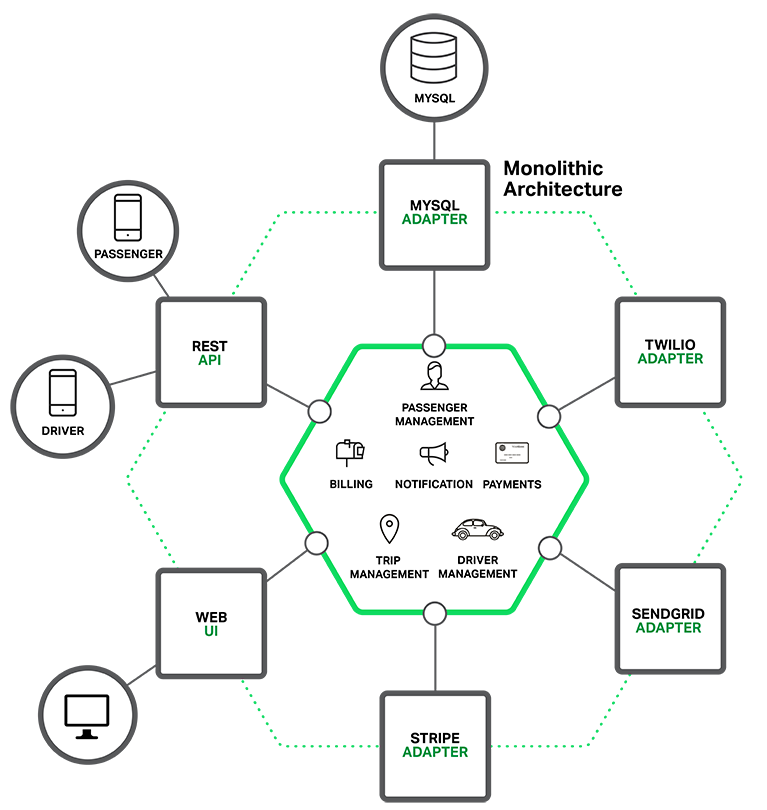

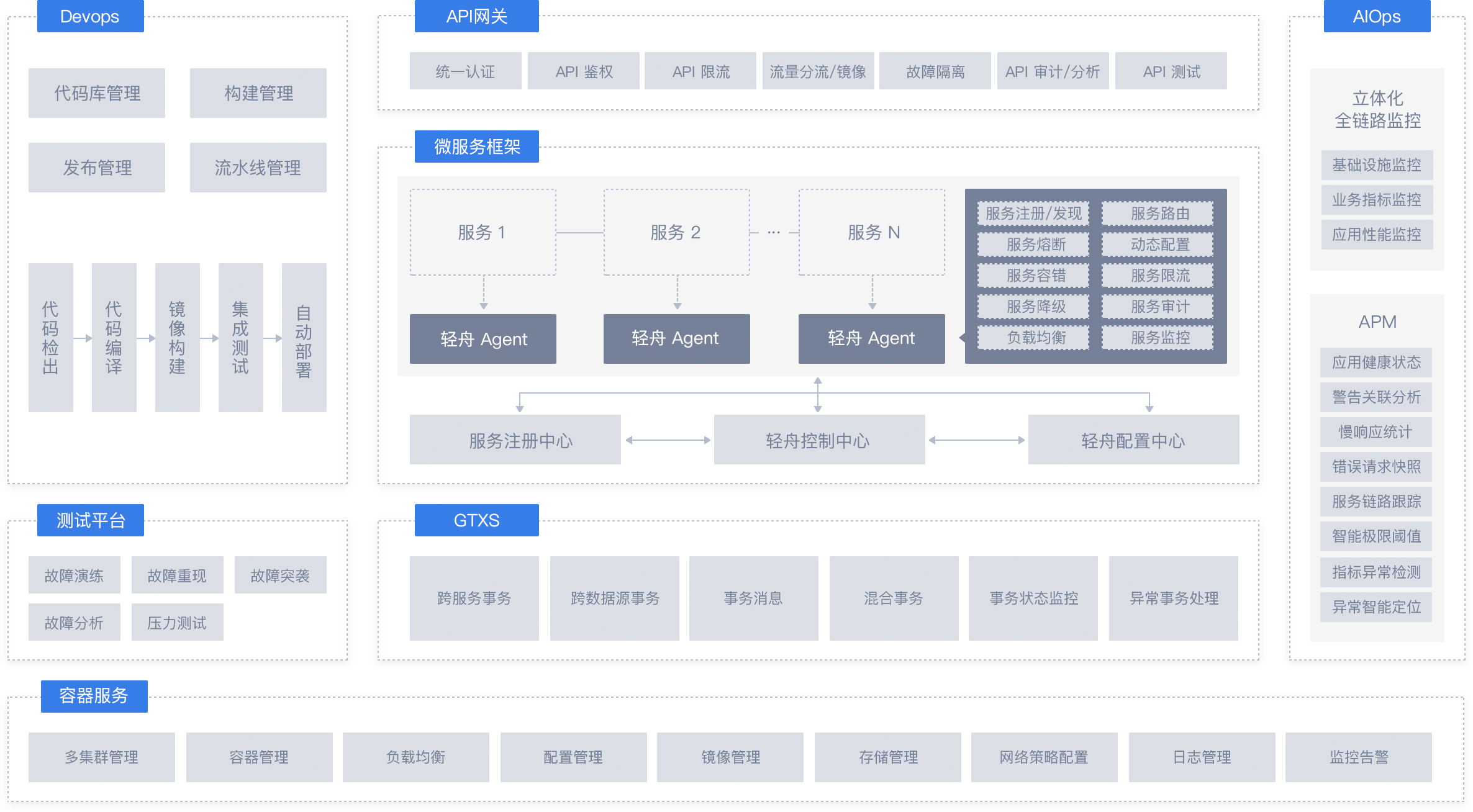
    
    <summary type="html">
    
      &lt;blockquote&gt;
&lt;p&gt;&lt;strong&gt;&lt;em&gt;记一次莫名其妙的 CPU 100% Bug 排查&lt;/em&gt;&lt;/strong&gt;&lt;/p&gt;
&lt;/blockquote&gt;
&lt;figure class=&quot;image-bubble&quot;&gt;
                &lt;div class=&quot;img-lightbox&quot;&gt;
                    &lt;div class=&quot;overlay&quot;&gt;&lt;/div&gt;
                    &lt;img src=&quot;/2019/04/28/centos7-tracker-hight-cpu-percent/cover.jpg&quot; alt title&gt;
                &lt;/div&gt;
                &lt;div class=&quot;image-caption&quot;&gt;&lt;/div&gt;
            &lt;/figure&gt;
    
    </summary>
    
      <category term="CentOS" scheme="https://abelsu7.top/categories/CentOS/"/>
    
    
      <category term="Linux" scheme="https://abelsu7.top/tags/Linux/"/>
    
      <category term="CentOS" scheme="https://abelsu7.top/tags/CentOS/"/>
    
  </entry>
  
  <entry>
    <title>Linux 设置多台主机 SSH 免密登录</title>
    <link href="https://abelsu7.top/2019/04/28/setup-remote-ssh-login/"/>
    <id>https://abelsu7.top/2019/04/28/setup-remote-ssh-login/</id>
    <published>2019-04-28T03:25:45.000Z</published>
    <updated>2019-09-01T13:04:11.668Z</updated>
    
    <content type="html"><![CDATA[<blockquote><p><strong><em>摘自 <a href="https://linuxize.com/post/how-to-setup-passwordless-ssh-login/" target="_blank" rel="noopener">How to Setup Passwordless SSH Login | Linuxize</a></em></strong></p></blockquote><figure class="image-bubble">                <div class="img-lightbox">                    <div class="overlay"></div>                    <img src="/2019/04/28/setup-remote-ssh-login/cover.png" alt title>                </div>                <div class="image-caption"></div>            </figure><a id="more"></a><h3 id="1-查看已有密钥"><a href="#1-查看已有密钥" class="headerlink" title="1. 查看已有密钥"></a>1. 查看已有密钥</h3><pre><code class="lang-bash">&gt; ls -l ~/.ssh/total 12-rw-------  1 root root 1679 Apr 11 10:11 id_rsa-rw-r--r--  1 root root  398 Apr 11 10:11 id_rsa.pub-rw-r--r--. 1 root root 1736 Apr 11 10:21 known_hosts</code></pre><p>若可看到<code>id_rsa</code>、<code>id_rsa.pub</code>存在，则说明<strong>该机器上之前已经生成了 SSH 密钥</strong>，可以选择<strong>继续使用该密钥</strong>或<strong>重新生成新密钥</strong>。</p><h3 id="2-重新生成密钥"><a href="#2-重新生成密钥" class="headerlink" title="2. 重新生成密钥"></a>2. 重新生成密钥</h3><p>若选择<strong>重新生成密钥</strong>，则先<strong>备份旧密钥</strong>（如有需要），再使用以下命令：</p><pre><code class="lang-bash">&gt; ssh-keygen -t rsa -b 4096 -C &quot;your_email@domain.com&quot;</code></pre><p>之后<strong>连按 4 次回车</strong>，表示<strong>采用默认设置</strong>，生成密钥：</p><figure class="image-bubble">                <div class="img-lightbox">                    <div class="overlay"></div>                    <img src="/2019/04/28/setup-remote-ssh-login/ssh-keygen.jpg" alt="连按 4 次回车，生成密钥文件" title>                </div>                <div class="image-caption">连按 4 次回车，生成密钥文件</div>            </figure><p>最后确认已经生成<strong>密钥文件</strong><code>id_rsa</code>、<code>id_rsa.pub</code>：</p><pre><code class="lang-bash">&gt; ls ~/.ssh/id_*/root/.ssh/id_rsa  /root/.ssh/id_rsa.pub</code></pre><h3 id="3-将公钥复制到其他主机"><a href="#3-将公钥复制到其他主机" class="headerlink" title="3. 将公钥复制到其他主机"></a>3. 将公钥复制到其他主机</h3><p>使用<code>ssh-copy-id</code>命令<strong>将本机的公钥复制到指定主机的</strong><code>authorized_keys</code><strong>文件中</strong>：</p><pre><code class="lang-bash">&gt; ssh-copy-id remote_username@server_ip_address</code></pre><p>例如现在我有<strong>三台 Linux 主机</strong>，均已生成 SSH 密钥，<strong>主机名</strong>如下所示：</p><ul><li><code>abelsu7-ubuntu</code></li><li><code>centos-1</code></li><li><code>centos-2</code></li></ul><p>以<code>abelsu7-ubuntu</code>为例，执行以下命令：</p><pre><code class="lang-bash">&gt; ssh-copy-id root@centos-1/usr/bin/ssh-copy-id: INFO: Source of key(s) to be installed: &quot;/root/.ssh/id_rsa.pub&quot;/usr/bin/ssh-copy-id: INFO: attempting to log in with the new key(s), to filter out any that are already installed/usr/bin/ssh-copy-id: INFO: 1 key(s) remain to be installed -- if you are prompted now it is to install the new keysroot@centos-1 password: Number of key(s) added: 1Now try logging into the machine, with:   &quot;ssh &#39;root@centos-1&#39;&quot;and check to make sure that only the key(s) you wanted were added.&gt; ssh-copy-id root@centos-2/usr/bin/ssh-copy-id: INFO: Source of key(s) to be installed: &quot;/root/.ssh/id_rsa.pub&quot;/usr/bin/ssh-copy-id: INFO: attempting to log in with the new key(s), to filter out any that are already installed/usr/bin/ssh-copy-id: INFO: 1 key(s) remain to be installed -- if you are prompted now it is to install the new keysroot@centos-2 password: Number of key(s) added: 1Now try logging into the machine, with:   &quot;ssh &#39;root@centos-2&#39;&quot;and check to make sure that only the key(s) you wanted were added.</code></pre><p>之后就可以在<code>abelsu7-ubuntu</code>上<strong>直接通过 SSH 免密登录</strong><code>centos-1</code>、<code>centos-2</code>：</p><pre><code class="lang-bash">&gt; ssh root@centos-1&gt; ssh root@centos-2</code></pre><blockquote><p>在其他两台主机<code>centos-1</code>、<code>centos-2</code>上重复以上操作，即可<strong>在三台 Linux 主机上互相 SSH 免密登录</strong></p></blockquote><p>另外，如果<code>ssh-copy-id</code>不可用，则可使用以下命令作为替代：</p><pre><code class="lang-bash">&gt; cat ~/.ssh/id_rsa.pub | ssh remote_username@server_ip_address &quot;mkdir -p ~/.ssh &amp;&amp; cat &gt;&gt; ~/.ssh/authorized_keys&quot;</code></pre><h3 id="4-禁用-SSH-密码登录（可选）"><a href="#4-禁用-SSH-密码登录（可选）" class="headerlink" title="4. 禁用 SSH 密码登录（可选）"></a>4. 禁用 SSH 密码登录（可选）</h3><blockquote><p>关于<code>sshd_config</code>的更多配置，可参考 <a href="https://linuxize.com/post/using-the-ssh-config-file/" target="_blank" rel="noopener">Using the SSH Config File | Linuxize</a></p></blockquote><p>若要<strong>禁用 SSH 密码登录</strong>，则需<strong>修改</strong><code>sshd_config</code><strong>配置文件</strong>：</p><pre><code class="lang-bash">&gt; sudo vim /etc/ssh/sshd_config...# 修改如下PasswordAuthentication noChallengeResponseAuthentication noUsePAM no...&gt; sudo systemctl restart sshd # 重启服务后生效</code></pre><h3 id="参考文章"><a href="#参考文章" class="headerlink" title="参考文章"></a>参考文章</h3><blockquote><ol><li><a href="https://linuxize.com/post/how-to-set-up-ssh-keys-on-centos-7/" target="_blank" rel="noopener">How to Set Up SSH Keys on CentOS 7 | Linuxize</a></li><li><a href="https://linuxize.com/post/how-to-setup-passwordless-ssh-login/" target="_blank" rel="noopener">How to Setup Passwordless SSH Login | Linuxize</a></li><li><a href="https://linuxize.com/post/using-the-ssh-config-file/" target="_blank" rel="noopener">Using the SSH Config File | Linuxize</a></li><li><a href="https://linuxize.com/post/how-to-change-ssh-port-in-linux/" target="_blank" rel="noopener">How to Change the SSH Port in Linux | Linuxize</a></li><li><a href="https://blog.csdn.net/qq_37392589/article/details/81058479" target="_blank" rel="noopener">CentOS 7 如何实现免密登录（三个及三个以上机器）| CSDN</a></li></ol></blockquote><h3 id="SSH-相关文章收集"><a href="#SSH-相关文章收集" class="headerlink" title="SSH 相关文章收集"></a>SSH 相关文章收集</h3><blockquote><ol><li><a href="https://www.tecmint.com/speed-up-ssh-connections-in-linux/" target="_blank" rel="noopener">4 Ways to Speed Up SSH Connections in Linux | TecMint</a></li><li><a href="https://www.tecmint.com/ssh-chat-linux-terminal-chat-client/" target="_blank" rel="noopener">ssh-chat – Make Group/Private Chat with Other Linux Users Over SSH | TecMint</a></li><li><a href="https://linux.cn/article-9540-1.html" target="_blank" rel="noopener">高级 SSH 速查表 | Linux 中国</a></li></ol></blockquote><div><strong>🚩推荐阅读</strong>（由<a href="https://github.com/huiwang/hexo-recommended-posts">hexo文章推荐插件</a>驱动）<ul><li><a href="https://abelsu7.top/2019/10/23/go-exec-shell-command/">Go 语言使用 os/exec 执行 Shell 命令</a></li><li><a href="https://abelsu7.top/2019/10/17/centos7-install-nfs/">CentOS 7 安装配置 NFS</a></li><li><a href="https://abelsu7.top/2019/08/26/most-used-commands-to-diagnose-linux/">Linux 系统常用监控命令</a></li><li><a href="https://abelsu7.top/2019/07/07/modify-ls-command-dir-color/">Linux 终端修改 ls 命令目录显示颜色</a></li><li><a href="http://dyingdown.github.io/2020/01/29/Mount-mechanical-hard-disk-on-Linux/">How to mount mechanical hard disk on Linux</a></li><li><a href="https://lyonger.cn/article/websocket的几种测试方式/">websocket的几种测试方式</a></li></ul></div>]]></content>
    
    <summary type="html">
    
      &lt;blockquote&gt;
&lt;p&gt;&lt;strong&gt;&lt;em&gt;摘自 &lt;a href=&quot;https://linuxize.com/post/how-to-setup-passwordless-ssh-login/&quot; target=&quot;_blank&quot; rel=&quot;noopener&quot;&gt;How to Setup Passwordless SSH Login | Linuxize&lt;/a&gt;&lt;/em&gt;&lt;/strong&gt;&lt;/p&gt;
&lt;/blockquote&gt;
&lt;figure class=&quot;image-bubble&quot;&gt;
                &lt;div class=&quot;img-lightbox&quot;&gt;
                    &lt;div class=&quot;overlay&quot;&gt;&lt;/div&gt;
                    &lt;img src=&quot;/2019/04/28/setup-remote-ssh-login/cover.png&quot; alt title&gt;
                &lt;/div&gt;
                &lt;div class=&quot;image-caption&quot;&gt;&lt;/div&gt;
            &lt;/figure&gt;
    
    </summary>
    
      <category term="Linux" scheme="https://abelsu7.top/categories/Linux/"/>
    
    
      <category term="Linux" scheme="https://abelsu7.top/tags/Linux/"/>
    
      <category term="SSH" scheme="https://abelsu7.top/tags/SSH/"/>
    
  </entry>
  
  <entry>
    <title>Linux 下使用 df 命令查看磁盘使用情况</title>
    <link href="https://abelsu7.top/2019/04/18/linux-df-command/"/>
    <id>https://abelsu7.top/2019/04/18/linux-df-command/</id>
    <published>2019-04-18T13:46:25.000Z</published>
    <updated>2019-09-01T13:04:11.496Z</updated>
    
    <content type="html"><![CDATA[<blockquote><p><strong><em>译自 <a href="https://linuxize.com/post/how-to-check-disk-space-in-linux-using-the-df-command/" target="_blank" rel="noopener">How to Check Disk Space in Linux Using the df Command</a>，补充整理来源于网络</em></strong></p></blockquote><figure class="image-bubble">                <div class="img-lightbox">                    <div class="overlay"></div>                    <img src="/2019/04/18/linux-df-command/cover.jpg" alt title>                </div>                <div class="image-caption"></div>            </figure><a id="more"></a><h3 id="1-查看已挂载的所有文件系统"><a href="#1-查看已挂载的所有文件系统" class="headerlink" title="1. 查看已挂载的所有文件系统"></a>1. 查看已挂载的所有文件系统</h3><pre><code class="lang-bash">&gt; dfFilesystem     1K-blocks    Used Available Use% Mounted onudev              948204       0    948204   0% /devtmpfs             193132   19896    173236  11% /run/dev/vda1       51474044 2331696  46520964   5% /tmpfs             965652      24    965628   1% /dev/shmtmpfs               5120       0      5120   0% /run/locktmpfs             965652       0    965652   0% /sys/fs/cgrouptmpfs                100       0       100   0% /run/lxcfs/controllerstmpfs             193132       0    193132   0% /run/user/0</code></pre><p><strong>指定挂载路径</strong><code>/</code>：</p><pre><code class="lang-bash">&gt; df /Filesystem     1K-blocks    Used Available Use% Mounted on/dev/vda1       51474044 2332576  46520084   5% /</code></pre><h3 id="2-以-K、M、G-为单位显示大小"><a href="#2-以-K、M、G-为单位显示大小" class="headerlink" title="2. 以 K、M、G 为单位显示大小"></a>2. 以 K、M、G 为单位显示大小</h3><pre><code class="lang-bash">&gt; df -hFilesystem      Size  Used Avail Use% Mounted onudev            926M     0  926M   0% /devtmpfs           189M   20M  170M  11% /run/dev/vda1        50G  2.3G   45G   5% /tmpfs           944M   24K  943M   1% /dev/shmtmpfs           5.0M     0  5.0M   0% /run/locktmpfs           944M     0  944M   0% /sys/fs/cgrouptmpfs           100K     0  100K   0% /run/lxcfs/controllerstmpfs           189M     0  189M   0% /run/user/0</code></pre><h3 id="3-显示文件系统类型"><a href="#3-显示文件系统类型" class="headerlink" title="3. 显示文件系统类型"></a>3. 显示文件系统类型</h3><pre><code class="lang-bash">&gt; df -hTFilesystem     Type      Size  Used Avail Use% Mounted onudev           devtmpfs  926M     0  926M   0% /devtmpfs          tmpfs     189M   20M  170M  11% /run/dev/vda1      ext3       50G  2.3G   45G   5% /tmpfs          tmpfs     944M   24K  943M   1% /dev/shmtmpfs          tmpfs     5.0M     0  5.0M   0% /run/locktmpfs          tmpfs     944M     0  944M   0% /sys/fs/cgrouptmpfs          tmpfs     100K     0  100K   0% /run/lxcfs/controllerstmpfs          tmpfs     189M     0  189M   0% /run/user/0</code></pre><p><strong>指定文件系统类型</strong><code>ext3</code>：</p><pre><code class="lang-bash">&gt; df -t ext3Filesystem     1K-blocks    Used Available Use% Mounted on/dev/vda1       51474044 2332712  46519948   5% /&gt; df -x ext3 # 除 ext3 以外的其他类型Filesystem     1K-blocks  Used Available Use% Mounted onudev              948204     0    948204   0% /devtmpfs             193132 19896    173236  11% /runtmpfs             965652    24    965628   1% /dev/shmtmpfs               5120     0      5120   0% /run/locktmpfs             965652     0    965652   0% /sys/fs/cgrouptmpfs                100     0       100   0% /run/lxcfs/controllerstmpfs             193132     0    193132   0% /run/user/0</code></pre><h3 id="4-显示-Inode-使用情况"><a href="#4-显示-Inode-使用情况" class="headerlink" title="4. 显示 Inode 使用情况"></a>4. 显示 Inode 使用情况</h3><pre><code class="lang-bash">&gt; df -ih /Filesystem     Inodes IUsed IFree IUse% Mounted on/dev/vda1        3.2M   93K  3.1M    3% /</code></pre><h3 id="5-格式化输出"><a href="#5-格式化输出" class="headerlink" title="5. 格式化输出"></a>5. 格式化输出</h3><p>还可以在<code>df</code>命令中<strong>指定打印的字段</strong>，可以<strong>添加</strong><code>--output[=FIELD_LIST]</code><strong>选项</strong>，<code>FIELD_LIST</code>中<strong>各个字段用</strong><code>,</code><strong>隔开</strong>：</p><ul><li><code>source</code>：文件系统<strong>源地址</strong></li><li><code>fstype</code>：文件系统<strong>类型</strong></li><li><code>itotal</code>：文件系统的 <strong>inodes 总量</strong></li><li><code>iused</code>：<strong>已使用的 inodes</strong></li><li><code>iavail</code>：<strong>可使用的 inodes</strong></li><li><code>ipcent</code>：<strong>已使用的 inodes 百分比</strong></li><li><code>size</code>：<strong>磁盘空间总量</strong></li><li><code>used</code>：<strong>已使用</strong>的<strong>磁盘空间大小</strong></li><li><code>avail</code>：<strong>可用</strong>的<strong>磁盘空间大小</strong></li><li><code>pcent</code>：已使用的<strong>磁盘空间百分比</strong></li><li><code>file</code>：命令行中指定的<strong>文件名</strong></li><li><code>target</code>：文件系统<strong>挂载点</strong></li></ul><pre><code class="lang-bash">&gt; df -h -t tmpfs --output=source,size,pcent,targetFilesystem      Size Use% Mounted ontmpfs           189M  11% /runtmpfs           944M   1% /dev/shmtmpfs           5.0M   0% /run/locktmpfs           944M   0% /sys/fs/cgrouptmpfs           100K   0% /run/lxcfs/controllerstmpfs           189M   0% /run/user/0</code></pre><h3 id="参考文章"><a href="#参考文章" class="headerlink" title="参考文章"></a>参考文章</h3><blockquote><ol><li><a href="https://linuxize.com/post/how-to-check-disk-space-in-linux-using-the-df-command/" target="_blank" rel="noopener">How to Check Disk Space in Linux Using the df Command</a></li></ol></blockquote><div><strong>🚩推荐阅读</strong>（由<a href="https://github.com/huiwang/hexo-recommended-posts">hexo文章推荐插件</a>驱动）<ul><li><a href="https://abelsu7.top/2019/10/23/go-exec-shell-command/">Go 语言使用 os/exec 执行 Shell 命令</a></li><li><a href="https://abelsu7.top/2019/10/17/centos7-install-nfs/">CentOS 7 安装配置 NFS</a></li><li><a href="https://abelsu7.top/2019/08/26/most-used-commands-to-diagnose-linux/">Linux 系统常用监控命令</a></li><li><a href="https://abelsu7.top/2019/07/07/modify-ls-command-dir-color/">Linux 终端修改 ls 命令目录显示颜色</a></li><li><a href="http://dyingdown.github.io/2020/01/29/Mount-mechanical-hard-disk-on-Linux/">How to mount mechanical hard disk on Linux</a></li><li><a href="https://lyonger.cn/article/websocket的几种测试方式/">websocket的几种测试方式</a></li></ul></div>]]></content>
    
    <summary type="html">
    
      &lt;blockquote&gt;
&lt;p&gt;&lt;strong&gt;&lt;em&gt;译自 &lt;a href=&quot;https://linuxize.com/post/how-to-check-disk-space-in-linux-using-the-df-command/&quot; target=&quot;_blank&quot; rel=&quot;noopener&quot;&gt;How to Check Disk Space in Linux Using the df Command&lt;/a&gt;，补充整理来源于网络&lt;/em&gt;&lt;/strong&gt;&lt;/p&gt;
&lt;/blockquote&gt;
&lt;figure class=&quot;image-bubble&quot;&gt;
                &lt;div class=&quot;img-lightbox&quot;&gt;
                    &lt;div class=&quot;overlay&quot;&gt;&lt;/div&gt;
                    &lt;img src=&quot;/2019/04/18/linux-df-command/cover.jpg&quot; alt title&gt;
                &lt;/div&gt;
                &lt;div class=&quot;image-caption&quot;&gt;&lt;/div&gt;
            &lt;/figure&gt;
    
    </summary>
    
      <category term="Linux" scheme="https://abelsu7.top/categories/Linux/"/>
    
    
      <category term="Linux" scheme="https://abelsu7.top/tags/Linux/"/>
    
      <category term="Shell" scheme="https://abelsu7.top/tags/Shell/"/>
    
  </entry>
  
  <entry>
    <title>Vim 入坑不完全指北</title>
    <link href="https://abelsu7.top/2019/04/18/vim-quick-guide/"/>
    <id>https://abelsu7.top/2019/04/18/vim-quick-guide/</id>
    <published>2019-04-18T12:53:20.000Z</published>
    <updated>2019-09-01T13:04:11.762Z</updated>
    
    <content type="html"><![CDATA[<blockquote><p><strong><em>一入 Vim 深似海，从此 IDE 是路人</em></strong></p></blockquote><figure class="image-bubble">                <div class="img-lightbox">                    <div class="overlay"></div>                    <img src="/2019/04/18/vim-quick-guide/cover.png" alt title>                </div>                <div class="image-caption"></div>            </figure><a id="more"></a><p><strong><em>更新中…</em></strong></p><h3 id="目录"><a href="#目录" class="headerlink" title="目录"></a>目录</h3><ul><li><a href="#目录">目录</a></li><li><a href="#1-基本操作">1. 基本操作</a><ul><li><a href="#移动光标">移动光标</a></li><li><a href="#文件保存与退出">文件保存与退出</a></li><li><a href="#删除字符">删除字符</a></li><li><a href="#插入字符">插入字符</a></li><li><a href="#行末添加新字符">行末添加新字符</a></li></ul></li><li><a href="#2-删除-撤销">2. 删除/撤销</a><ul><li><a href="#d-命令及其参数">d 命令及其参数</a></li><li><a href="#w-e-移动光标">w/e 移动光标</a></li><li><a href="#dd-删除整行">dd 删除整行</a></li><li><a href="#Undo-Redo">Undo/Redo</a></li></ul></li><li><a href="#3-插入-替换-编辑">3. 插入/替换/编辑</a><ul><li><a href="#p-命令">p 命令</a></li><li><a href="#r-命令">r 命令</a></li><li><a href="#c-命令">c 命令</a></li></ul></li><li><a href="#4-定位-搜索替换-括号匹配">4. 定位/搜索替换/括号匹配</a><ul><li><a href="#快速定位">快速定位</a></li><li><a href="#搜索">搜索</a></li><li><a href="#替换">替换</a></li><li><a href="#括号匹配">括号匹配</a></li></ul></li><li><a href="#5-运行终端命令-保存至文件">5. 运行终端命令/保存至文件</a><ul><li><a href="#运行终端命令">运行终端命令</a></li><li><a href="#保存至文件">保存至文件</a></li><li><a href="#保存选中内容">保存选中内容</a></li><li><a href="#插入文件内容">插入文件内容</a></li></ul></li><li><a href="#6-新行插入-连续替换-复制粘贴-搜索选项">6. 新行插入/连续替换/复制粘贴/搜索选项</a><ul><li><a href="#o-命令">o 命令</a></li><li><a href="#a-命令">a 命令</a></li><li><a href="#R-命令">R 命令</a></li><li><a href="#复制-粘贴">复制/粘贴</a></li><li><a href="#设置搜索选项">设置搜索选项</a></li></ul></li><li><a href="#7-获取帮助-自动补全">7. 获取帮助/自动补全</a><ul><li><a href="#获取帮助">获取帮助</a></li><li><a href="#自动补全">自动补全</a></li></ul></li><li><a href="#参考文章">参考文章</a></li></ul><h3 id="1-基本操作"><a href="#1-基本操作" class="headerlink" title="1. 基本操作"></a>1. 基本操作</h3><h4 id="移动光标"><a href="#移动光标" class="headerlink" title="移动光标"></a>移动光标</h4><pre><code class="lang-bash">       ^       k          Hint:  The h key is at the left and moves left. &lt; h       l &gt;           The l key is at the right and moves right.       j                 The j key looks like a down arrow.       v</code></pre><h4 id="文件保存与退出"><a href="#文件保存与退出" class="headerlink" title="文件保存与退出"></a>文件保存与退出</h4><blockquote><p><strong><em>待补充</em></strong></p></blockquote><ul><li><code>:w</code></li><li><code>:wq</code></li><li><code>:q!</code></li><li><code>:qa</code></li></ul><h4 id="删除字符"><a href="#删除字符" class="headerlink" title="删除字符"></a>删除字符</h4><ul><li><code>x</code>：<strong>删除光标选中的字符</strong></li></ul><h4 id="插入字符"><a href="#插入字符" class="headerlink" title="插入字符"></a>插入字符</h4><ul><li><code>i</code>：进入<strong>编辑模式</strong></li></ul><h4 id="行末添加新字符"><a href="#行末添加新字符" class="headerlink" title="行末添加新字符"></a>行末添加新字符</h4><ul><li><code>A</code>：可在当前光标<strong>行末添加新字符</strong></li></ul><h3 id="2-删除-撤销"><a href="#2-删除-撤销" class="headerlink" title="2. 删除/撤销"></a>2. 删除/撤销</h3><h4 id="d-命令及其参数"><a href="#d-命令及其参数" class="headerlink" title="d 命令及其参数"></a>d 命令及其参数</h4><pre><code class="lang-bash">Many commands that change text are made from an operator and a motion.The format for a delete command with the  d  delete operator is as follows:    d   motionWhere:   d      - is the delete operator.  motion - is what the operator will operate on (listed below).A short list of motions:  w - until the start of the next word, EXCLUDING its first character.  e - to the end of the current word, INCLUDING the last character.  $ - to the end of the line, INCLUDING the last character.</code></pre><ul><li><code>dw</code>：<strong>删除光标后的单词</strong>，光标停留在<strong>下一个单词的开头</strong></li><li><code>de</code>：<strong>删除光标后的单词</strong>，光标停留在<strong>下一个单词开头的前一个字符</strong></li><li><code>d$</code>：<strong>删除至行末</strong></li></ul><h4 id="w-e-移动光标"><a href="#w-e-移动光标" class="headerlink" title="w/e 移动光标"></a>w/e 移动光标</h4><ul><li><code>w</code>：移动至<strong>下一个单词的开头</strong>，可与数字连用，例如<code>2w</code>会移动至后数第二个单词的<strong>开头</strong></li><li><code>e</code>：移动至<strong>下一个单词的末尾</strong>，可与数字连用，例如<code>3e</code>会移动至后数第三个单词的<strong>末尾</strong></li><li><code>0</code>：移动至<strong>光标所在行的开头</strong>（类似<code>Home</code>）</li><li><code>d2w</code>：<strong>删除光标后数的两个单词</strong>，光标停留在<strong>第三个单词的首字符</strong></li><li><code>d2e</code>：<strong>删除光标后数的两个单词</strong>，光标停留在<strong>第三个单词首字符的前一个字符</strong></li></ul><h4 id="dd-删除整行"><a href="#dd-删除整行" class="headerlink" title="dd 删除整行"></a>dd 删除整行</h4><ul><li><code>dd</code>：删除<strong>当前行</strong></li><li><code>2dd</code>：删除<strong>包括当前行之后的 2 行</strong></li></ul><h4 id="Undo-Redo"><a href="#Undo-Redo" class="headerlink" title="Undo/Redo"></a>Undo/Redo</h4><ul><li><code>u</code>：<strong>撤销</strong>最近的一次更改</li><li><code>U</code>：撤销<strong>整行的更改</strong></li><li><code>Ctrl+R</code>：<strong>Redo</strong></li></ul><h3 id="3-插入-替换-编辑"><a href="#3-插入-替换-编辑" class="headerlink" title="3. 插入/替换/编辑"></a>3. 插入/替换/编辑</h3><h4 id="p-命令"><a href="#p-命令" class="headerlink" title="p 命令"></a>p 命令</h4><ul><li><code>p</code>：将上一次删除的内容<strong>插入到光标之后</strong></li></ul><h4 id="r-命令"><a href="#r-命令" class="headerlink" title="r 命令"></a>r 命令</h4><ul><li><code>r</code>：<strong>替换</strong>光标选中的字符</li></ul><h4 id="c-命令"><a href="#c-命令" class="headerlink" title="c 命令"></a>c 命令</h4><p><strong>与</strong><code>d</code><strong>命令类似</strong>，满足以下格式：</p><pre><code class="lang-bash">&gt; c [number] motion</code></pre><ul><li><code>ce</code>：编辑光标之后的单词直至其末尾</li><li><code>c2e</code>：编辑光标之后的 2 个单词直至其末尾</li><li><code>c$</code>：编辑光标至行末的内容</li></ul><h3 id="4-定位-搜索替换-括号匹配"><a href="#4-定位-搜索替换-括号匹配" class="headerlink" title="4. 定位/搜索替换/括号匹配"></a>4. 定位/搜索替换/括号匹配</h3><h4 id="快速定位"><a href="#快速定位" class="headerlink" title="快速定位"></a>快速定位</h4><ul><li><code>Ctrl+G</code>：<strong>显示当前位置及行号</strong></li><li><code>G</code>：移动至<strong>文件末尾</strong></li><li><code>gg</code>：移动至<strong>文件开头</strong></li><li><code>313 G</code>：移动至第<code>313</code>行</li></ul><h4 id="搜索"><a href="#搜索" class="headerlink" title="搜索"></a>搜索</h4><ul><li><code>/pattern</code>：<strong>向后查找</strong>包含<code>pattern</code>的字符串</li><li><code>?pattern</code>：<strong>向前查找</strong>包含<code>pattern</code>的字符串</li><li><code>n</code>：<strong>下一个匹配</strong></li><li><code>N</code>：<strong>上一个匹配</strong></li><li><code>Ctrl+O</code>：跳转至<strong>光标上一次所在位置</strong></li><li><code>Ctrl+I</code>：跳转至<strong>光标下一次所在位置</strong></li></ul><h4 id="替换"><a href="#替换" class="headerlink" title="替换"></a>替换</h4><ul><li><code>:s/old/new</code>：将该行<strong>第一个出现的</strong><code>old</code>替换为<code>new</code></li><li><code>:s/old/new/g</code>：将该行<strong>所有出现的</strong><code>old</code>替换为<code>new</code></li><li><code>:#,#s/old/new/g</code>：将<strong>两行之间所有出现的</strong><code>old</code>替换为<code>new</code></li><li><code>:%s/old/new/g</code>：将<strong>文件中所有出现的</strong><code>old</code>替换为<code>new</code></li><li><code>:%s/old/new/g</code>：查找文件中所有出现的<code>old</code>，并<strong>提示用户是否用</strong><code>new</code><strong>进行替换</strong></li></ul><h4 id="括号匹配"><a href="#括号匹配" class="headerlink" title="括号匹配"></a>括号匹配</h4><ul><li><code>%</code>：查找<strong>与光标后最近的左括号</strong><code>(</code>、<code>[</code>、<code>{</code><strong>匹配的右括号</strong></li></ul><h3 id="5-运行终端命令-保存至文件"><a href="#5-运行终端命令-保存至文件" class="headerlink" title="5. 运行终端命令/保存至文件"></a>5. 运行终端命令/保存至文件</h3><h4 id="运行终端命令"><a href="#运行终端命令" class="headerlink" title="运行终端命令"></a>运行终端命令</h4><ul><li><code>:!command</code>：例如<code>:!pwd</code>将打印当前工作目录路径</li></ul><h4 id="保存至文件"><a href="#保存至文件" class="headerlink" title="保存至文件"></a>保存至文件</h4><ul><li><code>:w FILENAME</code>：将更改保存至<code>FILENAME</code></li></ul><h4 id="保存选中内容"><a href="#保存选中内容" class="headerlink" title="保存选中内容"></a>保存选中内容</h4><ol><li>首先在<strong>起始行</strong>按下<code>v</code>进入<strong>可视化选择模式</strong></li><li>移动光标，<strong>选中想要保存的内容</strong></li><li>之后<strong>按下</strong><code>:</code>，屏幕下方会出现<code>:&#39;&lt;,&#39;&gt;</code></li><li><strong>输入</strong><code>w TEST</code>，即屏幕下方显示<code>:&#39;&lt;,&#39;&gt;w TEST</code>，<strong>将选中内容保存至</strong><code>TEST</code></li></ol><h4 id="插入文件内容"><a href="#插入文件内容" class="headerlink" title="插入文件内容"></a>插入文件内容</h4><ul><li><code>:r TEST</code>：在光标后<strong>插入文件</strong><code>TEST</code><strong>的内容</strong></li><li><code>:r !pwd</code>：在光标后<strong>插入</strong><code>pwd</code><strong>命令输出的内容</strong></li></ul><h3 id="6-新行插入-连续替换-复制粘贴-搜索选项"><a href="#6-新行插入-连续替换-复制粘贴-搜索选项" class="headerlink" title="6. 新行插入/连续替换/复制粘贴/搜索选项"></a>6. 新行插入/连续替换/复制粘贴/搜索选项</h3><h4 id="o-命令"><a href="#o-命令" class="headerlink" title="o 命令"></a>o 命令</h4><ul><li><code>:o</code>：在光标<strong>下方插入新行</strong>，并进入<strong>编辑模式</strong></li><li><code>:O</code>：在光标<strong>上方插入新行</strong>，并进入<strong>编辑模式</strong></li></ul><h4 id="a-命令"><a href="#a-命令" class="headerlink" title="a 命令"></a>a 命令</h4><ul><li><code>:a</code>：在<strong>当前光标之后</strong>插入新内容，并进入<strong>编辑模式</strong></li></ul><h4 id="R-命令"><a href="#R-命令" class="headerlink" title="R 命令"></a>R 命令</h4><ul><li><code>:R</code>：进入<strong>编辑模式</strong>，并<strong>用输入的字符替换当前光标选中的字符</strong></li></ul><h4 id="复制-粘贴"><a href="#复制-粘贴" class="headerlink" title="复制/粘贴"></a>复制/粘贴</h4><ul><li><code>y</code>：<strong>复制选中内容</strong></li><li><code>y2w</code>：复制光标之后的两个单词</li><li><code>p</code>：在光标之后<strong>粘贴内容</strong></li></ul><h4 id="设置搜索选项"><a href="#设置搜索选项" class="headerlink" title="设置搜索选项"></a>设置搜索选项</h4><ul><li><code>:set ic</code>：Ignore Case，<strong>忽略大小写</strong></li><li><code>:set noic</code>：<strong>开启大小写</strong></li><li><code>:set hls</code>：Highlight Search，<strong>高亮搜索</strong></li><li><code>:nohlsearch</code>：<strong>取消当前的高亮</strong>，可简写为<code>:nohl</code>或<code>:noh</code></li><li><code>:set is</code>：Increasing Search，<strong>递进搜索</strong></li><li><code>:set nois</code>：<strong>取消递进搜索</strong></li></ul><h3 id="7-获取帮助-自动补全"><a href="#7-获取帮助-自动补全" class="headerlink" title="7. 获取帮助/自动补全"></a>7. 获取帮助/自动补全</h3><h4 id="获取帮助"><a href="#获取帮助" class="headerlink" title="获取帮助"></a>获取帮助</h4><ul><li><code>:help</code>：打开<strong>帮助文档</strong></li></ul><h4 id="自动补全"><a href="#自动补全" class="headerlink" title="自动补全"></a>自动补全</h4><ul><li><code>Ctrl+D</code>：显示所有<strong>匹配开头的命令</strong></li><li><code>Tab</code>：<strong>自动补全</strong>至下一项</li></ul><h3 id="8-vimrc-设置快捷键"><a href="#8-vimrc-设置快捷键" class="headerlink" title="8. .vimrc 设置快捷键"></a>8. .vimrc 设置快捷键</h3><h4 id="Ctrl-S-保存"><a href="#Ctrl-S-保存" class="headerlink" title="Ctrl+S 保存"></a>Ctrl+S 保存</h4><blockquote><p>参考 <a href="https://www.cnblogs.com/wbtcookie/p/4572385.html" target="_blank" rel="noopener">Vim 实现 Ctrl+S 为保存快捷键 | 博客园</a></p></blockquote><p>在<code>~/.vimrc</code>中加入以下内容：</p><blockquote><p>我用的是<code>nvim</code>，所以配置文件在<code>~/.config/nvim/</code>目录下</p></blockquote><pre><code class="lang-vim">&quot; 快捷键设置nmap &lt;F2&gt; :NERDTreeToggle&lt;cr&gt;nmap &lt;F3&gt; :TagbarToggle&lt;cr&gt;nmap &lt;F6&gt; :GoFmt&lt;cr&gt;nmap &lt;C-s&gt; :w&lt;cr&gt;</code></pre><h3 id="参考文章"><a href="#参考文章" class="headerlink" title="参考文章"></a>参考文章</h3><blockquote><ol><li><a href="https://hackernoon.com/learning-vim-what-i-wish-i-knew-b5dca186bef7" target="_blank" rel="noopener">Learning Vim: What I Wish I Knew | Hacker Noon</a></li><li><a href="https://www.linode.com/docs/tools-reference/tools/introduction-to-vim-customization/" target="_blank" rel="noopener">Introduction To Vim Customization | Linode</a></li><li><a href="https://github.com/amix/vimrc" target="_blank" rel="noopener">The Ultimate vimrc | Github</a></li><li><a href="https://github.com/dracula/dracula-theme/" target="_blank" rel="noopener">Vim Dracula Theme | Github</a></li><li><a href="https://github.com/VundleVim/Vundle.vim" target="_blank" rel="noopener">Vundle.vim | Github</a></li><li><a href="https://github.com/lexkong/lexVim" target="_blank" rel="noopener">lexVim - lexkong | Github</a></li><li><a href="https://mp.weixin.qq.com/s/k9PBlG5D6ylzTXfrj2ZI6g" target="_blank" rel="noopener">138 条 Vim 命令、操作、快捷键全集 | 马哥 Linux 运维</a></li><li><a href="https://mp.weixin.qq.com/s/clK8OSLMLLp1ujHyVKiwhg" target="_blank" rel="noopener">练了一年再来总结的 vim 使用技巧 | CU 技术社区</a></li><li><a href="https://mp.weixin.qq.com/s/10DB-vnL77kzBZ69HXcE6Q" target="_blank" rel="noopener">哈哈：180万程序员不知如何退出Vim编辑器 | 实验楼</a></li><li><a href="https://mp.weixin.qq.com/s/EV773mhaO6o7lkIeDb_cVA" target="_blank" rel="noopener">精通 VIM ，此文就够了 | zempty 笔记</a></li><li><a href="https://linux.cn/article-8288-1.html" target="_blank" rel="noopener">超酷的 Vim 搜索技巧 | Linux 中国</a></li><li><a href="https://www.kawabangga.com/vim系列" target="_blank" rel="noopener">Vim 系列教程 | 卡瓦邦噶</a></li></ol></blockquote><div><strong>🚩推荐阅读</strong>（由<a href="https://github.com/huiwang/hexo-recommended-posts">hexo文章推荐插件</a>驱动）<ul><li><a href="https://abelsu7.top/2019/10/23/go-exec-shell-command/">Go 语言使用 os/exec 执行 Shell 命令</a></li><li><a href="https://abelsu7.top/2019/10/17/centos7-install-nfs/">CentOS 7 安装配置 NFS</a></li><li><a href="https://abelsu7.top/2019/08/26/most-used-commands-to-diagnose-linux/">Linux 系统常用监控命令</a></li><li><a href="https://abelsu7.top/2019/07/07/modify-ls-command-dir-color/">Linux 终端修改 ls 命令目录显示颜色</a></li><li><a href="http://dyingdown.github.io/2020/01/29/Mount-mechanical-hard-disk-on-Linux/">How to mount mechanical hard disk on Linux</a></li><li><a href="https://lyonger.cn/article/websocket的几种测试方式/">websocket的几种测试方式</a></li></ul></div>]]></content>
    
    <summary type="html">
    
      &lt;blockquote&gt;
&lt;p&gt;&lt;strong&gt;&lt;em&gt;一入 Vim 深似海，从此 IDE 是路人&lt;/em&gt;&lt;/strong&gt;&lt;/p&gt;
&lt;/blockquote&gt;
&lt;figure class=&quot;image-bubble&quot;&gt;
                &lt;div class=&quot;img-lightbox&quot;&gt;
                    &lt;div class=&quot;overlay&quot;&gt;&lt;/div&gt;
                    &lt;img src=&quot;/2019/04/18/vim-quick-guide/cover.png&quot; alt title&gt;
                &lt;/div&gt;
                &lt;div class=&quot;image-caption&quot;&gt;&lt;/div&gt;
            &lt;/figure&gt;
    
    </summary>
    
      <category term="Vim" scheme="https://abelsu7.top/categories/Vim/"/>
    
    
      <category term="Linux" scheme="https://abelsu7.top/tags/Linux/"/>
    
      <category term="Shell" scheme="https://abelsu7.top/tags/Shell/"/>
    
      <category term="Vim" scheme="https://abelsu7.top/tags/Vim/"/>
    
  </entry>
  
  <entry>
    <title>Linux 下使用 du 命令查看目录占用空间大小</title>
    <link href="https://abelsu7.top/2019/04/17/linux-du-command/"/>
    <id>https://abelsu7.top/2019/04/17/linux-du-command/</id>
    <published>2019-04-17T08:31:37.000Z</published>
    <updated>2019-09-01T13:04:11.498Z</updated>
    
    <content type="html"><![CDATA[<blockquote><p><strong><em>译自 <a href="https://linuxize.com/post/how-get-size-of-file-directory-linux/" target="_blank" rel="noopener">How to Get the Size of a Directory in Linux</a>，补充整理来源于网络</em></strong></p></blockquote><figure class="image-bubble">                <div class="img-lightbox">                    <div class="overlay"></div>                    <img src="/2019/04/17/linux-du-command/cover.jpg" alt title>                </div>                <div class="image-caption"></div>            </figure><a id="more"></a><h3 id="1-du-命令简介"><a href="#1-du-命令简介" class="headerlink" title="1. du 命令简介"></a>1. du 命令简介</h3><p><code>du</code>命令为<code>disk usage</code>的缩写，是一个<strong>计算磁盘上目录或文件占用空间的工具</strong>，它可以用来<strong>显示文件系统上的目录、单个/多个文件所占用的磁盘空间</strong>。</p><blockquote><p><strong>这与</strong><code>df</code><strong>命令有所不同</strong>，<code>df</code>命令用来显示<strong>每个文件系统的磁盘使用量</strong>以及<strong>可用量</strong>的信息</p></blockquote><h3 id="2-查看目录占用空间总大小"><a href="#2-查看目录占用空间总大小" class="headerlink" title="2. 查看目录占用空间总大小"></a>2. 查看目录占用空间总大小</h3><pre><code class="lang-bash">&gt; du -csh /var /kvm5.3G    /var7.5G    /kvm13G    total</code></pre><p><strong>参数释义</strong>：</p><ul><li><code>-c</code>、<code>--total</code>：最后打印<strong>所有参数目录的空间占用大小总和</strong></li><li><code>-s</code>、<code>--summarize</code>：仅打印<strong>各参数目录的空间占用大小总和</strong>，<strong>不打印其子目录</strong></li><li><code>-h</code>、<code>--human-readable</code>：<strong>以</strong><code>K</code>、<code>M</code>、<code>G</code><strong>为单位显示空间占用大小</strong></li></ul><h3 id="3-查看一级子目录占用空间大小"><a href="#3-查看一级子目录占用空间大小" class="headerlink" title="3. 查看一级子目录占用空间大小"></a>3. 查看一级子目录占用空间大小</h3><pre><code class="lang-bash">&gt; du -shc /var/*0    /var/account0    /var/adm2.0G    /var/cache0    /var/crash8.0K    /var/db0    /var/empty0    /var/games0    /var/gopher0    /var/kerberos3.1G    /var/lib0    /var/local0    /var/lock180M    /var/log0    /var/mail0    /var/nis0    /var/opt0    /var/preserve0    /var/run45M    /var/spool0    /var/target32K    /var/tmp0    /var/yp5.3G    total</code></pre><p>或者：</p><pre><code class="lang-bash">&gt; du -h --max-depth=1 /var32K    /var/tmp3.1G    /var/lib180M    /var/log0    /var/adm2.0G    /var/cache8.0K    /var/db0    /var/empty0    /var/games0    /var/gopher0    /var/local0    /var/nis0    /var/opt0    /var/preserve45M    /var/spool0    /var/yp0    /var/kerberos0    /var/crash0    /var/target0    /var/account5.3G    /var</code></pre><h3 id="4-查看目录使用空间大小"><a href="#4-查看目录使用空间大小" class="headerlink" title="4. 查看目录使用空间大小"></a>4. 查看目录使用空间大小</h3><p>添加<code>--apparent-size</code><strong>参数</strong>：</p><pre><code class="lang-bash">&gt; du -sh /var5.3G    /var&gt; du -sh --apparent-size /var5.2G    /var</code></pre><p><code>du</code>命令还可以<strong>通过管道与其他命令结合使用</strong>，例如以下命令将<strong>打印</strong><code>/var</code><strong>目录下占用空间最大的前 5 个目录</strong>：</p><pre><code class="lang-bash">&gt; du -h /var/ | sort -rh | head -55.3G    /var/3.1G    /var/lib2.8G    /var/lib/docker/overlay22.8G    /var/lib/docker2.0G    /var/cache/yum/x86_64/7</code></pre><h3 id="参考文章"><a href="#参考文章" class="headerlink" title="参考文章"></a>参考文章</h3><blockquote><ol><li><a href="https://linuxize.com/post/how-get-size-of-file-directory-linux/" target="_blank" rel="noopener">How to Get the Size of a Directory in Linux</a></li><li><a href="https://dslztx.github.io/blog/2016/12/22/du命令" target="_blank" rel="noopener">du 命令 | dslztx</a></li><li><a href="https://dslztx.github.io/blog/2016/10/18/Ext%E6%96%87%E4%BB%B6%E7%B3%BB%E7%BB%9F%E4%B8%AD%EF%BC%8C%E6%96%87%E4%BB%B6%E7%9A%84%E2%80%9C%E5%8D%A0%E7%94%A8%E5%A4%A7%E5%B0%8F%E2%80%9D%E5%92%8C%E2%80%9C%E4%BD%BF%E7%94%A8%E5%A4%A7%E5%B0%8F%E2%80%9D/" target="_blank" rel="noopener">Ext文件系统中，文件的“占用大小”和“使用大小” | dslztx</a></li><li><a href="https://blog.51cto.com/hipercomer/810326" target="_blank" rel="noopener">Linux 的 du 命令 | 51CTO</a></li></ol></blockquote><div><strong>🚩推荐阅读</strong>（由<a href="https://github.com/huiwang/hexo-recommended-posts">hexo文章推荐插件</a>驱动）<ul><li><a href="https://abelsu7.top/2019/10/23/go-exec-shell-command/">Go 语言使用 os/exec 执行 Shell 命令</a></li><li><a href="https://abelsu7.top/2019/10/17/centos7-install-nfs/">CentOS 7 安装配置 NFS</a></li><li><a href="https://abelsu7.top/2019/08/26/most-used-commands-to-diagnose-linux/">Linux 系统常用监控命令</a></li><li><a href="https://abelsu7.top/2019/07/07/modify-ls-command-dir-color/">Linux 终端修改 ls 命令目录显示颜色</a></li><li><a href="http://dyingdown.github.io/2020/01/29/Mount-mechanical-hard-disk-on-Linux/">How to mount mechanical hard disk on Linux</a></li><li><a href="https://lyonger.cn/article/websocket的几种测试方式/">websocket的几种测试方式</a></li></ul></div>]]></content>
    
    <summary type="html">
    
      &lt;blockquote&gt;
&lt;p&gt;&lt;strong&gt;&lt;em&gt;译自 &lt;a href=&quot;https://linuxize.com/post/how-get-size-of-file-directory-linux/&quot; target=&quot;_blank&quot; rel=&quot;noopener&quot;&gt;How to Get the Size of a Directory in Linux&lt;/a&gt;，补充整理来源于网络&lt;/em&gt;&lt;/strong&gt;&lt;/p&gt;
&lt;/blockquote&gt;
&lt;figure class=&quot;image-bubble&quot;&gt;
                &lt;div class=&quot;img-lightbox&quot;&gt;
                    &lt;div class=&quot;overlay&quot;&gt;&lt;/div&gt;
                    &lt;img src=&quot;/2019/04/17/linux-du-command/cover.jpg&quot; alt title&gt;
                &lt;/div&gt;
                &lt;div class=&quot;image-caption&quot;&gt;&lt;/div&gt;
            &lt;/figure&gt;
    
    </summary>
    
      <category term="Linux" scheme="https://abelsu7.top/categories/Linux/"/>
    
    
      <category term="Linux" scheme="https://abelsu7.top/tags/Linux/"/>
    
      <category term="Shell" scheme="https://abelsu7.top/tags/Shell/"/>
    
  </entry>
  
  <entry>
    <title>浅谈 CI/CD：持续集成、持续交付</title>
    <link href="https://abelsu7.top/2019/04/17/ci-cd-intro/"/>
    <id>https://abelsu7.top/2019/04/17/ci-cd-intro/</id>
    <published>2019-04-17T07:05:48.000Z</published>
    <updated>2019-09-01T13:04:11.040Z</updated>
    
    <content type="html"><![CDATA[<blockquote><p><strong><em>文章内容收集整理于网络，详见参考文章</em></strong></p></blockquote><figure class="image-bubble">                <div class="img-lightbox">                    <div class="overlay"></div>                    <img src="/2019/04/17/ci-cd-intro/cover.png" alt title>                </div>                <div class="image-caption"></div>            </figure><a id="more"></a><p>To be updated</p><h3 id="参考文章"><a href="#参考文章" class="headerlink" title="参考文章"></a>参考文章</h3><blockquote><ol><li><a href="https://linux.cn/article-9926-1.html" target="_blank" rel="noopener">什么是 CI/CD？| Linux 中国</a></li><li><a href="https://www.redhat.com/zh/topics/devops/what-is-ci-cd#" target="_blank" rel="noopener">什么是 CI/CD？| RedHat DevOps</a></li><li><a href="https://www.redhat.com/zh/resources/ansible-continuous-integration-delivery-whitepaper" target="_blank" rel="noopener">借助 Ansible 实现持续集成和交付 | RedHat</a></li><li><a href="https://blog.csdn.net/peterxiaoq/article/details/73648732" target="_blank" rel="noopener">如何理解持续集成、持续交付、持续部署？| CSDN</a></li><li><a href="https://zhuanlan.zhihu.com/p/31097868" target="_blank" rel="noopener">一文帮你秒懂CI, CD AND CD | 知乎</a></li><li><a href="https://www.zhihu.com/question/23444990" target="_blank" rel="noopener">如何理解持续集成、持续交付、持续部署？| 知乎</a></li><li><a href="https://www.mindtheproduct.com/2016/02/what-the-hell-are-ci-cd-and-devops-a-cheatsheet-for-the-rest-of-us/" target="_blank" rel="noopener">The Product Managers’ Guide to Continuous Delivery and DevOps | mind the Product</a></li><li><a href="https://gitbook.cn/books/58f5c16c24a8b0657529f488/index.html" target="_blank" rel="noopener">一张图带你了解持续交付和 DevOps 的前世今生 - 乔梁 | GitChat</a></li><li><a href="http://www.ruanyifeng.com/blog/2015/09/continuous-integration.html" target="_blank" rel="noopener">持续集成是什么？| 阮一峰</a></li><li><a href="https://zhuanlan.zhihu.com/p/42286143" target="_blank" rel="noopener">什么是持续集成（CI）/持续部署（CD）？| 知乎</a></li><li><a href="http://www.chenshake.com/ci-cd-hello-world-in-openshift/" target="_blank" rel="noopener">CI/CD Hello World in OpenShift | 陈沙克日志</a></li></ol></blockquote><div><strong>🚩推荐阅读</strong>（由<a href="https://github.com/huiwang/hexo-recommended-posts">hexo文章推荐插件</a>驱动）<ul><li><a href="https://lyonger.cn/article/devops建设模型/">devops建设模型</a></li><li><a href="http://www.borgor.cn/2019-07-17/551af828.html">应用程序发布与部署中的几个小Tips</a></li></ul></div>]]></content>
    
    <summary type="html">
    
      &lt;blockquote&gt;
&lt;p&gt;&lt;strong&gt;&lt;em&gt;文章内容收集整理于网络，详见参考文章&lt;/em&gt;&lt;/strong&gt;&lt;/p&gt;
&lt;/blockquote&gt;
&lt;figure class=&quot;image-bubble&quot;&gt;
                &lt;div class=&quot;img-lightbox&quot;&gt;
                    &lt;div class=&quot;overlay&quot;&gt;&lt;/div&gt;
                    &lt;img src=&quot;/2019/04/17/ci-cd-intro/cover.png&quot; alt title&gt;
                &lt;/div&gt;
                &lt;div class=&quot;image-caption&quot;&gt;&lt;/div&gt;
            &lt;/figure&gt;
    
    </summary>
    
      <category term="DevOps" scheme="https://abelsu7.top/categories/DevOps/"/>
    
    
      <category term="DevOps" scheme="https://abelsu7.top/tags/DevOps/"/>
    
      <category term="持续集成" scheme="https://abelsu7.top/tags/%E6%8C%81%E7%BB%AD%E9%9B%86%E6%88%90/"/>
    
      <category term="持续交付" scheme="https://abelsu7.top/tags/%E6%8C%81%E7%BB%AD%E4%BA%A4%E4%BB%98/"/>
    
  </entry>
  
  <entry>
    <title>CentOS 7 安装配置 VNC</title>
    <link href="https://abelsu7.top/2019/04/16/centos7-install-and-configure-vnc/"/>
    <id>https://abelsu7.top/2019/04/16/centos7-install-and-configure-vnc/</id>
    <published>2019-04-16T13:03:25.000Z</published>
    <updated>2019-09-01T13:04:11.007Z</updated>
    
    <content type="html"><![CDATA[<blockquote><p><strong><em>一文搞定 CentOS 7 VNC 配置</em></strong></p></blockquote><figure class="image-bubble">                <div class="img-lightbox">                    <div class="overlay"></div>                    <img src="/2019/04/16/centos7-install-and-configure-vnc/cover.jpg" alt title>                </div>                <div class="image-caption"></div>            </figure><a id="more"></a><h3 id="1-安装-TigerVNC"><a href="#1-安装-TigerVNC" class="headerlink" title="1. 安装 TigerVNC"></a>1. 安装 TigerVNC</h3><pre><code class="lang-bash">&gt; yum install tigervnc-server</code></pre><h3 id="2-设置登录密码"><a href="#2-设置登录密码" class="headerlink" title="2. 设置登录密码"></a>2. 设置登录密码</h3><p>切换至<strong>通过 VNC 连接的用户</strong>，并<strong>使用</strong><code>vncpasswd</code><strong>命令设置密码</strong>，长度<strong>至少为 6 位</strong>：</p><pre><code class="language-bash">> su - <mark>your_user</mark>  # If you want to configure VNC server to run under this user directly from CLI without switching users from GUI> vncpasswd</code></pre><h3 id="3-添加-systemd-配置文件"><a href="#3-添加-systemd-配置文件" class="headerlink" title="3. 添加 systemd 配置文件"></a>3. 添加 systemd 配置文件</h3><pre><code class="lang-bash">&gt; cp /lib/systemd/system/vncserver@.service  /etc/systemd/system/vncserver@:1.service&gt; vim /etc/systemd/system/vncserver@:1.service</code></pre><p><strong>编辑配置文件</strong><code>/etc/systemd/system/vncserver@:1.service</code>，注意修改<strong>高亮部分</strong>：</p><pre><code class="language-shell">[Unit]Description=Remote desktop service (VNC)After=syslog.target network.target[Service]Type=forkingExecStartPre=/bin/sh -c '/usr/bin/vncserver -kill %i > /dev/null 2>&1 || :'ExecStart=/sbin/runuser -l <mark>my_user</mark> -c "/usr/bin/vncserver %i -geometry <mark>1280x1024</mark>"PIDFile=<mark>/home/my_user/</mark>.vnc/%H%i.pidExecStop=/bin/sh -c '/usr/bin/vncserver -kill %i > /dev/null 2>&1 || :'[Install]WantedBy=multi-user.target</code></pre><h3 id="4-启用服务并设置开机启动"><a href="#4-启用服务并设置开机启动" class="headerlink" title="4. 启用服务并设置开机启动"></a>4. 启用服务并设置开机启动</h3><pre><code class="lang-bash">&gt; systemctl daemon-reload&gt; systemctl start vncserver@:1&gt; systemctl status vncserver@:1&gt; systemctl enable vncserver@:1</code></pre><p>使用以下命令<strong>查看服务状态</strong>：</p><pre><code class="lang-bash">&gt; systemctl status vncserver@:1.service# 或&gt; service vncserver@:1 status</code></pre><p>可以看到<code>vncserver</code><strong>已正常启动</strong>：</p><figure class="image-bubble">                <div class="img-lightbox">                    <div class="overlay"></div>                    <img src="/2019/04/16/centos7-install-and-configure-vnc/service-status.png" alt="vncserver@:1.service 正常启动" title>                </div>                <div class="image-caption">vncserver@:1.service 正常启动</div>            </figure><h3 id="5-查看端口使用情况"><a href="#5-查看端口使用情况" class="headerlink" title="5. 查看端口使用情况"></a>5. 查看端口使用情况</h3><pre><code class="lang-bash">&gt; ss -tulpn | grep vnctcp    LISTEN     0      5         *:5901                  *:*                   users:((&quot;Xvnc&quot;,pid=1356,fd=9))tcp    LISTEN     0      128       *:6001                  *:*                   users:((&quot;Xvnc&quot;,pid=1356,fd=6))tcp    LISTEN     0      5        :::5901                 :::*                   users:((&quot;Xvnc&quot;,pid=1356,fd=10))tcp    LISTEN     0      128      :::6001                 :::*                   users:((&quot;Xvnc&quot;,pid=1356,fd=5))</code></pre><p>或者：</p><pre><code class="lang-bash">&gt; vncserver -listTigerVNC server sessions:X DISPLAY #     PROCESS ID:1              1344:2              4112</code></pre><h3 id="6-防火墙放行端口"><a href="#6-防火墙放行端口" class="headerlink" title="6. 防火墙放行端口"></a>6. 防火墙放行端口</h3><pre><code class="lang-bash">&gt; firewall-cmd --add-port=5901/tcp&gt; firewall-cmd --add-port=5901/tcp --permanent</code></pre><h3 id="7-死机重启后服务启动失败的解决办法"><a href="#7-死机重启后服务启动失败的解决办法" class="headerlink" title="7. 死机重启后服务启动失败的解决办法"></a>7. 死机重启后服务启动失败的解决办法</h3><figure class="image-bubble">                <div class="img-lightbox">                    <div class="overlay"></div>                    <img src="/2019/04/16/centos7-install-and-configure-vnc/1.png" alt="系统死机重启后，服务启动失败" title>                </div>                <div class="image-caption">系统死机重启后，服务启动失败</div>            </figure><figure class="image-bubble">                <div class="img-lightbox">                    <div class="overlay"></div>                    <img src="/2019/04/16/centos7-install-and-configure-vnc/2.png" alt="手动启动 vncserver 提示端口已被占用" title>                </div>                <div class="image-caption">手动启动 vncserver 提示端口已被占用</div>            </figure><figure class="image-bubble">                <div class="img-lightbox">                    <div class="overlay"></div>                    <img src="/2019/04/16/centos7-install-and-configure-vnc/3.png" alt="~/.vnc 目录下残留 centos-1:5.pid" title>                </div>                <div class="image-caption">~/.vnc 目录下残留 centos-1:5.pid</div>            </figure><figure class="image-bubble">                <div class="img-lightbox">                    <div class="overlay"></div>                    <img src="/2019/04/16/centos7-install-and-configure-vnc/4.png" alt="该目录下文件未被清除" title>                </div>                <div class="image-caption">该目录下文件未被清除</div>            </figure><p><strong>手动清除残余文件后，重新启动服务</strong>：</p><pre><code class="lang-bash">&gt; rm ~/.vnc/*.pid&gt; rm -rf /tmp/.X11-unix&gt; service vncserver@:1 start</code></pre><p>可以看到<strong>服务已正常启动</strong>：</p><figure class="image-bubble">                <div class="img-lightbox">                    <div class="overlay"></div>                    <img src="/2019/04/16/centos7-install-and-configure-vnc/5.png" alt title>                </div>                <div class="image-caption"></div>            </figure><h3 id="参考文章"><a href="#参考文章" class="headerlink" title="参考文章"></a>参考文章</h3><blockquote><ol><li><a href="https://www.tecmint.com/install-and-configure-vnc-server-in-centos-7/" target="_blank" rel="noopener">How to Install and Configure VNC Server in CentOS 7 | TecMint</a></li><li><a href="https://linuxize.com/post/how-to-install-and-configure-vnc-on-centos-7/" target="_blank" rel="noopener">How to Install and Configure VNC on CentOS 7 | Linuxize</a></li></ol></blockquote><div><strong>🚩推荐阅读</strong>（由<a href="https://github.com/huiwang/hexo-recommended-posts">hexo文章推荐插件</a>驱动）<ul><li><a href="https://abelsu7.top/2020/03/05/centos7-update-git-version/">CentOS 7 升级 git 版本</a></li><li><a href="https://abelsu7.top/2020/02/23/centos7-disable-yum-autoupdate/">CentOS 7 禁止 Yum 在后台自动下载更新</a></li><li><a href="https://abelsu7.top/2019/10/17/centos7-install-nfs/">CentOS 7 安装配置 NFS</a></li><li><a href="https://abelsu7.top/2019/08/26/most-used-commands-to-diagnose-linux/">Linux 系统常用监控命令</a></li><li><a href="http://dyingdown.github.io/2020/01/29/Mount-mechanical-hard-disk-on-Linux/">How to mount mechanical hard disk on Linux</a></li><li><a href="https://lyonger.cn/article/websocket的几种测试方式/">websocket的几种测试方式</a></li></ul></div>]]></content>
    
    <summary type="html">
    
      &lt;blockquote&gt;
&lt;p&gt;&lt;strong&gt;&lt;em&gt;一文搞定 CentOS 7 VNC 配置&lt;/em&gt;&lt;/strong&gt;&lt;/p&gt;
&lt;/blockquote&gt;
&lt;figure class=&quot;image-bubble&quot;&gt;
                &lt;div class=&quot;img-lightbox&quot;&gt;
                    &lt;div class=&quot;overlay&quot;&gt;&lt;/div&gt;
                    &lt;img src=&quot;/2019/04/16/centos7-install-and-configure-vnc/cover.jpg&quot; alt title&gt;
                &lt;/div&gt;
                &lt;div class=&quot;image-caption&quot;&gt;&lt;/div&gt;
            &lt;/figure&gt;
    
    </summary>
    
      <category term="CentOS" scheme="https://abelsu7.top/categories/CentOS/"/>
    
    
      <category term="Linux" scheme="https://abelsu7.top/tags/Linux/"/>
    
      <category term="CentOS" scheme="https://abelsu7.top/tags/CentOS/"/>
    
      <category term="VNC" scheme="https://abelsu7.top/tags/VNC/"/>
    
  </entry>
  
  <entry>
    <title>《KVM 实战》笔记 1：构建 KVM 环境</title>
    <link href="https://abelsu7.top/2019/04/16/kvm-in-action-1/"/>
    <id>https://abelsu7.top/2019/04/16/kvm-in-action-1/</id>
    <published>2019-04-16T12:50:59.000Z</published>
    <updated>2019-09-01T13:04:11.424Z</updated>
    
    <content type="html"><![CDATA[<blockquote><p><strong><em>摘自 <a href="https://book.douban.com/subject/30544350/" target="_blank" rel="noopener">《KVM实战：原理、进阶与性能调优》</a></em></strong></p></blockquote><figure class="image-bubble">                <div class="img-lightbox">                    <div class="overlay"></div>                    <img src="/2019/04/16/kvm-in-action-1/cover.jpg" alt="《KVM实战：原理、进阶与性能调优》" title>                </div>                <div class="image-caption">《KVM实战：原理、进阶与性能调优》</div>            </figure><a id="more"></a><h3 id="目录"><a href="#目录" class="headerlink" title="目录"></a>目录</h3><ul><li><a href="#目录">目录</a></li><li><a href="#1-硬件系统的配置">1. 硬件系统的配置</a><ul><li><a href="#1-1-BIOS-开启-VT-VT-d">1.1 BIOS 开启 VT/VT-d</a></li><li><a href="#1-2-重启后查看-CPU-特性标志">1.2 重启后查看 CPU 特性标志</a></li></ul></li><li><a href="#2-安装宿主机操作系统">2. 安装宿主机操作系统</a></li><li><a href="#3-编译和安装-KVM">3. 编译和安装 KVM</a><ul><li><a href="#3-1-下载-KVM-源代码">3.1 下载 KVM 源代码</a></li><li><a href="#3-2-配置-KVM">3.2 配置 KVM</a></li><li><a href="#3-3-编译-KVM">3.3 编译 KVM</a></li><li><a href="#3-4-安装-KVM">3.4 安装 KVM</a></li><li><a href="#3-5-安装后的检查">3.5 安装后的检查</a></li></ul></li><li><a href="#4-编译和安装-QEMU">4. 编译和安装 QEMU</a><ul><li><a href="#4-1-下载-QEMU-源代码">4.1 下载 QEMU 源代码</a></li><li><a href="#4-2-配置和编译-QEMU">4.2 配置和编译 QEMU</a></li><li><a href="#4-3-安装-QEMU">4.3 安装 QEMU</a></li></ul></li><li><a href="#5-安装客户机">5. 安装客户机</a></li><li><a href="#参考文章">参考文章</a></li></ul><h3 id="1-硬件系统的配置"><a href="#1-硬件系统的配置" class="headerlink" title="1. 硬件系统的配置"></a>1. 硬件系统的配置</h3><p>KVM 从诞生之初就需要<strong>硬件虚拟化扩展</strong>的支持，其最初的开发是<strong>基于</strong><code>x86</code><strong>和</strong><code>x86-64</code><strong>处理器架构上的 Linux 系统</strong>进行的。</p><p>目前，KVM 被移植到多种不同处理器架构上，但在<code>x86-64</code><strong>架构上的支持是最完善的</strong>。</p><blockquote><p>本文<strong>默认基于</strong><code>x86-64</code><strong>的 Linux 系统进行相关操作</strong></p></blockquote><p>在<code>x86-64</code>架构的处理器中，<strong>KVM 需要的硬件虚拟化扩展</strong>分别为：</p><ul><li><strong>Intel VT</strong></li><li><strong>AMD-V</strong></li></ul><h4 id="1-1-BIOS-开启-VT-VT-d"><a href="#1-1-BIOS-开启-VT-VT-d" class="headerlink" title="1.1 BIOS 开启 VT/VT-d"></a>1.1 BIOS 开启 VT/VT-d</h4><ol><li>需要 <strong>CPU 在硬件上支持 VT 技术</strong></li><li>在 BIOS 中<strong>启用</strong><code>VT</code><strong>即</strong><code>Intel(R) Virtualization Technology</code></li><li>在 BIOS 中<strong>启用</strong><code>VT-d</code><strong>即</strong><code>Intel(R) VT for Directed I/O</code></li></ol><h4 id="1-2-重启后查看-CPU-特性标志"><a href="#1-2-重启后查看-CPU-特性标志" class="headerlink" title="1.2 重启后查看 CPU 特性标志"></a>1.2 重启后查看 CPU 特性标志</h4><p>设置好<code>VT</code>和<code>VT-d</code>的相关选项，<strong>保存 BIOS 设置并退出</strong>，系统<strong>重启后生效</strong>。</p><p>可通过<strong>检查</strong><code>/proc/cpuinfo</code><strong>文件</strong>中的 <strong>CPU 特性标志（flags）</strong>来查看 CPU 目前是否支持硬件虚拟化：</p><blockquote><p><strong>Intel CPU</strong> 支持虚拟化的标志为<code>vmx</code><br><strong>AMD CPU</strong> 支持虚拟化的标志为<code>svm</code></p></blockquote><pre><code class="lang-bash">&gt; grep -E &quot;vmx|svm&quot; /proc/cpuinfoflags        : ... vmx ... ...</code></pre><h3 id="2-安装宿主机操作系统"><a href="#2-安装宿主机操作系统" class="headerlink" title="2. 安装宿主机操作系统"></a>2. 安装宿主机操作系统</h3><ul><li>CentOS 7 安装时<strong>不需要选择</strong><code>Virtualization Host</code>，因为后续会<strong>自行编译 KVM 及 QEMU 源码</strong></li><li>CentOS 7 推荐选择<code>Server with GUI</code>、<code>GNOME Desktop</code>以及<code>Development Tools</code></li></ul><blockquote><p>本文实验环境：<strong>OS</strong><code>Ubuntu 18.04 LTS</code>，<strong>CPU</strong><code>i7-6700 * 8</code>，<strong>内存</strong><code>32G</code></p></blockquote><h3 id="3-编译和安装-KVM"><a href="#3-编译和安装-KVM" class="headerlink" title="3. 编译和安装 KVM"></a>3. 编译和安装 KVM</h3><h4 id="3-1-下载-KVM-源代码"><a href="#3-1-下载-KVM-源代码" class="headerlink" title="3.1 下载 KVM 源代码"></a>3.1 下载 KVM 源代码</h4><pre><code class="lang-bash">&gt; git clone git://git.kernel.org/pub/scm/virt/kvm/kvm.git# or&gt; git clone https://git.kernel.org/pub/scm/virt/kvm/kvm.git</code></pre><blockquote><p><strong>内核版本</strong>：本文使用的是<code>kvm.git</code>的<code>4.21.1</code>版本，编译后显示的内核版本为<code>4.20.0-rc6</code><br><strong>源码地址</strong>： <a href="https://git.kernel.org/pub/scm/virt/kvm/kvm.git/tag/?h=kvm-4.21-1" target="_blank" rel="noopener">index: kvm/kvm.git</a>。</p></blockquote><h4 id="3-2-配置-KVM"><a href="#3-2-配置-KVM" class="headerlink" title="3.2 配置 KVM"></a>3.2 配置 KVM</h4><p><strong>KVM</strong> 是作为 <strong>Linux 内核中的一个 module</strong> 而存在的，而<code>kvm.git</code>是一个<strong>包含了最新的 KVM 模块开发中代码</strong>的完整的 Linux 内核源码仓库。它的配置方式<strong>与普通的 Linux 内核配置完全一样</strong>，只是需要注意<strong>将 KVM 相关的配置选择为编译进内核或者编译为模块</strong>。</p><h5 id="make-常用命令"><a href="#make-常用命令" class="headerlink" title="make 常用命令"></a>make 常用命令</h5><p>在<code>kvm.git</code>目录下，运行<code>make help</code>查看关于如何<strong>配置和编译 kernel</strong> 的帮助说明：</p><pre><code class="lang-bash">&gt; make helpCleaning targets:  clean          - Remove most generated files but keep the config and                    enough build support to build external modules  mrproper      - Remove all generated files + config + various backup files  distclean      - mrproper + remove editor backup and patch filesConfiguration targets:  config      - Update current config utilising a line-oriented program  nconfig         - Update current config utilising a ncurses menu based program  menuconfig      - Update current config utilising a menu based program  xconfig      - Update current config utilising a Qt based front-end  gconfig      - Update current config utilising a GTK+ based front-end  oldconfig      - Update current config utilising a provided .config as base  localmodconfig  - Update current config disabling modules not loaded  localyesconfig  - Update current config converting local mods to core  defconfig      - New config with default from ARCH supplied defconfig  savedefconfig   - Save current config as ./defconfig (minimal config)  allnoconfig      - New config where all options are answered with no  allyesconfig      - New config where all options are accepted with yes  allmodconfig      - New config selecting modules when possible  alldefconfig    - New config with all symbols set to default  randconfig      - New config with random answer to all options  listnewconfig   - List new options  olddefconfig      - Same as oldconfig but sets new symbols to their                    default value without prompting  kvmconfig      - Enable additional options for kvm guest kernel support  xenconfig       - Enable additional options for xen dom0 and guest kernel support  tinyconfig      - Configure the tiniest possible kernel  testconfig      - Run Kconfig unit tests (requires python3 and pytest)Other generic targets:  all          - Build all targets marked with [*]* vmlinux      - Build the bare kernel* modules      - Build all modules  modules_install - Install all modules to INSTALL_MOD_PATH (default: /)  dir/            - Build all files in dir and below  dir/file.[ois]  - Build specified target only  dir/file.ll     - Build the LLVM assembly file                    (requires compiler support for LLVM assembly generation)  dir/file.lst    - Build specified mixed source/assembly target only                    (requires a recent binutils and recent build (System.map))  dir/file.ko     - Build module including final link  modules_prepare - Set up for building external modules  tags/TAGS      - Generate tags file for editors  cscope      - Generate cscope index  gtags           - Generate GNU GLOBAL index  kernelrelease      - Output the release version string (use with make -s)  kernelversion      - Output the version stored in Makefile (use with make -s)  image_name      - Output the image name (use with make -s)  headers_install - Install sanitised kernel headers to INSTALL_HDR_PATH                    (default: ./usr)Static analysers:  checkstack      - Generate a list of stack hogs  namespacecheck  - Name space analysis on compiled kernel  versioncheck    - Sanity check on version.h usage  includecheck    - Check for duplicate included header files  export_report   - List the usages of all exported symbols  headers_check   - Sanity check on exported headers  headerdep       - Detect inclusion cycles in headers  coccicheck      - Check with CoccinelleKernel selftest:  kselftest       - Build and run kernel selftest (run as root)                    Build, install, and boot kernel before                    running kselftest on it  kselftest-clean - Remove all generated kselftest files  kselftest-merge - Merge all the config dependencies of kselftest to existing                    .config.Userspace tools targets:  use &quot;make tools/help&quot;  or  &quot;cd tools; make help&quot;Kernel packaging:  rpm-pkg             - Build both source and binary RPM kernel packages  binrpm-pkg          - Build only the binary kernel RPM package  deb-pkg             - Build both source and binary deb kernel packages  bindeb-pkg          - Build only the binary kernel deb package  snap-pkg            - Build only the binary kernel snap package (will connect to external hosts)  tar-pkg             - Build the kernel as an uncompressed tarball  targz-pkg           - Build the kernel as a gzip compressed tarball  tarbz2-pkg          - Build the kernel as a bzip2 compressed tarball  tarxz-pkg           - Build the kernel as a xz compressed tarball  perf-tar-src-pkg    - Build perf-4.20.0-rc6.tar source tarball  perf-targz-src-pkg  - Build perf-4.20.0-rc6.tar.gz source tarball  perf-tarbz2-src-pkg - Build perf-4.20.0-rc6.tar.bz2 source tarball  perf-tarxz-src-pkg  - Build perf-4.20.0-rc6.tar.xz source tarballDocumentation targets: Linux kernel internal documentation in different formats from ReST:  htmldocs        - HTML  latexdocs       - LaTeX  pdfdocs         - PDF  epubdocs        - EPUB  xmldocs         - XML  linkcheckdocs   - check for broken external links (will connect to external hosts)  refcheckdocs    - check for references to non-existing files under Documentation  cleandocs       - clean all generated files  make SPHINXDIRS=&quot;s1 s2&quot; [target] Generate only docs of folder s1, s2  valid values for SPHINXDIRS are: driver-api networking input core-api userspace-api media gpu process sound crypto vm maintainer sh dev-tools doc-guide filesystems kernel-hacking admin-guide  make SPHINX_CONF={conf-file} [target] use *additional* sphinx-build  configuration. This is e.g. useful to build with nit-picking config.  Default location for the generated documents is Documentation/outputArchitecture specific targets (x86):* bzImage      - Compressed kernel image (arch/x86/boot/bzImage)  install      - Install kernel using                  (your) ~/bin/installkernel or                  (distribution) /sbin/installkernel or                  install to $(INSTALL_PATH) and run lilo  fdimage      - Create 1.4MB boot floppy image (arch/x86/boot/fdimage)  fdimage144   - Create 1.4MB boot floppy image (arch/x86/boot/fdimage)  fdimage288   - Create 2.8MB boot floppy image (arch/x86/boot/fdimage)  isoimage     - Create a boot CD-ROM image (arch/x86/boot/image.iso)                  bzdisk/fdimage*/isoimage also accept:                  FDARGS=&quot;...&quot;  arguments for the booted kernel                  FDINITRD=file initrd for the booted kernel  i386_defconfig           - Build for i386  x86_64_defconfig         - Build for x86_64  make V=0|1 [targets] 0 =&gt; quiet build (default), 1 =&gt; verbose build  make V=2   [targets] 2 =&gt; give reason for rebuild of target  make O=dir [targets] Locate all output files in &quot;dir&quot;, including .config  make C=1   [targets] Check re-compiled c source with $CHECK (sparse by default)  make C=2   [targets] Force check of all c source with $CHECK  make RECORDMCOUNT_WARN=1 [targets] Warn about ignored mcount sections  make W=n   [targets] Enable extra gcc checks, n=1,2,3 where        1: warnings which may be relevant and do not occur too often        2: warnings which occur quite often but may still be relevant        3: more obscure warnings, can most likely be ignored        Multiple levels can be combined with W=12 or W=123Execute &quot;make&quot; or &quot;make all&quot; to build all targets marked with [*] For further info see the ./README file</code></pre><p><strong>对 KVM 进行内核配置</strong>常用的一些<strong>配置命令</strong>如下：</p><ol><li><code>make config</code>：基于<strong>文本</strong>的最为传统也是最为枯燥的一种配置方式，<strong>适用于任何情况</strong></li><li><code>make oldconfig</code>：在现有的内核设置文件基础上建立一个新的设置文件，<strong>只会向用户提供有关新内核特性的问题</strong></li><li><code>make silentoldconfig</code>：和上面的<code>make oldconfig</code>一样，只是额外会<strong>静默更新选项的依赖关系</strong></li><li><code>make olddefconfig</code>：和上面的<code>make silentoldconfig</code>一样，但不需要手动交互，而是<strong>对新选项以其默认值配置</strong></li><li><code>make menuconfig</code>：基于<strong>终端</strong>的一种配置方式，提供了<strong>文本模式的图形用户界面</strong>，用户可以通过移动光标来浏览所支持的各种特性，要求<strong>系统中安装</strong><code>ncurses</code><strong>库</strong></li><li><code>make xconfig</code>：基于 <strong>X Window</strong> 的一种配置方式，只能在 X Server 上运行 X 桌面应用程序时使用，并且<strong>依赖于 QT 库</strong></li><li><code>make gconfig</code>：与<code>make xconfig</code>类似，不同的是它<strong>依赖于 GTK 库</strong></li><li><code>makedefconfig</code>：按照<strong>内核代码</strong>中提供的<strong>默认配置文件</strong>对内核进行配置。例如在<code>Intel x86_64</code>平台上，默认配置为<code>arch/x86/configs/x86_64_defconfig</code>，生成<code>.config</code>文件可以用作初始化配置，然后再使用<code>make menuconfig</code>进行定制化配置</li><li><code>make allmodconfig</code>：尽可能多的使用<code>y</code>输入设置内核选项值，生成的配置中<strong>包含了全部的内核特性</strong></li><li><code>make allnoconfig</code>：除必需的选项外，其他选项一律不选（常用于嵌入式系统的编译）</li><li><code>make allmodconfig</code>：尽可能多的使用<code>m</code>输入设置内核选项值来生成配置文件</li><li><code>make localmodconfig</code>：会执行<code>lsmod</code>命令查看当前系统中加载了哪些模块，并最终将原来的<code>.config</code>中不需要的模块去掉</li></ol><h5 id="make-olddefconfig"><a href="#make-olddefconfig" class="headerlink" title="make olddefconfig"></a>make olddefconfig</h5><p>为了<strong>确保生成的</strong><code>.config</code><strong>文件生成的 Kernel 是实际可以工作的</strong>（直接<code>make defconfig</code>生成的<code>.config</code>文件编译出来的 Kernel 常常是不能工作的），<strong>最佳实践</strong>是<strong>以你当前使用的 config 为基础</strong>，将它<strong>复制到当前编译目录下</strong>，重命名为<code>.config</code>，然后再<strong>通过</strong><code>make olddefconfig</code><strong>更新补充这个设置文件</strong>：</p><pre><code class="lang-bash">&gt; cp /boot/config-3.10.0-862.14.4.el7.x86_64 .configcp: overwrite ‘.config’? y&gt; make olddefconfig  HOSTCC  scripts/basic/fixdep  HOSTCC  scripts/kconfig/conf.o  HOSTCC  scripts/kconfig/confdata.o  HOSTCC  scripts/kconfig/expr.o  LEX     scripts/kconfig/lexer.lex.c  YACC    scripts/kconfig/parser.tab.h  HOSTCC  scripts/kconfig/lexer.lex.o  YACC    scripts/kconfig/parser.tab.c  HOSTCC  scripts/kconfig/parser.tab.o  HOSTCC  scripts/kconfig/preprocess.o  HOSTCC  scripts/kconfig/symbol.o  HOSTLD  scripts/kconfig/confscripts/kconfig/conf  --olddefconfig Kconfig.config:676:warning: symbol value &#39;m&#39; invalid for CPU_FREQ_STAT.config:755:warning: symbol value &#39;m&#39; invalid for HOTPLUG_PCI_SHPC.config:918:warning: symbol value &#39;m&#39; invalid for NF_CT_PROTO_GRE.config:946:warning: symbol value &#39;m&#39; invalid for NF_NAT_REDIRECT.config:949:warning: symbol value &#39;m&#39; invalid for NF_TABLES_INET.config:1111:warning: symbol value &#39;m&#39; invalid for NF_TABLES_IPV4.config:1115:warning: symbol value &#39;m&#39; invalid for NF_TABLES_ARP.config:1156:warning: symbol value &#39;m&#39; invalid for NF_TABLES_IPV6.config:1188:warning: symbol value &#39;m&#39; invalid for NF_TABLES_BRIDGE.config:1532:warning: symbol value &#39;m&#39; invalid for NET_DEVLINK.config:2958:warning: symbol value &#39;m&#39; invalid for HW_RANDOM_TPM.config:3554:warning: symbol value &#39;m&#39; invalid for LIRC.config:4104:warning: symbol value &#39;m&#39; invalid for HSA_AMD.config:4460:warning: symbol value &#39;m&#39; invalid for SND_X86## configuration written to .config#&gt; cat .config | grep KVMCONFIG_KVM_GUEST=yCONFIG_KVM_DEBUG_FS=yCONFIG_HAVE_KVM=yCONFIG_HAVE_KVM_IRQCHIP=yCONFIG_HAVE_KVM_IRQFD=yCONFIG_HAVE_KVM_IRQ_ROUTING=yCONFIG_HAVE_KVM_EVENTFD=yCONFIG_KVM_MMIO=yCONFIG_KVM_ASYNC_PF=yCONFIG_HAVE_KVM_MSI=yCONFIG_HAVE_KVM_CPU_RELAX_INTERCEPT=yCONFIG_KVM_VFIO=yCONFIG_KVM_GENERIC_DIRTYLOG_READ_PROTECT=yCONFIG_KVM_COMPAT=yCONFIG_HAVE_KVM_IRQ_BYPASS=yCONFIG_KVM=mCONFIG_KVM_INTEL=mCONFIG_KVM_AMD=mCONFIG_KVM_AMD_SEV=yCONFIG_KVM_MMU_AUDIT=yCONFIG_PTP_1588_CLOCK_KVM=mCONFIG_DRM_I915_GVT_KVMGT=m</code></pre><h5 id="make-menuconfig"><a href="#make-menuconfig" class="headerlink" title="make menuconfig"></a>make menuconfig</h5><p>之后使用<code>make menuconfig</code>进行<strong>定制化配置</strong>，首先需要<strong>安装以下依赖项</strong>：</p><pre><code class="lang-bash">&gt; yum install -y ncurses-devel flex bison</code></pre><p>之后启动<code>make menuconfig</code>：</p><pre><code class="lang-bash">&gt; make menuconfig  HOSTCC  scripts/kconfig/mconf.o  HOSTCC  scripts/kconfig/lxdialog/checklist.o  HOSTCC  scripts/kconfig/lxdialog/inputbox.o  HOSTCC  scripts/kconfig/lxdialog/menubox.o  HOSTCC  scripts/kconfig/lxdialog/textbox.o  HOSTCC  scripts/kconfig/lxdialog/util.o  HOSTCC  scripts/kconfig/lxdialog/yesno.o  HOSTLD  scripts/kconfig/mconfscripts/kconfig/mconf  Kconfig*** End of the configuration.*** Execute &#39;make&#39; to start the build or try &#39;make help&#39;.</code></pre><figure class="image-bubble">                <div class="img-lightbox">                    <div class="overlay"></div>                    <img src="/2019/04/16/kvm-in-action-1/make-menuconfig-1.png" alt="make menuconfig 命令的选择界面" title>                </div>                <div class="image-caption">make menuconfig 命令的选择界面</div>            </figure><figure class="image-bubble">                <div class="img-lightbox">                    <div class="overlay"></div>                    <img src="/2019/04/16/kvm-in-action-1/make-menuconfig-2.png" alt="Virtualization 中的配置选项" title>                </div>                <div class="image-caption">Virtualization 中的配置选项</div>            </figure><p><strong>修改完成后保存</strong><code>Save</code><strong>并退出</strong><code>Exit</code>，可以看到<code>.config</code>中<code>CONFIG_KVM_AMD</code>已被修改：</p><pre><code class="lang-bash">&gt; cat .config | grep KVMCONFIG_KVM_GUEST=yCONFIG_KVM_DEBUG_FS=yCONFIG_HAVE_KVM=yCONFIG_HAVE_KVM_IRQCHIP=yCONFIG_HAVE_KVM_IRQFD=yCONFIG_HAVE_KVM_IRQ_ROUTING=yCONFIG_HAVE_KVM_EVENTFD=yCONFIG_KVM_MMIO=yCONFIG_KVM_ASYNC_PF=yCONFIG_HAVE_KVM_MSI=yCONFIG_HAVE_KVM_CPU_RELAX_INTERCEPT=yCONFIG_KVM_VFIO=yCONFIG_KVM_GENERIC_DIRTYLOG_READ_PROTECT=yCONFIG_KVM_COMPAT=yCONFIG_HAVE_KVM_IRQ_BYPASS=yCONFIG_KVM=mCONFIG_KVM_INTEL=m# CONFIG_KVM_AMD is not setCONFIG_KVM_MMU_AUDIT=yCONFIG_PTP_1588_CLOCK_KVM=mCONFIG_DRM_I915_GVT_KVMGT=m</code></pre><h4 id="3-3-编译-KVM"><a href="#3-3-编译-KVM" class="headerlink" title="3.3 编译 KVM"></a>3.3 编译 KVM</h4><p>在对 KVM 源代码进行配置之后，<strong>编译 KVM</strong> 就比较容易了。它的编译过程就是<strong>一个普通的 Linux 内核编译过程</strong>，包括以下三个步骤：</p><ol><li>编译 <strong>kernel</strong></li><li>编译 <strong>bzImage</strong></li><li>编译 <strong>内核模块 modules</strong></li></ol><h5 id="编译-kernel"><a href="#编译-kernel" class="headerlink" title="编译 kernel"></a>编译 kernel</h5><pre><code class="lang-bash">&gt; make vmlinux -j 10error: Cannot generate ORC metadata for CONFIG_UNWINDER_ORC=y, please install libelf-dev, libelf-devel or elfutils-libelf-devel&gt; yum install -y elfutils-libelf-devel&gt; make vmlinux -j 10# 此处省略部分编译时的输出信息  GEN     .version  CHK     include/generated/compile.h  UPD     include/generated/compile.h  CC      init/version.o  AR      init/built-in.a  LD      vmlinux.o  MODPOST vmlinux.o  KSYM    .tmp_kallsyms1.o  KSYM    .tmp_kallsyms2.o  LD      vmlinux # 这里就是编译、链接后生成的启动所需的 Linux Kernel 文件  SORTEX  vmlinux  SYSMAP  System.map</code></pre><p>其中，<strong>编译命令中的</strong><code>-j</code><strong>参数</strong>不是必需的，他是<strong>允许 make 工具用多任务（job）来进行编译</strong>。例如上面的<code>-j 10</code>，表示 make 工具最多可以创建 20 个 GCC 进程，同时来进行编译任务。</p><p>在一个<strong>比较空闲</strong>的系统上，<code>-j</code><strong>参数的推荐值大约为 2 倍于系统上的 CPU core</strong>。</p><blockquote><p>如果<code>-j</code>后面不跟数字，则 make 会<strong>根据现在系统中的 CPU core 的数量自动安排任务数</strong>，通常<strong>比 core 的数量略多一点</strong></p></blockquote><p><strong>编译完成</strong>后，可看到当前目录下生成了我们所需的<code>vmlinux</code><strong>内核文件</strong>：</p><pre><code class="lang-bash">&gt; ls -hl vmlinux-rwxr-xr-x 1 root root 446M Apr 21 18:14 vmlinux</code></pre><h5 id="编译-bzImage"><a href="#编译-bzImage" class="headerlink" title="编译 bzImage"></a>编译 bzImage</h5><pre><code class="lang-bash">&gt; make bzImage  CALL    scripts/checksyscalls.sh  CALL    scripts/atomic/check-atomics.sh  DESCEND  objtool  CHK     include/generated/compile.h  HOSTCC  arch/x86/tools/insn_decoder_test  HOSTCC  arch/x86/tools/insn_sanity  TEST    posttestarch/x86/tools/insn_decoder_test: success: Decoded and checked 6299855 instructions  TEST    posttestarch/x86/tools/insn_sanity: Success: decoded and checked 1000000 random instructions with 0 errors (seed:0x7ffcb19)  CC      arch/x86/boot/a20.o  AS      arch/x86/boot/bioscall.o  CC      arch/x86/boot/cmdline.o  AS      arch/x86/boot/copy.o  HOSTCC  arch/x86/boot/mkcpustr  CPUSTR  arch/x86/boot/cpustr.h  CC      arch/x86/boot/cpu.o  CC      arch/x86/boot/cpuflags.o  CC      arch/x86/boot/cpucheck.o  CC      arch/x86/boot/early_serial_console.o  CC      arch/x86/boot/edd.o  LDS     arch/x86/boot/compressed/vmlinux.lds  AS      arch/x86/boot/compressed/head_64.o  VOFFSET arch/x86/boot/compressed/../voffset.h  CC      arch/x86/boot/compressed/misc.o  CC      arch/x86/boot/compressed/string.o  CC      arch/x86/boot/compressed/cmdline.o  CC      arch/x86/boot/compressed/error.o  OBJCOPY arch/x86/boot/compressed/vmlinux.bin  RELOCS  arch/x86/boot/compressed/vmlinux.relocs  GZIP    arch/x86/boot/compressed/vmlinux.bin.gz  HOSTCC  arch/x86/boot/compressed/mkpiggy  MKPIGGY arch/x86/boot/compressed/piggy.S  AS      arch/x86/boot/compressed/piggy.o  CC      arch/x86/boot/compressed/cpuflags.o  CC      arch/x86/boot/compressed/early_serial_console.o  CC      arch/x86/boot/compressed/kaslr.o  CC      arch/x86/boot/compressed/kaslr_64.o  AS      arch/x86/boot/compressed/mem_encrypt.o  CC      arch/x86/boot/compressed/pgtable_64.o  CC      arch/x86/boot/compressed/acpi.o  CC      arch/x86/boot/compressed/eboot.o  AS      arch/x86/boot/compressed/efi_stub_64.o  AS      arch/x86/boot/compressed/efi_thunk_64.o  LD      arch/x86/boot/compressed/vmlinux  ZOFFSET arch/x86/boot/zoffset.h  AS      arch/x86/boot/header.o  CC      arch/x86/boot/main.o  CC      arch/x86/boot/memory.o  CC      arch/x86/boot/pm.o  AS      arch/x86/boot/pmjump.o  CC      arch/x86/boot/printf.o  CC      arch/x86/boot/regs.o  CC      arch/x86/boot/string.o  CC      arch/x86/boot/tty.o  CC      arch/x86/boot/video.o  CC      arch/x86/boot/video-mode.o  CC      arch/x86/boot/version.o  CC      arch/x86/boot/video-vga.o  CC      arch/x86/boot/video-vesa.o  CC      arch/x86/boot/video-bios.o  LD      arch/x86/boot/setup.elf  OBJCOPY arch/x86/boot/setup.bin  OBJCOPY arch/x86/boot/vmlinux.bin  HOSTCC  arch/x86/boot/tools/build  BUILD   arch/x86/boot/bzImageSetup is 17340 bytes (padded to 17408 bytes).System is 7661 kBCRC 93bcb672Kernel: arch/x86/boot/bzImage is ready  (#2)</code></pre><p>可以看到<code>arch/x86/boot/bzImage</code>已经生成：</p><pre><code class="lang-bash">&gt; ls -hl arch/x86/boot/bzImage-rw-r--r-- 1 root root 7.5M Apr 21 19:03 arch/x86/boot/bzImage&gt; ls -hl arch/x86_64/boot/bzImagelrwxrwxrwx 1 root root 22 Apr 21 19:03 arch/x86_64/boot/bzImage -&gt; ../../x86/boot/bzImage</code></pre><h5 id="编译-module"><a href="#编译-module" class="headerlink" title="编译 module"></a>编译 module</h5><p>编译 Kernel 和 bzImage 之后<strong>编译内核的模块</strong>：</p><pre><code class="lang-bash">&gt; make modules -j 10# 此处省略部分编译时的输出信息  LD [M]  sound/soc/snd-soc-acpi.ko  LD [M]  sound/soc/snd-soc-core.ko  LD [M]  sound/soundcore.ko  LD [M]  sound/synth/emux/snd-emux-synth.ko  LD [M]  sound/synth/snd-util-mem.ko  LD [M]  sound/usb/6fire/snd-usb-6fire.ko  LD [M]  sound/usb/bcd2000/snd-bcd2000.ko  LD [M]  sound/usb/caiaq/snd-usb-caiaq.ko  LD [M]  sound/usb/hiface/snd-usb-hiface.ko  LD [M]  sound/usb/line6/snd-usb-line6.ko  LD [M]  sound/usb/line6/snd-usb-pod.ko  LD [M]  sound/usb/line6/snd-usb-podhd.ko  LD [M]  sound/usb/line6/snd-usb-toneport.ko  LD [M]  sound/usb/line6/snd-usb-variax.ko  LD [M]  sound/usb/misc/snd-ua101.ko  LD [M]  sound/usb/snd-usb-audio.ko  LD [M]  sound/usb/snd-usbmidi-lib.ko  LD [M]  sound/usb/usx2y/snd-usb-us122l.ko  LD [M]  sound/usb/usx2y/snd-usb-usx2y.ko  LD [M]  sound/x86/snd-hdmi-lpe-audio.ko  LD [M]  virt/lib/irqbypass.ko</code></pre><h4 id="3-4-安装-KVM"><a href="#3-4-安装-KVM" class="headerlink" title="3.4 安装 KVM"></a>3.4 安装 KVM</h4><p><strong>KVM 的安装</strong>包括<strong>两个步骤</strong>：</p><ol><li>安装 <strong>module</strong></li><li>安装 <strong>kernel</strong> 与 <strong>initramfs</strong></li></ol><h5 id="安装-module"><a href="#安装-module" class="headerlink" title="安装 module"></a>安装 module</h5><p>通过<code>make modules_install</code>命令可以<strong>将编译好的 module 安装到相应的目录中</strong>：</p><pre><code class="lang-bash">&gt; make modules_install# 此处省略部分编译时的输出信息  INSTALL sound/usb/snd-usbmidi-lib.ko  INSTALL sound/usb/usx2y/snd-usb-us122l.ko  INSTALL sound/usb/usx2y/snd-usb-usx2y.ko  INSTALL sound/x86/snd-hdmi-lpe-audio.ko  INSTALL virt/lib/irqbypass.ko  DEPMOD  4.20.0-rc6</code></pre><blockquote><p><strong>默认情况</strong>下，module 会被安装到<code>/lib/modules/$kernel_version/kernel</code>目录中</p></blockquote><p>安装完成后可以<strong>查看对应的安装路径</strong>，且<code>kvm.ko</code>、<code>kvm-intel.ko</code><strong>两个模块也已经安装</strong>：</p><pre><code class="lang-bash">&gt; ls -hl /lib/modules/4.20.0-rc6/kernel total 16Kdrwxr-xr-x  3 root root   17 Apr 23 16:35 archdrwxr-xr-x  3 root root 4.0K Apr 23 16:35 cryptodrwxr-xr-x 68 root root 4.0K Apr 23 16:36 driversdrwxr-xr-x 25 root root 4.0K Apr 23 16:36 fsdrwxr-xr-x  3 root root   19 Apr 23 16:36 kerneldrwxr-xr-x  5 root root  207 Apr 23 16:36 libdrwxr-xr-x  2 root root   32 Apr 23 16:36 mmdrwxr-xr-x 35 root root 4.0K Apr 23 16:37 netdrwxr-xr-x 12 root root  167 Apr 23 16:37 sounddrwxr-xr-x  3 root root   17 Apr 23 16:37 virt&gt; ls -hl /lib/modules/4.20.0-rc6/kernel/arch/x86/kvmtotal 15M-rw-r--r-- 1 root root 3.6M Apr 23 16:35 kvm-intel.ko-rw-r--r-- 1 root root  11M Apr 23 16:35 kvm.ko</code></pre><h5 id="安装-kernel-和-initramfs"><a href="#安装-kernel-和-initramfs" class="headerlink" title="安装 kernel 和 initramfs"></a>安装 kernel 和 initramfs</h5><p>通过<code>make install</code>命令<strong>安装 kernel 和 initramfs</strong>，命令行输出如下：</p><pre><code class="lang-bash">&gt; make installsh ./arch/x86/boot/install.sh 4.20.0-rc6 arch/x86/boot/bzImage \    System.map &quot;/boot&quot;&gt; ls -hl /boot -ttotal 300M-rw-------  1 root root 108M Apr 23 21:37 initramfs-4.20.0-rc6.imglrwxrwxrwx  1 root root   27 Apr 23 21:34 System.map -&gt; /boot/System.map-4.20.0-rc6lrwxrwxrwx  1 root root   24 Apr 23 21:34 vmlinuz -&gt; /boot/vmlinuz-4.20.0-rc6-rw-r--r--  1 root root 3.5M Apr 23 21:34 System.map-4.20.0-rc6-rw-r--r--  1 root root 7.5M Apr 23 21:34 vmlinuz-4.20.0-rc6drwx------. 2 root root   21 Jan  9 16:48 grub2drwxr-xr-x. 2 root root   27 Nov 13 11:28 grubdrwx------  3 root root  16K Jan  1  1970 efi</code></pre><p>可以看到在<code>/boot</code><strong>目录</strong>下生成了<strong>内核文件</strong><code>vmlinuz</code>和<code>initramfs</code><strong>等内核启动所需的文件</strong>。</p><p>另外在运行<code>make install</code>之后，<code>/boot/efi/EFI/centos/grub.cfg</code><strong>配置文件</strong>中也<strong>自动添加了一个 grub 选项</strong>，如下所示：</p><blockquote><p>注：在下面的<code>menuentry</code>中还配置了<code>KVMGT</code>的相关选项，之后会另写一篇文章加以说明</p></blockquote><pre><code class="lang-bash">menuentry &#39;Ubuntu，Linux 4.20.0-rc6 KVMGT&#39; --class kvmgt --class ubuntu --class gnu-linux --class gnu --class os $menuentry_id_option&#39;gnulinux-4.20.0-rc6-advanced-26d36e85-367a-4200-87fb-0505c5837078&#39; {    recordfail    load_video    gfxmode $linux_gfx_mode    insmod gzio    if [ x$grub_platform = xxen ]; then insmod xzio; insmod lzopio; fi    insmod part_gpt    insmod ext2    set root=&#39;hd0,gpt8&#39;    if [ x$feature_platform_search_hint = xy ]; then        search --no-floppy --fs-uuid --set=root --hint-bios=hd0,gpt8 --hint-efi=hd0,gpt8 --hint-baremetal=ahci0,gpt8  26d36e85-367a-4200-87fb-0505c5837078    else        search --no-floppy --fs-uuid --set=root 26d36e85-367a-4200-87fb-0505c5837078    fi    echo    &#39;载入 Linux 4.20.0-rc6 ...&#39;        linux   /boot/vmlinuz-4.20.0-rc6 root=UUID=26d36e85-367a-4200-87fb-0505c5837078 ro  quiet splash $vt_handoff ignore_loglevel log_buf_len=128M console=ttyS0,115200,8n1 i915.enable_gvt=1 kvm.ignore_msrs=1 intel_iommu=on drm.debug=0    echo    &#39;载入初始化内存盘...&#39;    initrd  /boot/initrd.img-4.20.0-rc6}</code></pre><blockquote><p>联想扬天 T4900 开机进入 BIOS 快捷键 F12</p></blockquote><p>检查<code>grub.cfg</code>配置无误后，<strong>重新启动系统，选择刚才为 KVM 而编译、安装的内核启动</strong>。</p><h4 id="3-5-安装后的检查"><a href="#3-5-安装后的检查" class="headerlink" title="3.5 安装后的检查"></a>3.5 安装后的检查</h4><p>进入系统后，使用<code>uname -r</code>查看<strong>内核版本</strong>：</p><pre><code class="lang-bash">&gt; uname -r4.20.0-rc6</code></pre><p>通常情况下，系统启动时已经<strong>默认加载了</strong><code>kvm</code>和<code>kvm_intel</code><strong>这两个模块</strong>，如果没有加载，则需要<strong>手动使用</strong><code>modprobe</code><strong>命令依次加载这两个模块</strong>：</p><pre><code class="lang-bash">&gt; modprobe kvm&gt; modprobe kvm_intel&gt; lsmod | grep kvmkvm_intel             245760  0kvmgt                  28672  1mdev                   24576  2 kvmgt,vfio_mdevvfio                   32768  3 kvmgt,vfio_mdev,vfio_iommu_type1kvm                   634880  2 kvmgt,kvm_intelirqbypass              16384  1 kvm</code></pre><p>确认 KVM 相关模块加载成功后，<strong>检查</strong><code>/dev/kvm</code><strong>文件是否存在</strong>：</p><pre><code class="lang-bash">&gt; ls -l /dev/kvmcrw-rw---- 1 root kvm 10, 232 Apr 29 09:36 /dev/kvm</code></pre><p><code>/dev/kvm</code>是 <strong>KVM 内核模块提供给用户空间 QEMU 程序使用的一个控制接口</strong>，提供了<code>Guest OS</code>运行所需要的<strong>模拟和实际的硬件设备环境</strong>。</p><blockquote><p><code>crw-rw----</code>以<code>c</code>为开头，表示<code>/dev/kvm</code>是一个<strong>字符设备</strong></p></blockquote><h3 id="4-编译和安装-QEMU"><a href="#4-编译和安装-QEMU" class="headerlink" title="4. 编译和安装 QEMU"></a>4. 编译和安装 QEMU</h3><p>除了在<strong>内核空间</strong>的<code>kvm.ko</code><strong>模块</strong>之外，在<strong>用户空间</strong>还需要 <a href="https://www.qemu.org" target="_blank" rel="noopener">QEMU</a> 来<strong>模拟 VM 所需要的 I/O 设备</strong>，并<strong>启动客户机进程</strong>。</p><p>在早期版本中，支持 KVM 的<code>qemu-kvm</code>是由 kernel 社区维护的专门用于 KVM 虚拟化的 QEMU 分支。2012 年末，这个分支并入了主流的 QEMU 仓库，从此就不再需要特殊的<code>qemu-kvm</code>，而<strong>只需在通用的 QEMU 命令后添加</strong><code>--enable-kvm</code><strong>选项</strong>，<strong>即可创建 KVM Guest</strong>。</p><h4 id="4-1-下载-QEMU-源代码"><a href="#4-1-下载-QEMU-源代码" class="headerlink" title="4.1 下载 QEMU 源代码"></a>4.1 下载 QEMU 源代码</h4><p>直接下载<strong>源代码归档包</strong>：</p><pre><code class="lang-bash">~ &gt; wget https://download.qemu.org/qemu-4.0.0.tar.xz~ &gt; tar -xvJf qemu-4.0.0.tar.xz~ &gt; cd qemu-4.0.0qemu-4.0.0 &gt; lsaccel           capstone          device_tree.c  hmp-commands.hx       MAINTAINERS        pc-bios               qemu-keymap.c           qtest.c        tpm.carch_init.c     Changelog         disas          hmp-commands-info.hx  Makefile           po                    qemu-nbd.c              README         traceaudio           chardev           disas.c        hmp.h                 Makefile.objs      python                qemu-nbd.texi           replay         trace-eventsauthz           CODING_STYLE      dma-helpers.c  hw                    Makefile.target    qapi                  qemu.nsi                replication.c  uibackends        config.log        docs           include               memory.c           qdev-monitor.c        qemu-options.h          replication.h  utilballoon.c       config-temp       dtc            io                    memory_ldst.inc.c  qemu-bridge-helper.c  qemu-options.hx         roms           VERSIONblock           configure         dump.c         ioport.c              memory_mapping.c   qemu-deprecated.texi  qemu-options-wrapper.h  rules.mak      version.rcblock.c         contrib           exec.c         iothread.c            migration          qemu-doc.texi         qemu-option-trace.texi  scripts        vl.cblockdev.c      COPYING           fpu            job.c                 module-common.c    qemu-edid.c           qemu.sasl               scsi           win_dump.cblockdev-nbd.c  COPYING.LIB       fsdev          job-qmp.c             monitor.c          qemu-ga.texi          qemu-seccomp.c          slirp          win_dump.hblockjob.c      cpus.c            gdbstub.c      Kconfig.host          nbd                qemu-img.c            qemu-tech.texi          stubsbootdevice.c    cpus-common.c     gdb-xml        libdecnumber          net                qemu-img-cmds.hx      qga                     targetbsd-user        crypto            gitdm.config   LICENSE               numa.c             qemu-img.texi         qmp.c                   tcgbt-host.c       default-configs   HACKING        linux-headers         os-posix.c         qemu-io.c             qobject                 testsbt-vhci.c       device-hotplug.c  hmp.c          linux-user            os-win32.c         qemu-io-cmds.c        qom                     thunk.cqemu-4.0.0 &gt; cat VERSION4.0.0</code></pre><p>或者<strong>使用 Git 拉取 QEMU 源代码</strong>：</p><pre><code class="lang-bash">~ &gt; git clone https://git.qemu.org/git/qemu.git~ &gt; cd qemuqemu &gt; git submodule initqemu &gt; git submodule update --recursive</code></pre><h4 id="4-2-配置和编译-QEMU"><a href="#4-2-配置和编译-QEMU" class="headerlink" title="4.2 配置和编译 QEMU"></a>4.2 配置和编译 QEMU</h4><h5 id="配置-QEMU"><a href="#配置-QEMU" class="headerlink" title="配置 QEMU"></a>配置 QEMU</h5><blockquote><p>本文使用的 <strong>QEMU 版本</strong>为<code>4.0.50</code></p></blockquote><p>首先运行<code>./configure --help</code>查看<strong>配置 QEMU 的选项</strong>及<strong>帮助信息</strong>：</p><pre><code class="language-bash">qemu-4.0.50 > ./configure --helpUsage: configure [options]Options: [defaults in brackets after descriptions]Standard options:  --help                   print this message  <mark>--prefix=PREFIX</mark>          install in PREFIX [/usr/local]  --interp-prefix=PREFIX   where to find shared libraries, etc.                           use %M for cpu name [/usr/gnemul/qemu-%M]  <mark>--target-list=LIST</mark>       set target list (default: build everything)                           Available targets: aarch64-softmmu alpha-softmmu                            arm-softmmu cris-softmmu hppa-softmmu i386-softmmu                            lm32-softmmu m68k-softmmu microblaze-softmmu                            microblazeel-softmmu mips-softmmu mips64-softmmu                            mips64el-softmmu mipsel-softmmu moxie-softmmu                            nios2-softmmu or1k-softmmu ppc-softmmu ppc64-softmmu                            riscv32-softmmu riscv64-softmmu s390x-softmmu                            sh4-softmmu sh4eb-softmmu sparc-softmmu                            sparc64-softmmu tricore-softmmu unicore32-softmmu                            <mark>x86_64-softmmu</mark> xtensa-softmmu xtensaeb-softmmu                            aarch64-linux-user aarch64_be-linux-user                            alpha-linux-user arm-linux-user armeb-linux-user                            cris-linux-user hppa-linux-user i386-linux-user                            m68k-linux-user microblaze-linux-user                            microblazeel-linux-user mips-linux-user                            mips64-linux-user mips64el-linux-user                            mipsel-linux-user mipsn32-linux-user                            mipsn32el-linux-user nios2-linux-user                            or1k-linux-user ppc-linux-user ppc64-linux-user                            ppc64abi32-linux-user ppc64le-linux-user                            riscv32-linux-user riscv64-linux-user                            s390x-linux-user sh4-linux-user sh4eb-linux-user                            sparc-linux-user sparc32plus-linux-user                            sparc64-linux-user tilegx-linux-user                            x86_64-linux-user xtensa-linux-user                            xtensaeb-linux-user  --target-list-exclude=LIST exclude a set of targets from the default target-listAdvanced options (experts only):  --source-path=PATH       path of source code [/kvm/qemu_src/qemu-4.0.0]  --cross-prefix=PREFIX    use PREFIX for compile tools []  --cc=CC                  use C compiler CC [cc]  --iasl=IASL              use ACPI compiler IASL [iasl]  --host-cc=CC             use C compiler CC [cc] for code run at                           build time  --cxx=CXX                use C++ compiler CXX [c++]  --objcc=OBJCC            use Objective-C compiler OBJCC [cc]  --extra-cflags=CFLAGS    append extra C compiler flags QEMU_CFLAGS  --extra-cxxflags=CXXFLAGS append extra C++ compiler flags QEMU_CXXFLAGS  --extra-ldflags=LDFLAGS  append extra linker flags LDFLAGS  --cross-cc-ARCH=CC       use compiler when building ARCH guest test cases  --cross-cc-flags-ARCH=   use compiler flags when building ARCH guest tests  --make=MAKE              use specified make [make]  --install=INSTALL        use specified install [install]  --python=PYTHON          use specified python [python]  --smbd=SMBD              use specified smbd [/usr/sbin/smbd]  --with-git=GIT           use specified git [git]  --static                 enable static build [no]  --mandir=PATH            install man pages in PATH  --datadir=PATH           install firmware in PATH/qemu  --docdir=PATH            install documentation in PATH/qemu  --bindir=PATH            install binaries in PATH  --libdir=PATH            install libraries in PATH  --libexecdir=PATH        install helper binaries in PATH  --sysconfdir=PATH        install config in PATH/qemu  --localstatedir=PATH     install local state in PATH (set at runtime on win32)  --firmwarepath=PATH      search PATH for firmware files  --with-confsuffix=SUFFIX suffix for QEMU data inside datadir/libdir/sysconfdir [/qemu]  --with-pkgversion=VERS   use specified string as sub-version of the package  <mark>--enable-debug</mark>           enable common debug build options  --enable-sanitizers      enable default sanitizers  --disable-strip          disable stripping binaries  --disable-werror         disable compilation abort on warning  --disable-stack-protector disable compiler-provided stack protection  <mark>--audio-drv-list=LIST</mark>    set audio drivers list:                           Available drivers: oss alsa sdl pa  --block-drv-whitelist=L  Same as --block-drv-rw-whitelist=L  --block-drv-rw-whitelist=L                           set block driver read-write whitelist                           (affects only QEMU, not qemu-img)  --block-drv-ro-whitelist=L                           set block driver read-only whitelist                           (affects only QEMU, not qemu-img)  --enable-trace-backends=B Set trace backend                           Available backends: dtrace ftrace log simple syslog ust  --with-trace-file=NAME   Full PATH,NAME of file to store traces                           Default:trace-<pid>  --disable-slirp          disable SLIRP userspace network connectivity  --enable-tcg-interpreter enable TCG with bytecode interpreter (TCI)  --enable-malloc-trim     enable libc malloc_trim() for memory optimization  --oss-lib                path to OSS library  --cpu=CPU                Build for host CPU [x86_64]  --with-coroutine=BACKEND coroutine backend. Supported options:                           ucontext, sigaltstack, windows  --enable-gcov            enable test coverage analysis with gcov  --gcov=GCOV              use specified gcov [gcov]  --disable-blobs          disable installing provided firmware blobs  --with-vss-sdk=SDK-path  enable Windows VSS support in QEMU Guest Agent  --with-win-sdk=SDK-path  path to Windows Platform SDK (to build VSS .tlb)  --tls-priority           default TLS protocol/cipher priority string  --enable-gprof           QEMU profiling with gprof  --enable-profiler        profiler support  --enable-debug-stack-usage                           track the maximum stack usage of stacks created by qemu_alloc_stackOptional features, enabled with --enable-FEATURE anddisabled with --disable-FEATURE, <mark>default is enabled if available</mark>:  system          all system emulation targets  user            supported user emulation targets  linux-user      all linux usermode emulation targets  bsd-user        all BSD usermode emulation targets  docs            build documentation  guest-agent     build the QEMU Guest Agent  guest-agent-msi build guest agent Windows MSI installation package  pie             Position Independent Executables  modules         modules support  debug-tcg       TCG debugging (default is disabled)  <mark>debug-info</mark>      debugging information  sparse          sparse checker  gnutls          GNUTLS cryptography support  nettle          nettle cryptography support  gcrypt          libgcrypt cryptography support  auth-pam        PAM access control  <mark>sdl</mark>             SDL UI  sdl_image       SDL Image support for icons  <mark>gtk</mark>             gtk UI  vte             vte support for the gtk UI  curses          curses UI  iconv           font glyph conversion support  <mark>vnc</mark>             VNC UI support  vnc-sasl        SASL encryption for VNC server  vnc-jpeg        JPEG lossy compression for VNC server  vnc-png         PNG compression for VNC server  cocoa           Cocoa UI (Mac OS X only)  virtfs          VirtFS  mpath           Multipath persistent reservation passthrough  xen             xen backend driver support  xen-pci-passthrough    PCI passthrough support for Xen  brlapi          BrlAPI (Braile)  <mark>curl</mark>            curl connectivity  membarrier      membarrier system call (for Linux 4.14+ or Windows)  fdt             fdt device tree  bluez           bluez stack connectivity  <mark>kvm</mark>             KVM acceleration support  hax             HAX acceleration support  hvf             Hypervisor.framework acceleration support  whpx            Windows Hypervisor Platform acceleration support  rdma            Enable RDMA-based migration  pvrdma          Enable PVRDMA support  vde             support for vde network  netmap          support for netmap network  linux-aio       Linux AIO support  cap-ng          libcap-ng support  attr            attr and xattr support  <mark>vhost-net</mark>       vhost-net kernel acceleration support  vhost-vsock     virtio sockets device support  vhost-scsi      vhost-scsi kernel target support  vhost-crypto    vhost-user-crypto backend support  vhost-kernel    vhost kernel backend support  vhost-user      vhost-user backend support  <mark>spice</mark>           spice  rbd             rados block device (rbd)  libiscsi        iscsi support  libnfs          nfs support  smartcard       smartcard support (libcacard)  <mark>libusb</mark>          libusb (for usb passthrough)  live-block-migration   Block migration in the main migration stream  <mark>usb-redir</mark>       usb network redirection support  lzo             support of lzo compression library  snappy          support of snappy compression library  bzip2           support of bzip2 compression library                  (for reading bzip2-compressed dmg images)  lzfse           support of lzfse compression library                  (for reading lzfse-compressed dmg images)  seccomp         seccomp support  coroutine-pool  coroutine freelist (better performance)  glusterfs       GlusterFS backend  tpm             TPM support  libssh2         ssh block device support  numa            libnuma support  libxml2         for Parallels image format  tcmalloc        tcmalloc support  jemalloc        jemalloc support  avx2            AVX2 optimization support  replication     replication support  <mark>opengl</mark>          opengl support  virglrenderer   virgl rendering support  xfsctl          xfsctl support  qom-cast-debug  cast debugging support  tools           build qemu-io, qemu-nbd and qemu-img tools  vxhs            Veritas HyperScale vDisk backend support  bochs           bochs image format support  cloop           cloop image format support  dmg             dmg image format support  qcow1           qcow v1 image format support  vdi             vdi image format support  vvfat           vvfat image format support  qed             qed image format support  parallels       parallels image format support  sheepdog        sheepdog block driver support  crypto-afalg    Linux AF_ALG crypto backend driver  capstone        capstone disassembler support  debug-mutex     mutex debugging support  libpmem         libpmem supportNOTE: The object files are built at the place where configure is launched</pid></code></pre><p>根据实际需求<strong>启用或禁用相关配置项</strong>，<strong>配置命令如下</strong>：</p><pre><code class="lang-bash">./configure --prefix=/usr \    --enable-kvm          \    --enable-libusb       \    --enable-usb-redir    \    --enable-debug        \    --enable-debug-info   \    --enable-curl         \    --enable-sdl          \    --enable-vhost-net    \    --enable-spice        \    --enable-vnc          \    --enable-opengl       \    --enable-gtk          \    --target-list=x86_64-softmmu</code></pre><blockquote><p>可能需要<strong>根据提示信息安装相应的依赖包</strong>，参见 <a href="https://github.com/intel/gvt-linux/wiki/GVTg_Setup_Guide#331-build-qemu-for-kvmgt" target="_blank" rel="noopener">3.3.1 Build Qemu for KVMGT | gvt-linux</a></p></blockquote><p><strong>CentOS 7</strong> 的 <strong>yum</strong> 包：</p><pre><code class="lang-bash">yum install SDL2-devel libcurl-devel</code></pre><p><strong>Ubuntu 18.04</strong> 的 <strong>apt</strong> 包：</p><pre><code class="lang-bash">apt-get install libsdl2-dev libcurl4-openssl-dev libusbredirhost-dev</code></pre><p>若<strong>相关依赖均已安装</strong>，则可<strong>成功配置</strong>，终端输出如下所示：</p><pre><code class="lang-bash">Install prefix    /usrBIOS directory    /usr/share/qemufirmware path     /usr/share/qemu-firmwarebinary directory  /usr/binlibrary directory /usr/libmodule directory  /usr/lib/qemulibexec directory /usr/libexecinclude directory /usr/includeconfig directory  /usr/etclocal state directory   /usr/varManual directory  /usr/share/manELF interp prefix /usr/gnemul/qemu-%MSource path       /kvm/qemu_src/qemu-4.0.50GIT binary        gitGIT submodules    ui/keycodemapdb tests/fp/berkeley-testfloat-3 tests/fp/berkeley-softfloat-3 dtc capstoneC compiler        ccHost C compiler   ccC++ compiler      c++Objective-C compiler ccARFLAGS           rvCFLAGS            -g QEMU_CFLAGS       -I/usr/include/pixman-1 -I$(SRC_PATH)/dtc/libfdt -Werror  -pthread -I/usr/include/glib-2.0 -I/usr/lib/x86_64-linux-gnu/glib-2.0/include -fPIE -DPIE -m64 -mcx16 -D_GNU_SOURCE -D_FILE_OFFSET_BITS=64 -D_LARGEFILE_SOURCE -Wstrict-prototypes -Wredundant-decls -Wall -Wundef -Wwrite-strings -Wmissing-prototypes -fno-strict-aliasing -fno-common -fwrapv -std=gnu99  -Wexpansion-to-defined -Wendif-labels -Wno-shift-negative-value -Wno-missing-include-dirs -Wempty-body -Wnested-externs -Wformat-security -Wformat-y2k -Winit-self -Wignored-qualifiers -Wold-style-declaration -Wold-style-definition -Wtype-limits -fstack-protector-strong -I/usr/include/libpng16  -I/usr/include/spice-server -I/usr/include/spice-1 -I$(SRC_PATH)/capstone/includeLDFLAGS           -Wl,--warn-common -Wl,-z,relro -Wl,-z,now -pie -m64 -g QEMU_LDFLAGS      -L$(BUILD_DIR)/dtc/libfdt make              makeinstall           installpython            python -B (2.7.15rc1)slirp support     internal smbd              /usr/sbin/smbdmodule support    nohost CPU          x86_64host big endian   notarget list       x86_64-softmmugprof enabled     nosparse enabled    nostrip binaries    noprofiler          nostatic build      noSDL support       yes (2.0.8)SDL image support noGTK support       yes (3.22.30)GTK GL support    yesVTE support       no TLS priority      NORMALGNUTLS support    nolibgcrypt         nonettle            no libtasn1          noPAM               noiconv support     yescurses support    novirgl support     no curl support      yesmingw32 support   noAudio drivers     pa ossBlock whitelist (rw) Block whitelist (ro) VirtFS support    noMultipath support noVNC support       yesVNC SASL support  noVNC JPEG support  noVNC PNG support   yesxen support       nobrlapi support    nobluez  support    noDocumentation     noPIE               yesvde support       nonetmap support    noLinux AIO support yesATTR/XATTR support yesInstall blobs     yesKVM support       yesHAX support       noHVF support       noWHPX support      noTCG support       yesTCG debug enabled yesTCG interpreter   nomalloc trim support yesRDMA support      noPVRDMA support    nofdt support       gitmembarrier        nopreadv support    yesfdatasync         yesmadvise           yesposix_madvise     yesposix_memalign    yeslibcap-ng support novhost-net support yesvhost-crypto support yesvhost-scsi support yesvhost-vsock support yesvhost-user support yesTrace backends    logspice support     yes (0.12.13/0.14.0)rbd support       noxfsctl support    nosmartcard support nolibusb            yesusb net redir     yesOpenGL support    yesOpenGL dmabufs    yeslibiscsi support  nolibnfs support    nobuild guest agent yesQGA VSS support   noQGA w32 disk info noQGA MSI support   noseccomp support   nocoroutine backend ucontextcoroutine pool    yesdebug stack usage nomutex debugging   yescrypto afalg      noGlusterFS support nogcov              gcovgcov enabled      noTPM support       yeslibssh2 support   noTPM passthrough   TPM emulator      QOM debugging     yesLive block migration yeslzo support       nosnappy support    nobzip2 support     nolzfse support     noNUMA host support nolibxml2           yestcmalloc support  nojemalloc support  noavx2 optimization yesreplication support yesVxHS block device nobochs support     yescloop support     yesdmg support       yesqcow v1 support   yesvdi support       yesvvfat support     yesqed support       yesparallels support yessheepdog support  yescapstone          gitdocker            yeslibpmem support   nolibudev           yesdefault devices   yesNOTE: cross-compilers enabled:  &#39;cc&#39;</code></pre><blockquote><p>在配置完以后，当前目录<code>qemu-4.0.50</code>下会生成<code>config-host.mak</code>和<code>config.status</code>文件：</p></blockquote><ul><li><code>config-host.mak</code>：<strong>可查看上述</strong><code>./configure</code><strong>之后的配置结果</strong>，会在后续<code>make</code>中被引用</li><li><code>config.status</code>：便于后续要重新<code>configure</code>时，只要执行<code>./config.status</code>，就可以<strong>恢复上一次的配置</strong></li></ul><h5 id="编译-QEMU"><a href="#编译-QEMU" class="headerlink" title="编译 QEMU"></a>编译 QEMU</h5><p>经过配置之后，编译就很简单了，<strong>直接执行</strong><code>make</code><strong>命令</strong>：</p><pre><code class="lang-bash">qemu-4.0.50 &gt; make -j 16qemu-4.0.50 &gt; cd x86_64-softmmux86_64-softmmu &gt; lsaccel        config-devices.mak         cpus.d   dump.o     gdbstub.o       hmp-commands-info.h  memory.d          monitor.d  qemu-system-x86_64  tracearch_init.d  config-devices.mak.old     cpus.o   exec.d     gdbstub-xml.c   hw                   memory_mapping.d  monitor.o  qtest.d             win_dump.darch_init.o  config-target.h            disas.d  exec.o     gdbstub-xml.d   ioport.d             memory_mapping.o  numa.d     qtest.o             win_dump.oballoon.d    config-target.h-timestamp  disas.o  fpu        gdbstub-xml.o   ioport.o             memory.o          numa.o     targetballoon.o    config-target.mak          dump.d   gdbstub.d  hmp-commands.h  Makefile             migration         qapi       tcgx86_64-softmmu &gt; ./qemu-system-x86_64 --versionQEMU emulator version 4.0.50 (v4.0.0-142-ge0fb2c3d89-dirty)Copyright (c) 2003-2019 Fabrice Bellard and the QEMU Project developers</code></pre><p>为了支持<code>KVMGT</code>，还需<strong>单独编译</strong><code>seabios</code>，之后会<strong>在</strong><code>out</code><strong>目录下生成</strong><code>bios.bin</code><strong>文件</strong>：</p><pre><code class="language-bash">qemu-4.0.50 > cd roms/seabiosseabios > make -j 16seabios > ls ./outasm-offsets.h  bios.bin.prep  ccode16.o.tmp.c      code16.o              code32seg.d          include        rom32seg.strip.o     romlayout.d    scripts    vgasrcautoconf.h     bios.bin.raw   ccode32flat.d        code16.o.objdump      code32seg.o          rom16.o        romlayout16.lds      romlayout.o    srcautoversion.h  ccode16.d      ccode32flat.o        code32flat.o          code32seg.o.objdump  rom16.strip.o  romlayout32flat.lds  rom.o          version.d<mark>bios.bin</mark>       ccode16.o      ccode32flat.o.tmp.c  code32flat.o.objdump  code32seg.o.tmp.c    rom32seg.o     romlayout32seg.lds   rom.o.objdump  version.o </code></pre><h4 id="4-3-安装-QEMU"><a href="#4-3-安装-QEMU" class="headerlink" title="4.3 安装 QEMU"></a>4.3 安装 QEMU</h4><p>编译完成后，<strong>运行</strong><code>make install</code><strong>命令即可安装 QEMU</strong>：</p><pre><code class="lang-bash">qemu-4.0.50 &gt; make installqemu-4.0.50 &gt; ls /usr/share/qemuacpi-dsdt.aml             edk2-x86_64-code.fd         init                      ppc_rom.bin        qemu-icon.bmp          trace-eventsbamboo.dtb                edk2-x86_64-secure-code.fd  keymaps                   pvh.bin            qemu_logo_no_text.svg  trace-events-allbios-256k.bin             efi-e1000e.rom              kvmvapic.bin              pxe-e1000.rom      QEMU,tcx.bin           u-boot.e500bios.bin                  efi-e1000.rom               linuxboot.bin             pxe-eepro100.rom   QEMU,VGA.bin           u-boot-sam460-20100605.bincanyonlands.dtb           efi-eepro100.rom            linuxboot_dma.bin         pxe-ne2k_isa.rom   qemu_vga.ndrv          vgabios.binedk2-aarch64-code.fd      efi-ne2k_pci.rom            multiboot.bin             pxe-ne2k_pci.rom   s390-ccw.img           vgabios-bochs-display.binedk2-arm-code.fd          efi-pcnet.rom               openbios-ppc              pxe-pcnet32.rom    s390-netboot.img       vgabios-cirrus.binedk2-arm-vars.fd          efi-rtl8139.rom             openbios-sparc32          pxe-pcnet.rom      s390-zipl.rom          vgabios-qxl.binedk2-i386-code.fd         efi-virtio.rom              openbios-sparc64          pxe-rtl8139.rom    sgabios.bin            vgabios-ramfb.binedk2-i386-secure-code.fd  efi-vmxnet3.rom             palcode-clipper           pxe-virtio.rom     skiboot.lid            vgabios-stdvga.binedk2-i386-vars.fd         firmware                    petalogix-ml605.dtb       q35-acpi-dsdt.aml  slof.bin               vgabios-virtio.binedk2-licenses.txt         hppa-firmware.img           petalogix-s3adsp1800.dtb  QEMU,cgthree.bin   spapr-rtas.bin         vgabios-vmware.binqemu-4.0.50 &gt; ls /usr/share/qemu/firmware50-edk2-i386-secure.json  50-edk2-x86_64-secure.json  60-edk2-aarch64.json  60-edk2-arm.json  60-edk2-i386.json  60-edk2-x86_64.jsonqemu-4.0.50 &gt; ls /usr/share/qemu/keymapsar    common  da  de-ch  en-us  et  fo  fr-be  fr-ch  hu  it  lt  mk         nl     no  pt     ru  sv  trbepo  cz      de  en-gb  es     fi  fr  fr-ca  hr     is  ja  lv  modifiers  nl-be  pl  pt-br  sl  th</code></pre><p>另外还需<strong>将编译后的</strong><code>bios.bin</code><strong>拷贝至</strong><code>/usr/bin</code><strong>目录</strong>：</p><pre><code class="lang-bash">qemu-4.0.50 &gt; cp roms/seabios/out/bios.bin /usr/bin/bios.bin</code></pre><p><strong>QEMU 的安装过程</strong>主要有以下几个任务：</p><ul><li>创建 <strong>QEMU 的一些目录</strong></li><li>复制一些<strong>配置文件</strong>到相应的目录下</li><li>复制一些<strong>固件文件</strong>（如<code>sgabios.bin</code>、<code>kvmvapic.bin</code>）到目录下，以便 QEMU 命令行启动时可以找到对应的固件供客户机使用</li><li>复制<code>keymaps</code>到相应的目录下，以便在客户机中支持各种所需的<strong>键盘类型</strong></li><li>复制<code>qemu-system-x86_64</code>、<code>qemu-img</code>等<strong>可执行程序</strong>到对应的目录下 </li></ul><pre><code class="lang-bash">&gt; ls /usr/share/qemuacpi-dsdt.aml             edk2-x86_64-code.fd         init                      ppc_rom.bin        qemu-icon.bmp          trace-eventsbamboo.dtb                edk2-x86_64-secure-code.fd  keymaps                   pvh.bin            qemu_logo_no_text.svg  trace-events-allbios-256k.bin             efi-e1000e.rom              kvmvapic.bin              pxe-e1000.rom      QEMU,tcx.bin           u-boot.e500bios.bin                  efi-e1000.rom               linuxboot.bin             pxe-eepro100.rom   QEMU,VGA.bin           u-boot-sam460-20100605.bincanyonlands.dtb           efi-eepro100.rom            linuxboot_dma.bin         pxe-ne2k_isa.rom   qemu_vga.ndrv          vgabios.binedk2-aarch64-code.fd      efi-ne2k_pci.rom            multiboot.bin             pxe-ne2k_pci.rom   s390-ccw.img           vgabios-bochs-display.binedk2-arm-code.fd          efi-pcnet.rom               openbios-ppc              pxe-pcnet32.rom    s390-netboot.img       vgabios-cirrus.binedk2-arm-vars.fd          efi-rtl8139.rom             openbios-sparc32          pxe-pcnet.rom      s390-zipl.rom          vgabios-qxl.binedk2-i386-code.fd         efi-virtio.rom              openbios-sparc64          pxe-rtl8139.rom    sgabios.bin            vgabios-ramfb.binedk2-i386-secure-code.fd  efi-vmxnet3.rom             palcode-clipper           pxe-virtio.rom     skiboot.lid            vgabios-stdvga.binedk2-i386-vars.fd         firmware                    petalogix-ml605.dtb       q35-acpi-dsdt.aml  slof.bin               vgabios-virtio.binedk2-licenses.txt         hppa-firmware.img           petalogix-s3adsp1800.dtb  QEMU,cgthree.bin   spapr-rtas.bin         vgabios-vmware.bin&gt; ls /usr/share/qemu/keymapsar    common  da  de-ch  en-us  et  fo  fr-be  fr-ch  hu  it  lt  mk         nl     no  pt     ru  sv  trbepo  cz      de  en-gb  es     fi  fr  fr-ca  hr     is  ja  lv  modifiers  nl-be  pl  pt-br  sl  th</code></pre><blockquote><p>由于 <strong>QEMU 是用户空间的程序</strong>，所以<strong>安装之后不需要重启系统</strong>，直接使用<code>qemu-system-x86_64</code>、<code>qemu-img</code>这样的<strong>命令行工具</strong>就可以了</p></blockquote><h3 id="5-安装客户机"><a href="#5-安装客户机" class="headerlink" title="5. 安装客户机"></a>5. 安装客户机</h3><p><strong>安装客户机前</strong>，需要先创建一个<strong>镜像文件</strong>来<strong>存储客户机中的系统和文件</strong>:</p><pre><code class="lang-bash">&gt; qemu-img create -f raw fedora30.raw 20G # 指定为 raw 格式Formatting &#39;fedora30.raw&#39;, fmt=raw size=21474836480&gt; qemu-img info fedora30.rawimage: fedora30.rawfile format: rawvirtual size: 20G (21474836480 bytes)disk size: 0</code></pre><p>可以看到<strong>目前</strong><code>fedora30.raw</code><strong>并不占用任何磁盘空间</strong>，这是因为<code>qemu-img</code>默认的方式是<strong>按需分配</strong>，镜像文件的大小会<strong>随着实际的使用而增大</strong>。</p><p>可在<code>qemu-img</code>命令中<strong>添加</strong><code>-o preallocation=full</code><strong>选项</strong>，使得<strong>镜像在创建时分配全部的空间</strong>，不过这样的话<strong>格式化过程</strong>就会比较<strong>耗时</strong>：</p><pre><code class="lang-bash">&gt; qemu-img create -f raw fedora30-full.raw 10G -o preallocation=fullFormatting &#39;fedora30-full.raw&#39;, fmt=raw size=10737418240 preallocation=&#39;full&#39;&gt; qemu-img info fedora30-full.rawimage: fedora30-full.rawfile format: rawvirtual size: 10G (10737418240 bytes)disk size: 10G</code></pre><p>最后即可使用以下命令<strong>启动 KVM 客户机，并安装系统</strong>：</p><pre><code class="lang-bash">&gt; qemu-system-x86_64 -accel kvm \      -m 2G -smp 2 -boot once=d \      -cdrom /kvm/iso/Fedora-Server-dvd-x86_64-30-1.2.iso \      -drive file=/kvm/image/fedora30.raw,format=raw</code></pre><figure class="image-bubble">                <div class="img-lightbox">                    <div class="overlay"></div>                    <img src="/2019/04/16/kvm-in-action-1/install-fedora.png" alt title>                </div>                <div class="image-caption"></div>            </figure><h3 id="参考文章"><a href="#参考文章" class="headerlink" title="参考文章"></a>参考文章</h3><blockquote><ol><li><a href="https://book.douban.com/subject/30544350/" target="_blank" rel="noopener">《KVM实战：原理、进阶与性能调优》</a></li><li><a href="https://www.linux-kvm.org/page/Main_Page" target="_blank" rel="noopener">KVM</a></li><li><a href="https://www.qemu.org" target="_blank" rel="noopener">QEMU</a></li><li><a href="https://git.kernel.org/pub/scm/virt/kvm/kvm.git" target="_blank" rel="noopener">kvm.git | Kernel.org</a></li><li><a href="https://github.com/intel/gvt-linux/wiki/GVTg_Setup_Guide" target="_blank" rel="noopener">GVTg_Setup_Guide | gvt-linux</a></li><li><a href="https://notes.abelsu7.top/#/develop/virtualization" target="_blank" rel="noopener">虚拟化文档 | Coding-Notes</a></li></ol></blockquote><div><strong>🚩推荐阅读</strong>（由<a href="https://github.com/huiwang/hexo-recommended-posts">hexo文章推荐插件</a>驱动）<ul><li><a href="https://abelsu7.top/2020/01/02/configure-qemu-to-support-ceph-rbd/">编译 QEMU 开启对 Ceph RBD 的支持</a></li><li><a href="https://abelsu7.top/2019/11/19/recent-virt-notes/">虚拟化相关资料收集</a></li><li><a href="https://abelsu7.top/2019/09/02/virtio-in-kvm/">半虚拟化 I/O 框架 virtio</a></li><li><a href="https://abelsu7.top/2019/08/26/compile-kvm-module/">单独编译 KVM 内核模块</a></li><li><a href="http://www.borgor.cn/2017-10-23/16f315c1.html">迁移 VMware 虚拟机到 KVM</a></li><li><a href="https://zsnmwy.net/47278.html">微星B350M 虚拟化开启 AMD-V</a></li></ul></div>]]></content>
    
    <summary type="html">
    
      &lt;blockquote&gt;
&lt;p&gt;&lt;strong&gt;&lt;em&gt;摘自 &lt;a href=&quot;https://book.douban.com/subject/30544350/&quot; target=&quot;_blank&quot; rel=&quot;noopener&quot;&gt;《KVM实战：原理、进阶与性能调优》&lt;/a&gt;&lt;/em&gt;&lt;/strong&gt;&lt;/p&gt;
&lt;/blockquote&gt;
&lt;figure class=&quot;image-bubble&quot;&gt;
                &lt;div class=&quot;img-lightbox&quot;&gt;
                    &lt;div class=&quot;overlay&quot;&gt;&lt;/div&gt;
                    &lt;img src=&quot;/2019/04/16/kvm-in-action-1/cover.jpg&quot; alt=&quot;《KVM实战：原理、进阶与性能调优》&quot; title&gt;
                &lt;/div&gt;
                &lt;div class=&quot;image-caption&quot;&gt;《KVM实战：原理、进阶与性能调优》&lt;/div&gt;
            &lt;/figure&gt;
    
    </summary>
    
      <category term="KVM" scheme="https://abelsu7.top/categories/KVM/"/>
    
    
      <category term="KVM" scheme="https://abelsu7.top/tags/KVM/"/>
    
      <category term="虚拟化" scheme="https://abelsu7.top/tags/%E8%99%9A%E6%8B%9F%E5%8C%96/"/>
    
      <category term="QEMU" scheme="https://abelsu7.top/tags/QEMU/"/>
    
      <category term="云计算" scheme="https://abelsu7.top/tags/%E4%BA%91%E8%AE%A1%E7%AE%97/"/>
    
  </entry>
  
  <entry>
    <title>CentOS 7 安装配置 oh-my-zsh</title>
    <link href="https://abelsu7.top/2019/04/11/centos7-install-ohmyzsh/"/>
    <id>https://abelsu7.top/2019/04/11/centos7-install-ohmyzsh/</id>
    <published>2019-04-11T09:05:05.000Z</published>
    <updated>2019-09-01T13:04:11.017Z</updated>
    
    <content type="html"><![CDATA[<blockquote><p><strong><em>Your terminal never felt this good before.</em></strong></p></blockquote><figure class="image-bubble">                <div class="img-lightbox">                    <div class="overlay"></div>                    <img src="/2019/04/11/centos7-install-ohmyzsh/cover.png" alt title>                </div>                <div class="image-caption"></div>            </figure><a id="more"></a><h3 id="1-查看已有终端"><a href="#1-查看已有终端" class="headerlink" title="1. 查看已有终端"></a>1. 查看已有终端</h3><pre><code class="lang-bash">&gt; cat /etc/shells/bin/sh/bin/bash/sbin/nologin/usr/bin/sh/usr/bin/bash/usr/sbin/nologin/bin/tcsh/bin/csh/usr/bin/tmux&gt; chsh -l/bin/sh/bin/bash/sbin/nologin/usr/bin/sh/usr/bin/bash/usr/sbin/nologin/bin/tcsh/bin/csh/usr/bin/tmux&gt; echo $SHELL/bin/bash</code></pre><p>可以看到 <strong>CentOS 7</strong> 的<strong>默认终端</strong>是<code>/bin/bash</code>。</p><h3 id="2-安装-zsh"><a href="#2-安装-zsh" class="headerlink" title="2. 安装 zsh"></a>2. 安装 zsh</h3><pre><code class="lang-bash">&gt; yum info zshAvailable PackagesName        : zshArch        : x86_64Version     : 5.0.2Release     : 31.el7Size        : 2.4 MRepo        : base/7/x86_64Summary     : Powerful interactive shellURL         : http://zsh.sourceforge.net/License     : MITDescription : The zsh shell is a command interpreter usable as an interactive            : login shell and as a shell script command processor.  Zsh resembles            : the ksh shell (the Korn shell), but includes many enhancements.            : Zsh supports command line editing, built-in spelling correction,            : programmable command completion, shell functions (with            : autoloading), a history mechanism, and more.&gt; yum install -y zsh&gt; cat /etc/shells/bin/sh/bin/bash/sbin/nologin/usr/bin/sh/usr/bin/bash/usr/sbin/nologin/bin/tcsh/bin/csh/usr/bin/tmux/bin/zsh</code></pre><h3 id="3-切换默认-Shell-为-zsh"><a href="#3-切换默认-Shell-为-zsh" class="headerlink" title="3. 切换默认 Shell 为 zsh"></a>3. 切换默认 Shell 为 zsh</h3><blockquote><p>请在<code>root</code>用户下<strong>切换 Shell</strong></p></blockquote><pre><code class="lang-bash">&gt; chsh -s /bin/zshChanging shell for root.Shell changed.</code></pre><p>提示<strong>终端切换完成</strong>，但还需<strong>重启方能生效</strong>。之后<strong>继续安装</strong><code>oh-my-zsh</code>。</p><h3 id="4-安装-oh-my-zsh"><a href="#4-安装-oh-my-zsh" class="headerlink" title="4. 安装 oh-my-zsh"></a>4. 安装 oh-my-zsh</h3><h4 id="Via-curl"><a href="#Via-curl" class="headerlink" title="Via curl"></a>Via curl</h4><pre><code class="lang-bash">sh -c &quot;$(curl -fsSL https://raw.github.com/robbyrussell/oh-my-zsh/master/tools/install.sh)&quot;</code></pre><h4 id="Via-wget"><a href="#Via-wget" class="headerlink" title="Via wget"></a>Via wget</h4><pre><code class="lang-bash">sh -c &quot;$(wget https://raw.github.com/robbyrussell/oh-my-zsh/master/tools/install.sh -O -)&quot;</code></pre><p>提示<code>oh-my-zsh</code><strong>安装成功</strong>：</p><pre><code class="lang-zsh">         __                                     __     ____  / /_     ____ ___  __  __   ____  _____/ /_   / __ \/ __ \   / __ `__ \/ / / /  /_  / / ___/ __ \ / /_/ / / / /  / / / / / / /_/ /    / /_(__  ) / / / \____/_/ /_/  /_/ /_/ /_/\__, /    /___/____/_/ /_/                          /____/                       ....is now installed!Please look over the ~/.zshrc file to select plugins, themes, and options.p.s. Follow us at https://twitter.com/ohmyzsh.p.p.s. Get stickers, shirts, and coffee mugs at https://shop.planetargon.com/collections/oh-my-zsh.</code></pre><h3 id="5-修改主题及配置"><a href="#5-修改主题及配置" class="headerlink" title="5. 修改主题及配置"></a>5. 修改主题及配置</h3><p><strong>oh-my-zsh</strong> 的<strong>默认主题</strong>是<code>robbyrussell</code>，可以在<code>~/.zshrc</code>中<strong>修改</strong><code>ZSH_THEME</code><strong>主题字段</strong>，主题清单参见 <a href="https://github.com/robbyrussell/oh-my-zsh/wiki/Themes" target="_blank" rel="noopener">Themes | oh-my-zsh</a>。</p><pre><code class="lang-bash"># Set name of the theme to load --- if set to &quot;random&quot;, it will# load a random theme each time oh-my-zsh is loaded, in which case,# to know which specific one was loaded, run: echo $RANDOM_THEME# See https://github.com/robbyrussell/oh-my-zsh/wiki/ThemesZSH_THEME=&quot;agnoster&quot;</code></pre><p>另外还可以在<code>~/.zshrc</code>中<strong>设置</strong><code>PATH</code><strong>路径</strong>或<strong>添加</strong><code>alias</code><strong>命令别名</strong>，使用方法与<code>~/.bashrc</code>相同：</p><pre><code class="lang-bash">&gt; vim ~/.zshrc# If you come from bash you might have to change your $PATH.# export PATH=$HOME/bin:/usr/local/bin:$PATHexport GOLANDPATH=$HOME/GoLand-2018.3.5/export GOPATH=$HOME/goexport PATH=&quot;$PATH:$GOPATH/bin:$GOLANDPATH:bin&quot;# Path to your oh-my-zsh installation.export ZSH=&quot;/root/.oh-my-zsh&quot;# Set name of the theme to load --- if set to &quot;random&quot;, it will# load a random theme each time oh-my-zsh is loaded, in which case,ZSH_THEME=&quot;agnoster&quot;......# Set list of themes to pick from when loading at random# If set to an empty array, this variable will have no effect.# ZSH_THEME_RANDOM_CANDIDATES=( &quot;robbyrussell&quot; &quot;agnoster&quot; )# Set personal aliases, overriding those provided by oh-my-zsh libs,# plugins, and themes. Aliases can be placed here, though oh-my-zsh# users are encouraged to define aliases within the ZSH_CUSTOM folder.# For a full list of active aliases, run `alias`.## Example aliases# alias zshconfig=&quot;mate ~/.zshrc&quot;# alias ohmyzsh=&quot;mate ~/.oh-my-zsh&quot;alias rm=&#39;rm -i&#39;alias cp=&#39;cp -i&#39;alias mv=&#39;mv -i&#39;alias vi=&#39;vim&#39;alias pc=&#39;proxychains4&#39;</code></pre><p>保存之后<strong>更新配置</strong>：</p><pre><code class="lang-bash">source ~/.zshrc</code></pre><p>例如下图所示即为<code>agnoster-zsh-theme</code>主题效果：</p><figure class="image-bubble">                <div class="img-lightbox">                    <div class="overlay"></div>                    <img src="/2019/04/11/centos7-install-ohmyzsh/agnoster.png" alt="agnoster-zsh-theme" title>                </div>                <div class="image-caption">agnoster-zsh-theme</div>            </figure><p><strong>注意</strong>：在 <strong>CentOS 7</strong> 下使用<code>agnoster</code>主题，<strong>部分符号在终端无法正常显示</strong>，还需<strong>安装</strong> <a href="https://github.com/powerline/fonts" target="_blank" rel="noopener">Powerline fonts</a> <strong>字体</strong>：</p><pre><code class="lang-bash"># clonegit clone https://github.com/powerline/fonts.git --depth=1# installcd fonts./install.sh# clean-up a bitcd ..rm -rf fonts</code></pre><p>之后在终端输入以下命令<strong>测试</strong><code>Powerline font</code><strong>字体是否成功安装</strong>：</p><pre><code class="lang-bash">echo &quot;\ue0b0 \u00b1 \ue0a0 \u27a6 \u2718 \u26a1 \u2699&quot;</code></pre><figure class="image-bubble">                <div class="img-lightbox">                    <div class="overlay"></div>                    <img src="/2019/04/11/centos7-install-ohmyzsh/powerline-font.png" alt="字体安装成功后符号可正常显示" title>                </div>                <div class="image-caption">字体安装成功后符号可正常显示</div>            </figure><h3 id="6-zsh-小技巧"><a href="#6-zsh-小技巧" class="headerlink" title="6. zsh 小技巧"></a>6. zsh 小技巧</h3><p>输入<code>d</code>命令，即可查看<strong>在这个终端会话中访问过的目录</strong>，输入<strong>目录对应的序号</strong>即可跳转：</p><pre><code class="lang-bash">~ &gt; d0    ~1    ~/.oh-my-zsh/plugins/git2    /opt/google3    ~/.oh-my-zsh4    ~/.oh-my-zsh/plugins5    ~/GolandProjects/go-rest-api-server6    ~/GolandProjects~ &gt; 6~/GolandProjects~/GolandProjects &gt;</code></pre><p>另外还可以<strong>忽略</strong><code>cd</code><strong>命令</strong>，输入<code>..</code>、<code>...</code>或目录名都可以跳转。</p><h3 id="参考文章"><a href="#参考文章" class="headerlink" title="参考文章"></a>参考文章</h3><blockquote><ol><li><a href="https://ohmyz.sh" target="_blank" rel="noopener">oh my zsh</a></li><li><a href="https://github.com/robbyrussell/oh-my-zsh" target="_blank" rel="noopener">oh-my-zsh | Github</a></li><li><a href="https://github.com/robbyrussell/oh-my-zsh/wiki/Themes" target="_blank" rel="noopener">Themes - oh-my-zsh | Github</a></li><li><a href="https://www.jianshu.com/p/d194d29e488c" target="_blank" rel="noopener">oh-my-zsh,让你的终端从未这么爽过 | 简书</a></li><li><a href="https://www.jianshu.com/p/4ce7d511bc13" target="_blank" rel="noopener">CentOS 7 安装 zsh 配置 oh-my-zsh | 简书</a></li><li><a href="http://yijiebuyi.com/blog/b9b5e1ebb719f22475c38c4819ab8151.html" target="_blank" rel="noopener">oh-my-zsh配置你的zsh提高shell逼格终极选择 | 一介布衣</a></li><li><a href="https://medium.com/@chialin/使用-oh-my-zsh-的-agnoster-theme-a07842f79f71" target="_blank" rel="noopener">使用 oh-my-zsh 的 agnoster theme | Medium.com</a></li><li><a href="http://www.wxtlife.com/2018/03/21/oh-my-zsh/" target="_blank" rel="noopener">强大的终端工具ohMyZsh | 技术特工队</a></li><li><a href="https://github.com/agnoster/agnoster-zsh-theme" target="_blank" rel="noopener">agnoster.zsh-theme | Github</a></li><li><a href="https://github.com/powerline/fonts" target="_blank" rel="noopener">Powerline fonts | Github</a></li></ol></blockquote><div><strong>🚩推荐阅读</strong>（由<a href="https://github.com/huiwang/hexo-recommended-posts">hexo文章推荐插件</a>驱动）<ul><li><a href="https://abelsu7.top/2020/03/05/centos7-update-git-version/">CentOS 7 升级 git 版本</a></li><li><a href="https://abelsu7.top/2020/02/23/centos7-disable-yum-autoupdate/">CentOS 7 禁止 Yum 在后台自动下载更新</a></li><li><a href="https://abelsu7.top/2019/10/23/go-exec-shell-command/">Go 语言使用 os/exec 执行 Shell 命令</a></li><li><a href="https://abelsu7.top/2019/10/17/centos7-install-nfs/">CentOS 7 安装配置 NFS</a></li><li><a href="http://dyingdown.github.io/2020/01/29/Mount-mechanical-hard-disk-on-Linux/">How to mount mechanical hard disk on Linux</a></li><li><a href="https://lyonger.cn/article/websocket的几种测试方式/">websocket的几种测试方式</a></li></ul></div>]]></content>
    
    <summary type="html">
    
      &lt;blockquote&gt;
&lt;p&gt;&lt;strong&gt;&lt;em&gt;Your terminal never felt this good before.&lt;/em&gt;&lt;/strong&gt;&lt;/p&gt;
&lt;/blockquote&gt;
&lt;figure class=&quot;image-bubble&quot;&gt;
                &lt;div class=&quot;img-lightbox&quot;&gt;
                    &lt;div class=&quot;overlay&quot;&gt;&lt;/div&gt;
                    &lt;img src=&quot;/2019/04/11/centos7-install-ohmyzsh/cover.png&quot; alt title&gt;
                &lt;/div&gt;
                &lt;div class=&quot;image-caption&quot;&gt;&lt;/div&gt;
            &lt;/figure&gt;
    
    </summary>
    
      <category term="CentOS" scheme="https://abelsu7.top/categories/CentOS/"/>
    
    
      <category term="Linux" scheme="https://abelsu7.top/tags/Linux/"/>
    
      <category term="Shell" scheme="https://abelsu7.top/tags/Shell/"/>
    
      <category term="终端" scheme="https://abelsu7.top/tags/%E7%BB%88%E7%AB%AF/"/>
    
      <category term="CentOS" scheme="https://abelsu7.top/tags/CentOS/"/>
    
      <category term="zsh" scheme="https://abelsu7.top/tags/zsh/"/>
    
  </entry>
  
  <entry>
    <title>腾讯暑期实习常规批笔试 Golang 题解</title>
    <link href="https://abelsu7.top/2019/04/06/tencent-2019-spring-test/"/>
    <id>https://abelsu7.top/2019/04/06/tencent-2019-spring-test/</id>
    <published>2019-04-06T09:33:47.000Z</published>
    <updated>2019-09-01T13:04:11.697Z</updated>
    
    <content type="html"><![CDATA[<blockquote><p><strong><em>云计算开发，2019.4.5</em></strong></p></blockquote><figure class="image-bubble">                <div class="img-lightbox">                    <div class="overlay"></div>                    <img src="/2019/04/06/tencent-2019-spring-test/cover.jpg" alt title>                </div>                <div class="image-caption"></div>            </figure><a id="more"></a><h3 id="1-0-1-String"><a href="#1-0-1-String" class="headerlink" title="1. 0/1 String"></a>1. 0/1 String</h3><pre><code class="lang-go">package mainimport (    &quot;fmt&quot;    &quot;strings&quot;)func main() {    var n int    var s string    fmt.Scanln(&amp;n)    fmt.Scanln(&amp;s)    bitsOf1 := strings.Count(s, &quot;1&quot;)    bitsOf0 := n - bitsOf1    if bitsOf1 &gt;= bitsOf0 {        fmt.Println(bitsOf1 - bitsOf0)    } else {        fmt.Println(bitsOf0 - bitsOf1)    }}------1010010001012Process finished with exit code 0</code></pre><h3 id="2-零钱组合"><a href="#2-零钱组合" class="headerlink" title="2. 零钱组合"></a>2. 零钱组合</h3><pre><code class="lang-go">package mainimport (    &quot;fmt&quot;    &quot;sort&quot;)func main() {    var m, n int    fmt.Scanf(&quot;%d %d&quot;, &amp;m, &amp;n)    coinValues := make([]int, n)    for i := 0; i &lt; n; i++ {        fmt.Scanln(&amp;coinValues[i])    }    sort.Slice(coinValues, func(i, j int) bool {        return coinValues[i] &gt; coinValues[j]    })    fmt.Println(minCoins(m, n, coinValues))}func minCoins(target, n int, coinValues []int) int {    if coinValues[n-1] != 1 { // 若没有 1 元硬币，则此题无解        return -1    }    coinNum := 0  // 当前硬币总数    maxValue := 0 // 当前硬币总金额    coinNums := make([]int, target+1) // 记录每个硬币的数量    coinNums[0] = 0    for i := 1; i &lt;= target; i++ {        if i &gt; maxValue { // 目标金额比 maxValue 大            for _, coinValue := range coinValues {                if i &gt;= coinValue { // 取可凑成该金额的最大硬币                    coinNum++                    maxValue += coinValue                    break                }            }            coinNums[i] = coinNum        } else {            coinNums[i] = coinNums[i-1]        }    }    return coinNums[target]}------20 4152105Process finished with exit code 0</code></pre><h3 id="3-怪兽过关"><a href="#3-怪兽过关" class="headerlink" title="3. 怪兽过关"></a>3. 怪兽过关</h3><pre><code class="lang-go">package mainimport &quot;fmt&quot;func main() {    var n int // 怪兽数量    fmt.Scanln(&amp;n)    boss := make([]int, n)    coins := make([]int, n)    for i := 0; i &lt; n; i++ {        fmt.Scan(&amp;boss[i])    }    for i := 0; i &lt; n; i++ {        fmt.Scan(&amp;coins[i])    }    curValue := boss[0]    curCoins := coins[0]    fmt.Println(challenge(boss, coins, 1, n, curValue, curCoins))}func challenge(boss []int, coins []int, curIndex, n int, curValue, curCoins int) int {    if curIndex == n {        return curCoins    }    if boss[curIndex] &gt; curValue {        return challenge(boss, coins, curIndex+1, n, curValue+boss[curIndex], curCoins+coins[curIndex])    } else {        return min(challenge(boss, coins, curIndex+1, n, curValue, curCoins), challenge(boss, coins, curIndex+1, n, curValue+boss[curIndex], curCoins+coins[curIndex]))    }}func min(a, b int) int {    if a &lt; b {        return a    } else {        return b    }}------58 1 1 10 132 1 1 3 45Process finished with exit code 0</code></pre><div><strong>🚩推荐阅读</strong>（由<a href="https://github.com/huiwang/hexo-recommended-posts">hexo文章推荐插件</a>驱动）<ul><li><a href="https://abelsu7.top/2019/11/10/gops-intro/">gops：Go 程序查看和诊断分析工具简介</a></li><li><a href="https://abelsu7.top/2019/11/01/using-gogs-as-git-server/">使用 Gogs 自建 Git 服务</a></li><li><a href="https://abelsu7.top/2019/10/31/go-gin-swagger/">在 Gin 中使用 swaggo 自动生成 RESTful API 文档</a></li><li><a href="https://abelsu7.top/2019/10/24/go-build-compress-using-upx/">使用 upx 压缩 go build 打包的可执行文件</a></li><li><a href="chunlife.top/2020/04/09/服务器文件分片合并下载/">服务器文件分片合并下载</a></li><li><a href="chunlife.top/2020/04/01/json-tag-中的inline属性/">json tag 中的inline属性</a></li></ul></div>]]></content>
    
    <summary type="html">
    
      &lt;blockquote&gt;
&lt;p&gt;&lt;strong&gt;&lt;em&gt;云计算开发，2019.4.5&lt;/em&gt;&lt;/strong&gt;&lt;/p&gt;
&lt;/blockquote&gt;
&lt;figure class=&quot;image-bubble&quot;&gt;
                &lt;div class=&quot;img-lightbox&quot;&gt;
                    &lt;div class=&quot;overlay&quot;&gt;&lt;/div&gt;
                    &lt;img src=&quot;/2019/04/06/tencent-2019-spring-test/cover.jpg&quot; alt title&gt;
                &lt;/div&gt;
                &lt;div class=&quot;image-caption&quot;&gt;&lt;/div&gt;
            &lt;/figure&gt;
    
    </summary>
    
      <category term="算法" scheme="https://abelsu7.top/categories/%E7%AE%97%E6%B3%95/"/>
    
    
      <category term="Go" scheme="https://abelsu7.top/tags/Go/"/>
    
      <category term="腾讯" scheme="https://abelsu7.top/tags/%E8%85%BE%E8%AE%AF/"/>
    
  </entry>
  
  <entry>
    <title>Leetcode 题解 in Golang（不定期更新）</title>
    <link href="https://abelsu7.top/2019/04/02/leetcode-solution-golang/"/>
    <id>https://abelsu7.top/2019/04/02/leetcode-solution-golang/</id>
    <published>2019-04-02T09:30:44.000Z</published>
    <updated>2019-10-15T09:55:45.940Z</updated>
    
    <content type="html"><![CDATA[<blockquote><p><strong><em>Leetcode、牛客刷题之旅，不定期更新中</em></strong></p></blockquote><figure class="image-bubble">                <div class="img-lightbox">                    <div class="overlay"></div>                    <img src="/2019/04/02/leetcode-solution-golang/cover.jpg" alt title>                </div>                <div class="image-caption"></div>            </figure><a id="more"></a><h3 id="目录"><a href="#目录" class="headerlink" title="目录"></a>目录</h3><ul><li><a href="#目录">目录</a></li><li><a href="#剑指-Offer">剑指 Offer</a><ul><li><a href="#1-二维数组中的查找">1. 二维数组中的查找</a></li><li><a href="#2-数组中重复的数字">2. 数组中重复的数字</a></li><li><a href="#3-构建乘积数组">3. 构建乘积数组</a></li><li><a href="#4-替换空格">4. 替换空格</a></li><li><a href="#22-斐波那契数列">22. 斐波那契数列</a></li><li><a href="#26-二进制中-1-的个数">26. 二进制中 1 的个数</a></li><li><a href="#28-调整数组顺序使奇数位于偶数前面">28. 调整数组顺序使奇数位于偶数前面</a></li></ul></li><li><a href="#Leetcode">Leetcode</a><ul><li><a href="#179-最大数">179. 最大数</a></li></ul></li><li><a href="#赛码">赛码</a><ul><li><a href="#分数序列和-百度">分数序列和 - 百度</a></li></ul></li><li><a href="#SQL">SQL</a><ul><li><a href="#175-组合两个表">175. 组合两个表</a></li></ul></li><li><a href="#参考文章">参考文章</a></li></ul><h3 id="剑指-Offer"><a href="#剑指-Offer" class="headerlink" title="剑指 Offer"></a>剑指 Offer</h3><h4 id="1-二维数组中的查找"><a href="#1-二维数组中的查找" class="headerlink" title="1. 二维数组中的查找"></a>1. 二维数组中的查找</h4><blockquote><p><strong>原题传送门</strong>👉<img src="/2019/04/02/leetcode-solution-golang/niuke.png" width="16"><a href="https://www.nowcoder.com/practice/abc3fe2ce8e146608e868a70efebf62e?tpId=13&amp;tqId=11154&amp;tPage=1&amp;rp=1&amp;ru=/ta/coding-interviews&amp;qru=/ta/coding-interviews/question-ranking" target="_blank" rel="noopener">二维数组中的查找 | 牛客</a></p></blockquote><pre><code class="lang-go">func find(target int, array [][]int) bool {    if array == nil || len(array) == 0 || len(array[0]) == 0 {        return false    }    rows := len(array)    cols := len(array[0])    // 从右上角开始    curRow := 0    curCol := cols - 1    for curRow &lt;= rows-1 &amp;&amp; curCol &gt;= 0 {        switch {        case target == array[curRow][curCol]:            return true        case target &lt; array[curRow][curCol]:            curCol--        case target &gt; array[curRow][curCol]:            curRow++        default:            break        }    }    return false}</code></pre><h4 id="2-数组中重复的数字"><a href="#2-数组中重复的数字" class="headerlink" title="2. 数组中重复的数字"></a>2. 数组中重复的数字</h4><blockquote><p><strong>原题传送门</strong>👉<img src="/2019/04/02/leetcode-solution-golang/niuke.png" width="16"><a href="https://www.nowcoder.com/practice/623a5ac0ea5b4e5f95552655361ae0a8?tpId=13&amp;tqId=11203&amp;tPage=3&amp;rp=1&amp;ru=%2Fta%2Fcoding-interviews&amp;qru=%2Fta%2Fcoding-interviews%2Fquestion-ranking" target="_blank" rel="noopener">数组中重复的数字 | 牛客</a></p></blockquote><pre><code class="lang-go">// Parameters://    numbers:     an array of integers//    length:      the length of array numbers//    duplication: (Output) the duplicated number in the array number,length of duplication array is 1,so using duplication[0] = ? in implementation;//                  Here duplication like pointor in C/C++, duplication[0] equal *duplication in C/C++//    这里要特别注意~返回任意重复的一个，赋值duplication[0]// Return value:       true if the input is valid, and there are some duplications in the array number//                     otherwise falsefunc duplicate(numbers []int, length int, duplication []int) bool {    if numbers == nil || length &lt;= 0 {        return false    }    for i := 0; i &lt; length; i++ {        for numbers[i] != i {            if numbers[i] == numbers[numbers[i]] {                duplication[0] = numbers[i]                return true            }            numbers[i], numbers[numbers[i]] = numbers[numbers[i]], numbers[i]        }    }    return false}</code></pre><h4 id="3-构建乘积数组"><a href="#3-构建乘积数组" class="headerlink" title="3. 构建乘积数组"></a>3. 构建乘积数组</h4><blockquote><p><strong>原题传送门</strong>👉<img src="/2019/04/02/leetcode-solution-golang/niuke.png" width="16"><a href="https://www.nowcoder.com/practice/94a4d381a68b47b7a8bed86f2975db46?tpId=13&amp;tqId=11204&amp;tPage=3&amp;rp=1&amp;ru=%2Fta%2Fcoding-interviews&amp;qru=%2Fta%2Fcoding-interviews%2Fquestion-ranking" target="_blank" rel="noopener">构建乘积数组 | 牛客</a></p></blockquote><pre><code class="lang-go">func multiply(A []int) []int {    if A == nil || len(A) == 0 {        return []int{}    }    n := len(A)    B := make([]int, n)    B[0] = 1    for i := 1; i &lt; n; i++ { // 计算下三角连乘        B[i] = B[i-1] * A[i-1]    }    product := 1    for j := n - 2; j &gt;= 0; j-- { // 计算上三角连乘        product *= A[j+1]        B[j] *= product    }    return B}</code></pre><h4 id="4-替换空格"><a href="#4-替换空格" class="headerlink" title="4. 替换空格"></a>4. 替换空格</h4><blockquote><p><strong>原题传送门</strong>👉<img src="/2019/04/02/leetcode-solution-golang/niuke.png" width="16"><a href="https://www.nowcoder.com/practice/4060ac7e3e404ad1a894ef3e17650423?tpId=13&amp;tqId=11155&amp;tPage=1&amp;rp=1&amp;ru=%2Fta%2Fcoding-interviews&amp;qru=%2Fta%2Fcoding-interviews%2Fquestion-ranking" target="_blank" rel="noopener">替换空格 | 牛客</a></p></blockquote><pre><code class="lang-go">func replaceSpace(str string) string {    return strings.Replace(str, &quot; &quot;, &quot;%20&quot;, -1)}</code></pre><h4 id="22-斐波那契数列"><a href="#22-斐波那契数列" class="headerlink" title="22. 斐波那契数列"></a>22. 斐波那契数列</h4><blockquote><p><strong>原题传送门</strong>👉<img src="/2019/04/02/leetcode-solution-golang/niuke.png" width="16"><a href="https://www.nowcoder.com/practice/c6c7742f5ba7442aada113136ddea0c3?tpId=13&amp;tqId=11160&amp;tPage=1&amp;rp=1&amp;ru=%2Fta%2Fcoding-interviews&amp;qru=%2Fta%2Fcoding-interviews%2Fquestion-ranking" target="_blank" rel="noopener">斐波那契数列 | 牛客</a></p></blockquote><pre><code class="lang-go">func Fibonacci(n int) int {    if n == 0 || n == 1 {        return n    }    fn1, fn2, cur := 0, 1, 0    for i := 2; i &lt;= n; i++ {        cur = fn1 + fn2        fn1, fn2 = fn2, cur    }    return cur}</code></pre><h4 id="26-二进制中-1-的个数"><a href="#26-二进制中-1-的个数" class="headerlink" title="26. 二进制中 1 的个数"></a>26. 二进制中 1 的个数</h4><blockquote><p><strong>原题传送门</strong>👉<img src="/2019/04/02/leetcode-solution-golang/niuke.png" width="16"><a href="https://www.nowcoder.com/practice/8ee967e43c2c4ec193b040ea7fbb10b8?tpId=13&amp;tqId=11164&amp;tPage=1&amp;rp=1&amp;ru=%2Fta%2Fcoding-interviews&amp;qru=%2Fta%2Fcoding-interviews%2Fquestion-ranking" target="_blank" rel="noopener">二进制中 1 的个数 | 牛客</a></p></blockquote><pre><code class="lang-go">func numberOf1(n int) int {    num := 0    for n != 0 {        num++        n &amp;= n - 1    }    return num}</code></pre><h4 id="28-调整数组顺序使奇数位于偶数前面"><a href="#28-调整数组顺序使奇数位于偶数前面" class="headerlink" title="28. 调整数组顺序使奇数位于偶数前面"></a>28. 调整数组顺序使奇数位于偶数前面</h4><blockquote><p><strong>原题传送门</strong>👉<img src="/2019/04/02/leetcode-solution-golang/niuke.png" width="16"><a href="https://www.nowcoder.com/practice/beb5aa231adc45b2a5dcc5b62c93f593?tpId=13&amp;tqId=11166&amp;tPage=1&amp;rp=1&amp;ru=%2Fta%2Fcoding-interviews&amp;qru=%2Fta%2Fcoding-interviews%2Fquestion-ranking" target="_blank" rel="noopener">调整数组顺序使奇数位于偶数前面 | 牛客</a></p></blockquote><pre><code class="lang-go">func reOrderArray(nums []int) {    oddNum := 0    for _, val := range nums {        if val&amp;0x1 == 1 {            oddNum++        }    }    copyNums := make([]int, len(nums))    copy(copyNums, nums)    i, j := 0, oddNum    for _, val := range copyNums {        if val&amp;0x1 == 1 {            nums[i] = val            i++        } else {            nums[j] = val            j++        }    }}</code></pre><h3 id="Leetcode"><a href="#Leetcode" class="headerlink" title="Leetcode"></a>Leetcode</h3><h4 id="179-最大数"><a href="#179-最大数" class="headerlink" title="179. 最大数"></a>179. 最大数</h4><blockquote><p><strong>原题传送门</strong>👉<img src="/2019/04/02/leetcode-solution-golang/leetcode.png" width="16"><a href="https://leetcode-cn.com/problems/largest-number/submissions/" target="_blank" rel="noopener">179. 最大数 | Leetcode</a></p></blockquote><h5 id="题目描述"><a href="#题目描述" class="headerlink" title="题目描述"></a>题目描述</h5><p>给定一组<strong>非负整数</strong>，<strong>重新排列它们的顺序</strong>使之组成一个<strong>最大的整数</strong>。</p><h5 id="测试用例"><a href="#测试用例" class="headerlink" title="测试用例"></a>测试用例</h5><blockquote><p><strong>输出结果可能非常大</strong>，所以你需要<strong>返回一个字符串</strong>而不是整数</p></blockquote><pre><code class="lang-go">输入: [10, 2]输出: 210输入: [3, 30, 34, 5, 9]输出: 9534330</code></pre><h5 id="Golang-题解"><a href="#Golang-题解" class="headerlink" title="Golang 题解"></a>Golang 题解</h5><blockquote><p>需要注意<strong>输入全为</strong><code>0</code>的特殊情况</p></blockquote><pre><code class="lang-go">func largestNumber(nums []int) string {    length := len(nums)    if length &lt; 1 {        return &quot;0&quot;    }    strs := make([]string, length)    for i := 0; i &lt; length; i++ {        strs[i] = strconv.Itoa(nums[i])    }    sort.Slice(strs, func(i, j int) bool {        return (strs[i] + strs[j]) &gt; (strs[j] + strs[i])    })    numsStr := strings.Join(strs, &quot;&quot;)    numsStr = strings.TrimLeft(numsStr, &quot;0&quot;)    if numsStr == &quot;&quot; {        return &quot;0&quot;    }    return numsStr}</code></pre><h5 id="本地测试"><a href="#本地测试" class="headerlink" title="本地测试"></a>本地测试</h5><pre><code class="lang-go">package mainimport (    &quot;fmt&quot;    &quot;sort&quot;    &quot;strconv&quot;    &quot;strings&quot;)func main() {    strings1 := []int{3, 30, 34, 5, 9}    strings2 := []int{10, 2}    strings3 := []int{0, 0, 0, 0}    strings4 := make([]int, 10)    fmt.Println(largestNumber(strings1))    fmt.Println(largestNumber(strings2))    fmt.Println(largestNumber(strings3))    fmt.Println(largestNumber(strings4))}func largestNumber(nums []int) string {    length := len(nums)    if length &lt; 1 {        return &quot;0&quot;    }    strs := make([]string, length)    for i := 0; i &lt; length; i++ {        strs[i] = strconv.Itoa(nums[i])    }    sort.Slice(strs, func(i, j int) bool {        return (strs[i] + strs[j]) &gt; (strs[j] + strs[i])    })    numsStr := strings.Join(strs, &quot;&quot;)    numsStr = strings.TrimLeft(numsStr, &quot;0&quot;)    if numsStr == &quot;&quot; {        return &quot;0&quot;    }    return numsStr}------953433021000Process finished with exit code 0</code></pre><h5 id="引申一下"><a href="#引申一下" class="headerlink" title="引申一下"></a>引申一下</h5><p>上面的解法是在 Leetcode 评论区看到的，比较好奇<code>sort.Slice</code>是用什么算法对切片进行排序。翻了一下<code>sort/slice.go</code>的源码，如下所示：</p><pre><code class="lang-go">// Copyright 2017 The Go Authors. All rights reserved.// Use of this source code is governed by a BSD-style// license that can be found in the LICENSE file.// +build !compiler_bootstrap go1.8package sortimport &quot;reflect&quot;// Slice sorts the provided slice given the provided less function.//// The sort is not guaranteed to be stable. For a stable sort, use// SliceStable.//// The function panics if the provided interface is not a slice.func Slice(slice interface{}, less func(i, j int) bool) {    rv := reflect.ValueOf(slice)    swap := reflect.Swapper(slice)    length := rv.Len()    quickSort_func(lessSwap{less, swap}, 0, length, maxDepth(length))}// SliceStable sorts the provided slice given the provided less// function while keeping the original order of equal elements.//// The function panics if the provided interface is not a slice.func SliceStable(slice interface{}, less func(i, j int) bool) {    rv := reflect.ValueOf(slice)    swap := reflect.Swapper(slice)    stable_func(lessSwap{less, swap}, rv.Len())}// SliceIsSorted tests whether a slice is sorted.//// The function panics if the provided interface is not a slice.func SliceIsSorted(slice interface{}, less func(i, j int) bool) bool {    rv := reflect.ValueOf(slice)    n := rv.Len()    for i := n - 1; i &gt; 0; i-- {        if less(i, i-1) {            return false        }    }    return true}</code></pre><p>可以看到<strong>默认的</strong><code>sort.Slice()</code><strong>方法是用快排对切片进行排序的</strong>。</p><p>我们知道，<strong>快排是不稳定的</strong>，所以如果希望<strong>使用稳定排序算法对切片进行排序</strong>，则可以使用<code>SliceStable()</code>方法。</p><p>而<code>SliceStable()</code>所使用的<code>stable_func()</code>定义在<code>sort/zfuncversion.go</code>中，而实际上该函数在<code>sort/sort.go</code>中定义：</p><pre><code class="lang-go">func stable(data Interface, n int) {    blockSize := 20 // must be &gt; 0    a, b := 0, blockSize    for b &lt;= n {        insertionSort(data, a, b)        a = b        b += blockSize    }    insertionSort(data, a, n)    for blockSize &lt; n {        a, b = 0, 2*blockSize        for b &lt;= n {            symMerge(data, a, a+blockSize, b)            a = b            b += 2 * blockSize        }        if m := a + blockSize; m &lt; n {            symMerge(data, a, m, n)        }        blockSize *= 2    }}</code></pre><p>可以看到<code>SliceStable()</code>中定义了变量<code>blocksize := 20</code>，用来<strong>控制插入排序的区间大小</strong>。当待排序的<strong>切片长度</strong><code>&lt;=20</code><strong>时</strong>，相当于<strong>直接对该切片进行插入排序</strong>：</p><pre><code class="lang-go">// Insertion sortfunc insertionSort(data Interface, a, b int) {    for i := a + 1; i &lt; b; i++ {        for j := i; j &gt; a &amp;&amp; data.Less(j, j-1); j-- {            data.Swap(j, j-1)        }    }}</code></pre><p>而<strong>当</strong><code>b &lt;= n</code><strong>即切片长度超过</strong><code>20</code><strong>时</strong>，<code>SliceStable()</code>会<strong>先调用</strong><code>insertionSort_func()</code>，对切片<strong>按照</strong><code>blockSize</code><strong>分段进行插入排序</strong>。之后，<strong>调用</strong><code>symMerge_func()</code>，对每一段有序的切片元素进行<strong>归并排序</strong>，逐步<strong>翻倍</strong><code>blockSize</code><strong>大小</strong>直至归并排序完成：</p><pre><code class="lang-go">// SymMerge merges the two sorted subsequences data[a:m] and data[m:b] using// the SymMerge algorithm from Pok-Son Kim and Arne Kutzner, &quot;Stable Minimum// Storage Merging by Symmetric Comparisons&quot;, in Susanne Albers and Tomasz// Radzik, editors, Algorithms - ESA 2004, volume 3221 of Lecture Notes in// Computer Science, pages 714-723. Springer, 2004.//// Let M = m-a and N = b-n. Wolog M &lt; N.// The recursion depth is bound by ceil(log(N+M)).// The algorithm needs O(M*log(N/M + 1)) calls to data.Less.// The algorithm needs O((M+N)*log(M)) calls to data.Swap.//// The paper gives O((M+N)*log(M)) as the number of assignments assuming a// rotation algorithm which uses O(M+N+gcd(M+N)) assignments. The argumentation// in the paper carries through for Swap operations, especially as the block// swapping rotate uses only O(M+N) Swaps.//// symMerge assumes non-degenerate arguments: a &lt; m &amp;&amp; m &lt; b.// Having the caller check this condition eliminates many leaf recursion calls,// which improves performance.func symMerge(data Interface, a, m, b int) {    // Avoid unnecessary recursions of symMerge    // by direct insertion of data[a] into data[m:b]    // if data[a:m] only contains one element.    if m-a == 1 {        // Use binary search to find the lowest index i        // such that data[i] &gt;= data[a] for m &lt;= i &lt; b.        // Exit the search loop with i == b in case no such index exists.        i := m        j := b        for i &lt; j {            h := int(uint(i+j) &gt;&gt; 1)            if data.Less(h, a) {                i = h + 1            } else {                j = h            }        }        // Swap values until data[a] reaches the position before i.        for k := a; k &lt; i-1; k++ {            data.Swap(k, k+1)        }        return    }    // Avoid unnecessary recursions of symMerge    // by direct insertion of data[m] into data[a:m]    // if data[m:b] only contains one element.    if b-m == 1 {        // Use binary search to find the lowest index i        // such that data[i] &gt; data[m] for a &lt;= i &lt; m.        // Exit the search loop with i == m in case no such index exists.        i := a        j := m        for i &lt; j {            h := int(uint(i+j) &gt;&gt; 1)            if !data.Less(m, h) {                i = h + 1            } else {                j = h            }        }        // Swap values until data[m] reaches the position i.        for k := m; k &gt; i; k-- {            data.Swap(k, k-1)        }        return    }    mid := int(uint(a+b) &gt;&gt; 1)    n := mid + m    var start, r int    if m &gt; mid {        start = n - b        r = mid    } else {        start = a        r = m    }    p := n - 1    for start &lt; r {        c := int(uint(start+r) &gt;&gt; 1)        if !data.Less(p-c, c) {            start = c + 1        } else {            r = c        }    }    end := n - start    if start &lt; m &amp;&amp; m &lt; end {        rotate(data, start, m, end)    }    if a &lt; start &amp;&amp; start &lt; mid {        symMerge(data, a, start, mid)    }    if mid &lt; end &amp;&amp; end &lt; b {        symMerge(data, mid, end, b)    }}// Rotate two consecutive blocks u = data[a:m] and v = data[m:b] in data:// Data of the form &#39;x u v y&#39; is changed to &#39;x v u y&#39;.// Rotate performs at most b-a many calls to data.Swap.// Rotate assumes non-degenerate arguments: a &lt; m &amp;&amp; m &lt; b.func rotate(data Interface, a, m, b int) {    i := m - a    j := b - m    for i != j {        if i &gt; j {            swapRange(data, m-i, m, j)            i -= j        } else {            swapRange(data, m-i, m+j-i, i)            j -= i        }    }    // i == j    swapRange(data, m-i, m, i)}/*Complexity of Stable SortingComplexity of block swapping rotationEach Swap puts one new element into its correct, final position.Elements which reach their final position are no longer moved.Thus block swapping rotation needs |u|+|v| calls to Swaps.This is best possible as each element might need a move.Pay attention when comparing to other optimal algorithms whichtypically count the number of assignments instead of swaps:E.g. the optimal algorithm of Dudzinski and Dydek for in-placerotations uses O(u + v + gcd(u,v)) assignments which isbetter than our O(3 * (u+v)) as gcd(u,v) &lt;= u.Stable sorting by SymMerge and BlockSwap rotationsSymMerg complexity for same size input M = N:Calls to Less:  O(M*log(N/M+1)) = O(N*log(2)) = O(N)Calls to Swap:  O((M+N)*log(M)) = O(2*N*log(N)) = O(N*log(N))(The following argument does not fuzz over a missing -1 orother stuff which does not impact the final result).Let n = data.Len(). Assume n = 2^k.Plain merge sort performs log(n) = k iterations.On iteration i the algorithm merges 2^(k-i) blocks, each of size 2^i.Thus iteration i of merge sort performs:Calls to Less  O(2^(k-i) * 2^i) = O(2^k) = O(2^log(n)) = O(n)Calls to Swap  O(2^(k-i) * 2^i * log(2^i)) = O(2^k * i) = O(n*i)In total k = log(n) iterations are performed; so in total:Calls to Less O(log(n) * n)Calls to Swap O(n + 2*n + 3*n + ... + (k-1)*n + k*n)   = O((k/2) * k * n) = O(n * k^2) = O(n * log^2(n))Above results should generalize to arbitrary n = 2^k + pand should not be influenced by the initial insertion sort phase:Insertion sort is O(n^2) on Swap and Less, thus O(bs^2) per block ofsize bs at n/bs blocks:  O(bs*n) Swaps and Less during insertion sort.Merge sort iterations start at i = log(bs). With t = log(bs) constant:Calls to Less O((log(n)-t) * n + bs*n) = O(log(n)*n + (bs-t)*n)   = O(n * log(n))Calls to Swap O(n * log^2(n) - (t^2+t)/2*n) = O(n * log^2(n))*/</code></pre><p>另外，如果想<strong>判断一个切片是否已经有序</strong>，则可以<strong>使用</strong><code>SliceIsSorted()</code><strong>方法</strong>，返回一个<code>bool</code>值。</p><h3 id="赛码"><a href="#赛码" class="headerlink" title="赛码"></a>赛码</h3><ul><li><a href="http://oj.acmcoder.com/ExamNotice.html" target="_blank" rel="noopener">编程题考试须知 | 赛码</a></li><li><a href="https://discuss.acmcoder.com/topic/5d47dfa8b99ad44605a1700b" target="_blank" rel="noopener">OJ 输入输出详细讲解 | 赛码</a></li></ul><h4 id="分数序列和-百度"><a href="#分数序列和-百度" class="headerlink" title="分数序列和 - 百度"></a>分数序列和 - 百度</h4><blockquote><p><strong>原题传送门</strong>👉<img src="/2019/04/02/leetcode-solution-golang/acm.ico" width="16"><a href="https://exercise.acmcoder.com/online/online_judge_ques?ques_id=3371&amp;konwledgeId=40" target="_blank" rel="noopener">分数序列和（百度2017秋招真题）| 赛码</a></p></blockquote><pre><code class="lang-go">package mainimport (    &quot;fmt&quot;)func main() {    n := 0    // total number of test cases    part := 0 // how many elements to calculate    fmt.Scan(&amp;n)    for i := 0; i &lt; n; i++ {        fmt.Scan(&amp;part)        fmt.Printf(&quot;%.4f&quot;, partSum(part))    }}func partSum(n int) float64 {    sum := 0.0    for i := 1; i &lt;= n; i++ {        sum += float64(fibonacci(i+1)) / float64(fibonacci(i))    }    return sum}func fibonacci(n int) int {    f1, f2 := 1, 2    var f3 int    switch n {    case 1:        return f1    case 2:        return f2    default:        for i := 3; i &lt;= n; i++ {            f3 = f1 + f2            f1, f2 = f2, f3        }        return f3    }}</code></pre><h3 id="SQL"><a href="#SQL" class="headerlink" title="SQL"></a>SQL</h3><h4 id="175-组合两个表"><a href="#175-组合两个表" class="headerlink" title="175. 组合两个表"></a>175. 组合两个表</h4><blockquote><p><strong>原题传送门</strong>👉<img src="/2019/04/02/leetcode-solution-golang/leetcode.png" width="16"><a href="https://leetcode-cn.com/problems/combine-two-tables/" target="_blank" rel="noopener">175. 组合两个表 | Leetcode-SQL</a></p></blockquote><h5 id="题目描述-1"><a href="#题目描述-1" class="headerlink" title="题目描述"></a>题目描述</h5><p>表 1：<code>Person</code></p><pre><code class="lang-sql">+-------------+---------+| 列名         | 类型     |+-------------+---------+| PersonId    | int     || FirstName   | varchar || LastName    | varchar |+-------------+---------+PersonId 是上表主键</code></pre><p>表 2：<code>Address</code></p><pre><code class="lang-sql">+-------------+---------+| 列名         | 类型    |+-------------+---------+| AddressId   | int     || PersonId    | int     || City        | varchar || State       | varchar |+-------------+---------+AddressId 是上表主键</code></pre><p>编写一个 SQL 查询，满足条件：<strong>无论</strong><code>Person</code><strong>是否有地址信息</strong>，都需要基于上述两表<strong>提供</strong><code>Person</code><strong>的以下信息</strong>：</p><pre><code class="lang-sql">FirstName, LastName, City, State</code></pre><h5 id="SQL-题解"><a href="#SQL-题解" class="headerlink" title="SQL 题解"></a>SQL 题解</h5><blockquote><p>使用<strong>左外连接</strong>以及<code>on</code><strong>过滤条件</strong>，参见 <a href="https://www.cnblogs.com/toSeeMyDream/p/6843984.html" target="_blank" rel="noopener">SQL中on条件与where条件的区别 | 博客园</a></p></blockquote><pre><code class="lang-sql">SELECT p.FirstName AS FirstName, p.LastName AS LastName, a.City AS City, a.State AS StateFROM Person p LEFT JOIN Address aON p.PersonId = a.PersonId;</code></pre><h3 id="参考文章"><a href="#参考文章" class="headerlink" title="参考文章"></a>参考文章</h3><blockquote><ol><li><a href="https://github.com/halfrost/LeetCode-Go" target="_blank" rel="noopener">halfrost/leetcode-go - LeetCode by Go | Github</a></li><li><a href="https://www.jianshu.com/p/851b23bffcf6" target="_blank" rel="noopener">golang sort.Slice | 简书</a></li><li><a href="https://www.cnblogs.com/toSeeMyDream/p/6843984.html" target="_blank" rel="noopener">SQL 中 on 条件与 where 条件的区别 | 博客园</a></li></ol></blockquote><div><strong>🚩推荐阅读</strong>（由<a href="https://github.com/huiwang/hexo-recommended-posts">hexo文章推荐插件</a>驱动）<ul><li><a href="https://abelsu7.top/2019/11/10/gops-intro/">gops：Go 程序查看和诊断分析工具简介</a></li><li><a href="https://abelsu7.top/2019/11/01/using-gogs-as-git-server/">使用 Gogs 自建 Git 服务</a></li><li><a href="https://abelsu7.top/2019/10/31/go-gin-swagger/">在 Gin 中使用 swaggo 自动生成 RESTful API 文档</a></li><li><a href="https://abelsu7.top/2019/10/24/go-build-compress-using-upx/">使用 upx 压缩 go build 打包的可执行文件</a></li><li><a href="chunlife.top/2020/04/09/服务器文件分片合并下载/">服务器文件分片合并下载</a></li><li><a href="chunlife.top/2020/04/01/json-tag-中的inline属性/">json tag 中的inline属性</a></li></ul></div>]]></content>
    
    <summary type="html">
    
      &lt;blockquote&gt;
&lt;p&gt;&lt;strong&gt;&lt;em&gt;Leetcode、牛客刷题之旅，不定期更新中&lt;/em&gt;&lt;/strong&gt;&lt;/p&gt;
&lt;/blockquote&gt;
&lt;figure class=&quot;image-bubble&quot;&gt;
                &lt;div class=&quot;img-lightbox&quot;&gt;
                    &lt;div class=&quot;overlay&quot;&gt;&lt;/div&gt;
                    &lt;img src=&quot;/2019/04/02/leetcode-solution-golang/cover.jpg&quot; alt title&gt;
                &lt;/div&gt;
                &lt;div class=&quot;image-caption&quot;&gt;&lt;/div&gt;
            &lt;/figure&gt;
    
    </summary>
    
      <category term="Go" scheme="https://abelsu7.top/categories/Go/"/>
    
    
      <category term="算法" scheme="https://abelsu7.top/tags/%E7%AE%97%E6%B3%95/"/>
    
      <category term="Go" scheme="https://abelsu7.top/tags/Go/"/>
    
      <category term="SQL" scheme="https://abelsu7.top/tags/SQL/"/>
    
      <category term="Leetcode" scheme="https://abelsu7.top/tags/Leetcode/"/>
    
  </entry>
  
  <entry>
    <title>KVM 虚拟化相关知识点汇总</title>
    <link href="https://abelsu7.top/2019/03/28/kvm-review/"/>
    <id>https://abelsu7.top/2019/03/28/kvm-review/</id>
    <published>2019-03-28T07:39:33.000Z</published>
    <updated>2019-09-01T13:04:11.446Z</updated>
    
    <content type="html"><![CDATA[<blockquote><p><strong><em>整理自书籍、博客、网络，更新中…</em></strong></p></blockquote><figure class="image-bubble">                <div class="img-lightbox">                    <div class="overlay"></div>                    <img src="/2019/03/28/kvm-review/cover.jpg" alt title>                </div>                <div class="image-caption"></div>            </figure><a id="more"></a><h3 id="目录"><a href="#目录" class="headerlink" title="目录"></a>目录</h3><h3 id="0-腾讯云肖光荣关于-KVM-的简述"><a href="#0-腾讯云肖光荣关于-KVM-的简述" class="headerlink" title="0. 腾讯云肖光荣关于 KVM 的简述"></a>0. 腾讯云肖光荣关于 KVM 的简述</h3><p><strong>肖光荣</strong>：<strong>KVM</strong> 是 <strong>Kernel-based Virtual Machine</strong> 的简称，KVM 要求 CPU 支持<strong>硬件虚拟化技术</strong>（例如<code>Intel VT</code>或<code>AMD-V</code>），是 Linux 下的<strong>全虚拟化解决方案</strong>。KVM 由处于<strong>内核态</strong>的 <strong>KVM 模块</strong><code>kvm.ko</code>和<strong>用户态</strong>的 <strong>QEMU</strong> 两部分构成。<strong>内核模块</strong><code>kvm.ko</code>实现了 <strong>CPU 和内存虚拟化</strong>等决定关键性能和核心安全的功能，并向用户空间提供了使用这些功能的接口，<strong>QEMU</strong> 利用 KVM 模块提供的接口来实现<strong>设备模拟、I/O 虚拟化</strong>和<strong>网络虚拟化</strong>等。<strong>单个虚拟机</strong>是宿主机上的<strong>一个普通 QEMU 进程</strong>，虚拟机中的 <strong>CPU 核（vCPU）</strong>是 <strong>QEMU 的一个线程</strong>，<strong>VM 的物理地址空间</strong>是 <strong>QEMU 的虚拟地址空间</strong>（图 1）。</p><figure class="image-bubble">                <div class="img-lightbox">                    <div class="overlay"></div>                    <img src="/2019/03/28/kvm-review/kvm-overview.jpg" alt title>                </div>                <div class="image-caption"></div>            </figure><h3 id="1-虚拟化基础"><a href="#1-虚拟化基础" class="headerlink" title="1. 虚拟化基础"></a>1. 虚拟化基础</h3><p><strong>虚拟化是云计算的基础</strong>。简单来说，<strong>虚拟化使得一台物理的服务器上可以跑多台虚拟机</strong>，虚拟机共享物理机的 CPU、内存、I/O 硬件资源，但<strong>逻辑上虚拟机之间是相互隔离的</strong>。</p><ul><li><code>Host</code>：<strong>宿主机</strong>，即<strong>物理机</strong></li><li><code>Guest</code>：<strong>客户机</strong>，即<strong>虚拟机</strong></li></ul><p><code>Host</code><strong>将自己的硬件资源虚拟化</strong>，并<strong>提供给</strong><code>Guest</code><strong>使用</strong>，主要是<strong>通过</strong><code>Hypervisor</code><strong>来实现的</strong>。根据<code>Hypervisor</code>的实现方式和所处的位置，虚拟化又可以分为两种：<strong>1 型虚拟化</strong>和 <strong>2 型虚拟化</strong>。</p><h4 id="1-型虚拟化"><a href="#1-型虚拟化" class="headerlink" title="1 型虚拟化"></a>1 型虚拟化</h4><figure class="image-bubble">                <div class="img-lightbox">                    <div class="overlay"></div>                    <img src="/2019/03/28/kvm-review/type1-vir.jpg" alt="1 型虚拟化" title>                </div>                <div class="image-caption">1 型虚拟化</div>            </figure><p><code>Hypervisor</code><strong>直接安装在物理机上</strong>，<strong>多个虚拟机在</strong><code>Hypervisor</code><strong>上运行</strong>。<code>Hypervisor</code>的实现方式一般是一个<strong>特殊定制的 Linux 系统</strong>，Xen 和 VMWare ESXi 都属于这个类型。</p><h4 id="2-型虚拟化"><a href="#2-型虚拟化" class="headerlink" title="2 型虚拟化"></a>2 型虚拟化</h4><figure class="image-bubble">                <div class="img-lightbox">                    <div class="overlay"></div>                    <img src="/2019/03/28/kvm-review/type2-vir.jpg" alt="2 型虚拟化" title>                </div>                <div class="image-caption">2 型虚拟化</div>            </figure><p><strong>物理机</strong>上首先<strong>安装常规的操作系统</strong>，而<code>Hypervisor</code><strong>作为 OS 上的一个程序模块运行</strong>，并对虚拟机进行管理。KVM、VirtualBox、VMWare Workstation 都属于这个类型。</p><blockquote><p>由于 KVM 目前已经是 Linux 内核中的一个模块，因此也有人将其视为 1 型虚拟化</p></blockquote><h4 id="二者对比"><a href="#二者对比" class="headerlink" title="二者对比"></a>二者对比</h4><p>理论上讲：</p><ul><li><strong>1 型虚拟化</strong>一般<strong>对硬件虚拟化功能进行了特别优化</strong>，性能上比 2 型虚拟化要高</li><li><strong>2 型虚拟化</strong>因为<strong>基于普通的操作系统</strong>，会比较<strong>灵活</strong>，例如<strong>支持嵌套虚拟化</strong></li></ul><h4 id="QEMU-KVM"><a href="#QEMU-KVM" class="headerlink" title="QEMU-KVM"></a>QEMU-KVM</h4><blockquote><p>摘自 <a href="https://blog.csdn.net/CloudXli/article/details/78306546" target="_blank" rel="noopener">虚拟化技术之 KVM，搭建 KVM | CSDN</a></p></blockquote><ul><li><strong>KVM</strong> 包含了一个<strong>内核加载模块</strong><code>kvm.ko</code>，它只会负责<strong>提供</strong><code>vCPU</code>以及<strong>对虚拟内存进行管理和调度</strong></li><li><strong>QEMU-KVM</strong> 是通过修改 QEMU 代码而得出的<strong>专门用来创建和管理虚拟机的管理工具</strong>，为的是 KVM 能更好的和内核打交道</li><li>VM 运行期间，<strong>QEMU 会通过</strong><code>kvm.ko</code><strong>模块提供的系统调用进入内核</strong>，由 KVM 负责将虚拟机置于特殊模式运行</li></ul><figure class="image-bubble">                <div class="img-lightbox">                    <div class="overlay"></div>                    <img src="/2019/03/28/kvm-review/qemu-kvm.png" alt title>                </div>                <div class="image-caption"></div>            </figure><ul><li><strong>QEMU-KVM</strong> 是 KVM 团队<strong>针对 QEMU 改善和二次开发的一套工具</strong></li><li><code>/dev/kvm</code>是 <strong>KVM 内核模块提供给用户空间的一个接口</strong>，这个接口被<code>qemu-kvm</code>调用，<strong>通过</strong><code>ioctl</code><strong>系统调用</strong>就可以给用户提供一个工具，<strong>用以创建、删除、管理虚拟机</strong></li><li><code>qemu-kvm</code>就是<strong>通过</strong><code>open()</code>、<code>close()</code>、<code>ioctl()</code><strong>等方法</strong>去打开、关闭和调用这个接口，从而<strong>实现与 KVM 的互动</strong></li></ul><pre><code class="lang-c">open(&quot;/dev/kvm&quot;)ioctl(KVM_CREATE_VM)ioctl(KVM_CREATE_VCPU)for (;;) {    ioctl(KVM_RUN)    switch (exit_reason) {        case KVM_EXIT_IO: /* ... */        case KVM_EXIT_HLT: /* ... */    }}</code></pre><p><code>qemu-kvm</code><strong>通过</strong><code>/dev/kvm</code><strong>接口来调用 KVM</strong>：</p><ol><li>打开<code>/dev/kvm</code>设备</li><li>通过<code>KVM_CREATE_VM</code><strong>创建一个虚拟机对象</strong></li><li>通过<code>KVM_CREATE_VCPU</code>为虚拟机<strong>创建</strong><code>vcpu</code><strong>对象</strong></li><li>通过<code>KVM_RUN</code>设置<code>vcpu</code>为<strong>运行状态</strong></li></ol><h4 id="外设是怎么管理的"><a href="#外设是怎么管理的" class="headerlink" title="外设是怎么管理的"></a>外设是怎么管理的</h4><p>虚拟机只有<code>vCPU</code>和<code>vMEM</code>是无法运行的，还需要外设的支持。<strong>真实的外设需要利用 Linux 系统内核进行管理</strong>，而通常来说我们使用的还是虚拟外设。<strong>VM 要和虚拟外设进行交互</strong>的话，就需要利用 <strong>QEMU 模拟的虚拟外设</strong>。</p><figure class="image-bubble">                <div class="img-lightbox">                    <div class="overlay"></div>                    <img src="/2019/03/28/kvm-review/kvm-arch.png" alt title>                </div>                <div class="image-caption"></div>            </figure><h3 id="2-KVM-原理简介"><a href="#2-KVM-原理简介" class="headerlink" title="2. KVM 原理简介"></a>2. KVM 原理简介</h3><blockquote><p>摘自 <a href="https://blog.csdn.net/u014022631/article/details/53427399" target="_blank" rel="noopener">KVM 虚拟化原理探究 - Overview | CSDN</a></p></blockquote><p>KVM 实现主要基于<code>Intel-V</code>或者<code>AMD-V</code>提供的虚拟化平台，利用普通的 Linux 进程运行虚拟态的指令集，模拟虚拟机监视器和 CPU。<strong>KVM 本身并不提供硬件虚拟化操作，其 I/O 操作都借助 QEMU 完成</strong>。</p><figure class="image-bubble">                <div class="img-lightbox">                    <div class="overlay"></div>                    <img src="/2019/03/28/kvm-review/kvm-1.png" alt title>                </div>                <div class="image-caption"></div>            </figure><p>KVM 全称为<code>Kernel-based Virtual Machine</code>，也就是说 <strong>KVM 是基于 Linux 内核实现的</strong>。KVM 有一个核心的<strong>内核模块</strong><code>kvm.ko</code>，它<strong>只用于管理 vCPU 和内存</strong>。</p><blockquote><p>作为一个<code>Hypervisor</code>，<strong>KVM 本身只关注虚拟机调度和内存管理</strong>这两个方面，<strong>I/O 外设</strong>的任务就交给了 <strong>Linux 内核</strong>和 <strong>QEMU</strong></p></blockquote><h4 id="libvirt"><a href="#libvirt" class="headerlink" title="libvirt"></a>libvirt</h4><p><strong>libvirt</strong> 主要包含<strong>三个模块</strong>：<strong>后台</strong><code>daemon</code><strong>程序</strong><code>libvirtd</code>、<strong>API 库</strong>以及<strong>命令行工具</strong><code>virsh</code>。</p><ol><li><code>libvirtd</code>：守护进程，<strong>接收并处理 API 请求</strong></li><li><strong>API 库</strong>使得其他人可以开发出基于 libvirt 的虚拟机管理工具，例如<code>virt-manager</code></li><li><code>virsh</code>是经常会使用到的 <strong>KVM 命令行工具</strong></li></ol><h4 id="Guest-特点"><a href="#Guest-特点" class="headerlink" title="Guest 特点"></a>Guest 特点</h4><ol><li><code>Guest</code>作为一个<strong>普通进程</strong>运行于宿主机</li><li><code>Guest</code>的 <strong>CPU（vCPU）作为进程的线程存在</strong>，并<strong>受到宿主机内核的调度</strong></li><li><code>Guest</code>继承了宿主机内核的一些属性，例如<code>Huge Pages</code></li><li><code>Guest</code>的<strong>磁盘 I/O</strong> 和<strong>网络 I/O</strong> 会受到宿主机设置的影响</li><li><code>Guest</code>通过宿主机上的<strong>虚拟网桥</strong>与外部相连</li></ol><h3 id="3-KVM-整体架构"><a href="#3-KVM-整体架构" class="headerlink" title="3. KVM 整体架构"></a>3. KVM 整体架构</h3><h4 id="概览"><a href="#概览" class="headerlink" title="概览"></a>概览</h4><figure class="image-bubble">                <div class="img-lightbox">                    <div class="overlay"></div>                    <img src="/2019/03/28/kvm-review/kvm-2.png" alt="KVM 架构示意图" title>                </div>                <div class="image-caption">KVM 架构示意图</div>            </figure><p><strong>每一个虚拟机</strong><code>Guest</code>在<code>Host</code>上都被<strong>模拟为一个 QEMU 进程</strong>，即<code>emulation</code>进程。创建虚拟机后，使用<code>virsh</code>命令即可查看：</p><pre><code class="lang-bash">&gt; virsh list --all Id    Name                           State---------------------------------------------------- 1     kvm-01                         running&gt; ps aux | grep qemulibvirt+ 20308 15.1  7.5 5023928 595884 ?      Sl   17:29   0:10 /usr/bin/qemu-system-x86_64 -name kvm-01 -S -machine pc-i440fx-wily,accel=kvm,usb=off -m 2048 -realtime mlock=off -smp 2 qemu ....</code></pre><p>可以看到，此虚拟机就是一个<strong>普通的 Linux 进程</strong>，有自己的<code>PID</code>，并且有四个线程。<strong>线程数量不是固定的，但是至少会有三个（vCPU、I/O、Signal）</strong>。其中有两个是<code>vCPU</code><strong>线程</strong>，一个<code>I/O</code><strong>线程</strong>，还有一个<code>Signal</code><strong>信号处理线程</strong>。</p><pre><code class="lang-bash">&gt; pstree -p 20308qemu-system-x86(20308)-+-{qemu-system-x86}(20353)                       |-{qemu-system-x86}(20408)                       |-{qemu-system-x86}(20409)                       |-{qemu-system-x86}(20412)</code></pre><h4 id="虚拟-CPU"><a href="#虚拟-CPU" class="headerlink" title="虚拟 CPU"></a>虚拟 CPU</h4><p><code>Guest</code>的<strong>所有用户级别的指令集</strong>，都会<strong>直接由宿主机线程执行</strong>，此线程会<strong>调用 KVM 的</strong><code>ioctl</code><strong>方式提供的接口加载</strong><code>Guest</code><strong>的指令</strong>，并在特殊的 CPU 模式下运行。这样就<strong>不需要经过 CPU 指令集的软件模拟转换</strong>，降低了虚拟化的成本，这也是 KVM 优于其他虚拟化方式的原因之一。</p><p><strong>KVM 对外提供了一个虚拟设备</strong><code>/dev/kvm</code>，可以通过<code>ioctl</code>（I/O 设备带外管理接口）来对 KVM 进行操作。</p><h4 id="虚拟-I-O-设备"><a href="#虚拟-I-O-设备" class="headerlink" title="虚拟 I/O 设备"></a>虚拟 I/O 设备</h4><p><code>Guest</code>虽然作为一个进程存在，但其内核的所有驱动都依然存在。只是硬件设备由 QEMU 模拟。<code>Guest</code><strong>的所有硬件操作都会由 QEMU 来接管</strong>，<strong>QEMU 负责与真实的宿主机硬件打交道</strong>。</p><h4 id="虚拟内存"><a href="#虚拟内存" class="headerlink" title="虚拟内存"></a>虚拟内存</h4><p><code>Guest</code>的内存在<code>Host</code>上由 Emulator 提供（即 QEMU）。对于 QEMU 来说，<code>Guest</code><strong>访问的内存就是 QEMU 的虚拟地址空间</strong>。<code>Guest</code>上需要经过一次虚拟地址到物理地址的转换，转换得到的<code>Guest</code><strong>的物理地址</strong>其实也就是 <strong>QEMU 的虚拟地址</strong>。这时 QEMU 再做一次转换，<strong>将虚拟地址转换为</strong><code>Host</code><strong>的物理地址</strong>。</p><h4 id="虚拟机启动过程"><a href="#虚拟机启动过程" class="headerlink" title="虚拟机启动过程"></a>虚拟机启动过程</h4><blockquote><p>参见 <a href="https://blog.csdn.net/u014022631/article/details/53427399" target="_blank" rel="noopener">KVM 虚拟化原理探究 - Overview | CSDN</a></p></blockquote><pre><code class="lang-c">第一步，获取到kvm句柄kvmfd = open(&quot;/dev/kvm&quot;, O_RDWR);第二步，创建虚拟机，获取到虚拟机句柄。vmfd = ioctl(kvmfd, KVM_CREATE_VM, 0);第三步，为虚拟机映射内存，还有其他的PCI，信号处理的初始化。ioctl(kvmfd, KVM_SET_USER_MEMORY_REGION, &amp;mem);第四步，将虚拟机镜像映射到内存，相当于物理机的boot过程，把镜像映射到内存。第五步，创建vCPU，并为vCPU分配内存空间。ioctl(kvmfd, KVM_CREATE_VCPU, vcpuid);vcpu-&gt;kvm_run_mmap_size = ioctl(kvm-&gt;dev_fd, KVM_GET_VCPU_MMAP_SIZE, 0);第五步，创建vCPU个数的线程并运行虚拟机。ioctl(kvm-&gt;vcpus-&gt;vcpu_fd, KVM_RUN, 0);第六步，线程进入循环，并捕获虚拟机退出原因，做相应的处理。这里的退出并不一定是虚拟机关机，虚拟机如果遇到IO操作，访问硬件设备，缺页中断等都会退出执行，退出执行可以理解为将CPU执行上下文返回到QEMU。</code></pre><p><strong>虚拟机的启动过程</strong>总结如下：</p><ol><li>创建<code>KVM</code>句柄</li><li>创建<code>VM</code></li><li>分配内存</li><li>加载镜像到内存</li><li>启动线程执行<code>KVM_RUN</code></li></ol><pre><code class="lang-c">open(&quot;/dev/kvm&quot;)ioctl(KVM_CREATE_VM)ioctl(KVM_CREATE_VCPU)for (;;) {     ioctl(KVM_RUN)     switch (exit_reason) {     case KVM_EXIT_IO:  /* ... */     case KVM_EXIT_HLT: /* ... */     }}</code></pre><h3 id="4-KVM-内存虚拟化及其实现"><a href="#4-KVM-内存虚拟化及其实现" class="headerlink" title="4. KVM 内存虚拟化及其实现"></a>4. KVM 内存虚拟化及其实现</h3><blockquote><p>摘自 <a href="https://www.ibm.com/developerworks/cn/linux/l-cn-kvm-mem/" target="_blank" rel="noopener">KVM 内存虚拟化及其实现 | IBM Developer</a></p></blockquote><h4 id="客户机物理地址空间"><a href="#客户机物理地址空间" class="headerlink" title="客户机物理地址空间"></a>客户机物理地址空间</h4><p>为了实现内存虚拟化，让<code>Guest</code>使用一个隔离的、从零开始且连续的内存空间，KVM 引入了一层新的地址空间，即<strong>客户机物理地址空间（Guest Physical Address，GPA）</strong>。</p><p>这个地址空间并不是真正的物理地址空间，它只是<code>Host</code><strong>虚拟地址空间在</strong><code>Guest</code><strong>地址空间的一个映射</strong>。对客户机来说，客户机物理地址空间都是从零开始的连续地址空间。但对宿主机来说，客户机的物理地址空间并不一定是连续的，客户机物理地址空间有可能映射在若干个不连续的宿主机地址区间，如下图所示：</p><figure class="image-bubble">                <div class="img-lightbox">                    <div class="overlay"></div>                    <img src="/2019/03/28/kvm-review/kvm-mem-vir.gif" alt="客户机物理地址到宿主机虚拟地址的转换" title>                </div>                <div class="image-caption">客户机物理地址到宿主机虚拟地址的转换</div>            </figure><p>为了将客户机物理地址转换成<strong>宿主机虚拟地址（Host Virtual Address，HVA）</strong>，KVM 用一个<code>kvm_memory_slot</code>数据结构来<strong>记录每一个地址区间的映射关系</strong>，此数据结构包含了对应此映射区间的<strong>起始客户机页帧号（Guest Frame Number，GFN）</strong>、<strong>映射的内存页数目</strong>以及<strong>起始宿主机虚拟地址</strong>，从而实现 <strong>GPA 到 HPA 的转换</strong>。</p><p>实现内存虚拟化，最主要的是<strong>实现客户机虚拟地址</strong><code>GVA</code><strong>到宿主机物理地址</strong><code>HPA</code><strong>之间的转换</strong>。如果通过之前提到的两步映射的方式，<strong>客户机的每次内存访问都需要 KVM 介入</strong>，并由软件进行<strong>多次地址转换</strong>，其<strong>效率是非常低的</strong>。</p><p>因此，为了<strong>提高</strong><code>GVA</code><strong>到</strong><code>HPA</code><strong>的转换效率</strong>，KVM 提供了两种实现方式来进行<code>GVA</code>到<code>HPA</code>之间的直接转换：</p><ol><li><strong>影子页表（Shadow Page Table）</strong>：纯软件的实现方式</li><li>基于<strong>硬件对虚拟化的支持</strong></li></ol><h4 id="影子页表"><a href="#影子页表" class="headerlink" title="影子页表"></a>影子页表</h4><p>由于<strong>宿主机 MMU 不能直接装载客户机的页表来进行内存访问</strong>，所以当<strong>客户机访问宿主机物理内存时</strong>，需要经过<strong>多次地址转换</strong>。而通过<strong>影子页表</strong>，则可以<strong>实现客户机虚拟地址到宿主机物理地址的直接转换</strong>：</p><figure class="image-bubble">                <div class="img-lightbox">                    <div class="overlay"></div>                    <img src="/2019/03/28/kvm-review/shadow-page-table.gif" alt="GPA 到 HPA 的转换" title>                </div>                <div class="image-caption">GPA 到 HPA 的转换</div>            </figure><p><strong>影子页表</strong>简化了地址转换过程，实现了<strong>客户机虚拟地址空间到宿主机物理地址空间的直接映射</strong>。</p><blockquote><p>由于<strong>客户机中每个进程都有自己的虚拟地址空间</strong>，所以 KVM 需要为客户机中的每个进程页表都维护一套相应的影子页表。在<strong>客户机访问内存</strong>时，真正被装入宿主机 MMU 的是<strong>客户机当前页表所对应的影子页表</strong></p></blockquote><p>在<strong>使用影子页表</strong>的情况下，<strong>客户机的大多数内存访问都可以在没有 KVM 介入的情况下正常执行</strong>，没有额外的地址转换开销，也就大大提高了客户机运行的效率。</p><p>但是影子页表的引入也意味着 <strong>KVM 需要为每个客户机的每个进程页表都要维护一套相应的影子页表</strong>，这会带来<strong>较大的内存开销</strong>。此外，客户机页表和影子页表之间的同步也较为复杂。因此，<strong>Intel</strong> 的 <strong>EPT（Extent Page Table）</strong>技术和 <strong>AMD</strong> 的 <strong>NPT（Nest Page Table）</strong>技术都<strong>为内存虚拟化提供了硬件支持</strong>，在硬件层面上<strong>实现了</strong><code>GVA</code><strong>到</strong><code>HPA</code><strong>之间的转换</strong>。</p><h4 id="EPT-页表"><a href="#EPT-页表" class="headerlink" title="EPT 页表"></a>EPT 页表</h4><p><strong>EPT（Extent Page Table）</strong> 技术在原有客户机页表对<code>GVA</code>到<code>GPA</code>映射的基础上，又<strong>引入了 EPT 页表来实现</strong><code>GPA</code><strong>到</strong><code>HPA</code><strong>的另一次映射</strong>，这两次地址映射都是<strong>由硬件自动完成</strong>。</p><figure class="image-bubble">                <div class="img-lightbox">                    <div class="overlay"></div>                    <img src="/2019/03/28/kvm-review/ept.gif" alt="EPT 页表转换" title>                </div>                <div class="image-caption">EPT 页表转换</div>            </figure><p><strong>EPT 页表相对于影子页表，其实现方式大大简化</strong>。而且，由于客户机内部的缺页异常不会导致客户机退出，因此也<strong>提高了客户机性能</strong>。此外，<strong>KVM 只需为每个客户机维护一套 EPT 页表</strong>，从而大大<strong>减少了内存的额外开销</strong>。</p><h3 id="5-virtio-半虚拟化"><a href="#5-virtio-半虚拟化" class="headerlink" title="5. virtio 半虚拟化"></a>5. virtio 半虚拟化</h3><h4 id="全虚拟化和半虚拟化"><a href="#全虚拟化和半虚拟化" class="headerlink" title="全虚拟化和半虚拟化"></a>全虚拟化和半虚拟化</h4><ul><li><strong>全虚拟化</strong>：<code>Guest</code><strong>运行于物理机的</strong><code>Hypervisor</code><strong>之上</strong>，<code>Guest</code>操作系统并不知道它已被虚拟化，而且<strong>不需要任何更改就可以在该配置下工作</strong></li><li><strong>半虚拟化</strong>：<code>Guest</code>操作系统不仅知道它运行在<code>Hypervisor</code>之上，还包含了让<code>Guest</code>操作系统更高效的过渡到<code>Hypervisor</code>的代码</li></ul><figure class="image-bubble">                <div class="img-lightbox">                    <div class="overlay"></div>                    <img src="/2019/03/28/kvm-review/virtio-1.gif" alt="全虚拟化和半虚拟化环境下的设备模拟" title>                </div>                <div class="image-caption">全虚拟化和半虚拟化环境下的设备模拟</div>            </figure><p>在传统的<strong>全虚拟化环境</strong>中，<code>Hypervisor</code><strong>必须捕捉</strong><code>Guest</code><strong>的 I/O 请求</strong>，然后<strong>模拟物理硬件的行为</strong>，虽然比较灵活，但是<strong>效率较低</strong>。</p><p>而在<strong>半虚拟化环境</strong>中，<code>Guest</code>知道自己运行在<code>Hypervisor</code>之上，并且<strong>包含了充当前端程序的驱动程序</strong>。<code>Hypervisor</code><strong>为特定的设备模拟实现后端驱动程序</strong>。通过前端和后端驱动程序中的<code>virtio</code>，为模拟设备提供标准化接口，从而<strong>提高了代码的跨平台重用率与运行效率</strong>。</p><h4 id="针对-Linux-的抽象"><a href="#针对-Linux-的抽象" class="headerlink" title="针对 Linux 的抽象"></a>针对 Linux 的抽象</h4><p>总结来看，<code>virtio</code><strong>是对半虚拟化</strong><code>Hypervisor</code><strong>中的一组通用模拟设备的抽象</strong>。有了半虚拟化<code>Hypervisor</code>之后，<code>Guest</code>操作系统就能够实现一组通用的接口，<strong>针对不同的后端驱动程序采用特定的设备模拟</strong>。后端驱动程序不需要是通用的，因为它们<strong>只需要实现前端所需的行为</strong>。</p><figure class="image-bubble">                <div class="img-lightbox">                    <div class="overlay"></div>                    <img src="/2019/03/28/kvm-review/virtio-2.gif" alt="virtio 的驱动程序抽象" title>                </div>                <div class="image-caption">virtio 的驱动程序抽象</div>            </figure><h4 id="virtio-架构"><a href="#virtio-架构" class="headerlink" title="virtio 架构"></a>virtio 架构</h4><p><code>virtio API</code>依赖一个简单的缓冲抽象来封装<code>Guest</code>操作系统所需要的命令和数据。在前端和后端驱动程序之外，<code>virtio</code>还定义了两个层来支持<code>Guest</code>到<code>Hypervisor</code>的通信。</p><h3 id="6-镜像文件格式"><a href="#6-镜像文件格式" class="headerlink" title="6. 镜像文件格式"></a>6. 镜像文件格式</h3><ul><li><a href="https://my.oschina.net/LastRitter/blog/1542075" target="_blank" rel="noopener">Qemu虚拟机QCOW2格式镜像文件的组成部分及关键算法分析 | 开源中国</a></li><li><a href="https://my.oschina.net/firxiao/blog/373310" target="_blank" rel="noopener">KVM-QEMU, QCOW2, QEMU-IMG and Snapshots | 开源中国</a></li><li><a href="https://blog.51cto.com/leejia/1577625" target="_blank" rel="noopener">KVM 磁盘扩容 | 51CTO</a></li><li><a href="https://blog.csdn.net/weixin_37136725/article/details/78109708" target="_blank" rel="noopener">RAW（裸） 与 QCOW2（写时复制） 的区别 | CSDN</a></li><li><a href="https://blog.csdn.net/huang987246510/article/details/80838533" target="_blank" rel="noopener">QCOW2实现原理的一般性思考 | CSDN</a></li><li><a href="https://blog.csdn.net/JackLiu16/article/details/80000305" target="_blank" rel="noopener">QEMU 使用的镜像文件：qcow2 与 raw | CSDN</a></li><li><a href="https://www.jianshu.com/p/d087d3a566f4" target="_blank" rel="noopener">qcow2 文件格式详解（I）| 简书</a></li></ul><h3 id="参考文章"><a href="#参考文章" class="headerlink" title="参考文章"></a>参考文章</h3><blockquote><ol><li><a href="https://blog.csdn.net/u014022631/article/details/53427399" target="_blank" rel="noopener">【必看】KVM 虚拟化原理探究 - Overview | CSDN</a></li><li>CloudMan</li><li><a href="https://www.ibm.com/developerworks/cn/linux/l-cn-kvm-mem/" target="_blank" rel="noopener">KVM 内存虚拟化及其实现 | IBM Developer</a></li><li><a href="https://blog.csdn.net/CloudXli/article/details/78306546" target="_blank" rel="noopener">【必看】虚拟化技术之KVM，搭建KVM | CSDN</a></li><li><a href="https://www.ibm.com/developerworks/cn/linux/l-virtio/index.html" target="_blank" rel="noopener">Virtio：针对 Linux 的 I/O 虚拟化框架 | IBM Developer</a></li><li><a href="https://www.ibm.com/developerworks/cn/linux/l-pci-passthrough/" target="_blank" rel="noopener">Linux 虚拟化技术和 PCI 透传技术 | IBM Developer</a></li><li><a href="https://blog.csdn.net/wuji3390/article/details/71191296" target="_blank" rel="noopener">CPU 和内存虚拟化原理 - CloudMan | CSDN</a></li><li><a href="https://mp.weixin.qq.com/s?__biz=MjM5MDE0Mjc4MA==&amp;mid=2650999000&amp;idx=3&amp;sn=134cd27992ed0dc1a113b9e4162f1828&amp;chksm=bdbef08b8ac9799d8967d3966b0a94a06a2bf0389cf4a817fcb01c03810cc9d6cc4ec9980670&amp;scene=27#wechat_redirect" target="_blank" rel="noopener">热迁移、RTC 计时与安全增强 - 腾讯云 KVM 性能优化实践经验谈 | InfoQ</a></li><li><a href="https://blog.csdn.net/wangyiyungw/article/details/81069522" target="_blank" rel="noopener">qemu+kvm的IO路径分析 | CSDN</a></li><li><a href="https://woshijpf.github.io/虚拟化/2018/11/21/QEMU-KVM-原理综述.html" target="_blank" rel="noopener">QEMU-KVM 原理综述 | FlyFlyPeng</a></li><li><a href="https://yq.aliyun.com/articles/578724?utm_content=m_46095" target="_blank" rel="noopener">阿里云郑晓：浅谈GPU虚拟化技术（一）| 阿里云栖社区</a></li><li><a href="https://yq.aliyun.com/articles/590910?spm=a2c4e.11153940.blogcont584544.16.254b683aW1muTg" target="_blank" rel="noopener">阿里云郑晓：浅谈GPU虚拟化技术（二）| 阿里云栖社区</a></li><li><a href="https://yq.aliyun.com/articles/584544?spm=a2c4e.11153940.blogcont578724.55.522131ffyFTwE6" target="_blank" rel="noopener">阿里云郑晓：浅谈GPU虚拟化技术（三）| 阿里云栖社区</a></li><li><a href="https://yq.aliyun.com/articles/599189?spm=a2c4e.11153940.blogcont584544.20.254b683aW1muTg" target="_blank" rel="noopener">浅谈GPU虚拟化技术（四）- GPU分片虚拟化 | 阿里云栖社区</a></li><li><a href="https://yq.aliyun.com/articles/591405?spm=a2c4e.11153940.blogcont584544.19.254b683aW1muTg" target="_blank" rel="noopener">浅谈GPU虚拟化技术（五）- VDI 的用户体验</a></li><li><a href="https://yq.aliyun.com/articles/670149?spm=a2c4e.11153940.blogcont590910.21.51fe2558Lpe3Dx" target="_blank" rel="noopener">一文带你领略虚拟化领域顶级技术会议 KVM Forum 2018 | 阿里云栖社区</a></li><li><a href="https://blog.csdn.net/sdulibh/article/details/78982751" target="_blank" rel="noopener">【必看】KVM 虚拟化原理探究—启动过程及各部分虚拟化原理 | CSDN</a></li><li><a href="https://www.cnblogs.com/dy2903/p/8275260.html" target="_blank" rel="noopener">KVM 计算虚拟化原理，偏基础 | 博客园</a></li><li><a href="https://my.oschina.net/LastRitter/blog/1542075" target="_blank" rel="noopener">Qemu虚拟机QCOW2格式镜像文件的组成部分及关键算法分析 | 开源中国</a></li><li><a href="https://my.oschina.net/firxiao/blog/373310" target="_blank" rel="noopener">KVM-QEMU, QCOW2, QEMU-IMG and Snapshots | 开源中国</a></li><li><a href="https://blog.51cto.com/leejia/1577625" target="_blank" rel="noopener">KVM 磁盘扩容 | 51CTO</a></li><li><a href="https://blog.csdn.net/weixin_37136725/article/details/78109708" target="_blank" rel="noopener">RAW（裸） 与 QCOW2（写时复制） 的区别 | CSDN</a></li><li><a href="https://blog.csdn.net/huang987246510/article/details/80838533" target="_blank" rel="noopener">QCOW2实现原理的一般性思考 | CSDN</a></li><li><a href="https://blog.csdn.net/JackLiu16/article/details/80000305" target="_blank" rel="noopener">QEMU 使用的镜像文件：qcow2 与 raw | CSDN</a></li><li><a href="https://my.oschina.net/u/2407990/blog/513413" target="_blank" rel="noopener">KVM虚拟化原理 | 开源中国</a></li><li><a href="https://my.oschina.net/davehe/blog/130124" target="_blank" rel="noopener">virtio基本原理(kvm半虚拟化驱动) | 开源中国</a></li><li><a href="https://my.oschina.net/lenglingx/blog/410578" target="_blank" rel="noopener">qemu,kvm,qemu-kvm,xen,libvir 区别 | 开源中国</a></li></ol></blockquote><div><strong>🚩推荐阅读</strong>（由<a href="https://github.com/huiwang/hexo-recommended-posts">hexo文章推荐插件</a>驱动）<ul><li><a href="https://abelsu7.top/2020/01/02/configure-qemu-to-support-ceph-rbd/">编译 QEMU 开启对 Ceph RBD 的支持</a></li><li><a href="https://abelsu7.top/2019/11/19/recent-virt-notes/">虚拟化相关资料收集</a></li><li><a href="https://abelsu7.top/2019/10/17/centos7-install-nfs/">CentOS 7 安装配置 NFS</a></li><li><a href="https://abelsu7.top/2019/09/02/virtio-in-kvm/">半虚拟化 I/O 框架 virtio</a></li><li><a href="http://dyingdown.github.io/2020/01/29/Mount-mechanical-hard-disk-on-Linux/">How to mount mechanical hard disk on Linux</a></li><li><a href="https://lyonger.cn/article/websocket的几种测试方式/">websocket的几种测试方式</a></li></ul></div>]]></content>
    
    <summary type="html">
    
      &lt;blockquote&gt;
&lt;p&gt;&lt;strong&gt;&lt;em&gt;整理自书籍、博客、网络，更新中…&lt;/em&gt;&lt;/strong&gt;&lt;/p&gt;
&lt;/blockquote&gt;
&lt;figure class=&quot;image-bubble&quot;&gt;
                &lt;div class=&quot;img-lightbox&quot;&gt;
                    &lt;div class=&quot;overlay&quot;&gt;&lt;/div&gt;
                    &lt;img src=&quot;/2019/03/28/kvm-review/cover.jpg&quot; alt title&gt;
                &lt;/div&gt;
                &lt;div class=&quot;image-caption&quot;&gt;&lt;/div&gt;
            &lt;/figure&gt;
    
    </summary>
    
      <category term="KVM" scheme="https://abelsu7.top/categories/KVM/"/>
    
    
      <category term="Linux" scheme="https://abelsu7.top/tags/Linux/"/>
    
      <category term="KVM" scheme="https://abelsu7.top/tags/KVM/"/>
    
      <category term="虚拟化" scheme="https://abelsu7.top/tags/%E8%99%9A%E6%8B%9F%E5%8C%96/"/>
    
      <category term="QEMU" scheme="https://abelsu7.top/tags/QEMU/"/>
    
  </entry>
  
  <entry>
    <title>Go 语言常用算法及数据结构汇总</title>
    <link href="https://abelsu7.top/2019/03/24/go-algo-and-data-structure/"/>
    <id>https://abelsu7.top/2019/03/24/go-algo-and-data-structure/</id>
    <published>2019-03-24T07:49:11.000Z</published>
    <updated>2019-09-01T13:04:11.246Z</updated>
    
    <content type="html"><![CDATA[<blockquote><p><strong><em>Keep calm and use Go.</em></strong></p></blockquote><figure class="image-bubble">                <div class="img-lightbox">                    <div class="overlay"></div>                    <img src="/2019/03/24/go-algo-and-data-structure/cover.png" alt title>                </div>                <div class="image-caption"></div>            </figure><a id="more"></a><h3 id="目录"><a href="#目录" class="headerlink" title="目录"></a>目录</h3><ul><li><a href="#目录">目录</a></li><li><a href="#一、排序算法">一、排序算法</a><ul><li><a href="#1-冒泡排序">1. 冒泡排序</a></li><li><a href="#2-插入排序">2. 插入排序</a></li><li><a href="#3-选择排序">3. 选择排序</a></li><li><a href="#4-归并排序">4. 归并排序</a></li><li><a href="#5-快速排序">5. 快速排序</a></li><li><a href="#6-计数排序">6. 计数排序</a></li><li><a href="#7-堆排序">7. 堆排序</a></li></ul></li><li><a href="#二、二分查找">二、二分查找</a></li><li><a href="#三、数据结构">三、数据结构</a><ul><li><a href="#1-二叉树">1. 二叉树</a></li><li><a href="#2-链表">2. 链表</a></li><li><a href="#3-栈">3. 栈</a></li><li><a href="#4-队列">4. 队列</a></li><li><a href="#5-堆">5. 堆</a></li></ul></li></ul><h3 id="一、排序算法"><a href="#一、排序算法" class="headerlink" title="一、排序算法"></a>一、排序算法</h3><figure class="image-bubble">                <div class="img-lightbox">                    <div class="overlay"></div>                    <img src="/2019/03/24/go-algo-and-data-structure/sort-algo-complexity.jpg" alt="常用排序算法汇总" title>                </div>                <div class="image-caption">常用排序算法汇总</div>            </figure><h4 id="1-冒泡排序"><a href="#1-冒泡排序" class="headerlink" title="1. 冒泡排序"></a>1. 冒泡排序</h4><pre><code class="lang-go">//冒泡排序，a是数组，n表示数组大小func BubbleSort(a []int, n int) {    if n &lt;= 1 {        return    }    for i := 0; i &lt; n; i++ {        // 提前退出标志        flag := false        for j := 0; j &lt; n-i-1; j++ {            if a[j] &gt; a[j+1] {                a[j], a[j+1] = a[j+1], a[j]                //此次冒泡有数据交换                flag = true            }        }        // 如果没有交换数据，提前退出        if !flag {            break        }    }}</code></pre><h4 id="2-插入排序"><a href="#2-插入排序" class="headerlink" title="2. 插入排序"></a>2. 插入排序</h4><pre><code class="lang-go">// 插入排序，a表示数组，n表示数组大小func InsertionSort(a []int, n int) {    if n &lt;= 1 {        return    }    for i := 1; i &lt; n; i++ {        value := a[i]        j := i - 1        //查找要插入的位置并移动数据        for ; j &gt;= 0; j-- {            if a[j] &gt; value {                a[j+1] = a[j]            } else {                break            }        }        a[j+1] = value    }}</code></pre><h4 id="3-选择排序"><a href="#3-选择排序" class="headerlink" title="3. 选择排序"></a>3. 选择排序</h4><pre><code class="lang-go">// 选择排序，a表示数组，n表示数组大小func SelectionSort(a []int, n int) {    if n &lt;= 1 {        return    }    for i := 0; i &lt; n; i++ {        // 查找最小值        minIndex := i        for j := i + 1; j &lt; n; j++ {            if a[j] &lt; a[minIndex] {                minIndex = j            }        }        // 交换        a[i], a[minIndex] = a[minIndex], a[i]    }}</code></pre><h4 id="4-归并排序"><a href="#4-归并排序" class="headerlink" title="4. 归并排序"></a>4. 归并排序</h4><pre><code class="lang-go">// 归并排序func MergeSort(a []int, n int) {    if n &lt;= 1 {        return    }    mergeSort(a, 0, n-1)}func mergeSort(a []int, start, end int) {    if start &gt;= end {        return    }    mid := (start + end) / 2    mergeSort(a, start, mid)    mergeSort(a, mid+1, end)    merge(a, start, mid, end)}func merge(a []int, start, mid, end int) {    tmpArr := make([]int, end-start+1)    i := start    j := mid + 1    k := 0    for ; i &lt;= mid &amp;&amp; j &lt;= end; k++ {        if a[i] &lt; a[j] {            tmpArr[k] = a[i]            i++        } else {            tmpArr[k] = a[j]            j++        }    }    for ; i &lt;= mid; i++ {        tmpArr[k] = a[i]        k++    }    for ; j &lt;= end; j++ {        tmpArr[k] = a[j]        j++    }    copy(a[start:end+1], tmpArr)}</code></pre><h4 id="5-快速排序"><a href="#5-快速排序" class="headerlink" title="5. 快速排序"></a>5. 快速排序</h4><pre><code class="lang-go">func QuickSort(a []int, n int) {    separateSort(a, 0, n-1)}func separateSort(a []int, start, end int) {    if start &gt;= end {        return    }    i := partition(a, start, end)    separateSort(a, start, i-1)    separateSort(a, i+1, end)}func partition(a []int, start, end int) int {    // 选取最后一位当对比数字    pivot := a[end]    i := start    for j := start; j &lt; end; j++ {        if a[j] &lt; pivot {            if !(i == j) {                // 交换位置                a[i], a[j] = a[j], a[i]            }            i++        }    }    a[i], a[end] = a[end], a[i]    return i}</code></pre><h4 id="6-计数排序"><a href="#6-计数排序" class="headerlink" title="6. 计数排序"></a>6. 计数排序</h4><pre><code class="lang-go">func CountingSort(a []int, n int) {    if n &lt;= 1 {        return    }    var max = math.MinInt32    for i := range a {        if a[i] &gt; max {            max = a[i]        }    }    c := make([]int, max+1)    for i := range a {        c[a[i]]++    }    for i := 1; i &lt;= max; i++ {        c[i] += c[i-1]    }    r := make([]int, n)    for i := range a {        index := c[a[i]] - 1        r[index] = a[i]        c[a[i]]--    }    copy(a, r)}</code></pre><h4 id="7-堆排序"><a href="#7-堆排序" class="headerlink" title="7. 堆排序"></a>7. 堆排序</h4><ul><li><strong>父节点</strong>：<code>(x-1)/2</code></li><li><strong>左子节点</strong>：<code>2x+1</code></li><li><strong>右子节点</strong>：<code>2x+2</code></li><li>堆中<strong>最后一个父节点</strong>：<code>(n/2)-1</code></li></ul><pre><code class="lang-go">func HeapSort(arr []int, n int) {    // 1. 建立一个大顶堆    buildMaxHeap(arr, n)    length := n    // 2. 交换堆顶元素与堆尾，并对剩余的元素重新建堆    for i := n - 1; i &gt; 0; i-- {        swap(arr, 0, i)        length--        heapify(arr, 0, length)    }    // 3. 返回堆排序后的数组    return}func buildMaxHeap(arr []int, n int) {    for i := n/2 - 1; i &gt;= 0; i-- {        heapify(arr, i, n)    }}// 从上至下堆化func heapify(arr []int, i int, n int) {    left := 2*i + 1    right := 2*i + 2    largest := i    if left &lt; n &amp;&amp; arr[left] &gt; arr[largest] {        largest = left    }    if right &lt; n &amp;&amp; arr[right] &gt; arr[largest] {        largest = right    }    if largest != i {        swap(arr, i, largest)        heapify(arr, largest, n)    }}func swap(arr []int, i int, j int) {    arr[i], arr[j] = arr[j], arr[i]}</code></pre><h3 id="二、二分查找"><a href="#二、二分查找" class="headerlink" title="二、二分查找"></a>二、二分查找</h3><pre><code class="lang-go">func BinarySearch(a []int, v int) int {    n := len(a)    if n == 0 {        return -1    }    low := 0    high := n - 1    for low &lt;= high {        mid := (low + high) / 2        if a[mid] == v {            return mid        } else if a[mid] &gt; v {            high = mid - 1        } else {            low = mid + 1        }    }    return -1}// 递归写法func BinarySearchRecursive(a []int, v int) int {    n := len(a)    if n == 0 {        return -1    }    return bs(a, v, 0, n-1)}func bs(a []int, v int, low, high int) int {    if low &gt; high {        return -1    }    mid := (low + high) / 2    if a[mid] == v {        return mid    } else if a[mid] &gt; v {        return bs(a, v, low, mid-1)    } else {        return bs(a, v, mid+1, high)    }}// 查找第一个等于给定值的元素func BinarySearchFirst(a []int, v int) int {    n := len(a)    if n == 0 {        return -1    }    low := 0    high := n - 1    for low &lt;= high {        mid := low + (high-low)&gt;&gt;1        if a[mid] &gt; v {            high = mid - 1        } else if a[mid] &lt; v {            low = mid + 1        } else {            if mid == 0 || a[mid-1] != v {                return mid            } else {                high = mid - 1            }        }    }    return -1}// 查找最后一个值等于给定值的元素func BinarySearchLast(a []int, v int) int {    n := len(a)    if n == 0 {        return -1    }    low := 0    high := n - 1    for low &lt;= high {        mid := low + (high-low)&gt;&gt;1        if a[mid] &gt; v {            high = mid - 1        } else if a[mid] &lt; v {            low = mid + 1        } else {            if mid == n-1 || a[mid+1] != v {                return mid            } else {                low = mid + 1            }        }    }    return -1}// 查找第一个大于等于给定值的元素func BinarySearchFirstGT(a []int, v int) int {    n := len(a)    if n == 0 {        return -1    }    low := 0    high := n - 1    for low &lt;= high {        mid := (high + low) &gt;&gt; 1        if a[mid] &gt; v {            high = mid - 1        } else if a[mid] &lt; v {            low = mid + 1        } else {            if mid != n-1 &amp;&amp; a[mid+1] &gt; v {                return mid + 1            } else {                low = mid + 1            }        }    }    return -1}// 查找最后一个小于等于给定值的元素func BinarySearchLastLT(a []int, v int) int {    n := len(a)    if n == 0 {        return -1    }    low := 0    high := n - 1    for low &lt;= high {        mid := (low + high) &gt;&gt; 1        if a[mid] &gt; v {            high = mid - 1        } else if a[mid] &lt; v {            low = mid + 1        } else {            if mid == 0 || a[mid-1] &lt; v {                return mid - 1            } else {                high = mid - 1            }        }    }    return -1}</code></pre><h3 id="三、数据结构"><a href="#三、数据结构" class="headerlink" title="三、数据结构"></a>三、数据结构</h3><h4 id="1-二叉树"><a href="#1-二叉树" class="headerlink" title="1. 二叉树"></a>1. 二叉树</h4><pre><code class="lang-go">type Node struct {    data interface{}    left *Node    right *Node}func NewNode(data interface{}) *Node {    return &amp;Node{data: data}}func (this *Node) String() string {    return fmt.Sprintf(&quot;v:%+v, left:%+v, right:%+v&quot;, this.data, this.left, this.right)}</code></pre><h4 id="2-链表"><a href="#2-链表" class="headerlink" title="2. 链表"></a>2. 链表</h4><h5 id="单链表"><a href="#单链表" class="headerlink" title="单链表"></a>单链表</h5><pre><code class="lang-go">package _6_linkedlistimport &quot;fmt&quot;/*单链表基本操作author:leo*/type ListNode struct {    next  *ListNode    value interface{}}type LinkedList struct {    head   *ListNode    length uint}func NewListNode(v interface{}) *ListNode {    return &amp;ListNode{nil, v}}func (this *ListNode) GetNext() *ListNode {    return this.next}func (this *ListNode) GetValue() interface{} {    return this.value}func NewLinkedList() *LinkedList {    return &amp;LinkedList{NewListNode(0), 0}}//在某个节点后面插入节点func (this *LinkedList) InsertAfter(p *ListNode, v interface{}) bool {    if nil == p {        return false    }    newNode := NewListNode(v)    oldNext := p.next    p.next = newNode    newNode.next = oldNext    this.length++    return true}//在某个节点前面插入节点func (this *LinkedList) InsertBefore(p *ListNode, v interface{}) bool {    if nil == p || p == this.head {        return false    }    cur := this.head.next    pre := this.head    for nil != cur {        if cur == p {            break        }        pre = cur        cur = cur.next    }    if nil == cur {        return false    }    newNode := NewListNode(v)    pre.next = newNode    newNode.next = cur    this.length++    return true}//在链表头部插入节点func (this *LinkedList) InsertToHead(v interface{}) bool {    return this.InsertAfter(this.head, v)}//在链表尾部插入节点func (this *LinkedList) InsertToTail(v interface{}) bool {    cur := this.head    for nil != cur.next {        cur = cur.next    }    return this.InsertAfter(cur, v)}//通过索引查找节点func (this *LinkedList) FindByIndex(index uint) *ListNode {    if index &gt;= this.length {        return nil    }    cur := this.head.next    var i uint = 0    for ; i &lt; index; i++ {        cur = cur.next    }    return cur}//删除传入的节点func (this *LinkedList) DeleteNode(p *ListNode) bool {    if nil == p {        return false    }    cur := this.head.next    pre := this.head    for nil != cur {        if cur == p {            break        }        pre = cur        cur = cur.next    }    if nil == cur {        return false    }    pre.next = p.next    p = nil    this.length--    return true}//打印链表func (this *LinkedList) Print() {    cur := this.head.next    format := &quot;&quot;    for nil != cur {        format += fmt.Sprintf(&quot;%+v&quot;, cur.GetValue())        cur = cur.next        if nil != cur {            format += &quot;-&gt;&quot;        }    }    fmt.Println(format)}</code></pre><h5 id="链表常用操作"><a href="#链表常用操作" class="headerlink" title="链表常用操作"></a>链表常用操作</h5><pre><code class="lang-go">package _7_linkedlistimport &quot;fmt&quot;//单链表节点type ListNode struct {    next  *ListNode    value interface{}}//单链表type LinkedList struct {    head *ListNode}//打印链表func (this *LinkedList) Print() {    cur := this.head.next    format := &quot;&quot;    for nil != cur {        format += fmt.Sprintf(&quot;%+v&quot;, cur.value)        cur = cur.next        if nil != cur {            format += &quot;-&gt;&quot;        }    }    fmt.Println(format)}/*单链表反转时间复杂度：O(N)*/func (this *LinkedList) Reverse() {    if nil == this.head || nil == this.head.next || nil == this.head.next.next {        return    }    var pre *ListNode = nil    cur := this.head.next    for nil != cur {        tmp := cur.next        cur.next = pre        pre = cur        cur = tmp    }    this.head.next = pre}/*判断单链表是否有环*/func (this *LinkedList) HasCycle() bool {    if nil != this.head {        slow := this.head        fast := this.head        for nil != fast &amp;&amp; nil != fast.next {            slow = slow.next            fast = fast.next.next            if slow == fast {                return true            }        }    }    return false}/*两个有序单链表合并*/func MergeSortedList(l1, l2 *LinkedList) *LinkedList {    if nil == l1 || nil == l1.head || nil == l1.head.next {        return l2    }    if nil == l2 || nil == l2.head || nil == l2.head.next {        return l1    }    l := &amp;LinkedList{head: &amp;ListNode{}}    cur := l.head    curl1 := l1.head.next    curl2 := l2.head.next    for nil != curl1 &amp;&amp; nil != curl2 {        if curl1.value.(int) &gt; curl2.value.(int) {            cur.next = curl2            curl2 = curl2.next        } else {            cur.next = curl1            curl1 = curl1.next        }        cur = cur.next    }    if nil != curl1 {        cur.next = curl1    } else if nil != curl2 {        cur.next = curl2    }    return l}/*删除倒数第N个节点*/func (this *LinkedList) DeleteBottomN(n int) {    if n &lt;= 0 || nil == this.head || nil == this.head.next {        return    }    fast := this.head    for i := 1; i &lt;= n &amp;&amp; fast != nil; i++ {        fast = fast.next    }    if nil == fast {        return    }    slow := this.head    for nil != fast.next {        slow = slow.next        fast = fast.next    }    slow.next = slow.next.next}/*获取中间节点*/func (this *LinkedList) FindMiddleNode() *ListNode {    if nil == this.head || nil == this.head.next {        return nil    }    if nil == this.head.next.next {        return this.head.next    }    slow, fast := this.head, this.head    for nil != fast &amp;&amp; nil != fast.next {        slow = slow.next        fast = fast.next.next    }    return slow}</code></pre><h4 id="3-栈"><a href="#3-栈" class="headerlink" title="3. 栈"></a>3. 栈</h4><h5 id="栈的接口"><a href="#栈的接口" class="headerlink" title="栈的接口"></a>栈的接口</h5><pre><code class="lang-go">type Stack interface {    Push(v interface{})    Pop(v interface{})    IsEmpty() bool    Top() interface{}    Flush()}</code></pre><h5 id="基于数组的栈"><a href="#基于数组的栈" class="headerlink" title="基于数组的栈"></a>基于数组的栈</h5><pre><code class="lang-go">type ArrayStack struct {    // 数据    data []interface{}    // 栈顶指针    top int}func NewArrayStack() *ArrayStack {    return &amp;ArrayStack{        data: make([]interface{}, 0, 32),        top: -1,    }}func (this *ArrayStack) IsEmpty() bool {    if this.top &lt; 0 {        return true    }    return false}func (this *ArrayStack) Push(v interface{}) {    if this.top &lt; 0 {        this.top = 0    } else {        this.top += 1    }    if this.top &gt; len(this.data)-1 {        this.data = append(this.data, v)    } else {        this.data[this.top] = v    }}func (this *ArrayStack) Pop() interface{} {    if this.IsEmpty() {        return nil    }    v := this.data[this.top]    this.top -= 1    return v}func (this *ArrayStack) Top() interface{} {    if this.IsEmpty() {        return nil    }    return this.data[this.top]}func (this *ArrayStack) Flush() {    this.top = -1}func (this *ArrayStack) Print() {    if this.IsEmpty() {        fmt.Println(&quot;empty stack&quot;)    } else {        for i:= this.top; i&gt;=0; i-- {            fmt.Println(this.data[i])        }    }}</code></pre><h5 id="基于链表的栈"><a href="#基于链表的栈" class="headerlink" title="基于链表的栈"></a>基于链表的栈</h5><pre><code class="lang-go">package _8_stackimport &quot;fmt&quot;/*基于链表实现的栈*/type node struct {    next *node    val interface{}}type LinkedListStack struct {    topNode *node}func NewLinkedListStack() *LinkedListStack {    return &amp;LinkedListStack{nil}}func (this *LinkedListStack) IsEmpty() bool {    if this.topNode == nil {        return true    }    return false}func (this *LinkedListStack) Push(v interface{}) {    this.topNode = &amp;node{next: this.topNode, val: v}}func (this *LinkedListStack) Pop() interface{} {    if this.IsEmpty() {        return nil    }    v := this.topNode.val    this.topNode = this.topNode.next    return v}func (this *LinkedListStack) Top() interface{} {    if this.IsEmpty() {        return nil    }    return this.topNode.val}func (this *LinkedListStack) Flush() {    this.topNode = nil}func (this *LinkedListStack) Print() {    if this.IsEmpty() {        fmt.Println(&quot;empty stack&quot;)    } else {        cur := this.topNode        for nil != cur {            fmt.Println(cur.val)            cur = cur.next        }    }}</code></pre><h4 id="4-队列"><a href="#4-队列" class="headerlink" title="4. 队列"></a>4. 队列</h4><h5 id="基于数组的队列"><a href="#基于数组的队列" class="headerlink" title="基于数组的队列"></a>基于数组的队列</h5><pre><code class="lang-go">package queueimport &quot;fmt&quot;type ArrayQueue struct {    q        []interface{}    capacity int    head     int    tail     int}func NewArrayQueue(n int) *ArrayQueue {    return &amp;ArrayQueue{make([]interface{}, n), n, 0, 0}}func (this *ArrayQueue) EnQueue(v interface{}) bool {    if this.tail == this.capacity {        // head == 0 &amp;&amp; tail == capacity 表示整个队列都占满了        if this.head == 0 {            return false        }        // 数据搬移        for i := this.head; i &lt; this.tail; i++ {            this.q[i-this.head] = this.q[this.tail]        }        // 搬移完之后，更新 head 和 tail        this.tail -= this.head        this.head = 0    }    this.q[this.tail] = v    this.tail++    return true}func (this *ArrayQueue) DeQueue() interface{} {    if this.head == this.tail {        return nil    }    v := this.q[this.head]    this.head++    return v}func (this *ArrayQueue) String() string {    if this.head == this.tail {        return &quot;empty queue&quot;    }    result := &quot;head&quot;    for i := this.head; i &lt;= this.tail-1; i++ {        result += fmt.Sprintf(&quot;&lt;-%+v&quot;, this.q[i])    }    result += &quot;&lt;-tail&quot;    return result}</code></pre><h4 id="5-堆"><a href="#5-堆" class="headerlink" title="5. 堆"></a>5. 堆</h4><h5 id="结构体声明"><a href="#结构体声明" class="headerlink" title="结构体声明"></a>结构体声明</h5><pre><code class="lang-go">type Heap struct {    a     []int    n     int    count int}</code></pre><div><strong>🚩推荐阅读</strong>（由<a href="https://github.com/huiwang/hexo-recommended-posts">hexo文章推荐插件</a>驱动）<ul><li><a href="https://abelsu7.top/2019/11/10/gops-intro/">gops：Go 程序查看和诊断分析工具简介</a></li><li><a href="https://abelsu7.top/2019/11/01/using-gogs-as-git-server/">使用 Gogs 自建 Git 服务</a></li><li><a href="https://abelsu7.top/2019/10/31/go-gin-swagger/">在 Gin 中使用 swaggo 自动生成 RESTful API 文档</a></li><li><a href="https://abelsu7.top/2019/10/24/go-build-compress-using-upx/">使用 upx 压缩 go build 打包的可执行文件</a></li><li><a href="chunlife.top/2020/04/09/服务器文件分片合并下载/">服务器文件分片合并下载</a></li><li><a href="chunlife.top/2020/04/01/json-tag-中的inline属性/">json tag 中的inline属性</a></li></ul></div>]]></content>
    
    <summary type="html">
    
      &lt;blockquote&gt;
&lt;p&gt;&lt;strong&gt;&lt;em&gt;Keep calm and use Go.&lt;/em&gt;&lt;/strong&gt;&lt;/p&gt;
&lt;/blockquote&gt;
&lt;figure class=&quot;image-bubble&quot;&gt;
                &lt;div class=&quot;img-lightbox&quot;&gt;
                    &lt;div class=&quot;overlay&quot;&gt;&lt;/div&gt;
                    &lt;img src=&quot;/2019/03/24/go-algo-and-data-structure/cover.png&quot; alt title&gt;
                &lt;/div&gt;
                &lt;div class=&quot;image-caption&quot;&gt;&lt;/div&gt;
            &lt;/figure&gt;
    
    </summary>
    
      <category term="Go" scheme="https://abelsu7.top/categories/Go/"/>
    
    
      <category term="算法" scheme="https://abelsu7.top/tags/%E7%AE%97%E6%B3%95/"/>
    
      <category term="Go" scheme="https://abelsu7.top/tags/Go/"/>
    
      <category term="数据结构" scheme="https://abelsu7.top/tags/%E6%95%B0%E6%8D%AE%E7%BB%93%E6%9E%84/"/>
    
  </entry>
  
  <entry>
    <title>数据库系统原理笔记</title>
    <link href="https://abelsu7.top/2019/03/20/database-basics/"/>
    <id>https://abelsu7.top/2019/03/20/database-basics/</id>
    <published>2019-03-20T02:02:18.000Z</published>
    <updated>2019-09-01T13:04:11.117Z</updated>
    
    <content type="html"><![CDATA[<blockquote><p><strong><em>摘自 <a href="https://cyc2018.github.io/CS-Notes/#/notes/数据库系统原理" target="_blank" rel="noopener">数据库系统原理 | CS-Notes</a></em></strong></p></blockquote><figure class="image-bubble">                <div class="img-lightbox">                    <div class="overlay"></div>                    <img src="/2019/03/20/database-basics/cover.jpg" alt title>                </div>                <div class="image-caption"></div>            </figure><a id="more"></a><h3 id="目录"><a href="#目录" class="headerlink" title="目录"></a>目录</h3><h3 id="一、事务"><a href="#一、事务" class="headerlink" title="一、事务"></a>一、事务</h3><p><strong>事务</strong>指<strong>满足 ACID 特性的一组操作</strong>，可以<strong>通过</strong><code>Commit</code><strong>提交一个事务</strong>，也可以<strong>通过</strong><code>Rollback</code><strong>进行回滚</strong>。</p><figure class="image-bubble">                <div class="img-lightbox">                    <div class="overlay"></div>                    <img src="/2019/03/20/database-basics/transaction.jpg" alt title>                </div>                <div class="image-caption"></div>            </figure><h4 id="ACID"><a href="#ACID" class="headerlink" title="ACID"></a>ACID</h4><h5 id="1-Atomicity-原子性"><a href="#1-Atomicity-原子性" class="headerlink" title="1. Atomicity 原子性"></a>1. Atomicity 原子性</h5><p><strong>事务</strong>被视为<strong>不可分割的最小单元</strong>，事务的所有操作<strong>要么全部提交成功，要么全部失败回滚</strong>。</p><blockquote><p>使用<strong>回滚日志</strong><code>Undo Log</code>保证<strong>原子性</strong></p></blockquote><h5 id="2-Consistency-一致性"><a href="#2-Consistency-一致性" class="headerlink" title="2. Consistency 一致性"></a>2. Consistency 一致性</h5><p><strong>数据库</strong>在<strong>事务执行前后</strong>都保持<strong>一致性状态</strong>，所有事务对一个数据的<strong>读取结果都是相同的</strong>。</p><h5 id="3-Isolation-隔离性"><a href="#3-Isolation-隔离性" class="headerlink" title="3. Isolation 隔离性"></a>3. Isolation 隔离性</h5><p><strong>一个事务所做的修改</strong>在最终提交以前，<strong>对其他事务不可见</strong>。</p><h5 id="4-Durability-持久性"><a href="#4-Durability-持久性" class="headerlink" title="4. Durability 持久性"></a>4. Durability 持久性</h5><p>一旦<strong>事务提交</strong>，则其<strong>所做的修改将会永远保存到数据库中</strong>，即使系统发生崩溃，事务的执行结果也不能丢失。</p><blockquote><p>使用<strong>重做日志</strong><code>Redo Log</code>保证<strong>持久性</strong></p></blockquote><h4 id="ACID-之间的关系"><a href="#ACID-之间的关系" class="headerlink" title="ACID 之间的关系"></a>ACID 之间的关系</h4><figure class="image-bubble">                <div class="img-lightbox">                    <div class="overlay"></div>                    <img src="/2019/03/20/database-basics/ACID.jpg" alt title>                </div>                <div class="image-caption"></div>            </figure><ul><li>只有<strong>满足一致性</strong>，事务的<strong>执行结果才是正确的</strong></li><li><strong>无并发</strong>的情况下，事务串行执行，<strong>隔离性一定满足</strong>。此时<strong>只要满足原子性，就可以满足一致性</strong></li><li><strong>有并发</strong>的情况下，多个事务并行执行，事务<strong>不仅要满足原子性，还要满足隔离性</strong>，才能满足一致性</li><li>事务满足<strong>持久性</strong>是为了<strong>应对数据库崩溃</strong>的情况</li></ul><h4 id="AUTOCOMMIT"><a href="#AUTOCOMMIT" class="headerlink" title="AUTOCOMMIT"></a>AUTOCOMMIT</h4><p><strong>MySQL 默认采用自动提交模式</strong>，如果不显式使用<code>START TRANSACTION</code>语句来开始一个事务，那么<strong>每个查询都会被当作一个事务自动提交</strong>。</p><h3 id="二、并发一致性"><a href="#二、并发一致性" class="headerlink" title="二、并发一致性"></a>二、并发一致性</h3><p>在<strong>并发环境</strong>下，<strong>事务的隔离性很难保证</strong>，有可能出现很多并发一致性问题。</p><h4 id="丢失修改"><a href="#丢失修改" class="headerlink" title="丢失修改"></a>丢失修改</h4><p><code>T2</code>的修改覆盖了<code>T1</code>的修改：</p><figure class="image-bubble">                <div class="img-lightbox">                    <div class="overlay"></div>                    <img src="/2019/03/20/database-basics/update-override.jpg" alt="丢失修改" title>                </div>                <div class="image-caption">丢失修改</div>            </figure><h4 id="读脏数据"><a href="#读脏数据" class="headerlink" title="读脏数据"></a>读脏数据</h4><p><code>T1</code>修改一个数据，<code>T2</code>随后读取这个数据，如果<code>T1</code><strong>撤销了这次修改</strong>，那么<code>T2</code><strong>读取的数据</strong>就是<strong>脏数据</strong>：</p><figure class="image-bubble">                <div class="img-lightbox">                    <div class="overlay"></div>                    <img src="/2019/03/20/database-basics/select-dirt.jpg" alt="读脏数据" title>                </div>                <div class="image-caption">读脏数据</div>            </figure><h4 id="不可重复读"><a href="#不可重复读" class="headerlink" title="不可重复读"></a>不可重复读</h4><p><code>T2</code>读取一个数据，<code>T1</code>对该数据进行了修改。如果<code>T2</code><strong>再次读取这个数据</strong>，结果会<strong>和第一次读取的结果不同</strong>：</p><figure class="image-bubble">                <div class="img-lightbox">                    <div class="overlay"></div>                    <img src="/2019/03/20/database-basics/select-again.jpg" alt="不可重复读" title>                </div>                <div class="image-caption">不可重复读</div>            </figure><h4 id="幻影读"><a href="#幻影读" class="headerlink" title="幻影读"></a>幻影读</h4><p><code>T1</code><strong>读取某个范围的数据</strong>，<code>T2</code><strong>在这个范围内插入新的数据</strong>。<code>T1</code>再次读取这个范围的数据，<strong>结果会和第一次读不同</strong>：</p><figure class="image-bubble">                <div class="img-lightbox">                    <div class="overlay"></div>                    <img src="/2019/03/20/database-basics/shadow-select.jpg" alt title>                </div>                <div class="image-caption"></div>            </figure><h4 id="总结"><a href="#总结" class="headerlink" title="总结"></a>总结</h4><ul><li><strong>主要原因</strong>：<strong>破坏了</strong>事务的<strong>隔离性</strong></li><li><strong>解决方法</strong>：通过<strong>并发控制</strong>来保证隔离性</li><li><strong>如何实现</strong>：通过<strong>封锁</strong>，但<strong>需要用户自己控制</strong>，相当复杂</li><li><strong>数据库管理系统</strong>提供了<strong>事务的隔离级别</strong>，可以让用户轻松的处理并发一致性问题</li></ul><h3 id="三、封锁"><a href="#三、封锁" class="headerlink" title="三、封锁"></a>三、封锁</h3><h4 id="封锁粒度"><a href="#封锁粒度" class="headerlink" title="封锁粒度"></a>封锁粒度</h4><p><code>MySQL</code>中提供了<strong>两种封锁粒度</strong>：<strong>行级锁</strong>以及<strong>表级锁</strong>。</p><p>应该尽量<strong>只锁定需要修改的那部分数据</strong>。锁定的数据量越少，发生锁争用的可能就越小，系统的并发程度就越高。</p><p>但是<strong>加锁需要消耗资源</strong>，锁的各种操作（包括获取锁、释放锁、检查锁状态）都会增加系统开销。<strong>因此封锁粒度越小，系统开销就越大</strong>。</p><p><strong>在选择锁粒度时，需要在锁开销和并发程度之间做一个权衡</strong>。</p><h4 id="封锁类型"><a href="#封锁类型" class="headerlink" title="封锁类型"></a>封锁类型</h4><h5 id="1-读写锁"><a href="#1-读写锁" class="headerlink" title="1. 读写锁"></a>1. 读写锁</h5><ul><li><strong>排它锁（Exclusive）</strong>：简写为<code>X</code><strong>锁</strong>，又称为<strong>写锁</strong></li><li><strong>共享锁（Shared）</strong>：简写为<code>S</code><strong>锁</strong>，又称为<strong>读锁</strong></li></ul><h5 id="2-意向锁"><a href="#2-意向锁" class="headerlink" title="2. 意向锁"></a>2. 意向锁</h5><p>使用<strong>意向锁（Intention Locks）</strong>可以更容易的支持<strong>多粒度封锁</strong>。</p><p><strong>意向锁</strong>在原来的<code>X/S</code>锁之上引入了<code>IX/IS</code>，都是<strong>表级锁</strong>，用来<strong>表示一个事务想要在表中的某个数据行上加</strong><code>X</code><strong>锁或</strong><code>S</code>**锁。有以下两个规定：</p><ol><li>一个事务在获得某个数据行对象的<code>S</code>锁之前，必须获得表的<code>IS</code>锁或更强的锁</li><li>一个事务在获得某个数据行对象的<code>X</code>锁之前，必须先获得表的<code>IX</code>锁</li></ol><h4 id="封锁协议"><a href="#封锁协议" class="headerlink" title="封锁协议"></a>封锁协议</h4><h5 id="1-三级封锁协议"><a href="#1-三级封锁协议" class="headerlink" title="1. 三级封锁协议"></a>1. 三级封锁协议</h5><p><strong><em>一级封锁协议</em></strong></p><p>事务<code>T</code>要<strong>修改数据</strong><code>A</code>时<strong>必须加</strong><code>X</code><strong>锁</strong>，<strong>直到</strong><code>T</code><strong>结束才释放锁</strong>.</p><blockquote><p>可以<strong>解决丢失修改的问题</strong>，因为<strong>不能同时有两个事务对同一个数据进行修改</strong>，那么事务就不会被覆盖</p></blockquote><p><strong><em>二级封锁协议</em></strong></p><p><strong>在一级的基础上</strong>，要求<strong>读取数据</strong><code>A</code><strong>时必须加</strong><code>S</code><strong>锁</strong>，<strong>读取完马上释放</strong><code>S</code><strong>锁</strong>。</p><blockquote><p>可以<strong>解决读脏数据的问题</strong>，因为如果一个事务在对数据<code>A</code>进行修改，根据一级封锁协议，会加<code>X</code>锁，那么就不能再加<code>S</code>锁了，也就不会读入脏数据</p></blockquote><p><strong><em>三级封锁协议</em></strong></p><p><strong>在二级的基础上</strong>，要求<strong>读取数据</strong><code>A</code><strong>时必须加</strong><code>S</code><strong>锁</strong>，直到<strong>事务结束了才能释放</strong><code>S</code><strong>锁</strong>。</p><blockquote><p>可以解决不可重复读的问题，因为读<code>A</code>时，其他事务不能对<code>A</code>加<code>X</code>锁，从而避免了在读的期间数据发生改变</p></blockquote><h5 id="2-两段锁协议"><a href="#2-两段锁协议" class="headerlink" title="2. 两段锁协议"></a>2. 两段锁协议</h5><p><strong>加锁</strong>和<strong>解锁</strong>分为<strong>两个阶段</strong>进行。</p><p><strong>可串行化调度</strong>是指，通过<strong>并发控制</strong>，使得<strong>并发执行的事务结果</strong>串行执行的事务结果相同**。</p><p><strong>事务遵循两段锁协议是保证可串行化调度的充分条件</strong>。例如以下操作满足两段锁协议，是可串行化调度：</p><pre><code class="lang-sql">lock-x(A)...lock-s(B)...lock-s(C)...unlock(A)...unlock(C)...unlock(B)</code></pre><p>但<strong>不是必要条件</strong>，例如以下操作不满足两段锁协议，但它仍是可串行化调度：</p><pre><code class="lang-sql">lock-x(A)...unlock(A)...lock-s(B)...unlock(B)...lock-s(C)...unlock(C)</code></pre><h4 id="MySQL-隐式与显式锁定"><a href="#MySQL-隐式与显式锁定" class="headerlink" title="MySQL 隐式与显式锁定"></a>MySQL 隐式与显式锁定</h4><p><code>MySQL</code>的<code>InnoDB</code><strong>存储引擎</strong>采用<strong>两段锁协议</strong>，会<strong>根据隔离级别在需要的时候自动加锁</strong>，并且<strong>所有的锁都是在同一时刻被释放</strong>，这被称为<strong>隐式锁定</strong>。</p><p><code>InnoDB</code>也支持使用特定的语句进行<strong>显式锁定</strong>：</p><pre><code class="lang-sql">SELECT ... LOCK In SHARE MODE;SELECT ... FOR UPDATE;</code></pre><h3 id="四、隔离级别"><a href="#四、隔离级别" class="headerlink" title="四、隔离级别"></a>四、隔离级别</h3><h4 id="未提交读-READ-UNCOMMITTED"><a href="#未提交读-READ-UNCOMMITTED" class="headerlink" title="未提交读 READ UNCOMMITTED"></a>未提交读 READ UNCOMMITTED</h4><blockquote><p><strong>事务中的修改</strong>，即使<strong>没有提交</strong>，对其他事务也是<strong>可见的</strong></p></blockquote><h4 id="提交读-READ-COMMITED"><a href="#提交读-READ-COMMITED" class="headerlink" title="提交读 READ COMMITED"></a>提交读 READ COMMITED</h4><blockquote><p><strong>一个事务只能读取已经提交事务所做的修改</strong>。也就是说，一个事务所做的修改在提交之前对其他事务是不可见的</p></blockquote><h4 id="可重复读-REPEATABLE-READ"><a href="#可重复读-REPEATABLE-READ" class="headerlink" title="可重复读 REPEATABLE READ"></a>可重复读 REPEATABLE READ</h4><blockquote><p>保证<strong>在同一个事务中多次读取同样数据的结果是一样的</strong></p></blockquote><h4 id="可串行化-SERIALIZABLE"><a href="#可串行化-SERIALIZABLE" class="headerlink" title="可串行化 SERIALIZABLE"></a>可串行化 SERIALIZABLE</h4><blockquote><p><strong>强制事务串行执行</strong></p></blockquote><h3 id="五、多版本并发控制"><a href="#五、多版本并发控制" class="headerlink" title="五、多版本并发控制"></a>五、多版本并发控制</h3><p><strong>多版本并发控制</strong>（Multi-Version Concurrency Control，<strong>MVCC</strong>）是<code>MySQL</code>的<code>InnoDB</code>存储引擎<strong>实现隔离级别</strong>的一种具体方式，用于实现<strong>提交读</strong>和<strong>可重复读</strong>这两种隔离级别。</p><ul><li><strong>未提交读</strong>隔离级别总是<strong>读取最新的数据行</strong>，<strong>无需使用 MVCC</strong></li><li><strong>可串行化</strong>隔离级别需要<strong>对所有读取的行都加锁</strong>，<strong>单纯使用 MVCC 无法实现</strong></li></ul><h4 id="版本号"><a href="#版本号" class="headerlink" title="版本号"></a>版本号</h4><ul><li><strong>系统版本号</strong>：是一个<strong>递增的数字</strong>，<strong>每开始一个新事务</strong>，系统版本号就会<strong>自动递增</strong></li><li><strong>事务版本号</strong>：事务开始时的系统版本号</li></ul><h4 id="隐藏的列"><a href="#隐藏的列" class="headerlink" title="隐藏的列"></a>隐藏的列</h4><p><strong>MVVC</strong> 在<strong>每行记录后</strong>都保存着<strong>两个隐藏的列</strong>，用来<strong>存储两个版本号</strong>：</p><ul><li><strong>创建版本号</strong>：表示<strong>创建一个数据行的快照</strong>时的<strong>系统版本号</strong></li><li><strong>删除版本号</strong>：如果<strong>该快照的删除版本号大于当前事务的版本号</strong>，则该<strong>快照有效</strong>，否则表示该快照已经被删除了</li></ul><h4 id="Undo-日志"><a href="#Undo-日志" class="headerlink" title="Undo 日志"></a>Undo 日志</h4><p><strong>MVCC</strong> 使用到的<strong>快照存储在</strong><code>Undo</code><strong>日志中</strong>，该日志通过<strong>回滚指针</strong>把<strong>一个数据行（Record）的所有快照</strong>连接起来。</p><p><strong><em>更新中…</em></strong></p><h3 id="参考文章"><a href="#参考文章" class="headerlink" title="参考文章"></a>参考文章</h3><blockquote><ol><li><a href="https://cyc2018.github.io/CS-Notes/#/notes/数据库系统原理" target="_blank" rel="noopener">数据库系统原理 | CS-Notes</a></li></ol></blockquote><div><strong>🚩推荐阅读</strong>（由<a href="https://github.com/huiwang/hexo-recommended-posts">hexo文章推荐插件</a>驱动）<ul><li><a href="https://abelsu7.top/2019/06/05/gorm-notes/">Golang ORM 框架：GORM</a></li><li><a href="https://abelsu7.top/2019/05/31/sql-notes/">SQL 必知必会</a></li><li><a href="https://chzarles.gitee.io/2020/04/28/数据库/mysql事务操作实践-1/">mysql事务操作实践(1)</a></li><li><a href="https://chzarles.gitee.io/2020/03/21/数据库/范式-转/">范式II(转)</a></li></ul></div>]]></content>
    
    <summary type="html">
    
      &lt;blockquote&gt;
&lt;p&gt;&lt;strong&gt;&lt;em&gt;摘自 &lt;a href=&quot;https://cyc2018.github.io/CS-Notes/#/notes/数据库系统原理&quot; target=&quot;_blank&quot; rel=&quot;noopener&quot;&gt;数据库系统原理 | CS-Notes&lt;/a&gt;&lt;/em&gt;&lt;/strong&gt;&lt;/p&gt;
&lt;/blockquote&gt;
&lt;figure class=&quot;image-bubble&quot;&gt;
                &lt;div class=&quot;img-lightbox&quot;&gt;
                    &lt;div class=&quot;overlay&quot;&gt;&lt;/div&gt;
                    &lt;img src=&quot;/2019/03/20/database-basics/cover.jpg&quot; alt title&gt;
                &lt;/div&gt;
                &lt;div class=&quot;image-caption&quot;&gt;&lt;/div&gt;
            &lt;/figure&gt;
    
    </summary>
    
      <category term="数据库" scheme="https://abelsu7.top/categories/%E6%95%B0%E6%8D%AE%E5%BA%93/"/>
    
    
      <category term="数据库" scheme="https://abelsu7.top/tags/%E6%95%B0%E6%8D%AE%E5%BA%93/"/>
    
  </entry>
  
  <entry>
    <title>近期复习合集</title>
    <link href="https://abelsu7.top/2019/03/19/recent-review/"/>
    <id>https://abelsu7.top/2019/03/19/recent-review/</id>
    <published>2019-03-19T06:35:46.000Z</published>
    <updated>2020-06-17T08:11:03.354Z</updated>
    
    <content type="html"><![CDATA[<blockquote><p><strong><em>Hold on just a little while longer…</em></strong></p></blockquote><figure class="image-bubble">                <div class="img-lightbox">                    <div class="overlay"></div>                    <img src="/2019/03/19/recent-review/cover.jpg" alt title>                </div>                <div class="image-caption"></div>            </figure><a id="more"></a><h3 id="目录"><a href="#目录" class="headerlink" title="目录"></a>目录</h3><h3 id="1-Golang"><a href="#1-Golang" class="headerlink" title="1. Golang"></a>1. Golang</h3><h4 id="基础"><a href="#基础" class="headerlink" title="基础"></a>基础</h4><ul><li><a href="https://mp.weixin.qq.com/s/Rewl0DKnq6CY53m5D3G2qw" target="_blank" rel="noopener">Go 程序是怎样跑起来的 | 码农桃花源</a></li><li><a href="https://draveness.me/golang-101" target="_blank" rel="noopener">如何写出优雅的 Golang 代码 | Draveness.me</a></li><li><a href="https://imfox.io/2016/07/30/go-note/" target="_blank" rel="noopener">【必看】Go 语言学习笔记 | Zhongfox</a></li><li><a href="https://colobu.com/2017/12/28/top-golang-articles-of-2017/" target="_blank" rel="noopener">【必看】年终盘点！2017年超有价值的 Golang 文章 | 鸟窝</a></li><li><a href="https://36kr.com/p/5073181" target="_blank" rel="noopener">今日头条Go建千亿级微服务的实践 | 36Kr</a></li><li><a href="https://imfox.io/2017/11/20/go-links/" target="_blank" rel="noopener">Go 语言链接收藏 | Zhongfox</a></li><li><a href="https://mikespook.com/learning-go/" target="_blank" rel="noopener">《学习 Go 语言》中文版</a></li><li><a href="https://www.openmymind.net/The-Little-Go-Book/" target="_blank" rel="noopener">The Little Go Book</a></li><li><a href="http://static.markbest.site" target="_blank" rel="noopener">【很多 Golang 的学习文章】| static.markbest.site</a></li><li><a href="https://github.com/cizixs/go-algorithms" target="_blank" rel="noopener">go-algorithms | Github</a></li><li><a href="https://github.com/ty4z2008/Qix/blob/master/golang.md" target="_blank" rel="noopener">Golang 资料集 | Github</a></li><li><a href="https://legacy.gitbook.com/book/yar999/gopl-zh/details" target="_blank" rel="noopener">Go 语言圣经 | GitBook</a></li><li><a href="https://reading.developerlearning.cn" target="_blank" rel="noopener">Go 夜读</a></li><li><a href="https://github.com/developer-learning/learning-golang" target="_blank" rel="noopener">Go 学习之路 | Github</a></li><li><a href="https://github.com/astaxie/build-web-application-with-golang" target="_blank" rel="noopener">build-web-application-with-golang | Github</a></li><li><a href="https://learnku.com/docs/build-web-application-with-golang" target="_blank" rel="noopener">Go Web 编程 - 上面教程的中文版 | LearnKu</a></li><li><a href="https://go-zh.org/doc/articles/wiki/" target="_blank" rel="noopener">Writing Web Applications | golang.org</a></li><li><a href="https://learnku.com/golang/docs" target="_blank" rel="noopener">Golang 社区文档 | LearnKu</a></li><li><a href="http://fuxiaohei.me/2016/6/24/go-start-up.html" target="_blank" rel="noopener">Go 语言入门资料 | 傅小黑</a></li><li><a href="https://github.com/Unknwon/go-fundamental-programming" target="_blank" rel="noopener">《Go 编程基础》视频教程 by 无闻 | Github</a></li><li><a href="https://github.com/Unknwon/the-way-to-go_ZH_CN" target="_blank" rel="noopener">《Go 入门指南》- 《The Way to Go》中文版 by 无闻 | Github</a></li><li><a href="https://mp.weixin.qq.com/s/WOvjEQc6Tr3hcZlCu5aLkA" target="_blank" rel="noopener">如何客观评价 Go 语言？| Legendtkl</a></li></ul><h4 id="博客"><a href="#博客" class="headerlink" title="博客"></a>博客</h4><ul><li><a href="https://blog.golang.org" target="_blank" rel="noopener">The Go Blog | golang.org</a></li><li><a href="https://golangtc.com/" target="_blank" rel="noopener">Golang 中国</a></li><li><a href="https://studygolang.com/" target="_blank" rel="noopener">Go 语言中文网</a></li><li><a href="http://blog.studygolang.com" target="_blank" rel="noopener">Go 语言中文网博客</a></li><li><a href="https://gowalker.org/" target="_blank" rel="noopener">Go Walker | 在线生成浏览 Go 项目 API 文档</a></li><li><a href="https://www.ardanlabs.com/blog/" target="_blank" rel="noopener">Go Programming Blog | Ardan Labs</a></li><li><a href="https://draveness.me/" target="_blank" rel="noopener">面向信仰编程 | Draveness’s Blog</a></li><li><a href="https://i6448038.github.io/" target="_blank" rel="noopener">RyuGou 的博客</a></li><li><a href="https://spf13.com/project/" target="_blank" rel="noopener">spf13</a></li><li><a href="https://stevefrancia.com" target="_blank" rel="noopener">Steve Francia | 也就是 spf13</a></li><li><a href="github.com/Unknwon/">Unknwon 无闻 | Github</a></li><li><a href="https://github.com/lunny" target="_blank" rel="noopener">Lunny Xiao | Github</a></li><li><a href="http://lunny.info" target="_blank" rel="noopener">风笑痴 | Lunny Xiao</a></li><li><a href="https://github.com/fuxiaohei" target="_blank" rel="noopener">FuXiaoHei | Github</a></li><li><a href="http://fuxiaohei.me" target="_blank" rel="noopener">FuXiaohei.Me | 傅小黑的自留地</a></li><li><a href="https://tonybai.com" target="_blank" rel="noopener">Tony Bai | 东软白明</a></li><li><a href="https://github.com/codeskyblue" target="_blank" rel="noopener">codeskyblue | Github</a></li><li><a href="https://tyloafer.github.io/" target="_blank" rel="noopener">TY·Loafer</a></li><li><a href="https://bingohuang.com/" target="_blank" rel="noopener">Bingo Huang</a></li><li>飞雪无情</li><li>鸟窝</li><li>码农桃花源 - 饶全成</li><li>码洞 - 掌阅钱文品</li><li>Legendtkl（阿里云-陶克路）的<a href="http://legendtkl.com" target="_blank" rel="noopener">博客</a>、<a href="https://zhuanlan.zhihu.com/golang-inside" target="_blank" rel="noopener">知乎专栏</a>、微信公众号<code>legendtkl</code></li><li>Go 中国 | 微信公众号</li></ul><h4 id="会议报告、PPT"><a href="#会议报告、PPT" class="headerlink" title="会议报告、PPT"></a>会议报告、PPT</h4><ul><li><a href="https://blog.golang.org/go-brand" target="_blank" rel="noopener">Go’s New Brand | The Go Blog</a></li><li><a href="https://blog.golang.org/survey2018-results" target="_blank" rel="noopener">Go 2018 Survey Results | The Go Blog</a></li><li><a href="https://go-zh.org/doc/codewalk/" target="_blank" rel="noopener">Codewalks | golang.org</a></li><li><a href="https://talks.go-zh.org/2013/advconc.slide#1" target="_blank" rel="noopener">Advanced Go Concurrency Patterns | Sameer Ajmani - Google</a></li><li>GopherChina 2019 讲师 PPT | 百度网盘</li><li><a href="http://fuxiaohei.me/2016/4/19/gopher-china-2016.html" target="_blank" rel="noopener">第二届 GopherChina 2016 大会 | 傅小黑</a></li><li><a href="https://www.slideshare.net/spf13#" target="_blank" rel="noopener">PPT shared by spf13 | SlideShare</a></li><li><a href="https://spf13.com/presentation/go-a-global-phenomenon/" target="_blank" rel="noopener">演讲：Go, A Global Phenomenon (英语演讲) | spf13</a></li><li><a href="https://spf13.com/presentation/how-to-contribute-to-go/" target="_blank" rel="noopener">How To Contribute To Go | spf13</a></li><li><a href="https://spf13.com/presentation/life-liberty-and-golang/" target="_blank" rel="noopener">Life, Liberty, And Golang | spf13</a></li><li><a href="https://spf13.com/presentation/what-should-a-modern-practical-programming-language-look-like/" target="_blank" rel="noopener">What Should A Modern Practical Programming Language Look Like | spf13</a></li><li><a href="https://spf13.com/presentation/on-the-shoulders-of-giants/" target="_blank" rel="noopener">Go – On The Shoulders Of Giants | spf13</a></li><li><a href="https://spf13.com/presentation/state-of-the-go-nation-gophercon-brasil-2017/" target="_blank" rel="noopener">State Of The Go Nation – Gophercon Brasil 2017 | spf13</a></li><li><a href="https://mp.weixin.qq.com/s/rGNOYNzn8WXGQ9ROGU--XA" target="_blank" rel="noopener">用 Go 语言编程的利与弊 | InfoQ</a></li><li><a href="https://www.infoq.cn/article/jqrMtm15lmCP_lNCJPk3" target="_blank" rel="noopener">再见，Python！你好，Go 语言 | InfoQ</a></li></ul><h4 id="初始化-make-new"><a href="#初始化-make-new" class="headerlink" title="初始化 make/new"></a>初始化 make/new</h4><ul><li><a href="https://draveness.me/golang-make-and-new" target="_blank" rel="noopener">Go 语言中的 make 和 new | Draveness</a></li></ul><h4 id="字典-map"><a href="#字典-map" class="headerlink" title="字典 map"></a>字典 map</h4><ul><li><a href="https://tyloafer.github.io/posts/29628/" target="_blank" rel="noopener">深入理解 Go - sync.Map 原理 | TY·Loafer</a></li><li><a href="https://i6448038.github.io/2018/08/26/map-secret/" target="_blank" rel="noopener">解剖 Go 语言 map 底层实现 | RyuGou</a></li><li><a href="https://mp.weixin.qq.com/s/pWzqWsUIY6zUaETpWqESOw" target="_blank" rel="noopener">理解 Golang 哈希表 Map 的原理 | 码农桃花源</a></li><li><a href="https://mp.weixin.qq.com/s/2CDpE5wfoiNXm1agMAq4wA" target="_blank" rel="noopener">深度解密 Go 语言之 map | 码农桃花源</a></li><li><a href="https://blog.csdn.net/i6448038/article/details/82057424" target="_blank" rel="noopener">解剖 Go 语言 map 底层实现 | CSDN</a></li><li><a href="https://juejin.im/entry/5a1e4bcd6fb9a045090942d8" target="_blank" rel="noopener">golang map源码详解 | 掘金</a></li></ul><h4 id="切片-Slice"><a href="#切片-Slice" class="headerlink" title="切片 Slice"></a>切片 Slice</h4><ul><li><a href="https://mp.weixin.qq.com/s/MTZ0C9zYsNrb8wyIm2D8BA" target="_blank" rel="noopener">深度解密 Go 语言之 Slice | 码农桃花源</a></li><li><a href="https://www.flysnow.org/2018/12/21/golang-sliceheader.html" target="_blank" rel="noopener">Go 语言 slice 的本质 - SliceHeader | 飞雪无情</a></li><li><a href="https://i6448038.github.io/2018/08/11/array-and-slice-principle/" target="_blank" rel="noopener">Go 数组和切片的内部实现原理 | RyuGou</a></li><li><a href="https://wxnacy.com/2018/11/20/go-in-array/" target="_blank" rel="noopener">Go 判断数组中是否包含某个 item | 温欣爸比</a></li></ul><h4 id="字符串-string"><a href="#字符串-string" class="headerlink" title="字符串 string"></a>字符串 string</h4><ul><li><a href="https://golang.org/pkg/strings/" target="_blank" rel="noopener">Package strings | Golang Docs</a></li><li><a href="https://www.widuu.com/archives/01/941.html" target="_blank" rel="noopener">golang讲解（go语言）标准库分析之strings（3）| 微度网络</a></li><li><a href="https://draveness.me/golang-string" target="_blank" rel="noopener">谈 Golang 中的字符串和字节数组 | 真没什么逻辑</a></li><li><a href="https://studygolang.com/articles/2881" target="_blank" rel="noopener">golang strings 包方法 | Go 语言中文网</a></li><li><a href="https://blog.csdn.net/qq_21816375/article/details/79002188" target="_blank" rel="noopener">golang strings 包的使用详解【还有很多其他包】 | CSDN</a></li><li><a href="https://blog.csdn.net/chenbaoke/article/details/40318423" target="_blank" rel="noopener">golang 中 strings 包用法 | CSDN</a></li><li><a href="https://blog.csdn.net/qq_39683463/article/details/88557430" target="_blank" rel="noopener">golang 没有 char类型，str[0] 类型讲解 | CSDN</a></li><li><a href="https://blog.csdn.net/iamlihongwei/article/details/78851475" target="_blank" rel="noopener">golang 使用 strings.Split 切割的注意 | CSDN</a></li><li><a href="https://www.flysnow.org/2018/10/28/golang-concat-strings-performance-analysis.html" target="_blank" rel="noopener">Go 语言字符串高效拼接（一）| 飞雪无情</a></li><li><a href="https://www.flysnow.org/2018/11/05/golang-concat-strings-performance-analysis.html" target="_blank" rel="noopener">Go 语言字符串高效拼接（二）| 飞雪无情</a></li><li><a href="https://www.flysnow.org/2018/11/11/golang-concat-strings-performance-analysis.html" target="_blank" rel="noopener">Go 语言字符串高效拼接（三）| 飞雪无情</a>  </li></ul><h4 id="接口-interface"><a href="#接口-interface" class="headerlink" title="接口 interface"></a>接口 interface</h4><ul><li><a href="https://draveness.me/golang-interface" target="_blank" rel="noopener">浅入浅出 Go 语言接口的原理 | Draveness</a></li><li><a href="https://i6448038.github.io/2018/10/01/Golang-interface/" target="_blank" rel="noopener">Go 语言 interface 底层实现 | RyuGou</a></li><li><a href="https://mp.weixin.qq.com/s/EbxkBokYBajkCR-MazL0ZA" target="_blank" rel="noopener">深度解密 Go 语言之关于 interface 的 10 个问题 | 码农桃花源</a></li><li><a href="https://mp.weixin.qq.com/s/CnMWXU4CthoSWp4jtymjiQ" target="_blank" rel="noopener">深入理解 Go 的 interface | Go 中国</a></li><li><a href="https://tyloafer.github.io/posts/2647/" target="_blank" rel="noopener">深入理解 Go 的 interface | TY·Loafer</a></li></ul><h4 id="协程调度-goroutine"><a href="#协程调度-goroutine" class="headerlink" title="协程调度 goroutine"></a>协程调度 goroutine</h4><ul><li><a href="https://shockerli.net/post/golang-worker-pools/" target="_blank" rel="noopener">Go 采用 goroutine 和 channel 实现工作池 | 格物</a></li><li><a href="https://tyloafer.github.io/posts/14010/" target="_blank" rel="noopener">深入理解 Go - goroutine 的实现及调度器分析 | TY·Loafer</a></li><li><a href="https://tonybai.com/2017/06/23/an-intro-about-goroutine-scheduler/" target="_blank" rel="noopener">也谈 goroutine 调度器 | Tony Bai</a></li><li><a href="https://colobu.com/2017/05/04/go-scheduler/" target="_blank" rel="noopener">Go 调度器: M, P 和 G | 鸟窝</a></li><li><a href="https://juejin.im/entry/5b3f2f166fb9a04fb900b119" target="_blank" rel="noopener">go 语言之行— golang 核武器 goroutine 调度原理、channel 详解 | 掘金</a></li><li><a href="https://www.zhihu.com/question/20862617" target="_blank" rel="noopener">Golang 的 goroutine 是如何实现的？| 知乎</a></li><li><a href="https://my.oschina.net/renhc/blog/2221426" target="_blank" rel="noopener">goroutine 调度 | 开源中国</a></li><li><a href="https://www.ardanlabs.com/blog/2018/08/scheduling-in-go-part1.html" target="_blank" rel="noopener">Scheduling In Go : Part I - OS Scheduler | ArdanLabs</a></li><li><a href="https://www.ardanlabs.com/blog/2018/08/scheduling-in-go-part2.html" target="_blank" rel="noopener">Scheduling In Go : Part II - Go Scheduler | ArdanLabs</a></li><li><a href="https://www.ardanlabs.com/blog/2018/12/scheduling-in-go-part3.html" target="_blank" rel="noopener">Scheduling In Go : Part III - Concurrency | ArdanLabs</a></li><li><a href="https://www.infoq.cn/article/a-million-go-routines-but-only-1000-java-threads" target="_blank" rel="noopener">为什么能有上百万个 Goroutines，却只能有上千个 Java 线程？| InfoQ</a></li><li><a href="https://mp.weixin.qq.com/s/5684a-2pNfPPrGtqtO_Ttw" target="_blank" rel="noopener">详尽干货！从源码角度看 Golang 的调度 | Go 中国</a></li><li><a href="https://mp.weixin.qq.com/s/rpCf5vm9xYFXjmR98vanfQ" target="_blank" rel="noopener">深度揭秘 Go 语言之 scheduler | 码农桃花源</a></li><li><a href="https://jingwei.link/2019/09/13/conotrol-goroutines-count.html" target="_blank" rel="noopener">【图示】控制 Goroutine 的并发数量的方式 | 敬维</a></li><li><a href="https://mp.weixin.qq.com/s/Brby6D7d1szUIBjcD_8kfg" target="_blank" rel="noopener">用 GODEBUG 看调度跟踪 | 煎鱼说</a></li></ul><h4 id="通道-channel"><a href="#通道-channel" class="headerlink" title="通道 channel"></a>通道 channel</h4><ul><li><a href="https://tyloafer.github.io/posts/8685/" target="_blank" rel="noopener">深入理解 go - channel 和 select 的原理 | TY·Loafer</a></li><li><a href="https://mp.weixin.qq.com/s/90Evbi5F5sA1IM5Ya5Tp8w" target="_blank" rel="noopener">深度揭秘 Go 语言之 channel | 码农桃花源</a></li><li><a href="https://mp.weixin.qq.com/s/40uxAPdubIk0lU321LmfRg" target="_blank" rel="noopener">图解 Go 的 Channel 底层原理 | RyuGou</a></li><li><a href="https://mp.weixin.qq.com/s/jV0_Y5_kvaJb4nGMythTLQ" target="_blank" rel="noopener">Go 语言 Channel 实现原理精要 | 真没什么逻辑</a></li><li><a href="https://draveness.me/golang-select" target="_blank" rel="noopener">浅谈 Go 语言 select 的实现原理 | 真没什么逻辑</a></li><li><a href="https://my.oschina.net/goskyblue/blog/191149" target="_blank" rel="noopener">Golang 中 Channel 的使用 | 开源中国</a></li><li><a href="https://mp.weixin.qq.com/s/I3BN6wVyk9H8ToKssP2NXw" target="_blank" rel="noopener">深入理解 Go 语言之 Channel | Legendtkl</a></li><li><a href="https://tyloafer.github.io/posts/30283/" target="_blank" rel="noopener">Go 学习之 Channel 总结 | TY·Loafer</a></li><li><a href="https://tyloafer.github.io/posts/30113/" target="_blank" rel="noopener">Go 学习之 Channel 的一些模式 | TY·Loafer</a></li></ul><h4 id="并发-CSP"><a href="#并发-CSP" class="headerlink" title="并发 CSP"></a>并发 CSP</h4><ul><li><a href="https://draveness.me/golang-context" target="_blank" rel="noopener">Golang 并发编程与 Context | Draveness</a></li><li><a href="https://colobu.com/2019/04/28/go-concurrency-quizzes/" target="_blank" rel="noopener">Go 并发编程小测验： 你能答对几道题？| 鸟窝</a></li><li><a href="https://github.com/smallnest/go-concurrent-quiz" target="_blank" rel="noopener">go-concurrent-quiz | Github</a></li><li><a href="https://colobu.com/2019/04/28/gopher-2019-concurrent-in-action/" target="_blank" rel="noopener">Gopher 2019 Go 并发编程的分享 | 鸟窝</a></li><li><a href="https://mp.weixin.qq.com/s/vBUBkecD6TxSHhZja9Ww7g" target="_blank" rel="noopener">从并发模型看 Go 的语言设计 | 腾讯技术工程</a></li><li><a href="https://mp.weixin.qq.com/s/nlaRii1AWwn0QJDRe-EoVQ" target="_blank" rel="noopener">Go 并发原理 | 贝壳产品技术</a></li><li><a href="https://i6448038.github.io/2017/12/04/golang-concurrency-principle/" target="_blank" rel="noopener">Go 并发原理 | RyuGou</a></li><li><a href="https://www.cnblogs.com/cyzsoho/p/4849874.html" target="_blank" rel="noopener">Go 语言之并发 | 博客园</a></li><li><a href="https://i6448038.github.io/2018/12/18/Golang-no-csp/" target="_blank" rel="noopener">Golang 非 CSP 并发模型外的其他并行方法总结 | RyuGou</a></li><li><a href="https://studygolang.com/articles/13875" target="_blank" rel="noopener">图解 Go 并发编程 | Go 语言中文网</a></li><li><a href="https://mp.weixin.qq.com/s/732C7Xaje_BAW5WvTZ9qPA" target="_blank" rel="noopener">可视化学习 Go 并发编程 | Go 中国</a></li><li><a href="https://baijiahao.baidu.com/s?id=1617206768417996897&amp;wfr=spider&amp;for=pc" target="_blank" rel="noopener">Golang 的并发实现 | 百家号</a></li><li><a href="https://github.com/cizixs/go-concurrency-programming" target="_blank" rel="noopener">Go 语言并发编程指南 | Gitbook</a></li><li><a href="https://blog.csdn.net/nuli888/article/details/63331156" target="_blank" rel="noopener">GoLang 之协程、channel、select、同步锁 | CSDN</a></li><li><a href="https://tyloafer.github.io/posts/61660/" target="_blank" rel="noopener">Sync.Pool 浅析 | TY·Loafer</a></li></ul><h4 id="上下文-context"><a href="#上下文-context" class="headerlink" title="上下文 context"></a>上下文 context</h4><ul><li><a href="https://draveness.me/golang-context" target="_blank" rel="noopener">Golang 并发编程与 Context | Draveness</a></li><li><a href="https://mp.weixin.qq.com/s/GpVy1eB5Cz_t-dhVC6BJNw" target="_blank" rel="noopener">深度解密 Go 语言之 context | 码农桃花源</a></li></ul><h4 id="互斥锁-Mutex"><a href="#互斥锁-Mutex" class="headerlink" title="互斥锁 Mutex"></a>互斥锁 Mutex</h4><ul><li><a href="https://mp.weixin.qq.com/s/0NwygbKYBoLZGEE9Vnxp0A" target="_blank" rel="noopener">当我们谈论锁，我们谈什么 | Legendtkl</a></li><li><a href="https://mp.weixin.qq.com/s/9kCO2Oo3bGa-85aiMUm6BQ" target="_blank" rel="noopener">Go 语言中的锁源码实现：Mutex | Legendtkl</a></li><li><a href="https://mp.weixin.qq.com/s/NxxKsmjoJBUAsPnqGWB0Hw" target="_blank" rel="noopener">Go 语言中的读写锁实现：RWMutex</a></li><li><a href="https://zhuanlan.zhihu.com/p/33462152" target="_blank" rel="noopener">Go 中的锁 | 知乎专栏</a></li></ul><h4 id="网络-HTTP-HTTPS"><a href="#网络-HTTP-HTTPS" class="headerlink" title="网络 HTTP/HTTPS"></a>网络 HTTP/HTTPS</h4><ul><li><a href="http://fuxiaohei.me/2016/9/20/go-and-http-server.html" target="_blank" rel="noopener">Go 开发 HTTP | 傅小黑</a></li><li><a href="https://tonybai.com/2015/04/30/go-and-https/" target="_blank" rel="noopener">Go 和 HTTPS | Tony Bai</a></li><li><a href="http://fuxiaohei.me/2016/9/24/go-and-fasthttp-server.html" target="_blank" rel="noopener">Go 开发 HTTP 的另一个选择 fasthttp | 傅小黑</a></li></ul><h4 id="排序-Sort"><a href="#排序-Sort" class="headerlink" title="排序 Sort"></a>排序 Sort</h4><ul><li><a href="https://mp.weixin.qq.com/s/oM3Hp7IwObMG0dd0GhyuLA" target="_blank" rel="noopener">Go sort包使用与源码剖析 | 薯条的自我修养</a></li></ul><h4 id="内嵌静态资源"><a href="#内嵌静态资源" class="headerlink" title="内嵌静态资源"></a>内嵌静态资源</h4><ul><li><a href="http://fuxiaohei.me/2016/10/1/go-binary-embed-asset.html" target="_blank" rel="noopener">Go 内嵌静态资源 | 傅小黑</a></li><li><a href="https://github.com/jteeuwen/go-bindata" target="_blank" rel="noopener">go-bindata | Github</a></li><li><a href="https://github.com/GeertJohan/go.rice" target="_blank" rel="noopener">go.rice | Github</a></li><li><a href="https://github.com/mjibson/esc" target="_blank" rel="noopener">esc | Github</a></li></ul><h4 id="原子操作-atomic"><a href="#原子操作-atomic" class="headerlink" title="原子操作 atomic"></a>原子操作 atomic</h4><ul><li><a href="https://studygolang.com/articles/3557" target="_blank" rel="noopener">Go 语言 atomic 原子操作 | Go 语言中文网</a></li><li><a href="https://www.jianshu.com/p/228c119a7d0e" target="_blank" rel="noopener">Golang atomic 包的使用 | 简书</a></li><li><a href="http://www.cnblogs.com/jkko123/p/7220654.html" target="_blank" rel="noopener">golang语言中sync/atomic包的学习与使用 | 博客园</a></li><li><a href="https://blog.csdn.net/alwaysrun/article/details/82919127" target="_blank" rel="noopener">go数据同步（sync与atomic包）| CSDN</a></li><li><a href="https://www.cnblogs.com/benlightning/p/4436914.html" target="_blank" rel="noopener">【必看】golang 原子计数，互斥锁，耗时 | 博客园</a></li></ul><h4 id="输入输出-I-O"><a href="#输入输出-I-O" class="headerlink" title="输入输出 I/O"></a>输入输出 I/O</h4><ul><li><a href="https://studygolang.com/articles/16158?fr=sidebar" target="_blank" rel="noopener">Go 读取控制台输入 | Go 语言中文网</a></li><li><a href="https://blog.csdn.net/weixin_43475507/article/details/84593066" target="_blank" rel="noopener">Golang Printf、Sprintf 、Fprintf 格式化 | CSDN</a></li><li><a href="https://studygolang.com/articles/11610?fr=sidebar" target="_blank" rel="noopener">Golang 的交互模式进阶-读取用户的输入 | Go 语言中文网</a></li><li><a href="https://www.cnblogs.com/f-ck-need-u/p/9944229.html" target="_blank" rel="noopener">Go基础系列：读取标准输入 | 骏马金龙</a></li><li><a href="https://www.cnblogs.com/yinzhengjie/p/7798498.html" target="_blank" rel="noopener">Golang 的交互模式进阶-读取用户的输入 | 博客园</a></li><li><a href="https://studygolang.com/articles/1915" target="_blank" rel="noopener">Go 字符串格式化 | Go 语言中文网</a></li><li><a href="https://wxnacy.com/2018/09/07/go-fmt-color/" target="_blank" rel="noopener">Go 如何给屏幕打印信息加上颜色 | 温欣爸比</a></li><li><a href="https://www.cnblogs.com/journeyonmyway/p/4317108.html" target="_blank" rel="noopener">Go 语言在 Linux 环境下输出彩色字符 | 博客园</a></li></ul><h4 id="内存分配"><a href="#内存分配" class="headerlink" title="内存分配"></a>内存分配</h4><ul><li><a href="https://www.jianshu.com/p/47691d870756" target="_blank" rel="noopener">探索 Go 内存管理(分配) | 简书</a></li><li><a href="https://yq.aliyun.com/articles/652551" target="_blank" rel="noopener">简单易懂的 Go 内存分配原理解读 | 阿里云栖社区</a></li><li><a href="https://mp.weixin.qq.com/s/Hm8egXrdFr5c4-v--VFOtg" target="_blank" rel="noopener">图解 Go 语言的内存分配 | 码农桃花源</a></li><li><a href="https://i6448038.github.io/2019/05/18/golang-mem/" target="_blank" rel="noopener">图解 Golang 的内存分配 | RyuGou</a></li><li><a href="https://www.jianshu.com/p/035ca264cd17" target="_blank" rel="noopener">Go 语言 - 内存管理 | 简书</a></li><li><a href="https://tyloafer.github.io/posts/19281/" target="_blank" rel="noopener">深入理解 Go - 内存分配 | TY·Loafer</a></li></ul><h4 id="逃逸分析"><a href="#逃逸分析" class="headerlink" title="逃逸分析"></a>逃逸分析</h4><blockquote><p>参见 <a href="https://my.oschina.net/renhc/blog/2222104" target="_blank" rel="noopener">Go 逃逸分析 | 开源中国</a></p></blockquote><p>所谓<strong>逃逸分析（Escape Analysis）</strong>是指<strong>编译器决定内存分配的位置，不需要程序员指定</strong>。在函数中申请一个新的对象：</p><ul><li>如果<strong>分配在栈中</strong>，则函数执行结束时可<strong>自动将内存回收</strong></li><li>如果<strong>分配在堆中</strong>，则函数执行结束可<strong>交给 GC 处理</strong></li></ul><p><strong><em>参考文章：</em></strong></p><ul><li><a href="https://tyloafer.github.io/posts/30194/" target="_blank" rel="noopener">深入理解 Go - 逃逸分析 | TY·Loafer</a></li><li><a href="https://my.oschina.net/renhc/blog/2222104" target="_blank" rel="noopener">Go 逃逸分析 | 开源中国</a></li></ul><h4 id="垃圾回收-GC"><a href="#垃圾回收-GC" class="headerlink" title="垃圾回收 GC"></a>垃圾回收 GC</h4><ul><li><a href="https://tyloafer.github.io/posts/13860/" target="_blank" rel="noopener">深入理解 Go - 垃圾回收机制 | TY·Loafer</a></li><li><a href="https://my.oschina.net/renhc/blog/2244717" target="_blank" rel="noopener">【必看】Go 垃圾回收原理 | 开源中国</a></li><li><a href="https://www.jianshu.com/p/8b0c0f7772da" target="_blank" rel="noopener">Go 语言 - 垃圾回收 GC | 简书</a></li><li><a href="https://studygolang.com/articles/17432?fr=sidebar" target="_blank" rel="noopener">Golang GC 算法 | Go 语言中文网</a></li><li><a href="https://i6448038.github.io/2019/03/04/golang-garbage-collector/" target="_blank" rel="noopener">图解 Golang 的 GC 算法 | RyuGou</a></li><li><a href="https://mp.weixin.qq.com/s/52Wze1iyfZ2ryn6SSlOFdQ" target="_blank" rel="noopener">用 GODEBUG 看 GC | 我要煎鱼说</a></li><li><a href="https://tyloafer.github.io/posts/23555/" target="_blank" rel="noopener">深入理解 Go - runtime.SetFinalizer 原理剖析 | TY·Loafer</a></li><li><a href="https://zhuanlan.zhihu.com/p/44851211" target="_blank" rel="noopener">Golang 里一个有趣的小细节 - xlzd | 知乎</a></li></ul><h4 id="延迟调用-defer"><a href="#延迟调用-defer" class="headerlink" title="延迟调用 defer"></a>延迟调用 defer</h4><ul><li><a href="https://draveness.me/golang-defer" target="_blank" rel="noopener">理解 Go 语言 defer 关键字的原理 | 真没什么逻辑</a></li><li><a href="https://mp.weixin.qq.com/s/txj7jQNki_8zIArb9kSHeg" target="_blank" rel="noopener">Golang 之轻松化解 defer 的温柔陷阱 | 码农桃花源</a></li><li><a href="https://mp.weixin.qq.com/s/5xeAOYi3OoxCEPe-S2RE2Q" target="_blank" rel="noopener">Go 延迟函数 defer 详解 | 茶歇驿站</a></li><li><a href="https://mp.weixin.qq.com/s/e2t3CMUqtIcEq-OhbWy5Hw" target="_blank" rel="noopener">深入理解 Go 语言 defer | legendtkl</a></li><li><a href="https://tyloafer.github.io/posts/54038/" target="_blank" rel="noopener">深入理解 Go - defer 的原理剖析 | TY·Loafer</a></li></ul><h4 id="错误处理"><a href="#错误处理" class="headerlink" title="错误处理"></a>错误处理</h4><ul><li><a href="https://mp.weixin.qq.com/s/cE_q1LWapFFGYlphZJP-Cw" target="_blank" rel="noopener">Golang error 的突围 | 码农桃花源</a></li><li><a href="https://draveness.me/golang-panic-recover" target="_blank" rel="noopener">谈谈 panic 和 recover 的原理 | Draveness</a></li></ul><h4 id="循环遍历-for-range"><a href="#循环遍历-for-range" class="headerlink" title="循环遍历 for range"></a>循环遍历 for range</h4><ul><li><a href="https://mp.weixin.qq.com/s/7h0x0xk1eY07LuRVWwn_IA" target="_blank" rel="noopener">Go 语言 for 和 range 的实现 | 真没什么逻辑</a></li></ul><h4 id="位运算"><a href="#位运算" class="headerlink" title="位运算"></a>位运算</h4><blockquote><p><strong>整数</strong><code>x</code><strong>按位取反</strong>：<code>-(x+1)</code><br><strong>判断奇偶</strong>：<code>i&amp;0x1 == 1</code></p></blockquote><ul><li><a href="https://my.oschina.net/viney/blog/147311" target="_blank" rel="noopener">Go语言/golang/位操作/取反/异或/左移/右移 | 开源中国</a></li><li><a href="https://studygolang.com/articles/9225" target="_blank" rel="noopener">Golang 的位运算操作符的使用 | Go 语言中文网</a></li><li><a href="https://blog.csdn.net/Coder__CS/article/details/79186677" target="_blank" rel="noopener">按位取反运算解析 | CSDN</a></li><li><a href="https://blog.csdn.net/pipisorry/article/details/36517411" target="_blank" rel="noopener">取反！和按位取反~的区别 | CSDN</a></li><li><a href="https://www.cnblogs.com/yyangblog/archive/2011/01/14/1935656.html" target="_blank" rel="noopener">位运算之左移右移运算详解 | cnblogs</a></li></ul><h4 id="网络编程"><a href="#网络编程" class="headerlink" title="网络编程"></a>网络编程</h4><ul><li><a href="https://i6448038.github.io/2017/11/11/httpAndGolang/" target="_blank" rel="noopener">Golang 的 HTTP 操作大全 | RyuGou</a></li><li><a href="https://tonybai.com/2015/11/17/tcp-programming-in-golang/" target="_blank" rel="noopener">Go 语言 TCP Socket编程 | Tony Bai</a></li><li><a href="https://mp.weixin.qq.com/s/weLmgrNud3QcIGhOU_OGew" target="_blank" rel="noopener">网络编程-一个简单的echo程序(0) | 编程珠玑</a></li></ul><h4 id="反射-reflection"><a href="#反射-reflection" class="headerlink" title="反射 reflection"></a>反射 reflection</h4><ul><li><a href="http://lawtech0902.com/2018/07/03/golang-reflect/" target="_blank" rel="noopener">Golang 反射浅析 | LawTech’s Blog</a></li><li><a href="https://mp.weixin.qq.com/s/Hke0mSCEa4ga_GS_LUp78A" target="_blank" rel="noopener">深度解密 Go 语言之反射 | 码农桃花源</a></li><li><a href="http://legendtkl.com/2016/08/06/reflect-inside/" target="_blank" rel="noopener">Reflect 为什么慢 | Legendtkl</a></li><li><a href="https://draveness.me/golang/basic/golang-reflect.html" target="_blank" rel="noopener">浅谈 Go 语言反射实现原理 | Draveness</a></li></ul><h4 id="语言陷阱"><a href="#语言陷阱" class="headerlink" title="语言陷阱"></a>语言陷阱</h4><ul><li><a href="https://blog.csdn.net/liigo/article/details/23699459" target="_blank" rel="noopener">我为什么放弃 Go 语言 | CSDN</a></li><li><a href="https://i6448038.github.io/2017/07/28/GolangDetails/" target="_blank" rel="noopener">Go 语言的那些坑 | RyuGou</a></li><li><a href="https://i6448038.github.io/2017/10/06/GolangDetailsTwo/" target="_blank" rel="noopener">Go 语言的那些坑（二） | RyuGou</a></li><li><a href="https://i6448038.github.io/2018/07/18/golang-mistakes/" target="_blank" rel="noopener">Go 语言的那些坑（三）- Golang 错题集 | RyuGou</a></li><li><a href="http://newt0n.github.io/2016/11/07/如何避开-Go-中的各种陷阱/" target="_blank" rel="noopener">如何避开 Go 中的各种陷阱 | newton</a></li><li><a href="https://colobu.com/2015/09/07/gotchas-and-common-mistakes-in-go-golang/" target="_blank" rel="noopener">【必看】Go的50度灰：Golang新开发者要注意的陷阱和常见错误 | 鸟窝</a></li></ul><h4 id="包管理"><a href="#包管理" class="headerlink" title="包管理"></a>包管理</h4><ul><li><a href="https://mp.weixin.qq.com/s/VvlBXyvJ_PaLl5lwao-AUQ" target="_blank" rel="noopener">Go Modules 不完全教程 | Golang 成神之路</a></li><li><a href="https://zhuanlan.zhihu.com/p/82109036?utm_source=wechat_session&amp;utm_medium=social&amp;utm_oi=748134824954310656&amp;from=timeline&amp;s_s_i=4wZsOLKdw84Qo%2B1SB0iMY2kW8OOYiSPSusFAc7RM6m4%3D&amp;s_r=1" target="_blank" rel="noopener">Go Modules 不完全教程 - Golang Inside | 知乎专栏</a></li><li><a href="https://segmentfault.com/a/1190000016703769" target="_blank" rel="noopener">Go Modules 使用教程 | SegmentFault</a></li><li><a href="https://blog.golang.org/using-go-modules" target="_blank" rel="noopener">Using Go Modules | The Go Blog</a></li><li><a href="https://zhuanlan.zhihu.com/p/60703832" target="_blank" rel="noopener">拜拜了，GOPATH君！新版本 Golang 的包管理入门教程 | 知乎</a></li><li><a href="https://mp.weixin.qq.com/s/tPHwXflo_XZe1b6tSdlfuQ" target="_blank" rel="noopener">Go module 机制下升级 major 版本号的实践 | TonyBai</a></li><li>微博@小弟调调的几篇教程</li></ul><h4 id="设计模式"><a href="#设计模式" class="headerlink" title="设计模式"></a>设计模式</h4><ul><li><a href="https://colobu.com/2019/02/25/some-useful-patterns-in-go/" target="_blank" rel="noopener">[译]Go开发中一些有用的模式 | 鸟窝</a></li><li><a href="https://colobu.com/2019/08/21/decorator-pattern-pipeline-pattern-and-go-web-middlewares/" target="_blank" rel="noopener">明白了，原来 Go Web 框架中的中间件都是这样实现的 | 鸟窝</a></li><li><a href="https://coolshell.cn/articles/17929.html" target="_blank" rel="noopener">Go 语言的修饰器编程 | 酷壳 CoolShell</a></li><li><a href="http://tmrts.com/go-patterns/" target="_blank" rel="noopener">Go Patterns - GitBook</a></li><li><a href="https://github.com/tmrts/go-patterns" target="_blank" rel="noopener">go-patterns - tmrts | Github</a></li><li><a href="http://legendtkl.com/2016/11/05/code-scalability/" target="_blank" rel="noopener">写扩展性好的代码：函数 | Legendtkl</a></li></ul><h4 id="微服务"><a href="#微服务" class="headerlink" title="微服务"></a>微服务</h4><ul><li>go-micro</li><li>go-kit</li><li>kite</li><li>go-chassis</li></ul><h4 id="性能测试、调试"><a href="#性能测试、调试" class="headerlink" title="性能测试、调试"></a>性能测试、调试</h4><ul><li><a href="https://mp.weixin.qq.com/s/QiqoZeew3348OzU0tJ8XxA" target="_blank" rel="noopener">深度解密 Go 语言之 pprof | 码农桃花源</a></li><li><a href="https://tyloafer.github.io/posts/8063/" target="_blank" rel="noopener">Go 的调试工具: gdb vs dlv | TY·Loafer</a></li><li><a href="http://lday.me/2017/02/27/0005_gdb-vs-dlv/" target="_blank" rel="noopener">Golang程序调试工具介绍(gdb vs dlv) | lday</a></li><li><a href="https://mp.weixin.qq.com/s/2KeI8soO0lOkj0q9z41Ptw" target="_blank" rel="noopener">go benchmark 实践与原理 | Go中国</a></li><li><a href="https://www.huweihuang.com/article/golang/golang-gdb-debug/" target="_blank" rel="noopener">Golang 之 GDB 调试 | 胡伟煌</a></li><li><a href="https://colobu.com/2019/08/20/use-pprof-to-compare-go-memory-usage/" target="_blank" rel="noopener">使用 pprof 比较两个时间点的内存占用 | 鸟窝</a></li></ul><h4 id="unsafe-指针"><a href="#unsafe-指针" class="headerlink" title="unsafe 指针"></a>unsafe 指针</h4><ul><li><a href="https://www.flysnow.org/2017/07/06/go-in-action-unsafe-pointer.html" target="_blank" rel="noopener">Go unsafe Pointer | 飞雪无情</a></li><li><a href="https://my.oschina.net/xinxingegeya/blog/729673" target="_blank" rel="noopener">Go 之 unsafe.Pointer &amp;&amp; uintptr 类型 | 开源中国</a></li><li><a href="https://studygolang.com/articles/1414" target="_blank" rel="noopener">Go 语言 unsafe 的妙用 | Go 语言中文网</a></li><li><a href="https://www.jianshu.com/p/605bbfe18168" target="_blank" rel="noopener">高效使用 Go 中的指针 | 简书</a></li></ul><h4 id="随机数"><a href="#随机数" class="headerlink" title="随机数"></a>随机数</h4><ul><li><a href="https://mp.weixin.qq.com/s/xN95sbZCU4ULrTS9_gIFIw" target="_blank" rel="noopener">一步步提升 Go 语言生成随机字符串的效率 | 飞雪无情</a></li></ul><h4 id="init-函数"><a href="#init-函数" class="headerlink" title="init 函数"></a>init 函数</h4><blockquote><p>每个包可以包含任意多个<code>init</code>函数，这些函数都会在程序执行开始的时候被调用。<strong>所有被编译器发现的</strong><code>init</code><strong>函数都会安排在</strong><code>main</code><strong>函数之前执行</strong>。<code>init</code>函数用在设置包、初始化变量或其他要在程序运行前优先完成的引导工作。——《Go 语言实战》</p></blockquote><ul><li><a href="https://bingohuang.com/go-init-times/" target="_blank" rel="noopener">Go 的 init 函数会被执行几次？| Bingo Huang</a></li><li><a href="https://zhuanlan.zhihu.com/p/34211611" target="_blank" rel="noopener">五分钟理解 golang 的 init 函数 | 知乎</a></li><li><a href="https://studygolang.com/articles/13865" target="_blank" rel="noopener">Go 中的 init 函数 | Go 语言中文网</a></li></ul><h4 id="iota"><a href="#iota" class="headerlink" title="iota"></a>iota</h4><ul><li><a href="https://segmentfault.com/a/1190000000656284" target="_blank" rel="noopener">iota: Golang 中优雅的常量 | SegmentFault</a></li></ul><h4 id="函数式编程"><a href="#函数式编程" class="headerlink" title="函数式编程"></a>函数式编程</h4><ul><li><a href="https://mp.weixin.qq.com/s/dprkCOvPZHr6fi_qC91dVw" target="_blank" rel="noopener">Go 学习笔记之学习函数式编程前不要忘了函数基础 | 雪之梦技术驿站</a></li></ul><h4 id="面试题"><a href="#面试题" class="headerlink" title="面试题"></a>面试题</h4><ul><li><a href="https://golangtc.com/t/5cf52972b17a82478bd8607e" target="_blank" rel="noopener">Go 面试必考题目之 slice 篇 | Golang 中国</a></li><li><a href="https://golangtc.com/t/5ce55daab17a82478bd86014" target="_blank" rel="noopener">Go 面试必考题目之 method 篇 | Golang 中国</a></li></ul><h4 id="框架工具"><a href="#框架工具" class="headerlink" title="框架工具"></a>框架工具</h4><h5 id="Web"><a href="#Web" class="headerlink" title="Web"></a>Web</h5><ul><li><a href="https://mp.weixin.qq.com/s/yMuiX5FJ3cR0ayslu1o0rA" target="_blank" rel="noopener">Beego 原理探究 - 初章 | 技术原始积累</a></li><li><a href="https://mp.weixin.qq.com/s/OpoIA4adPouovujTiwWiVQ" target="_blank" rel="noopener">Beego 原理探究 - 启动流程 | 技术原始积累</a></li><li><a href="https://beego.me" target="_blank" rel="noopener">Beego</a></li><li><a href="https://imfox.io/2016/08/08/beego-note/" target="_blank" rel="noopener">Beego 学习 | Zhongfox</a></li><li><a href="https://gin-gonic.com" target="_blank" rel="noopener">Gin</a></li><li><a href="https://iris-go.com" target="_blank" rel="noopener">Iris</a></li><li><a href="https://echo.labstack.com" target="_blank" rel="noopener">Echo</a></li><li><a href="https://go-macaron.com" target="_blank" rel="noopener">Macaron</a></li><li><a href="https://github.com/lunny/tango" target="_blank" rel="noopener">tango</a></li><li><a href="https://peachdocs.org" target="_blank" rel="noopener">Peach</a></li><li><a href="http://lunny.info/2016/5/12/Go语言Web框架Tango中的中间件应用级别.html" target="_blank" rel="noopener">Go 语言 Web 框架 Tango 中的中间件应用级别 | 风笑痴</a></li><li><a href="https://studygolang.com/articles/11897?fr=sidebar" target="_blank" rel="noopener">6 款最棒的 Go 语言 Web 框架简介 | Go 语言中文网</a></li></ul><h5 id="爬虫"><a href="#爬虫" class="headerlink" title="爬虫"></a>爬虫</h5><ul><li><a href="https://github.com/gocolly/colly" target="_blank" rel="noopener">colly - Elegant Scraper and Crawler Framework for Golang | Github</a></li></ul><h5 id="静态建站"><a href="#静态建站" class="headerlink" title="静态建站"></a>静态建站</h5><ul><li><a href="https://gohugo.io" target="_blank" rel="noopener">Hugo - 静态建站 | Github</a></li><li><a href="https://spf13.com/project/hugo/" target="_blank" rel="noopener">Hugo: A Fast And Flexible Static Site Generator Built In GoLang | spf13</a></li><li><a href="http://pugo.io" target="_blank" rel="noopener">Pugo</a></li><li><a href="https://github.com/codeskyblue/gohttpserver" target="_blank" rel="noopener">gohttpserver - HTTP Static File Server | Github</a></li></ul><h5 id="PPT"><a href="#PPT" class="headerlink" title="PPT"></a>PPT</h5><ul><li><a href="https://zhuanlan.zhihu.com/p/51396376" target="_blank" rel="noopener">写给程序员看的“幻灯片”制作教程 - 谢伟 | 知乎</a></li></ul><h5 id="数据库"><a href="#数据库" class="headerlink" title="数据库"></a>数据库</h5><ul><li><a href="https://github.com/jinzhu/gorm" target="_blank" rel="noopener">gorm | Github</a></li><li><a href="http://gorm.io/zh_CN/" target="_blank" rel="noopener">gorm.io</a></li><li><a href="https://gorm.io/zh_CN/docs/" target="_blank" rel="noopener">GORM 指南 | gorm.io</a></li><li><a href="http://gorm.book.jasperxu.com" target="_blank" rel="noopener">GORM 中文文档</a></li><li><a href="http://xorm.io" target="_blank" rel="noopener">Xorm</a></li></ul><h5 id="配置管理"><a href="#配置管理" class="headerlink" title="配置管理"></a>配置管理</h5><ul><li><a href="https://github.com/spf13/viper" target="_blank" rel="noopener">Viper - 配置管理| Github</a></li><li><a href="https://github.com/Unknwon/goconfig" target="_blank" rel="noopener">goconfig - 无闻 | Github</a></li><li><a href="https://github.com/go-ini/ini" target="_blank" rel="noopener">go-ini/ini - 无闻 | Github</a></li></ul><h5 id="RPC"><a href="#RPC" class="headerlink" title="RPC"></a>RPC</h5><ul><li><a href="https://grpc.io" target="_blank" rel="noopener">gRPC</a></li><li><a href="http://rpcx.site" target="_blank" rel="noopener">RPCX</a></li><li><a href="https://mp.weixin.qq.com/s/L_xYfqIMpnsw2cHVm8txAA" target="_blank" rel="noopener">Dubbo for Go，Ready for Now. | 阿里巴巴中间件</a></li><li><a href="https://mp.weixin.qq.com/s/Y2sHs_Sq4lB3hBhKGSvaNg" target="_blank" rel="noopener">程序员如何用 gRPC 谈一场恋爱 | 腾讯技术工程</a></li><li><a href="https://mp.weixin.qq.com/s/qrKXRri3OcKPAfsxzPxVgA" target="_blank" rel="noopener">gRPC 及相关介绍 | 我要煎鱼说</a></li></ul><h5 id="包管理-1"><a href="#包管理-1" class="headerlink" title="包管理"></a>包管理</h5><ul><li><a href="https://gopm.io" target="_blank" rel="noopener">Gopm.io</a></li><li><a href="https://github.com/gpmgo/gopm" target="_blank" rel="noopener">gopm | Github</a></li></ul><h5 id="性能测试"><a href="#性能测试" class="headerlink" title="性能测试"></a>性能测试</h5><ul><li><a href="https://github.com/golang/mock" target="_blank" rel="noopener">GoMock - Github</a></li><li><a href="https://github.com/cweill/gotests" target="_blank" rel="noopener">cweill/gotests - Generate Go tests from your source code | Github</a></li><li><a href="https://colobu.com/2019/05/22/profilinggo/" target="_blank" rel="noopener">【译】Go 性能分析工具工具和手段 | 鸟窝</a></li><li><a href="https://coolshell.cn/articles/17381.html" target="_blank" rel="noopener">性能测试应该怎么做？| 酷壳 CoolShell</a></li><li><a href="https://github.com/spf13/nitro" target="_blank" rel="noopener">Nitro - 性能分析| Github</a></li><li><a href="https://spf13.com/project/nitro/" target="_blank" rel="noopener">Nitro : A Quick And Simple Profiler For Golang | spf13</a></li></ul><h5 id="资源监控"><a href="#资源监控" class="headerlink" title="资源监控"></a>资源监控</h5><ul><li><a href="https://blog.yumaojun.net/2017/01/22/gopsutils/" target="_blank" rel="noopener">跨平台系统监控库 - gopsutils | 紫川秀的博客</a></li><li><a href="https://github.com/shirou/gopsutil" target="_blank" rel="noopener">gopsutil - psutil for golang | Github</a></li><li><a href="https://github.com/bcicen/grmon" target="_blank" rel="noopener">grmon - Command line monitoring for goroutines | Github</a></li><li><a href="https://github.com/codeskyblue/fswatch" target="_blank" rel="noopener">fswatch - 文件变更监控，跨平台</a></li></ul><h5 id="命令行"><a href="#命令行" class="headerlink" title="命令行"></a>命令行</h5><ul><li><a href="https://blog.yumaojun.net/2016/12/30/go-cobra/" target="_blank" rel="noopener">如何使用 Golang 编写漂亮的命令行工具 | 紫川秀的博客</a></li><li><a href="https://github.com/spf13/cobra" target="_blank" rel="noopener">cobra - spf13 | Github</a></li><li><a href="https://zhuanlan.zhihu.com/p/33422384" target="_blank" rel="noopener">GoTTY：基于 Go 语言的 Linux 终端 Web 共享 | 知乎</a></li><li><a href="https://github.com/yudai/gotty" target="_blank" rel="noopener">gotty | Share your terminal as a web application</a></li><li><a href="https://github.com/codeskyblue/go-sh" target="_blank" rel="noopener">go-sh - 替代 os/exec 执行命令 | Github</a></li><li><a href="https://github.com/mitchellh/go-homedir" target="_blank" rel="noopener">go-homedir - 替代 os/user，支持交叉编译 | Github</a></li></ul><h5 id="SSH"><a href="#SSH" class="headerlink" title="SSH"></a>SSH</h5><ul><li><a href="https://github.com/andesli/gossh" target="_blank" rel="noopener">gossh - 极简的 ssh 管理工具，支持多台主机、远程执行命令、传递文件 | Github</a></li></ul><h5 id="日志-log"><a href="#日志-log" class="headerlink" title="日志 log"></a>日志 log</h5><ul><li><a href="https://golang.google.cn/pkg/log/" target="_blank" rel="noopener">Package log</a></li><li><a href="https://github.com/golang/glog" target="_blank" rel="noopener">glog - golang | Github</a></li><li><a href="https://github.com/go-chassis/paas-lager" target="_blank" rel="noopener">pass-lager - go-chassis | Github</a></li><li><a href="https://github.com/lexkong/log" target="_blank" rel="noopener">log - lexkong | Github</a></li><li><a href="https://github.com/sirupsen/logrus" target="_blank" rel="noopener">Logrus - sirupsen | Github</a></li><li><a href="https://blog.yumaojun.net/2017/11/27/golang-log/" target="_blank" rel="noopener">Golang 日志之 logrus 的使用 | 紫川秀的博客</a></li></ul><h5 id="数据可视化"><a href="#数据可视化" class="headerlink" title="数据可视化"></a>数据可视化</h5><ul><li><a href="https://go-echarts.github.io/go-echarts/" target="_blank" rel="noopener">go-echarts - The adorable charts library for Golang</a></li><li><a href="https://github.com/go-echarts/go-echarts" target="_blank" rel="noopener">go-echarts | Github</a></li><li><a href="https://zhuanlan.zhihu.com/p/56429562" target="_blank" rel="noopener">go-echarts 开源啦 - chenjiandongx | 知乎专栏</a></li></ul><h5 id="其他"><a href="#其他" class="headerlink" title="其他"></a>其他</h5><blockquote><p><a href="https://mritd.me/2018/11/27/simple-tool-written-in-golang/" target="_blank" rel="noopener">Go 编写的一些常用小工具 | 漠然</a></p></blockquote><ul><li><a href="https://github.com/jinzhu/now" target="_blank" rel="noopener">Now - a time toolkit for golang | Github</a></li><li><a href="https://github.com/pyloque/taskino" target="_blank" rel="noopener">taskino - 老钱的 Go 分布式任务调度框架 | Github</a></li><li><a href="https://www.thepolyglotdeveloper.com/2016/12/create-real-time-chat-app-golang-angular-2-websockets/" target="_blank" rel="noopener">Create A Real Time Chat App With Golang, Angular and websockets</a></li><li><a href="https://gowalker.org" target="_blank" rel="noopener">Go Walker - Go 项目 API 搜索 | Github</a></li><li><a href="https://github.com/gogs/gogs" target="_blank" rel="noopener">Gogs - 自建 Git 服务 | Github</a></li><li><a href="https://github.com/codeskyblue/fswatch" target="_blank" rel="noopener">fswatch - 监控文件变更，触发命令 | Github</a></li><li><a href="https://my.oschina.net/goskyblue/blog/194240" target="_blank" rel="noopener">使用 fswatch 工具进行 Golang 的热编译 | 开源中国</a></li><li><a href="https://github.com/Unknwon/com" target="_blank" rel="noopener">com - Common Functions by 无闻 | Github</a></li><li><a href="https://github.com/legendtkl/consul-guide" target="_blank" rel="noopener">Consul Guide - legendtkl | Github</a></li><li><a href="https://github.com/legendtkl/godag" target="_blank" rel="noopener">godag - legendtkl | Github</a></li><li><a href="https://github.com/legendtkl/bloomfilter" target="_blank" rel="noopener">bloomfilter - legendtkl | Github</a></li><li><a href="https://github.com/legendtkl/bitmap" target="_blank" rel="noopener">bitmap - legendtkl | Github</a></li><li><a href="https://github.com/legendtkl/gpool.v1" target="_blank" rel="noopener">gpool.v1 - legendtkl | Github</a></li><li><a href="https://blog.yumaojun.net/2017/11/20/golang-mini-docker-image/" target="_blank" rel="noopener">构建 Golang 程序最小 Docker 镜像 | 紫川秀的博客</a></li></ul><h3 id="2-Docker"><a href="#2-Docker" class="headerlink" title="2. Docker"></a>2. Docker</h3><h4 id="容器网络"><a href="#容器网络" class="headerlink" title="容器网络"></a>容器网络</h4><ul><li><a href="https://imfox.io/2018/11/13/container-network/" target="_blank" rel="noopener">深入理解容器网络 | Zhongfox</a></li><li><a href="https://jimmysong.io/posts/container-networking-from-docker-to-kubernetes-nginx/#目标读者" target="_blank" rel="noopener">从 Docker 到 Kubernetes 中的容器网络图书资料分享 | Jimmy Song</a></li><li><a href="https://jimmysong.io/posts/ci-cd-in-kubernetes/" target="_blank" rel="noopener">Kubernetes中的 CI/CD | Jimmy Song</a></li></ul><h4 id="containerd"><a href="#containerd" class="headerlink" title="containerd"></a>containerd</h4><ul><li><a href="https://blog.csdn.net/Jinhua_Wei/article/details/79874592" target="_blank" rel="noopener">dockerd、contaierd、containerd-shim、runC通信机制分析 | CSDN</a></li><li><a href="https://blog.csdn.net/u013812710/article/details/79001463" target="_blank" rel="noopener">谈谈docker，containerd，runc，docker-shim之间的关系 | CSDN</a></li></ul><h4 id="常见报错"><a href="#常见报错" class="headerlink" title="常见报错"></a>常见报错</h4><ul><li><a href="https://blog.csdn.net/qwfys200/article/details/84105355" target="_blank" rel="noopener">About docker login in Ubuntu 18.04 | CSDN</a></li></ul><h4 id="相关文章"><a href="#相关文章" class="headerlink" title="相关文章"></a>相关文章</h4><ul><li><a href="https://mp.weixin.qq.com/s/05IyJPaKB8qZIgtKzezhXQ" target="_blank" rel="noopener">使用 docker-compose 一键部署 Gitlab | 民工哥技术之路</a></li><li><a href="http://www.cpper.cn/2016/11/24/linux/seafile/" target="_blank" rel="noopener">通过 seafile 搭建私有云存储平台 | cpper</a></li><li><a href="http://disksing.com/docker-seafile" target="_blank" rel="noopener">使用 Docker+Seafile 搭建私有云存储 | DiskSing</a></li></ul><h3 id="3-Kubernetes"><a href="#3-Kubernetes" class="headerlink" title="3. Kubernetes"></a>3. Kubernetes</h3><h4 id="文章"><a href="#文章" class="headerlink" title="文章"></a>文章</h4><ul><li><a href="http://cizixs.com/2018/06/25/kubernetes-resource-management/" target="_blank" rel="noopener">kubernetes 资源管理概述 | Cizixs</a></li><li><a href="http://www.servicemesher.com/blog/the-data-center-os-kubernetes/" target="_blank" rel="noopener">面向 Kubernetes 编程：Kubernetes 是下一代操作系统 | ServiceMesher</a></li><li><a href="https://github.com/answer1991/articles/blob/master/Kubernetes-is-the-next-generation-os.md" target="_blank" rel="noopener">面向 Kubernetes 编程： Kubernetes 是下一代操作系统 | Github</a></li><li><a href="http://www.servicemesher.com/blog/istio-the-king-of-service-mesh/" target="_blank" rel="noopener">腾讯云容器团队内部 Istio 专题分享 | ServiceMesher</a></li></ul><h4 id="K8s-架构"><a href="#K8s-架构" class="headerlink" title="K8s 架构"></a>K8s 架构</h4><ul><li><a href="https://mp.weixin.qq.com/s/KjltuVyg-SQLPfftA0bXhQ" target="_blank" rel="noopener">谈 Kubernetes 的架构设计与实现原理 | 真没什么逻辑</a></li><li><a href="https://mp.weixin.qq.com/s/-KnqUEr2YBIOiTUc8ZbOhA" target="_blank" rel="noopener">从 Kubernetes 中的对象谈起 | 真没什么逻辑</a></li><li><a href="http://cizixs.com/2017/04/11/kubernetes-intro-kube-dns/" target="_blank" rel="noopener">kubernetes 简介：kube-dns 和服务发现 | Cizixs</a></li></ul><h4 id="Pod"><a href="#Pod" class="headerlink" title="Pod"></a>Pod</h4><ul><li><a href="https://mp.weixin.qq.com/s/SeQipWPjf3ilUVmpX7u2gQ" target="_blank" rel="noopener">详解 Kubernetes Service 的实现原理 | 真没什么逻辑</a></li><li><a href="https://blog.csdn.net/u013061106/article/details/79748511" target="_blank" rel="noopener">从外部访问Kubernetes中的Pod 你需要知道的访问Pod的5种方式 | CSDN</a></li></ul><h4 id="Service"><a href="#Service" class="headerlink" title="Service"></a>Service</h4><ul><li><a href="https://mp.weixin.qq.com/s/SeQipWPjf3ilUVmpX7u2gQ" target="_blank" rel="noopener">详解 Kubernetes Service 的实现原理 | 真没什么逻辑</a></li></ul><h4 id="etcd"><a href="#etcd" class="headerlink" title="etcd"></a>etcd</h4><ul><li><a href="http://cizixs.com/2017/12/04/raft-consensus-algorithm/" target="_blank" rel="noopener">raft 一致性算法 | Cizixs</a></li><li><a href="https://i6448038.github.io/2018/12/12/raft/" target="_blank" rel="noopener">raft一致性算法详解 | RyuGou</a></li><li><a href="https://mp.weixin.qq.com/s/6_IN82Mjs6G_-uCByp9Zow" target="_blank" rel="noopener">高可用分布式键值存储 etcd 的原理（一）| 真没什么逻辑</a></li><li><a href="https://mp.weixin.qq.com/s/E35WLkikjnVTOjvzNY2awA" target="_blank" rel="noopener">高可用分布式键值存储 etcd 的原理（二）| 真没什么逻辑</a></li></ul><h4 id="Ingress"><a href="#Ingress" class="headerlink" title="Ingress"></a>Ingress</h4><ul><li><a href="https://mp.weixin.qq.com/s/Z5HV59eXnwqbeAjXUmxbdQ" target="_blank" rel="noopener">Kubernetes Ingress 日志分析与监控的最佳实践 | 阿里系统软件技术</a></li></ul><h3 id="4-数据库"><a href="#4-数据库" class="headerlink" title="4. 数据库"></a>4. 数据库</h3><h4 id="SQL"><a href="#SQL" class="headerlink" title="SQL"></a>SQL</h4><ul><li><a href="https://mp.weixin.qq.com/s/MvBTT0aW6OQuD4wmWRX7uA" target="_blank" rel="noopener">查询数据库，你还在 Select * 吗？| Python 网络爬虫与数据挖掘</a></li><li><a href="https://blog.csdn.net/plg17/article/details/78758593" target="_blank" rel="noopener">图解 MySQL 内连接、外连接、左连接、右连接、全连接 | CSDN</a></li><li><a href="https://www.jb51.net/article/39432.htm" target="_blank" rel="noopener">深入理解SQL的四种连接-左外连接、右外连接、内连接、全连接 | 脚本之家</a></li><li><a href="http://www.cnblogs.com/zxlovenet/p/4005256.html" target="_blank" rel="noopener">SQL的几种连接：内连接、左联接、右连接、全连接、交叉连接 | 博客园</a></li></ul><h4 id="MySQL"><a href="#MySQL" class="headerlink" title="MySQL"></a>MySQL</h4><h5 id="开发规范"><a href="#开发规范" class="headerlink" title="开发规范"></a>开发规范</h5><ul><li><a href="https://mp.weixin.qq.com/s/SmF7alb330ybMgwLGFqzuA" target="_blank" rel="noopener">一份完整的 MySQL 开发规范，进大厂必看！| Java技术栈</a></li></ul><h5 id="索引"><a href="#索引" class="headerlink" title="索引"></a>索引</h5><ul><li><a href="https://mp.weixin.qq.com/s/XN8PyiRFOyHAh6HLuTlD1Q" target="_blank" rel="noopener">【面试现场】为什么 MySQL 数据库要用 B+ 树存储索引？| 五分钟学算法</a></li><li><a href="https://blog.csdn.net/xiedelong/article/details/81417049" target="_blank" rel="noopener">为什么 MySQL 用 B+ 树做索引而不用 B 树或红黑树 | CSDN</a></li><li><a href="https://mp.weixin.qq.com/s/KqkwmLSn43YNU53dspKwFQ" target="_blank" rel="noopener">MySQL 索引设计概要 | 真没什么逻辑</a></li></ul><h5 id="数据库引擎"><a href="#数据库引擎" class="headerlink" title="数据库引擎"></a>数据库引擎</h5><ul><li><a href="https://tyloafer.github.io/posts/51443/" target="_blank" rel="noopener">MyISAM 与 InnoDB 性能测试对比 | TY·Loafer</a></li><li><a href="https://mp.weixin.qq.com/s/s3lIknBHEaMYBxmI6AhHuA" target="_blank" rel="noopener">『浅入浅出』MySQL 和 InnoDB | 真没什么逻辑</a></li><li><a href="https://draveness.me/mysql-transaction" target="_blank" rel="noopener">『浅入深出』MySQL 中事务的实现 | Draveness.me</a></li><li><a href="https://i6448038.github.io/2019/02/23/mysql-lock/" target="_blank" rel="noopener">秒懂 InnoDB 的锁 | RyuGou</a></li><li><a href="http://imysql.cn/2012/09/21/mysql-faq-setup-innodb-quickly.html" target="_blank" rel="noopener">MySQL FAQ 系列 — 新手必看：一步到位之InnoDB | 老叶茶馆</a></li></ul><h5 id="锁的优化"><a href="#锁的优化" class="headerlink" title="锁的优化"></a>锁的优化</h5><ul><li><a href="https://mp.weixin.qq.com/s/3b3y9l6vdhU4gxqMbyS3ww" target="_blank" rel="noopener">大牛总结的 MySQL 锁优化 | 51CTO技术栈</a></li></ul><h5 id="SQL-优化"><a href="#SQL-优化" class="headerlink" title="SQL 优化"></a>SQL 优化</h5><ul><li><a href="https://i6448038.github.io/2019/02/16/mysql-performance-optimize/" target="_blank" rel="noopener">MySQL 的 SQL 性能优化总结 | RyuGou</a></li></ul><h4 id="Redis"><a href="#Redis" class="headerlink" title="Redis"></a>Redis</h4><ul><li><a href="https://mp.weixin.qq.com/s/A_vOAwU4MYsiyPUNUVyBWA" target="_blank" rel="noopener">为什么单线程的 Redis 却能支撑高并发？| 51CTO 技术栈</a></li><li><a href="https://colobu.com/2019/04/16/Reading-and-Writing-Redis-Protocol-in-Go/" target="_blank" rel="noopener">使用 Go 语言读写 Redis 协议 | 鸟窝</a></li></ul><h4 id="Benchmark"><a href="#Benchmark" class="headerlink" title="Benchmark"></a>Benchmark</h4><ul><li><a href="https://colobu.com/2019/03/05/go-kv-databases-benchmark/" target="_blank" rel="noopener">Go 生态圈的 K/V 数据库 benchmark | 鸟窝</a></li></ul><h4 id="分布式场景的数据一致性"><a href="#分布式场景的数据一致性" class="headerlink" title="分布式场景的数据一致性"></a>分布式场景的数据一致性</h4><ul><li><a href="http://www.ruanyifeng.com/blog/2018/07/cap.html" target="_blank" rel="noopener">CAP 定理的含义 | 阮一峰</a></li><li><a href="https://www.cnblogs.com/cherish010/p/9662746.html" target="_blank" rel="noopener">一致性哈希算法 - 虚拟节点 | 博客园</a></li><li><a href="https://mp.weixin.qq.com/s/Wp7S46Q_aGXnt0F9KgBC3Q" target="_blank" rel="noopener">分布式事务的实现原理 | 真没什么逻辑</a></li><li><a href="https://mp.weixin.qq.com/s/-mnEC3zmBFyLf8QIfwBVcA" target="_blank" rel="noopener">常用的分布式事务解决方案介绍有多少种？| 网易云</a></li></ul><h3 id="5-TCP-IP"><a href="#5-TCP-IP" class="headerlink" title="5. TCP/IP"></a>5. TCP/IP</h3><ul><li><a href="https://draveness.me/whys-the-design-tcp-three-way-handshake" target="_blank" rel="noopener">为什么 TCP 建立连接需要三次握手 | 面向信仰编程</a></li><li><a href="https://mp.weixin.qq.com/s/l1lIUqZ-q5l-G0D21Zlb-w" target="_blank" rel="noopener">“三次握手，四次挥手”你真的懂吗？| 码农桃花源</a></li><li><a href="https://colobu.com/2019/07/16/a-tcpdump-tutorial-with-examples/" target="_blank" rel="noopener">tcpdump 示例教程 | 鸟窝</a></li><li><a href="https://mp.weixin.qq.com/s/usCiitzA2fb6qXMhilZFrQ" target="_blank" rel="noopener">感受一把面试官通过一道题目引出的关于 TCP 的 5 个连环炮！| 石杉的架构笔记</a></li><li><a href="https://coolshell.cn/articles/11564.html" target="_blank" rel="noopener">TCP 的那些事儿（上）| 酷壳 CoolShell</a></li><li><a href="https://coolshell.cn/articles/11609.html" target="_blank" rel="noopener">TCP 的那些事儿（下）| 酷壳 CoolShell</a></li><li><a href="https://mp.weixin.qq.com/s/Unk4dqWYLuRq1mQiQWjHWA" target="_blank" rel="noopener">TCP 是什么？面试时必须知道吗？| Gitchat</a></li></ul><h3 id="6-数据结构"><a href="#6-数据结构" class="headerlink" title="6. 数据结构"></a>6. 数据结构</h3><ul><li><a href="https://github.com/wangzheng0822/algo" target="_blank" rel="noopener">《数据结构与算法之美》代码 | Github</a></li></ul><h4 id="栈与队列"><a href="#栈与队列" class="headerlink" title="栈与队列"></a>栈与队列</h4><ul><li><a href="https://mp.weixin.qq.com/s?__biz=MzUyNjQxNjYyMg==&amp;mid=2247484111&amp;idx=1&amp;sn=2d3fe1bec05df212f17ed20d4924f492&amp;chksm=fa0e6d4ecd79e458c800d028f43d21994021738a85aa7e4ca659a8530e1c5e3fd14b9ef0c5ea&amp;scene=21#wechat_redirect" target="_blank" rel="noopener">栈与队列 | 五分钟学算法</a></li></ul><h4 id="堆"><a href="#堆" class="headerlink" title="堆"></a>堆</h4><ul><li><a href="https://mp.weixin.qq.com/s/uset3_bbDNiU6Sqk44m0Ig" target="_blank" rel="noopener">堆其实是个很简单的数据结构 | 算法爱好者</a></li></ul><h4 id="哈希-Hash"><a href="#哈希-Hash" class="headerlink" title="哈希 Hash"></a>哈希 Hash</h4><ul><li><a href="https://mp.weixin.qq.com/s/5tuG_kz3Xn8nwcmPstKLuw" target="_blank" rel="noopener">HashMap？面试？我是谁？我在哪 | Java 编程</a></li><li><a href="https://mp.weixin.qq.com/s/dSpbUcKafXRbfQLPbiHsrA" target="_blank" rel="noopener">深入理解 hash 结构的另一种形式 —— 开放地址法 | 码洞</a></li></ul><h4 id="二叉树相关"><a href="#二叉树相关" class="headerlink" title="二叉树相关"></a>二叉树相关</h4><ul><li><a href="https://www.cnblogs.com/onlymate/p/9522820.html" target="_blank" rel="noopener">【必看】浅谈AVL树,红黑树,B树,B+树原理及应用（转）| 博客园</a></li><li><a href="https://blog.csdn.net/qq_21993785/article/details/80576642" target="_blank" rel="noopener">二叉查找树、平衡二叉树（AVLTree）和平衡多路查找树（B-Tree），B+树 | CSDN</a></li><li><a href="https://mp.weixin.qq.com/s?__biz=MzUyNjQxNjYyMg==&amp;mid=2247483881&amp;idx=1&amp;sn=3b1de7f74aaaade96ee0f71960a80609&amp;chksm=fa0e6e68cd79e77e45633b52731e83262dd7ad70a0fd4d97e3c1e44170cc69a62f870526568e&amp;scene=21#wechat_redirect" target="_blank" rel="noopener">一组动画彻底理解二叉树遍历 | 五分钟学算法</a></li><li><a href="https://mp.weixin.qq.com/s/VpzVhbLearwlPF4aS9JWKg" target="_blank" rel="noopener">学习二分搜索树 | 五分钟学算法</a></li></ul><h4 id="红黑树"><a href="#红黑树" class="headerlink" title="红黑树"></a>红黑树</h4><ul><li><a href="https://mp.weixin.qq.com/s/1hc40dFtdi5jXIPLPowT0A" target="_blank" rel="noopener">30 张图带你彻底理解红黑树 | 五分钟学算法</a></li></ul><h4 id="哈夫曼树"><a href="#哈夫曼树" class="headerlink" title="哈夫曼树"></a>哈夫曼树</h4><ul><li><a href="https://www.cnblogs.com/sench/p/7798064.html" target="_blank" rel="noopener">哈夫曼树 | 博客园</a></li></ul><h4 id="图论"><a href="#图论" class="headerlink" title="图论"></a>图论</h4><ul><li><a href="https://mp.weixin.qq.com/s/EjO9CwwDsYxU3uUDno8lHA" target="_blank" rel="noopener">图论基础与图存储结构 | 五分钟学算法</a></li></ul><h4 id="汇总"><a href="#汇总" class="headerlink" title="汇总"></a>汇总</h4><ul><li><a href="https://mp.weixin.qq.com/s?__biz=MzAwMjk5Mjk3Mw==&amp;mid=2247484132&amp;idx=1&amp;sn=8d2d97c04cf4bcc261da00db50d02978&amp;chksm=9ac0bcc6adb735d01c3f7abc0b2df2a1ce97784a99b28c9a4f7db82121c03893542d111286d2&amp;scene=21#wechat_redirect" target="_blank" rel="noopener">最常用的经典数据结构和算法汇总 | 程序员私房菜</a></li><li><a href="https://mp.weixin.qq.com/s/BnSGydkus8VTaAf-lZaIIw" target="_blank" rel="noopener">那些你必须要掌握的的经典数据结构和算法汇总 | Java 技术驿站</a></li></ul><h3 id="7-算法"><a href="#7-算法" class="headerlink" title="7. 算法"></a>7. 算法</h3><ul><li><a href="https://github.com/ZXZxin/ZXBlog/blob/master/刷题/InterviewAlgorithm.md" target="_blank" rel="noopener">面试常见手撕模板题以及笔试模板总结(附带少数ACM入门算法)-ZXZxin | Github</a></li><li><a href="https://github.com/ZXZxin/ZXBlog/tree/master/刷题/Other/剑指Offer" target="_blank" rel="noopener">剑指 Offer 题解 | Github</a></li><li><a href="https://github.com/ZXZxin/ZXBlog/tree/master/杂项/设计模式" target="_blank" rel="noopener">设计模式 | Github</a></li></ul><h4 id="排序"><a href="#排序" class="headerlink" title="排序"></a>排序</h4><ul><li><a href="https://mp.weixin.qq.com/s/vn3KiV-ez79FmbZ36SX9lg" target="_blank" rel="noopener">十大经典排序算法 | 五分钟学算法</a></li></ul><h4 id="快速幂"><a href="#快速幂" class="headerlink" title="快速幂"></a>快速幂</h4><ul><li><a href="https://www.cnblogs.com/CXCXCXC/p/4641812.html" target="_blank" rel="noopener">快速幂讲解 | 博客园</a></li></ul><h4 id="正则表达式"><a href="#正则表达式" class="headerlink" title="正则表达式"></a>正则表达式</h4><ul><li><a href="https://i6448038.github.io/2017/08/27/十分钟学会正则表达式/" target="_blank" rel="noopener">正则表达式 | Ryugou</a></li></ul><h4 id="除法取模"><a href="#除法取模" class="headerlink" title="除法取模"></a>除法取模</h4><ul><li><a href="https://blog.csdn.net/hebtu666/article/details/81488400" target="_blank" rel="noopener">取模运算 | CSDN</a></li><li><a href="https://blog.csdn.net/u011523762/article/details/52134807" target="_blank" rel="noopener">除法取模 | CSDN</a></li><li><a href="https://blog.csdn.net/dream_weave/article/details/81409132" target="_blank" rel="noopener">ACM技巧——为何要对 1000000007 取模 | CSDN</a></li><li><a href="https://blog.csdn.net/mtrix/article/details/47087647" target="_blank" rel="noopener">取模运算的性质 | CSDN</a></li></ul><h4 id="最长回文子串"><a href="#最长回文子串" class="headerlink" title="最长回文子串"></a>最长回文子串</h4><ul><li><a href="https://www.cnblogs.com/mini-coconut/p/9074315.html" target="_blank" rel="noopener">Leetcode（5）-最长回文子串（包含动态规划以及Manacher算法）</a></li></ul><h4 id="随机数生成器"><a href="#随机数生成器" class="headerlink" title="随机数生成器"></a>随机数生成器</h4><ul><li><a href="https://blog.csdn.net/yiqiangeliyou/article/details/46823595" target="_blank" rel="noopener">随机数生成器 | CSDN</a></li></ul><h4 id="Top-K"><a href="#Top-K" class="headerlink" title="Top K"></a>Top K</h4><ul><li><a href="https://github.com/CyC2018/Backend-Interview-Guide/blob/master/doc/TopK.md" target="_blank" rel="noopener">Top K 问题解法 | Github</a></li></ul><h4 id="KMP-字符串匹配"><a href="#KMP-字符串匹配" class="headerlink" title="KMP 字符串匹配"></a>KMP 字符串匹配</h4><ul><li><a href="https://mp.weixin.qq.com/s/JeKZGc7MzSaaEl3nehi0pg" target="_blank" rel="noopener">字符串匹配的 KMP 算法 | 码农有道</a></li></ul><h4 id="深度-广度优先遍历"><a href="#深度-广度优先遍历" class="headerlink" title="深度/广度优先遍历"></a>深度/广度优先遍历</h4><ul><li><a href="https://mp.weixin.qq.com/s/0BUBhSqmJJxlI_TISsO9xQ" target="_blank" rel="noopener">漫画：深度优先遍历和广度优先遍历 | 算法与数据结构</a></li></ul><h4 id="蓄水池抽样算法"><a href="#蓄水池抽样算法" class="headerlink" title="蓄水池抽样算法"></a>蓄水池抽样算法</h4><ul><li><a href="https://www.jianshu.com/p/7a9ea6ece2af" target="_blank" rel="noopener">蓄水池抽样算法（Reservoir Sampling）| 简书</a></li></ul><h3 id="8-操作系统"><a href="#8-操作系统" class="headerlink" title="8. 操作系统"></a>8. 操作系统</h3><h4 id="基本原理"><a href="#基本原理" class="headerlink" title="基本原理"></a>基本原理</h4><ul><li><a href="https://mp.weixin.qq.com/s/KgPzt-i1XnmnuH1T11RfuQ" target="_blank" rel="noopener">用一个创业故事串起操作系统原理（一）| 刘超的通俗云计算</a></li><li><a href="https://mp.weixin.qq.com/s/SPxDugAiF0ojOr7V4qQGKg" target="_blank" rel="noopener">用一个创业故事串起操作系统原理（二）| 刘超的通俗云计算</a></li><li><a href="https://mp.weixin.qq.com/s/WDKgdBG77B1KRBT0dpHQYg" target="_blank" rel="noopener">用一个创业故事串起操作系统原理（三）| 刘超的通俗云计算</a></li><li><a href="https://mp.weixin.qq.com/s/R9Mw8Z7U-dUm5S5FPBWfEg" target="_blank" rel="noopener">用一个创业故事串起操作系统原理（四）| 刘超的通俗云计算</a></li><li><a href="https://mp.weixin.qq.com/s/1XYA-Zsqzm4RxT3O7hv6Uw" target="_blank" rel="noopener">用一个创业故事串起操作系统原理（五）| 刘超的通俗云计算</a></li></ul><h4 id="CPU"><a href="#CPU" class="headerlink" title="CPU"></a>CPU</h4><ul><li><a href="https://mp.weixin.qq.com/s/6jAFh6sm1dz6KlCDuDb2Uw" target="_blank" rel="noopener">关于 CPU 的一些基本知识总结 - 骏马金龙 | 算法与数据结构</a></li><li><a href="https://mp.weixin.qq.com/s/6zRvG-LzPGpB2HQa_xRj6g" target="_blank" rel="noopener">So Hot ？快给 CPU 降降温！| 阿里巴巴中间件</a></li></ul><h4 id="内存"><a href="#内存" class="headerlink" title="内存"></a>内存</h4><ul><li><a href="https://www.zhihu.com/question/19729973" target="_blank" rel="noopener">什么是堆？什么是栈？他们之间有什么区别和联系？ | 知乎</a></li><li><a href="https://www.jianshu.com/p/ce02402fb36b" target="_blank" rel="noopener">堆和栈的区别 | 简书</a></li><li><a href="https://zhuanlan.zhihu.com/p/31875174" target="_blank" rel="noopener">细说 Cache-L1/L2/L3/TLB | 知乎</a></li><li><a href="https://www.cnblogs.com/yaoxiaowen/p/7805661.html#!comments" target="_blank" rel="noopener">什么是内存(一)：存储器层次结构 - eleven_yw | 博客园</a></li><li><a href="https://www.cnblogs.com/yaoxiaowen/p/7805964.html" target="_blank" rel="noopener">什么是内存(二)：虚拟内存 - eleven_yw | 博客园</a></li><li><a href="https://www.cnblogs.com/yaoxiaowen/p/7470460.html" target="_blank" rel="noopener">关于跨平台的一些认识 - eleven_yw | 博客园</a></li></ul><h4 id="浮点数"><a href="#浮点数" class="headerlink" title="浮点数"></a>浮点数</h4><ul><li><a href="https://mp.weixin.qq.com/s/0KDPWQXhBIsDDQwo3FYlag" target="_blank" rel="noopener">浮点计算引发的血案 | 是不是很酷</a></li><li><a href="https://blog.csdn.net/shuzfan/article/details/53814424" target="_blank" rel="noopener">浮点数表示 | CSDN</a></li><li><a href="https://www.zhihu.com/question/19848808" target="_blank" rel="noopener">为什么叫浮点数 | 知乎</a></li></ul><h4 id="进程-线程"><a href="#进程-线程" class="headerlink" title="进程/线程"></a>进程/线程</h4><blockquote><p>当多个线程访问某个方法时，不管你通过怎样的调用方式或者说这些线程如何交替的执行，我们在主程序中不需要去做任何的同步，这个类的结果行为都是我们设想的正确行为，那么我们就可以说这个类是线程安全的</p></blockquote><ul><li><a href="https://www.kawabangga.com/posts/3636" target="_blank" rel="noopener">Linux 进程的生命周期 | 卡瓦邦噶</a></li><li><a href="https://mp.weixin.qq.com/s/xxNiisXtfe7G5lJ3spz59w" target="_blank" rel="noopener">进程和线程有哪些区别和联系？| Leetcode</a></li><li><a href="https://blog.csdn.net/heli200482128/article/details/51462821" target="_blank" rel="noopener">linux中fork（）函数详解 | CSDN</a></li><li><a href="https://www.jianshu.com/p/f99a04cff60a" target="_blank" rel="noopener">什么是线程安全，你真的了解吗？| 简书</a></li></ul><h4 id="孤儿-僵尸进程"><a href="#孤儿-僵尸进程" class="headerlink" title="孤儿/僵尸进程"></a>孤儿/僵尸进程</h4><ul><li><a href="https://blog.csdn.net/qingzhuyuxian/article/details/80312517" target="_blank" rel="noopener">僵尸进程的产生原因和避免方法 | CSDN</a></li><li><a href="https://www.cnblogs.com/Anker/p/3271773.html" target="_blank" rel="noopener">孤儿进程与僵尸进程 | 博客园</a></li></ul><h4 id="I-O-模型"><a href="#I-O-模型" class="headerlink" title="I/O 模型"></a>I/O 模型</h4><ul><li><a href="https://www.jianshu.com/p/486b0965c296" target="_blank" rel="noopener">聊聊 Linux 五种 I/O 模型 | 简书</a></li></ul><h4 id="select、poll、epoll"><a href="#select、poll、epoll" class="headerlink" title="select、poll、epoll"></a>select、poll、epoll</h4><ul><li><a href="https://zhuanlan.zhihu.com/p/64771809" target="_blank" rel="noopener">epoll 和 select | 软件架构设计 - 知乎专栏</a></li><li><a href="https://raw.githubusercontent.com/lijie/kernel-doc/master/comment/eventpoll.c" target="_blank" rel="noopener">epoll 重要源码注释 - lijie | Github</a></li><li><a href="https://mp.weixin.qq.com/s/MzrhaWMwrFxKT7YZvd68jw" target="_blank" rel="noopener">epoll 的本质是什么？| 开源中国</a></li><li><a href="https://www.cnblogs.com/fnlingnzb-learner/p/5835573.html" target="_blank" rel="noopener">【必看】epoll使用详解（精髓）| 博客园</a></li><li><a href="https://blog.csdn.net/shenya1314/article/details/73691088" target="_blank" rel="noopener">高并发网络编程之 epoll 详解 | CSDN</a></li><li><a href="https://blog.csdn.net/u011671986/article/details/79449853" target="_blank" rel="noopener">我读过的最好的 epoll 讲解 | CSDN</a></li><li><a href="https://www.jianshu.com/p/dfd940e7fca2" target="_blank" rel="noopener">聊聊 IO 多路复用之 select、poll、epoll 详解 | 简书</a></li><li><a href="https://www.cnblogs.com/Anker/p/3265058.html" target="_blank" rel="noopener">select、poll、epoll之间的区别总结 | 博客园</a></li><li><a href="https://www.cnblogs.com/jeakeven/p/5435916.html" target="_blank" rel="noopener">IO多路复用之select、poll、epoll详解 | 博客园</a></li><li><a href="https://www.cnblogs.com/yutongqing/p/6624613.html" target="_blank" rel="noopener">linux中的select和epoll模型 | 博客园</a></li></ul><h4 id="IPC"><a href="#IPC" class="headerlink" title="IPC"></a>IPC</h4><ul><li><a href="https://mp.weixin.qq.com/s/3k-K3rk24dpI7YHn4ZMogA" target="_blank" rel="noopener">Linux 下的进程间通信：共享存储 | Linux 中国</a></li><li><a href="https://mp.weixin.qq.com/s/s3sTJWzBrnpoKjSbRIsn8w" target="_blank" rel="noopener">Linux 下的进程间通信：使用管道和消息队列 | Linux 中国</a></li><li><a href="https://mp.weixin.qq.com/s/ZNFhmDrSXamVxOIlSEvKug" target="_blank" rel="noopener">Linux 下的进程间通信：套接字和信号 | Linux 中国</a></li><li><a href="https://www.jb51.net/article/118285.htm" target="_blank" rel="noopener">Linux 共享内存实现机制的详解 | 脚本之家</a></li><li><a href="https://www.ibm.com/developerworks/cn/linux/l-ipc/" target="_blank" rel="noopener">深刻理解 Linux 进程间通信（IPC）| IBM Developer</a></li><li><a href="https://blog.csdn.net/Yyingc/article/details/72942865" target="_blank" rel="noopener">详解共享内存以及所有进程间通信的特点 | CSDN</a></li></ul><h4 id="共享内存"><a href="#共享内存" class="headerlink" title="共享内存"></a>共享内存</h4><ul><li><a href="https://blog.csdn.net/ypt523/article/details/79958188" target="_blank" rel="noopener">进程间通信 - 共享内存（Shared Memory）| CSDN</a></li></ul><h4 id="中断"><a href="#中断" class="headerlink" title="中断"></a>中断</h4><ul><li><a href="https://mp.weixin.qq.com/s/r-Z1_4jj-ZWqubcDygVrKQ" target="_blank" rel="noopener">漫画 - Linux中断子系统综述 | Linux 学习</a></li></ul><h3 id="9-计算机网络"><a href="#9-计算机网络" class="headerlink" title="9. 计算机网络"></a>9. 计算机网络</h3><h4 id="基础-1"><a href="#基础-1" class="headerlink" title="基础"></a>基础</h4><ul><li><a href="https://mp.weixin.qq.com/s/iPxxVGqrVOyk42Y-I3tdSw" target="_blank" rel="noopener">计算机网络基础学习指南 | 民工哥技术之路</a></li><li><a href="https://imfox.io/2017/08/24/network/" target="_blank" rel="noopener">计算机网络 | Zhongfox</a></li><li><a href="https://mp.weixin.qq.com/s/9CqKL899iCpv0RYeFz7Leg" target="_blank" rel="noopener">快速过一遍计算机网络 | Java3y</a></li><li><a href="https://leancloudblog.com/Domain-Name-Story-confirm/?utm_source=newsletter&amp;utm_medium=email&amp;utm_campaign=201907" target="_blank" rel="noopener">域名背后那些事 | LeanCloud Blog</a></li></ul><h4 id="OSI-七层模型"><a href="#OSI-七层模型" class="headerlink" title="OSI 七层模型"></a>OSI 七层模型</h4><ul><li><a href="https://blog.csdn.net/lkforce/article/details/79308906" target="_blank" rel="noopener">计算机网络的各种基本概念总结（七层模型，TCP，HTTP，socket，RPC等）| CSDN</a></li><li><a href="https://juejin.im/post/59a0472f5188251240632f92" target="_blank" rel="noopener">网络七层模型与四层模型区别 | 掘金</a></li></ul><h4 id="TCP"><a href="#TCP" class="headerlink" title="TCP"></a>TCP</h4><ul><li><a href="https://www.jianshu.com/p/97e5d7e73ba0" target="_blank" rel="noopener">TCP 拥塞控制 | 简书</a></li><li><a href="https://www.zhihu.com/question/39244840" target="_blank" rel="noopener">TCP 对往返时延 RTT 的定义 | 知乎</a></li><li><a href="http://www.woowen.com/网络/2016/01/15/TCP/" target="_blank" rel="noopener">TCP | Woowen</a></li></ul><h4 id="HTTP"><a href="#HTTP" class="headerlink" title="HTTP"></a>HTTP</h4><ul><li><a href="https://mp.weixin.qq.com/s/osSYgYDsHHdhNcctYssybw" target="_blank" rel="noopener">HTTP 协议理解及服务端与客户端的设计实现 | Web开发</a></li><li><a href="https://coolshell.cn/articles/19395.html" target="_blank" rel="noopener">HTTP API 认证授权技术 | 酷壳 CoolShell</a></li></ul><h4 id="RESTful"><a href="#RESTful" class="headerlink" title="RESTful"></a>RESTful</h4><ul><li><a href="http://www.ruanyifeng.com/blog/2014/05/restful_api.html" target="_blank" rel="noopener">RESTful API 设计指南 | 阮一峰</a></li><li><a href="http://www.ruanyifeng.com/blog/2018/10/restful-api-best-practices.html" target="_blank" rel="noopener">RESTful API 最佳实践 | 阮一峰</a></li><li><a href="https://i6448038.github.io/2017/06/28/rest-接口规范/" target="_blank" rel="noopener">RESTful API 规范 | RyuGou</a></li><li><a href="https://mp.weixin.qq.com/s/kETBS8e5TU0OOJ76yPoKlg" target="_blank" rel="noopener">如何给老婆解释什么是Restful | Java3y</a></li></ul><h4 id="RPC-1"><a href="#RPC-1" class="headerlink" title="RPC"></a>RPC</h4><ul><li><a href="https://imfox.io/2016/09/21/rpc/" target="_blank" rel="noopener">RPC | Zhongfox</a></li></ul><h4 id="分布式"><a href="#分布式" class="headerlink" title="分布式"></a>分布式</h4><ul><li><a href="https://imfox.io/2017/06/18/distributed-system-note/" target="_blank" rel="noopener">【必看】分布式系统 | Zhongfox</a></li><li><a href="https://mp.weixin.qq.com/s/CMd4GCoZoTsY_FNB1y9DJw" target="_blank" rel="noopener">云原生时代，分布式系统设计必备知识图谱（内含22个知识点）| 阿里巴巴云原生</a></li><li><a href="https://mp.weixin.qq.com/s/XL5zJNNKCpWLxT8LuJgTUg" target="_blank" rel="noopener">一文读懂分布式架构知识体系（内含超全核心知识大图）| 阿里巴巴云原生</a></li></ul><h4 id="负载均衡"><a href="#负载均衡" class="headerlink" title="负载均衡"></a>负载均衡</h4><blockquote><ul><li><strong>负载均衡（Load Balance）</strong>是<strong>集群技术（Cluster）</strong>的一种应用</li><li>负载均衡可以<strong>将工作任务分摊到多个处理单元</strong>，从而<strong>提高并发处理能力</strong></li><li>目前<strong>最常见的负载均衡</strong>应用是 <strong>Web 负载均衡</strong></li><li>常见的 Web 负载均衡技术包括：<strong>DNS 轮询、IP 负载均衡</strong>和 <strong>CDN</strong></li><li>其中 <strong>IP 负载均衡</strong>可以使用<strong>硬件设备</strong>或<strong>软件方式</strong>来实现</li></ul></blockquote><ul><li><a href="https://imfox.io/2018/10/22/load-balancer/" target="_blank" rel="noopener">关于负载均衡 | Zhongfox</a></li><li><a href="https://blog.csdn.net/weixin_41440282/article/details/81141609" target="_blank" rel="noopener">实现负载均衡的几种方式 | CSDN</a></li><li><a href="http://www.markbest.site/article/105" target="_blank" rel="noopener">Nginx 实现负载均衡的几种方式 | Markbest</a></li><li><a href="https://mp.weixin.qq.com/s/42J38s851Hapij8OgYpNOA" target="_blank" rel="noopener">除了负载均衡，Nginx 还可以做很多，限流、缓存、黑白名单等 | 民工哥技术之路</a></li></ul><h3 id="10-Linux"><a href="#10-Linux" class="headerlink" title="10. Linux"></a>10. Linux</h3><h4 id="UNIX"><a href="#UNIX" class="headerlink" title="UNIX"></a>UNIX</h4><h5 id="设计哲学"><a href="#设计哲学" class="headerlink" title="设计哲学"></a>设计哲学</h5><p><a href="https://en.wikipedia.org/wiki/Douglas_McIlroy" target="_blank" rel="noopener">Douglas McIlroy</a> 认为的 <strong>UNIX 三条哲学</strong>：</p><ul><li>Write programs that <strong>do one thing and do it well</strong>.</li><li>Write programs to <strong>work together</strong>.</li><li>Write programs to <strong>handle text streams</strong>, because that is a universal interface.</li></ul><blockquote><p><strong>KISS</strong>: Keep it simple, stupid</p></blockquote><h5 id="相关文章-1"><a href="#相关文章-1" class="headerlink" title="相关文章"></a>相关文章</h5><ul><li><a href="http://c.biancheng.net/view/707.html" target="_blank" rel="noopener">Linux 和 UNIX 的关系及区别 | C 语言中文网</a></li><li><a href="https://coolshell.cn/articles/1032.html" target="_blank" rel="noopener">UNIX 40 年：UNIX 年鉴 | 酷壳 CoolShell</a></li><li><a href="https://coolshell.cn/articles/2322.html" target="_blank" rel="noopener">UNIX 传奇（上篇）| 酷壳 CoolShell</a></li><li><a href="https://coolshell.cn/articles/2324.html" target="_blank" rel="noopener">UNIX 传奇（下篇）| 酷壳 CoolShell</a></li><li><a href="https://coolshell.cn/articles/1023.html" target="_blank" rel="noopener">UNIX 40 年：昨天，今天和明天 | 酷壳 CoolShell</a></li></ul><h4 id="C-编程"><a href="#C-编程" class="headerlink" title="C 编程"></a>C 编程</h4><ul><li><a href="https://akaedu.github.io/book/index.html" target="_blank" rel="noopener">Linux C 编程一站式学习</a></li><li><a href="https://github.com/wybuhui/c-language-with-latex/blob/master/c-language.pdf" target="_blank" rel="noopener">wybuhui/c-language-with-latex - C 语言总结 | Github</a></li><li><a href="https://mp.weixin.qq.com/s/lwub48y9BOEk0USEz_IlZA" target="_blank" rel="noopener">如何写好 C main 函数 | Linux 中国</a></li><li><a href="https://my.oschina.net/moooofly/blog/126260" target="_blank" rel="noopener">【整理】libc、glibc 和 glib 的关系 | 开源中国</a></li><li><a href="http://nieyong.github.io/wiki_ny/glibc,%20eglibc%E5%92%8C%20glib%E7%9A%84%E5%8C%BA%E5%88%AB.html" target="_blank" rel="noopener">glibc，eglibc 和 glib的区别 | NieNet</a></li><li><a href="https://blog.csdn.net/yasi_xi/article/details/9899599" target="_blank" rel="noopener">libc、glibc 和 glib 的关系 | CSDN</a></li></ul><h4 id="回调函数"><a href="#回调函数" class="headerlink" title="回调函数"></a>回调函数</h4><ul><li><a href="https://www.zhihu.com/question/19801131" target="_blank" rel="noopener">回调函数（callback）是什么 | 知乎</a></li><li><a href="https://blog.srefan.com/2017/07/c-callback-function/" target="_blank" rel="noopener">C 语言实现 Callback Function 例子 | Srefan</a></li><li><a href="https://blog.csdn.net/u011731378/article/details/78651756" target="_blank" rel="noopener">C 语言中的回调函数（Callback Function）| CSDN</a></li><li><a href="https://www.cnblogs.com/hdu-2010/p/3300626.html" target="_blank" rel="noopener">C 语言回调函数 | cnblogs</a></li></ul><h4 id="shell-bash"><a href="#shell-bash" class="headerlink" title="shell/bash"></a>shell/bash</h4><ul><li><a href="https://linuxtools-rst.readthedocs.io/zh_CN/latest/#" target="_blank" rel="noopener">Linux 工具快速教程 | Linux Tools Quick Tutorials</a></li><li><a href="https://mp.weixin.qq.com/s/Xhjn2QlGXPPVTyiRj8c46A" target="_blank" rel="noopener">这些必备的 Linux Shell 知识你都掌握了吗 | Linux 学习</a></li><li><a href="https://mp.weixin.qq.com/s/x0m8a1ytL3zNhk_4tNUPCw" target="_blank" rel="noopener">如何理解 Linux shell中“2&gt;&amp;1”？| 编程珠玑</a></li><li><a href="http://bbs.chinaunix.net/thread-218853-1-1.html" target="_blank" rel="noopener">Shell 十三问 | ChinaUnix</a></li><li><a href="https://github.com/wklken/bash-utils" target="_blank" rel="noopener">bash-utils - wklken | Github</a></li><li><a href="https://mp.weixin.qq.com/s/3_qOqSNDrbv8-rcyAdl1yg" target="_blank" rel="noopener">如何快速优雅的编写一个脚本程序？用这个！| GithubDaily</a></li></ul><h4 id="查找命令"><a href="#查找命令" class="headerlink" title="查找命令"></a>查找命令</h4><ul><li><a href="https://mp.weixin.qq.com/s/cXs0SdC99fuUE7u_1MYGrg" target="_blank" rel="noopener">Linux下的五个查找命令，有什么区别？| Linux 学习</a></li><li><a href="https://mp.weixin.qq.com/s/8rRSyNHeEpUqV868I8olBw" target="_blank" rel="noopener">Linux 下的文本查找技巧，你掌握了吗？| 编程珠玑</a></li><li><a href="https://mp.weixin.qq.com/s/T0QjzmycVIc2tZJyyrMIfA" target="_blank" rel="noopener">Linux 中的文件查找技巧 | 编程珠玑</a></li><li><a href="https://mp.weixin.qq.com/s/kwiNUhgI5MSI73KojsYzvQ" target="_blank" rel="noopener">find 命令高级用法 | 编程珠玑</a></li><li><a href="https://mp.weixin.qq.com/s/IV-JZw6WZoaJPVN4AJrkOw" target="_blank" rel="noopener">如何查看 Linux 中文件打开情况？| 编程珠玑</a></li></ul><h4 id="常用的终端命令"><a href="#常用的终端命令" class="headerlink" title="常用的终端命令"></a>常用的终端命令</h4><ul><li><a href="https://mp.weixin.qq.com/s/AJaIhFWx9RBVXLW3sCkTSg" target="_blank" rel="noopener">学习 Linux 命令，看这篇 2w 多字的命令详解就够了 | Java3y</a></li><li><a href="https://mp.weixin.qq.com/s/mXz9SbQGDmWiWV1OV1M3TQ" target="_blank" rel="noopener">Linux 常用命令 - 文本查看篇 | 编程珠玑</a></li><li><a href="https://mp.weixin.qq.com/s/h7eRvE-s4lAWXVLL4D6jfQ" target="_blank" rel="noopener">Linux 常用命令 - 系统状态篇 | 编程珠玑</a></li><li><a href="https://mp.weixin.qq.com/s/hk83-GHYyGfaFjnUmx5SJg" target="_blank" rel="noopener">Linux 常用命令 - 开发调试篇 | 编程珠玑</a></li><li><a href="https://mp.weixin.qq.com/s/h3pSwCigGCwpYR00uvU6mA" target="_blank" rel="noopener">Linux 常用命令 - 解压缩篇 | 编程珠玑</a></li><li><a href="https://mp.weixin.qq.com/s/EQBE8w7DdSP5hiKWfR-WVA" target="_blank" rel="noopener">ps 命令常见实用用法 | 编程珠玑</a></li><li><a href="https://mp.weixin.qq.com/s/uiWgDKHH43HHCuI91PyTkw" target="_blank" rel="noopener">ls 命令常见实用用法 | 编程珠玑</a></li><li><a href="https://mp.weixin.qq.com/s/T_VePkCU8oKxGAYJ-Hqqvw" target="_blank" rel="noopener">19 个强大、有趣、又好玩的 Linux 命令！| 民工哥技术之路</a></li><li><a href="https://github.com/KittyKatt/screenfetch" target="_blank" rel="noopener">screenFetch | Github</a></li></ul><h4 id="内核"><a href="#内核" class="headerlink" title="内核"></a>内核</h4><h5 id="内核编译"><a href="#内核编译" class="headerlink" title="内核编译"></a>内核编译</h5><ul><li><a href="https://mp.weixin.qq.com/s/LkMHPOsqDf4aWA2wU_36nA" target="_blank" rel="noopener">内核模块编译过程探秘 | 阿里智能运维</a></li></ul><h5 id="内核源码"><a href="#内核源码" class="headerlink" title="内核源码"></a>内核源码</h5><ul><li><a href="https://elixir.bootlin.com/linux/latest/source" target="_blank" rel="noopener">Linux Source Code | bootlin</a></li><li><a href="https://woshijpf.github.io/内核/2017/06/26/Linux-内核加载启动过程分析.html" target="_blank" rel="noopener">Linux 内核加载启动过程分析 | FlyFlyPeng</a></li><li><a href="https://linux.cn/article-8310-1.html" target="_blank" rel="noopener">如何在 CentOS 7 中安装或升级最新的内核 | Linux 中国</a></li><li><a href="https://blog.csdn.net/yunhua_lee/article/details/6381866" target="_blank" rel="noopener">性能杀手：“潜伏” 的 memset | CSDN</a></li></ul><h5 id="malloc"><a href="#malloc" class="headerlink" title="malloc"></a>malloc</h5><ul><li><a href="https://blog.csdn.net/lu_embedded/article/details/51588902" target="_blank" rel="noopener">Linux 内核空间内存申请函数 kmalloc、kzalloc、vmalloc 的区别 | CSDN</a></li><li><a href="https://blog.csdn.net/macrossdzh/article/details/5958368" target="_blank" rel="noopener">kmalloc、vmalloc、malloc 的区别 | CSDN</a></li></ul><h5 id="RCU"><a href="#RCU" class="headerlink" title="RCU"></a>RCU</h5><ul><li><a href="https://blog.csdn.net/xiaofeng_yan/article/details/43967115" target="_blank" rel="noopener">Linux RCU 机制详解 （透彻）| CSDN</a></li><li><a href="https://blog.csdn.net/cajan2/article/details/21404827" target="_blank" rel="noopener">Linux内核编程 - 可睡眠锁之 SRCU | CSDN</a></li><li><a href="https://lwn.net/Articles/202847/" target="_blank" rel="noopener">Sleepable RCU | LWN.net</a></li><li><a href="https://zh.wikipedia.org/wiki/Read-modify-write" target="_blank" rel="noopener">Read-modify-write | Wikipedia</a></li><li><a href="https://airekans.github.io/c/2016/04/23/rcu-intro" target="_blank" rel="noopener">Read-Copy Update，向无锁编程进发！| airekans</a></li><li><a href="https://www.ibm.com/developerworks/cn/linux/l-rcu/index.html" target="_blank" rel="noopener">Linux 2.6内核中新的锁机制 - RCU | IBM Developer</a></li><li><a href="http://www.hyuuhit.com/2018/11/08/rcu/" target="_blank" rel="noopener">Linux RCU 内核同步机制 | hyuuhit</a></li><li><a href="https://www.ibm.com/developerworks/cn/linux/l-rcu/index.html" target="_blank" rel="noopener">Linux 2.6 内核中新的锁机制 - RCU | IBM Developer</a></li><li><a href="https://zhuanlan.zhihu.com/p/30583695" target="_blank" rel="noopener">深入理解 Linux 的 RCU 机制 - 腾讯云技术社区 | 知乎</a></li></ul><h5 id="伙伴系统"><a href="#伙伴系统" class="headerlink" title="伙伴系统"></a>伙伴系统</h5><ul><li><a href="https://blog.csdn.net/gatieme/article/details/52420444" target="_blank" rel="noopener">伙伴系统之伙伴系统概述 —— Linux 内存管理(十五) - JeanCheng | CSDN</a></li><li><a href="https://blog.csdn.net/vanbreaker/article/details/7605367" target="_blank" rel="noopener">Linux伙伴系统(一) —— 伙伴系统的概述 | CSDN</a></li></ul><h5 id="内核调试"><a href="#内核调试" class="headerlink" title="内核调试"></a>内核调试</h5><ul><li>kprobe</li><li>jprobe</li></ul><h4 id="环境变量"><a href="#环境变量" class="headerlink" title="环境变量"></a>环境变量</h4><ul><li><a href="https://mp.weixin.qq.com/s/0hDOgvMVeEjNjG2Rv-Vvaw" target="_blank" rel="noopener">如何管理你的 Linux 环境变量 | Linux 中国</a></li><li><a href="https://blog.csdn.net/weiyidemaomao/article/details/7742605" target="_blank" rel="noopener">Linux 设置和删除环境变量 | CSDN</a></li><li><a href="https://blog.csdn.net/longxibendi/article/details/6125075" target="_blank" rel="noopener">Shell 环境变量以及 set、env、export 的区别 | CSDN</a></li></ul><h4 id="系统调用"><a href="#系统调用" class="headerlink" title="系统调用"></a>系统调用</h4><ul><li><a href="https://arthurchiao.github.io/blog/system-call-definitive-guide-zh/" target="_blank" rel="noopener">[译] Linux 系统调用权威指南 | ArthurChiao’s Blog</a></li><li><a href="https://woshijpf.github.io/内核/2016/05/10/Linux-系统调用内核源码分析.html" target="_blank" rel="noopener">Linux 系统调用内核源码分析 | FlyFlyPeng</a></li></ul><h4 id="编译"><a href="#编译" class="headerlink" title="编译"></a>编译</h4><ul><li><a href="https://woshijpf.github.io/linux/2015/09/03/Linux下make和Makefile详解释.html" target="_blank" rel="noopener">【必看】Linux make 和 Makefile 详解 | FlyFlyPeng</a></li></ul><h4 id="I-O-模型-1"><a href="#I-O-模型-1" class="headerlink" title="I/O 模型"></a>I/O 模型</h4><ul><li><a href="https://woshijpf.github.io/linux/2017/07/10/Linux-IO模型.html" target="_blank" rel="noopener">Linux I/O 模型详解 | FlyFlyPeng</a></li><li><a href="http://davmac.org/davpage/linux/async-io.html" target="_blank" rel="noopener">Asynchronous I/O and event notification on linux</a></li><li><a href="https://mp.weixin.qq.com/s?__biz=Mzg3MjA4MTExMw==&amp;mid=2247484746&amp;idx=1&amp;sn=c0a7f9129d780786cabfcac0a8aa6bb7&amp;source=41#wechat_redirect" target="_blank" rel="noopener">如何给女朋友解释什么是 Linux 的五种 I/O 模型？ | 漫话编程</a></li></ul><h4 id="权限"><a href="#权限" class="headerlink" title="权限"></a>权限</h4><ul><li><a href="https://mp.weixin.qq.com/s/qY9XdRZVaYHgjZ6wQ5-YbA" target="_blank" rel="noopener">更深入的了解 Linux 权限 | Linux 中国</a></li></ul><h4 id="开机启动流程"><a href="#开机启动流程" class="headerlink" title="开机启动流程"></a>开机启动流程</h4><ul><li><a href="https://mp.weixin.qq.com/s/qCKNgjtdr3_Y5G7tl_q24A" target="_blank" rel="noopener">按下开机键，Linux 做了什么？| Linux 学习</a></li></ul><h4 id="文件系统"><a href="#文件系统" class="headerlink" title="文件系统"></a>文件系统</h4><ul><li><a href="https://www.kawabangga.com/posts/3561" target="_blank" rel="noopener">Linux 文件系统 inode 介绍 | 卡瓦邦噶</a></li><li><a href="http://www.ruanyifeng.com/blog/2011/12/inode.html" target="_blank" rel="noopener">理解 inode | 阮一峰</a></li><li><a href="https://segmentfault.com/a/1190000009724931" target="_blank" rel="noopener">文件描述符（File Descriptor）简介 | SegmentFault</a></li></ul><h4 id="调试工具"><a href="#调试工具" class="headerlink" title="调试工具"></a>调试工具</h4><ul><li><a href="https://linuxtools-rst.readthedocs.io/zh_CN/latest/index.html" target="_blank" rel="noopener">【干货】Linux 工具快速教程 | Linux Tools Quick Tutorial</a></li><li><a href="https://riboseyim.gitbooks.io/linux-perf-master/content/" target="_blank" rel="noopener">The Linux Perf Master | Ribose Yim</a></li><li><a href="https://zorro.gitbooks.io/poor-zorro-s-linux-book/content/" target="_blank" rel="noopener">穷佐罗的 Linux 书 | GitBook</a></li><li><a href="http://walkerdu.com/2018/09/13/perf-event/" target="_blank" rel="noopener">性能分析利器之 perf 浅析 - WalkerTalking</a></li><li><a href="https://www.cnblogs.com/arnoldlu/p/6241297.html" target="_blank" rel="noopener">系统级性能分析工具 perf 的介绍与使用 - Arnold Lu | cnblogs</a></li><li><a href="https://zhuanlan.zhihu.com/p/22194920" target="_blank" rel="noopener">在 Linux 下做性能分析 3：perf | 知乎专栏 - 软件架构设计</a></li><li><a href="https://zhuanlan.zhihu.com/p/22417252" target="_blank" rel="noopener">Linux 性能优化 9：KVM 环境 | 知乎专栏 - 软件架构设计</a></li><li><a href="https://blog.csdn.net/wallwind/article/details/50393546" target="_blank" rel="noopener">使用 gprof 对程序的性能分析（集合贴）| CSDN</a></li><li><a href="https://www.ibm.com/developerworks/cn/linux/l-gnuprof.html" target="_blank" rel="noopener">使用 GNU profiler 来提高代码运行速度 | IBM Developer</a></li><li><a href="https://colobu.com/2019/07/16/a-tcpdump-tutorial-with-examples/" target="_blank" rel="noopener">[译] tcpdump 示例教程 | 鸟窝</a></li><li><a href="https://www.ibm.com/developerworks/cn/linux/l-tsl/index.html" target="_blank" rel="noopener">使用 truss、strace 或 ltrace 诊断软件的”疑难杂症” | IBM Developer</a></li><li><a href="http://lzz5235.github.io/2013/11/22/ltrace-strace-ftrace.html" target="_blank" rel="noopener">调试工具 ltrace strace ftrace 的使用 | JasonLe</a></li><li><a href="https://liujingwen.wordpress.com/2010/08/17/%E4%BD%BF%E7%94%A8ltrace%E8%B7%9F%E8%B8%AA%E5%BA%93%E5%87%BD%E6%95%B0%E8%B0%83%E7%94%A8/" target="_blank" rel="noopener">使用 ltrace 跟踪库函数调用 | Liujingwen’s Blog</a></li><li><a href="https://arthurchiao.github.io/blog/system-call-definitive-guide-zh/" target="_blank" rel="noopener">[译] Linux 系统调用权威指南 | ARTHURCHIAO’S BLOG</a></li><li><a href="https://arthurchiao.github.io/blog/how-does-strace-work-zh/" target="_blank" rel="noopener">[译] strace 是如何工作的 | ARTHURCHIAO’S BLOG</a></li><li><a href="https://arthurchiao.github.io/blog/how-does-ltrace-work-zh/" target="_blank" rel="noopener">[译] ltrace 是如何工作的 | ARTHURCHIAO’S BLOG</a></li><li><a href="https://arthurchiao.github.io/blog/tcpdump-practice-zh/" target="_blank" rel="noopener">tcpdump/wireshark 抓包及分析 | ARTHURCHIAO’S BLOG</a></li></ul><h3 id="11-值得关注的技术"><a href="#11-值得关注的技术" class="headerlink" title="11. 值得关注的技术"></a>11. 值得关注的技术</h3><ul><li>Ansible</li><li>Chef</li><li>Puppet</li><li>Saltstack</li><li>AWS Firecracker</li><li>Kata Container</li><li>Vagrant</li></ul><h3 id="12-运维开发"><a href="#12-运维开发" class="headerlink" title="12. 运维开发"></a>12. 运维开发</h3><h4 id="Linux"><a href="#Linux" class="headerlink" title="Linux"></a>Linux</h4><ul><li><a href="https://mp.weixin.qq.com/s/6IhD4mzch2OQkVcZcFx3XA" target="_blank" rel="noopener">不掉坑，不背锅！史上最全的服务器安全管理规范开源了 | 民工哥技术之路</a></li><li><a href="https://mp.weixin.qq.com/s/lGi0o2SJkqnWHdKOoCPHLA" target="_blank" rel="noopener">运维工程师打怪升级进阶之路 V2.0 | 民工哥技术之路</a></li><li><a href="https://mp.weixin.qq.com/s/7bScYVvMK31r-utjvnFbIw" target="_blank" rel="noopener">精华文章汇总 | 民工哥技术之路</a></li><li><a href="https://coolshell.cn/articles/8883.html" target="_blank" rel="noopener">【必读】应该知道的 Linux 技巧 | 酷壳 CoolShell</a></li><li><a href="https://coolshell.cn/articles/85.html" target="_blank" rel="noopener">Linux Distribution Timeline | 酷壳 CoolShell</a></li><li><a href="https://coolshell.cn/articles/9104.html" target="_blank" rel="noopener">sed 简明教程 | 酷壳 CoolShell</a></li><li><a href="https://coolshell.cn/articles/9070.html" target="_blank" rel="noopener">awk 简明教程 | 酷壳 CoolShell</a></li><li><a href="https://mp.weixin.qq.com/s/DJNVAklSEE7n744shRT3Sg" target="_blank" rel="noopener">Linux 流编辑器 sed 详解 | Linux 学习</a></li></ul><h4 id="Ansible"><a href="#Ansible" class="headerlink" title="Ansible"></a>Ansible</h4><ul><li><a href="https://github.com/ansible/ansible" target="_blank" rel="noopener">ansible | Github</a></li><li><a href="https://docs.ansible.com/ansible/latest/index.html" target="_blank" rel="noopener">Ansible Documentation</a></li><li><a href="http://www.ansible.com.cn" target="_blank" rel="noopener">Ansible 中文<del>权威</del>指南</a></li><li><a href="https://mp.weixin.qq.com/s/SyVm9QmioZfGuYP0Ryc9CQ" target="_blank" rel="noopener">20 分钟玩转 Ansible 系列手册 | 民工哥技术之路</a></li><li><a href="https://www.jianshu.com/p/9d549c568de4" target="_blank" rel="noopener">Ansible 学习指北 | 简书</a></li><li><a href="https://mp.weixin.qq.com/s/PO9zCKGlUjrKEqFYFZaBAw" target="_blank" rel="noopener">以 Chef 和 Ansible 为例快速入门服务器配置 | 高效开发运维</a></li><li><a href="http://www.361way.com/ansible-install/4371.html" target="_blank" rel="noopener">ansible 小结（一）ansible 的安装 | 运维之路</a></li><li><a href="http://www.361way.com/ansible-framework/4393.html" target="_blank" rel="noopener">ansible 小结（二）ansible 架构 | 运维之路</a></li></ul><h4 id="DevOps"><a href="#DevOps" class="headerlink" title="DevOps"></a>DevOps</h4><ul><li><a href="https://mp.weixin.qq.com/s/z3TAAnAUuVKkKpvbY1AzGQ" target="_blank" rel="noopener">DevOps 时代的软件过程改进探讨 | 腾讯云加社区</a></li><li><a href="https://blog.alswl.com/2018/09/devops-and-sre/" target="_blank" rel="noopener">DevOps 和 SRE | Log4D</a></li><li><a href="https://mp.weixin.qq.com/s/kQQQQqxAHVglfBVf2NGD4w" target="_blank" rel="noopener">架构之道 - 现代发布模式 | 波波微课</a></li><li><a href="https://insights.thoughtworks.cn/devops-and-continuous-delivery/" target="_blank" rel="noopener">从技术雷达看 DevOps 十年 - DevOps 和持续交付 | ThoughtWorks 洞见</a></li><li><a href="https://insights.thoughtworks.cn/infrastructure-as-code-and-cloud-computing/" target="_blank" rel="noopener">从技术雷达看 DevOps 的十年 – 基础设施即代码和云计算 | ThoughtWorks 洞见</a></li></ul><h4 id="中台"><a href="#中台" class="headerlink" title="中台"></a>中台</h4><ul><li><a href="https://insights.thoughtworks.cn/what-is-zhongtai/" target="_blank" rel="noopener">白话中台战略：中台是个什么鬼? | ThoughtWorks 洞见</a></li><li><a href="https://insights.thoughtworks.cn/zhongtai-2/" target="_blank" rel="noopener">白话中台战略 2：中台到底长啥样？| ThoughtWorks 洞见</a></li><li><a href="https://insights.thoughtworks.cn/zhongtai-definition/" target="_blank" rel="noopener">白话中台战略 3：中台的定义 | ThoughtWorks 洞见</a></li><li><a href="https://mp.weixin.qq.com/s/Z2DsrQsN0J4PEyFvya73JQ" target="_blank" rel="noopener">深入浅出话中台 | 高效开发运维</a></li></ul><h4 id="CI-CD"><a href="#CI-CD" class="headerlink" title="CI/CD"></a>CI/CD</h4><h4 id="微服务架构"><a href="#微服务架构" class="headerlink" title="微服务架构"></a>微服务架构</h4><ul><li><a href="https://mp.weixin.qq.com/s/7eB9Mpa-iuOHue1MI5BnYg" target="_blank" rel="noopener">微服务架构 - 基础篇 | 方志朋</a></li><li><a href="https://mp.weixin.qq.com/s/gCA7p7oX00nBveX3RxnQgA" target="_blank" rel="noopener">大规模微服务场景下的十大痛点问题定位与优化 | 云技术</a></li><li><a href="https://www.infoq.cn/article/pmhC6HMedxB_kvxERS37" target="_blank" rel="noopener">唯品会容器环境与应用一键拉起——大规模微服务多环境部署管理实践 | InfoQ</a></li><li><a href="http://www.primeton.com/read.php?id=2440" target="_blank" rel="noopener">微服务编排之道 | 普元</a></li><li><a href="https://cloud.tencent.com/developer/article/1391327" target="_blank" rel="noopener">架构的本质是管理复杂性，微服务本身也是架构演化的结果 | 腾讯云+社区</a></li></ul><p><strong><em>一个系列：</em></strong></p><ul><li><a href="https://www.cnblogs.com/pier2/p/6623524.html" target="_blank" rel="noopener">微服务实践一: 架构图谱 | cnblogs</a></li><li><a href="https://www.cnblogs.com/pier2/p/6680389.html" target="_blank" rel="noopener">微服务实践二: 服务容错与降级 | cnblogs</a></li><li><a href="https://www.cnblogs.com/pier2/p/6709241.html" target="_blank" rel="noopener">微服务实践三: 服务编排 | cnblogs</a></li><li><a href="https://www.cnblogs.com/pier2/p/6715227.html" target="_blank" rel="noopener">微服务实践四: 配置管理 | cnblogs</a></li></ul><h4 id="蓝绿发布"><a href="#蓝绿发布" class="headerlink" title="蓝绿发布"></a>蓝绿发布</h4><ul><li><a href="https://blog.csdn.net/cxzhq2002/article/details/52036585" target="_blank" rel="noopener">蓝绿发布的整个部署过程 | CSDN</a></li><li><a href="https://www.jianshu.com/p/1ab0d2f86c11" target="_blank" rel="noopener">什么是蓝绿发布？| 简书</a></li></ul><h4 id="金丝雀发布"><a href="#金丝雀发布" class="headerlink" title="金丝雀发布"></a>金丝雀发布</h4><ul><li><a href="https://www.cnblogs.com/apanly/p/8784096.html" target="_blank" rel="noopener">金丝雀发布、滚动发布、蓝绿发布到底有什么差别？关键点是什么？| 博客园</a></li></ul><h4 id="Linux-常用监控命令"><a href="#Linux-常用监控命令" class="headerlink" title="Linux 常用监控命令"></a>Linux 常用监控命令</h4><blockquote><p>参见 <a href="https://blog.einverne.info/categories" target="_blank" rel="noopener">每天学习一个命令 | Verne in Github</a></p></blockquote><ul><li><a href="https://mp.weixin.qq.com/s/63D5TU99wczt-ocnJ6TUxw" target="_blank" rel="noopener">10 分钟教你如何划重点 —— Systemd 最全攻略 | 阿里智能运维</a></li><li><a href="https://10.linuxstory.net/command-line-tools-to-monitor-linux-performance/" target="_blank" rel="noopener">20 个命令行工具监控 Linux 系统性能 | Linux Story</a></li><li><a href="https://blog.51cto.com/11060853/2112772" target="_blank" rel="noopener">vmstat 命令查看虚拟内存 | 51CTO</a></li></ul><pre><code class="lang-bash"># 综合tophtop glancesdstat &amp; sarmpstat# 性能分析perf# 进程pspstree -ppgreppkillpidofCtrl+z &amp; jobs &amp; fg# 网络ipifconfigdigpingtracerouteiftop pingtop nloadnetstatvnstatslurmscptcpdump# 磁盘 I/Oiotop iostat# 虚拟机virt-top# 用户wwhoami# 运行时间uptime# 磁盘dudflsblk# 权限chownchmod# 服务systemctl list-unit-files# 定位findlocate</code></pre><ul><li><a href="https://github.com/grafana/grafana" target="_blank" rel="noopener">Grafana | Github</a></li><li><a href="https://coolshell.cn/articles/7829.html" target="_blank" rel="noopener">28 个 UNIX/Linux 的命令行神器 | 酷壳 CoolShell</a></li><li><a href="http://www.chenshake.com/centos-7%E6%9F%A5%E7%9C%8B%E7%BD%91%E7%BB%9C%E5%B8%A6%E5%AE%BD%E4%BD%BF%E7%94%A8%E6%83%85%E5%86%B5/" target="_blank" rel="noopener">CentOS 7 查看网络带宽使用情况 | 陈沙克日志</a></li><li><a href="https://mp.weixin.qq.com/s/5HpRa__Swn-qSyewXLpxPA" target="_blank" rel="noopener">【必看】Linux 问题故障定位，看这一篇就够了 | 民工哥技术之路</a></li><li><a href="https://www.cnblogs.com/ghj1976/p/5611220.html" target="_blank" rel="noopener">Load Average 的含义 | 博客园</a></li><li><a href="http://www.cpper.cn/2017/06/04/linux/perf/" target="_blank" rel="noopener">Linux 性能调优工具 perf 的使用 | cpper</a></li><li><a href="https://mp.weixin.qq.com/s/7hPQrLhsVlo9Gs7GMElXDA" target="_blank" rel="noopener">10 个非常赞的 Linux 网络监控工具 | Python 网络爬虫与数据挖掘</a></li></ul><h3 id="13-文章收藏"><a href="#13-文章收藏" class="headerlink" title="13. 文章收藏"></a>13. 文章收藏</h3><h4 id="Github-学习资源"><a href="#Github-学习资源" class="headerlink" title="Github 学习资源"></a>Github 学习资源</h4><ul><li><a href="https://github.com/StabilityMan/StabilityGuide" target="_blank" rel="noopener">StabilityGuide - 稳定性领域知识库 | Github</a></li><li><a href="https://frank-lam.github.io/fullstack-tutorial/#/" target="_blank" rel="noopener">【必看】fullstack tutorial - 全栈开发指南</a></li><li><a href="https://github.com/xingshaocheng/architect-awesome" target="_blank" rel="noopener">后端架构师图谱 | Github</a></li><li><a href="https://github.com/aalansehaiyang/technology-talk" target="_blank" rel="noopener">Java 生态圈汇总 | Github</a></li></ul><h4 id="Linux-1"><a href="#Linux-1" class="headerlink" title="Linux"></a>Linux</h4><ul><li><a href="https://blog.csdn.net/lovewebeye/article/details/82934049" target="_blank" rel="noopener">Linux nohup、&amp;、 2&gt;&amp;1是什么？| CSDN</a></li><li><a href="https://mp.weixin.qq.com/s/nyT-FPdIUdJUiUCYVGEnTg" target="_blank" rel="noopener">一分钟了解 nohup 和 &amp; 的功效 | 架构师之路</a></li><li><a href="https://www.cnblogs.com/baby123/p/6477429.html" target="_blank" rel="noopener">nohup 和 &amp; 后台运行，进程查看及终止 | 博客园</a></li><li><a href="https://cloud.tencent.com/developer/article/1006204" target="_blank" rel="noopener">深入理解 Linux 的 RCU 机制 | 腾讯云+社区</a></li><li><a href="https://mp.weixin.qq.com/s/K0E0eU9gAFqfrlyohhnwzA" target="_blank" rel="noopener">逼格高又实用的 Linux 命令，开发、运维一定要懂！| 民工哥技术之路</a></li><li><a href="https://linuxize.com/post/how-to-use-sshfs-to-mount-remote-directories-over-ssh/" target="_blank" rel="noopener">How to use SSHFS to Mount Remote Directories over SSH | Linuxize</a></li></ul><h4 id="Java"><a href="#Java" class="headerlink" title="Java"></a>Java</h4><ul><li><a href="https://coolshell.cn/articles/11175.html" target="_blank" rel="noopener">Java 中的 Copy-On-Write 容器 | 酷壳</a></li><li><a href="https://zhuanlan.zhihu.com/p/71156910" target="_blank" rel="noopener">悲观锁、乐观锁、可重入锁、自旋锁、偏向锁、轻量/重量级锁、读写锁、各种锁及其Java实现！| 知乎</a></li></ul><h4 id="云计算"><a href="#云计算" class="headerlink" title="云计算"></a>云计算</h4><ul><li><a href="https://arthurchiao.github.io/blog/ctrip-network-arch-evolution-zh/" target="_blank" rel="noopener">云计算时代携程的网络架构变迁 | ArthurChiao’s Blog</a></li><li><a href="https://mp.weixin.qq.com/s/eBCnmpUGjXeH9m2wnJKbFw" target="_blank" rel="noopener">企业云平台的昨天、今天和明天 | 世民谈云计算</a></li><li><a href="https://mp.weixin.qq.com/s/_--7T5IF1voCYhFYnx_9Xg" target="_blank" rel="noopener">十年再出发！阿里云智能总裁张建锋演讲全记录 | 阿里技术</a></li><li><a href="https://myslide.cn/slides/4071" target="_blank" rel="noopener">网易云首席解决方案架构师刘超 - 网易容器云实践与云计算的那些坑 | MySlide</a></li><li><a href="https://segmentfault.com/a/1190000008091499" target="_blank" rel="noopener">云计算的前世今生（上）| SegmentFault</a></li><li><a href="https://segmentfault.com/a/1190000008166520" target="_blank" rel="noopener">云计算的前世今生（下）| SegmentFault</a></li><li><a href="http://www.ruanyifeng.com/blog/2017/07/iaas-paas-saas.html" target="_blank" rel="noopener">IaaS，PaaS，SaaS 的区别 | 阮一峰的网络日志</a></li></ul><h4 id="云原生-CNCF"><a href="#云原生-CNCF" class="headerlink" title="云原生 CNCF"></a>云原生 CNCF</h4><ul><li><a href="https://mp.weixin.qq.com/s/CMd4GCoZoTsY_FNB1y9DJw" target="_blank" rel="noopener">云原生时代，分布式系统设计必备知识图谱（内含22个知识点）| 阿里巴巴云原生</a></li><li><a href="https://mp.weixin.qq.com/s/XL5zJNNKCpWLxT8LuJgTUg" target="_blank" rel="noopener">一文读懂分布式架构知识体系（内含超全核心知识大图）| 阿里巴巴云原生</a></li><li><a href="https://github.com/cncf/landscape" target="_blank" rel="noopener">cncf/landscape - Cloud Native Landscape | Github</a></li><li><a href="https://landscape.cncf.io/format=card-mode" target="_blank" rel="noopener">CNCF Cloud Native Interactive Landscape</a></li><li><a href="https://edu.aliyun.com/course/1651/lesson/list?spm=5176.8764728.aliyun-edu-course-tab.2.82b820beP2xyKZ&amp;previewAs=guest" target="_blank" rel="noopener">CNCF × Alibaba 云原生技术公开课 | 阿里云大学</a></li></ul><h4 id="KVM-虚拟化"><a href="#KVM-虚拟化" class="headerlink" title="KVM 虚拟化"></a>KVM 虚拟化</h4><ul><li><a href="https://www.cnblogs.com/popsuper1982/p/8522535.html" target="_blank" rel="noopener">Qemu，KVM，Virsh 傻傻的分不清 | 刘超的通俗云计算</a></li><li><a href="https://mp.weixin.qq.com/s/UXpMDnL3uwMtOlIc0DZs4A" target="_blank" rel="noopener">我是虚拟机内核我困惑？！| 刘超的通俗云计算</a></li><li><a href="https://www.cnblogs.com/popsuper1982/p/8537119.html" target="_blank" rel="noopener">我的虚拟机挂了！怎么把镜像里面的数据找回来？| 刘超的通俗云计算</a></li><li><a href="https://blog.csdn.net/HzSunshine/article/details/70759343" target="_blank" rel="noopener">虚拟化技术基础知识全面了解 | CSDN</a></li><li><a href="https://blog.csdn.net/u012606764/article/details/38558493" target="_blank" rel="noopener">KVM 面试前总结 | CSDN</a></li><li><a href="https://blog.csdn.net/sdksdk0/article/details/54809159" target="_blank" rel="noopener">KVM 虚拟化技术实践 | CSDN</a></li><li><a href="https://segmentfault.com/a/1190000017366802" target="_blank" rel="noopener">KVM halt-polling 机制分析 | SegmentFault</a></li><li><a href="https://my.oschina.net/guol/blog/73300" target="_blank" rel="noopener">virt-install xml 格式配置文件粗解 | 开源中国</a></li></ul><h4 id="QEMU"><a href="#QEMU" class="headerlink" title="QEMU"></a>QEMU</h4><ul><li><a href="http://blog.chinaunix.net/uid-26941022-id-3510672.html" target="_blank" rel="noopener">QEMU 源码架构 | ChinaUnix</a></li></ul><h4 id="vGPU"><a href="#vGPU" class="headerlink" title="vGPU"></a>vGPU</h4><ul><li><a href="https://blog.csdn.net/qadnmcrfxcn6c6h6661/article/details/81116989" target="_blank" rel="noopener">国内首款基于 KVM 技术的 NVIDIA vGPU 虚拟桌面解决方案正式商用 | CSDN</a></li><li><a href="https://blog.csdn.net/Bmo40mqfG249H/article/details/80248456" target="_blank" rel="noopener">VDI + vGPU 来的正是时候 | CSDN</a></li></ul><h4 id="Kubernetes"><a href="#Kubernetes" class="headerlink" title="Kubernetes"></a>Kubernetes</h4><ul><li><a href="https://mp.weixin.qq.com/s/4e9l-GP22T-myP54hJJjPA" target="_blank" rel="noopener">【好文】Kubernetes 如何打赢容器之战？| 阿里技术</a></li><li><a href="https://jimmysong.io/posts/kubernetes-and-cloud-native-outlook-2019/" target="_blank" rel="noopener">Kubernetes 与云原生 2018 年终总结及 2019 年展望 | Jimmy Song</a></li><li><a href="https://jimmysong.io/posts/future-architecture-from-soa-to-cloud-native/" target="_blank" rel="noopener">【记得买书】未来架构——从服务化到云原生 | Jimmy Song</a></li></ul><h4 id="Service-Mesh"><a href="#Service-Mesh" class="headerlink" title="Service Mesh"></a>Service Mesh</h4><ul><li><a href="https://skyao.io" target="_blank" rel="noopener">敖小剑的博客</a></li><li><a href="http://cizixs.com" target="_blank" rel="noopener">Cizixs 的博客</a></li><li><a href="https://www.jianshu.com/p/987155ce2298" target="_blank" rel="noopener">Qcon2017实录-Service Mesh：下一代微服务 | 简书</a></li><li><a href="https://mp.weixin.qq.com/s?__biz=MjM5MDE0Mjc4MA==&amp;mid=2651010202&amp;idx=1&amp;sn=742179879a25d526402a5b561b769ed1&amp;chksm=bdbeccc98ac945df391f1b54f06495868a683002ac9fb71a80fc001e10344a991d36019ad1f4&amp;scene=27#wechat_redirect" target="_blank" rel="noopener">蚂蚁金服 Service Mesh 实践探索 | InfoQ</a></li><li><a href="https://imfox.io" target="_blank" rel="noopener">腾讯云 Zhongfox 的博客</a></li><li><a href="https://www.infoq.cn/article/thinking-about-server-mesh-and-kubernetes" target="_blank" rel="noopener">关于 Service Mesh 和 Kubernetes 的最前沿思考 - 十问蚂蚁金服 | InfoQ</a></li><li><a href="http://www.servicemesher.com/blog/the-way-to-service-mesh-in-ant-financial/" target="_blank" rel="noopener">蚂蚁金服大规模微服务架构下的 Service Mesh 探索之路 | ServiceMesher</a></li><li><a href="https://www.jishuwen.com/d/2YkD" target="_blank" rel="noopener">从蚂蚁金服实践入手，带你深入了解 Service Mesh | 技术文</a></li><li><a href="https://mp.weixin.qq.com/s?__biz=MzIxMTA5NjQyMg==&amp;mid=2647802215&amp;idx=1&amp;sn=a92316c405b03f5ee797e76468fb922c&amp;chksm=8f7c676eb80bee7848266c1661295096af4d7d662c00497ed0a6c24238f378ce62b30996ccc7&amp;mpshare=1&amp;scene=1&amp;srcid=110170qeXMJ3k8xMz4HmomNw#rd" target="_blank" rel="noopener">【必看】我为啥不看好 ServiceMesh | 架构师杨波</a></li></ul><h4 id="Serverless"><a href="#Serverless" class="headerlink" title="Serverless"></a>Serverless</h4><ul><li><a href="https://mp.weixin.qq.com/s/rymFHlS5RXN9PnQXY0EQdA" target="_blank" rel="noopener">一图读懂无服务器云函数 | ServerlessCloudNative</a></li><li><a href="https://mp.weixin.qq.com/s/4EqOfMRMYTLUp8WPjsnsQQ" target="_blank" rel="noopener">周维跃：Severless 云函数架构精解(附视频回放）| 腾讯云加社区</a></li><li><a href="https://mp.weixin.qq.com/s/5CUm44VjXRCoxagYpMRQBQ" target="_blank" rel="noopener">四种软件架构：Serverless架构、微服务架构、分布式架构、单体架构 | 云技术</a></li><li><a href="http://blog.shurenyun.com/untitled-82/" target="_blank" rel="noopener">35 个平台、框架、数据库细说什么是 Serverless | 数人云</a></li><li><a href="https://jimmysong.io/posts/what-is-serverless/" target="_blank" rel="noopener">什么是Serverless（无服务器）架构？| Jimmy Song</a></li><li><a href="https://jimmysong.io/posts/openfaas-quick-start/" target="_blank" rel="noopener">OpenFaaS 快速入门指南 | Jimmy Song</a></li><li><a href="https://mp.weixin.qq.com/s/-gW2IeOJDdEUXjiaZ1gafw" target="_blank" rel="noopener">Google 开源的 Serverless 平台 knative 简介 | ServiceMesher</a></li><li><a href="https://blog.csdn.net/csdn_duomaomao/article/details/78910588" target="_blank" rel="noopener">【笔记】《由浅入深 SCF 无服务器云函数实践》| CSDN</a></li><li><a href="https://mp.weixin.qq.com/s/V-lKDcpj4fLSeO-u9JnbPg" target="_blank" rel="noopener">热度 3 年猛增 20 倍，Serverless &amp; 云开发的技术架构全解析 | InfoQ</a></li></ul><h4 id="Istio"><a href="#Istio" class="headerlink" title="Istio"></a>Istio</h4><ul><li><a href="http://cizixs.com/2018/08/26/what-is-istio/" target="_blank" rel="noopener">什么是 istio | Cizixs</a></li><li><a href="https://www.jianshu.com/p/27163901e01a" target="_blank" rel="noopener">Openshift 之服务网格 Istio | 简书</a></li></ul><h4 id="CNCF"><a href="#CNCF" class="headerlink" title="CNCF"></a>CNCF</h4><ul><li><a href="http://cizixs.com/2017/12/30/cncf-cloud-native-landscape/" target="_blank" rel="noopener">CNCF 云原生容器生态系统概要 | Cizixs</a></li></ul><h4 id="面经"><a href="#面经" class="headerlink" title="面经"></a>面经</h4><ul><li><a href="https://www.nowcoder.com/discuss/147538?type=0&amp;order=0&amp;pos=12&amp;page=9" target="_blank" rel="noopener">【牛客】我的 C++ 后台/基础架构岗位学习路线 | 牛客</a></li><li><a href="https://mp.weixin.qq.com/s/b0J5spa4FFcPdJORrdOPTA" target="_blank" rel="noopener">2019年蚂蚁金服、头条、拼多多的面试总结 | JavaGuide</a></li><li><a href="https://www.nowcoder.com/discuss/140613" target="_blank" rel="noopener">网易游戏 SRE 虚拟化与云计算方向面试记录 | 牛客</a></li><li><a href="https://www.nowcoder.com/discuss/167644?type=0&amp;order=0&amp;pos=27&amp;page=2" target="_blank" rel="noopener">头条一二三面（后台开发）| 牛客</a></li><li><a href="https://www.nowcoder.com/discuss/157888?type=2" target="_blank" rel="noopener">字节跳动 基础架构部 暑假实习面经 | 牛客</a></li><li><a href="http://www.voidcn.com/article/p-eaqyctnc-yw.html" target="_blank" rel="noopener">腾讯技术面经-后台-云计算虚拟化部门 | 程序园</a></li><li><a href="https://www.nowcoder.com/discuss/89164?type=2&amp;order=1&amp;pos=7&amp;page=1" target="_blank" rel="noopener">云计算开发腾讯提前批一面面经 | 牛客</a></li><li><a href="https://blog.csdn.net/guoroot/article/details/23111667" target="_blank" rel="noopener">腾讯技术面经-后台-云计算虚拟化部门 | CSDN</a></li><li><a href="https://www.nowcoder.com/discuss/166431?type=2" target="_blank" rel="noopener">招银网络面试题总结 | 牛客</a></li><li><a href="https://www.nowcoder.com/discuss/164021" target="_blank" rel="noopener">蚂蚁 Java 面经 | 牛客</a></li><li><a href="https://www.nowcoder.com/discuss/160162" target="_blank" rel="noopener">字节跳动 后端开发实习生（日常实习） 一、二面凉经 | 牛客</a></li><li><a href="https://www.nowcoder.com/discuss/160338?type=1" target="_blank" rel="noopener">腾讯后端笔试题 | 牛客</a></li><li><a href="https://www.nowcoder.com/discuss/167128?type=2" target="_blank" rel="noopener">阿里云二面 | 牛客</a></li><li><a href="https://www.infoq.cn/article/f3P6pLlWNK84qc*hI30A" target="_blank" rel="noopener">CyC2018 的面试经历 | InfoQ</a></li><li><a href="https://yq.aliyun.com/articles/639807#" target="_blank" rel="noopener">腾讯后台面经大全 | 云栖社区</a></li><li><a href="https://www.nowcoder.com/discuss/158589?type=2" target="_blank" rel="noopener">腾讯后台面经 | 牛客</a></li><li><a href="https://zhuanlan.zhihu.com/p/35752963" target="_blank" rel="noopener">腾讯云后台开发实习一面面经 | 知乎</a></li><li><a href="https://www.nowcoder.com/discuss/166962?type=2" target="_blank" rel="noopener">字节跳动后台开发实习三面 | 牛客</a></li><li><a href="https://www.nowcoder.com/discuss/128011" target="_blank" rel="noopener">头条面经 后台开发 | 牛客</a></li><li><a href="https://www.nowcoder.com/discuss/129208" target="_blank" rel="noopener">头条/字节跳动 后端开发面经 | 牛客</a></li><li><a href="https://www.nowcoder.com/discuss/98746" target="_blank" rel="noopener">字节跳动一面凉经 | 牛客</a></li><li><a href="https://www.nowcoder.com/discuss/105917" target="_blank" rel="noopener">头条后台开发面经 | 牛客</a></li><li><a href="https://www.nowcoder.com/discuss/90907?type=2&amp;order=0&amp;pos=1&amp;page=3" target="_blank" rel="noopener">2019 校招面经大汇总 | 牛客</a></li><li><a href="https://www.jianshu.com/p/966a164d033d" target="_blank" rel="noopener">今日头条/字节跳动 一、二面凉经（后端开发工程师）| 简书</a></li><li><a href="https://www.nowcoder.com/discuss/159810?type=2" target="_blank" rel="noopener">腾讯后台开发一面 | 牛客</a></li><li><a href="https://chasiny.github.io/" target="_blank" rel="noopener">Golang 的一些面试题汇总 | chasiny 的博客</a></li><li><a href="https://www.nowcoder.com/discuss/145338" target="_blank" rel="noopener">给以后的同学攒点golang的面经 | 牛客</a></li><li><a href="https://github.com/CyC2018/Backend-Interview-Guide" target="_blank" rel="noopener">后端面试进阶指南 | Github</a></li><li><a href="https://github.com/aylei/interview/blob/master/README.md" target="_blank" rel="noopener">【干货】写在19年初的后端社招面试经历(两年经验): 蚂蚁 头条 PingCAP | Github</a></li><li><a href="https://zhuanlan.zhihu.com/p/57411814" target="_blank" rel="noopener">算法求职之路分享+个人教训 蚂蚁金服offer | 知乎</a></li><li><a href="http://bbs.yingjiesheng.com/thread-2104197-1-1.html" target="_blank" rel="noopener">蚂蚁金服面试经历 | 应届生</a></li><li><a href="https://www.nowcoder.com/discuss/147144" target="_blank" rel="noopener">秋招总结分享 | 牛客</a></li><li><a href="https://mp.weixin.qq.com/s/gzXhuLrBX304V82hWwL1rw" target="_blank" rel="noopener">记一次蚂蚁金服的面试经历 | 纯洁的微笑</a></li><li><a href="https://www.nowcoder.com/discuss/171713?type=0&amp;order=0&amp;pos=16&amp;page=1" target="_blank" rel="noopener">拿到头条的实习offer来回馈一波面经 | 牛客</a></li><li><a href="https://www.nowcoder.com/discuss/171829?type=0&amp;order=3&amp;pos=22&amp;page=1" target="_blank" rel="noopener">腾讯面经攒人品（后台开发1+2+3+4+hr面）| 牛客</a></li><li><a href="https://www.nowcoder.com/discuss/172824?type=0&amp;order=3&amp;pos=20&amp;page=1" target="_blank" rel="noopener">腾讯 CSIG 微服务框架 Java 面经 | 牛客</a></li></ul><h4 id="笔试题"><a href="#笔试题" class="headerlink" title="笔试题"></a>笔试题</h4><ul><li><a href="https://blog.csdn.net/qq_38410730/article/details/81633634" target="_blank" rel="noopener">【机试题】2019华为优招机试题（附超详细解答）| CSDN</a></li><li><a href="https://blog.csdn.net/chenkaibsw/article/details/79961855" target="_blank" rel="noopener">2019 年华为春招实习笔试题 | CSDN</a></li><li><a href="https://blog.csdn.net/weixin_44402114/article/details/85933306" target="_blank" rel="noopener">2019年华为2020届寒假招聘实习生软件类编程题Java篇 | CSDN</a></li><li><a href="https://blog.csdn.net/lizhentao0707/article/details/80919345" target="_blank" rel="noopener">2019华为实习笔试题——重排字符串 | CSDN</a></li></ul><h4 id="架构"><a href="#架构" class="headerlink" title="架构"></a>架构</h4><ul><li><a href="https://mp.weixin.qq.com/s/RZvJYQdd6CQofyPoSRgHdQ" target="_blank" rel="noopener">图解大型网站技术架构的历史演化过程 | 腾讯云加社区</a></li><li><a href="https://draveness.me/mvx" target="_blank" rel="noopener">浅谈 MVC、MVP 和 MVVM 架构模式 | Draveness</a></li></ul><h4 id="Git"><a href="#Git" class="headerlink" title="Git"></a>Git</h4><ul><li><a href="https://mp.weixin.qq.com/s/PstnDFD7iFbdJ90z-lC6yw" target="_blank" rel="noopener">30 分钟让你掌握 Git 的黑魔法 | 阿里巴巴中间件</a></li><li><a href="https://mp.weixin.qq.com/s/kr0KrwpueC73PD8Ma_AuWg" target="_blank" rel="noopener">Git 自救指南 | 扣钉</a></li><li><a href="https://juejin.im/post/5b0531c6f265da0b7f44eb8c" target="_blank" rel="noopener">Git 打标签与版本控制规范 | 掘金</a></li></ul><h4 id="UML"><a href="#UML" class="headerlink" title="UML"></a>UML</h4><ul><li><a href="https://mp.weixin.qq.com/s/KR2HCcCoIc-gSDLZ69azYw" target="_blank" rel="noopener">每一个开发人员都应该懂的 UML 规范 | 码匠笔记</a></li></ul><h4 id="其他-1"><a href="#其他-1" class="headerlink" title="其他"></a>其他</h4><ul><li><a href="http://blog.daovoice.io/daovocie_manhua/?utm_source=码农翻身的个人博客&amp;utm_campaign=39_campaign&amp;utm_medium=daovoice_widget&amp;utm_term=footer_link&amp;utm_content=one_min" target="_blank" rel="noopener">DaoVoice</a></li><li><a href="https://feed43.com" target="_blank" rel="noopener">Feed43</a></li><li><a href="https://mp.weixin.qq.com/s/vy2En7cMnXdyd6nGIaDb1A" target="_blank" rel="noopener">操作系统和计组的B站视频 | 五分钟学算法</a></li></ul><h4 id="Python"><a href="#Python" class="headerlink" title="Python"></a>Python</h4><ul><li><a href="https://docs.python.org/zh-cn/3/tutorial/index.html" target="_blank" rel="noopener">Python 教程</a></li><li><a href="https://github.com/laixintao/python-parallel-programming-cookbook-cn" target="_blank" rel="noopener">python-parallel-programming-cookbook-cn | Github - laixintao</a></li><li><a href="https://python-parallel-programmning-cookbook.readthedocs.io/zh_CN/latest/" target="_blank" rel="noopener">Python 并行编程 - 中文版</a></li><li><a href="https://mp.weixin.qq.com/s/uP1ZP4wOv9Pk47dfwU6jhA" target="_blank" rel="noopener">数据分析 - 看过复联 4 的人都在谈什么 | Legendtkl</a></li><li><a href="https://wxnacy.com/2019/04/24/python-print-color/" target="_blank" rel="noopener">Python 如何给屏幕打印信息加上颜色 | 温欣爸比</a></li></ul><h4 id="学习方法"><a href="#学习方法" class="headerlink" title="学习方法"></a>学习方法</h4><ul><li><a href="http://www.wklken.me/posts/2018/07/01/summary-15-work-7-years.html" target="_blank" rel="noopener">工作七年小结: 学习,生活及其他 | wklken</a></li><li><a href="https://www.barretlee.com/blog/2016/09/27/how-to-be-a-excellent-intern/" target="_blank" rel="noopener">如何做好一名实习生 | 小胡子哥</a></li><li><a href="https://coolshell.cn/articles/19271.html" target="_blank" rel="noopener">“努力就会成功” | 酷壳 CoolShell</a></li><li><a href="https://coolshell.cn/articles/17446.html" target="_blank" rel="noopener">这么多年来我一直在钻研的技术 | 酷壳 CoolShell</a></li></ul><h4 id="读书"><a href="#读书" class="headerlink" title="读书"></a>读书</h4><ul><li><a href="http://legendtkl.com/booklist/" target="_blank" rel="noopener">Legendtkl 的书单</a></li></ul><h4 id="测试"><a href="#测试" class="headerlink" title="测试"></a>测试</h4><ul><li><a href="https://www.barretlee.com/blog/2019/05/30/microservice-design-about-testing/" target="_blank" rel="noopener">聊聊测试 | 小胡子哥</a></li></ul><h3 id="14-前端"><a href="#14-前端" class="headerlink" title="14. 前端"></a>14. 前端</h3><h4 id="Vue"><a href="#Vue" class="headerlink" title="Vue"></a>Vue</h4><ul><li><a href="https://zh.nuxtjs.org" target="_blank" rel="noopener">Nuxt.js | The Vue.js Framework</a></li></ul><h4 id="Electron"><a href="#Electron" class="headerlink" title="Electron"></a>Electron</h4><ul><li><a href="https://github.com/electron/electron" target="_blank" rel="noopener">electron | Github</a></li><li><a href="https://github.com/sindresorhus/awesome-electron" target="_blank" rel="noopener">awesome-electron | Github</a></li><li><a href="https://github.com/electron/electron-quick-start" target="_blank" rel="noopener">electron-quick-start | Github</a></li><li><a href="https://mp.weixin.qq.com/s/ZMOxTQDToZpEuyJBUuxNbg" target="_blank" rel="noopener">用 JS 开发跨平台桌面应用，从原理到实践 | SegmentFault</a></li><li><a href="https://juejin.im/post/5c46ab47e51d45522b4f55b1" target="_blank" rel="noopener">Electron 构建跨平台应用 Mac/Windows/Linux | 掘金</a></li><li><a href="http://blog.poetries.top/2019/01/06/electron-summary/" target="_blank" rel="noopener">Electron 构建跨平台应用 mac/windows/linux | Poetry’s Blog</a></li><li><a href="https://www.w3cschool.cn/electronmanual/?" target="_blank" rel="noopener">Electron 中文文档 | W3Cschool</a></li><li><a href="https://www.cnblogs.com/buzhiqianduan/p/7620099.html" target="_blank" rel="noopener">electron 入门心得 | 博客园</a></li><li><a href="https://legacy.gitbook.com/book/simulatedgreg/electron-vue/details" target="_blank" rel="noopener">electron-vue | Gitbook</a></li><li><a href="https://simulatedgreg.gitbooks.io/electron-vue/content/cn/getting_started.html" target="_blank" rel="noopener">Get Started - electron-vue | Gitbook</a></li><li><a href="https://github.com/electron/electron-quick-start" target="_blank" rel="noopener">electron-quick-start | Github</a></li><li><a href="https://github.com/hokein/electron-sample-apps" target="_blank" rel="noopener">electron-sample-apps | Github</a></li><li><a href="https://github.com/electron/electron-api-demos" target="_blank" rel="noopener">electron-api-demos | Github</a></li></ul><h4 id="Ant-Design"><a href="#Ant-Design" class="headerlink" title="Ant Design"></a>Ant Design</h4><ul><li><a href="https://ant.design/index-cn" target="_blank" rel="noopener">Ant Design</a></li><li><a href="https://vue.ant.design/docs/vue/introduce/" target="_blank" rel="noopener">Ant Desgin of Vue</a></li></ul><h4 id="Element"><a href="#Element" class="headerlink" title="Element"></a>Element</h4><ul><li><a href="https://element.eleme.cn/#/zh-CN" target="_blank" rel="noopener">Element</a></li></ul><h4 id="Semantic-UI"><a href="#Semantic-UI" class="headerlink" title="Semantic UI"></a>Semantic UI</h4><ul><li><a href="https://semantic-ui.com" target="_blank" rel="noopener">Semantic UI</a></li><li><a href="https://github.com/Semantic-Org/Semantic-UI#browser-support" target="_blank" rel="noopener">Semantic-UI | Github</a></li></ul><h4 id="webpack"><a href="#webpack" class="headerlink" title="webpack"></a>webpack</h4><ul><li><a href="https://www.webpackjs.com" target="_blank" rel="noopener">webpack</a></li><li><a href="https://mp.weixin.qq.com/s/eoX2o4DZWT5IUd_RfVqC-g" target="_blank" rel="noopener">还学不会webpack？看这篇！| SegmengFault</a></li></ul><h4 id="CSS"><a href="#CSS" class="headerlink" title="CSS"></a>CSS</h4><ul><li><a href="https://purecss.io" target="_blank" rel="noopener">Pure.css</a></li></ul><h4 id="Mock-API"><a href="#Mock-API" class="headerlink" title="Mock API"></a>Mock API</h4><ul><li><a href="http://rap2.taobao.org" target="_blank" rel="noopener">RAP2 - Smart API manage tool</a></li></ul><h3 id="15-C-C"><a href="#15-C-C" class="headerlink" title="15. C/C++"></a>15. C/C++</h3><h4 id="教程"><a href="#教程" class="headerlink" title="教程"></a>教程</h4><ul><li><a href="https://akaedu.github.io/book/index.html" target="_blank" rel="noopener">Linux C 编程一站式学习</a></li><li><a href="https://coolshell.cn/articles/4102.html" target="_blank" rel="noopener">如何学好 C 语言 | 酷壳 CoolShell</a></li><li><a href="https://coolshell.cn/articles/4119.html" target="_blank" rel="noopener">如何学好 C++ 语言 | 酷壳 CoolShell</a></li></ul><h4 id="关键字"><a href="#关键字" class="headerlink" title="关键字"></a>关键字</h4><ul><li><a href="https://blog.csdn.net/u014183456/article/details/80203942" target="_blank" rel="noopener">const, volatile 同时修饰一个变量 | CSDN</a></li></ul><h4 id="内存管理"><a href="#内存管理" class="headerlink" title="内存管理"></a>内存管理</h4><ul><li><a href="https://www.cnblogs.com/hdcsywy/p/7217013.html" target="_blank" rel="noopener">C++ 动态内存管理 | 博客园</a></li><li><a href="https://coolshell.cn/articles/12176.html" target="_blank" rel="noopener">C++ 对象的内存布局 | 酷壳 CoolShell</a></li></ul><h4 id="内存对齐"><a href="#内存对齐" class="headerlink" title="内存对齐"></a>内存对齐</h4><ul><li><a href="https://songlee24.github.io/2014/09/20/memory-alignment/" target="_blank" rel="noopener">C/C++ 内存对齐 | 神奕的博客</a></li><li><a href="https://zhuanlan.zhihu.com/p/30007037" target="_blank" rel="noopener">C/C++ 内存对齐详解 | 知乎</a></li><li><a href="http://www.cppblog.com/snailcong/archive/2009/03/16/76705.html" target="_blank" rel="noopener">内存对齐的规则以及作用 | 蜗牛小居</a></li></ul><h4 id="面试"><a href="#面试" class="headerlink" title="面试"></a>面试</h4><ul><li><a href="https://mp.weixin.qq.com/s/qGW33w-tvX4f_0xR89i5ng" target="_blank" rel="noopener">2019 C++ 开发工程师面试题大合集 | 高性能服务器开发</a></li></ul><h4 id="相关文章-2"><a href="#相关文章-2" class="headerlink" title="相关文章"></a>相关文章</h4><ul><li><a href="https://mp.weixin.qq.com/s/_MmlDCg_9Yx-JA77IwYK4w" target="_blank" rel="noopener">C++ 避坑指南 | 腾讯技术工程</a></li><li><a href="https://coolshell.cn/articles/7992.html" target="_blank" rel="noopener">C++ 的坑真的多吗？| 酷壳 CoolShell</a></li><li><a href="https://coolshell.cn/articles/1984.html" target="_blank" rel="noopener">C 语言的演变史 | 酷壳 CoolShell</a></li><li><a href="https://coolshell.cn/articles/12165.html" target="_blank" rel="noopener">C++ 虚函数表解析 | 酷壳 CoolShell</a></li><li><a href="http://disksing.com/cpp-hidden-features" target="_blank" rel="noopener">十个 C++ 隐藏特性 | DiskSing</a></li></ul><h3 id="16-工具软件"><a href="#16-工具软件" class="headerlink" title="16. 工具软件"></a>16. 工具软件</h3><h4 id="Windows-Installer"><a href="#Windows-Installer" class="headerlink" title="Windows Installer"></a>Windows Installer</h4><ul><li><a href="https://nsis.sourceforge.io/Download" target="_blank" rel="noopener">NSIS | Open Source Windows Installer</a></li></ul><h4 id="PDF-提取"><a href="#PDF-提取" class="headerlink" title="PDF 提取"></a>PDF 提取</h4><ul><li><a href="https://sspai.com/post/43125" target="_blank" rel="noopener">【干货】3 款免费 PDF 分割/页面提取工具推荐 | 少数派</a></li><li><a href="https://smallpdf.com/cn/split-pdf" target="_blank" rel="noopener">smallPDF</a></li><li><a href="https://lightpdf.com/zh/split-pdf" target="_blank" rel="noopener">lightPDF</a></li><li><a href="http://www.pdfdo.com/pdf-extract-page.aspx" target="_blank" rel="noopener">PDF 转换器 | PDFdo.com</a></li></ul><h4 id="格式转换"><a href="#格式转换" class="headerlink" title="格式转换"></a>格式转换</h4><ul><li><a href="https://blog.yumaojun.net/2017/01/19/markdown-to-pdf/" target="_blank" rel="noopener">使用 pandoc 将 markdown 文档转换成 pdf | 紫川秀的博客</a></li></ul><h4 id="开源音乐播放器"><a href="#开源音乐播放器" class="headerlink" title="开源音乐播放器"></a>开源音乐播放器</h4><ul><li><a href="https://mp.weixin.qq.com/s/j-tx0VQVYR7D04EJLckejQ" target="_blank" rel="noopener">代码开源，音乐无价，GitHub 上这几个高颜值音乐播放器你值得拥有！| GithubDaily</a></li><li><a href="https://mp.weixin.qq.com/s/-sg1LrR-ogu0hxOeSadc2g" target="_blank" rel="noopener">喜欢听歌的程序员，都在 GitHub 上折腾出了哪些有趣的应用？| GithubDaily</a></li></ul><h4 id="下载工具"><a href="#下载工具" class="headerlink" title="下载工具"></a>下载工具</h4><ul><li><a href="https://mp.weixin.qq.com/s/EB46V9q8IYAKDBJwBRE-Pw" target="_blank" rel="noopener">喜欢屯视频的你，一定会喜欢 GitHub 上这几款视频下载神器！| GithubDaily</a></li></ul><h4 id="画图"><a href="#画图" class="headerlink" title="画图"></a>画图</h4><ul><li><a href="https://www.zhihu.com/question/20290434" target="_blank" rel="noopener">有什么画 ER 关系比较好用的软件图？| 知乎</a></li><li><a href="https://www.processon.com" target="_blank" rel="noopener">ProcessOn</a></li><li><a href="https://www.draw.io" target="_blank" rel="noopener">draw.io</a></li><li><a href="https://mermaidjs.github.io/" target="_blank" rel="noopener">mermaid 文档</a></li><li><a href="https://mermaidjs.github.io/mermaid-live-editor" target="_blank" rel="noopener">Mermaid Live Editor</a></li><li><a href="https://github.com/NaoTu/DesktopNaotu" target="_blank" rel="noopener">NaoTu/DesktopNaoTu - 百度脑图离线版 | Github</a></li></ul><h4 id="截图"><a href="#截图" class="headerlink" title="截图"></a>截图</h4><ul><li><a href="https://www.snipaste.com" target="_blank" rel="noopener">Snipaste</a></li><li>FSCapture</li></ul><h4 id="图床"><a href="#图床" class="headerlink" title="图床"></a>图床</h4><ul><li><a href="https://picgo.github.io/PicGo-Doc/zh/" target="_blank" rel="noopener">PicGo - 图床客户端</a></li></ul><h4 id="输入法"><a href="#输入法" class="headerlink" title="输入法"></a>输入法</h4><ul><li><a href="https://einverne.github.io/post/2019/08/linux-input-method-fcitx-ibus" target="_blank" rel="noopener">Linux 下的输入法 fcitx vs ibus | Verne in Github</a></li></ul><h4 id="Guitar-Pro-7"><a href="#Guitar-Pro-7" class="headerlink" title="Guitar Pro 7"></a>Guitar Pro 7</h4><ul><li><a href="https://masuit.com/1360" target="_blank" rel="noopener">Guitar Pro 7 中文破解版 | 懒得勤快</a></li><li><a href="https://buaaeducn-my.sharepoint.com/personal/masuit_buaa_edu_cn/_layouts/15/onedrive.aspx?id=%2Fpersonal%2Fmasuit_buaa_edu_cn%2FDocuments%2FGuitar%20Pro%207%2Eexe&amp;parent=%2Fpersonal%2Fmasuit_buaa_edu_cn%2FDocuments" target="_blank" rel="noopener">Guitar Pro 7.exe</a></li><li><a href="http://183.91.54.237:7080/masuit/soft/tree/master" target="_blank" rel="noopener">补丁下载地址 1</a></li><li><a href="http://sleepace.cn/masuit/soft" target="_blank" rel="noopener">补丁下载地址 2</a></li></ul><div><strong>🚩推荐阅读</strong>（由<a href="https://github.com/huiwang/hexo-recommended-posts">hexo文章推荐插件</a>驱动）<ul><li><a href="https://abelsu7.top/2019/11/10/gops-intro/">gops：Go 程序查看和诊断分析工具简介</a></li><li><a href="https://abelsu7.top/2019/11/01/using-gogs-as-git-server/">使用 Gogs 自建 Git 服务</a></li><li><a href="https://abelsu7.top/2019/10/31/go-gin-swagger/">在 Gin 中使用 swaggo 自动生成 RESTful API 文档</a></li><li><a href="https://abelsu7.top/2019/10/24/go-build-compress-using-upx/">使用 upx 压缩 go build 打包的可执行文件</a></li><li><a href="chunlife.top/2020/04/09/服务器文件分片合并下载/">服务器文件分片合并下载</a></li><li><a href="chunlife.top/2020/04/01/json-tag-中的inline属性/">json tag 中的inline属性</a></li></ul></div>]]></content>
    
    <summary type="html">
    
      &lt;blockquote&gt;
&lt;p&gt;&lt;strong&gt;&lt;em&gt;Hold on just a little while longer…&lt;/em&gt;&lt;/strong&gt;&lt;/p&gt;
&lt;/blockquote&gt;
&lt;figure class=&quot;image-bubble&quot;&gt;
                &lt;div class=&quot;img-lightbox&quot;&gt;
                    &lt;div class=&quot;overlay&quot;&gt;&lt;/div&gt;
                    &lt;img src=&quot;/2019/03/19/recent-review/cover.jpg&quot; alt title&gt;
                &lt;/div&gt;
                &lt;div class=&quot;image-caption&quot;&gt;&lt;/div&gt;
            &lt;/figure&gt;
    
    </summary>
    
      <category term="代码之外" scheme="https://abelsu7.top/categories/%E4%BB%A3%E7%A0%81%E4%B9%8B%E5%A4%96/"/>
    
    
      <category term="面试" scheme="https://abelsu7.top/tags/%E9%9D%A2%E8%AF%95/"/>
    
      <category term="春招" scheme="https://abelsu7.top/tags/%E6%98%A5%E6%8B%9B/"/>
    
      <category term="Go" scheme="https://abelsu7.top/tags/Go/"/>
    
      <category term="Docker" scheme="https://abelsu7.top/tags/Docker/"/>
    
      <category term="Kubernetes" scheme="https://abelsu7.top/tags/Kubernetes/"/>
    
  </entry>
  
  <entry>
    <title>Linux 内核笔记 1：绪论</title>
    <link href="https://abelsu7.top/2019/03/18/understanding-linux-kernel/"/>
    <id>https://abelsu7.top/2019/03/18/understanding-linux-kernel/</id>
    <published>2019-03-18T03:30:42.000Z</published>
    <updated>2020-01-13T03:40:45.737Z</updated>
    
    <content type="html"><![CDATA[<blockquote><p><strong><em>摘自 <a href="https://book.douban.com/subject/2287506/" target="_blank" rel="noopener">《深入理解 Linux 内核（第三版）》</a></em></strong></p></blockquote><figure class="image-bubble">                <div class="img-lightbox">                    <div class="overlay"></div>                    <img src="/2019/03/18/understanding-linux-kernel/cover.jpg" alt title>                </div>                <div class="image-caption"></div>            </figure><a id="more"></a><h3 id="目录"><a href="#目录" class="headerlink" title="目录"></a>目录</h3><ul><li><a href="#目录">目录</a></li><li><a href="#1-与其他类-Unix-内核的比较">1. 与其他类 Unix 内核的比较</a><ul><li><a href="#1-1-单块结构的内核（Monolithic-kernel）">1.1 单块结构的内核（Monolithic kernel）</a></li><li><a href="#1-2-内核模块">1.2 内核模块</a></li><li><a href="#1-3-内核线程">1.3 内核线程</a></li><li><a href="#1-4-多线程支持">1.4 多线程支持</a></li><li><a href="#1-5-抢占式（preemptive）内核">1.5 抢占式（preemptive）内核</a></li><li><a href="#1-6-多处理器支持">1.6 多处理器支持</a></li><li><a href="#1-7-文件系统">1.7 文件系统</a></li></ul></li><li><a href="#2-操作系统基本概念">2. 操作系统基本概念</a><ul><li><a href="#2-1-操作系统与内核">2.1 操作系统与内核</a></li><li><a href="#2-2-多用户系统">2.2 多用户系统</a></li><li><a href="#2-3-用户和组">2.3 用户和组</a></li><li><a href="#2-4-进程">2.4 进程</a></li><li><a href="#2-5-内核体系结构">2.5 内核体系结构</a></li></ul></li><li><a href="#3-Unix-文件系统概述">3. Unix 文件系统概述</a></li><li><a href="#4-Unix-内核概述">4. Unix 内核概述</a></li><li><a href="#参考文章">参考文章</a></li></ul><h3 id="1-与其他类-Unix-内核的比较"><a href="#1-与其他类-Unix-内核的比较" class="headerlink" title="1. 与其他类 Unix 内核的比较"></a>1. 与其他类 Unix 内核的比较</h3><p><a href="https://www.linux.org" target="_blank" rel="noopener">Linux</a> 也是一种<strong>类 Unix</strong>（<code>Unix-like</code>）<strong>操作系统</strong>，基于 <strong>GNU GPL</strong> 协议开源。与其他一些著名的商用 Unix 内核相比，<strong>Linux 具有以下特点</strong>：</p><h4 id="1-1-单块结构的内核（Monolithic-kernel）"><a href="#1-1-单块结构的内核（Monolithic-kernel）" class="headerlink" title="1.1 单块结构的内核（Monolithic kernel）"></a>1.1 单块结构的内核（Monolithic kernel）</h4><p><strong>Linux 是一个</strong><code>do-it-yourself</code><strong>自我完善的程序</strong>，由几个逻辑上独立的成分构成。大多数商用 Unix 变体也是单块结构。</p><h4 id="1-2-内核模块"><a href="#1-2-内核模块" class="headerlink" title="1.2 内核模块"></a>1.2 内核模块</h4><p>大部分<strong>现代操作系统</strong>可以<strong>动态的装载或卸载部分内核代码</strong>（例如设备驱动程序）。Linux 对模块的支持很完备，可以<strong>自动按需装载或卸载模块</strong>。</p><h4 id="1-3-内核线程"><a href="#1-3-内核线程" class="headerlink" title="1.3 内核线程"></a>1.3 内核线程</h4><p><strong>内核线程（kernel thread）</strong>是一个<strong>能被独立调度的执行环境</strong>，通常<strong>在同一个地址空间执行</strong>，因此内核线程之间的<strong>上下文切换比普通进程</strong>之间的上下文切换<strong>花费的代价要少很多</strong>。</p><h4 id="1-4-多线程支持"><a href="#1-4-多线程支持" class="headerlink" title="1.4 多线程支持"></a>1.4 多线程支持</h4><p>一个<strong>多线程用户程序</strong>由很多<strong>轻量级进程（lightweight process，LWP）</strong>组成，这些进程可能<strong>对共同的地址空间、物理内存页、打开文件等进行操作</strong>。Linux 定义了自己的 LWP 版本，并<strong>把 LWP 当作基本的执行上下文</strong>，通过<strong>非标准的</strong><code>clone()</code><strong>系统调用</strong>来处理它们。</p><h4 id="1-5-抢占式（preemptive）内核"><a href="#1-5-抢占式（preemptive）内核" class="headerlink" title="1.5 抢占式（preemptive）内核"></a>1.5 抢占式（preemptive）内核</h4><p>当采用<strong>“可抢占的内核”</strong>选项<code>CONFIG_PREEMPT</code>来<strong>编译内核</strong>时，<code>Linux 2.6</code>可以<strong>随意交错执行处于特权模式的执行流</strong>。</p><h4 id="1-6-多处理器支持"><a href="#1-6-多处理器支持" class="headerlink" title="1.6 多处理器支持"></a>1.6 多处理器支持</h4><p>几种 Unix 内核变体都利用了<strong>多处理器系统</strong>。<code>Linux 2.6</code>支持不同存储模式的<strong>对称多处理（SMP）</strong>，包括 <strong>NUMA</strong>：系统不仅可以使用多处理器，而且每个处理器可以无差别的处理任何一个任务。</p><h4 id="1-7-文件系统"><a href="#1-7-文件系统" class="headerlink" title="1.7 文件系统"></a>1.7 文件系统</h4><p><code>Ext2/3/4</code>、<code>XFS</code>、<code>JFS</code>等。</p><h3 id="2-操作系统基本概念"><a href="#2-操作系统基本概念" class="headerlink" title="2. 操作系统基本概念"></a>2. 操作系统基本概念</h3><h4 id="2-1-操作系统与内核"><a href="#2-1-操作系统与内核" class="headerlink" title="2.1 操作系统与内核"></a>2.1 操作系统与内核</h4><p>任何计算机系统都包含一个名为<strong>操作系统（Operating System，OS）</strong>的基本程序集合。在这个集合里，最重要的程序称为<strong>内核（kernel）</strong>。</p><p><strong>当操作系统启动时，内核被装入到 RAM 中</strong>，内核中包含了<strong>系统运行所必需的核心过程（procudre）</strong>。</p><p>操作系统必须完成<strong>两个主要目标</strong>：</p><ol><li>与<strong>硬件部分</strong>交互，对外提供服务</li><li>为<strong>用户程序</strong>提供<strong>执行环境</strong></li></ol><blockquote><ul><li>一些操作系统允许所有的用户程序都直接与硬件部分进行交互（例如 MS-DOS）。与此相反，<strong>类 Unix 操作系统把与计算机硬件相关的所有底层细节都对用户程序隐藏起来</strong>。</li><li>当程序想使用硬件资源时，必须<strong>向操作系统发出请求，由内核对这个请求进行评估</strong>。</li><li>如果允许，则<strong>内核将代表应用程序与相关的硬件部分进行交互</strong>。</li></ul></blockquote><p>为了实现这种机制，硬件为 CPU 引入了至少两种不同的执行模式：</p><ul><li>用户程序的<strong>非特权模式</strong>，即<strong>用户态（User Mode）</strong></li><li>内核的<strong>特权模式</strong>，即<strong>内核态（Kernel Mode）</strong></li></ul><h4 id="2-2-多用户系统"><a href="#2-2-多用户系统" class="headerlink" title="2.2 多用户系统"></a>2.2 多用户系统</h4><p><strong>多用户系统（multiuser system）</strong>就是一台<strong>能并发和独立的执行分别属于两个或多个用户应用程序</strong>的计算机：</p><ul><li><strong>并发（concurrently）</strong>意味着几个应用程序能够<strong>同时处于活动状态并竞争各种资源</strong></li><li><strong>独立（independently）</strong>意味着每个应用程序<strong>能执行自己的任务，而无需考虑其他用户的应用程序在干些什么</strong></li></ul><h4 id="2-3-用户和组"><a href="#2-3-用户和组" class="headerlink" title="2.3 用户和组"></a>2.3 用户和组</h4><p>在<strong>多用户系统</strong>中，每个用户在机器上都有一个<strong>私有空间</strong>。操作系统必须保证<strong>用户空间的私有部分仅仅对其拥有者可见</strong>。</p><p>所有的用户由一个唯一的<strong>用户标识符（User ID，UID）</strong>来标识。而为了和其他用户有选择的共享资料，<strong>每个用户都是一个或多个用户组的一名成员</strong>，用户组由唯一的<strong>用户组标识符（user group ID）</strong>标识，每个文件也恰好与一个用户组相对应。</p><blockquote><p>任何<strong>类 Unix 操作系统</strong>都有一个<strong>超级用户</strong><code>root</code>，系统管理员必须<strong>以</strong><code>root</code><strong>的身份登录</strong></p></blockquote><h4 id="2-4-进程"><a href="#2-4-进程" class="headerlink" title="2.4 进程"></a>2.4 进程</h4><p>一个<strong>进程（process）</strong>可以定义为：<strong>程序执行时的一个实例</strong>，或<strong>一个运行程序的“执行上下文”</strong>。</p><p>在传统的操作系统中，一个进程在<strong>地址空间（address space）</strong>中执行一个单独的指令序列。地址空间是<strong>允许进程引用的内存地址集合</strong>。</p><blockquote><p>现代操作系统允许具有多个执行流的进程，即<strong>在相同的地址空间可执行多个指令序列</strong></p></blockquote><p>几个进程能并发的执行同一程序，而同一进程能顺序的执行几个程序。<strong>允许进程并发活动</strong>的系统称为<strong>多道程序系统（multiprogramming）</strong>或<strong>多处理系统（multiprocessing）</strong>。</p><p><strong>Unix 是具有抢占式进程的多处理操作系统</strong>，即使没有用户登录或者程序运行，也会一直<strong>有一些系统进程在监视外围设备</strong>。例如有几个进程在监听系统终端等待用户登录。</p><p>类 Unix 操作系统采用<strong>进程/内核模式</strong>。每个进程都自认为它是系统中唯一的进程，可以独占操作系统所提供的服务。只要<strong>进程发出系统调用</strong>，硬件就会<strong>把特权模式由用户态变成内核态</strong>，然后进程以非常有限的目的开始一个内核过程的执行。一旦这个请求得到满足，内核将<strong>迫使硬件返回到用户态</strong>，而进程将<strong>从系统调用的下一条指令继续执行</strong>。</p><h4 id="2-5-内核体系结构"><a href="#2-5-内核体系结构" class="headerlink" title="2.5 内核体系结构"></a>2.5 内核体系结构</h4><p>如前所述，<strong>大部分 Unix 内核是单块结构</strong>：每一个内核层都被集成到整个内核程序中，并代表当前进程在内核态下运行。</p><blockquote><p>相反，<strong>微内核（microkernel）操作系统</strong>只需要<strong>内核有一个很小的函数集</strong>，通常包括几个同步原语、一个简单的调度程序和进程间通信机制</p></blockquote><p>为了达到微内核理论上的诸多优点而不影响性能，Linux 内核提供了<strong>模块（module）</strong>。模块是一个<strong>目标文件</strong>，其代码可以<strong>在运行时链接到内核或从内核解除链接</strong>。</p><blockquote><p>这种目标代码通常由<strong>一组函数</strong>组成，用来实现<strong>文件系统、驱动程序</strong>或其他<strong>内核上层功能</strong></p></blockquote><p>与微内核操作系统的外层不同，<strong>模块不是作为一个特殊的进程执行的</strong>。相反，与任何其他静态链接的内核函数一样，<strong>模块代表当前进程在内核态下执行</strong>。</p><p>使用模块（module）的主要优点如下：</p><ul><li>模块化方法</li><li>平台无关性</li><li>节省内存使用</li><li>无性能损失</li></ul><h3 id="3-Unix-文件系统概述"><a href="#3-Unix-文件系统概述" class="headerlink" title="3. Unix 文件系统概述"></a>3. Unix 文件系统概述</h3><h3 id="4-Unix-内核概述"><a href="#4-Unix-内核概述" class="headerlink" title="4. Unix 内核概述"></a>4. Unix 内核概述</h3><p><strong><em>更新中…</em></strong></p><h3 id="参考文章"><a href="#参考文章" class="headerlink" title="参考文章"></a>参考文章</h3><blockquote><ol><li><a href="https://book.douban.com/subject/2287506/" target="_blank" rel="noopener">《深入理解 Linux 内核（第三版）》</a></li><li><a href="http://c.biancheng.net/view/707.html" target="_blank" rel="noopener">Linux和UNIX的关系及区别（详解版）| C 语言中文网</a></li></ol></blockquote><div><strong>🚩推荐阅读</strong>（由<a href="https://github.com/huiwang/hexo-recommended-posts">hexo文章推荐插件</a>驱动）<ul><li><a href="https://abelsu7.top/2019/10/17/centos7-install-nfs/">CentOS 7 安装配置 NFS</a></li><li><a href="https://abelsu7.top/2019/08/26/most-used-commands-to-diagnose-linux/">Linux 系统常用监控命令</a></li><li><a href="https://abelsu7.top/2019/08/26/compile-kvm-module/">单独编译 KVM 内核模块</a></li><li><a href="https://abelsu7.top/2019/08/11/kvm-api-overview/">Kernel 2.6.32 中的 KVM API 概述</a></li><li><a href="http://dyingdown.github.io/2020/01/29/Mount-mechanical-hard-disk-on-Linux/">How to mount mechanical hard disk on Linux</a></li><li><a href="https://lyonger.cn/article/websocket的几种测试方式/">websocket的几种测试方式</a></li></ul></div>]]></content>
    
    <summary type="html">
    
      &lt;blockquote&gt;
&lt;p&gt;&lt;strong&gt;&lt;em&gt;摘自 &lt;a href=&quot;https://book.douban.com/subject/2287506/&quot; target=&quot;_blank&quot; rel=&quot;noopener&quot;&gt;《深入理解 Linux 内核（第三版）》&lt;/a&gt;&lt;/em&gt;&lt;/strong&gt;&lt;/p&gt;
&lt;/blockquote&gt;
&lt;figure class=&quot;image-bubble&quot;&gt;
                &lt;div class=&quot;img-lightbox&quot;&gt;
                    &lt;div class=&quot;overlay&quot;&gt;&lt;/div&gt;
                    &lt;img src=&quot;/2019/03/18/understanding-linux-kernel/cover.jpg&quot; alt title&gt;
                &lt;/div&gt;
                &lt;div class=&quot;image-caption&quot;&gt;&lt;/div&gt;
            &lt;/figure&gt;
    
    </summary>
    
      <category term="Linux" scheme="https://abelsu7.top/categories/Linux/"/>
    
    
      <category term="Linux" scheme="https://abelsu7.top/tags/Linux/"/>
    
      <category term="读书" scheme="https://abelsu7.top/tags/%E8%AF%BB%E4%B9%A6/"/>
    
      <category term="内核" scheme="https://abelsu7.top/tags/%E5%86%85%E6%A0%B8/"/>
    
  </entry>
  
  <entry>
    <title>Kubernetes 实践简明指南</title>
    <link href="https://abelsu7.top/2019/03/18/k8s-quick-guides/"/>
    <id>https://abelsu7.top/2019/03/18/k8s-quick-guides/</id>
    <published>2019-03-17T17:33:40.000Z</published>
    <updated>2019-09-01T13:04:11.420Z</updated>
    
    <content type="html"><![CDATA[<blockquote><p><strong><em>摘自 <a href="https://juejin.im/book/5b9b2dc86fb9a05d0f16c8ac" target="_blank" rel="noopener">Kubernetes 从上手到实践 | 掘金小册</a></em></strong></p></blockquote><figure class="image-bubble">                <div class="img-lightbox">                    <div class="overlay"></div>                    <img src="/2019/03/18/k8s-quick-guides/cover.jpg" alt title>                </div>                <div class="image-caption"></div>            </figure><a id="more"></a><h3 id="目录"><a href="#目录" class="headerlink" title="目录"></a>目录</h3><h3 id="1-Kubernetes-基础概念"><a href="#1-Kubernetes-基础概念" class="headerlink" title="1. Kubernetes 基础概念"></a>1. Kubernetes 基础概念</h3><ul><li><code>Node</code>：工作<strong>节点</strong>，可以是<strong>物理机或虚拟机</strong>，当状态满足要求后达到<code>Ready</code>状态</li><li><code>Deployment</code>：<strong>部署</strong>，一种对期望状态的描述</li><li><code>Pod</code>：集群中<strong>可调度的最小调度单元</strong>，可包含多个容器</li><li><code>Container Runtime</code>：<strong>容器运行时</strong>，这里默认为 <strong>Docker</strong></li></ul><h3 id="2-Kubernetes-整体架构"><a href="#2-Kubernetes-整体架构" class="headerlink" title="2. Kubernetes 整体架构"></a>2. Kubernetes 整体架构</h3><h4 id="C-S-架构"><a href="#C-S-架构" class="headerlink" title="C/S 架构"></a>C/S 架构</h4><p>从宏观上看，<strong>K8S 遵循 C/S 架构</strong>，可以用下面的图来表示：</p><pre><code class="lang-bash">                               +-------------+                                                             |             |                                                             |             |               +---------------+                               |             |       +-----&gt; |     Node 1    |                               | Kubernetes  |       |       +---------------++-----------------+            |   Server    |       |                      |       CLI       |            |             |       |       +---------------+|    (Kubectl)    |-----------&gt;| ( Master )  |&lt;------+-----&gt; |     Node 2    ||                 |            |             |       |       +---------------++-----------------+            |             |       |                                      |             |       |       +---------------+                               |             |       +-----&gt; |     Node 3    |                               |             |               +---------------+                               +-------------+</code></pre><h4 id="Master"><a href="#Master" class="headerlink" title="Master"></a>Master</h4><p><code>Master</code>是整个 <strong>K8S 集群的大脑</strong>，他有几个重要的功能：</p><ul><li><strong>接收</strong>：<strong>外部的请求</strong>和集群<strong>内部的通知反馈</strong></li><li><strong>发布</strong>：对集群整体的<strong>调度和管理</strong></li><li><strong>存储</strong>：存储<strong>集群</strong>所需持久化的<strong>状态信息</strong></li></ul><p>上述功能<strong>通过一些组件来共同完成</strong>，我们称其为<code>Control Plane</code>：</p><pre><code class="lang-bash">+----------------------------------------------------------+          | Master                                                   |          |              +-------------------------+                 |          |     +-------&gt;|        API Server       |&lt;--------+       |          |     |        |                         |         |       |          |     v        +-------------------------+         v       |          |   +----------------+     ^      +--------------------+   |          |   |                |     |      |                    |   |          |   |   Scheduler    |     |      | Controller Manager |   |          |   |                |     |      |                    |   |          |   +----------------+     v      +--------------------+   |          | +------------------------------------------------------+ |          | |                                                      | |          | |                Cluster state store                   | |          | |                                                      | |          | +------------------------------------------------------+ |          +----------------------------------------------------------+</code></pre><p><code>Master</code>主要包含以下几个<strong>重要的组成部分</strong>：</p><h5 id="1-Cluster-state-store"><a href="#1-Cluster-state-store" class="headerlink" title="1. Cluster state store"></a>1. Cluster state store</h5><p>用来<strong>存储集群所有需要持久化的状态</strong>，并且<strong>提供</strong><code>watch</code><strong>的功能支持</strong>，可以快速的<strong>通知各组件的变更等操作</strong>。</p><p>目前 <strong>Kubernetes 的存储层选择是</strong><code>etcd</code>，所以一般情况下，我们直接<strong>以</strong><code>etcd</code><strong>来代表集群状态存储服务</strong>，即<strong>将所有状态存储到</strong><code>etcd</code><strong>实例中</strong>。</p><h5 id="2-API-Server"><a href="#2-API-Server" class="headerlink" title="2. API Server"></a>2. API Server</h5><p>这是<strong>整个集群的入口</strong>，类似于人体的感官，<strong>接收外部的信号和请求</strong>，并<strong>将相应的信息写入到</strong><code>etcd</code><strong>中</strong>。</p><p>为了<strong>保证安全</strong>，API Server 还<strong>提供了认证相关的功能</strong>，用于<strong>判断客户端是否有权限进行操作</strong>。API Server 支持多种认证方法，不过一般情况下，我们<strong>使用</strong><code>x509</code><strong>证书来进行认证</strong>。</p><blockquote><p><strong>API Server</strong> 的目标是成为一个<strong>极简的 Server</strong>，<strong>只提供</strong><code>REST</code><strong>操作</strong>，<strong>更新</strong><code>etcd</code>，并充当着<strong>集群的网关</strong>。至于<strong>其他的业务逻辑</strong>，则<strong>通过插件或者其他组件来实现</strong></p></blockquote><h5 id="3-Controller-Manager"><a href="#3-Controller-Manager" class="headerlink" title="3. Controller Manager"></a>3. Controller Manager</h5><p><strong>Controller Manager</strong> 大概是 K8S 集群中<strong>最繁忙的部分</strong>，它在后台<strong>运行着许多不同的控制器进程</strong>，用来<strong>调节集群的状态</strong>。</p><p>当<strong>集群的配置发生改变时</strong>，控制器就会<strong>朝着预期的状态开始工作</strong>。</p><h5 id="4-Scheduler"><a href="#4-Scheduler" class="headerlink" title="4. Scheduler"></a>4. Scheduler</h5><p><strong>Scheduler</strong> 是<strong>集群的调度器</strong>，它会<strong>持续关注集群中未被调度的 Pod</strong>，并根据资源可用性、节点亲和性或是其他一些限制条件，<strong>通过绑定的 API 将 Pod 调度/绑定到 Node 上</strong>。</p><blockquote><p>在这个过程中，<strong>调度程序</strong>一般<strong>只考虑调度开始时 Node 的状态</strong>，而<strong>不考虑在调度过程中 Node 的状态变化</strong></p></blockquote><h4 id="Node"><a href="#Node" class="headerlink" title="Node"></a>Node</h4><p>与<code>Master</code>相对应，可以将<code>Node</code>简单理解为<strong>加入集群中的机器</strong>，它有以下几个<strong>核心组件</strong>：</p><pre><code class="lang-bash">+--------------------------------------------------------+       | +---------------------+        +---------------------+ |       | |      kubelet        |        |     kube-proxy      | |       | |                     |        |                     | |       | +---------------------+        +---------------------+ |       | +----------------------------------------------------+ |       | | Container Runtime (Docker)                         | |       | | +---------------------+    +---------------------+ | |       | | |Pod                  |    |Pod                  | | |       | | | +-----+ +-----+     |    |+-----++-----++-----+| | |       | | | |C1   | |C2   |     |    ||C1   ||C2   ||C3   || | |       | | | |     | |     |     |    ||     ||     ||     || | |       | | | +-----+ +-----+     |    |+-----++-----++-----+| | |       | | +---------------------+    +---------------------+ | |       | +----------------------------------------------------+ |       +--------------------------------------------------------+</code></pre><h5 id="1-kubelet"><a href="#1-kubelet" class="headerlink" title="1. kubelet"></a>1. kubelet</h5><p><code>Kubelet</code>实现了集群中最重要的<strong>关于 Node 和 Pod 的控制功能</strong>。</p><p><strong>K8S 原生的执行模式</strong>是<strong>操作应用程序的容器</strong>，基于这种模式，可以让应用程序之间<strong>相互隔离，互不影响</strong>。</p><p>此外，由于是操作容器，所以<strong>应用程序和主机之间也是相互隔离的</strong>，在任何<strong>容器运行时</strong>（比如 Docker）上都可以<strong>部署和运行</strong>。</p><p><strong>K8S 将</strong><code>Pod</code><strong>作为可调度的基本单位</strong>，<code>Pod</code>可以是一组容器（也可以包含存储卷），它<strong>分离开了构建时和部署时的关注点</strong>：</p><ul><li><strong>构建时</strong>：重点关注<strong>某个容器是否能正确构建，如何快速构建</strong></li><li><strong>部署时</strong>：关心某个应用程序的<strong>服务是否可用</strong>，是否符合预期，<strong>依赖的相关资源是否都能访问到</strong></li></ul><blockquote><p>这种<strong>隔离的模式</strong>，可以很方便的<strong>将应用程序与底层的基础设施解耦</strong>，极大<strong>提高了集群扩/缩容、迁移的灵活性</strong></p></blockquote><p>之前提到<code>Master</code><strong>的</strong><code>Scheduler</code><strong>组件</strong>，它会<strong>调度未绑定的 Pod 到符合条件的 Node 上</strong>。至于<strong>最终该 Pod 是否能运行于 Node 上</strong>，则是<strong>由</strong><code>kubelet</code><strong>来决定</strong>。</p><h5 id="2-Container-Runtime"><a href="#2-Container-Runtime" class="headerlink" title="2. Container Runtime"></a>2. Container Runtime</h5><p><strong>容器运行时</strong>最主要的功能是<strong>下载镜像</strong>和<strong>运行容器</strong>，<strong>最常见的实现是</strong><code>Docker</code>，目前还有其他一些实现，例如<code>rkt</code>、<code>cri-o</code>等。</p><p>K8S 提供了一套通用的<strong>容器运行时接口 CRI (Container Runtime Interface)</strong>，凡是符合这套标准的容器运行时实现，都可以在 K8S 上使用。</p><h5 id="3-kube-proxy"><a href="#3-kube-proxy" class="headerlink" title="3. kube-proxy"></a>3. kube-proxy</h5><p>要想访问某个服务，要么通过域名，要么通过 IP 地址。而<strong>每个 Pod 在创建后都有一个虚拟 IP</strong>，在 K8S 中有一个抽象的概念叫做<code>Service</code>。<code>kube-proxy</code>提供的便是<strong>代理的服务</strong>，让我们可以<strong>通过</strong><code>Service</code><strong>访问到 Pod</strong>。</p><blockquote><p>实际的工作原理是：<strong>K8S 会在每个 Node 上启动一个</strong><code>kube-proxy</code><strong>进程</strong>，通过<strong>编排</strong><code>iptables</code><strong>规则</strong>来达到上述效果</p></blockquote><h3 id="3-搭建-Kubernetes-集群"><a href="#3-搭建-Kubernetes-集群" class="headerlink" title="3. 搭建 Kubernetes 集群"></a>3. 搭建 Kubernetes 集群</h3><blockquote><p>略。参见 <a href="https://abelsu7.top/2019/02/25/using-kubeadm-to-create-a-k8s-cluster/">使用 kubeadm 搭建 Kubernetes 集群 | 苏易北</a></p></blockquote><h3 id="4-使用-kubectl-管理集群"><a href="#4-使用-kubectl-管理集群" class="headerlink" title="4. 使用 kubectl 管理集群"></a>4. 使用 kubectl 管理集群</h3><p>首先在终端下执行<code>kubectl</code>：</p><pre><code class="lang-bash">&gt; kubectlkubectl controls the Kubernetes cluster manager. Find more information at: https://kubernetes.io/docs/reference/kubectl/overview/Basic Commands (Beginner):  create         Create a resource from a file or from stdin.  expose         Take a replication controller, service, deployment or pod and expose it as a new Kubernetes Service  run            Run a particular image on the cluster  set            Set specific features on objectsBasic Commands (Intermediate):  explain        Documentation of resources  get            Display one or many resources  edit           Edit a resource on the server  delete         Delete resources by filenames, stdin, resources and names, or by resources and label selectorDeploy Commands:  rollout        Manage the rollout of a resource  scale          Set a new size for a Deployment, ReplicaSet, Replication Controller, or Job  autoscale      Auto-scale a Deployment, ReplicaSet, or ReplicationControllerCluster Management Commands:  certificate    Modify certificate resources.  cluster-info   Display cluster info  top            Display Resource (CPU/Memory/Storage) usage.  cordon         Mark node as unschedulable  uncordon       Mark node as schedulable  drain          Drain node in preparation for maintenance  taint          Update the taints on one or more nodesTroubleshooting and Debugging Commands:  describe       Show details of a specific resource or group of resources  logs           Print the logs for a container in a pod  attach         Attach to a running container  exec           Execute a command in a container  port-forward   Forward one or more local ports to a pod  proxy          Run a proxy to the Kubernetes API server  cp             Copy files and directories to and from containers.  auth           Inspect authorizationAdvanced Commands:  diff           Diff live version against would-be applied version  apply          Apply a configuration to a resource by filename or stdin  patch          Update field(s) of a resource using strategic merge patch  replace        Replace a resource by filename or stdin  wait           Experimental: Wait for a specific condition on one or many resources.  convert        Convert config files between different API versionsSettings Commands:  label          Update the labels on a resource  annotate       Update the annotations on a resource  completion     Output shell completion code for the specified shell (bash or zsh)Other Commands:  api-resources  Print the supported API resources on the server  api-versions   Print the supported API versions on the server, in the form of &quot;group/version&quot;  config         Modify kubeconfig files  plugin         Provides utilities for interacting with plugins.  version        Print the client and server version informationUsage:  kubectl [flags] [options]Use &quot;kubectl &lt;command&gt; --help&quot; for more information about a given command.Use &quot;kubectl options&quot; for a list of global command-line options (applies to all commands).</code></pre><h4 id="基础配置"><a href="#基础配置" class="headerlink" title="基础配置"></a>基础配置</h4><p>首先来看<code>~/.kube/config</code><strong>配置文件</strong>的内容（以<code>minikube</code>为例）：</p><pre><code class="lang-bash">&gt; ls $HOME/.kube/config/home/tao/.kube/config&gt; cat $HOME/.kube/configapiVersion: v1clusters:- cluster:    certificate-authority: /home/tao/.minikube/ca.crt    server: https://192.168.99.101:8443  name: minikubecontexts:- context:    cluster: minikube    user: minikube  name: minikubecurrent-context: minikubekind: Configpreferences: {}users:- name: minikube  user:    client-certificate: /home/tao/.minikube/client.crt    client-key: /home/tao/.minikube/client.key</code></pre><p>可以看出，<code>$HOME/.kube/config</code>中主要包含：</p><ul><li>K8S 集群的 <strong>API 地址</strong></li><li>用于认证的<strong>证书地址</strong></li></ul><p>如果想<strong>指定配置文件路径</strong>，可以<strong>使用</strong><code>--kubeconfig</code>或者<strong>环境变量</strong><code>KUBECONFIG</code>来传递。</p><p>另外如果你并<strong>不想使用配置文件</strong>的话，也可以<strong>在命令行直接传递相关参数</strong>来使用：</p><pre><code class="lang-bash">&gt; kubectl --client-key=&#39;/home/tao/.minikube/client.key&#39; --client-certificate=&#39;/home/tao/.minikube/client.crt&#39; --server=&#39;https://192.168.99.101:8443&#39; get nodesNAME       STATUS    ROLES     AGE       VERSIONminikube   Ready     master    2d        v1.11.3</code></pre><h4 id="kubectl-get"><a href="#kubectl-get" class="headerlink" title="kubectl get"></a>kubectl get</h4><p>使用<code>kubectl get nodes</code>命令<strong>查看集群中的所有节点</strong>：</p><pre><code class="lang-bash">&gt; kubectl get nodesNAME             STATUS   ROLES    AGE   VERSIONabelsu7-ubuntu   Ready    master   20d   v1.13.3centos-1         Ready    &lt;none&gt;   20d   v1.13.3centos-2         Ready    &lt;none&gt;   20d   v1.13.3</code></pre><p><strong>传递</strong><code>-o wide/yaml/json</code>可以得到<strong>不同格式的输出</strong>：</p><pre><code class="lang-bash">&gt; kubectl get nodes -o wideNAME             STATUS   ROLES    AGE   VERSION   INTERNAL-IP       EXTERNAL-IP   OS-IMAGE                KERNEL-VERSION               CONTAINER-RUNTIMEabelsu7-ubuntu   Ready    master   20d   v1.13.3   xxx.xxx.xxx.xxx   &lt;none&gt;        Ubuntu 18.04.1 LTS      4.15.0-38-generic            docker://18.6.1centos-1         Ready    &lt;none&gt;   20d   v1.13.3   xxx.xxx.xxx.xxx   &lt;none&gt;        CentOS Linux 7 (Core)   3.10.0-862.14.4.el7.x86_64   docker://18.9.2centos-2         Ready    &lt;none&gt;   20d   v1.13.3   xxx.xxx.xxx.xxx   &lt;none&gt;        CentOS Linux 7 (Core)   3.10.0-862.14.4.el7.x86_64   docker://18.9.1</code></pre><p>当<strong>使用</strong><code>-o json</code><strong>将内容以 JSON 格式输出时</strong>，可以<strong>配合</strong><code>jq</code><strong>进行内容提取</strong>，例如：</p><pre><code class="lang-bash">&gt; kubectl get nodes -o json | jq &quot;.items[] | {name: .metadata.name} + .status.nodeInfo&quot;{  &quot;name&quot;: &quot;abelsu7-ubuntu&quot;,  &quot;architecture&quot;: &quot;amd64&quot;,  &quot;bootID&quot;: &quot;efeb7bb0-9c57-40d1-b592-47c0974db9c5&quot;,  &quot;containerRuntimeVersion&quot;: &quot;docker://18.6.1&quot;,  &quot;kernelVersion&quot;: &quot;4.15.0-38-generic&quot;,  &quot;kubeProxyVersion&quot;: &quot;v1.13.3&quot;,  &quot;kubeletVersion&quot;: &quot;v1.13.3&quot;,  &quot;machineID&quot;: &quot;c7eeb3f409394ad79a08c27afcc8958c&quot;,  &quot;operatingSystem&quot;: &quot;linux&quot;,  &quot;osImage&quot;: &quot;Ubuntu 18.04.1 LTS&quot;,  &quot;systemUUID&quot;: &quot;314AB8CC-38BC-11E6-9C43-BC0000500000&quot;}{  &quot;name&quot;: &quot;centos-1&quot;,  &quot;architecture&quot;: &quot;amd64&quot;,  &quot;bootID&quot;: &quot;f109d499-2dea-45e8-834a-907f78d267bc&quot;,  &quot;containerRuntimeVersion&quot;: &quot;docker://18.9.2&quot;,  &quot;kernelVersion&quot;: &quot;3.10.0-862.14.4.el7.x86_64&quot;,  &quot;kubeProxyVersion&quot;: &quot;v1.13.3&quot;,  &quot;kubeletVersion&quot;: &quot;v1.13.3&quot;,  &quot;machineID&quot;: &quot;b9d5ec44cf284913b48d1ca1a7662c83&quot;,  &quot;operatingSystem&quot;: &quot;linux&quot;,  &quot;osImage&quot;: &quot;CentOS Linux 7 (Core)&quot;,  &quot;systemUUID&quot;: &quot;E364DF48-5F20-11E6-8BF7-57717FCC0F00&quot;}{  &quot;name&quot;: &quot;centos-2&quot;,  &quot;architecture&quot;: &quot;amd64&quot;,  &quot;bootID&quot;: &quot;8fadfee7-e09b-4ee9-81c2-d5464f60a4c0&quot;,  &quot;containerRuntimeVersion&quot;: &quot;docker://18.9.1&quot;,  &quot;kernelVersion&quot;: &quot;3.10.0-862.14.4.el7.x86_64&quot;,  &quot;kubeProxyVersion&quot;: &quot;v1.13.3&quot;,  &quot;kubeletVersion&quot;: &quot;v1.13.3&quot;,  &quot;machineID&quot;: &quot;bbe91187ab474caebff29ffc64bcd487&quot;,  &quot;operatingSystem&quot;: &quot;linux&quot;,  &quot;osImage&quot;: &quot;CentOS Linux 7 (Core)&quot;,  &quot;systemUUID&quot;: &quot;A1C63AE4-5F04-11E6-88F2-108D9A211300&quot;}</code></pre><p>此方法可以得到<code>Node</code>的<strong>基础信息</strong>。</p><h4 id="kubectl-api-resources"><a href="#kubectl-api-resources" class="headerlink" title="kubectl api-resources"></a>kubectl api-resources</h4><p>可以使用<code>kubectl api-resources</code>查看<strong>服务端支持的 API 资源</strong>及其<strong>别名、描述</strong>等信息：</p><pre><code class="lang-bash">&gt; kubectl api-resourcesNAME                              SHORTNAMES   APIGROUP                       NAMESPACED   KINDbindings                                                                      true         Bindingcomponentstatuses                 cs                                          false        ComponentStatusconfigmaps                        cm                                          true         ConfigMapendpoints                         ep                                          true         Endpointsevents                            ev                                          true         Eventlimitranges                       limits                                      true         LimitRangenamespaces                        ns                                          false        Namespacenodes                             no                                          false        Nodepersistentvolumeclaims            pvc                                         true         PersistentVolumeClaimpersistentvolumes                 pv                                          false        PersistentVolumepods                              po                                          true         Podpodtemplates                                                                  true         PodTemplatereplicationcontrollers            rc                                          true         ReplicationControllerresourcequotas                    quota                                       true         ResourceQuotasecrets                                                                       true         Secretserviceaccounts                   sa                                          true         ServiceAccountservices                          svc                                         true         Servicemutatingwebhookconfigurations                  admissionregistration.k8s.io   false        MutatingWebhookConfigurationvalidatingwebhookconfigurations                admissionregistration.k8s.io   false        ValidatingWebhookConfigurationcustomresourcedefinitions         crd,crds     apiextensions.k8s.io           false        CustomResourceDefinitionapiservices                                    apiregistration.k8s.io         false        APIServicecontrollerrevisions                            apps                           true         ControllerRevisiondaemonsets                        ds           apps                           true         DaemonSetdeployments                       deploy       apps                           true         Deploymentreplicasets                       rs           apps                           true         ReplicaSetstatefulsets                      sts          apps                           true         StatefulSettokenreviews                                   authentication.k8s.io          false        TokenReviewlocalsubjectaccessreviews                      authorization.k8s.io           true         LocalSubjectAccessReviewselfsubjectaccessreviews                       authorization.k8s.io           false        SelfSubjectAccessReviewselfsubjectrulesreviews                        authorization.k8s.io           false        SelfSubjectRulesReviewsubjectaccessreviews                           authorization.k8s.io           false        SubjectAccessReviewhorizontalpodautoscalers          hpa          autoscaling                    true         HorizontalPodAutoscalercronjobs                          cj           batch                          true         CronJobjobs                                           batch                          true         Jobcertificatesigningrequests        csr          certificates.k8s.io            false        CertificateSigningRequestleases                                         coordination.k8s.io            true         Leaseevents                            ev           events.k8s.io                  true         Eventdaemonsets                        ds           extensions                     true         DaemonSetdeployments                       deploy       extensions                     true         Deploymentingresses                         ing          extensions                     true         Ingressnetworkpolicies                   netpol       extensions                     true         NetworkPolicypodsecuritypolicies               psp          extensions                     false        PodSecurityPolicyreplicasets                       rs           extensions                     true         ReplicaSetnetworkpolicies                   netpol       networking.k8s.io              true         NetworkPolicypoddisruptionbudgets              pdb          policy                         true         PodDisruptionBudgetpodsecuritypolicies               psp          policy                         false        PodSecurityPolicyclusterrolebindings                            rbac.authorization.k8s.io      false        ClusterRoleBindingclusterroles                                   rbac.authorization.k8s.io      false        ClusterRolerolebindings                                   rbac.authorization.k8s.io      true         RoleBindingroles                                          rbac.authorization.k8s.io      true         Rolepriorityclasses                   pc           scheduling.k8s.io              false        PriorityClassstorageclasses                    sc           storage.k8s.io                 false        StorageClassvolumeattachments                              storage.k8s.io                 false        VolumeAttachment</code></pre><h4 id="kubectl-explain"><a href="#kubectl-explain" class="headerlink" title="kubectl explain"></a>kubectl explain</h4><p>可以使用<code>kubectl explain &lt;API&gt;</code>来<strong>查看 API 的相应说明</strong>：</p><pre><code class="lang-bash">&gt; kubectl explain nodesKIND:     NodeVERSION:  v1DESCRIPTION:     Node is a worker node in Kubernetes. Each node will have a unique     identifier in the cache (i.e. in etcd).FIELDS:   apiVersion    &lt;string&gt;     APIVersion defines the versioned schema of this representation of an     object. Servers should convert recognized schemas to the latest internal     value, and may reject unrecognized values. More info:     https://git.k8s.io/community/contributors/devel/api-conventions.md#resources   kind    &lt;string&gt;     Kind is a string value representing the REST resource this object     represents. Servers may infer this from the endpoint the client submits     requests to. Cannot be updated. In CamelCase. More info:     https://git.k8s.io/community/contributors/devel/api-conventions.md#types-kinds   metadata    &lt;Object&gt;     Standard object&#39;s metadata. More info:     https://git.k8s.io/community/contributors/devel/api-conventions.md#metadata   spec    &lt;Object&gt;     Spec defines the behavior of a node.     https://git.k8s.io/community/contributors/devel/api-conventions.md#spec-and-status   status    &lt;Object&gt;     Most recently observed status of the node. Populated by the system.     Read-only. More info:     https://git.k8s.io/community/contributors/devel/api-conventions.md#spec-and-status</code></pre><h4 id="kubectl-run"><a href="#kubectl-run" class="headerlink" title="kubectl run"></a>kubectl run</h4><blockquote><p>之前提到，<strong>Pod 是 K8s 中最小的调度单元</strong>，所以我们<strong>无法直接在 K8s 中运行一个 container</strong>，但是可以运行一个只包含一个 container 的 Pod</p></blockquote><p><code>kubectl run</code>的<strong>基础用法</strong>如下：</p><pre><code class="lang-bash">Usage:  kubectl run NAME --image=image [--env=&quot;key=value&quot;] [--port=port] [--replicas=replicas] [--dry-run=bool] [--overrides=inline-json] [--command] -- [COMMAND] [args...] [options]</code></pre><p><code>NAME</code><strong>和</strong><code>--image</code><strong>是必须项</strong>，分别代表此次<strong>部署的名字</strong>及<strong>所使用的镜像</strong>。而在实际使用时，<strong>推荐编写配置文件并通过</strong><code>kubectl create</code>进行部署。</p><p>例如<strong>部署一个</strong><code>Redis</code><strong>实例</strong>：</p><pre><code class="lang-bash">&gt; kubectl run redis --image=&#39;redis:alpine&#39;deployment.apps/redis created</code></pre><p>可以看到<strong>已创建部署</strong><code>deployment.apps/redis created</code>。使用<code>kubectl get all</code>查看发生了什么：</p><pre><code class="lang-bash">&gt; kubectl get allNAME                         READY     STATUS    RESTARTS   AGEpod/redis-7c7545cbcb-2m6rp   1/1       Running   0          30sNAME                 TYPE        CLUSTER-IP   EXTERNAL-IP   PORT(S)   AGEservice/kubernetes   ClusterIP   10.96.0.1    &lt;none&gt;        443/TCP   32sNAME                    DESIRED   CURRENT   UP-TO-DATE   AVAILABLE   AGEdeployment.apps/redis   1         1         1            1           30sNAME                               DESIRED   CURRENT   READY     AGEreplicaset.apps/redis-7c7545cbcb   1         1         1         30s</code></pre><blockquote><p>使用<code>kubectl get all</code>输出内容的格式，<code>/</code><strong>前代表类型</strong>，<code>/</code><strong>后代表名称</strong></p></blockquote><h4 id="Deployment"><a href="#Deployment" class="headerlink" title="Deployment"></a>Deployment</h4><p><code>Deployment</code>是一种<strong>高级别的抽象</strong>，允许我们进行<strong>扩容、滚动更新</strong>及<strong>降级</strong>等操作。我们使用<code>kubectl run redis --image=&#39;redis:alpine&#39;</code>命令便<strong>创建了一个名为</strong><code>redis</code><strong>的</strong><code>Deployment</code>，并<strong>指向了其使用的镜像为</strong><code>redis:alpine</code>。</p><p>同时 K8S 会<strong>默认为其增加一些标签</strong><code>Label</code>，可以<strong>添加</strong><code>-o wide</code><strong>选项进行查看</strong>：</p><pre><code class="lang-bash">&gt; kubectl get deployment.apps/redis -o wideNAME      DESIRED   CURRENT   UP-TO-DATE   AVAILABLE   AGE       CONTAINERS   IMAGES         SELECTORredis     1         1         1            1           40s       redis        redis:alpine   run=redis&gt; kubectl get deploy redis -o wideNAME      DESIRED   CURRENT   UP-TO-DATE   AVAILABLE   AGE       CONTAINERS   IMAGES         SELECTORredis     1         1         1            1           40s       redis        redis:alpine   run=redis</code></pre><p>可以将这些<code>Label</code>作为<strong>选择条件</strong>使用：</p><pre><code class="lang-bash">&gt; kubectl get deploy -l run=redis -o wideNAME      DESIRED   CURRENT   UP-TO-DATE   AVAILABLE   AGE       CONTAINERS   IMAGES         SELECTORredis     1         1         1            1           11h       redis        redis:alpine   run=redis</code></pre><p><code>Deployment</code><strong>的创建</strong>除了使用上述方式之外，更推荐的方式是<strong>使用</strong><code>yaml</code><strong>格式的配置文件</strong>。在配置文件中主要是<strong>声名一种预期的状态</strong>，而其他组件则负责<strong>协同调度</strong>并最终<strong>达成这种预期的状态</strong>。最后，<code>Deployment</code>会将<code>Pod</code>托管给下面将要介绍的<code>ReplicaSet</code>。</p><h4 id="ReplicaSet"><a href="#ReplicaSet" class="headerlink" title="ReplicaSet"></a>ReplicaSet</h4><p><code>ReplicaSet</code>是一种<strong>较低级别的结构</strong>，<strong>允许进行扩容</strong>。</p><p>之前提到了<code>Deployment</code>主要是<strong>声明一种预期的状态</strong>，并且会<strong>将</strong><code>Pod</code><strong>托管给</strong><code>ReplicaSet</code>，而<code>ReplicaSet</code>则会<strong>检查当前的</strong><code>Pod</code><strong>数量及状态是否符合预期</strong>，并尽量满足这一预期。</p><p><code>ReplicaSet</code>可简写为<code>rs</code>，通过以下命令查看：</p><pre><code class="lang-bash">&gt; kubectl get rs -o wideNAME               DESIRED   CURRENT   READY     AGE       CONTAINERS   IMAGES         SELECTOR                           redis-7c7545cbcb   1         1         1         11h       redis        redis:alpine   pod-template-hash=3731017676,run=redis</code></pre><h4 id="Service"><a href="#Service" class="headerlink" title="Service"></a>Service</h4><p>简单来说，<code>Service</code>就是<strong>提供稳定访问入口的一组</strong><code>Pod</code>，通过<code>Service</code>可以很方便的实现<strong>服务发现</strong>和<strong>负载均衡</strong>。</p><pre><code class="lang-bash">&gt; kubectl get service -o wideNAME         TYPE        CLUSTER-IP   EXTERNAL-IP   PORT(S)   AGE       SELECTORkubernetes   ClusterIP   10.96.0.1    &lt;none&gt;        443/TCP   16m        &lt;none&gt;</code></pre><p><code>Service</code>目前有 <strong>4 种类型</strong>：</p><ul><li><code>ClusterIP</code>：<strong>目前 K8s 默认的</strong><code>Service</code><strong>类型</strong>，将<code>Service</code>暴露于一个<strong>仅集群内可访问的虚拟 IP 上</strong></li><li><code>NodePort</code>：通过<strong>在集群内所有</strong><code>Node</code><strong>上都绑定固定端口</strong>的方式将服务暴露出来</li><li><code>LoadBalancer</code>：是通过<code>Cloud Provider</code><strong>创建一个外部的负载均衡器</strong>，将服务暴露出来，并且会自动创建外部负载均衡器路由请求所需的<code>NodePort</code>或<code>ClusterIP</code></li><li><code>ExternalName</code>：将服务<strong>由</strong><code>DNS CNAME</code><strong>的方式转发到指定的域名上</strong>将服务暴露出来</li></ul><h4 id="kubectl-expose"><a href="#kubectl-expose" class="headerlink" title="kubectl expose"></a>kubectl expose</h4><pre><code class="lang-bash">&gt; kubectl expose deploy/redis --port=6379 --protocol=TCP --target-port=6379 --name=redis-serverservice/redis-server exposed&gt; kubectl get svc -o wideNAME           TYPE        CLUSTER-IP      EXTERNAL-IP   PORT(S)    AGE       SELECTORkubernetes     ClusterIP   10.96.0.1       &lt;none&gt;        443/TCP    49m       &lt;none&gt;redis-server   ClusterIP   10.108.105.63   &lt;none&gt;        6379/TCP   4s        run=redis</code></pre><p>现在<code>redis-server</code>这个<code>Service</code>使用的是默认类型<code>ClusterIP</code>，所以并不能直接从外部进行访问。需要<strong>使用</strong><code>port-forward</code><strong>的方式让它可以在集群外部访问到</strong>：</p><pre><code class="lang-bash">&gt; kubectl port-forward svc/redis-server 6379:6379Forwarding from 127.0.0.1:6379 -&gt; 6379Forwarding from [::1]:6379 -&gt; 6379Handling connection for 6379</code></pre><p>这样在另一个<strong>本地终端</strong>上就可以通过<code>redis-cli</code>工具进行连接：</p><pre><code class="lang-bash">&gt; redis-cli -h 127.0.0.1 -p 6379127.0.0.1:6379&gt; pingPONG</code></pre><p>当然，也可以<strong>使用</strong><code>NodePort</code><strong>方式对外暴露服务</strong>：</p><pre><code class="lang-bash">&gt; kubectl expose deploy/redis --port=6379 --protocol=TCP --target-port=6379 --name=redis-server-nodeport --type=NodePortservice/redis-server-nodeport exposed&gt; kubectl get service/redis-server-nodeport -o wideNAME                    TYPE       CLUSTER-IP       EXTERNAL-IP   PORT(S)          AGE       SELECTORredis-server-nodeport   NodePort   10.109.248.204   &lt;none&gt;        6379:31913/TCP   11s       run=redis</code></pre><p>这样就可以<strong>通过任意</strong><code>Node</code><strong>上的</strong><code>31913</code><strong>端口</strong>访问到<code>redis</code>服务。</p><p><strong><em>更新中…</em></strong></p><h3 id="参考文章"><a href="#参考文章" class="headerlink" title="参考文章"></a>参考文章</h3><blockquote><ol><li><a href="https://juejin.im/book/5b9b2dc86fb9a05d0f16c8ac" target="_blank" rel="noopener">Kubernetes 从上手到实践 | 掘金小册</a></li></ol></blockquote><div><strong>🚩推荐阅读</strong>（由<a href="https://github.com/huiwang/hexo-recommended-posts">hexo文章推荐插件</a>驱动）<ul><li><a href="https://abelsu7.top/2019/09/25/micro-service-orchestration-and-container-schedule/">微服务编排与容器调度</a></li><li><a href="https://abelsu7.top/2019/09/18/micro-service-notes/">微服务学习资料汇总</a></li><li><a href="https://abelsu7.top/2019/03/19/recent-review/">近期复习合集</a></li><li><a href="https://abelsu7.top/2019/03/14/docker-quick-guides/">Docker 实践简明指南</a></li><li><a href="http://localhost:4000/posts/4159187524/">WSL下Docker使用踩坑小记</a></li><li><a href="http://localhost:4000/posts/3995512051/">基于Docker构建.NET持续集成环境</a></li></ul></div>]]></content>
    
    <summary type="html">
    
      &lt;blockquote&gt;
&lt;p&gt;&lt;strong&gt;&lt;em&gt;摘自 &lt;a href=&quot;https://juejin.im/book/5b9b2dc86fb9a05d0f16c8ac&quot; target=&quot;_blank&quot; rel=&quot;noopener&quot;&gt;Kubernetes 从上手到实践 | 掘金小册&lt;/a&gt;&lt;/em&gt;&lt;/strong&gt;&lt;/p&gt;
&lt;/blockquote&gt;
&lt;figure class=&quot;image-bubble&quot;&gt;
                &lt;div class=&quot;img-lightbox&quot;&gt;
                    &lt;div class=&quot;overlay&quot;&gt;&lt;/div&gt;
                    &lt;img src=&quot;/2019/03/18/k8s-quick-guides/cover.jpg&quot; alt title&gt;
                &lt;/div&gt;
                &lt;div class=&quot;image-caption&quot;&gt;&lt;/div&gt;
            &lt;/figure&gt;
    
    </summary>
    
      <category term="Kubernetes" scheme="https://abelsu7.top/categories/Kubernetes/"/>
    
    
      <category term="容器" scheme="https://abelsu7.top/tags/%E5%AE%B9%E5%99%A8/"/>
    
      <category term="Docker" scheme="https://abelsu7.top/tags/Docker/"/>
    
      <category term="Kubernetes" scheme="https://abelsu7.top/tags/Kubernetes/"/>
    
  </entry>
  
  <entry>
    <title>Docker 实践简明指南</title>
    <link href="https://abelsu7.top/2019/03/14/docker-quick-guides/"/>
    <id>https://abelsu7.top/2019/03/14/docker-quick-guides/</id>
    <published>2019-03-14T13:01:12.000Z</published>
    <updated>2019-09-01T13:04:11.189Z</updated>
    
    <content type="html"><![CDATA[<blockquote><p><strong><em>摘自 <a href="https://juejin.im/book/5b7ba116e51d4556f30b476c" target="_blank" rel="noopener">开发者必备的 Docker 实践指南 | 掘金小册</a></em></strong></p></blockquote><figure class="image-bubble">                <div class="img-lightbox">                    <div class="overlay"></div>                    <img src="/2019/03/14/docker-quick-guides/cover.jpg" alt title>                </div>                <div class="image-caption"></div>            </figure><a id="more"></a><h3 id="目录"><a href="#目录" class="headerlink" title="目录"></a>目录</h3><ul><li><a href="#目录">目录</a></li><li><a href="#1-Docker-的技术实现">1. Docker 的技术实现</a><ul><li><a href="#Namespace">Namespace</a></li><li><a href="#CGroups">CGroups</a></li><li><a href="#Union-File-System">Union File System</a></li></ul></li><li><a href="#2-Docker-的理念">2. Docker 的理念</a></li><li><a href="#3-Docker-的核心组成">3. Docker 的核心组成</a><ul><li><a href="#镜像">镜像</a></li><li><a href="#容器">容器</a></li><li><a href="#网络">网络</a></li><li><a href="#数据卷">数据卷</a></li><li><a href="#Docker-Engine">Docker Engine</a></li><li><a href="#docker-daemon">docker daemon</a></li><li><a href="#docker-CLI">docker CLI</a></li></ul></li><li><a href="#4-安装-Docker">4. 安装 Docker</a><ul><li><a href="#docker-version">docker version</a></li><li><a href="#docker-info">docker info</a></li><li><a href="#配置国内镜像源">配置国内镜像源</a></li></ul></li><li><a href="#5-镜像与容器">5. 镜像与容器</a><ul><li><a href="#Docker-镜像">Docker 镜像</a></li><li><a href="#深入镜像实现">深入镜像实现</a></li><li><a href="#查看镜像">查看镜像</a></li><li><a href="#镜像命名">镜像命名</a></li><li><a href="#容器的生命周期">容器的生命周期</a></li><li><a href="#主进程">主进程</a></li><li><a href="#写时复制机制">写时复制机制</a></li></ul></li><li><a href="#6-镜像仓库">6. 镜像仓库</a><ul><li><a href="#拉取镜像">拉取镜像</a></li><li><a href="#Docker-Hub">Docker Hub</a></li><li><a href="#搜索镜像">搜索镜像</a></li><li><a href="#管理镜像">管理镜像</a></li><li><a href="#删除镜像">删除镜像</a></li></ul></li><li><a href="#7-运行和管理容器">7. 运行和管理容器</a><ul><li><a href="#容器的创建和启动">容器的创建和启动</a></li><li><a href="#创建容器">创建容器</a></li><li><a href="#启动容器">启动容器</a></li><li><a href="#管理容器">管理容器</a></li><li><a href="#停止和删除容器">停止和删除容器</a></li><li><a href="#进入容器">进入容器</a></li><li><a href="#连接到容器主程序">连接到容器主程序</a></li></ul></li><li><a href="#8-为容器配置网络">8. 为容器配置网络</a><ul><li><a href="#容器网络">容器网络</a></li><li><a href="#浅析-Docker-的网络实现">浅析 Docker 的网络实现</a></li><li><a href="#容器互联">容器互联</a></li><li><a href="#暴露端口">暴露端口</a></li><li><a href="#通过别名连接">通过别名连接</a></li><li><a href="#管理网络">管理网络</a></li><li><a href="#创建网络">创建网络</a></li><li><a href="#端口映射">端口映射</a></li></ul></li><li><a href="#9-管理和存储数据">9. 管理和存储数据</a><ul><li><a href="#挂载方式">挂载方式</a></li><li><a href="#挂载文件到容器">挂载文件到容器</a></li><li><a href="#挂载临时文件目录">挂载临时文件目录</a></li><li><a href="#使用数据卷">使用数据卷</a></li><li><a href="#共用数据卷">共用数据卷</a></li><li><a href="#删除数据卷">删除数据卷</a></li><li><a href="#数据卷容器">数据卷容器</a></li><li><a href="#备份和迁移数据卷">备份和迁移数据卷</a></li><li><a href="#通过-mount-选项挂载">通过 mount 选项挂载</a></li></ul></li><li><a href="#10-保存和共享镜像">10. 保存和共享镜像</a><ul><li><a href="#提交容器更改">提交容器更改</a></li><li><a href="#为镜像命名">为镜像命名</a></li><li><a href="#镜像的迁移">镜像的迁移</a></li><li><a href="#导入镜像">导入镜像</a></li><li><a href="#批量迁移">批量迁移</a></li><li><a href="#导入和导出容器">导入和导出容器</a></li></ul></li><li><a href="#11-通过-Dockerfile-创建镜像">11. 通过 Dockerfile 创建镜像</a><ul><li><a href="#关于-Dockerfile">关于 Dockerfile</a></li><li><a href="#编写-Dockerfile">编写 Dockerfile</a></li><li><a href="#Dockerfile-的结构">Dockerfile 的结构</a></li><li><a href="#Dockerfile-常见指令">Dockerfile 常见指令</a></li><li><a href="#构建镜像">构建镜像</a></li></ul></li><li><a href="#12-Dockerfile-使用技巧">12. Dockerfile 使用技巧</a><ul><li><a href="#构建中使用变量">构建中使用变量</a></li><li><a href="#环境变量">环境变量</a></li><li><a href="#合并命令">合并命令</a></li><li><a href="#构建缓存">构建缓存</a></li><li><a href="#搭配-ENTRYPOINT-和-CMD">搭配 ENTRYPOINT 和 CMD</a></li></ul></li><li><a href="#13-使用-Docker-Compose-管理容器">13. 使用 Docker Compose 管理容器</a><ul><li><a href="#Docker-Compose">Docker Compose</a></li><li><a href="#安装-Docker-Compose">安装 Docker Compose</a></li><li><a href="#Docker-Compose-的基本使用逻辑">Docker Compose 的基本使用逻辑</a></li></ul></li></ul><h3 id="1-Docker-的技术实现"><a href="#1-Docker-的技术实现" class="headerlink" title="1. Docker 的技术实现"></a>1. Docker 的技术实现</h3><p><strong>Docker 的实现</strong>，主要归结于<strong>三大技术</strong>：<strong>命名空间</strong> (Namespaces)、<strong>控制组</strong> (Control Groups) 和<strong>联合文件系统</strong> (Union File System)。</p><figure class="image-bubble">                <div class="img-lightbox">                    <div class="overlay"></div>                    <img src="/2019/03/14/docker-quick-guides/docker-core.jpg" alt="实现 Docker 的三大技术" title>                </div>                <div class="image-caption">实现 Docker 的三大技术</div>            </figure><h4 id="Namespace"><a href="#Namespace" class="headerlink" title="Namespace"></a>Namespace</h4><p><strong>命名空间</strong>是 <strong>Linux 内核</strong>在<code>2.4</code><strong>版本之后</strong>逐渐引入的一项<strong>用于进程运行隔离的模块</strong>。</p><p>和很多编程语言中命名空间的概念类似，<strong>Linux Kernel 中的 Namespace</strong> 能够<strong>将计算机资源进行切割划分</strong>，形成<strong>各自独立的空间</strong>。</p><p>就<strong>实现</strong>而言，<strong>命名空间</strong>可以<strong>分为很多具体的子系统</strong>，如<code>User Namespace</code>、<code>Net Namespace</code>、<code>PID Namespace</code>、<code>Mount Namespace</code>等等。</p><figure class="image-bubble">                <div class="img-lightbox">                    <div class="overlay"></div>                    <img src="/2019/03/14/docker-quick-guides/namespace-1.jpg" alt title>                </div>                <div class="image-caption"></div>            </figure><p>利用<code>PID Namespace</code>，Docker 就实现了<strong>容器中运行进程相互隔离</strong>这一目标。</p><h4 id="CGroups"><a href="#CGroups" class="headerlink" title="CGroups"></a>CGroups</h4><p><strong>资源控制组</strong>（常缩写为<code>CGroups</code>）是 Linux 内核在<code>2.6</code>版本后逐渐引入的一项<strong>对计算机资源进行控制的模块</strong>。</p><p>顾名思义，<strong>CGroups</strong> 的作用就是<strong>控制计算机资源</strong>。它<strong>与 Namespace 的对比</strong>如下：</p><ul><li><code>Namespace</code>：以<strong>隔离进程、网络、文件系统</strong>等<strong>虚拟资源</strong>为目的</li><li><code>CGroups</code>：主要做的是<strong>硬件资源的隔离</strong></li></ul><p><strong>虚拟化</strong>除了制造出虚拟的环境以<strong>隔离统一物理平台运行的不同程序之外</strong>，另一大作用就是<strong>控制硬件资源的分配</strong>。<code>CGroups</code>的使用正是为了这样的目的。</p><figure class="image-bubble">                <div class="img-lightbox">                    <div class="overlay"></div>                    <img src="/2019/03/14/docker-quick-guides/cgroups-1.jpg" alt title>                </div>                <div class="image-caption"></div>            </figure><blockquote><p><strong>CGroups</strong> 除了<strong>隔离硬件资源</strong>，还有<strong>控制资源分配</strong>这个关键性作用。通过 CGroups，我们可以<strong>指定任意一个隔离环境对任意资源的占用值或占用率</strong>，在很多<strong>分布式场景</strong>下会很有帮助</p></blockquote><h4 id="Union-File-System"><a href="#Union-File-System" class="headerlink" title="Union File System"></a>Union File System</h4><p><strong>联合文件系统（Union File System）</strong>是一种能够<strong>同时挂载不同实际文件或文件夹到同一目录</strong>，形成一种<strong>联合文件结构</strong>的文件系统。Docker 创新性的将其引入到<strong>容器实现</strong>中，用它解决<strong>虚拟环境对文件系统占用过量</strong>、实现<strong>虚拟环境快速启停</strong>等问题。</p><p>在 Docker 中，提供了一种<strong>对 UnionFS 的改进实现</strong>，也就是 <strong>AUFS（Advanced Union File System）</strong>。</p><figure class="image-bubble">                <div class="img-lightbox">                    <div class="overlay"></div>                    <img src="/2019/03/14/docker-quick-guides/docker-aufs.jpg" alt title>                </div>                <div class="image-caption"></div>            </figure><p><strong>AUFS 将文件的更新挂载到旧的文件上</strong>，而不去修改那些不更新的内容（类似<strong>差量更新</strong>的概念）。这样一来，Docker 就<strong>大幅减少了虚拟文件系统对物理存储空间的占用</strong>。</p><h3 id="2-Docker-的理念"><a href="#2-Docker-的理念" class="headerlink" title="2. Docker 的理念"></a>2. Docker 的理念</h3><p>先来看一张 Docker 官方提供的<strong>容器结构设计架构图</strong>：</p><figure class="image-bubble">                <div class="img-lightbox">                    <div class="overlay"></div>                    <img src="/2019/03/14/docker-quick-guides/container-arch.jpg" alt="Docker 容器结构设计架构图" title>                </div>                <div class="image-caption">Docker 容器结构设计架构图</div>            </figure><p>与其他虚拟化实现甚至其他容器引擎不同的是，Docker 推崇一种<strong>轻量级容器结构</strong>，即<strong>一个应用一个容器</strong>。</p><p>Docker 的<strong>轻量级容器实现</strong>和<strong>虚拟机</strong>的<strong>相关参数对比</strong>如下：</p><div class="table-container"><table><thead><tr><th style="text-align:center">属性</th><th style="text-align:center">Docker</th><th style="text-align:center">虚拟机</th></tr></thead><tbody><tr><td style="text-align:center"><strong>启动速度</strong></td><td style="text-align:center">秒级</td><td style="text-align:center">分钟级</td></tr><tr><td style="text-align:center"><strong>硬盘使用</strong></td><td style="text-align:center">MB 级</td><td style="text-align:center">GB 级</td></tr><tr><td style="text-align:center"><strong>性能</strong></td><td style="text-align:center">接近原生</td><td style="text-align:center">较低</td></tr><tr><td style="text-align:center"><strong>普通机器支撑量</strong></td><td style="text-align:center">数百个</td><td style="text-align:center">几个</td></tr></tbody></table></div><h3 id="3-Docker-的核心组成"><a href="#3-Docker-的核心组成" class="headerlink" title="3. Docker 的核心组成"></a>3. Docker 的核心组成</h3><blockquote><p>之前提到了 <strong>Docker 实现容器引擎的一些技术</strong>，但都是<strong>相对底层的原理实现</strong>。在 Docker 将它们进行封装后，我们并不会直接去操作它们。在 Docker 中，还另外提供了一些<strong>软件层面的概念</strong>，这才是我们操作 Docker 所针对的对象</p></blockquote><p>在 Docker 的体系中，有<strong>四大基本组件</strong>（Object）：</p><ul><li><strong>镜像</strong>（Image）</li><li><strong>容器</strong>（Container）</li><li><strong>网络</strong>（Network）</li><li><strong>数据卷</strong>（Volume）</li></ul><h4 id="镜像"><a href="#镜像" class="headerlink" title="镜像"></a>镜像</h4><p><strong>镜像（Image）</strong>也是其他虚拟化技术中常常使用的一个概念。所谓镜像，可以理解为<strong>一个只读的文件包</strong>，其中包含了<strong>虚拟环境运行最原始文件系统的内容</strong>。</p><p>Docker 的镜像与虚拟机中的镜像还是存在一定区别的。首先，Docker 利用 <strong>AUFS</strong> 作为<strong>底层文件系统实现</strong>。通过这种方式，Docker 实现了一种<strong>增量式的镜像结构</strong>：</p><figure class="image-bubble">                <div class="img-lightbox">                    <div class="overlay"></div>                    <img src="/2019/03/14/docker-quick-guides/image-1.jpg" alt="Docker 镜像的增量式分层结构" title>                </div>                <div class="image-caption">Docker 镜像的增量式分层结构</div>            </figure><p>每次对镜像内容的修改，Docker 都会<strong>将这些修改写入一个新镜像层</strong>。因此，<strong>Docker 镜像实质上是无法修改的</strong>，因为所有对镜像的修改只会产生新的镜像，而不是更新原有的镜像。</p><h4 id="容器"><a href="#容器" class="headerlink" title="容器"></a>容器</h4><p>在容器技术中，<strong>容器（Container）</strong>就是<strong>用来隔离虚拟环境的基础设施</strong>。而在 Docker 里，它也被引申为<strong>隔离出来的虚拟环境</strong>。</p><blockquote><p>可以将<strong>镜像</strong>理解为<strong>编程中的类</strong>，那么<strong>容器</strong>就是<strong>类的一个实例</strong>。镜像内存放的是不可变化的东西，而当以它们为基础的容器启动后，容器内也就成为了一个“活”的空间</p></blockquote><h4 id="网络"><a href="#网络" class="headerlink" title="网络"></a>网络</h4><p>Docker 实现了强大的网络功能，我们不但能够轻松的<strong>对每个容器的网络进行配置</strong>，还可以<strong>在容器间建立虚拟网络，将多个容器包裹其中</strong>，同时<strong>与其他网络环境隔离</strong>。</p><figure class="image-bubble">                <div class="img-lightbox">                    <div class="overlay"></div>                    <img src="/2019/03/14/docker-quick-guides/network-1.jpg" alt title>                </div>                <div class="image-caption"></div>            </figure><p>另外，Docker 还可以在容器中构建<strong>独立的域名解析环境</strong>，这使得我们可以<strong>在不修改代码和配置的前提下直接迁移容器</strong>，而 Docker 会为我们完成新环境的网络适配。</p><blockquote><p>对于这个功能，甚至可以<strong>在不同的物理服务器之间实现</strong>，让处在两台物理机上的两个 Docker 容器，加入到同一个虚拟网络中，形成<strong>完全屏蔽硬件</strong>的效果</p></blockquote><h4 id="数据卷"><a href="#数据卷" class="headerlink" title="数据卷"></a>数据卷</h4><p>得益于 <strong>Docker 底层 UnionFS 技术的支持</strong>，我们除了能够<strong>从宿主机操作系统中挂载目录</strong>之外，还可以<strong>建立独立的目录以持久化存放数据</strong>，或者<strong>在容器之间共享数据</strong>。</p><p>在 Docker 中，通过这几种方式进行<strong>数据共享</strong>或<strong>持久化</strong>的<strong>文件或目录</strong>，我们都称之为<strong>数据卷（Volume）</strong>。</p><h4 id="Docker-Engine"><a href="#Docker-Engine" class="headerlink" title="Docker Engine"></a>Docker Engine</h4><p>目前这款<strong>实现容器化的工具</strong>是由 <strong>Docker 官方进行维护</strong>的，Docker 官方将其命名为 <strong>Docker Engine</strong>，同时定义其为<strong>工业级的容器引擎</strong>（Industry-standard Container Engine）。在 Docker Engine 中，实现了 Docker 技术最核心的部分——<strong>容器引擎</strong>。</p><h4 id="docker-daemon"><a href="#docker-daemon" class="headerlink" title="docker daemon"></a>docker daemon</h4><p>深究 <strong>Docker Engine</strong>，会发现它其实是<strong>由多个独立软件所组成的软件包</strong>。在这些程序中，最核心的就是 <strong>docker daemon</strong> 和 <strong>docker CLI</strong>。</p><p>Docker 所提供的<strong>容器管理、应用编排、镜像分发</strong>等功能，都<strong>集中在了 docker daemon 中</strong>。而我们之前所提到的<strong>镜像模块、容器模块、数据卷模块和网络模块</strong>也都实现在其中。</p><blockquote><p>在操作系统中，<strong>docker daemon 通常以服务的形式运行</strong>以便静默的提供这些功能，所以我们通常称之为 <strong>Docker 服务</strong></p></blockquote><figure class="image-bubble">                <div class="img-lightbox">                    <div class="overlay"></div>                    <img src="/2019/03/14/docker-quick-guides/docker-daemon.jpg" alt title>                </div>                <div class="image-caption"></div>            </figure><h4 id="docker-CLI"><a href="#docker-CLI" class="headerlink" title="docker CLI"></a>docker CLI</h4><p>在 docker daemon 管理容器等相关资源的同时，它也<strong>向外暴露了一套 RESTful API</strong>，我们能够通过这套接口对 docker daemon 中运行的容器和其他资源进行管理。</p><p>为了方便我们通过控制台对 docker daemon 进行管理，<strong>Docker Engine</strong> 直接<strong>附带了 docker CLI</strong> 这个控制台程序。</p><blockquote><p>容易看出，<strong>docker daemon</strong> 和 <strong>docker CLI</strong> 组成了一个标准的 <strong>C/S 结构</strong>应用程序。而<strong>衔接这两者的</strong>，正是 docker daemon 所提供的 <strong>RESTful API</strong></p></blockquote><figure class="image-bubble">                <div class="img-lightbox">                    <div class="overlay"></div>                    <img src="/2019/03/14/docker-quick-guides/docker-cli.jpg" alt title>                </div>                <div class="image-caption"></div>            </figure><h3 id="4-安装-Docker"><a href="#4-安装-Docker" class="headerlink" title="4. 安装 Docker"></a>4. 安装 Docker</h3><blockquote><p>略。参见 <a href="https://abelsu7.top/2019/01/10/install-docker-ce-on-centos7/">CentOS 7 安装 Docker CE | 苏易北</a></p></blockquote><h4 id="docker-version"><a href="#docker-version" class="headerlink" title="docker version"></a>docker version</h4><pre><code class="lang-bash">&gt; docker versionClient: Version:           18.06.1-ce API version:       1.38 Go version:        go1.10.3 Git commit:        e68fc7a Built:             Tue Aug 21 17:24:56 2018 OS/Arch:           linux/amd64 Experimental:      falseServer: Engine:  Version:          18.06.1-ce  API version:      1.38 (minimum version 1.12)  Go version:       go1.10.3  Git commit:       e68fc7a  Built:            Tue Aug 21 17:23:21 2018  OS/Arch:          linux/amd64  Experimental:     false</code></pre><h4 id="docker-info"><a href="#docker-info" class="headerlink" title="docker info"></a>docker info</h4><pre><code class="lang-bash">&gt; docker infoContainers: 32 Running: 16 Paused: 0 Stopped: 16Images: 33Server Version: 18.06.1-ceStorage Driver: overlay2 Backing Filesystem: extfs Supports d_type: true Native Overlay Diff: trueLogging Driver: json-fileCgroup Driver: cgroupfsPlugins: Volume: local Network: bridge host macvlan null overlay Log: awslogs fluentd gcplogs gelf journald json-file logentries splunk syslogSwarm: inactiveRuntimes: runcDefault Runtime: runcInit Binary: docker-initcontainerd version: 468a545b9edcd5932818eb9de8e72413e616e86erunc version: 69663f0bd4b60df09991c08812a60108003fa340init version: fec3683Security Options: apparmor seccomp  Profile: defaultKernel Version: 4.15.0-38-genericOperating System: Ubuntu 18.04.1 LTSOSType: linuxArchitecture: x86_64CPUs: 8Total Memory: 31.21GiBName: abelsu7-ubuntuID: RT3B:UYYD:MO4K:IMYS:3TG6:ZKGT:PUUK:DZBO:4FF5:KUA5:2OH7:YTDLDocker Root Dir: /var/lib/dockerDebug Mode (client): falseDebug Mode (server): falseRegistry: https://index.docker.io/v1/Labels:Experimental: falseInsecure Registries: 127.0.0.0/8Live Restore Enabled: false</code></pre><h4 id="配置国内镜像源"><a href="#配置国内镜像源" class="headerlink" title="配置国内镜像源"></a>配置国内镜像源</h4><p>修改<code>/etc/docker/daemon.json</code>（若文件不存在则直接新建）这个 <strong>Docker 服务的配置文件</strong>：</p><pre><code class="lang-json">{    &quot;registry-mirrors&quot;: [        &quot;https://registry.docker-cn.com&quot;    ]}</code></pre><p>之后<strong>重启 Docker</strong> 使配置生效：</p><pre><code class="lang-bash">&gt; sudo systemctl restart docker</code></pre><p>可通过<code>docker info</code>来<strong>查阅当前注册的镜像源列表</strong>：</p><pre><code class="lang-bash">&gt; docker info## ......Registry Mirrors: https://registry.docker-cn.com/## ......</code></pre><h3 id="5-镜像与容器"><a href="#5-镜像与容器" class="headerlink" title="5. 镜像与容器"></a>5. 镜像与容器</h3><h4 id="Docker-镜像"><a href="#Docker-镜像" class="headerlink" title="Docker 镜像"></a>Docker 镜像</h4><p>可以将 <strong>Docker 镜像</strong>理解为<strong>包含应用程序及其相关依赖</strong>的一个<strong>基础文件系统</strong>，在 Docker 容器启动的过程中，它会<strong>以只读的方式</strong>被用于<strong>创建容器的运行环境</strong>。</p><h4 id="深入镜像实现"><a href="#深入镜像实现" class="headerlink" title="深入镜像实现"></a>深入镜像实现</h4><p>与其他虚拟机的镜像管理不同，<strong>Docker 将镜像管理纳入到了自身设计中</strong>，也就是说，所有的 Docker 镜像都是<strong>按照 Docker 所设定的逻辑打包的</strong>，也是<strong>受到 Docker Engine 所控制的</strong>。</p><blockquote><p>对于每一个<strong>记录文件系统修改</strong>的<strong>镜像层</strong>来说，Docker 都会<strong>根据它们的信息生成一个 Hash 码</strong>，这是一个<strong>长度为 64 位</strong>的字符串，足以保证<strong>全球唯一性</strong></p></blockquote><p>由于<strong>镜像层都拥有唯一的编码</strong>，我们就能够<strong>区分不同的镜像</strong>层并保证它们的内容与编码是一致的，从而允许我们<strong>在镜像之间共享镜像层</strong>：</p><figure class="image-bubble">                <div class="img-lightbox">                    <div class="overlay"></div>                    <img src="/2019/03/14/docker-quick-guides/image-layer.jpg" alt title>                </div>                <div class="image-caption"></div>            </figure><h4 id="查看镜像"><a href="#查看镜像" class="headerlink" title="查看镜像"></a>查看镜像</h4><p>使用<code>docker images</code>命令<strong>查看当前连接的 docker daemon 中存放和管理了哪些镜像</strong>：</p><pre><code class="lang-bash">&gt; docker imagesREPOSITORY                           TAG                 IMAGE ID            CREATED             SIZEredis                                alpine              a5cff96d7b8f        5 weeks ago         50.8MBk8s.gcr.io/kube-controller-manager   v1.13.3             0482f6400933        5 weeks ago         146MBk8s.gcr.io/kube-proxy                v1.13.3             98db19758ad4        5 weeks ago         80.3MBk8s.gcr.io/kube-apiserver            v1.13.3             fe242e556a99        5 weeks ago         181MBk8s.gcr.io/kube-scheduler            v1.13.3             3a6f709e97a0        5 weeks ago         79.6MBquay.io/coreos/flannel               v0.11.0-amd64       ff281650a721        6 weeks ago         52.6MBubuntu                               16.04               b0ef3016420a        2 months ago        117MBinfluxdb                             latest              623f651910b3        3 months ago        238MBmemcached                            latest              8230c836a4b3        3 months ago        62.2MBmongo                                3.2                 fb885d89ea5c        3 months ago        300MBmist/mailmock                        latest              95c29bda552f        3 months ago        299MBmist/docker-socat                    latest              f00ed0eed13f        3 months ago        7.8MBmistce/logstash                      v3-3-1              0f90a36d12c8        4 months ago        730MBmistce/api                           v3-3-1              4a21b676352f        4 months ago        705MBmistce/nginx                         v3-3-1              4f55dd9b39e0        4 months ago        109MBmistce/gocky                         v3-3-1              ee93caf66f70        4 months ago        440MBmistce/elasticsearch-manage          v3-3-1              10a48b9ea0e1        4 months ago        65.8MBmistce/ui                            v3-3-1              b8fdbe0ccb23        4 months ago        626MBubuntu-with-vi-dockerfile            latest              74ba87f80b96        4 months ago        169MBubuntu-with-vi                       latest              9d2fac08719d        4 months ago        169MBk8s.gcr.io/coredns                   1.2.6               f59dcacceff4        4 months ago        40MBubuntu                               latest              ea4c82dcd15a        4 months ago        85.8MBcentos                               latest              75835a67d134        5 months ago        200MBk8s.gcr.io/etcd                      3.2.24              3cab8e1b9802        5 months ago        220MBhello-world                          latest              4ab4c602aa5e        6 months ago        1.84kBelasticsearch                        5.6.10              73e6fdf8bd4f        7 months ago        486MBmistce/landing                       v3-3-1              b0e433749aa9        7 months ago        532MBkibana                               5.6.10              bc661616b61c        8 months ago        389MBhello-world                          &lt;none&gt;              2cb0d9787c4d        8 months ago        1.85kBtraefik                              v1.5                fde722950ccf        12 months ago       49.7MBmist/swagger-ui                      latest              0b5230f1b6c4        12 months ago       24.8MBk8s.gcr.io/pause                     3.1                 da86e6ba6ca1        14 months ago       742kBrabbitmq                             3.6.6-management    c74093aa9895        2 years ago         179MB</code></pre><h4 id="镜像命名"><a href="#镜像命名" class="headerlink" title="镜像命名"></a>镜像命名</h4><p>在<code>docker images</code>命令打印出来的内容中，我们还能看到两个与镜像命名有关的数据：<code>REPOSITORY</code>和<code>TAG</code>，这两者共同组成了 <strong>Docker 镜像的命名规则</strong>：</p><figure class="image-bubble">                <div class="img-lightbox">                    <div class="overlay"></div>                    <img src="/2019/03/14/docker-quick-guides/image-name.jpg" alt title>                </div>                <div class="image-caption"></div>            </figure><p>准确来说，<strong>Docker 镜像的命名</strong>可以分成<strong>三个部分</strong>：<code>username</code>、<code>repository</code>和<code>tag</code>：</p><ul><li><code>username</code>：主要用于<strong>识别上传镜像的不同用户</strong>，与 Github 中的用户空间类似</li><li><code>repository</code>：主要用于<strong>识别镜像的内容</strong>，形成对镜像的表意描述</li><li><code>tag</code>：主要用于<strong>标记镜像的版本</strong>，方便区分镜像内容的不同细节</li></ul><blockquote><p>有的镜像<strong>没有</strong><code>username</code>这个部分，表示<strong>这个镜像是由 Docker 官方所维护和提供的</strong>，就不再单独标记用户了</p></blockquote><p>另外，Docker 中还有一个约定，当我们在操作中<strong>没有具体给出镜像的</strong><code>tag</code>时，Docker 会<strong>采用</strong><code>latest</code><strong>作为缺省</strong><code>tag</code>。</p><h4 id="容器的生命周期"><a href="#容器的生命周期" class="headerlink" title="容器的生命周期"></a>容器的生命周期</h4><p>下面是一张<strong>容器运行</strong>的<strong>状态流转图</strong>：</p><figure class="image-bubble">                <div class="img-lightbox">                    <div class="overlay"></div>                    <img src="/2019/03/14/docker-quick-guides/container-lifecycle.jpg" alt title>                </div>                <div class="image-caption"></div>            </figure><p>上图展示了几种常见的<strong>对 Docker 容器的操作命令</strong>，以及执行它们之后<strong>容器运行状态的变化</strong>。重点关注容器以下几个<strong>核心状态</strong>：</p><ol><li><code>Created</code>：容器<strong>已创建</strong>，但<strong>尚未运行</strong></li><li><code>Running</code>：容器<strong>运行中</strong></li><li><code>Paused</code>：容器<strong>暂停运行</strong></li><li><code>Stopped</code>：容器<strong>停止运行</strong>（注意与<code>Create</code>的区别）</li><li><code>Deleted</code>：容器<strong>被删除</strong></li></ol><h4 id="主进程"><a href="#主进程" class="headerlink" title="主进程"></a>主进程</h4><p>在 Docker 的设计中，<strong>容器的生命周期</strong>其实与<strong>容器中</strong><code>PID</code><strong>为</strong><code>1</code><strong>的进程</strong>有着<strong>密切的关系</strong>。<strong>容器的启动</strong>，本质上可以理解为这个<strong>进程的启动</strong>，而<strong>容器的停止</strong>也意味着这个<strong>进程的停止</strong>，反之亦然。</p><blockquote><p>当我们<strong>启动容器时</strong>，Docker 会<strong>按照镜像中的定义</strong>，启动对应的程序，并<strong>将这个程序的主进程作为容器的主进程</strong>（也就是<code>PID</code>为<code>1</code>的进程）。而当我们控制容器停止时，Docker 会<strong>向主进程发送结束信号</strong>，通知程序退出</p></blockquote><h4 id="写时复制机制"><a href="#写时复制机制" class="headerlink" title="写时复制机制"></a>写时复制机制</h4><p>Docker 的<strong>写时复制（Copy on Write）</strong>与编程中的相类似，也就是<strong>在通过镜像运行容器时</strong>，并不是马上就把镜像里的所有内容拷贝到容器所运行的沙盒文件系统中，而是<strong>利用 UnionFS 将镜像以只读的方式挂载到沙盒文件系统中</strong>。只有在容器中发生对文件的修改时，修改才会体现到沙盒环境上。</p><blockquote><p>换言之，<strong>容器在创建和启动的过程中，不需要进行任何的文件系统复制操作</strong>，也不需要为容器单独开辟大量的硬盘空间，Docker 容器的<strong>启动速度</strong>也由此得到了保障</p></blockquote><p><strong><em>Docker 官网关于容器与镜像关系的说明</em></strong></p><blockquote><p>A container is launched by running an image. An image is an executable package that includes everything needed to run an application—the code, a runtime, libraries, environment variables, and configuration files.<br><br><br>A container is a runtime instance of an image—what the image becomes in memory when executed (that is, an image with state, or a user process). You can see a list of your running containers with the command, docker ps, just as you would in Linux.</p></blockquote><h3 id="6-镜像仓库"><a href="#6-镜像仓库" class="headerlink" title="6. 镜像仓库"></a>6. 镜像仓库</h3><blockquote><p>如果说我们把镜像的结构用 Git 项目的结构做类比，那么<strong>镜像仓库</strong>就可以看作是 Gitlab、Github 等代码<strong>托管平台</strong>，只不过 <strong>Docker 的镜像仓库托管的不是代码项目，而是镜像</strong></p></blockquote><p>借助<strong>镜像仓库</strong>这个<strong>中转站</strong>，Docker 实现了<strong>镜像的分发功能</strong>。我们可以<strong>将开发环境上所使用的镜像推送至镜像仓库</strong>，并在测试或生产环境上<strong>拉取它们</strong>，而这个过程仅需要几个命令，甚至可以自动化的完成。</p><figure class="image-bubble">                <div class="img-lightbox">                    <div class="overlay"></div>                    <img src="/2019/03/14/docker-quick-guides/docker-repo.jpg" alt title>                </div>                <div class="image-caption"></div>            </figure><h4 id="拉取镜像"><a href="#拉取镜像" class="headerlink" title="拉取镜像"></a>拉取镜像</h4><p>可以使用<code>docker pull</code>命令<strong>拉取镜像</strong>：</p><pre><code class="lang-bash">&gt; docker pull ubuntuUsing default tag: latestlatest: Pulling from library/ubuntu124c757242f8: Downloading [===============================================&gt;   ]  30.19MB/31.76MB9d866f8bde2a: Download complete fa3f2f277e67: Download complete 398d32b153e8: Download complete afde35469481: Download complete</code></pre><p>当<strong>没有显式指定镜像的标签</strong>时，Docker 将<strong>默认使用</strong><code>latest</code>。当然，也可以<strong>使用完整的镜像名来拉取镜像</strong>：</p><pre><code class="lang-bash">&gt; docker pull openresty/openresty:1.13.6.2-alpine1.13.6.2-alpine: Pulling from openresty/openrestyff3a5c916c92: Pull complete ede0a2a1012b: Pull complete 0e0a11843023: Pull complete 246b2c6f4992: Pull complete Digest: sha256:23ff32a1e7d5a10824ab44b24a0daf86c2df1426defe8b162d8376079a548bf2Status: Downloaded newer image for openresty/openresty:1.13.6.2-alpine</code></pre><h4 id="Docker-Hub"><a href="#Docker-Hub" class="headerlink" title="Docker Hub"></a>Docker Hub</h4><p><a href="https://hub.docker.com" target="_blank" rel="noopener">Docker Hub</a> 是 <strong>Docker 官方</strong>建立的<strong>中央镜像仓库</strong>，同时也是 Docker Engine 的<strong>默认镜像仓库</strong>。</p><h4 id="搜索镜像"><a href="#搜索镜像" class="headerlink" title="搜索镜像"></a>搜索镜像</h4><p>使用<code>docker search</code>命令<strong>搜索 Docker Hub 中的镜像</strong>：</p><pre><code class="lang-bash">&gt; docker search ubuntuNAME                                                   DESCRIPTION                                     STARS               OFFICIAL            AUTOMATEDubuntu                                                 Ubuntu is a Debian-based Linux operating sys…   9312                [OK]                dorowu/ubuntu-desktop-lxde-vnc                         Docker image to provide HTML5 VNC interface …   281                                     [OK]rastasheep/ubuntu-sshd                                 Dockerized SSH service, built on top of offi…   208                                     [OK]consol/ubuntu-xfce-vnc                                 Ubuntu container with &quot;headless&quot; VNC session…   161                                     [OK]ubuntu-upstart                                         Upstart is an event-based replacement for th…   96                  [OK]                ansible/ubuntu14.04-ansible                            Ubuntu 14.04 LTS with ansible                   96                                      [OK]neurodebian                                            NeuroDebian provides neuroscience research s…   56                  [OK]                1and1internet/ubuntu-16-nginx-php-phpmyadmin-mysql-5   ubuntu-16-nginx-php-phpmyadmin-mysql-5          49                                      [OK]ubuntu-debootstrap                                     debootstrap --variant=minbase --components=m…   40                  [OK]                nuagebec/ubuntu                                        Simple always updated Ubuntu docker images w…   23                                      [OK]tutum/ubuntu                                           Simple Ubuntu docker images with SSH access     19                                      i386/ubuntu                                            Ubuntu is a Debian-based Linux operating sys…   17                                      1and1internet/ubuntu-16-apache-php-7.0                 ubuntu-16-apache-php-7.0                        13                                      [OK]ppc64le/ubuntu                                         Ubuntu is a Debian-based Linux operating sys…   12                                      eclipse/ubuntu_jdk8                                    Ubuntu, JDK8, Maven 3, git, curl, nmap, mc, …   8                                       [OK]codenvy/ubuntu_jdk8                                    Ubuntu, JDK8, Maven 3, git, curl, nmap, mc, …   5                                       [OK]darksheer/ubuntu                                       Base Ubuntu Image -- Updated hourly             5                                       [OK]pivotaldata/ubuntu                                     A quick freshening-up of the base Ubuntu doc…   2                                       smartentry/ubuntu                                      ubuntu with smartentry                          1                                       [OK]1and1internet/ubuntu-16-sshd                           ubuntu-16-sshd                                  1                                       [OK]paasmule/bosh-tools-ubuntu                             Ubuntu based bosh-cli                           1                                       [OK]pivotaldata/ubuntu-gpdb-dev                            Ubuntu images for GPDB development              0                                       1and1internet/ubuntu-16-healthcheck                    ubuntu-16-healthcheck                           0                                       [OK]ossobv/ubuntu                                          Custom ubuntu image from scratch (based on o…   0                                       1and1internet/ubuntu-16-rspec                          ubuntu-16-rspec                                 0                                       [OK]</code></pre><h4 id="管理镜像"><a href="#管理镜像" class="headerlink" title="管理镜像"></a>管理镜像</h4><p>要想<strong>获得镜像更详细的信息</strong>，可以使用<code>docker inspect</code>命令：</p><pre><code class="lang-bash">&gt; docker inspect mongo:3.2[    {        &quot;Id&quot;: &quot;sha256:fb885d89ea5c35ac02acf79a398b793555cbb3216900f03f4b5f7dc31e595e31&quot;,        &quot;RepoTags&quot;: [            &quot;mongo:3.2&quot;        ],        &quot;RepoDigests&quot;: [            &quot;mongo@sha256:9e09fe9e747fb0ee1e64b572818e7397eb9a73e36a2b08bcc7846e9acf0a587f&quot;        ],        &quot;Parent&quot;: &quot;&quot;,        &quot;Comment&quot;: &quot;&quot;,        &quot;Created&quot;: &quot;2018-11-16T00:55:06.547559408Z&quot;,        &quot;Container&quot;: &quot;16a23b0d45ef66220aec0a2e542ff527da9da07889d4d862087630912d9ad86f&quot;,        &quot;ContainerConfig&quot;: {            &quot;Hostname&quot;: &quot;16a23b0d45ef&quot;,            &quot;Domainname&quot;: &quot;&quot;,            &quot;User&quot;: &quot;&quot;,            &quot;AttachStdin&quot;: false,            &quot;AttachStdout&quot;: false,            &quot;AttachStderr&quot;: false,            &quot;ExposedPorts&quot;: {                &quot;27017/tcp&quot;: {}            },            &quot;Tty&quot;: false,            &quot;OpenStdin&quot;: false,            &quot;StdinOnce&quot;: false,            &quot;Env&quot;: [                &quot;PATH=/usr/local/sbin:/usr/local/bin:/usr/sbin:/usr/bin:/sbin:/bin&quot;,                &quot;GOSU_VERSION=1.10&quot;,                &quot;JSYAML_VERSION=3.10.0&quot;,                &quot;GPG_KEYS=DFFA3DCF326E302C4787673A01C4E7FAAAB2461C \t42F3E95A2C4F08279C4960ADD68FA50FEA312927&quot;,                &quot;MONGO_PACKAGE=mongodb-org&quot;,                &quot;MONGO_REPO=repo.mongodb.org&quot;,                &quot;MONGO_MAJOR=3.2&quot;,                &quot;MONGO_VERSION=3.2.21&quot;            ],            &quot;Cmd&quot;: [                &quot;/bin/sh&quot;,                &quot;-c&quot;,                &quot;#(nop) &quot;,                &quot;CMD [\&quot;mongod\&quot;]&quot;            ],            &quot;ArgsEscaped&quot;: true,            &quot;Image&quot;: &quot;sha256:d7430950b72ba7ecb5986396f9a3404b5b0d88c2ba39eb7f2d4b51b002db00ea&quot;,            &quot;Volumes&quot;: {                &quot;/data/configdb&quot;: {},                &quot;/data/db&quot;: {}            },            &quot;WorkingDir&quot;: &quot;&quot;,            &quot;Entrypoint&quot;: [                &quot;docker-entrypoint.sh&quot;            ],            &quot;OnBuild&quot;: [],            &quot;Labels&quot;: {}        },        &quot;DockerVersion&quot;: &quot;17.06.2-ce&quot;,        &quot;Author&quot;: &quot;&quot;,        &quot;Config&quot;: {            &quot;Hostname&quot;: &quot;&quot;,            &quot;Domainname&quot;: &quot;&quot;,            &quot;User&quot;: &quot;&quot;,            &quot;AttachStdin&quot;: false,            &quot;AttachStdout&quot;: false,            &quot;AttachStderr&quot;: false,            &quot;ExposedPorts&quot;: {                &quot;27017/tcp&quot;: {}            },            &quot;Tty&quot;: false,            &quot;OpenStdin&quot;: false,            &quot;StdinOnce&quot;: false,            &quot;Env&quot;: [                &quot;PATH=/usr/local/sbin:/usr/local/bin:/usr/sbin:/usr/bin:/sbin:/bin&quot;,                &quot;GOSU_VERSION=1.10&quot;,                &quot;JSYAML_VERSION=3.10.0&quot;,                &quot;GPG_KEYS=DFFA3DCF326E302C4787673A01C4E7FAAAB2461C \t42F3E95A2C4F08279C4960ADD68FA50FEA312927&quot;,                &quot;MONGO_PACKAGE=mongodb-org&quot;,                &quot;MONGO_REPO=repo.mongodb.org&quot;,                &quot;MONGO_MAJOR=3.2&quot;,                &quot;MONGO_VERSION=3.2.21&quot;            ],            &quot;Cmd&quot;: [                &quot;mongod&quot;            ],            &quot;ArgsEscaped&quot;: true,            &quot;Image&quot;: &quot;sha256:d7430950b72ba7ecb5986396f9a3404b5b0d88c2ba39eb7f2d4b51b002db00ea&quot;,            &quot;Volumes&quot;: {                &quot;/data/configdb&quot;: {},                &quot;/data/db&quot;: {}            },            &quot;WorkingDir&quot;: &quot;&quot;,            &quot;Entrypoint&quot;: [                &quot;docker-entrypoint.sh&quot;            ],            &quot;OnBuild&quot;: [],            &quot;Labels&quot;: null        },        &quot;Architecture&quot;: &quot;amd64&quot;,        &quot;Os&quot;: &quot;linux&quot;,        &quot;Size&quot;: 300019217,        &quot;VirtualSize&quot;: 300019217,        &quot;GraphDriver&quot;: {            &quot;Data&quot;: {                &quot;LowerDir&quot;: &quot;/var/lib/docker/overlay2/de4bf7c9580fda62420fd6a4e529783aeb161b44457ec6636bfaa97e94084ab0/diff:/var/lib/docker/overlay2/31a2f54b5cf142ae50d5ff530fd9159cd61129a47ab76b6b32656b6db42b765b/diff:/var/lib/docker/overlay2/f495f57ba2b9e665444151dc913bd1b8952a2e3d416d546b6722e44a038900c0/diff:/var/lib/docker/overlay2/51696b913195f45c1ce36c76240a0cf9836b593a16b0853238a5515bd9178322/diff:/var/lib/docker/overlay2/bcb73a5809c820e1eeb3c7cf4acc04c89b9e4d17be7c5ce9e3962580d14f2446/diff:/var/lib/docker/overlay2/d84695101463e67d0a4c901285a557cb0f4fc84a56840ce6433a225b799e2fc4/diff:/var/lib/docker/overlay2/d86783053f0a3e71f89c7b05328b2021a75bcf833911f7dc5fdad50e166a3d39/diff:/var/lib/docker/overlay2/a7a9a982dc727d527a3af4d04a19e359062c2d74bdd8fb497a057ca09ffcf290/diff:/var/lib/docker/overlay2/cbd9ce2cce4a6e2ec032e6cf25281016715a57f11ede109097c796383d13aac2/diff:/var/lib/docker/overlay2/339f33b0ff9703a7e50cce8459b89f5fb932ccc9460c8489a0f5d2cf65114033/diff&quot;,                &quot;MergedDir&quot;: &quot;/var/lib/docker/overlay2/6ba7ad9bf4a5e344d1edd12b87fe42d9abd828d480385a2637a47947c9a4af7f/merged&quot;,                &quot;UpperDir&quot;: &quot;/var/lib/docker/overlay2/6ba7ad9bf4a5e344d1edd12b87fe42d9abd828d480385a2637a47947c9a4af7f/diff&quot;,                &quot;WorkDir&quot;: &quot;/var/lib/docker/overlay2/6ba7ad9bf4a5e344d1edd12b87fe42d9abd828d480385a2637a47947c9a4af7f/work&quot;            },            &quot;Name&quot;: &quot;overlay2&quot;        },        &quot;RootFS&quot;: {            &quot;Type&quot;: &quot;layers&quot;,            &quot;Layers&quot;: [                &quot;sha256:337a2e6463ae008c12681f29c50edde52ea5be2cc2f46d09b8254fd835b1f5a9&quot;,                &quot;sha256:9d3049f87bb2ba7ac0469cad7ee11f871ff4fc735cc4dfdc1be6a1fe877861a5&quot;,                &quot;sha256:75c2031620755be658ab335a6abb72376804e533e91fecb52315682b21aeeeca&quot;,                &quot;sha256:ed81bb40beffca626f698965d5ec236b394ad8db229bb6dbfeb7be7a61b32768&quot;,                &quot;sha256:38ccb1166c8a15aedf5a9d7f12b81436b9812175c3ce6c50fac39246a3ffc935&quot;,                &quot;sha256:1f5a9fb2648f17bd23ab13f9e70f8631d233f33f73329302144da1aa2e4a5b0f&quot;,                &quot;sha256:fcd5eec06559827da59d45500626b2dbf5673d03bba7aea9c9b9b786e8a10b54&quot;,                &quot;sha256:2bcf250f248858339faf2dc746c44197c9eecc34999d485c60d636c7fcbc4d20&quot;,                &quot;sha256:f6a5611931ed6ed6db65ad6a87abd7774f267c68c6f6d84cae65e0760c8a47b0&quot;,                &quot;sha256:b436f480c034edfc426e1fcadbebaf50c72c0ce92c66924b6cf6ba344e455560&quot;,                &quot;sha256:7eaf69109a2207f735d6423fe61a05200e3431ba9cdeafd6a27fa3c067c9f0ae&quot;            ]        },        &quot;Metadata&quot;: {            &quot;LastTagTime&quot;: &quot;0001-01-01T00:00:00Z&quot;        }    }]</code></pre><h4 id="删除镜像"><a href="#删除镜像" class="headerlink" title="删除镜像"></a>删除镜像</h4><p>可以<strong>使用</strong><code>docker rmi</code><strong>命令删除镜像</strong>，参数是镜像名或 ID，可以同时删除多个镜像。需要注意的是，需要<strong>先通过</strong><code>docker rm</code><strong>删除依赖该镜像的容器</strong>之后，该镜像才可以被删除：</p><pre><code class="lang-bash">&gt; docker rmi redis:3.2 redis:4.0Untagged: redis:3.2Untagged: redis@sha256:745bdd82bad441a666ee4c23adb7a4c8fac4b564a1c7ac4454aa81e91057d977Deleted: sha256:2fef532eadb328740479f93b4a1b7595d412b9105ca8face42d3245485c39ddc## ......Untagged: redis:4.0Untagged: redis@sha256:b77926b30ca2f126431e4c2055efcf2891ebd4b4c4a86a53cf85ec3d4c98a4c9Deleted: sha256:e1a73233e3beffea70442fc2cfae2c2bab0f657c3eebb3bdec1e84b6cc778b75## ......</code></pre><h3 id="7-运行和管理容器"><a href="#7-运行和管理容器" class="headerlink" title="7. 运行和管理容器"></a>7. 运行和管理容器</h3><h4 id="容器的创建和启动"><a href="#容器的创建和启动" class="headerlink" title="容器的创建和启动"></a>容器的创建和启动</h4><p>先来回顾一下<strong>容器</strong>的<strong>状态转换图</strong>：</p><figure class="image-bubble">                <div class="img-lightbox">                    <div class="overlay"></div>                    <img src="/2019/03/14/docker-quick-guides/container-lifecycle.jpg" alt="Docker 容器的状态转换图" title>                </div>                <div class="image-caption">Docker 容器的状态转换图</div>            </figure><p>可以看到，<strong>Docker 容器的生命周期</strong>共分为以下<strong>五种状态</strong>：</p><ul><li><code>Created</code>：容器已经<strong>被创建</strong>，容器<strong>所需的相关资源</strong>已经<strong>准备就绪</strong>，但容器中的程序还未处于运行状态</li><li><code>Running</code>：容器<strong>正在运行</strong>，其中的<strong>应用程序也正在运行</strong></li><li><code>Paused</code>：容器已经<strong>暂停</strong>，其中的<strong>所有程序都处于暂停状态</strong></li><li><code>Stopped</code>：容器处于<strong>停止</strong>状态，<strong>占用的资源和沙盒环境依然存在</strong>，只是容器中的应用程序均已停止运行</li><li><code>Deleted</code>：容器<strong>已删除</strong>，<strong>相关占用的资源及存储</strong>在 Docker 中的管理信息也都<strong>被释放和移除</strong></li></ul><h4 id="创建容器"><a href="#创建容器" class="headerlink" title="创建容器"></a>创建容器</h4><pre><code class="lang-bash">&gt; docker create --name=nginx nginx:1.1234f277e22be252b51d204acbb32ce21181df86520de0c337a835de6932ca06c3</code></pre><h4 id="启动容器"><a href="#启动容器" class="headerlink" title="启动容器"></a>启动容器</h4><pre><code class="lang-bash">&gt; docker start nginx</code></pre><p>Docker 还允许我们通过<code>docker run</code>这个命令<strong>将</strong><code>docker create</code><strong>和</strong><code>docker start</code><strong>这两步操作合成为一步</strong>：</p><pre><code class="lang-bash">&gt; docker run --name nginx -d nginx:1.12</code></pre><p>通过<code>-d</code>或<code>--detach</code>选项告诉 Docker 在启动后<strong>将程序与控制台分离</strong>，使其在<strong>后台运行</strong>。</p><h4 id="管理容器"><a href="#管理容器" class="headerlink" title="管理容器"></a>管理容器</h4><p>使用<code>docker ps</code><strong>查看正在运行中的 Docker 容器</strong>：</p><pre><code class="lang-bash">&gt; docker psCONTAINER ID        IMAGE               COMMAND                  CREATED             STATUS              PORTS               NAMES89f2b769498a        nginx:1.12          &quot;nginx -g &#39;daemon of…&quot;   About an hour ago   Up About an hour    80/tcp              nginx</code></pre><p>添加<code>-a</code>或<code>--al</code>选项<strong>查看所有状态下的容器</strong>：</p><pre><code class="lang-bash">&gt; docker ps -aCONTAINER ID        IMAGE               COMMAND                  CREATED             STATUS              PORTS               NAMES425a0d3cd18b        redis:3.2           &quot;docker-entrypoint.s…&quot;   2 minutes ago       Created                                 redis89f2b769498a        nginx:1.12          &quot;nginx -g &#39;daemon of…&quot;   About an hour ago   Up About an hour    80/tcp              nginx</code></pre><h4 id="停止和删除容器"><a href="#停止和删除容器" class="headerlink" title="停止和删除容器"></a>停止和删除容器</h4><p>使用<code>docker stop</code>命令<strong>停止正在运行中的容器</strong>：</p><pre><code class="lang-bash">&gt; docker stop nginx</code></pre><p><strong>容器停止后，其维持的文件系统沙盒环境还是存在的</strong>，内部被修改的内容也都会保留，我们可以<strong>通过</strong><code>docker start</code><strong>命令再次启动这个容器</strong>。</p><p>当需要<strong>完全删除容器</strong>时，可以使用<code>docker rm</code>命令：</p><pre><code class="lang-bash">&gt; docker rm nginx</code></pre><blockquote><p><strong>正在运行中的容器默认情况下是不能被删除的</strong>，可以增加<code>-f</code>或<code>--force</code>选项来<strong>强制停止并删除容器</strong>，不过这样做并不妥当</p></blockquote><h4 id="进入容器"><a href="#进入容器" class="headerlink" title="进入容器"></a>进入容器</h4><p>我们知道，<strong>容器</strong>是一个<strong>隔离运行环境</strong>的东西，它里面除了<strong>镜像所规定的主进程</strong>之外，<strong>其他进程也是能够运行的</strong>。Docker 为我们提供了<code>docker exec</code>命令来<strong>让容器运行我们所给出的命令</strong>：</p><pre><code class="lang-bash">&gt; docker exec nginx more /etc/hostname::::::::::::::/etc/hostname::::::::::::::83821ea220ed</code></pre><p>通过下列命令可以<strong>在容器中另外启动一个</strong><code>bash</code><strong>终端</strong>，并<strong>利用</strong><code>-it</code><strong>参数启用一个伪终端</strong>，方便我们<strong>与容器中的</strong><code>bash</code><strong>进行交互</strong>：</p><pre><code class="lang-bash">&gt; docker exec -it nginx bashroot@83821ea220ed:/&gt;</code></pre><ul><li><code>-i</code>（<code>--interactive</code>）表示<strong>保持我们的输入流</strong>，只有使用它才能<strong>保证控制台程序能够正确识别我们的命令</strong></li><li><code>-t</code>（<code>--tty</code>）表示<strong>启用一个伪终端</strong>，形成我们与<code>bash</code>的交互。如果没有它，我们就<strong>无法看到</strong><code>bash</code><strong>内部的执行结果</strong></li></ul><h4 id="连接到容器主程序"><a href="#连接到容器主程序" class="headerlink" title="连接到容器主程序"></a>连接到容器主程序</h4><p>Docker 为我们提供了一个<code>docker attach</code><strong>命令</strong>，用于<strong>将当前的输入输出流连接到指定的容器上</strong>：</p><pre><code class="lang-bash">&gt; docker attach nginx</code></pre><blockquote><p>可以理解为：<strong>将容器中的主程序转为了前台运行</strong></p></blockquote><p>由于我们的<strong>输入输出流连接到了容器的主程序上</strong>，我们的输入输出操作也就直接针对了这个程序，而我们<strong>发送的 Linux 信号也会转移到这个程序上</strong>。例如我们可以<strong>通过</strong><code>Ctrl^C</code><strong>来向程序发送停止信号</strong>，这样一来<strong>容器也会停止运行</strong>。</p><h3 id="8-为容器配置网络"><a href="#8-为容器配置网络" class="headerlink" title="8. 为容器配置网络"></a>8. 为容器配置网络</h3><h4 id="容器网络"><a href="#容器网络" class="headerlink" title="容器网络"></a>容器网络</h4><p><strong>容器网络</strong>实质上也是由 Docker 为应用程序所创造的<strong>虚拟环境的一部分</strong>，它能<strong>让应用从宿主机操作系统的网络环境中独立出来</strong>，形成容器自有的<strong>网络设备、IP 协议栈、端口套接字、IP 路由表、防火墙</strong>等等与网络相关的模块。</p><figure class="image-bubble">                <div class="img-lightbox">                    <div class="overlay"></div>                    <img src="/2019/03/14/docker-quick-guides/container-network.jpg" alt title>                </div>                <div class="image-caption"></div>            </figure><p>在 <strong>Docker 网络</strong>中，有三个比较核心的概念，<strong>沙盒（Sandbox）、网络（Network）、端点（Endpoint）</strong>：</p><ul><li><strong>沙盒</strong>：提供了<strong>容器的虚拟网络栈</strong>，隔离了容器网络与宿主机网络，形成了<strong>完全独立的容器网络环境</strong></li><li><strong>网络</strong>：可以理解为 <strong>Docker 内部的虚拟子网</strong>，网络内的参与者相互可见并能够进行通讯。Docker 的这种虚拟网络也是<strong>与宿主机网络存在隔离关系</strong>的，主要是为了<strong>形成容器间的安全通讯环境</strong></li><li><strong>端点</strong>：是位于<strong>容器或网络隔离墙之上的洞</strong>，其主要目的是<strong>形成一个可以控制的、突破封闭网络环境的出入口</strong>。当容器的端点与网络的端点形成配对后，就如同在这两者之间架起了桥梁，便能够进行数据传输了</li></ul><blockquote><p>这三者一起构成了 <strong>Docker 网络的核心模型</strong>，即<strong>容器网络模型（Container Network Model）</strong></p></blockquote><h4 id="浅析-Docker-的网络实现"><a href="#浅析-Docker-的网络实现" class="headerlink" title="浅析 Docker 的网络实现"></a>浅析 Docker 的网络实现</h4><p><strong>容器网络模型</strong>为<strong>容器引擎</strong>提供了一套标准的<strong>网络对接范式</strong>，而在 Docker 中，实现这套范式的是 Docker 所封装的<code>libnetwork</code>模块。</p><figure class="image-bubble">                <div class="img-lightbox">                    <div class="overlay"></div>                    <img src="/2019/03/14/docker-quick-guides/libnetwork.jpg" alt title>                </div>                <div class="image-caption"></div>            </figure><p>目前 <strong>Docker 官方</strong>提供了<strong>五种网络驱动</strong>：<code>Bridge</code>、<code>Host</code>、<code>Overlay</code>、<code>MacLan</code>、<code>None</code>。</p><p>其中，<code>Bridge</code>网络是 Docker 容器的<strong>默认网络驱动</strong>，而<code>Overlay</code>网络则是<strong>借助 Docker Swarm</strong> 来搭建的<strong>跨 Docker Daemon 网络</strong>，我们可以通过它<strong>搭建跨物理主机的虚拟网络</strong>，进而<strong>让不同物理机中运行的容器感知不到多个物理机的存在</strong>。</p><h4 id="容器互联"><a href="#容器互联" class="headerlink" title="容器互联"></a>容器互联</h4><p>要<strong>让一个容器连接到另外一个容器</strong>，我们可以在容器通过<code>docker create</code>或<code>docker run</code>创建时<strong>通过</strong><code>--link</code><strong>选项进行配置</strong>：</p><pre><code class="lang-bash">&gt; docker run -d --name mysql -e MYSQL_RANDOM_ROOT_PASSWORD=yes mysql&gt; docker run -d --name webapp --link mysql webapp:latest</code></pre><p>要想在 Web 应用中连接到 MySQL 数据库，只需要<strong>将容器的网络命名填入到连接地址中</strong>。例如下面的代码，连接地址中的<code>mysql</code>就类似我们常见的<strong>域名解析</strong>，Docker 会将其<strong>指向 MySQL 容器的 IP 地址</strong>：</p><pre><code class="lang-java">String url = &quot;jdbc:mysql://mysql:3306/webapp&quot;</code></pre><h4 id="暴露端口"><a href="#暴露端口" class="headerlink" title="暴露端口"></a>暴露端口</h4><p>虽然容器间的网络打通了，但并不意味着我们可以任意访问被连接容器中的任何服务。<strong>Docker 为容器网络增加了一套安全机制，只有容器自身允许的端口，才能被其他容器所访问</strong>。</p><p>在<code>docker ps</code>的结果中可以看到<strong>容器暴露给其他容器访问的端口</strong>：</p><pre><code class="lang-bash">&gt; docker psCONTAINER ID        IMAGE               COMMAND                  CREATED             STATUS              PORTS                 NAMES95507bc88082        mysql:5.7           &quot;docker-entrypoint.s…&quot;   17 seconds ago      Up 16 seconds       3306/tcp, 33060/tcp   mysql</code></pre><p><strong>暴露端口</strong>可以<strong>通过 Docker 镜像定义</strong>，也可以在容器创建时<strong>通过</strong><code>--expose</code><strong>选项进行定义</strong>：</p><pre><code class="lang-bash">&gt; docker run -d --name mysql -e MYSQL_RANDOM_ROOT_PASSWORD=yes --expose 13306 --expose 23306 mysql:5.7</code></pre><p>可以看到<code>13306</code>和<code>23306</code>这两个端口已经成功的打开：</p><pre><code class="lang-bash">&gt; docker psCONTAINER ID        IMAGE               COMMAND                  CREATED             STATUS              PORTS                                       NAMES3c4e645f21d7        mysql:5.7           &quot;docker-entrypoint.s…&quot;   4 seconds ago       Up 3 seconds        3306/tcp, 13306/tcp, 23306/tcp, 33060/tcp   mysql</code></pre><h4 id="通过别名连接"><a href="#通过别名连接" class="headerlink" title="通过别名连接"></a>通过别名连接</h4><p>Docker 还支持<strong>连接时使用别名</strong>来摆脱容器名的限制：</p><pre><code class="lang-bash">&gt; docker run -d -name webapp --link mysql:database webapp:latest</code></pre><p>这里使用了<code>--link &lt;name&gt;:&lt;alias&gt;</code>的形式连接到 MySQL 容器，并设置它的别名为<code>database</code>。这样当我们要在 Web 应用中使用 MySQL 连接时，就可以用<code>database</code>替代连接地址：</p><pre><code class="lang-java">String url = &quot;jdbc:mysql://database:3306/webapp&quot;;</code></pre><h4 id="管理网络"><a href="#管理网络" class="headerlink" title="管理网络"></a>管理网络</h4><p><strong>容器能够互相连接的前提是两者同处于一个网络中</strong>，这里的网络可以理解为 <strong>Docker 所虚拟的子网</strong>，而<strong>容器网络沙盒</strong>可以看作是<strong>虚拟的主机</strong>。只有当多个主机在同一个子网时，才能互相看到并进行网络数据交换。</p><p>当我们<strong>启动 Docker 服务时</strong>，他会为我们创建一个<strong>默认的</strong><code>bridge</code><strong>网络</strong>。而我们创建的容器在不专门指定网络的情况下，都会连接到这个网络上。</p><p>通过<code>docker inspect</code><strong>命令</strong>查看容器，可在<code>Network</code>部分看到<strong>容器网络的相关信息</strong>：</p><pre><code class="lang-bash">&gt; docker inspect mysql[    {## ......        &quot;NetworkSettings&quot;: {## ......            &quot;Networks&quot;: {                &quot;bridge&quot;: {                    &quot;IPAMConfig&quot;: null,                    &quot;Links&quot;: null,                    &quot;Aliases&quot;: null,                    &quot;NetworkID&quot;: &quot;bc14eb1da66b67c7d155d6c78cb5389d4ffa6c719c8be3280628b7b54617441b&quot;,                    &quot;EndpointID&quot;: &quot;1e201db6858341d326be4510971b2f81f0f85ebd09b9b168e1df61bab18a6f22&quot;,                    &quot;Gateway&quot;: &quot;172.17.0.1&quot;,                    &quot;IPAddress&quot;: &quot;172.17.0.2&quot;,                    &quot;IPPrefixLen&quot;: 16,                    &quot;IPv6Gateway&quot;: &quot;&quot;,                    &quot;GlobalIPv6Address&quot;: &quot;&quot;,                    &quot;GlobalIPv6PrefixLen&quot;: 0,                    &quot;MacAddress&quot;: &quot;02:42:ac:11:00:02&quot;,                    &quot;DriverOpts&quot;: null                }            }## ......        }## ......    }]</code></pre><h4 id="创建网络"><a href="#创建网络" class="headerlink" title="创建网络"></a>创建网络</h4><p>使用<code>docker network create</code>命令<strong>创建网络</strong>，通过<code>-d</code>选项<strong>指定驱动类型</strong>，默认为<code>bridge</code>：</p><pre><code class="lang-bash">&gt; docker network create -d bridge individual</code></pre><p>通过<code>docker network ls</code>或者<code>docker network list</code>查看 Docker 中已经存在的网络：</p><pre><code class="lang-bash">&gt; docker network lsNETWORK ID          NAME                DRIVER              SCOPEbc14eb1da66b        bridge              bridge              local35c3ef1cc27d        individual          bridge              local</code></pre><p>在之后<strong>创建容器时</strong>，可以通过<code>--network</code>来<strong>指定容器所要加入的网络</strong>：</p><pre><code class="lang-bash">&gt; docker run -d --name mysql -e MYSQL_RANDOM_ROOT_PASSWORD=yes --network individual mysql:5.7</code></pre><p>通过<code>docker inspect mysql</code>观察一下此时的容器网络：</p><pre><code class="lang-bash">&gt; docker inspect mysql[    {## ......        &quot;NetworkSettings&quot;: {## ......            &quot;Networks&quot;: {                &quot;individual&quot;: {                    &quot;IPAMConfig&quot;: null,                    &quot;Links&quot;: null,                    &quot;Aliases&quot;: [                        &quot;2ad678e6d110&quot;                    ],                    &quot;NetworkID&quot;: &quot;35c3ef1cc27d24e15a2b22bdd606dc28e58f0593ead6a57da34a8ed989b1b15d&quot;,                    &quot;EndpointID&quot;: &quot;41a2345b913a45c3c5aae258776fcd1be03b812403e249f96b161e50d66595ab&quot;,                    &quot;Gateway&quot;: &quot;172.18.0.1&quot;,                    &quot;IPAddress&quot;: &quot;172.18.0.2&quot;,                    &quot;IPPrefixLen&quot;: 16,                    &quot;IPv6Gateway&quot;: &quot;&quot;,                    &quot;GlobalIPv6Address&quot;: &quot;&quot;,                    &quot;GlobalIPv6PrefixLen&quot;: 0,                    &quot;MacAddress&quot;: &quot;02:42:ac:12:00:02&quot;,                    &quot;DriverOpts&quot;: null                }            }## ......        }## ......    }]</code></pre><p>可以看到<strong>容器所加入的网络</strong>已经变成为<code>individual</code>。</p><blockquote><p>当两个容器<strong>处于不同的网络</strong>时，之间是<strong>不能互相连接引用</strong>的</p></blockquote><h4 id="端口映射"><a href="#端口映射" class="headerlink" title="端口映射"></a>端口映射</h4><p>Docker 提供了<strong>端口映射</strong>的功能来允许我们<strong>从容器外部通过网络访问容器中的应用</strong>：</p><figure class="image-bubble">                <div class="img-lightbox">                    <div class="overlay"></div>                    <img src="/2019/03/14/docker-quick-guides/port-mapping.jpg" alt="Docker 中的端口映射" title>                </div>                <div class="image-caption">Docker 中的端口映射</div>            </figure><p>要映射端口，我们可以在<strong>创建容器时使用</strong><code>-p</code><strong>或</strong><code>--publish</code>选项**，格式为<code>-p &lt;ip&gt;:&lt;host-port&gt;:&lt;container-port&gt;</code>：</p><pre><code class="lang-bash">&gt; docker run -d --name nginx -p 80:80 -p 443:443 nginx:1.12</code></pre><p>之后就可以在<strong>容器列表</strong>里看到<strong>端口映射的配置</strong>：</p><pre><code class="lang-bash">&gt; docker psCONTAINER ID        IMAGE               COMMAND                  CREATED             STATUS              PORTS                                      NAMESbc79fc5d42a6        nginx:1.12          &quot;nginx -g &#39;daemon of…&quot;   4 seconds ago       Up 2 seconds        0.0.0.0:80-&gt;80/tcp, 0.0.0.0:443-&gt;443/tcp   nginx</code></pre><h3 id="9-管理和存储数据"><a href="#9-管理和存储数据" class="headerlink" title="9. 管理和存储数据"></a>9. 管理和存储数据</h3><p><strong>Docker</strong> 中的<strong>沙盒文件系统</strong>虽然说有很多优势，但也存在弊端：</p><ol><li>沙盒文件系统是<strong>随容器生命周期所创建和移除的</strong>，数据<strong>无法直接被持久化存储</strong></li><li>由于<strong>容器隔离</strong>，我们<strong>很难从容器外部直接获得或操作容器内部文件中的数据</strong></li></ol><p>为了解决这些问题，<strong>UnionFS 支持挂载不同类型的文件系统到统一的目录结构中</strong>。</p><h4 id="挂载方式"><a href="#挂载方式" class="headerlink" title="挂载方式"></a>挂载方式</h4><p>基于底层存储实现，Docker 提供了三种适用于不同场景的<strong>文件系统挂载方式</strong>：<strong>Bind Mount</strong>、<strong>Volume</strong> 和 <strong>Tmpfs Mount</strong>。</p><figure class="image-bubble">                <div class="img-lightbox">                    <div class="overlay"></div>                    <img src="/2019/03/14/docker-quick-guides/docker-volume-mount.jpg" alt="Docker 中三种不同的文件系统挂载方式" title>                </div>                <div class="image-caption">Docker 中三种不同的文件系统挂载方式</div>            </figure><ul><li><code>Bind Mount</code>：能够直接<strong>将宿主机操作系统中的目录和文件挂载到容器内的文件系统中</strong>，需要<strong>同时指定容器内、外的路径</strong>。在容器内外<strong>对文件读写</strong>，都是<strong>相互可见</strong>的</li><li><code>Volume</code>：也是<strong>从宿主机操作系统中挂载目录到容器</strong>，只不过这个挂载的目录由 Docker 进行管理，我们<strong>只需要指定容器内的目录</strong>即可</li><li><code>Tmpfs Mount</code>：支持<strong>挂载系统内存的中的一部分到容器的文件系统</strong>里，不过<strong>存储并不是持久的</strong>，其中的内容会随着容器的停止而消失</li></ul><h4 id="挂载文件到容器"><a href="#挂载文件到容器" class="headerlink" title="挂载文件到容器"></a>挂载文件到容器</h4><p>在<strong>创建容器时</strong>通过传递<code>-v</code>或<code>--volume</code>选项来<strong>指定挂载对应的目录或文件</strong>，格式为<code>-v &lt;host-path&gt;:&lt;container-path&gt;</code>：</p><pre><code class="lang-bash">&gt; docker run -d --name nginx -v /webapp/html:/usr/share/nginx/html nginx:1.12</code></pre><p>容器启动后，就可以看到<strong>挂载的目录或文件已经出现在容器中</strong>：</p><pre><code class="lang-bash">&gt; docker exec nginx ls /usr/share/nginx/htmlindex.html</code></pre><p>可以通过<code>docker inspect</code><strong>查看容器数据挂载的相关信息</strong>：</p><pre><code class="lang-bash">&gt; docker inspect nginx[    {## ......        &quot;Mounts&quot;: [            {                &quot;Type&quot;: &quot;bind&quot;,                &quot;Source&quot;: &quot;/webapp/html&quot;,                &quot;Destination&quot;: &quot;/usr/share/nginx/html&quot;,                &quot;Mode&quot;: &quot;&quot;,                &quot;RW&quot;: true,                &quot;Propagation&quot;: &quot;rprivate&quot;            }        ],## ......    }]</code></pre><p>可以看到有一个<code>RW</code><strong>字段</strong>，表示<strong>挂载目录或文件具有读写性</strong>（Read and Write）。</p><p>Docker 还支持<strong>以只读的方式挂载</strong>，这样目录或文件<strong>只能被容器中的程序读取，而无法修改</strong>。只需要<strong>在挂载选项后添加</strong><code>:ro</code>：</p><pre><code class="lang-bash">&gt; docker run -d --name nginx -v /webapp/html:/usr/share/nginx/html:ro nginx:1.12</code></pre><h4 id="挂载临时文件目录"><a href="#挂载临时文件目录" class="headerlink" title="挂载临时文件目录"></a>挂载临时文件目录</h4><p><code>Tmpfs Mount</code>是一种特殊的挂载方式，它主要<strong>利用内存来存储数据</strong>，因此其特征就是<strong>高读写速度、临时性挂载</strong>。</p><p>在创建容器时，<strong>通过</strong><code>--tmpfs</code><strong>传递挂载到容器内的目录</strong>即可，不需要指定内存的具体位置：</p><pre><code class="lang-bash">&gt; docker run -d --name webapp --tmpfs /webapp/cache webapp:latest</code></pre><p>也可以通过<code>docker inspect</code>命令进行查看：</p><pre><code class="lang-bash">&gt; docker inspect webapp[    {## ......         &quot;Tmpfs&quot;: {            &quot;/webapp/cache&quot;: &quot;&quot;        },## ......    }]</code></pre><p><code>Tmpfs Mount</code>有以下几种<strong>常见的使用场景</strong>：</p><ul><li>应用<strong>不需要进行持久化保存</strong>的<strong>敏感数据</strong>，可以借助<strong>内存的非持久性和程序隔离性</strong>来<strong>保障安全</strong></li><li><strong>读写速度要求较高、数据变化量大</strong>，但<strong>不需要持久化保存</strong>的数据，可以<strong>借助内存的高读写速度减少操作的时间</strong></li></ul><h4 id="使用数据卷"><a href="#使用数据卷" class="headerlink" title="使用数据卷"></a>使用数据卷</h4><p><strong>数据卷（Volume）</strong>本质上仍然是<strong>宿主机操作系统上的一个目录</strong>，只不过它<strong>存放在 Docker 内部，接受 Docker 的管理</strong>。</p><p>在使用<code>Volume</code>进行挂载时，我们不需要知道数据具体存储在了宿主机操作系统的何处，<strong>只需要给定容器中的哪个目录会被挂载即可</strong>：</p><pre><code class="lang-bash">&gt; docker run -d --name webapp -v /webapp/storage webapp:latest</code></pre><p>数据卷挂载到容器后，可以通过<code>docker inspect</code>命令<strong>查看容器中数据卷的挂载信息</strong>：</p><pre><code class="lang-bash">&gt; docker inspect webapp[    {## ......        &quot;Mounts&quot;: [            {                &quot;Type&quot;: &quot;volume&quot;,                &quot;Name&quot;: &quot;2bbd2719b81fbe030e6f446243386d763ef25879ec82bb60c9be7ef7f3a25336&quot;,                &quot;Source&quot;: &quot;/var/lib/docker/volumes/2bbd2719b81fbe030e6f446243386d763ef25879ec82bb60c9be7ef7f3a25336/_data&quot;,                &quot;Destination&quot;: &quot;/webapp/storage&quot;,                &quot;Driver&quot;: &quot;local&quot;,                &quot;Mode&quot;: &quot;&quot;,                &quot;RW&quot;: true,                &quot;Propagation&quot;: &quot;&quot;            }        ],## ......    }]</code></pre><p>为了<strong>方便识别数据卷</strong>，可以通过<code>-v &lt;name&gt;:&lt;container-path&gt;</code>的形式来<strong>命名数据卷</strong>：</p><pre><code class="lang-bash">&gt; docker run -d --name webapp -v appdata:/webapp/storage webapp:latest</code></pre><h4 id="共用数据卷"><a href="#共用数据卷" class="headerlink" title="共用数据卷"></a>共用数据卷</h4><p>由于<strong>数据卷的命名</strong>在 Docker 中是<strong>唯一的</strong>，因此可以很方便的<strong>让多个容器挂载同一个数据卷</strong>：</p><pre><code class="lang-bash">&gt; docker run -d --name webapp -v html:/webapp/html webapp:latest&gt; docker run -d --name nginx -v html:/usr/share/nginx/html:ro nginx:1.12</code></pre><blockquote><p>使用<code>-v</code>选项来<strong>挂载数据卷</strong>时，如果<strong>数据卷不存在</strong>，Docker 就会<strong>自动创建和分配宿主机操作系统的目录</strong>。如果<strong>同名数据卷已经存在</strong>，则会<strong>直接引用</strong></p></blockquote><h4 id="删除数据卷"><a href="#删除数据卷" class="headerlink" title="删除数据卷"></a>删除数据卷</h4><p>可以直接通过<code>docker volume rm</code>命令来<strong>删除指定的数据卷</strong>：</p><pre><code class="lang-bash">&gt; docker volume rm appdata</code></pre><blockquote><p><strong>在删除数据卷之前</strong>，我们必须<strong>保证数据卷没有被任何容器所使用</strong>，否则 Docker 会报错</p></blockquote><p>在<code>docker rm</code>删除容器的命令中，还可以<strong>添加</strong><code>-v</code><strong>选项</strong>来<strong>删除容器关联的数据卷</strong>：</p><pre><code class="lang-bash">docker rm -v webapp</code></pre><p>如果没有随容器删除这些数据卷，Docker 在创建新的容器时也不会启用它们。这时可以通过<code>docker volume prune</code>命令<strong>删除那些没有被容器引用的数据卷</strong>：</p><pre><code class="lang-bash">&gt; docker volume pruneDeleted Volumes:af6459286b5ce42bb5f205d0d323ac11ce8b8d9df4c65909ddc2feea7c3d1d530783665df434533f6b53afe3d9decfa791929570913c7aff10f302c17ed1a38965b822e27d0be93d149304afb1515f8111344da9ea18adc3b3a34bddd2b243c7## ......</code></pre><h4 id="数据卷容器"><a href="#数据卷容器" class="headerlink" title="数据卷容器"></a>数据卷容器</h4><p>所谓<strong>数据卷容器（Volume Container）</strong>，就是一个<strong>没有具体指定应用，甚至不需要运行的容器</strong>。我们使用它的目的，是为了<strong>定义一个或多个数据卷</strong>并<strong>持有它们的引用</strong>：</p><figure class="image-bubble">                <div class="img-lightbox">                    <div class="overlay"></div>                    <img src="/2019/03/14/docker-quick-guides/volume-container.jpg" alt="数据卷容器" title>                </div>                <div class="image-caption">数据卷容器</div>            </figure><p>可通过以下命令创建一个<strong>数据卷容器</strong>：</p><pre><code class="lang-bash">&gt; docker create --name appdata -v /webapp/storage ubuntu</code></pre><p><strong>数据卷容器</strong>可以看作是<strong>容器间的文件系统桥梁</strong>，可以像加入网络一样引用数据卷容器，<strong>添加</strong><code>--volumes-from</code><strong>参数</strong>即可：</p><pre><code class="lang-bash">&gt; docker run -d -name webapp --volumes-from appdata webapp:latest</code></pre><h4 id="备份和迁移数据卷"><a href="#备份和迁移数据卷" class="headerlink" title="备份和迁移数据卷"></a>备份和迁移数据卷</h4><p><strong>利用数据卷容器</strong>，可以很方便的<strong>对数据卷中的数据进行迁移</strong>。</p><blockquote><p><strong>数据备份、迁移、恢复</strong>的过程可以理解为<strong>对数据进行打包，移动到其他位置，在需要的地方解压</strong>的过程</p></blockquote><p>首先建立一个<strong>用来存放打包文件的目录</strong><code>/backup</code>。要备份数据，我们还需要<strong>建立一个临时容器</strong>，将用于<strong>备份的目录</strong>和<strong>要备份的数据卷</strong>都<strong>挂载上去</strong>：</p><pre><code class="lang-bash">&gt; docker run --rm --volumes-from appdata -v /backup:/backup ubuntu tar cvf /backup/backup.tar /webapp/storage</code></pre><blockquote><p><code>--rm</code>选项用来让<strong>容器在停止后自动删除</strong></p></blockquote><p>备份后，就可以在<code>/backup</code>目录下找到<strong>数据卷的备份文件</strong><code>backup.tar</code>了。</p><p>要<strong>恢复数据卷中的数据</strong>，也可以借助临时容器来完成：</p><pre><code class="lang-bash">&gt; docker run --rm --volumes-from appdata -v /backup:/backup ubuntu tar xvf /backup/backup.tar -C /webapp/storage --strip</code></pre><h4 id="通过-mount-选项挂载"><a href="#通过-mount-选项挂载" class="headerlink" title="通过 mount 选项挂载"></a>通过 mount 选项挂载</h4><p>Docker 还为我们提供了一个<strong>支持相对丰富的挂载方式</strong>，也就是<strong>通过</strong><code>--mount</code><strong>选项来配置挂载</strong>：</p><pre><code class="lang-bash">&gt; docker run -d --name webapp webapp:latest --mount &#39;type=volume,src=appdata,dst=/webapp/storage,volume-driver=local,volume-opt=type=nfs,volume-opt=device=&lt;nfs-server&gt;:&lt;nfs-path&gt;&#39; webapp:latest</code></pre><h3 id="10-保存和共享镜像"><a href="#10-保存和共享镜像" class="headerlink" title="10. 保存和共享镜像"></a>10. 保存和共享镜像</h3><h4 id="提交容器更改"><a href="#提交容器更改" class="headerlink" title="提交容器更改"></a>提交容器更改</h4><p>Docker <strong>将容器内沙盒文件系统记录成镜像层</strong>的时候，会<strong>先暂停容器的运行</strong>，保证容器内的文件系统处于一个相对稳定的状态，以确保数据的一致性。</p><pre><code class="lang-bash">&gt; docker commit -m &quot;Configured&quot; webappsha256:0bc42f7ff218029c6c4199ab5c75ab83aeaaed3b5c731f715a3e807dda61d19e&gt; docker imagesREPOSITORY            TAG                 IMAGE ID            CREATED             SIZE&lt;none&gt;                &lt;none&gt;              0bc42f7ff218        3 seconds ago       372MB## ......</code></pre><h4 id="为镜像命名"><a href="#为镜像命名" class="headerlink" title="为镜像命名"></a>为镜像命名</h4><p>使用<code>docker tag</code>能够<strong>为未命名的镜像指定镜像名</strong>：</p><pre><code class="lang-bash">&gt; docker tag 0bc42f7ff218 webapp:1.0</code></pre><p>也可以<strong>为已有的镜像创建一个新的命名</strong>：</p><pre><code class="lang-bash">&gt; docker tag webapp:1.0 webapp:2.0</code></pre><p>当我们<strong>对未命名的镜像进行命名后</strong>，Docker 就<strong>不会在镜像列表里继续显示这个镜像</strong>，取而代之的是我们新的命名。而如果我们<strong>对已有镜像使用</strong><code>docker tag</code>时，<strong>旧的镜像依然会存在于镜像列表中</strong>：</p><pre><code class="lang-bash">&gt; docker imagesREPOSITORY            TAG                 IMAGE ID            CREATED             SIZEwebapp                1.0                 0bc42f7ff218        29 minutes ago      372MBwebapp                latest              0bc42f7ff218        29 minutes ago      372MB## ......</code></pre><p>还可以<strong>直接在提交镜像更改时指定新的镜像名</strong>：</p><pre><code class="lang-bash">&gt; docker commit -m &quot;Upgrade&quot; webapp webapp:2.0</code></pre><h4 id="镜像的迁移"><a href="#镜像的迁移" class="headerlink" title="镜像的迁移"></a>镜像的迁移</h4><p>可以<strong>使用管道</strong>：</p><pre><code class="lang-bash">&gt; docker save webapp:1.0 &gt; webapp-1.0.tar</code></pre><p>或者可以<strong>使用</strong><code>docker save</code><strong>命令</strong>，并<strong>添加</strong><code>-o</code><strong>选项</strong>，用来<strong>指定输出文件</strong>：</p><pre><code class="lang-bash">&gt; docker save -o ./webapp-1.0.tar webapp:1.0</code></pre><h4 id="导入镜像"><a href="#导入镜像" class="headerlink" title="导入镜像"></a>导入镜像</h4><p>可以<strong>使用管道</strong>：</p><pre><code class="lang-bash">&gt; docker load &lt; webapp-1.0.tar</code></pre><p>或者<strong>添加</strong><code>-i</code><strong>选项指定输入文件</strong>：</p><pre><code class="lang-bash">&gt; docker load -i webapp-1.0.tar</code></pre><h4 id="批量迁移"><a href="#批量迁移" class="headerlink" title="批量迁移"></a>批量迁移</h4><p>通过<code>docker save</code>和<code>docker load</code>命令还可以<strong>批量迁移镜像</strong>，只要在<code>docker save</code>中<strong>传入多个镜像名作为参数</strong>，就可以将这些镜像都打成一个包，方便我们<strong>一次性迁移多个镜像</strong>：</p><pre><code class="lang-bash">&gt; docker save -o ./images.tar webapp:1.0 nginx:1.12 mysql:5.7</code></pre><h4 id="导入和导出容器"><a href="#导入和导出容器" class="headerlink" title="导入和导出容器"></a>导入和导出容器</h4><p>使用<code>docker export</code>命令可以<strong>直接导出容器</strong>，可以简单的将其理解为<code>docker commit</code>和<code>docker save</code>命令的结合体：</p><pre><code class="lang-bash">&gt; docker export -o ./webapp.tar webapp</code></pre><p>相对的，<strong>使用</strong><code>docker export</code><strong>导出的容器包</strong>，我们可以<strong>使用</strong><code>docker import</code><strong>导入</strong>。使用<code>docker import</code>并非直接将容器导入，而是<strong>将容器运行时的内容以镜像的形式导入</strong>，所以<strong>导入的结果还是一个镜像，而不是容器</strong>：</p><pre><code class="lang-bash">&gt; docker import ./webapp.tar webapp:1.0</code></pre><h3 id="11-通过-Dockerfile-创建镜像"><a href="#11-通过-Dockerfile-创建镜像" class="headerlink" title="11. 通过 Dockerfile 创建镜像"></a>11. 通过 Dockerfile 创建镜像</h3><h4 id="关于-Dockerfile"><a href="#关于-Dockerfile" class="headerlink" title="关于 Dockerfile"></a>关于 Dockerfile</h4><p><strong>Dockerfile</strong> 是 Docker 中用于<strong>定义镜像自动化构建流程</strong>的<strong>配置文件</strong>，在 Dockerfile 中，包含了<strong>构建镜像</strong>过程中<strong>需要执行的命令和其他操作</strong>。</p><figure class="image-bubble">                <div class="img-lightbox">                    <div class="overlay"></div>                    <img src="/2019/03/14/docker-quick-guides/dockerfile.jpg" alt title>                </div>                <div class="image-caption"></div>            </figure><p><strong>Dockerfile 的内容</strong>很简单，主要以两种形式呈现：一种是<strong>注释行</strong>，另一种是<strong>指令行</strong>。</p><h4 id="编写-Dockerfile"><a href="#编写-Dockerfile" class="headerlink" title="编写 Dockerfile"></a>编写 Dockerfile</h4><p>首先来看<strong>一个完整的 Dockerfile 例子</strong>，这是用于构建 <strong>Docker 官方所提供的</strong><code>Redis</code><strong>镜像</strong>的 <strong>Dockerfile 文件</strong>：</p><pre><code class="lang-dockerfile">FROM debian:stretch-slim# add our user and group first to make sure their IDs get assigned consistently, regardless of whatever dependencies get addedRUN groupadd -r redis &amp;&amp; useradd -r -g redis redis# grab gosu for easy step-down from root# https://github.com/tianon/gosu/releasesENV GOSU_VERSION 1.10RUN set -ex; \    \    fetchDeps=&quot; \        ca-certificates \        dirmngr \        gnupg \        wget \    &quot;; \    apt-get update; \    apt-get install -y --no-install-recommends $fetchDeps; \    rm -rf /var/lib/apt/lists/*; \    \    dpkgArch=&quot;$(dpkg --print-architecture | awk -F- &#39;{ print $NF }&#39;)&quot;; \    wget -O /usr/local/bin/gosu &quot;https://github.com/tianon/gosu/releases/download/$GOSU_VERSION/gosu-$dpkgArch&quot;; \    wget -O /usr/local/bin/gosu.asc &quot;https://github.com/tianon/gosu/releases/download/$GOSU_VERSION/gosu-$dpkgArch.asc&quot;; \    export GNUPGHOME=&quot;$(mktemp -d)&quot;; \    gpg --keyserver ha.pool.sks-keyservers.net --recv-keys B42F6819007F00F88E364FD4036A9C25BF357DD4; \    gpg --batch --verify /usr/local/bin/gosu.asc /usr/local/bin/gosu; \    gpgconf --kill all; \    rm -r &quot;$GNUPGHOME&quot; /usr/local/bin/gosu.asc; \    chmod +x /usr/local/bin/gosu; \    gosu nobody true; \    \    apt-get purge -y --auto-remove $fetchDepsENV REDIS_VERSION 3.2.12ENV REDIS_DOWNLOAD_URL http://download.redis.io/releases/redis-3.2.12.tar.gzENV REDIS_DOWNLOAD_SHA 98c4254ae1be4e452aa7884245471501c9aa657993e0318d88f048093e7f88fd# for redis-sentinel see: http://redis.io/topics/sentinelRUN set -ex; \    \    buildDeps=&#39; \        wget \        \        gcc \        libc6-dev \        make \    &#39;; \    apt-get update; \    apt-get install -y $buildDeps --no-install-recommends; \    rm -rf /var/lib/apt/lists/*; \    \    wget -O redis.tar.gz &quot;$REDIS_DOWNLOAD_URL&quot;; \    echo &quot;$REDIS_DOWNLOAD_SHA *redis.tar.gz&quot; | sha256sum -c -; \    mkdir -p /usr/src/redis; \    tar -xzf redis.tar.gz -C /usr/src/redis --strip-components=1; \    rm redis.tar.gz; \    \# disable Redis protected mode [1] as it is unnecessary in context of Docker# (ports are not automatically exposed when running inside Docker, but rather explicitly by specifying -p / -P)# [1]: https://github.com/antirez/redis/commit/edd4d555df57dc84265fdfb4ef59a4678832f6da    grep -q &#39;^#define CONFIG_DEFAULT_PROTECTED_MODE 1$&#39; /usr/src/redis/src/server.h; \    sed -ri &#39;s!^(#define CONFIG_DEFAULT_PROTECTED_MODE) 1$!\1 0!&#39; /usr/src/redis/src/server.h; \    grep -q &#39;^#define CONFIG_DEFAULT_PROTECTED_MODE 0$&#39; /usr/src/redis/src/server.h; \# for future reference, we modify this directly in the source instead of just supplying a default configuration flag because apparently &quot;if you specify any argument to redis-server, [it assumes] you are going to specify everything&quot;# see also https://github.com/docker-library/redis/issues/4#issuecomment-50780840# (more exactly, this makes sure the default behavior of &quot;save on SIGTERM&quot; stays functional by default)    \    make -C /usr/src/redis -j &quot;$(nproc)&quot;; \    make -C /usr/src/redis install; \    \    rm -r /usr/src/redis; \    \    apt-get purge -y --auto-remove $buildDepsRUN mkdir /data &amp;&amp; chown redis:redis /dataVOLUME /dataWORKDIR /dataCOPY docker-entrypoint.sh /usr/local/bin/ENTRYPOINT [&quot;docker-entrypoint.sh&quot;]EXPOSE 6379CMD [&quot;redis-server&quot;]</code></pre><h4 id="Dockerfile-的结构"><a href="#Dockerfile-的结构" class="headerlink" title="Dockerfile 的结构"></a>Dockerfile 的结构</h4><p>总体上来看，可以将 <strong>Dockerfile</strong> 理解为一个<strong>由上往下执行指令的脚本文件</strong>。可以将 Dockerfile 的指令简单的分为<strong>五大类</strong>：</p><ul><li><strong>基础指令</strong>：用于<strong>定义新镜像的基础和性质</strong></li><li><strong>控制指令</strong>：是<strong>指导镜像构建</strong>的核心部分</li><li><strong>引入指令</strong>：用于<strong>将外部文件直接引入到构建镜像内部</strong></li><li><strong>执行指令</strong>：能够为基于镜像所创建的容器，<strong>指定在启动时需要执行的脚本或命令</strong></li><li><strong>配置指令</strong>：对镜像以及基于镜像所创建的容器，可以通过配置指令<strong>对其网络、用户等内容进行配置</strong></li></ul><h4 id="Dockerfile-常见指令"><a href="#Dockerfile-常见指令" class="headerlink" title="Dockerfile 常见指令"></a>Dockerfile 常见指令</h4><h5 id="1-FROM"><a href="#1-FROM" class="headerlink" title="1. FROM"></a>1. FROM</h5><p>在<strong>镜像构建</strong>的过程中，可以通过<code>FROM</code>指令<strong>指定一个基础镜像</strong>。Docker 会先获取到这个基础镜像，再<strong>在这个镜像的基础上进行构建操作</strong></p><pre><code class="lang-dockerfile">FROM &lt;image&gt; [AS &lt;name&gt;]FROM &lt;image&gt;[:&lt;tag&gt;] [AS &lt;name&gt;]FROM &lt;image&gt;[@&lt;digest&gt;] [AS &lt;name&gt;]</code></pre><h5 id="2-RUN"><a href="#2-RUN" class="headerlink" title="2. RUN"></a>2. RUN</h5><p>在<code>RUN</code>指令之后，我们直接<strong>拼接上需要执行的命令</strong>。在构建时，Docker 就会<strong>执行这些命令</strong>，并<strong>将它们对文件系统的修改记录下来，形成镜像的变化</strong>：</p><pre><code class="lang-dockerfile">RUN &lt;command&gt;RUN [&quot;executable&quot;, &quot;param1&quot;, &quot;param2&quot;]</code></pre><blockquote><p><code>RUN</code><strong>指令支持以</strong><code>\</code><strong>换行</strong>，如果单行的长度过大，建议<strong>对内容进行切割，方便阅读</strong></p></blockquote><h5 id="3-ENTRYPOINT-和-CMD"><a href="#3-ENTRYPOINT-和-CMD" class="headerlink" title="3. ENTRYPOINT 和 CMD"></a>3. ENTRYPOINT 和 CMD</h5><p><strong>基于镜像启动的容器</strong>，在容器启动时会根据镜像所定义的一条命令来<strong>启动容器中进程号为</strong><code>1</code><strong>的进程</strong>。而这个命令的定义，就是<strong>通过 Dockerfile 中的</strong><code>ENTRYPOINT</code><strong>和</strong><code>CMD</code><strong>实现的</strong>。</p><pre><code class="lang-dockerfile">ENTRYPOINT [&quot;executable&quot;, &quot;param1&quot;, &quot;param2&quot;]ENTRYPOINT command param1 param2CMD [&quot;executable&quot;,&quot;param1&quot;,&quot;param2&quot;]CMD [&quot;param1&quot;,&quot;param2&quot;]CMD command param1 param2</code></pre><ul><li><code>ENTRYPOINT</code>和<code>CMD</code>指令用法近似，都是<strong>给出需要执行的指令</strong>，并且它们<strong>都可以为空</strong></li><li><strong>当</strong><code>ENTRYPOINT</code><strong>和</strong><code>CMD</code><strong>同时给出时</strong>，<code>CMD</code><strong>中的内容会作为</strong><code>ENTRYPOINT</code><strong>定义命令的参数</strong>，最终执行容器启动的还是<code>ENTRYPOINT</code>所给出的命令</li></ul><h5 id="4-EXPOSE"><a href="#4-EXPOSE" class="headerlink" title="4. EXPOSE"></a>4. EXPOSE</h5><p>通过<code>EXPOSE</code>指令可以<strong>为镜像指定要暴露的端口</strong>：</p><pre><code class="lang-dockerfile">EXPOSE &lt;port&gt; [&lt;port&gt;/&lt;protocol&gt;...]</code></pre><p>当我们<strong>通过</strong><code>EXPOSE</code><strong>指令配置了镜像的端口暴露定义</strong>，那么<strong>基于这个镜像所创建的容器</strong>，在被其他容器通过<code>--link</code>选项连接时，就能够<strong>直接允许来自其他容器对这些端口的访问</strong>。</p><h5 id="5-VOLUME"><a href="#5-VOLUME" class="headerlink" title="5. VOLUME"></a>5. VOLUME</h5><p>在一些程序里，我们需要<strong>持久化一些数据</strong>。可以通过<code>VOLUME</code>指令来<strong>定义基于此镜像的容器所自动建立的数据卷</strong>，这样就<strong>无需单独使用</strong><code>-v</code><strong>选项进行配置</strong>：</p><pre><code class="lang-dockerfile">VOLUME [&quot;/data&quot;]</code></pre><h5 id="6-COPY-和-ADD"><a href="#6-COPY-和-ADD" class="headerlink" title="6. COPY 和 ADD"></a>6. COPY 和 ADD</h5><p>在<strong>制作新镜像时</strong>，我们可能需要<strong>将一些软件配置、程序代码、执行脚本等直接导入到镜像内的文件系统里</strong>。使用<code>COPY</code>或<code>ADD</code>指令能够帮助我们<strong>直接从宿主机的文件系统里拷贝内容到镜像里的文件系统中</strong>：</p><pre><code class="lang-dockerfile">COPY [--chown=&lt;user&gt;:&lt;group&gt;] &lt;src&gt;... &lt;dest&gt;ADD [--chown=&lt;user&gt;:&lt;group&gt;] &lt;src&gt;... &lt;dest&gt;COPY [--chown=&lt;user&gt;:&lt;group&gt;] [&quot;&lt;src&gt;&quot;,... &quot;&lt;dest&gt;&quot;]ADD [--chown=&lt;user&gt;:&lt;group&gt;] [&quot;&lt;src&gt;&quot;,... &quot;&lt;dest&gt;&quot;]</code></pre><p><code>COPY</code>与<code>ADD</code>指令的<strong>定义完全一样</strong>，<strong>主要区别在于</strong><code>ADD</code><strong>能够支持使用网络端的</strong><code>URL</code><strong>地址作为</strong><code>src</code><strong>源</strong>，并且在源文件被识别为<strong>压缩包</strong>时，<strong>自动进行解压</strong>，而<code>COPY</code>则没有这两个能力。</p><h4 id="构建镜像"><a href="#构建镜像" class="headerlink" title="构建镜像"></a>构建镜像</h4><p>在编写好<code>Dockerfile</code>之后，我们就可以<strong>使用</strong><code>docker build</code><strong>命令构建我们所定义的镜像</strong>：</p><pre><code class="lang-bash">&gt; docker build ./webapp</code></pre><p><code>docker build</code>可以接收一个参数，这个参数为一个<strong>目录路径（本地路径或 URL 路径）</strong>。Docker 会将这个目录作为<strong>构建的环境目录</strong>，默认情况下，也会从这个目录下寻找名为<code>Dockerfile</code>的文件。</p><p>如果我们的<code>Dockerfile</code>文件路径不在这个目录下，则可以<strong>通过</strong><code>-f</code><strong>选项单独给出</strong><code>Dockerfile</code><strong>文件的路径</strong>：</p><pre><code class="lang-bash">&gt; docker build -t webapp:latest -f ./webapp/a.Dockerfile ./webapp</code></pre><p>最好在构建镜像时<strong>添加</strong><code>-t</code><strong>选项</strong>，用来<strong>指定新生成的镜像的名称</strong>：</p><pre><code class="lang-bash">&gt; docker build -t webapp:latest ./webapp</code></pre><h3 id="12-Dockerfile-使用技巧"><a href="#12-Dockerfile-使用技巧" class="headerlink" title="12. Dockerfile 使用技巧"></a>12. Dockerfile 使用技巧</h3><h4 id="构建中使用变量"><a href="#构建中使用变量" class="headerlink" title="构建中使用变量"></a>构建中使用变量</h4><p>在 Dockerfile 里，可以<strong>使用</strong><code>ARG</code><strong>指令建立一个参数变量</strong>。我们可以<strong>在构建时通过构建指令传入这个参数变量</strong>，并且<strong>在 Dockerfile 里使用它</strong>：</p><pre><code class="lang-dockerfile">FROM debian:stretch-slim## ......ARG TOMCAT_MAJORARG TOMCAT_VERSION## ......RUN wget -O tomcat.tar.gz &quot;https://www.apache.org/dyn/closer.cgi?action=download&amp;filename=tomcat/tomcat-$TOMCAT_MAJOR/v$TOMCAT_VERSION/bin/apache-tomcat-$TOMCAT_VERSION.tar.gz&quot;## ......</code></pre><p>如果我们需要<strong>通过这个 Dockerfile 文件构建 Tomcat 镜像</strong>，可以在构建时<strong>通过</strong><code>docker build</code><strong>的</strong><code>--build-arg</code><strong>选项来设置参数变量</strong>：</p><pre><code class="lang-bash">&gt; docker build --build-arg TOMCAT_MAJOR=8 --build-arg TOMCAT_VERSION=8.0.53 -t tomcat:8.0 ./tomcat</code></pre><h4 id="环境变量"><a href="#环境变量" class="headerlink" title="环境变量"></a>环境变量</h4><p><strong>环境变量</strong>通过<code>ENV</code>指令定义：</p><pre><code class="lang-dockerfile">FROM debian:stretch-slim## ......ENV TOMCAT_MAJOR 8ENV TOMCAT_VERSION 8.0.53## ......RUN wget -O tomcat.tar.gz &quot;https://www.apache.org/dyn/closer.cgi?action=download&amp;filename=tomcat/tomcat-$TOMCAT_MAJOR/v$TOMCAT_VERSION/bin/apache-tomcat-$TOMCAT_VERSION.tar.gz&quot;</code></pre><p>与<strong>参数变量只能影响构建过程</strong>不同，<strong>环境变量</strong>不仅能够影响构建，<strong>还能够影响基于此镜像创建的容器</strong>。</p><blockquote><p><strong>环境变量设置的实质</strong>，其实就是<strong>定义操作系统环境变量</strong>，所以在运行的容器里，一样拥有这些变量，而容器中运行的程序也能够得到这些变量的值</p></blockquote><p>由于<strong>环境变量在容器运行时依然有效</strong>，所以运行容器时我们还可以<strong>对其进行覆盖</strong>。</p><p>在<strong>创建容器时使用</strong><code>-e</code><strong>或</strong><code>--env</code><strong>选项</strong>，可以<strong>对环境变量的值进行修改</strong>或<strong>定义新的环境变量</strong>：</p><pre><code class="lang-bash">&gt; docker run -e MYSQL_ROOT_PASSWORD=my-secret-pw -d mysql:5.7</code></pre><blockquote><p><code>ENV</code><strong>指令所定义的变量</strong>，永远会<strong>覆盖</strong><code>ARG</code><strong>所定义的变量</strong>，即使它们定义时的顺序是相反的</p></blockquote><h4 id="合并命令"><a href="#合并命令" class="headerlink" title="合并命令"></a>合并命令</h4><p>在<strong>构建镜像</strong>时，<code>RUN</code><strong>指令</strong>有<strong>两种写法</strong>：</p><pre><code class="lang-dockerfile">RUN apt-get update; \    apt-get install -y --no-install-recommends $fetchDeps; \    rm -rf /var/lib/apt/lists/*;# 或RUN apt-get updateRUN apt-get install -y --no-install-recommends $fetchDepsRUN rm -rf /var/lib/apt/lists/*</code></pre><p>而我们更常见的是第一种形式，这就要从镜像构建的过程说起了。</p><blockquote><p>看似连续的镜像构建过程，其实是由多个小段组成的。<strong>每当一条能够形成对文件系统改动的指令在被执行前，Docker 先会基于上条命令的结果启动一个容器，在容器中运行这条指令的内容，之后将结果打包成一个镜像层</strong>，如此反复，最终形成镜像</p></blockquote><figure class="image-bubble">                <div class="img-lightbox">                    <div class="overlay"></div>                    <img src="/2019/03/14/docker-quick-guides/docker-build-run.jpg" alt title>                </div>                <div class="image-caption"></div>            </figure><p>所以，<strong>构建而来的镜像是由多个镜像层叠加而得的</strong>，而这些<strong>镜像层</strong>其实就是在我们 <strong>Dockerfile 中每条指令所生成的</strong>。</p><p>因此，<strong>绝大多数镜像会将命令合并到一条指令中</strong>，因为这样不但<strong>减少了镜像层的数量</strong>，也<strong>减少了镜像构建过程中反复创建容器的次数</strong>，<strong>提高了镜像构建的速度</strong>。</p><h4 id="构建缓存"><a href="#构建缓存" class="headerlink" title="构建缓存"></a>构建缓存</h4><p>Docker 在镜像构建的过程中，还支持一种<strong>缓存策略</strong>来<strong>提高镜像的构建速度</strong>。</p><blockquote><p>由于镜像是多个指令所创建的镜像层组合而得，那么如果我们判断<strong>新编译的镜像层与已经存在的镜像层未发生变化</strong>，那么我们完全可以<strong>直接利用之前构建的结果</strong>，而不需要再执行这条构建指令，这就是<strong>镜像构建缓存的原理</strong></p></blockquote><p>基于这个原则，我们在条件允许的前提下，更建议<strong>将不容易发生变化的搭建过程放到 Dockerfile 的前部</strong>，充分利用构建缓存提高镜像构建的速度。</p><p>另外，指令的合并也不宜过度，而是<strong>将易变和不易变的过程拆分</strong>，分别放到不同的指令里。</p><p>当<strong>不希望 Docker 在构建镜像中使用构建缓存</strong>时，可以<strong>通过</strong><code>--no-cache</code><strong>选项禁用</strong>：</p><pre><code class="lang-bash">&gt; docker build --no-cache ./webapp</code></pre><h4 id="搭配-ENTRYPOINT-和-CMD"><a href="#搭配-ENTRYPOINT-和-CMD" class="headerlink" title="搭配 ENTRYPOINT 和 CMD"></a>搭配 ENTRYPOINT 和 CMD</h4><p><code>ENTRYPOINT</code>和<code>CMD</code>两个命令都是用来<strong>指定基于此镜像所创建容器里主进程的启动命令</strong>，而它们的区别在于，<code>ENTRYPOINT</code><strong>指令的优先级高于</strong><code>CMD</code><strong>指令</strong>。当<code>ENTRYPOINT</code>和<code>CMD</code>同时在镜像中被指定时，<code>CMD</code><strong>里的内容会作为</strong><code>ENTRYPOINT</code><strong>的参数</strong>，两者拼接之后，才是最终执行的命令。</p><figure class="image-bubble">                <div class="img-lightbox">                    <div class="overlay"></div>                    <img src="/2019/03/14/docker-quick-guides/entry-cmd.jpg" alt="ENTRYPOINT 和 CMD 的组合" title>                </div>                <div class="image-caption">ENTRYPOINT 和 CMD 的组合</div>            </figure><p>之所以<code>ENTRYPOINT</code>和<code>CMD</code>要分成两个不同的命令，是因为它们的<strong>设计目的是不同的</strong>：</p><ul><li><code>ENTRYPOINT</code>：主要用于<strong>对容器进行一些初始化</strong></li><li><code>CMD</code>：用于<strong>真正定义容器中主程序的启动命令</strong></li></ul><p>以<code>Redis</code>镜像为例：</p><pre><code class="lang-dockerfile">## ......COPY docker-entrypoint.sh /usr/local/bin/ENTRYPOINT [&quot;docker-entrypoint.sh&quot;]## ......CMD [&quot;redis-server&quot;]</code></pre><p>可以看到，<code>CMD</code>指令定义的正是<strong>启动</strong><code>Redis</code><strong>的服务程序</strong>，而<code>ENTRYPOINT</code>使用的则是<strong>外部引入的脚本文件</strong><code>docker-entrypoint.sh</code>，内容如下：</p><pre><code class="lang-shell">#!/bin/shset -e# first arg is `-f` or `--some-option`# or first arg is `something.conf`if [ &quot;${1#-}&quot; != &quot;$1&quot; ] || [ &quot;${1%.conf}&quot; != &quot;$1&quot; ]; then    set -- redis-server &quot;$@&quot;fi# allow the container to be started with `--user`if [ &quot;$1&quot; = &#39;redis-server&#39; -a &quot;$(id -u)&quot; = &#39;0&#39; ]; then    find . \! -user redis -exec chown redis &#39;{}&#39; +    exec gosu redis &quot;$0&quot; &quot;$@&quot;fiexec &quot;$@&quot;</code></pre><p>脚本的最后一条命令<code>exec &quot;$@&quot;</code>其作用是运行一个程序，而运行命令就是<code>ENTRYPOINT</code>脚本的参数，所以<strong>实际执行的就是</strong><code>CMD</code><strong>里的命令</strong>。</p><h3 id="13-使用-Docker-Compose-管理容器"><a href="#13-使用-Docker-Compose-管理容器" class="headerlink" title="13. 使用 Docker Compose 管理容器"></a>13. 使用 Docker Compose 管理容器</h3><h4 id="Docker-Compose"><a href="#Docker-Compose" class="headerlink" title="Docker Compose"></a>Docker Compose</h4><p>在 Docker 开发中最常使用的<strong>多容器定义和运行软件</strong>就是 <strong>Docker Compose</strong>。</p><p>如果说 <strong>Dockerfile</strong> 是<strong>将容器内运行环境的搭建固化下来</strong>，那么 <strong>Docker Compose</strong> 就可以理解为<strong>将多个容器运行的方式和配置固化下来</strong>。</p><figure class="image-bubble">                <div class="img-lightbox">                    <div class="overlay"></div>                    <img src="/2019/03/14/docker-quick-guides/docker-compose.jpg" alt title>                </div>                <div class="image-caption"></div>            </figure><p>在 <strong>Docker Compose</strong> 里，我们<strong>通过一个</strong><code>docker-compose.yml</code><strong>配置文件</strong>，<strong>将所有与应用系统相关的软件及它们对应的容器进行配置</strong>，之后<strong>使用 Docker Compose 提供的命令进行启动</strong>，就能让 Docker Compose 将刚才我们所提到的那些复杂问题解决掉。</p><h4 id="安装-Docker-Compose"><a href="#安装-Docker-Compose" class="headerlink" title="安装 Docker Compose"></a>安装 Docker Compose</h4><p><strong>Docker Compose</strong> 是一个<strong>由 Python 编写</strong>的软件。通过下面的命令<strong>下载 Docker Compose 到应用执行目录</strong>，并<strong>附上运行权限</strong>，这样 Docker Compose 就可以在机器中使用了：</p><pre><code class="lang-bash">&gt; sudo curl -L &quot;https://github.com/docker/compose/releases/download/1.22.0/docker-compose-$(uname -s)-$(uname -m)&quot; -o /usr/local/bin/docker-compose&gt; sudo chmod +x /usr/local/bin/docker-compose&gt; sudo docker-compose versiondocker-compose version 1.21.2, build a133471docker-py version: 3.3.0CPython version: 3.6.5OpenSSL version: OpenSSL 1.0.1t  3 May 2016</code></pre><p>也可以<strong>通过</strong><code>pip</code><strong>安装</strong>：</p><pre><code class="lang-bash">&gt; sudo pip install docker-compose</code></pre><h4 id="Docker-Compose-的基本使用逻辑"><a href="#Docker-Compose-的基本使用逻辑" class="headerlink" title="Docker Compose 的基本使用逻辑"></a>Docker Compose 的基本使用逻辑</h4><p>简单来说，<strong>使用 Docker Compose 的步骤共分为三步</strong>：</p><ol><li>如果需要，<strong>编写容器所需镜像的</strong><code>Dockerfile</code>（也可以使用现有镜像）</li><li>编写用于<strong>配置容器</strong>的<code>docker-compose.yml</code></li><li>使用<code>docker-compose</code>命令<strong>启动应用栈</strong></li></ol><h5 id="1-编写-docker-compose-yml"><a href="#1-编写-docker-compose-yml" class="headerlink" title="1. 编写 docker-compose.yml"></a>1. 编写 docker-compose.yml</h5><p>一个简单的例子：</p><pre><code class="lang-yaml">version: &#39;3&#39;services:  webapp:    build: ./image/webapp    ports:      - &quot;5000:5000&quot;    volumes:      - ./code:/code      - logvolume:/var/log    links:      - mysql      - redis  redis:    image: redis:3.2  mysql:    image: mysql:5.7    environment:      - MYSQL_ROOT_PASSWORD=my-secret-pwvolumes:  logvolume: {}</code></pre><h5 id="2-启动和停止"><a href="#2-启动和停止" class="headerlink" title="2. 启动和停止"></a>2. 启动和停止</h5><p>对与开发而言，最常使用的就是<code>docker-compose up</code>和<code>docker-compose down</code>命令：</p><p><strong><em>docker-compose up</em></strong></p><p><code>docker-compose up</code>命令类似于 Docker Engine 中的<code>docker run</code>。它会<strong>根据</strong><code>docker-compose.yml</code><strong>中配置的内容</strong>，<strong>创建所有的容器、网络、数据卷</strong>等内容，并<strong>将它们启动</strong>。</p><p><strong>默认情况下</strong>，<code>docker-compose up</code>会在<strong>前台运行</strong>，可以<strong>使用</strong><code>-d</code><strong>选项使其在后台运行</strong>：</p><pre><code class="lang-bash">&gt; sudo docker-compose up -d</code></pre><p>需要注意的是，<code>docker-compose</code><strong>命令默认会识别当前控制台所在目录内的</strong><code>docker-compose.yml</code><strong>文件</strong>，而且会以<strong>当前目录的名字</strong>作为<strong>组装的应用项目的名称</strong>。可以<strong>通过</strong><code>-f</code><strong>选项</strong>来<strong>指定配置文件名</strong>，<strong>通过</strong><code>-p</code><strong>选项</strong>来<strong>定义项目名</strong>：</p><pre><code class="lang-bash">&gt; sudo docker-compose -f ./compose/docker-compose.yml -p myapp up -d</code></pre><p><strong><em>docker-compose down</em></strong></p><p><code>docker-compose down</code>命令用于<strong>停止所有的容器，并将它们删除，同时清除网络等配置内容</strong>：</p><pre><code class="lang-bash">&gt; sudo docker-compose down</code></pre><h5 id="3-容器命令"><a href="#3-容器命令" class="headerlink" title="3. 容器命令"></a>3. 容器命令</h5><p>除了启动和停止命令之外，<strong>Docker Compose 还为我们提供了很多直接操作服务的命令</strong>，<strong>服务</strong>可以看成是<strong>一组相同容器的集合</strong>。</p><p>可以使用<code>docker-compose logs</code>命令<strong>查看容器中主进程的输出内容</strong>：</p><pre><code class="lang-bash">&gt; sudo docker-compose logs nginx</code></pre><p>通过<code>docker-compose create/start/stop</code>可以实现与<code>docker create/start/stop</code>相似的效果，只不过<strong>操作的对象</strong>由 Docker Engine 中的容器变为了 <strong>Docker Compose 中的服务</strong>：</p><pre><code class="lang-bash">&gt; sudo docker-compose create webapp&gt; sudo docker-compose start webapp&gt; sudo docker-compose stop webapp</code></pre><p><strong><em>更新中…</em></strong></p><div><strong>🚩推荐阅读</strong>（由<a href="https://github.com/huiwang/hexo-recommended-posts">hexo文章推荐插件</a>驱动）<ul><li><a href="https://abelsu7.top/2019/09/25/micro-service-orchestration-and-container-schedule/">微服务编排与容器调度</a></li><li><a href="https://abelsu7.top/2019/09/18/micro-service-notes/">微服务学习资料汇总</a></li><li><a href="https://abelsu7.top/2019/03/19/recent-review/">近期复习合集</a></li><li><a href="https://abelsu7.top/2019/03/18/k8s-quick-guides/">Kubernetes 实践简明指南</a></li><li><a href="http://localhost:4000/posts/4159187524/">WSL下Docker使用踩坑小记</a></li><li><a href="http://localhost:4000/posts/3995512051/">基于Docker构建.NET持续集成环境</a></li></ul></div>]]></content>
    
    <summary type="html">
    
      &lt;blockquote&gt;
&lt;p&gt;&lt;strong&gt;&lt;em&gt;摘自 &lt;a href=&quot;https://juejin.im/book/5b7ba116e51d4556f30b476c&quot; target=&quot;_blank&quot; rel=&quot;noopener&quot;&gt;开发者必备的 Docker 实践指南 | 掘金小册&lt;/a&gt;&lt;/em&gt;&lt;/strong&gt;&lt;/p&gt;
&lt;/blockquote&gt;
&lt;figure class=&quot;image-bubble&quot;&gt;
                &lt;div class=&quot;img-lightbox&quot;&gt;
                    &lt;div class=&quot;overlay&quot;&gt;&lt;/div&gt;
                    &lt;img src=&quot;/2019/03/14/docker-quick-guides/cover.jpg&quot; alt title&gt;
                &lt;/div&gt;
                &lt;div class=&quot;image-caption&quot;&gt;&lt;/div&gt;
            &lt;/figure&gt;
    
    </summary>
    
      <category term="Docker" scheme="https://abelsu7.top/categories/Docker/"/>
    
    
      <category term="容器" scheme="https://abelsu7.top/tags/%E5%AE%B9%E5%99%A8/"/>
    
      <category term="Docker" scheme="https://abelsu7.top/tags/Docker/"/>
    
  </entry>
  
  <entry>
    <title>《Go 语言核心 36 讲》笔记</title>
    <link href="https://abelsu7.top/2019/03/13/core-go-notes/"/>
    <id>https://abelsu7.top/2019/03/13/core-go-notes/</id>
    <published>2019-03-13T06:52:43.000Z</published>
    <updated>2019-09-01T13:04:11.057Z</updated>
    
    <content type="html"><![CDATA[<blockquote><p><strong><em>摘自 <img src="/2019/03/13/core-go-notes/jikeshijian.png" width="16"><a href="https://time.geekbang.org/column/intro/112" target="_blank" rel="noopener">Go 语言核心 36 讲 | 极客时间</a></em></strong></p></blockquote><figure class="image-bubble">                <div class="img-lightbox">                    <div class="overlay"></div>                    <img src="/2019/03/13/core-go-notes/cover.jpg" alt title>                </div>                <div class="image-caption"></div>            </figure><a id="more"></a><h3 id="目录"><a href="#目录" class="headerlink" title="目录"></a>目录</h3><h3 id="1-工作区和-GOPATH"><a href="#1-工作区和-GOPATH" class="headerlink" title="1. 工作区和 GOPATH"></a>1. 工作区和 GOPATH</h3><blockquote><p><strong>问题</strong>：你知道设置<code>GOPATH</code>有什么意义吗？</p></blockquote><p>可以把<code>GOPATH</code>简单理解成 <strong>Go 语言的工作目录</strong>，它的值是一个目录的路径，也<strong>可以是多个目录路径</strong>，每个目录都代表 Go 语言的一个<strong>工作区（workspace）</strong>。</p><p>我们需要利用这些工作区，来放置 Go 语言的<strong>源码文件（source file）</strong>，以及安装后的<strong>归档文件（archieve file，以</strong><code>.a</code><strong>为扩展名的文件）</strong>和<strong>可执行文件（executable file）</strong>。</p><figure class="image-bubble">                <div class="img-lightbox">                    <div class="overlay"></div>                    <img src="/2019/03/13/core-go-notes/gopath-and-workspace.png" alt="GOPATH 和工作区" title>                </div>                <div class="image-caption">GOPATH 和工作区</div>            </figure><h3 id="2-源码文件的分类"><a href="#2-源码文件的分类" class="headerlink" title="2. 源码文件的分类"></a>2. 源码文件的分类</h3><p><strong>Go 语言</strong>中的<strong>源码文件</strong>可分为三种：</p><ol><li><strong>命令源码文件</strong></li><li><strong>库源码文件</strong></li><li><strong>测试源码文件</strong></li></ol><figure class="image-bubble">                <div class="img-lightbox">                    <div class="overlay"></div>                    <img src="/2019/03/13/core-go-notes/source-file-type.png" alt="三种源码文件的区别" title>                </div>                <div class="image-caption">三种源码文件的区别</div>            </figure><h4 id="2-1-命令源码文件"><a href="#2-1-命令源码文件" class="headerlink" title="2.1 命令源码文件"></a>2.1 命令源码文件</h4><blockquote><p><strong>问题</strong>：命令源码文件的用途是什么，怎样编写它？</p></blockquote><p><strong>命令源码文件</strong>是<strong>程序的运行入口</strong>，是每个可独立运行的程序必须拥有的。我们可以通过<strong>构建</strong><code>go build</code>或<strong>安装</strong><code>go install</code>，生成与其对应的<strong>可执行文件</strong>，后者一般会<strong>与该命令源码文件的直接父目录同名</strong>。</p><p>如果一个源码文件<strong>声明属于</strong><code>main</code><strong>包</strong>，并且包含一个<strong>无参数声明</strong>且<strong>无结果声明</strong>的<code>main</code><strong>函数</strong>，那么它就是<strong>命令源码文件</strong>：</p><pre><code class="lang-go">package mainimport &quot;fmt&quot;func main() {    fmt.Println(&quot;Hello, Golang!&quot;)}</code></pre><blockquote><p>对于一个<strong>独立的程序</strong>来说，<strong>命令源码文件永远只会也只能有一个</strong>。如果有<strong>与命令源码文件同包的源码文件</strong>，那么它们也应该<strong>声明属于</strong><code>main</code><strong>包</strong></p></blockquote><h5 id="1-接收命令行参数"><a href="#1-接收命令行参数" class="headerlink" title="1. 接收命令行参数"></a>1. 接收命令行参数</h5><p><strong>Go 语言标准库</strong>中的<code>flag</code><strong>包</strong>专门用于<strong>接收和解析命令参数</strong>，可使用如下语句：</p><pre><code class="lang-go">flag.StringVar(&amp;name, &quot;name&quot;, &quot;everyone&quot;, &quot;The greeting object.&quot;)// 或var name = flag.String(&quot;name&quot;, &quot;everyone&quot;, &quot;The greeting object.&quot;)</code></pre><p>函数<code>flag.stringVar</code>接受 <strong>4 个参数</strong>：</p><ul><li><code>&amp;name</code>：用于<strong>存储该命令参数值的地址</strong></li><li><code>&quot;name&quot;</code>：指定<strong>该命令参数的名称</strong></li><li><code>&quot;everyone&quot;</code>：指定在为追加该命令参数时的<strong>默认值</strong></li><li><code>&quot;The greeting object.&quot;</code>：该命令参数的<strong>简短说明</strong>，<strong>打印命令说明</strong>时会用到</li></ul><pre><code class="lang-go">package mainimport (    &quot;flag&quot;    &quot;fmt&quot;)var name stringfunc init() {    flag.StringVar(&amp;name, &quot;name&quot;, &quot;everyone&quot;, &quot;The greeting object&quot;)}func main() {    flag.Parse() // 解析命令参数，并把它们的值赋给相应的变量    fmt.Printf(&quot;Hello, %s!\n&quot;, name)}</code></pre><p>将上述代码保存为<code>demo1.go</code>，运行以下命令：</p><pre><code class="lang-go">go run demo1.go -name=&quot;abelsu7&quot;------Hello, abelsu7!</code></pre><p><strong>查看参数说明</strong>：</p><pre><code class="lang-go">go run demo1.go --help------Usage of C:\Users\abel1\AppData\Local\Temp\go-build617189518\b001\exe\demo1.exe:  -name string        The greeting object (default &quot;everyone&quot;)exit status 2</code></pre><h5 id="2-自定义参数使用说明"><a href="#2-自定义参数使用说明" class="headerlink" title="2. 自定义参数使用说明"></a>2. 自定义参数使用说明</h5><p>有多种方式，最简单的就是<strong>对变量</strong><code>flag.Usage</code><strong>重新赋值</strong>。<code>flag.Usage</code>的类型是<code>func()</code>，<strong>无参数声明</strong>也<strong>无结果声明</strong>。</p><p>在<code>flag.Parse()</code>之前加入如下语句：</p><pre><code class="lang-go">flag.Usage = func() {    fmt.Fprintf(os.Stderr, &quot;Usage of %s:\n&quot;, &quot;question&quot;)    flag.PrintDefaults()}</code></pre><p>这样调用<code>go run demo1.go --help</code>后就会输出：</p><pre><code class="lang-go">Usage of question:  -name string        The greeting object (default &quot;everyone&quot;)exit status 2</code></pre><p>再深入来看，当我们<strong>调用</strong><code>flag</code><strong>包中的一些函数时</strong>（比如<code>stringVar</code>、<code>Parse</code>等），实际上是在<strong>调用</strong><code>flag.CommandLine</code><strong>变量的对应方法</strong>。</p><p><code>flag.CommandLine</code>相当于<strong>默认情况</strong>下的<strong>命令参数容器</strong>，所以，通过<strong>对</strong><code>flag.CommandLine</code><strong>重新赋值</strong>，就可以更深层次的<strong>定制当前命令源码文件的参数使用说明</strong>。</p><p>将程序修改为：</p><pre><code class="lang-go">package mainimport (    &quot;flag&quot;    &quot;fmt&quot;    &quot;os&quot;)var name stringfunc init() {    flag.CommandLine = flag.NewFlagSet(&quot;&quot;, flag.ExitOnError)    flag.CommandLine.Usage = func() {        fmt.Fprintf(os.Stderr, &quot;Usage of %s:\n&quot;, &quot;question&quot;)        flag.PrintDefaults()    }    flag.StringVar(&amp;name, &quot;name&quot;, &quot;everyone&quot;, &quot;The greeting object&quot;)}func main() {    //flag.Usage = func() {    //    fmt.Fprintf(os.Stderr, &quot;Usage of %s:\n&quot;, &quot;question&quot;)    //    flag.PrintDefaults()    //}    flag.Parse()    fmt.Printf(&quot;Hello, %s!\n&quot;, name)}------&gt; go run demo1.go --helpUsage of question:  -name string        The greeting object (default &quot;everyone&quot;)exit status 2</code></pre><p>就会得到一样的输出。而当我们把<code>flag.CommandLine</code>赋值的那条语句改为：</p><pre><code class="lang-go">flag.CommandLine = flag.NewFlagSet(&quot;&quot;, flag.PanicOnError)</code></pre><p>再次运行得到：</p><pre><code class="lang-go">&gt; go run demo1.go --helpUsage of question:  -name string        The greeting object (default &quot;everyone&quot;)panic: flag: help requestedgoroutine 1 [running]:flag.(*FlagSet).Parse(0xc000084060, 0xc0000443f0, 0x1, 0x1, 0x4, 0x4d0ab5)        C:/Go/src/flag/flag.go:938 +0x107flag.Parse()        C:/Go/src/flag/flag.go:953 +0x76main.main()        C:/Users/abel1/go/src/github.com/abelsu7/hello/demo1.go:25 +0x2dexit status 2</code></pre><ul><li><code>flag.ExitOnError</code>：告诉<strong>命令参数容器</strong>，当<strong>命令后跟</strong><code>--help</code>或者<strong>参数设置不正确</strong>的时候，在打印命令参数使用说明以后，<strong>以</strong><code>exit status 2</code><strong>结束当前程序</strong></li><li><code>flag.PanicOnError</code>：区别在于<strong>最后会抛出运行时恐慌</strong><code>panic</code></li></ul><p>另外，还可以<strong>创建一个私有的命令参数容器</strong>，这样就<strong>不会影响到全局变量</strong><code>flag.CommandLine</code>：</p><pre><code class="lang-go">package mainimport (    &quot;flag&quot;    &quot;fmt&quot;    &quot;os&quot;)var name stringvar cmdLine = flag.NewFlagSet(&quot;question&quot;, flag.ExitOnError)func init() {    cmdLine.StringVar(&amp;name, &quot;name&quot;, &quot;everyone&quot;, &quot;The greeting object&quot;)}func main() {    cmdLine.Parse(os.Args[1:])    fmt.Printf(&quot;Hello, %s!\n&quot;, name)}------&gt; go run demo1.go --helpUsage of question:  -name string        The greeting object (default &quot;everyone&quot;)exit status 2</code></pre><blockquote><p><strong>关于</strong><code>flag</code><strong>包的更多用法</strong>可以参考 <img src="/2019/03/13/core-go-notes/golang.svg"><a href="https://golang.google.cn/pkg/flag/" target="_blank" rel="noopener">Package flag | golang.google.cn</a></p></blockquote><h4 id="2-2-库源码文件"><a href="#2-2-库源码文件" class="headerlink" title="2.2 库源码文件"></a>2.2 库源码文件</h4><p><strong>库源码文件</strong>是<strong>不能被直接运行的源码文件</strong>，它<strong>仅用于存放程序实体</strong>，这些程序实体<strong>可以被其他代码使用</strong>。</p><blockquote><p>在 Go 语言中，<strong>程序实体</strong>是<strong>变量、常量、函数、结构体和接口的统称</strong></p></blockquote><p><strong>程序实体的名字</strong>被统称为<strong>标识符</strong>，它可以是任何 Unicode 编码可以表示的<strong>字母字符、数字</strong>以及<strong>下划线</strong><code>_</code>，但其<strong>首字母不能是数字</strong>。</p><p>首先新建一个<code>_03_demo</code>的包，在该路径下<strong>创建命令源码文件</strong><code>demo4.go</code>：</p><pre><code class="lang-go">package mainimport (    &quot;flag&quot;)var name stringfunc init() {    flag.StringVar(&amp;name, &quot;name&quot;, &quot;everyone&quot;, &quot;The greeting object.&quot;)}func main() {    flag.Parse()    hello(name)}</code></pre><p>然后在<strong>相同路径</strong>下，新建<code>demo4_lib.go</code>：</p><pre><code class="lang-go">package mainimport &quot;fmt&quot;func hello(name string) {    fmt.Printf(&quot;Hello, %s!\n&quot;, name)}</code></pre><p>在<code>{project_path}/_03_demo/</code>路径下，使用以下命令运行程序：</p><pre><code class="lang-go">&gt; go run demo4.go demo4_lib.goHello, every one!// 或者&gt; go build&gt; _03_demo.exeHello, every one!</code></pre><p><strong><em>代码包声明的基本规则</em></strong></p><ol><li><strong>同目录</strong>下的<strong>源码文件的代码包</strong><code>package</code><strong>声明语句要一致</strong>。如果<strong>目录中有命令源码文件</strong>，那么其他种类的源码文件也应该<strong>声明属于</strong><code>main</code>**包，这样才能成功构建和运行</li><li>源码文件声明的<strong>代码包的名称可以与其所在的目录的名称不同</strong>。在针对代码包进行构建<code>go build</code>时，<strong>生成的结果文件的主名称与其父目录的名称一致</strong></li><li><strong>源码文件所在的目录</strong>相对于<code>src</code>目录的<strong>相对路径</strong>，就是它的<strong>代码包导入路径</strong>，而实际使用其<strong>程序实体</strong>时给定的<strong>限定符</strong>要<strong>与它声明所属的代码包名称对应</strong></li><li><strong>名称的首字母为大写</strong>的<strong>程序实体</strong>才可以<strong>被当前包外的代码引用</strong>，这样就很自然的把程序实体的访问权限划分为<strong>包级私有</strong>的和<strong>公开的</strong></li><li>还可以通过<strong>创建</strong><code>internal</code><strong>代码包</strong>让一些程序实体<strong>仅仅能被当前模块中的其他代码引用</strong>。具体规则是，<code>internal</code><strong>代码包中声明的公开程序实体</strong>仅能被该代码包的<strong>直接父包及其子包</strong>中的代码引用。当然，引用前需要先导入<code>internal</code>包。对于其他代码包，导入都是非法的，无法通过编译</li></ol><h3 id="3-变量"><a href="#3-变量" class="headerlink" title="3. 变量"></a>3. 变量</h3><p><strong>Go 语言</strong>中的<strong>程序实体</strong>包括<strong>变量、常量、函数、结构体和接口</strong>。</p><blockquote><p><strong>Go 语言是静态类型的编程语言</strong>，所以在声明变量或常量时，需要<strong>指定它们的类型</strong>，或者<strong>给予足够的信息</strong>，这样才能<strong>让 Go 语言推导出变量的类型</strong></p></blockquote><h4 id="3-1-定义变量的三种方式"><a href="#3-1-定义变量的三种方式" class="headerlink" title="3.1 定义变量的三种方式"></a>3.1 定义变量的三种方式</h4><pre><code class="lang-go">package mainimport &quot;fmt&quot;func main() {    var s1 int = 42 // 显式定义，可读性最强    var s2 = 42 // 编译器自动推导变量类型    s3 := 42 // 自动推导类型 + 赋值    fmt.Println(s1, s2, s3)}-------------42 42 42</code></pre><ol><li>如果一个变量很重要，建议使用第一种<strong>显式声明类型</strong>的方式来定义，比如<strong>全局变量</strong>的定义就比较偏好第一种定义方式</li><li>如果要使用一个不那么重要的<strong>局部变量</strong>，就可以使用第三种，比如<strong>循环下标变量</strong></li><li><strong>关键字</strong><code>var</code>无法直接写进<strong>循环条件的初始化语句中</strong></li></ol><figure class="image-bubble">                <div class="img-lightbox">                    <div class="overlay"></div>                    <img src="/2019/03/13/core-go-notes/var-init.png" alt="变量的多种声明方式" title>                </div>                <div class="image-caption">变量的多种声明方式</div>            </figure><blockquote><p><strong>问题</strong>：Go 语言的<strong>类型推断</strong>可以带来哪些好处？</p></blockquote><p>除了写代码时可以<strong>省略变量类型</strong>之外，真正的好处体现在<strong>代码重构</strong>。</p><p>例如下面的代码：</p><pre><code class="lang-go">package mainimport (    &quot;flag&quot;    &quot;fmt&quot;)func main() {    var name = getTheFlag()    flag.Parse()    fmt.Printf(&quot;Hello, %v!\n&quot;, *name)}func getTheFlag() *string {    return flag.String(&quot;name&quot;, &quot;everyone&quot;, &quot;The greeting object.&quot;)}</code></pre><p>这样一来，我们可以<strong>随意改变</strong><code>getTheFlag</code><strong>函数的内部实现</strong>，及其<strong>返回结果的类型</strong>，而<strong>不用修改</strong><code>main</code><strong>函数中的任何代码</strong>，这个命令源码文件依然可以通过编译，并成功构建、运行。</p><p>通过这种<strong>类型推断</strong>，可以初步体验动态类型编程语言所带来的一部分优势，即<strong>以程序的可维护性和运行效率换来程序灵活性的明显提升</strong>。</p><blockquote><p>事实上，<strong>Go 语言是静态类型的</strong>，所以一旦在初始化变量时确定了它的类型，之后就不可能再改变。<strong>这种类型的确定是在编译器完成的</strong>，因此<strong>不会对程序的运行效率产生任何影响</strong></p></blockquote><h4 id="3-2-旧变量的重声明"><a href="#3-2-旧变量的重声明" class="headerlink" title="3.2 旧变量的重声明"></a>3.2 旧变量的重声明</h4><pre><code class="lang-go">var err errorn, err := io.WriteString(os.Stdout, &quot;Hello, everyone!\n&quot;)</code></pre><p>这里使用<strong>短变量声明</strong>对<strong>新变量</strong><code>n</code>和<strong>旧变量</strong><code>err</code>进行了<strong>声明并赋值</strong>，同时也是<strong>对旧变量</strong><code>err</code><strong>的重声明</strong>。</p><h4 id="3-3-Go-语言基础类型大全"><a href="#3-3-Go-语言基础类型大全" class="headerlink" title="3.3 Go 语言基础类型大全"></a>3.3 Go 语言基础类型大全</h4><pre><code class="lang-go">package mainimport &quot;fmt&quot;func main() {    // 有符号整数，可以表示正负    var a int8 = 1 // 1 字节    var b int16 = 2 // 2 字节    var c int32 = 3 // 4 字节    var d int64 = 4 // 8 字节    fmt.Println(a, b, c, d)    // 无符号整数，只能表示非负数    var ua uint8 = 1    var ub uint16 = 2    var uc uint32 = 3    var ud uint64 = 4    fmt.Println(ua, ub, uc, ud)    // int 类型，在32位机器上占4个字节，在64位机器上占8个字节    var e int = 5    var ue uint = 5    fmt.Println(e, ue)    // bool 类型    var f bool = true    fmt.Println(f)    // 字节类型    var j byte = &#39;a&#39;    fmt.Println(j)    // 字符串类型    var g string = &quot;abcdefg&quot;    fmt.Println(g)    // 浮点数    var h float32 = 3.14    var i float64 = 3.141592653    fmt.Println(h, i)}-------------1 2 3 41 2 3 45 5trueabcdefg3.14 3.14159265397</code></pre><h4 id="3-4-代码块中变量的作用域"><a href="#3-4-代码块中变量的作用域" class="headerlink" title="3.4 代码块中变量的作用域"></a>3.4 代码块中变量的作用域</h4><p><img src="/2019/03/13/core-go-notes/var-same-name.png" alt="不同情况下的变量重名"></p><h4 id="3-5-判断一个变量的类型"><a href="#3-5-判断一个变量的类型" class="headerlink" title="3.5 判断一个变量的类型"></a>3.5 判断一个变量的类型</h4><p>以下面的代码为例：</p><pre><code class="lang-go">package mainimport &quot;fmt&quot;var container = []string{&quot;zero&quot;, &quot;one&quot;, &quot;two&quot;}func main() {    container := map[int]string{0: &quot;zero&quot;, 1: &quot;one&quot;, 2: &quot;two&quot;}    fmt.Printf(&quot;The element is %q.\n&quot;, container[1])}</code></pre><p>要想在打印其中元素之前，<strong>正确判断变量</strong><code>container</code><strong>的类型</strong>，则可以使用<strong>「类型断言」</strong>表达式<code>x.(T)</code>：</p><pre><code class="lang-go">package mainimport &quot;fmt&quot;var container = []string{&quot;zero&quot;, &quot;one&quot;, &quot;two&quot;}func main() {    container := map[int]string{0: &quot;zero&quot;, 1: &quot;one&quot;, 2: &quot;two&quot;}    value, ok := interface{}(container).(map[int]string)    if ok {        fmt.Println(value[1])    }    fmt.Printf(&quot;The element is %q.\n&quot;, container[1])}------oneThe element is &quot;one&quot;.Process finished with exit code 0</code></pre><p>需要注意的是，在<strong>类型断言表达式</strong><code>x.(T)</code>中，<code>x</code>代表<strong>要被判断类型的值</strong>，这个值当下的类型必须是<strong>接口类型</strong>，所以当<code>container</code>变量类型不是任何的接口类型时，就需要<strong>先把它转成某个接口类型的值</strong>。</p><figure class="image-bubble">                <div class="img-lightbox">                    <div class="overlay"></div>                    <img src="/2019/03/13/core-go-notes/type-assertion.png" alt="类型断言表达式" title>                </div>                <div class="image-caption">类型断言表达式</div>            </figure><blockquote><p><strong>问题</strong>：类型转换规则中有哪些值得注意的地方？</p></blockquote><p>在<strong>类型转换表达式</strong><code>T(x)</code>中，<code>x</code>可以是一个<strong>变量</strong>，也可以是一个代表值的<strong>字面量</strong>（例如<code>1.23</code>和<code>struct{}</code>），还可以是一个<strong>表达式</strong>。</p><p>如果是表达式，那么该<strong>表达式的结果只能是一个值，而不能是多个值</strong>。如果从源类型到目标<strong>类型的转换是不合法的</strong>，就会引发一个<strong>编译错误</strong>。</p><ol><li>对于<strong>整数类型值、整数常量</strong>之间的<strong>类型转换</strong>，原则上<strong>只要源值在目标类型的可表示范围内</strong>就是<strong>合法的</strong></li><li>虽然直接把一个整数值转换成一个<code>string</code>类型是可行的，但<strong>如果被转换的整数值不是一个有效的 Unicode 代码点</strong>，则结果会是<code>�</code></li></ol><blockquote><p><strong>问题</strong>：什么是别名类型？什么是潜在类型？</p></blockquote><p>可以用<strong>关键字</strong><code>type</code>声明自定义的各种类型。其中有一种<strong>「别名类型」</strong>，可以像下面一样声明：</p><pre><code class="lang-go">type MyString = string</code></pre><p><strong>别名类型与其源类型除了名称不同，其他是完全相同的</strong>。例如 <strong>Go 语言内建的基本类型中</strong>就存在<strong>两个别名类型</strong>：<code>byte</code>是<code>uint8</code>的别名类型，<code>rune</code>是<code>uint32</code>的别名类型。</p><p>而下面没有<code>=</code>的语法被称为<strong>对类型的再定义</strong>：</p><pre><code class="lang-go">type MyString2 string // MyString2 是一个新的类型</code></pre><figure class="image-bubble">                <div class="img-lightbox">                    <div class="overlay"></div>                    <img src="/2019/03/13/core-go-notes/type-alias.png" alt="别名类型、类型再定义、潜在类型" title>                </div>                <div class="image-caption">别名类型、类型再定义、潜在类型</div>            </figure><p>对于这里的类型再定义来说，<code>string</code>可以被称为<code>MyString2</code>的<strong>潜在类型</strong>：即某个类型在<strong>本质上是哪个类型</strong>，或者<strong>是哪个类型的集合</strong>。</p><ul><li>如果<strong>两个值潜在类型相同，却属于不同类型</strong>，则它们之间是<strong>可以进行类型转换</strong>的。例如<code>MyString2</code>与<code>string</code>类型的值，就可以互相转换</li><li>但对于<strong>集合类型</strong><code>[]MyString2</code>与<code>[]string</code>来说，<strong>这样做是不合法的</strong>，因为它们的<strong>潜在类型不同</strong>，分别是<code>MyString2</code>和<code>string</code></li></ul><blockquote><p>另外，<strong>即使两个类型的潜在类型相同，它们的值之间也不能进行判等或比较</strong>，它们的变量之间也不能赋值</p></blockquote><h3 id="4-数组和切片"><a href="#4-数组和切片" class="headerlink" title="4. 数组和切片"></a>4. 数组和切片</h3><p>Go 语言的<strong>数组（array）</strong>和<strong>切片（slice）</strong>类型：</p><ul><li><strong>相同点</strong>：都属于<strong>集合类</strong>的类型，并且，它们的值都可以用来<strong>存储某一种类型的值</strong></li><li><strong>不同点</strong>：<strong>数组</strong>的<strong>长度是固定的</strong>，而<strong>切片</strong>是<strong>可变长的</strong></li></ul><p><strong>数组的长度在声明它时就必须给定</strong>，并且<strong>之后不会再改变</strong>。可以说，<strong>数组的长度是其类型的一部分</strong>。例如，<code>[1]string</code>和<code>[2]string</code>就是两个不同的数组类型。</p><p>而<strong>切片的类型字面量中只有元素的类型，没有长度</strong>。切片的长度可以自动的随着其中元素数量的增长而增长，但不会随之减少。</p><figure class="image-bubble">                <div class="img-lightbox">                    <div class="overlay"></div>                    <img src="/2019/03/13/core-go-notes/array-and-slice.png" alt="数组与切片" title>                </div>                <div class="image-caption">数组与切片</div>            </figure><p>可以<strong>把切片看作是对数组的一层简单的封装</strong>，因为每个切片都会有一个<strong>底层数组</strong>，而切片也可以被看作是<strong>对数组的某个连续片段的引用</strong>。</p><ul><li>Go 语言的<strong>切片类型</strong>属于<strong>引用类型</strong>，同属引用类型的还有：<strong>字典类型、通道类型、函数类型</strong>等</li><li>Go 语言的<strong>数组类型</strong>则属于<strong>值类型</strong>，同属值类型的还有：<strong>基础数据类型、结构体类型</strong></li></ul><blockquote><p>Go 语言中不存在所谓的“传值还是传引用”的问题。只要看被传递的值的类型就可判断：<strong>如果是引用类型，则可看作“传引用”。如果是值类型，则可看作“传值”</strong>。从传递成本的角度看，引用类型的值往往比值类型的值低很多</p></blockquote><p>来看一个例子：</p><pre><code class="lang-go">s3 := []int{1, 2, 3, 4, 5, 6, 7, 8}s4 := s3[3:6]fmt.Printf(&quot;The length of s4: %d\n&quot;, len(s4))fmt.Printf(&quot;The capacity of s4: %d\n&quot;, cap(s4))fmt.Printf(&quot;The value of s4: %d\n&quot;, s4)------The length of s4: 3The capacity of s4: 5The value of s4: [4 5 6]</code></pre><figure class="image-bubble">                <div class="img-lightbox">                    <div class="overlay"></div>                    <img src="/2019/03/13/core-go-notes/array-and-slice.png" alt="切片与数组的关系" title>                </div>                <div class="image-caption">切片与数组的关系</div>            </figure><ol><li>切片表达式中的方括号<code>s3[3:6]</code>可看作<code>[3,6)</code>，这里的<code>3</code>被称为<strong>起始索引</strong>，<code>6</code>被称为<strong>结束索引</strong></li><li><strong>切片代表的窗口是无法向左扩展的</strong>，但可以<strong>向右扩展，直至其底层数组的末尾</strong></li><li>一个<strong>切片的容量</strong>，可以被看作是<strong>透过这个窗口最多可以看到的底层数组中的元素个数</strong></li><li>切片表达式<code>s4[0:cap(s4)]</code>的结果值即为<strong>把切片的窗口向右扩展到最大</strong></li></ol><blockquote><p><strong>问题</strong>：怎样估算切片容量的增长？</p></blockquote><p>一旦一个切片无法容纳更多的元素，<strong>Go 语言就会生成一个容量更大的切片</strong>（一般情况下<strong>容量扩为 2 倍</strong>），并将原切片的元素和新元素一并<strong>拷贝到新切片中</strong>。</p><p>但是，当原切片的长度<code>&gt;=1024</code>时候，Go 语言将会以原容量的<code>1.25</code>倍作为新容量的基准，新容量基准会被调整（不断与<code>1.25</code>相乘），直到<strong>结果不低于新长度</strong>。</p><p>另外，<strong>如果我们一次追加的元素过多，以至于新长度比原容量的 2 倍还要大，那么新容量就会以新长度为基准</strong>。最终的新容量在很多时候都要比新容量基准更大一些。</p><blockquote><p>更多细节可以查看<code>runtime</code>包中<code>slice.go</code>文件里的<code>growslice</code>及相关函数的具体实现</p></blockquote><pre><code class="lang-go">package mainimport &quot;fmt&quot;func main() {    // 示例1。    s6 := make([]int, 0)    fmt.Printf(&quot;The capacity of s6: %d\n&quot;, cap(s6))    for i := 1; i &lt;= 5; i++ {        s6 = append(s6, i)        fmt.Printf(&quot;s6(%d): len: %d, cap: %d\n&quot;, i, len(s6), cap(s6))    }    fmt.Println()    // 示例2。    s7 := make([]int, 1024)    fmt.Printf(&quot;The capacity of s7: %d\n&quot;, cap(s7))    s7e1 := append(s7, make([]int, 200)...)    fmt.Printf(&quot;s7e1: len: %d, cap: %d\n&quot;, len(s7e1), cap(s7e1))    s7e2 := append(s7, make([]int, 400)...)    fmt.Printf(&quot;s7e2: len: %d, cap: %d\n&quot;, len(s7e2), cap(s7e2))    s7e3 := append(s7, make([]int, 600)...)    fmt.Printf(&quot;s7e3: len: %d, cap: %d\n&quot;, len(s7e3), cap(s7e3))    fmt.Println()    // 示例3。    s8 := make([]int, 10)    fmt.Printf(&quot;The capacity of s8: %d\n&quot;, cap(s8))    s8a := append(s8, make([]int, 11)...)    fmt.Printf(&quot;s8a: len: %d, cap: %d\n&quot;, len(s8a), cap(s8a))    s8b := append(s8a, make([]int, 23)...)    fmt.Printf(&quot;s8b: len: %d, cap: %d\n&quot;, len(s8b), cap(s8b))    s8c := append(s8b, make([]int, 45)...)    fmt.Printf(&quot;s8c: len: %d, cap: %d\n&quot;, len(s8c), cap(s8c))}------The capacity of s6: 0s6(1): len: 1, cap: 1s6(2): len: 2, cap: 2s6(3): len: 3, cap: 4s6(4): len: 4, cap: 4s6(5): len: 5, cap: 8The capacity of s7: 1024s7e1: len: 1224, cap: 1280s7e2: len: 1424, cap: 1696s7e3: len: 1624, cap: 2048The capacity of s8: 10s8a: len: 21, cap: 22s8b: len: 44, cap: 44s8c: len: 89, cap: 96Process finished with exit code 0</code></pre><blockquote><p><strong>问题</strong>：切片的底层数组什么时候会被替换？</p></blockquote><p>确切地说，<strong>一个切片的底层数组永远也不会被替换</strong>。虽然在<strong>扩容的时候</strong> Go 语言也会生成新的底层数组，但<strong>同时也生成了新的切片</strong>。它只是把新的切片作为了新底层数组的窗口，而<strong>没有对原切片及其底层数组做任何改动</strong>。</p><p>在<strong>无需扩容时</strong>，<code>append</code>函数返回的是<strong>指向原底层数组的新切片</strong>。而在<strong>需要扩容时</strong>，<code>append</code>函数返回的是<strong>指向新底层数组的新切片</strong>。</p><h3 id="5-container-包中的容器"><a href="#5-container-包中的容器" class="headerlink" title="5. container 包中的容器"></a>5. container 包中的容器</h3><h4 id="5-1-List-链表"><a href="#5-1-List-链表" class="headerlink" title="5.1 List 链表"></a>5.1 List 链表</h4><p><strong>Go 语言的链表</strong>实现在<strong>标准库</strong><code>container/list</code><strong>中</strong>，有<strong>两个公开的程序实体</strong>：<code>List</code>和<code>Element</code>，<code>List</code>实现了一个<strong>双向链表</strong>，而<code>Element</code>则代表了<strong>链表中元素的结构</strong>。</p><pre><code class="lang-go">package mainimport (    &quot;container/list&quot;    &quot;fmt&quot;)func main() {    link := list.New()    // 循环插入到头部    for i := 0; i &lt;= 10; i++ {        link.PushBack(i)    }    // 遍历链表    for p := link.Front(); p != link.Back(); p = p.Next() {        fmt.Println(&quot;Number&quot;, p.Value)    }}------Number 0Number 1Number 2Number 3Number 4Number 5Number 6Number 7Number 8Number 9Process finished with exit code 0</code></pre><blockquote><p><strong>参考</strong>：</p><ol><li><a href="https://blog.csdn.net/preyta/article/details/80056069" target="_blank" rel="noopener">Go标准库学习笔记-双向链表 (container/list) | CSDN</a></li><li><a href="https://my.oschina.net/90design/blog/1813377" target="_blank" rel="noopener">Golang标准库深入 - 双向链表（container/list）| 开源中国</a></li></ol></blockquote><h4 id="5-2-Ring-环"><a href="#5-2-Ring-环" class="headerlink" title="5.2 Ring 环"></a>5.2 Ring 环</h4><p>标准库<code>contianer/ring</code>包中的<code>Ring</code>类型实现的是一个循环链表，也就是我们俗称的环。其实<code>List</code>在内部就是一个循环链表，它的根元素永远不会持有任何实际的元素值，而该元素的存在就是为了连接这个循环链表的首尾两端。</p><ol><li><code>List</code>可以作为<code>Queue</code>和<code>Stack</code>的基础数据结构</li><li><code>Ring</code>可以用来保存固定数量的元素，例如保存最近 100 万条日志，用户最近 10 次操作等</li><li><code>Heap</code>可以用来排序，可用于构造优先级队列</li></ol><pre><code class="lang-go">package main;import (    &quot;container/ring&quot;    &quot;fmt&quot;)func printRing(r *ring.Ring) {    r.Do(func(v interface{}) {        fmt.Print(v.(int), &quot; &quot;)    })    fmt.Println()}func main() {    //创建环形链表    r := ring.New(5)    //循环赋值    for i := 0; i &lt; 5; i++ {        r.Value = i        //取得下一个元素        r = r.Next()    }    printRing(r)    //环的长度    fmt.Println(r.Len())    //移动环的指针    r.Move(2)    //从当前指针删除n个元素    r.Unlink(2)    printRing(r)    //连接两个环    r2 := ring.New(3)    for i := 0; i &lt; 3; i++ {        r2.Value = i + 10        //取得下一个元素        r2 = r2.Next()    }    printRing(r2)    r.Link(r2)    printRing(r)}------0 1 2 3 4 50 3 4 10 11 12 0 10 11 12 3 4 Process finished with exit code 0</code></pre><h4 id="5-3-Heap-堆"><a href="#5-3-Heap-堆" class="headerlink" title="5.3 Heap 堆"></a>5.3 Heap 堆</h4><pre><code class="lang-go">package mainimport (    &quot;container/heap&quot;    &quot;fmt&quot;)type IntHeap []int//我们自定义一个堆需要实现5个接口//Len(),Less(),Swap()这是继承自sort.Interface//Push()和Pop()是堆自已的接口//返回长度func (h *IntHeap) Len() int {    return len(*h)}//比较大小(实现最小堆)func (h *IntHeap) Less(i, j int) bool {    return (*h)[i] &lt; (*h)[j]}//交换值func (h *IntHeap) Swap(i, j int) {    (*h)[i], (*h)[j] = (*h)[j], (*h)[i]}//压入数据func (h *IntHeap) Push(x interface{}) {    //将数据追加到h中    *h = append(*h, x.(int))}//弹出数据func (h *IntHeap) Pop() interface{} {    old := *h    n := len(old)    x := old[n-1]    //让h指向新的slice    *h = old[0 : n-1]    //返回最后一个元素    return x}//打印堆func (h *IntHeap) PrintHeap() {    //元素的索引号    i := 0    //层级的元素个数    levelCount := 1    for i+1 &lt;= h.Len() {        fmt.Println((*h)[i : i+levelCount])        i += levelCount        if (i + levelCount*2) &lt;= h.Len() {            levelCount *= 2        } else {            levelCount = h.Len() - i        }    }}func main() {    a := IntHeap{6, 2, 3, 1, 5, 4}    //初始化堆    heap.Init(&amp;a)    a.PrintHeap()    //弹出数据，保证每次操作都是规范的堆结构    fmt.Println(heap.Pop(&amp;a))    a.PrintHeap()    fmt.Println(heap.Pop(&amp;a))    a.PrintHeap()    heap.Push(&amp;a, 0)    heap.Push(&amp;a, 8)    a.PrintHeap()}------[1][2 3][6 5 4]1[2][4 3][6 5]2[3][4 5][6][0][3 5][6 4 8]Process finished with exit code 0</code></pre><blockquote><p><strong>参考</strong>：</p><ol><li><a href="https://my.oschina.net/evilunix/blog/388379?utm_campaign=studygolang.com&amp;utm_medium=studygolang.com&amp;utm_source=studygolang.com" target="_blank" rel="noopener">golang 标准库 container/ring 及 container/heap | 开源中国</a></li><li><a href="https://www.cnblogs.com/jkko123/p/6879487.html" target="_blank" rel="noopener">go语言中container容器数据结构heap、list、ring | 博客园</a></li></ol></blockquote><h3 id="6-字典"><a href="#6-字典" class="headerlink" title="6. 字典"></a>6. 字典</h3><p>Go 语言中的<strong>字典（map）</strong>用来<strong>存储键值对的集合</strong>，它其实是一个哈希表（Hash Table）的特定实现。Go 语言字典的键类型不可以是函数类型、字典类型和切片类型，键类型的值必须支持判等操作。</p><h3 id="7-通道"><a href="#7-通道" class="headerlink" title="7. 通道"></a>7. 通道</h3><p>Go 语言的<strong>通道（channel）类型</strong>的值本身就是<strong>并发安全</strong>的，这也是 Go 语言自带的、唯一一个可以满足并发安全性的类型。</p><blockquote><p><strong>略</strong></p></blockquote><h3 id="8-函数"><a href="#8-函数" class="headerlink" title="8. 函数"></a>8. 函数</h3><p>在 Go 语言中，<strong>函数是一等（first class）公民</strong>，<strong>函数类型</strong>也是<strong>一等数据类型</strong>。也就是说，<strong>函数本身也可以化身为普通的值</strong>，在其他函数间<strong>传递、赋予变量</strong>、做<strong>类型判断</strong>和<strong>转换</strong>等：</p><pre><code class="lang-go">package mainimport &quot;fmt&quot;type Printer func(contents string) (n int, err error)func printToStd(contents string) (byteNum int, err error) {    return fmt.Println(contents)}func main() {    var p Printer    p = printToStd    p(&quot;something&quot;)}------somethingProcess finished with exit code 0</code></pre><blockquote><p><strong>函数签名</strong>其实就是<strong>函数的参数列表和结果列表的统称</strong>，它定义了可用来鉴别不同函数的那些特征，同时也定义了我们与函数交互的方式</p></blockquote><p>只要两个函数的<strong>参数列表</strong>和<strong>结果列表中的元素顺序及其类型</strong>是<strong>一致的</strong>，就可以说它们是<strong>实现了同一个函数类型</strong>的函数。</p><p>因此，在上面的代码中，<strong>函数</strong><code>printToStd</code>是<strong>函数类型</strong><code>Printer</code>的一个<strong>具体实现</strong>。</p><h4 id="8-1-高阶函数"><a href="#8-1-高阶函数" class="headerlink" title="8.1 高阶函数"></a>8.1 高阶函数</h4><p>只要满足下面的任意一个条件，就可以说这个函数是一个<strong>高阶函数</strong>：</p><ol><li>接受<strong>其他函数</strong>作为<strong>参数传入</strong></li><li>把<strong>其他函数</strong>作为<strong>结果返回</strong></li></ol><h4 id="8-2-接受其他函数作为参数传入"><a href="#8-2-接受其他函数作为参数传入" class="headerlink" title="8.2 接受其他函数作为参数传入"></a>8.2 接受其他函数作为参数传入</h4><p>首先声明一个<code>operate</code>函数类型：</p><pre><code class="lang-go">type operate func(x, y int) int</code></pre><blockquote><p>注意：<strong>函数类型</strong>属于<strong>引用类型</strong>，它的值可以为<code>nil</code></p></blockquote><p>然后编写<code>calculate</code>函数：</p><pre><code class="lang-go">func calculate(x int, y int, op operate) (int, error) {    if op == nil {        return 0, errors.New(&quot;invalid operation&quot;)    }    return op(x, y), nil}</code></pre><p>完整代码如下：</p><pre><code class="lang-go">package mainimport (    &quot;errors&quot;    &quot;fmt&quot;)type operate func(x, y int) intfunc sum(x, y int) int {    return x + y}func calculate(x int, y int, op operate) (int, error) {    if op == nil {        return 0, errors.New(&quot;invalid operation&quot;)    }    return op(x, y), nil}func main() {    sumResult, _ := calculate(4, 5, sum)    fmt.Println(sumResult)}------9Process finished with exit code 0</code></pre><h4 id="8-3-把其他函数作为结果返回"><a href="#8-3-把其他函数作为结果返回" class="headerlink" title="8.3 把其他函数作为结果返回"></a>8.3 把其他函数作为结果返回</h4><pre><code class="lang-go">package mainimport (    &quot;errors&quot;    &quot;fmt&quot;)type operate func(x, y int) int// 方案 1func calculate(x int, y int, op operate) (int, error) {    if op == nil {        return 0, errors.New(&quot;invalid operation&quot;)    }    return op(x, y), nil}// 方案 2type calculateFunc func(x int, y int) (int, error)func genCalculator(op operate) calculateFunc {    return func(x int, y int) (int, error) {        if op == nil {            return 0, errors.New(&quot;invalid operation&quot;)        }        return op(x, y), nil    }}func main() {    // 方案 1    x, y := 12, 23    op := func(x, y int) int {        return x + y    }    result, err := calculate(x, y, op)    fmt.Printf(&quot;The result: %d (error: %v)\n&quot;,        result, err)    result, err = calculate(x, y, nil)    fmt.Printf(&quot;The result: %d (error: %v)\n&quot;,        result, err)    // 方案 2    x, y = 56, 78    add := genCalculator(op)    result, err = add(x, y)    fmt.Printf(&quot;The result: %d (error: %v)\n&quot;,        result, err)}------The result: 35 (error: &lt;nil&gt;)The result: 0 (error: invalid operation)The result: 134 (error: &lt;nil&gt;)Process finished with exit code 0</code></pre><h4 id="8-4-闭包"><a href="#8-4-闭包" class="headerlink" title="8.4 闭包"></a>8.4 闭包</h4><figure class="image-bubble">                <div class="img-lightbox">                    <div class="overlay"></div>                    <img src="/2019/03/13/core-go-notes/high-level-func-and-clojure.png" alt="高阶函数与闭包" title>                </div>                <div class="image-caption">高阶函数与闭包</div>            </figure><h4 id="8-5-传入参数时区分值类型和引用类型"><a href="#8-5-传入参数时区分值类型和引用类型" class="headerlink" title="8.5 传入参数时区分值类型和引用类型"></a>8.5 传入参数时区分值类型和引用类型</h4><pre><code class="lang-go">package mainimport &quot;fmt&quot;func main() {    array1 := [3]string{&quot;a&quot;, &quot;b&quot;, &quot;c&quot;}    fmt.Printf(&quot;The array: %v\n&quot;, array1)    array2 := modifyArray(array1)    fmt.Printf(&quot;The modified array: %v\n&quot;, array2)    fmt.Printf(&quot;The original array: %v\n&quot;, array1)}func modifyArray(a [3]string) [3]string {    a[1] = &quot;x&quot;    return a}------The array: [a b c]The modified array: [a x c]The original array: [a b c]Process finished with exit code 0</code></pre><ul><li><strong>所有传给函数的参数值都会被复制</strong>，函数在其内部使用的并不是参数值的原值，而是它的副本</li><li>由于<strong>数组</strong>是<strong>值类型</strong>，所以每一次复制都会<strong>拷贝它</strong>，以及<strong>它的所有元素值</strong></li><li>对于<strong>引用类型</strong>，比如：<strong>切片、字典、通道</strong>，想下面代码中那样复制它们的值，只会拷贝它们本身而已，并不会拷贝底层数据，即只发生<strong>“浅拷贝”</strong></li></ul><h3 id="9-结构体"><a href="#9-结构体" class="headerlink" title="9. 结构体"></a>9. 结构体</h3><h3 id="10-接口"><a href="#10-接口" class="headerlink" title="10. 接口"></a>10. 接口</h3><p>在 Go 语言的语境中，当我们谈论“接口”的时候，一定是指<strong>接口类型</strong>，因为<strong>接口类型与其他数据类型不同</strong>，是<strong>没法被实例化的</strong>。</p><p>具体来讲，就是说我们既<strong>不能通过调用</strong><code>new</code><strong>或</strong><code>make</code><strong>函数创建出一个接口类型的值</strong>，也<strong>无法用字面量来表示一个接口类型的值</strong>。</p><p>对于任何数据类型，<strong>只要它的方法集合中完全包含了一个接口的全部特征</strong>（即实现了全部方法），那么<strong>它就是这个接口的实现类型</strong>。</p><h3 id="11-Go-语句及其执行规则"><a href="#11-Go-语句及其执行规则" class="headerlink" title="11. Go 语句及其执行规则"></a>11. Go 语句及其执行规则</h3><p><code>goroutine</code>代表着<strong>并发编程模型</strong>中的<strong>用户级线程</strong>。</p><h4 id="11-1-进程与线程"><a href="#11-1-进程与线程" class="headerlink" title="11.1 进程与线程"></a>11.1 进程与线程</h4><p><strong>进程</strong>，描述的是<strong>程序的执行过程</strong>，是运行着的程序代表，也是<strong>资源分配的基本单位</strong>。</p><p><strong>线程</strong>，总是在<strong>进程之内</strong>，可以被视为<strong>进程中运行着的控制流</strong>，是<strong>调度的基本单位</strong>。</p><ol><li><strong>一个进程至少会包含一个线程</strong>。如果一个进程只包含了<strong>一个线程</strong>，那么它里面的所有代码都只会被<strong>串行的执行</strong>。每个进程的<strong>第一个线程</strong>都会随着该进程的启动而被创建，被称为其所属进程的<strong>主线程</strong></li><li>相应的，如果<strong>一个进程中包含了多个线程</strong>，那么其中的代码就可以被<strong>并发的执行</strong>。除了主线程之外，其他的线程都是由进程中已存在的线程创建出来的</li></ol><blockquote><p><strong>Go 语言</strong>的<strong>运行时（runtime）系统</strong>会帮助我们<strong>自动的创建和销毁系统级的线程</strong>，而<strong>用户级的线程</strong>需要用户<strong>自己手动创建和销毁</strong></p></blockquote><h4 id="11-2-调度器"><a href="#11-2-调度器" class="headerlink" title="11.2 调度器"></a>11.2 调度器</h4><p>Go 语言不但有独特的<strong>并发编程模型</strong>，以及<strong>用户级线程</strong><code>goroutine</code>，还有提供了一个用于<strong>调度</strong><code>goroutine</code>、<strong>对接系统级线程</strong>的<strong>调度器</strong>。这个调度器是 Go 语言 runtime 的重要组成部分，它主要负责<strong>统筹调配</strong> Go 并发编程模型中的三个主要元素：<strong>G（goroutine）、P（processor）、M（machine）</strong>。</p><figure class="image-bubble">                <div class="img-lightbox">                    <div class="overlay"></div>                    <img src="/2019/03/13/core-go-notes/go-routine-mpg.png" alt="M、P、G 之间的关系" title>                </div>                <div class="image-caption">M、P、G 之间的关系</div>            </figure><p>例如以下代码：</p><pre><code class="lang-go">package mainimport (    &quot;fmt&quot;    &quot;time&quot;)func main() {    for i := 0; i &lt; 10; i++ {        time.Sleep(time.Millisecond)        go func() {            fmt.Println(i)        }()    }    time.Sleep(time.Second)}------12345678910Process finished with exit code 0</code></pre><h4 id="11-3-让主协程等待其他协程"><a href="#11-3-让主协程等待其他协程" class="headerlink" title="11.3 让主协程等待其他协程"></a>11.3 让主协程等待其他协程</h4><p>先创建一个通道，长度与我们要手动启用的<code>goroutine</code>数量一致。在每个协程即将运行完毕时，都要向通道发送一个值。</p><p>需要注意的是，在通道声明<code>sign := make(chan struct{}, num)</code>中，通道的类型为<code>struct{}</code>，其中的类型字面量<code>struct</code>有些类似于空接口类型<code>interface{}</code>，它代表了<strong>既不包含任何字段也不拥有任何方法的空结构体类型</strong>。而它<strong>类型值的表示法只有一个</strong>，那就是<code>struct{}{}</code>。并且，它<strong>占用的内存空间是</strong><code>0</code><strong>字节</strong>。</p><blockquote><p>确切的说，<code>struct{}{}</code>这个值<strong>在整个 Go 程序中永远都只会存在一份</strong>。虽然我们可以无数次的使用这个值字面量，但用到的却都是<strong>同一个值</strong></p></blockquote><pre><code class="lang-go">package mainimport (    &quot;fmt&quot;    //&quot;time&quot;)func main() {    num := 10    sign := make(chan struct{}, num)    for i := 0; i &lt; num; i++ {        go func() {            fmt.Println(i)            sign &lt;- struct{}{}        }()    }    // 办法 1    //time.Sleep(time.Millisecond * 500)    // 办法 2    for j := 0; j &lt; num; j++ {        &lt;-sign    }}------// 结果不唯一10631081010101010Process finished with exit code 0</code></pre><blockquote><p>使用<code>sync.WaitGroup</code>会比使用通道更加优雅，之后再来看</p></blockquote><h4 id="11-4-让多个协程按照既定的顺序运行"><a href="#11-4-让多个协程按照既定的顺序运行" class="headerlink" title="11.4 让多个协程按照既定的顺序运行"></a>11.4 让多个协程按照既定的顺序运行</h4><pre><code class="lang-go">package mainimport (    &quot;fmt&quot;    &quot;sync/atomic&quot;    &quot;time&quot;)func main() {    var count uint32    trigger := func(i uint32, fn func()) {        for {            if n := atomic.LoadUint32(&amp;count); n == i {                fn()                atomic.AddUint32(&amp;count, 1)                break            }            time.Sleep(time.Nanosecond)        }    }    for i := uint32(0); i &lt; 10; i++ {        go func(i uint32) {            fn := func() {                fmt.Println(i)            }            trigger(i, fn)        }(i)    }    trigger(10, func() {        fmt.Println(&quot;End in main goroutine&quot;)    })}------0123456789End in main goroutineProcess finished with exit code 0</code></pre><h3 id="12-流程控制语句"><a href="#12-流程控制语句" class="headerlink" title="12. 流程控制语句"></a>12. 流程控制语句</h3><blockquote><p>略</p></blockquote><h3 id="13-错误处理"><a href="#13-错误处理" class="headerlink" title="13. 错误处理"></a>13. 错误处理</h3><h4 id="13-1-使用-errors-的示例"><a href="#13-1-使用-errors-的示例" class="headerlink" title="13.1 使用 errors 的示例"></a>13.1 使用 errors 的示例</h4><pre><code class="lang-go">package mainimport (    &quot;errors&quot;    &quot;fmt&quot;)func echo(request string) (response string, err error) {    if request == &quot;&quot; {        err = errors.New(&quot;empty request&quot;)        return    }    response = fmt.Sprintf(&quot;echo: %s&quot;, request)    return}func main() {    for _, req := range []string{&quot;&quot;, &quot;hello!&quot;} {        fmt.Printf(&quot;request: %s\n&quot;, req)        resp, err := echo(req)        if err != nil {            fmt.Printf(&quot;error: %s\n&quot;, err)        }        fmt.Printf(&quot;response: %s\n&quot;, resp)    }}------request: error: empty requestresponse: request: hello!response: echo: hello!Process finished with exit code 0</code></pre><h4 id="13-2-判断错误的具体类型"><a href="#13-2-判断错误的具体类型" class="headerlink" title="13.2 判断错误的具体类型"></a>13.2 判断错误的具体类型</h4><pre><code class="lang-go">package mainimport (    &quot;fmt&quot;    &quot;os&quot;    &quot;os/exec&quot;    &quot;runtime&quot;)// underlyingError 会返回已知的操作系统相关错误的潜在错误值。func underlyingError(err error) error {    switch err := err.(type) {    case *os.PathError:        return err.Err    case *os.LinkError:        return err.Err    case *os.SyscallError:        return err.Err    case *exec.Error:        return err.Err    }    return err}func main() {    // 示例1。    r, w, err := os.Pipe()    if err != nil {        fmt.Printf(&quot;unexpected error: %s\n&quot;, err)        return    }    // 人为制造 *os.PathError 类型的错误。    r.Close()    _, err = w.Write([]byte(&quot;hi&quot;))    uError := underlyingError(err)    fmt.Printf(&quot;underlying error: %s (type: %T)\n&quot;,        uError, uError)    fmt.Println()    // 示例2。    paths := []string{        os.Args[0],           // 当前的源码文件或可执行文件。        &quot;/it/must/not/exist&quot;, // 肯定不存在的目录。        os.DevNull,           // 肯定存在的目录。    }    printError := func(i int, err error) {        if err == nil {            fmt.Println(&quot;nil error&quot;)            return        }        err = underlyingError(err)        switch err {        case os.ErrClosed:            fmt.Printf(&quot;error(closed)[%d]: %s\n&quot;, i, err)        case os.ErrInvalid:            fmt.Printf(&quot;error(invalid)[%d]: %s\n&quot;, i, err)        case os.ErrPermission:            fmt.Printf(&quot;error(permission)[%d]: %s\n&quot;, i, err)        }    }    var f *os.File    var index int    {        index = 0        f, err = os.Open(paths[index])        if err != nil {            fmt.Printf(&quot;unexpected error: %s\n&quot;, err)            return        }        // 人为制造潜在错误为 os.ErrClosed 的错误。        f.Close()        _, err = f.Read([]byte{})        printError(index, err)    }    {        index = 1        // 人为制造 os.ErrInvalid 错误。        f, _ = os.Open(paths[index])        _, err = f.Stat()        printError(index, err)    }    {        index = 2        // 人为制造潜在错误为 os.ErrPermission 的错误。        _, err = exec.LookPath(paths[index])        printError(index, err)    }    if f != nil {        f.Close()    }    fmt.Println()    // 示例3。    paths2 := []string{        runtime.GOROOT(),     // 当前环境下的Go语言根目录。        &quot;/it/must/not/exist&quot;, // 肯定不存在的目录。        os.DevNull,           // 肯定存在的目录。    }    printError2 := func(i int, err error) {        if err == nil {            fmt.Println(&quot;nil error&quot;)            return        }        err = underlyingError(err)        if os.IsExist(err) {            fmt.Printf(&quot;error(exist)[%d]: %s\n&quot;, i, err)        } else if os.IsNotExist(err) {            fmt.Printf(&quot;error(not exist)[%d]: %s\n&quot;, i, err)        } else if os.IsPermission(err) {            fmt.Printf(&quot;error(permission)[%d]: %s\n&quot;, i, err)        } else {            fmt.Printf(&quot;error(other)[%d]: %s\n&quot;, i, err)        }    }    {        index = 0        err = os.Mkdir(paths2[index], 0700)        printError2(index, err)    }    {        index = 1        f, err = os.Open(paths[index])        printError2(index, err)    }    {        index = 2        _, err = exec.LookPath(paths[index])        printError2(index, err)    }    if f != nil {        f.Close()    }}------underlying error: The pipe is being closed. (type: syscall.Errno)error(closed)[0]: file already closederror(invalid)[1]: invalid argumentnil errorerror(exist)[0]: Cannot create a file when that file already exists.error(not exist)[1]: The system cannot find the path specified.nil errorProcess finished with exit code 0</code></pre><h3 id="14-异常处理"><a href="#14-异常处理" class="headerlink" title="14. 异常处理"></a>14. 异常处理</h3><h4 id="14-1-panic"><a href="#14-1-panic" class="headerlink" title="14.1 panic"></a>14.1 panic</h4><p>一个<code>panic</code>的示例如下（在<strong>运行时</strong>抛出）：</p><pre><code class="lang-go">panic: runtime error: index out of rangegoroutine 1 [running]:main.main() /Users/haolin/GeekTime/Golang_Puzzlers/src/puzzlers/article19/q0/demo47.go:5 +0x3dexit status 2</code></pre><blockquote><p><strong>问题</strong>：从<code>panic</code>被引发到程序终止运行的大致过程是什么？</p></blockquote><pre><code class="lang-go">package mainimport (    &quot;fmt&quot;)func main() {    fmt.Println(&quot;Enter function main.&quot;)    caller1()    fmt.Println(&quot;Exit function main.&quot;)}func caller1() {    fmt.Println(&quot;Enter function caller1.&quot;)    caller2()    fmt.Println(&quot;Exit function caller1.&quot;)}func caller2() {    fmt.Println(&quot;Enter function caller2.&quot;)    s1 := []int{0, 1, 2, 3, 4}    e5 := s1[5]    _ = e5    fmt.Println(&quot;Exit function caller2.&quot;)}------Enter function main.Enter function caller1.Enter function caller2.panic: runtime error: index out of rangegoroutine 1 [running]:main.caller2()    C:/Users/abel1/go/src/github.com/abelsu7/hello/main.go:22 +0x69main.caller1()    C:/Users/abel1/go/src/github.com/abelsu7/hello/main.go:15 +0x6dmain.main()    C:/Users/abel1/go/src/github.com/abelsu7/hello/main.go:9 +0x6dProcess finished with exit code 2</code></pre><ol><li>当某个函数中的某行代码有意或无意<strong>引发了一个</strong><code>panic</code>，这时，<strong>初始的</strong><code>panic</code><strong>详情会被建立起来</strong>，并且<strong>该程序的控制权</strong>会立即从此行代码<strong>转移至调用栈的上一级函数</strong>，而<strong>此行代码所属函数的执行</strong>随即<strong>终止</strong>。</li><li>紧接着，控制权并不会有任何停留，它又会<strong>立即转移至再上一级的调用代码处理</strong>，如此一级一级沿着调用栈的反方向传播至顶端，就是我们编写的<strong>最外层函数</strong>。</li><li>最后，<strong>控制权</strong>被 Go 语言<strong>运行时系统收回</strong>，<strong>程序崩溃并终止运行</strong>，承载程序这次运行的进程也随之死亡并消失。与此同时，在控制权传播的过程中，<code>panic</code>详情会被<strong>逐渐积累和完善</strong>，并会<strong>在程序终止之前打印出来</strong>。</li></ol><h4 id="14-2-recover"><a href="#14-2-recover" class="headerlink" title="14.2 recover"></a>14.2 recover</h4><h4 id="14-3-defer"><a href="#14-3-defer" class="headerlink" title="14.3 defer"></a>14.3 defer</h4><h3 id="参考文章"><a href="#参考文章" class="headerlink" title="参考文章"></a>参考文章</h3><blockquote><ol><li><a href="https://time.geekbang.org/column/intro/112" target="_blank" rel="noopener">Go 语言核心 36 讲 | 极客时间</a></li><li><a href="https://github.com/hyper0x/go_command_tutorial" target="_blank" rel="noopener">Go 命令教程 | Github</a></li><li><a href="https://blog.csdn.net/preyta/article/details/80056069" target="_blank" rel="noopener">Go 标准库学习笔记-双向链表 (container/list) | CSDN</a></li><li><a href="https://my.oschina.net/90design/blog/1813377" target="_blank" rel="noopener">Golang 标准库深入 - 双向链表（container/list）| 开源中国</a></li><li><a href="https://my.oschina.net/evilunix/blog/388379?utm_campaign=studygolang.com&amp;utm_medium=studygolang.com&amp;utm_source=studygolang.com" target="_blank" rel="noopener">golang 标准库 container/ring 及 container/heap | 开源中国</a></li><li><a href="https://www.cnblogs.com/jkko123/p/6879487.html" target="_blank" rel="noopener">go语言中container容器数据结构heap、list、ring | 博客园</a></li></ol></blockquote><div><strong>🚩推荐阅读</strong>（由<a href="https://github.com/huiwang/hexo-recommended-posts">hexo文章推荐插件</a>驱动）<ul><li><a href="https://abelsu7.top/2019/11/10/gops-intro/">gops：Go 程序查看和诊断分析工具简介</a></li><li><a href="https://abelsu7.top/2019/11/01/using-gogs-as-git-server/">使用 Gogs 自建 Git 服务</a></li><li><a href="https://abelsu7.top/2019/10/31/go-gin-swagger/">在 Gin 中使用 swaggo 自动生成 RESTful API 文档</a></li><li><a href="https://abelsu7.top/2019/10/24/go-build-compress-using-upx/">使用 upx 压缩 go build 打包的可执行文件</a></li><li><a href="chunlife.top/2020/04/09/服务器文件分片合并下载/">服务器文件分片合并下载</a></li><li><a href="chunlife.top/2020/04/01/json-tag-中的inline属性/">json tag 中的inline属性</a></li></ul></div>]]></content>
    
    <summary type="html">
    
      &lt;blockquote&gt;
&lt;p&gt;&lt;strong&gt;&lt;em&gt;摘自 &lt;img src=&quot;/2019/03/13/core-go-notes/jikeshijian.png&quot; width=&quot;16&quot;&gt;&lt;a href=&quot;https://time.geekbang.org/column/intro/112&quot; target=&quot;_blank&quot; rel=&quot;noopener&quot;&gt;Go 语言核心 36 讲 | 极客时间&lt;/a&gt;&lt;/em&gt;&lt;/strong&gt;&lt;/p&gt;
&lt;/blockquote&gt;
&lt;figure class=&quot;image-bubble&quot;&gt;
                &lt;div class=&quot;img-lightbox&quot;&gt;
                    &lt;div class=&quot;overlay&quot;&gt;&lt;/div&gt;
                    &lt;img src=&quot;/2019/03/13/core-go-notes/cover.jpg&quot; alt title&gt;
                &lt;/div&gt;
                &lt;div class=&quot;image-caption&quot;&gt;&lt;/div&gt;
            &lt;/figure&gt;
    
    </summary>
    
      <category term="Go" scheme="https://abelsu7.top/categories/Go/"/>
    
    
      <category term="Go" scheme="https://abelsu7.top/tags/Go/"/>
    
  </entry>
  
  <entry>
    <title>Go 语言测试框架 testing 快速体验</title>
    <link href="https://abelsu7.top/2019/03/13/go-testing-demo/"/>
    <id>https://abelsu7.top/2019/03/13/go-testing-demo/</id>
    <published>2019-03-13T03:29:53.000Z</published>
    <updated>2019-09-01T13:04:11.271Z</updated>
    
    <content type="html"><![CDATA[<blockquote><p><strong><em>Go 语言内置了测试包 <code>testing</code>，可以很方便的为函数编写测试方法</em></strong></p></blockquote><figure class="image-bubble">                <div class="img-lightbox">                    <div class="overlay"></div>                    <img src="/2019/03/13/go-testing-demo/cover.png" alt title>                </div>                <div class="image-caption"></div>            </figure><a id="more"></a><h3 id="1-引入-testing-包"><a href="#1-引入-testing-包" class="headerlink" title="1. 引入 testing 包"></a>1. 引入 testing 包</h3><pre><code class="lang-go">import &quot;testing&quot;</code></pre><h3 id="2-源代码文件"><a href="#2-源代码文件" class="headerlink" title="2. 源代码文件"></a>2. 源代码文件</h3><p>假设<strong>源代码文件</strong>为<code>_1_sorts/Sort.go</code>：</p><pre><code class="lang-go">package _1_sorts/*冒泡排序、插入排序、选择排序 *///冒泡排序，a是数组，n表示数组大小func BubbleSort(a []int, n int) {    if n &lt;= 1 {        return    }    for i := 0; i &lt; n; i++ {        // 提前退出标志        flag := false        for j := 0; j &lt; n-i-1; j++ {            if a[j] &gt; a[j+1] {                a[j], a[j+1] = a[j+1], a[j]                //此次冒泡有数据交换                flag = true            }        }        // 如果没有交换数据，提前退出        if !flag {            break        }    }}// 插入排序，a表示数组，n表示数组大小func InsertionSort(a []int, n int) {    if n &lt;= 1 {        return    }    for i := 1; i &lt; n; i++ {        value := a[i]        j := i - 1        //查找要插入的位置并移动数据        for ; j &gt;= 0; j-- {            if a[j] &gt; value {                a[j+1] = a[j]            } else {                break            }        }        a[j+1] = value    }}// 选择排序，a表示数组，n表示数组大小func SelectionSort(a []int, n int) {    if n &lt;= 1 {        return    }    for i := 0; i &lt; n; i++ {        // 查找最小值        minIndex := i        for j := i + 1; j &lt; n; j++ {            if a[j] &lt; a[minIndex] {                minIndex = j            }        }        // 交换        a[i], a[minIndex] = a[minIndex], a[i]    }}// 归并排序func MergeSort(a []int, n int) {    if n &lt;= 1 {        return    }    mergeSort(a, 0, n-1)}func mergeSort(a []int, start, end int) {    if start &gt;= end {        return    }    mid := (start + end) / 2    mergeSort(a, start, mid)    mergeSort(a, mid+1, end)    merge(a, start, mid, end)}func merge(a []int, start, mid, end int) {    tmpArr := make([]int, end-start+1)    i := start    j := mid + 1    k := 0    for ; i &lt;= mid &amp;&amp; j &lt;= end; k++ {        if a[i] &lt; a[j] {            tmpArr[k] = a[i]            i++        } else {            tmpArr[k] = a[j]            j++        }    }    for ; i &lt;= mid; i++ {        tmpArr[k] = a[i]        k++    }    for ; j &lt;= end; j++ {        tmpArr[k] = a[j]        j++    }    copy(a[start:end+1], tmpArr)}func QuickSort(a []int, n int) {    separateSort(a, 0, n-1)}func separateSort(a []int, start, end int) {    if start &gt;= end {        return    }    i := partition(a, start, end)    separateSort(a, start, i-1)    separateSort(a, i+1, end)}func partition(a []int, start, end int) int {    // 选取最后一位当对比数字    pivot := a[end]    i := start    for j := start; j &lt; end; j++ {        if a[j] &lt; pivot {            if !(i == j) {                // 交换位置                a[i], a[j] = a[j], a[i]            }            i++        }    }    a[i], a[end] = a[end], a[i]    return i}</code></pre><h3 id="3-测试代码文件"><a href="#3-测试代码文件" class="headerlink" title="3. 测试代码文件"></a>3. 测试代码文件</h3><ul><li><strong>测试文件</strong><code>_1_sorts/Sort_test.go</code>的<strong>文件名后缀</strong>必须为<code>_test</code>，文件名前半部分无要求，一般与被测源代码文件相同</li><li><strong>测试函数</strong>如<code>TestBubbleSort</code>，<strong>函数名必须以</strong><code>Test</code><strong>为前缀</strong>，函数名后半部分无要求</li><li><strong>测试函数参数</strong>必须为<code>test *testing.T</code></li></ul><pre><code class="lang-go">package _1_sortsimport (    &quot;fmt&quot;    &quot;math/rand&quot;    &quot;testing&quot;)func createRandomArr(len int) []int {    arr := make([]int, len, len)    for i := 0; i &lt; len; i++ {        arr[i] = rand.Intn(100)    }    return arr}func TestBubbleSort(t *testing.T) {    arr := []int{1, 5, 9, 6, 3, 7, 5, 10}    fmt.Println(&quot;排序前：&quot;, arr)    BubbleSort(arr, len(arr))    fmt.Println(&quot;排序后：&quot;, arr)}func TestInsertionSort(t *testing.T) {    arr := []int{1, 5, 9, 6, 3, 7, 5, 10}    fmt.Println(&quot;排序前：&quot;, arr)    InsertionSort(arr, len(arr))    fmt.Println(&quot;排序后：&quot;, arr)}func TestSelectionSort(t *testing.T) {    arr := []int{1, 5, 9, 6, 3, 7, 5, 10}    fmt.Println(&quot;排序前：&quot;, arr)    SelectionSort(arr, len(arr))    fmt.Println(&quot;排序后：&quot;, arr)}func TestMergeSort(t *testing.T) {    a := []int{5, 4}    MergeSort(a, len(a))    t.Log(a)    a = []int{5, 4, 3, 2, 1}    MergeSort(a, len(a))    t.Log(a)}func TestQuickSort(t *testing.T) {    a := []int{5, 4}    QuickSort(a, len(a))    t.Log(a)    a = createRandomArr(100)    QuickSort(a, len(a))    t.Log(a)}</code></pre><h3 id="4-运行结果"><a href="#4-运行结果" class="headerlink" title="4. 运行结果"></a>4. 运行结果</h3><pre><code class="lang-go">=== RUN   TestBubbleSort排序前： [1 5 9 6 3 7 5 10]排序后： [1 3 5 5 6 7 9 10]--- PASS: TestBubbleSort (0.00s)=== RUN   TestInsertionSort排序前： [1 5 9 6 3 7 5 10]排序后： [1 3 5 5 6 7 9 10]--- PASS: TestInsertionSort (0.00s)=== RUN   TestSelectionSort排序前： [1 5 9 6 3 7 5 10]排序后： [1 3 5 5 6 7 9 10]--- PASS: TestSelectionSort (0.00s)=== RUN   TestMergeSort--- PASS: TestMergeSort (0.00s)    Sort_test.go:41: [4 5]    Sort_test.go:45: [1 2 3 4 5]=== RUN   TestQuickSort--- PASS: TestQuickSort (0.00s)    Sort_test.go:51: [4 5]    Sort_test.go:55: [0 0 2 2 2 3 3 5 5 5 6 7 8 10 11 11 13 15 18 18 20 21 23 24 25 26 28 28 28 29 31 31 33 33 33 36 37 37 37 38 40 40 41 41 43 43 45 46 46 47 47 47 47 47 51 52 53 53 55 56 56 56 57 58 59 59 59 61 62 63 63 63 66 66 74 76 77 78 78 81 81 83 85 87 87 87 88 88 89 89 90 90 91 94 94 94 95 96 98 99]PASSProcess finished with exit code 0</code></pre><h3 id="参考文章"><a href="#参考文章" class="headerlink" title="参考文章"></a>参考文章</h3><blockquote><ol><li><a href="https://blog.csdn.net/quicmous/article/details/80362385" target="_blank" rel="noopener">Go语言测试框架（testing）用法 | CSDN</a></li><li><a href="https://www.jianshu.com/p/d631847be875" target="_blank" rel="noopener">Go testing 使用 | 简书</a></li></ol></blockquote><div><strong>🚩推荐阅读</strong>（由<a href="https://github.com/huiwang/hexo-recommended-posts">hexo文章推荐插件</a>驱动）<ul><li><a href="https://abelsu7.top/2019/11/10/gops-intro/">gops：Go 程序查看和诊断分析工具简介</a></li><li><a href="https://abelsu7.top/2019/11/01/using-gogs-as-git-server/">使用 Gogs 自建 Git 服务</a></li><li><a href="https://abelsu7.top/2019/10/31/go-gin-swagger/">在 Gin 中使用 swaggo 自动生成 RESTful API 文档</a></li><li><a href="https://abelsu7.top/2019/10/24/go-build-compress-using-upx/">使用 upx 压缩 go build 打包的可执行文件</a></li><li><a href="chunlife.top/2020/04/09/服务器文件分片合并下载/">服务器文件分片合并下载</a></li><li><a href="chunlife.top/2020/04/01/json-tag-中的inline属性/">json tag 中的inline属性</a></li></ul></div>]]></content>
    
    <summary type="html">
    
      &lt;blockquote&gt;
&lt;p&gt;&lt;strong&gt;&lt;em&gt;Go 语言内置了测试包 &lt;code&gt;testing&lt;/code&gt;，可以很方便的为函数编写测试方法&lt;/em&gt;&lt;/strong&gt;&lt;/p&gt;
&lt;/blockquote&gt;
&lt;figure class=&quot;image-bubble&quot;&gt;
                &lt;div class=&quot;img-lightbox&quot;&gt;
                    &lt;div class=&quot;overlay&quot;&gt;&lt;/div&gt;
                    &lt;img src=&quot;/2019/03/13/go-testing-demo/cover.png&quot; alt title&gt;
                &lt;/div&gt;
                &lt;div class=&quot;image-caption&quot;&gt;&lt;/div&gt;
            &lt;/figure&gt;
    
    </summary>
    
      <category term="Go" scheme="https://abelsu7.top/categories/Go/"/>
    
    
      <category term="Go" scheme="https://abelsu7.top/tags/Go/"/>
    
  </entry>
  
  <entry>
    <title>Java 笔记 5：集合</title>
    <link href="https://abelsu7.top/2019/03/11/core-java-notes-5/"/>
    <id>https://abelsu7.top/2019/03/11/core-java-notes-5/</id>
    <published>2019-03-11T06:39:15.000Z</published>
    <updated>2019-09-01T13:04:11.090Z</updated>
    
    <content type="html"><![CDATA[<blockquote><p>摘自 <img src="/2019/03/11/core-java-notes-5/douban.svg"><a href="https://book.douban.com/subject/26880667/" target="_blank" rel="noopener">《Java 核心技术（卷 Ⅰ）》</a></p></blockquote><figure class="image-bubble">                <div class="img-lightbox">                    <div class="overlay"></div>                    <img src="/2019/03/11/core-java-notes-5/core-java.png" alt="《Java 核心技术（卷 Ⅰ）》" title>                </div>                <div class="image-caption">《Java 核心技术（卷 Ⅰ）》</div>            </figure><a id="more"></a><h2 id="集合"><a href="#集合" class="headerlink" title="集合"></a>集合</h2><h3 id="1-Java-集合框架"><a href="#1-Java-集合框架" class="headerlink" title="1. Java 集合框架"></a>1. Java 集合框架</h3><h4 id="1-1-将集合的结构与实现分离"><a href="#1-1-将集合的结构与实现分离" class="headerlink" title="1.1 将集合的结构与实现分离"></a>1.1 将集合的结构与实现分离</h4><p><strong>Java 集合类库</strong>也将<strong>接口（interface）</strong>与<strong>实现（implementation）</strong>分离。</p><p>例如<strong>队列接口的最简形式</strong>类似下面的代码：</p><pre><code class="lang-java">public interface Queue&lt;E&gt; {// a simplified form of the interface in the standard library    void add(E element);    E remove();    int size();}</code></pre><p>这个接口并没有说明队列是如何实现的，通常有<strong>两种实现方式</strong>：一种是使用<strong>循环数组</strong>；另一种是<strong>使用链表</strong>。</p><p>这样做的好处是：当在程序中使用队列时，<strong>一旦构建了集合，就不需要知道究竟使用了哪种实现</strong>。因此，只有在构建集合对象的时候，使用具体的类才有意义。<strong>可以使用接口类型存放集合的引用</strong>：</p><pre><code class="lang-java">Queue&lt;Customer&gt; expressLane = new CircularArrayQueue&lt;&gt;(100);expressLane.add(new Customer(&quot;Harry&quot;));</code></pre><p>这样一来，<strong>一旦改变了想法，就可以轻松的使用另外一种不同的实现</strong>。只需要对程序的一个地方做出修改，即<strong>调用构造器</strong>的地方。如果觉得<code>LinkedListQueue</code>是个更好的选择，就将代码修改为：</p><pre><code class="lang-java">Queue&lt;Customer&gt; expressLane = new LinkedListQueue&lt;&gt;(100);expressLane.add(new Customer(&quot;Harry&quot;));</code></pre><blockquote><p>注：<strong>循环数组</strong>是一个<strong>有界集合</strong>，即<strong>容量有限</strong>。如果程序中<strong>要收集的对象数量没有上限</strong>，就<strong>最好使用链表</strong>来实现</p></blockquote><h4 id="1-2-Collection-接口"><a href="#1-2-Collection-接口" class="headerlink" title="1.2 Collection 接口"></a>1.2 Collection 接口</h4><p>在 Java 类库中，集合类的基本接口是<code>Collection</code>接口，它有两个基本方法：</p><pre><code class="lang-java">public interface Collection&lt;E&gt; {    boolean add(E element);    Iterator&lt;E&gt; iterator();    ...}</code></pre><p>方法<code>add</code>用于<strong>向集合中添加元素</strong>。如果<strong>添加元素确实改变了集合</strong>就返回<code>true</code>，如果<strong>集合没有发生变化</strong>就返回<code>false</code>。</p><p>方法<code>iterator</code>用于<strong>返回一个实现了</strong><code>Iterator</code><strong>接口的对象</strong>，可以使用这个迭代器<strong>依次访问集合中的元素</strong>。</p><h4 id="1-3-迭代器"><a href="#1-3-迭代器" class="headerlink" title="1.3 迭代器"></a>1.3 迭代器</h4><p>接口<code>Iterator</code>包含了 4 个方法：</p><pre><code class="lang-java">public interface Iterator&lt;E&gt; {    E next();    boolean hasNext();    void remove();    default void forEachRemaining(Consumet&lt;? super E&gt; action);}</code></pre><p>用<code>for each</code>循环可以<strong>简练的表示循环操作</strong>：</p><pre><code class="lang-java">for (String element : c) {    do something with element}</code></pre><p>编译器简单的将<code>for each</code>循环翻译为<strong>带有迭代器的循环</strong>。<code>for each</code>循环<strong>可以与任何实现了</strong><code>Iterable</code><strong>接口的对象一起工作</strong>，这个接口只包含<strong>一个抽象方法</strong>：</p><pre><code class="lang-java">public interface Iterable&lt;E&gt; {    Iterator&lt;E&gt; iterator();    ...}</code></pre><p><code>Collection</code>接口扩展了<code>Iterable</code>接口。因此，对于<strong>标准类库中的任何集合</strong>，对可以使用<code>for each</code>循环。</p><blockquote><p>在 <strong>Java SE 8</strong> 中，甚至不用写循环，可以<strong>调用</strong><code>forEachRemaining</code><strong>方法</strong>并提供一个 <strong>lambda 表达式</strong>：</p></blockquote><pre><code class="lang-java">iterator.forEachRemaining(element -&gt; do something with element);</code></pre><blockquote><p>注：<strong>Java 迭代器</strong>应该被视作<strong>位于两个元素之间</strong>。当<strong>调用</strong><code>next</code><strong>时</strong>，迭代器就<strong>越过下一个元素</strong>，并<strong>返回刚刚越过的那个元素的引用</strong>，而<code>Iterator</code>接口的<code>remove</code>方法将会删除上次调用<code>next</code>方法时返回的元素。</p></blockquote><p>例如，<strong>删除字符串集合中的第一个元素</strong>：</p><pre><code class="lang-java">Iterator&lt;String&gt; it = c.iterator();it.next(); // skip over the first elementit.remove(); // now remove it</code></pre><p>类似的，要想<strong>删除两个相邻的元素</strong>，必须<strong>先调用</strong><code>next</code><strong>越过将要删除的元素</strong>：</p><pre><code class="lang-java">it.remove();it.next();it.remove();</code></pre><h4 id="1-4-泛型实用方法"><a href="#1-4-泛型实用方法" class="headerlink" title="1.4 泛型实用方法"></a>1.4 泛型实用方法</h4><p>由于<code>Collection</code>和<code>Iterator</code>都是泛型接口，可以编写操作任何集合类型的实用方法：</p><pre><code class="lang-java">public static &lt;E&gt; boolean contains(Collection&lt;E&gt; c, Object obj) {    for (E element : c)        if (element.equals(obj))            return true;    return false;}</code></pre><pre><code class="lang-java">int size()boolean isEmpty()boolean contains(Object obj)boolean containsAll(Collection&lt;?&gt; c)boolean equals(Object other)boolean addAll (Collection&lt;? extends E&gt; from) boolean remove(Object obj)boolean removeAll(Collection&lt;?&gt; c)void clear()boolean retainAll(Col1ection&lt;?&gt; c)Object[] toArray()&lt;T&gt; T[] toArray(T[] arrayToFill)</code></pre><h4 id="1-5-集合框架中的接口"><a href="#1-5-集合框架中的接口" class="headerlink" title="1.5 集合框架中的接口"></a>1.5 集合框架中的接口</h4><p><strong>Java 集合框架</strong>为不同类型的集合<strong>定义了大量接口</strong>：</p><figure class="image-bubble">                <div class="img-lightbox">                    <div class="overlay"></div>                    <img src="/2019/03/11/core-java-notes-5/collection-interface.png" alt="集合框架的接口" title>                </div>                <div class="image-caption">集合框架的接口</div>            </figure><p><strong>集合</strong>有<strong>两个基本接口</strong>：<code>Collection</code>和<code>Map</code>：</p><pre><code class="lang-java">boolean add(E element) // 用于集合iterator.next()V put(K key, V value) // 用于映射V get(K key)</code></pre><h3 id="2-线性表与队列"><a href="#2-线性表与队列" class="headerlink" title="2. 线性表与队列"></a>2. 线性表与队列</h3><p>下面展示了 <strong>Java 类库中的集合</strong>，并简要描述了<strong>每个集合类的用途</strong>。除了以<code>Map</code>结尾的类之外，其他类都实现了<code>Collection</code>接口，而以<code>Map</code>结尾的类则实现了<code>Map</code>接口：</p><ul><li><strong>ArrayList</strong>：一种可以<strong>动态增长和缩减</strong>的<strong>索引序列</strong></li><li><strong>LinkedList</strong>：一种可以<strong>在任何位置进行高效的插入和删除操作</strong>的<strong>有序序列</strong></li><li><strong>ArrayQueue</strong>：一种用<strong>循环数组</strong>实现的<strong>双端队列</strong></li><li><strong>HashSet</strong>：一种<strong>没有重复元素</strong>的<strong>无序集合</strong></li><li><strong>TreeSet</strong>：一种<strong>有序集</strong></li><li><strong>EnumSet</strong>：一种<strong>包含枚举类型值的集</strong></li><li><strong>LinkedHashSet</strong>：一种<strong>可以记住元素插入次序的集</strong></li><li><strong>PriorityQueue</strong>：一种<strong>允许高效删除最小元素的集合</strong></li><li><strong>HashMap</strong>：一种<strong>存储键/值关联</strong>的数据结构</li><li><strong>TreeMap</strong>：一种<strong>键值有序排列</strong>的<strong>映射表</strong></li><li><strong>EnumMap</strong>：一种<strong>键值属于枚举类型</strong>的<strong>映射表</strong></li><li><strong>LinkedHashMap</strong>：一种<strong>可以记住键/值项并添加次序</strong>的<strong>映射表</strong></li><li><strong>WeakHashMap</strong>：一种<strong>其值无用武之地后可以被 GC 回收</strong>的<strong>映射表</strong></li><li><strong>IdentityHashMap</strong>：一种用<code>==</code>而不是用<code>equals</code><strong>比较键值</strong>的<strong>映射表</strong></li></ul><h4 id="2-1-链表-LinkedList"><a href="#2-1-链表-LinkedList" class="headerlink" title="2.1 链表 LinkedList"></a>2.1 链表 LinkedList</h4><p>在 Java 中，所有<strong>链表（Linked List）</strong>都是<strong>双向链接（Doubly Linked）</strong>的，即每个节点还<strong>存放着指向前驱节点的引用</strong>。</p><p>例如下面的代码示例，先<strong>添加 3 个元素</strong>，然后再<strong>将第 2 个元素删除</strong>：</p><pre><code class="lang-java">import java.util.Iterator;import java.util.LinkedList;import java.util.List;public class Main {    public static void main(String[] args) {        List&lt;String&gt; staff = new LinkedList&lt;&gt;();        staff.add(&quot;Amy&quot;);        staff.add(&quot;Bob&quot;);        staff.add(&quot;Carl&quot;);        System.out.println(staff);        Iterator iterator = staff.iterator();        String first = iterator.next().toString();        String second = iterator.next().toString();        iterator.remove();        for (String name : staff) {            System.out.println(name);        }    }}------[Amy, Bob, Carl]AmyCarlProcess finished with exit code 0</code></pre><p>但是，<strong>链表</strong>与<strong>泛型集合</strong>有一个<strong>重要的区别</strong>：<strong>链表</strong>是一个<strong>有序集合（Ordered Collection）</strong>，每个对象的位置十分重要。</p><blockquote><p>关于 <strong>Java 中</strong><code>Iterator</code><strong>和</strong><code>ListIterator</code>的<strong>区别</strong>，可以参考 <a href="https://blog.csdn.net/longshengguoji/article/details/41551491" target="_blank" rel="noopener">Java 中 ListIterator 和 Iterator 详解与辨析 | CSDN</a></p></blockquote><p>另外，<strong>链表不支持快速的随机访问</strong>。如果要查看链表中第<code>n</code>个元素，就必须<strong>从头开始</strong>，越过<code>n-1</code>个元素，没有捷径可走。鉴于这个原因，<strong>在程序需要采用整数索引访问元素时，通常不会采用链表而会选择数组</strong>，因为<code>LinkedList</code>对象根本<strong>不做任何缓存位置信息的操作</strong>。</p><pre><code class="lang-java">package linkedList;import java.util.*;/** * This program demonstrates operations on linked lists. * * @author Cay Horstmann * @version 1.11 2012-01-26 */public class LinkedListTest {    public static void main(String[] args) {        List&lt;String&gt; a = new LinkedList&lt;&gt;();        a.add(&quot;Amy&quot;);        a.add(&quot;Carl&quot;);        a.add(&quot;Erica&quot;);        List&lt;String&gt; b = new LinkedList&lt;&gt;();        b.add(&quot;Bob&quot;);        b.add(&quot;Doug&quot;);        b.add(&quot;Frances&quot;);        b.add(&quot;Gloria&quot;);        // merge the words from b into a        ListIterator&lt;String&gt; aIter = a.listIterator();        Iterator&lt;String&gt; bIter = b.iterator();        while (bIter.hasNext()) {            if (aIter.hasNext()) aIter.next();            aIter.add(bIter.next());        }        System.out.println(a);        // remove every second word from b        bIter = b.iterator();        while (bIter.hasNext()) {            bIter.next(); // skip one element            if (bIter.hasNext()) {                bIter.next(); // skip next element                bIter.remove(); // remove that element            }        }        System.out.println(b);        // bulk operation: remove all words in b from a        a.removeAll(b);        System.out.println(a);    }}------[Amy, Bob, Carl, Doug, Erica, Frances, Gloria][Bob, Frances][Amy, Carl, Doug, Erica, Gloria]Process finished with exit code 0</code></pre><h4 id="2-2-数组列表-ArrayList"><a href="#2-2-数组列表-ArrayList" class="headerlink" title="2.2 数组列表 ArrayList"></a>2.2 数组列表 ArrayList</h4><p>集合类库提供了<code>ArrayList</code>类，这个类也<strong>实现了</strong><code>List</code><strong>接口</strong>。<code>ArrayList</code><strong>封装了一个动态再分配的对象数组</strong>。</p><blockquote><p><strong>Vector 类</strong>的所有方法都是<strong>同步的</strong>，可以<strong>由两个线程安全的访问一个 Vector 对象</strong>。但是，如果由一个线程访问 Vector，<strong>代码要在同步操作上耗费大量的时间</strong>。而 <strong>ArrayList 方法不是同步的</strong>，因此，建议在<strong>不需要同步</strong>的时候<strong>使用</strong><code>ArrayList</code>，而不要使用<code>Vector</code>。</p></blockquote><h4 id="2-3-散列集-HashSet"><a href="#2-3-散列集-HashSet" class="headerlink" title="2.3 散列集 HashSet"></a>2.3 散列集 HashSet</h4><p><strong>散列表（Hash Table）</strong>可以<strong>快速的查找所需要的对象</strong>，而<strong>忽略元素出现的次序</strong>。散列表为每个对象计算一个整数，称为<strong>散列码（Hash Code）</strong>。散列码是<strong>由对象的实例域产生的一个整数</strong>。</p><p><strong>在 Java 中，散列表用链表数组实现</strong>。每个链表被称为<strong>桶（bucket）</strong>。要想查找表中对象的位置，就要<strong>先计算它的散列码，然后与桶的总数取余</strong>，所得到的结果就是<strong>保存这个元素的桶的索引</strong>。</p><p>当然，有时候会遇到<strong>桶被占满</strong>的情况，这种现象被称为<strong>散列冲突（hash collision）</strong>。</p><blockquote><p>在 <strong>Java SE 8</strong> 中，<strong>桶满时</strong>会从<strong>链表</strong>变为<strong>平衡二叉树</strong>。</p></blockquote><p><strong>Java 集合类库</strong>提供了一个<code>HashSet</code>类，它实现了<strong>基于散列表的集</strong>，可以用<code>add</code>方法<strong>添加元素</strong>。<code>contains</code><strong>方法</strong>已经被重新定义，用来<strong>快速的查看是否某个元素已经出现在集中</strong>。它只在某个桶中查找元素，而不必查看集合中的所有元素。</p><pre><code class="lang-java">package set;import java.util.*;/** * This program uses a set to print all unique words in System.in. * * @author Cay Horstmann * @version 1.12 2015-06-21 */public class SetTest {    public static void main(String[] args) {        Set&lt;String&gt; words = new HashSet&lt;&gt;(); // HashSet implements Set        long totalTime = 0;        try (Scanner in = new Scanner(System.in)) {            while (in.hasNext()) {                String word = in.next();                long callTime = System.currentTimeMillis();                words.add(word);                callTime = System.currentTimeMillis() - callTime;                totalTime += callTime;            }        }        Iterator&lt;String&gt; iter = words.iterator();        for (int i = 1; i &lt;= 20 &amp;&amp; iter.hasNext(); i++)            System.out.println(iter.next());        System.out.println(&quot;. . .&quot;);        System.out.println(words.size() + &quot; distinct words. &quot; + totalTime + &quot; milliseconds.&quot;);    }}</code></pre><h4 id="2-4-树集-TreeSet"><a href="#2-4-树集-TreeSet" class="headerlink" title="2.4 树集 TreeSet"></a>2.4 树集 TreeSet</h4><p><strong>树集（TreeSet）</strong>与散列集十分类似，不过比散列集有所改进。树集是一个<strong>有序集合</strong>，可以<strong>以任意顺序将元素插入到集合中</strong>。在<strong>对集合进行遍历</strong>时，每个值将<strong>自动的按照字典顺序呈现</strong>：</p><pre><code class="lang-java">import java.util.SortedSet;import java.util.TreeSet;public class Main {    public static void main(String[] args) {        SortedSet&lt;String&gt; sorter = new TreeSet&lt;&gt;(); // TreeSet implements SortedSet        sorter.add(&quot;Bob&quot;);        sorter.add(&quot;Amy&quot;);        sorter.add(&quot;Carl&quot;);        for (String s : sorter) {            System.out.println(s);        }    }}------AmyBobCarlProcess finished with exit code 0</code></pre><p>正如<code>TreeSet</code>类名所示，<strong>排序是用树结构（红黑树）完成的</strong>。每次将一个元素添加到树中时，都被放置在正确的排序位置上。因此，<strong>迭代器总是以排好序的顺序访问每个元素</strong>。</p><blockquote><p><strong>添加元素到树集中的速度比散列表中要慢</strong>，不过还是<strong>比数组或链表快</strong>。另外，要使用树集，<strong>必须能够比较元素</strong>，这些元素必须<strong>实现</strong><code>Comparable</code><strong>接口</strong>，或者<strong>构造集的时候必须提供一个</strong><code>Comparator</code></p></blockquote><h4 id="2-5-队列与双端队列"><a href="#2-5-队列与双端队列" class="headerlink" title="2.5 队列与双端队列"></a>2.5 队列与双端队列</h4><p><strong>队列（Queue）</strong>可以让我们有效的<strong>在尾部添加一个元素，在头部删除一个元素</strong>。有两个端头的队列，即<strong>双端队列（Deque）</strong>，可以有效的<strong>在头部和尾部同时添加或删除元素</strong>，但<strong>不支持在队列中间添加元素</strong>。</p><p>在 Java SE 6 中引入了<code>Deque</code>接口，并由<code>ArrayDeque</code>和<code>LinkedList</code>类实现。这两个类都<strong>提供了双端队列</strong>，而且<strong>在必要时可以增加队列的长度</strong>。</p><pre><code class="lang-java">Queue&lt;String&gt; student = new LinkedList&lt;&gt;();Deque&lt;String&gt; teacher = new ArrayDeque&lt;&gt;();Deque&lt;String&gt; employee = new LinkedList&lt;&gt;();</code></pre><h4 id="2-6-优先级队列"><a href="#2-6-优先级队列" class="headerlink" title="2.6 优先级队列"></a>2.6 优先级队列</h4><p><strong>优先级队列（priority queue）</strong>中的元素可以<strong>按照任意的顺序插入</strong>，却总是<strong>按照排序的顺序进行检索</strong>。也就是说，无论何时<strong>调用</strong><code>remove</code><strong>方法</strong>，总会<strong>获得当前优先级队列中最小的元素</strong>。</p><p><strong>优先级队列</strong>使用了一个<strong>优雅且高效的数据结构</strong>，称为<strong>堆（heap）</strong>。堆是一个<strong>可以自我调整的二叉树</strong>，对树执行添加<code>add</code>和删除<code>remove</code>操作，可以<strong>让最小的元素移动到根</strong>，而不必花费时间对元素进行排序。</p><blockquote><p>使用<strong>优先级队列</strong>的<strong>典型示例</strong>是<strong>任务调度</strong>。每一个任务有一个优先级，任务以<strong>随机顺序</strong>添加到队列中。每当启动一个新任务的时候，就<strong>将优先级最高的任务从队列中删除</strong></p></blockquote><pre><code class="lang-java">import java.time.LocalDate;import java.util.PriorityQueue;public class Main {    public static void main(String[] args) {        PriorityQueue&lt;LocalDate&gt; pq = new PriorityQueue&lt;&gt;();        pq.add(LocalDate.of(1906, 12, 9)); // G. Hopper        pq.add(LocalDate.of(1815, 12, 10)); // A. Lovelace        pq.add(LocalDate.of(1903, 12, 3)); // J. von Neumann        pq.add(LocalDate.of(1910, 6, 22)); // K. Zuse        System.out.println(&quot;Iterating over elements...&quot;);        for (LocalDate date : pq) {            System.out.println(date);        }        System.out.println(&quot;Removing elements...&quot;);        while (!pq.isEmpty()) {            System.out.println(pq.remove());        }    }}</code></pre><h3 id="3-映射"><a href="#3-映射" class="headerlink" title="3. 映射"></a>3. 映射</h3><p><strong>映射（map）</strong>用来存放<strong>键/值对</strong>，如果提供了键，就能查找到值。</p><h4 id="3-1-基本映射操作"><a href="#3-1-基本映射操作" class="headerlink" title="3.1 基本映射操作"></a>3.1 基本映射操作</h4><p><strong>Java 类库</strong>为<strong>映射</strong>提供了<strong>两个通用的实现</strong>：<code>HashMap</code>和<code>TreeMap</code>，这两个类都<strong>实现了</strong><code>Map</code><strong>接口</strong>。</p><p><code>HashMap</code><strong>对键进行散列</strong>，<code>TreeMap</code><strong>用键的整体顺序对元素进行排序</strong>，并将其组织成<strong>搜索树</strong>。<strong>散列或比较函数只能作用于键</strong>，与键关联的值不能进行散列或比较。</p><blockquote><p>与集一样，<code>HashMap</code><strong>比</strong><code>TreeMap</code><strong>稍微快一些</strong>。如果<strong>不需要按照排列顺序</strong>访问键，就<strong>最好选择散列</strong></p></blockquote><pre><code class="lang-java">Map&lt;String, Employee&gt; staff = new HashMap&lt;&gt;(); // HashMap implements MapEmployee harry = new Employee(&quot;Harry Hacker&quot;, 8000, 1990, 11, 07);staff.put(&quot;987-98-9996&quot;, harry);// 使用键来检索对象，如果不存在则返回 nullString id = &quot;987-98-9996&quot;;Employee e = staff.get(id);</code></pre><p>还可以<strong>设定一个默认值</strong>，用作映射中<strong>不存在的键</strong>：</p><pre><code class="lang-java">Map&lt;String, Integer&gt; scores = ...;int score = scores.get(id, 0); // Gets 0 if the id is not present</code></pre><ul><li><strong>键必须是唯一的</strong>，不能对同一个键存放两个值。如果对同一个键两次调用<code>put</code>方法，则<strong>第二个值就会覆盖第一个值</strong></li><li><code>remove</code>方法用于<strong>从映射中删除给定键对应的元素</strong></li><li><code>size</code>方法用于<strong>返回映射中的元素个数</strong></li><li>可以使用 <strong>lambda 表达式</strong>和<code>forEach</code>方法，<strong>迭代处理映射的键和值</strong></li></ul><pre><code class="lang-java">scores.forEach((k, v) -&gt;    System.out.println(&quot;key=&quot; + k + &quot;value=&quot; + v));</code></pre><p>如下的<strong>示例代码</strong>显示了<strong>映射的操作过程</strong>：</p><pre><code class="lang-java">package map;import java.util.*;/** * This program demonstrates the use of a map with key type String and value type Employee. * @version 1.12 2015-06-21 * @author Cay Horstmann */public class MapTest{   public static void main(String[] args)   {      Map&lt;String, Employee&gt; staff = new HashMap&lt;&gt;();      staff.put(&quot;144-25-5464&quot;, new Employee(&quot;Amy Lee&quot;));      staff.put(&quot;567-24-2546&quot;, new Employee(&quot;Harry Hacker&quot;));      staff.put(&quot;157-62-7935&quot;, new Employee(&quot;Gary Cooper&quot;));      staff.put(&quot;456-62-5527&quot;, new Employee(&quot;Francesca Cruz&quot;));      // print all entries      System.out.println(staff);      // remove an entry      staff.remove(&quot;567-24-2546&quot;);      // replace an entry      staff.put(&quot;456-62-5527&quot;, new Employee(&quot;Francesca Miller&quot;));      // look up a value      System.out.println(staff.get(&quot;157-62-7935&quot;));      // iterate through all entries      staff.forEach((k, v) -&gt;          System.out.println(&quot;key=&quot; + k + &quot;, value=&quot; + v));   }}</code></pre><h4 id="3-2-更新映射项"><a href="#3-2-更新映射项" class="headerlink" title="3.2 更新映射项"></a>3.2 更新映射项</h4><p>当<strong>更新一个之前不存在的键值</strong>时会抛出<code>NullPointerException</code>异常，作为补救，可以<strong>使用</strong><code>getOrDefault</code><strong>方法设置一个默认值</strong>：</p><pre><code class="lang-java">counts.put(word, counts.getOrDefault(word, 0) + 1);</code></pre><p>或者<strong>首先调用</strong><code>putIfAbsent</code><strong>方法</strong>，当原先的键不存在时才会放入一个值：</p><pre><code class="lang-java">counts.putIfAbsent(word, 0);counts.put(word, counts.get(word) + 1);</code></pre><p>还可以<strong>使用</strong><code>merge</code><strong>方法来简化操作</strong>。如果键原先不存在，则下面的调用：</p><pre><code class="lang-java">counts.merge(word, 1, Integer::sum);</code></pre><p>将把<code>word</code>与<code>1</code>关联，否则使用<code>Integer::sum</code>函数组合将原值和<code>1</code>相加求和。</p><h4 id="3-3-映射视图"><a href="#3-3-映射视图" class="headerlink" title="3.3 映射视图"></a>3.3 映射视图</h4><p><strong>集合框架不认为映射本身是一个集合</strong>。不过，可以得到<strong>映射的视图（view）</strong>——这是<strong>实现了</strong><code>Collection</code><strong>接口或某个子接口的对象</strong>。</p><p>有三种视图：<strong>键集</strong>、<strong>值集合</strong>（不是一个集）以及<strong>键/值对集</strong>。键和键/值对可以构成一个集，因为映射中一个键只能有一个副本。下面的方法：</p><pre><code class="lang-java">Set&lt;K&gt; keySet()Collection&lt;V&gt; values()Set&lt;Map.Entry&lt;K, V&gt;&gt; entrySet()</code></pre><p>会分别返回这三个视图。需要注意的是，<code>keySet</code><strong>不是</strong><code>HashSet</code><strong>或者</strong><code>TreeSet</code>，而是<strong>实现了</strong><code>Set</code><strong>接口的另外某个类的对象</strong>。<code>Set</code>接口扩展了<code>Collection</code>接口，因此可以像使用集合一样使用<code>ketSet</code>。例如<strong>可以枚举一个映射的所有键</strong>：</p><pre><code class="lang-java">Set&lt;String&gt; keys = map.keySet();for (String key: keys) {    do something with key}</code></pre><p>如果想<strong>同时查看键和值</strong>，可以通过<strong>枚举条目</strong>来<strong>避免查找值</strong>：</p><pre><code class="lang-java">for (Map.Entry&lt;String, Employee&gt; entry: staff.entrySet()) {    String k = entry.getKey();    Employee v = entry.getValue();    do something with k, v}</code></pre><p>现在，还可以使用<code>forEach</code>方法：</p><pre><code class="lang-java">counts.forEach((k, v) -&gt; {    do something with k, v})</code></pre><h4 id="3-4-弱散列映射"><a href="#3-4-弱散列映射" class="headerlink" title="3.4 弱散列映射"></a>3.4 弱散列映射</h4><p>对于<strong>类</strong><code>WeakHashMap</code>，如果有一个值，假定<strong>对该值对应的键的最后一次引用已经消亡，不再有任何途径引用这个值的对象了</strong>，这时这个键/值对就会<strong>被 GC 回收</strong>。</p><h4 id="3-5-LinkedHashSet-与-LinkedHashMap"><a href="#3-5-LinkedHashSet-与-LinkedHashMap" class="headerlink" title="3.5 LinkedHashSet 与 LinkedHashMap"></a>3.5 LinkedHashSet 与 LinkedHashMap</h4><p><code>LinkedHashSet</code>与<code>LinkedHashMap</code>两个类用来<strong>记住插入元素项的顺序</strong>。当<strong>条目插入到散列表</strong>中时，就会被<strong>并入到双向链表中</strong>：</p><figure class="image-bubble">                <div class="img-lightbox">                    <div class="overlay"></div>                    <img src="/2019/03/11/core-java-notes-5/linked-hash-list.png" alt="LinkedHashList" title>                </div>                <div class="image-caption">LinkedHashList</div>            </figure><h4 id="3-6-枚举集与映射"><a href="#3-6-枚举集与映射" class="headerlink" title="3.6 枚举集与映射"></a>3.6 枚举集与映射</h4><p><code>EnumSet</code>是一个<strong>枚举类型元素集</strong>的高效实现。可以使用<strong>静态工厂方法</strong>构造这个集：</p><pre><code class="lang-java">enum Weekday { MONDAY, TUESDAY, WEDNESDAY, THURSDAY, FRIDAY, SATURDAY, SUNDAY };EnumSet&lt;Weekday&gt; always = EnumSet.allOf(Weekday.class);EnumSet&lt;Weekday&gt; never = EnumSet.noneOf(Weekday.class);EnumSet&lt;Weekday&gt; workday = EnumSet.range(Weekday.MONDAY, Weekday.FRIDAY);EnumSet&lt;Weekday&gt; mwf = EnumSet.of(Weekday.MONDAY, Weekday.WEDNESDAY, Weekday.FRIDAY);</code></pre><p><code>EnumMap</code>是一个<strong>键类型为枚举类型</strong>的<strong>映射</strong>，可以直接且高效的<strong>用一个值数组实现</strong>。在使用时，需要<strong>在构造器中指定键类型</strong>：</p><pre><code class="lang-java">EnumMap&lt;Weekday, Employee&gt; personInCharge = new EnumMap&lt;&gt;(Weekday.class);</code></pre><h4 id="3-7-标识散列映射"><a href="#3-7-标识散列映射" class="headerlink" title="3.7 标识散列映射"></a>3.7 标识散列映射</h4><p>在类<code>IdentityHashMap</code>中，<strong>键的散列值</strong>不是用<code>hashCode</code>函数计算的，而是<strong>用</strong><code>System.identityHashCode</code><strong>方法计算的</strong>。这是<code>Object.hashCode</code>方法<strong>根据对象的内存地址来计算散列码</strong>时所使用的方式。而且，在对两个对象进行比较时，<code>IdentityHashMap</code>类使用<code>==</code>，而不是<code>equals</code>，所以<strong>不同的键对象，即使内容相同，也被视为是不同的对象</strong>。</p><h3 id="4-视图与包装器"><a href="#4-视图与包装器" class="headerlink" title="4. 视图与包装器"></a>4. 视图与包装器</h3><h4 id="4-1-轻量级集合包装器"><a href="#4-1-轻量级集合包装器" class="headerlink" title="4.1 轻量级集合包装器"></a>4.1 轻量级集合包装器</h4><p><strong>Arrays 类</strong>的<strong>静态方法</strong><code>asList</code>将返回一个<strong>包装了普通 Java 数组的 List 包装器</strong>，这个方法可以<strong>将数组传递给一个期望得到列表或者集合参数的方法</strong>：</p><pre><code class="lang-java">Card[] cardDeck = new Card[52];...List&lt;Card&gt; cardList = Arrays.asList(cardDeck);List&lt;String&gt; names = Arrays.asList(&quot;Amy&quot;, &quot;Bob&quot;, &quot;Carl&quot;);</code></pre><h4 id="4-2-子范围"><a href="#4-2-子范围" class="headerlink" title="4.2 子范围"></a>4.2 子范围</h4><p>可以为很多<strong>集合</strong>建立<strong>子范围（subrange）视图</strong>：</p><pre><code class="lang-java">import java.util.ArrayList;import java.util.List;public class Main {    public static void main(String[] args) {        List&lt;String&gt; names = new ArrayList&lt;&gt;();        names.add(&quot;Abel&quot;);        names.add(&quot;Bob&quot;);        names.add(&quot;Carl&quot;);        List group2 = names.subList(0, 2);        System.out.println(group2);        group2.clear();        System.out.println(names);        System.out.println(group2);    }}------[Abel, Bob][Carl][]Process finished with exit code 0</code></pre><p>对于<strong>有序集</strong>和<strong>映射</strong>，<strong>可以使用排序顺序</strong>而不是元素位置<strong>建立子范围</strong>：</p><pre><code class="lang-java">// 有序集SortedSet&lt;E&gt; subSet(E from, E to)SortedSet&lt;E&gt; headSet(E to)SortedSet&lt;E&gt; tailSet(E from)// 有序映射SortedMap&lt;K, V&gt; subMap(K from, K to)SortedMap&lt;K, V&gt; headMap(K to)SortedMap&lt;K, V&gt; tailMap(K from)</code></pre><h4 id="4-3-不可修改的视图"><a href="#4-3-不可修改的视图" class="headerlink" title="4.3 不可修改的视图"></a>4.3 不可修改的视图</h4><p><strong>Collections</strong> 还有几个方法，用于产生集合的<strong>不可修改视图（unmodifiable views）</strong>。这些视图对现有集合<strong>增加了一个运行时检查</strong>，如果发现试图对集合进行修改，就<strong>抛出一个异常</strong>，同时这个集合将<strong>保持未修改的状态</strong>：</p><pre><code class="lang-java">Collections.unmodifiableCollection Collections.unmodifiableList Collections.unmodifiableSet Collections.unmodifiableSortedSet Collections.unmodifiableNavigableSet Collections.unmodifiableMap Collections.unmodifiableSortedMap Collections.unmodifiableNavigableMap ...List&lt;String&gt; staff = new LinkedList&lt;&gt;();...lookAt(Collections.unmodifiableList(staff));</code></pre><h4 id="4-4-同步视图"><a href="#4-4-同步视图" class="headerlink" title="4.4 同步视图"></a>4.4 同步视图</h4><p>例如，Collections 类的静态<code>synchronizedMap</code>方法可以<strong>将任何一个映射表转换成具有同步访问方法的 Map</strong>：</p><pre><code class="lang-java">Map&lt;String, Employee&gt; map = Collections.synchronizedMap(new HashMap&lt;String, Employee&gt;);</code></pre><p>这样一来，就可以由<strong>多线程</strong>访问<code>map</code>对象了。</p><h4 id="4-5-受查视图"><a href="#4-5-受查视图" class="headerlink" title="4.5 受查视图"></a>4.5 受查视图</h4><pre><code class="lang-java">List&lt;String&gt; safeStrings = Collections.checkedList(strings, String.class);</code></pre><p>视图的<code>add</code>方法将<strong>检测插入的对象是否属于给定的类</strong>。如果不属于给定的类，就立即<strong>抛出一个</strong><code>ClassCastException</code>。</p><h3 id="5-算法"><a href="#5-算法" class="headerlink" title="5. 算法"></a>5. 算法</h3><p>可以将<code>max</code><strong>方法</strong>实现为<strong>能够接收任何实现了</strong><code>Collections</code><strong>接口的对象</strong>：</p><pre><code class="lang-java">public static &lt;T extends Comparable&gt; T max(Collection&lt;T&gt; c) {    if (c.isEmpty()) throw new NoSuchElementException();    Iterator&lt;T&gt; iter = c.iterator();    T largest = iter.next();    while (iter.hasNext()) {        T next = iter.next();        if (largest.compareTo(next) &lt; 0)            largest = next;    }    return largest;}</code></pre><h4 id="5-1-排序与混排"><a href="#5-1-排序与混排" class="headerlink" title="5.1 排序与混排"></a>5.1 排序与混排</h4><p>Collections 类中的<code>sort</code>方法可以对实现了<code>List</code>接口的集合进行排序：</p><pre><code class="lang-java">List&lt;String&gt; staff = new LinkedList&lt;&gt;();// fill collectionCollections.sort(staff);</code></pre><p>这个方法<strong>假定列表元素实现了*8<code>Comparable</code></strong>接口<strong>。如果想采用其他方式对列表进行排序，可以</strong>使用<strong><code>List</code></strong>接口的<strong><code>sort</code></strong>方法<strong>并</strong>传入一个<strong><code>Comparator</code></strong>对象**：</p><pre><code class="lang-java">staff.sort(Comparator.comparingDouble(Employee::getSalary));// 逆序排staff.sort(Comparator.reverseOrder());staff.sort(Comparator.comparingDouble(Employee::getSalary).reversed());</code></pre><h4 id="5-2-二分查找"><a href="#5-2-二分查找" class="headerlink" title="5.2 二分查找"></a>5.2 二分查找</h4><p><strong>Collections 类</strong>的<code>binarySearch</code>方法实现了<strong>二分查找算法</strong>。需要注意的是，<strong>集合必须是排好序的</strong>，否则算法将返回错误的答案。要想查找某个元素，必须提供集合（实现<code>List</code>接口）以及要查找的元素。如果集合没有采用<code>Comparable</code>接口的<code>compareTo</code>方法进行排序，就还要提供一个<strong>比较器对象</strong>：</p><pre><code class="lang-java">i = Collections.binarySearch(c, element);i = Collections.binarySearch(c, element, comparator);</code></pre><blockquote><p><strong>只有采用随机访问，二分查找才有意义</strong>。如果必须利用<strong>迭代方式</strong>来一次次的<strong>遍历链表</strong>，二分查找就完全失去了优势，<strong>退化为线性查找</strong></p></blockquote><h4 id="5-3-简单算法"><a href="#5-3-简单算法" class="headerlink" title="5.3 简单算法"></a>5.3 简单算法</h4><blockquote><p>略</p></blockquote><h4 id="5-4-批操作"><a href="#5-4-批操作" class="headerlink" title="5.4 批操作"></a>5.4 批操作</h4><pre><code class="lang-java">coll1.removeAll(coll2);coll1.retainAll(coll2); // 删除所有未在`coll2`中出现的元素</code></pre><p>例如求<code>a</code>和<code>b</code>的交集：</p><pre><code class="lang-java">Set&lt;String&gt; result = new HashSet&lt;&gt;(a);result.retainAll(b);</code></pre><h4 id="5-5-集合与数组的转换"><a href="#5-5-集合与数组的转换" class="headerlink" title="5.5 集合与数组的转换"></a>5.5 集合与数组的转换</h4><p><strong>将数组转换为集合</strong>，可利用<code>Arrays.asList</code>包装器：</p><pre><code class="lang-java">String[] values = ...;HashSet&lt;String&gt; staff = new HashSet&lt;&gt;(Arrays.asList(values));</code></pre><p><strong>将集合转换为数组</strong>：</p><pre><code class="lang-java">String[] values = staff.toArray(new String[0]);</code></pre><h3 id="6-遗留的集合"><a href="#6-遗留的集合" class="headerlink" title="6 遗留的集合"></a>6 遗留的集合</h3><h4 id="6-1-HashTable"><a href="#6-1-HashTable" class="headerlink" title="6.1 HashTable"></a>6.1 HashTable</h4><p><strong>HashTable</strong> 与 <strong>HashMap</strong> 类的<strong>作用一样</strong>，且<strong>拥有相同的接口</strong>，它本身也是<strong>同步的</strong>。如果<strong>对同步性和遗留代码的兼容性没有任何要求</strong>，就应该<strong>使用</strong><code>HashMap</code>。如果<strong>需要并发访问</strong>，则要<strong>使用</strong><code>ConcurrentHashMap</code>。</p><h4 id="6-2-枚举-Enumeration"><a href="#6-2-枚举-Enumeration" class="headerlink" title="6.2 枚举 Enumeration"></a>6.2 枚举 Enumeration</h4><h4 id="6-3-属性映射"><a href="#6-3-属性映射" class="headerlink" title="6.3 属性映射"></a>6.3 属性映射</h4><h4 id="6-4-栈-Stack"><a href="#6-4-栈-Stack" class="headerlink" title="6.4 栈 Stack"></a>6.4 栈 Stack</h4><pre><code class="lang-java">E stack.push(E item) // 将 item 压入栈并返回 itemE pop() // 弹出并返回栈顶的 item。如果栈为空，请勿调用E peek() // 返回</code></pre><h4 id="6-5-位集-BitSet"><a href="#6-5-位集-BitSet" class="headerlink" title="6.5 位集 BitSet"></a>6.5 位集 BitSet</h4><p><strong>BitSet 类</strong>提供了一个<strong>便于读取、设置或清除各个位的接口</strong>。使用这个接口可以避免屏蔽和其他麻烦的位操作。例如，对于一个名为<code>bucketsOfBits</code>的 BitSet：</p><pre><code class="lang-java">bucketOfBits.get(i); // 如果第 i 位有设置过，则返回 truebucketOfBits.set(i); // 将第 i 位设置为 “开” 状态bucketOfBits.clear(i); // 清除第 i 位</code></pre><p><strong>筛法求质数</strong>：</p><pre><code class="lang-java">package sieve;import java.util.*;/** * This program runs the Sieve of Erathostenes benchmark. It computes all primes up to 2,000,000. * @version 1.21 2004-08-03 * @author Cay Horstmann */public class Sieve{   public static void main(String[] s)   {      int n = 2000000;      long start = System.currentTimeMillis();      BitSet b = new BitSet(n + 1);      int count = 0;      int i;      for (i = 2; i &lt;= n; i++)         b.set(i);      i = 2;      while (i * i &lt;= n)      {         if (b.get(i))         {            count++;            int k = 2 * i;            while (k &lt;= n)            {               b.clear(k);               k += i;            }         }         i++;      }      while (i &lt;= n)      {         if (b.get(i)) count++;         i++;      }      long end = System.currentTimeMillis();      System.out.println(count + &quot; primes&quot;);      System.out.println((end - start) + &quot; milliseconds&quot;);   }}------148933 primes61 millisecondsProcess finished with exit code 0</code></pre><div><strong>🚩推荐阅读</strong>（由<a href="https://github.com/huiwang/hexo-recommended-posts">hexo文章推荐插件</a>驱动）<ul><li><a href="https://abelsu7.top/2019/03/18/understanding-linux-kernel/">Linux 内核笔记 1：绪论</a></li><li><a href="https://abelsu7.top/2019/03/11/core-java-notes-6/">Java 笔记 6：异常、断言和日志</a></li><li><a href="https://abelsu7.top/2019/03/08/sort-algo-in-go/">排序算法 1：冒泡排序、插入排序、选择排序</a></li><li><a href="https://abelsu7.top/2019/02/15/docker-5mins-notes-5/">5 分钟 Docker 笔记 5：存储</a></li><li><a href="https://www.hosiang.cn/69f02c64/">Java系列-Java开发环境配置-入门篇</a></li><li><a href="https://gomi1992.github.io/post/5fbcc4cd.html">JavaFX 手记02--SceneBuilder</a></li></ul></div>]]></content>
    
    <summary type="html">
    
      &lt;blockquote&gt;
&lt;p&gt;摘自 &lt;img src=&quot;/2019/03/11/core-java-notes-5/douban.svg&quot;&gt;&lt;a href=&quot;https://book.douban.com/subject/26880667/&quot; target=&quot;_blank&quot; rel=&quot;noopener&quot;&gt;《Java 核心技术（卷 Ⅰ）》&lt;/a&gt;&lt;/p&gt;
&lt;/blockquote&gt;
&lt;figure class=&quot;image-bubble&quot;&gt;
                &lt;div class=&quot;img-lightbox&quot;&gt;
                    &lt;div class=&quot;overlay&quot;&gt;&lt;/div&gt;
                    &lt;img src=&quot;/2019/03/11/core-java-notes-5/core-java.png&quot; alt=&quot;《Java 核心技术（卷 Ⅰ）》&quot; title&gt;
                &lt;/div&gt;
                &lt;div class=&quot;image-caption&quot;&gt;《Java 核心技术（卷 Ⅰ）》&lt;/div&gt;
            &lt;/figure&gt;
    
    </summary>
    
      <category term="Java" scheme="https://abelsu7.top/categories/Java/"/>
    
    
      <category term="Java" scheme="https://abelsu7.top/tags/Java/"/>
    
      <category term="读书" scheme="https://abelsu7.top/tags/%E8%AF%BB%E4%B9%A6/"/>
    
  </entry>
  
  <entry>
    <title>Java 笔记 6：异常、断言和日志</title>
    <link href="https://abelsu7.top/2019/03/11/core-java-notes-6/"/>
    <id>https://abelsu7.top/2019/03/11/core-java-notes-6/</id>
    <published>2019-03-11T06:39:15.000Z</published>
    <updated>2019-09-01T13:04:11.094Z</updated>
    
    <content type="html"><![CDATA[<blockquote><p>摘自 <img src="/2019/03/11/core-java-notes-6/douban.svg"><a href="https://book.douban.com/subject/26880667/" target="_blank" rel="noopener">《Java 核心技术（卷 Ⅰ）》</a></p></blockquote><figure class="image-bubble">                <div class="img-lightbox">                    <div class="overlay"></div>                    <img src="/2019/03/11/core-java-notes-6/core-java.png" alt="《Java 核心技术（卷 Ⅰ）》" title>                </div>                <div class="image-caption">《Java 核心技术（卷 Ⅰ）》</div>            </figure><a id="more"></a><h2 id="异常、断言和日志"><a href="#异常、断言和日志" class="headerlink" title="异常、断言和日志"></a>异常、断言和日志</h2><h3 id="1-处理错误"><a href="#1-处理错误" class="headerlink" title="1. 处理错误"></a>1. 处理错误</h3><ol><li>用户输入错误</li><li>设备错误</li><li>物理限制</li><li>代码错误</li></ol><h4 id="1-1-异常分类"><a href="#1-1-异常分类" class="headerlink" title="1.1 异常分类"></a>1.1 异常分类</h4><p>在 Java 中，<strong>异常对象</strong>都是<strong>派生于</strong><code>Throwable</code><strong>类</strong>的一个<strong>实例</strong>。</p><figure class="image-bubble">                <div class="img-lightbox">                    <div class="overlay"></div>                    <img src="/2019/03/11/core-java-notes-6/throwable.png" alt="Java 中的异常层次结构" title>                </div>                <div class="image-caption">Java 中的异常层次结构</div>            </figure><p>需要注意的是，<strong>所有的异常都是由</strong><code>Throwable</code><strong>继承而来</strong>，但在下一层立即分解为<strong>两个分支</strong>：<code>Error</code>和<code>Exception</code>。</p><p><code>Error</code><strong>类层次结构</strong>描述了 <strong>Java 运行时系统的内部错误</strong>和<strong>资源耗尽错误</strong>。应用程序不应该抛出这种类型的对象。如果出现了这样的内部情况，只能通告给用户，并尽力使程序安全的终止，再无能为力了。</p><p><code>Exception</code><strong>类层次结构</strong>又可以分解为<strong>两个分支</strong>：一个分支<strong>派生于</strong><code>RuntimeException</code>，另一个分支<strong>包含其他异常</strong>，划分规则是：<strong>由程序错误导致的异常属于</strong><code>RuntimeException</code>，而程序本身没有问题，但由于<strong>像</strong><code>I/O</code><strong>错误这类问题导致的异常</strong>属于<strong>其他异常</strong>。</p><h4 id="1-2-声明受查异常"><a href="#1-2-声明受查异常" class="headerlink" title="1.2 声明受查异常"></a>1.2 声明受查异常</h4><p>对于那些<strong>可能被他人使用的 Java 方法</strong>，应该根据<strong>异常规范</strong>（exception specification），<strong>在方法的首部声明</strong>这个方法可能抛出的<strong>异常</strong>：</p><pre><code class="lang-java">class MyAnimation {    ...    public Image loadImage(String s) throws IOException {        ...    }}</code></pre><p>如果<strong>有可能抛出多个受查异常类型</strong>，那么就必须<strong>在方法的首部列出所有的异常类</strong>，每个异常类之间用逗号隔开：</p><pre><code class="lang-java">class MyAnimation {    ...    public Image loadImage(String s) throws FileNotFoundException, EOFException {        ...    }}</code></pre><blockquote><p>但是，<strong>不需要声明 Java 的内部错误</strong>，即<strong>从</strong><code>Error</code><strong>继承的错误</strong>。任何程序代码都具有抛出那些异常的可能，而我们对其也没有任何控制能力</p></blockquote><h4 id="1-3-如何抛出异常"><a href="#1-3-如何抛出异常" class="headerlink" title="1.3 如何抛出异常"></a>1.3 如何抛出异常</h4><pre><code class="lang-java">throw new EOFException();// 或者EOFException e = new EOFException();throw e;</code></pre><p>在<strong>异常类</strong>中抛出异常：</p><pre><code class="lang-java">String readData(Scanner in) throws EOFException {    ...    while (...) {        if (!in.hasNext()) { // EOF encountered            if (n &lt; len)                throw new EOFException();        }        ...    }    return s;}</code></pre><h4 id="1-4-创建异常类"><a href="#1-4-创建异常类" class="headerlink" title="1.4 创建异常类"></a>1.4 创建异常类</h4><pre><code class="lang-java">class FileFormatException extends IOException {    public FileFormatException() {}    public FileFormatException(String gripe) {        super(gripe);    }}</code></pre><h3 id="2-捕获异常"><a href="#2-捕获异常" class="headerlink" title="2. 捕获异常"></a>2. 捕获异常</h3><h4 id="2-1-如何捕获异常"><a href="#2-1-如何捕获异常" class="headerlink" title="2.1 如何捕获异常"></a>2.1 如何捕获异常</h4><p>如果<strong>某个异常发生</strong>的时候<strong>没有在任何地方进行捕获</strong>，那么<strong>程序就会终止执行</strong>，并在控制台上<strong>打印出异常信息</strong>，其中包括<strong>异常的类型</strong>和<strong>堆栈的内容</strong>。</p><pre><code class="lang-java">try {    code    more code} catch (Exception e) {    handler for this type}</code></pre><p>如果在<code>try</code><strong>语句块</strong>中的任何代码<strong>抛出了一个在</strong><code>catch</code><strong>子句中说明的异常类</strong>，那么：</p><ol><li>程序将<strong>跳过</strong><code>try</code><strong>语句块的其余代码</strong></li><li>程序将<strong>执行</strong><code>catch</code><strong>子句中的<code>handler</code>代码</strong></li></ol><p>如果在<code>try</code>语句块中的代码没有抛出任何异常，那么程序将跳过<code>catch</code>子句。</p><p>如果方法中的任何代码<strong>抛出了一个在</strong><code>catch</code><strong>子句中没有声明的异常类型</strong>，那么这个方法就会<strong>立刻退出</strong>。</p><pre><code class="lang-java">public void read(String filename) {    try {        InputStream in = new FileInputStream(filename);        int b;        while ((b = in.read()) != -1) {            // process input        }    } catch (IOException e) {        e.printStackTrace();    }}</code></pre><p>还可以什么都不做，<strong>将异常传递给调用者</strong>，这样就<strong>必须声明这个方法可能会抛出一个</strong><code>IOException</code>：</p><pre><code class="lang-java">public void read(String filename) throws IOException {    InputStream in = new FileInputStream(filename);    int b;    while ((b = in.read()) != -1) {        // process input    }}</code></pre><blockquote><p>Java 编译器严格的执行<code>throws</code>说明符。如果<strong>调用了一个抛出受查异常的方法</strong>，就必须对它<strong>进行处理</strong>，或者<strong>继续传递</strong></p></blockquote><h4 id="2-2-捕获多个异常"><a href="#2-2-捕获多个异常" class="headerlink" title="2.2 捕获多个异常"></a>2.2 捕获多个异常</h4><p>在一个<code>try</code>语句块中可以<strong>捕获多个异常类型</strong>，并对不同类型的异常<strong>做出不同的处理</strong>：</p><pre><code class="lang-java">try {    // some code} catch (FileNotFoundException e) {    // handle exception} catch (UnknownHostException e) {    // handle exception} catch (IOException e) {    // handle exception}</code></pre><p>还可以通过以下语句<strong>获得对象的更多信息</strong>：</p><pre><code class="lang-java">e.getMessage();e.getClass().getName();</code></pre><p>在 <strong>Java SE 7</strong> 中，<strong>同一个</strong><code>catch</code><strong>子句</strong>中可以<strong>合并多个异常类型</strong>：</p><pre><code class="lang-java">try {    // some code} catch (FileNotFoundException | UnknownHostException e) {    // handle exception} catch (IOException e) {    // handle exception}</code></pre><h4 id="2-3-再次抛出异常与异常链"><a href="#2-3-再次抛出异常与异常链" class="headerlink" title="2.3 再次抛出异常与异常链"></a>2.3 再次抛出异常与异常链</h4><div><strong>🚩推荐阅读</strong>（由<a href="https://github.com/huiwang/hexo-recommended-posts">hexo文章推荐插件</a>驱动）<ul><li><a href="https://abelsu7.top/2019/03/18/understanding-linux-kernel/">Linux 内核笔记 1：绪论</a></li><li><a href="https://abelsu7.top/2019/03/11/core-java-notes-5/">Java 笔记 5：集合</a></li><li><a href="https://abelsu7.top/2019/03/08/sort-algo-in-go/">排序算法 1：冒泡排序、插入排序、选择排序</a></li><li><a href="https://abelsu7.top/2019/02/15/docker-5mins-notes-5/">5 分钟 Docker 笔记 5：存储</a></li><li><a href="https://www.hosiang.cn/69f02c64/">Java系列-Java开发环境配置-入门篇</a></li><li><a href="https://gomi1992.github.io/post/5fbcc4cd.html">JavaFX 手记02--SceneBuilder</a></li></ul></div>]]></content>
    
    <summary type="html">
    
      &lt;blockquote&gt;
&lt;p&gt;摘自 &lt;img src=&quot;/2019/03/11/core-java-notes-6/douban.svg&quot;&gt;&lt;a href=&quot;https://book.douban.com/subject/26880667/&quot; target=&quot;_blank&quot; rel=&quot;noopener&quot;&gt;《Java 核心技术（卷 Ⅰ）》&lt;/a&gt;&lt;/p&gt;
&lt;/blockquote&gt;
&lt;figure class=&quot;image-bubble&quot;&gt;
                &lt;div class=&quot;img-lightbox&quot;&gt;
                    &lt;div class=&quot;overlay&quot;&gt;&lt;/div&gt;
                    &lt;img src=&quot;/2019/03/11/core-java-notes-6/core-java.png&quot; alt=&quot;《Java 核心技术（卷 Ⅰ）》&quot; title&gt;
                &lt;/div&gt;
                &lt;div class=&quot;image-caption&quot;&gt;《Java 核心技术（卷 Ⅰ）》&lt;/div&gt;
            &lt;/figure&gt;
    
    </summary>
    
      <category term="Java" scheme="https://abelsu7.top/categories/Java/"/>
    
    
      <category term="Java" scheme="https://abelsu7.top/tags/Java/"/>
    
      <category term="读书" scheme="https://abelsu7.top/tags/%E8%AF%BB%E4%B9%A6/"/>
    
  </entry>
  
  <entry>
    <title>基于 Golang Web 框架 Gin 搭建 RESTful API 服务</title>
    <link href="https://abelsu7.top/2019/03/11/go-restful-api-using-gin/"/>
    <id>https://abelsu7.top/2019/03/11/go-restful-api-using-gin/</id>
    <published>2019-03-11T01:38:21.000Z</published>
    <updated>2019-11-10T09:16:36.176Z</updated>
    
    <content type="html"><![CDATA[<blockquote><p><strong><em>摘自 <a href="https://juejin.im/book/5b0778756fb9a07aa632301e" target="_blank" rel="noopener">《基于 Go 语言构建企业级的 RESTful API 服务》| 掘金小册</a>，更新中…</em></strong></p></blockquote><figure class="image-bubble">                <div class="img-lightbox">                    <div class="overlay"></div>                    <img src="/2019/03/11/go-restful-api-using-gin/cover.jpg" alt title>                </div>                <div class="image-caption"></div>            </figure><a id="more"></a><h3 id="目录"><a href="#目录" class="headerlink" title="目录"></a>目录</h3><h3 id="1-账号系统-API-功能简介"><a href="#1-账号系统-API-功能简介" class="headerlink" title="1. 账号系统 API 功能简介"></a>1. 账号系统 API 功能简介</h3><h4 id="技术雷达"><a href="#技术雷达" class="headerlink" title="技术雷达"></a>技术雷达</h4><figure class="image-bubble">                <div class="img-lightbox">                    <div class="overlay"></div>                    <img src="/2019/03/11/go-restful-api-using-gin/overview.jpg" alt title>                </div>                <div class="image-caption"></div>            </figure><h4 id="业务功能"><a href="#业务功能" class="headerlink" title="业务功能"></a>业务功能</h4><p>小册构建了一个<strong>账号系统</strong><code>apiserver</code>，功能如下：</p><ul><li>API 服务器状态检查</li><li>登录用户</li><li>新增用户</li><li>删除用户</li><li>更新用户</li><li>获取指定用户的详细信息</li><li>获取用户列表</li></ul><h4 id="运行环境"><a href="#运行环境" class="headerlink" title="运行环境"></a>运行环境</h4><p>CentOS 7.5.1804</p><h3 id="2-RESTful-API-简介"><a href="#2-RESTful-API-简介" class="headerlink" title="2. RESTful API 简介"></a>2. RESTful API 简介</h3><p>要实现一个 <strong>API 服务器</strong>，首先要考虑两个方面：<strong>API 风格</strong>和<strong>媒体类型</strong>。<strong>Go 语言</strong>中常用的 <strong>API 风格</strong>是<code>RPC</code>和<code>REST</code>，常用的<strong>媒体类型</strong>是<code>JSON</code>、<code>XML</code>和<code>Protobuf</code>。在 <strong>Go API 开发</strong>中常用的组合是<code>gRPC + Protobuf</code>和<code>REST + JSON</code>。  </p><h4 id="REST-简介"><a href="#REST-简介" class="headerlink" title="REST 简介"></a>REST 简介</h4><p><strong>REST</strong> 代表<strong>表现层状态转移</strong>（<strong>RE</strong>presentational <strong>S</strong>tate <strong>T</strong>ransfer），是一种<strong>软件架构风格</strong>，不是技术框架。</p><p><strong>REST 有一系列规范</strong>，满足这些规范的 API 均可称为 <strong>RESTful API</strong>，核心规范如下：</p><ol><li><strong>REST</strong> 中一切<strong>实体</strong>都被<strong>抽象成资源</strong>，每个资源有一个<strong>唯一的标识</strong><code>URI</code>，所有行为都应该是在资源上的<code>CRUD</code>操作</li><li>使用<strong>标准的方法</strong>来<strong>更改资源的状态</strong>，常见的操作有：资源的<strong>增删改查</strong>操作</li><li><strong>无状态</strong>：这里的无状态是指<strong>每个</strong><code>RESTful API</code><strong>请求都包含了所有足够完成本次操作的信息</strong>，<strong>服务端无需保持 Session</strong></li></ol><blockquote><p><strong>无状态</strong>对于<strong>服务端的弹性扩容</strong>来说至关重要</p></blockquote><p>在实际开发中，REST 由于天生和 HTTP 协议相辅相成，因此 <strong>HTTP 协议</strong>已经成为<strong>实现 RESTful API 的事实标准</strong>。在 HTTP 协议中<strong>通过</strong><code>POST</code>、<code>DELETE</code>、<code>PUT</code>、<code>GET</code><strong>方法来对应 REST 资源的</strong><code>CRUD</code><strong>操作</strong>，具体对应关系如下：</p><div class="table-container"><table><thead><tr><th style="text-align:center"><strong>HTTP 方法</strong></th><th style="text-align:center"><strong>行为</strong></th><th style="text-align:center"><strong>URI</strong></th><th style="text-align:center"><strong>示例说明</strong></th></tr></thead><tbody><tr><td style="text-align:center">GET</td><td style="text-align:center">获取资源列表</td><td style="text-align:center">/users</td><td style="text-align:center">获取用户列表</td></tr><tr><td style="text-align:center">GET</td><td style="text-align:center">获取一个具体的资源</td><td style="text-align:center">/users/admin</td><td style="text-align:center">获取 admin 用户的详细信息</td></tr><tr><td style="text-align:center">POST</td><td style="text-align:center">创建一个新的资源</td><td style="text-align:center">/users</td><td style="text-align:center">创建一个新用户</td></tr><tr><td style="text-align:center">PUT</td><td style="text-align:center">以整体的方式更新一个资源</td><td style="text-align:center">/users/1</td><td style="text-align:center">更新 id 为 1 的用户</td></tr><tr><td style="text-align:center">DELETE</td><td style="text-align:center">删除服务器上的一个资源</td><td style="text-align:center">/users/1</td><td style="text-align:center">删除 id 为 1 的用户</td></tr></tbody></table></div><h4 id="RPC-简介"><a href="#RPC-简介" class="headerlink" title="RPC 简介"></a>RPC 简介</h4><p><strong>远程过程调用（Remote Procedure Call，RPC）</strong>是一个计算机<strong>通信协议</strong>，它<strong>允许运行于一台计算机的程序调用另一台计算机的子程序</strong>，而程序员无需额外为这个交互操作编程。</p><p><strong>RPC 的调用过程</strong>如下：</p><figure class="image-bubble">                <div class="img-lightbox">                    <div class="overlay"></div>                    <img src="/2019/03/11/go-restful-api-using-gin/rpc.jpg" alt title>                </div>                <div class="image-caption"></div>            </figure><ol><li><code>Client</code>通过<strong>本地调用</strong>，调用<code>Client Stub</code></li><li><code>Client Stub</code>将参数打包（也叫<strong>序列化</strong><code>Marshalling</code>）成一个消息，然后发送这个消息</li><li><code>Client</code>所在的 <strong>OS 将消息发送给</strong><code>Server</code></li><li><code>Server</code>端接收到消息后，将消息传递给<code>Server Stub</code></li><li><code>Server Stub</code>将消息解包（也叫<strong>反序列化</strong><code>Unmarshalling</code>）得到参数</li><li><code>Server Stub</code><strong>调用服务端的子程序（函数）</strong>，处理完后，将最终结果按照相反的步骤返回给<code>Client</code></li></ol><h4 id="REST-vs-RPC"><a href="#REST-vs-RPC" class="headerlink" title="REST vs RPC"></a>REST vs RPC</h4><p><strong>RPC 相比于 REST 的优点</strong>主要有以下三点：</p><ol><li><code>RPC+Protobuf</code>采用 <strong>TCP</strong> 做传输协议，而<code>REST</code>直接使用 <strong>HTTP</strong> 做应用层协议，导致<code>REST</code><strong>在调用性能上会比</strong><code>RPC+Protobuf</code><strong>低</strong></li><li>对于一些<strong>很难抽象成资源的操作</strong>例如登录操作，在实际开发中<strong>并不能严格按照</strong><code>REST</code><strong>规范编写 API</strong>，而<code>RPC</code>就不存在这个问题</li><li><code>RPC</code><strong>屏蔽网络细节、易用</strong>，和本地调用类似</li></ol><p>而 <strong>REST 相比于 RPC</strong> 也有很多优势：</p><ol><li><code>REST</code><strong>轻量级</strong>，简单易用，<strong>维护性和扩展性</strong>都比较好</li><li><code>REST</code><strong>只要语言支持 HTTP 协议就可以对接</strong>，更适合对外。而<code>RPC</code>会有<strong>语言限制</strong>，不同语言的<code>RPC</code>调用起来很麻烦</li><li><code>JSON</code><strong>格式可读性更强</strong>，开发调试都很方便</li><li>如果严格按照<code>REST</code>规范来编写 API，那么最终 API 看起来会<strong>更加清晰</strong>，<strong>更容易被其他人理解</strong></li></ol><h4 id="媒体类型选择"><a href="#媒体类型选择" class="headerlink" title="媒体类型选择"></a>媒体类型选择</h4><p>选择<code>JSON</code>。</p><h3 id="3-API-流程和代码结构"><a href="#3-API-流程和代码结构" class="headerlink" title="3. API 流程和代码结构"></a>3. API 流程和代码结构</h3><h4 id="HTTP-API-服务器启动流程"><a href="#HTTP-API-服务器启动流程" class="headerlink" title="HTTP API 服务器启动流程"></a>HTTP API 服务器启动流程</h4><figure class="image-bubble">                <div class="img-lightbox">                    <div class="overlay"></div>                    <img src="/2019/03/11/go-restful-api-using-gin/apiserver-start.jpg" alt="HTTP API 服务器启动流程" title>                </div>                <div class="image-caption">HTTP API 服务器启动流程</div>            </figure><h4 id="HTTP-请求处理流程"><a href="#HTTP-请求处理流程" class="headerlink" title="HTTP 请求处理流程"></a>HTTP 请求处理流程</h4><figure class="image-bubble">                <div class="img-lightbox">                    <div class="overlay"></div>                    <img src="http-request-handle.jpg" alt="一次完整的 HTTP 请求处理流程" title>                </div>                <div class="image-caption">一次完整的 HTTP 请求处理流程</div>            </figure><h4 id="HTTP-请求和响应格式介绍"><a href="#HTTP-请求和响应格式介绍" class="headerlink" title="HTTP 请求和响应格式介绍"></a>HTTP 请求和响应格式介绍</h4><figure class="image-bubble">                <div class="img-lightbox">                    <div class="overlay"></div>                    <img src="http-post.jpg" alt="HTTP 请求报文 的一般格式" title>                </div>                <div class="image-caption">HTTP 请求报文 的一般格式</div>            </figure><ul><li>第一行必须是一个<strong>请求行</strong><code>request line</code>，用来说明<strong>请求类型</strong>、<strong>要访问的资源</strong>以及<strong>所使用的 HTTP 版本</strong></li><li>紧接着是一个<strong>头部</strong><code>header</code><strong>小节</strong>，用来说明服务器要使用的<strong>附加信息</strong></li><li>之后是一个<strong>空行</strong></li><li>再后面即为<strong>主体</strong><code>body</code>，可以添加任意的其他数据</li></ul><blockquote><p><strong>HTTP 响应格式</strong>与请求格式类似，也是由四部分组成：<strong>状态行</strong>、<strong>消息报头</strong>、<strong>空行</strong>和<strong>响应数据</strong></p></blockquote><h4 id="目录结构"><a href="#目录结构" class="headerlink" title="目录结构"></a>目录结构</h4><pre><code class="lang-bash">├── admin.sh                     # 进程的start|stop|status|restart控制文件├── conf                         # 配置文件统一存放目录│   ├── config.yaml              # 配置文件│   ├── server.crt               # TLS配置文件│   └── server.key├── config                       # 专门用来处理配置和配置文件的Go package│   └── config.go                 ├── db.sql                       # 在部署新环境时，可以登录MySQL客户端，执行source db.sql创建数据库和表├── docs                         # swagger文档，执行 swag init 生成的│   ├── docs.go│   └── swagger│       ├── swagger.json│       └── swagger.yaml├── handler                      # 类似MVC架构中的C，用来读取输入，并将处理流程转发给实际的处理函数，最后返回结果│   ├── handler.go│   ├── sd                       # 健康检查handler│   │   └── check.go │   └── user                     # 核心：用户业务逻辑handler│       ├── create.go            # 新增用户│       ├── delete.go            # 删除用户│       ├── get.go               # 获取指定的用户信息│       ├── list.go              # 查询用户列表│       ├── login.go             # 用户登录│       ├── update.go            # 更新用户│       └── user.go              # 存放用户handler公用的函数、结构体等├── main.go                      # Go程序唯一入口├── Makefile                     # Makefile文件，一般大型软件系统都是采用make来作为编译工具├── model                        # 数据库相关的操作统一放在这里，包括数据库初始化和对表的增删改查│   ├── init.go                  # 初始化和连接数据库│   ├── model.go                 # 存放一些公用的go struct│   └── user.go                  # 用户相关的数据库CURD操作├── pkg                          # 引用的包│   ├── auth                     # 认证包│   │   └── auth.go│   ├── constvar                 # 常量统一存放位置│   │   └── constvar.go│   ├── errno                    # 错误码存放位置│   │   ├── code.go│   │   └── errno.go│   ├── token│   │   └── token.go│   └── version                  # 版本包│       ├── base.go│       ├── doc.go│       └── version.go├── README.md                    # API目录README├── router                       # 路由相关处理│   ├── middleware               # API服务器用的是Gin Web框架，Gin中间件存放位置│   │   ├── auth.go │   │   ├── header.go│   │   ├── logging.go│   │   └── requestid.go│   └── router.go├── service                      # 实际业务处理函数存放位置│   └── service.go├── util                         # 工具类函数存放目录│   ├── util.go │   └── util_test.go└── vendor                         # vendor目录用来管理依赖包    ├── github.com    ├── golang.org    ├── gopkg.in    └── vendor.json</code></pre><h3 id="参考文章"><a href="#参考文章" class="headerlink" title="参考文章"></a>参考文章</h3><blockquote><ol><li><a href="https://juejin.im/book/5b0778756fb9a07aa632301e" target="_blank" rel="noopener">《基于 Go 语言构建企业级的 RESTful API 服务》| 掘金小册</a></li><li><a href="https://learnku.com/golang/t/24598" target="_blank" rel="noopener">教程：使用 go 的 gin 和 gorm 框架来构建 RESTful API 微服务 | LearnKu</a></li><li><a href="https://medium.com/@thedevsaddam/build-restful-api-service-in-golang-using-gin-gonic-framework-85b1a6e176f3" target="_blank" rel="noopener">Build RESTful API service in golang using gin-gonic framework | Medium</a></li><li><a href="https://blog.yumaojun.net/2017/10/03/restful-vs-soap/" target="_blank" rel="noopener">对比 RESTful 与 SOAP，深入理解 RESTful | 紫川秀的博客</a></li><li><a href="https://blog.yumaojun.net/2017/01/06/rest-api-design/" target="_blank" rel="noopener">RESTful API 设计规范 | 紫川秀的博客</a></li><li><a href="https://blog.yumaojun.net/2017/01/05/api-design-swagger/" target="_blank" rel="noopener">如何使用 swagger 设计出漂亮的 RESTful API | 紫川秀的博客</a></li><li><a href="https://razeencheng.com/post/go-swagger.html" target="_blank" rel="noopener">Go 学习笔记 (六) - 使用 swaggo 自动生成 Restful API 文档 | Razeen’s Blog</a></li><li><a href="https://www.yoytang.com/go-gin-doc.html#数据绑定" target="_blank" rel="noopener">Gin - 高性能 Golang Web 框架的介绍和使用 | 代码成诗</a></li></ol></blockquote><div><strong>🚩推荐阅读</strong>（由<a href="https://github.com/huiwang/hexo-recommended-posts">hexo文章推荐插件</a>驱动）<ul><li><a href="https://abelsu7.top/2019/11/10/gops-intro/">gops：Go 程序查看和诊断分析工具简介</a></li><li><a href="https://abelsu7.top/2019/11/01/using-gogs-as-git-server/">使用 Gogs 自建 Git 服务</a></li><li><a href="https://abelsu7.top/2019/10/31/go-gin-swagger/">在 Gin 中使用 swaggo 自动生成 RESTful API 文档</a></li><li><a href="https://abelsu7.top/2019/10/24/go-build-compress-using-upx/">使用 upx 压缩 go build 打包的可执行文件</a></li><li><a href="chunlife.top/2020/04/09/服务器文件分片合并下载/">服务器文件分片合并下载</a></li><li><a href="chunlife.top/2020/04/01/json-tag-中的inline属性/">json tag 中的inline属性</a></li></ul></div>]]></content>
    
    <summary type="html">
    
      &lt;blockquote&gt;
&lt;p&gt;&lt;strong&gt;&lt;em&gt;摘自 &lt;a href=&quot;https://juejin.im/book/5b0778756fb9a07aa632301e&quot; target=&quot;_blank&quot; rel=&quot;noopener&quot;&gt;《基于 Go 语言构建企业级的 RESTful API 服务》| 掘金小册&lt;/a&gt;，更新中…&lt;/em&gt;&lt;/strong&gt;&lt;/p&gt;
&lt;/blockquote&gt;
&lt;figure class=&quot;image-bubble&quot;&gt;
                &lt;div class=&quot;img-lightbox&quot;&gt;
                    &lt;div class=&quot;overlay&quot;&gt;&lt;/div&gt;
                    &lt;img src=&quot;/2019/03/11/go-restful-api-using-gin/cover.jpg&quot; alt title&gt;
                &lt;/div&gt;
                &lt;div class=&quot;image-caption&quot;&gt;&lt;/div&gt;
            &lt;/figure&gt;
    
    </summary>
    
      <category term="Go" scheme="https://abelsu7.top/categories/Go/"/>
    
    
      <category term="Go" scheme="https://abelsu7.top/tags/Go/"/>
    
      <category term="Gin" scheme="https://abelsu7.top/tags/Gin/"/>
    
      <category term="RESTful" scheme="https://abelsu7.top/tags/RESTful/"/>
    
      <category term="Web 开发" scheme="https://abelsu7.top/tags/Web-%E5%BC%80%E5%8F%91/"/>
    
  </entry>
  
  <entry>
    <title>Go 语言几种常见的格式化输入</title>
    <link href="https://abelsu7.top/2019/03/08/go-input-format/"/>
    <id>https://abelsu7.top/2019/03/08/go-input-format/</id>
    <published>2019-03-08T08:13:06.000Z</published>
    <updated>2019-09-20T13:40:08.745Z</updated>
    
    <content type="html"><![CDATA[<blockquote><p><strong><em>待更新…</em></strong></p></blockquote><figure class="image-bubble">                <div class="img-lightbox">                    <div class="overlay"></div>                    <img src="/2019/03/08/go-input-format/cover.png" alt title>                </div>                <div class="image-caption"></div>            </figure><a id="more"></a><h3 id="1-牛客"><a href="#1-牛客" class="headerlink" title="1. 牛客"></a>1. 牛客</h3><pre><code class="lang-go">package mainimport &quot;fmt&quot;func main() {    a := 0    b := 0    for {        n, _ := fmt.Scan(&amp;a, &amp;b)        if n == 0 {            fmt.Println(n)            break        } else {            fmt.Printf(&quot;%d\n&quot;, a+b)        }    }}</code></pre><h3 id="2-小米-OJ"><a href="#2-小米-OJ" class="headerlink" title="2. 小米 OJ"></a>2. 小米 OJ</h3><pre><code class="lang-go">package mainimport (    &quot;bufio&quot;    &quot;fmt&quot;    &quot;os&quot;    &quot;strconv&quot;    &quot;strings&quot;)func solution(line string) string {    lineArr := strings.Split(line, &quot; &quot;)    l, _ := strconv.Atoi(lineArr[0])    r, _ := strconv.Atoi(lineArr[1])    tmp1 := l + r    tmp2 := r - l + 1    if (tmp1 % 2) == 0 {        tmp1 /= 2    } else {        tmp2 /= 2    }    ans := ((tmp1 % 15) * (tmp2 % 15)) % 15    return strconv.Itoa(ans)}func main() {    r := bufio.NewReaderSize(os.Stdin, 20480)    for line, _, err := r.ReadLine(); err == nil; line, _, err = r.ReadLine() {        fmt.Println(solution(string(line)))    }}</code></pre><h3 id="3-Printf-详细用法"><a href="#3-Printf-详细用法" class="headerlink" title="3. Printf 详细用法"></a>3. Printf 详细用法</h3><ul><li><a href="https://www.jianshu.com/p/8be8d36e779c" target="_blank" rel="noopener">Go 语言 fmt 包 Printf 方法详解 | 简书</a></li><li><a href="https://blog.csdn.net/zgh0711/article/details/78843361" target="_blank" rel="noopener">Go 学习笔记：Println 与 Printf 的区别，以及 Printf 的详细用法 | CSDN</a></li></ul><h3 id="4-输入"><a href="#4-输入" class="headerlink" title="4. 输入"></a>4. 输入</h3><ul><li><a href="http://wuhenqs.com/2017/01/24/Golang-各种输入姿势/" target="_blank" rel="noopener">Golang 各种输入姿势 | 无痕的碎碎念</a></li><li><a href="https://segmentfault.com/q/1010000010902227" target="_blank" rel="noopener">go fmt.scanf 获取输入的时候，如何获取到包含空格的句子？| segmentFault</a></li></ul><h3 id="参考文章"><a href="#参考文章" class="headerlink" title="参考文章"></a>参考文章</h3><blockquote><ol><li><a href="https://studygolang.com/articles/11610?fr=sidebar" target="_blank" rel="noopener">Golang 的交互模式进阶-读取用户的输入 | Go 语言中文网</a></li><li><a href="https://studygolang.com/articles/16158?fr=sidebar" target="_blank" rel="noopener">Go 读取控制台输入 | Go 语言中文网</a></li><li><a href="https://www.cnblogs.com/f-ck-need-u/p/9944229.html" target="_blank" rel="noopener">Go 基础系列：读取标准输入 | 骏马金龙</a></li><li><a href="https://www.cnblogs.com/yinzhengjie/p/7798498.html" target="_blank" rel="noopener">Golang 的交互模式进阶-读取用户的输入 | 博客园</a></li></ol></blockquote><div><strong>🚩推荐阅读</strong>（由<a href="https://github.com/huiwang/hexo-recommended-posts">hexo文章推荐插件</a>驱动）<ul><li><a href="https://abelsu7.top/2019/11/10/gops-intro/">gops：Go 程序查看和诊断分析工具简介</a></li><li><a href="https://abelsu7.top/2019/11/01/using-gogs-as-git-server/">使用 Gogs 自建 Git 服务</a></li><li><a href="https://abelsu7.top/2019/10/31/go-gin-swagger/">在 Gin 中使用 swaggo 自动生成 RESTful API 文档</a></li><li><a href="https://abelsu7.top/2019/10/24/go-build-compress-using-upx/">使用 upx 压缩 go build 打包的可执行文件</a></li><li><a href="chunlife.top/2020/04/09/服务器文件分片合并下载/">服务器文件分片合并下载</a></li><li><a href="chunlife.top/2020/04/01/json-tag-中的inline属性/">json tag 中的inline属性</a></li></ul></div>]]></content>
    
    <summary type="html">
    
      &lt;blockquote&gt;
&lt;p&gt;&lt;strong&gt;&lt;em&gt;待更新…&lt;/em&gt;&lt;/strong&gt;&lt;/p&gt;
&lt;/blockquote&gt;
&lt;figure class=&quot;image-bubble&quot;&gt;
                &lt;div class=&quot;img-lightbox&quot;&gt;
                    &lt;div class=&quot;overlay&quot;&gt;&lt;/div&gt;
                    &lt;img src=&quot;/2019/03/08/go-input-format/cover.png&quot; alt title&gt;
                &lt;/div&gt;
                &lt;div class=&quot;image-caption&quot;&gt;&lt;/div&gt;
            &lt;/figure&gt;
    
    </summary>
    
      <category term="Go" scheme="https://abelsu7.top/categories/Go/"/>
    
    
      <category term="Go" scheme="https://abelsu7.top/tags/Go/"/>
    
  </entry>
  
  <entry>
    <title>排序算法 1：冒泡排序、插入排序、选择排序</title>
    <link href="https://abelsu7.top/2019/03/08/sort-algo-in-go/"/>
    <id>https://abelsu7.top/2019/03/08/sort-algo-in-go/</id>
    <published>2019-03-08T02:56:06.000Z</published>
    <updated>2019-09-01T13:04:11.673Z</updated>
    
    <content type="html"><![CDATA[<blockquote><p><strong><em>摘自 <img src="/2019/03/08/sort-algo-in-go/jikeshijian.png" width="16"> <a href="https://time.geekbang.org/column/126" target="_blank" rel="noopener">数据结构与算法之美 | 极客时间</a></em></strong></p></blockquote><figure class="image-bubble">                <div class="img-lightbox">                    <div class="overlay"></div>                    <img src="/2019/03/08/sort-algo-in-go/cover.jpg" alt title>                </div>                <div class="image-caption"></div>            </figure><a id="more"></a><h3 id="目录"><a href="#目录" class="headerlink" title="目录"></a>目录</h3><ul><li><a href="#目录">目录</a></li><li><a href="#1-排序算法基础">1. 排序算法基础</a><ul><li><a href="#1-1-常见排序算法的时间复杂度">1.1 常见排序算法的时间复杂度</a></li><li><a href="#1-2-如何分析一个排序算法">1.2 如何分析一个排序算法</a></li><li><a href="#1-3-排序算法的内存消耗">1.3 排序算法的内存消耗</a></li><li><a href="#1-4-排序算法的稳定性">1.4 排序算法的稳定性</a></li><li><a href="#1-5-有序度-逆序度">1.5 有序度/逆序度</a></li></ul></li><li><a href="#2-冒泡排序">2. 冒泡排序</a><ul><li><a href="#2-1-基本思路">2.1 基本思路</a></li><li><a href="#2-2-优化技巧">2.2 优化技巧</a></li><li><a href="#2-3-算法分析">2.3 算法分析</a></li><li><a href="#2-4-Java-实现">2.4 Java 实现</a></li><li><a href="#2-5-Go-实现">2.5 Go 实现</a></li></ul></li><li><a href="#3-插入排序">3. 插入排序</a><ul><li><a href="#3-1-基本思路">3.1 基本思路</a></li><li><a href="#3-2-算法分析">3.2 算法分析</a></li><li><a href="#3-3-Java-实现">3.3 Java 实现</a></li><li><a href="#3-4-Go-实现">3.4 Go 实现</a></li></ul></li><li><a href="#4-选择排序">4. 选择排序</a><ul><li><a href="#4-1-基本思路">4.1 基本思路</a></li><li><a href="#4-2-算法分析">4.2 算法分析</a></li><li><a href="#4-3-Java-实现">4.3 Java 实现</a></li><li><a href="#4-4-Go-实现">4.4 Go 实现</a></li></ul></li><li><a href="#5-为何插入比冒泡更受欢迎">5. 为何插入比冒泡更受欢迎</a></li><li><a href="#6-小结">6. 小结</a></li><li><a href="#参考文章">参考文章</a></li></ul><h3 id="1-排序算法基础"><a href="#1-排序算法基础" class="headerlink" title="1. 排序算法基础"></a>1. 排序算法基础</h3><h4 id="1-1-常见排序算法的时间复杂度"><a href="#1-1-常见排序算法的时间复杂度" class="headerlink" title="1.1 常见排序算法的时间复杂度"></a>1.1 常见排序算法的时间复杂度</h4><p><strong>排序算法</strong>有很多种，<strong>最常用</strong>的包括：<strong>冒泡排序、插入排序、选择排序、归并排序、快速排序、计数排序、基数排序、桶排序</strong>。按照<strong>时间复杂度</strong>可分为<strong>三类</strong>：<code>O(n^2)</code>、<code>O(nlogn)</code>、<code>O(n)</code>，如下图所示：</p><figure class="image-bubble">                <div class="img-lightbox">                    <div class="overlay"></div>                    <img src="/2019/03/08/sort-algo-in-go/sort-complexity.jpg" alt="常见排序算法的时间复杂度" title>                </div>                <div class="image-caption">常见排序算法的时间复杂度</div>            </figure><h4 id="1-2-如何分析一个排序算法"><a href="#1-2-如何分析一个排序算法" class="headerlink" title="1.2 如何分析一个排序算法"></a>1.2 如何分析一个排序算法</h4><ol><li><strong>最好情况、最坏情况、平均时间复杂度</strong></li><li>时间复杂度的<strong>系数、常数、低阶</strong></li><li><strong>比较次数</strong>和<strong>交换</strong>（或移动）<strong>次数</strong></li></ol><h4 id="1-3-排序算法的内存消耗"><a href="#1-3-排序算法的内存消耗" class="headerlink" title="1.3 排序算法的内存消耗"></a>1.3 排序算法的内存消耗</h4><p><strong>算法的内存消耗</strong>可以通过<strong>空间复杂度</strong>来衡量。不过，<strong>针对排序算法的空间复杂度</strong>，我们还引入了一个新的概念，<strong>原地排序（Sorted in Place）</strong>。原地排序算法，就是<strong>特指空间复杂度是</strong><code>O(1)</code><strong>的算法</strong>。</p><blockquote><p>本文提到的<strong>冒泡、插入、选择排序</strong>，都是<strong>原地排序算法</strong></p></blockquote><h4 id="1-4-排序算法的稳定性"><a href="#1-4-排序算法的稳定性" class="headerlink" title="1.4 排序算法的稳定性"></a>1.4 排序算法的稳定性</h4><p>仅仅用<strong>执行效率</strong>和<strong>内存消耗</strong>来衡量排序算法的好坏是不够的。针对排序算法，还有一个重要的度量指标，<strong>稳定性</strong>。这个概念是说，如果待排序的序列中<strong>存在值相等的元素</strong>，经过排序之后，<strong>相等元素之间原有的先后顺序不变</strong>，那么<strong>这个算法就是稳定的</strong>。</p><h4 id="1-5-有序度-逆序度"><a href="#1-5-有序度-逆序度" class="headerlink" title="1.5 有序度/逆序度"></a>1.5 有序度/逆序度</h4><p><strong><em>1. 有序度</em></strong></p><p><strong>有序度</strong>是数组中<strong>具有有序关系</strong>的<strong>元素对</strong>的个数：</p><pre><code class="lang-go">有序元素对：a[i] &lt;= a[j], 如果 i &lt; j</code></pre><figure class="image-bubble">                <div class="img-lightbox">                    <div class="overlay"></div>                    <img src="/2019/03/08/sort-algo-in-go/bubble-5.jpg" alt title>                </div>                <div class="image-caption"></div>            </figure><p>同理，对于一个<strong>倒序排列</strong>的数组，例如<code>6, 5, 4, 3, 2, 1</code>，<strong>有序度是</strong><code>0</code>；对于一个<strong>完全有序</strong>的数组，例如<code>1, 2, 3, 4, 5, 6</code>，<strong>有序度是</strong><code>n*(n-1)/2</code>，也就是<code>15</code>，又称<strong>满有序度</strong>。</p><p><strong><em>2. 逆序度</em></strong></p><p><strong>逆序度</strong>的定义正好跟有序度相反：</p><pre><code class="lang-go">逆序元素对：a[i] &gt; a[j], 如果 i &lt; j</code></pre><p><strong><em>3. 有序度和逆序度之间的关系</em></strong></p><p>关于<strong>有序度、逆序度、满有序度</strong>这三个概念，还可以得到一个<strong>计算公式</strong>：</p><pre><code class="lang-go">逆序度 = 满有序度 - 有序度</code></pre><p>本质上，<strong>排序</strong>的过程就是一种<strong>增加有序度、减少逆序度、最后达到满有序度</strong>的过程。</p><h3 id="2-冒泡排序"><a href="#2-冒泡排序" class="headerlink" title="2. 冒泡排序"></a>2. 冒泡排序</h3><h4 id="2-1-基本思路"><a href="#2-1-基本思路" class="headerlink" title="2.1 基本思路"></a>2.1 基本思路</h4><p><strong>冒泡排序（Bubble Sort）</strong>只会<strong>比较相邻的两个元素</strong>，看<strong>是否满足大小关系要求</strong>，如果<strong>不满足</strong>就让他俩<strong>交换</strong>。<strong>一次冒泡</strong>会让<strong>至少一个元素移动到它应该在的位置</strong>，重复<code>n</code>次，就完成了<code>n</code>个数据的排序工作。</p><figure class="image-bubble">                <div class="img-lightbox">                    <div class="overlay"></div>                    <img src="/2019/03/08/sort-algo-in-go/bubble-1.jpg" alt="元素 6 冒泡到了数组末端" title>                </div>                <div class="image-caption">元素 6 冒泡到了数组末端</div>            </figure><p>可以看到，经过一次冒泡操作之后，<code>6</code>这个元素已经<strong>存储在正确的位置上</strong>。要想完成<strong>所有数据的排序</strong>，只需要<strong>进行</strong><code>n</code><strong>次这样的冒泡操作</strong>就可以：</p><figure class="image-bubble">                <div class="img-lightbox">                    <div class="overlay"></div>                    <img src="/2019/03/08/sort-algo-in-go/bubble-2.jpg" alt="6 次冒泡后，所有数据排序完成" title>                </div>                <div class="image-caption">6 次冒泡后，所有数据排序完成</div>            </figure><h4 id="2-2-优化技巧"><a href="#2-2-优化技巧" class="headerlink" title="2.2 优化技巧"></a>2.2 优化技巧</h4><p>实际上，上述冒泡的过程还可以进行<strong>优化</strong>。当<strong>某次冒泡操作</strong>已经<strong>没有数据交换</strong>的时候，就说明已经达到了<strong>完全有序</strong>，<strong>不用再继续执行后续的冒泡操作</strong>了。如下图的例子，<code>6</code>个元素只需要进行<code>4</code>次冒泡：</p><figure class="image-bubble">                <div class="img-lightbox">                    <div class="overlay"></div>                    <img src="/2019/03/08/sort-algo-in-go/bubble-3.jpg" alt="四次冒泡后达到完全有序" title>                </div>                <div class="image-caption">四次冒泡后达到完全有序</div>            </figure><h4 id="2-3-算法分析"><a href="#2-3-算法分析" class="headerlink" title="2.3 算法分析"></a>2.3 算法分析</h4><ol><li>冒泡的过程<strong>只涉及相邻数据的交换操作</strong>，只需要<strong>常量级的临时空间</strong>，所以它的<strong>空间复杂度</strong>为<code>O(1)</code>，是一个<strong>原地排序算法</strong></li><li>在冒泡排序中，<strong>只有交换才可以改变两个元素的前后顺序</strong>。为了保证冒泡排序算法的稳定性，<strong>当有相邻的两个元素大小相等的时候，我们不做交换</strong>，相同大小的数据在排序前后不会改变顺序，因此<strong>冒泡排序是稳定的排序算法</strong></li><li>冒泡排序的<strong>最好情况</strong>是要排序的数据<strong>已经是有序的了</strong>，只需要进行<strong>一次冒泡操作</strong>，时间复杂度为<code>O(n)</code>。而<strong>最坏情况</strong>是要排序的数据<strong>刚好都是倒序的</strong>，需要进行<code>n</code><strong>次冒泡操作</strong>，所以最坏情况时间复杂度为<code>O(n^2)</code></li></ol><figure class="image-bubble">                <div class="img-lightbox">                    <div class="overlay"></div>                    <img src="/2019/03/08/sort-algo-in-go/bubble-4.jpg" alt title>                </div>                <div class="image-caption"></div>            </figure><p>再来分析一下<strong>平均情况</strong>：要排序的数组<strong>初始状态</strong>下的<strong>有序度</strong>为<code>3</code>，<strong>元素个数</strong><code>n=6</code>。所以排序完成之后<strong>终态</strong>的<strong>满有序度</strong>为<code>n*(n-1)/2=15</code>：</p><figure class="image-bubble">                <div class="img-lightbox">                    <div class="overlay"></div>                    <img src="/2019/03/08/sort-algo-in-go/bubble-6.jpg" alt title>                </div>                <div class="image-caption"></div>            </figure><p><strong>冒泡排序</strong>包含了<strong>两个操作原子</strong>：<strong>比较</strong>和<strong>交换</strong>。<strong>每交换一次，有序度就加 1</strong>。所以不管算法怎么改进，<strong>交换次数总是确定的，即为逆序度</strong>。上图的例子中就是<code>12</code>，所以要进行 12 次交换操作。</p><ul><li><strong>最坏情况</strong>下，初始状态的<strong>有序度为</strong><code>0</code>，要<strong>进行</strong><code>n*(n-1)/2</code><strong>次交换</strong></li><li><strong>最好情况</strong>下，初始状态的<strong>有序度为</strong><code>n*(n-1)/2</code>，<strong>不需要进行交换</strong></li><li>取两者中间值<code>n*(n-1)/4</code>，来表示<strong>初始有序度既不是很高也不是很低</strong>的<strong>平均情况</strong></li></ul><p>所以<strong>平均情况下</strong>，需要<code>n*(n-1)/4</code><strong>次交换操作</strong>。比较操作肯定要比交换操作多，而<strong>复杂度的上限</strong>是<code>O(n^2)</code>，所以经过<strong>不严格的推导</strong>可得出，<strong>冒泡排序平均情况下的时间复杂度</strong>为<code>O(n^2)</code>。</p><h4 id="2-4-Java-实现"><a href="#2-4-Java-实现" class="headerlink" title="2.4 Java 实现"></a>2.4 Java 实现</h4><pre><code class="lang-java">// 冒泡排序，a 表示数组，n 表示数组大小public void bubbleSort(int[] a, int n) {    if (n &lt;= 1) return;    for (int i = 0; i &lt; n; ++i) {        // 提前退出冒泡循环的标志位        boolean flag = false;        for (int j = 0; j &lt; n - i - 1; ++j) {            if (a[j] &gt; a[j+1]) { // 交换                int tmp = a[j];                    a[j] = a[j+1];                    a[j+1] = tmp;                    flag = true;  // 表示有数据交换                  }        }        if (!flag) break;  // 没有数据交换，提前退出    }}</code></pre><h4 id="2-5-Go-实现"><a href="#2-5-Go-实现" class="headerlink" title="2.5 Go 实现"></a>2.5 Go 实现</h4><blockquote><p>注：<strong>Go 语言</strong>提供了<strong>交换操作</strong>的<strong>语法糖</strong>：<code>a[j], a[j+1] = a[j+1], a[j]</code> </p></blockquote><pre><code class="lang-go">// 冒泡排序，a 表示数组，n 表示数组大小func BubbleSort(a []int, n int) {    if n &lt;= 1 {        return    }    for i := 0; i &lt; n; i++ {        // 提前退出标志        flag := false        for j := 0; j &lt; n-i-1; j++ {            if a[j] &gt; a[j+1] {                a[j], a[j+1] = a[j+1], a[j]                //此次冒泡有数据交换                flag = true            }        }            // 如果没有交换数据，提前退出            if !flag {                break            }    }}</code></pre><h3 id="3-插入排序"><a href="#3-插入排序" class="headerlink" title="3. 插入排序"></a>3. 插入排序</h3><h4 id="3-1-基本思路"><a href="#3-1-基本思路" class="headerlink" title="3.1 基本思路"></a>3.1 基本思路</h4><p>对于一个<strong>有序的数组</strong>，为了<strong>继续保持数据有序</strong>，我们只需要<strong>遍历数组</strong>，<strong>找到数据应该插入的位置</strong>将其插入即可：</p><figure class="image-bubble">                <div class="img-lightbox">                    <div class="overlay"></div>                    <img src="/2019/03/08/sort-algo-in-go/insert-1.jpg" alt title>                </div>                <div class="image-caption"></div>            </figure><p><strong>插入排序（Insertion Sort）</strong>正是借助上面的思想来实现排序。首先，我们将数组中的数据分为两个区间：<strong>已排序区间</strong>和<strong>未排序区间</strong>。<strong>初始已排序区间</strong>只有<strong>数组的第一个元素</strong>。插入算法的<strong>核心思想</strong>就是<strong>取未排序区间中的元素</strong>，在已排序区间中<strong>找到合适的插入位置并将其插入</strong>，重复这个过程<strong>直到未排序区间中元素为空</strong>，算法结束：</p><figure class="image-bubble">                <div class="img-lightbox">                    <div class="overlay"></div>                    <img src="/2019/03/08/sort-algo-in-go/insert-2.jpg" alt="左侧为已排序区间，右侧为未排序区间" title>                </div>                <div class="image-caption">左侧为已排序区间，右侧为未排序区间</div>            </figure><p><strong>插入排序</strong>也包含<strong>两种操作原子</strong>：元素的<strong>比较</strong>和<strong>移动</strong>。</p><ul><li>对于<strong>不同的查找插入点方法</strong>（从头到尾、从尾到头），<strong>元素的比较次数是有区别的</strong></li><li>但<strong>对于一个给定的初始序列</strong>，<strong>移动操作的次数总是固定的</strong>，就等于<strong>逆序度</strong>：</li></ul><figure class="image-bubble">                <div class="img-lightbox">                    <div class="overlay"></div>                    <img src="/2019/03/08/sort-algo-in-go/insert-3.jpg" alt="插入排序中，数据移动的次数等于逆序度" title>                </div>                <div class="image-caption">插入排序中，数据移动的次数等于逆序度</div>            </figure><h4 id="3-2-算法分析"><a href="#3-2-算法分析" class="headerlink" title="3.2 算法分析"></a>3.2 算法分析</h4><ol><li><strong>插入排序算法</strong>的运行并<strong>不需要额外的存储空间</strong>，<strong>空间复杂度</strong>为<code>O(1)</code>，也是一个<strong>原地排序算法</strong></li><li>对于<strong>值相同的元素</strong>，我们可以选择<strong>将后面出现的元素，插入到前面出现元素的后面</strong>，这样就可以<strong>保持原有的前后顺序不变</strong>，所以插入排序也是<strong>稳定的排序算法</strong></li><li><strong>最好情况下</strong>，数据<strong>全部有序</strong>，只需要<strong>从尾到头遍历所有数据</strong>，时间复杂度为<code>O(n)</code>。<strong>最坏情况下</strong>，数据<strong>全部逆序</strong>，时间复杂度为<code>O(n^2)</code>。总的来看，<strong>平均时间复杂度</strong>为<code>O(n^2)</code></li></ol><h4 id="3-3-Java-实现"><a href="#3-3-Java-实现" class="headerlink" title="3.3 Java 实现"></a>3.3 Java 实现</h4><pre><code class="lang-java">// 插入排序，a 表示数组，n 表示数组大小public void insertionSort(int[] a, int n) {    if (n &lt;= 1) return;    for (int i = 1; i &lt; n; ++i) {        int value = a[i];        int j = i - 1;        // 查找插入的位置        for (; j &gt;= 0; --j) {            if (a[j] &gt; value) {                a[j+1] = a[j];  // 数据移动            } else {                break;            }        }        a[j+1] = value; // 插入数据    }}</code></pre><h4 id="3-4-Go-实现"><a href="#3-4-Go-实现" class="headerlink" title="3.4 Go 实现"></a>3.4 Go 实现</h4><pre><code class="lang-go">// 插入排序，a 表示数组，n 表示数组大小func InsertionSort(a []int, n int) {    if n &lt;= 1 {        return    }    for i := 1; i &lt; n; i++ {        value := a[i]        j := i - 1        // 查找要插入的位置并移动数据        for ; j &gt;= 0; j-- {            if a[j] &gt; value {                a[j+1] = a[j]            } else {                break            }        }        a[j+1] = value    }}</code></pre><h3 id="4-选择排序"><a href="#4-选择排序" class="headerlink" title="4. 选择排序"></a>4. 选择排序</h3><h4 id="4-1-基本思路"><a href="#4-1-基本思路" class="headerlink" title="4.1 基本思路"></a>4.1 基本思路</h4><p><strong>选择排序（Selection Sort）</strong>的实现思路类似于插入排序：也是分为<strong>已排序区间</strong>和<strong>未排序区间</strong>，但是选择排序每次会<strong>从未排序区间中找到最小的元素</strong>，将其<strong>放到已排序区间的末尾</strong>：</p><figure class="image-bubble">                <div class="img-lightbox">                    <div class="overlay"></div>                    <img src="/2019/03/08/sort-algo-in-go/selection-1.jpg" alt title>                </div>                <div class="image-caption"></div>            </figure><h4 id="4-2-算法分析"><a href="#4-2-算法分析" class="headerlink" title="4.2 算法分析"></a>4.2 算法分析</h4><ol><li><strong>选择排序</strong>的<strong>空间复杂度</strong>为<code>O(1)</code>，也是一种<strong>原地排序算法</strong></li><li><strong>最好、最坏、平均时间复杂度</strong>都为<code>O(n^2)</code></li><li><strong>选择排序</strong>是一种<strong>不稳定的排序算法</strong>，原因在于每次都要找剩余未排序元素中的最小值，并和前面的元素<strong>交换位置</strong>，这样<strong>破坏了稳定性</strong></li></ol><blockquote><p>例如<code>5, 8, 5, 2, 9</code>这组数据，如果使用<strong>选择排序算法</strong>来排序的话，第一次找到最小元素为<code>2</code>，与第一个<code>5</code>交换位置，<strong>导致第一个</strong><code>5</code><strong>和中间的</strong><code>5</code><strong>前后顺序发生改变</strong>，所以就<strong>不稳定</strong>了</p></blockquote><h4 id="4-3-Java-实现"><a href="#4-3-Java-实现" class="headerlink" title="4.3 Java 实现"></a>4.3 Java 实现</h4><pre><code class="lang-java">// 选择排序，a 表示数组，n 表示数组大小public static void selectionSort(int[] a, int n) {    if (n &lt;= 1) return;    for (int i = 0; i &lt; n - 1; ++i) {        // 查找最小值        int minIndex = i;        for (int j = i + 1; j &lt; n; ++j) {            if (a[j] &lt; a[minIndex]) {                minIndex = j;            }        }        // 交换        if (minIndex != i) {            int tmp = a[i];            a[i] = a[minIndex];            a[minIndex] = tmp;        }    }}</code></pre><h4 id="4-4-Go-实现"><a href="#4-4-Go-实现" class="headerlink" title="4.4 Go 实现"></a>4.4 Go 实现</h4><pre><code class="lang-go">// 选择排序，a 表示数组，n 表示数组大小func SelectionSort(a []int, n int) {    if n &lt;= 1 {        return    }    for i := 0; i &lt; n; i++ {        // 查找最小值        minIndex := i        for j := i + 1; j &lt; n; j++ {            if a[j] &lt; a[minIndex] {                minIndex = j            }        }        // 交换        if minIndex != i {            a[i], a[minIndex] = a[minIndex], a[i]        }    }}</code></pre><h3 id="5-为何插入比冒泡更受欢迎"><a href="#5-为何插入比冒泡更受欢迎" class="headerlink" title="5. 为何插入比冒泡更受欢迎"></a>5. 为何插入比冒泡更受欢迎</h3><ul><li><strong>冒泡排序</strong>和<strong>插入排序</strong>不管怎样优化，其<strong>元素交换次数</strong>是一个<strong>固定值</strong>，即<strong>原始数据的逆序度</strong></li><li>从<strong>代码实现</strong>上来看，冒泡排序的<strong>数据交换比</strong>插入排序的<strong>数据移动要更复杂</strong>，<strong>交换</strong>需要<code>3</code><strong>个赋值操作</strong>，而<strong>移动只需要</strong><code>1</code><strong>个</strong>：</li></ul><pre><code class="lang-java">// 冒泡排序中数据的交换操作：if (a[j] &gt; a[j+1]) { // 交换    int tmp = a[j];    a[j] = a[j+1];    a[j+1] = tmp;    flag = true;}// 插入排序中数据的移动操作：if (a[j] &gt; value) {    a[j+1] = a[j];  // 数据移动} else {    break;}</code></pre><p>因此，虽然<strong>冒泡排序</strong>和<strong>插入排序</strong>的<strong>时间复杂度都为</strong><code>O(n^2)</code>，但是如果我们希望把<strong>性能优化</strong>做到极致，就<strong>首选插入排序</strong>。</p><blockquote><p><strong>插入排序的算法思路</strong>也有很大的<strong>优化空间</strong>，可以参考 <a href="https://zh.wikipedia.org/wiki/希尔排序" target="_blank" rel="noopener">希尔排序 | Wikipedia</a></p></blockquote><h3 id="6-小结"><a href="#6-小结" class="headerlink" title="6. 小结"></a>6. 小结</h3><figure class="image-bubble">                <div class="img-lightbox">                    <div class="overlay"></div>                    <img src="/2019/03/08/sort-algo-in-go/summary.jpg" alt title>                </div>                <div class="image-caption"></div>            </figure><h3 id="参考文章"><a href="#参考文章" class="headerlink" title="参考文章"></a>参考文章</h3><blockquote><ol><li><img src="/2019/03/08/sort-algo-in-go/jikeshijian.png" width="16"><a href="https://time.geekbang.org/column/126" target="_blank" rel="noopener">数据结构与算法之美 | 极客时间</a><img src="/2019/03/08/sort-algo-in-go/star.svg"></li><li><img src="/2019/03/08/sort-algo-in-go/wechat.svg"><a href="https://mp.weixin.qq.com/s/vn3KiV-ez79FmbZ36SX9lg" target="_blank" rel="noopener">十大经典排序算法动画与解析，看我就够了！（配代码完全版）| 五分钟学算法</a><img src="/2019/03/08/sort-algo-in-go/star.svg"></li></ol></blockquote><div><strong>🚩推荐阅读</strong>（由<a href="https://github.com/huiwang/hexo-recommended-posts">hexo文章推荐插件</a>驱动）<ul><li><a href="https://abelsu7.top/2019/11/10/gops-intro/">gops：Go 程序查看和诊断分析工具简介</a></li><li><a href="https://abelsu7.top/2019/11/01/using-gogs-as-git-server/">使用 Gogs 自建 Git 服务</a></li><li><a href="https://abelsu7.top/2019/10/31/go-gin-swagger/">在 Gin 中使用 swaggo 自动生成 RESTful API 文档</a></li><li><a href="https://abelsu7.top/2019/10/24/go-build-compress-using-upx/">使用 upx 压缩 go build 打包的可执行文件</a></li><li><a href="https://www.hosiang.cn/69f02c64/">Java系列-Java开发环境配置-入门篇</a></li><li><a href="chunlife.top/2020/04/09/服务器文件分片合并下载/">服务器文件分片合并下载</a></li></ul></div>]]></content>
    
    <summary type="html">
    
      &lt;blockquote&gt;
&lt;p&gt;&lt;strong&gt;&lt;em&gt;摘自 &lt;img src=&quot;/2019/03/08/sort-algo-in-go/jikeshijian.png&quot; width=&quot;16&quot;&gt; &lt;a href=&quot;https://time.geekbang.org/column/126&quot; target=&quot;_blank&quot; rel=&quot;noopener&quot;&gt;数据结构与算法之美 | 极客时间&lt;/a&gt;&lt;/em&gt;&lt;/strong&gt;&lt;/p&gt;
&lt;/blockquote&gt;
&lt;figure class=&quot;image-bubble&quot;&gt;
                &lt;div class=&quot;img-lightbox&quot;&gt;
                    &lt;div class=&quot;overlay&quot;&gt;&lt;/div&gt;
                    &lt;img src=&quot;/2019/03/08/sort-algo-in-go/cover.jpg&quot; alt title&gt;
                &lt;/div&gt;
                &lt;div class=&quot;image-caption&quot;&gt;&lt;/div&gt;
            &lt;/figure&gt;
    
    </summary>
    
      <category term="算法" scheme="https://abelsu7.top/categories/%E7%AE%97%E6%B3%95/"/>
    
    
      <category term="Java" scheme="https://abelsu7.top/tags/Java/"/>
    
      <category term="算法" scheme="https://abelsu7.top/tags/%E7%AE%97%E6%B3%95/"/>
    
      <category term="Go" scheme="https://abelsu7.top/tags/Go/"/>
    
      <category term="排序" scheme="https://abelsu7.top/tags/%E6%8E%92%E5%BA%8F/"/>
    
  </entry>
  
  <entry>
    <title>网络协议笔记 4：传输层之 TCP 协议</title>
    <link href="https://abelsu7.top/2019/03/06/network-protocol-4-tcp/"/>
    <id>https://abelsu7.top/2019/03/06/network-protocol-4-tcp/</id>
    <published>2019-03-06T09:56:33.000Z</published>
    <updated>2019-09-01T13:04:11.572Z</updated>
    
    <content type="html"><![CDATA[<blockquote><p><strong><em>摘自 <img src="/2019/03/06/network-protocol-4-tcp/jikeshijian.png" width="16"> <a href="https://time.geekbang.org/column/85" target="_blank" rel="noopener">趣谈网络协议 | 极客时间</a></em></strong></p></blockquote><figure class="image-bubble">                <div class="img-lightbox">                    <div class="overlay"></div>                    <img src="/2019/03/06/network-protocol-4-tcp/cover.jpg" alt title>                </div>                <div class="image-caption"></div>            </figure><a id="more"></a><h3 id="目录"><a href="#目录" class="headerlink" title="目录"></a>目录</h3><ul><li><a href="#目录">目录</a></li><li><a href="#1-TCP-包头格式">1. TCP 包头格式</a></li><li><a href="#2-TCP-的三次握手">2. TCP 的三次握手</a></li><li><a href="#3-TCP-的四次挥手">3. TCP 的四次挥手</a></li><li><a href="#4-TCP-状态机">4. TCP 状态机</a></li><li><a href="#5-TCP-如何保证传输可靠">5. TCP 如何保证传输可靠</a></li><li><a href="#6-顺序问题与丢包问题">6. 顺序问题与丢包问题</a><ul><li><a href="#6-1-超时重试">6.1 超时重试</a></li><li><a href="#6-2-自适应重传算法">6.2 自适应重传算法</a></li><li><a href="#6-3-超时间隔加倍">6.3 超时间隔加倍</a></li><li><a href="#6-4-快速重传">6.4 快速重传</a></li><li><a href="#6-5-SACK">6.5 SACK</a></li></ul></li><li><a href="#7-流量控制问题">7. 流量控制问题</a><ul><li><a href="#7-1-窗口不变的情况">7.1 窗口不变的情况</a></li><li><a href="#7-2-窗口变化的情况">7.2 窗口变化的情况</a></li></ul></li><li><a href="#8-拥塞控制问题">8. 拥塞控制问题</a></li><li><a href="#9-小结">9. 小结</a></li><li><a href="#参考文章">参考文章</a></li></ul><h3 id="1-TCP-包头格式"><a href="#1-TCP-包头格式" class="headerlink" title="1. TCP 包头格式"></a>1. TCP 包头格式</h3><figure class="image-bubble">                <div class="img-lightbox">                    <div class="overlay"></div>                    <img src="/2019/03/06/network-protocol-4-tcp/tcp-head.jpg" alt="TCP 包头格式" title>                </div>                <div class="image-caption">TCP 包头格式</div>            </figure><ul><li><strong>源端口号</strong>、<strong>目标端口号</strong></li><li><strong>包的序号</strong>、<strong>确认序号</strong></li><li><strong>状态位</strong>：<code>SYN</code><strong>发起连接</strong>、<code>ACK</code><strong>回复</strong>、<code>RST</code><strong>重新连接</strong>、<code>FIN</code><strong>结束连接</strong></li><li><strong>窗口大小</strong>：用于<strong>流量控制、拥塞控制</strong></li></ul><h3 id="2-TCP-的三次握手"><a href="#2-TCP-的三次握手" class="headerlink" title="2. TCP 的三次握手"></a>2. TCP 的三次握手</h3><p>TCP 的连接建立，我们称之为<strong>“三次握手”</strong>，即<strong>“请求 -&gt; 应答 -&gt; 应答之应答”</strong>。</p><p>三次握手除了<strong>确保双方建立连接</strong>以外，主要还为了<strong>沟通 TCP 包的序号问题</strong>。</p><blockquote><p>A 要告诉 B，自己发起的包的序号起始是从哪个号开始的，B 同样也要将自己的起始序号告诉 A。<strong>为了确保互相包的序号不发生冲突，TCP 的每个连接都要有不同的序号</strong>，这个序号的<strong>起始序号是随着时间变化的</strong></p></blockquote><p>当双方终于建立了信任，建立了连接之后，为了<strong>维护这个连接</strong>，双方都要<strong>维护一个状态机</strong>。在连接建立的过程中，双方的<strong>状态变化时序图</strong>如下所示：</p><figure class="image-bubble">                <div class="img-lightbox">                    <div class="overlay"></div>                    <img src="/2019/03/06/network-protocol-4-tcp/tcp-seq.jpg" alt="TCP 建立连接时的状态变化时序图" title>                </div>                <div class="image-caption">TCP 建立连接时的状态变化时序图</div>            </figure><ol><li>一开始，<strong>客户端</strong>和<strong>服务端</strong>都处于<code>CLOSED</code><strong>状态</strong></li><li>先是<strong>服务端主动监听某个端口</strong>，处于<code>LISTEN</code><strong>状态</strong></li><li>然后<strong>客户端主动发起连接</strong><code>SYN</code>，之后处于<code>SYN-SENT</code><strong>状态</strong></li><li><strong>服务端收到发起的连接</strong>，返回<code>SYN</code>，并且<code>ACK</code>客户端的<code>SYN</code>，之后处于<code>SYN-RCVD</code><strong>状态</strong></li><li><strong>客户端收到服务端发送的</strong><code>SYN</code><strong>和</strong><code>ACK</code>之后，发送<code>ACK</code>的<code>ACK</code>，之后处于<code>ESTABLISHED</code><strong>状态</strong>，因为客户端一发一收已经成功了</li><li>最后，<strong>服务端收到</strong><code>ACK</code><strong>的</strong><code>ACK</code>之后，处于<code>ESTABLISHED</code><strong>状态</strong>，因为它也一发一收成功了</li></ol><h3 id="3-TCP-的四次挥手"><a href="#3-TCP-的四次挥手" class="headerlink" title="3. TCP 的四次挥手"></a>3. TCP 的四次挥手</h3><p>类似的，TCP 在<strong>断开连接</strong>时，也需要进行<strong>四次挥手</strong>，如下图所示：</p><figure class="image-bubble">                <div class="img-lightbox">                    <div class="overlay"></div>                    <img src="/2019/03/06/network-protocol-4-tcp/tcp-end.jpg" alt="TCP 断开连接时的状态变化时序图" title>                </div>                <div class="image-caption">TCP 断开连接时的状态变化时序图</div>            </figure><ol><li>断开的时候，当<strong> A 说 “不玩了”</strong>，就进入了<code>FIN_WAIT_1</code><strong>状态</strong></li><li>B 收到 A “不玩了” 的消息后，<strong>发送</strong><code>ACK</code>，就进入<code>CLOSE_WAIT</code><strong>状态</strong></li><li>A 收到 B 的<code>ACK</code>后，就<strong>进入</strong><code>FIN_WAIT_2</code><strong>状态</strong>。这时<strong>如果 B 直接跑路，则 A 将永远停留在这个状态</strong>。可以在 Linux 中调整<code>tcp_fin_timeout</code>这个参数，设置一个<strong>超时时间</strong></li><li>如果 B 没有跑路，发送 “B 也不玩了” 的请求到达 A 时，A 发送 “知道 B 也不玩了” 的<code>ACK</code>后，<strong>从</strong><code>FIN_WAIT_2</code><strong>状态结束，进入</strong><code>TIME_WAIT</code><strong>状态</strong>，等待时间为<code>2MSL</code>（Maximum Segment Lifetime，<strong>报文最大生存时间</strong>）</li><li>最后还有一个<strong>异常情况</strong>就是，B 超过了<code>2MSL</code>的时间，仍然没有收到它发的<code>FIN</code>的<code>ACK</code>，按照 TCP 的原理，B 就会重发这个<code>FIN</code>，只不过当 A 再收到这个包之后，A 就直接发送<code>RST</code>回复给 B，这时候 B 就会知道 A 早就跑了</li></ol><h3 id="4-TCP-状态机"><a href="#4-TCP-状态机" class="headerlink" title="4. TCP 状态机"></a>4. TCP 状态机</h3><figure class="image-bubble">                <div class="img-lightbox">                    <div class="overlay"></div>                    <img src="/2019/03/06/network-protocol-4-tcp/tcp-status.jpg" alt="令人头秃的 TCP 状态机" title>                </div>                <div class="image-caption">令人头秃的 TCP 状态机</div>            </figure><h3 id="5-TCP-如何保证传输可靠"><a href="#5-TCP-如何保证传输可靠" class="headerlink" title="5. TCP 如何保证传输可靠"></a>5. TCP 如何保证传输可靠</h3><p><strong>TCP 协议</strong>为了保证<strong>包的顺序性</strong>，每一个包都有一个 <strong>ID</strong>。在建立连接的时候，会<strong>商定起始的 ID</strong> 是什么，然后按照 ID 一个个发送。<strong>为了保证不丢包，对于发送的包都要进行应答</strong>，但这个应答并不是一个一个来的，而是会<strong>应答某个之前的 ID，表示都收到了</strong>，这种模式称为<strong>累计确认</strong>或者<strong>累计应答</strong>（cumulative acknowledgment）。</p><p>为了<strong>记录所有发送的包和接收的包</strong>，TCP 也需要<strong>发送端和接收端分别都有缓存</strong>来保存这些记录。<strong>发送端里的缓存</strong>是按照<strong>包的 ID</strong> 一个个排列的，根据处理的情况分成四个部分：</p><ol><li><strong>发送了</strong>并且<strong>已经确认</strong>的</li><li><strong>发送了</strong>并且<strong>尚未确认</strong>的</li><li><strong>没有发送</strong>，但是已经<strong>等待发送</strong>的</li><li><strong>没有发送</strong>，并且暂时还<strong>不会发送</strong>的</li></ol><p>在 TCP 里，接收端会<strong>给发送端报一个窗口的大小</strong>，叫<code>Advertised Window</code>。它的大小应该等于上面的第二部分加上第三部分，即<strong>已经交代了没做完的加上马上要交代的</strong>。超过这个窗口的，接收端做不过来，就不能发送了。</p><p>为此，<strong>发送端</strong>需要保持下面的数据结构：</p><figure class="image-bubble">                <div class="img-lightbox">                    <div class="overlay"></div>                    <img src="/2019/03/06/network-protocol-4-tcp/tcp-sender-cache.jpg" alt title>                </div>                <div class="image-caption"></div>            </figure><ul><li><code>LastByteAcked</code>：<strong>「已发送已确认」</strong>的最后一个字节</li><li><code>LastByteSent</code>：<strong>「已发送未确认」</strong>的最后一个字节</li><li><code>AdvertisedWindow</code>：黑框部分，<strong>「已发送未确认」+「未发送可发送」</strong></li></ul><p>对于<strong>接收端</strong>来讲，其<strong>缓存里的记录和内容</strong>要更简单一些：</p><ol><li><strong>接收并确认过</strong>的</li><li><strong>还没接收</strong>，但是<strong>马上就能接收</strong>的</li><li><strong>还没接收</strong>，也<strong>没法接收</strong>的，即超过窗口的部分</li></ol><p>对应<strong>缓存的数据结构</strong>如下图所示：</p><figure class="image-bubble">                <div class="img-lightbox">                    <div class="overlay"></div>                    <img src="/2019/03/06/network-protocol-4-tcp/tcp-reader.jpg" alt title>                </div>                <div class="image-caption"></div>            </figure><ul><li><code>LastByteRead</code>：之后是<strong>已经接收了</strong>，但是<strong>还没被应用层读取的</strong></li><li><code>NextByteExpected</code>：第一部分和第二部分的分界线</li><li><code>MaxRcvBuffer</code>：<strong>最大缓存</strong>的量，图中<strong>黑框部分</strong></li></ul><blockquote><p>第二部分<strong>窗口大小</strong><code>AdvertisedWindow</code>即为<code>MaxRcvBuffer</code><strong>减去第一部分「接收已确认」的大小</strong></p></blockquote><h3 id="6-顺序问题与丢包问题"><a href="#6-顺序问题与丢包问题" class="headerlink" title="6. 顺序问题与丢包问题"></a>6. 顺序问题与丢包问题</h3><p>在 <strong>TCP 传输</strong>的过程中，<strong>顺序问题</strong>与<strong>丢包问题</strong>都可能发生：有些包可能丢了，有些包可能还在路上。还有些可能已经到了，还是因为出现了<strong>乱序</strong>，所以只能<strong>先缓存着但是没办法</strong><code>ACK</code>。</p><p>为了解决这些问题，<strong>TCP</strong> 有一套<strong>确认与重发的机制</strong>。</p><blockquote><p>假设<code>4</code>的确认收到了，不幸的是，<code>5</code>的<code>ACK</code>丢了，<code>6</code>、<code>7</code>的数据包丢了，这种时候该怎么办？</p></blockquote><h4 id="6-1-超时重试"><a href="#6-1-超时重试" class="headerlink" title="6.1 超时重试"></a>6.1 超时重试</h4><p>一种解决方法就是<strong>超时重试</strong>，即<strong>对每一个发送了但是没有收到</strong><code>ACK</code><strong>的包，都设置一个定时器，超过一定时间必须重新尝试</strong>。这个时间必须<strong>大于往返时间 RTT</strong>，否则会引起不必要的重传，也<strong>不宜过长</strong>，导致访问变慢。</p><h4 id="6-2-自适应重传算法"><a href="#6-2-自适应重传算法" class="headerlink" title="6.2 自适应重传算法"></a>6.2 自适应重传算法</h4><p>估计往返时间，需要 TCP 通过<strong>采样 RTT 的时间</strong>，然后进行<strong>加权平均</strong>，算出一个值。由于<strong>重传时间是不断变化的</strong>，我们称之为<strong>自适应重传算法</strong>（Adaptive Retransmission Algorithm）。</p><h4 id="6-3-超时间隔加倍"><a href="#6-3-超时间隔加倍" class="headerlink" title="6.3 超时间隔加倍"></a>6.3 超时间隔加倍</h4><p>当一个包<strong>再次超时，又需要重传</strong>的时候，TCP 的策略是<strong>超时间隔加倍</strong>。每当遇到一次超时重传的时候，都会<strong>将下一次超时时间间隔设为先前值的两倍</strong>。两次超时，就说明<strong>网络环境差，不宜频繁反复发送</strong>。</p><h4 id="6-4-快速重传"><a href="#6-4-快速重传" class="headerlink" title="6.4 快速重传"></a>6.4 快速重传</h4><p>TCP 还有一个可以<strong>快速重传</strong>的机制：当<strong>接收方收到一个序号大于下一个所期望的报文段</strong>时，就检测到了数据流中的一个间格，于是<strong>发送三个冗余的</strong><code>ACK</code>。客户端收到后，就在定时器过期之前，<strong>重传丢失的报文段</strong>。</p><h4 id="6-5-SACK"><a href="#6-5-SACK" class="headerlink" title="6.5 SACK"></a>6.5 SACK</h4><p>还有一种方式称为 <strong>Selective Acknowledgement（SACK）</strong>。这种方式需要<strong>在 TCP 头里加上</strong><code>SACK</code>，可以<strong>将缓存的地图发送给发送方</strong>。例如可以发送<code>ACK6</code>、<code>SACK8</code>、<code>SACK9</code>，有了地图，发送方就可以看出是序号为<code>7</code>的包丢失了。</p><h3 id="7-流量控制问题"><a href="#7-流量控制问题" class="headerlink" title="7. 流量控制问题"></a>7. 流量控制问题</h3><p>TCP 还有<strong>流量控制机制</strong>，在<strong>接收方</strong>对于<strong>包的确认</strong>中，同时会携带一个<strong>窗口的大小</strong>。</p><h4 id="7-1-窗口不变的情况"><a href="#7-1-窗口不变的情况" class="headerlink" title="7.1 窗口不变的情况"></a>7.1 窗口不变的情况</h4><p>先<strong>假设窗口不变</strong>的情况，<strong>窗口始终为</strong><code>9</code>。<code>4</code>的确认来的时候，会<strong>右移一格</strong>，这时候第<code>13</code>个包也可以发送了：</p><figure class="image-bubble">                <div class="img-lightbox">                    <div class="overlay"></div>                    <img src="/2019/03/06/network-protocol-4-tcp/tcp-window-1.jpg" alt title>                </div>                <div class="image-caption"></div>            </figure><p>这个时候，假设发送端发送过猛，会将第三部分的<code>10</code>、<code>11</code>、<code>12</code>、<code>13</code>全部发送完毕。由于<strong>已发送未确认的包已经占满整个窗口</strong>，因此之后就<strong>停止发送</strong>了，<strong>未发送可发送的部分变为</strong><code>0</code>：</p><figure class="image-bubble">                <div class="img-lightbox">                    <div class="overlay"></div>                    <img src="/2019/03/06/network-protocol-4-tcp/tcp-window-2.jpg" alt title>                </div>                <div class="image-caption"></div>            </figure><p>当对于<strong>包</strong><code>5</code><strong>的确认</strong>到达时，在客户端相当于<strong>窗口再滑动了一格</strong>，这个时候，<strong>第</strong><code>14</code><strong>个包就可以发送了</strong>：</p><figure class="image-bubble">                <div class="img-lightbox">                    <div class="overlay"></div>                    <img src="/2019/03/06/network-protocol-4-tcp/tcp-window-3.jpg" alt title>                </div>                <div class="image-caption"></div>            </figure><blockquote><p>如果<strong>接收方实在处理的太慢</strong>，导致缓存中没有空间了，可以<strong>通过确认信息修改窗口的大小</strong>，甚至可以设置为<code>0</code>，则<strong>发送方将暂时停止发送</strong></p></blockquote><h4 id="7-2-窗口变化的情况"><a href="#7-2-窗口变化的情况" class="headerlink" title="7.2 窗口变化的情况"></a>7.2 窗口变化的情况</h4><p>再假设一个极端情况：<strong>接收端的应用一直不读取缓存中的数据</strong>，当数据包<code>6</code>确认后，<strong>窗口大小就要缩小一个变为</strong><code>8</code>：</p><figure class="image-bubble">                <div class="img-lightbox">                    <div class="overlay"></div>                    <img src="/2019/03/06/network-protocol-4-tcp/tcp-window-4.jpg" alt title>                </div>                <div class="image-caption"></div>            </figure><p>当<strong>新的窗口大小</strong><code>8</code><strong>通过</strong><code>6</code><strong>的确认消息到达发送端之后</strong>，发送端的窗口就不会再右移，而是仅仅左边的边右移，<strong>窗口大小也从</strong><code>9</code><strong>变成了</strong><code>8</code>：</p><figure class="image-bubble">                <div class="img-lightbox">                    <div class="overlay"></div>                    <img src="/2019/03/06/network-protocol-4-tcp/tcp-window-5.jpg" alt title>                </div>                <div class="image-caption"></div>            </figure><p>如果<strong>接收端</strong>还是<strong>一直不处理数据</strong>，则随着<strong>确认的包越来越多，窗口也会越来越小</strong>，直到为<code>0</code>：</p><figure class="image-bubble">                <div class="img-lightbox">                    <div class="overlay"></div>                    <img src="/2019/03/06/network-protocol-4-tcp/tcp-window-6.jpg" alt title>                </div>                <div class="image-caption"></div>            </figure><p>当这个窗口<strong>通过包</strong><code>14</code><strong>的确认到达发送端</strong>的时候，<strong>发送端的窗口也调整为</strong><code>0</code><strong>，停止发送</strong>：</p><figure class="image-bubble">                <div class="img-lightbox">                    <div class="overlay"></div>                    <img src="/2019/03/06/network-protocol-4-tcp/tcp-window-7.jpg" alt title>                </div>                <div class="image-caption"></div>            </figure><blockquote><p>除了被动接收窗口信息之外，<strong>发送方也会定时发送窗口探测数据包，看是否有机会调整窗口的大小</strong>。当<strong>接收方比较慢</strong>的时候，要<strong>防止底能窗口综合征</strong>：可以<strong>当窗口太小的时候就停止更新窗口</strong>，<strong>直到达到一定大小</strong>，或者缓冲区一半为空，<strong>才更新窗口</strong></p></blockquote><h3 id="8-拥塞控制问题"><a href="#8-拥塞控制问题" class="headerlink" title="8. 拥塞控制问题"></a>8. 拥塞控制问题</h3><p>最后来谈一下 <strong>TCP 的拥塞控制问题</strong>，也是<strong>通过窗口的大小来控制的</strong>。前面<strong>流量控制</strong>的<strong>滑动窗口</strong><code>rwnd</code>（Receive Window，接收窗口）是<strong>怕发送方把接收方缓存塞满</strong>，而<strong>拥塞窗口</strong><code>cwnd</code>（Congestion Window，拥塞窗口）是<strong>怕把网络塞满</strong>。</p><p><strong>TCP 的发送速度</strong>由<strong>拥塞窗口</strong>和<strong>滑动窗口</strong>共同控制：</p><pre><code class="lang-bash">swnd = LastByteSent - LastByteAcked &lt;= min {cwnd, rwnd}</code></pre><blockquote><p>对于 <strong>TCP 协议</strong>来讲，<strong>整个网络路径</strong>就是一个<strong>黑盒</strong>。<strong>TCP 发送包常被比喻为往一个水管里面灌水</strong>，而 <strong>TCP 的拥塞控制</strong>就是在<strong>不堵塞、不丢包</strong>的情况下，尽量<strong>发挥带宽</strong></p></blockquote><p>如果<strong>设置发送窗口</strong><code>swnd</code>，使得<strong>发送但未确认的包</strong>为<strong>通道的容量</strong>，就能<strong>撑满整个管道</strong>：</p><figure class="image-bubble">                <div class="img-lightbox">                    <div class="overlay"></div>                    <img src="/2019/03/06/network-protocol-4-tcp/tcp-congestion-1.jpg" alt title>                </div>                <div class="image-caption"></div>            </figure><p><strong>TCP 的拥塞控制</strong>主要用来<strong>避免两种现象</strong>：<strong>包丢失</strong>和<strong>超时重传</strong>。一旦出现了这些现象就说明，<strong>发送速度太快了</strong>，要慢一点。</p><ul><li>一条 <strong>TCP 连接开始</strong>，<code>cwnd</code>设置为 <strong>1 个报文段</strong>，一次只能发送<strong>一个</strong></li><li>当<strong>收到这一个确认</strong>的时候，<code>cwnd</code><strong>加 1</strong>，于是一次能够发送<strong>两个</strong></li><li>当<strong>这两个的确认到来</strong>的时候，两个确认<code>cwnd</code><strong>加 2</strong>，于是一次能够发送<strong>四个</strong></li><li>当这<strong>四个的确认到来</strong>的时候，四个确认<code>cwnd</code><strong>加 4</strong>，于是一次能够发送<strong>八个</strong></li></ul><blockquote><p>这个过程称为 TCP 的<strong>慢启动</strong>阶段</p></blockquote><p>可以看出在<strong>慢启动阶段</strong>，<code>cwnd</code>呈<strong>指数性的增长</strong>。但当<code>swnd</code><strong>超过阈值</strong><code>ssthresh</code>（默认为 <strong>65535 字节</strong>，即<strong>当</strong><code>swnd</code><strong>为 16 时刚好超过</strong>），就要改为<strong>线性增长</strong>，即<strong>每收到一个确认</strong>后，<code>cwnd</code><strong>增加</strong><code>1/cwnd</code>：</p><figure class="image-bubble">                <div class="img-lightbox">                    <div class="overlay"></div>                    <img src="/2019/03/06/network-protocol-4-tcp/tcp-congestion-2.jpg" alt title>                </div>                <div class="image-caption"></div>            </figure><blockquote><p>这个过程称为 TCP 的<strong>拥塞避免阶段</strong></p></blockquote><p>还是看上图，当<code>cwnd</code>为 20 时，<strong>出现了拥塞</strong>（例如<strong>丢包</strong>，需要<strong>超时重传</strong>），这个时候，需要将<code>ssthresh</code>设为<code>cwnd/2</code>即 10，将<code>cwnd</code>设为 1，<strong>重新开始慢启动</strong>。下图是另外一个例子：</p><figure class="image-bubble">                <div class="img-lightbox">                    <div class="overlay"></div>                    <img src="/2019/03/06/network-protocol-4-tcp/tcp-congestion-3.jpg" alt title>                </div>                <div class="image-caption"></div>            </figure><p>虽然这种方式避免了拥塞，但是<strong>大大降低了原本处于高速状态的传输速度</strong>，还可能造成<strong>网络卡顿</strong>。</p><p>之前提到，TCP 还有一个<strong>快速重传算法</strong>：当<strong>接收端</strong>发现丢了一个中间包的时候，<strong>发送三次前一个包的</strong><code>ACK</code>，于是<strong>发送端</strong>就会<strong>快速的重传</strong>，不必等待超时再重传，这时<code>cwnd</code><strong>减半变为</strong><code>cwnd/2</code>，然后再令<code>ssthresh=cwnd</code>，当三个包返回时，<code>cwnd=sshthresh+3</code>，继续维持<strong>线性增长</strong>（即图中的橙线部分）。</p><p>正是 <strong>TCP</strong> 这种<strong>知进退的特点</strong>，使得在<strong>时延很重要</strong>的情况下，反而<strong>降低了速度</strong>。但其实，TCP 的拥塞控制主要来避免的两个现象都是有问题的：</p><ol><li><strong>丢包并不代表着通道满了</strong>，例如公网上带宽不满也会丢包，这个时候就认为拥塞了、退缩了，其实是不对的</li><li>TCP 的拥塞控制要等到将中间设备都填充满了，才发生丢包，从而降低速度，这个时候已经晚了，其实 <strong>TCP 只要填满管道就可以了，不应该接着填，直到连缓存也填满</strong></li></ol><blockquote><p>为了<strong>优化这两个问题</strong>，后来有了 <strong>TCP BBR 拥塞算法</strong>（Bottleneck Bandwidth and Round-trip propagation time，由 Google 设计，于 2016 年发布）。它企图找到一个平衡点，就是<strong>通过不断的加快发送速度，将管道填满</strong>，但是<strong>不要填满中间设备的缓存</strong>，因为这样会导致时延增加，在这个平衡点可以很好的<strong>达到高带宽和低时延的平衡</strong></p></blockquote><figure class="image-bubble">                <div class="img-lightbox">                    <div class="overlay"></div>                    <img src="/2019/03/06/network-protocol-4-tcp/tcp-bbr.jpg" alt title>                </div>                <div class="image-caption"></div>            </figure><h3 id="9-小结"><a href="#9-小结" class="headerlink" title="9. 小结"></a>9. 小结</h3><ul><li>TCP 的 <strong>顺序问题、丢包问题、流量控制问题</strong>都是通过<strong>滑动窗口</strong>来解决的</li><li><strong>拥塞控制</strong>是通过<strong>拥塞窗口</strong><code>cwnd</code>来解决的</li></ul><h3 id="参考文章"><a href="#参考文章" class="headerlink" title="参考文章"></a>参考文章</h3><blockquote><ol><li><a href="https://time.geekbang.org/column/85" target="_blank" rel="noopener">趣谈网络协议 | 极客时间</a></li><li><a href="https://www.jianshu.com/p/97e5d7e73ba0" target="_blank" rel="noopener">TCP/IP 拥塞控制 | 简书</a></li><li><a href="https://blog.csdn.net/yechaodechuntian/article/details/25429143" target="_blank" rel="noopener">TCP 的流量控制和拥塞控制 | CSDN</a></li></ol></blockquote><div><strong>🚩推荐阅读</strong>（由<a href="https://github.com/huiwang/hexo-recommended-posts">hexo文章推荐插件</a>驱动）<ul><li><a href="https://abelsu7.top/2019/03/06/network-protocol-3-udp/">网络协议笔记 3：传输层之 UDP 协议</a></li><li><a href="https://abelsu7.top/2019/03/05/network-protocol-2-link-and-transport/">网络协议笔记 2：交换机、VLAN、ICMP、网关、路由协议</a></li><li><a href="https://abelsu7.top/2019/03/05/network-protocol-1-intro/">网络协议笔记 1：初识网络协议、IP、MAC、DHCP</a></li><li><a href="https://abelsu7.top/2018/10/18/http-notes-part-1/">HTTP 笔记 1：Web 基础及简单的 HTTP 协议</a></li><li><a href="https://heyizhang.github.io/2019/07/13/wireshark/tcp_protocol/">TCP协议</a></li><li><a href="https://heyizhang.github.io/2019/07/09/wireshark/tls_protocol_overview/">从数据包看 TLS 1.2</a></li></ul></div>]]></content>
    
    <summary type="html">
    
      &lt;blockquote&gt;
&lt;p&gt;&lt;strong&gt;&lt;em&gt;摘自 &lt;img src=&quot;/2019/03/06/network-protocol-4-tcp/jikeshijian.png&quot; width=&quot;16&quot;&gt; &lt;a href=&quot;https://time.geekbang.org/column/85&quot; target=&quot;_blank&quot; rel=&quot;noopener&quot;&gt;趣谈网络协议 | 极客时间&lt;/a&gt;&lt;/em&gt;&lt;/strong&gt;&lt;/p&gt;
&lt;/blockquote&gt;
&lt;figure class=&quot;image-bubble&quot;&gt;
                &lt;div class=&quot;img-lightbox&quot;&gt;
                    &lt;div class=&quot;overlay&quot;&gt;&lt;/div&gt;
                    &lt;img src=&quot;/2019/03/06/network-protocol-4-tcp/cover.jpg&quot; alt title&gt;
                &lt;/div&gt;
                &lt;div class=&quot;image-caption&quot;&gt;&lt;/div&gt;
            &lt;/figure&gt;
    
    </summary>
    
      <category term="计算机网络" scheme="https://abelsu7.top/categories/%E8%AE%A1%E7%AE%97%E6%9C%BA%E7%BD%91%E7%BB%9C/"/>
    
    
      <category term="TCP" scheme="https://abelsu7.top/tags/TCP/"/>
    
      <category term="网络协议" scheme="https://abelsu7.top/tags/%E7%BD%91%E7%BB%9C%E5%8D%8F%E8%AE%AE/"/>
    
  </entry>
  
  <entry>
    <title>网络协议笔记 3：传输层之 UDP 协议</title>
    <link href="https://abelsu7.top/2019/03/06/network-protocol-3-udp/"/>
    <id>https://abelsu7.top/2019/03/06/network-protocol-3-udp/</id>
    <published>2019-03-06T03:37:25.000Z</published>
    <updated>2019-09-01T13:04:11.569Z</updated>
    
    <content type="html"><![CDATA[<blockquote><p><strong><em>摘自 <img src="/2019/03/06/network-protocol-3-udp/jikeshijian.png" width="16"> <a href="https://time.geekbang.org/column/85" target="_blank" rel="noopener">趣谈网络协议 | 极客时间</a></em></strong></p></blockquote><figure class="image-bubble">                <div class="img-lightbox">                    <div class="overlay"></div>                    <img src="/2019/03/06/network-protocol-3-udp/cover.jpg" alt title>                </div>                <div class="image-caption"></div>            </figure><a id="more"></a><h3 id="目录"><a href="#目录" class="headerlink" title="目录"></a>目录</h3><ul><li><a href="#目录">目录</a></li><li><a href="#1-UDP-与-TCP-的区别">1. UDP 与 TCP 的区别</a></li><li><a href="#2-UDP-包头部">2. UDP 包头部</a></li><li><a href="#3-UDP-的三大特点">3. UDP 的三大特点</a></li><li><a href="#4-UDP-的三大使用场景">4. UDP 的三大使用场景</a></li><li><a href="#参考文章">参考文章</a></li></ul><h3 id="1-UDP-与-TCP-的区别"><a href="#1-UDP-与-TCP-的区别" class="headerlink" title="1. UDP 与 TCP 的区别"></a>1. UDP 与 TCP 的区别</h3><ul><li><strong>UDP</strong>（User Datagram Protocol，<strong>用户数据报协议</strong>）</li><li><strong>TCP</strong>（Transmission Control Protocol，<strong>传输控制协议</strong>）</li></ul><p>简单来说，<strong>TCP</strong> 是<strong>面向连接</strong>的，而 <strong>UDP</strong> 是<strong>面向无连接</strong>的。</p><p>在互通之前，<strong>面向连接的协议会先建立连接</strong>。例如，TCP 会三次握手，而 UDP 不会。</p><blockquote><p>所谓的<strong>建立连接</strong>，是为了在<strong>客户端和服务端</strong>维护连接，而<strong>建立一定的数据结构来维护双方交互的状态</strong>，用这样的数据结构来<strong>保证所谓的面向连接的特性</strong></p></blockquote><ol><li>例如，<strong>TCP 提供可靠交付</strong>，通过 TCP 连接传输的数据，<strong>无差错、不丢失、不重复</strong>，并且<strong>按序到达</strong>；而 <strong>UDP 继承了 IP 包的特性，不保证不丢失，不保证按顺序到达</strong></li><li>再如，<strong>TCP 是面向字节流的，发送的时候发的是一个流</strong>，没头没尾；而 <strong>UDP 继承了 IP 的特性，是基于数据报的</strong>，一个一个的收发</li><li>最后，<strong>TCP 可以有拥塞控制</strong>，当意识到网络环境变差，就会根据情况调整自己的行为；<strong>而 UDP 就不会</strong></li></ol><p>综上，<strong>TCP 其实是一个有状态的服务</strong>，精确记录着发送和接收的状态；<strong>而 UDP 则是无状态服务</strong>，不会在意发送和接收是否出现差错。</p><blockquote><p>可以这样比喻：如果 <strong>MAC 层</strong>定义了<strong>本地局域网的传输行为</strong>，<strong>IP 层</strong>定义了<strong>整个网络端到端的传输行为</strong>，这两层基本定义了这样的基因：<strong>网络传输是以包为单位的，二层叫帧，网络层叫包，传输层叫段</strong>，暂时笼统的称之为包。<strong>包单独传输，自行选路，在不同的设备封装解封装，不保证到达</strong>。基于这个基因，生下来的孩子 <strong>UDP 完全继承了这些特性，几乎没有自己的思想</strong>。</p></blockquote><h3 id="2-UDP-包头部"><a href="#2-UDP-包头部" class="headerlink" title="2. UDP 包头部"></a>2. UDP 包头部</h3><p>无论应用程序写的使用 TCP 传数据，还是 UDP 传数据，都要<strong>监听一个端口</strong>。正是这个端口，用来<strong>区分应用程序</strong>。</p><figure class="image-bubble">                <div class="img-lightbox">                    <div class="overlay"></div>                    <img src="/2019/03/06/network-protocol-3-udp/udp-head.jpg" alt="UDP 包头" title>                </div>                <div class="image-caption">UDP 包头</div>            </figure><h3 id="3-UDP-的三大特点"><a href="#3-UDP-的三大特点" class="headerlink" title="3. UDP 的三大特点"></a>3. UDP 的三大特点</h3><ol><li><strong>沟通简单</strong>：不需要大量的数据结构、处理逻辑、包头字段等，秉承性善论，相信网络通路默认就是很容易送达的，不容易被丢弃的</li><li><strong>轻信他人</strong>：UDP 不会建立连接，虽然有端口号，但是监听在这个地方，谁都可以传给它数据，它也可以传给任何人数据，甚至可以同时传给多个人数据</li><li><strong>不会根据网络情况进行发包的拥塞控制</strong>：无论网络丢包有多严重，它该怎么发还怎么发</li></ol><h3 id="4-UDP-的三大使用场景"><a href="#4-UDP-的三大使用场景" class="headerlink" title="4. UDP 的三大使用场景"></a>4. UDP 的三大使用场景</h3><ol><li><strong>需要资源少</strong>，在<strong>网络情况比较好的内网</strong>，或者<strong>对于丢包不敏感</strong>的应用：类似 DHCP、PXE 中下载系统镜像所用的 TFTP 都是基于 UDP 协议</li><li><strong>不需要一对一沟通、建立连接</strong>，而是<strong>可以广播</strong>的应用：UDP 的不面向连接的功能，可以承载广播或者多播的协议</li><li><strong>需要处理速度快、时延低，可以容忍少数丢包</strong>：即便网络拥塞，也毫不退缩，一往无前，继续该怎么发包就怎么发</li></ol><p>其他一些<strong>使用 UDP 的场景</strong>：</p><ul><li>Google 提出的 <strong>QUIC</strong>（Quick UDP Internet Connections，<strong>快速 UDP 互联网连接</strong>）</li><li>直播等<strong>流媒体的协议</strong></li><li><strong>实时游戏</strong></li><li><strong>IoT 物联网</strong></li><li><strong>移动通信领域</strong></li></ul><h3 id="参考文章"><a href="#参考文章" class="headerlink" title="参考文章"></a>参考文章</h3><blockquote><ol><li><a href="https://time.geekbang.org/column/85" target="_blank" rel="noopener">趣谈网络协议 | 极客时间</a></li></ol></blockquote><div><strong>🚩推荐阅读</strong>（由<a href="https://github.com/huiwang/hexo-recommended-posts">hexo文章推荐插件</a>驱动）<ul><li><a href="https://abelsu7.top/2019/03/06/network-protocol-4-tcp/">网络协议笔记 4：传输层之 TCP 协议</a></li><li><a href="https://abelsu7.top/2019/03/05/network-protocol-2-link-and-transport/">网络协议笔记 2：交换机、VLAN、ICMP、网关、路由协议</a></li><li><a href="https://abelsu7.top/2019/03/05/network-protocol-1-intro/">网络协议笔记 1：初识网络协议、IP、MAC、DHCP</a></li><li><a href="https://heyizhang.github.io/2019/07/13/wireshark/tcp_protocol/">TCP协议</a></li><li><a href="https://heyizhang.github.io/2019/07/09/wireshark/tls_protocol_overview/">从数据包看 TLS 1.2</a></li></ul></div>]]></content>
    
    <summary type="html">
    
      &lt;blockquote&gt;
&lt;p&gt;&lt;strong&gt;&lt;em&gt;摘自 &lt;img src=&quot;/2019/03/06/network-protocol-3-udp/jikeshijian.png&quot; width=&quot;16&quot;&gt; &lt;a href=&quot;https://time.geekbang.org/column/85&quot; target=&quot;_blank&quot; rel=&quot;noopener&quot;&gt;趣谈网络协议 | 极客时间&lt;/a&gt;&lt;/em&gt;&lt;/strong&gt;&lt;/p&gt;
&lt;/blockquote&gt;
&lt;figure class=&quot;image-bubble&quot;&gt;
                &lt;div class=&quot;img-lightbox&quot;&gt;
                    &lt;div class=&quot;overlay&quot;&gt;&lt;/div&gt;
                    &lt;img src=&quot;/2019/03/06/network-protocol-3-udp/cover.jpg&quot; alt title&gt;
                &lt;/div&gt;
                &lt;div class=&quot;image-caption&quot;&gt;&lt;/div&gt;
            &lt;/figure&gt;
    
    </summary>
    
      <category term="计算机网络" scheme="https://abelsu7.top/categories/%E8%AE%A1%E7%AE%97%E6%9C%BA%E7%BD%91%E7%BB%9C/"/>
    
    
      <category term="网络协议" scheme="https://abelsu7.top/tags/%E7%BD%91%E7%BB%9C%E5%8D%8F%E8%AE%AE/"/>
    
      <category term="UDP" scheme="https://abelsu7.top/tags/UDP/"/>
    
  </entry>
  
  <entry>
    <title>网络协议笔记 2：交换机、VLAN、ICMP、网关、路由协议</title>
    <link href="https://abelsu7.top/2019/03/05/network-protocol-2-link-and-transport/"/>
    <id>https://abelsu7.top/2019/03/05/network-protocol-2-link-and-transport/</id>
    <published>2019-03-05T07:41:35.000Z</published>
    <updated>2019-09-01T13:04:11.550Z</updated>
    
    <content type="html"><![CDATA[<blockquote><p><strong><em>摘自 <img src="/2019/03/05/network-protocol-2-link-and-transport/jikeshijian.png" width="16"> <a href="https://time.geekbang.org/column/85" target="_blank" rel="noopener">趣谈网络协议 | 极客时间</a></em></strong></p></blockquote><figure class="image-bubble">                <div class="img-lightbox">                    <div class="overlay"></div>                    <img src="/2019/03/05/network-protocol-2-link-and-transport/cover.jpg" alt title>                </div>                <div class="image-caption"></div>            </figure><a id="more"></a><h3 id="目录"><a href="#目录" class="headerlink" title="目录"></a>目录</h3><ul><li><a href="#目录">目录</a></li><li><a href="#1-从物理层到链路层的局域网连接">1. 从物理层到链路层的局域网连接</a></li><li><a href="#2-交换机与-VLAN">2. 交换机与 VLAN</a><ul><li><a href="#2-1-有两台交换机的拓扑结构">2.1 有两台交换机的拓扑结构</a></li><li><a href="#2-2-环路问题">2.2 环路问题</a></li><li><a href="#2-3-STP-协议的基本概念">2.3 STP 协议的基本概念</a></li><li><a href="#2-4-STP-协议的工作过程">2.4 STP 协议的工作过程</a></li><li><a href="#2-5-如何解决广播问题和安全问题">2.5 如何解决广播问题和安全问题</a></li><li><a href="#2-6-小结">2.6 小结</a></li></ul></li><li><a href="#3-ICMP-与-ping">3. ICMP 与 ping</a><ul><li><a href="#3-1-ICMP-互联网控制报文协议">3.1 ICMP 互联网控制报文协议</a></li><li><a href="#3-2-ping-查询报文类型的使用">3.2 ping 查询报文类型的使用</a></li><li><a href="#3-3-Traceroute-差错报文类型的使用">3.3 Traceroute 差错报文类型的使用</a></li></ul></li><li><a href="#4-网关-Gateway">4. 网关 Gateway</a><ul><li><a href="#4-1-MAC-头和-IP-头">4.1 MAC 头和 IP 头</a></li><li><a href="#4-2-静态路由">4.2 静态路由</a></li><li><a href="#4-3-小结">4.3 小结</a></li></ul></li><li><a href="#5-路由协议">5. 路由协议</a><ul><li><a href="#5-1-如何配置路由？">5.1 如何配置路由？</a></li><li><a href="#5-2-如何配置策略路由？">5.2 如何配置策略路由？</a></li><li><a href="#5-3-动态路由算法">5.3 动态路由算法</a></li><li><a href="#5-4-动态路由协议">5.4 动态路由协议</a></li><li><a href="#5-5-小结">5.5 小结</a></li></ul></li><li><a href="#参考文章">参考文章</a></li></ul><h3 id="1-从物理层到链路层的局域网连接"><a href="#1-从物理层到链路层的局域网连接" class="headerlink" title="1. 从物理层到链路层的局域网连接"></a>1. 从物理层到链路层的局域网连接</h3><p>首先明确三点基础知识：</p><ol><li><strong>MAC 层（数据链路层）</strong>是用来<strong>解决多路访问的堵车问题</strong>的</li><li><strong>ARP（Address Resolution Protocol，地址解析协议）</strong>是通过吼的方式来<strong>寻找目标 MAC 地址</strong>的，<strong>吼完之后记住一段时间</strong>，这个叫做<strong>缓存</strong></li><li><strong>交换机</strong>是有 <strong>MAC 学习能力</strong>的，学完就知道谁在哪儿，不用广播了</li></ol><blockquote><p><strong>一个局域网里有多个交换机</strong>时，ARP 广播的模式容易产生<strong>广播风暴</strong>：ARP 广播时，交换机会将一个端口收到的包转发到其他所有的端口上。比如数据包经过交换机 A 到达交换机 B，交换机 B 又将包复制为多分广播出去。<strong>如果整个局域网存在一个环路</strong>，使得数据包又重新回到了最开始的交换机 A，这个包又会被 A 再次复制多份广播出去。如此循环，数据包会不停的转发，而且越来越多，最终占满带宽，或者使解析协议的硬件过载，<strong>形成广播风暴</strong></p></blockquote><h3 id="2-交换机与-VLAN"><a href="#2-交换机与-VLAN" class="headerlink" title="2. 交换机与 VLAN"></a>2. 交换机与 VLAN</h3><h4 id="2-1-有两台交换机的拓扑结构"><a href="#2-1-有两台交换机的拓扑结构" class="headerlink" title="2.1 有两台交换机的拓扑结构"></a>2.1 有两台交换机的拓扑结构</h4><figure class="image-bubble">                <div class="img-lightbox">                    <div class="overlay"></div>                    <img src="/2019/03/05/network-protocol-2-link-and-transport/lan-with-two-switch.jpg" alt="两台交换机连接三个局域网" title>                </div>                <div class="image-caption">两台交换机连接三个局域网</div>            </figure><h4 id="2-2-环路问题"><a href="#2-2-环路问题" class="headerlink" title="2.2 环路问题"></a>2.2 环路问题</h4><p>当<strong>两个交换机将两个局域网同时连接起来</strong>的时候，就会出现<strong>环路问题</strong>：</p><figure class="image-bubble">                <div class="img-lightbox">                    <div class="overlay"></div>                    <img src="/2019/03/05/network-protocol-2-link-and-transport/lan-loop.jpg" alt="局域网的环路问题" title>                </div>                <div class="image-caption">局域网的环路问题</div>            </figure><p>此时就会出现之前提到的<strong>广播风暴</strong>。</p><h4 id="2-3-STP-协议的基本概念"><a href="#2-3-STP-协议的基本概念" class="headerlink" title="2.3 STP 协议的基本概念"></a>2.3 STP 协议的基本概念</h4><p>在数据结构中，有一个方法叫做<strong>最小生成树</strong>。在计算机网络中，<strong>生成树的算法</strong>叫做 <strong>STP（Spanning Tree Protocol）</strong>。</p><figure class="image-bubble">                <div class="img-lightbox">                    <div class="overlay"></div>                    <img src="/2019/03/05/network-protocol-2-link-and-transport/stp.jpg" alt="STP 协议" title>                </div>                <div class="image-caption">STP 协议</div>            </figure><p><strong>STP 协议</strong>中的<strong>基本概念</strong>如下：</p><ul><li><strong>Root Bridge</strong>：也就是<strong>根交换机</strong>，是某棵树的<strong>老大，“掌门”</strong></li><li><strong>Designated Bridges</strong>：翻译为<strong>指定交换机</strong>。可看成是<strong>“掌门”的“弟子”</strong>。对于树来说，就是<strong>一棵树的树枝</strong></li><li><strong>Bridge Protocol Data Units（BPDU）</strong>：翻译为<strong>网桥协议数据单元</strong>，可看成<strong>相互比较实力的协议</strong>。当两个交换机碰见时，就需要互相比一比内力。<strong>BPDU 只有掌门能发</strong>，已经隶属于某个掌门的交换机<strong>只能传达掌门的指示</strong></li><li><strong>Priority Vector</strong>：翻译为<strong>优先级向量</strong>，可以比喻为<strong>实力（值越小越强）</strong>，实际是一组 <strong>ID 数目</strong>，<code>Root Bridge ID, Root Path Cost, Bridge ID, and Port ID</code></li></ul><h4 id="2-4-STP-协议的工作过程"><a href="#2-4-STP-协议的工作过程" class="headerlink" title="2.4 STP 协议的工作过程"></a>2.4 STP 协议的工作过程</h4><blockquote><p><strong>略</strong></p></blockquote><h4 id="2-5-如何解决广播问题和安全问题"><a href="#2-5-如何解决广播问题和安全问题" class="headerlink" title="2.5 如何解决广播问题和安全问题"></a>2.5 如何解决广播问题和安全问题</h4><p><strong><em>1. 物理隔离</em></strong></p><p><strong>每个部门</strong>有<strong>单独的交换机</strong>，配置<strong>单独的子网</strong>，这样部门之间的沟通就需要<strong>路由器</strong>了。</p><p>然而问题在于，<strong>有的部门人多，有的部门人少</strong>。如果每个部门有单独的交换机，口多了浪费，口少了不够用。</p><p><strong><em>2. 虚拟隔离 VLAN</em></strong></p><p>另一种方式是<strong>虚拟隔离</strong>，就是我们常说的 <strong>VLAN</strong>，又称<strong>虚拟局域网</strong>。使用 VLAN，<strong>一个交换机上会连属于多个局域网的机器</strong>。</p><figure class="image-bubble">                <div class="img-lightbox">                    <div class="overlay"></div>                    <img src="/2019/03/05/network-protocol-2-link-and-transport/vlan-tag.jpg" alt="二层数据包头的 TAG 中包含了 VLAN ID" title>                </div>                <div class="image-caption">二层数据包头的 TAG 中包含了 VLAN ID</div>            </figure><p>为了让交换机区分哪个机器属于哪个局域网，我们只需要<strong>在原来的二层的头上加一个 TAG</strong>，里面有一个 <strong>VLAN ID</strong>，一共 <strong>12 位</strong>，这样就可以划分 <strong>4096 个 VLAN</strong>。</p><p>如果<strong>交换机是支持 VLAN 的</strong>，当这个交换机把二层的头取下来的时候，就能够<strong>识别这个 VLAN ID</strong>。这样<strong>只有相同 VLAN 的包，才会互相转发</strong>，不同 VLAN 的包是看不到的，这样就<strong>解决了广播问题和安全问题</strong>。</p><figure class="image-bubble">                <div class="img-lightbox">                    <div class="overlay"></div>                    <img src="/2019/03/05/network-protocol-2-link-and-transport/vlan-topo.jpg" alt title>                </div>                <div class="image-caption"></div>            </figure><p><strong>可以设置交换机每个口所属的 VLAN</strong>。而且对于交换机来说，<strong>每个 VLAN 的口都是可以重新设置的</strong>。例如，一个财务走了，把他所在的座位的口从 VLAN 30 移除掉。来了一个程序员，坐在财务的位置，就把这个口设置为 VLAN 10，十分灵活。</p><p>对于<strong>支持 VLAN 的交换机</strong>，有一种 <strong>Trunk 口</strong>，可以<strong>转发属于任何 VLAN 的口</strong>。<strong>交换机之间</strong>可以<strong>通过 Trunk 口相互连接</strong>。</p><h4 id="2-6-小结"><a href="#2-6-小结" class="headerlink" title="2.6 小结"></a>2.6 小结</h4><ul><li><strong>交换机的数目越来越多</strong>时，会遭遇<strong>环路问题</strong>，让网络包迷路，这时就需要使用 <strong>STP 协议</strong>，通过华山论剑比武的方式，<strong>将有环路的图变成没有环路的树</strong>，从而解决环路问题</li><li><strong>交换机数目多</strong>会面临<strong>隔离问题</strong>，可以<strong>通过 VLAN 形成虚拟局域网</strong>，从而<strong>解决广播问题和安全问题</strong></li></ul><h3 id="3-ICMP-与-ping"><a href="#3-ICMP-与-ping" class="headerlink" title="3. ICMP 与 ping"></a>3. ICMP 与 ping</h3><h4 id="3-1-ICMP-互联网控制报文协议"><a href="#3-1-ICMP-互联网控制报文协议" class="headerlink" title="3.1 ICMP 互联网控制报文协议"></a>3.1 ICMP 互联网控制报文协议</h4><blockquote><p><strong>ICMP</strong> 一般被认为<strong>属于网络层</strong>，和 IP 协议同一层，是<strong>管理和控制 IP</strong> 的一种协议</p></blockquote><p><strong>ping</strong> 是基于 <strong>ICMP 协议</strong>工作的。<strong>ICMP</strong> 全称 <strong>Internet Control Message Protocol</strong>，即<strong>互联网控制报文协议</strong>。</p><p><strong>ICMP 报文</strong>是<strong>封装在 IP 包里面</strong>的。因为传输指令的时候，肯定需要源地址和目标地址。它本身非常简单，因为作为侦察兵，要轻装上阵，不能携带大量的包袱。</p><figure class="image-bubble">                <div class="img-lightbox">                    <div class="overlay"></div>                    <img src="/2019/03/05/network-protocol-2-link-and-transport/icmp-in-ip.jpg" alt="封装在 IP 包里面的 ICMP 报文" title>                </div>                <div class="image-caption">封装在 IP 包里面的 ICMP 报文</div>            </figure><p><strong>ICMP 报文</strong>有很多的类型，<strong>不同的类型有不同的代码</strong>。最常用的类型是<strong>主动请求为 8，主动请求的应答为 0</strong>。</p><p><strong><em>1. 查询报文类型</em></strong></p><p><strong>ICMP</strong> 的<strong>查询报文类型</strong>，好比主帅传令侦察兵，会主动查看敌情。例如，<strong>常用的</strong><code>ping</code>就是<strong>查询报文</strong>，是一种<strong>主动请求、并且获得主动应答</strong>的 ICMP 协议。</p><p>对<code>ping</code>的主动请求，进行网络抓包，称为 <strong>ICMP ECHO REQUEST</strong>。同理<strong>主动请求的回复</strong>，称为 <strong>ICMP ECHO REPLY</strong>。比起原生的 ICMP，这里面多了两个字段：一个是<strong>标识符</strong>，用来<strong>区分不同的报文</strong>；另一个是<strong>序号</strong>，用来<strong>记录报文的顺序</strong>。</p><blockquote><p>在选项数据中，<code>ping</code>还会<strong>存放发送请求的时间值</strong>，用来<strong>计算往返时间</strong>，说明路程的长短</p></blockquote><p><strong><em>2. 差错报文类型</em></strong></p><p>由异常情况发起的、来<strong>报告差错</strong>的报文，对应 ICMP 的<strong>差错报文类型</strong>。</p><p><strong>常见的 ICMP 差错报文</strong>的例子如下：</p><ul><li><strong>终点不可达</strong>：3，包括<strong>网络不可达、主机不可达、协议不可达、端口不可达</strong>、需要进行分片但<strong>设置了不分片位</strong></li><li><strong>源站抑制</strong>：4，让源站<strong>放慢发送速度</strong></li><li><strong>时间超时</strong>：11，<strong>超过网络包的生存时间</strong>还是没到</li><li><strong>路由重定向</strong>：5，让下次<strong>发给另一个路由器</strong></li></ul><h4 id="3-2-ping-查询报文类型的使用"><a href="#3-2-ping-查询报文类型的使用" class="headerlink" title="3.2 ping 查询报文类型的使用"></a>3.2 ping 查询报文类型的使用</h4><p>下图展示了<code>ping</code>命令的<strong>发送和接收过程</strong>：</p><figure class="image-bubble">                <div class="img-lightbox">                    <div class="overlay"></div>                    <img src="/2019/03/05/network-protocol-2-link-and-transport/ping.jpg" alt="ping 的发送和接收过程" title>                </div>                <div class="image-caption">ping 的发送和接收过程</div>            </figure><ol><li><p><code>ping</code>命令执行的时候，<strong>源主机首先会构建一个 ICMP 请求数据包</strong>，这个包内<strong>包含多个字段</strong>，最重要的有两个：第一个是<strong>类型字段</strong>，对于<strong>请求数据包</strong>而言该字段为 <strong>8</strong>；另一个是<strong>顺序号</strong>，主要用于<strong>区分连续</strong><code>ping</code><strong>的时候发出的多个数据包</strong>。每发出一个请求数据包，顺序号会自动加 1。为了能够<strong>计算往返时间 RTT</strong>，它会在报文的数据部分<strong>插入发送时间</strong>。</p></li><li><p>然后，由 ICMP 协议将这个<strong>数据包连同地址</strong><code>192.168.1.2</code>一起<strong>交给 IP 层</strong>。IP 层将以<code>192.168.1.2</code>作为<strong>目的地址</strong>，<strong>本机 IP 地址</strong>作为<strong>源地址</strong>，加上一些其他控制信息，构建一个 <strong>IP 数据包</strong>。</p></li><li><p>接下来，需要<strong>加入 MAC 头</strong>。可在 <strong>ARP 映射表</strong>中查找 IP 地址对应的 MAC 地址，如果没有，则需要<strong>发送 ARP 协议查询 MAC 地址</strong>。获得 MAC 地址后，<strong>由数据链路层构建一个数据帧</strong>，目的地址是 IP 层传过来的 MAC 地址，源地址则是本机的 MAC 地址，<strong>附加上一些控制信息</strong>，最后将它们传送出去。</p></li><li><p>主机 B 收到这个数据帧后，先<strong>检查它的目的 MAC 地址</strong>，符合本机则接收，否则就丢弃。接收后检查该数据帧，<strong>将 IP 数据包从帧中提取出来，交给本机的 IP 层</strong>。同样，IP 层检查后，<strong>将有用的信息提取后交给 ICMP 协议</strong>。</p></li><li><p>主机 B 会<strong>构建一个 ICMP 应答包</strong>，应答数据包的<strong>类型字段为 0</strong>，顺序号为<strong>接收到的请求数据包中的顺序号</strong>，然后再发送出去给主机 A。</p></li><li><p>在规定的时间内，源主机如果<strong>没有接到 ICMP 的应答包</strong>，则说明<strong>目标主机不可达</strong>；如果<strong>接收到了</strong>，则说明<strong>可达</strong>。此时，源主机会<strong>用当前时刻减去该数据包最初从源主机上发出的时刻</strong>，就是 ICMP 数据包的<strong>时间延迟</strong>。</p></li></ol><blockquote><p><code>ping</code>这个程序使用了 ICMP 里面 <strong>ECHO REQUEST</strong> 和 <strong>ECHO REPLY</strong> 类型</p></blockquote><h4 id="3-3-Traceroute-差错报文类型的使用"><a href="#3-3-Traceroute-差错报文类型的使用" class="headerlink" title="3.3 Traceroute 差错报文类型的使用"></a>3.3 Traceroute 差错报文类型的使用</h4><p>有一个程序<code>traceroute</code>，是个“大骗子”，它会使用 ICMP 的规则，<strong>故意制造一些能够产生错误的场景</strong>。</p><ol><li><strong>故意设置特殊的 TTL</strong>，来追踪去往目的地时<strong>沿途经过的路由器</strong></li><li><strong>故意设置不分片</strong>，从而<strong>确定路径的 MTU</strong></li></ol><h3 id="4-网关-Gateway"><a href="#4-网关-Gateway" class="headerlink" title="4. 网关 Gateway"></a>4. 网关 Gateway</h3><p>在进行<strong>网卡配置</strong>的时候，除了 <strong>IP 地址</strong>，还需要配置<strong>网关（Gateway）</strong>。</p><h4 id="4-1-MAC-头和-IP-头"><a href="#4-1-MAC-头和-IP-头" class="headerlink" title="4.1 MAC 头和 IP 头"></a>4.1 MAC 头和 IP 头</h4><p>一旦配置了 IP 地址和网关，往往就能够<strong>指定目标地址进行访问了</strong>。但在<strong>跨网关访问</strong>的时候，还<strong>牵扯到 MAC 地址和 IP 地址的变化</strong>。</p><figure class="image-bubble">                <div class="img-lightbox">                    <div class="overlay"></div>                    <img src="/2019/03/05/network-protocol-2-link-and-transport/mac-ip-head.jpg" alt="MAC 头和 IP 头" title>                </div>                <div class="image-caption">MAC 头和 IP 头</div>            </figure><p>在任何一台机器上，当要访问另一个 IP 地址的时候，都会先判断：这个<strong>目标 IP 地址和当前机器的 IP 地址是否在同一个网段</strong>，需要借助 <strong>CIDR</strong>（无类型域间选路）和<strong>子网掩码</strong>来实现。</p><ol><li><strong>如果是同一个网段</strong>：那就不需要访问网关，<strong>直接将源地址和目标地址放入 IP 头中</strong>，然后<strong>通过 ARP 获得 MAC 地址</strong>，将源 MAC 和目的 MAC <strong>放入 MAC 头中</strong>，发出去就可以了</li><li><strong>如果不是同一个网段</strong>：这时就需要<strong>发往默认网关 Gateway</strong>，Gateway 的地址一定是和源 IP 地址<strong>同一个网段</strong>的，往往不是第一个，就是第二个。例如<code>192.168.1.0/24</code>这个网段，Gateway 往往会是<code>192.168.1.1/24</code>或者<code>192.168.1.2/24</code></li></ol><blockquote><p><strong>网关</strong>往往是一个<strong>路由器</strong>，是一个<strong>三层转发设备</strong>（即会<strong>把 MAC 头和 IP 头都取下来</strong>，然后根据里面的内容，<strong>看看接下来把包往哪里转发</strong>的设备）</p></blockquote><h4 id="4-2-静态路由"><a href="#4-2-静态路由" class="headerlink" title="4.2 静态路由"></a>4.2 静态路由</h4><p><strong>静态路由</strong>，其实就是在<strong>路由器</strong>上，<strong>配置一条一条规则</strong>。</p><blockquote><p><strong>MAC 地址</strong>是<strong>一个局域网内才有效的地址</strong>。因而，<strong>MAC 地址只要过了网关，就必定会改变</strong>，因为已经换了另一个局域网</p></blockquote><p>对于 IP 头和 MAC 头哪些变、哪些不变的问题，可以分为<strong>两种类型</strong>：<strong>不改变 IP 地址</strong>的网关，称为<strong>转发网关</strong>；<strong>改变 IP 地址</strong>的网关，称为 <strong>NAT 网关</strong>。</p><p><strong><em>1. 转发网关</em></strong></p><figure class="image-bubble">                <div class="img-lightbox">                    <div class="overlay"></div>                    <img src="/2019/03/05/network-protocol-2-link-and-transport/forward-gateway.jpg" alt="转发网关" title>                </div>                <div class="image-caption">转发网关</div>            </figure><p><strong>服务器 A 要访问服务器 B</strong>，首先，因为<strong>不是一个网段的</strong>，会向网关<code>192.168.1.1</code>发送包：</p><ul><li><strong>源 MAC</strong>：服务器 A 的 MAC</li><li><strong>目标 MAC</strong>：<code>192.168.1.101</code>这个网口的 MAC</li><li><strong>源 IP</strong>：<code>192.168.1.101</code></li><li><strong>目标 IP</strong>：<code>192.168.4.101</code></li></ul><p>左边的网关收到包后，<strong>修改源 MAC 和目标 MAC</strong>，向右边的网关转发包：</p><ul><li><strong>源 MAC</strong>：<code>192.168.56.1</code>的 MAC 地址</li><li><strong>目标 MAC</strong>：<code>192.168.56.2</code>的 MAC 地址</li><li><strong>源 IP</strong>：<code>192.168.1.101</code></li><li><strong>目标 IP</strong>：<code>192.168.4.101</code></li></ul><p>路由器 B 收到包后，<strong>发送 ARP 获取</strong><code>192.168.4.101</code><strong>的 MAC 地址</strong>，然后发送包：</p><ul><li><strong>源 MAC</strong>：<code>192.168.4.1</code>的 MAC 地址</li><li><strong>目标 MAC</strong>：<code>192.168.4.101</code>的 MAC 地址</li><li><strong>源 IP</strong>：<code>192.168.1.101</code></li><li><strong>目标 IP</strong>：<code>192.168.4.101</code></li></ul><p>包到达服务器 B，<strong>MAC 地址匹配，将包收进来</strong>。</p><p>从上面的过程可以看出，<strong>每到一个局域网，MAC 都是要变的，但是 IP 地址都不变</strong>。在 IP 头里面，不会保存任何网关的 IP 地址。所谓的<strong>下一跳</strong>是，<strong>某个 IP 要将这个 IP 地址转换为 MAC 放入 MAC 头</strong>。</p><p><strong><em>2. NAT 网关</em></strong></p><figure class="image-bubble">                <div class="img-lightbox">                    <div class="overlay"></div>                    <img src="/2019/03/05/network-protocol-2-link-and-transport/nat-gateway.jpg" alt="NAT 网关" title>                </div>                <div class="image-caption">NAT 网关</div>            </figure><p>首先，<strong>目标服务器 B</strong> 在国际上要有一个<strong>国际的身份</strong>，例如<code>192.168.56.2</code>。在<strong>网关</strong> 上，我们记下来，国际身份<code>192.168.56.2</code>对应国内身份<code>192.168.1.101</code>。<strong>凡是要访问</strong><code>192.168.56.2</code><strong>的，都转成</strong><code>192.168.1.101</code>。</p><p>于是，<strong>源服务器 A 要访问目标服务器 B</strong>，先<strong>向路由器 A 发送包</strong>，内容为：</p><ul><li><strong>源 MAC</strong>：服务器 A 的 MAC 地址</li><li><strong>目标 MAC</strong>：<code>192.168.1.1</code>这个网口的 MAC 地址</li><li><strong>源 IP</strong>：<code>192.168.1.101</code></li><li><strong>目标 IP</strong>：<code>192.168.56.2</code></li></ul><p>之后<strong>路由器 A 发送包到路由器 B</strong>：</p><ul><li><strong>源 MAC</strong>：<code>192.168.56.1</code>的 MAC 地址</li><li><strong>目标 MAC</strong>：<code>192.168.56.2</code>的 MAC 地址</li><li><strong>源 IP</strong>：<code>192.168.56.1</code></li><li><strong>目标 IP</strong>：<code>192.168.56.2</code></li></ul><p>最后，<strong>路由器 B 发送包到服务器 B</strong> 的内容：</p><ul><li><strong>源 MAC</strong>：<code>192.168.1.1</code>的 MAC 地址</li><li><strong>目标 MAC</strong>：<code>192.168.1.101</code>的 MAC 地址</li><li><strong>源 IP</strong>：<code>192.168.56.1</code></li><li><strong>目标 IP</strong>：<code>192.168.1.101</code></li></ul><p>包到达服务器 B，<strong>MAC 地址匹配</strong>，将包收进来。</p><p>从这个过程可以看出，<strong>IP 地址也会改变</strong>，用英文说就是 <strong>Network Address Translation</strong>，简称 <strong>NAT</strong>。</p><h4 id="4-3-小结"><a href="#4-3-小结" class="headerlink" title="4.3 小结"></a>4.3 小结</h4><ol><li>如果<strong>离开本局域网</strong>，就需要<strong>经过网关</strong>，网关是<strong>路由器的一个网口</strong></li><li><strong>路由器</strong>是一个<strong>三层设备</strong>，里面有<strong>如何寻找下一跳的规则</strong></li><li>网关<strong>处理 MAC 和 IP 地址</strong>时有两种方式，一种是<strong>转发网关</strong>，另一种是 <strong>NAT 网关</strong></li></ol><h3 id="5-路由协议"><a href="#5-路由协议" class="headerlink" title="5. 路由协议"></a>5. 路由协议</h3><h4 id="5-1-如何配置路由？"><a href="#5-1-如何配置路由？" class="headerlink" title="5.1 如何配置路由？"></a>5.1 如何配置路由？</h4><p>通过之前的内容可以知道，<strong>路由器就是一台网络设备，它有多张网卡</strong>。当一个入口的网络包送到路由器时，他会<strong>根据一个本地的转发信息库，来决定如何正确的转发流量</strong>，这个转发信息库通常被称为<strong>路由表</strong>。</p><p><strong>一张路由表</strong>中会有<strong>多条路由规则</strong>，每一条规则<strong>至少包含这三项信息</strong>：</p><ul><li><strong>目的网络</strong>：这个包想去哪儿？</li><li><strong>出口设备</strong>：将包从哪个口扔出去？</li><li><strong>下一跳网关</strong>：下一个路由器的地址</li></ul><blockquote><p>通过<code>route</code>或<code>ip route</code>命令都可以<strong>对路由表进行查询或配置</strong></p></blockquote><p>例如，我们要设置<code>ip route add 10.176.48.0/20 via 10.173.32.1 dev eth0</code>，就说明<strong>要去</strong><code>10.176.48.0/20</code><strong>这个目标网络</strong>，要<strong>从</strong><code>eth0</code><strong>端口出去</strong>，<strong>经过</strong><code>10.173.32.1</code>。这种配置方式的核心思想是：<strong>根据目的 IP 地址来配置路由</strong>。</p><h4 id="5-2-如何配置策略路由？"><a href="#5-2-如何配置策略路由？" class="headerlink" title="5.2 如何配置策略路由？"></a>5.2 如何配置策略路由？</h4><p><strong>在真实的复杂网络环境中</strong>，除了根据目的 IP 地址来配置路由外，还可以<strong>根据多个参数来配置路由</strong>，这就称为<strong>策略路由</strong>。</p><p>例如，我们设置：</p><pre><code class="lang-bash">&gt; ip rule add from 192.168.1.0/24 table 10 &gt; ip rule add from 192.168.2.0/24 table 20</code></pre><p>表示从<code>192.168.1.0/24</code>这个网段来的，使用<code>table 10</code>中的路由表，而从<code>192.168.2.0/24</code>网段来的，则使用<code>table 20</code>的路由表。</p><p>在<strong>一条路由规则</strong>中，也可以走<strong>多条路径</strong>：</p><pre><code class="lang-bash">&gt; ip route add default scope global nexthop via 100.100.100.1 weight 1 nexthop via 200.200.200.1 weight 2</code></pre><p>这条规则表示<strong>下一跳有两个地方</strong>，分别是<code>100.100.100.1</code>和<code>200.200.200.1</code>，<strong>权重</strong>分别为<code>1</code>和<code>2</code>。</p><h4 id="5-3-动态路由算法"><a href="#5-3-动态路由算法" class="headerlink" title="5.3 动态路由算法"></a>5.3 动态路由算法</h4><p>使用<strong>动态路由协议</strong>的路由器，可以<strong>根据路由协议算法生成动态路由表</strong>，随网络运行状况的变化而变化。</p><p>可以<strong>将复杂的网络拓扑路径，抽象为图的结构</strong>。因而这就转化成<strong>如何在途中找到最短路径</strong>的问题。</p><h5 id="1-距离矢量路由算法"><a href="#1-距离矢量路由算法" class="headerlink" title="1. 距离矢量路由算法"></a>1. 距离矢量路由算法</h5><p>第一大类的算法称为<strong>距离矢量路由（Distance Vector Routing）</strong>，它是基于 <strong>Bellman-Ford 算法</strong>的。</p><p>它的<strong>基本思想</strong>是：<strong>每个路由器都保存一个路由表</strong>，包含多行，<strong>每行对应网络中的一个路由器</strong>。每一行包含<strong>两部分信息</strong>：一个是<strong>要到目标路由器，从哪条线出去</strong>；另一个是<strong>到目标路由器的距离</strong>。</p><p>可以看出，<strong>每个路由器都知道全局信息</strong>，都知道自己和邻居之间的距离。为了<strong>更新路由表</strong>，每过几秒，<strong>每个路由器都将自己所知的到达所有路由器的距离告知邻居</strong>。</p><p>这样一来，每个路由器根据新收集的信息，<strong>计算和其他路由器的距离</strong>。例如<strong>一个邻居距离目标路由器</strong>的距离是<code>M</code>，而<strong>自己距离邻居</strong>是<code>X</code>，则<strong>自己距离目标路由器</strong>的距离是<code>X+M</code></p><p>该算法虽然<strong>简单</strong>，但也<strong>存在问题</strong>：</p><ol><li><strong>好消息传得快，坏消息传得慢</strong>：新加入网络的路由器会被很快发现，而<strong>挂掉的路由器是没有广播的</strong></li><li>每次发送的时候，都要<strong>发送整个全局路由表</strong>，网络带宽无法承受，从而<strong>限制了距离矢量路由的网络规模</strong></li></ol><figure class="image-bubble">                <div class="img-lightbox">                    <div class="overlay"></div>                    <img src="/2019/03/05/network-protocol-2-link-and-transport/distance-vector-routing.jpg" alt="挂掉的路由器超过距离阈值才会被判定挂掉了" title>                </div>                <div class="image-caption">挂掉的路由器超过距离阈值才会被判定挂掉了</div>            </figure><h5 id="2-链路状态路由算法"><a href="#2-链路状态路由算法" class="headerlink" title="2. 链路状态路由算法"></a>2. 链路状态路由算法</h5><p>第二大类算法是<strong>链路状态路由（Link State Routing）</strong>，基于 <strong>Dijkstra 算法</strong>。</p><p>它的<strong>基本思想</strong>是：当一个路由器启动时，首先发现邻居，然后<strong>将自己和邻居之间的链路状态包广播出去，发送到整个网络的每个路由器</strong>。因而，每个路由器都能<strong>在本地构建一个完整的图</strong>，然后针对这个图<strong>使用 Dijkstra 算法，找到两点之间的最短路径</strong>。</p><blockquote><p><strong>链路状态路由算法只广播更新的或改变的网络拓扑</strong>，这使得更新信息更小，<strong>节省了带宽和 CPU 利用率</strong>。而且一旦一个路由器挂了，它的邻居都会广播这个消息，可以<strong>使得坏消息迅速收敛</strong></p></blockquote><h4 id="5-4-动态路由协议"><a href="#5-4-动态路由协议" class="headerlink" title="5.4 动态路由协议"></a>5.4 动态路由协议</h4><h5 id="1-基于链路状态路由算法的-OSPF"><a href="#1-基于链路状态路由算法的-OSPF" class="headerlink" title="1. 基于链路状态路由算法的 OSPF"></a>1. 基于链路状态路由算法的 OSPF</h5><p><strong>OSPF（Open Shortest Path First，开放式最短路径优先）</strong>就是这样一个<strong>基于链路状态路由算法</strong>的动态路由协议，主要用于<strong>数据中心内部的路由决策</strong>，因而称为<strong>内部网关协议</strong>（Interior Gateway Protocol，简称 <strong>IGP</strong>）。</p><figure class="image-bubble">                <div class="img-lightbox">                    <div class="overlay"></div>                    <img src="/2019/03/05/network-protocol-2-link-and-transport/igp.jpg" alt="OSPF 中的等价路由" title>                </div>                <div class="image-caption">OSPF 中的等价路由</div>            </figure><p><strong>内部网关协议</strong>的重点就是<strong>找到最短路径</strong>。当然，有时候 OSPF 可以发现<strong>多个最短的路径</strong>，可以在这多个路径中进行<strong>负载均衡</strong>，这常常被称为<strong>等价路由</strong>。</p><blockquote><p>一般应用的<strong>接入层</strong>会有<strong>负载均衡 LVS</strong>，它可以<strong>和 OSPF 一起，实现高吞吐量的接入层设计</strong></p></blockquote><h5 id="2-基于距离矢量路由算法的-BGP"><a href="#2-基于距离矢量路由算法的-BGP" class="headerlink" title="2. 基于距离矢量路由算法的 BGP"></a>2. 基于距离矢量路由算法的 BGP</h5><p><strong>外网的路由协议</strong>又有所不同，我们称为<strong>外网路由协议</strong>（Border Gateway Protocol，简称 <strong>BGP</strong>）。</p><p>在网络世界中，一个个局域网成为<strong>自治系统 AS</strong>（Autonomous System），并根据<strong>对外的连接情况</strong>分为<strong>多种不同的类型</strong>。</p><p>每个自治系统都有<strong>边界路由器</strong>，通过它和外面的世界建立联系。</p><figure class="image-bubble">                <div class="img-lightbox">                    <div class="overlay"></div>                    <img src="/2019/03/05/network-protocol-2-link-and-transport/bgp.jpg" alt="外网路由协议 BGP" title>                </div>                <div class="image-caption">外网路由协议 BGP</div>            </figure><p>BGP 又分为两类：<strong>eBGP</strong> 和 <strong>iBGP</strong>。<strong>自治系统的边界路由器之间使用 eBGP 广播路由</strong>。而边界路由器要想<strong>将 BGP 学习到的路由导入到内部网络</strong>，则需要运行 <strong>iBGP</strong>，使得<strong>内部的路由器能够找到</strong>到达外网目的地的<strong>最优边界路由器</strong>。</p><blockquote><p><strong>BGP 协议</strong>使用的算法是<strong>路径矢量路由协议（Path Vector Protocol）</strong>，它是距离矢量路由协议的<strong>升级版</strong></p></blockquote><h4 id="5-5-小结"><a href="#5-5-小结" class="headerlink" title="5.5 小结"></a>5.5 小结</h4><ol><li><strong>路由</strong>分<strong>静态路由</strong>和<strong>动态路由</strong>，<strong>静态路由</strong>可以配置复杂的策略路由，<strong>控制转发策略</strong></li><li><strong>动态路由主流算法</strong>有两种：<strong>距离矢量算法</strong>和<strong>链路状态算法</strong>。基于这两种算法产生两种协议：<strong>BGP 协议</strong>和 <strong>OSPF 协议</strong></li></ol><h3 id="参考文章"><a href="#参考文章" class="headerlink" title="参考文章"></a>参考文章</h3><blockquote><ol><li><a href="https://time.geekbang.org/column/85" target="_blank" rel="noopener">趣谈网络协议 | 极客时间</a></li></ol></blockquote><div><strong>🚩推荐阅读</strong>（由<a href="https://github.com/huiwang/hexo-recommended-posts">hexo文章推荐插件</a>驱动）<ul><li><a href="https://abelsu7.top/2019/03/06/network-protocol-4-tcp/">网络协议笔记 4：传输层之 TCP 协议</a></li><li><a href="https://abelsu7.top/2019/03/06/network-protocol-3-udp/">网络协议笔记 3：传输层之 UDP 协议</a></li><li><a href="https://abelsu7.top/2019/03/05/network-protocol-1-intro/">网络协议笔记 1：初识网络协议、IP、MAC、DHCP</a></li><li><a href="https://heyizhang.github.io/2019/07/13/wireshark/tcp_protocol/">TCP协议</a></li><li><a href="https://heyizhang.github.io/2019/07/09/wireshark/tls_protocol_overview/">从数据包看 TLS 1.2</a></li></ul></div>]]></content>
    
    <summary type="html">
    
      &lt;blockquote&gt;
&lt;p&gt;&lt;strong&gt;&lt;em&gt;摘自 &lt;img src=&quot;/2019/03/05/network-protocol-2-link-and-transport/jikeshijian.png&quot; width=&quot;16&quot;&gt; &lt;a href=&quot;https://time.geekbang.org/column/85&quot; target=&quot;_blank&quot; rel=&quot;noopener&quot;&gt;趣谈网络协议 | 极客时间&lt;/a&gt;&lt;/em&gt;&lt;/strong&gt;&lt;/p&gt;
&lt;/blockquote&gt;
&lt;figure class=&quot;image-bubble&quot;&gt;
                &lt;div class=&quot;img-lightbox&quot;&gt;
                    &lt;div class=&quot;overlay&quot;&gt;&lt;/div&gt;
                    &lt;img src=&quot;/2019/03/05/network-protocol-2-link-and-transport/cover.jpg&quot; alt title&gt;
                &lt;/div&gt;
                &lt;div class=&quot;image-caption&quot;&gt;&lt;/div&gt;
            &lt;/figure&gt;
    
    </summary>
    
      <category term="计算机网络" scheme="https://abelsu7.top/categories/%E8%AE%A1%E7%AE%97%E6%9C%BA%E7%BD%91%E7%BB%9C/"/>
    
    
      <category term="网络协议" scheme="https://abelsu7.top/tags/%E7%BD%91%E7%BB%9C%E5%8D%8F%E8%AE%AE/"/>
    
      <category term="VLAN" scheme="https://abelsu7.top/tags/VLAN/"/>
    
      <category term="网关" scheme="https://abelsu7.top/tags/%E7%BD%91%E5%85%B3/"/>
    
  </entry>
  
  <entry>
    <title>网络协议笔记 1：初识网络协议、IP、MAC、DHCP</title>
    <link href="https://abelsu7.top/2019/03/05/network-protocol-1-intro/"/>
    <id>https://abelsu7.top/2019/03/05/network-protocol-1-intro/</id>
    <published>2019-03-05T02:42:11.000Z</published>
    <updated>2019-09-01T13:04:11.539Z</updated>
    
    <content type="html"><![CDATA[<blockquote><p><strong><em>摘自 <img src="/2019/03/05/network-protocol-1-intro/jikeshijian.png" width="16"> <a href="https://time.geekbang.org/column/85" target="_blank" rel="noopener">趣谈网络协议 | 极客时间</a></em></strong></p></blockquote><figure class="image-bubble">                <div class="img-lightbox">                    <div class="overlay"></div>                    <img src="/2019/03/05/network-protocol-1-intro/cover.jpg" alt title>                </div>                <div class="image-caption"></div>            </figure><a id="more"></a><h3 id="目录"><a href="#目录" class="headerlink" title="目录"></a>目录</h3><ul><li><a href="#目录">目录</a></li><li><a href="#1-网络请求概览">1. 网络请求概览</a></li><li><a href="#2-各层常用网络协议">2. 各层常用网络协议</a></li><li><a href="#3-层与层之间的关系">3. 层与层之间的关系</a></li><li><a href="#4-查看-IP-地址">4. 查看 IP 地址</a></li><li><a href="#5-初识-IP-地址">5. 初识 IP 地址</a></li><li><a href="#6-CIDR-无类型域间选路">6. CIDR 无类型域间选路</a></li><li><a href="#7-MAC-地址">7. MAC 地址</a></li><li><a href="#8-配置-IP-地址">8. 配置 IP 地址</a></li><li><a href="#9-DHCP-动态主机配置协议">9. DHCP 动态主机配置协议</a></li><li><a href="#10-解析-DHCP-的工作方式">10. 解析 DHCP 的工作方式</a></li><li><a href="#11-IP-地址的收回和续租">11. IP 地址的收回和续租</a></li><li><a href="#参考文章">参考文章</a></li></ul><h3 id="1-网络请求概览"><a href="#1-网络请求概览" class="headerlink" title="1. 网络请求概览"></a>1. 网络请求概览</h3><figure class="image-bubble">                <div class="img-lightbox">                    <div class="overlay"></div>                    <img src="/2019/03/05/network-protocol-1-intro/overview.png" alt title>                </div>                <div class="image-caption"></div>            </figure><h3 id="2-各层常用网络协议"><a href="#2-各层常用网络协议" class="headerlink" title="2. 各层常用网络协议"></a>2. 各层常用网络协议</h3><figure class="image-bubble">                <div class="img-lightbox">                    <div class="overlay"></div>                    <img src="/2019/03/05/network-protocol-1-intro/protocols.jpg" alt title>                </div>                <div class="image-caption"></div>            </figure><ul><li><strong>应用层</strong>：DHCP、HTTP、HTTPS、DNS、RPC、P2P、SMTP</li><li><strong>传输层</strong>：TCP、UDP</li><li><strong>网络层</strong>：IP、ICMP、OSPF、BGP</li><li><strong>链路层</strong>：ARP、VLAN、STP</li><li><strong>物理层</strong>：网络跳线</li></ul><h3 id="3-层与层之间的关系"><a href="#3-层与层之间的关系" class="headerlink" title="3. 层与层之间的关系"></a>3. 层与层之间的关系</h3><figure class="image-bubble">                <div class="img-lightbox">                    <div class="overlay"></div>                    <img src="/2019/03/05/network-protocol-1-intro/procedure.jpg" alt title>                </div>                <div class="image-caption"></div>            </figure><ul><li>只要是在网络上跑的包，都是完整的。可以有下层没上层，绝对不可能有上层没下层</li><li>对 TCP 协议来说，三次握手也好，重试也好，只要想发出去包，就要有 IP 层和 MAC 层，不然是发不出去的</li></ul><h3 id="4-查看-IP-地址"><a href="#4-查看-IP-地址" class="headerlink" title="4. 查看 IP 地址"></a>4. 查看 IP 地址</h3><ul><li><code>net-tools</code>中的<code>ifconfig</code></li><li><code>iproute2</code>中的<code>ip address</code></li></ul><p><code>net-tools</code>起源于 <strong>BSD</strong>，自 2001 年起，Linux 社区已经对其<strong>停止维护</strong>。而<code>iproute2</code>旨在取代<code>net-tools</code>，并提供了一些新功能。一些 Linux 发行版已经停止支持<code>net-tools</code>，只支持<code>iproute2</code>。</p><p><code>net-tools</code>通过 <strong>procfs</strong>(<code>/proc</code>) 和 <code>ioctl</code> <strong>系统调用</strong>去访问和改变内核网络配置，而<code>iproute2</code>则通过<code>netlink</code>套接字接口与内核通讯。</p><p><code>net-tools</code>中工具的名字比较杂乱，而<code>iproute2</code>则相对整齐和直观，基本是<code>ip</code>命令加后面的子命令。</p><p>虽然取代意图很明显，但是这么多年过去了，<code>net-tool</code>依然还在被广泛使用，最好还是两套命令都掌握。</p><pre><code class="lang-bash">&gt; ip addr1: lo: &lt;LOOPBACK,UP,LOWER_UP&gt; mtu 65536 qdisc noqueue state UNKNOWN group default qlen 1000    link/loopback 00:00:00:00:00:00 brd 00:00:00:00:00:00    inet 127.0.0.1/8 scope host lo       valid_lft forever preferred_lft forever    inet6 ::1/128 scope host        valid_lft forever preferred_lft forever2: enp5s0: &lt;BROADCAST,MULTICAST,UP,LOWER_UP&gt; mtu 1500 qdisc pfifo_fast state UP group default qlen 1000    link/ether 4c:cc:6a:70:fc:d9 brd ff:ff:ff:ff:ff:ff    inet 116.56.129.153/24 brd 116.56.129.255 scope global noprefixroute dynamic enp5s0       valid_lft 1313sec preferred_lft 1313sec    inet6 2001:250:3000:2b80:7171:519:ba83:4ff9/64 scope global noprefixroute dynamic        valid_lft 2591975sec preferred_lft 604775sec    inet6 fe80::f646:5a2b:929:108c/64 scope link noprefixroute        valid_lft forever preferred_lft forever</code></pre><blockquote><p><strong>注意</strong>：<code>lo</code>全称是<code>loopback</code>，又称<strong>环回接口</strong>，往往会被分配到<code>127.0.0.1</code>这个地址，用于<strong>本机通信</strong>，经过<strong>内核处理后直接返回</strong>，不会在任何网络中出现</p></blockquote><h3 id="5-初识-IP-地址"><a href="#5-初识-IP-地址" class="headerlink" title="5. 初识 IP 地址"></a>5. 初识 IP 地址</h3><ul><li><strong>IPv4</strong> 总共<code>32</code>位</li><li><strong>IPv6</strong> 总共<code>128</code>位</li></ul><p><strong>IP 地址</strong>总共分为<strong>以下 5 类</strong>：</p><figure class="image-bubble">                <div class="img-lightbox">                    <div class="overlay"></div>                    <img src="/2019/03/05/network-protocol-1-intro/ip-types.jpg" alt="IP 地址的分类" title>                </div>                <div class="image-caption">IP 地址的分类</div>            </figure><figure class="image-bubble">                <div class="img-lightbox">                    <div class="overlay"></div>                    <img src="/2019/03/05/network-protocol-1-intro/ip-capacity.jpg" alt="A、B、C 三类地址所能包含的主机数量" title>                </div>                <div class="image-caption">A、B、C 三类地址所能包含的主机数量</div>            </figure><h3 id="6-CIDR-无类型域间选路"><a href="#6-CIDR-无类型域间选路" class="headerlink" title="6. CIDR 无类型域间选路"></a>6. CIDR 无类型域间选路</h3><p><strong>无类型域间选路</strong>，简称 <strong>CIDR</strong>，打破了原来设计的几类地址的做法，<strong>将 32 位的 IP 地址一分为二，前面是网络号，后面是主机号</strong>。例如<code>10.100.122.2/24</code>，表示在 32 位地址中，<strong>前 24 位</strong>是<strong>网络号</strong>，<strong>后 8 位</strong>是<strong>主机号</strong>。</p><p>伴随 CIDR 而来的还有两个概念：<strong>广播地址</strong><code>10.100.122.255</code>和<strong>子网掩码</strong><code>255.255.255.0</code>。</p><p>如果发送<strong>广播地址</strong>，所有<code>10.100.122</code>网络里面的机器都可以收到。</p><p>将<strong>子网掩码</strong>和 <strong>IP 地址</strong>进行<code>AND</code>计算，结果得到<code>10.100.122.0</code>，即为<strong>网络号</strong>。</p><p><strong><em>举个例子</em></strong></p><p>例如<code>16.158.165.91</code>这个 CIDR，<strong>网络号</strong>为<code>16.158.&lt;101001&gt;</code>，而<strong>机器号</strong>为<code>&lt;01&gt;.91</code>。</p><p><strong>第一个地址</strong>是<code>16.158.&lt;101001&gt;&lt;00&gt;.1</code>，即<code>16.158.164.1</code>。<strong>子网掩码</strong>是<code>255.255.&lt;111111&gt;&lt;00&gt;.0</code>，即<code>255.255.252.0</code>。<strong>广播地址</strong>是<code>16.158.&lt;101001&gt;&lt;11&gt;.255</code>，即<code>16.158.167.255</code>。</p><h3 id="7-MAC-地址"><a href="#7-MAC-地址" class="headerlink" title="7. MAC 地址"></a>7. MAC 地址</h3><blockquote><p>打个比方，<strong>IP 是地址</strong>，有定位功能；<strong>MAC 是身份证</strong>，无定位功能。</p></blockquote><p><strong>MAC（Media Access Control）地址</strong>是一个网卡的<strong>物理地址</strong>，用<strong>十六进制</strong>，6 个 byte 表示，例如<code>fa:16:3e:c7:79:75</code>。</p><blockquote><p>一个网络包要从一个地方传到另一个地方，除了要有确定的地址，还需要有定位功能。而 MAC 地址更像是身份证，是一个唯一的标识。</p></blockquote><p><strong>MAC 地址</strong>是有一定<strong>定位功能</strong>的，不过通信范围比较小，<strong>局限在一个子网里面</strong>。例如，从<code>192.168.0.2/24</code>访问<code>192.168.0.3/24</code>是可以用 MAC 地址的。一旦<strong>跨子网</strong>，即从<code>192.168.0.2/24</code>到<code>192.168.1.2/24</code>，只用 MAC 地址就不行了，还需要 IP 地址才能起作用。</p><h3 id="8-配置-IP-地址"><a href="#8-配置-IP-地址" class="headerlink" title="8. 配置 IP 地址"></a>8. 配置 IP 地址</h3><p><strong>使用 net-tools：</strong></p><pre><code class="lang-bash">&gt; sudo ifconfig eth1 10.0.0.1/24&gt; sudo ifconfig eth1 up</code></pre><p><strong>使用 iproute2：</strong></p><pre><code class="lang-bash">&gt; sudo ip addr add 10.0.0.1/24 dev eth1&gt; sudo ip link set up eth1</code></pre><h3 id="9-DHCP-动态主机配置协议"><a href="#9-DHCP-动态主机配置协议" class="headerlink" title="9. DHCP 动态主机配置协议"></a>9. DHCP 动态主机配置协议</h3><p><strong>动态主机配置协议</strong>（Dynamic Host Configuration Protocol），简称 <strong>DHCP</strong>。</p><blockquote><p>数据中心里面的服务器，<strong>IP 一旦配置好，基本不会变</strong>，相当于<strong>买房自己装修</strong>。<strong>DHCP</strong> 的方式相当于<strong>租房</strong>，自己不用装修，都是帮你配置好的，暂时用一下，用完退租就可以。</p></blockquote><h3 id="10-解析-DHCP-的工作方式"><a href="#10-解析-DHCP-的工作方式" class="headerlink" title="10. 解析 DHCP 的工作方式"></a>10. 解析 DHCP 的工作方式</h3><ul><li><strong>DHCP Discover</strong>：当一台新机器新加入一个网络的时候，只知道自己的 MAC 地址。这时需要在本地网络先吼一句“我来啦”，即<em>向广播地址发送请求包</em></li><li><strong>DHCP Offer</strong>：如果网络管理员在网络里面配置了 DHCP Server 的话，它就相当于这些 IP 的管理员。只有 MAC 唯一，IP 管理员才能知道这是一个新人，需要<em>租给它一个 IP 地址</em>。同时，<em>DHCP Server 为此客户端保留为它提供的 IP 地址</em>，从而不会为其他 DHCP 客户分配此 IP。DHCP Server <em>仍然使用广播地址作为目的地址</em>，除此之外还发送了<em>子网掩码、网关和 IP 地址租用期</em> 等信息</li><li><strong>DHCP Request</strong>：如果有多个 DHCP Server，新来的机器一般会选择最先到达的那个，并且会<em>向网络发送一个 DHCP Request 广播数据包</em>，包中包含<em>客户端的 MAC 地址、接受的租约中的 IP 地址、提供此租约的 DHCP 服务器地址</em> 等，并告诉所有 DHCP Server 它将接受哪一台服务器提供的 IP 地址</li><li><strong>DHCP ACK</strong>：当 DHCP Server 接收到客户机的 DHCP Request 后，会<em>广播返回给客户机一个 DHCP ACK 消息包</em>，表明已经<em>接受客户机的选择</em>，并将这一 IP 地址的<em>合法租用信息和其他的配置信息</em> 都放入该广播包，发给客户机</li></ul><p>最终<strong>租约达成</strong>的时候，还需要<strong>广播通知网络内的所有机器</strong>。</p><h3 id="11-IP-地址的收回和续租"><a href="#11-IP-地址的收回和续租" class="headerlink" title="11. IP 地址的收回和续租"></a>11. IP 地址的收回和续租</h3><p>客户机会在<strong>租期过去 50% </strong>的时候，直接向为其提供 IP 地址的 DHCP Server <strong>发送 DHCP Request 消息包</strong>。客户机接收到服务器回应的 DHCP ACK 消息包，会根据包中所提供的新的租期以及其他已经更新的 TCP/IP 参数，<strong>更新自己的配置</strong>。这样，IP 租用更新就完成了。</p><h3 id="参考文章"><a href="#参考文章" class="headerlink" title="参考文章"></a>参考文章</h3><blockquote><ol><li><a href="https://time.geekbang.org/column/85" target="_blank" rel="noopener">趣谈网络协议 | 极客时间</a></li></ol></blockquote><div><strong>🚩推荐阅读</strong>（由<a href="https://github.com/huiwang/hexo-recommended-posts">hexo文章推荐插件</a>驱动）<ul><li><a href="https://abelsu7.top/2019/03/06/network-protocol-4-tcp/">网络协议笔记 4：传输层之 TCP 协议</a></li><li><a href="https://abelsu7.top/2019/03/06/network-protocol-3-udp/">网络协议笔记 3：传输层之 UDP 协议</a></li><li><a href="https://abelsu7.top/2019/03/05/network-protocol-2-link-and-transport/">网络协议笔记 2：交换机、VLAN、ICMP、网关、路由协议</a></li><li><a href="https://cl0u9d.coding-pages.com/2020/07/03/Web-IP-Location/">部分免费的网络获取IP和地理位置的网络接口</a></li><li><a href="https://cl0u9d.coding-pages.com/2020/07/03/CocosCreator-IP-Location-Weather/">CocosCreator获取IP地址天气和地理位置信息</a></li></ul></div>]]></content>
    
    <summary type="html">
    
      &lt;blockquote&gt;
&lt;p&gt;&lt;strong&gt;&lt;em&gt;摘自 &lt;img src=&quot;/2019/03/05/network-protocol-1-intro/jikeshijian.png&quot; width=&quot;16&quot;&gt; &lt;a href=&quot;https://time.geekbang.org/column/85&quot; target=&quot;_blank&quot; rel=&quot;noopener&quot;&gt;趣谈网络协议 | 极客时间&lt;/a&gt;&lt;/em&gt;&lt;/strong&gt;&lt;/p&gt;
&lt;/blockquote&gt;
&lt;figure class=&quot;image-bubble&quot;&gt;
                &lt;div class=&quot;img-lightbox&quot;&gt;
                    &lt;div class=&quot;overlay&quot;&gt;&lt;/div&gt;
                    &lt;img src=&quot;/2019/03/05/network-protocol-1-intro/cover.jpg&quot; alt title&gt;
                &lt;/div&gt;
                &lt;div class=&quot;image-caption&quot;&gt;&lt;/div&gt;
            &lt;/figure&gt;
    
    </summary>
    
      <category term="计算机网络" scheme="https://abelsu7.top/categories/%E8%AE%A1%E7%AE%97%E6%9C%BA%E7%BD%91%E7%BB%9C/"/>
    
    
      <category term="网络协议" scheme="https://abelsu7.top/tags/%E7%BD%91%E7%BB%9C%E5%8D%8F%E8%AE%AE/"/>
    
      <category term="IP" scheme="https://abelsu7.top/tags/IP/"/>
    
      <category term="DHCP" scheme="https://abelsu7.top/tags/DHCP/"/>
    
  </entry>
  
  <entry>
    <title>Linux 命令查看 CPU、内存、网络、磁盘等系统信息</title>
    <link href="https://abelsu7.top/2019/03/03/linux-list-cpu-info/"/>
    <id>https://abelsu7.top/2019/03/03/linux-list-cpu-info/</id>
    <published>2019-03-03T09:27:18.000Z</published>
    <updated>2019-10-31T13:39:48.946Z</updated>
    
    <content type="html"><![CDATA[<blockquote><p><strong><em>摘自 <a href="https://my.oschina.net/hunterli/blog/140783" target="_blank" rel="noopener">Linux 查看 CPU 信息，机器型号，内存等信息 | 开源中国</a></em></strong></p></blockquote><figure class="image-bubble">                <div class="img-lightbox">                    <div class="overlay"></div>                    <img src="/2019/03/03/linux-list-cpu-info/cover.jpg" alt title>                </div>                <div class="image-caption"></div>            </figure><a id="more"></a><h3 id="1-系统"><a href="#1-系统" class="headerlink" title="1. 系统"></a>1. 系统</h3><pre><code class="lang-bash">&gt; uname -a              # 查看内核/操作系统/CPU信息&gt; head -n 1 /etc/issue  # 查看操作系统版本&gt; cat /proc/cpuinfo     # 查看CPU信息&gt; hostname              # 查看计算机名&gt; lspci -tv             # 列出所有PCI设备&gt; lsusb -tv             # 列出所有USB设备&gt; lsmod                 # 列出加载的内核模块&gt; env                   # 查看环境变量&gt; cat /etc/issue.net    # 查看当前操作系统发行版信息&gt; dmidecode | grep &#39;Product Name&#39;  # 查看机器型号    Product Name: HP Z240 Tower Workstation    Product Name: 802F</code></pre><h3 id="2-资源"><a href="#2-资源" class="headerlink" title="2. 资源"></a>2. 资源</h3><pre><code class="lang-bash">&gt; free -m                # 查看内存使用量和交换区使用量&gt; df -h                  # 查看各分区使用情况&gt; du -sh &lt;目录名&gt;        # 查看指定目录的大小&gt; grep MemTotal /proc/meminfo   # 查看内存总量&gt; grep MemFree /proc/meminfo    # 查看空闲内存量&gt; uptime                 # 查看系统运行时间、用户数、负载&gt; cat /proc/loadavg      # 查看系统负载&gt; tree                   # 显示目录树状图</code></pre><h3 id="3-磁盘和分区"><a href="#3-磁盘和分区" class="headerlink" title="3. 磁盘和分区"></a>3. 磁盘和分区</h3><pre><code class="lang-bash">&gt; mount | column -t      # 查看挂接的分区状态&gt; fdisk -l               # 查看所有分区&gt; swapon -s              # 查看所有交换分区&gt; hdparm -i /dev/hda     # 查看磁盘参数(仅适用于IDE设备)&gt; dmesg | grep IDE       # 查看启动时IDE设备检测状况</code></pre><h3 id="4-网络"><a href="#4-网络" class="headerlink" title="4. 网络"></a>4. 网络</h3><pre><code class="lang-bash">&gt; ifconfig               # 查看所有网络接口的属性&gt; iptables -L            # 查看防火墙设置&gt; route -n               # 查看路由表&gt; netstat -lntp          # 查看所有监听端口&gt; netstat -antp          # 查看所有已经建立的连接&gt; netstat -s             # 查看网络统计信息</code></pre><h3 id="5-进程"><a href="#5-进程" class="headerlink" title="5. 进程"></a>5. 进程</h3><pre><code class="lang-bash">&gt; ps -ef                 # 查看所有进程&gt; top                    # 实时显示进程状态</code></pre><h3 id="6-用户"><a href="#6-用户" class="headerlink" title="6. 用户"></a>6. 用户</h3><pre><code class="lang-bash">&gt; w                      # 查看活动用户&gt; id &lt;用户名&gt;            # 查看指定用户信息&gt; last                   # 查看用户登录日志&gt; cut -d: -f1 /etc/passwd   # 查看系统所有用户&gt; cut -d: -f1 /etc/group    # 查看系统所有组&gt; crontab -l             # 查看当前用户的计划任务</code></pre><h3 id="7-服务"><a href="#7-服务" class="headerlink" title="7. 服务"></a>7. 服务</h3><pre><code class="lang-bash">&gt; chkconfig --list       # 列出所有系统服务&gt; chkconfig --list | grep on    # 列出所有启动的系统服务</code></pre><h3 id="8-程序"><a href="#8-程序" class="headerlink" title="8. 程序"></a>8. 程序</h3><pre><code class="lang-bash">&gt; rpm -qa  # 查看所有安装的软件包</code></pre><h3 id="9-CPU"><a href="#9-CPU" class="headerlink" title="9. CPU"></a>9. CPU</h3><pre><code class="lang-bash">&gt; cat /proc/cpuinfo | grep name | cut -f2 -d: | uniq -c # 查看 CPU 信息      8  Intel(R) Core(TM) i7-6700 CPU @ 3.40GHz&gt; cat /proc/cpuinfo | grep physical | uniq -c      1 physical id    : 0      1 address sizes    : 39 bits physical, 48 bits virtual      1 physical id    : 0      1 address sizes    : 39 bits physical, 48 bits virtual      1 physical id    : 0      1 address sizes    : 39 bits physical, 48 bits virtual      1 physical id    : 0      1 address sizes    : 39 bits physical, 48 bits virtual      1 physical id    : 0      1 address sizes    : 39 bits physical, 48 bits virtual      1 physical id    : 0      1 address sizes    : 39 bits physical, 48 bits virtual      1 physical id    : 0      1 address sizes    : 39 bits physical, 48 bits virtual      1 physical id    : 0      1 address sizes    : 39 bits physical, 48 bits virtual&gt; getconf LONG_BIT64 # 说明当前 CPU 运行在 64 位模式下&gt; cat /proc/cpuinfo | grep flags | grep &#39; lm &#39; | wc -l8 # 结果大于 0，说明支持 64 位计算，lm 代表 long mode&gt; dmidecode -sdmidecode: option requires an argument -- &#39;s&#39;String keyword expectedValid string keywords are:  bios-vendor  bios-version  bios-release-date  system-manufacturer  system-product-name  system-version  system-serial-number  system-uuid  baseboard-manufacturer  baseboard-product-name  baseboard-version  baseboard-serial-number  baseboard-asset-tag  chassis-manufacturer  chassis-type  chassis-version  chassis-serial-number  chassis-asset-tag  processor-family  processor-manufacturer  processor-version  processor-frequency&gt; dmidecode -s &#39;processor-version&#39;Intel(R) Core(TM) i5-4590 CPU @ 3.30GHz</code></pre><h3 id="10-内存"><a href="#10-内存" class="headerlink" title="10. 内存"></a>10. 内存</h3><pre><code class="lang-bash">&gt; cat /proc/meminfoMemTotal:        3792120 kBMemFree:          313820 kBMemAvailable:    2639360 kBBuffers:            2288 kBCached:          2490216 kBSwapCached:            0 kBActive:          1135928 kBInactive:        1849112 kBActive(anon):     509352 kBInactive(anon):    65012 kBActive(file):     626576 kBInactive(file):  1784100 kBUnevictable:           0 kBMlocked:               0 kBSwapTotal:             0 kBSwapFree:              0 kBDirty:                 0 kBWriteback:             0 kBAnonPages:        492500 kBMapped:           190708 kBShmem:             81828 kBSlab:             269808 kBSReclaimable:     201596 kBSUnreclaim:        68212 kBKernelStack:        8000 kBPageTables:        24656 kBNFS_Unstable:          0 kBBounce:                0 kBWritebackTmp:          0 kBCommitLimit:     1896060 kBCommitted_AS:    3072464 kBVmallocTotal:   34359738367 kBVmallocUsed:      348664 kBVmallocChunk:   34358947836 kBHardwareCorrupted:     0 kBAnonHugePages:    159744 kBCmaTotal:              0 kBCmaFree:               0 kBHugePages_Total:       0HugePages_Free:        0HugePages_Rsvd:        0HugePages_Surp:        0Hugepagesize:       2048 kBDirectMap4k:      142584 kBDirectMap2M:     3962880 kBDirectMap1G:           0 kB</code></pre><h3 id="参考文章"><a href="#参考文章" class="headerlink" title="参考文章"></a>参考文章</h3><blockquote><ol><li><a href="https://my.oschina.net/hunterli/blog/140783" target="_blank" rel="noopener">Linux 查看 CPU 信息，机器型号，内存等信息 | 开源中国</a></li><li><a href="https://blog.csdn.net/mdx20072419/article/details/7767809" target="_blank" rel="noopener">Linux 下如何查看 CPU 信息, 包括位数和多核信息 | CSDN</a></li><li><a href="https://blog.csdn.net/huangjin0507/article/details/44618171" target="_blank" rel="noopener">Linux下如何查看CPU型号、个数、核数、逻辑CPU数、位数、发行版本、内核信息、内存、服务器生产厂家 | CSDN</a></li><li><a href="https://blog.csdn.net/turkeyzhou/article/details/5962041" target="_blank" rel="noopener">Linux 下面 CPU 个数的几种方式 | CSDN</a></li><li><a href="https://abelsu7.cn/2017/01/06/Linux_Version/" target="_blank" rel="noopener">Linux 下查看系统版本号信息 | 苏易北</a></li><li><a href="https://www.cnblogs.com/Anker/p/3751369.html" target="_blank" rel="noopener">Linux 系统调用 sysconf【总结】| Dale 工作学习笔记</a></li></ol></blockquote><div><strong>🚩推荐阅读</strong>（由<a href="https://github.com/huiwang/hexo-recommended-posts">hexo文章推荐插件</a>驱动）<ul><li><a href="https://abelsu7.top/2019/10/23/go-exec-shell-command/">Go 语言使用 os/exec 执行 Shell 命令</a></li><li><a href="https://abelsu7.top/2019/10/17/centos7-install-nfs/">CentOS 7 安装配置 NFS</a></li><li><a href="https://abelsu7.top/2019/08/26/most-used-commands-to-diagnose-linux/">Linux 系统常用监控命令</a></li><li><a href="https://abelsu7.top/2019/07/07/modify-ls-command-dir-color/">Linux 终端修改 ls 命令目录显示颜色</a></li><li><a href="http://dyingdown.github.io/2020/01/29/Mount-mechanical-hard-disk-on-Linux/">How to mount mechanical hard disk on Linux</a></li><li><a href="https://lyonger.cn/article/websocket的几种测试方式/">websocket的几种测试方式</a></li></ul></div>]]></content>
    
    <summary type="html">
    
      &lt;blockquote&gt;
&lt;p&gt;&lt;strong&gt;&lt;em&gt;摘自 &lt;a href=&quot;https://my.oschina.net/hunterli/blog/140783&quot; target=&quot;_blank&quot; rel=&quot;noopener&quot;&gt;Linux 查看 CPU 信息，机器型号，内存等信息 | 开源中国&lt;/a&gt;&lt;/em&gt;&lt;/strong&gt;&lt;/p&gt;
&lt;/blockquote&gt;
&lt;figure class=&quot;image-bubble&quot;&gt;
                &lt;div class=&quot;img-lightbox&quot;&gt;
                    &lt;div class=&quot;overlay&quot;&gt;&lt;/div&gt;
                    &lt;img src=&quot;/2019/03/03/linux-list-cpu-info/cover.jpg&quot; alt title&gt;
                &lt;/div&gt;
                &lt;div class=&quot;image-caption&quot;&gt;&lt;/div&gt;
            &lt;/figure&gt;
    
    </summary>
    
      <category term="Linux" scheme="https://abelsu7.top/categories/Linux/"/>
    
    
      <category term="Linux" scheme="https://abelsu7.top/tags/Linux/"/>
    
      <category term="Shell" scheme="https://abelsu7.top/tags/Shell/"/>
    
      <category term="运维" scheme="https://abelsu7.top/tags/%E8%BF%90%E7%BB%B4/"/>
    
  </entry>
  
  <entry>
    <title>Linux 下 Yum、APT 禁用指定软件包更新</title>
    <link href="https://abelsu7.top/2019/03/03/linux-yum-apt-disable-update/"/>
    <id>https://abelsu7.top/2019/03/03/linux-yum-apt-disable-update/</id>
    <published>2019-03-03T09:08:31.000Z</published>
    <updated>2019-10-16T07:56:13.536Z</updated>
    
    <content type="html"><![CDATA[<blockquote><p><strong><em>摘自 <a href="https://www.tecmint.com/yum-lock-disable-blacklist-certain-package-update-version/" target="_blank" rel="noopener">4 Ways to Disable/Lock Certain Package Updates Using Yum Command | TecMint</a></em></strong></p></blockquote><figure class="image-bubble">                <div class="img-lightbox">                    <div class="overlay"></div>                    <img src="/2019/03/03/linux-yum-apt-disable-update/cover.png" alt title>                </div>                <div class="image-caption"></div>            </figure><a id="more"></a><p><strong><em>待更新…</em></strong></p><h3 id="1-yum-包管理"><a href="#1-yum-包管理" class="headerlink" title="1. yum 包管理"></a>1. yum 包管理</h3><pre><code class="lang-bash"># 1. 安装 yum install &lt;package&gt; # 安装指定的安装包# 2. 更新和升级 yum update            # 全部更新 yum update &lt;package&gt;  # 更新指定程序包yum check-update      # 检查可更新的程序 yum upgrade &lt;package&gt; # 升级指定程序包# 3. 查找和显示 yum info              # 列出所有可以安装或更新的包的信息yum info &lt;package&gt;    # 显示安装包信息yum list              # 显示所有已经安装和可以安装的程序包 yum list &lt;package&gt;    # 显示指定程序包安装情况yum search &lt;package&gt;  # 搜索匹配特定字符的包的详细信息# 4. 删除程序 yum remove | erase &lt;package&gt; # 删除程序包yum deplist &lt;package&gt;        # 查看程序包依赖情况# 5. 清除缓存 yum clean packages        # 清除缓存目录下的软件包 yum clean headers         # 清除缓存目录下的 headers yum clean oldheaders      # 清除缓存目录下旧的 headers yum clean, yum clean all  # (= yum clean packages; yum clean oldheaders) 清除缓存目录下的软件包及旧的 headers</code></pre><h3 id="参考文章"><a href="#参考文章" class="headerlink" title="参考文章"></a>参考文章</h3><blockquote><ol><li><a href="https://www.tecmint.com/yum-lock-disable-blacklist-certain-package-update-version/" target="_blank" rel="noopener">4 Ways to Disable/Lock Certain Package Updates Using Yum Command | TecMint</a></li><li><a href="https://www.tecmint.com/disable-lock-blacklist-package-updates-ubuntu-debian-apt/" target="_blank" rel="noopener">How to Disable/Lock or Blacklist Package Updates using Apt Tool | TecMint</a></li><li><a href="https://www.tecmint.com/20-linux-yum-yellowdog-updater-modified-commands-for-package-mangement/" target="_blank" rel="noopener">20 Linux YUM Commands for Package Management | TecMint</a></li><li><a href="https://www.cnblogs.com/garinzhang/p/diff_between_yum_apt-get_in_linux.html" target="_blank" rel="noopener">yum 和 apt-get 的用法和区别 | 博客园</a></li></ol></blockquote><div><strong>🚩推荐阅读</strong>（由<a href="https://github.com/huiwang/hexo-recommended-posts">hexo文章推荐插件</a>驱动）<ul><li><a href="https://abelsu7.top/2020/02/23/centos7-disable-yum-autoupdate/">CentOS 7 禁止 Yum 在后台自动下载更新</a></li><li><a href="https://abelsu7.top/2019/10/17/centos7-install-nfs/">CentOS 7 安装配置 NFS</a></li><li><a href="https://abelsu7.top/2019/08/26/most-used-commands-to-diagnose-linux/">Linux 系统常用监控命令</a></li><li><a href="https://abelsu7.top/2019/07/07/modify-ls-command-dir-color/">Linux 终端修改 ls 命令目录显示颜色</a></li><li><a href="http://dyingdown.github.io/2020/01/29/Mount-mechanical-hard-disk-on-Linux/">How to mount mechanical hard disk on Linux</a></li><li><a href="https://lyonger.cn/article/websocket的几种测试方式/">websocket的几种测试方式</a></li></ul></div>]]></content>
    
    <summary type="html">
    
      &lt;blockquote&gt;
&lt;p&gt;&lt;strong&gt;&lt;em&gt;摘自 &lt;a href=&quot;https://www.tecmint.com/yum-lock-disable-blacklist-certain-package-update-version/&quot; target=&quot;_blank&quot; rel=&quot;noopener&quot;&gt;4 Ways to Disable/Lock Certain Package Updates Using Yum Command | TecMint&lt;/a&gt;&lt;/em&gt;&lt;/strong&gt;&lt;/p&gt;
&lt;/blockquote&gt;
&lt;figure class=&quot;image-bubble&quot;&gt;
                &lt;div class=&quot;img-lightbox&quot;&gt;
                    &lt;div class=&quot;overlay&quot;&gt;&lt;/div&gt;
                    &lt;img src=&quot;/2019/03/03/linux-yum-apt-disable-update/cover.png&quot; alt title&gt;
                &lt;/div&gt;
                &lt;div class=&quot;image-caption&quot;&gt;&lt;/div&gt;
            &lt;/figure&gt;
    
    </summary>
    
      <category term="Linux" scheme="https://abelsu7.top/categories/Linux/"/>
    
    
      <category term="Linux" scheme="https://abelsu7.top/tags/Linux/"/>
    
      <category term="Yum" scheme="https://abelsu7.top/tags/Yum/"/>
    
      <category term="Apt" scheme="https://abelsu7.top/tags/Apt/"/>
    
  </entry>
  
  <entry>
    <title>小米 OJ 2 月常规赛 T2：Carryon 数数字</title>
    <link href="https://abelsu7.top/2019/03/01/mi-oj-1902-carryon/"/>
    <id>https://abelsu7.top/2019/03/01/mi-oj-1902-carryon/</id>
    <published>2019-03-01T02:13:56.000Z</published>
    <updated>2019-09-01T13:04:11.531Z</updated>
    
    <content type="html"><![CDATA[<blockquote><p><strong><em>参见 <a href="https://code.mi.com/contest/list/view?id=7" target="_blank" rel="noopener">小米 OJ 编程比赛 02 月常规赛</a></em></strong></p></blockquote><figure class="image-bubble">                <div class="img-lightbox">                    <div class="overlay"></div>                    <img src="/2019/03/01/mi-oj-1902-carryon/cover.png" alt title>                </div>                <div class="image-caption"></div>            </figure><a id="more"></a><h3 id="题目描述"><a href="#题目描述" class="headerlink" title="题目描述"></a>题目描述</h3><figure class="image-bubble">                <div class="img-lightbox">                    <div class="overlay"></div>                    <img src="/2019/03/01/mi-oj-1902-carryon/describe.jpg" alt title>                </div>                <div class="image-caption"></div>            </figure><h3 id="输入"><a href="#输入" class="headerlink" title="输入"></a>输入</h3><p>单组输入<code>l</code>和<code>r</code>的值</p><h3 id="输出"><a href="#输出" class="headerlink" title="输出"></a>输出</h3><p>输出<strong>最终结果</strong></p><h3 id="通过率"><a href="#通过率" class="headerlink" title="通过率"></a>通过率</h3><blockquote><p><strong>Up to</strong> <code>2019-3-1 10:36 GMT+8</code></p></blockquote><figure class="image-bubble">                <div class="img-lightbox">                    <div class="overlay"></div>                    <img src="/2019/03/01/mi-oj-1902-carryon/pass.jpg" alt title>                </div>                <div class="image-caption"></div>            </figure><h3 id="测试用例"><a href="#测试用例" class="headerlink" title="测试用例"></a>测试用例</h3><blockquote><p>如：<code>10、11、12、13、14</code>的<strong>十六进制</strong>分别是<code>a、b、c、d、e</code>。依次连在一起是<code>abcde</code>，转换成<strong>十进制</strong>是<code>703710</code>，对<code>15</code><strong>取模</strong>为<code>0</code></p></blockquote><pre><code class="lang-go">10 14685003 898583100 100000000000------0310</code></pre><h3 id="Go-代码-1-11-ms"><a href="#Go-代码-1-11-ms" class="headerlink" title="Go 代码 1.11 ms"></a>Go 代码 1.11 ms</h3><figure class="image-bubble">                <div class="img-lightbox">                    <div class="overlay"></div>                    <img src="/2019/03/01/mi-oj-1902-carryon/ac-go.jpg" alt title>                </div>                <div class="image-caption"></div>            </figure><pre><code class="lang-go">package mainimport (    &quot;bufio&quot;    &quot;fmt&quot;    &quot;os&quot;    &quot;strconv&quot;    &quot;strings&quot;)func solution(line string) string {    lineArr := strings.Split(line, &quot; &quot;)    l, _ := strconv.Atoi(lineArr[0])    r, _ := strconv.Atoi(lineArr[1])    tmp1 := l + r    tmp2 := r - l + 1    if (tmp1 % 2) == 0 {        tmp1 /= 2    } else {        tmp2 /= 2    }    ans := ((tmp1 % 15) * (tmp2 % 15)) % 15    return strconv.Itoa(ans)}func main() {    r := bufio.NewReaderSize(os.Stdin, 20480)    for line, _, err := r.ReadLine(); err == nil; line, _, err = r.ReadLine() {        fmt.Println(solution(string(line)))    }}</code></pre><h3 id="参考文章"><a href="#参考文章" class="headerlink" title="参考文章"></a>参考文章</h3><blockquote><ol><li><a href="https://code.mi.com/contest/list/view?id=7" target="_blank" rel="noopener">小米 OJ 编程比赛 02 月常规赛</a></li><li><a href="https://blog.csdn.net/mtrix/article/details/47087647" target="_blank" rel="noopener">取模运算的性质 | CSDN</a></li></ol></blockquote><h3 id="待更新"><a href="#待更新" class="headerlink" title="待更新"></a>待更新</h3><blockquote><ol><li><a href="https://code.mi.com/problem/list/view?id=35" target="_blank" rel="noopener">分糖果 | 小米 OJ</a></li><li><a href="https://www.e-learn.cn/content/qita/1999351" target="_blank" rel="noopener">小米 OJ：分糖果 | 易学教程</a></li><li><a href="https://sakuratears.me/index.php/archives/3/" target="_blank" rel="noopener">MiOJ-1月常规赛-灯 | Sakura</a></li><li><a href="https://blog.csdn.net/xiao__jia__jia/article/details/86651199" target="_blank" rel="noopener">小米 OJ 编程比赛 01 月常规赛题解 | CSDN</a></li><li><a href="http://120.77.42.77/?p=121" target="_blank" rel="noopener">小米 OJ 编程比赛 01 月常规赛 | 血小板自动机’s Blog</a></li><li><a href="https://blog.csdn.net/lgz0921/article/details/86672377" target="_blank" rel="noopener">灯——小米 OJ 编程比赛 01 月常规赛 （思维）| CSDN</a></li><li><a href="https://blog.csdn.net/Jaster_wisdom/article/details/80660467" target="_blank" rel="noopener">LeetCode41. 缺失的第一个正数 | CSDN</a></li></ol></blockquote><div><strong>🚩推荐阅读</strong>（由<a href="https://github.com/huiwang/hexo-recommended-posts">hexo文章推荐插件</a>驱动）<ul><li><a href="https://abelsu7.top/2019/11/10/gops-intro/">gops：Go 程序查看和诊断分析工具简介</a></li><li><a href="https://abelsu7.top/2019/11/01/using-gogs-as-git-server/">使用 Gogs 自建 Git 服务</a></li><li><a href="https://abelsu7.top/2019/10/31/go-gin-swagger/">在 Gin 中使用 swaggo 自动生成 RESTful API 文档</a></li><li><a href="https://abelsu7.top/2019/10/24/go-build-compress-using-upx/">使用 upx 压缩 go build 打包的可执行文件</a></li><li><a href="chunlife.top/2020/04/09/服务器文件分片合并下载/">服务器文件分片合并下载</a></li><li><a href="chunlife.top/2020/04/01/json-tag-中的inline属性/">json tag 中的inline属性</a></li></ul></div>]]></content>
    
    <summary type="html">
    
      &lt;blockquote&gt;
&lt;p&gt;&lt;strong&gt;&lt;em&gt;参见 &lt;a href=&quot;https://code.mi.com/contest/list/view?id=7&quot; target=&quot;_blank&quot; rel=&quot;noopener&quot;&gt;小米 OJ 编程比赛 02 月常规赛&lt;/a&gt;&lt;/em&gt;&lt;/strong&gt;&lt;/p&gt;
&lt;/blockquote&gt;
&lt;figure class=&quot;image-bubble&quot;&gt;
                &lt;div class=&quot;img-lightbox&quot;&gt;
                    &lt;div class=&quot;overlay&quot;&gt;&lt;/div&gt;
                    &lt;img src=&quot;/2019/03/01/mi-oj-1902-carryon/cover.png&quot; alt title&gt;
                &lt;/div&gt;
                &lt;div class=&quot;image-caption&quot;&gt;&lt;/div&gt;
            &lt;/figure&gt;
    
    </summary>
    
      <category term="算法" scheme="https://abelsu7.top/categories/%E7%AE%97%E6%B3%95/"/>
    
    
      <category term="Go" scheme="https://abelsu7.top/tags/Go/"/>
    
      <category term="OJ" scheme="https://abelsu7.top/tags/OJ/"/>
    
  </entry>
  
  <entry>
    <title>Hexo 实现自定义文章置顶</title>
    <link href="https://abelsu7.top/2019/02/28/hexo-pin-top/"/>
    <id>https://abelsu7.top/2019/02/28/hexo-pin-top/</id>
    <published>2019-02-28T03:11:08.000Z</published>
    <updated>2019-09-01T13:04:11.286Z</updated>
    
    <content type="html"><![CDATA[<blockquote><p><strong><em>待更新…</em></strong></p></blockquote><figure class="image-bubble">                <div class="img-lightbox">                    <div class="overlay"></div>                    <img src="/2019/02/28/hexo-pin-top/cover.png" alt title>                </div>                <div class="image-caption"></div>            </figure><a id="more"></a><h3 id="参考文章"><a href="#参考文章" class="headerlink" title="参考文章"></a>参考文章</h3><blockquote><ol><li><a href="http://wangwlj.com/2018/01/09/blog_pin_post/" target="_blank" rel="noopener">Hexo 博客彻底解决置顶问题 | wangwlj’s Blog</a></li><li><a href="https://www.jianshu.com/p/42a4efcdf8d7" target="_blank" rel="noopener">解决 Hexo 博客文章置顶问题 | 简书</a></li><li><a href="http://www.netcan666.com/2015/11/22/%E8%A7%A3%E5%86%B3Hexo%E7%BD%AE%E9%A1%B6%E9%97%AE%E9%A2%98/" target="_blank" rel="noopener">解决 Hexo 置顶问题 | Netcan_Space</a></li><li><a href="https://blog.csdn.net/adobeid/article/details/82704982" target="_blank" rel="noopener">Hexo 增加置顶属性 | CSDN</a></li><li><a href="http://www.iamlj.com/2016/07/add-set-top-function-for-hexo/" target="_blank" rel="noopener">为 Hexo 添加文章置顶功能（三）| Jing’s Blog</a></li><li><a href="https://chankin.tech/2018/09/23/sticky-post-sticky-problem/" target="_blank" rel="noopener">解决 Hexo-theme-indigo 的置顶问题 | Chankin</a></li></ol></blockquote><div><strong>🚩推荐阅读</strong>（由<a href="https://github.com/huiwang/hexo-recommended-posts">hexo文章推荐插件</a>驱动）<ul><li><a href="https://abelsu7.top/2020/01/13/hexo-deploy-on-cos/">Hexo 博客迁移至腾讯云 COS</a></li><li><a href="https://abelsu7.top/2018/10/29/hexo-mathjax/">在 Hexo 中使用 MathJax 渲染数学公式</a></li><li><a href="https://abelsu7.top/2018/09/13/valine-with-hexo/">利用 Valine 搭建 Hexo 无后端评论系统</a></li><li><a href="https://abelsu7.top/2018/03/15/rss-encoding-error/">解决 RSS 报错：Input is not proper UTF-8, indicate encoding</a></li><li><a href="https://lihua-official.github.io/posts/4a17b156/">Hello World</a></li><li><a href="http://localhost/article/teach/3531563306.html">Hexo 通过ftp自动发布文章</a></li></ul></div>]]></content>
    
    <summary type="html">
    
      &lt;blockquote&gt;
&lt;p&gt;&lt;strong&gt;&lt;em&gt;待更新…&lt;/em&gt;&lt;/strong&gt;&lt;/p&gt;
&lt;/blockquote&gt;
&lt;figure class=&quot;image-bubble&quot;&gt;
                &lt;div class=&quot;img-lightbox&quot;&gt;
                    &lt;div class=&quot;overlay&quot;&gt;&lt;/div&gt;
                    &lt;img src=&quot;/2019/02/28/hexo-pin-top/cover.png&quot; alt title&gt;
                &lt;/div&gt;
                &lt;div class=&quot;image-caption&quot;&gt;&lt;/div&gt;
            &lt;/figure&gt;
    
    </summary>
    
      <category term="前端" scheme="https://abelsu7.top/categories/%E5%89%8D%E7%AB%AF/"/>
    
    
      <category term="Hexo" scheme="https://abelsu7.top/tags/Hexo/"/>
    
  </entry>
  
  <entry>
    <title>复杂度分析 2：浅析最好、最坏、平均、均摊时间复杂度</title>
    <link href="https://abelsu7.top/2019/02/26/complexity-analysis-2/"/>
    <id>https://abelsu7.top/2019/02/26/complexity-analysis-2/</id>
    <published>2019-02-26T14:23:27.000Z</published>
    <updated>2019-09-01T13:04:11.049Z</updated>
    
    <content type="html"><![CDATA[<blockquote><p><strong><em>最好情况、最坏情况、平均情况、均摊时间复杂度</em></strong></p></blockquote><figure class="image-bubble">                <div class="img-lightbox">                    <div class="overlay"></div>                    <img src="/2019/02/26/complexity-analysis-2/cover.jpg" alt title>                </div>                <div class="image-caption"></div>            </figure><a id="more"></a><p>继续来看四个复杂度分析方面的知识点：<strong>最好情况时间复杂度</strong> (Best Case Time Complexity)、<strong>最坏情况时间复杂度</strong> (Worst Case Time Complexity)、<strong>平均情况时间复杂度</strong> (Average Case Time Complexity)、<strong>均摊时间复杂度</strong> (Amortized Time Complexity)。</p><h3 id="1-最好、最坏情况时间复杂度"><a href="#1-最好、最坏情况时间复杂度" class="headerlink" title="1. 最好、最坏情况时间复杂度"></a>1. 最好、最坏情况时间复杂度</h3><p>例如在一个<strong>无序数组</strong><code>array</code>中<strong>查找变量</strong><code>x</code><strong>出现的位置</strong>：</p><pre><code class="lang-java">// n 表示数组 array 的长度int find(int[] array, int n, int x) {    int i = 0;    int pos = -1;    for (; i &lt; n; ++i) {      if (array[i] == x) {          pos = i;          break;      }    }  return pos;}</code></pre><ul><li><strong>最好情况时间复杂度</strong>：在<strong>最理想的情况</strong>下，执行这段代码的时间复杂度，这里为<code>O(1)</code></li><li><strong>最坏情况时间复杂度</strong>：在<strong>最糟糕的情况</strong>下，执行这段代码的时间复杂度，这里为<code>O(n)</code></li></ul><h3 id="2-平均情况时间复杂度"><a href="#2-平均情况时间复杂度" class="headerlink" title="2. 平均情况时间复杂度"></a>2. 平均情况时间复杂度</h3><p>还是上面的例子：要<strong>查找变量</strong><code>x</code><strong>在数组中的位置</strong>，有<code>n+1</code>种情况：<strong>在数组的</strong><code>0 ~ n-1</code><strong>位置中</strong>和<strong>不在数组中</strong>。我们把每种情况下，<strong>查找需要遍历的元素个数累加起来</strong>，然后再<strong>除以</strong><code>n+1</code>，就可以得到<strong>需要遍历的元素个数的平均值</strong>，即：</p><figure class="image-bubble">                <div class="img-lightbox">                    <div class="overlay"></div>                    <img src="/2019/02/26/complexity-analysis-2/average-time.jpg" alt="平均时间复杂度" title>                </div>                <div class="image-caption">平均时间复杂度</div>            </figure><p>简化后得到的<strong>平均时间复杂度</strong>为<code>O(n)</code>。</p><p>然而上面的考虑还不够全面：若<strong>假设变量</strong><code>x</code><strong>在数组中与不在数组中的概率都为</strong><code>1/2</code>，则可得<strong>加权平均时间复杂度</strong>或者<strong>期望时间复杂度</strong>：</p><figure class="image-bubble">                <div class="img-lightbox">                    <div class="overlay"></div>                    <img src="/2019/02/26/complexity-analysis-2/power-average.jpg" alt="加权平均时间复杂度" title>                </div>                <div class="image-caption">加权平均时间复杂度</div>            </figure><p>去掉系数和常量，这段代码的<strong>加权平均时间复杂度</strong>仍为<code>O(n)</code>。</p><h3 id="3-均摊时间复杂度"><a href="#3-均摊时间复杂度" class="headerlink" title="3. 均摊时间复杂度"></a>3. 均摊时间复杂度</h3><p><strong>大部分情况下，我们并不需要区分最好、最坏、平均三种复杂度</strong>。平均复杂度只在某些特殊情况下才会用到，而<strong>均摊时间复杂度</strong>应用的场景比它更加特殊、更加有限。</p><pre><code class="lang-java">// array 表示一个长度为 n 的数组// 代码中的 array.length 就等于 nint[] array = new int[n];int count = 0;void insert(int val) {    if (count == array.length) {        int sum = 0;        for (int i = 0; i &lt; array.length; ++i) {            sum = sum + array[i];        }        array[0] = sum;        count = 1;    }    array[count] = val;    ++count;}</code></pre><p>这段代码实现了一个<strong>往数组中插入数据</strong>的功能。当<strong>数组满了</strong>之后，用<code>for</code>循环<strong>遍历数组求和</strong>，并<strong>清空数组</strong>，将求和之后的<code>sum</code>值<strong>放到数组的第一个位置</strong>，然后<strong>再将新的数据插入</strong>。但如果数组<strong>一开始就有空间空间</strong>，则<strong>直接将数据插入数组</strong>。</p><ul><li><strong>最好情况</strong>：<code>O(1)</code></li><li><strong>最坏情况</strong>：<code>O(n)</code></li><li><strong>平均复杂度</strong>：<code>O(1)</code></li></ul><figure class="image-bubble">                <div class="img-lightbox">                    <div class="overlay"></div>                    <img src="/2019/02/26/complexity-analysis-2/power-average-2.jpg" alt="上述代码的加权平均时间复杂度" title>                </div>                <div class="image-caption">上述代码的加权平均时间复杂度</div>            </figure><p>还是<code>insert()</code>函数这个例子：随着<code>n</code>的不断增长，可以发现<strong>每一次</strong><code>O(n)</code><strong>的插入操作</strong>，<strong>都会跟着</strong><code>n-1</code><strong>次</strong><code>O(1)</code><strong>的插入操作</strong>。所以把耗时多的那次操作均摊到接下来的<code>n-1</code>次耗时少的操作上，这一组<strong>连续的操作</strong>的<strong>均摊时间复杂度</strong>就是<code>O(1)</code>。这就是<strong>均摊分析</strong>（又称<strong>摊还分析</strong>）的大致思路。</p><blockquote><p>简单来看，<strong>均摊时间复杂度</strong>就是一种<strong>特殊的平均时间复杂度</strong></p></blockquote><h3 id="参考文章"><a href="#参考文章" class="headerlink" title="参考文章"></a>参考文章</h3><blockquote><ol><li><a href="https://time.geekbang.org/column/126" target="_blank" rel="noopener">数据结构与算法之美 | 极客时间</a></li></ol></blockquote><div><strong>🚩推荐阅读</strong>（由<a href="https://github.com/huiwang/hexo-recommended-posts">hexo文章推荐插件</a>驱动）<ul><li><a href="https://abelsu7.top/2019/04/02/leetcode-solution-golang/">Leetcode 题解 in Golang（不定期更新）</a></li><li><a href="https://abelsu7.top/2019/03/24/go-algo-and-data-structure/">Go 语言常用算法及数据结构汇总</a></li><li><a href="https://abelsu7.top/2019/03/08/sort-algo-in-go/">排序算法 1：冒泡排序、插入排序、选择排序</a></li><li><a href="https://abelsu7.top/2019/02/26/complexity-analysis-1/">复杂度分析 1：算法的时间、空间复杂度</a></li><li><a href="https://chzarles.gitee.io/2020/03/10/基础算法/入门算法/费解的开关/">费解的开关</a></li><li><a href="https://chzarles.gitee.io/2020/03/08/算法练习记录/高熟练度算法模板题收录/">高熟练度算法模板题收录</a></li></ul></div>]]></content>
    
    <summary type="html">
    
      &lt;blockquote&gt;
&lt;p&gt;&lt;strong&gt;&lt;em&gt;最好情况、最坏情况、平均情况、均摊时间复杂度&lt;/em&gt;&lt;/strong&gt;&lt;/p&gt;
&lt;/blockquote&gt;
&lt;figure class=&quot;image-bubble&quot;&gt;
                &lt;div class=&quot;img-lightbox&quot;&gt;
                    &lt;div class=&quot;overlay&quot;&gt;&lt;/div&gt;
                    &lt;img src=&quot;/2019/02/26/complexity-analysis-2/cover.jpg&quot; alt title&gt;
                &lt;/div&gt;
                &lt;div class=&quot;image-caption&quot;&gt;&lt;/div&gt;
            &lt;/figure&gt;
    
    </summary>
    
      <category term="算法" scheme="https://abelsu7.top/categories/%E7%AE%97%E6%B3%95/"/>
    
    
      <category term="算法" scheme="https://abelsu7.top/tags/%E7%AE%97%E6%B3%95/"/>
    
      <category term="复杂度" scheme="https://abelsu7.top/tags/%E5%A4%8D%E6%9D%82%E5%BA%A6/"/>
    
  </entry>
  
  <entry>
    <title>复杂度分析 1：算法的时间、空间复杂度</title>
    <link href="https://abelsu7.top/2019/02/26/complexity-analysis-1/"/>
    <id>https://abelsu7.top/2019/02/26/complexity-analysis-1/</id>
    <published>2019-02-26T13:16:32.000Z</published>
    <updated>2019-09-01T13:04:11.044Z</updated>
    
    <content type="html"><![CDATA[<blockquote><p><strong><em>分析、统计算法的执行效率和资源消耗</em></strong></p></blockquote><figure class="image-bubble">                <div class="img-lightbox">                    <div class="overlay"></div>                    <img src="/2019/02/26/complexity-analysis-1/cover.jpg" alt title>                </div>                <div class="image-caption"></div>            </figure><a id="more"></a><h3 id="1-大-O-复杂度表示法"><a href="#1-大-O-复杂度表示法" class="headerlink" title="1. 大 O 复杂度表示法"></a>1. 大 O 复杂度表示法</h3><p><strong>算法的执行效率</strong>简单来说，就是<strong>算法代码执行的时间</strong>。</p><p>例如下面这段代码：</p><pre><code class="lang-java">int cal(int n) {    int sum = 0; // 1    int i = 1; // 1    for (; i &lt;= n; ++i) { // n        sum = sum + i; // n    }    return sum;}</code></pre><p>每一行都执行着类似的操作：<strong>读数据-运算-写数据</strong>。</p><p><strong>假设每行代码执行的时间都相同</strong>，为<code>unit_time</code>。则第 2、3 行代码分别需要 1 个<code>unit_time</code>的执行时间。第 4、5 行都运行了 n 遍，所以需要<code>2n * unit_time</code>的执行时间。所以<strong>总的执行时间</strong>就是<code>(2n+2) * unit_time</code>。</p><p>对于下面这段代码：</p><pre><code class="lang-java">int cal(int n) {    int sum = 0; // 1    int i = 1; // 1    int j = 1; // 1    for (; i &lt;= n; ++i) { // n        j = 1; // n        for (; j &lt;= n; ++j) { // n^2            sum = sum +  i * j; // n^2        }    }}</code></pre><p><strong>整段代码的执行时间</strong>为<code>T(n) = (2n^2 + 2n + 3) * unit_time</code>。</p><blockquote><p>可以看到，<strong>所有代码的执行时间</strong><code>T(n)</code>与<strong>每行代码的执行次数</strong>成<strong>正比</strong>。</p></blockquote><figure class="image-bubble">                <div class="img-lightbox">                    <div class="overlay"></div>                    <img src="/2019/02/26/complexity-analysis-1/tn.png" alt title>                </div>                <div class="image-caption"></div>            </figure><p>其中，</p><ul><li><code>T(n)</code>：表示<strong>代码的执行时间</strong></li><li><code>n</code>：表示<strong>数据规模的大小</strong></li><li><code>f(n)</code>：表示<strong>每行代码执行的次数总和</strong></li><li><code>O</code>：表示<strong>代码的执行时间</strong><code>T(n)</code>与<code>f(n)</code>表达式<strong>成正比</strong></li></ul><p><strong>大 O 时间复杂度</strong>实际上<strong>并不具体表示代码真正的执行时间</strong>，而是表示<strong>代码执行时间随数据规模增长的变化趋势</strong>，所以也叫做<strong>渐进时间复杂度</strong> (Asymptotic Time Complexity)，简称<strong>时间复杂度</strong>。</p><blockquote><p>用<strong>大 O 表示法</strong>表示<strong>刚才两段代码的时间复杂度</strong>，分别为<code>T(n)=O(n)</code>、<code>T(n)=O(n^2)</code></p></blockquote><h3 id="2-时间复杂度分析"><a href="#2-时间复杂度分析" class="headerlink" title="2. 时间复杂度分析"></a>2. 时间复杂度分析</h3><ol><li>只关注<strong>循环执行次数最多</strong>的一段代码</li><li><strong>加法法则</strong>：总复杂度等于<strong>量级最大的那段代码的复杂度</strong></li><li><strong>乘法法则</strong>：嵌套代码的复杂度等于<strong>嵌套内外代码复杂度的乘积</strong></li></ol><h3 id="3-几种常见的时间复杂度"><a href="#3-几种常见的时间复杂度" class="headerlink" title="3. 几种常见的时间复杂度"></a>3. 几种常见的时间复杂度</h3><figure class="image-bubble">                <div class="img-lightbox">                    <div class="overlay"></div>                    <img src="/2019/02/26/complexity-analysis-1/common-tn.jpg" alt="几种常见的时间复杂度" title>                </div>                <div class="image-caption">几种常见的时间复杂度</div>            </figure><h4 id="3-1-非多项式时间复杂度"><a href="#3-1-非多项式时间复杂度" class="headerlink" title="3.1 非多项式时间复杂度"></a>3.1 非多项式时间复杂度</h4><p>可以将上图中的复杂度量级粗略分为两类：<strong>多项式量级</strong>和<strong>非多项式量级</strong>。其中，<strong>非多项式量级只有两个</strong>：<code>O(2^n)</code>和<code>O(n!)</code>。</p><p>当数据规模<code>n</code>越来越大时，<strong>非多项式量级算法的执行时间会急剧增加</strong>，求解问题的执行时间会<strong>无限增长</strong>。所以，<strong>非多项式时间复杂度</strong>的算法其实是<strong>非常低效</strong>的算法。</p><h4 id="3-2-多项式时间复杂度"><a href="#3-2-多项式时间复杂度" class="headerlink" title="3.2 多项式时间复杂度"></a>3.2 多项式时间复杂度</h4><h5 id="1-O-1"><a href="#1-O-1" class="headerlink" title="1. O(1)"></a>1. O(1)</h5><p>只要<strong>代码的执行时间不随</strong><code>n</code><strong>的增大而增长</strong>，这样代码的时间复杂度都记作<code>O(1)</code>。</p><pre><code class="lang-java">int i = 8;int j = 6;int sum = i + j;</code></pre><blockquote><p>一般情况下，<strong>只要算法中不存在循环、递归语句</strong>，即使有成千上万行的代码，<strong>其时间复杂度也还是</strong><code>O(1)</code></p></blockquote><h5 id="2-O-logn-、O-nlogn"><a href="#2-O-logn-、O-nlogn" class="headerlink" title="2. O(logn)、O(nlogn)"></a>2. O(logn)、O(nlogn)</h5><p><strong>对数阶时间复杂度</strong>非常常见，同时也最难分析。例如下面的代码：</p><pre><code class="lang-java">i=1;while (i &lt;= n) {    i = i * 2;}</code></pre><p>实际上，<strong>变量</strong><code>i</code><strong>的取值</strong>就是一个<strong>等比数列</strong>：</p><figure class="image-bubble">                <div class="img-lightbox">                    <div class="overlay"></div>                    <img src="/2019/02/26/complexity-analysis-1/logn.jpg" alt title>                </div>                <div class="image-caption"></div>            </figure><p>可得<code>x=log_2^n</code>。<strong>忽略对数的底</strong>，统一表示为<code>O(logn)</code>。</p><p>根据前面提到的<strong>乘法法则</strong>，如果一段代码的时间复杂度是<code>O(logn)</code>，<strong>循环执行</strong><code>n</code><strong>遍</strong>，时间复杂度就是<code>O(nlogn)</code>了。</p><blockquote><p><code>O(nlogn)</code>也是一种非常常见的算法时间复杂度，例如<strong>归并排序、快速排序</strong>的时间复杂度都是<code>O(nlogn)</code></p></blockquote><h5 id="3-O-m-n-、O-m-n"><a href="#3-O-m-n-、O-m-n" class="headerlink" title="3. O(m+n)、O(m*n)"></a>3. O(m+n)、O(m*n)</h5><p>有时代码的复杂度由<strong>两个数据的规模</strong>来决定：</p><pre><code class="lang-java">int cal(int m, int n) {    int sum_1 = 0;    int i = 1;    for (; i &lt; m; ++i) {        sum_1 = sum_1 + i;    }    int sum_2 = 0;    int j = 1;    for (; j &lt; n; ++j) {        sum_2 = sum_2 + j;    }    return sum_1 + sum_2;}</code></pre><p>从代码中可以看出，<code>m</code>和<code>n</code>分别表示两个数据规模，我们<strong>无法事先评估</strong><code>m</code><strong>和</strong><code>n</code><strong>谁的量级更大</strong>。因此<strong>不能简单的利用加法法则</strong>，而要将时间复杂度表示为<code>O(m+n)</code>。</p><p>这种情况下<strong>加法法则需要改为</strong>：<code>T1(m) + T2(n) = O(f(m) + g(n))</code>。</p><p>而<strong>乘法法则继续有效</strong>：<code>T1(m) * T2(n) = O(f(m) * f(n))</code>。</p><h3 id="4-空间复杂度分析"><a href="#4-空间复杂度分析" class="headerlink" title="4. 空间复杂度分析"></a>4. 空间复杂度分析</h3><p>类比时间复杂度，<strong>空间复杂度</strong>的全称就是<strong>渐进空间复杂度</strong> (Asymptotic Space Complexity)，表示<strong>算法的存储空间与数据规模之间的增长关系</strong>。</p><blockquote><p><strong>常见的空间复杂度</strong>就是<code>O(1)</code>、<code>O(n)</code>、<code>O(n^2)</code>，像<code>O(logn)</code>、<code>O(nlogn)</code>这样的<strong>对数阶复杂度平时基本用不到</strong></p></blockquote><h3 id="5-复杂度小结"><a href="#5-复杂度小结" class="headerlink" title="5. 复杂度小结"></a>5. 复杂度小结</h3><figure class="image-bubble">                <div class="img-lightbox">                    <div class="overlay"></div>                    <img src="/2019/02/26/complexity-analysis-1/space.jpg" alt="常见时间复杂度对比" title>                </div>                <div class="image-caption">常见时间复杂度对比</div>            </figure><ul><li><strong>复杂度</strong>也叫<strong>渐进复杂度</strong>，包括<strong>时间复杂度</strong>和<strong>空间复杂度</strong>，用来分析<strong>算法执行效率与数据规模之间的增长关系</strong></li><li><strong>越高阶</strong>复杂度的算法，<strong>执行效率越低</strong></li><li>常见的复杂度并不多，<strong>从低阶到高阶</strong>有：<code>O(1)</code>、<code>O(logn)</code>、<code>O(n)</code>、<code>O(nlogn)</code>、<code>O(n^2)</code></li></ul><h3 id="参考文章"><a href="#参考文章" class="headerlink" title="参考文章"></a>参考文章</h3><blockquote><ol><li><a href="https://time.geekbang.org/column/126" target="_blank" rel="noopener">数据结构与算法之美 | 极客时间</a></li></ol></blockquote><div><strong>🚩推荐阅读</strong>（由<a href="https://github.com/huiwang/hexo-recommended-posts">hexo文章推荐插件</a>驱动）<ul><li><a href="https://abelsu7.top/2019/04/02/leetcode-solution-golang/">Leetcode 题解 in Golang（不定期更新）</a></li><li><a href="https://abelsu7.top/2019/03/24/go-algo-and-data-structure/">Go 语言常用算法及数据结构汇总</a></li><li><a href="https://abelsu7.top/2019/03/08/sort-algo-in-go/">排序算法 1：冒泡排序、插入排序、选择排序</a></li><li><a href="https://abelsu7.top/2019/02/26/complexity-analysis-2/">复杂度分析 2：浅析最好、最坏、平均、均摊时间复杂度</a></li><li><a href="https://chzarles.gitee.io/2020/03/10/基础算法/入门算法/费解的开关/">费解的开关</a></li><li><a href="https://chzarles.gitee.io/2020/03/08/算法练习记录/高熟练度算法模板题收录/">高熟练度算法模板题收录</a></li></ul></div>]]></content>
    
    <summary type="html">
    
      &lt;blockquote&gt;
&lt;p&gt;&lt;strong&gt;&lt;em&gt;分析、统计算法的执行效率和资源消耗&lt;/em&gt;&lt;/strong&gt;&lt;/p&gt;
&lt;/blockquote&gt;
&lt;figure class=&quot;image-bubble&quot;&gt;
                &lt;div class=&quot;img-lightbox&quot;&gt;
                    &lt;div class=&quot;overlay&quot;&gt;&lt;/div&gt;
                    &lt;img src=&quot;/2019/02/26/complexity-analysis-1/cover.jpg&quot; alt title&gt;
                &lt;/div&gt;
                &lt;div class=&quot;image-caption&quot;&gt;&lt;/div&gt;
            &lt;/figure&gt;
    
    </summary>
    
      <category term="算法" scheme="https://abelsu7.top/categories/%E7%AE%97%E6%B3%95/"/>
    
    
      <category term="算法" scheme="https://abelsu7.top/tags/%E7%AE%97%E6%B3%95/"/>
    
      <category term="复杂度" scheme="https://abelsu7.top/tags/%E5%A4%8D%E6%9D%82%E5%BA%A6/"/>
    
  </entry>
  
  <entry>
    <title>数据结构与算法文章导航</title>
    <link href="https://abelsu7.top/2019/02/26/data-struct-and-algo-summary/"/>
    <id>https://abelsu7.top/2019/02/26/data-struct-and-algo-summary/</id>
    <published>2019-02-26T12:48:42.000Z</published>
    <updated>2019-09-01T13:04:11.108Z</updated>
    
    <content type="html"><![CDATA[<blockquote><p><strong><em>程序 = 数据结构 + 算法</em></strong></p></blockquote><figure class="image-bubble">                <div class="img-lightbox">                    <div class="overlay"></div>                    <img src="/2019/02/26/data-struct-and-algo-summary/cover.jpg" alt title>                </div>                <div class="image-caption"></div>            </figure><a id="more"></a><h3 id="1-数据结构与算法思维导图"><a href="#1-数据结构与算法思维导图" class="headerlink" title="1. 数据结构与算法思维导图"></a>1. 数据结构与算法思维导图</h3><figure class="image-bubble">                <div class="img-lightbox">                    <div class="overlay"></div>                    <img src="/2019/02/26/data-struct-and-algo-summary/naotu.jpg" alt="数据结构与算法常见知识点 by 王争" title>                </div>                <div class="image-caption">数据结构与算法常见知识点 by 王争</div>            </figure><h3 id="2-数据结构十大知识点"><a href="#2-数据结构十大知识点" class="headerlink" title="2. 数据结构十大知识点"></a>2. 数据结构十大知识点</h3><ul><li><a href="#2-1-数组">数组</a></li><li><a href="#2-2-链表">链表</a></li><li><a href="#2-3-栈">栈</a></li><li><a href="#2-4-队列">队列</a></li><li><a href="#2-5-散列表">散列表</a></li><li><a href="#2-6-二叉树">二叉树</a></li><li><a href="#2-7-堆">堆</a></li><li><a href="#2-8-跳表">跳表</a></li><li><a href="#2-9-图">图</a></li><li><a href="#2-10-Trie-树">Trie 树</a></li></ul><h4 id="2-1-数组"><a href="#2-1-数组" class="headerlink" title="2.1 数组"></a>2.1 数组</h4><blockquote><p><strong><em>Updating…</em></strong></p></blockquote><h4 id="2-2-链表"><a href="#2-2-链表" class="headerlink" title="2.2 链表"></a>2.2 链表</h4><blockquote><p><strong><em>Updating…</em></strong></p></blockquote><h4 id="2-3-栈"><a href="#2-3-栈" class="headerlink" title="2.3 栈"></a>2.3 栈</h4><blockquote><p><strong><em>Updating…</em></strong></p></blockquote><h4 id="2-4-队列"><a href="#2-4-队列" class="headerlink" title="2.4 队列"></a>2.4 队列</h4><blockquote><p><strong><em>Updating…</em></strong></p></blockquote><h4 id="2-5-散列表"><a href="#2-5-散列表" class="headerlink" title="2.5 散列表"></a>2.5 散列表</h4><blockquote><p><strong><em>Updating…</em></strong></p></blockquote><h4 id="2-6-二叉树"><a href="#2-6-二叉树" class="headerlink" title="2.6 二叉树"></a>2.6 二叉树</h4><blockquote><p><strong><em>Updating…</em></strong></p></blockquote><h4 id="2-7-堆"><a href="#2-7-堆" class="headerlink" title="2.7 堆"></a>2.7 堆</h4><blockquote><p><strong><em>Updating…</em></strong></p></blockquote><h4 id="2-8-跳表"><a href="#2-8-跳表" class="headerlink" title="2.8 跳表"></a>2.8 跳表</h4><blockquote><p><strong><em>Updating…</em></strong></p></blockquote><h4 id="2-9-图"><a href="#2-9-图" class="headerlink" title="2.9 图"></a>2.9 图</h4><blockquote><p><strong><em>Updating…</em></strong></p></blockquote><h4 id="2-10-Trie-树"><a href="#2-10-Trie-树" class="headerlink" title="2.10 Trie 树"></a>2.10 Trie 树</h4><blockquote><p><strong><em>Updating…</em></strong></p></blockquote><h3 id="3-算法十大知识点"><a href="#3-算法十大知识点" class="headerlink" title="3. 算法十大知识点"></a>3. 算法十大知识点</h3><ul><li><a href="#3-1-递归">递归</a></li><li><a href="#3-2-排序">排序</a></li><li><a href="#3-3-二分查找">二分查找</a></li><li><a href="#3-4-搜索">搜索</a></li><li><a href="#3-5-哈希算法">哈希算法</a></li><li><a href="#3-6-贪心算法">贪心算法</a></li><li><a href="#3-7-分治算法">分治算法</a></li><li><a href="#3-8-回溯算法">回溯算法</a></li><li><a href="#3-9-动态规划">动态规划</a></li><li><a href="#3-10-字符串匹配算法">字符串匹配算法</a></li></ul><h4 id="3-1-递归"><a href="#3-1-递归" class="headerlink" title="3.1 递归"></a>3.1 递归</h4><blockquote><p><strong><em>Updating…</em></strong></p></blockquote><h4 id="3-2-排序"><a href="#3-2-排序" class="headerlink" title="3.2 排序"></a>3.2 排序</h4><blockquote><p><strong><em>Updating…</em></strong></p></blockquote><h4 id="3-3-二分查找"><a href="#3-3-二分查找" class="headerlink" title="3.3 二分查找"></a>3.3 二分查找</h4><blockquote><p><strong><em>Updating…</em></strong></p></blockquote><h4 id="3-4-搜索"><a href="#3-4-搜索" class="headerlink" title="3.4 搜索"></a>3.4 搜索</h4><blockquote><p><strong><em>Updating…</em></strong></p></blockquote><h4 id="3-5-哈希算法"><a href="#3-5-哈希算法" class="headerlink" title="3.5 哈希算法"></a>3.5 哈希算法</h4><blockquote><p><strong><em>Updating…</em></strong></p></blockquote><h4 id="3-6-贪心算法"><a href="#3-6-贪心算法" class="headerlink" title="3.6 贪心算法"></a>3.6 贪心算法</h4><blockquote><p><strong><em>Updating…</em></strong></p></blockquote><h4 id="3-7-分治算法"><a href="#3-7-分治算法" class="headerlink" title="3.7 分治算法"></a>3.7 分治算法</h4><blockquote><p><strong><em>Updating…</em></strong></p></blockquote><h4 id="3-8-回溯算法"><a href="#3-8-回溯算法" class="headerlink" title="3.8 回溯算法"></a>3.8 回溯算法</h4><blockquote><p><strong><em>Updating…</em></strong></p></blockquote><h4 id="3-9-动态规划"><a href="#3-9-动态规划" class="headerlink" title="3.9 动态规划"></a>3.9 动态规划</h4><blockquote><p><strong><em>Updating…</em></strong></p></blockquote><h4 id="3-10-字符串匹配算法"><a href="#3-10-字符串匹配算法" class="headerlink" title="3.10 字符串匹配算法"></a>3.10 字符串匹配算法</h4><blockquote><p><strong><em>Updating…</em></strong></p></blockquote><h3 id="参考文章"><a href="#参考文章" class="headerlink" title="参考文章"></a>参考文章</h3><blockquote><ol><li><a href="https://time.geekbang.org/column/126" target="_blank" rel="noopener">数据结构与算法之美 | 极客时间</a></li></ol></blockquote><div><strong>🚩推荐阅读</strong>（由<a href="https://github.com/huiwang/hexo-recommended-posts">hexo文章推荐插件</a>驱动）<ul><li><a href="https://abelsu7.top/2019/04/02/leetcode-solution-golang/">Leetcode 题解 in Golang（不定期更新）</a></li><li><a href="https://abelsu7.top/2019/03/24/go-algo-and-data-structure/">Go 语言常用算法及数据结构汇总</a></li><li><a href="https://abelsu7.top/2019/03/08/sort-algo-in-go/">排序算法 1：冒泡排序、插入排序、选择排序</a></li><li><a href="https://abelsu7.top/2019/02/26/complexity-analysis-2/">复杂度分析 2：浅析最好、最坏、平均、均摊时间复杂度</a></li><li><a href="https://chzarles.gitee.io/2020/03/10/基础算法/入门算法/费解的开关/">费解的开关</a></li><li><a href="https://chzarles.gitee.io/2020/03/08/算法练习记录/高熟练度算法模板题收录/">高熟练度算法模板题收录</a></li></ul></div>]]></content>
    
    <summary type="html">
    
      &lt;blockquote&gt;
&lt;p&gt;&lt;strong&gt;&lt;em&gt;程序 = 数据结构 + 算法&lt;/em&gt;&lt;/strong&gt;&lt;/p&gt;
&lt;/blockquote&gt;
&lt;figure class=&quot;image-bubble&quot;&gt;
                &lt;div class=&quot;img-lightbox&quot;&gt;
                    &lt;div class=&quot;overlay&quot;&gt;&lt;/div&gt;
                    &lt;img src=&quot;/2019/02/26/data-struct-and-algo-summary/cover.jpg&quot; alt title&gt;
                &lt;/div&gt;
                &lt;div class=&quot;image-caption&quot;&gt;&lt;/div&gt;
            &lt;/figure&gt;
    
    </summary>
    
      <category term="数据结构" scheme="https://abelsu7.top/categories/%E6%95%B0%E6%8D%AE%E7%BB%93%E6%9E%84/"/>
    
    
      <category term="算法" scheme="https://abelsu7.top/tags/%E7%AE%97%E6%B3%95/"/>
    
      <category term="数据结构" scheme="https://abelsu7.top/tags/%E6%95%B0%E6%8D%AE%E7%BB%93%E6%9E%84/"/>
    
  </entry>
  
  <entry>
    <title>使用 kubeadm 搭建 Kubernetes 集群</title>
    <link href="https://abelsu7.top/2019/02/25/using-kubeadm-to-create-a-k8s-cluster/"/>
    <id>https://abelsu7.top/2019/02/25/using-kubeadm-to-create-a-k8s-cluster/</id>
    <published>2019-02-25T01:54:49.000Z</published>
    <updated>2019-10-14T13:49:31.929Z</updated>
    
    <content type="html"><![CDATA[<blockquote><p><strong><em>摘自 <a href="https://kubernetes.io/docs/setup/independent/create-cluster-kubeadm/" target="_blank" rel="noopener">Creating a single master cluster with kubeadm | kubernetes.io</a>，更新中…</em></strong></p></blockquote><figure class="image-bubble">                <div class="img-lightbox">                    <div class="overlay"></div>                    <img src="/2019/02/25/using-kubeadm-to-create-a-k8s-cluster/cover.png" alt title>                </div>                <div class="image-caption"></div>            </figure><a id="more"></a><p><a href="https://kubernetes.io/docs/setup/independent/install-kubeadm/" target="_blank" rel="noopener">kubeadm</a> 是 <strong>Kubernetes 官方</strong>提供的一个 <strong>CLI (Command Line Interface) 工具</strong>，可以很方便的<strong>搭建一套符合官方最佳实践的最小化可用集群</strong>。当我们使用<code>kubeadm</code>搭建集群时，集群可以<strong>通过 K8S 的一致性测试</strong>，并且<code>kubeadm</code>还支持其他的<strong>集群生命周期功能</strong>，比如升级/降级等。</p><h3 id="1-前期准备"><a href="#1-前期准备" class="headerlink" title="1. 前期准备"></a>1. 前期准备</h3><p>安装<code>kubeadm</code>前需要在<strong>所有节点</strong>上检查以下条件是否满足。</p><h4 id="1-1-系统与硬件"><a href="#1-1-系统与硬件" class="headerlink" title="1.1 系统与硬件"></a>1.1 系统与硬件</h4><p><strong>部署集群的所有节点主机</strong>需运行以下操作系统：</p><ul><li><strong>Ubuntu</strong> 16.04+</li><li><strong>Debian</strong> 9</li><li><strong>CentOS</strong> 7</li><li><strong>RHEL</strong> 7</li><li><strong>Fedora</strong> 25/26 (best-effort)</li><li><strong>HypriotOS</strong> v1.0.1+</li><li><strong>Container Linux</strong> (tested with 1800.6.0)</li></ul><p><strong>CPU 2</strong> 核以上，<strong>内存 2 GB</strong> 以上。</p><h4 id="1-2-节点之间网络互通"><a href="#1-2-节点之间网络互通" class="headerlink" title="1.2 节点之间网络互通"></a>1.2 节点之间网络互通</h4><p>节点之间需要具备<code>Full network connectivity</code>，公网、局域网均可。</p><h4 id="1-3-各不相同的-hostname、MAC-地址"><a href="#1-3-各不相同的-hostname、MAC-地址" class="headerlink" title="1.3 各不相同的 hostname、MAC 地址"></a>1.3 各不相同的 hostname、MAC 地址</h4><p>通过<code>hostname</code>查看<strong>主机名</strong>，通过<code>ip link</code>或<code>ifconfig -a</code>查看网卡对应的 <strong>MAC 地址</strong>，确保<strong>每台机器各不相同</strong>。</p><h4 id="1-4-各不相同的-product-uuid"><a href="#1-4-各不相同的-product-uuid" class="headerlink" title="1.4 各不相同的 product_uuid"></a>1.4 各不相同的 product_uuid</h4><p>通过<code>sudo cat /sys/class/dmi/id/product_uuid</code>可查看机器的<code>product_uuid</code>，确保要搭建集群的<strong>所有节点的</strong><code>product_uuid</code><strong>均不相同</strong>。</p><blockquote><p>这样做的原因是<strong>每个 Node 都有一些信息会被记录进集群内</strong>，而此处我们需要保证的这些唯一的信息，便会记录在集群的<code>nodeInfo</code>中，比如<code>product_uuid</code>在集群内以<code>systemUUID</code>来表示，具体信息则可以通过集群的<code>API Server</code>获取到。</p></blockquote><h4 id="1-5-禁用-swap-交换内存"><a href="#1-5-禁用-swap-交换内存" class="headerlink" title="1.5 禁用 swap 交换内存"></a>1.5 禁用 swap 交换内存</h4><p><strong>Kubernetes 集群的每个节点</strong>上都有个<strong>必需的组件</strong><code>kubelet</code>。从<code>Kubernetes 1.8</code>开始，启动<code>kubelet</code>时需要禁用<code>swap</code>，或者需要更改<code>kubelet</code>的启动参数为<code>--fail-swap-on=false</code>。</p><blockquote><p><strong><em>摘自<a href="https://juejin.im/book/5b9b2dc86fb9a05d0f16c8ac" target="_blank" rel="noopener">《Kubernetes 从上手到实践》</a></em></strong>：<br>虽说可以更改参数让其可用，但是我<strong>建议还是禁用 swap 除非你的集群有特殊的需求</strong>，比如：有大内存使用的需求，但又想节约成本；或者你知道你将要做什么，否则可能会出现一些非预期的情况，尤其是做了<strong>内存限制</strong>的时候，当某个 Pod 达到内存限制的时候，<strong>它可能会溢出到 swap 中，这会导致 k8s 无法正常进行调度</strong>。</p></blockquote><p><strong>禁用方法</strong>如下：</p><p>1.使用<code>cat /proc/swaps</code><strong>验证</strong><code>swap</code><strong>配置的设备和文件</strong>：</p><pre><code class="lang-bash">~&gt; cat /proc/swaps Filename                Type        Size    Used    Priority/dev/dm-1                               partition    8126460    0    -1~&gt; free -h              total        used        free      shared  buff/cache   availableMem:           7.6G        996M        4.5G         12M        2.2G        6.3GSwap:          7.7G          0B        7.7G~&gt; cat /etc/fstab## /etc/fstab# Created by anaconda on Tue Nov 13 11:26:56 2018## Accessible filesystems, by reference, are maintained under &#39;/dev/disk&#39;# See man pages fstab(5), findfs(8), mount(8) and/or blkid(8) for more info#/dev/mapper/centos-root /                       xfs     defaults        0 0UUID=aadb6c2e-8a99-46e5-b208-1eaee9944490 /boot                   xfs     defaults        0 0UUID=4797-AB7E          /boot/efi               vfat    umask=0077,shortname=winnt 0 0/dev/mapper/centos-home /home                   xfs     defaults        0 0/dev/mapper/centos-swap swap                    swap    defaults        0 0~&gt; lsblkNAME            MAJ:MIN RM   SIZE RO TYPE MOUNTPOINTsda               8:0    0 931.5G  0 disk ├─sda1            8:1    0   200M  0 part /boot/efi├─sda2            8:2    0     1G  0 part /boot└─sda3            8:3    0 930.3G  0 part   ├─centos-root 253:0    0   500G  0 lvm  /  ├─centos-swap 253:1    0   7.8G  0 lvm  [SWAP]  └─centos-home 253:2    0 422.6G  0 lvm  /homesr0              11:0    1  1024M  0 rom</code></pre><p>2.使用<code>swapoff -a</code><strong>禁用</strong><code>/etc/fstab</code><strong>中的所有交换区</strong>：</p><blockquote><p>使用<code>swapon -a</code>即可重新启用<code>/etc/fstab</code>中的所有交换区。</p></blockquote><pre><code class="lang-bash">~&gt; swapoff -a~&gt; cat /proc/swapsFilename                Type        Size    Used    Priority~&gt; free -h              total        used        free      shared  buff/cache   availableMem:           7.6G        989M        4.5G         12M        2.2G        6.3GSwap:            0B          0B          0B~&gt; lsblkNAME            MAJ:MIN RM   SIZE RO TYPE MOUNTPOINTsda               8:0    0 931.5G  0 disk ├─sda1            8:1    0   200M  0 part /boot/efi├─sda2            8:2    0     1G  0 part /boot└─sda3            8:3    0 930.3G  0 part   ├─centos-root 253:0    0   500G  0 lvm  /  ├─centos-swap 253:1    0   7.8G  0 lvm    └─centos-home 253:2    0 422.6G  0 lvm  /homesr0              11:0    1  1024M  0 rom</code></pre><p>可以看到<code>swap</code><strong>分区的挂载点已被卸载</strong>。</p><p>3.为了<strong>确保机器重启或重挂载时，不会再次挂载</strong><code>swap</code><strong>分区</strong>，还需将<code>/etc/fstab</code>中的<code>swap</code>分区记录<strong>注释掉</strong>：</p><pre><code class="lang-bash">~&gt; vim /etc/fstab## /etc/fstab# Created by anaconda on Tue Nov 13 11:26:56 2018## Accessible filesystems, by reference, are maintained under &#39;/dev/disk&#39;# See man pages fstab(5), findfs(8), mount(8) and/or blkid(8) for more info#/dev/mapper/centos-root /                       xfs     defaults        0 0UUID=aadb6c2e-8a99-46e5-b208-1eaee9944490 /boot                   xfs     defaults        0 0UUID=4797-AB7E          /boot/efi               vfat    umask=0077,shortname=winnt 0 0/dev/mapper/centos-home /home                   xfs     defaults        0 0# /dev/mapper/centos-swap swap                    swap    defaults        0 0</code></pre><h4 id="1-6-查看端口占用情况"><a href="#1-6-查看端口占用情况" class="headerlink" title="1.6 查看端口占用情况"></a>1.6 查看端口占用情况</h4><p><strong>Kubernetes 是 C/S 架构</strong>，在启动后会<strong>固定监听以下端口用于提供服务</strong>。</p><p><strong><em>Master node(s)</em></strong>：</p><figure class="image-bubble">                <div class="img-lightbox">                    <div class="overlay"></div>                    <img src="/2019/02/25/using-kubeadm-to-create-a-k8s-cluster/master-ports.png" alt title>                </div>                <div class="image-caption"></div>            </figure><p><strong><em>Worker node(s)</em></strong>：</p><figure class="image-bubble">                <div class="img-lightbox">                    <div class="overlay"></div>                    <img src="/2019/02/25/using-kubeadm-to-create-a-k8s-cluster/worker-ports.png" alt title>                </div>                <div class="image-caption"></div>            </figure><p>可以通过<code>sudo netstat -ntlp |grep -E &#39;6443|23[79,80]|1025[0,1,2]&#39;</code><strong>查看</strong><code>Master</code><strong>端口是否被占用</strong>。如果被占用，请<strong>手动释放</strong>。</p><blockquote><p>若提示<code>command not found</code>，则需要<strong>先安装</strong><code>netstat</code><br><strong>CentOS</strong>：<code>sudo yum install net-tools</code><br><strong>Debian/Ubuntu</strong>：<code>sudo apt install net-tools</code></p></blockquote><h4 id="1-7-容器运行时"><a href="#1-7-容器运行时" class="headerlink" title="1.7 容器运行时"></a>1.7 容器运行时</h4><p>需要<strong>在所有节点上安装容器运行时（Container Runtime）</strong>，默认为 <strong>Docker</strong>。可参考 <a href="https://abelsu7.top/2019/01/10/install-docker-ce-on-centos7/">CentOS 7 安装 Docker CE | 苏易北</a>。</p><h4 id="1-8-我的集群主机"><a href="#1-8-我的集群主机" class="headerlink" title="1.8 我的集群主机"></a>1.8 我的集群主机</h4><div class="table-container"><table><thead><tr><th style="text-align:center">Role</th><th style="text-align:center">Hostname</th><th style="text-align:center">OS</th><th style="text-align:center">CPU</th><th style="text-align:center">RAM</th></tr></thead><tbody><tr><td style="text-align:center">Master</td><td style="text-align:center">abelsu7-ubuntu</td><td style="text-align:center">Ubuntu 18.04</td><td style="text-align:center">i7-6700 @ 3.40 GHz，4 核 8 线程</td><td style="text-align:center">32 GB</td></tr><tr><td style="text-align:center">Worker</td><td style="text-align:center">centos-1</td><td style="text-align:center">CentOS 7.5</td><td style="text-align:center">i5-4590 @ 3.30 GHz，4 核 4 线程</td><td style="text-align:center">4 GB</td></tr><tr><td style="text-align:center">Worker</td><td style="text-align:center">centos-2</td><td style="text-align:center">CentOS 7.5</td><td style="text-align:center">i5-4590 @ 3.30 GHz，4 核 4 线程</td><td style="text-align:center">8 GB</td></tr></tbody></table></div><h3 id="2-安装-kubeadm、kubelet、kubectl"><a href="#2-安装-kubeadm、kubelet、kubectl" class="headerlink" title="2. 安装 kubeadm、kubelet、kubectl"></a>2. 安装 kubeadm、kubelet、kubectl</h3><blockquote><p>注：<strong>国内用户</strong>安装以上组件时可能会遇到<del>众所周知</del>的<strong>网络问题</strong>。我是用代理解决的，可参考 <a href="https://abelsu7.top/2019/02/24/ssr-proxychains4-on-linux/">Linux 下使用 SSR + ProxyChains 代理终端流量 | 苏易北</a></p></blockquote><ul><li><strong>kubeadm</strong>：用于<strong>初始化集群</strong>并对其<strong>进行管理</strong></li><li><strong>kubelet</strong>：<strong>在集群中所有机器上运行的组件</strong>，负责执行诸如<strong>启动 Pod 和容器</strong>之类的操作</li><li><strong>kubectl</strong>：与集群通信的<strong>命令行工具</strong></li></ul><p><strong><em>Ubuntu, Debian or HypriotOS：</em></strong></p><pre><code class="lang-bash">apt-get update &amp;&amp; apt-get install -y apt-transport-https curlcurl -s https://packages.cloud.google.com/apt/doc/apt-key.gpg | apt-key add -cat &lt;&lt;EOF &gt;/etc/apt/sources.list.d/kubernetes.listdeb https://apt.kubernetes.io/ kubernetes-xenial mainEOFapt-get updateapt-get install -y kubelet kubeadm kubectlapt-mark hold kubelet kubeadm kubectl</code></pre><p><strong><em>CentOS, RHEL or Fedora：</em></strong></p><pre><code class="lang-bash">cat &lt;&lt;EOF &gt; /etc/yum.repos.d/kubernetes.repo[kubernetes]name=Kubernetesbaseurl=https://packages.cloud.google.com/yum/repos/kubernetes-el7-x86_64enabled=1gpgcheck=1repo_gpgcheck=1gpgkey=https://packages.cloud.google.com/yum/doc/yum-key.gpg https://packages.cloud.google.com/yum/doc/rpm-package-key.gpgexclude=kube*EOF# Set SELinux in permissive mode (effectively disabling it)setenforce 0sed -i &#39;s/^SELINUX=enforcing$/SELINUX=permissive/&#39; /etc/selinux/configyum install -y kubelet kubeadm kubectl --disableexcludes=kubernetessystemctl enable --now kubelet</code></pre><p>安装完成后<strong>验证版本信息</strong>，可以看到此处安装的版本均为<code>v1.13.3</code>：</p><pre><code class="lang-bash">~&gt; kubeadm versionkubeadm version: &amp;version.Info{Major:&quot;1&quot;, Minor:&quot;13&quot;, GitVersion:&quot;v1.13.3&quot;, GitCommit:&quot;721bfa751924da8d1680787490c54b9179b1fed0&quot;, GitTreeState:&quot;clean&quot;, BuildDate:&quot;2019-02-01T20:05:53Z&quot;, GoVersion:&quot;go1.11.5&quot;, Compiler:&quot;gc&quot;, Platform:&quot;linux/amd64&quot;}~&gt; kubectl version --clientClient Version: version.Info{Major:&quot;1&quot;, Minor:&quot;13&quot;, GitVersion:&quot;v1.13.3&quot;, GitCommit:&quot;721bfa751924da8d1680787490c54b9179b1fed0&quot;, GitTreeState:&quot;clean&quot;, BuildDate:&quot;2019-02-01T20:08:12Z&quot;, GoVersion:&quot;go1.11.5&quot;, Compiler:&quot;gc&quot;, Platform:&quot;linux/amd64&quot;}~&gt; kubelet --versionKubernetes v1.13.3</code></pre><h3 id="3-配置-kubelet"><a href="#3-配置-kubelet" class="headerlink" title="3. 配置 kubelet"></a>3. 配置 kubelet</h3><p>为了在生产环境中<strong>保障各组件的稳定运行</strong>，同时也为了<strong>便于管理</strong>，我们<strong>增加对</strong><code>kubelet</code><strong>的</strong><code>systemd</code><strong>的配置</strong>，由<code>systemd</code>对服务进行管理：</p><p>首先创建<code>/etc/systemd/system/kubelet.service</code>（若文件已存在则继续下一步），并输入以下内容：</p><pre><code class="lang-bash">[Unit]Description=kubelet: The Kubernetes Node AgentDocumentation=https://kubernetes.io/docs/[Service]ExecStart=/usr/bin/kubeletRestart=alwaysStartLimitInterval=0RestartSec=10[Install]WantedBy=multi-user.target</code></pre><p>之后创建<code>/etc/systemd/system/kubelet.service.d/kubeadm.conf</code>（若文件已存在则继续下一步），并输入以下内容：</p><pre><code class="lang-bash"># Note: This dropin only works with kubeadm and kubelet v1.11+[Service]Environment=&quot;KUBELET_KUBECONFIG_ARGS=--bootstrap-kubeconfig=/etc/kubernetes/bootstrap-kubelet.conf --kubeconfig=/etc/kubernetes/kubelet.conf&quot;Environment=&quot;KUBELET_CONFIG_ARGS=--config=/var/lib/kubelet/config.yaml&quot;# This is a file that &quot;kubeadm init&quot; and &quot;kubeadm join&quot; generates at runtime, populating the KUBELET_KUBEADM_ARGS variable dynamicallyEnvironmentFile=-/var/lib/kubelet/kubeadm-flags.env# This is a file that the user can use for overrides of the kubelet args as a last resort. Preferably, the user should use# the .NodeRegistration.KubeletExtraArgs object in the configuration files instead. KUBELET_EXTRA_ARGS should be sourced from this file.EnvironmentFile=-/etc/sysconfig/kubeletExecStart=ExecStart=/usr/bin/kubelet $KUBELET_KUBECONFIG_ARGS $KUBELET_CONFIG_ARGS $KUBELET_KUBEADM_ARGS $KUBELET_EXTRA_ARGS</code></pre><p>最后使用<code>systemctl enable kubelet</code><strong>启用服务</strong>：</p><pre><code class="lang-bash">~&gt; systemctl enable kubeletCreated symlink from /etc/systemd/system/multi-user.target.wants/kubelet.service to /etc/systemd/system/kubelet.service.</code></pre><h3 id="4-使用-kubeadm-启动集群"><a href="#4-使用-kubeadm-启动集群" class="headerlink" title="4. 使用 kubeadm 启动集群"></a>4. 使用 kubeadm 启动集群</h3><h4 id="4-1-提前下载所需镜像"><a href="#4-1-提前下载所需镜像" class="headerlink" title="4.1 提前下载所需镜像"></a>4.1 提前下载所需镜像</h4><p>使用<code>kubeadm init</code>首次创建集群时会从<code>k8s.gcr.io</code>这个 Registry <strong>下载 Kubernetes 所需的 Docker 镜像</strong>。</p><p>由于<del>众所周知</del>的<strong>网络问题</strong>，即使我挂了代理也无法成功下载。好在<strong>阿里云上有同步镜像的组件</strong>，所以可以<strong>提前从阿里云上下载所需镜像</strong>，再重新<code>docker tag</code>上<code>k8s.gcr.io</code>这个 Registry。</p><blockquote><p><strong>注：可以参考以下三篇文章</strong>：</p><ol><li><a href="https://kubernetes.io/docs/reference/setup-tools/kubeadm/kubeadm-init/#running-kubeadm-without-an-internet-connection" target="_blank" rel="noopener">Running kubeadm without an internet connection | kubernetes.io</a></li><li><a href="https://www.jianshu.com/p/bd97c06bd5b0" target="_blank" rel="noopener">kubeadm config image 阿里云镜像 | 简书</a></li><li><a href="https://www.jianshu.com/p/e5c056baa8ab" target="_blank" rel="noopener">如何成功启动 Docker 自带的 Kubernetes？| 简书</a></li></ol></blockquote><p>首先需要使用<code>kubeadm config image list</code><strong>查看所需镜像的版本</strong>：</p><pre><code class="lang-bash">~&gt; kubeadm config images listk8s.gcr.io/kube-apiserver:v1.13.3k8s.gcr.io/kube-controller-manager:v1.13.3k8s.gcr.io/kube-scheduler:v1.13.3k8s.gcr.io/kube-proxy:v1.13.3k8s.gcr.io/pause:3.1k8s.gcr.io/etcd:3.2.24k8s.gcr.io/coredns:1.2.6</code></pre><p>之后<strong>新建脚本文件</strong><code>docker-k8s-images.sh</code>，输入以下内容：</p><pre><code class="lang-shell">#!/bin/bashimages=(    kube-apiserver:v1.13.3    kube-controller-manager:v1.13.3    kube-scheduler:v1.13.3    kube-proxy:v1.13.3    pause:3.1    etcd:3.2.24    coredns:1.2.6)for imageName in ${images[@]} ; do    docker pull registry.cn-hangzhou.aliyuncs.com/google_containers/${imageName}    docker tag registry.cn-hangzhou.aliyuncs.com/google_containers/${imageName} k8s.gcr.io/${imageName}    docker rmi registry.cn-hangzhou.aliyuncs.com/google_containers/${imageName}donedocker images</code></pre><blockquote><p><strong>阿里云镜像仓库地址</strong>：</p><ul><li><code>registry.cn-hangzhou.aliyuncs.com</code></li><li><code>registry.aliyuncs.com</code></li></ul></blockquote><p>最后<strong>添加执行权限，运行脚本</strong>：</p><pre><code class="lang-bash">~&gt; chmod +x ./docker-k8s-images.sh~&gt; ./docker-k8s-images.sh...REPOSITORY                           TAG                 IMAGE ID            CREATED             SIZEk8s.gcr.io/kube-apiserver            v1.13.3             fe242e556a99        3 weeks ago         181MBk8s.gcr.io/kube-proxy                v1.13.3             98db19758ad4        3 weeks ago         80.3MBk8s.gcr.io/kube-controller-manager   v1.13.3             0482f6400933        3 weeks ago         146MBk8s.gcr.io/kube-scheduler            v1.13.3             3a6f709e97a0        3 weeks ago         79.6MBk8s.gcr.io/coredns                   1.2.6               f59dcacceff4        3 months ago        40MBk8s.gcr.io/etcd                      3.2.24              3cab8e1b9802        5 months ago        220MBk8s.gcr.io/pause                     3.1                 da86e6ba6ca1        14 months ago       742kB...</code></pre><h4 id="4-2-配置-Pod-网络插件-flannel"><a href="#4-2-配置-Pod-网络插件-flannel" class="headerlink" title="4.2 配置 Pod 网络插件 flannel"></a>4.2 配置 Pod 网络插件 flannel</h4><p>在使用<code>kubeadm init</code>启动集群时，需要<strong>传递</strong><code>--pod-network-cidr</code><strong>参数</strong>以便 <strong>Pod 之间可以相互通信</strong>。</p><p>关于网络的选择，此处不做过多介绍，暂时选择一个被广泛使用的方案<code>flannel</code>，这时需要指定<code>--pod-network-cidr=10.244.0.0/16</code>。</p><blockquote><p><strong>参见</strong> <a href="https://kubernetes.io/docs/setup/independent/create-cluster-kubeadm/#pod-network" target="_blank" rel="noopener">Installing a pod network add-on</a></p></blockquote><p>另外，在使用<code>flannel</code>之前，还需查看<code>/proc/sys/net/bridge/bridge-nf-call-iptables</code>是否已设置为<code>1</code>：</p><pre><code class="lang-bash">~&gt; sysctl net.bridge.bridge-nf-call-iptables net.bridge.bridge-nf-call-iptables = 1</code></pre><p>否则可以通过<code>sysctl net.bridge.bridge-nf-call-iptables=1</code>更改设置。</p><blockquote><p><strong>Notes:</strong> Set<code>/proc/sys/net/bridge/bridge-nf-call-iptables</code>to<code>1</code>by running<code>sysctl net.bridge.bridge-nf-call-iptables=1</code>to pass bridged IPv4 traffic to iptables’ chains. This is a requirement for some CNI plugins to work, for more information please see <a href="https://kubernetes.io/docs/concepts/cluster-administration/network-plugins/#network-plugin-requirements" target="_blank" rel="noopener">here</a>.</p></blockquote><p>最后，对于<code>Kubernetes v1.7+</code>之后的版本，记得在下一节的<code>kubeadm init --pod-network-cidr=10.244.0.0/16</code>命令执行之后，<strong>应用</strong><code>flannel</code><strong>的配置文件</strong>：</p><pre><code class="lang-bash">kubectl apply -f https://raw.githubusercontent.com/coreos/flannel/master/Documentation/kube-flannel.yml</code></pre><blockquote><p>有关<code>flannel</code>的更多信息，请查看 <a href="https://github.com/coreos/flannel" target="_blank" rel="noopener">the CoreOS flannel repository on GitHub</a></p></blockquote><h4 id="4-3-初始化集群-kubeadm-init"><a href="#4-3-初始化集群-kubeadm-init" class="headerlink" title="4.3 初始化集群 kubeadm init"></a>4.3 初始化集群 kubeadm init</h4><p>所有的准备工作已经完成，现在开始<strong>创建一个 k8s 集群</strong>。</p><p>首先<strong>使用</strong><code>kubeadm init</code><strong>初始化集群</strong>，并传递<code>--pod-network-cidr=10.244.0.0/16</code>参数以<strong>指定 Pod 网络方案为</strong><code>flannel</code>：</p><pre><code class="lang-bash">~&gt; kubeadm init --pod-network-cidr=10.244.0.0/16[init] Using Kubernetes version: v1.13.3[preflight] Running pre-flight checks[preflight] Pulling images required for setting up a Kubernetes cluster[preflight] This might take a minute or two, depending on the speed of your internet connection[preflight] You can also perform this action in beforehand using &#39;kubeadm config images pull&#39;[kubelet-start] Writing kubelet environment file with flags to file &quot;/var/lib/kubelet/kubeadm-flags.env&quot;[kubelet-start] Writing kubelet configuration to file &quot;/var/lib/kubelet/config.yaml&quot;[kubelet-start] Activating the kubelet service[certs] Using certificateDir folder &quot;/etc/kubernetes/pki&quot;[certs] Generating &quot;front-proxy-ca&quot; certificate and key[certs] Generating &quot;front-proxy-client&quot; certificate and key[certs] Generating &quot;etcd/ca&quot; certificate and key[certs] Generating &quot;etcd/healthcheck-client&quot; certificate and key[certs] Generating &quot;apiserver-etcd-client&quot; certificate and key[certs] Generating &quot;etcd/server&quot; certificate and key[certs] etcd/server serving cert is signed for DNS names [abelsu7-ubuntu localhost] and IPs [222.201.139.151 127.0.0.1 ::1][certs] Generating &quot;etcd/peer&quot; certificate and key[certs] etcd/peer serving cert is signed for DNS names [abelsu7-ubuntu localhost] and IPs [222.201.139.151 127.0.0.1 ::1][certs] Generating &quot;ca&quot; certificate and key[certs] Generating &quot;apiserver&quot; certificate and key[certs] apiserver serving cert is signed for DNS names [abelsu7-ubuntu kubernetes kubernetes.default kubernetes.default.svc kubernetes.default.svc.cluster.local] and IPs [10.96.0.1 222.201.139.151][certs] Generating &quot;apiserver-kubelet-client&quot; certificate and key[certs] Generating &quot;sa&quot; key and public key[kubeconfig] Using kubeconfig folder &quot;/etc/kubernetes&quot;[kubeconfig] Writing &quot;admin.conf&quot; kubeconfig file[kubeconfig] Writing &quot;kubelet.conf&quot; kubeconfig file[kubeconfig] Writing &quot;controller-manager.conf&quot; kubeconfig file[kubeconfig] Writing &quot;scheduler.conf&quot; kubeconfig file[control-plane] Using manifest folder &quot;/etc/kubernetes/manifests&quot;[control-plane] Creating static Pod manifest for &quot;kube-apiserver&quot;[control-plane] Creating static Pod manifest for &quot;kube-controller-manager&quot;[control-plane] Creating static Pod manifest for &quot;kube-scheduler&quot;[etcd] Creating static Pod manifest for local etcd in &quot;/etc/kubernetes/manifests&quot;[wait-control-plane] Waiting for the kubelet to boot up the control plane as static Pods from directory &quot;/etc/kubernetes/manifests&quot;. This can take up to 4m0s[apiclient] All control plane components are healthy after 23.002540 seconds[uploadconfig] storing the configuration used in ConfigMap &quot;kubeadm-config&quot; in the &quot;kube-system&quot; Namespace[kubelet] Creating a ConfigMap &quot;kubelet-config-1.13&quot; in namespace kube-system with the configuration for the kubelets in the cluster[patchnode] Uploading the CRI Socket information &quot;/var/run/dockershim.sock&quot; to the Node API object &quot;abelsu7-ubuntu&quot; as an annotation[mark-control-plane] Marking the node abelsu7-ubuntu as control-plane by adding the label &quot;node-role.kubernetes.io/master=&#39;&#39;&quot;[mark-control-plane] Marking the node abelsu7-ubuntu as control-plane by adding the taints [node-role.kubernetes.io/master:NoSchedule][bootstrap-token] Using token: ar8quq.bx68gpg2ktjzagk8[bootstrap-token] Configuring bootstrap tokens, cluster-info ConfigMap, RBAC Roles[bootstraptoken] configured RBAC rules to allow Node Bootstrap tokens to post CSRs in order for nodes to get long term certificate credentials[bootstraptoken] configured RBAC rules to allow the csrapprover controller automatically approve CSRs from a Node Bootstrap Token[bootstraptoken] configured RBAC rules to allow certificate rotation for all node client certificates in the cluster[bootstraptoken] creating the &quot;cluster-info&quot; ConfigMap in the &quot;kube-public&quot; namespace[addons] Applied essential addon: CoreDNS[addons] Applied essential addon: kube-proxyYour Kubernetes master has initialized successfully!To start using your cluster, you need to run the following as a regular user:  mkdir -p $HOME/.kube  sudo cp -i /etc/kubernetes/admin.conf $HOME/.kube/config  sudo chown $(id -u):$(id -g) $HOME/.kube/configYou should now deploy a pod network to the cluster.Run &quot;kubectl apply -f [podnetwork].yaml&quot; with one of the options listed at:  https://kubernetes.io/docs/concepts/cluster-administration/addons/You can now join any number of machines by running the following on each nodeas root:  kubeadm join 222.201.139.151:6443 --token ar8quq.bx68gpg2ktjzagk8 --discovery-token-ca-cert-hash sha256:125083b871f062c8d4c0c7ab5cefee1ba0b74a6b3fb17c0c4b5ba4d591c1051d</code></pre><p>根据提示，使用以下命令配置<code>kubectl</code>：</p><pre><code class="lang-bash">~&gt; mkdir -p $HOME/.kube~&gt; sudo cp -i /etc/kubernetes/admin.conf $HOME/.kube/config~&gt; sudo chown $(id -u):$(id -g) $HOME/.kube/config</code></pre><p>最后，应用<code>flannel</code>配置文件：</p><pre><code class="lang-bash">~&gt; kubectl apply -f https://raw.githubusercontent.com/coreos/flannel/master/Documentation/kube-flannel.ymlpodsecuritypolicy.extensions/psp.flannel.unprivileged createdclusterrole.rbac.authorization.k8s.io/flannel createdclusterrolebinding.rbac.authorization.k8s.io/flannel createdserviceaccount/flannel createdconfigmap/kube-flannel-cfg createddaemonset.extensions/kube-flannel-ds-amd64 createddaemonset.extensions/kube-flannel-ds-arm64 createddaemonset.extensions/kube-flannel-ds-arm createddaemonset.extensions/kube-flannel-ds-ppc64le createddaemonset.extensions/kube-flannel-ds-s390x created</code></pre><p>稍等片刻，<code>master</code>即处于<code>Ready</code>状态。可在其他机器上<strong>输入以下命令加入集群</strong>：</p><pre><code class="lang-bash">kubeadm join 222.201.139.151:6443 --token ar8quq.bx68gpg2ktjzagk8 --discovery-token-ca-cert-hash sha256:125083b871f062c8d4c0c7ab5cefee1ba0b74a6b3fb17c0c4b5ba4d591c1051d</code></pre><h4 id="4-4-查看集群节点状态"><a href="#4-4-查看集群节点状态" class="headerlink" title="4.4 查看集群节点状态"></a>4.4 查看集群节点状态</h4><p>可通过<code>kubectl</code><strong>查看集群节点状态</strong>：</p><pre><code class="lang-bash">~&gt; kubectl cluster-infoKubernetes master is running at https://222.201.139.151:6443KubeDNS is running at https://222.201.139.151:6443/api/v1/namespaces/kube-system/services/kube-dns:dns/proxyTo further debug and diagnose cluster problems, use &#39;kubectl cluster-info dump&#39;.~&gt; kubectl get nodesNAME             STATUS   ROLES    AGE   VERSIONabelsu7-ubuntu   Ready    master   15m   v1.13.3</code></pre><p>可以看到<code>master</code>已经处于<code>Ready</code>状态。</p><h4 id="4-5-查看集群-Pod-状态"><a href="#4-5-查看集群-Pod-状态" class="headerlink" title="4.5 查看集群 Pod 状态"></a>4.5 查看集群 Pod 状态</h4><p>我们知道 <strong>Kubernetes 中的最小调度单元是</strong><code>Pod</code>。使用以下命令<strong>查看集群中现有的</strong><code>Pod</code><strong>状态</strong>：</p><pre><code class="lang-bash">~&gt; kubectl get pods --all-namespacesNAMESPACE     NAME                                     READY   STATUS    RESTARTS   AGEkube-system   coredns-86c58d9df4-9vwct                 1/1     Running   0          19mkube-system   coredns-86c58d9df4-mvdnh                 1/1     Running   0          19mkube-system   etcd-abelsu7-ubuntu                      1/1     Running   0          18mkube-system   kube-apiserver-abelsu7-ubuntu            1/1     Running   0          18mkube-system   kube-controller-manager-abelsu7-ubuntu   1/1     Running   0          18mkube-system   kube-flannel-ds-amd64-wktkk              1/1     Running   0          17mkube-system   kube-proxy-qv2t8                         1/1     Running   0          19mkube-system   kube-scheduler-abelsu7-ubuntu            1/1     Running   0          18m</code></pre><h3 id="5-向集群中添加节点"><a href="#5-向集群中添加节点" class="headerlink" title="5. 向集群中添加节点"></a>5. 向集群中添加节点</h3><p>根据刚才执行完<code>kubeadm init</code>后给出的提示信息，<strong>分别在新机器</strong><code>centos-1</code><strong>和</strong><code>centos-2</code><strong>上执行</strong><code>kubeadm join</code><strong>命令</strong>：</p><pre><code class="lang-bash">~&gt; kubeadm join 222.201.139.151:6443 --token ar8quq.bx68gpg2ktjzagk8 --discovery-token-ca-cert-hash sha256:125083b871f062c8d4c0c7ab5cefee1ba0b74a6b3fb17c0c4b5ba4d591c1051d[preflight] Running pre-flight checks    [WARNING Service-Docker]: docker service is not enabled, please run &#39;systemctl enable docker.service&#39;    [WARNING SystemVerification]: this Docker version is not on the list of validated versions: 18.09.2. Latest validated version: 18.06    [WARNING Hostname]: hostname &quot;centos-1&quot; could not be reached    [WARNING Hostname]: hostname &quot;centos-1&quot;: lookup centos-1 on 222.201.130.30:53: no such host[discovery] Trying to connect to API Server &quot;222.201.139.151:6443&quot;[discovery] Created cluster-info discovery client, requesting info from &quot;https://222.201.139.151:6443&quot;[discovery] Requesting info from &quot;https://222.201.139.151:6443&quot; again to validate TLS against the pinned public key[discovery] Cluster info signature and contents are valid and TLS certificate validates against pinned roots, will use API Server &quot;222.201.139.151:6443&quot;[discovery] Successfully established connection with API Server &quot;222.201.139.151:6443&quot;[join] Reading configuration from the cluster...[join] FYI: You can look at this config file with &#39;kubectl -n kube-system get cm kubeadm-config -oyaml&#39;[kubelet] Downloading configuration for the kubelet from the &quot;kubelet-config-1.13&quot; ConfigMap in the kube-system namespace[kubelet-start] Writing kubelet configuration to file &quot;/var/lib/kubelet/config.yaml&quot;[kubelet-start] Writing kubelet environment file with flags to file &quot;/var/lib/kubelet/kubeadm-flags.env&quot;[kubelet-start] Activating the kubelet service[tlsbootstrap] Waiting for the kubelet to perform the TLS Bootstrap...[patchnode] Uploading the CRI Socket information &quot;/var/run/dockershim.sock&quot; to the Node API object &quot;centos-1&quot; as an annotationThis node has joined the cluster:* Certificate signing request was sent to apiserver and a response was received.* The Kubelet was informed of the new secure connection details.Run &#39;kubectl get nodes&#39; on the master to see this node join the cluster.</code></pre><p>上述命令执行完成后，提示已经<strong>成功加入集群</strong>。</p><p>此时，在<code>master</code>上<strong>查看当前集群状态</strong>：</p><pre><code class="lang-bash">~&gt; kubectl get nodesNAME             STATUS   ROLES    AGE   VERSIONabelsu7-ubuntu   Ready    master   26m   v1.13.3centos-1         Ready    &lt;none&gt;   24m   v1.13.3centos-2         Ready    &lt;none&gt;   16m   v1.13.3</code></pre><h3 id="待更新"><a href="#待更新" class="headerlink" title="待更新"></a>待更新</h3><pre><code class="lang-bash">journalctl -f -u kubeletkubeadm resetcat /var/lib/kubelet/kubeadm-flags.envkubectl get pods --all-namespaceskubectl describe pod kube-flannel-ds-amd64-c2vnq --namespace=kube-system</code></pre><h3 id="参考文章"><a href="#参考文章" class="headerlink" title="参考文章"></a>参考文章</h3><blockquote><ol><li><a href="https://kubernetes.io/docs/setup/independent/install-kubeadm/" target="_blank" rel="noopener">Installing kubeadm | kubernetes.io</a></li><li><a href="https://kubernetes.io/docs/setup/independent/create-cluster-kubeadm/" target="_blank" rel="noopener">Creating a single master cluster with kubeadm | kubernetes.io</a></li><li><a href="https://juejin.im/book/5b9b2dc86fb9a05d0f16c8ac" target="_blank" rel="noopener">《Kubernetes 从上手到实践》| 掘金小册</a></li><li><a href="https://kubernetes.io/docs/reference/setup-tools/kubeadm/kubeadm-init/#running-kubeadm-without-an-internet-connection" target="_blank" rel="noopener">Running kubeadm without an internet connection | kubernetes.io</a></li><li><a href="https://www.jianshu.com/p/bd97c06bd5b0" target="_blank" rel="noopener">kubeadm config image 阿里云镜像 | 简书</a></li><li><a href="https://www.jianshu.com/p/e5c056baa8ab" target="_blank" rel="noopener">如何成功启动 Docker 自带的 Kubernetes？| 简书</a></li><li><a href="https://systemoutprint.github.io/kubernetes/2018/07/19/kubernetes集群痛苦搭建过程/" target="_blank" rel="noopener">kubernetes 1.11 集群痛苦搭建过程 | Mr.Cai</a></li><li><a href="http://www.cnblogs.com/ericnie/p/7749588.html" target="_blank" rel="noopener">Kubeadm 安装 Kubernetes 环境 | ericnie 的技术博客（RedHat 工程师）</a></li><li><a href="https://blog.csdn.net/shenhonglei1234/article/details/82421742" target="_blank" rel="noopener">Kubernetes的 node NotReady 如何查问题，针对问题解决 | CSDN</a></li><li><a href="https://time-track.cn/kubernetes-trial.html" target="_blank" rel="noopener">Kubernetes 初体验 | 时间轨迹</a></li><li><a href="https://yq.aliyun.com/articles/221687#" target="_blank" rel="noopener">Minikube - Kubernetes本地实验环境 | 阿里云栖社区</a></li><li><a href="https://www.huweihuang.com/article/kubernetes/install-k8s-by-minikube/#1-安装kubectl" target="_blank" rel="noopener">使用 minikube 安装 k8s 集群 | 胡伟煌</a></li><li><a href="https://mritd.me/2016/11/21/kubeadm-other-problems/" target="_blank" rel="noopener">kubeadm 续坑篇 | 漠然</a></li></ol></blockquote><div><strong>🚩推荐阅读</strong>（由<a href="https://github.com/huiwang/hexo-recommended-posts">hexo文章推荐插件</a>驱动）<ul><li><a href="https://abelsu7.top/2019/09/25/micro-service-orchestration-and-container-schedule/">微服务编排与容器调度</a></li><li><a href="https://abelsu7.top/2019/09/18/micro-service-notes/">微服务学习资料汇总</a></li><li><a href="https://abelsu7.top/2019/06/04/qemu-src-notes/">QEMU 3.1.0 源码学习</a></li><li><a href="https://abelsu7.top/2019/04/16/kvm-in-action-1/">《KVM 实战》笔记 1：构建 KVM 环境</a></li><li><a href="https://hiberabyss.github.io/2017/12/01/k8s-run-commands-on-multiple-nodes/">在 Kubernetes 的多个 Nodes 上执行命令</a></li><li><a href="https://hiberabyss.github.io/2017/11/22/k8s-persistent-volume/">利用 AWS 的 EBS 为 kubernetes 集群添加持久化存储</a></li></ul></div>]]></content>
    
    <summary type="html">
    
      &lt;blockquote&gt;
&lt;p&gt;&lt;strong&gt;&lt;em&gt;摘自 &lt;a href=&quot;https://kubernetes.io/docs/setup/independent/create-cluster-kubeadm/&quot; target=&quot;_blank&quot; rel=&quot;noopener&quot;&gt;Creating a single master cluster with kubeadm | kubernetes.io&lt;/a&gt;，更新中…&lt;/em&gt;&lt;/strong&gt;&lt;/p&gt;
&lt;/blockquote&gt;
&lt;figure class=&quot;image-bubble&quot;&gt;
                &lt;div class=&quot;img-lightbox&quot;&gt;
                    &lt;div class=&quot;overlay&quot;&gt;&lt;/div&gt;
                    &lt;img src=&quot;/2019/02/25/using-kubeadm-to-create-a-k8s-cluster/cover.png&quot; alt title&gt;
                &lt;/div&gt;
                &lt;div class=&quot;image-caption&quot;&gt;&lt;/div&gt;
            &lt;/figure&gt;
    
    </summary>
    
      <category term="Kubernetes" scheme="https://abelsu7.top/categories/Kubernetes/"/>
    
    
      <category term="Kubernetes" scheme="https://abelsu7.top/tags/Kubernetes/"/>
    
      <category term="云计算" scheme="https://abelsu7.top/tags/%E4%BA%91%E8%AE%A1%E7%AE%97/"/>
    
  </entry>
  
  <entry>
    <title>CentOS 7 关闭 SELinux</title>
    <link href="https://abelsu7.top/2019/02/24/centos7-selinux/"/>
    <id>https://abelsu7.top/2019/02/24/centos7-selinux/</id>
    <published>2019-02-24T10:16:24.000Z</published>
    <updated>2019-09-01T13:04:11.028Z</updated>
    
    <content type="html"><![CDATA[<blockquote><p><strong><em>摘自 <a href="https://linuxize.com/post/how-to-disable-selinux-on-centos-7/" target="_blank" rel="noopener">How to Disable SELinux on CentOS 7 | Linuxize</a></em></strong></p></blockquote><figure class="image-bubble">                <div class="img-lightbox">                    <div class="overlay"></div>                    <img src="/2019/02/24/centos7-selinux/cover.jpg" alt title>                </div>                <div class="image-caption"></div>            </figure><a id="more"></a><h3 id="1-查看-SELinux-状态"><a href="#1-查看-SELinux-状态" class="headerlink" title="1. 查看 SELinux 状态"></a>1. 查看 SELinux 状态</h3><pre><code class="lang-bash">&gt; getenforceEnabled&gt; sestatusSELinux status:                 enabledSELinuxfs mount:                /sys/fs/selinuxSELinux root directory:         /etc/selinuxLoaded policy name:             targetedCurrent mode:                   enforcingMode from config file:          enforcingPolicy MLS status:              enabledPolicy deny_unknown status:     allowedMax kernel policy version:      31</code></pre><h3 id="2-临时关闭-SELinux"><a href="#2-临时关闭-SELinux" class="headerlink" title="2. 临时关闭 SELinux"></a>2. 临时关闭 SELinux</h3><pre><code class="lang-bash">setenforce 0 ## 设置为 Permissive 模式setenforce 1 ## 设置为 Enforcing 模式</code></pre><h3 id="3-永久关闭-SELinux"><a href="#3-永久关闭-SELinux" class="headerlink" title="3. 永久关闭 SELinux"></a>3. 永久关闭 SELinux</h3><pre><code class="lang-bash">&gt; vim /etc/selinux/config# This file controls the state of SELinux on the system.# SELINUX= can take one of these three values:#     enforcing - SELinux security policy is enforced.#     permissive - SELinux prints warnings instead of enforcing.#     disabled - No SELinux policy is loaded.SELINUX=disabled# SELINUXTYPE= can take one of three two values:#     targeted - Targeted processes are protected,#     minimum - Modification of targeted policy. Only selected processes are protected. #     mls - Multi Level Security protection.SELINUXTYPE=targeted</code></pre><p>修改为<code>SELINUX=disabled</code>，<strong>重启后生效</strong>。</p><h3 id="参考文章"><a href="#参考文章" class="headerlink" title="参考文章"></a>参考文章</h3><blockquote><ol><li><a href="https://linuxize.com/post/how-to-disable-selinux-on-centos-7/" target="_blank" rel="noopener">How to Disable SELinux on CentOS 7 | Linuxize</a></li><li><a href="https://www.cnblogs.com/activiti/p/7552677.html" target="_blank" rel="noopener">CentOS 7.X 关闭 SELinux | 博客园</a></li><li><a href="https://blog.csdn.net/xinluke/article/details/51925293" target="_blank" rel="noopener">CentOS 7 关闭 SELinux | CSDN</a></li></ol></blockquote><div><strong>🚩推荐阅读</strong>（由<a href="https://github.com/huiwang/hexo-recommended-posts">hexo文章推荐插件</a>驱动）<ul><li><a href="https://abelsu7.top/2020/03/05/centos7-update-git-version/">CentOS 7 升级 git 版本</a></li><li><a href="https://abelsu7.top/2020/02/23/centos7-disable-yum-autoupdate/">CentOS 7 禁止 Yum 在后台自动下载更新</a></li><li><a href="https://abelsu7.top/2019/10/17/centos7-install-nfs/">CentOS 7 安装配置 NFS</a></li><li><a href="https://abelsu7.top/2019/08/26/most-used-commands-to-diagnose-linux/">Linux 系统常用监控命令</a></li><li><a href="http://dyingdown.github.io/2020/01/29/Mount-mechanical-hard-disk-on-Linux/">How to mount mechanical hard disk on Linux</a></li><li><a href="https://lyonger.cn/article/websocket的几种测试方式/">websocket的几种测试方式</a></li></ul></div>]]></content>
    
    <summary type="html">
    
      &lt;blockquote&gt;
&lt;p&gt;&lt;strong&gt;&lt;em&gt;摘自 &lt;a href=&quot;https://linuxize.com/post/how-to-disable-selinux-on-centos-7/&quot; target=&quot;_blank&quot; rel=&quot;noopener&quot;&gt;How to Disable SELinux on CentOS 7 | Linuxize&lt;/a&gt;&lt;/em&gt;&lt;/strong&gt;&lt;/p&gt;
&lt;/blockquote&gt;
&lt;figure class=&quot;image-bubble&quot;&gt;
                &lt;div class=&quot;img-lightbox&quot;&gt;
                    &lt;div class=&quot;overlay&quot;&gt;&lt;/div&gt;
                    &lt;img src=&quot;/2019/02/24/centos7-selinux/cover.jpg&quot; alt title&gt;
                &lt;/div&gt;
                &lt;div class=&quot;image-caption&quot;&gt;&lt;/div&gt;
            &lt;/figure&gt;
    
    </summary>
    
      <category term="CentOS" scheme="https://abelsu7.top/categories/CentOS/"/>
    
    
      <category term="Linux" scheme="https://abelsu7.top/tags/Linux/"/>
    
      <category term="CentOS" scheme="https://abelsu7.top/tags/CentOS/"/>
    
      <category term="SELinux" scheme="https://abelsu7.top/tags/SELinux/"/>
    
  </entry>
  
  <entry>
    <title>Linux 下使用 SSR + ProxyChains 代理终端流量</title>
    <link href="https://abelsu7.top/2019/02/24/ssr-proxychains4-on-linux/"/>
    <id>https://abelsu7.top/2019/02/24/ssr-proxychains4-on-linux/</id>
    <published>2019-02-24T09:20:12.000Z</published>
    <updated>2020-02-03T04:02:01.814Z</updated>
    
    <content type="html"><![CDATA[<blockquote><p><strong><em>Across the Great Wall we can reach every corner in the world.</em></strong></p></blockquote><figure class="image-bubble">                <div class="img-lightbox">                    <div class="overlay"></div>                    <img src="/2019/02/24/ssr-proxychains4-on-linux/cover.jpg" alt title>                </div>                <div class="image-caption"></div>            </figure><a id="more"></a><h3 id="1-下载-ShadowsocksR"><a href="#1-下载-ShadowsocksR" class="headerlink" title="1. 下载 ShadowsocksR"></a>1. 下载 ShadowsocksR</h3><pre><code class="lang-bash">~&gt; wget https://github.com/cndaqiang/shadowsocksr/archive/manyuser.zip~&gt; unzip manyuser.zip~&gt; cd shadowsocksr-manyuser~/shadowsocksr-manyuser&gt; lsapiconfig.py  configloader.py  Dockerfile       initmudbjson.sh  mudb.json      README.rst      setup_cymysql.sh  switchrule.pyasyncmgr.py   CONTRIBUTING.md  importloader.py  LICENSE          mujson_mgr.py  run.sh          setup.py          tail.shCHANGES       db_transfer.py   initcfg.bat      logrun.sh        mysql.json     server_pool.py  shadowsocks       testsconfig.json   debian           initcfg.sh       MANIFEST.in      README.md      server.py       stop.sh           utils</code></pre><h3 id="2-修改-SSR-配置文件-config-json"><a href="#2-修改-SSR-配置文件-config-json" class="headerlink" title="2. 修改 SSR 配置文件 config.json"></a>2. 修改 SSR 配置文件 config.json</h3><p><strong>SSR 配置文件</strong>路径为<code>shadowsocks-manyuser/config.json</code>：</p><pre><code class="lang-json">{    &quot;server&quot;: &quot;xxx.xxx.xxx.xxx&quot;, // 服务器 IP    &quot;server_ipv6&quot;: &quot;::&quot;,    &quot;server_port&quot;: 8388, // 服务器端口    &quot;local_address&quot;: &quot;127.0.0.1&quot;,    &quot;local_port&quot;: 1080, // 本地端口    &quot;password&quot;: &quot;password&quot;, // 密码    &quot;method&quot;: &quot;aes-256-cfb&quot;, // 加密方式    &quot;protocol&quot;: &quot;auth_aes128_md5&quot;, // 协议    &quot;protocol_param&quot;: &quot;&quot;,    &quot;obfs&quot;: &quot;origin&quot;, // 混淆    &quot;obfs_param&quot;: &quot;&quot;,    &quot;speed_limit_per_con&quot;: 0,    &quot;speed_limit_per_user&quot;: 0,    &quot;additional_ports&quot; : {}, // only works under multi-user mode    &quot;additional_ports_only&quot; : false, // only works under multi-user mode    &quot;timeout&quot;: 120,    &quot;udp_timeout&quot;: 60,    &quot;dns_ipv6&quot;: false,    &quot;connect_verbose_info&quot;: 0,    &quot;redirect&quot;: &quot;&quot;,    &quot;fast_open&quot;: false}</code></pre><h3 id="3-启动-停止-SSR"><a href="#3-启动-停止-SSR" class="headerlink" title="3. 启动/停止 SSR"></a>3. 启动/停止 SSR</h3><pre><code class="lang-bash">sudo python ./shadowsocks/local.py -c config.json -d start|stop</code></pre><h3 id="4-安装-proxychains-ng"><a href="#4-安装-proxychains-ng" class="headerlink" title="4. 安装 proxychains-ng"></a>4. 安装 proxychains-ng</h3><pre><code class="lang-bash">~&gt; git clone https://github.com/rofl0r/proxychains-ng.git~&gt; cd proxychains-ng/~/proxychains-ng&gt; ./configure --prefix=/usr --sysconfdir=/etc~/proxychains-ng&gt; make &amp;&amp; make install~/proxychains-ng&gt; make install-config</code></pre><h3 id="5-修改-proxychains-配置文件"><a href="#5-修改-proxychains-配置文件" class="headerlink" title="5. 修改 proxychains 配置文件"></a>5. 修改 proxychains 配置文件</h3><p><strong>proxychains-ng 配置文件</strong>路径为<code>/etc/proxychains.conf</code>，<strong>根据实际情况添加代理</strong><code>socks5  127.0.0.1 1080</code>：</p><pre><code class="lang-bash">## you&#39;ll need to enable it if you want to use an application that ## connects to localhost.# localnet 127.0.0.0/255.0.0.0## RFC1918 Private Address Ranges# localnet 10.0.0.0/255.0.0.0# localnet 172.16.0.0/255.240.0.0# localnet 192.168.0.0/255.255.0.0# ProxyList format#       type  ip  port [user pass]#       (values separated by &#39;tab&#39; or &#39;blank&#39;)##       only numeric ipv4 addresses are valid###        Examples:##               socks5  192.168.67.78   1080    lamer   secret#               http    192.168.89.3    8080    justu   hidden#               socks4  192.168.1.49    1080#               http    192.168.39.93   8080    #               ##       proxy types: http, socks4, socks5#        ( auth types supported: &quot;basic&quot;-http  &quot;user/pass&quot;-socks )#[ProxyList]# add proxy here ...# meanwile# defaults set to &quot;tor&quot;socks5  127.0.0.1 1080</code></pre><h3 id="6-设置-proxychains-别名"><a href="#6-设置-proxychains-别名" class="headerlink" title="6. 设置 proxychains 别名"></a>6. 设置 proxychains 别名</h3><p>修改<code>~/.bashrc</code>，并<strong>设置 alias 别名</strong>：</p><pre><code class="lang-bash"># .bashrc# User specific aliases and functionsalias rm=&#39;rm -i&#39;alias cp=&#39;cp -i&#39;alias mv=&#39;mv -i&#39;alias pc=&#39;proxychains4&#39;# Source global definitionsif [ -f /etc/bashrc ]; then        . /etc/bashrcfi</code></pre><p>输入<code>source ~/.bashrc</code>或<strong>重启终端</strong>后生效。</p><p>要想<strong>在终端命令中使用代理</strong>，只需<strong>在命令前加上</strong><code>pc</code>。例如：<code>pc yum install kubectl</code>。</p><h3 id="7-验证代理是否可用"><a href="#7-验证代理是否可用" class="headerlink" title="7. 验证代理是否可用"></a>7. 验证代理是否可用</h3><pre><code class="lang-bash">~&gt; pcUsage:    proxychains4 -q -f config_file program_name [arguments]    -q makes proxychains quiet - this overrides the config setting    -f allows one to manually specify a configfile to use    for example : proxychains telnet somehost.comMore help in README file~&gt; pc telnet www.google.com 443[proxychains] config file found: /etc/proxychains.conf[proxychains] preloading /usr/lib/libproxychains4.so[proxychains] DLL init: proxychains-ng 4.13-git-10-g1198857Trying 224.0.0.1...[proxychains] Strict chain  ...  127.0.0.1:1080  ...  www.google.com:443  ...  OKConnected to www.google.com.Escape character is &#39;^]&#39;.~&gt; pc curl myip.ipip.net[proxychains] config file found: /etc/proxychains.conf[proxychains] preloading /usr/lib/libproxychains4.so[proxychains] DLL init: proxychains-ng 4.13-git-10-g1198857[proxychains] Strict chain  ...  127.0.0.1:1080  ...  myip.ipip.net:80  ...  OK当前 IP：103.xxx.xxx.xxx  来自于：美国 加利福尼亚州 费利蒙  sakura-host.net</code></pre><h3 id="参考文章"><a href="#参考文章" class="headerlink" title="参考文章"></a>参考文章</h3><blockquote><ol><li><a href="https://cndaqiang.github.io/2017/09/28/ubuntu1604-ssr/" target="_blank" rel="noopener">Ubuntu 16.04 安装 Python 版 SSR | cndaqiang</a></li><li><a href="https://www.jianshu.com/p/f50d69c7e044" target="_blank" rel="noopener">Centos 7 作为 Client 连接 SSR | 简书</a></li><li><a href="https://github.com/cndaqiang/shadowsocksr" target="_blank" rel="noopener">cndaqiang/shadowsocksr | Github</a></li><li><a href="https://github.com/shadowsocksr-backup/shadowsocksr/tree/manyuser" target="_blank" rel="noopener">shadowsocksr-backup/shadowsocksr | Github</a></li><li><a href="https://shadowsocks.be/9.html" target="_blank" rel="noopener">ShadowsocksR 一键安装脚本 | Shadowsocks 非官方网站</a></li><li><a href="http://blog.niliushui.com/index.php/archives/23/" target="_blank" rel="noopener">Linux CentOS 7 安装 SSR 过程 以及一些问题的处理 | 逆流水Team</a></li><li><a href="https://blog.csdn.net/king_cpp_py/article/details/79560634" target="_blank" rel="noopener">通过 ProxyChains-NG 实现终端下任意应用代理 | CSDN</a></li><li><a href="https://zhuanlan.zhihu.com/p/31856700" target="_blank" rel="noopener">2019 优质 VPS 服务商推荐 | 知乎</a></li><li><a href="http://vc2tea.com/whats-shadowsocks/" target="_blank" rel="noopener">写给非专业人士看的 Shadowsocks 简介 | vc2tea</a></li><li><a href="http://echohn.github.io/2016/05/29/to-build-the-fullstack-tools-for-over-the-wall/" target="_blank" rel="noopener">打造基于 ShadowSocks + ProxyChains 的全栈式科学上网工具 | Echo’s Blog</a></li></ol></blockquote><div><strong>🚩推荐阅读</strong>（由<a href="https://github.com/huiwang/hexo-recommended-posts">hexo文章推荐插件</a>驱动）<ul><li><a href="https://abelsu7.top/2019/10/17/centos7-install-nfs/">CentOS 7 安装配置 NFS</a></li><li><a href="https://abelsu7.top/2019/08/26/most-used-commands-to-diagnose-linux/">Linux 系统常用监控命令</a></li><li><a href="https://abelsu7.top/2019/07/07/modify-ls-command-dir-color/">Linux 终端修改 ls 命令目录显示颜色</a></li><li><a href="https://abelsu7.top/2019/07/07/perf-quick-guides/">Linux 下使用 Perf 分析系统性能</a></li><li><a href="http://dyingdown.github.io/2020/01/29/Mount-mechanical-hard-disk-on-Linux/">How to mount mechanical hard disk on Linux</a></li><li><a href="https://lyonger.cn/article/websocket的几种测试方式/">websocket的几种测试方式</a></li></ul></div>]]></content>
    
    <summary type="html">
    
      &lt;blockquote&gt;
&lt;p&gt;&lt;strong&gt;&lt;em&gt;Across the Great Wall we can reach every corner in the world.&lt;/em&gt;&lt;/strong&gt;&lt;/p&gt;
&lt;/blockquote&gt;
&lt;figure class=&quot;image-bubble&quot;&gt;
                &lt;div class=&quot;img-lightbox&quot;&gt;
                    &lt;div class=&quot;overlay&quot;&gt;&lt;/div&gt;
                    &lt;img src=&quot;/2019/02/24/ssr-proxychains4-on-linux/cover.jpg&quot; alt title&gt;
                &lt;/div&gt;
                &lt;div class=&quot;image-caption&quot;&gt;&lt;/div&gt;
            &lt;/figure&gt;
    
    </summary>
    
      <category term="Linux" scheme="https://abelsu7.top/categories/Linux/"/>
    
    
      <category term="Linux" scheme="https://abelsu7.top/tags/Linux/"/>
    
      <category term="终端" scheme="https://abelsu7.top/tags/%E7%BB%88%E7%AB%AF/"/>
    
      <category term="Shadowsocks" scheme="https://abelsu7.top/tags/Shadowsocks/"/>
    
      <category term="代理" scheme="https://abelsu7.top/tags/%E4%BB%A3%E7%90%86/"/>
    
      <category term="SSR" scheme="https://abelsu7.top/tags/SSR/"/>
    
  </entry>
  
  <entry>
    <title>Linux 安装 Shadowsocks 客户端</title>
    <link href="https://abelsu7.top/2019/02/19/centos7-install-shadowsocks-client/"/>
    <id>https://abelsu7.top/2019/02/19/centos7-install-shadowsocks-client/</id>
    <published>2019-02-18T16:47:42.000Z</published>
    <updated>2020-02-03T04:43:42.486Z</updated>
    
    <content type="html"><![CDATA[<blockquote><p><strong><em>Across the Great Wall we can reach every corner in the world.</em></strong></p></blockquote><figure class="image-bubble">                <div class="img-lightbox">                    <div class="overlay"></div>                    <img src="/2019/02/19/centos7-install-shadowsocks-client/cover.jpg" alt title>                </div>                <div class="image-caption"></div>            </figure><a id="more"></a><h3 id="1-安装-shadowsocks"><a href="#1-安装-shadowsocks" class="headerlink" title="1. 安装 shadowsocks"></a>1. 安装 shadowsocks</h3><blockquote><p><strong>注</strong>：为了支持<code>chacha20-ietf-poly1305</code>加密方式，请勿直接使用<code>pip install shadowsocks</code>，而是要通过<code>zip</code>包安装，如下所示</p></blockquote><pre><code class="lang-bash"># 安装依赖&gt; yum install epel-release python-pip libsodium# 也可将 zip 包先下载到本地再安装&gt; pip install https://github.com/shadowsocks/shadowsocks/archive/master.zip -U &gt; sslocal --versionShadowsocks 3.0.0</code></pre><h3 id="2-修改配置文件"><a href="#2-修改配置文件" class="headerlink" title="2. 修改配置文件"></a>2. 修改配置文件</h3><pre><code class="lang-bash">&gt; mkdir -p /etc/shadowsocks&gt; vim /etc/shadowsocks/config.json</code></pre><p>添加如下内容：</p><pre><code class="lang-json">{    &quot;server&quot;: &quot;x.x.x.x&quot;,          # Server IP    &quot;server_port&quot;: 14131,         # Server Port    &quot;local_address&quot;: &quot;127.0.0.1&quot;, # Local IP    &quot;local_port&quot;: 1080,           # Local Port    &quot;password&quot;: &quot;password&quot;,       # Your Password    &quot;timeout&quot;: 600,               # Connection timeout    &quot;method&quot;: &quot;aes-256-cfb&quot;,      # Encryption method    &quot;fast_open&quot;: false,           # Use TCP_FASTOPEN, requires Linux 3.7+    &quot;workers&quot;: 1                  # Number of worker threads}</code></pre><h3 id="3-配置服务"><a href="#3-配置服务" class="headerlink" title="3. 配置服务"></a>3. 配置服务</h3><pre><code class="lang-bash">&gt; vim /etc/systemd/system/shadowsocks.service</code></pre><p>添加如下内容：</p><pre><code class="lang-bash">[Unit]Description=Shadowsocks[Service]TimeoutStartSec=0ExecStart=/usr/bin/sslocal -c /etc/shadowsocks/config.json[Install]WantedBy=multi-user.target</code></pre><h3 id="4-启动-shadowsocks-并配置自启动"><a href="#4-启动-shadowsocks-并配置自启动" class="headerlink" title="4. 启动 shadowsocks 并配置自启动"></a>4. 启动 shadowsocks 并配置自启动</h3><p><strong>启动</strong><code>shadowsocks</code>：</p><pre><code class="lang-bash">&gt; systemctl start shadowsocks.service&gt; systemctl status shadowsocks.service● shadowsocks.service - Shadowsocks   Loaded: loaded (/etc/systemd/system/shadowsocks.service; disabled; vendor preset: disabled)   Active: active (running) since Mon 2020-02-03 12:08:31 CST; 18min ago Main PID: 28122 (sslocal)    Tasks: 1   Memory: 7.1M   CGroup: /system.slice/shadowsocks.service           └─28122 /usr/bin/python2 /usr/bin/sslocal -c /etc/shadowsocks/config.json</code></pre><p>根据实际需要<strong>配置服务自启动</strong>：</p><pre><code class="lang-bash">&gt; systemctl is-enabled shadowsocks.service disabled&gt; systemctl enable shadowsocks.service</code></pre><h3 id="5-使用-ProxyChains-代理终端流量"><a href="#5-使用-ProxyChains-代理终端流量" class="headerlink" title="5. 使用 ProxyChains 代理终端流量"></a>5. 使用 ProxyChains 代理终端流量</h3><blockquote><p>参见 <a href="https://abelsu7.top/2019/02/24/ssr-proxychains4-on-linux/#4-%E5%AE%89%E8%A3%85-proxychains-ng">Linux 下使用 SSR + ProxyChains 代理终端流量</a></p></blockquote><h3 id="6-测试连接"><a href="#6-测试连接" class="headerlink" title="6. 测试连接"></a>6. 测试连接</h3><pre><code class="lang-bash">&gt; curl --socks5 127.0.0.1:1080 http://httpbin.org/ip{  &quot;origin&quot;: &quot;xxx.xxx.xxx.xxx&quot;}&gt; pc curl myip.ipip.net[proxychains] config file found: /etc/proxychains.conf[proxychains] preloading /usr/lib/libproxychains4.so[proxychains] DLL init: proxychains-ng 4.14-git-8-gb8fa2a7[proxychains] Strict chain  ...  127.0.0.1:1080  ...  myip.ipip.net:80  ...  OK当前 IP：xxx.xxx.xxx.xxx  来自于：日本 东京都 东京  xx.net</code></pre><h3 id="参考文章"><a href="#参考文章" class="headerlink" title="参考文章"></a>参考文章</h3><blockquote><ol><li><a href="https://dylanyang.top/post/2019/05/15/centos7%E5%AE%89%E8%A3%85%E9%85%8D%E7%BD%AEshadowsocks%E5%AE%A2%E6%88%B7%E7%AB%AF/" target="_blank" rel="noopener">CentOS 7 安装配置 Shadowsocks 客户端 | Dylan</a></li><li><a href="https://www.barretlee.com/blog/2016/08/03/shadowsocks/" target="_blank" rel="noopener">Shadowsocks 原理简介及安装指南 | 小胡子哥</a></li><li><a href="https://brickyang.github.io/2017/01/14/CentOS-7-安装-Shadowsocks-客户端/" target="_blank" rel="noopener">CentOS 7 安装 shadowsocks 客户端 | 全栈渐进之路</a></li><li><a href="https://morning.work/page/2015-12/install-shadowsocks-on-centos-7.html" target="_blank" rel="noopener">在 CentOS 7 下安装配置 shadowsocks | 早起搬砖 morning.work</a></li><li><a href="https://abelsu7.top/2019/02/24/ssr-proxychains4-on-linux/">Linux 下使用 SSR + ProxyChains 代理终端流量 | 苏易北</a></li><li><a href="https://github.com/rofl0r/proxychains-ng" target="_blank" rel="noopener">proxychains-ng | Github</a></li></ol></blockquote><div><strong>🚩推荐阅读</strong>（由<a href="https://github.com/huiwang/hexo-recommended-posts">hexo文章推荐插件</a>驱动）<ul><li><a href="https://abelsu7.top/2019/10/17/centos7-install-nfs/">CentOS 7 安装配置 NFS</a></li><li><a href="https://abelsu7.top/2019/08/26/most-used-commands-to-diagnose-linux/">Linux 系统常用监控命令</a></li><li><a href="https://abelsu7.top/2019/07/07/modify-ls-command-dir-color/">Linux 终端修改 ls 命令目录显示颜色</a></li><li><a href="https://abelsu7.top/2019/07/07/perf-quick-guides/">Linux 下使用 Perf 分析系统性能</a></li><li><a href="http://dyingdown.github.io/2020/01/29/Mount-mechanical-hard-disk-on-Linux/">How to mount mechanical hard disk on Linux</a></li><li><a href="https://lyonger.cn/article/websocket的几种测试方式/">websocket的几种测试方式</a></li></ul></div>]]></content>
    
    <summary type="html">
    
      &lt;blockquote&gt;
&lt;p&gt;&lt;strong&gt;&lt;em&gt;Across the Great Wall we can reach every corner in the world.&lt;/em&gt;&lt;/strong&gt;&lt;/p&gt;
&lt;/blockquote&gt;
&lt;figure class=&quot;image-bubble&quot;&gt;
                &lt;div class=&quot;img-lightbox&quot;&gt;
                    &lt;div class=&quot;overlay&quot;&gt;&lt;/div&gt;
                    &lt;img src=&quot;/2019/02/19/centos7-install-shadowsocks-client/cover.jpg&quot; alt title&gt;
                &lt;/div&gt;
                &lt;div class=&quot;image-caption&quot;&gt;&lt;/div&gt;
            &lt;/figure&gt;
    
    </summary>
    
      <category term="Linux" scheme="https://abelsu7.top/categories/Linux/"/>
    
    
      <category term="Linux" scheme="https://abelsu7.top/tags/Linux/"/>
    
      <category term="Shadowsocks" scheme="https://abelsu7.top/tags/Shadowsocks/"/>
    
      <category term="代理" scheme="https://abelsu7.top/tags/%E4%BB%A3%E7%90%86/"/>
    
  </entry>
  
  <entry>
    <title>CentOS 7 调整 grub2 启动项顺序及等待时间</title>
    <link href="https://abelsu7.top/2019/02/18/centos7-grub2/"/>
    <id>https://abelsu7.top/2019/02/18/centos7-grub2/</id>
    <published>2019-02-18T06:12:31.000Z</published>
    <updated>2019-09-01T13:04:11.006Z</updated>
    
    <content type="html"><![CDATA[<blockquote><p><strong><em>摘自 <a href="https://wiki.centos.org/HowTos/Grub2" target="_blank" rel="noopener">Setting Up grub2 on CentOS 7 | CentOS Wiki</a></em></strong></p></blockquote><figure class="image-bubble">                <div class="img-lightbox">                    <div class="overlay"></div>                    <img src="/2019/02/18/centos7-grub2/cover.png" alt title>                </div>                <div class="image-caption"></div>            </figure><a id="more"></a><p>最近安装了 CentOS 7 + Windows 10 的双系统，开机进入 grub2 的启动菜单。由于平时用 Windows 居多，可以接受在开机时手动选择 CentOS，所以需要<strong>修改默认启动项为</strong><code>Windows Boot Manager</code>，并<strong>缩短等待时间为 3 秒（默认为 5 秒）</strong>，下面简单介绍修改方法。</p><h3 id="1-修改-grub2-等待时间"><a href="#1-修改-grub2-等待时间" class="headerlink" title="1. 修改 grub2 等待时间"></a>1. 修改 grub2 等待时间</h3><p><strong>grub2 等待时间</strong>由<code>/etc/default/grub</code>中的<code>GRUB_TIMEOUT</code>控制，首先查看该文件内容：</p><pre><code class="lang-bash">&gt; cat /etc/default/grubGRUB_TIMEOUT=5GRUB_DISTRIBUTOR=&quot;$(sed &#39;s, release .*$,,g&#39; /etc/system-release)&quot;GRUB_DEFAULT=savedGRUB_DISABLE_SUBMENU=trueGRUB_TERMINAL_OUTPUT=&quot;console&quot;GRUB_CMDLINE_LINUX=&quot;crashkernel=auto rd.lvm.lv=centos/root rd.lvm.lv=centos/swap rhgb quiet&quot;GRUB_DISABLE_RECOVERY=&quot;true&quot;</code></pre><h3 id="2-重新生成-grub2-cfg"><a href="#2-重新生成-grub2-cfg" class="headerlink" title="2. 重新生成 grub2.cfg"></a>2. 重新生成 grub2.cfg</h3><p>修改为<code>GRUB_TIMOUT=3</code>后，为使其生效，需要<strong>重新生成</strong><code>/boot/efi/EFI/centos/grub2.cfg</code>：</p><pre><code class="lang-bash">&gt; grub2-mkconfig -o /boot/efi/EFI/centos/grub.cfg</code></pre><blockquote><p><strong>非 UEFI 设备（Legacy）</strong>需将上述文件路径替换为<code>/boot/grub2/grub.cfg</code></p></blockquote><h3 id="3-查看所有启动项"><a href="#3-查看所有启动项" class="headerlink" title="3. 查看所有启动项"></a>3. 查看所有启动项</h3><pre><code class="lang-bash">&gt; awk -F\&#39; &#39;$1==&quot;menuentry &quot; {print i++ &quot; : &quot; $2}&#39; /etc/grub2-efi.cfg0 : CentOS Linux (3.10.0-957.el7.x86_64) 7 (Core)1 : CentOS Linux (0-rescue-3af74b34419f4869a2952d4467e303f8) 7 (Core)2 : Windows Boot Manager (on /dev/sda2)</code></pre><blockquote><p><strong>非 UEFI 设备（Legacy）</strong>需将上述文件路径替换为<code>/etc/grub.cfg</code></p></blockquote><p>或使用下列命令：</p><pre><code class="lang-bash">&gt; grep &quot;^menuentry&quot; /boot/efi/EFI/centos/grub.cfg | cut -d &quot;&#39;&quot; -f2CentOS Linux (3.10.0-957.el7.x86_64) 7 (Core)CentOS Linux (0-rescue-3af74b34419f4869a2952d4467e303f8) 7 (Core)Windows Boot Manager (on /dev/sda2)</code></pre><blockquote><p><strong>非 UEFI 设备（Legacy）</strong>需将上述文件路径替换为<code>/boot/grub2/grub.cfg</code></p></blockquote><h3 id="4-修改默认启动项"><a href="#4-修改默认启动项" class="headerlink" title="4. 修改默认启动项"></a>4. 修改默认启动项</h3><p><strong>默认启动项</strong>由<code>/etc/default/grub</code>中的<code>GRUB_DEFAULT</code>控制。</p><p>如果<code>GRUB_DEFAULT=saved</code>，则该参数将存储在<code>/boot/grub2/grubenv</code>中。可使用<code>grub2-editenv list</code>查看：</p><pre><code class="lang-bash">&gt; grub2-editenv listsaved_entry=CentOS Linux (3.10.0-957.el7.x86_64) 7 (Core)</code></pre><p>通过<code>grub2-set-default</code>命令<strong>修改默认启动项</strong>。由之前的输出可知，<code>Windows Boot Manager</code>的启动序号为<code>2</code>：</p><pre><code class="lang-bash">&gt; grub2-set-default 2&gt; grub2-editenv listsaved_entry=2</code></pre><p><strong>重启即可生效，修改完成</strong>。</p><h3 id="参考文章"><a href="#参考文章" class="headerlink" title="参考文章"></a>参考文章</h3><blockquote><ol><li><a href="https://wiki.centos.org/zh/HowTos/Grub2" target="_blank" rel="noopener">在 CentOS 7 上设置 grub2 | CentOS Wiki</a></li><li><a href="https://wiki.centos.org/HowTos/Grub2" target="_blank" rel="noopener">Setting Up grub2 on CentOS 7 | CentOS Wiki</a></li><li><a href="https://linux.cn/article-8603-1.html" target="_blank" rel="noopener">Linux GRUB2 配置简介 | Linux 中国</a></li><li><a href="https://zhmail.com/2015/08/11/centos7-grub2-configuration/" target="_blank" rel="noopener">CentOS 7 系统引导程序 Grub2 的配置 | 文卓的笔记</a></li></ol></blockquote><div><strong>🚩推荐阅读</strong>（由<a href="https://github.com/huiwang/hexo-recommended-posts">hexo文章推荐插件</a>驱动）<ul><li><a href="https://abelsu7.top/2020/03/05/centos7-update-git-version/">CentOS 7 升级 git 版本</a></li><li><a href="https://abelsu7.top/2020/02/23/centos7-disable-yum-autoupdate/">CentOS 7 禁止 Yum 在后台自动下载更新</a></li><li><a href="https://abelsu7.top/2019/10/17/centos7-install-nfs/">CentOS 7 安装配置 NFS</a></li><li><a href="https://abelsu7.top/2019/08/26/most-used-commands-to-diagnose-linux/">Linux 系统常用监控命令</a></li><li><a href="http://dyingdown.github.io/2020/01/29/Mount-mechanical-hard-disk-on-Linux/">How to mount mechanical hard disk on Linux</a></li><li><a href="https://lyonger.cn/article/websocket的几种测试方式/">websocket的几种测试方式</a></li></ul></div>]]></content>
    
    <summary type="html">
    
      &lt;blockquote&gt;
&lt;p&gt;&lt;strong&gt;&lt;em&gt;摘自 &lt;a href=&quot;https://wiki.centos.org/HowTos/Grub2&quot; target=&quot;_blank&quot; rel=&quot;noopener&quot;&gt;Setting Up grub2 on CentOS 7 | CentOS Wiki&lt;/a&gt;&lt;/em&gt;&lt;/strong&gt;&lt;/p&gt;
&lt;/blockquote&gt;
&lt;figure class=&quot;image-bubble&quot;&gt;
                &lt;div class=&quot;img-lightbox&quot;&gt;
                    &lt;div class=&quot;overlay&quot;&gt;&lt;/div&gt;
                    &lt;img src=&quot;/2019/02/18/centos7-grub2/cover.png&quot; alt title&gt;
                &lt;/div&gt;
                &lt;div class=&quot;image-caption&quot;&gt;&lt;/div&gt;
            &lt;/figure&gt;
    
    </summary>
    
      <category term="CentOS" scheme="https://abelsu7.top/categories/CentOS/"/>
    
    
      <category term="Linux" scheme="https://abelsu7.top/tags/Linux/"/>
    
      <category term="CentOS" scheme="https://abelsu7.top/tags/CentOS/"/>
    
      <category term="grub2" scheme="https://abelsu7.top/tags/grub2/"/>
    
  </entry>
  
  <entry>
    <title>Linux 下安装 RPM 软件包常用操作</title>
    <link href="https://abelsu7.top/2019/02/18/linux-rpm/"/>
    <id>https://abelsu7.top/2019/02/18/linux-rpm/</id>
    <published>2019-02-18T05:23:44.000Z</published>
    <updated>2019-09-01T13:04:11.505Z</updated>
    
    <content type="html"><![CDATA[<blockquote><p><strong>RPM（Redhat Package Manager）</strong>的五种操作模式：<strong>安装、卸载、升级、查询、验证</strong>。<br><strong><em>摘自 <a href="https://tecadmin.net/linux-rpm-comamnd-with-10-useful-examples/" target="_blank" rel="noopener">TecAdmin.net</a></em></strong></p></blockquote><figure class="image-bubble">                <div class="img-lightbox">                    <div class="overlay"></div>                    <img src="/2019/02/18/linux-rpm/cover.png" alt title>                </div>                <div class="image-caption"></div>            </figure><a id="more"></a><h3 id="1-安装-RPM-包"><a href="#1-安装-RPM-包" class="headerlink" title="1. 安装 RPM 包"></a>1. 安装 RPM 包</h3><pre><code class="lang-bash">&gt; rpm -ivh vsftpd-2.3.5-2.el6.i686.rpmwarning: vsftpd-2.3.5-2.el6.i686.rpm: Header V3 DSA/SHA1 Signature, key ID e9bc4ae1: NOKEYPreparing...                ########################################### [100%]   1:vsftpd                 ########################################### [100%]</code></pre><p><strong>参数含义</strong>如下：</p><ul><li><code>-i</code>：执行<strong>安装操作</strong></li><li><code>-v</code>：显示<strong>正在安装的文件信息</strong></li><li><code>-h</code>：显示<strong>安装进度</strong></li><li><code>-l</code>：显示<strong>安装包中的所有文件被安装到哪些目录下</strong></li></ul><p>其他<strong>附加参数</strong>：</p><ul><li><code>--force</code>：<strong>强制执行</strong>操作</li><li><code>--requires</code>：显示该包的<strong>依赖关系</strong></li><li><code>--nodeps</code>：<strong>忽略依赖关系</strong>并继续操作</li></ul><h3 id="2-升级已安装的-RPM-包"><a href="#2-升级已安装的-RPM-包" class="headerlink" title="2. 升级已安装的 RPM 包"></a>2. 升级已安装的 RPM 包</h3><pre><code class="lang-bash">&gt; rpm -Uvh vsftpd-2.3.5-2.el6.i686.rpm</code></pre><h3 id="3-检查-RPM-包是否已安装"><a href="#3-检查-RPM-包是否已安装" class="headerlink" title="3. 检查 RPM 包是否已安装"></a>3. 检查 RPM 包是否已安装</h3><pre><code class="lang-bash">&gt; rpm -q vsftpdvsftpd-2.3.5-2.el6.i686</code></pre><h3 id="4-列出系统中所有已安装的-RPM-包"><a href="#4-列出系统中所有已安装的-RPM-包" class="headerlink" title="4. 列出系统中所有已安装的 RPM 包"></a>4. 列出系统中所有已安装的 RPM 包</h3><pre><code class="lang-bash">&gt; rpm -qa</code></pre><h3 id="5-卸载已安装的-RPM-包"><a href="#5-卸载已安装的-RPM-包" class="headerlink" title="5. 卸载已安装的 RPM 包"></a>5. 卸载已安装的 RPM 包</h3><blockquote><p>Below command will <strong>erase</strong> (uninstall) rpm package from your system.</p></blockquote><pre><code class="lang-bash">&gt; rpm -e vsftpdvsftpd-2.3.5-2.el6.i686</code></pre><h3 id="6-显示-RPM-包的详细信息"><a href="#6-显示-RPM-包的详细信息" class="headerlink" title="6. 显示 RPM 包的详细信息"></a>6. 显示 RPM 包的详细信息</h3><pre><code class="lang-bash">&gt; rpm -qip vsftpd-2.3.5-2.el6.i686.rpmwarning: vsftpd-2.3.5-2.el6.i686.rpm: Header V3 DSA/SHA1 Signature, key ID e9bc4ae1: NOKEYName        : vsftpd                       Relocations: (not relocatable)Version     : 2.3.5                             Vendor: (none)Release     : 2.el6                         Build Date: Thu 23 Feb 2012 07:38:59 AM ISTInstall Date: (not installed)               Build Host: localhostGroup       : System Environment/Daemons    Source RPM: vsftpd-2.3.5-2.el6.src.rpmSize        : 453460                           License: GPLv2 with exceptionsSignature   : DSA/SHA1, Fri 11 Jan 2013 06:48:45 PM IST, Key ID 8fbd1684e9bc4ae1URL         : http://vsftpd.devnet.ruSummary     : Very Secure Ftp DaemonDescription :vsftpd is a Very Secure FTP daemon. It was written completely fromscratch.</code></pre><h3 id="7-列出-RPM-包中的所有文件"><a href="#7-列出-RPM-包中的所有文件" class="headerlink" title="7. 列出 RPM 包中的所有文件"></a>7. 列出 RPM 包中的所有文件</h3><pre><code class="lang-bash">&gt; rpm -qlp vsftpd-2.3.5-2.el6.i686.rpmwarning: vsftpd-2.3.5-2.el6.i686.rpm: Header V3 DSA/SHA1 Signature, key ID e9bc4ae1: NOKEY/etc/logrotate.d/vsftpd/etc/pam.d/vsftpd/etc/rc.d/init.d/vsftpd/etc/vsftpd/etc/vsftpd/ftpusers/etc/vsftpd/user_list/etc/vsftpd/vsftpd-403-serv.html/etc/vsftpd/vsftpd-403.html/etc/vsftpd/vsftpd-404.html</code></pre><h3 id="8-搜索文件归属的-RPM-软件包"><a href="#8-搜索文件归属的-RPM-软件包" class="headerlink" title="8. 搜索文件归属的 RPM 软件包"></a>8. 搜索文件归属的 RPM 软件包</h3><pre><code class="lang-bash">&gt; rpm -qf /etc/vsftpd/ftpusersvsftpd-2.3.5-2.el6.i686</code></pre><h3 id="9-列出-RPM-包的所有依赖项"><a href="#9-列出-RPM-包的所有依赖项" class="headerlink" title="9. 列出 RPM 包的所有依赖项"></a>9. 列出 RPM 包的所有依赖项</h3><pre><code class="lang-bash">&gt; rpm -qpR vsftpd-2.3.5-2.el6.i686.rpm</code></pre><h3 id="10-还原-RPM-包到旧版本"><a href="#10-还原-RPM-包到旧版本" class="headerlink" title="10. 还原 RPM 包到旧版本"></a>10. 还原 RPM 包到旧版本</h3><pre><code class="lang-bash">&gt; rpm -Uvh --oldpackage vsftpd-&lt;old-version&gt;.el6.i686.rpm</code></pre><h3 id="参考文章"><a href="#参考文章" class="headerlink" title="参考文章"></a>参考文章</h3><blockquote><ol><li><a href="https://tecadmin.net/linux-rpm-comamnd-with-10-useful-examples/" target="_blank" rel="noopener">Linux RPM Comamnd with 10 Useful Examples | TecAdmin.net</a></li><li><a href="https://www.howtoing.com/linux-rpm-comamnd-with-10-useful-examples" target="_blank" rel="noopener">Linux 的 RPM Comamnd 10 实用举例 | Howtoing 运维教程</a></li><li><a href="http://os.51cto.com/art/201001/177866.htm" target="_blank" rel="noopener">Linux 下 RPM 软件包的安装及卸载 | 51CTO</a></li></ol></blockquote><div><strong>🚩推荐阅读</strong>（由<a href="https://github.com/huiwang/hexo-recommended-posts">hexo文章推荐插件</a>驱动）<ul><li><a href="https://abelsu7.top/2019/10/17/centos7-install-nfs/">CentOS 7 安装配置 NFS</a></li><li><a href="https://abelsu7.top/2019/08/26/most-used-commands-to-diagnose-linux/">Linux 系统常用监控命令</a></li><li><a href="https://abelsu7.top/2019/07/07/modify-ls-command-dir-color/">Linux 终端修改 ls 命令目录显示颜色</a></li><li><a href="https://abelsu7.top/2019/07/07/perf-quick-guides/">Linux 下使用 Perf 分析系统性能</a></li><li><a href="http://dyingdown.github.io/2020/01/29/Mount-mechanical-hard-disk-on-Linux/">How to mount mechanical hard disk on Linux</a></li><li><a href="https://lyonger.cn/article/websocket的几种测试方式/">websocket的几种测试方式</a></li></ul></div>]]></content>
    
    <summary type="html">
    
      &lt;blockquote&gt;
&lt;p&gt;&lt;strong&gt;RPM（Redhat Package Manager）&lt;/strong&gt;的五种操作模式：&lt;strong&gt;安装、卸载、升级、查询、验证&lt;/strong&gt;。&lt;br&gt;&lt;strong&gt;&lt;em&gt;摘自 &lt;a href=&quot;https://tecadmin.net/linux-rpm-comamnd-with-10-useful-examples/&quot; target=&quot;_blank&quot; rel=&quot;noopener&quot;&gt;TecAdmin.net&lt;/a&gt;&lt;/em&gt;&lt;/strong&gt;&lt;/p&gt;
&lt;/blockquote&gt;
&lt;figure class=&quot;image-bubble&quot;&gt;
                &lt;div class=&quot;img-lightbox&quot;&gt;
                    &lt;div class=&quot;overlay&quot;&gt;&lt;/div&gt;
                    &lt;img src=&quot;/2019/02/18/linux-rpm/cover.png&quot; alt title&gt;
                &lt;/div&gt;
                &lt;div class=&quot;image-caption&quot;&gt;&lt;/div&gt;
            &lt;/figure&gt;
    
    </summary>
    
      <category term="Linux" scheme="https://abelsu7.top/categories/Linux/"/>
    
    
      <category term="Linux" scheme="https://abelsu7.top/tags/Linux/"/>
    
      <category term="RPM" scheme="https://abelsu7.top/tags/RPM/"/>
    
  </entry>
  
  <entry>
    <title>2020 届互联网春招实习汇总 (2019年春)</title>
    <link href="https://abelsu7.top/2019/02/16/2019-spring-offer/"/>
    <id>https://abelsu7.top/2019/02/16/2019-spring-offer/</id>
    <published>2019-02-15T17:23:44.000Z</published>
    <updated>2019-09-01T13:04:10.956Z</updated>
    
    <content type="html"><![CDATA[<blockquote><p><strong><em>2019-3-1 更新</em></strong></p></blockquote><figure class="image-bubble">                <div class="img-lightbox">                    <div class="overlay"></div>                    <img src="/2019/02/16/2019-spring-offer/cover.jpg" alt title>                </div>                <div class="image-caption"></div>            </figure><a id="more"></a><h3 id="春招信息"><a href="#春招信息" class="headerlink" title="春招信息"></a>春招信息</h3><div class="table-container"><table><thead><tr><th style="text-align:center">校招官网</th><th style="text-align:center">微信</th><th style="text-align:center">内推</th></tr></thead><tbody><tr><td style="text-align:center"><img src="/2019/02/16/2019-spring-offer/qq.svg"><a href="https://join.qq.com/index.php" target="_blank" rel="noopener">腾讯</a><img src="/2019/02/16/2019-spring-offer/star.svg"></td><td style="text-align:center"><img src="/2019/02/16/2019-spring-offer/wechat.svg"><a href="https://mp.weixin.qq.com/s/tAAOhsCen-xPs8dofBRqPw" target="_blank" rel="noopener">腾讯招聘</a></td><td style="text-align:center">可内推</td></tr><tr><td style="text-align:center"><img src="/2019/02/16/2019-spring-offer/163-game.png"><a href="http://op.campus.163.com/index.html" target="_blank" rel="noopener">网易游戏</a></td><td style="text-align:center"><img src="/2019/02/16/2019-spring-offer/wechat.svg"><a href="https://mp.weixin.qq.com/s/nd_P-LDbCSFO1uY7tXQimQ" target="_blank" rel="noopener">网易游戏综合招聘</a></td><td style="text-align:center">可内推</td></tr><tr><td style="text-align:center"><img src="/2019/02/16/2019-spring-offer/163-game.png"><a href="http://game.campus.163.com/index.html" target="_blank" rel="noopener">网易游戏-互娱</a><img src="/2019/02/16/2019-spring-offer/star.svg"></td><td style="text-align:center"><img src="/2019/02/16/2019-spring-offer/wechat.svg"><a href="https://mp.weixin.qq.com/s/K85x3GlhCqEOYpCcIarPWA" target="_blank" rel="noopener">网易游戏互娱校园招聘</a></td><td style="text-align:center">已内推</td></tr><tr><td style="text-align:center"><img src="/2019/02/16/2019-spring-offer/163-game.png"><a href="https://campus.163.com/app/hy/lh" target="_blank" rel="noopener">网易游戏-雷火</a></td><td style="text-align:center"><img src="/2019/02/16/2019-spring-offer/wechat.svg"><a href="https://mp.weixin.qq.com/s/5ECc8_unwXaTAeIXP3CeAw" target="_blank" rel="noopener">网易游戏雷火伏羲招聘</a></td><td style="text-align:center">可内推</td></tr><tr><td style="text-align:center"><img src="/2019/02/16/2019-spring-offer/netease.ico"><a href="https://campus.163.com/app/index" target="_blank" rel="noopener">网易互联网</a></td><td style="text-align:center"><img src="/2019/02/16/2019-spring-offer/wechat.svg"><a href="https://mp.weixin.qq.com/s/QV9Ic1xEJpMoLrNgiHKdYg" target="_blank" rel="noopener">网易招聘</a></td><td style="text-align:center"><strong>暂未开始</strong></td></tr><tr><td style="text-align:center"><img src="/2019/02/16/2019-spring-offer/youdao.ico"><a href="http://hr.youdao.com/" target="_blank" rel="noopener">网易有道</a></td><td style="text-align:center"><img src="/2019/02/16/2019-spring-offer/wechat.svg"><a href="https://mp.weixin.qq.com/s/Kjwtyvfp5vYpCxScDFwPJw" target="_blank" rel="noopener">有道招聘</a></td><td style="text-align:center"><strong>暂未开始</strong></td></tr><tr><td style="text-align:center"><img src="/2019/02/16/2019-spring-offer/bytedance.ico" width="16"><a href="https://job.bytedance.com/campus/position/?summary=873&amp;city=45,128&amp;q1=&amp;position_type=实习" target="_blank" rel="noopener">字节跳动</a><img src="/2019/02/16/2019-spring-offer/star.svg"></td><td style="text-align:center"><img src="/2019/02/16/2019-spring-offer/wechat.svg"><a href="https://mp.weixin.qq.com/s/quQ4jmWHwRE-ATly5ggRRQ" target="_blank" rel="noopener">字节跳动招聘</a></td><td style="text-align:center">可内推</td></tr><tr><td style="text-align:center"><img src="/2019/02/16/2019-spring-offer/cmb.svg"><a href="http://cmbnt.cmbchina.com/SpringRecruit2019/index2.html" target="_blank" rel="noopener">招银网络科技</a><img src="/2019/02/16/2019-spring-offer/star.svg"></td><td style="text-align:center"><img src="/2019/02/16/2019-spring-offer/wechat.svg"><a href="https://mp.weixin.qq.com/s/7l6GZ88yynwb3jwRhx76KA" target="_blank" rel="noopener">招银网络科技</a></td><td style="text-align:center">可内推</td></tr><tr><td style="text-align:center"><img src="/2019/02/16/2019-spring-offer/sf.svg"><a href="http://campus.sf-tech.com.cn" target="_blank" rel="noopener">顺丰科技</a></td><td style="text-align:center"><img src="/2019/02/16/2019-spring-offer/wechat.svg"><a href="https://mp.weixin.qq.com/s/QW0PdBM-DKqroXUT-cYd9g" target="_blank" rel="noopener">顺丰科技招聘</a></td><td style="text-align:center"><strong>暂未开始</strong></td></tr><tr><td style="text-align:center"><img src="/2019/02/16/2019-spring-offer/pingan.png"><a href="http://campus.pingan.com/tech" target="_blank" rel="noopener">平安科技</a></td><td style="text-align:center"><img src="/2019/02/16/2019-spring-offer/wechat.svg"><a href="https://mp.weixin.qq.com/s/21xiPdH3SgCzeer_zk0yqQ" target="_blank" rel="noopener">平安科技招聘</a></td><td style="text-align:center">仅应届</td></tr><tr><td style="text-align:center"><img src="/2019/02/16/2019-spring-offer/huawei.ico"><a href="http://career.huawei.com/reccampportal/next/mini/index.html" target="_blank" rel="noopener">华为</a></td><td style="text-align:center"><img src="/2019/02/16/2019-spring-offer/wechat.svg"><a href="https://mp.weixin.qq.com/s/_lTcFucssZvsTwPcFPs8NQ" target="_blank" rel="noopener">华为招聘</a></td><td style="text-align:center"><strong>暂未开始</strong></td></tr><tr><td style="text-align:center"><img src="/2019/02/16/2019-spring-offer/alibaba.svg"><a href="https://campus.alibaba.com/index.htm" target="_blank" rel="noopener">阿里</a><img src="/2019/02/16/2019-spring-offer/star.svg"></td><td style="text-align:center"><img src="/2019/02/16/2019-spring-offer/wechat.svg"><a href="https://mp.weixin.qq.com/s/WFDBl88ms9kK7iNNPZQ00A" target="_blank" rel="noopener">阿里技术栈</a></td><td style="text-align:center"><strong>暂未开始</strong></td></tr><tr><td style="text-align:center"><img src="/2019/02/16/2019-spring-offer/bilibili.ico" width="16/"><a href="https://campus.bilibili.com/activity-campus2019.html" target="_blank" rel="noopener">哔哩哔哩</a></td><td style="text-align:center"><img src="/2019/02/16/2019-spring-offer/wechat.svg"><a href="https://mp.weixin.qq.com/s/JKkeh-L5Cj-1Jz1if6Fk8A" target="_blank" rel="noopener">哔哩哔哩招聘</a></td><td style="text-align:center"><strong>暂未开始</strong></td></tr><tr><td style="text-align:center"><img src="/2019/02/16/2019-spring-offer/xiaomi.png"><a href="http://campus.hr.xiaomi.com" target="_blank" rel="noopener">小米</a></td><td style="text-align:center"><img src="/2019/02/16/2019-spring-offer/wechat.svg"><a href="https://mp.weixin.qq.com/s/NftOuS9mpemPEVqrxPDayg" target="_blank" rel="noopener">小米校园招聘</a></td><td style="text-align:center"><strong>暂未开始</strong></td></tr></tbody></table></div><ul><li><img src="/2019/02/16/2019-spring-offer/github.svg" width="16"><a href="https://github.com/CyC2018/Job-Recommend" target="_blank" rel="noopener">Job-Recommend | 互联网内推信息</a><img src="/2019/02/16/2019-spring-offer/star.svg" width="16"></li><li><a href="https://cloud.tencent.com/developer/news/144384" target="_blank" rel="noopener">网易游戏-基础架构工程师 | 腾讯云+社区</a></li><li><a href="https://jimmysong.io/jobs/antfin-container-serverless/" target="_blank" rel="noopener">蚂蚁金服容器与服务创新组毕业生招聘 | Jimmy Song</a><img src="/2019/02/16/2019-spring-offer/star.svg" width="16"></li><li><a href="https://jimmysong.io/jobs/" target="_blank" rel="noopener">加入蚂蚁金服 | Jimmy Song</a><img src="/2019/02/16/2019-spring-offer/star.svg" width="16"></li><li><a href="https://www.nowcoder.com/discuss/169022" target="_blank" rel="noopener">蚂蚁金服-网商银行 实习生春招/ 顺便帮朋友找擅长容器的同学 | 牛客</a></li><li><a href="https://www.nowcoder.com/discuss/155106?type=0&amp;order=0&amp;pos=29&amp;page=11" target="_blank" rel="noopener">【含实习生】找工作吗？网易有道2019春招了解一下 | 牛客</a></li><li><a href="https://www.nowcoder.com/discuss/169967?type=7" target="_blank" rel="noopener">阿里云基础设施2020届实习招聘 | 牛客</a></li><li><a href="https://www.nowcoder.com/discuss/169963?type=0&amp;order=0&amp;pos=118&amp;page=1" target="_blank" rel="noopener">2019年阿里巴巴-阿里云智能事业群-实习招聘继续进行中 | 牛客</a></li><li><a href="https://mp.weixin.qq.com/s/cBtqxH0tQgT_ygXsJibR6g" target="_blank" rel="noopener">阿里云智能事业群基础设施事业部招聘信息 | 微信</a></li><li>京东</li><li>蚂蚁金服</li><li>菜鸟</li><li>百度</li><li>中移互联网</li><li>联通</li><li>电信</li><li>亚信</li><li>360</li><li>美团点评</li><li>滴滴</li><li>小米</li><li>微博</li><li>搜狐</li><li>360</li><li>微信公众号整理</li><li>…</li><li><a href="https://www.kawabangga.com/work-with-me" target="_blank" rel="noopener">赖信涛 | 蚂蚁金服 SRE</a></li></ul><h4 id="蚂蚁中间件"><a href="#蚂蚁中间件" class="headerlink" title="蚂蚁中间件"></a>蚂蚁中间件</h4><ul><li><a href="https://www.nowcoder.com/discuss/167737" target="_blank" rel="noopener">阿里巴巴 蚂蚁实习内推 | 牛客</a></li><li><a href="https://www.nowcoder.com/discuss/167431" target="_blank" rel="noopener">阿里实习生内推！！！师兄免费帮改简历并给出修改意见 | 牛客</a></li></ul><h3 id="思维导图（待更新）"><a href="#思维导图（待更新）" class="headerlink" title="思维导图（待更新）"></a>思维导图（待更新）</h3><figure class="image-bubble">                <div class="img-lightbox">                    <div class="overlay"></div>                    <img src="/2019/02/16/2019-spring-offer/review.png" alt title>                </div>                <div class="image-caption"></div>            </figure><h3 id="复习资料"><a href="#复习资料" class="headerlink" title="复习资料"></a>复习资料</h3><h4 id="1-Go-语言"><a href="#1-Go-语言" class="headerlink" title="1. Go 语言"></a>1. Go 语言</h4><h5 id="综合"><a href="#综合" class="headerlink" title="综合"></a>综合</h5><ul><li><img src="/2019/02/16/2019-spring-offer/github.svg" width="16"><a href="https://github.com/jaywcjlove/golang-tutorial" target="_blank" rel="noopener">Go 语言快速入门 | jaywcjlove</a><img src="/2019/02/16/2019-spring-offer/star.svg" width="16"></li><li><img src="/2019/02/16/2019-spring-offer/github.svg" width="16"><a href="https://github.com/wumansgy/GoAndBlockChainStudy" target="_blank" rel="noopener">Go And BlockChain Study | Github</a><img src="/2019/02/16/2019-spring-offer/star.svg"></li><li><img src="/2019/02/16/2019-spring-offer/go-by-example.png" width="16"><a href="https://gobyexample.com" target="_blank" rel="noopener">Go by Example</a><img src="/2019/02/16/2019-spring-offer/star.svg"></li><li><img src="/2019/02/16/2019-spring-offer/go-by-example.png" width="16"><a href="https://gobyexample.xgwang.me" target="_blank" rel="noopener">Go by Example 中文版</a><img src="/2019/02/16/2019-spring-offer/star.svg"></li><li><img src="/2019/02/16/2019-spring-offer/github.svg" width="16"><a href="https://github.com/rujews/go-in-action-notes" target="_blank" rel="noopener">《Go 语言实战》读书笔记 | 飞雪无情</a><img src="/2019/02/16/2019-spring-offer/star.svg" width="16"></li><li><img src="/2019/02/16/2019-spring-offer/linux.svg" width="16"><a href="https://blog.opskumu.com/go-programming-language.html" target="_blank" rel="noopener">The Go Programming Language 摘要 | Kumu’s Blog</a></li></ul><h5 id="Web"><a href="#Web" class="headerlink" title="Web"></a>Web</h5><ul><li><img src="/2019/02/16/2019-spring-offer/go-web-examples.png" width="16"><a href="https://gowebexamples.com" target="_blank" rel="noopener">Go Web Examples</a><img src="/2019/02/16/2019-spring-offer/star.svg"></li></ul><h5 id="数据库"><a href="#数据库" class="headerlink" title="数据库"></a>数据库</h5><ul><li><img src="/2019/02/16/2019-spring-offer/github.svg" width="16"><a href="http://go-database-sql.org/index.html" target="_blank" rel="noopener">Go database/sql tutorial</a><img src="/2019/02/16/2019-spring-offer/star.svg" width="16"></li><li><img src="/2019/02/16/2019-spring-offer/mgo.png"><a href="http://labix.org/mgo" target="_blank" rel="noopener">mgo | Rich MongoDB driver for Go</a></li><li><img src="/2019/02/16/2019-spring-offer/github.svg" width="16"><a href="https://github.com/mongodb/mongo-go-driver/" target="_blank" rel="noopener">mongo-go-driver | Github</a><img src="/2019/02/16/2019-spring-offer/star.svg" width="16"></li><li><img src="/2019/02/16/2019-spring-offer/mongodb.ico" width="16"><a href="https://docs.mongodb.com/ecosystem/drivers/go/" target="_blank" rel="noopener">MongoDB Go Driver Documentation</a></li></ul><h5 id="社区-博客"><a href="#社区-博客" class="headerlink" title="社区/博客"></a>社区/博客</h5><ul><li><img src="/2019/02/16/2019-spring-offer/studygolang.ico" width="16"><a href="https://studygolang.com" target="_blank" rel="noopener">Go 语言中文网</a><img src="/2019/02/16/2019-spring-offer/star.svg"></li><li><img src="/2019/02/16/2019-spring-offer/golangtc.png" width="16"><a href="https://golangtc.com" target="_blank" rel="noopener">Golang 中国</a></li><li><img src="/2019/02/16/2019-spring-offer/flysnow.ico" width="16"><a href="https://www.flysnow.org" target="_blank" rel="noopener">飞雪无情的博客</a><img src="/2019/02/16/2019-spring-offer/star.svg"></li><li><a href="https://tonybai.com" target="_blank" rel="noopener">Tony Bai | 东软工程师-白明</a><img src="/2019/02/16/2019-spring-offer/star.svg"></li></ul><h5 id="工具-框架"><a href="#工具-框架" class="headerlink" title="工具/框架"></a>工具/框架</h5><ul><li><img src="/2019/02/16/2019-spring-offer/github.svg" width="16"><a href="https://github.com/avelino/awesome-go" target="_blank" rel="noopener">Awesome Go | Github</a><img src="/2019/02/16/2019-spring-offer/star.svg" width="16"></li><li><img src="/2019/02/16/2019-spring-offer/gopm.png" width="16"><a href="https://gopm.io" target="_blank" rel="noopener">Gopm Registry | Download Go packages by version</a><img src="/2019/02/16/2019-spring-offer/star.svg"></li><li><img src="/2019/02/16/2019-spring-offer/github.svg" width="16"><a href="https://github.com/golang/dep" target="_blank" rel="noopener">dep - Go dependency management tool | Github</a><img src="/2019/02/16/2019-spring-offer/star.svg" width="16"></li><li><img src="/2019/02/16/2019-spring-offer/github.svg" width="16"><a href="https://github.com/kardianos/govendor" target="_blank" rel="noopener">govendor | Github</a><img src="/2019/02/16/2019-spring-offer/star.svg" width="16"></li><li><img src="/2019/02/16/2019-spring-offer/github.svg" width="16"><a href="https://github.com/gin-gonic/gin" target="_blank" rel="noopener">gin | Github</a><img src="/2019/02/16/2019-spring-offer/star.svg" width="16"></li><li><img src="/2019/02/16/2019-spring-offer/gin.ico" width="16"><a href="https://gin-gonic.github.io/gin/" target="_blank" rel="noopener">Gin Gonic | The fastest full-featured web framework for Golang</a></li><li><img src="/2019/02/16/2019-spring-offer/gin.ico" width="16"><a href="https://gin-gonic.com" target="_blank" rel="noopener">Gin Web Framework</a><img src="/2019/02/16/2019-spring-offer/star.svg" width="16"></li></ul><h5 id="文章"><a href="#文章" class="headerlink" title="文章"></a>文章</h5><ul><li><a href="https://tonybai.com/2019/03/02/some-changes-in-go-1-12/" target="_blank" rel="noopener">Go 1.12 中值得关注的几个变化 | Tony Bai</a><img src="/2019/02/16/2019-spring-offer/star.svg" width="16"></li><li><a href="https://tonybai.com/2018/07/15/hello-go-module/" target="_blank" rel="noopener">初窥 Go Module | Tony Bai</a></li><li><a href="https://tonybai.com/2018/11/26/hello-go-module-proxy/" target="_blank" rel="noopener">Hello，Go module proxy | Tony Bai</a></li><li><a href="https://tonybai.com/2019/01/08/go-and-soap/" target="_blank" rel="noopener">Go 与 SOAP | Tony Bai</a></li><li><a href="https://tonybai.com/2019/02/25/introduction-to-yaml-creating-a-kubernetes-deployment/" target="_blank" rel="noopener">YAML 入门：以创建一个 Kubernetes deployment 为例 | Tony Bai</a></li><li><a href="https://tonybai.com/2017/05/15/setup-a-ha-kubernetes-cluster-based-on-kubeadm-part1/" target="_blank" rel="noopener">一步步打造基于 Kubeadm 的高可用 Kubernetes 集群 - 第一部分 | Tony Bai</a></li></ul><h4 id="2-KVM"><a href="#2-KVM" class="headerlink" title="2. KVM"></a>2. KVM</h4><h5 id="博客园"><a href="#博客园" class="headerlink" title="博客园"></a>博客园</h5><ol><li><img src="/2019/02/16/2019-spring-offer/cnblogs.svg"><a href="https://www.cnblogs.com/polly-ling/articles/7154334.html" target="_blank" rel="noopener">KVM - 介绍</a></li><li><img src="/2019/02/16/2019-spring-offer/cnblogs.svg"><a href="https://www.cnblogs.com/polly-ling/articles/7155004.html" target="_blank" rel="noopener">KVM - 安装</a></li><li><img src="/2019/02/16/2019-spring-offer/cnblogs.svg"><a href="https://www.cnblogs.com/polly-ling/articles/7155065.html" target="_blank" rel="noopener">KVM - CPU、内存虚拟化</a></li><li><img src="/2019/02/16/2019-spring-offer/cnblogs.svg"><a href="https://www.cnblogs.com/polly-ling/articles/7155080.html" target="_blank" rel="noopener">KVM - 存储虚拟化</a></li><li><img src="/2019/02/16/2019-spring-offer/cnblogs.svg"><a href="https://www.cnblogs.com/polly-ling/articles/7155087.html" target="_blank" rel="noopener">KVM - 网络虚拟化</a></li></ol><h5 id="世民谈云计算"><a href="#世民谈云计算" class="headerlink" title="世民谈云计算"></a>世民谈云计算</h5><ol><li><img src="/2019/02/16/2019-spring-offer/cnblogs.svg"><a href="https://www.cnblogs.com/sammyliu/p/4543110.html" target="_blank" rel="noopener">KVM 介绍（1）：简介及安装</a></li><li><img src="/2019/02/16/2019-spring-offer/cnblogs.svg"><a href="https://www.cnblogs.com/sammyliu/p/4543597.html" target="_blank" rel="noopener">KVM 介绍（2）：CPU 和内存虚拟化</a></li><li><img src="/2019/02/16/2019-spring-offer/cnblogs.svg"><a href="https://www.cnblogs.com/sammyliu/p/4543657.html" target="_blank" rel="noopener">KVM 介绍（3）：I/O 全虚拟化和半虚拟化</a></li><li><img src="/2019/02/16/2019-spring-offer/cnblogs.svg"><a href="https://www.cnblogs.com/sammyliu/p/4548194.html" target="_blank" rel="noopener">KVM 介绍（4）：I/O 设备直接分配和 SR-IOV</a></li><li><img src="/2019/02/16/2019-spring-offer/cnblogs.svg"><a href="https://www.cnblogs.com/sammyliu/p/4558638.html" target="_blank" rel="noopener">KVM 介绍（5）：libvirt 介绍</a></li><li><img src="/2019/02/16/2019-spring-offer/cnblogs.svg"><a href="https://www.cnblogs.com/sammyliu/p/4568188.html" target="_blank" rel="noopener">KVM 介绍（6）：Nova 通过 libvirt 管理 QEMU/KVM 虚拟机</a></li><li><img src="/2019/02/16/2019-spring-offer/cnblogs.svg"><a href="https://www.cnblogs.com/sammyliu/p/4468757.html" target="_blank" rel="noopener">KVM 介绍（7）：使用 libvirt 做 QEMU/KVM 快照和 Nova 实例的快照</a></li><li><img src="/2019/02/16/2019-spring-offer/cnblogs.svg"><a href="https://www.cnblogs.com/sammyliu/p/4572287.html" target="_blank" rel="noopener">KVM 介绍（8）：使用 libvirt 迁移 QEMU/KVM 虚拟机和 Nova 虚拟机</a></li></ol><h5 id="其他"><a href="#其他" class="headerlink" title="其他"></a>其他</h5><ul><li><img src="/2019/02/16/2019-spring-offer/linux.svg" width="16"><a href="https://blog.opskumu.com/kvm-notes.html#libvirt" target="_blank" rel="noopener">KVM 学习笔记 | Kumu’s Blog</a></li><li><img src="/2019/02/16/2019-spring-offer/linux.svg" width="16"><a href="https://blog.opskumu.com/rsync.html" target="_blank" rel="noopener">rsync 备份备忘 | Kumu’s Blog</a></li></ul><h4 id="3-Docker"><a href="#3-Docker" class="headerlink" title="3. Docker"></a>3. Docker</h4><ul><li><a href="https://brickyang.github.io/2017/03/15/利用-Docker-运行-MongoDB/" target="_blank" rel="noopener">利用 Docker 运行 MongoDB | 全栈渐进之路</a></li><li><img src="/2019/02/16/2019-spring-offer/linux.svg" width="16"><a href="https://blog.opskumu.com/graceful-shutdown-docker.html" target="_blank" rel="noopener">如何优雅的关闭容器 | Kumu’s Blog</a></li></ul><h4 id="4-Kubernetes"><a href="#4-Kubernetes" class="headerlink" title="4. Kubernetes"></a>4. Kubernetes</h4><ul><li><a href="https://kubernetes.io" target="_blank" rel="noopener">kubernetes.io</a><img src="/2019/02/16/2019-spring-offer/star.svg" width="16"></li><li><a href="https://1byte.io/developer-guide-to-docker-and-kubernetes/" target="_blank" rel="noopener">Docker 和 Kubernetes 从听过到略懂：给程序员的旋风教程 | 1 Byte</a></li><li><a href="http://dockone.io/article/8299" target="_blank" rel="noopener">Docker 和 Kubernetes 从听过到略懂：给程序员的旋风教程 | DockerOne.io</a></li><li><a href="https://kubernetes.io/blog/2018/08/02/dynamically-expand-volume-with-csi-and-kubernetes/" target="_blank" rel="noopener">Dynamically Expand Volume with CSI and Kubernetes | kubernetes.io</a></li></ul><h4 id="5-数据库"><a href="#5-数据库" class="headerlink" title="5. 数据库"></a>5. 数据库</h4><h5 id="MySQL"><a href="#MySQL" class="headerlink" title="MySQL"></a>MySQL</h5><ul><li><img src="/2019/02/16/2019-spring-offer/github.svg" width="16"><a href="https://github.com/jaywcjlove/mysql-tutorial" target="_blank" rel="noopener">mysql-tutorial | Github</a><img src="/2019/02/16/2019-spring-offer/star.svg" width="16"></li><li><a href="https://segmentfault.com/a/1190000006876419#articleHeader38" target="_blank" rel="noopener">21分钟 MySQL 基础入门 | 小弟调调</a></li><li><a href="https://www.w3cschool.cn/mysql/" target="_blank" rel="noopener">MySQL 教程 | W3Cschool</a></li></ul><h5 id="MongoDB"><a href="#MongoDB" class="headerlink" title="MongoDB"></a>MongoDB</h5><ul><li><img src="/2019/02/16/2019-spring-offer/mongodb.ico" width="16"><a href="https://university.mongodb.com" target="_blank" rel="noopener">MongoDB University</a><img src="/2019/02/16/2019-spring-offer/star.svg" width="16"></li><li><a href="https://www.w3cschool.cn/mongodb/" target="_blank" rel="noopener">MongoDB 教程 | W3Cschool</a></li><li><a href="https://brickyang.github.io/2017/03/15/利用-Docker-运行-MongoDB/" target="_blank" rel="noopener">利用 Docker 运行 MongoDB | 全栈渐进之路</a></li><li><a href="https://brickyang.github.io/2017/03/02/Linux-自动备份-MongoDB/" target="_blank" rel="noopener">Linux 自动定时备份 MongoDB | 全栈渐进之路</a></li><li><a href="https://yq.aliyun.com/articles/53867" target="_blank" rel="noopener">MongoDB 资料大全 | 阿里云栖社区</a></li><li><img src="/2019/02/16/2019-spring-offer/zhihu.svg" width="16"><a href="https://www.zhihu.com/question/19882468" target="_blank" rel="noopener">怎样学 MongoDB | 知乎</a></li><li><img src="/2019/02/16/2019-spring-offer/jikexueyuan.ico" width="16"><a href="http://wiki.jikexueyuan.com/project/mongodb/" target="_blank" rel="noopener">MongoDB 教程 | 极客学院</a></li><li><a href="https://www.cnblogs.com/chanshuyi/p/quick_start_of_mongodb.html" target="_blank" rel="noopener">MongoDB 快速入门教程 | 博客园</a></li><li><img src="/2019/02/16/2019-spring-offer/segment.ico" width="16"><a href="https://segmentfault.com/a/1190000010556670#articleHeader3" target="_blank" rel="noopener">简明 MongoDB 入门教程 | SegmentFault</a></li><li><img src="/2019/02/16/2019-spring-offer/mongodb.ico" width="16"><a href="http://www.mongodb.org.cn/tutorial/" target="_blank" rel="noopener">MongoDB 教程 | MongoDB 中文网</a></li></ul><h4 id="6-电子书"><a href="#6-电子书" class="headerlink" title="6. 电子书"></a>6. 电子书</h4><ul><li><img src="/2019/02/16/2019-spring-offer/github.svg" width="16"><a href="https://github.com/dolotech/ebook" target="_blank" rel="noopener">ebook【C/C++/Linux/Go】 | Github</a></li></ul><h4 id="7-Linuxize-系列文章"><a href="#7-Linuxize-系列文章" class="headerlink" title="7. Linuxize 系列文章"></a>7. Linuxize 系列文章</h4><ul><li><a href="https://linuxize.com/post/install-mysql-on-centos-7/" target="_blank" rel="noopener">Install MySQL on CentOS 7 | Linuxize</a></li><li><a href="https://linuxize.com/post/how-to-list-installed-packages-on-centos/" target="_blank" rel="noopener">How to List Installed Packages on CentOS | Linuxize</a></li><li><a href="https://linuxize.com/post/how-to-install-atom-text-editor-on-centos-7/" target="_blank" rel="noopener">How To Install Atom Text Editor on CentOS 7 | Linuxize</a></li><li><a href="https://linuxize.com/post/how-to-enable-epel-repository-on-centos/" target="_blank" rel="noopener">How to Enable the EPEL repository on CentOS | Linuxize</a></li><li><a href="https://linuxize.com/post/how-to-extract-unzip-tar-gz-file/" target="_blank" rel="noopener">How to Extract (Unzip) Tar Gz File | Linuxize</a></li><li><a href="https://linuxize.com/post/how-to-install-go-on-centos-7/" target="_blank" rel="noopener">How to Install Go on CentOS 7 | Linuxize</a></li><li><a href="https://linuxize.com/post/how-to-install-teamviewer-on-centos-7/" target="_blank" rel="noopener">How to Install TeamViewer on CentOS 7 | Linuxize</a></li><li><a href="https://linuxize.com/post/how-to-add-and-delete-users-on-centos-7/" target="_blank" rel="noopener">How to Add and Delete Users on CentOS 7 | Linuxize</a></li><li><a href="https://linuxize.com/post/how-to-install-go-on-ubuntu-18-04/" target="_blank" rel="noopener">How to Install Go on Ubuntu 18.04 | Linuxize</a></li></ul><h3 id="面试题目"><a href="#面试题目" class="headerlink" title="面试题目"></a>面试题目</h3><h4 id="1-腾讯"><a href="#1-腾讯" class="headerlink" title="1. 腾讯"></a>1. 腾讯</h4><h5 id="算法"><a href="#算法" class="headerlink" title="算法"></a>算法</h5><blockquote><p><code>1000</code>个苹果，放到<code>10</code>个框里，怎么样能够保证任意数量的苹果都可以被表示出来？</p></blockquote><p>参考<a href="https://zhidao.baidu.com/question/137184796022790245.html" target="_blank" rel="noopener">这里</a>，按位表示，模拟<strong>二进制</strong></p><h4 id="2-字节跳动"><a href="#2-字节跳动" class="headerlink" title="2. 字节跳动"></a>2. 字节跳动</h4><h5 id="计组"><a href="#计组" class="headerlink" title="计组"></a>计组</h5><ul><li><a href="https://blog.csdn.net/woailuo453786790/article/details/51427847" target="_blank" rel="noopener">计算机组成原理—-为什么计算机中要使用补码？| CSDN</a></li></ul><h5 id="TCP-IP"><a href="#TCP-IP" class="headerlink" title="TCP/IP"></a>TCP/IP</h5><ul><li><a href="https://www.cnblogs.com/wxgblogs/p/5616829.html" target="_blank" rel="noopener">TCP 流量控制和拥塞控制 | 博客园</a></li><li><a href="https://blog.csdn.net/qq_38623623/article/details/81290265" target="_blank" rel="noopener">TCP 拥塞控制和 TCP 流量控制 | CSDN</a></li><li><a href="https://www.cnblogs.com/wanpengcoder/p/5366156.html" target="_blank" rel="noopener">TCP 之 Nagle 算法 &amp;&amp; 延迟 ACK | 博客园</a></li><li><a href="https://blog.csdn.net/sinat_35261315/article/details/79392116" target="_blank" rel="noopener">TCP/IP 学习笔记（六）Nagle算法 | CSDN</a></li></ul><h5 id="算法-1"><a href="#算法-1" class="headerlink" title="算法"></a>算法</h5><p>解决思路：<strong>最小堆</strong></p><ul><li><a href="https://blog.csdn.net/yzr1183739890/article/details/56682266" target="_blank" rel="noopener">面试题-100万个数据前100大的数据 | CSDN</a></li><li><a href="https://blog.csdn.net/zyq522376829/article/details/47686867" target="_blank" rel="noopener">海量数据处理 - 10亿个数中找出最大的10000个数（top K问题）| CSDN</a></li><li><a href="https://blog.csdn.net/wangyangzhizhou/article/details/84934558" target="_blank" rel="noopener">看图轻松理解最小(大)堆 | CSDN</a></li></ul><div><strong>🚩推荐阅读</strong>（由<a href="https://github.com/huiwang/hexo-recommended-posts">hexo文章推荐插件</a>驱动）<ul><li><a href="https://abelsu7.top/2019/07/28/2019-autumn-offer/">2020 届互联网秋季校园招聘汇总 (2019年秋)</a></li><li><a href="https://abelsu7.top/2019/03/19/recent-review/">近期复习合集</a></li><li><a href="https://abelsu7.top/2018/03/27/linux-shell-interview/">Linux Shell 脚本面试25问</a></li><li><a href="https://thelighter.github.io/2020/02/15/flask-backend/">flask后端redis、MySQL等面试题</a></li><li><a href="chunlife.top/2019/09/17/面试题-网络搜集-四/">面试题(网络搜集)四</a></li></ul></div>]]></content>
    
    <summary type="html">
    
      &lt;blockquote&gt;
&lt;p&gt;&lt;strong&gt;&lt;em&gt;2019-3-1 更新&lt;/em&gt;&lt;/strong&gt;&lt;/p&gt;
&lt;/blockquote&gt;
&lt;figure class=&quot;image-bubble&quot;&gt;
                &lt;div class=&quot;img-lightbox&quot;&gt;
                    &lt;div class=&quot;overlay&quot;&gt;&lt;/div&gt;
                    &lt;img src=&quot;/2019/02/16/2019-spring-offer/cover.jpg&quot; alt title&gt;
                &lt;/div&gt;
                &lt;div class=&quot;image-caption&quot;&gt;&lt;/div&gt;
            &lt;/figure&gt;
    
    </summary>
    
      <category term="代码之外" scheme="https://abelsu7.top/categories/%E4%BB%A3%E7%A0%81%E4%B9%8B%E5%A4%96/"/>
    
    
      <category term="面试" scheme="https://abelsu7.top/tags/%E9%9D%A2%E8%AF%95/"/>
    
      <category term="春招" scheme="https://abelsu7.top/tags/%E6%98%A5%E6%8B%9B/"/>
    
  </entry>
  
  <entry>
    <title>CentOS 7 安装 MySQL 5.7</title>
    <link href="https://abelsu7.top/2019/02/16/centos7-install-mysql57/"/>
    <id>https://abelsu7.top/2019/02/16/centos7-install-mysql57/</id>
    <published>2019-02-15T16:25:55.000Z</published>
    <updated>2019-09-01T13:04:11.015Z</updated>
    
    <content type="html"><![CDATA[<blockquote><p><strong><em>摘自 <a href="https://qizhanming.com/blog/2017/05/10/centos-7-yum-install-mysql-57" target="_blank" rel="noopener">CentOS 7 下 Yum 安装 MySQL 5.7 | Zhanming’s blog</a></em></strong></p></blockquote><figure class="image-bubble">                <div class="img-lightbox">                    <div class="overlay"></div>                    <img src="/2019/02/16/centos7-install-mysql57/cover.jpg" alt title>                </div>                <div class="image-caption"></div>            </figure><a id="more"></a><h3 id="1-配置-yum-源"><a href="#1-配置-yum-源" class="headerlink" title="1. 配置 yum 源"></a>1. 配置 yum 源</h3><p>下载并安装 MySQL 源安装包：</p><pre><code class="lang-bash">&gt; sudo yum localinstall https://dev.mysql.com/get/mysql57-community-release-el7-11.noarch.rpm</code></pre><p>检查 yum 源是否安装成功：</p><pre><code class="lang-bash">&gt; sudo yum repolist enabled | grep &quot;mysql.*-community.*&quot;mysql-connectors-community/x86_64 MySQL Connectors Community                 95mysql-tools-community/x86_64      MySQL Tools Community                      84mysql57-community/x86_64          MySQL 5.7 Community Server                327</code></pre><h3 id="2-yum-安装-MySQL"><a href="#2-yum-安装-MySQL" class="headerlink" title="2. yum 安装 MySQL"></a>2. yum 安装 MySQL</h3><pre><code class="lang-bash">&gt; sudo yum install mysql-community-server</code></pre><h3 id="3-启动-MySQL"><a href="#3-启动-MySQL" class="headerlink" title="3. 启动 MySQL"></a>3. 启动 MySQL</h3><pre><code class="lang-bash">&gt; sudo systemctl enable mysqld&gt; sudo systemctl start mysqld&gt; sudo systemctl status mysqld● mysqld.service - MySQL Server   Loaded: loaded (/usr/lib/systemd/system/mysqld.service; enabled; vendor preset: disabled)   Active: active (running) since Sat 2019-02-16 00:41:07 CST; 2 days ago     Docs: man:mysqld(8)           http://dev.mysql.com/doc/refman/en/using-systemd.html Main PID: 29143 (mysqld)    Tasks: 31   Memory: 193.2M   CGroup: /system.slice/mysqld.service           └─29143 /usr/sbin/mysqld --daemonize --pid-file=/var/run/mysqld/mysqld.pidFeb 16 00:41:06 localhost.localdomain systemd[1]: Starting MySQL Server...Feb 16 00:41:07 localhost.localdomain systemd[1]: Started MySQL Server.</code></pre><h3 id="4-修改-root-初始密码"><a href="#4-修改-root-初始密码" class="headerlink" title="4. 修改 root 初始密码"></a>4. 修改 root 初始密码</h3><p>MySQL 5.7 启动后，会在<code>/var/log/mysqld.log</code>文件中为用户<code>root</code>生成一个<strong>随机的初始密码</strong>。使用以下命令查看初始密码：</p><pre><code class="lang-bash">&gt; grep &#39;temporary password&#39; /var/log/mysqld.log2019-02-15T16:29:45.738097Z 1 [Note] A temporary password is generated for root@localhost: jHsg&lt;YlYu5id</code></pre><p>登录 MySQL 并<strong>修改密码</strong>：</p><pre><code class="lang-sql">&gt; mysql -u root -pEnter password:mysql&gt; ALTER USER &#39;root&#39;@&#39;localhost&#39; IDENTIFIED BY &#39;MyNewPass4!&#39;;</code></pre><blockquote><p>MySQL 5.7 默认安装了<strong>密码安全检查插件（validate_password）</strong>，默认密码检查策略要求密码必须包含：<strong>大小写字母、数字和特殊符号</strong>，并且<strong>长度不少于 8 位</strong>。</p></blockquote><p>通过 <strong>MySQL 环境变量</strong>可以<strong>查看密码策略的相关信息</strong>：</p><pre><code class="lang-sql">mysql&gt; SHOW VARIABLES LIKE &#39;validate_password%&#39;;+--------------------------------------+--------+| Variable_name                        | Value  |+--------------------------------------+--------+| validate_password_check_user_name    | OFF    || validate_password_dictionary_file    |        || validate_password_length             | 8      || validate_password_mixed_case_count   | 1      || validate_password_number_count       | 1      || validate_password_policy             | MEDIUM || validate_password_special_char_count | 1      |+--------------------------------------+--------+7 rows in set (0.01 sec)</code></pre><p>指定<strong>密码校验策略</strong>：</p><pre><code class="lang-bash">&gt; sudo vi /etc/my.cnf[mysqld]# 添加如下键值对, 0=LOW, 1=MEDIUM, 2=STRONGvalidate_password_policy=0</code></pre><p><strong>禁用密码策略</strong>：</p><pre><code class="lang-bash">&gt; sudo vi /etc/my.cnf[mysqld]# 禁用密码校验策略validate_password = off</code></pre><p><strong>重启 MySQL 服务</strong>，使配置生效：</p><pre><code class="lang-bash">sudo systemctl restart mysqld</code></pre><h3 id="5-添加远程登录用户"><a href="#5-添加远程登录用户" class="headerlink" title="5. 添加远程登录用户"></a>5. 添加远程登录用户</h3><p><strong>MySQL 默认只允许</strong><code>root</code><strong>用户在本地登录</strong>。如果要从其他机器上连接 MySQL，必须允许<code>root</code>用户从远程登录，或者添加一个允许远程连接的账户。以下命令将<strong>添加一个新用户<code>admin</code>，并允许其从远程登录</strong>：</p><pre><code class="lang-sql">mysql&gt; GRANT ALL PRIVILEGES ON *.* TO &#39;admin&#39;@&#39;%&#39; IDENTIFIED BY &#39;secret&#39; WITH GRANT OPTION;</code></pre><p>如果需要<strong>修改权限允许</strong><code>root</code><strong>远程登录</strong>，则先<strong>以</strong><code>root</code><strong>用户登录 MySQL</strong>，再进行如下操作：</p><pre><code class="lang-sql">mysql&gt; USE mysql;Database changedmysql&gt; SELECT User, Host    -&gt; FROM user;+-----------+---------------+| Host      | User          |+-----------+---------------+| %         | admin         || localhost | mysql.session || localhost | mysql.sys     || localhost | root          |+-----------+---------------+4 rows in set (0.02 sec)mysql&gt; UPDATE user    -&gt; SET Host = &#39;%&#39;    -&gt; WHERE User = &#39;root&#39;;Query OK, 1 row affected (0.04 sec)Rows matched: 1  Changed: 1  Warnings: 0mysql&gt; SELECT User, Host    -&gt; FROM user;+-----------+---------------+| Host      | User          |+-----------+---------------+| %         | admin         || %         | root          || localhost | mysql.session || localhost | mysql.sys     |+-----------+---------------+4 rows in set (0.00 sec)</code></pre><h3 id="6-配置默认编码为-UTF-8"><a href="#6-配置默认编码为-UTF-8" class="headerlink" title="6. 配置默认编码为 UTF-8"></a>6. 配置默认编码为 UTF-8</h3><p><strong>MySQL 默认编码</strong>为<code>latin1</code>，查看字符集：</p><pre><code class="lang-sql">mysql&gt; SHOW VARIABLES LIKE &#39;character%&#39;;+--------------------------+----------------------------+| Variable_name            | Value                      |+--------------------------+----------------------------+| character_set_client     | utf8                       || character_set_connection | utf8                       || character_set_database   | latin1                     || character_set_filesystem | binary                     || character_set_results    | utf8                       || character_set_server     | latin1                     || character_set_system     | utf8                       || character_sets_dir       | /usr/share/mysql/charsets/ |+--------------------------+----------------------------+8 rows in set (0.00 sec)</code></pre><p>在配置文件<code>/etc/my.cnf</code>中将其修改为<code>utf8</code>：</p><pre><code class="lang-bash">&gt; vim /etc/my.cnf[mysqld]# 在myslqd下添加如下键值对character_set_server=utf8init_connect=&#39;SET NAMES utf8&#39;</code></pre><p><strong>重启 MySQL</strong>，使配置生效：</p><pre><code class="lang-bash">&gt; sudo systemctl restart mysqld</code></pre><p>再次查看字符集：</p><pre><code class="lang-sql">mysql&gt; SHOW VARIABLES LIKE &#39;character%&#39;;+--------------------------+----------------------------+| Variable_name            | Value                      |+--------------------------+----------------------------+| character_set_client     | utf8                       || character_set_connection | utf8                       || character_set_database   | utf8                       || character_set_filesystem | binary                     || character_set_results    | utf8                       || character_set_server     | utf8                       || character_set_system     | utf8                       || character_sets_dir       | /usr/share/mysql/charsets/ |+--------------------------+----------------------------+8 rows in set (0.00 sec)</code></pre><h3 id="7-开启防火墙端口"><a href="#7-开启防火墙端口" class="headerlink" title="7. 开启防火墙端口"></a>7. 开启防火墙端口</h3><pre><code class="lang-bash">&gt; sudo firewall-cmd --zone=public --add-port=3306/tcp --permanent&gt; sudo firewall-cmd --reload</code></pre><h3 id="参考文章"><a href="#参考文章" class="headerlink" title="参考文章"></a>参考文章</h3><blockquote><ol><li><a href="https://qizhanming.com/blog/2017/05/10/centos-7-yum-install-mysql-57" target="_blank" rel="noopener">CentOS 7 下 Yum 安装 MySQL 5.7 | Zhanming’s blog</a></li><li><a href="https://dev.mysql.com/doc/mysql-yum-repo-quick-guide/en/" target="_blank" rel="noopener">A Quick Guide to Using the MySQL Yum Repository | MySQL Documentation</a></li><li><a href="https://blog.csdn.net/xyang81/article/details/51759200" target="_blank" rel="noopener">MySQL 5.7 安装与配置（YUM）| CSDN</a></li><li><a href="https://www.jianshu.com/p/7cccdaa2d177" target="_blank" rel="noopener">Centos 7 安装 MySQL | 简书</a></li></ol></blockquote><div><strong>🚩推荐阅读</strong>（由<a href="https://github.com/huiwang/hexo-recommended-posts">hexo文章推荐插件</a>驱动）<ul><li><a href="https://abelsu7.top/2020/03/05/centos7-update-git-version/">CentOS 7 升级 git 版本</a></li><li><a href="https://abelsu7.top/2020/02/23/centos7-disable-yum-autoupdate/">CentOS 7 禁止 Yum 在后台自动下载更新</a></li><li><a href="https://abelsu7.top/2019/10/17/centos7-install-nfs/">CentOS 7 安装配置 NFS</a></li><li><a href="https://abelsu7.top/2019/04/28/centos7-tracker-hight-cpu-percent/">解决 CentOS 7 tracker CPU 占用率 100%</a></li><li><a href="https://blog.zengjianqi.com/2020/07/a39650f8">MySQL初级-11-联合查询</a></li><li><a href="https://blog.zengjianqi.com/2020/07/9ec7bb55">MySQL初级-10-分页查询</a></li></ul></div>]]></content>
    
    <summary type="html">
    
      &lt;blockquote&gt;
&lt;p&gt;&lt;strong&gt;&lt;em&gt;摘自 &lt;a href=&quot;https://qizhanming.com/blog/2017/05/10/centos-7-yum-install-mysql-57&quot; target=&quot;_blank&quot; rel=&quot;noopener&quot;&gt;CentOS 7 下 Yum 安装 MySQL 5.7 | Zhanming’s blog&lt;/a&gt;&lt;/em&gt;&lt;/strong&gt;&lt;/p&gt;
&lt;/blockquote&gt;
&lt;figure class=&quot;image-bubble&quot;&gt;
                &lt;div class=&quot;img-lightbox&quot;&gt;
                    &lt;div class=&quot;overlay&quot;&gt;&lt;/div&gt;
                    &lt;img src=&quot;/2019/02/16/centos7-install-mysql57/cover.jpg&quot; alt title&gt;
                &lt;/div&gt;
                &lt;div class=&quot;image-caption&quot;&gt;&lt;/div&gt;
            &lt;/figure&gt;
    
    </summary>
    
      <category term="数据库" scheme="https://abelsu7.top/categories/%E6%95%B0%E6%8D%AE%E5%BA%93/"/>
    
    
      <category term="CentOS" scheme="https://abelsu7.top/tags/CentOS/"/>
    
      <category term="MySQL" scheme="https://abelsu7.top/tags/MySQL/"/>
    
  </entry>
  
  <entry>
    <title>5 分钟 Docker 笔记 5：存储</title>
    <link href="https://abelsu7.top/2019/02/15/docker-5mins-notes-5/"/>
    <id>https://abelsu7.top/2019/02/15/docker-5mins-notes-5/</id>
    <published>2019-02-15T07:35:43.000Z</published>
    <updated>2019-09-01T13:04:11.160Z</updated>
    
    <content type="html"><![CDATA[<blockquote><p><strong><em>Bind Mount 与 Data Volume、共享数据、Volume 生命周期管理</em></strong></p></blockquote><figure class="image-bubble">                <div class="img-lightbox">                    <div class="overlay"></div>                    <img src="/2019/02/15/docker-5mins-notes-5/cover.jpg" alt="《每天5分钟玩转Docker容器技术》" title>                </div>                <div class="image-caption">《每天5分钟玩转Docker容器技术》</div>            </figure><a id="more"></a><h2 id="第-6-章-Docker-存储"><a href="#第-6-章-Docker-存储" class="headerlink" title="第 6 章 Docker 存储"></a>第 6 章 Docker 存储</h2><h3 id="6-1-Docker-的两类存储资源"><a href="#6-1-Docker-的两类存储资源" class="headerlink" title="6.1 Docker 的两类存储资源"></a>6.1 Docker 的两类存储资源</h3><p><strong>Docker</strong> 为容器提供了<strong>两种存放数据的资源</strong>：</p><ol><li>由 Storage Driver 管理的<strong>镜像层</strong>和<strong>容器层</strong></li><li><strong>Data Volume</strong></li></ol><h4 id="6-1-1-Storage-Driver"><a href="#6-1-1-Storage-Driver" class="headerlink" title="6.1.1 Storage Driver"></a>6.1.1 Storage Driver</h4><p>先来回顾一下 <strong>Docker 镜像的分层结构</strong>：</p><figure class="image-bubble">                <div class="img-lightbox">                    <div class="overlay"></div>                    <img src="/2019/02/15/docker-5mins-notes-5/docker-layer.jpg" alt title>                </div>                <div class="image-caption"></div>            </figure><p>容器由最上面一个<strong>可写的容器层</strong>，以及<strong>若干只读的镜像层</strong>组成，容器的数据就存放在这些层中。这样的分层结构最大的特性是 <strong>Copy-on-Write</strong>：</p><ol><li><strong>新数据</strong>会直接存放在<strong>最上面的容器层</strong></li><li><strong>修改现有数据</strong>会<strong>先从镜像层将数据复制到容器层</strong>，修改后的数据<strong>直接保存在容器层中，镜像层保持不变</strong></li><li>如果多个层中有命名相同的文件，用户<strong>只能看到最上面那层中的文件</strong></li></ol><p>分层结构使镜像和容器的创建、共享以及分发变得非常高效，而这些都要归功于 <strong>Docker Storage Driver</strong>。正是 storage driver <strong>实现了多层数据的堆叠并为用户提供一个单一的合并之后的统一视图</strong>。</p><blockquote><p>Docker 会默认<strong>优先使用 Linux 发行版默认的 Storage Driver</strong>。</p></blockquote><p><strong>Docker 安装时会根据当前系统的配置选择默认的 driver</strong>。默认 driver 具有最好的稳定性，因为默认 driver 在发行版上经过了严格的测试。</p><p>运行<code>docker info</code>可查看 Storage Driver 的相关信息：</p><pre><code class="lang-bash">[root@localhost ~]# docker infoContainers: 3 Running: 0 Paused: 0 Stopped: 3Images: 4Server Version: 18.09.2Storage Driver: overlay2 Backing Filesystem: xfs Supports d_type: true Native Overlay Diff: trueLogging Driver: json-fileCgroup Driver: cgroupfsPlugins: Volume: local Network: bridge host macvlan null overlay Log: awslogs fluentd gcplogs gelf journald json-file local logentries splunk syslogSwarm: inactiveRuntimes: runcDefault Runtime: runcInit Binary: docker-initcontainerd version: 9754871865f7fe2f4e74d43e2fc7ccd237edcbcerunc version: 09c8266bf2fcf9519a651b04ae54c967b9ab86ecinit version: fec3683Security Options: seccomp  Profile: defaultKernel Version: 3.10.0-957.el7.x86_64Operating System: CentOS Linux 7 (Core)OSType: linuxArchitecture: x86_64CPUs: 6Total Memory: 7.487GiBName: localhost.localdomainID: ZUUO:D7MX:3YFL:D67V:Y3DR:B57B:JAVB:IN7B:ZMWO:Q2SN:YNP4:TXP5Docker Root Dir: /var/lib/dockerDebug Mode (client): falseDebug Mode (server): falseRegistry: https://index.docker.io/v1/Labels:Experimental: falseInsecure Registries: 127.0.0.0/8Live Restore Enabled: falseProduct License: Community Engine</code></pre><h4 id="6-1-2-Data-Volume"><a href="#6-1-2-Data-Volume" class="headerlink" title="6.1.2 Data Volume"></a>6.1.2 Data Volume</h4><p><strong>Data Volume</strong> 本质上是 <strong>Docker Host 文件系统中的目录或文件</strong>，能够<strong>直接被 mount 到容器的文件系统中</strong>。</p><p>Data Volume 有以下特点：</p><ol><li><strong>Data Volume 是目录或文件</strong>，而非没有格式化的磁盘（块设备）</li><li>容器<strong>可以读写 volume 中的数据</strong></li><li><strong>volume 数据可以被永久的保存</strong>，即使使用它的容器已经被销毁</li></ol><p>在具体使用中应遵循这样的原则：</p><ol><li><strong>无状态的数据</strong>存放在<strong>数据层中，作为镜像一部分</strong>；</li><li><strong>有状态的数据</strong>存放在 <strong>Data Volume</strong> 中，因为这是<strong>需要持久化</strong>的数据，并且应该<strong>与镜像分开存放</strong>。</li></ol><p>在具体使用上，Docker 提供了<strong>两种类型的 volume</strong>：<strong>bind mount</strong> 和 <strong>Docker managed volume</strong>。</p><h5 id="bind-mount"><a href="#bind-mount" class="headerlink" title="bind mount"></a>bind mount</h5><p>bing mount 是<strong>将 host 上已存在的目录或文件 mount 到容器</strong>。</p><p>例如 <strong>Docker host</strong> 上有目录<code>$HOME/htdocs</code>：</p><figure class="image-bubble">                <div class="img-lightbox">                    <div class="overlay"></div>                    <img src="/2019/02/15/docker-5mins-notes-5/volume-1.jpg" alt title>                </div>                <div class="image-caption"></div>            </figure><p>通过<code>-v</code>将其 <strong>mount 到 httpd 容器</strong>：</p><figure class="image-bubble">                <div class="img-lightbox">                    <div class="overlay"></div>                    <img src="/2019/02/15/docker-5mins-notes-5/volume-2.jpg" alt title>                </div>                <div class="image-caption"></div>            </figure><p>参数<code>-v</code>的格式为<code>&lt;host_path&gt;:&lt;container_path&gt;</code>，原有的<strong>同名目录会被隐藏起来</strong>，这与 Linux 系统中的<code>mount</code>命令的行为是一致的。</p><blockquote><p><strong>bind mount 可以让 host 与容器共享数据</strong>，这在管理上是非常方便的。</p></blockquote><p>另外，<strong>使用 bind mount 时还可以指定数据的读写权限，默认是可读可写</strong>，可指定为只读：</p><figure class="image-bubble">                <div class="img-lightbox">                    <div class="overlay"></div>                    <img src="/2019/02/15/docker-5mins-notes-5/volume-3.jpg" alt title>                </div>                <div class="image-caption"></div>            </figure><blockquote><p><code>ro</code>设置了<strong>只读权限</strong>。<strong>在容器中是无法对 bind mount 数据进行修改的，只有 host 有权修改数据</strong>，提高了安全性。</p></blockquote><p>除了 bind mount 目录，还可以<strong>单独指定一个文件</strong>：</p><figure class="image-bubble">                <div class="img-lightbox">                    <div class="overlay"></div>                    <img src="/2019/02/15/docker-5mins-notes-5/volume-4.jpg" alt title>                </div>                <div class="image-caption"></div>            </figure><p>使用 bind mount 单个文件的场景是：<strong>只需要向容器添加文件，不希望覆盖整个目录</strong>。</p><blockquote><p>使用单一文件有一点要注意：<strong>host 中的源文件必须要存在，不然会当作一个新目录 bind mount 给容器</strong>。</p></blockquote><p>bind mount 的使用直观高效，易于理解，但它也有不足的地方：<strong>bind mount 需要指定 host 文件系统的特定路径，这就限制了容器的可移植性</strong>，当需要将容器迁移到其他 host，而该 host 没有要 mount 的数据或者数据不在相同的路径时，操作会失败。</p><p><strong>移植性更好的方式是 docker managed volume</strong>。</p><h5 id="docker-managed-volume"><a href="#docker-managed-volume" class="headerlink" title="docker managed volume"></a>docker managed volume</h5><p>docker managed volume 与 bind mount 在使用上的最大区别是<strong>不需要指定 mount 源，指明 mount point 就行了</strong>。</p><p>以 httpd 容器为例：</p><pre><code class="lang-bash">[root@localhost ~]# docker run -d -p 80:80 -v /usr/local/apache2/htdocs httpd2e973f7246b72d60c42e0a124d8bcb4e8ba053c4eb946de6c6d2ec5d2fb29cdd</code></pre><p>上述命令通过<code>-v</code>告诉 Docker 需要一个 data volume，并将其 mount 到<code>/usr/local/apache2/htdocs</code>。</p><p>执行<code>docker inspect</code>命令：</p><pre><code class="lang-bash">[root@localhost ~]# docker inspect 2e97...        &quot;Mounts&quot;: [            {                &quot;Type&quot;: &quot;volume&quot;,                &quot;Name&quot;: &quot;bb76558c26ec96b8f2fd9aced58105495b610119520dbe84c3f83bc347bc2209&quot;,                &quot;Source&quot;: &quot;/var/lib/docker/volumes/bb76558c26ec96b8f2fd9aced58105495b610119520dbe84c3f83bc347bc2209/_data&quot;,                &quot;Destination&quot;: &quot;/usr/local/apache2/htdocs&quot;,                &quot;Driver&quot;: &quot;local&quot;,                &quot;Mode&quot;: &quot;&quot;,                &quot;RW&quot;: true,                &quot;Propagation&quot;: &quot;&quot;            }        ],...</code></pre><p>可以看到<code>Source</code>就是该 Volume 在 host 上的目录。<strong>每当容器申请一个 docker managed volume 时，Docker 都会在</strong><code>/var/lib/docker/volumes</code><strong>下生成一个目录，这个目录就是 mount 源</strong>。查看该 volume 下的文件内容：</p><pre><code class="lang-bash">[root@localhost ~]# ls /var/lib/docker/volumes/bb76558c26ec96b8f2fd9aced58105495b610119520dbe84c3f83bc347bc2209/_dataindex.html</code></pre><p>总结一下 <strong>docker managed volume 的创建过程</strong>：</p><ol><li>容器启动时，简单的告诉 docker “我需要一个 volume 存放数据，帮我 mount 到目录 <code>/abc</code>“。</li><li>docker 在<code>/var/lib/docker/volumes</code>中生成一个随机目录作为 mount 源</li><li>如果<code>/abc</code>已经存在，则将数据复制到 mount 源</li><li>将 volume mount 到<code>/abc</code></li></ol><p>还<strong>可以通过</strong><code>docker volume</code><strong>命令查看 docker managed volume</strong>，不过<strong>看不到 bing mount</strong>，而且也<strong>无法知道 volume 对应的容器</strong>：</p><pre><code class="lang-bash">[root@localhost ~]# docker volume lsDRIVER              VOLUME NAMElocal               bb76558c26ec96b8f2fd9aced58105495b610119520dbe84c3f83bc347bc2209</code></pre><h5 id="bing-mount-和-docker-managed-volume-对比"><a href="#bing-mount-和-docker-managed-volume-对比" class="headerlink" title="bing mount 和 docker managed volume 对比"></a>bing mount 和 docker managed volume 对比</h5><p><strong>相同点</strong>：都是 <strong>host 文件系统中的某个路径</strong></p><p><strong>不同点</strong>：</p><div class="table-container"><table><thead><tr><th style="text-align:left"></th><th style="text-align:left"><strong>bind mount</strong></th><th style="text-align:left"><strong>docker managed volume</strong></th></tr></thead><tbody><tr><td style="text-align:left"><strong>volume 位置</strong></td><td style="text-align:left">可任意指定</td><td style="text-align:left">/var/lib/docker/volumes/…</td></tr><tr><td style="text-align:left"><strong>对已有 mount point 影响</strong></td><td style="text-align:left">隐藏并替换为 volume</td><td style="text-align:left">原有数据复制到 volume</td></tr><tr><td style="text-align:left"><strong>是否支持单个文件</strong></td><td style="text-align:left">支持</td><td style="text-align:left">不支持，只能是目录</td></tr><tr><td style="text-align:left"><strong>权限控制</strong></td><td style="text-align:left">可设置为只读，默认为读写权限</td><td style="text-align:left">无控制，均为读写权限</td></tr><tr><td style="text-align:left"><strong>移植性</strong></td><td style="text-align:left">移植性弱，与 host path 绑定</td><td style="text-align:left">移植性强，无需指定 host 目录</td></tr></tbody></table></div><h3 id="6-2-共享数据"><a href="#6-2-共享数据" class="headerlink" title="6.2 共享数据"></a>6.2 共享数据</h3><h4 id="6-2-1-容器与-host-共享数据"><a href="#6-2-1-容器与-host-共享数据" class="headerlink" title="6.2.1 容器与 host 共享数据"></a>6.2.1 容器与 host 共享数据</h4><p><strong>bing mount</strong> 与 <strong>docker managed volume</strong> 均可实现<strong>在容器与 host 之间共享数据</strong>。</p><p>用 <strong>bind mount</strong> 来共享数据非常简单：<strong>直接将要共享的目录 mount 到容器</strong>。</p><p>而对与 <strong>docker managed volume</strong>，由于 <strong>volume 位于 host 中的目录，是在容器启动时才生成</strong>，所以需要<strong>使用</strong><code>docker cp</code><strong>将共享数据拷贝到 volume 中</strong>：</p><figure class="image-bubble">                <div class="img-lightbox">                    <div class="overlay"></div>                    <img src="/2019/02/15/docker-5mins-notes-5/volume-share-1.jpg" alt title>                </div>                <div class="image-caption"></div>            </figure><h4 id="6-2-2-容器之间共享数据"><a href="#6-2-2-容器之间共享数据" class="headerlink" title="6.2.2 容器之间共享数据"></a>6.2.2 容器之间共享数据</h4><p>第一种方法是<strong>将共享数据放在 bind mount 中，然后将其 mount 到多个容器</strong>。</p><p>另一种在容器之间共享数据的方式是<strong>使用 volume container</strong>。</p><h4 id="6-2-3-使用-volume-container-共享数据"><a href="#6-2-3-使用-volume-container-共享数据" class="headerlink" title="6.2.3 使用 volume container 共享数据"></a>6.2.3 使用 volume container 共享数据</h4><p><strong>volume container</strong> 是<strong>专门为其他容器提供 volume 的容器</strong>。它提供的卷<strong>可以是 bind mount，也可以是 docker managed volume</strong>。下面我们创建一个 volume container：</p><figure class="image-bubble">                <div class="img-lightbox">                    <div class="overlay"></div>                    <img src="/2019/02/15/docker-5mins-notes-5/vc-1.jpg" alt title>                </div>                <div class="image-caption"></div>            </figure><p>将容器命名为<code>vc_data</code>。这里执行的是<code>docker create</code>命令，这是因为 <strong>volume container 的作用只是提供数据，它本身不需要处于运行状态</strong>。容器 mount 了两个 volume：</p><ol><li>bing mount，存放 web server 的静态文件</li><li>docker managed volume，存放一些实用工具</li></ol><p>其他容器可以通过<code>--volumes-from</code>使用<code>vc_data</code>这个 volume container：</p><figure class="image-bubble">                <div class="img-lightbox">                    <div class="overlay"></div>                    <img src="/2019/02/15/docker-5mins-notes-5/vc-2.jpg" alt title>                </div>                <div class="image-caption"></div>            </figure><p><strong>volume container 的特点</strong>如下：</p><ol><li>与 bind mount 相比，<strong>不必为每一个容器指定 host path，所有的 path 都在 volume container 中定义好了</strong>，容器只需要与 volume container 关联，这样就<strong>实现了容器与 host 的解耦</strong></li><li><strong>使用 volume container 的容器其 mount point 是一致的，有利于配置的规范和标准化</strong>，但也带来一定的局限，使用时需要综合考虑。</li></ol><h4 id="6-2-4-data-packed-volume-container"><a href="#6-2-4-data-packed-volume-container" class="headerlink" title="6.2.4 data-packed volume container"></a>6.2.4 data-packed volume container</h4><p>之前的例子中 volume container 的数据还是在 host 上，其实还可以<strong>将数据打包到镜像中，然后通过 docker managed volume 共享</strong>。通常我们称这种容器为 <strong>data-packed volume container</strong>。</p><p>首先<strong>使用下面的 Dockerfile 构建镜像</strong>：</p><pre><code class="lang-docker">FROM busybox:latestADD htdocs /usr/local/apache2/htdocsVOLUME /usr/local/apache2/htdocs</code></pre><p>之后<strong>构建新镜像 datapacked</strong>：</p><figure class="image-bubble">                <div class="img-lightbox">                    <div class="overlay"></div>                    <img src="/2019/02/15/docker-5mins-notes-5/datapacked-vc.jpg" alt title>                </div>                <div class="image-caption"></div>            </figure><p>用新镜像<strong>创建 data-packed volume container</strong>：</p><figure class="image-bubble">                <div class="img-lightbox">                    <div class="overlay"></div>                    <img src="/2019/02/15/docker-5mins-notes-5/datapacked-vc-2.jpg" alt title>                </div>                <div class="image-caption"></div>            </figure><p>因为在 Dockerfile 中已经使用了<code>VOLUME</code>指令，这里就不需要指定 volume 的 mount point 了。<strong>启动 httpd 容器并使用 data-packed volume container</strong>：</p><figure class="image-bubble">                <div class="img-lightbox">                    <div class="overlay"></div>                    <img src="/2019/02/15/docker-5mins-notes-5/datapacked-vc-3.jpg" alt title>                </div>                <div class="image-caption"></div>            </figure><p>容器能够正确读取 volume 中的数据。<strong>data-packed volume container 是自包含的，不依赖 host 提供数据，具有很强的移植性，非常适合只使用静态数据的场景</strong>，比如应用的配置信息、web server 的静态文件等。</p><h3 id="6-3-volume-生命周期管理"><a href="#6-3-volume-生命周期管理" class="headerlink" title="6.3 volume 生命周期管理"></a>6.3 volume 生命周期管理</h3><h4 id="6-3-1-volume-备份"><a href="#6-3-1-volume-备份" class="headerlink" title="6.3.1 volume 备份"></a>6.3.1 volume 备份</h4><p>因为 <strong>volume 实际上是 host 文件系统中的目录和文件</strong>，所以 <strong>volume 的备份</strong>实际上是<strong>对文件系统的备份</strong>。</p><p>所有的本地镜像都存在 host 的<code>/myregistry</code>目录中，我们要做的就是<strong>定期备份这个目录</strong>。</p><h4 id="6-3-2-volume-恢复"><a href="#6-3-2-volume-恢复" class="headerlink" title="6.3.2 volume 恢复"></a>6.3.2 volume 恢复</h4><p><strong>volume 的恢复</strong>也很简单，如果数据损坏了，直接<strong>用之前备份的数据拷贝到</strong><code>/myregistry</code><strong>就可以了</strong>。</p><h4 id="6-3-3-volume-迁移"><a href="#6-3-3-volume-迁移" class="headerlink" title="6.3.3 volume 迁移"></a>6.3.3 volume 迁移</h4><p>如果想<strong>使用更新版本的 Registry</strong>，就涉及到<strong>数据迁移</strong>：</p><ol><li><code>docker stop</code>当前 Registry 容器</li><li>启动新版本容器并 <strong>mount 原有 volume</strong>：</li></ol><pre><code class="lang-bash">docker run -d -p 5000:5000 -v /myregistry:/var/lib/registry registry:latest</code></pre><p>在启用新容器前要<strong>确认新版本的默认数据路径是否发生变化</strong>。</p><h4 id="6-3-4-volume-销毁"><a href="#6-3-4-volume-销毁" class="headerlink" title="6.3.4 volume 销毁"></a>6.3.4 volume 销毁</h4><p>Docker 不会销毁 bind mount。<strong>删除 bind mount 数据的工作只能由 host 负责</strong>。</p><p>对于 docker managed volume，在执行<code>docker rm</code>删除容器时可以加上<code>-v</code>参数，<strong>Docker 会将容器使用到的 volume 一并删除，但前提是没有容器 mount 该 volume</strong>。</p><p>如果<strong>在删除容器时没有带</strong><code>-v</code>，就会产生<strong>孤儿 volume</strong>：</p><figure class="image-bubble">                <div class="img-lightbox">                    <div class="overlay"></div>                    <img src="/2019/02/15/docker-5mins-notes-5/rm-volume-1.jpg" alt title>                </div>                <div class="image-caption"></div>            </figure><p>可以使用<code>docker volome rm</code>删除这些孤儿 volume：</p><figure class="image-bubble">                <div class="img-lightbox">                    <div class="overlay"></div>                    <img src="/2019/02/15/docker-5mins-notes-5/rm-volume-2.jpg" alt title>                </div>                <div class="image-caption"></div>            </figure><p>如果想批量删除孤儿 volume，可以使用以下命令：</p><pre><code class="lang-bash">docker volume rm $(docker volume ls -q)</code></pre><h3 id="6-4-小结"><a href="#6-4-小结" class="headerlink" title="6.4 小结"></a>6.4 小结</h3><p>本章包括以下内容：</p><ol><li>Docker 为容器提供了<strong>两种存储资源：数据层和 data volume</strong></li><li>数据层包括<strong>镜像层</strong>和<strong>容器层</strong>，由 <strong>storage driver</strong> 管理</li><li>Data Volume 有两种类型：<strong>bind mount</strong> 和 <strong>docker managed volume</strong></li><li><strong>bing mount</strong> 可以实现<strong>容器与 host 之间、容器与容器之间共享数据</strong></li><li><strong>volume container</strong> 是一种具有更好移植性的<strong>容器间数据共享方案</strong>，特别是 <strong>data-packed volume container</strong></li><li><strong>volume 生命周期管理</strong>包括<strong>备份、恢复、迁移和销毁 Data Volume</strong></li></ol><div><strong>🚩推荐阅读</strong>（由<a href="https://github.com/huiwang/hexo-recommended-posts">hexo文章推荐插件</a>驱动）<ul><li><a href="https://abelsu7.top/2019/09/25/micro-service-orchestration-and-container-schedule/">微服务编排与容器调度</a></li><li><a href="https://abelsu7.top/2019/09/18/micro-service-notes/">微服务学习资料汇总</a></li><li><a href="https://abelsu7.top/2019/03/19/recent-review/">近期复习合集</a></li><li><a href="https://abelsu7.top/2019/03/18/understanding-linux-kernel/">Linux 内核笔记 1：绪论</a></li><li><a href="chunlife.top/2019/09/24/读长安十二时辰ing/">读书ing</a></li><li><a href="http://localhost:4000/posts/4159187524/">WSL下Docker使用踩坑小记</a></li></ul></div>]]></content>
    
    <summary type="html">
    
      &lt;blockquote&gt;
&lt;p&gt;&lt;strong&gt;&lt;em&gt;Bind Mount 与 Data Volume、共享数据、Volume 生命周期管理&lt;/em&gt;&lt;/strong&gt;&lt;/p&gt;
&lt;/blockquote&gt;
&lt;figure class=&quot;image-bubble&quot;&gt;
                &lt;div class=&quot;img-lightbox&quot;&gt;
                    &lt;div class=&quot;overlay&quot;&gt;&lt;/div&gt;
                    &lt;img src=&quot;/2019/02/15/docker-5mins-notes-5/cover.jpg&quot; alt=&quot;《每天5分钟玩转Docker容器技术》&quot; title&gt;
                &lt;/div&gt;
                &lt;div class=&quot;image-caption&quot;&gt;《每天5分钟玩转Docker容器技术》&lt;/div&gt;
            &lt;/figure&gt;
    
    </summary>
    
      <category term="Docker" scheme="https://abelsu7.top/categories/Docker/"/>
    
    
      <category term="读书" scheme="https://abelsu7.top/tags/%E8%AF%BB%E4%B9%A6/"/>
    
      <category term="容器" scheme="https://abelsu7.top/tags/%E5%AE%B9%E5%99%A8/"/>
    
      <category term="Docker" scheme="https://abelsu7.top/tags/Docker/"/>
    
  </entry>
  
  <entry>
    <title>5 分钟 Docker 笔记 4：网络</title>
    <link href="https://abelsu7.top/2019/02/13/docker-5mins-notes-4/"/>
    <id>https://abelsu7.top/2019/02/13/docker-5mins-notes-4/</id>
    <published>2019-02-13T12:03:52.000Z</published>
    <updated>2019-09-01T13:04:11.143Z</updated>
    
    <content type="html"><![CDATA[<blockquote><p><strong><em>三种默认的网络模式、容器间的通信方式、容器与外部网络互连</em></strong></p></blockquote><figure class="image-bubble">                <div class="img-lightbox">                    <div class="overlay"></div>                    <img src="/2019/02/13/docker-5mins-notes-4/cover.jpg" alt="《每天5分钟玩转Docker容器技术》" title>                </div>                <div class="image-caption">《每天5分钟玩转Docker容器技术》</div>            </figure><a id="more"></a><h2 id="第-5-章-Docker-网络"><a href="#第-5-章-Docker-网络" class="headerlink" title="第 5 章 Docker 网络"></a>第 5 章 Docker 网络</h2><h3 id="5-1-none-和-host-网络的适用场景"><a href="#5-1-none-和-host-网络的适用场景" class="headerlink" title="5.1 none 和 host 网络的适用场景"></a>5.1 none 和 host 网络的适用场景</h3><p><strong>Docker 网络</strong>从<strong>覆盖范围</strong>可分<strong>为单个 host 上的容器网络</strong>和<strong>跨多个 host 的网络</strong>，本章将主要讨论前一种，即单个 host 上的容器网络。</p><p><strong>Docker 安装时会自动在 host 上创建三个网络</strong>，可以用<code>docker network ls</code>命令查看：</p><figure class="image-bubble">                <div class="img-lightbox">                    <div class="overlay"></div>                    <img src="/2019/02/13/docker-5mins-notes-4/docker-network-ls.jpg" alt title>                </div>                <div class="image-caption"></div>            </figure><h4 id="5-1-1-none-网络"><a href="#5-1-1-none-网络" class="headerlink" title="5.1.1 none 网络"></a>5.1.1 none 网络</h4><p>顾名思义，none 网络就是什么都没有的网络。<strong>挂在 none 网络下的容器除了 lo，没有其他任何网卡</strong>。容器创建时，可以通过<code>--network=none</code>指定使用 none 网络：</p><figure class="image-bubble">                <div class="img-lightbox">                    <div class="overlay"></div>                    <img src="/2019/02/13/docker-5mins-notes-4/network-none.jpg" alt title>                </div>                <div class="image-caption"></div>            </figure><p>这种<strong>封闭的网络同时也意味着隔离</strong>，一些对安全性要求高并且不需要联网的应用可以使用 none 网络。</p><h4 id="5-1-2-host-网络"><a href="#5-1-2-host-网络" class="headerlink" title="5.1.2 host 网络"></a>5.1.2 host 网络</h4><p><strong>连接到 host 网络的容器共享 Docker host 的网络栈，容器的网络配置与 host 完全一样。</strong>可以通过<code>--network=host</code>指定使用 host 网络：</p><figure class="image-bubble">                <div class="img-lightbox">                    <div class="overlay"></div>                    <img src="/2019/02/13/docker-5mins-notes-4/network-host.jpg" alt title>                </div>                <div class="image-caption"></div>            </figure><p>在容器中<strong>可以看到 host 的所有网卡</strong>，并且<strong>连 hostname 也是 host 的</strong>。</p><p><strong>直接使用 Docker host 的网络最大的好处就是性能</strong>，如果容器对网络传输效率有较高要求，则可以选择 host 网络。当然不便之处就是<strong>牺牲一些灵活性，比如要考虑端口冲突问题</strong>，Docker host 上已经使用的端口就不能再用了。</p><p><strong>Docker host 的另一个用途是让容器可以直接配置 host 网络</strong>。比如某些跨 host 的网络解决方案，其本身也是以容器方式运行的，这些方案需要对网络进行配置，比如管理 iptables。</p><h3 id="5-2-默认的-bridge-网络"><a href="#5-2-默认的-bridge-网络" class="headerlink" title="5.2 默认的 bridge 网络"></a>5.2 默认的 bridge 网络</h3><p>Docker 安装时会创建一个名为 <code>docker0</code> 的 Linux bridge。如果不指定<code>--network</code>，那么创建的容器默认都会挂到<code>docker0</code>上：</p><figure class="image-bubble">                <div class="img-lightbox">                    <div class="overlay"></div>                    <img src="/2019/02/13/docker-5mins-notes-4/network-bridge.jpg" alt title>                </div>                <div class="image-caption"></div>            </figure><p>当前<code>docker0</code>上没有任何其他网络设备，下面创建一个容器看看有什么变化：</p><figure class="image-bubble">                <div class="img-lightbox">                    <div class="overlay"></div>                    <img src="/2019/02/13/docker-5mins-notes-4/bridge-1.jpg" alt title>                </div>                <div class="image-caption"></div>            </figure><p>一个新的网络接口<code>veth28c57df</code>被挂到了<code>docker0</code>上，<code>veth28c57df</code>就是<strong>新创建容器的虚拟网卡</strong>。之后来看<strong>容器的网络配置</strong>：</p><figure class="image-bubble">                <div class="img-lightbox">                    <div class="overlay"></div>                    <img src="/2019/02/13/docker-5mins-notes-4/bridge-2.jpg" alt title>                </div>                <div class="image-caption"></div>            </figure><p>容器有一个网卡<code>eth0@if34</code>。实际上<code>eth0@if34</code>和<code>veth28c57df</code>是一对 veth pair。<strong>veth pair 是一种成对出现的特殊网络设备</strong>，可以把它们想象成由一根虚拟网线连接起来的一对网卡，网卡的一头<code>eth0@if34</code>在容器中，另一头<code>veth28c57df</code>挂在网桥<code>docker0</code>上，其效果就是将<code>eth0@if34</code>也挂在了<code>docker0</code>上。</p><p>我们还可以看到，<code>eth0@if34</code>已经配置了 IP <code>172.17.0.2</code>。通过<code>docker network inspect bridge</code>查看 bridge 网络的配置信息：</p><figure class="image-bubble">                <div class="img-lightbox">                    <div class="overlay"></div>                    <img src="/2019/02/13/docker-5mins-notes-4/network-inspect.jpg" alt title>                </div>                <div class="image-caption"></div>            </figure><p>易知，bridge 网络配置的 subnet 就是<code>172.17.0.0/16</code>，并且网关是<code>172.17.0.1</code>。这个网关正是<code>docker0</code>的 IP 地址：</p><figure class="image-bubble">                <div class="img-lightbox">                    <div class="overlay"></div>                    <img src="/2019/02/13/docker-5mins-notes-4/gateway-docker0.jpg" alt title>                </div>                <div class="image-caption"></div>            </figure><p>最后，<strong>当前容器网络拓扑结构</strong>如下图所示：</p><figure class="image-bubble">                <div class="img-lightbox">                    <div class="overlay"></div>                    <img src="/2019/02/13/docker-5mins-notes-4/network-topo.jpg" alt title>                </div>                <div class="image-caption"></div>            </figure><p>容器创建时，docker 会自动从<code>172.17.0.0/16</code>中分配一个 IP，这里<strong>使用 16 位的掩码可以保证有足够多的 IP 地址可供容器使用</strong>。</p><h3 id="5-3-user-defined-自定义容器网络"><a href="#5-3-user-defined-自定义容器网络" class="headerlink" title="5.3 user-defined 自定义容器网络"></a>5.3 user-defined 自定义容器网络</h3><p>除了 <strong>none, host, bridge</strong> 这三个<strong>自动创建的网络</strong>，用户也可以根据业务需要<strong>创建 user-defined 网络</strong>。</p><p><strong>Docker 提供三种 user-defined 网络驱动：bridge, overlay 和 macvlan</strong>。overlay 和 macvlan 用于<strong>创建跨主机的网络</strong>，后面的章节将单独讨论。</p><p>可通过 <strong>bridge 驱动</strong>创建类似前面默认的 <strong>bridge 网络</strong>：</p><figure class="image-bubble">                <div class="img-lightbox">                    <div class="overlay"></div>                    <img src="/2019/02/13/docker-5mins-notes-4/net-user-defined-1.jpg" alt title>                </div>                <div class="image-caption"></div>            </figure><p>查看一下当前 host 的网络结构变化：</p><figure class="image-bubble">                <div class="img-lightbox">                    <div class="overlay"></div>                    <img src="/2019/02/13/docker-5mins-notes-4/net-user-defined-2.jpg" alt title>                </div>                <div class="image-caption"></div>            </figure><p>可以看到新增了一个网桥<code>br-eaed97dc9a77</code>，这里<code>eaed97dc9a77</code>就是新建 bridge 网络<code>my_net</code>的短ID。</p><p>执行<code>docker network inspect</code>查看一下<code>my_net</code>的配置信息：</p><figure class="image-bubble">                <div class="img-lightbox">                    <div class="overlay"></div>                    <img src="/2019/02/13/docker-5mins-notes-4/net-user-defined-3.jpg" alt title>                </div>                <div class="image-caption"></div>            </figure><p>这里<code>172.18.0.0/16</code>是 <strong>Docker 自动分配的 IP 网段</strong>。</p><p>也可以<strong>自己指定 IP 网段</strong>，只需在创建网段时指定<code>--subnet</code>和<code>--gateway</code>参数：</p><figure class="image-bubble">                <div class="img-lightbox">                    <div class="overlay"></div>                    <img src="/2019/02/13/docker-5mins-notes-4/net-user-defined-4.jpg" alt title>                </div>                <div class="image-caption"></div>            </figure><p>这里创建了新的 bridge 网络<code>my_net2</code>，网段为<code>172.22.16.0/24</code>，网关为<code>172.22.16.1</code>。与之前一样，网关在<code>my_net2</code>对应的网桥<code>br-5d863e9f78b6</code>上：</p><figure class="image-bubble">                <div class="img-lightbox">                    <div class="overlay"></div>                    <img src="/2019/02/13/docker-5mins-notes-4/net-user-defined-5.jpg" alt title>                </div>                <div class="image-caption"></div>            </figure><p><strong>容器要使用新的网络</strong>，需要<strong>在启动时通过</strong><code>--network</code><strong>指定</strong>：</p><figure class="image-bubble">                <div class="img-lightbox">                    <div class="overlay"></div>                    <img src="/2019/02/13/docker-5mins-notes-4/net-user-defined-6.jpg" alt title>                </div>                <div class="image-caption"></div>            </figure><p>到目前为止，<strong>容器的 IP 都是 Docker 自动从 subnet 中分配的</strong>。除此之外，我们还可以<strong>通过</strong><code>--ip</code><strong>参数来指定容器使用静态 IP 地址</strong>：</p><figure class="image-bubble">                <div class="img-lightbox">                    <div class="overlay"></div>                    <img src="/2019/02/13/docker-5mins-notes-4/net-user-defined-7.jpg" alt title>                </div>                <div class="image-caption"></div>            </figure><blockquote><p>只有使用<code>--subnet</code>创建的网络才能指定<strong>静态 IP</strong>，否则 Docker 将会报错。</p></blockquote><p>当前 docker host 的<strong>网络拓扑</strong>如下：</p><figure class="image-bubble">                <div class="img-lightbox">                    <div class="overlay"></div>                    <img src="/2019/02/13/docker-5mins-notes-4/network-topo-2.jpg" alt title>                </div>                <div class="image-caption"></div>            </figure><h3 id="5-4-理解容器之间的连通性"><a href="#5-4-理解容器之间的连通性" class="headerlink" title="5.4 理解容器之间的连通性"></a>5.4 理解容器之间的连通性</h3><p>推荐阅读<img src="/2019/02/13/docker-5mins-notes-4/wechat.svg"><a href="https://mp.weixin.qq.com/s/auYhmsv0aDpLJqplt2zszA" target="_blank" rel="noopener">理解容器之间的连通性 - 每天5分钟玩转 Docker 容器技术（34）</a></p><h3 id="5-5-容器间通信的三种方式"><a href="#5-5-容器间通信的三种方式" class="headerlink" title="5.5 容器间通信的三种方式"></a>5.5 容器间通信的三种方式</h3><p>容器之间可通过 <strong>IP，Docker DNS Server 或 joined 容器</strong>三种方式通信。</p><h4 id="5-5-1-IP-通信"><a href="#5-5-1-IP-通信" class="headerlink" title="5.5.1 IP 通信"></a>5.5.1 IP 通信</h4><p><strong>两个容器要能通信</strong>，必须要<strong>有属于同一个网络的网卡</strong>。满足这个条件后，容器就可以通过 IP 交互了。具体做法是<strong>在容器创建时通过</strong><code>--network</code><strong>指定相应的网络</strong>，或者<strong>通过</strong><code>docker network connect</code><strong>将现有容器加入到指定网络</strong>。</p><h4 id="5-5-2-Docker-DNS-Server"><a href="#5-5-2-Docker-DNS-Server" class="headerlink" title="5.5.2 Docker DNS Server"></a>5.5.2 Docker DNS Server</h4><p>从 Docker 1.10 版本开始，<strong>docker daemon 实现了一个内嵌的 DNS server</strong>，使容器可以<strong>直接通过容器名通信</strong>：</p><pre><code class="lang-docker">docker run -it --network=my_net2 --name=bbox1 busyboxdocker run -it --network=my_net2 --name=bbox2 busybox</code></pre><p>然后，<code>bbox2</code>就可以直接 ping 到<code>bbox1</code>了：</p><figure class="image-bubble">                <div class="img-lightbox">                    <div class="overlay"></div>                    <img src="/2019/02/13/docker-5mins-notes-4/ping.jpg" alt title>                </div>                <div class="image-caption"></div>            </figure><p>使用 docker DNS 有个限制：<strong>只能在 user-defined 网络中使用，默认的 bridge 网络是无法使用 DNS 的</strong>。</p><h4 id="5-5-3-joined-容器"><a href="#5-5-3-joined-容器" class="headerlink" title="5.5.3 joined 容器"></a>5.5.3 joined 容器</h4><p><strong>joined 容器</strong>是另一种实现容器间通信的方式。</p><p>它可以使两个或多个容器<strong>共享一个网络栈，共享网卡和配置信息</strong>，joined 容器之间可以通过<code>127.0.0.1</code>直接通信。</p><p>joined 容器非常适合以下场景：</p><ol><li><strong>不同容器中的程序希望通过 loopback 高效快速地通信</strong>，比如 web server 与 app server。</li><li>希望<strong>监控其他容器的网络流量</strong>，比如运行在独立容器中的网络监控程序。</li></ol><h3 id="5-6-容器如何访问外部世界"><a href="#5-6-容器如何访问外部世界" class="headerlink" title="5.6 容器如何访问外部世界"></a>5.6 容器如何访问外部世界</h3><p>容器默认就能访问外网（容器网络以外的网络），这是通过网桥的 NAT（网络地址转换）实现的。</p><p>具体参考<img src="/2019/02/13/docker-5mins-notes-4/wechat.svg"><a href="https://mp.weixin.qq.com/s/CguNbxRiy3QPdzSVnPlGrQ" target="_blank" rel="noopener">容器如何访问外部世界？- 每天5分钟玩转 Docker 容器技术（36）</a></p><h3 id="5-7-外部世界如何访问容器"><a href="#5-7-外部世界如何访问容器" class="headerlink" title="5.7 外部世界如何访问容器"></a>5.7 外部世界如何访问容器</h3><p>外部网络通过<strong>端口映射</strong>访问到容器内部。</p><p><strong>Docker 可将容器对外提供服务的端口映射到 host 的某个端口</strong>，外网通过该端口访问容器。容器启动时<strong>通过</strong><code>-p</code><strong>参数映射端口</strong>：</p><figure class="image-bubble">                <div class="img-lightbox">                    <div class="overlay"></div>                    <img src="/2019/02/13/docker-5mins-notes-4/docker-port.jpg" alt title>                </div>                <div class="image-caption"></div>            </figure><p>容器启动后，可通过<code>docker ps</code>或<code>docker port</code><strong>查看动态映射到 host 的端口</strong>。</p><p>除了映射动态端口，也可以<strong>在</strong><code>-p</code><strong>中指定映射到 host 某个特定端口</strong>，例如可将容器的 80 端口映射到 host 的 8080 端口：</p><figure class="image-bubble">                <div class="img-lightbox">                    <div class="overlay"></div>                    <img src="/2019/02/13/docker-5mins-notes-4/docker-port-2.jpg" alt title>                </div>                <div class="image-caption"></div>            </figure><p>每一个映射的端口，<strong>host 都会启动一个</strong><code>docker-proxy</code><strong>进程来处理访问容器的流量</strong>：</p><figure class="image-bubble">                <div class="img-lightbox">                    <div class="overlay"></div>                    <img src="/2019/02/13/docker-5mins-notes-4/docker-port-3.jpg" alt title>                </div>                <div class="image-caption"></div>            </figure><p>以<code>0.0.0.0:32773-&gt;80/tcp</code>为例：</p><figure class="image-bubble">                <div class="img-lightbox">                    <div class="overlay"></div>                    <img src="/2019/02/13/docker-5mins-notes-4/docker-port-4.jpg" alt title>                </div>                <div class="image-caption"></div>            </figure><ol><li><code>docker-proxy</code><strong>监听 host 的 32773 端口</strong></li><li>当 curl 访问<code>10.0.2.15:32773</code>时，<code>docker-proxy</code><strong>转发给容器</strong><code>172.17.0.2:80</code></li><li>httpd 容器<strong>响应请求并返回结果</strong></li></ol><div><strong>🚩推荐阅读</strong>（由<a href="https://github.com/huiwang/hexo-recommended-posts">hexo文章推荐插件</a>驱动）<ul><li><a href="https://abelsu7.top/2019/09/25/micro-service-orchestration-and-container-schedule/">微服务编排与容器调度</a></li><li><a href="https://abelsu7.top/2019/09/18/micro-service-notes/">微服务学习资料汇总</a></li><li><a href="https://abelsu7.top/2019/03/19/recent-review/">近期复习合集</a></li><li><a href="https://abelsu7.top/2019/03/18/understanding-linux-kernel/">Linux 内核笔记 1：绪论</a></li><li><a href="chunlife.top/2019/09/24/读长安十二时辰ing/">读书ing</a></li><li><a href="http://localhost:4000/posts/4159187524/">WSL下Docker使用踩坑小记</a></li></ul></div>]]></content>
    
    <summary type="html">
    
      &lt;blockquote&gt;
&lt;p&gt;&lt;strong&gt;&lt;em&gt;三种默认的网络模式、容器间的通信方式、容器与外部网络互连&lt;/em&gt;&lt;/strong&gt;&lt;/p&gt;
&lt;/blockquote&gt;
&lt;figure class=&quot;image-bubble&quot;&gt;
                &lt;div class=&quot;img-lightbox&quot;&gt;
                    &lt;div class=&quot;overlay&quot;&gt;&lt;/div&gt;
                    &lt;img src=&quot;/2019/02/13/docker-5mins-notes-4/cover.jpg&quot; alt=&quot;《每天5分钟玩转Docker容器技术》&quot; title&gt;
                &lt;/div&gt;
                &lt;div class=&quot;image-caption&quot;&gt;《每天5分钟玩转Docker容器技术》&lt;/div&gt;
            &lt;/figure&gt;
    
    </summary>
    
      <category term="Docker" scheme="https://abelsu7.top/categories/Docker/"/>
    
    
      <category term="读书" scheme="https://abelsu7.top/tags/%E8%AF%BB%E4%B9%A6/"/>
    
      <category term="容器" scheme="https://abelsu7.top/tags/%E5%AE%B9%E5%99%A8/"/>
    
      <category term="Docker" scheme="https://abelsu7.top/tags/Docker/"/>
    
  </entry>
  
  <entry>
    <title>5 分钟 Docker 笔记 3：容器</title>
    <link href="https://abelsu7.top/2019/02/13/docker-5mins-notes-3/"/>
    <id>https://abelsu7.top/2019/02/13/docker-5mins-notes-3/</id>
    <published>2019-02-13T06:23:54.000Z</published>
    <updated>2019-09-01T13:04:11.132Z</updated>
    
    <content type="html"><![CDATA[<blockquote><p><strong><em>运行容器、容器常用操作、容器资源限制、实现容器的底层技术</em></strong></p></blockquote><figure class="image-bubble">                <div class="img-lightbox">                    <div class="overlay"></div>                    <img src="/2019/02/13/docker-5mins-notes-3/cover.jpg" alt="《每天5分钟玩转Docker容器技术》" title>                </div>                <div class="image-caption">《每天5分钟玩转Docker容器技术》</div>            </figure><a id="more"></a><h2 id="第-4-章-Docker-容器"><a href="#第-4-章-Docker-容器" class="headerlink" title="第 4 章 Docker 容器"></a>第 4 章 Docker 容器</h2><h3 id="4-1-运行容器"><a href="#4-1-运行容器" class="headerlink" title="4.1 运行容器"></a>4.1 运行容器</h3><h4 id="4-1-1-如何运行容器"><a href="#4-1-1-如何运行容器" class="headerlink" title="4.1.1 如何运行容器"></a>4.1.1 如何运行容器</h4><p><code>docker run</code>是启动容器的方法。例如：</p><pre><code class="lang-bash">&gt; docker run ubuntu pwd/</code></pre><p>容器启动时执行<code>pwd</code>，返回的<code>/</code>是容器中的<strong>当前目录</strong>。</p><p>执行<code>docker ps</code>或<code>docker container ls</code>可以<strong>查看 Docker Host 中当前运行的容器</strong>，添加<code>-a</code>参数会<strong>显示所有状态的容器</strong>。</p><p>若想<strong>让容器保持运行状态而不占用终端窗口</strong>，可以加上<code>-d</code>参数，<strong>以后台方式启动容器</strong>：</p><pre><code class="lang-docker">docker run --name &quot;my_http_server&quot; -d httpd</code></pre><h4 id="4-1-2-两种进入容器的方法"><a href="#4-1-2-两种进入容器的方法" class="headerlink" title="4.1.2 两种进入容器的方法"></a>4.1.2 两种进入容器的方法</h4><p>我们经常需要进到容器里去做一些工作，比如查看日志、调试、启动其他进程等。<strong>有两种方法进入容器：attach 和 exec</strong>。</p><h5 id="docker-attach"><a href="#docker-attach" class="headerlink" title="docker attach"></a>docker attach</h5><p>通过<code>docker attach</code>可以<strong>连接到容器启动命令的终端</strong>，例如：</p><figure class="image-bubble">                <div class="img-lightbox">                    <div class="overlay"></div>                    <img src="/2019/02/13/docker-5mins-notes-3/image-1.jpg" alt title>                </div>                <div class="image-caption"></div>            </figure><p>这里通过 <strong>“长ID”</strong> attach 到了<strong>容器的启动命令终端</strong>，之后看到的是<code>echo</code>每隔一秒打印的信息。</p><blockquote><p>可通过<code>Ctrl+P</code>然后<code>Ctrl+Q</code>组合键<strong>退出 attach 终端</strong></p></blockquote><h5 id="docker-exec"><a href="#docker-exec" class="headerlink" title="docker exec"></a>docker exec</h5><p>通过<code>docker exec</code>进入相同的容器：</p><figure class="image-bubble">                <div class="img-lightbox">                    <div class="overlay"></div>                    <img src="/2019/02/13/docker-5mins-notes-3/image-2.jpg" alt title>                </div>                <div class="image-caption"></div>            </figure><p>说明如下：</p><ol><li><code>-it</code><strong>以交互模式打开 pseudo-TTY，执行 bash</strong>，其结果就是打开了一个 bash 终端</li><li>进入到容器中，<strong>容器的 hostname</strong> 就是其 <strong>“短ID”</strong></li><li>可以像在普通 Linux 中一样执行命令。<code>ps -elf</code>显示了容器启动进程<code>while</code>以及当前的<code>bash</code>进程</li><li>执行<code>exit</code>退出容器，回到 docker host</li></ol><blockquote><p><code>docker exec -it &lt;container&gt; bash|sh</code>是执行 exec 最常用的方式</p></blockquote><h5 id="attach-VS-exec"><a href="#attach-VS-exec" class="headerlink" title="attach VS exec"></a>attach VS exec</h5><p>主要区别如下：</p><ol><li><strong>attach 直接进入容器启动命令的终端</strong>，不会启动新的进程</li><li><strong>exec 则是在容器中打开新的终端</strong>，并且可以启动新的进程</li><li>如果想直接在终端中查看启动命令的输出，用 attach；其他情况则使用 exec。</li></ol><p>当然，如果只是为了查看启动命令的输出，可以使用<code>docker logs</code>命令：</p><figure class="image-bubble">                <div class="img-lightbox">                    <div class="overlay"></div>                    <img src="/2019/02/13/docker-5mins-notes-3/image-3.jpg" alt title>                </div>                <div class="image-caption"></div>            </figure><p><code>-f</code>作用与<code>tail -f</code>类似，能够<strong>持续打印输出</strong>。</p><h4 id="4-1-3-运行容器的最佳实践"><a href="#4-1-3-运行容器的最佳实践" class="headerlink" title="4.1.3 运行容器的最佳实践"></a>4.1.3 运行容器的最佳实践</h4><h5 id="容器按用途分类"><a href="#容器按用途分类" class="headerlink" title="容器按用途分类"></a>容器按用途分类</h5><p>按用途容器大致可分为两类：<strong>服务类容器</strong>和<strong>工具类容器</strong>。</p><ol><li><strong>服务类容器以 daemon 的形式运行，对外提供服务</strong>。比如 web server，数据库等。通过<code>-d</code>以<strong>后台方式</strong>启动这类容器是非常合适的。如果要排查问题，可以通过<code>exec -it</code>进入容器。</li><li><strong>工具类容器通常给能我们提供一个临时的工作环境</strong>，通常以<code>run -it</code>方式运行。执行<code>exit</code>退出终端，同时容器停止。</li></ol><blockquote><p><strong>工具类容器多使用基础镜像</strong>，例如 busybox、debian、ubuntu 等。</p></blockquote><h5 id="容器运行小结"><a href="#容器运行小结" class="headerlink" title="容器运行小结"></a>容器运行小结</h5><p>容器运行的相关知识点：</p><ol><li>当 <strong>CMD</strong> 或 <strong>Entrypoint</strong> 或<code>docker run</code>命令行指定的<strong>命令运行结束时，容器停止</strong>。</li><li>通过<code>-d</code>参数在<strong>后台启动容器</strong>。</li><li>通过<code>exec -it</code>可<strong>进入容器并执行命令</strong>。</li></ol><p>指定容器的三种方法：</p><ol><li><strong>短ID</strong>（长ID 前 12 位）</li><li><strong>长ID</strong></li><li><strong>容器名称</strong>。可通过<code>--name</code>为容器命名</li></ol><p>容器按用途可分为两类：</p><ol><li><strong>服务类</strong>的容器</li><li><strong>工具类</strong>的容器</li></ol><h3 id="4-2-容器常用操作"><a href="#4-2-容器常用操作" class="headerlink" title="4.2 容器常用操作"></a>4.2 容器常用操作</h3><h4 id="4-2-1-stop-start-restart"><a href="#4-2-1-stop-start-restart" class="headerlink" title="4.2.1 stop/start/restart"></a>4.2.1 stop/start/restart</h4><p>通过<code>docker stop</code>可以停止运行的容器。</p><p>容器在 docker host 中实际是一个进程。<code>docker stop</code>命令本质上是<strong>向该进程发送一个 SIGTERM 信号</strong>。如果<strong>想快速停止容器</strong>，可使用<code>docker kill</code>命令，其作用是<strong>向容器进程发送 SIGKILL 信号</strong>。</p><p>对于处于停止状态的容器，可以通过<code>docker start</code>重新启动。</p><p><code>docker start</code>会<strong>保留容器的第一次启动时的所有参数</strong>。</p><p><code>docker restart</code>可以重启容器，其作用就是依次执行<code>docker stop</code>和<code>docker start</code>。</p><p>容器可能会因某种错误而停止运行。对于<strong>服务类容器</strong>，我们通常希望在这种情况下<strong>容器能够自动重启</strong>。启动容器时设置<code>--restart</code>就可以达到这个效果：</p><pre><code class="lang-docker">docker run -d --restart=always httpd</code></pre><p><code>--restart=always</code>意味着<strong>无论容器因何种原因退出（包括正常退出），就立即重启</strong>。该参数的形式还可以是<code>--restart=on-failure:3</code>，意思是<strong>如果启动进程退出代码非 0，则重启容器，最多重启3次</strong>。</p><h4 id="4-2-2-pause-unpause"><a href="#4-2-2-pause-unpause" class="headerlink" title="4.2.2 pause/unpause"></a>4.2.2 pause/unpause</h4><p>有时我们只是希望<strong>暂时让容器暂停工作一段时间</strong>，比如要对容器的文件系统打个快照，或者 docker host 需要使用 CPU，这时可以执行<code>docker pause</code>。</p><blockquote><p><strong>处于暂停状态的容器不会占用 CPU 资源</strong>，直到通过<code>docker unpause</code>恢复运行。</p></blockquote><h4 id="4-2-3-rm-rmi"><a href="#4-2-3-rm-rmi" class="headerlink" title="4.2.3 rm/rmi"></a>4.2.3 rm/rmi</h4><p>使用 docker 一段时间后，<strong>host 上可能会有大量已经退出了的容器。这些容器依然会占用 host 的文件系统资源</strong>，如果确认不会再重启此类容器，可以通过<code>docker rm</code>删除。</p><p><code>docker rm</code><strong>一次可指定多个容器</strong>。如果希望<strong>批量删除所有已经退出的容器</strong>，可以执行如下命令：</p><pre><code class="lang-docker">docker rm -v $(docker ps -aq -f status=exited)</code></pre><p><code>docker rm</code>是<strong>删除容器</strong>，而<code>docker rmi</code>则是<strong>删除镜像</strong>。</p><h4 id="4-2-4-一张图搞懂容器所有操作"><a href="#4-2-4-一张图搞懂容器所有操作" class="headerlink" title="4.2.4 一张图搞懂容器所有操作"></a>4.2.4 一张图搞懂容器所有操作</h4><figure class="image-bubble">                <div class="img-lightbox">                    <div class="overlay"></div>                    <img src="/2019/02/13/docker-5mins-notes-3/docker-cmds.jpg" alt title>                </div>                <div class="image-caption"></div>            </figure><figure class="image-bubble">                <div class="img-lightbox">                    <div class="overlay"></div>                    <img src="/2019/02/13/docker-5mins-notes-3/docker-commands.png" alt title>                </div>                <div class="image-caption"></div>            </figure><p>有两点需要补充：</p><p>1) 可以<strong>先创建容器，稍后再启动</strong>：</p><pre><code class="lang-docker">&gt; docker create httpd&gt; docker start 989e12e4d8ea</code></pre><ul><li><code>docker create</code>创建的容器处于 <strong>Created</strong> 状态</li><li><code>docker start</code>将<strong>以后台方式启动容器</strong>。<code>docker run</code>命令实际上是<code>docker create</code>和<code>docker start</code>命令的组合</li></ul><p>2) 只有<strong>当容器的启动进程退出时</strong>，<code>--restart</code>才生效。</p><figure class="image-bubble">                <div class="img-lightbox">                    <div class="overlay"></div>                    <img src="/2019/02/13/docker-5mins-notes-3/docker-restart.jpg" alt title>                </div>                <div class="image-caption"></div>            </figure><p><strong>退出包括正常退出或者非正常退出</strong>。这里举了两个例子：启动进程正常退出或发生 OOM，此时 docker 会根据<code>--restart</code>的策略判断是否需要重启容器。但如果容器是因为执行<code>docker stop</code>或<code>docker kill</code>退出，则不会自动重启。</p><h3 id="4-3-容器资源限制"><a href="#4-3-容器资源限制" class="headerlink" title="4.3 容器资源限制"></a>4.3 容器资源限制</h3><h4 id="4-3-1-限制容器对内存的使用"><a href="#4-3-1-限制容器对内存的使用" class="headerlink" title="4.3.1 限制容器对内存的使用"></a>4.3.1 限制容器对内存的使用</h4><p>与操作系统类似，<strong>容器可使用的内存包括两部分：物理内存和 swap</strong>。Docker 通过下面两组参数来<strong>控制容器内存的使用量</strong>：</p><ol><li><code>-m</code>或<code>--memory</code>：<strong>设置内存的使用限额</strong>，例如<code>100M</code>、<code>2G</code></li><li><code>--memory-swap</code>：<strong>设置 内存+swap 的使用限额</strong></li></ol><p>例如执行如下命令：</p><pre><code class="lang-docker">docker run -m 200M --memory-swap=300M ubuntu</code></pre><p>其含义是允许该容器最多使用 200M 的内存和 100M 的 swap。<strong>默认情况下，上面两组参数为 -1，即对容器内存和 swap 的使用没有限制</strong>。</p><p>可使用<code>progrium/stress</code>镜像来实验一下，该镜像可用于对容器执行压力测试。执行如下命令：</p><pre><code class="lang-docker">docker run -it -m 200M --memory-swap=300M progrium/stress --vm 1 --vm-bytes 280M</code></pre><p>其中：</p><ul><li><code>--vm 1</code>：启动 1 个内存工作线程</li><li><code>--vm-bytes 280M</code>：每个线程分配 280M 内存</li></ul><p><strong>注意</strong>：如果在启动容器时只指定<code>-m</code>而不指定<code>--memory-swap</code>，那么<code>--memory-swap</code>默认为<code>-m</code>的两倍。</p><h4 id="4-3-2-限制容器对-CPU-的使用没有限制"><a href="#4-3-2-限制容器对-CPU-的使用没有限制" class="headerlink" title="4.3.2 限制容器对 CPU 的使用没有限制"></a>4.3.2 限制容器对 CPU 的使用没有限制</h4><p><strong>默认设置下</strong>，所有容器可以<strong>平等地使用 host CPU 资源</strong>并且<strong>没有限制</strong>。</p><p>Docker 可以通过<code>-c</code>或<code>--cpu-shares</code>设置容器使用 CPU 的权重。如果不指定，默认值为 1024。</p><p>与内存限额不同，通过<code>-c</code>设置的 <strong>cpu share</strong> 并不是 CPU 资源的绝对数量，而是一个<strong>相对的权重值</strong>。某个容器最终能分配到的 CPU 资源<strong>取决于它的 cpu share 占所有容器 cpu share 总和的比例</strong>。</p><p>即：<strong>通过 cpu share 可以设置容器使用 CPU 的优先级</strong>。</p><p>例如在 host 中启动了两个容器：</p><pre><code class="lang-docker">docker run --name &quot;container_A&quot; -c 1024 ubuntudocker run --name &quot;container_B&quot; -c 512 ubuntu</code></pre><p>container_A 的 cpu share 1024，是 container_B 的两倍。<strong>当两个容器都需要 CPU 资源时，container_A 可以得到的 CPU 是 container_B 的两倍。</strong></p><blockquote><p>这种<strong>按权重分配 CPU 只会发生在 CPU 资源紧张的情况下</strong>。如果 container_A 处于空闲状态，这时，为了充分利用 CPU 资源，container_B 也可以分配到全部可用的 CPU。</p></blockquote><h4 id="4-3-3-限制容器的-Block-IO"><a href="#4-3-3-限制容器的-Block-IO" class="headerlink" title="4.3.3 限制容器的 Block IO"></a>4.3.3 限制容器的 Block IO</h4><p><strong>Block IO</strong> 是另一种可以限制容器使用的资源。Block IO 指的是<strong>磁盘的读写</strong>，docker 可通过<strong>设置权重、限制 bps 和 iops</strong> 的方式<strong>控制容器读写磁盘的带宽</strong>。</p><blockquote><p>目前 Block IO 限额<strong>只对 direct IO（不使用文件缓存）有效</strong></p></blockquote><h5 id="block-IO-权重"><a href="#block-IO-权重" class="headerlink" title="block IO 权重"></a>block IO 权重</h5><p><strong>默认情况下，所有容器能平等地读写磁盘</strong>，可以通过设置<code>--blkio-weight</code>参数来<strong>改变容器 block IO 的优先级</strong>。</p><p><code>--blkio-weight</code>与<code>--cpu-shares</code>类似，设置的是相对权重值，默认为 500。在下面的例子中，container_A 读写磁盘的带宽是 container_B 的两倍：</p><pre><code class="lang-docker">docker run -it --name container_A --blkio-weight 600 ubuntudocker run -it --name container_B --blkio-weight 300 ubuntu</code></pre><h5 id="限制-bps-和-iops"><a href="#限制-bps-和-iops" class="headerlink" title="限制 bps 和 iops"></a>限制 bps 和 iops</h5><ul><li><strong>bps</strong>：byte per second，<strong>每秒读写的数据量</strong></li><li><strong>iops</strong>：io per second，<strong>每秒 IO 的次数</strong></li></ul><p>可以通过以下参数<strong>控制容器的 bps 和 iops</strong>：</p><ul><li><code>--device-read-bps</code>：限制<strong>读某个设备的 bps</strong></li><li><code>--device-write-bps</code>：限制<strong>写某个设备的 bps</strong></li><li><code>--device-read-iops</code>：限制<strong>读某个设备的 iops</strong></li><li><code>--device-write-iops</code>：限制<strong>写某个设备的 iops</strong></li></ul><p>例如以下命令将限制容器写<code>/dev/sda</code>的速率为 30MB/s：</p><pre><code class="lang-docker">docker run -it --device-write-bps /dev/sda:30MB ubuntu</code></pre><h3 id="4-4-实现容器的底层技术"><a href="#4-4-实现容器的底层技术" class="headerlink" title="4.4 实现容器的底层技术"></a>4.4 实现容器的底层技术</h3><p>在<strong>容器的底层实现技术</strong>中，<strong>cgroup</strong> 和 <strong>namespace</strong> 是最重要的两种技术。<strong>cgroup</strong> 实现<strong>资源限额</strong>， <strong>namespace</strong> 实现<strong>资源隔离</strong>。</p><h4 id="4-4-1-cgroup"><a href="#4-4-1-cgroup" class="headerlink" title="4.4.1 cgroup"></a>4.4.1 cgroup</h4><p><strong>cgroup</strong> 全称 <strong>Control Group</strong>。Linux 操作系统通过 cgroup 可以<strong>设置进程使用 CPU、内存 和 IO 资源的限额</strong>。之前提到的<code>--cpu-shares</code>、<code>-m</code>、<code>--device-write-bps</code>实际上就是在<strong>配置 cgroup</strong>，可以在 host 的<code>/sys/fs/cgroup</code>中找到它。</p><p>例如，启动一个容器，设置<code>--cpu-shares=512</code>：</p><figure class="image-bubble">                <div class="img-lightbox">                    <div class="overlay"></div>                    <img src="/2019/02/13/docker-5mins-notes-3/container-1.jpg" alt title>                </div>                <div class="image-caption"></div>            </figure><p>查看容器 ID：</p><figure class="image-bubble">                <div class="img-lightbox">                    <div class="overlay"></div>                    <img src="/2019/02/13/docker-5mins-notes-3/container-2.jpg" alt title>                </div>                <div class="image-caption"></div>            </figure><p>在<code>/sys/fs/cgroup/cpu/docker</code>目录中，<strong>Linux 会为每个容器创建一个 cgroup 目录，以容器的长ID命名</strong>：</p><figure class="image-bubble">                <div class="img-lightbox">                    <div class="overlay"></div>                    <img src="/2019/02/13/docker-5mins-notes-3/container-3.jpg" alt title>                </div>                <div class="image-caption"></div>            </figure><p><strong>目录中包含所有与 cpu 相关的 cgroup 配置</strong>，文件<code>cpu.shares</code>保存的就是<code>--cpu-shares</code>的配置，值为 512。</p><p>同样的，<code>/sys/fs/cgroup/memory/docker</code>和<code>/sys/fs/cgroup/blkio/docker</code>中保存的是<strong>内存以及 Block IO 的 cgroup 配置</strong>。</p><h4 id="4-4-2-namespace"><a href="#4-4-2-namespace" class="headerlink" title="4.4.2 namespace"></a>4.4.2 namespace</h4><p><strong>Linux 实现容器间资源隔离的技术是 namespace</strong>。namespace 管理着 host 中全局唯一的资源，并可以让每个容器都觉得只有自己在使用它。</p><p><strong>Linux 使用了六种 namespace</strong>，分别对应六种资源：<strong>Mount、UTS、IPC、PID、Network</strong> 和 <strong>User</strong>。</p><h5 id="Mount"><a href="#Mount" class="headerlink" title="Mount"></a>Mount</h5><p><strong>Mount namespace</strong> 让容器<strong>看上去拥有整个文件系统</strong>。</p><p>容器有自己的<code>/</code>目录，可以执行 mount 和 umount 命令。当然这些操作<strong>只在当前容器中生效，不会影响到 host 和其他容器</strong>。</p><h5 id="UTS"><a href="#UTS" class="headerlink" title="UTS"></a>UTS</h5><p>简单的说，<strong>UTS namespace 让容器有自己的 hostname</strong>。 默认情况下，<strong>容器的 hostname 是它的短ID</strong>，可以通过<code>-h</code>或<code>--hostname</code>参数设置：</p><figure class="image-bubble">                <div class="img-lightbox">                    <div class="overlay"></div>                    <img src="/2019/02/13/docker-5mins-notes-3/uts-namespace.jpg" alt title>                </div>                <div class="image-caption"></div>            </figure><h5 id="IPC"><a href="#IPC" class="headerlink" title="IPC"></a>IPC</h5><p><strong>IPC namespace 让容器拥有自己的共享内存和信号量（semaphore）来实现进程间通信</strong>，而不会与 host 和其他容器的 IPC 混在一起。</p><h5 id="PID"><a href="#PID" class="headerlink" title="PID"></a>PID</h5><p><strong>容器在 host 中以进程的形式运行</strong>。例如当前 host 中运行了两个容器：</p><figure class="image-bubble">                <div class="img-lightbox">                    <div class="overlay"></div>                    <img src="/2019/02/13/docker-5mins-notes-3/pid-namespace.jpg" alt title>                </div>                <div class="image-caption"></div>            </figure><p>通过<code>ps axf</code>可以<strong>查看容器进程</strong>：</p><figure class="image-bubble">                <div class="img-lightbox">                    <div class="overlay"></div>                    <img src="/2019/02/13/docker-5mins-notes-3/pid-namespace-2.jpg" alt title>                </div>                <div class="image-caption"></div>            </figure><p><strong>所有容器的进程都挂在 dockerd 进程下，同时也可以看到容器自己的子进程</strong>。 如果我们进入到某个容器，<code>ps</code>就只能看到自己的进程了：</p><figure class="image-bubble">                <div class="img-lightbox">                    <div class="overlay"></div>                    <img src="/2019/02/13/docker-5mins-notes-3/pid-namespace-3.jpg" alt title>                </div>                <div class="image-caption"></div>            </figure><p>而且进程的 PID 不同于 host 中对应进程的 PID，容器中 PID=1 的进程当然也不是 host 的 init 进程。也就是说：<strong>容器拥有自己独立的一套 PID，这就是 PID namespace 提供的功能</strong>。</p><h5 id="Network"><a href="#Network" class="headerlink" title="Network"></a>Network</h5><p><strong>Network namespace</strong> 让容器拥有自己<strong>独立的网卡、IP、路由等资源</strong>。</p><h5 id="User"><a href="#User" class="headerlink" title="User"></a>User</h5><p><strong>User namespace</strong> 让容器能够<strong>管理自己的用户，host 不能看到容器中创建的用户</strong>。</p><h3 id="4-5-容器小结"><a href="#4-5-容器小结" class="headerlink" title="4.5 容器小结"></a>4.5 容器小结</h3><p>下面是<strong>容器的常用操作命令</strong>：</p><ul><li><strong>create</strong>：创建容器</li><li><strong>run</strong>：运行容器</li><li><strong>pause</strong>：暂停容器</li><li><strong>unpause</strong>：取消暂停继续运行容器</li><li><strong>stop</strong>：发送 SIGTERM 停止容器</li><li><strong>kill</strong>：发送 SIGKILL 快速停止容器</li><li><strong>start</strong>：启动容器</li><li><strong>restart</strong>：重启重启</li><li><strong>attach</strong>：attach 到容器启动进程的终端</li><li><strong>exec</strong>：在容器中启动新进程，通常使用<code>-it</code>参数</li><li><strong>logs</strong>：显示容器启动进程的控制台输出，使用<code>-f</code>参数持续打印</li><li><strong>rm</strong>：从磁盘中删除容器</li></ul><div><strong>🚩推荐阅读</strong>（由<a href="https://github.com/huiwang/hexo-recommended-posts">hexo文章推荐插件</a>驱动）<ul><li><a href="https://abelsu7.top/2019/09/25/micro-service-orchestration-and-container-schedule/">微服务编排与容器调度</a></li><li><a href="https://abelsu7.top/2019/09/18/micro-service-notes/">微服务学习资料汇总</a></li><li><a href="https://abelsu7.top/2019/03/19/recent-review/">近期复习合集</a></li><li><a href="https://abelsu7.top/2019/03/18/understanding-linux-kernel/">Linux 内核笔记 1：绪论</a></li><li><a href="chunlife.top/2019/09/24/读长安十二时辰ing/">读书ing</a></li><li><a href="http://localhost:4000/posts/4159187524/">WSL下Docker使用踩坑小记</a></li></ul></div>]]></content>
    
    <summary type="html">
    
      &lt;blockquote&gt;
&lt;p&gt;&lt;strong&gt;&lt;em&gt;运行容器、容器常用操作、容器资源限制、实现容器的底层技术&lt;/em&gt;&lt;/strong&gt;&lt;/p&gt;
&lt;/blockquote&gt;
&lt;figure class=&quot;image-bubble&quot;&gt;
                &lt;div class=&quot;img-lightbox&quot;&gt;
                    &lt;div class=&quot;overlay&quot;&gt;&lt;/div&gt;
                    &lt;img src=&quot;/2019/02/13/docker-5mins-notes-3/cover.jpg&quot; alt=&quot;《每天5分钟玩转Docker容器技术》&quot; title&gt;
                &lt;/div&gt;
                &lt;div class=&quot;image-caption&quot;&gt;《每天5分钟玩转Docker容器技术》&lt;/div&gt;
            &lt;/figure&gt;
    
    </summary>
    
      <category term="Docker" scheme="https://abelsu7.top/categories/Docker/"/>
    
    
      <category term="读书" scheme="https://abelsu7.top/tags/%E8%AF%BB%E4%B9%A6/"/>
    
      <category term="容器" scheme="https://abelsu7.top/tags/%E5%AE%B9%E5%99%A8/"/>
    
      <category term="Docker" scheme="https://abelsu7.top/tags/Docker/"/>
    
  </entry>
  
  <entry>
    <title>终端窗口多开神器 Tmux</title>
    <link href="https://abelsu7.top/2019/02/13/tmux-quick-start/"/>
    <id>https://abelsu7.top/2019/02/13/tmux-quick-start/</id>
    <published>2019-02-12T16:43:38.000Z</published>
    <updated>2019-11-19T15:14:27.069Z</updated>
    
    <content type="html"><![CDATA[<blockquote><p><a href="https://github.com/tmux/tmux/wiki" target="_blank" rel="noopener">tmux</a> 相关文章收集，待更新…</p></blockquote><figure class="image-bubble">                <div class="img-lightbox">                    <div class="overlay"></div>                    <img src="/2019/02/13/tmux-quick-start/cover.jpg" alt title>                </div>                <div class="image-caption"></div>            </figure><a id="more"></a><ul><li><code>Ctrl-b</code>+<code>z</code>：最大化当前面板</li><li><code>Ctrl-b</code>+<code>[</code>：进入滚屏模式，按<code>q</code>退出</li><li><code>Ctrl-b</code>+<code>o</code>：下一个面板</li><li><code>Ctrl-b</code>+<code>Ctrl-o</code>：旋转所有面板</li></ul><pre><code class="lang-tmux">:resize-pane -R 20</code></pre><h3 id="参考文章"><a href="#参考文章" class="headerlink" title="参考文章"></a>参考文章</h3><blockquote><ol><li><a href="https://github.com/tmux/tmux" target="_blank" rel="noopener">tmux | Github</a></li><li><a href="https://linuxize.com/post/getting-started-with-tmux/" target="_blank" rel="noopener">Getting started with Tmux | Linuxize</a></li><li><a href="https://blog.opskumu.com/tmux.html" target="_blank" rel="noopener">终端利器-tmux | 枯木</a></li><li><a href="http://blog.jeswang.org/blog/2013/06/24/tmux-kuai-su-jiao-cheng/" target="_blank" rel="noopener">Tmux 快速教程 | Jeswang’s Blog</a></li><li><a href="https://wdxtub.com/2016/03/30/tmux-guide/" target="_blank" rel="noopener">tmux 指南 | 小土刀</a></li><li><a href="https://hackernoon.com/a-gentle-introduction-to-tmux-8d784c404340" target="_blank" rel="noopener">A Gentle Introduction to tmux | Hacker Noon</a></li><li><a href="http://louiszhai.github.io/2017/09/30/tmux/" target="_blank" rel="noopener">Tmux 使用手册 | 路易斯</a></li><li><a href="https://www.cnblogs.com/kaiye/p/6275207.html" target="_blank" rel="noopener">十分钟学会 tmux | 猫哥_kaiye - 编程笔记</a></li><li><a href="https://fooyou.github.io/document/2016/02/18/tmux-tips.html" target="_blank" rel="noopener">tmux 快捷键调整窗口大小 | 刘朝圳</a></li><li><a href="https://mp.weixin.qq.com/s/QENv1pyZdn0rvec_ZS5BOQ" target="_blank" rel="noopener">4 款很酷的终端复用器 | Linux 中国</a></li><li><a href="https://xuanwo.io/2019/05/13/rollover-2nd/" target="_blank" rel="noopener">tmux 2.9 配置变更 | Xuanwo’s Blog</a></li><li><a href="http://www.ruanyifeng.com/blog/2019/10/tmux.html" target="_blank" rel="noopener">Tmux 使用教程 | 阮一峰的网络日志</a></li></ol></blockquote><div><strong>🚩推荐阅读</strong>（由<a href="https://github.com/huiwang/hexo-recommended-posts">hexo文章推荐插件</a>驱动）<ul><li><a href="https://abelsu7.top/2019/10/23/go-exec-shell-command/">Go 语言使用 os/exec 执行 Shell 命令</a></li><li><a href="https://abelsu7.top/2019/10/17/centos7-install-nfs/">CentOS 7 安装配置 NFS</a></li><li><a href="https://abelsu7.top/2019/08/26/most-used-commands-to-diagnose-linux/">Linux 系统常用监控命令</a></li><li><a href="https://abelsu7.top/2019/07/07/modify-ls-command-dir-color/">Linux 终端修改 ls 命令目录显示颜色</a></li><li><a href="http://dyingdown.github.io/2020/01/29/Mount-mechanical-hard-disk-on-Linux/">How to mount mechanical hard disk on Linux</a></li><li><a href="https://lyonger.cn/article/websocket的几种测试方式/">websocket的几种测试方式</a></li></ul></div>]]></content>
    
    <summary type="html">
    
      &lt;blockquote&gt;
&lt;p&gt;&lt;a href=&quot;https://github.com/tmux/tmux/wiki&quot; target=&quot;_blank&quot; rel=&quot;noopener&quot;&gt;tmux&lt;/a&gt; 相关文章收集，待更新…&lt;/p&gt;
&lt;/blockquote&gt;
&lt;figure class=&quot;image-bubble&quot;&gt;
                &lt;div class=&quot;img-lightbox&quot;&gt;
                    &lt;div class=&quot;overlay&quot;&gt;&lt;/div&gt;
                    &lt;img src=&quot;/2019/02/13/tmux-quick-start/cover.jpg&quot; alt title&gt;
                &lt;/div&gt;
                &lt;div class=&quot;image-caption&quot;&gt;&lt;/div&gt;
            &lt;/figure&gt;
    
    </summary>
    
      <category term="Linux" scheme="https://abelsu7.top/categories/Linux/"/>
    
    
      <category term="Linux" scheme="https://abelsu7.top/tags/Linux/"/>
    
      <category term="Shell" scheme="https://abelsu7.top/tags/Shell/"/>
    
      <category term="终端" scheme="https://abelsu7.top/tags/%E7%BB%88%E7%AB%AF/"/>
    
      <category term="tmux" scheme="https://abelsu7.top/tags/tmux/"/>
    
  </entry>
  
  <entry>
    <title>CentOS 7 安装 glances</title>
    <link href="https://abelsu7.top/2019/02/13/glances-monitor-on-linux/"/>
    <id>https://abelsu7.top/2019/02/13/glances-monitor-on-linux/</id>
    <published>2019-02-12T16:26:29.000Z</published>
    <updated>2019-09-01T13:04:11.240Z</updated>
    
    <content type="html"><![CDATA[<blockquote><p><a href="https://nicolargo.github.io/glances/" target="_blank" rel="noopener">Glances</a> 相关文章收集</p></blockquote><figure class="image-bubble">                <div class="img-lightbox">                    <div class="overlay"></div>                    <img src="/2019/02/13/glances-monitor-on-linux/cover.jpeg" alt title>                </div>                <div class="image-caption"></div>            </figure><a id="more"></a><h3 id="yum-安装-pip"><a href="#yum-安装-pip" class="headerlink" title="yum 安装 pip"></a>yum 安装 pip</h3><pre><code class="lang-bash">sudo yum install epel-releasesudo yum install python-pipsudo yum clean all</code></pre><h3 id="升级-pip"><a href="#升级-pip" class="headerlink" title="升级 pip"></a>升级 pip</h3><pre><code class="lang-bash">pip install --upgrade pip</code></pre><h3 id="pip-安装-glances"><a href="#pip-安装-glances" class="headerlink" title="pip 安装 glances"></a>pip 安装 glances</h3><pre><code class="lang-bash">pip install glances</code></pre><h3 id="运行-glances"><a href="#运行-glances" class="headerlink" title="运行 glances"></a>运行 glances</h3><pre><code class="lang-bash">glances</code></pre><figure class="image-bubble">                <div class="img-lightbox">                    <div class="overlay"></div>                    <img src="/2019/02/13/glances-monitor-on-linux/glances.png" alt title>                </div>                <div class="image-caption"></div>            </figure><ul><li><a href="https://nicolargo.github.io/glances/" target="_blank" rel="noopener">Glances 官网</a></li><li><a href="https://glances.readthedocs.io/en/stable/" target="_blank" rel="noopener">Glances 官方文档</a></li><li><a href="https://linux.cn/article-6882-1.html" target="_blank" rel="noopener">如何在 Ubuntu 上使用 Glances 监控系统 | Linux 中国</a></li></ul><div><strong>🚩推荐阅读</strong>（由<a href="https://github.com/huiwang/hexo-recommended-posts">hexo文章推荐插件</a>驱动）<ul><li><a href="https://abelsu7.top/2020/03/05/centos7-update-git-version/">CentOS 7 升级 git 版本</a></li><li><a href="https://abelsu7.top/2020/02/23/centos7-disable-yum-autoupdate/">CentOS 7 禁止 Yum 在后台自动下载更新</a></li><li><a href="https://abelsu7.top/2019/10/17/centos7-install-nfs/">CentOS 7 安装配置 NFS</a></li><li><a href="https://abelsu7.top/2019/05/22/temp-notes/">本周文章汇总</a></li><li><a href="http://www.borgor.cn/2019-07-25/81eae861.html">在CentOS上使用certbot为nginx添加https证书</a></li><li><a href="http://www.borgor.cn/2019-07-25/29fa0dd5.html">从零开始搭建CentOS+Python+nodejs开发环境</a></li></ul></div>]]></content>
    
    <summary type="html">
    
      &lt;blockquote&gt;
&lt;p&gt;&lt;a href=&quot;https://nicolargo.github.io/glances/&quot; target=&quot;_blank&quot; rel=&quot;noopener&quot;&gt;Glances&lt;/a&gt; 相关文章收集&lt;/p&gt;
&lt;/blockquote&gt;
&lt;figure class=&quot;image-bubble&quot;&gt;
                &lt;div class=&quot;img-lightbox&quot;&gt;
                    &lt;div class=&quot;overlay&quot;&gt;&lt;/div&gt;
                    &lt;img src=&quot;/2019/02/13/glances-monitor-on-linux/cover.jpeg&quot; alt title&gt;
                &lt;/div&gt;
                &lt;div class=&quot;image-caption&quot;&gt;&lt;/div&gt;
            &lt;/figure&gt;
    
    </summary>
    
      <category term="CentOS" scheme="https://abelsu7.top/categories/CentOS/"/>
    
    
      <category term="CentOS" scheme="https://abelsu7.top/tags/CentOS/"/>
    
      <category term="Glances" scheme="https://abelsu7.top/tags/Glances/"/>
    
      <category term="监控工具" scheme="https://abelsu7.top/tags/%E7%9B%91%E6%8E%A7%E5%B7%A5%E5%85%B7/"/>
    
  </entry>
  
  <entry>
    <title>Java 笔记 4：接口、lambda 表达式与内部类</title>
    <link href="https://abelsu7.top/2019/02/10/core-java-notes-4/"/>
    <id>https://abelsu7.top/2019/02/10/core-java-notes-4/</id>
    <published>2019-02-10T13:49:07.000Z</published>
    <updated>2019-09-01T13:04:11.088Z</updated>
    
    <content type="html"><![CDATA[<blockquote><p>摘自 <img src="/2019/02/10/core-java-notes-4/douban.svg"><a href="https://book.douban.com/subject/26880667/" target="_blank" rel="noopener">《Java 核心技术（卷 Ⅰ）》</a></p></blockquote><figure class="image-bubble">                <div class="img-lightbox">                    <div class="overlay"></div>                    <img src="/2019/02/10/core-java-notes-4/core-java.png" alt="《Java 核心技术（卷 Ⅰ）》" title>                </div>                <div class="image-caption">《Java 核心技术（卷 Ⅰ）》</div>            </figure><a id="more"></a><blockquote><p>未完待续~</p></blockquote><h2 id="接口、lambda-表达式与内部类"><a href="#接口、lambda-表达式与内部类" class="headerlink" title="接口、lambda 表达式与内部类"></a>接口、lambda 表达式与内部类</h2><h3 id="1-接口"><a href="#1-接口" class="headerlink" title="1. 接口"></a>1. 接口</h3><h4 id="1-1-接口概念"><a href="#1-1-接口概念" class="headerlink" title="1.1 接口概念"></a>1.1 接口概念</h4><p><strong>接口（interface）</strong>技术主要用来<strong>描述类具有什么功能，而并不给出每个功能的具体实现</strong>。</p><p>一个类可以<strong>实现（implement）</strong>一个或多个接口，并在需要接口的地方，随时<strong>使用实现了相应接口的对象</strong>。</p><p>在 Java 程序设计语言中，<strong>接口不是类，而是对类的一组需求描述</strong>，这些类要<strong>遵从接口描述的统一格式进行定义</strong>。</p><pre><code class="lang-java">public interface Comparable {    int compareTo(Object other);}</code></pre><blockquote><p><strong>接口中的所有方法都会自动的属于 public</strong>。因此，在接口中声明方法时，不必提供关键字 public。</p></blockquote><p>除此之外，<strong>有些接口可能包含多个方法</strong>。在接口中还可以<strong>定义常量</strong>。然而，接口<strong>绝不能包含有实例域</strong>。</p><p>要将类声明为实现某个接口，需要使用<strong>关键字 implements</strong>：</p><pre><code class="lang-java">class Employee implements Comparable</code></pre><h4 id="1-2-接口的特性"><a href="#1-2-接口的特性" class="headerlink" title="1.2 接口的特性"></a>1.2 接口的特性</h4><p><strong>接口不是类</strong>，尤其<strong>不能使用 new 运算符实例化一个接口</strong>：</p><pre><code class="lang-java">x = new Comparable(...); // ERROR</code></pre><p>然而，尽管不能构造接口的对象，却能<strong>声明接口的变量</strong>：</p><pre><code class="lang-java">Comparable x; // OK</code></pre><p><strong>接口变量</strong>必须<strong>引用实现了接口的类对象</strong>：</p><pre><code class="lang-java">x = new Employee(...); // OK provided Employee implements Comparable</code></pre><p>类似的，可以<strong>使用</strong><code>instanceof</code><strong>检查一个对象是否实现了某个特定的接口</strong>：</p><pre><code class="lang-java">if (anObject instanceof Comparable) {...}</code></pre><blockquote><p>与建立类的继承关系一样，接口也可以被扩展。</p></blockquote><p>与<strong>接口中的方法</strong>都自动的被设置为 <strong>public</strong> 一样，<strong>接口中的域</strong>将被自动设为 <strong>public static final</strong>。</p><h4 id="1-3-接口与抽象类"><a href="#1-3-接口与抽象类" class="headerlink" title="1.3 接口与抽象类"></a>1.3 接口与抽象类</h4><p>使用抽象类表示通用属性存在这样一个问题：<strong>每个类只能扩展于一个类；但每个类可以实现多个接口</strong>。</p><p>Java 的设计者选择了<strong>不支持多继承（multiple inheritance）</strong>，其主要原因是<strong>多继承会让语言本身变得非常复杂，效率也会降低</strong>。</p><p>事实上，<strong>接口可以提供多重继承的大多数好处</strong>，同时还能<strong>避免多重继承的复杂性和低效性</strong>。</p><h4 id="1-4-静态方法"><a href="#1-4-静态方法" class="headerlink" title="1.4 静态方法"></a>1.4 静态方法</h4><p>在 Java SE 8中，<strong>允许在接口中增加静态方法</strong>。目前为止，通常的做法都是<strong>将静态方法放在伴随类中</strong>。在标准库中，你会看到成对出现的接口和实用工具类，如<code>Collection/Collections</code>或<code>Path/Paths</code>。</p><h4 id="1-5-默认方法"><a href="#1-5-默认方法" class="headerlink" title="1.5 默认方法"></a>1.5 默认方法</h4><p>可以<strong>为接口方法提供一个默认实现</strong>，必须<strong>用 default 修饰符标记</strong>：</p><pre><code class="lang-java">public interface Comparable&lt;T&gt; {    default int compareTo(T other) {        return 0;    }    // By default, all elements are the same}</code></pre><h4 id="1-6-解决默认方法冲突"><a href="#1-6-解决默认方法冲突" class="headerlink" title="1.6 解决默认方法冲突"></a>1.6 解决默认方法冲突</h4><p>如果先在一个接口中将一个方法定义为默认方法，然后又在超类或另一个接口中定义了同样的方法，就会发生冲突。<strong>Java 解决默认方法冲突有以下两个规则</strong>：</p><ol><li><strong>超类优先</strong>：如果超类提供了一个具体方法，同名而且有相同参数类型的<strong>默认方法会被忽略</strong></li><li><strong>接口冲突</strong>：如果一个超接口提供了一个默认方法，另一个接口提供了一个同名而且参数类型相同的方法，<strong>必须覆盖这个方法来解决冲突</strong></li></ol><h3 id="2-接口示例"><a href="#2-接口示例" class="headerlink" title="2. 接口示例"></a>2. 接口示例</h3><h4 id="2-1-接口与回调"><a href="#2-1-接口与回调" class="headerlink" title="2.1 接口与回调"></a>2.1 接口与回调</h4><p><strong>回调（callback）</strong>是一种常见的程序设计模式。在回调中，可以<strong>指出某个特定时间发生时应该采取的动作</strong>。</p><p>例如，<code>java.swing</code>包中有一个 <strong>Timer 定时器类</strong>，它需要知道调用哪一个方法，并要求传递的对象所属的类实现了<code>java.awt.event</code>包的 <strong>ActionListener 接口</strong>：</p><pre><code class="lang-java">package timer;/**   @version 1.01 2015-05-12   @author Cay Horstmann*/import java.awt.*;import java.awt.event.*;import java.util.*;import javax.swing.*;import javax.swing.Timer; // to resolve conflict with java.util.Timerpublic class TimerTest{     public static void main(String[] args)   {        ActionListener listener = new TimePrinter();      // construct a timer that calls the listener      // once every 10 seconds      Timer t = new Timer(10000, listener);      t.start();      JOptionPane.showMessageDialog(null, &quot;Quit program?&quot;);      System.exit(0);   }}class TimePrinter implements ActionListener{     public void actionPerformed(ActionEvent event)   {        System.out.println(&quot;At the tone, the time is &quot; + new Date());      Toolkit.getDefaultToolkit().beep();   }}</code></pre><h4 id="2-2-Comparator-接口"><a href="#2-2-Comparator-接口" class="headerlink" title="2.2 Comparator 接口"></a>2.2 Comparator 接口</h4><p>假设我们希望按长度递增的顺序对字符串进行排序，<code>Arrays.sort</code>方法还有第二个版本，<strong>有一个数组和一个比较器（comparator）作为参数</strong>，比较器是<strong>实现了 Comparator 接口的类的实例</strong>：</p><pre><code class="lang-java">public interface Comparator&lt;T&gt; {    int compare(T first, T second);}</code></pre><p>要按长度比较字符串，可以如下定义一个实现 Comparator<string> 的类：</string></p><pre><code class="lang-java">class LengthComparator implements Comparator&lt;String&gt; {    public int compare(String first, String second) {        return first.length() - second.length();    }}</code></pre><p>具体完成比较时，需要建立一个实例：</p><pre><code class="lang-java">Comparator&lt;String&gt; comp = new LengthComparator();if (comp.compare(words[i], words[j]) &gt; 0) ...</code></pre><h4 id="2-3-对象克隆"><a href="#2-3-对象克隆" class="headerlink" title="2.3 对象克隆"></a>2.3 对象克隆</h4><blockquote><p>略</p></blockquote><h3 id="3-lambda-表达式"><a href="#3-lambda-表达式" class="headerlink" title="3. lambda 表达式"></a>3. lambda 表达式</h3><blockquote><p>略</p></blockquote><h3 id="4-内部类"><a href="#4-内部类" class="headerlink" title="4. 内部类"></a>4. 内部类</h3><div><strong>🚩推荐阅读</strong>（由<a href="https://github.com/huiwang/hexo-recommended-posts">hexo文章推荐插件</a>驱动）<ul><li><a href="https://abelsu7.top/2019/03/18/understanding-linux-kernel/">Linux 内核笔记 1：绪论</a></li><li><a href="https://abelsu7.top/2019/03/11/core-java-notes-5/">Java 笔记 5：集合</a></li><li><a href="https://abelsu7.top/2019/03/11/core-java-notes-6/">Java 笔记 6：异常、断言和日志</a></li><li><a href="https://abelsu7.top/2019/03/08/sort-algo-in-go/">排序算法 1：冒泡排序、插入排序、选择排序</a></li><li><a href="https://www.hosiang.cn/69f02c64/">Java系列-Java开发环境配置-入门篇</a></li><li><a href="https://gomi1992.github.io/post/5fbcc4cd.html">JavaFX 手记02--SceneBuilder</a></li></ul></div>]]></content>
    
    <summary type="html">
    
      &lt;blockquote&gt;
&lt;p&gt;摘自 &lt;img src=&quot;/2019/02/10/core-java-notes-4/douban.svg&quot;&gt;&lt;a href=&quot;https://book.douban.com/subject/26880667/&quot; target=&quot;_blank&quot; rel=&quot;noopener&quot;&gt;《Java 核心技术（卷 Ⅰ）》&lt;/a&gt;&lt;/p&gt;
&lt;/blockquote&gt;
&lt;figure class=&quot;image-bubble&quot;&gt;
                &lt;div class=&quot;img-lightbox&quot;&gt;
                    &lt;div class=&quot;overlay&quot;&gt;&lt;/div&gt;
                    &lt;img src=&quot;/2019/02/10/core-java-notes-4/core-java.png&quot; alt=&quot;《Java 核心技术（卷 Ⅰ）》&quot; title&gt;
                &lt;/div&gt;
                &lt;div class=&quot;image-caption&quot;&gt;《Java 核心技术（卷 Ⅰ）》&lt;/div&gt;
            &lt;/figure&gt;
    
    </summary>
    
      <category term="Java" scheme="https://abelsu7.top/categories/Java/"/>
    
    
      <category term="Java" scheme="https://abelsu7.top/tags/Java/"/>
    
      <category term="读书" scheme="https://abelsu7.top/tags/%E8%AF%BB%E4%B9%A6/"/>
    
  </entry>
  
  <entry>
    <title>Java 笔记 3：继承、泛型与反射</title>
    <link href="https://abelsu7.top/2019/02/06/core-java-notes-3/"/>
    <id>https://abelsu7.top/2019/02/06/core-java-notes-3/</id>
    <published>2019-02-05T17:51:15.000Z</published>
    <updated>2019-09-01T13:04:11.085Z</updated>
    
    <content type="html"><![CDATA[<blockquote><p>摘自 <img src="/2019/02/06/core-java-notes-3/douban.svg"><a href="https://book.douban.com/subject/26880667/" target="_blank" rel="noopener">《Java 核心技术（卷 Ⅰ）》</a></p></blockquote><figure class="image-bubble">                <div class="img-lightbox">                    <div class="overlay"></div>                    <img src="/2019/02/06/core-java-notes-3/core-java.png" alt="《Java 核心技术（卷 Ⅰ）》" title>                </div>                <div class="image-caption">《Java 核心技术（卷 Ⅰ）》</div>            </figure><a id="more"></a><h2 id="继承、泛型与反射"><a href="#继承、泛型与反射" class="headerlink" title="继承、泛型与反射"></a>继承、泛型与反射</h2><h3 id="1-类、超类和子类"><a href="#1-类、超类和子类" class="headerlink" title="1. 类、超类和子类"></a>1. 类、超类和子类</h3><h4 id="1-1-定义子类"><a href="#1-1-定义子类" class="headerlink" title="1.1 定义子类"></a>1.1 定义子类</h4><p>关键字 <strong>extends</strong> 表示<strong>继承</strong>：</p><pre><code class="lang-java">public class Manager extends Employee {    ....}</code></pre><blockquote><p><strong>在 Java 中，所有的继承都是公有继承</strong>，而没有 C++ 中的私有继承和保护继承。</p></blockquote><p>关键字 <strong>extends</strong> 表明正在构造的<strong>新类派生于一个已存在的类</strong>。已存在的类称为<strong>超类（superclass）</strong>、<strong>基类（base class）</strong>或<strong>父类（parent class）</strong>，新类称为<strong>子类（subclass）</strong>、<strong>派生类（derived class）</strong>或<strong>孩子类（child class）</strong>。</p><blockquote><p>子类比超类<strong>封装了更多的数据，拥有更多的功能</strong>。</p></blockquote><h4 id="1-2-覆盖方法"><a href="#1-2-覆盖方法" class="headerlink" title="1.2 覆盖方法"></a>1.2 覆盖方法</h4><p>可以在子类中提供一个新的方法来<strong>覆盖（override）</strong>超类中的<strong>同名方法</strong>：</p><pre><code class="lang-java">public double getSalary() {    double baseSalary = super.getSalary();    return baseSalary + bonus;}</code></pre><blockquote><p><strong>super 不是一个对象的引用</strong>，不能将 super 赋给另一个对象变量，它只是一个<strong>指示编译器调用超类方法的特殊关键字</strong>。</p></blockquote><h4 id="1-3-子类构造器"><a href="#1-3-子类构造器" class="headerlink" title="1.3 子类构造器"></a>1.3 子类构造器</h4><pre><code class="lang-java">public Manager(String name, double salary, int year, int month, int day) {    super(name, salary, year, month, day);    bonus = 0;}</code></pre><p>如果<strong>子类的构造器没有显式地调用超类的构造器</strong>， 则将自动地调用<strong>超类默认（没有参数) 的构造器</strong>。</p><blockquote><p>如果<strong>超类没有不带参数的构造器</strong>， 并且在<strong>子类</strong>的构造器中又<strong>没有显式地调用超类的其他构造器</strong>，则 Java 编译器将<strong>报错</strong>。</p></blockquote><h4 id="1-4-继承层次"><a href="#1-4-继承层次" class="headerlink" title="1.4 继承层次"></a>1.4 继承层次</h4><p><strong>继承并不仅限于一个层次</strong>，由一个公共超类派生出来的所有类的集合被称为<strong>继承层次（inheritance hierarchy）</strong>。在继承层次中，从某个特定类到其祖先的路径被称为该类的<strong>继承链（inheritance chain）</strong>。</p><blockquote><p><strong>一个祖先类</strong>可以拥有<strong>多个子孙继承链</strong>。另外，<strong>Java 不支持多继承</strong>。</p></blockquote><h4 id="1-5-多态"><a href="#1-5-多态" class="headerlink" title="1.5 多态"></a>1.5 多态</h4><p>在 Java 中，<strong>is-a 规则</strong>表明<strong>子类的每个对象也是超类的对象</strong>。它的另一种表述法是<strong>置换法则</strong>，即<strong>程序中出现超类对象的任何地方都可以用子类对象置换</strong>。</p><h4 id="1-6-理解方法调用"><a href="#1-6-理解方法调用" class="headerlink" title="1.6 理解方法调用"></a>1.6 理解方法调用</h4><blockquote><p>略</p></blockquote><h4 id="1-7-阻止继承：final-类和方法"><a href="#1-7-阻止继承：final-类和方法" class="headerlink" title="1.7 阻止继承：final 类和方法"></a>1.7 阻止继承：final 类和方法</h4><p>有时候，可能希望阻止人们利用某个类定义子类。<strong>不允许扩展的类被称为 final 类</strong>。</p><pre><code class="lang-java">public final class Executive extends Manager {    ...}</code></pre><p>类中的<strong>特定方法</strong>也可以被声明为 <strong>final</strong>，这样一来<strong>子类就不能覆盖这个方法</strong>。</p><blockquote><p><strong>final 类</strong>中的<strong>所有方法</strong>自动成为 <strong>final 方法</strong>。</p></blockquote><pre><code class="lang-java">public class Employee {    public final String getName() {        return name;    }}</code></pre><p>将方法或类声明为 final 的主要目的是：<strong>确保它们不会在子类中改变语义</strong>。</p><h4 id="1-8-强制类型转换"><a href="#1-8-强制类型转换" class="headerlink" title="1.8 强制类型转换"></a>1.8 强制类型转换</h4><p><strong>对象引用的转换语法</strong>与数值表达式的类型转换类似：</p><pre><code class="lang-java">Manager boss = (Manager) staff[0];</code></pre><p>需要注意的是：</p><ul><li>只能在<strong>继承层次内</strong>进1行类型转换</li><li>再<strong>将超类转换成子类</strong>之前，应该使用<code>instanceof</code>进行检查</li></ul><h4 id="1-9-抽象类"><a href="#1-9-抽象类" class="headerlink" title="1.9 抽象类"></a>1.9 抽象类</h4><p>使用 <strong>abstract 关键字</strong>修饰类中的<strong>抽象方法</strong>：</p><pre><code class="lang-java">// no implementation requiredpublic abstract String getDescription();</code></pre><p>为了提高程序的清晰度，<strong>包含一个或多个抽象方法的类本身必须被声明为抽象的</strong>：</p><pre><code class="lang-java">public abstract class Person {    ...    public abstract String getDescription();}</code></pre><blockquote><p>除了抽象方法之外，<strong>抽象类还可以包含具体数据和具体方法</strong>。</p></blockquote><ul><li><strong>抽象方法</strong>充当着<strong>占位</strong>的角色，它们的<strong>具体实现在子类中</strong></li><li>类即使<strong>不包含抽象方法，也可以将类声明为抽象类</strong></li><li>抽象类<strong>不能被实例化</strong></li></ul><h4 id="1-10-控制可见性的访问修饰符"><a href="#1-10-控制可见性的访问修饰符" class="headerlink" title="1.10 控制可见性的访问修饰符"></a>1.10 控制可见性的访问修饰符</h4><p>在有些时候，人们希望<strong>超类中的某些方法允许被子类访问</strong>，或<strong>允许子类的方法访问超类的某个域</strong>。为此，需要将这些方法或域声明为 <strong>protected</strong>。</p><p>下面归纳一下 <strong>Java</strong> 用于<strong>控制可见性</strong>的 <strong>4 个访问修饰符</strong>：</p><ul><li>仅对<strong>本类可见</strong>：<strong>private</strong></li><li>对<strong>所有类可见</strong>：<strong>public</strong></li><li>对<strong>本包</strong>和<strong>所有子类可见</strong>：<strong>protected</strong></li><li>对<strong>本包可见</strong>：<strong>默认</strong>，不需要修饰符</li></ul><h3 id="2-Object：所有类的超类"><a href="#2-Object：所有类的超类" class="headerlink" title="2. Object：所有类的超类"></a>2. Object：所有类的超类</h3><p><strong>Object 类</strong>是 Java 中<strong>所有类的始祖</strong>，在 Java 中<strong>每个类都是由它扩展而来的</strong>：</p><blockquote><p>在 Java 中，<strong>只有基本类型（primitive types）不是对象</strong>，例如数值、字符和布尔类型的值。而所有的<strong>数组类型</strong>都<strong>扩展了 Object 类</strong></p></blockquote><p>可以使用 Object 类型的变量引用任何类型的对象：</p><pre><code class="lang-java">Object obj = new Employee(&quot;Abel Su&quot;, 35000);</code></pre><p>当然，Object 类型的变量<strong>只能用于作为各种值的通用持有者</strong>。要想<strong>对其中的内容进行具体的操作</strong>，还需要清楚对象的原始数据类型，并<strong>进行相应的类型转换</strong>：</p><pre><code class="lang-java">Employee e = (Employee) obj;</code></pre><h4 id="2-1-equals-方法"><a href="#2-1-equals-方法" class="headerlink" title="2.1 equals 方法"></a>2.1 equals 方法</h4><p>Object 类中的<code>equals</code>方法用于<strong>检测一个对象是否等于另外一个对象</strong>。在 Object 类中，这个方法将<strong>判断两个对象是否具有相同的引用</strong>。</p><p>在子类中定义<code>equals</code>方法时，<strong>首先调用超类的</strong><code>equals</code>。如果检测失败，对象就不可能相等。<strong>如果超类中的域都相等，就需要比较子类中的实例域。</strong></p><h4 id="2-2-相等测试与继承"><a href="#2-2-相等测试与继承" class="headerlink" title="2.2 相等测试与继承"></a>2.2 相等测试与继承</h4><pre><code class="lang-java">// java.util.Arrays// 如果两个数组长度相同，并且在对应的位置上数据元素也均相同，则返回 truestatic boolean equals(type[] a, type[] b)// java.util.Objects// 如果 a 和 b 都为 null，返回 true；如果只有其中之一为 null，则返回 false；否则返回 a.equals(b)static boolean equals(Object a, Object b)</code></pre><h4 id="2-3-hashCode-方法"><a href="#2-3-hashCode-方法" class="headerlink" title="2.3 hashCode 方法"></a>2.3 hashCode 方法</h4><p><strong>散列码（hash code）</strong>是由<strong>对象导出的一个整型值</strong>。散列码是<strong>没有规律的</strong>，如果 x 和 y 是两个不同的对象，那么<code>x.hashCode()</code>和<code>y.hashCode()</code>基本上不会相同。</p><blockquote><p>字符串的散列码是由内容导出的</p></blockquote><p>由于 <strong>hashCode 方法定义在 Object 类中</strong>，因此<strong>每个对象都有一个默认的散列码</strong>，其值为<strong>对象的存储地址</strong>。</p><h4 id="2-4-toString-方法"><a href="#2-4-toString-方法" class="headerlink" title="2.4 toString 方法"></a>2.4 toString 方法</h4><p>在 Object 中还有一个重要的方法，就是<code>toString</code>方法，它用于<strong>返回表示对象值的字符串</strong>。例如 Point 类的<code>toString</code>方法将返回下面的字符串：</p><pre><code class="lang-java">java.awt.Point[x=10,y=20]</code></pre><blockquote><p>绝大多数（但不是全部）的 toString 方法都遵循这样的格式：<strong>类的名字，随后是一对方括号括起来的赋值</strong>。最好通过<code>getClass().getName()</code>获得类名的字符串。</p></blockquote><p>随处可见 toString 方法的主要原因是：<strong>只要对象与一个字符串通过操作符</strong><code>+</code><strong>连接起来</strong>，Java 编译器就会<strong>自动的调用 toString 方法</strong>，以便<strong>获得这个对象的字符串描述</strong>。</p><h3 id="3-泛型数组列表"><a href="#3-泛型数组列表" class="headerlink" title="3. 泛型数组列表"></a>3. 泛型数组列表</h3><p><strong>ArrayList</strong> 是一个采用<strong>类型参数（type parameter）</strong>的<strong>泛型类（generic class）</strong>：</p><pre><code class="lang-java">ArrayList&lt;Employee&gt; staff = new ArrayList&lt;Employee&gt;();</code></pre><p>在 <strong>Java SE 7</strong> 中，可以<strong>省去右边的类型参数</strong>：</p><pre><code class="lang-java">ArrayList&lt;Employee&gt; staff = new ArrayList&lt;&gt;();</code></pre><p>使用 <strong>add 方法</strong>可以<strong>将元素添加到数组列表</strong>中：</p><pre><code class="lang-java">staff.add(new Employee(&quot;Abel Su&quot;, ...));staff.add(new Employee(&quot;Harry Potter&quot;, ...));</code></pre><p>数组列表管理着<strong>对象引用的一个内部数组</strong>。最终，数组的全部空间有可能被用尽。<strong>如果调用 add 且内部数组已经满了</strong>，数组列表就将<strong>自动的创建一个更大的数组</strong>，并将所有的对象从较小的数组中<strong>拷贝到较大的数组中</strong>。</p><p>如果已经清楚或<strong>能够估计出数组可能存储的元素数量</strong>，就可以<strong>在填充数组之前调用</strong><code>ensureCapacity</code><strong>方法</strong>：</p><pre><code class="lang-java">staff.ensureCapacity(100);</code></pre><p>这个方法调用将<strong>分配一个包含 100 个对象的内部数组</strong>。然后调用 100 次 add, 而<strong>不用重新分配空间</strong>。</p><p>另外，还可以<strong>把初始容量传递给 ArrayList 构造器</strong>：</p><pre><code class="lang-java">ArrayList&lt;Employee&gt; staff = new ArrayList&lt;&gt;(100);</code></pre><p><code>size</code>方法将返回数组列表中包含的<strong>实际元素数目</strong>。</p><p>一旦能够确认<strong>数组列表的大小不再发生变化</strong>，就可以调用<code>trimToSize</code>方法，该方法会<strong>将存储区域的大小调整为当前元素数量所需要的存储空间数目</strong>，垃圾回收器（GC）将<strong>回收多余的存储空间</strong>。</p><h4 id="3-1-访问数组列表元素"><a href="#3-1-访问数组列表元素" class="headerlink" title="3.1 访问数组列表元素"></a>3.1 访问数组列表元素</h4><p>使用<code>get</code>和<code>set</code>方法实现<strong>访问或改变数组元素</strong>的操作，而不能使用类似数组中的<code>[]</code>语法格式。</p><pre><code class="lang-java">void set(int index, E obj)E get(int index)void add(int index, E obj)E remove(int index) // 删除一个元素，并将后面的元素向前移动。被删除的元素由返回值返回。</code></pre><h4 id="3-2-类型化与原始数组列表的兼容性"><a href="#3-2-类型化与原始数组列表的兼容性" class="headerlink" title="3.2 类型化与原始数组列表的兼容性"></a>3.2 类型化与原始数组列表的兼容性</h4><p>假设有下面这个遗留下来的类：</p><pre><code class="lang-java">public class EmployeeDB {    public void update(ArrayList list) {        ...    }    public ArrayList find(String query) {        ...    }}</code></pre><p>可以将一个类型化的数组列表传递给 update 方法，而并不需要进行任何类型转换。</p><h3 id="4-对象包装器与自动装箱"><a href="#4-对象包装器与自动装箱" class="headerlink" title="4. 对象包装器与自动装箱"></a>4. 对象包装器与自动装箱</h3><p>有时，需要将 int 这样的<strong>基本类型转换为对象</strong>。所有的基本类型都有一个与之对应的类，这些类称为<strong>包装器（wrapper）</strong>。这些对象包装器类拥有很明显的名字：<strong>Integer、Long、Float、Double、Short、Byte、Character、Void 和 Boolean</strong>（前 6 个类派生于<strong>公共的超类 Number</strong>）。</p><ul><li><strong>对象包装器类是不可变的</strong>，即一旦构造了包装器，就不允许更改包装在其中的值</li><li><strong>对象包装器是 final 的</strong>，因此不能定义它们的子类</li></ul><pre><code class="lang-java">ArrayList&lt;Integer&gt; list = new ArrayList&lt;&gt;();</code></pre><blockquote><p>由于每个值分别包装在对象中，所以 <strong>ArrayList<integer> 的效率远远低于 int[] 数组</integer></strong>。因此，应该用它构造小型集合，此时程序员操作的方便性要比执行效率更加重要。</p></blockquote><p>有一个很有用的特性，从而<strong>便于添加 int 类型的元素到 ArrayList<integer> 中</integer></strong>，调用<code>list.add(3)</code>将自动变换成：</p><pre><code class="lang-java">list.add(Integer.valueOf(3));</code></pre><p>这种变换被称为<strong>自动装箱（autoboxing）</strong>。</p><p>相反的，当<strong>将一个 Integer 对象赋给一个 int 值</strong>时，将会<strong>自动拆箱</strong>，编译器会将<code>int n = list.get(i)</code>翻译成：</p><pre><code class="lang-java">int n = list.get(i).intValue();</code></pre><p><strong>装箱和拆箱</strong>是<strong>编译器认可的，而不是虚拟机</strong>。编译器在生成类的字节码时， 插人必要的方法调用。虚拟机只是执行这些字节码。 </p><h3 id="5-参数数量可变的方法"><a href="#5-参数数量可变的方法" class="headerlink" title="5. 参数数量可变的方法"></a>5. 参数数量可变的方法</h3><p>用户也可以自己定义<strong>可变参数的方法</strong>，并将参数指定为任意类型， 甚至是基本类型：</p><pre><code class="lang-java">public static double max(double... values) {    double largest = Double.NEGATIVE_INFINITY;    for (double v : values) {        if (v &gt; largest) {            largest = v;        }    }    return largest;}</code></pre><p>然后就可以调用该方法：</p><pre><code class="lang-java">double m = max(3.1, 40.4, -5);</code></pre><p>编译器会将<code>new double[]{3.1, 40.4, -5}</code>传递给<code>max</code>方法。</p><h3 id="6-枚举类"><a href="#6-枚举类" class="headerlink" title="6. 枚举类"></a>6. 枚举类</h3><pre><code class="lang-java">public enum Size {    SMALL,    MEDIUM,    LARGE,    EXTRA_LARGE};...String s_small = Size.SMALL.toString();Size s = Enum.valueOf(Size.class, &quot;SMALL&quot;);Size[] values = Size.values();int pos = Size.MEDIUM.ordinal(); // 返回枚举常量的位置</code></pre><h3 id="7-反射"><a href="#7-反射" class="headerlink" title="7. 反射"></a>7. 反射</h3><p>能够<strong>分析类能力的程序</strong>称为<strong>反射（reflective）</strong>。反射机制的功能十分强大，可以用来：</p><ul><li>在运行时<strong>分析类的能力</strong></li><li>在运行时<strong>查看对象</strong></li><li>实现<strong>通用的数组操作</strong>代码</li><li>利用 <strong>Method 对象</strong>，这个对象类似于 C++ 中的函数指针</li></ul><h4 id="7-1-Class-类"><a href="#7-1-Class-类" class="headerlink" title="7.1 Class 类"></a>7.1 Class 类</h4><p>在程序运行期间，<strong>Java 运行时系统</strong>始终为所有的对象维护一个被称为<strong>运行时</strong>的<strong>类型标识</strong>。 这个信息跟踪着每个对象所属的类。虚拟机利用运行时类型信息选择相应的方法执行。 </p><p><strong>Object 类</strong>中的<code>getClass()</code>方法将会<strong>返回一个 Class 类型的实例</strong>：</p><pre><code class="lang-java">Employee e;...Class cl = e.getClass();</code></pre><p><strong>最常用的 Class 方法</strong>是<code>getName()</code>，这个方法将<strong>返回类的名字</strong>：</p><pre><code class="lang-java">System.out.println(e.getClass().getName() + &quot; &quot; + e.getName());-------Employee Harry Hacker</code></pre><blockquote><p>如果类在一个包中，<strong>包的名字也会作为类名的一部分</strong>，如<code>java.util.Random</code></p></blockquote><p>还可以<strong>调用静态方法</strong><code>forName(className)</code><strong>获得类名对应的 Class 对象</strong>：</p><pre><code class="lang-java">String className = &quot;java.util.Random&quot;;Class cl = Class.forName(className);</code></pre><p>获得 Class 类对象的第三种方法非常简单：如果 <strong>T 是任意的 Java 类型（或 void 关键字)</strong>，<code>T.class</code>将代表<strong>匹配的类的对象</strong>：</p><pre><code class="lang-java">Class cl1 = Random.class; // if you import java.util.*;Class cl2 = int.class;Class cl3 = Double[].class;</code></pre><p>虚拟机为每个类型管理一个 Class 对象。因此，<strong>可以利用</strong><code>==</code><strong>运算符实现两个类对象比较的操作</strong>：</p><pre><code class="lang-java">if (e.getClass() == Employee.class) ...</code></pre><p>另一个很有用的方法<code>newInstance()</code>可以用来<strong>动态的创建一个类的实例</strong>：</p><pre><code class="lang-java">String s = &quot;java.util.Random&quot;;Object m = Class.forName(s).newInstance();</code></pre><h4 id="7-2-捕获异常"><a href="#7-2-捕获异常" class="headerlink" title="7.2 捕获异常"></a>7.2 捕获异常</h4><pre><code class="lang-java">try {    String name = ...; // get class name    Class cl = Class.forName(name); // might throw exception    do something with cl} catch (Exception e) {    e.printStackTrace();}</code></pre><h4 id="7-3-利用反射分析类的能力"><a href="#7-3-利用反射分析类的能力" class="headerlink" title="7.3 利用反射分析类的能力"></a>7.3 利用反射分析类的能力</h4><p>反射机制最重要的内容——检查类的结构。</p><pre><code class="lang-java">package reflection;import java.util.*;import java.lang.reflect.*;/** * This program uses reflection to print all features of a class. * @version 1.1 2004-02-21 * @author Cay Horstmann */public class ReflectionTest{   public static void main(String[] args)   {      // read class name from command line args or user input      String name;      if (args.length &gt; 0) name = args[0];      else      {         Scanner in = new Scanner(System.in);         System.out.println(&quot;Enter class name (e.g. java.util.Date): &quot;);         name = in.next();      }      try      {         // print class name and superclass name (if != Object)         Class cl = Class.forName(name);         Class supercl = cl.getSuperclass();         String modifiers = Modifier.toString(cl.getModifiers());         if (modifiers.length() &gt; 0) System.out.print(modifiers + &quot; &quot;);         System.out.print(&quot;class &quot; + name);         if (supercl != null &amp;&amp; supercl != Object.class) System.out.print(&quot; extends &quot;               + supercl.getName());         System.out.print(&quot;\n{\n&quot;);         printConstructors(cl);         System.out.println();         printMethods(cl);         System.out.println();         printFields(cl);         System.out.println(&quot;}&quot;);      }      catch (ClassNotFoundException e)      {         e.printStackTrace();      }      System.exit(0);   }   /**    * Prints all constructors of a class    * @param cl a class    */   public static void printConstructors(Class cl)   {      Constructor[] constructors = cl.getDeclaredConstructors();      for (Constructor c : constructors)      {         String name = c.getName();         System.out.print(&quot;   &quot;);         String modifiers = Modifier.toString(c.getModifiers());         if (modifiers.length() &gt; 0) System.out.print(modifiers + &quot; &quot;);                  System.out.print(name + &quot;(&quot;);         // print parameter types         Class[] paramTypes = c.getParameterTypes();         for (int j = 0; j &lt; paramTypes.length; j++)         {            if (j &gt; 0) System.out.print(&quot;, &quot;);            System.out.print(paramTypes[j].getName());         }         System.out.println(&quot;);&quot;);      }   }   /**    * Prints all methods of a class    * @param cl a class    */   public static void printMethods(Class cl)   {      Method[] methods = cl.getDeclaredMethods();      for (Method m : methods)      {         Class retType = m.getReturnType();         String name = m.getName();         System.out.print(&quot;   &quot;);         // print modifiers, return type and method name         String modifiers = Modifier.toString(m.getModifiers());         if (modifiers.length() &gt; 0) System.out.print(modifiers + &quot; &quot;);                  System.out.print(retType.getName() + &quot; &quot; + name + &quot;(&quot;);         // print parameter types         Class[] paramTypes = m.getParameterTypes();         for (int j = 0; j &lt; paramTypes.length; j++)         {            if (j &gt; 0) System.out.print(&quot;, &quot;);            System.out.print(paramTypes[j].getName());         }         System.out.println(&quot;);&quot;);      }   }   /**    * Prints all fields of a class    * @param cl a class    */   public static void printFields(Class cl)   {      Field[] fields = cl.getDeclaredFields();      for (Field f : fields)      {         Class type = f.getType();         String name = f.getName();         System.out.print(&quot;   &quot;);         String modifiers = Modifier.toString(f.getModifiers());         if (modifiers.length() &gt; 0) System.out.print(modifiers + &quot; &quot;);                  System.out.println(type.getName() + &quot; &quot; + name + &quot;;&quot;);      }   }}</code></pre><h4 id="7-4-在运行时使用反射分析对象"><a href="#7-4-在运行时使用反射分析对象" class="headerlink" title="7.4 在运行时使用反射分析对象"></a>7.4 在运行时使用反射分析对象</h4><p><code>ObjectAnalyzer.java</code>：</p><pre><code class="lang-java">package objectAnalyzer;import java.lang.reflect.AccessibleObject;import java.lang.reflect.Array;import java.lang.reflect.Field;import java.lang.reflect.Modifier;import java.util.ArrayList;public class ObjectAnalyzer{   private ArrayList&lt;Object&gt; visited = new ArrayList&lt;&gt;();   /**    * Converts an object to a string representation that lists all fields.    * @param obj an object    * @return a string with the object&#39;s class name and all field names and    * values    */   public String toString(Object obj)   {      if (obj == null) return &quot;null&quot;;      if (visited.contains(obj)) return &quot;...&quot;;      visited.add(obj);      Class cl = obj.getClass();      if (cl == String.class) return (String) obj;      if (cl.isArray())      {         String r = cl.getComponentType() + &quot;[]{&quot;;         for (int i = 0; i &lt; Array.getLength(obj); i++)         {            if (i &gt; 0) r += &quot;,&quot;;            Object val = Array.get(obj, i);            if (cl.getComponentType().isPrimitive()) r += val;            else r += toString(val);         }         return r + &quot;}&quot;;      }      String r = cl.getName();      // inspect the fields of this class and all superclasses      do      {         r += &quot;[&quot;;         Field[] fields = cl.getDeclaredFields();         AccessibleObject.setAccessible(fields, true);         // get the names and values of all fields         for (Field f : fields)         {            if (!Modifier.isStatic(f.getModifiers()))            {               if (!r.endsWith(&quot;[&quot;)) r += &quot;,&quot;;               r += f.getName() + &quot;=&quot;;               try               {                  Class t = f.getType();                  Object val = f.get(obj);                  if (t.isPrimitive()) r += val;                  else r += toString(val);               }               catch (Exception e)               {                  e.printStackTrace();               }            }         }         r += &quot;]&quot;;         cl = cl.getSuperclass();      }      while (cl != null);      return r;   }}</code></pre><p><code>ObjectAnalyzerTest.java</code>：</p><pre><code class="lang-java">package objectAnalyzer;import java.util.ArrayList;/** * This program uses reflection to spy on objects. * @version 1.12 2012-01-26 * @author Cay Horstmann */public class ObjectAnalyzerTest{   public static void main(String[] args)   {      ArrayList&lt;Integer&gt; squares = new ArrayList&lt;&gt;();      for (int i = 1; i &lt;= 5; i++)         squares.add(i * i);      System.out.println(new ObjectAnalyzer().toString(squares));   }}</code></pre><h4 id="7-5-使用反射编写泛型数组代码"><a href="#7-5-使用反射编写泛型数组代码" class="headerlink" title="7.5 使用反射编写泛型数组代码"></a>7.5 使用反射编写泛型数组代码</h4><pre><code class="lang-java">package arrays;import java.lang.reflect.*;import java.util.*;/** * This program demonstrates the use of reflection for manipulating arrays. * @version 1.2 2012-05-04 * @author Cay Horstmann */public class CopyOfTest{   public static void main(String[] args)   {      int[] a = { 1, 2, 3 };      a = (int[]) goodCopyOf(a, 10);      System.out.println(Arrays.toString(a));      String[] b = { &quot;Tom&quot;, &quot;Dick&quot;, &quot;Harry&quot; };      b = (String[]) goodCopyOf(b, 10);      System.out.println(Arrays.toString(b));      System.out.println(&quot;The following call will generate an exception.&quot;);      b = (String[]) badCopyOf(b, 10);   }   /**    * This method attempts to grow an array by allocating a new array and copying all elements.    * @param a the array to grow    * @param newLength the new length    * @return a larger array that contains all elements of a. However, the returned array has     * type Object[], not the same type as a    */   public static Object[] badCopyOf(Object[] a, int newLength) // not useful   {      Object[] newArray = new Object[newLength];      System.arraycopy(a, 0, newArray, 0, Math.min(a.length, newLength));      return newArray;   }   /**    * This method grows an array by allocating a new array of the same type and    * copying all elements.    * @param a the array to grow. This can be an object array or a primitive    * type array    * @return a larger array that contains all elements of a.    */   public static Object goodCopyOf(Object a, int newLength)    {      Class cl = a.getClass();      if (!cl.isArray()) return null;      Class componentType = cl.getComponentType();      int length = Array.getLength(a);      Object newArray = Array.newInstance(componentType, newLength);      System.arraycopy(a, 0, newArray, 0, Math.min(length, newLength));      return newArray;   }}</code></pre><h4 id="7-6-调用任意方法"><a href="#7-6-调用任意方法" class="headerlink" title="7.6 调用任意方法"></a>7.6 调用任意方法</h4><p><code>java.lang.reflect.Method</code>：</p><pre><code class="lang-java">public Object invoke(Object implicitParameter, Object[] explicitParameters)// 调用这个对象所描述的方法，传递给定参数，并返回方法的返回值// 对于静态方法，把 null 作为隐式参数传递</code></pre><p><code>MethodTableTest.java</code>：</p><pre><code class="lang-java">package methods;import java.lang.reflect.*;/** * This program shows how to invoke methods through reflection. * @version 1.2 2012-05-04 * @author Cay Horstmann */public class MethodTableTest{   public static void main(String[] args) throws Exception   {      // get method pointers to the square and sqrt methods      Method square = MethodTableTest.class.getMethod(&quot;square&quot;, double.class);      Method sqrt = Math.class.getMethod(&quot;sqrt&quot;, double.class);      // print tables of x- and y-values      printTable(1, 10, 10, square);      printTable(1, 10, 10, sqrt);   }   /**    * Returns the square of a number    * @param x a number    * @return x squared    */   public static double square(double x)   {      return x * x;   }   /**    * Prints a table with x- and y-values for a method    * @param from the lower bound for the x-values    * @param to the upper bound for the x-values    * @param n the number of rows in the table    * @param f a method with a double parameter and double return value    */   public static void printTable(double from, double to, int n, Method f)   {      // print out the method as table header      System.out.println(f);      double dx = (to - from) / (n - 1);      for (double x = from; x &lt;= to; x += dx)      {         try         {            double y = (Double) f.invoke(null, x);            System.out.printf(&quot;%10.4f | %10.4f%n&quot;, x, y);         }         catch (Exception e)         {            e.printStackTrace();         }      }   }}</code></pre><h3 id="8-继承的技巧"><a href="#8-继承的技巧" class="headerlink" title="8. 继承的技巧"></a>8. 继承的技巧</h3><ol><li>将公共操作和域放在超类</li><li>不要使用受保护的域</li><li>使用继承实现 “is-a” 关系</li><li>除非所有继承方法都有意义，否则不要使用继承</li><li>在覆盖方法时，不要改变预期的行为</li><li>使用多态，而非类型信息</li><li>不要过多的使用反射</li></ol><div><strong>🚩推荐阅读</strong>（由<a href="https://github.com/huiwang/hexo-recommended-posts">hexo文章推荐插件</a>驱动）<ul><li><a href="https://abelsu7.top/2019/03/18/understanding-linux-kernel/">Linux 内核笔记 1：绪论</a></li><li><a href="https://abelsu7.top/2019/03/11/core-java-notes-5/">Java 笔记 5：集合</a></li><li><a href="https://abelsu7.top/2019/03/11/core-java-notes-6/">Java 笔记 6：异常、断言和日志</a></li><li><a href="https://abelsu7.top/2019/03/08/sort-algo-in-go/">排序算法 1：冒泡排序、插入排序、选择排序</a></li><li><a href="https://www.hosiang.cn/69f02c64/">Java系列-Java开发环境配置-入门篇</a></li><li><a href="https://gomi1992.github.io/post/5fbcc4cd.html">JavaFX 手记02--SceneBuilder</a></li></ul></div>]]></content>
    
    <summary type="html">
    
      &lt;blockquote&gt;
&lt;p&gt;摘自 &lt;img src=&quot;/2019/02/06/core-java-notes-3/douban.svg&quot;&gt;&lt;a href=&quot;https://book.douban.com/subject/26880667/&quot; target=&quot;_blank&quot; rel=&quot;noopener&quot;&gt;《Java 核心技术（卷 Ⅰ）》&lt;/a&gt;&lt;/p&gt;
&lt;/blockquote&gt;
&lt;figure class=&quot;image-bubble&quot;&gt;
                &lt;div class=&quot;img-lightbox&quot;&gt;
                    &lt;div class=&quot;overlay&quot;&gt;&lt;/div&gt;
                    &lt;img src=&quot;/2019/02/06/core-java-notes-3/core-java.png&quot; alt=&quot;《Java 核心技术（卷 Ⅰ）》&quot; title&gt;
                &lt;/div&gt;
                &lt;div class=&quot;image-caption&quot;&gt;《Java 核心技术（卷 Ⅰ）》&lt;/div&gt;
            &lt;/figure&gt;
    
    </summary>
    
      <category term="Java" scheme="https://abelsu7.top/categories/Java/"/>
    
    
      <category term="Java" scheme="https://abelsu7.top/tags/Java/"/>
    
      <category term="读书" scheme="https://abelsu7.top/tags/%E8%AF%BB%E4%B9%A6/"/>
    
  </entry>
  
  <entry>
    <title>Java 笔记 2：对象与类</title>
    <link href="https://abelsu7.top/2019/01/18/core-java-notes-2/"/>
    <id>https://abelsu7.top/2019/01/18/core-java-notes-2/</id>
    <published>2019-01-18T07:24:47.000Z</published>
    <updated>2019-09-01T13:04:11.081Z</updated>
    
    <content type="html"><![CDATA[<blockquote><p>摘自 <img src="/2019/01/18/core-java-notes-2/douban.svg"><a href="https://book.douban.com/subject/26880667/" target="_blank" rel="noopener">《Java 核心技术（卷 Ⅰ）》</a></p></blockquote><figure class="image-bubble">                <div class="img-lightbox">                    <div class="overlay"></div>                    <img src="/2019/01/18/core-java-notes-2/core-java.png" alt="《Java 核心技术（卷 Ⅰ）》" title>                </div>                <div class="image-caption">《Java 核心技术（卷 Ⅰ）》</div>            </figure><a id="more"></a><h2 id="对象与类"><a href="#对象与类" class="headerlink" title="对象与类"></a>对象与类</h2><h3 id="1-面向对象程序设计（OOP）概述"><a href="#1-面向对象程序设计（OOP）概述" class="headerlink" title="1. 面向对象程序设计（OOP）概述"></a>1. 面向对象程序设计（OOP）概述</h3><p><strong>面向对象程序设计（OOP）</strong>是当今主流的程序设计范型，它已经取代了 20 世纪 70 年代的<strong>「结构化」</strong>过程化程序设计开发技术。<strong>Java 是完全面向对象的</strong>。</p><h4 id="1-1-类"><a href="#1-1-类" class="headerlink" title="1.1 类"></a>1.1 类</h4><p><strong><em>类</em></strong></p><p><strong>类（class）</strong>是<strong>构造对象的模板或蓝图</strong>，由类<strong>构造（construct）</strong>对象的过程称为<strong>创建类的实例（instance）</strong>。</p><p><strong><em>封装</em></strong></p><p><strong>封装</strong>（encapsulation，有时称为<strong>数据隐藏</strong>）是与对象有关的一个重要概念，它<strong>将数据和行为组合在一个包中</strong>，并对对象的使用者<strong>隐藏了数据的实现方式</strong>。</p><p><strong>对象中的数据</strong>称为<strong>实例域（instance field）</strong>，<strong>操纵数据的过程</strong>称为<strong>方法（method）</strong>。对于每个特定的类实例（对象）都有一组特定的实例域值，<strong>这些值的集合</strong>就是这个对象的<strong>当前状态（state）</strong>。</p><blockquote><p>实现封装的关键在于<strong>绝对不能让类中的方法直接访问其他类的实例域</strong>。程序<strong>仅通过对象的方法与对象数据进行交互</strong>。</p></blockquote><p><strong><em>继承</em></strong></p><p>可以通过<strong>扩展一个类来建立另外一个新的类</strong>，在扩展一个已有的类时，<strong>扩展后的新类具有所扩展的类的全部属性和方法</strong>，这个过程称为<strong>继承（inheritance）</strong>。</p><blockquote><p>在 Java 中，所有的类都源自于超类 <strong>Object</strong>。</p></blockquote><h4 id="1-2-对象"><a href="#1-2-对象" class="headerlink" title="1.2 对象"></a>1.2 对象</h4><p>对象的<strong>三个主要特性</strong>：</p><ul><li>对象的<strong>行为（behavior）</strong>：可以对对象施加哪些方法</li><li>对象的<strong>状态（state）</strong>：当施加方法时，对象如何响应</li><li>对象的<strong>标识（identity）</strong>：如果辨别具有相同行为与状态的不同对象</li></ul><h4 id="1-3-识别类"><a href="#1-3-识别类" class="headerlink" title="1.3 识别类"></a>1.3 识别类</h4><p>识别类的简单规则是<strong>在分析问题的过程中寻找名词</strong>，而<strong>方法对应着动词</strong>。</p><h4 id="1-4-类之间的关系"><a href="#1-4-类之间的关系" class="headerlink" title="1.4 类之间的关系"></a>1.4 类之间的关系</h4><p>在类之间，最常见的关系有：</p><ul><li><strong>依赖</strong>（uses-a）：应该尽可能的<strong>将相互依赖的类减至最少</strong>，即<strong>让类之间的耦合度最小</strong></li><li><strong>聚合</strong>（has-a）：聚合关系意味着<strong>类 A 的对象包含类 B 的对象</strong></li><li><strong>继承</strong>（is-a）：用于表示<strong>特殊与一般</strong>之间的关系</li></ul><figure class="image-bubble">                <div class="img-lightbox">                    <div class="overlay"></div>                    <img src="/2019/01/18/core-java-notes-2/class-uml.png" alt="表达类关系的 UML 符号" title>                </div>                <div class="image-caption">表达类关系的 UML 符号</div>            </figure><h3 id="2-使用预定义类"><a href="#2-使用预定义类" class="headerlink" title="2. 使用预定义类"></a>2. 使用预定义类</h3><h4 id="2-1-对象与对象变量"><a href="#2-1-对象与对象变量" class="headerlink" title="2.1 对象与对象变量"></a>2.1 对象与对象变量</h4><p>要想<strong>使用对象</strong>，首先要<strong>构造对象</strong>，并<strong>指定其初始状态</strong>，然后<strong>对对象应用方法</strong>。</p><p><strong>使用对象变量之前必须首先初始化</strong>。可以用新构造的对象初始化这个变量：</p><pre><code class="lang-java">Date deadline = new Date();</code></pre><p>也可以让这个变量引用一个已经存在的对象：</p><pre><code class="lang-java">Date birthday = new Date();Date deadline = birthday;</code></pre><p>现在，这两个变量将<strong>引用同一个对象</strong>：</p><figure class="image-bubble">                <div class="img-lightbox">                    <div class="overlay"></div>                    <img src="/2019/01/18/core-java-notes-2/refer.png" alt="引用同一个对象的对象变量" title>                </div>                <div class="image-caption">引用同一个对象的对象变量</div>            </figure><blockquote><p>注意：<strong>一个对象变量并没有实际包含一个对象，而仅仅引用一个对象！</strong></p></blockquote><p>在 Java 中，<strong>任何对象变量的值</strong>都是<strong>对存储在另外一个地方的一个对象的引用</strong>。new 操作符的返回值也是一个引用。</p><p>可以显示的将对象变量设置为 <strong>null</strong>，表明这个对象变量目前<strong>没有引用任何对象</strong>：</p><pre><code class="lang-java">deadline = null;...if (deadline != null) {    System.out.println(deadline);}</code></pre><p><strong>局部变量不会自动的初始化为 null</strong>，而必须<strong>通过调用 new</strong> 或<strong>将它们设置为 null</strong> 进行<strong>初始化</strong>。</p><p>为了易于理解，可以将 Java 的对象变量看作 C++ 的对象指针。例如：</p><pre><code class="lang-java">int id; // Java</code></pre><p>实际上，等同于：</p><pre><code class="lang-cpp">int* id; // C++</code></pre><p><strong>在 Java 中的 null 引用对应 C++ 中的 NULL 指针</strong>。如果把一个变量的值赋给另一个变量，两个变量就指向同一个日期，即它们是同一个对象的指针。</p><blockquote><p><strong>所有的 Java 对象都存储在堆中</strong>。当一个对象包含另一个对象变量时，这个变量依然包含着指向另一个堆对象的指针。另外，在 Java 中，<strong>必须使用 clone 方法获得对象的完整拷贝</strong>。</p></blockquote><h4 id="2-2-Java-类库中的-LocalDate-对象"><a href="#2-2-Java-类库中的-LocalDate-对象" class="headerlink" title="2.2 Java 类库中的 LocalDate 对象"></a>2.2 Java 类库中的 LocalDate 对象</h4><p><strong>Java 标准类库</strong>中的 <strong>Date</strong> 类的实例有一个状态，即特定的时间点。<strong>时间使用距离一个固定时间点的毫秒数（可正可负）来表示</strong>，这个点就是所谓的<strong>纪元（epoch）</strong>。它是 <strong>UTC</strong> 时间<code>1970 年 1 月 1 日 00:00:00</code>。</p><blockquote><p><strong>UTC</strong> 是 <strong>Coordinated Universal Time</strong> 的缩写，与 <strong>GMT（Greenwich Mean Time，格林威治时间）</strong>一样，是一种具有实践意义的<strong>科学标准时间</strong>。</p></blockquote><p>Java 的类库设计者决定<strong>将保存时间与给时间点命名分开</strong>，所以<strong>标准 Java 类库分别包含了两个类</strong>：一个是<strong>用来表示时间点</strong>的 <strong>Date</strong> 类，另一个是<strong>用来表示日历表示法</strong>的 <strong>LocalDate 类</strong>。</p><pre><code class="lang-java">LocalDate now = LocalDate.now();LocalDate newYearsEve = LocalDate.of(1999, 12, 31);int year = newYearsEve.getYear(); // 1999int month = newYearsEve.getMonth(); // 12int day = newYearsEve.getDay(); // 31</code></pre><p>新日期对象也可以通过计算获得：</p><pre><code class="lang-java">LocalDate aThousandDaysLater = newYearsEve.plusDays(1000);year = aThousandDaysLater.getYear(); // 2002month = aThousandDaysLater.getMonth(); // 09day = aThousandDaysLater.getDay(); // 26</code></pre><h4 id="2-3-更改器与访问器方法"><a href="#2-3-更改器与访问器方法" class="headerlink" title="2.3 更改器与访问器方法"></a>2.3 更改器与访问器方法</h4><p><strong>更改对象状态</strong>的方法称为<strong>更改器方法</strong>（mutator method），<strong>只访问对象而不修改对象</strong>的方法称为<strong>访问器方法</strong>（accessor method）。</p><pre><code class="lang-java">import java.time.*;/** * @author Cay Horstmann * @version 1.5 2015-05-08 */public class CalendarTest {    public static void main(String[] args) {        LocalDate date = LocalDate.now();        int month = date.getMonthValue();        int today = date.getDayOfMonth();        date = date.minusDays(today - 1); // Set to start of month        DayOfWeek weekday = date.getDayOfWeek();        int value = weekday.getValue(); // 1 = Monday, ... 7 = Sunday        System.out.println(&quot;Mon Tue Wed Thu Fri Sat Sun&quot;);        for (int i = 1; i &lt; value; i++)            System.out.print(&quot;    &quot;);        while (date.getMonthValue() == month) {            System.out.printf(&quot;%3d&quot;, date.getDayOfMonth());            if (date.getDayOfMonth() == today)                System.out.print(&quot;*&quot;);            else                System.out.print(&quot; &quot;);            date = date.plusDays(1);            if (date.getDayOfWeek().getValue() == 1) System.out.println();        }        if (date.getDayOfWeek().getValue() != 1) System.out.println();    }}------Mon Tue Wed Thu Fri Sat Sun      1   2   3   4   5   6   7   8   9  10  11  12  13  14  15  16  17  18* 19  20  21  22  23  24  25  26  27  28  29  30  31</code></pre><h3 id="3-用户自定义类"><a href="#3-用户自定义类" class="headerlink" title="3. 用户自定义类"></a>3. 用户自定义类</h3><p>要想创建一个<strong>完整的 Java 程序</strong>，应该<strong>将若干类组合在一起</strong>，其中<strong>只有一个类有</strong><code>main</code><strong>方法</strong>。</p><h4 id="3-1-Employee-类"><a href="#3-1-Employee-类" class="headerlink" title="3.1 Employee 类"></a>3.1 Employee 类</h4><pre><code class="lang-java">import java.time.*;/** * This program tests the Employee class. * * @author Cay Horstmann * @version 1.12 2015-05-08 */public class EmployeeTest {    public static void main(String[] args) {        // fill the staff array with three Employee objects        Employee[] staff = new Employee[3];        staff[0] = new Employee(&quot;Carl Cracker&quot;, 75000, 1987, 12, 15);        staff[1] = new Employee(&quot;Harry Hacker&quot;, 50000, 1989, 10, 1);        staff[2] = new Employee(&quot;Tony Tester&quot;, 40000, 1990, 3, 15);        // raise everyone&#39;s salary by 5%        for (Employee e : staff)            e.raiseSalary(5);        // print out information about all Employee objects        for (Employee e : staff)            System.out.println(&quot;name=&quot; + e.getName() + &quot;,salary=&quot; + e.getSalary() + &quot;,hireDay=&quot;                    + e.getHireDay());    }}class Employee {    private String name;    private double salary;    private LocalDate hireDay;    public Employee(String n, double s, int year, int month, int day) {        name = n;        salary = s;        hireDay = LocalDate.of(year, month, day);    }    public String getName() {        return name;    }    public double getSalary() {        return salary;    }    public LocalDate getHireDay() {        return hireDay;    }    public void raiseSalary(double byPercent) {        double raise = salary * byPercent / 100;        salary += raise;    }}------name=Carl Cracker,salary=78750.0,hireDay=1987-12-15name=Harry Hacker,salary=52500.0,hireDay=1989-10-01name=Tony Tester,salary=42000.0,hireDay=1990-03-15</code></pre><h4 id="3-2-多个源文件的使用"><a href="#3-2-多个源文件的使用" class="headerlink" title="3.2 多个源文件的使用"></a>3.2 多个源文件的使用</h4><p>在上面的示例中，一个源文件包含了两个类。许多程序员习惯于<strong>将每一个类存在一个单独的源文件中</strong>。例如，将 <strong>Employee</strong> 类存放在文件<code>Employee.java</code>中， 将 <strong>EmployeeTest</strong> 类存放在文件<code>EmployeeTest.java</code>中。</p><p>这种情况就有两种<strong>编译源程序</strong>的方法：</p><pre><code class="lang-java">&gt; javac Employee*.java# or&gt; javac EmployeeTest.java</code></pre><blockquote><p>虽然第二种方法并没有显式的编译<code>Employee.java</code>，但当 Java 编译器发现<code>EmployeeTest.java</code>使用了 <strong>Employee</strong> 类时会查找名为<code>Employee.class</code>的文件。如果没有找到，就会自动搜索<code>Employee.java</code>，然后对它进行编译。更重要的是，如果<code>Employee.java</code>版本较已有的<code>Employee.class</code>文件版本新，Java 编译器就会自动的重新编译这个文件。</p></blockquote><h4 id="3-3-剖析-Employee-类"><a href="#3-3-剖析-Employee-类" class="headerlink" title="3.3 剖析 Employee 类"></a>3.3 剖析 Employee 类</h4><p><strong>Employee</strong> 类包含 <strong>1 个构造器</strong>、<strong>4 个方法</strong>以及 <strong>3 个实例域</strong>：</p><pre><code class="lang-java">// 构造器public Employee(String n, double s, int year, int month, int day)// 方法public String getName()public double getSalary()public LocalDate getHireDay()public void raiseSalary(double byPercent)// 实例域private String name;private double salary;private LocalDate hireDay;</code></pre><h4 id="3-4-从构造器开始"><a href="#3-4-从构造器开始" class="headerlink" title="3.4 从构造器开始"></a>3.4 从构造器开始</h4><p>先来看看 <strong>Employee</strong> 类的<strong>构造器</strong>：</p><pre><code class="lang-java">public Employee(String n, double s, int year, int month, int day) {    name = n;    salary = s;    hireDay = LocalDate.of(year, month, day);}</code></pre><p>可以看到，<strong>构造器与类同名</strong>。在构造 <strong>Employee</strong> 类的对象时，构造器会运行，以便<strong>将实例域初始化为所希望的状态</strong>。</p><blockquote><p><strong>构造器总是伴随着 new 操作符的执行被调用</strong>，而不能对一个已经存在的对象调用构造器，来达到重新设置实例域的目的。</p></blockquote><h4 id="3-5-隐式参数与显式参数"><a href="#3-5-隐式参数与显式参数" class="headerlink" title="3.5 隐式参数与显式参数"></a>3.5 隐式参数与显式参数</h4><p><strong>方法</strong>用于<strong>操作对象</strong>以及<strong>存取它们的实例域</strong>。例如：</p><pre><code class="lang-java">public void raiseSalary(double byPercent) {    double raise = salary * byPercent / 100;    salary += raise;}</code></pre><p>将调用这个方法的对象的 <strong>salary</strong> 实例域设置为新值。看下面这个调用：</p><pre><code class="lang-java">number007.raiseSalary(5);</code></pre><p>具体将执行下列指令：</p><pre><code class="lang-java">double raise = number007.salary * 5 / 100;number007.salary += raise;</code></pre><p><strong>raiseSalary</strong> 方法有<strong>两个参数</strong>。第一个参数称为<strong>隐式（implicit）参数</strong>，是出现在方法名前的 <strong>Emploee</strong> 类对象<code>number007</code>。第二个参数是位于方法名后面括号中的数值，是一个<strong>显式（explicit）参数</strong>。</p><p>在每一个方法中，<strong>关键字 this</strong> 表示<strong>隐式参数</strong>。如果需要的话，可以使用下列方式编写 <strong>raiseSalary</strong> 方法：</p><pre><code class="lang-java">public void raiseSalary(double byPercent) {    double raise = this.salary * byPercent / 100;    this.salary += raise;}</code></pre><p>这样可以<strong>将实例域与局部变量明显的区分开来</strong>。</p><h4 id="3-6-封装的优点"><a href="#3-6-封装的优点" class="headerlink" title="3.6 封装的优点"></a>3.6 封装的优点</h4><pre><code class="lang-java">public String getName() {    return name;}public double getSalary() {    return salary;}public LocalDate getHireDay() {    return hireDay;}</code></pre><p>这些都是典型的<strong>访问器方法</strong>。由于它们<strong>只返回实例域值</strong>，因此又称为<strong>域访问器</strong>。</p><p>当需要<strong>获得或设置实例域值</strong>的时候，应该提供以下三项内容：</p><ul><li>一个<strong>私有</strong>的<strong>数据域</strong></li><li>一个<strong>公有</strong>的<strong>域访问器方法</strong></li><li>一个<strong>公有</strong>的<strong>域更改器方法</strong></li></ul><p>这样做有下列<strong>明显的好处</strong>：</p><ol><li>可以<strong>改变内部实现</strong>，除了该类的方法之外，<strong>不会影响其他代码</strong></li><li><strong>更改器方法可以执行错误检查</strong>，然而直接对域进行赋值将不会进行这些处理</li></ol><h4 id="3-7-基于类的访问权限"><a href="#3-7-基于类的访问权限" class="headerlink" title="3.7 基于类的访问权限"></a>3.7 基于类的访问权限</h4><p><strong>方法</strong>可以访问<strong>所调用对象的私有数据</strong>，还可以访问其<strong>所属类的所有对象的私有数据</strong>。</p><h4 id="3-8-私有方法"><a href="#3-8-私有方法" class="headerlink" title="3.8 私有方法"></a>3.8 私有方法</h4><p>在实现一个类时，由于公有数据非常危险，所以应该<strong>将所有的数据域都设置为私有的</strong>。</p><p>在 <strong>Java</strong> 中，要实现一个<strong>私有的方法</strong>，只需将<strong>关键字 public</strong> 改为 <strong>private</strong> 即可。</p><h4 id="3-9-final-实例域"><a href="#3-9-final-实例域" class="headerlink" title="3.9 final 实例域"></a>3.9 final 实例域</h4><p>可以将<strong>实例域</strong>定义为 <strong>final</strong>，构建对象时<strong>必须初始化这样的域</strong>。也就是说，必须确保在每一个构造器执行之后，这个域的值被设置，并且<strong>在后面的操作中，不能再对它进行修改</strong>。</p><pre><code class="lang-java">class Employee {    private final String name;    ...}</code></pre><p><strong>final 修饰符</strong>大都应用于<strong>基本（primitive）类型域</strong>，或<strong>不可变（immutable）类的域</strong>。例如，<strong>String</strong> 类就是一个<strong>不可变的类</strong>。</p><h3 id="4-静态域与静态方法"><a href="#4-静态域与静态方法" class="headerlink" title="4. 静态域与静态方法"></a>4. 静态域与静态方法</h3><h4 id="4-1-静态域"><a href="#4-1-静态域" class="headerlink" title="4.1 静态域"></a>4.1 静态域</h4><p>如果将域定义为 <strong>static</strong>，<strong>每个类中只有一个这样的域</strong>，而每一个对象对于所有的实例域却都有自己的一份拷贝。例如，假定需要给每一个雇员赋予<strong>唯一的标识码</strong>。这里给 <strong>Employee</strong> 类添加一个<strong>实例域</strong><code>id</code>和一个<strong>静态域</strong><code>nextId</code>：</p><pre><code class="lang-java">class Employee {    private static int nextId = 1;    private int id;}</code></pre><p>现在，每一个 <strong>Employee</strong> 对象都有一个自己的<code>id</code>域，但<strong>这个类的所有实例将共享一个</strong><code>nextId</code><strong>域</strong>。即使没有一个 <strong>Employee</strong> 对象，静态域<code>nextId</code>也存在。<strong>它属于类，而不属于任何独立的对象</strong>。</p><blockquote><p>在绝大多数的面向对象程序设计语言中，<strong>静态域也被称为类域</strong>。</p></blockquote><h4 id="4-2-静态常量"><a href="#4-2-静态常量" class="headerlink" title="4.2 静态常量"></a>4.2 静态常量</h4><p>例如，在 <strong>Math</strong> 类中定义了一个<strong>静态常量</strong><code>PI</code>：</p><pre><code class="lang-java">public class Math {    ...    public static final double PI = 3.14159265358979323846;    ...}</code></pre><p>另一个多次使用的<strong>静态常量</strong>是<code>System.out</code>：</p><pre><code class="lang-java">public class System {    ...    public static final PrintStream out = ...;}</code></pre><h4 id="4-3-静态方法"><a href="#4-3-静态方法" class="headerlink" title="4.3 静态方法"></a>4.3 静态方法</h4><p><strong>静态方法</strong>是一种<strong>不能向对象实施操作的方法</strong>。例如，<strong>Math</strong> 类的<code>pow</code>方法就是一个<strong>静态方法</strong>：</p><pre><code class="lang-java">Math.pow(x, a);</code></pre><blockquote><p>可以认为<strong>静态方法</strong>是<strong>没有 this 参数的方法</strong>，另外<strong>静态方法可以访问自身类中的静态域</strong>。</p></blockquote><h4 id="4-4-工厂方法"><a href="#4-4-工厂方法" class="headerlink" title="4.4 工厂方法"></a>4.4 工厂方法</h4><p><strong>静态方法</strong>还有另外一种常见的用途，类似 <strong>LocalDate</strong> 和 <strong>NumberFormat</strong> 的类使用<strong>静态工厂方法（factory method）</strong>来构造对象：</p><pre><code class="lang-java">NumberFormat currencyFormatter = NumberFormat.getCurrencylnstance();NumberFormat percentFormatter = NumberFormat.getPercentlnstance();double x = 0.1;System.out.println(currencyFormatter.format(x)); // prints $0.10System.out.println(percentFomatter.format(x)); // prints 10%</code></pre><p>之所以 <strong>NumberFormat</strong> 类<strong>不利用构造器完成这些操作</strong>，是因为：</p><ul><li><strong>无法命名构造器</strong>。构造器名字必须与类名相同，但是这里希望得到的货币实例和百分比实例采用不同的名字。</li><li><strong>当使用构造器时，无法改变所构造的对象类型</strong>。而 Factory 方法将返回一个 <strong>DecimalFormat</strong> 类对象，这是 <strong>NumberFormat</strong> 的子类。</li></ul><h4 id="4-5-main-方法"><a href="#4-5-main-方法" class="headerlink" title="4.5 main 方法"></a>4.5 main 方法</h4><p><strong>main</strong> 方法也是一个<strong>静态方法</strong>，它<strong>不对任何对象进行操作</strong>。</p><p>事实上，在启动程序时还没有任何一个对象。<strong>静态的 main 方法</strong>将<strong>执行并创建程序所需要的对象</strong>。</p><h3 id="5-方法参数"><a href="#5-方法参数" class="headerlink" title="5. 方法参数"></a>5. 方法参数</h3><p><strong>按值调用（call by name）</strong>表示方法接收的是<strong>调用者提供的值</strong>，而<strong>按引用调用（call by reference）</strong>表示方法接收的是<strong>调用者提供的变量地址</strong>。</p><blockquote><p>Java 程序设计语言总是采用<strong>按值调用</strong>。</p></blockquote><h3 id="6-对象构造"><a href="#6-对象构造" class="headerlink" title="6. 对象构造"></a>6. 对象构造</h3><p>Java 提供了多种编写<strong>构造器</strong>的机制。</p><h4 id="6-1-重载"><a href="#6-1-重载" class="headerlink" title="6.1 重载"></a>6.1 重载</h4><p>如果<strong>多个方法有相同的名字、不同的参数</strong>，编译器必须挑选出具体执行那个方法，这种特征叫做<strong>重载（overloading）</strong>。</p><pre><code class="lang-java">StringBuilder messages = new StringBuilder();StringBuilder todoList = new StringBuilder(&quot;To do:\n&quot;);</code></pre><p>如果编译器<strong>找不到匹配的参数</strong>，就会产生<strong>编译时错误</strong>，这个过程被称为<strong>重载解析（overloading resolution）</strong>。</p><h4 id="6-2-默认域初始化"><a href="#6-2-默认域初始化" class="headerlink" title="6.2 默认域初始化"></a>6.2 默认域初始化</h4><p>如果在构造器中<strong>没有显式的给域赋予初值</strong>，那么就会被自动的赋给默认值：<strong>数值</strong>为<code>0</code>，<strong>布尔值</strong>为 <strong>false</strong>，<strong>对象引用</strong>为 <strong>null</strong>。</p><h4 id="6-3-无参数的构造器"><a href="#6-3-无参数的构造器" class="headerlink" title="6.3 无参数的构造器"></a>6.3 无参数的构造器</h4><pre><code class="lang-java">public Employee() {    name = &quot;&quot;;    salary = 0;    hireDay = LocalDate.now();}</code></pre><p>如果在编写一个类时<strong>没有编写构造器</strong>， 那么系统就会提供一个无参数构造器。这个构造器<strong>将所有的实例域设置为默认值</strong>。</p><p>如果类中<strong>提供了至少一个构造器</strong>， 但是没有提供无参数的构造器， 则在构造对象时<strong>如果没有提供参数就会被视为不合法</strong>。</p><h4 id="6-4-显式域初始化"><a href="#6-4-显式域初始化" class="headerlink" title="6.4 显式域初始化"></a>6.4 显式域初始化</h4><p>初始值不一定是常量值，可以<strong>调用方法对域进行初始化</strong>：</p><pre><code class="lang-java">class Employee {    private static int nextId;    private int id = assignId();    ...    private static int assignId() {        int r = nextId;        nextId++;        return r;    }    ...}</code></pre><h4 id="6-5-参数名"><a href="#6-5-参数名" class="headerlink" title="6.5 参数名"></a>6.5 参数名</h4><pre><code class="lang-java">public Employee(String aName, double aSalary) {    name = aName;    salary = aSalary;}</code></pre><p>当参数变量和实例域同名时，可以通过 <strong>this</strong> 访问实例域：</p><pre><code class="lang-java">public Employee(String name, double salary) {    this.name = name;    this.salary = salary;}</code></pre><h4 id="6-6-调用另一个构造器"><a href="#6-6-调用另一个构造器" class="headerlink" title="6.6 调用另一个构造器"></a>6.6 调用另一个构造器</h4><p>如果构造器的第一个语句形如<code>this(...)</code>，这个构造器将<strong>调用同一个类的另一个构造器</strong>：</p><pre><code class="lang-java">public Employee(double s) {    // calls Employee(String, double)    this(&quot;Employee #&quot; + nextId, s);    nextId++;}</code></pre><blockquote><p>采用这种方式使用 <strong>this 关键字</strong>非常有用，这样<strong>对公共的构造器代码部分只编写一次即可</strong>。</p></blockquote><h4 id="6-7-初始化块"><a href="#6-7-初始化块" class="headerlink" title="6.7 初始化块"></a>6.7 初始化块</h4><p>之前已经提到<strong>两种初始化数据域的方法</strong>：</p><ul><li>在<strong>构造器</strong>中设置值</li><li>在<strong>声明</strong>中赋值</li></ul><p>事实上，Java 还有第三种机制，称为<strong>初始化块（initialization block）</strong>。在一个类的声明中，可以包含多个代码块。只要构造类的对象，这些块就会被执行。</p><pre><code class="lang-java">class Employee {    private static int nextId;    private int id;    private String name;    private double salary;    // object initialization block    {        id = nextId;        nextId++;    }    public Employee(String n, double s) {        name = n;        salary = s;    }    public Employee() {        name = &quot;&quot;;        salary = 0;    }    ...}</code></pre><h4 id="6-8-对象析构与-finalize-方法"><a href="#6-8-对象析构与-finalize-方法" class="headerlink" title="6.8 对象析构与 finalize 方法"></a>6.8 对象析构与 finalize 方法</h4><p>由于 <strong>Java 有自动的 GC</strong>，不需要人工回收内存，所以 <strong>Java 不支持析构器</strong>。</p><p>可以为任何一个类添加 <strong>finalize</strong> 方法，它将<strong>在垃圾回收器清除对象之前调用</strong>。</p><h3 id="7-包"><a href="#7-包" class="headerlink" title="7. 包"></a>7. 包</h3><p>Java 允许使用<strong>包（package）</strong>将类组织起来。<strong>标准的 Java 类库分布在多个包中</strong>，包括 <strong>java.lang</strong>、<strong>java.util</strong>、<strong>java.net</strong> 等。标准的 Java 包具有一个层次结构，如同硬盘的目录嵌套一样，<strong>所有标准的 Java 包都处于 java 和 javax 包层次中</strong>。</p><p>使用包的主要原因是<strong>确保类名的唯一性</strong>，建议<strong>将公司的因特网域名以逆序的形式作为包名</strong>，并且<strong>对于不同的项目使用不同的子包</strong>，例如<code>com.horstmann.corejava</code>。</p><h4 id="7-1-类的导入"><a href="#7-1-类的导入" class="headerlink" title="7.1 类的导入"></a>7.1 类的导入</h4><pre><code class="lang-java">java.time.LocalDate today = java.time.LocalDate.now();// orimport java.util.LocalDate;// orimport java.util.*;</code></pre><h4 id="7-2-静态导入"><a href="#7-2-静态导入" class="headerlink" title="7.2 静态导入"></a>7.2 静态导入</h4><p><strong>import 语句</strong>不仅可以<strong>导入类</strong>，还增加了<strong>导入静态方法和静态域</strong>的功能：</p><pre><code class="lang-java">import static java.lang.System.*;...out.println(&quot;Hello, world!&quot;); // i.e., System.outexit(0); // i.e., System.exit</code></pre><h4 id="7-3-将类放入包中"><a href="#7-3-将类放入包中" class="headerlink" title="7.3 将类放入包中"></a>7.3 将类放入包中</h4><p>要想将一个类放入包中，就必须<strong>将包的名字放在源文件的开头</strong>，定义类的代码之前。</p><p>如果<strong>没有在源文件中放置 package 语句</strong>， 这个源文件中的类就被放置在一个<strong>默认包 (defaulf package)</strong> 中。默认包是一个<strong>没有名字的包</strong>。</p><p>需要将包中的文件放到<strong>与完整的包名匹配的子目录中</strong>，编译器将<strong>类文件</strong>也放在<strong>相同的目录结构中</strong>。</p><blockquote><p><strong>编译器在编译源文件的时候不检查目录结构</strong>。如果包与目录不匹配，虚拟机就找不到类。</p></blockquote><h4 id="7-4-包作用域"><a href="#7-4-包作用域" class="headerlink" title="7.4 包作用域"></a>7.4 包作用域</h4><p>当<strong>没有将类定义为 public 时</strong>，默认只有<strong>同一个包中的其他类</strong>才可以访问该类。</p><h3 id="8-类路径"><a href="#8-类路径" class="headerlink" title="8. 类路径"></a>8. 类路径</h3><p>采用<code>-classpath</code>或<code>-cp</code>选项<strong>指定类路径</strong>：</p><pre><code class="lang-shell">java -classpath /home/usr/classdir:.:/home/user/archieves/archive.jar MyProg</code></pre><h3 id="9-文档注释"><a href="#9-文档注释" class="headerlink" title="9. 文档注释"></a>9. 文档注释</h3><p><strong>JDK</strong> 中包含了一个很有用的工具 <strong>javadoc</strong>，它可以由<strong>源文件</strong>生成一个 <strong>HTML 文档</strong>，以专用的定界符<code>/**...*/</code>标记。</p><pre><code class="lang-shell">javadoc -d docDirectory nameOfPackagejavadoc -d docDirectory nameOfPackage1 nameOfPackage2 ...// 文件在默认包中javadoc -d docDirectory *.java</code></pre><h3 id="10-类设计技巧"><a href="#10-类设计技巧" class="headerlink" title="10. 类设计技巧"></a>10. 类设计技巧</h3><ol><li>一定要保证<strong>数据私有</strong></li><li>一定要对<strong>数据初始化</strong></li><li>不要在类中使用<strong>过多的基本类型</strong></li><li>不是所有的域都需要<strong>独立的域访问器和域更改器</strong></li><li>将职责过多的类进行<strong>分解</strong></li><li>类名和方法名要能够<strong>体现它们的职责</strong></li><li>优先使用<strong>不可变的类</strong></li></ol><div><strong>🚩推荐阅读</strong>（由<a href="https://github.com/huiwang/hexo-recommended-posts">hexo文章推荐插件</a>驱动）<ul><li><a href="https://abelsu7.top/2019/03/18/understanding-linux-kernel/">Linux 内核笔记 1：绪论</a></li><li><a href="https://abelsu7.top/2019/03/11/core-java-notes-5/">Java 笔记 5：集合</a></li><li><a href="https://abelsu7.top/2019/03/11/core-java-notes-6/">Java 笔记 6：异常、断言和日志</a></li><li><a href="https://abelsu7.top/2019/03/08/sort-algo-in-go/">排序算法 1：冒泡排序、插入排序、选择排序</a></li><li><a href="https://www.hosiang.cn/69f02c64/">Java系列-Java开发环境配置-入门篇</a></li><li><a href="https://gomi1992.github.io/post/5fbcc4cd.html">JavaFX 手记02--SceneBuilder</a></li></ul></div>]]></content>
    
    <summary type="html">
    
      &lt;blockquote&gt;
&lt;p&gt;摘自 &lt;img src=&quot;/2019/01/18/core-java-notes-2/douban.svg&quot;&gt;&lt;a href=&quot;https://book.douban.com/subject/26880667/&quot; target=&quot;_blank&quot; rel=&quot;noopener&quot;&gt;《Java 核心技术（卷 Ⅰ）》&lt;/a&gt;&lt;/p&gt;
&lt;/blockquote&gt;
&lt;figure class=&quot;image-bubble&quot;&gt;
                &lt;div class=&quot;img-lightbox&quot;&gt;
                    &lt;div class=&quot;overlay&quot;&gt;&lt;/div&gt;
                    &lt;img src=&quot;/2019/01/18/core-java-notes-2/core-java.png&quot; alt=&quot;《Java 核心技术（卷 Ⅰ）》&quot; title&gt;
                &lt;/div&gt;
                &lt;div class=&quot;image-caption&quot;&gt;《Java 核心技术（卷 Ⅰ）》&lt;/div&gt;
            &lt;/figure&gt;
    
    </summary>
    
      <category term="Java" scheme="https://abelsu7.top/categories/Java/"/>
    
    
      <category term="Java" scheme="https://abelsu7.top/tags/Java/"/>
    
      <category term="读书" scheme="https://abelsu7.top/tags/%E8%AF%BB%E4%B9%A6/"/>
    
  </entry>
  
  <entry>
    <title>CentOS 7 安装 Docker CE</title>
    <link href="https://abelsu7.top/2019/01/10/install-docker-ce-on-centos7/"/>
    <id>https://abelsu7.top/2019/01/10/install-docker-ce-on-centos7/</id>
    <published>2019-01-10T08:56:33.000Z</published>
    <updated>2019-09-01T13:04:11.399Z</updated>
    
    <content type="html"><![CDATA[<blockquote><p>翻译自 <img src="/2019/01/10/install-docker-ce-on-centos7/docker-docs.ico" width="16"><a href="https://docs.docker.com/install/linux/docker-ce/centos/" target="_blank" rel="noopener">Get Docker CE for CentOS | Docker Docs</a>，以 <img src="/2019/01/10/install-docker-ce-on-centos7/docker-docs.ico" width="16"><a href="https://docs.docker.com" target="_blank" rel="noopener">Docker 官方文档</a> 为准</p></blockquote><figure class="image-bubble">                <div class="img-lightbox">                    <div class="overlay"></div>                    <img src="/2019/01/10/install-docker-ce-on-centos7/docker.png" alt title>                </div>                <div class="image-caption"></div>            </figure><a id="more"></a><h2 id="安装前的准备"><a href="#安装前的准备" class="headerlink" title="安装前的准备"></a>安装前的准备</h2><h3 id="系统要求"><a href="#系统要求" class="headerlink" title="系统要求"></a>系统要求</h3><ul><li>官方推荐使用 <img src="/2019/01/10/install-docker-ce-on-centos7/centos.svg"><a href="https://www.centos.org/download/" target="_blank" rel="noopener">CentOS 7</a> 的<strong>维护版本</strong>，已经归档的版本<strong>不受支持或未经测试</strong></li><li>需要启用<code>centos-extras</code><strong>repository</strong>。在 CentOS 7 中这个仓库是<strong>默认启用</strong>的，如果之前有将其禁用，则需要<a href="https://wiki.centos.org/AdditionalResources/Repositories" target="_blank" rel="noopener">重新启用</a></li><li>推荐使用<code>overlay2</code>作为 Docker 的<strong>存储驱动</strong></li></ul><h3 id="卸载旧版本"><a href="#卸载旧版本" class="headerlink" title="卸载旧版本"></a>卸载旧版本</h3><p>旧版本的 <strong>Docker</strong> 在 CentOS 中的包名为<code>docker</code>或<code>docker-engine</code>。如果之前安装了 Docker 的旧版本，需要<strong>先卸载旧版 Docker 及相关依赖</strong>：</p><pre><code class="lang-bash">&gt; sudo yum remove docker \                  docker-client \                  docker-client-latest \                  docker-common \                  docker-latest \                  docker-latest-logrotate \                  docker-logrotate \                  docker-selinux \                  docker-engine-selinux \                  docker-engine</code></pre><p>若<code>yum</code>提示<strong>卸载成功</strong>或<strong>没有找到相关包</strong>，即可进行下一步操作。</p><p><strong>注意</strong>：<code>/var/lib/docker/</code>目录下的内容，包括<strong>镜像、容器、卷组、网络</strong>等文件将被<strong>保留</strong>。<strong>Docker CE</strong> 的新包名为<code>docker-ce</code>。</p><h2 id="安装-Docker-CE"><a href="#安装-Docker-CE" class="headerlink" title="安装 Docker CE"></a>安装 Docker CE</h2><p>有以下三种方法安装 Docker CE，可根据实际需要选择：</p><ol><li><strong>建立 Docker 仓库</strong>：安装过程及后续的更新方便，<strong>Docker 官方推荐</strong>。</li><li><strong>下载 RPM 包手动安装</strong>：手动管理更新。适合<strong>离线环境</strong>。</li><li><strong>通过安装脚本自动安装</strong>：适合<strong>测试及开发环境</strong>。</li></ol><h3 id="方法-1：建立-Docker-仓库"><a href="#方法-1：建立-Docker-仓库" class="headerlink" title="方法 1：建立 Docker 仓库"></a>方法 1：建立 Docker 仓库</h3><blockquote><p>在<strong>首次安装 Docker CE</strong> 前需要<strong>建立 Docker repository</strong>，之后可通过仓库安装并更新 Docker。</p></blockquote><h4 id="建立仓库"><a href="#建立仓库" class="headerlink" title="建立仓库"></a>建立仓库</h4><p>1.<strong>安装所需软件包</strong>。<code>yum-utils</code>提供了<code>yum-config-manager</code>工具，存储驱动<code>devicemapper</code>则依赖于<code>device-mapper-persistent-data</code>和<code>lvm2</code>：</p><pre><code class="lang-bash">&gt; sudo yum install -y yum-utils \  device-mapper-persistent-data \  lvm2</code></pre><p>2.使用以下命令<strong>建立</strong><code>stable</code><strong>版本的 repository</strong>：</p><pre><code class="lang-bash">&gt; sudo yum-config-manager \    --add-repo \    https://download.docker.com/linux/centos/docker-ce.repo</code></pre><p>3.<strong>可选</strong>：<strong>启用</strong><code>edge</code>和<code>test</code><strong>仓库</strong>。这些仓库包含在<code>docker.repo</code>文件中，但<strong>默认是禁用的</strong>。可以将它们与<code>stable</code>仓库共同启用。</p><pre><code class="lang-bash">&gt; sudo yum-config-manager --enable docker-ce-edge&gt; sudo yum-config-manager --enable docker-ce-test</code></pre><p>使用带<code>--disable</code>参数的<code>yum-config-manager</code>命令即可<strong>禁用</strong><code>edge</code><strong>或</strong><code>test</code><strong>仓库</strong>，使用<code>--enable</code>参数则会<strong>重新启用</strong>。例如下面的命令将禁用<code>edge</code>仓库：</p><pre><code class="lang-bash">&gt; sudo yum-config-manager --disable docker-ce-edge</code></pre><blockquote><p>从 <strong>Docker</strong><code>17.06</code>版本开始，<code>stable</code>仓库的 <strong>releases</strong> 也会推送至<code>edge</code>及<code>test</code>仓库中。<br>点击<a href="https://docs.docker.com/install/" target="_blank" rel="noopener">此处</a>查看 <strong>Docker 官方关于</strong><code>stable</code><strong>和</strong><code>edge</code><strong>的说明</strong>。</p></blockquote><h4 id="安装-Docker-CE-1"><a href="#安装-Docker-CE-1" class="headerlink" title="安装 Docker CE"></a>安装 Docker CE</h4><p>1.使用以下命令<strong>安装最新版 Docker CE</strong>：</p><pre><code class="lang-bash">&gt; sudo yum install docker-ce</code></pre><p>如果<strong>提示是否接受 GPG 密钥</strong>，则需<strong>验证密钥指纹是否符合下面的内容</strong>，若符合即可点击 <strong>accept</strong> 继续安装：</p><pre><code class="lang-bash">060A 61C5 1B55 8A7F 742B 77AA C52F EB6B 621E 9F35</code></pre><blockquote><p>如果<strong>启用了多个 Docker 仓库</strong>，并且在<code>yum install</code>或<code>yum update</code>命令中<strong>没有指明版本</strong>，则会<strong>安装所有仓库中版本号最新的 Docker</strong>。</p></blockquote><p>2.要<strong>安装指定版本的 Docker CE</strong>，则需要<strong>从仓库中列出所有可用的版本</strong>，再根据需要选择安装：</p><pre><code class="lang-bash">&gt; yum list docker-ce --showduplicates | sort -rdocker-ce.x86_64            18.09.0.ce-1.el7.centos             docker-ce-stable</code></pre><p>此时<strong>安装包名</strong>的格式为<code>docker-ce-&lt;VERSION STRING&gt;</code>。例如安装<code>18.03.0</code>版本的 Docker CE：</p><pre><code class="lang-bash">&gt; sudo yum install docker-ce-18.03.0.ce</code></pre><p>此时 Docker 应该已经安装完成，但还没有启动。<strong>新的用户组</strong><code>docker</code>也已创建，目前为空。</p><p>3.<strong>启动 Docker</strong>：</p><pre><code class="lang-bash">&gt; sudo systemctl start docker</code></pre><p>4.运行<code>hello-world</code>镜像以<strong>验证 Docker 是否正确安装</strong>：</p><pre><code class="lang-bash">&gt; sudo docker run hello-worldHello from Docker!This message shows that your installation appears to be working correctly.To generate this message, Docker took the following steps: 1. The Docker client contacted the Docker daemon. 2. The Docker daemon pulled the &quot;hello-world&quot; image from the Docker Hub.    (amd64) 3. The Docker daemon created a new container from that image which runs the    executable that produces the output you are currently reading. 4. The Docker daemon streamed that output to the Docker client, which sent it    to your terminal.To try something more ambitious, you can run an Ubuntu container with: $ docker run -it ubuntu bashShare images, automate workflows, and more with a free Docker ID: https://hub.docker.com/For more examples and ideas, visit: https://docs.docker.com/get-started/</code></pre><h4 id="升级-Docker-CE"><a href="#升级-Docker-CE" class="headerlink" title="升级 Docker CE"></a>升级 Docker CE</h4><p>如需<strong>升级 Docker CE</strong>，则可根据上述安装教程，选择安装最新版<code>docker-ce</code>，即可完成升级。</p><h3 id="方法-2：下载-RPM-包手动安装"><a href="#方法-2：下载-RPM-包手动安装" class="headerlink" title="方法 2：下载 RPM 包手动安装"></a>方法 2：下载 RPM 包手动安装</h3><h4 id="安装-Docker-CE-2"><a href="#安装-Docker-CE-2" class="headerlink" title="安装 Docker CE"></a>安装 Docker CE</h4><p>如果无法使用 Docker 仓库，可以<strong>下载</strong><code>.rpm</code><strong>安装包手动安装 Docker CE</strong>。</p><p>1.前往<a href="https://download.docker.com/linux/centos/7/x86_64/stable/Packages/" target="_blank" rel="noopener">https://download.docker.com/linux/centos/7/x86_64/stable/Packages/</a>，<strong>下载对应版本的 RPM 安装包</strong>。</p><p>2.使用<code>yum</code>命令<strong>安装 RPM 包</strong>：</p><pre><code class="lang-bash">&gt; sudo yum install /path/to/package.rpm</code></pre><p>3.<strong>启动 Docker</strong>：</p><pre><code class="lang-bash">&gt; sudo systemctl start docker</code></pre><p>4.运行<code>hello-world</code>镜像以<strong>验证 Docker 是否正确安装</strong>：</p><pre><code class="lang-bash">&gt; sudo docker run hello-worldHello from Docker!This message shows that your installation appears to be working correctly.To generate this message, Docker took the following steps: 1. The Docker client contacted the Docker daemon. 2. The Docker daemon pulled the &quot;hello-world&quot; image from the Docker Hub.    (amd64) 3. The Docker daemon created a new container from that image which runs the    executable that produces the output you are currently reading. 4. The Docker daemon streamed that output to the Docker client, which sent it    to your terminal.To try something more ambitious, you can run an Ubuntu container with: $ docker run -it ubuntu bashShare images, automate workflows, and more with a free Docker ID: https://hub.docker.com/For more examples and ideas, visit: https://docs.docker.com/get-started/</code></pre><h4 id="升级-Docker-CE-1"><a href="#升级-Docker-CE-1" class="headerlink" title="升级 Docker CE"></a>升级 Docker CE</h4><p>如需升级，则可下载新版本的 RPM 安装包，使用<code>yum upgrade</code>命令升级：</p><pre><code class="lang-bash">&gt; sudo yum -y upgrade /path/to/package.rpm</code></pre><h3 id="方法-3：通过安装脚本自动安装"><a href="#方法-3：通过安装脚本自动安装" class="headerlink" title="方法 3：通过安装脚本自动安装"></a>方法 3：通过安装脚本自动安装</h3><p>通过 Docker 提供的<strong>一键安装脚本</strong>可以在开发环境中快速安装 Docker CE，且无需交互。<a href="https://get.docker.com/" target="_blank" rel="noopener">get.docker.com</a> 及 <a href="https://test.docker.com/" target="_blank" rel="noopener">test.docker.com</a> 分别对应<code>edge</code>和<code>test</code>版本，<strong>脚本源码</strong>存放在 <img src="/2019/01/10/install-docker-ce-on-centos7/github.svg"><a href="https://github.com/docker/docker-install" target="_blank" rel="noopener">docker-install 仓库</a> 中。</p><blockquote><p>Docker 官方<strong>不推荐在生产环境中使用安装脚本</strong></p></blockquote><p>下面的示例将使用 <a href="https://get.docker.com/" target="_blank" rel="noopener">get.docker.com</a> 提供的脚本<strong>安装 Docker CE 的最新发布版本</strong>。如果要安装最新测试版本，只需将脚本替换为 <a href="https://test.docker.com/" target="_blank" rel="noopener">test.docker.com</a>，并将下面示例命令中的<code>get</code>替换为<code>test</code>：</p><pre><code class="lang-bash">&gt; curl -fsSL https://get.docker.com -o get-docker.sh&gt; sudo sh get-docker.sh&lt;output truncated&gt;</code></pre><p>如果需要<strong>让非</strong><code>root</code><strong>用户使用 Docker</strong>，则使用以下命令<strong>将用户添加至</strong><code>docker</code><strong>用户组</strong>：</p><pre><code class="lang-bash">&gt; sudo usermod -aG docker your-user</code></pre><p><strong>注销并重新登录</strong>，即可生效。之后<strong>启动 Docker</strong>：</p><pre><code class="lang-bash">&gt; sudo systemctl start docker</code></pre><p>运行<code>hello-world</code>镜像以<strong>验证 Docker 是否正确安装</strong>：</p><pre><code class="lang-bash">&gt; sudo docker run hello-worldHello from Docker!This message shows that your installation appears to be working correctly.To generate this message, Docker took the following steps: 1. The Docker client contacted the Docker daemon. 2. The Docker daemon pulled the &quot;hello-world&quot; image from the Docker Hub.    (amd64) 3. The Docker daemon created a new container from that image which runs the    executable that produces the output you are currently reading. 4. The Docker daemon streamed that output to the Docker client, which sent it    to your terminal.To try something more ambitious, you can run an Ubuntu container with: $ docker run -it ubuntu bashShare images, automate workflows, and more with a free Docker ID: https://hub.docker.com/For more examples and ideas, visit: https://docs.docker.com/get-started/</code></pre><h2 id="卸载-Docker-CE"><a href="#卸载-Docker-CE" class="headerlink" title="卸载 Docker CE"></a>卸载 Docker CE</h2><h3 id="1-卸载-Docker-安装包"><a href="#1-卸载-Docker-安装包" class="headerlink" title="1. 卸载 Docker 安装包"></a>1. 卸载 Docker 安装包</h3><pre><code class="lang-bash">&gt; sudo yum remote docker-ce</code></pre><h3 id="2-删除相关文件"><a href="#2-删除相关文件" class="headerlink" title="2. 删除相关文件"></a>2. 删除相关文件</h3><p>主机上的<strong>镜像、容器、卷组</strong>以及<strong>自定义的配置文件</strong>需要<strong>手动删除</strong>：</p><pre><code class="lang-bash">&gt; sudo rm -rf /var/lib/docker</code></pre><blockquote><p><strong>参考资料</strong></p><ol><li><img src="/2019/01/10/install-docker-ce-on-centos7/docker-docs.ico" width="16"><a href="https://docs.docker.com/install/linux/docker-ce/centos/" target="_blank" rel="noopener">Get Docker CE for CentOS | Docker Docs</a></li><li><img src="/2019/01/10/install-docker-ce-on-centos7/docker-docs.ico" width="16"><a href="https://docs.docker.com/install/linux/linux-postinstall/" target="_blank" rel="noopener">Post-installation steps for Linux | Docker Docs</a></li><li><img src="/2019/01/10/install-docker-ce-on-centos7/docker-docs.ico" width="16"><a href="https://docs.docker.com" target="_blank" rel="noopener">Docker Docs</a></li></ol></blockquote><div><strong>🚩推荐阅读</strong>（由<a href="https://github.com/huiwang/hexo-recommended-posts">hexo文章推荐插件</a>驱动）<ul><li><a href="https://abelsu7.top/2020/03/05/centos7-update-git-version/">CentOS 7 升级 git 版本</a></li><li><a href="https://abelsu7.top/2020/02/23/centos7-disable-yum-autoupdate/">CentOS 7 禁止 Yum 在后台自动下载更新</a></li><li><a href="https://abelsu7.top/2019/10/17/centos7-install-nfs/">CentOS 7 安装配置 NFS</a></li><li><a href="https://abelsu7.top/2019/09/25/micro-service-orchestration-and-container-schedule/">微服务编排与容器调度</a></li><li><a href="http://www.borgor.cn/2019-07-25/81eae861.html">在CentOS上使用certbot为nginx添加https证书</a></li><li><a href="http://www.borgor.cn/2019-07-25/29fa0dd5.html">从零开始搭建CentOS+Python+nodejs开发环境</a></li></ul></div>]]></content>
    
    <summary type="html">
    
      &lt;blockquote&gt;
&lt;p&gt;翻译自 &lt;img src=&quot;/2019/01/10/install-docker-ce-on-centos7/docker-docs.ico&quot; width=&quot;16&quot;&gt;&lt;a href=&quot;https://docs.docker.com/install/linux/docker-ce/centos/&quot; target=&quot;_blank&quot; rel=&quot;noopener&quot;&gt;Get Docker CE for CentOS | Docker Docs&lt;/a&gt;，以 &lt;img src=&quot;/2019/01/10/install-docker-ce-on-centos7/docker-docs.ico&quot; width=&quot;16&quot;&gt;&lt;a href=&quot;https://docs.docker.com&quot; target=&quot;_blank&quot; rel=&quot;noopener&quot;&gt;Docker 官方文档&lt;/a&gt; 为准&lt;/p&gt;
&lt;/blockquote&gt;
&lt;figure class=&quot;image-bubble&quot;&gt;
                &lt;div class=&quot;img-lightbox&quot;&gt;
                    &lt;div class=&quot;overlay&quot;&gt;&lt;/div&gt;
                    &lt;img src=&quot;/2019/01/10/install-docker-ce-on-centos7/docker.png&quot; alt title&gt;
                &lt;/div&gt;
                &lt;div class=&quot;image-caption&quot;&gt;&lt;/div&gt;
            &lt;/figure&gt;
    
    </summary>
    
      <category term="Docker" scheme="https://abelsu7.top/categories/Docker/"/>
    
    
      <category term="CentOS" scheme="https://abelsu7.top/tags/CentOS/"/>
    
      <category term="Docker" scheme="https://abelsu7.top/tags/Docker/"/>
    
  </entry>
  
  <entry>
    <title>Java 笔记 1：Java 的基本程序设计结构</title>
    <link href="https://abelsu7.top/2019/01/09/core-java-notes/"/>
    <id>https://abelsu7.top/2019/01/09/core-java-notes/</id>
    <published>2019-01-09T03:03:51.000Z</published>
    <updated>2019-09-01T13:04:11.098Z</updated>
    
    <content type="html"><![CDATA[<blockquote><p>摘自 <img src="/2019/01/09/core-java-notes/douban.svg"><a href="https://book.douban.com/subject/26880667/" target="_blank" rel="noopener">《Java 核心技术（卷 Ⅰ）》</a></p></blockquote><figure class="image-bubble">                <div class="img-lightbox">                    <div class="overlay"></div>                    <img src="/2019/01/09/core-java-notes/core-java.png" alt="《Java 核心技术（卷 Ⅰ）》" title>                </div>                <div class="image-caption">《Java 核心技术（卷 Ⅰ）》</div>            </figure><a id="more"></a><h2 id="Java-的基本程序设计结构"><a href="#Java-的基本程序设计结构" class="headerlink" title="Java 的基本程序设计结构"></a>Java 的基本程序设计结构</h2><h3 id="1-Hello-World"><a href="#1-Hello-World" class="headerlink" title="1. Hello World"></a>1. Hello World</h3><pre><code class="lang-java">public class FirstSample{   public static void main(String[] args)   {      System.out.println(&quot;We will not use &#39;Hello, World!&#39;&quot;);   }}</code></pre><h3 id="2-注释"><a href="#2-注释" class="headerlink" title="2. 注释"></a>2. 注释</h3><p>使用<code>//</code>或<code>/* */</code>。第 3 种注释以<code>/**</code>开始，以<code>*/</code>结束，可以用来<strong>自动生成文档</strong>：</p><pre><code class="lang-java">/** * This is the first sample program in Core Java Chapter 3 * @version 1.01 1997-03-22 * @author Gary Cornell */public class FirstSample{   public static void main(String[] args)   {      System.out.println(&quot;We will not use &#39;Hello, World!&#39;&quot;);   }}</code></pre><blockquote><p>在 <strong>Java</strong> 中，<code>/* */</code>注释<strong>不能嵌套</strong>。</p></blockquote><h3 id="3-数据类型"><a href="#3-数据类型" class="headerlink" title="3. 数据类型"></a>3. 数据类型</h3><p><strong>Java</strong> 是一种<strong>强类型语言</strong>，必须为每一个变量声明一种类型。在 Java 中一共有 8 种<strong>基本类型（primitive type）</strong>：4 种<strong>整型</strong>、2 种<strong>浮点类型</strong>、1 种<strong>字符类型</strong><code>char</code>和 1 种用于表示<strong>真值</strong>的<code>boolean</code>类型。</p><h4 id="3-1-整型"><a href="#3-1-整型" class="headerlink" title="3.1 整型"></a>3.1 整型</h4><p>Java 提供了如下 4 种整型：</p><blockquote><p><strong>int</strong> 类型的<strong>正数</strong>部分<strong>正好超过 20 亿</strong></p></blockquote><div class="table-container"><table><thead><tr><th style="text-align:center"><strong>类型</strong></th><th style="text-align:center"><strong>存储需求</strong></th><th style="text-align:center"><strong>取值范围</strong></th></tr></thead><tbody><tr><td style="text-align:center">byte</td><td style="text-align:center">1 字节</td><td style="text-align:center">-128 ~ 127</td></tr><tr><td style="text-align:center">short</td><td style="text-align:center">2 字节</td><td style="text-align:center">-32768 ~ 32767</td></tr><tr><td style="text-align:center">int</td><td style="text-align:center">4 字节</td><td style="text-align:center">-2<sup><a href="#fn_31" id="reffn_31">31</a></sup> ~ 2<sup><a href="#fn_31" id="reffn_31">31</a></sup>-1</td></tr><tr><td style="text-align:center">long</td><td style="text-align:center">8 字节</td><td style="text-align:center">-2<sup><a href="#fn_63" id="reffn_63">63</a></sup> ~ 2<sup><a href="#fn_63" id="reffn_63">63</a></sup>-1</td></tr></tbody></table></div><ul><li><strong>整型的范围与运行 Java 代码的机器无关</strong></li><li><strong>长整型数值</strong>有一个后缀<code>L</code></li><li><strong>十六进制数值</strong>有一个前缀<code>0x</code>或<code>0X</code></li><li><strong>八进制数值</strong>有一个前缀<code>0</code>，例如<code>010</code>对应八进制中的<code>8</code></li><li>从 <strong>Java 7</strong> 开始，加上前缀<code>0b</code>或<code>0B</code>就可以写<strong>二进制数</strong></li><li>从 <strong>Java 7</strong> 开始，还可以为<strong>数字字面量</strong>加<strong>下划线</strong>，如<code>1_000_000</code>表示一百万。这些下划线只是为了让人<strong>更易读</strong>，Java 编译器会把它们去除掉。</li><li>Java <strong>没有任何无符号（unsigned）类型</strong></li></ul><h4 id="3-2-浮点类型"><a href="#3-2-浮点类型" class="headerlink" title="3.2 浮点类型"></a>3.2 浮点类型</h4><p>浮点类型用于表示有小数部分的数值。在 Java 中有两种浮点类型：</p><div class="table-container"><table><thead><tr><th style="text-align:center"><strong>类型</strong></th><th style="text-align:center"><strong>存储需求</strong></th><th style="text-align:center"><strong>取值范围</strong></th><th style="text-align:center"><strong>有效数字</strong></th></tr></thead><tbody><tr><td style="text-align:center">float</td><td style="text-align:center">4 字节</td><td style="text-align:center">大约 ±3.402 823 47E+38F</td><td style="text-align:center">6~7 位</td></tr><tr><td style="text-align:center">double</td><td style="text-align:center">8 字节</td><td style="text-align:center">大约 ±1.797 693 134 862 315 70E+308</td><td style="text-align:center">15 位</td></tr></tbody></table></div><ul><li><strong>double</strong> 表示这种类型的<strong>数值精度</strong>是 <strong>float</strong> 类型的两倍，也称<strong>双精度数值</strong>。绝大部分应用程序都采用 double 类型</li><li><strong>float</strong> 类型的数值有一个<strong>后缀</strong><code>F</code>或<code>f</code>。没有后缀<code>F</code>的浮点数值默认为 <strong>double</strong> 类型。也可以在浮点数值后面添加后缀<code>D</code>或<code>d</code></li></ul><p>有三个用于表示<strong>溢出和出错情况</strong>的<strong>特殊浮点数值</strong>：</p><ul><li><strong>正无穷大</strong><code>Double.POSITIVE_INFINITY</code> </li><li><strong>负无穷大</strong><code>Double.NEGATIVE_INFINITY</code></li><li><strong>NaN</strong>（不是一个数字）<code>Double.NaN</code></li></ul><p>不能检测一个特定值是否等于<code>Double.NaN</code>，因为<strong>所有“非数值”的值都认为是不相同的</strong>。可以使用<code>Double.isNaN</code>方法：</p><pre><code class="lang-java">if (x == Double.NaN) // is never trueif (Double.isNaN(x)) // check whether x is &quot;Not a Number&quot;</code></pre><blockquote><p><strong>浮点数值不适用于无法接收舍入误差的场景</strong>。例如，以下命令将打印出<code>0.8999999999999999</code>而不是<code>0.9</code>，这种舍入误差的主要原因是<strong>浮点数值采用二进制系统表示</strong>，而在二进制系统中无法精确的表示分数<code>1/10</code>：</p></blockquote><pre><code class="lang-java">System.out.println(2.0 - 1.1);------0.8999999999999999</code></pre><p>如果在数值计算中<strong>不允许有任何舍入误差</strong>，就应该使用 <strong>BigDecimal</strong> 类。</p><h4 id="3-3-char-类型"><a href="#3-3-char-类型" class="headerlink" title="3.3 char 类型"></a>3.3 char 类型</h4><p><strong>char</strong> 类型的字面量值要用<strong>单引号</strong>括起来。例如：<code>&#39;A&#39;</code>是编码值为 65 所对应的字符常量，它与<code>&quot;A&quot;</code>不同，<code>&quot;A&quot;</code>是包含一个字符 A 的字符串。</p><blockquote><p><strong>char</strong> 类型可以表示为<strong>十六进制</strong>，其范围从<code>\u0000</code>到<code>\uffff</code>。</p></blockquote><div class="table-container"><table><thead><tr><th style="text-align:center"><strong>转义序列</strong></th><th style="text-align:center"><strong>名称</strong></th><th style="text-align:center"><strong>Unicode 值</strong></th></tr></thead><tbody><tr><td style="text-align:center">\b</td><td style="text-align:center">退格</td><td style="text-align:center">\u0008</td></tr><tr><td style="text-align:center">\t</td><td style="text-align:center">制表</td><td style="text-align:center">\u0009</td></tr><tr><td style="text-align:center">\n</td><td style="text-align:center">换行</td><td style="text-align:center">\u000a</td></tr><tr><td style="text-align:center">\r</td><td style="text-align:center">回车</td><td style="text-align:center">\u000d</td></tr><tr><td style="text-align:center">\”</td><td style="text-align:center">双引号</td><td style="text-align:center">\u0022</td></tr><tr><td style="text-align:center">\’</td><td style="text-align:center">单引号</td><td style="text-align:center">\u0027</td></tr><tr><td style="text-align:center">\\</td><td style="text-align:center">反斜杠</td><td style="text-align:center">\u005c</td></tr></tbody></table></div><p><strong>特别注意</strong>：</p><ol><li>Unicode 转义序列会<strong>在解析代码之前得到处理</strong></li><li>更隐秘的，一定要当心<strong>注释中的</strong><code>\u</code>，例如<code>// Look inside c:\users</code></li></ol><h4 id="3-4-Unicode-和-char-类型"><a href="#3-4-Unicode-和-char-类型" class="headerlink" title="3.4 Unicode 和 char 类型"></a>3.4 Unicode 和 char 类型</h4><blockquote><p><strong>码点（code point）</strong>是指与一个编码表中的<strong>某个字符对应的代码值</strong>。在 Unicode 标准中，码点采用十六进制书写，并加上前缀<code>U+</code>，例如<code>U+0041</code>就是拉丁字母 A 的码点。</p></blockquote><p>在 <strong>Java</strong> 中，<strong>char</strong> 类型描述了 <strong>UTF-16 编码中的一个代码单元</strong>。</p><h4 id="3-5-boolean-类型"><a href="#3-5-boolean-类型" class="headerlink" title="3.5 boolean 类型"></a>3.5 boolean 类型</h4><p><strong>boolean（布尔）类型</strong>有两个值：<strong>false</strong> 和 <strong>true</strong>，用来<strong>判定逻辑条件</strong>。</p><p><strong>整型值</strong>和<strong>布尔值</strong>之间<strong>不能进行相互转换</strong>。</p><h3 id="4-变量"><a href="#4-变量" class="headerlink" title="4. 变量"></a>4. 变量</h3><p>在 Java 中，<strong>每个变量都有一个类型</strong>，<strong>变量名</strong>必须是一个<strong>以字母开头</strong>并<strong>由字母或数字构成</strong>的序列。</p><blockquote><p>可以使用 <strong>Character</strong> 类的<code>isJavaIdentifierStart</code>和<code>isJavaIdentifierPart</code>方法来检查那些 Unicode 字符属于 Java 中的字母。<br>另外，<strong>不要在代码中使用</strong><code>$</code><strong>字符</strong>，它只用在 <strong>Java 编译器</strong>或<strong>其他工具生成的名字</strong>中。</p></blockquote><h4 id="4-1-变量初始化"><a href="#4-1-变量初始化" class="headerlink" title="4.1 变量初始化"></a>4.1 变量初始化</h4><blockquote><p>在 Java 中，<strong>变量的声明</strong>尽可能的<strong>靠近变量第一次使用的地方</strong>，这是一种良好的程序编写风格。</p></blockquote><p>声明一个变量后，<strong>必须使用赋值语句对变量进行显式初始化</strong>，使用未初始化的变量编译器会报错：</p><pre><code class="lang-java">int vacationDays;System.out.println(vacationDays); // ERROR--variable not initialized</code></pre><h4 id="4-2-常量"><a href="#4-2-常量" class="headerlink" title="4.2 常量"></a>4.2 常量</h4><p>关键字 <strong>final</strong> 用来<strong>指示常量</strong>：</p><pre><code class="lang-java">final double PI = 3.14;</code></pre><p><strong>final</strong> 表示这个变量<strong>只能被赋值一次</strong>，一旦被赋值之后，就<strong>不能够再更改了</strong>。习惯上，<strong>常量名使用全大写</strong>。</p><p>在 Java 中，经常希望<strong>某个常量可以在一个类中的多个方法使用</strong>，通常将这些常量称为<strong>类常量</strong>，可以使用关键字 <strong>static final</strong> 来修饰：</p><pre><code class="lang-java">public class Main {    public static final double CM_PER_INCH = 2.54;    public static void main(String[] args) {        double paperWidth = 8.5;        double paperHeight = 11;        System.out.println(&quot;Paper size in centimeters: &quot;                + paperWidth * CM_PER_INCH + &quot; by &quot;                + paperHeight * CM_PER_INCH);    }}------Paper size in centimeters: 21.59 by 27.94</code></pre><blockquote><p><strong>类常量的定义</strong>位于<code>main</code><strong>方法的外部</strong>。因此，在同一个类的其他方法中也可以使用这个常量。而且，<strong>如果一个常量被声明为 public</strong>，那么<strong>其他类的方法也可以使用这个常量</strong>。</p></blockquote><h3 id="5-运算符"><a href="#5-运算符" class="headerlink" title="5. 运算符"></a>5. 运算符</h3><p>当参与<code>/</code>运算的<strong>两个操作数都是整数</strong>时，表示<strong>整数除法</strong>；否则，表示<strong>浮点除法</strong>。</p><p>另外，<strong>整数被 0 除</strong>将会产生一个<strong>异常</strong>，而<strong>浮点数被 0 除</strong>将会得到<strong>无穷大</strong>或 <strong>NaN</strong> 结果。</p><blockquote><p>如果将一个类标记为 <strong>strictfp</strong>，那么这个类中的所有方法都要使用<strong>严格的浮点计算</strong>。</p></blockquote><h4 id="5-1-数学函数与常量"><a href="#5-1-数学函数与常量" class="headerlink" title="5.1 数学函数与常量"></a>5.1 数学函数与常量</h4><p>在 <strong>Math</strong> 类中，包含了各种各样的<strong>数学函数</strong>：</p><pre><code class="lang-java">import static java.lang.Math.*;// 开方、乘幂、取余sqrt(x);pow(x, a);floorMod(x, y);// 三角函数sin(a);cos(a);tan(a);atan(a);atan2(y, x);// 指数及对数exp(a);log(a);log10(a);// 常量近似值Math.PI;Math.E;</code></pre><h4 id="5-2-数值类型之间的转换"><a href="#5-2-数值类型之间的转换" class="headerlink" title="5.2 数值类型之间的转换"></a>5.2 数值类型之间的转换</h4><p><strong>高精度</strong>数值类型<strong>转换为低精度</strong>数值类型，可能会发生<strong>精度损失</strong>。</p><figure class="image-bubble">                <div class="img-lightbox">                    <div class="overlay"></div>                    <img src="/2019/01/09/core-java-notes/number-convert.png" alt="数值类型之间的合法转换" title>                </div>                <div class="image-caption">数值类型之间的合法转换</div>            </figure><ul><li>如果两个操作数中有一个是 <strong>double</strong> 类型，另一个操作数就会转换为 <strong>double</strong> 类型</li><li>否则，如果其中一个操作数是 <strong>float</strong> 类型，另一个操作数将会转换为 <strong>float</strong> 类型</li><li>否则，如果其中一个操作数是 <strong>long</strong> 类型，另一个操作数将会转换为 <strong>long</strong> 类型</li><li>否则，两个操作数都将被转换为 <strong>int</strong> 类型</li></ul><h4 id="5-3-强制类型转换"><a href="#5-3-强制类型转换" class="headerlink" title="5.3 强制类型转换"></a>5.3 强制类型转换</h4><p><strong>强制类型转换</strong>通过<strong>截断小数部分</strong>将浮点值转换为整型：</p><pre><code class="lang-java">double x = 9.997;int nx = (int) x; // x = 9</code></pre><p>如果想对<strong>浮点数</strong>进行<strong>舍入运算</strong>，那就需要使用<code>Math.round()</code>方法：</p><pre><code class="lang-java">double x = 9.997;int nx = (int) Math.round(x); // x = 10</code></pre><blockquote><p>如果试图将一个数值从一种类型<strong>强制转换</strong>为另一种类型，而又<strong>超出了目标类型的表示范围</strong>，结果就会<strong>截断成一个完全不同的值</strong>。例如，<code>(byte) 300</code>的实际值为 44。</p></blockquote><h4 id="5-4-结合赋值和运算符"><a href="#5-4-结合赋值和运算符" class="headerlink" title="5.4 结合赋值和运算符"></a>5.4 结合赋值和运算符</h4><pre><code class="lang-java">x += 4;x += 3.5; // 将发生强制类型转换，等价于 (int)(x + 3.5)</code></pre><h4 id="5-5-自增与自减运算符"><a href="#5-5-自增与自减运算符" class="headerlink" title="5.5 自增与自减运算符"></a>5.5 自增与自减运算符</h4><pre><code class="lang-java">int n = 12;n++;</code></pre><blockquote><p>由于这些运算符会改变变量的值，所以它们的操作数不能是数值。例如，<code>4++</code>就不是一个合法的语句。</p></blockquote><p><strong>后缀和前缀形式</strong>都会使变量值加 1 或减 1，但用在<strong>表达式</strong>中，二者就有区别了。<strong>前缀形式会先完成加 1，而后缀形式会使用变量原来的值</strong>：</p><pre><code class="lang-java">int m = 7;int n = 7;int a = 2 * ++m; // now a is 16, m is 8int b = 2 * n++; // now b is 14, n is 8</code></pre><h4 id="5-6-关系和-boolean-运算符"><a href="#5-6-关系和-boolean-运算符" class="headerlink" title="5.6 关系和 boolean 运算符"></a>5.6 关系和 boolean 运算符</h4><p>逻辑运算符<code>&amp;&amp;</code>和<code>||</code>是<strong>按照「短路」方式来求值</strong>的：如果第一个操作数已经能够确定表达式的值，第二个操作数就不必计算了。如果用<code>&amp;&amp;</code>运算符<strong>合并两个表达式</strong>，就可以利用这一点来<strong>避免错误</strong>：</p><pre><code class="lang-java">x != 0 &amp;&amp; 1 / x &gt; x + y // no division by 0</code></pre><p>另外，Java 支持<strong>三元操作符</strong><code>? :</code>：</p><pre><code class="lang-java">x &lt; y ? x : y</code></pre><p>会返回 x 和 y 中较小的一个。</p><h4 id="5-7-位运算符"><a href="#5-7-位运算符" class="headerlink" title="5.7 位运算符"></a>5.7 位运算符</h4><p>处理整型类型时，可以<strong>直接对组成整型数值的各个位完成操作</strong>，这意味着可以<strong>使用掩码技术得到整数中的各个位</strong>：</p><pre><code class="lang-java">&amp; (&quot;and&quot;) | (&quot;or&quot;) ^ (&quot;XOr&quot;) ~ (&quot;not&quot;)</code></pre><blockquote><p>利用<code>&amp;</code>并结合使用<strong>适当的 2 的幂</strong>，可以<strong>把其他位掩掉，而只保留其中的某一位</strong>。另外，<code>&amp;</code>和<code>|</code>运算符不采用「短路」方式来求值。</p></blockquote><p>另外，还有<code>&gt;&gt;</code>和<code>&lt;&lt;</code>运算符将位模式<strong>左移或右移</strong>：</p><pre><code class="lang-java">int fourthBitFromRight = (n &amp; (1 &lt;&lt; 3)) &gt;&gt; 3;</code></pre><p>最后，<code>&gt;&gt;&gt;</code>运算符会<strong>用 0 填充高位</strong>，这与<code>&gt;&gt;</code>不同，它会<strong>用符号位填充高位</strong>，不存在<code>&lt;&lt;&lt;</code>运算符。</p><p>可以用<code>Integer.toBinaryString()</code>方法<strong>将整型类型转换类二进制字符串</strong>。</p><blockquote><p><strong>移位运算符</strong>的<strong>右操作数</strong>要完成<strong>模 32</strong> 的运算（除非左操作数是 long 类型，在这种情况下需要对右操作数模 64）。例如，<code>1 &lt;&lt; 35</code>的值等同于<code>1 &lt;&lt; 3</code>的值即为 8。</p></blockquote><h4 id="5-8-括号与运算符级别"><a href="#5-8-括号与运算符级别" class="headerlink" title="5.8 括号与运算符级别"></a>5.8 括号与运算符级别</h4><p><strong>同一个级别的运算符</strong>按照<strong>从左到右</strong>的次序进行计算（除了右结合运算符）。</p><div class="table-container"><table><thead><tr><th style="text-align:center"><strong>运算符</strong></th><th style="text-align:center"><strong>结合性</strong></th></tr></thead><tbody><tr><td style="text-align:center"><code>[] . ()</code><sup><a href="#fn_函数调用" id="reffn_函数调用">函数调用</a></sup></td><td style="text-align:center">从左向右</td></tr><tr><td style="text-align:center"><code>! ~ ++ -- +</code><sup><a href="#fn_一元" id="reffn_一元">一元</a></sup> <code>-</code><sup><a href="#fn_一元" id="reffn_一元">一元</a></sup> <code>()</code><sup><a href="#fn_强制类型转换" id="reffn_强制类型转换">强制类型转换</a></sup> <code>new</code></td><td style="text-align:center"><strong>从右向左</strong></td></tr><tr><td style="text-align:center"><code>* / %</code></td><td style="text-align:center">从左向右</td></tr><tr><td style="text-align:center"><code>+ -</code></td><td style="text-align:center">从左向右</td></tr><tr><td style="text-align:center"><code>&lt;&lt; &gt;&gt; &gt;&gt;&gt;</code></td><td style="text-align:center">从左向右</td></tr><tr><td style="text-align:center"><code>&lt; &lt;= &gt; &gt;= instanceof</code></td><td style="text-align:center">从左向右</td></tr><tr><td style="text-align:center"><code>== !=</code></td><td style="text-align:center">从左向右</td></tr><tr><td style="text-align:center"><code>&amp;</code></td><td style="text-align:center">从左向右</td></tr><tr><td style="text-align:center"><code>^</code></td><td style="text-align:center">从左向右</td></tr><tr><td style="text-align:center"><code>l</code></td><td style="text-align:center">从左向右</td></tr><tr><td style="text-align:center"><code>&amp;&amp;</code></td><td style="text-align:center">从左向右</td></tr><tr><td style="text-align:center"><code>ll</code></td><td style="text-align:center">从左向右</td></tr><tr><td style="text-align:center"><code>?:</code></td><td style="text-align:center"><strong>从右向左</strong></td></tr><tr><td style="text-align:center"><code>= += -= *= /= %= &amp;= != ^= &lt;&lt;= &gt;&gt;= &gt;&gt;&gt;=</code></td><td style="text-align:center"><strong>从右向左</strong></td></tr></tbody></table></div><h4 id="5-9-枚举类型"><a href="#5-9-枚举类型" class="headerlink" title="5.9 枚举类型"></a>5.9 枚举类型</h4><p>有时候，<strong>变量的取值</strong>只在一个<strong>有限的集合</strong>内。这时可以自定义<strong>枚举类型</strong>。枚举类型包括<strong>有限个命名的值</strong>：</p><pre><code class="lang-java">enum Size {    SMALL,    MEDIUM,    LARGE,    EXTRA_LARGE}Size s = Size.MEDIUM;</code></pre><blockquote><p>Size 类型的变量<strong>只能存储这个类型声明中给定的某个枚举值</strong>，或者 <strong>null</strong> 值。<strong>null</strong> 表示<strong>这个变量没有设置任何值</strong>。</p></blockquote><h3 id="6-字符串"><a href="#6-字符串" class="headerlink" title="6. 字符串"></a>6. 字符串</h3><p><strong>Java 字符串</strong>就是 <strong>Unicode 字符序列</strong>。例如，串<code>Java\u2122</code>由 5 个 Unicode 字符<code>J</code>、<code>a</code>、<code>v</code>、<code>a</code>、和<code>™</code>组成。Java 没有内置的字符串类型，而是<strong>在标准 Java 类库中提供了一个预定义类 String</strong>。每个用双引号括起来的字符串都是 <strong>String 类的一个实例</strong>：</p><pre><code class="lang-java">String e = &quot;&quot;; // an empty stringString greeting = &quot;Hello&quot;;</code></pre><h4 id="6-1-子串"><a href="#6-1-子串" class="headerlink" title="6.1 子串"></a>6.1 子串</h4><pre><code class="lang-java">String greeting = &quot;Hello&quot;;String s = greeting.substring(0, 3);System.out.println(s);------Hel</code></pre><p><strong>字符串</strong><code>s.substring(a, b)</code>的<strong>长度</strong>为<code>b-a</code>。</p><h4 id="6-2-拼接"><a href="#6-2-拼接" class="headerlink" title="6.2 拼接"></a>6.2 拼接</h4><p>Java 语言允许使用<code>+</code>号<strong>拼接两个字符串</strong>。另外如果需要把多个字符串放在一起，用一个<strong>定界符分隔</strong>，可以使用<strong>静态 join 方法</strong>：</p><pre><code class="lang-java">String all = String.join(&quot; / &quot;, &quot;S&quot;, &quot;M&quot;, &quot;L&quot;, &quot;XL&quot;);System.out.println(s);------S / M / L / XL</code></pre><h4 id="6-3-不可变字符串"><a href="#6-3-不可变字符串" class="headerlink" title="6.3 不可变字符串"></a>6.3 不可变字符串</h4><p><strong>String</strong> 类<strong>没有提供用于修改字符串的方法</strong>，所以在 Java 文档中将 String 类对象称为<strong>不可变字符串</strong>。虽然通过拼接来创建新字符串的效率确实不高，但是不可变字符串却有一个优点：<strong>编译器可以让字符串共享</strong>。</p><blockquote><p>可以想象将各种字符串存放在公共的存储池中，字符串变量指向存储池中相应的位置。如果复制一个字符串变量，<strong>原始字符串与复制的字符串共享相同的字符</strong>。</p></blockquote><h4 id="6-4-检测字符串是否相等"><a href="#6-4-检测字符串是否相等" class="headerlink" title="6.4 检测字符串是否相等"></a>6.4 检测字符串是否相等</h4><blockquote><p>一定<strong>不要使用</strong><code>==</code><strong>运算符检测两个字符串是否相等</strong>，<code>==</code>只能确定两个字符串<strong>是否放置在同一个位置上</strong>。</p></blockquote><pre><code class="lang-java">s.equals(t);s.equalsIgnoreCase(t);</code></pre><h4 id="6-5-空串与-Null-串"><a href="#6-5-空串与-Null-串" class="headerlink" title="6.5 空串与 Null 串"></a>6.5 空串与 Null 串</h4><p>空串<code>&quot;&quot;</code>是长度为 0 的字符串。可以调用以下代码检查一个字符串是否为空：</p><pre><code class="lang-java">if (str.length() == 0)if (str.equals(&quot;&quot;))</code></pre><p><strong>空串</strong>是一个 Java 对象，有自己的<strong>串长度（0）</strong>和<strong>内容（空）</strong>。不过，String 变量还可以存放一个特殊的值，名为 <strong>null</strong>，表示<strong>目前没有任何对象与该变量关联</strong>。要检查一个字符串是否为空，可以使用以下条件：</p><pre><code class="lang-java">if (str == null)</code></pre><p>有时要<strong>检查一个字符串既不是 null 也不为空串</strong>，这种情况下就需要使用以下条件：</p><pre><code class="lang-java">if (str != null &amp;&amp; str.length() != 0)</code></pre><h4 id="6-6-码点与代码单元"><a href="#6-6-码点与代码单元" class="headerlink" title="6.6 码点与代码单元"></a>6.6 码点与代码单元</h4><p><strong>Java 字符串</strong>由 <strong>char 值序列</strong>组成。</p><p><code>length()</code>方法将返回采用 <strong>UTF-16</strong> 编码表示的给定字符串所需要的<strong>代码单元数量</strong>：</p><pre><code class="lang-java">String greeting = &quot;Hello&quot;;int n = greeting.length(); // is 5.</code></pre><p>想要得到<strong>实际的长度</strong>，即<strong>码点数量</strong>，可以调用：</p><pre><code class="lang-java">int cpCount = greeting.codePointCount(0, greeting.length());</code></pre><p>调用<code>s.charAt(n)</code>将返回<strong>位置 n 的代码单元</strong>，n 介于<code>0</code>和<code>s.length()-1</code>之间，例如：</p><pre><code class="lang-java">char first = greeting.charAt(0); // first is &#39;H&#39;char last = greeting.charAt(4); // last is &#39;o&#39;</code></pre><p>要想得到<strong>第 i 个码点</strong>，则使用下列语句：</p><pre><code class="lang-java">int index = greeting.offsetByCodePoints(0, i);int cp = greeting.codePointAt(index);</code></pre><h4 id="6-7-String-API"><a href="#6-7-String-API" class="headerlink" title="6.7 String API"></a>6.7 String API</h4><p><strong>Java</strong> 中的 <strong>String</strong> 类包含了 <strong>50 多个方法</strong>，最常用的如下：</p><pre><code class="lang-java">char charAt(int index) // 返回给定位置的代码单元int codePointAt(int index) // 返回从给定位置开始的码点int offsetByCodePoints(int startIndex, int cpCount) // 返回从 startIndex 代码点开始，位移 cpCount 后的码点索引int compareTo(String other) // 按照字典顺序，如果字符串位于 other 之前，返回一个负数IntStream codePoints() // 将这个字符串的码点作为一个流返回new String(int[] codePoints, int offset, int count) // 用数组中从 offset 开始的 count 个码点构造一个字符串boolean equals(Object other) // 如果字符串与 other 相等，返回 trueboolean equalsIgnoreCase(String other) // 如果字符串与 other 相等（忽略大小写），返回 trueboolean startsWith(String prefix)boolean endsWith(String suffix) // 如果字符串以 suffix 开头或结尾，则返回 trueint indexOf(String str)int indexOf(String str, int fromIndex)int indexOf(int cp)int indexOf(int cp, int fromIndex) // 返回与字符串 str 或代码点 cp 匹配的第一个字串的开始位置int lastIndexOf(String str)int lastIndexOf(String str, int fromIndex)int lastIndexOf(int cp)int lastIndexOf(int cp, int fromIndex) // 返回与字符串 str 或代码点 cp 匹配的最后一个子串的开始位置int length() // 返回字符串的长度int codePointCount(int startIndex, int endIndex) // 返回 startIndex 和 endIndex-1 之间的代码点数量String replace(CharSequence oldString, CharSequence newString)String substring(int beginIndex)String substring(int beginIndex, int endIndex)String toLowerCase()String toUpperCase()String trim()String join(CharSequence delimiter, CharSequence... elements)</code></pre><h4 id="6-8-构建字符串"><a href="#6-8-构建字符串" class="headerlink" title="6.8 构建字符串"></a>6.8 构建字符串</h4><p>有些时候，需要<strong>由较短的字符串构建字符串</strong>，采用<strong>字符串连接</strong>的方式达到此目的的<strong>效率比较低</strong>。每次连接字符串，都会构建一个新的 String 对象，<strong>既耗时又浪费空间</strong>。使用 <strong>StringBuilder</strong> 类可以避免这个问题发生。</p><p>如果需要用许多小段的字符串构建一个字符串，首先<strong>构建一个空的字符串构建器</strong>：</p><pre><code class="lang-java">StringBuilder builder = new StringBuilder();</code></pre><p>当每次需要<strong>添加一部分内容时</strong>，就调用<code>append</code>方法：</p><pre><code class="lang-java">builder.append(ch); // appends a single characterbuilder.append(str); // appends a string</code></pre><p>在需要构建字符串时调用<code>toString</code>方法，就可以得到一个 String 对象，其中<strong>包含了构建器中的字符序列</strong>：</p><pre><code class="lang-java">String completedString = builder.toString();</code></pre><p><strong>重要方法</strong>如下：</p><pre><code class="lang-java">StringBuilder() // 构造一个空的字符串构建器int length() // 返回构建器或缓冲器中的代码单元数量StringBuilder append(String str) // 追加一个字符串并返回 thisStringBuilder append(char c) // 追加一个代码单元并返回 thisStringBuilder appendCodePoint(int cp) // 追加一个代码点，并将其转换为一个或两个代码单元并返回 thisvoid setCharAt(int i, char c) // 将第 i 个代码单元设置为 cStringBuilder insert(int offset, String str) // 在 offset 位置插入一个字符串并返回 thisStringBuilder insert(int offset, Char c) // 在 offset 位置插入一个代码单元并返回 thisStringBuilder delete(int startIndex, int endIndex) // 删除偏移量从 startIndex 到 endIndex-1 的代码单元并返回 thisString toString() // 返回一个与构建器或缓冲器内容相同的字符串</code></pre><h3 id="7-输入输出"><a href="#7-输入输出" class="headerlink" title="7. 输入输出"></a>7. 输入输出</h3><h4 id="7-1-读取输入"><a href="#7-1-读取输入" class="headerlink" title="7.1 读取输入"></a>7.1 读取输入</h4><p>要想<strong>通过控制台进行输入</strong>，首先需要构造一个 <strong>Scanner</strong> 对象，并<strong>与标准输入流 System.in 关联</strong>，<strong>Scanner</strong> 类定义在<code>java.util</code>包中：</p><pre><code class="lang-java">import java.util.*;/** * This program demonstrates console input. * @version 1.10 2004-02-10 * @author Cay Horstmann */public class InputTest{   public static void main(String[] args)   {      Scanner in = new Scanner(System.in);      // get first input      System.out.print(&quot;What is your name? &quot;);      String name = in.nextLine();      // get second input      System.out.print(&quot;How old are you? &quot;);      int age = in.nextInt();      // display output on console      System.out.println(&quot;Hello, &quot; + name + &quot;. Next year, you&#39;ll be &quot; + (age + 1));   }}</code></pre><p><strong>常用方法</strong>如下：</p><pre><code class="lang-java">Scanner (InputStream in) // 用给定的输入流创建一个 Scanner 对象String nextLine() // 读取输入的下一行内容String next() // 读取输入的下一个单词（以空格分隔）int nextInt()double nextDouble()boolean hasNext() // 检测输入中是否还有其他单词boolean hasNextInt()boolean hasNextDouble()</code></pre><h4 id="7-2-格式化输出"><a href="#7-2-格式化输出" class="headerlink" title="7.2 格式化输出"></a>7.2 格式化输出</h4><p><strong>Java</strong> 沿用了 <strong>C 语言库函数</strong>中的<code>printf</code>方法，例如：</p><pre><code class="lang-java">System.out.printf(&quot;%8.2f&quot;, x);</code></pre><p>会使用 <strong>8 个字符的宽度</strong>和<strong>小数点后两个字符的精度</strong>打印<code>x</code>。</p><p>每一个以<code>%</code>字符开始的<strong>格式说明符</strong>都<strong>用相应的参数替换</strong>，格式说明符<strong>尾部的转换符</strong>将指示<strong>被格式化的数值类型</strong>：<code>f</code>表示<strong>浮点数</strong>，<code>s</code>表示<strong>字符串</strong>，<code>d</code>表示<strong>十进制整数</strong>。</p><p><strong>用于 printf 的转换符</strong>如下所示：</p><div class="table-container"><table><thead><tr><th style="text-align:center">转换符</th><th style="text-align:center">类型</th><th style="text-align:center">举例</th></tr></thead><tbody><tr><td style="text-align:center">d</td><td style="text-align:center">十进制整数</td><td style="text-align:center">159</td></tr><tr><td style="text-align:center">x</td><td style="text-align:center">十六进制整数</td><td style="text-align:center">9f</td></tr><tr><td style="text-align:center">o</td><td style="text-align:center">八进制整数</td><td style="text-align:center">237</td></tr><tr><td style="text-align:center">f</td><td style="text-align:center">定点浮点数</td><td style="text-align:center">15.9</td></tr><tr><td style="text-align:center">e</td><td style="text-align:center">指数浮点数</td><td style="text-align:center">1.59e+01</td></tr><tr><td style="text-align:center">g</td><td style="text-align:center">通用浮点数</td><td style="text-align:center">—</td></tr><tr><td style="text-align:center">a</td><td style="text-align:center">十六进制浮点数</td><td style="text-align:center">0x1.fccdp3</td></tr><tr><td style="text-align:center">s</td><td style="text-align:center">字符串</td><td style="text-align:center">Hello</td></tr><tr><td style="text-align:center">c</td><td style="text-align:center">字符</td><td style="text-align:center">H</td></tr><tr><td style="text-align:center">b</td><td style="text-align:center">布尔</td><td style="text-align:center">True</td></tr><tr><td style="text-align:center">h</td><td style="text-align:center">散列码</td><td style="text-align:center">42628b2</td></tr><tr><td style="text-align:center">Tx</td><td style="text-align:center">日期时间</td><td style="text-align:center">已经过时，应改为<code>java.time</code>类</td></tr><tr><td style="text-align:center">%</td><td style="text-align:center">百分号</td><td style="text-align:center">%</td></tr><tr><td style="text-align:center">n</td><td style="text-align:center">与平台有关的行分隔符</td><td style="text-align:center">—</td></tr></tbody></table></div><p>另外，还可以给出<strong>控制格式化输出</strong>的<strong>各种标志</strong>：</p><figure class="image-bubble">                <div class="img-lightbox">                    <div class="overlay"></div>                    <img src="/2019/01/09/core-java-notes/printf-symbol.png" alt="用于 printf 的标志" title>                </div>                <div class="image-caption">用于 printf 的标志</div>            </figure><p>可以使用静态的<code>String.format</code>方法<strong>创建一个格式化的字符串，而不打印输出</strong>：</p><pre><code class="lang-java">String string = String.format(&quot;Hello, %s, Next year, you&#39;ll be %d&quot;, name, age);</code></pre><p><strong>printf</strong> 方法中还有关于<strong>日期与时间</strong>的<strong>格式化选项</strong>。格式包括两个字母，以<code>t</code>开始，以下表中的任意字母结束：</p><figure class="image-bubble">                <div class="img-lightbox">                    <div class="overlay"></div>                    <img src="/2019/01/09/core-java-notes/time-format-1.png" alt="日期和时间的转换符" title>                </div>                <div class="image-caption">日期和时间的转换符</div>            </figure><figure class="image-bubble">                <div class="img-lightbox">                    <div class="overlay"></div>                    <img src="/2019/01/09/core-java-notes/time-format-2.png" alt="日期和时间的转换符（续）" title>                </div>                <div class="image-caption">日期和时间的转换符（续）</div>            </figure><h4 id="7-3-文件输入与输出"><a href="#7-3-文件输入与输出" class="headerlink" title="7.3 文件输入与输出"></a>7.3 文件输入与输出</h4><p>要想<strong>对文件进行读取</strong>，就需要用一个 <strong>File</strong> 对象来构造一个 <strong>Scanner</strong> 对象。如果文件名中包含<strong>反斜杠</strong><code>\</code>符号，就要使用<strong>转义字符</strong><code>\\</code>：</p><pre><code class="lang-java">Scanner in = new Scanner(Paths.get(&quot;C:\\Users\\abel1\\IdeaProjects\\CoreJava\\src\\myfile.txt&quot;), &quot;UTF-8&quot;);...in.close();</code></pre><p>要想<strong>写入文件</strong>，就需要构造一个 <strong>PrintWriter</strong> 对象。在构造器中，只需要提供<strong>文件名</strong>。如果<strong>文件不存在</strong>，则会<strong>自动创建该文件</strong>：</p><pre><code class="lang-java">PrintWriter out = new PrintWriter(&quot;myfile.txt&quot;, &quot;UTF-8&quot;);...out.close();</code></pre><blockquote><p><strong>注意</strong>：可以构造一个<strong>带有字符串参数的 Scanner</strong>，但这个 Scanner <strong>将字符串解释为数据，而不是文件名</strong>。例如：</p></blockquote><pre><code class="lang-java">Scanner in = new Scanner(&quot;myfile.txt&quot;); // ERROR?</code></pre><blockquote><p>这个 <strong>scanner</strong> 会将参数作为<strong>包含 10 个字符的数据</strong>：<code>m</code>、<code>y</code>、<code>f</code>等。</p></blockquote><p>当指定一个<strong>相对文件名</strong>时，文件位于 <strong>Java 虚拟机启动路径的相对位置</strong>。可以使用下面的调用方式找到路径的位置：</p><pre><code class="lang-java">String dir = System.getProperty(&quot;user.dir&quot;);</code></pre><p>如果 <strong>Scanner 和 PrintWriter 中指定的文件不存在或无法创建</strong>，就会发生<strong>异常</strong>。在已知<strong>有可能出现「输入/输出」异常</strong>的情况下，需要在<code>main</code>方法中<strong>用</strong><code>throws</code><strong>子句标记</strong>：</p><pre><code class="lang-java">public static void main(String[] args) throws IOException {   Scanner in = new Scanner(Path.get(&quot;myfile.txt&quot;), &quot;UTF-8&quot;);   ...   in.close();}</code></pre><p><strong>常用方法</strong>如下：</p><pre><code class="lang-java">Scanner(File f) // 构造一个从给定文件读取数据的 ScannerScanner(String data) // 构造一个从给定字符串读取数据的 ScannerPrintWriter(String fileName) // 构造一个将数据写入文件的 PrintWriter。文件名由参数指定static Path get(String pathname) // 根据指定的路径名构造一个 Path</code></pre><h3 id="8-控制流程"><a href="#8-控制流程" class="headerlink" title="8. 控制流程"></a>8. 控制流程</h3><h4 id="8-1-if-条件语句"><a href="#8-1-if-条件语句" class="headerlink" title="8.1 if 条件语句"></a>8.1 if 条件语句</h4><blockquote><p><strong>条件</strong>必须<strong>用括号括起来</strong></p></blockquote><pre><code class="lang-java">if (condition) {   statement}</code></pre><h4 id="8-2-while-循环"><a href="#8-2-while-循环" class="headerlink" title="8.2 while 循环"></a>8.2 while 循环</h4><pre><code class="lang-java">while (condition) {   statement}</code></pre><p><strong>while</strong> 循环语句<strong>首先检测循环条件</strong>。如果<strong>希望循环体至少执行一次</strong>，则应该<strong>将检测条件放到最后</strong>：</p><pre><code class="lang-java">do {   statement} while (condition);</code></pre><blockquote><p>例如下面的例子，只要用户回答<code>N</code>，循环就重复执行：</p></blockquote><pre><code class="lang-java">import java.util.*;/** * This program demonstrates a &lt;code&gt;do/while&lt;/code&gt; loop. * @version 1.20 2004-02-10 * @author Cay Horstmann */public class Retirement2{   public static void main(String[] args)   {      Scanner in = new Scanner(System.in);      System.out.print(&quot;How much money will you contribute every year? &quot;);      double payment = in.nextDouble();      System.out.print(&quot;Interest rate in %: &quot;);      double interestRate = in.nextDouble();      double balance = 0;      int year = 0;      String input;      // update account balance while user isn&#39;t ready to retire      do      {         // add this year&#39;s payment and interest         balance += payment;         double interest = balance * interestRate / 100;         balance += interest;         year++;         // print current balance         System.out.printf(&quot;After year %d, your balance is %,.2f%n&quot;, year, balance);         // ask if ready to retire and get input         System.out.print(&quot;Ready to retire? (Y/N) &quot;);         input = in.next();      }      while (input.equalsIgnoreCase(&quot;N&quot;));   }}</code></pre><h4 id="8-3-for-循环"><a href="#8-3-for-循环" class="headerlink" title="8.3 for 循环"></a>8.3 for 循环</h4><p><strong>for</strong> 语句的<strong>第 1 部分</strong>通常用于<strong>对计数器初始化</strong>；<strong>第 2 部分</strong>给出每次新一轮循环执行前要<strong>检测的循环条件</strong>；<strong>第 3 部分</strong>指示<strong>如何更新计数器</strong>。</p><p><strong>for</strong> 语句也可以看作 <strong>while</strong> 语句的一种<strong>简化形式</strong>。</p><pre><code class="lang-java">for (int i = 10; i &gt; 0; i--) {   System.out.println(&quot;Counting down...&quot; + i);}System.out.println(&quot;Blastoff!&quot;);</code></pre><h4 id="8-4-switch-语句"><a href="#8-4-switch-语句" class="headerlink" title="8.4 switch 语句"></a>8.4 switch 语句</h4><pre><code class="lang-java">Scanner in = new Scanner(System.in);System.out.print(&quot;Select an option (1, 2, 3, 4) &quot;);int choice = in.nextInt();switch (choice) {    case 1:        // do something        break;    case 2:        // do something        break;    case 3:        // do something        break;    case 4:        // do something        break;    default:        // bad input        break;}</code></pre><p>如果<strong>在某个 case 分支语句的末尾没有 break 语句</strong>，那么就会<strong>接着执行下一个 case 分支语句</strong>，这种情况很容易引发错误。可以在<strong>编译代码</strong>时加上<code>-Xlint:fallthrough</code>选项：</p><pre><code class="lang-java">javac -Xlint:fallthrough Test.java</code></pre><p>这样一来，如果<strong>某个分支</strong>最后<strong>缺少一个 break 语句</strong>，<strong>编译器</strong>就会给出一个<strong>警告信息</strong>。</p><blockquote><p>如果确实是想使用这种“直通式”（fallthrough）行为，可以<strong>为其外围方法加一个标注</strong><code>@SuppressWarnings(&quot;fallthrough&quot;)</code>，这样就不会对这个方法生成警告了。</p></blockquote><p><strong>case 标签</strong>可以是：</p><ul><li>类型为 <strong>char</strong>、<strong>byte</strong>、<strong>short</strong> 或 <strong>int</strong> 的<strong>常量表达式</strong></li><li><strong>枚举常量</strong></li><li>从 <strong>Java SE 7</strong> 开始，还可以是<strong>字符串字面量</strong></li></ul><pre><code class="lang-java">String input = ...;switch (input.toLowerCase()) {    case &quot;yes&quot;: // OK since Jave SE 7        ...        break;    ...}</code></pre><h4 id="8-5-中断控制流程语句"><a href="#8-5-中断控制流程语句" class="headerlink" title="8.5 中断控制流程语句"></a>8.5 中断控制流程语句</h4><p><strong>不带标签</strong>的 <strong>break 语句</strong>用于<strong>退出当前循环语句</strong>。另外，<strong>Java</strong> 还提供了一种<strong>带标签的 break 语句</strong>，用于<strong>跳出多重嵌套的循环语句</strong>：</p><pre><code class="lang-java">Scanner in = new Scanner(System.in);int n;read_data:while (...) { // this loop statement is tagged with the label    ...    for (...) { // this inner loop is not labeled        System.out.print(&quot;Enter a number &gt;=0: &quot;);        n = in.nextInt();        if (n &lt; 0) { // should never happen - can&#39;t go on           break read_data;           // break out of read_data loop        }        ...    }}// this statement is executed immediately after the labeled breakif (n &lt; 0) { // check for bad situation    // deal with bad situation} else {    // carry out normal processing}</code></pre><blockquote><p>如果<strong>输入有误</strong>，通过执行带标签的 <strong>break 跳转到</strong>带标签的<strong>语句块末尾</strong>。对于任何使用 break 语句的代码都需要<strong>检测循环是正常结束，还是由 break 跳出</strong>。 </p></blockquote><p>事实上，<strong>可以将标签应用到任何语句中</strong>，甚至是 if 语句或者块语句。另外需要注意，<strong>break 只能跳出语句块，而不能跳入语句块</strong>：</p><pre><code class="lang-java">label:{    ...    if (condition) break label; // exits block    ...}// jumps here when the break statement executes</code></pre><p>最后，还有一个 <strong>continue 语句</strong>，它将<strong>中断正常的控制流程</strong>，并<strong>将控制转移到最内层循环的首部</strong>。例如：</p><pre><code class="lang-java">Scanner in = new Scanner(System.in);while (sum &lt; goal) {    System.out.print(&quot;Enter a number: &quot;);    n = in.nextInt();    if (n &lt; 0) continue;    sum += n; // not executed if n &lt; 0}</code></pre><p>如果<code>n &lt; 0</code>，则 continue 语句<strong>越过了当前循环体的剩余部分</strong>，立刻跳到<strong>循环首部</strong><code>sum &lt; goal</code>。</p><p>如果将 <strong>continue 语句</strong>用于 <strong>for 循环</strong>中，就可以跳到 for 循环的<strong>更新部分</strong>：</p><pre><code class="lang-java">for (count = 1; count &lt;= 100; count++) {    System.out.print(&quot;Enter a number, -1 to quit: &quot;);    n = in.nextInt();    if (n &lt; 0) continue;    sum += n; // not executed if n &lt; 0}</code></pre><p>如果<code>n &lt; 0</code>，则会跳到<code>count++</code>语句。</p><blockquote><p>还有一种<strong>带标签的 continue 语句</strong>，将跳到<strong>与标签匹配的循环首部</strong>。</p></blockquote><h3 id="9-大数值"><a href="#9-大数值" class="headerlink" title="9. 大数值"></a>9. 大数值</h3><p>如果基本的整数和浮点数精度不能满足需求，可以使用<code>java.math</code>包中的两个很有用的类：<strong>BigInteger</strong> 和 <strong>BigDecimal</strong>，这两个类<strong>可以处理任意长度数字序列的数值</strong>。</p><pre><code class="lang-java">import java.math.BigInteger;import java.math.BigDecimal;</code></pre><p>使用静态的<code>valueOf()</code>方法可以<strong>将普通的数值转化为大数值</strong>：</p><pre><code class="lang-java">BigInteger a = BigInteger.valueOf(100);</code></pre><p>不能直接使用算数运算符（如<code>+</code>、<code>*</code>）来处理大数值，而需要使用大数值类中的 <strong>add</strong> 和 <strong>multiply</strong> 方法：</p><pre><code class="lang-java">import java.math.BigInteger;public class Main {    public static void main(String[] args) {        BigInteger a = BigInteger.valueOf(Long.MAX_VALUE);        BigInteger b = BigInteger.valueOf(Long.MAX_VALUE);        BigInteger sum = a.add(b);        BigInteger product = a.multiply(b);        System.out.printf(&quot;%d + %d = %d\n&quot;, a, b, sum);        System.out.printf(&quot;%d * %d = %d&quot;, a, b, product);    }}------9223372036854775807 + 9223372036854775807 = 184467440737095516149223372036854775807 * 9223372036854775807 = 85070591730234615847396907784232501249Process finished with exit code 0</code></pre><p><strong>BigInteger</strong> 常用方法如下：</p><pre><code class="lang-java">BigInteger add(BigInteger other)BigInteger subtract(BigInteger other)BigInteger multiply(BigInteger other)BigInteger divide(BigInteger other)BigInteger mod(BigInteger other)int compareTo(BigInteger other) // 如果与另一个大整数 other 相等则返回 0，大于返回正数，小于返回负数static BigInteger valueOf(long x) // 返回值等于 x 的大整数</code></pre><p><strong>BigDecimal</strong> 常用方法如下：</p><pre><code class="lang-java">BigDecimal add(BigDecimal other)BigDecimal subtract(BigDecimal other)BigDecimal multiply(BigDecimal other)BigDecimal divide(BigDecimal other RoundingMode mode) // 要想计算商，必须给出舍入方式。RoundingMode.HALF_UP 即为四舍五入int compareTo(BigDecimal other) // 如果与另一个大实数 other 相等则返回 0，大于返回正数，小于返回负数static BigDecimal valueOf(long x)static BigDecimal valueOf(long x, int scale) // 返回值为 x 或 x/10^scale 的一个大实数</code></pre><h3 id="10-数组"><a href="#10-数组" class="headerlink" title="10. 数组"></a>10. 数组</h3><p>在<strong>声明数组变量</strong>时，需要指出<strong>数组类型</strong>和<strong>数组变量名</strong>，可以使用 <strong>new</strong> 运算符<strong>创建数组</strong>：</p><pre><code class="lang-java">int[] a = new int[100];</code></pre><p>创建一个<strong>数字数组</strong>时，所有元素都<strong>初始化为</strong><code>0</code>。<strong>boolean 数组</strong>的元素会<strong>初始化为</strong><code>false</code>。<strong>对象数组</strong>的元素则<strong>初始化为一个特殊值</strong><code>null</code>，表示这些元素<strong>还未存放任何对象</strong>。</p><blockquote><p><strong>一旦创建了数组，就不能再改变它的大小</strong>。如果经常需要<strong>在运行过程中扩展数组的大小</strong>，就应该使用另一种数据结构——<strong>数组列表（ArrayList）</strong>。</p></blockquote><h4 id="10-1-for-each-循环"><a href="#10-1-for-each-循环" class="headerlink" title="10.1 for each 循环"></a>10.1 for each 循环</h4><p><strong>for each 循环</strong>可以用来<strong>依次处理数组中的每个元素</strong>而不必为指定下标值而分心：</p><pre><code class="lang-java">for (variable : collection) {     statement}</code></pre><p><strong>collection</strong> 这一集合表达式必须是一个<strong>数组</strong>或者是一个<strong>实现了 Iterable 接口的类对象</strong>（例如 <strong>ArrayList</strong>）。</p><blockquote><p>有个更简单的方式<strong>打印数组中的所有值</strong>，即利用 <strong>Arrays</strong> 类的<code>toString</code>方法：</p></blockquote><pre><code class="lang-java">import java.util.Arrays;...System.out.println(Arrays.toString(a));</code></pre><h4 id="10-2-数组初始化以及匿名数组"><a href="#10-2-数组初始化以及匿名数组" class="headerlink" title="10.2 数组初始化以及匿名数组"></a>10.2 数组初始化以及匿名数组</h4><p>Java 提供了一种<strong>创建数组对象</strong>并<strong>同时赋予初始值</strong>的<strong>简化书写形式</strong>：</p><pre><code class="lang-java">int[] smallPrimes = {2, 3, 5, 7, 11, 13};</code></pre><p>还可以<strong>初始化一个匿名的数组</strong>，这种表示法将创建一个数组并<strong>利用括号中提供的值进行初始化</strong>，<strong>数组的大小就是初始值个数</strong>。使用这种语法可以<strong>在不创建新变量的情况下重新初始化一个数组</strong>：</p><pre><code class="lang-java">smallPrimes = new int [] {17, 19, 23, 29, 31, 37};</code></pre><h4 id="10-3-数组拷贝"><a href="#10-3-数组拷贝" class="headerlink" title="10.3 数组拷贝"></a>10.3 数组拷贝</h4><p>在 <strong>Java</strong> 中，允许<strong>将一个数组变量拷贝给另一个数组变量</strong>。这时，两个变量将<strong>引用同一个数组</strong>：</p><figure class="image-bubble">                <div class="img-lightbox">                    <div class="overlay"></div>                    <img src="/2019/01/09/core-java-notes/array-copy.png" alt="拷贝一个数组变量" title>                </div>                <div class="image-caption">拷贝一个数组变量</div>            </figure><pre><code class="lang-java">import java.io.PrintWriter;import java.util.Arrays;import java.util.Scanner;public class Main {    public static void main(String[] args) {        Scanner in = new Scanner(System.in);        PrintWriter out = new PrintWriter(System.out);        int[] smallPrimes = new int[]{2, 3, 5, 7, 11, 13};        out.println(&quot;smallPrimes: &quot; + Arrays.toString(smallPrimes));        int[] luckyNumbers = smallPrimes;        out.println(&quot;luckyNumbers: &quot; + Arrays.toString(luckyNumbers));        luckyNumbers[5] = 12;        out.println(&quot;After Change:&quot;);        out.println(&quot;smallPrimes: &quot; + Arrays.toString(smallPrimes));        out.println(&quot;luckyNumbers: &quot; + Arrays.toString(luckyNumbers));        in.close();        out.close();    }}------smallPrimes: [2, 3, 5, 7, 11, 12]luckyNumbers: [2, 3, 5, 7, 11, 12]After Change:smallPrimes: [0, 0, 0, 0, 0, 0]luckyNumbers: [0, 0, 0, 0, 0, 0]</code></pre><p>如果希望<strong>将一个数组的所有值拷贝到一个新的数组中</strong>，就要使用 <strong>Arrays</strong> 类的<code>copyOf</code>方法：</p><pre><code class="lang-java">int[] copiedLuckyNumbers = Arrays.copyOf(luckNumbers.length);</code></pre><p>第 2 个参数是<strong>新数组的长度</strong>，这个方法通常用来<strong>增加数组的大小</strong>：</p><pre><code class="lang-java">luckyNumbers = Arrays.copyOf(luckyNumbers, 2 * luckyNumbers.length);</code></pre><blockquote><p>如果数组元素是<strong>数值型</strong>，那么<strong>多余的元素将被赋值为 0</strong>。如果是<strong>布尔型</strong>，则将赋值为 <strong>false</strong>。相反，如果<strong>长度小于原始数组的长度</strong>，则<strong>只拷贝最前面的数据元素</strong>。</p></blockquote><h4 id="10-4-命令行参数"><a href="#10-4-命令行参数" class="headerlink" title="10.4 命令行参数"></a>10.4 命令行参数</h4><p>每一个 Java 应用程序都有一个带<code>String[] args</code>参数的 <strong>main</strong> 方法。这个参数表明 <strong>main 方法将接收一个字符串数组</strong>，也就是<strong>命令行参数</strong>。例如：</p><pre><code class="lang-java">public class Message {    public static void main(String[] args) {        if (args.length == 0 || args[0].equals(&quot;-h&quot;)) {            System.out.print(&quot;Hello,&quot;);        } else if (args[0].equals(&quot;-g&quot;)) {            System.out.print(&quot;Goodbye,&quot;);        }        // print the other command-line arguments        for (int i = 1; i &lt; args.length; i++) {            System.out.print(&quot; &quot; + args[i]);        }        System.out.println(&quot;!&quot;);    }}</code></pre><p>如果使用下面的命令运行程序：</p><pre><code class="lang-java">java Message -g cruel world</code></pre><p>则 <strong>args</strong> 数组将包含以下内容：</p><pre><code class="lang-java">args[0]: &quot;-g&quot;args[1]: &quot;cruel&quot;args[2]: &quot;world&quot;</code></pre><p>程序将输出以下信息：</p><pre><code class="lang-java">Goodbye, cruel world!</code></pre><h4 id="10-5-数组排序"><a href="#10-5-数组排序" class="headerlink" title="10.5 数组排序"></a>10.5 数组排序</h4><p>要想<strong>对数值型数组进行排序</strong>，可以使用 <strong>Arrays</strong> 类中的<code>sort</code>方法。<code>Arrays.sort()</code>使用了<strong>优化的快速排序算法</strong>：</p><pre><code class="lang-java">int[] a = new int[10000];...Arrays.sort(a);</code></pre><p>下面的程序用到了数组，它将产生一个抽彩游戏中的随机数组合：</p><pre><code class="lang-java">import java.util.Arrays;import java.util.Scanner;/** * This program demonstrates array manipulation. * * @author Cay Horstmann * @version 1.20 2004-02-10 */public class LotteryDrawing {    public static void main(String[] args) {        Scanner in = new Scanner(System.in);        System.out.print(&quot;How many numbers do you need to draw? &quot;);        int k = in.nextInt();        System.out.print(&quot;What is the highest number you can draw? &quot;);        int n = in.nextInt();        // fill an array with numbers 1 2 3 ... n        int[] numbers = new int[n];        for (int i = 0; i &lt; numbers.length; i++) {            numbers[i] = i + 1;        }        // draw k numbers and put them into a second array        int[] result = new int[k];        for (int i = 0; i &lt; result.length; i++) {            // make a random index between 0 and n - 1            int r = (int) (Math.random() * n);            // pick the element at the random location            result[i] = numbers[r];            // move the last element into the random location            numbers[r] = numbers[n - 1];            n--;        }        // print the sorted array        Arrays.sort(result);        System.out.println(&quot;Bet the following combination. It&#39;ll make you rich!&quot;);        for (int r : result) {            System.out.println(r);        }    }}------ How many numbers do you need to draw? 6What is the highest number you can draw? 49Bet the following combination. It&#39;ll make you rich!278173438</code></pre><p>数组类 <strong>Arrays</strong> 的<strong>常用方法</strong>如下：</p><pre><code class="lang-java">static String toString(type[] a)static type copyOf(type[] a, int length)static type copyOfRange(type[] a, int start, int end) // 包含 start, 不包含 endstatic void sort(type[] a) // 采用优化的快速排序static int binarySearch(type[] a, type v)static int binarySearch(type[] a, int start, int end, type v) // 二分查找值 v。成功则返回下标值，否则返回一个负数static void fill(type[] a, type v) // a 与 v 数据元素类型相同static boolean equals(type[] a, type[] b) // 如果两个数组大小相同、下标相同的元素都对应相等，则返回 true</code></pre><h4 id="10-6-多维数组"><a href="#10-6-多维数组" class="headerlink" title="10.6 多维数组"></a>10.6 多维数组</h4><p>在 Java 中，声明一个二维数组相当简单：</p><pre><code class="lang-java">double[][] balance = new double[NYEARS][NRATES];</code></pre><p>如果知道数组元素，也可以<strong>不调用 new，直接使用简化形式</strong>对多维数组进行<strong>初始化</strong>：</p><pre><code class="lang-java">int[][] magicSquare = {        {16, 3, 2, 13},        {5, 10, 11, 8},        {9, 6, 7, 12},        {4, 15, 14, 1}};</code></pre><p><strong>for each</strong> 循环语句<strong>不能自动处理二维数组的每一个元素</strong>。它是按照行，也就是<strong>一维数组</strong>处理的。要想访问二维数组<code>magicSquare</code>的所有元素，需要使用<strong>两个嵌套的循环</strong>：</p><pre><code class="lang-java">for (int[] row : magicSquare) {    for (int value : row) {        System.out.println(value);    }}</code></pre><p>另外，要想<strong>快速的打印一个二维数组的数据元素列表</strong>，可以调用 <strong>Arrays</strong> 类的<code>deepToString</code>方法：</p><pre><code class="lang-java">System.out.println(Arrays.deepToString(magicSquare));</code></pre><h4 id="10-7-不规则数组"><a href="#10-7-不规则数组" class="headerlink" title="10.7 不规则数组"></a>10.7 不规则数组</h4><p><strong>Java</strong> 实际上<strong>没有多维数组，只有一维数组</strong>。多维数组被解释为<strong>「数组的数组」</strong>。</p><figure class="image-bubble">                <div class="img-lightbox">                    <div class="overlay"></div>                    <img src="/2019/01/09/core-java-notes/2-dim-array.png" alt="一个二维数组" title>                </div>                <div class="image-caption">一个二维数组</div>            </figure><p>下面是一个<strong>使用数组来打印杨辉三角</strong>的例子：</p><pre><code class="lang-java">/** * This program demonstrates a triangular array. * @version 1.20 2004-02-10 * @author Cay Horstmann */public class LotteryArray{    public static void main(String[] args)    {        final int NMAX = 10;        // allocate triangular array        int[][] odds = new int[NMAX + 1][];        for (int n = 0; n &lt;= NMAX; n++)            odds[n] = new int[n + 1];        // fill triangular array        for (int n = 0; n &lt; odds.length; n++)            for (int k = 0; k &lt; odds[n].length; k++)            {                /*                 * compute binomial coefficient n*(n-1)*(n-2)*...*(n-k+1)/(1*2*3*...*k)                 */                int lotteryOdds = 1;                for (int i = 1; i &lt;= k; i++)                    lotteryOdds = lotteryOdds * (n - i + 1) / i;                odds[n][k] = lotteryOdds;            }        // print triangular array        for (int[] row : odds)        {            for (int odd : row)                System.out.printf(&quot;%4d&quot;, odd);            System.out.println();        }    }}------   1   1   1   1   2   1   1   3   3   1   1   4   6   4   1   1   5  10  10   5   1   1   6  15  20  15   6   1   1   7  21  35  35  21   7   1   1   8  28  56  70  56  28   8   1   1   9  36  84 126 126  84  36   9   1   1  10  45 120 210 252 210 120  45  10   1</code></pre><div><strong>🚩推荐阅读</strong>（由<a href="https://github.com/huiwang/hexo-recommended-posts">hexo文章推荐插件</a>驱动）<ul><li><a href="https://abelsu7.top/2019/03/18/understanding-linux-kernel/">Linux 内核笔记 1：绪论</a></li><li><a href="https://abelsu7.top/2019/03/11/core-java-notes-5/">Java 笔记 5：集合</a></li><li><a href="https://abelsu7.top/2019/03/11/core-java-notes-6/">Java 笔记 6：异常、断言和日志</a></li><li><a href="https://abelsu7.top/2019/03/08/sort-algo-in-go/">排序算法 1：冒泡排序、插入排序、选择排序</a></li><li><a href="https://www.hosiang.cn/69f02c64/">Java系列-Java开发环境配置-入门篇</a></li><li><a href="https://gomi1992.github.io/post/5fbcc4cd.html">JavaFX 手记02--SceneBuilder</a></li></ul></div>]]></content>
    
    <summary type="html">
    
      &lt;blockquote&gt;
&lt;p&gt;摘自 &lt;img src=&quot;/2019/01/09/core-java-notes/douban.svg&quot;&gt;&lt;a href=&quot;https://book.douban.com/subject/26880667/&quot; target=&quot;_blank&quot; rel=&quot;noopener&quot;&gt;《Java 核心技术（卷 Ⅰ）》&lt;/a&gt;&lt;/p&gt;
&lt;/blockquote&gt;
&lt;figure class=&quot;image-bubble&quot;&gt;
                &lt;div class=&quot;img-lightbox&quot;&gt;
                    &lt;div class=&quot;overlay&quot;&gt;&lt;/div&gt;
                    &lt;img src=&quot;/2019/01/09/core-java-notes/core-java.png&quot; alt=&quot;《Java 核心技术（卷 Ⅰ）》&quot; title&gt;
                &lt;/div&gt;
                &lt;div class=&quot;image-caption&quot;&gt;《Java 核心技术（卷 Ⅰ）》&lt;/div&gt;
            &lt;/figure&gt;
    
    </summary>
    
      <category term="Java" scheme="https://abelsu7.top/categories/Java/"/>
    
    
      <category term="Java" scheme="https://abelsu7.top/tags/Java/"/>
    
      <category term="读书" scheme="https://abelsu7.top/tags/%E8%AF%BB%E4%B9%A6/"/>
    
  </entry>
  
  <entry>
    <title>Docker 笔记 1：Docker 基础与搭建第一个 Docker 应用栈</title>
    <link href="https://abelsu7.top/2019/01/08/docker-notes/"/>
    <id>https://abelsu7.top/2019/01/08/docker-notes/</id>
    <published>2019-01-08T14:55:55.000Z</published>
    <updated>2019-09-01T13:04:11.171Z</updated>
    
    <content type="html"><![CDATA[<blockquote><p>摘自 <img src="/2019/01/08/docker-notes/douban.svg"><a href="https://book.douban.com/subject/26894736/" target="_blank" rel="noopener">《Docker 容器与容器云（第2版）》</a></p></blockquote><figure class="image-bubble">                <div class="img-lightbox">                    <div class="overlay"></div>                    <img src="/2019/01/08/docker-notes/dockerbook.jpg" alt="《Docker 容器与容器云（第2版）》" title>                </div>                <div class="image-caption">《Docker 容器与容器云（第2版）》</div>            </figure><a id="more"></a><h2 id="1-从容器到容器云"><a href="#1-从容器到容器云" class="headerlink" title="1. 从容器到容器云"></a>1. 从容器到容器云</h2><h3 id="1-1-云计算平台"><a href="#1-1-云计算平台" class="headerlink" title="1.1 云计算平台"></a>1.1 云计算平台</h3><p><strong>经典云计算架构</strong>包括 <strong>IaaS</strong>（Infrastructure as a Service，基础设施即服务）、<strong>PaaS</strong>（Platform as a Service，平台即服务）、<strong>SaaS</strong>（Software as a Service，软件即服务）<strong>三层服务</strong>，如下图所示。</p><figure class="image-bubble">                <div class="img-lightbox">                    <div class="overlay"></div>                    <img src="/2019/01/08/docker-notes/cloud-arch.png" alt="云平台经典架构" title>                </div>                <div class="image-caption">云平台经典架构</div>            </figure><h3 id="1-2-容器技术生态系统"><a href="#1-2-容器技术生态系统" class="headerlink" title="1.2 容器技术生态系统"></a>1.2 容器技术生态系统</h3><figure class="image-bubble">                <div class="img-lightbox">                    <div class="overlay"></div>                    <img src="/2019/01/08/docker-notes/docker-bio.png" alt="容器技术生态系统" title>                </div>                <div class="image-caption">容器技术生态系统</div>            </figure><p>可以看出，<strong>容器技术生态系统</strong>自上而下分别覆盖了 <strong>IaaS 层</strong>和 <strong>PaaS 层</strong>所涉及的各类问题，包括<strong>资源调度、编排、部署、监控、配置管理、存储网络管理、安全、容器化应用支撑平台</strong>等。容器技术主要带来了以下几点好处：</p><ul><li><strong>持续部署与测试</strong>：容器<strong>消除了</strong>线上线下的<strong>环境差异</strong>，保证了应用生命周期的<strong>环境一致性</strong>和<strong>标准化</strong>。</li><li><strong>跨云平台支持</strong>：越来越多的云平台都已支持容器，用户无需担心受到云平台的捆绑。</li><li><strong>环境标准化和版本控制</strong>：可使用 <strong>Git</strong> 等工具对容器镜像进行版本控制。相比基于代码的版本控制来说，还能够<strong>对整个应用运行环境实现版本控制</strong>，一旦出现故障可以快速回滚。相比以前的虚拟机镜像，<strong>容器压缩和备份速度更快</strong>，镜像启动也像启动一个普通进程一样快速。</li><li><strong>高资源利用率与隔离</strong>：容器没有管理程序的额外开销，<strong>与底层共享操作系统</strong>，性能更优，负载更低。同时，容器拥有不错的<strong>资源隔离与限制能力</strong>，可以精确的对应用分配 CPU、内存等资源，保证应用之间不会相互影响。</li><li><strong>容器跨平台性与镜像</strong>：容器在原有 Linux 容器的基础上进行大胆革新，为容器设定了一整套标准化的配置方法，将<strong>应用及其依赖的运行环境</strong>打包成<strong>镜像</strong>，大大提高了容器的<strong>跨平台性</strong>。</li><li><strong>易于理解且易用</strong>：<strong>Docker</strong> 的英文原意是<strong>处理集装箱的码头工人</strong>，标志是鲸鱼运送一大堆集装箱，<strong>集装箱就是容器</strong>。容器的<strong>易用性</strong>加速了<strong>容器标准化</strong>的步伐。</li><li><strong>应用镜像仓库</strong>：Docker 官方构建了一个<strong>镜像仓库</strong>，已经累积了成千上万的镜像，所有人都可以自由的下载微服务组件，为开发者提供了巨大便利。</li></ul><h3 id="1-3-从容器到容器云"><a href="#1-3-从容器到容器云" class="headerlink" title="1.3 从容器到容器云"></a>1.3 从容器到容器云</h3><p><strong>容器云</strong>以容器为<strong>资源分割和调度的基本单位</strong>，封装整个<strong>软件运行时环境</strong>，为开发者和系统管理员提供用于<strong>构建、发布和运行分布式应用</strong>的平台。</p><blockquote><ul><li>当容器云专注于<strong>资源共享与隔离、容器编排与部署</strong>时，它更接近传统的 <strong>IaaS</strong></li><li>当容器云渗透到<strong>应用支撑与运行时环境</strong>时，它更接近传统的 <strong>PaaS</strong></li></ul></blockquote><p>容器云并不仅限于 Docker，基于 <strong>rkt</strong> 容器的 <img src="/2019/01/08/docker-notes/coreos.svg"><a href="https://coreos.com" target="_blank" rel="noopener">CoreOS</a> 项目也是容器云。Docker 最初发布时只是一个单机下的容器管理工具，随后 Docker 公司发布了 <strong>Compose、Machine、Swarm</strong> 等<strong>编排部署工具</strong>，并收购了 Socketplane 解决<strong>集群化后的网络问题</strong>。</p><p>除了 Docker 公司之外，业界许多云计算厂商也对基于 Docker 的容器云做了巨大的投入。例如 <strong>Fleet、Flynn、Deis</strong> 以及目前成为事实主流标准的 <strong>Kubernetes</strong>，都是基于 Docker 技术构建的广为人知的容器云。</p><h2 id="2-Docker-基础"><a href="#2-Docker-基础" class="headerlink" title="2. Docker 基础"></a>2. Docker 基础</h2><h3 id="2-1-Docker-的安装"><a href="#2-1-Docker-的安装" class="headerlink" title="2.1 Docker 的安装"></a>2.1 Docker 的安装</h3><p><strong>安装 Docker</strong> 的<strong>基本要求</strong>如下：</p><ul><li>只支持 <strong>64 位 CPU 架构</strong>的计算机，目前<strong>不支持 32 位 CPU</strong></li><li>建议系统的 <strong>Linux 内核版本</strong>为<code>3.10</code>及以上</li><li><strong>Linux 内核</strong>需开启 <strong>cgroups</strong> 和 <strong>namespace</strong> 功能</li></ul><p>安装过程可参考 <img src="/2019/01/08/docker-notes/favicon.ico" width="16"><a href="https://abelsu7.top/2019/01/10/install-docker-ce-on-centos7/">CentOS 7 安装 Docker CE</a>。</p><h3 id="2-2-Docker-操作参数解读"><a href="#2-2-Docker-操作参数解读" class="headerlink" title="2.2 Docker 操作参数解读"></a>2.2 Docker 操作参数解读</h3><blockquote><p><code>docker</code>命令的执行一般都需要 <strong>root 权限</strong>，因为 Docker 的命令行工具<code>docker</code>与 <strong>Docker daemon</strong> 是同一个<strong>二进制文件</strong>，而 <strong>Docker daemon</strong> 负责接收并执行来自<code>docker</code>的命令，它的运行需要 <strong>root 权限</strong>。同时，从 Docker <code>0.5.2</code> 版本开始，<strong>Docker daemon</strong> 默认绑定一个 <strong>UNIX Socket</strong> 来代替原有的 <strong>TCP</strong> 端口，该 UNIX Socket 默认是属于 root 用户的。</p></blockquote><p>用户在使用 Docker 时，需要使用 <strong>Docker 命令行工具</strong><code>docker</code>与 <strong>Docker daemon</strong> 建立通信。<strong>Docker daemon</strong> 是 Docker <strong>守护进程</strong>，负责<strong>接收并分发执行 Docker 命令</strong>。可以使用<code>docker</code>或<code>docker help</code>命令获取<code>docker</code>的命令清单：</p><pre><code class="lang-bash">&gt; dockerUsage:  docker [OPTIONS] COMMANDA self-sufficient runtime for containersOptions:      --config string      Location of client config files (default &quot;/root/.docker&quot;)  -D, --debug              Enable debug mode  -H, --host list          Daemon socket(s) to connect to  -l, --log-level string   Set the logging level (&quot;debug&quot;|&quot;info&quot;|&quot;warn&quot;|&quot;error&quot;|&quot;fatal&quot;) (default &quot;info&quot;)      --tls                Use TLS; implied by --tlsverify      --tlscacert string   Trust certs signed only by this CA (default &quot;/root/.docker/ca.pem&quot;)      --tlscert string     Path to TLS certificate file (default &quot;/root/.docker/cert.pem&quot;)      --tlskey string      Path to TLS key file (default &quot;/root/.docker/key.pem&quot;)      --tlsverify          Use TLS and verify the remote  -v, --version            Print version information and quitManagement Commands:  config      Manage Docker configs  container   Manage containers  image       Manage images  network     Manage networks  node        Manage Swarm nodes  plugin      Manage plugins  secret      Manage Docker secrets  service     Manage services  stack       Manage Docker stacks  swarm       Manage Swarm  system      Manage Docker  trust       Manage trust on Docker images  volume      Manage volumes</code></pre><p>例如可以使用<code>docker start --help</code>命令来获取子命令<code>start</code>的详细信息：</p><pre><code class="lang-bash">&gt; docker start --helpUsage:  docker start [OPTIONS] CONTAINER [CONTAINER...]Start one or more stopped containersOptions:  -a, --attach               Attach STDOUT/STDERR and forward signals      --detach-keys string   Override the key sequence for detaching a container  -i, --interactive          Attach container&#39;s STDIN</code></pre><blockquote><p>推荐阅读：</p><ol><li><img src="/2019/01/08/docker-notes/segmentfault.ico" width="16"><a href="https://segmentfault.com/a/1190000000751601" target="_blank" rel="noopener">docker专题(2)：docker常用管理命令（上）| Sean’s Notes</a></li><li><img src="/2019/01/08/docker-notes/segmentfault.ico" width="16"><a href="https://segmentfault.com/a/1190000000759971" target="_blank" rel="noopener">docker专题(2)：docker常用管理命令（下）| Sean’s Notes</a></li></ol></blockquote><p>根据<strong>命令的用途</strong>，可将 <strong>Docker 子命令</strong>进行如下<strong>分类</strong>：</p><figure class="image-bubble">                <div class="img-lightbox">                    <div class="overlay"></div>                    <img src="/2019/01/08/docker-notes/docker-commands.png" alt="Docker 子命令分类" title>                </div>                <div class="image-caption">Docker 子命令分类</div>            </figure><p>从<code>docker</code><strong>命令的使用</strong>出发，可以梳理出如下的<strong>命令结构图</strong>：</p><figure class="image-bubble">                <div class="img-lightbox">                    <div class="overlay"></div>                    <img src="/2019/01/08/docker-notes/docker-commands-2.png" alt="Docker 命令结构图" title>                </div>                <div class="image-caption">Docker 命令结构图</div>            </figure><p>下面选择每个功能分类中<strong>常用的子命令</strong>进行<strong>用法和操作参数</strong>的解读。</p><h4 id="1-Docker-环境信息"><a href="#1-Docker-环境信息" class="headerlink" title="1. Docker 环境信息"></a>1. Docker 环境信息</h4><p><code>docker info</code>命令用于<strong>检查 Docker 是否正确安装</strong>。如果 Docker 正确安装，该命令会输出 <strong>Docker 的配置信息</strong>：</p><pre><code class="lang-bash">&gt; docker infoContainers: 33 Running: 20 Paused: 0 Stopped: 13Images: 23Server Version: 18.06.1-ceStorage Driver: overlay2...Kernel Version: 4.15.0-38-genericOperating System: Ubuntu 18.04.1 LTS...</code></pre><p><code>docker info</code>命令一般结合<code>docker version</code>命令使用，两者结合能够提取到足够详细的 <strong>Docker 环境信息</strong>：</p><pre><code class="lang-bash">&gt; docker versionClient: Version:           18.06.1-ce API version:       1.38 Go version:        go1.10.3 Git commit:        e68fc7a Built:             Tue Aug 21 17:24:56 2018 OS/Arch:           linux/amd64 Experimental:      falseServer: Engine:  Version:          18.06.1-ce  API version:      1.38 (minimum version 1.12)  Go version:       go1.10.3  Git commit:       e68fc7a  Built:            Tue Aug 21 17:23:21 2018  OS/Arch:          linux/amd64  Experimental:     false</code></pre><h4 id="2-容器生命周期管理"><a href="#2-容器生命周期管理" class="headerlink" title="2. 容器生命周期管理"></a>2. 容器生命周期管理</h4><p>容器生命周期管理涉及容器启动、停止等功能。</p><h5 id="docker-run-命令"><a href="#docker-run-命令" class="headerlink" title="docker run 命令"></a>docker run 命令</h5><p><code>docker run</code>命令使用方法如下：</p><pre><code class="lang-bash">docker run [OPTIONS] IMAGE [COMMAND] [ARG...]</code></pre><p><code>docker run</code>命令用来<strong>基于特定的镜像创建一个容器</strong>，并依据选项来控制该容器：</p><pre><code class="lang-bash">&gt; docker run ubuntu echo &quot;Hello Docker&quot;Hello Docker</code></pre><p>该命令从 <strong>ubuntu</strong> 镜像启动一个容器，并执行<code>echo</code>命令打印 <strong>Hello Docker</strong>。执行完<code>echo</code>命令后，容器将<strong>停止运行</strong>。<code>docker run</code>命令启动的容器会<strong>随机分配</strong>一个<strong>容器 ID</strong><code>CONTAINER ID</code>，用以标识该容器。</p><pre><code class="lang-bash">root@ubuntu:~&gt; docker run -i -t --name mytest ubuntu:latest /bin/bashroot@eb9dda25b0fe:/&gt;</code></pre><p>上例中，<code>docker run</code>命令启动一个容器，并为它分配一个伪终端执行<code>/bin/bash</code>命令，用户可以在该伪终端与容器进行交互。其中：</p><ul><li><code>-i</code>：表示使用<strong>交互模式</strong>，始终<strong>保持输入流开放</strong></li><li><code>-t</code>：表示分配一个<strong>伪终端</strong>，一般两个参数结合时使用<code>-it</code></li><li><code>--name</code>：可以<strong>指定启动的容器的名字</strong>。若无此选项，Docker 将为容器<strong>随机分配</strong>一个名字</li><li><code>-c</code>：用于给运行在容器中的<strong>所有进程</strong>分配 <strong>CPU</strong> 的 <strong>shares</strong> 值，这是一个<strong>相对权重</strong>，实际处理速度还与宿主机的 CPU 有关</li><li><code>-m</code>：用于限制为容器中所有进程分配的<strong>内存总量</strong>，以 <strong>B、K、M、G</strong> 为单位</li><li><code>-v</code>：用于<strong>挂载一个 volume</strong>，可以用多个<code>-v</code>参数同时挂载多个 <strong>volume</strong>。volume 的格式为<code>[host-dir]:[container-dir]:[rw|ro]</code></li><li><code>-p</code>：用于<strong>将容器的端口暴露给宿主机的端口</strong>，其常用格式为<code>hostPort:containerPort</code>。这样外部主机就可以通过宿主机暴露的端口来访问容器内的应用</li></ul><h5 id="docker-start-stop-restart-命令"><a href="#docker-start-stop-restart-命令" class="headerlink" title="docker start/stop/restart 命令"></a>docker start/stop/restart 命令</h5><p>对于<strong>已经存在的容器</strong>，可以通过<code>docker start/stop/restart</code>命令来<strong>启动、停止和重启</strong>，一般利用<code>CONTAINER ID</code>标识来<strong>确定具体容器</strong>，某些情况下也使用<strong>容器名</strong>来确定容器。</p><p><code>docker start</code>命令使用<code>-i</code>选项来开启<strong>交互模式</strong>，并始终保持输入流开放。使用<code>-a</code>选项来附加<strong>标准输入、输出或错误输出</strong>。此外，<code>docker stop</code>和<code>docker restart</code>命令使用<code>-t</code>选项来设定<strong>容器停止前的等待时间</strong>。</p><h4 id="3-Docker-registry"><a href="#3-Docker-registry" class="headerlink" title="3. Docker registry"></a>3. Docker registry</h4><p><strong>Docker registry</strong> 是<strong>存储容器镜像的仓库</strong>，用户可以通过 <strong>Docker client</strong> 与 <strong>Docker registry</strong> 进行通信，以此来完成镜像的搜索、下载和上传等相关操作。</p><blockquote><p><strong>Docker Hub</strong> 是 Docker 公司官方提供的镜像仓库，提供<strong>镜像的公有与私有存储服务</strong>，是目前最主要的镜像来源。除此之外，用户还可以<strong>自行搭建私有服务器</strong>来实现镜像仓库功能。</p></blockquote><h5 id="docker-pull-命令"><a href="#docker-pull-命令" class="headerlink" title="docker pull 命令"></a>docker pull 命令</h5><p>用于从 <strong>Docker registry</strong> 中拉取 <strong>image</strong> 或 <strong>repository</strong>：</p><pre><code class="lang-bash">docker pull [OPTIONS] NAME[:TAG @DIGEST]</code></pre><p>使用示例如下：</p><pre><code class="lang-bash"># 从官方 Hub 拉取 ubuntu:latest 镜像&gt; docker pull ubuntu# 从官方 Hub 拉取指明 &quot;ubuntu 16.04&quot; tag 的镜像&gt; docker pull ubuntu:16.04# 从特定的仓库拉取 ubuntu 镜像&gt; docker pull SEL/ubuntu# 从其他服务器拉取镜像&gt; docker pull 10.10.103.215:5000/sshd</code></pre><h5 id="docker-push-命令"><a href="#docker-push-命令" class="headerlink" title="docker push 命令"></a>docker push 命令</h5><p>用于将本地的 <strong>image</strong> 或 <strong>repository</strong> 推送到 <strong>Docker Hub</strong> 的公共或私有镜像库，以及私有服务器：</p><pre><code class="lang-bash">docker push [OPTIONS] NAME[:TAG]</code></pre><p>使用示例如下：</p><pre><code class="lang-bash">&gt; docker push SEL/ubuntu</code></pre><h4 id="4-镜像管理"><a href="#4-镜像管理" class="headerlink" title="4. 镜像管理"></a>4. 镜像管理</h4><p>用户可以<strong>在本地保存镜像资源</strong>，为此 Docker 提供了相应的管理子命令。</p><h5 id="docker-images-命令"><a href="#docker-images-命令" class="headerlink" title="docker images 命令"></a>docker images 命令</h5><p>通过<code>docker images</code>命令可以<strong>列出主机上的镜像</strong>，默认只列出最顶层的镜像。使用<code>-a</code>选项可以<strong>显示所有镜像</strong>：</p><pre><code class="lang-bash">docker images [OPTIONS] [REPOSITORY[:TAG]]</code></pre><p>使用示例如下：</p><pre><code class="lang-bash">&gt; docker imagesREPOSITORY                    TAG                 IMAGE ID            CREATED             SIZEubuntu                        16.04               b0ef3016420a        11 days ago         117MBinfluxdb                      latest              623f651910b3        7 weeks ago         238MBmemcached                     latest              8230c836a4b3        7 weeks ago         62.2MBmongo                         3.2                 fb885d89ea5c        7 weeks ago         300MBmist/mailmock                 latest              95c29bda552f        7 weeks ago         299MBmist/docker-socat             latest              f00ed0eed13f        7 weeks ago         7.8MBmistce/logstash               v3-3-1              0f90a36d12c8        2 months ago        730MBmistce/api                    v3-3-1              4a21b676352f        2 months ago        705MBmistce/nginx                  v3-3-1              4f55dd9b39e0        2 months ago        109MBmistce/gocky                  v3-3-1              ee93caf66f70        2 months ago        440MBmistce/elasticsearch-manage   v3-3-1              10a48b9ea0e1        2 months ago        65.8MBmistce/ui                     v3-3-1              b8fdbe0ccb23        2 months ago        626MBubuntu-with-vi-dockerfile     latest              74ba87f80b96        2 months ago        169MBubuntu-with-vi                latest              9d2fac08719d        2 months ago        169MBubuntu                        latest              ea4c82dcd15a        2 months ago        85.8MBcentos                        latest              75835a67d134        3 months ago        200MBhello-world                   latest              4ab4c602aa5e        4 months ago        1.84kBelasticsearch                 5.6.10              73e6fdf8bd4f        4 months ago        486MBmistce/landing                v3-3-1              b0e433749aa9        5 months ago        532MBkibana                        5.6.10              bc661616b61c        5 months ago        389MBhello-world                   &lt;none&gt;              2cb0d9787c4d        6 months ago        1.85kBtraefik                       v1.5                fde722950ccf        9 months ago        49.7MBmist/swagger-ui               latest              0b5230f1b6c4        10 months ago       24.8MBrabbitmq                      3.6.6-management    c74093aa9895        22 months ago       179MB</code></pre><p>上例中，从<code>REPOSITORY</code>属性可以判断出镜像是来自于<strong>官方镜像、私人仓库</strong>还是<strong>私有服务器</strong>。</p><h5 id="docker-rmi-rm-命令"><a href="#docker-rmi-rm-命令" class="headerlink" title="docker rmi/rm 命令"></a>docker rmi/rm 命令</h5><p><code>docker rmi</code>命令用于<strong>删除镜像</strong>，<code>docker rm</code>命令用于<strong>删除容器</strong>。它们可以同时删除多个镜像或容器，也可以按条件来删除：</p><pre><code class="lang-bash">docker rm [OPTIONS] CONTAINER [CONTAINER...]docker rmi [OPTIONS] IMAGE [IMAGE...]</code></pre><blockquote><p>使用<code>docker rmi</code>命令删除镜像时，如果<strong>已有基于该镜像启动的容器存在</strong>，则<strong>无法直接删除，需要首先删除启动的容器</strong>。当然，这两个子命令都提供了<code>-f</code>选项，可以<strong>强制删除</strong>存在容器的镜像或启动中的容器。</p></blockquote><h4 id="5-容器运维操作"><a href="#5-容器运维操作" class="headerlink" title="5. 容器运维操作"></a>5. 容器运维操作</h4><p>作为 Docker 的核心，容器的操作是重中之重，Docker 也为用户提供了丰富的容器运维操作命令。</p><h5 id="docker-attach-命令"><a href="#docker-attach-命令" class="headerlink" title="docker attach 命令"></a>docker attach 命令</h5><p><code>docker attach</code>命令可以<strong>连接到正在运行的容器</strong>，观察该容器的<strong>运行情况</strong>，或<strong>与容器的主进程进行交互</strong>：</p><pre><code class="lang-bash">docker attach [OPTIONS] CONTAINER</code></pre><h5 id="docker-inspect-命令"><a href="#docker-inspect-命令" class="headerlink" title="docker inspect 命令"></a>docker inspect 命令</h5><p><code>docker inspect</code>命令可以<strong>查看镜像和容器的详细信息</strong>，默认会列出全部信息，可以通过<code>--format</code>参数来<strong>指定输出的模板格式</strong>，以便输出特定信息：</p><pre><code class="lang-bash">docker inspect [OPTIONS] CONTAINER|IMAGE [CONTAINER|IMAGE...]</code></pre><p>具体示例如下：</p><pre><code class="lang-bash">&gt; docker inspect --format=&#39;{{.NetworkSettings.IPAddress}}&#39; ee36172.17.0.8</code></pre><h5 id="docker-ps-命令"><a href="#docker-ps-命令" class="headerlink" title="docker ps 命令"></a>docker ps 命令</h5><p><code>docker ps</code>命令可以<strong>查看容器的相关信息</strong>，默认<strong>只显示正在运行的容器</strong>的信息。可以查看到的信息包括<code>CONTAINER ID</code>、<code>NAMES</code>、<code>IMAGE</code>、<code>STATUS</code>、容器启动后执行的<code>COMMAND</code>、创建时间<code>CREATED</code>和绑定开启的端口<code>PORTS</code>：</p><pre><code class="lang-bash">docker ps [OPTIONS]</code></pre><p><code>docker ps</code>命令常用的选项有<code>-a</code>和<code>-l</code>。<code>-a</code>选项可以查看所有容器，包括停止的容器。<code>-l</code>选项则只查看最新创建的容器，包括不在运行中的容器。</p><pre><code class="lang-bash">&gt; docker ps -aCONTAINER ID        IMAGE                       COMMAND                 CREATED             STATUS                         PORTS               NAMES8befe85aa9b2        ubuntu                      &quot;/bin/bash&quot;             4 minutes ago       Exited (0) 4 minutes ago                           elegant_hawkingeb9dda25b0fe        ubuntu:latest               &quot;/bin/bash&quot;             About an hour ago   Exited (0) About an hour ago                       mytest33be0880de8a        ubuntu                      &quot;echo &#39;Hello Docker&#39;&quot;   About an hour ago   Exited (0) About an hour ago                       loving_neumann9dbd65001cc2        ubuntu                      &quot;echo hello&quot;            About an hour ago   Exited (0) About an hour ago                       zealous_mendeleevee10555e84be        hello-world                 &quot;/hello&quot;                About an hour ago   Exited (0) About an hour ago                       friendly_mestorf4219345c98a0        ubuntu-with-vi-dockerfile   &quot;/bin/bash&quot;             2 months ago        Exited (0) 2 months ago                            ecstatic_wilson7257b9828da4        centos                      &quot;/bin/bash&quot;             2 months ago        Exited (0) 2 months ago                            hopeful_chaplygin26119a6e11bd        centos                      &quot;/bin/bash&quot;             2 months ago        Exited (0) 2 months ago                            brave_khoranaf48bc1339340        ubuntu-with-vi              &quot;/bin/bash&quot;             2 months ago        Exited (127) 2 months ago                          agitated_hugle1abe6e7341ca        ubuntu                      &quot;/bin/bash&quot;             2 months ago        Exited (0) 2 months ago                            laughing_leavitt5c5eabb13be4        hello-world                 &quot;/hello&quot;                2 months ago        Exited (0) 2 months ago                            eloquent_wiles8f2f6854078c        2cb0d9787c4d                &quot;/hello&quot;                4 months ago        Exited (0) 4 months ago                            goofy_sinoussi&gt; docker ps -lCONTAINER ID        IMAGE               COMMAND             CREATED             STATUS                     PORTS               NAMES8befe85aa9b2        ubuntu              &quot;/bin/bash&quot;         6 minutes ago       Exited (0) 6 minutes ago                       elegant_hawking</code></pre><h4 id="6-其他子命令"><a href="#6-其他子命令" class="headerlink" title="6. 其他子命令"></a>6. 其他子命令</h4><h5 id="docker-commit-命令"><a href="#docker-commit-命令" class="headerlink" title="docker commit 命令"></a>docker commit 命令</h5><p><code>docker commit</code>命令可以<strong>将一个容器固化为一个新的镜像</strong>：</p><pre><code class="lang-bash">docker commit [OPTIONS] CONTAINER [REPOSITORY[:TAG]]</code></pre><blockquote><p>提交保存时，<strong>只能选用正在运行的容器来制作新的镜像</strong>。在制作特定镜像时，直接使用<code>docker commit</code>命令只是一个临时性的辅助命令，不推荐使用。<strong>官方建议</strong>通过<code>docker build</code>命令结合 <strong>Dockerfile</strong> 来创建和管理镜像。</p></blockquote><h5 id="docker-events-history-logs-命令"><a href="#docker-events-history-logs-命令" class="headerlink" title="docker events/history/logs 命令"></a>docker events/history/logs 命令</h5><p><code>docker events/history/logs</code> 这 3 个命令用于查看 Docker 的系统日志信息。<code>docker events</code>命令会打印出<strong>实时的系统事件</strong>。<code>docker history</code>命令会打印出<strong>指定镜像的历史版本信息</strong>，即构建该镜像的每一层镜像的<strong>命令记录</strong>。<code>docker logs</code>命令会打印出<strong>容器中进程的运行日志</strong>：</p><pre><code class="lang-bash">docker events [OPTIONS]docker history [OPTIONS] IMAGEdocker logs [OPTIONS] CONTAINER</code></pre><h3 id="2-3-搭建第一个-Docker-应用栈"><a href="#2-3-搭建第一个-Docker-应用栈" class="headerlink" title="2.3 搭建第一个 Docker 应用栈"></a>2.3 搭建第一个 Docker 应用栈</h3><p><strong>Docker</strong> 的<strong>设计理念</strong>是希望用户能够保证<strong>一个容器只运行一个进程</strong>，即<strong>只提供一种服务</strong>。通常情况下，用户需要利用多个容器，分别提供不同的服务，并在不同容器间互连通信，最后形成一个 <strong>Docker 集群</strong>，以实现特定的功能。</p><blockquote><p>基于 Docker 集群构建的应用称为 <strong>Docker App Stack</strong>，即 <strong>Docker 应用栈</strong>。</p></blockquote><p>以下示例将在<strong>单台机器</strong>上利用 Docker 自带的<strong>命令行工具</strong>，搭建一个 <strong>Docker 应用栈</strong>，利用多个容器来组成一个特定的应用。</p><p>在开始搭建过程前，需要对所要搭建的应用栈进行简单的设计和描述：我们将搭建一个包含 <strong>6 个节点</strong>的 Docker 应用栈，其中包括 <strong>1 个代理节点、2 个 Web 应用节点、1 个主数据库节点及 2 个从数据库节点</strong>。应用栈具体结构如下图所示：</p><figure class="image-bubble">                <div class="img-lightbox">                    <div class="overlay"></div>                    <img src="/2019/01/08/docker-notes/docker-app-stack.png" alt="Docker 应用栈结构图" title>                </div>                <div class="image-caption">Docker 应用栈结构图</div>            </figure><blockquote><p>如图所示，<strong>HAProxy</strong> 是<strong>负载均衡</strong>代理节点。<strong>Redis</strong> 是非关系型的<strong>数据库</strong>，它由一个<strong>主数据库节点</strong>和两个<strong>从数据库节点</strong>组成。<strong>App</strong> 是应用，这里将使用 <strong>Python</strong> 语言、基于 <strong>Django</strong> 架构设计一个访问数据库的基础 Web 应用。</p></blockquote><h4 id="1-获取应用栈各节点所需镜像"><a href="#1-获取应用栈各节点所需镜像" class="headerlink" title="1. 获取应用栈各节点所需镜像"></a>1. 获取应用栈各节点所需镜像</h4><p>在搭建过程中，可以从 <strong>Docker Hub</strong> 获取现有可用的镜像，在这些镜像的基础上启动容器，按照需求进行修改来实现既定的功能。</p><pre><code class="lang-bash">&gt; docker pull ubuntu&gt; docker pull django&gt; docker pull haproxy&gt; docker pull redis&gt; docker imagesREPOSITORY          TAG                 IMAGE ID            CREATED             SIZEhaproxy             latest              d23194a3929a        40 hours ago        72MBredis               latest              5d2989ac9711        12 days ago         95MBubuntu              latest              1d9c17228a9e        12 days ago         86.7MBdjango              latest              eb40dcf64078        2 years ago         436MB</code></pre><h4 id="2-应用栈容器节点互联"><a href="#2-应用栈容器节点互联" class="headerlink" title="2. 应用栈容器节点互联"></a>2. 应用栈容器节点互联</h4><p>鉴于在同一主机下搭建容器应用栈的环境，只需要完成容器互联来实现容器间的通信即可，可以采用<code>docker run</code>命令的<code>--link</code>选项<strong>建立容器间的互联关系</strong>。使用示例如下：</p><pre><code class="lang-bash">&gt; docker run --link redis:redis --name console ubuntu bash</code></pre><p>上例将在 <strong>ubuntu</strong> 镜像上启动一个容器，并命名为<code>console</code>，同时<strong>将新启动的</strong><code>console</code><strong>容器连接到名为</strong><code>redis</code><strong>的容器上</strong>。</p><blockquote><p>通过<code>--link</code>选项来建立容器间的连接，不但可以<strong>避免容器的 IP 和端口暴露到外网所导致的安全问题</strong>，还可以<strong>防止容器在重启后 IP 地址变化导致的访问失效</strong>，原理类似于 DNS 的域名和地址映射。</p></blockquote><p>回到应用栈的搭建，<strong>应用栈各节点的连接信息</strong>如下：</p><ul><li>启动<code>redis-master</code>容器节点</li><li>两个<code>redis-slave</code>容器节点启动时要连接到<code>redis-master</code>上</li><li>两个 <strong>App</strong> 容器节点启动时要连接到<code>redis-master</code>上</li><li><strong>HAProxy</strong> 容器节点启动时要连接到两个 <strong>App</strong> 节点上</li></ul><p>综上所述，容器的启动顺序为：</p><pre><code class="lang-bash">redis-master --&gt; redis-slave --&gt; APP --&gt; HAProxy</code></pre><p>此外，为了能够<strong>从外网访问应用栈</strong>，并通过 <strong>HAProxy</strong> 节点来访问应用栈中的 <strong>App</strong>，在启动 <strong>HAProxy</strong> 容器节点时，需要<strong>利用</strong><code>-p</code><strong>参数暴露端口给主机</strong>，即可从外网访问搭建的应用栈。以下是整个应用栈的搭建流程示例。</p><h4 id="3-应用栈容器节点启动"><a href="#3-应用栈容器节点启动" class="headerlink" title="3. 应用栈容器节点启动"></a>3. 应用栈容器节点启动</h4><pre><code class="lang-bash"># 启动 Redis 容器&gt; docker run -it --name redis-master redis /bin/bash&gt; docker run -it --name redis-slave1 --link redis-master:master redis /bin/bash&gt; docker run -it --name redis-slave2 --link redis-master:master redis /bin/bash# 启动 Django 容器，即应用&gt; docker run -it --name APP1 --link redis-master:db -v ~/Projects/Django/App1:/usr/src/app django /bin/bash&gt; docker run -it --name APP2 --link redis-master:db -v ~/Projects/Django/App2:/usr/src/app django /bin/bash# 启动 HAProxy 容器&gt; docker run -it --name HAProxy --link APP1:APP1 --link APP2:APP2 -p 6301:6301 -v ~/Projects/HAProxy:/tmp haproxy /bin/bash</code></pre><p>启动的容器信息可以通过<code>docker ps</code>命令查看：</p><pre><code class="lang-bash">&gt; docker psCONTAINER ID        IMAGE               COMMAND                  CREATED             STATUS              PORTS                    NAMES733e71e16ac5        haproxy             &quot;/docker-entrypoint.…&quot;   30 seconds ago      Up 29 seconds       0.0.0.0:6301-&gt;6301/tcp   HAProxy3f91ac2a23a6        django              &quot;/bin/bash&quot;              47 seconds ago      Up 46 seconds                                APP2e94c7ff2c319        django              &quot;/bin/bash&quot;              3 minutes ago       Up 3 minutes                                 APP15e7994e6ad59        redis               &quot;docker-entrypoint.s…&quot;   5 minutes ago       Up 4 minutes        6379/tcp                 redis-slave26fac6db730c3        redis               &quot;docker-entrypoint.s…&quot;   8 minutes ago       Up 8 minutes        6379/tcp                 redis-slave1936c426faa29        redis               &quot;docker-entrypoint.s…&quot;   8 minutes ago       Up 8 minutes        6379/tcp                 redis-master</code></pre><p>至此，所有搭建应用栈所需容器的启动工作已经完成。</p><h4 id="4-应用栈容器节点的配置"><a href="#4-应用栈容器节点的配置" class="headerlink" title="4. 应用栈容器节点的配置"></a>4. 应用栈容器节点的配置</h4><h5 id="Redis-Master-主数据库容器节点的配置"><a href="#Redis-Master-主数据库容器节点的配置" class="headerlink" title="Redis Master 主数据库容器节点的配置"></a><strong><em>Redis Master 主数据库容器节点的配置</em></strong></h5><p><strong>Redis Master</strong> 主数据库容器节点启动后，我们需要在容器中<strong>添加 Redis 的启动配置文件</strong>，以<strong>启动 Redis 数据库</strong>。</p><blockquote><p>由于容器的轻量化设计，其中<strong>缺乏相应的文本编辑命令工具</strong>，这时可以利用 <strong>volume</strong> 来实现文件的创建。在容器启动时，<strong>利用</strong><code>-v</code><strong>参数挂载 volume，在主机和容器之间共享数据</strong>，就可以<strong>直接在主机上创建和编辑相关文件</strong>。</p></blockquote><p>在利用 <strong>Redis</strong> 镜像启动容器时，镜像中已经集成了 <strong>volume</strong> 的挂载命令，通过<code>docker inspect</code>命令<strong>查看</strong><code>redis-master</code><strong>所挂载 volume 的情况</strong>：</p><pre><code class="lang-bash">&gt; docker inspect --format &quot;{{.Mounts}}&quot; redis-master[{volume a77509a99df7d7a9d78313c1a1bb19619bac98fedadd78dbab17f072a49a905c /var/lib/docker/volumes/a77509a99df7d7a9d78313c1a1bb19619bac98fedadd78dbab17f072a49a905c/_data /data local  true }]</code></pre><p>可以发现，该 volume <strong>在主机中的目录</strong>为<code>/var/lib/docker/volumes/a77509a99df7d7a9d78313c1a1bb19619bac98fedadd78dbab17f072a49a905c/_data</code>，<strong>在容器中的目录</strong>为<code>/data</code>。进入主机目录<strong>创建 Redis 的启动配置文件</strong>：</p><pre><code class="lang-bash">&gt; cd /var/lib/docker/volumes/a77509a99df7d7a9d78313c1a1bb19619bac98fedadd78dbab17f072a49a905c/_data&gt; cp &lt;your-own-redis-dir&gt;/redis.conf redis.conf&gt; vim redis.conf</code></pre><p>对于 <strong>Redis 主数据库</strong>，需要修改模板文件中的如下几个参数：</p><pre><code class="lang-bash">daemonize yespidfile /var/run/redis.pidprotected-mode no # 关闭保护模式</code></pre><p>在主机创建好启动配置文件后，切换到容器中的 volume 目录，并<strong>复制</strong><code>redis.conf</code><strong>到 Redis 的执行工作目录</strong>，然后<strong>启动 Redis 服务器</strong>：</p><pre><code class="lang-bash">&gt; cd /data&gt; cp redis.conf /usr/local/bin/&gt; cd /usr/local/bin/&gt; redis-server redis.conf</code></pre><h5 id="Redis-Slave-从数据库容器节点的配置"><a href="#Redis-Slave-从数据库容器节点的配置" class="headerlink" title="Redis Slave 从数据库容器节点的配置"></a><strong><em>Redis Slave 从数据库容器节点的配置</em></strong></h5><p>与<code>redis-master</code>容器节点类似，在启动<code>redis-slave</code>容器节点后，首先需要<strong>查看 volume 信息</strong>，然后<strong>将</strong><code>redis.conf</code><strong>复制到对应的目录中</strong>。不同的是，对于 <strong>Redis 从数据库</strong>，需要修改如下几个参数：</p><pre><code class="lang-bash">daemonize yespidfile /var/run/redis.pidprotected-mode no # 关闭保护模式replicaof master 6379 # 之前是 slaveof</code></pre><blockquote><p><code>replicaof</code><strong>参数的使用格式</strong>为<code>replicaof &lt;masterip&gt; &lt;masterport&gt;</code></p></blockquote><p>在主机修改好<code>redis.conf</code>配置文件后，切换到容器中的<code>/data</code>目录，并<strong>复制配置文件到 Redis 的执行工作目录</strong>，然后<strong>启动 Redis 服务器</strong>：</p><pre><code class="lang-bash">&gt; cd /data&gt; cp redis.conf /usr/local/bin/&gt; cd /usr/local/bin/&gt; redis-server redis.conf594:C 10 Jan 2019 23:10:43.936 # oO0OoO0OoO0Oo Redis is starting oO0OoO0OoO0Oo594:C 10 Jan 2019 23:10:43.936 # Redis version=5.0.3, bits=64, commit=00000000, modified=0, pid=594, just started594:C 10 Jan 2019 23:10:43.936 # Configuration loaded</code></pre><p>同理，可以完成对另一个 Redis Slave 容器节点的配置。至此，便<strong>完成了所有 Redis 数据库容器节点的配置</strong>。</p><p><strong><em>Redis 数据库容器节点的测试</em></strong></p><p>完成 <strong>Redis Master</strong> 和 <strong>Redis Slave</strong> 容器节点的配置以及服务器的启动后，可以通过启动<code>redis-cli</code>来测试数据库。</p><p>首先，在<code>redis-master</code>容器内，启动<code>redis-cli</code>，并存储一个数据：</p><pre><code class="lang-bash">&gt; redis-cli127.0.0.1:6379&gt; info replication# Replicationrole:masterconnected_slaves:2slave0:ip=172.17.0.3,port=6379,state=online,offset=1260,lag=0slave1:ip=172.17.0.4,port=6379,state=online,offset=1260,lag=0master_replid:295c948cc1bbdf21eb49fdd8417ba5b4b76fc32bmaster_replid2:0000000000000000000000000000000000000000master_repl_offset:1260second_repl_offset:-1repl_backlog_active:1repl_backlog_size:1048576repl_backlog_first_byte_offset:1repl_backlog_histlen:1260127.0.0.1:6379&gt; set master 936cOK127.0.0.1:6379&gt; get master&quot;936c&quot;</code></pre><p>随后，在<code>redis-slave1</code>和<code>redis-slave2</code>两个容器中，分别启动<code>redis-cli</code>并<strong>查询先前在</strong><code>redis-master</code><strong>数据库中存储的数据</strong>：</p><pre><code class="lang-bash">&gt; redis-cli127.0.0.1:6379&gt; info replication# Replicationrole:slavemaster_host:mastermaster_port:6379master_link_status:upmaster_last_io_seconds_ago:3master_sync_in_progress:0slave_repl_offset:1330slave_priority:100slave_read_only:1connected_slaves:0master_replid:295c948cc1bbdf21eb49fdd8417ba5b4b76fc32bmaster_replid2:0000000000000000000000000000000000000000master_repl_offset:1330second_repl_offset:-1repl_backlog_active:1repl_backlog_size:1048576repl_backlog_first_byte_offset:127repl_backlog_histlen:1204127.0.0.1:6379&gt; get master&quot;936c&quot;</code></pre><p>可以看到<code>redis-master</code><strong>主数据库中的数据已经自动同步到了两个从数据库中</strong>。至此，应用栈的数据库部分已搭建完成，并通过测试。</p><h5 id="APP-容器节点（-Django）的配置"><a href="#APP-容器节点（-Django）的配置" class="headerlink" title="APP 容器节点（ Django）的配置"></a><strong><em>APP 容器节点（ Django）的配置</em></strong></h5><p><strong>Django</strong> 容器启动后，需要利用 <strong>Django</strong> 框架，开发一个简单的 Web 程序。</p><p>为了访问数据库，需要<strong>在容器中安装 Python 语言的 Redis 支持包</strong>：</p><pre><code class="lang-bash">&gt; pip install redis</code></pre><p>安装完成后，<strong>验证 Redis 支持包是否安装成功</strong>：</p><pre><code class="lang-python">&gt; pythonPython 3.4.5 (default, Dec 14 2016, 18:54:20) [GCC 4.9.2] on linuxType &quot;help&quot;, &quot;copyright&quot;, &quot;credits&quot; or &quot;license&quot; for more information.&gt;&gt;&gt; import redis&gt;&gt;&gt; print(redis.__file__)/usr/local/lib/python3.4/site-packages/redis/__init__.py</code></pre><p>如果没有报错，就说明已经可以使用 Python 语言来调用 Redis 数据库。接下来开始创建 Web 程序。以<code>APP1</code>为例，首先<strong>在容器的 volume 目录</strong><code>/usr/src/app/</code><strong>下创建 APP</strong>：</p><pre><code class="lang-bash"># 在容器内&gt; cd /usr/src/app/&gt; mkdir dockerweb&gt; cd dockerweb/&gt; django-admin.py startproject redisweb&gt; lsredisweb&gt; cd redisweb&gt; lsmanage.py redisweb&gt; python manage.py startapp helloworld&gt; lshelloworld manage.py redisweb</code></pre><p>在容器内创建好 APP 后，切换到主机的 <strong>volume</strong> 目录<code>~/Projects/Django/App1</code>，<strong>进行相应的编辑来配置 APP</strong>：</p><pre><code class="lang-bash"># 在主机内&gt; cd ~/Projects/Django/App1&gt; lsdockerweb</code></pre><p>可以看到，<strong>在容器内创建的 APP 文件在主机的 volume 目录下同样可见</strong>。之后修改<code>helloworld</code>应用的<strong>视图文件</strong><code>views.py</code>：</p><pre><code class="lang-bash">&gt; cd dockerweb/redisweb/helloworld&gt; lsadmin.py  __init__.py  models.py  views.py  apps.py   migrations  tests.py&gt; vim views.py</code></pre><p>为了简化设计，只要求完成 <strong>Redis 数据库信息输出</strong>，以及<strong>从 Redis 数据库存储和读取数据的结果输出</strong>。<code>viwes.py</code>文件如下：</p><pre><code class="lang-python">from django.shortcuts import renderfrom django.http import HttpResponse# Create your views here.import redisdef hello(request):    str = redis.__file__    str += &quot;&lt;br&gt;&quot;    r = redis.Redis(host=&quot;db&quot;, port=6379, db=0)    info = r.info()    str += (&quot;Set Hi &lt;br&gt;&quot;)    r.set(&#39;Hi&#39;, &#39;HelloWorld-APP1&#39;)    str += (&quot;Get Hi: %s &lt;br&gt;&quot; % r.get(&#39;Hi&#39;))    str += (&quot;Redis Info: &lt;br&gt;&quot;)    str += (&quot;Key: Info Value&quot;)    for key in info:        str += (&quot;%s: %s &lt;br&gt;&quot; % (key, info[key]))    return HttpResponse(str)</code></pre><p>完成<code>views.py</code>文件修改后，接下来<strong>修改</strong><code>redisweb</code><strong>项目的配置文件</strong><code>setting.py</code>，并<strong>添加新建的</strong><code>helloworld</code><strong>应用</strong>：</p><pre><code class="lang-bash">&gt; cd ../redisweb/&gt; ls__init__.py  __pycache__  settings.py  urls.py  wsgi.py&gt; vim settings.py</code></pre><p>在<code>settings.py</code>文件中的<code>INSTALLED_APPS</code>选项下添加 <strong>helloworld</strong>，并修改<code>ALLOWED_HOSTS</code>：</p><pre><code class="lang-python"># SECURITY WARNING: don&#39;t run with debug turned on in production!DEBUG = TrueALLOWED_HOSTS = [&#39;*&#39;]# Application definitionINSTALLED_APPS = [    &#39;django.contrib.admin&#39;,    &#39;django.contrib.auth&#39;,    &#39;django.contrib.contenttypes&#39;,    &#39;django.contrib.sessions&#39;,    &#39;django.contrib.messages&#39;,    &#39;django.contrib.staticfiles&#39;,    &#39;helloworld&#39;]</code></pre><blockquote><p>此处为了演示方便将<code>ALLOWED_HOSTS</code>设置为<code>[&#39;*&#39;]</code>即<strong>允许所有连接</strong>，在实际开发环境中<strong>请勿按此设置</strong>。另外在<strong>生产环境</strong>中还需<strong>将</strong><code>DEBUG</code><strong>选项设置为</strong><code>False</code>。</p></blockquote><p>最后，修改<code>redisweb</code>项目的 <strong>URL 模式文件</strong><code>urls.py</code>，它将<strong>设置访问应用的 URL 模式</strong>，并为 URL 模式<strong>调用视图函数之间的映射表</strong>：</p><pre><code class="lang-bash">&gt; vim urls.py</code></pre><p>在<code>urls.py</code>文件中，引入 <strong>helloworld</strong> 应用的<code>hello</code>视图，并<strong>为</strong><code>hello</code><strong>视图添加一个</strong><code>urlpatterns</code><strong>变量</strong>。<code>urls.py</code>文件内容如下：</p><pre><code class="lang-python">from django.conf.urls import urlfrom django.contrib import adminfrom helloworld.views import hellourlpatterns = [    url(r&#39;^admin/&#39;, admin.site.urls),    url(r&#39;^helloworld$&#39;, hello),]</code></pre><p>在主机下修改完成这几个文件后，需要<strong>再次进入</strong><code>APP1</code><strong>容器</strong>，在目录<code>/usr/src/app/dockerweb/redisweb</code>下<strong>完成项目的生成</strong>：</p><pre><code class="lang-bash">&gt; python manage.py makemigrationsNo changes detected&gt; python manage.py migrateOperations to perform:  Apply all migrations: admin, auth, contenttypes, sessionsRunning migrations:  Applying contenttypes.0001_initial... OK  Applying auth.0001_initial... OK  Applying admin.0001_initial... OK  Applying admin.0002_logentry_remove_auto_add... OK  Applying contenttypes.0002_remove_content_type_name... OK  Applying auth.0002_alter_permission_name_max_length... OK  Applying auth.0003_alter_user_email_max_length... OK  Applying auth.0004_alter_user_username_opts... OK  Applying auth.0005_alter_user_last_login_null... OK  Applying auth.0006_require_contenttypes_0002... OK  Applying auth.0007_alter_validators_add_error_messages... OK  Applying auth.0008_alter_user_username_max_length... OK  Applying sessions.0001_initial... OK&gt; python manage.py createsuperuserUsername (leave blank to use &#39;root&#39;): adminEmail address: admin@gmail.comPassword: Password (again): Superuser created successfully.</code></pre><blockquote><p><strong>旧版本的 Django</strong> 使用<code>syncdb</code>命令来同步数据库并创建<code>admin</code>账户。在<strong>新版 Django 中</strong><code>syncdb</code><strong>命令已被移除</strong>，使用<code>createsuperuser</code>命令<strong>创建管理员账户</strong>。</p></blockquote><p>至此，<code>APP1</code>容器的所有配置已经完成，另一个<code>APP2</code>容器配置也是同样的过程，这样就完成了<strong>应用栈 APP 部分的全部配置</strong>。</p><p>在启动 APP 的 Web 服务器时，可以<strong>指定服务器的端口和 IP 地址</strong>。为了<strong>通过 HAProxy 容器节点接受外网所有的公共 IP 地址访问</strong>，实现<strong>负载均衡</strong>，需要指定服务器的 IP 地址和端口。对于<code>APP1</code>使用 <strong>8001</strong> 端口，而<code>APP2</code>则使用 <strong>8002</strong> 端口。同时，都使用<code>0.0.0.0</code>地址。以<code>APP1</code>为例，启动服务器的过程如下：</p><pre><code class="lang-bash">&gt; python manage.py runserver 0.0.0.0:8001Performing system checks...System check identified no issues (0 silenced).January 11, 2019 - 03:35:58Django version 1.10.4, using settings &#39;redisweb.settings&#39;Starting development server at http://0.0.0.0:8001/Quit the server with CONTROL-C.[11/Jan/2019 03:37:01] &quot;GET /helloworld HTTP/1.1&quot; 200 3999[11/Jan/2019 03:37:14] &quot;GET /admin/ HTTP/1.1&quot; 200 2779...</code></pre><h5 id="HAProxy-容器节点的配置"><a href="#HAProxy-容器节点的配置" class="headerlink" title="HAProxy 容器节点的配置"></a><strong><em>HAProxy 容器节点的配置</em></strong></h5><p>在完成了数据库和 APP 部分的应用栈部署后，最后部署一个 <strong>HAProxy 负载均衡代理</strong>的容器节点，<strong>所有对应用栈的访问将通过它来实现负载均衡</strong>。</p><p>首先，将 HAProxy 的<strong>启动配置文件</strong>复制进容器中。在主机的 <strong>volume</strong> 目录<code>~/Projects/HAProxy</code>下，执行以下命令：</p><pre><code class="lang-bash">&gt; cd ~/Projects/HAProxy&gt; vim haproxy.cfg</code></pre><p>其中，<code>haproxy.cfg</code><strong>配置文件</strong>的内容如下：</p><pre><code class="lang-python">global    log 127.0.0.1  local0  # 日志输入配置，所有日志都记录在本机，通过 local0 输出    maxconn 4096   # 最大连接数    chroot /usr/local/sbin # 改变当前工作目录    daemon         # 以后台形式运行 HAProxy 实例    nbproc 4       # 启动 4 个 HAProxy 实例    pidfile /usr/local/sbin/haproxy.pid  # pid 文件位置defaults    log      127.0.0.1   local3   # 日志文件的输出定向    mode     http           # { tcp|http|health } 设定启动实例的协议类型    option   dontlognull    # 保证 HAProxy 不记录上级负载均衡发送过来的用于检测状态没有数据的心跳包    option   redispatch     # 当 serverId 对应的服务器挂掉后，强制定向到其他健康&gt;的服务器    retries  2              # 重试 2 次连接失败就认为服务器不可用，主要通过后面的 check 检查    maxconn  2000           # 最大连接数    balance roundrobin      # balance 有两个可用选项：roundrobin 和 source，其中,roundrobin 表示                            # 轮询，而 source 表示 HAProxy 不采用轮询的策略，而是把来自某个 IP 的请求转发给一个固定 IP 的后端    timeout connect 5000ms  # 连接超时时间    timeout client 50000ms  # 客户端连接超时时间    timeout server 50000ms  # 服务器端连接超时时间listen redis_proxy     bind 0.0.0.0:6301    stats enable    stats uri /haproxy-stats        server APP1 APP1:8001 check inter 2000 rise 2 fall 5  # 你的均衡节点        server APP2 aPP2:8002 check inter 2000 rise 2 fall 5</code></pre><p>随后，进入到容器的 <strong>volume</strong> 目录<code>/tmp</code>下，将 <strong>HAProxy</strong> 的<strong>启动配置文件</strong>复制到 <strong>HAProxy</strong> 的<strong>工作目录</strong>中：</p><pre><code class="lang-bash"># 在容器中&gt; cd /tmp&gt; cp haproxy.cfg /usr/local/sbin/&gt; cd /usr/local/sbin/&gt; lshaproxy  haproxy.cfg</code></pre><p>接下来利用该配置文件来<strong>启动 HAProxy 代理</strong>：</p><pre><code class="lang-bash">&gt; haproxy -f haproxy.cfg</code></pre><p>另外，如果<strong>修改了配置文件的内容</strong>，需要<strong>先结束所有的 HAProxy 进程</strong>，并<strong>重新启动代理</strong>。Docker 镜像为了精简体积，本身并没有安装<code>ps</code>、<code>killall</code>等<strong>进程管理命令</strong>，需要<strong>手动在容器中安装</strong>：</p><pre><code class="lang-bash">&gt; apt-get update&gt; apt-get install procps # ps、pkill&gt; apt-get install psmisc # killall&gt; killall haproxy</code></pre><p>至此，完成了 <strong>HAProxy 容器节点</strong>的全部部署，同时也完成了<strong>整个 Docker 应用栈的部署</strong>。</p><h5 id="应用栈访问测试"><a href="#应用栈访问测试" class="headerlink" title="应用栈访问测试"></a><strong><em>应用栈访问测试</em></strong></h5><p>参考结构图可知，整个<strong>应用栈群的访问</strong>是通过 <strong>HAProxy 代理节点</strong>来进行的。<strong>HAProxy</strong> 在启动时通过<code>-p 6301:6301</code>参数，<strong>映射了容器访问的端口到主机上</strong>，因此可在其他主机上<strong>通过本地主机的 IP 地址和端口</strong>来访问搭建好的应用栈。</p><p>首先在<strong>本地主机</strong>上进行测试。在浏览器中访问<code>http://172.17.0.7:6301/helloworld</code>，可以查看<strong>来自 APP1 或 APP2 的页面内容</strong>，具体访问到的 APP 容器节点会<strong>由 HAProxy 代理进行均衡分配</strong>。其中，<code>172.17.0.7</code>为 <strong>HAProxy 容器的 IP 地址</strong>。</p><figure class="image-bubble">                <div class="img-lightbox">                    <div class="overlay"></div>                    <img src="/2019/01/08/docker-notes/APP1.png" alt="访问 APP1 容器节点" title>                </div>                <div class="image-caption">访问 APP1 容器节点</div>            </figure><figure class="image-bubble">                <div class="img-lightbox">                    <div class="overlay"></div>                    <img src="/2019/01/08/docker-notes/APP2.png" alt="访问 APP2 容器节点" title>                </div>                <div class="image-caption">访问 APP2 容器节点</div>            </figure><p>本地测试通过后，尝试在<strong>其他主机</strong>上通过<strong>应用栈入口主机的 IP 地址</strong>和<strong>暴露的 6301 端口</strong>来访问该应用栈，即访问<code>http://116.56.129.153:6301/helloworld</code>，可看到<strong>来自 APP1 或 APP2 容器节点的页面</strong>，访问<code>http://116.56.129.153:6301/haproxy-stats</code><br>则可看到 <strong>HAProxy 的后台管理页面及统计数据</strong>。其中，<code>116.56.129.153</code>为 <strong>宿主机的 IP 地址</strong>。</p><figure class="image-bubble">                <div class="img-lightbox">                    <div class="overlay"></div>                    <img src="/2019/01/08/docker-notes/helloworld.png" alt="其他主机访问本地主机" title>                </div>                <div class="image-caption">其他主机访问本地主机</div>            </figure><figure class="image-bubble">                <div class="img-lightbox">                    <div class="overlay"></div>                    <img src="/2019/01/08/docker-notes/haproxy.png" alt="HAProxy 后台管理页面" title>                </div>                <div class="image-caption">HAProxy 后台管理页面</div>            </figure><div><strong>🚩推荐阅读</strong>（由<a href="https://github.com/huiwang/hexo-recommended-posts">hexo文章推荐插件</a>驱动）<ul><li><a href="https://abelsu7.top/2019/09/25/micro-service-orchestration-and-container-schedule/">微服务编排与容器调度</a></li><li><a href="https://abelsu7.top/2019/09/18/micro-service-notes/">微服务学习资料汇总</a></li><li><a href="https://abelsu7.top/2019/03/19/recent-review/">近期复习合集</a></li><li><a href="https://abelsu7.top/2019/03/18/understanding-linux-kernel/">Linux 内核笔记 1：绪论</a></li><li><a href="chunlife.top/2019/09/24/读长安十二时辰ing/">读书ing</a></li><li><a href="http://www.borgor.cn/2019-07-10/54af093c.html">在Django中使用migrate初始化数据库数据</a></li></ul></div>]]></content>
    
    <summary type="html">
    
      &lt;blockquote&gt;
&lt;p&gt;摘自 &lt;img src=&quot;/2019/01/08/docker-notes/douban.svg&quot;&gt;&lt;a href=&quot;https://book.douban.com/subject/26894736/&quot; target=&quot;_blank&quot; rel=&quot;noopener&quot;&gt;《Docker 容器与容器云（第2版）》&lt;/a&gt;&lt;/p&gt;
&lt;/blockquote&gt;
&lt;figure class=&quot;image-bubble&quot;&gt;
                &lt;div class=&quot;img-lightbox&quot;&gt;
                    &lt;div class=&quot;overlay&quot;&gt;&lt;/div&gt;
                    &lt;img src=&quot;/2019/01/08/docker-notes/dockerbook.jpg&quot; alt=&quot;《Docker 容器与容器云（第2版）》&quot; title&gt;
                &lt;/div&gt;
                &lt;div class=&quot;image-caption&quot;&gt;《Docker 容器与容器云（第2版）》&lt;/div&gt;
            &lt;/figure&gt;
    
    </summary>
    
      <category term="Docker" scheme="https://abelsu7.top/categories/Docker/"/>
    
    
      <category term="读书" scheme="https://abelsu7.top/tags/%E8%AF%BB%E4%B9%A6/"/>
    
      <category term="容器" scheme="https://abelsu7.top/tags/%E5%AE%B9%E5%99%A8/"/>
    
      <category term="Docker" scheme="https://abelsu7.top/tags/Docker/"/>
    
      <category term="Redis" scheme="https://abelsu7.top/tags/Redis/"/>
    
      <category term="Django" scheme="https://abelsu7.top/tags/Django/"/>
    
      <category term="HAProxy" scheme="https://abelsu7.top/tags/HAProxy/"/>
    
  </entry>
  
  <entry>
    <title>《深度实践 KVM》笔记</title>
    <link href="https://abelsu7.top/2019/01/08/explore-kvm-notes-1/"/>
    <id>https://abelsu7.top/2019/01/08/explore-kvm-notes-1/</id>
    <published>2019-01-08T14:27:04.000Z</published>
    <updated>2019-09-01T13:04:11.219Z</updated>
    
    <content type="html"><![CDATA[<blockquote><p>摘自 <img src="/2019/01/08/explore-kvm-notes-1/douban.svg"><a href="https://book.douban.com/subject/26606473/" target="_blank" rel="noopener">《深度实践 KVM》</a></p></blockquote><figure class="image-bubble">                <div class="img-lightbox">                    <div class="overlay"></div>                    <img src="/2019/01/08/explore-kvm-notes-1/cover.jpg" alt="《深度实践 KVM》" title>                </div>                <div class="image-caption">《深度实践 KVM》</div>            </figure><a id="more"></a><p><strong>更新中~</strong></p><div><strong>🚩推荐阅读</strong>（由<a href="https://github.com/huiwang/hexo-recommended-posts">hexo文章推荐插件</a>驱动）<ul><li><a href="https://abelsu7.top/2020/01/02/configure-qemu-to-support-ceph-rbd/">编译 QEMU 开启对 Ceph RBD 的支持</a></li><li><a href="https://abelsu7.top/2019/11/19/recent-virt-notes/">虚拟化相关资料收集</a></li><li><a href="https://abelsu7.top/2019/09/02/virtio-in-kvm/">半虚拟化 I/O 框架 virtio</a></li><li><a href="https://abelsu7.top/2019/08/26/compile-kvm-module/">单独编译 KVM 内核模块</a></li><li><a href="chunlife.top/2019/09/24/读长安十二时辰ing/">读书ing</a></li><li><a href="http://www.hui-wang.info/2018/02/04/%E5%BD%B1%E5%93%8D%E5%8A%9B/">影响力</a></li></ul></div>]]></content>
    
    <summary type="html">
    
      &lt;blockquote&gt;
&lt;p&gt;摘自 &lt;img src=&quot;/2019/01/08/explore-kvm-notes-1/douban.svg&quot;&gt;&lt;a href=&quot;https://book.douban.com/subject/26606473/&quot; target=&quot;_blank&quot; rel=&quot;noopener&quot;&gt;《深度实践 KVM》&lt;/a&gt;&lt;/p&gt;
&lt;/blockquote&gt;
&lt;figure class=&quot;image-bubble&quot;&gt;
                &lt;div class=&quot;img-lightbox&quot;&gt;
                    &lt;div class=&quot;overlay&quot;&gt;&lt;/div&gt;
                    &lt;img src=&quot;/2019/01/08/explore-kvm-notes-1/cover.jpg&quot; alt=&quot;《深度实践 KVM》&quot; title&gt;
                &lt;/div&gt;
                &lt;div class=&quot;image-caption&quot;&gt;《深度实践 KVM》&lt;/div&gt;
            &lt;/figure&gt;
    
    </summary>
    
      <category term="KVM" scheme="https://abelsu7.top/categories/KVM/"/>
    
    
      <category term="读书" scheme="https://abelsu7.top/tags/%E8%AF%BB%E4%B9%A6/"/>
    
      <category term="KVM" scheme="https://abelsu7.top/tags/KVM/"/>
    
      <category term="虚拟化" scheme="https://abelsu7.top/tags/%E8%99%9A%E6%8B%9F%E5%8C%96/"/>
    
      <category term="QEMU" scheme="https://abelsu7.top/tags/QEMU/"/>
    
  </entry>
  
  <entry>
    <title>《CentOS 7 系统管理与运维实战》笔记</title>
    <link href="https://abelsu7.top/2019/01/08/centos7-notes/"/>
    <id>https://abelsu7.top/2019/01/08/centos7-notes/</id>
    <published>2019-01-08T14:18:48.000Z</published>
    <updated>2019-09-01T13:04:11.022Z</updated>
    
    <content type="html"><![CDATA[<blockquote><p>摘自 <img src="/2019/01/08/centos7-notes/douban.svg"><a href="https://book.douban.com/subject/27071302/" target="_blank" rel="noopener">《CentOS 7系统管理与运维实战》</a></p></blockquote><figure class="image-bubble">                <div class="img-lightbox">                    <div class="overlay"></div>                    <img src="/2019/01/08/centos7-notes/centos7-book.jpg" alt="《CentOS 7系统管理与运维实战》" title>                </div>                <div class="image-caption">《CentOS 7系统管理与运维实战》</div>            </figure><a id="more"></a><p><strong>更新中~</strong></p><h2 id="1-预备知识"><a href="#1-预备知识" class="headerlink" title="1. 预备知识"></a>1. 预备知识</h2><h3 id="1-1-Linux-版本问题"><a href="#1-1-Linux-版本问题" class="headerlink" title="1.1 Linux 版本问题"></a>1.1 Linux 版本问题</h3><h4 id="Linux-的内核版本"><a href="#Linux-的内核版本" class="headerlink" title="Linux 的内核版本"></a>Linux 的内核版本</h4><p><strong>Linux 内核</strong>由 <strong>C 语言编写</strong>，符合 POSIX 标准。但是 Linux 内核并不能称为操作系统，内核只提供基本的<strong>设备驱动、文件管理、资源管理</strong>等功能，是 Linux 操作系统的<strong>核心组件</strong>。</p><p>Linux 内核版本有<strong>稳定版</strong>和<strong>开发版</strong>两种，<strong>内核版本号</strong>一般由 <strong>3 组数字</strong>组成，比如 <strong>2.6.18</strong> 内核版本：</p><ul><li>第 1 组数字<code>2</code>表示目前发布的<strong>内核主版本</strong></li><li>第 2 组数字<code>6</code>表示稳定版本，如为<strong>奇数</strong>则表示<strong>开发中版本</strong></li><li>第 3 组数字<code>18</code>表示<strong>修改的次数</strong></li></ul><p>前两组数字用于描述<strong>内核系列</strong>，可以通过<code>uname -r</code>查看当前使用的内核版本。</p><h4 id="Linux-的发行版本"><a href="#Linux-的发行版本" class="headerlink" title="Linux 的发行版本"></a>Linux 的发行版本</h4><p>点击查看<img src="/2019/01/08/centos7-notes/favicon.ico" width="16"><a href="https://notes.abelsu7.top/#/develop/linux?id=linux-%E5%8F%91%E8%A1%8C%E7%89%88" target="_blank" rel="noopener">常见的 Linux 发行版</a></p><h3 id="1-2-CentOS-之于-Linux"><a href="#1-2-CentOS-之于-Linux" class="headerlink" title="1.2 CentOS 之于 Linux"></a>1.2 CentOS 之于 Linux</h3><h4 id="CentOS-简介"><a href="#CentOS-简介" class="headerlink" title="CentOS 简介"></a>CentOS 简介</h4><p><strong>CentOS (Community Enterprise Operating System)</strong> 最初是由一个<strong>社区主导的操作系统</strong>，其来源于另一个最重要的发行版 <strong>RHEL (Red Hat Enterprise Linux)</strong>。由于 CentOS 是免费的且得到社区的大力支持，因此得到了市场的青睐。</p><p><strong>2014 年初，CentOS 和 Red Hat 共同宣布，CentOS 将加入 Red Hat</strong>。目前 CentOS 由红帽公司和社区共同维护。</p><h4 id="CentOS-7-的最新改进"><a href="#CentOS-7-的最新改进" class="headerlink" title="CentOS 7 的最新改进"></a>CentOS 7 的最新改进</h4><p>相比与 <strong>CentOS 6</strong>，<strong>CentOS 7</strong> 的主要改进之处在于：</p><ul><li><strong>内核版本</strong>更新为 <strong><code>3.10.0</code></strong>：新版本的内核将对 <strong>swap</strong> 内存空间进行压缩，显著提高了 <strong>I/O 性能</strong>；优化 <strong>KVM 虚拟化</strong>支持；开启<strong>固态硬盘和机械硬盘框架</strong>，同时使用将会提速；更新和改进了<strong>图形、音频驱动</strong>等</li><li><strong>文件系统</strong>方面：默认支持 <strong>XFS</strong> 文件系统，并更新了 <strong>KVM</strong>，使其可以支持 <strong>ext4</strong> 和 <strong>XFS</strong> 快照</li><li><strong>网络</strong>方面：支持 <strong>Firewalld</strong>（动态防火墙）；更新了<strong>高性能网络驱动</strong>等</li><li>支持 <strong>Linux 容器</strong></li><li>使用 <strong>Systemd</strong> 替换 <strong>SysVinit</strong></li></ul><h2 id="2-安装-CentOS-7"><a href="#2-安装-CentOS-7" class="headerlink" title="2. 安装 CentOS 7"></a>2. 安装 CentOS 7</h2><h3 id="2-1-系统分区"><a href="#2-1-系统分区" class="headerlink" title="2.1 系统分区"></a>2.1 系统分区</h3><h4 id="磁盘分区"><a href="#磁盘分区" class="headerlink" title="磁盘分区"></a>磁盘分区</h4><p><strong>Linux 系统</strong>的<strong>磁盘分区类型</strong>包括：</p><ol><li><strong>主分区</strong>：可以<strong>直接用来存放数据</strong>，但一个硬盘上的主分区<strong>最多只能有 4 个</strong>。</li><li><strong>扩展分区</strong>：扩展分区也是一种<strong>主分区</strong>，但<strong>不能用来存放数据</strong>。可以在扩展分区之上再划分可以存放数据的逻辑分区。</li><li><strong>逻辑分区</strong>：逻辑分区是<strong>在扩展分区基础上建立的</strong>，可以用来存放数据。</li></ol><p>明确了分区类型的概念之后，安装 CentOS 时还需要制订一个<strong>分区方案</strong>。在 <strong>Windows</strong> 系统中，不同的分区被 C、D、E 等<strong>盘符</strong>替代。但在 <strong>Linux 系统中没有盘符的概念</strong>，不同的分区被<strong>挂载在不同的目录下</strong>，目录称为<strong>挂载点</strong>。只要进入挂载点目录就进入了相应的分区，这样做的好处是<strong>用户可以根据需求为某个目录单独扩展空间</strong>。</p><p>一个最简单的分区方案如下：</p><ol><li><strong>引导分区</strong> <code>/boot</code>：创建一个约 <strong>300MB~500MB</strong> 的分区挂载到<code>/boot</code>目录下，这个分区主要用来<strong>存放系统引导时使用的文件</strong>。</li><li><strong>交换分区</strong> <code>swap</code>：这个分区<strong>没有挂载点</strong>，大小通常为<strong>内存的 2 倍</strong>。系统运行时，当物理内存不足时，系统会将内存中不常用的数据存放到 <strong>swap</strong> 中，即 <strong>swap</strong> 此时被当作<strong>虚拟内存</strong>。</li><li><strong>根分区</strong> <code>/</code>：根分区的挂载点是<code>/</code>，这个目录是<strong>系统的起点</strong>，可以将剩余的空间都分到这个分区中。</li><li><strong>家目录</strong> <code>/home</code>：用户的<strong>家目录</strong>，可根据实际需求划分适当容量的分区空间。</li></ol><h4 id="静态分区的缺点和逻辑卷管理简介"><a href="#静态分区的缺点和逻辑卷管理简介" class="headerlink" title="静态分区的缺点和逻辑卷管理简介"></a>静态分区的缺点和逻辑卷管理简介</h4><p>对于普通用户而言，<strong>直接对硬盘分区然后挂载这种使用静态分区</strong>的方法几乎没有什么问题。但对于某些特定的生产环境而言，这种方法弊大于利。</p><blockquote><p>例如要求不间断运行的数据库中心，这类服务会随着时间增加而逐渐占用大量硬盘空间。如果使用静态分区方案，这类服务会在硬盘空间耗尽后自动停止，即使运维工程师及早发现，也会在更换硬盘时停止服务。因此这类<strong>要求不间断运行的服务，最好不要使用静态分区方案</strong>。</p></blockquote><p>为了<strong>防止需要不间断运行的服务因硬盘空间耗尽而停止</strong>，应该采用更加先进的<strong>逻辑卷管理（Logical Volume Manager，LVM）</strong>方案。<strong>LVM</strong> 先将硬盘分区转化为<strong>物理卷 PV</strong>，然后将 <strong>PV</strong> 组成<strong>卷组 VG</strong>，然后在卷组的基础上再划分<strong>逻辑卷 LV</strong>，最后就可以<strong>使用逻辑卷来存放数据</strong>。</p><p>使用 <strong>LVM</strong> 有以下优点：</p><ul><li>可以解决<strong>硬盘空间不足，需要停止服务迁移数据</strong>的问题。扩容过程是在线进行的，无需停止服务。即使卷组中没有剩余空间，也可以向卷组添加新物理卷为卷组扩容。</li><li>当硬盘空间不足时，<strong>可以添加更大的硬盘，从而将卷组中那些容量较小的硬盘移出卷组</strong>，这个过程也可以在线进行，无需关闭服务。</li><li><strong>可以为逻辑卷添加快照卷</strong>，利用这一功能可实现数据备份等操作，而无需担心数据的一致性受到影响。</li></ul><h3 id="2-2-安装-CentOS-7"><a href="#2-2-安装-CentOS-7" class="headerlink" title="2.2 安装 CentOS 7"></a>2.2 安装 CentOS 7</h3><blockquote><p>安装 CentOS 7 可搜索网上教程，<strong>此处略</strong></p></blockquote><h3 id="2-3-Linux-运行级别"><a href="#2-3-Linux-运行级别" class="headerlink" title="2.3 Linux 运行级别"></a>2.3 Linux 运行级别</h3><p>如果想切换到<strong>命令模式</strong>，可在进入系统后在终端输入<code>init 3</code>，即可完成<strong>运行级别</strong>的转变。<strong>Linux 运行级别</strong>如下表所示：</p><div class="table-container"><table><thead><tr><th style="text-align:center"><strong>级别</strong></th><th style="text-align:center"><strong>说明</strong></th></tr></thead><tbody><tr><td style="text-align:center">0</td><td style="text-align:center">停机</td></tr><tr><td style="text-align:center">1</td><td style="text-align:center">单用户模式</td></tr><tr><td style="text-align:center">2</td><td style="text-align:center">多用户模式</td></tr><tr><td style="text-align:center">3</td><td style="text-align:center">完全多用户模式，服务器一般运行在此级别</td></tr><tr><td style="text-align:center">4</td><td style="text-align:center">一般不用，仅在一些特殊情况下使用</td></tr><tr><td style="text-align:center">5</td><td style="text-align:center">X11 模式，一般发行版的默认运行级别，可以启动图形桌面系统</td></tr><tr><td style="text-align:center">6</td><td style="text-align:center">重新启动</td></tr></tbody></table></div><h3 id="2-4-Linux-目录结构"><a href="#2-4-Linux-目录结构" class="headerlink" title="2.4 Linux 目录结构"></a>2.4 Linux 目录结构</h3><blockquote><p><strong>推荐阅读</strong></p><ol><li><img src="/2019/01/08/centos7-notes/ruanyifeng.ico" width="16"><a href="http://www.ruanyifeng.com/blog/2012/02/a_history_of_unix_directory_structure.html" target="_blank" rel="noopener">Unix 目录结构的来历 | 阮一峰</a><img src="/2019/01/08/centos7-notes/star.svg"></li><li><img src="/2019/01/08/centos7-notes/ruanyifeng.ico" width="16"><a href="http://www.ruanyifeng.com/blog/2013/08/linux_boot_process.html" target="_blank" rel="noopener">Linux 的启动流程 | 阮一峰</a><img src="/2019/01/08/centos7-notes/star.svg"></li><li><img src="/2019/01/08/centos7-notes/wechat.svg"><a href="https://mp.weixin.qq.com/s?__biz=MzIzNjUxMzk2NQ==&amp;mid=2247484956&amp;idx=1&amp;sn=3bc323c5a11af462be2ac0d601c8f439&amp;chksm=e8d7f9dedfa070c8a5eefe750fe8ce5798c43b205147228eddc2f1cd425c8551b80cf03a835c&amp;scene=27#wechat_redirect" target="_blank" rel="noopener">比起Windows，怎样解读Linux的文件系统与目录结构？| 高效开发运维</a><img src="/2019/01/08/centos7-notes/star.svg"></li><li><img src="/2019/01/08/centos7-notes/wechat.svg"><a href="https://mp.weixin.qq.com/s?src=3&amp;timestamp=1547024869&amp;ver=1&amp;signature=9f4rYV9MBZ2kbADkjAGQaHVrpS8WOUrpbzC12pflTBHXGYxFRgPD2fcKNgGIY9Kub69ilzwIRN*jeHgJZyh4Wz4YTZtVeskStrXErWko4kA23-lVcaF0IlXXuziRV370s0nWMn7zlkbLFacmbFoIKA==" target="_blank" rel="noopener">Linux 目录结构 | 程序猿</a></li></ol></blockquote><p>Linux 的目录类似<strong>树形结构</strong>，任何目录、文件和设备都在<strong>根目录</strong><code>/</code>之下。</p><figure class="image-bubble">                <div class="img-lightbox">                    <div class="overlay"></div>                    <img src="/2019/01/08/centos7-notes/unix-dir.jpg" alt="UNIX 中的树形目录结构" title>                </div>                <div class="image-caption">UNIX 中的树形目录结构</div>            </figure><p><strong>Linux 常见目录</strong>如下：</p><div class="table-container"><table><thead><tr><th style="text-align:left"><strong>路径</strong></th><th style="text-align:left"><strong>说明</strong></th></tr></thead><tbody><tr><td style="text-align:left"><code>/</code></td><td style="text-align:left"><strong>根目录</strong>，文件系统的最顶端。</td></tr><tr><td style="text-align:left"><code>/bin</code></td><td style="text-align:left">存放<strong>系统所需的重要命令</strong>。另外 /usr/bin 也存放了一些系统命令，这些命令对应的文件都是<strong>可执行的</strong>。</td></tr><tr><td style="text-align:left"><code>/boot</code></td><td style="text-align:left">存放 Linux 启动时<strong>内核</strong>及<strong>引导系统程序</strong>所需的核心文件。内核文件和 <strong>grub</strong> 系统引导管理器都位于此目录。</td></tr><tr><td style="text-align:left"><code>/dev</code></td><td style="text-align:left">存放 Linux 系统下的<strong>设备文件</strong>。访问该目录下的某个文件相当于访问某个硬件设备，常用的是挂载光驱。</td></tr><tr><td style="text-align:left"><code>/etc</code></td><td style="text-align:left">一般存放<strong>系统的配置文件</strong>，作为一些软件启动<strong>默认配置文件的读取目录</strong>，例如 /etc/fstab 存放系统分区信息。</td></tr><tr><td style="text-align:left"><code>/home</code></td><td style="text-align:left">系统默认的<strong>用户主目录</strong>，可以用 <strong>HOME</strong> 环境变量表示当前用户的主目录。</td></tr><tr><td style="text-align:left"><code>/lib</code></td><td style="text-align:left">主要存放<strong>动态链接库</strong><code>.so</code>文件，在 <strong>64 位系统</strong>中还有 /lib64 目录。类似的目录有 /usr/lib、usr/local/lib 等。</td></tr><tr><td style="text-align:left"><code>/lost_found</code></td><td style="text-align:left">存放一些当系统<strong>意外崩溃</strong>或<strong>意外关机</strong>时产生的<strong>文件碎片</strong>。</td></tr><tr><td style="text-align:left"><code>/mnt</code></td><td style="text-align:left">用于存放<strong>挂载存储设备的目录</strong>，如光驱、共享存储等。</td></tr><tr><td style="text-align:left"><code>/proc</code></td><td style="text-align:left">存放<strong>操作系统运行时的运行信息</strong>，如进程信息、内核信息、网络信息等。此目录的内容<strong>存在于内存中，实际不占用磁盘空间</strong>。如 /proc/cpuinfo 存放 CPU 的相关信息。</td></tr><tr><td style="text-align:left"><code>/root</code></td><td style="text-align:left">Linux 超级权限用户 <strong>root</strong> 的<strong>主目录</strong>。</td></tr><tr><td style="text-align:left"><code>/sbin</code></td><td style="text-align:left">存放一些<strong>系统管理命令</strong>，一般只能由 <strong>root</strong> 用户执行。大多数命令普通用户无权限执行，类似 /sbin/ifconfig，不过使用绝对路径也可执行。类似的目录有 /usr/sbin、/usr/local/sbin。</td></tr><tr><td style="text-align:left"><code>/tmp</code></td><td style="text-align:left"><strong>临时文件目录</strong>，任何人都可以访问。系统软件或用户运行程序时产生的临时文件都存放在这里。此目录数据需要<strong>定期清除</strong>。此目录空间不宜过小。</td></tr><tr><td style="text-align:left"><code>/usr</code></td><td style="text-align:left">应用程序存放目录，如命令、帮助文件等。安装 Linux 软件包会默认安装到 /usr/local 目录下，例如 /usr/share/fonts 存放系统字体，/usr/share/man 存放帮助文档，/usr/include 存放软件的头文件等。/usr/local 目录建议单独分区并设置较大的磁盘空间。</td></tr><tr><td style="text-align:left"><code>/var</code></td><td style="text-align:left">这个目录的内容是<strong>经常变动</strong>的，/var/log 用于存放系统日志，/var/lib 存放系统库文件等。</td></tr><tr><td style="text-align:left"><code>/sys</code></td><td style="text-align:left">目录与<code>/proc</code>类似，是一个虚拟的文件系统，主要记录<strong>与系统核心相关的信息</strong>，如系统当前已经载入的模块信息等。类似的，这个目录<strong>实际不占用磁盘空间</strong>。</td></tr></tbody></table></div><h2 id="3-CentOS-7-网络管理技能"><a href="#3-CentOS-7-网络管理技能" class="headerlink" title="3. CentOS 7 网络管理技能"></a>3. CentOS 7 网络管理技能</h2><h3 id="3-2-网络管理命令"><a href="#3-2-网络管理命令" class="headerlink" title="3.2 网络管理命令"></a>3.2 网络管理命令</h3><h4 id="3-2-1-ping"><a href="#3-2-1-ping" class="headerlink" title="3.2.1 ping"></a>3.2.1 ping</h4><p><strong>ping</strong> 用来测试<strong>目标主机或域名是否可达</strong>。</p><pre><code class="lang-bash">&gt; ping abelsu7.top&gt; ping 192.168.3.100&gt; ping -c 3 192.168.3.100 # -c 指定次数&gt; ping -c 3 -i 0.01 192.168.3.100 # -i 指定间隔</code></pre><h4 id="3-2-2-ifconfig"><a href="#3-2-2-ifconfig" class="headerlink" title="3.2.2 ifconfig"></a>3.2.2 ifconfig</h4><p><strong>ifconfig</strong> 命令用于<strong>查看、配置、启用或禁用指定网络接口</strong>。语法如下：</p><pre><code class="lang-bash">&gt; ifconfig interface [[-net -host] address [parameters]]</code></pre><p>例如：</p><pre><code class="lang-bash">&gt; ifconfig docker0docker0: flags=4163&lt;UP,BROADCAST,RUNNING,MULTICAST&gt;  mtu 1500        inet 172.17.0.1  netmask 255.255.0.0  broadcast 172.17.255.255        inet6 fe80::42:77ff:fefe:d330  prefixlen 64  scopeid 0x20&lt;link&gt;        ether 02:42:77:fe:d3:30  txqueuelen 0  (Ethernet)        RX packets 5607  bytes 2293055 (2.1 MiB)        RX errors 0  dropped 0  overruns 0  frame 0        TX packets 6232  bytes 10143929 (9.6 MiB)        TX errors 0  dropped 0 overruns 0  carrier 0  collisions 0</code></pre><p>输出信息说明：</p><ul><li>第 1 行：<strong>UP</strong> 表示此网络接口为<strong>启用状态</strong>，<strong>RUNNING</strong> 表示网卡设备<strong>已连接</strong>，<strong>MULTICAST</strong> 表示<strong>支持组播</strong>，<strong>MTU</strong> 为<strong>数据包最大传输单元</strong></li><li>第 2 行：依次为<strong>网卡 IP</strong>、<strong>子网掩码</strong>、<strong>广播地址</strong></li><li>第 3 行：<strong>IPv6 地址</strong></li><li>第 4 行：<code>Ethernet</code>（以太网）表示<strong>连接类型</strong>，<code>ether</code>为网卡 <strong>MAC 地址</strong></li><li>第 5 行：<strong>接收数据包</strong>个数、大小统计</li><li>第 6 行：<strong>异常接受包</strong>的数量，如丢包量、错误等</li><li>第 7 行：<strong>发送数据包</strong>个数、大小统计信息</li><li>第 8 行：<strong>异常发送包</strong>的数量，如丢包量、错误等</li></ul><p><strong>设置 IP 地址</strong>使用以下命令：</p><pre><code class="lang-bash">&gt; ifconfig eno1 192.168.100.100 netmask 255.255.255.0&gt; ifconfig eno1 hw ether 00:0c:29:0b:07:77 # 更改网卡的 MAC 地址&gt; ifconfig eno1 192.168.100.170/24 UP&gt; ifconfig eno1 down</code></pre><blockquote><p>在 <strong>CentOS</strong> 和 <strong>RHEL</strong> 中使用命令<code>ifup</code>和<code>ifdown</code>加<strong>网络接口名</strong>，可以<strong>启用、禁用对应的网络接口</strong>。</p></blockquote><h4 id="3-2-3-route"><a href="#3-2-3-route" class="headerlink" title="3.2.3 route"></a>3.2.3 route</h4><p><strong>route</strong> 命令用于<strong>查看或编辑计算机的 IP 路由表</strong>，语法如下：</p><pre><code class="lang-bash">&gt; routeKernel IP routing tableDestination     Gateway         Genmask         Flags Metric Ref    Use Ifacedefault         gateway         0.0.0.0         UG    100    0        0 enp5s0116.56.129.0    0.0.0.0         255.255.255.0   U     100    0        0 enp5s0172.17.0.0      0.0.0.0         255.255.0.0     U     0      0        0 docker0192.168.122.0   0.0.0.0         255.255.255.0   U     0      0        0 virbr0# 添加一条路由：发往 192.168.60.0 网段的全部要经过网关 192.168.19.1&gt; route add -net 192.168.60.0 netmask 255.255.255.0 gw 192.168.19.1# 删除一条路由，删除的时候不需要指明网关&gt; route del -net 192.168.60.0 netmask 255.255.255.0</code></pre><h4 id="3-2-4-scp"><a href="#3-2-4-scp" class="headerlink" title="3.2.4 scp"></a>3.2.4 scp</h4><p><strong>scp</strong> 命令可以<strong>将本地文件传送到远程主机</strong>或<strong>从远程主机拉取文件到本地</strong>。常用参数如下：</p><ul><li><code>-P</code>：指定<strong>远程连接端口</strong></li><li><code>-q</code>：把<strong>进度参数</strong>关掉</li><li><code>-r</code>：<strong>递归</strong>的复制整个文件夹</li><li><code>-V</code>：<strong>Verbose</strong>。打印排错信息方便问题定位</li></ul><pre><code class="lang-bash"># 将本地文件传送至远程主机 192.168.3.100 的 /usr 路径下&gt; scp -P 12345 myfile root@192.168.3.100:/usr# 拉取远程主机文件至本地路径&gt; scp -P 12345 root@192.168.3.100:/etc/hosts ./# 使用参数 -r 传送目录&gt; scp -r -P 12345 root@192.168.3.100:/usr/local/apache2 ./# 将本地目录传送至远程主机指定目录&gt; scp -r apache2 root@192.168.3.100:/data</code></pre><h4 id="3-2-5-rsync"><a href="#3-2-5-rsync" class="headerlink" title="3.2.5 rsync"></a>3.2.5 rsync</h4><p><strong>rsync</strong> 是 Linux 系统下常用的<strong>数据镜像备份工具</strong>，用于在不同的主机之间同步文件。</p><p>除了单个文件，rsync 还可以<strong>镜像保存整个目录树和文件系统</strong>，支持<strong>增量同步</strong>，并<strong>保持文件原有的属性</strong>（如权限、时间戳等）。</p><p>另外，rsync 的<strong>数据传输过程</strong>是<strong>加密的</strong>，可以保证数据的安全性。</p><pre><code class="lang-bash"></code></pre><div><strong>🚩推荐阅读</strong>（由<a href="https://github.com/huiwang/hexo-recommended-posts">hexo文章推荐插件</a>驱动）<ul><li><a href="https://abelsu7.top/2020/03/05/centos7-update-git-version/">CentOS 7 升级 git 版本</a></li><li><a href="https://abelsu7.top/2020/02/23/centos7-disable-yum-autoupdate/">CentOS 7 禁止 Yum 在后台自动下载更新</a></li><li><a href="https://abelsu7.top/2019/10/17/centos7-install-nfs/">CentOS 7 安装配置 NFS</a></li><li><a href="https://abelsu7.top/2019/08/26/most-used-commands-to-diagnose-linux/">Linux 系统常用监控命令</a></li><li><a href="http://dyingdown.github.io/2020/01/29/Mount-mechanical-hard-disk-on-Linux/">How to mount mechanical hard disk on Linux</a></li><li><a href="https://lyonger.cn/article/websocket的几种测试方式/">websocket的几种测试方式</a></li></ul></div>]]></content>
    
    <summary type="html">
    
      &lt;blockquote&gt;
&lt;p&gt;摘自 &lt;img src=&quot;/2019/01/08/centos7-notes/douban.svg&quot;&gt;&lt;a href=&quot;https://book.douban.com/subject/27071302/&quot; target=&quot;_blank&quot; rel=&quot;noopener&quot;&gt;《CentOS 7系统管理与运维实战》&lt;/a&gt;&lt;/p&gt;
&lt;/blockquote&gt;
&lt;figure class=&quot;image-bubble&quot;&gt;
                &lt;div class=&quot;img-lightbox&quot;&gt;
                    &lt;div class=&quot;overlay&quot;&gt;&lt;/div&gt;
                    &lt;img src=&quot;/2019/01/08/centos7-notes/centos7-book.jpg&quot; alt=&quot;《CentOS 7系统管理与运维实战》&quot; title&gt;
                &lt;/div&gt;
                &lt;div class=&quot;image-caption&quot;&gt;《CentOS 7系统管理与运维实战》&lt;/div&gt;
            &lt;/figure&gt;
    
    </summary>
    
      <category term="CentOS" scheme="https://abelsu7.top/categories/CentOS/"/>
    
    
      <category term="Linux" scheme="https://abelsu7.top/tags/Linux/"/>
    
      <category term="读书" scheme="https://abelsu7.top/tags/%E8%AF%BB%E4%B9%A6/"/>
    
      <category term="CentOS" scheme="https://abelsu7.top/tags/CentOS/"/>
    
      <category term="运维" scheme="https://abelsu7.top/tags/%E8%BF%90%E7%BB%B4/"/>
    
  </entry>
  
  <entry>
    <title>《快学 Go 语言》笔记</title>
    <link href="https://abelsu7.top/2019/01/04/quickgo-notes/"/>
    <id>https://abelsu7.top/2019/01/04/quickgo-notes/</id>
    <published>2019-01-04T02:05:15.000Z</published>
    <updated>2019-09-01T13:04:11.631Z</updated>
    
    <content type="html"><![CDATA[<blockquote><p><img src="/2019/01/04/quickgo-notes/zhihu.svg"><a href="https://zhuanlan.zhihu.com/quickgo" target="_blank" rel="noopener">快学 Go 语言 - 老钱 | 知乎专栏</a><img src="/2019/01/04/quickgo-notes/star.svg"><br><img src="/2019/01/04/quickgo-notes/wechat.svg"><a href="https://mp.weixin.qq.com/s/OVEPFX6YRBgdq2M_WVns7Q" target="_blank" rel="noopener">《快学 Go 语言》最新内容大全</a><img src="/2019/01/04/quickgo-notes/star.svg"><br><img src="/2019/01/04/quickgo-notes/tool.ico" width="16"><a href="https://tool.lu/coderunner/" target="_blank" rel="noopener">代码在线运行 - 在线工具</a><img src="/2019/01/04/quickgo-notes/star.svg"></p></blockquote><figure class="image-bubble">                <div class="img-lightbox">                    <div class="overlay"></div>                    <img src="/2019/01/04/quickgo-notes/cover.jpg" alt title>                </div>                <div class="image-caption"></div>            </figure><a id="more"></a><p><strong>更新中…</strong></p><h2 id="目录"><a href="#目录" class="headerlink" title="目录"></a>目录</h2><ul><li><a href="#目录">目录</a></li><li><a href="#1-预备知识">1. 预备知识</a><ul><li><a href="#Go-语言的「元团队」">Go 语言的「元团队」</a></li><li><a href="#Hello-World">Hello World</a></li><li><a href="#设置-GOPATH-环境变量">设置 GOPATH 环境变量</a></li></ul></li><li><a href="#2-变量">2. 变量</a><ul><li><a href="#定义变量的三种方式">定义变量的三种方式</a></li><li><a href="#全局变量和局部变量">全局变量和局部变量</a></li><li><a href="#变量与常量">变量与常量</a></li><li><a href="#指针类型">指针类型</a></li><li><a href="#Go-语言基础类型大全">Go 语言基础类型大全</a></li></ul></li><li><a href="#3-分支与循环">3. 分支与循环</a><ul><li><a href="#if-else-语句">if else 语句</a></li><li><a href="#switch-语句">switch 语句</a></li><li><a href="#for-循环">for 循环</a></li><li><a href="#循环控制">循环控制</a></li></ul></li><li><a href="#4-数组">4. 数组</a><ul><li><a href="#数组变量的定义">数组变量的定义</a></li><li><a href="#数组的访问">数组的访问</a></li><li><a href="#数组的下标越界检查">数组的下标越界检查</a></li><li><a href="#数组赋值">数组赋值</a></li><li><a href="#数组的遍历">数组的遍历</a></li></ul></li><li><a href="#5-切片">5. 切片</a><ul><li><a href="#切片的创建">切片的创建</a></li><li><a href="#切片的初始化">切片的初始化</a></li><li><a href="#空切片">空切片</a></li><li><a href="#切片的赋值">切片的赋值</a></li><li><a href="#切片的遍历">切片的遍历</a></li><li><a href="#切片的追加">切片的追加</a></li><li><a href="#切片的域是只读的">切片的域是只读的</a></li><li><a href="#切片的切割">切片的切割</a></li><li><a href="#数组变切片">数组变切片</a></li><li><a href="#copy-函数">copy 函数</a></li><li><a href="#切片的扩容点">切片的扩容点</a></li></ul></li><li><a href="#6-字典">6. 字典</a><ul><li><a href="#字典的创建">字典的创建</a></li><li><a href="#字典的读写">字典的读写</a></li><li><a href="#字典-key-不存在会怎么样？">字典 key 不存在会怎么样？</a></li><li><a href="#字典的遍历">字典的遍历</a></li><li><a href="#线程安全">线程安全</a></li><li><a href="#字典变量里存的是什么？">字典变量里存的是什么？</a></li></ul></li><li><a href="#7-字符串">7. 字符串</a><ul><li><a href="#按字节遍历">按字节遍历</a></li><li><a href="#按字符-rune-遍历">按字符 rune 遍历</a></li><li><a href="#字符串的内存表示">字符串的内存表示</a></li><li><a href="#字符串是只读的">字符串是只读的</a></li><li><a href="#字符串的切割">字符串的切割</a></li><li><a href="#字节切片和字符串的相互转换">字节切片和字符串的相互转换</a></li></ul></li><li><a href="#8-结构体">8. 结构体</a><ul><li><a href="#结构体类型的定义">结构体类型的定义</a></li><li><a href="#结构体变量的创建">结构体变量的创建</a></li><li><a href="#零值结构体和-nil-结构体">零值结构体和 nil 结构体</a></li><li><a href="#结构体的内存大小">结构体的内存大小</a></li><li><a href="#结构体的拷贝">结构体的拷贝</a></li><li><a href="#结构体中的数组和切片">结构体中的数组和切片</a></li><li><a href="#结构体的参数传递">结构体的参数传递</a></li><li><a href="#结构体方法">结构体方法</a></li><li><a href="#结构体的指针方法">结构体的指针方法</a></li><li><a href="#内嵌结构体">内嵌结构体</a></li><li><a href="#匿名内嵌结构体">匿名内嵌结构体</a></li><li><a href="#Go-语言的结构体没有多态性">Go 语言的结构体没有多态性</a></li></ul></li><li><a href="#9-接口">9. 接口</a><ul><li><a href="#空接口">空接口</a></li><li><a href="#接口变量的本质">接口变量的本质</a></li><li><a href="#用接口来模拟多态">用接口来模拟多态</a></li><li><a href="#接口的组合继承">接口的组合继承</a></li><li><a href="#接口变量的赋值">接口变量的赋值</a></li><li><a href="#指向指针的接口变量">指向指针的接口变量</a></li></ul></li><li><a href="#10-错误和异常">10. 错误和异常</a><ul><li><a href="#错误接口">错误接口</a></li><li><a href="#错误处理首体验">错误处理首体验</a></li><li><a href="#体验-Redis-的错误处理">体验 Redis 的错误处理</a></li><li><a href="#异常与捕捉">异常与捕捉</a></li><li><a href="#多个-defer-语句">多个 defer 语句</a></li></ul></li><li><a href="#11-协程">11. 协程</a><ul><li><a href="#协程的启动">协程的启动</a></li><li><a href="#子协程异常退出">子协程异常退出</a></li><li><a href="#协程的本质">协程的本质</a></li><li><a href="#设置线程数">设置线程数</a></li><li><a href="#协程的应用">协程的应用</a></li></ul></li><li><a href="#12-通道">12. 通道</a><ul><li><a href="#创建通道">创建通道</a></li><li><a href="#读写通道">读写通道</a></li><li><a href="#读写阻塞">读写阻塞</a></li><li><a href="#关闭通道">关闭通道</a></li><li><a href="#通道写安全">通道写安全</a></li><li><a href="#多路通道">多路通道</a></li><li><a href="#非阻塞读写">非阻塞读写</a></li><li><a href="#通道内部结构">通道内部结构</a></li></ul></li><li><a href="#13-并发与安全">13. 并发与安全</a><ul><li><a href="#线程不安全的字典">线程不安全的字典</a></li><li><a href="#线程安全的字典">线程安全的字典</a></li><li><a href="#避免锁复制">避免锁复制</a></li><li><a href="#使用匿名锁字段">使用匿名锁字段</a></li><li><a href="#使用读写锁">使用读写锁</a></li></ul></li><li><a href="#14-魔术变性指针">14. 魔术变性指针</a><ul><li><a href="#unsafe-Pointer">unsafe.Pointer</a></li><li><a href="#指针的加减运算">指针的加减运算</a></li><li><a href="#切片的内部结构">切片的内部结构</a></li><li><a href="#字符串与切片的高效转换">字符串与切片的高效转换</a></li><li><a href="#深入接口变量的赋值">深入接口变量的赋值</a></li></ul></li><li><a href="#15-反射">15. 反射</a><ul><li><a href="#反射的目标">反射的目标</a></li><li><a href="#reflect-kind">reflect.kind</a></li><li><a href="#反射的基础代码">反射的基础代码</a></li><li><a href="#reflect-Type">reflect.Type</a></li><li><a href="#reflect-Value">reflect.Value</a></li><li><a href="#Go-语言官方的反射三大定律">Go 语言官方的反射三大定律</a></li></ul></li><li><a href="#16-包管理-GOPATH-和-Vendor">16. 包管理 GOPATH 和 Vendor</a><ul><li><a href="#系统包路径">系统包路径</a></li><li><a href="#全局管理-GOPATH">全局管理 GOPATH</a></li><li><a href="#友好的包路径">友好的包路径</a></li><li><a href="#编写第一个模块">编写第一个模块</a></li><li><a href="#替换导入包名">替换导入包名</a></li><li><a href="#无名导入">无名导入</a></li><li><a href="#go-get-build-install">go get/build/install</a></li><li><a href="#局部管理-Vendor">局部管理 Vendor</a></li></ul></li></ul><h2 id="1-预备知识"><a href="#1-预备知识" class="headerlink" title="1. 预备知识"></a>1. 预备知识</h2><blockquote><p>摘自<img src="/2019/01/04/quickgo-notes/wechat.svg"><a href="https://mp.weixin.qq.com/s/gbz9-gXZjE05L-8L2lL-UA" target="_blank" rel="noopener">《快学 Go 语言》第 1 课 —— Hello World</a></p></blockquote><h3 id="Go-语言的「元团队」"><a href="#Go-语言的「元团队」" class="headerlink" title="Go 语言的「元团队」"></a>Go 语言的「元团队」</h3><p>很多著名的计算机语言都是那么一两个人业余时间捣鼓出来的，但是 Go 语言是 <strong>Google</strong> 养着一帮团队打造出来的。这个团队非常豪华，它被称之为 <strong>Go Team</strong>，成员之一就有大名鼎鼎的 Unix 操作系统的创造者 <strong>Ken Thompson</strong>，C 语言就是他和已经过世的 <a href="https://abelsu7.top/2018/09/28/awesome-coder/#11-C%E8%AF%AD%E8%A8%80%E5%92%8CUnix%E4%B9%8B%E7%88%B6%EF%BC%9ADennis-Ritchie">Dennis Ritchie</a> 一起发明的。</p><figure class="image-bubble">                <div class="img-lightbox">                    <div class="overlay"></div>                    <img src="/2019/01/04/quickgo-notes/go-team.jpg" alt="图中翘着二郎腿的谢顶老头就是 Ken Thompson" title>                </div>                <div class="image-caption">图中翘着二郎腿的谢顶老头就是 Ken Thompson</div>            </figure><h3 id="Hello-World"><a href="#Hello-World" class="headerlink" title="Hello World"></a>Hello World</h3><pre><code class="lang-go">package mainimport &quot;fmt&quot;func main() {    fmt.Println(&quot;hello world!&quot;)}</code></pre><p>直接运行源文件<code>main.go</code>：</p><pre><code class="lang-bash">&gt; go run main.go</code></pre><p>编译二进制文件：</p><pre><code class="lang-bash">&gt; go build main.go</code></pre><h3 id="设置-GOPATH-环境变量"><a href="#设置-GOPATH-环境变量" class="headerlink" title="设置 GOPATH 环境变量"></a>设置 GOPATH 环境变量</h3><p>环境变量 <strong>GOPATH</strong> 指向一个目录，以后我们下载的<strong>第三方包</strong>和我们<strong>自己开发的程序代码包</strong>都要放在这个目录里面，它就是 <strong>Go 语言的工作目录</strong>。</p><p>当你在源码里使用<code>import</code>语句导入一个包时，编译器都会来 GOPATH 目录下面寻找这个包。</p><p><strong>Mac</strong> 和 <strong>Linux</strong> 用户的 <strong>GOPATH</strong> 通常设置为<code>~/go</code>。将下面环境变量的设置命令追加到<code>~/.bashrc</code>或<code>~/.zshrc</code>的文件末尾，然后重启终端：</p><pre><code class="lang-bash">&gt; export GOPATH=~/go</code></pre><blockquote><p>在 Go 语言的<strong>早期版本</strong>中，还需要用户设置 <strong>GOROOT</strong> 环境变量,指代 <strong>Go 语言开发包的目录</strong>，类似于 Java 语言里面的<code>JAVA_HOME</code>环境变量。不过<strong>后来 Go 取消了 GOROOT 的设置</strong>，也就是说用户可以不必再操心这个环境变量了，当它不存在就行。</p></blockquote><h2 id="2-变量"><a href="#2-变量" class="headerlink" title="2. 变量"></a>2. 变量</h2><blockquote><p>摘自<img src="/2019/01/04/quickgo-notes/wechat.svg"><a href="https://mp.weixin.qq.com/s/PFZBxYH-L5svUHONIT4YLQ" target="_blank" rel="noopener">《快学 Go 语言》第 2 课 —— 变量什么的最讨厌了</a></p></blockquote><h3 id="定义变量的三种方式"><a href="#定义变量的三种方式" class="headerlink" title="定义变量的三种方式"></a>定义变量的三种方式</h3><pre><code class="lang-go">package mainimport &quot;fmt&quot;func main() {    var s1 int = 42 // 显式定义，可读性最强    var s2 = 42 // 编译器自动推导变量类型    s3 := 42 // 自动推导类型 + 赋值    fmt.Println(s1, s2, s3)}-------------42 42 42</code></pre><blockquote><ol><li>如果一个变量很重要，建议使用第一种<strong>显式声明类型</strong>的方式来定义，比如<strong>全局变量</strong>的定义就比较偏好第一种定义方式。</li><li>如果要使用一个不那么重要的<strong>局部变量</strong>，就可以使用第三种，比如<strong>循环下标变量</strong>。</li><li><code>var</code>关键字无法直接写进循环条件的初始化语句中。</li></ol></blockquote><pre><code class="lang-go">for i:=0; i&lt;10; i++ {  doSomething()}</code></pre><p>如果在第一种声明变量的时候<strong>不赋初值</strong>，编译器就会<strong>自动赋予相应类型的「零值」</strong>，不同类型的零值不尽相同，比如<strong>字符串</strong>的零值不是<code>nil</code>，而是<strong>空串</strong>，<strong>整型</strong>的零值就是<code>0</code>，<strong>布尔类型</strong>的零值是<code>false</code>。</p><pre><code class="lang-go">package mainimport &quot;fmt&quot;func main() {    var i int    fmt.Println(i)}-----------0</code></pre><h3 id="全局变量和局部变量"><a href="#全局变量和局部变量" class="headerlink" title="全局变量和局部变量"></a>全局变量和局部变量</h3><p><strong>局部变量</strong>定义在<strong>函数内部</strong>，函数调用结束就<strong>随之消亡</strong>。<strong>全局变量</strong>则定义在<strong>函数外部</strong>，在程序运行期间会<strong>一直存在</strong>。</p><pre><code class="lang-go">package mainimport &quot;fmt&quot;var globali int = 24func main() {    var locali int = 42    fmt.Println(globali, locali)}---------------24 42</code></pre><ul><li><strong>首字母大写</strong>的全局变量：<strong>公开</strong>的全局变量</li><li><strong>首字母小写</strong>的全局变量：<strong>内部</strong>的全局变量</li></ul><blockquote><p><strong>内部的全局变量</strong>只有<strong>当前包内的代码可以访问</strong>，外面包的代码是不能看见的。另外，Go 语言<strong>没有静态变量</strong>。</p></blockquote><h3 id="变量与常量"><a href="#变量与常量" class="headerlink" title="变量与常量"></a>变量与常量</h3><p><strong>常量</strong>关键字<code>const</code>用来定义常量，可以是全局常量也可以是局部常量，<strong>大小写规则与变量一致</strong>。常量必须<strong>初始化</strong>，因为它<strong>无法二次赋值</strong>。不可以对常量进行修改，否则编译器会报错。</p><pre><code class="lang-go">package mainimport &quot;fmt&quot;const globali int = 24func main() {    const locali int = 42    fmt.Println(globali, locali)}---------------24 42</code></pre><h3 id="指针类型"><a href="#指针类型" class="headerlink" title="指针类型"></a>指针类型</h3><p><strong>Go 语言</strong>被称为<strong>互联网时代的 C 语言</strong>，它延续使用了 C 语言的指针类型。<strong>指针符号</strong><code>*</code>和<strong>取地址符</strong><code>&amp;</code>在功能和使用上同 C 语言几乎一模一样。同 C 语言一样，指针还支持<strong>二级指针、三级指针</strong>，不过在日常应用中很少遇到。</p><pre><code class="lang-go">package mainimport &quot;fmt&quot;func main() {    var value int = 42    var p1 *int = &amp;value    var p2 **int = &amp;p1    var p3 ***int = &amp;p2    fmt.Println(p1, p2, p3)    fmt.Println(*p1, **p2, ***p3)}----------0xc4200160a0 0xc42000c028 0xc42000c03042 42 42</code></pre><blockquote><p><strong>指针变量</strong>本质上就是一个<strong>整型变量</strong>，里面存储的值是<strong>另一个变量的内存地址</strong>。<code>*</code>和<code>&amp;</code>符号都只是它的<strong>语法糖</strong>，是用来在形式上方便使用和理解指针的。<code>*</code>操作符存在<strong>两次内存读写</strong>，第一次获取指针变量的值，也就是<strong>内存地址</strong>，然后再去拿这个内存地址所在的<strong>变量内容</strong>。</p></blockquote><figure class="image-bubble">                <div class="img-lightbox">                    <div class="overlay"></div>                    <img src="/2019/01/04/quickgo-notes/pointer.jpg" alt="指针变量" title>                </div>                <div class="image-caption">指针变量</div>            </figure><p>如果<strong>普通变量</strong>是一个<strong>储物箱</strong>，那么<strong>指针变量</strong>就是<strong>另一个储物箱</strong>，这个储物箱里存放了<strong>普通变量所在储物箱的钥匙</strong>。通过多级指针来读取变量值就好比在玩一个解密游戏。</p><h3 id="Go-语言基础类型大全"><a href="#Go-语言基础类型大全" class="headerlink" title="Go 语言基础类型大全"></a>Go 语言基础类型大全</h3><pre><code class="lang-go">package mainimport &quot;fmt&quot;func main() {    // 有符号整数，可以表示正负    var a int8 = 1 // 1 字节    var b int16 = 2 // 2 字节    var c int32 = 3 // 4 字节    var d int64 = 4 // 8 字节    fmt.Println(a, b, c, d)    // 无符号整数，只能表示非负数    var ua uint8 = 1    var ub uint16 = 2    var uc uint32 = 3    var ud uint64 = 4    fmt.Println(ua, ub, uc, ud)    // int 类型，在32位机器上占4个字节，在64位机器上占8个字节    var e int = 5    var ue uint = 5    fmt.Println(e, ue)    // bool 类型    var f bool = true    fmt.Println(f)    // 字节类型    var j byte = &#39;a&#39;    fmt.Println(j)    // 字符串类型    var g string = &quot;abcdefg&quot;    fmt.Println(g)    // 浮点数    var h float32 = 3.14    var i float64 = 3.141592653    fmt.Println(h, i)}-------------1 2 3 41 2 3 45 5trueabcdefg3.14 3.14159265397</code></pre><p>另外还有几个不太常用的数据类型：</p><ul><li><strong>复数</strong>类型：<code>complex64</code>和<code>complex128</code></li><li><strong>Unicode 字符</strong>类型：<code>rune</code></li><li><strong>指针</strong>类型：<code>uinitptr</code></li></ul><h2 id="3-分支与循环"><a href="#3-分支与循环" class="headerlink" title="3. 分支与循环"></a>3. 分支与循环</h2><blockquote><p>摘自<img src="/2019/01/04/quickgo-notes/wechat.svg"><a href="https://mp.weixin.qq.com/s/49pVEDXSZblNNaSZS1vlXw" target="_blank" rel="noopener">《快学 Go 语言》第 3 课 —— 分支与循环</a></p></blockquote><figure class="image-bubble">                <div class="img-lightbox">                    <div class="overlay"></div>                    <img src="/2019/01/04/quickgo-notes/program.jpg" alt="程序 = 数据结构 + 算法" title>                </div>                <div class="image-caption">程序 = 数据结构 + 算法</div>            </figure><p>上面的等式并不是什么严格的数学公式，它只是<strong>对一般程序的简单认知</strong>：</p><ol><li><strong>数据结构</strong>是<strong>内存数据关系</strong>的<strong>静态表示</strong>，<strong>算法</strong>是数据结构从一个状态变化到另一个状态需要执行的<strong>机器指令序列</strong>；</li><li>数据结构是<strong>静态的</strong>，算法是<strong>动态的</strong>；</li><li>数据结构是<strong>状态</strong>，算法是<strong>状态的变化</strong>。</li></ol><h3 id="if-else-语句"><a href="#if-else-语句" class="headerlink" title="if else 语句"></a>if else 语句</h3><p>Go 语言<strong>没有三元操作符</strong><code>a &gt; b ? a : b</code>，另外<strong>分支与循环语句</strong>的<strong>条件</strong>也<strong>不需要用括号括起来</strong>。</p><pre><code class="lang-go">package mainimport &quot;fmt&quot;func main() {    fmt.Println(sign(max(min(24, 42), max(24, 42))))}func max(a int, b int) int {    if a &gt; b {        return a    }    return b}func min(a int, b int) int {    if a &lt; b {        return a    }    return b}func sign(a int) int {    if a &gt; 0 {        return 1    } else if a &lt; 0 {        return -1    } else {        return 0    }}------------1</code></pre><h3 id="switch-语句"><a href="#switch-语句" class="headerlink" title="switch 语句"></a>switch 语句</h3><p><strong>switch 语句</strong>有两种<strong>匹配模式</strong>：一种是<strong>变量值匹配</strong>，另一种是<strong>表达式匹配</strong>。</p><pre><code class="lang-go">package mainimport &quot;fmt&quot;func main() {    fmt.Println(prize1(60))    fmt.Println(prize2(60))}// 值匹配func prize1(score int) string {    switch score / 10 {    case 0, 1, 2, 3, 4, 5:        return &quot;差&quot;    case 6, 7:        return &quot;及格&quot;    case 8:        return &quot;良&quot;    default:        return &quot;优&quot;    }}// 表达式匹配func prize2(score int) string {    // 注意 switch 后面什么也没有    switch {        case score &lt; 60:            return &quot;差&quot;        case score &lt; 80:            return &quot;及格&quot;        case score &lt; 90:            return &quot;良&quot;        default:            return &quot;优&quot;    }}</code></pre><h3 id="for-循环"><a href="#for-循环" class="headerlink" title="for 循环"></a>for 循环</h3><p>Go 语言虽然没有提供 while 和 do while 语句，不过这两个语句都可以使用 for 循环的形式来模拟。平时使用 while 语句来写死循环<code>while (true) {}</code>，Go 语言可以这么写：</p><pre><code class="lang-go">package mainimport &quot;fmt&quot;func main() {    for {        fmt.Println(&quot;hello world!&quot;)    }}</code></pre><p>或者：</p><pre><code class="lang-go">package mainimport &quot;fmt&quot;func main() {    for true {        fmt.Println(&quot;hello world!&quot;)    }}</code></pre><p>for 什么条件也不带的，相当于 <strong>loop</strong> 语句。for 带一个条件的，相当于 <strong>while</strong> 语句。for 带三个条件的就是普通的 <strong>for</strong> 语句。</p><pre><code class="lang-go">package mainimport &quot;fmt&quot;func main() {    for i := 0; i &lt; 10; i++ {        fmt.Println(&quot;hello world!&quot;)    }}</code></pre><h3 id="循环控制"><a href="#循环控制" class="headerlink" title="循环控制"></a>循环控制</h3><p>Go 语言支持 <strong>continue</strong> 和 <strong>break</strong> 语句来控制循环，除此之外还支持 <strong>goto</strong> 语句。</p><h2 id="4-数组"><a href="#4-数组" class="headerlink" title="4. 数组"></a>4. 数组</h2><blockquote><p>摘自<img src="/2019/01/04/quickgo-notes/wechat.svg"><a href="https://mp.weixin.qq.com/s/HETSijks5UlCE1L3h_Fj_A" target="_blank" rel="noopener">《快学 Go 语言》第 4 课 —— 低调的数组</a></p></blockquote><p>Go 语言里面的数组其实很不常用，这是因为数组是<strong>定长静态</strong>的，一旦定义好长度就无法更改，而且<strong>不同长度的数组属于不同的类型</strong>，之间不能相互转换与赋值，用起来多有不便。</p><p><strong>切片 (slice) </strong>是动态的数组，是<strong>可以扩充内容增加长度的数组</strong>。当切片长度不变时，用起来和普通数组一样。<strong>当长度不同时，它们也属于相同的类型，之间可以相互赋值</strong>。这就决定了数组的应用领域都广泛的被切片取代了。</p><blockquote><p>在切片的<strong>底层实现</strong>中，<strong>数组是切片的基石</strong>，是切片的特殊语法隐藏了内部的细节，让用户不能直接看到内部隐藏的数组。可以说<strong>切片是数组的一个包装</strong>。</p></blockquote><h3 id="数组变量的定义"><a href="#数组变量的定义" class="headerlink" title="数组变量的定义"></a>数组变量的定义</h3><p>只声明类型，<strong>不赋初值</strong>，这时编译器会给数组<strong>默认赋上「零值」</strong>。</p><pre><code class="lang-go">package mainimport &quot;fmt&quot;func main() {    var a [9]int    fmt.Println(a)}------------[0 0 0 0 0 0 0 0 0]</code></pre><p>另外三种变量定义形式如下，效果都是一样的的：</p><pre><code class="lang-go">package mainimport &quot;fmt&quot;func main() {    var a = [9]int{1, 2, 3, 4, 5, 6, 7, 8, 9}    var b [10]int = [10]int{1, 2, 3, 4, 5, 6, 7, 8, 9, 10}    c := [8]int{1, 2, 3, 4, 5, 6, 7, 8}    fmt.Println(a)    fmt.Println(b)    fmt.Println(c)}---------------------[1 2 3 4 5 6 7 8 9][1 2 3 4 5 6 7 8 9 10][1 2 3 4 5 6 7 8]</code></pre><h3 id="数组的访问"><a href="#数组的访问" class="headerlink" title="数组的访问"></a>数组的访问</h3><p>使用下标访问数组中的元素：</p><pre><code class="lang-go">package mainimport &quot;fmt&quot;func main() {    var squares [9]int    for i := 0; i &lt; len(squares); i++ {        squares[i] = (i + 1) * (i + 1)    }    fmt.Println(squares)}--------------------[1 4 9 16 25 36 49 64 81]</code></pre><h3 id="数组的下标越界检查"><a href="#数组的下标越界检查" class="headerlink" title="数组的下标越界检查"></a>数组的下标越界检查</h3><p>Go 语言会对<strong>数组访问下标越界</strong>进行<strong>编译器检查</strong>：</p><pre><code class="lang-go">package mainimport &quot;fmt&quot;func main() {    var a = [5]int{1,2,3,4,5}    a[101] = 255    fmt.Println(a)}-----./main.go:7:3: invalid array index 101 (out of bounds for 5-element array)</code></pre><p>而当数组下标是变量时，Go 会<strong>在编译后的代码中插入下标越界检查的逻辑</strong>，在运行时也会提示数组下标越界。所以数组的下标访问效率是要打折扣的，比不上 C 语言的数组访问性能。</p><pre><code class="lang-go">package mainimport &quot;fmt&quot;func main() {    var a = [5]int{1,2,3,4,5}    var b = 101    a[b] = 255    fmt.Println(a)}------------panic: runtime error: index out of rangegoroutine 1 [running]:main.main()    /Users/qianwp/go/src/github.com/pyloque/practice/main.go:8 +0x3dexit status 2</code></pre><h3 id="数组赋值"><a href="#数组赋值" class="headerlink" title="数组赋值"></a>数组赋值</h3><p><strong>同样的子元素类型</strong>并且是<strong>同样长度</strong>的数组才可以<strong>相互赋值</strong>，否则就是不同的数组类型，不能赋值。数组的赋值本质上是一种<strong>浅拷贝操作</strong>，赋值的两个数组变量的值<strong>不会共享</strong>。</p><pre><code class="lang-go">package mainimport &quot;fmt&quot;func main() {    var a = [9]int{1, 2, 3, 4, 5, 6, 7, 8, 9}    var b [9]int    b = a    a[0] = 12345    fmt.Println(a)    fmt.Println(b)}--------------------------[12345 2 3 4 5 6 7 8 9][1 2 3 4 5 6 7 8 9]</code></pre><p>从上面代码的运行结果中可以看出<strong>赋值后的两个数组并没有共享内部元素</strong>。如果数组的长度很大，那么拷贝操作是有一定的开销的，使用的时候要多加注意。</p><h3 id="数组的遍历"><a href="#数组的遍历" class="headerlink" title="数组的遍历"></a>数组的遍历</h3><p>数组除了可以使用下标进行遍历之外，还可以使用<code>range</code>关键字来进行遍历。<code>range</code>遍历提供了下面两种形式：</p><pre><code class="lang-go">package mainimport &quot;fmt&quot;func main() {    var a = [5]int{1,2,3,4,5}    for index := range a {  fmt.Println(index, a[index]) } for index, value := range a {        fmt.Println(index, value)    }}------------0 11 22 33 44 50 11 22 33 44 5</code></pre><h2 id="5-切片"><a href="#5-切片" class="headerlink" title="5. 切片"></a>5. 切片</h2><blockquote><p>摘自<img src="/2019/01/04/quickgo-notes/wechat.svg"><a href="https://mp.weixin.qq.com/s/XfyBIZ2TaFULAEmucCihzw" target="_blank" rel="noopener">《快学 Go 语言》第 5 课 —— 神奇的切片</a></p></blockquote><p>学过 Java 语言的人会比较容易理解切片，因为它的内部结构非常类似于 ArrayList，<strong>ArrayList 的内部实现也是一个数组</strong>。当数组容量不够需要扩容时，就会换新的数组，还需要将老数组的内容拷贝到新数组。ArrayList 内部有两个非常重要的属性<code>capacity</code>和<code>length</code>。<code>capacity</code>表示<strong>内部数组的总长度</strong>，<code>length</code>表示<strong>当前已经使用的数组的长度</strong>。<code>length</code>永远不能超过<code>capacity</code>。</p><figure class="image-bubble">                <div class="img-lightbox">                    <div class="overlay"></div>                    <img src="/2019/01/04/quickgo-notes/slice.jpg" alt="Go 语言中的切片" title>                </div>                <div class="image-caption">Go 语言中的切片</div>            </figure><p>上图中的一个切片变量包含三个域，分别是<strong>底层数组的指针</strong>、<strong>切片的长度</strong><code>length</code>和<strong>切片的容量</strong><code>capacity</code>。切片支持 <strong>append</strong> 操作可以将新内容追加到底层数组，也就是填充上图中的灰色格子。如果格子满了，<strong>切片就需要扩容，底层的数组就会更换</strong>。</p><h3 id="切片的创建"><a href="#切片的创建" class="headerlink" title="切片的创建"></a>切片的创建</h3><p>切片的创建有多种方式，先来看最通用的创建方法，那就是内置的 <strong>make</strong> 函数：</p><pre><code class="lang-go">package mainimport &quot;fmt&quot;func main() {    var s1 []int = make([]int, 5, 8)    var s2 []int = make([]int, 8) // 满容切片    fmt.Println(s1)    fmt.Println(s2)}-------------[0 0 0 0 0][0 0 0 0 0 0 0 0]</code></pre><p>使用 <strong>make</strong> 函数创建切片，需要提供三个参数：<strong>切片的类型</strong>、<strong>切片的长度</strong>和<strong>容量</strong>。其中第三个参数是可选的，如果不声明切片的容量，那么长度和容量相等，也就是说切片是满容的。</p><p>切片和普通变量一样，也可以使用类型自动推导，省区类型定义以及<code>var</code>关键字：</p><pre><code class="lang-go">package mainimport &quot;fmt&quot;func main() {    var s1 = make([]int, 5, 8)    s2 := make([]int, 8)    fmt.Println(s1)    fmt.Println(s2)}-------------[0 0 0 0 0][0 0 0 0 0 0 0 0]</code></pre><h3 id="切片的初始化"><a href="#切片的初始化" class="headerlink" title="切片的初始化"></a>切片的初始化</h3><p>使用 <strong>make</strong> 函数创建的切片内容是<strong>「零值切片」</strong>，也就是内部数组的元素都是零值。Go 语言还提供了另一种创建切片的语法，允许我们给它赋初值，<strong>使用这种方式创建的切片是满容的</strong>：</p><pre><code class="lang-go">package mainimport &quot;fmt&quot;func main() {    var s []int = []int{1,2,3,4,5}  // 满容的    fmt.Println(s, len(s), cap(s))}---------[1 2 3 4 5] 5 5</code></pre><p>Go 语言提供了内置函数<code>len()</code>和<code>cap()</code>可以直接获得切片的<strong>长度</strong>和<strong>容量</strong>属性。</p><h3 id="空切片"><a href="#空切片" class="headerlink" title="空切片"></a>空切片</h3><p>在创建切片时，还有两个非常特殊的情况需要考虑，那就是<strong>容量和长度都是零</strong>的切片，叫做<strong>「空切片」</strong>。这个不同与之前提到的「零值切片」。</p><pre><code class="lang-go">package mainimport &quot;fmt&quot;func main() {    var s1 []int    var s2 []int = []int{}    var s3 []int = make([]int, 0)    fmt.Println(s1, s2, s3)    fmt.Println(len(s1), len(s2), len(s3))    fmt.Println(cap(s1), cap(s2), cap(s3))}-----------[] [] []0 0 00 0 0</code></pre><p>上面三种形式创建的切片都是<strong>「空切片」</strong>，不过在内部结构上这三种形式还是有所差异的，准确来说第一种应该称为<strong>「nil 切片」</strong>，但是二者形式上几乎一模一样，用起来差不多没有区别，所以初级用户暂时可以不必区分。</p><h3 id="切片的赋值"><a href="#切片的赋值" class="headerlink" title="切片的赋值"></a>切片的赋值</h3><p><strong>切片的赋值</strong>是一次<strong>浅拷贝操作</strong>，拷贝的是<strong>切片变量的三个域</strong>。拷贝前后两个变量<strong>共享底层数组</strong>，对一个切片的修改会影响另一个切片的内容。</p><pre><code class="lang-go">package mainimport &quot;fmt&quot;func main() {    var s1 = make([]int, 5, 8)    // 切片的访问和数组差不多    for i := 0; i &lt; len(s1); i++ {        s1[i] = i + 1    }    var s2 = s1    fmt.Println(s1, len(s1), cap(s1))    fmt.Println(s2, len(s2), cap(s2))    // 尝试修改切片内容    s2[0] = 255    fmt.Println(s1)    fmt.Println(s2)}--------[1 2 3 4 5] 5 8[1 2 3 4 5] 5 8[255 2 3 4 5][255 2 3 4 5]</code></pre><p>从上面的输出可以看到<strong>赋值的两切片共享了底层数组</strong>。</p><h3 id="切片的遍历"><a href="#切片的遍历" class="headerlink" title="切片的遍历"></a>切片的遍历</h3><p>切片在遍历的语法上和数组是一样的，除了支持<strong>下标遍历</strong>外，那就是使用 <strong>range</strong> 关键字。</p><pre><code class="lang-go">package mainimport &quot;fmt&quot;func main() {    var s = []int{1,2,3,4,5}    for index := range s {        fmt.Println(index, s[index])    }    for index, value := range s {        fmt.Println(index, value)    }}--------0 11 22 33 44 50 11 22 33 44 5</code></pre><h3 id="切片的追加"><a href="#切片的追加" class="headerlink" title="切片的追加"></a>切片的追加</h3><p>之前有提到切片是<strong>动态的数组</strong>，其长度是可以变化的，可以通过<strong>追加操作</strong>来<strong>改变切片的长度</strong>。</p><p>切片<strong>每一次追加</strong>后都会形成<strong>新的切片变量</strong>，如果<strong>底层数组没有扩容</strong>，那么追加前后的两个切片变量就<strong>共享底层数组</strong>；如果<strong>底层数组扩容了</strong>，那么追加前后的<strong>底层数组是分离的不共享的</strong>。</p><blockquote><p>如果底层数组是共享的，那么<strong>一个切片的内容变化就会影响到另一个切片</strong>，这点需要特别注意。</p></blockquote><pre><code class="lang-go">package mainimport &quot;fmt&quot;func main() {    var s1 = []int{1,2,3,4,5}    fmt.Println(s1, len(s1), cap(s1))    // 对满容的切片进行追加会分离底层数组    var s2 = append(s1, 6)    fmt.Println(s1, len(s1), cap(s1))    fmt.Println(s2, len(s2), cap(s2))    // 对非满容的切片进行追加会共享底层数组    var s3 = append(s2, 7)    fmt.Println(s2, len(s2), cap(s2))    fmt.Println(s3, len(s3), cap(s3))}--------------------------[1 2 3 4 5] 5 5[1 2 3 4 5] 5 5[1 2 3 4 5 6] 6 10[1 2 3 4 5 6] 6 10[1 2 3 4 5 6 7] 7 10</code></pre><p>正是因为切片追加后是新的切片变量，所以 <strong>Go 编译器禁止追加了切片后不使用这个新的切片变量</strong>，以避免用户以为追加操作的返回值和原切片变量是同一个变量。</p><pre><code class="lang-go">package mainimport &quot;fmt&quot;func main() {    var s1 = []int{1,2,3,4,5}    append(s1, 6)    fmt.Println(s1)}--------------./main.go:7:8: append(s1, 6) evaluated but not used</code></pre><p>如果真的不需要使用这个新的变量，可以将 <strong>append</strong> 的结果赋值给<strong>下划线变量<code>_</code></strong>。</p><blockquote><p><strong>下划线变量<code>_</code></strong>是 Go 语言特殊的<strong>内置变量</strong>，它就像一个黑洞，<strong>可以将任意变量赋值给它</strong>，但是却<strong>不能读取这个特殊变量</strong>。</p></blockquote><pre><code class="lang-go">package mainimport &quot;fmt&quot;func main() {    var s1 = []int{1,2,3,4,5}    _ = append(s1, 6)    fmt.Println(s1)}----------[1 2 3 4 5]</code></pre><p>还需要注意的是追加虽然会导致底层数组发生扩容、更换的新的数组，但是<strong>旧数组并不会立即被销毁被回收</strong>，因为<strong>老切片还指向着旧数组</strong>。</p><h3 id="切片的域是只读的"><a href="#切片的域是只读的" class="headerlink" title="切片的域是只读的"></a>切片的域是只读的</h3><blockquote><p><img src="https://notes.abelsu7.top/_media/star.svg" alt data-no-zoom><strong>需要仔细思考</strong></p></blockquote><p>我们刚才说切片的长度是可以变化的，为什么又说切片是只读的呢？这不是矛盾么。这是为了提醒读者注意切片追加后形成了一个新的切片变量，而<strong>老的切片变量的三个域其实并不会改变，改变的只是底层的数组</strong>。这里说的是切片的「域」是只读的，而不是说切片是只读的。<strong>切片的「域」</strong>就是<strong>组成切片变量的三个部分</strong>，分别是<strong>底层数组的指针</strong>、<strong>切片的长度</strong>和<strong>切片的容量</strong>。</p><h3 id="切片的切割"><a href="#切片的切割" class="headerlink" title="切片的切割"></a>切片的切割</h3><p>切片的切割可以类比字符串的子串，它并不是要把切片割断，而是<strong>从母切片中拷贝一个子切片出来，子切片和母切片共享底层数组</strong>。</p><pre><code class="lang-go">package mainimport &quot;fmt&quot;func main() {    var s1 = []int{1,2,3,4,5,6,7}    // start_index 和 end_index，不包含 end_index    // [start_index, end_index)    var s2 = s1[2:5]     fmt.Println(s1, len(s1), cap(s1))    fmt.Println(s2, len(s2), cap(s2))}------------[1 2 3 4 5 6 7] 7 7[3 4 5] 3 5</code></pre><p>上面的输出需要特别注意的是：<strong>既然切割前后共享底层数据，那为什么容量不一样呢</strong>？下图可以解释这个问题。</p><figure class="image-bubble">                <div class="img-lightbox">                    <div class="overlay"></div>                    <img src="/2019/01/04/quickgo-notes/slice-cut.jpg" alt="切片的切割" title>                </div>                <div class="image-caption">切片的切割</div>            </figure><p>可以注意到<strong>子切片的内部数据指针</strong>指向了<strong>数组的中间位置</strong>，而不再是数组的开头了。<strong>子切片容量的大小</strong>是<strong>从中间的位置开始直到切片末尾的长度</strong>，母子切片依旧<strong>共享底层数组</strong>。</p><p><strong>子切片语法</strong>上要提供<strong>起始</strong>和<strong>结束位置</strong>，这两个位置都是<strong>可选的</strong>。不提供起始位置，默认就是从母切片的初始位置开始（不是底层数组的初始位置）。不提供结束位置，默认就结束到母切片尾部（是长度线，不是容量线）。</p><pre><code class="lang-go">package mainimport &quot;fmt&quot;func main() {    var s1 = []int{1, 2, 3, 4, 5, 6, 7}    var s2 = s1[:5]    var s3 = s1[3:]    var s4 = s1[:]    fmt.Println(s1, len(s1), cap(s1))    fmt.Println(s2, len(s2), cap(s2))    fmt.Println(s3, len(s3), cap(s3))    fmt.Println(s4, len(s4), cap(s4))}-----------[1 2 3 4 5 6 7] 7 7[1 2 3 4 5] 5 7[4 5 6 7] 4 4[1 2 3 4 5 6 7] 7 7</code></pre><p>上面的<code>s1[:]</code>与<strong>普通的切片赋值</strong>没有区别，同样是共享底层数组，同样是浅拷贝。另外，Go 语言中<strong>切片的下标不支持负数</strong>。</p><h3 id="数组变切片"><a href="#数组变切片" class="headerlink" title="数组变切片"></a>数组变切片</h3><p><strong>对数组进行切割可以转换成切片</strong>。切片将原数组作为内部底层数组，也就是说<strong>修改了原数组会影响到新切片，对切片的修改也会影响到原数组</strong>。</p><pre><code class="lang-go">package mainimport &quot;fmt&quot;func main() {    var a = [10]int{1, 2, 3, 4, 5, 6, 7, 8, 9, 10}    var b = a[2:6]    fmt.Println(b)    a[4] = 100    fmt.Println(b)}-------[3 4 5 6][3 4 100 6]</code></pre><h3 id="copy-函数"><a href="#copy-函数" class="headerlink" title="copy 函数"></a>copy 函数</h3><p>Go 语言还内置了一个 <strong>copy</strong> 函数，用来进行<strong>切片的深拷贝</strong>。不过其实也没那么深，只是深到底层的数组而已。如果数组里面装的是指针，比如<code>[]*int</code>类型，那么指针指向的内容还是共享的。</p><pre><code class="lang-go">func copy(dst, src []T) int</code></pre><p><strong>copy</strong> 函数不会因为原切片和目标切片的长度问题而额外分配底层数组的内存，它<strong>只负责拷贝数组的内容，从原切片拷贝到目标切片</strong>，拷贝的量是<strong>原切片和目标切片长度的较小值</strong><code>min(len(src), len(dst))</code>，函数返回的是<strong>拷贝的实际长度</strong>。</p><pre><code class="lang-go">package mainimport &quot;fmt&quot;func main() {    var s = make([]int, 5, 8)    for i:=0;i&lt;len(s);i++ {        s[i] = i+1    }    fmt.Println(s)    var d = make([]int, 2, 6)    var n = copy(d, s)    fmt.Println(n, d)}-----------[1 2 3 4 5]2 [1 2]</code></pre><h3 id="切片的扩容点"><a href="#切片的扩容点" class="headerlink" title="切片的扩容点"></a>切片的扩容点</h3><p>当<strong>比较短的切片</strong>扩容时，系统会多分配 <strong>100%</strong> 的空间，也就是说<strong>分配的数组容量是切片长度的 2 倍</strong>。但当<strong>切片长度超过 1024 时</strong>，扩容策略调整为多分配 <strong>25%</strong> 的空间，这是为了<strong>避免空间的过多浪费</strong>。</p><pre><code class="lang-go">package mainimport &quot;fmt&quot;func main() {    s1 := make([]int, 6)    s2 := make([]int, 1024)    s1 = append(s1, 1)    s2 = append(s2, 2)    fmt.Println(len(s1), cap(s1))    fmt.Println(len(s2), cap(s2))}-------------------------------------------7 121025 1344</code></pre><h2 id="6-字典"><a href="#6-字典" class="headerlink" title="6. 字典"></a>6. 字典</h2><blockquote><p>摘自<img src="/2019/01/04/quickgo-notes/wechat.svg"><a href="https://mp.weixin.qq.com/s/mOE7wJuJ22JzM7jlI1tsJg" target="_blank" rel="noopener">《快学 Go 语言》第 6 课 —— 字典</a></p></blockquote><p>数组<strong>切片</strong>让我们具备了可以<strong>操作一块连续内存</strong>的能力，它是<strong>对同质元素的统一管理</strong>。而<strong>字典</strong>则赋予了<strong>不连续不同类的内存变量的关联性</strong>，它表达的是一种<strong>因果关系</strong>，字典的 <strong>key</strong> 是因，字典的 <strong>value</strong> 是果。</p><blockquote><p><strong>指针、数组切片和字典都是容器型变量</strong>。字典比数组切片在使用上要简单很多，但是内部结构却非常复杂。</p></blockquote><h3 id="字典的创建"><a href="#字典的创建" class="headerlink" title="字典的创建"></a>字典的创建</h3><p>在创建字典时，<strong>必须要给 key 和 value 指定类型</strong>。创建字典也可以使用 <strong>make</strong> 函数：</p><pre><code class="lang-go">package mainimport &quot;fmt&quot;func main() {    var m map[int]string = make(map[int]string)    fmt.Println(m, len(m))}----------map[] 0</code></pre><p>使用 <strong>make</strong> 函数创建的字典是空的，长度为零，内部没有任何元素。如果需要给字典提供初始化的元素，就需要使用另一种创建字典的方式：</p><pre><code class="lang-go">package mainimport &quot;fmt&quot;func main() {    var m map[int]string = map[int]string{        90: &quot;优秀&quot;,        80: &quot;良好&quot;,        60: &quot;及格&quot;,  // 注意这里逗号不可缺少，否则会报语法错误    }    fmt.Println(m, len(m))}---------------map[90:优秀 80:良好 60:及格] 3</code></pre><p>字典变量同样支持<strong>类型推导</strong>，上面的变量定义可以简写成：</p><pre><code class="lang-go">var m = map[int]string {    90: &quot;优秀&quot;,    80: &quot;良好&quot;,    60: &quot;及格&quot;,}</code></pre><p>如果提前知道字典内部键值对的数量，那么还可以给 <strong>make</strong> 函数传递一个整数值，<strong>通知运行时提前分配好相应的内存</strong>，这样可以<strong>避免字典</strong>在长大的过程中要经历的<strong>多次扩容操作</strong>：</p><pre><code class="lang-go">var m = make(map[int]string, 16)</code></pre><h3 id="字典的读写"><a href="#字典的读写" class="headerlink" title="字典的读写"></a>字典的读写</h3><p>字典可以使用<strong>中括号</strong><code>[]</code>来<strong>读写内部元素</strong>，使用 <strong>delete</strong> 函数来<strong>删除元素</strong>：</p><pre><code class="lang-go">package mainimport &quot;fmt&quot;func main() {      var fruits = map[string]int {          &quot;apple&quot;: 2,          &quot;banana&quot;: 5,          &quot;orange&quot;: 8,      }      // 读取元素      var score = fruits[&quot;banana&quot;]      fmt.Println(score)      // 增加或修改元素      fruits[&quot;pear&quot;] = 3      fmt.Println(fruits)      // 删除元素      delete(fruits, &quot;pear&quot;)      fmt.Println(fruits)}-----------------------5map[apple:2 banana:5 orange:8 pear:3]map[orange:8 apple:2 banana:5]</code></pre><h3 id="字典-key-不存在会怎么样？"><a href="#字典-key-不存在会怎么样？" class="headerlink" title="字典 key 不存在会怎么样？"></a>字典 key 不存在会怎么样？</h3><p><strong>删除操作</strong>时，如果对应的 <strong>key</strong> 不存在，<strong>delete</strong> 函数会<strong>静默处理</strong>。<strong>读操作</strong>时，如果 <strong>key</strong> 不存在，也<strong>不会抛出异常</strong>，它会返回 <strong>value</strong> 类型对应的零值。</p><p>可以通过<strong>字典的特殊语法</strong>来判断<strong>对应的 key 是否存在</strong>：</p><pre><code class="lang-go">package mainimport &quot;fmt&quot;func main() {    var fruits = map[string]int {        &quot;apple&quot;: 2,        &quot;banana&quot;: 5,        &quot;orange&quot;: 8,    }    var score, ok = fruits[&quot;durin&quot;]    if ok {        fmt.Println(score)    } else {        fmt.Println(&quot;durin not exists&quot;)    }    fruits[&quot;durin&quot;] = 0    score, ok = fruits[&quot;durin&quot;]    if ok {        fmt.Println(score)    } else {        fmt.Println(&quot;durin still not exists&quot;)    }}-------------durin not exists0</code></pre><p><strong>字典的下标读取</strong>可以返回两个值，使用<strong>第二个返回值</strong>都表示<strong>对应的 key 是否存在</strong>。它只是 Go 语言提供的<strong>语法糖</strong>，内部并没有太多的玄妙。</p><blockquote><p>正常的函数调用可以返回多个值，但是并不具备这种“随机应变”的特殊能力 —— 「多态返回值」。</p></blockquote><h3 id="字典的遍历"><a href="#字典的遍历" class="headerlink" title="字典的遍历"></a>字典的遍历</h3><p>字典的遍历提供了以下两种方式：一种是需要携带 <strong>value</strong>，另一种是只需要 <strong>key</strong>，需要使用到 Go 语言的 <strong>range</strong> 关键字：</p><pre><code class="lang-go">package mainimport &quot;fmt&quot;func main() {    var fruits = map[string]int {        &quot;apple&quot;: 2,        &quot;banana&quot;: 5,        &quot;orange&quot;: 8,    }    for name, score := range fruits {        fmt.Println(name, score)    }    for name := range fruits {        fmt.Println(name)    }}------------orange 8apple 2banana 5applebananaorange</code></pre><p>然而，Go 语言的字典并没有提供例如<code>keys()</code>或<code>values()</code>这样的方法，意味着如果要获取 <strong>key</strong> 列表，就得自己循环一下：</p><pre><code class="lang-go">package mainimport &quot;fmt&quot;func main() {    var fruits = map[string]int {        &quot;apple&quot;: 2,        &quot;banana&quot;: 5,        &quot;orange&quot;: 8,    }    var names = make([]string, 0, len(fruits))    var scores = make([]int, 0, len(fruits))    for name, score := range fruits {        names = append(names, name)        scores = append(scores, score)    }    fmt.Println(names, scores)}----------[apple banana orange] [2 5 8]</code></pre><blockquote><p><strong>注意</strong>：遍历的时候，直接得到的 <strong>value</strong> 是<strong>拷贝过后的</strong>，会影响性能。在遍历中，使用<code>map[key]</code>的方式可以<strong>直接用索引获取数据</strong>，速度要比使用 <strong>value</strong> 快将近一倍，但要注意<strong>指针安全</strong>的问题。</p></blockquote><h3 id="线程安全"><a href="#线程安全" class="headerlink" title="线程安全"></a>线程安全</h3><p><strong>Go 语言的内置字典不是线程安全的</strong>，如果需要线程安全，<strong>必须使用锁来控制</strong>。</p><h3 id="字典变量里存的是什么？"><a href="#字典变量里存的是什么？" class="headerlink" title="字典变量里存的是什么？"></a>字典变量里存的是什么？</h3><p><strong>字典变量</strong>里存的只是一个<strong>地址指针</strong>，这个指针指向<strong>字典的头部对象</strong>。所以字典变量占用的空间是<strong>一个字</strong>，也就是<strong>一个指针的大小</strong>，64 位机器是 8 字节，32 位机器是 4 字节。</p><figure class="image-bubble">                <div class="img-lightbox">                    <div class="overlay"></div>                    <img src="/2019/01/04/quickgo-notes/map-ptr.png" alt="字典变量中的地址指针" title>                </div>                <div class="image-caption">字典变量中的地址指针</div>            </figure><p>可以使用 <strong>unsafe</strong> 包提供的<code>Sizeof</code>函数来计算一个变量的大小：</p><pre><code class="lang-go">package mainimport (    &quot;fmt&quot;    &quot;unsafe&quot;)func main() {    var m = map[string]int{        &quot;apple&quot;:  2,        &quot;pear&quot;:   3,        &quot;banana&quot;: 5,    }    fmt.Println(unsafe.Sizeof(m))}------8</code></pre><h2 id="7-字符串"><a href="#7-字符串" class="headerlink" title="7. 字符串"></a>7. 字符串</h2><blockquote><p>摘自<img src="/2019/01/04/quickgo-notes/wechat.svg"><a href="https://mp.weixin.qq.com/s/XYDrS383ZrKfW4ySb89IOQ" target="_blank" rel="noopener">《快学 Go 语言》第 7 课 —— 字符串</a></p></blockquote><p>字符串通常有两种设计，一种是「字符」串，一种是「字节」串。「字符」串中的每个字都是定长的，而「字节」串中每个字是不定长的。<strong>Go 语言里的字符串是「字节」串，英文字符占用 1 个字节，非英文字符占多个字节</strong>。这意味着<strong>无法通过位置来快速定位出一个完整的字符来</strong>，而必须通过<strong>遍历</strong>的方式来<strong>逐个获取单个字符</strong>。</p><p>我们所说的字符通常是指 <strong>unicode</strong> 字符，一个 <strong>unicode</strong> 字符通常用 4 个字节来表示，对应的 Go 语言中的字符 <strong>rune</strong> 占 4 个字节。</p><blockquote><p>在 Go 语言的源码中可以看到，<strong>rune</strong> 类型是一个衍生类型，它在内存里面使用<code>int32</code>类型的 <strong>4 个字节</strong>存储。</p></blockquote><pre><code class="lang-go">type rune int32</code></pre><figure class="image-bubble">                <div class="img-lightbox">                    <div class="overlay"></div>                    <img src="/2019/01/04/quickgo-notes/byte-and-rune.jpg" alt="字节 byte 和字符 rune 的关系" title>                </div>                <div class="image-caption">字节 byte 和字符 rune 的关系</div>            </figure><p>其中 <strong>codepoint</strong> 是每个「字」的<strong>实际偏移量</strong>。Go 语言的字符串采用 <strong>utf-8</strong> 编码，<strong>中文汉字</strong>通常需要占用 <strong>3 个字节</strong>，<strong>英文</strong>只需要 <strong>1 个字节</strong>。<code>len()</code>函数得到的是<strong>字节的数量</strong>，通过下标来访问字符串得到的是「字节」。</p><h3 id="按字节遍历"><a href="#按字节遍历" class="headerlink" title="按字节遍历"></a>按字节遍历</h3><p>字符串可以<strong>通过下标来访问内部字节数组具体位置上的字节</strong>，字节是 <strong>byte</strong> 类型：</p><pre><code class="lang-go">package mainimport &quot;fmt&quot;func main() {    var s = &quot;嘻哈china&quot;    for i:=0;i&lt;len(s);i++ {        fmt.Printf(&quot;%x &quot;, s[i])    }}-----------e5 98 bb e5 93 88 63 68 69 6e 61</code></pre><h3 id="按字符-rune-遍历"><a href="#按字符-rune-遍历" class="headerlink" title="按字符 rune 遍历"></a>按字符 rune 遍历</h3><pre><code class="lang-go">package mainimport &quot;fmt&quot;func main() {    var s = &quot;嘻哈china&quot;    for codepoint, runeValue := range s {        fmt.Printf(&quot;%d %d &quot;, codepoint, int32(runeValue))    }}-----------0 22075 3 21704 6 99 7 104 8 105 9 110 10 97</code></pre><p>对字符串进行 <strong>range</strong> 遍历，每次迭代出两个变量<code>codepoint</code>和<code>runeValue</code>，<strong>codepoint</strong> 表示<strong>字符起始位置</strong>，<strong>runeValue</strong>表示对应的 <strong>unicode 编码</strong>（类型是 <strong>rune</strong>）。</p><h3 id="字符串的内存表示"><a href="#字符串的内存表示" class="headerlink" title="字符串的内存表示"></a>字符串的内存表示</h3><figure class="image-bubble">                <div class="img-lightbox">                    <div class="overlay"></div>                    <img src="/2019/01/04/quickgo-notes/str-structure.jpg" alt="字符串的内存结构" title>                </div>                <div class="image-caption">字符串的内存结构</div>            </figure><p><strong>字符串的内存结构</strong>不仅包含前面提到的<strong>字节数组</strong>，编译器还为它分配了<strong>头部字段</strong>来存储 <strong><em>长度信息</em></strong> 和 <strong><em>指向底层字节数组的指针</em></strong>，如上图所示，结构非常类似于切片，区别是头部少了一个容量字段。</p><h3 id="字符串是只读的"><a href="#字符串是只读的" class="headerlink" title="字符串是只读的"></a>字符串是只读的</h3><p>可以使用下标来读取字符串指定位置的字节，但是<strong>无法修改这个位置上的字节内容</strong>。如果尝试使用下标赋值，编译器在语法上直接拒绝：</p><pre><code class="lang-go">package mainfunc main() {    var s = &quot;hello&quot;    s[0] = &#39;H&#39;}--------./main.go:5:7: cannot assign to s[0]</code></pre><h3 id="字符串的切割"><a href="#字符串的切割" class="headerlink" title="字符串的切割"></a>字符串的切割</h3><p>字符串在内存形式上比较接近于切片，它也可以像切片一样进行切割来获取子串。<strong>子串和母串共享底层字节数组</strong>。</p><pre><code class="lang-go">package mainimport &quot;fmt&quot;func main() {    var s1 = &quot;hello world&quot;    var s2 = s1[3:8]    fmt.Println(s2)}-------lo wo</code></pre><h3 id="字节切片和字符串的相互转换"><a href="#字节切片和字符串的相互转换" class="headerlink" title="字节切片和字符串的相互转换"></a>字节切片和字符串的相互转换</h3><p>在使用 Go 语言进行网络编程时，经常需要将来自网络的字节流转换成内存字符串，同时也需要将内存字符串转换成网络字节流。Go 语言直接<strong>内置了字节切片和字符串的相互转换语法</strong>：</p><pre><code class="lang-go">package mainimport &quot;fmt&quot;func main() {    var s1 = &quot;hello world&quot;    var b = []byte(s1)  // 字符串转字节切片    var s2 = string(b)  // 字节切片转字符串    fmt.Println(b)    fmt.Println(s2)}--------[104 101 108 108 111 32 119 111 114 108 100]hello world</code></pre><blockquote><p><strong>注意</strong>：字节切片和字符串的<strong>底层字节数组不是共享的</strong>，底层字节数组会被<strong>拷贝</strong>。这是因为字节切片的底层数组内容是可以修改的，而字符串的底层字节数组是只读的，<strong>如果共享了，就会导致字符串的只读属性不再成立</strong>。</p></blockquote><h2 id="8-结构体"><a href="#8-结构体" class="headerlink" title="8. 结构体"></a>8. 结构体</h2><blockquote><p>摘自<img src="/2019/01/04/quickgo-notes/wechat.svg"><a href="https://mp.weixin.qq.com/s/VdNvbGj0TfIdmdDVpYxO2w" target="_blank" rel="noopener">《快学 Go 语言》第 8 课 —— 结构体</a></p></blockquote><p><strong>Go 语言结构体</strong>里面装的是<strong>基础类型、数组、切片、字典</strong>以及<strong>其他类型结构体</strong>等。</p><figure class="image-bubble">                <div class="img-lightbox">                    <div class="overlay"></div>                    <img src="/2019/01/04/quickgo-notes/go-struct.jpg" alt="Go 语言中的结构体" title>                </div>                <div class="image-caption">Go 语言中的结构体</div>            </figure><h3 id="结构体类型的定义"><a href="#结构体类型的定义" class="headerlink" title="结构体类型的定义"></a>结构体类型的定义</h3><p>结构体和其它高级语言里的「类」比较相似：</p><pre><code class="lang-go">type Circle struct {    x int    y int    Radius int}</code></pre><p>需要特别注意的是<strong>结构体内部变量的大小写</strong>，<strong>首字母大写</strong>是<strong>公开变量</strong>，<strong>首字母小写</strong>是<strong>内部变量</strong>，分别相当于类成员变量的 <strong>public</strong> 和 <strong>private</strong> 类别。内部变量只有<strong>属于同一个 package 的代码</strong>才能直接访问。</p><h3 id="结构体变量的创建"><a href="#结构体变量的创建" class="headerlink" title="结构体变量的创建"></a>结构体变量的创建</h3><p>最常见的创建形式是<strong>「KV 形式」</strong>，通过<strong>显式指定结构体内部字段的名称和初始值</strong>来初始化结构体，没有指定初值的字段会自动初始化为相应类型的<strong>「零值」</strong>：</p><pre><code class="lang-go">package mainimport &quot;fmt&quot;type Circle struct {    x      int    y      int    Radius int}func main() {    var c1 Circle = Circle{        x:      100,        y:      100,        Radius: 50,    }    var c2 Circle = Circle{        Radius: 50,    }    var c3 Circle = Circle{}    fmt.Printf(&quot;%+v\n&quot;, c1)    fmt.Printf(&quot;%+v\n&quot;, c2)    fmt.Printf(&quot;%+v\n&quot;, c3)}----------{x:100 y:100 Radius:50}{x:0 y:0 Radius:50}{x:0 y:0 Radius:0}</code></pre><p>结构体的第二种创建形式是<strong>不指定字段名称来顺序字段初始化</strong>，需要<strong>显式提供所有字段的初值</strong>，一个都不能少。这种形式称之为<strong>「顺序形式」</strong>：</p><pre><code class="lang-go">package mainimport &quot;fmt&quot;type Circle struct {    x      int    y      int    Radius int}func main() {    var c Circle = Circle{100, 100, 50}    fmt.Printf(&quot;%+v\n&quot;, c)}-------{x:100 y:100 Radius:50}</code></pre><p>结构体变量和普通变量都有<strong>指针形式</strong>，使用取地址符<code>&amp;</code>就可以得到<strong>结构体的指针类型</strong>：</p><pre><code class="lang-go">package mainimport &quot;fmt&quot;type Circle struct {    x      int    y      int    Radius int}func main() {    var c *Circle = &amp;Circle{100, 100, 50}    fmt.Printf(&quot;%+v\n&quot;, c)}-----------&amp;{x:100 y:100 Radius:50}</code></pre><p>结构体变量创建的第三种形式是<strong>使用全局的</strong><code>new()</code><strong>函数</strong>来创建一个<strong>「零值」结构体</strong>，所有字段都被初始化为相应类型的零值：</p><pre><code class="lang-go">package mainimport &quot;fmt&quot;type Circle struct {    x      int    y      int    Radius int}func main() {    var c *Circle = new(Circle)    fmt.Printf(&quot;%+v\n&quot;, c)}----------&amp;{x:0 y:0 Radius:0}</code></pre><p>第四种创建形式也是零值初始化：</p><pre><code class="lang-go">package mainimport &quot;fmt&quot;type Circle struct {    x      int    y      int    Radius int}func main() {    var c Circle    fmt.Printf(&quot;%+v\n&quot;, c)}----------{x:0 y:0 Radius:0}</code></pre><p>三种零值初始化形式对比：</p><pre><code class="lang-go">var c1 Circle = Circle{}var c2 Circlevar c3 *Circle = new(Circle)</code></pre><h3 id="零值结构体和-nil-结构体"><a href="#零值结构体和-nil-结构体" class="headerlink" title="零值结构体和 nil 结构体"></a>零值结构体和 nil 结构体</h3><p><strong>nil 结构体</strong>是指结构体指针变量<strong>没有指向一个实际存在的内存</strong>。这样的指针变量只会占用 <strong>1 个指针的存储空间</strong>，也就是一个机器字的内存大小。</p><pre><code class="lang-go">var c *Circle = nil</code></pre><p>而<strong>零值结构体</strong>则会实际<strong>占用内存空间</strong>，只不过<strong>每个字段都是零值</strong>。</p><h3 id="结构体的内存大小"><a href="#结构体的内存大小" class="headerlink" title="结构体的内存大小"></a>结构体的内存大小</h3><p>Go 语言的 <strong>unsafe</strong> 包提供了获取结构体<strong>内存占用</strong>的函数<code>Sizeof()</code>：</p><pre><code class="lang-go">package mainimport &quot;fmt&quot;import &quot;unsafe&quot;type Circle struct {    x      int    y      int    Radius int}func main() {    var c Circle = Circle{Radius: 50}    fmt.Println(unsafe.Sizeof(c))}-------24</code></pre><p><strong>64 位</strong>机器上每个 <strong>int</strong> 类型都是 <strong>8 字节</strong>。而 <strong>32 位</strong>机器上，<strong>Circle</strong> 结构体就只会占用 <strong>12 字节</strong>。</p><h3 id="结构体的拷贝"><a href="#结构体的拷贝" class="headerlink" title="结构体的拷贝"></a>结构体的拷贝</h3><p><strong>结构体</strong>之间可以相互赋值，本质上是一次<strong>浅拷贝操作</strong>，拷贝了<strong>结构体内部的所有字段</strong>。</p><p><strong>结构体指针</strong>之间也可以相互赋值，本质上也是一次浅拷贝操作，不过它拷贝的仅仅是<strong>指针地址值</strong>，<strong>结构体的内容是共享的</strong>。</p><pre><code class="lang-go">package mainimport &quot;fmt&quot;type Circle struct {    x      int    y      int    Radius int}func main() {    var c1 Circle = Circle{Radius: 50}    var c2 Circle = c1    fmt.Printf(&quot;%+v\n&quot;, c1)    fmt.Printf(&quot;%+v\n&quot;, c2)    c1.Radius = 100    fmt.Printf(&quot;%+v\n&quot;, c1)    fmt.Printf(&quot;%+v\n&quot;, c2)    var c3 *Circle = &amp;Circle{Radius: 50}    var c4 *Circle = c3    fmt.Printf(&quot;%+v\n&quot;, c3)    fmt.Printf(&quot;%+v\n&quot;, c4)    c3.Radius = 100    fmt.Printf(&quot;%+v\n&quot;, c3)    fmt.Printf(&quot;%+v\n&quot;, c4)}----------------------{x:0 y:0 Radius:50}{x:0 y:0 Radius:50}{x:0 y:0 Radius:100}{x:0 y:0 Radius:50}&amp;{x:0 y:0 Radius:50}&amp;{x:0 y:0 Radius:50}&amp;{x:0 y:0 Radius:100}&amp;{x:0 y:0 Radius:100}</code></pre><blockquote><p>通过观察 Go 语言的<strong>底层源码</strong>，可以发现<strong>所有的 Go 语言内置的高级数据结构都是由结构体来完成的</strong>。</p></blockquote><h3 id="结构体中的数组和切片"><a href="#结构体中的数组和切片" class="headerlink" title="结构体中的数组和切片"></a>结构体中的数组和切片</h3><p>之前分析了数组与切片在<strong>内存形式</strong>上的区别：<strong>数组只有「体」</strong>，<strong>切片</strong>除了「体」之外，<strong>还有「头」部</strong>。切片的<strong>头部和内容体是分离的</strong>，使用<strong>指针</strong>关联起来。</p><pre><code class="lang-go">package mainimport &quot;fmt&quot;import &quot;unsafe&quot;type ArrayStruct struct {    value [10]int}type SliceStruct struct {    value []int}func main() {    var as = ArrayStruct{[...]int{0, 1, 2, 3, 4, 5, 6, 7, 8, 9}}    var ss = SliceStruct{[]int{0, 1, 2, 3, 4, 5, 6, 7, 8, 9}}    fmt.Println(unsafe.Sizeof(as), unsafe.Sizeof(ss))}-------------80 24</code></pre><p>注意代码中的<strong>数组初始化</strong>使用了<code>[...]</code><strong>语法糖</strong>，表示让编译器<strong>自动推导数组的长度</strong>。</p><h3 id="结构体的参数传递"><a href="#结构体的参数传递" class="headerlink" title="结构体的参数传递"></a>结构体的参数传递</h3><p>函数调用时参数传递结构体变量，<strong>值传递</strong>涉及到<strong>结构体字段的浅拷贝</strong>，<strong>指针传递</strong>则会<strong>共享结构体内容</strong>，只拷贝指针地址，规则上和赋值是等价的：</p><pre><code class="lang-go">package mainimport &quot;fmt&quot;type Circle struct {    x      int    y      int    Radius int}func expandByValue(c Circle) {    c.Radius *= 2}func expandByPointer(c *Circle) {    c.Radius *= 2}func main() {    var c = Circle{Radius: 50}    expandByValue(c)    fmt.Println(c)    expandByPointer(&amp;c)    fmt.Println(c)}---------{0 0 50}{0 0 100}</code></pre><h3 id="结构体方法"><a href="#结构体方法" class="headerlink" title="结构体方法"></a>结构体方法</h3><pre><code class="lang-go">package mainimport (    &quot;fmt&quot;    &quot;math&quot;)type Circle struct {    x      int    y      int    Radius int}// 面积func (c Circle) Area() float64 {    return math.Pi * float64(c.Radius) * float64(c.Radius)}// 周长func (c Circle) Circumference() float64 {    return 2 * math.Pi * float64(c.Radius)}func main() {    var c = Circle{Radius: 50}    fmt.Println(c.Area(), c.Circumference())    // 指针变量调用方法形式上是一样的    var pc = &amp;c    fmt.Println(pc.Area(), pc.Circumference())}-----------7853.981633974483 314.15926535897937853.981633974483 314.1592653589793</code></pre><ul><li>Go 语言不喜欢类型的隐式转换，所以<strong>需要将整型显式转换成浮点型</strong></li><li>Go 语言结构体方法里面也<strong>没有</strong><code>self</code>和<code>this</code><strong>这样的关键字来指代当前的对象</strong></li><li>Go 语言的方法名称也分<strong>首字母大小写</strong>，它的权限规则和字段一样，首字母大写就是公开方法，首字母小写就是内部方法，只有归属与同一个包的代码才可以访问</li><li>结构体的<strong>值类型和指针类型访问内部字段</strong>和方法在形式上是<strong>一样的</strong>，都是使用<strong>句点</strong><code>.</code><strong>操作符</strong></li></ul><h3 id="结构体的指针方法"><a href="#结构体的指针方法" class="headerlink" title="结构体的指针方法"></a>结构体的指针方法</h3><p><strong>结构体的值方法无法改变结构体内部状态</strong>。例如，使用下面的方法无法扩大 <strong>Circle</strong> 的半径：</p><pre><code class="lang-go">func (c Circle) expand() {    c.Radius *= 2}</code></pre><p>这是因为<strong>参数传递是值传递</strong>，复制了一份结构体内容。要想修改结构体内部状态，就必须要使用<strong>结构体的指针方法</strong>：</p><pre><code class="lang-go">func (c *Circle) expand() {    c.Radius *= 2}</code></pre><p>通过指针访问内部的字段需要 <strong>2 次内存读取操作</strong>，第一步是<strong>取得指针地址</strong>，第二步是<strong>读取地址的内容</strong>，<strong>它比值访问要慢</strong>。但是在方法调用时，<strong>指针传递</strong>可以<strong>避免结构体的拷贝操作</strong>，结构体比较大时，这种性能的差距就会比较明显。</p><blockquote><p>还有一些特殊的结构体不允许被复制，比如<strong>结构体内部包含有锁</strong>时，这时就<strong>必须使用它的指针形式来定义方法</strong>，否则会发生一些莫名其妙的问题。</p></blockquote><h3 id="内嵌结构体"><a href="#内嵌结构体" class="headerlink" title="内嵌结构体"></a>内嵌结构体</h3><p>结构体作为一种变量它可以放进另外一个结构体作为一个字段来使用，这种<strong>内嵌结构体</strong>的形式在 Go 语言里称之为<strong>「组合」</strong>：</p><pre><code class="lang-go">package mainimport &quot;fmt&quot;type Point struct {    x int    y int}func (p Point) show() {    fmt.Println(p.x, p.y)}type Circle struct {    loc    Point    Radius int}func main() {    var c = Circle{        loc: Point{            x: 100,            y: 100,        },        Radius: 50,    }    fmt.Printf(&quot;%+v\n&quot;, c)    fmt.Printf(&quot;%+v\n&quot;, c.loc)    fmt.Printf(&quot;%d %d\n&quot;, c.loc.x, c.loc.y)    c.loc.show()}----------------{loc:{x:100 y:100} Radius:50}{x:100 y:100}100 100100 100</code></pre><h3 id="匿名内嵌结构体"><a href="#匿名内嵌结构体" class="headerlink" title="匿名内嵌结构体"></a>匿名内嵌结构体</h3><p>还有一种特殊的内嵌结构体形式，<strong>内嵌的结构体不提供名称</strong>。这时<strong>外面的结构体将直接继承内嵌结构体所有的内部字段和方法</strong>，匿名的结构体字段将会自动获得<strong>以结构体类型的名字命名的字段名称</strong>：</p><pre><code class="lang-go">package mainimport &quot;fmt&quot;type Point struct {    x int    y int}func (p Point) show() {    fmt.Println(p.x, p.y)}type Circle struct {    Point // 匿名内嵌结构体    Radius int}func main() {    var c = Circle{        Point: Point{            x: 100,            y: 100,        },        Radius: 50,    }    fmt.Printf(&quot;%+v\n&quot;, c)    fmt.Printf(&quot;%+v\n&quot;, c.Point)    fmt.Printf(&quot;%d %d\n&quot;, c.x, c.y) // 继承了字段    fmt.Printf(&quot;%d %d\n&quot;, c.Point.x, c.Point.y)    c.show() // 继承了方法    c.Point.show()}-------{Point:{x:100 y:100} Radius:50}{x:100 y:100}100 100100 100100 100100 100</code></pre><p>这里的<strong>继承</strong>仅仅是<strong>形式上的语法糖</strong>，<code>c.show()</code>转换成<strong>二进制代码</strong>后和<code>c.Point.show()</code>是<strong>等价的</strong>，<code>c.x</code>和<code>c.Point.x</code>也是<strong>等价的</strong>。</p><h3 id="Go-语言的结构体没有多态性"><a href="#Go-语言的结构体没有多态性" class="headerlink" title="Go 语言的结构体没有多态性"></a>Go 语言的结构体没有多态性</h3><p>Go 语言不是面向对象语言在于它的<strong>结构体明确不支持多态</strong>，外结构体的方法<strong>不能覆盖内部结构体的方法</strong>。</p><blockquote><p><strong>多态</strong>是指<strong>父类定义的方法可以调用子类实现的方法</strong>，不同的子类有不同的实现，从而<strong>给父类的方法带来了多样的不同行为</strong>。</p></blockquote><pre><code class="lang-go">package mainimport &quot;fmt&quot;type Fruit struct{}func (f Fruit) eat() {    fmt.Println(&quot;eat fruit&quot;)}func (f Fruit) enjoy() {    fmt.Println(&quot;smell first&quot;)    f.eat()    fmt.Println(&quot;clean finally&quot;)}type Apple struct {    Fruit}func (a Apple) eat() {    fmt.Println(&quot;eat apple&quot;)}type Banana struct {    Fruit}func (b Banana) eat() {    fmt.Println(&quot;eat banana&quot;)}func main() {    var apple = Apple{}    var banana = Banana{}    apple.enjoy()    banana.enjoy()}----------smell firsteat fruitclean finallysmell firsteat fruitclean finally</code></pre><p>可以看到，<code>enjoy</code>方法调用的<code>eat</code>方法还是 <strong>Fruit</strong> 自己的<code>eat</code>方法，它没能被外面的结构体方法覆盖掉，这意味着<strong>面向对象的代码习惯不能直接用到 Go 语言中</strong>。</p><h2 id="9-接口"><a href="#9-接口" class="headerlink" title="9. 接口"></a>9. 接口</h2><blockquote><p>摘自<img src="/2019/01/04/quickgo-notes/wechat.svg"><a href="https://mp.weixin.qq.com/s/2naJiu3GeNeT8gVyhMo1fA" target="_blank" rel="noopener">《快学 Go 语言》第 9 课 —— 接口</a></p></blockquote><p><strong>接口</strong>是一个对象的<strong>对外能力</strong>的展现，我们使用一个对象时，<strong>往往不需要知道一个对象的内部复杂实现</strong>，通过它暴露出来的接口，就知道了这个对象具备哪些能力以及如何使用这个能力。</p><p>Go 语言的接口类型非常特别，它的作用和 Java 语言的接口一样，但是在形式上有很大的差别。Java 语言需要在类的定义上显式实现了某些接口，才可以说这个类具备了接口定义的能力。但是 <strong>Go 语言的接口是隐式的</strong>，只要<strong>结构体上定义的方法在形式上（名称、参数和返回值）和接口定义的一样，那么这个结构体就自动实现了这个接口</strong>，我们就可以使用这个接口变量来指向结构体对象。</p><pre><code class="lang-go">package mainimport &quot;fmt&quot;// 可以闻type Smellable interface {    smell(s string)}// 可以吃type Eatable interface {    eat(s string)}// 苹果既可以闻又可以吃type Apple struct {    name string}func (a Apple) smell(s string) {    fmt.Println(s + &quot; can smell&quot;)}func (a Apple) eat(s string) {    fmt.Println(s + &quot; can eat&quot;)}// 花只可以闻type Flower struct {    name string}func (f Flower) smell(s string) {    fmt.Println(s + &quot; can smell&quot;)}func main() {    var s1 Smellable    var s2 Eatable    var apple = Apple{        name: &quot;Apple&quot;,    }    var flower = Flower{        name: &quot;Flower&quot;,    }    s1 = apple    s1.smell(apple.name)    s1 = flower    s1.smell(flower.name)    s2 = apple    s2.eat(apple.name)}--------------------apple can smellflower can smellapple can eat</code></pre><p><strong>Apple</strong> 结构体同时实现了<code>Smellable</code>和<code>Eatable</code>这两个接口，而 <strong>Flower</strong> 结构体只实现了<code>Smellable</code>接口。可以看到在 Go 语言中，无需使用类似于 Java 语言的 <strong>implements</strong> 关键字，结构体和接口就自动产生了关联。</p><h3 id="空接口"><a href="#空接口" class="headerlink" title="空接口"></a>空接口</h3><p>如果一个接口里面<strong>没有定义任何方法</strong>，那么它就是<strong>空接口</strong>，任意结构体都隐式的实现了空接口。</p><p>Go 语言为了避免用户重复定义，自己内置了一个名为<code>interface{}</code>的<strong>空接口</strong>。空接口里没有方法，所以它也不具备任何能力，其作用相当于 Java 的 <strong>Object</strong> 类型，<strong>可以容纳任意对象</strong>，是一个<strong>万能容器</strong>。比如一个字典的 <strong>key</strong> 是字符串，但是希望 <strong>value</strong> 可以容纳任意类型的对象，类似于 Java 语言的 <strong>Map</strong> 类型，这时候就可以使用空接口类型<code>interface{}</code>。</p><pre><code class="lang-go">package mainimport &quot;fmt&quot;func main() {    var user = map[string]interface{}{        &quot;age&quot;:     30,        &quot;address&quot;: &quot;Guangdong Guangzhou&quot;,        &quot;married&quot;: true,    }    fmt.Println(user)    // 类型转换语法    var age = user[&quot;age&quot;].(int)    var address = user[&quot;address&quot;].(string)    var married = user[&quot;married&quot;].(bool)    fmt.Println(age, address, married)}-------------map[age:30 address:Guangdong Guangzhou married:true]30 Guangdong Guangzhou true</code></pre><p>因为 <strong>user</strong> 字典变量的类型是<code>map[string]interface{}</code>，从这个字典中直接读取得到的 <strong>value</strong> 类型是<code>interface{}</code>，所以需要通过<strong>类型转换</strong>才能得到期望的变量。</p><h3 id="接口变量的本质"><a href="#接口变量的本质" class="headerlink" title="接口变量的本质"></a>接口变量的本质</h3><p>可以将 Go 语言中的接口看成一个<strong>特殊的容器</strong>：这个容器只能容纳一个对象，只有实现了这个接口类型的对象才可以放进去。</p><figure class="image-bubble">                <div class="img-lightbox">                    <div class="overlay"></div>                    <img src="/2019/01/04/quickgo-notes/go-interface.jpg" alt="Go 语言中的接口变量" title>                </div>                <div class="image-caption">Go 语言中的接口变量</div>            </figure><p>查看 Go 语言的源码发现，<strong>接口变量</strong>也是由<strong>结构体</strong>来定义的。这个结构体包含<strong>两个指针字段</strong>，所以接口变量的内存占用是 <strong>2 个机器字</strong>：</p><pre><code class="lang-go">package mainimport &quot;fmt&quot;import &quot;unsafe&quot;func main() {    var s interface{}    fmt.Println(unsafe.Sizeof(s))    var arr = [10]int{1, 2, 3, 4, 5, 6, 7, 8, 9, 10}    fmt.Println(unsafe.Sizeof(arr))    s = arr    fmt.Println(unsafe.Sizeof(s))}----------168016</code></pre><h3 id="用接口来模拟多态"><a href="#用接口来模拟多态" class="headerlink" title="用接口来模拟多态"></a>用接口来模拟多态</h3><p><strong>接口</strong>是一种<strong>特殊的容器</strong>，可以容纳多种不同的对象。那么只要这些对象都同样<strong>实现了接口定义的方法</strong>，再<strong>将容纳的对象替换成另一个对象</strong>，就可以<strong>模拟实现多态</strong>：</p><pre><code class="lang-go">package mainimport (    &quot;fmt&quot;)type Fruitable interface {    eat()}type Fruit struct {    Name string // 属性变量    Fruitable   // 匿名内嵌接口变量}func (f Fruit) want() {    fmt.Printf(&quot;I like &quot;)    f.eat() // 外结构体会自动继承匿名内嵌变量的方法}type Apple struct{}func (a Apple) eat() {    fmt.Println(&quot;eating apple&quot;)}type Banana struct{}func (b Banana) eat() {    fmt.Println(&quot;eating banana&quot;)}func main() {    var f1 = Fruit{&quot;Apple&quot;, Apple{}}    var f2 = Fruit{&quot;Banana&quot;, Banana{}}    f1.want()    f2.want()}---------I like eating appleI like eating banana</code></pre><p>使用这种方式模拟多态本质上是通过组合<strong>属性变量 Name</strong> 和<strong>接口变量 Fruitable</strong> 来做到的。<strong>属性变量</strong>是<strong>对象的数据</strong>，而<strong>接口变量</strong>是<strong>对象的功能</strong>，将它们组合到一块就形成了一个完整的多态性结构体。</p><h3 id="接口的组合继承"><a href="#接口的组合继承" class="headerlink" title="接口的组合继承"></a>接口的组合继承</h3><p>接口的定义也支持组合继承：</p><pre><code class="lang-go">type Smellable interface {    smell()}type Eatable interface {    eat()}type Fruitable interface {    Smellable    Eatable}</code></pre><p>这时 <strong>Fruitable</strong> 接口就自动包含了<code>smell()</code>和<code>eat()</code>两个方法，和下面的定义是等价的：</p><pre><code class="lang-go">type Fruitable interface {    smell()    eat()}</code></pre><h3 id="接口变量的赋值"><a href="#接口变量的赋值" class="headerlink" title="接口变量的赋值"></a>接口变量的赋值</h3><p><strong>变量的赋值</strong>本质上是一次<strong>内存浅拷贝</strong>：<strong>切片</strong>的赋值是<strong>拷贝了切片头</strong>，<strong>字符串</strong>的赋值是拷贝了<strong>字符串的头部</strong>，而<strong>数组</strong>的赋值则是直接<strong>拷贝了整个数组</strong>。</p><pre><code class="lang-go">package mainimport &quot;fmt&quot;type Rect struct {    Width  int    Height int}func main() {    var a interface{}    var r = Rect{50, 50}    a = r    var rx = a.(Rect)    r.Width = 100    r.Height = 100    fmt.Println(rx)}------{50 50}</code></pre><p>可以根据上面的输出结果推断出<strong>结构体的内存发生了复制</strong>，这是因为<strong>赋值</strong><code>a = r</code>和<strong>类型转换</strong><code>rx = a.(Rect)</code>两者都发生了数据内存的赋值——<strong>浅拷贝</strong>。</p><h3 id="指向指针的接口变量"><a href="#指向指针的接口变量" class="headerlink" title="指向指针的接口变量"></a>指向指针的接口变量</h3><p>将上面的例子改成指针，将<strong>接口变量</strong>指向<strong>结构体指针</strong>，就会得到不一样的结果：</p><pre><code class="lang-go">package mainimport &quot;fmt&quot;type Rect struct {    Width  int    Height int}func main() {    var a interface{}    var r = Rect{50, 50}    a = &amp;r // 指向了结构体指针    var rx = a.(*Rect)    r.Width = 100    r.Height = 100    fmt.Println(rx)}-------&amp;{100 100}</code></pre><p>可以看到指针变量 <strong>rx</strong> 指向的内存和变量 <strong>r</strong> 的内存是同一份，因为在类型转换的过程中只发生了<strong>指针变量的内存复制</strong>，而<strong>指针变量指向的内存是共享</strong>的。</p><h2 id="10-错误和异常"><a href="#10-错误和异常" class="headerlink" title="10. 错误和异常"></a>10. 错误和异常</h2><blockquote><p>摘自<img src="/2019/01/04/quickgo-notes/wechat.svg"><a href="https://mp.weixin.qq.com/s/2hFl-3HEpzMrqLuaxrAiwQ" target="_blank" rel="noopener">《快学 Go 语言》第 10 课 —— 错误和异常</a></p></blockquote><h3 id="错误接口"><a href="#错误接口" class="headerlink" title="错误接口"></a>错误接口</h3><p>Go 语言规定<strong>凡是实现了错误接口的对象</strong>都是<strong>错误对象</strong>，这个错误接口只定义了一个方法：</p><pre><code class="lang-go">type error interface {    Error() string}</code></pre><p>编写一个错误对象很简单：<strong>写一个结构体，然后挂在</strong><code>Error</code><strong>方法里</strong>：</p><pre><code class="lang-go">package mainimport &quot;fmt&quot;type SomeError struct {    Reason string}func (s SomeError) Error() string {    return s.Reason}func main() {    var err error = SomeError{&quot;something happened&quot;}    fmt.Println(err)}---------------something happened</code></pre><p>Go 语言内置了一个<strong>通用错误类型</strong>，在 <strong>errors</strong> 包里面。这个包还提供了一个<code>New()</code>函数来方便的创建一个通用错误：</p><pre><code class="lang-go">var err = errors.New(&quot;something happened&quot;)</code></pre><p>还可以使用 <strong>fmt</strong> 包提供的<code>Errorf</code>函数来<strong>给错误字符串定制一些参数</strong>：</p><pre><code class="lang-go">var thing = &quot;something&quot;var err = fmt.Errorf(&quot;%s happened&quot;, thing)</code></pre><h3 id="错误处理首体验"><a href="#错误处理首体验" class="headerlink" title="错误处理首体验"></a>错误处理首体验</h3><p>在 <strong>Java 语言</strong>中，如果遇到 <strong>I/O</strong> 问题通常会<strong>抛出</strong><code>IOException</code><strong>类型的异常</strong>。然而在 <strong>Go 语言</strong>中，它不会抛出异常，而是<strong>以返回值的形式来通知上层逻辑来处理错误</strong>。</p><pre><code class="lang-go">package mainimport (    &quot;fmt&quot;    &quot;os&quot;)func main() {    // 打开文件    var f, err = os.Open(&quot;quick.go&quot;)    if err != nil {        // 文件不存在、权限等原因        fmt.Println(&quot;open file failed reason: &quot; + err.Error())        return    }    // 推迟到函数尾调用，确保文件会关闭    defer f.Close()    // 存储文件内容    var content = []byte{}    // 临时的缓冲，按块读取，一次最多读取 100 字节    var buf = make([]byte, 100)    for {        // 读文件，将读到的内容填充到缓冲        n, err := f.Read(buf)        if n &gt; 0 {            // 将读到的内容聚合起来            content = append(content, buf[:n]...)        }        if err != nil {            // 遇到流结束或者其它错误            break        }    }    // 输出文件内容    fmt.Println(string(content))}-------package mainimport &quot;os&quot;import &quot;fmt&quot;.....</code></pre><h3 id="体验-Redis-的错误处理"><a href="#体验-Redis-的错误处理" class="headerlink" title="体验 Redis 的错误处理"></a>体验 Redis 的错误处理</h3><p>首先需要使用<code>go get</code>指令下载 <strong>redis</strong> 包：</p><pre><code class="lang-bash">go get github.com/go-redis/redis</code></pre><p>下面实现一个小功能：获取 Redis 中两个整数值，然后相乘，再存入 Redis 中：</p><pre><code class="lang-go">package mainimport &quot;fmt&quot;import &quot;strconv&quot;import &quot;github.com/go-redis/redis&quot;func main() {    // 定义客户端对象，内部包含一个连接池    var client = redis.NewClient(&amp;redis.Options{        Addr: &quot;localhost:6379&quot;,    })    // 定义三个重要的整数变量值，默认都是零    var val1, val2, val3 int    // 获取第一个值    valstr1, err := client.Get(&quot;value1&quot;).Result()    if err == nil {        val1, err = strconv.Atoi(valstr1)        if err != nil {            fmt.Println(&quot;value1 not a valid integer&quot;)            return        }    } else if err != redis.Nil {        fmt.Println(&quot;redis access error reason:&quot; + err.Error())        return    }    // 获取第二个值    valstr2, err := client.Get(&quot;value2&quot;).Result()    if err == nil {        val2, err = strconv.Atoi(valstr2)        if err != nil {            fmt.Println(&quot;value1 not a valid integer&quot;)            return        }    } else if err != redis.Nil {        fmt.Println(&quot;redis access error reason:&quot; + err.Error())        return    }    // 保存第三个值    val3 = val1 * val2    ok, err := client.Set(&quot;value3&quot;, val3, 0).Result()    if err != nil {        fmt.Println(&quot;set value error reason:&quot; + err.Error())        return    }    fmt.Println(ok)}------OK</code></pre><ul><li>Go 语言中<strong>不轻易使用异常语句</strong>，所以对于<strong>任何可能出错的地方</strong>都需要<strong>判断返回值的错误信息</strong></li><li><strong>字符串的零值是空串而不是 nil</strong>，需要通过返回值的错误信息来判断。<code>redis.Nil</code>就是客户端专门为 <strong>key 不存在</strong>这种情况而定义的<strong>错误对象</strong></li></ul><h3 id="异常与捕捉"><a href="#异常与捕捉" class="headerlink" title="异常与捕捉"></a>异常与捕捉</h3><p>Go 语言提供了 <strong>panic</strong> 和 <strong>recover</strong> 全局函数让我们可以抛出异常、捕获异常，类似于 <strong>try</strong>、<strong>throw</strong>、<strong>catch</strong>语句，但是又很不一样。比如 <strong>panic</strong> 函数可以抛出<strong>任意对象</strong>：</p><pre><code class="lang-go">package mainimport &quot;fmt&quot;var negErr = fmt.Errorf(&quot;negative number&quot;)func main() {    fmt.Println(fact(5))    fmt.Println(fact(10))    fmt.Println(fact(15))    fmt.Println(fact(-20))}func fact(a int) int {    if a &lt;= 0 {        panic(negErr)    }    var result = 1    for i := 1; i &lt;= a; i++ {        result *= i    }    return result}-------12036288001307674368000panic: negative numbergoroutine 1 [running]:main.fact(0xffffffffffffffec, 0x1)    C:/Users/abel1/go/src/hello/quickgo.go:16 +0x7emain.main()    C:/Users/abel1/go/src/hello/quickgo.go:11 +0x15eProcess finished with exit code 2</code></pre><p>上面的代码抛出了<code>negErr</code>，直接导致了程序崩溃，程序最后打印了<strong>异常堆栈信息</strong>。下面我们可以使用 <strong>recover</strong> 函数来保护它，需要结合 <strong>defer</strong> 语句一起使用，这样可以<strong>确保</strong><code>recover()</code><strong>逻辑在程序异常时也可以得到调用</strong>：</p><pre><code class="lang-go">package mainimport &quot;fmt&quot;var negErr = fmt.Errorf(&quot;negative number&quot;)func main() {    defer func() {        if err := recover(); err != nil {            fmt.Println(&quot;error catched&quot;, err)        }    }()    fmt.Println(fact(5))    fmt.Println(fact(10))    fmt.Println(fact(15))    fmt.Println(fact(-20))}func fact(a int) int {    if a &lt;= 0 {        panic(negErr)    }    var result = 1    for i := 1; i &lt;= a; i++ {        result *= i    }    return result}-------12036288001307674368000error catched negative numberProcess finished with exit code 0</code></pre><blockquote><p>可以看到程序<strong>成功捕获了异常</strong>，并且<strong>不再崩溃</strong>，但<strong>异常点后面的逻辑也不会再继续执行了</strong>，</p></blockquote><p>我们经常还需要对<code>recover()</code>返回的结果进行判断，以<strong>挑选出我们愿意处理的异常对象类型</strong>。对于那些不愿意处理的，可以选择<strong>再次抛出，让上层来处理</strong>：</p><pre><code class="lang-go">defer func() {    if err := recover(); err != nil {        if err == negErr {            fmt.Println(&quot;error catched&quot;, err)        } else {            panic(err)  // rethrow        }    }}()</code></pre><blockquote><p><strong>Go 语言官方</strong>表态<strong>不要轻易使用 panic recover</strong>，除非你真的无法预料中间可能会发生的错误，或者它能非常显著地简化你的代码。<strong>除非逼不得已，否则不要使用它</strong>。</p></blockquote><h3 id="多个-defer-语句"><a href="#多个-defer-语句" class="headerlink" title="多个 defer 语句"></a>多个 defer 语句</h3><p>有时我们需要<strong>在一个函数里使用多次 defer 语句</strong>。例如拷贝文件，需要同时打开源文件和目标文件，那就需要调用两次<code>defer f.Close</code>：</p><pre><code class="lang-go">package mainimport (    &quot;fmt&quot;    &quot;os&quot;)func main() {    fsrc, err := os.Open(&quot;source.txt&quot;)    if err != nil {        fmt.Println(&quot;open source file failed&quot;)        return    }    defer fsrc.Close()    fdes, err := os.Open(&quot;target.txt&quot;)    if err != nil {        fmt.Println(&quot;open target file failed&quot;)        return    }    defer fdes.Close()    fmt.Println(&quot;do something here&quot;)}------open source file failedProcess finished with exit code 0</code></pre><blockquote><p>需要注意的是 <strong>defer 语句的执行顺序</strong>和<strong>代码编写的顺序</strong>是<strong>相反的</strong>，也就是说<strong>最先 defer 的语句最后执行</strong>。</p></blockquote><pre><code class="lang-go">package mainimport &quot;fmt&quot;import &quot;os&quot;func main() {    fsrc, err := os.Open(&quot;source.txt&quot;)    if err != nil {        fmt.Println(&quot;open source file failed&quot;)        return    }    defer func() {        fmt.Println(&quot;close source file&quot;)        fsrc.Close()    }()    fdes, err := os.Open(&quot;target.txt&quot;)    if err != nil {        fmt.Println(&quot;open target file failed&quot;)        return    }    defer func() {        fmt.Println(&quot;close target file&quot;)        fdes.Close()    }()    fmt.Println(&quot;do something here&quot;)}--------do something hereclose target fileclose source fileProcess finished with exit code 0</code></pre><h2 id="11-协程"><a href="#11-协程" class="headerlink" title="11. 协程"></a>11. 协程</h2><blockquote><p>摘自<img src="/2019/01/04/quickgo-notes/wechat.svg"><a href="https://mp.weixin.qq.com/s/shsV8Eef2K_ccgcmfKVSJA" target="_blank" rel="noopener">《快学 Go 语言》第 11 课 —— 千军万马跑协程</a></p></blockquote><figure class="image-bubble">                <div class="img-lightbox">                    <div class="overlay"></div>                    <img src="/2019/01/04/quickgo-notes/go-routine.jpg" alt="协程与通道" title>                </div>                <div class="image-caption">协程与通道</div>            </figure><p>Go 语言里<strong>协程</strong>被称为<code>goroutine</code>，<strong>通道</strong>被称为<code>channel</code>。</p><h3 id="协程的启动"><a href="#协程的启动" class="headerlink" title="协程的启动"></a>协程的启动</h3><p>Go 语言里<strong>创建一个协程</strong>非常简单：<strong>使用</strong><code>go</code><strong>关键词加上一个函数调用</strong>就可以了。</p><p>Go 语言会<strong>启动一个新的协程</strong>，函数调用将成为这个<strong>协程的入口</strong>。</p><pre><code class="lang-go">package mainimport (    &quot;fmt&quot;    &quot;time&quot;)func main() {    fmt.Println(&quot;run in main goroutine&quot;)    go func() {        fmt.Println(&quot;run in child goroutine&quot;)        go func() {            fmt.Println(&quot;run in grand child goroutine&quot;)            go func() {                fmt.Println(&quot;run in grand grand child goroutine&quot;)            }()        }()    }()    time.Sleep(time.Second)    fmt.Println(&quot;main goroutine will quit&quot;)}------run in main goroutinerun in child goroutinerun in grand child goroutinerun in grand grand child goroutinemain goroutine will quitProcess finished with exit code 0</code></pre><blockquote><p>在 Go 语言里<strong>只有一个主协程</strong>，其它都是它的子协程，<strong>子协程之间是平行关系</strong>。</p></blockquote><h3 id="子协程异常退出"><a href="#子协程异常退出" class="headerlink" title="子协程异常退出"></a>子协程异常退出</h3><p><strong>子协程的异常退出会将异常传播到主协程</strong>，直接会导致主协程也跟着挂掉，进而导致程序崩溃。</p><p>为了保护子协程的安全，通常我们会<strong>在协程的入口函数开头增加</strong><code>recover()</code><strong>语句来恢复协程内部发生的异常</strong>，阻断它传播到主协程导致程序崩溃：</p><pre><code class="lang-go">package mainimport (    &quot;fmt&quot;    &quot;time&quot;)func main() {    fmt.Println(&quot;run in main goroutine&quot;)    go func() {        fmt.Println(&quot;run in child goroutine&quot;)        go func() {            fmt.Println(&quot;run in grand child goroutine&quot;)            go func() {                fmt.Println(&quot;run in grand grand child goroutine&quot;)                defer func() {                    if err := recover(); err != nil {                        // log error                        fmt.Println(&quot;wtf error happen!&quot;)                    }                }()                panic(&quot;wtf&quot;)            }()        }()    }()    time.Sleep(time.Second)    fmt.Println(&quot;main goroutine will quit&quot;)}------run in main goroutinerun in child goroutinerun in grand child goroutinerun in grand grand child goroutinewtf error happen!main goroutine will quitProcess finished with exit code 0</code></pre><h3 id="协程的本质"><a href="#协程的本质" class="headerlink" title="协程的本质"></a>协程的本质</h3><p><strong>Go 语言中的协程</strong>有如下特点：</p><ul><li>一个进程内部可以运行多个线程，而<strong>每个线程又可以运行多个协程</strong></li><li><strong>线程要负责对协程进行调度</strong>，保证每个协程都有机会得到执行</li><li>当一个<strong>协程睡眠</strong>时，它要<strong>将线程的运行权让给其他协程来运行</strong>，而不能持续霸占这个线程</li><li>同一个线程内部<strong>最多只会有一个协程正在运行</strong></li></ul><figure class="image-bubble">                <div class="img-lightbox">                    <div class="overlay"></div>                    <img src="/2019/01/04/quickgo-notes/process-thread.jpg" alt="同一个线程内部最多只会有一个协程正在运行" title>                </div>                <div class="image-caption">同一个线程内部最多只会有一个协程正在运行</div>            </figure><blockquote><p><strong>线程的调度</strong>是由<strong>操作系统</strong>负责的，调度算法运行在<strong>内核态</strong>。而<strong>协程的调用</strong>是由 <strong>Go 语言的运行时</strong>负责的，调度算法运行在<strong>用户态</strong>。</p></blockquote><figure class="image-bubble">                <div class="img-lightbox">                    <div class="overlay"></div>                    <img src="/2019/01/04/quickgo-notes/go-routine-status.jpg" alt="Go 语言协程的三种状态" title>                </div>                <div class="image-caption">Go 语言协程的三种状态</div>            </figure><p><strong>协程</strong>可以简化为<strong>三种状态</strong>：</p><ul><li><strong>运行态</strong>：同一个线程中<strong>最多只会存在一个处于运行态的协程</strong></li><li><strong>就绪态</strong>：就绪态的协程是指那些<strong>具备了运行能力但是还没有得到运行机会的协程</strong>，它们随时会被调度到运行态</li><li><strong>休眠态</strong>：休眠态的协程<strong>还不具备运行能力</strong>，它们是在<strong>等待某些条件的发生</strong>，比如 I/O 操作的完成、睡眠时间的结束等</li></ul><p><strong>操作系统对线程的调度是抢占式的</strong>，也就是说单个线程的死循环不会影响其它线程的执行，每个线程的连续运行受到时间片的限制。</p><p><strong>Go 语言运行时对协程的调度并不是抢占式的</strong>。如果单个协程通过死循环霸占了线程的执行权，那这个线程就没有机会去运行其它协程了，可以说这个线程假死了。</p><p><strong>每个线程都会包含多个就绪态的协程形成了一个就绪队列</strong>。Go 语言<strong>运行时调度器</strong>采用了<code>work-stealing</code>算法，当某个线程空闲时，也就是该线程上所有的协程都在休眠（或者一个协程都没有），它就会去其它线程的就绪队列上去偷一些协程来运行。<strong>正常情况下，运行时会尽量平均分配工作任务</strong>。</p><h3 id="设置线程数"><a href="#设置线程数" class="headerlink" title="设置线程数"></a>设置线程数</h3><p><strong>默认情况下</strong>，Go 运行时会将<strong>线程数</strong>会被设置为<strong>机器 CPU 逻辑核心数</strong>。同时它内置的<code>runtime</code>包提供了<code>GOMAXPROCS(n int)</code>函数允许我们<strong>动态调整线程数</strong>。</p><blockquote><p>如果参数<code>n &lt;=0</code>，就不会产生修改效果，等价于<strong>读取当前的线程数</strong></p></blockquote><pre><code class="lang-go">package mainimport (    &quot;fmt&quot;    &quot;runtime&quot;)func main() {    // 读取默认的线程数    fmt.Println(runtime.GOMAXPROCS(0))    // 设置线程数为 10    runtime.GOMAXPROCS(10)    // 读取当前的线程数    fmt.Println(runtime.GOMAXPROCS(0))}------410Process finished with exit code 0</code></pre><p><strong>获取当前的协程数量</strong>可以使用 <strong>runtime</strong> 包提供的<code>NumGoroutine()</code>方法：</p><pre><code class="lang-go">package mainimport (    &quot;fmt&quot;    &quot;runtime&quot;    &quot;time&quot;)func main() {    fmt.Println(runtime.NumGoroutine())    for i := 0; i &lt; 10; i++ {        go func() {            for {                time.Sleep(time.Second)            }        }()    }    fmt.Println(runtime.NumGoroutine())}------111Process finished with exit code 0</code></pre><h3 id="协程的应用"><a href="#协程的应用" class="headerlink" title="协程的应用"></a>协程的应用</h3><p>在日常互联网应用中，<strong>Go 语言的协程</strong>主要应用在 <strong>HTTP API 应用、消息推送系统、聊天系统</strong>等。</p><h2 id="12-通道"><a href="#12-通道" class="headerlink" title="12. 通道"></a>12. 通道</h2><blockquote><p>摘自<img src="/2019/01/04/quickgo-notes/wechat.svg"><a href="https://mp.weixin.qq.com/s/eZTFa-8drmkZUXsvHycorQ" target="_blank" rel="noopener">《快学 Go 语言》第 12 课 —— 神秘的地下通道</a></p></blockquote><p><strong>不同的并行协程之间交流的方式</strong>有两种，一种是通过<strong>共享变量</strong>，另一种是通过<strong>队列</strong>。</p><p><strong>Go 语言鼓励使用队列的形式来交流</strong>，它单独为<strong>协程之间的队列数据交流</strong>定制了特殊的语法——<strong>通道</strong>。</p><figure class="image-bubble">                <div class="img-lightbox">                    <div class="overlay"></div>                    <img src="/2019/01/04/quickgo-notes/go-routine.jpg" alt="协程与通道" title>                </div>                <div class="image-caption">协程与通道</div>            </figure><p><strong>通道是协程的输入和输出</strong>。作为<strong>协程的输出</strong>，通道是一个<strong>容器</strong>，它可以<strong>容纳数据</strong>。作为<strong>协程的输入</strong>，通道是一个<strong>生产者</strong>，它可以<strong>向协程提供数据</strong>。</p><p><strong>通道作为容器是有限定大小的</strong>，满了就写不进去，空了就读不出来。</p><p>通道还有它自己的类型，它可以<strong>限定进入通道的数据的类型</strong>。</p><h3 id="创建通道"><a href="#创建通道" class="headerlink" title="创建通道"></a>创建通道</h3><p>创建通道只有一种语法，那就是<code>make</code><strong>全局函数</strong>，提供<strong>第一个类型参数</strong>限定通道可以容纳的<strong>数据类型</strong>，再提供<strong>第二个整数参数</strong>作为<strong>通道的容器大小</strong>。</p><pre><code class="lang-go">// 缓冲型通道，里面只能放整数var bufferedChannel = make(chan int, 1024)// 非缓冲型通道var unbufferedChannel = make(chan int)</code></pre><p><strong>大小参数是可选的</strong>，如果不填，那这个<strong>通道的容量为零</strong>，叫做<strong>「非缓冲型通道」</strong>。</p><blockquote><p><strong>非缓冲型通道</strong>必须<strong>确保有协程正在尝试读取当前通道</strong>，否则<strong>写操作就会阻塞</strong>直到有其它协程来从通道中读东西。</p></blockquote><p><strong>非缓冲型通道</strong>总是处于<strong>既满又空</strong>的状态。与之对应的<strong>有限定大小的通道</strong>就是<strong>缓冲型通道</strong>。</p><blockquote><p>在 Go 语言里<strong>不存在无界通道</strong>，每个通道都是<strong>有限定最大容量的</strong></p></blockquote><h3 id="读写通道"><a href="#读写通道" class="headerlink" title="读写通道"></a>读写通道</h3><p>Go 语言为<strong>通道的读写</strong>设计了特殊的<strong>箭头语法糖</strong><code>&lt;-</code>，把箭头写在通道变量的<strong>右边</strong>就是<strong>写通道</strong>，把箭头写在通道的<strong>左边</strong>就是<strong>读通道</strong>。需要注意的是，<strong>一次只能读写一个元素</strong>。</p><pre><code class="lang-go">package mainimport &quot;fmt&quot;func main() {    var ch chan int = make(chan int, 4)    for i := 0; i &lt; cap(ch); i++ {        ch &lt;- i // 写通道    }    for len(ch) &gt; 0 {        fmt.Printf(&quot;current len: %d, cap: %d\n&quot;, len(ch), cap(ch))        var value int = &lt;-ch // 读通道        fmt.Printf(&quot;value: %d\n&quot;, value)    }}------current len: 4, cap: 4value: 0current len: 3, cap: 4value: 1current len: 2, cap: 4value: 2scurrent len: 1, cap: 4value: 3Process finished with exit code 0</code></pre><p><strong>通道作为容器</strong>，可以像切片一样，使用<code>cap()</code>和<code>len()</code>全局函数获得<strong>通道的容量</strong>和<strong>当前内部的元素个数</strong>。</p><blockquote><p>通道一般作为<strong>不同的协程交流的媒介</strong>，不过<strong>在同一个协程里也是可以使用的</strong></p></blockquote><h3 id="读写阻塞"><a href="#读写阻塞" class="headerlink" title="读写阻塞"></a>读写阻塞</h3><p><strong>通道满了，写操作就会阻塞，协程就会进入睡眠</strong>，直到有其它协程读通道挪出了空间，协程才会被唤醒。如果有多个协程的写操作都阻塞了，<strong>一个读操作只会唤醒一个协程</strong>。</p><p><strong>通道空了，读操作就会阻塞，协程也会进入睡眠</strong>，直到有其它协程写通道装进了数据才会被唤醒。如果有多个协程的读操作阻塞了，<strong>一个写操作也只会唤醒一个协程</strong>。</p><pre><code class="lang-go">package mainimport (    &quot;fmt&quot;    &quot;math/rand&quot;    &quot;time&quot;)func send(ch chan int) {    for {        var value = rand.Intn(100)        ch &lt;- value        fmt.Printf(&quot;send %d\n&quot;, value)    }}func recv(ch chan int) {    for {        value := &lt;-ch        fmt.Printf(&quot;recv %d\n&quot;, value)        time.Sleep(time.Second)    }}func main() {    var ch = make(chan int, 1)    // 子协程循环读    go recv(ch)    // 主协程循环写    send(ch)}------send 81send 87recv 81recv 87send 47recv 47send 59...</code></pre><h3 id="关闭通道"><a href="#关闭通道" class="headerlink" title="关闭通道"></a>关闭通道</h3><p><strong>Go 语言的通道</strong>不但<strong>支持读写操作</strong>，还<strong>支持关闭</strong>。<strong>读取</strong>一个<strong>已经关闭的通道</strong>会立即返回<strong>通道类型的「零值」</strong>，而<strong>写入</strong>一个<strong>已经关闭的通道</strong>会<strong>抛出异常</strong>。</p><blockquote><p>如果通道里的元素是<strong>整型</strong>的，<strong>读操作不能通过返回值来确定通道是否关闭</strong></p></blockquote><pre><code class="lang-go">package mainimport &quot;fmt&quot;func main() {    var ch = make(chan int, 4)    ch &lt;- 1    ch &lt;- 2    close(ch)    value := &lt;-ch    fmt.Println(value)    value = &lt;-ch    fmt.Println(value)    value = &lt;-ch    fmt.Println(value)}------120Process finished with exit code 0</code></pre><p>还可以使用<code>for range</code>语法取代箭头操作符<code>&lt;-</code>来<strong>遍历通道</strong>。当<strong>通道空了</strong>，循环会<strong>暂停阻塞</strong>。当<strong>通道关闭</strong>时，<strong>阻塞停止，循环也跟着结束了</strong>。当循环结束时，我们就知道通道已经关闭了。</p><pre><code class="lang-go">package mainimport &quot;fmt&quot;func main() {    var ch = make(chan int, 4)    ch &lt;- 1    ch &lt;- 2    close(ch)    // for range 遍历通道    for value := range ch {        fmt.Println(value)    }}------12Process finished with exit code 0</code></pre><p>如果将上面关闭通道的语句注释掉，使用<code>for range</code>语法遍历通道就会报错：</p><pre><code class="lang-go">package mainimport &quot;fmt&quot;func main() {    var ch = make(chan int, 4)    ch &lt;- 1    ch &lt;- 2    // close(ch)    // for range 遍历通道    for value := range ch {        fmt.Println(value)    }}------12fatal error: all goroutines are asleep - deadlock!goroutine 1 [chan receive]:main.main.func1(0xc00007e000)    C:/Users/abel1/go/src/hello/quickgo.go:13 +0xa1main.main()    C:/Users/abel1/go/src/hello/quickgo.go:17 +0xa1Process finished with exit code 2</code></pre><blockquote><p><strong>通道</strong>如果<strong>没有显式关闭</strong>，当它不再被程序使用的时候，会<strong>自动关闭被垃圾回收掉</strong>。不过优雅的程序应该<strong>将通道看成资源</strong>，<strong>显式关闭每个不再使用的资源</strong>是一种良好的习惯</p></blockquote><h3 id="通道写安全"><a href="#通道写安全" class="headerlink" title="通道写安全"></a>通道写安全</h3><p><strong>写通道</strong>时一定要<strong>确保通道没有被关闭</strong>，否则会<strong>抛出异常</strong>：</p><pre><code class="lang-go">package mainimport &quot;fmt&quot;// 写通道func send(ch chan int) {    i := 0    for {        i++        ch &lt;- i    }}// 读通道func recv(ch chan int) {    value := &lt;-ch    fmt.Println(value)    value = &lt;-ch    fmt.Println(value)    close(ch)}func main() {    var ch = make(chan int, 4)    go recv(ch)    send(ch)}------12panic: send on closed channelgoroutine 1 [running]:main.send(0xc00007e000)    C:/Users/abel1/go/src/hello/quickgo.go:10 +0x4bmain.main()    C:/Users/abel1/go/src/hello/quickgo.go:26 +0x6dProcess finished with exit code 2</code></pre><p><strong>确保通道写安全</strong>的最好方式是<strong>由负责写通道的协程自己来关闭通道</strong>，读通道的协程不要去关闭通道：</p><pre><code class="lang-go">package mainimport &quot;fmt&quot;func send(ch chan int) {    ch &lt;- 1    ch &lt;- 2    ch &lt;- 3    ch &lt;- 4    close(ch)}func recv(ch chan int) {    for v := range ch {        fmt.Println(v)    }}func main() {    var ch = make(chan int, 1)    go send(ch)    recv(ch)}------1234Process finished with exit code 0</code></pre><p>这样可以应对<strong>单写多读</strong>的场景。不过在<strong>多写单读</strong>的场景下，任意一个读写通道的协程都不可以随意关闭通道，否则会导致其它写通道协程抛出异常。</p><p>这个时候就需要使用<strong>内置</strong><code>sync</code><strong>包提供的</strong><code>WaitGroup</code><strong>对象</strong>，使用计数来等待指定事件完成，即<strong>等待所有的写通道协程都结束运行后才关闭通道</strong>：</p><pre><code class="lang-go">package mainimport (    &quot;fmt&quot;    &quot;sync&quot;    &quot;time&quot;)func send(ch chan int, wg *sync.WaitGroup) {    defer wg.Done() // 计数值减 1    i := 0    for i &lt; 4 {        i++        ch &lt;- i    }}func recv(ch chan int) {    for value := range ch {        fmt.Println(value)    }}func main() {    var ch = make(chan int, 4)    var wg = new(sync.WaitGroup)    wg.Add(2)       // 增加计数值    go send(ch, wg) // 写    go send(ch, wg) // 写    go recv(ch)    // Wait() 阻塞等待所有的写通道协程结束    // 待计数值变成零，Wait() 才会返回    wg.Wait()    // 关闭通道    close(ch)    time.Sleep(time.Second)}------12341234Process finished with exit code 0</code></pre><h3 id="多路通道"><a href="#多路通道" class="headerlink" title="多路通道"></a>多路通道</h3><p>当消费者有<strong>多个消费来源</strong>时，只要有一个来源生产了数据，消费者就可以读这个数据进行消费。这时候可以<strong>将多个来源通道的数据汇聚到目标通道</strong>，然后<strong>统一在目标通道进行消费</strong>。</p><pre><code class="lang-go">package mainimport (    &quot;fmt&quot;    &quot;time&quot;)// 每隔一段时间产生一个数func send(ch chan int, gap time.Duration) {    i := 0    for {        i++        ch &lt;- i        time.Sleep(gap)    }}// 将多个原通道内容拷贝到单一的目标通道func collect(source chan int, target chan int) {    for v := range source {        target &lt;- v    }}// 从目标通道消费数据func recv(ch chan int) {    for v := range ch {        fmt.Printf(&quot;receive %d\n&quot;, v)    }}func main() {    var ch1 = make(chan int) // 原通道 1    var ch2 = make(chan int) // 原通道 2    var ch3 = make(chan int) // 目标通道    go send(ch1, time.Second)    go send(ch2, 2*time.Second)    go collect(ch1, ch3)    go collect(ch2, ch3)    recv(ch3)}------receive 1receive 1receive 2receive 2receive 3receive 4receive 3receive 5receive 6receive 4receive 7receive 8receive 5receive 9receive 10receive 6...</code></pre><p>但是这种形式比较繁琐：一来<strong>需要单独编写</strong><code>collect()</code><strong>汇聚函数</strong>，二来<strong>一旦多路通道的规模很大</strong>，就<strong>需要为每一种消费来源都单独启动一个汇聚协程</strong>。好在 Go 语言为这种使用场景提供了<strong>「多路复用」语法糖</strong>——<code>select</code>语句，它可以<strong>同时管理多个通道的读写</strong>：如果所有通道都不能读写，它就<strong>整体阻塞</strong>，只要有一个通道可以读写，它就会继续：</p><pre><code class="lang-go">package mainimport (    &quot;fmt&quot;    &quot;time&quot;)// 每隔一段时间产生一个数func send(ch chan int, gap time.Duration) {    i := 0    for {        i++        ch &lt;- i        time.Sleep(gap)    }}// 从目标通道消费数据func recv(ch1 chan int, ch2 chan int) {    for {        select {            case v := &lt;-ch1:                fmt.Printf(&quot;recv %d from ch1\n&quot;, v)            case v := &lt;-ch2:                fmt.Printf(&quot;recv %d from ch2\n&quot;, v)        }    }}func main() {    var ch1 = make(chan int)    var ch2 = make(chan int)    go send(ch1, time.Second)    go send(ch2, time.Second * 2)    recv(ch1, ch2)}------recv 1 from ch2recv 1 from ch1recv 2 from ch1recv 2 from ch2recv 3 from ch1recv 4 from ch1recv 3 from ch2recv 5 from ch1recv 6 from ch1recv 4 from ch2recv 7 from ch1...</code></pre><p>可以观察到向<code>ch2</code>写数据的生产者<code>go send(ch2, time.Second * 2)</code>要更慢一些。</p><p>上面是<strong>多路复用</strong><code>select</code><strong>语句</strong>的<strong>读通道形式</strong>，下面是它的<strong>写通道形式</strong>，只要有一个通道能写进去，它就会<strong>打破阻塞</strong>：</p><pre><code class="lang-go">select {    case ch1 &lt;- v:        fmt.Printf(&quot;Send %d to ch1\n&quot;, v)    case ch2 &lt;- v:        fmt.Printf(&quot;Send %d to ch2\n&quot;, v)}</code></pre><blockquote><p>关于<strong>如何在多路复用时关闭通道</strong>，可以参考 <a href="https://studygolang.com/articles/16699" target="_blank" rel="noopener">多路复用 channel 的时候，如何优雅的关闭通道 | Go 语言中文网</a></p></blockquote><h3 id="非阻塞读写"><a href="#非阻塞读写" class="headerlink" title="非阻塞读写"></a>非阻塞读写</h3><p>前面讲的读写都是阻塞读写，<strong>Go 语言还提供了通道的非阻塞读写</strong>：当通道空时，读操作不会阻塞，当通道满时，写操作也不会阻塞。</p><p><strong>非阻塞读写</strong>需要<strong>依靠</strong><code>select</code><strong>语句的</strong><code>default</code><strong>分支</strong>。当<code>select</code>语句所有通道都不可读写时，如果定义了<code>default</code>分支，那就会执行<code>default</code>分支逻辑，这样就起到了不阻塞的效果。</p><p>下面演示一个<strong>单生产者多消费者</strong>的场景。<strong>生产者同时向两个通道写数据，写不进去就丢弃</strong>：</p><pre><code class="lang-go">package mainimport (    &quot;fmt&quot;    &quot;time&quot;)func send(ch1 chan int, ch2 chan int) {    i := 0    for {        i++        select {        case ch1 &lt;- i:            fmt.Printf(&quot;send ch1 %d\n&quot;, i)        case ch2 &lt;- i:            fmt.Printf(&quot;send ch2 %d\n&quot;, i)        default:        }    }}func recv(ch chan int, gap time.Duration, name string) {    for v := range ch {        fmt.Printf(&quot;receive %s %d\n&quot;, name, v)        time.Sleep(gap)    }}func main() {    // 无缓冲通道    var ch1 = make(chan int)    var ch2 = make(chan int)    // 两个消费者的休眠时间不一样，名称不一样    go recv(ch1, time.Second, &quot;ch1&quot;)    go recv(ch2, time.Second * 2, &quot;ch2&quot;)    send(ch1, ch2)}------send ch1 429send ch2 430receive ch1 429receive ch2 430send ch1 10062541receive ch1 10062541send ch2 20457524receive ch2 20457524send ch1 20467243receive ch1 20467243send ch1 30294965receive ch1 30294965send ch2 40021595receive ch2 40021595send ch1 40041927receive ch1 40041927send ch1 49448528receive ch1 49448528send ch2 58807676receive ch2 58807676...</code></pre><p>可以看到<strong>很多数据被丢弃了</strong>，消费者读到的数据是<strong>不连续的</strong>。</p><p>将<code>select</code>语句里面的<code>default</code>分支去掉，再运行一次：</p><pre><code class="lang-go">send ch2 1send ch1 2receive ch1 2receive ch2 1receive ch1 3send ch1 3receive ch2 4send ch2 4receive ch1 5send ch1 5receive ch1 6send ch1 6receive ch2 7send ch2 7receive ch1 8send ch1 8receive ch1 9send ch1 9receive ch2 10...</code></pre><p>可以看到消费者读到的数据都连续了，写通道又恢复为阻塞的。</p><blockquote><p><code>select</code><strong>语句的</strong><code>default</code><strong>分支</strong>非常关键，它<strong>决定了通道读写操作是否阻塞</strong></p></blockquote><h3 id="通道内部结构"><a href="#通道内部结构" class="headerlink" title="通道内部结构"></a>通道内部结构</h3><figure class="image-bubble">                <div class="img-lightbox">                    <div class="overlay"></div>                    <img src="/2019/01/04/quickgo-notes/channel-struct.jpg" alt="Go 语言中通道的内部结构" title>                </div>                <div class="image-caption">Go 语言中通道的内部结构</div>            </figure><p>Go 语言的<strong>通道内部结构</strong>是一个<strong>循环数组</strong>，通过<strong>读写偏移量</strong>来<strong>控制元素发送和接收</strong>。它为了保证<strong>线程安全</strong>，内部会有一个<strong>全局锁</strong>来<strong>控制并发</strong>。对于<strong>发送和接收操作</strong>都会有一个<strong>队列</strong>来<strong>容纳处于阻塞状态的协程</strong>。Go 语言中通道的源码位于<code>$GOROOT/src/runtime/chan.go</code>：</p><pre><code class="lang-go">type hchan struct {    qcount   uint           // 通道有效元素个数    dataqsiz uint           // 通道容量，循环数组总长度    buf      unsafe.Pointer // 数组地址    elemsize uint16 // 内部元素的大小    closed   uint32 // 是否已关闭，0 或者 1    elemtype *_type // 内部元素类型信息    sendx    uint   // 循环数组的写偏移量    recvx    uint   // 循环数组的读偏移量    recvq    waitq  // 阻塞在读操作上的协程队列    sendq    waitq  // 阻塞在写操作上的协程队列    // lock protects all fields in hchan, as well as several    // fields in sudogs blocked on this channel.    //    // Do not change another G&#39;s status while holding this lock    // (in particular, do not ready a G), as this can deadlock    // with stack shrinking.    lock mutex // 全局锁}</code></pre><p>这个<strong>循环队列</strong>和 <strong>Java 语言内置的</strong><code>ArrayBlockingQueue</code><strong>结构</strong>如出一辙，所以可以从这个数据结构中得出结论：<strong>队列</strong>在本质上是使用<strong>共享变量加锁</strong>的方式来实现的，<strong>共享变量才是并行交流的本质</strong>。</p><h2 id="13-并发与安全"><a href="#13-并发与安全" class="headerlink" title="13. 并发与安全"></a>13. 并发与安全</h2><blockquote><p>摘自<img src="/2019/01/04/quickgo-notes/wechat.svg"><a href="https://mp.weixin.qq.com/s/_eB53Vq_dimKSIthR_PllQ" target="_blank" rel="noopener">《快学 Go 语言》第 13 课 —— 并发与安全</a></p></blockquote><p>并发编程<strong>不同的协程共享数据的方式</strong>除了<strong>通道</strong>之外还有就是<strong>共享变量</strong>。虽然 <strong>Go 语言官方推荐使用通道</strong>的方式来共享数据，但是<strong>通过变量来共享才是基础</strong>，因为通道在底层也是通过共享变量的方式来实现的。通道的内部数据结构包含一个数组，<strong>对通道的读写就是对内部数组的读写</strong>。</p><p>并发环境下<strong>共享读写变量</strong>必须<strong>使用锁来控制数据结构的安全</strong>。Go 语言内置了<code>sync</code>包，里面包含了我们平时需要经常使用的<strong>互斥锁对象</strong><code>sync.Nutex</code>。</p><blockquote><p><strong>Go 语言内置的字典不是线程安全的</strong>，可以<strong>使用互斥锁对象来保护字典</strong>，让它变成线程安全的</p></blockquote><h3 id="线程不安全的字典"><a href="#线程不安全的字典" class="headerlink" title="线程不安全的字典"></a>线程不安全的字典</h3><blockquote><p><strong>Go 语言</strong>从<code>1.9</code>版本之后<strong>自带线程安全的字典</strong><code>sync.map</code>，主要操作有：<code>Store</code>、<code>LoadOrStore</code>、<code>Load</code>、<code>Delete</code>、<code>Range</code></p></blockquote><p>Go 语言内置了数据结构<strong>「竞态检查」</strong>工具来帮我们<strong>检查程序中是否存在线程不安全的代码</strong>。关于 <strong>Go 语言</strong>的<strong>竞态检测器</strong>，可以参考 <a href="https://studygolang.com/articles/1058" target="_blank" rel="noopener">Go 的竞态检测器 | Go 语言中文网</a>。例如下面这段代码：</p><pre><code class="lang-go">package mainimport &quot;fmt&quot;func write(d map[string]int) {    d[&quot;fruit&quot;] = 2}func read(d map[string]int) {    fmt.Println(d[&quot;fruit&quot;])}func main() {    d := map[string]int{}    go read(d)    write(d)}</code></pre><p><strong>读、写</strong>分别是<strong>两个协程</strong>，存在明显的<strong>安全隐患</strong>，运行<strong>竞态检查指令</strong><code>go run -race quickgo.go</code>观察输出结果：</p><pre><code class="lang-powershell">C:\Users\abel1\go\src\hello&gt;go run -race quickgo.go==================WARNING: DATA RACERead at 0x00c000052240 by goroutine 6:  runtime.mapaccess1_faststr()      C:/Go/src/runtime/map_faststr.go:12 +0x0  main.read()      C:/Users/abel1/go/src/hello/quickgo.go:10 +0x64Previous write at 0x00c000052240 by main goroutine:  runtime.mapassign_faststr()      C:/Go/src/runtime/map_faststr.go:190 +0x0  main.main()      C:/Users/abel1/go/src/hello/quickgo.go:6 +0x8fGoroutine 6 (running) created at:  main.main()      C:/Users/abel1/go/src/hello/quickgo.go:15 +0x60====================================WARNING: DATA RACERead at 0x00c0000422f8 by goroutine 6:  main.read()      C:/Users/abel1/go/src/hello/quickgo.go:10 +0x77Previous write at 0x00c0000422f8 by main goroutine:  main.main()      C:/Users/abel1/go/src/hello/quickgo.go:6 +0xa4Goroutine 6 (running) created at:  main.main()      C:/Users/abel1/go/src/hello/quickgo.go:15 +0x60==================2Found 2 data race(s)exit status 66</code></pre><p><strong>竞态检查工具</strong>是<strong>基于运行时代码</strong>检查，而不是通过代码静态分析来完成的。这意味着那些<strong>没有机会运行到的代码逻辑中如果存在安全隐患，它是检查不出来的</strong>。</p><h3 id="线程安全的字典"><a href="#线程安全的字典" class="headerlink" title="线程安全的字典"></a>线程安全的字典</h3><p>让<strong>字典</strong>变的<strong>线程安全</strong>，就需要使用<strong>互斥锁</strong>对字典的<strong>所有读写操作</strong>进行<strong>保护</strong>：</p><pre><code class="lang-go">package mainimport (    &quot;fmt&quot;    &quot;sync&quot;    &quot;time&quot;)type SafeDict struct {    data  map[string]int    mutex *sync.Mutex}func NewSafeDict(data map[string]int) *SafeDict {    return &amp;SafeDict{        data:  data,        mutex: &amp;sync.Mutex{},    }}func (d *SafeDict) Len() int {    d.mutex.Lock()    defer d.mutex.Unlock()    return len(d.data)}func (d *SafeDict) Put(key string, value int) (int, bool) {    d.mutex.Lock()    defer d.mutex.Unlock()    old_value, ok := d.data[key]    d.data[key] = value    return old_value, ok}func (d *SafeDict) Get(key string) (int, bool) {    d.mutex.Lock()    defer d.mutex.Unlock()    old_value, ok := d.data[key]    return old_value, ok}func (d *SafeDict) Delete(key string) (int, bool) {    d.mutex.Lock()    defer d.mutex.Unlock()    old_value, ok := d.data[key]    if ok {        delete(d.data, key)    }    return old_value, ok}func write(d *SafeDict, key string, value int) {    d.Put(key, value)}func read(d *SafeDict, key string) {    fmt.Println(d.Get(key))}func main() {    d := NewSafeDict(map[string]int{        &quot;apple&quot;: 2,        &quot;peach&quot;: 3,    })    go read(d, &quot;peach&quot;)    write(d, &quot;peach&quot;, 10)    time.Sleep(time.Second)}------10 trueProcess finished with exit code 0</code></pre><p>再次使用<strong>竞态检查工具</strong>运行上面的代码，发现<strong>没有之前的警告输出</strong>，说明<code>Get()</code>和<code>Put()</code>方法已经做到了<strong>协程安全</strong>，但是<strong>还不能说明</strong><code>Delete()</code><strong>方法是否安全</strong>，因为它<strong>没有机会得到运行</strong>。</p><h3 id="避免锁复制"><a href="#避免锁复制" class="headerlink" title="避免锁复制"></a>避免锁复制</h3><p>需要注意的是，<code>sync.Mutex</code>是一个<strong>结构体对象</strong>，这个对象在使用的过程中要<strong>避免被复制（浅拷贝）</strong>。复制将会导致锁被「分裂」了，起不到保护的作用。所以在平时的使用中要<strong>尽量使用它的指针类型</strong>。</p><h3 id="使用匿名锁字段"><a href="#使用匿名锁字段" class="headerlink" title="使用匿名锁字段"></a>使用匿名锁字段</h3><p>我们知道<strong>外部结构体可以自动继承匿名内部结构体的所有方法</strong>。如果<strong>将锁字段匿名</strong>，就可以<strong>简化代码</strong>：</p><pre><code class="lang-go">package mainimport &quot;fmt&quot;import &quot;sync&quot;type SafeDict struct {    data  map[string]int    *sync.Mutex}func NewSafeDict(data map[string]int) *SafeDict {    return &amp;SafeDict{data, &amp;sync.Mutex{}}}func (d *SafeDict) Len() int {    d.Lock()    defer d.Unlock()    return len(d.data)}func (d *SafeDict) Put(key string, value int) (int, bool) {    d.Lock()    defer d.Unlock()    old_value, ok := d.data[key]    d.data[key] = value    return old_value, ok}func (d *SafeDict) Get(key string) (int, bool) {    d.Lock()    defer d.Unlock()    old_value, ok := d.data[key]    return old_value, ok}func (d *SafeDict) Delete(key string) (int, bool) {    d.Lock()    defer d.Unlock()    old_value, ok := d.data[key]    if ok {        delete(d.data, key)    }    return old_value, ok}func write(d *SafeDict) {    d.Put(&quot;banana&quot;, 5)}func read(d *SafeDict) {    fmt.Println(d.Get(&quot;banana&quot;))}func main() {    d := NewSafeDict(map[string]int{        &quot;apple&quot;: 2,        &quot;pear&quot;:  3,    })    go read(d)    write(d)}</code></pre><h3 id="使用读写锁"><a href="#使用读写锁" class="headerlink" title="使用读写锁"></a>使用读写锁</h3><p>日常应用中，<strong>大多数并发数据结构</strong>都是<strong>读多写少</strong>的，对于读多写少的场合，可以<strong>将互斥锁换成读写锁</strong>，可以有效<strong>提升性能</strong>。<strong>读写锁</strong><code>sync.RWMutex</code>提供了四个常用方法，分别是：<strong>写加锁</strong><code>Lock()</code>、<strong>写释放锁</strong><code>Unlock()</code>、<strong>读加锁</strong><code>RLock()</code>和<strong>读释放锁</strong><code>RUnlock()</code>。</p><blockquote><p><strong>写锁</strong>是<strong>排他锁</strong>，加写锁时会<strong>阻塞其它协程再加读锁和写锁</strong>。<strong>读锁</strong>是<strong>共享锁</strong>，加读锁还可以<strong>允许其它协程再加读锁</strong>，但是会<strong>阻塞加写锁</strong>。另外，<strong>读写锁</strong>在<strong>写并发高</strong>的情况下<strong>性能退化为普通的互斥锁</strong></p></blockquote><p>将上面代码中<code>SafeDict</code>的<strong>互斥锁改造成读写锁</strong>：</p><pre><code class="lang-go">package mainimport &quot;fmt&quot;import &quot;sync&quot;type SafeDict struct {    data  map[string]int    *sync.RWMutex}func NewSafeDict(data map[string]int) *SafeDict {    return &amp;SafeDict{data, &amp;sync.RWMutex{}}}func (d *SafeDict) Len() int {    d.RLock()    defer d.RUnlock()    return len(d.data)}func (d *SafeDict) Put(key string, value int) (int, bool) {    d.Lock()    defer d.Unlock()    old_value, ok := d.data[key]    d.data[key] = value    return old_value, ok}func (d *SafeDict) Get(key string) (int, bool) {    d.RLock()    defer d.RUnlock()    old_value, ok := d.data[key]    return old_value, ok}func (d *SafeDict) Delete(key string) (int, bool) {    d.Lock()    defer d.Unlock()    old_value, ok := d.data[key]    if ok {        delete(d.data, key)    }    return old_value, ok}func write(d *SafeDict) {    d.Put(&quot;banana&quot;, 5)}func read(d *SafeDict) {    fmt.Println(d.Get(&quot;banana&quot;))}func main() {    d := NewSafeDict(map[string]int{        &quot;apple&quot;: 2,        &quot;pear&quot;:  3,    })    go read(d)    write(d)}</code></pre><h2 id="14-魔术变性指针"><a href="#14-魔术变性指针" class="headerlink" title="14. 魔术变性指针"></a>14. 魔术变性指针</h2><blockquote><p>摘自<img src="/2019/01/04/quickgo-notes/wechat.svg"><a href="https://mp.weixin.qq.com/s/A4r6JGls6ijMLtdSDVWp8w" target="_blank" rel="noopener">《快学 Go 语言》第 14 课 —— 魔术变性指针</a></p></blockquote><p>使用 Go 语言内置的<code>unsafe</code>包可以<strong>直接操纵指定内存地址的内存</strong>。</p><h3 id="unsafe-Pointer"><a href="#unsafe-Pointer" class="headerlink" title="unsafe.Pointer"></a>unsafe.Pointer</h3><p><code>Pointer</code>代表着<strong>变量的内存地址</strong>，可以将<strong>任意变量的地址</strong>转换成<code>Pointer</code>类型，也可以将<code>Pointer</code>类型转换成<strong>任意的指针类型</strong>，它是不同指针类型之间<strong>互转的中间类型</strong>。另外，<code>Pointer</code>本身也是一个<strong>整型的值</strong>。</p><pre><code class="lang-go">type Pointer int</code></pre><figure class="image-bubble">                <div class="img-lightbox">                    <div class="overlay"></div>                    <img src="/2019/01/04/quickgo-notes/unsafe-pointer.jpg" alt title>                </div>                <div class="image-caption"></div>            </figure><h3 id="指针的加减运算"><a href="#指针的加减运算" class="headerlink" title="指针的加减运算"></a>指针的加减运算</h3><p>在 Go 语言中，<strong>编译器禁止</strong><code>Pointer</code><strong>类型直接进行加减运算</strong>。如果要进行运算，需要将<code>Pointer</code>类型转换为<code>uintptr</code>类型进行加减，然后再将<code>uintptr</code>转换成<code>Pointer</code>类型。<code>uintptr</code>其实也是一个<strong>整型</strong>：</p><pre><code class="lang-go">type uintptr int</code></pre><figure class="image-bubble">                <div class="img-lightbox">                    <div class="overlay"></div>                    <img src="/2019/01/04/quickgo-notes/uintptr.jpg" alt title>                </div>                <div class="image-caption"></div>            </figure><pre><code class="lang-go">package mainimport (    &quot;fmt&quot;    &quot;unsafe&quot;)type Rect struct {    Width  int    Height int}func main() {    var r = Rect{50, 50}    // *Rect =&gt; Pointer =&gt; *int =&gt; int    var width = *(*int)(unsafe.Pointer(&amp;r))    // *Rect =&gt; Pointer =&gt; uintptr =&gt; Pointer =&gt; *int =&gt; int    var height = *(*int)(unsafe.Pointer(uintptr(unsafe.Pointer(&amp;r)) + uintptr(8)))    fmt.Println(width, height)}------50 50Process finished with exit code 0</code></pre><p>上面的代码使用<code>unsafe</code>包来<strong>读取结构体的内容</strong>，下面尝试<strong>修改结构体的值</strong>：</p><pre><code class="lang-go">package mainimport (    &quot;fmt&quot;    &quot;unsafe&quot;)type Rect struct {    Width  int    Height int}func main() {    var r = Rect{50, 50}    // *Rect =&gt; Pointer =&gt; *int =&gt; int    var pwidth = (*int)(unsafe.Pointer(&amp;r))    // *Rect =&gt; Pointer =&gt; uintptr =&gt; Pointer =&gt; *int =&gt; int    var pheight = (*int)(unsafe.Pointer(uintptr(unsafe.Pointer(&amp;r)) + unsafe.Offsetof(r.Height)))    *pwidth = 100    *pheight = 200    fmt.Println(r.Width, r.Height)}------100 200Process finished with exit code 0</code></pre><p>注意可以<strong>使用</strong><code>unsafe.Offsetof(r.Height)</code><strong>替换</strong><code>uintptr(8)</code>，直接得到<strong>字段在结构体内的偏移量</strong>。</p><h3 id="切片的内部结构"><a href="#切片的内部结构" class="headerlink" title="切片的内部结构"></a>切片的内部结构</h3><p><strong>Go 语言</strong>的切片分为<strong>切片头</strong>和<strong>内部数组</strong>两部分，使用<code>unsafe</code>包来验证一下<strong>切片的内部数据结构</strong>：</p><pre><code class="lang-go">package mainimport &quot;fmt&quot;import &quot;unsafe&quot;func main() {    // head = {address, 10, 10}    // body = [1,2,3,4,5,6,7,8,9,10]    var s = []int{1, 2, 3, 4, 5, 6, 7, 8, 9, 10}    var address = (**[10]int)(unsafe.Pointer(&amp;s))    var len = (*int)(unsafe.Pointer(uintptr(unsafe.Pointer(&amp;s)) + uintptr(8)))    var cap = (*int)(unsafe.Pointer(uintptr(unsafe.Pointer(&amp;s)) + uintptr(16)))    fmt.Println(address, *len, *cap)    var body = **address    for i := 0; i &lt; *len; i++ {        fmt.Printf(&quot;%d &quot;, body[i])    }}------0xc000044400 10 101 2 3 4 5 6 7 8 9 10 Process finished with exit code 0</code></pre><p>需要注意的是<code>address</code>是一个<strong>二级指针变量</strong>：</p><figure class="image-bubble">                <div class="img-lightbox">                    <div class="overlay"></div>                    <img src="/2019/01/04/quickgo-notes/address-ptr.jpg" alt title>                </div>                <div class="image-caption"></div>            </figure><h3 id="字符串与切片的高效转换"><a href="#字符串与切片的高效转换" class="headerlink" title="字符串与切片的高效转换"></a>字符串与切片的高效转换</h3><p><strong>字节切片和字符串之间的转换</strong>需要<strong>复制内存</strong>，而<code>unsafe</code>包则提供了另一种<strong>高效的转换方法</strong>，让转换前后的字符串和字节切片<strong>共享内部存储</strong>：</p><figure class="image-bubble">                <div class="img-lightbox">                    <div class="overlay"></div>                    <img src="/2019/01/04/quickgo-notes/string-slice-unsafe.jpg" alt title>                </div>                <div class="image-caption"></div>            </figure><blockquote><p><strong>字符串</strong>和<strong>字节切片</strong>的不同点在于<strong>头部</strong>，字符串的头部 2 个<code>int</code>字节，切片的头部 3 个<code>int</code>字节</p></blockquote><pre><code class="lang-go">package mainimport &quot;fmt&quot;import &quot;unsafe&quot;func main() {    fmt.Println(bytes2str(str2bytes(&quot;hello&quot;)))}func str2bytes(s string) []byte {    var strhead = *(*[2]int)(unsafe.Pointer(&amp;s))    var slicehead [3]int    slicehead[0] = strhead[0]    slicehead[1] = strhead[1]    slicehead[2] = strhead[1]    return *(*[]byte)(unsafe.Pointer(&amp;slicehead))}func bytes2str(bs []byte) string {    return *(*string)(unsafe.Pointer(&amp;bs))}------helloProcess finished with exit code 0</code></pre><blockquote><p><strong>注意</strong>：通过这种方式转换得到的字节切片<strong>切记不能修改</strong>，因为其<strong>底层字节数组是共享的</strong>，修改会<strong>破坏字符串的只读规则</strong>。另外<strong>只可以用作临时的局部变量</strong>，因为被共享的字节数组随时可能会被回收</p></blockquote><h3 id="深入接口变量的赋值"><a href="#深入接口变量的赋值" class="headerlink" title="深入接口变量的赋值"></a>深入接口变量的赋值</h3><blockquote><p>可参考<a href="https://mp.weixin.qq.com/s/A4r6JGls6ijMLtdSDVWp8w" target="_blank" rel="noopener">原文</a>，此处略</p></blockquote><p><strong>接口类型</strong>和<strong>结构体类型</strong>似乎是两个不同的世界。只有<strong>接口类型之间的赋值和转换</strong>会<strong>共享数据</strong>，其它情况都会<strong>复制数据</strong>。其它情况包括<strong>结构体之间的赋值，结构体转接口，接口转结构体</strong>。</p><p><strong>不同接口变量之间的转换</strong>本质上只是<strong>调整了</strong>接口变量内部的<strong>类型指针</strong>，<strong>数据指针并不会发生改变</strong>。</p><h2 id="15-反射"><a href="#15-反射" class="headerlink" title="15. 反射"></a>15. 反射</h2><blockquote><p>摘自<img src="/2019/01/04/quickgo-notes/wechat.svg"><a href="https://mp.weixin.qq.com/s/j_eE_AJp01JCLWO52bPSlw" target="_blank" rel="noopener">《快学 Go 语言》第 15 课 —— 反射</a></p></blockquote><h3 id="反射的目标"><a href="#反射的目标" class="headerlink" title="反射的目标"></a>反射的目标</h3><ol><li><strong>获取变量的类型信息</strong>：例如这个类型的<strong>名称</strong>、<strong>占用字节数</strong>、所有的<strong>方法列表</strong>、所有的<strong>内部字段结构</strong>、<strong>底层存储类型</strong>等</li><li><strong>动态修改变量的内部字段值</strong>：例如 <strong>JSON 的反序列化</strong></li></ol><h3 id="reflect-kind"><a href="#reflect-kind" class="headerlink" title="reflect.kind"></a>reflect.kind</h3><p>Go 语言的<code>reflect</code>包定义了十几种<strong>内置的「元类型」</strong>，每一种元类型都有一个<strong>整数编号</strong>，这个编号使用<code>reflect.Kind</code>类型表示。<strong>不同的结构体</strong>是不同的类型，但是它们都是<strong>同一个元类型</strong><code>Struct</code>。<strong>包含不同子元素的切片</strong>也是不同的类型，但是它们都是<strong>同一个元类型</strong><code>Slice</code>。</p><p><code>$GOROOT/src/reflect/type.go</code>中部分源码如下：</p><pre><code class="lang-go">// A Kind represents the specific kind of type that a Type represents.// The zero Kind is not a valid kind.type Kind uintconst (    Invalid Kind = iota // 不存在的无效类型    Bool    Int    Int8    Int16    Int32    Int64    Uint    Uint8    Uint16    Uint32    Uint64    Uintptr // 指针的整数类型，对指针进行整数运算时使用    Float32    Float64    Complex64    Complex128    Array // 数组类型    Chan // 通道类型    Func  // 函数类型    Interface  // 接口类型    Map // 字典类型    Ptr // 指针类型    Slice // 切片类型    String // 字符串类型    Struct // 结构体类型    UnsafePointer // unsafe.Pointer 类型)</code></pre><h3 id="反射的基础代码"><a href="#反射的基础代码" class="headerlink" title="反射的基础代码"></a>反射的基础代码</h3><p><code>reflect</code>包提供了<strong>两个基础反射方法</strong>，分别是<code>TypeOf()</code>和<code>ValueOf()</code>方法，分别用于<strong>获取变量的类型和值</strong>：</p><pre><code class="lang-go">func TypeOf(v interface{}) Typefunc ValueOf(v interface{}) Value</code></pre><p>对结构体变量进行反射：</p><pre><code class="lang-go">package mainimport (    &quot;fmt&quot;    &quot;reflect&quot;)type Rect struct {    Width  int    Height int}func main() {    var s int = 42    fmt.Println(reflect.TypeOf(s))    fmt.Println(reflect.ValueOf(s))    var r = Rect{200, 100}    fmt.Println(reflect.TypeOf(r))    fmt.Println(reflect.ValueOf(r))}------int42main.Rect{200 100}Process finished with exit code 0</code></pre><p>这两个方法的<strong>参数是</strong><code>interface{}</code><strong>类型</strong>，所以调用时<strong>编译器</strong>首先会<strong>将目标变量转换成</strong><code>interface{}</code><strong>类型</strong>。<strong>接口类型</strong>包含<strong>两个指针</strong>，一个<strong>指向类型</strong>，一个<strong>指向值</strong>。上面两个方法的作用就是<strong>将接口变量进行解剖</strong>从而<strong>分离出类型和值</strong>。</p><figure class="image-bubble">                <div class="img-lightbox">                    <div class="overlay"></div>                    <img src="/2019/01/04/quickgo-notes/go-interface.jpg" alt title>                </div>                <div class="image-caption"></div>            </figure><ul><li><code>TypeOf()</code>方法<strong>返回变量的类型信息</strong>得到的是一个类型为<code>reflect.Type</code>的变量</li><li><code>ValueOf()</code>方法<strong>返回变量的值信息</strong>得到的是一个类型为<code>reflect.Value</code>的变量</li></ul><h3 id="reflect-Type"><a href="#reflect-Type" class="headerlink" title="reflect.Type"></a>reflect.Type</h3><p>它是一个<strong>接口类型</strong>，里面定义了非常多的方法用于<strong>获取和这个类型相关的一切信息</strong>：</p><pre><code class="lang-go">type Type interface {  ...  Method(i int) Method  // 获取挂在类型上的第 i&#39;th 个方法  ...  NumMethod() int  // 该类型上总共挂了几个方法  Name() string // 类型的名称  PkgPath() string // 所在包的名称  Size() uintptr // 占用字节数  String() string // 该类型的字符串形式  Kind() Kind // 元类型  ...  Bits() // 占用多少位  ChanDir() // 通道的方向  ...  Elem() Type // 数组，切片，通道，指针，字典(key)的内部子元素类型  Field(i int) StructField // 获取结构体的第 i&#39;th 个字段  ...  In(i int) Type  // 获取函数第 i&#39;th 个参数类型  Key() Type // 字典的 key 类型  Len() int // 数组的长度  NumIn() int // 函数的参数个数  NumOut() int // 函数的返回值个数  Out(i int) Type // 获取函数 第 i&#39;th 个返回值类型  common() *rtype // 获取类型结构体的共同部分  uncommon() *uncommonType // 获取类型结构体的不同部分}</code></pre><p><strong>所有的类型结构体</strong>都包含一个<strong>共同的部分信息</strong>，这部分信息<strong>使用</strong><code>rtype</code><strong>结构体描述</strong>，<code>rtype</code>实现了<code>Type</code>接口的所有方法：</p><pre><code class="lang-go">// 基础类型 rtype 实现了 Type 接口type rtype struct {  size uintptr // 占用字节数  ptrdata uintptr  hash uint32 // 类型的hash值  ...  kind uint8 // 元类型  ...}// 切片类型type sliceType struct {  rtype  elem *rtype // 元素类型}// 结构体类型type structType struct {  rtype  pkgPath name  // 所在包名  fields []structField  // 字段列表}...</code></pre><h3 id="reflect-Value"><a href="#reflect-Value" class="headerlink" title="reflect.Value"></a>reflect.Value</h3><p>不同于<code>reflect.Type</code>的复杂，<code>reflect.Value</code>是一个<strong>非常简单的结构体</strong>：</p><pre><code class="lang-go">type Value struct {  typ *rtype // 变量的类型结构体  ptr unsafe.Pointer // 数据指针  flag uintptr // 标志位}</code></pre><p>来看一个简单的例子：</p><pre><code class="lang-go">package mainimport (    &quot;fmt&quot;    &quot;reflect&quot;)func main() {    type SomeInt int    var s SomeInt = 42    var t = reflect.TypeOf(s)    var v = reflect.ValueOf(s)    // reflect.ValueOf(s).Type() 等价于 reflect.TypeOf(s)    fmt.Println(t == v.Type())    fmt.Println(v.Kind() == reflect.Int) // 元类型    // 将 Value 还原成原来的变量    var is = v.Interface()    fmt.Println(is.(SomeInt))}------truetrue42Process finished with exit code 0</code></pre><figure class="image-bubble">                <div class="img-lightbox">                    <div class="overlay"></div>                    <img src="/2019/01/04/quickgo-notes/var-type-value.jpg" alt title>                </div>                <div class="image-caption"></div>            </figure><p><code>Value</code>结构体虽然简单，但是其附带的方法非常多，主要是用来<strong>方便用户读写</strong><code>ptr</code><strong>字段指向的数据内存</strong>。使用<code>Value</code>结构体提供的方法要比<code>unsafe</code>包更加<strong>简单直接</strong>：</p><pre><code class="lang-go">func (v Value) SetLen(n int)  // 修改切片的 len 属性func (v Value) SetCap(n int) // 修改切片的 cap 属性func (v Value) SetMapIndex(key, val Value) // 修改字典 kvfunc (v Value) Send(x Value) // 向通道发送一个值func (v Value) Recv() (x Value, ok bool) // 从通道接受一个值// Send 和 Recv 的非阻塞版本func (v Value) TryRecv() (x Value, ok bool)func (v Value) TrySend(x Value) bool// 获取切片、字符串、数组的具体位置的值进行读写func (v Value) Index(i int) Value// 根据名称获取结构体的内部字段值进行读写func (v Value) FieldByName(name string) Value// 将接口变量装成数组，一个是类型指针，一个是数据指针func (v Value) InterfaceData() [2]uintptr// 根据名称获取结构体的方法进行调用// Value 结构体的数据指针 ptr 可以指向方法体func (v Value) MethodByName(name string) Value...</code></pre><h3 id="Go-语言官方的反射三大定律"><a href="#Go-语言官方的反射三大定律" class="headerlink" title="Go 语言官方的反射三大定律"></a>Go 语言官方的反射三大定律</h3><ol><li>Reflection goes from <strong>interface value</strong> to <strong>reflection object</strong>.</li><li>Reflection goes from <strong>reflection object</strong> to <strong>interface value</strong>.</li><li>To <strong>modify a reflection object</strong>, the value must be <strong>settable</strong>.</li></ol><p><strong>第一条定律</strong>的意思是<strong>反射将接口变量转换成反射对象</strong><code>Type</code><strong>和</strong><code>Value</code>：</p><pre><code class="lang-go">func TypeOf(v interface{}) Typefunc ValueOf(v interface{}) Value</code></pre><p><strong>第二条定律</strong>的意思是<strong>可以通过反射对象</strong><code>Value</code><strong>还原成原先的接口变量</strong>，指的就是<code>Value</code>结构体提供的<code>Interface</code>方法：</p><pre><code class="lang-go">func (v Value) Interface() interface{}</code></pre><blockquote><p><strong>注意</strong>：<code>v.Interface</code>得到的是一个<strong>接口变量</strong>，还需要<strong>经过一次造型</strong>才能<strong>还原成原先的变量</strong></p></blockquote><p><strong>第三条定律</strong>的意思是<strong>值类型的变量不可以通过反射来修改</strong>，因为在反射之前，传参的时候需要<strong>将值变量转换成接口变量</strong>，值内容会被<strong>浅拷贝</strong>，所以<code>reflect</code>包直接<strong>禁止了通过反射来修改值类型的变量</strong>：</p><pre><code class="lang-go">package mainimport &quot;reflect&quot;func main() {    var s int = 42    var v = reflect.ValueOf(s)    v.SetInt(43)}------panic: reflect: reflect.Value.SetInt using unaddressable valuegoroutine 1 [running]:reflect.flag.mustBeAssignable(0x82)    C:/Go/src/reflect/value.go:234 +0x15ereflect.Value.SetInt(0x47b4a0, 0xc00004c000, 0x82, 0x2b)    C:/Go/src/reflect/value.go:1472 +0x36main.main()    C:/Users/abel1/go/src/hello/routine.go:8 +0xc7Process finished with exit code 2</code></pre><p>可以看到当尝试<strong>通过反射来修改整型变量时</strong>，程序直接<strong>抛出了异常</strong>。而<strong>通过反射来修改指针变量指向的值</strong>还是<strong>可行的</strong>：</p><pre><code class="lang-go">panic: reflect: reflect.Value.SetInt using unaddressable valuegoroutine 1 [running]:reflect.flag.mustBeAssignable(0x82)    C:/Go/src/reflect/value.go:234 +0x15ereflect.Value.SetInt(0x47b4a0, 0xc00004c000, 0x82, 0x2b)    C:/Go/src/reflect/value.go:1472 +0x36main.main()    C:/Users/abel1/go/src/hello/routine.go:8 +0xc7Process finished with exit code 2------43Process finished with exit code 0</code></pre><p><strong>结构体</strong>也是<strong>值类型</strong>，也必须<strong>通过指针类型来修改</strong>。下面尝试<strong>使用反射来动态修改结构体内部字段的值</strong>：</p><pre><code class="lang-go">package mainimport &quot;fmt&quot;import &quot;reflect&quot;type Rect struct {    Width int    Height int}func SetRectAttr(r *Rect, name string, value int) {    var v = reflect.ValueOf(r)    var field = v.Elem().FieldByName(name)    field.SetInt(int64(value))}func main() {    var r = Rect{50, 100}    SetRectAttr(&amp;r, &quot;Width&quot;, 100)    SetRectAttr(&amp;r, &quot;Height&quot;, 200)    fmt.Println(r)}-----{100 200}Process finished with exit code 0</code></pre><h2 id="16-包管理-GOPATH-和-Vendor"><a href="#16-包管理-GOPATH-和-Vendor" class="headerlink" title="16. 包管理 GOPATH 和 Vendor"></a>16. 包管理 GOPATH 和 Vendor</h2><blockquote><p>摘自<img src="/2019/01/04/quickgo-notes/wechat.svg"><a href="https://mp.weixin.qq.com/s/JS9dbanrly21vbFRZiRoIg" target="_blank" rel="noopener">《快学 Go 语言》第 16 课 —— 包管理 GOPATH 和 Vendor</a></p></blockquote><h3 id="系统包路径"><a href="#系统包路径" class="headerlink" title="系统包路径"></a>系统包路径</h3><p><strong>Go 语言</strong>有很多<strong>内置包</strong>，内置包的使用需要用户手工<code>import</code>进来。Go 语言的内置包都是<strong>已经编译好的「包对象」</strong>，使用时编译器<strong>不需要进行二次编译</strong>：</p><pre><code class="lang-bash">// go sdk 安装路径&gt; go env GOROOT/usr/local/go&gt; go env GOOSdarwin&gt; go env GOARCHamd64&gt; ls /usr/local/go/darwin_amd64total 22264drwxr-xr-x   4 root  wheel      136 11  3 05:11 archive-rw-r--r--   1 root  wheel   169564 11  3 05:06 bufio.a-rw-r--r--   1 root  wheel   177058 11  3 05:06 bytes.adrwxr-xr-x   7 root  wheel      238 11  3 05:11 compressdrwxr-xr-x   5 root  wheel      170 11  3 05:11 container-rw-r--r--   1 root  wheel    93000 11  3 05:06 context.adrwxr-xr-x  21 root  wheel      714 11  3 05:11 crypto-rw-r--r--   1 root  wheel    24002 11  3 05:02 crypto.a...</code></pre><h3 id="全局管理-GOPATH"><a href="#全局管理-GOPATH" class="headerlink" title="全局管理 GOPATH"></a>全局管理 GOPATH</h3><p>Go 语言的<code>GOPATH</code>路径下存放了<strong>全局的第三方依赖包</strong>，当我们在代码里面<code>import</code>某个第三方包时，编译器都会到<code>GOPATH</code>路径下面来寻找。</p><pre><code class="lang-bash">&gt; go env GOPATH/Users/qianwp/go</code></pre><p><code>GOPATH</code>下有三个重要的<strong>子目录</strong>，分别是：</p><ul><li><code>src</code>：存放<strong>第三方包的源代码</strong></li><li><code>pkg</code>：存放<strong>编译好的第三方包对象</strong></li><li><code>bin</code>：存放第三方包提供的<strong>二进制可执行文件</strong></li></ul><blockquote><p>当我们<strong>导入第三方包</strong>时，编译器<strong>优先寻找已经编译好的包对象</strong>，如果没有包对象，就会去源码目录<strong>寻找相应的源码</strong>来编译。<strong>使用包对象的编译速度会明显快于使用源码</strong></p></blockquote><h3 id="友好的包路径"><a href="#友好的包路径" class="headerlink" title="友好的包路径"></a>友好的包路径</h3><p>可以使用<code>go get</code>指令直接去相应的网站上<strong>拉取包代码</strong>，默认使用 <strong>HTTPS 协议</strong>下载代码仓库，可以使用<code>-insecure</code>参数切换到 <strong>HTTP 协议</strong>。</p><pre><code class="lang-go">import &quot;github.com/go-redis/redis&quot;import &quot;golang.org/x/net&quot;import &quot;gopkg.in/mgo.v2&quot;import &quot;myhost.com/user/repo&quot; // 个人提供的仓库</code></pre><h3 id="编写第一个模块"><a href="#编写第一个模块" class="headerlink" title="编写第一个模块"></a>编写第一个模块</h3><p>现在尝试编写<strong>第一个 Go 语言算法模块</strong><code>mathy</code>，提供两个方法：<code>Fib</code>用来计算<strong>斐波那契数</strong>，<code>Fact</code>用来计算<strong>阶乘</strong>：</p><pre><code class="lang-bash">&gt; mkdir -p $GOPATH/src/github.com/abelsu7/mathy&gt; cd $GOPATH/src/github.com/abelsu7/mathy</code></pre><p>然后创建<code>mathy.go</code>文件：</p><pre><code class="lang-go">package mathy//  函数名大写，其它的包才可以看的见func Fib(n int) int64 {    if n &lt;= 1 {        return 1    }    var s = make([]int64, n+1)    s[0] = 1    s[1] = 1    for i := 2; i &lt;= n; i++ {        s[i] = s[i-1] + s[i-2]    }    return s[n]}func Fact(n int) int64 {    if n &lt;= 1 {        return 1    }    var s int64 = 1    for i := 2; i &lt;= n; i++ {        s *= int64(i)    }    return s}</code></pre><p>之后去<strong>其他的任意空目录</strong>下编写<code>main.go</code>文件来使用<code>mathy</code>，但是<strong>不能在当前目录</strong>，因为<strong>同一个目录只能有同一个包名</strong>：</p><pre><code class="lang-go">package mainimport (    &quot;fmt&quot;    &quot;github.com/abelsu7/mathy&quot;)func main() {    fmt.Println(mathy.Fib(10))    fmt.Println(mathy.Fact(10))}------893628800Process finished with exit code 0</code></pre><p>将代码<strong>推送到 Github 上</strong>，之后在<strong>任意 GO 语言环境下</strong>使用<code>go get github.com/abelsu7/mathy</code>即可<strong>将代码拉取到</strong><code>$GOPATH/src/</code><strong>目录下</strong>。</p><h3 id="替换导入包名"><a href="#替换导入包名" class="headerlink" title="替换导入包名"></a>替换导入包名</h3><pre><code class="lang-go">import pmathy &quot;github.com/pyloque/mathy&quot;import omathy &quot;github.com/other/mathy&quot;</code></pre><h3 id="无名导入"><a href="#无名导入" class="headerlink" title="无名导入"></a>无名导入</h3><p>Go 语言还支持一种罕见的导入语法可以<strong>将其它包的所有类型变量都导入到当前的文件中</strong>，在使用相关类型变量时<strong>可以省去包名前缀</strong>：</p><pre><code class="lang-go">package mainimport &quot;fmt&quot;import . &quot;github.com/pyloque/mathy&quot;func main() {  fmt.Println(Fib(10))  fmt.Println(Fact(10))}</code></pre><h3 id="go-get-build-install"><a href="#go-get-build-install" class="headerlink" title="go get/build/install"></a>go get/build/install</h3><p>Go 提供了<strong>三个比较的常用的指令</strong><code>go get</code>、<code>go build</code>、<code>go install</code>用来进行<strong>全局的包管理</strong>。</p><figure class="image-bubble">                <div class="img-lightbox">                    <div class="overlay"></div>                    <img src="/2019/01/04/quickgo-notes/go-get-install-build.jpg" alt title>                </div>                <div class="image-caption"></div>            </figure><ul><li><code>go build</code>：<strong>仅编译</strong>。如果当前包里有<code>main</code>包，就会<strong>生成二进制文件</strong>。如果没有<code>main</code>包，则仅仅用来<strong>检查编译是否可以通过</strong>，编译完成后会<strong>丢弃所有临时包对象</strong>。如果指定<code>-i</code>参数，则会<strong>将编译成功的第三方依赖包对象安装到</strong><code>$GOPATH/pkg</code>目录</li><li><code>go install</code>：<strong>先编译，再安装</strong>。将编译成的包对象安装到<code>$GOPATH</code>的<code>pkg</code>目录中，将编译成的可执行文件安装到<code>$GOPATH</code>的<code>bin</code>目录中。如果指定<code>-i</code>参数，还会安装编译成功的第三方依赖包对象</li><li><code>go get</code>：<strong>下载代码、编译和安装</strong>。<strong>安装内容</strong>包括<strong>包对象和可执行文件</strong>，但是<strong>不包括依赖包</strong></li></ul><blockquote><p>使用<code>go run</code>指令时如果<strong>发现程序启动了很久</strong>，就可以考虑<strong>先执行</strong><code>go build -i</code><strong>指令</strong>，<strong>将编译成功的依赖包都安装到</strong><code>$GOPATH/pkg</code>，这样再次运行<code>go run</code>指令就会快很多</p></blockquote><h3 id="局部管理-Vendor"><a href="#局部管理-Vendor" class="headerlink" title="局部管理 Vendor"></a>局部管理 Vendor</h3><p><strong>多版本依赖</strong>有一个专业的名称叫<strong>「钻石型」依赖</strong>。</p><figure class="image-bubble">                <div class="img-lightbox">                    <div class="overlay"></div>                    <img src="/2019/01/04/quickgo-notes/diamond.jpg" alt="钻石型依赖" title>                </div>                <div class="image-caption">钻石型依赖</div>            </figure><p>为了解决这个问题，<strong>Go 1.6</strong> 引入了 <strong>Vendor 机制</strong>，就是<strong>在当前项目的目录下增加</strong><code>vendor</code><strong>子目录</strong>，将自己项目依赖的所有第三方包放到<code>vendor</code>目录里。这样当你导入第三方包的时候，<strong>优先去</strong><code>vendor</code><strong>目录里找你需要的第三方包</strong>。如果没有，再去<code>$GOPATH</code>全局路径下找。</p><figure class="image-bubble">                <div class="img-lightbox">                    <div class="overlay"></div>                    <img src="/2019/01/04/quickgo-notes/vendor.jpg" alt title>                </div>                <div class="image-caption"></div>            </figure><blockquote><p>使用 Vendor 有一个限制，那就是你<strong>不能将 Vendor 里面依赖的类型暴露到外面去</strong>，Vendor 里面的依赖包提供的功能<strong>仅限于当前项目使用</strong>，这就是 Vendor 的<strong>「隔离沙箱」</strong>。正是因为这个沙箱才使得项目里可以存在因为依赖传递导致的<strong>同一个依赖包的多个版本</strong></p></blockquote><div><strong>🚩推荐阅读</strong>（由<a href="https://github.com/huiwang/hexo-recommended-posts">hexo文章推荐插件</a>驱动）<ul><li><a href="https://abelsu7.top/2019/11/10/gops-intro/">gops：Go 程序查看和诊断分析工具简介</a></li><li><a href="https://abelsu7.top/2019/11/01/using-gogs-as-git-server/">使用 Gogs 自建 Git 服务</a></li><li><a href="https://abelsu7.top/2019/10/31/go-gin-swagger/">在 Gin 中使用 swaggo 自动生成 RESTful API 文档</a></li><li><a href="https://abelsu7.top/2019/10/24/go-build-compress-using-upx/">使用 upx 压缩 go build 打包的可执行文件</a></li><li><a href="chunlife.top/2020/04/09/服务器文件分片合并下载/">服务器文件分片合并下载</a></li><li><a href="chunlife.top/2020/04/01/json-tag-中的inline属性/">json tag 中的inline属性</a></li></ul></div>]]></content>
    
    <summary type="html">
    
      &lt;blockquote&gt;
&lt;p&gt;&lt;img src=&quot;/2019/01/04/quickgo-notes/zhihu.svg&quot;&gt;&lt;a href=&quot;https://zhuanlan.zhihu.com/quickgo&quot; target=&quot;_blank&quot; rel=&quot;noopener&quot;&gt;快学 Go 语言 - 老钱 | 知乎专栏&lt;/a&gt;&lt;img src=&quot;/2019/01/04/quickgo-notes/star.svg&quot;&gt;&lt;br&gt;&lt;img src=&quot;/2019/01/04/quickgo-notes/wechat.svg&quot;&gt;&lt;a href=&quot;https://mp.weixin.qq.com/s/OVEPFX6YRBgdq2M_WVns7Q&quot; target=&quot;_blank&quot; rel=&quot;noopener&quot;&gt;《快学 Go 语言》最新内容大全&lt;/a&gt;&lt;img src=&quot;/2019/01/04/quickgo-notes/star.svg&quot;&gt;&lt;br&gt;&lt;img src=&quot;/2019/01/04/quickgo-notes/tool.ico&quot; width=&quot;16&quot;&gt;&lt;a href=&quot;https://tool.lu/coderunner/&quot; target=&quot;_blank&quot; rel=&quot;noopener&quot;&gt;代码在线运行 - 在线工具&lt;/a&gt;&lt;img src=&quot;/2019/01/04/quickgo-notes/star.svg&quot;&gt;&lt;/p&gt;
&lt;/blockquote&gt;
&lt;figure class=&quot;image-bubble&quot;&gt;
                &lt;div class=&quot;img-lightbox&quot;&gt;
                    &lt;div class=&quot;overlay&quot;&gt;&lt;/div&gt;
                    &lt;img src=&quot;/2019/01/04/quickgo-notes/cover.jpg&quot; alt title&gt;
                &lt;/div&gt;
                &lt;div class=&quot;image-caption&quot;&gt;&lt;/div&gt;
            &lt;/figure&gt;
    
    </summary>
    
      <category term="Go" scheme="https://abelsu7.top/categories/Go/"/>
    
    
      <category term="读书" scheme="https://abelsu7.top/tags/%E8%AF%BB%E4%B9%A6/"/>
    
      <category term="Go" scheme="https://abelsu7.top/tags/Go/"/>
    
  </entry>
  
  <entry>
    <title>重启或关闭 Linux 系统的 6 个终端命令</title>
    <link href="https://abelsu7.top/2019/01/03/6-commands-to-shutdown-linux/"/>
    <id>https://abelsu7.top/2019/01/03/6-commands-to-shutdown-linux/</id>
    <published>2019-01-03T13:42:07.000Z</published>
    <updated>2019-09-01T13:04:10.979Z</updated>
    
    <content type="html"><![CDATA[<blockquote><p>重启或关闭 Linux 系统是诸多<strong>风险操作</strong>之一，务必<strong>慎之又慎</strong>。</p></blockquote><figure class="image-bubble">                <div class="img-lightbox">                    <div class="overlay"></div>                    <img src="/2019/01/03/6-commands-to-shutdown-linux/cover.jpg" alt title>                </div>                <div class="image-caption"></div>            </figure><p>Linux 系统在重启或关闭之前，会<strong>通知所有已登录的用户和进程</strong>。如果在命令中加入了<strong>时间参数</strong>，系统还将<strong>拒绝新的用户登入请求</strong>。</p><a id="more"></a><blockquote><p><strong>推荐阅读</strong>：</p><ul><li><a href="https://www.2daygeek.com/11-methods-to-find-check-system-server-uptime-in-linux/" target="_blank" rel="noopener">查看系统/服务器正常运行时间的 11 个方法 | 2daygeek</a></li><li><a href="https://www.2daygeek.com/tuptime-a-tool-to-report-the-historical-and-statistical-running-time-of-linux-system/" target="_blank" rel="noopener">Tuptime 一款为 Linux 系统保存历史记录、统计运行时间工具 | 2daygeek</a></li></ul></blockquote><p>下面将依次介绍以下命令</p><ul><li><code>shutdown</code>、<code>halt</code>、<code>poweroff</code>、<code>reboot</code>：用于<strong>休眠、重启或关机</strong></li><li><code>init</code>：<strong>initialization</strong> 的简称，是<strong>系统启动的第一个进程</strong></li><li><code>systemctl</code>：<strong>systemd</strong> 是 Linux 系统和服务器的<strong>管理程序</strong></li></ul><h2 id="shutdown-命令"><a href="#shutdown-命令" class="headerlink" title="shutdown 命令"></a>shutdown 命令</h2><p><code>shutdown</code>命令用于<strong>重启或关闭本地/远程的 Linux 设备</strong>，并提供了多个选项。如果定义了<strong>时间参数</strong>，则系统会在关机的 5 分钟前创建<code>/run/nologin</code>文件，以确保<strong>后续的登录请求会被拒绝</strong>。</p><p><strong>通用语法</strong>如下：</p><pre><code class="lang-bash">&gt; shutdown [OPTION] [TIME] [MESSAGE]</code></pre><p>运行以下命令则会<strong>立即关闭 Linux 设备</strong>。<code>-h now</code>表示<strong>立刻杀死所有进程</strong>，并关闭系统：</p><blockquote><p><code>-h</code>：如果不特指<code>-halt</code>选项，则等价于<code>-poweroff</code>选项</p></blockquote><pre><code class="lang-bash">&gt; shutdown -h now</code></pre><p>另外我们可以使用带有<code>-halt</code>选项的<code>shutdown</code>命令立即关闭设备：</p><blockquote><p><code>-H</code>、<code>--halt</code>：停止设备运行</p></blockquote><pre><code class="lang-bash">&gt; shutdown --halt now # 或者&gt; shutdown -H now</code></pre><p>还可以使用带有<code>poweroff</code>选项的<code>shutdown</code>命令：</p><blockquote><p><code>-P</code>、<code>--poweroff</code>：切断电源（默认）</p></blockquote><pre><code class="lang-bash">&gt; shutdown --poweroff now# 或者&gt; shutdown -P now</code></pre><p>如果<strong>没有使用时间选项</strong>运行以下命令，则命令会在<strong>一分钟之后</strong>执行：</p><pre><code class="lang-bash">[root@centos-1~] &gt; shutdown -hShutdown scheduled for Mon 2018-10-08 06:42:31 EDT, use &#39;shutdown -c&#39; to cancel.[root@centos-2~] &gt;Broadcast message from root@centos-1 (Mon 2018-10-08 06:41:31 EDT):The system is going down for power-off at Mon 2018-10-08 06:42:31 EDT!</code></pre><p>若要<strong>取消关机计划</strong>，则可使用<code>shutdown -c</code>：</p><pre><code class="lang-bash">[root@centos-1~] &gt; shutdown -cBroadcast message from root@centos-1 (Mon 2018-10-08 06:39:09 EDT):The system shutdown has been cancelled at Mon 2018-10-08 06:40:09 EDT!</code></pre><p>同样的，<strong>其他登录用户</strong>都能在中断中看到如下的<strong>广播消息</strong>：</p><pre><code class="lang-bash">[root@centos-2~] &gt;Broadcast message from root@centos-1 (Mon 2018-10-08 06:41:35 EDT):The system shutdown has been cancelled at Mon 2018-10-08 06:42:35 EDT!</code></pre><p>如果想在<strong>指定时间</strong>（例如<code>N</code>秒）后执行重启或关机操作，则可<strong>添加时间参数</strong>，并可以<strong>为所有登录用户添加自定义广播消息</strong>。例如，我们将在五分钟后重启设备：</p><pre><code class="lang-bash">[root@centos-1~] &gt; shutdown -r +5 &quot;To activate the latest Kernel&quot;Shutdown scheduled for Mon 2018-10-08 07:13:16 EDT, use &#39;shutdown -c&#39; to cancel.[root@centos-2~] &gt;Broadcast message from root@vps.2daygeek.com (Mon 2018-10-08 07:08:16 EDT):To activate the latest KernelThe system is going down for reboot at Mon 2018-10-08 07:13:16 EDT!</code></pre><p>运行以下命令则会<strong>立即杀死所有进程并重启系统</strong>：</p><pre><code class="lang-bash">&gt; shutdown -r now</code></pre><h2 id="reboot-命令"><a href="#reboot-命令" class="headerlink" title="reboot 命令"></a>reboot 命令</h2><p><code>reboot</code>命令同样可以<strong>重启或关闭本地/远程的 Linux 设备</strong>。</p><p>执行<strong>不带任何参数</strong>的<code>reboot</code>命令以<strong>重启 Linux 设备</strong>：</p><pre><code class="lang-bash">&gt; reboot</code></pre><p>执行<strong>带<code>-p</code>参数</strong>的<code>reboot</code>命令以<strong>关闭 Linux 设备电源</strong>：</p><blockquote><p><code>-p</code>、<code>--poweroff</code>：调用<code>halt</code>或<code>poweroff</code>命令，切断设备电源</p></blockquote><pre><code class="lang-bash">&gt; reboot -p</code></pre><p>执行<strong>带<code>-f</code>参数</strong>的<code>reboot</code>命令以<strong>强制重启 Linux 设备</strong>（类似按压机器上的电源键）：</p><blockquote><p><code>-f</code>、<code>--force</code>：立刻强制终端，切断电源或重启</p></blockquote><pre><code class="lang-bash">&gt; reboot -f</code></pre><h2 id="init-命令"><a href="#init-命令" class="headerlink" title="init 命令"></a>init 命令</h2><p><code>init</code>进程是 <strong>Linux 系统启动的第一个进程</strong>。</p><p>它会检查<code>/etc/inittab</code>文件并决定 Linux 的<strong>运行级别</strong>。同时，允许用户在 Linux 设备上执行关机或重启操作。级别范围为<code>0~6</code>，共七个运行等级。</p><blockquote><p><strong>推荐阅读</strong>：<a href="https://www.2daygeek.com/how-to-check-all-running-services-in-linux/" target="_blank" rel="noopener">如何检查 Linux 上所有运行的服务 | 2daygeek</a></p></blockquote><p>执行以下命令<strong>关闭系统</strong>：</p><blockquote><p><code>0</code>：停机 - 关闭系统</p></blockquote><pre><code class="lang-bash">&gt; init 0</code></pre><p>执行以下命令<strong>重启设备</strong>：</p><blockquote><p><code>6</code>：重启 - 重启设备</p></blockquote><pre><code class="lang-bash">&gt; init 6</code></pre><h2 id="halt-命令"><a href="#halt-命令" class="headerlink" title="halt 命令"></a>halt 命令</h2><p><code>halt</code>命令用来<strong>切断电源</strong>或<strong>关闭本地/远程 Linux 设备</strong>。它会<strong>中断所有进程</strong>并<strong>关闭 CPU</strong>：</p><pre><code class="lang-bash">&gt; halt</code></pre><h2 id="poweroff-命令"><a href="#poweroff-命令" class="headerlink" title="poweroff 命令"></a>poweroff 命令</h2><p><code>poweroff</code>命令同样用来<strong>切断电源</strong>或<strong>关闭本地/远程 Linux 设备</strong>。<code>poweroff</code>很像<code>halt</code>，但不同的是它可以<strong>关闭设备硬件</strong>：<code>poweroff</code>会给主板发送 <strong>ACPI 指令</strong>，主板再将信号发送给电源并切断电源：</p><pre><code class="lang-bash">&gt; poweroff</code></pre><h2 id="systemctl-命令"><a href="#systemctl-命令" class="headerlink" title="systemctl 命令"></a>systemctl 命令</h2><p><strong>systemd</strong> 是一款<strong>适用于所有主流 Linux 发行版</strong>的<strong>全新 init 系统</strong>和<strong>系统管理器</strong>，它是<strong>内核启动的第一个进程</strong>，并持有<strong>序号为<code>1</code>的进程 PID</strong>。</p><blockquote><p><strong>推荐阅读</strong>：<a href="https://www.2daygeek.com/chkservice-a-tool-for-managing-systemd-units-from-linux-terminal/" target="_blank" rel="noopener">chkservice – 一款终端下系统单元管理工具 | 2daygeek</a></p></blockquote><p><code>systemd</code>是<strong>一切进程的父进程</strong>，<strong>Fedora 15</strong> 是第一个适配安装 systemd（替代 upstart）的 Linux 发行版。</p><p><code>systemctl</code>是命令行下<strong>管理 systemd 守护进程和服务</strong>的主要工具。<strong>常用命令</strong>包括：<code>start</code>、<code>restart</code>、<code>stop</code>、<code>enable</code>、<code>disable</code>、<code>reload</code>和<code>status</code>。</p><p>systemd 使用<code>.service</code>文件而不是 SysV init 使用的 bash 脚本。systemd 将所有守护进程归于自身的 Linux cgroups 用户组下，可以浏览<code>/cgroup/systemd</code>文件查看该系统的层次等级。</p><pre><code class="lang-bash">&gt; systemctl halt&gt; systemctl poweroff&gt; systemctl reboot&gt; systemctl suspend&gt; systemctl hibernate</code></pre><blockquote><p><strong>参考文章</strong></p><ol><li><a href="https://linux.cn/article-10177-1.html" target="_blank" rel="noopener">重启和关闭 Linux 系统的 6 个终端命令 | Linux 中国</a></li><li><a href="https://www.2daygeek.com/6-commands-to-shutdown-halt-poweroff-reboot-the-linux-system/" target="_blank" rel="noopener">6 Commands To Shutdown And Reboot The Linux System From Terminal | 2daygeek</a></li><li><a href="https://www.2daygeek.com/11-methods-to-find-check-system-server-uptime-in-linux/" target="_blank" rel="noopener">查看系统/服务器正常运行时间的 11 个方法 | 2daygeek</a></li><li><a href="https://www.2daygeek.com/tuptime-a-tool-to-report-the-historical-and-statistical-running-time-of-linux-system/" target="_blank" rel="noopener">Tuptime 一款为 Linux 系统保存历史记录、统计运行时间工具 | 2daygeek</a></li><li><a href="https://www.2daygeek.com/how-to-check-all-running-services-in-linux/" target="_blank" rel="noopener">如何检查 Linux 上所有运行的服务 | 2daygeek</a></li><li><a href="https://www.2daygeek.com/chkservice-a-tool-for-managing-systemd-units-from-linux-terminal/" target="_blank" rel="noopener">chkservice – 一款终端下系统单元管理工具 | 2daygeek</a></li></ol></blockquote><div><strong>🚩推荐阅读</strong>（由<a href="https://github.com/huiwang/hexo-recommended-posts">hexo文章推荐插件</a>驱动）<ul><li><a href="https://abelsu7.top/2019/10/23/go-exec-shell-command/">Go 语言使用 os/exec 执行 Shell 命令</a></li><li><a href="https://abelsu7.top/2019/10/17/centos7-install-nfs/">CentOS 7 安装配置 NFS</a></li><li><a href="https://abelsu7.top/2019/08/26/most-used-commands-to-diagnose-linux/">Linux 系统常用监控命令</a></li><li><a href="https://abelsu7.top/2019/07/07/modify-ls-command-dir-color/">Linux 终端修改 ls 命令目录显示颜色</a></li><li><a href="http://dyingdown.github.io/2020/01/29/Mount-mechanical-hard-disk-on-Linux/">How to mount mechanical hard disk on Linux</a></li><li><a href="https://lyonger.cn/article/websocket的几种测试方式/">websocket的几种测试方式</a></li></ul></div>]]></content>
    
    <summary type="html">
    
      &lt;blockquote&gt;
&lt;p&gt;重启或关闭 Linux 系统是诸多&lt;strong&gt;风险操作&lt;/strong&gt;之一，务必&lt;strong&gt;慎之又慎&lt;/strong&gt;。&lt;/p&gt;
&lt;/blockquote&gt;
&lt;figure class=&quot;image-bubble&quot;&gt;
                &lt;div class=&quot;img-lightbox&quot;&gt;
                    &lt;div class=&quot;overlay&quot;&gt;&lt;/div&gt;
                    &lt;img src=&quot;/2019/01/03/6-commands-to-shutdown-linux/cover.jpg&quot; alt title&gt;
                &lt;/div&gt;
                &lt;div class=&quot;image-caption&quot;&gt;&lt;/div&gt;
            &lt;/figure&gt;
&lt;p&gt;Linux 系统在重启或关闭之前，会&lt;strong&gt;通知所有已登录的用户和进程&lt;/strong&gt;。如果在命令中加入了&lt;strong&gt;时间参数&lt;/strong&gt;，系统还将&lt;strong&gt;拒绝新的用户登入请求&lt;/strong&gt;。&lt;/p&gt;
    
    </summary>
    
      <category term="Linux" scheme="https://abelsu7.top/categories/Linux/"/>
    
    
      <category term="Linux" scheme="https://abelsu7.top/tags/Linux/"/>
    
      <category term="Shell" scheme="https://abelsu7.top/tags/Shell/"/>
    
      <category term="终端" scheme="https://abelsu7.top/tags/%E7%BB%88%E7%AB%AF/"/>
    
  </entry>
  
  <entry>
    <title>解决 VS Code 中 golang.org 被墙导致的 Go 插件安装失败问题</title>
    <link href="https://abelsu7.top/2018/12/28/go-vscode-plugin/"/>
    <id>https://abelsu7.top/2018/12/28/go-vscode-plugin/</id>
    <published>2018-12-28T08:58:51.000Z</published>
    <updated>2019-09-01T13:04:11.275Z</updated>
    
    <content type="html"><![CDATA[<blockquote><p><strong>Google</strong> 在今年一月发布了<img src="/2018/12/28/go-vscode-plugin/golang.svg" width="16"><a href="https://golang.org/" target="_blank" rel="noopener">golang.org</a> 的镜像站<img src="/2018/12/28/go-vscode-plugin/golang.svg" width="16"><a href="https://golang.google.cn/" target="_blank" rel="noopener">golang.google.cn</a>，中国大陆可直接访问。详情参见 <a href="https://blog.golang.org/hello-china" target="_blank" rel="noopener">Hello, 中国! | The Go Blog</a></p></blockquote><figure class="image-bubble">                <div class="img-lightbox">                    <div class="overlay"></div>                    <img src="/2018/12/28/go-vscode-plugin/cover.png" alt title>                </div>                <div class="image-caption"></div>            </figure><a id="more"></a><p><strong>微软官方</strong>开发的 <a href="https://marketplace.visualstudio.com/items?itemName=ms-vscode.Go" target="_blank" rel="noopener">Go for Visual Studio Code</a> 插件为<img src="/2018/12/28/go-vscode-plugin/golang.svg" width="16"><a href="https://golang.google.cn/" target="_blank" rel="noopener">Go 语言</a> 提供了丰富的支持。在<img src="/2018/12/28/go-vscode-plugin/vscode.svg" width="16"><a href="https://code.visualstudio.com/" target="_blank" rel="noopener">VS Code</a> 中首次打开 Go 工作区后，VS Code 会自动检测当前开发环境为 Go 并推荐安装上述插件。</p><p>然而 Go 插件的安装并不顺利：输出窗口的安装信息提示其中一些依赖工具安装失败：</p><pre><code class="lang-bash">Installing github.com/mdempsky/gocode FAILEDInstalling github.com/ramya-rao-a/go-outline FAILEDInstalling github.com/acroca/go-symbols FAILEDInstalling golang.org/x/tools/cmd/guru FAILEDInstalling golang.org/x/tools/cmd/gorename FAILEDInstalling github.com/stamblerre/gocode FAILEDInstalling github.com/ianthehat/godef FAILEDInstalling github.com/sqs/goreturns FAILEDInstalling golang.org/x/lint/golint FAILED9 tools failed to install.</code></pre><p>手动使用<code>go get -v github.com/mdempsky/gocode</code>等命令同样提示网络连接失败。</p><h3 id="失败原因"><a href="#失败原因" class="headerlink" title="失败原因"></a>失败原因</h3><p>原因其实很简单：<img src="/2018/12/28/go-vscode-plugin/golang.svg" width="16"><a href="https://golang.org/" target="_blank" rel="noopener">golang.org</a> 在国内由于一些<del>众所周知的</del>原因<strong>无法直接访问</strong>，而<code>go get</code>在获取<code>gocode</code>、<code>go-def</code>、<code>golint</code>等插件依赖工具的源码时，需要从<img src="/2018/12/28/go-vscode-plugin/golang.svg" width="16"><a href="https://golang.org/" target="_blank" rel="noopener">golang.org</a> 上拉取部分代码至<code>GOPATH</code>，自然就导致了最后这些依赖于<img src="/2018/12/28/go-vscode-plugin/golang.svg" width="16"><a href="https://golang.org/" target="_blank" rel="noopener">golang.org</a> 代码的依赖工具安装失败。</p><h3 id="解决办法"><a href="#解决办法" class="headerlink" title="解决办法"></a>解决办法</h3><p>解决也并不复杂：先通过<code>git clone</code>命令手动将依赖工具的源码拉取至<code>GOPATH</code>的对应路径，再通过<code>go install</code>命令安装依赖工具。</p><p>以 <strong>Windows</strong> 为例，首先进入<code>%GOPATH%\src\</code>目录，并创建<code>golang.org\x</code>。</p><p>之后进入<code>%GOPATH%\src\golang.org\x</code>，使用下列命令下载插件依赖工具的源码：</p><pre><code class="lang-bash">git clone https://github.com/golang/tools.git tools</code></pre><p><code>git clone</code>命令执行完毕后，所需的工具源码就都保存在<code>tools</code>目录中。</p><p>最后进入<code>%GOPATH%</code>目录，根据之前的安装失败提示信息安装对应的依赖工具：</p><pre><code class="lang-bash">go install github.com/mdempsky/gocodego install github.com/ramya-rao-a/go-outlinego install github.com/acroca/go-symbolsgo install golang.org/x/tools/cmd/gurugo install golang.org/x/tools/cmd/gorenamego install github.com/stamblerre/gocodego install github.com/ianthehat/godefgo install github.com/sqs/goreturnsgo install golang.org/x/lint/golint</code></pre><h3 id="安装-golint"><a href="#安装-golint" class="headerlink" title="安装 golint"></a>安装 golint</h3><p>在执行<code>go install</code>命令安装 <strong>golint</strong> 时，提示信息如下：</p><pre class="command-line" data-prompt="PS C:\Users\abel1\go>" data-output="2-4"><code class="language-bash">go install golang.org/x/lint/golintcan't load package: package golang.org/x/lint/golint: <mark>cannot find package "golang.org/x/lint/golint"</mark> in any of:        C:\Go\src\golang.org\x\lint\golint (from $GOROOT)        C:\Users\abel1\go\src\golang.org\x\lint\golint (from $GOPATH)</code></pre><p>这是因为 <strong>golint 的源码在</strong><code>lint</code><strong>下，而不是</strong><code>tools</code>，需要单独拉取 golint 源码。</p><p>进入<code>%GOPATH%\src\golang.org\x</code>，执行下列命令拉取 golint 源码：</p><pre><code class="lang-bash">git clone https://github.com/golang/lint</code></pre><p>最后回到<code>%GOPATH%</code>，通过<code>go install</code>安装 golint：</p><pre><code class="lang-bash">go install golang.org/x/lint/golint</code></pre><p><strong>重启 VS Code</strong> 后，插件就可以正常使用了。<strong>Now let’s go for Go！</strong></p><blockquote><p><strong>参考文章</strong></p><ol><li><img src="/2018/12/28/go-vscode-plugin/wechat.svg" width="16"><a href="https://mp.weixin.qq.com/s/hjE5Uxppif4pdlRSKEr7HA" target="_blank" rel="noopener">解决 VS Code 中 golang.org 被墙导致的 Go 插件安装失败问题 | 苏易北</a></li><li><img src="/2018/12/28/go-vscode-plugin/jianshu.svg" width="16"><a href="https://www.jianshu.com/p/6293503522bc" target="_blank" rel="noopener">解决vscode中golang插件依赖安装失败问题 | 简书</a></li><li><img src="/2018/12/28/go-vscode-plugin/csdn.ico" width="16"><a href="https://blog.csdn.net/yo_oygo/article/details/79065966" target="_blank" rel="noopener">VSCode安装go语言开发环境，go插件问题解决 | CSDN</a></li></ol></blockquote><div><strong>🚩推荐阅读</strong>（由<a href="https://github.com/huiwang/hexo-recommended-posts">hexo文章推荐插件</a>驱动）<ul><li><a href="https://abelsu7.top/2019/11/10/gops-intro/">gops：Go 程序查看和诊断分析工具简介</a></li><li><a href="https://abelsu7.top/2019/11/01/using-gogs-as-git-server/">使用 Gogs 自建 Git 服务</a></li><li><a href="https://abelsu7.top/2019/10/31/go-gin-swagger/">在 Gin 中使用 swaggo 自动生成 RESTful API 文档</a></li><li><a href="https://abelsu7.top/2019/10/24/go-build-compress-using-upx/">使用 upx 压缩 go build 打包的可执行文件</a></li><li><a href="chunlife.top/2020/04/09/服务器文件分片合并下载/">服务器文件分片合并下载</a></li><li><a href="chunlife.top/2020/04/01/json-tag-中的inline属性/">json tag 中的inline属性</a></li></ul></div>]]></content>
    
    <summary type="html">
    
      &lt;blockquote&gt;
&lt;p&gt;&lt;strong&gt;Google&lt;/strong&gt; 在今年一月发布了&lt;img src=&quot;/2018/12/28/go-vscode-plugin/golang.svg&quot; width=&quot;16&quot;&gt;&lt;a href=&quot;https://golang.org/&quot; target=&quot;_blank&quot; rel=&quot;noopener&quot;&gt;golang.org&lt;/a&gt; 的镜像站&lt;img src=&quot;/2018/12/28/go-vscode-plugin/golang.svg&quot; width=&quot;16&quot;&gt;&lt;a href=&quot;https://golang.google.cn/&quot; target=&quot;_blank&quot; rel=&quot;noopener&quot;&gt;golang.google.cn&lt;/a&gt;，中国大陆可直接访问。详情参见 &lt;a href=&quot;https://blog.golang.org/hello-china&quot; target=&quot;_blank&quot; rel=&quot;noopener&quot;&gt;Hello, 中国! | The Go Blog&lt;/a&gt;&lt;/p&gt;
&lt;/blockquote&gt;
&lt;figure class=&quot;image-bubble&quot;&gt;
                &lt;div class=&quot;img-lightbox&quot;&gt;
                    &lt;div class=&quot;overlay&quot;&gt;&lt;/div&gt;
                    &lt;img src=&quot;/2018/12/28/go-vscode-plugin/cover.png&quot; alt title&gt;
                &lt;/div&gt;
                &lt;div class=&quot;image-caption&quot;&gt;&lt;/div&gt;
            &lt;/figure&gt;
    
    </summary>
    
      <category term="Go" scheme="https://abelsu7.top/categories/Go/"/>
    
    
      <category term="Go" scheme="https://abelsu7.top/tags/Go/"/>
    
      <category term="VS Code" scheme="https://abelsu7.top/tags/VS-Code/"/>
    
  </entry>
  
  <entry>
    <title>学术论文参考文献格式</title>
    <link href="https://abelsu7.top/2018/12/19/paper-ref-format/"/>
    <id>https://abelsu7.top/2018/12/19/paper-ref-format/</id>
    <published>2018-12-19T02:02:17.000Z</published>
    <updated>2019-09-01T13:04:11.602Z</updated>
    
    <content type="html"><![CDATA[<blockquote><p><strong>参考文献格式</strong>应符合<img src="/2018/12/19/paper-ref-format/pdf.svg"><a href="http://wenfa.ustb.edu.cn/attach/file/down/xiazaizhongxin/2014-05-21/7e245f1d6f52590942ae71b8c6a87e8f.pdf" target="_blank" rel="noopener">GB7714-1987《文后参考文献著录规则》</a></p></blockquote><figure class="image-bubble">                <div class="img-lightbox">                    <div class="overlay"></div>                    <img src="/2018/12/19/paper-ref-format/cover.jpg" alt title>                </div>                <div class="image-caption"></div>            </figure><a id="more"></a><h3 id="参考文献的类型"><a href="#参考文献的类型" class="headerlink" title="参考文献的类型"></a>参考文献的类型</h3><p>根据<img src="/2018/12/19/paper-ref-format/pdf.svg"><a href="https://cpb-us-e1.wpmucdn.com/blogs.ntu.edu.sg/dist/7/881/files/2015/05/Chinese-Linguistics_Citation-Styles.pdf" target="_blank" rel="noopener">GB3469-83《文献类型与文献载体代码》</a>规定，各类<strong>常用文献</strong>以<strong>单字母</strong>标识：</p><pre><code class="lang-java">M: 专著C: 论文集N: 报纸文章J: 期刊文章D: 学位论文R: 研究报告S: 标准P: 专利A: 专著、论文集中的析出文献Z: 其他未说明的文献类型</code></pre><p><strong>电子文献</strong>类型以<strong>双字母</strong>作为标识：</p><pre><code class="lang-java">DB: 数据库CP: 计算机程序EB: 电子公告</code></pre><p><strong>非纸张型载体</strong>电子文献，在参考文献标识中同时<strong>标明其载体类型</strong>：</p><pre><code class="lang-java">DB/OL: 联机网上的数据库 DB/MT: 磁带数据库M/CD: 光盘图书CP/DK: 磁盘软件J/OL: 网上期刊EB/OL: 网上电子公告</code></pre><h3 id="参考文献常用格式"><a href="#参考文献常用格式" class="headerlink" title="参考文献常用格式"></a>参考文献常用格式</h3><h4 id="1-期刊"><a href="#1-期刊" class="headerlink" title="1. 期刊"></a>1. 期刊</h4><pre><code class="lang-bash"># 应标明年、卷、期，尤其注意区分卷和期[序号] 主要作者.文献题名[J].刊名，出版年份，卷号(期号)：起止页码.# 例如:[1] 袁庆龙，候文义.Ni-P 合金镀层组织形貌及显微硬度研究[J].太原理工大学学报，2001，32(1)：51-53.</code></pre><h4 id="2-专著"><a href="#2-专著" class="headerlink" title="2. 专著"></a>2. 专著</h4><pre><code class="lang-bash"># 应标明出版地及所参阅内容在原文献中的位置[序号] 著者.书名[M].出版地：出版者，出版年：起止页码.# 例如:[2] 刘国钧，王连成.图书馆史研究[M].北京：高等教育出版社，1979：15-18，31.</code></pre><h4 id="3-论文集"><a href="#3-论文集" class="headerlink" title="3. 论文集"></a>3. 论文集</h4><pre><code class="lang-bash"># 应标明出版信息及起止页码[序号] 著者.文献题名[C].编者.论文集名.出版地：出版者，出版年：起止页码.# 例如:[3] 孙品一.高校学报编辑工作现代化特征[C].中国高等学校自然科学学报研究会.科技编辑学论文集(2).北京：北京师范大学出版社，1998：10-22.</code></pre><h4 id="4-学位论文"><a href="#4-学位论文" class="headerlink" title="4. 学位论文"></a>4. 学位论文</h4><pre><code class="lang-bash"># 应标明保存单位及发表年份[序号] 作者.题名[D].保存地：保存单位，年份.# 例如:[4] 张和生.地质力学系统理论[D].太原：太原理工大学，1998.</code></pre><h4 id="5-报告"><a href="#5-报告" class="headerlink" title="5. 报告"></a>5. 报告</h4><pre><code class="lang-bash"># 应标明报告会主办单位及年份[序号] 作者.文献题名[R].报告地：报告会主办单位，年份.# 例如:[5] 冯西桥.核反应堆压力容器的LBB 分析[R].北京：清华大学核能技术设计研究院，1997.</code></pre><h4 id="6-专利文献"><a href="#6-专利文献" class="headerlink" title="6. 专利文献"></a>6. 专利文献</h4><pre><code class="lang-bash"># 应标明专利所有者及发布日期[序号] 专利所有者.专利题名[P].专利国别：专利号，发布日期.# 例如:[6] 姜锡洲.一种温热外敷药制备方案[P].中国专利：881056078，1983-08-12.</code></pre><h4 id="7-国际、国家标准"><a href="#7-国际、国家标准" class="headerlink" title="7. 国际、国家标准"></a>7. 国际、国家标准</h4><pre><code class="lang-bash"># 应标明出版地、出版者及出版年份[序号] 标准代号，标准名称[S].出版地：出版者，出版年.# 例如:[7] GB/T 16159—1996，汉语拼音正词法基本规则[S].北京：中国标准出版社，1996.</code></pre><h4 id="8-报纸文章"><a href="#8-报纸文章" class="headerlink" title="8. 报纸文章"></a>8. 报纸文章</h4><pre><code class="lang-bash"># 应标明出版日期及印刷批次[序号] 作者.文献题名[N].报纸名，出版日期(版次).# 例如:[8] 谢希德.创造学习的思路[N].人民日报，1998-12-25(10).</code></pre><h4 id="9-电子文献"><a href="#9-电子文献" class="headerlink" title="9. 电子文献"></a>9. 电子文献</h4><pre><code class="lang-bash"># 应标明载体类型及可获得地址[序号] 作者.电子文献题名[文献类型/载体类型].电子文献的出版或可获得地址，发表或更新的期/引用日期(任选).# 例如:[9] 王明亮.中国学术期刊标准化数据库系统工程的[EB/OL].</code></pre><h3 id="参考文献快速格式化"><a href="#参考文献快速格式化" class="headerlink" title="参考文献快速格式化"></a>参考文献快速格式化</h3><h4 id="1-百度学术直接引用-批量引用"><a href="#1-百度学术直接引用-批量引用" class="headerlink" title="1. 百度学术直接引用/批量引用"></a>1. 百度学术直接引用/批量引用</h4><p>在<a href="https://xueshu.baidu.com" target="_blank" rel="noopener">百度学术</a>中搜索想要引用的参考文献，点击<strong>引用</strong>或<strong>批量引用</strong>即可自动生成引用格式。</p><figure class="image-bubble">                <div class="img-lightbox">                    <div class="overlay"></div>                    <img src="/2018/12/19/paper-ref-format/baiduxueshu.png" alt="在百度学术中直接引用" title>                </div>                <div class="image-caption">在百度学术中直接引用</div>            </figure><p>支持<strong>GB/T 7714(国标)</strong>、<strong>MLA</strong>、<strong>APA</strong>三种格式，在批量引用中可一键复制全部的参考文献引用格式。</p><h4 id="2-参考文献自动生成器-笔杆网"><a href="#2-参考文献自动生成器-笔杆网" class="headerlink" title="2. 参考文献自动生成器 | 笔杆网"></a>2. 参考文献自动生成器 | 笔杆网</h4><p>利用<a href="https://www.bigan.net/" target="_blank" rel="noopener">笔杆网</a>提供的<a href="http://ckwx.bigan.net/" target="_blank" rel="noopener">参考文献自动生成器</a>检索文章并添加引用格式。</p><figure class="image-bubble">                <div class="img-lightbox">                    <div class="overlay"></div>                    <img src="/2018/12/19/paper-ref-format/bigan.png" alt="参考文献自动生成器 | 笔杆网" title>                </div>                <div class="image-caption">参考文献自动生成器 | 笔杆网</div>            </figure><p>同样支持<strong>GB/T 7714(国标)</strong>、<strong>MLA</strong>、<strong>APA</strong>。</p><blockquote><p><strong>参考文章</strong></p><ol><li><a href="https://www.jianshu.com/p/f2503329e0f9" target="_blank" rel="noopener">关于学术论文的参考文献格式 | 简书</a></li><li><a href="https://zhuanlan.zhihu.com/p/25243846" target="_blank" rel="noopener">参考文献标准格式 | 知乎</a></li><li><a href="http://ckwx.bigan.net/" target="_blank" rel="noopener">参考文献自动生成器 | 笔杆网</a></li><li><a href="http://ckwx.bigan.net/2062.html" target="_blank" rel="noopener">硕士论文参考文献的格式 | 笔杆网</a></li><li><a href="http://ckwx.bigan.net/2061.html" target="_blank" rel="noopener">毕业论文参考文献规范格式 | 笔杆网</a></li><li><a href="http://ckwx.bigan.net/2060.html" target="_blank" rel="noopener">参考文献常用的书写格式 | 笔杆网</a></li><li><a href="https://peda.net/jyu/ktk/educationalleadership/%E6%95%99%E8%82%B2%E9%A2%86%E5%AF%BCmba/e/5" target="_blank" rel="noopener">参考文献格式 | peda.net</a></li><li><a href="http://wenfa.ustb.edu.cn/attach/file/down/xiazaizhongxin/2014-05-21/7e245f1d6f52590942ae71b8c6a87e8f.pdf" target="_blank" rel="noopener">GB7714-1987《文后参考文献著录规则》</a></li><li><a href="https://cpb-us-e1.wpmucdn.com/blogs.ntu.edu.sg/dist/7/881/files/2015/05/Chinese-Linguistics_Citation-Styles.pdf" target="_blank" rel="noopener">GB3469-83《文献类型与文献载体代码》</a></li></ol></blockquote><div><strong>🚩推荐阅读</strong>（由<a href="https://github.com/huiwang/hexo-recommended-posts">hexo文章推荐插件</a>驱动）<ul><li><a href="http://univeryinli.coding.me/2019/07/04/历年顶会自动摘要论文合集/">历年顶会自动摘要论文合集</a></li><li><a href="http://ssrshare.github.io/2019/03/24/lunwen/">史诗级论文免费查重工具——论文潜搜，一键查重出pdf报告</a></li></ul></div>]]></content>
    
    <summary type="html">
    
      &lt;blockquote&gt;
&lt;p&gt;&lt;strong&gt;参考文献格式&lt;/strong&gt;应符合&lt;img src=&quot;/2018/12/19/paper-ref-format/pdf.svg&quot;&gt;&lt;a href=&quot;http://wenfa.ustb.edu.cn/attach/file/down/xiazaizhongxin/2014-05-21/7e245f1d6f52590942ae71b8c6a87e8f.pdf&quot; target=&quot;_blank&quot; rel=&quot;noopener&quot;&gt;GB7714-1987《文后参考文献著录规则》&lt;/a&gt;&lt;/p&gt;
&lt;/blockquote&gt;
&lt;figure class=&quot;image-bubble&quot;&gt;
                &lt;div class=&quot;img-lightbox&quot;&gt;
                    &lt;div class=&quot;overlay&quot;&gt;&lt;/div&gt;
                    &lt;img src=&quot;/2018/12/19/paper-ref-format/cover.jpg&quot; alt title&gt;
                &lt;/div&gt;
                &lt;div class=&quot;image-caption&quot;&gt;&lt;/div&gt;
            &lt;/figure&gt;
    
    </summary>
    
      <category term="写作" scheme="https://abelsu7.top/categories/%E5%86%99%E4%BD%9C/"/>
    
    
      <category term="论文" scheme="https://abelsu7.top/tags/%E8%AE%BA%E6%96%87/"/>
    
      <category term="参考文献" scheme="https://abelsu7.top/tags/%E5%8F%82%E8%80%83%E6%96%87%E7%8C%AE/"/>
    
  </entry>
  
  <entry>
    <title>Leetcode 9. 回文数</title>
    <link href="https://abelsu7.top/2018/12/17/leetcode-9-palindrome-number/"/>
    <id>https://abelsu7.top/2018/12/17/leetcode-9-palindrome-number/</id>
    <published>2018-12-17T08:57:51.000Z</published>
    <updated>2019-09-01T13:04:11.481Z</updated>
    
    <content type="html"><![CDATA[<h3 id="题目描述"><a href="#题目描述" class="headerlink" title="题目描述"></a>题目描述</h3><blockquote><p>判断一个整数是否是回文数。回文数是指正序（从左向右）和倒序（从右向左）读都是一样的整数。<br><img src="/2018/12/17/leetcode-9-palindrome-number/leetcode.png" width="16"><a href="https://leetcode-cn.com/problems/palindrome-number/" target="_blank" rel="noopener">Try it on Leetcode</a><img src="/2018/12/17/leetcode-9-palindrome-number/star.svg"></p></blockquote><figure class="image-bubble">                <div class="img-lightbox">                    <div class="overlay"></div>                    <img src="/2018/12/17/leetcode-9-palindrome-number/cover.jpg" alt title>                </div>                <div class="image-caption"></div>            </figure><a id="more"></a><h3 id="输入示例"><a href="#输入示例" class="headerlink" title="输入示例"></a>输入示例</h3><p><strong>示例 1</strong></p><pre><code class="lang-java">输入: 121输出: true</code></pre><p><strong>示例 2</strong></p><pre><code class="lang-java">输入: -121输出: false解释: 从右向左读为 121-, 因此不是回文数</code></pre><p><strong>示例 3</strong></p><pre><code class="lang-java">输入: 10输出: false解释: 从右向左读为 01, 因此不是回文数</code></pre><h3 id="解题思路：反转一半数字"><a href="#解题思路：反转一半数字" class="headerlink" title="解题思路：反转一半数字"></a>解题思路：反转一半数字</h3><p>映入脑海的第一个想法是<strong>将数字转换为字符串，并检查字符串是否为回文</strong>。但是，这需要<strong>额外的非常量空间</strong>来创建问题描述中所不允许的字符串。</p><p>第二个想法是<strong>将数字本身反转</strong>，然后<strong>将反转后的数字与原始数字进行比较</strong>，如果它们是相同的，那么这个数字就是回文数。但是，如果反转后的数字大于<code>Integer.MAX_VALUE</code>，就会遇到<strong>整数溢出</strong>的问题。</p><p>按照第二个想法，为了避免数字反转可能导致的溢出问题，可以考虑<strong>只反转</strong><code>int</code><strong>数字的一半</strong>。如果输入的是回文数，那么其后半部分反转后应该与原始数字的前半部分相同。</p><h3 id="Java-实现"><a href="#Java-实现" class="headerlink" title="Java 实现"></a>Java 实现</h3><pre><code class="lang-java">class Solution {    public boolean isPalindrome(int x) {        /**         * if x &lt; 0 or end up with 0 ( except 0 itself )         * then return false         */        if (x &lt; 0 || (x % 10 == 0 &amp;&amp; x != 0)) {            return false;        }        int reverseNumber = 0;        while (x &gt; reverseNumber) {            reverseNumber = reverseNumber * 10 + x % 10;            x /= 10;        }        return x == reverseNumber || x == reverseNumber / 10;    }}</code></pre><h3 id="Go-实现"><a href="#Go-实现" class="headerlink" title="Go 实现"></a>Go 实现</h3><pre><code class="lang-go">func isPalindrome(x int) bool {    if x &lt; 0 || (x % 10 == 0 &amp;&amp; x != 0) {        return false    }    reverseNumber := 0    for x &gt; reverseNumber {        reverseNumber = reverseNumber * 10 + x % 10        x /= 10    }    return x == reverseNumber || x == reverseNumber / 10}</code></pre><h3 id="复杂度分析"><a href="#复杂度分析" class="headerlink" title="复杂度分析"></a>复杂度分析</h3><ul><li><strong>时间复杂度</strong>：$O(\log_{10}(n))$。对于每次迭代，需要将输入除以<code>10</code></li><li><strong>空间复杂度</strong>：$O(1)$</li></ul><h3 id="参考文章"><a href="#参考文章" class="headerlink" title="参考文章"></a>参考文章</h3><blockquote><ol><li><img src="/2018/12/17/leetcode-9-palindrome-number/leetcode.png" width="16"><a href="https://leetcode-cn.com/problems/palindrome-number/" target="_blank" rel="noopener">9. Palindrome Number | Leetcode</a><img src="/2018/12/17/leetcode-9-palindrome-number/star.svg"></li><li><img src="/2018/12/17/leetcode-9-palindrome-number/wechat.svg"><a href="https://mp.weixin.qq.com/s/R_66R-Tp-8I7SvRcBwJYyA" target="_blank" rel="noopener">Leetcode 9. 回文数 | 苏易北</a></li><li><img src="/2018/12/17/leetcode-9-palindrome-number/wechat.svg"><a href="https://mp.weixin.qq.com/s/AP3iolNeS36_cbN3d-a2Mg" target="_blank" rel="noopener">题解 - 9. 回文数 | Leetcode力扣</a></li></ol></blockquote><div><strong>🚩推荐阅读</strong>（由<a href="https://github.com/huiwang/hexo-recommended-posts">hexo文章推荐插件</a>驱动）<ul><li><a href="https://abelsu7.top/2019/04/02/leetcode-solution-golang/">Leetcode 题解 in Golang（不定期更新）</a></li><li><a href="https://abelsu7.top/2019/03/24/go-algo-and-data-structure/">Go 语言常用算法及数据结构汇总</a></li><li><a href="https://abelsu7.top/2019/03/11/core-java-notes-5/">Java 笔记 5：集合</a></li><li><a href="https://abelsu7.top/2019/03/11/core-java-notes-6/">Java 笔记 6：异常、断言和日志</a></li><li><a href="https://www.hosiang.cn/69f02c64/">Java系列-Java开发环境配置-入门篇</a></li><li><a href="https://chzarles.gitee.io/2020/03/10/基础算法/入门算法/费解的开关/">费解的开关</a></li></ul></div>]]></content>
    
    <summary type="html">
    
      &lt;h3 id=&quot;题目描述&quot;&gt;&lt;a href=&quot;#题目描述&quot; class=&quot;headerlink&quot; title=&quot;题目描述&quot;&gt;&lt;/a&gt;题目描述&lt;/h3&gt;&lt;blockquote&gt;
&lt;p&gt;判断一个整数是否是回文数。回文数是指正序（从左向右）和倒序（从右向左）读都是一样的整数。&lt;br&gt;&lt;img src=&quot;/2018/12/17/leetcode-9-palindrome-number/leetcode.png&quot; width=&quot;16&quot;&gt;&lt;a href=&quot;https://leetcode-cn.com/problems/palindrome-number/&quot; target=&quot;_blank&quot; rel=&quot;noopener&quot;&gt;Try it on Leetcode&lt;/a&gt;&lt;img src=&quot;/2018/12/17/leetcode-9-palindrome-number/star.svg&quot;&gt;&lt;/p&gt;
&lt;/blockquote&gt;
&lt;figure class=&quot;image-bubble&quot;&gt;
                &lt;div class=&quot;img-lightbox&quot;&gt;
                    &lt;div class=&quot;overlay&quot;&gt;&lt;/div&gt;
                    &lt;img src=&quot;/2018/12/17/leetcode-9-palindrome-number/cover.jpg&quot; alt title&gt;
                &lt;/div&gt;
                &lt;div class=&quot;image-caption&quot;&gt;&lt;/div&gt;
            &lt;/figure&gt;
    
    </summary>
    
      <category term="算法" scheme="https://abelsu7.top/categories/%E7%AE%97%E6%B3%95/"/>
    
    
      <category term="Java" scheme="https://abelsu7.top/tags/Java/"/>
    
      <category term="算法" scheme="https://abelsu7.top/tags/%E7%AE%97%E6%B3%95/"/>
    
      <category term="Leetcode" scheme="https://abelsu7.top/tags/Leetcode/"/>
    
  </entry>
  
  <entry>
    <title>Leetcode 292. Nim 游戏</title>
    <link href="https://abelsu7.top/2018/12/14/leetcode-292-nim-game/"/>
    <id>https://abelsu7.top/2018/12/14/leetcode-292-nim-game/</id>
    <published>2018-12-14T09:36:58.000Z</published>
    <updated>2019-09-01T13:04:11.477Z</updated>
    
    <content type="html"><![CDATA[<h3 id="题目描述"><a href="#题目描述" class="headerlink" title="题目描述"></a>题目描述</h3><blockquote><p>你和你的朋友，两人一起玩 <a href="https://baike.baidu.com/item/Nim游戏" target="_blank" rel="noopener">Nim 游戏</a>：桌子上有一堆石头，每次你们轮流拿掉<code>1-3</code>块石头，<strong>你作为先手，拿掉最后一块石头的人获胜</strong>。你们是聪明人，每一步都是最优解。编写一个函数，来判断你是否可以在<strong>给定石头数量</strong>的情况下赢得游戏。<br><img src="/2018/12/14/leetcode-292-nim-game/leetcode.png" width="16"><a href="https://leetcode-cn.com/problems/nim-game/" target="_blank" rel="noopener">Try it on Leetcode</a><img src="/2018/12/14/leetcode-292-nim-game/star.svg"></p></blockquote><figure class="image-bubble">                <div class="img-lightbox">                    <div class="overlay"></div>                    <img src="/2018/12/14/leetcode-292-nim-game/cover.jpg" alt title>                </div>                <div class="image-caption"></div>            </figure><a id="more"></a><h3 id="输入示例"><a href="#输入示例" class="headerlink" title="输入示例"></a>输入示例</h3><pre><code class="lang-java">Input  : 4Output : false</code></pre><p>如果堆中有<code>4</code>块石头，那么你永远不会赢得游戏，因为<strong>最后一块石头总是会被你的朋友拿走</strong>。</p><h3 id="巴什博弈（Bash-Game）"><a href="#巴什博弈（Bash-Game）" class="headerlink" title="巴什博弈（Bash Game）"></a>巴什博弈（Bash Game）</h3><p>根据 <a href="https://baike.baidu.com/item/巴什博奕" target="_blank" rel="noopener">巴什博奕</a>，若有：</p><pre><code class="lang-java">n % (m + 1) != 0</code></pre><p>则可知<strong>先手必胜</strong>。</p><h3 id="Java-实现"><a href="#Java-实现" class="headerlink" title="Java 实现"></a>Java 实现</h3><pre><code class="lang-java">class Solution {    public boolean canWinNim(int n) {        // Bash Game - n % (m + 1) != 0. First will win.        return n % 4 != 0;    }}</code></pre><h3 id="参考文章"><a href="#参考文章" class="headerlink" title="参考文章"></a>参考文章</h3><blockquote><ol><li><img src="/2018/12/14/leetcode-292-nim-game/leetcode.png" width="16"><a href="https://leetcode-cn.com/problems/nim-game/" target="_blank" rel="noopener">292. Nim Game | Leetcode</a><img src="/2018/12/14/leetcode-292-nim-game/star.svg"></li><li><img src="/2018/12/14/leetcode-292-nim-game/wechat.svg"><a href="https://mp.weixin.qq.com/s/rxS3uGDU72k3RZdA_dLSCw" target="_blank" rel="noopener">Leetcode 292. Nim 游戏 | 苏易北</a></li></ol></blockquote><div><strong>🚩推荐阅读</strong>（由<a href="https://github.com/huiwang/hexo-recommended-posts">hexo文章推荐插件</a>驱动）<ul><li><a href="https://abelsu7.top/2019/04/02/leetcode-solution-golang/">Leetcode 题解 in Golang（不定期更新）</a></li><li><a href="https://abelsu7.top/2019/03/24/go-algo-and-data-structure/">Go 语言常用算法及数据结构汇总</a></li><li><a href="https://abelsu7.top/2019/03/11/core-java-notes-5/">Java 笔记 5：集合</a></li><li><a href="https://abelsu7.top/2019/03/11/core-java-notes-6/">Java 笔记 6：异常、断言和日志</a></li><li><a href="https://www.hosiang.cn/69f02c64/">Java系列-Java开发环境配置-入门篇</a></li><li><a href="https://chzarles.gitee.io/2020/03/10/基础算法/入门算法/费解的开关/">费解的开关</a></li></ul></div>]]></content>
    
    <summary type="html">
    
      &lt;h3 id=&quot;题目描述&quot;&gt;&lt;a href=&quot;#题目描述&quot; class=&quot;headerlink&quot; title=&quot;题目描述&quot;&gt;&lt;/a&gt;题目描述&lt;/h3&gt;&lt;blockquote&gt;
&lt;p&gt;你和你的朋友，两人一起玩 &lt;a href=&quot;https://baike.baidu.com/item/Nim游戏&quot; target=&quot;_blank&quot; rel=&quot;noopener&quot;&gt;Nim 游戏&lt;/a&gt;：桌子上有一堆石头，每次你们轮流拿掉&lt;code&gt;1-3&lt;/code&gt;块石头，&lt;strong&gt;你作为先手，拿掉最后一块石头的人获胜&lt;/strong&gt;。你们是聪明人，每一步都是最优解。编写一个函数，来判断你是否可以在&lt;strong&gt;给定石头数量&lt;/strong&gt;的情况下赢得游戏。&lt;br&gt;&lt;img src=&quot;/2018/12/14/leetcode-292-nim-game/leetcode.png&quot; width=&quot;16&quot;&gt;&lt;a href=&quot;https://leetcode-cn.com/problems/nim-game/&quot; target=&quot;_blank&quot; rel=&quot;noopener&quot;&gt;Try it on Leetcode&lt;/a&gt;&lt;img src=&quot;/2018/12/14/leetcode-292-nim-game/star.svg&quot;&gt;&lt;/p&gt;
&lt;/blockquote&gt;
&lt;figure class=&quot;image-bubble&quot;&gt;
                &lt;div class=&quot;img-lightbox&quot;&gt;
                    &lt;div class=&quot;overlay&quot;&gt;&lt;/div&gt;
                    &lt;img src=&quot;/2018/12/14/leetcode-292-nim-game/cover.jpg&quot; alt title&gt;
                &lt;/div&gt;
                &lt;div class=&quot;image-caption&quot;&gt;&lt;/div&gt;
            &lt;/figure&gt;
    
    </summary>
    
      <category term="算法" scheme="https://abelsu7.top/categories/%E7%AE%97%E6%B3%95/"/>
    
    
      <category term="Java" scheme="https://abelsu7.top/tags/Java/"/>
    
      <category term="算法" scheme="https://abelsu7.top/tags/%E7%AE%97%E6%B3%95/"/>
    
      <category term="Leetcode" scheme="https://abelsu7.top/tags/Leetcode/"/>
    
  </entry>
  
  <entry>
    <title>Leetcode 101. 对称二叉树</title>
    <link href="https://abelsu7.top/2018/12/13/leetcode-101-symmetric-tree/"/>
    <id>https://abelsu7.top/2018/12/13/leetcode-101-symmetric-tree/</id>
    <published>2018-12-13T13:42:51.000Z</published>
    <updated>2019-09-01T13:04:11.458Z</updated>
    
    <content type="html"><![CDATA[<h3 id="题目描述"><a href="#题目描述" class="headerlink" title="题目描述"></a>题目描述</h3><blockquote><p>给定一个二叉树，检查它是否是<strong>镜像对称</strong>的。<br><img src="/2018/12/13/leetcode-101-symmetric-tree/leetcode.png" width="16"><a href="https://leetcode-cn.com/problems/symmetric-tree/" target="_blank" rel="noopener">Try it on Leetcode</a><img src="/2018/12/13/leetcode-101-symmetric-tree/star.svg"></p></blockquote><figure class="image-bubble">                <div class="img-lightbox">                    <div class="overlay"></div>                    <img src="/2018/12/13/leetcode-101-symmetric-tree/cover.jpg" alt title>                </div>                <div class="image-caption"></div>            </figure><a id="more"></a><h3 id="输入示例"><a href="#输入示例" class="headerlink" title="输入示例"></a>输入示例</h3><p>例如，二叉树<code>[1,2,2,3,4,4,3]</code>是对称的</p><pre><code class="lang-python">    1   / \  2   2 / \ / \3  4 4  3</code></pre><p>但是下面这个<code>1,2,2,null,3,null,3</code>则不是镜像对称的</p><pre><code class="lang-python">    1   / \  2   2   \   \    3   3</code></pre><h3 id="树的定义"><a href="#树的定义" class="headerlink" title="树的定义"></a>树的定义</h3><p>首先，给出我们将要使用的树的节点<code>TreeNode</code>的定义：</p><pre><code class="lang-java">/*** Definition for a binary tree node. */public class TreeNode {    int val;    TreeNode left;    TreeNode right;    TreeNode(int x) {        val = x;    }}</code></pre><h3 id="方法一：递归"><a href="#方法一：递归" class="headerlink" title="方法一：递归"></a>方法一：递归</h3><h4 id="算法描述"><a href="#算法描述" class="headerlink" title="算法描述"></a>算法描述</h4><p>如果一个树的<strong>左子树和右子树镜像对称</strong>，那么这个树就是对称的。</p><figure class="image-bubble">                <div class="img-lightbox">                    <div class="overlay"></div>                    <img src="/2018/12/13/leetcode-101-symmetric-tree/recursion.PNG" alt title>                </div>                <div class="image-caption"></div>            </figure><p>因此，该问题可以转化为：<strong>两个树在什么情况下互为镜像</strong>？</p><p>如果同时满足下列条件，则两个树互为镜像：</p><ul><li>它们的两个<strong>根节点</strong>具有<strong>相同的值</strong></li><li>每个树的右子树都与另一个树的左子树<strong>镜像对称</strong></li></ul><figure class="image-bubble">                <div class="img-lightbox">                    <div class="overlay"></div>                    <img src="/2018/12/13/leetcode-101-symmetric-tree/symmetric.PNG" alt title>                </div>                <div class="image-caption"></div>            </figure><h4 id="Java-实现"><a href="#Java-实现" class="headerlink" title="Java 实现"></a>Java 实现</h4><pre><code class="lang-java">/** * Definition for a binary tree node. * public class TreeNode { *     int val; *     TreeNode left; *     TreeNode right; *     TreeNode(int x) { val = x; } * } */class Solution {    public boolean isSymmetric(TreeNode root) {        return isMirror(root, root);    }    public boolean isMirror(TreeNode t1, TreeNode t2) {        if (t1 == null &amp;&amp; t2 == null) return true;        if (t1 == null || t2 == null) return false;        return (t1.val == t2.val)            &amp;&amp; isMirror(t1.right, t2.left)            &amp;&amp; isMirror(t1.left, t2.right);    }}</code></pre><h4 id="Go-实现"><a href="#Go-实现" class="headerlink" title="Go 实现"></a>Go 实现</h4><pre><code class="lang-go">/** * Definition for a binary tree node. * type TreeNode struct { *     Val int *     Left *TreeNode *     Right *TreeNode * } */func isSymmetric(root *TreeNode) bool {    return isMirror(root, root)}func isMirror(t1 *TreeNode, t2 *TreeNode) bool {    switch  {    case t1 == nil &amp;&amp; t2 == nil:        return true    case t1 == nil || t2 == nil:        return false    default:    return (t1.Val == t2.Val)         &amp;&amp; isMirror(t1.Right, t2.Left)         &amp;&amp; isMirror(t1.Left, t2.Right)    }}</code></pre><h4 id="复杂度分析"><a href="#复杂度分析" class="headerlink" title="复杂度分析"></a>复杂度分析</h4><ul><li><strong>时间复杂度</strong>：由于要遍历整个输入树一次，所以总的运行时间为 $O(N)$，其中 $N$ 是树中节点的数量。</li><li><strong>空间复杂度</strong>：递归调用的次数受树的高度限制。在最糟糕的情况下，树是线性的，其高度为 $N$。因此，在最糟糕的情况下，由栈上的递归调用造成的空间复杂度为 $O(N)$。</li></ul><h3 id="方法二：迭代"><a href="#方法二：迭代" class="headerlink" title="方法二：迭代"></a>方法二：迭代</h3><h4 id="算法描述-1"><a href="#算法描述-1" class="headerlink" title="算法描述"></a>算法描述</h4><p>除了递归的方法外，还可以<strong>利用队列进行迭代</strong>。队列中每两个连续的结点应该是相等的，而且它们的子树互为镜像。</p><p>最开始，队列中包含的是<code>root</code>和<code>root</code>。该算法的工作原理类似于 <strong>BFS</strong>，但存在一些关键差异。</p><p>每次<strong>提取两个节点并比较它们的值</strong>。然后将两个节点的左右子节点<strong>按相反的顺序插入队列中</strong>。当<strong>队列为空</strong>时，或我们<strong>检测到树不对称</strong>（即从队列中取出两个不相等的连续节点）时，算法结束。</p><h4 id="Java-实现-1"><a href="#Java-实现-1" class="headerlink" title="Java 实现"></a>Java 实现</h4><pre><code class="lang-java">/** * Definition for a binary tree node. * public class TreeNode { *     int val; *     TreeNode left; *     TreeNode right; *     TreeNode(int x) { val = x; } * } */class Solution {    public boolean isSymmetric(TreeNode root) {        Queue&lt;TreeNode&gt; q = new LinkedList&lt;&gt;();        q.add(root);        q.add(root);        while (!q.isEmpty()) {            TreeNode t1 = q.poll();            TreeNode t2 = q.poll();            if (t1 == null &amp;&amp; t2 == null) continue;            if (t1 == null || t2 == null) return false;            if (t1.val != t2.val) return false;            q.add(t1.left);            q.add(t2.right);            q.add(t1.right);            q.add(t2.left);        }        return true;    }}</code></pre><h4 id="复杂度分析-1"><a href="#复杂度分析-1" class="headerlink" title="复杂度分析"></a>复杂度分析</h4><ul><li><strong>时间复杂度</strong>：$O(N)$，因为要遍历整个输入树一次，其中 $N$ 是树中节点的总数。</li><li><strong>空间复杂度</strong>：鉴于<strong>搜索队列需要额外的空间</strong>，在最糟糕的情况下，不得不向队列中插入 $O(N)$ 个节点。因此，空间复杂度为 $O(N)$。</li></ul><h3 id="参考文章"><a href="#参考文章" class="headerlink" title="参考文章"></a>参考文章</h3><blockquote><ol><li><img src="/2018/12/13/leetcode-101-symmetric-tree/leetcode.png" width="16"><a href="https://leetcode-cn.com/problems/symmetric-tree/" target="_blank" rel="noopener">101. Symmetric Tree | Leetcode</a><img src="/2018/12/13/leetcode-101-symmetric-tree/star.svg"></li><li><img src="/2018/12/13/leetcode-101-symmetric-tree/wechat.svg"><a href="https://mp.weixin.qq.com/s/hbJEvR34ytWUAc2OALpdvw" target="_blank" rel="noopener">Leetcode 101. 对称二叉树 | 苏易北</a></li><li><img src="/2018/12/13/leetcode-101-symmetric-tree/wechat.svg"><a href="https://mp.weixin.qq.com/s/TbNVFjfazJHMY-XOJV0_pw" target="_blank" rel="noopener">题解 - 101. 对称二叉树 | Leetcode力扣</a></li></ol></blockquote><div><strong>🚩推荐阅读</strong>（由<a href="https://github.com/huiwang/hexo-recommended-posts">hexo文章推荐插件</a>驱动）<ul><li><a href="https://abelsu7.top/2019/11/10/gops-intro/">gops：Go 程序查看和诊断分析工具简介</a></li><li><a href="https://abelsu7.top/2019/11/01/using-gogs-as-git-server/">使用 Gogs 自建 Git 服务</a></li><li><a href="https://abelsu7.top/2019/10/31/go-gin-swagger/">在 Gin 中使用 swaggo 自动生成 RESTful API 文档</a></li><li><a href="https://abelsu7.top/2019/10/24/go-build-compress-using-upx/">使用 upx 压缩 go build 打包的可执行文件</a></li><li><a href="https://www.hosiang.cn/69f02c64/">Java系列-Java开发环境配置-入门篇</a></li><li><a href="chunlife.top/2020/04/09/服务器文件分片合并下载/">服务器文件分片合并下载</a></li></ul></div>]]></content>
    
    <summary type="html">
    
      &lt;h3 id=&quot;题目描述&quot;&gt;&lt;a href=&quot;#题目描述&quot; class=&quot;headerlink&quot; title=&quot;题目描述&quot;&gt;&lt;/a&gt;题目描述&lt;/h3&gt;&lt;blockquote&gt;
&lt;p&gt;给定一个二叉树，检查它是否是&lt;strong&gt;镜像对称&lt;/strong&gt;的。&lt;br&gt;&lt;img src=&quot;/2018/12/13/leetcode-101-symmetric-tree/leetcode.png&quot; width=&quot;16&quot;&gt;&lt;a href=&quot;https://leetcode-cn.com/problems/symmetric-tree/&quot; target=&quot;_blank&quot; rel=&quot;noopener&quot;&gt;Try it on Leetcode&lt;/a&gt;&lt;img src=&quot;/2018/12/13/leetcode-101-symmetric-tree/star.svg&quot;&gt;&lt;/p&gt;
&lt;/blockquote&gt;
&lt;figure class=&quot;image-bubble&quot;&gt;
                &lt;div class=&quot;img-lightbox&quot;&gt;
                    &lt;div class=&quot;overlay&quot;&gt;&lt;/div&gt;
                    &lt;img src=&quot;/2018/12/13/leetcode-101-symmetric-tree/cover.jpg&quot; alt title&gt;
                &lt;/div&gt;
                &lt;div class=&quot;image-caption&quot;&gt;&lt;/div&gt;
            &lt;/figure&gt;
    
    </summary>
    
      <category term="算法" scheme="https://abelsu7.top/categories/%E7%AE%97%E6%B3%95/"/>
    
    
      <category term="Java" scheme="https://abelsu7.top/tags/Java/"/>
    
      <category term="算法" scheme="https://abelsu7.top/tags/%E7%AE%97%E6%B3%95/"/>
    
      <category term="Go" scheme="https://abelsu7.top/tags/Go/"/>
    
      <category term="Leetcode" scheme="https://abelsu7.top/tags/Leetcode/"/>
    
      <category term="二叉树" scheme="https://abelsu7.top/tags/%E4%BA%8C%E5%8F%89%E6%A0%91/"/>
    
  </entry>
  
  <entry>
    <title>Leetcode 104. 二叉树的最大深度</title>
    <link href="https://abelsu7.top/2018/12/12/leetcode-104-maxdepth-of-binary-tree/"/>
    <id>https://abelsu7.top/2018/12/12/leetcode-104-maxdepth-of-binary-tree/</id>
    <published>2018-12-12T09:59:17.000Z</published>
    <updated>2019-09-01T13:04:11.464Z</updated>
    
    <content type="html"><![CDATA[<h3 id="题目描述"><a href="#题目描述" class="headerlink" title="题目描述"></a>题目描述</h3><blockquote><p>给定一个二叉树，找出其最大深度。<br><img src="/2018/12/12/leetcode-104-maxdepth-of-binary-tree/leetcode.png" width="16"><a href="https://leetcode-cn.com/problems/maximum-depth-of-binary-tree/" target="_blank" rel="noopener">Try it on Leetcode</a><img src="/2018/12/12/leetcode-104-maxdepth-of-binary-tree/star.svg"></p></blockquote><figure class="image-bubble">                <div class="img-lightbox">                    <div class="overlay"></div>                    <img src="/2018/12/12/leetcode-104-maxdepth-of-binary-tree/cover.png" alt title>                </div>                <div class="image-caption"></div>            </figure><a id="more"></a><h3 id="输入示例"><a href="#输入示例" class="headerlink" title="输入示例"></a>输入示例</h3><blockquote><p>二叉树的深度为<strong>根节点到最远叶子节点</strong>的<strong>最长路径</strong>上的<strong>节点数</strong>。</p></blockquote><p>给定二叉树<code>[3,9,20,null,null,15,7]</code></p><pre><code class="lang-python">   3  / \ 9  20   /  \  15   7</code></pre><p>返回它的最大深度<code>3</code>。</p><h3 id="树的定义"><a href="#树的定义" class="headerlink" title="树的定义"></a>树的定义</h3><p>首先，给出我们将要使用的树的节点<code>TreeNode</code>的定义：</p><pre><code class="lang-java">/*** Definition for a binary tree node. */public class TreeNode {    int val;    TreeNode left;    TreeNode right;    TreeNode(int x) {        val = x;    }}</code></pre><h3 id="方法一：递归"><a href="#方法一：递归" class="headerlink" title="方法一：递归"></a>方法一：递归</h3><h4 id="算法描述"><a href="#算法描述" class="headerlink" title="算法描述"></a>算法描述</h4><figure class="image-bubble">                <div class="img-lightbox">                    <div class="overlay"></div>                    <img src="/2018/12/12/leetcode-104-maxdepth-of-binary-tree/recursion.gif" alt="DFS 递归求解" title>                </div>                <div class="image-caption">DFS 递归求解</div>            </figure><p>最直观的方法是通过<strong>递归</strong>来解决该问题，上图演示了 <strong>DFS（深度优先搜索）</strong>策略的求解过程。</p><h4 id="Java-实现"><a href="#Java-实现" class="headerlink" title="Java 实现"></a>Java 实现</h4><pre><code class="lang-java">/** * Definition for a binary tree node. * public class TreeNode { *     int val; *     TreeNode left; *     TreeNode right; *     TreeNode(int x) { val = x; } * } */class Solution {  public int maxDepth(TreeNode root) {      return root == null ? 0 : Math.max(maxDepth(root.left), maxDepth(root.right)) + 1;  }}</code></pre><h4 id="复杂度分析"><a href="#复杂度分析" class="headerlink" title="复杂度分析"></a>复杂度分析</h4><ul><li><strong>时间复杂度</strong>：由于每个结点只访问一次，因此时间复杂度为 $O(N)$，其中<code>N</code>是节点的数量。</li><li><strong>空间复杂度</strong>：在最糟糕的情况下，树是完全不平衡的。例如每个节点只剩下左子节点，这时递归将会被调用<code>N</code>次（树的高度），因此保持调用栈的存储为 $O(N)$。但在最好的情况下（树是完全平衡的），树的高度为 $\log(N)$，此时空间复杂度为 $O(\log(N))$。</li></ul><h3 id="方法二：迭代"><a href="#方法二：迭代" class="headerlink" title="方法二：迭代"></a>方法二：迭代</h3><h4 id="算法描述-1"><a href="#算法描述-1" class="headerlink" title="算法描述"></a>算法描述</h4><blockquote><p><strong>迭代</strong>的思路是<strong>使用 DFS 策略访问每个节点</strong>，同时<strong>在每次访问时更新最大深度</strong>。</p></blockquote><p>所以从包含根节点且相应深度为<code>1</code>的栈开始,然后继续迭代：将当前节点弹出栈并推入子节点。并且<strong>每一步都会更新深度</strong>。</p><h4 id="Java-实现-1"><a href="#Java-实现-1" class="headerlink" title="Java 实现"></a>Java 实现</h4><pre><code class="lang-java">import java.util.LinkedList;import java.util.Queue;import javafx.util.Pair;/** * Definition for a binary tree node. * public class TreeNode { *     int val; *     TreeNode left; *     TreeNode right; *     TreeNode(int x) { val = x; } * } */class Solution {  public int maxDepth(TreeNode root) {    Queue&lt;Pair&lt;TreeNode, Integer&gt;&gt; stack = new LinkedList&lt;&gt;();      if (root != null) {          stack.add(new Pair(root, 1));      }      int depth = 0;      while (!stack.isEmpty()) {          Pair&lt;TreeNode, Integer&gt; current = stack.poll();          root = current.getKey();          int current_depth = current.getValue();          if (root != null) {              depth = Math.max(depth, current_depth);              stack.add(new Pair(root.left, current_depth + 1));              stack.add(new Pair(root.right, current_depth + 1));          }      }    return depth;  }}</code></pre><h4 id="复杂度分析-1"><a href="#复杂度分析-1" class="headerlink" title="复杂度分析"></a>复杂度分析</h4><ul><li><strong>时间复杂度</strong>：$O(N)$</li><li><strong>空间复杂度</strong>：$O(N)$</li></ul><h3 id="参考文章"><a href="#参考文章" class="headerlink" title="参考文章"></a>参考文章</h3><blockquote><ol><li><img src="/2018/12/12/leetcode-104-maxdepth-of-binary-tree/leetcode.png" width="16"><a href="https://leetcode-cn.com/problems/maximum-depth-of-binary-tree/" target="_blank" rel="noopener">104. Maximum Depth of Binary Tree | Leetcode</a><img src="/2018/12/12/leetcode-104-maxdepth-of-binary-tree/star.svg"></li><li><img src="/2018/12/12/leetcode-104-maxdepth-of-binary-tree/wechat.svg"><a href="https://mp.weixin.qq.com/s/sXJ74t8UCAaKgp5hBhkYDQ" target="_blank" rel="noopener">Leetcode 104. 二叉树的最大深度 | 苏易北</a></li><li><img src="/2018/12/12/leetcode-104-maxdepth-of-binary-tree/wechat.svg"><a href="https://mp.weixin.qq.com/s/Ld_pjygabfOC7KrUs-jv_g" target="_blank" rel="noopener">题解 - 104. 二叉树的最大深度 | Leetcode力扣</a></li></ol></blockquote><div><strong>🚩推荐阅读</strong>（由<a href="https://github.com/huiwang/hexo-recommended-posts">hexo文章推荐插件</a>驱动）<ul><li><a href="https://abelsu7.top/2019/04/02/leetcode-solution-golang/">Leetcode 题解 in Golang（不定期更新）</a></li><li><a href="https://abelsu7.top/2019/03/24/go-algo-and-data-structure/">Go 语言常用算法及数据结构汇总</a></li><li><a href="https://abelsu7.top/2019/03/11/core-java-notes-5/">Java 笔记 5：集合</a></li><li><a href="https://abelsu7.top/2019/03/11/core-java-notes-6/">Java 笔记 6：异常、断言和日志</a></li><li><a href="https://www.hosiang.cn/69f02c64/">Java系列-Java开发环境配置-入门篇</a></li><li><a href="https://chzarles.gitee.io/2020/03/10/基础算法/入门算法/费解的开关/">费解的开关</a></li></ul></div>]]></content>
    
    <summary type="html">
    
      &lt;h3 id=&quot;题目描述&quot;&gt;&lt;a href=&quot;#题目描述&quot; class=&quot;headerlink&quot; title=&quot;题目描述&quot;&gt;&lt;/a&gt;题目描述&lt;/h3&gt;&lt;blockquote&gt;
&lt;p&gt;给定一个二叉树，找出其最大深度。&lt;br&gt;&lt;img src=&quot;/2018/12/12/leetcode-104-maxdepth-of-binary-tree/leetcode.png&quot; width=&quot;16&quot;&gt;&lt;a href=&quot;https://leetcode-cn.com/problems/maximum-depth-of-binary-tree/&quot; target=&quot;_blank&quot; rel=&quot;noopener&quot;&gt;Try it on Leetcode&lt;/a&gt;&lt;img src=&quot;/2018/12/12/leetcode-104-maxdepth-of-binary-tree/star.svg&quot;&gt;&lt;/p&gt;
&lt;/blockquote&gt;
&lt;figure class=&quot;image-bubble&quot;&gt;
                &lt;div class=&quot;img-lightbox&quot;&gt;
                    &lt;div class=&quot;overlay&quot;&gt;&lt;/div&gt;
                    &lt;img src=&quot;/2018/12/12/leetcode-104-maxdepth-of-binary-tree/cover.png&quot; alt title&gt;
                &lt;/div&gt;
                &lt;div class=&quot;image-caption&quot;&gt;&lt;/div&gt;
            &lt;/figure&gt;
    
    </summary>
    
      <category term="算法" scheme="https://abelsu7.top/categories/%E7%AE%97%E6%B3%95/"/>
    
    
      <category term="Java" scheme="https://abelsu7.top/tags/Java/"/>
    
      <category term="算法" scheme="https://abelsu7.top/tags/%E7%AE%97%E6%B3%95/"/>
    
      <category term="Leetcode" scheme="https://abelsu7.top/tags/Leetcode/"/>
    
      <category term="二叉树" scheme="https://abelsu7.top/tags/%E4%BA%8C%E5%8F%89%E6%A0%91/"/>
    
  </entry>
  
  <entry>
    <title>Leetcode 118. 杨辉三角</title>
    <link href="https://abelsu7.top/2018/12/12/leetcode-118-pascal-triangle/"/>
    <id>https://abelsu7.top/2018/12/12/leetcode-118-pascal-triangle/</id>
    <published>2018-12-12T01:40:54.000Z</published>
    <updated>2019-09-01T13:04:11.472Z</updated>
    
    <content type="html"><![CDATA[<h3 id="题目描述"><a href="#题目描述" class="headerlink" title="题目描述"></a>题目描述</h3><blockquote><p>给定一个非负整数 <code>numRows</code>，生成杨辉三角的前 <code>numRows</code> 行。<br><img src="/2018/12/12/leetcode-118-pascal-triangle/leetcode.png" width="16"><a href="https://leetcode-cn.com/problems/pascals-triangle/" target="_blank" rel="noopener">Try it on Leetcode</a><img src="/2018/12/12/leetcode-118-pascal-triangle/star.svg"></p></blockquote><figure class="image-bubble">                <div class="img-lightbox">                    <div class="overlay"></div>                    <img src="/2018/12/12/leetcode-118-pascal-triangle/pascal-triangle.gif" alt title>                </div>                <div class="image-caption"></div>            </figure><a id="more"></a><h3 id="输入示例"><a href="#输入示例" class="headerlink" title="输入示例"></a>输入示例</h3><pre><code class="lang-python">输入: 5输出:[    [1],    [1,1],    [1,2,1],    [1,3,3,1],    [1,4,6,4,1]]</code></pre><h3 id="解题思路：动态规划"><a href="#解题思路：动态规划" class="headerlink" title="解题思路：动态规划"></a>解题思路：动态规划</h3><blockquote><p>如果能够知道一行杨辉三角，我们就可以根据每对相邻的值轻松地计算出它的下一行。</p></blockquote><h3 id="算法描述"><a href="#算法描述" class="headerlink" title="算法描述"></a>算法描述</h3><p>首先，初始化整个 <code>triangle</code> 列表，三角形的每一行都以子列表的形式存储。</p><p>之后，检查行数为 <code>0</code> 的特殊情况，若为 <code>0</code> 则直接返回 <code>[]</code>。</p><p>如果 <code>numRows &gt; 0</code>，则用 <code>[1]</code> 作为第一行来初始化 <code>triangle</code>，并按如下方式继续填充：</p><figure class="image-bubble">                <div class="img-lightbox">                    <div class="overlay"></div>                    <img src="/2018/12/12/leetcode-118-pascal-triangle/dp.gif" alt="动态规划填充杨辉三角" title>                </div>                <div class="image-caption">动态规划填充杨辉三角</div>            </figure><h3 id="复杂度分析"><a href="#复杂度分析" class="headerlink" title="复杂度分析"></a>复杂度分析</h3><ul><li><strong>时间复杂度</strong>：$O(numRows^2)$</li><li><strong>空间复杂度</strong>：$O(numRows^2)$</li></ul><h3 id="Java-实现"><a href="#Java-实现" class="headerlink" title="Java 实现"></a>Java 实现</h3><pre><code class="lang-java">class Solution {    public List&lt;List&lt;Integer&gt;&gt; generate(int numRows) {        List&lt;List&lt;Integer&gt;&gt; triangle = new ArrayList&lt;&gt;();        // Case 1: if numRows equals zero, then return zero rows.        if (0 == numRows) {            return triangle;        }        // Case 2: the first row is always [1].        triangle.add(new ArrayList&lt;&gt;());        triangle.get(0).add(1);        // Case 3: if numRows &gt; 1, calculate according to the previous row.        for (int curRow = 1; curRow &lt; numRows; curRow++) {            List&lt;Integer&gt; row = new ArrayList&lt;&gt;();            List&lt;Integer&gt; preRow = triangle.get(curRow - 1);            // The first element is 1.            row.add(1);            // DP: row[i][j] = row[i-1][j-1] + row[i-1][j]            for (int j = 1; j &lt; curRow; j++) {                row.add(preRow.get(j-1) + preRow.get(j));            }            // The last element is 1.            row.add(1);            triangle.add(row);        }        return triangle;    }}</code></pre><h3 id="Python-3-实现"><a href="#Python-3-实现" class="headerlink" title="Python 3 实现"></a>Python 3 实现</h3><pre><code class="lang-python">class Solution:    def generate(self, num_rows):        triangle = []        for row_num in range(num_rows):            # The first and last row elements are always 1.            row = [None for _ in range(row_num+1)]            row[0], row[-1] = 1, 1            # Each triangle element is equal to the sum of the elements            # above-and-to-the-left and above-and-to-the-right.            for j in range(1, len(row)-1):                row[j] = triangle[row_num-1][j-1] + triangle[row_num-1][j]            triangle.append(row)        return triangle</code></pre><h3 id="参考文章"><a href="#参考文章" class="headerlink" title="参考文章"></a>参考文章</h3><blockquote><ol><li><img src="/2018/12/12/leetcode-118-pascal-triangle/leetcode.png" width="16"><a href="https://leetcode-cn.com/problems/pascals-triangle/" target="_blank" rel="noopener">118. Pascal’s Triangle | Leetcode</a><img src="/2018/12/12/leetcode-118-pascal-triangle/star.svg"></li><li><img src="/2018/12/12/leetcode-118-pascal-triangle/wechat.svg"><a href="https://mp.weixin.qq.com/s/wO3Ibq-5XXUWw4MicMaOzA" target="_blank" rel="noopener">Leetcode 118. 杨辉三角 | 苏易北</a></li><li><img src="/2018/12/12/leetcode-118-pascal-triangle/wechat.svg"><a href="https://mp.weixin.qq.com/s/1g9lJo1vPhp_yMlp0D2Unw" target="_blank" rel="noopener">题解 - 118. 杨辉三角 | Leetcode力扣</a></li></ol></blockquote><div><strong>🚩推荐阅读</strong>（由<a href="https://github.com/huiwang/hexo-recommended-posts">hexo文章推荐插件</a>驱动）<ul><li><a href="https://abelsu7.top/2019/05/29/python-quick-reference/">Python 速查</a></li><li><a href="https://abelsu7.top/2019/05/07/ping-multiple-server-using-pingtop/">使用 pingtop 同时 ping 多台服务器</a></li><li><a href="https://abelsu7.top/2019/04/02/leetcode-solution-golang/">Leetcode 题解 in Golang（不定期更新）</a></li><li><a href="https://abelsu7.top/2019/03/24/go-algo-and-data-structure/">Go 语言常用算法及数据结构汇总</a></li><li><a href="http://yexihe-jpg.github.io/2020/06/28/Python%E7%88%AC%E8%99%AB%EF%BC%881%EF%BC%89/">Python爬虫（1）</a></li><li><a href="http://xiheye.club/2020/06/28/Python%E7%88%AC%E8%99%AB%EF%BC%881%EF%BC%89/">Python爬虫（1）</a></li></ul></div>]]></content>
    
    <summary type="html">
    
      &lt;h3 id=&quot;题目描述&quot;&gt;&lt;a href=&quot;#题目描述&quot; class=&quot;headerlink&quot; title=&quot;题目描述&quot;&gt;&lt;/a&gt;题目描述&lt;/h3&gt;&lt;blockquote&gt;
&lt;p&gt;给定一个非负整数 &lt;code&gt;numRows&lt;/code&gt;，生成杨辉三角的前 &lt;code&gt;numRows&lt;/code&gt; 行。&lt;br&gt;&lt;img src=&quot;/2018/12/12/leetcode-118-pascal-triangle/leetcode.png&quot; width=&quot;16&quot;&gt;&lt;a href=&quot;https://leetcode-cn.com/problems/pascals-triangle/&quot; target=&quot;_blank&quot; rel=&quot;noopener&quot;&gt;Try it on Leetcode&lt;/a&gt;&lt;img src=&quot;/2018/12/12/leetcode-118-pascal-triangle/star.svg&quot;&gt;&lt;/p&gt;
&lt;/blockquote&gt;
&lt;figure class=&quot;image-bubble&quot;&gt;
                &lt;div class=&quot;img-lightbox&quot;&gt;
                    &lt;div class=&quot;overlay&quot;&gt;&lt;/div&gt;
                    &lt;img src=&quot;/2018/12/12/leetcode-118-pascal-triangle/pascal-triangle.gif&quot; alt title&gt;
                &lt;/div&gt;
                &lt;div class=&quot;image-caption&quot;&gt;&lt;/div&gt;
            &lt;/figure&gt;
    
    </summary>
    
      <category term="算法" scheme="https://abelsu7.top/categories/%E7%AE%97%E6%B3%95/"/>
    
    
      <category term="Java" scheme="https://abelsu7.top/tags/Java/"/>
    
      <category term="算法" scheme="https://abelsu7.top/tags/%E7%AE%97%E6%B3%95/"/>
    
      <category term="Leetcode" scheme="https://abelsu7.top/tags/Leetcode/"/>
    
      <category term="Python" scheme="https://abelsu7.top/tags/Python/"/>
    
  </entry>
  
  <entry>
    <title>获取微信公众号文章封面图片</title>
    <link href="https://abelsu7.top/2018/12/05/extract-wechat-cover/"/>
    <id>https://abelsu7.top/2018/12/05/extract-wechat-cover/</id>
    <published>2018-12-05T03:12:19.000Z</published>
    <updated>2019-09-01T13:04:11.223Z</updated>
    
    <content type="html"><![CDATA[<blockquote><p>📷图片存起来干啥，留着过年吗？<br>🚴‍没错（<del>理直气壮</del>）！</p></blockquote><figure class="image-bubble">                <div class="img-lightbox">                    <div class="overlay"></div>                    <img src="/2018/12/05/extract-wechat-cover/cover.jpg" alt title>                </div>                <div class="image-caption"></div>            </figure><a id="more"></a><p>某种程度上，现代生活已经离不开<img src="/2018/12/05/extract-wechat-cover/wechat.svg">微信了。微信公众号也正在变成一个越来越庞大的内容集散地。</p><p>维护过个人公众号的朋友应该知道，在制作新素材时要上传图片作为文章封面，而在<strong>用户的手机端只能看到封面图片，并不能直接保存</strong>。</p><p>但有时我们会看到非常喜欢的封面图片，想存起来又该怎么办呢？例如最近看到<img src="/2018/12/05/extract-wechat-cover/wechat.svg"><a href="https://mp.weixin.qq.com/s?__biz=MzI4NDY5Mjc1Mg==&amp;mid=2247486333&amp;idx=1&amp;sn=5b60a4564a271b20da51459f48ba322b&amp;chksm=ebf6d302dc815a145760ff9d48d1b968793dd3406e39057c3c2296ed023683529a8d4fc84eee&amp;mpshare=1&amp;scene=1&amp;srcid=1205rxzjgNzhAfPkIAn8Man3#rd" target="_blank" rel="noopener">为什么程序员需要了解数学？| 纯洁的微笑</a>这篇文章，虽然是篇广告文。。不过封面图片很吸引我，也许以后写文会用得上：</p><figure class="image-bubble">                <div class="img-lightbox">                    <div class="overlay"></div>                    <img src="/2018/12/05/extract-wechat-cover/math.jpg" alt="上述文章的封面" title>                </div>                <div class="image-caption">上述文章的封面</div>            </figure><p>想要存图也很简单：<strong>直接 PC 端开调试看源码就好</strong>。</p><p>首先在<img src="/2018/12/05/extract-wechat-cover/chrome.svg">浏览器中打开文章链接，<strong>Ctrl+U</strong> 查看源码，<strong>Ctrl+F</strong> 搜索 <code>var msg</code>，找到如下的匹配字段，</p><figure class="image-bubble">                <div class="img-lightbox">                    <div class="overlay"></div>                    <img src="/2018/12/05/extract-wechat-cover/source.PNG" alt="查看源码" title>                </div>                <div class="image-caption">查看源码</div>            </figure><p>其中：</p><ul><li><code>msg_title</code> 对应<strong>图文标题</strong></li><li><code>msg_desc</code> 对应<strong>图文摘要</strong></li><li><code>msg_cdn_url</code> 即为我们需要的<strong>封面图片 url</strong></li><li><code>cdn_url_1_1</code> 则对应分享至朋友圈时显示的<strong>正方形缩略图</strong></li></ul><p>其他字段的对应关系此处不再阐述~</p><blockquote><p><strong>参考文章</strong></p><ol><li><a href="https://blog.csdn.net/lyc088456/article/details/79290215" target="_blank" rel="noopener">获取微信公众号文章封面图的方法 | CSDN</a></li><li><a href="https://www.2cto.com/kf/201802/719742.html" target="_blank" rel="noopener">如何获取微信公众号文章封面图？| 红黑联盟</a></li><li><a href="http://post.mp.qq.com/group/show/31393039373035323534-13485709.html?_wv=2281701505&amp;v=3&amp;sig=00fd7ddf1408f42b202bcaa3b211c895&amp;_bid=2321&amp;article_id=13485709&amp;time=1476102000&amp;web_ch_id=0" target="_blank" rel="noopener">利用链接提取微信公众号信息 | QQ 看点（已过时）</a></li><li><a href="https://blog.csdn.net/echo960/article/details/18006339" target="_blank" rel="noopener">用 awk 或者 sed 取双引号中的值 | CSDN</a></li><li><a href="https://blog.csdn.net/github_34457546/article/details/78517609" target="_blank" rel="noopener">awk 基于固定的字符抽取双引号中的数据 | CSDN</a></li></ol></blockquote><div><strong>🚩推荐阅读</strong>（由<a href="https://github.com/huiwang/hexo-recommended-posts">hexo文章推荐插件</a>驱动）<ul><li><a href="https://thelighter.github.io/2020/05/10/weixin-7/">app、公众号网页和小程序实现用户账号统一</a></li><li><a href="https://thelighter.github.io/2020/05/10/weixin-6/">微信app登录教程</a></li></ul></div>]]></content>
    
    <summary type="html">
    
      &lt;blockquote&gt;
&lt;p&gt;📷图片存起来干啥，留着过年吗？&lt;br&gt;🚴‍没错（&lt;del&gt;理直气壮&lt;/del&gt;）！&lt;/p&gt;
&lt;/blockquote&gt;
&lt;figure class=&quot;image-bubble&quot;&gt;
                &lt;div class=&quot;img-lightbox&quot;&gt;
                    &lt;div class=&quot;overlay&quot;&gt;&lt;/div&gt;
                    &lt;img src=&quot;/2018/12/05/extract-wechat-cover/cover.jpg&quot; alt title&gt;
                &lt;/div&gt;
                &lt;div class=&quot;image-caption&quot;&gt;&lt;/div&gt;
            &lt;/figure&gt;
    
    </summary>
    
      <category term="前端" scheme="https://abelsu7.top/categories/%E5%89%8D%E7%AB%AF/"/>
    
    
      <category term="微信" scheme="https://abelsu7.top/tags/%E5%BE%AE%E4%BF%A1/"/>
    
  </entry>
  
  <entry>
    <title>数值分析笔记 8：例题整理</title>
    <link href="https://abelsu7.top/2018/12/02/math-sample-questions/"/>
    <id>https://abelsu7.top/2018/12/02/math-sample-questions/</id>
    <published>2018-12-02T13:24:19.000Z</published>
    <updated>2019-09-01T13:04:11.529Z</updated>
    
    <content type="html"><![CDATA[<blockquote><p>数值分析例题整理</p></blockquote><figure class="image-bubble">                <div class="img-lightbox">                    <div class="overlay"></div>                    <img src="/2018/12/02/math-sample-questions/math-cover.jpg" alt title>                </div>                <div class="image-caption"></div>            </figure><a id="more"></a><h2 id="目录"><a href="#目录" class="headerlink" title="目录"></a>目录</h2><ul><li><a href="#目录">目录</a></li><li><a href="#1-误差与范数">1. 误差与范数</a><ul><li><a href="#1-1-误差的定义">1.1 误差的定义</a></li><li><a href="#1-2-应取几位有效数字">1.2 应取几位有效数字</a></li><li><a href="#1-3-相对误差允许范围">1.3 相对误差允许范围</a></li><li><a href="#1-4-算术运算的误差估计">1.4 算术运算的误差估计</a></li><li><a href="#1-5-数值稳定性-1">1.5 数值稳定性-1</a></li><li><a href="#1-6-数值稳定性-2">1.6 数值稳定性-2</a></li><li><a href="#1-7-函数序列的一致收敛性">1.7 函数序列的一致收敛性</a></li><li><a href="#1-8-向量范数">1.8 向量范数</a></li><li><a href="#1-9-矩阵范数">1.9 矩阵范数</a></li></ul></li><li><a href="#2-函数插值方法">2. 函数插值方法</a><ul><li><a href="#2-1-多项式插值定理">2.1 多项式插值定理</a></li><li><a href="#2-2-求过给定样点的插值多项式">2.2 求过给定样点的插值多项式</a></li><li><a href="#2-3-Lagrange-线性插值-二次插值">2.3 $Lagrange$ 线性插值/二次插值</a></li><li><a href="#2-4-插值基函数的性质">2.4 插值基函数的性质</a></li><li><a href="#2-5-三次-Hermite-带导插值-1">2.5 三次 $Hermite$ 带导插值-1</a></li><li><a href="#2-6-三次-Hermite-带导插值-2">2.6 三次 $Hermite$ 带导插值-2</a></li></ul></li><li><a href="#3-曲线拟合-连续函数逼近">3. 曲线拟合/连续函数逼近</a><ul><li><a href="#3-1-线性拟合">3.1 线性拟合</a></li><li><a href="#3-2-二次拟合">3.2 二次拟合</a></li><li><a href="#3-3-指数模型的线性化拟合">3.3 指数模型的线性化拟合</a></li><li><a href="#3-4-双曲线模型的线性化拟合">3.4 双曲线模型的线性化拟合</a></li><li><a href="#3-5-超定方程组的近似解">3.5 超定方程组的近似解</a></li><li><a href="#3-6-法方程的矩阵形式-1">3.6 法方程的矩阵形式-1</a></li><li><a href="#3-7-法方程的矩阵形式-2">3.7 法方程的矩阵形式-2</a></li></ul></li><li><a href="#5-方程组数值解法——直接法">5. 方程组数值解法——直接法</a><ul><li><a href="#5-1-顺序-Gauss-消去法">5.1 顺序 $Gauss$ 消去法</a></li><li><a href="#5-2-列主元-Gauss-消去法">5.2 列主元 $Gauss$ 消去法</a></li><li><a href="#5-3-直接三角分解法">5.3 直接三角分解法</a></li></ul></li><li><a href="#6-方程组数值解法——迭代法">6. 方程组数值解法——迭代法</a><ul><li><a href="#6-1-Jacobi-迭代法-Gauss-Seidel-迭代法-1">6.1 $Jacobi$ 迭代法/$Gauss$-$Seidel$ 迭代法-1</a></li><li><a href="#6-2-Jacobi-迭代法-Gauss-Seidel-迭代法-2">6.2 $Jacobi$ 迭代法/$Gauss$-$Seidel$ 迭代法-2</a></li><li><a href="#6-3-迭代法收敛性-1">6.3 迭代法收敛性-1</a></li><li><a href="#6-4-迭代法收敛性-2">6.4 迭代法收敛性-2</a></li><li><a href="#6-5-严格对角占优矩阵">6.5 严格对角占优矩阵</a></li><li><a href="#6-6-收敛速度问题">6.6 收敛速度问题</a></li></ul></li><li><a href="#7-非线性方程组的数值解法">7. 非线性方程组的数值解法</a><ul><li><a href="#7-1-二分法">7.1 二分法</a></li><li><a href="#7-2-不动点迭代法">7.2 不动点迭代法</a></li><li><a href="#7-3-收敛性基本定理-1">7.3 收敛性基本定理-1</a></li><li><a href="#7-4-收敛性基本定理-2">7.4 收敛性基本定理-2</a></li><li><a href="#7-5-局部收敛定理">7.5 局部收敛定理</a></li><li><a href="#7-6-收敛速度与收敛阶">7.6 收敛速度与收敛阶</a></li><li><a href="#7-7-Newton-迭代法">7.7 $Newton$ 迭代法</a></li><li><a href="#7-8-非线性方程组的-Newton-迭代法">7.8 非线性方程组的 $Newton$ 迭代法</a></li></ul></li><li><a href="#8-矩阵特征值计算">8. 矩阵特征值计算</a><ul><li><a href="#8-1-计算模最大特征值-lambda-1-的乘幂法">8.1 计算模最大特征值 $\lambda_1$ 的乘幂法</a></li><li><a href="#8-2-计算模最小特征值-lambda-n-的反幂法">8.2 计算模最小特征值 $\lambda_n$ 的反幂法</a></li></ul></li></ul><h2 id="1-误差与范数"><a href="#1-误差与范数" class="headerlink" title="1. 误差与范数"></a>1. 误差与范数</h2><h3 id="1-1-误差的定义"><a href="#1-1-误差的定义" class="headerlink" title="1.1 误差的定义"></a>1.1 误差的定义</h3><p><strong>证明</strong>：设 $x$ 的非零近似值 <script type="math/tex">x^*</script> 记为规格化形式 <script type="math/tex">x^* = \pm 10^k \times 0.a_1a_2\cdots a_n</script>，其中 $k$ 为整数，$a_1,a_2,\cdots a_n \in \{ 0,1,\cdots,9; \ a \ne 0 \}$，则</p><p>1.如果 <script type="math/tex">x^*</script> 有 $n$ 位有效数字，则</p><script type="math/tex; mode=display">|e_r(x^*)| = \frac{|x-x^*|}{|x^*|} \leqslant \frac{1}{2a_1} \times 10^{1-n}</script><p>2.如果 </p><script type="math/tex; mode=display">|e_r(x^*)| = \frac{|x-x^*|}{|x^*|} \leqslant \frac{1}{2(a_1+1)} \times 10^{1-n}</script><p>则 $x^*$ 至少有 $n$ 位有效数字。</p><h3 id="1-2-应取几位有效数字"><a href="#1-2-应取几位有效数字" class="headerlink" title="1.2 应取几位有效数字"></a>1.2 应取几位有效数字</h3><p>要使 $\sqrt{20}$ 的近似值的相对误差不超过 $0.1\%$，问用计算器计算时，应取几位有效数字？</p><h3 id="1-3-相对误差允许范围"><a href="#1-3-相对误差允许范围" class="headerlink" title="1.3 相对误差允许范围"></a>1.3 相对误差允许范围</h3><p>计算球体积 $V=\displaystyle{\frac{4}{3}} \pi r^3$ 时，为使 $V$ 的相对误差不超过 $0.3\%$，求半径 $r$ 的相对误差允许范围。</p><h3 id="1-4-算术运算的误差估计"><a href="#1-4-算术运算的误差估计" class="headerlink" title="1.4 算术运算的误差估计"></a>1.4 算术运算的误差估计</h3><p>设 $t=1.21$，$\mu = 3.65$，$\upsilon = 9.81$ 均准确到小数点后两位，试估计下列计算的相对误差：$x=t \mu + \upsilon$。</p><h3 id="1-5-数值稳定性-1"><a href="#1-5-数值稳定性-1" class="headerlink" title="1.5 数值稳定性-1"></a>1.5 数值稳定性-1</h3><p>分析递推公式</p><script type="math/tex; mode=display">\begin{cases}y_0 = 28 \\y_n = y_{n-1} - \displaystyle{\frac{1}{100}}\sqrt{783}\end{cases}\quad (n=1,2,\cdots)</script><p>的数值稳定性，设实际计算时，取 $\sqrt{783} \approx 27.982$ 进行近似计算。</p><h3 id="1-6-数值稳定性-2"><a href="#1-6-数值稳定性-2" class="headerlink" title="1.6 数值稳定性-2"></a>1.6 数值稳定性-2</h3><p>试导出计算 $I_n = \displaystyle{\int_{0}^{1}}x^ne^x\mathrm{d}x \ (n=0,1,2,\cdots)$ 的递推公式，并讨论其数值稳定性。</p><h3 id="1-7-函数序列的一致收敛性"><a href="#1-7-函数序列的一致收敛性" class="headerlink" title="1.7 函数序列的一致收敛性"></a>1.7 函数序列的一致收敛性</h3><p>证明函数序列 $f_n(x) = \displaystyle{\frac{x}{1+n^2x^2}}$ 在 $[0,1]$ 上一致收敛于 $0$，即 $\lim \limits_{n \to \infty} f_n(x) = 0$。</p><h3 id="1-8-向量范数"><a href="#1-8-向量范数" class="headerlink" title="1.8 向量范数"></a>1.8 向量范数</h3><p>设 $\pmb{x} = (2,-4,3)^T$，求 <script type="math/tex">\left \| \pmb{x} \right \|_1</script>、<script type="math/tex">\left \| \pmb{x} \right \|_\infty</script>、<script type="math/tex">\left \| \pmb{x} \right \|_2</script>。</p><h3 id="1-9-矩阵范数"><a href="#1-9-矩阵范数" class="headerlink" title="1.9 矩阵范数"></a>1.9 矩阵范数</h3><p>设 <script type="math/tex">\pmb{A}=\begin{bmatrix}1 &-2 \\-3 &4 \end{bmatrix}</script>，求 <script type="math/tex">\left \| \pmb{A} \right \|_F</script>、<script type="math/tex">\left \| \pmb{A} \right \|_1</script>、<script type="math/tex">\left \| \pmb{A} \right \|_\infty</script>、<script type="math/tex">\left \| \pmb{A} \right \|_2</script>。</p><h2 id="2-函数插值方法"><a href="#2-函数插值方法" class="headerlink" title="2. 函数插值方法"></a>2. 函数插值方法</h2><h3 id="2-1-多项式插值定理"><a href="#2-1-多项式插值定理" class="headerlink" title="2.1 多项式插值定理"></a>2.1 多项式插值定理</h3><p><strong>证明</strong>：设已知 $[a,b]$ 上的函数 $f$ 在 $n+1$ 个互异节点 $x_i \in [a,b]$ 上的值 $f_i=f(x_i) \ (i=0,1,\cdots,n)$，则存在唯一的次数 $\leqslant n$ 的多项式 $p_n(x) \in \pmb{P}_n$ 满足：</p><script type="math/tex; mode=display">p_n(x) = f_i \quad (i=0,1,\cdots,n)</script><h3 id="2-2-求过给定样点的插值多项式"><a href="#2-2-求过给定样点的插值多项式" class="headerlink" title="2.2 求过给定样点的插值多项式"></a>2.2 求过给定样点的插值多项式</h3><p>求过三个样点 $A(0,1)$，$B(1,2)$，$C(2,3)$ 的插值多项式。</p><h3 id="2-3-Lagrange-线性插值-二次插值"><a href="#2-3-Lagrange-线性插值-二次插值" class="headerlink" title="2.3 $Lagrange$ 线性插值/二次插值"></a>2.3 $Lagrange$ 线性插值/二次插值</h3><p>设已知 $f(x) = e^{-x}$ 的四个函数值如下表所示：</p><script type="math/tex; mode=display">\begin{array}{c|cccc}x & \quad 0 & 1 & 2 &3 \\\hlinee^{-x} & \quad 1 & 0.3679 & 0.1353 &0.0498 \\\end{array}</script><p>试用 $Lagrange$ 公式的线性插值求 $e^{-1.4}$ 的近似值，用二次插值求 $e^{-2.1}$ 的近似值。</p><h3 id="2-4-插值基函数的性质"><a href="#2-4-插值基函数的性质" class="headerlink" title="2.4 插值基函数的性质"></a>2.4 插值基函数的性质</h3><p><strong>证明</strong>：由 $n+1$ 个互异节点 $x_i \in [a,b]$ 构成的 $n+1$ 个插值基函数 $l_i(x) \ (i=0,1,\cdots,n)$ 具有性质：</p><script type="math/tex; mode=display">\sum \limits_{i=0}^n l_i(x)=1, \ \forall x \in [a,b]</script><h3 id="2-5-三次-Hermite-带导插值-1"><a href="#2-5-三次-Hermite-带导插值-1" class="headerlink" title="2.5 三次 $Hermite$ 带导插值-1"></a>2.5 三次 $Hermite$ 带导插值-1</h3><p>对函数 $f(x) = \ln (x)$，给定：</p><script type="math/tex; mode=display">f(1)=0, \ f(2)=0.693147, \ f{}'(1)=1, \ f{}'(2)=0.5</script><p>试用三次 $Hermite$ 插值多项式 $H_3(x)$ 计算 $f(1.5)$ 的近似值并估计误差。</p><h3 id="2-6-三次-Hermite-带导插值-2"><a href="#2-6-三次-Hermite-带导插值-2" class="headerlink" title="2.6 三次 $Hermite$ 带导插值-2"></a>2.6 三次 $Hermite$ 带导插值-2</h3><p>试用多种解法求一个次数 $\leqslant 3$ 的插值多项式 $H_3(x)$，满足插值条件：</p><script type="math/tex; mode=display">H_3(-1) = -1, \ H_3(0) = H{}'_3(0) = 0, \ H_3(1) = 1</script><h2 id="3-曲线拟合-连续函数逼近"><a href="#3-曲线拟合-连续函数逼近" class="headerlink" title="3. 曲线拟合/连续函数逼近"></a>3. 曲线拟合/连续函数逼近</h2><h3 id="3-1-线性拟合"><a href="#3-1-线性拟合" class="headerlink" title="3.1 线性拟合"></a>3.1 线性拟合</h3><p>已知实验数据如下：</p><script type="math/tex; mode=display">\begin{array}{c|ccccc}\hlinex & \ 1 & 3 & 4 & 6 & 7 \\\hlinef & \ -2.1 & -0.9 & -0.6 &0.6 & 0.9 \\\hline\end{array}</script><p>试求其拟合曲线。</p><h3 id="3-2-二次拟合"><a href="#3-2-二次拟合" class="headerlink" title="3.2 二次拟合"></a>3.2 二次拟合</h3><p>设已知实验数据如下表：</p><script type="math/tex; mode=display">\begin{array}{c|ccccc}\hlinex & \ -2 & -1 & 0 & 1 & 2 \\\hlinef & \ 0 & 1 & 2 & 1 & 0 \\\hline\end{array}</script><p>试求其二次多项式拟合模型：</p><script type="math/tex; mode=display">(1) \ s(x) = a_0 + a_1x + a_2x^2; \quad (2) \ s(x) = a_0 + a_1x^2</script><h3 id="3-3-指数模型的线性化拟合"><a href="#3-3-指数模型的线性化拟合" class="headerlink" title="3.3 指数模型的线性化拟合"></a>3.3 指数模型的线性化拟合</h3><p>已知离散数据如下（权 $\rho \equiv  1$）：</p><script type="math/tex; mode=display">\begin{array}{c|ccccc}\hlinex_j & \ 1.00 & 1.25 & 1.50 & 1.75 & 2.00 \\\hlinef(x_j) & \ 5.10 & 5.79 & 6.53 & 7.45 & 8.46 \\\hline\end{array}</script><p>求形如 $s(x) = ae^{bx}$ 的拟合曲线。</p><h3 id="3-4-双曲线模型的线性化拟合"><a href="#3-4-双曲线模型的线性化拟合" class="headerlink" title="3.4 双曲线模型的线性化拟合"></a>3.4 双曲线模型的线性化拟合</h3><p>已知离散数据如下（权 $\rho \equiv  1$）：</p><script type="math/tex; mode=display">\begin{array}{c|cccc}\hlinex_j & \ 1 & 2 & 3 & 4 \\\hlinef(x_j) & \ 1.95 & 3.05 & 3.55 & 3.85 \\\hline\end{array}</script><p>求形如 $s(x) = \displaystyle{\frac{x}{ax+b}}$ 的拟合曲线。</p><h3 id="3-5-超定方程组的近似解"><a href="#3-5-超定方程组的近似解" class="headerlink" title="3.5 超定方程组的近似解"></a>3.5 超定方程组的近似解</h3><p>求下列超定方程组的近似解：</p><script type="math/tex; mode=display">\begin{cases}x_1 - x_2 = 1 \\-x_1 + x_2 = 2 \\2x_1 - 2x_2 = 3 \\-3x_1 + x_2 = 4\end{cases}</script><h3 id="3-6-法方程的矩阵形式-1"><a href="#3-6-法方程的矩阵形式-1" class="headerlink" title="3.6 法方程的矩阵形式-1"></a>3.6 法方程的矩阵形式-1</h3><p>已知实验数据如下：</p><script type="math/tex; mode=display">\begin{array}{c|ccccc}\hlinex & \ 1 & 3 & 4 & 6 & 7 \\\hliney & \ -2.1 & -0.9 & -0.6 & 0.6 & 0.9 \\\hline\end{array}</script><p>以法方程的矩阵形式求解。</p><h3 id="3-7-法方程的矩阵形式-2"><a href="#3-7-法方程的矩阵形式-2" class="headerlink" title="3.7 法方程的矩阵形式-2"></a>3.7 法方程的矩阵形式-2</h3><p>已知实验数据如下：</p><script type="math/tex; mode=display">\begin{array}{c|cccc}\hlinex & \ 1 & 2 & 3 & 4 \\\hlinef & \ 4 & 10 & 18 & 26 \\\hline\end{array}</script><p>按最小二乘拟合求形如 $s(x)=ax+bx^2$ 的经验公式。</p><h2 id="5-方程组数值解法——直接法"><a href="#5-方程组数值解法——直接法" class="headerlink" title="5. 方程组数值解法——直接法"></a>5. 方程组数值解法——直接法</h2><h3 id="5-1-顺序-Gauss-消去法"><a href="#5-1-顺序-Gauss-消去法" class="headerlink" title="5.1 顺序 $Gauss$ 消去法"></a>5.1 顺序 $Gauss$ 消去法</h3><p>用顺序 $Gauss$ 消去法（消去过程加回代过程）解方程组：</p><script type="math/tex; mode=display">\begin{cases}x_1 + 2x_2 + x_3 = 0 \\2x_1 + 2x_2 + 3x_3 = 3 \\x_1 + 3x_2 = -2\end{cases}</script><h3 id="5-2-列主元-Gauss-消去法"><a href="#5-2-列主元-Gauss-消去法" class="headerlink" title="5.2 列主元 $Gauss$ 消去法"></a>5.2 列主元 $Gauss$ 消去法</h3><p>用列主元 $Gauss$ 消去法解方程组，并求系数矩阵行列式值 $\det \pmb{A}$：</p><script type="math/tex; mode=display">\begin{cases}-3x_1 + 2x_2 + 6x_3 = 4 \\10 x_1 - 7 x_2 = 7 \\5x_1 - x_2 + 5 x_3 = 6\end{cases}</script><h3 id="5-3-直接三角分解法"><a href="#5-3-直接三角分解法" class="headerlink" title="5.3 直接三角分解法"></a>5.3 直接三角分解法</h3><p>用直接三角分解法解方程组：</p><script type="math/tex; mode=display">\begin{bmatrix}2 & -3 & -2 \\-1 & 2 & -2 \\3 & -1 & 4\end{bmatrix}\begin{bmatrix}x_1 \\x_2 \\x_3\end{bmatrix}=\begin{bmatrix}0 \\-1 \\7  \end{bmatrix}</script><h2 id="6-方程组数值解法——迭代法"><a href="#6-方程组数值解法——迭代法" class="headerlink" title="6. 方程组数值解法——迭代法"></a>6. 方程组数值解法——迭代法</h2><h3 id="6-1-Jacobi-迭代法-Gauss-Seidel-迭代法-1"><a href="#6-1-Jacobi-迭代法-Gauss-Seidel-迭代法-1" class="headerlink" title="6.1 $Jacobi$ 迭代法/$Gauss$-$Seidel$ 迭代法-1"></a>6.1 $Jacobi$ 迭代法/$Gauss$-$Seidel$ 迭代法-1</h3><p>已知方程组:</p><script type="math/tex; mode=display">\begin{cases}8x_1 - 3x_2 + 2x_3 = 20 \\4x_1 + 11x_2 - x_3 = 33 \\2x_1 + x_2 + 4x_3 = 12\end{cases}</script><p>分别用</p><ol><li>$Jacobi$ 迭代法</li><li>$Gauss$-$Seidel$ 迭代法</li></ol><p>以 $\pmb{x}^{(0)}=(0,0,0)^T$ 为初始向量，计算其前三个迭代值，并与精确解 $\pmb{x}^*=(3,2,1)^T$ 比较。</p><h3 id="6-2-Jacobi-迭代法-Gauss-Seidel-迭代法-2"><a href="#6-2-Jacobi-迭代法-Gauss-Seidel-迭代法-2" class="headerlink" title="6.2 $Jacobi$ 迭代法/$Gauss$-$Seidel$ 迭代法-2"></a>6.2 $Jacobi$ 迭代法/$Gauss$-$Seidel$ 迭代法-2</h3><p>用 $Jacobi$ 迭代法和 $Gauss$-$Seidel$ 迭代法求解方程组 $\pmb{A}\pmb{x}=\pmb{b}$，其中：</p><script type="math/tex; mode=display">\pmb{A}=\begin{bmatrix}4 & 1 & -1 \\2 & 5 & 2 \\1 & 1 & 3\end{bmatrix},\quad\pmb{b}=\begin{bmatrix}5 \\-4 \\3\end{bmatrix}</script><p>取 $\pmb{x}^{(0)} = (1,-1,1)^T$，$\varepsilon = \displaystyle{\frac{1}{2}} \times 10^{-6}$。</p><h3 id="6-3-迭代法收敛性-1"><a href="#6-3-迭代法收敛性-1" class="headerlink" title="6.3 迭代法收敛性-1"></a>6.3 迭代法收敛性-1</h3><p>已知方程组：</p><script type="math/tex; mode=display">\begin{bmatrix}1 &2 \\0.3 &1\end{bmatrix}\begin{bmatrix}x_1 \\x_2\end{bmatrix} = \begin{bmatrix}1 \\2\end{bmatrix}</script><p>使用 $J$ 法和 $GS$ 法求解此方程的收敛性。</p><h3 id="6-4-迭代法收敛性-2"><a href="#6-4-迭代法收敛性-2" class="headerlink" title="6.4 迭代法收敛性-2"></a>6.4 迭代法收敛性-2</h3><p>试证明解下列方程组：</p><script type="math/tex; mode=display">\begin{bmatrix}1 &2 &-2 \\1 &1 &1 \\2 &2 &1 \end{bmatrix}\begin{bmatrix}x_1 \\x_2 \\x_3\end{bmatrix}=\begin{bmatrix}b_1 \\b_2 \\b_3\end{bmatrix}</script><p>的 $J$ 法收敛；而 $GS$ 法发散。</p><h3 id="6-5-严格对角占优矩阵"><a href="#6-5-严格对角占优矩阵" class="headerlink" title="6.5 严格对角占优矩阵"></a>6.5 严格对角占优矩阵</h3><p>设方程组：</p><script type="math/tex; mode=display">\begin{cases}\ \ x_1 - 8x_2 \qquad \ = -7 \\\ \ x_1 \qquad \ - 9x_3 = -8 \\9x_1 - \ \ x_2 - x_3 \ = 7\end{cases}</script><p>试写出解此方程组的收敛的 $J$ 迭代公式和 $GS$ 迭代公式。</p><h3 id="6-6-收敛速度问题"><a href="#6-6-收敛速度问题" class="headerlink" title="6.6 收敛速度问题"></a>6.6 收敛速度问题</h3><p>设方程组 $\pmb{A}\pmb{x}=\pmb{b}$，其中 <script type="math/tex">\pmb{A} = \begin{bmatrix}3&2\\1&2\end{bmatrix}</script>，<script type="math/tex">\pmb{b}=\begin{bmatrix}3\\-1\end{bmatrix}</script>，用下列迭代公式求解：</p><script type="math/tex; mode=display">\pmb{x}^{(k+1)} = \pmb{x}^{(k)} + \alpha ( \pmb{A}\pmb{x}^{(k)} - \pmb{b} ) \quad (k=0,1,\cdots)</script><ol><li>试找出使迭代收敛的实数 $\alpha$ 的取值范围；</li><li>试求出使迭代收敛最快的 $\alpha$ 值。</li></ol><h2 id="7-非线性方程组的数值解法"><a href="#7-非线性方程组的数值解法" class="headerlink" title="7. 非线性方程组的数值解法"></a>7. 非线性方程组的数值解法</h2><h3 id="7-1-二分法"><a href="#7-1-二分法" class="headerlink" title="7.1 二分法"></a>7.1 二分法</h3><p>设方程 $f(x) = e^x + 10x -2 = 0$，试：</p><ol><li>证明它在 $(0,1)$ 内有且只有一个实根 $x^*$；</li><li>用二分法求这个实根 $x^*$；</li><li>若要求 $|x^* - x_n| &lt; 10^{-6}$，问需二分区间 $[0,1]$ 多少次？</li></ol><h3 id="7-2-不动点迭代法"><a href="#7-2-不动点迭代法" class="headerlink" title="7.2 不动点迭代法"></a>7.2 不动点迭代法</h3><p>用不动点迭代法求方程 $x^3 + 4x^2 - 10=0$ 在 $[1,2]$ 内的一个实根。</p><h3 id="7-3-收敛性基本定理-1"><a href="#7-3-收敛性基本定理-1" class="headerlink" title="7.3 收敛性基本定理-1"></a>7.3 收敛性基本定理-1</h3><p><strong>证明</strong>：设迭代函数 $\varphi \in C[a,b]$ 满足条件：</p><ol><li><strong>映内性</strong>：当 $a \leqslant x \leqslant b$ 时，有 $a \leqslant \varphi(x) \leqslant b$；</li><li><strong>压缩性</strong>：存在常数 $0 &lt; L &lt; 1$，$L$ 称为<strong>压缩系数</strong>，使得</li></ol><script type="math/tex; mode=display">|\varphi(x) - \varphi(\tilde{x})| \leqslant L|x - \tilde{x}|, \quad \forall x,\tilde{x} \in [a,b]</script><p>则可得：</p><ol><li>函数 $\varphi$ 在 $[a,b]$ 上存在唯一的不动点 $x^*$；</li><li>对任意初值 $x_0 \in [a,b]$，迭代公式 $x_{k+1}=\varphi(x_k)$ 收敛于 <script type="math/tex">x^*</script>，即 <script type="math/tex">\lim \limits_{k \to \infty} x_k = x^*</script>；</li><li>迭代值有误差估计式：</li></ol><script type="math/tex; mode=display">|x^* - x_k| \leqslant \frac{L}{1-L}|x_k - x_{k-1}|, \\|x^* - x_k| \leqslant \frac{L^k}{1-L}|x_1 - x_0|.</script><h3 id="7-4-收敛性基本定理-2"><a href="#7-4-收敛性基本定理-2" class="headerlink" title="7.4 收敛性基本定理-2"></a>7.4 收敛性基本定理-2</h3><p>用不动点迭代法求解方程：</p><script type="math/tex; mode=display">x - \ln x = 2 \quad (x > 1)</script><p>要求相对误差 $\Delta &lt; 10^{-8}$。</p><h3 id="7-5-局部收敛定理"><a href="#7-5-局部收敛定理" class="headerlink" title="7.5 局部收敛定理"></a>7.5 局部收敛定理</h3><p>对迭代函数 $\varphi(x) = x + \lambda(x^2 - 5)$，试找出使迭代公式 $x_{k+1} = \varphi(x_k) \ (k=0,1,\cdots)$ 局部收敛于 $x^*=\sqrt{5}$ 的 $\lambda$ 的取值范围。</p><h3 id="7-6-收敛速度与收敛阶"><a href="#7-6-收敛速度与收敛阶" class="headerlink" title="7.6 收敛速度与收敛阶"></a>7.6 收敛速度与收敛阶</h3><p>为使下列形式的迭代公式：</p><script type="math/tex; mode=display">x_{k+1} = px_k + q\frac{a}{x^2} + \frac{a^2}{x_k^5} \quad (k=0,1,\cdots)</script><p>所产生的序列 $\{x_k\}$ 收敛于 $\sqrt[3]{a}$，并且有尽可能高的收敛阶，试确定其中常数 $p$，$q$，$r$。</p><h3 id="7-7-Newton-迭代法"><a href="#7-7-Newton-迭代法" class="headerlink" title="7.7 $Newton$ 迭代法"></a>7.7 $Newton$ 迭代法</h3><p>用 $Newton$ 迭代法求下列方程的近似根：</p><script type="math/tex; mode=display">xe^x - 1 = 0</script><h3 id="7-8-非线性方程组的-Newton-迭代法"><a href="#7-8-非线性方程组的-Newton-迭代法" class="headerlink" title="7.8 非线性方程组的 $Newton$ 迭代法"></a>7.8 非线性方程组的 $Newton$ 迭代法</h3><p>用 $Newton$ 迭代法解非线性方程组：</p><script type="math/tex; mode=display">\begin{cases}4x_1^2 + x_2^2 - 4 = 0 \\x_1 + x_2 - \sin(x_1 - x_2) = 0\end{cases}</script><h2 id="8-矩阵特征值计算"><a href="#8-矩阵特征值计算" class="headerlink" title="8. 矩阵特征值计算"></a>8. 矩阵特征值计算</h2><h3 id="8-1-计算模最大特征值-lambda-1-的乘幂法"><a href="#8-1-计算模最大特征值-lambda-1-的乘幂法" class="headerlink" title="8.1 计算模最大特征值 $\lambda_1$ 的乘幂法"></a>8.1 计算模最大特征值 $\lambda_1$ 的乘幂法</h3><p>用乘幂法求矩阵 $\pmb{A}$ 的特征值和特征向量，其中：</p><script type="math/tex; mode=display">\pmb{A} = \begin{bmatrix}2 &3 &2 \\10 &3 &4 \\3 &6 &1\end{bmatrix}.</script><h3 id="8-2-计算模最小特征值-lambda-n-的反幂法"><a href="#8-2-计算模最小特征值-lambda-n-的反幂法" class="headerlink" title="8.2 计算模最小特征值 $\lambda_n$ 的反幂法"></a>8.2 计算模最小特征值 $\lambda_n$ 的反幂法</h3><p>用反幂法求矩阵 $\pmb{A}$ 的特征值和特征向量，其中：</p><script type="math/tex; mode=display">\pmb{A} = \begin{bmatrix}2 &10 &3 \\3 &3 &6 \\2 &4 &1\end{bmatrix}.</script><div><strong>🚩推荐阅读</strong>（由<a href="https://github.com/huiwang/hexo-recommended-posts">hexo文章推荐插件</a>驱动）<ul><li><a href="https://abelsu7.top/2019/03/18/understanding-linux-kernel/">Linux 内核笔记 1：绪论</a></li><li><a href="https://abelsu7.top/2019/03/11/core-java-notes-5/">Java 笔记 5：集合</a></li><li><a href="https://abelsu7.top/2019/03/11/core-java-notes-6/">Java 笔记 6：异常、断言和日志</a></li><li><a href="https://abelsu7.top/2019/02/15/docker-5mins-notes-5/">5 分钟 Docker 笔记 5：存储</a></li><li><a href="chunlife.top/2019/09/24/读长安十二时辰ing/">读书ing</a></li><li><a href="http://www.hui-wang.info/2018/02/04/%E5%BD%B1%E5%93%8D%E5%8A%9B/">影响力</a></li></ul></div>]]></content>
    
    <summary type="html">
    
      &lt;blockquote&gt;
&lt;p&gt;数值分析例题整理&lt;/p&gt;
&lt;/blockquote&gt;
&lt;figure class=&quot;image-bubble&quot;&gt;
                &lt;div class=&quot;img-lightbox&quot;&gt;
                    &lt;div class=&quot;overlay&quot;&gt;&lt;/div&gt;
                    &lt;img src=&quot;/2018/12/02/math-sample-questions/math-cover.jpg&quot; alt title&gt;
                &lt;/div&gt;
                &lt;div class=&quot;image-caption&quot;&gt;&lt;/div&gt;
            &lt;/figure&gt;
    
    </summary>
    
      <category term="数学" scheme="https://abelsu7.top/categories/%E6%95%B0%E5%AD%A6/"/>
    
    
      <category term="读书" scheme="https://abelsu7.top/tags/%E8%AF%BB%E4%B9%A6/"/>
    
      <category term="数值分析" scheme="https://abelsu7.top/tags/%E6%95%B0%E5%80%BC%E5%88%86%E6%9E%90/"/>
    
  </entry>
  
  <entry>
    <title>数值分析笔记 7：矩阵特征值计算</title>
    <link href="https://abelsu7.top/2018/11/27/math-analysis-7/"/>
    <id>https://abelsu7.top/2018/11/27/math-analysis-7/</id>
    <published>2018-11-27T01:46:28.000Z</published>
    <updated>2019-09-01T13:04:11.525Z</updated>
    
    <content type="html"><![CDATA[<blockquote><p>矩阵特征值和特征向量、乘幂法、反幂法</p></blockquote><figure class="image-bubble">                <div class="img-lightbox">                    <div class="overlay"></div>                    <img src="/2018/11/27/math-analysis-7/math-cover.jpg" alt="《应用数值分析》" title>                </div>                <div class="image-caption">《应用数值分析》</div>            </figure><a id="more"></a><h2 id="目录"><a href="#目录" class="headerlink" title="目录"></a>目录</h2><ul><li><a href="#目录">目录</a></li><li><a href="#7-矩阵特征值计算">7. 矩阵特征值计算</a><ul><li><a href="#7-1-矩阵特征值和特征向量">7.1 矩阵特征值和特征向量</a></li><li><a href="#7-2-乘幂法">7.2 乘幂法</a><ul><li><a href="#7-2-1-求模最大的特征值的乘幂法">7.2.1 求模最大的特征值的乘幂法</a></li><li><a href="#7-2-2-求模最小的特征值的反幂法">7.2.2 求模最小的特征值的反幂法</a></li></ul></li></ul></li></ul><h2 id="7-矩阵特征值计算"><a href="#7-矩阵特征值计算" class="headerlink" title="7. 矩阵特征值计算"></a>7. 矩阵特征值计算</h2><h3 id="7-1-矩阵特征值和特征向量"><a href="#7-1-矩阵特征值和特征向量" class="headerlink" title="7.1 矩阵特征值和特征向量"></a>7.1 矩阵特征值和特征向量</h3><p>设 $\pmb{A}$ 是 $n$ 阶方阵，$\pmb{x}=(x_1,x_2,\cdots,x_n)^T$ 是 $n$ 维列向量。若有数值 $\lambda$，使得下面的矩阵方程：</p><script type="math/tex; mode=display">\pmb{A}\pmb{x} = \lambda\pmb{x}</script><p>有非零解 $\pmb{x}$，则称<strong>数值 $\lambda$</strong> 为方阵 $\pmb{A}$ 的<strong>特征值</strong>，而对应的<strong>非零解 $\pmb{x}$</strong> 称为对应特征值 $\lambda$ 的<strong>特征向量</strong>。</p><p>将上式变换为：</p><script type="math/tex; mode=display">(\pmb{A} - \lambda \pmb{I})\pmb{x}=\pmb{0}</script><p>于是，当且仅当方程的<strong>系数矩阵行列式为零</strong>时，即</p><script type="math/tex; mode=display">\det(\pmb{A} - \lambda \pmb{I})=0</script><p>则<strong>方程有非零解</strong>。将上式等号左边按 $\lambda$ 展开，得到 $\lambda$ 的 $n$ 次多项式，称为 $\pmb{A}$ 的特征多项式，上式也变成多项式方程：</p><script type="math/tex; mode=display">a_n\lambda^n + a_{n-1}\lambda^{n-1} + \cdots + a_1\lambda + a_0 = 0</script><p><strong>特征值 $\lambda$ 即为 $n$ 次多项式方程的解</strong>。</p><h3 id="7-2-乘幂法"><a href="#7-2-乘幂法" class="headerlink" title="7.2 乘幂法"></a>7.2 乘幂法</h3><h4 id="7-2-1-求模最大的特征值的乘幂法"><a href="#7-2-1-求模最大的特征值的乘幂法" class="headerlink" title="7.2.1 求模最大的特征值的乘幂法"></a>7.2.1 求模最大的特征值的乘幂法</h4><p><strong>输入</strong>：矩阵 $\pmb{A}$，精度要求 $\varepsilon$，迭代次数上限 $N$</p><p><strong>输出</strong>：模数最大的特征值 $\lambda_1$ 及对应的特征向量 $\pmb{x}$</p><p><strong>算法过程</strong>：</p><ol><li>任意取一个非零向量 $\pmb{V}_0=(x_1,x_2,\cdots,x_n)^T$，迭代次数 $k=0$，向量 $\pmb{V}$ 中绝对值最大的分量 $m_0$</li><li>$\pmb{U}^{(k)}=\pmb{A}\pmb{V}^{(k-1)}$，$m = \max \{ \pmb{U}^{(k)} \}$，$\pmb{V}^{(k)}=\displaystyle{\frac{1}{m}}\pmb{U}^{(k)}$，$k=k+1$</li><li>若 $|m-m_0| &lt; \varepsilon$，则转到 4；若 $k \geqslant N$，则显示“超出最大迭代次数”，停机；否则，$m_0 = m$，转向 2</li><li>$\lambda_1 = m$，$\pmb{x} = \pmb{V}^{(k)}$，输出结果结束</li></ol><h4 id="7-2-2-求模最小的特征值的反幂法"><a href="#7-2-2-求模最小的特征值的反幂法" class="headerlink" title="7.2.2 求模最小的特征值的反幂法"></a>7.2.2 求模最小的特征值的反幂法</h4><p><strong>输入</strong>：矩阵 $\pmb{A}$，精度要求 $\varepsilon$，迭代次数上限 $N$</p><p><strong>输出</strong>：模数最小的特征值 $\lambda_n$ 及对应的特征向量 $\pmb{x}$</p><p><strong>算法过程</strong>：</p><ol><li>任意取一个非零向量 $\pmb{V}_0=(x_1,x_2,\cdots,x_n)^T$，迭代次数 $k=0$，向量 $\pmb{V}$ 中绝对值最大的分量 $m_0$</li><li>将矩阵 $\pmb{A}$ 作 $LU$ 分解：$\pmb{A} = \pmb{L}\pmb{U}$，得到下三角矩阵 $\pmb{L}$ 和上三角矩阵 $\pmb{U}$</li><li>解线性方程组 $\pmb{L}\pmb{W}=\pmb{x}$，得到解 $\pmb{W} \in \pmb{R}^n$。再解线性方程组 $\pmb{U}\pmb{Y}=\pmb{W}$，得到解 $\pmb{Y} \in \pmb{R}^n$。$m \leftarrow$ 向量 $Y$ 中绝对值最大的分量，$\pmb{x} \leftarrow \displaystyle{\frac{1}{m}} \pmb{Y}$，$k \leftarrow k+1$</li><li>若 $\left| \displaystyle{\frac{1}{m}} - \displaystyle{\frac{1}{m_0}} \right| &lt; \varepsilon$，且 $|m-m_0| &lt; \varepsilon$，则转到 5；若 $k \geqslant N$，则显示“超出最大迭代数”，停机；否则，$m_0 \leftarrow m$，转回 3</li><li>输处模最小的特征值 $\lambda_n = \displaystyle{\frac{1}{m}}$，对应的特征向量 $\pmb{x} = \pmb{V}^{(k)}$，算法结束</li></ol><div><strong>🚩推荐阅读</strong>（由<a href="https://github.com/huiwang/hexo-recommended-posts">hexo文章推荐插件</a>驱动）<ul><li><a href="https://abelsu7.top/2019/03/18/understanding-linux-kernel/">Linux 内核笔记 1：绪论</a></li><li><a href="https://abelsu7.top/2019/03/11/core-java-notes-5/">Java 笔记 5：集合</a></li><li><a href="https://abelsu7.top/2019/03/11/core-java-notes-6/">Java 笔记 6：异常、断言和日志</a></li><li><a href="https://abelsu7.top/2019/02/15/docker-5mins-notes-5/">5 分钟 Docker 笔记 5：存储</a></li><li><a href="chunlife.top/2019/09/24/读长安十二时辰ing/">读书ing</a></li><li><a href="http://www.hui-wang.info/2018/02/04/%E5%BD%B1%E5%93%8D%E5%8A%9B/">影响力</a></li></ul></div>]]></content>
    
    <summary type="html">
    
      &lt;blockquote&gt;
&lt;p&gt;矩阵特征值和特征向量、乘幂法、反幂法&lt;/p&gt;
&lt;/blockquote&gt;
&lt;figure class=&quot;image-bubble&quot;&gt;
                &lt;div class=&quot;img-lightbox&quot;&gt;
                    &lt;div class=&quot;overlay&quot;&gt;&lt;/div&gt;
                    &lt;img src=&quot;/2018/11/27/math-analysis-7/math-cover.jpg&quot; alt=&quot;《应用数值分析》&quot; title&gt;
                &lt;/div&gt;
                &lt;div class=&quot;image-caption&quot;&gt;《应用数值分析》&lt;/div&gt;
            &lt;/figure&gt;
    
    </summary>
    
      <category term="数学" scheme="https://abelsu7.top/categories/%E6%95%B0%E5%AD%A6/"/>
    
    
      <category term="读书" scheme="https://abelsu7.top/tags/%E8%AF%BB%E4%B9%A6/"/>
    
      <category term="数值分析" scheme="https://abelsu7.top/tags/%E6%95%B0%E5%80%BC%E5%88%86%E6%9E%90/"/>
    
  </entry>
  
  <entry>
    <title>数值分析笔记 6：非线性方程组的数值解法</title>
    <link href="https://abelsu7.top/2018/11/26/math-analysis-6/"/>
    <id>https://abelsu7.top/2018/11/26/math-analysis-6/</id>
    <published>2018-11-26T01:47:46.000Z</published>
    <updated>2019-09-01T13:04:11.524Z</updated>
    
    <content type="html"><![CDATA[<blockquote><p>二分法、不动点迭代法、切线法</p></blockquote><figure class="image-bubble">                <div class="img-lightbox">                    <div class="overlay"></div>                    <img src="/2018/11/26/math-analysis-6/math-cover.jpg" alt="《应用数值分析》" title>                </div>                <div class="image-caption">《应用数值分析》</div>            </figure><a id="more"></a><h2 id="目录"><a href="#目录" class="headerlink" title="目录"></a>目录</h2><ul><li><a href="#目录">目录</a></li><li><a href="#6-非线性方程组的数值解法">6. 非线性方程组的数值解法</a><ul><li><a href="#6-1-一元非线性方程求根">6.1 一元非线性方程求根</a></li><li><a href="#6-2-二分法">6.2 二分法</a></li><li><a href="#6-3-不动点迭代法及其收敛性理论">6.3 不动点迭代法及其收敛性理论</a><ul><li><a href="#6-3-1-不动点迭代法">6.3.1 不动点迭代法</a></li><li><a href="#6-3-2-收敛性基本定理">6.3.2 收敛性基本定理</a></li><li><a href="#6-3-3-局部收敛定理">6.3.3 局部收敛定理</a></li></ul></li><li><a href="#6-4-Newton-迭代法">6.4 $Newton$ 迭代法</a><ul><li><a href="#6-4-1-Newton-迭代公式">6.4.1 $Newton$ 迭代公式</a></li><li><a href="#6-4-2-Newton-迭代法的收敛性">6.4.2 $Newton$ 迭代法的收敛性</a></li><li><a href="#6-4-3-重根的迭代改善">6.4.3 重根的迭代改善</a></li><li><a href="#6-4-4-Newton-迭代法用于求方根">6.4.4 $Newton$ 迭代法用于求方根</a></li><li><a href="#6-4-5-离散-Newton-迭代法：割线法">6.4.5 离散 $Newton$ 迭代法：割线法</a></li></ul></li><li><a href="#6-5-非线性方程组的-Newton-迭代法与拟-Newton-迭代法">6.5 非线性方程组的 $Newton$ 迭代法与拟 $Newton$ 迭代法</a><ul><li><a href="#6-5-1-Aitken-加速方案">6.5.1 $Aitken$ 加速方案</a></li><li><a href="#6-5-2-拟-Newton-迭代法">6.5.2 拟 $Newton$ 迭代法</a></li></ul></li></ul></li></ul><h2 id="6-非线性方程组的数值解法"><a href="#6-非线性方程组的数值解法" class="headerlink" title="6. 非线性方程组的数值解法"></a>6. 非线性方程组的数值解法</h2><h3 id="6-1-一元非线性方程求根"><a href="#6-1-一元非线性方程求根" class="headerlink" title="6.1 一元非线性方程求根"></a>6.1 一元非线性方程求根</h3><p>对 <strong>$f$ 不是 $x$ 的线性函数</strong>的方程，统称为<strong>非线性方程</strong>或<strong>一次方程</strong>。</p><p>方程的解 <script type="math/tex">x^*</script> 满足 <script type="math/tex">f(x^*  )\equiv 0</script>，也称为<strong>方程的根、函数的零点、不动点</strong>。</p><p>若 $f$ 在 $x^*$ 的邻域上可表示为</p><script type="math/tex; mode=display">f(x) = (x-x^*)^m {g}(x), \quad g(x^*) \neq 0</script><p>其中，$m$ 为正整数，则称 <script type="math/tex">x^*</script> 是<strong>方程的 $m$ 重根</strong>或<strong>函数 $f$ 的 $m$ 重零点</strong>。$m=1$ 时，称为<strong>单重根</strong>或<strong>单重零点</strong>。</p><p>若 $x^*$ 是 $f(x)=0$ 的 $m$ 重根，且 $g(x)$ 充分光滑，则可表示为：</p><script type="math/tex; mode=display">\begin{cases}f(x^*)=0,f{}'(x^*)=0,\cdots,f^{(m-1)}(x^*)=0 \\f^{(m)}(x^*) \neq 0\end{cases}</script><p>若上式成立，则 $f(x)$ 在点 $x^*$ 处的 $Taylor$ 展开式为：</p><script type="math/tex; mode=display">f(x)=\frac{f^{(m)}(\xi)}{m!}(x-x^*)^m, \quad \xi \ \text{在} \ x \ \text{与} \ x^* \ \text{之间}</script><p><strong>求根思想</strong>：把<strong>有根区间</strong>或<strong>隔离区间</strong>逐步缩小</p><h3 id="6-2-二分法"><a href="#6-2-二分法" class="headerlink" title="6.2 二分法"></a>6.2 二分法</h3><p>如果方程 $f(x)=0$ 中，$f \in C[a,b]$，且 $f(a) \cdot f(b) &lt; 0$，则由二分法产生的序列 $\{x_n\}$ 收敛于方程的根 $x^*$，且有误差估计：</p><script type="math/tex; mode=display">| x^* - x_n | \leqslant \frac{b-a}{2^n}</script><h3 id="6-3-不动点迭代法及其收敛性理论"><a href="#6-3-不动点迭代法及其收敛性理论" class="headerlink" title="6.3 不动点迭代法及其收敛性理论"></a>6.3 不动点迭代法及其收敛性理论</h3><h4 id="6-3-1-不动点迭代法"><a href="#6-3-1-不动点迭代法" class="headerlink" title="6.3.1 不动点迭代法"></a>6.3.1 不动点迭代法</h4><p>将方程改写为等价方程 $x=\varphi(x)$，从某个取定的初值 $x_0$ 开始，对应上式构建迭代公式：</p><script type="math/tex; mode=display">x_{k+1} = \varphi(x_k) \quad (k=0,1,\cdots)</script><p>这种求根的方法就称为<strong>迭代法</strong>或<strong>函数迭代法</strong>，式中的 $\varphi(x)$ 称为<strong>迭代函数</strong>。如果 <script type="math/tex">x^*</script> 对函数 $\varphi(x)$ 满足 <script type="math/tex">x^*=\varphi(x^*)</script>，则称 <script type="math/tex">x^*</script> 为 $\varphi(x)$ 的不动点，因此函数迭代法也称为<strong>不动点迭代法</strong>。</p><h4 id="6-3-2-收敛性基本定理"><a href="#6-3-2-收敛性基本定理" class="headerlink" title="6.3.2 收敛性基本定理"></a>6.3.2 收敛性基本定理</h4><p>设迭代公式中的迭代函数 $\varphi \in C[a,b]$ 满足条件：</p><ol><li><strong>映内性</strong>：当 $a \leqslant x \leqslant b$ 时，有 $a \leqslant \varphi(x) \leqslant b$</li><li><strong>压缩性</strong>：存在常数 $0&lt;L&lt;1$，$L$ 称为<strong>压缩系数</strong>，使得：</li></ol><script type="math/tex; mode=display">\left| \varphi(x) - \varphi(\tilde{x}) \right| \leqslant L |x-\tilde{x}|, \quad \forall x,\tilde{x}\in[a,b]</script><p>则可得：</p><ol><li>函数 $\varphi$ 在 $[a,b]$ 上存在<strong>唯一的不动点 $x^*$</strong>；</li><li>对任意初值 $x_0 \in [a,b]$，<strong>迭代公式收敛于 <script type="math/tex">x^*</script></strong>，即 <strong><script type="math/tex">\lim \limits_{k \to \infty} x_k = x^*</script></strong>；</li><li>迭代值有<strong>误差估计式</strong>：</li></ol><script type="math/tex; mode=display">\left| x^* - x_k \right| \leqslant \frac{L}{1-L} |x_k - x_{k-1}|, \\\left| x^* - x_k \right| \leqslant \frac{L^k}{1-L} | x_1 - x_0 |.</script><h4 id="6-3-3-局部收敛定理"><a href="#6-3-3-局部收敛定理" class="headerlink" title="6.3.3 局部收敛定理"></a>6.3.3 局部收敛定理</h4><p>设 <script type="math/tex">x^*</script> 为 $\varphi$ 的不动点，$\varphi{}’(x)$ 在 <script type="math/tex">x^*</script> 的某个邻域 $\Delta$ 上存在、连续且 <strong><script type="math/tex">|\varphi{}'(x^*)|<1</script></strong>，则迭代公式 <strong>$x_{k+1}=\varphi(x_k)$ 局部收敛</strong></p><h3 id="6-4-Newton-迭代法"><a href="#6-4-Newton-迭代法" class="headerlink" title="6.4 $Newton$ 迭代法"></a>6.4 $Newton$ 迭代法</h3><h4 id="6-4-1-Newton-迭代公式"><a href="#6-4-1-Newton-迭代公式" class="headerlink" title="6.4.1 $Newton$ 迭代公式"></a>6.4.1 $Newton$ 迭代公式</h4><p>解一元非线性方程 $f(x) = 0$</p><ul><li>$Newton$ 迭代公式：</li></ul><script type="math/tex; mode=display">x_{k+1} = x_k - \frac{f(x_k)}{f{}'(x_k)} \quad (k=0,1,\cdots)</script><ul><li>$Newton$ 法也称为<strong>切线法</strong>，斜率为 $f{}’(x_k) = \displaystyle{\frac{f(x_k)}{x_k - x_{k+1}}}$</li></ul><h4 id="6-4-2-Newton-迭代法的收敛性"><a href="#6-4-2-Newton-迭代法的收敛性" class="headerlink" title="6.4.2 $Newton$ 迭代法的收敛性"></a>6.4.2 $Newton$ 迭代法的收敛性</h4><blockquote><p>$Newton$ 迭代公式在<strong>单根</strong>附近至少是 <strong>2 阶局部收敛</strong>的。</p></blockquote><p>设 <script type="math/tex">f(x^*) = 0</script>，<script type="math/tex">f{}'(x^*) \ne 0</script>，且在 $x^*$ 的邻域上 $f{}’’$ 存在、连续，则：</p><ol><li>$Newton$ 迭代公式（用于求方程单根）至少 2 阶局部收敛</li><li></li></ol><script type="math/tex; mode=display">\lim \limits_{k \to \infty} \displaystyle{\frac{x_{k+1} - x^*}{(x_k-x^*)^2}} = \displaystyle{\frac{f{}''(x^*)}{2f{}'(x^*)}}</script><h4 id="6-4-3-重根的迭代改善"><a href="#6-4-3-重根的迭代改善" class="headerlink" title="6.4.3 重根的迭代改善"></a>6.4.3 重根的迭代改善</h4><p><strong><em>方法 1</em></strong></p><p>如果已知重根的重数 $m(m&gt;1)$，则利用 $m$ 构造新迭代公式：</p><script type="math/tex; mode=display">x_{k+1} = x_k - m\frac{f(x_k)}{f{}'(x_k)} \quad (k=0,1,\cdots)</script><p>此时迭代函数为 $\varphi(x) = x - m \displaystyle{\frac{f(x)}{f{}’(x)}}$</p><blockquote><p>这种方法的缺点是<strong>要事先知道重根的重数</strong>，但实际应用中往往并不知道。</p></blockquote><p><strong><em>方法 2</em></strong></p><p>作 $F(x) = \displaystyle{\frac{f(x)}{f{}’(x)}}$，如果 <script type="math/tex">x^*</script> 是 $f(x)=0$ 的 $m$ 重根（$m&gt;1$），则 <script type="math/tex">x^*</script> 是 $f{}’(x)=0$ 的 $m-1$ 重根，从而 $x^*$ 是 $F(x)=0$ 的单根。新迭代公式：</p><script type="math/tex; mode=display">x_{k+1} = x_k - \displaystyle{\frac{f(x_k)f{}'(x_k)}{[f{}'(x_k)]^2 - f(x_k)f{}''(x_k)}} \quad (k=0,1,\cdots)</script><blockquote><p>这种方法的缺点是<strong>需要 $f$ 的 2 阶导数</strong></p></blockquote><h4 id="6-4-4-Newton-迭代法用于求方根"><a href="#6-4-4-Newton-迭代法用于求方根" class="headerlink" title="6.4.4 $Newton$ 迭代法用于求方根"></a>6.4.4 $Newton$ 迭代法用于求方根</h4><p>$Newton$ 迭代法常用于求方根。如求平方根 $\sqrt{c}(c&gt;0)$，令 $x=\sqrt{c}$，有 $x^2=c$，可得方程</p><script type="math/tex; mode=display">f(x) = x^2 - c = 0</script><p>则其正根 $x^*&gt;0$，即为 $\sqrt{c}$。现用 $Newton$ 法可得相应的迭代公式：</p><script type="math/tex; mode=display">x_{k+1} = x_k - \displaystyle{\frac{x^2 - c}{2x_k}} \quad (k=0,1,\cdots)</script><p>整理成通用公式：</p><script type="math/tex; mode=display">x_{k+1} = \displaystyle{\frac{1}{2}}\left( x_k + \displaystyle{\frac{c}{x_k}} \right) \quad (k=0,1,\cdots)</script><blockquote><p>其意义就是<strong>把开方运算通过加法和除法来实现</strong>，这也是<strong>计算机系统（内部）做开方运算的实际做法</strong>。</p></blockquote><h4 id="6-4-5-离散-Newton-迭代法：割线法"><a href="#6-4-5-离散-Newton-迭代法：割线法" class="headerlink" title="6.4.5 离散 $Newton$ 迭代法：割线法"></a>6.4.5 离散 $Newton$ 迭代法：割线法</h4><p>$Newton$ 迭代的每一步都要计算导数值 $f{}’(x_k)$，当 $f(x)$ 的导数不存在时迭代公式还不能用。为此，考虑<strong>用函数 $f(x)$ 的差商代替求导</strong>：</p><script type="math/tex; mode=display">f{}'(x_k) \approx \frac{f(x_k) - f(x_{k-1})}{x_k - x_{k-1}}</script><p>于是代入 $Newton$ 迭代公式，可得：</p><script type="math/tex; mode=display">x_{k+1} = x_k - \frac{f(x_k)}{f(x_k)-f(x_{k-1})}(x_k - x_{k-1}) \quad (k=1,2,\cdots)</script><h3 id="6-5-非线性方程组的-Newton-迭代法与拟-Newton-迭代法"><a href="#6-5-非线性方程组的-Newton-迭代法与拟-Newton-迭代法" class="headerlink" title="6.5 非线性方程组的 $Newton$ 迭代法与拟 $Newton$ 迭代法"></a>6.5 非线性方程组的 $Newton$ 迭代法与拟 $Newton$ 迭代法</h3><h4 id="6-5-1-Aitken-加速方案"><a href="#6-5-1-Aitken-加速方案" class="headerlink" title="6.5.1 $Aitken$ 加速方案"></a>6.5.1 $Aitken$ 加速方案</h4><p>对某种迭代过程 $x_{k+1} = \varphi(x_k)$ 的 $Aitken$（埃特金）加速方案：</p><script type="math/tex; mode=display">\begin{cases}\text{迭代：} x_{k+1}=\varphi(x_k) \\[1.5em]\text{再迭代：} x_{k+2}=\varphi(x_{k+1})\\[1em]\text{加速：} \bar{x}_k = x_k - \displaystyle{\frac{(x_{k+1} - x_k)^2}{x_{k+2} - 2x_{k+1} + x_k}}\end{cases}</script><p>令 $\Delta x_k = x_{k+1} - x_k$，$\Delta^2x_k = \Delta(\Delta x_k) = x_{k+2} - 2x_{k+1} + x_k$，则有：</p><script type="math/tex; mode=display">\bar{x}_k = x_k - \frac{(\Delta x_k)^2}{\Delta^2x_k}</script><p>称为 <strong>$Aitken\Delta^2$ 加速方案</strong>。</p><h4 id="6-5-2-拟-Newton-迭代法"><a href="#6-5-2-拟-Newton-迭代法" class="headerlink" title="6.5.2 拟 $Newton$ 迭代法"></a>6.5.2 拟 $Newton$ 迭代法</h4><p>考虑非线性方程组 $\pmb{F}(x)=0$，其中：</p><script type="math/tex; mode=display">\pmb{F}(x) = \begin{bmatrix}f_1(x_1,x_2,\cdots,x_n) \\f_2(x_1,x_2,\cdots,x_n) \\\vdots \\f_n(x_1,x_2,\cdots,x_n)\end{bmatrix} =\begin{bmatrix}f_1(\pmb{x}) \\f_2(\pmb{x}) \\\vdots \\f_n(\pmb{x})\end{bmatrix}</script><p>当 $n=1$ 时，$\pmb{F}(\pmb{x})=f(x)$，是微分学中的一元函数，类似于一维情况下的不动点迭代方法。<strong>一元方程的 $Newton$ 迭代公式</strong>为：</p><script type="math/tex; mode=display">x_{k+1}=x_k - \frac{f(x_k)}{f{}'(x_k)},\ \text{其中} f{}'(x_k) \ne 0</script><p>将此迭代公式推广到方程组的情形，可得 <strong>$\pmb{F}(\pmb{x})=0$ 的 $Newton$ 迭代公式</strong>为：</p><script type="math/tex; mode=display">\pmb{x}^{(k+1)} = \pmb{x}^{(k)} - (\pmb{F}{}'(\pmb{x}^{(k)}))^{-1}\pmb{F}(\pmb{x}^{(k)})</script><p>其中，<strong>导数矩阵</strong></p><script type="math/tex; mode=display">\pmb{F}{}'(\pmb{x})=\begin{bmatrix}\displaystyle{\frac{\partial f_1(\pmb{x})}{\partial x_1}} &\displaystyle{\frac{\partial f_1(\pmb{x})}{\partial x_2}} &\cdots &\displaystyle{\frac{\partial f_1(\pmb{x})}{\partial x_n}} \\\displaystyle{\frac{\partial f_2(\pmb{x})}{\partial x_1}} &\displaystyle{\frac{\partial f_2(\pmb{x})}{\partial x_2}} &\cdots &\displaystyle{\frac{\partial f_2(\pmb{x})}{\partial x_n}} \\\vdots &\vdots & &\vdots \\\displaystyle{\frac{\partial f_n(\pmb{x})}{\partial x_1}} &\displaystyle{\frac{\partial f_n(\pmb{x})}{\partial x_2}} &\cdots &\displaystyle{\frac{\partial f_n(\pmb{x})}{\partial x_n}}\end{bmatrix}</script><p>为 $\pmb{F}(\pmb{x})$ 的 $Jacobi$ 矩阵，$\left(\pmb{F}{}’(\pmb{x})\right)^{-1}$ 为 $\pmb{F}\left(\pmb{x}\right)$ 的导数矩阵的逆矩阵。</p><p>上面的 $Newton$ 迭代公式只是一种形式记号，<strong>实际计算可采用下列形式</strong>：</p><script type="math/tex; mode=display">\begin{cases}\pmb{F}{}'(x^{(k)})\Delta \pmb{x}^{(k)} = - \pmb{F}(\pmb{x}^{(k)}) \\\pmb{x}^{(k+1)} = \pmb{x}^{(k)} + \Delta \pmb{x}^{(k)}\end{cases}\quad (k=0,1,2,\cdots)</script><p>最后，<strong>$Newton$ 法由 $\pmb{x}^{(k)}$ 计算 $\pmb{x}^{(k+1)}$ 的步骤</strong>是：</p><ol><li>计算 $\pmb{F}(x^{(k)})$ 和 $\pmb{F}{}’(x^{(k)})$；</li><li>解线性方程组 $\pmb{F}{}’(x^{(k)})\Delta \pmb{x}^{(k)} = - \pmb{F}(\pmb{x}^{(k)})$，求得 $\Delta \pmb{x}^{(k)}$；</li><li>令 $\pmb{x}^{(k+1)} = \pmb{x}^{(k)} + \Delta \pmb{x}^{(k)}$.</li></ol><div><strong>🚩推荐阅读</strong>（由<a href="https://github.com/huiwang/hexo-recommended-posts">hexo文章推荐插件</a>驱动）<ul><li><a href="https://abelsu7.top/2019/03/18/understanding-linux-kernel/">Linux 内核笔记 1：绪论</a></li><li><a href="https://abelsu7.top/2019/03/11/core-java-notes-5/">Java 笔记 5：集合</a></li><li><a href="https://abelsu7.top/2019/03/11/core-java-notes-6/">Java 笔记 6：异常、断言和日志</a></li><li><a href="https://abelsu7.top/2019/02/15/docker-5mins-notes-5/">5 分钟 Docker 笔记 5：存储</a></li><li><a href="chunlife.top/2019/09/24/读长安十二时辰ing/">读书ing</a></li><li><a href="http://www.hui-wang.info/2018/02/04/%E5%BD%B1%E5%93%8D%E5%8A%9B/">影响力</a></li></ul></div>]]></content>
    
    <summary type="html">
    
      &lt;blockquote&gt;
&lt;p&gt;二分法、不动点迭代法、切线法&lt;/p&gt;
&lt;/blockquote&gt;
&lt;figure class=&quot;image-bubble&quot;&gt;
                &lt;div class=&quot;img-lightbox&quot;&gt;
                    &lt;div class=&quot;overlay&quot;&gt;&lt;/div&gt;
                    &lt;img src=&quot;/2018/11/26/math-analysis-6/math-cover.jpg&quot; alt=&quot;《应用数值分析》&quot; title&gt;
                &lt;/div&gt;
                &lt;div class=&quot;image-caption&quot;&gt;《应用数值分析》&lt;/div&gt;
            &lt;/figure&gt;
    
    </summary>
    
      <category term="数学" scheme="https://abelsu7.top/categories/%E6%95%B0%E5%AD%A6/"/>
    
    
      <category term="读书" scheme="https://abelsu7.top/tags/%E8%AF%BB%E4%B9%A6/"/>
    
      <category term="数值分析" scheme="https://abelsu7.top/tags/%E6%95%B0%E5%80%BC%E5%88%86%E6%9E%90/"/>
    
  </entry>
  
  <entry>
    <title>数值分析笔记 5：线性代数方程组数值解法——迭代法</title>
    <link href="https://abelsu7.top/2018/11/23/math-analysis-5/"/>
    <id>https://abelsu7.top/2018/11/23/math-analysis-5/</id>
    <published>2018-11-23T09:01:25.000Z</published>
    <updated>2019-09-01T13:04:11.522Z</updated>
    
    <content type="html"><![CDATA[<blockquote><p>迭代法基本概念和迭代公式、迭代法收敛性理论</p></blockquote><figure class="image-bubble">                <div class="img-lightbox">                    <div class="overlay"></div>                    <img src="/2018/11/23/math-analysis-5/math-cover.jpg" alt="《应用数值分析》" title>                </div>                <div class="image-caption">《应用数值分析》</div>            </figure><a id="more"></a><h2 id="目录"><a href="#目录" class="headerlink" title="目录"></a>目录</h2><ul><li><a href="#目录">目录</a></li><li><a href="#5-线性代数方程组数值解法——迭代法">5. 线性代数方程组数值解法——迭代法</a><ul><li><a href="#5-1-迭代法基本概念和迭代公式">5.1 迭代法基本概念和迭代公式</a></li><li><a href="#5-2-Jacobi-迭代法">5.2 $Jacobi$ 迭代法</a></li><li><a href="#5-3-Gauss-Seidel-迭代法">5.3 $Gauss$-$Seidel$ 迭代法</a></li><li><a href="#5-4-迭代法收敛性理论">5.4 迭代法收敛性理论</a><ul><li><a href="#5-4-1-迭代法收敛性基本定理">5.4.1 迭代法收敛性基本定理</a></li><li><a href="#5-4-2-迭代法收敛性充分条件">5.4.2 迭代法收敛性充分条件</a></li><li><a href="#5-4-3-严格占优对角矩阵">5.4.3 严格占优对角矩阵</a></li><li><a href="#5-4-4-收敛速度问题">5.4.4 收敛速度问题</a></li></ul></li></ul></li></ul><h2 id="5-线性代数方程组数值解法——迭代法"><a href="#5-线性代数方程组数值解法——迭代法" class="headerlink" title="5. 线性代数方程组数值解法——迭代法"></a>5. 线性代数方程组数值解法——迭代法</h2><h3 id="5-1-迭代法基本概念和迭代公式"><a href="#5-1-迭代法基本概念和迭代公式" class="headerlink" title="5.1 迭代法基本概念和迭代公式"></a>5.1 迭代法基本概念和迭代公式</h3><p>解线性代数方程组</p><script type="math/tex; mode=display">\pmb{A}\pmb{x}=\pmb{b}</script><p>（$\pmb{A} \in \pmb{R}^{n \times n}$ 非奇异，$\pmb{b}=(b_1,b_2,\cdots,b_n)^T \neq 0$，$\pmb{x}=(x_1,x_2,\cdots,x_n)^T$ 为解向量）的迭代法具体做法是，将上述方程组变形为等价形式：</p><script type="math/tex; mode=display">\pmb{x} = \pmb{F}(\pmb{x})</script><p>特别的，这里仅研究其<strong>线性</strong>的形式：</p><script type="math/tex; mode=display">\pmb{x} = \pmb{B} \pmb{x} + \pmb{f}</script><p>其中，$\pmb{B} \in \pmb{R}^{n \times n}$ 非奇异，$\pmb{f} \in \pmb{R}^n$。构造迭代公式：</p><script type="math/tex; mode=display">\pmb{x}^{(k+1)} = \pmb{B} \pmb{x}^{k} + \pmb{f} \quad (k=0,1,\cdots)</script><ul><li>每一步迭代值 $\pmb{x}^{(k+1)}$ 仅依赖于前一步迭代值 $\pmb{x}^{(k)}$，这称为<strong>单步迭代</strong></li><li>$\pmb{B}$ 和 $\pmb{f}$ 与 $k$ 无关，这称为<strong>定常情形</strong></li><li>$\pmb{B}$ 称为<strong>迭代矩阵</strong></li><li>按照迭代公式可产生向量序列 $\left\{ \pmb{x}^{(k)} \right\}(k=0,1,\cdots)$，如果 <script type="math/tex">\lim \limits_{k \to \infty}\pmb{x}^{(k)} = \pmb{x}^*</script>，即<strong>序列 <script type="math/tex">\left\{ \pmb{x}^{(k)} \right\}</script> 收敛于 <script type="math/tex">\pmb{x}^*</script></strong></li></ul><h3 id="5-2-Jacobi-迭代法"><a href="#5-2-Jacobi-迭代法" class="headerlink" title="5.2 $Jacobi$ 迭代法"></a>5.2 $Jacobi$ 迭代法</h3><p>设方程组 $\pmb{A}\pmb{x}=\pmb{b}$ 中 $\pmb{A}=(a_{ij}) \in \pmb{R}^{n \times n}$，$\pmb{b} = (b_i)\in \pmb{R}^{n \times n}$ 且 $a_{ii} \neq 0 \ (i=1,2,\cdots,n)$</p><p>假设系数矩阵 $A$ 的对角元 $a_{ii} \neq 0 \ (i=1,2,\cdots,n)$，则对角矩阵 $\pmb{D}=diag(a_{11},a_{22},\cdots,a_{nn})$ 非奇异。可将矩阵 $\pmb{A}$ 分解为：</p><script type="math/tex; mode=display">\pmb{A} = \pmb{D} - \pmb{L} - \pmb{U}</script><p>其中，</p><script type="math/tex; mode=display">\pmb{L}=-\begin{bmatrix}0 & & & \\  a_{21} &0 & & \\  \vdots &\vdots &\ddots & \\  a_{n1} &a_{n2} &a_{n3} &0  \end{bmatrix},\pmb{U}=-\begin{bmatrix}0 &a_{12} &\cdots &a_{1n} \\ &0 &\cdots &a_{2n} \\ & &\ddots &\vdots \\ & & &0\end{bmatrix}</script><p>此时原方程组可改写为：</p><script type="math/tex; mode=display">\pmb{x}^{(k+1)}=\pmb{B}_J\pmb{x}^{(k)}+\pmb{f} \quad (k=0,1,\cdots)</script><p>其中，</p><script type="math/tex; mode=display">\pmb{B}_J=\pmb{D}^{-1}(\pmb{L}+\pmb{U}) \ \text{或} \\ \pmb{B}_J= \pmb{I} - \pmb{D}^{-1}\pmb{A}, \\\pmb{f} = \pmb{D}^{-1} \pmb{b}</script><p>则 <strong>$Jacobi$ 迭代公式</strong>为：</p><script type="math/tex; mode=display">\begin{cases}\pmb{x}^{(0)} = (x_1^{(0)},x_2^{(0)},\cdots,x_n^{(0)})^T \\x_i^{(k+1)} = \left( b_i - \sum \limits_{j=1,j \neq i}^n a_{ij}x_j^{(k)}\right)/a_{ii}\end{cases},\ i = 1,2,\cdots,n</script><h3 id="5-3-Gauss-Seidel-迭代法"><a href="#5-3-Gauss-Seidel-迭代法" class="headerlink" title="5.3 $Gauss$-$Seidel$ 迭代法"></a>5.3 $Gauss$-$Seidel$ 迭代法</h3><p>原方程组可改写为：</p><script type="math/tex; mode=display">\pmb{x}^{(k+1)}=\pmb{B}_{GS}\pmb{x}^{(k)}+\pmb{f} \quad (k=0,1,\cdots)</script><p>其中，</p><script type="math/tex; mode=display">\pmb{B}_{GS}=(\pmb{D}-\pmb{L})^{-1}\pmb{U}, \ \pmb{f} = (\pmb{D}-\pmb{L})^{-1}\pmb{b}</script><p>则 <strong>$Gauss-Seidel$ 迭代公式</strong>为：</p><script type="math/tex; mode=display">\begin{cases}\pmb{x}^{(0)} = (x_1^{(0)},x_2^{(0)},\cdots,x_n^{(0)})^T \\x_i^{(k+1)} = \left( b_i - \sum \limits_{j=1}^{i-1}a_{ij}x_j^{(k+1)} - \sum \limits_{j=i+1}^{n}a_{ij}x_j^{(k)} \right)/a_{ii}\end{cases},\ i = 1,2,\cdots,n</script><h3 id="5-4-迭代法收敛性理论"><a href="#5-4-迭代法收敛性理论" class="headerlink" title="5.4 迭代法收敛性理论"></a>5.4 迭代法收敛性理论</h3><h4 id="5-4-1-迭代法收敛性基本定理"><a href="#5-4-1-迭代法收敛性基本定理" class="headerlink" title="5.4.1 迭代法收敛性基本定理"></a>5.4.1 迭代法收敛性基本定理</h4><p>设方程组为 $\pmb{x} = \pmb{B} \pmb{x} + \pmb{f}$，对任意的初始向量 $\pmb{x}^{(0)}$，解此方程组的迭代法</p><script type="math/tex; mode=display">\pmb{x}^{(k+1)} = \pmb{B} \pmb{x}^{k} + \pmb{f} \quad (k=0,1,\cdots)</script><p><strong>收敛的充分必要条件</strong>是<strong>迭代矩阵 $\pmb{B}$ 的谱半径 $\rho(\pmb{B}) &lt; 1$</strong></p><h4 id="5-4-2-迭代法收敛性充分条件"><a href="#5-4-2-迭代法收敛性充分条件" class="headerlink" title="5.4.2 迭代法收敛性充分条件"></a>5.4.2 迭代法收敛性充分条件</h4><p>如果迭代法 $\pmb{x}^{(k+1)} = \pmb{B} \pmb{x}^{k} + \pmb{f} \quad (k=0,1,\cdots)$ 的迭代矩阵 $\pmb{B}$ 的某一种算子范数 <script type="math/tex">\left \| \pmb{B} \right \| < 1</script>，则：</p><ul><li>对任意初始向量 $\pmb{x}^{(0)}$，迭代法收敛；</li><li>迭代序列与方程组的解 $x^*$ 存在误差估计式：</li></ul><script type="math/tex; mode=display">\left \| x^* - x^{(k)} \right \| \leqslant \frac{\left \| \pmb{B} \right \|}{1 - \left \| \pmb{B} \right \|}\left \| \pmb{x}^{(k)} - \pmb{x}^{(k-1)} \right \|</script><p>或</p><script type="math/tex; mode=display">\left \| x^* - x^{(k)} \right \| \leqslant \frac{\left \| \pmb{B} \right \|^{(k)}}{1 - \left \| \pmb{B} \right \|}\left \| \pmb{x}^{(1)} - \pmb{x}^{(0)} \right \|</script><h4 id="5-4-3-严格占优对角矩阵"><a href="#5-4-3-严格占优对角矩阵" class="headerlink" title="5.4.3 严格占优对角矩阵"></a>5.4.3 严格占优对角矩阵</h4><p>设 $\pmb{A} = (a_{ij}) \in \pmb{R}^{n \times n}$，若满足</p><script type="math/tex; mode=display">| a_{ii} | > \sum \limits_{j=1,j \neq i}^n | a_{ij} | \quad (i=1,2,\cdots,n)</script><p>则称 $\pmb{A}$ 为<strong>严格对角占优矩阵</strong>；若满足其中<strong>至少有一个严格不等式成立</strong>，则称 $\pmb{A}$ 为<strong>弱对角占优矩阵</strong>。</p><p>定理：若方程组 $\pmb{A}\pmb{x}=\pmb{b}$ 中，$\pmb{A} = (a_{ij}) \in \pmb{R}^{n \times n}$ 为<strong>严格对角占优矩阵</strong>，或为<strong>不可约弱对角占优矩阵</strong>，则<strong>解此方程组的 $J$ 法和 $GS$ 法均收敛</strong>。</p><h4 id="5-4-4-收敛速度问题"><a href="#5-4-4-收敛速度问题" class="headerlink" title="5.4.4 收敛速度问题"></a>5.4.4 收敛速度问题</h4><p>设迭代法收敛，定义 </p><script type="math/tex; mode=display">R(\pmb{B}) = -\ln \rho(\pmb{B})</script><p>称 $R(\pmb{B})$ 为迭代法的<strong>渐近收敛速度</strong>。由定义可知，$R(\pmb{B})$ 越大，收敛越快，也即 $\rho(\pmb{B})(0&lt;\rho(\pmb{B})&lt;1)$ <strong>谱半径越小，收敛速度越快</strong>。</p><div><strong>🚩推荐阅读</strong>（由<a href="https://github.com/huiwang/hexo-recommended-posts">hexo文章推荐插件</a>驱动）<ul><li><a href="https://abelsu7.top/2019/03/18/understanding-linux-kernel/">Linux 内核笔记 1：绪论</a></li><li><a href="https://abelsu7.top/2019/03/11/core-java-notes-5/">Java 笔记 5：集合</a></li><li><a href="https://abelsu7.top/2019/03/11/core-java-notes-6/">Java 笔记 6：异常、断言和日志</a></li><li><a href="https://abelsu7.top/2019/02/15/docker-5mins-notes-5/">5 分钟 Docker 笔记 5：存储</a></li><li><a href="chunlife.top/2019/09/24/读长安十二时辰ing/">读书ing</a></li><li><a href="http://www.hui-wang.info/2018/02/04/%E5%BD%B1%E5%93%8D%E5%8A%9B/">影响力</a></li></ul></div>]]></content>
    
    <summary type="html">
    
      &lt;blockquote&gt;
&lt;p&gt;迭代法基本概念和迭代公式、迭代法收敛性理论&lt;/p&gt;
&lt;/blockquote&gt;
&lt;figure class=&quot;image-bubble&quot;&gt;
                &lt;div class=&quot;img-lightbox&quot;&gt;
                    &lt;div class=&quot;overlay&quot;&gt;&lt;/div&gt;
                    &lt;img src=&quot;/2018/11/23/math-analysis-5/math-cover.jpg&quot; alt=&quot;《应用数值分析》&quot; title&gt;
                &lt;/div&gt;
                &lt;div class=&quot;image-caption&quot;&gt;《应用数值分析》&lt;/div&gt;
            &lt;/figure&gt;
    
    </summary>
    
      <category term="数学" scheme="https://abelsu7.top/categories/%E6%95%B0%E5%AD%A6/"/>
    
    
      <category term="读书" scheme="https://abelsu7.top/tags/%E8%AF%BB%E4%B9%A6/"/>
    
      <category term="数值分析" scheme="https://abelsu7.top/tags/%E6%95%B0%E5%80%BC%E5%88%86%E6%9E%90/"/>
    
  </entry>
  
  <entry>
    <title>数值分析笔记 4：线性代数方程组数值解法——直接法</title>
    <link href="https://abelsu7.top/2018/11/22/math-analysis-4/"/>
    <id>https://abelsu7.top/2018/11/22/math-analysis-4/</id>
    <published>2018-11-22T12:11:20.000Z</published>
    <updated>2019-09-01T13:04:11.520Z</updated>
    
    <content type="html"><![CDATA[<blockquote><p>上/下三角矩阵的回代/前推、顺序/列主元消去、矩阵三角分解</p></blockquote><figure class="image-bubble">                <div class="img-lightbox">                    <div class="overlay"></div>                    <img src="/2018/11/22/math-analysis-4/math-cover.jpg" alt="《应用数值分析》" title>                </div>                <div class="image-caption">《应用数值分析》</div>            </figure><a id="more"></a><h2 id="目录"><a href="#目录" class="headerlink" title="目录"></a>目录</h2><ul><li><a href="#目录">目录</a></li><li><a href="#4-线性代数方程组数值解法——直接法">4. 线性代数方程组数值解法——直接法</a><ul><li><a href="#4-1-线性方程组的一般形式-直接法的基本过程">4.1 线性方程组的一般形式/直接法的基本过程</a><ul><li><a href="#4-1-1-n-阶线性代数方程组的一般形式">4.1.1 $n$ 阶线性代数方程组的一般形式</a></li><li><a href="#4-1-2-上三角方程组与回代过程">4.1.2 上三角方程组与回代过程</a></li><li><a href="#4-1-3-下三角方程组与前推过程">4.1.3 下三角方程组与前推过程</a></li></ul></li><li><a href="#4-2-Gauss-消去过程-列主元-Gauss-消去法">4.2 $Gauss$ 消去过程/列主元 $Gauss$ 消去法</a><ul><li><a href="#4-2-1-Gauss-消去过程">4.2.1 $Gauss$ 消去过程</a></li><li><a href="#4-2-2-顺序-Gauss-消去法">4.2.2 顺序 $Gauss$ 消去法</a></li><li><a href="#4-2-3-列主元-Gauss-消去法">4.2.3 列主元 $Gauss$ 消去法</a></li></ul></li><li><a href="#4-3-矩阵三角分解：解方程组的直接三角分解法">4.3 矩阵三角分解：解方程组的直接三角分解法</a></li></ul></li></ul><h2 id="4-线性代数方程组数值解法——直接法"><a href="#4-线性代数方程组数值解法——直接法" class="headerlink" title="4. 线性代数方程组数值解法——直接法"></a>4. 线性代数方程组数值解法——直接法</h2><h3 id="4-1-线性方程组的一般形式-直接法的基本过程"><a href="#4-1-线性方程组的一般形式-直接法的基本过程" class="headerlink" title="4.1 线性方程组的一般形式/直接法的基本过程"></a>4.1 线性方程组的一般形式/直接法的基本过程</h3><h4 id="4-1-1-n-阶线性代数方程组的一般形式"><a href="#4-1-1-n-阶线性代数方程组的一般形式" class="headerlink" title="4.1.1 $n$ 阶线性代数方程组的一般形式"></a>4.1.1 $n$ 阶线性代数方程组的一般形式</h4><p>具有 $n$ 个未知数 $n$ 个方程的 $n$ 阶线性代数方程组的一般形式记为：</p><script type="math/tex; mode=display">\begin{cases}a_{11}x_1 + a_{12}x_2 + \cdots + a_{1n}x_n = b_1 \\a_{21}x_1 + a_{22}x_2 + \cdots + a_{2n}x_n = b_2 \\\quad \ \vdots \qquad \quad \ \vdots \qquad \qquad \quad \ \ \vdots \quad \quad \ \ \vdots \\a_{n1}x_1 + a_{n2}x_2 + \cdots + a_{nn}x_n = b_n\end{cases}</script><p>或写成向量-矩阵形式：</p><script type="math/tex; mode=display">\pmb{A}\pmb{x}=\pmb{b}</script><p>其中，</p><script type="math/tex; mode=display">\pmb{A}=\begin{bmatrix}a_{11} &a_{12} &\cdots &a_{1n} \\a_{21} &a_{22} &\cdots &a_{2n} \\\vdots &\vdots & &\vdots \\a_{n1} &a_{n2} &\cdots &a_{nn}\end{bmatrix},\pmb{x}=\begin{bmatrix}x_1 \\x_2 \\\vdots \\x_n\end{bmatrix}, \pmb{b} =\begin{bmatrix}b_1 \\b_2 \\\vdots \\b_n  \end{bmatrix}.</script><p>$\pmb{A}$ 称为<strong>系数矩阵</strong>，$\pmb{x}$ 称为<strong>解向量</strong>，$\pmb{b}$ 称为<strong>右端常数向量</strong>。实际应用中，主要处理实数情形的方程组，即 $\pmb{A} \in \pmb{R}^{n \times n}$，$\pmb{b} \in \pmb{R}^n$。</p><p>根据 <strong>$Grammer$（克兰姆）法则</strong>，若<strong>系数矩阵 $\pmb{A}$ 非奇异</strong>（或者说 $\pmb{A}$ 的<strong>行列式值 $\det \pmb{A} \neq 0$</strong>），则方程组<strong>存在唯一解</strong>：</p><script type="math/tex; mode=display">x_i = \frac{D_i}{D} \quad (i=1,2,\cdots,n).</script><p>其中，$D$ 表示 $\pmb{A}$ 对应的行列式值 $\det \pmb{A}$，$D_i$ 表示在 $D$ 中第 $i$ 列用 $\pmb{b}$ 替换。</p><h4 id="4-1-2-上三角方程组与回代过程"><a href="#4-1-2-上三角方程组与回代过程" class="headerlink" title="4.1.2 上三角方程组与回代过程"></a>4.1.2 上三角方程组与回代过程</h4><p>假如方程组 $\pmb{A}\pmb{x}=\pmb{b}$（$\pmb{A} \in \pmb{R}^{n \times n}$ 非奇异）已被约化为如下形状的上三角方程组：</p><script type="math/tex; mode=display">\left \{ \begin{matrix}a_{11}x_1 &+ &a_{12}x_2 &+ &\cdots &+ &a_{1n}x_n &= &b_1 \\& &a_{22}x_2 &+ &\cdots &+ &a_{2n}x_n &= &b_2 \\& & &\ddots & & &\vdots & &\vdots \\& & & & & &a_{nn}x_n &= &b_n\end{matrix} \right.</script><p>则通过回代过程可求解：</p><script type="math/tex; mode=display">\begin{cases}x_n = b_n / a_{nn} \\x_i = (b_i - \sum \limits_{j=i+1}^n a_{ij}x_j)/a_{ii} \quad (i=n-1,\cdots,2,1)\end{cases}</script><h4 id="4-1-3-下三角方程组与前推过程"><a href="#4-1-3-下三角方程组与前推过程" class="headerlink" title="4.1.3 下三角方程组与前推过程"></a>4.1.3 下三角方程组与前推过程</h4><p>类似的，假如方程组 $\pmb{A}\pmb{x}=\pmb{b}$（$\pmb{A} \in \pmb{R}^{n \times n}$ 非奇异）已被约化为如下形状的下三角方程组：</p><script type="math/tex; mode=display">\left\{\begin{matrix}a_{11}x_1 &  &  &  &  &  &  &=  &b_1 \\ a_{21}x_1 &+  &a_{22}x_1  &  &  &  &  &=  &b_2 \\ \vdots &  &\vdots  &  &\ddots  &  &  &  &\vdots \\ a_{n1}x_1 &+  &a_{n2}x_2  &+  &\cdots &+  &a_{nn}x_n  &=  &b_n \end{matrix}\right.</script><p>则通过前推过程可求解：</p><script type="math/tex; mode=display">\begin{cases}x_1 = b_1 / a_{11} \\x_i = (b_i - \sum \limits_{j=1}^{i-1} a_{ij}x_j)/a_{ii} \quad (i=2,3,\cdots,n)\end{cases}</script><h3 id="4-2-Gauss-消去过程-列主元-Gauss-消去法"><a href="#4-2-Gauss-消去过程-列主元-Gauss-消去法" class="headerlink" title="4.2 $Gauss$ 消去过程/列主元 $Gauss$ 消去法"></a>4.2 $Gauss$ 消去过程/列主元 $Gauss$ 消去法</h3><h4 id="4-2-1-Gauss-消去过程"><a href="#4-2-1-Gauss-消去过程" class="headerlink" title="4.2.1 $Gauss$ 消去过程"></a>4.2.1 $Gauss$ 消去过程</h4><blockquote><p><strong><em>待更新</em></strong></p></blockquote><h4 id="4-2-2-顺序-Gauss-消去法"><a href="#4-2-2-顺序-Gauss-消去法" class="headerlink" title="4.2.2 顺序 $Gauss$ 消去法"></a>4.2.2 顺序 $Gauss$ 消去法</h4><blockquote><p><strong><em>待更新</em></strong></p></blockquote><h4 id="4-2-3-列主元-Gauss-消去法"><a href="#4-2-3-列主元-Gauss-消去法" class="headerlink" title="4.2.3 列主元 $Gauss$ 消去法"></a>4.2.3 列主元 $Gauss$ 消去法</h4><blockquote><p><strong><em>待更新</em></strong></p></blockquote><h3 id="4-3-矩阵三角分解：解方程组的直接三角分解法"><a href="#4-3-矩阵三角分解：解方程组的直接三角分解法" class="headerlink" title="4.3 矩阵三角分解：解方程组的直接三角分解法"></a>4.3 矩阵三角分解：解方程组的直接三角分解法</h3><p>把矩阵 $\pmb{A}$ 分解成两个三角矩阵 $\pmb{L}$ 与 $\pmb{U}$ 的乘积，<strong>$\pmb{A}=\pmb{L}\pmb{U}$</strong>，<strong>消元乘数</strong>为： </p><script type="math/tex; mode=display">l_{ik}=a_{ik}^{(k)}/a_{kk}^{(k)} \quad (i=k+1,\cdots,n)</script><p>其中，$\pmb{L}$ 为<strong>单位下三角矩阵</strong>，$\pmb{U}$ 为<strong>上三角矩阵</strong>：</p><script type="math/tex; mode=display">\pmb{L} = \begin{bmatrix}1 & & & \\ l_{21} &1 & & \\ \vdots &\vdots &\ddots & \\ l_{n1} &l_{n2} &\cdots &1 \end{bmatrix},\pmb{U} = \begin{bmatrix}u_{11} &u_{12} &\cdots &u_{1n} \\ &u_{22} &\cdots &u_{2n} \\ & &\ddots &\vdots \\ & & &u_{nn}\end{bmatrix}</script><p>这样一来，解方程组 $\pmb{A}\pmb{x}=\pmb{b}$ 就转化为解方程组 $\pmb{L}\pmb{U}\pmb{x}=\pmb{b}$。令其中 $\pmb{U}\pmb{x}=\pmb{y}$，则解方程组 $\pmb{L}\pmb{U}\pmb{x}=\pmb{b}$ 又相当于依次解两个三角形方程组：</p><script type="math/tex; mode=display">\begin{cases}\pmb{L}\pmb{y}=\pmb{b} \quad \text{(下三角方程组)} \\\pmb{U}\pmb{x}=\pmb{y} \quad \text{(上三角方程组)}\end{cases}</script><div><strong>🚩推荐阅读</strong>（由<a href="https://github.com/huiwang/hexo-recommended-posts">hexo文章推荐插件</a>驱动）<ul><li><a href="https://abelsu7.top/2019/03/18/understanding-linux-kernel/">Linux 内核笔记 1：绪论</a></li><li><a href="https://abelsu7.top/2019/03/11/core-java-notes-5/">Java 笔记 5：集合</a></li><li><a href="https://abelsu7.top/2019/03/11/core-java-notes-6/">Java 笔记 6：异常、断言和日志</a></li><li><a href="https://abelsu7.top/2019/02/15/docker-5mins-notes-5/">5 分钟 Docker 笔记 5：存储</a></li><li><a href="chunlife.top/2019/09/24/读长安十二时辰ing/">读书ing</a></li><li><a href="http://www.hui-wang.info/2018/02/04/%E5%BD%B1%E5%93%8D%E5%8A%9B/">影响力</a></li></ul></div>]]></content>
    
    <summary type="html">
    
      &lt;blockquote&gt;
&lt;p&gt;上/下三角矩阵的回代/前推、顺序/列主元消去、矩阵三角分解&lt;/p&gt;
&lt;/blockquote&gt;
&lt;figure class=&quot;image-bubble&quot;&gt;
                &lt;div class=&quot;img-lightbox&quot;&gt;
                    &lt;div class=&quot;overlay&quot;&gt;&lt;/div&gt;
                    &lt;img src=&quot;/2018/11/22/math-analysis-4/math-cover.jpg&quot; alt=&quot;《应用数值分析》&quot; title&gt;
                &lt;/div&gt;
                &lt;div class=&quot;image-caption&quot;&gt;《应用数值分析》&lt;/div&gt;
            &lt;/figure&gt;
    
    </summary>
    
      <category term="数学" scheme="https://abelsu7.top/categories/%E6%95%B0%E5%AD%A6/"/>
    
    
      <category term="读书" scheme="https://abelsu7.top/tags/%E8%AF%BB%E4%B9%A6/"/>
    
      <category term="数值分析" scheme="https://abelsu7.top/tags/%E6%95%B0%E5%80%BC%E5%88%86%E6%9E%90/"/>
    
  </entry>
  
  <entry>
    <title>数值分析笔记 3：曲线拟合/连续函数逼近</title>
    <link href="https://abelsu7.top/2018/11/21/math-analysis-3/"/>
    <id>https://abelsu7.top/2018/11/21/math-analysis-3/</id>
    <published>2018-11-21T01:28:34.000Z</published>
    <updated>2019-09-01T13:04:11.519Z</updated>
    
    <content type="html"><![CDATA[<blockquote><p>最小二乘拟合、法方程的矩阵形式</p></blockquote><figure class="image-bubble">                <div class="img-lightbox">                    <div class="overlay"></div>                    <img src="/2018/11/21/math-analysis-3/math-cover.jpg" alt="《应用数值分析》" title>                </div>                <div class="image-caption">《应用数值分析》</div>            </figure><a id="more"></a><h2 id="目录"><a href="#目录" class="headerlink" title="目录"></a>目录</h2><ul><li><a href="#目录">目录</a></li><li><a href="#3-曲线拟合-连续函数逼近">3. 曲线拟合/连续函数逼近</a><ul><li><a href="#3-1-拟合问题与逼近问题">3.1 拟合问题与逼近问题</a></li><li><a href="#3-2-曲线拟合的（线性）最小二乘法">3.2 曲线拟合的（线性）最小二乘法</a><ul><li><a href="#3-2-1-最小二乘拟合问题的提法">3.2.1 最小二乘拟合问题的提法</a></li><li><a href="#3-2-2-最小二乘解的解法：法方程">3.2.2 最小二乘解的解法：法方程</a></li></ul></li><li><a href="#3-3-最小二乘的相关问题及例">3.3 最小二乘的相关问题及例</a><ul><li><a href="#3-3-1-指数模型与双曲线模型的线性化拟合">3.3.1 指数模型与双曲线模型的线性化拟合</a></li><li><a href="#3-3-2-算术平均：最小二乘意义下误差最小">3.3.2 算术平均：最小二乘意义下误差最小</a></li><li><a href="#3-3-3-超定方程组（矛盾方程组）的最小二乘解">3.3.3 超定方程组（矛盾方程组）的最小二乘解</a></li><li><a href="#3-3-4-法方程的矩阵形式">3.3.4 法方程的矩阵形式</a></li></ul></li></ul></li></ul><h2 id="3-曲线拟合-连续函数逼近"><a href="#3-曲线拟合-连续函数逼近" class="headerlink" title="3. 曲线拟合/连续函数逼近"></a>3. 曲线拟合/连续函数逼近</h2><h3 id="3-1-拟合问题与逼近问题"><a href="#3-1-拟合问题与逼近问题" class="headerlink" title="3.1 拟合问题与逼近问题"></a>3.1 拟合问题与逼近问题</h3><ul><li><strong>最小二乘拟合问题</strong>实际上就是<strong>针对已知的离散数据的平方逼近问题</strong></li><li><strong>插值问题</strong>就是针对已知的离散函数点，要求<strong>以插值函数在离散点的值与已知离散点的函数值相等为逼近标准</strong>的<strong>逼近问题</strong></li></ul><h3 id="3-2-曲线拟合的（线性）最小二乘法"><a href="#3-2-曲线拟合的（线性）最小二乘法" class="headerlink" title="3.2 曲线拟合的（线性）最小二乘法"></a>3.2 曲线拟合的（线性）最小二乘法</h3><h4 id="3-2-1-最小二乘拟合问题的提法"><a href="#3-2-1-最小二乘拟合问题的提法" class="headerlink" title="3.2.1 最小二乘拟合问题的提法"></a>3.2.1 最小二乘拟合问题的提法</h4><p>设 $f$ 是在 $m+1$ 个节点 $x_j\in [a,b]$ 上给定的离散函数，即<strong>给定离散数据</strong></p><script type="math/tex; mode=display">(x_j,f(x_j)) \quad j=0,1,\cdots,n</script><p>要在某个指定空间 $\Phi$ 中，找出一个函数 <script type="math/tex">s^*(x_j)\in \Phi</script> 作为 $f$ 的近似的连续模型，要求 <script type="math/tex">s^*</script> 在 $x_j$ 处的值 <script type="math/tex">s^*(x_j)</script> 与 $f(x_j)$ 的误差</p><script type="math/tex; mode=display">\delta_j=f(x_j) - s^*(x_j) \quad (j=0,1,\cdots,m)</script><p>的<strong>平方和最小</strong>，即记 $\pmb{\delta}=(\delta_0,\delta_1,\cdots,\delta_m)^T$，有</p><script type="math/tex; mode=display">\begin{aligned}\left \| \pmb{\delta} \right \|_2^2 &= \sum_{j=0}^m \delta_j^2 \\&= \sum_{j=0}^m \left[ f(x_j)-s^*(x_j) \right]^2 \\&= \min_{s \in \Phi} \sum_{j=0}^m\left[ f(x_j)-s(x_j) \right]^2\end{aligned}</script><p>或为了体现数据的重要性不同，引入对应 $[a,b]$ 上不同点 $x_j$ 的权函数值 $\rho(x_j)&gt;0$，从而将上式改写成更一般的<strong>带权形式</strong></p><script type="math/tex; mode=display">\begin{aligned}\left \| \pmb{\delta} \right \|_2^2 &= \sum_{j=0}^m \rho(x_j) \left[ f(x_j)-s^*(x_j) \right]^2 \\&= \min_{s \in \Phi} \sum_{j=0}^m\rho(x_j) \left[ f(x_j)-s(x_j) \right]^2\end{aligned}</script><p>这就是<strong>最小二乘拟合问题</strong>，<strong>$s^*(x)$</strong> 称为 $f$ 在 $m+1$ 个节点 $x_j \ (j=0,1,\cdots,m)$ 上的<strong>最小二乘解</strong>，或称为<strong>拟合曲线</strong>或<strong>经验公式</strong>或<strong>回归线</strong>。</p><p>通常，在简单情形下，选择 $\Phi$ 为多项式空间（或其子空间），$\Phi = P_n = Span\{1,x,\cdots,x^n\}$，这时，若 $s(x) \in P_n$，则 $s(x)$ 的形式为</p><script type="math/tex; mode=display">s(x) = a_0 + a_1x + \cdots + a_nx^n</script><p>在一般情形下，选择 $\Phi$ 为线性空间 $\Phi = Span\{ \varphi_0(x),\varphi_1(x),\cdots,\varphi_n(x) \}$，其中 $\varphi_i(x)$ 是 $[a,b]$ 上已知的线性无关组，这时，若 $s(x)\in \Phi$，则有</p><script type="math/tex; mode=display">s(x) = a_0\varphi_0(x) + a_1\varphi_1(x) + \cdots + a_n\varphi_n(x) = \sum_{i=0}^n a_i\varphi_i(x)</script><p>两式中关于待定参数（也称回归系数）$a_0,a_1,\cdots,a_n$ 都是一次的，所以 $s(x)$ 是一种线性模型，而上述问题称为<strong>线性最小二乘拟合</strong>。</p><h4 id="3-2-2-最小二乘解的解法：法方程"><a href="#3-2-2-最小二乘解的解法：法方程" class="headerlink" title="3.2.2 最小二乘解的解法：法方程"></a>3.2.2 最小二乘解的解法：法方程</h4><p><strong><em>法方程及平方误差</em></strong></p><p><strong>法方程</strong>（组）或<strong>正则方程</strong>（组）可表示如下：</p><script type="math/tex; mode=display">\left[ \begin{matrix}(\varphi_0,\varphi_0) &(\varphi_0,\varphi_1) &\cdots &(\varphi_0,\varphi_n) \\ (\varphi_1,\varphi_0) &(\varphi_1,\varphi_1) &\cdots &(\varphi_1,\varphi_n) \\\vdots &\vdots & &\vdots \\ (\varphi_n,\varphi_0) &(\varphi_n,\varphi_1) &\cdots &(\varphi_n,\varphi_n) \end{matrix} \right]\left[ \begin{matrix}a_0 \\ a_1 \\ \vdots \\a_n\end{matrix} \right]=\left[ \begin{matrix}(\varphi_0,f) \\ (\varphi_1,f) \\\vdots \\(\varphi_n,f)\end{matrix} \right]</script><p>对 <script type="math/tex">s^*(x)</script> 的误差估计，可使用<strong>平方误差</strong>：</p><script type="math/tex; mode=display">\left \| f-s^* \right \|_2^2 = \sum_{j=0}^m \rho_j \left[ f(x_j)-s^*(x_j) \right]^2</script><p>或<strong>均方误差</strong>：</p><script type="math/tex; mode=display">\left \| f-s^* \right \|_2 = \sqrt{\sum_{j=0}^m \rho_j \left[ f(x_j)-s^*(x_j) \right]^2}</script><p>其中，<strong>平方误差</strong>还可导出另一种表示形式：</p><script type="math/tex; mode=display">\left \| f-s^* \right \|_2^2 = \left \| f \right \|_2^2-\sum_{i=0}^n a_i^*(\varphi_i,f)</script><blockquote><p>这种表示的优点是，<strong>计算平方误差时可以直接利用求解法方程过程中的信息</strong>，而<strong>无需调用计算 $s^*(x)$ 的子程序</strong>。</p></blockquote><p><strong><em>求最小二乘拟合曲线的主要步骤</em></strong></p><p>根据已知数据求最小二乘拟合曲线有两个主要步骤：</p><ul><li><strong>选定拟合模型的形式</strong>，即选定空间 $\Phi$ 的<strong>基函数 $\varphi_0,\varphi_1,\cdots,\varphi_n$</strong></li><li><strong>求最小二乘解 $s^*(x)$</strong>，即求出拟合曲线，它转化为<strong>求解相应的法方程</strong></li></ul><p><strong><em>二次多项式模型及权函数 $\rho_j \equiv 1$ 时对应的法方程</em></strong></p><script type="math/tex; mode=display">\begin{bmatrix}\sum \limits_{j=0}^m 1 &\sum \limits_{j=0}^m x_j &\sum \limits_{j=0}^m x_j^2 \\ \sum \limits_{j=0}^m x_j &\sum \limits_{j=0}^m x_j^2 &\sum \limits_{j=0}^m x_j^3 \\\sum \limits_{j=0}^m x_j^2 &\sum \limits_{j=0}^m x_j^3 &\sum \limits_{j=0}^m x_j^4 \end{bmatrix}\begin{bmatrix}a_0 \\a_1 \\a_2 \end{bmatrix}=\left[ \begin{matrix}\sum \limits_{j=0}^m f_j \\ \sum \limits_{j=0}^m x_jf_j \\\sum \limits_{j=0}^m x_j^2 f_j\end{matrix} \right]</script><h3 id="3-3-最小二乘的相关问题及例"><a href="#3-3-最小二乘的相关问题及例" class="headerlink" title="3.3 最小二乘的相关问题及例"></a>3.3 最小二乘的相关问题及例</h3><h4 id="3-3-1-指数模型与双曲线模型的线性化拟合"><a href="#3-3-1-指数模型与双曲线模型的线性化拟合" class="headerlink" title="3.3.1 指数模型与双曲线模型的线性化拟合"></a>3.3.1 指数模型与双曲线模型的线性化拟合</h4><p><strong>1. 指数模型：$s(x)=ae^{bx}$</strong></p><p>对模型 $s(x)=ae^{bx}$，两边取对数</p><script type="math/tex; mode=display">\ln{s(x)} = \ln{a} + bx</script><p>令 $Y=\ln{s(x)}$，$A=\ln{a}$，则上式为</p><script type="math/tex; mode=display">Y = A +bx</script><p>并将原数据变化为 $(x_j,\ln{f(x_j)})$</p><p><strong>2. 指数模型：$s(x)=ae^{\frac{b}{x}}$</strong></p><p>对模型 $s(x)=ae^{\frac{b}{x}}$，两边取对数</p><script type="math/tex; mode=display">\ln{s(x)} = \ln{a} + \frac{b}{x}</script><p>令 $Y=\ln{s(x)}$，$A=\ln{a}$，$X=\displaystyle{\frac{1}{x}}$，则上式为</p><script type="math/tex; mode=display">Y = A +bX</script><p>并将原数据变化为 $(\displaystyle{\frac{1}{x_j}},\ln{f(x_j)})$</p><p><strong>3. 对数模型：$s(x)=\displaystyle{\frac{1}{a+bx}}$</strong></p><p>对模型 $s(x)=\displaystyle{\frac{1}{a+bx}}$，取倒数为 $\displaystyle{\frac{1}{s(x)}}=a+bx$。令 $Y=\displaystyle{\frac{1}{s(x)}}$ ，即有一次拟合模型</p><script type="math/tex; mode=display">Y = a + bx</script><p>并将原数据变化为 $\left( x_j, \displaystyle{\frac{1}{f(x_j)}} \right)$</p><p><strong>4. 对数模型：$s(x)=\displaystyle{\frac{x}{ax+b}}$</strong></p><p>对模型 $s(x)=\displaystyle{\frac{x}{ax+b}}$，取倒数为 $\displaystyle{\frac{1}{s(x)}}=a+b\displaystyle{\frac{1}{x}}$。令 $Y=\displaystyle{\frac{1}{s(x)}}$，$X=\displaystyle{\frac{1}{x}}$，即有一次拟合模型</p><script type="math/tex; mode=display">Y = a + bX</script><p>并将原数据变化为 $\left( \displaystyle{\frac{1}{x_j}}, \displaystyle{\frac{1}{f(x_j)}} \right)$</p><h4 id="3-3-2-算术平均：最小二乘意义下误差最小"><a href="#3-3-2-算术平均：最小二乘意义下误差最小" class="headerlink" title="3.3.2 算术平均：最小二乘意义下误差最小"></a>3.3.2 算术平均：最小二乘意义下误差最小</h4><ul><li>取<strong>算术平均值</strong>是在<strong>最小二乘意义下误差达到最小</strong></li></ul><h4 id="3-3-3-超定方程组（矛盾方程组）的最小二乘解"><a href="#3-3-3-超定方程组（矛盾方程组）的最小二乘解" class="headerlink" title="3.3.3 超定方程组（矛盾方程组）的最小二乘解"></a>3.3.3 超定方程组（矛盾方程组）的最小二乘解</h4><p><strong>超定方程组</strong>（或称矛盾方程组）即<strong>独立方程个数多余未知数个数</strong>的方程组，解超定方程组的一种方法是采用最小二乘原理求其近似解。</p><p>例如求下列超定方程组的近似解：</p><script type="math/tex; mode=display">\begin{cases}x_1 - x_2 = 1 \\-x_1 + x_2 = 2 \\ 2x_1 - 2x_2 = 3 \\-3x_1 + x_2 = 4\end{cases}</script><p>显然，如果方程组中<strong>每个方程的左、右两端</strong>不相等而是近似，则<strong>相差越小，方程组近似解越精确</strong>。为此，记各方程左、右两端之差（即误差）为：</p><script type="math/tex; mode=display">\begin{aligned}  \delta_1 &= (x_1 - x_2) - 1 \\\delta_2 &= (-x_1 + x_2) - 2 \\\delta_3 &= (2x_1 - 2x_2) - 3 \\\delta_4 &= (-3x_1 + x_2) - 4\end{aligned}</script><p>按最小二乘原理，作误差平方和：</p><script type="math/tex; mode=display">\begin{aligned}J(x_1, x_2) = \sum_{j=0}^3 \delta_j^2 = &(x_1 - x_2 - 1)^2 + (-x_1 + x_2 - 2)^2 + \\&(2x_1 - 2x_2 - 3)^2 + (-3x_1 + x_2 -4)^2\end{aligned}</script><p>求最小值，即令</p><script type="math/tex; mode=display">\begin{cases}\displaystyle{\frac{\partial J}{\partial x_1}} = &2(x_1 - x_2 -1) - 2(-x_1 + x_2 -2) + \\&4(2x_1 - 2x_2 - 3) - 6(-3x_1 + x_2 -4) \\&=0 \\\displaystyle{\frac{\partial J}{\partial x_2}} = &-2(x_1 - x_2 -1) + 2(-x_1 + x_2 -2) - \\&4(2x_1 - 2x_2 - 3) + 2(-3x_1 + x_2 -4) \\&=0\end{cases}</script><p>化简得法方程</p><script type="math/tex; mode=display">\begin{cases}15x_1 - 9x_2 = -7 \\-9x_1 + 7x_2 = -1\end{cases}</script><p>解之得超定方程组的近似解 <script type="math/tex">x_1^* = -\displaystyle{\frac{29}{12}} \approx -2.4167</script>，<script type="math/tex">x_2^* = -\displaystyle{\frac{39}{12}} \approx -3.25</script>，它们也称为<strong>超定方程的最小二乘解</strong>。</p><h4 id="3-3-4-法方程的矩阵形式"><a href="#3-3-4-法方程的矩阵形式" class="headerlink" title="3.3.4 法方程的矩阵形式"></a>3.3.4 法方程的矩阵形式</h4><p>一般的，若对数据 $(x_j,f_j),j=0,1,\cdots,m$，取最小二乘拟合模型为</p><script type="math/tex; mode=display">s(x) = a_0\varphi_0(x) + a_1\varphi_1(x) + \cdots + a_n\varphi_n(x)</script><p>并引入矩阵 $\pmb{A}$</p><script type="math/tex; mode=display">\pmb{A} = \begin{bmatrix}\varphi_0(x_0) &\varphi_1(x_0) &\cdots &\varphi_n(x_0) \\\varphi_0(x_1) &\varphi_1(x_1) &\cdots &\varphi_n(x_1) \\\vdots &\vdots & &\vdots \\\varphi_0(x_m) &\varphi_1(x_m) &\cdots &\varphi_n(x_m)\end{bmatrix}_{(m+1) \times (n+1)}</script><p>向量 $\pmb{\alpha}=(a_0,a_1,\cdots,a_n)^T$，$\pmb{d}=(f_0,f_1,\cdots,f_m)^T$，则求最小二乘解的法方程的矩阵形式为</p><script type="math/tex; mode=display">\pmb{A}^T\pmb{A}\pmb{\alpha}=\pmb{A}^T\pmb{d}</script><div><strong>🚩推荐阅读</strong>（由<a href="https://github.com/huiwang/hexo-recommended-posts">hexo文章推荐插件</a>驱动）<ul><li><a href="https://abelsu7.top/2019/03/18/understanding-linux-kernel/">Linux 内核笔记 1：绪论</a></li><li><a href="https://abelsu7.top/2019/03/11/core-java-notes-5/">Java 笔记 5：集合</a></li><li><a href="https://abelsu7.top/2019/03/11/core-java-notes-6/">Java 笔记 6：异常、断言和日志</a></li><li><a href="https://abelsu7.top/2019/02/15/docker-5mins-notes-5/">5 分钟 Docker 笔记 5：存储</a></li><li><a href="chunlife.top/2019/09/24/读长安十二时辰ing/">读书ing</a></li><li><a href="http://www.hui-wang.info/2018/02/04/%E5%BD%B1%E5%93%8D%E5%8A%9B/">影响力</a></li></ul></div>]]></content>
    
    <summary type="html">
    
      &lt;blockquote&gt;
&lt;p&gt;最小二乘拟合、法方程的矩阵形式&lt;/p&gt;
&lt;/blockquote&gt;
&lt;figure class=&quot;image-bubble&quot;&gt;
                &lt;div class=&quot;img-lightbox&quot;&gt;
                    &lt;div class=&quot;overlay&quot;&gt;&lt;/div&gt;
                    &lt;img src=&quot;/2018/11/21/math-analysis-3/math-cover.jpg&quot; alt=&quot;《应用数值分析》&quot; title&gt;
                &lt;/div&gt;
                &lt;div class=&quot;image-caption&quot;&gt;《应用数值分析》&lt;/div&gt;
            &lt;/figure&gt;
    
    </summary>
    
      <category term="数学" scheme="https://abelsu7.top/categories/%E6%95%B0%E5%AD%A6/"/>
    
    
      <category term="读书" scheme="https://abelsu7.top/tags/%E8%AF%BB%E4%B9%A6/"/>
    
      <category term="数值分析" scheme="https://abelsu7.top/tags/%E6%95%B0%E5%80%BC%E5%88%86%E6%9E%90/"/>
    
  </entry>
  
  <entry>
    <title>数值分析笔记 2：函数插值方法</title>
    <link href="https://abelsu7.top/2018/11/19/math-analysis-2/"/>
    <id>https://abelsu7.top/2018/11/19/math-analysis-2/</id>
    <published>2018-11-19T12:35:20.000Z</published>
    <updated>2019-09-01T13:04:11.517Z</updated>
    
    <content type="html"><![CDATA[<blockquote><p>多项式插值方法、带导插值</p></blockquote><figure class="image-bubble">                <div class="img-lightbox">                    <div class="overlay"></div>                    <img src="/2018/11/19/math-analysis-2/math-cover.jpg" alt="《应用数值分析》" title>                </div>                <div class="image-caption">《应用数值分析》</div>            </figure><a id="more"></a><h2 id="目录"><a href="#目录" class="headerlink" title="目录"></a>目录</h2><ul><li><a href="#目录">目录</a></li><li><a href="#2-函数插值方法">2. 函数插值方法</a><ul><li><a href="#2-1-多项式插值的存在唯一性">2.1 多项式插值的存在唯一性</a><ul><li><a href="#2-1-1-插值相关定义">2.1.1 插值相关定义</a></li><li><a href="#2-1-2-插值多项式">2.1.2 插值多项式</a></li><li><a href="#2-1-3-插值定理">2.1.3 插值定理</a></li></ul></li><li><a href="#2-2-Lagrange-插值公式">2.2 $Lagrange$ 插值公式</a><ul><li><a href="#2-2-1-线性插值">2.2.1 线性插值</a></li><li><a href="#2-2-2-二次插值">2.2.2 二次插值</a></li><li><a href="#2-2-3-n-次-Lagrange-插值">2.2.3 $n$ 次 $Lagrange$ 插值</a></li><li><a href="#2-2-4-余项公式">2.2.4 余项公式</a></li></ul></li><li><a href="#2-3-带导插值：-Hermite-插值公式">2.3 带导插值：$Hermite$ 插值公式</a><ul><li><a href="#2-3-1-带导插值的提法">2.3.1 带导插值的提法</a></li><li><a href="#2-3-2-带导插值定理">2.3.2 带导插值定理</a></li><li><a href="#2-3-3-Hermite-插值公式及其余项公式">2.3.3 $Hermite$ 插值公式及其余项公式</a></li><li><a href="#2-3-4-Hermite-插值的常用情形">2.3.4 $Hermite$ 插值的常用情形</a></li></ul></li></ul></li></ul><h2 id="2-函数插值方法"><a href="#2-函数插值方法" class="headerlink" title="2. 函数插值方法"></a>2. 函数插值方法</h2><h3 id="2-1-多项式插值的存在唯一性"><a href="#2-1-多项式插值的存在唯一性" class="headerlink" title="2.1 多项式插值的存在唯一性"></a>2.1 多项式插值的存在唯一性</h3><h4 id="2-1-1-插值相关定义"><a href="#2-1-1-插值相关定义" class="headerlink" title="2.1.1 插值相关定义"></a>2.1.1 插值相关定义</h4><p>设 $f$ 是定义在 $[a,b]$ 上的<strong>实值函数</strong>，已知在 $[a,b]$ 上的 $n+1$ 个<strong>互异节点</strong> $x_i$ 及其<strong>相应函数值</strong> $f_i=f(x_i)$，要求<strong>构建近似函数 $p$</strong>，使得：</p><script type="math/tex; mode=display">p(x_i)=f_i \quad (i=0,1,\cdots,n).</script><ul><li><strong>插值条件</strong>：<strong>$p(x_i)=f_i \quad (i=0,1,\cdots,n)$</strong></li><li><strong>被插函数</strong>：<strong>$f$</strong></li><li><strong>插值函数</strong>：<strong>$p$</strong></li><li><strong>插值节点</strong>：<strong>$x_i$</strong> </li><li><strong>插值区间</strong>：<strong>$[a,b]$</strong></li></ul><h4 id="2-1-2-插值多项式"><a href="#2-1-2-插值多项式" class="headerlink" title="2.1.2 插值多项式"></a>2.1.2 插值多项式</h4><script type="math/tex; mode=display">p_n(x_i)=a_0+a_1x+\cdots+a_nx^n</script><h4 id="2-1-3-插值定理"><a href="#2-1-3-插值定理" class="headerlink" title="2.1.3 插值定理"></a>2.1.3 插值定理</h4><p>设已知 $[a,b]$ 上的函数 $f$ 在 $n+1$ 个互异节点 $x_i \in [a,b]$ 上的值 $f_i=f(x_i)(i=0,1,\cdots,n)$，则<strong>存在唯一的次数 $\leqslant n$ 的多项式 $p_n(x) \in P_n$</strong> 满足</p><script type="math/tex; mode=display">p_n(x_i)=f_i \quad (i=0,1,\cdots,n).</script><h3 id="2-2-Lagrange-插值公式"><a href="#2-2-Lagrange-插值公式" class="headerlink" title="2.2 $Lagrange$ 插值公式"></a>2.2 $Lagrange$ 插值公式</h3><h4 id="2-2-1-线性插值"><a href="#2-2-1-线性插值" class="headerlink" title="2.2.1 线性插值"></a>2.2.1 线性插值</h4><p><strong>线性插值</strong>也称为<strong>一次插值</strong>。已知函数的两个点 $(x_0,f_0)$，$(x_1,f_1)$，必存在唯一的次数 $\leqslant 1$ 的多项式 $L_1(x)$ 满足：</p><script type="math/tex; mode=display">L_1(x_0)=f_0， \quad L_1(x_1)=f_1</script><p>不难构造并验证所求的 $L_1(x)$ 就是</p><script type="math/tex; mode=display">L_1(x) = \frac{x-x_1}{x_0-x_1}f_0+\frac{x-x_0}{x_1-x_0}f_1</script><p>称上述等式为<strong>线性（一次）插值多项式</strong>。记</p><script type="math/tex; mode=display">l_0(x)=\frac{x-x_1}{x_0-x_1}, \quad l_1(x)=\frac{x-x_0}{x_1-x_0}</script><p>则称 $l_0(x)$，$l_1(x)$ 为<strong>线性插值基函数</strong>。于是，可知<strong>线性插值函数</strong>是<strong>线性插值基函数</strong> $l_0(x)$，$l_1(x)$ <strong>与函数值</strong> $f_0$，$f_1$ <strong>的线性组合</strong>。</p><script type="math/tex; mode=display">L_1(x) = l_0(x) \cdot f_0 + l_1(x) \cdot f_1</script><h4 id="2-2-2-二次插值"><a href="#2-2-2-二次插值" class="headerlink" title="2.2.2 二次插值"></a>2.2.2 二次插值</h4><p><strong>二次插值</strong>也称为<strong>抛物线插值</strong>。已知函数的三个点 $(x_0,f_0)$，$(x_1,f_1)$，$(x_2,f_2)$，根据定理，必存在唯一的次数 $\leqslant 2$ 的插值多项式 $L_2(x)$ 满足：</p><script type="math/tex; mode=display">L_2(x_0)=f_0,\quad L_2(x_1)=f_1,\quad L_2(x_2)=f_2</script><p>采用基函数方法，仿照线性插值，作三个二次插值基函数：</p><script type="math/tex; mode=display">l_0(x) = \frac{(x-x_1)(x-x_2)}{(x_0-x_1)(x_0-x_2)}, \\l_1(x) = \frac{(x-x_0)(x-x_2)}{(x_1-x_0)(x_1-x_2)}, \\l_2(x) = \frac{(x-x_0)(x-x_1)}{(x_2-x_0)(x_2-x_1)}.</script><p>同样，注意到它们的构造规律，并可验证它们具有下列性质：</p><script type="math/tex; mode=display">l_0(x_0)=1,\quad l_0(x_1)=0,\quad l_0(x_2)=0 \\l_1(x_0)=0,\quad l_1(x_1)=1,\quad l_1(x_2)=0 \\l_2(x_0)=0,\quad l_2(x_1)=0,\quad l_2(x_2)=1 \\</script><p>于是，通过验证插值条件，可知所求二次插值多项式为：</p><script type="math/tex; mode=display">\begin{aligned}L_2(x)&=l_0(x) \cdot f_0 + l_1(x) \cdot f_1 + l_2(x) \cdot f_2 \\&= \sum \limits_{i=0}^2 l_i(x) \cdot f_i\end{aligned}</script><p>称为<strong>二次（抛物线）插值多项式</strong>。以下还可将线性插值和二次插值推广到一般情形。</p><h4 id="2-2-3-n-次-Lagrange-插值"><a href="#2-2-3-n-次-Lagrange-插值" class="headerlink" title="2.2.3 $n$ 次 $Lagrange$ 插值"></a>2.2.3 $n$ 次 $Lagrange$ 插值</h4><p>已知函数的 $n+1$ 个点 $(x_i,f_i)(i=0,1,\cdots,n)$，根据定理，必存在唯一的次数 $\leqslant n$的多项式 $L_n(x)$ 满足：</p><script type="math/tex; mode=display">L_n(x_i)=f_i \quad (i=0,1,\cdots,n).</script><p>仍仿照上述基函数方法，由 $n+1$ 个节点 $x_i(i=0,1,\cdots,n)$ 作 $n+1$ 个 $n$ 次插值基函数：</p><script type="math/tex; mode=display">\begin{aligned}l_i(x)&=\frac{(x-x_0)\cdots (x-x_{i-1})(x-x_{i+1})\cdots (x-x_n)}{(x_i-x_0)\cdots (x_i-x_{i-1})(x_i-x_{i+1})\cdots (x_i-x_n)} \\&=\prod_{\begin{subarray}{c}j=0\\ j \neq i \end{subarray}}^n \frac{x-x_j}{x_i-x_j} \qquad (i=0,1,\cdots,n).\end{aligned}</script><p>容易验证，它们具有下列性质：</p><script type="math/tex; mode=display">\begin{aligned}&l_0(x_0)=1, \quad l_0(x_1)=0,\quad \cdots,\quad l_0(x_n)=0 \\&l_1(x_0)=1, \quad l_1(x_1)=0,\quad \cdots,\quad l_1(x_n)=0 \\&\quad \ \ \vdots \qquad \ \vdots \quad \qquad \vdots \qquad \ \vdots \qquad \qquad \quad \ \vdots \quad \quad \ \ \vdots \\&l_n(x_0)=1, \quad l_n(x_1)=0,\quad \cdots,\quad l_n(x_n)=0 \\\end{aligned}</script><p>或采用所谓 $Kronecker$（克罗内克尔）符号</p><script type="math/tex; mode=display">\delta_{ij}=\begin{cases}1, & \text{当$ i = j $}\\0, & \text{当$ i \neq j $}\end{cases}</script><p>基函数的性质可表示为：</p><script type="math/tex; mode=display">l_i(x_j)=\delta_{ij}=\begin{cases}1, & \text{当$ i = j $}\\0, & \text{当$ i \neq j $}\end{cases}</script><p>于是，所求的插值多项式为：</p><script type="math/tex; mode=display">L_n(x)=\sum \limits_{i=0}^n l_i(x) \cdot f_i</script><p>或写成紧凑格式：</p><script type="math/tex; mode=display">L_n(x)=\sum \limits_{i=0}^n \left( \prod_{\begin{subarray}{c}j=0\\ j \neq i \end{subarray}}^n \frac{x-x_j}{x_i-x_j} \right) \cdot f_i</script><p>这种由插值基函数 $l_i(x)$ 和函数值样本 $f_i \ (i=0,1,\cdots,n)$ 构造的插值函数，便称为 <strong>$n$ 次 $Lagrange$ 插值函数</strong>，或称为<strong>插值多项式的 $Lagrange$ 形式</strong>。</p><p>理论分析中为了简化形式，常引用记号</p><script type="math/tex; mode=display">\omega_{n+1}(x)=\prod_{j=0}^n(x-x_j)</script><p>并由对数求导法可推导出</p><script type="math/tex; mode=display">\omega_{n+1}{}'(x_i)=\prod_{\begin{subarray}{c}j=0\\ j \neq i \end{subarray}}^n(x_i-x_j)</script><p>于是，基函数表示成</p><script type="math/tex; mode=display">l_i(x)=\frac{\omega_{n+1}(x)}{(x-x_i)\omega{}'_{n+1}(x_i)} \quad (i=0,1,\cdots,n)</script><h4 id="2-2-4-余项公式"><a href="#2-2-4-余项公式" class="headerlink" title="2.2.4 余项公式"></a>2.2.4 余项公式</h4><p>利用插值多项式 $L_n(x)$ 作为 $f(x)$ 的近似函数，在 $[a,b]$ 上有误差（截断误差）：</p><script type="math/tex; mode=display">R(x)=f(x)-L_n(x)</script><p>称为插值多项式的<strong>余项</strong>。其中，当 $x=x_i \ (i=0,1,\cdots,n)$ 时，$R(x_i)=0$。对余项的估计有一个理论的结果：</p><p>设 $f \in C^n[a,b]$，且 $f^{(n+1)}$ 在 $(a,b)$ 内存在，则 $f$ 的 $n$ 次插值多项式 $L_n$ 对任何 $x\in[a,b]$，有插值余项</p><script type="math/tex; mode=display">R_n(x)=f(x)-L_n(x)=\frac{1}{(n+1)!}f^{(n+1)}(\xi)\omega_{n+1}(x)</script><p>其中，$\xi \in (a,b)$ 且与 $x$ 有关，$\omega_{n+1}(x)=\prod \limits_{i=0}^n(x-x_i)$</p><h3 id="2-3-带导插值：-Hermite-插值公式"><a href="#2-3-带导插值：-Hermite-插值公式" class="headerlink" title="2.3 带导插值：$Hermite$ 插值公式"></a>2.3 带导插值：$Hermite$ 插值公式</h3><h4 id="2-3-1-带导插值的提法"><a href="#2-3-1-带导插值的提法" class="headerlink" title="2.3.1 带导插值的提法"></a>2.3.1 带导插值的提法</h4><blockquote><p>如果不仅已知插值节点处的函数值，而且还掌握插值节点处的导数值（1 阶甚至高阶）；或者说，<strong>不仅要求在节点处插值多项式与被插函数的值相等</strong>（插值条件），<strong>而且还要求相应阶的导数值也相等（相切）</strong>，这就是<strong>带导插值</strong>，也称 <strong>$Hermite$（埃尔米特）插值</strong>。</p></blockquote><p>设已知 $f$ 在 $[a,b]$ 上 $n+1$ 个互异节点 $x_i \in [a,b]$ 处的函数值 $f_i = f(x_i)$ 和 1 阶导数值 $f{}’_i = f{}’(x_i) \ (i=0,1,\cdots,n)$，或记为离散数据</p><script type="math/tex; mode=display">(x_i,f_i,f{}'_i) \quad (i=0,1,\cdots,n), \qquad (2.3.1)</script><p>求作一个次数尽可能低的多项式 $H(x)$，满足插值条件：</p><script type="math/tex; mode=display">\begin{cases}H(x_i)=f_i \\H{}'(x_i)=f{}'_i  \end{cases}\quad (i=0,1,\cdots,n)</script><p>这样的<strong>多项式 $H(x)$</strong> 就被称为 <strong>$f$ 的带导插值多项式</strong>，或称为<strong>带导插值多项式的 $Hermite$ 形式</strong>。</p><h4 id="2-3-2-带导插值定理"><a href="#2-3-2-带导插值定理" class="headerlink" title="2.3.2 带导插值定理"></a>2.3.2 带导插值定理</h4><p>对已知数据 $(2.3.1)$，<strong>存在唯一的次数 $\leqslant 2n+1$ 的多项式</strong> $H_{2n+1}(x) \in P_{2n+1}$，<strong>满足插值条件</strong>：</p><script type="math/tex; mode=display">\begin{cases}H_{2n+1}(x_i)=f_i \\H_{2n+1}{}'(x_i)=f{}'_i  \end{cases}\quad (i=0,1,\cdots,n)</script><h4 id="2-3-3-Hermite-插值公式及其余项公式"><a href="#2-3-3-Hermite-插值公式及其余项公式" class="headerlink" title="2.3.3 $Hermite$ 插值公式及其余项公式"></a>2.3.3 $Hermite$ 插值公式及其余项公式</h4><p><strong><em>插值基函数</em></strong></p><p>仿照 $Lagrange$ 插值多项式的做法，用基函数的方法来求插值多项式 $H_{2n+1}(x)$。如果能够由已知插值节点 $x_i \ (i=0,1,\cdots,n)$ 作出 $2n+2$ 个 $2n+1$ 次插值基函数</p><script type="math/tex; mode=display">\alpha_i(x),\ \beta_i(x) \quad (i=0,1,\cdots,n),</script><p>且它们具有下列性质：</p><script type="math/tex; mode=display">\alpha_i(x_j)=\delta_{ij}=\begin{cases}1, & \text{当$i=j$} \\0, & \text{当$i\neq j$}  \end{cases}, \quad \alpha{}'_i(x_j)=0</script><script type="math/tex; mode=display">\beta_i(x_j) = 0, \quad \beta{}'_i(x_j)=\begin{cases}1, & \text{当$i=j$} \\0, & \text{当$i\neq j$}\end{cases}</script><p>则容易验证，满足插值条件的 <strong>$2n+1$ 次 $Hermite$ 插值多项式</strong>为：</p><script type="math/tex; mode=display">H_{2n+1}(x)=\sum_{i=0}^n \left[ \alpha_i(x) \cdot f_i + \beta_i(x) \cdot f{}'_i \right]</script><p>其中<strong>插值基函数</strong>为：</p><script type="math/tex; mode=display">\alpha_i(x)=[1-2(x-x_i)\sum_{\begin{subarray}{c}j=0\\ j \neq i \end{subarray}}^{n}\frac{1}{x_i - x_j}]l_i^2(x) \quad (i=0,1,\cdots,n)</script><script type="math/tex; mode=display">\beta_i(x)=(x-x_i)l_i^2(x) \quad (i=0,1,\cdots,n)</script><p><strong><em>余项公式</em></strong></p><p>设函数 $f \in C^{2n+1}[a,b]$，且 $f^{(2n+2)}$ 在 $(a,b)$ 内存在，则 $f$ 的 $Hermite$ 插值多项式 $H_{2n+1}(x)$ 的<strong>余项公式</strong>为：</p><script type="math/tex; mode=display">R(x)=f(x)-H_{2n+1}(x)=\frac{f^{(2n+2)}(\xi)}{(2n+2)!}\omega_{n+1}^2(x), \quad \forall x \in [a,b].</script><p>其中，$\xi = \xi(x) \in (a,b)$，$\omega_{n+1}(x)=\prod \limits_{i=0}^n(x-x_i)$。</p><h4 id="2-3-4-Hermite-插值的常用情形"><a href="#2-3-4-Hermite-插值的常用情形" class="headerlink" title="2.3.4 $Hermite$ 插值的常用情形"></a>2.3.4 $Hermite$ 插值的常用情形</h4><p><strong>两个节点</strong> $x_0,x_1$（即 $n=1$） 的<strong>三次 $Hermite$ 插值多项式 $H_3(x)$</strong> 是应用中最基本的情形。这时，<strong>基函数</strong>为：</p><script type="math/tex; mode=display">\begin{aligned}&\alpha_0(x)=(1+2\frac{x-x_0}{x_1-x_0})(\frac{x-x_1}{x_0-x_1})^2, \\&\alpha_1(x)=(1+2\frac{x-x_1}{x_0-x_1})(\frac{x-x_0}{x_1-x_0})^2, \\&\beta_0(x) = (x-x_0)(\frac{x-x_1}{x_0-x_1})^2, \\&\beta_1(x) = (x-x_1)(\frac{x-x_0}{x_1-x_0})^2,\end{aligned}</script><p><strong>三次 $Hermite$ 插值多项式</strong> 为：</p><script type="math/tex; mode=display">H_3(x)=\alpha_0(x)f_0+\alpha_1(x)f_1+\beta_0(x)f{}'_0+\beta_1(x)f{}'_1,</script><p><strong>插值余项</strong>为：</p><script type="math/tex; mode=display">R_3(x)=f(x)-H_3(x)=\frac{f^{(4)}(\xi)}{4!}(x-x_0)^2(x-x_1)^2, \quad \xi = \xi(x) \in (a,b)</script><div><strong>🚩推荐阅读</strong>（由<a href="https://github.com/huiwang/hexo-recommended-posts">hexo文章推荐插件</a>驱动）<ul><li><a href="https://abelsu7.top/2019/03/18/understanding-linux-kernel/">Linux 内核笔记 1：绪论</a></li><li><a href="https://abelsu7.top/2019/03/11/core-java-notes-5/">Java 笔记 5：集合</a></li><li><a href="https://abelsu7.top/2019/03/11/core-java-notes-6/">Java 笔记 6：异常、断言和日志</a></li><li><a href="https://abelsu7.top/2019/02/15/docker-5mins-notes-5/">5 分钟 Docker 笔记 5：存储</a></li><li><a href="chunlife.top/2019/09/24/读长安十二时辰ing/">读书ing</a></li><li><a href="http://www.hui-wang.info/2018/02/04/%E5%BD%B1%E5%93%8D%E5%8A%9B/">影响力</a></li></ul></div>]]></content>
    
    <summary type="html">
    
      &lt;blockquote&gt;
&lt;p&gt;多项式插值方法、带导插值&lt;/p&gt;
&lt;/blockquote&gt;
&lt;figure class=&quot;image-bubble&quot;&gt;
                &lt;div class=&quot;img-lightbox&quot;&gt;
                    &lt;div class=&quot;overlay&quot;&gt;&lt;/div&gt;
                    &lt;img src=&quot;/2018/11/19/math-analysis-2/math-cover.jpg&quot; alt=&quot;《应用数值分析》&quot; title&gt;
                &lt;/div&gt;
                &lt;div class=&quot;image-caption&quot;&gt;《应用数值分析》&lt;/div&gt;
            &lt;/figure&gt;
    
    </summary>
    
      <category term="数学" scheme="https://abelsu7.top/categories/%E6%95%B0%E5%AD%A6/"/>
    
    
      <category term="读书" scheme="https://abelsu7.top/tags/%E8%AF%BB%E4%B9%A6/"/>
    
      <category term="数值分析" scheme="https://abelsu7.top/tags/%E6%95%B0%E5%80%BC%E5%88%86%E6%9E%90/"/>
    
  </entry>
  
  <entry>
    <title>CentOS 7 安装配置 SSH 并允许 root 登录</title>
    <link href="https://abelsu7.top/2018/11/14/centos7-ssh/"/>
    <id>https://abelsu7.top/2018/11/14/centos7-ssh/</id>
    <published>2018-11-14T13:56:36.000Z</published>
    <updated>2019-09-01T13:04:11.029Z</updated>
    
    <content type="html"><![CDATA[<p>待更新~</p><blockquote><p>初次安装好 <a href="https://www.centos.org/" target="_blank" rel="noopener">CentOS 7</a> 系统后，还需对 <a href="https://www.ssh.com/" target="_blank" rel="noopener">SSH</a> 进行简单配置，才可使用 <strong>root</strong> 或其他用户远程登录。</p></blockquote><h2 id="检查是否已安装-openssh-server"><a href="#检查是否已安装-openssh-server" class="headerlink" title="检查是否已安装 openssh-server"></a>检查是否已安装 openssh-server</h2><p>行内代码 <code>inline</code></p><pre><code class="lang-shell">yum list installed | grep openssh-server</code></pre><pre><code class="lang-text">something</code></pre><pre class="language-bash command-line" data-user="ibm" data-host="centos" data-output="4"><code>cd /usr/local/etccp php.ini php.ini.bakvi <mark>php.ini</mark>/usr/local/etcuname -a # comment</code></pre><pre><code class="lang-css">.example-gradient {    background: -moz-linear-gradient(left,  #cb60b3 0%, #c146a1 50%, #a80077 51%, #db36a4 100%); /* FF3.6+ */    background: -webkit-linear-gradient(left,  #cb60b3 0%,#c146a1 50%,#a80077 51%,#db36a4 100%); /* Chrome10+,Safari5.1+ */    background: -o-linear-gradient(left,  #cb60b3 0%,#c146a1 50%,#a80077 51%,#db36a4 100%); /* Opera 11.10+ */    background: -ms-linear-gradient(left,  #cb60b3 0%,#c146a1 50%,#a80077 51%,#db36a4 100%); /* IE10+ */    background: linear-gradient(to right,  #cb60b3 0%,#c146a1 50%,#a80077 51%,#db36a4 100%); /* W3C */}.example-angle {    transform: rotate(10deg);}.example-color {    color: rgba(255, 0, 0, 0.2);    background: purple;    border: 1px solid hsl(100,70%,40%);}.example-easing {    transition-timing-function: linear;}.example-time {    transition-duration: 3s;}</code></pre><a id="more"></a><h2 id="查看-SELinux-状态及关闭-SELinux"><a href="#查看-SELinux-状态及关闭-SELinux" class="headerlink" title="查看 SELinux 状态及关闭 SELinux"></a>查看 SELinux 状态及关闭 SELinux</h2><h3 id="1-查看-SELinux-状态"><a href="#1-查看-SELinux-状态" class="headerlink" title="1. 查看 SELinux 状态"></a>1. 查看 SELinux 状态</h3><pre class="command-line" data-user="root" data-host="centos" data-output="2,4"><code class="language-bash">/usr/sbin/sestatus -vSELinux status:    disabledgetenforceDisabled</code></pre><h3 id="2-临时关闭-SELinux"><a href="#2-临时关闭-SELinux" class="headerlink" title="2. 临时关闭 SELinux"></a>2. 临时关闭 SELinux</h3><p>使用下列命令设置 <strong>SELinux</strong> 为 <code>permissive</code> 模式：</p><pre><code class="lang-bash">setenforce 0 # setenforce 1 设置 SELinux 为 enforcing 模式</code></pre><h3 id="3-永久关闭-SELinux"><a href="#3-永久关闭-SELinux" class="headerlink" title="3. 永久关闭 SELinux"></a>3. 永久关闭 SELinux</h3><p>永久关闭 SELinux 需要<strong>修改配置文件</strong>并<strong>重启机器</strong>。</p><p>首先编辑 <code>/etc/selinux/config</code> 文件，将 <code>SELINUX=enforcing</code> 改为 <code>SELINUX=disabled</code>：</p><pre><code class="lang-shell"># This file controls the state of SELinux on the system.# SELINUX= can take one of these three values:#     enforcing - SELinux security policy is enforced.#     permissive - SELinux prints warnings instead of enforcing.#     disabled - No SELinux policy is loaded.SELINUX=disabled# SELINUXTYPE= can take one of three two values:#     targeted - Targeted processes are protected,#     minimum - Modification of targeted policy. Only selected processes are protected.#     mls - Multi Level Security protection.SELINUXTYPE=targeted</code></pre><p>之后重启机器，即可关闭 SELinux。</p><h2 id="SSH-Keys"><a href="#SSH-Keys" class="headerlink" title="SSH Keys"></a>SSH Keys</h2><h2 id="配置-VNC"><a href="#配置-VNC" class="headerlink" title="配置 VNC"></a>配置 VNC</h2><h2 id="关闭防火墙"><a href="#关闭防火墙" class="headerlink" title="关闭防火墙"></a>关闭防火墙</h2><h2 id="更新-Yum-源"><a href="#更新-Yum-源" class="headerlink" title="更新 Yum 源"></a>更新 Yum 源</h2><blockquote><p><strong>相关资料</strong></p><ol><li><a href="https://my.oschina.net/laiconglin/blog/675317" target="_blank" rel="noopener">CentOS 7 安装和配置 SSH | 开源中国</a></li><li><a href="https://blog.csdn.net/trackle400/article/details/52755571" target="_blank" rel="noopener">虚拟机下 CentOS 7 开启 SSH 连接 | CSDN</a></li><li><a href="http://www.ruanyifeng.com/blog/2011/12/ssh_remote_login.html" target="_blank" rel="noopener">SSH 原理与运用（一）：远程登录 | 阮一峰</a></li><li><a href="http://www.ruanyifeng.com/blog/2011/12/ssh_port_forwarding.html" target="_blank" rel="noopener">SSH 原理与运用（二）：远程操作与端口转发 | 阮一峰</a></li><li><a href="https://www.openssh.com/" target="_blank" rel="noopener">OpenSSH</a></li><li><a href="https://linux.die.net/man/1/ssh" target="_blank" rel="noopener">ssh(1) - Linux man page</a></li><li><a href="http://man.linuxde.net/ssh" target="_blank" rel="noopener">SSH 命令 | Linux 命令大全</a></li><li><a href="http://blog.51cto.com/bguncle/957315" target="_blank" rel="noopener">查看 SELinux状态及关闭SELinux | 51 CTO</a></li></ol></blockquote><div><strong>🚩推荐阅读</strong>（由<a href="https://github.com/huiwang/hexo-recommended-posts">hexo文章推荐插件</a>驱动）<ul><li><a href="https://abelsu7.top/2020/03/05/centos7-update-git-version/">CentOS 7 升级 git 版本</a></li><li><a href="https://abelsu7.top/2020/02/23/centos7-disable-yum-autoupdate/">CentOS 7 禁止 Yum 在后台自动下载更新</a></li><li><a href="https://abelsu7.top/2019/10/23/go-exec-shell-command/">Go 语言使用 os/exec 执行 Shell 命令</a></li><li><a href="https://abelsu7.top/2019/10/17/centos7-install-nfs/">CentOS 7 安装配置 NFS</a></li><li><a href="http://dyingdown.github.io/2020/01/29/Mount-mechanical-hard-disk-on-Linux/">How to mount mechanical hard disk on Linux</a></li><li><a href="https://lyonger.cn/article/websocket的几种测试方式/">websocket的几种测试方式</a></li></ul></div>]]></content>
    
    <summary type="html">
    
      &lt;p&gt;待更新~&lt;/p&gt;
&lt;blockquote&gt;
&lt;p&gt;初次安装好 &lt;a href=&quot;https://www.centos.org/&quot; target=&quot;_blank&quot; rel=&quot;noopener&quot;&gt;CentOS 7&lt;/a&gt; 系统后，还需对 &lt;a href=&quot;https://www.ssh.com/&quot; target=&quot;_blank&quot; rel=&quot;noopener&quot;&gt;SSH&lt;/a&gt; 进行简单配置，才可使用 &lt;strong&gt;root&lt;/strong&gt; 或其他用户远程登录。&lt;/p&gt;
&lt;/blockquote&gt;
&lt;h2 id=&quot;检查是否已安装-openssh-server&quot;&gt;&lt;a href=&quot;#检查是否已安装-openssh-server&quot; class=&quot;headerlink&quot; title=&quot;检查是否已安装 openssh-server&quot;&gt;&lt;/a&gt;检查是否已安装 openssh-server&lt;/h2&gt;&lt;p&gt;行内代码 &lt;code&gt;inline&lt;/code&gt;&lt;/p&gt;
&lt;pre&gt;&lt;code class=&quot;lang-shell&quot;&gt;yum list installed | grep openssh-server
&lt;/code&gt;&lt;/pre&gt;
&lt;pre&gt;&lt;code class=&quot;lang-text&quot;&gt;something
&lt;/code&gt;&lt;/pre&gt;
&lt;pre class=&quot;language-bash command-line&quot; data-user=&quot;ibm&quot; data-host=&quot;centos&quot; data-output=&quot;4&quot;&gt;
&lt;code&gt;cd /usr/local/etc
cp php.ini php.ini.bak
vi &lt;mark&gt;php.ini&lt;/mark&gt;
/usr/local/etc
uname -a # comment&lt;/code&gt;
&lt;/pre&gt;


&lt;pre&gt;&lt;code class=&quot;lang-css&quot;&gt;.example-gradient {
    background: -moz-linear-gradient(left,  #cb60b3 0%, #c146a1 50%, #a80077 51%, #db36a4 100%); /* FF3.6+ */
    background: -webkit-linear-gradient(left,  #cb60b3 0%,#c146a1 50%,#a80077 51%,#db36a4 100%); /* Chrome10+,Safari5.1+ */
    background: -o-linear-gradient(left,  #cb60b3 0%,#c146a1 50%,#a80077 51%,#db36a4 100%); /* Opera 11.10+ */
    background: -ms-linear-gradient(left,  #cb60b3 0%,#c146a1 50%,#a80077 51%,#db36a4 100%); /* IE10+ */
    background: linear-gradient(to right,  #cb60b3 0%,#c146a1 50%,#a80077 51%,#db36a4 100%); /* W3C */
}
.example-angle {
    transform: rotate(10deg);
}
.example-color {
    color: rgba(255, 0, 0, 0.2);
    background: purple;
    border: 1px solid hsl(100,70%,40%);
}
.example-easing {
    transition-timing-function: linear;
}
.example-time {
    transition-duration: 3s;
}
&lt;/code&gt;&lt;/pre&gt;
    
    </summary>
    
      <category term="CentOS" scheme="https://abelsu7.top/categories/CentOS/"/>
    
    
      <category term="Linux" scheme="https://abelsu7.top/tags/Linux/"/>
    
      <category term="CentOS" scheme="https://abelsu7.top/tags/CentOS/"/>
    
      <category term="SSH" scheme="https://abelsu7.top/tags/SSH/"/>
    
  </entry>
  
  <entry>
    <title>5 分钟 Docker 笔记 2：镜像</title>
    <link href="https://abelsu7.top/2018/11/05/docker-5mins-notes-2/"/>
    <id>https://abelsu7.top/2018/11/05/docker-5mins-notes-2/</id>
    <published>2018-11-05T08:32:57.000Z</published>
    <updated>2019-09-01T13:04:11.128Z</updated>
    
    <content type="html"><![CDATA[<blockquote><p><strong><em>镜像内部结构、构建镜像、镜像命名、Registry</em></strong></p></blockquote><figure class="image-bubble">                <div class="img-lightbox">                    <div class="overlay"></div>                    <img src="/2018/11/05/docker-5mins-notes-2/cover.jpg" alt="《每天5分钟玩转Docker容器技术》" title>                </div>                <div class="image-caption">《每天5分钟玩转Docker容器技术》</div>            </figure><a id="more"></a><h2 id="第-3-章-Docker-镜像"><a href="#第-3-章-Docker-镜像" class="headerlink" title="第 3 章 Docker 镜像"></a>第 3 章 Docker 镜像</h2><h3 id="3-1-镜像的内部结构"><a href="#3-1-镜像的内部结构" class="headerlink" title="3.1 镜像的内部结构"></a>3.1 镜像的内部结构</h3><h4 id="3-1-1-最小的镜像-hello-world"><a href="#3-1-1-最小的镜像-hello-world" class="headerlink" title="3.1.1 最小的镜像 hello-world"></a>3.1.1 最小的镜像 hello-world</h4><pre class="command-line" data-user="root" data-host="ubuntu" data-output="4-5"><code class="language-bash">docker pull hello-worlddocker imagesdocker run hello-worldHello from Docker!This message shows that your installation appears to be working correctly.</code></pre><p><code>hello-world</code> 的 <strong>Dockerfile</strong> 内容如下：</p><pre><code class="lang-docker">FROM scratchCOPY hello /CMD [&quot;/hello&quot;]</code></pre><ol><li><code>FROM scratch</code>：此镜像是从白手起家，从 0 开始构建</li><li><code>COPY hello /</code>：将文件 <code>hello</code> 复制到镜像的根目录</li><li><code>CMD [&quot;/hello&quot;]</code>：容器启动时，执行 <code>/hello</code></li></ol><blockquote><p><code>hello-world</code> 虽然是一个完整的镜像，但它并没有什么实际用途。通常来说，<strong>我们希望镜像能提供一个基本的操作系统环境，用户可以根据需要安装和配置软件</strong>。这样的镜像我们称作 <strong>base 镜像</strong>。</p></blockquote><h4 id="3-1-2-base-镜像"><a href="#3-1-2-base-镜像" class="headerlink" title="3.1.2 base 镜像"></a>3.1.2 base 镜像</h4><p><strong>base 镜像</strong>有两层含义：</p><ul><li>不依赖其他镜像，从 <code>scratch</code> 构建</li><li>其他镜像可在其基础上进行扩展</li></ul><p>所以，能称作 base 镜像的通常都是<strong>各种 Linux 发行版的 Docker 镜像</strong>，比如 Ubuntu, Debian, CentOS 等。</p><p>使用 <code>docker pull centos</code>命令下载 <code>centos</code> 镜像并查看其镜像信息，发现大小仅为 <code>200 MB</code>，为什么会这么小？</p><p><strong>Linux 操作系统</strong>由<strong>内核空间</strong>和<strong>用户空间</strong>组成，如下图所示：</p><figure class="image-bubble">                <div class="img-lightbox">                    <div class="overlay"></div>                    <img src="/2018/11/05/docker-5mins-notes-2/linux-os.jpg" alt="Linux 的内核空间与用户空间" title>                </div>                <div class="image-caption">Linux 的内核空间与用户空间</div>            </figure><h5 id="rootfs"><a href="#rootfs" class="headerlink" title="rootfs"></a>rootfs</h5><p><strong>内核空间</strong>是 <strong>Kernel</strong>，Linux <strong>刚启动时</strong>会加载 <strong>bootfs 文件系统</strong>，之后 bootfs 会被卸载掉。</p><p><strong>用户空间</strong>的文件系统是 <strong>rootfs</strong>，包含我们熟悉的 <code>/dev</code>, <code>/proc</code>, <code>/bin</code> 等目录。</p><p>对于 base 镜像而言，<strong>底层直接用 Host 的 kernel</strong>，自己只需提供 rootfs。</p><p>而对于一个精简的 OS，rootfs 可以很小，只需要包括<strong>最基本的命令、工具和程序库</strong>就可以了。</p><h5 id="base-镜像提供最小安装的-Linux-发行版"><a href="#base-镜像提供最小安装的-Linux-发行版" class="headerlink" title="base 镜像提供最小安装的 Linux 发行版"></a>base 镜像提供最小安装的 Linux 发行版</h5><p>CentOS 镜像的 Dockerfile 文件内容如下：</p><pre><code class="lang-docker">FROM scratchADD centos-7-docker.tar.xz /CMD [&quot;/bin/bash&quot;]</code></pre><p>第二行 <code>ADD</code> 指令添加到镜像的 tar 包就是 <strong>CentOS 7 的 rootfs</strong>。在制作镜像时，这个 tar 包会自动解压到 <code>/</code> 目录下，生成 <code>/dev</code>, <code>/porc</code>, <code>/bin</code> 等目录。</p><h5 id="支持运行多种-Linux-OS"><a href="#支持运行多种-Linux-OS" class="headerlink" title="支持运行多种 Linux OS"></a>支持运行多种 Linux OS</h5><p>不同 Linux 发行版的区别主要就是 <strong>rootfs</strong>。</p><p>比如 Ubuntu 14.04 使用 <code>upstart</code> 管理服务，<code>apt</code> 管理软件包；而 CentOS 7 使用 <code>systemd</code> 和 <code>yum</code>。这些都是用户空间上的区别，Linux kernel 差别不大。</p><p>所以 Docker 可以同时支持多种 Linux 镜像，模拟出多种操作系统环境。</p><figure class="image-bubble">                <div class="img-lightbox">                    <div class="overlay"></div>                    <img src="/2018/11/05/docker-5mins-notes-2/debian-and-busybox.jpg" alt="Debian 和 BusyBox 容器共用 Host Kernel" title>                </div>                <div class="image-caption">Debian 和 BusyBox 容器共用 Host Kernel</div>            </figure><p>上图 Debian 和 BusyBox（一种嵌入式 Linux）<strong>上层提供各自的 rootfs，底层共用 Docker Host 的 kernel</strong>。</p><p>需要说明的是：</p><ol><li>base 镜像只是用户空间与发行版一致，<strong>Kernel 版本与发行版是不同的</strong>。</li><li>容器<strong>只能使用 Host 的 Kernel</strong>，并且不能修改。</li></ol><h4 id="3-1-3-镜像的分层结构"><a href="#3-1-3-镜像的分层结构" class="headerlink" title="3.1.3 镜像的分层结构"></a>3.1.3 镜像的分层结构</h4><p>Docker 支持<strong>通过扩展现有镜像，创建新的镜像</strong>。</p><p>实际上，<strong>Docker Hub 中 99% 的镜像都是通过在 base 镜像中安装和配置需要的软件构建出来的</strong>。例如我们现在构建一个新的镜像，Dockerfile 如下：</p><pre><code class="lang-docker">FROM debianRUN apt-get install emacsRUN apt-get install apache2CMD [&quot;/bin/bash&quot;]</code></pre><p>构建过程如下图所示：</p><figure class="image-bubble">                <div class="img-lightbox">                    <div class="overlay"></div>                    <img src="/2018/11/05/docker-5mins-notes-2/docker-layer.jpg" alt="构建过程示意" title>                </div>                <div class="image-caption">构建过程示意</div>            </figure><p>可以看到，<strong>新镜像是从 base 镜像一层一层叠加生成的</strong>。每安装一个软件，就在现有镜像的基础上增加一层。</p><p>Docker 镜像采用这种分层结构最大的好处就是 <strong>共享资源</strong>。</p><blockquote><p>比如：有多个镜像都从相同的 base 镜像构建而来，那么 Docker Host 只需在磁盘上保存一份 base 镜像；同时内存中也只需加载一份 base 镜像，就可以为所有容器服务了。而且镜像的每一层都可以被共享，我们将在后面更深入地讨论这个特性。</p></blockquote><p>如果多个容器共享一份基础镜像，当某个容器修改了基础镜像的内容，比如 <code>/etc</code> 目录下的文件时，<strong><em>修改会被限制在单个容器内</em></strong>，这就是容器的 <strong>Copy-on-Write</strong> 特性。</p><h5 id="可写的容器层"><a href="#可写的容器层" class="headerlink" title="可写的容器层"></a>可写的容器层</h5><p>当容器启动时，一个<strong>新的可写层</strong>会被<strong>加载到镜像的顶部</strong>。这一层通常被称作<strong>容器层</strong>，容器层之下的都叫<strong>镜像层</strong>。</p><figure class="image-bubble">                <div class="img-lightbox">                    <div class="overlay"></div>                    <img src="/2018/11/05/docker-5mins-notes-2/writable.jpg" alt="可写的容器层会被加载到镜像顶部" title>                </div>                <div class="image-caption">可写的容器层会被加载到镜像顶部</div>            </figure><p><strong>所有对容器的改动</strong>——无论是添加、删除还是修改文件，都<strong>只会发生在容器层中</strong>。</p><p>并且，<strong>只有容器层是可写的</strong>，容器层下面的<strong>所有镜像层都是只读的</strong>。</p><p>镜像层数量可能会很多，所有镜像层会联合在一起组成一个统一的文件系统。在容器层中，用户看到的是一个叠加之后的文件系统。</p><ul><li><strong>添加文件</strong>：在容器中创建文件时，<strong>新文件被添加到容器层中</strong>。</li><li><strong>读取文件</strong>：在容器中读取某个文件时，Docker 会<strong>从上往下</strong>依次在各镜像层中查找此文件。一旦找到，打开并读入内存。</li><li><strong>修改文件</strong>：在容器中修改已存在的文件时，Docker 会从上往下依次在各镜像层中查找此文件。一旦找到，<strong>立即将其复制到容器层，然后修改之</strong>。</li><li><strong>删除文件</strong>：在容器中删除文件时，Docker 也是从上往下依次在镜像层中查找此文件。找到后，会<strong>在容器层中记录下此删除操作</strong>。</li></ul><h5 id="Copy-on-Write"><a href="#Copy-on-Write" class="headerlink" title="Copy-on-Write"></a>Copy-on-Write</h5><p>只有当需要修改时才复制一份数据，这种特性被称作 <strong>Copy-on-Write</strong>。可见，容器层保存的是<strong>镜像变化的部分</strong>，不会对镜像本身进行任何修改。</p><p>这样就解释了之前的问题：<strong><em>容器层记录对镜像的修改，所有镜像层都是只读的，不会被容器修改</em></strong>。所以<strong>镜像可以被多个容器共享</strong>。</p><h3 id="3-2-构建镜像"><a href="#3-2-构建镜像" class="headerlink" title="3.2 构建镜像"></a>3.2 构建镜像</h3><p>对于 Docker 用户来说，最好的情况是不需要自己创建镜像。使用现成镜像的好处除了省去自己做镜像的工作量外，更重要的是可以利用前人的经验。</p><p>当然，某些情况下我们也不得不自己构建镜像，比如：</p><ul><li>找不到现成的镜像，比如自己开发的应用程序</li><li>需要在镜像中加入特定的功能，比如官方镜像几乎都不提供 <code>ssh</code></li></ul><p>Docker 提供了两种<strong>构建镜像</strong>的方法：</p><ol><li><strong>docker commit</strong> 命令</li><li><strong>Dockerfile</strong> 构建文件</li></ol><h4 id="3-2-1-docker-commit"><a href="#3-2-1-docker-commit" class="headerlink" title="3.2.1 docker commit"></a>3.2.1 docker commit</h4><p>docker commit 命令是创建新镜像最直观的方法，其过程包含三个步骤：</p><ul><li>运行容器</li><li>修改容器</li><li>将容器保存为新的镜像</li></ul><p>(1) <strong>运行容器</strong></p><pre><code class="lang-bash">docker run -it ubuntu</code></pre><p>(2) <strong>安装 vi</strong></p><pre class="command-line" data-user="root" data-host="1abe6e7341ca" data-output="2,4-8"><code class="language-bash">vimbash: vim: command not foundapt-get install vimReading package lists... DoneBuilding dependency treeReading state information... DoneThe following additional packages will be installed:  file libexpat1 libgpm2 libmagic-mgc libmagic1 libmpdec2 libpython3.6...</code></pre><p>(3) <strong>保存为新镜像</strong></p><p>在新窗口中查看当前运行的容器：</p><pre class="command-line" data-user="root" data-host="ubuntu" data-output="2-3"><code class="language-bash">docker psCONTAINER ID        IMAGE               COMMAND             CREATED             STATUS              PORTS               NAMES1abe6e7341ca        ubuntu              "/bin/bash"         8 minutes ago       Up 8 minutes                            laughing_leavitt</code></pre><p><code>laughing_leavitt</code> 是 Docker 为我们的容器随机分配的名字。</p><p>执行 <code>docker commit</code> 命令将容器保存为镜像：</p><pre class="command-line" data-user="root" data-host="ubuntu" data-output="2"><code class="language-bash">docker commit laughing_leavitt ubuntu-with-visha256:9d2fac08719de640df6a923bd6c1dc82d73817d29e9c287d024b6cd2a7235683</code></pre><p>查看新镜像 <code>ubuntu-with-vi</code> 的属性：</p><pre class="command-line" data-user="root" data-host="ubuntu" data-output="2-4"><code class="language-bash">docker imagesREPOSITORY          TAG                 IMAGE ID            CREATED              SIZEubuntu-with-vi      latest              9d2fac08719d        About a minute ago   169MBubuntu              latest              ea4c82dcd15a        2 weeks ago          85.8MB</code></pre><p>从 SIZE 属性看到镜像因为安装了软件而变大了。从新镜像启动容器，验证 <code>vi</code> 已经可以使用：</p><pre class="command-line" data-user="root" data-host="f48bc1339340" data-output="2"><code class="language-bash">which vim/usr/bin/vim</code></pre><p>以上演示了如何通过 <code>docker commit</code> 创建新镜像。然而，<strong>Docker 并不建议用户通过这种方式构建镜像</strong>。原因如下：</p><ul><li>这是一种<strong>手工创建</strong>镜像的方式，<strong>容易出错，效率低且可重复性弱</strong>。</li><li>更重要的是，<strong>使用者并不知道镜像是如何创建出来的</strong>，里面是否有恶意程序。也就是说<strong>无法对镜像进行审计，存在安全隐患</strong>。</li></ul><h4 id="3-2-2-Dockerfile"><a href="#3-2-2-Dockerfile" class="headerlink" title="3.2.2 Dockerfile"></a>3.2.2 Dockerfile</h4><p><strong>Dockerfile</strong> 是一个<strong>文本文件</strong>，记录了<strong>镜像构建的所有步骤</strong>。</p><h5 id="第一个-Dockerfile"><a href="#第一个-Dockerfile" class="headerlink" title="第一个 Dockerfile"></a>第一个 Dockerfile</h5><p>用 Dockerfile 创建上节的 <code>ubuntu-with-vi</code>，其内容为：</p><pre><code class="lang-docker">FROM ubuntuRUN apt-get update &amp;&amp; apt-get install -y vim</code></pre><p>下面运行 <code>docker build</code> 命令构建镜像，并分析其细节：</p><pre class="command-line" data-user="root" data-host="ubuntu" data-output="2,4,6-15"><code class="language-bash">pwd                            (1)/root  ls                             (2)   Dockerfile   docker build -t ubuntu-with-vi-dockerfile .            (3)   Sending build context to Docker daemon 32.26 kB        (4)   Step 1 : FROM ubuntu           (5)    ---> f753707788c5   Step 2 : RUN apt-get update && apt-get install -y vim  (6)    ---> Running in 9f4d4166f7e3  (7)   ......   Setting up vim (2:7.4.1689-3ubuntu1.1) ...    ---> 35ca89798937             (8)    Removing intermediate container 9f4d4166f7e3           (9)   Successfully built 35ca89798937                        (10)</code></pre><p>(1) 当前目录为 <code>/root</code>。</p><p>(2) Dockerfile 准备就绪。</p><p>(3) 运行 <code>docker build</code> 命令，<code>-t</code> 命名新镜像，末尾的 <code>.</code> 表明 <strong>build context</strong> 为当前目录。Docker 默认会从 build context 中查找 Dockerfile 文件，也可以通过 <code>-f</code> 参数指定 Dockerfile 的位置。</p><p>(4) 从这步开始就是镜像真正的构建过程。首先 <strong>Docker 将 build context 中的所有文件发送给 Docker daemon</strong>。build context 为镜像构建提供所需要的文件或目录。</p><p><strong>Dockerfile 中的</strong> <code>ADD</code>、<code>COPY</code> <strong>等命令可以将 build context 中的文件添加到镜像</strong>。此例中，build context 为当前目录 <code>/root</code>，该目录下的所有文件和子目录都会被发送给 Docker daemon。</p><blockquote><p>注意不要将多余的文件放到 build context 中，特别不要把 <code>/</code>、<code>/usr</code> 等目录作为 build context，否则构建过程会相当缓慢甚至失败。</p></blockquote><p>(5) Step 1：执行 <code>FROM</code>，将 Ubuntu 作为 base 镜像。</p><p>(6) Step 2：执行 <code>RUN</code>，安装 vi，具体步骤为 (7) (8) (9)。</p><p>(7) 启动 ID 为 <code>9f4d4166f7e3</code> 的临时容器，在容器中通过 <code>apt-get</code> 安装 vim。</p><p>(8) 安装成功后，将容器保存为镜像，其 ID 为 <code>35ca89798937</code>。<strong>这一步底层使用的是类似</strong> <code>docker commit</code> <strong>的命令</strong>。</p><p>(9) 删除临时容器 <code>9f4d4166f7e3</code>。</p><p>(10) 镜像构建成功。</p><h5 id="查看镜像分层结构"><a href="#查看镜像分层结构" class="headerlink" title="查看镜像分层结构"></a>查看镜像分层结构</h5><p><code>docker history</code>会显示<strong>镜像的构建历史</strong>，也就是 Dockerfile 的执行过程。</p><h5 id="镜像的缓存特性"><a href="#镜像的缓存特性" class="headerlink" title="镜像的缓存特性"></a>镜像的缓存特性</h5><p>Docker 会<strong>缓存已有镜像的镜像层</strong>，构建新镜像时，<strong>如果某镜像层已经存在，就直接使用，无需重新创建</strong>。</p><h5 id="调试-Dockerfile"><a href="#调试-Dockerfile" class="headerlink" title="调试 Dockerfile"></a>调试 Dockerfile</h5><p>如果 <strong>Dockerfile</strong> 由于某种原因<strong>执行到某个指令失败了</strong>，我们也将能够<strong>得到前一个指令成功执行构建出的镜像</strong>，这对调试 Dockerfile 非常有帮助。可以通过<code>docker run -it</code>启动镜像的一个容器，手动执行目标命令，查看错误信息。</p><h5 id="Dockerfile-常用指令"><a href="#Dockerfile-常用指令" class="headerlink" title="Dockerfile 常用指令"></a>Dockerfile 常用指令</h5><ul><li><strong>FROM</strong>：指定 base 镜像</li><li><strong>MAINTAINER</strong>：设置镜像的作者，可以是任意字符串</li><li><strong>COPY</strong>：将文件从 build context 复制到镜像，支持<code>COPY src dest</code>或<code>COPY [&quot;src&quot;, &quot;dest&quot;]</code></li><li><strong>ADD</strong>：与 COPY 类似，从 build context 复制文件到镜像。不同的是，如果 src 是归档文件（tar、zip、tgz、xz 等），那么文件会被自动解压到 dest。</li><li><strong>ENV</strong>：设置环境变量，可以被后面的指令使用。例如：</li></ul><pre><code class="lang-docker">ENV MY_VERSION 1.3RUN apt-get install -y mypackage=$MY_VERSION...</code></pre><ul><li><strong>EXPOSE</strong>：指定容器中的进程会监听某个端口，Docker 可以将该端口暴露出来。</li><li><strong>VOLUME</strong>：将文件或目录声明为 volume</li><li><strong>WORKDIR</strong>：设置镜像中的当前工作目录</li><li><strong>RUN</strong>：在容器中运行指定的命令</li><li><strong>CMD</strong>：容器启动时运行指定的命令。Dockerfile 中可以有多个 CMD 命令，但只有最后一个生效。CMD 可以被<code>docker run</code>之后的参数替换。</li><li><strong>ENTRYPOINT</strong>：设置容器启动时运行的命令。<strong>CMD</strong> 或<code>docker run</code>之后的参数会被当做参数传递给 <strong>ENTRYPOINT</strong>。</li></ul><p>下面是一个较为全面的 Dockerfile：</p><pre><code class="lang-docker"># my dockerfileFROM busyboxMAINTAINER abelsu7@gmail.comWORKDIR /testdirRUN touch tmpfile1COPY [&quot;tmpfile2&quot;, &quot;.&quot;]ADD [&quot;bunch.tar.gz&quot;, &quot;.&quot;]ENV WELCOME &quot;You are in my container, welcome!&quot;</code></pre><p>运行容器，验证镜像内容：</p><pre><code class="lang-bash">&gt; docker run -it my-image/testdir &gt; lsbunch    tmpfile1    tmpfile2/testdit &gt; echo $WELCOMEYou are in my container, welcome!</code></pre><h5 id="RUN-vs-CMD-vs-ENTRYPOINT"><a href="#RUN-vs-CMD-vs-ENTRYPOINT" class="headerlink" title="RUN vs CMD vs ENTRYPOINT"></a>RUN vs CMD vs ENTRYPOINT</h5><p>这三个 Dockerfile 指令看上去很类似，但也有不同之处。简单来说：</p><ol><li><strong>RUN 执行命令并创建新的镜像层</strong>，经常用于<strong>安装软件包</strong>。</li><li><strong>CMD 设置容器启动后默认执行的命令及其参数</strong>，但 CMD 能够被<code>docker run</code>后面跟的命令行参数替换。</li><li><strong>ENTRYPOINT 配置容器启动时运行的命令</strong></li></ol><p><strong>Shell 和 Exec 格式</strong></p><p>可以用两种方式指定 RUN、CMD 和 ENTRYPOINT 要运行的命令：<strong>Shell 格式</strong>和 <strong>Exec 格式</strong>。</p><p>Shell 格式：</p><pre><code class="lang-docker">&lt;instruction&gt; &lt;command&gt;RUN apt-get install python3CMD echo &quot;Hello World&quot;ENTRYPOINT echo &quot;Hello World&quot;</code></pre><p>当指令执行时，shell 格式底层会调用<code>/bin/sh -c &lt;command&gt;</code>。</p><p>Exec 格式：</p><pre><code class="lang-docker">&lt;instruction&gt; [&quot;executable&quot;, &quot;param1&quot;, &quot;param2&quot;, ...]RUN [&quot;apt-get&quot;, &quot;install&quot;, &quot;python3&quot;]CMD [&quot;/bin/echo&quot;, &quot;Hello world&quot;]ENTRYPOINT [&quot;/bin/ehco&quot;, &quot;Hello world&quot;]</code></pre><p>当指令执行时，会直接调用<code>&lt;command&gt;</code>，不会被 Shell 解析。</p><blockquote><p><strong>CMD 和 ENTRYPOINT 推荐使用 Exec 格式</strong>，因为<strong>指令可读性更强，更容易理解</strong>。RUN 则两种格式都可以。</p></blockquote><p><strong>RUN</strong></p><p><strong>RUN 指令</strong>通常用于<strong>安装应用和软件包</strong>。</p><p><strong>RUN 在当前镜像的顶部执行命令，并创建新的镜像层</strong>。Dockerfile 中常常包含多个 RUN 指令。</p><blockquote><p><strong>注意</strong>：<code>apt-get update</code>和<code>apt-get install</code>被放在一个 RUN 指令中执行，这样能够保证每次安装的是最新的包。如果<code>apt-get install</code>在单独的 RUN 中执行，则会使用<code>apt-get update</code>创建的镜像层，而这一层可能是很久之前缓存的。</p></blockquote><p><strong>CMD</strong></p><p><strong>CMD 指令</strong>允许用户<strong>指定容器默认执行的命令</strong>。</p><p>此命令会在<strong>容器启动</strong>且<code>docker run</code><strong>没有指定其他命令时运行</strong>。</p><ol><li>如果<code>docker run</code><strong>指定了其他命令</strong>，则 <strong>CMD 指定的默认命令将被忽略</strong></li><li>如果 Dockerfile 中有多个 CMD 指令，<strong>只有最后一个 CMD 有效</strong></li></ol><p><strong>ENTRYPOINT</strong></p><p><strong>ENTRYPOINT 指令</strong>可让<strong>容器以应用程序或服务的形式运行</strong>。</p><p>ENTRYPOINT 看上去与 CMD 很像，它们都可以指定要执行的命令及其参数。不同的地方在于 <strong>ENTRYPOINT 不会被忽略，一定会被执行，即使运行 docker run 时指定了其他命令</strong>。</p><p><strong>ENTRYPOINT 的 Exec 格式</strong>用于<strong>设置要执行的命令及其参数</strong>，同时<strong>可通过 CMD 提供额外的参数</strong>。</p><p>例如下面的 Dockerfile 片段：</p><pre><code class="lang-docker">ENTRYPOINT [&quot;/bin/echo&quot;, &quot;Hello&quot;]CMD [&quot;world&quot;]</code></pre><p>当容器通过<code>docker run -it [image]</code>启动时，输出为：<code>Hello world</code>。</p><p>当容器通过<code>docker run -it [image] CloudMan</code>启动时，输出为：<code>Hello CloudMan</code></p><blockquote><p><strong>ENTRYPOINT</strong> 的 <strong>Shell 格式</strong>会<strong>忽略任何 CMD 或</strong><code>docker run</code><strong>提供的参数</strong>。</p></blockquote><p><strong>最佳实践</strong></p><ol><li>使用 <strong>RUN 指令安装应用和软件包，构建镜像</strong>。</li><li>如果 Docker 镜像的用途是<strong>运行应用程序或服务</strong>，例如运行一个 MySQL 实例，则应该<strong>优先使用 Exec 格式的 ENTRYPOINT 指令</strong>。CMD 可为 ENTRYPOINT 提供额外的默认参数，同时利用<code>docker run</code>命令行替换默认参数。</li><li>如果想为容器设置<strong>默认的启动命令</strong>，可使用 <strong>CMD 指令</strong>。用户可在<code>docker run</code>命令行中替换此默认命令。</li></ol><h3 id="3-3-镜像命名"><a href="#3-3-镜像命名" class="headerlink" title="3.3 镜像命名"></a>3.3 镜像命名</h3><p>一个特定镜像的名字由两部分组成：repository 和 tag：</p><pre><code class="lang-docker">[image name] = [repository]:[tag]</code></pre><p>如果执行<code>docker build</code>时没有指定 tag，则会使用默认值 latest，其效果相当于：</p><pre><code class="lang-docker">docker build -t ubuntu-with-vi:latest</code></pre><h3 id="3-4-镜像仓库-Registry"><a href="#3-4-镜像仓库-Registry" class="headerlink" title="3.4 镜像仓库 Registry"></a>3.4 镜像仓库 Registry</h3><h4 id="3-4-1-使用公共-Registry：Docker-Hub"><a href="#3-4-1-使用公共-Registry：Docker-Hub" class="headerlink" title="3.4.1 使用公共 Registry：Docker Hub"></a>3.4.1 使用公共 Registry：Docker Hub</h4><p><strong>Docker Hub</strong> 是 Docker 公司维护的<strong>公共 Registry</strong>。用户可以将自己的镜像保存到 Docker Hub 免费的 repository 中。如果不希望别人访问自己的镜像，也可以购买私有 repository。</p><blockquote><p>除了 Docker Hub，quay.io 是另一个公共 Registry，提供与 Docker Hub 类似的服务。</p></blockquote><p><strong>通过 Docker Hub 存取镜像</strong>的步骤如下：</p><ol><li>首先在 Docker Hub 上<strong>注册账号</strong></li><li>在 Docker Host 上登录：<code>docker login -u [username]</code></li><li><strong>修改镜像的 repository 使之与 Docker Hub 账号匹配</strong>。Docker Hub 为了区分不同用户的同名镜像，镜像的 registry 中要包含用户名，完整格式为：<code>[username]/xxx:tag</code>。通过<code>docker tag</code>命令重命名镜像：<code>docker tag httpd cloudman6/httpd:v1</code></li><li><strong>通过</strong><code>docker push</code><strong>将镜像上传到 Docker Hub</strong>：<code>docker push cloudman6/httpd:v1</code>。省略 tag 部分即可上传同一 repository 中的所有镜像</li><li>登录 <a href="https://hub.docker.com" target="_blank" rel="noopener">https://hub.docker.com</a>，在 Public Repository 中就可以看到上传的镜像</li><li>在其他 Docker Host 上可通过<code>docker pull</code>命令下载使用该镜像</li></ol><h4 id="3-4-2-搭建本地-Registry"><a href="#3-4-2-搭建本地-Registry" class="headerlink" title="3.4.2 搭建本地 Registry"></a>3.4.2 搭建本地 Registry</h4><p>Docker Hub 虽然非常方便，但还是有些限制：</p><ol><li>需要互联网连接，而且下载上传速度较慢</li><li>上传到 Docker Hub 的镜像任何人都能够访问。虽然可以使用私有 repository，但不是免费的</li><li>安全原因使得很多组织不允许将镜像放到外网</li></ol><p>解决方案就是<strong>搭建本地的 Registry</strong>。</p><p>Docker 已经将 Registry 开源了，同时在 Docker Hub 上也有官方的镜像 Registry。</p><p>1) 启动 registry 容器：</p><pre><code class="lang-docker">docker run -d -p 5000:5000 -v /myregistry:/var/lib/registry registry:2</code></pre><p>2) 通过<code>docker tag</code>重命名镜像，使之与 registry 匹配：</p><pre><code class="lang-docker">docker tag cloudman6/httpd:v1 registry.example.net:5000/cloudman6:httpd:v1</code></pre><blockquote><p>只有 Docker Hub 上的镜像可以省略<code>[registry-host]:[port]</code></p></blockquote><p>3) 通过<code>docker push</code>上传镜像：</p><pre><code class="lang-docker">docker push registry.example.net:5000/cloudman6/httpd:v1</code></pre><p>4) 现在就可以通过<code>docker pull</code>从本地 registry 下载镜像了：</p><pre><code class="lang-docker">docker pull registry.example.net:5000/cloudman6/httpd:v1</code></pre><p>本地 registry 也支持认证、HTTPS 安全传输等特性，具体可参考<a href="https://docs.docker.com/registry/configuration/" target="_blank" rel="noopener">官方文档</a>。</p><h3 id="3-5-Docker-镜像小结"><a href="#3-5-Docker-镜像小结" class="headerlink" title="3.5 Docker 镜像小结"></a>3.5 Docker 镜像小结</h3><p>镜像的常用操作子命令如下：</p><ul><li><strong>images</strong>：显示镜像列表</li><li><strong>history</strong>：显示镜像构建历史</li><li><strong>commit</strong>：从容器创建新镜像</li><li><strong>build</strong>：从 Dockerfile 构建镜像</li><li><strong>tag</strong>：给镜像打 tag</li><li><strong>pull</strong>：从 registry 下载镜像</li><li><strong>push</strong>：将镜像上传到 registry </li><li><strong>rmi</strong>：删除 Docker Host 中的镜像</li><li><strong>search</strong>：搜索 Docker Hub 中的镜像</li></ul><blockquote><p><strong>参考文章</strong></p><ol><li><a href="https://mp.weixin.qq.com/s/OVE0LUHeH9vRSIgikS7jCQ" target="_blank" rel="noopener">《每天5分钟玩转 Docker 容器技术》教程目录 | CloudMan</a></li></ol></blockquote><div><strong>🚩推荐阅读</strong>（由<a href="https://github.com/huiwang/hexo-recommended-posts">hexo文章推荐插件</a>驱动）<ul><li><a href="https://abelsu7.top/2019/09/25/micro-service-orchestration-and-container-schedule/">微服务编排与容器调度</a></li><li><a href="https://abelsu7.top/2019/09/18/micro-service-notes/">微服务学习资料汇总</a></li><li><a href="https://abelsu7.top/2019/03/19/recent-review/">近期复习合集</a></li><li><a href="https://abelsu7.top/2019/03/18/understanding-linux-kernel/">Linux 内核笔记 1：绪论</a></li><li><a href="chunlife.top/2019/09/24/读长安十二时辰ing/">读书ing</a></li><li><a href="http://localhost:4000/posts/4159187524/">WSL下Docker使用踩坑小记</a></li></ul></div>]]></content>
    
    <summary type="html">
    
      &lt;blockquote&gt;
&lt;p&gt;&lt;strong&gt;&lt;em&gt;镜像内部结构、构建镜像、镜像命名、Registry&lt;/em&gt;&lt;/strong&gt;&lt;/p&gt;
&lt;/blockquote&gt;
&lt;figure class=&quot;image-bubble&quot;&gt;
                &lt;div class=&quot;img-lightbox&quot;&gt;
                    &lt;div class=&quot;overlay&quot;&gt;&lt;/div&gt;
                    &lt;img src=&quot;/2018/11/05/docker-5mins-notes-2/cover.jpg&quot; alt=&quot;《每天5分钟玩转Docker容器技术》&quot; title&gt;
                &lt;/div&gt;
                &lt;div class=&quot;image-caption&quot;&gt;《每天5分钟玩转Docker容器技术》&lt;/div&gt;
            &lt;/figure&gt;
    
    </summary>
    
      <category term="Docker" scheme="https://abelsu7.top/categories/Docker/"/>
    
    
      <category term="读书" scheme="https://abelsu7.top/tags/%E8%AF%BB%E4%B9%A6/"/>
    
      <category term="容器" scheme="https://abelsu7.top/tags/%E5%AE%B9%E5%99%A8/"/>
    
      <category term="Docker" scheme="https://abelsu7.top/tags/Docker/"/>
    
  </entry>
  
  <entry>
    <title>数值分析笔记 1：基础概念</title>
    <link href="https://abelsu7.top/2018/10/31/math-analysis/"/>
    <id>https://abelsu7.top/2018/10/31/math-analysis/</id>
    <published>2018-10-31T02:11:40.000Z</published>
    <updated>2019-09-01T13:04:11.527Z</updated>
    
    <content type="html"><![CDATA[<blockquote><p>误差分析、最值、谱半径、范数</p></blockquote><figure class="image-bubble">                <div class="img-lightbox">                    <div class="overlay"></div>                    <img src="/2018/10/31/math-analysis/math-cover.jpg" alt="《应用数值分析》" title>                </div>                <div class="image-caption">《应用数值分析》</div>            </figure><a id="more"></a><h2 id="目录"><a href="#目录" class="headerlink" title="目录"></a>目录</h2><ul><li><a href="#目录">目录</a></li><li><a href="#1-基本概念">1. 基本概念</a><ul><li><a href="#1-2-误差分析">1.2 误差分析</a><ul><li><a href="#1-2-1-绝对误差-相对误差">1.2.1 绝对误差/相对误差</a></li><li><a href="#1-2-2-有效数字">1.2.2 有效数字</a></li><li><a href="#1-2-3-截断误差-舍入误差-初始数据误差">1.2.3 截断误差/舍入误差/初始数据误差</a></li></ul></li><li><a href="#1-3-病态问题与条件数-数值稳定性">1.3 病态问题与条件数/数值稳定性</a><ul><li><a href="#1-3-1-病态问题与条件数">1.3.1 病态问题与条件数</a></li><li><a href="#1-3-2-算法数值稳定性">1.3.2 算法数值稳定性</a></li></ul></li><li><a href="#1-4-数值算法设计与实现">1.4 数值算法设计与实现</a></li><li><a href="#1-5-数学分析中的几个重要概念">1.5 数学分析中的几个重要概念</a><ul><li><a href="#1-5-1-Taylor-公式">1.5.1 $Taylor$ 公式</a></li><li><a href="#1-5-2-大-O-记号">1.5.2 大 $O$ 记号</a></li><li><a href="#1-5-3-上确界与下确界">1.5.3 上确界与下确界</a></li><li><a href="#1-5-4-函数序列的一致收敛性">1.5.4 函数序列的一致收敛性</a></li></ul></li><li><a href="#1-6-几种重要矩阵及相关性质">1.6 几种重要矩阵及相关性质</a><ul><li><a href="#1-6-1-对称正定矩阵">1.6.1 对称正定矩阵</a></li><li><a href="#1-6-2-正交矩阵-相似矩阵">1.6.2 正交矩阵/相似矩阵</a></li><li><a href="#1-6-3-初等矩阵与初等变换">1.6.3 初等矩阵与初等变换</a></li><li><a href="#1-6-4-矩阵特征值-矩阵谱半径">1.6.4 矩阵特征值/矩阵谱半径</a></li></ul></li><li><a href="#1-7-线性空间概要">1.7 线性空间概要</a><ul><li><a href="#1-7-1-线性空间">1.7.1 线性空间</a></li><li><a href="#1-7-2-范数-赋范线性空间">1.7.2 范数/赋范线性空间</a></li><li><a href="#1-7-3-内积-内积空间">1.7.3 内积/内积空间</a></li></ul></li><li><a href="#1-9-向量范数-矩阵范数">1.9 向量范数/矩阵范数</a><ul><li><a href="#1-9-1-向量范数">1.9.1 向量范数</a></li><li><a href="#1-9-2-矩阵范数">1.9.2 矩阵范数</a></li></ul></li></ul></li></ul><h2 id="1-基本概念"><a href="#1-基本概念" class="headerlink" title="1. 基本概念"></a>1. 基本概念</h2><h3 id="1-2-误差分析"><a href="#1-2-误差分析" class="headerlink" title="1.2 误差分析"></a>1.2 误差分析</h3><h4 id="1-2-1-绝对误差-相对误差"><a href="#1-2-1-绝对误差-相对误差" class="headerlink" title="1.2.1 绝对误差/相对误差"></a>1.2.1 绝对误差/相对误差</h4><ul><li><strong>绝对误差</strong>：<strong>准确值</strong>与<strong>近似值</strong>之差，<script type="math/tex">e\left ( x^{*} \right ) = x - x^{*}</script></li><li><strong>相对误差</strong>：<script type="math/tex">e_r(x^*)=\frac{e(x^*)}{x}=\frac{x-x^*}{x}</script></li><li><strong>绝对误差界</strong>：<script type="math/tex">\left| e \right|=\left | x-x^* \right |\leqslant \varepsilon</script></li><li><strong>相对误差界</strong>：<script type="math/tex">\left| e_r \right|=\frac{\left | x-x^* \right |}{\left | x^*\right|}\leqslant \varepsilon_r</script></li></ul><h4 id="1-2-2-有效数字"><a href="#1-2-2-有效数字" class="headerlink" title="1.2.2 有效数字"></a>1.2.2 有效数字</h4><ul><li><strong>定义</strong>：设 $x$ 的近似值 $x^*$ 表示成规格化形式：</li></ul><script type="math/tex; mode=display">x^* = \pm 10^k \times 0.a_1a_2 \cdots a_n \cdots</script><p>如果有 <script type="math/tex">\left| x-x^* \right| \leqslant \frac{1}{2} \times 10^{k-n}</script>，则称 <strong>$x^*$ 有 $n$ 位有效数字</strong>。</p><ul><li><strong>有效数字的位数与小数点无关</strong></li><li><strong>有效数字位数</strong>与<strong>相对误差</strong>有下列关系：</li></ul><p>(1) 如果 $x^*$ 有 $n$ 位有效数字，则</p><script type="math/tex; mode=display">\left| e_r(x^*) \right| = \frac{\left| x-x^* \right|}{\left| x^* \right|} \leqslant \frac{1}{2a_1} \times 10^{1-n}</script><p>(2) 如果下式成立，则 $x^*$ 至少有 $n$ 位有效数字：</p><script type="math/tex; mode=display">\left| e_r(x^*) \right| = \frac{\left| x-x^* \right|}{\left| x^* \right|} \leqslant \frac{1}{2(a_1+1)} \times 10^{1-n}</script><h4 id="1-2-3-截断误差-舍入误差-初始数据误差"><a href="#1-2-3-截断误差-舍入误差-初始数据误差" class="headerlink" title="1.2.3 截断误差/舍入误差/初始数据误差"></a>1.2.3 截断误差/舍入误差/初始数据误差</h4><ul><li><strong>截断误差</strong>：或称<strong>方法误差</strong>，指在构造数值计算方法时，用有限过程代替无限过程，其计算结果所存在的误差。</li><li><strong>舍入误差</strong>：或称<strong>计算误差</strong>，进行舍入操作所引起的误差</li><li><strong>初始数据误差</strong>：或称<strong>输入数据误差</strong>，可能是物理数据测量不准确、初始数据只能取近似值引起的。<strong>为简明起见，把这些误差归入舍入误差范围处理</strong>。</li></ul><h3 id="1-3-病态问题与条件数-数值稳定性"><a href="#1-3-病态问题与条件数-数值稳定性" class="headerlink" title="1.3 病态问题与条件数/数值稳定性"></a>1.3 病态问题与条件数/数值稳定性</h3><h4 id="1-3-1-病态问题与条件数"><a href="#1-3-1-病态问题与条件数" class="headerlink" title="1.3.1 病态问题与条件数"></a>1.3.1 病态问题与条件数</h4><p><strong><em>条件数</em></strong></p><ul><li><strong>条件数</strong>记为 $C$ 或 $Cond$</li><li>误差 $e(x^*)$ 的条件数：<script type="math/tex">\left| {f}'(x)  \right|</script></li><li>相对误差 $e_r(x^*)$ 的条件数：<script type="math/tex">\left| \frac{x{f}'(x)}{f(x)} \right|</script></li></ul><p><strong><em>病态/良态</em></strong></p><ul><li>对于一个数值问题，当输入数据（初始数据）有微小扰动时，计算结果对之很敏感，即<strong>条件数很大</strong>，就称这个问题是<strong>病态的</strong></li><li>当初始数据有微小扰动时，计算结果对之不敏感，即<strong>条件数不大</strong>，就称这个问题是<strong>良态的</strong></li></ul><h4 id="1-3-2-算法数值稳定性"><a href="#1-3-2-算法数值稳定性" class="headerlink" title="1.3.2 算法数值稳定性"></a>1.3.2 算法数值稳定性</h4><ul><li>一个算法在执行过程中，某阶段所产生的<strong>小误差</strong>在随后的阶段中<strong>不会被积累或放大</strong>，就称这个算法过程是<strong>数值稳定</strong>的</li><li>否则，称这个算法过程是<strong>数值不稳定</strong>的</li><li>不稳定有时也叫<strong>病态</strong></li></ul><p>所谓严重降低计算精确度，确切地说，设由且仅由 $\varepsilon$ 引起的、$n$ 步运算之后的误差为 $e_n$：</p><ul><li>如果 <script type="math/tex">\left| e_n \right| \approx  cn\varepsilon</script>（$c$ 是与 $n$ 无关的常数），即<strong>误差是线性增长的</strong>，从而可通过 $\varepsilon$ 来控制 $e_n$，故算法是<strong>稳定</strong>的</li><li>如果 <script type="math/tex">\left| e_n \right| \approx k^n \left| \varepsilon \right|</script>（$k &gt; 1$ 的常数），即<strong>误差是指数增长的</strong>，或者如果 <script type="math/tex">\left| e_n \right| \approx c(n!) \cdot \varepsilon</script>，从而无论 $\left| \varepsilon \right|$ 多么小，均难以通过 $\varepsilon$ 来控制 $e_n$，故算法是<strong>不稳定</strong>的</li></ul><h3 id="1-4-数值算法设计与实现"><a href="#1-4-数值算法设计与实现" class="headerlink" title="1.4 数值算法设计与实现"></a>1.4 数值算法设计与实现</h3><p>对于数值算法设计来说，主要强调以下两方面：</p><ul><li>尽量简化计算步骤，<strong>减少运算次数</strong></li><li>尽量<strong>减少舍入误差的影响</strong>，避免有效数字的损失，保证算法的数值稳定性</li><li><strong>秦九韶算法</strong>：$n$ 次加法，$n$ 次乘法</li></ul><h3 id="1-5-数学分析中的几个重要概念"><a href="#1-5-数学分析中的几个重要概念" class="headerlink" title="1.5 数学分析中的几个重要概念"></a>1.5 数学分析中的几个重要概念</h3><h4 id="1-5-1-Taylor-公式"><a href="#1-5-1-Taylor-公式" class="headerlink" title="1.5.1 $Taylor$ 公式"></a>1.5.1 $Taylor$ 公式</h4><ul><li>设 $f$ 在含有点 $x_0$ 的某个开区间 $( a,b )$ 内具有 $n+1$ 阶导数，则 $\forall x \in (a,b) $，有：</li></ul><script type="math/tex; mode=display">\begin{aligned}f(x) =& f(x_0) + {f}'(x_0)(x-x_0) + \frac{f''(x_0)}{2!}(x-x_0)^2 + \\ & \cdots + \frac{f^{(n)}(x_0)}{n!}(x-x_0)^n + \frac{f^{(n+1)}(\xi )}{(n+1)!}(x-x_0)^{n+1}\end{aligned}</script><p>其中，<strong>$\xi$ 在 $x_0$ 与 $x$ 之间</strong>，前 $n+1$ 项称为 <strong>$n$ 次 $Taylor$ 多项式</strong>，最后一项称为 <strong>$n$ 次 $Taylor$ 多项式的余项</strong>（即截断误差）。为了方便作误差估计，有时还假定 $f$ 的 <strong>$n+1$ 阶导数连续</strong>。</p><h4 id="1-5-2-大-O-记号"><a href="#1-5-2-大-O-记号" class="headerlink" title="1.5.2 大 $O$ 记号"></a>1.5.2 大 $O$ 记号</h4><p><strong><em>定义</em></strong></p><p>大 $O$ 记号是为表示<strong>近似值</strong>而允许我们用 “$=$” 号替代 “$\approx$” 的方便符号。</p><p>设变量 $X, Y$（其中 $X \neq 0$），如果在变化过程的某一时刻以后，有：</p><script type="math/tex; mode=display">\left| \frac{Y}{X} \right| \leqslant M 或 \left| Y \right| \leqslant M \left| X \right|</script><p>（$M$ 为大于 $0$ 的常数）便记成 <strong>$Y=O(X)$</strong>。</p><p><strong><em>性质</em></strong></p><ul><li>当 $X$ 变化到某一时刻后，<strong>$\left| O(X)  \right|$ 总是不会超过 $M\left| (X)  \right|$</strong></li><li>大 $O$ 记号具有<strong>单向相等性</strong>，等式的右端只是左端的粗略化</li></ul><p><strong><em>运算法则</em></strong></p><ul><li>$O(X) \pm O(X) = O(X)$</li><li>$mO(X) = O(X)$，$m$ 为不等于 $0$ 的常数</li><li>$O(X) \cdot O(X) = O(X^2)$</li><li>$O(O(X)) = O(X)$</li></ul><h4 id="1-5-3-上确界与下确界"><a href="#1-5-3-上确界与下确界" class="headerlink" title="1.5.3 上确界与下确界"></a>1.5.3 上确界与下确界</h4><p><strong><em>最大值/最小值</em></strong></p><p>设 $S$ 是一个<strong>非空的实数集</strong>，<strong>$S \subset \mathbf{R}$</strong>（$\mathbf{R} \equiv \mathbf{R}^1 = (-\infty,+\infty)$ 是实数的全体），</p><ul><li>如果有 $M \in \mathbf{R}$，使得：<strong>$x \leqslant M, \forall x \in S$</strong>，则称集 $S$ <strong>上有界</strong>，$M$ 是 $S$ 的一个上界</li><li>如果有 $m \in \mathbf{R}$，使得：<strong>$x \geqslant m, \forall x \in S$</strong>，则称集 $S$ <strong>下有界</strong>, $m$ 是 $S$ 的一个下界</li><li>如果 $S$ <strong>上、下有界</strong>，则称 $S$ 为<strong>有界集</strong></li><li>当上界 $M \in S$，则称 $M$ 是 $S$ 的<strong>最大值</strong>，记为 <strong>$M = \max S$</strong> 或 <strong>$M = \max \limits_{x \in S} x$</strong></li><li>当下界 $m \in S$，则称 $m$ 是 $S$ 的<strong>最小值</strong>，记为 <strong>$m = \min S$</strong> 或 <strong>$m = \min \limits_{x \in S} x$</strong></li></ul><p><strong><em>最小上界公理</em></strong></p><ul><li>任何<strong>有上界的非空实数集</strong>都有一个<strong>最小上界</strong></li></ul><p><strong><em>上确界/下确界</em></strong></p><p>设 $S \subset \mathbf{R}$，</p><ul><li>如果 <strong>$\mu \in \mathbf{R}$ 是 $S$ 的最小上界</strong>，则称 $\mu$ 是 $S$ 的<strong>上确界</strong>（supremum），记作 <strong>$\mu = \sup S$</strong> 或 <strong>$\mu = \sup \limits_{x \in S} x$</strong></li><li>如果 <strong>$\nu \in \mathbf{R}$ 是 $S$ 的最大下界</strong>，则称 $\nu$ 是 $S$ 的<strong>下确界</strong>（infimum），记作 <strong>$\nu = \inf S$</strong> 或 <strong>$\nu = \inf \limits_{x \in S} x$</strong></li><li>当 $S$ <strong>上无界</strong>时，规定 <strong>$\sup S = + \infty$</strong></li><li>当 $S$ <strong>下无界</strong>时，规定 <strong>$\inf S = - \infty$</strong></li><li>若 $S \subset \mathbf{R}$ <strong>上有界</strong>，则<strong>必存在上确界</strong>，但<strong>不一定存在最大值</strong>；如果 $S$ 存在最大值，则<strong>最大值就是上确界</strong></li><li>若 $S \subset \mathbf{R}$ <strong>下有界</strong>，则<strong>必存在下确界</strong>，但<strong>不一定存在最小值</strong>；如果 $S$ 存在最小值，则<strong>最小值就是下确界</strong></li></ul><h4 id="1-5-4-函数序列的一致收敛性"><a href="#1-5-4-函数序列的一致收敛性" class="headerlink" title="1.5.4 函数序列的一致收敛性"></a>1.5.4 函数序列的一致收敛性</h4><p>设数列 $\left \{ x_n \right \}$，如果存在常数 $a$，对<strong>任意给定的正数 $\varepsilon$</strong>（无论它多小），总存在正整数 $N$，使得当 $n &gt; N$ 时，有</p><script type="math/tex; mode=display">\left| x_n - a  \right| < \varepsilon</script><p>则称 <strong>$a$ 为数列 $\left \{ x_n \right \}$ 的极限</strong>，记为 $\lim \limits_{n \to \infty} x_n = a$，或称为<strong>数列 $\left \{ x_n \right \}$ 收敛于 $a$</strong>。</p><h3 id="1-6-几种重要矩阵及相关性质"><a href="#1-6-几种重要矩阵及相关性质" class="headerlink" title="1.6 几种重要矩阵及相关性质"></a>1.6 几种重要矩阵及相关性质</h3><h4 id="1-6-1-对称正定矩阵"><a href="#1-6-1-对称正定矩阵" class="headerlink" title="1.6.1 对称正定矩阵"></a>1.6.1 对称正定矩阵</h4><p><strong><em>定义</em></strong></p><p>设 $\pmb{A} = (a_{ij}) \in \mathbf{R^{n \times n}}$</p><p>(1) 如果 $\pmb{A}^T = \pmb{A}$，即 $a^{ij} = a^{ji}$，则称 $\pmb{A}$ 为<strong>对称矩阵</strong></p><p>(2) 如果对称矩阵 $\pmb{A}$ 满足对于 $\forall x \neq 0, x \in \mathbf{R}^{n \times n}$，有</p><script type="math/tex; mode=display">x^T \pmb{A} x = \sum_{i,j=1}^{n} a_{ij}x_ix_j > 0</script><p>则称 $\pmb{A}$ 为<strong>对称正定矩阵</strong></p><p><strong><em>性质</em></strong></p><p><strong>对称矩阵</strong>和<strong>对称正定矩阵</strong>有如下性质：</p><ul><li>若 $\pmb{A}$ 对称，则 <strong>$\pmb{A}$ 的特征值皆为实数</strong>，且<strong>有 $n$ 个线性无关的特征向量</strong></li><li>$\pmb{A} \in \mathbf{R}^{n \times n}$ <strong>对称正定的充要条件</strong>是 $\pmb{A}$ 的<strong>所有顺序主子式</strong></li></ul><script type="math/tex; mode=display">\Delta_i = \det A_i =\begin{vmatrix}a_{11} &\cdots  &a_{1i} \\ \vdots &  &\vdots \\ a_{1i} &\cdots  &a_{ii} \end{vmatrix} > 0 \quad (i=1,2,\cdots,n)</script><ul><li>$\pmb{A}$ <strong>对称正定的充要条件</strong>是 $\pmb{A}$ 的<strong>所有特征值 $\lambda^i &gt; 0 \quad (i=1,2,\cdots,n)$</strong></li><li>$\pmb{A}$ <strong>对称正定</strong>，则 <strong>$\pmb{A}$ 非奇异</strong>，且 <strong>$\pmb{A}^{-1}$ 也对称正定</strong></li><li>$\pmb{A}$ <strong>对称正定</strong>，则 <strong>$\pmb{A}$ 的对角元素 $a_{ij} &gt; 0$</strong></li></ul><h4 id="1-6-2-正交矩阵-相似矩阵"><a href="#1-6-2-正交矩阵-相似矩阵" class="headerlink" title="1.6.2 正交矩阵/相似矩阵"></a>1.6.2 正交矩阵/相似矩阵</h4><p><strong><em>正交矩阵定义</em></strong></p><p>设 $\pmb{A} = (a_{ij}) \in \mathbf{R^{n \times n}}$ 且成立 <strong>$\pmb{A}^T \pmb{A} = I$</strong>，则称 $\pmb{A}$ 为<strong>正交矩阵</strong>。</p><p>定义式 $\pmb{A}^T \pmb{A} = I$ 可以写成：</p><script type="math/tex; mode=display">\sum_{k=1}^n a_{ki}a_{kj} = \delta_{ij} \quad (i,j=1,2,\cdots,n)</script><p>其中，</p><script type="math/tex; mode=display">\delta_{ij}=\begin{cases}1, & \text{当$ i = j $}\\0, & \text{当$ i \neq j $}\end{cases}</script><p>称为 $Kronecker$（克罗内克尔）符号。</p><p><strong><em>正交矩阵性质</em></strong></p><p>正交矩阵有如下性质：</p><ul><li><strong>单位矩阵</strong>是<strong>正交矩阵</strong></li><li>若 $\pmb{A}$ 是正交矩阵，则 <strong>$\pmb{A}^T$、$\pmb{A}^{-1}$ 也是正交矩阵</strong></li><li>若 $\pmb{A}$ 是正交矩阵，则 <strong>$\pmb{A}$ 非奇异</strong>，且 <strong>$(\det \pmb{A})^2 = 1$</strong>，即 <strong>$\det \pmb{A}$ 等于 $1$ 或 $-1$</strong></li><li>若 <strong>$\pmb{A},\pmb{B}$ 同阶且为正交矩阵</strong>，则 <strong>$\pmb{A}\pmb{B}$ 与 $\pmb{B}\pmb{A}$ 为正交矩阵</strong></li></ul><p><strong><em>相似矩阵定义</em></strong></p><p>设 $\pmb{A}$ 与 $\pmb{B}$ 为 <strong>$n$ 阶方阵</strong>，如果有<strong>非奇异的 $n$ 阶方阵 $\pmb{S}$</strong>，使得 </p><script type="math/tex; mode=display">\pmb{A} = \pmb{S}^{-1}\pmb{B}\pmb{S}</script><p>则称 <strong>$\pmb{A}$ 与 $\pmb{B}$ 相似</strong>，记作 <strong>$\pmb{A} \sim \pmb{B}$</strong></p><p><strong><em>相似矩阵性质</em></strong></p><p>矩阵相似关系有如下三个性质：</p><ul><li><strong>反身性</strong>：$\pmb{A} \sim \pmb{A}$</li><li><strong>对称性</strong>：$\pmb{A} \sim \pmb{B} \Rightarrow \pmb{B} \sim \pmb{A}$</li><li><strong>传递性</strong>：$\pmb{A} \sim \pmb{B}, \pmb{B} \sim \pmb{C} \Rightarrow \pmb{A} \sim \pmb{C}$</li></ul><p>应用中，常常不是判断两个矩阵是否相似，而是对给定的矩阵 $\pmb{B}$，寻找合适的可逆矩阵 $\pmb{S}$ 按 $\pmb{A} = \pmb{S}^{-1}\pmb{B}\pmb{S}$ 来产生一个矩阵 $\pmb{A}$。</p><ul><li>矩阵的<strong>相似变换</strong>：对一个矩阵两边<strong>分别乘以某可逆矩阵及其逆</strong></li><li>矩阵的<strong>正交表换</strong>：对给定矩阵<strong>利用正交矩阵作相似变换</strong></li></ul><h4 id="1-6-3-初等矩阵与初等变换"><a href="#1-6-3-初等矩阵与初等变换" class="headerlink" title="1.6.3 初等矩阵与初等变换"></a>1.6.3 初等矩阵与初等变换</h4><p><strong><em>初等矩阵</em></strong></p><p>下面三种形式的 $n$ 阶矩阵称为<strong>初等矩阵</strong>：</p><ul><li><strong>$\pmb{E}(i,j)$</strong></li><li><strong>$\pmb{E}(i(\alpha))$</strong></li><li><strong>$\pmb{E}(i,j(\alpha))$</strong></li></ul><p><strong><em>初等矩阵性质</em></strong></p><ul><li><strong>$\pmb{E}(i,j)^{-1}=\pmb{E}(i,j)$</strong></li><li><strong>$\pmb{E}(i(\alpha))^{-1}=\pmb{E}(i(\frac{1}{\alpha}))$</strong></li><li><strong>$\pmb{E}(i,j(\alpha))^{-1}=\pmb{E}(i,j(-\alpha))$</strong></li></ul><h4 id="1-6-4-矩阵特征值-矩阵谱半径"><a href="#1-6-4-矩阵特征值-矩阵谱半径" class="headerlink" title="1.6.4 矩阵特征值/矩阵谱半径"></a>1.6.4 矩阵特征值/矩阵谱半径</h4><p><strong><em>矩阵特征值定义</em></strong></p><p>设 $\pmb{A}=(a_{ij}) \in \mathbf{R}^{n \times n}$。若存在一个数 $\lambda$（实数或复数）和非零向量 $\pmb{x}=(x_1,x_2,\cdots,x_n)^T \in \mathbf{R}^n$，使得：</p><script type="math/tex; mode=display">\pmb{A}\pmb{x}=\lambda\pmb{x}</script><p>则称 $\lambda$ 为 $\pmb{A}$ 的<strong>特征值</strong>，$\pmb{x}$ 为 $\pmb{A}$ 对应 $\lambda$ 的<strong>特征向量</strong>。</p><p><strong><em>矩阵特征值求解</em></strong></p><p>应用中主要<strong>对给定的 $\pmb{A}$ 求其特征值 $\lambda$</strong>，为此将定义式改写为<strong>齐次方程</strong> $(\lambda\pmb{I} - \pmb{A})\pmb{x}=0$，即</p><script type="math/tex; mode=display">\begin{aligned}\pmb{p}(\lambda) = \det(\lambda\pmb{I}-\pmb{A}) &=\begin{vmatrix}\lambda-a_{11} &-a_{12}  &\cdots  &-a_{1n} \\ -a_{21} &\lambda-a_{22} &\cdots  &-a_{2n} \\ \vdots &\vdots  &  &\vdots \\ -a_{n1} &-a_{n2}  &\cdots  &\lambda-a_{nn} \end{vmatrix} \\ &= \lambda^n+c_1 \lambda^{n-1}+\cdots+c_{n-1}\lambda+c_n \\&=0\end{aligned}</script><ul><li>$\pmb{p}(\lambda)$ 称为 $\pmb{A}$ 的<strong>特征多项式</strong></li><li>$\pmb{p}(\lambda)=0$ 称为相应的<strong>特征方程</strong></li><li>在复数域内有 <strong>$n$ 个根</strong>即为 <strong>$n$ 个特征值</strong></li><li>求 $\pmb{A}$ 的特征值即为<strong>求 $\pmb{A}$ 的特征方程的根</strong></li></ul><p><strong><em>矩阵谱半径定义</em></strong></p><p>设 $\pmb{A} \in \mathbf{R}^{n \times n}$，$\pmb{A}$ 的特征值 $\lambda_1,\lambda_2,\cdots,\lambda_n$，则有：</p><ul><li>$\pmb{A}$ 的<strong>全体特征值</strong> $\left \{ \lambda_1,\lambda_2,\cdots,\lambda_n \right \}$ 称为 <strong>$\pmb{A}$ 的谱</strong></li><li>这些特征值的<strong>模的最大值</strong> $\max\limits_{1\leqslant i\leqslant n}\left| \lambda_i \right|$ 称为 $\pmb{A}$ 的<strong>谱半径</strong>，记为 <strong>$\rho(A)$</strong>，即</li></ul><script type="math/tex; mode=display">\rho(A) = \max\limits_{1\leqslant i\leqslant n}\left| \lambda_i \right|</script><p><strong><em>矩阵特征值性质</em></strong></p><ul><li>若 $\pmb{A} \in \mathbf{R}^{n \times n}$ 是<strong>对称矩阵</strong>，则 <strong>$\pmb{A}$ 的特征值均为实数</strong>，且<strong>有 $n$ 个线性无关的特征向量</strong></li><li>$\pmb{A} \in \mathbf{R}^{n \times n}$ 对称正定的充要条件是 $\pmb{A}$ 的所有特征值 $\lambda_i &gt; 0$，$(i=1,2,\cdots,n)$</li><li>若 $\lambda_1,\lambda_2,\cdots,\lambda_m$ 是矩阵 $\pmb{A}$ 的单重特征值，$\pmb{x}_1,\pmb{x}_2,\cdots,\pmb{x}_m$ 依次是相应的特征向量，则 $\pmb{x}_1,\pmb{x}_2,\cdots,\pmb{x}_m$ 线性无关</li><li><strong>相似矩阵</strong>有<strong>相同的特征多项式</strong>，因而也有<strong>相同的特征值</strong></li></ul><h3 id="1-7-线性空间概要"><a href="#1-7-线性空间概要" class="headerlink" title="1.7 线性空间概要"></a>1.7 线性空间概要</h3><h4 id="1-7-1-线性空间"><a href="#1-7-1-线性空间" class="headerlink" title="1.7.1 线性空间"></a>1.7.1 线性空间</h4><ul><li>$\pmb{R}^n$：$n$ 维实向量的全体</li><li>$\pmb{R}^{n \times m}$：$n$ 行 $m$ 列实矩阵的全体</li><li>$C[a,b]$：定义在区间 $[a,b]$ 上连续实值函数的全体</li><li>$P_n[a,b]$：定义在区间 $[a,b]$ 上次数 $\leqslant n$ 的实系数多项式全体</li><li>$C^n[a,b]$：定义在区间 $[a,b]$ 上的具有连续 $n$ 阶导数的实值函数全体</li></ul><p><strong><em>线性相关</em></strong></p><p>对数域 $K$ 上的线性空间 $X$，有 $u_1, u_2, \cdots, u_n \in X$，若存在<strong>不全为零</strong>的数 $\alpha_1, \alpha_2, \cdots, \alpha_n \in K$，使得下列等式成立：</p><script type="math/tex; mode=display">\alpha_1 u_1 + \alpha_2 u_2 + \cdots + \alpha_n u_n = 0</script><p>则称 $u_1, u_2, \cdots, u_n$ 是<strong>线性相关</strong>的，否则，等式只对 $\alpha_1 = \alpha_2 = \cdots = \alpha_n = 0$ 才能成立，则称 $u_1, u_2, \cdots, u_n$ 是<strong>线性无关</strong>的。</p><p><strong><em>基、维数、坐标</em></strong></p><p>称 $S$ 是由线性空间 $X$ 中的 $n$ 个线性无关元素 $u_1, u_2, \cdots, u_n \in X$生成的，即 $\forall s \in S$，都有：</p><script type="math/tex; mode=display">s = \alpha_1 u_1 + \alpha_2 u_2 + \cdots + \alpha_n u_n</script><ul><li>记 <strong>$S = Span \left \{ u_1, u_2, \cdots, u_n \right \}$</strong></li><li>称 $u_1, u_2, \cdots, u_n$ 是 $S$ 的一组<strong>基</strong></li><li>称 $S$ 是 <strong>$n$ 维的</strong></li><li>系数 $\alpha_1, \alpha_2, \cdots, \alpha_n$ 称为 $S$ 在基 $u_1, u_2, \cdots, u_n$ 下的<strong>坐标</strong>，并记为 $(\alpha_1, \alpha_2, \cdots, \alpha_n)$</li></ul><h4 id="1-7-2-范数-赋范线性空间"><a href="#1-7-2-范数-赋范线性空间" class="headerlink" title="1.7.2 范数/赋范线性空间"></a>1.7.2 范数/赋范线性空间</h4><p>设 $X$ 是数域 $K$ 上的线性空间，若 $\forall u \in X$，存在唯一的实数 <script type="math/tex">\| \cdot \|</script>，满足条件：</p><ul><li><strong>正定性</strong>：<script type="math/tex">\| u \| \geqslant 0</script>，其中 <script type="math/tex">\| u \| = 0</script> 当且仅当 $u = 0$</li><li><strong>齐次性</strong>：<script type="math/tex">\| \alpha u \| = | \alpha | \| u \|, \forall \alpha \in K</script> </li><li><strong>三角不等式</strong>：<script type="math/tex">\| u + v \| \leqslant \| u \| + \| v \|</script></li></ul><p>则称 <script type="math/tex">\| \cdot \|</script> 为线性空间 $X$ 上的<strong>范数</strong>，并且称 $X$ 为<strong>赋范线性空间</strong>，仍记为 $X$</p><p>对于<strong>连续函数空间 $C[a,b]$</strong>，可以定义 $f \in C[a,b]$ 的如下两种范数：</p><ul><li><strong>$\infty$-范数</strong>：<script type="math/tex">\| f \|_{\infty} = \max \limits_{a \leqslant x \leqslant b} |f(x)|</script></li><li><strong>$1$ - 范数</strong>：<script type="math/tex">\| f \|_1 = \int_{a}^{b} |f(x)|dx</script></li></ul><p>以及稍后在<strong>内积空间</strong>中还要定义：</p><ul><li><strong>$2$ - 范数</strong>：<script type="math/tex">\| f \|_2 = \left [ \int_a^b{f^2 (x) dx} \right ]^{\frac{1}{2}}</script></li></ul><h4 id="1-7-3-内积-内积空间"><a href="#1-7-3-内积-内积空间" class="headerlink" title="1.7.3 内积/内积空间"></a>1.7.3 内积/内积空间</h4><p><strong>内积</strong>：线性空间 $\pmb{R}^n$ 中，任意两个向量 $\pmb{x},\pmb{y}$ 的数量积，记为 $(\pmb{x},\pmb{y})$：</p><script type="math/tex; mode=display">\begin{aligned}(\pmb{x},\pmb{y}) &= x_1y_1 + x_2y_2 + \cdots + x_ny_n \\&= \sum \limits_{i=1}^n x_iy_i \\&= \pmb{x}^T \pmb{y}\end{aligned}</script><p><strong>内积空间</strong>：设 $X$ 是数域 $K$（如实数域 $\pmb{R}$ 或复数域 $\pmb{C}$）上的线性空间，若对 $\forall u,v \in X$，有 $K$ 中一个数与之对应，记为 $(u,v)$，且满足条件：</p><ol><li>$(u,u) \geqslant 0$，其中 $(u,u) = 0 \Leftrightarrow u = 0$</li><li>$(u,v) = \overline{(v,u)}$，$\overline{(v,u)}$ 为 $(v,u)$ 的共轭</li><li>$(\alpha u,v)=\alpha(u,v), \alpha \in K$</li><li>$(u + v, \omega) = (u,\omega) + (v,\omega),\omega \in X$</li></ol><p>则 <strong>$(u,v)$</strong> 称为 $u$ 与 $v$ 的<strong>内积</strong>，<strong>定义了内积的线性空间 $X$</strong> 称为 <strong>内积空间</strong></p><p><strong>正交</strong>：设 $X$ 为内积空间，若对任意的 $u,v \in X$，有：</p><script type="math/tex; mode=display">(u,v) = 0</script><p>则称 $u$ 与 $v$ 正交。</p><h3 id="1-9-向量范数-矩阵范数"><a href="#1-9-向量范数-矩阵范数" class="headerlink" title="1.9 向量范数/矩阵范数"></a>1.9 向量范数/矩阵范数</h3><h4 id="1-9-1-向量范数"><a href="#1-9-1-向量范数" class="headerlink" title="1.9.1 向量范数"></a>1.9.1 向量范数</h4><p>设向量 $\pmb{x} \in \pmb{R}^n$，若与 $\pmb{x}$ 对应的一个实值函数 <script type="math/tex">\| \pmb{x} \|</script> 满足：</p><ul><li><strong>正定性</strong>：<script type="math/tex">\| \pmb{x} \geqslant 0 \|</script>，其中 <script type="math/tex">\| \pmb{x} \|=0</script> 当且仅当 $\pmb{x}=0$</li><li><strong>齐次性</strong>：<script type="math/tex">\| \alpha \pmb{x} \| = |\alpha| \| \pmb{x} \|,\forall \alpha \in \pmb{R}</script></li><li><strong>三角不等式</strong>：<script type="math/tex">\| \pmb{x} + \pmb{y} \| \leqslant \| \pmb{x} \| + \| \pmb{y} \|, \forall \pmb{x},\pmb{y} \in \pmb{R}^n</script></li></ul><p>则称 <script type="math/tex">\| \pmb{x} \|</script> 为 $\pmb{R}^n$ 上 $\pmb{x}$ 的一个<strong>向量范数</strong>。</p><p><strong><em>3 种常用的向量范数</em></strong></p><ul><li><strong>$1$ - 范数</strong>：<script type="math/tex">\| \pmb{x} \|_1 = \sum \limits_{i=1}^n| \pmb{x}_i |</script></li><li><strong>$\infty$-范数</strong>：<script type="math/tex">\| \pmb{x} \|_{\infty} = \max \limits_{1 \leqslant i \leqslant n} |x_i|</script></li><li><strong>$2$ - 范数</strong>：<script type="math/tex">\| \pmb{x} \|_2 = \sqrt{\sum \limits_{i=1}^n \pmb{x}_i^2 }</script></li></ul><p>或一般地定义</p><ul><li><strong>$p$ - 范数</strong>：<script type="math/tex">\| \pmb{x} \|_p = (\sum \limits_{i=1}^n|x_i|^p)^{\frac{1}{p}},\forall p \in [1,+ \infty)</script></li></ul><p><strong><em>向量范数基本性质</em></strong></p><ul><li><strong>连续性</strong>：设 $\pmb{x} = (x_1,x_2,\cdots,x_n)^T \in \pmb{R}^n$，其范数 <script type="math/tex">\|\pmb{x}\|</script> 是 $\pmb{x}$ 的分量 $x_1,x_2,\cdots,x_n$ 的 $n$ 元连续函数</li><li><strong>等价性</strong>：设 <script type="math/tex">\|\pmb{x}\|_r</script> 和 <script type="math/tex">\|\pmb{x}\|_s</script> 为 $ \pmb{R}^n$ 上任意两种范数，则存在常数 $m,M&gt;0$，使得：</li></ul><script type="math/tex; mode=display">m \|\pmb{x}\|_r \leqslant \|\pmb{x}\|_s \leqslant M \|\pmb{x}\|_r, \quad \forall \pmb{x} \in \pmb{R}^n</script><ul><li><strong>按范数收敛性</strong>：设向量序列 $\left\{ \pmb{x}^{(k)} \right\}$ 收敛于向量 <script type="math/tex">\pmb{x}^{*}</script>，即 <script type="math/tex">\lim \limits_{k \to  \infty} \pmb{x}^{(k)} = \pmb{x}^{*}</script>，则等价于：</li></ul><script type="math/tex; mode=display">\lim \limits_{k \to  \infty} \| \pmb{x}^{(k)} - \pmb{x}^{*} \| = 0</script><ul><li>其中，<script type="math/tex">\| \cdot \|</script> 为向量的任一种范数，并称<strong>向量序列 $\left\{ \pmb{x}^{(k)} \right\}$ 按该函数收敛于向量 $\pmb{x}^*$。</strong></li></ul><h4 id="1-9-2-矩阵范数"><a href="#1-9-2-矩阵范数" class="headerlink" title="1.9.2 矩阵范数"></a>1.9.2 矩阵范数</h4><p>设矩阵 $\pmb{A} \in \pmb{R}^{n \times n}$，若与 $\pmb{A}$ 对应的一个实值函数 <script type="math/tex">\| A \|</script> 满足：</p><ul><li><strong>正定性</strong>：<script type="math/tex">\| \pmb{A} \| \geqslant 0</script>，其中 <script type="math/tex">\| \pmb{A} \| = 0 \Leftrightarrow \pmb{A} = 0</script></li><li><strong>齐次性</strong>：<script type="math/tex">\| \alpha \pmb{A} \| = |\alpha| \|\pmb{A}\|, \forall \alpha \in \pmb{R}</script></li><li><strong>三角不等式</strong>：<script type="math/tex">\| \pmb{A} + \pmb{B} \| \leqslant \| \pmb{A} \| + \| \pmb{B} \|, \forall \pmb{A},\pmb{B} \in \pmb{R}^{n \times n}</script></li><li><strong>相容性</strong>：<script type="math/tex">\| \pmb{A} \pmb{B} \| \leqslant \| \pmb{A} \| \| \pmb{B} \|, \forall \pmb{A},\pmb{B} \in \pmb{R}^{n \times n}</script></li></ul><p>则称 <script type="math/tex">\| \pmb{A} \|</script> 为 $\pmb{R}^{n \times n}$ 上 $\pmb{A}$ 的一个<strong>矩阵范数</strong>。</p><p><strong>几种常用的矩阵范数</strong></p><ul><li><strong>$F$ 范数</strong>（$Frobenius$）：<script type="math/tex">\| \pmb{A} \|_F = [\sum \limits_{i=1}^n(\sum \limits_{j=1}^n a_{ij}^2)]^{\frac{1}{2}}</script></li><li><strong>行范数</strong>：<script type="math/tex">\| \pmb{A} \|_{\infty} = \max \limits_{1 \leqslant i \leqslant n} \sum \limits_{j=1}^n | a_{ij} |</script></li><li><strong>列范数</strong>：<script type="math/tex">\| \pmb{A} \|_{1} = \max \limits_{1 \leqslant j \leqslant n} \sum \limits_{i=1}^n | a_{ij} |</script></li><li><strong>$2$-范数</strong>：<script type="math/tex">\| \pmb{A} \|_{2} = \sqrt{\rho (\pmb{A}^T\pmb{A})}</script>，其中 $\rho (\pmb{A}^T\pmb{A})$ 为 $\pmb{A}^T\pmb{A}$ 的谱半径</li></ul><p>当 $\pmb{A}$ 是<strong>对称矩阵</strong>时，有：</p><script type="math/tex; mode=display">\begin{aligned}\| \pmb{A} \|_{2} = \sqrt{\rho (\pmb{A}^T\pmb{A})} &= \sqrt{\lambda_{\max} (\pmb{A}^T\pmb{A})} \\&= \sqrt{\lambda_{\max} (\pmb{A}^2)} \\&= \sqrt{\lambda_{\max}^2 (\pmb{A})} \\&= \rho (\pmb{A})\end{aligned}</script><blockquote><p><strong>参考文章</strong></p><ol><li><a href="http://www.cnblogs.com/Elaine-DWL/p/9426002.html" target="_blank" rel="noopener">向量范数和矩阵范数 | 博客园</a></li></ol></blockquote><div><strong>🚩推荐阅读</strong>（由<a href="https://github.com/huiwang/hexo-recommended-posts">hexo文章推荐插件</a>驱动）<ul><li><a href="https://abelsu7.top/2019/03/18/understanding-linux-kernel/">Linux 内核笔记 1：绪论</a></li><li><a href="https://abelsu7.top/2019/03/11/core-java-notes-5/">Java 笔记 5：集合</a></li><li><a href="https://abelsu7.top/2019/03/11/core-java-notes-6/">Java 笔记 6：异常、断言和日志</a></li><li><a href="https://abelsu7.top/2019/02/15/docker-5mins-notes-5/">5 分钟 Docker 笔记 5：存储</a></li><li><a href="chunlife.top/2019/09/24/读长安十二时辰ing/">读书ing</a></li><li><a href="http://www.hui-wang.info/2018/02/04/%E5%BD%B1%E5%93%8D%E5%8A%9B/">影响力</a></li></ul></div>]]></content>
    
    <summary type="html">
    
      &lt;blockquote&gt;
&lt;p&gt;误差分析、最值、谱半径、范数&lt;/p&gt;
&lt;/blockquote&gt;
&lt;figure class=&quot;image-bubble&quot;&gt;
                &lt;div class=&quot;img-lightbox&quot;&gt;
                    &lt;div class=&quot;overlay&quot;&gt;&lt;/div&gt;
                    &lt;img src=&quot;/2018/10/31/math-analysis/math-cover.jpg&quot; alt=&quot;《应用数值分析》&quot; title&gt;
                &lt;/div&gt;
                &lt;div class=&quot;image-caption&quot;&gt;《应用数值分析》&lt;/div&gt;
            &lt;/figure&gt;
    
    </summary>
    
      <category term="数学" scheme="https://abelsu7.top/categories/%E6%95%B0%E5%AD%A6/"/>
    
    
      <category term="读书" scheme="https://abelsu7.top/tags/%E8%AF%BB%E4%B9%A6/"/>
    
      <category term="数值分析" scheme="https://abelsu7.top/tags/%E6%95%B0%E5%80%BC%E5%88%86%E6%9E%90/"/>
    
  </entry>
  
  <entry>
    <title>在 Hexo 中使用 MathJax 渲染数学公式</title>
    <link href="https://abelsu7.top/2018/10/29/hexo-mathjax/"/>
    <id>https://abelsu7.top/2018/10/29/hexo-mathjax/</id>
    <published>2018-10-29T11:58:35.000Z</published>
    <updated>2019-09-01T13:04:11.285Z</updated>
    
    <content type="html"><![CDATA[<p>最近在复习<del>万恶的</del>数值分析，原本手抄的公式笔记阅读起来不太方便，打算用 <a href="https://www.mathjax.org" target="_blank" rel="noopener">MathJax</a> 重写公式再整理到 <a href="https://hexo.io/zh-cn/" target="_blank" rel="noopener">Hexo</a> 博客上。奇怪的是，<strong>公式在本地 Typora 上渲染的完全 OK，搬 Hexo 上咋就出问题了？（<del>重启喝水都试过了</del>）</strong></p><a id="more"></a><p>例如<code>e_r(x^{*})=\frac{x-x^*}{x^*}</code>，讲道理它应该长成下面的样子：</p><script type="math/tex; mode=display">e_r(x^{*})=\frac{x-x^*}{x^*}</script><p>然而实际上它是这个样子：$e_r(x^{<em>})=\frac{x-x^</em>}{x^*}$</p><p>又或者<code>f_n=f_{n-1}+f_{n-2}</code>，讲道理它应该生的和下边一样俊俏：</p><script type="math/tex; mode=display">f_n=f_{n-1}+f_{n-2}</script><p>然而也不幸长残了：$f_n=f_{n-1}+f_{n-2}$</p><p>What are you 弄啥嘞?😡</p><blockquote><p>注：<strong>针对两个单独的</strong><code>_</code><strong>的语义冲突已在后文中修复</strong>，因此上面的<strong>行内公式</strong>显示正常。未修复之前，Markdown 渲染器仍然会将两个单独的<code>_</code>之间的内容渲染为<code>&lt;em&gt;</code>标签，显示效果为：<code>$f<em>n=f</em>{n-1}+f_{n-2}$</code></p></blockquote><h3 id="问题分析"><a href="#问题分析" class="headerlink" title="问题分析"></a>问题分析</h3><p>不难发现，上边既然有成功的渲染，就说明 <strong>MathJax 本身没有罢工</strong>。而且，仔细观察还会发现，第一个公式中最开始两个<code>*</code>中间的字体变成了<strong>斜体</strong>；第二个公式中最开始两个<code>_</code>也是同样的情况。审查元素发现，第一个公式中的斜体部分被渲染成了<code>&lt;em&gt;</code>标签：</p><pre><code class="lang-html">&lt;em&gt;})=\frac{x-x^&lt;/em&gt;</code></pre><p>这样来看答案就很清楚了：这个错误是由 <strong>Markdown 渲染器</strong>（默认的是 <a href="https://github.com/hexojs/hexo-renderer-marked" target="_blank" rel="noopener">hexo-renderer-marked</a> ）引起的。<strong>Markdown 本身并不支持</strong> <a href="https://www.latex-project.org" target="_blank" rel="noopener">Latex</a>，<strong>在渲染时正则匹配到两个</strong><code>_</code><strong>或</strong><code>*</code><strong>就会把下划线替换成了</strong><code>&lt;em&gt;</code>，于是到了 MathJax 渲染公式时就彻底懵了。</p><p>解决办法也很简单：使用 <a href="https://github.com/sun11/hexo-renderer-kramed" target="_blank" rel="noopener">hexo-renderer-kramed</a> 替换 Hexo 默认的渲染器 <strong>hexo-renderer-marked</strong>。</p><h3 id="替换默认渲染引擎"><a href="#替换默认渲染引擎" class="headerlink" title="替换默认渲染引擎"></a>替换默认渲染引擎</h3><p><a href="https://github.com/sun11/hexo-renderer-kramed" target="_blank" rel="noopener">hexo-renderer-kramed</a> 是 <strong>hexo-renderer-marked</strong> 的 <strong>Fork 修改版</strong>，仅针对 MathJax 渲染的<strong>语义冲突</strong>问题进行了修改，因此可以放心使用。在 <strong>Hexo 根目录</strong>下执行以下命令替换默认渲染引擎：</p><pre><code class="lang-javascript">npm uninstall hexo-renderer-marked --savenpm install hexo-renderer-kramed --save</code></pre><p>更换渲染引擎后，<strong>整行公式就可以正常显示了</strong>，然而<strong>行内公式还是会遇到</strong><code>&lt;em&gt;</code><strong>标签语义冲突的问题</strong>。在 Markdown 语法中，用<code>$$</code>包括起来的内容表示整行公式，用<code>$</code>包括起来的内容表示行内公式。之所以行内公式的渲染依然存在问题，是因为 <a href="https://github.com/sun11/hexo-renderer-kramed" target="_blank" rel="noopener">hexo-renderer-kramed</a> 引擎同样存在语义冲突的问题。</p><h3 id="解决语义冲突"><a href="#解决语义冲突" class="headerlink" title="解决语义冲突"></a>解决语义冲突</h3><p>在博客根目录下，找到<code>node_modules/kramed/lib/rules/inline.js</code>文件，在<code>inline</code>变量中做出如下修改：</p><pre><code class="lang-javascript">var inline = {  // escape: /^\\([\\`*{}\[\]()#$+\-.!_&gt;])/, 第 11 行, 将其修改为  escape: /^\\([`*\[\]()#$+\-.!_&gt;])/,  autolink: /^&lt;([^ &gt;]+(@|:\/)[^ &gt;]+)&gt;/,  url: noop,  html: /^&lt;!--[\s\S]*?--&gt;|^&lt;(\w+(?!:\/|[^\w\s@]*@)\b)*?(?:&quot;[^&quot;]*&quot;|&#39;[^&#39;]*&#39;|[^&#39;&quot;&gt;])*?&gt;([\s\S]*?)?&lt;\/\1&gt;|^&lt;(\w+(?!:\/|[^\w\s@]*@)\b)(?:&quot;[^&quot;]*&quot;|&#39;[^&#39;]*&#39;|[^&#39;&quot;&gt;])*?&gt;/,  link: /^!?\[(inside)\]\(href\)/,  reflink: /^!?\[(inside)\]\s*\[([^\]]*)\]/,  nolink: /^!?\[((?:\[[^\]]*\]|[^\[\]])*)\]/,  reffn: /^!?\[\^(inside)\]/,  strong: /^__([\s\S]+?)__(?!_)|^\*\*([\s\S]+?)\*\*(?!\*)/,  // em: /^\b_((?:__|[\s\S])+?)_\b|^\*((?:\*\*|[\s\S])+?)\*(?!\*)/, 第 20 行，将其修改为   em: /^\*((?:\*\*|[\s\S])+?)\*(?!\*)/,  code: /^(`+)\s*([\s\S]*?[^`])\s*\1(?!`)/,  br: /^ {2,}\n(?!\s*$)/,  del: noop,  text: /^[\s\S]+?(?=[\\&lt;!\[_*`$]| {2,}\n|$)/,  math: /^\$\$\s*([\s\S]*?[^\$])\s*\$\$(?!\$)/,};</code></pre><p><strong>第 11 行</strong>的修改去掉了<code>\\</code>和<code>{}</code>，目的是在原基础上去掉对<code>\</code>、<code>{</code>、<code>}</code>的转义 (escape)。</p><p><strong>第 20 行</strong>的修改去掉了<code>\b_((?:__|[\s\S])+?)_\b</code>，目的是去掉对两个<code>_</code>之间内容的<code>&lt;em&gt;</code>标签转义。</p><p>也就是说，依然可以在 Hexo 中使用<code>*</code>表示<em>斜体</em>，但<strong>用</strong><code>_</code><strong>表示</strong>_斜体_<strong>就不会生效了</strong>。</p><p>另外<strong>在行内公式中，针对两个</strong><code>*</code><strong>的语义冲突依旧存在</strong>，目前来看没什么比较好的解决办法（摊手）。</p><h3 id="按需加载-MathJax"><a href="#按需加载-MathJax" class="headerlink" title="按需加载 MathJax"></a>按需加载 MathJax</h3><p><a href="https://github.com/yscoder/hexo-theme-indigo" target="_blank" rel="noopener">hexo-theme-indigo</a> <strong>默认集成了 MathJax</strong>，然而只在<strong>主题配置文件</strong>中定义了 MathJax 的开关。这样就会造成一个问题：</p><blockquote><p>只要<code>theme.mathjax</code>为<code>true</code>，所有文章页面都会引入 <strong>MathJax.js</strong>，在不需要使用 MathJax 的页面中会带来<strong>毫无必要的时间和资源开销</strong>。</p></blockquote><p>因此需要修改主题模板文件，使其按需加载 <strong>MathJax.js</strong>。</p><p>还是以 <strong>hexo-theme-indigo</strong> 为例，首先在<strong>主题配置文件</strong><code>theme/_config.yaml</code>中，将<code>MathJax</code>设置为<code>true</code>：</p><pre><code class="lang-yaml">mathjax: true</code></pre><p>随后<strong>修改主题模板文件中的判定条件</strong>。以 <strong>hexo-theme-indigo</strong> 为例，其判定是否引入<code>MathJax.js</code>的代码在<code>layout/_partial/plugins/mathjax.ejs</code>文件中：</p><pre><code class="lang-javascript">&lt;% if (theme.mathjax){ %&gt;&lt;!-- mathjax config similar to math.stackexchange --&gt;&lt;script type=&quot;text/x-mathjax-config&quot;&gt;MathJax.Hub.Config({    tex2jax: {        inlineMath: [ [&#39;$&#39;,&#39;$&#39;], [&quot;\\(&quot;,&quot;\\)&quot;]  ],        processEscapes: true,        skipTags: [&#39;script&#39;, &#39;noscript&#39;, &#39;style&#39;, &#39;textarea&#39;, &#39;pre&#39;, &#39;code&#39;]    }});MathJax.Hub.Queue(function() {    var all = MathJax.Hub.getAllJax(), i;    for(i=0; i &lt; all.length; i += 1) {        all[i].SourceElement().parentNode.className += &#39; has-jax&#39;;    }});&lt;/script&gt;&lt;script async src=&quot;//cdn.bootcss.com/mathjax/2.7.5/MathJax.js?config=TeX-MML-AM_CHTML&quot; async&gt;&lt;/script&gt;&lt;% } %&gt;</code></pre><p>显然，只需修改第一行的判定条件为双重判定：</p><pre><code class="lang-javascript">&lt;% if ( theme.mathjax &amp;&amp; page.mathjax ){ %&gt;</code></pre><p>最后在需要使用 MathJax 文章的 <strong>Front-matter</strong> 中，将<code>Mathjax</code>设置为<code>true</code>，即可<strong>在该页面中引入 MathJax.js 而不影响其他页面</strong>：</p><pre><code class="lang-yaml">---title: 测试Mathjaxcategory:  - 前端tags:  - Hexo  - MathJaxdate: 2018-10-29 19:58:35mathjax: true---</code></pre><p>这里还有一个小问题：<strong>博客的首页也可能会调用 MathJax.js 渲染公式</strong>，而按照以上设置，非文章页面是不会引入 MathJax.js 的。这里给出两种解决办法：</p><ol><li>合理设置<code>&lt;!-- more --&gt;</code>标签位置，<strong>确保首页不会展示公式</strong>。</li><li>修改<code>mathjax.ejs</code>的判定条件如下，<strong>首页同样引入 MathJax.js</strong>：</li></ol><pre><code class="lang-javascript">&lt;% if ( theme.mathjax &amp;&amp; ( page.mathjax || is_home() ) ){ %&gt;</code></pre><p>问题解决~最后来测试一下😎</p><script type="math/tex; mode=display">\mathop{x} \limits_a^b</script><script type="math/tex; mode=display">e_r( x^{*}  ) = \frac{x-x^*}{x^*}</script><script type="math/tex; mode=display">a_x+b_x=c_x</script><script type="math/tex; mode=display">f(n)=\begin{cases}n/2, & \text{如果$ x \leqslant 2 $}\\3n+1, & \text{如果$ x>2 $}\end{cases}</script><script type="math/tex; mode=display">e\left ( x^{*} \right ) = x - x^{*}</script><script type="math/tex; mode=display">R{m \times n} = U{m \times m} S{m \times n} V{n \times n}’</script><script type="math/tex; mode=display">e\left ( x^{*} \right ) = x - x^{*}x = a_0 + \frac{1}{a_1 +\sqrt{a^2+b^2} \frac{1}{a_2 + \frac{1}{a_3 + a_4}}}\sqrt{a^2+b^2}</script><script type="math/tex; mode=display">\min_{\mathbf{w},b} \frac{1}{2} \Vert \mathbf{w} \Vert^2 \quad s.t. \quad y_i(\mathbf{w}^T\phi(\mathbf{x})+b) \geq 1, \quad  i=1,2,...,m\qquad(9)</script><script type="math/tex; mode=display">e_r(x^*)=\frac{e(x^*)}{x}=\frac{x-x^*}{x}</script><script type="math/tex; mode=display">\left| e \right|=\left | x-x^* \right |\leq \varepsilon</script><blockquote><p><strong>参考文章</strong></p><ol><li><a href="http://www.mohu.org/info/symbols/symbols.htm" target="_blank" rel="noopener">常用数学符号的 LaTex 表示方法</a></li><li><a href="http://202.38.196.91/cache/3/03/www.mohu.org/a563578b882a238082752429e17e2a84/lshort-cn.pdf" target="_blank" rel="noopener">一份不太简短的 LaTex 2 介绍.pdf</a></li><li><a href="http://latex.codecogs.com/eqneditor/editor.php" target="_blank" rel="noopener">Online LaTex Equation Editor | CODECOGS</a></li><li><a href="http://www.mamicode.com/info-detail-2145077.html" target="_blank" rel="noopener">在 Hexo 中渲染 MathJax 数学公式 | 码迷</a></li><li><a href="https://www.cnblogs.com/Ai-heng/p/7282110.html" target="_blank" rel="noopener">Hexo 博客 MathJax 公式渲染问题 | 博客园</a></li><li><a href="https://vitaheng.com/2017/08/03/hexo博客MathJax公式渲染问题/" target="_blank" rel="noopener">Hexo 博客 MathJax 公式渲染问题 | 衡仔的技术小窝</a></li><li><a href="http://2wildkids.com/2016/10/06/如何处理Hexo和MathJax的兼容问题/" target="_blank" rel="noopener">如何处理 Hexo 和 MathJax 的兼容问题 | 林肯先生的 Blog</a></li><li><a href="https://www.jianshu.com/p/7ab21c7f0674" target="_blank" rel="noopener">在 Hexo 中渲染 MathJax 数学公式 | 简书</a></li><li><a href="https://blog.csdn.net/sherlockzoom/article/details/43835613" target="_blank" rel="noopener">在 Hexo 博客中使用 MathJax 写 LaTex 数学公式 | CSDN</a></li><li><a href="http://stevenshi.me/2017/06/26/hexo-insert-formula/" target="_blank" rel="noopener">Hexo 中插入数学公式 | Steven’s Space</a></li><li><a href="https://www.cnblogs.com/tianshifu/p/6388391.html" target="_blank" rel="noopener">前端整合 MathjaxJS 配置笔记 | 博客园</a></li><li><a href="https://github.com/sun11/hexo-renderer-kramed" target="_blank" rel="noopener">hexo-renderer-kramed | Github</a></li><li><a href="https://github.com/hexojs/hexo-renderer-marked" target="_blank" rel="noopener">hexo-renderer-marked | Github</a></li><li><a href="https://www.mathjax.org" target="_blank" rel="noopener">MathJax.org</a></li><li><a href="https://www.latex-project.org" target="_blank" rel="noopener">The LaTex project</a></li></ol></blockquote><div><strong>🚩推荐阅读</strong>（由<a href="https://github.com/huiwang/hexo-recommended-posts">hexo文章推荐插件</a>驱动）<ul><li><a href="https://abelsu7.top/2020/01/13/hexo-deploy-on-cos/">Hexo 博客迁移至腾讯云 COS</a></li><li><a href="https://abelsu7.top/2019/02/28/hexo-pin-top/">Hexo 实现自定义文章置顶</a></li><li><a href="https://abelsu7.top/2018/09/13/valine-with-hexo/">利用 Valine 搭建 Hexo 无后端评论系统</a></li><li><a href="https://abelsu7.top/2018/03/15/rss-encoding-error/">解决 RSS 报错：Input is not proper UTF-8, indicate encoding</a></li><li><a href="https://lihua-official.github.io/posts/4a17b156/">Hello World</a></li><li><a href="https://yk616.github.io/posts/678864162/">python绘图库matplotlib学习笔记（二）</a></li></ul></div>]]></content>
    
    <summary type="html">
    
      &lt;p&gt;最近在复习&lt;del&gt;万恶的&lt;/del&gt;数值分析，原本手抄的公式笔记阅读起来不太方便，打算用 &lt;a href=&quot;https://www.mathjax.org&quot; target=&quot;_blank&quot; rel=&quot;noopener&quot;&gt;MathJax&lt;/a&gt; 重写公式再整理到 &lt;a href=&quot;https://hexo.io/zh-cn/&quot; target=&quot;_blank&quot; rel=&quot;noopener&quot;&gt;Hexo&lt;/a&gt; 博客上。奇怪的是，&lt;strong&gt;公式在本地 Typora 上渲染的完全 OK，搬 Hexo 上咋就出问题了？（&lt;del&gt;重启喝水都试过了&lt;/del&gt;）&lt;/strong&gt;&lt;/p&gt;
    
    </summary>
    
      <category term="前端" scheme="https://abelsu7.top/categories/%E5%89%8D%E7%AB%AF/"/>
    
    
      <category term="Hexo" scheme="https://abelsu7.top/tags/Hexo/"/>
    
      <category term="MathJax" scheme="https://abelsu7.top/tags/MathJax/"/>
    
      <category term="LaTex" scheme="https://abelsu7.top/tags/LaTex/"/>
    
      <category term="数学" scheme="https://abelsu7.top/tags/%E6%95%B0%E5%AD%A6/"/>
    
  </entry>
  
  <entry>
    <title>Ubuntu 18.04 使用 Netplan 配置网络</title>
    <link href="https://abelsu7.top/2018/10/29/ubuntu-1804-netplan/"/>
    <id>https://abelsu7.top/2018/10/29/ubuntu-1804-netplan/</id>
    <published>2018-10-29T03:29:08.000Z</published>
    <updated>2019-09-01T13:04:11.752Z</updated>
    
    <content type="html"><![CDATA[<p><strong>Updating</strong>…</p><a id="more"></a><blockquote><p><strong>参考文章</strong></p><ol><li><a href="https://huur.cn/course/yw/1749.html" target="_blank" rel="noopener">如何在 Ubuntu 18.04 下正确配置网络 | 技术啦</a></li><li><a href="https://blog.csdn.net/zhengchaooo/article/details/80146185" target="_blank" rel="noopener">Ubuntu 18.04 修改 IP 地址 | CSDN</a></li><li><a href="https://blog.csdn.net/xxf1158439274/article/details/80519032" target="_blank" rel="noopener">Ubuntu 配置静态 IP 与 动态 IP | CSDN</a></li><li><a href="https://blog.csdn.net/lj695242104/article/details/80922108" target="_blank" rel="noopener">Ubuntu 18.04 网络图标不见的问题解决方案 | CSDN</a></li><li><a href="https://blog.csdn.net/peyte1/article/details/80509056" target="_blank" rel="noopener">Ubuntu 18.04 网卡配置 IP | CSDN</a></li><li><a href="http://forum.ubuntu.org.cn/viewtopic.php?t=487463" target="_blank" rel="noopener">ubuntu18.04 server配置静态ip，新的网络工具netplan的使用方法 | Ubutnu Forum</a></li><li><a href="https://netplan.io/reference" target="_blank" rel="noopener">Netplan Reference | Netplan.io</a></li></ol></blockquote><div><strong>🚩推荐阅读</strong>（由<a href="https://github.com/huiwang/hexo-recommended-posts">hexo文章推荐插件</a>驱动）<ul><li><a href="https://abelsu7.top/2019/05/21/ubuntu-aptitude/">解决 Ubuntu apt-get install 错误：未满足的依赖关系</a></li><li><a href="https://abelsu7.top/2019/04/29/ubuntu-1804-add-opsx-apt-source/">Ubuntu 18.04 配置阿里云 OPSX APT 安装源</a></li><li><a href="https://abelsu7.top/2019/04/29/ubuntu-1804-install-nvidia-driver/">Ubuntu 18.04 安装 Nvidia 显卡驱动</a></li><li><a href="https://abelsu7.top/2018/09/14/remote-desktop-using-apache-guacamole-on-docker/">【译】使用 Apache Guacamole 连接虚拟云桌面</a></li><li><a href="https://jarrychen.xyz/archives/48b85aef.html">Ubuntu18.04 美化界面</a></li><li><a href="https://wiki.hushhw.cn/posts/6fbc30d9.html">虚拟机 VMware 中安装 Ubuntu 操作系统</a></li></ul></div>]]></content>
    
    <summary type="html">
    
      &lt;p&gt;&lt;strong&gt;Updating&lt;/strong&gt;…&lt;/p&gt;
    
    </summary>
    
      <category term="Ubuntu" scheme="https://abelsu7.top/categories/Ubuntu/"/>
    
    
      <category term="Ubuntu" scheme="https://abelsu7.top/tags/Ubuntu/"/>
    
      <category term="Netplan" scheme="https://abelsu7.top/tags/Netplan/"/>
    
  </entry>
  
  <entry>
    <title>Java 语言推荐书单</title>
    <link href="https://abelsu7.top/2018/10/26/java-book-list/"/>
    <id>https://abelsu7.top/2018/10/26/java-book-list/</id>
    <published>2018-10-26T07:34:05.000Z</published>
    <updated>2019-09-01T13:04:11.406Z</updated>
    
    <content type="html"><![CDATA[<blockquote><p>点击查看我的豆列<a href="https://www.douban.com/doulist/110558893/" target="_blank" rel="noopener"> Java 语言学习推荐书单</a>，欢迎留言补充。</p></blockquote><figure class="image-bubble">                <div class="img-lightbox">                    <div class="overlay"></div>                    <img src="/2018/10/26/java-book-list/java.jpg" alt="Write Once, Run Anywhere." title>                </div>                <div class="image-caption">Write Once, Run Anywhere.</div>            </figure><p>Java 作为目前<strong>全球最流行的高级语言</strong>，在 <a href="https://www.tiobe.com/tiobe-index/" target="_blank" rel="noopener">TIOBE</a> 常年霸榜。<strong>Write Once, Run Anywhere.</strong></p><p>下面推荐几本 Java 语言的经典著作，学海无涯，与君共勉。</p><a id="more"></a><h2 id="Head-First-Java"><a href="#Head-First-Java" class="headerlink" title="Head First Java"></a>Head First Java</h2><figure class="image-bubble">                <div class="img-lightbox">                    <div class="overlay"></div>                    <img src="/2018/10/26/java-book-list/java-book-1.jpg" alt="《Head First Java》" title>                </div>                <div class="image-caption">《Head First Java》</div>            </figure><div class="table-container"><table><thead><tr><th style="text-align:center">作者</th><th style="text-align:center">出版社</th><th style="text-align:center">出版时间</th><th style="text-align:center">豆瓣评分</th></tr></thead><tbody><tr><td style="text-align:center">[美]Kathy Sierra / [美]Bert Bates</td><td style="text-align:center">中国电力出版社</td><td style="text-align:center">2007-2</td><td style="text-align:center"><strong>8.7</strong></td></tr></tbody></table></div><blockquote><p>Head First 系列，轻松入门 Java。<a href="https://book.douban.com/subject/2000732/" target="_blank" rel="noopener">豆瓣传送门</a></p></blockquote><h2 id="Java-核心技术·卷-1：基础知识"><a href="#Java-核心技术·卷-1：基础知识" class="headerlink" title="Java 核心技术·卷 1：基础知识"></a>Java 核心技术·卷 1：基础知识</h2><figure class="image-bubble">                <div class="img-lightbox">                    <div class="overlay"></div>                    <img src="/2018/10/26/java-book-list/java-book-2.jpg" alt="《Core Java Volume Ⅰ——Fundamentals》" title>                </div>                <div class="image-caption">《Core Java Volume Ⅰ——Fundamentals》</div>            </figure><div class="table-container"><table><thead><tr><th style="text-align:center">作者</th><th style="text-align:center">出版社</th><th style="text-align:center">出版时间</th><th style="text-align:center">豆瓣评分</th></tr></thead><tbody><tr><td style="text-align:center">[美]Cay S. Horstmann / [美]Gary Cornell</td><td style="text-align:center">机械工业出版社</td><td style="text-align:center">2013-11</td><td style="text-align:center"><strong>8.3</strong></td></tr></tbody></table></div><blockquote><p>经典著作<strong>《Core Java》</strong>基础篇。<a href="https://book.douban.com/subject/25762168/" target="_blank" rel="noopener">豆瓣传送门</a></p></blockquote><h2 id="Java-核心技术·卷-2：高级特性"><a href="#Java-核心技术·卷-2：高级特性" class="headerlink" title="Java 核心技术·卷 2：高级特性"></a>Java 核心技术·卷 2：高级特性</h2><figure class="image-bubble">                <div class="img-lightbox">                    <div class="overlay"></div>                    <img src="/2018/10/26/java-book-list/java-book-3.jpg" alt="《Core Java Volume Ⅱ——Advanced Features》" title>                </div>                <div class="image-caption">《Core Java Volume Ⅱ——Advanced Features》</div>            </figure><div class="table-container"><table><thead><tr><th style="text-align:center">作者</th><th style="text-align:center">出版社</th><th style="text-align:center">出版时间</th><th style="text-align:center">豆瓣评分</th></tr></thead><tbody><tr><td style="text-align:center">[美]Cay S. Horstmann / [美]Gary Cornell</td><td style="text-align:center">机械工业出版社</td><td style="text-align:center">2014-3</td><td style="text-align:center"><strong>8.5</strong></td></tr></tbody></table></div><blockquote><p>经典著作<strong>《Core Java》</strong>进阶篇。<a href="https://book.douban.com/subject/25841326/" target="_blank" rel="noopener">豆瓣传送门</a></p></blockquote><h2 id="Java-语言程序设计：基础篇"><a href="#Java-语言程序设计：基础篇" class="headerlink" title="Java 语言程序设计：基础篇"></a>Java 语言程序设计：基础篇</h2><figure class="image-bubble">                <div class="img-lightbox">                    <div class="overlay"></div>                    <img src="/2018/10/26/java-book-list/java-book-4.jpg" alt="《Introduction to Java Programming》" title>                </div>                <div class="image-caption">《Introduction to Java Programming》</div>            </figure><div class="table-container"><table><thead><tr><th style="text-align:center">作者</th><th style="text-align:center">出版社</th><th style="text-align:center">出版时间</th><th style="text-align:center">豆瓣评分</th></tr></thead><tbody><tr><td style="text-align:center">[美]Y.Daniel Liang (梁勇)</td><td style="text-align:center">机械工业出版社</td><td style="text-align:center">2011-6</td><td style="text-align:center"><strong>8.7</strong></td></tr></tbody></table></div><blockquote><p>Java入门基础篇，大学教材，相比而言更加推荐《Core Java》系列。<a href="https://book.douban.com/subject/6529833/" target="_blank" rel="noopener">豆瓣传送门</a></p></blockquote><h2 id="Java-语言程序设计：进阶篇"><a href="#Java-语言程序设计：进阶篇" class="headerlink" title="Java 语言程序设计：进阶篇"></a>Java 语言程序设计：进阶篇</h2><figure class="image-bubble">                <div class="img-lightbox">                    <div class="overlay"></div>                    <img src="/2018/10/26/java-book-list/java-book-5.jpg" alt="《Introduction to Java Programming》" title>                </div>                <div class="image-caption">《Introduction to Java Programming》</div>            </figure><div class="table-container"><table><thead><tr><th style="text-align:center">作者</th><th style="text-align:center">出版社</th><th style="text-align:center">出版时间</th><th style="text-align:center">豆瓣评分</th></tr></thead><tbody><tr><td style="text-align:center">[美]Y.Daniel Liang (梁勇)</td><td style="text-align:center">机械工业出版社</td><td style="text-align:center">2011-6</td><td style="text-align:center"><strong>8.2</strong></td></tr></tbody></table></div><blockquote><p>Java入门进阶篇，大学教材，相比而言更加推荐《Core Java》系列。<a href="https://book.douban.com/subject/6529835/" target="_blank" rel="noopener">豆瓣传送门</a></p></blockquote><h2 id="数据结构与算法分析：Java-语言描述"><a href="#数据结构与算法分析：Java-语言描述" class="headerlink" title="数据结构与算法分析：Java 语言描述"></a>数据结构与算法分析：Java 语言描述</h2><figure class="image-bubble">                <div class="img-lightbox">                    <div class="overlay"></div>                    <img src="/2018/10/26/java-book-list/java-book-6.jpg" alt="《Data Structures and Algorithm Analysis in Java》" title>                </div>                <div class="image-caption">《Data Structures and Algorithm Analysis in Java》</div>            </figure><div class="table-container"><table><thead><tr><th style="text-align:center">作者</th><th style="text-align:center">出版社</th><th style="text-align:center">出版时间</th><th style="text-align:center">豆瓣评分</th></tr></thead><tbody><tr><td style="text-align:center">[美]Mark Allen Weiss</td><td style="text-align:center">机械工业出版社</td><td style="text-align:center">2009-1</td><td style="text-align:center"><strong>8.6</strong></td></tr></tbody></table></div><blockquote><p>最好的 <strong>Java 数据结构与算法分析入门教程</strong>，兼顾广度和深度。<a href="https://book.douban.com/subject/3351237/" target="_blank" rel="noopener">豆瓣传送门</a></p></blockquote><h2 id="深入理解-Java-虚拟机"><a href="#深入理解-Java-虚拟机" class="headerlink" title="深入理解 Java 虚拟机"></a>深入理解 Java 虚拟机</h2><figure class="image-bubble">                <div class="img-lightbox">                    <div class="overlay"></div>                    <img src="/2018/10/26/java-book-list/java-book-7.jpg" alt="《深入理解 Java 虚拟机（第 2 版）》" title>                </div>                <div class="image-caption">《深入理解 Java 虚拟机（第 2 版）》</div>            </figure><div class="table-container"><table><thead><tr><th style="text-align:center">作者</th><th style="text-align:center">出版社</th><th style="text-align:center">出版时间</th><th style="text-align:center">豆瓣评分</th></tr></thead><tbody><tr><td style="text-align:center">周志明</td><td style="text-align:center">机械工业出版社</td><td style="text-align:center">2013-9</td><td style="text-align:center"><strong>8.9</strong></td></tr></tbody></table></div><blockquote><p><strong>Java 进阶必看</strong>，可能是最好的 <strong>JVM</strong> 中文书籍之一。<a href="https://book.douban.com/subject/24722612/" target="_blank" rel="noopener">豆瓣传送门</a></p></blockquote><h2 id="Effective-Java"><a href="#Effective-Java" class="headerlink" title="Effective Java"></a>Effective Java</h2><figure class="image-bubble">                <div class="img-lightbox">                    <div class="overlay"></div>                    <img src="/2018/10/26/java-book-list/java-book-8.jpg" alt="《Effective Java》" title>                </div>                <div class="image-caption">《Effective Java》</div>            </figure><div class="table-container"><table><thead><tr><th style="text-align:center">作者</th><th style="text-align:center">出版社</th><th style="text-align:center">出版时间</th><th style="text-align:center">豆瓣评分</th></tr></thead><tbody><tr><td style="text-align:center">[美]Joshua Bloch</td><td style="text-align:center">机械工业出版社</td><td style="text-align:center">2009-1</td><td style="text-align:center"><strong>9.0</strong></td></tr></tbody></table></div><blockquote><p>经典进阶著作，有条件的推荐去看<strong>英文原版</strong>。<a href="https://book.douban.com/subject/3360807/" target="_blank" rel="noopener">豆瓣传送门</a></p></blockquote><h2 id="Java-编程思想"><a href="#Java-编程思想" class="headerlink" title="Java 编程思想"></a>Java 编程思想</h2><figure class="image-bubble">                <div class="img-lightbox">                    <div class="overlay"></div>                    <img src="/2018/10/26/java-book-list/java-book-9.jpg" alt="《Thinking in Java》" title>                </div>                <div class="image-caption">《Thinking in Java》</div>            </figure><div class="table-container"><table><thead><tr><th style="text-align:center">作者</th><th style="text-align:center">出版社</th><th style="text-align:center">出版时间</th><th style="text-align:center">豆瓣评分</th></tr></thead><tbody><tr><td style="text-align:center">[美]Bruce Eckel</td><td style="text-align:center">机械工业出版社</td><td style="text-align:center">2007-6</td><td style="text-align:center"><strong>9.1</strong></td></tr></tbody></table></div><blockquote><p><strong>与《Core Java》齐名</strong>的《Thinking in Java》。需要具备一定的 Java 基础，<strong>Java 进阶必备</strong>。<a href="https://book.douban.com/subject/2130190/" target="_blank" rel="noopener">豆瓣传送门</a></p></blockquote><h2 id="Java-并发编程之美"><a href="#Java-并发编程之美" class="headerlink" title="Java 并发编程之美"></a>Java 并发编程之美</h2><figure class="image-bubble">                <div class="img-lightbox">                    <div class="overlay"></div>                    <img src="/2018/10/26/java-book-list/java-book-10.jpg" alt="《Java 并发编程之美》" title>                </div>                <div class="image-caption">《Java 并发编程之美》</div>            </figure><div class="table-container"><table><thead><tr><th style="text-align:center">作者</th><th style="text-align:center">出版社</th><th style="text-align:center">出版时间</th><th style="text-align:center">豆瓣评分</th></tr></thead><tbody><tr><td style="text-align:center">翟陆续 (加多) / 薛宾田</td><td style="text-align:center">电子工业出版社</td><td style="text-align:center">2018-11</td><td style="text-align:center"><strong>暂无</strong></td></tr></tbody></table></div><blockquote><p>深度剖析 <strong>Java 并发编程原理</strong>。作者加多，淘宝高级开发。<a href="https://book.douban.com/subject/30351286/" target="_blank" rel="noopener">豆瓣传送门</a></p></blockquote><h2 id="Java-并发编程实战"><a href="#Java-并发编程实战" class="headerlink" title="Java 并发编程实战"></a>Java 并发编程实战</h2><figure class="image-bubble">                <div class="img-lightbox">                    <div class="overlay"></div>                    <img src="/2018/10/26/java-book-list/java-book-11.jpg" alt="《Java Concurrency in Practice》" title>                </div>                <div class="image-caption">《Java Concurrency in Practice》</div>            </figure><div class="table-container"><table><thead><tr><th style="text-align:center">作者</th><th style="text-align:center">出版社</th><th style="text-align:center">出版时间</th><th style="text-align:center">豆瓣评分</th></tr></thead><tbody><tr><td style="text-align:center">[美]Brian Goetz / [美]Tim Peierls 等</td><td style="text-align:center">机械工业出版社</td><td style="text-align:center">2012-2</td><td style="text-align:center"><strong>9.0</strong></td></tr></tbody></table></div><blockquote><p><strong>Java 并发编程必读</strong>，条理清晰，偏<strong>工程实践</strong>性质。<a href="https://book.douban.com/subject/10484692/" target="_blank" rel="noopener">豆瓣传送门</a></p></blockquote><div><strong>🚩推荐阅读</strong>（由<a href="https://github.com/huiwang/hexo-recommended-posts">hexo文章推荐插件</a>驱动）<ul><li><a href="https://abelsu7.top/2020/06/17/article-list/">本站文章汇总</a></li><li><a href="https://abelsu7.top/2019/05/29/python-quick-reference/">Python 速查</a></li><li><a href="https://abelsu7.top/2019/05/24/cpp-quick-reference/">C++ 速查</a></li><li><a href="https://abelsu7.top/2019/03/18/understanding-linux-kernel/">Linux 内核笔记 1：绪论</a></li><li><a href="https://www.hosiang.cn/69f02c64/">Java系列-Java开发环境配置-入门篇</a></li><li><a href="http://hexo.yuanjh.cn/hexo/c068b917/">pythonNumpy元素特定条件查找过滤[博]</a></li></ul></div>]]></content>
    
    <summary type="html">
    
      &lt;blockquote&gt;
&lt;p&gt;点击查看我的豆列&lt;a href=&quot;https://www.douban.com/doulist/110558893/&quot; target=&quot;_blank&quot; rel=&quot;noopener&quot;&gt; Java 语言学习推荐书单&lt;/a&gt;，欢迎留言补充。&lt;/p&gt;
&lt;/blockquote&gt;
&lt;figure class=&quot;image-bubble&quot;&gt;
                &lt;div class=&quot;img-lightbox&quot;&gt;
                    &lt;div class=&quot;overlay&quot;&gt;&lt;/div&gt;
                    &lt;img src=&quot;/2018/10/26/java-book-list/java.jpg&quot; alt=&quot;Write Once, Run Anywhere.&quot; title&gt;
                &lt;/div&gt;
                &lt;div class=&quot;image-caption&quot;&gt;Write Once, Run Anywhere.&lt;/div&gt;
            &lt;/figure&gt;
&lt;p&gt;Java 作为目前&lt;strong&gt;全球最流行的高级语言&lt;/strong&gt;，在 &lt;a href=&quot;https://www.tiobe.com/tiobe-index/&quot; target=&quot;_blank&quot; rel=&quot;noopener&quot;&gt;TIOBE&lt;/a&gt; 常年霸榜。&lt;strong&gt;Write Once, Run Anywhere.&lt;/strong&gt;&lt;/p&gt;
&lt;p&gt;下面推荐几本 Java 语言的经典著作，学海无涯，与君共勉。&lt;/p&gt;
    
    </summary>
    
      <category term="Java" scheme="https://abelsu7.top/categories/Java/"/>
    
    
      <category term="Java" scheme="https://abelsu7.top/tags/Java/"/>
    
      <category term="编程" scheme="https://abelsu7.top/tags/%E7%BC%96%E7%A8%8B/"/>
    
      <category term="学习" scheme="https://abelsu7.top/tags/%E5%AD%A6%E4%B9%A0/"/>
    
      <category term="读书" scheme="https://abelsu7.top/tags/%E8%AF%BB%E4%B9%A6/"/>
    
  </entry>
  
  <entry>
    <title>C 语言推荐书单</title>
    <link href="https://abelsu7.top/2018/10/25/c-book-list/"/>
    <id>https://abelsu7.top/2018/10/25/c-book-list/</id>
    <published>2018-10-25T12:48:10.000Z</published>
    <updated>2019-09-01T13:04:10.998Z</updated>
    
    <content type="html"><![CDATA[<blockquote><p>点击查看我的豆列<a href="https://www.douban.com/doulist/110553077/" target="_blank" rel="noopener"> C 语言学习推荐书单</a>，欢迎留言补充。</p></blockquote><figure class="image-bubble">                <div class="img-lightbox">                    <div class="overlay"></div>                    <img src="/2018/10/25/c-book-list/dennis-ritchie.jpg" alt="Dennis Ritchie" title>                </div>                <div class="image-caption">Dennis Ritchie</div>            </figure><p>Steve Jobs 和 Dennis Ritchie 是在同年同月离世的。之后每年的这段时间，很多媒体都会纪念 Jobs，但很少会提到 Dennis Ritchie。</p><p>如果没有<a href="https://en.wikipedia.org/wiki/Dennis_Ritchie" target="_blank" rel="noopener">丹尼斯·里奇</a>( Dennis Ritchie )，就不会有我们现在所熟知的现代计算。他是 <strong>C 语言之父</strong>和 <strong>UNIX 操作系统的联合发明人</strong>。</p><p><strong>C 语言</strong>是里奇在 1969-1973 年间开发的，他被认为是<strong>第一个真正意义上可移植的现代编程语言</strong>。自它诞生差不多 45 年以来，它已经被移植到几乎每一个出现过的系统架构和操作系统上。</p><p>另外，现在常年霸占 <a href="https://www.tiobe.com/tiobe-index/" target="_blank" rel="noopener">TIOBE</a> 榜单前三甲的正是<strong>Java</strong>、<strong>C</strong>、<strong>C++</strong>这三种语言。除了 C 语言本身以外，另外两种语言 <strong>Java 和 C++ 正是在 C 语言的基础之上发展而来</strong>。因此对于现代软件工程师而言，学好 C 语言是非常重要的。下面推荐几本 C 语言的经典著作，学海无涯，与君共勉。</p><a id="more"></a><h2 id="C-程序设计语言"><a href="#C-程序设计语言" class="headerlink" title="C 程序设计语言"></a>C 程序设计语言</h2><figure class="image-bubble">                <div class="img-lightbox">                    <div class="overlay"></div>                    <img src="/2018/10/25/c-book-list/c-book-1.jpg" alt="《The C Programming Language》" title>                </div>                <div class="image-caption">《The C Programming Language》</div>            </figure><div class="table-container"><table><thead><tr><th style="text-align:center">作者</th><th style="text-align:center">出版社</th><th style="text-align:center">出版时间</th><th style="text-align:center">豆瓣评分</th></tr></thead><tbody><tr><td style="text-align:center">[美]Brian W. Kernighan / [美]Dennis M. Ritchie</td><td style="text-align:center">机械工业出版社</td><td style="text-align:center">2004-1</td><td style="text-align:center"><strong>9.4</strong></td></tr></tbody></table></div><blockquote><p><strong>C 语言设计者</strong>的权威经典著作，<strong>K&amp;R C</strong>。最后包括 <strong>C 语言参考手册</strong>及<strong>标准库</strong>的详细介绍，推荐配合<strong>习题解答</strong>同步学习。<a href="https://book.douban.com/subject/1139336/" target="_blank" rel="noopener">豆瓣传送门</a></p></blockquote><h2 id="明解-C-语言"><a href="#明解-C-语言" class="headerlink" title="明解 C 语言"></a>明解 C 语言</h2><figure class="image-bubble">                <div class="img-lightbox">                    <div class="overlay"></div>                    <img src="/2018/10/25/c-book-list/c-book-2.jpg" alt="《明解 C 语言》" title>                </div>                <div class="image-caption">《明解 C 语言》</div>            </figure><div class="table-container"><table><thead><tr><th style="text-align:center">作者</th><th style="text-align:center">出版社</th><th style="text-align:center">出版时间</th><th style="text-align:center">豆瓣评分</th></tr></thead><tbody><tr><td style="text-align:center">[日]柴田望洋</td><td style="text-align:center">人民邮电出版社</td><td style="text-align:center">2013-5</td><td style="text-align:center"><strong>8.8</strong></td></tr></tbody></table></div><blockquote><p>对于初学编程的<strong>非 CS 专业</strong>的读者而言，会是本<strong>不错的入门书</strong>。<a href="https://book.douban.com/subject/23779374/" target="_blank" rel="noopener">豆瓣传送门</a></p></blockquote><h2 id="数据结构与算法分析：C-语言描述"><a href="#数据结构与算法分析：C-语言描述" class="headerlink" title="数据结构与算法分析：C 语言描述"></a>数据结构与算法分析：C 语言描述</h2><figure class="image-bubble">                <div class="img-lightbox">                    <div class="overlay"></div>                    <img src="/2018/10/25/c-book-list/c-book-3.jpg" alt="《Data Structures and Algorithm Analysis in C》" title>                </div>                <div class="image-caption">《Data Structures and Algorithm Analysis in C》</div>            </figure><div class="table-container"><table><thead><tr><th style="text-align:center">作者</th><th style="text-align:center">出版社</th><th style="text-align:center">出版时间</th><th style="text-align:center">豆瓣评分</th></tr></thead><tbody><tr><td style="text-align:center">[美]Mark Allen Weiss</td><td style="text-align:center">机械工业出版社</td><td style="text-align:center">2004-1</td><td style="text-align:center"><strong>8.9</strong></td></tr></tbody></table></div><blockquote><p>数据结构与算法入门经典。<a href="https://book.douban.com/subject/1139426/" target="_blank" rel="noopener">豆瓣传送门</a></p></blockquote><h2 id="C-和指针"><a href="#C-和指针" class="headerlink" title="C 和指针"></a>C 和指针</h2><figure class="image-bubble">                <div class="img-lightbox">                    <div class="overlay"></div>                    <img src="/2018/10/25/c-book-list/c-book-4.jpg" alt="《Pointers on C》" title>                </div>                <div class="image-caption">《Pointers on C》</div>            </figure><div class="table-container"><table><thead><tr><th style="text-align:center">作者</th><th style="text-align:center">出版社</th><th style="text-align:center">出版时间</th><th style="text-align:center">豆瓣评分</th></tr></thead><tbody><tr><td style="text-align:center">[美]Kenneth A·Reek</td><td style="text-align:center">人民邮电出版社</td><td style="text-align:center">2008-4</td><td style="text-align:center"><strong>9.0</strong></td></tr></tbody></table></div><blockquote><p>C 语言<strong>进阶三部曲</strong>之一。深入理解 <strong>C 指针的运作原理</strong>，全面而不失细致。<a href="https://book.douban.com/subject/3012360/" target="_blank" rel="noopener">豆瓣传送门</a></p></blockquote><h2 id="C-专家编程"><a href="#C-专家编程" class="headerlink" title="C 专家编程"></a>C 专家编程</h2><figure class="image-bubble">                <div class="img-lightbox">                    <div class="overlay"></div>                    <img src="/2018/10/25/c-book-list/c-book-5.jpg" alt="《Expert C Programming: Deep C Secrets》" title>                </div>                <div class="image-caption">《Expert C Programming: Deep C Secrets》</div>            </figure><div class="table-container"><table><thead><tr><th style="text-align:center">作者</th><th style="text-align:center">出版社</th><th style="text-align:center">出版时间</th><th style="text-align:center">豆瓣评分</th></tr></thead><tbody><tr><td style="text-align:center">[荷]Peter van der Linden</td><td style="text-align:center">人民邮电出版社</td><td style="text-align:center">2008-2</td><td style="text-align:center"><strong>9.2</strong></td></tr></tbody></table></div><blockquote><p>C 语言<strong>进阶三部曲</strong>之一。讲解 <strong>C 编程的高级技巧</strong>，并<strong>简单介绍 C++ 的特性</strong>。<a href="https://book.douban.com/subject/2377310/" target="_blank" rel="noopener">豆瓣传送门</a></p></blockquote><h2 id="C-陷阱与缺陷"><a href="#C-陷阱与缺陷" class="headerlink" title="C 陷阱与缺陷"></a>C 陷阱与缺陷</h2><figure class="image-bubble">                <div class="img-lightbox">                    <div class="overlay"></div>                    <img src="/2018/10/25/c-book-list/c-book-6.jpg" alt="《C Traps and Pitfalls》" title>                </div>                <div class="image-caption">《C Traps and Pitfalls》</div>            </figure><div class="table-container"><table><thead><tr><th style="text-align:center">作者</th><th style="text-align:center">出版社</th><th style="text-align:center">出版时间</th><th style="text-align:center">豆瓣评分</th></tr></thead><tbody><tr><td style="text-align:center">[美]Andrew Koenig</td><td style="text-align:center">人民邮电出版社</td><td style="text-align:center">2008-2</td><td style="text-align:center"><strong>8.9</strong></td></tr></tbody></table></div><blockquote><p>C 语言<strong>进阶三部曲</strong>之一。<strong>出版于 ANSI C 规范制定之前</strong>，因此某些书中提到的缺陷已经不复存在了。<a href="https://book.douban.com/subject/2778632/" target="_blank" rel="noopener">豆瓣传送门</a></p></blockquote><div><strong>🚩推荐阅读</strong>（由<a href="https://github.com/huiwang/hexo-recommended-posts">hexo文章推荐插件</a>驱动）<ul><li><a href="https://abelsu7.top/2020/06/17/article-list/">本站文章汇总</a></li><li><a href="https://abelsu7.top/2019/07/16/reading-kernel-src-in-vscode-with-gnu-global/">使用 GNU Global 在 VS Code 中阅读内核源码</a></li><li><a href="https://abelsu7.top/2019/05/29/python-quick-reference/">Python 速查</a></li><li><a href="https://abelsu7.top/2019/05/24/cpp-quick-reference/">C++ 速查</a></li><li><a href="http://hexo.yuanjh.cn/hexo/c068b917/">pythonNumpy元素特定条件查找过滤[博]</a></li><li><a href="http://hexo.yuanjh.cn/hexo/16e1d5a/">python之偏函数[博]</a></li></ul></div>]]></content>
    
    <summary type="html">
    
      &lt;blockquote&gt;
&lt;p&gt;点击查看我的豆列&lt;a href=&quot;https://www.douban.com/doulist/110553077/&quot; target=&quot;_blank&quot; rel=&quot;noopener&quot;&gt; C 语言学习推荐书单&lt;/a&gt;，欢迎留言补充。&lt;/p&gt;
&lt;/blockquote&gt;
&lt;figure class=&quot;image-bubble&quot;&gt;
                &lt;div class=&quot;img-lightbox&quot;&gt;
                    &lt;div class=&quot;overlay&quot;&gt;&lt;/div&gt;
                    &lt;img src=&quot;/2018/10/25/c-book-list/dennis-ritchie.jpg&quot; alt=&quot;Dennis Ritchie&quot; title&gt;
                &lt;/div&gt;
                &lt;div class=&quot;image-caption&quot;&gt;Dennis Ritchie&lt;/div&gt;
            &lt;/figure&gt;
&lt;p&gt;Steve Jobs 和 Dennis Ritchie 是在同年同月离世的。之后每年的这段时间，很多媒体都会纪念 Jobs，但很少会提到 Dennis Ritchie。&lt;/p&gt;
&lt;p&gt;如果没有&lt;a href=&quot;https://en.wikipedia.org/wiki/Dennis_Ritchie&quot; target=&quot;_blank&quot; rel=&quot;noopener&quot;&gt;丹尼斯·里奇&lt;/a&gt;( Dennis Ritchie )，就不会有我们现在所熟知的现代计算。他是 &lt;strong&gt;C 语言之父&lt;/strong&gt;和 &lt;strong&gt;UNIX 操作系统的联合发明人&lt;/strong&gt;。&lt;/p&gt;
&lt;p&gt;&lt;strong&gt;C 语言&lt;/strong&gt;是里奇在 1969-1973 年间开发的，他被认为是&lt;strong&gt;第一个真正意义上可移植的现代编程语言&lt;/strong&gt;。自它诞生差不多 45 年以来，它已经被移植到几乎每一个出现过的系统架构和操作系统上。&lt;/p&gt;
&lt;p&gt;另外，现在常年霸占 &lt;a href=&quot;https://www.tiobe.com/tiobe-index/&quot; target=&quot;_blank&quot; rel=&quot;noopener&quot;&gt;TIOBE&lt;/a&gt; 榜单前三甲的正是&lt;strong&gt;Java&lt;/strong&gt;、&lt;strong&gt;C&lt;/strong&gt;、&lt;strong&gt;C++&lt;/strong&gt;这三种语言。除了 C 语言本身以外，另外两种语言 &lt;strong&gt;Java 和 C++ 正是在 C 语言的基础之上发展而来&lt;/strong&gt;。因此对于现代软件工程师而言，学好 C 语言是非常重要的。下面推荐几本 C 语言的经典著作，学海无涯，与君共勉。&lt;/p&gt;
    
    </summary>
    
      <category term="C/C++" scheme="https://abelsu7.top/categories/C-C/"/>
    
    
      <category term="编程" scheme="https://abelsu7.top/tags/%E7%BC%96%E7%A8%8B/"/>
    
      <category term="学习" scheme="https://abelsu7.top/tags/%E5%AD%A6%E4%B9%A0/"/>
    
      <category term="C" scheme="https://abelsu7.top/tags/C/"/>
    
      <category term="读书" scheme="https://abelsu7.top/tags/%E8%AF%BB%E4%B9%A6/"/>
    
  </entry>
  
  <entry>
    <title>《The C Programming Language》读书笔记</title>
    <link href="https://abelsu7.top/2018/10/24/c-notes/"/>
    <id>https://abelsu7.top/2018/10/24/c-notes/</id>
    <published>2018-10-24T13:55:23.000Z</published>
    <updated>2019-09-01T13:04:11.004Z</updated>
    
    <content type="html"><![CDATA[<blockquote><p><strong>Updating…</strong><br>温故而知新，可以为师矣。</p></blockquote><figure class="image-bubble">                <div class="img-lightbox">                    <div class="overlay"></div>                    <img src="/2018/10/24/c-notes/cover.jpg" alt="《The C Programming Language》" title>                </div>                <div class="image-caption">《The C Programming Language》</div>            </figure><a id="more"></a><h2 id="引言"><a href="#引言" class="headerlink" title="引言"></a>引言</h2><ul><li>C 语言是<strong>在 UNIX 系统上开发的</strong></li><li>无论是 <strong>UNIX 系统本身</strong>还是其上运行的<strong>大部分程序</strong>，都是<strong>用 C 语言编写的</strong></li><li>除了由函数局部变量提供的静态定义和堆栈外，C 语言<strong>没有定义任何存储器分配工具</strong>，也<strong>不提供堆和无用内存回收工具</strong></li><li>C 语言本身<strong>没有提供输入/输出功能</strong>，没有<code>READ</code>或<code>WRITE</code>语句，也没有内置的文件访问方法</li><li>C 语言<strong>只提供简单的单线程控制流</strong>，<strong>不提供多道程序设计、并行操作、同步和协同例程</strong></li><li>1983 年，<strong>美国国家标准协会</strong>（ANSI）成立了一个委员会以制定一个现代的、全面的 C 语言定义，最后的结果就是 <strong>1988 年完成的 ANSI 标准</strong>，即<code>ANSI C</code></li></ul><h2 id="第-1-章-导言"><a href="#第-1-章-导言" class="headerlink" title="第 1 章 导言"></a>第 1 章 导言</h2><h3 id="符号常量"><a href="#符号常量" class="headerlink" title="符号常量"></a>符号常量</h3><p><code>#define</code>指令可以把符号名（或称为<strong>符号常量</strong>）定义为一个特定的字符串：</p><pre><code class="lang-c">#include &lt;stdio.h&gt;#define LOWER 0    /* 表的下限 */#define UPPER 300  /* 表的上限 */#define STEP  20   /* 步长 */</code></pre><p><code>EOF</code>定义在头文件<code>&lt;stdio.h&gt;</code>中，是一个<strong>整型数</strong>。其具体数值是什么并不重要，只要它与任何<code>char</code>类型的值都不相同即可。</p><h3 id="传值调用"><a href="#传值调用" class="headerlink" title="传值调用"></a>传值调用</h3><p>在 C 语言中，<strong>传递给被调用函数的参数值存放在临时变量中</strong>，而不是存放在原来的变量中。被调用函数不能直接修改主调函数中变量的值，而<strong>只能修改其私有的临时副本的值</strong>。</p><h3 id="字符数组"><a href="#字符数组" class="headerlink" title="字符数组"></a>字符数组</h3><p><code>getline</code>函数把字符<code>\0</code>（即空字符，其值为 0 ）插入到它创建的数组的末尾，以标记字符串的结束。这一约定已被 C 语言采用：当在 C 语言程序中出现类似于<code>&quot;hello\n&quot;</code>的字符串常量时，它将以字符数组的形式存储。</p><div class="table-container"><table><thead><tr><th style="text-align:center">h</th><th style="text-align:center">e</th><th style="text-align:center">l</th><th style="text-align:center">l</th><th style="text-align:center">0</th><th style="text-align:center"><code>\n</code></th><th style="text-align:center"><code>\0</code></th></tr></thead><tbody><tr><td style="text-align:center"></td><td style="text-align:center"></td><td style="text-align:center"></td><td style="text-align:center"></td><td style="text-align:center"></td><td style="text-align:center">换行符</td><td style="text-align:center">空字符</td></tr></tbody></table></div><h3 id="外部变量与作用域"><a href="#外部变量与作用域" class="headerlink" title="外部变量与作用域"></a>外部变量与作用域</h3><p>除自动变量外，还可以定义位于所有函数外部的变量。</p><p><strong>外部变量必须定义在所有函数之外，且只能定义一次</strong>，定义后<strong>编译程序将为它分配存储单元</strong>。在每个需要访问外部变量的函数中，必须声明相应的外部变量，此时说明其类型。<strong>声明时可以用<code>extern</code>语句显式声明</strong>。</p><pre><code class="lang-c">#include &lt;stdio.h&gt;#define MAXLINE 1000int max;char line[MAXLINE];char longest[MAXLINE];int getline(void);void copy(void);main() {    int len;    extern int max;    extern char longest[];    ...}</code></pre><blockquote><p>某些情况下可以省略<code>extern</code>声明：在源文件中，如果<strong>外部变量的定义出现在使用它的函数之前</strong>，那么在那个函数中就<strong>没有必要使用<code>extern</code>声明</strong>。</p></blockquote><h2 id="第-2-章-类型、运算符与表达式"><a href="#第-2-章-类型、运算符与表达式" class="headerlink" title="第 2 章 类型、运算符与表达式"></a>第 2 章 类型、运算符与表达式</h2><h3 id="变量名"><a href="#变量名" class="headerlink" title="变量名"></a>变量名</h3><ul><li>名字是由<strong>字母和数字组成的序列</strong>，但其<strong>第一个字符</strong>必须为<strong>字母</strong></li><li>由于<strong>库例程</strong>的名字通常以<code>_</code>开头，因此变量名不要以<code>_</code>开头</li><li>在传统 C 语言用法中，<strong>变量名</strong>使用<strong>小写字母</strong>，<strong>符号常量</strong>全部使用<strong>大写字母</strong></li></ul><h3 id="数据类型及长度"><a href="#数据类型及长度" class="headerlink" title="数据类型及长度"></a>数据类型及长度</h3><div class="table-container"><table><thead><tr><th style="text-align:center">数据类型</th><th style="text-align:center">说明</th></tr></thead><tbody><tr><td style="text-align:center"><strong>char</strong></td><td style="text-align:center">字符型，<strong>占用一个字节</strong>，可以存放本地字符集中的一个字符</td></tr><tr><td style="text-align:center"><strong>int</strong></td><td style="text-align:center">整型，通常反映了所用机器中<strong>整数的最自然长度</strong></td></tr><tr><td style="text-align:center"><strong>float</strong></td><td style="text-align:center"><strong>单精度浮点</strong>类型</td></tr><tr><td style="text-align:center"><strong>double</strong></td><td style="text-align:center"><strong>双精度浮点</strong>类型</td></tr></tbody></table></div><blockquote><p><code>short</code>和<code>long</code>两个限定符用于限定整型。<code>short</code>类型通常为 <strong>16 位</strong>，<code>long</code>类型通常为 <strong>32 位</strong>，而<code>int</code>类型通常为 <strong>16 位或 32 位</strong>。</p></blockquote><ul><li><code>short</code>与<code>int</code>类型至少为 <strong>16 位</strong></li><li><code>long</code>类型至少为 <strong>32 位</strong></li><li><code>short</code>类型不得长于<code>int</code>类型</li><li><code>int</code>类型不得长于<code>long</code>类型</li></ul><blockquote><p>类型限定符<code>signed</code>与<code>unsigned</code>可用于限定<code>char</code>类型或任何整型。<code>unsigned</code>类型的数总是正值或 0。</p><p>例如，如果<code>char</code>对象占用 <strong>8 位</strong>，那么<code>unsigned char</code>类型变量的取值范围为 <strong>0~255</strong>，而<code>signed char</code>类型变量的取值范围为 <strong>-128~127</strong>（在采用对二的补码的机器上）。</p></blockquote><div><strong>🚩推荐阅读</strong>（由<a href="https://github.com/huiwang/hexo-recommended-posts">hexo文章推荐插件</a>驱动）<ul><li><a href="https://abelsu7.top/2019/07/16/reading-kernel-src-in-vscode-with-gnu-global/">使用 GNU Global 在 VS Code 中阅读内核源码</a></li><li><a href="https://abelsu7.top/2019/03/18/understanding-linux-kernel/">Linux 内核笔记 1：绪论</a></li><li><a href="https://abelsu7.top/2019/03/11/core-java-notes-5/">Java 笔记 5：集合</a></li><li><a href="https://abelsu7.top/2019/03/11/core-java-notes-6/">Java 笔记 6：异常、断言和日志</a></li><li><a href="https://jarrychen.xyz/archives/c2a5fdc5.html">堆排序</a></li><li><a href="https://jarrychen.xyz/archives/efa8ef13.html">归并排序(递归)</a></li></ul></div>]]></content>
    
    <summary type="html">
    
      &lt;blockquote&gt;
&lt;p&gt;&lt;strong&gt;Updating…&lt;/strong&gt;&lt;br&gt;温故而知新，可以为师矣。&lt;/p&gt;
&lt;/blockquote&gt;
&lt;figure class=&quot;image-bubble&quot;&gt;
                &lt;div class=&quot;img-lightbox&quot;&gt;
                    &lt;div class=&quot;overlay&quot;&gt;&lt;/div&gt;
                    &lt;img src=&quot;/2018/10/24/c-notes/cover.jpg&quot; alt=&quot;《The C Programming Language》&quot; title&gt;
                &lt;/div&gt;
                &lt;div class=&quot;image-caption&quot;&gt;《The C Programming Language》&lt;/div&gt;
            &lt;/figure&gt;
    
    </summary>
    
      <category term="C/C++" scheme="https://abelsu7.top/categories/C-C/"/>
    
    
      <category term="C" scheme="https://abelsu7.top/tags/C/"/>
    
      <category term="读书" scheme="https://abelsu7.top/tags/%E8%AF%BB%E4%B9%A6/"/>
    
      <category term="ANSI" scheme="https://abelsu7.top/tags/ANSI/"/>
    
      <category term="K&amp;R C" scheme="https://abelsu7.top/tags/K-R-C/"/>
    
  </entry>
  
  <entry>
    <title>HTTP 笔记 4：HTTPS 及用户身份认证</title>
    <link href="https://abelsu7.top/2018/10/23/http-notes-part-4/"/>
    <id>https://abelsu7.top/2018/10/23/http-notes-part-4/</id>
    <published>2018-10-23T02:55:39.000Z</published>
    <updated>2019-09-01T13:04:11.380Z</updated>
    
    <content type="html"><![CDATA[<figure class="image-bubble">                <div class="img-lightbox">                    <div class="overlay"></div>                    <img src="/2018/10/23/http-notes-part-4/cover.jpg" alt="《图解HTTP》" title>                </div>                <div class="image-caption">《图解HTTP》</div>            </figure><a id="more"></a><h2 id="目录"><a href="#目录" class="headerlink" title="目录"></a>目录</h2><ul><li><a href="#目录">目录</a></li><li><a href="#第-7-章-确保-Web-安全的-HTTPS">第 7 章 确保 Web 安全的 HTTPS</a><ul><li><a href="#7-1-HTTP-的缺点">7.1 HTTP 的缺点</a><ul><li><a href="#7-1-1-通信使用明文可能会被窃听">7.1.1 通信使用明文可能会被窃听</a></li><li><a href="#7-1-2-不验证通信方的身份就可能遭遇伪装">7.1.2 不验证通信方的身份就可能遭遇伪装</a></li><li><a href="#7-1-3-无法证明报文完整性，可能已遭篡改">7.1.3 无法证明报文完整性，可能已遭篡改</a></li></ul></li><li><a href="#7-2-HTTP-加密-认证-完整性保护-HTTPS">7.2 HTTP + 加密 + 认证 + 完整性保护 = HTTPS</a><ul><li><a href="#7-2-1-HTTP-加上加密处理和认证以及完整性保护后即是-HTTPS">7.2.1 HTTP 加上加密处理和认证以及完整性保护后即是 HTTPS</a></li><li><a href="#7-2-2-HTTPS-是身披-SSL-外壳的-HTTP">7.2.2 HTTPS 是身披 SSL 外壳的 HTTP</a></li><li><a href="#7-2-3-相互交换密钥的公开密钥加密技术">7.2.3 相互交换密钥的公开密钥加密技术</a></li><li><a href="#7-2-4-证明公开密钥正确性的证书">7.2.4 证明公开密钥正确性的证书</a></li><li><a href="#7-2-5-HTTPS-的安全通信机制">7.2.5 HTTPS 的安全通信机制</a></li></ul></li></ul></li><li><a href="#第-8-章-确认访问用户身份的认证">第 8 章 确认访问用户身份的认证</a><ul><li><a href="#8-1-何为认证">8.1 何为认证</a></li><li><a href="#8-2-BASIC-认证">8.2 BASIC 认证</a></li><li><a href="#8-3-DIGEST-认证">8.3 DIGEST 认证</a></li><li><a href="#8-4-SSL-客户端认证">8.4 SSL 客户端认证</a><ul><li><a href="#8-4-1-SSL-客户端认证的认证步骤">8.4.1 SSL 客户端认证的认证步骤</a></li><li><a href="#8-4-2-SSL-客户端认证采用双因素认证">8.4.2 SSL 客户端认证采用双因素认证</a></li></ul></li><li><a href="#8-5-基于表单认证">8.5 基于表单认证</a><ul><li><a href="#8-5-1-认证多半为基于表单认证">8.5.1 认证多半为基于表单认证</a></li><li><a href="#8-5-2-Session-管理及-Cookie-应用">8.5.2 Session 管理及 Cookie 应用</a></li></ul></li></ul></li></ul><h2 id="第-7-章-确保-Web-安全的-HTTPS"><a href="#第-7-章-确保-Web-安全的-HTTPS" class="headerlink" title="第 7 章 确保 Web 安全的 HTTPS"></a>第 7 章 确保 Web 安全的 HTTPS</h2><p>在 HTTP 协议中有可能存在<strong>信息窃听</strong>或<strong>身份伪装</strong>等安全问题。使用 <strong>HTTPS 通信机制</strong>可以有效地防止这些问题。</p><h3 id="7-1-HTTP-的缺点"><a href="#7-1-HTTP-的缺点" class="headerlink" title="7.1 HTTP 的缺点"></a>7.1 HTTP 的缺点</h3><p>HTTP 主要有这些不足，列举如下，</p><ul><li>通信使用<strong>明文（不加密）</strong>，内容可能会被<strong>窃听</strong></li><li>不验证通信方的身份，因此有可能遭遇<strong>伪装</strong></li><li>无法证明报文的完整性，所以有可能已遭<strong>篡改</strong></li></ul><blockquote><p>这些问题不仅在 HTTP 上出现，其他<strong>未加密的协议</strong>中也会存在这类问题。</p></blockquote><h4 id="7-1-1-通信使用明文可能会被窃听"><a href="#7-1-1-通信使用明文可能会被窃听" class="headerlink" title="7.1.1 通信使用明文可能会被窃听"></a>7.1.1 通信使用明文可能会被窃听</h4><p>由于 <strong>HTTP 本身不具备加密的功能</strong>，所以也无法做到对通信整体（使用 HTTP 协议通信的请求和响应的内容）进行加密。即，<strong>HTTP 报文使用明文方式发送</strong>。</p><p><strong><em>TCP/IP 是可能被窃听的网络</em></strong></p><p>如果要问为什么通信时不加密是一个缺点，这是因为，按 TCP/IP 协议族的工作机制，<strong>通信内容在所有的通信线路上都有可能遭到窥视</strong>。</p><blockquote><p>即使已经过加密处理的通信，也会被窥视到通信内容，这点和未加密的通信是相同的。只是说如果通信经过加密，就有可能让人无法破解报文信息的含义，但<strong>加密处理后的报文信息本身还是会被看到的</strong>。</p></blockquote><p><strong><em>加密处理防止被窃听</em></strong></p><p>如何防止窃听保护信息的几种对策中，最为普及的就是加密技术。加密的对象可以有这么几个。</p><ul><li>通信的加密</li></ul><p>一种方式就是将通信加密。HTTP 协议中没有加密机制，但可以通过和 <strong>SSL（Secure Socket Layer，安全套接层）</strong>或 <strong>TLS（Transport Layer Security，安全传输层协议）</strong>的组合使用，加密 HTTP 的通信内容。</p><p>用 SSL 建立安全通信线路之后，就可以在这条线路上进行 HTTP 通信了。与 SSL 组合使用的 HTTP 被称为 <strong>HTTPS（HTTP Secure，超文本传输安全协议）</strong>或 <strong>HTTP over SSL</strong>。</p><ul><li>内容的加密</li></ul><p>还有一种<strong>将参与通信的内容本身加密</strong>的方式。由于 HTTP 协议中没有加密机制，那么就对 HTTP 协议传输的内容本身加密。即<strong>把 HTTP 报文里所含的内容进行加密处理</strong>。</p><p>在这种情况下，<strong>客户端</strong>需要对 HTTP 报文进行<strong>加密处理后再发送请求</strong>。</p><figure class="image-bubble">                <div class="img-lightbox">                    <div class="overlay"></div>                    <img src="/2018/10/23/http-notes-part-4/199907841.jpg" alt="对HTTP报文进行加密" title>                </div>                <div class="image-caption">对HTTP报文进行加密</div>            </figure><blockquote><p>诚然，为了做到有效的内容加密，<strong>前提</strong>是要求<strong>客户端和服务器同时具备加密和解密机制</strong>。主要应用在 Web 服务中。有一点必须引起注意，由于该方式不同于 SSL 或 TLS 将整个通信线路加密处理，所以<strong>内容仍有被篡改的风险</strong>。</p></blockquote><h4 id="7-1-2-不验证通信方的身份就可能遭遇伪装"><a href="#7-1-2-不验证通信方的身份就可能遭遇伪装" class="headerlink" title="7.1.2 不验证通信方的身份就可能遭遇伪装"></a>7.1.2 不验证通信方的身份就可能遭遇伪装</h4><p>HTTP 协议中的请求和响应<strong>不会对通信方进行确认</strong>。</p><p><strong><em>任何人都可发起请求</em></strong></p><p>在 HTTP 协议通信时，由于不存在确认通信方的处理步骤，<strong>任何人都可以发起请求</strong>。另外，服务器只要接收到请求，<strong>不管对方是谁都会返回一个响应</strong>。</p><blockquote><p>•  无法确定请求发送至目标的 Web 服务器是否是按真实意图返回响应的那台服务器。有可能是<strong>已伪装的 Web 服务器</strong>。<br>•  无法确定响应返回到的客户端是否是按真实意图接收响应的那个客户端。有可能是<strong>已伪装的客户端</strong>。<br>•  无法确定正在通信的对方<strong>是否具备访问权限</strong>。因为某些 Web 服务器上保存着重要的信息，只想发给特定用户通信的权限。<br>•  无法判定请求是来自何方、出自谁手。<br>•  即使是无意义的请求也会照单全收。无法阻止海量请求下的 <strong>DoS 攻击</strong>（Denial of Service，拒绝服务攻击）。</p></blockquote><p><strong><em>查明对手的证书</em></strong></p><p>虽然使用 HTTP 协议无法确定通信方，但如果使用 SSL 则可以。<strong>SSL 不仅提供加密处理</strong>，而且还使用了一种被称为<strong>证书</strong>的手段，<strong>可用于确定方</strong>。</p><p>证书由值得信任的第三方机构颁发，<strong>用以证明服务器和客户端是实际存在的</strong>。另外，伪造证书从技术角度来说是异常困难的一件事。所以只要能够确认通信方（服务器或客户端）持有的证书，即可判断通信方的真实意图。这对使用者个人来讲，也<strong>减少了个人信息泄露的危险性</strong>。</p><figure class="image-bubble">                <div class="img-lightbox">                    <div class="overlay"></div>                    <img src="/2018/10/23/http-notes-part-4/199908739.jpg" alt="使用证书以证明通信方就是意料中的服务器" title>                </div>                <div class="image-caption">使用证书以证明通信方就是意料中的服务器</div>            </figure><h4 id="7-1-3-无法证明报文完整性，可能已遭篡改"><a href="#7-1-3-无法证明报文完整性，可能已遭篡改" class="headerlink" title="7.1.3 无法证明报文完整性，可能已遭篡改"></a>7.1.3 无法证明报文完整性，可能已遭篡改</h4><p><strong><em>接收到的内容可能有误</em></strong></p><p>由于 <strong>HTTP 协议无法证明通信的报文完整性</strong>，因此，在请求或响应送出之后直到对方接收之前的这段时间内，即使请求或响应的内容遭到篡改，也没有办法获悉。</p><p>像这样，请求或响应在传输途中，遭<strong>攻击者拦截并篡改内容</strong>的攻击称为<strong>中间人攻击（Man-in-the-Middle attack，MITM）</strong>。</p><p><strong><em>如何防止篡改</em></strong></p><p>虽然有使用 HTTP 协议确定报文完整性的方法，但事实上并不便捷、可靠。其中常用的是 <strong>MD5</strong> 和 <strong>SHA-1</strong> 等<strong>散列值校验</strong>的方法，以及用来确认文件的<strong>数字签名</strong>方法。</p><p>提供文件下载服务的 Web 网站也会提供相应的以 PGP（Pretty Good Privacy，完美隐私）创建的数字签名及 MD5 算法生成的散列值。<strong>PGP 是用来证明创建文件的数字签名，MD5 是由单向函数生成的散列值</strong>。不论使用哪一种方法，都需要操纵客户端的用户本人亲自检查验证下载的文件是否就是原来服务器上的文件。浏览器无法自动帮用户检查。</p><blockquote><p>可惜的是，用这些方法也依然无法百分百保证确认结果正确。因为 PGP 和 MD5 本身被改写的话，用户是没有办法意识到的。</p></blockquote><h3 id="7-2-HTTP-加密-认证-完整性保护-HTTPS"><a href="#7-2-HTTP-加密-认证-完整性保护-HTTPS" class="headerlink" title="7.2 HTTP + 加密 + 认证 + 完整性保护 = HTTPS"></a>7.2 HTTP + 加密 + 认证 + 完整性保护 = HTTPS</h3><h4 id="7-2-1-HTTP-加上加密处理和认证以及完整性保护后即是-HTTPS"><a href="#7-2-1-HTTP-加上加密处理和认证以及完整性保护后即是-HTTPS" class="headerlink" title="7.2.1 HTTP 加上加密处理和认证以及完整性保护后即是 HTTPS"></a>7.2.1 HTTP 加上加密处理和认证以及完整性保护后即是 HTTPS</h4><p>为了防止通信线路遭到窃听导致数据泄露，需要在 HTTP 上再加入加密处理和认证等机制。我们把<strong>添加了加密及认证机制的 HTTP</strong> 称为 <strong>HTTPS（HTTP Secure）</strong>。</p><h4 id="7-2-2-HTTPS-是身披-SSL-外壳的-HTTP"><a href="#7-2-2-HTTPS-是身披-SSL-外壳的-HTTP" class="headerlink" title="7.2.2 HTTPS 是身披 SSL 外壳的 HTTP"></a>7.2.2 HTTPS 是身披 SSL 外壳的 HTTP</h4><p>HTTPS 并非是应用层的一种新协议。只是 <strong>HTTP 通信接口部分用 SSL（Secure Socket Layer）和 TLS（Transport Layer Security）协议代替</strong>而已。</p><p>通常，HTTP 直接和 TCP 通信。当使用 SSL 时，则演变成<strong>先和 SSL 通信，再由 SSL 和 TCP 通信</strong>了。简言之，所谓 HTTPS，其实就是<strong>身披 SSL 协议这层外壳的 HTTP</strong>。</p><figure class="image-bubble">                <div class="img-lightbox">                    <div class="overlay"></div>                    <img src="/2018/10/23/http-notes-part-4/199910941.jpg" alt="HTTP与HTTPS对比" title>                </div>                <div class="image-caption">HTTP与HTTPS对比</div>            </figure><p>在采用 SSL 后，HTTP 就拥有了 HTTPS 的<strong>加密、证书和完整性保护</strong>这些功能。</p><blockquote><p>SSL 是独立于 HTTP 的协议，所以不光是 HTTP 协议，其他运行在应用层的 SMTP 和 Telnet 等协议均可配合 SSL 协议使用。可以说 SSL 是当今世界上应用最为广泛的网络安全技术。</p></blockquote><h4 id="7-2-3-相互交换密钥的公开密钥加密技术"><a href="#7-2-3-相互交换密钥的公开密钥加密技术" class="headerlink" title="7.2.3 相互交换密钥的公开密钥加密技术"></a>7.2.3 相互交换密钥的公开密钥加密技术</h4><p>SSL 采用一种叫做<strong>公开密钥加密（Public-key cryptography）</strong>的加密处理方式。</p><p>近代的加密方法中<strong>加密算法是公开的，而密钥却是保密的</strong>。通过这种方式得以保持加密方法的安全性。</p><p>加密和解密都会用到密钥。没有密钥就无法对密码解密，反过来说，任何人只要持有密钥就能解密了。如果密钥被攻击者获得，那加密也就失去了意义。</p><p><strong><em>共享密钥加密的困境</em></strong></p><p><strong>加密和解密同用一个密钥的方式</strong>称为<strong>共享密钥加密（Common key crypto system）</strong>，也被叫做<strong>对称密钥加密</strong>。</p><p>以共享密钥方式加密时必须将密钥也发给对方。可究竟怎样才能<strong>安全地转交</strong>？在互联网上转发密钥时，如果通信被监听那么密钥就可会落入攻击者之手，同时也就失去了加密的意义。另外还得设法安全地保管接收到的密钥。</p><blockquote><p>发送密钥就有被窃听的风险，但不发送，对方就不能解密。再说，若密钥能够安全发送，那数据也应该能安全送达。</p></blockquote><p><strong><em>使用两把密钥的公开密钥加密</em></strong></p><p>公开密钥加密方式很好地解决了共享密钥加密的困难。</p><p>公开密钥加密使用<strong>一对非对称的密钥</strong>。一把叫做<strong>私有密钥（private key）</strong>，另一把叫做<strong>公开密钥（public key）</strong>。顾名思义，私有密钥不能让其他任何人知道，而公开密钥则可以随意发布，任何人都可以获得。</p><p>使用公开密钥加密方式，发送密文的一方<strong>使用对方的公开密钥进行加密处理</strong>，对方收到被加密的信息后，再<strong>使用自己的私有密钥进行解密</strong>。利用这种方式，不需要发送用来解密的私有密钥，也不必担心密钥被攻击者窃听而盗走。</p><p>另外，要想根据密文和公开密钥，恢复到信息原文是异常困难的，因为解密过程就是在对离散对数进行求值，这并非轻而易举就能办到。退一步讲，如果能对一个非常大的整数做到快速地因式分解，那么密码破解还是存在希望的。但就目前的技术来看是不太现实的。</p><figure class="image-bubble">                <div class="img-lightbox">                    <div class="overlay"></div>                    <img src="/2018/10/23/http-notes-part-4/199911544.jpg" alt="公开密钥加密使用非对称的加密方式" title>                </div>                <div class="image-caption">公开密钥加密使用非对称的加密方式</div>            </figure><p><strong><em>HTTPS 采用混合加密机制</em></strong></p><p>HTTPS 采用<strong>共享密钥加密和公开密钥加密两者并用</strong>的<strong>混合加密机制</strong>。若密钥能够实现安全交换，那么有可能会考虑仅使用公开密钥加密来通信。但是公开密钥加密与共享密钥加密相比，其<strong>处理速度要慢</strong>。</p><p>所以应充分利用两者各自的优势，将多种方法组合起来用于通信。在交换密钥环节使用公开密钥加密方式，之后的建立通信交换报文阶段则使用共享密钥加密方式。</p><h4 id="7-2-4-证明公开密钥正确性的证书"><a href="#7-2-4-证明公开密钥正确性的证书" class="headerlink" title="7.2.4 证明公开密钥正确性的证书"></a>7.2.4 证明公开密钥正确性的证书</h4><p>遗憾的是，公开密钥加密方式还是存在一些问题的。那就是<strong>无法证明公开密钥本身就是货真价实的公开密钥</strong>。</p><p>为了解决上述问题，可以使用由<strong>数字证书认证机构（CA，Certificate Authority）</strong>和其相关机关颁发的<strong>公开密钥证书</strong>。</p><blockquote><p>认证机关的公开密钥必须安全地转交给客户端，然而如何安全转交是一件很困难的事。因此，多数浏览器开发商发布版本时，会事先在内部植入常用认证机关的公开密钥。</p></blockquote><figure class="image-bubble">                <div class="img-lightbox">                    <div class="overlay"></div>                    <img src="/2018/10/23/http-notes-part-4/199912474.jpg" alt="使用公开密钥证书证明密钥真实性" title>                </div>                <div class="image-caption">使用公开密钥证书证明密钥真实性</div>            </figure><p><strong><em>可证明组织真实性的 EV SSL 证书</em></strong></p><p>证书的一个作用是用来证明作为通信一方的服务器是否规范，另外一个作用是<strong>可确认对方服务器背后运营的企业是否真实存在</strong>。拥有该特性的证书就是 <strong>EV SSL 证书（Extended Validation SSL Certificate）</strong>。</p><p>EV SSL 证书是基于国际标准的认证指导方针颁发的证书。其严格规定了对运营组织是否真实的确认方针，因此，通过认证的 Web 网站能够获得更高的认可度。</p><p><strong><em>用以确认客户端的客户端证书</em></strong></p><p>HTTPS 中还可以使用客户端证书。以客户端证书进行客户端认证，证明服务器正在通信的对方始终是预料之内的客户端，其作用跟服务器证书如出一辙。</p><p>但客户端证书仍存在几处问题点。其中的一个问题点是<strong>证书的获取及发布</strong>。</p><blockquote><p>现状是，安全性极高的认证机构可颁发客户端证书但仅用于特殊用途的业务。例如网上银行就采用了客户端证书，在登录网银时不仅要求用户确认输入 ID 和密码，还会要求用户的客户端证书，以确认用户是否从特定的终端访问网银。</p></blockquote><h4 id="7-2-5-HTTPS-的安全通信机制"><a href="#7-2-5-HTTPS-的安全通信机制" class="headerlink" title="7.2.5 HTTPS 的安全通信机制"></a>7.2.5 HTTPS 的安全通信机制</h4><figure class="image-bubble">                <div class="img-lightbox">                    <div class="overlay"></div>                    <img src="/2018/10/23/http-notes-part-4/199913514.jpg" alt="HTTPS的通信步骤" title>                </div>                <div class="image-caption">HTTPS的通信步骤</div>            </figure><ul><li><strong>步骤 1</strong>：客户端通过发送<code>Client Hello</code>报文开始 SSL 通信。报文中包含<strong>客户端支持的 SSL 的指定版本、加密组件（Cipher Suite）列表</strong>（所使用的<strong>加密算法</strong>及<strong>密钥长度</strong>等）。</li><li><strong>步骤 2</strong>：服务器可进行 SSL 通信时，会以<code>Server Hello</code>报文作为应答。和客户端一样，在报文中包含 <strong>SSL 版本以及加密组件</strong>。服务器的加密组件内容是从接收到的客户端加密组件内筛选出来的。</li><li><strong>步骤 3</strong>：之后服务器发送<code>Certificate</code>报文。报文中包含<strong>公开密钥证书</strong>。</li><li><strong>步骤 4</strong>：最后服务器发送<code>Server Hello Done</code>报文通知客户端，最初阶段的 SSL 握手协商部分结束。</li><li><strong>步骤 5</strong>：SSL 第一次握手结束之后，客户端以<code>Client Key Exchange</code>报文作为回应。报文中包含通信加密中使用的一种被称为 Pre-master secret 的随机密码串。<strong>该报文已用步骤 3 中的公开密钥进行加密</strong>。</li><li><strong>步骤 6</strong>：接着客户端继续发送<code>Change Cipher Spec</code>报文。该报文会提示服务器，在此报文之后的通信会采用 Pre-master secret 密钥加密。</li><li><strong>步骤 7</strong>：客户端发送<code>Finished</code>报文。该报文包含<strong>连接至今全部报文的整体校验值</strong>。这次握手协商是否能够成功，要以<strong>服务器是否能够正确解密该报文</strong>作为判定标准。</li><li><strong>步骤 8</strong>：服务器同样发送<code>Change Cipher Spec</code>报文。</li><li><strong>步骤 9</strong>：服务器同样发送<code>Finished</code>报文。</li><li><strong>步骤 10</strong>： 服务器和客户端的<code>Finished</code>报文交换完毕之后，SSL 连接就算建立完成。当然，通信会受到 SSL 的保护。从此处<strong>开始进行应用层协议的通信，即发送 HTTP 请求</strong>。</li><li><strong>步骤 11</strong>：应用层协议通信，即发送 HTTP 响应。</li><li><strong>步骤 12</strong>：最后由客户端断开连接。断开连接时，发送<code>close_notify</code>报文，这步之后再发送<code>TCP FIN</code>报文来关闭与 TCP 的通信。</li></ul><blockquote><p>在以上流程中，<strong>应用层发送数据</strong>时会附加一种叫做 <strong>MAC（Message Authentication Code）</strong>的<strong>报文摘要</strong>。MAC 能够<strong>查知报文是否遭到篡改</strong>，从而保护报文的完整性。</p></blockquote><p>下面是对整个流程的图解。图中说明了从仅使用服务器端的公开密钥证书（服务器证书）建立 HTTPS 通信的整个过程。</p><figure class="image-bubble">                <div class="img-lightbox">                    <div class="overlay"></div>                    <img src="/2018/10/23/http-notes-part-4/199914043.jpg" alt="HTTPS通信过程" title>                </div>                <div class="image-caption">HTTPS通信过程</div>            </figure><p><strong><em>SSL 和 TLS</em></strong></p><p>HTTPS 使用 <strong>SSL（Secure Socket Layer）</strong> 和 <strong>TLS（Transport Layer Security）</strong>这两个协议。</p><p>SSL 技术最初是由浏览器开发商网景通信公司（Netscape）率先倡导的，开发过 SSL3.0 之前的版本。目前主导权已转移到 IETF（Internet Engineering Task Force，Internet 工程任务组）的手中。</p><p>IETF 以 SSL3.0 为基准，后又制定了 TLS1.0、TLS1.1 和 TLS1.2。<strong>TSL 是以 SSL 为原型开发的协议</strong>，有时会统一称该协议为 SSL。<strong>当前主流的版本是 SSL3.0 和 TLS1.0</strong>。</p><p>由于 SSL1.0 协议在设计之初被发现出了问题，就没有实际投入使用。SSL2.0 也被发现存在问题，所以很多浏览器直接废除了该协议版本。</p><p><strong><em>SSL 速度慢吗</em></strong></p><p>HTTPS 也存在一些问题，那就是当使用 SSL 时，它的<strong>处理速度会变慢</strong>。</p><p>SSL 的慢分两种：</p><ul><li>通信慢</li></ul><blockquote><p>和使用 HTTP 相比，网络负载可能会变慢 2 到 100 倍。除去和 TCP 连接、发送 HTTP 请求 • 响应以外，还必须进行 SSL 通信，因此<strong>整体上处理通信量不可避免会增加</strong>。</p></blockquote><ul><li>由于大量消耗 CPU 及内存等资源，导致处理速度变慢</li></ul><blockquote><p>SSL 必须进行加密处理。在服务器和客户端都需要进行加密和解密的运算处理。因此从结果上讲，比起 HTTP 会更多地<strong>消耗服务器和客户端的硬件资源，导致负载增加</strong>。</p></blockquote><p><strong><em>为什么不一直使用 HTTPS</em></strong></p><p>与纯文本通信相比，<strong>加密通信会消耗更多的 CPU 及内存资源</strong>。如果每次通信都加密，会消耗相当多的资源，平摊到一台计算机上时，能够处理的请求数量必定也会随之减少。</p><p>因此，如果是<strong>非敏感信息</strong>则使用 <strong>HTTP 通信</strong>，只有在<strong>包含个人信息等敏感数据</strong>时，才<strong>利用 HTTPS 加密通信</strong>。</p><h2 id="第-8-章-确认访问用户身份的认证"><a href="#第-8-章-确认访问用户身份的认证" class="headerlink" title="第 8 章 确认访问用户身份的认证"></a>第 8 章 确认访问用户身份的认证</h2><p>某些 Web 页面只想让特定的人浏览，或者干脆仅本人可见。为达到这个目标，必不可少的就是<strong>认证功能</strong>。</p><h3 id="8-1-何为认证"><a href="#8-1-何为认证" class="headerlink" title="8.1 何为认证"></a>8.1 何为认证</h3><p>计算机本身无法判断坐在显示器前的使用者的身份。为确认正在访问服务器的对方是否真的具有访问系统的权限，就需要核对<strong>登陆者本人才知道、才会有的信息</strong>。</p><p>核对的信息通常是指以下这些：</p><ul><li><strong>密码</strong>：只有本人才会知道的字符串信息</li><li><strong>动态令牌</strong>：仅限本人持有的设备内显示的一次性密码</li><li><strong>数字证书</strong>：仅限本人（终端）持有的信息</li><li><strong>生物认证</strong>：指纹和虹膜等本人的生理信息</li><li><strong>IC 卡等</strong>：仅限本人持有的信息</li></ul><p><strong><em>HTTP 使用的认证方式</em></strong></p><p>HTTP/1.1 使用的认证方式如下所示：</p><ul><li><strong>BASIC 认证</strong>（基本认证）</li><li><strong>DIGEST 认证</strong>（摘要认证）</li><li><strong>SSL 客户端认证</strong></li><li><strong>FormBase 认证</strong>（基于表单认证）</li></ul><h3 id="8-2-BASIC-认证"><a href="#8-2-BASIC-认证" class="headerlink" title="8.2 BASIC 认证"></a>8.2 BASIC 认证</h3><p>BASIC 认证（基本认证）是<strong>从 HTTP/1.0 就定义的认证方式</strong>。即便是现在仍有一部分的网站会使用这种认证方式。是 <strong>Web 服务器与通信客户端之间进行的认证方式</strong>。</p><figure class="image-bubble">                <div class="img-lightbox">                    <div class="overlay"></div>                    <img src="/2018/10/23/http-notes-part-4/199916081.jpg" alt="BASIC认证概要" title>                </div>                <div class="image-caption">BASIC认证概要</div>            </figure><ul><li><strong>步骤 1</strong>：当请求的资源需要 BASIC 认证时，服务器会随状态码<code>401 Authorization Required</code>，返回带<code>WWW-Authenticate</code>首部字段的响应。该字段内包含认证的方式（BASIC） 及<code>Request-URI</code>安全域字符串（realm）。</li><li><strong>步骤 2</strong>：接收到状态码 401 的客户端为了通过 BASIC 认证，需要将<strong>用户 ID 及密码</strong>发送给服务器。发送的字符串内容是由用户 ID 和密码构成，两者中间以<code>:</code>连接后，再经过 <strong>Base64 编码</strong>处理。</li><li><strong>步骤 3</strong>：接收到包含首部字段<code>Authorization</code>请求的服务器，会对认证信息的正确性进行验证。如验证通过，则返回一条包含<code>Request-URI</code>资源的响应。</li></ul><p>BASIC 认证虽然采用 Base64 编码方式，但这不是加密处理。<strong>不需要任何附加信息即可对其解码</strong>。</p><p>另外，除此之外想再进行一次 BASIC 认证时，一般的浏览器却<strong>无法实现认证注销操作</strong>，这也是问题之一。</p><p>BASIC 认证使用上不够便捷灵活，且达不到多数 Web 网站期望的安全性等级，因此它并不常用。</p><h3 id="8-3-DIGEST-认证"><a href="#8-3-DIGEST-认证" class="headerlink" title="8.3 DIGEST 认证"></a>8.3 DIGEST 认证</h3><p>为弥补 BASIC 认证存在的弱点，<strong>从 HTTP/1.1 起就有了 DIGEST 认证</strong>。 DIGEST 认证同样使用<strong>质询 / 响应</strong>的方式（challenge/response），但不会像 BASIC 认证那样直接发送明文密码。</p><blockquote><p>所谓质询响应方式是指，一开始一方会先<strong>发送认证要求</strong>给另一方，接着使用从另一方那接收到的<strong>质询码</strong>计算生成<strong>响应码</strong>。最后将响应码返回给对方进行认证的方式。</p></blockquote><figure class="image-bubble">                <div class="img-lightbox">                    <div class="overlay"></div>                    <img src="/2018/10/23/http-notes-part-4/199917318.jpg" alt="DIGEST认证概要" title>                </div>                <div class="image-caption">DIGEST认证概要</div>            </figure><ul><li><strong>步骤 1</strong>：请求需认证的资源时，服务器会随着状态码<code>401 Authorization Required</code>，返回带<code>WWW-Authenticate</code>首部字段的响应。该字段内包含质问响应方式认证所需的<strong>临时质询码（随机数，nonce）</strong>。</li><li><strong>步骤 2</strong>：接收到 401 状态码的客户端，返回的响应中包含 DIGEST 认证必须的首部字段<code>Authorization</code>信息。首部字段<code>Authorization</code>内必须包含<code>username</code>、<code>realm</code>、<code>nonce</code>、<code>uri</code> 和 <code>response</code> 的字段信息。其中，<code>realm</code>和<code>nonce</code>就是之前从服务器接收到的响应中的字段。</li><li><strong>步骤 3</strong>： 接收到包含首部字段<code>Authorization</code>请求的服务器，会<strong>确认认证信息的正确性</strong>。认证通过后则返回包含<code>Request-URI</code>资源的响应，并且会在首部字段<code>Authentication-Info</code>写入一些认证成功的相关信息。</li></ul><p>DIGEST 认证提供了高于 BASIC 认证的安全等级，但是和 HTTPS 的客户端认证相比仍旧很弱。DIGEST 认证提供<strong>防止密码被窃听</strong>的保护机制，但<strong>并不存在防止用户伪装的保护机制</strong>。</p><blockquote><p>DIGEST 认证和 BASIC 认证一样，使用上不那么便捷灵活，且仍达不到多数 Web 网站对高度安全等级的追求标准。因此它的适用范围也有所受限。</p></blockquote><h3 id="8-4-SSL-客户端认证"><a href="#8-4-SSL-客户端认证" class="headerlink" title="8.4 SSL 客户端认证"></a>8.4 SSL 客户端认证</h3><p>SSL 客户端认证是<strong>借由 HTTPS 的客户端证书完成认证</strong>的方式。凭借客户端证书认证，<strong>服务器可确认访问是否来自已登录的客户端</strong>。</p><h4 id="8-4-1-SSL-客户端认证的认证步骤"><a href="#8-4-1-SSL-客户端认证的认证步骤" class="headerlink" title="8.4.1 SSL 客户端认证的认证步骤"></a>8.4.1 SSL 客户端认证的认证步骤</h4><p>为达到 SSL 客户端认证的目的，需要事先将客户端证书分发给客户端，且客户端必须安装此证书。</p><ul><li><strong>步骤 1</strong>：接收到需要认证资源的请求，服务器会发送 <code>Certificate Request</code>报文，要求客户端提供客户端证书。</li><li><strong>步骤 2</strong>：用户选择将发送的客户端证书后，客户端会把客户端证书信息以<code>Client Certificate</code>报文方式发送给服务器。</li><li><strong>步骤 3</strong>：服务器验证客户端证书验证通过后方可领取证书内客户端的公开密钥，然后开始 HTTPS 加密通信。</li></ul><h4 id="8-4-2-SSL-客户端认证采用双因素认证"><a href="#8-4-2-SSL-客户端认证采用双因素认证" class="headerlink" title="8.4.2 SSL 客户端认证采用双因素认证"></a>8.4.2 SSL 客户端认证采用双因素认证</h4><p>在多数情况下，SSL 客户端认证不会仅依靠证书完成认证，<strong>一般会和基于表单认证组合形成一种双因素认证（Two-factor authentication）</strong>来使用。</p><p>所谓双因素认证就是指，认证过程中不仅需要密码这一个因素，还需要申请认证者提供其他持有信息，从而作为另一个因素，与其组合使用的认证方式。</p><h3 id="8-5-基于表单认证"><a href="#8-5-基于表单认证" class="headerlink" title="8.5 基于表单认证"></a>8.5 基于表单认证</h3><p>基于表单的认证方法并不是在 HTTP 协议中定义的。客户端会向服务器上的 Web 应用程序<strong>发送登录信息（Credential），按登录信息的验证结果认证</strong>。</p><h4 id="8-5-1-认证多半为基于表单认证"><a href="#8-5-1-认证多半为基于表单认证" class="headerlink" title="8.5.1 认证多半为基于表单认证"></a>8.5.1 认证多半为基于表单认证</h4><p>由于使用上的便利性及安全性问题，HTTP 协议标准提供的 BASIC 认证和 DIGEST 认证几乎不怎么使用。另外，SSL 客户端认证虽然具有高度的安全等级，但因为导入及维持费用等问题，还尚未普及。</p><p><strong>不具备共同标准规范的表单认证，在每个 Web 网站上都会有各不相同的实现方式</strong>。如果是全面考虑过安全性能而实现的表单认证，那么就能够具备高度的安全等级。但在表单认证的实现中存在问题的 Web 网站也是屡见不鲜。</p><h4 id="8-5-2-Session-管理及-Cookie-应用"><a href="#8-5-2-Session-管理及-Cookie-应用" class="headerlink" title="8.5.2 Session 管理及 Cookie 应用"></a>8.5.2 Session 管理及 Cookie 应用</h4><p>基于表单认证的标准规范尚未有定论，一般会<strong>使用 Cookie 来管理 Session（会话）</strong>。</p><p>基于表单认证本身是通过服务器端的 Web 应用，<strong>将客户端发送过来的用户 ID 和密码与之前登录过的信息做匹配</strong>来进行认证的。</p><p>但鉴于 HTTP 是无状态协议，之前已认证成功的用户状态无法通过协议层面保存下来。即，无法实现状态管理，因此即使当该用户下一次继续访问，也无法区分他与其他的用户。于是我们会使用 Cookie 来管理 Session，以<strong>弥补 HTTP 协议中不存在的状态管理功能</strong>。</p><figure class="image-bubble">                <div class="img-lightbox">                    <div class="overlay"></div>                    <img src="/2018/10/23/http-notes-part-4/199918422.jpg" alt="Session管理和Cookie状态管理" title>                </div>                <div class="image-caption">Session管理和Cookie状态管理</div>            </figure><ul><li><strong>步骤 1</strong>：客户端把用户 ID 和密码等登录信息放入报文的实体部分，通常是以 POST 方法把请求发送给服务器。而这时，会使用 HTTPS 通信来进行 HTML 表单画面的显示和用户输入数据的发送。</li><li><strong>步骤 2</strong>：服务器会发放用以识别用户的<code>Session ID</code>。通过验证从客户端发送过来的登录信息进行身份认证，然后<strong>把用户的认证状态与<code>Session ID</code>绑定后记录在服务器端</strong>。向客户端返回响应时，会在首部字段<code>Set-Cookie</code>内写入<code>Session ID</code>。</li><li><strong>步骤 3</strong>：客户端接收到从服务器端发来的<code>Session ID</code>后，会<strong>将其作为 Cookie 保存在本地</strong>。下次向服务器发送请求时，浏览器会自动发送 Cookie，所以<code>Session ID</code>也随之发送到服务器。服务器端<strong>可通过验证接收到的<code>Session ID</code>识别用户和其认证状态</strong>。</li></ul><div><strong>🚩推荐阅读</strong>（由<a href="https://github.com/huiwang/hexo-recommended-posts">hexo文章推荐插件</a>驱动）<ul><li><a href="https://abelsu7.top/2019/03/18/understanding-linux-kernel/">Linux 内核笔记 1：绪论</a></li><li><a href="https://abelsu7.top/2019/03/11/core-java-notes-5/">Java 笔记 5：集合</a></li><li><a href="https://abelsu7.top/2019/03/11/core-java-notes-6/">Java 笔记 6：异常、断言和日志</a></li><li><a href="https://abelsu7.top/2019/02/15/docker-5mins-notes-5/">5 分钟 Docker 笔记 5：存储</a></li><li><a href="https://senorui.top/posts/ae97.html">让Github上的根、子域名均开启HTTPS</a></li><li><a href="http://localhost:4000/posts/2015300310/">Referrer还是Referer? 一个迷人的错误</a></li></ul></div>]]></content>
    
    <summary type="html">
    
      &lt;figure class=&quot;image-bubble&quot;&gt;
                &lt;div class=&quot;img-lightbox&quot;&gt;
                    &lt;div class=&quot;overlay&quot;&gt;&lt;/div&gt;
                    &lt;img src=&quot;/2018/10/23/http-notes-part-4/cover.jpg&quot; alt=&quot;《图解HTTP》&quot; title&gt;
                &lt;/div&gt;
                &lt;div class=&quot;image-caption&quot;&gt;《图解HTTP》&lt;/div&gt;
            &lt;/figure&gt;
    
    </summary>
    
      <category term="计算机网络" scheme="https://abelsu7.top/categories/%E8%AE%A1%E7%AE%97%E6%9C%BA%E7%BD%91%E7%BB%9C/"/>
    
    
      <category term="读书" scheme="https://abelsu7.top/tags/%E8%AF%BB%E4%B9%A6/"/>
    
      <category term="HTTP" scheme="https://abelsu7.top/tags/HTTP/"/>
    
      <category term="HTTPS" scheme="https://abelsu7.top/tags/HTTPS/"/>
    
      <category term="SSL" scheme="https://abelsu7.top/tags/SSL/"/>
    
      <category term="TLS" scheme="https://abelsu7.top/tags/TLS/"/>
    
  </entry>
  
  <entry>
    <title>HTTP 笔记 3：Web 服务器及 HTTP 首部</title>
    <link href="https://abelsu7.top/2018/10/22/http-notes-part-3/"/>
    <id>https://abelsu7.top/2018/10/22/http-notes-part-3/</id>
    <published>2018-10-22T07:34:42.000Z</published>
    <updated>2019-09-01T13:04:11.359Z</updated>
    
    <content type="html"><![CDATA[<figure class="image-bubble">                <div class="img-lightbox">                    <div class="overlay"></div>                    <img src="/2018/10/22/http-notes-part-3/cover.jpg" alt="《图解HTTP》" title>                </div>                <div class="image-caption">《图解HTTP》</div>            </figure><a id="more"></a><h2 id="目录"><a href="#目录" class="headerlink" title="目录"></a>目录</h2><ul><li><a href="#目录">目录</a></li><li><a href="#第-5-章-与-HTTP-协作的-Web-服务器">第 5 章 与 HTTP 协作的 Web 服务器</a><ul><li><a href="#5-1-用单台虚拟主机实现多个域名">5.1 用单台虚拟主机实现多个域名</a></li><li><a href="#5-2-通信数据转发程序代理网关隧道">5.2 通信数据转发程序：代理、网关、隧道</a><ul><li><a href="#5-2-1-代理">5.2.1 代理</a></li><li><a href="#5-2-2-网关">5.2.2 网关</a></li><li><a href="#5-2-3-隧道">5.2.3 隧道</a></li></ul></li><li><a href="#5-3-保存资源的缓存">5.3 保存资源的缓存</a><ul><li><a href="#5-3-1-缓存的有效期限">5.3.1 缓存的有效期限</a></li><li><a href="#5-3-2-客户端的缓存">5.3.2 客户端的缓存</a></li></ul></li></ul></li><li><a href="#第-6-章-HTTP-首部">第 6 章 HTTP 首部</a><ul><li><a href="#6-1-HTTP-报文首部">6.1 HTTP 报文首部</a></li><li><a href="#6-2-HTTP-首部字段">6.2 HTTP 首部字段</a><ul><li><a href="#6-2-1-HTTP-首部字段传递重要信息">6.2.1 HTTP 首部字段传递重要信息</a></li><li><a href="#6-2-2-HTTP-首部字段结构">6.2.2 HTTP 首部字段结构</a></li><li><a href="#6-2-3-4-种-HTTP-首部字段类型">6.2.3 4 种 HTTP 首部字段类型</a></li><li><a href="#6-2-4-HTTP-1-1-首部字段一览">6.2.4 HTTP/1.1 首部字段一览</a></li><li><a href="#6-2-5-非-HTTP-1-11-首部字段">6.2.5 非 HTTP/1.1 首部字段</a></li><li><a href="#6-2-6-End-to-end-首部和-Hop-by-hop-首部">6.2.6 End-to-end 首部和 Hop-by-hop 首部</a></li></ul></li><li><a href="#6-3-HTTP-1-1-通用首部字段">6.3 HTTP/1.1 通用首部字段</a><ul><li><a href="#6-3-1-Cache-Control">6.3.1 Cache-Control</a></li><li><a href="#6-3-2-Connection">6.3.2 Connection</a></li><li><a href="#6-3-3-Date">6.3.3 Date</a></li><li><a href="#6-3-4-Pragma">6.3.4 Pragma</a></li><li><a href="#6-3-5-Trailer">6.3.5 Trailer</a></li><li><a href="#6-3-6-Transfer-Encoding">6.3.6 Transfer-Encoding</a></li><li><a href="#6-3-7-Upgrade">6.3.7 Upgrade</a></li><li><a href="#6-3-8-Via">6.3.8 Via</a></li><li><a href="#6-3-9-Warning">6.3.9 Warning</a></li></ul></li><li><a href="#6-4-请求首部字段">6.4 请求首部字段</a><ul><li><a href="#6-4-1-Accept">6.4.1 Accept</a></li><li><a href="#6-4-2-Accept-Charset">6.4.2 Accept-Charset</a></li><li><a href="#6-4-3-Accept-Encoding">6.4.3 Accept-Encoding</a></li><li><a href="#6-4-4-Accept-Language">6.4.4 Accept-Language</a></li><li><a href="#6-4-5-Authorization">6.4.5 Authorization</a></li><li><a href="#6-4-6-Expect">6.4.6 Expect</a></li><li><a href="#6-4-7-From">6.4.7 From</a></li><li><a href="#6-4-8-Host">6.4.8 Host</a></li><li><a href="#6-4-9-If-Match">6.4.9 If-Match</a></li><li><a href="#6-4-10-If-Modified-Since">6.4.10 If-Modified-Since</a></li><li><a href="#6-4-11-If-None-Match">6.4.11 If-None-Match</a></li><li><a href="#6-4-12-If-Range">6.4.12 If-Range</a></li><li><a href="#6-4-13-If-Unmodified-Since">6.4.13 If-Unmodified-Since</a></li><li><a href="#6-4-14-Max-Forwards">6.4.14 Max-Forwards</a></li><li><a href="#6-4-15-Proxy-Authorization">6.4.15 Proxy-Authorization</a></li><li><a href="#6-4-16-Range">6.4.16 Range</a></li><li><a href="#6-4-17-Referer">6.4.17 Referer</a></li><li><a href="#6-4-18-TE">6.4.18 TE</a></li><li><a href="#6-4-19-User-Agent">6.4.19 User-Agent</a></li></ul></li><li><a href="#6-5-响应首部字段">6.5 响应首部字段</a><ul><li><a href="#6-5-1-Accept-Ranges">6.5.1 Accept-Ranges</a></li><li><a href="#6-5-2-Age">6.5.2 Age</a></li><li><a href="#6-5-3-ETag">6.5.3 ETag</a></li><li><a href="#6-5-4-Location">6.5.4 Location</a></li><li><a href="#6-5-5-Proxy-Authenticate">6.5.5 Proxy-Authenticate</a></li><li><a href="#6-5-6-Retry-After">6.5.6 Retry-After</a></li><li><a href="#6-5-7-Server">6.5.7 Server</a></li><li><a href="#6-5-8-Vary">6.5.8 Vary</a></li><li><a href="#6-5-9-WWW-Authenticate">6.5.9 WWW-Authenticate</a></li></ul></li><li><a href="#6-6-实体首部字段">6.6 实体首部字段</a><ul><li><a href="#6-6-1-Allow">6.6.1 Allow</a></li><li><a href="#6-6-2-Content-Encoding">6.6.2 Content-Encoding</a></li><li><a href="#6-6-3-Content-Language">6.6.3 Content-Language</a></li><li><a href="#6-6-4-Content-Length">6.6.4 Content-Length</a></li><li><a href="#6-6-5-Content-Location">6.6.5 Content-Location</a></li><li><a href="#6-6-6-Content-MD5">6.6.6 Content-MD5</a></li><li><a href="#6-6-7-Content-Range">6.6.7 Content-Range</a></li><li><a href="#6-6-8-Content-Type">6.6.8 Content-Type</a></li><li><a href="#6-6-9-Expires">6.6.9 Expires</a></li><li><a href="#6-6-10-Last-Modified">6.6.10 Last-Modified</a></li></ul></li><li><a href="#6-7-为-Cookie-服务的首部字段">6.7 为 Cookie 服务的首部字段</a><ul><li><a href="#6-7-1-Set-Cookie">6.7.1 Set-Cookie</a></li><li><a href="#6-7-2-Cookie">6.7.2 Cookie</a></li></ul></li><li><a href="#6-8-其他首部字段">6.8 其他首部字段</a><ul><li><a href="#6-8-1-X-Frame-Options">6.8.1 X-Frame-Options</a></li><li><a href="#6-8-2-X-XSS-Protection">6.8.2 X-XSS-Protection</a></li><li><a href="#6-8-3-DNT">6.8.3 DNT</a></li><li><a href="#6-8-4-P3P">6.8.4 P3P</a></li></ul></li></ul></li></ul><h2 id="第-5-章-与-HTTP-协作的-Web-服务器"><a href="#第-5-章-与-HTTP-协作的-Web-服务器" class="headerlink" title="第 5 章 与 HTTP 协作的 Web 服务器"></a>第 5 章 与 HTTP 协作的 Web 服务器</h2><p>一台 Web 服务器可搭建多个独立域名的 Web 网站，也可作为通信路径上的中转服务器提升传输效率。</p><h3 id="5-1-用单台虚拟主机实现多个域名"><a href="#5-1-用单台虚拟主机实现多个域名" class="headerlink" title="5.1 用单台虚拟主机实现多个域名"></a>5.1 用单台虚拟主机实现多个域名</h3><p>HTTP/1.1 规范<strong>允许一台 HTTP 服务器搭建多个 Web 站点</strong>。比如，提供 Web 托管服务（Web Hosting Service）的供应商，可以用一台服务器为多位客户服务，也可以以每位客户持有的域名运行各自不同的网站。这是因为利用了<strong>虚拟主机</strong>（Virtual Host，又称虚拟服务器）的功能。</p><p>在互联网上，域名通过 DNS 服务映射到 IP 地址（域名解析）之后访问目标网站。可见，当请求发送到服务器时，已经是以 IP 地址形式访问了。</p><p>所以，如果一台服务器内托管了<code>www.tricorder.jp</code>和<code>www.hackr.jp</code>这两个域名，当收到请求时就需要弄清楚究竟要访问哪个域名。</p><figure class="image-bubble">                <div class="img-lightbox">                    <div class="overlay"></div>                    <img src="/2018/10/22/http-notes-part-3/199885115.jpg" alt="多个域名解析至同一IP" title>                </div>                <div class="image-caption">多个域名解析至同一IP</div>            </figure><p>在相同的 IP 地址下，由于<strong>虚拟主机可以寄存多个不同主机名和域名的 Web 网站</strong>，因此在发送 HTTP 请求时，<strong>必须在 Host 首部内完整指定主机名或域名的 URI</strong>。</p><h3 id="5-2-通信数据转发程序：代理、网关、隧道"><a href="#5-2-通信数据转发程序：代理、网关、隧道" class="headerlink" title="5.2 通信数据转发程序：代理、网关、隧道"></a>5.2 通信数据转发程序：代理、网关、隧道</h3><p>HTTP 通信时，除客户端和服务器以外，还有一些用于<strong>通信数据转发</strong>的应用程序，例如<strong>代理、网关和隧道</strong>。它们可以<strong>配合服务器工作</strong>。</p><p>这些应用程序和服务器可以<strong>将请求转发给通信线路上的下一站服务器</strong>，并且<strong>能接收从那台服务器发送的响应再转发给客户端</strong>。</p><ul><li>代理</li></ul><blockquote><p>代理是一种有转发功能的应用程序，它<strong>扮演了位于服务器和客户端“中间人”的角色</strong>，接收由客户端发送的请求并转发给服务器，同时也接收服务器返回的响应并转发给客户端。</p></blockquote><ul><li>网关</li></ul><blockquote><p>网关是<strong>转发其他服务器通信数据的服务器</strong>，接收从客户端发送来的请求时，它就像自己拥有资源的源服务器一样对请求进行处理。有时客户端可能都不会察觉，自己的通信目标是一个网关。</p></blockquote><ul><li>隧道</li></ul><blockquote><p>隧道是在相隔甚远的客户端和服务器两者之间<strong>进行中转，并保持双方通信连接</strong>的应用程序。</p></blockquote><h4 id="5-2-1-代理"><a href="#5-2-1-代理" class="headerlink" title="5.2.1 代理"></a>5.2.1 代理</h4><figure class="image-bubble">                <div class="img-lightbox">                    <div class="overlay"></div>                    <img src="/2018/10/22/http-notes-part-3/199885389.jpg" alt="代理服务器的基本行为" title>                </div>                <div class="image-caption">代理服务器的基本行为</div>            </figure><p>代理服务器的基本行为就是<strong>接收客户端发送的请求后转发给其他服务器</strong>。<strong>代理不改变请求 URI</strong>，会直接发送给前方持有资源的目标服务器。</p><p><strong>持有资源实体的服务器</strong>被称为<strong>源服务器</strong>。从源服务器返回的响应经过代理服务器后再传给客户端。</p><figure class="image-bubble">                <div class="img-lightbox">                    <div class="overlay"></div>                    <img src="/2018/10/22/http-notes-part-3/199885517.jpg" alt="多台代理服务器级联，追加写入Via首部信息" title>                </div>                <div class="image-caption">多台代理服务器级联，追加写入Via首部信息</div>            </figure><p>在 HTTP 通信过程中，可<strong>级联多台代理服务器</strong>。请求和响应的转发会经过数台类似锁链一样连接起来的代理服务器。转发时，需要附加<code>Via</code>首部字段以标记出经过的主机信息。</p><blockquote><p>使用代理服务器的理由有：利用缓存技术<strong>减少网络带宽</strong>的流量，组织内部针对特定网站的<strong>访问控制</strong>，以<strong>获取访问日志</strong>为主要目的，等等。</p></blockquote><p>代理有多种使用方法，按两种基准分类。一种是<strong>是否使用缓存</strong>，另一种是<strong>是否会修改报文</strong>。</p><ul><li><strong>缓存代理</strong></li></ul><blockquote><p>代理转发响应时，<strong>缓存代理</strong>（Caching Proxy）会预先将<strong>资源的副本（缓存）</strong>保存在代理服务器上。当代理再次接收到对相同资源的请求时，就可以不从源服务器那里获取资源，而是<strong>将之前缓存的资源作为响应返回</strong>。</p></blockquote><ul><li><strong>透明代理</strong></li></ul><blockquote><p>转发请求或响应时，<strong>不对报文做任何加工</strong>的代理类型被称为<strong>透明代理</strong>（Transparent Proxy）。反之，对报文内容进行加工的代理被称为<strong>非透明代理</strong>。</p></blockquote><h4 id="5-2-2-网关"><a href="#5-2-2-网关" class="headerlink" title="5.2.2 网关"></a>5.2.2 网关</h4><figure class="image-bubble">                <div class="img-lightbox">                    <div class="overlay"></div>                    <img src="/2018/10/22/http-notes-part-3/199885846.jpg" alt="利用网关可以由HTTP请求转化为其他协议通信" title>                </div>                <div class="image-caption">利用网关可以由HTTP请求转化为其他协议通信</div>            </figure><p>网关的工作机制和代理十分相似。而<strong>网关能使通信线路上的服务器提供非 HTTP 协议服务</strong>。</p><p>利用网关能<strong>提高通信的安全性</strong>，因为可以在客户端与网关之间的通信线路上加密以确保连接的安全。比如，网关可以连接数据库，使用 SQL 语句查询数据。另外，在 Web 购物网站上进行信用卡结算时，网关可以和信用卡结算系统联动。</p><h4 id="5-2-3-隧道"><a href="#5-2-3-隧道" class="headerlink" title="5.2.3 隧道"></a>5.2.3 隧道</h4><p>隧道可按要求建立起一条与其他服务器的通信线路，届时使用 SSL 等加密手段进行通信。隧道的目的是<strong>确保客户端能与服务器进行安全的通信</strong>。</p><p><strong>隧道本身不会去解析 HTTP 请求</strong>。也就是说，<strong>请求保持原样中转给之后的服务器</strong>。隧道会在通信双方断开连接时结束。</p><h3 id="5-3-保存资源的缓存"><a href="#5-3-保存资源的缓存" class="headerlink" title="5.3 保存资源的缓存"></a>5.3 保存资源的缓存</h3><p>缓存是指代理服务器或客户端本地磁盘内保存的资源副本。<strong>利用缓存可减少对源服务器的访问</strong>，因此也就节省了通信流量和通信时间。</p><p><strong>缓存服务器是代理服务器</strong>的一种，并归类在缓存代理类型中。换句话说，当代理转发从服务器返回的响应时，代理服务器将会保存一份资源的副本。</p><p>缓存服务器的优势在于<strong>利用缓存可避免多次从源服务器转发资源</strong>。因此客户端可就近从缓存服务器上获取资源，而源服务器也不必多次处理相同的请求了。</p><h4 id="5-3-1-缓存的有效期限"><a href="#5-3-1-缓存的有效期限" class="headerlink" title="5.3.1 缓存的有效期限"></a>5.3.1 缓存的有效期限</h4><p>即便缓存服务器内有缓存，也不能保证每次都会返回对同资源的请求。因为这关系到<strong>被缓存资源的有效性问题</strong>。</p><p>当遇上源服务器上的资源更新时，如果还是使用不变的缓存，那就会演变成返回更新前的“旧”资源了。</p><p>即使存在缓存，也会因为客户端的要求、缓存的有效期等因素，向源服务器确认资源的有效性。若<strong>判断缓存失效</strong>，缓存服务器将会<strong>再次从源服务器上获取“新”资源</strong>。</p><h4 id="5-3-2-客户端的缓存"><a href="#5-3-2-客户端的缓存" class="headerlink" title="5.3.2 客户端的缓存"></a>5.3.2 客户端的缓存</h4><p>缓存不仅可以存在于缓存服务器内，还可以存在客户端浏览器中，客户端缓存称为<strong>临时网络文件</strong>（Temporary Internet File）。</p><p>浏览器缓存如果有效，就不必再向服务器请求相同的资源了，可以直接从本地磁盘内读取。</p><p>另外，和缓存服务器相同的一点是，<strong>当判定缓存过期后，会向源服务器确认资源的有效性</strong>。若判断浏览器缓存失效，浏览器会再次请求新资源。</p><h2 id="第-6-章-HTTP-首部"><a href="#第-6-章-HTTP-首部" class="headerlink" title="第 6 章 HTTP 首部"></a>第 6 章 HTTP 首部</h2><h3 id="6-1-HTTP-报文首部"><a href="#6-1-HTTP-报文首部" class="headerlink" title="6.1 HTTP 报文首部"></a>6.1 HTTP 报文首部</h3><figure class="image-bubble">                <div class="img-lightbox">                    <div class="overlay"></div>                    <img src="/2018/10/22/http-notes-part-3/199888067.jpg" alt="HTTP报文的结构" title>                </div>                <div class="image-caption">HTTP报文的结构</div>            </figure><p>HTTP 协议的<strong>请求和响应报文中必定包含 HTTP 首部</strong>。首部内容为客户端和服务器分别处理请求和响应提供所需要的信息。</p><p><strong>HTTP 请求报文</strong></p><p>在请求中，HTTP 报文由<strong>方法、URI、HTTP 版本、HTTP 首部字段</strong>等部分构成。</p><figure class="image-bubble">                <div class="img-lightbox">                    <div class="overlay"></div>                    <img src="/2018/10/22/http-notes-part-3/199888347.jpg" alt="HTTP请求报文" title>                </div>                <div class="image-caption">HTTP请求报文</div>            </figure><p>下面的示例是访问<code>http://hackr.jp</code>时，请求报文的首部信息。</p><pre><code class="lang-http">GET / HTTP/1.1Host: hackr.jpUser-Agent: Mozilla/5.0 (Windows NT 6.1; WOW64; rv:13.0) Gecko/20100101 Firefox/13.0Accept: text/html,application/xhtml+xml,application/xml;q=0.9,*/*; q=0.8Accept-Language: ja,en-us;q=0.7,en;q=0.3Accept-Encoding: gzip, deflateDNT: 1Connection: keep-aliveIf-Modified-Since: Fri, 31 Aug 2007 02:02:20 GMTIf-None-Match: &quot;45bae1-16a-46d776ac&quot;Cache-Control: max-age=0</code></pre><p><strong>HTTP 响应报文</strong></p><p>在响应中，HTTP 报文由 <strong>HTTP 版本、状态码、HTTP 首部字段</strong> 3 部分构成。</p><figure class="image-bubble">                <div class="img-lightbox">                    <div class="overlay"></div>                    <img src="/2018/10/22/http-notes-part-3/199888435.jpg" alt="HTTP响应报文" title>                </div>                <div class="image-caption">HTTP响应报文</div>            </figure><p>以下示例是之前请求访问<code>http://hackr.jp/</code>时，返回的响应报文的首部信息。</p><pre><code class="lang-http">HTTP/1.1 304 Not ModifiedDate: Thu, 07 Jun 2012 07:21:36 GMTServer: ApacheConnection: closeEtag: &quot;45bae1-16a-46d776ac&quot;</code></pre><h3 id="6-2-HTTP-首部字段"><a href="#6-2-HTTP-首部字段" class="headerlink" title="6.2 HTTP 首部字段"></a>6.2 HTTP 首部字段</h3><h4 id="6-2-1-HTTP-首部字段传递重要信息"><a href="#6-2-1-HTTP-首部字段传递重要信息" class="headerlink" title="6.2.1 HTTP 首部字段传递重要信息"></a>6.2.1 HTTP 首部字段传递重要信息</h4><p>HTTP 首部字段是构成 HTTP 报文的要素之一。在客户端与服务器之间以 HTTP 协议进行通信的过程中，无论是请求还是响应都会使用首部字段，它能起到<strong>传递额外重要信息</strong>的作用。</p><p>使用首部字段是为了给浏览器和服务器提供<strong>报文主体大小、所使用的语言、认证信息</strong>等内容。</p><h4 id="6-2-2-HTTP-首部字段结构"><a href="#6-2-2-HTTP-首部字段结构" class="headerlink" title="6.2.2 HTTP 首部字段结构"></a>6.2.2 HTTP 首部字段结构</h4><ul><li><p><code>首部字段名: 字段值</code></p></li><li><p>字段值对应单个 HTTP 首部字段可以有多个值</p></li></ul><pre><code class="lang-http">Content-Type: text/htmlKeep-Alive: timeout=15, max=100</code></pre><h4 id="6-2-3-4-种-HTTP-首部字段类型"><a href="#6-2-3-4-种-HTTP-首部字段类型" class="headerlink" title="6.2.3 4 种 HTTP 首部字段类型"></a>6.2.3 4 种 HTTP 首部字段类型</h4><p>HTTP 首部字段根据<strong>实际用途</strong>被分为以下 4 种类型。</p><ul><li><strong>通用首部字段（General Header Fields）</strong></li></ul><blockquote><p>请求报文和响应报文<strong>两方都会使用的首部</strong>。</p></blockquote><ul><li><strong>请求首部字段（Request Header Fields）</strong></li></ul><blockquote><p>从客户端向服务器端<strong>发送请求报文时使用的首部</strong>。补充了<strong>请求的附加内容、客户端信息、响应内容相关优先级</strong>等信息。</p></blockquote><ul><li><strong>响应首部字段（Response Header Fields）</strong></li></ul><blockquote><p>从服务器端向客户端<strong>返回响应报文时使用的首部</strong>。补充了<strong>响应的附加内容</strong>，也会<strong>要求客户端附加额外的内容信息</strong>。</p></blockquote><ul><li><strong>实体首部字段（Entity Header Fields）</strong></li></ul><blockquote><p>针对请求报文和响应报文的实体部分使用的首部。补充了<strong>资源内容更新时间等与实体有关的信息</strong>。</p></blockquote><h4 id="6-2-4-HTTP-1-1-首部字段一览"><a href="#6-2-4-HTTP-1-1-首部字段一览" class="headerlink" title="6.2.4 HTTP/1.1 首部字段一览"></a>6.2.4 HTTP/1.1 首部字段一览</h4><p>HTTP/1.1 规范定义了如下 47 种首部字段。</p><figure class="image-bubble">                <div class="img-lightbox">                    <div class="overlay"></div>                    <img src="/2018/10/22/http-notes-part-3/737859012.jpg" alt="通用首部字段" title>                </div>                <div class="image-caption">通用首部字段</div>            </figure><figure class="image-bubble">                <div class="img-lightbox">                    <div class="overlay"></div>                    <img src="/2018/10/22/http-notes-part-3/737859222.jpg" alt="请求首部字段" title>                </div>                <div class="image-caption">请求首部字段</div>            </figure><figure class="image-bubble">                <div class="img-lightbox">                    <div class="overlay"></div>                    <img src="/2018/10/22/http-notes-part-3/737859351.jpg" alt="响应首部字段" title>                </div>                <div class="image-caption">响应首部字段</div>            </figure><figure class="image-bubble">                <div class="img-lightbox">                    <div class="overlay"></div>                    <img src="/2018/10/22/http-notes-part-3/737859434.jpg" alt="实体首部字段" title>                </div>                <div class="image-caption">实体首部字段</div>            </figure><h4 id="6-2-5-非-HTTP-1-1-首部字段"><a href="#6-2-5-非-HTTP-1-1-首部字段" class="headerlink" title="6.2.5 非 HTTP/1.1 首部字段"></a>6.2.5 非 HTTP/1.1 首部字段</h4><p>在 HTTP 协议通信交互中使用到的首部字段，不限于 RFC2616 中定义的 47 种首部字段。还有<strong>Cookie、Set-Cookie、Content-Disposition</strong>等在其他 RFC 中定义的首部字段，它们的使用频率也很高。</p><p>这些非正式的首部字段统一归纳在<strong>RFC4229 HTTP Header Field Registrations</strong>中。</p><h4 id="6-2-6-End-to-end-首部和-Hop-by-hop-首部"><a href="#6-2-6-End-to-end-首部和-Hop-by-hop-首部" class="headerlink" title="6.2.6 End-to-end 首部和 Hop-by-hop 首部"></a>6.2.6 End-to-end 首部和 Hop-by-hop 首部</h4><p>HTTP 首部字段将定义成<strong>缓存代理</strong>和<strong>非缓存代理</strong>的行为，分成 2 种类型。</p><p><strong>端到端首部（End-to-end Header）</strong></p><p>分在此类别中的首部会转发给请求 / 响应对应的最终接收目标，且<strong>必须保存在由缓存生成的响应中</strong>，另外规定它<strong>必须被转发</strong>。</p><p><strong>逐跳首部（Hop-by-hop Header）</strong></p><p>分在此类别中的首部<strong>只对单次转发有效</strong>，会因通过缓存或代理而不再转发。HTTP/1.1 和之后版本中，如果要使用 hop-by-hop 首部，需提供<code>Connection</code>首部字段。</p><p>下面列举了 HTTP/1.1 中的逐跳首部字段。除这 8 个首部字段之外，其他所有字段都属于端到端首部。</p><ul><li>Keep-Alive</li><li>Proxy-Authenticate</li><li>Proxy-Authorization</li><li>Trailer</li><li>TE</li><li>Transfer-Encoding</li><li>Upgrade</li></ul><h3 id="6-3-HTTP-1-1-通用首部字段"><a href="#6-3-HTTP-1-1-通用首部字段" class="headerlink" title="6.3 HTTP/1.1 通用首部字段"></a>6.3 HTTP/1.1 通用首部字段</h3><p>通用首部字段是指，<strong>请求报文和响应报文双方都会使用的首部</strong>。</p><h4 id="6-3-1-Cache-Control"><a href="#6-3-1-Cache-Control" class="headerlink" title="6.3.1 Cache-Control"></a>6.3.1 Cache-Control</h4><p>通过指定首部字段<code>Cache-Control</code>的指令，就能操作缓存的工作机制。</p><figure class="image-bubble">                <div class="img-lightbox">                    <div class="overlay"></div>                    <img src="/2018/10/22/http-notes-part-3/199889048.jpg" alt="首部字段Cache-Control能够控制缓存的行为" title>                </div>                <div class="image-caption">首部字段Cache-Control能够控制缓存的行为</div>            </figure><p>指令的参数是可选的，多个指令之间通过<code>,</code>分隔。首部字段<code>Cache-Control</code>的指令可用于请求及响应时。</p><p><strong>Cache-Control 指令一览</strong></p><p>可用的指令按请求和响应分类如下所示。</p><figure class="image-bubble">                <div class="img-lightbox">                    <div class="overlay"></div>                    <img src="/2018/10/22/http-notes-part-3/737860349.jpg" alt="缓存请求指令" title>                </div>                <div class="image-caption">缓存请求指令</div>            </figure><figure class="image-bubble">                <div class="img-lightbox">                    <div class="overlay"></div>                    <img src="/2018/10/22/http-notes-part-3/737870852.jpg" alt="缓存响应指令" title>                </div>                <div class="image-caption">缓存响应指令</div>            </figure><p><strong>表示是否能缓存的指令</strong></p><ul><li>public 指令</li></ul><pre><code class="lang-http">Cache-Control: public</code></pre><p>当指定使用<code>public</code>指令时，则明确表明其他用户也可利用缓存。</p><ul><li>private 指令</li></ul><pre><code class="lang-http">Cache-Control: private</code></pre><p>当指定<code>private</code>指令后，响应只以特定的用户作为对象，这与<code>public</code>指令的行为相反。</p><p>缓存服务器会<strong>对该特定用户提供资源缓存的服务</strong>，对于其他用户发送过来的请求，代理服务器则不会返回缓存。</p><p><strong>no-cache 指令</strong></p><pre><code class="lang-http">Cache-Control: no-cache</code></pre><p>使用<code>no-cache</code>指令的目的是为了<strong>防止从缓存中返回过期的资源</strong>。</p><p>客户端发送的请求中如果包含<code>no-cache</code>指令，则表示客户端将不会接收缓存过的响应。于是，“中间”的缓存服务器必须把客户端请求转发给源服务器。</p><p>如果服务器返回的响应中包含<code>no-cache</code>指令，那么缓存服务器不能对资源进行缓存。源服务器以后也将不再对缓存服务器请求中提出的资源有效性进行确认，且禁止其对响应资源进行缓存操作。</p><pre><code class="lang-http">Cache-Control: no-cache=Location</code></pre><blockquote><p>由服务器返回的响应中，若报文首部字段<code>Cache-Control</code>中对<code>no-cache</code>字段名具体指定参数值，那么客户端在接收到这个被指定参数值的首部字段对应的响应报文后，就不能使用缓存。</p></blockquote><p><strong>控制可执行缓存的对象的指令</strong></p><ul><li>no-store指令</li></ul><pre><code class="lang-http">Cache-Control: no-store</code></pre><p>当使用<code>no-store</code>指令  时，暗示请求（和对应的响应）或响应中包含机密信息。因此，该指令规定<strong>缓存不能在本地存储请求或响应的任一部分</strong>。</p><p><strong>指定缓存期限和认证的指令</strong></p><ul><li>s-maxage 指令</li></ul><pre><code class="lang-http">Cache-Control: s-maxage=604800（单位 ：秒）</code></pre><p><code>s-maxage</code>指令的功能和<code>max-age</code>指令的相同，它们的不同点是<strong><code>s-maxage</code>指令只适用于供多位用户使用的公共缓存服务器</strong>（一般指代理服务器）。也就是说，对于向同一用户重复返回响应的服务器来说，这个指令没有任何作用。</p><p>另外，当使用<code>s-maxage</code>指令后，则直接忽略对<code>Expires</code>首部字段及<code>max-age</code>指令的处理。</p><ul><li>max-age 指令</li></ul><figure class="image-bubble">                <div class="img-lightbox">                    <div class="overlay"></div>                    <img src="/2018/10/22/http-notes-part-3/199889880.jpg" alt="max-age指令" title>                </div>                <div class="image-caption">max-age指令</div>            </figure><pre><code class="lang-http">Cache-Control: max-age=604800（单位：秒）</code></pre><p>当客户端发送的请求中包含<code>max-age</code>指令时，如果判定缓存资源的缓存时间数值比指定时间的数值更小，那么客户端就接收缓存的资源。另外，当指定<code>max-age</code>值为 0，那么缓存服务器通常需要将请求转发给源服务器。</p><p>当服务器返回的响应中包含<code>max-age</code>指令时，缓存服务器将不对资源的有效性再作确认，而<strong><code>max-age</code>数值代表资源保存为缓存的最长时间</strong>。</p><blockquote><p> 应用 HTTP/1.1 版本的缓存服务器遇到同时存在<code>Expires</code>首部字段的情况时，会优先处理<code>max-age</code>指令，而忽略掉<code>Expires</code>首部字段。而 HTTP/1.0 版本的缓存服务器的情况却相反，<code>max-age</code>指令会被忽略掉。</p></blockquote><ul><li>min-fresh 指令</li></ul><pre><code class="lang-http">Cache-Control: min-fresh=60（单位：秒）</code></pre><p><code>min-fresh</code>指令要求缓存服务器返回至少还未过指定时间的缓存资源。比如，当指定<code>min-fresh</code>为 60 秒后，过了 60 秒的资源都无法作为响应返回了。</p><ul><li>max-stale 指令</li></ul><pre><code class="lang-http">Cache-Control: max-stale=3600（单位：秒）</code></pre><p>使用<code>max-stale</code>可指示缓存资源，即使过期也照常接收。</p><ul><li>only-if-cached 指令</li></ul><pre><code class="lang-http">Cache-Control: only-if-cached</code></pre><p>使用<code>only-if-cached</code>指令表示客户端仅在缓存服务器本地缓存目标资源的情况下才会要求其返回。换言之，该指令<strong>要求缓存服务器不重新加载响应，也不会再次确认资源有效性</strong>。若发生请求缓存服务器的本地缓存无响应，则返回状态码<code>504 Gateway Timeout</code>。</p><ul><li>must-revalidate 指令</li></ul><pre><code class="lang-http">Cache-Control: must-revalidate</code></pre><p>使用<code>must-revalidate</code>指令，代理会向源服务器再次验证即将返回的响应缓存目前是否仍然有效。</p><p>若代理无法连通源服务器再次获取有效资源的话，缓存必须给客户端一条 504（Gateway Timeout）状态码。</p><blockquote><p>另外，使用<code>must-revalidate</code>指令会忽略请求的<code>max-stale</code>指令（即使已经在首部使用了<code>max-stale</code>，也不会再有效果）。</p></blockquote><ul><li>proxy-revalidate 指令</li></ul><pre><code class="lang-http">Cache-Control: proxy-revalidate</code></pre><p><code>proxy-revalidate</code>指令要求所有的缓存服务器在接收到客户端带有该指令的请求返回响应之前，必须<strong>再次验证缓存的有效性</strong>。</p><ul><li>no-transform 指令</li></ul><pre><code class="lang-http">Cache-Control: no-transform</code></pre><p>使用<code>no-transform</code>指令规定无论是在请求还是响应中，<strong>缓存都不能改变实体主体的媒体类型</strong>。这样做可<strong>防止缓存或代理压缩图片</strong>等类似操作。</p><h4 id="6-3-2-Connection"><a href="#6-3-2-Connection" class="headerlink" title="6.3.2 Connection"></a>6.3.2 Connection</h4><p><code>Connection</code>首部字段具备如下两个作用：</p><ul><li>控制不再转发给代理的首部字段</li></ul><pre><code class="lang-http">Connection: 不再转发的首部字段名</code></pre><ul><li>管理持久连接</li></ul><pre><code class="lang-http">Connection: close</code></pre><blockquote><p>HTTP/1.1 版本的默认连接都是持久连接。为此，客户端会在持久连接上连续发送请求。当服务器端想明确断开连接时，则指定<code>Connection</code>首部字段的值为<code>Close</code>。</p></blockquote><pre><code class="lang-http">Connection: Keep-Alive</code></pre><blockquote><p>HTTP/1.1 之前的 HTTP 版本的默认连接都是非持久连接。为此，如果想在旧版本的 HTTP 协议上维持持续连接，则需要指定<code>Connection</code>首部字段的值为<code>Keep-Alive</code>。</p></blockquote><h4 id="6-3-3-Date"><a href="#6-3-3-Date" class="headerlink" title="6.3.3 Date"></a>6.3.3 Date</h4><p>首部字段<code>Date</code>表明创建 HTTP 报文的日期和时间。</p><p><strong>HTTP/1.1</strong> 协议使用在 <strong>RFC1123</strong> 中规定的日期时间的格式，如下示例：</p><pre><code class="lang-http">Date: Tue, 03 Jul 2012 04:40:59 GMT</code></pre><p>之前的 HTTP 协议版本中使用在 <strong>RFC850</strong> 中定义的格式，如下所示：</p><pre><code class="lang-http">Date: Tue, 03-Jul-12 04:40:59 GMT</code></pre><p>除此之外，还有一种格式。它与 C 标准库内的 <code>asctime()</code> 函数的输出格式一致：</p><pre><code class="lang-http">Date: Tue Jul 03 04:40:59 2012</code></pre><h4 id="6-3-4-Pragma"><a href="#6-3-4-Pragma" class="headerlink" title="6.3.4 Pragma"></a>6.3.4 Pragma</h4><p>Pragma 是 HTTP/1.1 之前版本的<strong>历史遗留字段</strong>，仅作为与 HTTP/1.0 的向后兼容而定义。</p><pre><code class="lang-http">Pragma: no-cache</code></pre><blockquote><p>所有的中间服务器如果都能以 HTTP/1.1 为基准，那直接采用<code>Cache-Control: no-cache</code>指定缓存的处理方式是最为理想的。但要整体掌握全部中间服务器使用的 HTTP 协议版本却是不现实的。因此，发送的请求会同时含有下面两个首部字段。</p></blockquote><pre><code class="lang-http">Cache-Control: no-cachePragma: no-cache</code></pre><h4 id="6-3-5-Trailer"><a href="#6-3-5-Trailer" class="headerlink" title="6.3.5 Trailer"></a>6.3.5 Trailer</h4><p>首部字段<code>Trailer</code>会事先说明<strong>在报文主体后记录了哪些首部字段</strong>。该首部字段可应用在 HTTP/1.1 版本分块传输编码时。</p><pre><code class="lang-http">HTTP/1.1 200 OKDate: Tue, 03 Jul 2012 04:40:56 GMTContent-Type: text/html...Transfer-Encoding: chunkedTrailer: Expires...(报文主体)...0Expires: Tue, 28 Sep 2004 23:59:59 GMT</code></pre><p>以上用例中，指定首部字段<code>Trailer</code>的值为<code>Expires</code>，在报文主体之后（分块长度 0 之后）出现了首部字段<code>Expires</code>。</p><h4 id="6-3-6-Transfer-Encoding"><a href="#6-3-6-Transfer-Encoding" class="headerlink" title="6.3.6 Transfer-Encoding"></a>6.3.6 Transfer-Encoding</h4><p>首部字段<code>Transfer-Encoding</code>规定了<strong>传输报文主体时采用的编码方式</strong>。HTTP/1.1 的传输编码方式<strong>仅对分块传输编码</strong>有效。</p><pre><code class="lang-http">HTTP/1.1 200 OKDate: Tue, 03 Jul 2012 04:40:56 GMTCache-Control: public, max-age=604800Content-Type: text/javascript; charset=utf-8Expires: Tue, 10 Jul 2012 04:40:56 GMTX-Frame-Options: DENYX-XSS-Protection: 1; mode=blockContent-Encoding: gzipTransfer-Encoding: chunkedConnection: keep-alivecf0    ←16进制(10进制为3312)...3312字节分块数据...392    ←16进制(10进制为914)...914字节分块数据...0</code></pre><blockquote><p> 以上用例中，正如在首部字段<code>Transfer-Encoding</code>中指定的那样，有效使用分块传输编码，且分别被分成 3312 字节和 914 字节大小的分块数据。</p></blockquote><h4 id="6-3-7-Upgrade"><a href="#6-3-7-Upgrade" class="headerlink" title="6.3.7 Upgrade"></a>6.3.7 Upgrade</h4><p>首部字段<code>Upgrade</code>用于<strong>检测 HTTP 协议及其他协议是否可使用更高的版本进行通信</strong>，其参数值可以用来指定一个完全不同的通信协议。</p><figure class="image-bubble">                <div class="img-lightbox">                    <div class="overlay"></div>                    <img src="/2018/10/22/http-notes-part-3/199892826.jpg" alt="首部字段Upgrade" title>                </div>                <div class="image-caption">首部字段Upgrade</div>            </figure><p>上图用例中，首部字段<code>Upgrade</code>指定的值为<code>TLS/1.0</code>。请注意此处两个字段首部字段的对应关系，<code>Connection</code>的值被指定为<code>Upgrade</code>。<code>Upgrade</code>首部字段产生作用的<code>Upgrade</code>对象仅限于客户端和邻接服务器之间。因此，使用首部字段<code>Upgrade</code>时，还需要额外指定<code>Connection:Upgrade</code>。</p><blockquote><p>对于附有首部字段<code>Upgrade</code>的请求，服务器可用<code>101 Switching Protocols</code>状态码作为响应返回。</p></blockquote><h4 id="6-3-8-Via"><a href="#6-3-8-Via" class="headerlink" title="6.3.8 Via"></a>6.3.8 Via</h4><p>使用首部字段<code>Via</code>是为了追踪客户端与服务器之间的请求和响应报文的传输路径。</p><p>首部字段<code>Via</code>不仅用于<strong>追踪报文的转发</strong>，还可<strong>避免请求回环的发生</strong>。所以必须在经过代理时附加该首部字段内容。</p><figure class="image-bubble">                <div class="img-lightbox">                    <div class="overlay"></div>                    <img src="/2018/10/22/http-notes-part-3/199893394.jpg" alt="报文经过代理时会被添加Via字段" title>                </div>                <div class="image-caption">报文经过代理时会被添加Via字段</div>            </figure><h4 id="6-3-9-Warning"><a href="#6-3-9-Warning" class="headerlink" title="6.3.9 Warning"></a>6.3.9 Warning</h4><p>HTTP/1.1 的<code>Warning</code>首部是从 HTTP/1.0 的响应首部<code>Retry-After</code>演变过来的。该首部通常会告知用户一些与缓存相关的问题的警告。</p><pre><code class="lang-http">Warning: 113 gw.hackr.jp:8080 &quot;Heuristic expiration&quot; Tue, 03 Jul 2012 05:09:44 GMT</code></pre><p><code>Warning</code>首部的格式如下。最后的日期时间部分可省略。</p><pre><code class="lang-http">Warning: [警告码][警告的主机:端口号]“[警告内容]”([日期时间])</code></pre><p>HTTP/1.1 中定义了 7 种警告。警告码对应的警告内容仅推荐参考。另外，警告码具备扩展性，今后有可能追加新的警告码。</p><figure class="image-bubble">                <div class="img-lightbox">                    <div class="overlay"></div>                    <img src="/2018/10/22/http-notes-part-3/737880511.jpg" alt="HTTP/1.1警告码" title>                </div>                <div class="image-caption">HTTP/1.1警告码</div>            </figure><h3 id="6-4-请求首部字段"><a href="#6-4-请求首部字段" class="headerlink" title="6.4 请求首部字段"></a>6.4 请求首部字段</h3><p>请求首部字段是从客户端往服务器端发送<strong>请求报文中所使用的字段</strong>，用于补充请求的<strong>附加信息、客户端信息、对响应内容相关的优先级</strong>等内容。</p><h4 id="6-4-1-Accept"><a href="#6-4-1-Accept" class="headerlink" title="6.4.1 Accept"></a>6.4.1 Accept</h4><pre><code class="lang-http">Accept: text/html,application/xhtml+xml,application/xml;q=0.9,*/*;q=0.8</code></pre><p><code>Accept</code>首部字段可通知服务器，用户代理<strong>能够处理的媒体类型及媒体类型的相对优先级</strong>。可使用<code>type/subtype</code>这种形式，一次指定多种媒体类型。</p><blockquote><p>当服务器提供多种内容时，将会<strong>首先返回权重值最高</strong>的媒体类型。</p></blockquote><h4 id="6-4-2-Accept-Charset"><a href="#6-4-2-Accept-Charset" class="headerlink" title="6.4.2 Accept-Charset"></a>6.4.2 Accept-Charset</h4><pre><code class="lang-http">Accept-Charset: iso-8859-5, unicode-1-1;q=0.8</code></pre><p><code>Accept-Charset</code>首部字段可用来通知服务器用户代理支持的字符集及字符集的相对优先顺序。另外，可一次性指定多种字符集。与首部字段<code>Accept</code>相同的是<strong>可用权重<code>q</code>值来表示相对优先级</strong>。</p><h4 id="6-4-3-Accept-Encoding"><a href="#6-4-3-Accept-Encoding" class="headerlink" title="6.4.3 Accept-Encoding"></a>6.4.3 Accept-Encoding</h4><pre><code class="lang-http">Accept-Encoding: gzip, deflate</code></pre><p><code>Accept-Encoding</code>首部字段用来告知服务器用户代理支持的内容编码及内容编码的优先级顺序。可一次性指定多种内容编码。</p><ul><li><strong>gzip</strong>：由文件压缩程序 gzip（GNU zip）生成的编码格式（RFC1952）</li><li><strong>compress</strong>：由 UNIX 文件压缩程序 compress 生成的编码格式</li><li><strong>deflate</strong>：组合使用 zlib 格式（RFC1950）及由 deflate 压缩算法（RFC1951）生成的编码格式</li><li><strong>identity</strong>：不执行压缩或不会变化的默认编码格式</li></ul><h4 id="6-4-4-Accept-Language"><a href="#6-4-4-Accept-Language" class="headerlink" title="6.4.4 Accept-Language"></a>6.4.4 Accept-Language</h4><pre><code class="lang-http">Accept-Language: zh-cn,zh;q=0.7,en-us,en;q=0.3</code></pre><h4 id="6-4-5-Authorization"><a href="#6-4-5-Authorization" class="headerlink" title="6.4.5 Authorization"></a>6.4.5 Authorization</h4><figure class="image-bubble">                <div class="img-lightbox">                    <div class="overlay"></div>                    <img src="/2018/10/22/http-notes-part-3/199895450.jpg" alt="首部字段Authorization" title>                </div>                <div class="image-caption">首部字段Authorization</div>            </figure><pre><code class="lang-http">Authorization: Basic dWVub3NlbjpwYXNzd29yZA==</code></pre><p>首部字段<code>Authorization</code>是用来告知服务器，<strong>用户代理的认证信息</strong>（证书值）。</p><h4 id="6-4-6-Expect"><a href="#6-4-6-Expect" class="headerlink" title="6.4.6 Expect"></a>6.4.6 Expect</h4><pre><code class="lang-http">Expect: 100-continue</code></pre><p>客户端使用首部字段<code>Expect</code>来告知服务器，期望出现的某种特定行为。因服务器无法理解客户端的期望作出回应而发生错误时，会返回状态码<code>417 Expectation Failed</code>。</p><h4 id="6-4-7-From"><a href="#6-4-7-From" class="headerlink" title="6.4.7 From"></a>6.4.7 From</h4><p>首部字段<code>From</code>用来告知服务器使用用户代理的用户的电子邮件地址。通常，其使用目的就是为了<strong>显示搜索引擎等用户代理的负责人的电子邮件联系方式</strong>。</p><h4 id="6-4-8-Host"><a href="#6-4-8-Host" class="headerlink" title="6.4.8 Host"></a>6.4.8 Host</h4><pre><code class="lang-http">Host: www.hackr.jp</code></pre><p>首部字段<code>Host</code>会告知服务器，请求的资源所处的<strong>互联网主机名</strong>和<strong>端口号</strong>。<code>Host</code> 首部字段在 HTTP/1.1 规范内是<strong>唯一一个必须被包含在请求内的首部字段</strong>。</p><blockquote><p>首部字段<code>Host</code>和<strong>以单台服务器分配多个域名</strong>的虚拟主机的工作机制有很密切的关联，这是其必须存在的意义。</p></blockquote><p>若服务器未设定主机名，那直接发送一个空值即可。如下所示。</p><pre><code class="lang-http">Host:</code></pre><h4 id="6-4-9-If-Match"><a href="#6-4-9-If-Match" class="headerlink" title="6.4.9 If-Match"></a>6.4.9 If-Match</h4><p>形如<code>If-xxx</code>这种样式的请求首部字段，都可称为<strong>条件请求</strong>。服务器接收到附带条件的请求后，只有判断指定条件为真时，才会执行请求。</p><pre><code class="lang-http">If-Match: &quot;123456&quot;</code></pre><p>服务器会比对<code>If-Match</code>的字段值和资源的 <strong>ETag</strong> 值，仅当两者一致时，才会执行请求。反之，则返回状态码<code>412 Precondition Failed</code>的响应。</p><h4 id="6-4-10-If-Modified-Since"><a href="#6-4-10-If-Modified-Since" class="headerlink" title="6.4.10 If-Modified-Since"></a>6.4.10 If-Modified-Since</h4><pre><code class="lang-http">If-Modified-Since: Thu, 15 Apr 2004 00:00:00 GMT</code></pre><p><code>If-Modified-Since</code>用于<strong>确认代理或客户端拥有的本地资源的有效性</strong>。获取资源的更新日期时间，可通过确认首部字段<code>Last-Modified</code>来确定。</p><h4 id="6-4-11-If-None-Match"><a href="#6-4-11-If-None-Match" class="headerlink" title="6.4.11 If-None-Match"></a>6.4.11 If-None-Match</h4><p>首部字段<code>If-None-Match</code>属于附带条件之一。它和首部字段<code>If-Match</code>作用相反。用于指定<code>If-None-Match</code>字段值的实体标记（ETag）值与请求资源的 ETag 不一致时，它就告知服务器处理该请求。</p><blockquote><p>在 GET 或 HEAD 方法中使用首部字段<code>If-None-Match</code>可获取最新的资源。因此，这与使用首部字段<code>If-Modified-Since</code>时有些类似。</p></blockquote><h4 id="6-4-12-If-Range"><a href="#6-4-12-If-Range" class="headerlink" title="6.4.12 If-Range"></a>6.4.12 If-Range</h4><p>首部字段<code>If-Range</code>属于附带条件之一。它告知服务器若指定的<code>If-Range</code>字段值（ETag 值或者时间）和请求资源的 ETag 值或时间相一致时，则作为范围请求处理。反之，则返回全体资源。</p><h4 id="6-4-13-If-Unmodified-Since"><a href="#6-4-13-If-Unmodified-Since" class="headerlink" title="6.4.13 If-Unmodified-Since"></a>6.4.13 If-Unmodified-Since</h4><pre><code class="lang-http">If-Unmodified-Since: Thu, 03 Jul 2012 00:00:00 GMT</code></pre><p>首部字段<code>If-Unmodified-Since</code>和首部字段<code>If-Modified-Since</code>的作用相反。它的作用的是告知服务器，指定的请求资源<strong>只有在字段值内指定的日期时间之后，未发生更新的情况下，才能处理请求</strong>。如果在指定日期时间后发生了更新，则以状态码<code>412 Precondition Failed</code>作为响应返回。</p><h4 id="6-4-14-Max-Forwards"><a href="#6-4-14-Max-Forwards" class="headerlink" title="6.4.14 Max-Forwards"></a>6.4.14 Max-Forwards</h4><pre><code class="lang-http">Max-Forwards: 10</code></pre><p>通过 TRACE 方法或 OPTIONS 方法，发送包含首部字段<code>Max-Forwards</code>的请求时，该字段以十进制整数形式指定<strong>可经过的服务器最大数目</strong>。</p><h4 id="6-4-15-Proxy-Authorization"><a href="#6-4-15-Proxy-Authorization" class="headerlink" title="6.4.15 Proxy-Authorization"></a>6.4.15 Proxy-Authorization</h4><pre><code class="lang-http">Proxy-Authorization: Basic dGlwOjkpNLAGfFY5</code></pre><p>接收到从代理服务器发来的认证质询时，客户端会发送包含首部字段<code>Proxy-Authorization</code>的请求，以<strong>告知服务器认证所需要的信息</strong>。</p><h4 id="6-4-16-Range"><a href="#6-4-16-Range" class="headerlink" title="6.4.16 Range"></a>6.4.16 Range</h4><pre><code class="lang-http">Range: bytes=5001-10000</code></pre><p>对于只需获取部分资源的范围请求，包含首部字段<code>Range</code>即可<strong>告知服务器资源的指定范围</strong>。上面的示例表示请求获取从第 5001 字节至第 10000 字节的资源。</p><h4 id="6-4-17-Referer"><a href="#6-4-17-Referer" class="headerlink" title="6.4.17 Referer"></a>6.4.17 Referer</h4><pre><code class="lang-http">Referer: http://www.hackr.jp/index.htm</code></pre><p>首部字段<code>Referer</code>会告知服务器请求的原始资源的 URI。</p><p>客户端一般都会发送<code>Referer</code>首部字段给服务器。但当直接在浏览器的地址栏输入 URI，或出于安全性的考虑时，也可以不发送该首部字段。</p><blockquote><p>因为原始资源的 URI 中的查询字符串可能含有 ID 和密码等保密信息，要是写进 Referer 转发给其他服务器，则有可能导致保密信息的泄露。</p></blockquote><h4 id="6-4-18-TE"><a href="#6-4-18-TE" class="headerlink" title="6.4.18 TE"></a>6.4.18 TE</h4><pre><code class="lang-http">TE: gzip, deflate;q=0.5</code></pre><p>首部字段<code>TE</code>会告知服务器<strong>客户端能够处理响应的传输编码方式及相对优先级</strong>。它和首部字段<code>Accept-Encoding</code>的功能很相像，但是用于<strong>传输编码</strong>。</p><h4 id="6-4-19-User-Agent"><a href="#6-4-19-User-Agent" class="headerlink" title="6.4.19 User-Agent"></a>6.4.19 User-Agent</h4><pre><code class="lang-http">User-Agent: Mozilla/5.0 (Windows NT 6.1; WOW64; rv:13.0) Gecko/20100101 Firefox/13.0.1</code></pre><p>首部字段<code>User-Agent</code>会将<strong>创建请求的浏览器和用户代理名称</strong>等信息传达给服务器。</p><h3 id="6-5-响应首部字段"><a href="#6-5-响应首部字段" class="headerlink" title="6.5 响应首部字段"></a>6.5 响应首部字段</h3><p>响应首部字段是由服务器端向客户端返回<strong>响应报文中所使用的字段</strong>，用于补充响应的<strong>附加信息、服务器信息，以及对客户端的附加要求</strong>等信息。</p><h4 id="6-5-1-Accept-Ranges"><a href="#6-5-1-Accept-Ranges" class="headerlink" title="6.5.1 Accept-Ranges"></a>6.5.1 Accept-Ranges</h4><pre><code class="lang-http">Accept-Ranges: bytes</code></pre><p>首部字段<code>Accept-Ranges</code>是用来<strong>告知客户端服务器是否能处理范围请求</strong>，以指定获取服务器端某个部分的资源。</p><p>可指定的字段值有两种，可处理范围请求时指定其为<code>bytes</code>，反之则指定其为<code>none</code>。</p><h4 id="6-5-2-Age"><a href="#6-5-2-Age" class="headerlink" title="6.5.2 Age"></a>6.5.2 Age</h4><pre><code class="lang-http">Age: 600</code></pre><p>首部字段<code>Age</code>能告知客户端，<strong>源服务器在多久前创建了响应</strong>。字段值的<strong>单位为秒</strong>。</p><p>若创建该响应的服务器是<strong>缓存服务器</strong>，<code>Age</code>值是指<strong>缓存后的响应再次发起认证到认证完成的时间值</strong>。</p><p>代理创建响应时必须加上首部字段<code>Age</code>。</p><h4 id="6-5-3-ETag"><a href="#6-5-3-ETag" class="headerlink" title="6.5.3 ETag"></a>6.5.3 ETag</h4><pre><code class="lang-http">ETag: &quot;82e22293907ce725faf67773957acd12&quot;</code></pre><p>首部字段 ETag 能告知客户端实体标识。它是一种<strong>可将资源以字符串形式做唯一性标识的方式</strong>。服务器会为每份资源分配对应的 ETag 值。</p><p>另外，<strong>当资源更新时，ETag 值也需要更新</strong>。生成 ETag 值时，<strong>并没有统一的算法规则</strong>，而仅仅是<strong>由服务器来分配</strong>。</p><p><strong>强 ETag 值和弱 ETag 值</strong></p><ul><li><strong>强 ETag 值</strong>，不论实体发生多么细微的变化都会改变其值</li></ul><pre><code class="lang-http">ETag: &quot;usagi-1234&quot;</code></pre><ul><li><strong>弱 ETag 值</strong>只用于<strong>提示资源是否相同</strong>。只有资源发生了根本改变，产生差异时才会改变 ETag 值。这时，会在字段值最开始处附加<code>W/</code></li></ul><pre><code class="lang-http">ETag: W/&quot;usagi-1234&quot;</code></pre><h4 id="6-5-4-Location"><a href="#6-5-4-Location" class="headerlink" title="6.5.4 Location"></a>6.5.4 Location</h4><pre><code class="lang-http">Location: http://www.usagidesign.jp/sample.html</code></pre><p>使用首部字段<code>Location</code>可以<strong>将响应接收方引导至某个与请求 URI 位置不同的资源</strong>。</p><p>基本上，该字段会配合<code>3xx ：Redirection</code>的响应，提供<strong>重定向</strong>的 URI。</p><h4 id="6-5-5-Proxy-Authenticate"><a href="#6-5-5-Proxy-Authenticate" class="headerlink" title="6.5.5 Proxy-Authenticate"></a>6.5.5 Proxy-Authenticate</h4><pre><code class="lang-http">Proxy-Authenticate: Basic realm=&quot;Usagidesign Auth&quot;</code></pre><p>首部字段<code>Proxy-Authenticate</code>会把由代理服务器所要求的<strong>认证信息</strong>发送给客户端。</p><h4 id="6-5-6-Retry-After"><a href="#6-5-6-Retry-After" class="headerlink" title="6.5.6 Retry-After"></a>6.5.6 Retry-After</h4><pre><code class="lang-http">Retry-After: 120</code></pre><p>首部字段<code>Retry-After</code>告知客户端<strong>应该在多久之后再次发送请求</strong>。主要配合状态码<code>503 Service Unavailable</code>响应，或<code>3xx Redirect</code>响应一起使用。</p><blockquote><p>字段值可以指定为<strong>具体的日期时间</strong>（Wed, 04 Jul 2012 06：34：24 GMT 等格式），也可以是<strong>创建响应后的秒数</strong>。</p></blockquote><h4 id="6-5-7-Server"><a href="#6-5-7-Server" class="headerlink" title="6.5.7 Server"></a>6.5.7 Server</h4><pre><code class="lang-http">Server: Apache/2.2.17 (Unix)</code></pre><p>首部字段<code>Server</code>告知客户端<strong>当前服务器上安装的 HTTP 服务器应用程序的信息</strong>。不单单会标出服务器上的软件应用名称，还有可能包括版本号和安装时启用的可选项。</p><pre><code class="lang-http">Server: Apache/2.2.6 (Unix) PHP/5.2.5</code></pre><h4 id="6-5-8-Vary"><a href="#6-5-8-Vary" class="headerlink" title="6.5.8 Vary"></a>6.5.8 Vary</h4><figure class="image-bubble">                <div class="img-lightbox">                    <div class="overlay"></div>                    <img src="/2018/10/22/http-notes-part-3/199902411.jpg" alt="响应首部字段Vary" title>                </div>                <div class="image-caption">响应首部字段Vary</div>            </figure><pre><code class="lang-http">Vary: Accept-Language</code></pre><p>首部字段<code>Vary</code>可对缓存进行控制。源服务器会向代理服务器传达<strong>关于本地缓存使用方法</strong>的命令。</p><blockquote><p>从代理服务器接收到源服务器返回包含<code>Vary</code>指定项的响应之后，若再要进行缓存，<strong>仅对请求中含有相同<code>Vary</code>指定首部字段的请求返回缓存</strong>。即使对相同资源发起请求，但由于<code>Vary</code>指定的首部字段不相同，因此必须要从源服务器重新获取资源。</p></blockquote><h4 id="6-5-9-WWW-Authenticate"><a href="#6-5-9-WWW-Authenticate" class="headerlink" title="6.5.9 WWW-Authenticate"></a>6.5.9 WWW-Authenticate</h4><pre><code class="lang-http">WWW-Authenticate: Basic realm=&quot;Usagidesign Auth&quot;</code></pre><p>首部字段<code>WWW-Authenticate</code>用于 HTTP 访问认证。它会<strong>告知客户端适用于访问请求 URI 所指定资源的认证方案</strong>（Basic 或是 Digest）和<strong>带参数提示的质询</strong>（challenge）。状态码<code>401 Unauthorized</code>响应中，肯定带有首部字段<code>WWW-Authenticate</code>。</p><h3 id="6-6-实体首部字段"><a href="#6-6-实体首部字段" class="headerlink" title="6.6 实体首部字段"></a>6.6 实体首部字段</h3><p><strong>实体首部字段</strong>是包含在请求报文和响应报文中的<strong>实体部分所使用的首部</strong>，用于<strong>补充</strong>内容的更新时间等<strong>与实体相关的信息</strong>。</p><h4 id="6-6-1-Allow"><a href="#6-6-1-Allow" class="headerlink" title="6.6.1 Allow"></a>6.6.1 Allow</h4><pre><code class="lang-http">Allow: GET, HEAD</code></pre><p>首部字段<code>Allow</code>用于通知客户端能够支持 Request-URI 指定资源的所有 HTTP 方法。</p><p>当服务器接收到不支持的 HTTP 方法时，会以状态码<code>405 Method Not Allowed</code>作为响应返回。与此同时，还会<strong>把所有能支持的 HTTP 方法写入首部字段<code>Allow</code>后返回</strong>。</p><h4 id="6-6-2-Content-Encoding"><a href="#6-6-2-Content-Encoding" class="headerlink" title="6.6.2 Content-Encoding"></a>6.6.2 Content-Encoding</h4><pre><code class="lang-http">Content-Encoding: gzip</code></pre><p>首部字段<code>Content-Encoding</code>会告知客户端<strong>服务器对实体的主体部分选用的内容编码方式</strong>。内容编码是指在不丢失实体信息的前提下所进行的压缩。</p><p>主要采用以下四种内容编码的方式：</p><ul><li><strong>gzip</strong></li><li><strong>compress</strong></li><li><strong>deflate</strong></li><li><strong>identity</strong></li></ul><h4 id="6-6-3-Content-Language"><a href="#6-6-3-Content-Language" class="headerlink" title="6.6.3 Content-Language"></a>6.6.3 Content-Language</h4><pre><code class="lang-http">Content-Language: zh-CN</code></pre><p>首部字段<code>Content-Language</code>会告知客户端，实体主体使用的<strong>自然语言</strong>。</p><h4 id="6-6-4-Content-Length"><a href="#6-6-4-Content-Length" class="headerlink" title="6.6.4 Content-Length"></a>6.6.4 Content-Length</h4><pre><code class="lang-http">Content-Length: 15000</code></pre><p>首部字段<code>Content-Length</code>表明了<strong>实体主体部分的大小</strong>（单位是字节）。</p><p>对实体主体进行内容编码传输时，不能再使用<code>Content-Length</code>首部字段。</p><h4 id="6-6-5-Content-Location"><a href="#6-6-5-Content-Location" class="headerlink" title="6.6.5 Content-Location"></a>6.6.5 Content-Location</h4><pre><code class="lang-http">Content-Location: http://www.hackr.jp/index-ja.html</code></pre><p>首部字段<code>Content-Location</code>给出<strong>与报文主体部分相对应的 URI</strong>。和首部字段<code>Location</code>不同，<code>Content-Location</code>表示的是报文主体返回资源对应的 URI。</p><h4 id="6-6-6-Content-MD5"><a href="#6-6-6-Content-MD5" class="headerlink" title="6.6.6 Content-MD5"></a>6.6.6 Content-MD5</h4><pre><code class="lang-http">Content-MD5: OGFkZDUwNGVhNGY3N2MxMDIwZmQ4NTBmY2IyTY==</code></pre><p>首部字段<code>Content-MD5</code>是一串由 MD5 算法生成的值，其目的在于<strong>检查报文主体在传输过程中是否保持完整</strong>，以及<strong>确认传输到达</strong>。</p><p>对报文主体执行 MD5 算法获得的 128 位二进制数，再通过 <strong>Base64 编码</strong>后将结果写入<code>Content-MD5</code>字段值。<strong>由于 HTTP 首部无法记录二进制值，所以要通过 Base64 编码处理</strong>。为确保报文的有效性，作为接收方的客户端会对报文主体再执行一次相同的 MD5 算法。计算出的值与字段值作比较后，即可判断出报文主体的准确性。</p><blockquote><p>采用这种方法，对内容上的偶发性改变是无从查证的，也无法检测出恶意篡改。其中一个原因在于，内容如果能够被篡改，那么同时意味着<code>Content-MD5</code>也可重新计算然后被篡改。所以处在接收阶段的客户端是无法意识到报文主体以及首部字段<code>Content-MD5</code>是已经被篡改过的。</p></blockquote><h4 id="6-6-7-Content-Range"><a href="#6-6-7-Content-Range" class="headerlink" title="6.6.7 Content-Range"></a>6.6.7 Content-Range</h4><pre><code class="lang-http">Content-Range: bytes 5001-10000/10000</code></pre><p>针对范围请求，返回响应时使用的首部字段<code>Content-Range</code>，能<strong>告知客户端作为响应返回的实体的哪个部分符合范围请求</strong>。字段值<strong>以字节为单位</strong>，表示当前发送部分及整个实体大小。</p><h4 id="6-6-8-Content-Type"><a href="#6-6-8-Content-Type" class="headerlink" title="6.6.8 Content-Type"></a>6.6.8 Content-Type</h4><pre><code class="lang-http">Content-Type: text/html; charset=UTF-8</code></pre><p>首部字段<code>Content-Type</code>说明了<strong>实体主体内对象的媒体类型</strong>。和首部字段<code>Accept</code>一样，字段值用<code>type/subtype</code>形式赋值。</p><p>参数<code>charset</code>使用<code>iso-8859-1</code>或<code>euc-jp</code>等字符集进行赋值。</p><h4 id="6-6-9-Expires"><a href="#6-6-9-Expires" class="headerlink" title="6.6.9 Expires"></a>6.6.9 Expires</h4><pre><code class="lang-http">Expires: Wed, 04 Jul 2012 08:26:05 GMT</code></pre><p>首部字段<code>Expires</code>会将<strong>资源失效的日期</strong>告知客户端。缓存服务器在接收到含有首部字段<code>Expires</code>的响应后，会以缓存来应答请求，在<code>Expires</code>字段值指定的时间之前，响应的副本会一直被保存。当超过指定的时间后，缓存服务器在请求发送过来时，会转向源服务器请求资源。</p><p>源服务器不希望缓存服务器对资源缓存时，最好在<code>Expires</code>字段内写入与首部字段<code>Date</code>相同的时间值。</p><blockquote><p>但是，当首部字段<code>Cache-Control</code>有指定<code>max-age</code>指令时，比起首部字段<code>Expires</code>，会优先处理<code>max-age</code>指令。</p></blockquote><h4 id="6-6-10-Last-Modified"><a href="#6-6-10-Last-Modified" class="headerlink" title="6.6.10 Last-Modified"></a>6.6.10 Last-Modified</h4><pre><code class="lang-http">Last-Modified: Wed, 23 May 2012 09:59:55 GMT</code></pre><p>首部字段<code>Last-Modified</code>指明<strong>资源最终修改的时间</strong>。</p><p>一般来说，这个值就是<code>Request-URI</code>指定资源被修改的时间。但类似使用 CGI 脚本进行动态数据处理时，该值有可能会变成数据最终修改时的时间。</p><h3 id="6-7-为-Cookie-服务的首部字段"><a href="#6-7-为-Cookie-服务的首部字段" class="headerlink" title="6.7 为 Cookie 服务的首部字段"></a>6.7 为 Cookie 服务的首部字段</h3><p>管理服务器与客户端之间状态的 Cookie，虽然没有被编入标准化 HTTP/1.1 的 RFC2616 中，但在 Web 网站方面得到了广泛的应用。</p><p>Cookie 的工作机制是<strong>用户识别及状态管理</strong>。Web 网站为了管理用户的状态会通过 Web 浏览器，<strong>把一些数据临时写入用户的计算机内</strong>。接着当用户访问该Web网站时，<strong>可通过通信方式取回之前发放的 Cookie</strong>。</p><p>调用 Cookie 时，由于<strong>可校验 Cookie 的有效期，以及发送方的域、路径、协议*等信息</strong>，所以正规发布的 Cookie 内的数据不会因来自其他 Web 站点和攻击者的攻击而泄露。</p><p>下面的表格列举了与 Cookie 有关的首部字段。</p><div class="table-container"><table><thead><tr><th style="text-align:center">首部字段名</th><th style="text-align:center">说明</th><th style="text-align:center">首部类型</th></tr></thead><tbody><tr><td style="text-align:center"><strong>Set-Cookie</strong></td><td style="text-align:center">开始状态管理所使用的 Cookie 信息</td><td style="text-align:center">响应首部字段</td></tr><tr><td style="text-align:center"><strong>Cookie</strong></td><td style="text-align:center">服务器接收到的 Cookie 信息</td><td style="text-align:center">请求首部字段</td></tr></tbody></table></div><h4 id="6-7-1-Set-Cookie"><a href="#6-7-1-Set-Cookie" class="headerlink" title="6.7.1 Set-Cookie"></a>6.7.1 Set-Cookie</h4><pre><code class="lang-http">Set-Cookie: status=enable; expires=Tue, 05 Jul 2011 07:26:31 GMT; path=/; domain=.hackr.jp;</code></pre><p>当服务器准备开始管理客户端的状态时，会事先告知各种信息。</p><p>下面的表格列举了<code>Set-Cookie</code>的字段值。</p><div class="table-container"><table><thead><tr><th style="text-align:center">属性</th><th style="text-align:center">说明</th></tr></thead><tbody><tr><td style="text-align:center">NAME=VALUE</td><td style="text-align:center">赋予 Cookie 的名称和其值（必需项）</td></tr><tr><td style="text-align:center">expires=DATE</td><td style="text-align:center">Cookie 的有效期</td></tr><tr><td style="text-align:center">path=PATH</td><td style="text-align:center">将服务器上的文件目录作为 Cookie 的适用对象</td></tr><tr><td style="text-align:center">domain=域名</td><td style="text-align:center">作为 Cookie 适用对象的域名</td></tr><tr><td style="text-align:center">Secure</td><td style="text-align:center">仅在 HTTPS 安全通信时才会发送 Cookie</td></tr><tr><td style="text-align:center">HttpOnly</td><td style="text-align:center">加以限制，使 Cookie 不能被 JavaScript 脚本访问</td></tr></tbody></table></div><h4 id="6-7-2-Cookie"><a href="#6-7-2-Cookie" class="headerlink" title="6.7.2 Cookie"></a>6.7.2 Cookie</h4><pre><code class="lang-http">Cookie: status=enable</code></pre><p>首部字段<code>Cookie</code>会告知服务器，当客户端想获得 HTTP 状态管理支持时，就会在请求中包含从服务器接收到的<code>Cookie</code>。</p><p>接收到多个<code>Cookie</code>时，同样可以以多个<code>Cookie</code>形式发送。</p><h3 id="6-8-其他首部字段"><a href="#6-8-其他首部字段" class="headerlink" title="6.8 其他首部字段"></a>6.8 其他首部字段</h3><h4 id="6-8-1-X-Frame-Options"><a href="#6-8-1-X-Frame-Options" class="headerlink" title="6.8.1 X-Frame-Options"></a>6.8.1 X-Frame-Options</h4><pre><code class="lang-http">X-Frame-Options: DENY</code></pre><p>首部字段<code>X-Frame-Options</code>属于 HTTP <strong>响应首部</strong>，用于<strong>控制网站内容在其他 Web 网站的 Frame 标签内的显示问题</strong>。其主要目的是为了防止点击劫持（clickjacking）攻击。</p><h4 id="6-8-2-X-XSS-Protection"><a href="#6-8-2-X-XSS-Protection" class="headerlink" title="6.8.2 X-XSS-Protection"></a>6.8.2 X-XSS-Protection</h4><pre><code class="lang-http">X-XSS-Protection: 1</code></pre><p>首部字段<code>X-XSS-Protection</code>属于 HTTP <strong>响应首部</strong>，它是针对跨站脚本攻击（XSS）的一种对策，用于<strong>控制浏览器 XSS 防护机制</strong>的开关。</p><h4 id="6-8-3-DNT"><a href="#6-8-3-DNT" class="headerlink" title="6.8.3 DNT"></a>6.8.3 DNT</h4><pre><code class="lang-http">DNT: 1</code></pre><p>首部字段<code>DNT</code>属于 HTTP <strong>请求首部</strong>，其中<code>DNT</code>是 <strong>Do Not Track</strong>（请勿跟踪） 的简称，意为拒绝个人信息被收集，是表示拒绝被精准广告追踪的一种方法。</p><h4 id="6-8-4-P3P"><a href="#6-8-4-P3P" class="headerlink" title="6.8.4 P3P"></a>6.8.4 P3P</h4><pre><code class="lang-http">P3P: CP=&quot;CAO DSP LAW CURa ADMa DEVa TAIa PSAa PSDa IVAa IVDa OUR BUS IND UNI COM NAV INT&quot;</code></pre><p>首部字段<code>P3P</code>属于 HTTP 响应首部，通过利用 P3P（The Platform for Privacy Preferences，在线隐私偏好平台）技术，可以让 Web 网站上的个人隐私变成一种仅供程序可理解的形式，以达到<strong>保护用户隐私</strong>的目的。</p><div><strong>🚩推荐阅读</strong>（由<a href="https://github.com/huiwang/hexo-recommended-posts">hexo文章推荐插件</a>驱动）<ul><li><a href="https://abelsu7.top/2019/03/18/understanding-linux-kernel/">Linux 内核笔记 1：绪论</a></li><li><a href="https://abelsu7.top/2019/03/11/core-java-notes-5/">Java 笔记 5：集合</a></li><li><a href="https://abelsu7.top/2019/03/11/core-java-notes-6/">Java 笔记 6：异常、断言和日志</a></li><li><a href="https://abelsu7.top/2019/02/15/docker-5mins-notes-5/">5 分钟 Docker 笔记 5：存储</a></li><li><a href="http://localhost:4000/posts/2015300310/">Referrer还是Referer? 一个迷人的错误</a></li><li><a href="chunlife.top/2019/09/24/读长安十二时辰ing/">读书ing</a></li></ul></div>]]></content>
    
    <summary type="html">
    
      &lt;figure class=&quot;image-bubble&quot;&gt;
                &lt;div class=&quot;img-lightbox&quot;&gt;
                    &lt;div class=&quot;overlay&quot;&gt;&lt;/div&gt;
                    &lt;img src=&quot;/2018/10/22/http-notes-part-3/cover.jpg&quot; alt=&quot;《图解HTTP》&quot; title&gt;
                &lt;/div&gt;
                &lt;div class=&quot;image-caption&quot;&gt;《图解HTTP》&lt;/div&gt;
            &lt;/figure&gt;
    
    </summary>
    
      <category term="计算机网络" scheme="https://abelsu7.top/categories/%E8%AE%A1%E7%AE%97%E6%9C%BA%E7%BD%91%E7%BB%9C/"/>
    
    
      <category term="读书" scheme="https://abelsu7.top/tags/%E8%AF%BB%E4%B9%A6/"/>
    
      <category term="HTTP" scheme="https://abelsu7.top/tags/HTTP/"/>
    
  </entry>
  
  <entry>
    <title>HTTP 笔记 2：HTTP 报文信息及状态码</title>
    <link href="https://abelsu7.top/2018/10/22/http-notes-part-2/"/>
    <id>https://abelsu7.top/2018/10/22/http-notes-part-2/</id>
    <published>2018-10-22T02:36:10.000Z</published>
    <updated>2019-09-01T13:04:11.347Z</updated>
    
    <content type="html"><![CDATA[<figure class="image-bubble">                <div class="img-lightbox">                    <div class="overlay"></div>                    <img src="/2018/10/22/http-notes-part-2/cover.jpg" alt="《图解HTTP》" title>                </div>                <div class="image-caption">《图解HTTP》</div>            </figure><a id="more"></a><h2 id="目录"><a href="#目录" class="headerlink" title="目录"></a>目录</h2><ul><li><a href="#目录">目录</a></li><li><a href="#第-3-章-HTTP-报文内的-HTTP-信息">第 3 章 HTTP 报文内的 HTTP 信息</a><ul><li><a href="#3-1-HTTP-报文">3.1 HTTP 报文</a></li><li><a href="#3-2-请求报文和响应报文的结构">3.2 请求报文和响应报文的结构</a></li><li><a href="#3-3-编码提升传输速率">3.3 编码提升传输速率</a><ul><li><a href="#3-3-1-报文主体和实体主体的差异">3.3.1 报文主体和实体主体的差异</a></li><li><a href="#3-3-2-压缩传输的内容编码">3.3.2 压缩传输的内容编码</a></li><li><a href="#3-3-3-分割发送的分块传输编码">3.3.3 分割发送的分块传输编码</a></li></ul></li><li><a href="#3-4-发送多种数据的多部分对象集合">3.4 发送多种数据的多部分对象集合</a></li><li><a href="#3-5-获取部分内容的范围请求">3.5 获取部分内容的范围请求</a></li><li><a href="#3-6-内容协商返回最合适的内容">3.6 内容协商返回最合适的内容</a></li></ul></li><li><a href="#第-4-章-返回结果的-HTTP-状态码">第 4 章 返回结果的 HTTP 状态码</a><ul><li><a href="#4-1-状态码告知从服务器端返回的请求结果">4.1 状态码告知从服务器端返回的请求结果</a></li><li><a href="#4-2-2XX-成功">4.2 2XX 成功</a><ul><li><a href="#4-2-1-200-OK">4.2.1 200 OK</a></li><li><a href="#4-2-2-204-No-Content">4.2.2 204 No Content</a></li><li><a href="#4-2-3-206-Partial-Content">4.2.3 206 Partial Content</a></li></ul></li><li><a href="#4-3-3XX重定向">4.3 3XX重定向</a><ul><li><a href="#4-3-1-301-Moved-Permanently">4.3.1 301 Moved Permanently</a></li><li><a href="#4-3-2-302-Found">4.3.2 302 Found</a></li><li><a href="#4-3-3-303-See-Other">4.3.3 303 See Other</a></li><li><a href="#4-3-4-304-Not-Modified">4.3.4 304 Not Modified</a></li><li><a href="#4-3-5-307-Temporary-Redirect">4.3.5 307 Temporary Redirect</a></li></ul></li><li><a href="#4-4-4XX-客户端错误">4.4 4XX 客户端错误</a><ul><li><a href="#4-4-1-400-Bad-Request">4.4.1 400 Bad Request</a></li><li><a href="#4-4-2-401-Unauthorized">4.4.2 401 Unauthorized</a></li><li><a href="#4-4-3-403-Forbidden">4.4.3 403 Forbidden</a></li><li><a href="#4-4-4-404-Not-Found">4.4.4 404 Not Found</a></li></ul></li><li><a href="#4-5-5XX-服务器错误">4.5 5XX 服务器错误</a><ul><li><a href="#4-5-1-500-Internal-Server-Error">4.5.1 500 Internal Server Error</a></li><li><a href="#4-5-2-503-Service-Unavailable">4.5.2 503 Service Unavailable</a></li></ul></li></ul></li></ul><h2 id="第-3-章-HTTP-报文内的-HTTP-信息"><a href="#第-3-章-HTTP-报文内的-HTTP-信息" class="headerlink" title="第 3 章 HTTP 报文内的 HTTP 信息"></a>第 3 章 HTTP 报文内的 HTTP 信息</h2><h3 id="3-1-HTTP-报文"><a href="#3-1-HTTP-报文" class="headerlink" title="3.1 HTTP 报文"></a>3.1 HTTP 报文</h3><p>用于 HTTP 协议交互的信息被称为 <strong>HTTP 报文</strong>。请求端（客户端）的 HTTP 报文叫做<strong>请求报文</strong>，响应端（服务器端）的叫做<strong>响应报文</strong>。HTTP 报文本身是由<strong>多行（用 CR+LF 作换行符）数据构成的字符串文本</strong>。</p><p>HTTP 报文大致可分为<strong>报文首部</strong>和<strong>报文主体</strong>两块。两者由最初出现的空行（CR+LF）来划分。通常，<strong>并不一定要有报文主体</strong>。</p><figure class="image-bubble">                <div class="img-lightbox">                    <div class="overlay"></div>                    <img src="/2018/10/22/http-notes-part-2/199880351.jpg" alt="HTTP报文的结构" title>                </div>                <div class="image-caption">HTTP报文的结构</div>            </figure><h3 id="3-2-请求报文和响应报文的结构"><a href="#3-2-请求报文和响应报文的结构" class="headerlink" title="3.2 请求报文和响应报文的结构"></a>3.2 请求报文和响应报文的结构</h3><figure class="image-bubble">                <div class="img-lightbox">                    <div class="overlay"></div>                    <img src="/2018/10/22/http-notes-part-2/199880539.jpg" alt="请求报文(上)和响应报文(下)的结构" title>                </div>                <div class="image-caption">请求报文(上)和响应报文(下)的结构</div>            </figure><p>请求报文和响应报文的首部内容由以下数据组成：</p><ul><li><strong>请求行</strong>：包含<strong>用于请求的方法</strong>，请求 URI 和 HTTP 版本</li><li><strong>状态行</strong>：包含表明响应结果的<strong>状态码</strong>，<strong>原因短语</strong>和 <strong>HTTP 版本</strong></li><li><strong>首部字段</strong>：包含表示请求和响应的各种条件和属性的<strong>各类首部</strong></li><li><strong>其他</strong>：可能包含 HTTP 的 RFC 里未定义的首部（Cookie 等）</li></ul><h3 id="3-3-编码提升传输速率"><a href="#3-3-编码提升传输速率" class="headerlink" title="3.3 编码提升传输速率"></a>3.3 编码提升传输速率</h3><p>HTTP 在传输数据时可以按照数据原貌直接传输，但也可以在传输过程中<strong>通过编码提升传输速率</strong>。通过在传输时编码，能有效地处理大量的访问请求。但是，编码的操作需要计算机来完成，因此<strong>会消耗更多的 CPU 等资源</strong>。</p><h4 id="3-3-1-报文主体和实体主体的差异"><a href="#3-3-1-报文主体和实体主体的差异" class="headerlink" title="3.3.1 报文主体和实体主体的差异"></a>3.3.1 报文主体和实体主体的差异</h4><ul><li><strong>报文</strong>（message）</li></ul><blockquote><p>是 <strong>HTTP 通信中的基本单位</strong>，由 8 位组字节流（octet sequence，其中 octet 为 8 个比特）组成，通过 HTTP 通信传输。</p></blockquote><ul><li><strong>实体</strong>（entity）</li></ul><blockquote><p>作为<strong>请求或响应的有效载荷数据</strong>（补充项）被传输，其内容由<strong>实体首部</strong>和<strong>实体主体</strong>组成。</p></blockquote><p>HTTP 报文的主体用于传输请求或响应的实体主体。</p><p>通常，报文主体等于实体主体。只有当传输中进行编码操作时，实体主体的内容发生变化，才导致它和报文主体产生差异。</p><h4 id="3-3-2-压缩传输的内容编码"><a href="#3-3-2-压缩传输的内容编码" class="headerlink" title="3.3.2 压缩传输的内容编码"></a>3.3.2 压缩传输的内容编码</h4><p>向待发送邮件内增加附件时，为了使邮件容量变小，我们会先用 ZIP 压缩文件之后再添加附件发送。HTTP 协议中有一种被称为内容编码的功能也能进行类似的操作。</p><p><strong>内容编码</strong>指明应用在实体内容上的<strong>编码格式</strong>，并<strong>保持实体信息原样压缩</strong>。内容<strong>编码后的实体由客户端接收并负责解码</strong>。</p><p>常用的内容编码有以下几种：</p><ul><li><strong>gzip</strong>（GNU zip）</li><li><strong>compress</strong>（UNIX 系统的标准压缩）</li><li><strong>deflate</strong>（zlib）</li><li><strong>identity</strong>（不进行编码）</li></ul><h4 id="3-3-3-分割发送的分块传输编码"><a href="#3-3-3-分割发送的分块传输编码" class="headerlink" title="3.3.3 分割发送的分块传输编码"></a>3.3.3 分割发送的分块传输编码</h4><p>在 HTTP 通信过程中，请求的编码实体资源尚未全部传输完成之前，浏览器无法显示请求页面。在传输大容量数据时，通过<strong>把数据分割成多块</strong>，能够让浏览器<strong>逐步显示页面</strong>。</p><p>这种<strong>把实体主体分块</strong>的功能称为<strong>分块传输编码</strong>（Chunked Transfer Coding）。</p><figure class="image-bubble">                <div class="img-lightbox">                    <div class="overlay"></div>                    <img src="/2018/10/22/http-notes-part-2/199881280.jpg" alt="分块传输编码" title>                </div>                <div class="image-caption">分块传输编码</div>            </figure><p>分块传输编码会将实体主体分成多个部分（块）。每一块都会用十六进制来标记块的大小，而实体主体的最后一块会使用<code>0(CR+LF)</code>来标记。</p><p>使用分块传输编码的实体主体会由接收的客户端负责解码，恢复到编码前的实体主体。</p><p>HTTP/1.1 中存在一种称为<strong>传输编码</strong>（Transfer Coding）的机制，它可以在通信时按某种编码方式传输，但只定义作用于分块传输编码中。</p><h3 id="3-4-发送多种数据的多部分对象集合"><a href="#3-4-发送多种数据的多部分对象集合" class="headerlink" title="3.4 发送多种数据的多部分对象集合"></a>3.4 发送多种数据的多部分对象集合</h3><figure class="image-bubble">                <div class="img-lightbox">                    <div class="overlay"></div>                    <img src="/2018/10/22/http-notes-part-2/199881470.jpg" alt="MIME多部分对象集和" title>                </div>                <div class="image-caption">MIME多部分对象集和</div>            </figure><p>发送邮件时，我们可以在邮件里写入文字并添加多份附件，这时因为采用了 <strong>MIME</strong>（Multipurpose Internet Mail Extensions，多用途因特网邮件扩展）机制，它允许邮件处理文本、图片、视频等多个不同类型的数据。</p><blockquote><p>例如，图片等二进制数据以 ASCII 码字符串编码的方式指明，就是利用 MIME 来描述标记数据类型。而在 MIME 扩展中会使用一种称为<strong>多部分对象集合</strong>（Multipart）的方法，来容纳多份不同类型的数据。</p></blockquote><p>相应地，HTTP 协议中也采纳了多部分对象集合，<strong>发送的一份报文主体内可含有多类型实体</strong>。通常是在图片或文本文件等上传时使用。</p><p>多部分对象集合包含的对象如下：</p><ul><li><strong>multipart/form-data</strong>：在Web表单文件上传时使用</li></ul><pre><code class="lang-http">Content-Type: multipart/form-data; boundary=AaB03x　--AaB03xContent-Disposition: form-data; name=&quot;field1&quot;　Joe Blow--AaB03xContent-Disposition: form-data; name=&quot;pics&quot;; filename=&quot;file1.txt&quot;Content-Type: text/plain　...（file1.txt的数据）...--AaB03x--</code></pre><ul><li><strong>multipart/byteranges</strong>：状态码206（Partial Content，部分内容）。响应报文包含了多个范围的内容时使用。</li></ul><pre><code class="lang-http">HTTP/1.1 206 Partial ContentDate: Fri, 13 Jul 2012 02:45:26 GMTLast-Modified: Fri, 31 Aug 2007 02:02:20 GMTContent-Type: multipart/byteranges; boundary=THIS_STRING_SEPARATES--THIS_STRING_SEPARATESContent-Type: application/pdfContent-Range: bytes 500-999/8000...（范围指定的数据）...--THIS_STRING_SEPARATESContent-Type: application/pdfContent-Range: bytes 7000-7999/8000...（范围指定的数据）...--THIS_STRING_SEPARATES--</code></pre><blockquote><p>在 HTTP 报文中使用多部分对象集合时，需要在首部字段里加上<code>Content-type</code>。</p></blockquote><h3 id="3-5-获取部分内容的范围请求"><a href="#3-5-获取部分内容的范围请求" class="headerlink" title="3.5 获取部分内容的范围请求"></a>3.5 获取部分内容的范围请求</h3><p>以前如果下载过程遇到网络中断的情况，必须重头开始。为了解决上述问题，需要一种可恢复的机制。所谓的恢复是指<strong>能从之前下载中断处恢复下载</strong>。</p><p>要实现该功能需要指定下载的实体范围。像这样，指定范围发送的请求叫做<strong>范围请求</strong>（Range Request）。</p><p>对一份 <strong>10000</strong> 字节大小的资源，如果使用范围请求，可以只请求 <code>5001~10000</code> 字节内的资源。</p><figure class="image-bubble">                <div class="img-lightbox">                    <div class="overlay"></div>                    <img src="/2018/10/22/http-notes-part-2/199881697.jpg" alt="执行范围请求时，会用到首部字段Range来指定资源的byte范围" title>                </div>                <div class="image-caption">执行范围请求时，会用到首部字段Range来指定资源的byte范围</div>            </figure><p>byte 范围的指定形式如下，</p><ul><li><code>5001~10000</code>字节：</li></ul><pre><code class="lang-http">Range: bytes=5001-10000</code></pre><ul><li>从<code>5001</code>字节之后全部的：</li></ul><pre><code class="lang-http">Range: bytes=5001-</code></pre><ul><li>从一开始到<code>3000</code>字节和<code>5000~7000</code>字节的多重范围：</li></ul><pre><code class="lang-http">Range: bytes=-3000, 5000-7000</code></pre><p>针对范围请求，响应会返回状态码为<code>206 Partial Content</code>的响应报文。另外，对于多重范围的范围请求，响应会在首部字段 <strong>Content-Type</strong> 标明 <strong>multipart/byteranges</strong> 后返回响应报文。</p><p>如果服务器端<strong>无法响应范围请求</strong>，则会返回状态码 <code>200 OK</code> 和<strong>完整的实体内容</strong>。</p><h3 id="3-6-内容协商返回最合适的内容"><a href="#3-6-内容协商返回最合适的内容" class="headerlink" title="3.6 内容协商返回最合适的内容"></a>3.6 内容协商返回最合适的内容</h3><p>当浏览器的默认语言为英语或中文，访问相同 URI 的 Web 页面时，则会显示对应的英语版或中文版的 Web 页面。这样的机制称为<strong>内容协商</strong>（Content Negotiation）。</p><p>内容协商机制是指<strong>客户端和服务器端就响应的资源内容进行交涉</strong>，然后提供给客户端最为适合的资源。内容协商会以<strong>响应资源的语言、字符集、编码方式</strong>等作为判断的基准。</p><p>包含在请求报文中的以下首部字段就是判断的基准：</p><ul><li><code>Accept</code></li><li><code>Accept-Charset</code></li><li><code>Accept-Encoding</code></li><li><code>Accept-Language</code></li><li><code>Content-Language</code></li></ul><p>内容协商技术有以下三种类型：</p><ul><li><strong>服务器驱动协商</strong>（Server-driven Negotiation）</li></ul><blockquote><p>由服务器端进行内容协商。以请求的首部字段为参考，在服务器端自动处理。但对用户来说，以浏览器发送的信息作为判定的依据，并不一定能筛选出最优内容。</p></blockquote><ul><li><strong>客户端驱动协商</strong>（Agent-driven Negotiation）</li></ul><blockquote><p>由客户端进行内容协商的方式。用户从浏览器显示的可选项列表中手动选择。还可以利用 JavaScript 脚本在 Web 页面上自动进行上述选择。比如按 OS 的类型或浏览器类型，自行切换成 PC 版页面或手机版页面。</p></blockquote><ul><li><strong>透明协商</strong>（Transparent Negotiation）</li></ul><blockquote><p>是服务器驱动和客户端驱动的结合体，是由服务器端和客户端各自进行内容协商的一种方法。</p></blockquote><h2 id="第-4-章-返回结果的-HTTP-状态码"><a href="#第-4-章-返回结果的-HTTP-状态码" class="headerlink" title="第 4 章 返回结果的 HTTP 状态码"></a>第 4 章 返回结果的 HTTP 状态码</h2><h3 id="4-1-状态码告知从服务器端返回的请求结果"><a href="#4-1-状态码告知从服务器端返回的请求结果" class="headerlink" title="4.1 状态码告知从服务器端返回的请求结果"></a>4.1 状态码告知从服务器端返回的请求结果</h3><p>状态码的职责是<strong>当客户端向服务器端发送请求时，描述返回的请求结果</strong>。借助状态码，用户可以知道服务器端是正常处理了请求，还是出现了错误。</p><p>状态码如<code>200 OK</code>，以 <strong>3 位数字</strong>和<strong>原因短语</strong>组成。</p><p>数字中的<strong>第一位</strong>指定了<strong>响应类别</strong>，后两位无类别。响应类别有以下 5 种：</p><div class="table-container"><table><thead><tr><th style="text-align:center">状态码</th><th style="text-align:center">响应类别</th><th style="text-align:center">原因短语</th></tr></thead><tbody><tr><td style="text-align:center"><strong>1XX</strong></td><td style="text-align:center"><strong>Informational</strong>（信息性状态码）</td><td style="text-align:center">接收的请求正在处理</td></tr><tr><td style="text-align:center"><strong>2XX</strong></td><td style="text-align:center"><strong>Success</strong>（成功状态码）</td><td style="text-align:center">请求正常处理完毕</td></tr><tr><td style="text-align:center"><strong>3XX</strong></td><td style="text-align:center"><strong>Redirection</strong>（重定向状态码）</td><td style="text-align:center">需要进行附加操作以完成请求</td></tr><tr><td style="text-align:center"><strong>4XX</strong></td><td style="text-align:center"><strong>Client Error</strong>（客户端错误状态码）</td><td style="text-align:center">服务器无法处理请求</td></tr><tr><td style="text-align:center"><strong>5XX</strong></td><td style="text-align:center"><strong>Server Error</strong>（服务器错误状态码）</td><td style="text-align:center">服务器处理请求出错</td></tr></tbody></table></div><blockquote><p>只要遵守状态码类别的定义，即使改变 RFC2616 中定义的状态码，或服务器端自行创建状态码都没问题。</p></blockquote><p>仅记录在 <strong>RFC2616</strong> 上的 HTTP 状态码就达 <strong>40 种</strong>，若再加上 <strong>WebDAV</strong>（Web-based Distributed Authoring and Versioning，基于万维网的分布式创作和版本控制）（RFC4918、5842） 和<strong>附加 HTTP 状态码</strong>（RFC6585）等扩展，数量就达 <strong>60 余种</strong>。别看种类繁多，实际上<strong>经常使用的大概只有 以下14 种</strong>。</p><h3 id="4-2-2XX-成功"><a href="#4-2-2XX-成功" class="headerlink" title="4.2 2XX 成功"></a>4.2 2XX 成功</h3><p><code>2XX</code>的响应结果表示请求被正常处理了。</p><h4 id="4-2-1-200-OK"><a href="#4-2-1-200-OK" class="headerlink" title="4.2.1 200 OK"></a>4.2.1 200 OK</h4><p><code>200 OK</code>表示从客户端发来的<strong>请求在服务器端被正常处理了</strong>。</p><blockquote><p>在响应报文内，随状态码一起返回的信息会因方法的不同而发生改变。比如，使用 <code>GET</code> 方法时，对应请求资源的实体会作为响应返回；而使用 <code>HEAD</code> 方法时，对应请求资源的实体首部不随报文主体作为响应返回（即在响应中只返回首部，不会返回实体的主体部分）。</p></blockquote><h4 id="4-2-2-204-No-Content"><a href="#4-2-2-204-No-Content" class="headerlink" title="4.2.2 204 No Content"></a>4.2.2 204 No Content</h4><p><code>204 No Content</code>代表<strong>服务器接收的请求已成功处理</strong>，但在返回的<strong>响应报文中不含实体的主体部分</strong>。另外，也不允许返回任何实体的主体。比如，当从浏览器发出请求处理后，返回<code>204 No Content</code>响应，那么浏览器显示的页面不发生更新。</p><blockquote><p>一般在只需要从客户端往服务器发送信息，而对客户端不需要发送新信息内容的情况下使用。</p></blockquote><h4 id="4-2-3-206-Partial-Content"><a href="#4-2-3-206-Partial-Content" class="headerlink" title="4.2.3 206 Partial Content"></a>4.2.3 206 Partial Content</h4><p><code>206 Partial Content</code>表示客户端进行了<strong>范围请求</strong>，而服务器<strong>成功执行</strong>了这部分的<code>GET</code>请求。响应报文中包含由<code>Content-Range</code>指定范围的实体内容。</p><h3 id="4-3-3XX重定向"><a href="#4-3-3XX重定向" class="headerlink" title="4.3 3XX重定向"></a>4.3 3XX重定向</h3><p><code>3XX</code>响应结果表明<strong>浏览器需要执行某些特殊的处理以正确处理请求</strong>。</p><h4 id="4-3-1-301-Moved-Permanently"><a href="#4-3-1-301-Moved-Permanently" class="headerlink" title="4.3.1 301 Moved Permanently"></a>4.3.1 301 Moved Permanently</h4><figure class="image-bubble">                <div class="img-lightbox">                    <div class="overlay"></div>                    <img src="/2018/10/22/http-notes-part-2/199882911.jpg" alt="301 Moved Permanently" title>                </div>                <div class="image-caption">301 Moved Permanently</div>            </figure><p><strong>永久性重定向</strong>。该状态码表示请求的资源已被分配了新的 URI，以后应使用资源现在所指的 URI。</p><h4 id="4-3-2-302-Found"><a href="#4-3-2-302-Found" class="headerlink" title="4.3.2 302 Found"></a>4.3.2 302 Found</h4><figure class="image-bubble">                <div class="img-lightbox">                    <div class="overlay"></div>                    <img src="/2018/10/22/http-notes-part-2/199883153.jpg" alt="302 Found" title>                </div>                <div class="image-caption">302 Found</div>            </figure><p><strong>临时性重定向</strong>。该状态码表示请求的资源已被分配了新的 URI，希望用户（本次）能使用新的 URI 访问。</p><blockquote><p>和 <code>301 Moved Permanently</code> 状态码相似，但 302 状态码代表的资源不是被永久移动，只是临时性质的。换句话说，<strong>已移动的资源对应的 URI 将来还有可能发生改变</strong>。比如，用户把 URI 保存成书签，但不会像 301 状态码出现时那样去更新书签，而是仍旧保留返回 302 状态码的页面对应的 URI。</p></blockquote><h4 id="4-3-3-303-See-Other"><a href="#4-3-3-303-See-Other" class="headerlink" title="4.3.3 303 See Other"></a>4.3.3 303 See Other</h4><figure class="image-bubble">                <div class="img-lightbox">                    <div class="overlay"></div>                    <img src="/2018/10/22/http-notes-part-2/199883318.jpg" alt="303 See Other" title>                </div>                <div class="image-caption">303 See Other</div>            </figure><p><code>303 See Other</code>表示由于请求对应的资源存在着另一个 URI，应使用<code>GET</code>方法定向获取请求的资源。</p><blockquote><p><code>303 See Other</code>状态码和<code>302 Found</code>状态码有着相同的功能，但 303 状态码明确表示客户端应当采用 <strong>GET</strong> 方法获取资源，这点与 302 状态码有区别。</p></blockquote><p>当 301、302、303 响应状态码返回时，几乎所有的浏览器都会把 POST 改成 GET，并删除请求报文内的主体，之后请求会自动再次发送。</p><p>301、302 标准是禁止将 POST 方法改变成 GET 方法的，但实际使用时大家都会这么做。</p><h4 id="4-3-4-304-Not-Modified"><a href="#4-3-4-304-Not-Modified" class="headerlink" title="4.3.4 304 Not Modified"></a>4.3.4 304 Not Modified</h4><figure class="image-bubble">                <div class="img-lightbox">                    <div class="overlay"></div>                    <img src="/2018/10/22/http-notes-part-2/199883445.jpg" alt="304 Not Modified" title>                </div>                <div class="image-caption">304 Not Modified</div>            </figure><p>该状态码表示客户端发送附带条件的请求时，服务器端允许请求访问资源，但未满足条件的情况。</p><blockquote><p>附带条件的请求是指采用<code>GET</code>方法的请求报文中包含<strong>If-Match</strong>、<strong>If-Modified-Since</strong>、<strong>If-None-Match</strong>、<strong>If-Range</strong>、<strong>If-Unmodified-Since</strong>中任一首部。</p></blockquote><p>304 状态码返回时，不包含任何响应的主体部分。304 虽然被划分在 3XX 类别中，但是和重定向没有关系。</p><h4 id="4-3-5-307-Temporary-Redirect"><a href="#4-3-5-307-Temporary-Redirect" class="headerlink" title="4.3.5 307 Temporary Redirect"></a>4.3.5 307 Temporary Redirect</h4><p><strong>临时重定向</strong>。该状态码与<code>302 Found</code>有着相同的含义。尽管 302 标准禁止<code>POST</code>变换成<code>GET</code>，但实际使用时大家并不遵守。</p><p>307 会遵照浏览器标准，不会从 POST 变成 GET。但是，对于处理响应时的行为，每种浏览器有可能出现不同的情况。</p><h3 id="4-4-4XX-客户端错误"><a href="#4-4-4XX-客户端错误" class="headerlink" title="4.4 4XX 客户端错误"></a>4.4 4XX 客户端错误</h3><p><code>4XX</code>的响应结果表明<strong>客户端是发生错误的原因所在</strong>。</p><h4 id="4-4-1-400-Bad-Request"><a href="#4-4-1-400-Bad-Request" class="headerlink" title="4.4.1 400 Bad Request"></a>4.4.1 400 Bad Request</h4><p>该状态码表示<strong>请求报文中存在语法错误</strong>。当错误发生时，需修改请求的内容后再次发送请求。另外，浏览器会像<code>200 OK</code>一样对待该状态码。</p><h4 id="4-4-2-401-Unauthorized"><a href="#4-4-2-401-Unauthorized" class="headerlink" title="4.4.2 401 Unauthorized"></a>4.4.2 401 Unauthorized</h4><figure class="image-bubble">                <div class="img-lightbox">                    <div class="overlay"></div>                    <img src="/2018/10/22/http-notes-part-2/199883827.jpg" alt="401 Unauthorized" title>                </div>                <div class="image-caption">401 Unauthorized</div>            </figure><p>该状态码表示<strong>发送的请求需要有通过 HTTP 认证（BASIC 认证、DIGEST 认证）的认证信息</strong>。另外若之前已进行过 1 次请求，则表示用 户认证失败。</p><h4 id="4-4-3-403-Forbidden"><a href="#4-4-3-403-Forbidden" class="headerlink" title="4.4.3 403 Forbidden"></a>4.4.3 403 Forbidden</h4><p>该状态码表明<strong>对请求资源的访问被服务器拒绝了</strong>。服务器端没有必要给出拒绝的详细理由，但如果想作说明的话，可以在实体的主体部分对原因进行描述，这样就能让用户看到了。</p><p>未获得文件系统的访问授权，访问权限出现某些问题（从未授权的发送源 IP 地址试图访问）等列举的情况都可能是发生 403 的原因。</p><h4 id="4-4-4-404-Not-Found"><a href="#4-4-4-404-Not-Found" class="headerlink" title="4.4.4 404 Not Found"></a>4.4.4 404 Not Found</h4><p>该状态码表明<strong>服务器上无法找到请求的资源</strong>。除此之外，也可以在服务器端拒绝请求且不想说明理由时使用。</p><h3 id="4-5-5XX-服务器错误"><a href="#4-5-5XX-服务器错误" class="headerlink" title="4.5 5XX 服务器错误"></a>4.5 5XX 服务器错误</h3><p><code>5XX</code>的响应结果表明服务器本身发生错误。</p><h4 id="4-5-1-500-Internal-Server-Error"><a href="#4-5-1-500-Internal-Server-Error" class="headerlink" title="4.5.1 500 Internal Server Error"></a>4.5.1 500 Internal Server Error</h4><p>该状态码表明<strong>服务器端在执行请求时发生了错误</strong>。也有可能是 Web 应用存在的 bug 或某些临时的故障。</p><h4 id="4-5-2-503-Service-Unavailable"><a href="#4-5-2-503-Service-Unavailable" class="headerlink" title="4.5.2 503 Service Unavailable"></a>4.5.2 503 Service Unavailable</h4><p>该状态码表明<strong>服务器暂时处于超负载</strong>或<strong>正在进行停机维护，现在无法处理请求</strong>。如果事先得知解除以上状况需要的时间，最好写入<code>RetryAfter</code>首部字段再返回给客户端。</p><div><strong>🚩推荐阅读</strong>（由<a href="https://github.com/huiwang/hexo-recommended-posts">hexo文章推荐插件</a>驱动）<ul><li><a href="https://abelsu7.top/2019/03/18/understanding-linux-kernel/">Linux 内核笔记 1：绪论</a></li><li><a href="https://abelsu7.top/2019/03/11/core-java-notes-5/">Java 笔记 5：集合</a></li><li><a href="https://abelsu7.top/2019/03/11/core-java-notes-6/">Java 笔记 6：异常、断言和日志</a></li><li><a href="https://abelsu7.top/2019/02/15/docker-5mins-notes-5/">5 分钟 Docker 笔记 5：存储</a></li><li><a href="http://localhost:4000/posts/2015300310/">Referrer还是Referer? 一个迷人的错误</a></li><li><a href="chunlife.top/2019/09/24/读长安十二时辰ing/">读书ing</a></li></ul></div>]]></content>
    
    <summary type="html">
    
      &lt;figure class=&quot;image-bubble&quot;&gt;
                &lt;div class=&quot;img-lightbox&quot;&gt;
                    &lt;div class=&quot;overlay&quot;&gt;&lt;/div&gt;
                    &lt;img src=&quot;/2018/10/22/http-notes-part-2/cover.jpg&quot; alt=&quot;《图解HTTP》&quot; title&gt;
                &lt;/div&gt;
                &lt;div class=&quot;image-caption&quot;&gt;《图解HTTP》&lt;/div&gt;
            &lt;/figure&gt;
    
    </summary>
    
      <category term="计算机网络" scheme="https://abelsu7.top/categories/%E8%AE%A1%E7%AE%97%E6%9C%BA%E7%BD%91%E7%BB%9C/"/>
    
    
      <category term="读书" scheme="https://abelsu7.top/tags/%E8%AF%BB%E4%B9%A6/"/>
    
      <category term="HTTP" scheme="https://abelsu7.top/tags/HTTP/"/>
    
      <category term="状态码" scheme="https://abelsu7.top/tags/%E7%8A%B6%E6%80%81%E7%A0%81/"/>
    
  </entry>
  
  <entry>
    <title>HTTP 笔记 1：Web 基础及简单的 HTTP 协议</title>
    <link href="https://abelsu7.top/2018/10/18/http-notes-part-1/"/>
    <id>https://abelsu7.top/2018/10/18/http-notes-part-1/</id>
    <published>2018-10-18T15:10:36.000Z</published>
    <updated>2019-09-01T13:04:11.334Z</updated>
    
    <content type="html"><![CDATA[<figure class="image-bubble">                <div class="img-lightbox">                    <div class="overlay"></div>                    <img src="/2018/10/18/http-notes-part-1/cover.jpg" alt="《图解HTTP》" title>                </div>                <div class="image-caption">《图解HTTP》</div>            </figure><a id="more"></a><h2 id="目录"><a href="#目录" class="headerlink" title="目录"></a>目录</h2><ul><li><a href="#目录">目录</a></li><li><a href="#第-1-章-了解-Web-及网络基础">第 1 章 了解 Web 及网络基础</a><ul><li><a href="#1-1-使用-HTTP-协议访问-Web">1.1 使用 HTTP 协议访问 Web</a></li><li><a href="#1-2-HTTP-的诞生">1.2 HTTP 的诞生</a></li><li><a href="#1-3-网络基础-TCP-IP">1.3 网络基础 TCP/IP</a><ul><li><a href="#1-3-1-TCP-IP-协议族">1.3.1 TCP/IP 协议族</a></li><li><a href="#1-3-2-TCP-IP-的分层管理">1.3.2 TCP/IP 的分层管理</a></li><li><a href="#1-3-3-TCP-IP-通信传输流">1.3.3 TCP/IP 通信传输流</a></li></ul></li><li><a href="#1-4-与-HTTP-关系密切的协议-IP、TCP-和-DNS">1.4 与 HTTP 关系密切的协议 : IP、TCP 和 DNS</a><ul><li><a href="#1-4-1-负责传输的-IP-协议">1.4.1 负责传输的 IP 协议</a></li><li><a href="#1-4-2-确保可靠性的-TCP-协议">1.4.2 确保可靠性的 TCP 协议</a></li></ul></li><li><a href="#1-5-负责域名解析的-DNS-服务">1.5 负责域名解析的 DNS 服务</a></li><li><a href="#1-6-各种协议与-HTTP-协议的关系">1.6 各种协议与 HTTP 协议的关系</a></li><li><a href="#1-7-URI-和-URL">1.7 URI 和 URL</a><ul><li><a href="#1-7-1-统一资源标识符">1.7.1 统一资源标识符</a></li><li><a href="#1-7-2-URI-格式">1.7.2 URI 格式</a></li></ul></li></ul></li><li><a href="#第-2-章-简单的-HTTP-协议">第 2 章 简单的 HTTP 协议</a><ul><li><a href="#2-1-HTTP-协议用于客户端和服务器端之间的通信">2.1 HTTP 协议用于客户端和服务器端之间的通信</a></li><li><a href="#2-2-通过请求和相应的交换达成通信">2.2 通过请求和相应的交换达成通信</a></li><li><a href="#2-3-HTTP-是不保存状态的协议">2.3 HTTP 是不保存状态的协议</a></li><li><a href="#2-4-请求-URI-定位资源">2.4 请求 URI 定位资源</a></li><li><a href="#2-5-告知服务器意图的-HTTP-方法">2.5 告知服务器意图的 HTTP 方法</a></li><li><a href="#2-6-使用方法下达命令">2.6 使用方法下达命令</a></li><li><a href="#2-7-持久连接节省通信量">2.7 持久连接节省通信量</a><ul><li><a href="#2-7-1-持久连接">2.7.1 持久连接</a></li><li><a href="#2-7-2-管线化">2.7.2 管线化</a></li></ul></li><li><a href="#2-8-使用-Cookie-的状态管理">2.8 使用 Cookie 的状态管理</a></li></ul></li></ul><h2 id="第-1-章-了解-Web-及网络基础"><a href="#第-1-章-了解-Web-及网络基础" class="headerlink" title="第 1 章 了解 Web 及网络基础"></a>第 1 章 了解 Web 及网络基础</h2><h3 id="1-1-使用-HTTP-协议访问-Web"><a href="#1-1-使用-HTTP-协议访问-Web" class="headerlink" title="1.1 使用 HTTP 协议访问 Web"></a>1.1 使用 HTTP 协议访问 Web</h3><p>Web 使用一种名为<strong>HTTP</strong>（HyperText Transfer Protocol，超文本传输协议 ）的协议作为规范，完成从客户端到服务器端等一系列运作流程。而协议是指规则的约定。可以说，Web 是建立在 HTTP 协议上通信的。</p><h3 id="1-2-HTTP-的诞生"><a href="#1-2-HTTP-的诞生" class="headerlink" title="1.2 HTTP 的诞生"></a>1.2 HTTP 的诞生</h3><ul><li>HTTP/0.9</li></ul><blockquote><p>HTTP 于 1990 年问世。那时的 HTTP 并没有作为正式的标准被建立。现在的 HTTP 其实含有 HTTP1.0 之前版本的意思，因此被称为 HTTP/0.9。</p></blockquote><ul><li>HTTP/1.0</li></ul><blockquote><p>HTTP 正式作为标准被公布是在 1996 年的 5 月，版本被命名为 HTTP/1.0，并记载于 RFC1945。虽说是初期标准，但该协议标准至今仍被广泛使用在服务器端。</p></blockquote><ul><li><a href="http://www.ietf.org/rfc/rfc2616.txt" target="_blank" rel="noopener">RFC1945 - Hypertext Transfer Protocol — HTTP/1.0</a></li><li>HTTP/1.1</li></ul><blockquote><p>1997 年 1 月公布的 HTTP/1.1 是<strong>目前主流的 HTTP 协议版本</strong>。当初的标准是 RFC2068，之后发布的修订版 <strong>RFC2616</strong> 就是当前的最新版本。</p></blockquote><ul><li><a href="http://www.ietf.org/rfc/rfc2616.txt" target="_blank" rel="noopener">RFC2616 - Hypertext Transfer Protocol — HTTP/1.1</a></li></ul><h3 id="1-3-网络基础-TCP-IP"><a href="#1-3-网络基础-TCP-IP" class="headerlink" title="1.3 网络基础 TCP/IP"></a>1.3 网络基础 TCP/IP</h3><h4 id="1-3-1-TCP-IP-协议族"><a href="#1-3-1-TCP-IP-协议族" class="headerlink" title="1.3.1 TCP/IP 协议族"></a>1.3.1 TCP/IP 协议族</h4><figure class="image-bubble">                <div class="img-lightbox">                    <div class="overlay"></div>                    <img src="/2018/10/18/http-notes-part-1/199874587.jpg" alt="TCP/IP是互联网相关的各类协议族的总称" title>                </div>                <div class="image-caption">TCP/IP是互联网相关的各类协议族的总称</div>            </figure><blockquote><p>像这样把<strong>与互联网相关联的协议</strong>集合起来<strong>总称为 TCP/IP</strong>。也有说法认为，TCP/IP 是指 TCP 和 IP 这两种协议。还有一种说法认为，TCP/ IP 是在 IP 协议的通信过程中，<strong>使用到的协议族的统称</strong>。</p></blockquote><h4 id="1-3-2-TCP-IP-的分层管理"><a href="#1-3-2-TCP-IP-的分层管理" class="headerlink" title="1.3.2 TCP/IP 的分层管理"></a>1.3.2 TCP/IP 的分层管理</h4><p>TCP/IP 协议族里重要的一点就是分层。TCP/IP 协议族按层次分别分为以下 4 层：<strong>应用层</strong>、<strong>传输层</strong>、<strong>网络层</strong>和<strong>数据链路层</strong>。</p><blockquote><p>把 TCP/IP 层次化是有好处的。比如，如果互联网只由一个协议统筹，某个地方需要改变设计时，就必须把所有部分整体替换掉。而分层之后只需把变动的层替换掉即可。把各层之间的接口部分规划好之后，每个层次内部的设计就能够自由改动了。</p></blockquote><ul><li><strong>应用层</strong>：决定了向用户提供应用服务时通信的活动。</li></ul><blockquote><p>TCP/IP 协议族内预存了各类通用的应用服务。比如，<strong>FTP</strong>（File Transfer Protocol，文件传输协议）和 <strong>DNS</strong>（Domain Name System，域名系统）服务就是其中两类。</p><p><strong>HTTP</strong> 协议也处于该层。</p></blockquote><ul><li><strong>传输层</strong>：对上层应用层，提供处于网络连接中的两台计算机之间的数据传输。</li></ul><blockquote><p>在传输层有两个性质不同的协议：<strong>TCP</strong>（Transmission Control Protocol，传输控制协议）和 <strong>UDP</strong>（User Data Protocol，用户数据报协议）。</p></blockquote><ul><li><strong>网络层</strong>（又名网络互连层）：用来处理在网络上流动的数据包。</li></ul><blockquote><p>数据包是网络传输的最小数据单位。该层规定了通过怎样的路径（所谓的传输路线）到达对方计算机，并把数据包传送给对方。</p><p>数据包是网络传输的最小数据单位。该层规定了通过怎样的路径（所谓的传输路线）到达对方计算机，并把数据包传送给对方。</p></blockquote><ul><li><strong>链路层</strong>（又名数据链路层、网络接口层）：用来处理连接网络的硬件部分。</li></ul><blockquote><p>包括控制操作系统、硬件的设备驱动、NIC（Network Interface Card，网络适配器，即网卡），及光纤等物理可见部分（还包括连接器等一切传输媒介）。</p><p><strong>硬件上的范畴均在链路层的作用范围之内</strong>。</p></blockquote><h4 id="1-3-3-TCP-IP-通信传输流"><a href="#1-3-3-TCP-IP-通信传输流" class="headerlink" title="1.3.3 TCP/IP 通信传输流"></a>1.3.3 TCP/IP 通信传输流</h4><figure class="image-bubble">                <div class="img-lightbox">                    <div class="overlay"></div>                    <img src="/2018/10/18/http-notes-part-1/199874720.jpg" alt="TCP/IP通信传输流" title>                </div>                <div class="image-caption">TCP/IP通信传输流</div>            </figure><p>发送端在层与层之间传输数据时，每经过一层时必定会被打上一个该层所属的首部信息。反之，接收端在层与层传输数据时，每经过一层时会把对应的首部消去。这种把数据信息包装起来的做法称为<strong>封装</strong>（encapsulate）。</p><figure class="image-bubble">                <div class="img-lightbox">                    <div class="overlay"></div>                    <img src="/2018/10/18/http-notes-part-1/199874866.jpg" alt="HTTP协议请求中的封装过程" title>                </div>                <div class="image-caption">HTTP协议请求中的封装过程</div>            </figure><h3 id="1-4-与-HTTP-关系密切的协议-IP、TCP-和-DNS"><a href="#1-4-与-HTTP-关系密切的协议-IP、TCP-和-DNS" class="headerlink" title="1.4 与 HTTP 关系密切的协议 : IP、TCP 和 DNS"></a>1.4 与 HTTP 关系密切的协议 : IP、TCP 和 DNS</h3><h4 id="1-4-1-负责传输的-IP-协议"><a href="#1-4-1-负责传输的-IP-协议" class="headerlink" title="1.4.1 负责传输的 IP 协议"></a>1.4.1 负责传输的 IP 协议</h4><ul><li>按层次分，IP（Internet Protocol）网际协议位于<strong>网络层</strong></li><li>几乎所有使用网络的系统都会用到 IP 协议</li><li>TCP/IP 协议族中的 IP 指的就是网际协议</li></ul><blockquote><p>IP 协议的作用是把各种数据包传送给对方。而要保证确实传送到对方那里，则需要满足各类条件。其中两个重要的条件是 <strong>IP 地址</strong>和 <strong>MAC 地址</strong>（Media Access Control Address）。</p><p><strong>IP 地址</strong>指明了<strong>节点被分配到的地址</strong>，<strong>MAC 地址</strong>是指<strong>网卡所属的固定地址</strong>。IP 地址可以和 MAC 地址进行配对。IP 地址可变换，但 MAC 地址基本上不会更改。</p></blockquote><p><strong>使用 ARP 协议凭借 MAC 地址进行通信</strong></p><p>IP 间的通信依赖 MAC 地址。在网络上，通信的双方在同一局域网（LAN）内的情况是很少的，通常是经过多台计算机和网络设备中转才能连接到对方。而在进行中转时，会利用下一站中转设备的 MAC 地址来搜索下一个中转目标。这时，会采用 <strong>ARP 协议</strong>（Address Resolution Protocol）。ARP 是一种用以<strong>解析地址</strong>的协议，根据通信方的 IP 地址就可以反查出对应的 MAC 地址。</p><figure class="image-bubble">                <div class="img-lightbox">                    <div class="overlay"></div>                    <img src="/2018/10/18/http-notes-part-1/199875086.jpg" alt="ARP协议解析过程" title>                </div>                <div class="image-caption">ARP协议解析过程</div>            </figure><h4 id="1-4-2-确保可靠性的-TCP-协议"><a href="#1-4-2-确保可靠性的-TCP-协议" class="headerlink" title="1.4.2 确保可靠性的 TCP 协议"></a>1.4.2 确保可靠性的 TCP 协议</h4><ul><li>按层次分，TCP 位于<strong>传输层</strong>，提供可靠的字节流服务</li></ul><blockquote><p>所谓的<strong>字节流服务</strong>（Byte Stream Service）是指，为了方便传输，将大块数据分割成以<strong>报文段</strong>（segment）为单位的数据包进行管理。</p><p>而可靠的传输服务是指，能够把数据准确可靠地传给对方。</p><p>一言以蔽之，TCP 协议为了更容易传送大数据才把数据分割，而且 TCP 协议<strong>能够确认数据最终是否送达到对方</strong>。</p></blockquote><p><strong>确保数据能到达目标</strong></p><ul><li>TCP 协议采用了<strong>三次握手</strong>（three-way handshaking）策略</li><li>握手过程中使用了 TCP 的标志（flag） —— <strong>SYN</strong>（synchronize） 和 <strong>ACK</strong>（acknowledgement）</li></ul><figure class="image-bubble">                <div class="img-lightbox">                    <div class="overlay"></div>                    <img src="/2018/10/18/http-notes-part-1/199875285.jpg" alt="TCP协议的三次握手" title>                </div>                <div class="image-caption">TCP协议的三次握手</div>            </figure><blockquote><p>发送端首先发送一个带 SYN 标志的数据包给对方。接收端收到后，回传一个带有 SYN/ACK 标志的数据包以示传达确认信息。最后，发送端再回传一个带 ACK 标志的数据包，代表“握手”结束。</p><p>若在握手过程中某个阶段莫名中断，TCP 协议会<strong>再次以相同的顺序发送相同的数据包</strong>。</p></blockquote><h3 id="1-5-负责域名解析的-DNS-服务"><a href="#1-5-负责域名解析的-DNS-服务" class="headerlink" title="1.5 负责域名解析的 DNS 服务"></a>1.5 负责域名解析的 DNS 服务</h3><ul><li>DNS（Domain Name System）服务和 HTTP 协议一样位于<strong>应用层</strong></li><li>提供<strong>域名到 IP 地址</strong>之间的<strong>解析服务</strong></li></ul><figure class="image-bubble">                <div class="img-lightbox">                    <div class="overlay"></div>                    <img src="/2018/10/18/http-notes-part-1/199875493.jpg" alt="DNS解析过程" title>                </div>                <div class="image-caption">DNS解析过程</div>            </figure><h3 id="1-6-各种协议与-HTTP-协议的关系"><a href="#1-6-各种协议与-HTTP-协议的关系" class="headerlink" title="1.6 各种协议与 HTTP 协议的关系"></a>1.6 各种协议与 HTTP 协议的关系</h3><ul><li>DNS 服务：解析域名至对应的IP地址</li><li>HTTP 协议：生成针对目标Web服务器的HTTP请求报文</li><li>TCP 协议：将请求报文按序号分割成多个报文段</li><li>IP 协议：搜索对方的地址，一边中转一边传送</li><li>TCP 协议：按序号以原来的顺序重组请求报文</li><li>请求的处理结果也同样利用TCP/IP协议向用户进行回传</li></ul><figure class="image-bubble">                <div class="img-lightbox">                    <div class="overlay"></div>                    <img src="/2018/10/18/http-notes-part-1/199875663.jpg" alt="各种协议与HTTP协议的关系" title>                </div>                <div class="image-caption">各种协议与HTTP协议的关系</div>            </figure><h3 id="1-7-URI-和-URL"><a href="#1-7-URI-和-URL" class="headerlink" title="1.7 URI 和 URL"></a>1.7 URI 和 URL</h3><ul><li>URI（Uniform Resource Identifier）：统一资源标识符</li><li>URL（Uniform Resource Locator）：统一资源定位符</li></ul><h4 id="1-7-1-统一资源标识符"><a href="#1-7-1-统一资源标识符" class="headerlink" title="1.7.1 统一资源标识符"></a>1.7.1 统一资源标识符</h4><p>URI 是 Uniform Resource Identifier 的缩写，RFC2396 分别对这 3 个单词进行了如下定义。</p><ul><li>Uniform</li></ul><blockquote><p>规定统一的格式可方便处理多种不同类型的资源，而不用根据上下文环境来识别资源指定的访问方式。</p><p>另外，加入新增的协议方案（如 http: 或 ftp:）也更容易。</p></blockquote><ul><li>Resource</li></ul><blockquote><p>资源的定义是“可标识的任何东西”。除了文档文件、图像或服务（例如当天的天气预报）等能够区别于其他类型的，全都可作为资源。</p><p>另外，资源不仅可以是单一的，也可以是多数的集合体。</p></blockquote><ul><li>Identifier</li></ul><blockquote><p>表示可标识的对象。也称为标识符。</p></blockquote><p>综上所述，<strong>URI</strong> 就是<strong>由某个协议方案表示的资源的定位标识符</strong>。<strong>协议方案</strong>是指<strong>访问资源所使用的协议类型名称</strong>。</p><p>“RFC3986：统一资源标识符（URI）通用语法”中列举了几种 URI 例子，如下所示。</p><pre><code class="lang-http">ftp://ftp.is.co.za/rfc/rfc1808.txthttp://www.ietf.org/rfc/rfc2396.txtldap://[2001:db8::7]/c=GB?objectClass?onemailto:John.Doe@example.comnews:comp.infosystems.www.servers.unixtel:+1-816-555-1212telnet://192.0.2.16:80/urn:oasis:names:specification:docbook:dtd:xml:4.1.2</code></pre><h4 id="1-7-2-URI-格式"><a href="#1-7-2-URI-格式" class="headerlink" title="1.7.2 URI 格式"></a>1.7.2 URI 格式</h4><p>表示指定的 URI，要使用涵盖全部必要信息的绝对 URI、绝对 URL 以及相对 URL。相对 URL，是指从浏览器中基本 URI 处指定的 URL，形如 <code>/image/logo.gif</code>。</p><figure class="image-bubble">                <div class="img-lightbox">                    <div class="overlay"></div>                    <img src="/2018/10/18/http-notes-part-1/199875955.jpg" alt="绝对URI的格式" title>                </div>                <div class="image-caption">绝对URI的格式</div>            </figure><ul><li>登陆信息（认证）</li></ul><blockquote><p>指定用户名和密码作为从服务器端获取资源时必要的登录信息（身份认证）。此项是<strong>可选</strong>项。</p></blockquote><ul><li>服务器地址</li></ul><blockquote><p>使用绝对 URI 必须指定待访问的服务器地址。地址可以是类似 hackr.jp 这种 DNS 可解析的<strong>域名</strong>，或是 192.168.1.1 这类 <strong>IPv4</strong> 地址 名，还可以是 [0:0:0:0:0:0:0:1] 这样用方括号括起来的 <strong>IPv6</strong> 地址名。</p></blockquote><ul><li>服务器端口号</li></ul><blockquote><p>指定服务器连接的网络端口号。此项也是<strong>可选</strong>项，若用户省略则自动使用默认端口号。</p></blockquote><ul><li>带层次的文件路径</li></ul><blockquote><p>指定服务器上的文件路径来定位特指的资源。这与 UNIX 系统的文件目录结构相似。</p></blockquote><ul><li>查询字符串</li></ul><blockquote><p>针对已指定的文件路径内的资源，可以使用查询字符串传入任意参数。此项<strong>可选</strong>。</p></blockquote><ul><li>片段标识符</li></ul><blockquote><p>使用片段标识符通常可标记出已获取资源中的子资源（文档内的某个位置）。但在 RFC 中并没有明确规定其使用方法。该项也为<strong>可选</strong>项。</p></blockquote><h2 id="第-2-章-简单的-HTTP-协议"><a href="#第-2-章-简单的-HTTP-协议" class="headerlink" title="第 2 章 简单的 HTTP 协议"></a>第 2 章 简单的 HTTP 协议</h2><h3 id="2-1-HTTP-协议用于客户端和服务器端之间的通信"><a href="#2-1-HTTP-协议用于客户端和服务器端之间的通信" class="headerlink" title="2.1 HTTP 协议用于客户端和服务器端之间的通信"></a>2.1 HTTP 协议用于客户端和服务器端之间的通信</h3><p>请求访问文本或图像等资源的一端称为客户端，而提供资源响应的一端称为服务器端。</p><p>在两台计算机之间使用 HTTP 协议通信时，在一条通信线路上必定有一端是客户端，另一端则是服务器端。</p><p>有时候，按实际情况，两台计算机作为客户端和服务器端的角色有可能会互换。但就仅从一条通信路线来说，服务器端和客户端的角色是确定的，而用 HTTP 协议能够明确区分哪端是客户端，哪端是服务器端。</p><h3 id="2-2-通过请求和相应的交换达成通信"><a href="#2-2-通过请求和相应的交换达成通信" class="headerlink" title="2.2 通过请求和相应的交换达成通信"></a>2.2 通过请求和相应的交换达成通信</h3><p>HTTP 协议规定，请求从客户端发出，最后服务器端响应该请求并返回。换句话说，肯定是先从客户端开始建立通信的，服务器端在没有接收到请求之前不会发送响应。</p><figure class="image-bubble">                <div class="img-lightbox">                    <div class="overlay"></div>                    <img src="/2018/10/18/http-notes-part-1/199876609.jpg" alt="简单的HTTP请求示例" title>                </div>                <div class="image-caption">简单的HTTP请求示例</div>            </figure><p>下面是从客户端发送给某个 HTTP 服务器端的请求报文中的内容。</p><pre><code class="lang-http">GET /index.htm HTTP/1.1Host: hackr.jp</code></pre><ul><li>GET 表示请求访问服务器的类型，称为方法（method）</li><li><code>/index.htm</code>指明了请求访问的资源对象，称为请求URI（request-URI）</li><li>HTTP/1.1 表示HTTP的版本号，用来提示客户端使用的 HTTP 协议功能</li></ul><blockquote><p>综合来看，这段请求内容的意思是：请求访问某台 HTTP 服务器上的 /index.htm 页面资源。</p></blockquote><p><strong>请求报文</strong>是由<strong>请求方法</strong>、<strong>请求 URI</strong>、<strong>协议版本</strong>、<strong>可选的请求首部字段</strong>和<strong>内容实体</strong>构成的。</p><figure class="image-bubble">                <div class="img-lightbox">                    <div class="overlay"></div>                    <img src="/2018/10/18/http-notes-part-1/199876836.jpg" alt="请求报文的构成" title>                </div>                <div class="image-caption">请求报文的构成</div>            </figure><p>接收到请求的服务器，会将请求内容的处理结果以响应的形式返回。</p><pre><code class="lang-http">HTTP/1.1 200 OKDate: Tue, 10 Jul 2012 06:50:15 GMTContent-Length: 362Content-Type: text/html&lt;html&gt;……</code></pre><ul><li>HTTP/1.1 表示服务器对应的HTTP版本</li><li>200 OK 表示请求的处理结果的状态码（status code）和原因短语（reason-phrase）</li><li>Date 是首部字段（header filed）内的一个属性</li><li>之后的内容称为资源实体的主体（entity body）</li></ul><p><strong>响应报文</strong>基本上由<strong>协议版本</strong>、<strong>状态码</strong>、用以解释状态码的<strong>原因短语</strong>、可选的<strong>响应首部字段</strong>以及<strong>实体主体</strong>构成。</p><figure class="image-bubble">                <div class="img-lightbox">                    <div class="overlay"></div>                    <img src="/2018/10/18/http-notes-part-1/199876984.jpg" alt="响应报文的构成" title>                </div>                <div class="image-caption">响应报文的构成</div>            </figure><h3 id="2-3-HTTP-是不保存状态的协议"><a href="#2-3-HTTP-是不保存状态的协议" class="headerlink" title="2.3 HTTP 是不保存状态的协议"></a>2.3 HTTP 是不保存状态的协议</h3><p>HTTP 是一种不保存状态，即<strong>无状态（stateless）协议</strong>。HTTP 协议自身<strong>不对请求和响应之间的通信状态进行保存</strong>。也就是说在 HTTP 这个级别，协议对于发送过的请求或响应都<strong>不做持久化处理</strong>。</p><blockquote><p>HTTP/1.1 虽然是无状态协议，但为了实现期望的保持状态功能，于是引入了 Cookie 技术。有了 Cookie 再用 HTTP 协议通信，就可以管理状态了。</p></blockquote><h3 id="2-4-请求-URI-定位资源"><a href="#2-4-请求-URI-定位资源" class="headerlink" title="2.4 请求 URI 定位资源"></a>2.4 请求 URI 定位资源</h3><p>HTTP 协议使用 URI 定位互联网上的资源。正是因为 URI 的特定功能，在互联网上任意位置的资源都能访问到。</p><p>当客户端请求访问资源而发送请求时，URI 需要将作为请求报文中的请求 URI 包含在内。指定请求 URI 的方式有很多。</p><figure class="image-bubble">                <div class="img-lightbox">                    <div class="overlay"></div>                    <img src="/2018/10/18/http-notes-part-1/199877498.jpg" alt="URI为完整的请求URI" title>                </div>                <div class="image-caption">URI为完整的请求URI</div>            </figure><p>除此之外，如果不是访问特定资源而是对服务器本身发起请求，可以用一个 <code>*</code> 来代替请求 URI。下面这个例子是查询 HTTP 服务器端支持 的 HTTP 方法种类。</p><pre><code class="lang-http">OPTIONS * HTTP/1.1</code></pre><h3 id="2-5-告知服务器意图的-HTTP-方法"><a href="#2-5-告知服务器意图的-HTTP-方法" class="headerlink" title="2.5 告知服务器意图的 HTTP 方法"></a>2.5 告知服务器意图的 HTTP 方法</h3><p>下面介绍 HTTP/1.1 中可使用的方法。</p><ul><li>GET：获取资源</li></ul><blockquote><p>GET 方法用来请求访问已被 URI 识别的资源，指定的资源经服务器端解析后返回响应内容。</p></blockquote><ul><li>POST：传输实体主体</li></ul><blockquote><p>虽然用 GET 方法也可以传输实体的主体，但一般不用 GET 方法进行传输，而是用 POST 方法。</p><p>虽说 POST 的功能与 GET 很相似，但 POST 的主要目的并不是获取响应的主体内容。</p></blockquote><ul><li>PUT：传输文件</li></ul><blockquote><p>PUT 方法用来传输文件。就像 FTP 协议的文件上传一样，要求在请求报文的主体中包含文件内容，然后保存到请求 URI 指定的位置。</p><p>但是，鉴于 HTTP/1.1 的 PUT 方法自身不带验证机制，任何人都可以上传文件 , 存在安全性问题，因此一般的 Web 网站不使用该方法。</p><p>若配合 Web 应用程序的验证机制，或架构设计采用 REST（REpresentational State Transfer，表征状态转移）标准的同类 Web 网站，就可能会开放使用 PUT 方法。</p></blockquote><ul><li>HEAD：获得报文首部</li></ul><blockquote><p>HEAD 方法和 GET 方法一样，只是不返回报文主体部分。用于确认 URI 的有效性及资源更新的日期时间等。</p></blockquote><ul><li>DELETE：删除文件</li></ul><blockquote><p>DELETE 方法用来删除文件，是与 PUT 相反的方法。DELETE 方法按请求 URI 删除指定的资源。</p><p>但是，HTTP/1.1 的 DELETE 方法本身和 PUT 方法一样不带验证机制，所以一般的 Web 网站也不使用 DELETE 方法。当配合 Web 应用程序的验证机制，或遵守 REST 标准时还是有可能会开放使用的。</p></blockquote><ul><li>OPTIONS：询问支持的方法</li></ul><blockquote><p>OPTIONS 方法用来查询针对请求 URI 指定的资源支持的方法。</p></blockquote><ul><li>TRACE：追踪路径</li></ul><blockquote><p>TRACE 方法是让 Web 服务器端将之前的请求通信环回给客户端的方法。</p><p>发送请求时，在 Max-Forwards 首部字段中填入数值，每经过一个服务器端就将该数字减 1，当数值刚好减到 0 时，就停止继续传输，最后接收到请求的服务器端则返回状态码 200 OK 的响应。</p><p>客户端通过 TRACE 方法可以查询发送出去的请求是怎样被加工修改 / 篡改的。这是因为，请求想要连接到源目标服务器可能会通过代理中转，TRACE 方法就是用来确认连接过程中发生的一系列操作。</p><p>但是，TRACE 方法本来就不怎么常用，再加上它容易引发 XST（Cross-Site Tracing，跨站追踪）攻击，通常就更不会用到了。</p></blockquote><figure class="image-bubble">                <div class="img-lightbox">                    <div class="overlay"></div>                    <img src="/2018/10/18/http-notes-part-1/199878621.jpg" alt="使用TRACE方法的请求·响应的例子" title>                </div>                <div class="image-caption">使用TRACE方法的请求·响应的例子</div>            </figure><ul><li>CONNECT：要求用隧道协议连接代理</li></ul><blockquote><p>CONNECT 方法要求在与代理服务器通信时建立隧道，实现用隧道协议进行 TCP 通信。主要使用 SSL（Secure Sockets Layer，安全套接层）和 TLS（Transport Layer Security，传输层安全）协议把通信内容加 密后经网络隧道传输。</p></blockquote><h3 id="2-6-使用方法下达命令"><a href="#2-6-使用方法下达命令" class="headerlink" title="2.6 使用方法下达命令"></a>2.6 使用方法下达命令</h3><p>向请求 URI 指定的资源发送请求报文时，采用称为方法的命令。</p><p>方法的作用在于，可以指定请求的资源按期望产生某种行为。方法中有 GET、POST 和 HEAD 等。</p><p>下表列出了 HTTP/1.0 和 HTTP/1.1 支持的方法。另外，方法名区分大小写，注意要用大写字母。</p><div class="table-container"><table><thead><tr><th style="text-align:center">方法</th><th style="text-align:center">说明</th><th style="text-align:center">支持的 HTTP 协议版本</th></tr></thead><tbody><tr><td style="text-align:center">GET</td><td style="text-align:center">获取资源</td><td style="text-align:center">1.0、1.1</td></tr><tr><td style="text-align:center">POST</td><td style="text-align:center">传输实体主体</td><td style="text-align:center">1.0、1.1</td></tr><tr><td style="text-align:center">PUT</td><td style="text-align:center">传输文件</td><td style="text-align:center">1.0、1.1</td></tr><tr><td style="text-align:center">HEAD</td><td style="text-align:center">获得报文首部</td><td style="text-align:center">1.0、1.1</td></tr><tr><td style="text-align:center">DELETE</td><td style="text-align:center">删除文件</td><td style="text-align:center">1.0、1.1</td></tr><tr><td style="text-align:center">OPTIONS</td><td style="text-align:center">询问支持的方法</td><td style="text-align:center">1.1</td></tr><tr><td style="text-align:center">TRACE</td><td style="text-align:center">追踪路径</td><td style="text-align:center">1.1</td></tr><tr><td style="text-align:center">CONNECT</td><td style="text-align:center">要求用隧道协议连接代理</td><td style="text-align:center">1.1</td></tr><tr><td style="text-align:center">LINK</td><td style="text-align:center">建立和资源之间的联系</td><td style="text-align:center">1.1</td></tr><tr><td style="text-align:center">UNLINE</td><td style="text-align:center">断开连接关系</td><td style="text-align:center">1.1</td></tr></tbody></table></div><blockquote><p>LINK 和 UNLINK 已被 HTTP/1.1 废弃，不再支持。</p></blockquote><h3 id="2-7-持久连接节省通信量"><a href="#2-7-持久连接节省通信量" class="headerlink" title="2.7 持久连接节省通信量"></a>2.7 持久连接节省通信量</h3><p>HTTP 协议的初始版本中，每进行一次 HTTP 通信就要断开一次 TCP 连接。</p><p>以当年的通信情况来说，因为都是些容量很小的文本传输，所以即使这样也没有多大问题。可随着 HTTP 的普及，文档中包含大量图片的情况多了起来。</p><p>比如，使用浏览器浏览一个包含多张图片的 HTML 页面时，在发送请求访问 HTML 页面资源的同时，也会请求该 HTML 页面里包含的其他资源。因此，每次的请求都会造成无谓的 TCP 连接建立和断开，增加通信量的开销。</p><h4 id="2-7-1-持久连接"><a href="#2-7-1-持久连接" class="headerlink" title="2.7.1 持久连接"></a>2.7.1 持久连接</h4><p>为解决上述 TCP 连接的问题，HTTP/1.1 和一部分的 HTTP/1.0 想出了<strong>持久连接</strong>（HTTP Persistent Connections，也称为 HTTP keep-alive 或 HTTP connection reuse）的方法。持久连接的特点是，<strong>只要任意一端没有明确提出断开连接，则保持 TCP 连接状态</strong>。</p><blockquote><p>持久连接的好处在于减少了 TCP 连接的重复建立和断开所造成的额外开销，减轻了服务器端的负载。另外，减少开销的那部分时间，使 HTTP 请求和响应能够更早地结束，这样 Web 页面的显示速度也就相应提高了。</p></blockquote><h4 id="2-7-2-管线化"><a href="#2-7-2-管线化" class="headerlink" title="2.7.2 管线化"></a>2.7.2 管线化</h4><p>持久连接使得多数请求以<strong>管线化</strong>（pipelining）方式发送成为可能。从前发送请求后需等待并收到响应，才能发送下一个请求。管线化技术出现后，不用等待响应亦可直接发送下一个请求。</p><p>这样就能够做到<strong>同时并行发送多个请求</strong>，而不需要一个接一个地等待响应了。</p><blockquote><p>比如，当请求一个包含 10 张图片的 HTML Web 页面，与挨个连接相比，用<strong>持久连接</strong>可以让<strong>请求更快结束</strong>。而<strong>管线化技术</strong>则<strong>比持久连接还要快</strong>。请求数越多，时间差就越明显。</p></blockquote><h3 id="2-8-使用-Cookie-的状态管理"><a href="#2-8-使用-Cookie-的状态管理" class="headerlink" title="2.8 使用 Cookie 的状态管理"></a>2.8 使用 Cookie 的状态管理</h3><p>HTTP 是<strong>无状态协议</strong>，它不对之前发生过的请求和响应的状态进行管理。也就是说，无法根据之前的状态进行本次的请求处理。</p><p>保留无状态协议这个特征的同时又要解决类似的矛盾问题，于是引入了 <strong>Cookie 技术</strong>。Cookie 技术通过<strong>在请求和响应报文中写入 Cookie 信息</strong>来<strong>控制客户端的状态</strong>。</p><blockquote><p>Cookie 会根据从服务器端发送的响应报文内的一个叫做 <code>Set-Cookie</code> 的首部字段信息，通知客户端保存 Cookie。当下次客户端再往该服务器发送请求时，客户端会自动在请求报文中加入 Cookie 值后发送出去。</p></blockquote><p>服务器端发现客户端发送过来的 Cookie 后，会去检查究竟是从哪一个客户端发来的连接请求，然后<strong>对比服务器上的记录</strong>，最后<strong>得到之前的状态信息</strong>。</p><p>在发生 Cookie 交互的场景中，HTTP 请求报文和响应报文的内容如下。</p><ul><li>请求报文（没有 Cookie 信息的状态）</li></ul><pre><code class="lang-http">GET /reader/ HTTP/1.1Host: hackr.jp*首部字段内没有Cookie的相关信息</code></pre><ul><li>响应报文（服务器端生成 Cookie 信息）</li></ul><pre><code class="lang-http">HTTP/1.1 200 OKDate: Thu, 12 Jul 2012 07:12:20 GMTServer: Apache＜Set-Cookie: sid=1342077140226724; path=/; expires=Wed,10-Oct-12 07:12:20 GMT＞Content-Type: text/plain; charset=UTF-8</code></pre><ul><li>请求报文（自动发送保存着的 Cookie 信息）</li></ul><pre><code class="lang-http">GET /image/ HTTP/1.1Host: hackr.jpCookie: sid=1342077140226724</code></pre><div><strong>🚩推荐阅读</strong>（由<a href="https://github.com/huiwang/hexo-recommended-posts">hexo文章推荐插件</a>驱动）<ul><li><a href="https://abelsu7.top/2019/03/18/understanding-linux-kernel/">Linux 内核笔记 1：绪论</a></li><li><a href="https://abelsu7.top/2019/03/11/core-java-notes-5/">Java 笔记 5：集合</a></li><li><a href="https://abelsu7.top/2019/03/11/core-java-notes-6/">Java 笔记 6：异常、断言和日志</a></li><li><a href="https://abelsu7.top/2019/03/06/network-protocol-4-tcp/">网络协议笔记 4：传输层之 TCP 协议</a></li><li><a href="http://localhost:4000/posts/2015300310/">Referrer还是Referer? 一个迷人的错误</a></li><li><a href="chunlife.top/2019/09/24/读长安十二时辰ing/">读书ing</a></li></ul></div>]]></content>
    
    <summary type="html">
    
      &lt;figure class=&quot;image-bubble&quot;&gt;
                &lt;div class=&quot;img-lightbox&quot;&gt;
                    &lt;div class=&quot;overlay&quot;&gt;&lt;/div&gt;
                    &lt;img src=&quot;/2018/10/18/http-notes-part-1/cover.jpg&quot; alt=&quot;《图解HTTP》&quot; title&gt;
                &lt;/div&gt;
                &lt;div class=&quot;image-caption&quot;&gt;《图解HTTP》&lt;/div&gt;
            &lt;/figure&gt;
    
    </summary>
    
      <category term="计算机网络" scheme="https://abelsu7.top/categories/%E8%AE%A1%E7%AE%97%E6%9C%BA%E7%BD%91%E7%BB%9C/"/>
    
    
      <category term="读书" scheme="https://abelsu7.top/tags/%E8%AF%BB%E4%B9%A6/"/>
    
      <category term="HTTP" scheme="https://abelsu7.top/tags/HTTP/"/>
    
      <category term="TCP" scheme="https://abelsu7.top/tags/TCP/"/>
    
  </entry>
  
  <entry>
    <title>历史上 12 位伟大的程序员</title>
    <link href="https://abelsu7.top/2018/09/28/awesome-coder/"/>
    <id>https://abelsu7.top/2018/09/28/awesome-coder/</id>
    <published>2018-09-28T09:06:48.000Z</published>
    <updated>2019-09-01T13:04:10.982Z</updated>
    
    <content type="html"><![CDATA[<figure class="image-bubble">                <div class="img-lightbox">                    <div class="overlay"></div>                    <img src="/2018/09/28/awesome-coder/coder.jpg" alt title>                </div>                <div class="image-caption"></div>            </figure><p>所谓程序员，是指那些能够创造、编写计算机程序的人。不论一个人是什么样的程序员，或多或少，他都在为我们这个社会贡献着什么东西。然而，有些程序员的贡献却超过了一个普通人一辈子能奉献的力量。这些程序员是先驱，受人尊重，他们贡献的东西改变了我们人类的整个文明进程。下面就让我们看看历史上12位伟大的程序员。</p><a id="more"></a> <h2 id="1-第一位计算机程序员：Ada-Lovelace"><a href="#1-第一位计算机程序员：Ada-Lovelace" class="headerlink" title="1. 第一位计算机程序员：Ada Lovelace"></a>1. 第一位计算机程序员：Ada Lovelace</h2><figure class="image-bubble">                <div class="img-lightbox">                    <div class="overlay"></div>                    <img src="/2018/09/28/awesome-coder/ada-lovelace.jpeg" alt="Ada Lovelace" title>                </div>                <div class="image-caption">Ada Lovelace</div>            </figure><p><a href="https://en.wikipedia.org/wiki/Ada_Lovelace" target="_blank" rel="noopener">Ada Lovelace</a>，原名August Ada Byron，数学爱好者，被后人公认为<strong>第一位计算机程序员</strong>。 </p><p>在1842年至1843年期间，Ada花了9个月时间翻译了意大利数学家<a href="https://en.wikipedia.org/wiki/Luigi_Federico_Menabrea" target="_blank" rel="noopener">Luigi Federico Menabrea</a>讲述<a href="https://en.wikipedia.org/wiki/Charles_Babbage" target="_blank" rel="noopener">Charles Babbage</a>计算机分析机（Analytical Engine）的论文。在译文后面，她增加了许多注记，详细说明用该机器<strong>计算伯努利数</strong>（Bernoulli number）的方法，被认为是<strong>世界上第一个计算机程序</strong>。因此，Ada也被认为是世界上第一位程序员。</p><h2 id="2-Linux之父：Linus-Torvalds"><a href="#2-Linux之父：Linus-Torvalds" class="headerlink" title="2. Linux之父：Linus Torvalds"></a>2. Linux之父：Linus Torvalds</h2><figure class="image-bubble">                <div class="img-lightbox">                    <div class="overlay"></div>                    <img src="/2018/09/28/awesome-coder/linus.jpg" alt="Linus Torvalds" title>                </div>                <div class="image-caption">Linus Torvalds</div>            </figure><p><a href="https://en.wikipedia.org/wiki/Linus_Torvalds" target="_blank" rel="noopener">Linus Benedict Torvalds</a>，著名的电脑程序员、黑客，<strong>Linux内核的发明人</strong>及该计划的合作者。Linux利用个人时间创造出了这套当今全球最流行的操作系统内核之一。他还发起了<a href="https://git-scm.com" target="_blank" rel="noopener">Git</a>这个开源项目并成为主要开发者。</p><p>因为成功开发了Linux内核而荣获2014年计算机先驱奖。他的获奖创造了计算机先驱奖历史上的多个第一：第一次授予一位芬兰人；第一次授予一位“60后”（其实只差3天就是“70后”）；获奖成果是在学生时期取得的。</p><p>Linus在网上邮件列表中也以<strong>脾气火爆</strong>而著称。例如，有一次在和人争论Git为何不使用C++开发时，与对方用“bullshit”互骂。他更曾以“OpenBSD crowd is a bunch of masturbating monkeys”来称呼OpenBSD团队。</p><h2 id="3-Pascal之父：Niklaus-Wirth"><a href="#3-Pascal之父：Niklaus-Wirth" class="headerlink" title="3. Pascal之父：Niklaus Wirth"></a>3. Pascal之父：Niklaus Wirth</h2><figure class="image-bubble">                <div class="img-lightbox">                    <div class="overlay"></div>                    <img src="/2018/09/28/awesome-coder/niklaus-wirth.jpg" alt="Niklaus Wirth" title>                </div>                <div class="image-caption">Niklaus Wirth</div>            </figure><p><a href="https://en.wikipedia.org/wiki/Niklaus_Wirth" target="_blank" rel="noopener">Niklaus Emil Wirth</a>生于瑞士温特图尔，瑞士计算机科学家。</p><p>在1963年到1967期间，他担任斯坦福大学的计算机科学部助理教授，之后又在苏黎世大学担任相同的职位。1968年，他担任苏黎世联邦理工学院的信息学教授，又往施乐帕洛阿尔托研究中心进修了两年。</p><p>他是好几种编程语言的主设计师，包括Algol W，Modula，<strong>Pascal</strong>，Modula-2，Oberon等。</p><p>他亦是<strong>Euler语言的发明者之一</strong>。1984年，他因发展了这些语言而获<strong>图灵奖</strong>。此外他还是Lilith电脑和Oberon系统的设计和运行队伍的重要成员。</p><h2 id="4-苹果联合创始人：Steve-Wozniak"><a href="#4-苹果联合创始人：Steve-Wozniak" class="headerlink" title="4. 苹果联合创始人：Steve Wozniak"></a>4. 苹果联合创始人：Steve Wozniak</h2><figure class="image-bubble">                <div class="img-lightbox">                    <div class="overlay"></div>                    <img src="/2018/09/28/awesome-coder/steve-wozniak.jpg" alt="Steve Wozniak" title>                </div>                <div class="image-caption">Steve Wozniak</div>            </figure><p><a href="https://baike.baidu.com/item/斯蒂夫·盖瑞·沃兹尼亚克/6499793" target="_blank" rel="noopener">Stephen Gary Wozniak</a>，美国电脑工程师，曾<strong>与Steve Jobs合伙创立苹果公司</strong>。</p><p>Wozniak在1970年代中期创造出<strong>苹果一号</strong>和<strong>苹果二号</strong>，苹果二号风靡普及后成为1970年代及1980年代初期销量最佳的个人电脑，他本人也被誉为是使电脑从“旧时王谢堂前燕”到“飞入寻常百姓家”的工程师。</p><h2 id="5-Java之父：James-Gosling"><a href="#5-Java之父：James-Gosling" class="headerlink" title="5. Java之父：James Gosling"></a>5. Java之父：James Gosling</h2><figure class="image-bubble">                <div class="img-lightbox">                    <div class="overlay"></div>                    <img src="/2018/09/28/awesome-coder/james-gosling.jpeg" alt="James Gosling" title>                </div>                <div class="image-caption">James Gosling</div>            </figure><p><a href="https://baike.baidu.com/item/詹姆斯·高斯林/9902700" target="_blank" rel="noopener">James Gosling</a>，出生于加拿大，软件专家，<strong>Java编程语言的共同创始人之一</strong>，被公认为“<strong>Java之父</strong>”。</p><p>在12岁时，Gosling已经能设计电子游戏机，帮忙邻居修理收割机。1981年开发在Unix上运行的类Emacs编辑器<strong>Gosling Emacs</strong>（以C语言编写，使用Mocklisp作为扩展语言）。1983年获得<strong>卡耐基·梅隆大学计算机科学博士</strong>学位。毕业后到<strong>IBM</strong>工作，设计<strong>IBM第一代工作站NeWS系统</strong>，但不受重视，后来转投<strong>Sun</strong>公司。1990年，与Patrick Naughton和Mike Sheridan等人合作“绿色计划”，开发了一套语言Oak，后改名为<strong>Java</strong>。1994年底，James Gosling在硅谷召开的大会上展示Java程序。2000年，Java成为世界上最流行的电脑语言。</p><h2 id="6-B语言、C语言和Unix创始人：Ken-Thompson"><a href="#6-B语言、C语言和Unix创始人：Ken-Thompson" class="headerlink" title="6. B语言、C语言和Unix创始人：Ken Thompson"></a>6. B语言、C语言和Unix创始人：Ken Thompson</h2><figure class="image-bubble">                <div class="img-lightbox">                    <div class="overlay"></div>                    <img src="/2018/09/28/awesome-coder/ken-thompson.jpg" alt="Ken Thompson" title>                </div>                <div class="image-caption">Ken Thompson</div>            </figure><p><a href="https://baike.baidu.com/item/Ken%20Thompson/3441433" target="_blank" rel="noopener">Ken Thompson</a>生于美国新奥尔良，计算机科学学者与软件工程师。他与<a href="https://www.guokr.com/article/67488/" target="_blank" rel="noopener">Dennis Ritchie</a>一同设计了<strong>B语言</strong>、<strong>C语言</strong>，并创建了<strong>Unix</strong>和<strong>Plan 9</strong>操作系统。Thompson也是<strong>编程语言Go</strong>的共同作者，与Dennis Ritchie同为1983年图灵奖得主。</p><p>Ken Thompson的贡献还包括发明<strong>正则表达式</strong>，开发早期的电脑文字编辑器QED与ed，定义<strong>UTF-8编码</strong>，以及开发电脑象棋。</p><h2 id="7-PHP之父：Rasmus-Lerdorf"><a href="#7-PHP之父：Rasmus-Lerdorf" class="headerlink" title="7. PHP之父：Rasmus Lerdorf"></a>7. PHP之父：Rasmus Lerdorf</h2><figure class="image-bubble">                <div class="img-lightbox">                    <div class="overlay"></div>                    <img src="/2018/09/28/awesome-coder/rasmus-lerdorf.jpg" alt="Rasmus Lerdorf" title>                </div>                <div class="image-caption">Rasmus Lerdorf</div>            </figure><p><a href="https://en.wikipedia.org/wiki/Rasmus_Lerdorf" target="_blank" rel="noopener">Rasmus Lerdorf</a>出生于加拿大，并在早年搬到丹麦。1994年，Rasmus开发了PHP，刚开始只是一个简单的用Perl语言编写的程序，用来统计他自己网站的访问者。后来又用C语言重新编写，并可以访问数据库。</p><p>在1995年以<strong>Personal Home Page Tools</strong>（PHP Tools）开始对外发表第一个版本，Lerdorf写了一些介绍此程序的文档，并且发布了<strong>PHP1.0</strong>。在这早期的版本中，提供了访客留言本、访客计数器等简单的功能。以后越来越多的网站使用了PHP，并且强烈要求增加一些特性，比如循环语句和数组变量等等。</p><p>在新的成员加入开发行列之后，在1995年中，<strong>PHP2.0</strong>发布了。第二版定名为<strong>PHP/FI</strong>(Form Interpreter)。<strong>PHP/FI加入了对MySQL的支持</strong>，从此建立了PHP在动态网页开发上的地位。</p><h2 id="8-《C程序设计语言》作者：Brian-Kernighan"><a href="#8-《C程序设计语言》作者：Brian-Kernighan" class="headerlink" title="8.《C程序设计语言》作者：Brian Kernighan"></a>8.《C程序设计语言》作者：Brian Kernighan</h2><figure class="image-bubble">                <div class="img-lightbox">                    <div class="overlay"></div>                    <img src="/2018/09/28/awesome-coder/brian-kernighan.jpg" alt="Brian Kernighan" title>                </div>                <div class="image-caption">Brian Kernighan</div>            </figure><p><a href="http://www.ituring.com.cn/article/17869" target="_blank" rel="noopener">Brian Wilson Kernighan</a>是一位加拿大计算机科学家。在<strong>贝尔实验室</strong>，他与<strong>Unix的创造者Thompson</strong>以及<strong>C语言之父Dennis Ritchie</strong>一起工作，同时他也是开发Unix的主要贡献者。他是<strong>AWK</strong>和<strong>AMPL</strong>编程语言的作者之一，AWK中的K说的就是Kernighan。同时，它也是<a href="https://book.douban.com/subject/1139336/" target="_blank" rel="noopener">《C程序设计语言》</a>的作者之一，他与C语言的发明人Dennis Ritchie共同合作了这本书，该书被很多人简称为“K&amp;R C”，<strong>K&amp;R</strong>就是两人名字的缩写。Brian Kernighan现在是普林斯顿大学计算机学院的教授，同时也是本科学部的代表。</p><h2 id="9-Ruby脚本语言的开创者：松本行弘（Yukihiro-Matsumoto）"><a href="#9-Ruby脚本语言的开创者：松本行弘（Yukihiro-Matsumoto）" class="headerlink" title="9. Ruby脚本语言的开创者：松本行弘（Yukihiro Matsumoto）"></a>9. Ruby脚本语言的开创者：松本行弘（Yukihiro Matsumoto）</h2><figure class="image-bubble">                <div class="img-lightbox">                    <div class="overlay"></div>                    <img src="/2018/09/28/awesome-coder/yukihiro-matsumoto.jpg" alt="松本行弘" title>                </div>                <div class="image-caption">松本行弘</div>            </figure><p>松本行弘，日本计算机科学家、软件工程师，筑波大学毕业，在1995年首次发布<strong>Ruby脚本语言</strong>的第一个版本。</p><p>Ruby是一种<strong>功能强大的面向对象的脚本语言</strong>，它综合了Perl，Python，Java等语言的特点写成，有<strong>强大的文字处理能力，简单的语法，完全的面向对象</strong>。同时，Ruby是<strong>解释型语言</strong>，不需编译即可快捷地编程，擅长于文本处理、系统管理等任务。</p><h2 id="10-C-之父：Bjarne-Stroustrup"><a href="#10-C-之父：Bjarne-Stroustrup" class="headerlink" title="10. C++之父：Bjarne Stroustrup"></a>10. C++之父：Bjarne Stroustrup</h2><figure class="image-bubble">                <div class="img-lightbox">                    <div class="overlay"></div>                    <img src="/2018/09/28/awesome-coder/bjarne-stroustrup.jpg" alt="Bjarne Stroustrup" title>                </div>                <div class="image-caption">Bjarne Stroustrup</div>            </figure><p><a href="https://en.wikipedia.org/wiki/Bjarne_Stroustrup" target="_blank" rel="noopener">Bjarne Stroustrup</a>生于1950年，丹麦计算机科学家，最著名的便是创造并开发了如今被广泛使用的<strong>C++编程语言</strong>。Bjarne是哥伦比亚大学的客座教授，目前在摩根士丹利工作。</p><p>用他自己的话来说，Bjarne“<strong>发明了C++</strong>，写下了它的<strong>早期定义</strong>并做出了<strong>首个实现</strong>……选择<strong>制定了C++的设计标准</strong>，设计了C++主要的辅助支持环境，并负责处理C++标准委员会的扩展提案。”此外，他还写了一本<a href="https://book.douban.com/subject/26857943/" target="_blank" rel="noopener">《C++程序设计语言》</a>，被许多人认为是C++的范本经典，最新的第四版于2013年出版，并囊括了C++ 11所引进的一些新特性。</p><h2 id="11-C语言和Unix之父：Dennis-Ritchie"><a href="#11-C语言和Unix之父：Dennis-Ritchie" class="headerlink" title="11. C语言和Unix之父：Dennis Ritchie"></a>11. C语言和Unix之父：Dennis Ritchie</h2><figure class="image-bubble">                <div class="img-lightbox">                    <div class="overlay"></div>                    <img src="/2018/09/28/awesome-coder/dennis-ritchie.jpg" alt="Dennis Ritchie" title>                </div>                <div class="image-caption">Dennis Ritchie</div>            </figure><p>Steve Jobs和Dennis Ritchie是在同年同月离世的。之后每年的这段时间，很多媒体都会纪念Jobs，但很少会提到Dennis Ritchie。</p><p>如果没有<a href="https://en.wikipedia.org/wiki/Dennis_Ritchie" target="_blank" rel="noopener">丹尼斯·里奇</a>（Dennis Ritchie），就不会有我们现在所熟知的现代计算。他是<strong>C语言之父</strong>和<strong>UNIX操作系统的联合发明人</strong>。</p><figure class="image-bubble">                <div class="img-lightbox">                    <div class="overlay"></div>                    <img src="/2018/09/28/awesome-coder/dennis-ritchie-with-doug-mcIlroy.jpeg" alt="Dennis Ritchie with Doug McIlroy (left) in May 2011" title>                </div>                <div class="image-caption">Dennis Ritchie with Doug McIlroy (left) in May 2011</div>            </figure><p>不可否认，乔布斯带给我们世上从未见过的创新和标志性的产品，还有一大批对他顶礼膜拜的狂热消费者和终端用户。诸如此类的事情可能再也看不到了。</p><p>但是苹果和乔布斯以及很多其他公司所创造的“神奇的”产品，和所有现在我们了解和写在现代计算里的东西，都要归功于丹尼斯·里奇，他于2011年10月12号离开人世，享年70岁。</p><p><strong>C语言</strong>是里奇在1969-1973年间开发的，他被认为是<strong>第一个真正意义上可移植的现代编程语言</strong>。自它诞生差不多45年以来，它已经被移植到几乎每一个出现过的系统架构和操作系统上。</p><p>除此之外，里奇还是<strong>UNIX操作系统的联合发明人</strong>。当然UNIX的原型是用汇编语言编写的，到七十年代早期就完全用C重写了。看下面这张图，可以更好的理解“<strong>Unix家族</strong>”。</p><figure class="image-bubble">                <div class="img-lightbox">                    <div class="overlay"></div>                    <img src="/2018/09/28/awesome-coder/unix-family.jpg" alt="Unix 家族" title>                </div>                <div class="image-caption">Unix 家族</div>            </figure><blockquote><p>关于Dennis Ritchie的其他成就及贡献，推荐阅读以下两篇文章：</p><ul><li><a href="https://www.guokr.com/article/67488/" target="_blank" rel="noopener">丹尼斯·里奇，那个给乔布斯提供肩膀的巨人 | 果壳网</a></li><li><a href="https://www.oschina.net/news/89544/in-memory-of-dennis-ritchie" target="_blank" rel="noopener">纪念C语言之父丹尼斯·里奇离世 6 周年 | 开源中国</a></li></ul></blockquote><p>最后，用Ritchie在贝尔实验室的同事兼好友Brian Kernighan的评价做个总结：“牛顿说他是站在巨人的肩膀上，如今，我们都站在里奇的肩膀上。”</p><p>这句话，应该是对Dennis Ritchie的一生最有力也是最中肯的评价。</p><h2 id="12-Python之父：Guido-van-Rossum"><a href="#12-Python之父：Guido-van-Rossum" class="headerlink" title="12. Python之父：Guido van Rossum"></a>12. Python之父：Guido van Rossum</h2><figure class="image-bubble">                <div class="img-lightbox">                    <div class="overlay"></div>                    <img src="/2018/09/28/awesome-coder/guido-van-rossum.jpg" alt="Guido van Rossum" title>                </div>                <div class="image-caption">Guido van Rossum</div>            </figure><p><a href="https://gvanrossum.github.io" target="_blank" rel="noopener">Guido van Rossum</a>是一名荷兰的计算机程序员，于1982年获得了阿姆斯特丹大学的数学和计算机科学的硕士学位，并于同年加入一个多媒体组织CWI，做调研员。他作为<strong>Python编程语言的作者</strong>而为人熟知。在Python社区，Guido被公认为<strong>终身仁慈独裁者</strong>（Benevolent Dictator For Life，BDFL），意思是他仍然关注Python的开发进程，并在必要的时刻做出决定。</p><p><strong>1991年初</strong>，<a href="https://www.python.org" target="_blank" rel="noopener">Python</a>发布了<strong>第一个公开发行版</strong>。Guido原居荷兰，1995年移居到美国，并遇到了他现在的妻子。在2003年初，Guido和他的家人，包括他2001年出生的儿子Orlijn一直居住在华盛顿州北弗吉尼亚的郊区，随后他们搬迁到硅谷。从2005年开始Guido就职于<strong>Google</strong>，其中有一半时间是花在Python上。而现在Guido在为<strong>Dropbox</strong>工作。</p><figure class="image-bubble">                <div class="img-lightbox">                    <div class="overlay"></div>                    <img src="/2018/09/28/awesome-coder/twitter-guido.png" alt="不负责任的出处考据" title>                </div>                <div class="image-caption">不负责任的出处考据</div>            </figure><p>关于Guido还有一个著名的段子：<a href="https://www.zhihu.com/question/20661545" target="_blank" rel="noopener">Guido van Rossum 去 Google 应聘，简历只写了三个词「I wrote Python」</a>。当然事后证明这只是为了调侃Google面试流程冗长复杂，事实上在他2005年加入Google时，Google内部已经有相当一部分工程师在使用Guido发明的Python了，而Google请Guido就是冲着Python去的——条件是<strong>允许他用一半的工作时间来维护Python, 版权归他自己</strong>。</p><figure class="image-bubble">                <div class="img-lightbox">                    <div class="overlay"></div>                    <img src="/2018/09/28/awesome-coder/guido-google-plus.png" alt="Google +上Guido的发帖，LOL" title>                </div>                <div class="image-caption">Google +上Guido的发帖，LOL</div>            </figure><p>另外<a href="https://plus.google.com/115212051037621986145/posts/R8jEVrobbRj" target="_blank" rel="noopener">Google +</a>上Guido自己也发帖称<strong>别再找我应聘Python开发</strong>，也是很搞笑了……</p><p><strong>Notes: To Do</strong></p><ul><li>Jeff Dean</li><li>Donald Kruth</li><li>楼天城</li><li>章亦春</li><li>章文嵩</li><li>云风</li><li>许式伟 - 七牛 CEO</li></ul><blockquote><p><strong>参考文章</strong></p><ol><li><a href="https://mp.weixin.qq.com/s/B2zixC2xmYllEzCT2Srazg" target="_blank" rel="noopener">历史上最伟大的12位程序员 | Python之禅</a></li><li><a href="https://en.wikipedia.org/wiki/Ada_Lovelace" target="_blank" rel="noopener">Ada Lovelace | 维基百科</a></li><li><a href="https://www.ednchina.com/news/Ada-Lovelace.html" target="_blank" rel="noopener">Ada Lovelace：19世纪的数学奇女子——计算机之母 | 电子技术设计</a></li><li><a href="https://www.newyorker.com/tech/elements/ada-lovelace-the-first-tech-visionary" target="_blank" rel="noopener">Ada Lovelace, the First Tech Visionar | The New Yorker</a></li><li><a href="http://www.cs.yale.edu/homes/tap/Files/ada-bio.html" target="_blank" rel="noopener">Ada Byron, Lady Lovelace (1815-1852) | Yale CS</a></li><li><a href="http://tech.qq.com/a/20150818/009439.htm#p=1" target="_blank" rel="noopener">苹果联合创始人沃兹尼亚克的那些成就 | 腾讯科技</a></li><li><a href="http://www.ruanyifeng.com/blog/2009/06/unix_turns_40.html" target="_blank" rel="noopener">对Unix40岁的一些感想 | 阮一峰的网络日志</a></li><li><a href="https://www.linuxidc.com/Linux/2013-08/89395.htm" target="_blank" rel="noopener">Unix英烈传：图文细数十五位计算先驱 | Linux公社</a></li><li><a href="https://www.guokr.com/article/67488/" target="_blank" rel="noopener">丹尼斯·里奇，那个给乔布斯提供肩膀的巨人 | 果壳网</a></li><li><a href="https://www.oschina.net/news/89544/in-memory-of-dennis-ritchie" target="_blank" rel="noopener">纪念C语言之父丹尼斯·里奇离世 6 周年 | 开源中国</a></li><li><a href="https://baike.baidu.com/item/世界十大黑客/4136968" target="_blank" rel="noopener">世界十大黑客 | 百度百科</a></li><li><a href="http://www.iteye.com/news/31541" target="_blank" rel="noopener">务实至上：“PHP之父”Rasmus Lerdorf访谈录 | ITeye</a></li><li><a href="http://www.ituring.com.cn/article/17869" target="_blank" rel="noopener">C/Unix思想后隐藏的巨人——Brian Kernighan | 图灵社区</a></li><li><a href="http://www.ituring.com.cn/article/1592" target="_blank" rel="noopener">[英]Brian W. Kernighan：我与CS的半个世纪（图灵访谈）| 图灵社区</a></li><li><a href="https://www.guokr.com/blog/388679/" target="_blank" rel="noopener">真相暴露帖：本人采访Ruby语言创始人松本行弘（Matz）先生 | 果壳日志</a></li><li><a href="https://en.wikipedia.org/wiki/Bjarne_Stroustrup" target="_blank" rel="noopener">Bjarne Stroustrup | 维基百科</a></li><li><a href="http://www.stroustrup.com" target="_blank" rel="noopener">Bjarne Stroustrup’s homepage</a></li><li><a href="https://gvanrossum.github.io" target="_blank" rel="noopener">Guido van Rossum - Personal Home Page</a></li><li><a href="https://mp.weixin.qq.com/s/ip91FAVTJb34uGBSP2CRLA" target="_blank" rel="noopener">代码世界值得你珍藏的 72 张面孔 | 阿里巴巴中间件</a></li></ol></blockquote><div><strong>🚩推荐阅读</strong>（由<a href="https://github.com/huiwang/hexo-recommended-posts">hexo文章推荐插件</a>驱动）<ul><li><a href="http://localhost:4000/posts/94443781/">草食系程序员的穿搭指南</a></li><li><a href="http://www.hui-wang.info/2018/06/05/%E5%86%8D%E8%A7%81Murex/">再见Murex</a></li></ul></div>]]></content>
    
    <summary type="html">
    
      &lt;figure class=&quot;image-bubble&quot;&gt;
                &lt;div class=&quot;img-lightbox&quot;&gt;
                    &lt;div class=&quot;overlay&quot;&gt;&lt;/div&gt;
                    &lt;img src=&quot;/2018/09/28/awesome-coder/coder.jpg&quot; alt title&gt;
                &lt;/div&gt;
                &lt;div class=&quot;image-caption&quot;&gt;&lt;/div&gt;
            &lt;/figure&gt;
&lt;p&gt;所谓程序员，是指那些能够创造、编写计算机程序的人。不论一个人是什么样的程序员，或多或少，他都在为我们这个社会贡献着什么东西。然而，有些程序员的贡献却超过了一个普通人一辈子能奉献的力量。这些程序员是先驱，受人尊重，他们贡献的东西改变了我们人类的整个文明进程。下面就让我们看看历史上12位伟大的程序员。&lt;/p&gt;
    
    </summary>
    
      <category term="代码之外" scheme="https://abelsu7.top/categories/%E4%BB%A3%E7%A0%81%E4%B9%8B%E5%A4%96/"/>
    
    
      <category term="程序员" scheme="https://abelsu7.top/tags/%E7%A8%8B%E5%BA%8F%E5%91%98/"/>
    
  </entry>
  
  <entry>
    <title>【转】Python中排序方法的十条用法总结</title>
    <link href="https://abelsu7.top/2018/09/28/python-sort/"/>
    <id>https://abelsu7.top/2018/09/28/python-sort/</id>
    <published>2018-09-28T06:45:15.000Z</published>
    <updated>2019-09-01T13:04:11.614Z</updated>
    
    <content type="html"><![CDATA[<figure class="image-bubble">                <div class="img-lightbox">                    <div class="overlay"></div>                    <img src="/2018/09/28/python-sort/python.jpg" alt title>                </div>                <div class="image-caption"></div>            </figure><p><strong>Python</strong>中<code>sorted</code>函数用于对集合进行排序，它的功能非常强大，今天来介绍一下<code>sorted</code>的各种使用场景。</p><blockquote><p>这里说的<strong>集合</strong>是对<strong>可迭代对象</strong>的一个统称，他们可以是<em>列表、字典、set</em>、甚至是<em>字符串</em>。</p></blockquote><a id="more"></a><p>1、默认情况，<code>sorted</code>函数将按列表升序进行排序，并返回一个新列表对象，原列表保持不变，最简单的排序。</p><pre><code class="lang-python">&gt;&gt;&gt; nums = [3,4,5,2,1]&gt;&gt;&gt; sorted(nums)[1, 2, 3, 4, 5]</code></pre><p>2、降序排序。如果要按照降序排列，只需指定参数<code>reverse=True</code>即可。</p><pre><code class="lang-python">&gt;&gt;&gt; sorted(nums, reverse=True)[5, 4, 3, 2, 1]</code></pre><p>3、如果要按照某个规则排序，则需指定参数<code>key</code>。<code>key</code>是一个函数对象，例如对字符串构成的列表进行排序，想要按照字符串长度排序的话：</p><pre><code class="lang-python">&gt;&gt;&gt; chars = [&#39;Andrew&#39;, &#39;This&#39;, &#39;a&#39;, &#39;from&#39;, &#39;is&#39;, &#39;string&#39;, &#39;test&#39;]&gt;&gt;&gt; sorted(chars, key=len)[&#39;a&#39;, &#39;is&#39;, &#39;from&#39;, &#39;test&#39;, &#39;This&#39;, &#39;Andrew&#39;, &#39;string&#39;]</code></pre><p><code>len</code>是内建函数，<code>sorted</code>函数在排序的时候会用<code>len</code>去获取每个字符串的长度来排序。</p><p>4、如果是一个复合的列表结构，例如由元组构成的列表，要按照元组中的第二个元素排序，那么可以用<strong>lambda</strong>定义一个匿名函数。</p><pre><code class="lang-python">&gt;&gt;&gt; students = [(&#39;zhang&#39;, &#39;A&#39;), (&#39;li&#39;, &#39;D&#39;), (&#39;wang&#39;, &#39;C&#39;)]&gt;&gt;&gt; sorted(students, key=lambda x: x[1])[(&#39;zhang&#39;, &#39;A&#39;), (&#39;wang&#39;, &#39;C&#39;), (&#39;li&#39;, &#39;D&#39;)]</code></pre><p>这里将按照字母<code>A-C-D</code>的顺序排列。</p><p>5、如果要排序的元素是自定义类，例如<code>Student</code>类按照年龄来排序，则可以写成：</p><pre><code class="lang-python">&gt;&gt;&gt; class Student:         def __init__(self, name, grade, age):             self.name = name             self.grade = grade             self.age = age         def __repr__(self):             return repr((self.name, self.grade, self.age))&gt;&gt;&gt; student_objects = [     Student(&#39;john&#39;, &#39;A&#39;, 15),     Student(&#39;jane&#39;, &#39;B&#39;, 12),     Student(&#39;lily&#39;, &#39;A&#39;, 12),     Student(&#39;dave&#39;, &#39;B&#39;, 10), ]&gt;&gt;&gt; sorted(student_objects, key=lambda t:t.age)[(&#39;dave&#39;, &#39;B&#39;, 10), (&#39;jane&#39;, &#39;B&#39;, 12), (&#39;lily&#39;, &#39;A&#39;, 12), (&#39;john&#39;, &#39;A&#39;, 15)]</code></pre><p>6、和数据库的排序一样，<code>sorted</code>也可以根据多个字段来排序。例如要先根据<code>age</code>排序，如果<code>age</code>相同则根据<code>grade</code>排序，则可以使用元组：</p><pre><code class="lang-python">&gt;&gt;&gt; sorted(student_objects, key=lambda t:(t.age, t.grade))[(&#39;dave&#39;, &#39;B&#39;, 10), (&#39;lily&#39;, &#39;A&#39;, 12), (&#39;jane&#39;, &#39;B&#39;, 12), (&#39;john&#39;, &#39;A&#39;, 15)]</code></pre><p>7、前面碰到的排序场景都是建立在<strong>两个元素可以互相比较</strong>的前提下，例如数值按大小比较，字母按顺序比较。如果遇到本身是不可比较的，需要我们自己来定义比较规则的情况如何处理呢？</p><p>举个简单的例子：</p><pre><code class="lang-python">&gt;&gt;&gt; nums = [2, 1.5, 2.5, &#39;2&#39;, &#39;2.5&#39;]&gt;&gt;&gt; sorted(nums)TypeError: &#39;&lt;&#39; not supported between instances of &#39;str&#39; and &#39;int&#39;</code></pre><p>一个整数列表中，可能有数字、字符串，在<strong>Python 3</strong>中，<strong>字符串和数值是不能比较的</strong>，而<strong>Python 2</strong>中<strong>任何类型都可以比较</strong>。这是两个版本中一个很大的区别。</p><pre><code class="lang-python"># python 2.7&gt;&gt;&gt; &quot;2.5&quot; &gt; 2True# python 3.6&gt;&gt;&gt; &quot;2.5&quot; &gt; 2TypeError: &#39;&gt;&#39; not supported between instances of &#39;str&#39; and &#39;int&#39;</code></pre><p>我们需要使用<code>functools</code>模块中的<code>cmp_to_key</code>来指定比较函数是什么。</p><pre><code class="lang-python">import functoolsdef compare(x1, x2):    if isinstance(x1, str):        x1 = float(x1)    if isinstance(x2, str):        x2 = float(x2)    return x1 - x2&gt;&gt;&gt; sorted(nums, key=functools.cmp_to_key(compare))[1.5, 2, &#39;2&#39;, 2.5, &#39;2.5&#39;]</code></pre><p>8、关于<code>sorted</code>函数，<strong>Python 2</strong>和<strong>Python 3</strong>之间的区别是<strong>Python 2中的</strong><code>sorted</code><strong>可以指定</strong><code>cmp</code><strong>关键字参数</strong>。就是说当遇到需要自定义比较操作的数据时，可以通过<code>cmp=compare</code>来实现，不需要像<strong>Python 3</strong>一样还要导入<code>functools.cmp_to_key</code>实现。</p><pre><code class="lang-python">nums = [2, 1.5, 2.5, &#39;2&#39;, &#39;2.5&#39;]def compare(x1, x2):    if isinstance(x1, str):        x1 = float(x1)    if isinstance(x2, str):        x2 = float(x2)    return 1 if x1 - x2 &gt; 0 else -1 if x1 - x2 &lt; 0 else 0&gt;&gt;&gt; sorted(nums, cmp=compare)[1.5, 2, &#39;2&#39;, 2.5, &#39;2.5&#39;]</code></pre><blockquote><p>其实，在Python 2中，上面这种情况就算不指定<code>cmp</code>，默认也会按照这种方式排序。需要记住的是，在<strong>Python 2</strong>中，<strong>任何类型都可以比较</strong>，而<strong>Python 3</strong>只有<strong>同类型数据可以比较</strong>。</p></blockquote><p>9、对于集合构成的列表，有一种更高效的方法指定这个<code>key</code>：</p><pre><code class="lang-python">&gt;&gt;&gt; from operator import itemgetter&gt;&gt;&gt; sorted(students, key=itemgetter(1))[(&#39;zhang&#39;, &#39;A&#39;), (&#39;wang&#39;, &#39;C&#39;), (&#39;li&#39;, &#39;D&#39;)]</code></pre><p>10、同样的，对于自定义类，也有一种更高效的方法指定<code>key</code>：</p><pre><code class="lang-python">&gt;&gt;&gt; from operator import attrgetter&gt;&gt;&gt; sorted(student_objects, key=attrgetter(&#39;age&#39;))[(&#39;dave&#39;, &#39;B&#39;, 10), (&#39;jane&#39;, &#39;B&#39;, 12), (&#39;john&#39;, &#39;A&#39;, 15)]</code></pre><p>如果参与排序的字段有两个怎么办？可以这样操作：</p><pre><code class="lang-python">&gt;&gt;&gt; sorted(student_objects, key=attrgetter(&#39;grade&#39;, &#39;age&#39;))[(&#39;john&#39;, &#39;A&#39;, 15), (&#39;dave&#39;, &#39;B&#39;, 10), (&#39;jane&#39;, &#39;B&#39;, 12)]</code></pre><blockquote><p><strong>参考文章</strong></p><ol><li><a href="https://mp.weixin.qq.com/s/K4ntZqa_yLAxDjTv1qm_kg" target="_blank" rel="noopener">史上最全关于sorted函数的10条总结 | Python之禅</a></li><li><a href="https://mp.weixin.qq.com/s/2SO2B5V3AlxJPvbuWr4yFQ" target="_blank" rel="noopener">Python中排序方法的十条用法总结 | 进击的Coder</a></li></ol></blockquote><div><strong>🚩推荐阅读</strong>（由<a href="https://github.com/huiwang/hexo-recommended-posts">hexo文章推荐插件</a>驱动）<ul><li><a href="https://abelsu7.top/2019/05/29/python-quick-reference/">Python 速查</a></li><li><a href="https://abelsu7.top/2019/05/07/ping-multiple-server-using-pingtop/">使用 pingtop 同时 ping 多台服务器</a></li><li><a href="https://abelsu7.top/2018/12/12/leetcode-118-pascal-triangle/">Leetcode 118. 杨辉三角</a></li><li><a href="http://yexihe-jpg.github.io/2020/06/28/Python%E7%88%AC%E8%99%AB%EF%BC%881%EF%BC%89/">Python爬虫（1）</a></li><li><a href="http://xiheye.club/2020/06/28/Python%E7%88%AC%E8%99%AB%EF%BC%881%EF%BC%89/">Python爬虫（1）</a></li></ul></div>]]></content>
    
    <summary type="html">
    
      &lt;figure class=&quot;image-bubble&quot;&gt;
                &lt;div class=&quot;img-lightbox&quot;&gt;
                    &lt;div class=&quot;overlay&quot;&gt;&lt;/div&gt;
                    &lt;img src=&quot;/2018/09/28/python-sort/python.jpg&quot; alt title&gt;
                &lt;/div&gt;
                &lt;div class=&quot;image-caption&quot;&gt;&lt;/div&gt;
            &lt;/figure&gt;
&lt;p&gt;&lt;strong&gt;Python&lt;/strong&gt;中&lt;code&gt;sorted&lt;/code&gt;函数用于对集合进行排序，它的功能非常强大，今天来介绍一下&lt;code&gt;sorted&lt;/code&gt;的各种使用场景。&lt;/p&gt;
&lt;blockquote&gt;
&lt;p&gt;这里说的&lt;strong&gt;集合&lt;/strong&gt;是对&lt;strong&gt;可迭代对象&lt;/strong&gt;的一个统称，他们可以是&lt;em&gt;列表、字典、set&lt;/em&gt;、甚至是&lt;em&gt;字符串&lt;/em&gt;。&lt;/p&gt;
&lt;/blockquote&gt;
    
    </summary>
    
      <category term="Python" scheme="https://abelsu7.top/categories/Python/"/>
    
    
      <category term="Python" scheme="https://abelsu7.top/tags/Python/"/>
    
  </entry>
  
  <entry>
    <title>Linux 归档工具 tar 命令详解</title>
    <link href="https://abelsu7.top/2018/09/27/linux-tar/"/>
    <id>https://abelsu7.top/2018/09/27/linux-tar/</id>
    <published>2018-09-27T08:59:24.000Z</published>
    <updated>2019-09-01T13:04:11.511Z</updated>
    
    <content type="html"><![CDATA[<blockquote><p>Updating…</p></blockquote><figure class="image-bubble">                <div class="img-lightbox">                    <div class="overlay"></div>                    <img src="/2018/09/27/linux-tar/tar-xkcd.png" alt="XKCD上关于tar的一则漫画" title>                </div>                <div class="image-caption">XKCD上关于tar的一则漫画</div>            </figure><p>Linux下的压缩包，最常见的格式是<code>.tar.gz</code>以及<code>.tar.bz2</code>。而Linux平台最常用的压缩解压命令就是<code>tar</code>命令，相信不少人都有面对不同格式压缩包的各种参数抓狂的经历，今天就来总结学习一下<code>tar</code>命令的基本操作。</p><pre><code class="lang-bash">tar -zxvf ***.tar.gztar -xvf ***.gz# tar.xzxz -d ***.tar.xztar -xvf  ***.tar# 或直接tar -xvJf ***.tar.xz</code></pre><a id="more"></a><h2 id="什么是tar"><a href="#什么是tar" class="headerlink" title="什么是tar"></a>什么是tar</h2><blockquote><p><strong>参考文章</strong></p><ol><li><a href="https://blog.csdn.net/example440982/article/details/51712973" target="_blank" rel="noopener">tar解压缩命令详解 | CSDN</a></li><li><a href="https://blog.csdn.net/qq_40232872/article/details/79159753" target="_blank" rel="noopener">Linux中tar命令 | CSDN</a></li><li><a href="https://blog.csdn.net/freeking101/article/details/51480295" target="_blank" rel="noopener">tar命令详解 | CSDN</a></li><li><a href="https://zh.wikipedia.org/zh-hans/Tar" target="_blank" rel="noopener">Tar | 维基百科</a></li><li><a href="http://man7.org/linux/man-pages/man1/tar.1.html" target="_blank" rel="noopener">GNU Tar Manual | man7.org</a></li><li><a href="http://man.linuxde.net/tar" target="_blank" rel="noopener">tar命令 | Linux命令大全</a></li><li><a href="http://www.runoob.com/linux/linux-comm-tar.html" target="_blank" rel="noopener">Linux tar命令 | 菜鸟教程</a></li><li><a href="http://www.gnu.org/software/tar/" target="_blank" rel="noopener">GNU Tar | GNU Operating System</a></li><li><a href="https://xkcd.com/1168/" target="_blank" rel="noopener">TAR | xkcd</a></li></ol></blockquote><div><strong>🚩推荐阅读</strong>（由<a href="https://github.com/huiwang/hexo-recommended-posts">hexo文章推荐插件</a>驱动）<ul><li><a href="https://abelsu7.top/2019/10/17/centos7-install-nfs/">CentOS 7 安装配置 NFS</a></li><li><a href="https://abelsu7.top/2019/08/26/most-used-commands-to-diagnose-linux/">Linux 系统常用监控命令</a></li><li><a href="https://abelsu7.top/2019/07/07/modify-ls-command-dir-color/">Linux 终端修改 ls 命令目录显示颜色</a></li><li><a href="https://abelsu7.top/2019/07/07/perf-quick-guides/">Linux 下使用 Perf 分析系统性能</a></li><li><a href="http://dyingdown.github.io/2020/01/29/Mount-mechanical-hard-disk-on-Linux/">How to mount mechanical hard disk on Linux</a></li><li><a href="https://lyonger.cn/article/websocket的几种测试方式/">websocket的几种测试方式</a></li></ul></div>]]></content>
    
    <summary type="html">
    
      &lt;blockquote&gt;
&lt;p&gt;Updating…&lt;/p&gt;
&lt;/blockquote&gt;
&lt;figure class=&quot;image-bubble&quot;&gt;
                &lt;div class=&quot;img-lightbox&quot;&gt;
                    &lt;div class=&quot;overlay&quot;&gt;&lt;/div&gt;
                    &lt;img src=&quot;/2018/09/27/linux-tar/tar-xkcd.png&quot; alt=&quot;XKCD上关于tar的一则漫画&quot; title&gt;
                &lt;/div&gt;
                &lt;div class=&quot;image-caption&quot;&gt;XKCD上关于tar的一则漫画&lt;/div&gt;
            &lt;/figure&gt;
&lt;p&gt;Linux下的压缩包，最常见的格式是&lt;code&gt;.tar.gz&lt;/code&gt;以及&lt;code&gt;.tar.bz2&lt;/code&gt;。而Linux平台最常用的压缩解压命令就是&lt;code&gt;tar&lt;/code&gt;命令，相信不少人都有面对不同格式压缩包的各种参数抓狂的经历，今天就来总结学习一下&lt;code&gt;tar&lt;/code&gt;命令的基本操作。&lt;/p&gt;
&lt;pre&gt;&lt;code class=&quot;lang-bash&quot;&gt;tar -zxvf ***.tar.gz
tar -xvf ***.gz
# tar.xz
xz -d ***.tar.xz
tar -xvf  ***.tar
# 或直接
tar -xvJf ***.tar.xz
&lt;/code&gt;&lt;/pre&gt;
    
    </summary>
    
      <category term="Linux" scheme="https://abelsu7.top/categories/Linux/"/>
    
    
      <category term="Linux" scheme="https://abelsu7.top/tags/Linux/"/>
    
      <category term="tar" scheme="https://abelsu7.top/tags/tar/"/>
    
  </entry>
  
  <entry>
    <title>程序员学习之路</title>
    <link href="https://abelsu7.top/2018/09/21/how-to-learn-coding/"/>
    <id>https://abelsu7.top/2018/09/21/how-to-learn-coding/</id>
    <published>2018-09-21T02:50:50.000Z</published>
    <updated>2019-09-01T13:04:11.292Z</updated>
    
    <content type="html"><![CDATA[<blockquote><p>更新中…</p></blockquote><figure class="image-bubble">                <div class="img-lightbox">                    <div class="overlay"></div>                    <img src="/2018/09/21/how-to-learn-coding/learn-to-code.jpg" alt="程序员学习之路" title>                </div>                <div class="image-caption">程序员学习之路</div>            </figure><a id="more"></a><h2 id="目录"><a href="#目录" class="headerlink" title="目录"></a>目录</h2><ul><li><a href="#目录">目录</a></li><li><a href="#1-基础知识">1 基础知识</a><ul><li><a href="#1-1-编程语言">1-1 编程语言</a><ul><li><a href="#1-1-1-C-C">1-1-1 C/C++</a></li><li><a href="#1-1-2-Java">1-1-2 Java</a></li><li><a href="#1-1-3-Shell">1-1-3 Shell</a></li><li><a href="#1-1-4-Go">1-1-4 Go</a></li><li><a href="#1-1-5-Python">1-1-5 Python</a></li><li><a href="#1-1-6-JavaScript">1-1-6 JavaScript</a></li><li><a href="#1-1-7-SQL">1-1-7 SQL</a></li></ul></li><li><a href="#1-2-数据结构">1-2 数据结构</a></li><li><a href="#1-3-算法">1-3 算法</a><ul><li><a href="#1-3-1-刷题OJ">1-3-1 刷题OJ</a></li><li><a href="#1-3-2-排序">1-3-2 排序</a></li><li><a href="#1-3-3-Leetcode题解">1-3-3 Leetcode题解</a></li></ul></li><li><a href="#1-4-计算机网络">1-4 计算机网络</a></li><li><a href="#1-5-操作系统">1-5 操作系统</a></li><li><a href="#1-6-计算机组成原理">1-6 计算机组成原理</a></li><li><a href="#1-7-数据库">1-7 数据库</a><ul><li><a href="#1-7-1-MySQL">1-7-1 MySQL</a></li><li><a href="#1-7-2-Redis">1-7-2 Redis</a></li><li><a href="#1-7-3-MariaDB">1-7-3 MariaDB</a></li></ul></li><li><a href="#1-8-版本控制">1-8 版本控制</a><ul><li><a href="#1-8-1-Git">1-8-1 Git</a></li></ul></li><li><a href="#1-9-设计模式">1-9 设计模式</a></li></ul></li><li><a href="#2-技术方向">2 技术方向</a><ul><li><a href="#2-1-前端">2-1 前端</a><ul><li><a href="#2-1-1-教程">2-1-1 教程</a></li><li><a href="#2-1-2-图标">2-1-2 图标</a></li><li><a href="#2-1-3-框架">2-1-3 框架</a></li><li><a href="#2-1-4-资源">2-1-4 资源</a></li></ul></li><li><a href="#2-2-后端">2-2 后端</a></li><li><a href="#2-3-移动端">2-3 移动端</a><ul><li><a href="#2-3-1-Android">2-3-1 Android</a></li><li><a href="#2-3-2-Flutter">2-3-2 Flutter</a></li><li><a href="#2-3-3-微信小程序">2-3-3 微信小程序</a></li></ul></li><li><a href="#2-4-Linux">2-4 Linux</a><ul><li><a href="#2-4-1-教程">2-4-1 教程</a></li><li><a href="#2-4-2-资源">2-4-2 资源</a></li><li><a href="#2-4-3-工具">2-4-3 工具</a></li></ul></li><li><a href="#2-5-云计算虚拟化">2-5 云计算/虚拟化</a><ul><li><a href="#2-5-1-虚拟化">2-5-1 虚拟化</a></li><li><a href="#2-5-2-容器技术">2-5-2 容器技术</a></li><li><a href="#2-5-3-云计算">2-5-3 云计算</a></li><li><a href="#2-5-4-分布式架构">2-5-4 分布式架构</a></li><li><a href="#2-5-5-微服务">2-5-5 微服务</a></li></ul></li><li><a href="#2-6-机器学习与人工智能">2-6 机器学习与人工智能</a></li><li><a href="#2-7-运维">2-7 运维</a></li></ul></li><li><a href="#3-工具技能">3 工具技能</a><ul><li><a href="#3-1-画图">3-1 画图</a></li><li><a href="#3-2-写文档">3-2 写文档</a></li><li><a href="#3-3-做笔记">3-3 做笔记</a></li><li><a href="#3-4-建站">3-4 建站</a><ul><li><a href="#3-4-1-Hexo">3-4-1 Hexo</a></li><li><a href="#3-4-2-Jekyll">3-4-2 Jekyll</a></li><li><a href="#3-4-3-VuePress">3-4-3 VuePress</a></li><li><a href="#3-4-4-WordPress">3-4-4 WordPress</a></li><li><a href="#3-4-5-Bitcron">3-4-5 Bitcron</a></li><li><a href="#3-4-6-Grav">3-4-6 Grav</a></li><li><a href="#3-4-7-Hugo">3-4-7 Hugo</a></li></ul></li><li><a href="#3-5-私有云盘">3-5 私有云盘</a></li><li><a href="#3-6-CDN加速">3-6 CDN加速</a></li><li><a href="#3-7-开源镜像站">3-7 开源镜像站</a></li><li><a href="#3-8-IDE">3-8 IDE</a><ul><li><a href="#3-8-1-VS-Code">3-8-1 VS Code</a></li></ul></li><li><a href="#3-9-图片处理">3-9 图片处理</a></li><li><a href="#3-10-各种排名">3-10 各种排名</a></li><li><a href="#3-11-装机刷系统">3-11 装机刷系统</a></li><li><a href="#3-12-追剧">3-12 追剧</a></li><li><a href="#3-13-下载工具">3-13 下载工具</a></li><li><a href="#3-14-格式转换">3-14 格式转换</a></li><li><a href="#3-15-网址导航">3-15 网址导航</a></li></ul></li><li><a href="#4-资源收集">4 资源收集</a><ul><li><a href="#4-1-博客">4-1 博客</a></li><li><a href="#4-2-技术文章">4-2 技术文章</a></li><li><a href="#4-3-技术社区">4-3 技术社区</a></li><li><a href="#4-4-微信公众号">4-4 微信公众号</a></li><li><a href="#4-5-Github-Awesome系列">4-5 Github Awesome系列</a></li><li><a href="#4-6-各种插件">4-6 各种插件</a></li><li><a href="#4-7-必备软件">4-7 必备软件</a><ul><li><a href="#跨平台">跨平台</a></li><li><a href="#Windows">Windows</a></li><li><a href="#Mac">Mac</a></li><li><a href="#Linux">Linux</a></li></ul></li><li><a href="#4-8-面试">4-8 面试</a></li><li><a href="#4-9-简历">4-9 简历</a></li><li><a href="#4-10-漫画">4-10 漫画</a></li></ul></li><li><a href="#5-最近阅读">5 最近阅读</a></li></ul><h2 id="1-基础知识"><a href="#1-基础知识" class="headerlink" title="1 基础知识"></a>1 基础知识</h2><h3 id="1-1-编程语言"><a href="#1-1-编程语言" class="headerlink" title="1-1 编程语言"></a>1-1 编程语言</h3><ul><li><a href="https://goalkicker.com/" target="_blank" rel="noopener">Programming Notes for Professionals books | GoalKicker.com</a></li></ul><h4 id="1-1-1-C-C"><a href="#1-1-1-C-C" class="headerlink" title="1-1-1 C/C++"></a>1-1-1 C/C++</h4><ul><li>谷歌C++编程规范</li><li><a href="https://blog.csdn.net/Dawn_sf/article/details/78934875" target="_blank" rel="noopener">C语言总结 — 知识点导论图 | CSDN</a></li><li><a href="http://www.qter.org/" target="_blank" rel="noopener">yafeilinux | Qt开源社区</a></li></ul><h4 id="1-1-2-Java"><a href="#1-1-2-Java" class="headerlink" title="1-1-2 Java"></a>1-1-2 Java</h4><h5 id="教程"><a href="#教程" class="headerlink" title="教程"></a>教程</h5><ul><li><a href="https://github.com/crossoverJie/JCSprout" target="_blank" rel="noopener">Java Core Sprout: basic, concurrent, algorithm</a></li><li><a href="https://github.com/kdn251/interviews" target="_blank" rel="noopener">interviews - Java工程师面试指南 | Github</a></li><li><a href="https://github.com/Snailclimb/JavaGuide" target="_blank" rel="noopener">JavaGuide - Java学习+面试指南 | Github</a></li></ul><h5 id="框架"><a href="#框架" class="headerlink" title="框架"></a>框架</h5><ul><li><a href="https://netty.io" target="_blank" rel="noopener">Netty</a></li></ul><h5 id="规范"><a href="#规范" class="headerlink" title="规范"></a>规范</h5><ul><li>阿里巴巴Java开发手册</li></ul><h5 id="文章"><a href="#文章" class="headerlink" title="文章"></a>文章</h5><ul><li><a href="https://mp.weixin.qq.com/s?__biz=MjM5NTI5NTAzNg==&amp;mid=2656331406&amp;idx=1&amp;sn=8523c4c3a006d44a9c9bdb78f65b81f1" target="_blank" rel="noopener">Java 和 Python：哪一个更适合你？| 计蒜客</a></li><li><a href="http://virtual.51cto.com/art/201807/580091.htm#comment" target="_blank" rel="noopener">JVM难学？那是因为你没认真看完这篇文章 | 51CTO</a></li><li><a href="https://blog.csdn.net/Hong_A/article/details/56677277" target="_blank" rel="noopener">Ubuntu16.04 LTS的Java环境配置总结 | CSDN</a></li><li><a href="http://www.hollischuang.com/archives/2517" target="_blank" rel="noopener">我终于搞清楚了和String有关的那点事儿 | Hollis</a></li><li><a href="http://www.hollischuang.com/archives/800" target="_blank" rel="noopener">Java开发必会的Linux命令 | Hollis</a></li><li><a href="https://mp.weixin.qq.com/s/kJpRgfI3zT77XqMeRfmmQQ?scene=25#wechat_redirect" target="_blank" rel="noopener">Java面试题史上最强整理 | Java技术栈</a></li><li></li></ul><h4 id="1-1-3-Shell"><a href="#1-1-3-Shell" class="headerlink" title="1-1-3 Shell"></a>1-1-3 Shell</h4><ul><li><a href="http://man.linuxde.net" target="_blank" rel="noopener">Linux命令大全</a></li><li><a href="http://man.linuxde.net/docs/shell_regex.html" target="_blank" rel="noopener">Shell正则表达式 | Linux命令大全</a></li><li><a href="http://man.linuxde.net/shell-script" target="_blank" rel="noopener">Linux Shell脚本攻略 | Linux命令大全</a></li></ul><h4 id="1-1-4-Go"><a href="#1-1-4-Go" class="headerlink" title="1-1-4 Go"></a>1-1-4 Go</h4><ul><li><a href="https://colobu.com/2018/08/13/create-minimal-docker-image-for-go-applications/" target="_blank" rel="noopener">创建最小的Go docker 镜像 | 鸟窝</a></li></ul><h4 id="1-1-5-Python"><a href="#1-1-5-Python" class="headerlink" title="1-1-5 Python"></a>1-1-5 Python</h4><ul><li><a href="https://mp.weixin.qq.com/s?__biz=MjM5NTI5NTAzNg==&amp;mid=2656331406&amp;idx=1&amp;sn=8523c4c3a006d44a9c9bdb78f65b81f1" target="_blank" rel="noopener">Java 和 Python：哪一个更适合你？| 计蒜客</a></li><li><a href="https://build-system.fman.io/pyqt5-tutorial" target="_blank" rel="noopener">PyQt5 tutorial | fman build system</a></li><li><a href="https://build-system.fman.io" target="_blank" rel="noopener">Python and Qt: simplified! | fman build system</a></li></ul><h4 id="1-1-6-JavaScript"><a href="#1-1-6-JavaScript" class="headerlink" title="1-1-6 JavaScript"></a>1-1-6 JavaScript</h4><h4 id="1-1-7-SQL"><a href="#1-1-7-SQL" class="headerlink" title="1-1-7 SQL"></a>1-1-7 SQL</h4><h3 id="1-2-数据结构"><a href="#1-2-数据结构" class="headerlink" title="1-2 数据结构"></a>1-2 数据结构</h3><ul><li><a href="https://juejin.im/post/5b9073f9f265da0acd209624" target="_blank" rel="noopener">看图轻松理解数据结构与算法系列(B+树) | 掘金</a></li></ul><h3 id="1-3-算法"><a href="#1-3-算法" class="headerlink" title="1-3 算法"></a>1-3 算法</h3><ul><li><a href="https://vitaheng.com/2017/07/18/KMP算法/" target="_blank" rel="noopener">KMP 算法 | 衡仔的技术小窝</a></li><li><a href="https://github.com/trekhleb/javascript-algorithms" target="_blank" rel="noopener">JavaScript 算法与数据结构 | Github</a></li><li><a href="https://mp.weixin.qq.com/s/25IDGsCLjnECLEfrRbs4Vg" target="_blank" rel="noopener">学习算法，看这篇就够了-书籍推荐 | Leetcode 领扣</a></li><li><a href="https://mp.weixin.qq.com/s/8pXxIWiNt4DLO2Rz8anMDg" target="_blank" rel="noopener">面试 | 2019 校园招聘算法面试概率题 | Leetcode 领扣</a></li></ul><h4 id="1-3-1-刷题OJ"><a href="#1-3-1-刷题OJ" class="headerlink" title="1-3-1 刷题OJ"></a>1-3-1 刷题OJ</h4><ul><li><a href="https://leetcode-cn.com" target="_blank" rel="noopener">Leetcode</a></li><li><a href="https://projecteuler.net" target="_blank" rel="noopener">Project Euler</a></li><li><a href="https://www.nowcoder.com" target="_blank" rel="noopener">牛客网</a></li><li><a href="https://www.nowcoder.com/ta/coding-interviews" target="_blank" rel="noopener">剑指Offer编程练习 | 牛客网</a></li><li><a href="https://nanti.jisuanke.com" target="_blank" rel="noopener">计蒜客</a></li><li><a href="https://blog.csdn.net/dengkuomin/article/details/77433549" target="_blank" rel="noopener">各大刷题网站OJ | CSDN</a></li><li><a href="https://cn.vjudge.net" target="_blank" rel="noopener">Virtual Judge</a></li></ul><h4 id="1-3-2-排序"><a href="#1-3-2-排序" class="headerlink" title="1-3-2 排序"></a>1-3-2 排序</h4><ul><li><a href="https://mp.weixin.qq.com/s/putWU_FBF7cZJkuVpCy0sw" target="_blank" rel="noopener">十大经典排序算法（动图演示，收藏好文）| 算法与数据结构</a></li><li><a href="https://mp.weixin.qq.com/s?__biz=MzUzMTA2NTU2Ng==&amp;mid=2247485166&amp;idx=1&amp;sn=03096ac9d7da18437036882abbd41723&amp;chksm=fa49795fcd3ef049d6ba8d616f722f6f56f1ce7c463b5b36dadf1c5f390669c32a0697617cb2" target="_blank" rel="noopener">排序算法总结（多图）| 芋道源码</a></li></ul><h4 id="1-3-3-Leetcode题解"><a href="#1-3-3-Leetcode题解" class="headerlink" title="1-3-3 Leetcode题解"></a>1-3-3 Leetcode题解</h4><ul><li><a href="https://www.gfzj.us/leetcode/" target="_blank" rel="noopener">gf&amp;zjの盗梦空间 - Leetcode题解</a></li></ul><h3 id="1-4-计算机网络"><a href="#1-4-计算机网络" class="headerlink" title="1-4 计算机网络"></a>1-4 计算机网络</h3><ul><li><a href="https://klionsec.github.io/2017/12/11/Dns-tips/" target="_blank" rel="noopener">DNS 深度理解 [ 一 ] | klion’s blog</a></li><li><a href="https://mp.weixin.qq.com/s?__biz=MzUzMTA2NTU2Ng==&amp;mid=2247485160&amp;idx=1&amp;sn=e6369bf1bb7be610bf2e0be41fcd89f7&amp;chksm=fa497959cd3ef04fd1741bdf6e419b0e0528e3afd337bc0a8f0ee304fb512e1baf83f313227d&amp;mpshare=1&amp;scene=1&amp;srcid=10043tVp7HTJwFsMUmTDnupX#rd" target="_blank" rel="noopener">Nginx 学习 —— 正向代理与反向代理 | 芋道源码</a></li></ul><h3 id="1-5-操作系统"><a href="#1-5-操作系统" class="headerlink" title="1-5 操作系统"></a>1-5 操作系统</h3><ul><li><a href="https://github.com/cfenollosa/os-tutorial" target="_blank" rel="noopener">OS Tutorial - How to create an OS from scratch | Github</a></li></ul><h3 id="1-6-计算机组成原理"><a href="#1-6-计算机组成原理" class="headerlink" title="1-6 计算机组成原理"></a>1-6 计算机组成原理</h3><h3 id="1-7-数据库"><a href="#1-7-数据库" class="headerlink" title="1-7 数据库"></a>1-7 数据库</h3><h4 id="1-7-1-MySQL"><a href="#1-7-1-MySQL" class="headerlink" title="1-7-1 MySQL"></a>1-7-1 MySQL</h4><ul><li>MySQL双主复制</li><li><a href="https://klionsec.github.io/2017/10/27/mysql-master-slave/" target="_blank" rel="noopener">MySQL 主从复制 完全上手指南 | klion’s blog</a></li><li><a href="https://mp.weixin.qq.com/s/XqtvyeUeuLQKx_P1e4wtrA" target="_blank" rel="noopener">去 BAT 面试，总结了这 55 道 MySQL 面试题！| Java技术栈</a></li></ul><h4 id="1-7-2-Redis"><a href="#1-7-2-Redis" class="headerlink" title="1-7-2 Redis"></a>1-7-2 Redis</h4><ul><li><a href="http://try.redis.io" target="_blank" rel="noopener">Try Redis</a></li></ul><figure class="image-bubble">                <div class="img-lightbox">                    <div class="overlay"></div>                    <img src="/2018/09/21/how-to-learn-coding/try-redis.png" alt="Try Redis" title>                </div>                <div class="image-caption">Try Redis</div>            </figure><ul><li><a href="https://cloud.tencent.com/developer/article/1183681" target="_blank" rel="noopener">Redis云端架构深入浅出 | 腾讯云+社区</a></li><li><a href="https://www.cnblogs.com/lina520/p/7919551.html" target="_blank" rel="noopener">Nosql简介 Redis，Memchche,MongoDb的区别 | 博客园</a></li><li><a href="https://blog.csdn.net/longxingzhiwen/article/details/53896702" target="_blank" rel="noopener">关系型和非关系型数据库的区别? | CSDN</a></li></ul><h4 id="1-7-3-MariaDB"><a href="#1-7-3-MariaDB" class="headerlink" title="1-7-3 MariaDB"></a>1-7-3 MariaDB</h4><p><a href="https://mariadb.org" target="_blank" rel="noopener">MariaDB</a>数据库管理系统是MySQL的一个分支，主要由开源社区在维护，采用GPL授权许可 MariaDB的目的是完全兼容MySQL，包括API和命令行，使之能轻松成为MySQL的代替品。在存储引擎方面，使用XtraDB来代替MySQL的InnoDB。 </p><p>MariaDB由MySQL的创始人Michael Widenius主导开发，他早前曾以10亿美元的价格，将自己创建的公司MySQL AB卖给了SUN，此后，随着SUN被甲骨文收购，MySQL的所有权也落入Oracle的手中。MariaDB名称来自Michael Widenius的女儿Maria的名字。</p><h3 id="1-8-版本控制"><a href="#1-8-版本控制" class="headerlink" title="1-8 版本控制"></a>1-8 版本控制</h3><h4 id="1-8-1-Git"><a href="#1-8-1-Git" class="headerlink" title="1-8-1 Git"></a>1-8-1 Git</h4><ul><li><a href="https://status.github.com/messages" target="_blank" rel="noopener">Github Status | 监控Github状态</a></li><li><a href="https://mp.weixin.qq.com/s/dxD0gHrakeD_eszDWENP2w" target="_blank" rel="noopener">分享 | 一些有意思的 Github 项目 | Leetcode 领扣</a></li><li><a href="https://blog.csdn.net/isunnyvinson/article/details/52598863" target="_blank" rel="noopener">permission denied (publickey)问题的解决 和 向github添加ssh key | CSDN</a></li><li><a href="https://blog.csdn.net/xuduorui/article/details/53612587" target="_blank" rel="noopener">git出现错误：Permission denied (publickey).解决方法 | CSDN</a></li><li><a href="https://blog.csdn.net/samxx8/article/details/51497004" target="_blank" rel="noopener">解决方案 git@github.com出现Permission denied (publickey) | CSDN</a></li><li><a href="https://blog.csdn.net/alexander_phper/article/details/52871191" target="_blank" rel="noopener">git ssh Permission denied | CSDN</a></li><li><a href="https://www.liaoxuefeng.com/wiki/0013739516305929606dd18361248578c67b8067c8c017b000" target="_blank" rel="noopener">Git教程 | 廖雪峰</a></li><li><a href="https://www.sourcetreeapp.com" target="_blank" rel="noopener">SourceTree</a></li><li><a href="https://github.com/jesseduffield/lazygit" target="_blank" rel="noopener">lazygit | simple terminal UI for git commands</a></li></ul><h3 id="1-9-设计模式"><a href="#1-9-设计模式" class="headerlink" title="1-9 设计模式"></a>1-9 设计模式</h3><ul><li><a href="https://github.com/iluwatar/java-design-patterns" target="_blank" rel="noopener">java-design-patterns | Github</a></li></ul><h2 id="2-技术方向"><a href="#2-技术方向" class="headerlink" title="2 技术方向"></a>2 技术方向</h2><h3 id="2-1-前端"><a href="#2-1-前端" class="headerlink" title="2-1 前端"></a>2-1 前端</h3><h4 id="2-1-1-教程"><a href="#2-1-1-教程" class="headerlink" title="2-1-1 教程"></a>2-1-1 教程</h4><ul><li><a href="https://www.w3schools.com" target="_blank" rel="noopener">w3schools.com | THE WORLD’S LARGEST WEB DEVELOPER SITE</a></li><li><a href="http://www.w3school.com.cn/index.html" target="_blank" rel="noopener">W3School 在线教程</a></li><li><a href="http://www.bootcss.com" target="_blank" rel="noopener">Bootstrap 中文网</a></li><li><a href="http://html5doctor.com/the-figure-figcaption-elements/" target="_blank" rel="noopener">The figure &amp; figcaption elements | HTML5 Doctor</a></li></ul><h4 id="2-1-2-图标"><a href="#2-1-2-图标" class="headerlink" title="2-1-2 图标"></a>2-1-2 图标</h4><ul><li><a href="https://fontawesome.com" target="_blank" rel="noopener">Font Awesome</a></li><li><a href="http://iconfont.cn" target="_blank" rel="noopener">IconFont</a></li><li><a href="http://www.favicon-icon-generator.com" target="_blank" rel="noopener">Favicon.ico Generator</a></li></ul><h4 id="2-1-3-框架"><a href="#2-1-3-框架" class="headerlink" title="2-1-3 框架"></a>2-1-3 框架</h4><ul><li><a href="https://electronjs.org" target="_blank" rel="noopener">Electron | 跨平台桌面应用框架</a></li><li><a href="https://zh.nuxtjs.org" target="_blank" rel="noopener">NUXT | Vue.js通用应用框架</a></li><li><a href="https://github.com/ant-design/ant-design/" target="_blank" rel="noopener">Ant Design | 企业级产品设计语言，基于React</a></li><li><a href="http://www.chartjs.org" target="_blank" rel="noopener">Chart.js | JavaScript charting for designers &amp; developers</a></li><li><a href="http://gionkunz.github.io/chartist-js/" target="_blank" rel="noopener">Chartist.js | Simple Responsive Charts</a></li><li><a href="https://d3js.org" target="_blank" rel="noopener">D3.js | Data-Driven-Documents</a></li><li><a href="https://storybook.js.org" target="_blank" rel="noopener">Storybook | The UI Development Environment</a></li><li><a href="https://gojs.net/latest/index.html" target="_blank" rel="noopener">GoJS | Interactive JavaScript Diagrams in HTML</a></li><li><a href="https://material-ui.com" target="_blank" rel="noopener">Material-UI | React components that implement Google’s Material Design</a></li></ul><h4 id="2-1-4-资源"><a href="#2-1-4-资源" class="headerlink" title="2-1-4 资源"></a>2-1-4 资源</h4><ul><li><a href="https://tympanus.net/codrops/" target="_blank" rel="noopener">Codrops | Useful resouces for Front-end</a></li><li><a href="https://tympanus.net/codrops/2013/06/18/caption-hover-effects/" target="_blank" rel="noopener">Caption Hover Effects | Codrops</a></li><li><a href="https://github.com/codrops/CaptionHoverEffects" target="_blank" rel="noopener">CaptionHoverEffects | Github</a></li><li><a href="http://www.themeraid.com/themes/finec-html-theme-designers-photographers/" target="_blank" rel="noopener">Finec – Html Theme for Designers &amp; Photographers | themeraid</a></li><li><a href="http://www.uisdc.com/15-exquisite-bootstrap-templates" target="_blank" rel="noopener">轻松建站神器！15个超精致的Bootstrap网站模板下载 | 优设-UISDC</a></li><li><a href="http://www.uupoop.com" target="_blank" rel="noopener">在线PS</a></li><li><a href="https://vuegg.github.io" target="_blank" rel="noopener">vuegg | vuejs GUI generator</a></li><li><a href="https://github.com/pubkey/rxdb" target="_blank" rel="noopener">RxDB | A realtime Database for the Web</a></li><li><a href="https://github.com/helloqingfeng/Awsome-Front-End-learning-resource" target="_blank" rel="noopener">Awsome-Front-End-learning-resource - 前端资源汇总仓库 | Github</a></li><li><a href="https://github.com/helloqingfeng/Awsome-Front-End-learning-resource/tree/master/28-fetool-master" target="_blank" rel="noopener">大前端工具集 | Github</a></li><li><a href="https://www.materialpalette.com" target="_blank" rel="noopener">Material Design Palette</a></li></ul><figure class="image-bubble">                <div class="img-lightbox">                    <div class="overlay"></div>                    <img src="/2018/09/21/how-to-learn-coding/material-design-palette.png" alt="Material Design Palette" title>                </div>                <div class="image-caption">Material Design Palette</div>            </figure><ul><li><a href="https://yarn.bootcss.com" target="_blank" rel="noopener">Yarn | 依赖管理工具</a></li><li><a href="https://ide.coding.net/community" target="_blank" rel="noopener">WebIDE社区版 | Coding.net</a></li></ul><figure class="image-bubble">                <div class="img-lightbox">                    <div class="overlay"></div>                    <img src="/2018/09/21/how-to-learn-coding/Web-IDE-CE.png" alt="WebIDE社区版" title>                </div>                <div class="image-caption">WebIDE社区版</div>            </figure><ul><li><a href="https://github.com/hanzichi/underscore-analysis/issues/5" target="_blank" rel="noopener">JavaScript 中是如何比较两个元素是否 “相同” 的 | Github</a></li></ul><h3 id="2-2-后端"><a href="#2-2-后端" class="headerlink" title="2-2 后端"></a>2-2 后端</h3><ul><li><a href="https://legacy.gitbook.com/book/moonbingbing/openresty-best-practices/details" target="_blank" rel="noopener">OpenResty最佳实践 | Gitbook</a></li></ul><h3 id="2-3-移动端"><a href="#2-3-移动端" class="headerlink" title="2-3 移动端"></a>2-3 移动端</h3><h4 id="2-3-1-Android"><a href="#2-3-1-Android" class="headerlink" title="2-3-1 Android"></a>2-3-1 Android</h4><ul><li><a href="https://github.com/iSoron/uhabits" target="_blank" rel="noopener">Loop Habit Tracker</a></li></ul><figure class="image-bubble">                <div class="img-lightbox">                    <div class="overlay"></div>                    <img src="/2018/09/21/how-to-learn-coding/loop-habit-tracker.png" alt="Loop Habit Tracker | Github" title>                </div>                <div class="image-caption">Loop Habit Tracker | Github</div>            </figure><ul><li><a href="https://www.cnblogs.com/jeffen/p/6824722.html" target="_blank" rel="noopener">Android Studio 打包时 Signature Version 选择 V1 V2 说明 | 博客园</a></li><li><a href="https://blog.csdn.net/carson_ho/article/details/53366856" target="_blank" rel="noopener">Android：这是一份很详细的Socket使用攻略 | CSDN | Carson_Ho，何家成，华工</a></li><li><a href="https://try.kotlinlang.org" target="_blank" rel="noopener">Try Kotlin | JetBrains</a></li></ul><h4 id="2-3-2-Flutter"><a href="#2-3-2-Flutter" class="headerlink" title="2-3-2 Flutter"></a>2-3-2 Flutter</h4><h4 id="2-3-3-微信小程序"><a href="#2-3-3-微信小程序" class="headerlink" title="2-3-3 微信小程序"></a>2-3-3 微信小程序</h4><h3 id="2-4-Linux"><a href="#2-4-Linux" class="headerlink" title="2-4 Linux"></a>2-4 Linux</h3><h4 id="2-4-1-教程"><a href="#2-4-1-教程" class="headerlink" title="2-4-1 教程"></a>2-4-1 教程</h4><ul><li><a href="https://juejin.im/post/5bad92cd6fb9a05cde1d6076" target="_blank" rel="noopener">一言不合就改成 777 权限？会出人命的！-崔庆才 | 掘金</a></li><li><a href="https://www.djangoz.com/2017/08/16/linux_setup_ssr/" target="_blank" rel="noopener">在Linux的环境安装shadowsocksR客户端 | Django’s Blog</a></li><li><a href="https://mp.weixin.qq.com/s/f2f3aW5pXnfz1EXDI9idpQ" target="_blank" rel="noopener">Linux上的10个超级方便的Bash别名 | 云技术之家</a></li><li><a href="https://coolshell.cn/articles/5426.html" target="_blank" rel="noopener">简明 VIM 练级攻略 | 酷壳</a></li><li><a href="https://www.jianshu.com/p/a361ce8c97bc" target="_blank" rel="noopener">一起来说 Vim 语 | 简书</a></li><li><a href="https://mp.weixin.qq.com/s?__biz=MzI4Mzc5NDk4MA==&amp;mid=2247484688&amp;idx=1&amp;sn=7969a14d24ad5a358cbfdce5e651aebd&amp;chksm=eb840e5bdcf3874dd0d117ec4e3c3d781790708d1c7a8e41de0dd552f932f4c712e1d127036f&amp;mpshare=1&amp;scene=1&amp;srcid=1011BaS0R02uwUX5Gr2gYXNQ#rd" target="_blank" rel="noopener">Nova 带你快速入门 Vim | LeetCode领扣</a></li></ul><h4 id="2-4-2-资源"><a href="#2-4-2-资源" class="headerlink" title="2-4-2 资源"></a>2-4-2 资源</h4><ul><li><a href="https://openingsource.org/129/" target="_blank" rel="noopener">2018 最佳 Linux 发行版排行榜 | 开源工厂</a></li><li><a href="https://www.kernel.org" target="_blank" rel="noopener">The Linux Kernel Archives</a></li><li><a href="http://man7.org/index.html" target="_blank" rel="noopener">The Linux Programming Interface | man7.org</a></li><li><a href="https://github.com/jaywcjlove/linux-command" target="_blank" rel="noopener">Linux命令大全搜索工具 | Github</a></li><li><a href="https://wangchujiang.com/linux-command/" target="_blank" rel="noopener">Linux命令大全搜索工具 | 在线版</a></li><li><a href="https://github.com/jaywcjlove/vim-web" target="_blank" rel="noopener">vim-web - 搞得像IDE一样的Vim，安装配置自己的Vim | Github</a></li></ul><h4 id="2-4-3-工具"><a href="#2-4-3-工具" class="headerlink" title="2-4-3 工具"></a>2-4-3 工具</h4><h5 id="Systemd"><a href="#Systemd" class="headerlink" title="Systemd"></a>Systemd</h5><ul><li><a href="http://www.ruanyifeng.com/blog/2016/03/systemd-tutorial-commands.html" target="_blank" rel="noopener">Systemd 入门教程：命令篇 | 阮一峰的网络日志</a></li></ul><h5 id="Lsyncd"><a href="#Lsyncd" class="headerlink" title="Lsyncd"></a>Lsyncd</h5><ul><li><a href="http://man.linuxde.net/rsync" target="_blank" rel="noopener">rsync命令 | Linux命令大全</a></li><li><a href="http://axkibe.github.io/lsyncd/" target="_blank" rel="noopener">Lsyncd - Live Syncing (Mirror) Daemon</a></li><li><a href="https://www.oschina.net/question/54100_137632" target="_blank" rel="noopener">lsyncd+rsync 实现实时自动同步 | 开源中国</a></li><li><a href="https://www.jianshu.com/p/8f52c2021834" target="_blank" rel="noopener">利用lsyncd和rsync实现实时文件同步 | 简书</a></li><li><a href="https://wzfou.com/lsyncd/" target="_blank" rel="noopener">用Lsyncd实现本地和远程服务器之间实时同步 | 挖站否</a></li><li><a href="https://blog.csdn.net/rainsirius/article/details/80200538" target="_blank" rel="noopener">Lsyncd：负载均衡之后，服务器的文件双向同步 | CSDN</a></li><li><a href="https://www.cnblogs.com/betx/p/6523953.html" target="_blank" rel="noopener">CentOS 7.2 部署Rsync + Lsyncd服务实现文件实时同步/备份 （一）| 博客园</a></li><li><a href="https://www.cnblogs.com/betx/p/6524760.html" target="_blank" rel="noopener">CentOS 7.2 部署Rsync + Lsyncd服务实现文件实时同步/备份 （二）| 博客园</a></li><li><a href="https://www.cnblogs.com/betx/p/6524916.html" target="_blank" rel="noopener">CentOS 7.2 部署Rsync + Lsyncd服务实现文件实时同步/备份 （三）| 博客园</a></li></ul><p><strong>比较不错的几篇</strong></p><ul><li><a href="http://ju.outofmemory.cn/entry/87237" target="_blank" rel="noopener">如何实时同步大量小文件 | 内存·溢出</a></li><li><a href="http://clavinli.github.io/2013/11/12/linux-server-lsyncd/" target="_blank" rel="noopener">使用lsyncd同步文件目录 | Clavin Li’s Blog</a></li><li><a href="https://klionsec.github.io/2017/11/18/lsyncd/" target="_blank" rel="noopener">lsyncd + rsync 实时同步海量小文件 | klion’s blog</a></li><li><a href="https://klionsec.github.io/2017/07/05/rsync-sec/" target="_blank" rel="noopener">服务安全 [ rsync ] | klion’s blog</a></li><li><a href="https://klionsec.github.io/2017/07/04/inotify-rsync/" target="_blank" rel="noopener">inotify + rsync 快速实现 ‘小剂量’ 实时同步 | klion’s blog</a></li><li><a href="http://seanlook.com/2015/05/06/lsyncd-synchronize-realtime/" target="_blank" rel="noopener">lsyncd实时同步搭建指南——取代rsync+inotify | Sean’s Notes</a></li><li><a href="https://www.cnblogs.com/zxci/p/6243574.html" target="_blank" rel="noopener">lsyncd 实时同步 - 几大实时同步工具比较 | 博客园</a></li><li><a href="https://blog.csdn.net/rainsirius/article/details/80200538" target="_blank" rel="noopener">Lsyncd：负载均衡之后，服务器的文件双向同步 | CSDN</a></li><li><a href="https://www.cnblogs.com/jiangzhaowei/p/8298416.html" target="_blank" rel="noopener">Lsyncd搭建同步镜像-用Lsyncd实现本地和远程服务器之间实时同步 | 博客园</a></li><li><a href="https://blog.csdn.net/linuxprobe18/article/details/80554000" target="_blank" rel="noopener">大神教你：Lsyncd复制并实时同步到远程服务器 | CSDN</a></li></ul><h5 id="VNC"><a href="#VNC" class="headerlink" title="VNC"></a>VNC</h5><ul><li><a href="https://blog.csdn.net/wamath/article/details/76003128" target="_blank" rel="noopener">CentOS 7安装TigerVNC Server | CSDN</a></li></ul><h5 id="NFS"><a href="#NFS" class="headerlink" title="NFS"></a>NFS</h5><ul><li><a href="http://clavinli.github.io/2014/09/25/linux-server-nfs/" target="_blank" rel="noopener">CentOS 6 配置NFS服务 | Clavin Li’s Blog</a></li></ul><h5 id="FTP"><a href="#FTP" class="headerlink" title="FTP"></a>FTP</h5><ul><li><a href="https://www.pureftpd.org/project/pure-ftpd/" target="_blank" rel="noopener">Pure-FTPd</a></li></ul><h3 id="2-5-云计算-虚拟化"><a href="#2-5-云计算-虚拟化" class="headerlink" title="2-5 云计算/虚拟化"></a>2-5 云计算/虚拟化</h3><p><strong><a href="http://virtual.51cto.com" target="_blank" rel="noopener">51CTO | 虚拟化频道</a></strong></p><ul><li><a href="http://virtual.51cto.com/art/201704/538196.htm" target="_blank" rel="noopener">什么是存储虚拟化？它与软件定义存储有何区别？</a></li><li><a href="http://virtual.51cto.com/art/201601/504882.htm" target="_blank" rel="noopener">存储虚拟化和服务器虚拟化紧密相关</a></li><li><a href="http://virtual.51cto.com/art/201801/564530.htm" target="_blank" rel="noopener">VDI桌面虚拟化四大协议—虚拟化魔鬼象限</a></li><li><a href="http://virtual.51cto.com/art/201801/562867.htm" target="_blank" rel="noopener">桌面虚拟化：集中还是分布？</a></li><li><a href="http://virtual.51cto.com/art/201808/581217.htm" target="_blank" rel="noopener">了解用户才能选择正确的VDI用例</a></li><li><a href="http://virtual.51cto.com/art/201805/574885.htm" target="_blank" rel="noopener">VDI与IDV 并非几个字母组合这么简单</a></li><li><a href="http://virtual.51cto.com/art/201801/563894.htm" target="_blank" rel="noopener">说一说虚拟化绕不开的IO半虚拟化</a></li><li><a href="http://virtual.51cto.com/art/201712/562070.htm" target="_blank" rel="noopener">聊一聊虚拟化基础知识</a></li><li><a href="http://virtual.51cto.com/art/201712/562078.htm" target="_blank" rel="noopener">虚拟化技术在移动便携设备中的应用</a></li><li><a href="http://virtual.51cto.com/art/201801/563897.htm" target="_blank" rel="noopener">你不需要服务虚拟化的10个原因？</a></li><li><a href="http://virtual.51cto.com/art/201807/580105.htm" target="_blank" rel="noopener">VPS虚拟化架构OpenVZ、KVM、Xen、Hyper-V的区别</a></li><li><a href="http://virtual.51cto.com/art/201807/578497.htm" target="_blank" rel="noopener">浅谈GPU虚拟化技术：GPU图形渲染虚拟化</a></li><li><a href="http://virtual.51cto.com/art/201806/577346.htm" target="_blank" rel="noopener">为什么要选择虚拟化？它在网管工作中有什么效果？虚拟化技术在各厂商的对比！</a></li><li><a href="http://virtual.51cto.com/art/201801/564528.htm" target="_blank" rel="noopener">虚拟化：我们如何看历史和现状</a></li><li><a href="http://virtual.51cto.com/art/201801/563351.htm" target="_blank" rel="noopener">容量管理在虚拟化环境中至关重要</a></li><li><a href="http://virtual.51cto.com/art/201407/446605.htm" target="_blank" rel="noopener">桌面虚拟化与服务器虚拟化的区别</a></li><li><a href="http://virtual.51cto.com/art/201805/572135.htm" target="_blank" rel="noopener">Docker容器与虚拟机有什么区别？</a></li><li><a href="http://virtual.51cto.com/art/201804/571894.htm" target="_blank" rel="noopener">IDV和VDI，桌面虚拟化选哪种好？</a></li><li><a href="http://virtual.51cto.com/art/201803/569228.htm" target="_blank" rel="noopener">漫谈虚拟化之三-虚拟化类型</a></li><li><a href="http://virtual.51cto.com/art/201803/568575.htm" target="_blank" rel="noopener">虚拟化技术深度解密（下）</a></li><li><a href="http://virtual.51cto.com/art/201803/567963.htm#comment" target="_blank" rel="noopener">我们来谈谈虚拟化备份</a></li><li><a href="http://stor.51cto.com/art/201803/567094.htm" target="_blank" rel="noopener">云存储的核心技术：虚拟化存储</a></li><li><a href="http://virtual.51cto.com/art/201803/567609.htm" target="_blank" rel="noopener">漫谈虚拟化之一虚拟化综述</a></li><li><a href="http://virtual.51cto.com/art/201802/566946.htm" target="_blank" rel="noopener">桌面虚拟化的最佳业务模型</a></li><li><a href="http://virtual.51cto.com/art/201808/581802.htm" target="_blank" rel="noopener">云原生桌面：虚拟桌面的解构与重新定义</a></li><li><a href="http://virtual.51cto.com/art/201704/536283.htm" target="_blank" rel="noopener">VDI与DaaS：如何抉择？</a></li><li><a href="http://stor.51cto.com/art/201804/569626.htm" target="_blank" rel="noopener">虚拟化存储逆袭传统 分布式成云中主流</a></li><li><a href="http://server.51cto.com/sOS-566756.htm" target="_blank" rel="noopener">虚拟化和云计算：孟不离焦 焦不离孟</a></li><li><a href="http://server.51cto.com/sOS-566538.htm" target="_blank" rel="noopener">无服务器vs.容器：无服务器将会获胜</a></li><li><a href="http://virtual.51cto.com/art/201802/566941.htm" target="_blank" rel="noopener">网络虚拟化及网络功能虚拟化介绍</a></li><li><a href="http://virtual.51cto.com/art/201802/566152.htm" target="_blank" rel="noopener">虚拟化是由虚拟镜像组成的，如何创建基本的虚拟镜像？</a></li><li><a href="http://stor.51cto.com/art/201808/581287.htm" target="_blank" rel="noopener">云计算存储虚拟化技术三个层次上的实现</a></li><li><a href="http://virtual.51cto.com/art/201808/581802.htm" target="_blank" rel="noopener">云原生桌面：虚拟桌面的解构与重新定义</a></li></ul><h4 id="2-5-1-虚拟化"><a href="#2-5-1-虚拟化" class="headerlink" title="2-5-1 虚拟化"></a>2-5-1 虚拟化</h4><ul><li><a href="https://docs.microsoft.com/zh-cn/virtualization/" target="_blank" rel="noopener">微软虚拟化文档</a></li></ul><figure class="image-bubble">                <div class="img-lightbox">                    <div class="overlay"></div>                    <img src="/2018/09/21/how-to-learn-coding/MS-VM.png" alt="微软虚拟化文档" title>                </div>                <div class="image-caption">微软虚拟化文档</div>            </figure><ul><li><a href="https://www.v2ex.com/t/335653" target="_blank" rel="noopener">.Net 大户的选择： Windows Container 在携程的应用</a></li><li><a href="https://blog.docker.com/2016/09/build-your-first-docker-windows-server-container/" target="_blank" rel="noopener">BUILD AND RUN YOUR FIRST DOCKER WINDOWS SERVER CONTAINER | docker blog</a></li><li><a href="https://www.v2ex.com/amp/t/404193" target="_blank" rel="noopener">如何在 Docker 容器里装 windows，并且访问系统桌面？| V2EX</a></li><li><a href="https://blog.csdn.net/chengly0129/article/details/70215018" target="_blank" rel="noopener">Docker: Ubuntu使用VNC运行基于Docker容器里的桌面系统 | CSDN</a></li><li><a href="https://blog.csdn.net/sj349781478/article/details/78862315" target="_blank" rel="noopener">CentOS7 haproxy+keepalived实现高可用集群搭建 | CSDN</a></li><li><a href="http://linux.vbird.org/linux_enterprise/0120installation.php#pxe" target="_blank" rel="noopener">使用 PXE 環境建置區域網路安裝伺服器系統 | 鸟哥的Linux私房菜</a></li><li><a href="https://www.aliyun.com/jiaocheng/120310.html" target="_blank" rel="noopener">在CentOS7实现PXE支持系统安装 | 阿里云栖社区</a></li></ul><h5 id="QEMU-KVM"><a href="#QEMU-KVM" class="headerlink" title="QEMU-KVM"></a>QEMU-KVM</h5><ul><li><a href="http://smilejay.com/2012/08/qemu-img-details/" target="_blank" rel="noopener">(KVM连载)4.3.2 QEMU-IMG命令详解 | 笑遍世界</a></li></ul><h5 id="差分磁盘"><a href="#差分磁盘" class="headerlink" title="差分磁盘"></a>差分磁盘</h5><ul><li><a href="http://blog.51cto.com/yupeizhi/1317925" target="_blank" rel="noopener">差分磁盘（Differencing disks）| 51CTO</a></li><li><a href="https://blog.csdn.net/beckdon/article/details/45062465" target="_blank" rel="noopener">qemu之差分盘（差异磁盘）| CSDN</a></li><li><a href="https://bbs.kafan.cn/thread-217047-1-1.html" target="_blank" rel="noopener">VBox快照、VM快照和VPC差分磁盘之比较及差分盘详解 | 卡饭论坛</a></li></ul><h5 id="声卡模拟"><a href="#声卡模拟" class="headerlink" title="声卡模拟"></a>声卡模拟</h5><ul><li><a href="https://blog.csdn.net/hubbybob1/article/details/77199567" target="_blank" rel="noopener">QEMU下虚拟机内的声卡模拟方法总结 | CSDN</a></li></ul><h4 id="2-5-2-容器技术"><a href="#2-5-2-容器技术" class="headerlink" title="2-5-2 容器技术"></a>2-5-2 容器技术</h4><ul><li><a href="https://docs.docker.com" target="_blank" rel="noopener">Docker文档</a></li><li><a href="http://www.docker.org.cn/index.html" target="_blank" rel="noopener">Docker中文社区</a></li><li><a href="https://1byte.io/developer-guide-to-docker-and-kubernetes/" target="_blank" rel="noopener">Docker 和 Kubernetes 从听过到略懂：给程序员的旋风教程 | 1 Byte</a></li><li><a href="http://www.sel.zju.edu.cn" target="_blank" rel="noopener">浙江大学SEL实验室</a></li><li><a href="https://pouchcontainer.io/#/" target="_blank" rel="noopener">PouchContainer | 阿里开源富容器平台</a></li><li><a href="https://mp.weixin.qq.com/s?__biz=MzA3NzA2MDMyNA==&amp;mid=2650348786&amp;idx=1&amp;sn=22e520a2d0c1aec4898247951f117c2f&amp;chksm=875a7d79b02df46ff5c41ac5d9208e2947d48f92cdaeb2d96cf897be1b84046d9cfaa923e960&amp;mpshare=1&amp;scene=1&amp;srcid=0926J3SzPAiz5AnC2GplqBEJ#rd" target="_blank" rel="noopener">使Kubernetes管理更容易的7个工具 | 开源最前线</a></li><li><a href="https://mp.weixin.qq.com/s?__biz=MzA3NzA2MDMyNA==&amp;mid=2650348203&amp;idx=1&amp;sn=f98ffea5bc3f3f7b4926d7299d3ab3df&amp;chksm=875a7b20b02df2360589d690efc1d547f5d9e3504a18543fa464a8e725b3a338919c05f90cf5&amp;scene=21#wechat_redirect" target="_blank" rel="noopener">谷歌开源 Java 容器化工具，名字就叫——Jib | 开源最前线</a></li><li><a href="https://jimmysong.io/posts/container-networking-from-docker-to-kubernetes-nginx/" target="_blank" rel="noopener">从 Docker 到 Kubernetes 中的容器网络图书资料分享 | Jimmy Song</a></li><li><a href="https://jimmysong.io/kubernetes-handbook/" target="_blank" rel="noopener">Kubernetes Handbook | Jimmy Song</a></li><li><a href="https://legacy.gitbook.com/book/rootsongjc/kubernetes-handbook/details" target="_blank" rel="noopener">Kubernetes Handbook——Kubernetes中文指南/云原生应用架构实践手册</a></li><li><a href="http://docs.kubernetes.org.cn" target="_blank" rel="noopener">Kubernetes中文社区 | 中文文档</a></li></ul><p><strong>容器云平台</strong></p><ul><li><a href="https://www.qingcloud.com" target="_blank" rel="noopener">青云</a></li><li><a href="http://www.alauda.cn" target="_blank" rel="noopener">灵雀云</a></li></ul><h4 id="2-5-3-云计算"><a href="#2-5-3-云计算" class="headerlink" title="2-5-3 云计算"></a>2-5-3 云计算</h4><p><strong>公有云</strong></p><ul><li><a href="https://amazonaws-china.com/cn/free/" target="_blank" rel="noopener">Amazon AWS免费套餐</a></li><li><a href="https://cloud.google.com" target="_blank" rel="noopener">Google Cloud</a></li><li><a href="https://azure.microsoft.com/en-us/?v=18.40" target="_blank" rel="noopener">Microsoft Azure</a></li><li><a href="https://www.aliyun.com" target="_blank" rel="noopener">阿里云</a></li><li><a href="https://cloud.tencent.com" target="_blank" rel="noopener">腾讯云</a></li><li><a href="https://leancloud.cn" target="_blank" rel="noopener">LeanCloud</a></li><li><a href="https://www.ksyun.com" target="_blank" rel="noopener">金山云</a></li><li><a href="https://www.huaweicloud.com" target="_blank" rel="noopener">华为云</a></li><li><a href="https://www.jdcloud.com/cn/" target="_blank" rel="noopener">京东云</a></li><li><a href="https://www.qiniu.com" target="_blank" rel="noopener">七牛云</a></li><li><a href="http://www.alauda.cn" target="_blank" rel="noopener">灵雀云</a></li><li><a href="https://www.qingcloud.com" target="_blank" rel="noopener">青云QingCloud</a></li><li><a href="https://www.upyun.com" target="_blank" rel="noopener">又拍云 | 加速在线服务</a></li><li><a href="http://www.zstack.io" target="_blank" rel="noopener">ZStack | 混合云、私有云</a></li></ul><p><strong>文章教程</strong></p><ul><li><a href="https://www.ibm.com/developerworks/cn/cloud/library/1303_chenyz_cloudstack/" target="_blank" rel="noopener">用 CloudStack 配置和管理一个简单云 | IBM developerWorks</a></li></ul><h4 id="2-5-4-分布式架构"><a href="#2-5-4-分布式架构" class="headerlink" title="2-5-4 分布式架构"></a>2-5-4 分布式架构</h4><ul><li><a href="https://mp.weixin.qq.com/s/nJhY4ug3iOfISfiq2K-KtA" target="_blank" rel="noopener">图解分布式架构的演进 | Java技术栈</a></li><li><a href="https://klionsec.github.io/2017/12/23/keepalived-nginx/" target="_blank" rel="noopener">keepalived + nginx 初步实现高可用 | klion’s blog</a></li></ul><h4 id="2-5-5-微服务"><a href="#2-5-5-微服务" class="headerlink" title="2-5-5 微服务"></a>2-5-5 微服务</h4><ul><li><a href="https://istio.io" target="_blank" rel="noopener">Istio</a></li><li><a href="https://github.com/XiaoMi/naftis" target="_blank" rel="noopener">Naftis | 小米开源 Istio 管理面版</a></li><li><a href="https://mp.weixin.qq.com/s?__biz=MzA3NzA2MDMyNA==&amp;mid=2650349307&amp;idx=2&amp;sn=ea835a18a021b3088defcb02e8b99dd6&amp;chksm=875a7f70b02df6660318f7123afe783d2c79aa0ffc33be19874411eff640212c46b0c3c2ecc4&amp;mpshare=1&amp;scene=1&amp;srcid=1030LHAkyBjVKDPTcvm7Fggm#rd" target="_blank" rel="noopener">小米正式开源 Istio 管理面板 Naftis | 开源最前线</a></li></ul><h3 id="2-6-机器学习与人工智能"><a href="#2-6-机器学习与人工智能" class="headerlink" title="2-6 机器学习与人工智能"></a>2-6 机器学习与人工智能</h3><ul><li><a href="https://tensorflow.google.cn" target="_blank" rel="noopener">TensowFlow</a></li><li><a href="https://developers.google.com/machine-learning/crash-course/" target="_blank" rel="noopener">机器学习速成课程 | Google</a></li><li><a href="https://github.com/Avik-Jain/100-Days-Of-ML-Code" target="_blank" rel="noopener">100 Days of ML Coding | Github</a></li><li><a href="https://www.coursera.org/learn/machine-learning/" target="_blank" rel="noopener">Machine Learning | Coursera</a></li><li>台大-李宏毅（B站有）</li><li>深度学习pdf</li></ul><h3 id="2-7-运维"><a href="#2-7-运维" class="headerlink" title="2-7 运维"></a>2-7 运维</h3><ul><li><a href="http://www.speedtest.cn" target="_blank" rel="noopener">SpeedTest - 云测速</a></li><li><a href="https://www.bt.cn" target="_blank" rel="noopener">宝塔面版 - 简单好用的Linux/Windows服务器管理面版</a></li><li><a href="https://uptimerobot.com" target="_blank" rel="noopener">UptimeRobot | Downtime Happens. Get Notified!</a></li><li><a href="https://blog.52itstyle.com/architecture.html" target="_blank" rel="noopener">技术选型 | 柒’s Blog</a></li><li><a href="https://www.cnblogs.com/lawlietfans/p/6873306.html" target="_blank" rel="noopener">如何使用siege测试服务器性能 | 博客园</a></li></ul><h2 id="3-工具技能"><a href="#3-工具技能" class="headerlink" title="3 工具技能"></a>3 工具技能</h2><h3 id="3-1-画图"><a href="#3-1-画图" class="headerlink" title="3-1 画图"></a>3-1 画图</h3><ul><li><a href="http://staruml.io" target="_blank" rel="noopener">StarUML</a></li><li><a href="http://naotu.baidu.com" target="_blank" rel="noopener">百度脑图</a></li><li><a href="https://www.processon.com" target="_blank" rel="noopener">ProcessOn | 免费在线作图，实时协作</a></li><li><a href="https://mermaidjs.github.io" target="_blank" rel="noopener">Mermaid | Gitbook</a></li><li><a href="https://mermaidjs.github.io/mermaid-live-editor/" target="_blank" rel="noopener">Mermaid Live Editor</a></li><li><a href="https://www.lucidchart.com" target="_blank" rel="noopener">Lucidchart | Online Diagram Software &amp; Visual Solution</a></li><li><a href="http://www.graphviz.org" target="_blank" rel="noopener">Graphviz - Graph Virtualization Software</a></li><li><a href="http://plantuml.com" target="_blank" rel="noopener">PlantUML - Open-source tool for drawing UML diagrams</a></li><li><a href="http://www.plantuml.com/plantuml" target="_blank" rel="noopener">PlantUML Web Server</a></li><li><a href="https://www.xmind.net" target="_blank" rel="noopener">Xmind</a></li><li><a href="https://products.office.com/zh-cn/visio/flowchart-software" target="_blank" rel="noopener">Microsoft Office Visio</a></li></ul><h3 id="3-2-写文档"><a href="#3-2-写文档" class="headerlink" title="3-2 写文档"></a>3-2 写文档</h3><ul><li><a href="https://github.com/docsifyjs/docsify" target="_blank" rel="noopener">Docsify | 强烈推荐</a></li><li><a href="https://www.gitbook.com" target="_blank" rel="noopener">Gitbook | 可下载Editor客户端</a></li><li><a href="https://vuepress.vuejs.org/zh/" target="_blank" rel="noopener">VuePress | Vue驱动的静态网站生成器</a></li><li><a href="https://www.kancloud.cn" target="_blank" rel="noopener">看云KanCloud | 专注于文档在线创作、协作和托管</a></li><li><a href="https://www.mkdocs.org" target="_blank" rel="noopener">MkDocs</a></li><li><a href="https://squidfunk.github.io/mkdocs-material/" target="_blank" rel="noopener">Material for MkDocs</a></li><li><a href="https://readthedocs.org" target="_blank" rel="noopener">Read the Docs</a></li><li><a href="https://www.docz.site" target="_blank" rel="noopener">docz | It has never been so easy to document your things!</a></li><li><a href="https://github.com/leancloud/docs" target="_blank" rel="noopener">LeanCloud Docs | Github</a></li></ul><p><strong>徽章</strong></p><ul><li><a href="https://badgen.net" target="_blank" rel="noopener">Badgen | Fast badge generating service.</a></li><li><a href="https://github.com/badges/shields" target="_blank" rel="noopener">Shields.io | SVG badges</a></li></ul><h3 id="3-3-做笔记"><a href="#3-3-做笔记" class="headerlink" title="3-3 做笔记"></a>3-3 做笔记</h3><ul><li><a href="https://www.typora.io" target="_blank" rel="noopener">Typora | 美观优雅的Markdown编辑器</a></li><li><a href="https://stackedit.io" target="_blank" rel="noopener">StackEdit | In-browser Markdown editor</a></li><li><a href="https://www.zybuluo.com/mdeditor" target="_blank" rel="noopener">Cmd Markdown编辑阅读器 | 作业部落</a></li><li><a href="http://md.aclickall.com" target="_blank" rel="noopener">Md2All | 颜家大少</a></li><li><a href="https://tamlok.github.io/vnote/" target="_blank" rel="noopener">VNote | Vim风格的Markdown编辑器</a></li><li><a href="https://www.overleaf.com" target="_blank" rel="noopener">Overleaf | Online LaTeX Editor</a></li><li><a href="http://pandao.github.io/editor.md/" target="_blank" rel="noopener">Editor.md | 开源在线Markdown编辑器</a></li><li><a href="http://note.youdao.com" target="_blank" rel="noopener">有道云笔记</a></li><li><a href="https://www.yinxiang.com" target="_blank" rel="noopener">印象笔记</a></li><li>Dillinger</li></ul><h3 id="3-4-建站"><a href="#3-4-建站" class="headerlink" title="3-4 建站"></a>3-4 建站</h3><ul><li><a href="https://cn.gravatar.com" target="_blank" rel="noopener">Gravatar | A Global Recognized Avatar</a></li><li><a href="https://developer.qiniu.com/kodo/kb/3744/batch-download-and-backup-space" target="_blank" rel="noopener">批量下载与空间备份 | 七牛开发者中心</a></li><li><a href="https://developer.qiniu.com/kodo/tools/1302/qshell" target="_blank" rel="noopener">命令行工具 qshell | 七牛开发者中心</a></li><li><a href="https://github.com/qiniu/qshell" target="_blank" rel="noopener">qshell | Github</a></li></ul><h4 id="3-4-1-Hexo"><a href="#3-4-1-Hexo" class="headerlink" title="3-4-1 Hexo"></a>3-4-1 Hexo</h4><h5 id="主题"><a href="#主题" class="headerlink" title="主题"></a>主题</h5><ul><li><a href="https://blog.zhangruipeng.me/hexo-theme-minos/index.html" target="_blank" rel="noopener">Minos</a></li></ul><figure class="image-bubble">                <div class="img-lightbox">                    <div class="overlay"></div>                    <img src="/2018/09/21/how-to-learn-coding/minos.jpg" alt="Hexo Theme Minos" title>                </div>                <div class="image-caption">Hexo Theme Minos</div>            </figure><ul><li><a href="http://beantech.org/2017/03/18/hexo-theme-beantech/" target="_blank" rel="noopener">BeanTech</a></li></ul><figure class="image-bubble">                <div class="img-lightbox">                    <div class="overlay"></div>                    <img src="/2018/09/21/how-to-learn-coding/beantech-desktop.png" alt="Hexo Theme BeanTech" title>                </div>                <div class="image-caption">Hexo Theme BeanTech</div>            </figure><ul><li><a href="https://github.com/Kaijun/hexo-theme-huxblog" target="_blank" rel="noopener">HuxBlog</a></li></ul><figure class="image-bubble">                <div class="img-lightbox">                    <div class="overlay"></div>                    <img src="/2018/09/21/how-to-learn-coding/huxblog.jpg" alt="Hexo Theme HuxBlog" title>                </div>                <div class="image-caption">Hexo Theme HuxBlog</div>            </figure><ul><li><a href="https://github.com/cofess/hexo-theme-pure" target="_blank" rel="noopener">Pure</a></li></ul><h5 id="教程-1"><a href="#教程-1" class="headerlink" title="教程"></a>教程</h5><ul><li><a href="https://hjptriplebee.github.io/hexo的SEO方法.html/" target="_blank" rel="noopener">Hexo的SEO方法 | triplebee搞事情</a> </li><li><a href="http://qiuqingyu.cn/2017/04/08/hexo中禁止渲染文件的方法/" target="_blank" rel="noopener">hexo中禁止渲染文件的方法 | Qupid and Monkey’s Blog</a></li><li><a href="https://blog.csdn.net/ganzhilin520/article/details/79057774" target="_blank" rel="noopener">Hexo不渲染.md或者.html | CSDN</a></li><li><a href="https://ioliu.cn/2017/add-a-lock-to-your-website/" target="_blank" rel="noopener">给你的网站加把锁 — Let’s Encrypt 完全体验 | 云淡风轻</a></li></ul><h4 id="3-4-2-Jekyll"><a href="#3-4-2-Jekyll" class="headerlink" title="3-4-2 Jekyll"></a>3-4-2 Jekyll</h4><ul><li><a href="https://github.com/Huxpro/huxpro.github.io" target="_blank" rel="noopener">Huxpro | 黄玄</a></li></ul><figure class="image-bubble">                <div class="img-lightbox">                    <div class="overlay"></div>                    <img src="/2018/09/21/how-to-learn-coding/huxblog.jpg" alt="Hux Blog" title>                </div>                <div class="image-caption">Hux Blog</div>            </figure><h4 id="3-4-3-VuePress"><a href="#3-4-3-VuePress" class="headerlink" title="3-4-3 VuePress"></a>3-4-3 VuePress</h4><ul><li><a href="https://vuepress.vuejs.org/zh/" target="_blank" rel="noopener">VuePress | Vue驱动的静态网站生成器</a></li></ul><h4 id="3-4-4-WordPress"><a href="#3-4-4-WordPress" class="headerlink" title="3-4-4 WordPress"></a>3-4-4 WordPress</h4><ul><li><a href="https://wordpress.org/plugins/crayon-syntax-highlighter/" target="_blank" rel="noopener">Crayon Syntax Highlighter | WordPress.org</a></li></ul><h4 id="3-4-5-Bitcron"><a href="#3-4-5-Bitcron" class="headerlink" title="3-4-5 Bitcron"></a>3-4-5 Bitcron</h4><ul><li><a href="https://www.bitcron.com" target="_blank" rel="noopener">Bitcron</a></li></ul><h4 id="3-4-6-Grav"><a href="#3-4-6-Grav" class="headerlink" title="3-4-6 Grav"></a>3-4-6 Grav</h4><ul><li><a href="https://www.getgrav.org" target="_blank" rel="noopener">Grav</a></li></ul><h4 id="3-4-7-Hugo"><a href="#3-4-7-Hugo" class="headerlink" title="3-4-7 Hugo"></a>3-4-7 Hugo</h4><ul><li><a href="https://gohugo.io" target="_blank" rel="noopener">Hugo | The world’s fastest framework for building websites</a></li></ul><h3 id="3-5-私有云盘"><a href="#3-5-私有云盘" class="headerlink" title="3-5 私有云盘"></a>3-5 私有云盘</h3><ul><li><a href="https://kodcloud.com/download/" target="_blank" rel="noopener">Kod Cloud | 可道云</a></li><li><a href="https://github.com/haiwen/seafile" target="_blank" rel="noopener">Seafile</a></li><li><a href="https://owncloud.org" target="_blank" rel="noopener">ownCloud</a></li></ul><h3 id="3-6-CDN加速"><a href="#3-6-CDN加速" class="headerlink" title="3-6 CDN加速"></a>3-6 CDN加速</h3><ul><li><a href="https://www.bootcdn.cn" target="_blank" rel="noopener">BootCDN | 前端开源项目CDN加速</a></li></ul><figure class="image-bubble">                <div class="img-lightbox">                    <div class="overlay"></div>                    <img src="/2018/09/21/how-to-learn-coding/BootCDN.png" alt="BootCDN" title>                </div>                <div class="image-caption">BootCDN</div>            </figure><h3 id="3-7-开源镜像站"><a href="#3-7-开源镜像站" class="headerlink" title="3-7 开源镜像站"></a>3-7 开源镜像站</h3><ul><li><a href="http://msdn.itellyou.cn" target="_blank" rel="noopener">MSDN | I Tell You</a></li><li><a href="https://opsx.alibaba.com/?lang=zh-CN" target="_blank" rel="noopener">阿里巴巴开源镜像站</a></li><li><a href="http://mirrors.163.com" target="_blank" rel="noopener">网易开源镜像站</a></li><li><a href="http://ftp.sjtu.edu.cn" target="_blank" rel="noopener">上海交通大学</a></li><li><a href="http://mirror.bjtu.edu.cn" target="_blank" rel="noopener">北京交通大学</a></li><li><a href="http://mirror.lzu.edu.cn" target="_blank" rel="noopener">兰州大学</a></li><li><a href="http://mirrors.tuna.tsinghua.edu.cn" target="_blank" rel="noopener">清华大学</a></li><li><a href="http://mirrors4.tuna.tsinghua.edu.cn" target="_blank" rel="noopener">清华大学 - 备用</a></li><li><a href="http://mirrors.ustc.edu.cn" target="_blank" rel="noopener">中国科学技术大学</a></li><li><a href="https://ipv6.ustc.edu.cn/index.php" target="_blank" rel="noopener">网站HTTP、HTTPS、HTTP/2支持情况 | 中科大</a></li><li><a href="http://mirror.neu.edu.cn" target="_blank" rel="noopener">东北大学</a></li><li><a href="http://mirrors.zju.edu.cn" target="_blank" rel="noopener">浙江大学开源镜像站</a></li><li><a href="http://mirrors.neusoft.edu.cn" target="_blank" rel="noopener">东软信息学院</a></li></ul><h3 id="3-8-IDE"><a href="#3-8-IDE" class="headerlink" title="3-8 IDE"></a>3-8 IDE</h3><h4 id="3-8-1-VS-Code"><a href="#3-8-1-VS-Code" class="headerlink" title="3-8-1 VS Code"></a>3-8-1 VS Code</h4><ul><li><a href="https://zhuanlan.zhihu.com/p/40417719" target="_blank" rel="noopener">30个极大提高开发效率的VSCode插件 | 知乎</a></li></ul><figure class="image-bubble">                <div class="img-lightbox">                    <div class="overlay"></div>                    <img src="/2018/09/21/how-to-learn-coding/vscode.jpg" alt="30个极大提高开发效率的VSCode插件" title>                </div>                <div class="image-caption">30个极大提高开发效率的VSCode插件</div>            </figure><ul><li><a href="https://codesandbox.io" target="_blank" rel="noopener">CodeSandbox</a></li></ul><h3 id="3-9-图片处理"><a href="#3-9-图片处理" class="headerlink" title="3-9 图片处理"></a>3-9 图片处理</h3><ul><li><a href="https://zhitu.isux.us" target="_blank" rel="noopener">智图 - 图片优化平台 | 腾讯ISUX前端团队</a></li><li><a href="http://www.uupoop.com" target="_blank" rel="noopener">在线PS</a></li><li><a href="http://mpic.lzhaofu.cn" target="_blank" rel="noopener">MPic - 图床神器</a></li><li><a href="http://www.favicon-icon-generator.com" target="_blank" rel="noopener">Favicon.ico Generator</a></li></ul><h3 id="3-10-各种排名"><a href="#3-10-各种排名" class="headerlink" title="3-10 各种排名"></a>3-10 各种排名</h3><ul><li><a href="http://outofmemory.cn/github/" target="_blank" rel="noopener">中国Github开源人排行榜 | 内存·溢出</a></li><li>Gartner魔力象限</li><li><a href="https://www.tiobe.com/tiobe-index/" target="_blank" rel="noopener">TIOBE</a></li><li><a href="https://db-engines.com/en/ranking" target="_blank" rel="noopener">DB-Engines</a></li><li><a href="http://www.alexa.cn" target="_blank" rel="noopener">Alexa.cn</a></li><li><a href="http://www.computinghistory.org.uk" target="_blank" rel="noopener">Computer History | Cambridge</a></li><li><a href="https://trends.google.com/trends/" target="_blank" rel="noopener">Google Trends</a></li><li><a href="http://pypl.github.io/PYPL.html" target="_blank" rel="noopener">PopularitY of Programming Language | PYPL</a></li><li><a href="http://pypl.github.io/IDE.html" target="_blank" rel="noopener">10 Top IDE | PYPL</a></li><li><a href="http://pypl.github.io/ODE.html" target="_blank" rel="noopener">10 Top ODE | PYPL</a></li><li><a href="http://pypl.github.io/DB.html" target="_blank" rel="noopener">10 TOP DB | PYPL</a></li><li><a href="https://news.netcraft.com/archives/category/web-server-survey/" target="_blank" rel="noopener">Web Serve Survey | Netcraft</a></li></ul><h3 id="3-11-装机刷系统"><a href="#3-11-装机刷系统" class="headerlink" title="3-11 装机刷系统"></a>3-11 装机刷系统</h3><ul><li><a href="https://www.52pojie.cn/thread-607115-1-1.html" target="_blank" rel="noopener">【分享】利用WMITool解决浏览器主页被hao123劫持问题 | 吾爱破解</a></li><li><a href="https://blog.csdn.net/u011280846/article/details/50954313" target="_blank" rel="noopener">如何一招永久删除hao123流氓网页挟持 | CSDN</a></li><li><a href="https://blog.csdn.net/shengang1978/article/details/78472869" target="_blank" rel="noopener">Firefox主页被hao123挟持 | CSDN</a></li><li><a href="https://jingyan.baidu.com/article/2a1383288d33a2074a134fad.html" target="_blank" rel="noopener">使用小马KMS10激活，主页被劫持到 hao123 | 百度经验</a></li><li><a href="https://blog.csdn.net/dacer2505/article/details/53112471" target="_blank" rel="noopener">win10 被KMS 篡改主页 hao123 | CSDN</a></li><li><a href="https://blog.csdn.net/sheds/article/details/50976985" target="_blank" rel="noopener">小马 KMS10激活系统后的浏览器小尾巴分析与清除 | CSDN</a></li><li><a href="http://www.liu16.com/post/KMS10.html" target="_blank" rel="noopener">使用小马激活工具KMS10激活win10后，主页被劫持跳转hao123解决方法大全 | 光的传人</a></li><li><a href="https://www.jb51.net/hack/82851.html" target="_blank" rel="noopener">利用WMI打造完美三无后门(scrcons.exe) | 脚本之家</a></li><li><a href="https://www.zhihu.com/question/21883209" target="_blank" rel="noopener">为什么 Chrome 浏览器的主页会被篡改为 hao123 ？遇到这种情况要如何修复？| 知乎</a></li><li><a href="https://bbs.feng.com/read-htm-tid-11373525.html" target="_blank" rel="noopener">免 SHSH 从 iOS 9.0 ~ 9.3.5 降级到 iOS 8.4.1 | 威锋网</a></li><li><a href="http://www.windowszj.com/news/23036.html" target="_blank" rel="noopener">台电win10重力感应失效解决教程 | Windows之家</a></li><li><a href="https://etcher.io" target="_blank" rel="noopener">Etcher | Flash OS images to SD cards &amp; USB drives, safely and easily.</a></li></ul><h3 id="3-12-追剧"><a href="#3-12-追剧" class="headerlink" title="3-12 追剧"></a>3-12 追剧</h3><ul><li><a href="http://www.novipnoad.com/tv/japan/42993.html" target="_blank" rel="noopener">【日本/时代剧】李香兰（2007年）上户彩（日菁字幕组）全 | Novipnoad</a></li><li><a href="http://www.yyets.com" target="_blank" rel="noopener">人人影视</a></li><li><a href="http://www.zhuixinfan.com/main.php" target="_blank" rel="noopener">追新番</a></li><li><a href="http://www.zzrbl.com" target="_blank" rel="noopener">猪猪日部落</a></li><li><a href="http://www.novipnoad.com" target="_blank" rel="noopener">Novipnoad</a></li></ul><h3 id="3-13-下载工具"><a href="#3-13-下载工具" class="headerlink" title="3-13 下载工具"></a>3-13 下载工具</h3><ul><li><a href="https://aria2.github.io" target="_blank" rel="noopener">aria2</a></li><li><a href="https://github.com/proxyee-down-org/proxyee-down" target="_blank" rel="noopener">proxyee-down | http下载工具，基于http代理，支持多连接分块下载</a></li><li><a href="https://github.com/Algram/ytdl-webserver" target="_blank" rel="noopener">ytdl-webserver | Webserver for downloading youtube videos. Ready for docker.</a></li></ul><h3 id="3-14-格式转换"><a href="#3-14-格式转换" class="headerlink" title="3-14 格式转换"></a>3-14 格式转换</h3><ul><li><a href="https://zhitu.isux.us" target="_blank" rel="noopener">智图 - 图片优化平台 | 腾讯ISUX前端团队</a></li><li><a href="https://cloudconvert.com" target="_blank" rel="noopener">Cloud Convert | Convert Anything to Anything</a></li><li><a href="https://www.aconvert.com/cn/" target="_blank" rel="noopener">Aconvert.com | 在线格式转换</a></li><li><a href="https://myssl.com/cert_convert.html" target="_blank" rel="noopener">证书格式转换 | MySSL.com</a></li><li><a href="https://blog.csdn.net/xiangguiwang/article/details/76400805" target="_blank" rel="noopener">DER、CRT、CER、PEM格式的证书及转换 | CSDN</a></li><li><a href="http://www.favicon-icon-generator.com" target="_blank" rel="noopener">Favicon.ico Generator</a></li></ul><h3 id="3-15-网址导航"><a href="#3-15-网址导航" class="headerlink" title="3-15 网址导航"></a>3-15 网址导航</h3><ul><li><a href="https://huur.cn/hao/" target="_blank" rel="noopener">即刻导航 | 技术啦</a></li><li><a href="http://chuangzaoshi.com" target="_blank" rel="noopener">创造师导航</a></li><li><a href="http://chuangzaoshi.com/open" target="_blank" rel="noopener">创造师导航 - 科学上网</a></li><li><a href="https://www.v2ex.com/t/355344" target="_blank" rel="noopener">分享个性化网址导航《收库 123·导航网》| V2EX</a></li><li><a href="https://shouku123.com" target="_blank" rel="noopener">收库 123 | 个性化可定制网址导航</a></li><li><a href="https://shouku123.com/manong" target="_blank" rel="noopener">收库 123 | 码农版</a></li><li><a href="https://shouku123.com/yule" target="_blank" rel="noopener">收库 123 | 娱乐版</a></li></ul><h2 id="4-资源收集"><a href="#4-资源收集" class="headerlink" title="4 资源收集"></a>4 资源收集</h2><h3 id="4-1-博客"><a href="#4-1-博客" class="headerlink" title="4-1 博客"></a>4-1 博客</h3><div class="table-container"><table><thead><tr><th style="text-align:center">名称</th><th style="text-align:center">博主</th><th style="text-align:center">备注</th></tr></thead><tbody><tr><td style="text-align:center"><a href="http://zhangshenjia.com" target="_blank" rel="noopener">张砷镓</a></td><td style="text-align:center">张砷镓</td><td style="text-align:center">14岁大学毕业，Web开发</td></tr><tr><td style="text-align:center"><a href="http://www.chenshake.com/" target="_blank" rel="noopener">陈沙克日志</a></td><td style="text-align:center">陈沙克</td><td style="text-align:center">招银，容器，OpenShift</td></tr><tr><td style="text-align:center"><a href="https://coolshell.cn" target="_blank" rel="noopener">酷壳 COOLSHELL</a></td><td style="text-align:center">陈皓</td><td style="text-align:center">20年软件开发经验，底层技术平台</td></tr><tr><td style="text-align:center"><a href="https://elbarco.cn/links/" target="_blank" rel="noopener">Some 云计算 Links</a></td><td style="text-align:center"></td><td style="text-align:center"></td></tr><tr><td style="text-align:center"><a href="http://wangyuxiong.com" target="_blank" rel="noopener">metaboy’s blog</a></td><td style="text-align:center">wangyuxiong</td><td style="text-align:center">阿里云工程师</td></tr><tr><td style="text-align:center"><a href="http://smilejay.com" target="_blank" rel="noopener">笑遍世界</a></td><td style="text-align:center">任永杰</td><td style="text-align:center">《KVM虚拟化技术：实战与原理解析》作者，华工09届校友</td></tr><tr><td style="text-align:center"><a href="https://panjunwen.com" target="_blank" rel="noopener">Deserts</a></td><td style="text-align:center">Deserts</td><td style="text-align:center">Valine-Admin作者</td></tr><tr><td style="text-align:center"><a href="http://huangxuan.me" target="_blank" rel="noopener">Hux Blog</a></td><td style="text-align:center">黄玄</td><td style="text-align:center">前端</td></tr><tr><td style="text-align:center"><a href="http://www.hollischuang.com" target="_blank" rel="noopener">Hollis</a></td><td style="text-align:center">HollisChuang</td><td style="text-align:center">《成神之路系列文章》，阿里资深工程师</td></tr><tr><td style="text-align:center"><a href="https://1byte.io" target="_blank" rel="noopener">1 Byte</a></td><td style="text-align:center">江宏</td><td style="text-align:center">LeanCloud创始人，CEO</td></tr><tr><td style="text-align:center"><a href="https://crossoverjie.top" target="_blank" rel="noopener">crossoverJie’s Blog</a></td><td style="text-align:center">crossoverJie</td><td style="text-align:center">JCSprout发起者，JVM、并发、分布式</td></tr><tr><td style="text-align:center"><a href="https://blog.jamespan.me" target="_blank" rel="noopener">RUO DOJO</a></td><td style="text-align:center">潘小鶸（潘家邦）</td><td style="text-align:center">云数据库平台技术专家，阿里ApsaraDB</td></tr><tr><td style="text-align:center"><a href="http://www.ruanyifeng.com/home.html" target="_blank" rel="noopener">阮一峰的网络日志</a></td><td style="text-align:center">阮一峰</td><td style="text-align:center">上财世界经济博士，支付宝前端</td></tr><tr><td style="text-align:center"><a href="https://www.liaoxuefeng.com" target="_blank" rel="noopener">廖雪峰的官方网站</a></td><td style="text-align:center">廖雪峰</td><td style="text-align:center">技术作家，JS、Python、Git教程</td></tr><tr><td style="text-align:center"><a href="http://www.ityouknow.com" target="_blank" rel="noopener">纯洁的微笑</a></td><td style="text-align:center">一线技术总监</td><td style="text-align:center">Java后端、微服务</td></tr><tr><td style="text-align:center"><a href="https://wangchujiang.com" target="_blank" rel="noopener">小弟调调</a></td><td style="text-align:center"><a href="https://github.com/jaywcjlove" target="_blank" rel="noopener">jaywcjlove</a></td><td style="text-align:center">前端、各类awesome项目</td></tr><tr><td style="text-align:center"><a href="https://colobu.com" target="_blank" rel="noopener">鸟窝</a></td><td style="text-align:center">colobu</td><td style="text-align:center">《Scala集合技术手册》作者，中科大毕业，现在微博做架构和开发</td></tr><tr><td style="text-align:center"><a href="https://cyc2018.github.io/page.html" target="_blank" rel="noopener">CyC2018</a></td><td style="text-align:center">郑永川</td><td style="text-align:center">中山大学</td></tr><tr><td style="text-align:center"><a href="https://klionsec.github.io" target="_blank" rel="noopener">klion’s blog</a></td><td style="text-align:center">klionsec</td><td style="text-align:center">网络安全，博客已停止更新</td></tr><tr><td style="text-align:center"><a href="http://seanlook.com" target="_blank" rel="noopener">Sean’s Notes</a></td><td style="text-align:center">seanlook</td><td style="text-align:center">腾讯互娱，游戏DBA</td></tr><tr><td style="text-align:center"><a href="https://jimmysong.io" target="_blank" rel="noopener">Jimmy Song</a></td><td style="text-align:center">宋净超</td><td style="text-align:center">蚂蚁金服，Cloud Native，ServiceMesh</td></tr></tbody></table></div><ul><li><a href="https://blog.mythsman.com/social/" target="_blank" rel="noopener">我的博客圈 | Myths</a></li></ul><h3 id="4-2-技术文章"><a href="#4-2-技术文章" class="headerlink" title="4-2 技术文章"></a>4-2 技术文章</h3><ul><li><a href="https://coolshell.cn/articles/5426.html" target="_blank" rel="noopener">简明 VIM 练级攻略 | 酷壳</a></li><li><a href="https://coolshell.cn/articles/18190.html" target="_blank" rel="noopener">GO语言、DOCKER 和新技术 | 酷壳</a></li><li><a href="http://www.chenshake.com/openstack七年之痒/" target="_blank" rel="noopener">OpenStack七年之痒 | 陈沙克日志</a></li><li><a href="http://www.ruanyifeng.com/blog/2008/04/creative_commons_licenses.html" target="_blank" rel="noopener">谈谈创作共用许可证（Creative Commons licenses）| 阮一峰的网络日志</a></li><li><a href="http://www.ruanyifeng.com/blog/2013/07/gpg.html" target="_blank" rel="noopener">GPG入门教程 | 阮一峰的网络日志</a></li><li><a href="http://www.ruanyifeng.com/blog/2013/06/rsa_algorithm_part_one.html" target="_blank" rel="noopener">RSA算法原理（一）| 阮一峰的网络日志</a></li><li><a href="http://www.ruanyifeng.com/blog/2013/07/rsa_algorithm_part_two.html" target="_blank" rel="noopener">RSA算法原理（二）| 阮一峰的网络日志</a></li></ul><h3 id="4-3-技术社区"><a href="#4-3-技术社区" class="headerlink" title="4-3 技术社区"></a>4-3 技术社区</h3><ul><li><a href="https://openingsource.org" target="_blank" rel="noopener">开源工厂</a></li><li>伯乐在线</li><li>开源中国</li><li>并发编程网</li><li>51CTO</li><li>V2EX</li><li>掘金</li></ul><h3 id="4-4-微信公众号"><a href="#4-4-微信公众号" class="headerlink" title="4-4 微信公众号"></a>4-4 微信公众号</h3><ul><li><strong><a href="https://weixin.sogou.com" target="_blank" rel="noopener">搜狗微信搜索</a></strong></li></ul><div style="text-align: center;font-size: 17px;">    <strong>【 综合社区 】</strong></div><ul><li>程序员头条</li></ul><div style="text-align: center;font-size: 17px;">    <strong>【 云计算 】</strong></div><figure class="image-bubble">                <div class="img-lightbox">                    <div class="overlay"></div>                    <img src="/2018/09/21/how-to-learn-coding/cloudman.jpg" alt="CloudMan" title>                </div>                <div class="image-caption">CloudMan</div>            </figure><figure class="image-bubble">                <div class="img-lightbox">                    <div class="overlay"></div>                    <img src="/2018/09/21/how-to-learn-coding/chunjiedeweixiao.jpg" alt="纯洁的微笑 - 微服务，Spring Boot" title>                </div>                <div class="image-caption">纯洁的微笑 - 微服务，Spring Boot</div>            </figure><figure class="image-bubble">                <div class="img-lightbox">                    <div class="overlay"></div>                    <img src="/2018/09/21/how-to-learn-coding/shimin.jpg" alt="世民谈云计算" title>                </div>                <div class="image-caption">世民谈云计算</div>            </figure><ul><li>波波微课 - 架构师杨波，微服务，Java 并发</li><li>云技术之家</li><li>云技术实践</li></ul><div style="text-align: center;font-size: 17px;">    <strong>【 Linux 与后台开发 】</strong></div><figure class="image-bubble">                <div class="img-lightbox">                    <div class="overlay"></div>                    <img src="/2018/09/21/how-to-learn-coding/manongfanshen.jpg" alt="码农翻身 - IBM架构师刘欣" title>                </div>                <div class="image-caption">码农翻身 - IBM架构师刘欣</div>            </figure><figure class="image-bubble">                <div class="img-lightbox">                    <div class="overlay"></div>                    <img src="/2018/09/21/how-to-learn-coding/manongyoudao.jpg" alt="码农有道" title>                </div>                <div class="image-caption">码农有道</div>            </figure><figure class="image-bubble">                <div class="img-lightbox">                    <div class="overlay"></div>                    <img src="/2018/09/21/how-to-learn-coding/coderliangxu.jpg" alt="程序员良许" title>                </div>                <div class="image-caption">程序员良许</div>            </figure><figure class="image-bubble">                <div class="img-lightbox">                    <div class="overlay"></div>                    <img src="/2018/09/21/how-to-learn-coding/liangxulinux.png" alt="良许Linux" title>                </div>                <div class="image-caption">良许Linux</div>            </figure><figure class="image-bubble">                <div class="img-lightbox">                    <div class="overlay"></div>                    <img src="/2018/09/21/how-to-learn-coding/mingonggelinux.jpg" alt="民工哥Linux运维" title>                </div>                <div class="image-caption">民工哥Linux运维</div>            </figure><ul><li>Linux 中国</li><li>Linux 开源社区</li></ul><div style="text-align: center;font-size: 17px;">    <strong>【 Java 】</strong></div><figure class="image-bubble">                <div class="img-lightbox">                    <div class="overlay"></div>                    <img src="/2018/09/21/how-to-learn-coding/jishuyuanshijilei.png" alt="技术原始积累 - 淘宝加多" title>                </div>                <div class="image-caption">技术原始积累 - 淘宝加多</div>            </figure><figure class="image-bubble">                <div class="img-lightbox">                    <div class="overlay"></div>                    <img src="/2018/09/21/how-to-learn-coding/hollis.jpg" alt="Hollis" title>                </div>                <div class="image-caption">Hollis</div>            </figure><figure class="image-bubble">                <div class="img-lightbox">                    <div class="overlay"></div>                    <img src="/2018/09/21/how-to-learn-coding/crossoverjie.png" alt="crossoverJie" title>                </div>                <div class="image-caption">crossoverJie</div>            </figure><figure class="image-bubble">                <div class="img-lightbox">                    <div class="overlay"></div>                    <img src="/2018/09/21/how-to-learn-coding/yudao.png" alt="芋道源码" title>                </div>                <div class="image-caption">芋道源码</div>            </figure><figure class="image-bubble">                <div class="img-lightbox">                    <div class="overlay"></div>                    <img src="/2018/09/21/how-to-learn-coding/javajishuzhan.jpg" alt="Java技术栈" title>                </div>                <div class="image-caption">Java技术栈</div>            </figure><figure class="image-bubble">                <div class="img-lightbox">                    <div class="overlay"></div>                    <img src="/2018/09/21/how-to-learn-coding/jingjiangjava.jpg" alt="精讲Java" title>                </div>                <div class="image-caption">精讲Java</div>            </figure><figure class="image-bubble">                <div class="img-lightbox">                    <div class="overlay"></div>                    <img src="/2018/09/21/how-to-learn-coding/zhanxiaolang.jpg" alt="占小狼的博客 - Java进阶" title>                </div>                <div class="image-caption">占小狼的博客 - Java进阶</div>            </figure><figure class="image-bubble">                <div class="img-lightbox">                    <div class="overlay"></div>                    <img src="/2018/09/21/how-to-learn-coding/javagaojijiagou.jpg" alt="Java高级架构" title>                </div>                <div class="image-caption">Java高级架构</div>            </figure><figure class="image-bubble">                <div class="img-lightbox">                    <div class="overlay"></div>                    <img src="/2018/09/21/how-to-learn-coding/chengxuyuandd.jpg" alt="程序猿DD" title>                </div>                <div class="image-caption">程序猿DD</div>            </figure><ul><li>波波微课 - 架构师杨波，微服务，Java 并发</li></ul><div style="text-align: center;font-size: 17px;">    <strong>【 Python 】</strong></div><figure class="image-bubble">                <div class="img-lightbox">                    <div class="overlay"></div>                    <img src="/2018/09/21/how-to-learn-coding/jinjidecoder.jpg" alt="进击的Coder - 微软崔庆才" title>                </div>                <div class="image-caption">进击的Coder - 微软崔庆才</div>            </figure><figure class="image-bubble">                <div class="img-lightbox">                    <div class="overlay"></div>                    <img src="/2018/09/21/how-to-learn-coding/pythonzhichan.jpg" alt="Python之禅" title>                </div>                <div class="image-caption">Python之禅</div>            </figure><div style="text-align: center;font-size: 17px;">    <strong>【 Android 】</strong></div><figure class="image-bubble">                <div class="img-lightbox">                    <div class="overlay"></div>                    <img src="/2018/09/21/how-to-learn-coding/stormzhang.jpg" alt="stormzhang" title>                </div>                <div class="image-caption">stormzhang</div>            </figure><figure class="image-bubble">                <div class="img-lightbox">                    <div class="overlay"></div>                    <img src="/2018/09/21/how-to-learn-coding/guolin.jpg" alt="郭霖Guolin" title>                </div>                <div class="image-caption">郭霖Guolin</div>            </figure><figure class="image-bubble">                <div class="img-lightbox">                    <div class="overlay"></div>                    <img src="/2018/09/21/how-to-learn-coding/wuxiaolong.jpg" alt="吴小龙同学" title>                </div>                <div class="image-caption">吴小龙同学</div>            </figure><figure class="image-bubble">                <div class="img-lightbox">                    <div class="overlay"></div>                    <img src="/2018/09/21/how-to-learn-coding/nanchen.jpg" alt="nanchen" title>                </div>                <div class="image-caption">nanchen</div>            </figure><div style="text-align: center;font-size: 17px;">    <strong>【 数据结构与算法 】</strong></div><figure class="image-bubble">                <div class="img-lightbox">                    <div class="overlay"></div>                    <img src="/2018/09/21/how-to-learn-coding/bianchengzhuji.png" alt="编程珠玑" title>                </div>                <div class="image-caption">编程珠玑</div>            </figure><div style="text-align: center;font-size: 17px;">    <strong>【 人工智能与机器学习 】</strong></div><figure class="image-bubble">                <div class="img-lightbox">                    <div class="overlay"></div>                    <img src="/2018/09/21/how-to-learn-coding/jiqizhixin.png" alt="机器之心" title>                </div>                <div class="image-caption">机器之心</div>            </figure><div style="text-align: center;font-size: 17px;">    <strong>【 开源 】</strong></div><figure class="image-bubble">                <div class="img-lightbox">                    <div class="overlay"></div>                    <img src="/2018/09/21/how-to-learn-coding/kaiyuanzuiqianxian.jpg" alt="开源最前线" title>                </div>                <div class="image-caption">开源最前线</div>            </figure><ul><li>开源工厂</li></ul><div style="text-align: center;font-size: 17px;">    <strong>【 编程漫画 】</strong></div><figure class="image-bubble">                <div class="img-lightbox">                    <div class="overlay"></div>                    <img src="/2018/09/21/how-to-learn-coding/coderxiaohui.jpg" alt="程序员小灰" title>                </div>                <div class="image-caption">程序员小灰</div>            </figure><figure class="image-bubble">                <div class="img-lightbox">                    <div class="overlay"></div>                    <img src="/2018/09/21/how-to-learn-coding/shenmidecoder.jpg" alt="神秘的程序员们" title>                </div>                <div class="image-caption">神秘的程序员们</div>            </figure><figure class="image-bubble">                <div class="img-lightbox">                    <div class="overlay"></div>                    <img src="/2018/09/21/how-to-learn-coding/hulianwangzhencha.jpg" alt="互联网侦察 - 面试现场" title>                </div>                <div class="image-caption">互联网侦察 - 面试现场</div>            </figure><ul><li>漫画编程</li></ul><div style="text-align: center;font-size: 17px;">    <strong>【 百家杂谈 】</strong></div><figure class="image-bubble">                <div class="img-lightbox">                    <div class="overlay"></div>                    <img src="/2018/09/21/how-to-learn-coding/liurun.png" alt="刘润" title>                </div>                <div class="image-caption">刘润</div>            </figure><figure class="image-bubble">                <div class="img-lightbox">                    <div class="overlay"></div>                    <img src="/2018/09/21/how-to-learn-coding/qianheikeji.jpg" alt="浅黑科技" title>                </div>                <div class="image-caption">浅黑科技</div>            </figure><h3 id="4-5-Github-Awesome系列"><a href="#4-5-Github-Awesome系列" class="headerlink" title="4-5 Github Awesome系列"></a>4-5 Github Awesome系列</h3><ul><li><a href="https://openingsource.org/1137/" target="_blank" rel="noopener">编程类中文开源电子书合集 | 开源工厂</a></li><li><a href="https://github.com/jobbole/awesome-programming-books" target="_blank" rel="noopener">经典编程书籍大全 - 伯乐在线 | Github</a></li><li><a href="https://github.com/jaywcjlove/handbook" target="_blank" rel="noopener">handbook - 笔记/搜集/摘录/实践 | jaywcjlove</a></li><li><a href="https://github.com/helloqingfeng/Awsome-Front-End-learning-resource" target="_blank" rel="noopener">Awsome-Front-End-learning-resource - 前端资源汇总仓库 | Github</a></li><li><a href="https://github.com/helloqingfeng/Awsome-Front-End-learning-resource/tree/master/28-fetool-master" target="_blank" rel="noopener">大前端工具集 | Github</a></li><li><a href="https://github.com/imhuay/Algorithm_Interview_Notes-Chinese" target="_blank" rel="noopener">Algorithm_Interview_Notes-Chinese - 2018-2019校招面试笔记 | Github</a></li><li><a href="https://github.com/donnemartin/system-design-primer" target="_blank" rel="noopener">The System Design Primer - 系统设计入门 | Github</a></li><li><a href="https://yuchengkai.cn/docs/zh/" target="_blank" rel="noopener">InterviewMap - 打造最好的面试图谱</a></li><li><a href="https://github.com/CyC2018/CS-Notes" target="_blank" rel="noopener">CS-Notes - Computer Science Learning Notes | Github</a></li><li><a href="https://github.com/vinta/awesome-python" target="_blank" rel="noopener">Awesome-Python | Github</a></li><li><a href="https://github.com/avelino/awesome-go" target="_blank" rel="noopener">Awesome-Go | Github</a></li><li><a href="https://github.com/rootsongjc/awesome-cloud-native" target="_blank" rel="noopener">Awesome-Cloud-Native | Github</a></li></ul><h3 id="4-6-各种插件"><a href="#4-6-各种插件" class="headerlink" title="4-6 各种插件"></a>4-6 各种插件</h3><h3 id="4-7-必备软件"><a href="#4-7-必备软件" class="headerlink" title="4-7 必备软件"></a>4-7 必备软件</h3><h4 id="跨平台"><a href="#跨平台" class="headerlink" title="跨平台"></a>跨平台</h4><ul><li>Putty</li><li>VS Code</li><li>navicat</li><li>Typora</li><li>Caffine</li><li><a href="https://etcher.io" target="_blank" rel="noopener">Etcher | Flash OS images to SD cards &amp; USB drives, safely and easily.</a></li></ul><h4 id="Windows"><a href="#Windows" class="headerlink" title="Windows"></a>Windows</h4><ul><li>Wox + Everything</li></ul><h4 id="Mac"><a href="#Mac" class="headerlink" title="Mac"></a>Mac</h4><ul><li>Alfred</li></ul><h4 id="Linux"><a href="#Linux" class="headerlink" title="Linux"></a>Linux</h4><ul><li>WineHQ</li><li>uGet</li></ul><h3 id="4-8-面试"><a href="#4-8-面试" class="headerlink" title="4-8 面试"></a>4-8 面试</h3><ul><li><a href="https://yuchengkai.cn/docs/zh/" target="_blank" rel="noopener">InterviewMap - 打造最好的面试图谱</a></li></ul><h3 id="4-9-简历"><a href="#4-9-简历" class="headerlink" title="4-9 简历"></a>4-9 简历</h3><ul><li><a href="http://cv.qiaobutang.com" target="_blank" rel="noopener">乔布简历</a></li><li><a href="http://cv.ftqq.com" target="_blank" rel="noopener">冷熊简历</a></li><li><a href="https://resume.github.io" target="_blank" rel="noopener">MY GITHUB RÉSUMÉ</a></li><li><a href="https://mp.weixin.qq.com/s/Npmp78fppBjMuglp6nCjpw" target="_blank" rel="noopener">简历怎么写？国庆期间正好准备一下 | Leetcode</a></li><li><a href="https://github.com/geekcompany/ResumeSample" target="_blank" rel="noopener">ResumeSample - 程序员简历模板 | Github</a></li></ul><h3 id="4-10-漫画"><a href="#4-10-漫画" class="headerlink" title="4-10 漫画"></a>4-10 漫画</h3><ul><li><a href="https://www.monkeyuser.com" target="_blank" rel="noopener">MonkeyUser.com</a></li><li>神秘的程序员</li><li>程序员小灰</li><li>互联网侦察</li><li>漫画编程 | mhcoding</li><li><a href="https://xkcd.com" target="_blank" rel="noopener">xkcd | A webcomic of romance, sarcasm, math, and language.</a></li><li><a href="https://what-if.xkcd.com" target="_blank" rel="noopener">What if? | xkcd</a></li><li><a href="https://xkcd.com/1988/" target="_blank" rel="noopener">Containers | xkcd</a></li><li><a href="https://xkcd.com/1168/" target="_blank" rel="noopener">Tar | xkcd</a></li></ul><h2 id="5-最近阅读"><a href="#5-最近阅读" class="headerlink" title="5 最近阅读"></a>5 最近阅读</h2><ul><li><a href="https://blog.csdn.net/ganzhilin520/article/details/79057774" target="_blank" rel="noopener">Hexo不渲染.md或者.html | CSDN</a></li><li><a href="https://blog.csdn.net/diyiday/article/details/78332924" target="_blank" rel="noopener">alpine linux填坑之路（一）| CSDN</a></li><li><a href="https://blog.csdn.net/shijianzhihu/article/details/79961758" target="_blank" rel="noopener">Alpine Docker 安装 bash | CSDN</a></li><li><a href="https://blog.csdn.net/zdy0_2004/article/details/50785506" target="_blank" rel="noopener">Docker系列之（三）：Docker微容器Alpine Linux | CSDN</a></li><li><a href="https://ioliu.cn/2017/git-command-backup/" target="_blank" rel="noopener">Git中的一些骚操作 | 云淡风轻</a></li><li><a href="https://bbs.kodcloud.com/thread-1-1-1.html" target="_blank" rel="noopener">CentOS部署kodexplorer可道云搭建私有网盘 | KodCloud 可道云</a></li><li><a href="https://www.cnblogs.com/zhang-ming/p/5772227.html" target="_blank" rel="noopener">在Ubuntu中搭建Guacamole | 博客园</a></li><li><a href="https://www.linuxidc.com/Linux/2017-10/147549.htm" target="_blank" rel="noopener">MySQL双主复制详解 | Linux公社</a></li><li><a href="http://www.hollischuang.com/archives/1132" target="_blank" rel="noopener">大型网站架构技术一览 | Hollis</a></li><li><a href="https://klionsec.github.io/2017/11/05/win-cmd/" target="_blank" rel="noopener">基础命令使用 [ win篇 ] | klion’s blog</a></li><li><a href="https://ioliu.cn/2017/country-city-and-language/" target="_blank" rel="noopener">不同的国家/地区与语言缩写代码 | 云淡风轻</a></li></ul><div><strong>🚩推荐阅读</strong>（由<a href="https://github.com/huiwang/hexo-recommended-posts">hexo文章推荐插件</a>驱动）<ul><li><a href="https://abelsu7.top/2020/06/17/article-list/">本站文章汇总</a></li><li><a href="https://abelsu7.top/2019/05/29/python-quick-reference/">Python 速查</a></li><li><a href="https://abelsu7.top/2019/05/24/cpp-quick-reference/">C++ 速查</a></li><li><a href="https://abelsu7.top/2018/10/26/java-book-list/">Java 语言推荐书单</a></li><li><a href="http://hexo.yuanjh.cn/hexo/c068b917/">pythonNumpy元素特定条件查找过滤[博]</a></li><li><a href="http://hexo.yuanjh.cn/hexo/16e1d5a/">python之偏函数[博]</a></li></ul></div>]]></content>
    
    <summary type="html">
    
      &lt;blockquote&gt;
&lt;p&gt;更新中…&lt;/p&gt;
&lt;/blockquote&gt;
&lt;figure class=&quot;image-bubble&quot;&gt;
                &lt;div class=&quot;img-lightbox&quot;&gt;
                    &lt;div class=&quot;overlay&quot;&gt;&lt;/div&gt;
                    &lt;img src=&quot;/2018/09/21/how-to-learn-coding/learn-to-code.jpg&quot; alt=&quot;程序员学习之路&quot; title&gt;
                &lt;/div&gt;
                &lt;div class=&quot;image-caption&quot;&gt;程序员学习之路&lt;/div&gt;
            &lt;/figure&gt;
    
    </summary>
    
      <category term="代码之外" scheme="https://abelsu7.top/categories/%E4%BB%A3%E7%A0%81%E4%B9%8B%E5%A4%96/"/>
    
    
      <category term="编程" scheme="https://abelsu7.top/tags/%E7%BC%96%E7%A8%8B/"/>
    
      <category term="学习" scheme="https://abelsu7.top/tags/%E5%AD%A6%E4%B9%A0/"/>
    
  </entry>
  
  <entry>
    <title>JavaScript获取网页滚动距离及DOM元素宽高属性</title>
    <link href="https://abelsu7.top/2018/09/19/js-get-dom-height-and-width/"/>
    <id>https://abelsu7.top/2018/09/19/js-get-dom-height-and-width/</id>
    <published>2018-09-19T13:26:43.000Z</published>
    <updated>2019-09-01T13:04:11.418Z</updated>
    
    <content type="html"><![CDATA[<figure class="image-bubble">                <div class="img-lightbox">                    <div class="overlay"></div>                    <img src="/2018/09/19/js-get-dom-height-and-width/js-scroll.jpg" alt="AnimateScroll" title>                </div>                <div class="image-caption">AnimateScroll</div>            </figure><p>在前端开发中，我们经常需要获取网页中滚动条滚过的长度。获取该值的方法一般是通过<strong>scrollTop</strong>属性，如<code>document.body.scrollTop</code>，但同时也有<code>document.documentElement.scrollTop</code>。这两者都是经常用来获取文档滚动条滚过距离的方式，它们又有什么区别呢？</p><a id="more"></a><h2 id="什么是DTD"><a href="#什么是DTD" class="headerlink" title="什么是DTD"></a>什么是DTD</h2><p><strong>DTD</strong>（<strong>D</strong>ocument <strong>T</strong>ype <strong>D</strong>efinition，<em>文档类型定义</em> ）是一套为了进行程序间的数据交换而建立的关于标记符的语法规则，它使用一系列的合法元素来<strong>定义文档结构</strong>。 DTD告诉浏览器当前文档用的是什么标记语言，之后浏览器才能正确的根据<a href="http://www.chinaw3c.org/standards.html" target="_blank" rel="noopener">W3C标准</a>解析文档代码。</p><p>目前HTML DTD共有三种类型：</p><ul><li><strong>Strict DTD</strong>：<strong>严格</strong>的文档类型定义，不能包含已过时的元素（或属性）和框架元素</li><li><strong>Transitional DTD</strong>：<strong>过渡</strong>的文档类型定义，可以包含已过时的元素（或属性）但不能包含框架元素</li><li><strong>Frameset DTD</strong>：<strong>框架集</strong>文档类型定义，可以包含已过时的元素（或属性）和框架元素</li></ul><p>HTML文档就是通过<code>&lt;!DOCTYPE ...&gt;</code>定义的。下面是一个HTML4.0的过渡DTD HTML文档：</p><pre><code class="lang-html">&lt;!DOCTYPE html PUBLIC &quot;-//W3C//DTD XHTML1.0 Transitional//EN&quot; &quot;http://www.w3.org/TR/xhtml1/DTD/xhtml1-transitional.dtd&quot;&gt;&lt;html&gt;    &lt;head&gt;        &lt;title&gt;&lt;/title&gt;    &lt;/head&gt;    &lt;body&gt;    &lt;/body&gt;&lt;/html&gt;</code></pre><p>或在HTML5中：</p><pre><code class="lang-html">&lt;!doctype html&gt;&lt;html&gt;    &lt;head&gt;        &lt;title&gt;&lt;/title&gt;    &lt;/head&gt;    &lt;body&gt;    &lt;/body&gt;&lt;/html&gt;</code></pre><h2 id="document-body与document-documentElement的区别"><a href="#document-body与document-documentElement的区别" class="headerlink" title="document.body与document.documentElement的区别"></a>document.body与document.documentElement的区别</h2><ul><li><strong>document</strong>代表的是<strong>整个文档</strong>（对于一个网页来说，包括整个网页结构），<code>document.documentElement</code>是整个文档节点树的根节点，在网页中即<code>html</code>标签元素</li><li>而<strong>document.body</strong>是整个文档DOM节点树里的<code>body</code>节点，在网页中即<code>body</code>标签元素</li></ul><p>我们常看见如下写法来获取页面滚动条滚动的长度，</p><pre><code class="lang-javascript">var top = document.documentElement.scrollTop || document.body.scrollTop;// 或者var top = document.documentElement.scrollTop ? document.documentElement.scrollTop : document.body.scrollTop;</code></pre><ul><li>当使用了DTD来定义文档时，<code>document.body.scrollTop</code>的值为0，此时需要使用<code>document.documentElement.scrollTop</code>来获取滚动条滚过的长度</li><li>当未使用DTD时，使用<code>document.body.scrollTop</code>来获取滚动条滚过的长度</li></ul><h2 id="获取网页相关属性"><a href="#获取网页相关属性" class="headerlink" title="获取网页相关属性"></a>获取网页相关属性</h2><pre><code class="lang-javascript">// 网页可见区域宽var clientWidth = document.body.clientWidth; // 网页可见区域高var clientHeight = document.body.clientHeight;// 网页可见区域宽(包括边线的宽)var offsetWidth = document.body.offsetWidth;// 网页可见区域高(包括边线的高)var offsetHeight = document.body.offsetHeight;// 网页正文全文宽var scrollWidth = document.body.scrollWidth;// 网页正文全文高var scrollHeight = document.body.scrollHeight;// 网页被卷去的高var scrollTop = document.body.scrollTop || document.documentElement.scrollTop;// 网页被卷去的左var scrollLeft = document.body.scrollLeft || document.documentElement.scrollLeft;</code></pre><h2 id="获取DOM元素相关属性"><a href="#获取DOM元素相关属性" class="headerlink" title="获取DOM元素相关属性"></a>获取DOM元素相关属性</h2><pre><code class="lang-javascript">// 元素的实际高度var offsetHeight = document.getElementById(&quot;div&quot;).offsetHeight;// 元素的实际宽度var offsetWidth = document.getElementById(&quot;div&quot;).offsetWidth;// 元素距离左边界的距离var offsetLeft = document.getElementById(&quot;div&quot;).offsetLeft;// 元素距离上边界的距离var offsetTop = document.getElementById(&quot;div&quot;).offsetTop;</code></pre><blockquote><p><strong>参考文章</strong></p><ol><li><a href="https://www.cnblogs.com/lingdublog/p/6438055.html" target="_blank" rel="noopener">javascript中获取dom元素的高度和宽度 | 零度逍遥的博客</a></li><li><a href="https://www.jianshu.com/p/fb867e8109f7" target="_blank" rel="noopener">漫谈document.documentElement与document.body | 简书</a></li><li><a href="https://blog.csdn.net/mathewsking/article/details/4539997" target="_blank" rel="noopener">document.body 和 document.documentElement 的区别 | CSDN</a></li><li><a href="https://plugins.compzets.com/animatescroll" target="_blank" rel="noopener">AnimateScroll</a></li></ol></blockquote><div><strong>🚩推荐阅读</strong>（由<a href="https://github.com/huiwang/hexo-recommended-posts">hexo文章推荐插件</a>驱动）<ul><li><a href="https://abelsu7.top/2019/11/20/vue-notes/">Vue.js 学习笔记</a></li><li><a href="https://abelsu7.top/2018/03/19/wordcloud2/">HTML5 词云 wordcloud2.js 初体验</a></li><li><a href="https://blog.zengjianqi.com/2020/06/c94f2b12">物联网云平台设计</a></li><li><a href="https://jarrychen.xyz/archives/f6ec1cc3.html">Vue 权限验证动态显示菜单</a></li></ul></div>]]></content>
    
    <summary type="html">
    
      &lt;figure class=&quot;image-bubble&quot;&gt;
                &lt;div class=&quot;img-lightbox&quot;&gt;
                    &lt;div class=&quot;overlay&quot;&gt;&lt;/div&gt;
                    &lt;img src=&quot;/2018/09/19/js-get-dom-height-and-width/js-scroll.jpg&quot; alt=&quot;AnimateScroll&quot; title&gt;
                &lt;/div&gt;
                &lt;div class=&quot;image-caption&quot;&gt;AnimateScroll&lt;/div&gt;
            &lt;/figure&gt;
&lt;p&gt;在前端开发中，我们经常需要获取网页中滚动条滚过的长度。获取该值的方法一般是通过&lt;strong&gt;scrollTop&lt;/strong&gt;属性，如&lt;code&gt;document.body.scrollTop&lt;/code&gt;，但同时也有&lt;code&gt;document.documentElement.scrollTop&lt;/code&gt;。这两者都是经常用来获取文档滚动条滚过距离的方式，它们又有什么区别呢？&lt;/p&gt;
    
    </summary>
    
      <category term="前端" scheme="https://abelsu7.top/categories/%E5%89%8D%E7%AB%AF/"/>
    
    
      <category term="JavaScript" scheme="https://abelsu7.top/tags/JavaScript/"/>
    
  </entry>
  
  <entry>
    <title>【译】使用 Kubernetes 管理 Docker 集群</title>
    <link href="https://abelsu7.top/2018/09/19/manage-a-docker-cluster-with-k8s/"/>
    <id>https://abelsu7.top/2018/09/19/manage-a-docker-cluster-with-k8s/</id>
    <published>2018-09-19T09:57:34.000Z</published>
    <updated>2019-09-01T13:04:11.514Z</updated>
    
    <content type="html"><![CDATA[<blockquote><p><strong><em>译自 <a href="https://www.linode.com/docs/applications/containers/manage-a-docker-cluster-with-kubernetes/#kubernetes-namespaces" target="_blank" rel="noopener">Manage a Docker Cluster with Kubernetes | Linode</a></em></strong></p></blockquote><figure class="image-bubble">                <div class="img-lightbox">                    <div class="overlay"></div>                    <img src="/2018/09/19/manage-a-docker-cluster-with-k8s/docker-cluster-kubernetes.jpg" alt="使用 Kubernetes 管理 Docker 集群" title>                </div>                <div class="image-caption">使用 Kubernetes 管理 Docker 集群</div>            </figure><a id="more"></a><h2 id="什么是Kubernetes集群？"><a href="#什么是Kubernetes集群？" class="headerlink" title="什么是Kubernetes集群？"></a>什么是Kubernetes集群？</h2><p><a href="https://kubernetes.io/" target="_blank" rel="noopener">Kubernetes</a>是一个来管理容器化应用程序的开源平台。如果您使用Docker将应用部署到多个服务器节点上，Kubernetes集群就可以管理您的服务器和应用，包括扩展、部署和滚动更新等操作。</p><p>Kubernetes集群由至少一个主节点和多个工作节点组成。主节点运行API服务器、调度程序和控制器管理器，并在集群中动态部署应用程序。</p><h2 id="系统要求"><a href="#系统要求" class="headerlink" title="系统要求"></a>系统要求</h2><p>要完成本指南的操作，您需要三台运行Ubuntu 16.04 LTS的服务器，每台服务器内存需在4GB以上。</p><h2 id="开始前的准备"><a href="#开始前的准备" class="headerlink" title="开始前的准备"></a>开始前的准备</h2><p>本文需要您首先完成<a href="https://linode.com/docs/applications/containers/how-to-deploy-nginx-on-a-kubernetes-cluster/" target="_blank" rel="noopener">如何在Kubernetes集群上安装，配置和部署NGINX</a>指南的相关操作，并按照其中的步骤配置一个主节点和两个工作节点。</p><p>设置三台服务器主机名如下：</p><ul><li>主节点：<code>kube-master</code></li><li>第一个工作节点：<code>kube-worker-1</code></li><li>第二个工作节点：<code>kube-worker-2</code></li></ul><p>除非另有说明，否则以下的所有命令都将在<code>kube-master</code>节点上执行。</p><h2 id="Kubernetes-Pods"><a href="#Kubernetes-Pods" class="headerlink" title="Kubernetes Pods"></a>Kubernetes Pods</h2><p>每个Pod由一个或多个紧密耦合的容器组成，这些容器共享存储和网络等资源。Pod中的容器以Pod为单位启动、停止或复制。</p><figure class="image-bubble">                <div class="img-lightbox">                    <div class="overlay"></div>                    <img src="/2018/09/19/manage-a-docker-cluster-with-k8s/kubernetes-cluster.png" alt="Kubernetes Pods" title>                </div>                <div class="image-caption">Kubernetes Pods</div>            </figure><h3 id="创建部署"><a href="#创建部署" class="headerlink" title="创建部署"></a>创建部署</h3><p><a href="https://kubernetes.io/docs/concepts/workloads/controllers/deployment/" target="_blank" rel="noopener">部署（Deployments）</a>是可以管理Pod创建的高级对象，并支持声明性扩展和滚动升级等功能。</p><p>1.在文本编辑器中，创建<code>nginx.yaml</code>配置文件并添加以下内容。</p><p><code>~/nginx.yaml</code>：</p><pre><code class="lang-yaml">apiVersion: apps/v1kind: Deploymentmetadata:  name: nginx-server  labels:    app: nginxspec:  replicas: 1  selector:    matchLabels:      app: nginx  template:    metadata:      labels:        app: nginx    spec:      containers:      - name: nginx        image: nginx:1.13-alpine        ports:        - containerPort: 80</code></pre><p>该文件包含了定义一个部署所需的所有必要信息，包括要使用的Docker镜像、副本数量以及容器端口。要了解关于配置部署的更多信息，请参阅<a href="https://kubernetes.io/docs/concepts/workloads/controllers/deployment/#creating-a-deployment" target="_blank" rel="noopener">官方文档</a>。</p><p>2.创建您的第一个部署：</p><pre><code class="lang-bash">kubectl create -f nginx.yaml --record</code></pre><p>3.查看部署列表：</p><pre class="command-line" data-user="root" data-host="kube-master" data-output="2-3"><code class="language-bash">kubectl get deploymentsNAME           DESIRED   CURRENT   UP-TO-DATE   AVAILABLE   AGEnginx-server   1         1         1            1           13s</code></pre><p>4.检查Pod状态：</p><pre class="command-line" data-user="root" data-host="kube-master" data-output="2-3"><code class="language-bash">kubectl get podsNAME                           READY     STATUS    RESTARTS   AGEnginx-server-b9bc6c6b5-d2gqv   1/1       Running   0          58</code></pre><p>5.要查看部署的创建节点，请添加<code>-o wide</code>参数：</p><pre class="command-line" data-user="root" data-host="kube-master" data-output="2-3"><code class="language-bash">kubectl get pods -o wideNAME                           READY     STATUS    RESTARTS   AGE       IP                NODEnginx-server-b9bc6c6b5-d2gqv   1/1       Running   0          1m        192.168.255.197   kube-worker-02</code></pre><h3 id="扩展部署"><a href="#扩展部署" class="headerlink" title="扩展部署"></a>扩展部署</h3><p>Kubernetes可以轻松扩展部署以添加或删除副本。</p><p>1.将副本的数量增加到8：</p><pre><code class="lang-bash">kubectl scale deployment nginx-server --replicas=8</code></pre><p>2.检查新副本的可用性：</p><pre class="command-line" data-user="root" data-host="kube-master" data-output="2-10"><code class="language-bash">kubectl get pods -o wideNAME                           READY     STATUS    RESTARTS   AGE       IP               NODEnginx-server-b9bc6c6b5-4mdf6   1/1       Running   0          41s       192.168.180.10   kube-worker-1nginx-server-b9bc6c6b5-8mvrd   1/1       Running   0          3m        192.168.180.9    kube-worker-1nginx-server-b9bc6c6b5-b99pt   1/1       Running   0          40s       192.168.180.12   kube-worker-1nginx-server-b9bc6c6b5-fjg2c   1/1       Running   0          40s       192.168.127.12   kube-worker-2nginx-server-b9bc6c6b5-kgdq5   1/1       Running   0          41s       192.168.127.11   kube-worker-2nginx-server-b9bc6c6b5-mhb7s   1/1       Running   0          40s       192.168.180.11   kube-worker-1nginx-server-b9bc6c6b5-rlf9w   1/1       Running   0          41s       192.168.127.10   kube-worker-2nginx-server-b9bc6c6b5-scwgj   1/1       Running   0          40s       192.168.127.13   kube-worker-2</code></pre><p>3.可以使用同样的命令减少副本的数量：</p><pre><code class="lang-bash">kubectl scale deployment nginx-server --replicas=3</code></pre><h3 id="滚动更新"><a href="#滚动更新" class="headerlink" title="滚动更新"></a>滚动更新</h3><p>通过部署来管理Pod允许您使用<strong>滚动更新</strong>（Rolling Upgrades）的功能。滚动更新是一种允许您在不停机的情况下更新应用程序版本的机制。Kubernetes确保至少有25%的Pod可随时提供服务，并会在删除旧Pod之前先创建新的Pod。</p><p>1.将容器的NGINX版本从 1.13 升级到 1.13.8：</p><pre><code class="lang-bash">kubectl set image deployment/nginx-server nginx=nginx:1.13.8-alpine</code></pre><p>与扩展过程类似，<code>set</code>命令使用声明性方法：您只需指定所需的目标状态，控制器会管理完成该目标所需的所有任务。</p><p>2.检查更新状态：</p><pre class="command-line" data-user="root" data-host="kube-master" data-output="2-10"><code class="language-bash">kubectl rollout status deployment/nginx-serverWaiting for rollout to finish: 1 out of 3 new replicas have been updated...Waiting for rollout to finish: 1 out of 3 new replicas have been updated...Waiting for rollout to finish: 1 out of 3 new replicas have been updated...Waiting for rollout to finish: 2 out of 3 new replicas have been updated...Waiting for rollout to finish: 2 out of 3 new replicas have been updated...Waiting for rollout to finish: 2 out of 3 new replicas have been updated...Waiting for rollout to finish: 1 old replicas are pending termination...Waiting for rollout to finish: 1 old replicas are pending termination...deployment "nginx-server" successfully rolled out</code></pre><p>3.你可以使用<code>describe</code>命令手动检查应用程序版本：</p><pre><code class="lang-bash">kubectl describe pod &lt;pod-name&gt;</code></pre><p>4.如果发生错误，回滚（Rollout）将被挂起，系统将强制要求用户输入 <strong>CTRL + C</strong> 以取消更新。通过设置无效的NGINX版本来测试：</p><pre><code class="lang-bash">kubectl set image deployment/nginx-server nginx=nginx:1.18.</code></pre><p>5.查看当前Pod状态：</p><pre class="command-line" data-user="root" data-host="kube-master" data-output="2-6"><code class="language-bash">kubectl get pods -o wideNAME                            READY     STATUS             RESTARTS   AGE       IP               NODEnginx-server-76976d4555-7nv6z   1/1       Running            0          3m        192.168.127.15   kube-worker-2nginx-server-76976d4555-wg785   1/1       Running            0          3m        192.168.180.13   kube-worker-1nginx-server-76976d4555-ws4vf   1/1       Running            0          3m        192.168.127.14   kube-worker-2nginx-server-7ddd985dd6-mpn9h   0/1       ImagePullBackOff   0          2m        192.168.180.16   kube-worker-1</code></pre><p>可以看到名为<code>nginx-server-7ddd985dd6-mpn9h</code>的Pod正在试图将NGINX更新到一个不存在的版本。</p><p>6.检查此Pod以获取该错误的更多详细信息：</p><pre><code class="lang-bash">kubectl describe pod nginx-server-7ddd985dd6-mpn9h</code></pre><p>7.由于在创建部署时使用了<code>--record</code>参数，您可以通过以下命令检索完整的历史记录：</p><pre class="command-line" data-user="root" data-host="kube-master" data-output="2-5"><code class="language-bash">kubectl rollout history deployment/nginx-serverREVISION  CHANGE-CAUSE1         kubectl scale deployment nginx-server --replicas=32         kubectl set image deployment/nginx-server nginx=nginx:1.13.8-alpine3         kubectl set image deployment/nginx-server nginx=nginx:1.18</code></pre><p>8.您可以使用<code>undo</code>命令回滚到之前的工作版本：</p><pre><code class="lang-bash">kubectl rollout undo deployment/nginx-server</code></pre><p>9.要回滚到特定的版本，请使用<code>--to-revision</code>选项以指定要回滚的目标版本：</p><pre><code class="lang-bash">kubectl rollout undo deployment/nginx-server --to-revision=1</code></pre><h2 id="Kubernetes服务"><a href="#Kubernetes服务" class="headerlink" title="Kubernetes服务"></a>Kubernetes服务</h2><p>您现在已经有了一个运行三个Pod的部署，每个Pod都运行了一个NGINX应用。要将Pod发布到互联网，您需要创建一个 <strong>服务</strong>。在Kubernetes中，服务是一种抽象，允许随时访问Pod。服务会自动处理IP更改，更新以及扩展，因此在启用该服务后，只要运行的Pod保持活动状态，就可通过互联网访问您的应用程序。</p><p>1.配置一个测试服务。</p><p><code>~/nginx-service.yaml</code>：</p><pre><code class="lang-yaml">apiVersion: v1kind: Servicemetadata:  name: nginx-service  labels:    run: nginxspec:  type: NodePort  ports:  - port: 80    targetPort: 80    protocol: TCP    name: http  selector:    app: nginx</code></pre><p>2.创建服务：</p><pre><code class="lang-bash">kubectl create -f nginx-service.yaml</code></pre><p>3.检查新服务的状态：</p><pre class="command-line" data-user="root" data-host="kube-master" data-output="2-4"><code class="language-bash">kubectl get servicesNAME            TYPE        CLUSTER-IP    EXTERNAL-IP   PORT(S)        AGEkubernetes      ClusterIP   10.96.0.1     <none>        443/TCP        2dnginx-service   NodePort    10.97.41.31   <none>        80:31738/TCP   38m</none></none></code></pre><p>服务正在运行并接受<code>31738</code>端口上的连接。</p><p>4.测试服务：</p><pre><code class="lang-bash">curl &lt;MASTER_LINODE_PUBLIC_IP_ADDRESS&gt;:&lt;PORT(S)&gt;</code></pre><p>5.使用<code>describe</code>命令查看此服务的其他信息：</p><pre class="command-line" data-user="root" data-host="kube-master" data-output="2-15"><code class="language-bash">kubectl describe service nginx-serviceName:                     nginx-serviceNamespace:                defaultLabels:                   run=nginxAnnotations:              <none> Selector:                 app=nginxType:                     NodePortIP:                       10.97.41.31Port:                     http  80/TCPTargetPort:               80/TCPNodePort:                 http  31738/TCPEndpoints:                192.168.127.14:80,192.168.127.15:80,192.168.180.13:80Session Affinity:         NoneExternal Traffic Policy:  ClusterEvents:                   <none> </none></none></code></pre><h2 id="Kubernetes命名空间"><a href="#Kubernetes命名空间" class="headerlink" title="Kubernetes命名空间"></a>Kubernetes命名空间</h2><p>命名空间是是一个逻辑环境，可以灵活的在多个团队或用户之间划分集群资源。</p><p>1.查看可用的命名空间：</p><pre class="command-line" data-user="root" data-host="kube-master" data-output="2-4"><code class="language-bash">kubectl get namespacesdefault       Active        7hkube-public   Active        7hkube-system   Active        7h</code></pre><p>顾名思义，如果未指定其他的命名空间，则您的部署将会放置在<code>default</code>命名空间下。<code>kube-system</code>为Kubernetes创建的对象保留，而<code>kube-public</code>则对所有用户可用。命名空间可以通过<code>.json</code>文件创建，也可以直接在命令行创建。</p><p>2.为 <strong>development</strong> 环境新建名为<code>dev-namespace.json</code>的文件。</p><p><code>~/home/dev-namespace.json</code>：</p><pre><code class="lang-json">{  &quot;kind&quot;: &quot;Namespace&quot;,  &quot;apiVersion&quot;: &quot;v1&quot;,  &quot;metadata&quot;: {    &quot;name&quot;: &quot;development&quot;,    &quot;labels&quot;: {      &quot;name&quot;: &quot;development&quot;    }  }}</code></pre><p>3.在集群中创建命名空间：</p><pre><code class="lang-bash">kubectl create -f dev-namespace.json</code></pre><p>4.再次查看命名空间：</p><pre><code class="lang-bash">kubectl get namespaces</code></pre><h3 id="上下文"><a href="#上下文" class="headerlink" title="上下文"></a>上下文</h3><p>要使用命名空间，您需要定义使用命名空间的 <strong>上下文</strong>（Context）。Kubernetes上下文保存在<code>kubectl</code>配置文件中。</p><p>1.查看当前的配置：</p><pre><code class="lang-bash">kubectl config view</code></pre><p>2.检查您当前正在使用的上下文：</p><pre><code class="lang-bash">kubectl config current-context</code></pre><p>3.使用以下命令添加<code>dev</code>上下文：</p><pre><code class="lang-bash">kubectl config set-context dev --namespace=development \--cluster=kubernetes \--user=kubernetes-admin</code></pre><p>4.切换至<code>dev</code>上下文/命名空间：</p><pre><code class="lang-bash">kubectl config use-context dev</code></pre><p>5.验证更改是否生效：</p><pre><code class="lang-bash">kubectl config current-context</code></pre><p>6.查看新的配置：</p><pre><code class="lang-bash">kubectl config view</code></pre><p>7.命名空间中的Pod对其他命名空间不可见。列出您的Pod来检查该特性：</p><pre><code class="lang-bash">kubectl get pods</code></pre><p>系统提示“No resources found”，是因为您未在此命名空间中创建Pod或部署，不过您仍然可以添加<code>--all-namespaces</code>参数来查看这些对象：</p><pre><code class="lang-bash">kubectl get services --all-namespaces</code></pre><h3 id="标签"><a href="#标签" class="headerlink" title="标签"></a>标签</h3><p>Kubernetes中的任何对象都可以添加标签。标签是一组键值对，可以帮助用户基于各种特征更加轻松的组织、过滤并选择对象。</p><p>1.在此命名空间中创建一个测试部署，此部署将包含<code>nginx</code>标签。</p><p><code>~/my-app.yaml</code>：</p><pre><code class="lang-yaml">apiVersion: apps/v1kind: Deploymentmetadata:  name: my-app  labels:    app: my-appspec:  replicas: 4  selector:    matchLabels:      app: nginx  template:    metadata:      labels:        app: nginx    spec:      containers:      - name: nginx        image: nginx:1.12-alpine        ports:        - containerPort: 80</code></pre><p>2.创建部署：</p><pre><code class="lang-bash">kubectl create -f my-app.yaml --record</code></pre><p>3.如果您只需在集群中查找特定的Pod，而不是列出所有Pod，那么在命令中添加<code>-l</code>选项以按标签搜索通常更有效率：</p><pre><code class="lang-bash">kubectl get pods --all-namespaces -l app=nginx</code></pre><p>这里仅列出了<code>default</code>和<code>development</code>命名空间中的Pod，因为它们的定义中包含<code>nginx</code>标签。</p><h2 id="Kubernetes节点"><a href="#Kubernetes节点" class="headerlink" title="Kubernetes节点"></a>Kubernetes节点</h2><p>Kubernetes节点可以是物理机或虚拟机。可以将节点视为Kubernetes抽象模型中的最高级别。</p><p>1.列出您当前的节点：</p><pre class="command-line" data-user="root" data-host="kube-master" data-output="2-5"><code class="language-bash">kubectl get nodesNAME             STATUS    ROLES     AGE       VERSIONkube-master      Ready     master    21h       v1.9.2kube-worker-1    Ready     <none>    19h       v1.9.2kube-worker-2    Ready     <none>    17h       v1.9.2</none></none></code></pre><p>2.要查看更多信息，添加<code>-o</code>参数：</p><pre><code class="lang-bash">kubectl get nodes -o wide</code></pre><p>3.显示的信息大部分是自解释的，对于检查全部节点是否准备就绪而言非常有用。您可以使用<code>describe</code>命令以获取特定节点的详细信息：</p><pre><code class="lang-bash">kubectl describe node kube-worker-1</code></pre><h3 id="节点维护"><a href="#节点维护" class="headerlink" title="节点维护"></a>节点维护</h3><p>Kubernetes提供了一种非常直接的办法使节点安全离线。</p><p>1.返回您正在运行NGINX服务的默认命名空间：</p><pre><code class="lang-bash">kubectl config use-context kubernetes-admin@kubernetes</code></pre><p>2.检查您的Pod：</p><pre><code class="lang-bash">kubectl get pods -o wide</code></pre><p>3.在<code>kube-worker-2</code>节点上禁止新Pod的创建：</p><pre><code class="lang-bash">kubectl cordon kube-worker-2</code></pre><p>4.检查您的节点状态：</p><pre class="command-line" data-user="root" data-host="kube-master" data-output="2-5"><code class="language-bash">kubectl get nodesNAME             STATUS                     ROLES     AGE       VERSIONkube-master      Ready                      master    4h        v1.9.2kube-worker-1    Ready                      <none>    4h        v1.9.2kube-worker-2    Ready,SchedulingDisabled   <none>    4h        v1.9.2</none></none></code></pre><p>5.要测试Kubernetes控制器和调度程序，请扩展您的部署：</p><pre><code class="lang-bash">kubectl scale deployment nginx-server --replicas=10</code></pre><p>6.再次查看您的Pod：</p><pre class="command-line" data-user="root" data-host="kube-master" data-output="2-12"><code class="language-bash">kubectl get pods -o wideNAME                           READY     STATUS    RESTARTS   AGE       IP                NODEnginx-server-b9bc6c6b5-2pnbk   1/1       Running   0          11s       192.168.188.146   kube-worker-1nginx-server-b9bc6c6b5-4cls5   1/1       Running   0          11s       192.168.188.148   kube-worker-1nginx-server-b9bc6c6b5-7nw5m   1/1       Running   0          3d        192.168.255.220   kube-worker-2nginx-server-b9bc6c6b5-7s7w5   1/1       Running   0          44s       192.168.188.143   kube-worker-1nginx-server-b9bc6c6b5-88dvp   1/1       Running   0          11s       192.168.188.145   kube-worker-1nginx-server-b9bc6c6b5-95jgr   1/1       Running   0          3d        192.168.255.221   kube-worker-2nginx-server-b9bc6c6b5-md4qd   1/1       Running   0          3d        192.168.188.139   kube-worker-1nginx-server-b9bc6c6b5-r5krq   1/1       Running   0          11s       192.168.188.144   kube-worker-1nginx-server-b9bc6c6b5-r5nd6   1/1       Running   0          44s       192.168.188.142   kube-worker-1nginx-server-b9bc6c6b5-ztgmr   1/1       Running   0          11s       192.168.188.147   kube-worker-1</code></pre><p>现在总共有10个Pod，但新Pod只在第一个节点中创建。</p><p>7.通知<code>kube-worker-2</code>节点停止其运行的Pod：</p><pre class="command-line" data-user="root" data-host="kube-master" data-output="2-8"><code class="language-bash">kubectl drain kube-worker-2 --ignore-daemonsetsnode "kube-worker-2" already cordonedWARNING: Ignoring DaemonSet-managed pods: calico-node-9mgc6, kube-proxy-2v8rwpod "my-app-68845b9f68-wcqsb" evictedpod "nginx-server-b9bc6c6b5-7nw5m" evictedpod "nginx-server-b9bc6c6b5-95jgr" evictedpod "my-app-68845b9f68-n5kpt" evictednode "kube-worker-2" drained</code></pre><p>8.检查上述命令对您Pod产生的效果：</p><pre class="command-line" data-user="root" data-host="kube-master" data-output="2-12"><code class="language-bash">kubectl get pods -o wideNAME                           READY     STATUS    RESTARTS   AGE       IP                NODEnginx-server-b9bc6c6b5-2pnbk   1/1       Running   0          9m        192.168.188.146   kube-worker-1nginx-server-b9bc6c6b5-4cls5   1/1       Running   0          9m        192.168.188.148   kube-worker-1nginx-server-b9bc6c6b5-6zbv6   1/1       Running   0          3m        192.168.188.152   kube-worker-1nginx-server-b9bc6c6b5-7s7w5   1/1       Running   0          9m        192.168.188.143   kube-worker-1nginx-server-b9bc6c6b5-88dvp   1/1       Running   0          9m        192.168.188.145   kube-worker-1nginx-server-b9bc6c6b5-c2c5c   1/1       Running   0          3m        192.168.188.150   kube-worker-1nginx-server-b9bc6c6b5-md4qd   1/1       Running   0          3d        192.168.188.139   kube-worker-1nginx-server-b9bc6c6b5-r5krq   1/1       Running   0          9m        192.168.188.144   kube-worker-1nginx-server-b9bc6c6b5-r5nd6   1/1       Running   0          9m        192.168.188.142   kube-worker-1nginx-server-b9bc6c6b5-ztgmr   1/1       Running   0          9m        192.168.188.147   kube-worker-1</code></pre><p>9.您现在已经可以在不中断服务的情况下安全关闭<code>kube-worker-2</code>节点。</p><p>10.完成维护后，通知控制器此节点可以再次进行调度：</p><pre><code class="lang-bash">kubectl uncordon kube-worker-2</code></pre><blockquote><p><strong>参考资料</strong></p><ol><li><a href="https://www.linode.com/docs/applications/containers/manage-a-docker-cluster-with-kubernetes/#kubernetes-namespaces" target="_blank" rel="noopener">Manage a Docker Cluster with Kubernetes | Linode</a></li><li><a href="https://cloud.tencent.com/developer/article/1344017" target="_blank" rel="noopener">使用Kubernetes管理Docker集群 | 腾讯云+社区</a></li><li><a href="https://legacy.gitbook.com/book/rootsongjc/kubernetes-handbook/details" target="_blank" rel="noopener">Kubernetes Handbook | Gitbook</a></li><li><a href="https://kubernetes.io/docs/home" target="_blank" rel="noopener">Kubernetes官方文档</a></li><li><a href="https://docs.projectcalico.org/v2.0/getting-started/kubernetes/" target="_blank" rel="noopener">Calico官方文档</a></li></ol></blockquote><div><strong>🚩推荐阅读</strong>（由<a href="https://github.com/huiwang/hexo-recommended-posts">hexo文章推荐插件</a>驱动）<ul><li><a href="https://abelsu7.top/2019/09/25/micro-service-orchestration-and-container-schedule/">微服务编排与容器调度</a></li><li><a href="https://abelsu7.top/2019/09/18/micro-service-notes/">微服务学习资料汇总</a></li><li><a href="https://abelsu7.top/2019/03/19/recent-review/">近期复习合集</a></li><li><a href="https://abelsu7.top/2019/03/18/k8s-quick-guides/">Kubernetes 实践简明指南</a></li><li><a href="http://localhost:4000/posts/4159187524/">WSL下Docker使用踩坑小记</a></li><li><a href="http://localhost:4000/posts/3995512051/">基于Docker构建.NET持续集成环境</a></li></ul></div>]]></content>
    
    <summary type="html">
    
      &lt;blockquote&gt;
&lt;p&gt;&lt;strong&gt;&lt;em&gt;译自 &lt;a href=&quot;https://www.linode.com/docs/applications/containers/manage-a-docker-cluster-with-kubernetes/#kubernetes-namespaces&quot; target=&quot;_blank&quot; rel=&quot;noopener&quot;&gt;Manage a Docker Cluster with Kubernetes | Linode&lt;/a&gt;&lt;/em&gt;&lt;/strong&gt;&lt;/p&gt;
&lt;/blockquote&gt;
&lt;figure class=&quot;image-bubble&quot;&gt;
                &lt;div class=&quot;img-lightbox&quot;&gt;
                    &lt;div class=&quot;overlay&quot;&gt;&lt;/div&gt;
                    &lt;img src=&quot;/2018/09/19/manage-a-docker-cluster-with-k8s/docker-cluster-kubernetes.jpg&quot; alt=&quot;使用 Kubernetes 管理 Docker 集群&quot; title&gt;
                &lt;/div&gt;
                &lt;div class=&quot;image-caption&quot;&gt;使用 Kubernetes 管理 Docker 集群&lt;/div&gt;
            &lt;/figure&gt;
    
    </summary>
    
      <category term="Kubernetes" scheme="https://abelsu7.top/categories/Kubernetes/"/>
    
    
      <category term="Docker" scheme="https://abelsu7.top/tags/Docker/"/>
    
      <category term="Kubernetes" scheme="https://abelsu7.top/tags/Kubernetes/"/>
    
  </entry>
  
  <entry>
    <title>【译】使用 Apache Guacamole 连接虚拟云桌面</title>
    <link href="https://abelsu7.top/2018/09/14/remote-desktop-using-apache-guacamole-on-docker/"/>
    <id>https://abelsu7.top/2018/09/14/remote-desktop-using-apache-guacamole-on-docker/</id>
    <published>2018-09-14T14:54:14.000Z</published>
    <updated>2019-09-01T13:04:11.657Z</updated>
    
    <content type="html"><![CDATA[<figure class="image-bubble">                <div class="img-lightbox">                    <div class="overlay"></div>                    <img src="/2018/09/14/remote-desktop-using-apache-guacamole-on-docker/Apache_Guacamole.jpg" alt="使用Apache Guacamole连接虚拟云桌面" title>                </div>                <div class="image-caption">使用Apache Guacamole连接虚拟云桌面</div>            </figure><p>Apache Guacamole是一款HTML5应用程序，可通过RDP，VNC和其他协议访问远程桌面。您可以创建一个虚拟云桌面，用户通过Web浏览器即可访问。本指南将介绍如何通过Docker安装Apache Guacamole，并借助其访问托管在Linode上的远程桌面。</p><a id="more"></a><h2 id="安装Docker"><a href="#安装Docker" class="headerlink" title="安装Docker"></a>安装Docker</h2><p>这里介绍的方法将安装最新版本的Docker。如需安装特定版本Docker，或需要Docker EE环境，请参阅官方文档寻求帮助。</p><p>以下步骤将使用Ubuntu官方软件库安装Docker社区版（Community Edition，CE）。如需在其他Linux发行版上安装，请参阅官网的<a href="https://docs.docker.com/install/" target="_blank" rel="noopener">安装说明</a>。</p><p>1.卸载系统上可能存在的旧版本Docker：</p><pre><code class="lang-bash">sudo apt remove docker docker-engine docker.io</code></pre><p>2.确保您已安装了使用Docker仓库所需的如下依赖：</p><pre><code class="lang-bash">sudo apt install apt-transport-https ca-certificates curl software-properties-common</code></pre><p>3.添加Docker的GPG密钥：</p><pre><code class="lang-bash">curl -fsSL https://download.docker.com/linux/ubuntu/gpg | sudo apt-key add -</code></pre><p>4.验证GPG密钥指纹：</p><pre><code class="lang-bash">sudo apt-key fingerprint 0EBFCD88</code></pre><p>您应该看到类似以下内容的输出：</p><pre><code class="lang-bash">pub   4096R/0EBFCD88 2017-02-22      Key fingerprint = 9DC8 5822 9FC7 DD38 854A  E2D8 8D81 803C 0EBF CD88uid                  Docker Release (CE deb) &lt;docker@docker.com&gt;sub   4096R/F273FCD8 2017-02-22</code></pre><p>5.添加Docker<code>stable</code>仓库：</p><pre><code class="lang-bash">sudo add-apt-repository &quot;deb [arch=amd64] https://download.docker.com/linux/ubuntu $(lsb_release -cs) stable&quot;</code></pre><p>6.更新软件包索引并安装Docker社区版：</p><pre><code class="lang-bash">sudo apt updatesudo apt install docker-ce</code></pre><p>7.将受限的Linux用户账户添加到<code>docker</code>用户组：</p><pre><code class="lang-bash">sudo usermod -aG docker exampleuser</code></pre><p>您需要重启Shell会话才能使此更改生效。</p><p>8.运行内置的“Hello World”程序以检查Docker是否成功安装：</p><pre><code class="lang-bash">docker run hello-world</code></pre><h2 id="使用MySQL初始化Guacamole身份验证"><a href="#使用MySQL初始化Guacamole身份验证" class="headerlink" title="使用MySQL初始化Guacamole身份验证"></a>使用MySQL初始化Guacamole身份验证</h2><p>本指南将使用MySQL作为参考，但PostgreSQL以及MariaDB也同样适用。</p><p>1.拉取Guacamole服务器、Guacamole客户端和MySQL的Docker镜像：</p><pre><code class="lang-bash">docker pull guacamole/guacamoledocker pull guacamole/guacddocker pull mysql/mysql-server</code></pre><p>2.创建数据库初始化脚本以创建用于验证身份的数据表：</p><pre><code class="lang-bash">docker run --rm guacamole/guacamole /opt/guacamole/bin/initdb.sh --mysql &gt; initdb.sql</code></pre><p>3.为MySQL的root用户生成一次性密码，可在日志中查看：</p><pre><code class="lang-bash">docker run --name example-mysql -e MYSQL_RANDOM_ROOT_PASSWORD=yes -e MYSQL_ONETIME_PASSWORD=yes -d mysql/mysql-serverdocker logs example-mysql</code></pre><p>Docker日志会在终端中打印密码：</p><pre><code class="lang-bash">[Entrypoint] Database initialized[Entrypoint] GENERATED ROOT PASSWORD: &lt;password&gt;</code></pre><p>4.重命名并将<code>initdb.sql</code>移动到MySQL容器中：</p><pre><code class="lang-bash">docker cp initdb.sql example-mysql:/guac_db.sql</code></pre><p>5.在MySQL的Docker容器中打开bash终端：</p><pre><code class="lang-bash">docker exec -it example-mysql bash</code></pre><p>6.使用一次性密码登录。在重新设定<code>root</code>用户密码之前，终端不会接受任何命令。创建一个新的数据库和用户，如下所示：</p><pre><code class="lang-sql">bash-4.2# mysql -u root -pEnter password:Welcome to the MySQL monitor.  Commands end with ; or \g.Your MySQL connection id is 11Server version: 5.7.20Copyright (c) 2000, 2017, Oracle and/or its affiliates. All rights reserved.Oracle is a registered trademark of Oracle Corporation and/or itsaffiliates. Other names may be trademarks of their respectiveowners.Type &#39;help;&#39; or &#39;\h&#39; for help. Type &#39;\c&#39; to clear the current input statement.mysql&gt; ALTER USER &#39;root&#39;@&#39;localhost&#39; IDENTIFIED BY &#39;new_root_password&#39;;Query OK, 0 rows affected (0.00 sec)mysql&gt; CREATE DATABASE guacamole_db;Query OK, 1 row affected (0.00 sec)mysql&gt; CREATE USER &#39;guacamole_user&#39;@&#39;%&#39; IDENTIFIED BY &#39;guacamole_user_password&#39;;Query OK, 0 rows affected (0.00 sec)mysql&gt; GRANT SELECT,INSERT,UPDATE,DELETE ON guacamole_db.* TO &#39;guacamole_user&#39;@&#39;%&#39;;Query OK, 0 rows affected (0.00 sec)mysql&gt; FLUSH PRIVILEGES;Query OK, 0 rows affected (0.00 sec)mysql&gt; quitBye</code></pre><p>7.在bash终端中，使用初始化脚本为新数据库创建数据表：</p><pre><code class="lang-bash">cat guac_db.sql | mysql -u root -p guacamole_db</code></pre><p>验证数据表是否已成功添加。如果<code>guacamole</code>数据库中不存在新建的表，请再次确认之前的步骤均已正确执行。</p><pre><code class="lang-sql">mysql&gt; USE guacamole_db;Reading table information for completion of table and column namesYou can turn off this feature to get a quicker startup with -ADatabase changedmysql&gt; SHOW TABLES;+---------------------------------------+| Tables_in_guacamole_db                |+---------------------------------------+| guacamole_connection                  || guacamole_connection_group            || guacamole_connection_group_permission || guacamole_connection_history          || guacamole_connection_parameter        || guacamole_connection_permission       || guacamole_sharing_profile             || guacamole_sharing_profile_parameter   || guacamole_sharing_profile_permission  || guacamole_system_permission           || guacamole_user                        || guacamole_user_password_history       || guacamole_user_permission             |+---------------------------------------+13 rows in set (0.00 sec)</code></pre><p>退出bash终端：</p><pre><code class="lang-bash">exit</code></pre><h2 id="在浏览器中访问Guacamole"><a href="#在浏览器中访问Guacamole" class="headerlink" title="在浏览器中访问Guacamole"></a>在浏览器中访问Guacamole</h2><p>1.在Docker中启动guacd：</p><pre><code class="lang-bash">docker run --name example-guacd -d guacamole/guacd</code></pre><p>2.连接容器，以便Guacamole验证存储在MySQL数据库中的凭证：</p><pre><code class="lang-bash">docker run --name example-guacamole --link example-guacd:guacd --link example-mysql:mysql -e MYSQL_DATABASE=&#39;guacamole_db&#39; -e MYSQL_USER=&#39;guacamole_user&#39; -e MYSQL_PASSWORD=&#39;guacamole_user_password&#39; -d -p 127.0.0.1:8080:8080 guacamole/guacamole</code></pre><blockquote><p><strong>注意</strong></p><p>可通过以下命令查看所有正在运行和未运行的Docker容器：</p></blockquote><pre><code class="lang-bash">docker ps -a</code></pre><p>3.<code>example-guacamole</code>、<code>example-guacd</code>和<code>example-mysql</code>都已运行后，请在浏览器中访问<code>localhost:8080/guacamole/</code>。默认的登录账户是<code>guacadmin</code>，默认登录密码<code>guacadmin</code>。登录后应尽快修改登录账户及密码。</p><figure class="image-bubble">                <div class="img-lightbox">                    <div class="overlay"></div>                    <img src="/2018/09/14/remote-desktop-using-apache-guacamole-on-docker/guac_login.png" alt="登录Apache Guacamole" title>                </div>                <div class="image-caption">登录Apache Guacamole</div>            </figure><h2 id="在Linode上搭建VNC服务器"><a href="#在Linode上搭建VNC服务器" class="headerlink" title="在Linode上搭建VNC服务器"></a>在Linode上搭建VNC服务器</h2><p>在共享远程桌面之前，必须在Linode上安装桌面环境以及VNC服务器。本指南将使用Xfce桌面，因为Xfce是轻量级的，不会过度消耗系统资源。</p><p>1.在Linode上安装Xfce：</p><pre><code class="lang-bash">sudo apt install xfce4 xfce4-goodies</code></pre><p>如果系统资源的限制较少，则可使用Unity桌面作为替代：</p><pre><code class="lang-bash">sudo apt install --no-install-recommends ubuntu-desktop gnome-panel gnome-settings-daemon metacity nautilus gnome-terminal</code></pre><p>2.安装VNC服务器。启动VNC服务器时，系统将提示用户输入密码：</p><pre><code class="lang-bash">sudo apt install tightvncservervncserver</code></pre><p>除了提示输入密码外，系统还会提供“仅可查看”的选项。密码最大长度为8位字符。对于需要更高安全性的设置，我们<a href="https://guacamole.incubator.apache.org/doc/gug/proxying-guacamole.html" target="_blank" rel="noopener">强烈建议您将Guacamole部署为使用SSL加密的反向代理</a>。</p><pre><code class="lang-bash">You will require a password to access your desktops.Password:Verify:Would you like to enter a view-only password (y/n)?</code></pre><p>3.确保在<code>.vnc/xstartup</code>的最后启动桌面环境，否则只会显示灰色屏幕：</p><pre><code class="lang-bash">echo &#39;startxfce4 &amp;&#39; | tee -a .vnc/xstartup</code></pre><p>若使用Unity桌面作为替代，则配置示例如下：</p><pre><code class="lang-shell">#!/bin/shxrdb $HOME/.Xresourcesxsetroot -solid grey#x-terminal-emulator -geometry 80x24+10+10 -ls -title &quot;$VNCDESKTOP Desktop&quot; &amp;#x-window-manager &amp;# Fix to make GNOME workexport XKL_XMODMAP_DISABLE=1/etc/X11/Xsessiongnome-panel &amp;gnome-settings-daemon &amp;metacity &amp;nautilus &amp;</code></pre><h2 id="在Guacamole中新建连接"><a href="#在Guacamole中新建连接" class="headerlink" title="在Guacamole中新建连接"></a>在Guacamole中新建连接</h2><p>Guacamole支持VNC，RDP，SSH和Telnet协议。本章节将介绍如何在浏览器界面中添加新的连接。</p><p>1.在连接到VNC服务器之前，创建一个SSH隧道，并将<code>user</code>和<code>example.com</code>替换为Linode的用户名和公网IP：</p><pre><code class="lang-shell">ssh -L 5901:localhost:5901 -N -f -l user example.com</code></pre><p>2.在Guacamole控制面板中，点击右上角的下拉菜单，然后选择 <strong><em>Settings</em></strong> 。在 <strong><em>Connections</em></strong> 选项卡中，点击 <strong><em>New Connection</em></strong> 按钮。</p><figure class="image-bubble">                <div class="img-lightbox">                    <div class="overlay"></div>                    <img src="/2018/09/14/remote-desktop-using-apache-guacamole-on-docker/guac_settings.png" alt="在Guacamole中新建连接" title>                </div>                <div class="image-caption">在Guacamole中新建连接</div>            </figure><p>3.在 <strong><em>Edit Connection</em></strong> 设置中，输入连接名。在 <strong><em>Parameters</em></strong> 设置中，主机名即为Linode的公网IP地址。端口号为5900 + 显示编号——这里以5901为例。最后输入8位密码。</p><figure class="image-bubble">                <div class="img-lightbox">                    <div class="overlay"></div>                    <img src="/2018/09/14/remote-desktop-using-apache-guacamole-on-docker/guac_vnc_config.png" alt="Guacamole编辑连接设置" title>                </div>                <div class="image-caption">Guacamole编辑连接设置</div>            </figure><p><a href="configuring-guacamole.html#vnc">官方文档</a>详细描述了所有参数的具体含义。</p><blockquote><p><strong>注意</strong></p><p>如果您在同一Linode服务器上有多个VNC连接，请增加连接所用的端口号：5902，5903……以此类推。如果您的远程连接托管在不同的Linode服务器上，则仍应继续使用5901端口。</p></blockquote><p>4.在右上角的下拉菜单中，点击 <strong><em>Home</em></strong>。新建的连接现在应该已经可以使用。</p><p>使用快捷键 <strong>CTRL + ALT + SHIFT</strong> 可以打开剪贴板、键盘/鼠标设置以及导航菜单。</p><figure class="image-bubble">                <div class="img-lightbox">                    <div class="overlay"></div>                    <img src="/2018/09/14/remote-desktop-using-apache-guacamole-on-docker/guac_menu.png" alt="剪贴板及输入设置" title>                </div>                <div class="image-caption">剪贴板及输入设置</div>            </figure><p>5.点击浏览器的后退按钮，回到 <strong><em>Home</em></strong> 菜单。</p><p>6.可以连接至其他桌面，并且可在新的浏览器选项卡中同时连接多个远程桌面。</p><figure class="image-bubble">                <div class="img-lightbox">                    <div class="overlay"></div>                    <img src="/2018/09/14/remote-desktop-using-apache-guacamole-on-docker/guac_recent.png" alt="近期连接入口" title>                </div>                <div class="image-caption">近期连接入口</div>            </figure><p>本指南旨在通过Docker简化安装过程，并演示如何使用Apache Guacamole快速连接至远程桌面。除此之外Apache Guacamole还提供了许多功能，如屏幕录制、Duo双重身份认证、SFTP文件传输等。Guacamole作为Apache的孵化项目，我们期待在不久的将来看到其进一步的发展。</p><blockquote><p><strong>参考文章</strong></p><ol><li><a href="https://www.linode.com/docs/applications/remote-desktop/remote-desktop-using-apache-guacamole-on-docker/" target="_blank" rel="noopener">Virtual Cloud Desktop Using Apache Guacamole | Linode</a></li><li><a href="https://cloud.tencent.com/developer/article/1339957" target="_blank" rel="noopener">使用Apache Guacamole连接虚拟云桌面 | 腾讯云+社区</a></li><li><a href="https://guacamole.incubator.apache.org/" target="_blank" rel="noopener">Apache Guacamole</a></li><li><a href="https://tomcat.apache.org/" target="_blank" rel="noopener">Apache Tomcat</a></li></ol></blockquote><div><strong>🚩推荐阅读</strong>（由<a href="https://github.com/huiwang/hexo-recommended-posts">hexo文章推荐插件</a>驱动）<ul><li><a href="https://abelsu7.top/2020/01/02/configure-qemu-to-support-ceph-rbd/">编译 QEMU 开启对 Ceph RBD 的支持</a></li><li><a href="https://abelsu7.top/2019/09/02/virtio-in-kvm/">半虚拟化 I/O 框架 virtio</a></li><li><a href="https://abelsu7.top/2019/08/26/compile-kvm-module/">单独编译 KVM 内核模块</a></li><li><a href="https://abelsu7.top/2019/08/11/kvm-api-overview/">Kernel 2.6.32 中的 KVM API 概述</a></li><li><a href="https://jarrychen.xyz/archives/48b85aef.html">Ubuntu18.04 美化界面</a></li><li><a href="https://wiki.hushhw.cn/posts/6fbc30d9.html">虚拟机 VMware 中安装 Ubuntu 操作系统</a></li></ul></div>]]></content>
    
    <summary type="html">
    
      &lt;figure class=&quot;image-bubble&quot;&gt;
                &lt;div class=&quot;img-lightbox&quot;&gt;
                    &lt;div class=&quot;overlay&quot;&gt;&lt;/div&gt;
                    &lt;img src=&quot;/2018/09/14/remote-desktop-using-apache-guacamole-on-docker/Apache_Guacamole.jpg&quot; alt=&quot;使用Apache Guacamole连接虚拟云桌面&quot; title&gt;
                &lt;/div&gt;
                &lt;div class=&quot;image-caption&quot;&gt;使用Apache Guacamole连接虚拟云桌面&lt;/div&gt;
            &lt;/figure&gt;
&lt;p&gt;Apache Guacamole是一款HTML5应用程序，可通过RDP，VNC和其他协议访问远程桌面。您可以创建一个虚拟云桌面，用户通过Web浏览器即可访问。本指南将介绍如何通过Docker安装Apache Guacamole，并借助其访问托管在Linode上的远程桌面。&lt;/p&gt;
    
    </summary>
    
      <category term="Linux" scheme="https://abelsu7.top/categories/Linux/"/>
    
    
      <category term="Ubuntu" scheme="https://abelsu7.top/tags/Ubuntu/"/>
    
      <category term="VNC" scheme="https://abelsu7.top/tags/VNC/"/>
    
      <category term="虚拟化" scheme="https://abelsu7.top/tags/%E8%99%9A%E6%8B%9F%E5%8C%96/"/>
    
  </entry>
  
  <entry>
    <title>利用 Valine 搭建 Hexo 无后端评论系统</title>
    <link href="https://abelsu7.top/2018/09/13/valine-with-hexo/"/>
    <id>https://abelsu7.top/2018/09/13/valine-with-hexo/</id>
    <published>2018-09-13T12:32:36.000Z</published>
    <updated>2019-09-01T13:04:11.760Z</updated>
    
    <content type="html"><![CDATA[<p><a href="https://valine.js.org" target="_blank" rel="noopener">Valine</a>诞生于2017年8月7日，由<a href="https://ioliu.cn/2017/add-valine-comments-to-your-blog/" target="_blank" rel="noopener">@云淡风轻</a>开发，是一款基于<a href="https://leancloud.cn/" target="_blank" rel="noopener">LeanCloud</a>的快速、简洁且高效的无后端评论系统。理论上支持但不限于静态博客，目前已有<a href="https://hexo.io/" target="_blank" rel="noopener">Hexo</a>、<a href="https://jekyllrb.com/" target="_blank" rel="noopener">Jekyll</a>、<a href="http://typecho.org/" target="_blank" rel="noopener">Typecho</a>、<a href="https://gohugo.io/" target="_blank" rel="noopener">Hugo</a>等博客程序在使用Valine。</p><p><a href="https://panjunwen.com/diy-a-comment-system/" target="_blank" rel="noopener">@Deserts</a>在此基础上对Valine进行了二次开发，并利用LeanCloud搭建简易评论管理后台。</p><figure class="image-bubble">                <div class="img-lightbox">                    <div class="overlay"></div>                    <img src="/2018/09/13/valine-with-hexo/valine.png" alt="Valine前端效果" title>                </div>                <div class="image-caption">Valine前端效果</div>            </figure><a id="more"></a><h2 id="Valine的特点"><a href="#Valine的特点" class="headerlink" title="Valine的特点"></a>Valine的特点</h2><ul><li>无后端实现</li><li>高速，使用国内后端云服务提供商 LeanCloud 提供的存储服务</li><li>开源，自定义程度高</li><li>支持邮件通知</li><li>支持验证码</li><li>支持<strong>Markdown</strong></li></ul><blockquote><p><strong>参考文章</strong></p><ol><li><a href="https://valine.js.org" target="_blank" rel="noopener">Valine Docs | Valine.js.org</a></li><li><a href="https://ioliu.cn/2017/add-valine-comments-to-your-blog/" target="_blank" rel="noopener">Valine — 一款极简的评论系统 | 云淡风轻</a></li><li><a href="https://panjunwen.com/diy-a-comment-system/" target="_blank" rel="noopener">Valine：独立博客评论系统 | Deserts</a></li></ol></blockquote><div><strong>🚩推荐阅读</strong>（由<a href="https://github.com/huiwang/hexo-recommended-posts">hexo文章推荐插件</a>驱动）<ul><li><a href="https://abelsu7.top/2020/01/13/hexo-deploy-on-cos/">Hexo 博客迁移至腾讯云 COS</a></li><li><a href="https://abelsu7.top/2019/02/28/hexo-pin-top/">Hexo 实现自定义文章置顶</a></li><li><a href="https://abelsu7.top/2018/10/29/hexo-mathjax/">在 Hexo 中使用 MathJax 渲染数学公式</a></li><li><a href="https://abelsu7.top/2018/03/15/rss-encoding-error/">解决 RSS 报错：Input is not proper UTF-8, indicate encoding</a></li><li><a href="https://lihua-official.github.io/posts/4a17b156/">Hello World</a></li><li><a href="http://localhost/article/teach/3531563306.html">Hexo 通过ftp自动发布文章</a></li></ul></div>]]></content>
    
    <summary type="html">
    
      &lt;p&gt;&lt;a href=&quot;https://valine.js.org&quot; target=&quot;_blank&quot; rel=&quot;noopener&quot;&gt;Valine&lt;/a&gt;诞生于2017年8月7日，由&lt;a href=&quot;https://ioliu.cn/2017/add-valine-comments-to-your-blog/&quot; target=&quot;_blank&quot; rel=&quot;noopener&quot;&gt;@云淡风轻&lt;/a&gt;开发，是一款基于&lt;a href=&quot;https://leancloud.cn/&quot; target=&quot;_blank&quot; rel=&quot;noopener&quot;&gt;LeanCloud&lt;/a&gt;的快速、简洁且高效的无后端评论系统。理论上支持但不限于静态博客，目前已有&lt;a href=&quot;https://hexo.io/&quot; target=&quot;_blank&quot; rel=&quot;noopener&quot;&gt;Hexo&lt;/a&gt;、&lt;a href=&quot;https://jekyllrb.com/&quot; target=&quot;_blank&quot; rel=&quot;noopener&quot;&gt;Jekyll&lt;/a&gt;、&lt;a href=&quot;http://typecho.org/&quot; target=&quot;_blank&quot; rel=&quot;noopener&quot;&gt;Typecho&lt;/a&gt;、&lt;a href=&quot;https://gohugo.io/&quot; target=&quot;_blank&quot; rel=&quot;noopener&quot;&gt;Hugo&lt;/a&gt;等博客程序在使用Valine。&lt;/p&gt;
&lt;p&gt;&lt;a href=&quot;https://panjunwen.com/diy-a-comment-system/&quot; target=&quot;_blank&quot; rel=&quot;noopener&quot;&gt;@Deserts&lt;/a&gt;在此基础上对Valine进行了二次开发，并利用LeanCloud搭建简易评论管理后台。&lt;/p&gt;
&lt;figure class=&quot;image-bubble&quot;&gt;
                &lt;div class=&quot;img-lightbox&quot;&gt;
                    &lt;div class=&quot;overlay&quot;&gt;&lt;/div&gt;
                    &lt;img src=&quot;/2018/09/13/valine-with-hexo/valine.png&quot; alt=&quot;Valine前端效果&quot; title&gt;
                &lt;/div&gt;
                &lt;div class=&quot;image-caption&quot;&gt;Valine前端效果&lt;/div&gt;
            &lt;/figure&gt;
    
    </summary>
    
      <category term="前端" scheme="https://abelsu7.top/categories/%E5%89%8D%E7%AB%AF/"/>
    
    
      <category term="Hexo" scheme="https://abelsu7.top/tags/Hexo/"/>
    
  </entry>
  
  <entry>
    <title>【译】搭建高可用 WordPress 网站托管</title>
    <link href="https://abelsu7.top/2018/09/11/high-availability-wordpress-hosting/"/>
    <id>https://abelsu7.top/2018/09/11/high-availability-wordpress-hosting/</id>
    <published>2018-09-11T13:39:08.000Z</published>
    <updated>2019-09-01T13:04:11.289Z</updated>
    
    <content type="html"><![CDATA[<p>本指南将使用双Linode集群配置高可用的WordPress站点，数据库采用MySQL双主复制（Master-Master replication），并使用Linode NodeBalancer作为前端管理工具。</p><a id="more"></a><h2 id="先决条件"><a href="#先决条件" class="headerlink" title="先决条件"></a>先决条件</h2><p>本指南基于Debian 7或Ubuntu 14.04编写。要完成该指南，请确保您的账户中至少存在两个Linode节点和一个NodeBalancer。两个Linode节点都需要私有IP地址。同时还要确保已经在Linode节点上配置了SSH密钥，并且还需将另一台Linode主机的SSH密钥添加在本机的<code>/.ssh/authorized_keys</code>文件中。</p><blockquote><p><strong>注意</strong></p><p>本指南是为非root用户编写的，会在需要提升权限的命令之前加上<code>sudo</code>。如果您不熟悉<code>sudo</code>命令，请参阅<a href="https://www.linode.com/docs/tools-reference/linux-users-and-groups/" target="_blank" rel="noopener">Linux用户和用户组</a>指南。</p></blockquote><h2 id="安装所需软件包"><a href="#安装所需软件包" class="headerlink" title="安装所需软件包"></a>安装所需软件包</h2><p>使用以下命令在每个Linode节点上安装Apache，PHP和MySQL：</p><pre><code class="lang-bash">sudo apt-get updatesudo apt-get upgrade -ysudo apt-get install apache2 php5 php5-mysql mysql-server mysql-client</code></pre><h2 id="编辑MySQL配置文件以设置双主复制"><a href="#编辑MySQL配置文件以设置双主复制" class="headerlink" title="编辑MySQL配置文件以设置双主复制"></a>编辑MySQL配置文件以设置双主复制</h2><p>1.编辑每个Linode节点上的<code>/etc/mysql/my.cnf</code>配置文件，添加或修改以下值：</p><p><strong>Server 1：</strong></p><pre><code class="lang-conf">server_id           = 1log_bin             = /var/log/mysql/mysql-bin.loglog_bin_index       = /var/log/mysql/mysql-bin.log.indexrelay_log           = /var/log/mysql/mysql-relay-binrelay_log_index     = /var/log/mysql/mysql-relay-bin.indexexpire_logs_days    = 10max_binlog_size     = 100Mlog_slave_updates   = 1auto-increment-increment = 2auto-increment-offset = 1</code></pre><p><strong>Server 2：</strong></p><pre><code class="lang-conf">server_id           = 2log_bin             = /var/log/mysql/mysql-bin.loglog_bin_index       = /var/log/mysql/mysql-bin.log.indexrelay_log           = /var/log/mysql/mysql-relay-binrelay_log_index     = /var/log/mysql/mysql-relay-bin.indexexpire_logs_days    = 10max_binlog_size     = 100Mlog_slave_updates   = 1auto-increment-increment = 2auto-increment-offset = 2</code></pre><p>2.对于每个Linode节点，编辑<code>bind-address</code>配置以使用私有IP地址：</p><pre><code class="lang-conf">bind-address    = x.x.x.x</code></pre><p>3.修改完配置文件后，重启MySQL应用：</p><pre><code class="lang-bash">sudo service mysql restart</code></pre><h2 id="创建复制用户"><a href="#创建复制用户" class="headerlink" title="创建复制用户"></a>创建复制用户</h2><p>1.在每台Linode节点上登录MySQL：</p><pre><code class="lang-bash">mysql -u root -p</code></pre><p>2.在每台Linode节点上配置复制用户。将<code>x.x.x.x</code>替换为另一台Linode节点的私有IP地址，并将<code>password</code>修改为强密码：</p><pre><code class="lang-sql">GRANT REPLICATION SLAVE ON *.* TO &#39;replication&#39;@&#39;x.x.x.x&#39; IDENTIFIED BY &#39;password&#39;;</code></pre><p>3.返回终端，运行以下命令以测试配置。使用另一台Linode节点的私有IP地址：</p><pre><code class="lang-bash">mysql -ureplication -p -h x.x.x.x -P 3306</code></pre><p>此时您应该可以通过以上命令连接到远程服务器的MySQL实例。</p><h2 id="配置数据库同步复制"><a href="#配置数据库同步复制" class="headerlink" title="配置数据库同步复制"></a>配置数据库同步复制</h2><p>1.在第一台服务器上登录MySQL，查询主节点状态：</p><pre><code class="lang-sql">SHOW MASTER STATUS;</code></pre><p>请注意显示的文件名和所在位置：</p><pre><code class="lang-sql">mysql&gt; SHOW MASTER STATUS;+------------------+----------+--------------+------------------+| File             | Position | Binlog_Do_DB | Binlog_Ignore_DB |+------------------+----------+--------------+------------------+| mysql-bin.000001 |      277 |              |                  |+------------------+----------+--------------+------------------+1 row in set (0.00 sec)</code></pre><p>2.在第二台服务器上，根据MySQL的提示，为该数据库设置从属功能。将<code>x.x.x.x</code>替换为第一台服务器的私有IP。还要将<code>master_log_file</code>和<code>master_log_pos</code>替换为上一步中对应的值：</p><pre><code class="lang-sql">SLAVE STOP;CHANGE MASTER TO master_host=&#39;x.x.x.x&#39;, master_port=3306, master_user=&#39;replication&#39;, master_password=&#39;password&#39;, master_log_file=&#39;mysql-bin.000001&#39;, master_log_pos=277;SLAVE START;</code></pre><p>3.在第二台服务器上，查询主节点状态。注意文件名及其所在位置：</p><pre><code class="lang-sql">SHOW MASTER STATUS;</code></pre><p>4.在第一台服务器上设置从属数据库状态，重复步骤2，并将需要修改的值替换为第一台服务器上相对应的值：</p><pre><code class="lang-sql">SLAVE STOP;CHANGE MASTER TO master_host=&#39;x.x.x.x&#39;, master_port=3306, master_user=&#39;replication&#39;, master_password=&#39;password&#39;, master_log_file=&#39;mysql-bin.000001&#39;, master_log_pos=277;SLAVE START;</code></pre><p>5.在两台Linode节点上退出MySQL：</p><pre><code class="lang-sql">exit</code></pre><h2 id="配置Apache"><a href="#配置Apache" class="headerlink" title="配置Apache"></a>配置Apache</h2><p>两台Linode服务器均需要执行本章节的以下步骤。</p><blockquote><p><strong>注意</strong></p><p>请将之后出现的<code>example.com</code>替换为您的域名。</p></blockquote><p>1.输入以下命令禁用默认的Apache虚拟主机：</p><pre><code class="lang-bash">sudo a2dissite *default</code></pre><p>2.切换至<code>/var/www</code>目录：</p><pre><code class="lang-bash">cd /var/www</code></pre><p>3.输入以下命令，创建用来保存网站的文件夹：</p><pre><code class="lang-bash">sudo mkdir example.com</code></pre><p>4.在您刚刚创建的文件夹中创建一组文件夹，以存储您网站的文件、日志和备份：</p><pre><code class="lang-bash">sudo mkdir example.com/public_htmlsudo mkdir example.com/log</code></pre><p>5.为网站创建虚拟主机文件：</p><p><strong>/etc/apache2/sites-available/example.com.conf：</strong></p><pre><code class="lang-bash"># domain: example.com# 域名: example.com# public: /var/www/example.com/public_html/# 网站根目录: /var/www/example.com/public_html/&lt;VirtualHost *:80&gt;  # Admin email, Server Name (domain name), and any aliases  # 管理员邮箱地址, 服务器名 (域名), 服务器别名  ServerAdmin webmaster@example.com  ServerName  www.example.com  ServerAlias example.com  # Index file and Document Root (where the public files are located)  # 索引文件以及根目录 (网站页面文件存放位置)  DirectoryIndex index.html index.php  DocumentRoot /var/www/example.com/public_html  # Log file locations  # 日志文件存放位置  LogLevel warn  ErrorLog  /var/www/example.com/log/error.log  CustomLog /var/www/example.com/log/access.log combined&lt;/VirtualHost&gt;</code></pre><blockquote><p><strong>警告</strong></p><p>在Apache 2.4（Ubuntu 14.04使用的版本）及之后的版本中，虚拟主机文件必须以<code>.conf</code>扩展名作为结尾。<code>.conf</code>扩展名在之前版本的Apache兼容。</p></blockquote><p>6.输入以下命令启用新网站：</p><pre><code class="lang-bash">sudo a2ensite example.com.conf</code></pre><p>7.重启Apache：</p><pre><code class="lang-bash">sudo service apache2 restart</code></pre><h2 id="安装WordPress"><a href="#安装WordPress" class="headerlink" title="安装WordPress"></a>安装WordPress</h2><p>1.在Linode主节点上，下载并安装最新版本的WordPress。请根据您的实际配置替换以下命令中列出的所有路径：</p><pre><code class="lang-bash">cd /var/wwwwget https://wordpress.org/latest.tar.gztar -xvf latest.tar.gzcp -R wordpress/* /var/www/example.com/public_html</code></pre><p>2.配置MySQL数据库以安装WordPress。您需要将<code>wordpressuser</code>和<code>password</code>替换为您自己的设置：</p><pre><code class="lang-sql">mysql -u root -pCREATE DATABASE wordpress;GRANT ALL PRIVILEGES ON wordpress.* TO &#39;wordpressuser&#39;@&#39;localhost&#39; IDENTIFIED BY &#39;password&#39;;FLUSH PRIVILEGES;EXIT</code></pre><p>3.设置网站根目录权限以确保WordPress能够完成其配置步骤：</p><pre><code class="lang-bash">chmod 777 /var/www/example.com/public_html/</code></pre><p>4.使用Web浏览器访问您Linode的IP地址，并完成配置步骤以安装全功能的WordPress。</p><blockquote><p><strong>警告</strong></p><p>为了确保每个WordPress实例都能定位到本地数据库，您需要将此步骤中的 <strong>Database Host</strong>（数据库主机）值设置为<code>localhost</code>。这也是WordPress的默认值。</p></blockquote><p>5.通过WordPress管理界面中的 <strong>General Settings</strong>（常规设置）配置WordPress URL和网站地址，并确保在两个字段中都配置了您的域。</p><figure class="image-bubble">                <div class="img-lightbox">                    <div class="overlay"></div>                    <img src="/2018/09/11/high-availability-wordpress-hosting/WP-site-address-rs.png" alt="WordPress管理界面" title>                </div>                <div class="image-caption">WordPress管理界面</div>            </figure><blockquote><p><strong>注意</strong></p><p>完成WordPress安装步骤并首次登录后，应重置网站根目录的权限以确保安全。您可以使用以下命令来重置根目录权限：</p></blockquote><pre><code class="lang-bash">chmod 755 /var/www/example.com/public_html/</code></pre><p>6.完成WordPress安装步骤后，将配置文件复制到另一台Linode节点。将<code>x.x.x.x</code>替换为另一台Linode节点的IP地址：</p><pre><code class="lang-bash">rsync -r /var/www/* x.x.x.x:/var/www/.</code></pre><p>7.登录另一台Linode节点并重启Apache：</p><pre><code class="lang-bash">sudo service apache2 restart</code></pre><h2 id="使用Lsyncd配置文件夹同步"><a href="#使用Lsyncd配置文件夹同步" class="headerlink" title="使用Lsyncd配置文件夹同步"></a>使用Lsyncd配置文件夹同步</h2><p>1.在Linode集群主节点安装Lsyncd：</p><pre><code class="lang-bash">sudo apt-get install lsyncd</code></pre><p>2.创建配置文件以执行同步操作。将<code>x.x.x.x</code>替换为集群中另一台Linode节点的私有IP地址：</p><pre><code class="lang-json">settings = {    logfile = &quot;/var/log/lsyncd.log&quot;,    statusFile = &quot;/var/log/lsyncd-status.log&quot;}sync {    default.rsyncssh,    delete = false,    insist    source=&quot;/var/www&quot;,    host=&quot;x.x.x.x&quot;,    targetdir=&quot;/var/www&quot;,    rsync = {        archive = true,        perms = true,        owner = true,        _extra = {&quot;-a&quot;},    },    delay = 5,    maxProcesses = 4,    ssh = {        port = 22    }}</code></pre><p>3.启动Lsyncd进程：</p><pre><code class="lang-bash">service lsyncd start</code></pre><p>4.测试Lsyncd是否已经成功启动：</p><pre><code class="lang-bash">service lsyncd status</code></pre><p>如果此命令返回的结果不是<code>lsyncd is running</code>，请仔细检查<code>lsyncd.conf.lua</code>配置文件，并确保RSA公钥位于从属服务器的正确位置。</p><p>5.通过在主Linode节点的<code>/var/www</code>文件夹中创建文件来测试同步复制是否生效。几秒钟后您应该能够在从属Linode节点上的相同路径下看到该文件。</p><h2 id="配置您的NodeBalancer"><a href="#配置您的NodeBalancer" class="headerlink" title="配置您的NodeBalancer"></a>配置您的NodeBalancer</h2><p>1.打开Linode管理界面中的NodeBalancer选项卡。</p><p>2.如果您之前尚未配置，请添加NodeBalancer，并确保它与后端Linode服务器位于同一数据中心。</p><p>3.选择您新添加的NodeBalancer并点击“Create Configuration”。按如下所示，编辑配置文件：</p><pre><code class="lang-conf">Port: 80Protocol: HTTPAlgorithm: Least ConnectionsSession Stickiness: TableHealth Check Type: HTTP Valid Status</code></pre><p>4.点击“Save Changes”按钮后，系统将提示您添加Linode节点。为每台节点提供唯一的标签，并在每个节点的地址字段中输入私有网络地址和端口号。</p><p>5.添加完两个节点后，确保节点运行状况检查功能处于启用状态。等到两个节点都显示为启动状态，返回NodeBalancer主页并记录列出的IP地址。您现在应该能访问该IP地址并查看您的网站。</p><p>为了测试高可用性，可以在其中一个节点上停止Apache2/MySQL服务，或者关闭其中一个节点。即使其中一个节点被标记为关闭状态，您的网站仍可以继续提供服务而不会出现问题。</p><p>恭喜，您现在已经成功搭建了高可用的WordPress网站！</p><blockquote><p><strong>参考文章</strong></p><ol><li><a href="https://www.linode.com/docs/websites/cms/high-availability-wordpress/" target="_blank" rel="noopener">High Availability WordPress Hosting | Linode</a></li><li><a href="https://cloud.tencent.com/developer/article/1334935" target="_blank" rel="noopener">搭建高可用WordPress网站托管 | 腾讯云+社区</a></li></ol></blockquote><div><strong>🚩推荐阅读</strong>（由<a href="https://github.com/huiwang/hexo-recommended-posts">hexo文章推荐插件</a>驱动）<ul><li><a href="https://abelsu7.top/2019/02/16/centos7-install-mysql57/">CentOS 7 安装 MySQL 5.7</a></li><li><a href="https://blog.zengjianqi.com/2020/07/a39650f8">MySQL初级-11-联合查询</a></li><li><a href="https://blog.zengjianqi.com/2020/07/9ec7bb55">MySQL初级-10-分页查询</a></li></ul></div>]]></content>
    
    <summary type="html">
    
      &lt;p&gt;本指南将使用双Linode集群配置高可用的WordPress站点，数据库采用MySQL双主复制（Master-Master replication），并使用Linode NodeBalancer作为前端管理工具。&lt;/p&gt;
    
    </summary>
    
      <category term="Linux" scheme="https://abelsu7.top/categories/Linux/"/>
    
    
      <category term="MySQL" scheme="https://abelsu7.top/tags/MySQL/"/>
    
      <category term="WordPress" scheme="https://abelsu7.top/tags/WordPress/"/>
    
      <category term="Lsyncd" scheme="https://abelsu7.top/tags/Lsyncd/"/>
    
  </entry>
  
  <entry>
    <title>【译】在 Ubuntu 16.04 上安装 VNC</title>
    <link href="https://abelsu7.top/2018/09/10/install-VNC-on-Ubuntu-1604/"/>
    <id>https://abelsu7.top/2018/09/10/install-VNC-on-Ubuntu-1604/</id>
    <published>2018-09-10T13:58:14.000Z</published>
    <updated>2019-09-01T13:04:11.390Z</updated>
    
    <content type="html"><![CDATA[<p><em>虚拟网络计算（ Virtual Network Computing ）</em>，或称作VNC，是一种图形桌面共享系统，允许您从一台计算机远程控制另一台计算机。VNC服务器传输键盘和鼠标事件，并通过网络连接显示远程主机的屏幕，从而允许您在Linode服务器上运行完整的桌面环境。</p><figure class="image-bubble">                <div class="img-lightbox">                    <div class="overlay"></div>                    <img src="/2018/09/10/install-VNC-on-Ubuntu-1604/install-vnc-on-ubuntu-16-04.png" alt="在Ubuntu 16.04上安装VNC" title>                </div>                <div class="image-caption">在Ubuntu 16.04上安装VNC</div>            </figure><p>本指南将介绍如何在运行Ubuntu 16.04的服务器上安装图形桌面环境，以及如何使用VNC从本地计算机连接至该桌面。</p><a id="more"></a><h2 id="开始前的准备"><a href="#开始前的准备" class="headerlink" title="开始前的准备"></a>开始前的准备</h2><ol><li>熟悉<a href="https://www.linode.com/docs/getting-started" target="_blank" rel="noopener">入门</a>指南，并按正确步骤设置好Linode的主机名及时区。</li><li>请阅读文档中<a href="https://www.linode.com/docs/security/securing-your-server/" target="_blank" rel="noopener">保护您的服务器安全</a>章节，以创建标准用户账号，加强SSH访问并移除不必要的网络服务。</li><li>升级您的系统</li></ol><pre><code class="lang-bash">sudo apt-get update &amp;&amp; sudo apt-get upgrade</code></pre><blockquote><p><strong>注意</strong></p><p>本指南是为非root用户编写的，会在需要提升权限的命令之前加上<code>sudo</code>。如果您不熟悉<code>sudo</code>命令，请参阅<a href="https://www.linode.com/docs/tools-reference/linux-users-and-groups/" target="_blank" rel="noopener">Linux用户和用户组</a>指南。</p></blockquote><h2 id="在Linode上安装桌面与VNC服务器"><a href="#在Linode上安装桌面与VNC服务器" class="headerlink" title="在Linode上安装桌面与VNC服务器"></a>在Linode上安装桌面与VNC服务器</h2><p>1.Ubuntu的软件库中有多个可用的桌面环境。以下命令将会安装Ubuntu系统的默认桌面Unity，以及图形界面正常工作所需的依赖项：</p><pre><code class="lang-bash">sudo apt-get install ubuntu-desktop gnome-panel gnome-settings-daemon metacity nautilus gnome-terminal</code></pre><blockquote><p><strong>注意</strong></p><p>这将安装完整的Ubuntu桌面环境，包括办公软件和Web浏览器等工具。要只安装桌面而不安装这些软件包的话，请运行以下命令：</p></blockquote><pre><code class="lang-bash">sudo apt-get install --no-install-recommends ubuntu-desktop gnome-panel gnome-settings-daemon metacity nautilus gnome-terminal</code></pre><p>在安装过程中，系统会询问您是否将系统文件更新为新版本：</p><pre><code class="lang-bash">Configuration file &#39;/etc/init/tty1.conf&#39; ==&gt; File on system created by you or by a script. ==&gt; File also in package provided by package maintainer.   What would you like to do about it ?  Your options are:    Y or I  : install the package maintainer&#39;s version    N or O  : keep your currently-installed version      D     : show the differences between the versions      Z     : start a shell to examine the situation The default action is to keep your current version.*** tty1.conf (Y/I/N/O/D/Z) [default=N] ?</code></pre><p>输入 <strong>y</strong> 或 <strong>回车</strong> 确认更新。</p><p>2.安装VNC服务器：</p><pre><code class="lang-bash">sudo apt-get install vnc4server</code></pre><h2 id="保护VNC连接安全"><a href="#保护VNC连接安全" class="headerlink" title="保护VNC连接安全"></a>保护VNC连接安全</h2><p>VNC服务器生成 <em>display</em> （图形输出）编号，该编号在服务器启动时定义。如果未定义display编号，服务器将使用最小的可用编号。VNC连接使用的端口号是<code>5900 + display</code>。本指南将使用1作为display编号；因此，您将连接至远程的5901端口来使用VNC。</p><p>默认的VNC连接是非加密的。为了保护您密码和数据的安全，您需要借助SSH隧道将流量传输至本地端口。可以使用相同的本地端口来保持一致性。</p><h3 id="Mac-OS-X和Linux"><a href="#Mac-OS-X和Linux" class="headerlink" title="Mac OS X和Linux"></a>Mac OS X和Linux</h3><p>1.在您的桌面环境下，通过以下命令连接至Linode。请务必将<code>user@example.com</code>替换为您的用户名、Linode主机名或IP地址：</p><pre><code class="lang-bash">ssh -L 5901:127.0.0.1:5901 user@example.com</code></pre><p>2.在您的Linode上启动VNC服务器并测试连接。系统将提示您设置密码：</p><pre><code class="lang-bash">vncserver :1</code></pre><p>3.根据<a href="https://www.linode.com/docs/applications/remote-desktop/install-vnc-on-ubuntu-16-04/#connect-to-vnc-from-your-desktop" target="_blank" rel="noopener">从您的桌面连接至VNC</a>章节的步骤初始化连接。</p><h3 id="Windows"><a href="#Windows" class="headerlink" title="Windows"></a>Windows</h3><p>1.打开<a href="https://www.linode.com/docs/networking/using-putty/" target="_blank" rel="noopener">PuTTY</a>并导航至菜单中<code>SSH</code>下的<code>Tunnels</code>。按照下图所示新建一个转发端口，并将<code>example.com</code>替换为您Linode的IP地址或主机名：</p><figure class="image-bubble">                <div class="img-lightbox">                    <div class="overlay"></div>                    <img src="/2018/09/10/install-VNC-on-Ubuntu-1604/1648-vnc-putty-1.png" alt="Putty设置" title>                </div>                <div class="image-caption">Putty设置</div>            </figure><p>2.点击 <strong>Add</strong>，之后返回Session（会话）界面。输入您Linode的主机名或IP地址，以及会话的标题。点击 <strong>Save</strong> 保存设置以供将来使用，之后点击 <strong>Open</strong> 初始化SSH隧道。</p><p>3.启动VNC服务器并测试连接。系统将提示您设置密码：</p><pre><code class="lang-bash">vncserver :1</code></pre><p>4.根据<a href="https://www.linode.com/docs/applications/remote-desktop/install-vnc-on-ubuntu-16-04/#connect-to-vnc-from-your-desktop" target="_blank" rel="noopener">从您的桌面连接至VNC</a>章节的步骤初始化连接。</p><h2 id="从您的桌面连接至VNC"><a href="#从您的桌面连接至VNC" class="headerlink" title="从您的桌面连接至VNC"></a>从您的桌面连接至VNC</h2><p>在本章节中，您将使用VNC客户端或 <em>查看器</em> 连接至远程服务器。查看器是绘制VNC服务器生成的图形界面并在本地计算机输出显示的软件。</p><h3 id="Mac-OS-X和Windows"><a href="#Mac-OS-X和Windows" class="headerlink" title="Mac OS X和Windows"></a>Mac OS X和Windows</h3><p>在OS X和Windows上有很多查看器的选择，本指南将使用<a href="http://www.realvnc.com/download/viewer/" target="_blank" rel="noopener">RealVNC Viewer</a>。</p><p>1.安装并打开VNC Viewer后，通过VNC客户端连接至本地主机。VNC服务器地址格式为<code>localhost:#</code>，其中<code>#</code>代表我们在<a href="https://www.linode.com/docs/applications/remote-desktop/install-vnc-on-ubuntu-16-04/#secure-your-vnc-connection" target="_blank" rel="noopener">保护VNC连接安全</a>章节中使用的display编号：</p><figure class="image-bubble">                <div class="img-lightbox">                    <div class="overlay"></div>                    <img src="/2018/09/10/install-VNC-on-Ubuntu-1604/vnc_viewer_new_connection.png" alt="VNC Viewer新建连接" title>                </div>                <div class="image-caption">VNC Viewer新建连接</div>            </figure><p>2.系统会警告您连接未加密，但如果您已按照上述步骤确保了VNC连接的安全，则会话将安全的通过SSH隧道连接至您的Linode。点击 <strong>Continue</strong> 以继续：</p><figure class="image-bubble">                <div class="img-lightbox">                    <div class="overlay"></div>                    <img src="/2018/09/10/install-VNC-on-Ubuntu-1604/1656-vnc-2-2.png" alt="警告连接未加密" title>                </div>                <div class="image-caption">警告连接未加密</div>            </figure><p>3.系统将提示您输入首次启动VNC服务器时设定的密码。如果您尚未在Linode上启动VNC服务器，请参阅<a href="https://www.linode.com/docs/applications/remote-desktop/install-vnc-on-ubuntu-16-04/#secure-your-vnc-connection" target="_blank" rel="noopener">保护VNC连接安全</a>章节。</p><figure class="image-bubble">                <div class="img-lightbox">                    <div class="overlay"></div>                    <img src="/2018/09/10/install-VNC-on-Ubuntu-1604/vnc_viewer_password.png" alt="设置VNC密码" title>                </div>                <div class="image-caption">设置VNC密码</div>            </figure><p>连接后，您将看到一个空白的灰色屏幕，这是因为服务器的桌面进程尚未启动。在下一章节，我们将配置您的Linode以启动完整的桌面环境。</p><h3 id="Linux"><a href="#Linux" class="headerlink" title="Linux"></a>Linux</h3><p>Ubuntu桌面环境下有多款可用的VNC客户端。您可以在<a href="https://help.ubuntu.com/community/VNC/Clients" target="_blank" rel="noopener">这里</a>找到可供Ubuntu使用的VNC客户端列表。本指南将使用Ubuntu默认安装的Remmina。</p><p>1.打开Remmina。</p><figure class="image-bubble">                <div class="img-lightbox">                    <div class="overlay"></div>                    <img src="/2018/09/10/install-VNC-on-Ubuntu-1604/1640-vnc-ubuntu-1.png" alt="Remmina界面" title>                </div>                <div class="image-caption">Remmina界面</div>            </figure><p>2.点击<code>Create a new remote desktop profile</code>按钮，新建一个远程桌面配置文件。为您的配置文件命名，指定VNC协议，并在服务器字段中输入<code>localhost:1</code>。服务器字段中的<code>:1</code>和display编号相对应。在密码设置中填写您在<a href="https://www.linode.com/docs/applications/remote-desktop/install-vnc-on-ubuntu-16-04/#secure-your-vnc-connection" target="_blank" rel="noopener">保护VNC连接安全</a>章节中设定的密码：</p><figure class="image-bubble">                <div class="img-lightbox">                    <div class="overlay"></div>                    <img src="/2018/09/10/install-VNC-on-Ubuntu-1604/1641-vnc-ubuntu-2.png" alt="Remmina新建远程桌面配置文件" title>                </div>                <div class="image-caption">Remmina新建远程桌面配置文件</div>            </figure><p>3.点击 <strong>Connect</strong>。</p><p>连接后，您将看到一个空白的灰色屏幕，这是因为服务器的桌面进程尚未启动。在下一章节，我们将配置您的Linode以启动完整的桌面环境。</p><h2 id="配置VNC以启动完整桌面环境"><a href="#配置VNC以启动完整桌面环境" class="headerlink" title="配置VNC以启动完整桌面环境"></a>配置VNC以启动完整桌面环境</h2><p>本章节将配置VNC，使其在启动时启动完整的Unity桌面。</p><p>1.成功连接之后，再退出该连接。关闭VNC服务器：</p><pre><code class="lang-bash">vncserver -kill :1</code></pre><p>2.根据以下配置编辑<code>~/.vnc/xstartup</code>文件的末尾部分。这将在启动VNC服务器时以后台进程的方式启动桌面依赖项：</p><pre><code class="lang-shell">#!/bin/sh# 在常规模式下运行桌面时请取消掉以下两行的注释:# unset SESSION_MANAGER# exec /etc/X11/xinit/xinitrc[ -x /etc/vnc/xstartup ] &amp;&amp; exec /etc/vnc/xstartup[ -r $HOME/.Xresources ] &amp;&amp; xrdb $HOME/.Xresourcesxsetroot -solid greyvncconfig -iconic &amp;x-terminal-emulator -geometry 80x24+10+10 -ls -title &quot;$VNCDESKTOP Desktop&quot; &amp;x-window-manager &amp;gnome-panel &amp;gnome-settings-daemon &amp;metacity &amp;nautilus &amp;</code></pre><p>3.保存并退出文件。重新启动VNC会话：</p><pre><code class="lang-shell">vncserver :1</code></pre><p>4.按照<a href="https://www.linode.com/docs/applications/remote-desktop/install-vnc-on-ubuntu-16-04/#connect-to-vnc-from-your-desktop" target="_blank" rel="noopener">之前章节</a>的相同步骤从您本地的VNC客户端连接至VNC服务器。现在您应该可以看见完整的Ubuntu桌面：</p><figure class="image-bubble">                <div class="img-lightbox">                    <div class="overlay"></div>                    <img src="/2018/09/10/install-VNC-on-Ubuntu-1604/1643-vnc-ubuntu-3_small.png" alt="本地VNC Viewer连接至远程桌面" title>                </div>                <div class="image-caption">本地VNC Viewer连接至远程桌面</div>            </figure><h2 id="开机启动VNC服务器"><a href="#开机启动VNC服务器" class="headerlink" title="开机启动VNC服务器"></a>开机启动VNC服务器</h2><p>此部分是可选操作。请按以下步骤配置VNC服务器，使其在系统重启后可以自动启动。</p><p>1.启动您的crontab。如果您之前从未编辑过crontab配置文件，系统会提示您从可用的文本编辑器中选择一个对该文件进行编辑：</p><pre class="command-line" data-user="root" data-host="ubuntu" data-output="2-10"><code class="language-bash">crontab -eno crontab for user - using an empty oneSelect an editor.  To change later, run 'select-editor'.  1. /bin/ed  2. /bin/nano  3. /usr/bin/vim.basic  4. /usr/bin/vim.tinyChoose 1-4 [2]:</code></pre><p>2.在文件的最后添加<code>@reboot /usr/bin/vncserver :1</code>。您的crontab配置文件应该与以下内容类似：</p><pre><code class="lang-shell"># Edit this file to introduce tasks to be run by cron.## Each task to run has to be defined through a single line# indicating with different fields when the task will be run# and what command to run for the task## To define the time you can provide concrete values for# minute (m), hour (h), day of month (dom), month (mon),# and day of week (dow) or use &#39;*&#39; in these fields (for &#39;any&#39;).## Notice that tasks will be started based on the cron&#39;s system# daemon&#39;s notion of time and timezones.## Output of the crontab jobs (including errors) is sent through# email to the user the crontab file belongs to (unless redirected).## For example, you can run a backup of all your user accounts# at 5 a.m every week with:# 0 5 * * 1 tar -zcf /var/backups/home.tgz /home/## For more information see the manual pages of crontab(5) and cron(8)## m h dom mon dow command@reboot /usr/bin/vncserver :1</code></pre><p>3.保存并退出文件。您可以通过重启Linode服务器并连接VNC服务器来验证上述配置是否生效。</p><blockquote><p><strong>参考文章</strong></p><ol><li><a href="https://www.linode.com/docs/applications/remote-desktop/install-vnc-on-ubuntu-16-04" target="_blank" rel="noopener">Install VNC on Ubuntu 16.04 | Linode</a></li><li><a href="https://cloud.tencent.com/developer/article/1333440" target="_blank" rel="noopener">在Ubuntu 16.04上安装VNC | 腾讯云+社区</a></li><li><a href="http://en.wikipedia.org/wiki/Virtual_Network_Computing" target="_blank" rel="noopener">VNC | Wikipedia</a></li><li><a href="https://www.realvnc.com/" target="_blank" rel="noopener">RealVNC</a></li></ol></blockquote><div><strong>🚩推荐阅读</strong>（由<a href="https://github.com/huiwang/hexo-recommended-posts">hexo文章推荐插件</a>驱动）<ul><li><a href="https://abelsu7.top/2019/10/17/centos7-install-nfs/">CentOS 7 安装配置 NFS</a></li><li><a href="https://abelsu7.top/2019/08/26/most-used-commands-to-diagnose-linux/">Linux 系统常用监控命令</a></li><li><a href="https://abelsu7.top/2019/07/07/modify-ls-command-dir-color/">Linux 终端修改 ls 命令目录显示颜色</a></li><li><a href="https://abelsu7.top/2019/07/07/perf-quick-guides/">Linux 下使用 Perf 分析系统性能</a></li><li><a href="https://jarrychen.xyz/archives/48b85aef.html">Ubuntu18.04 美化界面</a></li><li><a href="http://dyingdown.github.io/2020/01/29/Mount-mechanical-hard-disk-on-Linux/">How to mount mechanical hard disk on Linux</a></li></ul></div>]]></content>
    
    <summary type="html">
    
      &lt;p&gt;&lt;em&gt;虚拟网络计算（ Virtual Network Computing ）&lt;/em&gt;，或称作VNC，是一种图形桌面共享系统，允许您从一台计算机远程控制另一台计算机。VNC服务器传输键盘和鼠标事件，并通过网络连接显示远程主机的屏幕，从而允许您在Linode服务器上运行完整的桌面环境。&lt;/p&gt;
&lt;figure class=&quot;image-bubble&quot;&gt;
                &lt;div class=&quot;img-lightbox&quot;&gt;
                    &lt;div class=&quot;overlay&quot;&gt;&lt;/div&gt;
                    &lt;img src=&quot;/2018/09/10/install-VNC-on-Ubuntu-1604/install-vnc-on-ubuntu-16-04.png&quot; alt=&quot;在Ubuntu 16.04上安装VNC&quot; title&gt;
                &lt;/div&gt;
                &lt;div class=&quot;image-caption&quot;&gt;在Ubuntu 16.04上安装VNC&lt;/div&gt;
            &lt;/figure&gt;
&lt;p&gt;本指南将介绍如何在运行Ubuntu 16.04的服务器上安装图形桌面环境，以及如何使用VNC从本地计算机连接至该桌面。&lt;/p&gt;
    
    </summary>
    
      <category term="Ubuntu" scheme="https://abelsu7.top/categories/Ubuntu/"/>
    
    
      <category term="Ubuntu" scheme="https://abelsu7.top/tags/Ubuntu/"/>
    
      <category term="Linux" scheme="https://abelsu7.top/tags/Linux/"/>
    
      <category term="VNC" scheme="https://abelsu7.top/tags/VNC/"/>
    
  </entry>
  
  <entry>
    <title>【译】如何使用 UFW 配置防火墙</title>
    <link href="https://abelsu7.top/2018/09/06/configure-firewall-with-ufw/"/>
    <id>https://abelsu7.top/2018/09/06/configure-firewall-with-ufw/</id>
    <published>2018-09-06T07:43:58.000Z</published>
    <updated>2019-09-01T13:04:11.052Z</updated>
    
    <content type="html"><![CDATA[<h2 id="UFW是什么？"><a href="#UFW是什么？" class="headerlink" title="UFW是什么？"></a>UFW是什么？</h2><p>UFW（Uncomplicated Firewall）是Arch Linux、Debian或Ubuntu中管理防火墙规则的前端工具。UFW通常在命令行环境下使用（尽管UFW也提供了图形界面），目的是让配置防火墙变得简单（或者说，没那么复杂）。</p><figure class="image-bubble">                <div class="img-lightbox">                    <div class="overlay"></div>                    <img src="/2018/09/06/configure-firewall-with-ufw/ufw.png" alt="使用UFW配置防火墙" title>                </div>                <div class="image-caption">使用UFW配置防火墙</div>            </figure><a id="more"></a><h2 id="开始前的准备"><a href="#开始前的准备" class="headerlink" title="开始前的准备"></a>开始前的准备</h2><ol><li>熟悉<a href="https://www.linode.com/docs/getting-started" target="_blank" rel="noopener">入门</a>指南，并按正确步骤设置好Linode的主机名及时区。</li><li>本指南会尽可能使用<code>sudo</code>权限。请阅读文档中<a href="https://www.linode.com/docs/security/securing-your-server/" target="_blank" rel="noopener">保护您的服务器安全</a>章节部分，以创建标准用户账号，加强SSH访问并移除不必要的网络服务。请<strong>不要</strong>遵循 <em>创建防火墙</em> 章节的指引——本指南将介绍如何使用UFW来控制防火墙，这是iptables命令之外另一种控制防火墙的方法。</li><li>升级您的系统</li></ol><p><strong>Arch Linux</strong></p><pre><code class="lang-bash">sudo pacman -Syu</code></pre><p><strong>Debian / Ubuntu</strong></p><pre><code class="lang-bash">sudo apt-get update &amp;&amp; sudo apt-get upgrade</code></pre><h2 id="安装UFW"><a href="#安装UFW" class="headerlink" title="安装UFW"></a>安装UFW</h2><p>UFW默认包含在Ubuntu中，但在Arch Linux及Debian中必须手动安装。Debian会自动启动UFW的systemd单元并使其在重启时启动，但Arch Linux并不会这样做。<em>这与告诉UFW启用防火墙规则不同</em>，因为通过systemd或upstart启动UFW只会告诉系统初始化程序启动UFW守护进程。</p><p>默认情况下，UFW的规则集为空——因此即使守护进程正在运行，也不会启用任何防火墙规则。启用防火墙规则集的内容将在<a href="https://www.linode.com/docs/security/firewalls/configure-firewall-with-ufw/#enable-the-firewall" target="_blank" rel="noopener">页面下方</a>进行介绍。</p><h3 id="Arch-Linux"><a href="#Arch-Linux" class="headerlink" title="Arch Linux"></a>Arch Linux</h3><p>安装UFW：</p><pre><code class="lang-bash"> sudo pacman -S ufw</code></pre><p>启动并启用UFW的systemd单元：</p><pre><code class="lang-bash">sudo systemctl start ufwsudo systemctl enable ufw</code></pre><h3 id="Debian-Ubuntu"><a href="#Debian-Ubuntu" class="headerlink" title="Debian / Ubuntu"></a>Debian / Ubuntu</h3><p>安装UFW</p><pre><code class="lang-bash">sudo apt-get install ufw</code></pre><h2 id="使用UFW管理防火墙规则"><a href="#使用UFW管理防火墙规则" class="headerlink" title="使用UFW管理防火墙规则"></a>使用UFW管理防火墙规则</h2><h3 id="设置默认规则"><a href="#设置默认规则" class="headerlink" title="设置默认规则"></a>设置默认规则</h3><p>大部分系统只需要一小部分端口为传入连接打开，其余所有端口均关闭。先从简单的基础规则开始，<code>ufw default</code>命令可用来设置对传入和传出连接的默认响应。要想拒绝所有传入连接并允许所有传出连接，请运行：</p><pre><code class="lang-bash">sudo ufw default allow outgoingsudo ufw default deny incoming</code></pre><p><code>ufw default</code>命令还允许使用<code>reject</code>参数。</p><blockquote><p><strong>警告</strong></p><p>除非有明确的允许规则，否则配置默认拒绝或拒绝规则可能会阻止您退出Linode。在应用默认拒绝或拒绝规则之前，请确保已按照以下部分为SSH和其他关键服务配置了允许规则。</p></blockquote><h3 id="添加规则"><a href="#添加规则" class="headerlink" title="添加规则"></a>添加规则</h3><p>可以通过两种方式添加防火墙规则：声明<strong>端口号</strong>或声明<strong>服务名称</strong>。</p><p>例如，要允许22端口上的传入和传出连接用于SSH，您可以运行：</p><pre><code class="lang-bash">sudo ufw allow ssh</code></pre><p>您还可以运行：</p><pre><code class="lang-bash">sudo ufw allow 22</code></pre><p>同样的，要<strong>拒绝</strong>某个端口上的流量（本例中为111端口），您只需运行：</p><pre><code class="lang-bash">sudo ufw deny 111</code></pre><p>要进一步微调规则，您还可以允许基于TCP或UDP的数据包通过。以下命令将允许80端口上的TCP数据包通过：</p><pre><code class="lang-bash">sudo ufw allow 80/tcpsudo ufw allow http/tcp</code></pre><p>而以下命令将允许1725端口上的UDP数据包通过：</p><pre><code class="lang-bash">sudo ufw allow 1725/ufw</code></pre><h3 id="高级规则"><a href="#高级规则" class="headerlink" title="高级规则"></a>高级规则</h3><p>除了仅通过指定端口来添加允许或拒绝规则之外，UFW还可让您允许/阻止来自指定IP地址、子网或特定IP地址/子网/端口组合的连接。</p><p>允许来自指定IP地址的连接：</p><pre><code class="lang-bash">sudo ufw allow from 123.45.67.89</code></pre><p>允许来自指定子网的连接：</p><pre><code class="lang-bash">sudo ufw allow from 123.45.67.89/24</code></pre><p>允许来自指定IP地址/端口组合的连接：</p><pre><code class="lang-bash">sudo ufw allow from 123.45.67.89 to any port 22 proto tcp</code></pre><p>可根据您的实际需求删除<code>proto tcp</code>参数或替换为<code>proto udp</code>，并且如有需要，所有示例中的<code>allow</code>都可替换为<code>deny</code>。</p><h3 id="删除规则"><a href="#删除规则" class="headerlink" title="删除规则"></a>删除规则</h3><p>要想删除规则，请在规则语句前添加<code>delete</code>。如果您不在希望允许HTTP流量通过，则可运行：</p><pre><code class="lang-bash">sudo ufw delete allow 80</code></pre><p>还可以通过指定服务名称来删除规则。</p><h2 id="编辑UFW配置文件"><a href="#编辑UFW配置文件" class="headerlink" title="编辑UFW配置文件"></a>编辑UFW配置文件</h2><p>虽然可以通过命令行添加简单的规则，但有些时候也需要添加或删除更加高级或特定的防火墙规则。在运行通过终端输入的规则之前，UFW会首先运行<code>before.rules</code>文件中的规则，该文件允许本地环回（loopback）、ping以及DHCP通过防火墙。要对这些规则添加修改，请编辑<code>/etc/ufw/before.rules</code>文件。在相同目录下同样存在一个名为<code>before6.rules</code>的文件用来对IPv6的规则进行配置。</p><p>同样的，还存在<code>after.rule</code>和<code>after6.rule</code>文件，用来添加在UFW运行从命令行输入的规则后需要添加的任何规则。</p><p>另一个配置文件位于<code>/etc/default/ufw</code>。在该配置文件中可以禁用或启用IPv6，设置默认规则，还可以设置UFW来管理内置的防火墙链。</p><h2 id="UFW状态"><a href="#UFW状态" class="headerlink" title="UFW状态"></a>UFW状态</h2><p>您可随时使用<code>sudo ufw status</code>命令查看UFW的状态信息。这将以列表的形式打印出所有的规则信息，并显示UFW是否处于活跃状态：</p><pre class="language-bash command-line" data-user="root" data-host="ubuntu" data-output="2-11"><code>sudo ufw statusStatus: To                         Action      From--                         ------      ----22                         ALLOW       Anywhere80/tcp                     ALLOW       Anywhere443                        ALLOW       Anywhere22 (v6)                    ALLOW       Anywhere (v6)80/tcp (v6)                ALLOW       Anywhere (v6)443 (v6)                   ALLOW       Anywhere (v6)</code></pre><h3 id="启用防火墙"><a href="#启用防火墙" class="headerlink" title="启用防火墙"></a>启用防火墙</h3><p>根据您设置的规则，首次运行<code>ufw status</code>可能会输出<code>Status: inactive</code>。可通过以下命令启用UFW并强制执行防火墙规则：</p><pre><code class="lang-bash">sudo ufw enable active</code></pre><p>同样的，可通过以下命令禁用防火墙规则：</p><pre><code class="lang-bash">sudo ufw disable</code></pre><blockquote><p><strong>注意</strong></p><p>系统重启后UFW服务仍会启动并运行。</p></blockquote><h2 id="UFW日志"><a href="#UFW日志" class="headerlink" title="UFW日志"></a>UFW日志</h2><p>您可使用以下命令启用UFW日志记录：</p><pre><code class="lang-bash">sudo ufw logging on</code></pre><p>日志级别可通过<code>sudo ufw logging low|medium|high</code>设置，<code>low</code>、<code>medium</code>、<code>high</code>分别对应从低到高的级别，默认级别为<code>low</code>。</p><p>一条正常的日志记录与以下内容类似，它位于<code>/var/logs/ufw</code>：</p><pre><code class="lang-bash">Sep 16 15:08:14 &lt;hostname&gt; kernel: [UFW BLOCK] IN=eth0 OUT= MAC=00:00:00:00:00:00:00:00:00:00:00:00:00:00 SRC=123.45.67.89 DST=987.65.43.21 LEN=40 TOS=0x00 PREC=0x00 TTL=249 ID=8475 PROTO=TCP SPT=48247 DPT=22 WINDOW=1024 RES=0x00 SYN URGP=0</code></pre><p>最开始的值分别表示日期，时间以及您的主机名。其他重要的字段包括：</p><ul><li><strong>[UFW BLOCK]</strong>：此位置表示日志描述所定位的位置。本例中，日志是在阻止连接时记录的</li><li><strong>IN</strong>：如果该字段有值，表示这是一个传入连接</li><li><strong>OUT</strong>：如果该字段有值，表示这是一个传出连接</li><li><strong>MAC</strong>：目的MAC地址和源MAC地址的组合</li><li><strong>SRC</strong>：数据包的源IP地址</li><li><strong>DST</strong>：数据包的目的IP地址</li><li><strong>LEN</strong>：数据包长度</li><li><strong>TTL</strong>：TTL（Time To Live）包，或称为生存时间。表示在没有找到目的地址的情况下，数据包会在路由器之间传输多久直至过期</li><li><strong>PROTO</strong>：数据包的协议</li><li><strong>SPT</strong>：数据包的源端口</li><li><strong>DPT</strong>：数据包的目标端口</li><li><strong>WINDOW</strong>：发送方可以接收的数据包大小</li><li><strong>SYN URGP</strong>：表示是否需要三次握手，<code>0</code>表示不需要</li></ul><blockquote><p><strong>参考文章</strong></p><ol><li><a href="https://www.linode.com/docs/security/firewalls/configure-firewall-with-ufw/" target="_blank" rel="noopener">How to Configure a Firewall with UFW | Linode</a></li><li><a href="https://cloud.tencent.com/developer/article/1326431" target="_blank" rel="noopener">如何使用UFW配置防火墙 | 腾讯云+社区</a></li></ol></blockquote><div><strong>🚩推荐阅读</strong>（由<a href="https://github.com/huiwang/hexo-recommended-posts">hexo文章推荐插件</a>驱动）<ul><li><a href="https://abelsu7.top/2019/10/17/centos7-install-nfs/">CentOS 7 安装配置 NFS</a></li><li><a href="https://abelsu7.top/2019/08/26/most-used-commands-to-diagnose-linux/">Linux 系统常用监控命令</a></li><li><a href="https://abelsu7.top/2019/07/07/modify-ls-command-dir-color/">Linux 终端修改 ls 命令目录显示颜色</a></li><li><a href="https://abelsu7.top/2019/07/07/perf-quick-guides/">Linux 下使用 Perf 分析系统性能</a></li><li><a href="https://jarrychen.xyz/archives/48b85aef.html">Ubuntu18.04 美化界面</a></li><li><a href="http://dyingdown.github.io/2020/01/29/Mount-mechanical-hard-disk-on-Linux/">How to mount mechanical hard disk on Linux</a></li></ul></div>]]></content>
    
    <summary type="html">
    
      &lt;h2 id=&quot;UFW是什么？&quot;&gt;&lt;a href=&quot;#UFW是什么？&quot; class=&quot;headerlink&quot; title=&quot;UFW是什么？&quot;&gt;&lt;/a&gt;UFW是什么？&lt;/h2&gt;&lt;p&gt;UFW（Uncomplicated Firewall）是Arch Linux、Debian或Ubuntu中管理防火墙规则的前端工具。UFW通常在命令行环境下使用（尽管UFW也提供了图形界面），目的是让配置防火墙变得简单（或者说，没那么复杂）。&lt;/p&gt;
&lt;figure class=&quot;image-bubble&quot;&gt;
                &lt;div class=&quot;img-lightbox&quot;&gt;
                    &lt;div class=&quot;overlay&quot;&gt;&lt;/div&gt;
                    &lt;img src=&quot;/2018/09/06/configure-firewall-with-ufw/ufw.png&quot; alt=&quot;使用UFW配置防火墙&quot; title&gt;
                &lt;/div&gt;
                &lt;div class=&quot;image-caption&quot;&gt;使用UFW配置防火墙&lt;/div&gt;
            &lt;/figure&gt;
    
    </summary>
    
      <category term="Ubuntu" scheme="https://abelsu7.top/categories/Ubuntu/"/>
    
    
      <category term="Ubuntu" scheme="https://abelsu7.top/tags/Ubuntu/"/>
    
      <category term="Linux" scheme="https://abelsu7.top/tags/Linux/"/>
    
      <category term="UFW" scheme="https://abelsu7.top/tags/UFW/"/>
    
  </entry>
  
  <entry>
    <title>【译】在 Ubuntu 16.04上安装 Seafile 并配置 Nginx</title>
    <link href="https://abelsu7.top/2018/09/06/install-seafile-with-nginx-on-ubuntu-1604/"/>
    <id>https://abelsu7.top/2018/09/06/install-seafile-with-nginx-on-ubuntu-1604/</id>
    <published>2018-09-06T06:55:10.000Z</published>
    <updated>2019-09-01T13:04:11.402Z</updated>
    
    <content type="html"><![CDATA[<p>Seafile是一个跨平台的文件托管工具，包含了适用于Linux和Windows的服务器应用程序，以及适用于Android，iOS，Linux，OS X和Windows的GUI客户端。它支持文件版本控制和快照，双重身份验证，WebDAV（Web-based Distributed Authoring and Versioning），并且可以配合Nginx和Apache使用以启用HTTPS。</p><figure class="image-bubble">                <div class="img-lightbox">                    <div class="overlay"></div>                    <img src="/2018/09/06/install-seafile-with-nginx-on-ubuntu-1604/seafile.png" alt="在Ubuntu 16.04上安装Seafile并配置Nginx" title>                </div>                <div class="image-caption">在Ubuntu 16.04上安装Seafile并配置Nginx</div>            </figure><p>Seafile有<a href="https://www.seafile.com/en/product/private_server/" target="_blank" rel="noopener">两个版本</a>：免费的开源社区版和付费的专业版。虽然专业版最多可供3位用户免费使用，本教程还是将使用Seafile的社区版本，使用Nginx作为服务器提供HTTPS连接，后端使用MySQL数据库。</p><a id="more"></a><h2 id="准备Ubuntu环境"><a href="#准备Ubuntu环境" class="headerlink" title="准备Ubuntu环境"></a>准备Ubuntu环境</h2><blockquote><p><strong>注意</strong></p><p>本指南是为非root用户编写的，会在需要提升权限的命令之前加上<code>sudo</code>。如果您不熟悉<code>sudo</code>命令，请参阅<a href="https://www.linode.com/docs/tools-reference/linux-users-and-groups/" target="_blank" rel="noopener">Linux用户和用户组</a>指南。</p></blockquote><p>升级系统：</p><pre><code class="lang-bash">apt update &amp;&amp; apt upgrade</code></pre><p>使用root权限创建标准用户账户。本例中，我们将创建一个名为 <em>sfadmin</em> 的用户：</p><pre><code class="lang-bash">adduser sfadminadduser sfadmin sudo</code></pre><p>注销您已登录Linode的root账户，然后以 <em>sfadmin</em> 的身份重新登录：</p><pre><code class="lang-bash">exitssh sfadmin@&lt;your_linode&#39;s_ip&gt;</code></pre><p>现在您应该已经以 <em>sfadmin</em> 的身份登录到您的Linode服务器。请参考<a href="https://www.linode.com/docs/security/securing-your-server/#harden-ssh-access" target="_blank" rel="noopener">保护您的服务器安全</a>指南以提高SSH访问的安全性。</p><p>设置UFW防火墙规则。UFW是Ubuntu的防火墙控制器，它让设置防火墙规则变得更加简单。有关UFW的更多信息，请参阅<a href="https://www.linode.com/docs/security/firewalls/configure-firewall-with-ufw/" target="_blank" rel="noopener">使用UFW配置防火墙</a>指南。使用以下命令允许SSH和HTTP(S)通过防火墙：</p><pre><code class="lang-bash">sudo ufw allow sshsudo ufw allow httpsudo ufw allow httpssudo ufw enable</code></pre><p>之后检查防火墙规则的状态，并以标号列表的形式列出：</p><pre><code class="lang-bash">sudo ufw status numbered</code></pre><p>输出应与下面的示例相似：</p><pre><code class="lang-bash">Status: activeTo                         Action      From--                         ------      ----[ 1] 22                         ALLOW IN    Anywhere[ 2] 80                         ALLOW IN    Anywhere[ 3] 443                        ALLOW IN    Anywhere[ 4] 22 (v6)                    ALLOW IN    Anywhere (v6)[ 5] 80 (v6)                    ALLOW IN    Anywhere (v6)[ 6] 443 (v6)                   ALLOW IN    Anywhere (v6)</code></pre><blockquote><p><strong>注意</strong></p><p>如果不希望UFW在22端口上允许来自IPv4与IPv6的SSH连接，您可以删除对应的规则。例如，您可以运行<code>sudo ufw delete 4</code>命令来删除允许来自IPv6的SSH连接通过的规则。</p></blockquote><p>设置Linode主机名，这里我们设置为 <em>seafile</em> ：</p><pre><code class="lang-bash">sudo hostnamectl set-hostname seafile</code></pre><p>在<code>/etc/hosts</code>中添加新主机名。该文件的第二行应该类似下面的示例：</p><pre><code class="lang-hosts">127.0.1.1    members.linode.com     seafile</code></pre><p>首次启动时，您的Linode服务器时区会被设置为UTC（Coordinated Universal Time，世界协调时间）。更改时区是可选项，如果您希望这么做，请运行以下命令：</p><pre><code class="lang-bash">sudo dpkg-reconfigure tzdata</code></pre><h2 id="安装并配置MySQL"><a href="#安装并配置MySQL" class="headerlink" title="安装并配置MySQL"></a>安装并配置MySQL</h2><p>安装程序将要求您为MySQL的root用户设置密码。请确保您安装的是<code>mysql-server-5.7</code>，而不是<code>mysql-server</code>。这是因为如果您通过<code>mysql-server</code>包安装MySQL，一个来自上游的问题将导致MySQL服务在启动时出现错误。</p><pre><code class="lang-bash">sudo apt install mysql-server-5.7</code></pre><p>运行 <em>mysql_secure_installation</em> 脚本：</p><pre><code class="lang-bash">sudo mysql_secure_installation</code></pre><p>有关MySQL的更多信息，请参阅<a href="https://www.linode.com/docs/databases/mysql/install-mysql-on-ubuntu-14-04/" target="_blank" rel="noopener">在Ubuntu上安装MySQL</a>指南。</p><h2 id="创建可供Nginx使用的TLS证书"><a href="#创建可供Nginx使用的TLS证书" class="headerlink" title="创建可供Nginx使用的TLS证书"></a>创建可供Nginx使用的TLS证书</h2><p>如果您还没有SSL/TLS证书，可以现在创建一个。这是一个自签名证书，并让Web浏览器拒绝未经认证的连接。您应该验证浏览器证书的SHA256指纹与服务器证书的SHA256指纹是否相同，并在浏览器中添加例外以永久信任该证书。</p><p>切换到证书文件存储的路径，并使用密钥创建服务器证书：</p><pre><code class="lang-bash">cd /etc/sslsudo openssl genrsa -out privkey.pem 4096sudo openssl req -new -x509 -key privkey.pem -out cacert.pem</code></pre><h2 id="安装并配置Nginx"><a href="#安装并配置Nginx" class="headerlink" title="安装并配置Nginx"></a>安装并配置Nginx</h2><p>通过Ubuntu的软件库安装Nginx：</p><pre><code class="lang-bash">sudo apt install nginx</code></pre><p>创建站点配置文件。您唯一需要修改的一行是<code>server_name</code>。有关HTTPS的更多配置选项，请参阅<a href="https://www.linode.com/docs/web-servers/nginx/nginx-ssl-and-tls-deployment-best-practices/" target="_blank" rel="noopener">Nginx的TLS最佳实践</a>指南。</p><pre><code class="lang-json">server{    listen 80;    server_name example.com;    rewrite ^ https://$http_host$request_uri? permanent;    proxy_set_header X-Forwarded-For $remote_addr;    } server {    listen 443 ssl http2;    ssl on;    ssl_certificate /etc/ssl/cacert.pem;    ssl_certificate_key /etc/ssl/privkey.pem;    server_name example.com;    ssl_protocols TLSv1 TLSv1.1 TLSv1.2;    add_header   Strict-Transport-Security &quot;max-age=31536000; includeSubdomains&quot;;    add_header   X-Content-Type-Options nosniff;    add_header   X-Frame-Options DENY;    ssl_session_cache shared:SSL:10m;    ssl_ciphers  &quot;EECDH+AESGCM:EDH+AESGCM:AES256+EECDH:AES256+EDH !RC4&quot;;    ssl_prefer_server_ciphers   on;    fastcgi_param   HTTPS               on;    fastcgi_param   HTTP_SCHEME         https;  location / {        fastcgi_pass    127.0.0.1:8000;        fastcgi_param   SCRIPT_FILENAME     $document_root$fastcgi_script_name;        fastcgi_param   PATH_INFO           $fastcgi_script_name;        fastcgi_param    SERVER_PROTOCOL        $server_protocol;        fastcgi_param   QUERY_STRING        $query_string;        fastcgi_param   REQUEST_METHOD      $request_method;        fastcgi_param   CONTENT_TYPE        $content_type;        fastcgi_param   CONTENT_LENGTH      $content_length;        fastcgi_param    SERVER_ADDR         $server_addr;        fastcgi_param    SERVER_PORT         $server_port;        fastcgi_param    SERVER_NAME         $server_name;        fastcgi_param   REMOTE_ADDR         $remote_addr;        access_log      /var/log/nginx/seahub.access.log;        error_log       /var/log/nginx/seahub.error.log;        fastcgi_read_timeout 36000;        client_max_body_size 0;    }    location /seafhttp {        rewrite ^/seafhttp(.*)$ $1 break;        proxy_pass http://127.0.0.1:8082;        client_max_body_size 0;        proxy_connect_timeout  36000s;        proxy_read_timeout  36000s;        proxy_send_timeout  36000s;        send_timeout  36000s;        proxy_request_buffering off;    }    location /media {        root /home/sfadmin/sfroot/seafile-server-latest/seahub;    }    }</code></pre><p>禁用默认的站点配置并启用刚刚创建的站点配置：</p><pre><code class="lang-bash">sudo rm /etc/nginx/sites-enabled/defaultsudo ln -s /etc/nginx/sites-available/seafile.conf /etc/nginx/sites-enabled/seafile.conf</code></pre><p>运行Nginx配置测试并重启Web服务器。如果测试失败，终端会显示简要的错误描述信息，以便您能借此解决问题。</p><pre><code class="lang-bash">sudo nginx -tsudo systemctl restart nginx</code></pre><h2 id="安装并配置Seafile"><a href="#安装并配置Seafile" class="headerlink" title="安装并配置Seafile"></a>安装并配置Seafile</h2><p><a href="https://manual.seafile.com/deploy/using_mysql.html" target="_blank" rel="noopener">Seafile手册</a>建议使用特定的目录结构来简化日后的升级过程。在这里我们也会这样做，只不过我们把在<code>sfadmin</code>家目录下创建的目录命名为<code>sfroot</code>，而不是Seafile手册示例中的<code>haiwen</code>。</p><pre><code class="lang-bash">mkdir ~/sfroot &amp;&amp; cd ~/sfroot</code></pre><p>下载Seafile CE Linux服务端安装文件的64位版本。您需要从<a href="https://www.seafile.com/en/download/" target="_blank" rel="noopener">Seafile官网</a>获取对应的下载链接。取得下载URL后，使用<code>wget</code>命令将其下载至<code>~/sfadmin/sfroot</code>。</p><pre><code class="lang-bash">wget &lt;link&gt;</code></pre><p>解压tarball，并将压缩包移动到<code>installed</code>目录：</p><pre><code class="lang-bash">tar -xzvf seafile-server*.tar.gzmkdir installed &amp;&amp; mv seafile-server*.tar.gz installed</code></pre><p>安装Seafile的依赖包：</p><pre><code class="lang-bash">sudo apt install python2.7 libpython2.7 python-setuptools python-imaging python-ldap python-mysqldb python-memcache python-urllib3</code></pre><p>运行安装脚本：</p><pre><code class="lang-bash">cd seafile-server-* &amp;&amp; ./setup-seafile-mysql.sh</code></pre><p>启动服务端程序。</p><pre><code class="lang-bash">./seafile.sh start./seahub.sh start-fastcgi</code></pre><p><code>seahub.sh</code>脚本将创建用于登录Seafile的管理员用户账户。系统会要求您输入登录用的电子邮件账户并创建密码。</p><figure class="image-bubble">                <div class="img-lightbox">                    <div class="overlay"></div>                    <img src="/2018/09/06/install-seafile-with-nginx-on-ubuntu-1604/seafile-firststart-small.png" alt="运行seahub.sh" title>                </div>                <div class="image-caption">运行seahub.sh</div>            </figure><p>现在可以通过您Linode服务器的IP地址，或是之前在Nginx的<code>seafile.conf</code>配置文件中设置的<code>server_name</code>，在Web浏览器中访问Seafile。如之前所说，Nginx将重定向至HTTPS连接，由于您创建了自签名证书，因此您的浏览器将警告该HTTPS连接不是私有的。忽略浏览器警告并继续访问该网址，您将看到Seafile的登录界面。</p><figure class="image-bubble">                <div class="img-lightbox">                    <div class="overlay"></div>                    <img src="/2018/09/06/install-seafile-with-nginx-on-ubuntu-1604/seafile-login-small.png" alt="登录Seafile" title>                </div>                <div class="image-caption">登录Seafile</div>            </figure><h2 id="设置Seafile在服务器启动时自启动"><a href="#设置Seafile在服务器启动时自启动" class="headerlink" title="设置Seafile在服务器启动时自启动"></a>设置Seafile在服务器启动时自启动</h2><p><code>seafile.sh</code>与<code>seahub.sh</code>脚本并不会自动在您的Linode服务器重启后运行，需要我们手动进行设置。</p><p>创建systemd单元文件：</p><p><code>/etc/systemd/system/seafile.service</code>：</p><pre><code class="lang-service">[Unit]Description=Seafile ServerAfter=network.target mysql.service[Service]Type=oneshotExecStart=/home/sfadmin/sfroot/seafile-server-latest/seafile.sh startExecStop=/home/sfadmin/sfroot/seafile-server-latest/seafile.sh stopRemainAfterExit=yesUser=sfadminGroup=sfadmin[Install]WantedBy=multi-user.target</code></pre><p><code>/etc/systemd/system/seahub.service</code>：</p><pre><code class="lang-service">[Unit]Description=Seafile HubAfter=network.target seafile.service[Service]Type=oneshotExecStart=/home/sfadmin/sfroot/seafile-server-latest/seahub.sh start-fastcgiExecStop=/home/sfadmin/sfroot/seafile-server-latest/seahub.sh stopRemainAfterExit=yesUser=sfadminGroup=sfadmin[Install]WantedBy=multi-user.target</code></pre><p>之后启动服务：</p><pre><code class="lang-bash">sudo systemctl enable seafilesudo systemctl enable seahub</code></pre><p>您可以使用以下命令验证服务是否成功启动：</p><pre><code class="lang-bash">sudo systemctl status seafilesudo systemctl status seahub</code></pre><p>重新启动Linode服务器验证自启动脚本是否生效。服务器启动后，当运行上一步中的验证命令时，Seafile和Seahub都应处于活跃状态。同样的，此时您应该也可以在浏览器中访问Seafile服务。</p><h2 id="升级Seafile"><a href="#升级Seafile" class="headerlink" title="升级Seafile"></a>升级Seafile</h2><p>有多种方法可供您升级Seafile。请参阅<a href="https://manual.seafile.com/deploy/upgrade.html" target="_blank" rel="noopener">Seafile手册</a>以了解最适合您需求的升级说明。</p><blockquote><p><strong>参考文章</strong></p><ol><li><a href="https://www.linode.com/docs/applications/cloud-storage/install-seafile-with-nginx-on-ubuntu-1604" target="_blank" rel="noopener">Install Seafile with NGINX on Ubuntu 16.04 | Linode</a></li><li><a href="https://cloud.tencent.com/developer/article/1329638" target="_blank" rel="noopener">在Ubuntu 16.04上安装Seafile并配置Nginx | 腾讯云+社区</a></li><li><a href="https://manual.seafile.com/" target="_blank" rel="noopener">Seafile Server手册</a></li></ol></blockquote><div><strong>🚩推荐阅读</strong>（由<a href="https://github.com/huiwang/hexo-recommended-posts">hexo文章推荐插件</a>驱动）<ul><li><a href="https://abelsu7.top/2020/01/15/vue-deploy-on-nginx/">使用 Nginx 部署 Vue 项目</a></li><li><a href="https://abelsu7.top/2019/10/17/centos7-install-nfs/">CentOS 7 安装配置 NFS</a></li><li><a href="https://abelsu7.top/2019/08/26/most-used-commands-to-diagnose-linux/">Linux 系统常用监控命令</a></li><li><a href="https://abelsu7.top/2019/07/07/modify-ls-command-dir-color/">Linux 终端修改 ls 命令目录显示颜色</a></li><li><a href="https://jarrychen.xyz/archives/48b85aef.html">Ubuntu18.04 美化界面</a></li><li><a href="http://dyingdown.github.io/2020/01/29/Mount-mechanical-hard-disk-on-Linux/">How to mount mechanical hard disk on Linux</a></li></ul></div>]]></content>
    
    <summary type="html">
    
      &lt;p&gt;Seafile是一个跨平台的文件托管工具，包含了适用于Linux和Windows的服务器应用程序，以及适用于Android，iOS，Linux，OS X和Windows的GUI客户端。它支持文件版本控制和快照，双重身份验证，WebDAV（Web-based Distributed Authoring and Versioning），并且可以配合Nginx和Apache使用以启用HTTPS。&lt;/p&gt;
&lt;figure class=&quot;image-bubble&quot;&gt;
                &lt;div class=&quot;img-lightbox&quot;&gt;
                    &lt;div class=&quot;overlay&quot;&gt;&lt;/div&gt;
                    &lt;img src=&quot;/2018/09/06/install-seafile-with-nginx-on-ubuntu-1604/seafile.png&quot; alt=&quot;在Ubuntu 16.04上安装Seafile并配置Nginx&quot; title&gt;
                &lt;/div&gt;
                &lt;div class=&quot;image-caption&quot;&gt;在Ubuntu 16.04上安装Seafile并配置Nginx&lt;/div&gt;
            &lt;/figure&gt;
&lt;p&gt;Seafile有&lt;a href=&quot;https://www.seafile.com/en/product/private_server/&quot; target=&quot;_blank&quot; rel=&quot;noopener&quot;&gt;两个版本&lt;/a&gt;：免费的开源社区版和付费的专业版。虽然专业版最多可供3位用户免费使用，本教程还是将使用Seafile的社区版本，使用Nginx作为服务器提供HTTPS连接，后端使用MySQL数据库。&lt;/p&gt;
    
    </summary>
    
      <category term="Ubuntu" scheme="https://abelsu7.top/categories/Ubuntu/"/>
    
    
      <category term="Ubuntu" scheme="https://abelsu7.top/tags/Ubuntu/"/>
    
      <category term="Linux" scheme="https://abelsu7.top/tags/Linux/"/>
    
      <category term="Nginx" scheme="https://abelsu7.top/tags/Nginx/"/>
    
  </entry>
  
  <entry>
    <title>5 分钟 Docker 笔记 1：Docker 生态及核心概念</title>
    <link href="https://abelsu7.top/2018/08/28/docker-5mins-notes-1/"/>
    <id>https://abelsu7.top/2018/08/28/docker-5mins-notes-1/</id>
    <published>2018-08-28T13:15:33.000Z</published>
    <updated>2019-09-01T13:04:11.124Z</updated>
    
    <content type="html"><![CDATA[<blockquote><p><strong><em>容器生态系统及 Docker 核心概念</em></strong></p></blockquote><figure class="image-bubble">                <div class="img-lightbox">                    <div class="overlay"></div>                    <img src="/2018/08/28/docker-5mins-notes-1/cover.jpg" alt="《每天5分钟玩转Docker容器技术》" title>                </div>                <div class="image-caption">《每天5分钟玩转Docker容器技术》</div>            </figure><a id="more"></a><h2 id="目录"><a href="#目录" class="headerlink" title="目录"></a>目录</h2><ul><li><a href="#目录">目录</a></li><li><a href="#第-1-章-容器生态系统">第 1 章 容器生态系统</a><ul><li><a href="#1-1-容器核心技术">1.1 容器核心技术</a><ul><li><a href="#容器规范">容器规范</a></li><li><a href="#容器-runtime">容器 runtime</a></li><li><a href="#容器管理工具">容器管理工具</a></li><li><a href="#容器定义工具">容器定义工具</a></li><li><a href="#Registry">Registry</a></li><li><a href="#容器-OS">容器 OS</a></li></ul></li><li><a href="#1-2-容器平台技术">1.2 容器平台技术</a><ul><li><a href="#容器编排引擎">容器编排引擎</a></li><li><a href="#容器管理平台">容器管理平台</a></li><li><a href="#基于容器的-PaaS">基于容器的 PaaS</a></li></ul></li><li><a href="#1-3-容器支持技术">1.3 容器支持技术</a><ul><li><a href="#容器网络">容器网络</a></li><li><a href="#服务发现">服务发现</a></li><li><a href="#监控">监控</a></li><li><a href="#数据管理">数据管理</a></li><li><a href="#日志管理">日志管理</a></li><li><a href="#安全性">安全性</a></li></ul></li></ul></li><li><a href="#第-2-章-容器核心知识概述">第 2 章 容器核心知识概述</a><ul><li><a href="#2-1-What-什么是容器">2.1 What-什么是容器</a></li><li><a href="#2-2-Why-为什么需要容器">2.2 Why-为什么需要容器</a></li><li><a href="#2-3-How-容器是如何工作的">2.3 How-容器是如何工作的</a><ul><li><a href="#Docker-架构">Docker 架构</a></li><li><a href="#Docker-客户端">Docker 客户端</a></li><li><a href="#Docker-服务器">Docker 服务器</a></li><li><a href="#Docker-镜像">Docker 镜像</a></li><li><a href="#Docker-容器">Docker 容器</a></li><li><a href="#仓库-Registry">仓库 Registry</a></li></ul></li><li><a href="#2-4-Docker-组件是如何协作的">2.4 Docker 组件是如何协作的</a></li></ul></li></ul><h2 id="第-1-章-容器生态系统"><a href="#第-1-章-容器生态系统" class="headerlink" title="第 1 章 容器生态系统"></a>第 1 章 容器生态系统</h2><p>大致看来，<strong>容器生态系统</strong>包含<strong>核心技术</strong>、<strong>平台技术</strong>和<strong>支持技术</strong>。</p><h3 id="1-1-容器核心技术"><a href="#1-1-容器核心技术" class="headerlink" title="1.1 容器核心技术"></a>1.1 容器核心技术</h3><p>容器核心技术是指能够让 Container 在 host 上运行的那些技术：</p><ul><li><strong>容器规范</strong></li><li><strong>容器 runtime</strong></li><li><strong>容器管理工具</strong></li><li><strong>Registry</strong></li><li><strong>容器 OS</strong></li></ul><h4 id="容器规范"><a href="#容器规范" class="headerlink" title="容器规范"></a>容器规范</h4><p>容器不光是 Docker，还有其他容器，比如 CoreOS 的 rkt。为了保证容器生态的健康发展，保证不同容器之间能够兼容，包含 Docker、CoreOS、Google在内的若干公司共同成立了一个叫 <strong>Open Container Initiative（OCI）</strong> 的组织，其目的是<strong>制定开放的容器规范</strong>。</p><p>目前 OCI 发布了两个规范：</p><ul><li><strong>runtime spec</strong></li><li><strong>image format spec</strong></li></ul><h4 id="容器-runtime"><a href="#容器-runtime" class="headerlink" title="容器 runtime"></a>容器 runtime</h4><p>runtime 是容器真正运行的地方。runtime 需要跟操作系统 kernel 紧密协作，<strong>为容器提供运行环境</strong>。</p><p>目前主流的三种容器 runtime：</p><ul><li><strong>LXC</strong>：<strong>Linux 上老牌的容器 runtime</strong>。Docker 最初也是用 lxc 作为 runtime。</li><li><strong>runC</strong>：<strong>Docker 自己开发的容器 runtime</strong>，符合 OCI 规范，也是<strong>现在 Docker 的默认 runtime</strong>。</li><li><strong>rkt</strong>：<strong>CoreOS 开发的容器 runtime</strong>，符合 OCI 规范，因而能够运行 Docker 的容器。</li></ul><h4 id="容器管理工具"><a href="#容器管理工具" class="headerlink" title="容器管理工具"></a>容器管理工具</h4><p>光有 runtime 还不够，用户得有工具来管理容器。容器管理工具对内与 runtime 交互，对外为用户提供 interface，比如 CLI。这就好比除了 JVM，还得提供 <code>java</code> 命令让用户能够启停应用。</p><ul><li><strong>LXD</strong> 是 <strong>LXC</strong> 对应的管理工具</li><li><strong>Docker Engine</strong> 是 <strong>runC 的管理工具</strong>。Docker Engine 包含后台 Deamon 和 Cli 两个部分。我们通常提到 Docker，一般就是指的 Docker Engine。</li><li><strong>rkt CLI</strong> 是 rkt 的管理工具</li></ul><h4 id="容器定义工具"><a href="#容器定义工具" class="headerlink" title="容器定义工具"></a>容器定义工具</h4><p>容器定义工具<strong>允许用户定义容器的内容和属性</strong>，这样容器就能够被<strong>保存、共享和创建</strong>。</p><ul><li><strong>Docker image</strong> 是 <strong>Docker 容器的模板</strong>，runtime 依据 Docker image 创建容器。</li><li><strong>Dockerfile</strong> 是<strong>包含若干命令的文本文件</strong>，可以通过这些命令创建出 Docker image。</li><li><strong>ACI (App Container Image)</strong> 与 Docker image 类似，只不过它是由 CoreOS 开发的 rkt 容器的 image 格式。</li></ul><h4 id="Registry"><a href="#Registry" class="headerlink" title="Registry"></a>Registry</h4><p>容器是通过 image 创建的，需要有一个仓库来统一存放 image，这个仓库就叫做 Registry。</p><ul><li><a href="https://hub.docker.com" target="_blank" rel="noopener">Docker Hub</a> 是 Docker 为公众提供的托管 Registry，上面有很多现成的 image，为 Docker 用户提供了极大的便利。</li><li><a href="https://quay.io/" target="_blank" rel="noopener">Quay.io</a> 是另一个公共托管 Registry，提供与 Docker Hub 类似的服务。</li></ul><h4 id="容器-OS"><a href="#容器-OS" class="headerlink" title="容器 OS"></a>容器 OS</h4><p>容器 OS 是<strong>专门运行容器的操作系统</strong>。与常规 OS 相比，容器 OS 通常体积更小，启动更快。因为是为容器定制的 OS，通常它们运行容器的效率会更高。</p><p>目前已经存在不少容器 OS：</p><ul><li><a href="https://coreos.com/" target="_blank" rel="noopener">CoreOS</a></li><li><a href="www.projectatomic.io">Atomic</a></li><li><a href="https://www.ubuntu.com/core" target="_blank" rel="noopener">Ubuntu Core</a></li></ul><h3 id="1-2-容器平台技术"><a href="#1-2-容器平台技术" class="headerlink" title="1.2 容器平台技术"></a>1.2 容器平台技术</h3><p>容器核心技术使得容器能够在单个 Host 上运行。而容器平台技术能够让容器作为集群在分布式环境中运行。</p><p>容器平台技术包括<strong>容器编排引擎</strong>、<strong>容器管理平台</strong>和<strong>基于容器的 PaaS</strong>。</p><h4 id="容器编排引擎"><a href="#容器编排引擎" class="headerlink" title="容器编排引擎"></a>容器编排引擎</h4><p>基于容器的应用一般会采用<strong>微服务架构</strong>。在这种架构下，应用被划分为不同的组件，并以服务的形式运行在各自的容器中，通过 API 对外提供服务。<strong>为了保证应用的高可用，每个组件都可能会运行多个相同的容器</strong>。这些容器会组成<strong>集群</strong>，集群中的容器会根据业务需要被<strong>动态地创建、迁移和销毁</strong>。</p><p>所谓<strong>编排（orchestration）</strong>，通常包括<strong>容器管理、调度、集群定义和服务发现</strong>等。通过容器编排引擎，容器被有机的组合成微服务应用，实现业务需求。</p><ul><li><strong>Docker Swarm</strong> 是 Docker 开发的容器编排引擎。</li><li><strong>kubernetes</strong> 是 Google 领导开发的开源容器编排引擎，同时支持 Docker 和 CoreOS 容器。</li><li><strong>Apache Mesos</strong> 是一个通用的集群资源调度平台，<a href="http://mesos.apache.org/" target="_blank" rel="noopener">Mesos</a> 与 <a href="http://mesosphere.github.io/marathon/" target="_blank" rel="noopener">Marathon</a> 一起提供容器编排引擎功能。</li></ul><p>以上三者是当前主流的容器编排引擎。</p><h4 id="容器管理平台"><a href="#容器管理平台" class="headerlink" title="容器管理平台"></a>容器管理平台</h4><p>容器管理平台是架构在容器编排引擎之上的一个更为通用的平台。通常容器管理平台能够支持多种编排引擎，抽象了编排引擎的底层实现细节，为用户提供更方便的功能，比如 application catalog 和一键应用部署等。</p><ul><li><a href="https://www.cnrancher.com" target="_blank" rel="noopener">Rancher</a>：开源的企业级 Kubernetes 管理平台</li><li><a href="http://www.containership-info.com" target="_blank" rel="noopener">ContainerShip</a></li></ul><h4 id="基于容器的-PaaS"><a href="#基于容器的-PaaS" class="headerlink" title="基于容器的 PaaS"></a>基于容器的 PaaS</h4><p>基于容器的 PaaS 为微服务应用开发人员和公司提供了开发、部署和管理应用的平台，使用户不必关心底层基础设施而专注于应用的开发。以下是开源容器 PaaS 的代表：</p><ul><li>Deis（注：已被微软收购）</li><li><a href="https://flynn.io" target="_blank" rel="noopener">Flynn</a></li><li>Dokku</li></ul><h3 id="1-3-容器支持技术"><a href="#1-3-容器支持技术" class="headerlink" title="1.3 容器支持技术"></a>1.3 容器支持技术</h3><p>下面这些技术被用于<strong>支持基于容器的基础设施</strong>：</p><ul><li>容器网络</li><li>服务发现</li><li>监控</li><li>数据管理</li><li>日志管理</li><li>安全性</li></ul><h4 id="容器网络"><a href="#容器网络" class="headerlink" title="容器网络"></a>容器网络</h4><p>容器的出现使网络拓扑变得更加动态和复杂。用户需要专门的解决方案来管理容器与容器，容器与其他实体之间的连通性和隔离性。</p><p>docker network 是 Docker 原生的网络解决方案。除此之外，我们还可以采用第三方开源解决方案，例如 flannel、weave 和 calico。</p><ul><li>docker network</li><li>flannel</li><li>weave</li><li>calico</li></ul><h4 id="服务发现"><a href="#服务发现" class="headerlink" title="服务发现"></a>服务发现</h4><p><strong>动态变化</strong>是微服务应用的一大特点。当负载增加时，集群会自动创建新的容器；负载减小，多余的容器会被销毁。容器也会根据 host 的资源使用情况在不同 host 中迁移，<strong>容器的 IP 和端口也会随之发生变化</strong>。</p><p>在这种动态的环境下，<strong>必须要有一种机制让 client 能够知道如何访问容器提供的服务</strong>。这就是<strong>服务发现技术</strong>要完成的工作。</p><p><strong>服务发现会保存容器集群中所有微服务最新的信息</strong>，比如 IP 和端口，<strong>并对外提供 API，提供服务查询功能</strong>。</p><ul><li><a href="https://coreos.com/etcd/" target="_blank" rel="noopener">etcd</a></li><li><a href="https://www.consul.io" target="_blank" rel="noopener">consul</a></li><li><a href="http://zookeeper.apache.org" target="_blank" rel="noopener">zookeeper</a></li></ul><p>etcd、consul 和 zookeeper 是服务发现的典型解决方案。</p><h4 id="监控"><a href="#监控" class="headerlink" title="监控"></a>监控</h4><p>容器的动态特征对监控提出更多挑战。针对容器环境，已经涌现出很多监控工具和方案：</p><ul><li>docker <code>ps</code>/<code>top</code>/<code>stats</code></li><li>docker stats API</li><li>sysdig</li><li>cAdvisor/Heapster</li><li>Weave Scope</li></ul><p>docker <code>ps</code>/<code>top</code>/<code>stats</code> 是 Docker 原生的<strong>命令行监控工具</strong>。除了命令行，Docker 也提供了 stats API，用户可以通过 HTTP 请求获取容器的状态信息。</p><p>sysdig、cAdvisor/Heapster 和 Weave Scope 是其他开源的容器监控方案。</p><h4 id="数据管理"><a href="#数据管理" class="headerlink" title="数据管理"></a>数据管理</h4><p>容器经常会在不同的 host 之间迁移，如何保证持久化数据也能够动态迁移，是 <a href="https://rexray.io" target="_blank" rel="noopener">Rex-Ray</a> 这类数据管理工具提供的能力。</p><h4 id="日志管理"><a href="#日志管理" class="headerlink" title="日志管理"></a>日志管理</h4><p>日志为问题排查和事件管理提供了重要依据。</p><ul><li>docker <code>logs</code>：Docker 原生的日志工具</li><li>logspout：对日志提供了<strong>路由功能</strong>，它可以<strong>收集不同容器的日志</strong>并<strong>转发给其他工具进行后续处理</strong>。</li></ul><h4 id="安全性"><a href="#安全性" class="headerlink" title="安全性"></a>安全性</h4><p><a href="https://www.open-scap.org" target="_blank" rel="noopener">OpenSCAP</a> 能够对容器镜像进行扫描，发现潜在的漏洞。</p><h2 id="第-2-章-容器核心知识概述"><a href="#第-2-章-容器核心知识概述" class="headerlink" title="第 2 章 容器核心知识概述"></a>第 2 章 容器核心知识概述</h2><h3 id="2-1-What-什么是容器"><a href="#2-1-What-什么是容器" class="headerlink" title="2.1 What-什么是容器"></a>2.1 What-什么是容器</h3><figure class="image-bubble">                <div class="img-lightbox">                    <div class="overlay"></div>                    <img src="/2018/08/28/docker-5mins-notes-1/vm-and-container.jpg" alt="虚拟机 VS 容器" title>                </div>                <div class="image-caption">虚拟机 VS 容器</div>            </figure><p>如图所示，由于所有的容器<strong>共享同一个 Host OS</strong>，这使得容器在<strong>体积上要比虚拟机小很多</strong>。</p><p>另外，启动容器不需要启动整个操作系统，所以<strong>容器部署和启动速度更快，开销更小，也更容易迁移</strong>。</p><h3 id="2-2-Why-为什么需要容器"><a href="#2-2-Why-为什么需要容器" class="headerlink" title="2.2 Why-为什么需要容器"></a>2.2 Why-为什么需要容器</h3><ul><li>对于<strong>开发人员</strong>：<strong>Build Once, Run Anywhere</strong></li><li>对于<strong>运维人员</strong>：<strong>Configure Once, Run Anything</strong></li></ul><h3 id="2-3-How-容器是如何工作的"><a href="#2-3-How-容器是如何工作的" class="headerlink" title="2.3 How-容器是如何工作的"></a>2.3 How-容器是如何工作的</h3><h4 id="Docker-架构"><a href="#Docker-架构" class="headerlink" title="Docker 架构"></a>Docker 架构</h4><p>Docker 的<strong>核心组件</strong>包括：</p><ul><li>Docker 客户端 - <strong>Client</strong></li><li>Docker 服务器 - <strong>Docker Daemon</strong></li><li>Docker 镜像 - <strong>Image</strong></li><li>仓库 - <strong>Registry</strong></li><li>Docker 容器 - <strong>Container</strong></li></ul><figure class="image-bubble">                <div class="img-lightbox">                    <div class="overlay"></div>                    <img src="/2018/08/28/docker-5mins-notes-1/docker-arch.jpg" alt="Docker 架构图" title>                </div>                <div class="image-caption">Docker 架构图</div>            </figure><p>Docker 采用的是 <strong>C/S 架构</strong>。<strong>客户端</strong>向服务器<strong>发送请求</strong>，<strong>服务器</strong>负责<strong>构建、运行和分发容器</strong>。</p><p>客户端和服务器可以运行在同一个 Host 上，客户端也可以通过 Socket 或 REST API 与远程的服务器通信。</p><h4 id="Docker-客户端"><a href="#Docker-客户端" class="headerlink" title="Docker 客户端"></a>Docker 客户端</h4><p>最常用的 Docker 客户端是 <code>docker</code> 命令。通过 <code>docker</code> 我们可以方便地在 Host 上构建和运行容器。</p><p>除了 docker 命令行工具，用户也可以通过 REST API 与服务器通信。</p><h4 id="Docker-服务器"><a href="#Docker-服务器" class="headerlink" title="Docker 服务器"></a>Docker 服务器</h4><p><strong>Docker daemon</strong> 是<strong>服务器组件</strong>，以 <strong>Linux 后台服务</strong>的方式运行。</p><figure class="image-bubble">                <div class="img-lightbox">                    <div class="overlay"></div>                    <img src="/2018/08/28/docker-5mins-notes-1/docker-daemon.jpg" alt="Docker daemon" title>                </div>                <div class="image-caption">Docker daemon</div>            </figure><p>Docker daemon 运行在 Docker host 上，负责<strong>创建、运行、监控容器，构建、存储镜像</strong>。</p><p><strong>默认配置下，Docker daemon 只能响应来自本地 Host 的客户端请求</strong>。如果要<strong>允许远程客户端请求</strong>，需要在配置文件中<strong>打开 TCP 监听</strong>，步骤如下：</p><p>(1) 编辑配置文件 <code>/etc/systemd/system/multi-user.target.wants/docker.service</code>，在环境变量 <code>ExecStart</code> 后面添加 <code>-H tcp://0.0.0.0</code>，允许来自任意 IP 的客户端连接。</p><pre><code class="lang-bash">[Service]Type=notify# the default is not to use systemd for cgroups because the delegate issues still# exists and systemd currently does not support the cgroup feature set required# for containers run by dockerExecStart=/usr/bin/dockerd -H fd:// -H tcp://0.0.0.0ExecReload=/bin/kill -s HUP $MAINPID</code></pre><blockquote><p>注：以上配置文件 Ubuntu 18.04 为例，在其他操作系统中配置文件可能并不相同。</p></blockquote><p>(2) 重启 Docker daemon</p><pre><code class="lang-bash">systemctl daemon-reloadsystemctl restart docker.service</code></pre><p>(3) 假设服务器 IP 为 <code>192.168.56.102</code>，客户端在命令行里加上 <code>-H</code> 参数，即可与远程服务器通信。</p><pre class="command-line" data-user="root" data-host="ubuntu" data-output="2-8"><code class="language-docker">docker -H 192.168.56.102 infoContainers: 1 Running: 0 Paused: 0 Stopped: 1Images: 1Server Version: 18.06.1-ce...</code></pre><h4 id="Docker-镜像"><a href="#Docker-镜像" class="headerlink" title="Docker 镜像"></a>Docker 镜像</h4><p>可将 <strong>Docker 镜像</strong>看作<strong>只读模板</strong>，通过它可以创建 Docker 容器。</p><p>镜像有多种生成方法：</p><ul><li>可以从无到有开始创建镜像</li><li>也可以下载并使用别人创建好的现成的镜像</li><li>还可以在现有镜像上创建新的镜像</li></ul><p>我们可以将镜像的内容和创建步骤描述在一个<strong>文本文件</strong>中，这个文件被称作 <strong>Dockerfile</strong>，通过执行 <code>docker build &lt;docker-file&gt;</code> 命令可以构建出 Docker 镜像。</p><h4 id="Docker-容器"><a href="#Docker-容器" class="headerlink" title="Docker 容器"></a>Docker 容器</h4><p><strong>Docker 容器</strong>就是 <strong>Docker 镜像的运行实例</strong>。用户可以通过 CLI（docker）或是 API 启动、停止、移动或删除容器。</p><blockquote><p>可以这么认为，对于应用软件，<strong>镜像</strong>是软件生命周期的<strong>构建和打包阶段</strong>，而<strong>容器</strong>则是<strong>启动和运行阶段</strong>。</p></blockquote><h4 id="仓库-Registry"><a href="#仓库-Registry" class="headerlink" title="仓库 Registry"></a>仓库 Registry</h4><p><strong>Registry</strong> 是<strong>存放 Docker 镜像的仓库</strong>，分<strong>私有</strong>和<strong>公有</strong>两种。</p><p><a href="https://hub.docker.com/" target="_blank" rel="noopener">Docker Hub</a> 是默认的 Registry，由 Docker 公司维护，上面有数以万计的镜像，用户可以自由下载和使用。</p><p>出于对速度或安全的考虑，用户也可以创建自己的私有 Registry。</p><ul><li><code>docker pull</code> 命令可以<strong>从 Registry 下载镜像</strong></li><li><code>docker run</code> 命令则是先下载镜像（如果本地没有），然后再启动容器</li></ul><h3 id="2-4-Docker-组件是如何协作的"><a href="#2-4-Docker-组件是如何协作的" class="headerlink" title="2.4 Docker 组件是如何协作的"></a>2.4 Docker 组件是如何协作的</h3><p>一个容器启动过程的示例如下：</p><figure class="image-bubble">                <div class="img-lightbox">                    <div class="overlay"></div>                    <img src="/2018/08/28/docker-5mins-notes-1/example.jpg" alt="容器启动过程示例" title>                </div>                <div class="image-caption">容器启动过程示例</div>            </figure><ol><li>Docker 客户端执行 <code>docker run</code> 命令</li><li>Docker daemon 发现本地没有 httpd 镜像</li><li>daemon 从 Docker Hub 下载镜像</li><li>下载完成，镜像 httpd 被保存在本地</li><li>Docker daemon 启动容器</li></ol><p>另外，使用 <code>docker images</code> 命令可以查看本地已下载的镜像。</p><p>使用 <code>docker ps</code> 或 <code>docker container ls</code> 命令显示正在运行的容器及相关信息。</p><blockquote><p><strong>参考文章</strong></p><ol><li><a href="https://mp.weixin.qq.com/s/OVE0LUHeH9vRSIgikS7jCQ" target="_blank" rel="noopener">《每天5分钟玩转 Docker 容器技术》教程目录 | CloudMan</a></li><li><a href="https://blog.csdn.net/WaltonWang/article/details/54341244" target="_blank" rel="noopener">Mesos+Marathon对比Kubernetes | CSDN</a></li></ol></blockquote><div><strong>🚩推荐阅读</strong>（由<a href="https://github.com/huiwang/hexo-recommended-posts">hexo文章推荐插件</a>驱动）<ul><li><a href="https://abelsu7.top/2019/09/25/micro-service-orchestration-and-container-schedule/">微服务编排与容器调度</a></li><li><a href="https://abelsu7.top/2019/09/18/micro-service-notes/">微服务学习资料汇总</a></li><li><a href="https://abelsu7.top/2019/03/19/recent-review/">近期复习合集</a></li><li><a href="https://abelsu7.top/2019/03/18/understanding-linux-kernel/">Linux 内核笔记 1：绪论</a></li><li><a href="chunlife.top/2019/09/24/读长安十二时辰ing/">读书ing</a></li><li><a href="http://localhost:4000/posts/4159187524/">WSL下Docker使用踩坑小记</a></li></ul></div>]]></content>
    
    <summary type="html">
    
      &lt;blockquote&gt;
&lt;p&gt;&lt;strong&gt;&lt;em&gt;容器生态系统及 Docker 核心概念&lt;/em&gt;&lt;/strong&gt;&lt;/p&gt;
&lt;/blockquote&gt;
&lt;figure class=&quot;image-bubble&quot;&gt;
                &lt;div class=&quot;img-lightbox&quot;&gt;
                    &lt;div class=&quot;overlay&quot;&gt;&lt;/div&gt;
                    &lt;img src=&quot;/2018/08/28/docker-5mins-notes-1/cover.jpg&quot; alt=&quot;《每天5分钟玩转Docker容器技术》&quot; title&gt;
                &lt;/div&gt;
                &lt;div class=&quot;image-caption&quot;&gt;《每天5分钟玩转Docker容器技术》&lt;/div&gt;
            &lt;/figure&gt;
    
    </summary>
    
      <category term="Docker" scheme="https://abelsu7.top/categories/Docker/"/>
    
    
      <category term="读书" scheme="https://abelsu7.top/tags/%E8%AF%BB%E4%B9%A6/"/>
    
      <category term="容器" scheme="https://abelsu7.top/tags/%E5%AE%B9%E5%99%A8/"/>
    
      <category term="Docker" scheme="https://abelsu7.top/tags/Docker/"/>
    
      <category term="Kubernetes" scheme="https://abelsu7.top/tags/Kubernetes/"/>
    
  </entry>
  
  <entry>
    <title>Google 集群管理器 Borg 论文相关</title>
    <link href="https://abelsu7.top/2018/08/23/rsync-and-borg/"/>
    <id>https://abelsu7.top/2018/08/23/rsync-and-borg/</id>
    <published>2018-08-23T07:21:26.000Z</published>
    <updated>2019-09-01T13:04:11.668Z</updated>
    
    <content type="html"><![CDATA[<p>To be updated…</p><ul><li><a href="http://hellojava.info/?tag=borg" target="_blank" rel="noopener">Borg 论文读后感 | hellojava.info</a></li><li><a href="https://blog.opskumu.com/borg.html" target="_blank" rel="noopener">Google 大规模集群管理器 Borg | 枯木</a></li></ul><a id="more"></a><blockquote><p><strong>参考文章</strong></p><ol><li><a href="http://blog.51cto.com/windchasereric/1711313" target="_blank" rel="noopener">rsync基础及基本使用 | 51CTO博客</a></li><li><a href="https://www.cnblogs.com/YaoDD/p/5351589.html" target="_blank" rel="noopener">译：Google的大规模集群管理工具Borg（一）——— 用户视角的Borg特性 | cnblogs</a></li><li><a href="https://www.cnblogs.com/YaoDD/p/5374393.html" target="_blank" rel="noopener">译：Google的大规模集群管理工具Borg（二）——— Borg架构 | cnblogs</a></li><li><a href="https://yq.aliyun.com/articles/625833?&amp;msctype=email&amp;mscareaid=cn&amp;mscsiteid=cn&amp;mscmsgid=5880118082100235386&amp;&amp;spm=a2c4l.11887923.zh-cnc.6&amp;" target="_blank" rel="noopener">全球发布！阿里云Serverless Kubernetes全球免费公测 | 阿里云</a></li><li><a href="http://www.infoq.com/cn/presentations/best-practice-of-alibaba-technology" target="_blank" rel="noopener">阿里混部技术最佳实践 | InfoQ</a></li><li><a href="https://myslide.cn/slides/6192?vertical=1" target="_blank" rel="noopener">阿里混部技术最佳实践 | MySlide</a></li><li><a href="https://blog.csdn.net/bmo40mqfg249h/article/details/78557213" target="_blank" rel="noopener">解密阿里“双11”超级工程，混部技术亮了 | CSDN</a></li><li><a href="https://www.leiphone.com/news/201711/HHa8Y9tPeVgB1Kt8.html" target="_blank" rel="noopener">阿里决战双11核心技术揭秘——混部调度助力云化战略再次突破 | 雷锋网</a></li><li><a href="https://yq.aliyun.com/articles/53649" target="_blank" rel="noopener">谷歌Borg论文阅读笔记（一）——分布式架构 | 云栖社区</a></li><li><a href="https://yq.aliyun.com/articles/53652" target="_blank" rel="noopener">谷歌Borg论文阅读笔记（二）——任务混部的解决 | 云栖社区</a></li></ol></blockquote>]]></content>
    
    <summary type="html">
    
      &lt;p&gt;To be updated…&lt;/p&gt;
&lt;ul&gt;
&lt;li&gt;&lt;a href=&quot;http://hellojava.info/?tag=borg&quot; target=&quot;_blank&quot; rel=&quot;noopener&quot;&gt;Borg 论文读后感 | hellojava.info&lt;/a&gt;&lt;/li&gt;
&lt;li&gt;&lt;a href=&quot;https://blog.opskumu.com/borg.html&quot; target=&quot;_blank&quot; rel=&quot;noopener&quot;&gt;Google 大规模集群管理器 Borg | 枯木&lt;/a&gt;&lt;/li&gt;
&lt;/ul&gt;
    
    </summary>
    
      <category term="云计算" scheme="https://abelsu7.top/categories/%E4%BA%91%E8%AE%A1%E7%AE%97/"/>
    
    
      <category term="Borg" scheme="https://abelsu7.top/tags/Borg/"/>
    
  </entry>
  
  <entry>
    <title>Java 中 String，StringBuilder，StringBuffer 三者的区别</title>
    <link href="https://abelsu7.top/2018/07/12/java-string-builder-buffer/"/>
    <id>https://abelsu7.top/2018/07/12/java-string-builder-buffer/</id>
    <published>2018-07-12T06:55:08.000Z</published>
    <updated>2019-09-01T13:04:11.417Z</updated>
    
    <content type="html"><![CDATA[<blockquote><p>Java中关于字符串有三个相关的类：<strong>String</strong>,<strong>StringBuilder</strong>和<strong>StringBuffer</strong>，那么这三个类之间有什么区别呢？cnblogs博主<a href="https://www.cnblogs.com/su-feng/p/6659064.html" target="_blank" rel="noopener">酥风</a>对此做了整理记录，摘抄过来仅供参考。</p></blockquote><p>简单来说，这三个类之间的区别主要是在两个方面：<strong>运行速度</strong>和<strong>线程安全</strong>。</p><h3 id="运行速度"><a href="#运行速度" class="headerlink" title="运行速度"></a>运行速度</h3><p>首先来看运行速度，<strong>StringBuilder</strong> &gt; <strong>StringBuffer</strong> &gt; <strong>String</strong> 。</p><p>String最慢的原因在于：<strong>String为字符串常量</strong>，即String对象一旦创建之后是不可以更改的，但<strong>后两者的对象是变量</strong>，是可以更改的。以下面的一段代码为例，</p><pre><code class="lang-java">String str = &quot;abc&quot;;System.out.println(str);str = str + &quot;de&quot;;System.out.println(str);</code></pre><p>如果运行这段代码会发现先输出<code>abc</code>，然后又输出<code>abcde</code>，好像是<code>str</code>这个对象被更改了。但其实，这只是一种假象罢了。</p><a id="more"></a><p>JVM对于这几行代码是这样处理的：</p><ul><li>首先创建一个String对象<code>str</code>，并把<code>&quot;abc&quot;</code>赋值给<code>str</code></li><li>然后在第3行中，JVM又创建了一个新的对象也名为<code>str</code></li><li>然后再把原来的<code>str</code>的值和<code>&quot;de&quot;</code>加起来再赋值给新的<code>str</code></li><li>原来的<code>str</code>最后被JVM的GC机制回收</li></ul><p>因此，<code>str</code>实际上并没有被改变，也就是前面提到的：<strong>String对象一旦创建之后就不可更改了</strong>。换言之，Java中对String对象的操作实际上是一个不断创建新的对象并且将旧的对象回收的一个过程，所以执行速度很慢。</p><p>而<strong>StringBuilder和StringBuffer的对象是变量</strong>，对变量进行操作就是直接对该对象进行更改，而不进行创建和回收的操作，所以速度要比String快很多。</p><p>另外，有时候我们会这样对字符串进行赋值，</p><pre><code class="lang-java">String str = &quot;abc&quot; + &quot;de&quot;;StringBuilder stringBuilder = new StringBuilder().append(&quot;abc&quot;).append(&quot;de&quot;);System.out.println(str);System.out.println(stringBuilder.toString());</code></pre><p>这样输出的结果也是<code>abcde</code>和<code>abcde</code>，但是String的速度却比StringBuilder的反应速度快很多，这是因为第1行中的操作和<code>String str = &quot;abcde&quot;;</code>是完全一样的，所以会很快。如果写成下面的形式，</p><pre><code class="lang-java">String str1 = &quot;abc&quot;;String str2 = &quot;de&quot;;String str = str1 + str2;</code></pre><p>那么JVM就会像之前所提到的，不断的创建、回收对象来进行这个操作，速度就会很慢。</p><h3 id="线程安全"><a href="#线程安全" class="headerlink" title="线程安全"></a>线程安全</h3><p>从线程的角度来看，<strong>StringBuilder</strong>是<strong>线程不安全</strong>的，而<strong>StringBuffer</strong>是<strong>线程安全</strong>的。</p><p>如果一个StringBuffer对象在字符串缓冲区被多个线程使用时，StringBuffer中很多方法可以带有<code>synchronized</code>关键字，所以可以保证线程是安全的；而StringBuilder的方法则没有<code>synchronized</code>关键字，所以不能保证线程安全。</p><blockquote><p><strong>多线程</strong>的操作时，需要使用<strong>StringBuffer</strong><br><strong>单线程</strong>的情况下，建议使用<strong>StringBuilder</strong>，速度较快</p></blockquote><h3 id="总结"><a href="#总结" class="headerlink" title="总结"></a>总结</h3><ul><li><strong>String</strong>：适用于操作<strong>少量字符串</strong>的情况</li><li><strong>StringBuilder</strong>：适用于<strong>单线程</strong>下在字符缓冲区进行大量操作的情况</li><li><strong>StringBuffer</strong>：适用<strong>多线程</strong>下在字符缓冲区进行大量操作的情况</li></ul><blockquote><p><strong>参考文章</strong></p><ol><li><a href="https://www.cnblogs.com/su-feng/p/6659064.html" target="_blank" rel="noopener">Java中的String，StringBuilder，StringBuffer三者的区别 | cnblogs - 酥风</a></li></ol></blockquote><div><strong>🚩推荐阅读</strong>（由<a href="https://github.com/huiwang/hexo-recommended-posts">hexo文章推荐插件</a>驱动）<ul><li><a href="https://abelsu7.top/2019/03/11/core-java-notes-5/">Java 笔记 5：集合</a></li><li><a href="https://abelsu7.top/2019/03/11/core-java-notes-6/">Java 笔记 6：异常、断言和日志</a></li><li><a href="https://abelsu7.top/2019/03/08/sort-algo-in-go/">排序算法 1：冒泡排序、插入排序、选择排序</a></li><li><a href="https://abelsu7.top/2019/02/10/core-java-notes-4/">Java 笔记 4：接口、lambda 表达式与内部类</a></li><li><a href="https://pro_11d_beyonder.gitee.io/2020/07/20/HDU-4758-Walk-Through-Squares/">HDU 4758 Walk Through Squares</a></li><li><a href="https://www.hosiang.cn/69f02c64/">Java系列-Java开发环境配置-入门篇</a></li></ul></div>]]></content>
    
    <summary type="html">
    
      &lt;blockquote&gt;
&lt;p&gt;Java中关于字符串有三个相关的类：&lt;strong&gt;String&lt;/strong&gt;,&lt;strong&gt;StringBuilder&lt;/strong&gt;和&lt;strong&gt;StringBuffer&lt;/strong&gt;，那么这三个类之间有什么区别呢？cnblogs博主&lt;a href=&quot;https://www.cnblogs.com/su-feng/p/6659064.html&quot; target=&quot;_blank&quot; rel=&quot;noopener&quot;&gt;酥风&lt;/a&gt;对此做了整理记录，摘抄过来仅供参考。&lt;/p&gt;
&lt;/blockquote&gt;
&lt;p&gt;简单来说，这三个类之间的区别主要是在两个方面：&lt;strong&gt;运行速度&lt;/strong&gt;和&lt;strong&gt;线程安全&lt;/strong&gt;。&lt;/p&gt;
&lt;h3 id=&quot;运行速度&quot;&gt;&lt;a href=&quot;#运行速度&quot; class=&quot;headerlink&quot; title=&quot;运行速度&quot;&gt;&lt;/a&gt;运行速度&lt;/h3&gt;&lt;p&gt;首先来看运行速度，&lt;strong&gt;StringBuilder&lt;/strong&gt; &amp;gt; &lt;strong&gt;StringBuffer&lt;/strong&gt; &amp;gt; &lt;strong&gt;String&lt;/strong&gt; 。&lt;/p&gt;
&lt;p&gt;String最慢的原因在于：&lt;strong&gt;String为字符串常量&lt;/strong&gt;，即String对象一旦创建之后是不可以更改的，但&lt;strong&gt;后两者的对象是变量&lt;/strong&gt;，是可以更改的。以下面的一段代码为例，&lt;/p&gt;
&lt;pre&gt;&lt;code class=&quot;lang-java&quot;&gt;String str = &amp;quot;abc&amp;quot;;
System.out.println(str);
str = str + &amp;quot;de&amp;quot;;
System.out.println(str);
&lt;/code&gt;&lt;/pre&gt;
&lt;p&gt;如果运行这段代码会发现先输出&lt;code&gt;abc&lt;/code&gt;，然后又输出&lt;code&gt;abcde&lt;/code&gt;，好像是&lt;code&gt;str&lt;/code&gt;这个对象被更改了。但其实，这只是一种假象罢了。&lt;/p&gt;
    
    </summary>
    
      <category term="Java" scheme="https://abelsu7.top/categories/Java/"/>
    
    
      <category term="Java" scheme="https://abelsu7.top/tags/Java/"/>
    
      <category term="字符串" scheme="https://abelsu7.top/tags/%E5%AD%97%E7%AC%A6%E4%B8%B2/"/>
    
  </entry>
  
  <entry>
    <title>Java 判断字符串是否为空</title>
    <link href="https://abelsu7.top/2018/07/11/java-check-null-string/"/>
    <id>https://abelsu7.top/2018/07/11/java-check-null-string/</id>
    <published>2018-07-11T09:06:19.000Z</published>
    <updated>2019-09-01T13:04:11.416Z</updated>
    
    <content type="html"><![CDATA[<p>判断<strong>String</strong>类型字符串<code>str</code>是否为空有以下几种方法，</p><pre><code class="lang-java">str == null;     // 1. 判断字符串对象是否实例化&quot;&quot;.equals(str);  // 2. 判断空字符串是否与被检验字符串相等str.length &lt;= 0; // 3. 判断字符串长度是否大于0str.isEmpty(;)   // 4. 调用String类型的isEmpty()方法</code></pre><a id="more"></a><p>需要注意的是，</p><ol><li><code>length</code>是属性，也是一般集合类对象都拥有的属性，取值为集合的大小；而<code>length()</code>是方法，调用后取得集合的长度。</li><li><strong>null</strong>表示这个字符串不指向任何对象，如果这时候调用它的方法，就会出现<strong>空指针异常</strong>。</li><li><strong>null</strong>不是对象，<code>&quot;&quot;</code>是对象，所以<strong>null</strong>没有分配空间，而<code>&quot;&quot;</code>分配了空间。</li><li>所以，判断一个字符串是否为空，首先要确保它不是<strong>null</strong>，然后再判断它的长度。</li></ol><blockquote><p><strong>参考文章</strong></p><ol><li><a href="https://www.cnblogs.com/maowuyu-xb/p/6763239.html" target="_blank" rel="noopener">Java字符串为空的判定 | cnblogs - 毛无语666</a></li></ol></blockquote><div><strong>🚩推荐阅读</strong>（由<a href="https://github.com/huiwang/hexo-recommended-posts">hexo文章推荐插件</a>驱动）<ul><li><a href="https://abelsu7.top/2019/03/11/core-java-notes-5/">Java 笔记 5：集合</a></li><li><a href="https://abelsu7.top/2019/03/11/core-java-notes-6/">Java 笔记 6：异常、断言和日志</a></li><li><a href="https://abelsu7.top/2019/03/08/sort-algo-in-go/">排序算法 1：冒泡排序、插入排序、选择排序</a></li><li><a href="https://abelsu7.top/2019/02/10/core-java-notes-4/">Java 笔记 4：接口、lambda 表达式与内部类</a></li><li><a href="https://pro_11d_beyonder.gitee.io/2020/07/20/HDU-4758-Walk-Through-Squares/">HDU 4758 Walk Through Squares</a></li><li><a href="https://www.hosiang.cn/69f02c64/">Java系列-Java开发环境配置-入门篇</a></li></ul></div>]]></content>
    
    <summary type="html">
    
      &lt;p&gt;判断&lt;strong&gt;String&lt;/strong&gt;类型字符串&lt;code&gt;str&lt;/code&gt;是否为空有以下几种方法，&lt;/p&gt;
&lt;pre&gt;&lt;code class=&quot;lang-java&quot;&gt;str == null;     // 1. 判断字符串对象是否实例化
&amp;quot;&amp;quot;.equals(str);  // 2. 判断空字符串是否与被检验字符串相等
str.length &amp;lt;= 0; // 3. 判断字符串长度是否大于0
str.isEmpty(;)   // 4. 调用String类型的isEmpty()方法
&lt;/code&gt;&lt;/pre&gt;
    
    </summary>
    
      <category term="Java" scheme="https://abelsu7.top/categories/Java/"/>
    
    
      <category term="Java" scheme="https://abelsu7.top/tags/Java/"/>
    
      <category term="字符串" scheme="https://abelsu7.top/tags/%E5%AD%97%E7%AC%A6%E4%B8%B2/"/>
    
  </entry>
  
  <entry>
    <title>Android 在一个 Activity 中 finish 掉另外一个 Activity</title>
    <link href="https://abelsu7.top/2018/07/11/android-finish-activity/"/>
    <id>https://abelsu7.top/2018/07/11/android-finish-activity/</id>
    <published>2018-07-11T08:53:36.000Z</published>
    <updated>2019-09-01T13:04:10.980Z</updated>
    
    <content type="html"><![CDATA[<pre><code class="lang-java">static TaskHomeActivity instance; // 在被finish掉的activity中定义instance = this; // 在被finish掉的activity的onCreate方法中定义TaskHomeActivity.instance.finish(); // 在其他Activity里调用</code></pre><a id="more"></a><blockquote><p><strong>参考文章</strong></p><ol><li><a href="https://blog.csdn.net/zgxzgxzg/article/details/46830377" target="_blank" rel="noopener">Android在一个Activity中finish掉另外一个activity | CSDN</a></li><li><a href="https://blog.csdn.net/gaobohello1987/article/details/44592827" target="_blank" rel="noopener">Android在另一个Activity里怎样finish()掉其他Activity | CSDN</a></li></ol></blockquote><div><strong>🚩推荐阅读</strong>（由<a href="https://github.com/huiwang/hexo-recommended-posts">hexo文章推荐插件</a>驱动）<ul><li><a href="https://abelsu7.top/2019/03/11/core-java-notes-5/">Java 笔记 5：集合</a></li><li><a href="https://abelsu7.top/2019/03/11/core-java-notes-6/">Java 笔记 6：异常、断言和日志</a></li><li><a href="https://abelsu7.top/2019/03/08/sort-algo-in-go/">排序算法 1：冒泡排序、插入排序、选择排序</a></li><li><a href="https://abelsu7.top/2019/02/10/core-java-notes-4/">Java 笔记 4：接口、lambda 表达式与内部类</a></li><li><a href="https://www.hosiang.cn/69f02c64/">Java系列-Java开发环境配置-入门篇</a></li><li><a href="chunlife.top/2020/04/15/Axure-RP-各类元件库/">Axure RP 各类元件库</a></li></ul></div>]]></content>
    
    <summary type="html">
    
      &lt;pre&gt;&lt;code class=&quot;lang-java&quot;&gt;static TaskHomeActivity instance; // 在被finish掉的activity中定义
instance = this; // 在被finish掉的activity的onCreate方法中定义
TaskHomeActivity.instance.finish(); // 在其他Activity里调用
&lt;/code&gt;&lt;/pre&gt;
    
    </summary>
    
      <category term="Java" scheme="https://abelsu7.top/categories/Java/"/>
    
    
      <category term="Android" scheme="https://abelsu7.top/tags/Android/"/>
    
      <category term="Java" scheme="https://abelsu7.top/tags/Java/"/>
    
  </entry>
  
  <entry>
    <title>开源下载工具aria2使用教程</title>
    <link href="https://abelsu7.top/2018/05/11/aria2/"/>
    <id>https://abelsu7.top/2018/05/11/aria2/</id>
    <published>2018-05-11T03:34:44.000Z</published>
    <updated>2020-02-23T13:16:20.394Z</updated>
    
    <content type="html"><![CDATA[<blockquote><p><strong><em>开源下载工具 <a href="http://aria2.github.io" target="_blank" rel="noopener">Aria2</a> 相关资料整理</em></strong></p></blockquote><a id="more"></a><h2 id="1-安装简介"><a href="#1-安装简介" class="headerlink" title="1. 安装简介"></a>1. 安装简介</h2><ol><li><strong>下载 aria2</strong>：<a href="http://aria2.github.io" target="_blank" rel="noopener">aria2.github.io</a></li><li><strong>下载 Web UI</strong>：<a href="https://github.com/mayswind/AriaNg" target="_blank" rel="noopener">AriaNg | Github</a></li><li><strong>Chrome 插件 &amp; 配置文件</strong>：<a href="https://github.com/acgotaku/BaiduExporter" target="_blank" rel="noopener">BaiduExporter | Github</a></li><li><strong>启动脚本</strong></li></ol><h2 id="2-启动脚本"><a href="#2-启动脚本" class="headerlink" title="2. 启动脚本"></a>2. 启动脚本</h2><p><code>Start.bat</code>：</p><pre><code class="lang-powershell">@echo off &amp; title Aria2aria2c.exe --conf-path=aria2.conf</code></pre><p><code>Start.vbs</code>：</p><pre><code class="lang-powershell">CreateObject(&quot;WScript.Shell&quot;).Run &quot;aria2c.exe --conf-path=aria2.conf&quot;,0</code></pre><p><code>Status.bat</code>：</p><pre><code class="lang-powershell">@echo off &amp; title Aria2 StatusTaskList /FI &quot;IMAGENAME eq aria2c.exe&quot; /FO LISTpause &gt; nul</code></pre><p><code>Restart.bat</code>：</p><pre><code class="lang-powershell">Taskkill /F /IM aria2c.exestart Start.vbs</code></pre><p><code>Stop.bat</code>：</p><pre><code class="lang-powershell">@echo off &amp; title Aria2 StopTaskkill /F /IM aria2c.exepause &gt; nul</code></pre><p><code>Boot.bat</code>：</p><pre><code class="lang-powershell">@echo off &amp; title Aria2 开机启动echo 1.将 Aria2 设为开机启动echo 2.取消 Aria2 开机启动set /p aria2= 请输入对应的序号：IF %aria2% EQU 1 (REG ADD HKCU\SOFTWARE\Microsoft\Windows\CurrentVersion\Run\ /v Aria2  /t REG_SZ /d %cd%\Start.vbs /f)IF %aria2% EQU 2 (REG DELETE HKCU\SOFTWARE\Microsoft\Windows\CurrentVersion\Run\ /v Aria2 /f)pause &gt; nul</code></pre><h2 id="参考文章"><a href="#参考文章" class="headerlink" title="参考文章"></a>参考文章</h2><h3 id="使用教程"><a href="#使用教程" class="headerlink" title="使用教程"></a>使用教程</h3><blockquote><ol><li><a href="http://ivo-wang.github.io/2019/04/18/关于aria2最完整的一篇/" target="_blank" rel="noopener">关于 aria2 最完整的一篇 - 老王的自留地 | ivo Blog</a></li><li><a href="https://www.starixk.com/849.html" target="_blank" rel="noopener">Linux 使用 Aria2 命令下载 BT种子/磁力/直链文件 | 清风九里</a></li><li><a href="https://jtree.cc/post/命令行下bt种子与磁力链接下载的正确姿势/" target="_blank" rel="noopener">命令行下BT种子与磁力链接下载的正确姿势 | jTree Home</a></li></ol></blockquote><h3 id="下载地址"><a href="#下载地址" class="headerlink" title="下载地址"></a>下载地址</h3><blockquote><ol><li><a href="https://github.com/aria2/aria2" target="_blank" rel="noopener">aria2 | Github</a></li><li><a href="http://aria2.github.io" target="_blank" rel="noopener">aria2.github.io</a></li><li><a href="http://www.senra.me/awesome-downloader-series-aria2-almost-the-best-all-platform-downloader/" target="_blank" rel="noopener">下载工具系列——Aria2（几乎全能的下载神器）| Senraの小窝</a></li><li><a href="http://blog.sina.com.cn/s/blog_6bf2cd8a0102x3w2.html" target="_blank" rel="noopener">Aria2 + Web UI，迅雷倒下之后的替代品 | 白化火柴的博客</a></li><li><a href="https://www.appinn.com/persepolis-download-manager/" target="_blank" rel="noopener">PDM - 真·零配置的aria2下载器 | 小众软件</a></li><li><a href="https://www.iplaysoft.com/persepolis-download-manager.html" target="_blank" rel="noopener">替代迅雷！小白都会用的免配置 Aria2 图形界面版免费开源下载软件 PDM | 异次元</a></li><li><a href="https://www.appinn.com/aria2-in-windows-setup/" target="_blank" rel="noopener">「下载神器」aria2 懒人安装教程 | 小众软件</a></li><li><a href="https://zhuanlan.zhihu.com/p/20563721" target="_blank" rel="noopener">Mac下使用Aria2实现迅雷离线和百度云下载 | 知乎</a></li><li><a href="http://chanjh.com/post/software/0012" target="_blank" rel="noopener">Mac下使用Aria2实现迅雷离线和百度云下载 | ChenTalk</a></li><li><a href="https://yalv.me/aria2/" target="_blank" rel="noopener">Mac配置Aria2，高速下载百度云 | YALV的博客</a></li><li><a href="https://sspai.com/post/32167" target="_blank" rel="noopener">Mac 上使用百度网盘很烦躁？花点时间配置 aria2 吧 | 少数派</a></li></ol></blockquote><h3 id="添加-trackers"><a href="#添加-trackers" class="headerlink" title="添加 trackers"></a>添加 trackers</h3><blockquote><ol><li><a href="https://www.appinn.com/ara2-add-trackers-list-for-speed-up/" target="_blank" rel="noopener">为 aria2 下载加速，添加这些 trackers 之后， BT、磁力链接下载加速大增 | 小众软件</a></li><li><a href="https://stray.love/itshou-zha/wei-aria2-tian-jia-tracker-fu-wu-qi" target="_blank" rel="noopener">为 Aria2 添加 Tracker 服务器 | 天凉好个秋</a></li></ol></blockquote><h3 id="Web-UI"><a href="#Web-UI" class="headerlink" title="Web UI"></a>Web UI</h3><blockquote><ol><li><a href="https://github.com/mayswind/AriaNg" target="_blank" rel="noopener">AriaNg | Github</a></li><li><a href="https://github.com/ziahamza/webui-aria2" target="_blank" rel="noopener">webui-aria2 | Github</a></li><li><a href="https://github.com/binux/yaaw" target="_blank" rel="noopener">YAAW | Github</a></li><li><a href="https://persepolisdm.github.io" target="_blank" rel="noopener">PDM | Persepolis Download Manager</a></li><li><a href="https://github.com/persepolisdm/persepolis" target="_blank" rel="noopener">PDM | Github</a></li></ol></blockquote><h3 id="Chrome-插件"><a href="#Chrome-插件" class="headerlink" title="Chrome 插件"></a>Chrome 插件</h3><blockquote><ol><li><a href="https://github.com/acgotaku/BaiduExporter" target="_blank" rel="noopener">BaiduExporter | Github</a></li></ol></blockquote><div><strong>🚩推荐阅读</strong>（由<a href="https://github.com/huiwang/hexo-recommended-posts">hexo文章推荐插件</a>驱动）<ul><li><a href="https://abelsu7.top/2019/07/03/windows-fluent-terminal/">Fluent Terminal：Windows 下的炫酷终端</a></li><li><a href="https://abelsu7.top/2019/06/13/windows-powershell-beautify/">Windows 10 终端 PowerShell 外观美化</a></li><li><a href="https://abelsu7.top/2019/06/10/tools-for-monitor-cpu-temp/">几款监控 CPU 温度的软件推荐</a></li><li><a href="https://abelsu7.top/2019/04/30/win10-completely-remove-bluetooth-device/">Windows 10 彻底删除已配对的蓝牙设备</a></li><li><a href="chunlife.top/2020/04/15/Axure-RP-各类元件库/">Axure RP 各类元件库</a></li><li><a href="https://lyonger.cn/article/Windows下常用命令/">Windows下常用命令</a></li></ul></div>]]></content>
    
    <summary type="html">
    
      &lt;blockquote&gt;
&lt;p&gt;&lt;strong&gt;&lt;em&gt;开源下载工具 &lt;a href=&quot;http://aria2.github.io&quot; target=&quot;_blank&quot; rel=&quot;noopener&quot;&gt;Aria2&lt;/a&gt; 相关资料整理&lt;/em&gt;&lt;/strong&gt;&lt;/p&gt;
&lt;/blockquote&gt;
    
    </summary>
    
      <category term="工具软件" scheme="https://abelsu7.top/categories/%E5%B7%A5%E5%85%B7%E8%BD%AF%E4%BB%B6/"/>
    
    
      <category term="Windows" scheme="https://abelsu7.top/tags/Windows/"/>
    
      <category term="Aria2" scheme="https://abelsu7.top/tags/Aria2/"/>
    
  </entry>
  
  <entry>
    <title>CentOS 执行 sudo 提示 xxx is not in the sudoers file</title>
    <link href="https://abelsu7.top/2018/05/09/not-in-the-sudoers-file/"/>
    <id>https://abelsu7.top/2018/05/09/not-in-the-sudoers-file/</id>
    <published>2018-05-09T08:05:30.000Z</published>
    <updated>2019-09-01T13:04:11.593Z</updated>
    
    <content type="html"><![CDATA[<p>在新安装的<strong>CentOS</strong>系统中,使用默认创建的用户执行<code>sudo</code>命令时终端报错：</p><pre><code class="lang-bash">xxx is not in the sudoers file. This incident will be reported.</code></pre><h2 id="报错原因"><a href="#报错原因" class="headerlink" title="报错原因"></a>报错原因</h2><p><strong>CentOS</strong>默认创建的用户并没有<code>sudo</code>命令的执行权限，而且<strong>CentOS</strong>中也并不存在<code>sudo</code>用户组。</p><p>不同于<strong>CentOS</strong>，<strong>Ubuntu</strong>在安装后默认创建的用户属于<code>sudo</code>用户组，因此可以使用<code>sudo</code>命令。</p><a id="more"></a><h2 id="etc-sudoers-文件简介"><a href="#etc-sudoers-文件简介" class="headerlink" title="/etc/sudoers 文件简介"></a>/etc/sudoers 文件简介</h2><p>错误信息中提到的<strong>sudoers file</strong>位于<code>/etc/sudoers</code>，<code>root</code>用户使用<code>visudo</code>命令可对其进行查看，最开始的文件介绍内容如下：</p><pre><code class="lang-text">## Sudoers allows particular users to run various commands as## the root user, without needing the root password.#### Examples are provided at the bottom of the file for collections## of related commands, which can then be delegated out to particular## users or groups.## ## This file must be edited with the `visudo` command.</code></pre><p>概括来说，<code>sudoers</code>文件允许<strong>指定用户</strong>在运行命令时<strong>获取root权限</strong>而<strong>无需输入root密码</strong>。</p><p>根据最后一行，必须通过<code>visudo</code>命令来对<code>/etc/sudoers</code>文件进行编辑，该命令需要<strong>root权限</strong>。</p><p><code>sudoers</code>文件可对多种类型的命令权限及用户组权限进行授权，预设的命令包括<strong>网络管理</strong>、<strong>软件安装与管理</strong>、<strong>服务管理</strong>、<strong>数据库升级</strong>、<strong>存储管理</strong>、<strong>权限代理</strong>、<strong>进程管理</strong>、<strong>驱动管理</strong>等，预设的命令如下：</p><pre><code class="lang-text">## Networking# Cmnd_Alias NETWORKING = /sbin/route, /sbin/ifconfig, /bin/ping, /sbin/dhclient, /usr/bin/net, /sbin/iptables, /usr/bin/rfcomm, /usr/bin/wvdial, /sbin/iwconfig, /sbin/mii-tool## Installation and management of software# Cmnd_Alias SOFTWARE = /bin/rom, /usr/bin/up2date, /usr/bin/yum## Services# Cmnd_Alias SERVICES = /sbin/service, /sbin/chkconfig## Updating the locate database# Cmnd_Alias LOCATE = /usr/bin/updatedb## Storage# Cmnd_Alias STORAGE = /sbin/fdisk, /sbin/sfdisk, /sbin/parted, /sbin/partprobe, /bin/mount, /bin/umount## Delegating permissions# Cmnd_Alias DELEGATING = /usr/sbin/visudo, /bin/chown, /bin/chmod, /bin/chgrp## Processes# Cmnd_Alias PROCESSES = /bin/nice, /bin/kill, /usr/bin/kill, /usr/bin/killall## Drivers# Cmnd_Alias DRIVERS = /sbin/modprobe</code></pre><h2 id="解决办法"><a href="#解决办法" class="headerlink" title="解决办法"></a>解决办法</h2><p>首先使用<code>root</code>用户运行<code>visudo</code>命令，打开<code>/etc/sudoers</code>文件，找到如下所示的片段：</p><pre><code class="lang-bash">## Next comes the main part: which users can run what software on## which machines (the sudoers file can be shared between multiple systems).## Syntax:####      user    MACHINE=COMMANDS#### The COMMANDS section may have other options added to it.#### Allow root to run any commands anywhereroot    ALL=(ALL)       ALL</code></pre><p>以及</p><pre><code class="lang-bash">## Allow people in group wheel to run all commands# %wheel ALL=(ALL)       ALL## Same thing without a password# %wheel ALL=(ALL)       NOPASSWD: ALL</code></pre><p>可知有两种方法可让指定用户获取<code>sudo</code>权限。</p><h3 id="直接给指定用户授权"><a href="#直接给指定用户授权" class="headerlink" title="直接给指定用户授权"></a>直接给指定用户授权</h3><p>查阅网上相关博客，大多是基于此方法。例如用户名为<code>test</code>，直接给<code>test</code>用户授权，只需在<code>root</code>用户的授权定义下添加相同的授权定义，将用户名改为<code>test</code>：</p><pre><code class="lang-bash">## Allow root to run any commands anywhereroot    ALL=(ALL)       ALL## Allow test to run any commands anywheretest    ALL=(ALL)       ALL</code></pre><p>这种方法虽然简单却也比较极端：例如将<code>test</code>用户删除后忘记删除<code>sudoers</code>中的授权，之后再次新建同名账户的话，<code>test</code>用户就直接获得了<code>sudo</code>权限，存在安全隐患；而且每次新建用户后都需要再次添加授权定义，操作很麻烦，因此推荐使用下面的方法。</p><h3 id="将指定用户加入wheel用户组"><a href="#将指定用户加入wheel用户组" class="headerlink" title="将指定用户加入wheel用户组"></a>将指定用户加入wheel用户组</h3><p>可以注意到，在<code>sudoers</code>文件中可对<code>wheel</code>用户组整体授权，因此可先将用户<code>test</code>加入用户组<code>wheel</code>中：</p><pre><code class="lang-bash">su - rootusermod -G wheel test</code></pre><p>之后通过<code>visudo</code>命令在<code>sudoers</code>文件中对<code>wheel</code>用户组进行授权，分为<strong>需要密码</strong>和<strong>无需密码</strong>两种方式，取消掉任意一种授权前面的注释即可：</p><pre><code class="lang-bash">## Allow people in group wheel to run all commands%wheel ALL=(ALL)       ALL## Same thing without a password# %wheel ALL=(ALL)       NOPASSWD: ALL</code></pre><p>保存文件并退出，问题解决。</p><h2 id="测试一下"><a href="#测试一下" class="headerlink" title="测试一下"></a>测试一下</h2><p>首先创建用户<code>test</code>，并设置用户密码：</p><pre class="command-line" data-user="root" data-host="centos" data-output="3,5"><code class="language-bash">useradd testid testuid=502(test) gid=502(test) groups=502(test)groups testtest : testpasswd test</code></pre><p>切换至<code>test</code>用户，尝试运行<code>sudo visudo</code>命令，提示无<code>sudo</code>权限：</p><pre><code class="lang-bash">[root@centos ~]$ su - test[test@centos ~]$ sudo visudotest is not in the sudoers file.  This incident will be reported.</code></pre><p>切换回<code>root</code>用户，将<code>test</code>加入<code>wheel</code>用户组，再次尝试使用<code>test</code>用户运行<code>sudo visudo</code>命令，成功执行，问题解决！</p><pre><code class="lang-bash">[test@centos ~]$ su - root[root@centos ~]$ usermod -G wheel test[root@centos ~]$ id testuid=502(test) gid=502(test) groups=502(test),10(wheel)[root@centos ~]$ groups testtest : test wheel [root@centos ~]$ su - test[test@centos ~]$ sudo visudo</code></pre><blockquote><p><strong>参考文章</strong></p><ol><li><a href="https://blog.csdn.net/jxianxu/article/details/72467012" target="_blank" rel="noopener">Linux配置之解决CentOS中：xx is not in the sudoers file的问题 | CSDN</a></li><li><a href="https://blog.csdn.net/zhuqinglu/article/details/2050927" target="_blank" rel="noopener">is not in the sudoers file 解决(转) | CSDN</a></li><li><a href="https://blog.csdn.net/theonegis/article/details/49310585" target="_blank" rel="noopener">使用sudo时user is not in sudoers file的解决 | CSDN</a></li><li><a href="https://stackoverflow.com/questions/18623440/user-is-not-in-the-sudoers-file-this-incident-will-be-reported-cap-deploysetu" target="_blank" rel="noopener">user is not in the sudoers file. This incident will be reported. | StackOverflow</a></li></ol></blockquote><div><strong>🚩推荐阅读</strong>（由<a href="https://github.com/huiwang/hexo-recommended-posts">hexo文章推荐插件</a>驱动）<ul><li><a href="https://abelsu7.top/2020/03/05/centos7-update-git-version/">CentOS 7 升级 git 版本</a></li><li><a href="https://abelsu7.top/2020/02/23/centos7-disable-yum-autoupdate/">CentOS 7 禁止 Yum 在后台自动下载更新</a></li><li><a href="https://abelsu7.top/2019/10/17/centos7-install-nfs/">CentOS 7 安装配置 NFS</a></li><li><a href="https://abelsu7.top/2019/08/26/most-used-commands-to-diagnose-linux/">Linux 系统常用监控命令</a></li><li><a href="http://dyingdown.github.io/2020/01/29/Mount-mechanical-hard-disk-on-Linux/">How to mount mechanical hard disk on Linux</a></li><li><a href="https://lyonger.cn/article/websocket的几种测试方式/">websocket的几种测试方式</a></li></ul></div>]]></content>
    
    <summary type="html">
    
      &lt;p&gt;在新安装的&lt;strong&gt;CentOS&lt;/strong&gt;系统中,使用默认创建的用户执行&lt;code&gt;sudo&lt;/code&gt;命令时终端报错：&lt;/p&gt;
&lt;pre&gt;&lt;code class=&quot;lang-bash&quot;&gt;xxx is not in the sudoers file. This incident will be reported.
&lt;/code&gt;&lt;/pre&gt;
&lt;h2 id=&quot;报错原因&quot;&gt;&lt;a href=&quot;#报错原因&quot; class=&quot;headerlink&quot; title=&quot;报错原因&quot;&gt;&lt;/a&gt;报错原因&lt;/h2&gt;&lt;p&gt;&lt;strong&gt;CentOS&lt;/strong&gt;默认创建的用户并没有&lt;code&gt;sudo&lt;/code&gt;命令的执行权限，而且&lt;strong&gt;CentOS&lt;/strong&gt;中也并不存在&lt;code&gt;sudo&lt;/code&gt;用户组。&lt;/p&gt;
&lt;p&gt;不同于&lt;strong&gt;CentOS&lt;/strong&gt;，&lt;strong&gt;Ubuntu&lt;/strong&gt;在安装后默认创建的用户属于&lt;code&gt;sudo&lt;/code&gt;用户组，因此可以使用&lt;code&gt;sudo&lt;/code&gt;命令。&lt;/p&gt;
    
    </summary>
    
      <category term="CentOS" scheme="https://abelsu7.top/categories/CentOS/"/>
    
    
      <category term="Linux" scheme="https://abelsu7.top/tags/Linux/"/>
    
      <category term="CentOS" scheme="https://abelsu7.top/tags/CentOS/"/>
    
  </entry>
  
  <entry>
    <title>Linux 网络管理</title>
    <link href="https://abelsu7.top/2018/04/20/linux-network/"/>
    <id>https://abelsu7.top/2018/04/20/linux-network/</id>
    <published>2018-04-20T08:15:56.000Z</published>
    <updated>2019-09-01T13:04:11.501Z</updated>
    
    <content type="html"><![CDATA[<figure class="image-bubble">                <div class="img-lightbox">                    <div class="overlay"></div>                    <img src="/2018/04/20/linux-network/net-toc.PNG" alt="Linux网络管理" title>                </div>                <div class="image-caption">Linux网络管理</div>            </figure><a id="more"></a><h3 id="查看网口的配置"><a href="#查看网口的配置" class="headerlink" title="查看网口的配置"></a>查看网口的配置</h3><pre><code class="lang-bash"># 使用ifconfig查看IP地址、广播地址和掩码等ifconfig &lt;接口&gt;</code></pre><h3 id="修改网口的配置"><a href="#修改网口的配置" class="headerlink" title="修改网口的配置"></a>修改网口的配置</h3><p><strong>1. 通过命令修改（重启后失效）</strong></p><pre><code class="lang-bash"># ifconfig 网口 [参数]ifconfig eth3 192.168.100.128 broadcast 192.168.100.255 netmask 255.255.255.0</code></pre><ul><li>设置网口的参数，如IP、广播地址和掩码等</li><li>重启网络服务或操作系统后失效</li></ul><p><strong>2. 修改网络配置文件（重启后依然有效）</strong></p><ul><li>修改<code>/etc/sysconfig/network/ifcfg-[网口]</code></li><li>编辑配置文件配置网口</li><li>使用<code>ifup</code>命令，启动网口</li></ul><pre><code class="lang-bash">vi ifcfg-eth4ifup ifcfg-eth4</code></pre><h3 id="查询路由表"><a href="#查询路由表" class="headerlink" title="查询路由表"></a>查询路由表</h3><p>使用<code>route</code>命令查询本机路由表</p><pre class="command-line" data-user="root" data-host="ubuntu" data-output="2-5"><code class="language-bash">routeKernel IP routing tableDestination     Gateway         Genmask         Flags Metric Ref    Use Ifacedefault         172.16.0.1      0.0.0.0         UG    0      0        0 eth0172.16.0.0      *               255.255.240.0   U     0      0        0 eth0</code></pre><ul><li><code>Destination</code>表示目的网关或目的主机，如果值为<code>default</code>，表示这是一条默认的路由</li><li><code>Gateway</code>表示网关</li><li><code>Genmask</code>表示网段掩码</li><li><code>Flags</code>标记为<code>U</code>，表示这条路由状态是<code>UP</code>，该路由可用</li><li><code>Flags</code>标记为<code>G</code>，表示需要通过网关转发</li><li><code>Flags</code>标记为<code>H</code>，表示目的地址是一个主机</li><li><code>Iface</code>表示该路由的网络出口</li></ul><h3 id="新增路由"><a href="#新增路由" class="headerlink" title="新增路由"></a>新增路由</h3><p><strong>1. 通过命令修改（重启后失效）</strong></p><pre><code class="lang-bash"># route add [-net|-host] [netmask Nm] [gw Gw] [[dev] If]route add -net 192.168.101.0 netmask 255.255.255.0 dev eth3route add -host 192.168.101.100 dev eth1``</code></pre><ul><li>本命令新增到网段或者主机的路由</li><li>新增路由保存在<strong>内存</strong>中，系统重启后失效</li></ul><p><strong>2. 修改路由配置文件（重启后依然有效）</strong></p><ul><li>修改<code>/etc/sysconfig/network/routes</code></li><li>用来保存静态路由数据</li><li>需要重启网络服务才能生效</li></ul><h3 id="侦测网络"><a href="#侦测网络" class="headerlink" title="侦测网络"></a>侦测网络</h3><figure class="image-bubble">                <div class="img-lightbox">                    <div class="overlay"></div>                    <img src="/2018/04/20/linux-network/detect.PNG" alt="侦测网络常用命令" title>                </div>                <div class="image-caption">侦测网络常用命令</div>            </figure><p><strong>ping命令</strong></p><pre><code class="lang-bash"># ping [参数] 目的地址ping -c 5 10.77.215.5</code></pre><ul><li><code>-c</code>：后接执行ping的次数</li><li>检查网络是否通常或者检测网络连接速度</li></ul><p><strong>traceroute命令</strong></p><pre><code class="lang-bash"># traceroute &lt;地址 or 主机名&gt;traceroute 10.77.215.5</code></pre><ul><li>探测数据包从源到目的经过的路由</li></ul><h3 id="配置常用网络服务"><a href="#配置常用网络服务" class="headerlink" title="配置常用网络服务"></a>配置常用网络服务</h3><p><strong>配置FTP服务</strong></p><blockquote><p><strong>YaST</strong>是SUSE Linux中自带的图形化工具，用来设置软件、硬件系统和网络服务</p></blockquote><ol><li>使用root用户登录系统，执行<code>yast</code>命令</li><li>在YaST界面，选择<code>Services &gt; Network Services(xinetd)</code>，启动<code>vsftpd</code>服务</li><li>修改<code>/etc/vsftpd.conf</code>配置文件，取消下边列出的注释</li><li>修改<code>/etc/ftpusers</code>配置文件，在root前添加注释<code>#</code></li><li>重启<code>xinetd</code>服务：<code>/etc/init.d/xinetd restart</code></li></ol><pre><code class="lang-text">ascii_upload_enable 上传权限ascii_download_enable 下载权限local_enable 本地系统用户FTP权限write_enable 用户写权限设置 anonymous_enable=NO设置 listen=NO</code></pre><p><strong>配置Telnet服务</strong></p><ol><li>使用root用户登录系统，执行<code>YaST</code>命令</li><li>在YaST界面，选择<code>Network Services &gt; Network Services(xinetd)</code>，开启<code>Telnet</code>服务</li><li><code>vi</code>修改<code>/etc/pam.d/login</code>，在<code>auth required pam_securetty.so</code>前添加注释<code>#</code></li></ol><div><strong>🚩推荐阅读</strong>（由<a href="https://github.com/huiwang/hexo-recommended-posts">hexo文章推荐插件</a>驱动）<ul><li><a href="https://abelsu7.top/2019/10/17/centos7-install-nfs/">CentOS 7 安装配置 NFS</a></li><li><a href="https://abelsu7.top/2019/08/26/most-used-commands-to-diagnose-linux/">Linux 系统常用监控命令</a></li><li><a href="https://abelsu7.top/2019/07/07/modify-ls-command-dir-color/">Linux 终端修改 ls 命令目录显示颜色</a></li><li><a href="https://abelsu7.top/2019/07/07/perf-quick-guides/">Linux 下使用 Perf 分析系统性能</a></li><li><a href="http://dyingdown.github.io/2020/01/29/Mount-mechanical-hard-disk-on-Linux/">How to mount mechanical hard disk on Linux</a></li><li><a href="https://lyonger.cn/article/websocket的几种测试方式/">websocket的几种测试方式</a></li></ul></div>]]></content>
    
    <summary type="html">
    
      &lt;figure class=&quot;image-bubble&quot;&gt;
                &lt;div class=&quot;img-lightbox&quot;&gt;
                    &lt;div class=&quot;overlay&quot;&gt;&lt;/div&gt;
                    &lt;img src=&quot;/2018/04/20/linux-network/net-toc.PNG&quot; alt=&quot;Linux网络管理&quot; title&gt;
                &lt;/div&gt;
                &lt;div class=&quot;image-caption&quot;&gt;Linux网络管理&lt;/div&gt;
            &lt;/figure&gt;
    
    </summary>
    
      <category term="Linux" scheme="https://abelsu7.top/categories/Linux/"/>
    
    
      <category term="Linux" scheme="https://abelsu7.top/tags/Linux/"/>
    
      <category term="FTP" scheme="https://abelsu7.top/tags/FTP/"/>
    
      <category term="Telnet" scheme="https://abelsu7.top/tags/Telnet/"/>
    
  </entry>
  
  <entry>
    <title>Linux LVM 配置</title>
    <link href="https://abelsu7.top/2018/04/20/linux-LVM/"/>
    <id>https://abelsu7.top/2018/04/20/linux-LVM/</id>
    <published>2018-04-20T03:52:40.000Z</published>
    <updated>2019-09-01T13:04:11.489Z</updated>
    
    <content type="html"><![CDATA[<figure class="image-bubble">                <div class="img-lightbox">                    <div class="overlay"></div>                    <img src="/2018/04/20/linux-LVM/LVM-content.PNG" alt="Linux LVM配置" title>                </div>                <div class="image-caption">Linux LVM配置</div>            </figure><h3 id="LVM原理"><a href="#LVM原理" class="headerlink" title="LVM原理"></a>LVM原理</h3><p>LVM是<strong>Logical Volume Manager</strong>的简写，是建立在硬盘和分区之间的逻辑层，用来提高磁盘分区管理的灵活性</p><p>LVM设计的主要目标是实现<strong>文件系统存储容量的可扩展性</strong>，使对容量的调整更为简易</p><a id="more"></a><h3 id="LVM架构"><a href="#LVM架构" class="headerlink" title="LVM架构"></a>LVM架构</h3><figure class="image-bubble">                <div class="img-lightbox">                    <div class="overlay"></div>                    <img src="/2018/04/20/linux-LVM/LVM.PNG" alt="LVM架构" title>                </div>                <div class="image-caption">LVM架构</div>            </figure><ul><li><strong>PP（Physical Partition）</strong>：物理分区，LVM正是构建在物理分区之上的</li><li><strong>PV（Physical Volumn）</strong>：物理卷，是PP的LVM抽象，维护了PP的基本信息，是组成PG的基本逻辑单元，一般一个PV对应一个PP</li><li><strong>PE（Physical Extends）</strong>：物理扩展单元，每个PV都会以PE为基本单元划分，是LVM的最小存储单元</li><li><strong>VG（Volumn Group）</strong>：卷组，即LVM的卷组，可以由一个或者数个PV组成，可以看成是LVM组成的大磁盘</li><li><strong>LE（Logical Extends）</strong>：逻辑扩展单元，是组成LV的基本单元，一个LE对应一个PE</li><li><strong>LV（Logical Volumn）</strong>：逻辑卷，建立在VG之上，文件系统之下，由若干个LE组成，文件系统就是基于逻辑卷的</li></ul><h3 id="VG、LV和PE的关系"><a href="#VG、LV和PE的关系" class="headerlink" title="VG、LV和PE的关系"></a>VG、LV和PE的关系</h3><figure class="image-bubble">                <div class="img-lightbox">                    <div class="overlay"></div>                    <img src="/2018/04/20/linux-LVM/VG-LV-PE.PNG" alt="VG、LV和PE的关系" title>                </div>                <div class="image-caption">VG、LV和PE的关系</div>            </figure><p>LVM是通过<strong>交换PE</strong>的方式来达到<strong>弹性变更文件系统大小</strong>的功能</p><ul><li>将LV中原来的PE移除，就能减小LV的容量</li><li>将VG中其他PE添加到LV中，就能扩充LV的容量</li><li>可以通过<strong>增加PV</strong>的方式来<strong>扩充VG</strong></li><li>一般LVM默认PE的大小是4M，而LVM最多能有65534个PE，所以<strong>LVM的VG最大为256G</strong></li><li>PE是LVM最小的存储区块，类似文件系统的block，所以<strong>PE的大小会影响到VG的容量</strong></li><li>LV和磁盘的<code>/dev/sda2</code>分区类似，是能够用来格式化的单位</li><li>对文件系统而言，对LV的操作与原先对partition的操作是没有区别的</li></ul><blockquote><p>当对LV进行写入操作时，LVM定位相应的LE，通过<strong>PV头部的映射表</strong>将数据写入到相应的PE上</p><p>LV实现的关键在于<strong>PE与LE间建立的映射关系</strong>，不同的映射规则就决定了不同的LVM存储模型</p></blockquote><h3 id="LVM的优点"><a href="#LVM的优点" class="headerlink" title="LVM的优点"></a>LVM的优点</h3><ul><li>文件系统可以跨多个磁盘，大小不会受物理磁盘限制</li><li>可系统运行的情况下动态地扩展文件系统大小</li><li>可增加新磁盘到LVM的存储池中</li></ul><h3 id="LVM使用要点"><a href="#LVM使用要点" class="headerlink" title="LVM使用要点"></a>LVM使用要点</h3><ul><li>按需分配文件系统大小</li><li>把不同数据放在不同的卷组中</li></ul><h3 id="LVM配置流程"><a href="#LVM配置流程" class="headerlink" title="LVM配置流程"></a>LVM配置流程</h3><figure class="image-bubble">                <div class="img-lightbox">                    <div class="overlay"></div>                    <img src="/2018/04/20/linux-LVM/LVM-config.PNG" alt="LVM配置流程" title>                </div>                <div class="image-caption">LVM配置流程</div>            </figure><ol><li><strong>物理分区阶段</strong>：首先通过<code>fdisk</code>将System ID修改为LVM标记（8e）</li><li><strong>PV阶段</strong>：再通过<code>pvcreate</code>、<code>pvdisplay</code>将Linux分区处理成物理卷PV</li><li><strong>VG阶段</strong>：接下来通过<code>vgcreate</code>、<code>vgdisplay</code>将创建好的物理卷PV处理成卷组VG</li><li><strong>LV阶段</strong>：通过<code>lvcreate</code>将卷组分成若干个逻辑卷LV</li><li><strong>操作系统使用阶段</strong>：再通过<code>mkfs</code>将LV格式化，最后通过<code>fdisk</code>、<code>mount</code>挂载格式化后的LV到文件系统</li></ol><h3 id="物理卷（PV）管理相关命令"><a href="#物理卷（PV）管理相关命令" class="headerlink" title="物理卷（PV）管理相关命令"></a>物理卷（PV）管理相关命令</h3><div class="table-container"><table><thead><tr><th style="text-align:center">命令</th><th style="text-align:center">功能</th></tr></thead><tbody><tr><td style="text-align:center">pvcreate</td><td style="text-align:center">创建物理卷</td></tr><tr><td style="text-align:center">pvscan</td><td style="text-align:center">查看物理卷信息</td></tr><tr><td style="text-align:center">pvdisplay</td><td style="text-align:center">查看各个物理卷的详细参数</td></tr><tr><td style="text-align:center">pvremove</td><td style="text-align:center">删除物理卷</td></tr></tbody></table></div><p><strong>pvcreate</strong></p><pre><code class="lang-bash"># 将普通的分区加上PV属性# 例如：将分区/dev/sda6创建为物理卷pvcreate /dev/sda6</code></pre><p><strong>pvremove</strong></p><pre><code class="lang-bash"># 删除分区的PV属性# 例如：删除分区/dev/sda6的物理卷属性pvremove /dev/sda6</code></pre><p><strong>pvscan、pvdisplay</strong></p><ul><li>都是用来查看PV的信息</li><li><code>pvdisplay</code>更为详细</li></ul><h3 id="卷组（VG）管理相关命令"><a href="#卷组（VG）管理相关命令" class="headerlink" title="卷组（VG）管理相关命令"></a>卷组（VG）管理相关命令</h3><div class="table-container"><table><thead><tr><th style="text-align:center">命令</th><th style="text-align:center">功能</th></tr></thead><tbody><tr><td style="text-align:center">vgcreate</td><td style="text-align:center">创建卷组</td></tr><tr><td style="text-align:center">vgscan</td><td style="text-align:center">查看卷组信息</td></tr><tr><td style="text-align:center">vgdisplay</td><td style="text-align:center">查看卷组的详细参数</td></tr><tr><td style="text-align:center">vgreduce</td><td style="text-align:center">缩小卷组，把物理卷从卷组中删除</td></tr><tr><td style="text-align:center">vgextend</td><td style="text-align:center">扩展卷组，把某个物理卷添加到卷组中</td></tr><tr><td style="text-align:center">vgremove</td><td style="text-align:center">删除卷组</td></tr></tbody></table></div><h3 id="逻辑卷（LV）管理相关命令"><a href="#逻辑卷（LV）管理相关命令" class="headerlink" title="逻辑卷（LV）管理相关命令"></a>逻辑卷（LV）管理相关命令</h3><div class="table-container"><table><thead><tr><th style="text-align:center">命令</th><th style="text-align:center">功能</th></tr></thead><tbody><tr><td style="text-align:center">lvcreate</td><td style="text-align:center">创建逻辑卷</td></tr><tr><td style="text-align:center">lvscan</td><td style="text-align:center">查看逻辑卷信息</td></tr><tr><td style="text-align:center">lvdisplay</td><td style="text-align:center">查看逻辑卷的具体参数</td></tr><tr><td style="text-align:center">lvextend</td><td style="text-align:center">增大逻辑卷大小</td></tr><tr><td style="text-align:center">lvreduce</td><td style="text-align:center">减小逻辑卷大小</td></tr><tr><td style="text-align:center">lvremove</td><td style="text-align:center">删除逻辑卷</td></tr></tbody></table></div><figure class="image-bubble">                <div class="img-lightbox">                    <div class="overlay"></div>                    <img src="/2018/04/20/linux-LVM/lvm-remove.PNG" alt="逻辑卷LV管理命令" title>                </div>                <div class="image-caption">逻辑卷LV管理命令</div>            </figure><h3 id="管理文件系统空间"><a href="#管理文件系统空间" class="headerlink" title="管理文件系统空间"></a>管理文件系统空间</h3><p><strong>1. 增大文件系统空间</strong></p><ul><li>先卸载逻辑卷</li><li>然后通过<code>vgextend</code>，<code>lvextend</code>等命令增大LV的空间</li><li>再使用<code>resize2fs</code>将逻辑卷容量增加</li><li>最后将逻辑卷挂载到目录树</li></ul><p><strong>2. 缩小文件系统空间</strong></p><ul><li>先卸载逻辑卷</li><li>然后使用<code>resize2fs</code>将逻辑卷容量减小</li><li>再通过<code>lvreduce</code>等命令减小LV的空间</li><li>最后将逻辑卷挂载到目录树</li></ul><blockquote><p><strong>参考文章</strong></p><ol><li><a href="https://www.linuxprobe.com/one-picture-to-learn-lvm.html" target="_blank" rel="noopener">一张图让你学会LVM | LinuxProbe</a></li><li><a href="https://wiki.archlinux.org/index.php/LVM" target="_blank" rel="noopener">LVM | archLinux</a></li></ol></blockquote><div><strong>🚩推荐阅读</strong>（由<a href="https://github.com/huiwang/hexo-recommended-posts">hexo文章推荐插件</a>驱动）<ul><li><a href="https://abelsu7.top/2020/02/29/how-to-use-vgrename/">使用 vgrename 修改根目录所在 VG 名称的正确姿势</a></li><li><a href="https://abelsu7.top/2020/02/23/linux-lvm-tutorial/">Linux 使用 LVM 管理磁盘分区</a></li><li><a href="https://abelsu7.top/2019/10/17/centos7-install-nfs/">CentOS 7 安装配置 NFS</a></li><li><a href="https://abelsu7.top/2019/08/26/most-used-commands-to-diagnose-linux/">Linux 系统常用监控命令</a></li><li><a href="http://dyingdown.github.io/2020/01/29/Mount-mechanical-hard-disk-on-Linux/">How to mount mechanical hard disk on Linux</a></li><li><a href="https://lyonger.cn/article/websocket的几种测试方式/">websocket的几种测试方式</a></li></ul></div>]]></content>
    
    <summary type="html">
    
      &lt;figure class=&quot;image-bubble&quot;&gt;
                &lt;div class=&quot;img-lightbox&quot;&gt;
                    &lt;div class=&quot;overlay&quot;&gt;&lt;/div&gt;
                    &lt;img src=&quot;/2018/04/20/linux-LVM/LVM-content.PNG&quot; alt=&quot;Linux LVM配置&quot; title&gt;
                &lt;/div&gt;
                &lt;div class=&quot;image-caption&quot;&gt;Linux LVM配置&lt;/div&gt;
            &lt;/figure&gt;
&lt;h3 id=&quot;LVM原理&quot;&gt;&lt;a href=&quot;#LVM原理&quot; class=&quot;headerlink&quot; title=&quot;LVM原理&quot;&gt;&lt;/a&gt;LVM原理&lt;/h3&gt;&lt;p&gt;LVM是&lt;strong&gt;Logical Volume Manager&lt;/strong&gt;的简写，是建立在硬盘和分区之间的逻辑层，用来提高磁盘分区管理的灵活性&lt;/p&gt;
&lt;p&gt;LVM设计的主要目标是实现&lt;strong&gt;文件系统存储容量的可扩展性&lt;/strong&gt;，使对容量的调整更为简易&lt;/p&gt;
    
    </summary>
    
      <category term="Linux" scheme="https://abelsu7.top/categories/Linux/"/>
    
    
      <category term="Linux" scheme="https://abelsu7.top/tags/Linux/"/>
    
      <category term="LVM" scheme="https://abelsu7.top/tags/LVM/"/>
    
  </entry>
  
  <entry>
    <title>腾讯云携手 CODING，云端 IDE —— Cloud Studio 初体验</title>
    <link href="https://abelsu7.top/2018/04/16/try-cloud-studio/"/>
    <id>https://abelsu7.top/2018/04/16/try-cloud-studio/</id>
    <published>2018-04-16T13:30:56.000Z</published>
    <updated>2019-09-01T13:04:11.712Z</updated>
    
    <content type="html"><![CDATA[<h3 id="Cloud-Studio及Coding-WebIDE简介"><a href="#Cloud-Studio及Coding-WebIDE简介" class="headerlink" title="Cloud Studio及Coding WebIDE简介"></a>Cloud Studio及Coding WebIDE简介</h3><p>4月16日，<a href="https://mp.weixin.qq.com/s/HHrr-wvrqCvjdqkGFmGe6g" target="_blank" rel="noopener">腾讯云</a>与<a href="https://mp.weixin.qq.com/s/XQr0qxnAytk4CwKg-9uMUw" target="_blank" rel="noopener">CODING</a>宣布达成战略合作，共同发布以<strong>腾讯云云服务器</strong>为基础的<strong>国内第一款完全基于云端的IDE工具</strong>：<a href="https://studio.coding.net" target="_blank" rel="noopener">Cloud Studio</a>的beta版本。</p><figure class="image-bubble">                <div class="img-lightbox">                    <div class="overlay"></div>                    <img src="/2018/04/16/try-cloud-studio/about.jpg" alt="4月16日上线的Cloud Studio" title>                </div>                <div class="image-caption">4月16日上线的Cloud Studio</div>            </figure><p>有别于<a href="https://www.heroku.com" target="_blank" rel="noopener">Heroku</a>这样的<strong>PaaS</strong>云计算平台，根据两家在微信推送中的表述，Cloud Studio更接近于<strong>SaaS</strong>的概念——本质上是一款<strong>在线云端开发工具</strong>，减少用户安装IDE的成本，并与腾讯云<strong>IaaS/PaaS</strong>深度结合，从而提供<strong>代码编写、调试、上线</strong>一站式闭环体验。</p><figure class="image-bubble">                <div class="img-lightbox">                    <div class="overlay"></div>                    <img src="/2018/04/16/try-cloud-studio/coding-qcloud.jpg" alt="Coding提供前端IDE，腾讯云提供后端计算服务" title>                </div>                <div class="image-caption">Coding提供前端IDE，腾讯云提供后端计算服务</div>            </figure><a id="more"></a><p>Cloud Studio的前身正是CODING自主研发的<a href="https://ide.coding.net" target="_blank" rel="noopener">Coding WebIDE</a>，CODING的老用户应该会比较熟悉。在Cloud Studio的登录界面仍然保留了旧版WebIDE的访问入口提示，方便老用户继续访问。</p><figure class="image-bubble">                <div class="img-lightbox">                    <div class="overlay"></div>                    <img src="/2018/04/16/try-cloud-studio/ide.jpg" alt="Coding WebIDE" title>                </div>                <div class="image-caption">Coding WebIDE</div>            </figure><p>值得注意的是，WebIDE的首页明确提到，其底层基于<strong>容器技术</strong>，可以让系统的预热时间从分钟级降到秒级，配置好的开发环境也可以快捷的保存与分享。</p><figure class="image-bubble">                <div class="img-lightbox">                    <div class="overlay"></div>                    <img src="/2018/04/16/try-cloud-studio/container.jpg" alt="WebIDE基于容器技术" title>                </div>                <div class="image-caption">WebIDE基于容器技术</div>            </figure><p>而源于Coding WebIDE的<strong>Cloud Studio同样采用了容器技术</strong>，这点可以在腾讯云发布的微信推送中得到印证，以下为部分内容摘抄。</p><blockquote><p>“软件研发效率在不断提升，开发工具也需要同步更新迭代，这就对计算资源提出了更高要求。<strong>每台 Cloud Studio 的背后，都有腾讯云云服务器、容器服务等服务在提供计算支持</strong>，帮助用户升级开发模式、变更应用交付、重构数据管理方式，提速企业应用部署。依托腾讯云的强大弹性能力，还能够做到资源快速伸、容灾等。开发者使用Cloud Studio 时登录浏览器即可进行编程，提供完整的 Linux 环境，并且支持自定义域名指向、动态计算资源调整，可以完成各种应用的开发编译与部署。另外，每个 Cloud Studio 拥有独立的计算资源，支持多环境快速切换、协同编辑、全功能 Terminal 等功能。据悉，下一步，Cloud Studio 将开放调配资源、在线 Terminal 操作云资源等功能。”</p></blockquote><p>话不多说，现在就来初探Cloud Studio吧~</p><h3 id="注册CODING账号"><a href="#注册CODING账号" class="headerlink" title="注册CODING账号"></a>注册CODING账号</h3><p>Cloud Studio是由CODING和腾讯云共同提供的服务，自然需要我们注册这两家的账号。访问<a href="https://studio.coding.net" target="_blank" rel="noopener">https://studio.coding.net</a>，随即跳转至CODING账号登录界面，因为我之前就是CODING的用户，直接登录，进入下一步。</p><figure class="image-bubble">                <div class="img-lightbox">                    <div class="overlay"></div>                    <img src="/2018/04/16/try-cloud-studio/login.jpg" alt="注册CODING账号" title>                </div>                <div class="image-caption">注册CODING账号</div>            </figure><h3 id="申请Free-Trial"><a href="#申请Free-Trial" class="headerlink" title="申请Free Trial"></a>申请Free Trial</h3><p>登录CODING账户之后，系统会首先检测是否已有云主机。首次登录可以申请<strong>30天的免费试用</strong>。按照官方的说法，到期之后可按低至<strong>9.9元/月</strong>的价格<strong>续费主机</strong>，可以说是很划算了。</p><figure class="image-bubble">                <div class="img-lightbox">                    <div class="overlay"></div>                    <img src="/2018/04/16/try-cloud-studio/trial.jpg" alt="申请free trial" title>                </div>                <div class="image-caption">申请free trial</div>            </figure><p>该界面还有<strong>产品介绍</strong>和<strong>帮助文档</strong>的访问链接，正式进入Cloud Studio之前不妨先去逛一逛。</p><figure class="image-bubble">                <div class="img-lightbox">                    <div class="overlay"></div>                    <img src="/2018/04/16/try-cloud-studio/intro.jpg" alt="Cloud Studio产品介绍" title>                </div>                <div class="image-caption">Cloud Studio产品介绍</div>            </figure><p>重点提及的功能包括<strong>多环境切换</strong>、<strong>协同编辑</strong>以及<strong>全功能Terminal</strong>，终端默认使用<strong>oh-my-zsh</strong>，好评~</p><figure class="image-bubble">                <div class="img-lightbox">                    <div class="overlay"></div>                    <img src="/2018/04/16/try-cloud-studio/multi-env.jpg" alt="多环境切换" title>                </div>                <div class="image-caption">多环境切换</div>            </figure><figure class="image-bubble">                <div class="img-lightbox">                    <div class="overlay"></div>                    <img src="/2018/04/16/try-cloud-studio/collaboration.jpg" alt="协同编辑" title>                </div>                <div class="image-caption">协同编辑</div>            </figure><figure class="image-bubble">                <div class="img-lightbox">                    <div class="overlay"></div>                    <img src="/2018/04/16/try-cloud-studio/terminal.jpg" alt="全功能Terminal，默认oh-my-zsh" title>                </div>                <div class="image-caption">全功能Terminal，默认oh-my-zsh</div>            </figure><p>回到正题，继续我们的Cloud Studio的体验之旅。</p><h3 id="腾讯云授权"><a href="#腾讯云授权" class="headerlink" title="腾讯云授权"></a>腾讯云授权</h3><p>申请Free Trial试用后，系统会自动申请一台<strong>1核1GB，10G空间</strong>的腾讯云主机作为Cloud Studio的后端服务器，如果之前没有绑定腾讯云的账号，此时会跳转至腾讯云的授权页面，点击<strong>授权</strong>即可。如无意外，就会进入Cloud Studio的主界面中。</p><figure class="image-bubble">                <div class="img-lightbox">                    <div class="overlay"></div>                    <img src="/2018/04/16/try-cloud-studio/qcloud.jpg" alt="腾讯云授权" title>                </div>                <div class="image-caption">腾讯云授权</div>            </figure><h3 id="开始使用Cloud-Studio"><a href="#开始使用Cloud-Studio" class="headerlink" title="开始使用Cloud Studio"></a>开始使用Cloud Studio</h3><p>Cloud Studio有着广阔的使用场景。在其官方介绍中，将<strong>开发微信小程序</strong>作为示例场景进行展示。</p><figure class="image-bubble">                <div class="img-lightbox">                    <div class="overlay"></div>                    <img src="/2018/04/16/try-cloud-studio/2048.jpg" alt="开发微信小程序" title>                </div>                <div class="image-caption">开发微信小程序</div>            </figure><p>另外Cloud Studio还支持<strong>协同编辑</strong>和<strong>聊天</strong>的功能，以官方介绍图为例。</p><figure class="image-bubble">                <div class="img-lightbox">                    <div class="overlay"></div>                    <img src="/2018/04/16/try-cloud-studio/chat.jpg" alt="协同编辑与聊天" title>                </div>                <div class="image-caption">协同编辑与聊天</div>            </figure><p>而用户初次进入Cloud Studio会创建默认的workspace，也可以创建空项目或从CODING导入已有项目。可以看到IDE的风格和<a href="https://www.jetbrains.com/idea/" target="_blank" rel="noopener">IntelliJ IDEA</a>很相似。</p><figure class="image-bubble">                <div class="img-lightbox">                    <div class="overlay"></div>                    <img src="/2018/04/16/try-cloud-studio/profile.jpg" alt="管理Workspaces" title>                </div>                <div class="image-caption">管理Workspaces</div>            </figure><p>Cloud Studio预设了包括<strong>Node.js</strong>、<strong>Jekyll</strong>、<strong>Hexo</strong>、<strong>PHP</strong>、<strong>Ruby</strong>、<strong>Java</strong>、<strong>Python</strong>、<strong>.Net</strong>、<strong>Machine Learning</strong>（是的，你没有看错）等多种开发环境，用户可在<strong>Environments</strong>选项卡中快速切换。</p><figure class="image-bubble">                <div class="img-lightbox">                    <div class="overlay"></div>                    <img src="/2018/04/16/try-cloud-studio/env.png" alt="快速切换多种预设开发环境" title>                </div>                <div class="image-caption">快速切换多种预设开发环境</div>            </figure><p>在<strong>General Setting</strong>中，可对<strong>界面显示语言</strong>及<strong>文件树隐藏文件</strong>进行设置。</p><figure class="image-bubble">                <div class="img-lightbox">                    <div class="overlay"></div>                    <img src="/2018/04/16/try-cloud-studio/general.png" alt="General Setting" title>                </div>                <div class="image-caption">General Setting</div>            </figure><p>在<strong>Appearance Setting</strong>中，可<strong>切换亮/暗主题</strong>，并<strong>设置代码高亮配色</strong>，默认为<code>material</code>。</p><figure class="image-bubble">                <div class="img-lightbox">                    <div class="overlay"></div>                    <img src="/2018/04/16/try-cloud-studio/appearance.png" alt="Appearance Setting" title>                </div>                <div class="image-caption">Appearance Setting</div>            </figure><p>在<strong>Editor Setting</strong>中，可设置<strong>缩进风格</strong>与<strong>缩进宽度</strong>。</p><figure class="image-bubble">                <div class="img-lightbox">                    <div class="overlay"></div>                    <img src="/2018/04/16/try-cloud-studio/editor.png" alt="Editor Setting" title>                </div>                <div class="image-caption">Editor Setting</div>            </figure><p>在<strong>Keymap Setting</strong>中，可设置<strong>快捷键风格</strong>，预设包括<code>Default</code>、<code>Sublime</code>、<code>Vim</code>和<code>Emacs</code>。</p><figure class="image-bubble">                <div class="img-lightbox">                    <div class="overlay"></div>                    <img src="/2018/04/16/try-cloud-studio/keymap.png" alt="Keymap Setting" title>                </div>                <div class="image-caption">Keymap Setting</div>            </figure><p>在<strong>Extension Setting</strong>中，可<strong>搜索并安装各类插件</strong>，目前插件数量十分有限，相信日后会逐渐提高数量与质量。</p><figure class="image-bubble">                <div class="img-lightbox">                    <div class="overlay"></div>                    <img src="/2018/04/16/try-cloud-studio/extension.png" alt="Extension Setting" title>                </div>                <div class="image-caption">Extension Setting</div>            </figure><h3 id="查看腾讯云专用主机"><a href="#查看腾讯云专用主机" class="headerlink" title="查看腾讯云专用主机"></a>查看腾讯云专用主机</h3><p>右上角的<strong>Environments</strong>选项卡中列出了腾讯云专用主机的<strong>公网IP地址</strong>及<strong>硬件参数</strong>，点击<strong>查看我的专用主机</strong>即可跳转至腾讯云主机列表。</p><figure class="image-bubble">                <div class="img-lightbox">                    <div class="overlay"></div>                    <img src="/2018/04/16/try-cloud-studio/host-list.png" alt="腾讯云主机列表" title>                </div>                <div class="image-caption">腾讯云主机列表</div>            </figure><p>点击该主机查看详细信息，发现其位于<strong>成都机房</strong>，剩余<strong>30天有效期</strong>。</p><figure class="image-bubble">                <div class="img-lightbox">                    <div class="overlay"></div>                    <img src="/2018/04/16/try-cloud-studio/host.png" alt="主机概览" title>                </div>                <div class="image-caption">主机概览</div>            </figure><p>返回Cloud Studio，继续体验之旅。</p><h3 id="体验终端"><a href="#体验终端" class="headerlink" title="体验终端"></a>体验终端</h3><p>接下来通过Cloud Studio中的集成终端来对这台云主机一探究竟，可以看到配色还是比较舒服的。</p><figure class="image-bubble">                <div class="img-lightbox">                    <div class="overlay"></div>                    <img src="/2018/04/16/try-cloud-studio/uname.png" alt="云主机系统为Ubuntu 16.04.4 LTS" title>                </div>                <div class="image-caption">云主机系统为Ubuntu 16.04.4 LTS</div>            </figure><p>使用<code>df</code>及<code>uname</code>命令，发现该云主机根目录挂载了<strong>40G存储空间</strong>，操作系统为<strong>Ubuntu 16.04.4 LTS</strong>。</p><figure class="image-bubble">                <div class="img-lightbox">                    <div class="overlay"></div>                    <img src="/2018/04/16/try-cloud-studio/htop.png" alt="使用htop命令查看系统进程" title>                </div>                <div class="image-caption">使用htop命令查看系统进程</div>            </figure><p>点击终端右上角的图标，可以快速切换终端运行环境。使用<code>htop</code>命令发现该云主机为<strong>1核CPU、内存1G</strong>。</p><figure class="image-bubble">                <div class="img-lightbox">                    <div class="overlay"></div>                    <img src="/2018/04/16/try-cloud-studio/su.png" alt="获取root权限" title>                </div>                <div class="image-caption">获取root权限</div>            </figure><p>由于用户未设置密码，使用<code>su</code>命令可直接<strong>获取root权限</strong>。</p><figure class="image-bubble">                <div class="img-lightbox">                    <div class="overlay"></div>                    <img src="/2018/04/16/try-cloud-studio/ifconfig.png" alt="查看Java、Python版本" title>                </div>                <div class="image-caption">查看Java、Python版本</div>            </figure><p>可通过<code>ifconfig</code>命令查看网卡信息，但与硬件相关的命令均无法调用。<strong>Java</strong>版本为<code>1.8.0_161</code>，<strong>Python2</strong>版本为<code>2.7.12</code>，<strong>Python3</strong>版本为<code>3.5.2</code>。</p><h3 id="体验官方Demo"><a href="#体验官方Demo" class="headerlink" title="体验官方Demo"></a>体验官方Demo</h3><p>体验完强大的Terminal之后，就来试跑一下官方提供的Demo吧~</p><figure class="image-bubble">                <div class="img-lightbox">                    <div class="overlay"></div>                    <img src="/2018/04/16/try-cloud-studio/demo.png" alt="官方Demo说明文档" title>                </div>                <div class="image-caption">官方Demo说明文档</div>            </figure><p>在默认的Workspace中，CODING准备了<strong>Java</strong>、<strong>Python</strong>、<strong>PHP</strong>三种语言的小示例帮助用户<strong>体验Cloud Studio的基本功能</strong>。</p><figure class="image-bubble">                <div class="img-lightbox">                    <div class="overlay"></div>                    <img src="/2018/04/16/try-cloud-studio/demo-src.png" alt="Demo代码结构" title>                </div>                <div class="image-caption">Demo代码结构</div>            </figure><h4 id="Python-2-Demo"><a href="#Python-2-Demo" class="headerlink" title="Python 2 Demo"></a>Python 2 Demo</h4><p>Python 2的Demo功能很简单：<strong>获取当前时间与IP</strong>，<code>hello.py</code>代码如下。</p><pre><code class="lang-python">#!/usr/bin/env python# -*- coding: utf-8 -*-import socketimport timedef get_time():    return time.strftime(&#39;%Y-%m-%d&#39;,time.localtime(time.time()))def get_host_ip():    try:        s = socket.socket(socket.AF_INET, socket.SOCK_DGRAM)        s.connect((&#39;8.8.8.8&#39;, 80))        ip = s.getsockname()[0]    finally:        s.close()    return ip       print &quot;您好，欢迎来到 Cloud Studio&quot;print &quot;当前时间是：&quot; + get_time()print &quot;您的IP是：&quot; + get_host_ip()</code></pre><p>进入<code>python</code>目录，运行<code>python hello.py</code>即可。</p><figure class="image-bubble">                <div class="img-lightbox">                    <div class="overlay"></div>                    <img src="/2018/04/16/try-cloud-studio/python2.png" alt="Python 2 Demo" title>                </div>                <div class="image-caption">Python 2 Demo</div>            </figure><h4 id="Python-3-Demo"><a href="#Python-3-Demo" class="headerlink" title="Python 3 Demo"></a>Python 3 Demo</h4><p>Python 3的Demo要更有趣一些：来自Github上的开源项目<a href="https://github.com/borisuvarov/cursed_snake" target="_blank" rel="noopener">Cursed Snake</a>，这是一个由<a href="https://github.com/borisuvarov" target="_blank" rel="noopener">borisuvarov</a>开发、基于<strong>Python 3</strong>的<strong>控制台贪吃蛇游戏</strong>，<code>snake.py</code>代码如下。</p><pre><code class="lang-python">#!/usr/local/bin/python3# -*- coding: utf-8 -*-&quot;&quot;&quot;Simple Snake console game for Python 3.From https://github.com/borisuvarov/cursed_snakeUse it as introduction to curses module.Warning: curses module available only in Unix.On Windows use UniCurses (https://pypi.python.org/pypi/UniCurses).UniCurses is not installed by default.&quot;&quot;&quot;import curses  # https://docs.python.org/3/library/curses.htmlimport timeimport randomdef redraw():  # Redraws game field and it&#39;s content after every turn    # win.erase()    win.clear()    draw_food()  # Draws food on the game field    draw_snake()  # Draws snake    draw_menu()    win.refresh()def draw_menu():    win.addstr(0,0, &quot;Score: &quot; + str(len(snake) - 2) + &quot;      Press &#39;q&#39; to quit&quot;, curses.color_pair(5))def draw_snake():    try:        n = 0  # There can be only one head        for pos in snake:  # Snake is the list of [y, x], so we swap them below            if n == 0:                win.addstr(pos[1], pos[0], &quot;@&quot;, curses.color_pair(ex_foodcolor))  # Draws head            else:                win.addstr(pos[1], pos[0], &quot;#&quot;, curses.color_pair(ex_foodcolor))  # Draws segment of the body            n += 1    except Exception as drawingerror:        print(drawingerror, str(cols), str(rows))def draw_food():    for pos in food:        win.addstr(pos[1], pos[0], &quot;+&quot;, curses.color_pair(foodcolor))def drop_food():    x = random.randint(1, cols - 2)    y = random.randint(1, rows - 2)    for pos in snake:  # Do not drop food on snake        if pos == [x, y]:            drop_food()    food.append([x, y])def move_snake():    global snake  # List    global grow_snake  # Boolean    global cols, rows  # Integers    head = snake[0]  # Head is the first element of &quot;snake list&quot;    if not grow_snake:  # Remove tail if food was not eaten on this turn        snake.pop()    else:  # If food was eaten on this turn, we don&#39;t pop last item of list,        grow_snake = False  # but we restore default state of grow_snake    if direction == DIR_UP:  # Calculate the position of the head        head = [head[0], head[1] - 1]  # We will swap x and y in draw_snake()        if head[1] == 0:            head[1] = rows - 2  # Snake passes through the border    elif direction == DIR_DOWN:        head = [head[0], head[1] + 1]        if head[1] == rows - 1:            head[1] = 1    elif direction == DIR_LEFT:        head = [head[0] - 1, head[1]]        if head[0] == 0:            head[0] = cols - 2    elif direction == DIR_RIGHT:        head = [head[0] + 1, head[1]]        if head[0] == cols - 1:            head[0] = 1    snake.insert(0, head)  # Insert new headdef is_food_collision():    for pos in food:        if pos == snake[0]:            food.remove(pos)            global foodcolor            global ex_foodcolor            ex_foodcolor = foodcolor            foodcolor = random.randint(1, 6)  # Pick random color of the next food            return True    return Falsedef game_over():    global is_game_over    is_game_over = True    win.erase()    win.addstr(10, 20, &quot;Game over! Your score is &quot; + str(len(snake)) + &quot;  Press &#39;q&#39; to quit&quot;, curses.color_pair(1))def is_suicide():  # If snake collides with itself, game is over    for i in range(1, len(snake)):        if snake[i] == snake[0]:            return True    return Falsedef end_game():    curses.nocbreak()    win.keypad(0)    curses.echo()    curses.endwin()# Initialisation starts --------------------------------------------DIR_UP = 0  # Snake&#39;s directions, values are not important,DIR_RIGHT = 1  # they сan be &quot;a&quot;, &quot;b&quot;, &quot;c&quot;, &quot;d&quot; or something elseDIR_DOWN = 2DIR_LEFT = 3is_game_over = Falsegrow_snake = Falsesnake = [[10, 5], [9, 5]]  # Set snake size and positiondirection = DIR_RIGHTfood = []foodcolor = 2ex_foodcolor = 3win = curses.initscr()  # Game field in console initialised with curses modulecurses.start_color()  # Enables colorscurses.init_pair(1, curses.COLOR_CYAN, curses.COLOR_BLACK)curses.init_pair(2, curses.COLOR_BLUE, curses.COLOR_BLACK)curses.init_pair(3, curses.COLOR_GREEN, curses.COLOR_BLACK)curses.init_pair(4, curses.COLOR_MAGENTA, curses.COLOR_BLACK)curses.init_pair(5, curses.COLOR_RED, curses.COLOR_BLACK)curses.init_pair(6, curses.COLOR_YELLOW, curses.COLOR_BLACK)win.keypad(1)  # Enable arrow keyswin.nodelay(1)  # Do not wait for keypresscurses.curs_set(0)  # Hide cursorcurses.cbreak()  # Read keys instantaneouslycurses.noecho()  # Do not print stuff when keys are pressedrows, cols = win.getmaxyx()  # Get terminal window size#  Initialisation ends ---------------------------------------------#  Main loop starts ------------------------------------------------drop_food()redraw()while True:    if is_game_over is False:        redraw()    key = win.getch()  # Returns a key, if pressed    time.sleep(0.1)  # Speed of the game    if key != -1:  # win.getch returns -1 if no key is pressed        if key == curses.KEY_UP:            if direction != DIR_DOWN:  # Snake can&#39;t go up if she goes down                direction = DIR_UP        elif key == curses.KEY_RIGHT:            if direction != DIR_LEFT:                direction = DIR_RIGHT        elif key == curses.KEY_DOWN:            if direction != DIR_UP:                direction = DIR_DOWN        elif key == curses.KEY_LEFT:            if direction != DIR_RIGHT:                direction = DIR_LEFT        elif chr(key) == &quot;q&quot;:            break    if is_game_over is False:        move_snake()    if is_suicide():        game_over()    if is_food_collision():        drop_food()        grow_snake = Trueend_game()#  Main loop ends --------------------------------------------------</code></pre><figure class="image-bubble">                <div class="img-lightbox">                    <div class="overlay"></div>                    <img src="/2018/04/16/try-cloud-studio/python3.png" alt="Python 3 Demo" title>                </div>                <div class="image-caption">Python 3 Demo</div>            </figure><p>真的可以玩哦！不过貌似在Cloud Studio上有延时（毕竟要与服务器交互），感兴趣的不妨在本地跑一跑哈哈~</p><h4 id="PHP-Demo"><a href="#PHP-Demo" class="headerlink" title="PHP Demo"></a>PHP Demo</h4><figure class="image-bubble">                <div class="img-lightbox">                    <div class="overlay"></div>                    <img src="/2018/04/16/try-cloud-studio/phpdemo1.png" alt="PHP Web Demo" title>                </div>                <div class="image-caption">PHP Web Demo</div>            </figure><p>一个很简单的<strong>PHP Web Demo</strong>，配合Cloud Studio中的<strong>Access URL</strong>选项卡使用，可将来自公网的访问重定向至云主机PHP Web Server的监听端口。这里提示找不到<code>favico.ico</code>，页面图标无法加载，公网通过<strong>重定向链接</strong>可访问PHP服务。</p><figure class="image-bubble">                <div class="img-lightbox">                    <div class="overlay"></div>                    <img src="/2018/04/16/try-cloud-studio/phpdemo2.jpg" alt="公网访问PHP Server" title>                </div>                <div class="image-caption">公网访问PHP Server</div>            </figure><h4 id="Java-Demo"><a href="#Java-Demo" class="headerlink" title="Java Demo"></a>Java Demo</h4><p>官方提供的Java Demo是一个基于<strong>Maven</strong>构建的<strong>Spring Boot</strong>项目，<code>StudioDemoApplication.java</code>代码如下。</p><pre><code class="lang-java">package com.coding.studiodemo;import org.springframework.boot.SpringApplication;import org.springframework.boot.autoconfigure.SpringBootApplication;import org.springframework.web.bind.annotation.RequestMapping;  import org.springframework.stereotype.Controller;import org.springframework.ui.ModelMap;@SpringBootApplication@Controllerpublic class StudioDemoApplication {    @RequestMapping(&quot;/&quot;)      public String greeting(ModelMap map) {          String jreVersion = System.getProperty(&quot;java.specification.version&quot;);        map.addAttribute(&quot;jreVersion&quot;, &quot;v&quot; + jreVersion);        return &quot;index&quot;;    }     public static void main(String[] args) {        SpringApplication.run(StudioDemoApplication.class, args);    }}</code></pre><p>配置文件<code>pom.xml</code>代码如下</p><pre><code class="lang-xml">&lt;?xml version=&quot;1.0&quot; encoding=&quot;UTF-8&quot;?&gt;&lt;project xmlns=&quot;http://maven.apache.org/POM/4.0.0&quot; xmlns:xsi=&quot;http://www.w3.org/2001/XMLSchema-instance&quot;    xsi:schemaLocation=&quot;http://maven.apache.org/POM/4.0.0 http://maven.apache.org/xsd/maven-4.0.0.xsd&quot;&gt;    &lt;modelVersion&gt;4.0.0&lt;/modelVersion&gt;    &lt;groupId&gt;com.coding&lt;/groupId&gt;    &lt;artifactId&gt;studio-demo&lt;/artifactId&gt;    &lt;version&gt;0.0.1-SNAPSHOT&lt;/version&gt;    &lt;packaging&gt;jar&lt;/packaging&gt;    &lt;name&gt;studio-demo&lt;/name&gt;    &lt;description&gt;Demo project for Spring Boot&lt;/description&gt;    &lt;parent&gt;        &lt;groupId&gt;org.springframework.boot&lt;/groupId&gt;        &lt;artifactId&gt;spring-boot-starter-parent&lt;/artifactId&gt;        &lt;version&gt;2.0.1.RELEASE&lt;/version&gt;        &lt;relativePath/&gt; &lt;!-- lookup parent from repository --&gt;    &lt;/parent&gt;    &lt;properties&gt;        &lt;project.build.sourceEncoding&gt;UTF-8&lt;/project.build.sourceEncoding&gt;        &lt;project.reporting.outputEncoding&gt;UTF-8&lt;/project.reporting.outputEncoding&gt;        &lt;java.version&gt;1.8&lt;/java.version&gt;    &lt;/properties&gt;    &lt;dependencies&gt;        &lt;dependency&gt;            &lt;groupId&gt;org.springframework.boot&lt;/groupId&gt;            &lt;artifactId&gt;spring-boot-starter&lt;/artifactId&gt;        &lt;/dependency&gt;        &lt;dependency&gt;            &lt;groupId&gt;org.springframework.boot&lt;/groupId&gt;            &lt;artifactId&gt;spring-boot-starter-test&lt;/artifactId&gt;            &lt;scope&gt;test&lt;/scope&gt;        &lt;/dependency&gt;        &lt;dependency&gt;              &lt;groupId&gt;org.springframework.boot&lt;/groupId&gt;              &lt;artifactId&gt;spring-boot-starter-web&lt;/artifactId&gt;          &lt;/dependency&gt;        &lt;dependency&gt;            &lt;groupId&gt;org.springframework.boot&lt;/groupId&gt;            &lt;artifactId&gt;spring-boot-starter-thymeleaf&lt;/artifactId&gt;        &lt;/dependency&gt;    &lt;/dependencies&gt;     &lt;build&gt;        &lt;plugins&gt;            &lt;plugin&gt;                &lt;groupId&gt;org.springframework.boot&lt;/groupId&gt;                &lt;artifactId&gt;spring-boot-maven-plugin&lt;/artifactId&gt;            &lt;/plugin&gt;        &lt;/plugins&gt;    &lt;/build&gt;&lt;/project&gt;</code></pre><p>查看Maven版本为<code>3.3.9</code>，直接运行<code>mvn spring-boot:run</code>启动服务，由于是第一次运行，需要等待一段时间来下载依赖。</p><figure class="image-bubble">                <div class="img-lightbox">                    <div class="overlay"></div>                    <img src="/2018/04/16/try-cloud-studio/javademo1.png" alt="启动Maven服务" title>                </div>                <div class="image-caption">启动Maven服务</div>            </figure><p>依赖下载完成后，服务启动成功，<strong>创建Access URL</strong>供公网访问。</p><figure class="image-bubble">                <div class="img-lightbox">                    <div class="overlay"></div>                    <img src="/2018/04/16/try-cloud-studio/javademo2.png" alt="服务成功启动，创建Access URL" title>                </div>                <div class="image-caption">服务成功启动，创建Access URL</div>            </figure><p>最后访问该链接，成功访问<strong>Java Web Demo Page</strong>，Cloud Studio初体验结束~</p><figure class="image-bubble">                <div class="img-lightbox">                    <div class="overlay"></div>                    <img src="/2018/04/16/try-cloud-studio/javademo3.jpg" alt="Java Web Demo" title>                </div>                <div class="image-caption">Java Web Demo</div>            </figure><h3 id="总结一下"><a href="#总结一下" class="headerlink" title="总结一下"></a>总结一下</h3><p>和传统的云主机相比，基于<strong>容器技术</strong>的<strong>Cloud Studio</strong>更加<strong>轻量快捷</strong>，<strong>可视化IDE</strong>加持大大提升了开发效率，应用场景也更有针对性。如果只是希望在<strong>预搭建的环境</strong>中跑一些服务或进行一些实验，Cloud Studio会是一个不错的选择。</p><p>但是，Free Trial版本中<strong>Access URL的有效期仅为1个小时</strong>（解除有效期限制须升级CODING钻石会员），并且<strong>无法通过公网IP访问腾讯云专用主机</strong>，因此如果需要在公网中提供服务又对图形界面没有太大执念的话，各家的云主机仍是开发的第一选择。</p><blockquote><p><strong>参考文章</strong></p><ol><li><a href="https://mp.weixin.qq.com/s/HHrr-wvrqCvjdqkGFmGe6g" target="_blank" rel="noopener">腾讯云携手 CODING，共同推出云端编辑器 Cloud Studio | 腾讯云</a></li><li><a href="https://mp.weixin.qq.com/s/XQr0qxnAytk4CwKg-9uMUw" target="_blank" rel="noopener">CODING 携手腾讯云：连接，让开发更简单 | 扣钉CODING</a></li><li><a href="https://mp.weixin.qq.com/s/2UJ16Y3lPsPYbpspNQXCEQ" target="_blank" rel="noopener">深入了解 Cloud Studio 开发在云端 | 扣钉CODING</a></li><li><a href="https://studio.coding.net" target="_blank" rel="noopener">Cloud Studio | Coding.net</a></li><li><a href="https://ide.coding.net" target="_blank" rel="noopener">Coding WebIDE | Coding.net</a></li><li><a href="https://coding.net/help/doc/cloud_studio" target="_blank" rel="noopener">Cloud Studio帮助文档 | Coding.net</a></li></ol></blockquote><div><strong>🚩推荐阅读</strong>（由<a href="https://github.com/huiwang/hexo-recommended-posts">hexo文章推荐插件</a>驱动）<ul><li><a href="https://abelsu7.top/2019/06/04/qemu-src-notes/">QEMU 3.1.0 源码学习</a></li><li><a href="https://abelsu7.top/2019/04/16/kvm-in-action-1/">《KVM 实战》笔记 1：构建 KVM 环境</a></li><li><a href="https://abelsu7.top/2019/04/06/tencent-2019-spring-test/">腾讯暑期实习常规批笔试 Golang 题解</a></li><li><a href="https://abelsu7.top/2019/02/25/using-kubeadm-to-create-a-k8s-cluster/">使用 kubeadm 搭建 Kubernetes 集群</a></li><li><a href="https://blogs.kainy.cn/2017/06/TFC2017参会速记/">TFC2017参会速记</a></li><li><a href="https://blogs.kainy.cn/2014/07/Heyo，Tencent/">Heyo，Tencent</a></li></ul></div>]]></content>
    
    <summary type="html">
    
      &lt;h3 id=&quot;Cloud-Studio及Coding-WebIDE简介&quot;&gt;&lt;a href=&quot;#Cloud-Studio及Coding-WebIDE简介&quot; class=&quot;headerlink&quot; title=&quot;Cloud Studio及Coding WebIDE简介&quot;&gt;&lt;/a&gt;Cloud Studio及Coding WebIDE简介&lt;/h3&gt;&lt;p&gt;4月16日，&lt;a href=&quot;https://mp.weixin.qq.com/s/HHrr-wvrqCvjdqkGFmGe6g&quot; target=&quot;_blank&quot; rel=&quot;noopener&quot;&gt;腾讯云&lt;/a&gt;与&lt;a href=&quot;https://mp.weixin.qq.com/s/XQr0qxnAytk4CwKg-9uMUw&quot; target=&quot;_blank&quot; rel=&quot;noopener&quot;&gt;CODING&lt;/a&gt;宣布达成战略合作，共同发布以&lt;strong&gt;腾讯云云服务器&lt;/strong&gt;为基础的&lt;strong&gt;国内第一款完全基于云端的IDE工具&lt;/strong&gt;：&lt;a href=&quot;https://studio.coding.net&quot; target=&quot;_blank&quot; rel=&quot;noopener&quot;&gt;Cloud Studio&lt;/a&gt;的beta版本。&lt;/p&gt;
&lt;figure class=&quot;image-bubble&quot;&gt;
                &lt;div class=&quot;img-lightbox&quot;&gt;
                    &lt;div class=&quot;overlay&quot;&gt;&lt;/div&gt;
                    &lt;img src=&quot;/2018/04/16/try-cloud-studio/about.jpg&quot; alt=&quot;4月16日上线的Cloud Studio&quot; title&gt;
                &lt;/div&gt;
                &lt;div class=&quot;image-caption&quot;&gt;4月16日上线的Cloud Studio&lt;/div&gt;
            &lt;/figure&gt;
&lt;p&gt;有别于&lt;a href=&quot;https://www.heroku.com&quot; target=&quot;_blank&quot; rel=&quot;noopener&quot;&gt;Heroku&lt;/a&gt;这样的&lt;strong&gt;PaaS&lt;/strong&gt;云计算平台，根据两家在微信推送中的表述，Cloud Studio更接近于&lt;strong&gt;SaaS&lt;/strong&gt;的概念——本质上是一款&lt;strong&gt;在线云端开发工具&lt;/strong&gt;，减少用户安装IDE的成本，并与腾讯云&lt;strong&gt;IaaS/PaaS&lt;/strong&gt;深度结合，从而提供&lt;strong&gt;代码编写、调试、上线&lt;/strong&gt;一站式闭环体验。&lt;/p&gt;
&lt;figure class=&quot;image-bubble&quot;&gt;
                &lt;div class=&quot;img-lightbox&quot;&gt;
                    &lt;div class=&quot;overlay&quot;&gt;&lt;/div&gt;
                    &lt;img src=&quot;/2018/04/16/try-cloud-studio/coding-qcloud.jpg&quot; alt=&quot;Coding提供前端IDE，腾讯云提供后端计算服务&quot; title&gt;
                &lt;/div&gt;
                &lt;div class=&quot;image-caption&quot;&gt;Coding提供前端IDE，腾讯云提供后端计算服务&lt;/div&gt;
            &lt;/figure&gt;
    
    </summary>
    
      <category term="云计算" scheme="https://abelsu7.top/categories/%E4%BA%91%E8%AE%A1%E7%AE%97/"/>
    
    
      <category term="云计算" scheme="https://abelsu7.top/tags/%E4%BA%91%E8%AE%A1%E7%AE%97/"/>
    
      <category term="腾讯" scheme="https://abelsu7.top/tags/%E8%85%BE%E8%AE%AF/"/>
    
  </entry>
  
  <entry>
    <title>Windows 10 设置开机自动登录</title>
    <link href="https://abelsu7.top/2018/04/16/win10-auto-login/"/>
    <id>https://abelsu7.top/2018/04/16/win10-auto-login/</id>
    <published>2018-04-16T08:20:42.000Z</published>
    <updated>2019-09-01T13:04:11.768Z</updated>
    
    <content type="html"><![CDATA[<p>日常使用Windows时，大家一般都会选择设置密码来确保安全。然而每次登录都需要输入密码，在绝对安全的场所反而有些麻烦。今天就来介绍一下<strong>Win10</strong>中开机自动登录的设置方法，<strong>早期Windows版本同样适用</strong>。</p><blockquote><p>虽然设置自动登录方便了很多，但也存在极大的<strong>安全隐患</strong>，不需要密码就可以进入你的系统，想想就是件可怕的事。还请务必根据个人需要<strong>谨慎开启</strong>。</p></blockquote><a id="more"></a><p>首先按下<code>Win + R</code>组合键，输入<code>netplwiz</code>或<code>control userpasswords2</code>并运行，打开<strong>用户账户</strong>界面。</p><figure class="image-bubble">                <div class="img-lightbox">                    <div class="overlay"></div>                    <img src="/2018/04/16/win10-auto-login/cmd.PNG" alt="运行netplwiz" title>                </div>                <div class="image-caption">运行netplwiz</div>            </figure><p>之后取消勾选<strong>要使用本计算机，用户必须输入用户名和密码</strong>，并点击<strong>应用</strong>。</p><figure class="image-bubble">                <div class="img-lightbox">                    <div class="overlay"></div>                    <img src="/2018/04/16/win10-auto-login/account.jpg" alt="取消勾选输入用户名和密码" title>                </div>                <div class="image-caption">取消勾选输入用户名和密码</div>            </figure><p>在弹出窗口中<strong>输入选中用户的密码</strong>并<strong>保存</strong>，这样就设置完成了。</p><figure class="image-bubble">                <div class="img-lightbox">                    <div class="overlay"></div>                    <img src="/2018/04/16/win10-auto-login/pwd.jpg" alt="保存用户密码" title>                </div>                <div class="image-caption">保存用户密码</div>            </figure><p>另外，有用户在设置自动登录后，遇到开机提示<strong>用户名或密码不正确</strong>、点击<strong>OK</strong>后出现<strong>两个相同账户</strong>的情况，</p><figure class="image-bubble">                <div class="img-lightbox">                    <div class="overlay"></div>                    <img src="/2018/04/16/win10-auto-login/pwd_incorrect.jpg" alt="用户名或密码错误" title>                </div>                <div class="image-caption">用户名或密码错误</div>            </figure><figure class="image-bubble">                <div class="img-lightbox">                    <div class="overlay"></div>                    <img src="/2018/04/16/win10-auto-login/duplicate_accounts.jpg" alt="两个相同的用户账户" title>                </div>                <div class="image-caption">两个相同的用户账户</div>            </figure><p>出现上述问题的原因可能是你在设置了开机自动登录之后，又<strong>更改了计算机的名称</strong>。此时需要以任意用户身份登录系统，<strong>取消自动登录后再重新设置</strong>，问题即可解决。</p><blockquote><p><strong>参考文章</strong></p><ol><li><a href="http://product.pconline.com.cn/itbk/software/dnyw/1704/9164098.html" target="_blank" rel="noopener">Win10开机提示用户名或密码不正确 | IT百科</a></li><li><a href="http://www.jb51.net/os/win10/522888.html" target="_blank" rel="noopener">Win10开机提示用户名或密码不正确现象的解决办法 | 脚本之家</a></li></ol></blockquote><div><strong>🚩推荐阅读</strong>（由<a href="https://github.com/huiwang/hexo-recommended-posts">hexo文章推荐插件</a>驱动）<ul><li><a href="https://abelsu7.top/2019/07/03/windows-fluent-terminal/">Fluent Terminal：Windows 下的炫酷终端</a></li><li><a href="https://abelsu7.top/2019/06/13/windows-powershell-beautify/">Windows 10 终端 PowerShell 外观美化</a></li><li><a href="https://abelsu7.top/2019/06/10/tools-for-monitor-cpu-temp/">几款监控 CPU 温度的软件推荐</a></li><li><a href="https://abelsu7.top/2019/04/30/win10-completely-remove-bluetooth-device/">Windows 10 彻底删除已配对的蓝牙设备</a></li><li><a href="chunlife.top/2020/04/15/Axure-RP-各类元件库/">Axure RP 各类元件库</a></li><li><a href="https://lyonger.cn/article/Windows下常用命令/">Windows下常用命令</a></li></ul></div>]]></content>
    
    <summary type="html">
    
      &lt;p&gt;日常使用Windows时，大家一般都会选择设置密码来确保安全。然而每次登录都需要输入密码，在绝对安全的场所反而有些麻烦。今天就来介绍一下&lt;strong&gt;Win10&lt;/strong&gt;中开机自动登录的设置方法，&lt;strong&gt;早期Windows版本同样适用&lt;/strong&gt;。&lt;/p&gt;
&lt;blockquote&gt;
&lt;p&gt;虽然设置自动登录方便了很多，但也存在极大的&lt;strong&gt;安全隐患&lt;/strong&gt;，不需要密码就可以进入你的系统，想想就是件可怕的事。还请务必根据个人需要&lt;strong&gt;谨慎开启&lt;/strong&gt;。&lt;/p&gt;
&lt;/blockquote&gt;
    
    </summary>
    
      <category term="工具软件" scheme="https://abelsu7.top/categories/%E5%B7%A5%E5%85%B7%E8%BD%AF%E4%BB%B6/"/>
    
    
      <category term="Windows" scheme="https://abelsu7.top/tags/Windows/"/>
    
  </entry>
  
  <entry>
    <title>Cloudflare 发布公共 DNS——1.1.1.1</title>
    <link href="https://abelsu7.top/2018/04/03/cloudflare-public-dns/"/>
    <id>https://abelsu7.top/2018/04/03/cloudflare-public-dns/</id>
    <published>2018-04-03T09:21:55.000Z</published>
    <updated>2019-09-01T13:04:11.041Z</updated>
    
    <content type="html"><![CDATA[<blockquote><p>Updating…</p></blockquote><p>公共DNS：</p><ul><li><code>1.1.1.1</code> - Cloudflare</li><li><code>8.8.8.8</code> - Google</li><li><code>9.9.9.9</code> - IBM</li></ul><blockquote><p><strong>参考文章</strong></p><ol><li><a href="https://www.cloudflare.com/learning/dns/what-is-1.1.1.1/" target="_blank" rel="noopener">What Is 1.1.1.1? | Cloudflare</a></li><li><a href="http://top.jobbole.com/38654/" target="_blank" rel="noopener">地址 1.1.1.1，Cloudflare 推新公共 DNS 服务 | 伯乐在线</a></li><li><a href="https://www.hi-linux.com/posts/32089" target="_blank" rel="noopener">Cloudflare 推出更快、更隐秘的 DNS 服务「1.1.1.1」| 运维之美</a></li></ol></blockquote><div><strong>🚩推荐阅读</strong>（由<a href="https://github.com/huiwang/hexo-recommended-posts">hexo文章推荐插件</a>驱动）<ul><li><a href="http://jiangxin.info/0901/public-dns/">全球公共DNS推荐 解决无法上网&加速&防劫持</a></li></ul></div>]]></content>
    
    <summary type="html">


        &lt;blockquote&gt;
&lt;p&gt;Updating…&lt;/p&gt;
&lt;/blockquote&gt;
&lt;p&gt;公共DNS：&lt;/p&gt;
&lt;ul&gt;
&lt;li&gt;&lt;code&gt;1.1.1.1&lt;/code&gt; - Cloudflare&lt;/li&gt;
&lt;li&gt;&lt;code&gt;8.8.8.8&lt;/code&gt; - Google&lt;
      
    
    </summary>
    
      <category term="云计算" scheme="https://abelsu7.top/categories/%E4%BA%91%E8%AE%A1%E7%AE%97/"/>
    
    
      <category term="DNS" scheme="https://abelsu7.top/tags/DNS/"/>
    
  </entry>
  
  <entry>
    <title>Java 开发必须掌握的 5 种加密策略</title>
    <link href="https://abelsu7.top/2018/03/30/java-encryption/"/>
    <id>https://abelsu7.top/2018/03/30/java-encryption/</id>
    <published>2018-03-30T07:32:49.000Z</published>
    <updated>2019-09-01T13:04:11.417Z</updated>
    
    <content type="html"><![CDATA[<p>To be updated…</p><a id="more"></a><div><strong>🚩推荐阅读</strong>（由<a href="https://github.com/huiwang/hexo-recommended-posts">hexo文章推荐插件</a>驱动）<ul><li><a href="https://abelsu7.top/2019/03/11/core-java-notes-5/">Java 笔记 5：集合</a></li><li><a href="https://abelsu7.top/2019/03/11/core-java-notes-6/">Java 笔记 6：异常、断言和日志</a></li><li><a href="https://abelsu7.top/2019/03/08/sort-algo-in-go/">排序算法 1：冒泡排序、插入排序、选择排序</a></li><li><a href="https://abelsu7.top/2019/02/10/core-java-notes-4/">Java 笔记 4：接口、lambda 表达式与内部类</a></li><li><a href="https://www.hosiang.cn/69f02c64/">Java系列-Java开发环境配置-入门篇</a></li><li><a href="https://gomi1992.github.io/post/5fbcc4cd.html">JavaFX 手记02--SceneBuilder</a></li></ul></div>]]></content>
    
    <summary type="html">
    
      &lt;p&gt;To be updated…&lt;/p&gt;
    
    </summary>
    
      <category term="Java" scheme="https://abelsu7.top/categories/Java/"/>
    
    
      <category term="Java" scheme="https://abelsu7.top/tags/Java/"/>
    
      <category term="加密" scheme="https://abelsu7.top/tags/%E5%8A%A0%E5%AF%86/"/>
    
  </entry>
  
  <entry>
    <title>《死亡诗社》诗歌赏析</title>
    <link href="https://abelsu7.top/2018/03/28/o-captain-my-captain/"/>
    <id>https://abelsu7.top/2018/03/28/o-captain-my-captain/</id>
    <published>2018-03-28T03:10:04.000Z</published>
    <updated>2019-09-01T13:04:11.594Z</updated>
    
    <content type="html"><![CDATA[<p><strong>《死亡诗社》</strong>（<em>Dead Poets Society</em>）由澳大利亚导演<strong>彼得·威尔</strong>（<em>Peter Weir</em>）指导，<strong>罗宾·威廉姆斯</strong>（<em>Robin Williams</em>）、<strong>伊桑·霍克</strong>（<em>Ethan Hawke</em>）以及<strong>罗伯特·肖恩·莱纳德</strong>（<em>Robert Sean Leonard</em>）等人主演。电影讲述了1959年，威尔顿预备学院的新任英文教师<strong>John Keating</strong>以自由发散式的哲学思维对抗传统教育枷锁，激励学生独立思考求索、勇敢追问人生路途的故事。该片获得1990年<strong>第62届奥斯卡金像奖</strong>四项提名，并收获<strong>最佳原创剧本奖</strong>。</p><figure class="image-bubble">                <div class="img-lightbox">                    <div class="overlay"></div>                    <img src="/2018/03/28/o-captain-my-captain/dead-poets-society.jpg" alt="《死亡诗社》电影海报" title>                </div>                <div class="image-caption">《死亡诗社》电影海报</div>            </figure><p>《死亡诗社》引用了多首诗作推动剧情发展，美国著名诗人<strong>沃尔特·惠特曼</strong>（<em>Walt Whitman</em>）的代表作<strong>《O Captain! My Captain!》</strong>便是其中之一。虽然影片中只引用了诗名，但却丝毫不妨碍其贯穿全片，见证着Keating对学生们春风化雨般的教育以及润物无声的人格影响。下面就来一起欣赏这首诗。</p><a id="more"></a><h3 id="原诗欣赏"><a href="#原诗欣赏" class="headerlink" title="原诗欣赏"></a>原诗欣赏</h3><blockquote><p>O Captain! my Captain! our fearful trip is done，<br><em>啊，船长，船长！我的船长！可怕的航程已完成，</em></p><p>The ship has weather’d every rack, the prize we sought is won,<br><em>这船历尽风险，企求的目标已完成，</em></p><p>The port is near, the bells I hear, the people all exulting,<br><em>港口在望，钟声响，人们在欢欣，</em></p><p>While follow eyes the steady keel, the vessel grim and daring;<br><em>千万双眼镜注视着船——平稳，勇敢，坚定；</em></p><p><strong>But O heart! heart! heart!</strong><br><em>但是痛心啊！痛心！痛心！</em></p><p><strong>O the bleeding drops of red,</strong><br><em>瞧一滴滴鲜红的血，</em></p><p><strong>Where on the deck my Captain lies,</strong><br><em>甲板上躺着我的船长，</em></p><p><strong>Fallen cold and dead.</strong><br><em>他倒下去，冰冷，永别。</em></p><p>O Captain! my Captain! rise up and hear the bells;<br><em>啊，船长！我的船长！起来吧，倾听钟声；</em></p><p>Rise up—for you the flag is flung—for you the bugle trills,<br><em>起来吧，号角为您长鸣，旌旗为您高悬；</em></p><p>For you bouquets and ribbon’d wreaths—for you the shores a-crowding,<br><em>迎着您，多少花束花圈——候着您，千万人蜂拥岸边，</em></p><p>For you they call, the swaying mass, their eager faces turning;<br><em>他们向您高呼，拥来挤去，扬起殷切的脸；</em></p><p><strong>Here Captain! dear father!</strong><br><em>啊，船长！亲爱的父亲！</em></p><p><strong>This arm beneath your head!</strong><br><em>我的手臂托着您的头！</em></p><p><strong>It is some dream that on the deck,</strong><br><em>莫非是一场梦——在甲板上，</em></p><p><strong>You’ve fallen cold and dead.</strong><br><em>您倒下去，冰冷，永别。</em></p><p>My Captain does not answer, his lips are pale and still,<br><em>我的船长不做声，嘴唇惨白，毫不动弹，</em></p><p>My father does not feel my arm, he has no pulse nor will,<br><em>我的父亲没感觉到我的手臂，没有脉搏，没有遗愿，</em></p><p>The ship is anchor’d safe and sound, its voyage closed and done,<br><em>船舶抛锚停下，平安抵达，航程终了，</em></p><p>From fearful trip the victor ship comes in with object won;<br><em>历经艰险返航，夺得胜利目标；</em></p><p><strong>Exult O shores, and ring O bells!</strong><br><em>啊，岸上钟声齐鸣，啊，人们一片欢腾！</em></p><p><strong>But I with mournful tread,</strong><br><em>但是，我在甲板上，在船长身旁，</em></p><p><strong>Walk the deck my Captain lies,</strong><br><em>心悲切，步履沉重，</em></p><p><strong>Fallen cold and dead.</strong><br><em>因为他倒下去，冰冷，永别。</em></p></blockquote><h3 id="关于作者"><a href="#关于作者" class="headerlink" title="关于作者"></a>关于作者</h3><figure class="image-bubble">                <div class="img-lightbox">                    <div class="overlay"></div>                    <img src="/2018/03/28/o-captain-my-captain/walt-whitman.jpg" alt="Walt Whitman" title>                </div>                <div class="image-caption">Walt Whitman</div>            </figure><p><strong>沃尔特·惠特曼</strong>（<em>Walt Whitman</em>，1819年5月31日—1892年3月26日）出生于纽约州长岛，<strong>美国著名诗人、人文主义者</strong>，创造了诗歌的自由体（<em>Free Verse</em>），其代表作品是诗集<strong>《草叶集》</strong>（<em>Leaves of Grass</em>）。</p><figure class="image-bubble">                <div class="img-lightbox">                    <div class="overlay"></div>                    <img src="/2018/03/28/o-captain-my-captain/revision.jpg" alt="Notes for a revision" title>                </div>                <div class="image-caption">Notes for a revision</div>            </figure><p><strong>《O Captain! My Captain!》</strong>是沃尔特·惠特曼于<strong>1865年林肯</strong>（<em>Lincoln</em>）<strong>总统遇刺</strong>之后写下的一首隐喻诗，也可被归为纪念林肯总统的挽歌。<strong>船长</strong>即象征遭暗杀去世的<strong>林肯</strong>，而<strong>船</strong>则象征着刚刚结束南北战争的<strong>美国</strong>。</p><figure class="image-bubble">                <div class="img-lightbox">                    <div class="overlay"></div>                    <img src="/2018/03/28/o-captain-my-captain/o-captain-handwrite.jpg" alt="An 1887 handwritten draft" title>                </div>                <div class="image-caption">An 1887 handwritten draft</div>            </figure><p>这首诗在<strong>1867年</strong>惠特曼的代表诗集<strong>《草叶集》第四次发行</strong>时被收录其中，表达了作者强烈的悲痛与哀伤以及美国民众对于林肯遇刺的震惊与伤感的心情。</p><h3 id="《死亡诗社》中的引用"><a href="#《死亡诗社》中的引用" class="headerlink" title="《死亡诗社》中的引用"></a>《死亡诗社》中的引用</h3><p><strong>《O Captain! My Captain!》</strong>在影片中的首次出现，始于Keating老师的第一堂课：Keating将学生们带到了陈列室，提到了惠特曼的诗作，并告诉学生可以称呼他为<strong>O Captain! My Captain!</strong>。此外，Keating还教给学生们怎样去聆听逝者的声音——<strong>Carpe Diem</strong>，及时行乐，不负芳华。</p><figure class="image-bubble">                <div class="img-lightbox">                    <div class="overlay"></div>                    <img src="/2018/03/28/o-captain-my-captain/first-class.PNG" alt="Keating的第一课" title>                </div>                <div class="image-caption">Keating的第一课</div>            </figure><p>此后，这个称呼就自然而然的贯穿于学生们与Keating之间的对话中。而<strong>O Captain! My Captain!</strong>的最后一次出现，则是在片尾Keating离开学校的一幕——也是全片最为感人的场景。</p><figure class="image-bubble">                <div class="img-lightbox">                    <div class="overlay"></div>                    <img src="/2018/03/28/o-captain-my-captain/final-class.jpg" alt="O Captain! My Captain!" title>                </div>                <div class="image-caption">O Captain! My Captain!</div>            </figure><p>即使是在Neil开枪自杀后，校方和Neil的父亲也并没有意识到自己的过错。他们将一切罪责都归咎于Keating的教育方式，逼迫学生在指认Keating的文件上签名，<strong>Keating成了整件事的替罪羊</strong>。</p><p>临别之际，在重新回归教条死板的课堂上，<strong>总是畏惧发声的Todd不再沉默</strong>——就像Keating曾经教过的那样，他站在课桌上高呼”O Captain! My Captain!”，<strong>向自己的人生导师致以最崇高的敬意</strong>。而古诗人社成员集体站在书桌上高呼”O Captain! My Captain!”的这一幕，必将成为电影史上的经典画面。</p><h3 id="Forever-The-Captain——Robin-Williams"><a href="#Forever-The-Captain——Robin-Williams" class="headerlink" title="Forever The Captain——Robin Williams"></a>Forever The Captain——Robin Williams</h3><p>2014年8月11日，罗宾·威廉姆斯永远离开了我们。</p><p>他是<strong>《死亡诗社》</strong>中的Keating老师，<strong>《心灵捕手》</strong>中的Sean医生，一个全情投入的伟大演员，一个无与伦比的喜剧天才。</p><p>在2014年8月被证实在家中自杀去世后，Robin的粉丝在社交媒体上通过上传模仿《死亡诗社》中”O Captain! My Captain!”的照片或视频的方式，来向<strong>The Captain</strong>致敬。</p><figure class="image-bubble">                <div class="img-lightbox">                    <div class="overlay"></div>                    <img src="/2018/03/28/o-captain-my-captain/robin.jpg" alt="Forever the Captain, Robin" title>                </div>                <div class="image-caption">Forever the Captain, Robin</div>            </figure><p>《死亡诗社》的结局是开放的——也许学生们会因为站上桌子被罚，也许“地狱学院”的教育会一如既往，也许会有第二个表演天赋超群却不被家庭支持的Neil，也许Dead Poets Society从此成为禁忌而被逐渐遗忘……</p><p>但对Keating来说，有一件事是确定的——他会永远记得离开学校的那天，书桌上站立的学生们异口同声说出的那句：</p><p><strong>O Captain! My Captain!</strong></p><blockquote><p><strong>参考文章</strong></p><ol><li><a href="https://baike.baidu.com/item/O%20Captain%21My%20Captain%21/1962722?fr=aladdin" target="_blank" rel="noopener">O Captain！My Captain！| 百度百科</a></li><li><a href="https://en.wikipedia.org/wiki/O_Captain!_My_Captain!" target="_blank" rel="noopener">O Captain！My Captain！| Wikipedia</a></li><li><a href="https://www.poetryfoundation.org/poems/45474/o-captain-my-captain" target="_blank" rel="noopener">O Captain！My Captain！| Poetry Foundation</a></li><li><a href="https://www.poets.org/poetsorg/poem/o-captain-my-captain" target="_blank" rel="noopener">O Captain！My Captain！| poets.org</a></li><li><a href="https://www.shmoop.com/o-captain-my-captain/" target="_blank" rel="noopener">O Captain！My Captain！Introduction | shmoop</a></li><li><a href="https://movie.douban.com/review/1103551/" target="_blank" rel="noopener">《死亡诗社》里的一段话，四首诗 | 豆瓣电影</a></li><li><a href="https://en.wikipedia.org/wiki/Dead_Poets_Society" target="_blank" rel="noopener">Dead Poets Society | Wikipedia</a></li><li><a href="http://www.imdb.com/title/tt0097165/" target="_blank" rel="noopener">Dead Poets Society | IMDB</a></li><li><a href="http://movie.mtime.com/13700/" target="_blank" rel="noopener">死亡诗社 | Mtime时光网</a></li><li><a href="http://www.xzbu.com/1/view-5193740.htm" target="_blank" rel="noopener">浅析《死亡诗社》的主题思想 | 论文网</a></li></ol></blockquote><div><strong>🚩推荐阅读</strong>（由<a href="https://github.com/huiwang/hexo-recommended-posts">hexo文章推荐插件</a>驱动）<ul><li><a href="http://www.aomanhao.top/2019/06/13/Movie_ChongQingSenLin/">《重庆森林》</a></li><li><a href="https://evennotes.cn/article/20181201_TheSwordIdentity.html">《倭寇的踪迹》——戚继光和他的大明</a></li></ul></div>]]></content>
    
    <summary type="html">
    
      &lt;p&gt;&lt;strong&gt;《死亡诗社》&lt;/strong&gt;（&lt;em&gt;Dead Poets Society&lt;/em&gt;）由澳大利亚导演&lt;strong&gt;彼得·威尔&lt;/strong&gt;（&lt;em&gt;Peter Weir&lt;/em&gt;）指导，&lt;strong&gt;罗宾·威廉姆斯&lt;/strong&gt;（&lt;em&gt;Robin Williams&lt;/em&gt;）、&lt;strong&gt;伊桑·霍克&lt;/strong&gt;（&lt;em&gt;Ethan Hawke&lt;/em&gt;）以及&lt;strong&gt;罗伯特·肖恩·莱纳德&lt;/strong&gt;（&lt;em&gt;Robert Sean Leonard&lt;/em&gt;）等人主演。电影讲述了1959年，威尔顿预备学院的新任英文教师&lt;strong&gt;John Keating&lt;/strong&gt;以自由发散式的哲学思维对抗传统教育枷锁，激励学生独立思考求索、勇敢追问人生路途的故事。该片获得1990年&lt;strong&gt;第62届奥斯卡金像奖&lt;/strong&gt;四项提名，并收获&lt;strong&gt;最佳原创剧本奖&lt;/strong&gt;。&lt;/p&gt;
&lt;figure class=&quot;image-bubble&quot;&gt;
                &lt;div class=&quot;img-lightbox&quot;&gt;
                    &lt;div class=&quot;overlay&quot;&gt;&lt;/div&gt;
                    &lt;img src=&quot;/2018/03/28/o-captain-my-captain/dead-poets-society.jpg&quot; alt=&quot;《死亡诗社》电影海报&quot; title&gt;
                &lt;/div&gt;
                &lt;div class=&quot;image-caption&quot;&gt;《死亡诗社》电影海报&lt;/div&gt;
            &lt;/figure&gt;
&lt;p&gt;《死亡诗社》引用了多首诗作推动剧情发展，美国著名诗人&lt;strong&gt;沃尔特·惠特曼&lt;/strong&gt;（&lt;em&gt;Walt Whitman&lt;/em&gt;）的代表作&lt;strong&gt;《O Captain! My Captain!》&lt;/strong&gt;便是其中之一。虽然影片中只引用了诗名，但却丝毫不妨碍其贯穿全片，见证着Keating对学生们春风化雨般的教育以及润物无声的人格影响。下面就来一起欣赏这首诗。&lt;/p&gt;
    
    </summary>
    
      <category term="代码之外" scheme="https://abelsu7.top/categories/%E4%BB%A3%E7%A0%81%E4%B9%8B%E5%A4%96/"/>
    
    
      <category term="电影" scheme="https://abelsu7.top/tags/%E7%94%B5%E5%BD%B1/"/>
    
  </entry>
  
  <entry>
    <title>Linux Shell 脚本面试25问</title>
    <link href="https://abelsu7.top/2018/03/27/linux-shell-interview/"/>
    <id>https://abelsu7.top/2018/03/27/linux-shell-interview/</id>
    <published>2018-03-27T12:37:37.000Z</published>
    <updated>2019-09-01T13:04:11.510Z</updated>
    
    <content type="html"><![CDATA[<p>掌握<strong>Shell脚本的编写和使用</strong>是Linux工程师和运维人员的必备技能，也是企业面试的必考点，以下是一些在面试过程中经常会遇到的<strong>Shell脚本面试问题及解答</strong>。</p><h3 id="Shell脚本是什么，它是必需的吗？"><a href="#Shell脚本是什么，它是必需的吗？" class="headerlink" title="Shell脚本是什么，它是必需的吗？"></a>Shell脚本是什么，它是必需的吗？</h3><p>一个Shell脚本是一个文本文件，包含一个或多个命令。作为系统管理员，我们经常需要使用多个命令来完成一项任务，我们可以在一个文本文件（Shell）脚本中添加所有这些命令来完成日常工作任务。</p><h3 id="什么是默认登录Shell，如何改变指定用户的登录Shell？"><a href="#什么是默认登录Shell，如何改变指定用户的登录Shell？" class="headerlink" title="什么是默认登录Shell，如何改变指定用户的登录Shell？"></a>什么是默认登录Shell，如何改变指定用户的登录Shell？</h3><p>在Linux操作系统中，<code>/bin/bash</code>是默认登录Shell，在创建用户时分配。使用<code>chsh</code>命令可以改变默认的Shell，如下所示：</p><pre><code class="lang-bash">chsh &lt;用户名&gt; -s &lt;新shell&gt;chsh abelsu7 -s /bin/sh</code></pre><a id="more"></a><h3 id="可以在Shell脚本中使用哪些类型的变量？"><a href="#可以在Shell脚本中使用哪些类型的变量？" class="headerlink" title="可以在Shell脚本中使用哪些类型的变量？"></a>可以在Shell脚本中使用哪些类型的变量？</h3><p>在Shell脚本中，我们可以使用两种类型的变量：<strong>系统定义变量</strong>和<strong>用户定义变量</strong>。</p><p><strong>系统变量</strong>是由系统自己创建的，这些变量通常由大写字母组成，可通过<code>set</code>命令查看。</p><p><strong>用户变量</strong>是由系统用户生成并定义的，变量的值可以通过命令<code>echo $&lt;变量名&gt;</code>查看。</p><h3 id="如何将标准输出和错误输出同时重定向到同一位置？"><a href="#如何将标准输出和错误输出同时重定向到同一位置？" class="headerlink" title="如何将标准输出和错误输出同时重定向到同一位置？"></a>如何将标准输出和错误输出同时重定向到同一位置？</h3><p>这里有两个方法可以实现：</p><pre><code class="lang-bash"># 方法一 2&gt;&amp;1ls /usr/share/doc &gt; out.txt 2&gt;&amp;1# 方法二 &amp;&gt;ls /usr/share/doc &amp;&gt; out.txt</code></pre><h3 id="Shell脚本中if语法如何嵌套？"><a href="#Shell脚本中if语法如何嵌套？" class="headerlink" title="Shell脚本中if语法如何嵌套？"></a>Shell脚本中if语法如何嵌套？</h3><p>基础语法如下：</p><pre><code class="lang-shell">if [ 条件 ]  then  命令1  命令2  ...else  if [ 条件 ]    then    命令1    命令2    ...    else    命令1    命令2    ...  fifi</code></pre><h3 id="Shell脚本中“-”标记的用途是什么？"><a href="#Shell脚本中“-”标记的用途是什么？" class="headerlink" title="Shell脚本中“$?”标记的用途是什么？"></a>Shell脚本中“$?”标记的用途是什么？</h3><p>在编写Shell脚本时，如果你想要检查上一条命令是否执行成功，在<code>if</code>条件中使用<code>$?</code>可以来检查上一条命令的结束状态。简单的例子如下：</p><pre class="command-line" data-user="root" data-host="ubuntu" data-output="2,4"><code class="language-bash">ls /usr/bin/shuf/usr/bin/shufecho $?0</code></pre><p>如果结束状态是<code>0</code>，说明上一条命令执行成功。</p><pre class="command-line" data-user="root" data-host="ubuntu" data-output="2,4"><code class="language-bash">ls /usr/bin/sharels: cannot access /usr/bin/share: No such file or directoryecho $?2</code></pre><p>如果结束状态不是<code>0</code>，说明执行失败。</p><h3 id="在Shell脚本中如何比较两个数字？"><a href="#在Shell脚本中如何比较两个数字？" class="headerlink" title="在Shell脚本中如何比较两个数字？"></a>在Shell脚本中如何比较两个数字？</h3><p>在<code>if-then</code>中使用测试命令如<code>-gt</code>来比较两个数字：</p><pre><code class="lang-shell">#!/bin/bashx=10y=20if [ $x -gt $y ]  then  echo &quot;x is greater than y&quot;  else  echo &quot;y is greater than x&quot;fi</code></pre><h3 id="Shell脚本中break命令的作用？"><a href="#Shell脚本中break命令的作用？" class="headerlink" title="Shell脚本中break命令的作用？"></a>Shell脚本中break命令的作用？</h3><p><code>break</code>命令一个简单的用途是退出执行中的循环，我们可以在<code>while</code>和<code>until</code>循环中使用<code>break</code>命令跳出循环。</p><h3 id="Shell脚本中continue命令的作用？"><a href="#Shell脚本中continue命令的作用？" class="headerlink" title="Shell脚本中continue命令的作用？"></a>Shell脚本中continue命令的作用？</h3><p><code>continue</code>命令不同于<code>break</code>命令，它只跳出<strong>当前循环的迭代</strong>，而不是整个循环。<code>continue</code>命令很多时候是非常有用的——例如当有错误发生，但我们依然希望执行上层循环时。</p><h3 id="Shell脚本中case语句的语法？"><a href="#Shell脚本中case语句的语法？" class="headerlink" title="Shell脚本中case语句的语法？"></a>Shell脚本中case语句的语法？</h3><p>基础语法如下：</p><pre><code class="lang-shell">case 变量 in  值1)  命令1  命令2  ...  最后命令  !!   值2)  命令1  命令2  ...  最后命令  ;;esac</code></pre><h3 id="Shell脚本中for循环语法？"><a href="#Shell脚本中for循环语法？" class="headerlink" title="Shell脚本中for循环语法？"></a>Shell脚本中for循环语法？</h3><p>基础语法如下：</p><pre><code class="lang-shell">for 变量 in 循环列表  do  命令1  命令2  ...  最后命令done</code></pre><h3 id="Shell脚本中while循环语法？"><a href="#Shell脚本中while循环语法？" class="headerlink" title="Shell脚本中while循环语法？"></a>Shell脚本中while循环语法？</h3><p>如同<code>for</code>循环，<code>while</code>循环只要条件成立就会重复执行命令块。不同于<code>for</code>循环的是，<code>while</code>循环会不断迭代，直到循环条件不为真。</p><pre><code class="lang-shell">while [ 条件 ] do  命令...done</code></pre><p>例如：</p><pre><code class="lang-shell">COUNTER=0while [ $COUNTER -lt 5 ]do  COUNTER=&#39;expr $COUNTER+1&#39;  echo $COUNTERdone</code></pre><h3 id="do-while语句的基本格式？"><a href="#do-while语句的基本格式？" class="headerlink" title="do-while语句的基本格式？"></a>do-while语句的基本格式？</h3><p><code>do-while</code>语句类似于<code>while</code>语句，但检查条件语句之前先执行命令（意即<strong>至少执行一次</strong>）：</p><pre><code class="lang-shell">do {  命令} while (条件)</code></pre><h3 id="如何使脚本可执行？"><a href="#如何使脚本可执行？" class="headerlink" title="如何使脚本可执行？"></a>如何使脚本可执行？</h3><p>使用<code>chmod</code>命令为赋予脚本可执行权限：</p><pre><code class="lang-bash">chmod a+x myscript.sh</code></pre><h3 id="“-bin-bash”的作用？"><a href="#“-bin-bash”的作用？" class="headerlink" title="“#!/bin/bash”的作用？"></a>“#!/bin/bash”的作用？</h3><p><code>#!/bin/bash</code>是Shell脚本的第一行,称为<strong>释伴（shebang）</strong>行。这里<code>#</code>符号叫做<strong>hash</strong>，而<code>!</code>叫做<strong>bang</strong>。它的意思是命令通过<code>/bin/bash</code>来执行。</p><h3 id="如何调试Shell脚本？"><a href="#如何调试Shell脚本？" class="headerlink" title="如何调试Shell脚本？"></a>如何调试Shell脚本？</h3><p>使用<code>-x</code>参数可以调试Shell脚本：</p><pre><code class="lang-bash">sh -x myscript.sh</code></pre><p>另一种方法是使用<code>-nv</code>参数：</p><pre><code class="lang-bash">sh -nv myscript.sh</code></pre><h3 id="Shell脚本如何比较字符串？"><a href="#Shell脚本如何比较字符串？" class="headerlink" title="Shell脚本如何比较字符串？"></a>Shell脚本如何比较字符串？</h3><p><code>test</code>命令可以用来比较字符串，测试命令会通过比较字符串中的每一个字符来进行比较。</p><h3 id="Bourne-Shell（bash）中有哪些特殊的变量？"><a href="#Bourne-Shell（bash）中有哪些特殊的变量？" class="headerlink" title="Bourne Shell（bash）中有哪些特殊的变量？"></a>Bourne Shell（bash）中有哪些特殊的变量？</h3><p>下表列出了<code>bash</code>中为命令行设置的特殊变量：</p><div class="table-container"><table><thead><tr><th style="text-align:center">内建变量</th><th style="text-align:center">解释</th></tr></thead><tbody><tr><td style="text-align:center">$0</td><td style="text-align:center">命令行中脚本名称</td></tr><tr><td style="text-align:center">$1</td><td style="text-align:center">第一个命令行参数</td></tr><tr><td style="text-align:center">$2</td><td style="text-align:center">第二个命令行参数</td></tr><tr><td style="text-align:center">…</td><td style="text-align:center">…</td></tr><tr><td style="text-align:center">$9</td><td style="text-align:center">第九个命令行参数</td></tr><tr><td style="text-align:center">$#</td><td style="text-align:center">命令行参数的数量</td></tr><tr><td style="text-align:center">$*</td><td style="text-align:center">所有命令行参数，以空格隔开</td></tr></tbody></table></div><h3 id="在Shell脚本中如何测试文件？"><a href="#在Shell脚本中如何测试文件？" class="headerlink" title="在Shell脚本中如何测试文件？"></a>在Shell脚本中如何测试文件？</h3><p><code>test</code>命令也可以用来测试文件。下表列出了基础用法：</p><div class="table-container"><table><thead><tr><th style="text-align:center">test</th><th style="text-align:center">用法</th></tr></thead><tbody><tr><td style="text-align:center">-e &lt;文件名&gt;</td><td style="text-align:center">如果文件存在，返回<strong>true</strong></td></tr><tr><td style="text-align:center">-d &lt;文件名&gt;</td><td style="text-align:center">如果文件存在并且是目录，返回<strong>true</strong></td></tr><tr><td style="text-align:center">-f &lt;文件名&gt;</td><td style="text-align:center">如果文件存在并且是普通文件，返回<strong>true</strong></td></tr><tr><td style="text-align:center">-s &lt;文件名&gt;</td><td style="text-align:center">如果文件存在并且不为空，返回<strong>true</strong></td></tr><tr><td style="text-align:center">-r &lt;文件名&gt;</td><td style="text-align:center">如果文件存在并可读，返回<strong>true</strong></td></tr><tr><td style="text-align:center">-w &lt;文件名&gt;</td><td style="text-align:center">如果文件存在并可写，返回<strong>true</strong></td></tr><tr><td style="text-align:center">-x &lt;文件名&gt;</td><td style="text-align:center">如果文件存在并可执行，返回<strong>true</strong></td></tr></tbody></table></div><h3 id="在Shell脚本中如何写入注释？"><a href="#在Shell脚本中如何写入注释？" class="headerlink" title="在Shell脚本中如何写入注释？"></a>在Shell脚本中如何写入注释？</h3><p>注释可以用来描述一个脚本可以做什么和它是如何工作的，每一行注释以<code>#</code>开头：</p><pre><code class="lang-shell">#!/bin/bashecho &quot;I am logged in as $USER&quot; # This is a command</code></pre><h3 id="如何让Shell脚本得到来自终端的输入？"><a href="#如何让Shell脚本得到来自终端的输入？" class="headerlink" title="如何让Shell脚本得到来自终端的输入？"></a>如何让Shell脚本得到来自终端的输入？</h3><p><code>read</code>命令可以读取来自终端（使用键盘输入）的数据。<code>read</code>命令得到用户的输入并置于给定的变量中：</p><pre class="command-line" data-user="root" data-host="ubuntu" data-output="2-5,7-9"><code class="language-bash">vi /tmp/test.sh#!/bin/bashecho "Please enter your name"read nameecho "My Name is $name"./test.shPlease enter your nameabelsu7My Name is abelsu7</code></pre><h3 id="如何取消变量或取消变量赋值？"><a href="#如何取消变量或取消变量赋值？" class="headerlink" title="如何取消变量或取消变量赋值？"></a>如何取消变量或取消变量赋值？</h3><p><code>unset</code>命令可用于取消变量或取消变量赋值：</p><pre><code class="lang-bash">unset &lt;变量名&gt;</code></pre><h3 id="如何执行算术运算？"><a href="#如何执行算术运算？" class="headerlink" title="如何执行算术运算？"></a>如何执行算术运算？</h3><p>可以使用<code>expr</code>命令：</p><pre class="command-line" data-user="root" data-host="ubuntu" data-output="2"><code class="language-bash">expr 16 + 420</code></pre><p>或使用<code>$[ 表达式 ]</code>:</p><pre class="command-line" data-user="root" data-host="ubuntu" data-output="3"><code class="language-bash">test = $[ 16 + 4 ]echo $test20</code></pre><h3 id="如何在Shell脚本中定义函数？"><a href="#如何在Shell脚本中定义函数？" class="headerlink" title="如何在Shell脚本中定义函数？"></a>如何在Shell脚本中定义函数？</h3><p>在Shell中可以通过以下两种语法来定义函数，分别如下：</p><pre><code class="lang-shell">function_name (){  statement1  statement2  ....  statementn}</code></pre><p>或者</p><pre><code class="lang-shell">function function_name(){  statement1  statement2  ....  statementn}</code></pre><p>当函数定义好了以后，用户就可以通过函数名来调用该函数，函数调用的基本语法如下：</p><pre><code class="lang-bash">function_name param1 param2 ...</code></pre><p>下面定义了一个<code>sayhello()</code>方法，并调用：</p><pre><code class="lang-shell">#!/bin/bashfunction sayhello(){  echo &quot;Hello,World&quot;}sayhello</code></pre><p>代码调用结果</p><pre class="command-line" data-user="root" data-host="ubuntu" data-output="2"><code class="language-bash">sh ./hello.shHello,World</code></pre><h3 id="如何在-Shell-脚本中使用-BC（bash计算器）？"><a href="#如何在-Shell-脚本中使用-BC（bash计算器）？" class="headerlink" title="如何在 Shell 脚本中使用 BC（bash计算器）？"></a>如何在 Shell 脚本中使用 BC（bash计算器）？</h3><p>在Shell脚本中使用<code>bc</code>的语法如下：</p><pre><code class="lang-shell">var = `echo &quot;options; expression&quot; | bc`</code></pre><p>例如下面计算<code>1+2+3+...+10</code>的计算结果</p><pre class="command-line" data-user="root" data-host="ubuntu" data-output="2"><code class="language-bash">echo $(seq -s "+" 10)=`seq -s "+" 10 | bc`1+2+3+4+5+6+7+8+9+10=55</code></pre><blockquote><p><strong>参考文章</strong></p><ol><li><a href="https://linux.cn/article-5311-1.html" target="_blank" rel="noopener">Linux Shell脚本面试25问 | Linux中国</a></li><li><a href="https://www.linuxtechi.com/linux-shell-scripting-interview-questions-answers/" target="_blank" rel="noopener">25 Linux Shell Scripting Interview Questions and Anwsers | LinuxTechi</a></li><li><a href="https://www.cnblogs.com/newcaoguo/p/5980913.html" target="_blank" rel="noopener">Linux之Shell算术运算 | cnblogs</a></li><li><a href="http://www.runoob.com/linux/linux-shell-test.html" target="_blank" rel="noopener">Shell test命令 | 菜鸟教程</a></li><li><a href="https://blog.csdn.net/waitig1992/article/details/52526579" target="_blank" rel="noopener">Linux Shell系列教程之（十一）Shell while循环 | CSDN</a></li><li><a href="http://smilejay.com/2012/03/linux_shebang/" target="_blank" rel="noopener">LINUX上的SHEBANG符号(#!) | 笑遍世界</a></li><li><a href="https://blog.csdn.net/shuanghujushi/article/details/51405347" target="_blank" rel="noopener">Linux Shell编程学习——test测试比较命令 | CSDN</a></li><li><a href="https://blog.csdn.net/zbw18297786698/article/details/77802037" target="_blank" rel="noopener">Shell中函数的定义和使用 | CSDN</a></li><li><a href="https://www.cnblogs.com/f-ck-need-u/p/7231870.html" target="_blank" rel="noopener">Shell脚本——数学运算和bc命令 | cnblogs</a></li></ol></blockquote><div><strong>🚩推荐阅读</strong>（由<a href="https://github.com/huiwang/hexo-recommended-posts">hexo文章推荐插件</a>驱动）<ul><li><a href="https://abelsu7.top/2019/10/23/go-exec-shell-command/">Go 语言使用 os/exec 执行 Shell 命令</a></li><li><a href="https://abelsu7.top/2019/10/17/centos7-install-nfs/">CentOS 7 安装配置 NFS</a></li><li><a href="https://abelsu7.top/2019/08/26/most-used-commands-to-diagnose-linux/">Linux 系统常用监控命令</a></li><li><a href="https://abelsu7.top/2019/07/28/2019-autumn-offer/">2020 届互联网秋季校园招聘汇总 (2019年秋)</a></li><li><a href="https://thelighter.github.io/2020/02/15/flask-backend/">flask后端redis、MySQL等面试题</a></li><li><a href="http://dyingdown.github.io/2020/01/29/Mount-mechanical-hard-disk-on-Linux/">How to mount mechanical hard disk on Linux</a></li></ul></div>]]></content>
    
    <summary type="html">
    
      &lt;p&gt;掌握&lt;strong&gt;Shell脚本的编写和使用&lt;/strong&gt;是Linux工程师和运维人员的必备技能，也是企业面试的必考点，以下是一些在面试过程中经常会遇到的&lt;strong&gt;Shell脚本面试问题及解答&lt;/strong&gt;。&lt;/p&gt;
&lt;h3 id=&quot;Shell脚本是什么，它是必需的吗？&quot;&gt;&lt;a href=&quot;#Shell脚本是什么，它是必需的吗？&quot; class=&quot;headerlink&quot; title=&quot;Shell脚本是什么，它是必需的吗？&quot;&gt;&lt;/a&gt;Shell脚本是什么，它是必需的吗？&lt;/h3&gt;&lt;p&gt;一个Shell脚本是一个文本文件，包含一个或多个命令。作为系统管理员，我们经常需要使用多个命令来完成一项任务，我们可以在一个文本文件（Shell）脚本中添加所有这些命令来完成日常工作任务。&lt;/p&gt;
&lt;h3 id=&quot;什么是默认登录Shell，如何改变指定用户的登录Shell？&quot;&gt;&lt;a href=&quot;#什么是默认登录Shell，如何改变指定用户的登录Shell？&quot; class=&quot;headerlink&quot; title=&quot;什么是默认登录Shell，如何改变指定用户的登录Shell？&quot;&gt;&lt;/a&gt;什么是默认登录Shell，如何改变指定用户的登录Shell？&lt;/h3&gt;&lt;p&gt;在Linux操作系统中，&lt;code&gt;/bin/bash&lt;/code&gt;是默认登录Shell，在创建用户时分配。使用&lt;code&gt;chsh&lt;/code&gt;命令可以改变默认的Shell，如下所示：&lt;/p&gt;
&lt;pre&gt;&lt;code class=&quot;lang-bash&quot;&gt;chsh &amp;lt;用户名&amp;gt; -s &amp;lt;新shell&amp;gt;
chsh abelsu7 -s /bin/sh
&lt;/code&gt;&lt;/pre&gt;
    
    </summary>
    
      <category term="Shell" scheme="https://abelsu7.top/categories/Shell/"/>
    
    
      <category term="Linux" scheme="https://abelsu7.top/tags/Linux/"/>
    
      <category term="面试" scheme="https://abelsu7.top/tags/%E9%9D%A2%E8%AF%95/"/>
    
      <category term="Shell" scheme="https://abelsu7.top/tags/Shell/"/>
    
  </entry>
  
  <entry>
    <title>HTML5 词云 wordcloud2.js 初体验</title>
    <link href="https://abelsu7.top/2018/03/19/wordcloud2/"/>
    <id>https://abelsu7.top/2018/03/19/wordcloud2/</id>
    <published>2018-03-19T11:26:47.000Z</published>
    <updated>2019-09-01T13:04:11.788Z</updated>
    
    <content type="html"><![CDATA[<p>在信息爆炸、效率为先的今天，分析整理数据的能力对每个人来说都至关重要。由此也衍生出各种数据可视化技术，帮助开发者及用户便捷高效的掌握数据中蕴含的重要信息。</p><p><strong>词云</strong>就是一种常见的数据可视化格式，它将词语彼此排列堆叠，以词云（又称<strong>标签云</strong>）的形式将数据直观的呈现给用户。作为开发者，在日常也会有大量制作词云图片的需求。</p><p>目前业界已经有<a href="http://echarts.baidu.com" target="_blank" rel="noopener">ECharts</a>和<a href="https://github.com/timdream/wordcloud2.js" target="_blank" rel="noopener">wordcloud2.js</a>两大利器支持词云组件的编写。前者是百度出品的可视化图表库，词云只是其中的一类图表，相信大部分开发者已经体验过<strong>Echarts</strong>的魅力，本文不再赘述。今天就来尝试一下专注于词云的<strong>wordcloud2.js</strong>。</p><figure class="image-bubble">                <div class="img-lightbox">                    <div class="overlay"></div>                    <img src="/2018/03/19/wordcloud2/wordcloud2.png" alt="wordcloud2.js生成的词云" title>                </div>                <div class="image-caption">wordcloud2.js生成的词云</div>            </figure><a id="more"></a><h2 id="开始前的准备"><a href="#开始前的准备" class="headerlink" title="开始前的准备"></a>开始前的准备</h2><p>首先页面必须是以<strong>HTML5</strong>规范编写。以下是在<strong>VSCode</strong>中以<strong>Emmet</strong>语句<code>html:5</code>展开得到的页面示例</p><pre><code class="lang-html">&lt;!DOCTYPE html&gt;&lt;html lang=&quot;en&quot;&gt;&lt;head&gt;    &lt;meta charset=&quot;UTF-8&quot;&gt;    &lt;meta name=&quot;viewport&quot; content=&quot;width=device-width, initial-scale=1.0&quot;&gt;    &lt;meta http-equiv=&quot;X-UA-Compatible&quot; content=&quot;ie=edge&quot;&gt;    &lt;title&gt;Document&lt;/title&gt;&lt;/head&gt;&lt;body&gt;&lt;/body&gt;&lt;/html&gt;</code></pre><h2 id="引入相关JS库"><a href="#引入相关JS库" class="headerlink" title="引入相关JS库"></a>引入相关JS库</h2><p>随后需要引入<a href="http://www.bootcdn.cn/jquery/" target="_blank" rel="noopener">jQuery</a>和<a href="http://www.bootcdn.cn/wordcloud2.js/" target="_blank" rel="noopener">wordcloud2.js</a></p><pre><code class="lang-javascript">&lt;script src=&quot;https://cdn.bootcss.com/wordcloud2.js/1.1.0/wordcloud2.js&quot;&gt;&lt;/script&gt;&lt;script src=&quot;https://cdn.bootcss.com/jquery/3.3.1/jquery.min.js&quot;&gt;&lt;/script&gt;</code></pre><h2 id="定义canvas容器"><a href="#定义canvas容器" class="headerlink" title="定义canvas容器"></a>定义canvas容器</h2><p>在<code>body</code>中定义一个<code>canvas</code>容器用来显示词云</p><pre><code class="lang-html">&lt;div id=&quot;canvas-container&quot; align=&quot;center&quot;&gt;    &lt;canvas id=&quot;canvas&quot; width=&quot;600px&quot; height=&quot;400px&quot;&gt;&lt;/canvas&gt;&lt;/div&gt;</code></pre><h2 id="检查浏览器是否支持"><a href="#检查浏览器是否支持" class="headerlink" title="检查浏览器是否支持"></a>检查浏览器是否支持</h2><p><strong>wordcloud2.js</strong>提供了验证是否可被当前浏览器支持的API。若当前浏览器不支持运行，则以下语句将返回<code>false</code></p><pre><code class="lang-javascript">&gt; WordCloud.isSupportedtrue</code></pre><h2 id="定义options并调用WordCloud"><a href="#定义options并调用WordCloud" class="headerlink" title="定义options并调用WordCloud"></a>定义options并调用WordCloud</h2><blockquote><p>具体API可参考<a href="https://github.com/timdream/wordcloud2.js/blob/gh-pages/API.md" target="_blank" rel="noopener">wordcloud2.js官方文档</a></p></blockquote><pre><code class="lang-javascript">&lt;script&gt;    var options = eval({        &quot;list&quot;: [            [&#39;Google&#39;, 10],            [&#39;Tencent&#39;, 9],            [&#39;Alibaba&#39;, 7],            [&#39;Baidu&#39;, 6],            [&#39;NetEase&#39;, 4],            [&#39;JD&#39;, 5],            [&#39;Youku&#39;, 4],            [&#39;Meituan&#39;, 3],            [&#39;Douban&#39;, 3]        ],        &quot;gridSize&quot;: 16, // size of the grid in pixels        &quot;weightFactor&quot;: 10, // number to multiply for size of each word in the list        &quot;fontWeight&quot;: &#39;normal&#39;, // &#39;normal&#39;, &#39;bold&#39; or a callback        &quot;fontFamily&quot;: &#39;Times, serif&#39;, // font to use        &quot;color&quot;: &#39;random-light&#39;, // &#39;random-dark&#39; or &#39;random-light&#39;        &quot;backgroundColor&quot;: &#39;#333&#39;, // the color of canvas        &quot;rotateRatio&quot;: 1 // probability for the word to rotate. 1 means always rotate    });    var canvas = document.getElementById(&#39;canvas&#39;);    WordCloud(canvas, options);&lt;/script&gt;</code></pre><p>至此，一个美观大方的词云就制作完成了。Just enjoy it！</p><figure class="image-bubble">                <div class="img-lightbox">                    <div class="overlay"></div>                    <img src="/2018/03/19/wordcloud2/wordcloud2-rotate.png" alt="上述代码生成的词云" title>                </div>                <div class="image-caption">上述代码生成的词云</div>            </figure><blockquote><p><strong>参考文章</strong></p><ol><li><a href="https://cosx.org/2016/08/wordcloud2" target="_blank" rel="noopener">可能是目前最好的词云解决方案wordcloud2 | 统计之都</a></li><li><a href="http://ibruce.info/2014/02/10/the-most-beautiful-word-cloud/" target="_blank" rel="noopener">简单美观的文字标签云组件 | 不如</a></li><li><a href="https://timdream.org/wordcloud/" target="_blank" rel="noopener">HTML5 Word Cloud | timdream.org</a></li><li><a href="https://timdream.org/wordcloud2.js/#love" target="_blank" rel="noopener">wordcloud2.js Demo | timdream.org</a></li><li><a href="https://github.com/timdream/wordcloud" target="_blank" rel="noopener">wordcloud | Github</a></li><li><a href="https://github.com/timdream/wordcloud2.js" target="_blank" rel="noopener">wordcloud2.js | Github</a></li></ol></blockquote><div><strong>🚩推荐阅读</strong>（由<a href="https://github.com/huiwang/hexo-recommended-posts">hexo文章推荐插件</a>驱动）<ul><li><a href="https://abelsu7.top/2019/11/20/vue-notes/">Vue.js 学习笔记</a></li><li><a href="https://abelsu7.top/2018/09/19/js-get-dom-height-and-width/">JavaScript获取网页滚动距离及DOM元素宽高属性</a></li><li><a href="https://blog.zengjianqi.com/2020/06/c94f2b12">物联网云平台设计</a></li><li><a href="https://jarrychen.xyz/archives/f6ec1cc3.html">Vue 权限验证动态显示菜单</a></li></ul></div>]]></content>
    
    <summary type="html">
    
      &lt;p&gt;在信息爆炸、效率为先的今天，分析整理数据的能力对每个人来说都至关重要。由此也衍生出各种数据可视化技术，帮助开发者及用户便捷高效的掌握数据中蕴含的重要信息。&lt;/p&gt;
&lt;p&gt;&lt;strong&gt;词云&lt;/strong&gt;就是一种常见的数据可视化格式，它将词语彼此排列堆叠，以词云（又称&lt;strong&gt;标签云&lt;/strong&gt;）的形式将数据直观的呈现给用户。作为开发者，在日常也会有大量制作词云图片的需求。&lt;/p&gt;
&lt;p&gt;目前业界已经有&lt;a href=&quot;http://echarts.baidu.com&quot; target=&quot;_blank&quot; rel=&quot;noopener&quot;&gt;ECharts&lt;/a&gt;和&lt;a href=&quot;https://github.com/timdream/wordcloud2.js&quot; target=&quot;_blank&quot; rel=&quot;noopener&quot;&gt;wordcloud2.js&lt;/a&gt;两大利器支持词云组件的编写。前者是百度出品的可视化图表库，词云只是其中的一类图表，相信大部分开发者已经体验过&lt;strong&gt;Echarts&lt;/strong&gt;的魅力，本文不再赘述。今天就来尝试一下专注于词云的&lt;strong&gt;wordcloud2.js&lt;/strong&gt;。&lt;/p&gt;
&lt;figure class=&quot;image-bubble&quot;&gt;
                &lt;div class=&quot;img-lightbox&quot;&gt;
                    &lt;div class=&quot;overlay&quot;&gt;&lt;/div&gt;
                    &lt;img src=&quot;/2018/03/19/wordcloud2/wordcloud2.png&quot; alt=&quot;wordcloud2.js生成的词云&quot; title&gt;
                &lt;/div&gt;
                &lt;div class=&quot;image-caption&quot;&gt;wordcloud2.js生成的词云&lt;/div&gt;
            &lt;/figure&gt;
    
    </summary>
    
      <category term="前端" scheme="https://abelsu7.top/categories/%E5%89%8D%E7%AB%AF/"/>
    
    
      <category term="JavaScript" scheme="https://abelsu7.top/tags/JavaScript/"/>
    
      <category term="HTML5" scheme="https://abelsu7.top/tags/HTML5/"/>
    
      <category term="wordcloud2.js" scheme="https://abelsu7.top/tags/wordcloud2-js/"/>
    
  </entry>
  
  <entry>
    <title>迅雷极速版任务出错的解决办法</title>
    <link href="https://abelsu7.top/2018/03/16/thunderspeed-task-error/"/>
    <id>https://abelsu7.top/2018/03/16/thunderspeed-task-error/</id>
    <published>2018-03-16T07:02:11.000Z</published>
    <updated>2019-09-01T13:04:11.705Z</updated>
    
    <content type="html"><![CDATA[<p>今天使用迅雷极速版下载的时候突然提示任务出错。一开始还以为是资源的问题，但尝试下载网页图片等文件时全部提示<strong>任务出错</strong>。搜索了一下发现果然，迅雷极速版被封禁了。</p><blockquote><p>目前在<code>Windows 10</code>环境下，迅雷极速版最好用的版本是<code>1.0.35.366</code>，可以在<a href="https://tieba.baidu.com/p/5581959148" target="_blank" rel="noopener">迅雷极速版吧</a>找到下载地址。</p></blockquote><p>当然，迅雷9这种居然以浏览器为主打功能设计的产品，打死都不会再去用。好在可以通过修改<code>hosts</code>文件的方法绕过迅雷的解析服务器，继续使用极速版。</p><a id="more"></a><p>首先编辑<code>C:\Windows\System32\drivers\etc\hosts</code>，在其中添加规则：</p><pre><code class="lang-c"># ThunderSpeed DNS Verification Cheat 127.0.0.1 hub5btmain.sandai.net127.0.0.1 hub5emu.sandai.net127.0.0.1 upgrade.xl9.xunlei.com</code></pre><p>保存并关闭<code>hosts</code>文件，退出迅雷极速版并清掉后台残余进程。</p><p>最后使用快捷键<code>win+R</code>并输入<code>cmd</code>回车，在命令行中执行<code>ipconfig /flushdns</code>刷新DNS解析缓存，提示成功后重新打开迅雷，问题解决！</p><blockquote><p><strong>参考文章</strong></p><ol><li><a href="http://blog.csdn.net/u010271602/article/details/78384921" target="_blank" rel="noopener">迅雷极速版任务出错的解决办法（亲测可用） | CSDN</a></li><li><a href="https://tieba.baidu.com/p/5581959148" target="_blank" rel="noopener">【分享】迅雷极速版1.0.35.366免费下载 | 百度贴吧</a></li><li><a href="https://tieba.baidu.com/p/5376459431" target="_blank" rel="noopener">迅雷极速版任务出错的解决办法 | 百度贴吧</a></li></ol></blockquote><div><strong>🚩推荐阅读</strong>（由<a href="https://github.com/huiwang/hexo-recommended-posts">hexo文章推荐插件</a>驱动）<ul><li><a href="https://abelsu7.top/2019/07/03/windows-fluent-terminal/">Fluent Terminal：Windows 下的炫酷终端</a></li><li><a href="https://abelsu7.top/2019/06/13/windows-powershell-beautify/">Windows 10 终端 PowerShell 外观美化</a></li><li><a href="https://abelsu7.top/2019/06/10/tools-for-monitor-cpu-temp/">几款监控 CPU 温度的软件推荐</a></li><li><a href="https://abelsu7.top/2019/04/30/win10-completely-remove-bluetooth-device/">Windows 10 彻底删除已配对的蓝牙设备</a></li><li><a href="chunlife.top/2020/04/15/Axure-RP-各类元件库/">Axure RP 各类元件库</a></li><li><a href="https://lyonger.cn/article/Windows下常用命令/">Windows下常用命令</a></li></ul></div>]]></content>
    
    <summary type="html">
    
      &lt;p&gt;今天使用迅雷极速版下载的时候突然提示任务出错。一开始还以为是资源的问题，但尝试下载网页图片等文件时全部提示&lt;strong&gt;任务出错&lt;/strong&gt;。搜索了一下发现果然，迅雷极速版被封禁了。&lt;/p&gt;
&lt;blockquote&gt;
&lt;p&gt;目前在&lt;code&gt;Windows 10&lt;/code&gt;环境下，迅雷极速版最好用的版本是&lt;code&gt;1.0.35.366&lt;/code&gt;，可以在&lt;a href=&quot;https://tieba.baidu.com/p/5581959148&quot; target=&quot;_blank&quot; rel=&quot;noopener&quot;&gt;迅雷极速版吧&lt;/a&gt;找到下载地址。&lt;/p&gt;
&lt;/blockquote&gt;
&lt;p&gt;当然，迅雷9这种居然以浏览器为主打功能设计的产品，打死都不会再去用。好在可以通过修改&lt;code&gt;hosts&lt;/code&gt;文件的方法绕过迅雷的解析服务器，继续使用极速版。&lt;/p&gt;
    
    </summary>
    
      <category term="工具软件" scheme="https://abelsu7.top/categories/%E5%B7%A5%E5%85%B7%E8%BD%AF%E4%BB%B6/"/>
    
    
      <category term="Windows" scheme="https://abelsu7.top/tags/Windows/"/>
    
      <category term="迅雷" scheme="https://abelsu7.top/tags/%E8%BF%85%E9%9B%B7/"/>
    
  </entry>
  
  <entry>
    <title>解决 RSS 报错：Input is not proper UTF-8, indicate encoding</title>
    <link href="https://abelsu7.top/2018/03/15/rss-encoding-error/"/>
    <id>https://abelsu7.top/2018/03/15/rss-encoding-error/</id>
    <published>2018-03-15T13:03:09.000Z</published>
    <updated>2019-09-01T13:04:11.664Z</updated>
    
    <content type="html"><![CDATA[<p>最近在<a href="https://hexo.io" target="_blank" rel="noopener">Hexo</a>上写文章时，部署后发现在Android版Firefox浏览器、Opera浏览器查看<code>atom.xml</code>文件均会报错：</p><figure class="image-bubble">                <div class="img-lightbox">                    <div class="overlay"></div>                    <img src="/2018/03/15/rss-encoding-error/rsserror.png" alt="RSS encoding error" title>                </div>                <div class="image-caption">RSS encoding error</div>            </figure><a id="more"></a><p>原因在于内容中存在不完整的<code>UTF-8</code>字符，导致<code>XML</code>解析报错。</p><blockquote><p>为了防止再次出现编码问题，应当避免从Word中直接复制内容到文件中</p></blockquote><p>根据错误信息中的行列号定位到有问题的内容位置，重新以<code>UTF-8</code>编码格式输入，再次部署，问题得以解决。</p><blockquote><p><strong>参考文章</strong></p><ol><li><a href="http://www.wptaskforce.com/fix-wordpress-feed-error-input-is-not-proper-utf-8-indicate-encoding/" target="_blank" rel="noopener">Fix WordPress Feed Error - Input is not proper UTF-8, indicate encoding | WPTF</a></li><li><a href="https://www.shoutmeloud.com/wordpress-rss-feed-error-input-is-not-proper-utf-8-indicate-encoding.html" target="_blank" rel="noopener">WordPress RSS Feed Error: Input is not proper UTF-8, indicate encoding | Shout Me Loud</a></li><li><a href="http://witmax.cn/rss-appears-input-is-not-proper-utf-8-indicate-encoding-solution.html" target="_blank" rel="noopener">RSS出现“Input is not proper UTF-8, indicate encoding !”的解决方法 | 枫芸志</a></li><li><a href="http://blog.jianchihu.net/wordpress-rss-error.html" target="_blank" rel="noopener">wordpress的RSS提示错误：Input is not proper UTF-8, indicate encoding | Jianchihu</a></li><li><a href="http://www.gaomezi.com/input_is_not_proper_utf-8_indicate_encoding/" target="_blank" rel="noopener">RSS报错“Input is not proper UTF-8, indicate encoding !”的解决方法 | 搞么子</a></li><li><a href="http://blog.csdn.net/isaisai/article/details/53899089" target="_blank" rel="noopener">xml 浏览器打开报错Input is not proper UTF-8, indicate encoding ! | CSDN</a></li></ol></blockquote><div><strong>🚩推荐阅读</strong>（由<a href="https://github.com/huiwang/hexo-recommended-posts">hexo文章推荐插件</a>驱动）<ul><li><a href="https://abelsu7.top/2020/01/13/hexo-deploy-on-cos/">Hexo 博客迁移至腾讯云 COS</a></li><li><a href="https://abelsu7.top/2019/02/28/hexo-pin-top/">Hexo 实现自定义文章置顶</a></li><li><a href="https://abelsu7.top/2018/10/29/hexo-mathjax/">在 Hexo 中使用 MathJax 渲染数学公式</a></li><li><a href="https://abelsu7.top/2018/09/13/valine-with-hexo/">利用 Valine 搭建 Hexo 无后端评论系统</a></li><li><a href="https://lihua-official.github.io/posts/4a17b156/">Hello World</a></li><li><a href="http://localhost/article/teach/3531563306.html">Hexo 通过ftp自动发布文章</a></li></ul></div>]]></content>
    
    <summary type="html">
    
      &lt;p&gt;最近在&lt;a href=&quot;https://hexo.io&quot; target=&quot;_blank&quot; rel=&quot;noopener&quot;&gt;Hexo&lt;/a&gt;上写文章时，部署后发现在Android版Firefox浏览器、Opera浏览器查看&lt;code&gt;atom.xml&lt;/code&gt;文件均会报错：&lt;/p&gt;
&lt;figure class=&quot;image-bubble&quot;&gt;
                &lt;div class=&quot;img-lightbox&quot;&gt;
                    &lt;div class=&quot;overlay&quot;&gt;&lt;/div&gt;
                    &lt;img src=&quot;/2018/03/15/rss-encoding-error/rsserror.png&quot; alt=&quot;RSS encoding error&quot; title&gt;
                &lt;/div&gt;
                &lt;div class=&quot;image-caption&quot;&gt;RSS encoding error&lt;/div&gt;
            &lt;/figure&gt;
    
    </summary>
    
      <category term="前端" scheme="https://abelsu7.top/categories/%E5%89%8D%E7%AB%AF/"/>
    
    
      <category term="Hexo" scheme="https://abelsu7.top/tags/Hexo/"/>
    
  </entry>
  
  <entry>
    <title>VS Code 使用指南</title>
    <link href="https://abelsu7.top/2018/03/15/vscode-guide/"/>
    <id>https://abelsu7.top/2018/03/15/vscode-guide/</id>
    <published>2018-03-15T06:51:51.000Z</published>
    <updated>2019-09-01T13:04:11.764Z</updated>
    
    <content type="html"><![CDATA[<blockquote><p>这里是<strong>VS Code</strong>的相关介绍，<a href="https://code.visualstudio.com/shortcuts/keyboard-shortcuts-windows.pdf" target="_blank" rel="noopener">VS Code快捷键文档</a></p></blockquote><figure class="image-bubble">                <div class="img-lightbox">                    <div class="overlay"></div>                    <img src="/2018/03/15/vscode-guide/vscode.png" alt="Visual Studio Code" title>                </div>                <div class="image-caption">Visual Studio Code</div>            </figure><a id="more"></a><h2 id="常用快捷键"><a href="#常用快捷键" class="headerlink" title="常用快捷键"></a>常用快捷键</h2><div class="table-container"><table><thead><tr><th style="text-align:center">Keys</th><th style="text-align:center">Function</th></tr></thead><tbody><tr><td style="text-align:center"><strong>Ctrl+Shift+P, F1</strong></td><td style="text-align:center">命令面板</td></tr><tr><td style="text-align:center"><strong>Ctrl+P</strong></td><td style="text-align:center">快速打开，转到文件</td></tr><tr><td style="text-align:center"><strong>Alt+Up/Down</strong></td><td style="text-align:center">移动当前行</td></tr><tr><td style="text-align:center"><strong>Shift+Alt+Up/Down</strong></td><td style="text-align:center">复制当前行</td></tr><tr><td style="text-align:center"><strong>Ctrl+Shift+K</strong></td><td style="text-align:center">删除当前行</td></tr><tr><td style="text-align:center"><strong>Ctrl+Shift+L</strong></td><td style="text-align:center">Select all occurrences of current selection</td></tr></tbody></table></div><div><strong>🚩推荐阅读</strong>（由<a href="https://github.com/huiwang/hexo-recommended-posts">hexo文章推荐插件</a>驱动）<ul><li><a href="https://abelsu7.top/2019/09/06/gopls-guide/">VS Code 中使用 gopls 补全 Go 代码</a></li><li><a href="https://abelsu7.top/2019/07/21/vscode-settings-sync/">VS Code 使用 Settings Sync 插件同步设置</a></li><li><a href="https://abelsu7.top/2019/07/16/reading-kernel-src-in-vscode-with-gnu-global/">使用 GNU Global 在 VS Code 中阅读内核源码</a></li><li><a href="https://abelsu7.top/2019/06/10/go-in-vscode/">VS Code 配置 Go 开发环境</a></li></ul></div>]]></content>
    
    <summary type="html">
    
      &lt;blockquote&gt;
&lt;p&gt;这里是&lt;strong&gt;VS Code&lt;/strong&gt;的相关介绍，&lt;a href=&quot;https://code.visualstudio.com/shortcuts/keyboard-shortcuts-windows.pdf&quot; target=&quot;_blank&quot; rel=&quot;noopener&quot;&gt;VS Code快捷键文档&lt;/a&gt;&lt;/p&gt;
&lt;/blockquote&gt;
&lt;figure class=&quot;image-bubble&quot;&gt;
                &lt;div class=&quot;img-lightbox&quot;&gt;
                    &lt;div class=&quot;overlay&quot;&gt;&lt;/div&gt;
                    &lt;img src=&quot;/2018/03/15/vscode-guide/vscode.png&quot; alt=&quot;Visual Studio Code&quot; title&gt;
                &lt;/div&gt;
                &lt;div class=&quot;image-caption&quot;&gt;Visual Studio Code&lt;/div&gt;
            &lt;/figure&gt;
    
    </summary>
    
      <category term="工具软件" scheme="https://abelsu7.top/categories/%E5%B7%A5%E5%85%B7%E8%BD%AF%E4%BB%B6/"/>
    
    
      <category term="VS Code" scheme="https://abelsu7.top/tags/VS-Code/"/>
    
  </entry>
  
  <entry>
    <title>Hexo 博客安装 RSS 插件</title>
    <link href="https://abelsu7.top/2018/03/07/hexo-rss/"/>
    <id>https://abelsu7.top/2018/03/07/hexo-rss/</id>
    <published>2018-03-07T08:54:00.000Z</published>
    <updated>2019-09-01T13:04:11.288Z</updated>
    
    <content type="html"><![CDATA[<h4 id="RSS介绍"><a href="#RSS介绍" class="headerlink" title="RSS介绍"></a>RSS介绍</h4><p><strong>RSS</strong>（<em>Really Simple Syndication</em>）是一种描述和同步网站内容的格式，是使用最广泛的XML应用。</p><blockquote><p><strong>RSS</strong>目前广泛用于网上新闻频道，博客和Wiki，主要的版本有<code>0.91</code>, <code>1.0</code>, <code>2.0</code>。使用RSS订阅能更快地获取信息，网络用户可以在客户端借助于支持RSS的聚合工具软件，在不打开网站内容页面的情况下阅读支持RSS输出的网站内容。</p></blockquote><p>下面将介绍如何安装针对<strong>Hexo</strong>博客的RSS插件，并借助生成<code>atom.xml</code>文件提供RSS订阅服务。</p><blockquote><p><strong>Atom</strong>是一种订阅网志的格式，一种Web feed，与RSS类似但有更大的弹性。值得一提的是，Blogger和Gmail这两个由Google提供的服务都在使用Atom。</p></blockquote><h4 id="安装插件"><a href="#安装插件" class="headerlink" title="安装插件"></a>安装插件</h4><p>首先打开终端，进入本地<strong>Hexo</strong>根目录，通过<code>npm</code>安装RSS插件：</p><pre><code class="lang-bash">npm install hexo-generator-feed</code></pre><a id="more"></a><h4 id="添加配置"><a href="#添加配置" class="headerlink" title="添加配置"></a>添加配置</h4><p>编辑本地<strong>Hexo</strong>根目录下的<code>_config.yml</code>文件，添加以下配置：</p><pre><code class="lang-yaml"># Extensions## Plugins: https://hexo.io/plugins/# RSS订阅plugin:  - hexo-generator-feed# Feed Atomfeed:  type: atom  path: atom.xml  limit: 20</code></pre><h4 id="添加主题配置"><a href="#添加主题配置" class="headerlink" title="添加主题配置"></a>添加主题配置</h4><p>在重新执行<code>hexo generate</code>命令渲染<code>Markdown</code>文件后，根目录下的<code>public/</code>目录中已经生成了所需的<code>atom.xml</code>文件。虽然文件已经存在，还需要在页面上添加订阅RSS的按钮。</p><p>不同的<strong>Hexo</strong>主题对RSS的实现方式不尽相同。博主采用的主题是<code>Indigo</code>，可编辑主题目录下的<code>_config.yml</code>文件，添加新菜单项，链接设为<code>/atom.xml</code>即可（<em>对应你<code>atom.xml</code>文件的绝对路径</em> ）。如希望在新页面中打开链接，则需要将<code>target</code>属性设置为<code>_blank</code>：</p><pre><code class="lang-yaml"># 添加新菜单项遵循以下规则# menu:#  link:               fontawesome图标，省略前缀，本主题前缀为 icon-，必须#    text: About       菜单显示的文字，如果省略即默认与图标一致，首字母会转大写#    url: /about       链接，绝对或相对路径，必须。#    target: _blank    是否跳出，省略则在当前页面打开menu:  rss:    text: RSS    url: /atom.xml    target: _blank</code></pre><h4 id="重新部署"><a href="#重新部署" class="headerlink" title="重新部署"></a>重新部署</h4><p>最后，清空已有的静态文件，重新渲染<code>Markdown</code>文件，部署到服务器或<code>pages</code>服务上，大功告成！</p><pre><code class="lang-bash">hexo cleanhexo generate # or hexo ghexo deploy # or hexo d</code></pre><h4 id="参考文章"><a href="#参考文章" class="headerlink" title="参考文章"></a>参考文章</h4><blockquote><ol><li><a href="http://blog.csdn.net/u011303443/article/details/52333695" target="_blank" rel="noopener">hexo博客安装RSS插件 | CSDN</a></li><li><a href="https://baike.baidu.com/item/rss/24470?fr=aladdin" target="_blank" rel="noopener">RSS（简易信息聚合 | 百度百科）</a></li><li><a href="https://baike.baidu.com/item/atom/353868#9999" target="_blank" rel="noopener">Atom（XML聚合格式）| 百度百科</a></li></ol></blockquote><div><strong>🚩推荐阅读</strong>（由<a href="https://github.com/huiwang/hexo-recommended-posts">hexo文章推荐插件</a>驱动）<ul><li><a href="https://abelsu7.top/2020/01/13/hexo-deploy-on-cos/">Hexo 博客迁移至腾讯云 COS</a></li><li><a href="https://abelsu7.top/2019/05/21/rsshub-and-ttrss/">RSSHub + Awesome TTRSS 搭建 RSS 阅读器</a></li><li><a href="https://abelsu7.top/2019/02/28/hexo-pin-top/">Hexo 实现自定义文章置顶</a></li><li><a href="https://abelsu7.top/2018/10/29/hexo-mathjax/">在 Hexo 中使用 MathJax 渲染数学公式</a></li><li><a href="https://lihua-official.github.io/posts/4a17b156/">Hello World</a></li><li><a href="http://localhost/article/teach/3531563306.html">Hexo 通过ftp自动发布文章</a></li></ul></div>]]></content>
    
    <summary type="html">
    
      &lt;h4 id=&quot;RSS介绍&quot;&gt;&lt;a href=&quot;#RSS介绍&quot; class=&quot;headerlink&quot; title=&quot;RSS介绍&quot;&gt;&lt;/a&gt;RSS介绍&lt;/h4&gt;&lt;p&gt;&lt;strong&gt;RSS&lt;/strong&gt;（&lt;em&gt;Really Simple Syndication&lt;/em&gt;）是一种描述和同步网站内容的格式，是使用最广泛的XML应用。&lt;/p&gt;
&lt;blockquote&gt;
&lt;p&gt;&lt;strong&gt;RSS&lt;/strong&gt;目前广泛用于网上新闻频道，博客和Wiki，主要的版本有&lt;code&gt;0.91&lt;/code&gt;, &lt;code&gt;1.0&lt;/code&gt;, &lt;code&gt;2.0&lt;/code&gt;。使用RSS订阅能更快地获取信息，网络用户可以在客户端借助于支持RSS的聚合工具软件，在不打开网站内容页面的情况下阅读支持RSS输出的网站内容。&lt;/p&gt;
&lt;/blockquote&gt;
&lt;p&gt;下面将介绍如何安装针对&lt;strong&gt;Hexo&lt;/strong&gt;博客的RSS插件，并借助生成&lt;code&gt;atom.xml&lt;/code&gt;文件提供RSS订阅服务。&lt;/p&gt;
&lt;blockquote&gt;
&lt;p&gt;&lt;strong&gt;Atom&lt;/strong&gt;是一种订阅网志的格式，一种Web feed，与RSS类似但有更大的弹性。值得一提的是，Blogger和Gmail这两个由Google提供的服务都在使用Atom。&lt;/p&gt;
&lt;/blockquote&gt;
&lt;h4 id=&quot;安装插件&quot;&gt;&lt;a href=&quot;#安装插件&quot; class=&quot;headerlink&quot; title=&quot;安装插件&quot;&gt;&lt;/a&gt;安装插件&lt;/h4&gt;&lt;p&gt;首先打开终端，进入本地&lt;strong&gt;Hexo&lt;/strong&gt;根目录，通过&lt;code&gt;npm&lt;/code&gt;安装RSS插件：&lt;/p&gt;
&lt;pre&gt;&lt;code class=&quot;lang-bash&quot;&gt;npm install hexo-generator-feed
&lt;/code&gt;&lt;/pre&gt;
    
    </summary>
    
      <category term="前端" scheme="https://abelsu7.top/categories/%E5%89%8D%E7%AB%AF/"/>
    
    
      <category term="Hexo" scheme="https://abelsu7.top/tags/Hexo/"/>
    
      <category term="RSS" scheme="https://abelsu7.top/tags/RSS/"/>
    
  </entry>
  
  <entry>
    <title>那些你不可不知的编程名言</title>
    <link href="https://abelsu7.top/2018/03/05/famous-saying-of-coding/"/>
    <id>https://abelsu7.top/2018/03/05/famous-saying-of-coding/</id>
    <published>2018-03-05T02:36:45.000Z</published>
    <updated>2019-09-01T13:04:11.233Z</updated>
    
    <content type="html"><![CDATA[<h4 id="Atwood’s-Law"><a href="#Atwood’s-Law" class="headerlink" title="Atwood’s Law"></a>Atwood’s Law</h4><blockquote><p>Atwood’s Law: “Any application that <strong>can</strong> be written in JavaScript, <strong>will</strong> be written in JavaScript.”</p></blockquote><p>著名的<strong>Atwood’s Law</strong>是<a href="http://www.codinghorror.com/" target="_blank" rel="noopener">Jeff Atwood</a>在2007年提出的。通俗来说就是：<em>任何可以使用JavaScript来实现的应用，最终都会使用JavaScript来实现。</em></p><a id="more"></a><h4 id="人生苦短，我用Python"><a href="#人生苦短，我用Python" class="headerlink" title="人生苦短，我用Python"></a>人生苦短，我用Python</h4><p>这句在程序员之间广为流传的经典名言最初翻译自<a href="http://sebsauvage.net/python/" target="_blank" rel="noopener">Bruce Eckel</a>的一句话</p><blockquote><p>Bruce Eckel: “Life is short, you need Python.”</p></blockquote><p>但 <em>人生苦短，我用Python</em> 这句中文版见于大牛Guido Van Rossum穿的T恤上印着的话，有待查证：</p><figure class="image-bubble">                <div class="img-lightbox">                    <div class="overlay"></div>                    <img src="/2018/03/05/famous-saying-of-coding/you-need-python.jpg" alt="人生苦短，我用Python" title>                </div>                <div class="image-caption">人生苦短，我用Python</div>            </figure><h4 id="Unix哲学根本原则KISS"><a href="#Unix哲学根本原则KISS" class="headerlink" title="Unix哲学根本原则KISS"></a>Unix哲学根本原则KISS</h4><blockquote><p>Keep it simple, stupid.</p></blockquote><h4 id="Linux设计哲学"><a href="#Linux设计哲学" class="headerlink" title="Linux设计哲学"></a>Linux设计哲学</h4><blockquote><p>Do one thing, and do it well.</p></blockquote><h4 id="废话少说，放码过来"><a href="#废话少说，放码过来" class="headerlink" title="废话少说，放码过来"></a>废话少说，放码过来</h4><blockquote><p>Linus: “Talk is cheap. Show me the code.”</p></blockquote><p>来自<a href="https://lkml.org/lkml/2000/8/25/132" target="_blank" rel="noopener">LKML</a></p><h4 id="Don’t-Reinvent-the-Wheel"><a href="#Don’t-Reinvent-the-Wheel" class="headerlink" title="Don’t Reinvent the Wheel"></a>Don’t Reinvent the Wheel</h4><ul><li><a href="https://mp.weixin.qq.com/s/kODccSwfeKYN1JztiHFWXg" target="_blank" rel="noopener">“Don’t Reinvent the Wheel”这句话，你从哪儿听来的？| Gitchat</a></li></ul><blockquote><p><strong>参考文章</strong></p><ol><li><a href="http://www.iterduo.com/zixun/2143.html" target="_blank" rel="noopener">Atwood定律：“任何可以使用JavaScript来编写的应用，最终会由JavaScript编写。” | 耳朵财经</a></li><li><a href="https://www.zhihu.com/question/19817432" target="_blank" rel="noopener">「人生苦短，我用 Python」这句话最初是谁说的？| 知乎</a></li><li><a href="http://blog.csdn.net/liang19890820/article/details/52486082" target="_blank" rel="noopener">Life is short, You need Python | CSDN</a></li><li><a href="http://www.ruanyifeng.com/blog/2009/06/unix_philosophy.html" target="_blank" rel="noopener">关于Unix哲学 | 阮一峰的网络日志</a></li><li><a href="http://developer.51cto.com/art/201310/412277.htm" target="_blank" rel="noopener">各种编程名言名句 | 51CTO</a></li><li><a href="http://c-programming-language.10947.n7.nabble.com/Good-Programming-Quotes-td19124.html" target="_blank" rel="noopener">Good Programming Quotes | Nabble.com</a></li><li><a href="https://www.oschina.net/news/44883/good-programming-quotes" target="_blank" rel="noopener">编程名言名句 | 开源中国</a></li><li><a href="https://mp.weixin.qq.com/s/kODccSwfeKYN1JztiHFWXg" target="_blank" rel="noopener">“Don’t Reinvent the Wheel”这句话，你从哪儿听来的？| GitChat</a></li></ol></blockquote>]]></content>
    
    <summary type="html">
    
      &lt;h4 id=&quot;Atwood’s-Law&quot;&gt;&lt;a href=&quot;#Atwood’s-Law&quot; class=&quot;headerlink&quot; title=&quot;Atwood’s Law&quot;&gt;&lt;/a&gt;Atwood’s Law&lt;/h4&gt;&lt;blockquote&gt;
&lt;p&gt;Atwood’s Law: “Any application that &lt;strong&gt;can&lt;/strong&gt; be written in JavaScript, &lt;strong&gt;will&lt;/strong&gt; be written in JavaScript.”&lt;/p&gt;
&lt;/blockquote&gt;
&lt;p&gt;著名的&lt;strong&gt;Atwood’s Law&lt;/strong&gt;是&lt;a href=&quot;http://www.codinghorror.com/&quot; target=&quot;_blank&quot; rel=&quot;noopener&quot;&gt;Jeff Atwood&lt;/a&gt;在2007年提出的。通俗来说就是：&lt;em&gt;任何可以使用JavaScript来实现的应用，最终都会使用JavaScript来实现。&lt;/em&gt;&lt;/p&gt;
    
    </summary>
    
      <category term="代码之外" scheme="https://abelsu7.top/categories/%E4%BB%A3%E7%A0%81%E4%B9%8B%E5%A4%96/"/>
    
    
      <category term="编程名言" scheme="https://abelsu7.top/tags/%E7%BC%96%E7%A8%8B%E5%90%8D%E8%A8%80/"/>
    
  </entry>
  
  <entry>
    <title>Linux 上的 Shebang 符号(#!)</title>
    <link href="https://abelsu7.top/2018/03/01/linux-shebang/"/>
    <id>https://abelsu7.top/2018/03/01/linux-shebang/</id>
    <published>2018-03-01T07:21:00.000Z</published>
    <updated>2019-09-01T13:04:11.506Z</updated>
    
    <content type="html"><![CDATA[<p>使用Linux或者Unix系统的同学可能都对<code>#!</code>这个符号并不陌生，尤其是在初学<code>bash</code>的时候，第一行一定要加上<code>#!/bin/bash</code></p><figure class="image-bubble">                <div class="img-lightbox">                    <div class="overlay"></div>                    <img src="/2018/03/01/linux-shebang/shebang.png" alt="Linux Shebang" title>                </div>                <div class="image-caption">Linux Shebang</div>            </figure><a id="more"></a><p><strong><em>待更新…</em></strong></p><blockquote><p><strong>参考文章</strong></p><ol><li><a href="http://smilejay.com/2012/03/linux_shebang/" target="_blank" rel="noopener">LINUX上的SHEBANG符号(#!) | 笑遍世界</a></li></ol></blockquote><div><strong>🚩推荐阅读</strong>（由<a href="https://github.com/huiwang/hexo-recommended-posts">hexo文章推荐插件</a>驱动）<ul><li><a href="https://abelsu7.top/2019/10/23/go-exec-shell-command/">Go 语言使用 os/exec 执行 Shell 命令</a></li><li><a href="https://abelsu7.top/2019/10/17/centos7-install-nfs/">CentOS 7 安装配置 NFS</a></li><li><a href="https://abelsu7.top/2019/08/26/most-used-commands-to-diagnose-linux/">Linux 系统常用监控命令</a></li><li><a href="https://abelsu7.top/2019/07/07/modify-ls-command-dir-color/">Linux 终端修改 ls 命令目录显示颜色</a></li><li><a href="http://dyingdown.github.io/2020/01/29/Mount-mechanical-hard-disk-on-Linux/">How to mount mechanical hard disk on Linux</a></li><li><a href="https://lyonger.cn/article/websocket的几种测试方式/">websocket的几种测试方式</a></li></ul></div>]]></content>
    
    <summary type="html">
    
      &lt;p&gt;使用Linux或者Unix系统的同学可能都对&lt;code&gt;#!&lt;/code&gt;这个符号并不陌生，尤其是在初学&lt;code&gt;bash&lt;/code&gt;的时候，第一行一定要加上&lt;code&gt;#!/bin/bash&lt;/code&gt;&lt;/p&gt;
&lt;figure class=&quot;image-bubble&quot;&gt;
                &lt;div class=&quot;img-lightbox&quot;&gt;
                    &lt;div class=&quot;overlay&quot;&gt;&lt;/div&gt;
                    &lt;img src=&quot;/2018/03/01/linux-shebang/shebang.png&quot; alt=&quot;Linux Shebang&quot; title&gt;
                &lt;/div&gt;
                &lt;div class=&quot;image-caption&quot;&gt;Linux Shebang&lt;/div&gt;
            &lt;/figure&gt;
    
    </summary>
    
      <category term="Shell" scheme="https://abelsu7.top/categories/Shell/"/>
    
    
      <category term="Linux" scheme="https://abelsu7.top/tags/Linux/"/>
    
      <category term="Shell" scheme="https://abelsu7.top/tags/Shell/"/>
    
  </entry>
  
  <entry>
    <title>以太坊虚拟机（EVM）底层原理及性能缺陷</title>
    <link href="https://abelsu7.top/2018/02/28/ethereum-virtual-machine/"/>
    <id>https://abelsu7.top/2018/02/28/ethereum-virtual-machine/</id>
    <published>2018-02-28T08:27:11.000Z</published>
    <updated>2019-09-01T13:04:11.216Z</updated>
    
    <content type="html"><![CDATA[<blockquote><p><strong>以太坊</strong>是一个开源的有智能合约功能的<strong>公共区块链平台</strong>，通过提供专用加密货币<strong>以太币</strong>（Ether）以及去中心化的<strong>以太坊虚拟机</strong>（EVM）来处理<strong>点对点合约</strong>。</p></blockquote><h2 id="预备知识"><a href="#预备知识" class="headerlink" title="预备知识"></a>预备知识</h2><h3 id="以太坊"><a href="#以太坊" class="headerlink" title="以太坊"></a>以太坊</h3><p><strong>以太坊</strong>是一个<strong>可编程的区块链</strong>，它并没有给用户提供一组预定义的操作（如比特币交易），而是允许用户创建他们自己的操作，这些操作可以任意复杂。这样一来，以太坊就成为了多种不同类型去中心化区块链的平台，包括且不仅限于密码学货币。</p><p>以太坊平台<strong>对底层区块链技术进行了封装</strong>，让区块链应用开发者可以<strong>直接基于以太坊平台进行开发</strong>。这样一来开发者只需要专注于应用本身的开发，从而大大降低了开发的难度。</p><figure class="image-bubble">                <div class="img-lightbox">                    <div class="overlay"></div>                    <img src="/2018/02/28/ethereum-virtual-machine/E-App.png" alt="E-App" title>                </div>                <div class="image-caption">E-App</div>            </figure><p>狭义上来说，<strong>以太坊</strong>是一套<strong>可以实现分布式应用的平台协议</strong>，它的核心是<strong>可以执行任意复杂度算法</strong>的<strong>以太坊虚拟机（EVM）</strong>。</p><a id="more"></a><p>和其他区块链一样，以太坊也包含一套<strong>P2P协议</strong>。以太坊区块链数据由网络上的节点进行维护和更新，网络上的<strong>每一个节点都运行着EVM并执行相同的指令</strong>。因此，以太坊经常被描述为<strong>“世界电脑”</strong>。</p><p>以太坊网络中大规模的并行计算并不是为了计算更高效——事实上，这个过程让计算速度比传统的计算更为低效。另一方面，以太坊中每一个节点都运行着EVM的目的是<strong>保持整个区块链的共识</strong>。分散式的共识机制给予了以太坊<strong>极高的容错能力，确保零宕机</strong>，并且使存储于区块链的<strong>数据永远不可更改</strong>并且<strong>可被审查</strong>。</p><p>以太坊本质上就是一个<strong>保存数字交易永久记录</strong>的<strong>公共数据库</strong>。重要的是，这个数据库<strong>不需要任何中央权威机构</strong>来维持和保护，这是一个<strong>个体在不需要信任任何第三方或对方</strong>的情况下进行P2P交易的架构。</p><h3 id="智能合约"><a href="#智能合约" class="headerlink" title="智能合约"></a>智能合约</h3><p><strong>以太坊上的程序</strong> 被称为 <strong>智能合约</strong>，它是 <strong>代码和数据（状态）</strong>的集合。</p><p>比特币的交易是可以编程的，但是比特币脚本有很多的限制，能够编写的程序也有限。而以太坊则是图灵完备的，可以让我们像使用任何高级语言一样来编写几乎可以做任何事情的程序（即<strong>智能合约</strong>）。</p><p>智能合约非常适合对<strong>信任、安全</strong>和<strong>持久性要求较高</strong>的应用场景，比如：数字货币、数字资产、投票、保险、金融应用、预测市场、产权所有权管理、物联网、点对点交易等等。但目前除了数字货币之外，真正落地的应用还并不多。</p><h3 id="编程语言：Solidity"><a href="#编程语言：Solidity" class="headerlink" title="编程语言：Solidity"></a>编程语言：Solidity</h3><p><strong>EVM</strong>有自己内含的语言——<strong>EVM操作码</strong>。类似其他高级语言，EVM也有自己的高级语言，当下流行的是 <strong>Solidity</strong>和 <strong>Viper</strong>，编译后可在EVM中执行。</p><blockquote><p>智能合约的默认编程语言是Solidity，文件扩展名以<code>.sol</code>结尾。</p><p><a href="http://remix.ethereum.org" target="_blank" rel="noopener">Browser-Solidity Web IDE</a>是一个基于Web的Solidity IDE。</p></blockquote><p><strong>Solidity</strong>是和<strong>JavaScript</strong>相似的语言，用来<strong>开发智能合约</strong>并将其<strong>编译</strong>成以太坊<strong>虚拟机字节代码</strong>。</p><h3 id="运行环境：以太坊虚拟机（EVM）"><a href="#运行环境：以太坊虚拟机（EVM）" class="headerlink" title="运行环境：以太坊虚拟机（EVM）"></a>运行环境：以太坊虚拟机（EVM）</h3><p><strong>EVM</strong> ( Ethereum Virtual Machine ) 即 <strong>以太坊虚拟机</strong> 是以太坊中智能合约的运行环境。而<strong>EVM运行在以太坊节点上</strong>，当我们把合约部署到以太坊网络上之后，合约就可以在以太坊网络中运行了。</p><ul><li><strong>EVM</strong>使用了<strong>256比特</strong>长度的<strong>机器码</strong>，是一种<strong>基于堆栈的虚拟机</strong>，用于<strong>执行智能合约</strong>，并使用了<strong>以太坊账户模型（Account Model）</strong>来进行价值传输。</li><li><strong>EVM</strong>是<strong>图灵完备</strong>的，由于以太坊系统中引入了<code>Gas</code>的概念，所以原则上在<strong>EVM</strong>中可执行的计算总量受<code>Gas</code>总量限制。</li><li><strong>EVM</strong>是一个<strong>隔离的环境</strong>，在EVM内部运行的代码不能跟外部有任何联系。</li></ul><p><strong>EVM</strong>采用了基于<strong>栈（Stack）</strong>的架构，也就是<strong>后进先出（LIFO）</strong>的方式。</p><p>在以太坊设计原理中描述了<strong>EVM的设计目标</strong>：</p><ol><li><strong>简单</strong>：操作码尽可能的少并且低级，数据类型尽可能少，虚拟机的结构尽可能少；</li><li><strong>结果明确</strong>：在VM规范语句中，没有任何可能产生歧义的空间，结果应该是完全确定的。此外，计算步骤应该是精确的，以便可以测量Gas的消耗量；</li><li><strong>节约空间</strong>：EVM组件应尽可能紧凑；</li><li><strong>预期应用应具备专业化能力</strong>：在VM上构建的应用应能处理20字节的地址，以及32位的自定义加密值，拥有用于自定义加密的模数运算、读取区块和交易数据与状态交互等能力；</li><li><strong>简单安全</strong>：为了让VM不被利用，应该能够容易地建立一套Gas消耗成本模型的操作；</li><li><strong>优化友好</strong>：应该易于优化，以便即时编译（JIT）和VM的加速版本能够构建出来。</li></ol><p>同时EVM也有如下特殊设计：</p><ol><li><strong>区分临时存储</strong>（Memory，存在于VM的每个实例中，并在VM执行结束后消失）<strong>和永久存储</strong>（Storage，存在于区块链状态层）；</li><li>采用<strong>基于栈（Stack）的架构</strong>；</li><li>机器码长度为<strong>256比特，即32字节</strong>；</li><li>使用了<strong>可变、可扩展</strong>的内存大小；</li><li>栈的大小没有限制；</li><li>1024调用深度限制；</li><li>无类型。</li></ol><blockquote><p>像之前定义的那样，EVM是<strong>图灵完备</strong>虚拟机器，而EVM本质上是被Gas束缚，因此<strong>可以完成的计算总量</strong>本质上是<strong>被提供的Gas总量限制</strong>的。</p></blockquote><p>此外，EVM具有基于堆栈的架构。每个堆栈顶的大小为256位，堆栈有一个最大的大小，为1024位。</p><p>EVM有<strong>内存（Memory）</strong>，项目按照可寻址字节数组来存储。内存是<strong>易失</strong>的，也就是说数据是不持久的。EVM还有一个<strong>存储器（Storage）</strong>，与内存不同，存储器是<strong>非易失</strong>的，并作为系统状态的一部分进行维护。EVM分开保存程序代码，在虚拟ROM中只能通过特殊指令来访问。</p><figure class="image-bubble">                <div class="img-lightbox">                    <div class="overlay"></div>                    <img src="/2018/02/28/ethereum-virtual-machine/EVM.png" alt="EVM" title>                </div>                <div class="image-caption">EVM</div>            </figure><h3 id="合约的编译"><a href="#合约的编译" class="headerlink" title="合约的编译"></a>合约的编译</h3><p>EVM上运行的是合约的字节码形式，需要我们在部署之前先<strong>对合约进行编译</strong>。可以选择<a href="http://remix.ethereum.org" target="_blank" rel="noopener">Browser-Solidity Web IDE</a>或者solc编译器。</p><h3 id="合约的部署"><a href="#合约的部署" class="headerlink" title="合约的部署"></a>合约的部署</h3><p>在以太坊上开发应用时，常常要使用到 <strong>以太坊客户端（钱包）</strong>。其实我们可以把以太坊客户端理解为一个开发者工具，它提供 <strong>账户管理、挖矿、转账、智能合约的部署和执行</strong> 等功能，<strong>EVM</strong>也是由<strong>以太坊客户端</strong>提供的。</p><h4 id="以太坊客户端：Geth"><a href="#以太坊客户端：Geth" class="headerlink" title="以太坊客户端：Geth"></a>以太坊客户端：Geth</h4><p><strong>Geth</strong> 是典型的开发以太坊时使用的客户端，基于Go语言开发。Geth提供了一个交互式命令控制台，其中包含了以太坊的各种功能（API）。</p><blockquote><p>Geth控制台和 Chrome浏览器开发者工具里的控制台是类似的，不过是跑在终端里。</p></blockquote><p>相对于<strong>Geth</strong>，<strong>Mist</strong>则是图形化操作界面的以太坊客户端。</p><h4 id="合约如何部署？"><a href="#合约如何部署？" class="headerlink" title="合约如何部署？"></a>合约如何部署？</h4><p><strong>智能合约的部署</strong>是指<strong>把合约字节码发布到区块链上</strong>，并使用一个<strong>特定的地址来表示这个合约</strong>，这个地址称为<strong>合约账户</strong>。</p><p>以太坊中有两种<strong>不同类型</strong>但是<strong>共享同一地址空间</strong>的账户：</p><ul><li><strong>外部账户</strong>由一对公私钥控制，没有关联任何代码，其地址是由公钥（经过Hash运算）决定的</li><li><strong>合约账户</strong>由账户内部的合约代码控制，该类账户被它们的合约代码控制且有代码与之关联，其地址在此合约被创建的时候决定。每个账户都有一个持久的<code>Key-Value</code>类型的存储，并将256位的<code>Key</code>映射到256位的<code>Value</code>上</li></ul><h3 id="合约的运行"><a href="#合约的运行" class="headerlink" title="合约的运行"></a>合约的运行</h3><p>合约部署后，当需要调用这个智能合约的方法时，只需要向这个合约账户发送消息（交易）即可。通过交易消息触发后，智能合约的代码就会在EVM中执行了。</p><h3 id="Gas机制"><a href="#Gas机制" class="headerlink" title="Gas机制"></a>Gas机制</h3><p>和云计算类似，占用区块链的资源需要付出相应的费用。</p><p>以太坊上用<strong>Gas机制</strong>来计费，可以将其看作一个工作量单位。智能合约越复杂（计算步骤的数量和类型、占用的内存等），用来完成运行就需要越多的<code>Gas</code>。</p><blockquote><p>任何特定的合约所需的运行合约的<strong>Gas数量是固定的</strong>，由<strong>合约的复杂度</strong>决定。而 <strong>Gas价格</strong>由运行合约的人在<strong>提交运行合约请求</strong>的时候规定，以确定他愿意为这次交易付出的费用：<code>Gas</code>价格 × <code>Gas</code>数量。</p></blockquote><p><code>Gas</code>的目的是<strong>限制执行交易所需的工作量</strong>，同时<strong>为执行支付费用</strong>。</p><blockquote><p> 如果没有<code>Gas</code>机制，就会有人写出无法停止（如死循环）的合约来阻塞网络。</p></blockquote><p>当EVM执行交易时，<code>Gas</code>将按照特定规则被逐渐消耗，无论执行到什么位置，<strong>一旦<code>Gas</code>被耗尽，将会触发异常</strong>，当前调用帧所做的所有<strong>状态修改都将被回滚</strong>。如果执行结束还有<code>Gas</code>剩余，这些<code>Gas</code>将被返还给发送账户。</p><h3 id="以太坊网络"><a href="#以太坊网络" class="headerlink" title="以太坊网络"></a>以太坊网络</h3><p>要进行智能合约的开发，需要有以太币，可以选择以下方式：</p><h4 id="以太坊官网测试网络Testnet"><a href="#以太坊官网测试网络Testnet" class="headerlink" title="以太坊官网测试网络Testnet"></a>以太坊官网测试网络Testnet</h4><p>在该测试网络中，很容易就可以获得免费的以太币，缺点是需要花很长时间对节点进行初始化。</p><h4 id="使用私有链"><a href="#使用私有链" class="headerlink" title="使用私有链"></a>使用私有链</h4><p>创建自己的以太币私有测试网络，通常也成为私有链，我们可以用它来作为一个测试环境来开发、调试和测试智能合约。</p><p>通过之前提到的<code>Geth</code>很容易就可以创建一个属于自己的测试网络，以太币想挖多少挖多少，也免去了同步正式网络整个区块链数据所耗费的时间。</p><h4 id="使用开发者网络"><a href="#使用开发者网络" class="headerlink" title="使用开发者网络"></a>使用开发者网络</h4><p>相比私有链，开发者网络下会自动分配一个有大量余额的开发者账户供我们使用。</p><h4 id="使用模拟环境"><a href="#使用模拟环境" class="headerlink" title="使用模拟环境"></a>使用模拟环境</h4><p>另一个创建测试网络的方法是使用<code>testrpc</code>，<code>testrpc</code>是在本地使用内存模拟的一个以太坊环境，对于开发调试来说，更方便快捷。而且<code>testrpc</code>可以在启动时帮我们创建10个存有资金的测试账户。</p><p>进行合约开发时，可以先在<code>testrpc</code>中测试通过后，再部署到<code>Geth</code>节点中去。</p><blockquote><p><code>testrpc</code>现在已经并入到 <code>Truffle</code>开发框架中，现在的名字是 <code>Ganache CLI</code>。</p></blockquote><h3 id="Dapp：去中心化的应用程序"><a href="#Dapp：去中心化的应用程序" class="headerlink" title="Dapp：去中心化的应用程序"></a>Dapp：去中心化的应用程序</h3><p>以太坊社区把<strong>基于智能合约的应用</strong>称为<strong>去中心化的应用程序（Decentralized App）</strong>。</p><blockquote><p>如果我们把<strong>区块链</strong>理解为一个<strong>不可篡改的数据库</strong>，把<strong>智能合约</strong>理解为和数据库打交道的<strong>程序</strong>，那就很容易理解Dapp了。</p></blockquote><h3 id="总结"><a href="#总结" class="headerlink" title="总结"></a>总结</h3><p><strong>以太坊</strong>是平台，它让我们方便的使用区块链技术开发去中心化的应用。</p><p>在这个应用中，使用<code>Solidity</code>来编写和区块链交互的<strong>智能合约</strong>。</p><p>合约编写好之后，我们需要用<strong>以太坊客户端</strong>和一个<strong>有余额的账户</strong>去部署及运行合约。</p><blockquote><p>使用<code>Truffle</code>框架可以更好的帮助我们做这些事情。</p></blockquote><p>为了开发方便，我们可以用<strong>Geth</strong>或<strong>testrpc</strong>来搭建一个测试网络。</p><h2 id="EVM的缺陷与不足"><a href="#EVM的缺陷与不足" class="headerlink" title="EVM的缺陷与不足"></a>EVM的缺陷与不足</h2><h3 id="机器码长度为256位"><a href="#机器码长度为256位" class="headerlink" title="机器码长度为256位"></a>机器码长度为256位</h3><p>目前大多数的处理器主要由以下4种选择来实现快速的数学运算：</p><ol><li>8bit整数</li><li>16bit整数</li><li>32bit整数</li><li>64bit整数</li></ol><blockquote><p>虽然在一些情况下32bit比16bit快，并且在x86架构中8bit数学运算并不是完全支持，但基本上如果你采用以上的任意一种，都可以保证数学运算在若干个时钟周期内完成，并且这个过程非常迅速，往往是纳秒级的。因此，可以说这些位长的整数是目前主流处理器能够原生支持且不需要额外操作的。</p></blockquote><p>EVM处于所谓<strong>运算速度和效率方面</strong>考虑，采用了非主流的<strong>256bit</strong>整数。x86汇编码运算的比较实验，证明了采用256bit整数远比采用处理器原生支持的整数长度要复杂，即<strong>EVM的运算效率并不高</strong>。</p><h3 id="缺少标准库"><a href="#缺少标准库" class="headerlink" title="缺少标准库"></a>缺少标准库</h3><p>在开发Solidity智能合约时就会碰到这个问题，因为Solidity中根本没有标准库。目前的情况是，人们只能不断的从一些开源软件中复制粘贴代码。首先这些代码的安全性无法保证，再加上人们会为了更小的Gas消耗而不断修改代码，这就有可能对他们的合约引入更严重的安全性问题。</p><h3 id="难以调试和测试"><a href="#难以调试和测试" class="headerlink" title="难以调试和测试"></a>难以调试和测试</h3><p>这个问题不仅仅是EVM的设计缺陷，也和其实现方式有关。<strong>EVM唯一能抛出的异常</strong>就是<code>OutOfGas</code>，并且<strong>没有调试日志</strong>，也<strong>无法调用外部代码</strong>。同时，以太坊本身很难生成一条测试网络的私链，即使成功，私链的参数和行为也与公链不同。</p><h3 id="不支持浮点数"><a href="#不支持浮点数" class="headerlink" title="不支持浮点数"></a>不支持浮点数</h3><p>浮点数有很多应用实例，比如风险建模、科学计算，以及其他一些范围和近似值比准确值更加重要的情况。EVM将浮点数排除在外的做法有潜在的局限性。</p><h3 id="不可修改的代码"><a href="#不可修改的代码" class="headerlink" title="不可修改的代码"></a>不可修改的代码</h3><p>智能合约在设计时需要考虑的重要问题之一就是是可升级性，因为合约的升级是必然的。</p><p>在EVM中代码是<strong>完全不可修改</strong>的，并且由于其采用哈佛计算机结构，也就不可能将代码在内存中加载并执行，<strong>代码和数据是被完全分离</strong>的。</p><p>目前<strong>只能够通过部署新的合约来达到升级的目的</strong>，这可能需要复制原合约中的所有代码，并将老的合约重定向到新的合约地址。给合约打补丁或是部分升级合约代码在EVM中是完全不可能的。</p><h2 id="参考文章"><a href="#参考文章" class="headerlink" title="参考文章"></a>参考文章</h2><blockquote><ol><li><a href="http://ethfans.org/posts/510" target="_blank" rel="noopener">以太坊设计原理 | ETHFANS</a></li><li><a href="http://www.aquagemini.com/understanding-ethereum-virtual-machine-evm/" target="_blank" rel="noopener">深入理解以太坊系列(8)：以太坊虚拟机EVM</a></li><li><a href="http://www.jinse.com/ethereum/91794.html" target="_blank" rel="noopener">以太坊虚拟机EVM是什么 | 金色百科</a></li><li><a href="http://www.oriovo.com/ethereum/以太坊虚拟机/" target="_blank" rel="noopener">以太坊虚拟机 | Oriovo的博客</a></li><li><a href="http://blog.csdn.net/taifei/article/details/78225145" target="_blank" rel="noopener">详解以太坊的工作原理 | CSDN</a></li><li><a href="http://blog.csdn.net/teaspring/article/details/75389151" target="_blank" rel="noopener">以太坊源码分析 Ⅰ. 区块和交易，合约和虚拟机 | CSDN</a></li><li><a href="http://blog.csdn.net/loy_184548/article/details/78078518" target="_blank" rel="noopener">【区块链】以太坊源码学习-EVM | CSDN</a></li><li><a href="https://bitshuo.com/topic/583f8b3363baf1df6cad0d3a" target="_blank" rel="noopener">Solidity中文文档——1.3 以太坊虚拟机</a></li><li><a href="https://blog.qtum.org/diving-into-the-ethereum-vm-6e8d5d2f3c30" target="_blank" rel="noopener">Diving Into The Ethereum VM Part One | Qtum’s Blog</a></li><li><a href="https://www.jianshu.com/p/1969f3761208" target="_blank" rel="noopener">深入了解以太坊虚拟机 | 简书</a></li><li><a href="https://themerkle.com/what-is-the-ethereum-virtual-machine/" target="_blank" rel="noopener">What is the Ethereum Virtual Machine? | The Merkle</a></li><li><a href="http://ethdocs.org/en/latest/introduction/what-is-ethereum.html" target="_blank" rel="noopener">What is Ethereum? | Ethereum Docs</a></li><li><a href="https://www.cnblogs.com/tinyxiong/p/7878468.html" target="_blank" rel="noopener">以太坊是什么？| CnBlogs 深入浅出区块链</a></li><li><a href="https://learnblockchain.cn/2017/11/20/whatiseth/" target="_blank" rel="noopener">以太坊是什么？| 以太坊开发入门指南</a></li><li><a href="https://learnblockchain.cn/2017/11/24/init-env/" target="_blank" rel="noopener">智能合约开发环境搭建及Hello World合约 | 深入浅出区块链</a></li><li><a href="https://bitkan.com/news/topic/35732" target="_blank" rel="noopener">也来谈一谈以太坊虚拟机EVM的缺陷和不足 | BITKAN</a></li><li><a href="https://www.coindesk.com/information/how-ethereum-works/" target="_blank" rel="noopener">How Ethereum Works? | coindesk</a></li><li><a href="https://medium.com/@jeff.ethereum/optimising-the-ethereum-virtual-machine-58457e61ca15" target="_blank" rel="noopener">Optimizing the Ethereum Virtual Machine | Medium.com</a></li></ol></blockquote><div><strong>🚩推荐阅读</strong>（由<a href="https://github.com/huiwang/hexo-recommended-posts">hexo文章推荐插件</a>驱动）<ul><li><a href="https://thelighter.github.io/2020/02/12/blockchain-1/">世界上最早的区块链——中国麻将</a></li><li><a href="http://ssrshare.github.io/2019/09/15/bitcoin-24/">强大的新型以太坊矿工批量生产模式进入最后阶段</a></li></ul></div>]]></content>
    
    <summary type="html">
    
      &lt;blockquote&gt;
&lt;p&gt;&lt;strong&gt;以太坊&lt;/strong&gt;是一个开源的有智能合约功能的&lt;strong&gt;公共区块链平台&lt;/strong&gt;，通过提供专用加密货币&lt;strong&gt;以太币&lt;/strong&gt;（Ether）以及去中心化的&lt;strong&gt;以太坊虚拟机&lt;/strong&gt;（EVM）来处理&lt;strong&gt;点对点合约&lt;/strong&gt;。&lt;/p&gt;
&lt;/blockquote&gt;
&lt;h2 id=&quot;预备知识&quot;&gt;&lt;a href=&quot;#预备知识&quot; class=&quot;headerlink&quot; title=&quot;预备知识&quot;&gt;&lt;/a&gt;预备知识&lt;/h2&gt;&lt;h3 id=&quot;以太坊&quot;&gt;&lt;a href=&quot;#以太坊&quot; class=&quot;headerlink&quot; title=&quot;以太坊&quot;&gt;&lt;/a&gt;以太坊&lt;/h3&gt;&lt;p&gt;&lt;strong&gt;以太坊&lt;/strong&gt;是一个&lt;strong&gt;可编程的区块链&lt;/strong&gt;，它并没有给用户提供一组预定义的操作（如比特币交易），而是允许用户创建他们自己的操作，这些操作可以任意复杂。这样一来，以太坊就成为了多种不同类型去中心化区块链的平台，包括且不仅限于密码学货币。&lt;/p&gt;
&lt;p&gt;以太坊平台&lt;strong&gt;对底层区块链技术进行了封装&lt;/strong&gt;，让区块链应用开发者可以&lt;strong&gt;直接基于以太坊平台进行开发&lt;/strong&gt;。这样一来开发者只需要专注于应用本身的开发，从而大大降低了开发的难度。&lt;/p&gt;
&lt;figure class=&quot;image-bubble&quot;&gt;
                &lt;div class=&quot;img-lightbox&quot;&gt;
                    &lt;div class=&quot;overlay&quot;&gt;&lt;/div&gt;
                    &lt;img src=&quot;/2018/02/28/ethereum-virtual-machine/E-App.png&quot; alt=&quot;E-App&quot; title&gt;
                &lt;/div&gt;
                &lt;div class=&quot;image-caption&quot;&gt;E-App&lt;/div&gt;
            &lt;/figure&gt;
&lt;p&gt;狭义上来说，&lt;strong&gt;以太坊&lt;/strong&gt;是一套&lt;strong&gt;可以实现分布式应用的平台协议&lt;/strong&gt;，它的核心是&lt;strong&gt;可以执行任意复杂度算法&lt;/strong&gt;的&lt;strong&gt;以太坊虚拟机（EVM）&lt;/strong&gt;。&lt;/p&gt;
    
    </summary>
    
      <category term="云计算" scheme="https://abelsu7.top/categories/%E4%BA%91%E8%AE%A1%E7%AE%97/"/>
    
    
      <category term="区块链" scheme="https://abelsu7.top/tags/%E5%8C%BA%E5%9D%97%E9%93%BE/"/>
    
      <category term="以太坊" scheme="https://abelsu7.top/tags/%E4%BB%A5%E5%A4%AA%E5%9D%8A/"/>
    
      <category term="EVM" scheme="https://abelsu7.top/tags/EVM/"/>
    
  </entry>
  
  <entry>
    <title>Hexo 操作指南</title>
    <link href="https://abelsu7.top/2018/02/14/hexo-cheatsheet/"/>
    <id>https://abelsu7.top/2018/02/14/hexo-cheatsheet/</id>
    <published>2018-02-14T05:14:00.000Z</published>
    <updated>2019-09-01T13:04:11.285Z</updated>
    
    <content type="html"><![CDATA[<h2 id="Hexo素质三连"><a href="#Hexo素质三连" class="headerlink" title="Hexo素质三连"></a>Hexo素质三连</h2><pre><code class="lang-bash">hexo new &quot;My New Post&quot;hexo ghexo d</code></pre><p>More info: <a href="https://hexo.io/docs/writing.html" target="_blank" rel="noopener">Writing</a></p><a id="more"></a><h2 id="Run-server"><a href="#Run-server" class="headerlink" title="Run server"></a>Run server</h2><pre><code class="lang-bash">hexo server</code></pre><p>More info: <a href="https://hexo.io/docs/server.html" target="_blank" rel="noopener">Server</a></p><h2 id="Generate-static-files"><a href="#Generate-static-files" class="headerlink" title="Generate static files"></a>Generate static files</h2><pre><code class="lang-bash">hexo generate</code></pre><p>More info: <a href="https://hexo.io/docs/generating.html" target="_blank" rel="noopener">Generating</a></p><h2 id="Deploy-to-remote-sites"><a href="#Deploy-to-remote-sites" class="headerlink" title="Deploy to remote sites"></a>Deploy to remote sites</h2><pre><code class="lang-bash">hexo deploy</code></pre><p>More info: <a href="https://hexo.io/docs/deployment.html" target="_blank" rel="noopener">Deployment</a></p><h2 id="渲染draft"><a href="#渲染draft" class="headerlink" title="渲染draft"></a>渲染draft</h2><pre><code class="lang-bash">hexo s --draft</code></pre><h2 id="发布draft"><a href="#发布draft" class="headerlink" title="发布draft"></a>发布draft</h2><pre><code class="lang-bash">hexo publish [layout] &lt;title&gt;</code></pre><h2 id="生成后直接部署"><a href="#生成后直接部署" class="headerlink" title="生成后直接部署"></a>生成后直接部署</h2><pre><code class="lang-bash">hexo g -d # or hexo d -g</code></pre><h2 id="评论插件"><a href="#评论插件" class="headerlink" title="评论插件"></a>评论插件</h2><ul><li>Valine</li><li>Gitment</li><li>Gitalk</li><li>Disqus</li><li>Livere 来必力</li><li>畅言</li></ul><h2 id="Hexo的SEO技巧"><a href="#Hexo的SEO技巧" class="headerlink" title="Hexo的SEO技巧"></a>Hexo的SEO技巧</h2><ul><li><a href="https://hui-wang.info/2016/10/23/Hexo插件之百度主动提交链接/" target="_blank" rel="noopener">Hexo插件之百度主动提交链接 | 王辉的博客</a></li><li><a href="http://www.cylong.com/blog/2016/05/22/google-baidu-search/" target="_blank" rel="noopener">如何在 Google 和百度里搜索到自己的网站 | 笑话人生</a></li></ul><blockquote><p><strong>参考文章</strong></p><ol><li><a href="https://hexo.io/" target="_blank" rel="noopener">Hexo</a></li><li><a href="https://hexo.io/docs/" target="_blank" rel="noopener">Hexo Documentation</a></li></ol></blockquote><div><strong>🚩推荐阅读</strong>（由<a href="https://github.com/huiwang/hexo-recommended-posts">hexo文章推荐插件</a>驱动）<ul><li><a href="https://abelsu7.top/2020/01/13/hexo-deploy-on-cos/">Hexo 博客迁移至腾讯云 COS</a></li><li><a href="https://abelsu7.top/2019/02/28/hexo-pin-top/">Hexo 实现自定义文章置顶</a></li><li><a href="https://abelsu7.top/2018/10/29/hexo-mathjax/">在 Hexo 中使用 MathJax 渲染数学公式</a></li><li><a href="https://abelsu7.top/2018/09/13/valine-with-hexo/">利用 Valine 搭建 Hexo 无后端评论系统</a></li><li><a href="https://lihua-official.github.io/posts/4a17b156/">Hello World</a></li><li><a href="http://localhost/article/teach/3531563306.html">Hexo 通过ftp自动发布文章</a></li></ul></div>]]></content>
    
    <summary type="html">
    
      &lt;h2 id=&quot;Hexo素质三连&quot;&gt;&lt;a href=&quot;#Hexo素质三连&quot; class=&quot;headerlink&quot; title=&quot;Hexo素质三连&quot;&gt;&lt;/a&gt;Hexo素质三连&lt;/h2&gt;&lt;pre&gt;&lt;code class=&quot;lang-bash&quot;&gt;hexo new &amp;quot;My New Post&amp;quot;
hexo g
hexo d
&lt;/code&gt;&lt;/pre&gt;
&lt;p&gt;More info: &lt;a href=&quot;https://hexo.io/docs/writing.html&quot; target=&quot;_blank&quot; rel=&quot;noopener&quot;&gt;Writing&lt;/a&gt;&lt;/p&gt;
    
    </summary>
    
      <category term="前端" scheme="https://abelsu7.top/categories/%E5%89%8D%E7%AB%AF/"/>
    
    
      <category term="Hexo" scheme="https://abelsu7.top/tags/Hexo/"/>
    
  </entry>
  
  <entry>
    <title>Ubuntu 文件管理器卡死无法打开</title>
    <link href="https://abelsu7.top/2018/02/05/ubuntu-nautilus-no-response/"/>
    <id>https://abelsu7.top/2018/02/05/ubuntu-nautilus-no-response/</id>
    <published>2018-02-05T09:30:34.000Z</published>
    <updated>2019-09-01T13:04:11.754Z</updated>
    
    <content type="html"><![CDATA[<p>当<code>Ubuntu</code>文件管理器<strong>卡死</strong>时，首先运行</p><pre><code class="lang-bash">ps -A | grep nautilus</code></pre><p>查找文件管理器进程对应的<code>pid</code>，或者直接运行</p><pre><code class="lang-bash">killall nautilus</code></pre><p>即可杀死文件管理器进程。之后点击任意文件夹，即可重新运行该进程，文件管理器可正常打开。</p><a id="more"></a><blockquote><p><strong>参考文章</strong></p><ol><li><a href="http://blog.csdn.net/mike8825/article/details/50982945" target="_blank" rel="noopener">解决Ubuntu中文件管理器死掉的情况</a></li><li><a href="http://blog.csdn.net/caspiansea/article/details/51553079" target="_blank" rel="noopener">Ubuntu主文件夹打不开</a></li></ol></blockquote><div><strong>🚩推荐阅读</strong>（由<a href="https://github.com/huiwang/hexo-recommended-posts">hexo文章推荐插件</a>驱动）<ul><li><a href="https://abelsu7.top/2019/10/17/centos7-install-nfs/">CentOS 7 安装配置 NFS</a></li><li><a href="https://abelsu7.top/2019/08/26/most-used-commands-to-diagnose-linux/">Linux 系统常用监控命令</a></li><li><a href="https://abelsu7.top/2019/07/07/modify-ls-command-dir-color/">Linux 终端修改 ls 命令目录显示颜色</a></li><li><a href="https://abelsu7.top/2019/07/07/perf-quick-guides/">Linux 下使用 Perf 分析系统性能</a></li><li><a href="https://jarrychen.xyz/archives/48b85aef.html">Ubuntu18.04 美化界面</a></li><li><a href="http://dyingdown.github.io/2020/01/29/Mount-mechanical-hard-disk-on-Linux/">How to mount mechanical hard disk on Linux</a></li></ul></div>]]></content>
    
    <summary type="html">
    
      &lt;p&gt;当&lt;code&gt;Ubuntu&lt;/code&gt;文件管理器&lt;strong&gt;卡死&lt;/strong&gt;时，首先运行&lt;/p&gt;
&lt;pre&gt;&lt;code class=&quot;lang-bash&quot;&gt;ps -A | grep nautilus
&lt;/code&gt;&lt;/pre&gt;
&lt;p&gt;查找文件管理器进程对应的&lt;code&gt;pid&lt;/code&gt;，或者直接运行&lt;/p&gt;
&lt;pre&gt;&lt;code class=&quot;lang-bash&quot;&gt;killall nautilus
&lt;/code&gt;&lt;/pre&gt;
&lt;p&gt;即可杀死文件管理器进程。之后点击任意文件夹，即可重新运行该进程，文件管理器可正常打开。&lt;/p&gt;
    
    </summary>
    
      <category term="Ubuntu" scheme="https://abelsu7.top/categories/Ubuntu/"/>
    
    
      <category term="Ubuntu" scheme="https://abelsu7.top/tags/Ubuntu/"/>
    
      <category term="Linux" scheme="https://abelsu7.top/tags/Linux/"/>
    
  </entry>
  
</feed>